User Manual
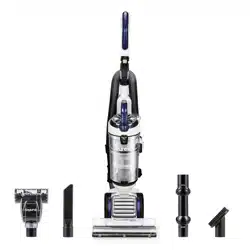
What comes in the carton
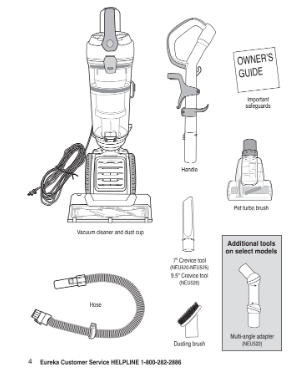
How to identify parts of your vacuum cleaner
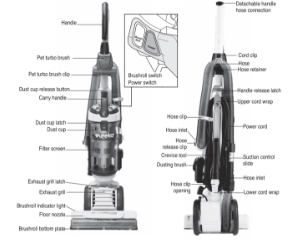
For filter maintenance instructions, see pages 10 and 11
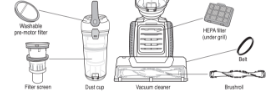
How to assemble your vacuum cleaner
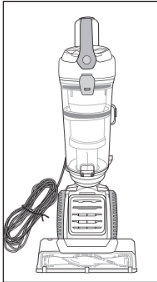
Vacuum cleaner with dust cup.
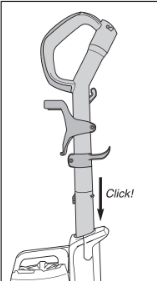
Slide handle into top of vacuum cleaner. Push down until it clicks.
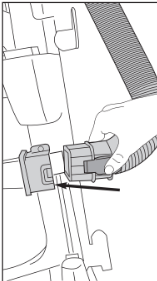
Attach hose. Align square end of hose with inlet and push in. Clip will snap to secure in place.
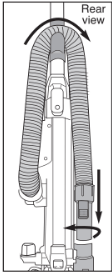
Loop hose over hose retainer. Press loose end into hose inlet and twist clockwise to lock.
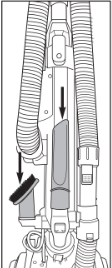
Store crevice tool and dusting brush on posts.
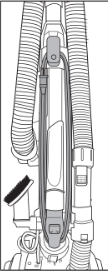
Wrap cord onto upper and lower cord wrap.
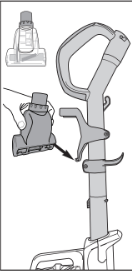
Store pet turbo brush on front of handle. Align brush opening with slot and push to snap tool into clip.
How to use your vacuum cleaner
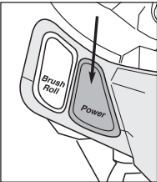
Plug power cord into outlet. Press power switch to turn on.
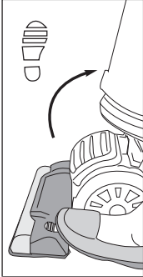
Step on floor nozzle and pull handle to lower into position for vacuuming floors.
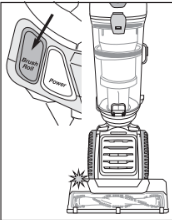
To vacuum carpet, press brushroll switch to turn on brushroll. Light will turn blue when brushroll is on.
Brushroll will spin only when handle is lowered into position for vacuuming.
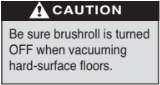
To vacuum hard-surface floors, press brushroll switch to turn off brushroll. Indicator light will turn off.
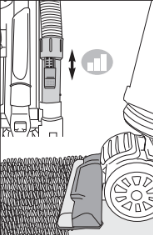
The floor nozzle can be adjusted for cleaning all floor types. If vacuum is hard to push or pull, use slide on hose end to adjust suction power.
Empty dust cup after every use
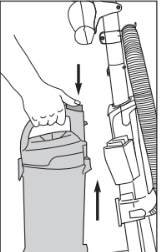
Press release button and lift off dust cup.
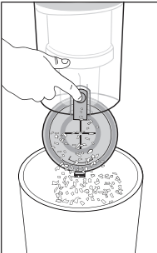
To empty debris, press lever to release bottom lid.
How to use accessories
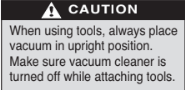
Place vacuum in upright position.
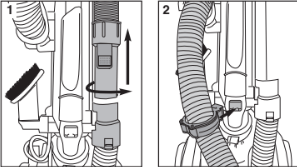
- Turn hose end counterclockwise to unlock. Pull up on hose end to release (Fig. 1).
- To prevent vacuum from tipping over while using accessories, insert hose clip into opening on back of vacuum. Press clip in to snap into place (Fig. 2).
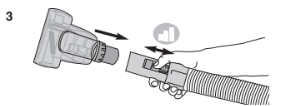
- Use slide on hose end to adjust suction power (Fig. 3).
Using accessories with hose only
- Push desired tool directly onto end of hose (Fig. 3).
Using accessories with handle as extension wand
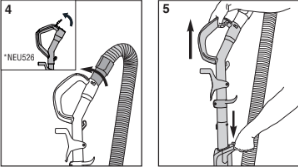
- Push end of hose into top of handle and twist clockwise into locked position. On NEU526, open cap first. (Fig. 4).
- Push handle release latch and pull out handle/extension wand (Fig. 5).
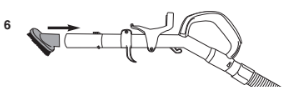
- Push desired tool onto end of extension wand (Fig. 6).
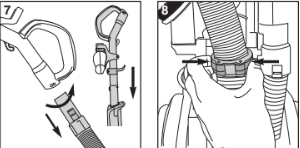
- When finished using accessories, twist hose counterclockwise and pull off handle. Slide handle into top of vacuum cleaner and push down until it clicks (Fig. 7).
- Squeeze sides of hose clip to release it from back of vacuum. (Fig. 8). Reposition hose over retainer and push loose end securely into hose inlet.
- Store tools on vacuum cleaner; wrap cord.
How to use accessories
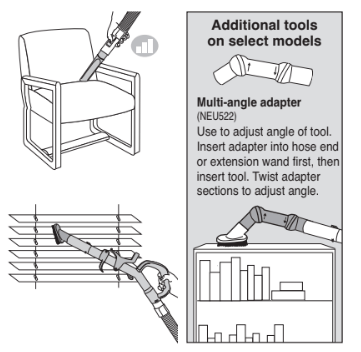

Crevice tool – Use for baseboard edges, sofas, detailing chairs, dryer vents and tight spaces.

Dusting brush – Use for furniture, drapes, blinds, drawers and vents.
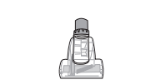
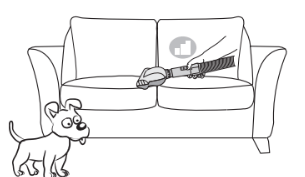
Pet turbo brush – Use to easily remove pet hair and debris from stairs, rugs and upholstery.
CAUTION: Make sure vacuum cleaner is turned off while attaching turbo brush.
How to maintain pet turbo brush
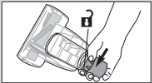
Grasp collar and twist counterclockwise to unlock cover. Lift cover up.
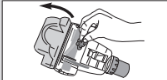
With cover open, use fingers or small brush to clear accumulated hair and debris from turbo blades.
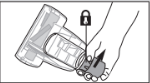
Close cover and twist collar clockwise to lock.
How to maintain dust cup and filters
CAUTION
Never operate vacuum cleaner without pre-motor filter, filter screen and dust cup in proper position.
WARNING: Moving parts!
Make sure vacuum cleaner is turned off and power cord is unplugged.
Dust cup – Empty after each use
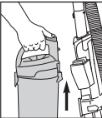
Press release button and lift off dust cup.
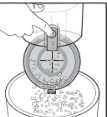
Hold dust cup over wastebasket and press lever to release bottom lid. Debris will empty.
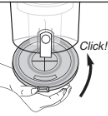
Close bottom lid until it clicks.
Washable dust cup filters – Clean frequently
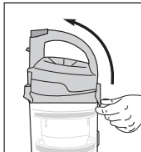
Pull dust cup latch to lift up dust cup lid.
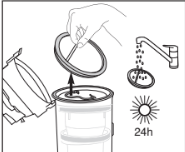
Lift out pre-motor filter and shake off dust frequently. Every three months, rinse filter and dry THOROUGHLY.
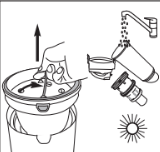
Rotate handle up to lift out filter screen. Tap to remove dust. Rinse dust cup and filter screen; dry THOROUGHLY.
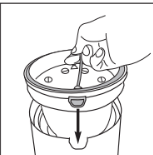
Align tab on filter screen with slot on front of dust cup and drop into position. Rotate handle down into position.
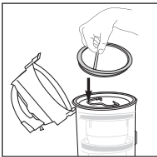
Reinstall pre-motor filter.
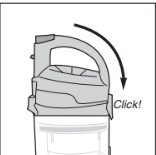
Close cover until it clicks.
How to replace HEPA filter
Caution: Make sure vacuum cleaner is turned off and power cord is unplugged.
HEPA filter – Replace or wash every year
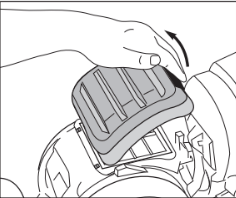
Step on floor nozzle and lay vacuum flat for easy access to filter. Press latch and lift off exhaust grill.
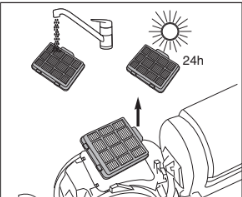
Press tab and grasp edges to lift out HEPA filter. Note: All filters are washable and can be cleaned by rinsing with warm water. Be sure the filter is THOROUGHLY dry before installing.
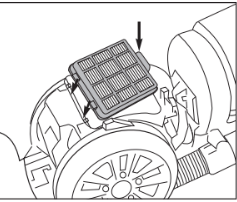
Install HEPA filter: Align tabs at front edge and press into position.
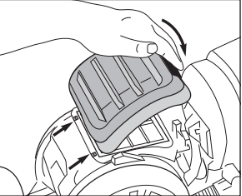
Insert front edge of exhaust grill between two tabs; press to close.
Warning: Never operate vacuum cleaner without all filters, filter screen, and dust cup in proper position.
How to maintain brushroll
CAUTION
Make sure vacuum cleaner is turned off and power cord is unplugged.
Warning: Do not attempt to remove belt. Call the Eureka Customer Service HELPLINE at 1-800-282-2886.
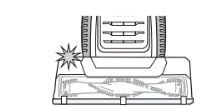
If brushroll light turns red, this indicates the brushroll is clogged and cannot spin. Brushroll will automatically shut off. Turn vacuum off and unplug before attempting to remove clog.
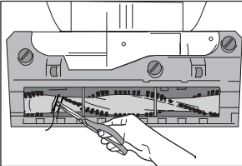
Step on floor nozzle to lower handle. Turn vacuum face down on floor. Use scissors to clip heavy threads or strings.
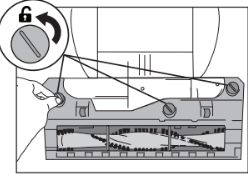
If debris cannot be removed easily, remove bottom plate for greater access to brushroll. Using flat-head screwdriver or coin, turn 3 slots counterclockwise a quarter turn to unlock’ position.
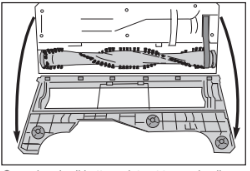
Grasp brushroll bottom plate at top and pull down to flip open.
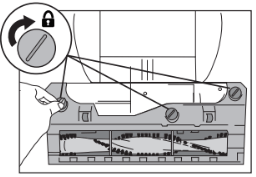
To close bottom plate, use coin to turn slots clockwise to 'lock' position.
How to clear a blockage
CAUTION
Make sure vacuum is turned off and power cord is unplugged.
Warning: Never operate vacuum cleaner without all filters, filter screen and dust cup in proper position.
If vacuum is not cleaning properly, or if no suction at end of hose, check to be sure air path is not blocked.
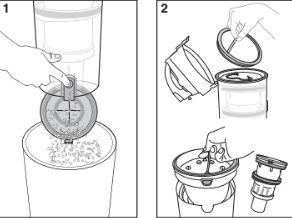
- Press release button and lift off dust cup. Empty debris. Hold over wastebasket and press lever to release bottom lid (Fig. 1).
- Check filters and filter screen. Remove any debris and shake off dust (Fig. 2). (See maintenance instructions on page 10.)
- Use finger to check for debris in air path (Fig. 3).
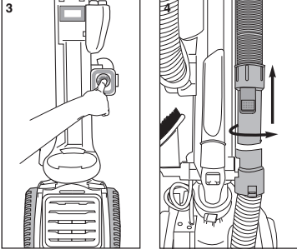
If still no suction, check for blockage in hose.
- Turn hose end counterclockwise to unlock. Pull up on hose end to release (Fig. 4).
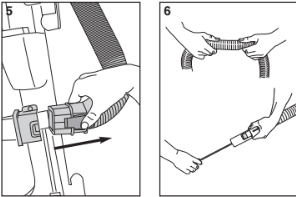
- On other end of hose, press clip to release and pull away from hose inlet (Fig. 5).
- Flex hose to loosen debris. Use a rod or similar blunt implement to clear a blockage in hose (Fig. 6). Use caution if there is any risk that glass or nails could have become imbedded in hose.
- Reattach upper and lower hoses. Ensure that filters and dust cup are returned to proper position.
Problem solving
Make sure vacuum is turned off and power cord is unplugged.
NOTICE : Thermal cut-off
This vacuum cleaner has a special thermostat that protects the vacuum in case of motor overheating. If the vacuum suddenly shuts off, proceed as follows: 1) Push the power switch to off and unplug the vacuum. 2) Check the vacuum for a possible source of overheating such as a full dust cup, blocked hose or clogged filter. If these conditions are found, fix them and wait at least 30 minutes before attempting to use the vacuum. 3) After the 30 minute period, plug the vacuum back in and turn on the switch. If the vacuum still does not work, call the Eureka customer service helpline.
Motor will not start.
- Push plug securely into outlet, try another outlet or check circuit breaker.
- Press on power switch to turn vacuum on.
- See detailed "thermal cut-off" instructions above.
Vacuum cleaner does not clean carpet or bare floor.
- Make sure suction control is closed. Page 7.
- Empty dust cup, clean and/or change filters regularly to maintain suction. Page 10.
- Press brushroll switch to turn on brushroll. Indicator light will turn blue.
- Red indicator light indicates the brushroll is clogged. Clean brushroll if needed. Page 12.
No suction at the end of hose.
- See other solutions above.
- Remove clogs from the hose that restrict the airflow. Page 13.
Vacuum cleaner is hard to push or pull.
- Open suction control at end of hose. Page 7.
- Check brushroll for debris and clean if needed. Page 12.
Brushroll indicator light turns red or brushroll will not spin.
- Check brushroll for debris. Page 12.
Pet turbo brush will not spin.
- Check pet turbo brush for debris. Page 9.
The Eureka limited warranty
Midea America Corp. (“Eureka”), subject to the terms and conditions herein, warrants this vacuum cleaner to be free from defects in material and workmanship for a term of five years from the date of original purchase when used in accordance with the Eureka operating and maintenance instructions and under normal household usage. This warranty is granted only to the original purchaser and members of immediate household, and is applicable only to original purchases from Eureka authorized resellers.
What Eureka will do:
Eureka will, at its option, repair or replace a defective vacuum or vacuum part that is covered by this warranty. Repairs may be performed using new or refurbished parts that meet or exceed Eureka specifications for new parts. If Eureka elects to replace the vacuum, the replacement may be a reconditioned unit. Depending on availability of products, Eureka reserves the right to provide you with a replacement product that is the same or similar, or substitute equivalent of the original product. As a matter of warranty policy, Eureka will not refund the consumer’s purchase price.
This warranty does not cover:
Normal wear and tear of the vacuum and vacuum parts that require replacement under normal use such as disposable dust bags, filters, drive belts, light bulbs, brushroll, bristles, impellers and cleaning.
Damages or malfunctions resulting from: improper or unreasonable use or maintenance, abuse, negligence, failure to follow instructions contained in any written materials that accompany the product, deterioration by reason of excess moisture, corrosive atmosphere, lightning, power surges, connections to improper voltage supply, unauthorized alteration, or other external causes such as extremes in temperature or humidity, modifications, scratches or discoloration, accidents, misuse, or acts of God. This warranty also does not cover damage resulting from repair or attempted repair by anyone other than Eureka or an authorized
Eureka Warranty Station. This warranty is not applicable to any product that has been altered or on which the serial number has been defaced, modified or removed. Altering, erasing, or forging any proof-of-purchase documents voids any applicable product warranty.
Shipping charges:
You will be responsible for any initial shipping and insurance charges if the defective product(s) must be shipped for warranty service or warranty evaluation; however, Eureka or a Eureka Authorized Warranty
Station will pay the return shipping charges if repairs are covered by the warranty. When returning parts for repair, you must include the model, type and serial number located on the rating plate on the lower backside of the vacuum. If any product submitted for warranty service is found to be ineligible, an estimate of repair cost will be furnished and the repair performed only if requested by the owner and upon receipt of payment or acceptable arrangements for payment.
Further limitations and exclusions:
Any warranty that may be implied in connection with your purchase or use of the vacuum, including any warranty of Merchantability or any warranty of Fitness
For A Particular Purpose is limited to the duration of this limited warranty. Some states do not allow limitations on how long an implied warranty lasts, so the above limitations may not apply to you.
Your relief for the breach of this warranty is limited to the relief expressly provided above. In no event shall the manufacturer be liable for any consequential or incidental damages you may incur in connection with your purchase or use of the vacuum. Some states do not allow the exclusion or limitation of incidental or consequential damages, so the above limitation or exclusion may not apply to you.
This warranty gives you specific legal rights. You may also have other rights, which may vary by state.
Midea America Corp.
Rivers Edge Drive
Medford, MA. 02155
USA