2
1
6
4
7
5
3
9
1.
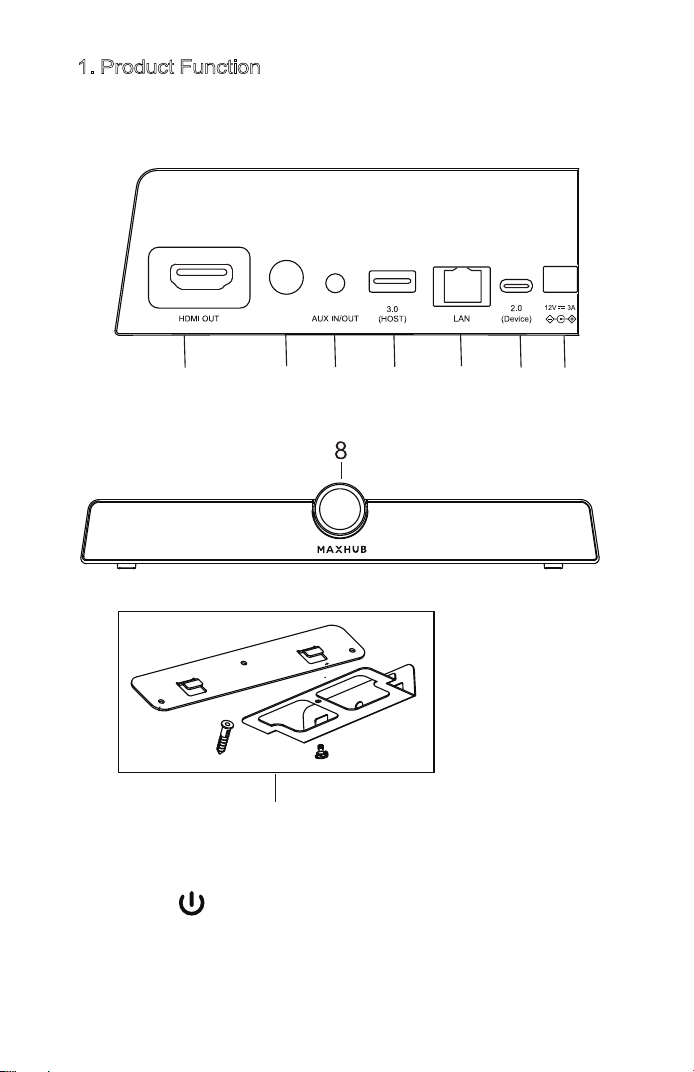
1. Product Function
Please familiarize yourself with the interface and buttons
of the device before using this device.
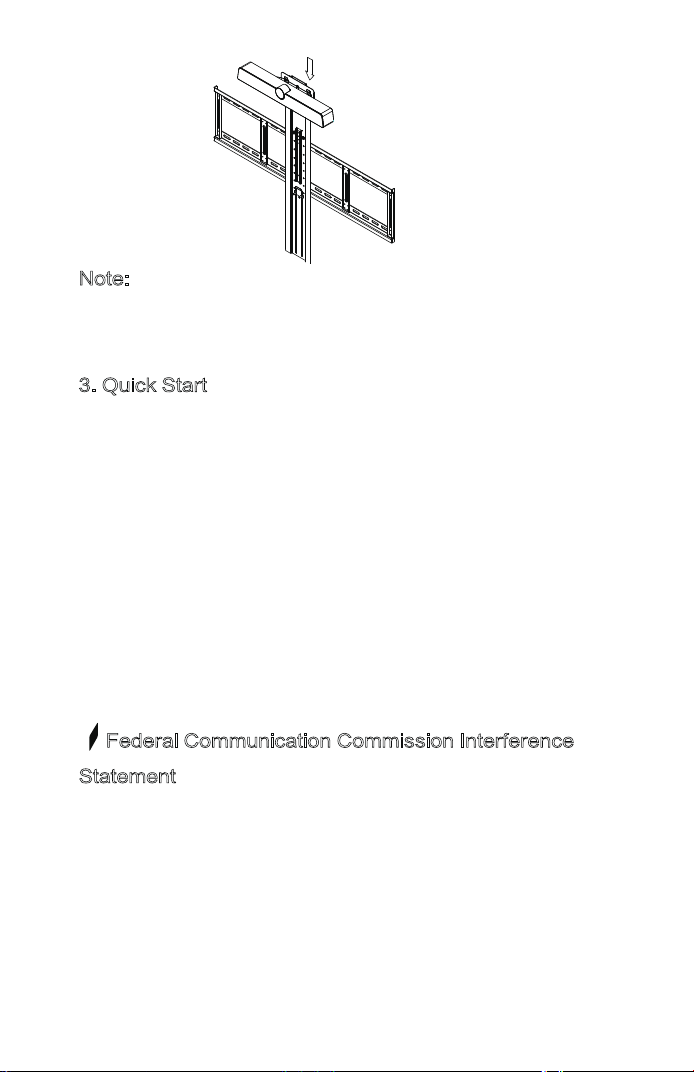
3) Use with panel:Fix the bracket onto the supporting bracket
with screws, then place the integrated video conference terminal
onto the bracket.(The bracket needs to be purchased separately.)
Integrated video conference terminal
User Manual
Note:The product images are for illustrative purposes only
and may slightly differ in appearance, colour, size, etc. from
the actual product.
Safety Warning and Precautions
Before using and operating this device, please read
thoroughly and comply with the following precautions in
order to prevent accidents or abnormal operation.
1) Operating Environment
Do not place the product in dusty and humid environments
in case of internal short circuit.
Do not place the product near heating devices(such as
electrical heater).
Operating temperature is 0-40℃, operating humidity is
10%-90%RH. Please use the product accordingly.
2) Children Safety
The product and accessories may contain some small parts.
Please keep them from children to avoid accidental
swallowing or danger.
3) Power supply
Please use the standard power adapter.
4) Keep Dry
The product is NOT waterproof.Please keep it dry.
5) Maintenance
Please contact technical support for maintenance services.
Do NOT insert any sharp or pointed object into the device.
Prevent the device from falls and collisions with other
objects,which may cause damages.
Statement
1) Intellectual property right statement: The patents cover the
hardware design and software of this product. Anyone
reproduces the product or the contents of this instruction
without prior written permission from the Company shall be
liable to legal prosecutions.
2) The description, illustrations, etc. in this document may
subject to change per the latest product specification and
performance.
3) The product images are for illustrative purposes only and
may slightly differ in appearance, colour, size, etc. from the
actual product.
4) The Company reserves the rights to improve and change
the appearance and design of the product without notice.
Note: Users may find the type approval code of this product
on the product’s nameplate.
Accessories introduction
Please check the following items in the product box.
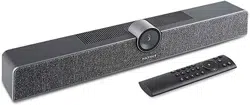
Wall-mounted x1HDMI cable x1
Power adapter×1Peeping cover x1
Remote control x1
USB cable×1
1) HDMI OUT:Connect to the devices with HDMI input function
2) POWER :Tap to enter energy-saving,press and hold
for at least 2 seconds to enter standby mode
3) AUX IN/OUT:Used for external audio equipment
4) 3.0:USB 3.0,used for upgrading and connecting with
external mouse/keyboard
5) LAN:Connect RJ45 terminals
6) 2.0:Device,can be connected to a computer through
a USB Type-A to Type-C data cable, providing the
computer with camera, microphone and speaker
7) DC:Used for 12V power input power supply
8) Camera:Shooting performance
9) Hanging components
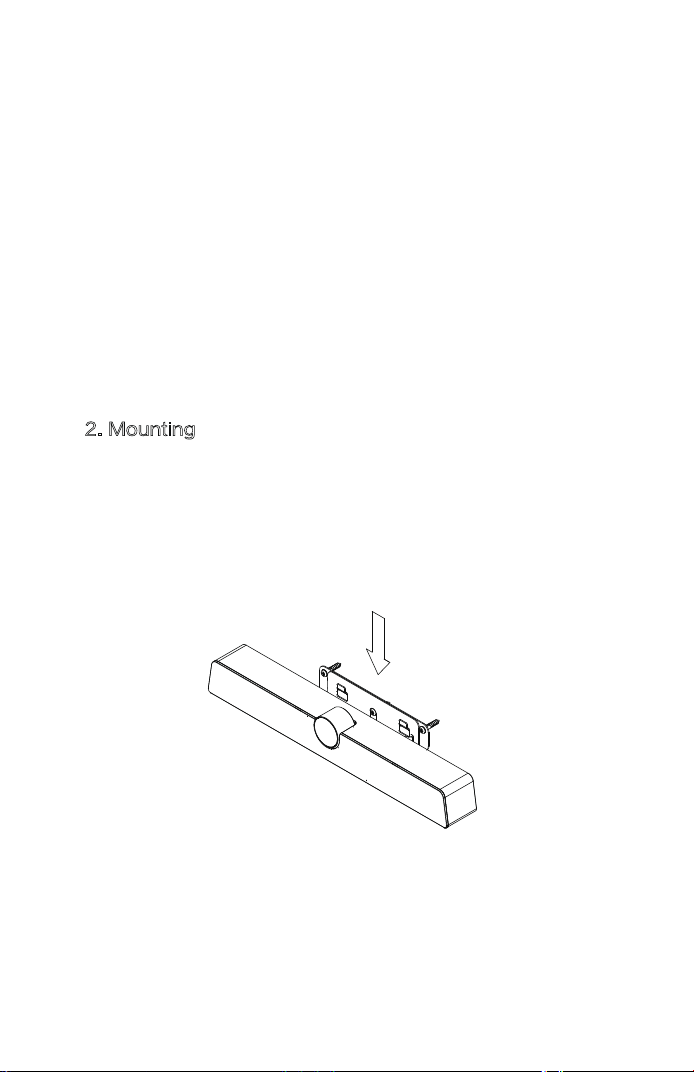
2. Mounting
1) Placed directly on the desktop.
2) Wall-mounted:Fix the bracket onto the Wall with
screws, then place the integratedvideo conference terminal
onto the bracket.
Note:
The connection of different samples may slightly differ.
Please refer to the actual product.
3. Quick Start
1) Please use HDMI cable to connect this product to the
monitor.
2) To turn on the device, press the power button on the back
of the product or use remote control.
3) For the first use, please complete the network connection
and device activation during device boot.
4) After successful activation, this product function would be
fully functional.
Federal Communication Commission Interference
Statement
This equipment has been tested and found to comply with
the limits for a Class B digital device, pursuant to Part 15 of
the FCC Rules. These limits are designed to provide
reasonable protection against harmful interference in a
residential installation. This equipment generates, uses, and
can radiate radio frequency energy and, if not installed and
Use manual x1
2
1
6
4
7
5
3
9
1.
1. Product Function
Please familiarize yourself with the interface and buttons
of the device before using this device.
3) Use with panel:Fix the bracket onto the supporting bracket
with screws, then place the integrated video conference terminal
onto the bracket.(The bracket needs to be purchased separately.)
Integrated video conference terminal
User Manual
Note:The product images are for illustrative purposes only
and may slightly differ in appearance, colour, size, etc. from
the actual product.
Safety Warning and Precautions
Before using and operating this device, please read
thoroughly and comply with the following precautions in
order to prevent accidents or abnormal operation.
1) Operating Environment
Do not place the product in dusty and humid environments
in case of internal short circuit.
Do not place the product near heating devices(such as
electrical heater).
Operating temperature is 0-40℃, operating humidity is
10%-90%RH. Please use the product accordingly.
2) Children Safety
The product and accessories may contain some small parts.
Please keep them from children to avoid accidental
swallowing or danger.
3) Power supply
Please use the standard power adapter.
4) Keep Dry
The product is NOT waterproof.Please keep it dry.
5) Maintenance
Please contact technical support for maintenance services.
Do NOT insert any sharp or pointed object into the device.
Prevent the device from falls and collisions with other
objects,which may cause damages.
Statement
1) Intellectual property right statement: The patents cover the
hardware design and software of this product. Anyone
reproduces the product or the contents of this instruction
without prior written permission from the Company shall be
liable to legal prosecutions.
2) The description, illustrations, etc. in this document may
subject to change per the latest product specification and
performance.
3) The product images are for illustrative purposes only and
may slightly differ in appearance, colour, size, etc. from the
actual product.
4) The Company reserves the rights to improve and change
the appearance and design of the product without notice.
Note: Users may find the type approval code of this product
on the product’s nameplate.
Accessories introduction
Please check the following items in the product box.
Wall-mounted x1HDMI cable x1
Power adapter×1Peeping cover x1
Remote control x1
USB cable×1
1) HDMI OUT:Connect to the devices with HDMI input function
2) POWER :Tap to enter energy-saving,press and hold
for at least 2 seconds to enter standby mode
3) AUX IN/OUT:Used for external audio equipment
4) 3.0:USB 3.0,used for upgrading and connecting with
external mouse/keyboard
5) LAN:Connect RJ45 terminals
6) 2.0:Device,can be connected to a computer through
a USB Type-A to Type-C data cable, providing the
computer with camera, microphone and speaker
7) DC:Used for 12V power input power supply
8) Camera:Shooting performance
9) Hanging components
2. Mounting
1) Placed directly on the desktop.
2) Wall-mounted:Fix the bracket onto the Wall with
screws, then place the integratedvideo conference terminal
onto the bracket.
Note:
The connection of different samples may slightly differ.
Please refer to the actual product.
3. Quick Start
1) Please use HDMI cable to connect this product to the
monitor.
2) To turn on the device, press the power button on the back
of the product or use remote control.
3) For the first use, please complete the network connection
and device activation during device boot.
4) After successful activation, this product function would be
fully functional.
Federal Communication Commission Interference
Statement
This equipment has been tested and found to comply with
the limits for a Class B digital device, pursuant to Part 15 of
the FCC Rules. These limits are designed to provide
reasonable protection against harmful interference in a
residential installation. This equipment generates, uses, and
can radiate radio frequency energy and, if not installed and
Use manual x1
2
1
6
4
7
5
3
9
1.
1. Product Function
Please familiarize yourself with the interface and buttons
of the device before using this device.
3) Use with panel:Fix the bracket onto the supporting bracket
with screws, then place the integrated video conference terminal
onto the bracket.(The bracket needs to be purchased separately.)
Integrated video conference terminal
User Manual
Note:The product images are for illustrative purposes only
and may slightly differ in appearance, colour, size, etc. from
the actual product.
Safety Warning and Precautions
Before using and operating this device, please read
thoroughly and comply with the following precautions in
order to prevent accidents or abnormal operation.
1) Operating Environment
Do not place the product in dusty and humid environments
in case of internal short circuit.
Do not place the product near heating devices(such as
electrical heater).
Operating temperature is 0-40℃, operating humidity is
10%-90%RH. Please use the product accordingly.
2) Children Safety
The product and accessories may contain some small parts.
Please keep them from children to avoid accidental
swallowing or danger.
3) Power supply
Please use the standard power adapter.
4) Keep Dry
The product is NOT waterproof.Please keep it dry.
5) Maintenance
Please contact technical support for maintenance services.
Do NOT insert any sharp or pointed object into the device.
Prevent the device from falls and collisions with other
objects,which may cause damages.
Statement
1) Intellectual property right statement: The patents cover the
hardware design and software of this product. Anyone
reproduces the product or the contents of this instruction
without prior written permission from the Company shall be
liable to legal prosecutions.
2) The description, illustrations, etc. in this document may
subject to change per the latest product specification and
performance.
3) The product images are for illustrative purposes only and
may slightly differ in appearance, colour, size, etc. from the
actual product.
4) The Company reserves the rights to improve and change
the appearance and design of the product without notice.
Note: Users may find the type approval code of this product
on the product’s nameplate.
Accessories introduction
Please check the following items in the product box.
Wall-mounted x1HDMI cable x1
Power adapter×1Peeping cover x1
Remote control x1
USB cable×1
1) HDMI OUT:Connect to the devices with HDMI input function
2) POWER :Tap to enter energy-saving,press and hold
for at least 2 seconds to enter standby mode
3) AUX IN/OUT:Used for external audio equipment
4) 3.0:USB 3.0,used for upgrading and connecting with
external mouse/keyboard
5) LAN:Connect RJ45 terminals
6) 2.0:Device,can be connected to a computer through
a USB Type-A to Type-C data cable, providing the
computer with camera, microphone and speaker
7) DC:Used for 12V power input power supply
8) Camera:Shooting performance
9) Hanging components
2. Mounting
1) Placed directly on the desktop.
2) Wall-mounted:Fix the bracket onto the Wall with
screws, then place the integratedvideo conference terminal
onto the bracket.
Note:
The connection of different samples may slightly differ.
Please refer to the actual product.
3. Quick Start
1) Please use HDMI cable to connect this product to the
monitor.
2) To turn on the device, press the power button on the back
of the product or use remote control.
3) For the first use, please complete the network connection
and device activation during device boot.
4) After successful activation, this product function would be
fully functional.
Federal Communication Commission Interference
Statement
This equipment has been tested and found to comply with
the limits for a Class B digital device, pursuant to Part 15 of
the FCC Rules. These limits are designed to provide
reasonable protection against harmful interference in a
residential installation. This equipment generates, uses, and
can radiate radio frequency energy and, if not installed and
Use manual x1
2
1
6
4
7
5
3
9
1.
1. Product Function
Please familiarize yourself with the interface and buttons
of the device before using this device.
3) Use with panel:Fix the bracket onto the supporting bracket
with screws, then place the integrated video conference terminal
onto the bracket.(The bracket needs to be purchased separately.)
Integrated video conference terminal
User Manual
Note:The product images are for illustrative purposes only
and may slightly differ in appearance, colour, size, etc. from
the actual product.
Safety Warning and Precautions
Before using and operating this device, please read
thoroughly and comply with the following precautions in
order to prevent accidents or abnormal operation.
1) Operating Environment
Do not place the product in dusty and humid environments
in case of internal short circuit.
Do not place the product near heating devices(such as
electrical heater).
Operating temperature is 0-40℃, operating humidity is
10%-90%RH. Please use the product accordingly.
2) Children Safety
The product and accessories may contain some small parts.
Please keep them from children to avoid accidental
swallowing or danger.
3) Power supply
Please use the standard power adapter.
4) Keep Dry
The product is NOT waterproof.Please keep it dry.
5) Maintenance
Please contact technical support for maintenance services.
Do NOT insert any sharp or pointed object into the device.
Prevent the device from falls and collisions with other
objects,which may cause damages.
Statement
1) Intellectual property right statement: The patents cover the
hardware design and software of this product. Anyone
reproduces the product or the contents of this instruction
without prior written permission from the Company shall be
liable to legal prosecutions.
2) The description, illustrations, etc. in this document may
subject to change per the latest product specification and
performance.
3) The product images are for illustrative purposes only and
may slightly differ in appearance, colour, size, etc. from the
actual product.
4) The Company reserves the rights to improve and change
the appearance and design of the product without notice.
Note: Users may find the type approval code of this product
on the product’s nameplate.
Accessories introduction
Please check the following items in the product box.
Wall-mounted x1HDMI cable x1
Power adapter×1Peeping cover x1
Remote control x1
USB cable×1
1) HDMI OUT:Connect to the devices with HDMI input function
2) POWER :Tap to enter energy-saving,press and hold
for at least 2 seconds to enter standby mode
3) AUX IN/OUT:Used for external audio equipment
4) 3.0:USB 3.0,used for upgrading and connecting with
external mouse/keyboard
5) LAN:Connect RJ45 terminals
6) 2.0:Device,can be connected to a computer through
a USB Type-A to Type-C data cable, providing the
computer with camera, microphone and speaker
7) DC:Used for 12V power input power supply
8) Camera:Shooting performance
9) Hanging components
2. Mounting
1) Placed directly on the desktop.
2) Wall-mounted:Fix the bracket onto the Wall with
screws, then place the integratedvideo conference terminal
onto the bracket.
Note:
The connection of different samples may slightly differ.
Please refer to the actual product.
3. Quick Start
1) Please use HDMI cable to connect this product to the
monitor.
2) To turn on the device, press the power button on the back
of the product or use remote control.
3) For the first use, please complete the network connection
and device activation during device boot.
4) After successful activation, this product function would be
fully functional.
Federal Communication Commission Interference
Statement
This equipment has been tested and found to comply with
the limits for a Class B digital device, pursuant to Part 15 of
the FCC Rules. These limits are designed to provide
reasonable protection against harmful interference in a
residential installation. This equipment generates, uses, and
can radiate radio frequency energy and, if not installed and
Use manual x1
2
1
6
4
7
5
3
9
1.
1. Product Function
Please familiarize yourself with the interface and buttons
of the device before using this device.
3) Use with panel:Fix the bracket onto the supporting bracket
with screws, then place the integrated video conference terminal
onto the bracket.(The bracket needs to be purchased separately.)
Integrated video conference terminal
User Manual
Note:The product images are for illustrative purposes only
and may slightly differ in appearance, colour, size, etc. from
the actual product.
Safety Warning and Precautions
Before using and operating this device, please read
thoroughly and comply with the following precautions in
order to prevent accidents or abnormal operation.
1) Operating Environment
Do not place the product in dusty and humid environments
in case of internal short circuit.
Do not place the product near heating devices(such as
electrical heater).
Operating temperature is 0-40℃, operating humidity is
10%-90%RH. Please use the product accordingly.
2) Children Safety
The product and accessories may contain some small parts.
Please keep them from children to avoid accidental
swallowing or danger.
3) Power supply
Please use the standard power adapter.
4) Keep Dry
The product is NOT waterproof.Please keep it dry.
5) Maintenance
Please contact technical support for maintenance services.
Do NOT insert any sharp or pointed object into the device.
Prevent the device from falls and collisions with other
objects,which may cause damages.
Statement
1) Intellectual property right statement: The patents cover the
hardware design and software of this product. Anyone
reproduces the product or the contents of this instruction
without prior written permission from the Company shall be
liable to legal prosecutions.
2) The description, illustrations, etc. in this document may
subject to change per the latest product specification and
performance.
3) The product images are for illustrative purposes only and
may slightly differ in appearance, colour, size, etc. from the
actual product.
4) The Company reserves the rights to improve and change
the appearance and design of the product without notice.
Note: Users may find the type approval code of this product
on the product’s nameplate.
Accessories introduction
Please check the following items in the product box.
Wall-mounted x1HDMI cable x1
Power adapter×1Peeping cover x1
Remote control x1
USB cable×1
1) HDMI OUT:Connect to the devices with HDMI input function
2) POWER :Tap to enter energy-saving,press and hold
for at least 2 seconds to enter standby mode
3) AUX IN/OUT:Used for external audio equipment
4) 3.0:USB 3.0,used for upgrading and connecting with
external mouse/keyboard
5) LAN:Connect RJ45 terminals
6) 2.0:Device,can be connected to a computer through
a USB Type-A to Type-C data cable, providing the
computer with camera, microphone and speaker
7) DC:Used for 12V power input power supply
8) Camera:Shooting performance
9) Hanging components
2. Mounting
1) Placed directly on the desktop.
2) Wall-mounted:Fix the bracket onto the Wall with
screws, then place the integratedvideo conference terminal
onto the bracket.
Note:
The connection of different samples may slightly differ.
Please refer to the actual product.
3. Quick Start
1) Please use HDMI cable to connect this product to the
monitor.
2) To turn on the device, press the power button on the back
of the product or use remote control.
3) For the first use, please complete the network connection
and device activation during device boot.
4) After successful activation, this product function would be
fully functional.
Federal Communication Commission Interference
Statement
This equipment has been tested and found to comply with
the limits for a Class B digital device, pursuant to Part 15 of
the FCC Rules. These limits are designed to provide
reasonable protection against harmful interference in a
residential installation. This equipment generates, uses, and
can radiate radio frequency energy and, if not installed and
Use manual x1
2
1
6
4
7
5
3
9
1.
1. Product Function
Please familiarize yourself with the interface and buttons
of the device before using this device.
3) Use with panel:Fix the bracket onto the supporting bracket
with screws, then place the integrated video conference terminal
onto the bracket.(The bracket needs to be purchased separately.)
Integrated video conference terminal
User Manual
Note:The product images are for illustrative purposes only
and may slightly differ in appearance, colour, size, etc. from
the actual product.
Safety Warning and Precautions
Before using and operating this device, please read
thoroughly and comply with the following precautions in
order to prevent accidents or abnormal operation.
1) Operating Environment
Do not place the product in dusty and humid environments
in case of internal short circuit.
Do not place the product near heating devices(such as
electrical heater).
Operating temperature is 0-40℃, operating humidity is
10%-90%RH. Please use the product accordingly.
2) Children Safety
The product and accessories may contain some small parts.
Please keep them from children to avoid accidental
swallowing or danger.
3) Power supply
Please use the standard power adapter.
4) Keep Dry
The product is NOT waterproof.Please keep it dry.
5) Maintenance
Please contact technical support for maintenance services.
Do NOT insert any sharp or pointed object into the device.
Prevent the device from falls and collisions with other
objects,which may cause damages.
Statement
1) Intellectual property right statement: The patents cover the
hardware design and software of this product. Anyone
reproduces the product or the contents of this instruction
without prior written permission from the Company shall be
liable to legal prosecutions.
2) The description, illustrations, etc. in this document may
subject to change per the latest product specification and
performance.
3) The product images are for illustrative purposes only and
may slightly differ in appearance, colour, size, etc. from the
actual product.
4) The Company reserves the rights to improve and change
the appearance and design of the product without notice.
Note: Users may find the type approval code of this product
on the product’s nameplate.
Accessories introduction
Please check the following items in the product box.
Wall-mounted x1HDMI cable x1
Power adapter×1Peeping cover x1
Remote control x1
USB cable×1
1) HDMI OUT:Connect to the devices with HDMI input function
2) POWER :Tap to enter energy-saving,press and hold
for at least 2 seconds to enter standby mode
3) AUX IN/OUT:Used for external audio equipment
4) 3.0:USB 3.0,used for upgrading and connecting with
external mouse/keyboard
5) LAN:Connect RJ45 terminals
6) 2.0:Device,can be connected to a computer through
a USB Type-A to Type-C data cable, providing the
computer with camera, microphone and speaker
7) DC:Used for 12V power input power supply
8) Camera:Shooting performance
9) Hanging components
2. Mounting
1) Placed directly on the desktop.
2) Wall-mounted:Fix the bracket onto the Wall with
screws, then place the integratedvideo conference terminal
onto the bracket.
Note:
The connection of different samples may slightly differ.
Please refer to the actual product.
3. Quick Start
1) Please use HDMI cable to connect this product to the
monitor.
2) To turn on the device, press the power button on the back
of the product or use remote control.
3) For the first use, please complete the network connection
and device activation during device boot.
4) After successful activation, this product function would be
fully functional.
Federal Communication Commission Interference
Statement
This equipment has been tested and found to comply with
the limits for a Class B digital device, pursuant to Part 15 of
the FCC Rules. These limits are designed to provide
reasonable protection against harmful interference in a
residential installation. This equipment generates, uses, and
can radiate radio frequency energy and, if not installed and
Use manual x1
Romote Control
BE BG CZ
DK
DE EE
IE
EL ES FR HR
IT
CY
LV LT LU HU
MT NL
AT PL PT RO SI
SK
FI
SE UK TR NO
CH IS
LI
b
h
b
d
d
a
c
f
d
d
e
g
i
j
c
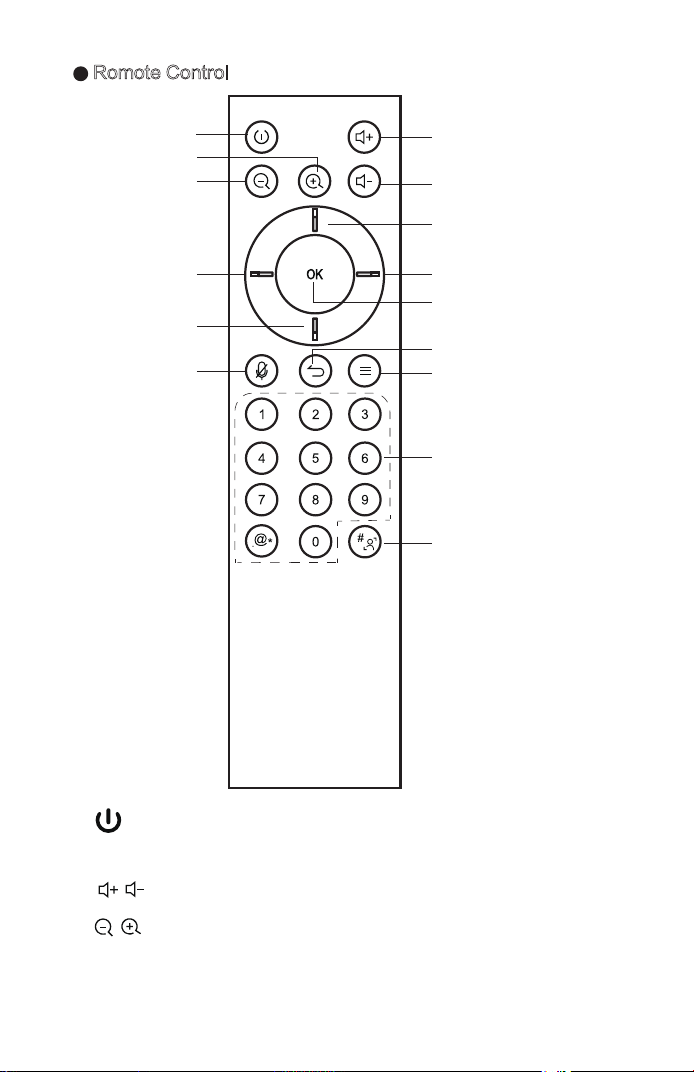
a. :Power Button,press to start the power off countdown.
Press and hold for 3 seconds to power off.
b. : Volume Button, press to adjust the system volume.
c. : Digital Zooming,press to digitally zoom the camera.
(Available only when auto framing is disabled). After zooming
in, the direction button may move the picture.
d. Direction Button: Press the direction buttons to move the
camera or selection.
e. OK Button: Confirm the selection. During digital zooming,
press this button would restore the default view.
f. : Mute Button,press the turn on or off the microphone.
g. : Return Button: Press to return to previous menu or
quit an app.
h. : Menu Button,press to invoke the menu in different
interfaces.
i. Number keys and : Number Buttons,press to input the
numerals.
j. : # & Auto Framing Button: Press to type in “#”.
Press and hold to enable/disable the auto framing feature.
(" " means open, " " Means off.)
Presets:
1) Set and switch the presets in settings.
2) Press and hold the number button "1/2/3" for 2 seconds to save
the current view as a preset.
3) Each preset may including zooming level, viewing angle
information. Up to three presets are supported.
4) Press 1/2/3 to switch amongst the presets. �
Hereby, Guangzhou Shrui Electronics Co., Ltd. declares that the
radio equipment type UC S10 is in compliance with Directive
2014/53/EU.
The full text of the EU declaration of conformity is available at the
following internet address: www.maxhub.com.
20cm between the radiator and any part of your body.
Non-modification Statement:
Changes or modifications not expressly approved by the party
responsible for compliance could void the user's authority to operate
the equipment.
IC Radiation Exposure Statement for Canada
This device contains licence-exempt transmitter(s)/ receiver(s)
that comply with Innovation, Science and Economic Development
Canada’s licence-exempt RSS(s). Operation is subject to the
following two conditions:
1) This device may not cause interference.
2) This device must accept any interference, including interference
that may cause undesired operation of the device.
L’émetteur/récepteur exempt de licence contenu dans le présent
appareil est conforme aux CNR d’Innovation, Sciences et
Développement économique Canada applicables aux appareils
radio exempts de licence. L’exploitation est autorisée aux deux
conditions suivantes :
1) L’appareil ne doit pas produire de brouillage;
2) L’appareil doit accepter tout brouillage radioélectrique subi,
même si le brouillage est susceptible d’en compromettre le
fonctionnement.
This equipment complies with ISED RSS-102 radiation exposure
limits set forth for an uncontrolled environment. This equipment
should be installed and operated with a minimum distance of 20cm
between the radiator and any part of your body.
Pour se conformer aux exigences de conformité CNR 102 RF
NOTICE:The terms HDMI and HDMI High-Definition
Multimedia Interface, and the HDMI Logo are trademarks or
registered trademarks of HDMI Licensing LLC in the United
States and other countries.
used in accordance with the instructions, may cause harmful
interference to radio communications. However, there is no
guarantee that interference will not occur in a particular
installation. If this equipment does cause harmful interference
to radio or television reception, which can be determined by
turning the equipment off and on, the user is encouraged to
try to correct the interference by one or more of the following
measures:
•Reorient or relocate the receiving antenna.
•Increase the separation between the equipment and receiver.
•Connect the equipment into an outlet on a circuit different
from that to which the receiver is connected.
•Consult the dealer or an experienced radio/TV technician
for help.
FCC Caution:
This device complies with Part 15 of the FCC Rules. Operation
is subject to the following two conditions:
1) This device may not cause harmful interference, and
2) this device must accept any interference received, including
interference that may cause undesired operation.
Caution: The user is cautioned that changes or modifications
not expressly approved by the party responsible for compliance
could void the user's authority to operate the equipment.
This equipment complies with FCC radiation exposure limits
set forth for an uncontrolled environment. This equipment
should be installed and operated with a minimum distance of
exposition, une distance de séparation d'au moins 20 cm doit être
maintenue entre l'antenne de cet appareil ettoutes les personnes.
The device for operation in the band 5150–5250 MHz is only for
indoor use to reduce the potential for harmful interference to
co-channel mobile satellite systems
Les dispositifs fonctionnant dans la bande de 5 150 à 5 250 MHz
sont réservés uniquement pour une utilisation à l’intérieur afin
de réduire les risques de brouillage préjudiciable aux systèmes
de satellites mobiles utilisant les mêmes canaux.
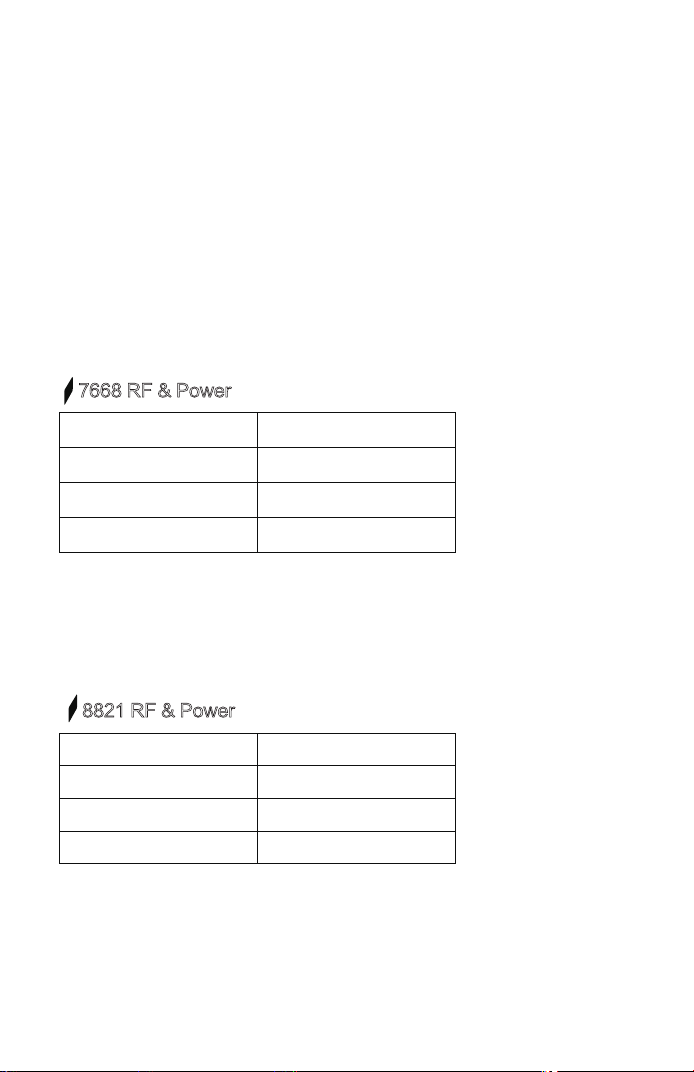
7668 RF & Power
Frequency Range Output Power (Max.)
2412 to 2472 MHz 19.17 dBm
5150 to 5250 MHz 19.23 dBm
5725 to 5825 MHz 13.02 dBm
Antenna Type:PCB
Antenna Gain: 2.4G Wifi 2.44dBi;5G wifi(5150 to 5250 MHz)2.02dBi;
5G wifi (5150 to 5250 MHz ) 2.85dBi
Antenna Impedance:50Ω
8821 RF & Power
Frequency Range Output Power (Max.)
2412 to 2472 MHz 18.67 dBm
5150 to 5250 MHz 12.54 dBm
5725 to 5825 MHz 12.44 dBm
Antenna Type:FPC
Antenna Gain: 2.4G Wifi 5.95dBi;5G wifi(5150 to 5250 MHz)3.48dBi;
5G wifi (5150 to 5250 MHz )2.32dBi
Antenna Impedance:50Ω
This symbol, affixed to the product or its packaging,
indicates that the product must not be processed with
househlod waste. It must be brought to an electric and electronic
waste collection point for recycling and disposal. By the
appropriate disposal of this product you also help in preventing
potentially negative consequences for the environment and
human health. The recycling of materials helps preserve our
natural resources. For further information regarding the recycling
of this product, please contact your municipality, local waste
disposal centre or the store where the product was purchased.
Romote Control
BE BG CZ
DK
DE EE
IE
EL ES FR HR
IT
CY
LV LT LU HU
MT NL
AT PL PT RO SI
SK
FI
SE UK TR NO
CH IS
LI
b
h
b
d
d
a
c
f
d
d
e
g
i
j
c
a. :Power Button,press to start the power off countdown.
Press and hold for 3 seconds to power off.
b. : Volume Button, press to adjust the system volume.
c. : Digital Zooming,press to digitally zoom the camera.
(Available only when auto framing is disabled). After zooming
in, the direction button may move the picture.
d. Direction Button: Press the direction buttons to move the
camera or selection.
e. OK Button: Confirm the selection. During digital zooming,
press this button would restore the default view.
f. : Mute Button,press the turn on or off the microphone.
g. : Return Button: Press to return to previous menu or
quit an app.
h. : Menu Button,press to invoke the menu in different
interfaces.
i. Number keys and : Number Buttons,press to input the
numerals.
j. : # & Auto Framing Button: Press to type in “#”.
Press and hold to enable/disable the auto framing feature.
(" " means open, " " Means off.)
Presets:
1) Set and switch the presets in settings.
2) Press and hold the number button "1/2/3" for 2 seconds to save
the current view as a preset.
3) Each preset may including zooming level, viewing angle
information. Up to three presets are supported.
4) Press 1/2/3 to switch amongst the presets. �
Hereby, Guangzhou Shrui Electronics Co., Ltd. declares that the
radio equipment type UC S10 is in compliance with Directive
2014/53/EU.
The full text of the EU declaration of conformity is available at the
following internet address: www.maxhub.com.
20cm between the radiator and any part of your body.
Non-modification Statement:
Changes or modifications not expressly approved by the party
responsible for compliance could void the user's authority to operate
the equipment.
IC Radiation Exposure Statement for Canada
This device contains licence-exempt transmitter(s)/ receiver(s)
that comply with Innovation, Science and Economic Development
Canada’s licence-exempt RSS(s). Operation is subject to the
following two conditions:
1) This device may not cause interference.
2) This device must accept any interference, including interference
that may cause undesired operation of the device.
L’émetteur/récepteur exempt de licence contenu dans le présent
appareil est conforme aux CNR d’Innovation, Sciences et
Développement économique Canada applicables aux appareils
radio exempts de licence. L’exploitation est autorisée aux deux
conditions suivantes :
1) L’appareil ne doit pas produire de brouillage;
2) L’appareil doit accepter tout brouillage radioélectrique subi,
même si le brouillage est susceptible d’en compromettre le
fonctionnement.
This equipment complies with ISED RSS-102 radiation exposure
limits set forth for an uncontrolled environment. This equipment
should be installed and operated with a minimum distance of 20cm
between the radiator and any part of your body.
Pour se conformer aux exigences de conformité CNR 102 RF
NOTICE:The terms HDMI and HDMI High-Definition
Multimedia Interface, and the HDMI Logo are trademarks or
registered trademarks of HDMI Licensing LLC in the United
States and other countries.
used in accordance with the instructions, may cause harmful
interference to radio communications. However, there is no
guarantee that interference will not occur in a particular
installation. If this equipment does cause harmful interference
to radio or television reception, which can be determined by
turning the equipment off and on, the user is encouraged to
try to correct the interference by one or more of the following
measures:
•Reorient or relocate the receiving antenna.
•Increase the separation between the equipment and receiver.
•Connect the equipment into an outlet on a circuit different
from that to which the receiver is connected.
•Consult the dealer or an experienced radio/TV technician
for help.
FCC Caution:
This device complies with Part 15 of the FCC Rules. Operation
is subject to the following two conditions:
1) This device may not cause harmful interference, and
2) this device must accept any interference received, including
interference that may cause undesired operation.
Caution: The user is cautioned that changes or modifications
not expressly approved by the party responsible for compliance
could void the user's authority to operate the equipment.
This equipment complies with FCC radiation exposure limits
set forth for an uncontrolled environment. This equipment
should be installed and operated with a minimum distance of
exposition, une distance de séparation d'au moins 20 cm doit être
maintenue entre l'antenne de cet appareil ettoutes les personnes.
The device for operation in the band 5150–5250 MHz is only for
indoor use to reduce the potential for harmful interference to
co-channel mobile satellite systems
Les dispositifs fonctionnant dans la bande de 5 150 à 5 250 MHz
sont réservés uniquement pour une utilisation à l’intérieur afin
de réduire les risques de brouillage préjudiciable aux systèmes
de satellites mobiles utilisant les mêmes canaux.
7668 RF & Power
Frequency Range Output Power (Max.)
2412 to 2472 MHz 19.17 dBm
5150 to 5250 MHz 19.23 dBm
5725 to 5825 MHz 13.02 dBm
Antenna Type:PCB
Antenna Gain: 2.4G Wifi 2.44dBi;5G wifi(5150 to 5250 MHz)2.02dBi;
5G wifi (5150 to 5250 MHz ) 2.85dBi
Antenna Impedance:50Ω
8821 RF & Power
Frequency Range Output Power (Max.)
2412 to 2472 MHz 18.67 dBm
5150 to 5250 MHz 12.54 dBm
5725 to 5825 MHz 12.44 dBm
Antenna Type:FPC
Antenna Gain: 2.4G Wifi 5.95dBi;5G wifi(5150 to 5250 MHz)3.48dBi;
5G wifi (5150 to 5250 MHz )2.32dBi
Antenna Impedance:50Ω
This symbol, affixed to the product or its packaging,
indicates that the product must not be processed with
househlod waste. It must be brought to an electric and electronic
waste collection point for recycling and disposal. By the
appropriate disposal of this product you also help in preventing
potentially negative consequences for the environment and
human health. The recycling of materials helps preserve our
natural resources. For further information regarding the recycling
of this product, please contact your municipality, local waste
disposal centre or the store where the product was purchased.
Romote Control
BE BG CZ
DK
DE EE
IE
EL ES FR HR
IT
CY
LV LT LU HU
MT NL
AT PL PT RO SI
SK
FI
SE UK TR NO
CH IS
LI
b
h
b
d
d
a
c
f
d
d
e
g
i
j
c
a. :Power Button,press to start the power off countdown.
Press and hold for 3 seconds to power off.
b. : Volume Button, press to adjust the system volume.
c. : Digital Zooming,press to digitally zoom the camera.
(Available only when auto framing is disabled). After zooming
in, the direction button may move the picture.
d. Direction Button: Press the direction buttons to move the
camera or selection.
e. OK Button: Confirm the selection. During digital zooming,
press this button would restore the default view.
f. : Mute Button,press the turn on or off the microphone.
g. : Return Button: Press to return to previous menu or
quit an app.
h. : Menu Button,press to invoke the menu in different
interfaces.
i. Number keys and : Number Buttons,press to input the
numerals.
j. : # & Auto Framing Button: Press to type in “#”.
Press and hold to enable/disable the auto framing feature.
(" " means open, " " Means off.)
Presets:
1) Set and switch the presets in settings.
2) Press and hold the number button "1/2/3" for 2 seconds to save
the current view as a preset.
3) Each preset may including zooming level, viewing angle
information. Up to three presets are supported.
4) Press 1/2/3 to switch amongst the presets. �
Hereby, Guangzhou Shrui Electronics Co., Ltd. declares that the
radio equipment type UC S10 is in compliance with Directive
2014/53/EU.
The full text of the EU declaration of conformity is available at the
following internet address: www.maxhub.com.
20cm between the radiator and any part of your body.
Non-modification Statement:
Changes or modifications not expressly approved by the party
responsible for compliance could void the user's authority to operate
the equipment.
IC Radiation Exposure Statement for Canada
This device contains licence-exempt transmitter(s)/ receiver(s)
that comply with Innovation, Science and Economic Development
Canada’s licence-exempt RSS(s). Operation is subject to the
following two conditions:
1) This device may not cause interference.
2) This device must accept any interference, including interference
that may cause undesired operation of the device.
L’émetteur/récepteur exempt de licence contenu dans le présent
appareil est conforme aux CNR d’Innovation, Sciences et
Développement économique Canada applicables aux appareils
radio exempts de licence. L’exploitation est autorisée aux deux
conditions suivantes :
1) L’appareil ne doit pas produire de brouillage;
2) L’appareil doit accepter tout brouillage radioélectrique subi,
même si le brouillage est susceptible d’en compromettre le
fonctionnement.
This equipment complies with ISED RSS-102 radiation exposure
limits set forth for an uncontrolled environment. This equipment
should be installed and operated with a minimum distance of 20cm
between the radiator and any part of your body.
Pour se conformer aux exigences de conformité CNR 102 RF
NOTICE:The terms HDMI and HDMI High-Definition
Multimedia Interface, and the HDMI Logo are trademarks or
registered trademarks of HDMI Licensing LLC in the United
States and other countries.
used in accordance with the instructions, may cause harmful
interference to radio communications. However, there is no
guarantee that interference will not occur in a particular
installation. If this equipment does cause harmful interference
to radio or television reception, which can be determined by
turning the equipment off and on, the user is encouraged to
try to correct the interference by one or more of the following
measures:
•Reorient or relocate the receiving antenna.
•Increase the separation between the equipment and receiver.
•Connect the equipment into an outlet on a circuit different
from that to which the receiver is connected.
•Consult the dealer or an experienced radio/TV technician
for help.
FCC Caution:
This device complies with Part 15 of the FCC Rules. Operation
is subject to the following two conditions:
1) This device may not cause harmful interference, and
2) this device must accept any interference received, including
interference that may cause undesired operation.
Caution: The user is cautioned that changes or modifications
not expressly approved by the party responsible for compliance
could void the user's authority to operate the equipment.
This equipment complies with FCC radiation exposure limits
set forth for an uncontrolled environment. This equipment
should be installed and operated with a minimum distance of
exposition, une distance de séparation d'au moins 20 cm doit être
maintenue entre l'antenne de cet appareil ettoutes les personnes.
The device for operation in the band 5150–5250 MHz is only for
indoor use to reduce the potential for harmful interference to
co-channel mobile satellite systems
Les dispositifs fonctionnant dans la bande de 5 150 à 5 250 MHz
sont réservés uniquement pour une utilisation à l’intérieur afin
de réduire les risques de brouillage préjudiciable aux systèmes
de satellites mobiles utilisant les mêmes canaux.
7668 RF & Power
Frequency Range Output Power (Max.)
2412 to 2472 MHz 19.17 dBm
5150 to 5250 MHz 19.23 dBm
5725 to 5825 MHz 13.02 dBm
Antenna Type:PCB
Antenna Gain: 2.4G Wifi 2.44dBi;5G wifi(5150 to 5250 MHz)2.02dBi;
5G wifi (5150 to 5250 MHz ) 2.85dBi
Antenna Impedance:50Ω
8821 RF & Power
Frequency Range Output Power (Max.)
2412 to 2472 MHz 18.67 dBm
5150 to 5250 MHz 12.54 dBm
5725 to 5825 MHz 12.44 dBm
Antenna Type:FPC
Antenna Gain: 2.4G Wifi 5.95dBi;5G wifi(5150 to 5250 MHz)3.48dBi;
5G wifi (5150 to 5250 MHz )2.32dBi
Antenna Impedance:50Ω
This symbol, affixed to the product or its packaging,
indicates that the product must not be processed with
househlod waste. It must be brought to an electric and electronic
waste collection point for recycling and disposal. By the
appropriate disposal of this product you also help in preventing
potentially negative consequences for the environment and
human health. The recycling of materials helps preserve our
natural resources. For further information regarding the recycling
of this product, please contact your municipality, local waste
disposal centre or the store where the product was purchased.
Romote Control
BE BG CZ
DK
DE EE
IE
EL ES FR HR
IT
CY
LV LT LU HU
MT NL
AT PL PT RO SI
SK
FI
SE UK TR NO
CH IS
LI
b
h
b
d
d
a
c
f
d
d
e
g
i
j
c
a. :Power Button,press to start the power off countdown.
Press and hold for 3 seconds to power off.
b. : Volume Button, press to adjust the system volume.
c. : Digital Zooming,press to digitally zoom the camera.
(Available only when auto framing is disabled). After zooming
in, the direction button may move the picture.
d. Direction Button: Press the direction buttons to move the
camera or selection.
e. OK Button: Confirm the selection. During digital zooming,
press this button would restore the default view.
f. : Mute Button,press the turn on or off the microphone.
g. : Return Button: Press to return to previous menu or
quit an app.
h. : Menu Button,press to invoke the menu in different
interfaces.
i. Number keys and : Number Buttons,press to input the
numerals.
j. : # & Auto Framing Button: Press to type in “#”.
Press and hold to enable/disable the auto framing feature.
(" " means open, " " Means off.)
Presets:
1) Set and switch the presets in settings.
2) Press and hold the number button "1/2/3" for 2 seconds to save
the current view as a preset.
3) Each preset may including zooming level, viewing angle
information. Up to three presets are supported.
4) Press 1/2/3 to switch amongst the presets. �
Hereby, Guangzhou Shrui Electronics Co., Ltd. declares that the
radio equipment type UC S10 is in compliance with Directive
2014/53/EU.
The full text of the EU declaration of conformity is available at the
following internet address: www.maxhub.com.
20cm between the radiator and any part of your body.
Non-modification Statement:
Changes or modifications not expressly approved by the party
responsible for compliance could void the user's authority to operate
the equipment.
IC Radiation Exposure Statement for Canada
This device contains licence-exempt transmitter(s)/ receiver(s)
that comply with Innovation, Science and Economic Development
Canada’s licence-exempt RSS(s). Operation is subject to the
following two conditions:
1) This device may not cause interference.
2) This device must accept any interference, including interference
that may cause undesired operation of the device.
L’émetteur/récepteur exempt de licence contenu dans le présent
appareil est conforme aux CNR d’Innovation, Sciences et
Développement économique Canada applicables aux appareils
radio exempts de licence. L’exploitation est autorisée aux deux
conditions suivantes :
1) L’appareil ne doit pas produire de brouillage;
2) L’appareil doit accepter tout brouillage radioélectrique subi,
même si le brouillage est susceptible d’en compromettre le
fonctionnement.
This equipment complies with ISED RSS-102 radiation exposure
limits set forth for an uncontrolled environment. This equipment
should be installed and operated with a minimum distance of 20cm
between the radiator and any part of your body.
Pour se conformer aux exigences de conformité CNR 102 RF
NOTICE:The terms HDMI and HDMI High-Definition
Multimedia Interface, and the HDMI Logo are trademarks or
registered trademarks of HDMI Licensing LLC in the United
States and other countries.
used in accordance with the instructions, may cause harmful
interference to radio communications. However, there is no
guarantee that interference will not occur in a particular
installation. If this equipment does cause harmful interference
to radio or television reception, which can be determined by
turning the equipment off and on, the user is encouraged to
try to correct the interference by one or more of the following
measures:
•Reorient or relocate the receiving antenna.
•Increase the separation between the equipment and receiver.
•Connect the equipment into an outlet on a circuit different
from that to which the receiver is connected.
•Consult the dealer or an experienced radio/TV technician
for help.
FCC Caution:
This device complies with Part 15 of the FCC Rules. Operation
is subject to the following two conditions:
1) This device may not cause harmful interference, and
2) this device must accept any interference received, including
interference that may cause undesired operation.
Caution: The user is cautioned that changes or modifications
not expressly approved by the party responsible for compliance
could void the user's authority to operate the equipment.
This equipment complies with FCC radiation exposure limits
set forth for an uncontrolled environment. This equipment
should be installed and operated with a minimum distance of
exposition, une distance de séparation d'au moins 20 cm doit être
maintenue entre l'antenne de cet appareil ettoutes les personnes.
The device for operation in the band 5150–5250 MHz is only for
indoor use to reduce the potential for harmful interference to
co-channel mobile satellite systems
Les dispositifs fonctionnant dans la bande de 5 150 à 5 250 MHz
sont réservés uniquement pour une utilisation à l’intérieur afin
de réduire les risques de brouillage préjudiciable aux systèmes
de satellites mobiles utilisant les mêmes canaux.
7668 RF & Power
Frequency Range Output Power (Max.)
2412 to 2472 MHz 19.17 dBm
5150 to 5250 MHz 19.23 dBm
5725 to 5825 MHz 13.02 dBm
Antenna Type:PCB
Antenna Gain: 2.4G Wifi 2.44dBi;5G wifi(5150 to 5250 MHz)2.02dBi;
5G wifi (5150 to 5250 MHz ) 2.85dBi
Antenna Impedance:50Ω
8821 RF & Power
Frequency Range Output Power (Max.)
2412 to 2472 MHz 18.67 dBm
5150 to 5250 MHz 12.54 dBm
5725 to 5825 MHz 12.44 dBm
Antenna Type:FPC
Antenna Gain: 2.4G Wifi 5.95dBi;5G wifi(5150 to 5250 MHz)3.48dBi;
5G wifi (5150 to 5250 MHz )2.32dBi
Antenna Impedance:50Ω
This symbol, affixed to the product or its packaging,
indicates that the product must not be processed with
househlod waste. It must be brought to an electric and electronic
waste collection point for recycling and disposal. By the
appropriate disposal of this product you also help in preventing
potentially negative consequences for the environment and
human health. The recycling of materials helps preserve our
natural resources. For further information regarding the recycling
of this product, please contact your municipality, local waste
disposal centre or the store where the product was purchased.
Romote Control
BE BG CZ
DK
DE EE
IE
EL ES FR HR
IT
CY
LV LT LU HU
MT NL
AT PL PT RO SI
SK
FI
SE UK TR NO
CH IS
LI
b
h
b
d
d
a
c
f
d
d
e
g
i
j
c
a. :Power Button,press to start the power off countdown.
Press and hold for 3 seconds to power off.
b. : Volume Button, press to adjust the system volume.
c. : Digital Zooming,press to digitally zoom the camera.
(Available only when auto framing is disabled). After zooming
in, the direction button may move the picture.
d. Direction Button: Press the direction buttons to move the
camera or selection.
e. OK Button: Confirm the selection. During digital zooming,
press this button would restore the default view.
f. : Mute Button,press the turn on or off the microphone.
g. : Return Button: Press to return to previous menu or
quit an app.
h. : Menu Button,press to invoke the menu in different
interfaces.
i. Number keys and : Number Buttons,press to input the
numerals.
j. : # & Auto Framing Button: Press to type in “#”.
Press and hold to enable/disable the auto framing feature.
(" " means open, " " Means off.)
Presets:
1) Set and switch the presets in settings.
2) Press and hold the number button "1/2/3" for 2 seconds to save
the current view as a preset.
3) Each preset may including zooming level, viewing angle
information. Up to three presets are supported.
4) Press 1/2/3 to switch amongst the presets. �
Hereby, Guangzhou Shrui Electronics Co., Ltd. declares that the
radio equipment type UC S10 is in compliance with Directive
2014/53/EU.
The full text of the EU declaration of conformity is available at the
following internet address: www.maxhub.com.
20cm between the radiator and any part of your body.
Non-modification Statement:
Changes or modifications not expressly approved by the party
responsible for compliance could void the user's authority to operate
the equipment.
IC Radiation Exposure Statement for Canada
This device contains licence-exempt transmitter(s)/ receiver(s)
that comply with Innovation, Science and Economic Development
Canada’s licence-exempt RSS(s). Operation is subject to the
following two conditions:
1) This device may not cause interference.
2) This device must accept any interference, including interference
that may cause undesired operation of the device.
L’émetteur/récepteur exempt de licence contenu dans le présent
appareil est conforme aux CNR d’Innovation, Sciences et
Développement économique Canada applicables aux appareils
radio exempts de licence. L’exploitation est autorisée aux deux
conditions suivantes :
1) L’appareil ne doit pas produire de brouillage;
2) L’appareil doit accepter tout brouillage radioélectrique subi,
même si le brouillage est susceptible d’en compromettre le
fonctionnement.
This equipment complies with ISED RSS-102 radiation exposure
limits set forth for an uncontrolled environment. This equipment
should be installed and operated with a minimum distance of 20cm
between the radiator and any part of your body.
Pour se conformer aux exigences de conformité CNR 102 RF
NOTICE:The terms HDMI and HDMI High-Definition
Multimedia Interface, and the HDMI Logo are trademarks or
registered trademarks of HDMI Licensing LLC in the United
States and other countries.
used in accordance with the instructions, may cause harmful
interference to radio communications. However, there is no
guarantee that interference will not occur in a particular
installation. If this equipment does cause harmful interference
to radio or television reception, which can be determined by
turning the equipment off and on, the user is encouraged to
try to correct the interference by one or more of the following
measures:
•Reorient or relocate the receiving antenna.
•Increase the separation between the equipment and receiver.
•Connect the equipment into an outlet on a circuit different
from that to which the receiver is connected.
•Consult the dealer or an experienced radio/TV technician
for help.
FCC Caution:
This device complies with Part 15 of the FCC Rules. Operation
is subject to the following two conditions:
1) This device may not cause harmful interference, and
2) this device must accept any interference received, including
interference that may cause undesired operation.
Caution: The user is cautioned that changes or modifications
not expressly approved by the party responsible for compliance
could void the user's authority to operate the equipment.
This equipment complies with FCC radiation exposure limits
set forth for an uncontrolled environment. This equipment
should be installed and operated with a minimum distance of
exposition, une distance de séparation d'au moins 20 cm doit être
maintenue entre l'antenne de cet appareil ettoutes les personnes.
The device for operation in the band 5150–5250 MHz is only for
indoor use to reduce the potential for harmful interference to
co-channel mobile satellite systems
Les dispositifs fonctionnant dans la bande de 5 150 à 5 250 MHz
sont réservés uniquement pour une utilisation à l’intérieur afin
de réduire les risques de brouillage préjudiciable aux systèmes
de satellites mobiles utilisant les mêmes canaux.
7668 RF & Power
Frequency Range Output Power (Max.)
2412 to 2472 MHz 19.17 dBm
5150 to 5250 MHz 19.23 dBm
5725 to 5825 MHz 13.02 dBm
Antenna Type:PCB
Antenna Gain: 2.4G Wifi 2.44dBi;5G wifi(5150 to 5250 MHz)2.02dBi;
5G wifi (5150 to 5250 MHz ) 2.85dBi
Antenna Impedance:50Ω
8821 RF & Power
Frequency Range Output Power (Max.)
2412 to 2472 MHz 18.67 dBm
5150 to 5250 MHz 12.54 dBm
5725 to 5825 MHz 12.44 dBm
Antenna Type:FPC
Antenna Gain: 2.4G Wifi 5.95dBi;5G wifi(5150 to 5250 MHz)3.48dBi;
5G wifi (5150 to 5250 MHz )2.32dBi
Antenna Impedance:50Ω
This symbol, affixed to the product or its packaging,
indicates that the product must not be processed with
househlod waste. It must be brought to an electric and electronic
waste collection point for recycling and disposal. By the
appropriate disposal of this product you also help in preventing
potentially negative consequences for the environment and
human health. The recycling of materials helps preserve our
natural resources. For further information regarding the recycling
of this product, please contact your municipality, local waste
disposal centre or the store where the product was purchased.
Romote Control
BE BG CZ
DK
DE EE
IE
EL ES FR HR
IT
CY
LV LT LU HU
MT NL
AT PL PT RO SI
SK
FI
SE UK TR NO
CH IS
LI
b
h
b
d
d
a
c
f
d
d
e
g
i
j
c
a. :Power Button,press to start the power off countdown.
Press and hold for 3 seconds to power off.
b. : Volume Button, press to adjust the system volume.
c. : Digital Zooming,press to digitally zoom the camera.
(Available only when auto framing is disabled). After zooming
in, the direction button may move the picture.
d. Direction Button: Press the direction buttons to move the
camera or selection.
e. OK Button: Confirm the selection. During digital zooming,
press this button would restore the default view.
f. : Mute Button,press the turn on or off the microphone.
g. : Return Button: Press to return to previous menu or
quit an app.
h. : Menu Button,press to invoke the menu in different
interfaces.
i. Number keys and : Number Buttons,press to input the
numerals.
j. : # & Auto Framing Button: Press to type in “#”.
Press and hold to enable/disable the auto framing feature.
(" " means open, " " Means off.)
Presets:
1) Set and switch the presets in settings.
2) Press and hold the number button "1/2/3" for 2 seconds to save
the current view as a preset.
3) Each preset may including zooming level, viewing angle
information. Up to three presets are supported.
4) Press 1/2/3 to switch amongst the presets. �
Hereby, Guangzhou Shrui Electronics Co., Ltd. declares that the
radio equipment type UC S10 is in compliance with Directive
2014/53/EU.
The full text of the EU declaration of conformity is available at the
following internet address: www.maxhub.com.
20cm between the radiator and any part of your body.
Non-modification Statement:
Changes or modifications not expressly approved by the party
responsible for compliance could void the user's authority to operate
the equipment.
IC Radiation Exposure Statement for Canada
This device contains licence-exempt transmitter(s)/ receiver(s)
that comply with Innovation, Science and Economic Development
Canada’s licence-exempt RSS(s). Operation is subject to the
following two conditions:
1) This device may not cause interference.
2) This device must accept any interference, including interference
that may cause undesired operation of the device.
L’émetteur/récepteur exempt de licence contenu dans le présent
appareil est conforme aux CNR d’Innovation, Sciences et
Développement économique Canada applicables aux appareils
radio exempts de licence. L’exploitation est autorisée aux deux
conditions suivantes :
1) L’appareil ne doit pas produire de brouillage;
2) L’appareil doit accepter tout brouillage radioélectrique subi,
même si le brouillage est susceptible d’en compromettre le
fonctionnement.
This equipment complies with ISED RSS-102 radiation exposure
limits set forth for an uncontrolled environment. This equipment
should be installed and operated with a minimum distance of 20cm
between the radiator and any part of your body.
Pour se conformer aux exigences de conformité CNR 102 RF
NOTICE:The terms HDMI and HDMI High-Definition
Multimedia Interface, and the HDMI Logo are trademarks or
registered trademarks of HDMI Licensing LLC in the United
States and other countries.
used in accordance with the instructions, may cause harmful
interference to radio communications. However, there is no
guarantee that interference will not occur in a particular
installation. If this equipment does cause harmful interference
to radio or television reception, which can be determined by
turning the equipment off and on, the user is encouraged to
try to correct the interference by one or more of the following
measures:
•Reorient or relocate the receiving antenna.
•Increase the separation between the equipment and receiver.
•Connect the equipment into an outlet on a circuit different
from that to which the receiver is connected.
•Consult the dealer or an experienced radio/TV technician
for help.
FCC Caution:
This device complies with Part 15 of the FCC Rules. Operation
is subject to the following two conditions:
1) This device may not cause harmful interference, and
2) this device must accept any interference received, including
interference that may cause undesired operation.
Caution: The user is cautioned that changes or modifications
not expressly approved by the party responsible for compliance
could void the user's authority to operate the equipment.
This equipment complies with FCC radiation exposure limits
set forth for an uncontrolled environment. This equipment
should be installed and operated with a minimum distance of
exposition, une distance de séparation d'au moins 20 cm doit être
maintenue entre l'antenne de cet appareil ettoutes les personnes.
The device for operation in the band 5150–5250 MHz is only for
indoor use to reduce the potential for harmful interference to
co-channel mobile satellite systems
Les dispositifs fonctionnant dans la bande de 5 150 à 5 250 MHz
sont réservés uniquement pour une utilisation à l’intérieur afin
de réduire les risques de brouillage préjudiciable aux systèmes
de satellites mobiles utilisant les mêmes canaux.
7668 RF & Power
Frequency Range Output Power (Max.)
2412 to 2472 MHz 19.17 dBm
5150 to 5250 MHz 19.23 dBm
5725 to 5825 MHz 13.02 dBm
Antenna Type:PCB
Antenna Gain: 2.4G Wifi 2.44dBi;5G wifi(5150 to 5250 MHz)2.02dBi;
5G wifi (5150 to 5250 MHz ) 2.85dBi
Antenna Impedance:50Ω
8821 RF & Power
Frequency Range Output Power (Max.)
2412 to 2472 MHz 18.67 dBm
5150 to 5250 MHz 12.54 dBm
5725 to 5825 MHz 12.44 dBm
Antenna Type:FPC
Antenna Gain: 2.4G Wifi 5.95dBi;5G wifi(5150 to 5250 MHz)3.48dBi;
5G wifi (5150 to 5250 MHz )2.32dBi
Antenna Impedance:50Ω
This symbol, affixed to the product or its packaging,
indicates that the product must not be processed with
househlod waste. It must be brought to an electric and electronic
waste collection point for recycling and disposal. By the
appropriate disposal of this product you also help in preventing
potentially negative consequences for the environment and
human health. The recycling of materials helps preserve our
natural resources. For further information regarding the recycling
of this product, please contact your municipality, local waste
disposal centre or the store where the product was purchased.
