尺寸:60*85.5mm 书写纸 四色双面印刷+折页
Area di controllo PTZ
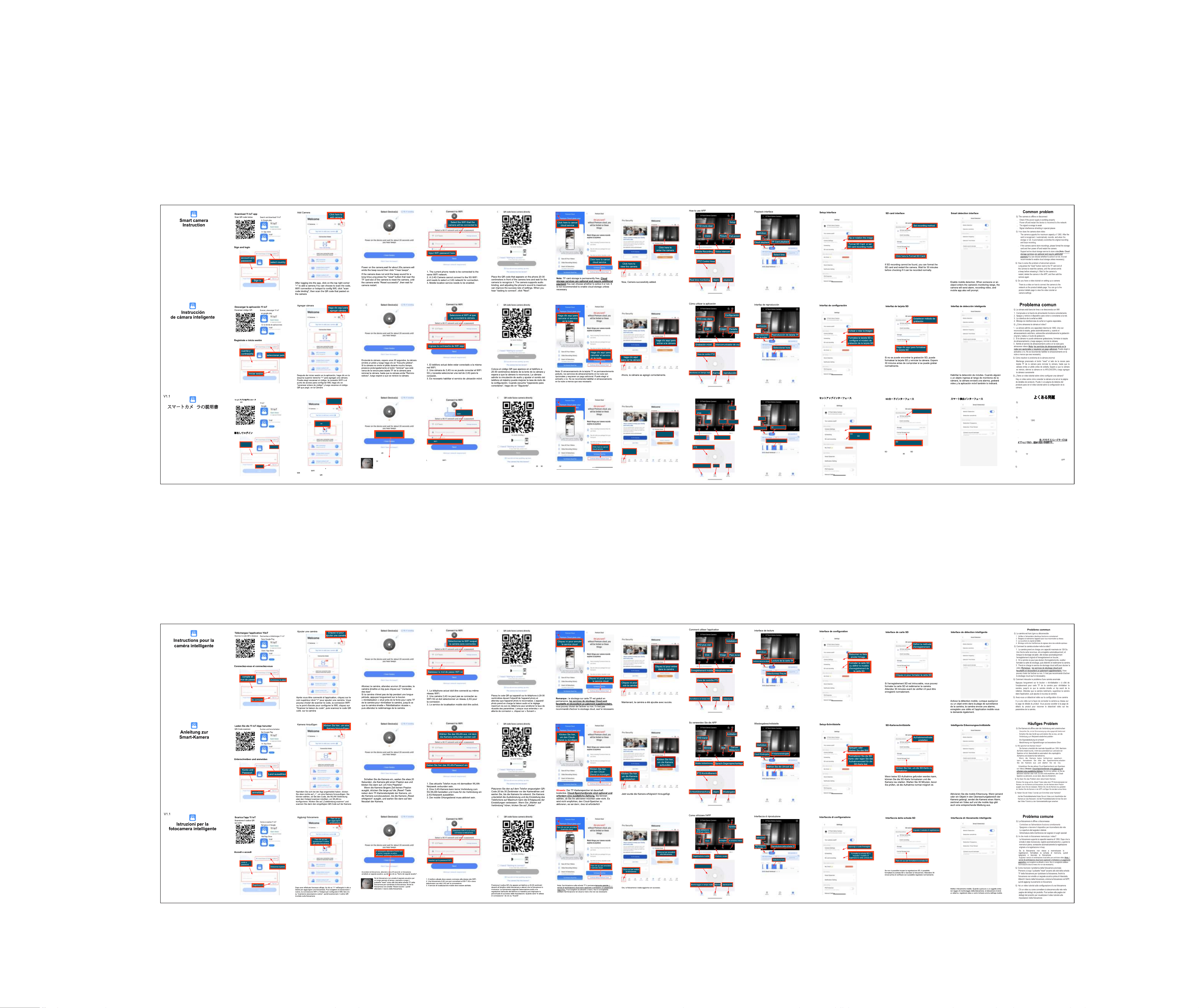
アプリをダウンロード
以下のコードをスキ
ャンしてください
アプリストア内
を検索してダウンロード
プレイで
署名してログイン
アカウントと
パスワード
サインイン
国を選択
カメラの追加
アプリにログインした後、右上隅の「」をクリックしてカメラを追
加します。コード、
接続、またはホットスポットをスキャンし
て
を構成することを選択でき、「コードバインドをスキャン」を
クリックして、貼り付けられた
コードをスキャンしますカメラの
上で
カメラを追加するに
はここをクリックし
てください
ここをクリックしてカ
メラの
コードをス
キャンしてください
ここでビープ音が聞こえるまで待つ
必要があります。そうでない場合
は、カメラをリセットしてください
カメラの電源を入れ、約秒ほど待つと、カメラからビープ音が
鳴り、「ビープ音が聞こえます」をクリックします。
カメラが長時間ビープ音を発しない場合は、カメラ
の
カードスロットの近くにある「リセット」ボタ
ンを長押ししてカメラをリセットし、カメラが「リ
セット成功」を鳴らしてから、カメラが再起動する
まで待ちます。
現在の電話は同じネットワークに接続する必要があります。
2. 2.4G カメラは 5G WIFI に接続できないため、接続には 2.4G ネット
ワークを選択する必要があります。
3. モバイル位置情報サービスを有効にする必要があります。
カメラを接続する
を選択します
ここにパスワードを入力してください
携帯電話に表示されるコードをカメラのレンズの~セ
ンチメートル前に置き、カメラがそれを認識するまで待ちます。
カメラはオーディオバインディングをサポートしており、携帯電
話のサウンドを最大に調整すると、設定の成功率が向上します。
「接続を待機しています」と読み上げられたら、「次へ」をクリッ
クします。
注カードストレージは永久に無料です。クラウドストレージサー
ビスはオプションであり、追加の支払いが必要です。アクティブにする
かどうかを選択できます。必要な場合を除き、クラウドストレージを
有効にすることはお勧めしません
クラウドサービス
の解約はこちら
これで、カメラが正常に追加されました。
ここをクリックして
カメラに入ります
カメラを表示する
にはここをクリッ
クしてください
リアルタイム監視
アプリの使い方
設定
高解像度
より鮮明
音声インターホン
モバイル録音
警報
再生
声
写真
全画面表示
コントロールエリア
再生インターフェース
解像度
カードの再生
クラウド再生
時間を選択してください
カードをフォーマットするに
はここをクリックしてください
録音方法を設定する
カードインターフェース
録画が見つからない場合は、カードをフォーマットしてカ
メラを再起動します。
分ほど待ってから正常に録画できるか確
認してください。
スマート検出インターフェース
モバイル検出を有効にします。誰かまたは物体がカメラの
監視範囲に入ると、カメラはアラームを送信し、ビデオを
録画し、モバイルアプリもプロンプトを表示します。
よくある問題
カメラがオフラインまたは切断されています
電源が正常に動作しているかどうかを確認してください
デバイスの電源をオフにして再起動し、ネットワークに再接続します
信号範囲が弱い
特別な場所での信号干渉シールド
カメラはビデオをどのように保存しますか
カメラは最大の容量をサポートします。カードが認識さ
れると、自動的に録画され、ストレージがいっぱいになると、元
の録画に自動的に上書きして録画をループします。
カメラに録画を保存できない場合は、ストレージカードを
フォーマットしてから電源を切り、カメラを再起動してくださ
い。
ビデオを保存するためのアクティブなクラウドストレージ
サービスをサポートします
注クラウド ストレージサービスは
オプションであり、追加の支払いが必要です。アクティブにする
かどうかを選択できます。必要な場合を除き、クラウドストレー
ジを有効にすることはお勧めしません)。
カメラが異常な場合の解決方法
カメラのカードスロットの横にある「リセット」ボタンを
長押ししてカメラをリセットし、カメラからビープ音が鳴るま
でボタンを放します。カメラが再起動するのを待ち、
で
カメラを削除してから、再度カメラを追加します
カメラのセットアップに関するビデオチュートリアルはありますか
製品詳細ページにカメラをネットワークに接続する方法のビデ
オがあります。製品詳細ページに移動して、カメラ設定に関
するビデオチュートリアルをご覧ください。
セットアップインターフェース
画像を反転または回転する
カードのフォーマッ
トまたは
カードの記
録モデルの設定
Information to User:
Note: This equipment has been tested and found to comply
with the limits for a Class B digital device, pursuant to part
15 of the FCC Rules.
These limits are designed to provide reasonable protection
against harmful interference in a residential installation.
This equipment generates, uses and can radiate radio
frequency energy and, if not installed and used in accordance
with the instructions, may cause harmful interference to radio
communications.
However, there is no guarantee that interference will not
occur in a particular installation.
If this equipment does cause harmful interference to radio
or television reception, which can be determined by turning
the equipment off and on, the user is encouraged to try to
correct the interference by one or more of the following
Measures:
—Reorient or relocate the receiving antenna.
—Increase the separation between the equipment and receiver.
—Connect the equipment into an outlet on a circuit different
from that to which the receiver is connected.
—Consult the dealer or an experienced radio/TV technician
for help.
Important: Change or modifications not expressly approved
by the manufacturer responsible for compliance could void
the user's authority to operate the equipment.
Information to User:
Note: This equipment has been tested and found to comply
with the limits for a Class B digital device, pursuant to part
15 of the FCC Rules.
These limits are designed to provide reasonable protection
against harmful interference in a residential installation.
This equipment generates, uses and can radiate radio
frequency energy and, if not installed and used in accordance
with the instructions, may cause harmful interference to radio
communications.
However, there is no guarantee that interference will not
occur in a particular installation.
If this equipment does cause harmful interference to radio
or television reception, which can be determined by turning
the equipment off and on, the user is encouraged to try to
correct the interference by one or more of the following
Measures:
—Reorient or relocate the receiving antenna.
—Increase the separation between the equipment and receiver.
—Connect the equipment into an outlet on a circuit different
from that to which the receiver is connected.
—Consult the dealer or an experienced radio/TV technician
for help.
Important: Change or modifications not expressly approved
by the manufacturer responsible for compliance could void
the user's authority to operate the equipment.
Information to User:
Note: This equipment has been tested and found to comply
with the limits for a Class B digital device, pursuant to part
15 of the FCC Rules.
These limits are designed to provide reasonable protection
against harmful interference in a residential installation.
This equipment generates, uses and can radiate radio
frequency energy and, if not installed and used in accordance
with the instructions, may cause harmful interference to radio
communications.
However, there is no guarantee that interference will not
occur in a particular installation.
If this equipment does cause harmful interference to radio
or television reception, which can be determined by turning
the equipment off and on, the user is encouraged to try to
correct the interference by one or more of the following
Measures:
—Reorient or relocate the receiving antenna.
—Increase the separation between the equipment and receiver.
—Connect the equipment into an outlet on a circuit different
from that to which the receiver is connected.
—Consult the dealer or an experienced radio/TV technician
for help.
Important: Change or modifications not expressly approved
by the manufacturer responsible for compliance could void
the user's authority to operate the equipment.
Information to User:
Note: This equipment has been tested and found to comply
with the limits for a Class B digital device, pursuant to part
15 of the FCC Rules.
These limits are designed to provide reasonable protection
against harmful interference in a residential installation.
This equipment generates, uses and can radiate radio
frequency energy and, if not installed and used in accordance
with the instructions, may cause harmful interference to radio
communications.
However, there is no guarantee that interference will not
occur in a particular installation.
If this equipment does cause harmful interference to radio
or television reception, which can be determined by turning
the equipment off and on, the user is encouraged to try to
correct the interference by one or more of the following
Measures:
—Reorient or relocate the receiving antenna.
—Increase the separation between the equipment and receiver.
—Connect the equipment into an outlet on a circuit different
from that to which the receiver is connected.
—Consult the dealer or an experienced radio/TV technician
for help.
Important: Change or modifications not expressly approved
by the manufacturer responsible for compliance could void
the user's authority to operate the equipment.
Information to User:
Note: This equipment has been tested and found to comply
with the limits for a Class B digital device, pursuant to part
15 of the FCC Rules.
These limits are designed to provide reasonable protection
against harmful interference in a residential installation.
This equipment generates, uses and can radiate radio
frequency energy and, if not installed and used in accordance
with the instructions, may cause harmful interference to radio
communications.
However, there is no guarantee that interference will not
occur in a particular installation.
If this equipment does cause harmful interference to radio
or television reception, which can be determined by turning
the equipment off and on, the user is encouraged to try to
correct the interference by one or more of the following
Measures:
—Reorient or relocate the receiving antenna.
—Increase the separation between the equipment and receiver.
—Connect the equipment into an outlet on a circuit different
from that to which the receiver is connected.
—Consult the dealer or an experienced radio/TV technician
for help.
Important: Change or modifications not expressly approved
by the manufacturer responsible for compliance could void
the user's authority to operate the equipment.
Information to User:
Note: This equipment has been tested and found to comply
with the limits for a Class B digital device, pursuant to part
15 of the FCC Rules.
These limits are designed to provide reasonable protection
against harmful interference in a residential installation.
This equipment generates, uses and can radiate radio
frequency energy and, if not installed and used in accordance
with the instructions, may cause harmful interference to radio
communications.
However, there is no guarantee that interference will not
occur in a particular installation.
If this equipment does cause harmful interference to radio
or television reception, which can be determined by turning
the equipment off and on, the user is encouraged to try to
correct the interference by one or more of the following
Measures:
—Reorient or relocate the receiving antenna.
—Increase the separation between the equipment and receiver.
—Connect the equipment into an outlet on a circuit different
from that to which the receiver is connected.
—Consult the dealer or an experienced radio/TV technician
for help.
Important: Change or modifications not expressly approved
by the manufacturer responsible for compliance could void
the user's authority to operate the equipment.
スマートカメ
ラの説明書
