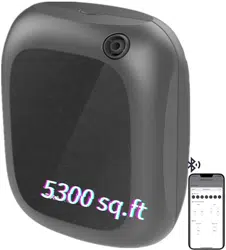
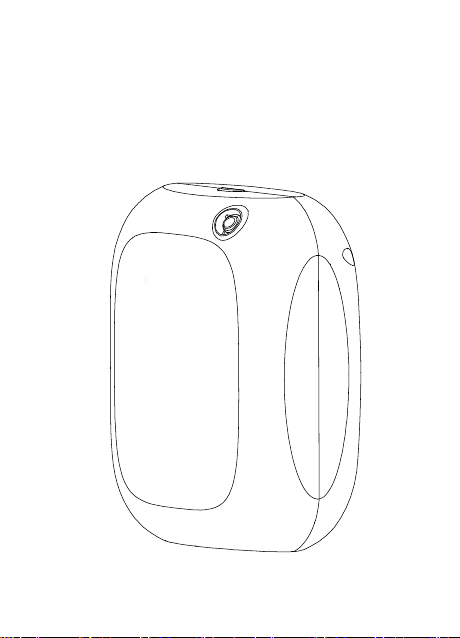
X-200
User Manual
Please read the user manual carefully before using the product
and keep it in a safe place.
1:Do not use overloaded power supplies, sockets, and damaged
power cords and plugs. If used, it may endanger your safety and
may cause fire. If this happens, please promptly report to the
sales or after-sales department and request replacement.
2:Please do not open the inside of the
device
to avoid the
device
damage. If the
device
works in error, please read the user manual
carefully, follow the normal procedure or consult sales and after-sales.
5:When the
device
is already filled with liquid (essential oil), do
not invert, tilt or rotate the
device
to
device
liquid spillage and
damage the
device
.
6:When encountering natural weather thunder, do not operate the
device or touch the power cord to avoid the risk of electric shock.
Safety Precautions
:
Product Instruction:
X-200 adopts the second-generation silent patent cold atomization
technology to protect the essential oil molecules, its features are: low
atomization noise, atomized particles uniform, the turbocharged
fan and the atomization channel operate independently, the scent
diffusion speed is fast and scent diffusion space is large.
X200 uses professional diaphragm pump which can work 10000 hours,
it works stable and has a long using lifespan. The device adopts
microcomputer intelligent control, with five control mode. Each mode can
independently set the time and oil concentration. The 200ml essential oil
container can work longer time. The mini device is portable for wall
mounted or desktop. It is widely used by hotel, 4S shop, shopping mall,
show room, branded retail store, cinema and other public places.
Product Specification:
4:Do not put the
device
or power adapter in water or watering,
do not use a watering power adapter.
3:When the device is working, do not disassemble the device or
shake the device vigorously, to avoid the device to work abnormally.
Model No
Oil Capacity
Coverage Area
Power
Oil Consumption
Machine Size
N.W
Voltage
Noise
Install Method
X200
200ML
500m²,1500m³
10W
2.5g±0.2
175*140*70mm
616g
DC12V0.5A
45db
Desktop
Wall Mounted
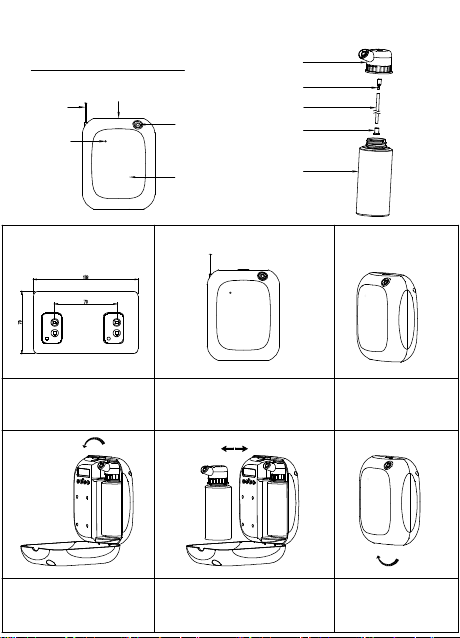
Install Instruction:
3:Gently press the top raised
button to open the cover.
4:Open the cover according
with the arrow direction.
5:Remove the oil bottle, turn the atomizer
counterclockwise to take off it from the bottle,
put liquid into the bottle, tighten the atomizer
on the bottle clockwise and put the bottle into
the device, set the device working time.
6:Close the cover, the working
signal light is on during the
working period, representing
the work is normal.
1:Fix the hanging plate according
to the dimensions in the drawing.
2:Place the device on the hanging plate,
fix it by screw, connect the power supply.
Signal light
Power Supply
Cover Button
Fog Outlet
Cover
Atomizer
Nuzzle
Oil Tube
Filter
Oil Bottle
Hanging Plate
Oil consumption means
:
the device in the maximum setting, the test oil is Shangri-La,the test oil
consistency is 9. 5MPA.S, the room temperature is 30 °C, the air humidity is 45%. Above is for reference.

X-200
User Manual
Please read the user manual carefully before using the product
and keep it in a safe place.
1:Do not use overloaded power supplies, sockets, and damaged
power cords and plugs. If used, it may endanger your safety and
may cause fire. If this happens, please promptly report to the
sales or after-sales department and request replacement.
2:Please do not open the inside of the
device
to avoid the
device
damage. If the
device
works in error, please read the user manual
carefully, follow the normal procedure or consult sales and after-sales.
5:When the
device
is already filled with liquid (essential oil), do
not invert, tilt or rotate the
device
to
device
liquid spillage and
damage the
device
.
6:When encountering natural weather thunder, do not operate the
device or touch the power cord to avoid the risk of electric shock.
Safety Precautions
:
Product Instruction:
X-200 adopts the second-generation silent patent cold atomization
technology to protect the essential oil molecules, its features are: low
atomization noise, atomized particles uniform, the turbocharged
fan and the atomization channel operate independently, the scent
diffusion speed is fast and scent diffusion space is large.
X200 uses professional diaphragm pump which can work 10000 hours,
it works stable and has a long using lifespan. The device adopts
microcomputer intelligent control, with five control mode. Each mode can
independently set the time and oil concentration. The 200ml essential oil
container can work longer time. The mini device is portable for wall
mounted or desktop. It is widely used by hotel, 4S shop, shopping mall,
show room, branded retail store, cinema and other public places.
Product Specification:
4:Do not put the
device
or power adapter in water or watering,
do not use a watering power adapter.
3:When the device is working, do not disassemble the device or
shake the device vigorously, to avoid the device to work abnormally.
Model No
Oil Capacity
Coverage Area
Power
Oil Consumption
Machine Size
N.W
Voltage
Noise
Install Method
X200
200ML
500m²,1500m³
10W
2.5g±0.2
175*140*70mm
616g
DC12V0.5A
45db
Desktop
Wall Mounted
Install Instruction:
3:Gently press the top raised
button to open the cover.
4:Open the cover according
with the arrow direction.
5:Remove the oil bottle, turn the atomizer
counterclockwise to take off it from the bottle,
put liquid into the bottle, tighten the atomizer
on the bottle clockwise and put the bottle into
the device, set the device working time.
6:Close the cover, the working
signal light is on during the
working period, representing
the work is normal.
1:Fix the hanging plate according
to the dimensions in the drawing.
2:Place the device on the hanging plate,
fix it by screw, connect the power supply.
Signal light
Power Supply
Cover Button
Fog Outlet
Cover
Atomizer
Nuzzle
Oil Tube
Filter
Oil Bottle
Hanging Plate
Oil consumption means
:
the device in the maximum setting, the test oil is Shangri-La,the test oil
consistency is 9. 5MPA.S, the room temperature is 30 °C, the air humidity is 45%. Above is for reference.

X-200
User Manual
Please read the user manual carefully before using the product
and keep it in a safe place.
1:Do not use overloaded power supplies, sockets, and damaged
power cords and plugs. If used, it may endanger your safety and
may cause fire. If this happens, please promptly report to the
sales or after-sales department and request replacement.
2:Please do not open the inside of the
device
to avoid the
device
damage. If the
device
works in error, please read the user manual
carefully, follow the normal procedure or consult sales and after-sales.
5:When the
device
is already filled with liquid (essential oil), do
not invert, tilt or rotate the
device
to
device
liquid spillage and
damage the
device
.
6:When encountering natural weather thunder, do not operate the
device or touch the power cord to avoid the risk of electric shock.
Safety Precautions
:
Product Instruction:
X-200 adopts the second-generation silent patent cold atomization
technology to protect the essential oil molecules, its features are: low
atomization noise, atomized particles uniform, the turbocharged
fan and the atomization channel operate independently, the scent
diffusion speed is fast and scent diffusion space is large.
X200 uses professional diaphragm pump which can work 10000 hours,
it works stable and has a long using lifespan. The device adopts
microcomputer intelligent control, with five control mode. Each mode can
independently set the time and oil concentration. The 200ml essential oil
container can work longer time. The mini device is portable for wall
mounted or desktop. It is widely used by hotel, 4S shop, shopping mall,
show room, branded retail store, cinema and other public places.
Product Specification:
4:Do not put the
device
or power adapter in water or watering,
do not use a watering power adapter.
3:When the device is working, do not disassemble the device or
shake the device vigorously, to avoid the device to work abnormally.
Model No
Oil Capacity
Coverage Area
Power
Oil Consumption
Machine Size
N.W
Voltage
Noise
Install Method
X200
200ML
500m²,1500m³
10W
2.5g±0.2
175*140*70mm
616g
DC12V0.5A
45db
Desktop
Wall Mounted
Install Instruction:
3:Gently press the top raised
button to open the cover.
4:Open the cover according
with the arrow direction.
5:Remove the oil bottle, turn the atomizer
counterclockwise to take off it from the bottle,
put liquid into the bottle, tighten the atomizer
on the bottle clockwise and put the bottle into
the device, set the device working time.
6:Close the cover, the working
signal light is on during the
working period, representing
the work is normal.
1:Fix the hanging plate according
to the dimensions in the drawing.
2:Place the device on the hanging plate,
fix it by screw, connect the power supply.
Signal light
Power Supply
Cover Button
Fog Outlet
Cover
Atomizer
Nuzzle
Oil Tube
Filter
Oil Bottle
Hanging Plate
Oil consumption means
:
the device in the maximum setting, the test oil is Shangri-La,the test oil
consistency is 9. 5MPA.S, the room temperature is 30 °C, the air humidity is 45%. Above is for reference.
X-200
User Manual
Please read the user manual carefully before using the product
and keep it in a safe place.
1:Do not use overloaded power supplies, sockets, and damaged
power cords and plugs. If used, it may endanger your safety and
may cause fire. If this happens, please promptly report to the
sales or after-sales department and request replacement.
2:Please do not open the inside of the
device
to avoid the
device
damage. If the
device
works in error, please read the user manual
carefully, follow the normal procedure or consult sales and after-sales.
5:When the
device
is already filled with liquid (essential oil), do
not invert, tilt or rotate the
device
to
device
liquid spillage and
damage the
device
.
6:When encountering natural weather thunder, do not operate the
device or touch the power cord to avoid the risk of electric shock.
Safety Precautions
:
Product Instruction:
X-200 adopts the second-generation silent patent cold atomization
technology to protect the essential oil molecules, its features are: low
atomization noise, atomized particles uniform, the turbocharged
fan and the atomization channel operate independently, the scent
diffusion speed is fast and scent diffusion space is large.
X200 uses professional diaphragm pump which can work 10000 hours,
it works stable and has a long using lifespan. The device adopts
microcomputer intelligent control, with five control mode. Each mode can
independently set the time and oil concentration. The 200ml essential oil
container can work longer time. The mini device is portable for wall
mounted or desktop. It is widely used by hotel, 4S shop, shopping mall,
show room, branded retail store, cinema and other public places.
Product Specification:
4:Do not put the
device
or power adapter in water or watering,
do not use a watering power adapter.
3:When the device is working, do not disassemble the device or
shake the device vigorously, to avoid the device to work abnormally.
Model No
Oil Capacity
Coverage Area
Power
Oil Consumption
Machine Size
N.W
Voltage
Noise
Install Method
X200
200ML
500m²,1500m³
10W
2.5g±0.2
175*140*70mm
616g
DC12V0.5A
45db
Desktop
Wall Mounted
Install Instruction:
3:Gently press the top raised
button to open the cover.
4:Open the cover according
with the arrow direction.
5:Remove the oil bottle, turn the atomizer
counterclockwise to take off it from the bottle,
put liquid into the bottle, tighten the atomizer
on the bottle clockwise and put the bottle into
the device, set the device working time.
6:Close the cover, the working
signal light is on during the
working period, representing
the work is normal.
1:Fix the hanging plate according
to the dimensions in the drawing.
2:Place the device on the hanging plate,
fix it by screw, connect the power supply.
Signal light
Power Supply
Cover Button
Fog Outlet
Cover
Atomizer
Nuzzle
Oil Tube
Filter
Oil Bottle
Hanging Plate
Oil consumption means
:
the device in the maximum setting, the test oil is Shangri-La,the test oil
consistency is 9. 5MPA.S, the room temperature is 30 °C, the air humidity is 45%. Above is for reference.
Settings:
1: Power On
Connect power supply, the screen lights up automatically, means the device is urned on
and can work normal, the screen shows the factory setting of the time, date and the
working mode.
2:Setting Local Time
Press SET for 5 seconds to activate the time setting interface; press to set the hour,
press SET to confirm and start minute setting, press to set minutes, press SET
confirm and start the week setting, press to select the work day, press SET to confirm
and the time setting is end. The system automatically saves the settings.
4:Working Time Setting, Atomizing Gear Setting
*Note: Each event can control 24 hours only, if out of range, will switch to last event
automatically, if necessary, can setting by 2 events. System time is 00:00-23:59, for
example, work start in 22:00, end in 2:00, should set by 2 events, the setting method
is 1st event 22:00-23:59, 2nd event 00:00-2:00, the work time among each events
could not repeat, otherwise the system could not recognize.
5:Scent Work Time Quick Setting
At current work event, press can set the scent work time, press
increase the scent work time, press reduce the scent work time. The
scent pause timecan set in this ways as well, after setting the scent work
time, press MODE to enter scent pause setting, then the device save the
setting automatically.(This function use for current work event only, other
events which not in the work time, should enter into the work event to
setting the scent work time.)
6:Restore Factory Setting
Long press MODE for 10 seconds, the device is restored to factory setting, the
first work event of factory setting is 8:00-22:00, scent concentration is 60:60, the
work time of other 4 events are all 00:00-00:00.
Us
e
r
M
a
n
u
al
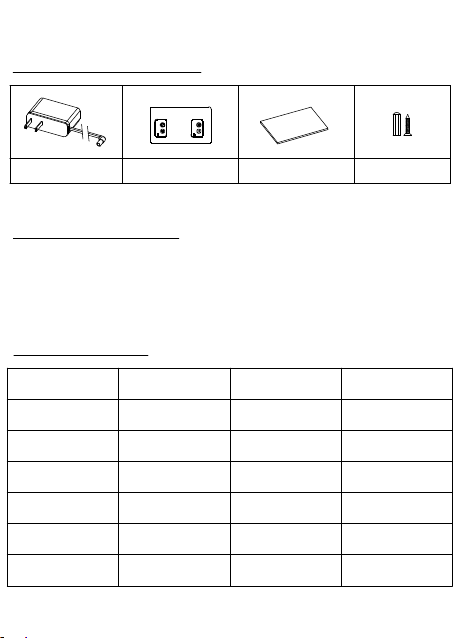
Power Supply
User Manual
Packing Accessories:
Screw
Hanging Plate
Device Fault
Solution
-
Check if use wrong power supply.
-
Check if the power is on.
-
Check the setting of device work time.
-
-
Check if the seal ring of fog outlet pipe damage.
Check if the nozzle blocked.
-
Check if the connection of atomizer and nuzzle loose.
-
-
Check if the atomizer broken.
Check if the gasket broken and need change.
-
Check if the connection of oil bottle and atomizer close tighten.
-
Pump loose, fix the pump.
-
Pump broken, change new pump.
-
Check if the fan fixed well.
No atomization
Weak atomization
Oil leak
Abnormal noise
Maintain the device every 6 months, or replace the essential oil if the scent weaker.
1.Open the device cover, take off the oil bottle
2.Each time replace the essential oil, should clean the oil pipe filter.
3.Put some alcohol into the oil bottle and use the alcohol clean the oil bottle.
4.Put few alcohol into the oil bottle, install the bottle to the device, power on
the device and work 5 minutes.
Device Maintains:
Fault Resolution:
Device not work
-
Check if the pump work normal, if the nuzzle blocked.
-
Check if the fog outlet seal ring broken or fall off.
-Check if the oil pipe blocked or fall off.
The warranty time of the device is 1 year from the date of sale, the cover,
electric wires, external tube and other easy damage accessories not in the
warranty range, man-made damage and accident damage not in the warranty
range as well. We will charge for the maintain if out of the warranty time.
After Sale Service:
Warranty Card:
Maintain Date
Maintain Item
Maintain Company
Maintain Staff
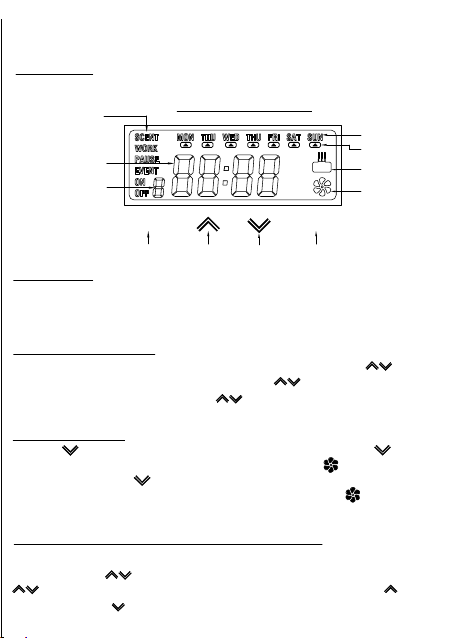
First time press MODE to enter the working start time setting, press SET to activate the
hour setting, press to set hour, press SET to confirm and start minute setting, press
to set minute, press SET to confirm and star week day setting, press to select the
day of week, press to cancel the day of week, press SET to confirm and the working
start time setting is finished.
MODE
MODE
SET
SET
Week Display
Atomization
Work Display
Fan Operation Display
Current Time Display
Working Event Display
Working Mode Display
Week Selection
Display Screen
UP
DOWN
Second time press MODE to enter the working end time setting, press SET to activate
the hour setting, press to set hour, press SET to confirm and start minute setting,
press to set minute, press SET to confirm and the working end time setting is finished.
Third time press MODE to enter the scent work setting, press to set the scent work
time; the scent work time is from 5-300 seconds, from 5-100seconds press the interval
is 5 seconds, from100-300seconds press the interval is 10 seconds, then scent
concentration setting is finished.
Fourth time press MODE to enter scent pause time setting; scent pause time is 10-900
seconds, press to set the pause time, 10-100s interval is 5 seconds,100-300s
interval is 10 seconds, 100-300s interval is 50 seconds,500-900s interval is 100
secondsthen the work pause time setting is finished. The work pause time setting of the
other 4 events, repeat above setting is ok.
3: Switch of fan
Press key for 5 seconds, fan enters F2 (quiet mode) press key again
for 5 seconds to enters F0 gear, fan is off, and fan icon disappears from
display screen .Press key for another 5 seconds again to switch fan on at
F1 gear(regular gear), and the fan icon will be displayed as
(Factory setting: the fan is working at regular mode ,F1 gear)
Settings:
1: Power On
Connect power supply, the screen lights up automatically, means the device is urned on
and can work normal, the screen shows the factory setting of the time, date and the
working mode.
2:Setting Local Time
Press SET for 5 seconds to activate the time setting interface; press to set the hour,
press SET to confirm and start minute setting, press to set minutes, press SET
confirm and start the week setting, press to select the work day, press SET to confirm
and the time setting is end. The system automatically saves the settings.
4:Working Time Setting, Atomizing Gear Setting
*Note: Each event can control 24 hours only, if out of range, will switch to last event
automatically, if necessary, can setting by 2 events. System time is 00:00-23:59, for
example, work start in 22:00, end in 2:00, should set by 2 events, the setting method
is 1st event 22:00-23:59, 2nd event 00:00-2:00, the work time among each events
could not repeat, otherwise the system could not recognize.
5:Scent Work Time Quick Setting
At current work event, press can set the scent work time, press
increase the scent work time, press reduce the scent work time. The
scent pause timecan set in this ways as well, after setting the scent work
time, press MODE to enter scent pause setting, then the device save the
setting automatically.(This function use for current work event only, other
events which not in the work time, should enter into the work event to
setting the scent work time.)
6:Restore Factory Setting
Long press MODE for 10 seconds, the device is restored to factory setting, the
first work event of factory setting is 8:00-22:00, scent concentration is 60:60, the
work time of other 4 events are all 00:00-00:00.
Us
e
r
M
a
n
u
al
Power Supply
User Manual
Packing Accessories:
Screw
Hanging Plate
Device Fault
Solution
-
Check if use wrong power supply.
-
Check if the power is on.
-
Check the setting of device work time.
-
-
Check if the seal ring of fog outlet pipe damage.
Check if the nozzle blocked.
-
Check if the connection of atomizer and nuzzle loose.
-
-
Check if the atomizer broken.
Check if the gasket broken and need change.
-
Check if the connection of oil bottle and atomizer close tighten.
-
Pump loose, fix the pump.
-
Pump broken, change new pump.
-
Check if the fan fixed well.
No atomization
Weak atomization
Oil leak
Abnormal noise
Maintain the device every 6 months, or replace the essential oil if the scent weaker.
1.Open the device cover, take off the oil bottle
2.Each time replace the essential oil, should clean the oil pipe filter.
3.Put some alcohol into the oil bottle and use the alcohol clean the oil bottle.
4.Put few alcohol into the oil bottle, install the bottle to the device, power on
the device and work 5 minutes.
Device Maintains:
Fault Resolution:
Device not work
-
Check if the pump work normal, if the nuzzle blocked.
-
Check if the fog outlet seal ring broken or fall off.
-Check if the oil pipe blocked or fall off.
The warranty time of the device is 1 year from the date of sale, the cover,
electric wires, external tube and other easy damage accessories not in the
warranty range, man-made damage and accident damage not in the warranty
range as well. We will charge for the maintain if out of the warranty time.
After Sale Service:
Warranty Card:
Maintain Date
Maintain Item
Maintain Company
Maintain Staff
First time press MODE to enter the working start time setting, press SET to activate the
hour setting, press to set hour, press SET to confirm and start minute setting, press
to set minute, press SET to confirm and star week day setting, press to select the
day of week, press to cancel the day of week, press SET to confirm and the working
start time setting is finished.
MODE
MODE
SET
SET
Week Display
Atomization
Work Display
Fan Operation Display
Current Time Display
Working Event Display
Working Mode Display
Week Selection
Display Screen
UP
DOWN
Second time press MODE to enter the working end time setting, press SET to activate
the hour setting, press to set hour, press SET to confirm and start minute setting,
press to set minute, press SET to confirm and the working end time setting is finished.
Third time press MODE to enter the scent work setting, press to set the scent work
time; the scent work time is from 5-300 seconds, from 5-100seconds press the interval
is 5 seconds, from100-300seconds press the interval is 10 seconds, then scent
concentration setting is finished.
Fourth time press MODE to enter scent pause time setting; scent pause time is 10-900
seconds, press to set the pause time, 10-100s interval is 5 seconds,100-300s
interval is 10 seconds, 100-300s interval is 50 seconds,500-900s interval is 100
secondsthen the work pause time setting is finished. The work pause time setting of the
other 4 events, repeat above setting is ok.
3: Switch of fan
Press key for 5 seconds, fan enters F2 (quiet mode) press key again
for 5 seconds to enters F0 gear, fan is off, and fan icon disappears from
display screen .Press key for another 5 seconds again to switch fan on at
F1 gear(regular gear), and the fan icon will be displayed as
(Factory setting: the fan is working at regular mode ,F1 gear)
Settings:
1: Power On
Connect power supply, the screen lights up automatically, means the device is urned on
and can work normal, the screen shows the factory setting of the time, date and the
working mode.
2:Setting Local Time
Press SET for 5 seconds to activate the time setting interface; press to set the hour,
press SET to confirm and start minute setting, press to set minutes, press SET
confirm and start the week setting, press to select the work day, press SET to confirm
and the time setting is end. The system automatically saves the settings.
4:Working Time Setting, Atomizing Gear Setting
*Note: Each event can control 24 hours only, if out of range, will switch to last event
automatically, if necessary, can setting by 2 events. System time is 00:00-23:59, for
example, work start in 22:00, end in 2:00, should set by 2 events, the setting method
is 1st event 22:00-23:59, 2nd event 00:00-2:00, the work time among each events
could not repeat, otherwise the system could not recognize.
5:Scent Work Time Quick Setting
At current work event, press can set the scent work time, press
increase the scent work time, press reduce the scent work time. The
scent pause timecan set in this ways as well, after setting the scent work
time, press MODE to enter scent pause setting, then the device save the
setting automatically.(This function use for current work event only, other
events which not in the work time, should enter into the work event to
setting the scent work time.)
6:Restore Factory Setting
Long press MODE for 10 seconds, the device is restored to factory setting, the
first work event of factory setting is 8:00-22:00, scent concentration is 60:60, the
work time of other 4 events are all 00:00-00:00.
Us
e
r
M
a
n
u
al
Power Supply
User Manual
Packing Accessories:
Screw
Hanging Plate
Device Fault
Solution
-
Check if use wrong power supply.
-
Check if the power is on.
-
Check the setting of device work time.
-
-
Check if the seal ring of fog outlet pipe damage.
Check if the nozzle blocked.
-
Check if the connection of atomizer and nuzzle loose.
-
-
Check if the atomizer broken.
Check if the gasket broken and need change.
-
Check if the connection of oil bottle and atomizer close tighten.
-
Pump loose, fix the pump.
-
Pump broken, change new pump.
-
Check if the fan fixed well.
No atomization
Weak atomization
Oil leak
Abnormal noise
Maintain the device every 6 months, or replace the essential oil if the scent weaker.
1.Open the device cover, take off the oil bottle
2.Each time replace the essential oil, should clean the oil pipe filter.
3.Put some alcohol into the oil bottle and use the alcohol clean the oil bottle.
4.Put few alcohol into the oil bottle, install the bottle to the device, power on
the device and work 5 minutes.
Device Maintains:
Fault Resolution:
Device not work
-
Check if the pump work normal, if the nuzzle blocked.
-
Check if the fog outlet seal ring broken or fall off.
-Check if the oil pipe blocked or fall off.
The warranty time of the device is 1 year from the date of sale, the cover,
electric wires, external tube and other easy damage accessories not in the
warranty range, man-made damage and accident damage not in the warranty
range as well. We will charge for the maintain if out of the warranty time.
After Sale Service:
Warranty Card:
Maintain Date
Maintain Item
Maintain Company
Maintain Staff
First time press MODE to enter the working start time setting, press SET to activate the
hour setting, press to set hour, press SET to confirm and start minute setting, press
to set minute, press SET to confirm and star week day setting, press to select the
day of week, press to cancel the day of week, press SET to confirm and the working
start time setting is finished.
MODE
MODE
SET
SET
Week Display
Atomization
Work Display
Fan Operation Display
Current Time Display
Working Event Display
Working Mode Display
Week Selection
Display Screen
UP
DOWN
Second time press MODE to enter the working end time setting, press SET to activate
the hour setting, press to set hour, press SET to confirm and start minute setting,
press to set minute, press SET to confirm and the working end time setting is finished.
Third time press MODE to enter the scent work setting, press to set the scent work
time; the scent work time is from 5-300 seconds, from 5-100seconds press the interval
is 5 seconds, from100-300seconds press the interval is 10 seconds, then scent
concentration setting is finished.
Fourth time press MODE to enter scent pause time setting; scent pause time is 10-900
seconds, press to set the pause time, 10-100s interval is 5 seconds,100-300s
interval is 10 seconds, 100-300s interval is 50 seconds,500-900s interval is 100
secondsthen the work pause time setting is finished. The work pause time setting of the
other 4 events, repeat above setting is ok.
3: Switch of fan
Press key for 5 seconds, fan enters F2 (quiet mode) press key again
for 5 seconds to enters F0 gear, fan is off, and fan icon disappears from
display screen .Press key for another 5 seconds again to switch fan on at
F1 gear(regular gear), and the fan icon will be displayed as
(Factory setting: the fan is working at regular mode ,F1 gear)
Settings:
1: Power On
Connect power supply, the screen lights up automatically, means the device is urned on
and can work normal, the screen shows the factory setting of the time, date and the
working mode.
2:Setting Local Time
Press SET for 5 seconds to activate the time setting interface; press to set the hour,
press SET to confirm and start minute setting, press to set minutes, press SET
confirm and start the week setting, press to select the work day, press SET to confirm
and the time setting is end. The system automatically saves the settings.
4:Working Time Setting, Atomizing Gear Setting
*Note: Each event can control 24 hours only, if out of range, will switch to last event
automatically, if necessary, can setting by 2 events. System time is 00:00-23:59, for
example, work start in 22:00, end in 2:00, should set by 2 events, the setting method
is 1st event 22:00-23:59, 2nd event 00:00-2:00, the work time among each events
could not repeat, otherwise the system could not recognize.
5:Scent Work Time Quick Setting
At current work event, press can set the scent work time, press
increase the scent work time, press reduce the scent work time. The
scent pause timecan set in this ways as well, after setting the scent work
time, press MODE to enter scent pause setting, then the device save the
setting automatically.(This function use for current work event only, other
events which not in the work time, should enter into the work event to
setting the scent work time.)
6:Restore Factory Setting
Long press MODE for 10 seconds, the device is restored to factory setting, the
first work event of factory setting is 8:00-22:00, scent concentration is 60:60, the
work time of other 4 events are all 00:00-00:00.
Us
e
r
M
a
n
u
al
Power Supply
User Manual
Packing Accessories:
Screw
Hanging Plate
Device Fault
Solution
-
Check if use wrong power supply.
-
Check if the power is on.
-
Check the setting of device work time.
-
-
Check if the seal ring of fog outlet pipe damage.
Check if the nozzle blocked.
-
Check if the connection of atomizer and nuzzle loose.
-
-
Check if the atomizer broken.
Check if the gasket broken and need change.
-
Check if the connection of oil bottle and atomizer close tighten.
-
Pump loose, fix the pump.
-
Pump broken, change new pump.
-
Check if the fan fixed well.
No atomization
Weak atomization
Oil leak
Abnormal noise
Maintain the device every 6 months, or replace the essential oil if the scent weaker.
1.Open the device cover, take off the oil bottle
2.Each time replace the essential oil, should clean the oil pipe filter.
3.Put some alcohol into the oil bottle and use the alcohol clean the oil bottle.
4.Put few alcohol into the oil bottle, install the bottle to the device, power on
the device and work 5 minutes.
Device Maintains:
Fault Resolution:
Device not work
-
Check if the pump work normal, if the nuzzle blocked.
-
Check if the fog outlet seal ring broken or fall off.
-Check if the oil pipe blocked or fall off.
The warranty time of the device is 1 year from the date of sale, the cover,
electric wires, external tube and other easy damage accessories not in the
warranty range, man-made damage and accident damage not in the warranty
range as well. We will charge for the maintain if out of the warranty time.
After Sale Service:
Warranty Card:
Maintain Date
Maintain Item
Maintain Company
Maintain Staff
First time press MODE to enter the working start time setting, press SET to activate the
hour setting, press to set hour, press SET to confirm and start minute setting, press
to set minute, press SET to confirm and star week day setting, press to select the
day of week, press to cancel the day of week, press SET to confirm and the working
start time setting is finished.
MODE
MODE
SET
SET
Week Display
Atomization
Work Display
Fan Operation Display
Current Time Display
Working Event Display
Working Mode Display
Week Selection
Display Screen
UP
DOWN
Second time press MODE to enter the working end time setting, press SET to activate
the hour setting, press to set hour, press SET to confirm and start minute setting,
press to set minute, press SET to confirm and the working end time setting is finished.
Third time press MODE to enter the scent work setting, press to set the scent work
time; the scent work time is from 5-300 seconds, from 5-100seconds press the interval
is 5 seconds, from100-300seconds press the interval is 10 seconds, then scent
concentration setting is finished.
Fourth time press MODE to enter scent pause time setting; scent pause time is 10-900
seconds, press to set the pause time, 10-100s interval is 5 seconds,100-300s
interval is 10 seconds, 100-300s interval is 50 seconds,500-900s interval is 100
secondsthen the work pause time setting is finished. The work pause time setting of the
other 4 events, repeat above setting is ok.
3: Switch of fan
Press key for 5 seconds, fan enters F2 (quiet mode) press key again
for 5 seconds to enters F0 gear, fan is off, and fan icon disappears from
display screen .Press key for another 5 seconds again to switch fan on at
F1 gear(regular gear), and the fan icon will be displayed as
(Factory setting: the fan is working at regular mode ,F1 gear)