USER MANUAL
MODEL: MODEL:B0127T2-V1
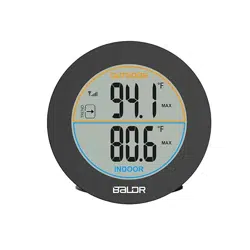
Indoor/Outdoor Thermometer with Sensor
We thank you for the purchase of
Baldr
Indoor/Outdoor Thermometer with Sensor
. It has been
designed and constructed using innovative components and techniques to enable the perfect
display of indoor and outdoor temperature by this device. Please read the instructions carefully
to become familiar with the properties and functions, before you use the unit.
For the start-up of this device you require:
2X"AAA" batteries(not included) for main unit
2X"AAA" batteries(not included) for sensor
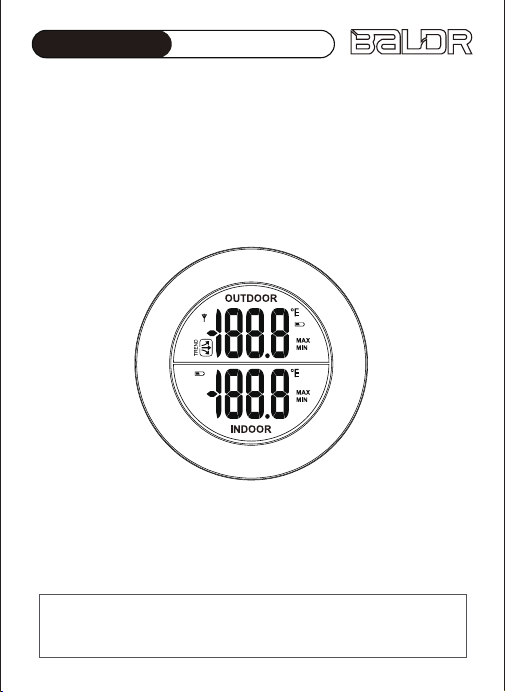
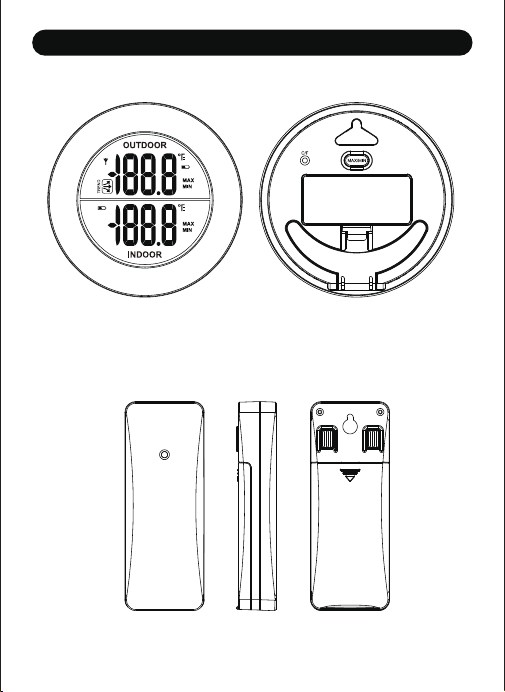
OVERVIEW FEATURES
MAIN UNIT
SENSOR
MAIN UNIT INSTALLATION
1. Indoor and outdoor temperature display
2. Indoor temperature range: 0℃-50℃
3. Outdoor temperature range: -30℃-60℃
4. ℃/℉ switchable
5. Outdoor Temperature Trend
6. Max/Min record of indoor and outdoor temperature data
7. Low power indicator for both main unit and external sensor
1. Press “MAX/MIN”, the current indoor temperature/outdoor
temperature will alternate between the MIN/MAX temperature
recordings and the current value.
2. Press “℃/℉” key to switch between ℃ and ℉ display
The transmission range is about 30 meters from the transmitter to
the weather station (in open area). The weather station should
receive the temperature data within 3 minutes after set-up. If the
temperature data is not received in 3 minutes after setting up,
The clock can be positioned in 2 ways as desired.
A. Pull out the table stand from the back of the main unit, and
place on table or desk as desired.
B. Hang on the wall by hanging hole
Do not clean any part of the product with benzene, thinner or
other solvent chemicals. When necessary, clean it with a soft
cloth.
Never immerse the product in water. This will damage the
product.
Do not subject the product to extreme force, shock, or
fluctuations in temperature or humidity.
Do not tamper with the internal components.
Do not mix new and old batteries or batteries of different types.
Do not mix alkaline, standard or rechargeable batteries with
this product.
please check
1. The distance of weather station or transmitter should be at least
5~6.5 feet (1.5~2 meters) away from any interfering sources
such as computer monitors or TV sets.
2. Avoid positioning the weather station onto or in the immediate
proximity of metal window frames.
3. Using other electrical products such as headphones or speakers
operating on the same signal frequency.
4. Neighbors using electrical devices operating on the same signal
frequency can also cause interference.
If your sensor still can not successfully receive RF signal, after every
60 minutes, main unit will re-start signal searching for 3 seconds
and CH symbol will flash.
GETTING STARTED
BUTTON FUNCTION
POSITIONED METHODS
BALDR provides a 1-year limited warranty on this product
against manufacturing defects in materials and workmanship.
Warranty service can only be performed by our authorized
service center. The original dated bill of sale must be presented
upon request as proof of purchase to us, or our authorized
service center.
The warranty covers all defects in material and workmanship
with the following specified exceptions:(1) damage caused by
accident, unreasonable use or neglect (including the lack or
reasonable and necessary maintenance); (2) damage occurring
during shipment (claims must be presented to the carrier);
(3) damage to, or deterioration of any accessory or decorative
surface;(4) damage resulting from failure to follow instructions
contained in your owner’s manual.
This warranty covers only actual defects within the product
itself, and does not cover the cost of installation or removal
from a fixed installation, normal set-up or adjustments, claims
based on misrepresentation by the seller or performance
variations resulting from installation-related circumstances.
To receive warranty service, the purchaser must contact with
BALDR nominated service center for the problem determination
and service procedure.
Thank you for your choice of BALDR products!
WARRANTY
PRECAUTIONS
433 MHz RECEPTION CHECK
1. Remove the battery compartment cover
2. Insert 2*AAA batteries matching the polarity (+and-).
SENSOR INSTALLATION
1. Remove the battery compartment cover.
2. Insert 2xAAA batteries matching the polarity (+and-).
service@baldr.com
Remove the batteries if storing this product for a long period
of time.
Do not dispose of this product as unsorted municipal waste.
Collection of such waste separately for special treatment is
necessary.
PRECAUTIONS
USER MANUAL
MODEL: MODEL:B0127T2-V1
Indoor/Outdoor Thermometer with Sensor
We thank you for the purchase of
Baldr
Indoor/Outdoor Thermometer with Sensor
. It has been
designed and constructed using innovative components and techniques to enable the perfect
display of indoor and outdoor temperature by this device. Please read the instructions carefully
to become familiar with the properties and functions, before you use the unit.
For the start-up of this device you require:
2X"AAA" batteries(not included) for main unit
2X"AAA" batteries(not included) for sensor
OVERVIEW FEATURES
MAIN UNIT
SENSOR
MAIN UNIT INSTALLATION
1. Indoor and outdoor temperature display
2. Indoor temperature range: 0℃-50℃
3. Outdoor temperature range: -30℃-60℃
4. ℃/℉ switchable
5. Outdoor Temperature Trend
6. Max/Min record of indoor and outdoor temperature data
7. Low power indicator for both main unit and external sensor
1. Press “MAX/MIN”, the current indoor temperature/outdoor
temperature will alternate between the MIN/MAX temperature
recordings and the current value.
2. Press “℃/℉” key to switch between ℃ and ℉ display
The transmission range is about 30 meters from the transmitter to
the weather station (in open area). The weather station should
receive the temperature data within 3 minutes after set-up. If the
temperature data is not received in 3 minutes after setting up,
The clock can be positioned in 2 ways as desired.
A. Pull out the table stand from the back of the main unit, and
place on table or desk as desired.
B. Hang on the wall by hanging hole
Do not clean any part of the product with benzene, thinner or
other solvent chemicals. When necessary, clean it with a soft
cloth.
Never immerse the product in water. This will damage the
product.
Do not subject the product to extreme force, shock, or
fluctuations in temperature or humidity.
Do not tamper with the internal components.
Do not mix new and old batteries or batteries of different types.
Do not mix alkaline, standard or rechargeable batteries with
this product.
please check
1. The distance of weather station or transmitter should be at least
5~6.5 feet (1.5~2 meters) away from any interfering sources
such as computer monitors or TV sets.
2. Avoid positioning the weather station onto or in the immediate
proximity of metal window frames.
3. Using other electrical products such as headphones or speakers
operating on the same signal frequency.
4. Neighbors using electrical devices operating on the same signal
frequency can also cause interference.
If your sensor still can not successfully receive RF signal, after every
60 minutes, main unit will re-start signal searching for 3 seconds
and CH symbol will flash.
GETTING STARTED
BUTTON FUNCTION
POSITIONED METHODS
BALDR provides a 1-year limited warranty on this product
against manufacturing defects in materials and workmanship.
Warranty service can only be performed by our authorized
service center. The original dated bill of sale must be presented
upon request as proof of purchase to us, or our authorized
service center.
The warranty covers all defects in material and workmanship
with the following specified exceptions:(1) damage caused by
accident, unreasonable use or neglect (including the lack or
reasonable and necessary maintenance); (2) damage occurring
during shipment (claims must be presented to the carrier);
(3) damage to, or deterioration of any accessory or decorative
surface;(4) damage resulting from failure to follow instructions
contained in your owner’s manual.
This warranty covers only actual defects within the product
itself, and does not cover the cost of installation or removal
from a fixed installation, normal set-up or adjustments, claims
based on misrepresentation by the seller or performance
variations resulting from installation-related circumstances.
To receive warranty service, the purchaser must contact with
BALDR nominated service center for the problem determination
and service procedure.
Thank you for your choice of BALDR products!
WARRANTY
PRECAUTIONS
433 MHz RECEPTION CHECK
1. Remove the battery compartment cover
2. Insert 2*AAA batteries matching the polarity (+and-).
SENSOR INSTALLATION
1. Remove the battery compartment cover.
2. Insert 2xAAA batteries matching the polarity (+and-).
service@baldr.com
Remove the batteries if storing this product for a long period
of time.
Do not dispose of this product as unsorted municipal waste.
Collection of such waste separately for special treatment is
necessary.
PRECAUTIONS

USER MANUAL
MODEL: MODEL:B0127T2-V1
Indoor/Outdoor Thermometer with Sensor
We thank you for the purchase of
Baldr
Indoor/Outdoor Thermometer with Sensor
. It has been
designed and constructed using innovative components and techniques to enable the perfect
display of indoor and outdoor temperature by this device. Please read the instructions carefully
to become familiar with the properties and functions, before you use the unit.
For the start-up of this device you require:
2X"AAA" batteries(not included) for main unit
2X"AAA" batteries(not included) for sensor
OVERVIEW FEATURES
MAIN UNIT
SENSOR
MAIN UNIT INSTALLATION
1. Indoor and outdoor temperature display
2. Indoor temperature range: 0℃-50℃
3. Outdoor temperature range: -30℃-60℃
4. ℃/℉ switchable
5. Outdoor Temperature Trend
6. Max/Min record of indoor and outdoor temperature data
7. Low power indicator for both main unit and external sensor
1. Press “MAX/MIN”, the current indoor temperature/outdoor
temperature will alternate between the MIN/MAX temperature
recordings and the current value.
2. Press “℃/℉” key to switch between ℃ and ℉ display
The transmission range is about 30 meters from the transmitter to
the weather station (in open area). The weather station should
receive the temperature data within 3 minutes after set-up. If the
temperature data is not received in 3 minutes after setting up,
The clock can be positioned in 2 ways as desired.
A. Pull out the table stand from the back of the main unit, and
place on table or desk as desired.
B. Hang on the wall by hanging hole
Do not clean any part of the product with benzene, thinner or
other solvent chemicals. When necessary, clean it with a soft
cloth.
Never immerse the product in water. This will damage the
product.
Do not subject the product to extreme force, shock, or
fluctuations in temperature or humidity.
Do not tamper with the internal components.
Do not mix new and old batteries or batteries of different types.
Do not mix alkaline, standard or rechargeable batteries with
this product.
please check
1. The distance of weather station or transmitter should be at least
5~6.5 feet (1.5~2 meters) away from any interfering sources
such as computer monitors or TV sets.
2. Avoid positioning the weather station onto or in the immediate
proximity of metal window frames.
3. Using other electrical products such as headphones or speakers
operating on the same signal frequency.
4. Neighbors using electrical devices operating on the same signal
frequency can also cause interference.
If your sensor still can not successfully receive RF signal, after every
60 minutes, main unit will re-start signal searching for 3 seconds
and CH symbol will flash.
GETTING STARTED
BUTTON FUNCTION
POSITIONED METHODS
BALDR provides a 1-year limited warranty on this product
against manufacturing defects in materials and workmanship.
Warranty service can only be performed by our authorized
service center. The original dated bill of sale must be presented
upon request as proof of purchase to us, or our authorized
service center.
The warranty covers all defects in material and workmanship
with the following specified exceptions:(1) damage caused by
accident, unreasonable use or neglect (including the lack or
reasonable and necessary maintenance); (2) damage occurring
during shipment (claims must be presented to the carrier);
(3) damage to, or deterioration of any accessory or decorative
surface;(4) damage resulting from failure to follow instructions
contained in your owner’s manual.
This warranty covers only actual defects within the product
itself, and does not cover the cost of installation or removal
from a fixed installation, normal set-up or adjustments, claims
based on misrepresentation by the seller or performance
variations resulting from installation-related circumstances.
To receive warranty service, the purchaser must contact with
BALDR nominated service center for the problem determination
and service procedure.
Thank you for your choice of BALDR products!
WARRANTY
PRECAUTIONS
433 MHz RECEPTION CHECK
1. Remove the battery compartment cover
2. Insert 2*AAA batteries matching the polarity (+and-).
SENSOR INSTALLATION
1. Remove the battery compartment cover.
2. Insert 2xAAA batteries matching the polarity (+and-).
service@baldr.com
Remove the batteries if storing this product for a long period
of time.
Do not dispose of this product as unsorted municipal waste.
Collection of such waste separately for special treatment is
necessary.
PRECAUTIONS

USER MANUAL
MODEL: MODEL:B0127T2-V1
Indoor/Outdoor Thermometer with Sensor
We thank you for the purchase of
Baldr
Indoor/Outdoor Thermometer with Sensor
. It has been
designed and constructed using innovative components and techniques to enable the perfect
display of indoor and outdoor temperature by this device. Please read the instructions carefully
to become familiar with the properties and functions, before you use the unit.
For the start-up of this device you require:
2X"AAA" batteries(not included) for main unit
2X"AAA" batteries(not included) for sensor
OVERVIEW FEATURES
MAIN UNIT
SENSOR
MAIN UNIT INSTALLATION
1. Indoor and outdoor temperature display
2. Indoor temperature range: 0℃-50℃
3. Outdoor temperature range: -30℃-60℃
4. ℃/℉ switchable
5. Outdoor Temperature Trend
6. Max/Min record of indoor and outdoor temperature data
7. Low power indicator for both main unit and external sensor
1. Press “MAX/MIN”, the current indoor temperature/outdoor
temperature will alternate between the MIN/MAX temperature
recordings and the current value.
2. Press “℃/℉” key to switch between ℃ and ℉ display
The transmission range is about 30 meters from the transmitter to
the weather station (in open area). The weather station should
receive the temperature data within 3 minutes after set-up. If the
temperature data is not received in 3 minutes after setting up,
The clock can be positioned in 2 ways as desired.
A. Pull out the table stand from the back of the main unit, and
place on table or desk as desired.
B. Hang on the wall by hanging hole
Do not clean any part of the product with benzene, thinner or
other solvent chemicals. When necessary, clean it with a soft
cloth.
Never immerse the product in water. This will damage the
product.
Do not subject the product to extreme force, shock, or
fluctuations in temperature or humidity.
Do not tamper with the internal components.
Do not mix new and old batteries or batteries of different types.
Do not mix alkaline, standard or rechargeable batteries with
this product.
please check
1. The distance of weather station or transmitter should be at least
5~6.5 feet (1.5~2 meters) away from any interfering sources
such as computer monitors or TV sets.
2. Avoid positioning the weather station onto or in the immediate
proximity of metal window frames.
3. Using other electrical products such as headphones or speakers
operating on the same signal frequency.
4. Neighbors using electrical devices operating on the same signal
frequency can also cause interference.
If your sensor still can not successfully receive RF signal, after every
60 minutes, main unit will re-start signal searching for 3 seconds
and CH symbol will flash.
GETTING STARTED
BUTTON FUNCTION
POSITIONED METHODS
BALDR provides a 1-year limited warranty on this product
against manufacturing defects in materials and workmanship.
Warranty service can only be performed by our authorized
service center. The original dated bill of sale must be presented
upon request as proof of purchase to us, or our authorized
service center.
The warranty covers all defects in material and workmanship
with the following specified exceptions:(1) damage caused by
accident, unreasonable use or neglect (including the lack or
reasonable and necessary maintenance); (2) damage occurring
during shipment (claims must be presented to the carrier);
(3) damage to, or deterioration of any accessory or decorative
surface;(4) damage resulting from failure to follow instructions
contained in your owner’s manual.
This warranty covers only actual defects within the product
itself, and does not cover the cost of installation or removal
from a fixed installation, normal set-up or adjustments, claims
based on misrepresentation by the seller or performance
variations resulting from installation-related circumstances.
To receive warranty service, the purchaser must contact with
BALDR nominated service center for the problem determination
and service procedure.
Thank you for your choice of BALDR products!
WARRANTY
PRECAUTIONS
433 MHz RECEPTION CHECK
1. Remove the battery compartment cover
2. Insert 2*AAA batteries matching the polarity (+and-).
SENSOR INSTALLATION
1. Remove the battery compartment cover.
2. Insert 2xAAA batteries matching the polarity (+and-).
service@baldr.com
Remove the batteries if storing this product for a long period
of time.
Do not dispose of this product as unsorted municipal waste.
Collection of such waste separately for special treatment is
necessary.
PRECAUTIONS

USER MANUAL
MODEL: MODEL:B0127T2-V1
Indoor/Outdoor Thermometer with Sensor
We thank you for the purchase of
Baldr
Indoor/Outdoor Thermometer with Sensor
. It has been
designed and constructed using innovative components and techniques to enable the perfect
display of indoor and outdoor temperature by this device. Please read the instructions carefully
to become familiar with the properties and functions, before you use the unit.
For the start-up of this device you require:
2X"AAA" batteries(not included) for main unit
2X"AAA" batteries(not included) for sensor
OVERVIEW FEATURES
MAIN UNIT
SENSOR
MAIN UNIT INSTALLATION
1. Indoor and outdoor temperature display
2. Indoor temperature range: 0℃-50℃
3. Outdoor temperature range: -30℃-60℃
4. ℃/℉ switchable
5. Outdoor Temperature Trend
6. Max/Min record of indoor and outdoor temperature data
7. Low power indicator for both main unit and external sensor
1. Press “MAX/MIN”, the current indoor temperature/outdoor
temperature will alternate between the MIN/MAX temperature
recordings and the current value.
2. Press “℃/℉” key to switch between ℃ and ℉ display
The transmission range is about 30 meters from the transmitter to
the weather station (in open area). The weather station should
receive the temperature data within 3 minutes after set-up. If the
temperature data is not received in 3 minutes after setting up,
The clock can be positioned in 2 ways as desired.
A. Pull out the table stand from the back of the main unit, and
place on table or desk as desired.
B. Hang on the wall by hanging hole
Do not clean any part of the product with benzene, thinner or
other solvent chemicals. When necessary, clean it with a soft
cloth.
Never immerse the product in water. This will damage the
product.
Do not subject the product to extreme force, shock, or
fluctuations in temperature or humidity.
Do not tamper with the internal components.
Do not mix new and old batteries or batteries of different types.
Do not mix alkaline, standard or rechargeable batteries with
this product.
please check
1. The distance of weather station or transmitter should be at least
5~6.5 feet (1.5~2 meters) away from any interfering sources
such as computer monitors or TV sets.
2. Avoid positioning the weather station onto or in the immediate
proximity of metal window frames.
3. Using other electrical products such as headphones or speakers
operating on the same signal frequency.
4. Neighbors using electrical devices operating on the same signal
frequency can also cause interference.
If your sensor still can not successfully receive RF signal, after every
60 minutes, main unit will re-start signal searching for 3 seconds
and CH symbol will flash.
GETTING STARTED
BUTTON FUNCTION
POSITIONED METHODS
BALDR provides a 1-year limited warranty on this product
against manufacturing defects in materials and workmanship.
Warranty service can only be performed by our authorized
service center. The original dated bill of sale must be presented
upon request as proof of purchase to us, or our authorized
service center.
The warranty covers all defects in material and workmanship
with the following specified exceptions:(1) damage caused by
accident, unreasonable use or neglect (including the lack or
reasonable and necessary maintenance); (2) damage occurring
during shipment (claims must be presented to the carrier);
(3) damage to, or deterioration of any accessory or decorative
surface;(4) damage resulting from failure to follow instructions
contained in your owner’s manual.
This warranty covers only actual defects within the product
itself, and does not cover the cost of installation or removal
from a fixed installation, normal set-up or adjustments, claims
based on misrepresentation by the seller or performance
variations resulting from installation-related circumstances.
To receive warranty service, the purchaser must contact with
BALDR nominated service center for the problem determination
and service procedure.
Thank you for your choice of BALDR products!
WARRANTY
PRECAUTIONS
433 MHz RECEPTION CHECK
1. Remove the battery compartment cover
2. Insert 2*AAA batteries matching the polarity (+and-).
SENSOR INSTALLATION
1. Remove the battery compartment cover.
2. Insert 2xAAA batteries matching the polarity (+and-).
service@baldr.com
Remove the batteries if storing this product for a long period
of time.
Do not dispose of this product as unsorted municipal waste.
Collection of such waste separately for special treatment is
necessary.
PRECAUTIONS

USER MANUAL
MODEL: MODEL:B0127T2-V1
Indoor/Outdoor Thermometer with Sensor
We thank you for the purchase of
Baldr
Indoor/Outdoor Thermometer with Sensor
. It has been
designed and constructed using innovative components and techniques to enable the perfect
display of indoor and outdoor temperature by this device. Please read the instructions carefully
to become familiar with the properties and functions, before you use the unit.
For the start-up of this device you require:
2X"AAA" batteries(not included) for main unit
2X"AAA" batteries(not included) for sensor
OVERVIEW FEATURES
MAIN UNIT
SENSOR
MAIN UNIT INSTALLATION
1. Indoor and outdoor temperature display
2. Indoor temperature range: 0℃-50℃
3. Outdoor temperature range: -30℃-60℃
4. ℃/℉ switchable
5. Outdoor Temperature Trend
6. Max/Min record of indoor and outdoor temperature data
7. Low power indicator for both main unit and external sensor
1. Press “MAX/MIN”, the current indoor temperature/outdoor
temperature will alternate between the MIN/MAX temperature
recordings and the current value.
2. Press “℃/℉” key to switch between ℃ and ℉ display
The transmission range is about 30 meters from the transmitter to
the weather station (in open area). The weather station should
receive the temperature data within 3 minutes after set-up. If the
temperature data is not received in 3 minutes after setting up,
The clock can be positioned in 2 ways as desired.
A. Pull out the table stand from the back of the main unit, and
place on table or desk as desired.
B. Hang on the wall by hanging hole
Do not clean any part of the product with benzene, thinner or
other solvent chemicals. When necessary, clean it with a soft
cloth.
Never immerse the product in water. This will damage the
product.
Do not subject the product to extreme force, shock, or
fluctuations in temperature or humidity.
Do not tamper with the internal components.
Do not mix new and old batteries or batteries of different types.
Do not mix alkaline, standard or rechargeable batteries with
this product.
please check
1. The distance of weather station or transmitter should be at least
5~6.5 feet (1.5~2 meters) away from any interfering sources
such as computer monitors or TV sets.
2. Avoid positioning the weather station onto or in the immediate
proximity of metal window frames.
3. Using other electrical products such as headphones or speakers
operating on the same signal frequency.
4. Neighbors using electrical devices operating on the same signal
frequency can also cause interference.
If your sensor still can not successfully receive RF signal, after every
60 minutes, main unit will re-start signal searching for 3 seconds
and CH symbol will flash.
GETTING STARTED
BUTTON FUNCTION
POSITIONED METHODS
BALDR provides a 1-year limited warranty on this product
against manufacturing defects in materials and workmanship.
Warranty service can only be performed by our authorized
service center. The original dated bill of sale must be presented
upon request as proof of purchase to us, or our authorized
service center.
The warranty covers all defects in material and workmanship
with the following specified exceptions:(1) damage caused by
accident, unreasonable use or neglect (including the lack or
reasonable and necessary maintenance); (2) damage occurring
during shipment (claims must be presented to the carrier);
(3) damage to, or deterioration of any accessory or decorative
surface;(4) damage resulting from failure to follow instructions
contained in your owner’s manual.
This warranty covers only actual defects within the product
itself, and does not cover the cost of installation or removal
from a fixed installation, normal set-up or adjustments, claims
based on misrepresentation by the seller or performance
variations resulting from installation-related circumstances.
To receive warranty service, the purchaser must contact with
BALDR nominated service center for the problem determination
and service procedure.
Thank you for your choice of BALDR products!
WARRANTY
PRECAUTIONS
433 MHz RECEPTION CHECK
1. Remove the battery compartment cover
2. Insert 2*AAA batteries matching the polarity (+and-).
SENSOR INSTALLATION
1. Remove the battery compartment cover.
2. Insert 2xAAA batteries matching the polarity (+and-).
service@baldr.com
Remove the batteries if storing this product for a long period
of time.
Do not dispose of this product as unsorted municipal waste.
Collection of such waste separately for special treatment is
necessary.
PRECAUTIONS