
WE’RE HERE TO HELP
Our US-based install experts
are standing by to help.
Call us at:
800-359-5520
Or, chat at:
SANUS.com/chatSP
Get it right the first time.
HeightFinder™ shows you
where to drill.
Check it out at:
SANUS.com/1172
Want to watch a video that
shows how easy this DIY
project will be?
Watch it now at:
SANUS.com/2928
Texto en español, página 12
BLT
3
INSTRUCTION MANUAL
GET IT
RIGHT
THE FIRST TIME
Follow this step-by-step
instruction manual to
speed up your installation.

2
IMPORTANT SAFETY INSTRUCTIONS
PLEASE READ ENTIRE MANUAL PRIOR TO USE – SAVE THESE INSTRUCTIONS
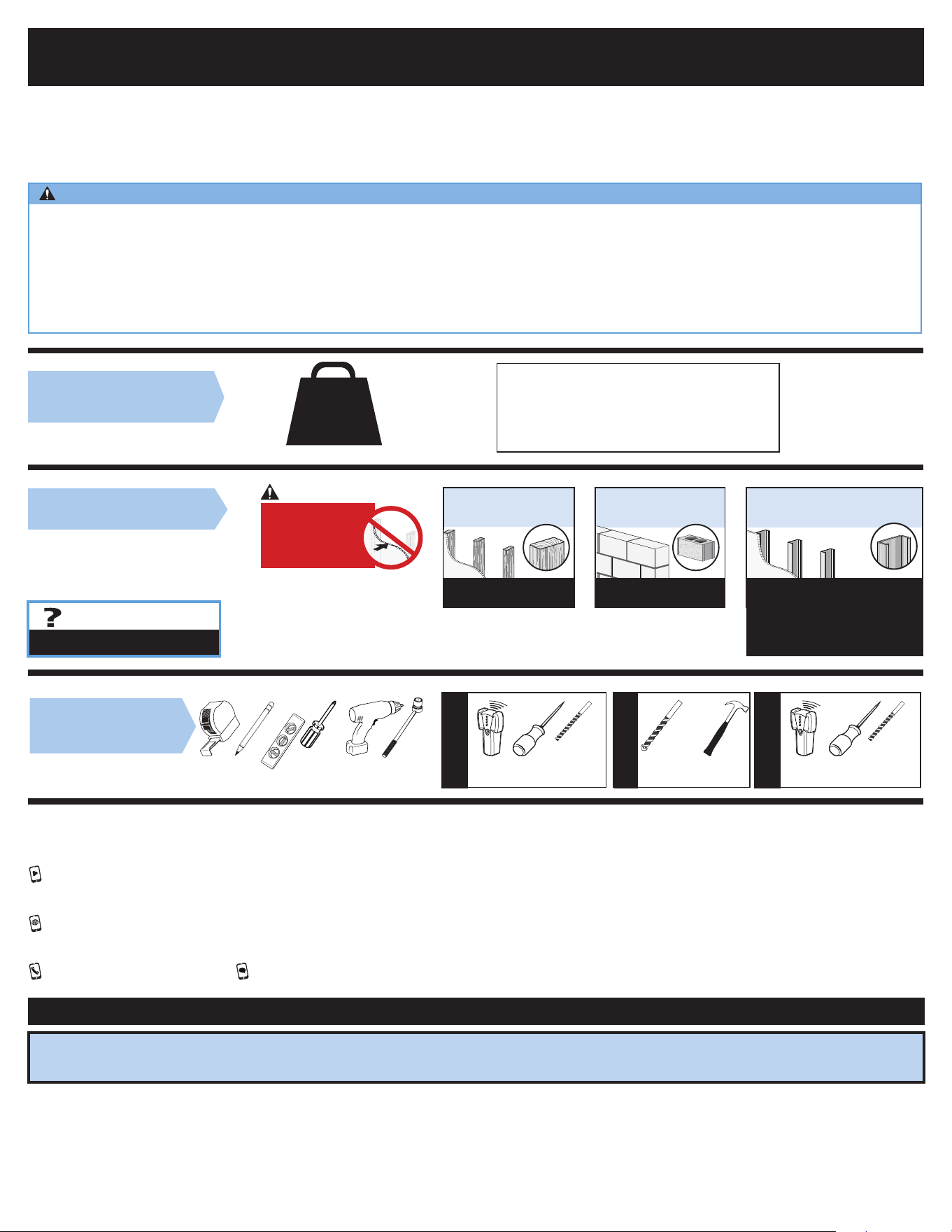
TV Weight Limit
(including accessories)
DO NOT EXCEED
Call Customer Service
Tools Needed
Wall Construction
ONLY install on these
acceptable wall types.
Unsure
Wood studs Solid concrete or
concrete block
Steel studs
ACCEPTABLE ACCEPTABLE
Steel stud kit SSMK1
is required for install,
but NOT INCLUDED.
Call Customer Service
Wood Stud
Install
Steel Stud
Install
Concrete
Install
Awl Awl
Pencil Level
Stud Finder
Stud Finder
ScrewdriverTape
Measure
7/32 in.
(5.5 mm)
Wood
1/2 in.
(13 mm)
Steel
Drill Bit Drill Bit
Electric
Drill
Hammer
1/2 in.
(13 mm)
Socket
Wrench
Drill Bit
3/8 in.
(10 mm)
Concrete
CAUTION:
DO NOT install
in drywall alone
150 lbs.
(68.0 kg)
Drywall alone
will NOT hold the
weight
of your TV.
Please read through these instructions completely to be sure you’re comfortable with this easy install process.
Check your TV owner’s manual to see if there are any special requirements for mounting your TV.
If you do not understand these instructions or have doubts about the safety of the installation, assembly or use of this product, contact
Customer Service.
CAUTION: Avoid potential personal injuries and property damage!
● This product is designed ONLY to be installed into wood stud, solid concrete or concrete block or steel stud walls.
— DO NOT INSTALL INTO DRYWALL ALONE — DRYWALL ALONE WILL NOT HOLD THE WEIGHT OF YOUR TV.
● This product is designed for INDOOR USE ONLY.
● The wall must be capable of supporting five times the weight of the TV and mount combined.
● Do not use this product for any purpose not explicitly specified by manufacturer.
● Manufacturer is not responsible for damage or injury caused by incorrect assembly or use.
If your TV, plus accessories, weighs MORE
than indicated, this mount is NOT compatible.
Visit SANUS.com or call customer service to
find a compatible mount.

3
BEFORE YOU BEGIN
Remove the stand from your
TV — if attached.
Install any accessories you may have
purchased, if they require TV removal prior to
assembly. The TV is removable for future accessory
purchases.
Soft clean surface
Protect the face of your TV
when laying it down for installation.
Dimensions in. [mm]
5.9in
150mm
MIN
23.6in
600mm
MAX
15.7in
400mm
MAX
3.9in
100mm
MIN
28.7in
730mm
31.3in
796mm
15.1in
383mm
10.8in
273mm
24.0in
610mm
16.0in
406mm
15deg
15deg
6.8in
172mm
7deg
12deg
7.6in
192.4mm
9.0in
228.6mm
C
L
SYM
2.1in.
53mm
31.3in
796mm
16.6in
421mm
0.7in
19mm
OFFSET
SIMULATED 42"
FLAT SCREEN TV WITH 400 MM VESA
TV INTERFACE
WALL PLATE
TOP VIEW - EXTENDED
3-D
SIDE VIEW - EXTENDED
SIDE VIEW RETRACTED
TOP VIEW - RETRACTED
FULLY ASSEMBLED MOUNT

4
Parts and Hardware for STEP 1
22mm
M6 x 12mm
M6 x 35mm
2.5mm
5mm
M8 x 50mm
M6 x 20mm
M8 x 16mm
M8 x 20mm
M8 x 40mm
M8 x 30mm
TV Bracket
TV Bracket
ATTACH TV BRACKET TO TVSTEP 1
CAUTION: Avoid potential personal
injury or property damage!
The TV brackets contain potential pinch points
during operation.
Keep fingers away from pinch
points when retracting the TV.
(arrows)
WARNING: This product contains small items that could be a choking hazard if swallowed. Before starting assembly, verify all parts are included and undamaged. If any parts
are missing or damaged, do not return the damaged item to your dealer; contact Customer Service. Never use damaged parts!
NOTE: Not all hardware included will be used.
1.1 Select TV
Screw Diameter
1.2 Select TV Screw Length / Spacers
TV Screws
(qty. 4 each) [Only one size fits your TV]
Washers
(qty. 4)
Spacers
[If necessary]
(qty. 4 each)
0302
01
M6/M8 M6/M8
M6
M8
(qty. 1)
05
(qty. 1)
04
TV Bracket
03
04
04
05
05
02
02
01
01
Too Short Too Long Correct
Inset Holes Cables Rounded Back
Only one screw size fits your TV.
M6
M8
• Flat Back TV
[TV brackets
lay flat on your TV]
NO SPACER SPACER NEEDED
• Flat Back TV with
Extra Space Needed
[for deep inset holes
or cable interference]
• Rounded or
Irregular Back TV
[TV brackets NOT
resting flat on your TV]
A B
Use short TV screws
01
.
Spacers
03
not needed.
Use long TV screws
01
and spacers
03
to create extra
space between the TV and TV bracket.
01
CAUTION: Verify adequate thread engagement with your
screw
01
, washer
02
, spacer
03
combination AND TV
bracket
04
/
05
.
— Too short will not hold your TV.
— Too long will damage your TV.
*
*
*
NOTE: If your TV included
inset spacers or adapters, use
them UNDER the mount hardware.

5
2
SECURELY TIGHTEN
1.3 Attach TV Bracket Assembly to TV
1
POSITION
TIP:
The tilt tension knob
T
on TV brackets
04
/
05
should be oriented to
the outside edges.
T
T
ATTACH WALL PLATE TO WALL
STEP 2
4X
01
02
02
03
01
NO SPACER SPACER NEEDED
A B
04
05
Arrow points to the top of your TV.
CAUTION:
Parts and Hardware for STEP 2
WARNING: This product contains small items that could be a choking hazard if swallowed. Before starting assembly, verify all parts are included and undamaged. If any parts
are missing or damaged, do not return the damaged item to your dealer; contact Customer Service. Never use damaged parts!
NOTE: Not all hardware included will be used.
Make sure brackets
04
/
05
are parallel with one another.
CAUTION:
5⁄16 in. x 2 ¾ in.
Fischer UX10 x 60R
08
10
09
Lag Bolt
Wall Plate
Wall Plate Template
Hex Key
3/16 in.
Concrete Anchor
For concrete installations ONLY
CAUTION: Do not use in drywall or wood
(qty. 1)
06
(qty. 1)
07
(qty. 1)
(qty. 4)
(qty. 4)
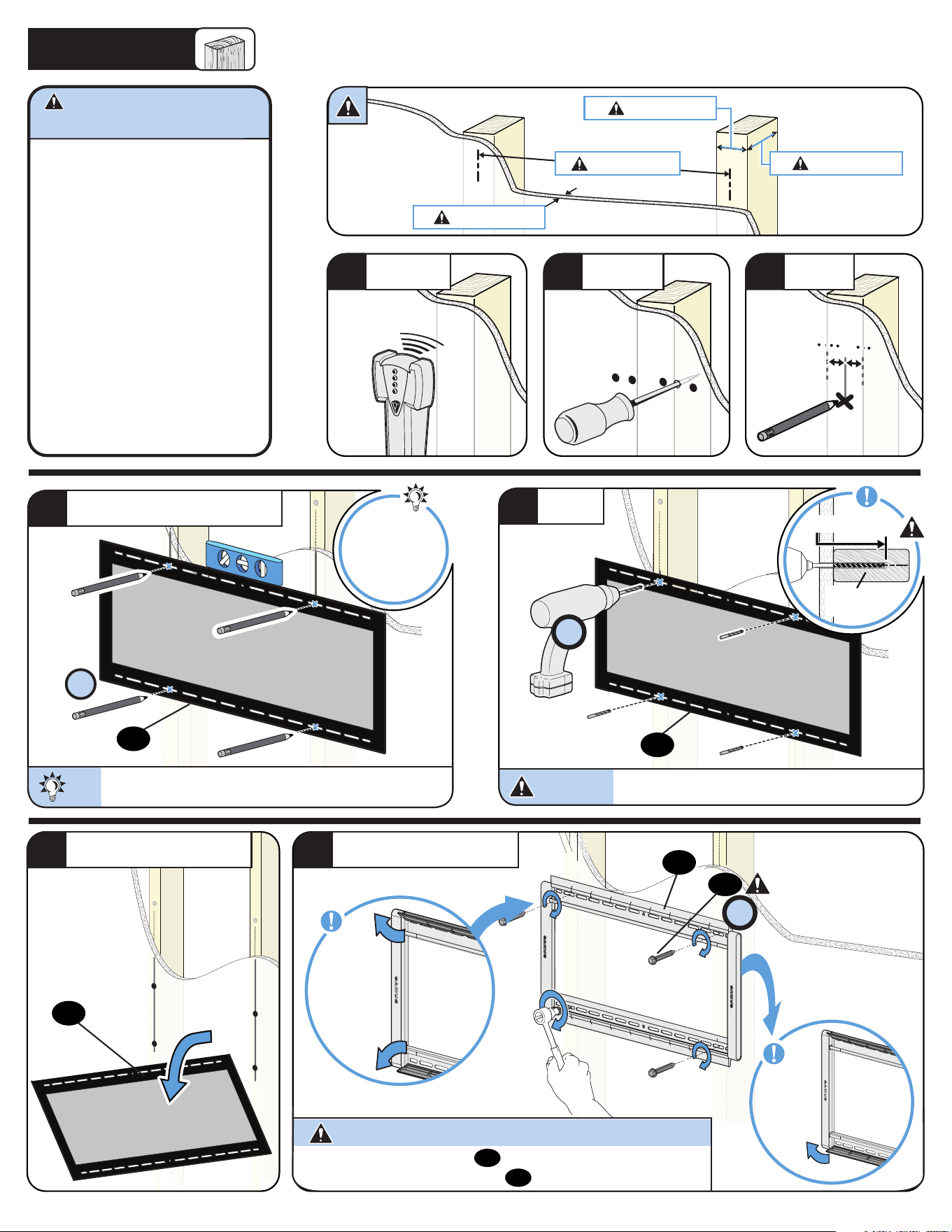
6
Max. 5/8 in. (1.5 cm)
Min. 16 in. (40.6 cm)
Min. 3 ½ in. (8.9 cm)
Min. 1 ½ in. (3.8 cm)
CAUTION: Avoid potential personal
injury or property damage!
● Drywall covering the wall
must not exceed 5/8 in. (1.5 cm)
● Minimum wood stud size:
nominal 2 x 4 in. (5.1 x 10.2 cm)
actual 1 ½ x 3 ½ in. (3.8 x 8.9 cm)
● Minimum horizontal space between
fasteners:16 in. (40.6 cm)
● Stud centers must be verified
STEP 2A
Wood Stud Installation
1
LOCATE
2
VERIFY
3
MARK
4X
2 ¾ in. (6.9 cm)
7/32 in.
(5.5 mm)
4
POSITION TEMPLATE
TIP:
To calculate your precise wall plate location, check out our
HeightFinder at sanus.com [www.sanus.com/1172].
sanus.com
/1172
HeightFinder™
Visit
5
DRILL
CAUTION:
Be sure you drill into the CENTER of the stud.
4X
08
Skip to STEP 3 on PAGE 9.
6
REMOVE TEMPLATE
7
SECURELY TIGHTEN
4X
06
06
06
07
CAUTION: Avoid potential personal injury or property damage!
Open
covers
Close
bottom cover
Do not over-tighten the lag bolts
08
. Tighten the lag bolts only until they
are pulled firmly against the wall plate
07
.
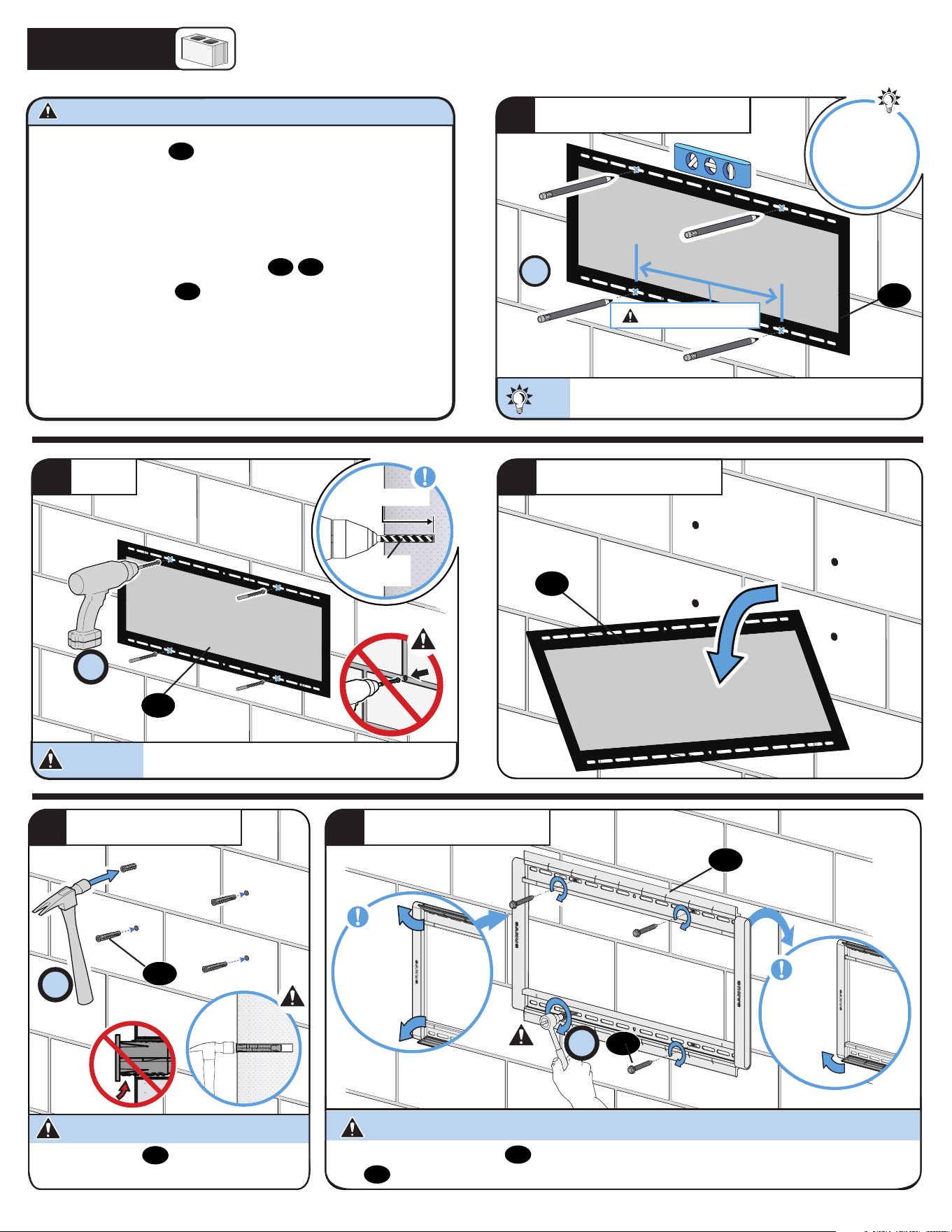
7
Skip to STEP 3 on PAGE 9.
4X
TIP:
TIP:
To calculate your precise wall plate location, check out our
HeightFinder at sanus.com [www.sanus.com/1172].
Min. 16 in. (40.6 cm)
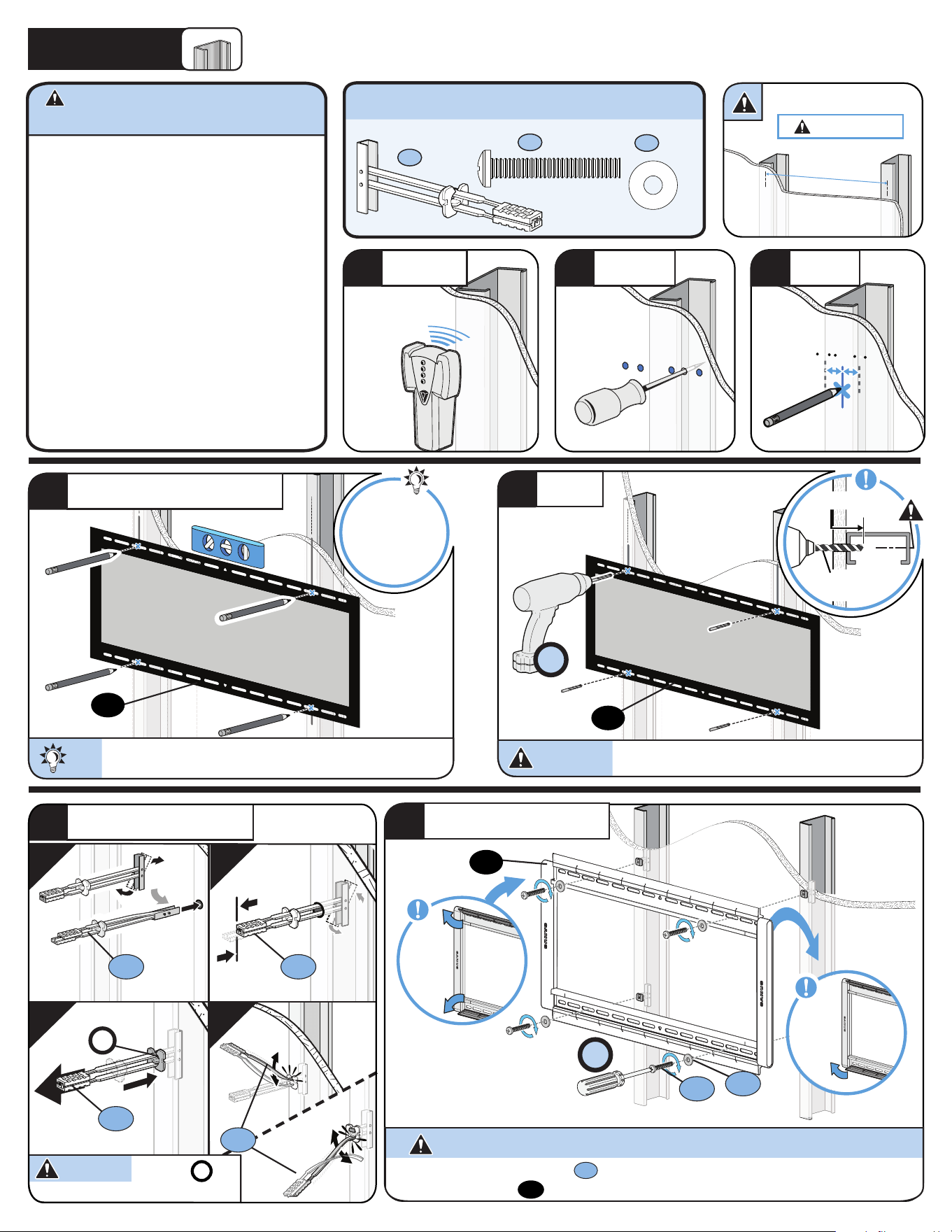
1
POSITION TEMPLATE
Solid Concrete or Concrete Block Installation
● Mount the wall plate
07
directly onto the concrete surface
● Minimum solid concrete thickness: 8 in. (20.3 cm)
● Minimum concrete block size: 8 x 8 x 16 in. (20.3 x 20.3 x 40.6 cm)
● Minimum horizontal space between fasteners: 16 in. (40.6 cm)
● For concrete applications, TV brackets
04
/
05
must remain
centered in wall plate
07
. Keep this in mind when selecting the wall
plate location
STEP 2B
CAUTION: Avoid potential personal injury or property damage!
sanus.com
/1172
HeightFinder™
Visit
Never drill into the mortar between blocks.
CAUTION:
Never drill into the mortar between blocks.
2
DRILL
4X
CAUTION:
CAUTION: Avoid potential personal injury or property damage!
4X
08
07
09
4X
Be sure the anchors
09
are seated flush with the
concrete surface.
CAUTION:
5
SECURELY TIGHTEN
3
REMOVE TEMPLATE
3/8 in.
(10 mm)
3 in. (7.6 cm)
34
INSERT ANCHORS
06
06
06
Open
covers
Close
bottom
cover
Do not over-tighten the lag bolts
08
. Tighten the lag bolts only until they are pulled firmly against the wall
plate
07
.
8
Min. 16 in. (40.6 cm)
CAUTION: Avoid potential personal injury or
property damage!
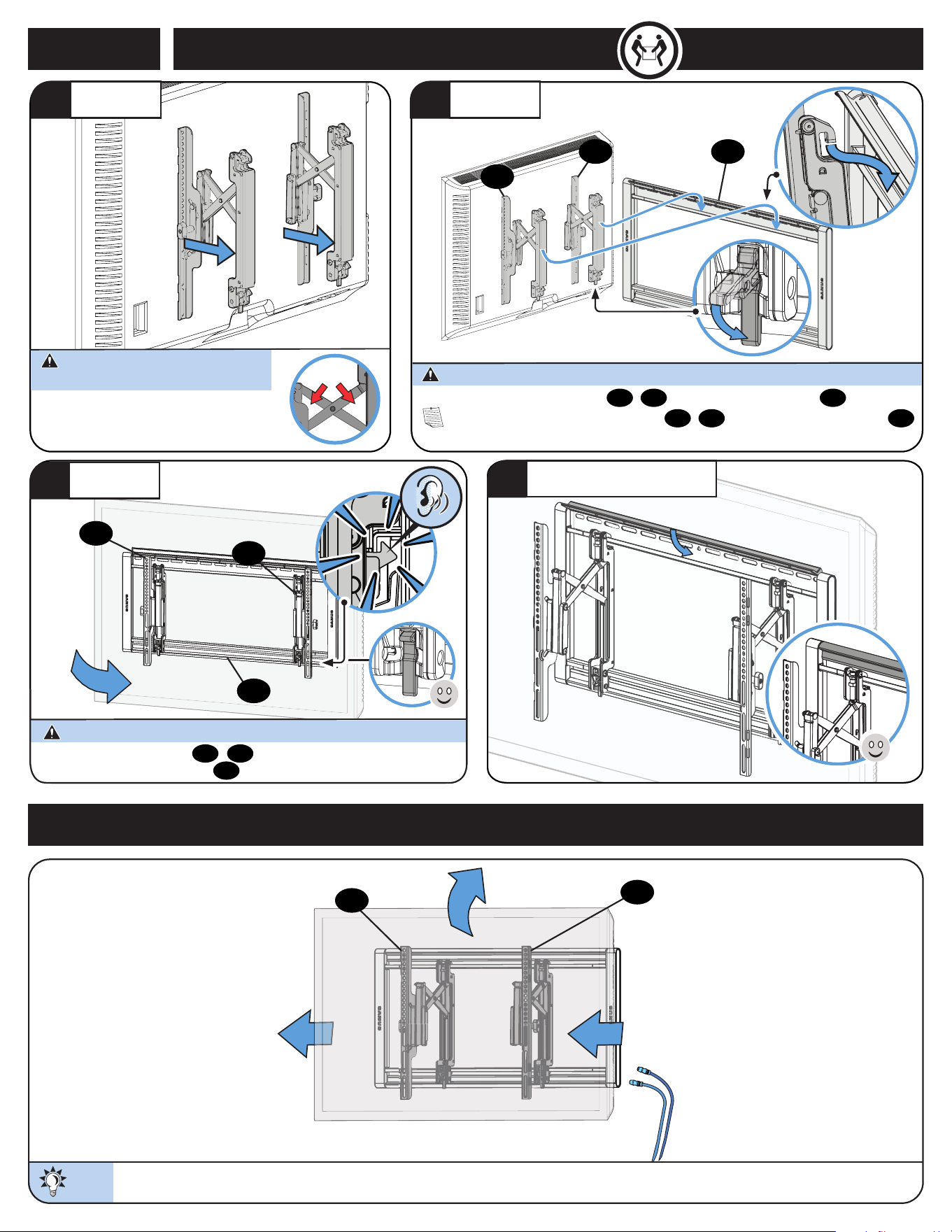
STEP 2C
1
LOCATE
2
VERIFY
3
MARK
● Studs must be at least 2x4 / 25 ga.
● If back side of wall is unfinished, drywall must be installed to
a minimum of one stud left and right
of the stud(s) being used to install the mount
● Drywall must be a minimum of 1/2 in. (13 mm) thick on
each side of the studs, and a minimum clearance of 1
⅞ in. (48 mm)
behind the wall is required
● This product must be centered on the studs
● Stud type and structural strength must conform to the North
American Specification for the Design of Cold-Formed Steel
Structural Members
[362 S 125 18, C-Shape, S - Stud Section]
● Drywall must be secured to studs with screws
12 in. (304.8 mm) on center
1 in. (25 mm)
1/2 in.
(13 mm)
4X
4
POSITION TEMPLATE
TIP:
To calculate your precise wall plate location, check out our Height
Finder at sanus.com [www.san.us/1172].
www.
san.us/1172
HeightFinder™
Visit
5
DRILL
CAUTION:
Be sure you drill into the CENTER of the stud.
Steel Stud Installation
a
b
c
d
S1 S1
S1
P
4X
6
INSTALL ANCHORS
7
SECURELY TIGHTEN
CAUTION: Avoid potential personal injury or property damage!
S1
CAUTION: Be sure cap
P
is
seated against the drywall surface.
S3
S2
06
06
07
Steel Stud Installation Kit SSMK1 (NOT INCLUDED)
Contact Customer Service to inquire about the additional hardware.
1/4-20 x 1 ¾ in.
1/4 in.
x4
S1
x4
S2
x4
S3
1/4-20 SNAP Toggle BB
Open
covers
Close
bottom
cover
Do not over-tighten the lag bolts
S2
. Tighten the lag bolts only until they are pulled firmly
against the wall plate
07
.
9
For CONCRETE APPLICATIONS: TV brackets
04
/
05
MUST remain centered in wall plate
07
.
NOTE: For WOOD STUD APPLICATIONS, TV brackets
04
/
05
can be slid anywhere along wall plate
07
for optimal positioning of your TV.
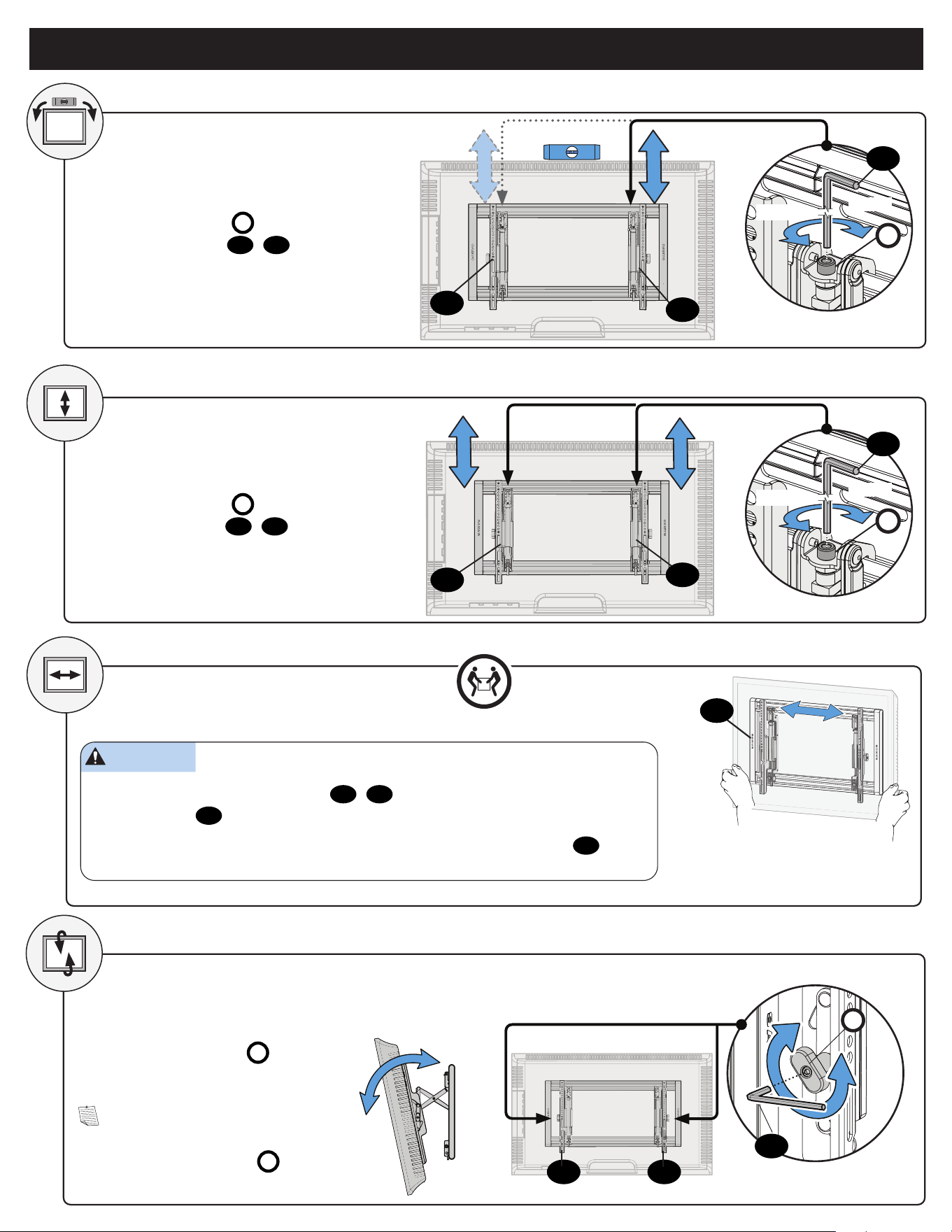
ATTACH TV TO WALL PLATE
STEP 3
HEAVY! You may need assistance
with this step.
TIP:
Extend the TV outward AND tilt the TV up or down to gain better access to the back of the TV.
MANAGE CABLES
07
04
05
4
CLOSE TOP COVER
1
EXTEND
2
HANG
05
04
CAUTION: Avoid potential personal injury or property damage!
3
ATTACH
Always make sure TV brackets
04
/
05
are in the locked position so the TV is
securely fastened to the wall plate
07
.
CAUTION: Avoid potential personal injury or property damage!
04
05
07
The TV brackets contain potential pinch points during
operation. Keep fingers away from pinch points when
retracting the TV. (see arrows)
CAUTION: Avoid potential personal
injury or property damage!
10
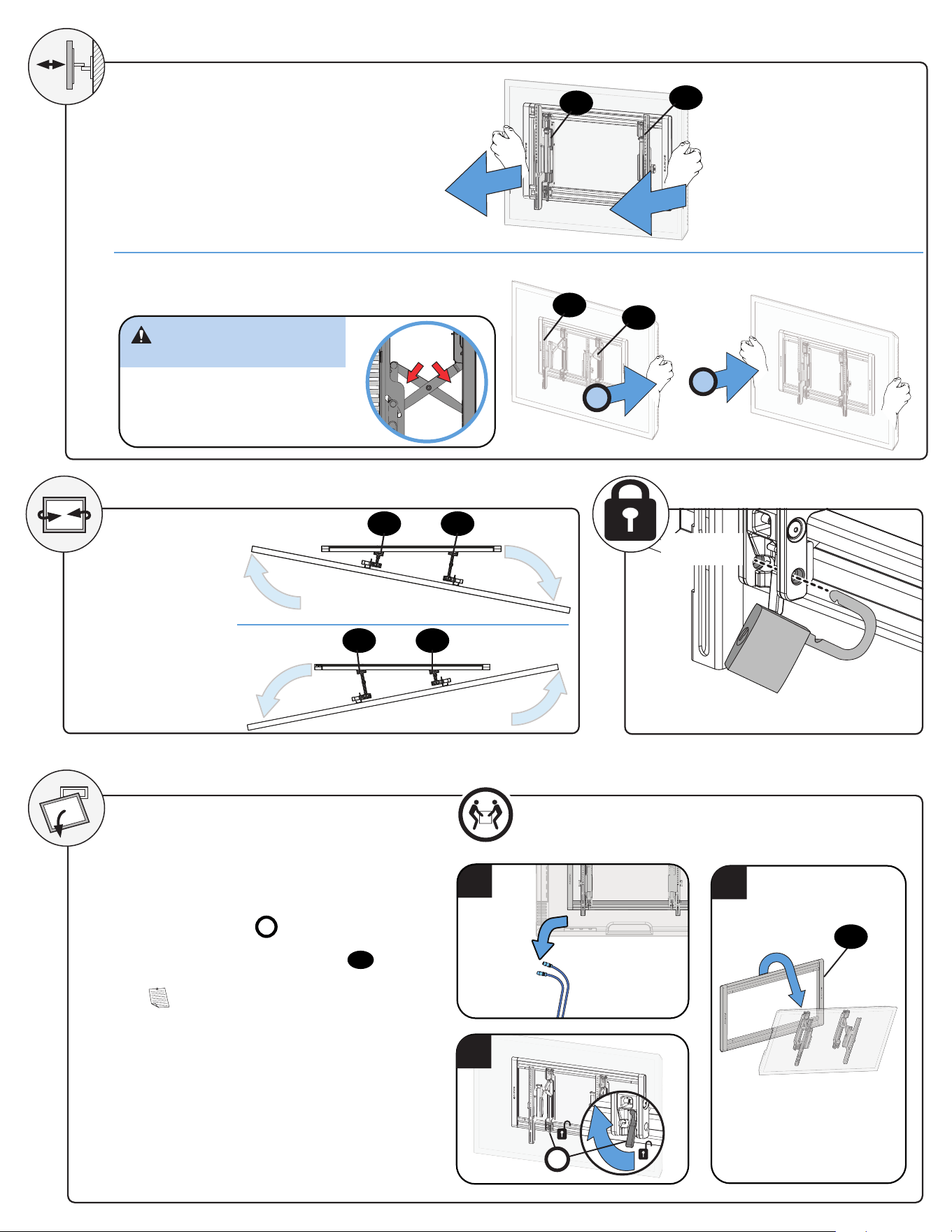
ADJUSTMENTS
To level your TV, turn the level
adjustment screw
S
on the top of
either TV bracket
04
/
05
to raise or
lower that respective side of the TV.
Adjust the height by turning the level
adjustment screw
S
on the top of
both TV brackets
04
/
05
.
LEVEL
HEIGHT
S
RAISE
LOWER
TILT
Your TV should adjust easily when moved,
then stay in place.
Adjust the tilt tension knob
T
if your TV
naturally tilts up or down.
NOTE: If you do not intend to adjust the
tilt for different viewing locations, you can
tighten the tilt tension knobs
T
to prevent
unwanted movement.
T
CAUTION: Avoid potential personal injury or property damage!
For Concrete Applications, TV brackets
04
/
05
must be centered between the marks on
the wall plate rail
07
.
For Wood Stud Installations ONLY: Slide the TV left or right along the wall plate
07
to
reposition.
SIDE-TO-SIDE SHIFT
HEAVY! You may need
assistance with this step.
04
04
04
05
05
05
10
07
10
S
RAISE
LOWER
10
Align the brackets between
the two lines on the wall plate
for minimum profile depth.
11
(Optional)
LOCK
1. Disconnect all cables.
2. To unlock the TV from the wall plate: Lift
the release latch
R
on both brackets.
3. Lift the TV up and off of wall plate
07
.
NOTE: To rehang the TV, follow the
procedures in STEP 3 on PAGE 9.
1
EXTEND
RETRACT
1
2
CAUTION: Avoid potential
personal injury or property damage!
The TV brackets contain potential
pinch points during operation.
Keep fingers away from pinch points
when retracting the TV. (see arrows)
REMOVING THE TV
3
HEAVY! You may need
assistance with this step.
2
R
04
05
07
04
05
SWIVEL
04 05
04 05
12
68,0 kg
(150 lbs)
Punzón Punzón
Lápiz
Localizador de
montantes
Localizador de
montantes
Destornillador
Cinta
métrica
Broca para
acero de
13 mm (1/2
pulg.)
Taladro eléc-
trico
Martillo
Broca para
hormigón
de 10 mm
(3/8 pulg.)
Instalación en montantes
de madera
Instalación en montantes
de acero
Instalación en
hormigón
Llave de tubo
¡ESTAMOS AQUÍ PARA AYUDARLE!
Retire el soporte de su televisor... ¡si ya lo tenía instalado claro!
Instale todos los accesorios que quiera añadir a su televisor.
Compruebe en los manuales de los accesorios si es necesario instalarlos ANTES de montar el televisor.
Proteja la pantalla del televisor cuando lo ponga boca abajo para la instalación.
¿Desea ver un video para comprobar lo fácil que es hacerlo usted mismo?
Visualícelo ahora en: SANUS.com/2928
Acierte a la primera. HeightFinder™ le indica el lugar donde debe taladrar.
Descúbralo en: SANUS.com/1172
Nuestros expertos en instalación de EE. UU. están listos para ayudar.
Llámenos al: 800-359-5520 O contacte con nosotros por chat en: SANUS.com/chatSP
Dimensiones
Antes de comenzar
Kit SSMK1 (not included)
Llame al Servicio de Atención
al Cliente
Llame al Servicio de Atención al Cliente
La construcción
de su pared
SOLAMENTE instalar en
estos tipos aceptables
de la pared.
Instalación en panels de
yeso solo NO soportará el
peso de su TV.
¿No está seguro?
Montantes de madera Montantes de acero
Hormigón macizo o
bloque de hormigón
ACEPTABLE ACEPTABLE ACEPTABLE
PRECAUCIÓN:
NO instalar
en panel de
yeso solo
Lea atentamente estas instrucciones en su totalidad para asegurarse de que está familiarizado con el sencillo proceso de instalación.
Consulte igualmente el manual de su televisor para conocer si existen requisitos especiales para el montaje de su aparato.
Si no entiende las instrucciones o si tiene dudas acerca de la seguridad de la instalación, el montaje o el uso del producto, póngase en contacto con el Servicio de Atención al Cliente o llame
a nuestro servicio técnico al número 1-800-359-5520 .
Peso máximo
(incluidos los accesorios)
NO EXCEDAS
Si su TV (incluidos los accesorios) pesa MÁS, esta
montura NO es compatible.
Visite MountFinder.Sanus.com o llame para encontrar
un soporte compatible.
PRECAUCIÓN: Evite posibles lesiones personales y daños materiales.
● Este producto está diseñado para usarse únicamente en aplicaciones con montantes de madera, hormigón y bloques de hormigón. NO lo instale en tabiques únicamente de yeso. Para obtener información
sobre cómo usar este producto en paredes con montantes de acero, póngase en contacto con el servicio de atención al cliente y pregunte por el kit de montaje en montantes de acero.
● Este producto está diseñado SOLO PARA USO EN INTERIORES.
● La pared debe ser capaz de soportar hasta cinco veces el peso combinado del televisor y la montura.
● No utilice este producto para ningún otro propósito que no sea el explícitamente especificado por el fabricante.
● El fabricante no se responsabiliza de ningún daño o lesión resultante del montaje incorrecto o el uso indebido.
herramientas
necesarias
ESPAÑOL
INSTRUCCIONES IMPORTANTES DE SEGURIDAD
– LEA TODO ESTE MANUAL ANTES DE UTILIZAR ESTE PRODUCTO – GUARDE ESTAS INSTRUCCIONES
Broca para
madera
de 5,5 mm
(7/32 pulg.)
Llave de
tubo de
13 mm
(1/2 pulg.)
Nivelador
13
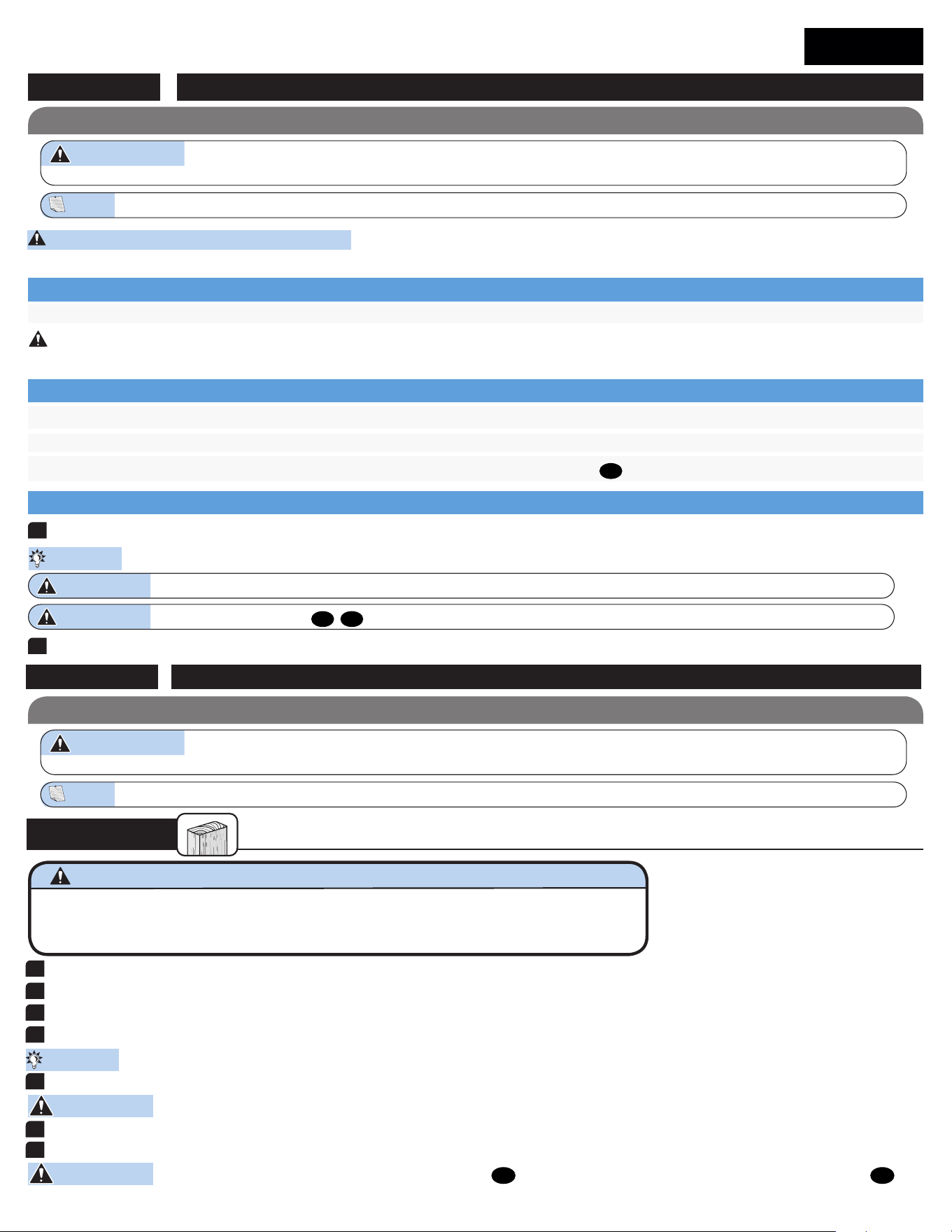
Para televisores con la parte trasera curvada, interferencia de cables u orificios empotrados, use tornillos más largos y los espaciadores
03
para crear un espacio adicional entre el televisor y el soporte.
Determine qué diámetro de tornillos (M6 o M8) encaja en los cuatro orificios de montaje de la parte trasera de su televisor.
Para los televisores con la parte trasera plana y para que su televisor esté más cerca de la pared, utilice tornillos más cortos sin espaciador.
Determine dónde desea colocar el espaciador cuando fije el soporte del televisor en el PASO 1.3.
Fijar el soporte del televisor al televisorPASO 1
PRECAUCIÓN: Evite posibles lesiones físicas y daños materiales. Los soportes del televisor pueden contener puntos de compresión durante la operación. Mantenga los dedos alejados de los puntos
de compresión al retraer el televisor. (observe las flechas)
PRECAUCIÓN: Compruebe el enrosque adecuado de la combinación tornillo/arandela/espaciador y los soportes del televisor. (PASO 1.3).
Si el tornillo es DEMASIADO CORTO, no sostendrá el televisor. Si es DEMASIADO LARGO, el televisor se dañará.
1
COLOCAR EL SOPORTE DE TELEVISOR
2
APRETAR CON FIRMEZA
Español
PÁGINA 4
Fijar la placa mural a la paredPASO 2
PÁGINA 5
PASO 2A
Instalación en pared con montantes de madera
1
LOCALIZAR LOS MONTANTES
2
VERIFICAR LOS BORDES DE LOS MONTANTES
3
MARCAR LOS CENTROS DE LOS MONTANTES
4
COLOCAR LA PLANTILLA
6
RETIRAR LA PLANTILLA
7
APRETAR CON FIRMEZA
PRECAUCIÓN: Evite posibles lesiones físicas y daños materiales! No apriete excesivamente los pernos
08
. Apriete los pernos sólo hasta que estén firmemente ajustados contra la placa para la pared
07
.
PRECAUCIÓN: Marque los centros de los montantes.
CONSEJO: Para calcular la ubicación concreta de la placa mural, pruebe nuestra herramienta HeightFinder disponible en sanus.com [www.sanus.com/1172].
CONSEJO: Las perillas de tensión de inclinación T de las placas de sujeción del televisor 01 y 02 deben orientarse hacia los bordes externos.
PÁGINA 6
Vaya al PASO 3 en la PÁGINA 9.
5
TALADRAR ORIFICIOS EN LOS CENTROS DE LOS MONTANTES
Piezas y elementos de sujeción suministrados
Piezas y elementos de sujeción suministrados
ADVERTENCIA: Este producto contiene piezas pequeñas que, en caso de ser tragadas, podrían producir asfixia. Antes de iniciar el ensamblaje, compruebe que todas las piezas estén incluidas y
en buenas condiciones. Si faltan piezas o alguna está dañada, no devuelva el artículo al distribuidor. Póngase en contacto con el servicio de atención al cliente. Nunca utilice piezas deterioradas.
ADVERTENCIA: Este producto contiene piezas pequeñas que, en caso de ser tragadas, podrían producir asfixia. Antes de iniciar el ensamblaje, compruebe que todas las piezas estén
incluidas y en buenas condiciones. Si faltan piezas o alguna está dañada, no devuelva el artículo al distribuidor. Póngase en contacto con el servicio de atención al cliente. Nunca utilice piezas deterioradas.
NOTA: No todos los elementos de sujeción incluidos deberán utilizarse.
PRECAUCIÓN: asegurándose de que los soportes
04
/
05
están a la misma altura.
PRECAUCIÓN: La flèche pointe vers le haut de votre téléviseur.
NOTA: La flecha apunta a la parte superior de su televisor.
1.1 Seleccione los tornillos del televisor
1.2. Determine el espaciador que necesita para su tipo de televisor
1.3 Fije las placas de sujeción al televisor
PRECAUCIÓN: Evite posibles lesiones físicas y daños materiales.
● El yeso que recubre la pared no debe exceder los 1,5 cm (5/8 pulg.)
● Tamaño mínimo del montante de madera: común 5,1 x 10,2 cm (2 x 4 pulg.) nominal 3,8 x 8,9 cm (1 ½ x 3 ½ pulg.)
● Espacio horizontal mínimo entre los elementos de sujeción: 40,6 cm (16 pulg.)
● Debe comprobar los montantes centrales
14
Español
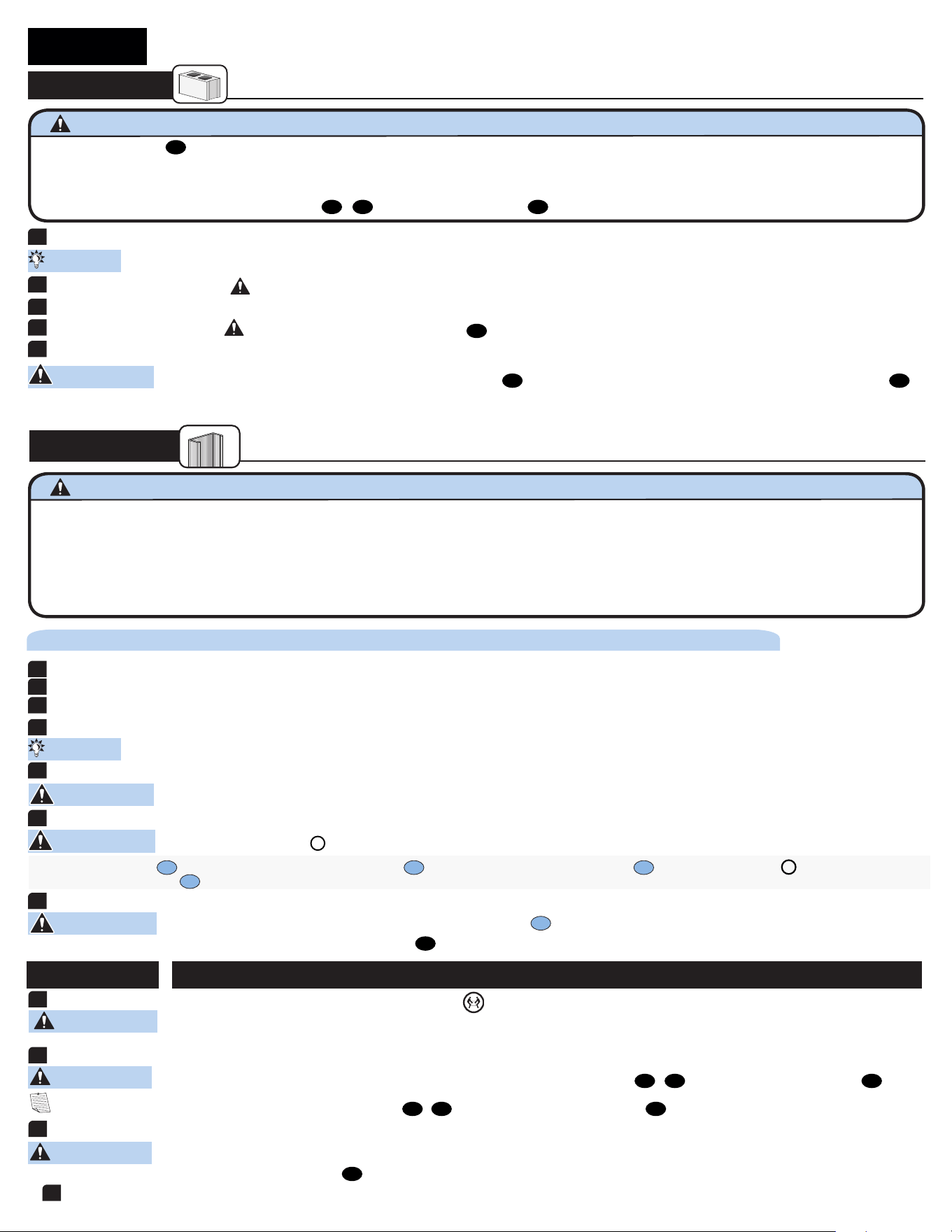
a. Inserte los cuatro anclajes
S1
en los orificios perforados. b. Tire para girar el anclaje
S1
hacia la pared. c. Sostenga el extremo del anclaje
S1
, mientras desliza el obturador
P
contra la pared de yeso.
d. Separe los extremos del anclaje
S1
para fijar en su lugar.
PASO 2C
Instalación en montantes de acero
1
LOCALIZAR LOS MONTANTES
2
VERIFICAR LOS BORDES DE LOS MONTANTES
3
MARCAR LOS CENTROS DE LOS MONTANTES
4
COLOCAR LA PLANTILLA
5
TALADRAR ORIFICIOS EN LOS CENTROS DE LOS MONTANTES
6
INSTALAR LOS ANCLAJES
7
APRETAR CON FIRMEZA
PRECAUCIÓN: Evite posibles lesiones físicas y daños materiales! No apriete excesivamente los pernos
S2
.
Apriete los pernos sólo hasta que estén firmemente ajustados contra la placa para la pared
07
.
PRECAUCIÓN: Asegúrese de que el obturador
P
está afianzado contra la superficie de la pared de yeso.
CONSEJO: Para calcular la ubicación concreta de la placa mural, pruebe nuestra herramienta HeightFinder disponible en sanus.com [www.sanus.com/1172].
PÁGINA 8
1
COLOCAR LA PLANTILLA
2
TALADRAR LOS ORIFICIOS
3
RETIRAR LA PLANTILLA
4
INSERTAR LOS ANCLAJES
5
APRETAR CON FIRMEZA
PRECAUCIÓN: Evite posibles lesiones físicas y daños materiales! No apriete excesivamente los pernos
08
. Apriete los pernos sólo hasta que estén firmemente ajustados contra la placa para la pared
07
.
CONSEJO: Para calcular la ubicación concreta de la placa mural, pruebe nuestra herramienta HeightFinder disponible en sanus.com [www.sanus.com/1172].
Instalación en paredes de hormigón sólido o en bloques de hormigón
PASO 2B
PÁGINA 7
Vaya al PASO 3 en la PÁGINA 9.
PRECAUCIÓN: Evite posibles lesiones físicas y daños materiales.
PRECAUCIÓN: Evite posibles lesiones físicas y daños materiales.
● Instale la placa mural
07
directamente sobre la superficie de hormigón
● Espesor mínimo del hormigón: 20,3 cm (8 pulg.)
● Tamaño mínimo del bloque de hormigón: 20,3 x 20,3 x 40,6 cm (8 x 8 x 16 pulg.)
● Espacio horizontal mínimo entre los elementos de sujeción: 40,6 cm (16 pulg.)
● Para las aplicaciones sobre hormigón, los soportes de televisor
04
y
05
deben estar centrados en la placa mural
07
. Tenga esto en cuenta al seleccionar la ubicación de la placa mural
● Los montantes deben ser de, al menos, 2x4 / 25 ga
● Si la parte posterior de la pared no está acabada, se deben instalar paneles de yeso en, al menos, uno de los montantes a la izquierda y a la derecha que vayan a emplearse para instalar el soporte
● Los paneles de yeso deben tener un espesor mínimo de 13 mm (1/2 pulg.) en cada lado de los montantes y una holgura mínima de 48 mm (1 ⅞ pulg.) por detrás de la pared.
● Este producto debe centrarse en los montantes
● El tipo de montante y la resistencia estructural deben ajustarse a la Normativa norteamericana para el diseño de componentes estructurales de acero forjado en frío [Sección 362 S 125 18, Forma en C,
Montante S]
● Los paneles de yeso se deben fijar con tornillos a 304,8 mm (12 pulg.) del centro de los montantes
Se requiere el kit para montantes de acero [NO INCLUIDO] Contact Customer Service to inquire about the additional hardware.
NOTA: Para APLICACIONES SOBRE MONTANTES DE MADERA, los soportes de televisor
04
y
05
se pueden deslizar a cualquier parte de la placa
07
para conseguir colocar su televisor en una posición óptima.
Presione la parte inferior del televisor contra el conjunto de la placa mural
07
hasta que oiga el chasquido de bloqueo que indica que ha colocado el televisor en su sitio.
¡ELEMENTO PESADO! Es posible que necesite ayuda en este paso.
Fijar el televisor en la placa muralPASO 3
2
CUELGUE EL TELEVISOR EN LA PLACA MURAL
3
PRESIONE LA PARTE INFERIOR DEL TELEVISOR PARA FIJARLO
PRECAUCIÓN: Evite posibles lesiones físicas y daños materiales. Para APLICACIONES EN HORMIGÓN: Los soportes de televisor
04
y
05
DEBEN estar centrados en la placa mural
07
.
PRECAUCIÓN: Evite posibles lesiones físicas y daños materiales.
PÁGINA 9
4
CIERRE LA TAPA SUPERIOR
1
EXTIENDA LOS SOPORTES DE LA TELEVISIÓN
PRECAUCIÓN: Evite posibles lesiones físicas y daños materiales. Los soportes del televisor pueden contener puntos de compresión durante la
operación. Mantenga los dedos alejados de los puntos de compresión al retraer el televisor. (observe las flechas)
PRECAUCIÓN: Nunca perfore el cemento que une los bloques.
PRECAUCIÓN: Asegúrese de que los anclajes
09
queden nivelados respecto de la superficie de hormigón.
PRECAUCIÓN: Marque los centros de los montantes.
15
Español
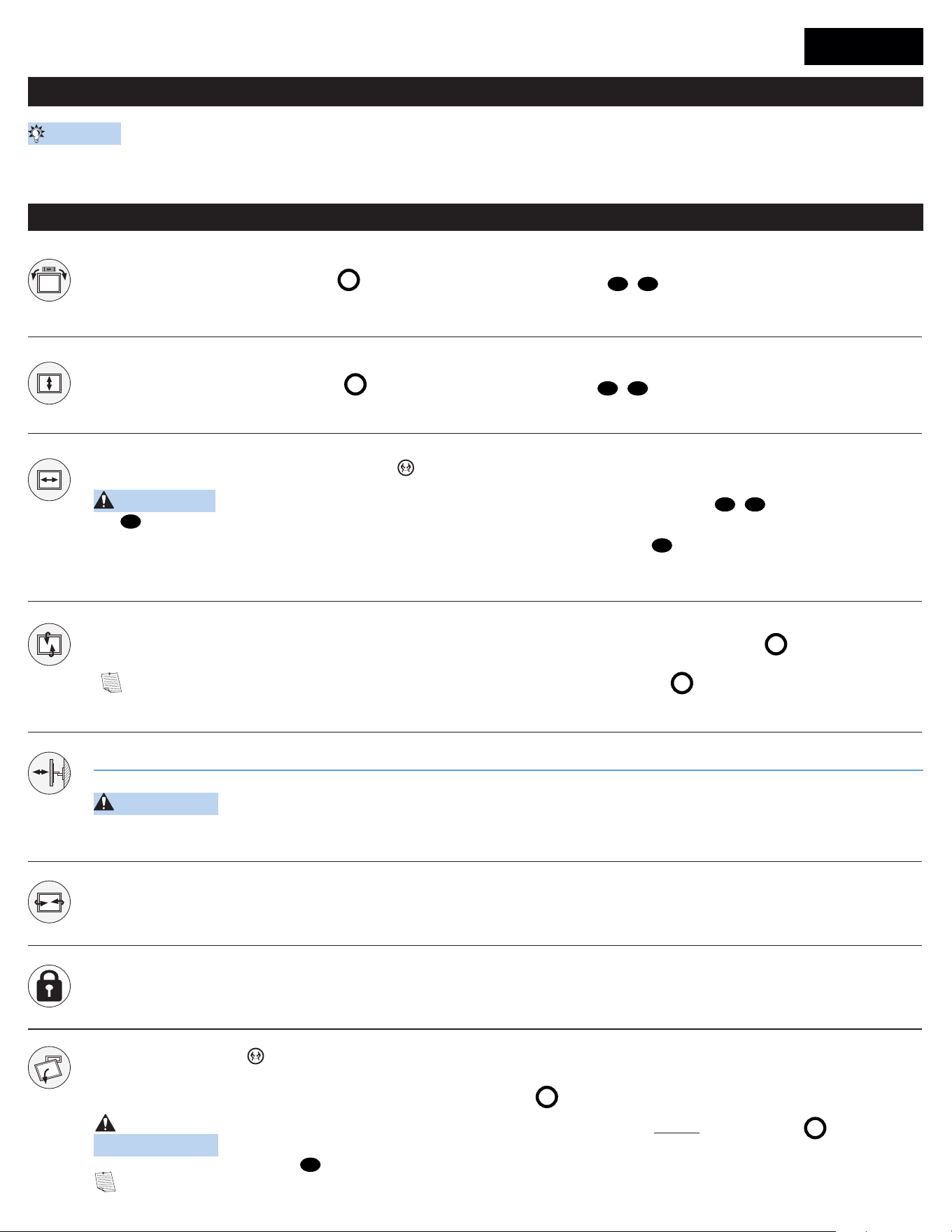
Ajustes
NIVEL
Para nivelar el televisor, gire el tornillo de ajuste de nivel
S
situado en la parte superior de cualquiera de los soportes
04
y
05
para subir o bajar el lado correspondiente
del televisor.
ALTURA
Ajuste la altura girando el tornillo de ajuste de nivel
S
situado en la parte superior de los dos soportes
04
y
05
.
INCLINACIÓN
El televisor debe acomodarse fácilmente al moverlo y, posteriormente, quedar en su lugar. Si el televisor se inclina hacia arriba o hacia abajo de forma natural,
T
ajuste las perillas de tensión
de inclinación a mano.
NOTA: Si no pretende ajustar la inclinación a diferentes ubicaciones de visión, puede ajustar las perillas de tensión de inclinación
T
para evitar movimientos no deseados.
EXTENDER
RETRAER
DESPLAZAMIENTO LATERAL DEL TELEVISOR
¡ELEMENTO PESADO! Es posible que necesite ayuda en este paso.
RETIRAR EL TELEVISOR
¡ELEMENTO PESADO! Es posible que necesite ayuda en este paso.
PRECAUCIÓN: Evite posibles lesiones físicas y daños materiales. Para las aplicaciones sobre hormigón, los soportes de televisor
04
y
05
deben estar centrados en la placa
mural
07
.
SOLO para instalaciones sobre montantes de madera: Deslice el televisor a la derecha o a la izquierda a lo largo de la placa mural
07
para recolocarlo.
1. Desconecte todos los cables del televisor.
2. Para desbloquear el televisor de la placa mural: Tire hacia abajo y sostenga ambos cables de liberación
R
mientras tira con cuidado de la parte inferior del televisor para separarlo de la pared.
PRECAUCIÓN: Evite posibles lesiones físicas y daños materiales. Para evitar romper el pasador de seguridad: siempre tire y sostenga los cables de liberación
R
mientras retira el
televisor de la pared.
3. Levante el televisor y retírelo de la placa mural
07
.
NOTA: Para volver a colgarlo, siga el procedimiento descrito en el PASO 3 en la PÁGINA 9.
PÁGINA 10
Organizar los cables
PÁGINA 9
GIRAR
CERRAR (Opcional)
PRECAUCIÓN: Evite posibles lesiones físicas y daños materiales. Los soportes del televisor pueden contener puntos de compresión durante la operación. Mantenga los dedos
alejados de los puntos de compresión al retraer el televisor. (observe las flechas)
Alinee los soportes entre las dos líneas en la placa de pared para obtener una profundidad de perfil mínima.
CONSEJO: Cambie la posición de su televisor para poder conectar los cables y, a continuación, ajústelo como desee.
6901-603155 00
©2022 Legrand AV Inc. All rights reserved. SANUS is a brand of Legrand. SANUS Elite and the SANUS Elite logo are registered trademarks of Legrand.
SANUS.com
Call us at: US: 800-359-5520
Or, chat at: US: SANUS.com/chatSP
Legrand AV Inc. y sus empresas asociadas y filiales (colectivamente “Legrand”) tienen la intención de que este manual sea preciso y completo. Sin embargo, Legrand no garantiza que la información
que contiene incluya todos los detalles condiciones y variaciones, ni que contemple toda posible contingencia en conexión con la instalación y uso de este producto. La información contenida en este
documento es susceptible de ser modificada sin aviso ni obligación de ningún tipo. Legrand no hace ninguna manifestación de garantía, explícita o implícita, respecto a la información contenida este
documento. Legrand no asume ninguna responsabilidad por la exactitud, integridad o suficiencia de la información contenida en este documento.
Legrand AV Inc. and its ailiated corporations and subsidiaries (collectively, “Legrand”), intend to make this manual accurate and complete. However, Legrand makes no claim that the
information contained herein covers all details, conditions, or variations. Nor does it provide for every possible contingency in connection with the installation or use of this product. The
information contained in this document is subject to change without notice or obligation of any kind. Legrand makes no representation of warranty, expressed or implied, regarding the
information contained herein. Legrand assumes no responsibility for accuracy, completeness or suiciency of the information contained in this document.
Thank you for choosing SANUS Elite!
Please take a moment to let us know how we did:
Legrand AV Inc.
•
6436 City West Parkway
•
Eden Prairie, MN 55344 USA