HANDS-FREE
SMART ASSISTANT
INSTRUCTION
MANUAL
PACEMAKER WARNING
TOKK™ contains a magnet. As with any magnetic or
magnetically attaching device, pacemakers and other
medical devices may be affected when in contact or
proximity. Please consult a physician before using
TOKK™ if you have any such medical devices. Wear
TOKK™ on the opposite side as your pacemaker.
Main Features
● Magnetically attaches
● Voice dialing
● Voice control
● Voice dialing through Siri, etc.
● Active noise cancellation
● Single MIC
● Bluetooth hands free
● Remote camera function
● Rechargeable battery
Specifications
● (Rated power) PO=1.5W
● (Frequency response) 180HZ-16KHZ
● (Distortion factor) THD<1%
● (Signal-to-noise ratio) S/N≥90DB
● (Separation) ≥55dB
● (Speaker) 23mm;4Ω 1.5W
● (Playing time) 150-180mins
Trouble Shooting
No Sound
● Make sure that the music player is working
and the device is charged.
● Make sure the Bluetooth is paired with the
correct device.
Not Charging
Check to make sure that you are using the
correct cable and that it is fully plugged into both
the device and the USB port that you are
charging from. Also check to make sure the PC
or other USB charger is turned on.
Disclaimer:
● It is recommended for best performance that
all phone software be kept up to date.
● Bluetooth in vehicles and other devices may
cause conflict with TOKK™ connectivity;
please ensure you are connected to the
desired device in your phone’s menu.
● The quality of your TOKK™ call is entirely
dependent on your phone signal strength and
subsequent connection quality.
● Due to Bluetooth infrastructure outside of our
control, TOKK™ will not work via Bluetooth
with a computer.
Connecting Multiple Devices:
To avoid connectivity issues in situations where
more than one TOKK™ device has been
purchased, turn only one TOKK™ on at a time
and connect to a smart device. Repeat this step
each time a new TOKK™ is connected to a new
smart device.
Easy Operation
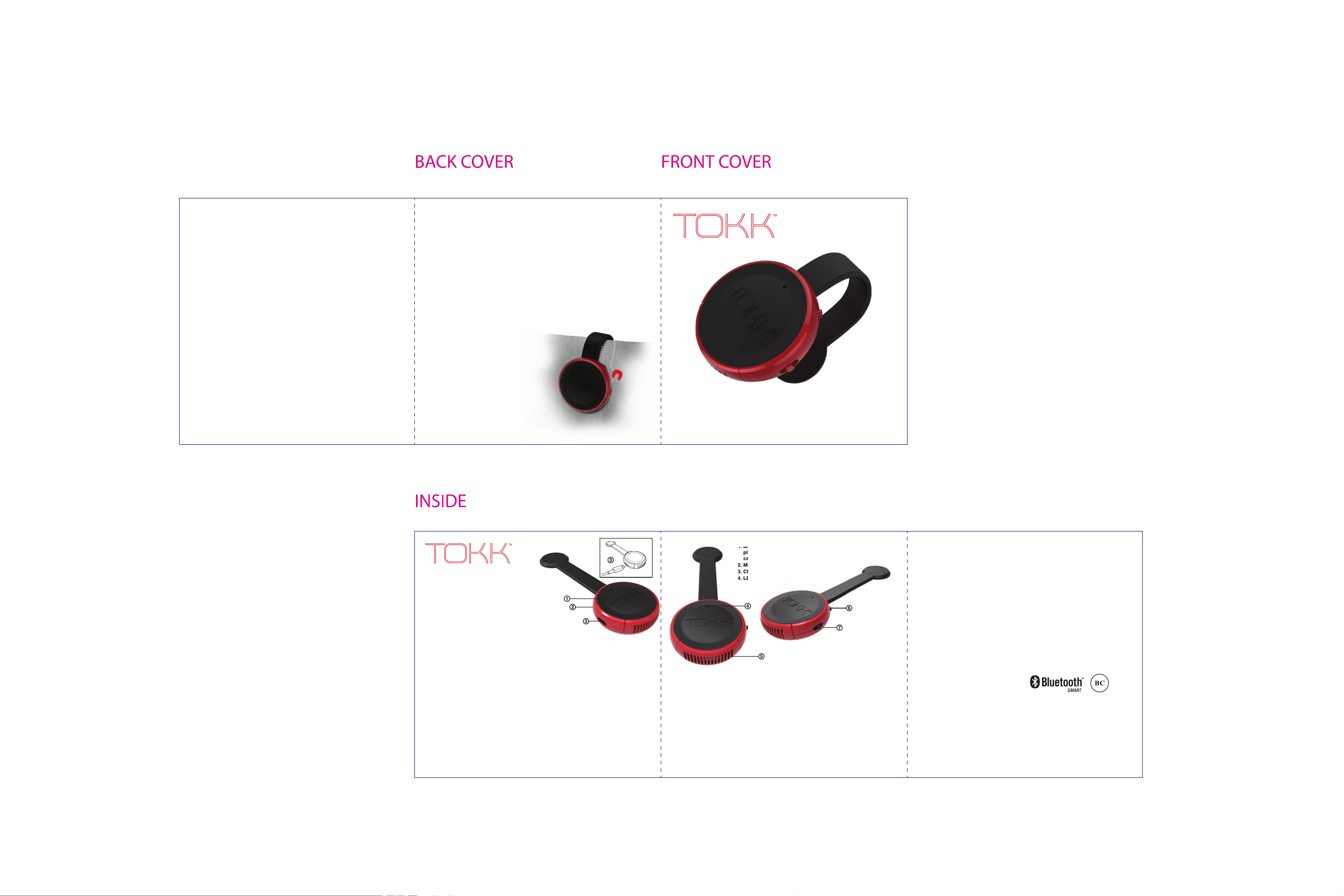
Play/Pause/Answer Call/Siri, etc. (1)
● Answer/Hang Up: single click to answer, single
click again to end.
● Play/Pause: hold down for two seconds to pause
music, and hold down for another two seconds to
replay.
● Siri, etc.: double click to activate intelligent
assitant, single click to close it.
● Redial: triple click to redial the last outgoing
number, press again to end call.
Charging Port (3)
You should fully charge the speaker prior to first use.
Plug the charging cable into the micro USB port and
then connect the charging cable to the USB port of
your PC or other compatible power source. TOKK™
will automatically turn off when USB is plugged to
charge, and will automatically recover to the
previous state once the USB is unplugged.
LED Indicator (4)
● When power is on, LED light shows device is
turned on.
● Blue LED light fast flashing indicates
search to pair.
● Blue LED light slowly flashing indicates
successfully paired.
● Red LED light steady on indicates that device
is in charging mode.
● Red LED Light disapear when fully charged.
● Low battery: an alarm will sound three times to
indicate the last 20mins and 5mins of battery
power, along with a red & blue LED light
flashing slowly.
1. Multi function button:
play, pause, answer
call, Siri, etc.
2. MIC
3. Charging port
4. LED indicator
Only one TOKK™ can be connected to a smart
device at a time.
Caution: Changes or modifications not
expressly approved by the party responsible for
compliance could void the user’s authority to
operate the equipment.
Warning! This equipment may experience
difficulty and/or memory loss when subjected to
any electrostatic discharge, radio frequency
interference, or sudden power surge/interrup-
tion. The user is encouraged to reset the
equipment should any of these occur.
1. Multi function button:
play, pause, answer
call, Siri, etc.
2. MIC
3. Charging port
4. LED indicator
Power On/Off Button (6)
● Slide this button to turn On/Off.
Note:
● It is strongly recommended to turn off the
speaker while not in use.
● When TOKK™ and phone are disconnected
over 10mins,TOKK™ will automatically power
off to save power (despite Button in On
position). You will need to switch it Off and On
again to reactivate.
Volume (+/–) (Remote Camera Function) (7)
● Short slide (+) to increase the volume,
slide & hold (+) to forward to the next song.
● Short slide (–) to decrease the volume,
slide & hold (–) to play the previous song.
● In camera mode, short slide (+, –) to activate
remote camera function.
5. Speaker
6. ON/OFF
7. Volume +/– (remote
camera function)
Bluetooth Pairing:
Please ensure the device to which you are
pairing with has Bluetooth® capabilities.
1. Make sure that the TOKK™ is turned off.
2. Place the TOKK™ and the paired device in
proximity so that both devices are in view.
3. Switch Power Button on until power is ON.
A blue LED light will flash rapidly.
4.To activate the Bluetooth® mode and
functions on your phone or device, see the
instructions for that device.
5 Set the phone or device to search for
Bluetooth® devices and select the TOKK™.
6 When the pairing is complete, the blue LED
light will flash slowly. The speaker is now
ready for answering calls, listening to music
or taking pictures.
Note: Some mobile phones or other devices
may pair automatically when re-started.
Precautions
● Please only use the computer USB or the
DC 5V power matching the Micro USB
interface to charge.
● Please keep and use in normal environ-
ments. Exposure to fire, water, or other
extreme elements may damage the unit. Do
not handle with wet hands.
● Keep debris or other items from blocking the
device or from entering any of the ports.
● Do not attempt to open or take apart this
device. Device will be damaged during that
process.
● Do not submerge the product in water.
● Keep device away from water and moisture -
do not get it wet.
● Keep device away from any heat source.
● Adjust volume to avoid damaging your
hearing.
● If the device quality deteriorates, or a slight
‘popping noise’ is heard, it may be due to
low battery. Please recharge the device.
● Do not put any foreign objects in the USB
port.
● Charge the battery in an isolated area and
keep away from flammable material.
● Do not expose product to direct sunlight as it
may result in a risk of battery exploding,
overheating, or igniting.
● Do not disassemble, modify, short circuit or
heat the battery.
● Do not place it in fire or leave in a hot place.
● Only charge the battery with the specified
USB cable.
● In the unlikely event of leakage or explosion,
use sand or a chemical fire extinguisher to
extinguish.
● LiPo Battery must be recycled or disposed
of properly.
● The Micro USB cable is tailor-made for the
LiPo rechargeable battery used in your
TOKK™. Do not use it to charge any item
other than the TOKK™
NOTE:
This equipment has been tested and found to
comply with the limits for a class B digital
device, pursuant to part 15 of the FCC rules.
These limits are designed to provide reason-
able protection against harmful interference in
a residential installation. This equipment
generates, uses and can radiate radio
frequency energy and, if not installed and
used in accordance with the instructions, may
cause harmful interference to radio communi-
cations.
However, there is no guarantee that interfer-
ence will not occur in a particular installation. If
this equipment does cause harmful interfer-
ence to radio or television reception, which
can be determined by turning the equipment
off and on, the user is encouraged to try and
correct the interfereence by one or more of the
following measures:
• Reorient or relocate the receiving antenna
• Increase the separation between the
equipment and receiver
• Connect the equipment into an outlet on a
circuit different from that to which the
receiver is connected
This Device complies with Part 15 of the FCC
Rules. Operation is subject to the following
two conditions:
(1) This device may not cause harmful
interference and
(2) This device must accept any interference
received, including interference that may
cause undesired operation.
This device complies with Industry Canada
License-exempt RSS-210. Operation is
subject to the following two conditions:
(1) This device may not cause harmful
interference and
(2) This device must accept any interference
received, including interference that may
cause undesired operation.
Manufactured and Distributed by PRED
Technologies USA Inc.
7855 Fay avenue, La Jolla CA 92037
predtechnolgies.com
Product and colors may vary.
Packaging created in San Diego
and printed in China.
TOKK™ created in San Diego.
Assembled in China.
TKUSNEW_IM