-
1
-
共
3
4
页
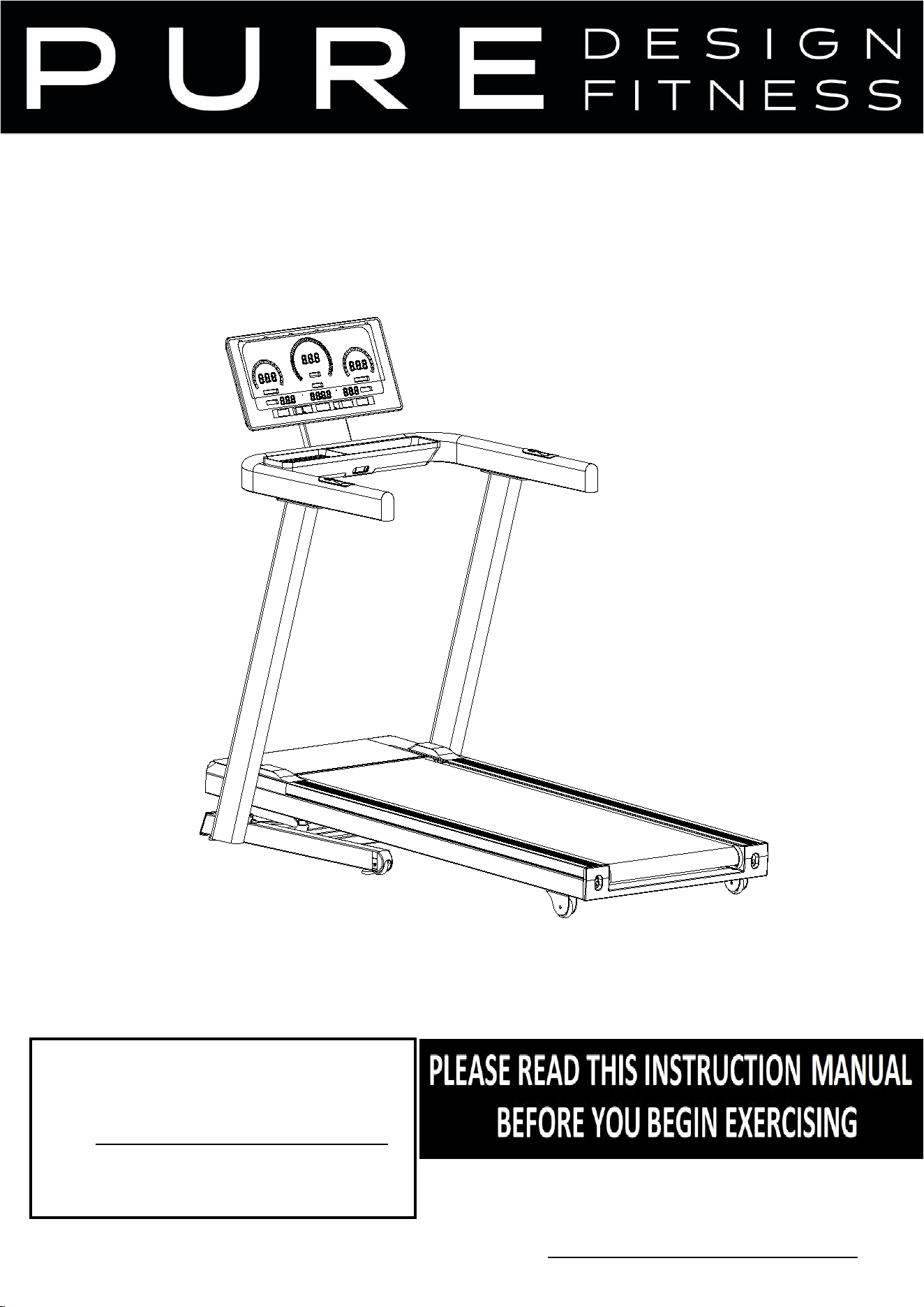
56Owner’s Manual
OWNER’S MANUAL
Pure Design Fitness
Address: 72 South Street
Rydalmere NSW 2116
Email: info@puredesignfitness.com.au
Ph: 02 9898 1405
ITEM NO.
:
PD-TR8

IMPORTANT SAFETY INSTRUC TIONS
Thanks for purchasing this product .The product will help you keep fitter, healthier and better in
a very easy way.
User Guide
1. Always connect the power plug to a socket with a grounded circuit and the socket must
have a special circuit to avoid sharing with other electrical equipment.
2. Ensure the treadmill stable on the ground before use.
3. Check if its function normal or not before running.
4. Stand on two side rails when the treadmill starts
5. Clipped the safety key to your clothes when upcoming to control any emergency.
6. Press the “start” button to get the treadmill started.
7. Follow the running belt with left leg to do preparation before trial run. Only when you feel you
can run, you can stand on the treadmill and do it with the right posture. And only one person is
allowed to exercise on the treadmill, and overload exercise is strictly prohibited.
8. You can adjust speed if necessary.
9. After running, you can stop the treadmill by pulling out the safety key or pressing the “stop”
button.
10. Remember to turn off the power and pull out the plug when you finish exercising.
Safety precaution
:
◆
Place the treadmill indoors to avoid any water and no heavy stuff.
◆
When using the fitness device, wear comfortable clothing and preferably sports or
aerobic shoes.
◆ Keep children away from the treadmill to avoid any accident.
◆
No overload to give damages to motor, controller, roller and running belt. Make
routine maintenance to the treadmill.
◆ Keep less indoor dust and a certain extent of humidity to avoid interference of
console and controller.
◆ Keep the household treadmill continuously running no more than 2 hours.
◆ Keep good air circulation when running.
◆
There should be 2000x1000mm safe space at the end of treadmill when running
。
◆ Stop running if any discomfort and consult the doctor.
◆ Reserve the silicon bottle to some place that children cannot reach, to avoid serious
mistake.
◆ Prohibit the user jumping off the treadmill directly after use.
2

◆
Pull out the power plug gently from the socket.
◆
Stop the machine if anything wrong and cut the power immediately.
◆ Ask local distributor to handle any issue or provide service. Dismantle the
components personally is not allowed.
DANGER!
T
o
re
duce
accidents
or harm, please check
following
rules
.
◆
Ensure your clothes zipped up before running.
◆ Do not wear clothes that easily hooked.
◆
Keep power cord away from hot objects.
◆
Keep children away from the treadmill.
◆ If something wrong , support the handle bar to push up and leave running belt.
◆
Do not use the treadmill outdoor.
◆
Cut off the power before move of the treadmill .
◆ Do not open motor and roller cover unless professionals .
◆
This machine can be used under 10A circuit .
◆
Ensure that only one person at a time uses the fitness device.
◆ The HRC testing may be not as exact as medical devices so its results for reference
only .
◆
Stop exercising immediately should you feel unwell or if you feel pain in your joints or
muscles. In particular, keep an eye on how your body is responding to the exercise
program. Dizziness is a sign that you are exercising too intensively with the device. At
the first signs of dizziness, lay down on the ground until you feel better.
Warning and Prohibit!
◆
Following patients under treatment need to get use of the treadmill after approval of
professional doctor.
(
1
)
The person with backache or used to get hurt in the leg ,waist ,neck . Those with
numbness of legs, waist, neck and hands ( those with chronic diseases such as
intervertebral disc protrusion, spinal slip, cervical vertebra protrusion, etc. )
(
2
)
The patient with deformational arthritis , rheumatism or gout .
(
3
)
The patient with osteroporosis .
(4)The patient with a bad circulatory system like heart disease ,vascular
disorders and vascular hypertension .
(
5
)
The patient with respirtory disturbance.
(6)The patient with Artificial heart rhythm problem.
3

(
7
)
The patient with malignant tumors.
(
8
)
The patient with thrombosis .
(9)The patient with diabete-caused perceptual disturbance.
(
10
)
The person with skin injury .
(
11
)
The patient with a high fever above 38
℃
.
(12)The person with bent back bone.
(
13
)
The person with pregnance or in (menstrual) period.
(
14
)
The person feels discomfortable .
(15)The person is obviously in a bad condition.
(
16
)
The person for the purpose of rehabilitation.
(
17
)
The person having abnormal physical features.
- Above cases may cause accident or poor health
◆
Stop exercising immediately should you feel unwell like pain in your joints or muscles,
dizziness, numb, and abnormal heart beat, and consult the doctor as soon as possible.
◆ Keep children away from this product.
- Children may get hurt if you ignore this.
◆
Told the children that this is not a toy.
- Children may get hurt if you ignore this.
◆
when using, taking out, putting back or moving this product, please make sure there is
nobody or pets around.
◆ stop use this product when the cover cracked (inner parts come out) or welded parts
drop off.
-may cause danger or injury.
◆ Do not jump up or down from the treadmill when running.
- may fall down and get injury.
◆
Do not use or reserve the treadmill outdoor or near bathroom to avoid water.
◆ Do not use or reserve the treadmill in the area exposed to direct sunlight, and avoid
high temperature places like electric blanket and warmer.
- may cause electric leakage or fire.
◆ Do not use when the power line or plug damaged, or the socket is loose.
- may cause electric shock, short circuit or fire.
◆
Do not damage or twist the power cord, also do not put heavy things on it.
- may cause fire or electric shock.
◆
Only for one person at a time, tell people around not too close.
- may fall down and cause injury.
◆ people who is not conscious or can’t operate by himself can not use the treadmill.
4

- may cause accident or get injury.
◆
disassemble, repair, change by customer themselves are forbid absolutely.
- may cause mechanical breakdown and injury.
To avoid water
!
◆
the main body and operating components can not meet with water or drink.
- may cause electric shock and fire.
◆
Do not exercise too much if you are not a regular sportspeople.
◆
Do not use the treadmill after meals or when feel tired.
- may cause damage to your health.
◆
This product is for home use. It cannot be used in school or gymnasium where are lots
of unspecific users.
- may cause injury.
◆
Do not use the product while you are having meals or doing other activities.
◆
Do not use the product when you feel the body become slow after drink.
- may cause accident or injury.
◆
Do not use the product when you have hard object in your pocket.
- may cause accident or injury.
◆ the power plug cannot be attached with needle, waste or water.
- may cause electric shock, short circuit and fire.
◆
Do not pull out the plug or switch the power to “off” while operating.
- may cause injury.
Do not operate with wet hands
!
◆ Do not pull out or insert the plug with wet hands.
- may cause electric shock or injury.
Remember to pull out the plug
!
◆
Remember to pull out the plug when not using.
- Dust and dampness can damage insulation and then cause electric leakage and fire.
◆ Pull out the plug when maintenance.
- may cause electric shock and injury.
◆
stop using immediately when the product can not start or have something abnormal,
pull out the plug and make a trouble call.
- may cause electric shock and injury.
◆
pull out the plug when meet with power failure suddenly.
- may cause accident and injury when power resumption.
5

◆
You should hold the plug not the wire when pulling out the plug.
- may cause short circuit, electric shock and fire.
Ground connection instruction!
◆
the product must have grounded connection. The grounded connection can provide a
channel with least resistance for the current when the product is malfunction, thus can
reduce the danger of electric shock.
◆
The product is equipped with electric wire for grounding conductor and grounding plug.
The plug must insert into the socket that conformed to the local regulations.
Danger
!
◆
incorrect connection of grounding conductor may cause electric shock.If you are not
sure about the grounding connection, please ask a professional electrician to check.if
the plug of the product is not match your socket, you should ask for a n electrician to
install a correct socket.
◆the product have grounding plug. Please confirm that you have the matched socket
first. Socket adapter is not allowed.
6
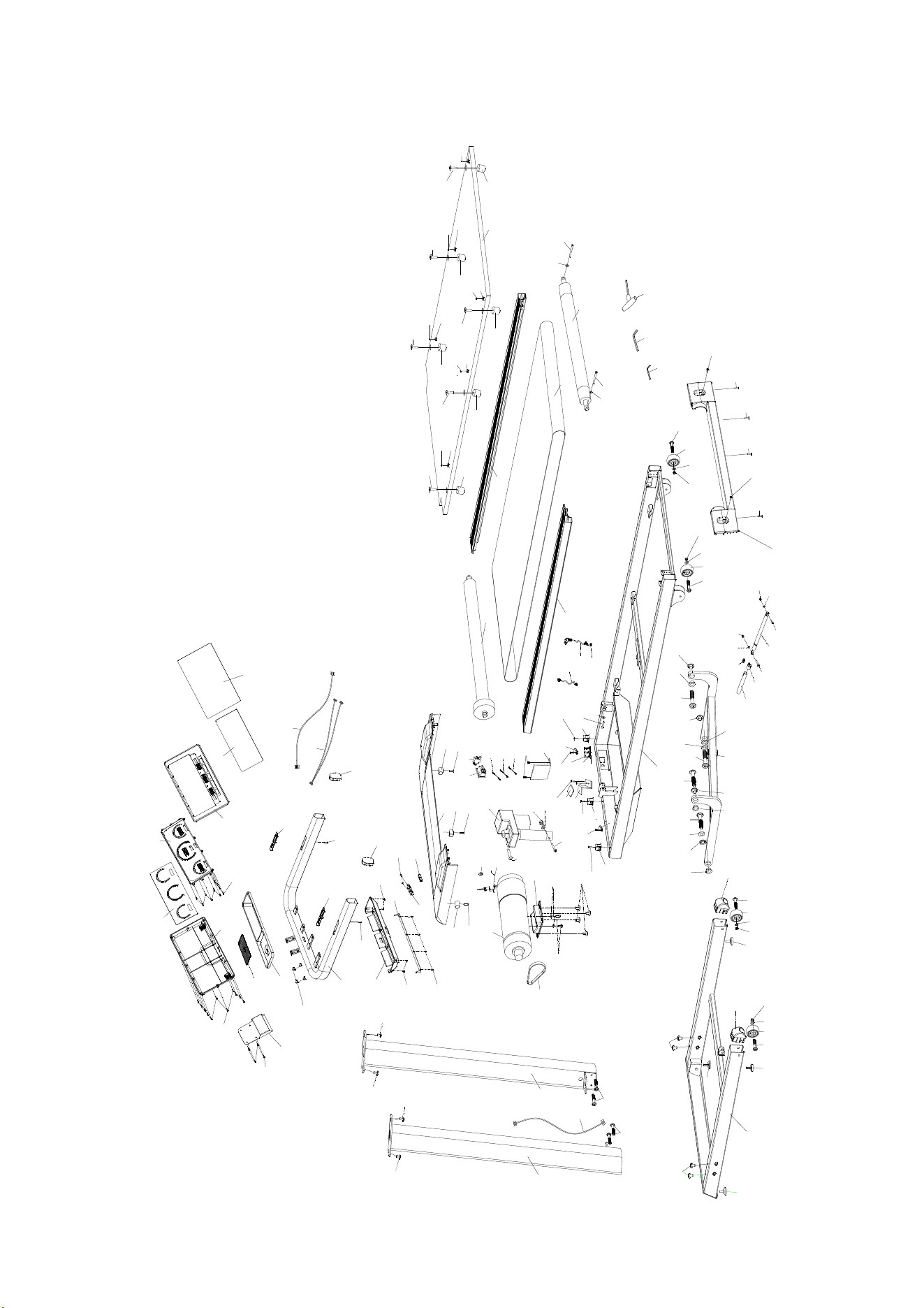
Exploded diagram
1
2
2
4
3
3
4
5
6
5
5
5
6
7
7
8
9
11
11
12
12
13
14
15
16
16
17
17
17
17
17
17
18
18
10
18
19
19
19
20
20
20
24
24
22
23
23
24
24
24
24
24
24
25
26
27
28
29
29
30
31
32
33
34
34
35
36
37
38
39
42
40
41
43
45
46
47
44
28
28
48
49
50
51
52
53
53
54
54
55
55
55
55
55
55
56
56
56
56
56
56
57
57
24
57
19
58
59
60
60
61
11
23
62
63
64
65
66
67
66
67
68
68
71
70
69
70
69
71
71
71
24
73
75
76
76
20
77
78
79
80
81
82
83
84
86
87
88
89
90
92
92
91
93
101
95
96
97
98
97
98
99
100
101
101
102
102
102
102
102
102
103
74
74
74
85
72
94
74
78
104
105
106
7
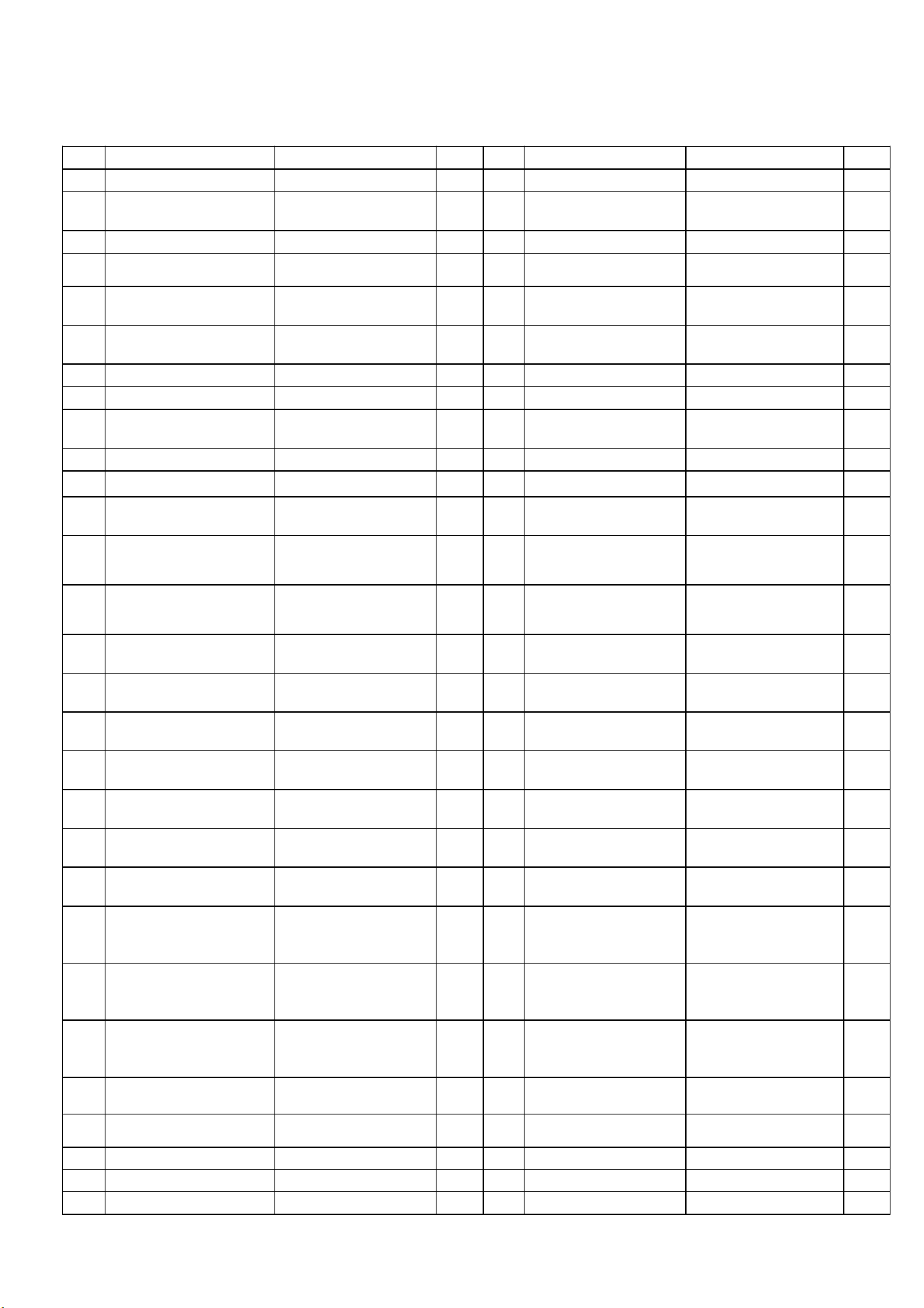
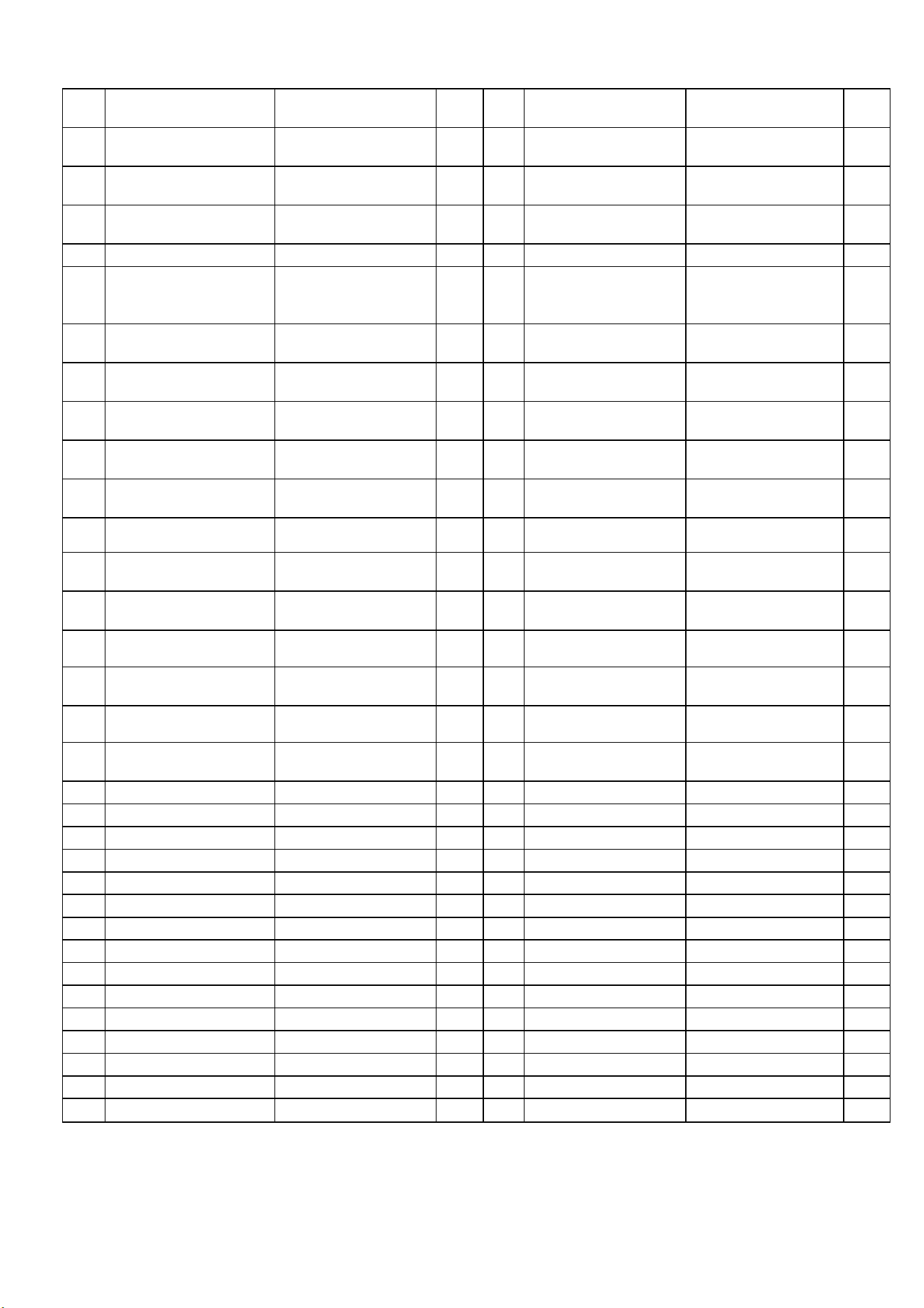
Exploded chart list
No. Description Size QTY No. Description Size QTY
1 Base weldment 1 63 Upright post R welds
0.32 ㎡
1
2 Hexagon large flat head
half-tooth bolt
M8×50×20 2 64 communication line SM4PIN/SM4PIN/L-12
00mm/26#
1
3 hexagon lock nut M8 2 65 Lift frame welds 1
4 flat washer Φ8 2 66 Hexagon head
half-tooth bolt
M12×Φ14×35×19 2
5 Tapered foot pad
(OMA-05-07-005)
Φ50×Φ41×17×M8×27 4 67 Hexagon large flat
head full tooth bolt
M10×25×15 2
6 wheel Φ62×Φ8.0×t22 2 68 Powder metallurgy
sleeve
Φ24×Φ19×Φ14×14×3 2
7 Curved open pipe plug 40×60×t2.0 2 69 Sleeve Φ25×Φ18×t3.0 2
8 Main frame weldment 1 70 flat washer Φ14 2
9 Motor mount
(1320CA-06)
1 71 Lifting shaft sleeve
(OMA-05-06-023)
Φ25×Φ17×Φ10×6×1 4
10 Motor cover plate 1 72 Console holder welds 1
11 fixed tube of motor cover Φ16×t1.2×23 1 73 Display frame 498×175×10.1 1
12 Hexagon cylindrical
head full tooth bolt
M8×75 1 74 Cross recessed large
flat head tapping screw
ST4×16 19
13 Hexagon cylindrical
head full tooth bolt
M8×60 2 75 Cross recessed
countersunk head
tapping screw
ST4×15 4
14 Hexagon cylindrical
head full tooth bolt
M8×15 2 76 Cross recessed
countersunk head
tapping screw
ST4×70 2
15 Hexagon large flat head
full tooth bolt
M8×15 1 77 keratoscopic arc t0.5×490×167 1
16 Hexagon large flat head
half-tooth bolt
M8×45×20 2 78 Cross recessed large
flat head tapping screw
ST4×10 12
17 Hexagon countersunk
head full tooth bolt
M6×30×Φ16 4 79 Panel 1136EA/571×277×10.
8
1
18 Cross recessed large
flat head full tooth bolt
M5×10 2 80 Panel rear cover 1136EA/571×277×28 1
19 Cross recessed large
flat head full tooth bolt
M4×10 6 81 console basket upper
cover
1
20 Cross recessed large
flat head tapping screw
ST4×16 4 82 console basket lower
cover
1
21 Cross recessed large
flat head tapping screw
ST4×10 7 83 Anti-slip pad 1
22 Cross recessed pan
head tapping screw
ST3×10 4 84 speed hand-held
heartbeat components
7239EA/SM5PIN/L-50
MM/SPEED+/-
1
23 Cross recessed
countersunk head
tapping screw
ST4×15 2 85 incline hand-held
heartbeat components
7239EA/L-50MM/SM5
PIN/INCLINE+/-
1
24 Console frame welds 1 86 communication line SM4PIN/SM4PIN/L-75
0mm/26#
1
25 spring washer Φ8 3 87 3338EA console set 1
26 spring washer Φ5 17 88 Hand-held heartbeat
communication wire
3330EA/L-1000mm 1
27 serrated lock washers Φ5 2 89 Safety key
J52×15×15(/L-700
1
28 flat washer Φ8 3 90 Safety lock socket J86×20×16 1
29 hexagon lock nut M8 3 91 Acrylic panel t1.0×554×260 1
8
30 Hexagon large flat head
half-tooth bolt
M10×35×20 3 92 D shaped tube plug DX40×80 2
31 Hexagon large flat head
half-tooth bolt
M10×65×20 2 93 one-way valve Φ29×t1.2×340 1
32 Hexagon large flat head
half-tooth bolt
M10 1 94 miscellaneous basket
cover
1
33 flat washer Φ10 1 95 Hexagon large flat
head half-tooth bolt
M8×30×20 1
34 flat washer Φ8 1 96 Double round tube plug Φ33×Φ23×48 1
35 communication line SM5PIN/SM4PIN/L-75
0mm/26#/
1 97 hexagon lock nut M8 2
36 photoelectric sensor L-500 2 98 flat washer Φ88×Φ50×Φ17×606 2
37
3330EA controller(ERP)
AC220V/1-20KM/H/Incl
ine(ERP)
1 99 Pressure rod 720×318×Φ10×Φ8.2×
350N
1
38 Connect wire L-300mm/1.5mm2/(Re
d)
1 100 shrapnel-1 t0.6×16.5×43 1
39 Connect wire L-300mm/1.5mm2/(Bla
ck)
1 101 Hexagon large flat
head half-tooth bolt
M8×50×20 4
40 Rocker switch KCD4 1 102 Hexagon large flat
head full tooth bolt
M8×15 8
41 Self-resetting switch 10A/ABR21-16/250VA
C
1 103 Hexagon pan head full
tooth bolt
M6×10 4
42 Connect wire L-100mm/1.5mm2/(Re
d)
1 104 L-shaped wrench 4*30*80 1
43 Plug 3×1.0mm2×2000 1 105 L-shaped wrench 6*35*80 1
44 3330EA front roller Φ88×Φ50×Φ17×606 1 106 T-shaped wrench 6*80 1
45 3330EA rear roller Φ50×Φ17×529×578 1
46 Motor 1.5HP/DC180V/4600R
PM/Φ32/36
1
47 Incline motor 1/18HP/75mm/AC220
V(195mm)
1
48 3330EA running deck 1300×604×t18 1
49 Running belt 2930×500×t1.6 1
50 belt
174(442)PJ6
1
51 3330EA motor cover 367.5×673×36.7 1
52 Rear cover 673×93×51 1
53 Side rail 87×34.5×1342 2
54 Wheel Φ62×Φ8.0×t22 2
55 Cylindrical cushion Φ30×30×M6×6 6
56 Round guide block φ25×φ5×4.5 10
57 pipe strap
φ16(white)
3
58 EVA pad (E21-V1-12) t15×30×30 1
59 magnet ring Φ29×Φ17×t7.5 1
60 cable clamp 3/8(UC-2) 1
61 power cable clip SR-5R1 1
62 Upright post L welds
0.32 ㎡
1
9
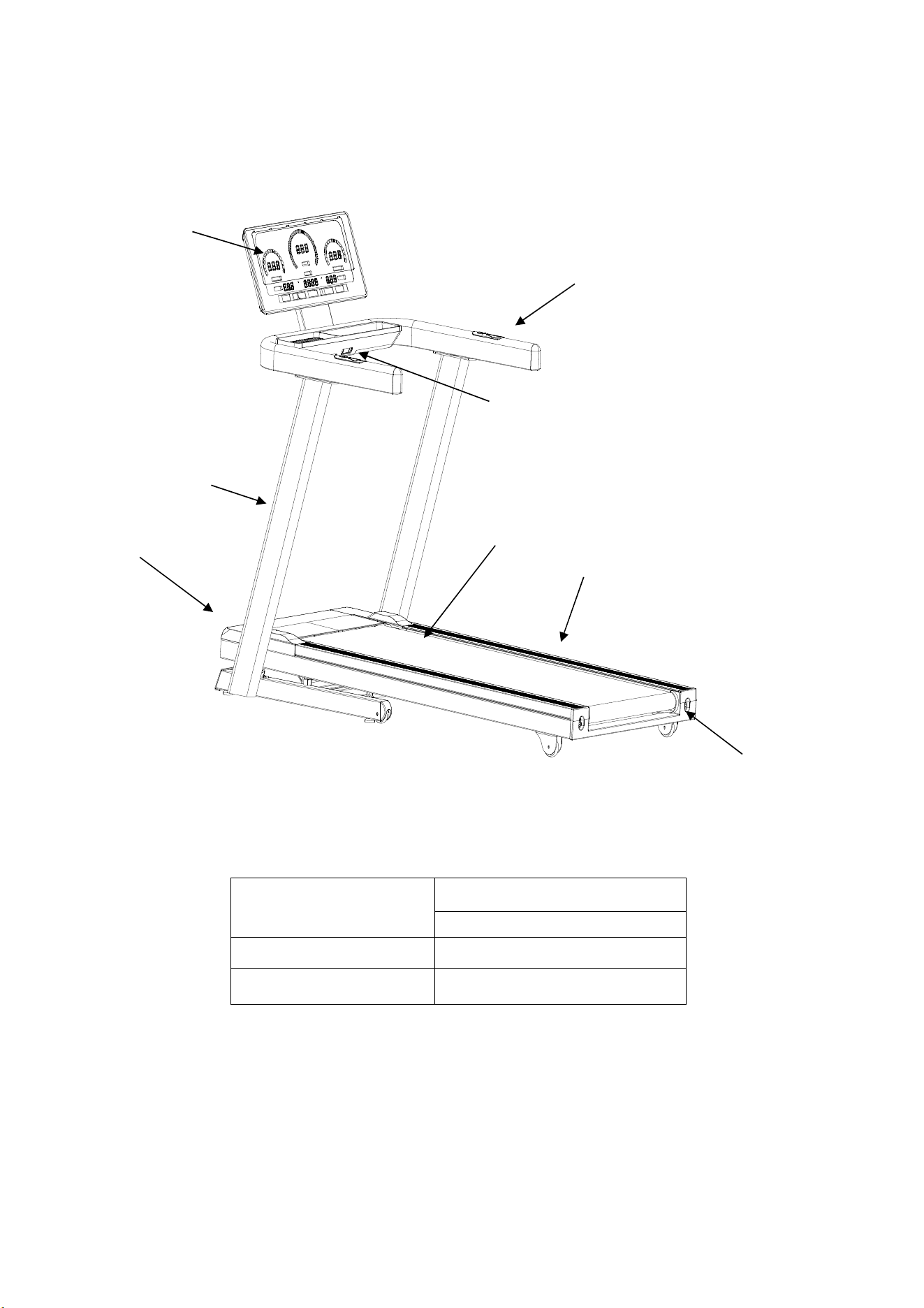
Product introduction
Technical information
Dimension
Fold: 1135*795*1460
Unfold: 1720*835*1440
Running surface
1420*500
Speed
1.0-20.0km/h
Remark:
WE RESERVE THE RIGHT TO AMEND THE PRODU CT WITHOUT PRIOR
NOTICE.
Console
Upright post
Rear cover
Running belt
Handle bar
Safety key
Side rail
Motor cover
10
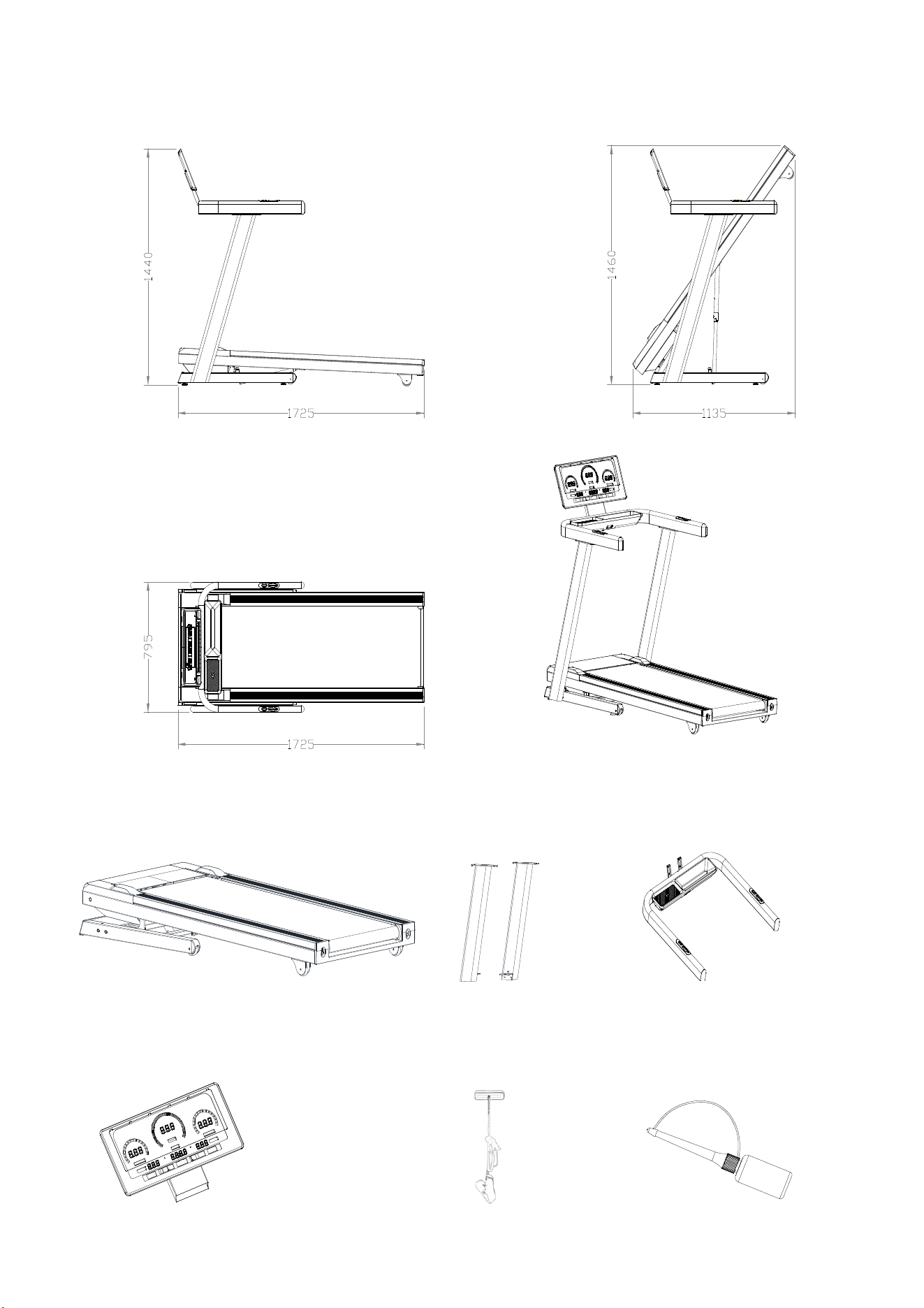
Packing list
silicone oil
Safety key
Main body
Console frame
Upright post
Console
11
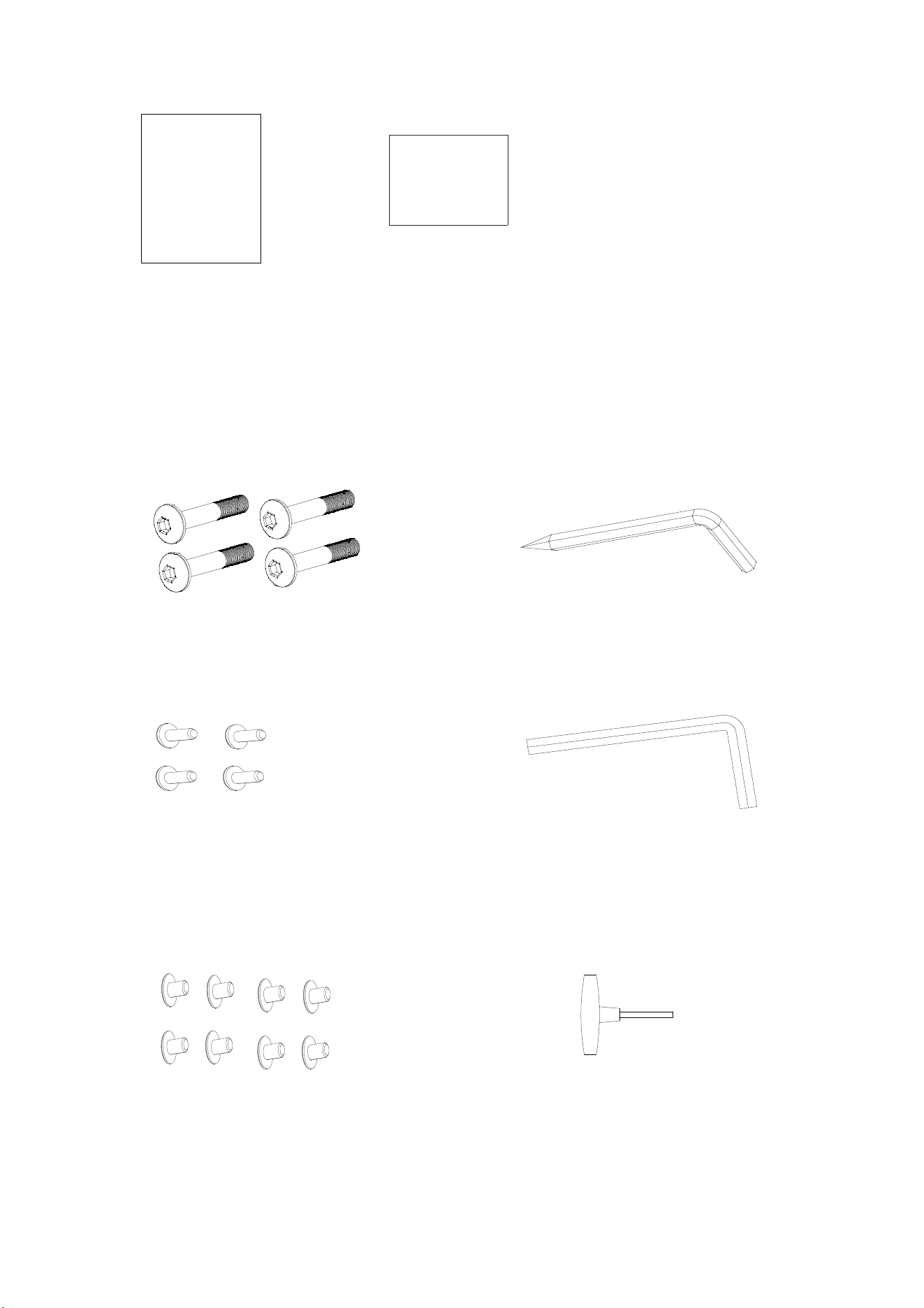
Hardware Pack List
Hexagon large flat head half tooth bolt( M8*50*20)
4pcs
L shape wrench S4 1pc
Hexagon pan head full tooth bolt(M6*10)4pcs
L-type Allen wrench S6 1pc
说明书
Hexagon large flat head full tooth bolt M8×15 8pcs
T-shaped wrench 6×80
Manual
Screw kit
Manual
螺丝包
Screw kit
12
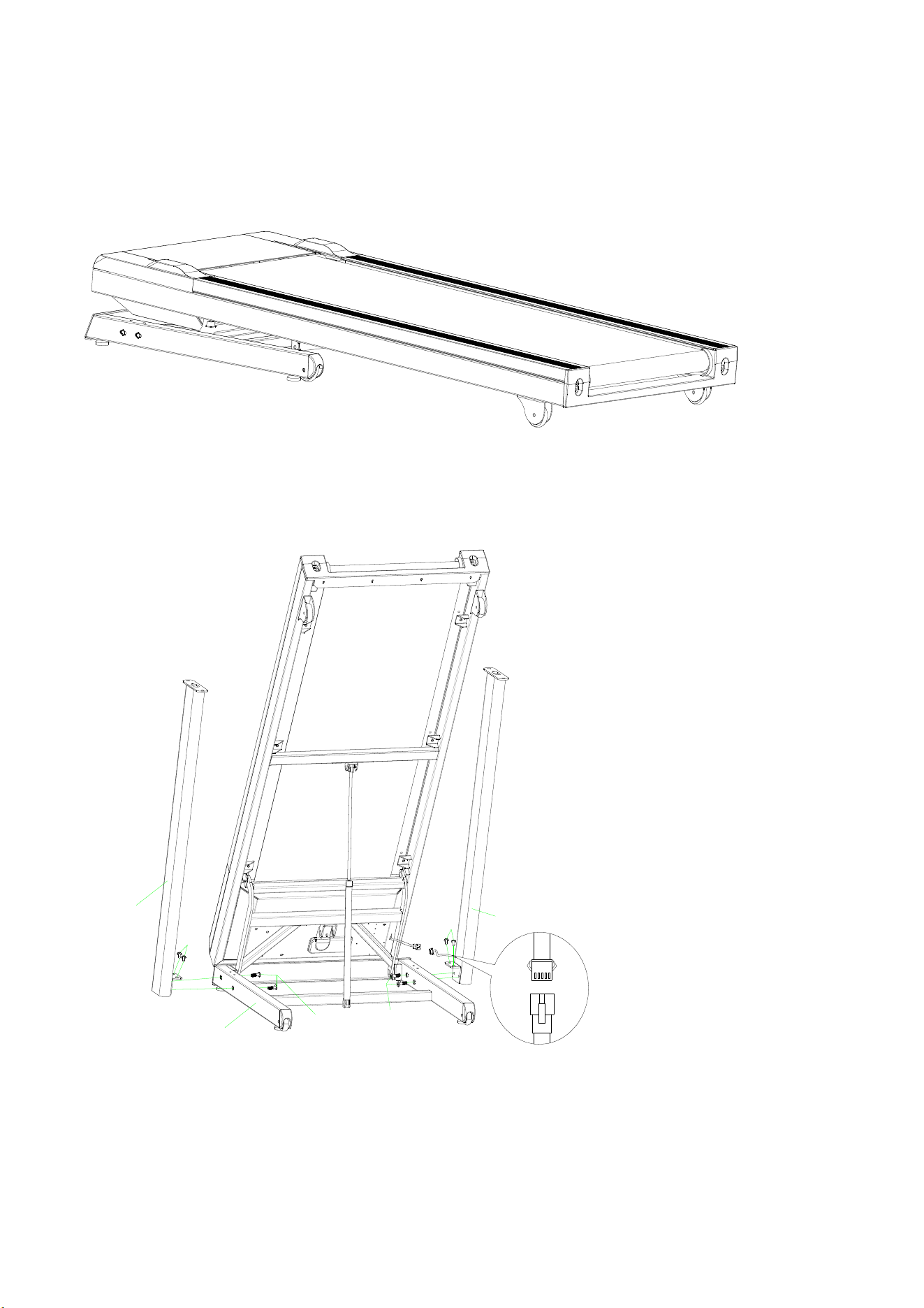
Installation Steps
Step 1: Lift the machine out of the packing box and place it on the flat floor. (as shown in the picture), remove all
PE bags and packing belts wrapped on the machine!
101
101
102
102
62
63
1
Step 2: As shown :Keep the treadmill upright, insert the (62) upright post into the corresponding position of the (1)
base solder, lock it into the corresponding hole of the (62) upright post with the (101) M8×50×20 hexagonal large
flat head half-tooth bolt through the (1) base, and lock it into the corresponding hole of the (01) base with the (102)
M8*15 hexagonal large flat head half-tooth bolt through the (62)upright post. The operation on the other side (63)
is the same after connecting the upright post (please be careful, don’t clamp the communication line in the upright
post).
Notes:Please
don
’
t
totally
tighten
all
screws
during
installation.
Tighten all bolts after the components are fully installed.
13
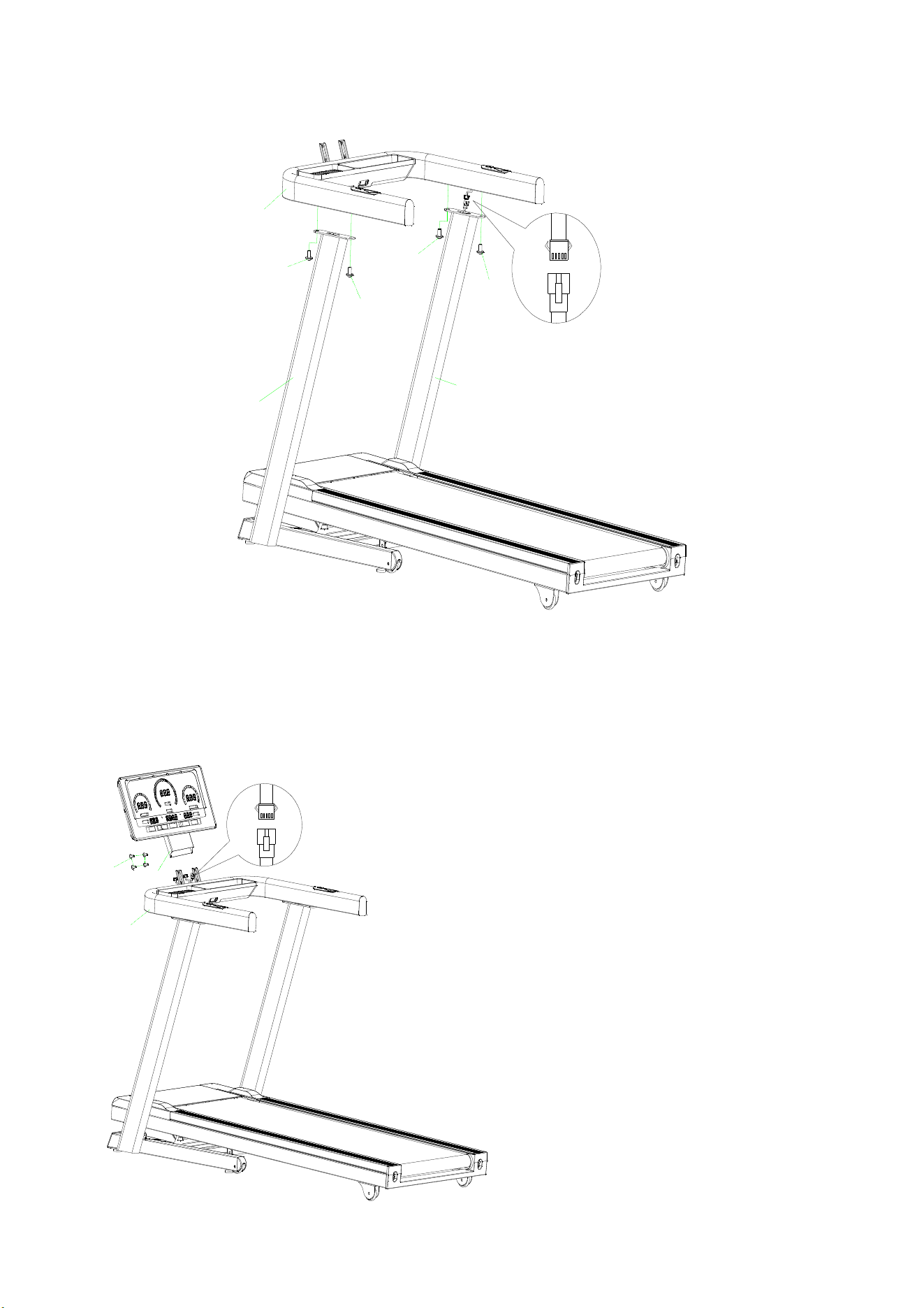
102
102
102
102
62
63
24
Step 3: As shown in the figure: After the signal line on the right side of the handrail frame is connected,
install the (72) handrail to the corresponding position of the (62) (63) upright post, and lock the (72)
handrail frame through the corresponding hole of the (62) (63) upright post with the (102) M8×15
hexagonal large flat head full-tooth bolt.
103
24
72
14
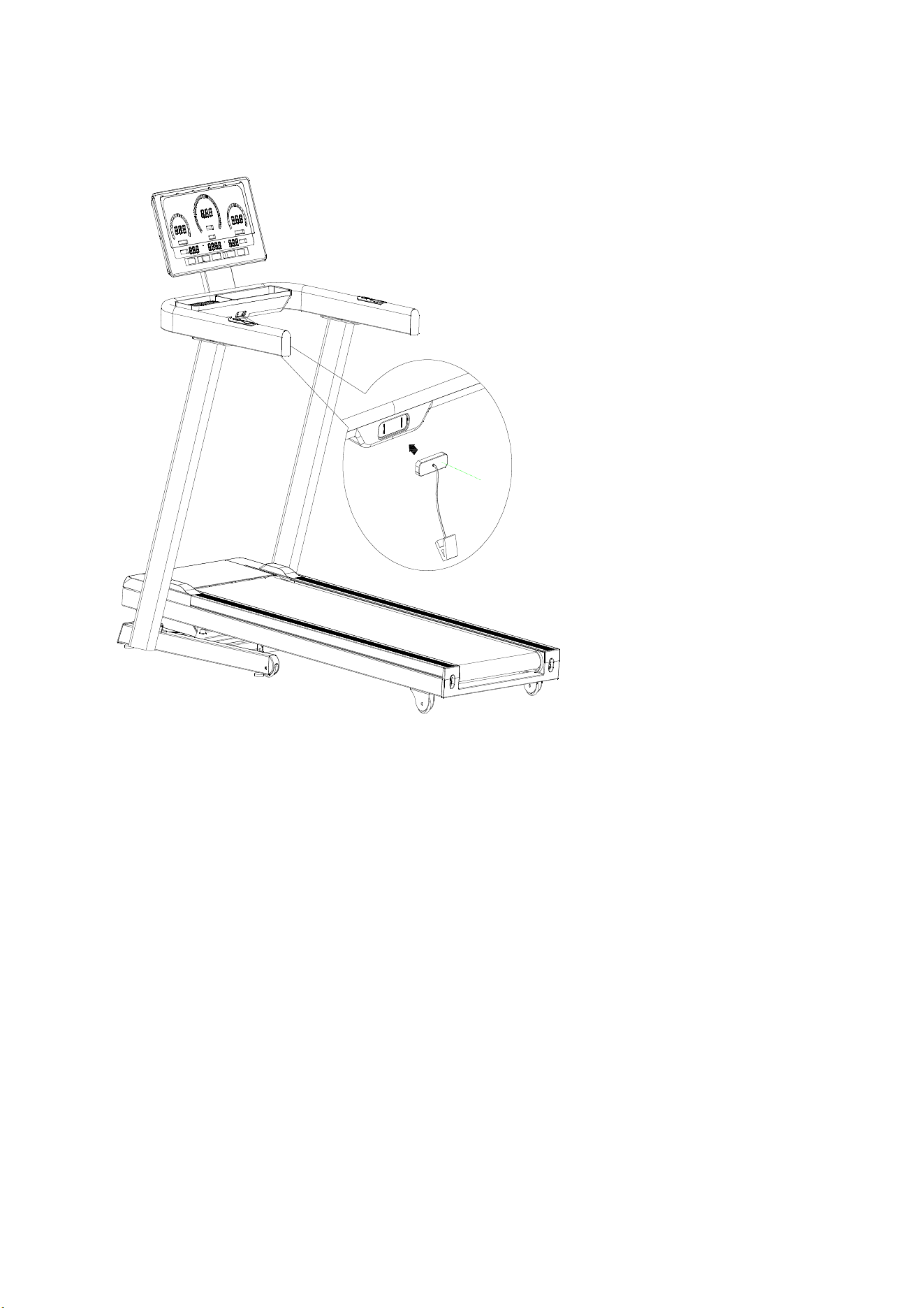
Step 4: As shown: after connecting the signal wire of the console, insert the welding fixed mount (72) into the
armrest welding holder(24), locked with (103)M6×10 .
89
Step 5: Set up the machine and tighten all self-mounting bolts. Then put the safety lock (89), the treadmill is
completed!
15
General Fitness Tips
1. Warm-up
Do not hold your breath before warming up for 5-10 minutes before each warm-up.
2. Breathe
Usually when you are preparing to restore your breath, inhale with your nose and spit out your breath with your
mouth. The breathing and movement should be coordinated, such as
breathing too fast. The movement should be stopped immediately
3. Frequency
The same part of the muscle should have a rest of 48 hours, that is, the
same part can only be trained every other day.
4. Load
According to the individual physical condition determine the amount of
training, then according to the principle of asymptotic load to practice,
the initial training of muscle soreness is a normal phenomenon, as long
as continue to practice, soreness can be eliminated.
5. Relax
Do 5 minutes of exercise after each exercise, especially the stretching
and relaxation of the muscles of the foot, to avoid long-term muscle
condensation, maintain a muscle flexible diet
6. Diet
In order to protect the digestive system, one hour after meals before
exercise, training should be at least half an hour before eating, exercise
less water, especially drinking water, so as not to increase the heart,
kidney burden
Stretching exercises
No matter how fast you walk, it's best to do stretching exercises first.
Warm muscles are easier to stretch, so take a 5-10 minute warm-up.
Then stop and do the stretching as follows: 5 times, each step for 10
seconds or more; do it again after the workout.
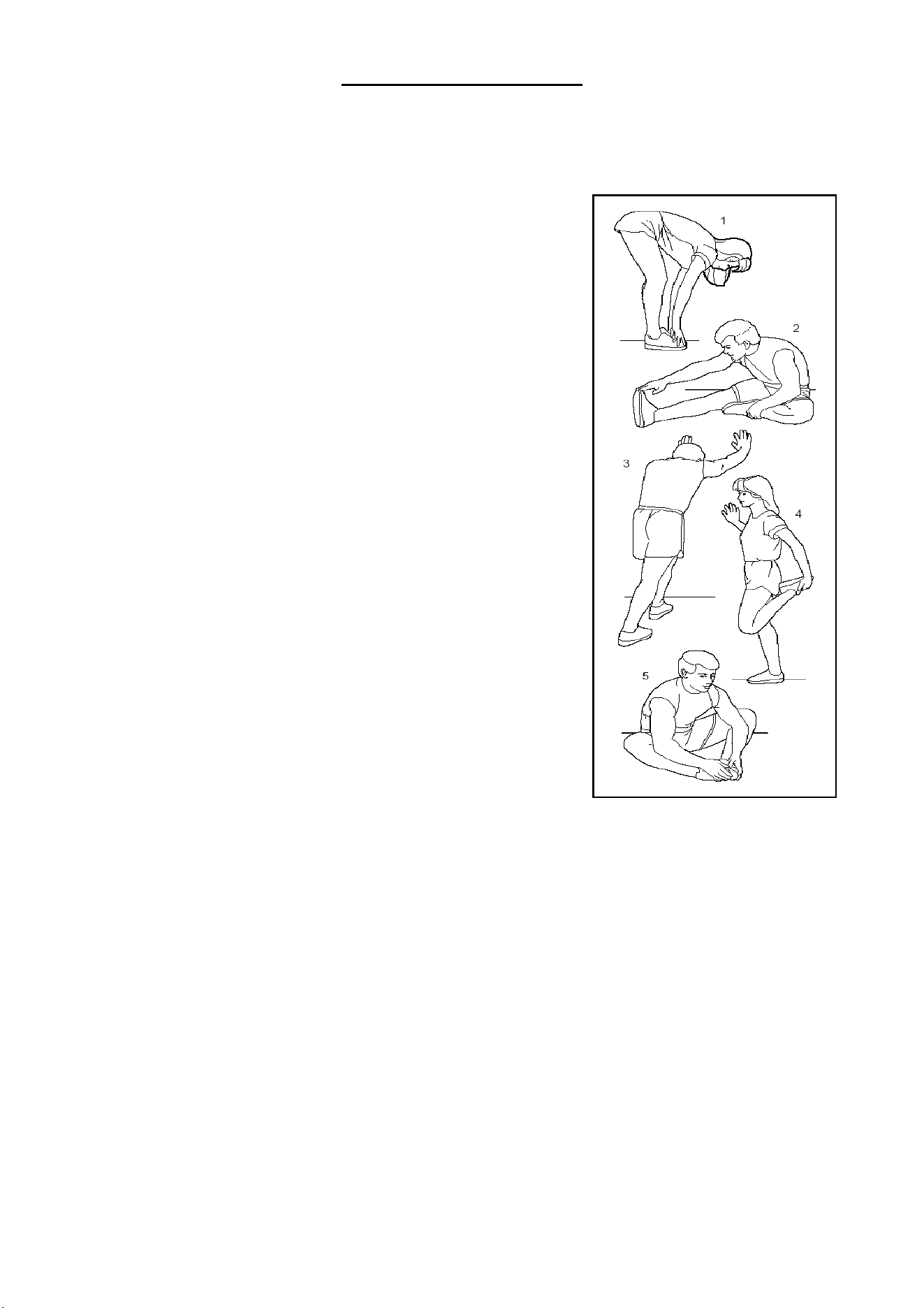
1.Stretch down
The knees are slightly curved, the body slowly bends forward, let the
back and shoulders relax, and the hands try to touch the toes. Keep it for
10~15 seconds, then relax. Repeat 3 times (As picture 1 shown).
2. Tendon stretching
Sit on a clean seat cushion and straighten one leg. Put the other leg inward so that it fits snugly against the inside
of the straight leg. Try to touch the toes with your hands. Keep it for 10~15 seconds, then relax. Repeat 3 times
for each leg (As picture 2 shown).
3. Calf and heel stretch
Hold the wall or tree with both hands and one foot behind. Keep your hind legs upright and your heels on the
ground, leaning in the direction of the wall or tree. Keep it for 10~15 seconds, then relax. Repeat 3 times for each
leg (As picture 3 shown).
4. Quadriceps stretching
Grasp the balance with your left hand or the table, then extend your right hand backwards and grab your right
ankle and slowly pull it toward your hips until you feel the muscles in front of your thighs are tense. Keep it for
10~15 seconds, then relax. Repeat 3 times for each leg (As picture 4 shown).
5. The sartorius muscle (muscle inside the thigh) stretches
The soles of the feet are opposite and the knees sit down. Grasp your feet with both hands and pull them in the
direction of the groin. Keep it for 10~15 seconds, then relax. Repeat 3 times. (As picture 5 shown).
16
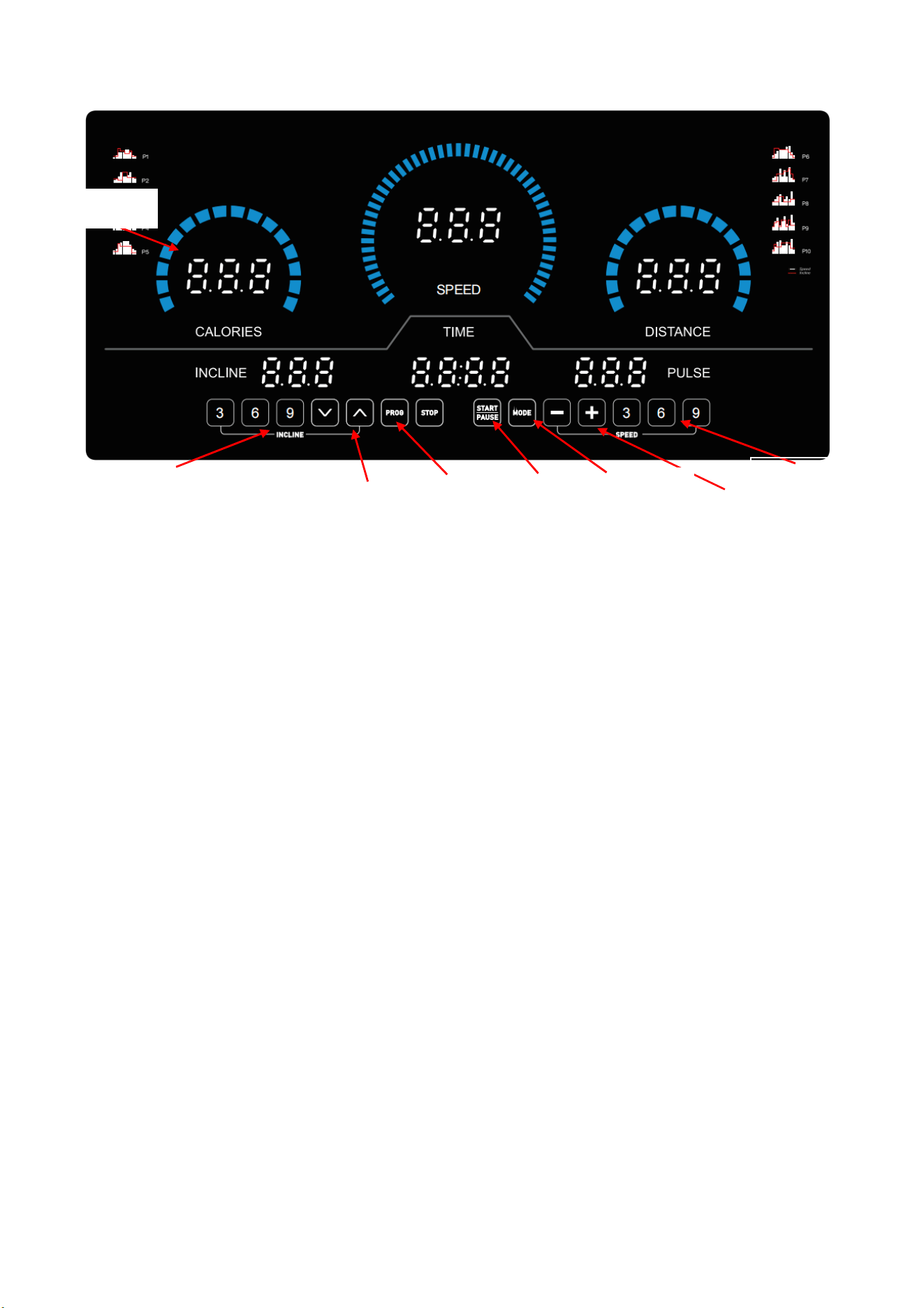
Instructions of Console Panel
Console Function Description
1、P01 is a user manual program, P01-P36 is a built-in automatic training program, 3 user, BMI;
2、LED display, 14 operation keys;
3、Speed, distance system conversion function;
4、Operating speed range: KM 1.0~20.0KM/H, inch 0.6-12.5MPH;
5、Incline range: 0~15%;
6、Overload, overcurrent protection, explosion-proof impact, anti-speed, anti-electromagnetic interference and
other safety protection functions;
7、System self-test, abnormal information prompt function;
8、3 custom functions;
9、ERP functions;
10、Fuel reminder function;
Description of windows
1、"CALORIES" window: display the value of Calories;
2
、
"TIME" window: display the value of time;
3、"DISTANCE" window: display the value of distance;
4
、
"INCLINE" window: shows the value of incline.
5、"PULSE" window: display the value of heart rate;
6
、
"SPEED" window: shows the speed value;
LED display
incline
“
+
”“
-
”
Speed“+”“-”
Incline shortcuts
Mode
Start/Pause
Program
Speed shortcuts
17
Imperial Conversion Instructions:
1) After unplugging the safety lock, press the "PROGRAM" and "MODE" keys at the same time, the
display will show 0.6, which means the conversion from kilometers to miles;
2) After unplugging the safety lock, press the "PROGRAM" and "MODE" keys at the same time, the
display will display 1.0, indicating that miles are converted to kilometers;
KEY FUNCTION
1
、
"PROG" : program selection key, in the stopped state, cycle to select program P0~P36, U01~U03, BMI;
2、"MODE" : When the manual MODE is selected, the initial state is the normal mode. Press the mode key
to select the countdown mode -> Backward distance mode -> Backward calories -> Normal mode in the
manual mode; Reset button for the default (30 minutes) countdown interval in P1-P36;
3、"START" : start/pause button, in the stopped state, start the treadmill; In the running state, suspend the
treadmill; “pause” without effect if the Bluetooth connection;
4、STOP: Stop/reset key 1. In the running state, press the STOP key for slow stop; 2. When the ERR
information is displayed, the information displayed once is cleared.
5、"+" : speed increment key, in the stop or fat measurement state, to set the parameter increment key, in the
running state, to speed increment key;
6
、
"-" : speed decline key, in the stop or fat measurement state, is the set parameter decline key, in the
running state, is the speed decline key;
7、"QUICK SPEED" : 3,6,9 speed shortcut keys, in the running state of the treadmill, directly set the speed
to the specified value of the key;
8、" " : incline increment key;
9
、
" " : incline decline key;
10、"QUICK INCLINE" : 3,6,9 incline shortcut keys, when the treadmill is running, directly set the speed to
the specified value of the key;
Sa f et y k e y
:
The safety key is composed of a touch switch, a clothespin and a nylon rope, which can prevent the
emergency shutdown. In any state, as long as the safety lock is out of position, the treadmill stops running,
the console keyboard is forbidden to operate, and the screen displays "E-07", accompanied by a prompt
sound. Each time you place the security lock, the screen will display for 2 seconds and then enter the default
working state of the system.
USER program:
USER has three USER1~USER3. In USER mode, users can access or set their own sports program, press
18

"PROG" key to adjust to "USER1~USER3", then press "mode" key to set or press START key to start sports.
Press the "MODE" key to set the 10 sections of speed and ascension of your own program. After setting, the user
press "START" to start the treadmill. The user's program will be saved and can be used directly next time.
Safety Guide
1、 Insert the power cord plug into the 10A power socket with safety ground, turn on the power switch, the
console screen is fully displayed with a prompt sound, then identify the safety key.
2、 Place the safety key in the position on the console and clip the clothespin to the clothes on the chest.
The screen is fully displayed for 2 seconds then enters the default working state: all counters are cleared to
zero, the set value is reset, the treadmill is in the positive timing mode of manual program P0;
3、 Press "PROG" key to select a program: P01~P36, U01,U02,U03, BMI;
4、 "P0" is a user-defined program, press "MODE" key to select four training modes, the training speed and
slope are set by the user. Default: Speed 1.0KM/H, slope 0 section.
Training mode 1: positive counting time, time, distance, calories are positive counting, close the
setting function;
Training mode 2: countdown time, setup state, time window flashing, press "+", "-" key to modify
the set value, set range: 5-99 minutes, default value: 30:00;
Training mode 3: countdown distance, set the state, the distance window flashes, press "+", "-"
key to modify the set value, set the range: 1.0-99.0 KM, the default value: 1KM;
Training mode 4: reverse calorie, set state, calorie window flashes, press "+", "-" key to modify
the set value, set range: 20-990CAL, default value: 50CAL;
5、 "P01-P36" for the system setup program, only trained in the countdown mode, under the setting state,
the time window flashes, press "+", "-" key to modify the set value, press the "MODE" key to reset to the
default value, set the range: 5-99MIN, the default value: 30:00;
6、After setting the training mode, press "START" key, the screen starts to display 5 seconds countdown with
5 beeps, after the countdown is 1, the treadmill starts gently, accelerates slowly to the displayed speed, and
then runs smoothly at constant speed.
7、In the running state, press "+", "-" key or "QUICK SPEED" key to adjust the speed of the treadmill;
8 、 In P1-P36, the speed of each program is divided into 10 segments, each period is equally divided
according to the set time. The speed adjusted by key is only valid in the current segment, and three beeps
will be sent three seconds in advance when the segment is converted to the other segment. The motor stops
automatically when the program runs full of 10 segments, with a “beep”;
9、In running mode, press "START" key, the motor will change between the two states of suspension and
running. Restart in the paused state, the recorded running data and process stay the same.
10、In the motor running, press "STOP" key, the motor will slow down until it stops smoothly, all the settings
will be restored to the default state;
11、In the motor running, press " "," "key or" QUICK INCLINE "to adjust the treadmill slope;
12、In any state, pull off the safety lock, the screen displays "E-07", and accompanied by a tone, the treadmill
stops running;
19

13 、The control system at any time in the safety monitoring, as long as the discovery of anomalies, the
treadmill will be emergency stopped, the screen displays abnormal information prompts, accompanied by
beeps;
14 、 When the abnormal information is displayed on the screen, press STOP. The system clears the
displayed information one time.
15、BMI test method: press the "PROG" key to select the program BMI, press the "MODE" key to select the
project serial number. press the "+" and "-" keys to set the parameters.
16、Item No. F1 (Sex): indicates the gender; set the parameter range: 1-2, "1" indicates male, "2" indicates
female, default value: 1;
17、Item No. F2 (Age): indicates age; set parameter range: 1-99 years old, default value: 25 years old.
18、Item No. F3 (Height): indicates height; set parameter range: 100-220CM, default value: 170CM;
19、Item serial number F4 (Weight): indicates weight; set parameter range: 20-150KG, default value: 70KG;
20、 Item serial number F5 (BMI): indicates the completion of parameter settings, enter the BMI test state,
please hold both hands to the left and right handles of the heart rate sensing piece, wait for 4 seconds, the
parameter display window will show the test person's body fat rate (BMI); to the standard of the Asian people,
the body fat is less than 18 for thin, between 18 and 24 for the ideal body weight, between 25 and 28 for
overweight, greater than 29 for obese, and the body fat of the person under test will be shown in the window.
Default value: 24 (this data is only for exercise reference).
21、British BMI test method: Press the "PROG" key to select program BMI, press the "MODE" key to select
item serial number, press the "+" and "-" keys to set parameters.
A) Item number F1 (Sexo) : indicates gender; The value ranges from 1 to 2, where 1 indicates
male and 2 indicates female. The default value is 1.
B) Item number F2 (Age) : indicates age; Value range: 1 to 99 years old. Default value: 25 years old ;
C) Item No. F3 (Height) : indicates height. The value ranges from 39 to 87 inches. Default value: 67
inches.
D) Item number F4 (Weight) : indicates weight; Set parameters range: 44-330 LBS. Default: 154 LBS.
E) Item No. F5 (BMI) : indicates the completion of parameter setting and entering the body fat test
state. Please hold both hands on the heart rate sensor on the left and right handles.Wait 4 seconds, the
parameter display window will display the body fat percentage (BMI) of the tested person; By Asian
standards, a body fat of less than 18 is considered lean, a body fat of 18 to 24 is considered ideal, a body fat
of 25 to 28 is overweight, and a body fat of more than 29 is considered obese (this data is for exercise
reference only). Default value: 24
ERP transfer function:
The system starts in ERP mode by default. When the treadmill is not operated, it will enter hibernation state in
about 4 and a half minutes to save power consumption. Press any key to wake up the system. In standby
MODE, hold down the mode key for 3S to display '2222' to cancel the ERP function, and hold down the mode
key for 3S to display '1111' to return to ERP mode.
20
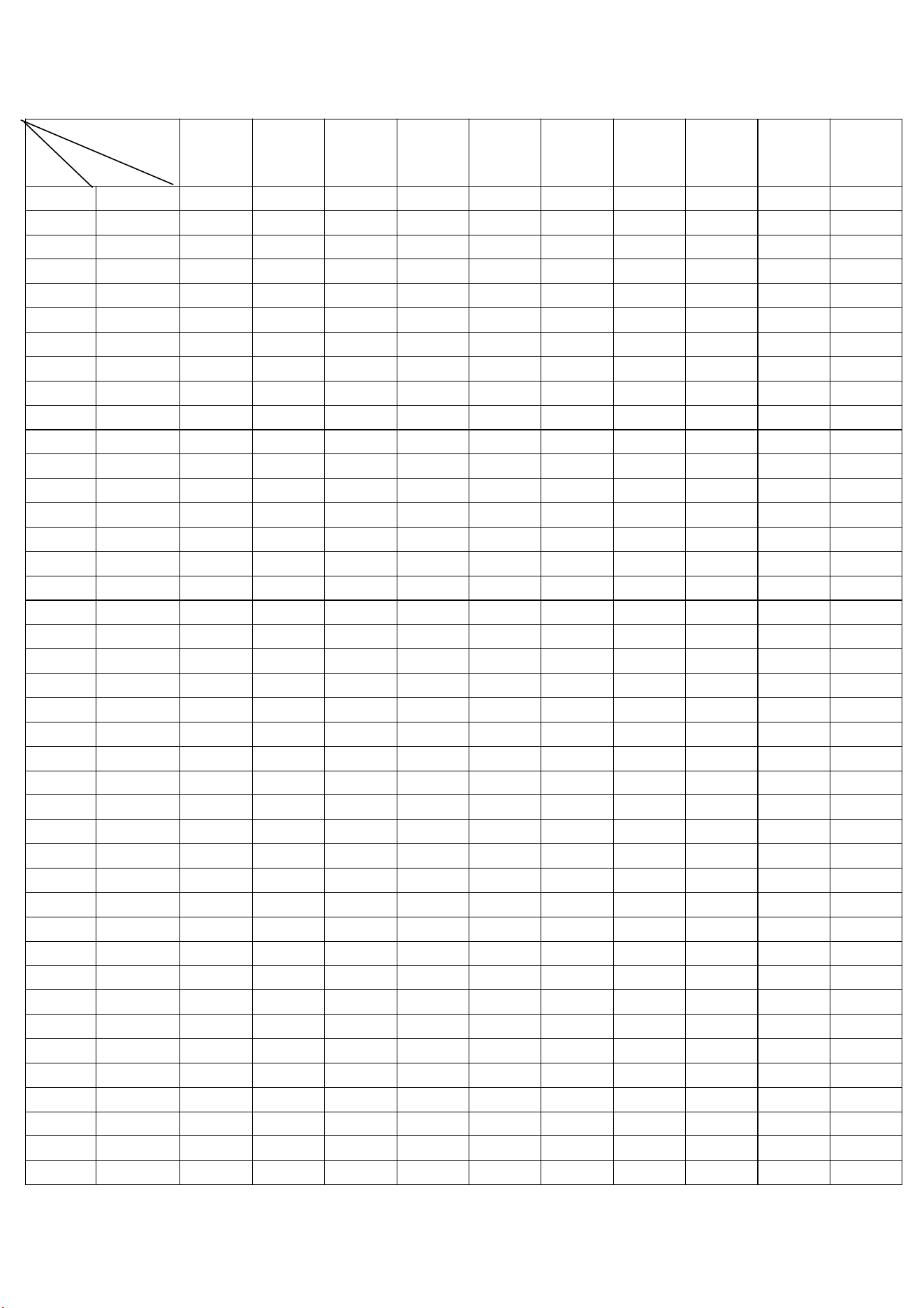
Speed and slope table for the automatic program P01-P36: metric
Seg
Pro Class
1 2 3 4 5 6 7 8 9 10
P1 SPEED 1.0 3.0 5.0 5.0 5.0 7.0 7.0 5.0 3.0 2.0
INCLINE 2 2 8 6 6 4 4 6 2 2
P2 SPEED 2.0 3.0 5.0 8.0 5.0 5.0 6.0 8.0 4.0 3.0
INCLINE 3 3 2 2 8 8 4 4 4 4
P3 SPEED 2.0 3.0 7.0 8.0 5.0 5.0 5.0 8.0 4.0 3.0
INCLINE 1 2 5 7 7 4 4 6 2 2
P4 SPEED 2.0 2.0 5.0 8.0 8.0 8.0 8.0 5.0 3.0 2.0
INCLINE 3 3 9 9 9 9 9 6 2 2
P5 SPEED 3.0 4.0 8.0 9.0 10.0 10.0 10.0 7.0 4.0 3.0
INCLINE 2 2 8 6 6 6 6 6 1 1
P6 SPEED 3.0 4.0 6.0 7.0 7.0 7.0 9.0 10.0 5.0 3.0
INCLINE 1 8 8 7 7 7 7 5 3 1
P7 SPEED 3.0 4.0 4.0 10.0 4.0 9.0 4.0 11.0 3.0 2.0
INCLINE 1 1 6 6 6 8 8 10 6 2
P8 SPEED 3.0 5.0 7.0 9.0 3.0 5.0 7.0 5.0 11.0 5.0
INCLINE 3 3 3 7 7 3 3 3 5 5
P9 SPEED 3.0 7.0 10.0 4.0 7.0 11.0 5.0 4.0 12.0 6.0
INCLINE 3 6 7 3 8 8 3 8 4 4
P10 SPEED 3.0 5.0 9.0 10.0 6.0 6.0 9.0 6.0 11.0 3.0
INCLINE 2 7 5 5 8 8 8 8 4 4
P11 SPEED 4.0 5.0 11.0 9.0 6.0 8.0 9.0 11.0 6.0 5.0
INCLINE 1 6 3 3 7 7 4 4 6 6
P12 SPEED 4.0 6.0 10.0 10.0 10.0 7.0 7.0 10.0 6.0 5.0
INCLINE 3 8 9 5 5 8 8 4 4 4
P13 SPEED 2.0 4.0 6.0 6.0 6.0 8.0 8.0 6.0 4.0 3.0
INCLINE 3 3 9 7 7 5 5 7 3 3
P14 SPEED 3.0 4.0 6.0 9.0 6.0 6.0 7.0 9.0 5.0 4.0
INCLINE 4 4 3 3 9 9 5 5 5 5
P15 SPEED 3.0 4.0 8.0 9.0 6.0 6.0 6.0 9.0 5.0 4.0
INCLINE 2 3 6 8 8 5 5 7 3 3
P16 SPEED 3.0 3.0 6.0 9.0 9.0 9.0 9.0 6.0 4.0 3.0
INCLINE 4 4 10 10 10 10 10 7 3 3
P17 SPEED 4.0 5.0 9.0 10.0 11.0 11.0 11.0 8.0 5.0 4.0
INCLINE 3 3 9 7 7 7 7 7 2 2
P18 SPEED 4.0 5.0 7.0 8.0 8.0 8.0 10.0 11.0 6.0 4.0
INCLINE 2 9 9 8 8 8 8 6 4 2
P19 SPEED 4.0 5.0 5.0 11.0 5.0 10.0 5.0 12.0 4.0 3.0
INCLINE 2.0 2 7 7 7 9 9 11 7 3
P20 SPEED 4.0 6.0 8.0 10.0 4.0 6.0 8.0 6.0 12.0 6.0
INCLINE 4 4 4 8 8 4 4 4 6 6
P21 SPEED 4.0 8.0 11.0 5.0 8.0 12.0 6.0 5.0 12.0 7.0
21
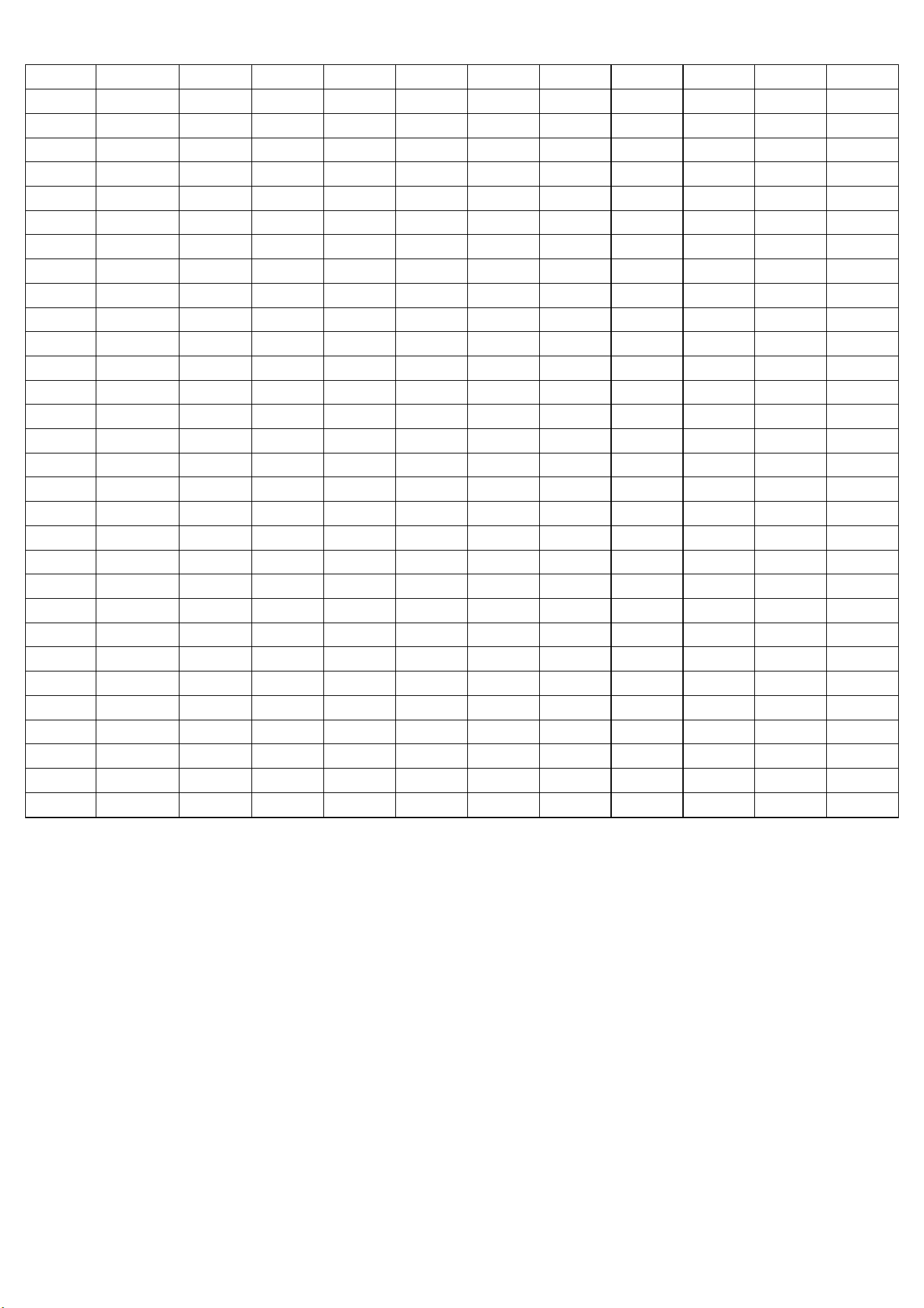
INCLINE 4 7 8 4 9 9 4 9 5 5
P22 SPEED 4.0 6.0 10.0 11.0 7.0 7.0 10.0 7.0 12.0 4.0
INCLINE 3 8 6 6 9 9 9 9 5 5
P23 SPEED 5.0 6.0 12.0 10.0 7.0 9.0 10.0 12.0 7.0 6.0
INCLINE 2 7 4 4 8 8 5 5 7 7
P24 SPEED 5.0 7.0 11.0 11.0 11.0 8.0 8.0 11.0 7.0 6.0
INCLINE 4 9 10 6 6 9 9 5 5 5
P25 SPEED 3.0 5.0 7.0 7.0 7.0 9.0 9.0 7.0 5.0 4.0
INCLINE 4 4 10 8 8 6 6 8 4 4
P26 SPEED 4.0 5.0 7.0 10.0 7.0 7.0 8.0 10.0 6.0 5.0
INCLINE 5 5 4 4 10 10 6 6 6 6
P27 SPEED 4.0 5.0 9.0 10.0 7.0 7.0 7.0 10.0 6.0 5.0
INCLINE 3 4 7 9 9 6 6 8 4 4
P28 SPEED 4.0 4.0 7.0 10.0 10.0 10.0 10.0 7.0 5.0 4.0
INCLINE 5 5 10 10 10 10 10 8 4 4
P29 SPEED 5.0 6.0 10.0 11.0 12.0 12.0 12.0 9.0 6.0 5.0
INCLINE 4 4 10 8 8 8 8 8 3 3
P30 SPEED 5.0 6.0 8.0 9.0 9.0 9.0 11.0 12.0 7.0 5.0
INCLINE 3 10 10 9 9 9 9 7 5 3
P31 SPEED 5.0 6.0 6.0 12.0 6.0 11.0 6.0 12.0 5.0 4.0
INCLINE 3 3 8 8 8 10 10 10 8 4
P32 SPEED 5.0 7.0 9.0 11.0 5.0 7.0 9.0 7.0 12.0 7.0
INCLINE 5 5 5 9 9 5 5 5 7 7
P33 SPEED 5.0 9.0 12.0 6.0 9.0 12.0 7.0 6.0 12.0 8.0
INCLINE 5 8 9 5 10 10 5 10 6 6
P34 SPEED 5.0 7.0 11.0 12.0 8.0 8.0 11.0 8.0 12.0 5.0
INCLINE 4 9 7 7 10 10 10 10 6 6
P35 SPEED 6.0 7.0 12.0 11.0 8.0 10.0 11.0 12.0 8.0 7.0
INCLINE 3 8 5 5 9 9 6 6 8 8
P36 SPEED 6.0 8.0 12.0 12.0 12.0 9.0 9.0 12.0 8.0 7.0
INCLINE 5 10 10 7 7 10 10 6 6 6
22
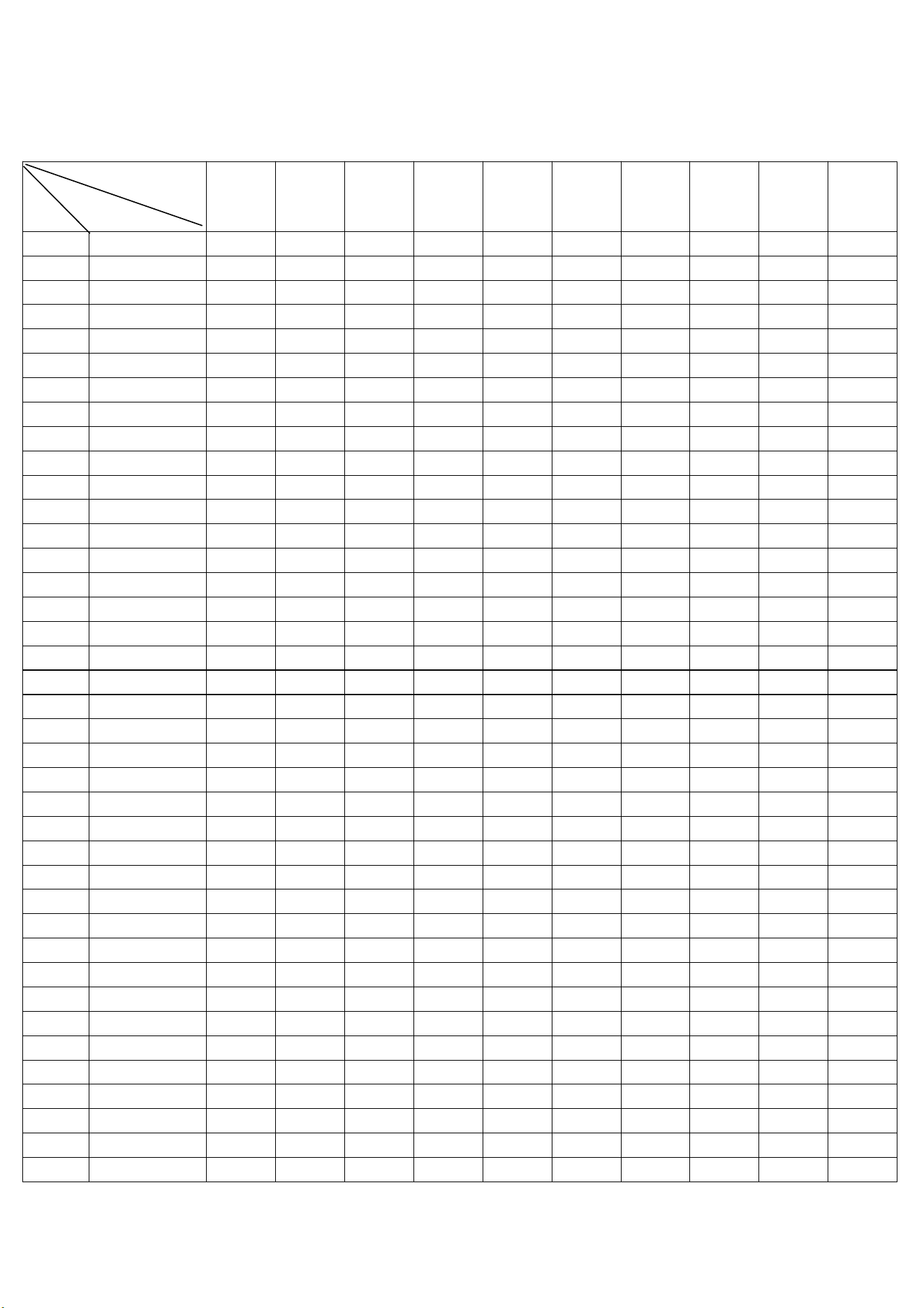
Speed and slope table for the automatic program P01-P36: inch
Seg
Pro Class
1 2 3 4 5 6 7 8 9 10
P1 SPEED
0.6 1.8 3.1 3.1 3.1 4.3 4.3 3.1 1.8 1.2
INCLINE
2 2 8 6 6 4 4 6 2 2
P2 SPEED
1.2 1.8 3.1 5 3.1 3.1 3.7 5 2.5 1.8
INCLINE
3 3 2 2 8 8 4 4 4 4
P3 SPEED
1.2 1.8 4.3 5 3.1 3.1 3.1 5 2.5 1.8
INCLINE
1 2 5 7 7 4 4 6 2 2
P4 SPEED
1.2 1.2 3.1 5 5 5 5.0 3.1 1.8 1.2
INCLINE
3 3 9 9 9 9 9 6 2 2
P5 SPEED
1.8 2.5 5 5.6 6.2 6.2 6.2 4.3 2.5 1.8
INCLINE
2 2 8 6 6 6 6 6 1 1
P6 SPEED
1.8 2.5 3.7 4.3 4.3 4.3 5.6 6.2 3.1 1.8
INCLINE
1 8 8 7 7 7 7 5 3 1
P7 SPEED
1.8 2.5 2.5 6.2 2.5 5.6 2.5 6.8 1.8 1.2
INCLINE
1 1 6 6 6 8 8 10 6 2
P8 SPEED
1.8 3.1 4.3 5.6 1.8 3.1 4.3 3.1 6.8 3.1
INCLINE
3 3 3 7 7 3 3 3 5 5
P9 SPEED
1.8 4.3 6.2 2.5 4.3 6.8 3.1 2.5 7.5 3.7
INCLINE
3 6 7 3 8 8 3 8 4 4
P10 SPEED
1.8 3.1 5.6 6.2 3.7 3.7 5.6 3.7 6.8 1.8
INCLINE
2 7 5 5 8 8 8 8 4 4
P11 SPEED
2.5 3.1 6.8 5.6 3.7 5 5.6 6.8 3.7 3.1
INCLINE
1 6 3 3 7 7 4 4 6 6
P12 SPEED
2.5 3.7 6.2 6.2 6.2 4.3 4.3 6.2 3.7 3.1
INCLINE
3 8 9 5 5 8 8 4 4 4
P13 SPEED
1.2 2.5 3.7 3.7 3.7 5 5 3.7 2.5 1.8
INCLINE
3 3 9 7 7 5 5 7 3 3
P14 SPEED
1.8 2.5 3.7 5.6 3.7 3.7 4.3 5.6 3.1 2.5
INCLINE
4 4 3 3 9 9 5 5 5 5
P15 SPEED
1.8 2.5 5 5.6 3.7 3.7 3.7 5.6 3.1 2.5
INCLINE
2 3 6 8 8 5 5 7 3 3
P16 SPEED
1.8 1.8 3.7 5.6 5.6 5.6 5.6 3.7 2.5 1.8
INCLINE
4 4 10 10 10 10 10 7 3 3
P17 SPEED
2.5 3.1 5.6 6.2 6.8 6.8 6.8 5 3.1 2.5
INCLINE
3 3 9 7 7 7 7 7 2 2
P18 SPEED
2.5 3.1 4.3 5 5 5 6.2 6.8 3.7 2.5
INCLINE
2 9 9 8 8 8 8 6 4 2
P19 SPEED
2.5 3.1 3.1 6.8 3.1 6.2 3.1 7.5 2.5 1.8
INCLINE
2 2 7 7 7 9 9 11 7 3
P20 SPEED
2.5 3.7 5 6.2 2.5 3.7 5 3.7 7.5 3.7
23
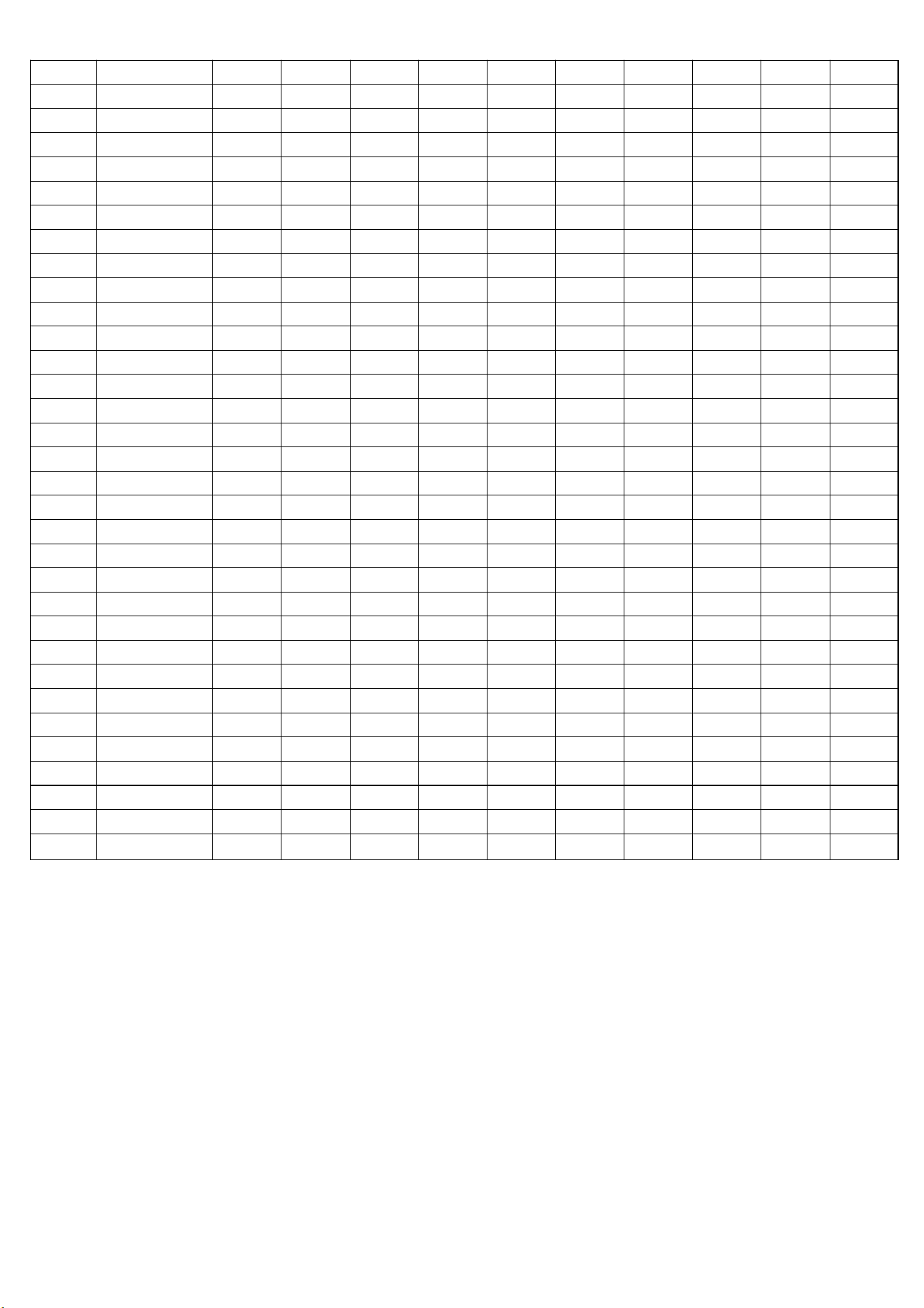
INCLINE
4 4 4 8 8 4 4 4 6 6
P21 SPEED
2.5 5 6.8 3.1 5 7.5 3.7 3.1 7.5 4.3
INCLINE
4 7 8 4 9 9 4 9 5 5
P22 SPEED
2.5 3.7 6.2 6.8 4.3 4.3 6.2 4.3 7.5 2.5
INCLINE
3 8 6 6 9 9 9 9 5 5
P23 SPEED
3.1 3.7 7.5 6.2 4.3 5.6 6.2 7.5 4.3 3.7
INCLINE
2 7 4 4 8 8 5 5 7 7
P24 SPEED
3.1 4.3 6.8 6.8 6.8 5 5 6.8 4.3 3.7
INCLINE
4 9 10 6 6 9 9 5 5 5
P25 SPEED
1.8 3.1 4.3 4.3 4.3 5.6 5.6 4.3 3.1 2.5
INCLINE
4 4 10 8 8 6 6 8 4 4
P26 SPEED
2.5 3.1 4.3 6.2 4.3 4.3 5 6.2 3.7 3.1
INCLINE
5 5 4 4 10 10 6 6 6 6
P27 SPEED
2.5 3.1 5.6 6.2 4.3 4.3 4.3 6.2 3.7 3.1
INCLINE
3 4 7 9 9 6 6 8 4 4
P28 SPEED
2.5 2.5 4.3 6.2 6.2 6.2 6.2 4.3 3.1 2.5
INCLINE
5 5 10 10 10 10 10 8 4 4
P29 SPEED
3.1 3.7 6.2 6.8 7.5 7.5 7.5 5.6 3.7 3.1
INCLINE
4 4 10 8 8 8 8 8 3 3
P30 SPEED
3.1 3.7 5 5.6 5.6 5.6 6.8 7.5 4.3 3.1
INCLINE
3 10 10 9 9 9 9 7 5 3
P31 SPEED
3.1 3.7 3.7 7.5 3.7 6.8 3.7 7.5 3.1 2.5
INCLINE
3 3 8 8 8 10 10 10 8 4
P32 SPEED
3.1 4.3 5.6 6.8 3.1 4.3 5.6 4.3 7.5 4.3
INCLINE
5 5 5 9 9 5 5 5 7 7
P33 SPEED
3.1 5.6 7.5 3.7 5.6 7.5 4.3 3.7 7.5 5
INCLINE
5 8 9 5 10 10 5 10 6 6
P34 SPEED
3.1 4.3 6.8 7.5 5 5 6.8 5 7.5 3.1
INCLINE
4 9 7 7 10 10 10 10 6 6
P35 SPEED
3.7 4.3 7.5 6.8 5 6.2 6.8 7.5 5 4.3
INCLINE
3 8 5 5 9 9 6 6 8 8
P36 SPEED
3.7 5 7.5 7.5 7.5 5.6 5.6 7.5 5 4.3
INCLINE
5 10 10 7 7 10 10 6 6 6
24
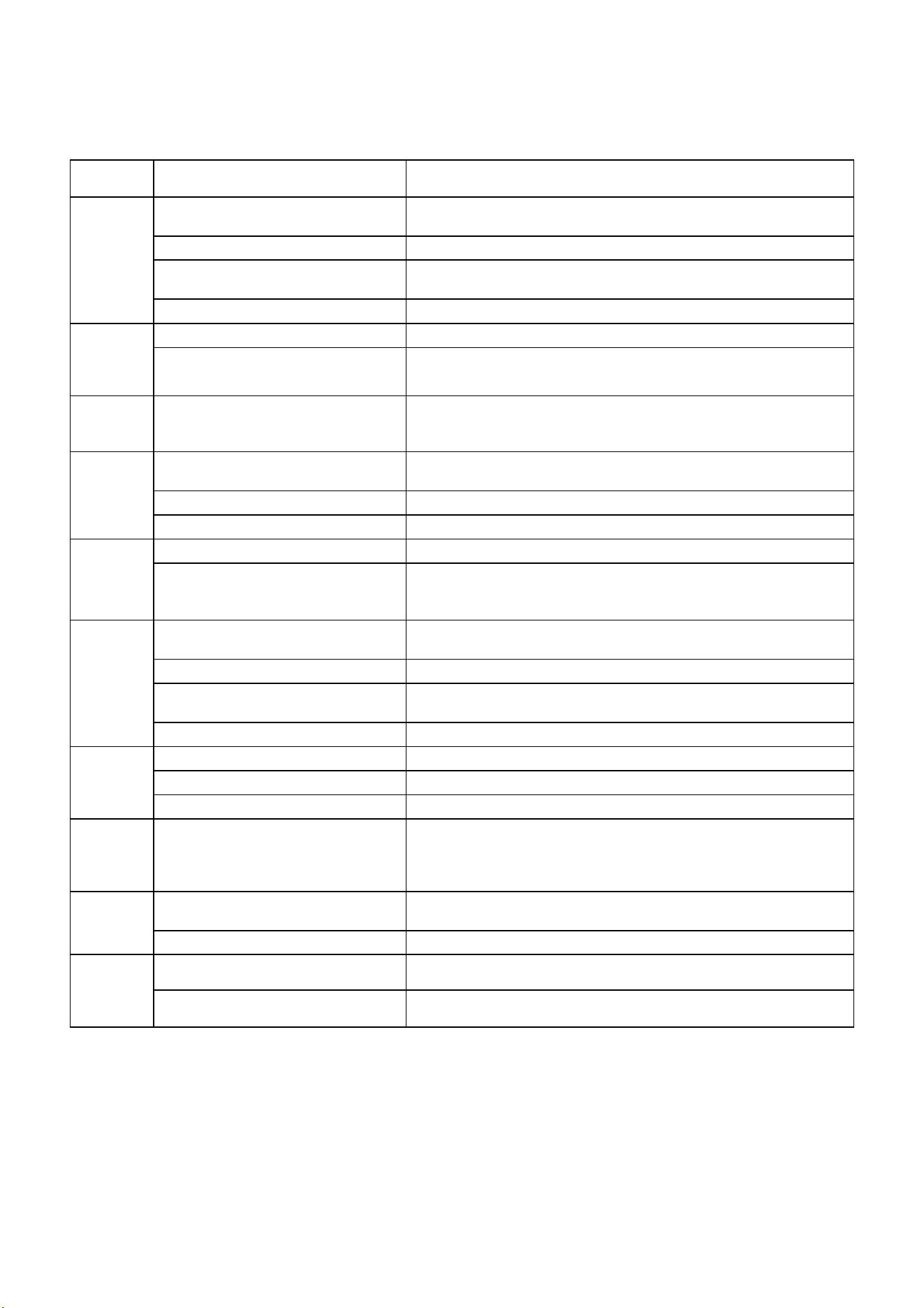
C o m m o n f a u l t s a n d t r o u b l e s h o o t i n g m e t h o d s
:
Porblem
code
Possible reasons Solution
System
does not
work
A、The power is not connected or
the power is not turned on
Connect the power supply, or turn the power switch to the "NO"
position
B、Safety locks are not in place
Put the safety lock in the correct position
C、The controller or console is not
powered on
Replace the controller or console
D、Poor line contact Check system input and output and communication lines
Suddenly
stop in
normal
condition
A、Safety lock dropped Reinstall the safety lock
B、system error
Ask the repairman to deal with it
Keys
failure
KEY INVALID
1、Replace the key board and keyboard cable
2, replace the motherboard
3, replace the console
E-01
A、The communication cable is in
poor contact
Reconnect the communication cable and check whether the port
is properly inserted or replace the communication cable.
B、Defective console
Change the console
C、Defective controller
Change the controller
E-02
A、Defective Motor cable and motor Change the motor
B、The motor cable is improperly
connected to the controller or the
controller is improperly connected
Check and reconnect or replace the controller
E-03
A、The photoelectric sensor is not
installed correctly
Check and reconnect
B、Poor photoelectric sensor Replacement of photosensor
C、Photoelectric sensor dirty or poor
first contact
Check and reconnect/clean light sensor
D、Defective controller
Change the controller
E-05
A、Controller damaged
Replace the controller
B、Motor damaged Replace the motor
C、mechanical failure Check the running oil or drum for blockage
E-07
The console is not detecting the
safety lock signal
1、check whether the safety lock is put in place;
3. Reinstall the safety lock mechanism;
3. Replace the electronic watch
No heart
rate
A、The grip wire is not inserted in
place or the grip wire is not good
Check and connect or replace the grip cable
B、Electronic system circuit fault
Change the console
console
incomplete
or missing
lines
A、LED digital tube or screen is bad Replace the mainboard or screen
B、system failure Change the console
25
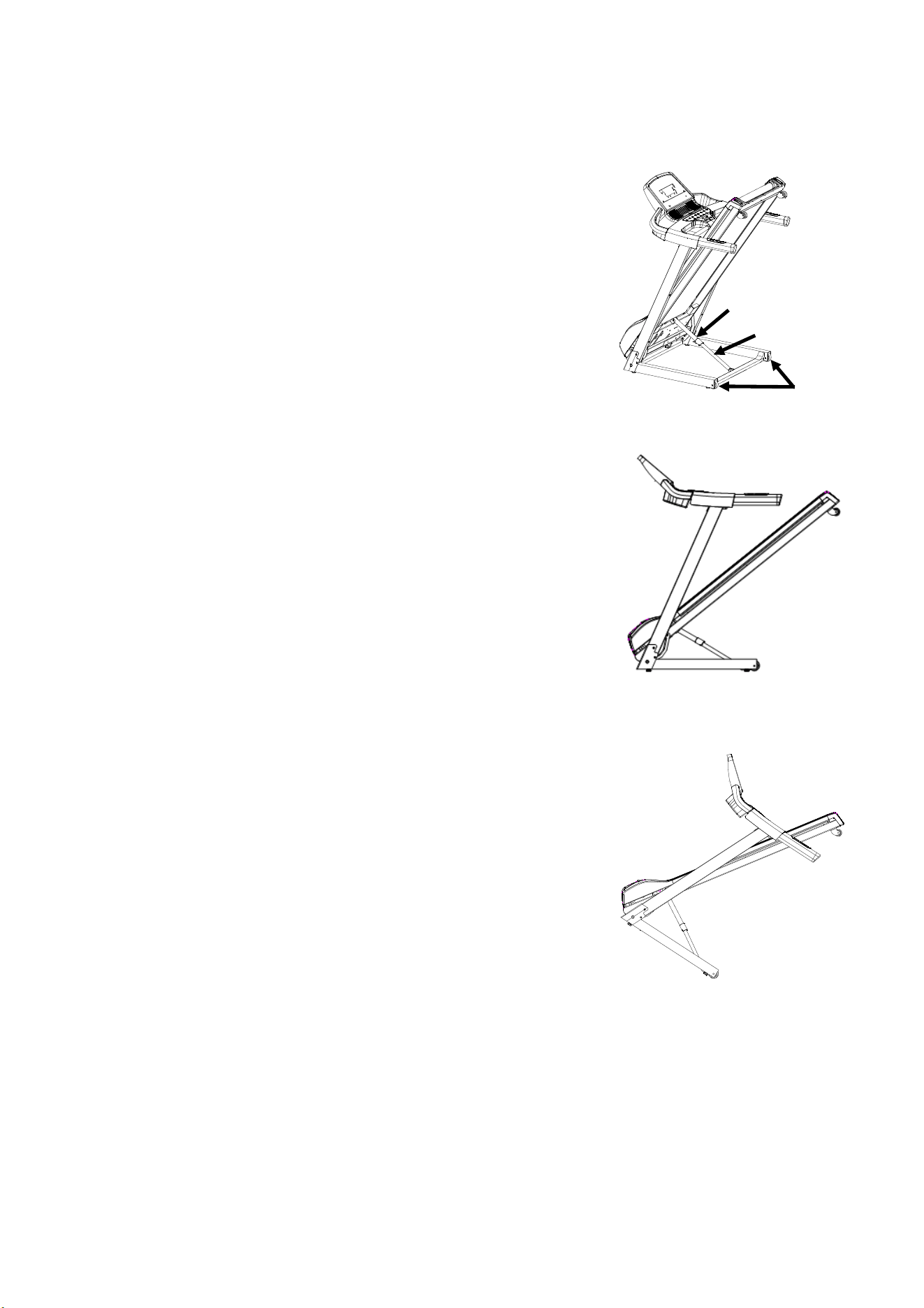
Folding and Moving of Treadmill
1 Folding Treadmill
1) When folding, the power must be disconnected.
2) Check the incline of the treadmill for the lowest position.
3) Lift the treadmill to the upright position, the Ezfit linking parts
will
automatically get stuck on the hydraulic;
4) Check whether the check Ezfit linking parts is stuck on the
hydraulic, as shown in the figure.
2 Treadmill unfolds
1) To unfold the treadmill, you need to choose a place about 1
meter away from the power outlet and the ground is flat
without other obstacles.
2) When unfolding the treadmill, firstly, you need to hold the
treadmill with both hands, step on the Ezfit linking with your
feet, and the treadmill will automatically drop to the ground
slowly; at this time, the user must leave the treadmill about 1
meter away until the treadmill is completely Expand. as the
picture shows:
3 Moving Treadmill
When moving, must ensure that:
1) The power switch of the treadmill is turned off;
2) The power plug has been pulled out from the socket;
3) The large frame has been folded;
After clarifying the above points, hold the end of the treadmill
with one hand and the armrest on the same side with the
other hand, and move the machine slowly when it is tilted
40~50° to the chest. as the picture shows.
Ezfit linking
Wheel
Hydraulic
26
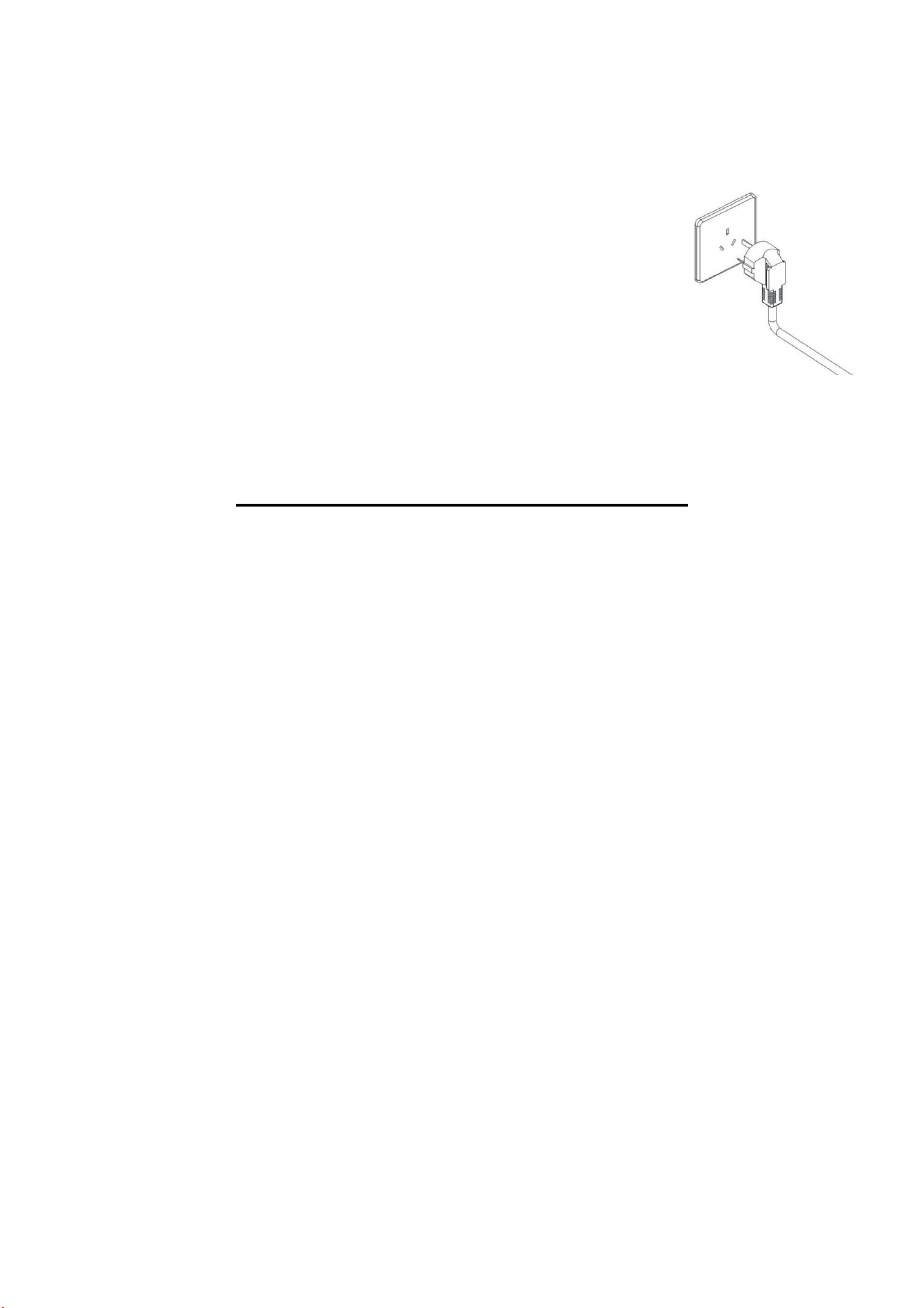
Grounding guide
This product must have grounding. If error and damage occurred to the treadmill ,
grounding wire can form one circuit with lowest resistance, the current can be guided
into the ground to reduce the danger of electric shock. This product is equipped with one
cable, which has one grounding conductor and grounding plug. The treadmill must be
grounded with correct socket that is compatible with local rules.
Danger! If you do not know whether the equipment is properly grounded, please consult
a qualified electrician or maintenance personnel. Please do not change the plug
attached to this product without authorization. If the plug is inconsistent with the socket,
let a qualified electrician install a suitable socket.
PRODUCT USING INSTRUCTIONS
Using instruction of treadmill
1. Turn the power on, keep the treadmill spread out at its lowest position and check if its function is normal.
2. Clip the safety key cord with your clothes.
3. Ensure and check its function and stability before using.Standing on the Running belt to get it started is not
allowed.The correct way to start is standing on side rails with hands on the handle bar. After normal working, you
can exercise with the treadmill.Hold the handle bar when press the “START” key, the treadmill running at the
speed of 1.0km/h after 5 seconds. Then press “+ “Key to 2.5-3.5 km/h which is the comfort speed for running.
Both of hands are supposed to catch handle bar at the same time and feet step to the running belt successively
to start running. Run at the same pace as your running belt.
4. After several minutes, you can speed up by pressing “+”key or slow down by “-”key meanwhile holding the
hand bar.
5. When running, press speed value, you can enter into the fixed speed you want.
6. Pressing “stop” key at any time to stop the motor.
7. Pre-setting Use
Connect the power .Turn the power on.
Press “choose” key to select what mode you want.
Press “starts” key to get started in your selected mode.
You can press “+” or “-”to change the speed or “stop” key to make it stop.
8. HRC testing
After the treadmill is powered on, hold your hands on the metal pulse sensors, then you can see HRC value on
the display window.
27
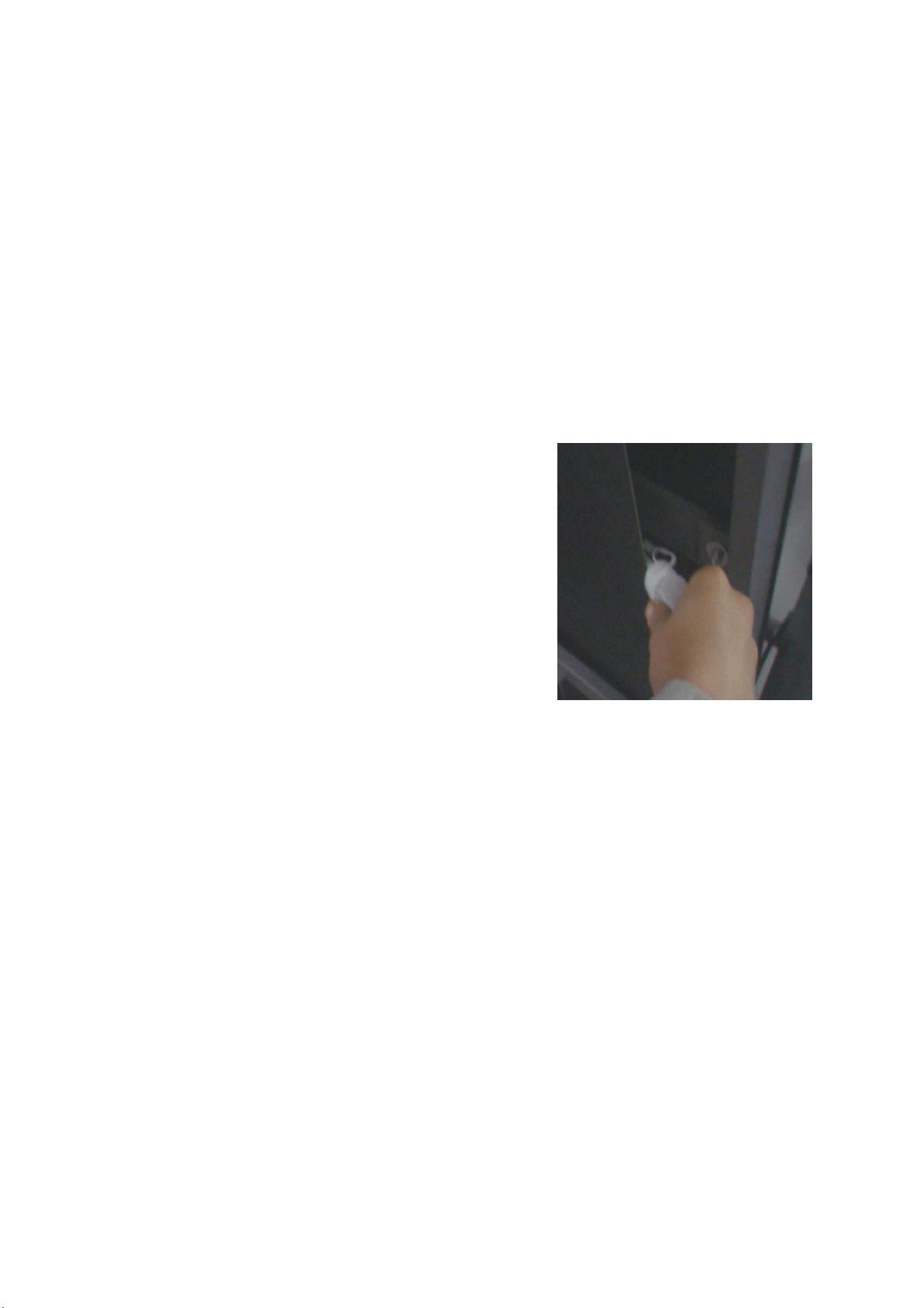
Note: When the safety key pull out ,the treadmill will stop immediately,
And the computer can not work ,the window shows "----".
Treadmill Maintenance
1. Lubrication
After the running belt has been used for a period of time, it must be lubricated with the configured methyl silicone
oil. Suggestion :
Using time less than 3 hours every week lubrication once every 5 months
Using time equal to 4-7 hours every week lubrication once every 2 months
Using time more than 7 hours every week lubrication once every month
No excessive lubrication. Note: the important factor of increase the lifetime for treadmill is proper lubrication.
2. The way of checking whether the running belt need lubrication is, lift the side soft the treadmill and feel the
central back of the belt, as far as possible. If traces of silicon spray are found, lubrication is not necessary. If the
surface is dry, the belt needs lubrication.
Application of lubricant on the belt: (as shown)
Stop the running belt, and fold the treadmill. Put up the belt of
back main frame so that the oil can reach the middle position.
Spraying silicone oil on the inner side of the running belt and
coating silicone oil on both sides of the running belt.
Run the treadmill at a speed of 1km/h to apply silicone evenly.
And tread lightly on the running belt from left to right.
Wait several minutes to let the silicon spray spread,
before starting the machine
Cleaning
Regular cleaning of the striding belt ensures a long product life.
Warning: The treadmill must be turned off to avoid electrical shocks. The power cord must be pulled out of the
socket,before starting the cleaning or maintenance.
After training: Wipe the console and other surfaces with a clean soft and damp cloth to remove sweat
residues.
Caution: Do not use any abrasives or solvents. To avoid damage to the computer, keep any liquids away.
Do not expose the computer to direct sunlight.
Weekly: To make the cleaning easier it is recommended to use a mat for the treadmill. Shoes can leave dirt
on the striding belt that can fall beneath the treadmill. Clean the mat under the treadmill once a week.
Storage: Store you treadmill in a clean and dry environment. Ensure the master powers witch is off and is
unplugged from the electrical wall outlet.
1. Belt Adjustment
All running belts are properly set at the factory and after assembly. However, slack may occur after a period of
use. Such as : pause and slip may occur when running. When this phenomenon occurs, adjust the running belt
and screw in half a turn left and right. If the running belt is loose, the running belt and the roller will slip in turn. But
28
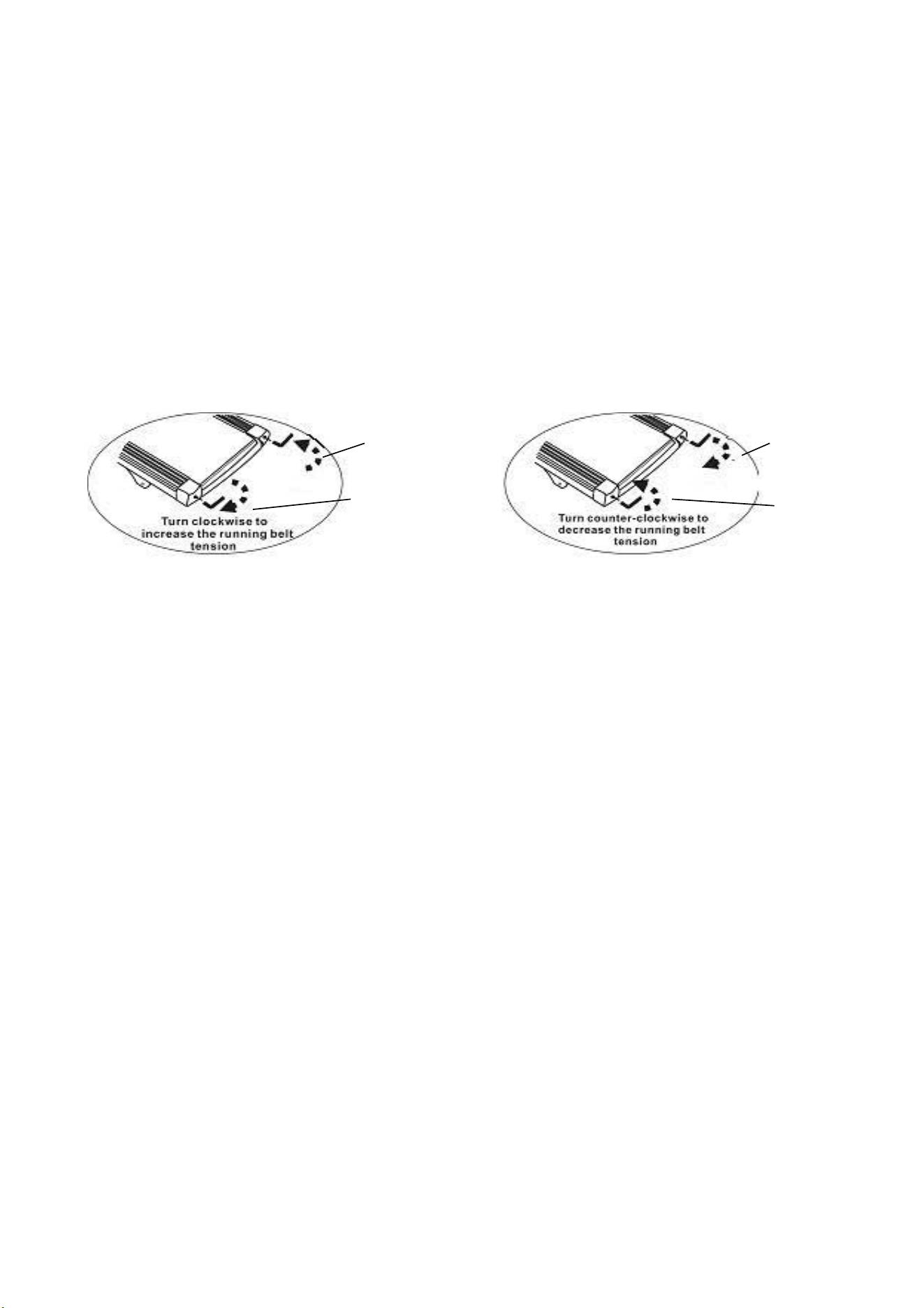
too tight is also not good, which is easy to increase the load of the motor and damage the motor, running belt and
roller, etc.
2. Adjusting the belt deviation:
All running belts are properly set at the factory and after assembly. But after a period, the belt have the
possibility for deviation. The reasons can be listed as follows.
① The treadmill is unstable.
② Feet didn’t in the central of the running belt when running.
③ Feet exert uneven force.
If deviation caused by manual, No - load rotation for a few minutes can return to normal. Adjusting step by step
in half a turn with a 6mm Allen wrench that is equipped randomly for unable to restore automatically.
KEY POINT:
-Clockwise means tighten.
-Anti-clockwise means loosen.
-Running belt will shift to the loose side.
①If the running belt shifts to the left, that means the left side is too loose.
Adjust the left bolt clockwise to make the left tighter.
Or adjust the right screw anti-clockwise to make the right looser.
②If the running belt shifts to the right, that means the right side is too loose.
Adjust the right bolt clockwise to make the right tighter
Or adjust the left screw anti-clockwise to make the left looser.
Attention:
-You need to start the treadmill (let the belt run) at a low speed before you adjust the running belt.
-When you adjust the bolt, don't rotate it too much.
-After each adjustment you need to look for the changes in the running belt.
Running belt deviation is not covered by the warranty, and is mainly maintained by users according
to the instructions. Running deviation can seriously damage the running belt. It must be found and
corrected in time.
Running belt deviation does not belong to the scope of warranty, mainly by the user in accordance with the
Such as right deviation of running belt.
Adjust the right screw clockwise or the left
screw anti-clockwise.
Such as left deviation of running belt.
Adjust the left screw clockwise or the right
screw anti-clockwise.
tight
loose
loose
tight
29
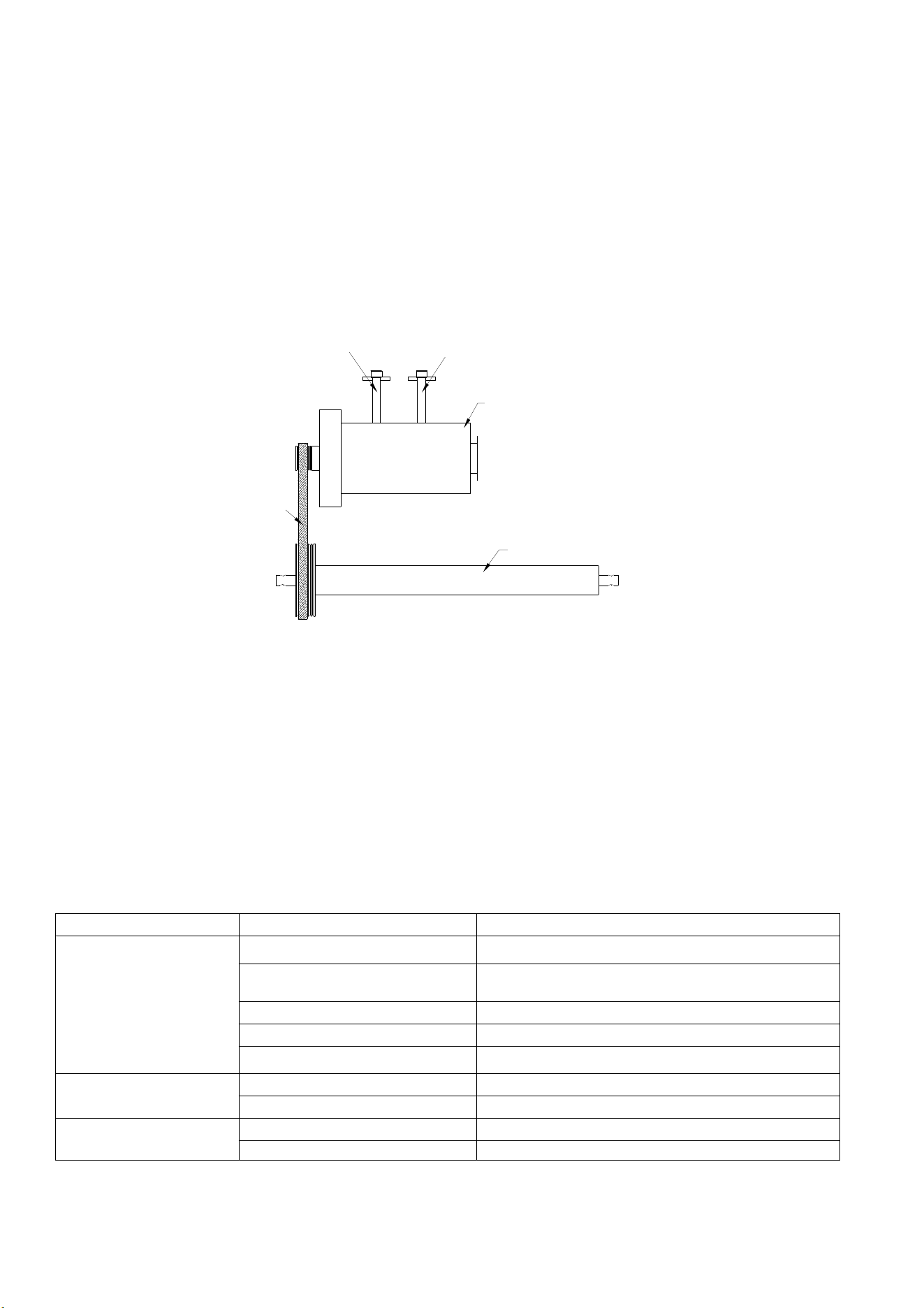
调节螺丝
电机
前滚筒
皮带
顶螺丝
manual self-maintenance.Deviation will seriously damage the running belt, must be found in time, timely
correction.
Adjustment of the motor’s belt
All the motor belt of treadmill must be adjust in the factory and after assembly. However, after a period of use,
there may be slack or slip phenomenon.
Adjustment Steps:① Turn the adjusting screw counterclockwise with wrench
② The adjustment range shall be subject to the belt load not slipping.
NOTE: Regular cleaning of belts and pulley grooves
Common faults and treatment methods
Part of the treadmill
The problem Possible causes Maintenance methods
The treadmill doesn't
work
A is unplugged Plug into socket
B the security key is not
embedded Embed the safety key in the panel
C circuit signal system open Check the controller input and signal line
D power supply not turned on Place power switch in NO position
E the fuse blew Replace the fuse
Run with it
Not moving smoothly
A not enough lubrication Using a methyl silicone oil lubricant
Running straps are too tight Adjust your running bands for tightness
The running belt
slipped
A the running belt is too loose Adjust your running bands for tightness
B the belt is loose Adjust drive belt tightness
Screw of adjustment
Screw
Motor
Front roller
Belt
30
Part of the console
Fault
code
Fault description Trouble shooting
E 1
Abnormal
communication:
between control
and console after
power-on.
Controller shutdown into a fault state. Unable to start. The console shows
the failure code, and the buzzer beeps three times.
Possible reasons:control and the console communication is blocked,
check the connection of the communication line, ensure that each core
fully inserted. Replace the connection line if it is broken..
E 3
The motor cord is
not connected
properly.
Shutdown into the fault state, the console buzzer sound 9times, and
showing the fault code. If it returns to normal after shutdown, it can enter
the standby state and restarted.
Possible causes:Check whether the motor wire is connected, keep the
wire is connected. Check whether the controller has any odor,replace the
controller;
No speed sensor
signal: the lower
control voltage
output to the DC
motor, can not
receive the motor
speed feedback
for more than 3
seconds.
Shutdown into the fault state, the console buzzer sound 9times, and
showing the fault code. After shutdown 10s, enter the standby state,can
be restarted.
Possible causes: If no speed sensor signal for 3 seconds, check whether
the sensor plug is not inserted or damaged, plug it in or replace the
sensor.
E 4
Incline learning Check whether the lifting motor induction line is plugged in properly,
re-plug the connector to make it reliable;check whether the AC line of the
lift motor is plugged in correctly, and the AC line of the jack motor and the
controller are marked correctly; check whether the connecting line of the
motor is broken, replace the connecting line or the lift motor; and press the
learning key on the control to learn again.
E 5
Over-current
protection: under
the running state,
the control detects
that the DC motor
current is greater
than the rated
current + 6A for
more than 3
seconds.
Shutdown into the fault state, the console buzzer sound 9times, and
showing the fault code. After shutdown 10s, enter the standby state,can
be restarted. Possible causes: If the current exceeds the rated load, the
system self-protection, or a part of the treadmill is stuck, causing the motor
can not turn, the load is too heavy, the current is too large, the system
self-protection; adjust the treadmill to start up again.Also, check whether
the motor has a flow sound or burnt odor, replace the motor, or replace the
controller, or check whether the power supply is inconsistent or low
voltage, retest with correct voltage.
E 6
Explosion-proof
impulse protection:
the power supply
voltage is
abnormal or the
motor is abnormal
etc. causes the
drive motor circuit
to be damaged.
Shutdown into the fault state, the console buzzer sound 9times, and
showing the fault code. After shutdown 10s, enter the standby state,can
be restarted
Possible causes: check power supply voltage is lower than 50% of normal
voltage, please use the correct voltage to re-test; check whether the
controller has a smell, replace the controller; check whether the motor
wires are connected, reconnect the motor wires.
31
AnyRun
Zwift
Download, register and log in the AnyRun APP, enter the setting page:
Click Setting, which is at the right lower corner, click Devices, the APP will detect the
Bluetooth codes, select the Bluetooth code, which is same as the code tagged on the
equipment console, and pair.
Download, register and log in the Zwift APP, enter the setting page:
Under PAIRED DEVICES page, click RUN for treadmill; Then click POWER SOURCE,
and there is pop-up menu, select the Bluetooth code, which is same as the code tagged
on the equipment console, then select OK to be paired.
NOTE: Zwift remembers the devices used in the previous session and may attempt to
pair to those devices if they are present and available. If you see devices paired that you
don't wish to use, you can simply deselect them and select the device you do wish to pair.
Kinomap
Download, register and log in the Kinomap APP, enter the setting page:
click More in the right lower conner, click Equipment management, click + at the right
upper area, select for treadmill;
Then select the Bluetooth brand of your choice e.g., Anyrun etc.; Click the content under
Interactive, the APP detects found equipment, select the Bluetooth code, which is same
as the code tagged on the equipment console, then click ADD NEW EQUIPMENT, it will
pop out equipment successfully added.
Bluetooth connection supports Anyrun, Zwift and Kinomap
Bluetooth APP for Treadmill
32