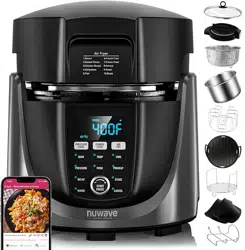
nuwavenow.com
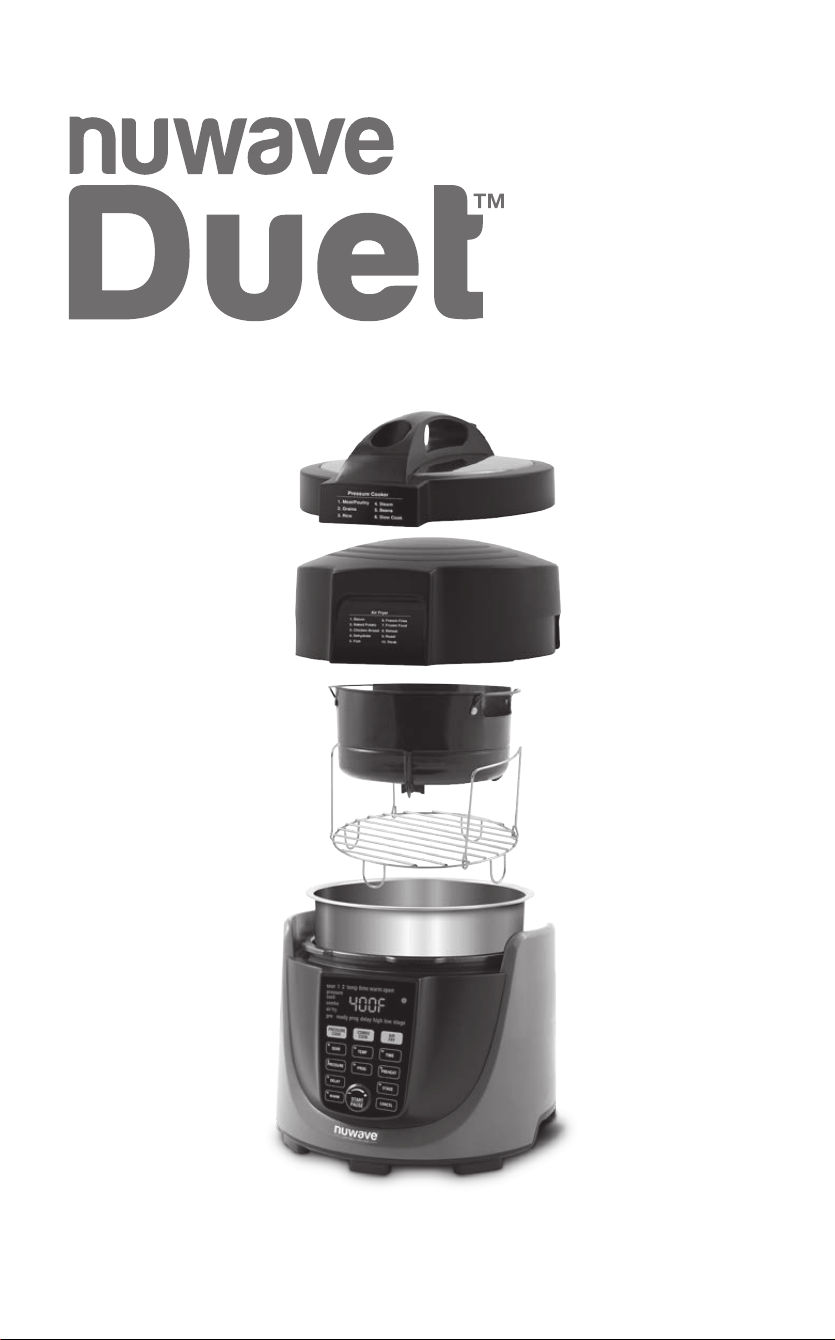
OWNER’S MANUAL
Pressure Cooker & Air Fryer Combo
2
2
REGISTER
NOW!
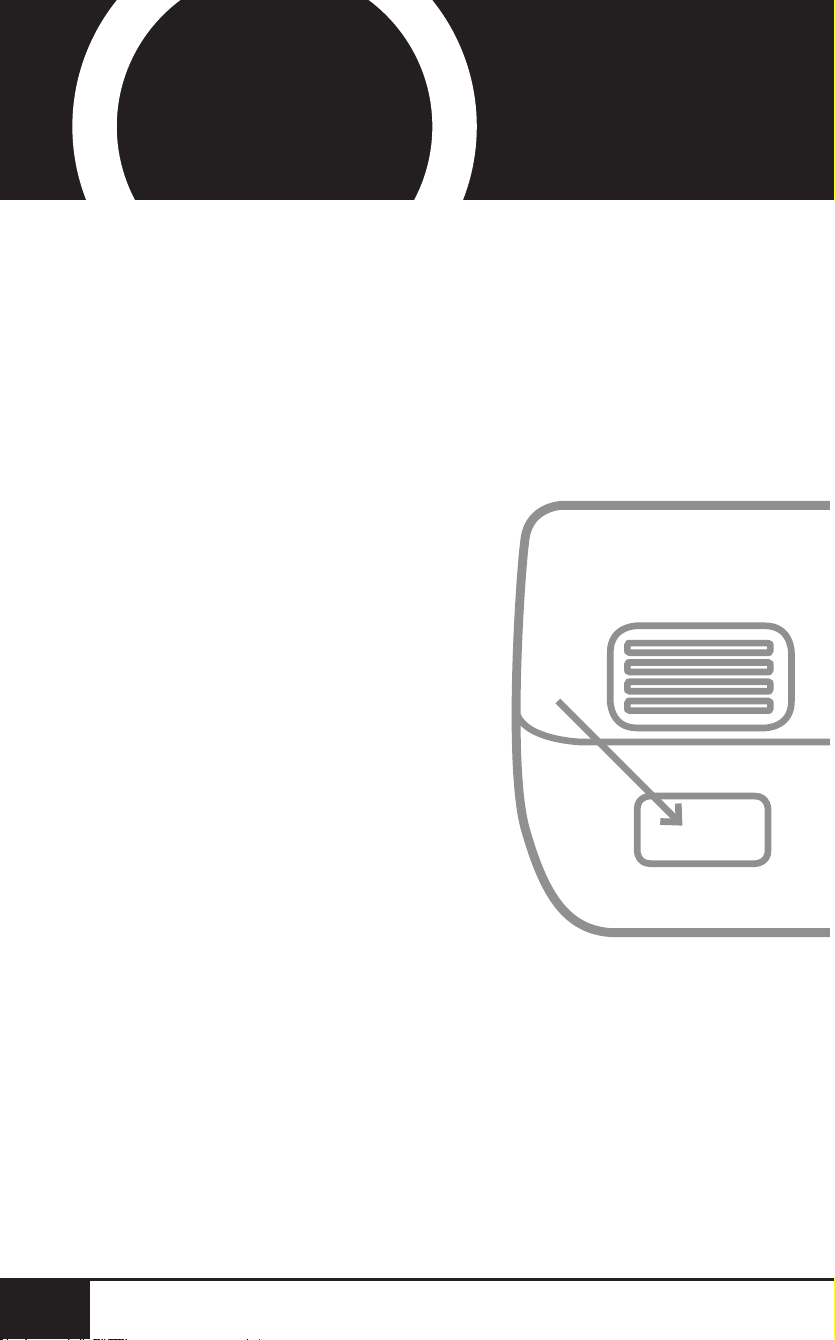
Using your smartphone or
smart device, scan the QR code
located on the unit label on the
back of the unit.
You will be directed to NuWave’s
product registration page with
your unit’s unique serial number
automatically entered in the
appropriate eld.
NOTE: If you do not have a
web-enabled smart device,
simply visit nuwavenow.com/QR
and manually enter in your unit’s
serial number.
Fill out the remaining information
and complete the optional survey.
Once you submit your
information, you will receive
a conrmation email containing
your extended warranty details.
1
2
3
4
*Register your product within 1 year of date of purchase for a free
6-month extension of your limited warranty.
As a special thank-you for registering your NuWave
unit, you’ll automatically receive an additional 6 months
added to your limited manufacturer’s warranty!*
All you have to do is follow these simple steps.
nuwavenow.com
3
nuwavenow.com
3
6
for an additional
months
warranty!
1
2
3
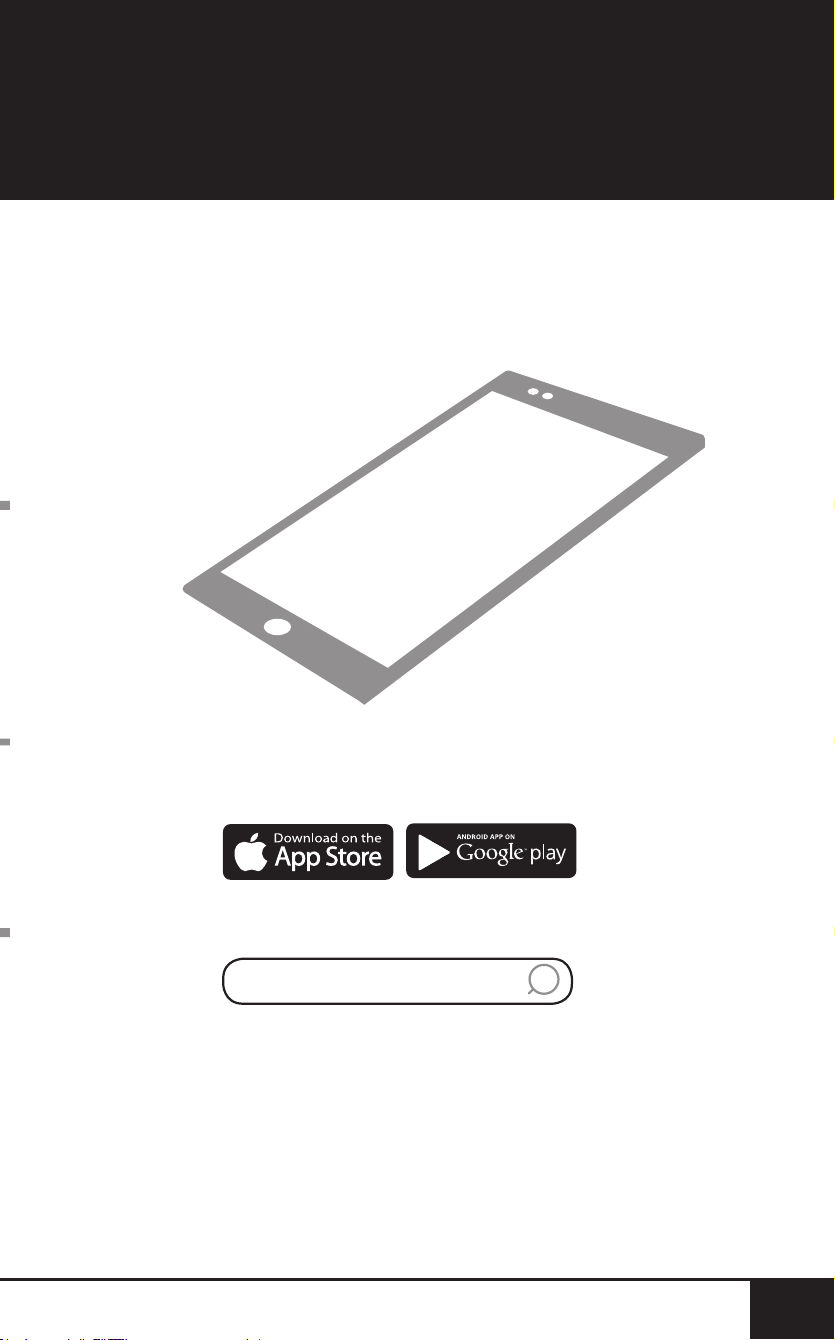
QR code readers
Open your mobile app store
(App Store, Google Play).
Search for "QR code readers."
Simply download the QR code reader to your phone,
open it, scan the code and you are ready to go.
NOTE: You may need to open your downloaded QR
code reader each time you want to scan a QR code.
DOWNLOAD THE QR CODE
APP TO YOUR MOBILE DEVICE
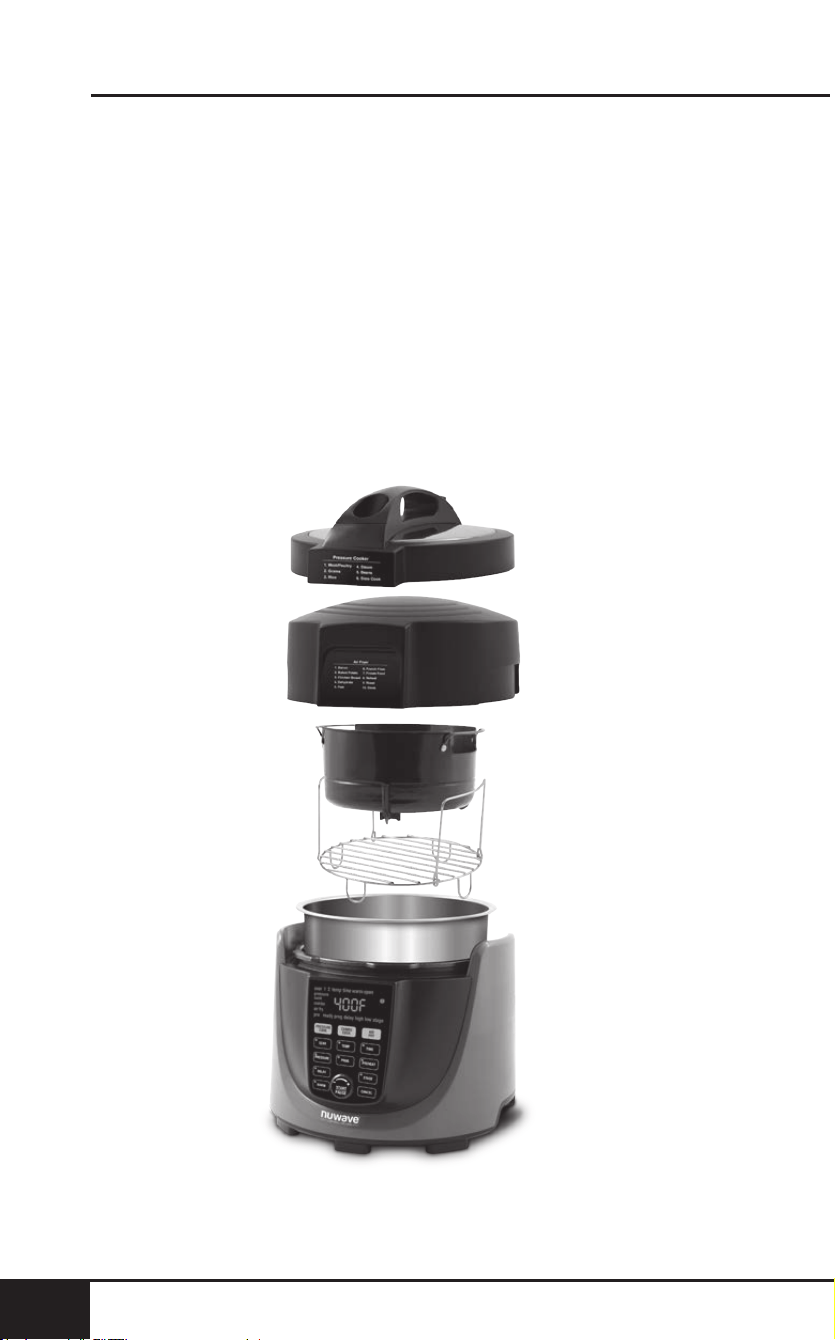
table of contents
4
TABLE OF CONTENTS
4
OWNER’S MANUAL
Important Safeguards .....................................................5-9
Parts & Accessories ....................................................10-11
Quickstart ....................................................................12-13
Pressure Cooking Instructions ....................................14-23
Air Frying Instructions .................................................24-35
Combo Cooking Instructions .......................................36-37
Cleaning & Maintenance ..............................................38-40
Troubleshoot Guide ...........................................................41
Limited Warranty ..........................................................42-43
Replaceable Parts.........................................................44-47
TABLE OF CONTENTS
nuwavenow.com

nuwavenow.com
5
ENGLISH
nuwavenow.com
5
IMPORTANT SAFEGUARDS
HOUSEHOLD USE ONLY • READ ALL INSTRUCTIONS BEFORE USE
Operate only in accordance with intended use as
described in this manual. When using electrical
appliances, basic safety precautions should always be
followed including the following:
1. Read all instructions.
2. Ensure the appliance and all parts are clean and dry
before each use.
3. Do not touch hot surfaces. The appliance’s surfaces may
be hot during and after use. Use handles as directed to
handle appliance.
4. A short power-supply cord is provided to reduce risk.
5. Do not let cord hang over any edge or let the cord touch
hot surfaces.
6. Discard the protective plastic covering the power plug
before use.
7. Do not immerse cord, plugs, or appliance in water or
other liquid.
8. Close supervision is necessary when any appliance is
used near children. This appliance is not intended for
use by persons with reduced physical, sensory or mental
capabilities, children, or persons with lack of experience
or knowledge, unless supervised or instructed on the
use of the appliance by one responsible for their safety.
9. Unplug from outlet when not in use and before cleaning.
Allow to cool before removing or replacing parts.
10. Do not operate if the appliance or the appliance’s cord
malfunctions or has been damaged in any way. Return
appliance to the nearest authorized service facility for
examination, repair, or adjustment.
11. Use only on a clean, stable, dry and level surface.
12. Do not use accessories or attachments not
recommended by the manufacturer.
13. Do not use outdoors. This appliance is intended for non-
commercial, indoor use only.
14. Do not place on or near a hot surface or in a heated oven.
15. Use caution when moving an appliance after cooking.
NEVER move the appliance while it is operating and/or
under pressure.
16. Unplug the appliance when not in use and allow
the appliance to cool completely before cleaning or
removing/replacing parts.

important safeguards
66
SEE CLEANING & MAINTENANCE BEFORE USE
ADDITIONAL SAFEGUARDS
Save These Instructions
This appliance has a polarized plug (one blade is wider
than the other). To reduce the risk of electric shock,
this plug is intended to t into a polarized outlet only
one way. If the plug does not t fully into the outlet,
reverse the plug. If it still does not t, contact a
qualied electrician. Do not attempt to modify the plug
in any way.
1. DO NOT use the appliance without supplied Stainless
Steel Inner Pot installed.
2. This unit cooks under pressure and releases hot steam.
READ ALL instructions for proper use of this appliance to
avoid injury.
3. DO NOT cover the Pressure Release Switch/Valve or
Pressure Indicator. Before each use, ALWAYS check
the Pressure Release Switch/Valve and the Pressure
Indicator for blockage or obstructions. These should move
freely and should not be stuck in one position. Foods that
expand (pasta, rice, grains, beans, oatmeal, etc.) may
block these so clean thoroughly after each use.
4. Use caution when removing the Stainless Steel Inner
Pot from the unit, as the pot may be heavy and hot.
Use protective gloves or hot pads.
5. DO NOT place food or liquids directly into the appliance
without the Stainless Steel Inner Pot.
6. DO NOT use Silicone Gasket if they are torn or
damaged. Clean after each use. ONLY NuWave LLC
Silicone Gasket is to be used in the operation of this unit.
7. DO NOT sear foods under pressure. The pressure-
cooking Sear function is intended to be used without the
Pressure Cooker Lid.
8. NEVER use the Slow Cook or Warm functions without
food or liquid in the Stainless Steel Inner Pot.
9. This appliance is not intended for deep-frying.
10. DO NOT overll the Stainless Steel Inner Pot. NEVER
ll more than ¾ full. For starchy foods or foods that will
expand (pasta, rice, grains, beans, oatmeal, etc.), NEVER
ll the Stainless Steel Inner Pot more than ¾ full.
nuwavenow.com
7
ENGLISH
nuwavenow.com
7
11. NEVER pressure cook without liquid. The amount of
liquid needed is provided in the recipes.
12. NEVER attempt to open the Pressure Cooker Lid while
the appliance is in use or pressure. DO NOT force the
Lid to open at any time. Ensure ALL pressure is released
BEFORE opening the Pressure Cooker Lid by turning the
Pressure Release Switch/Valve to the “OPEN” position.
13. Keep all body parts away from the appliance when the
appliance is releasing pressure. DO NOT place any
body part over the Pressure Release Switch/Valve
or anywhere steam may escape. When opening the
Lid (ONLY after all pressure has been released and
the Pressure Indicator has dropped), the contents of
the appliance will still be hot and opening the Lid will
release steam. Make sure to open the Pressure Cooker
Lid away from yourself and others.
14. If any part of the appliance is missing or damaged DO
NOT use the appliance. Contact NuWave LLC Customer
Service for replacement parts: 1-877-689-2838 or
help@nuwavenow.com.
WARNING
In case of other problems,
immediately unplug and contact
Customer Service Department.
1-877-689-2838 • help@nuwavenow.com

important safeguards
8
IMPORTANT SAFEGUARDS
HOUSEHOLD USE ONLY • READ ALL INSTRUCTIONS BEFORE USE
8
1. Do not use accessories or attachments not
recommended by the manufacturer.
2. DO NOT overll the Air Fry Basket.
3. DO NOT cover the air intake or outlet vents. This may
prevent the appliance from performing correctly and may
damage the unit.
4. It is not unusual for a small amount of steam and/or
smoke to occasionally be released from the air outlet
vent. Keep hands and face away from the air outlet
vents to avoid injury.
5. When removing the Air Fryer Lid, after use the heating
elements are contained inside the Lid and may be
extremely hot. Place Air Fryer Lid on the Air Fryer Lid
Holder to avoid damage to property. Refer to Cleaning &
Maintenance for instructions.
6. The Air Fry Basket and any accessories used may
be extremely hot during and immediately after use.
ALWAYS use oven mitts or hot pads when handling
these items.
7. This appliance is not intended for deep-frying.
8. Ensure the appliance and all parts are clean and dry
before each use.
9. Unplug the appliance when not in use and ensure it is
completely cool before cleaning.
10. If any part of the appliance is missing or damaged DO
NOT use the appliance. For replacement parts contact
NuWave LLC Customer Service for replacement parts:
1-877-689-2838 or help@nuwavenow.com.

nuwavenow.com
9
ENGLISH
nuwavenow.com
9
SAVE THESE INSTRUCTIONS
Read and understand the entire manual before using
the Duet. This appliance has a polarized plug (one
blade is wider than the other). To reduce the risk
of electric shock, this plug is intended to fit into a
polarized outlet only one way. If the plug does not fit
fully into the outlet, reverse the plug. If it still does not
fit, contact a qualified electrician.
Do not attempt to modify the plug in any way.
A. A short power-supply cord (or detachable power-supply
cord) is provided to reduce the risk resulting from
becoming entangled in or tripping over a longer cord.
B. Longer detachable power-supply cords or extension
cords are available and may be used if care is
exercised in their use.
C. If a longer detachable power-supply cord or extension
cord is used:
1. The marked electrical rating of the cord set or
extension cord should be at least as great as the
electrical rating of the appliance;
2. The cord should be arranged so that it will not
drape over the surface where it can be pulled on by
children or tripped over unintentionally; and
3. If the appliance is of the grounded type, the cord
set or extension cord should be a grounding-type
3-wire cord.
parts & accessories
1010
3
2
6
5
4
7
1
8
PARTS & ACCESSORIES
To order replaceable
parts head over to
Replaceable Parts
section and then
NuWaveNow.com.
9
10

nuwavenow.com
11
ENGLISH
nuwavenow.com
11
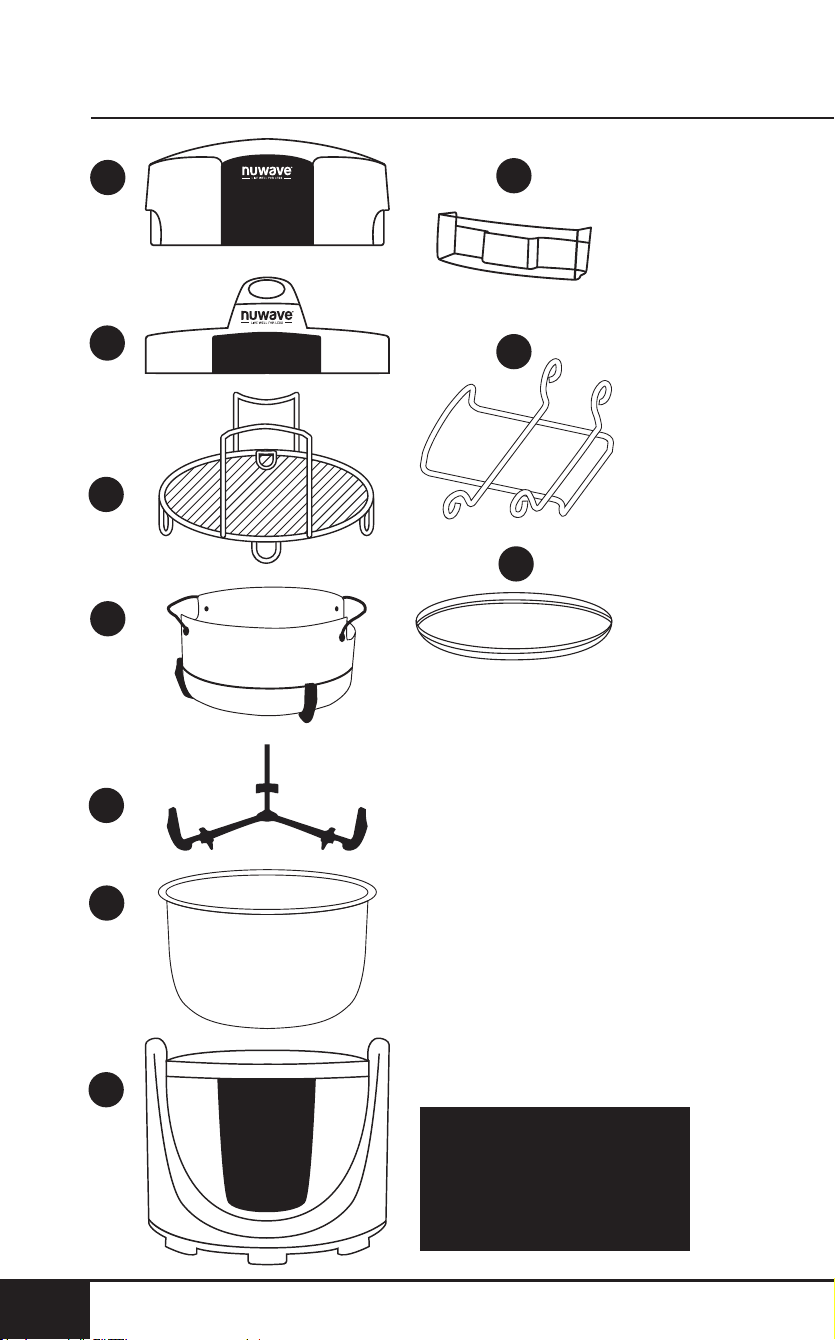
Air Fryer Lid
Part #: 34805
Pressure Cooker Lid
Part #: 34802
Stainless Steel
Reversible Rack
Part #: 34808
Non-Stick Air Fry Basket
Part #: 34806
Air Fry Basket Diffuser
Part #: 34807
Stainless Steel Inner Pot
Part #: 34803
Duet™ Base
Part #: 34801 (Gray)
Part #: 34816 (Red)
Water-Collection Tray
Part #: 34804
Air Fryer Lid Holder
Part #: 34815
Silicone Gasket
Part #: 34813
1
2
3
4
5
6
7
8
9
10

quickstart
12
QUICKSTART
12
PRESSURE COOK: Use the PRESSURE COOK button to
initiate the pressure cooker function.
Note: Sometimes the cooking process can create a seal
between the Pressure Cooker Lid and the Stainless Steel
Inner Pot. To prevent lifting the pot along with the Lid,
gently shake the handle to separate the Lid from the pot
before opening.
COMBO COOK: Use the COMBO COOK button to initiate
the combo cooking function.
AIR FRY: Use the AIR FRY button to initiate the air
fryer function.
START/PAUSE: When the START/PAUSE button is pressed,
the Duet begins or pauses cooking. The START/PAUSE dial
is turned to adjust cooking functions and (TEMP & TIME)
and to scroll through Menu options.
Mute the beep sounds on the Duet by pressing and holding
the START/PAUSE button for 3 seconds. To unmute, press
and hold the START/PAUSE button for 3 seconds.
Note: Pause is disabled during pressure cooking.
TEMP: Use the TEMP button to show the cooking
temperature. Use the START/PAUSE dial to adjust the
temperature before or during cooking.
TIME: Use the TIME button to show the cooking time. Use the
START/PAUSE dial to adjust the time before or during cooking.
PRESSURE: Press the PRESSURE button to switch
between HIGH pressure and LOW pressure setting.
Note: The PRESSURE button is disabled during air-frying.
CANCEL: The CANCEL button is used to clear out any
functions that are set into the Duet at any time.
DELAY: Use the DELAY button to delay cooking for up to 24
hours. Use the START/PAUSE dial to adjust the delay time.
PREHEAT: Use the PREHEAT button to heat the Duet
to correct temperature before adding food. To cancel the
preheat function, press the PREHEAT button at any time.
Note: The PREHEAT button is disabled during
pressure cooking.
SEAR: The SEAR button is used to cook at high temperature
for a short amount of time.

nuwavenow.com
13
ENGLISH
nuwavenow.com
13
STAGE: The STAGE button is used to scroll through cooking
functions during PRESSURE COOK. During AIR FRY, use
the STAGE button to set up to 5 different cooking stages.
Cooking temperatures and times can be adjusted for each
stage of cooking using the TEMP and TIME buttons and the
START/PAUSE dial.
WARM: Use the WARM button to keep your food warm after
cooking or when keeping warm for an extended amount
of time. Use the START/PAUSE dial to adjust the warming
temperature and warming time. Press the WARM button to
cancel the warm cycle.
PROGRAM: The Duet comes with 300 preprogrammed
cooking recipes along with an additional 240 memory slots
to add your own unique recipes the way you like them
cooked. Use the PROGRAM button to recall and save
programmed recipes.
Note: The Duet will go into standby mode after 5 minutes of
no interaction with the control panel. Simply press any button
or turn the START/PAUSE dial to “wake up.”
SEAR, PRESSURE, DELAY, WARM, TEMP, PROG, TIME and
STAGE buttons are available for use when pressure cooking.

pressure cooking instructions
14
PRESSURE COOKING INSTRUCTIONS
14
PRESSURE COOK
1. Plug the power cord into an electrical outlet. The Duet
will power on and the display will show --:--.
2. Press the PRESSURE COOK button.
• The lights on the SEAR, PRESSURE, DELAY, WARM,
TEMP, PROG, TIME and STAGE buttons will light up
for 1-2 seconds then go out indicating those functions
are available for use.
• The display will show pressure cook and --:--.
Note: The PREHEAT button is disabled during use of the
Pressure Cook function.
START/PAUSE
Note: The Pause Function is Disabled During Pressure Cooking.
1. Ensure the Stainless Steel Inner Pot is in the Duet. If the
Pot is not detected inside the Duet and START/PAUSE
is pressed, you will receive an error message that reads
“Pot” on the display. Also make sure the Pressure Cooker
Lid is on and locked into place. The “Lock” symbol will
show on the display when the Lid is in place.
2. Press the TIME button. The display will show pressure
cook, high, and 00:30. High and 00:30 (30 minutes) are
the default settings. These functions can be adjusted
at this time (please see the PRESSURE and TIME
functions for more details).
3. Press the START/PAUSE button to begin cooking.
• The display will show pressure cook, high, and
PH. The PH indicates that the Duet is preheating/
pressurizing.
• Once the Duet gets to correct pressure, the unit will
beep once and begin cooking. The display will show
pressure cook, high, 00:30 (default time), and time.
The “:” will ash, indicating the Duet is currently
cooking and 30 minutes remain.
4. Once the Duet nishes cooking, the display will show
End and the unit will beep 3 times.

nuwavenow.com
15
ENGLISH
nuwavenow.com
15
5. To natural release pressure, turn the Duet off and
unplug. Allow the Duet to naturally release the pressure.
To quick release pressure, carefully turn the Pressure
Release Switch/Valve to the “OPEN” position until all
steam/pressure is released. Remember to always turn
the Pressure Release Switch/Valve to the “OPEN”
position before opening the Pressure Cooker Lid to
ensure all pressure is released.
Note: Be very careful when releasing pressure from the
pressure cooker. A jet of hot steam will release from the
Pressure Release Switch/Valve and could burn you if care is
not taken.
Using START/PAUSE to Mute and Unmute Sound
1. Press and hold the START/PAUSE button for 3 seconds
to mute the beep sounds the Duet makes.
2. Simply press and hold the START/PAUSE button for 3
seconds again to unmute the beep sounds.
Quick Start
1. Plug the power cord into an electrical outlet. The Duet
will power on and the display will show --:--.
2. Press the PRESSURE COOK button. The lights on the
SEAR, PRESSURE, DELAY, WARM, TEMP, PROG, TIME
and STAGE buttons will light up for 1-2 seconds then go
out, indicating those functions are available for use.
3. Press the TIME button. The display will show pressure
cook, high, and 00:30.
4. Turn the START/PAUSE dial to adjust the cooking time.
5. Press the PRESSURE button to adjust between high
pressure or low pressure (please see PRESSURE
functions of this instruction manual for more details).
6. Press the START/PAUSE button to begin cooking. The
Duet will rst pressurize to high or low pressure depending
on what you set, then it will cook to the time set.
7. When done, the Duet will beep 3 times and the display
will show End.

pressure cooking instructions
16
PRESSURE COOKING INSTRUCTIONS
16
TIME
1. Press the PRESSURE COOK button. The lights on the
SEAR, PRESSURE, DELAY, WARM, TEMP, PROG, TIME
and STAGE buttons will light up for 1-2 seconds then go
out, indicating those functions are available for use.
2. Press the TIME button to adjust the amount of time you
would like your meal to cook under pressure. Depending
on the pressure set, the Duet can be set up to 24 hours
under low pressure and 10 hours under high pressure.
3. The time can be adjusted up or down by turning the
START/PAUSE dial clock wise or counterclockwise.
4. Press the START/PAUSE button to begin cooking.
5. When done, the Duet will beep 3 times and the display
will show End.
6. To natural release pressure, turn the Duet off and
unplug. Allow the Duet to naturally release the pressure.
To quick release pressure, carefully turn the Pressure
Release Switch/Valve to the “OPEN” position until all
steam/pressure is released. Remember to always turn
the Pressure Release Switch/Valve to the “OPEN”
position before opening the Pressure Cooker Lid to
ensure all pressure is released.
PRESSURE
Press the PRESSURE button to switch between HIGH
pressure and LOW pressure settings.
1. Press the PRESSURE COOK button. The lights on the
SEAR, PRESSURE, DELAY, WARM, TEMP, PROG, TIME,
and STAGE buttons will light up for 1-2 seconds then go
out, indicating those functions are available for use.
2. Press the PRESSURE button to change the Duet from
HIGH pressure to LOW pressure. The display will show
low. The Duet will now cook under LOW pressure.
3. Press the PRESSURE button again to change back to
HIGH pressure.
4. Use the START/PAUSE dial to adjust the cooking time.
5. Press the START/PAUSE button to begin the
cooking process.

nuwavenow.com
17
ENGLISH
nuwavenow.com
17
SEAR
1. Press the PRESSURE COOK button. The lights on the
SEAR, PRESSURE, DELAY, WARM, TEMP, PROG, TIME,
and STAGE buttons will light up for 1-2 seconds then go
out, indicating those functions are available for use.
2. Press the SEAR button heat the bottom of the pressure
cooker pot to sear meats, sh, and vegetables before
pressure cooking.
3. The display will show pressure cook, sear, time, and
00:20 (20 minutes).
4. Turn the START/PAUSE dial to adjust the sear time, up
to 00:30 (30 minutes).
5. Press the TEMP button to adjust the sear temperature.
The display will show pressure cook, sear, temp, and 275F.
6. Turn the START/PAUSE dial to adjust sear temperature
between 60°F and 275°F.
7. Press the START/PAUSE button to begin searing.
The Duet will sear for set the time.
• Both temperature and time can be adjusted with the
START/PAUSE dial and the TEMP and TIME buttons
during searing.
• This can be used to increase time if you feel you need
a few more minutes to nish searing your foods or to
increase or decrease the searing temperature.
8. When nished the display will show End.
Note: The Sear function should not be used with the
Pressure Cooker Lid on and locked into place.
DELAY
1. Press the PRESSURE COOK button. The lights on the
SEAR, PRESSURE, DELAY, WARM, TEMP, PROG, TIME,
and STAGE buttons will light up for 1-2 seconds then go
out indicating those functions are available for use.
2. Set cooking functions, as described in this manual, to
your specications.
3. Press the DELAY button delay cooking for designated
time period up to 24:00 (24 hours). The display will show
pressure cook, delay, time, and 01:00 (1 hour).

pressure cooking instructions
18
PRESSURE COOKING INSTRUCTIONS
18
4. Turn the START/PAUSE dial to adjust the delay time up
to 24:00 (24 hours).
5. Press the START/PAUSE button to begin the delay time
countdown. During the delay time countdown, the “:” will
ash, indicating the countdown has begun.
6. Delay time can be added or reduced at any time by
turning the START/PAUSE dial.
7. Once the delay time countdown has ended, the Duet
will automatically begin to pressurize and go into
cooking cycle.
8. To cancel the Delay function, press the DELAY button.
The Duet will move into the next phase of cooking.
9. After the delay time has elapsed, the Duet will
automatically move into the next phase of cooking.
10. Once the Duet nishes cooking, the display will show
End and the unit will beep 3 times.
11. To do a quick release of the steam and pressure,
carefully turn the Pressure Release Switch/Valve to the
Open position.
12. To natural release pressure, turn the Duet off and
unplug. Allow the Duet to naturally release the pressure.
To quick release pressure, carefully turn the Pressure
Release Switch/Valve to the “OPEN” position until all
steam/pressure is released. Remember to always turn
the Pressure Release Switch/Valve to the “OPEN”
position before opening the Pressure Cooker Lid to
ensure all pressure is released.
WARM
1. Press the PRESSURE COOK button. The lights on the
SEAR, PRESSURE, DELAY, WARM, TEMP, PROG, TIME,
and STAGE buttons will light up for 1-2 seconds then go
out, indicating those functions are available for use.
2. Set cooking functions, as described in this manual, to
your specications.
3. Press the WARM button to engage the warm function
and keep your food warm after cooking until you’re ready
to serve.
4. The display will show pressure cook, time, warm, and
01:00 (1 hour).

nuwavenow.com
19
ENGLISH
nuwavenow.com
19
5. Turn the START/PAUSE dial to adjust the warming time,
up to 24:00 (24 hours).
6. Press the START/PAUSE button to begin cooking.
7. To cancel the warm function at any time, press the
WARM button.
8. To adjust the warming time during cooking, press the
WARM button until warm and the set warm time appear
in the display.
9. Use the START/PAUSE dial to make any adjustments to
the warming time.
10. Press the TIME button to see how much cooking
time remains.
11. When the Duet nishes cooking it will automatically go
into Warm function.
12. Once the Warm function time ends, the display will show
End and the unit will beep 3 times.
13. To natural release pressure, turn the Duet off and
unplug. Allow the Duet to naturally release the pressure.
To quick release pressure, carefully turn the Pressure
Release Switch/Valve to the “OPEN” position until all
steam/pressure is released. Remember to always turn
the Pressure Release Switch/Valve to the “OPEN”
position before opening the Pressure Cooker Lid to
ensure all pressure is released.
Warm Used as an Independent Function
Warm can be used as its own function to keep food
items warm.
1. Press the PRESSURE COOK button. The lights on the
SEAR, PRESSURE, DELAY, WARM, TEMP, PROG, TIME,
and STAGE buttons will light up for 1-2 seconds then go
out, indicating those functions are available for use.
2. Press and hold the WARM button for 2 seconds. The
Duet will automatically begin to warm.
3. The display will show pressure cook, time, warm, and
01:00 (1 hour).
4. Turn the START/PAUSE dial to adjust the warm time up
to 24:00 (24 hours).
5. Once the warm function time ends, the display will show
End and the unit will beep 3 times.

pressure cooking instructions
20
PRESSURE COOKING INSTRUCTIONS
20
PROG
The PROG button represents Program Memory Entry (the
storage of frequently used cooking sequences) and Program
Memory Recall (retrieval of cooking sequences).
Memory Recall
1. Press the PRESSURE COOK button. The lights on the
SEAR, PRESSURE, DELAY, WARM, TEMP, PROG, TIME,
and STAGE buttons will light up for 1-2 seconds then go
out, indicating those functions are available for use.
2. Press the PROG button to recall a program from the
Duet’s Memory. The display will show pressure cook,
prog, and 1. The “1” indicates program number 1.
3. Turn the START/PAUSE dial to the right (clockwise)
to count up in program number and turn it to the left
(counterclockwise) to count down in program number.
4. Once the number of the program that you want to use
shows in the display, press the START/PAUSE button.
5. The display will show the default time setting for that
program as well as the default pressure setting.
Note: These are both adjustable using the PRESSURE
button to adjust pressure setting, and the TIME button and
START/PAUSE dial to adjust time setting.
6. Press the START/PAUSE button to begin the
cooking process.
7. Once the Duet nishes cooking, the display will show
End and the unit will beep 3 times.
8. To natural release pressure, turn the Duet off and
unplug. Allow the Duet to naturally release the pressure.
To quick release pressure, carefully turn the Pressure
Release Switch/Valve to the “OPEN” position until all
steam/pressure is released. Remember to always turn
the Pressure Release Switch/Valve to the “OPEN”
position before opening the Pressure Cooker Lid to
ensure all pressure is released.
9. There are 100 preset programs already programmed into
the Duet (#1-100). There are an additional 80 memory
slots for you to save your own unique recipes (#101-180).

nuwavenow.com
21
ENGLISH
nuwavenow.com
21
To Program Your Own Unique Recipe Before Cooking
1. Press the PRESSURE COOK button. The lights on the
SEAR, PRESSURE, DELAY, WARM, TEMP, PROG, TIME,
and STAGE buttons will light up for 1-2 seconds then go
out, indicating those functions are available for use.
2. Set your cooking parameters using SEAR, PRESSURE,
DELAY, TIME, and WARM.
3. Once the cooking parameters are programmed into the
Duet, press the PROG button. The display will show
prog and 101.
4. Use the START/PAUSE dial to scroll through the
program memory slot numbers until you reach the
number you would like to save the program to (101-180).
5. Once the desired program number is reached, press
the PROG button a second time. The Duet will beep
once and the program is saved into the memory for
future recall.
To Program Your Own Unique Recipe After Cooking
1. Press the PRESSURE COOK button. The lights on the
SEAR, PRESSURE, DELAY, WARM, TEMP, PROG, TIME,
and STAGE buttons will light up for 1-2 seconds then go
out, indicating those functions are available for use.
2. Set your cooking functions using SEAR, PRESSURE,
DELAY, and WARM.
3. Once programmed into the Duet, press the START/
PAUSE button. The Duet will begin the cooking process.
4. When done the unit will beep 3 times and the display will
show End.
5. Press the PROG button. The display will show prog
and 101.
6. Use the START/PAUSE dial to scroll through the
program memory slot numbers until you reach the
number you would like to save the program to (101-180).
7. Once the desired program number is reached, press the
PROG button a second time. The Duet will beep once
and the program is saved into the memory and can be
recalled later.

pressure cooking instructions
22
PRESSURE COOKING INSTRUCTIONS
22
View Current Program During Cooking
1. During cooking, press and hold down the PROG
button. The display will show the program number
currently running.
2. Release the PROG button to see the previous screen on
the display.
Editing a Program
You can edit the programs you create (101-180) before or
during the cooking process and save any changes.
1. Edit Before Cooking:
• Press the PROG button and use the START/PAUSE
dial to nd the program number to edit.
• Once the program number shows in the display, press
the STAGE button until you reach the function you
want to edit. Use the START/PAUSE dial to adjust
temperatures and times.
• To add a function, press the function of choice and use
the START/PAUSE dial to make your adjustments.
• Once all edits are made, press the PROG button.
The display will show prog and 101.
• Use the START/PAUSE dial to nd the program
number to save your edits to.
• Press the PROG button again to save and store the
edits for later recall.
2. Edit During Cooking:
• During cooking press the STAGE button until you
reach the function you want to edit. Use the START/
PAUSE dial to adjust.
• To add a function, press the function of choice and use
the START/PAUSE dial to make your adjustments.
• The unit will continue the cooking process with the
edits that you have made.

nuwavenow.com
23
ENGLISH
nuwavenow.com
23
Note: Functions that have already ended in the cooking
cycle cannot be edited or added during cooking.
• When cooking has nished, the unit will beep 3 times
and the display will show End followed by SAVE.
• Press the PROG button. The display will show prog
and 101.
• Use the START/PAUSE dial to nd the program
number to save your edits to.
• Press the PROG button again to save and store the
edits for later recall.
Note: If any recipe is saved into a program (memory slot)
that is already lled, the new recipe with set temperatures
and times will override the previous program recipe (101-180
only). Preset temperatures and times for program recipes
1-100 can be adjusted. Adjusted temps and times will not be
saved when a program number (1-100) is recalled once again.
CANCEL
Press the CANCEL button at any time to cancel and end all
operation of the Duet. Once CANCEL is pressed the display
will show --:--, this is standby mode.

air frying instructions
24
AIR FRYING INSTRUCTIONS
24
AIR FRY
SEAR, DELAY, WARM, TEMP, PROG, TIME, PREHEAT, and
STAGE buttons are available for use when air-frying.
1. Plug the power cord into an electrical outlet. The Duet
will power on and the display will show --:--.
2. Press the AIR FRY button.
• The lights on the SEAR, DELAY, WARM, TEMP,
PROG, TIME, PREHEAT, and STAGE buttons will
light up for 2 seconds indicating those functions are
available for use.
• The display will show air fry, temp, and 360F. If the Lid
is removed, open will also show in the display. Place
the Lid on the Duet and open will no longer be lit.
Note: The PRESSURE button is disabled during use of the
air fryer.
START/PAUSE
1. Ensure the Air Fryer Lid is on the Duet and press the
START/PAUSE button to begin cooking.
• The display will show air fry, time, and 00:15
(15 minutes).
• The “:” will ash, indicating the Duet is currently cooking.
• Turn the START/PAUSE dial to adjust the cooking
time, if desired.
• Press the TEMP button to adjust the cooking
temperature, if desired.
• Turn the START/PAUSE button to adjust the
cooking temperature.
2. To pause cooking, press the START/PAUSE button or
remove the Air Fryer Lid.
• The “:” will no longer ash. This indicates the Duet
is paused.
• If the Air Fryer Lid is removed to pause cooking, the
display will show air fry, Lid, and open.
3. To resume cooking, simply return the Air Fryer Lid
and the “:” will begin to ash, indicating the Duet has
resumed cooking.
4. Once the Duet nishes cooking, the display will show
End and the unit will beep 3 times.

nuwavenow.com
25
ENGLISH
nuwavenow.com
25
TEMP
1. Press the TEMP button at any time you want to see or
adjust the cooking temperature.
2. The temperature can be adjusted higher or lower
by turning the START/PAUSE dial clockwise or
counterclockwise.
3. Temperature can be adjusted during cooking by
pressing the TEMP button and turning the START/
PAUSE dial to adjust.
TIME
1. Press the TIME button at any time to see or adjust the
cooking time.
2. The time can be adjusted up or down by turning the
START/PAUSE dial, clockwise or counterclockwise.
3. Press the START/PAUSE button to begin cooking.
4. Time can be adjusted during cooking by pressing the
TIME button and turning the START/PAUSE dial to adjust.
Selectable Temperature and Time Ranges:
60F~200F: 00:00-99:99 (0 min. to 99 hours; 99 minutes)
280F~345F: 00:00-10:00 (0 min. to 10 hrs.)
350F~400F: 00:00-01:00 (0 min. to 1 hr.)
DELAY
Delay can be used with the Air Fry function.
1. Press the AIR FRY button.
• The lights on the SEAR, DELAY, WARM, TEMP,
PROG, TIME, PREHEAT, and STAGE buttons will
light up for 2 seconds, indicating those functions are
available for use.
• The display will show air fry, temp, and 360F. If the Lid
is removed, open will also show in the display. Place
the Lid on the Duet and open will no longer be lit.
2. Set cooking functions, as described in this manual, to
your specications.
3. Press the DELAY button to delay cooking for designated
time period, up to 24:00 (24 hours). The display will
show air fry, delay, time, and 01:00 (1 hour).

air frying instructions
26
AIR FRYING INSTRUCTIONS
26
4. Turn the START/PAUSE dial to adjust the delay time up
to 24:00 (24-hours).
5. Press the START/PAUSE button to begin the delay time
countdown. During the Delay time countdown, the “:” will
ash, indicating the countdown has begun.
6. Delay time can be added or reduced at any time by
turning the START/PAUSE dial.
7. Once the delay time countdown has ended, the Duet will
automatically go into the cooking cycle.
8. To cancel the Delay function, press the DELAY button.
If operating, the Duet will move into the next phase
of cooking.
STAGE
Stage cooking is used to cook foods at different
temperatures and times throughout the cooking process. Up
to 5 stages of cooking can be set up. DELAY, PREHEAT,
SEAR 1, SEAR 2, AND WARM are NOT considered stages.
Stage 1 cooking is the default (360F for 15 minutes).
1. Plug the power cord into an electrical outlet. The Duet
will power on and the display will show --:--.
2. Press the AIR FRY button.
• The lights on the SEAR, DELAY, WARM, TEMP,
PROG, TIME, PREHEAT, and STAGE buttons will
light up for 2 seconds, indicating those functions are
available for use. The display will show air fry, temp,
and 360F. This is Stage 1.
3. Adjust the cooking temperature by turning the START/
PAUSE dial until the desired cooking temperature
is reached.
4. Press the TIME button and use the START/PAUSE dial
to adjust Stage 1 cooking time.
5. To add an additional stage, press the STAGE button
once. The display will show stage, and 2 (above stage).
This is Stage 2 cooking.
6. Adjust Stage 2 cooking temperature by turning
the START/PAUSE dial until the desired cooking
temperature is reached.

nuwavenow.com
27
ENGLISH
nuwavenow.com
27
7. Press the TIME button. The display will show 00:00,
time, stage and 2 (above stage). Use the START/PAUSE
dial to adjust Stage 2 cooking time.
8. To set additional stage cooking settings, repeat steps 5-7.
• The number above stage will change after you press
the STAGE button and set temperature and time.
• After Stage 5, when the STAGE button is pressed
again the unit will go back to Stage 1. The display will
show Stage 1 set cooking temperature, temp, stage,
and 1 (above stage).
9. If you only want 2 stages of cooking, leave the time at
00:00 for stages 3-5 and those stages will be skipped.
10. Press the START/PAUSE button to begin cooking.
The unit will cook with the set functions.
11. During cooking, press the STAGE button to see and
adjust upcoming cooking stages and cooking functions
(sear 1 & 2, preheat, and warm).
12. When nished cooking the display will show End and the
unit will beep 3 times.
Notes:
• The display will only indicate the stage cooking number
when 2 or more stages are used.
• The display will not show stage cooking if only one stage
of cooking is used.
• Stage 1 default: 360F, 00:15
• Stage 2-5 default: 360F, 00:00
• If no time is set for stages 2-5, those stages will be
skipped in the cooking cycle.
PREHEAT
When air-frying use the Air Fryer Lid.
1. Press the AIR FRY button.
• The lights on the SEAR, DELAY, WARM, TEMP,
PROG, TIME, PREHEAT, and STAGE buttons will
light up for 2 seconds, indicating those functions are
available for use.
• The display will show air fry, temp, and 360F. If the Lid
is removed, open will also show in the display. Place
the Lid on the Duet and open will no longer be lit.

air frying instructions
28
AIR FRYING INSTRUCTIONS
28
2. Set cooking functions, as described in this manual, to
your specications.
3. Press the PREHEAT button to engage the preheat function.
The display will show air fry, set cooking temperature,
pre, and temp.
• The Duet will ALWAYS preheat to the cooking
temperature of the NEXT cooking cycle.
4. Press the START/PAUSE button to begin preheating.
The Duet will begin preheating to the set temperature.
• The display will show air fry, set cooking/preheat
temperature (ashing), pre, and temp.
• During preheat the temperature can be adjusted by
turning the START/PAUSE dial.
• The cooking time can also be adjusted by pressing
the TIME button then adjusting by turning the START/
PAUSE dial.
5. When the Duet reaches the preheat temperature it
will go into a 5-minute hold. The unit will maintain the
preheat temperature during this 5-minute hold.
• During the 5-minute hold the display will show 5
(ashing), ready, and temp, and the unit will beep
3 times.
• Cooking temperature can be adjusted by turning the
START/PAUSE dial during the 5-minute hold.
• The cooking time can also be adjusted by pressing
the TIME button then adjusting by turning the START/
PAUSE dial.
• If no action is taken within the 5-minute hold, the Duet
will automatically go into standby mode.
6. Remove the Air Fryer Lid and place your food into the
unit. Replace the Air Fryer Lid. The Duet will begin
cooking at the set temperature and time.
7. The preheat cycle can be canceled at any time by pressing
the PREHEAT button. The unit will end the preheat cycle
and automatically go into the next cooking cycle.
8. When the unit is nished cooking the display will show
End and the unit will beep 3 times.

nuwavenow.com
29
ENGLISH
nuwavenow.com
29
SEAR
Sear 1 will always be directly BEFORE regular stage
cooking and Sear 2 will always be directly AFTER regular
stage cooking.
Sear 1
Default sear 1 temperature is 400˚F and default sear 1
time is 5 minutes (00:05).
1. Adjust your cooking temperatures and times for
stage cooking.
2. Press the SEAR button one (1) time. This will engage
the Sear 1 function. The display will show air fry, 400F,
sear, 1 (ashing), and temp.
• Sear 1 searing temperature can be adjusted
by turning the START/PAUSE dial. 400˚F is the
maximum searing temperature.
• Press the TIME button and use the START/PAUSE
dial to adjust the sear 1 searing time up to 5 minutes
(00:05).
3. Press the START/PAUSE button to begin cooking.
The display will show sear 1 (ashing), time, and the set
sear time (00:05 default) with the “:” ashing.
4. Once the Sear 1 cycle is complete the unit will
automatically go into stage (regular) cooking.
5. When the unit is nished cooking the display will show
End and the unit will beep 3 times.
Sear 1 & 2
Sear 1 & 2 is used to sear before and after regular
stage cooking.
1. Adjust your cooking temperatures and times for
stage cooking.
2. Press the SEAR button one time and set your sear 1
temperature and time. Default is 400˚F for 5 minutes.
Press the SEAR button again. The display will show 400F,
sear, 1, 2 (ashing), and temp.
3. Adjust the sear 2 temperature and time. Default is 400F
for 5 minutes.
4. Press the START/PAUSE button to begin cooking.
The display will show sear 1 (ashing), 2, time, and the
set sear 1 time with the “:” ashing.

air frying instructions
30
AIR FRYING INSTRUCTIONS
30
5. Once the Sear 1 cycle is complete the unit will beep once
and will automatically go into regular stage cooking. The
display will show sear 2, time, and the set regular stage
cooking time (00:15 default) with the “:” ashing.
6. Once the stage cooking cycle is complete the unit will
beep once and will automatically go into sear 2 cooking.
The display will show sear 2 (ashing), time, and the set
sear time (00:05 default) with the “:” ashing.
7. When the unit is nished cooking the display will show
End and the unit will beep 3 times.
Sear 2
Default Sear 2 temperature is 400˚F and default sear 2 time
is 5 minutes (00:05).
1. Adjust your cooking temperatures and times for
stage cooking.
2. Press the SEAR button 3 times. This will engage the
Sear 2 function.
3. The display will show 400F, sear, 2 (ashing),
and temp.
• Sear 2 searing temperature can be adjusted by turning
the START/PAUSE dial. 400˚F is the maximum searing
temperature.
• Press the TIME button and turn the START/PAUSE
dial to adjust the sear 2 searing time up to 5 minutes
(00:05).
4. Press the START/PAUSE button to begin cooking.
The display will show sear 2 , time, and the set regular
stage cooking time (00:15 default) with the “:” ashing.
5. Once the stage cooking cycle is complete the unit will
automatically go into sear 2 cooking. The display will
show sear 2 (ashing), time, and the set sear time
(00:05 default) with the “:” ashing.
6. When the unit is nished cooking the display will show End.
7. Press the SEAR button 4 times until sear, 1, and 2 are
no longer lit in the display, to clear the Sear function.
WARM
1. Set cooking functions, as described in this manual, to
your specications.

nuwavenow.com
31
ENGLISH
nuwavenow.com
31
2. Press the WARM button to engage the warm function
and keep your food warm after cooking until you’re ready
to serve.
3. The display will show air fry, temp, warm, and 145F.
4. Turn the START/PAUSE dial to adjust the warm
temperature up to 200˚F.
5. Press the TIME button to adjust the warming time.
6. The display will show air fry, warm, time, and 01:00
(1 hour).
7. Use the START/PAUSE dial to adjust Warm time up to 3
hours (03:00).
8. Press the START/PAUSE button to begin cooking.
9. To cancel the Warm function at any time, simply press
the WARM button.
10. To adjust the Warm setting during cooking, press the
STAGE button until warm and the set warm temperature
appear in the display.
11. To adjust the warm time during cooking, press TIME and
use the START/PAUSE dial to adjust.
12. To see the current running function, press the STAGE
button until that function is ashing in the display.
13. When the Duet nishes cooking it will automatically go
into Warm function.
14. When the Warm function ends, the Duet will beep 3
times and the display will show End.
Warm Used as an Independent Function: Warm can
be used independently as its own function to keep food
items warm.
1. Press and hold the WARM button for 2 seconds.
The Duet will automatically begin to warm.
2. The display will show air fry, temp, warm, and 145F.
3. Turn the START/PAUSE dial to adjust the warm
temperature up to 200˚F.
4. Press the TIME button to adjust the warming time.

air frying instructions
32
AIR FRYING INSTRUCTIONS
32
5. The display will show air fry, warm, time, and 01:00
(1-hour).
6. Use the START/PAUSE dial to adjust warm time up to 3
hours (03:00).
7. Once the warm function time ends, the display will show
End with three beep sounds.
PROG: The PROG button represents Program Memory Entry
(the storage of frequently used cooking sequences) and
Program Memory Recall (retrieval of cooking sequences).
Memory Recall: Press the PROG button. The display will
show air fry, prog and, 1.
1. Use the START/PAUSE dial to choose the desired
program number to recall.
• Numbers 1-100 are preset programs.
• Numbers 101-180 are your unique programs.
2. Once the program number is chosen, press the
START/PAUSE button to begin cooking. You can make
temperature and time adjustments if desired.
3. The unit will cook at the programmed settings.
4. There are 100 preset programs already programed
into the Duet (#1-100). There are an additional 80
memory slots for you to save your own unique recipes
(#101-180).
Program Your Own Recipe Before Cooking:
1. Set cooking functions, as described in this manual, to
your specications.
2. Press the PROG button. The display will show air fry,
prog, and 101.
3. Use the START/PAUSE dial to choose the desired
program number to save the program to (101-180).
4. Once the program number is chosen, press the PROG
button again to store and save the program to your
chosen program number. The program is now stored
and available for future recall.
5. Press the START/PAUSE button to begin cooking
the program.
Program Your Own Recipe During Cooking:
1. Set cooking functions, as described in this manual, to
your specications.

nuwavenow.com
33
ENGLISH
nuwavenow.com
33
2. Press the START/PAUSE button to begin cooking.
3. During cooking, press the PROG button. The display will
show air fry, prog, and 101.
4. Use the START/PAUSE dial to choose the desired
program number to save the program to (101-180).
5. Once the program number is chosen, press the PROG
button again to store and save the program to your
chosen program number. The program is now stored and
available for future recall.
6. The unit will continue to cook the recipe programmed.
Program Your Own Recipe After cooking:
1. Set cooking functions, as described in this manual, to
your specications.
2. Press the START/PAUSE button to begin cooking.
3. When the cooking process is nished, and the display
shows End, press the PROGRAM button. The display
will show air fry, prog, and 101.
4. Use the START/PAUSE dial to choose the desired
program number to save the program to (101-180).
5. Once the program number is chosen, press the PROG
button again to store and save the program to your
chosen program number. The program is now stored and
available for future recall.
View Current Program During Cooking: You can view the
currently cooking program number.
1. During cooking, press and hold the PROGRAM button
for 2 seconds.
2. The display will show the currently running program.
3. Release the PROGRAM button to see the previous
screen on the display.
View Programmed Cooking Functions: You can view all
cooking functions associated with a program before or during
the cooking process.
1. View Before cooking:
• Press the PROG button and nd the program number
to review using the START/PAUSE dial.
• Once the program number shows in the display, press the
STAGE button to review each phase of cooking.

air frying instructions
34
AIR FRYING INSTRUCTIONS
34
• Adjustments to temperature and time can be made for
each function at this time.
2. View During cooking:
• Press the STAGE button to review each phase of cooking.
• Continue to press the STAGE button to scroll through
all programmed functions for that program number.
• Adjustments to temperature and time can be made for
each function at this time.
• Editing a Program: You can edit the programs you
create before or during the cooking process and save
any changes.
1. Edit Before Cooking:
• Press the PROG button and nd the program number
to edit using the START/PAUSE dial.
• Once the program number shows in the display, press
the STAGE button until the function you would like to
edit shows in the display.
• Using the TEMP, TIME, and START/PAUSE dial,
make the edits to temperature and time as desired.
• Once all edits are made, press the PROG button.
The display will show air fry, prog, and 101.
• Use the START/PAUSE dial to nd the program
number to save your edits to.
• Press the PROG button again to save and store the edits.
2. Edit During Cooking:
• During cooking, press the TEMP button and use the
START/PAUSE dial to adjust the cooking temperature.
• Press the TIME button and use the START/PAUSE
dial to adjust the cooking time.
• If there are more cooking functions that you would like
to edit, press the STAGE button until you reach the
function you would like to edit.
• Use the TEMP, TIME, and START/PAUSE dial to
make edits.
• The Duet will continue the cooking process with the
edits that you have made.
Note: Functions that have already ended in the cooking
cycle cannot be adjusted.

nuwavenow.com
35
ENGLISH
nuwavenow.com
35
• Once all edits are made, press the PROG button.
The display will show air fry, prog, and 101.
• Use the START/PAUSE dial to nd the program
number to save your edits to.
• Press the PROG button again to save and store the edits.
• When cooking has nished, the unit will beep 3 times
and the display will show End followed by SAVE.
Note: If you save any recipe to an already lled memory slot,
the new recipe will override the previous recipe. Any edits
to a preset program (1-100) can only be saved and stored
into program numbers 101-180. You cannot save and adjust
preset program to its original preset program number.

combo cooking instructions
36
COMBO COOKING INSTRUCTIONS
36
COMBO COOK
Combo cooking allows you to set both pressure cooker
settings and air fryer settings at the beginning instead of
programming in the middle of cooking. The PRESSURE,
TEMP, TIME, DELAY, SEAR, STAGE, WARM, and PROG
buttons are available for use with the Combo Cook function.
1. Plug the power cord into an electrical outlet. The Duet
will power on and the display will show --:--.
2. Press the COMBO COOK button.
• The lights on the PRESSURE, TIME, DELAY, SEAR,
PROG, and WARM buttons will light up, indicating
those functions are available for use. The display will
show pressure cook, high, 00:30, and time.
3. Set the pressure cooker settings (see the PRESSURE
COOK FUNCTIONS section).
4. Once pressure cooker settings have been entered, press
the COMBO COOK button a second time.
• The lights on the SEAR, STAGE, TEMP, TIME, PROG,
and WARM buttons will light up, indicating those
functions are available for use.
• The display will show air fry, temp, and 360F.
5. Set the air fryer settings (see the AIR FRY
FUNCTIONS section).
6. Press the START/PAUSE button when all settings
are entered and the pressure-cooking portion of your
cooking is ready to go. Make sure the Pressure Cooker
Lid is properly in place. The Duet will rst cook the
pressure cooker part of the recipe.

nuwavenow.com
37
ENGLISH
nuwavenow.com
37
7. To natural release pressure, turn the Duet off and
unplug. Allow the Duet to naturally release the pressure.
To quick release pressure, carefully turn the Pressure
Release Switch/Valve to the “OPEN” position until all
steam/pressure is released. Remember to always turn
the Pressure Release Switch/Valve to the “OPEN”
position before opening the Pressure Cooker Lid to
ensure all pressure is released.
8. Replace the Pressure Cooker Lid with the Air Fryer Lid.
9. Press the START/PAUSE button again to resume the air-
frying potion of cooking.
10. When all cooking is complete, the unit will beep 3 times
and the display will show End.
Note: The Program function works the same as it does in
both the PRESSURE COOK and AIR FRY sections with one
difference: In order to activate the COMBO COOK, you will
need to press the COMBO COOK button. This will allow you
access and save preset programs for COMBO COOK.

cleaning & maintenance
38
CLEANING & MAINTENANCE
38
Before First Use:
1. Remove all the packaging materials.
2. Remove the glue and labels on the appliance.
3. Clean the Stainless Steel Inner Pot, Stainless Steel
Reversible rack, Non-Stick Air Fry Basket, and Air
Fry Basket Diffuser thoroughly with hot water, a
nonabrasive sponge, and mild dish detergent, or in the
dishwasher, top rack only. Wipe the insides and outside
of the Duet with a wet cloth. Do not immerse the Duet
in water. Dry thoroughly.
Note: This appliance also cooks using hot air. DO NOT ll
the Duet with oil when air-frying.
Cleaning
ALWAYS turn off, unplug, and allow the Duet and all parts
to completely cool down BEFORE cleaning. Clean the Duet
after each use. Removing parts from the unit will allow the
Duet to cool down faster.
IMPORTANT - Do not immerse base and lids in water
or attempt to cycle through dishwasher. The outer
surface may be cleaned by wiping carefully with a
damp dishcloth or sponge. Make sure unit has cooled
completely prior to cleaning.
DO NOT USE HARSH ABRASIVES OR SCOURING PADS
TO CLEAN DUET OR ANY PARTS, as scratching the
surfaces may occur.
1. Unplug the Duet and allow to cool.
2. Clean the Base, Lids, and
control panel of Duet with a
damp cloth or paper towel.
Dry thoroughly.
3. Clean the Stainless Steel
Inner Pot with warm or hot
water and mild detergent.
Dry thoroughly before
returning to Duet. For
tougher cooked-on food
particles soak Pot in warm water rst. Use a soft brush
or cloth to remove particles.

nuwavenow.com
39
ENGLISH
nuwavenow.com
39
4. The Pressure Cooker Lid can be cleaned with water and
mild detergent soap. Dry thoroughly. DO NOT clean in
the dishwasher.
5. The Food Blocking Cap is removable. Wash using water
and mild detergent. Return to unit when dry. The Duet
will not operate properly without part installed.
6. The Non-Stick Air Fry Basket can be cleaned using
water and a soft cloth or paper towel. Or, clean in the
dishwasher, top rack only. For tougher particles, soak
with hot water before cleaning with a soft cloth.
7. Clean the Air Fryer Lid by wiping the outside and insides
with a wet cloth or paper towel. Dry thoroughly. DO NOT
clean in the dishwasher.
8. Clean the Air Fry Basket Diffuser thoroughly with warm
or hot water, a nonabrasive sponge, and mild dish
detergent, or in the dishwasher, top rack only.
9. Gently clean the Pressure Release Switch/Valve with a
damp, soft cloth or paper towel.
10. Clean the Stainless Steel Reversible Rack with hot water
and a nonabrasive sponge. For tough buildup, soak
before removing particles with a soft brush, cloth, or
paper towels.
Note: Dry all parts gently with a clean, dry cloth or paper
towel or air-dry before returning to appliance.
Cleaning and Removing the Silicone Gasket from
Pressure Cooker Lid
MAKE SURE THE SILICONE GASKET HAS NO CRACKS
OR IS IN ANY WAY DAMAGED. THE SILICONE GASKET
MUST BE INSTALLED IN LID FOR PRESSURE COOKER
FUNCTION OF DUET TO WORK.
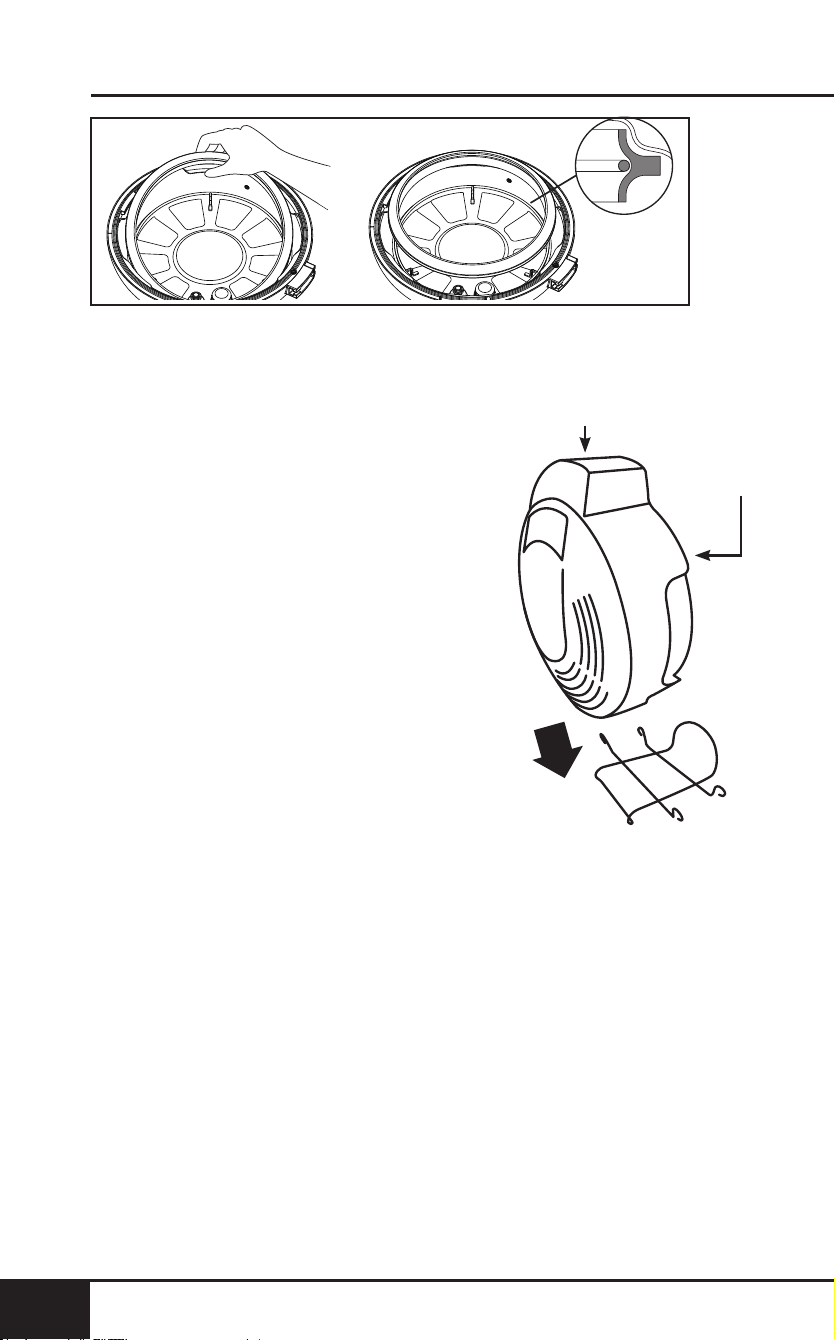
Removing the Silicone Gasket
• With one hand holding the Lid down, gently pull the
Silicone Gasket up from the Pressure Cooker Lid.
Installing the Silicone Gasket
• Line up the Silicone Gasket on top of the metal ring.
• Gently push the Silicone Gasket, making sure you see the
metal ring is inside the Silicone Gasket’s grove. Continue
pushing the Silicone Gasket all around.
cleaning & maintenance
40
CLEANING & MAINTENANCE
40
Note: Clean the Silicone Gasket under lightly running warm
water. Allow to air-dry.
Air Fryer Lid Holder
Use Air Fryer Lid Holder for Air
Fryer Lid only to prevent from
touching hot surfaces. Place on Lid
Holder to cool down Air Fryer Lid.
1. Place bottom of Air Fryer Lid on
two lower horizontal bars with
rim resting in between each.
2. Allow Lid to lean against the
curved bar of Lid Holder.
3. Ensure Lid is correctly in place
and secure on Holder.
Back of Lid
Inside of Lid
Air Fryer Lid Holder
nuwavenow.com
41
ENGLISH
nuwavenow.com
41
Inside of Lid
TROUBLESHOOT GUIDE
French fries are not crispy when they come out of
the Duet.
1. The crispiness of the fries depends on the amount of oil
and water in the fries.
2. Make sure you dry the potato sticks properly before
adding oil. Cut the potato sticks smaller and dry them
for a crispier result. Add slightly more oil on potatoes
before placing in the Duet for a crispier result.
If the unit needs to be replaced or returned to the
manufacturer, contact Customer Service at:
1-877-689-2838 or [email protected].
Error Message: Solution(s):
LID
Lid not in correct position. Place Lid on
unit securely and in the correct position for
cooking function.
Wrong Lid was placed on the unit for
cooking function. Use the correct Lid for
the cooking function performed.
POT
Pot was not placed in the unit or is not
in correctly. Place pot in unit before
cooking. Make sure the pot is placed in
appliance correctly.
Er1
Turn the unit off and unplug to cool. If
still not working after cooling and turned
on, contact Customer Service.
Err1
NTC Temperature Sensor Short Circuit.
Contact Customer Service.
Err2
NTC Temperature Sensor Open.
Contact Customer Service.
Err5
The unit has a faulty Pressure sensor.
Contact Customer Service.
Err6
The unit has a faulty HIGH Pressure
sensor. Contact Customer Service.
Err7
The unit has a faulty LOW Pressure
sensor. Contact Customer Service.

limited warranty
42
LIMITED WARRANTY
42
The NuWave Duet™ Pressure Cooker & Air Fryer Combo
THE MANUFACTURER WARRANTS
The Duet, including the Stainless Steel Inner Pot, Stainless Steel
Reversible Rack, Air Fryer Basket, Air Fryer Basket Diffuser, and
Water-Collection Tray are to be free from manufacturer defects.
All electrical components are warranted for 1 year from the date
of purchase, under normal household use, and when operated
in accordance with the Manufacturer’s written instructions. The
Manufacturer will provide the necessary parts and labor to repair
any part of the Duet at NuWave LLC Service Department. After the
expiration of the warranty, the cost of the labor and parts will be the
responsibility of the owner.
THE WARRANTY DOES NOT COVER
The Limited Warranty is voided if repairs are made by an
unauthorized dealer or the serial number data plate is removed
or defaced. Normal deterioration of nish due to use or exposure
is not covered by this Warranty. This Limited Warranty does
not cover failure, damages or inadequate performance due to
accident, acts of God (such as lightning), uctuations in electric
power, alterations, abuse, misuse, misapplications, corrosive-type
atmospheres, improper installation, failure to operate in accordance
with the Manufacturer’s written instructions, abnormal use or
commercial use. NuWave LLC reserves the right to void the Limited
Warranty, where allowable by law, for products purchased from an
unauthorized dealer.
TO OBTAIN SERVICE
The owner shall have the obligation and responsibility to: pay for all
services and parts not covered by the warranty; prepay the freight to
and from Service Department for any part or system returned under
this warranty; and carefully package the product using adequate
padding material to prevent damage in transit. The original container
is ideal for this purpose. Include in the package the owner’s name,
address, daytime telephone number, a detailed description of the
problem, and your “RGA number.” (Call 1-877-689-2838) or email
help@nuwavenow.com to obtain the RGA number (Return Goods
Authorization number). Provide the cooking system model & serial
number and proof of date of purchase (a copy of the receipt) when
making claims under this warranty.

nuwavenow.com
43
ENGLISH
nuwavenow.com
43
MANUFACTURER’S OBLIGATION
The Manufacturer’s obligation under this Limited Warranty is
limited, to the extent allowable by law, to repairing or replacing any
part covered by this Limited Warranty which upon examination is
found to be defective under normal use. The Limited Warranty is
applicable only within the continental United States and only to the
original purchaser of the manufacturer’s authorized channels of
distribution. THE LIMITED WARRANTY MAY NOT BE ALTERED,
VARIED OR EXTENDED EXCEPT BY A WRITTEN INSTRUMENT
EXECUTED BY THE MANUFACTURER. THE REMEDY OF
REPAIR OR REPLACEMENT AS PROVIDED UNDER THIS
LIMITED WARRANTY IS EXCLUSIVE. IN NO EVENT SHALL THE
MANUFACTURER BE LIABLE FOR ANY CONSEQUENTIAL OR
INCIDENTAL DAMAGES TO ANY PERSON, WHETHER OR NOT
OCCASIONED BY NEGLIGENCE OF THE MANUFACTURER,
INCLUDING WITHOUT LIMITATION, DAMAGES FOR LOSS OF
USE, COSTS OF SUBSTITUTION, PROPERTY DAMAGE, OR
OTHER MONEY LOSS.
Some states do not allow the exclusion or limitation of incidental
or consequential damages, so the above limitation exclusions
may not apply. This Limited Warranty gives specic legal rights,
and there may also be other rights which vary from state to
state. EXCEPT AS OTHERWISE EXPRESSLY PROVIDED
ABOVE, THE MANUFACTURER MAKES NO WARRANTIES
EXPRESSED OR IMPLIED ARISING BY LAW OR OTHERWISE,
INCLUDING WITHOUT LIMITATION, THE IMPLIED WARRANTIES
OF MERCHANTABILITY AND FITNESS FOR A PARTICULAR
PURPOSE TO ANY OTHER PERSON. READ YOUR OWNER’S
MANUAL. IF YOU STILL HAVE ANY QUESTIONS ABOUT
OPERATION OR WARRANTY OF THE PRODUCT, PLEASE
CONTACT NUWAVE LLC.
READ YOUR OWNER’S MANUAL
If you still have any questions about operation or warranty of the
product, please contact NuWave LLC at: 1-877-689-2838 or email
help@nuwavenow.com.
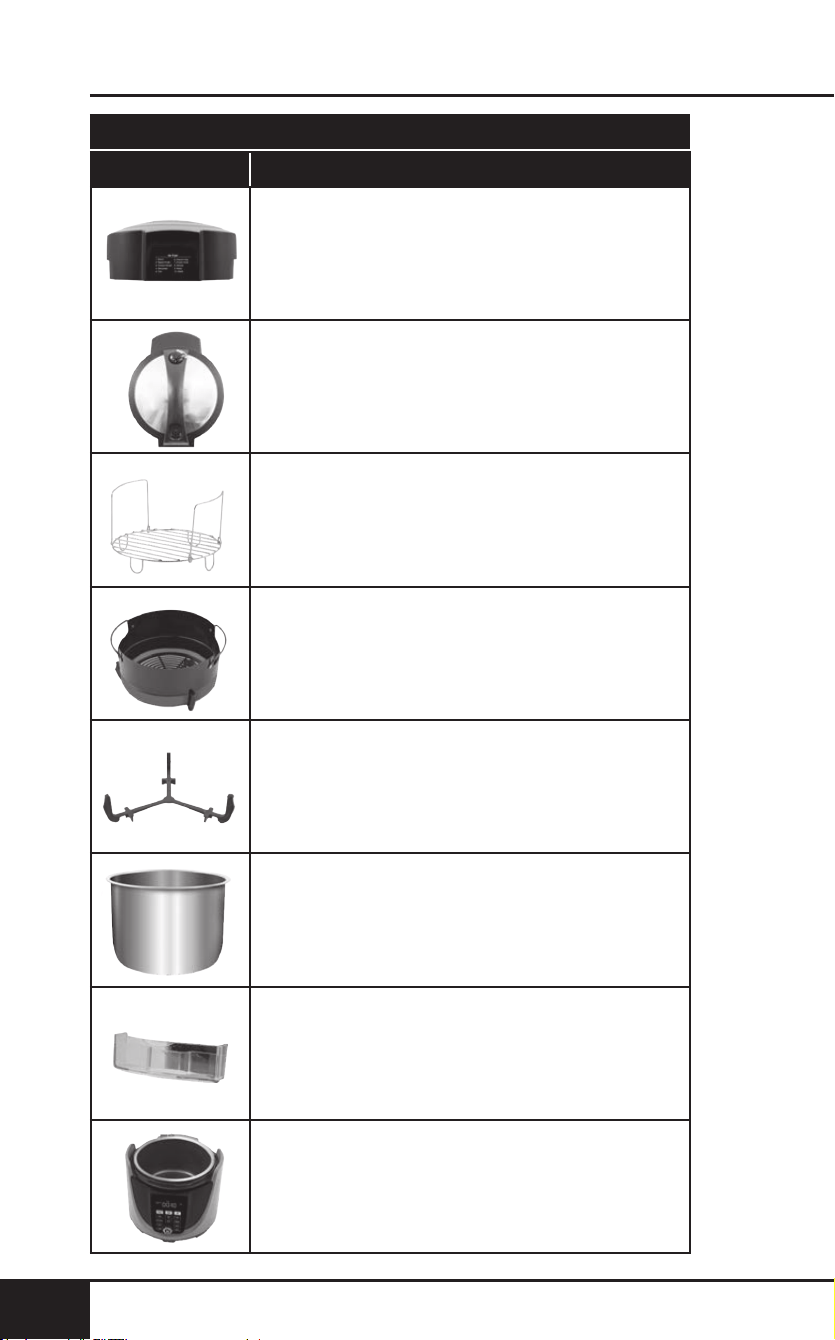
replaceable parts
44
REPLACEABLE PARTS
44
Part Name Part Description Part No.
To order replaceable parts head over to NuWaveNow.com
Air Fryer Lid
Pressure Cooker Lid
Stainless Steel Reversible Rack
Non-Stick Air Fry Basket
Air Fry Basket Diffuser
Stainless Steel Inner Pot
Water-Collection Tray
Duet™ Base
nuwavenow.com
45
REPLACEABLE PARTS
nuwavenow.com
45
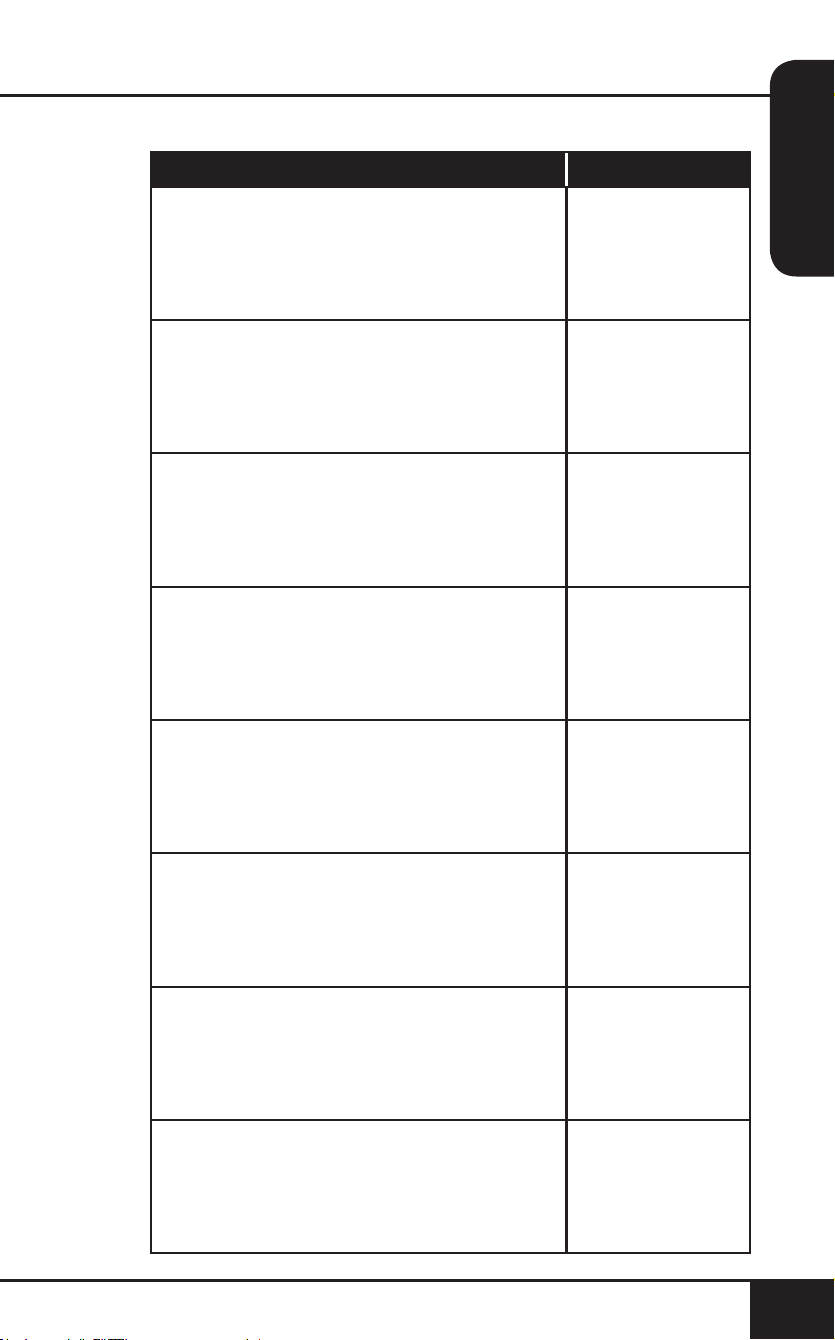
Part Name Part Description Part No.
34805
34802
34808
34806
34807
34803
34804
34801 (Gray)
34816 (Red)
Used on top of Duet when air-frying foods.
Used on top of Duet when pressure-
cooking foods.
Provides high or low positioning of food items
in Duet, during pressure-cooking or air-frying.
Fits inside Stainless Steel Inner Pot.
Removable basket helps crisp up foods
when air-frying.
Keeps Air Fry Basket up from touching
bottom to create free ow of air under
food when air-frying. Placed underneath
Air Fry Basket.
Used to place food items in when pressure
cooking. Includes ll lines for proper
measurement of food and liquids.
Removable tray on outside of Duet
collects excess liquid created by steam
when pressure-cooking. Allows easy
removal of water.
Contact Customer Service for more
information or repair: 1-877-689-2838 or
help@nuwavenow.com.
replaceable parts
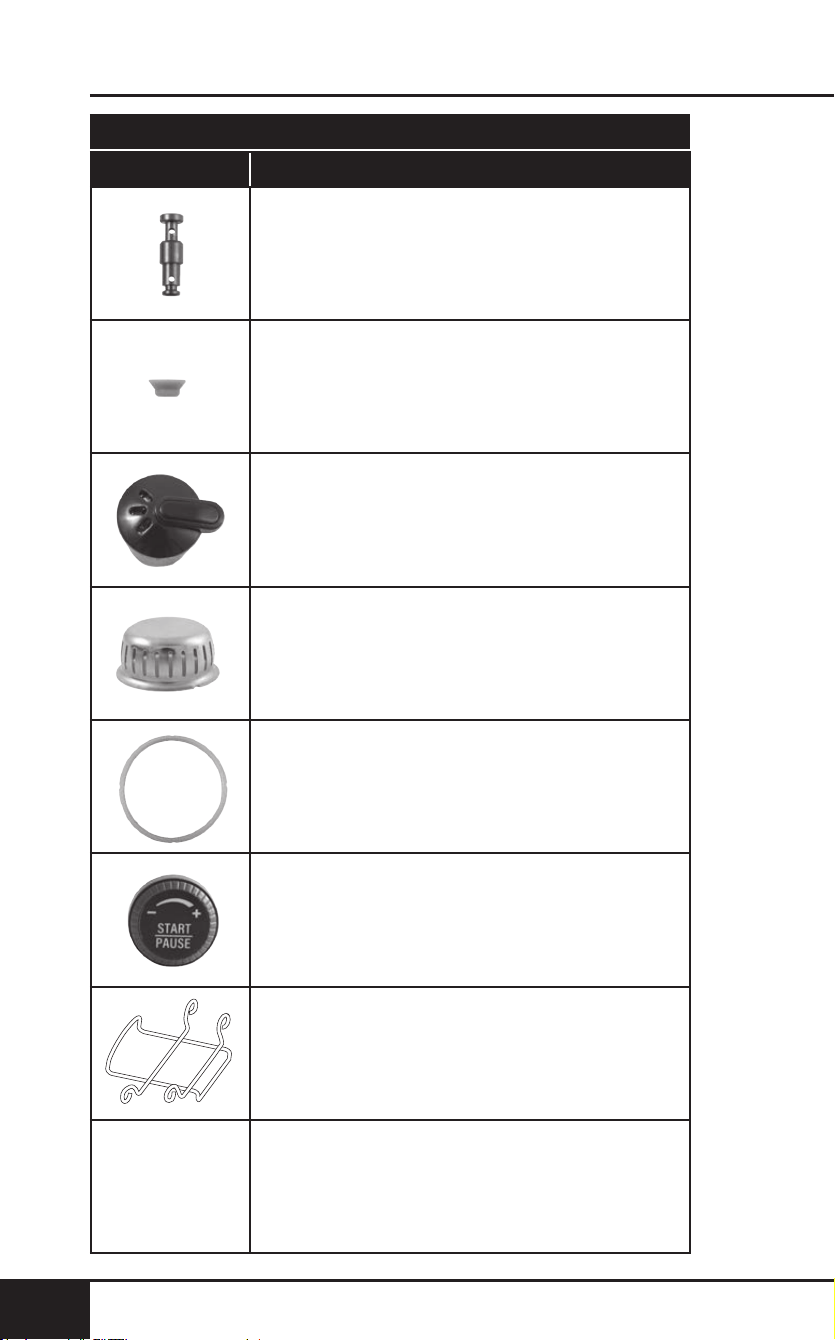
46
REPLACEABLE PARTS
46
Part Name Part Description Part No.
To order replaceable parts head over to NuWaveNow.com
Pressure Indicator Valve
Pressure Release Switch/Valve
Food Blocking Cap
Silicone Gasket
Start/Pause Dial
Silicone Valve Holder
Air Fryer Lid Holder
nuwavenow.com
47
REPLACEABLE PARTS
nuwavenow.com
47
Part Name Part Description Part No.
34809
34810
34811
34812
34813
34814
Located in the Lid, protrudes or lowers to
indicate pressure levels inside the Duet.
When up, pressure has built; when down,
there is not sufcient or no pressure.
Under the Lid, attaches the Pressure
Indicator Valve to the underneath of Lid.
Located on top of Lid, releases and
encloses pressure within the unit.
Prevents food and debris from entering
pressure cooker components from
underneath the Lid.
Under the rim of the Pressure Cooker Lid.
Provides an airtight seal between the Lid
and Base when pressure-cooking.
On the control panel, adjusts temperature
and time, and all functions and begins
cooking process (button).
34815
Holds the Air Fryer Lid upright and off
of surfaces.
Item No: BM 33801
Rev. 01-OG
05-22-19
RB02 DV02
FOR HOUSEHOLD USE ONLY
Model: 33801, 33803
120V, 60Hz, 1500 Watts
For patent information please go to:
www.nuwavenow.com/legal/patent
Designed & Developed in USA by:
NuWave LLC
1795 N. Buttereld Road
Libertyville, IL 60048, U.S.A.
Customer Service:
1-877-689-2838 • help@nuwavenow.com
Made in China
©2019 NuWave LLC • All Rights Reserved.
nuwavenow.com