
PN 4748982
December 2015
© 2015 Fluke Corporation. All rights reserved. Specifications are subject to
change without notice. All product names are trademarks of their respective
companies.
902 FC
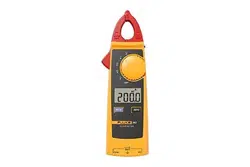
HVAC True-rms Clamp Meter
1.888.610.7664 sales@GlobalTestSupply.com
Fluke-Direct.com

LIMITED WARRANTY AND LIMITATION OF LIABILITY
This Fluke product will be free from defects in material and
workmanship for three years from the date of purchase.
This warranty does not cover fuses, disposable batteries, or
damage from accident, neglect, misuse, alteration,
contamination, or abnormal conditions of operation or
handling. Resellers are not authorized to extend any other
warranty on Fluke’s behalf. To obtain service during the
warranty period, contact your nearest Fluke authorized
service center to obtain return authorization information,
then send the product to that Service Center with a
description of the problem.
THIS WARRANTY IS YOUR ONLY REMEDY. NO OTHER
WARRANTIES, SUCH AS FITNESS FOR A PARTICULAR
PURPOSE, ARE EXPRESSED OR IMPLIED. FLUKE IS
NOT LIABLE FOR ANY SPECIAL, INDIRECT,
INCIDENTAL OR CONSEQUENTIAL DAMAGES OR
LOSSES, ARISING FROM ANY CAUSE OR THEORY.
Since some states or countries do not allow the exclusion
or limitation of an implied warranty or of incidental or
consequential damages, this limitation of liability may not
apply to you.
Fluke Corporation
P.O. Box 9090
Everett, WA 98206-9090
U.S.A.
Fluke Europe B.V.
P.O. Box 1186
5602 BD Eindhoven
The Netherlands
11/99
1.888.610.7664 sales@GlobalTestSupply.com
Fluke-Direct.com

i
Table of Contents
Title Page
Introduction ................................................................ 1
How to Contact Fluke ................................................. 2
Safety Information ...................................................... 3
Product Familiarization .............................................. 9
Use the Product ......................................................... 12
Measure AC and DC Voltage .................................. 12
Measure Resistance and Continuity........................ 13
Measure Microamps μA .......................................... 14
Measure Temperature ............................................. 16
Measure Capacitance ............................................. 18
Measure AC Current ............................................... 18
Backlight .................................................................. 20
MIN MAX Recording Mode ...................................... 20
Display HOLD .......................................................... 21
Auto Off ................................................................... 21
Maintenance .............................................................. 22
Clean the Product .................................................... 22
Battery Replacement ............................................... 23
Replacement Parts .................................................... 25
Fluke Connect ............................................................ 25
Specifications ............................................................. 26
Electrical Specifications ........................................... 26
General Specifications ............................................ 27
1.888.610.7664 sales@GlobalTestSupply.com
Fluke-Direct.com

1
Introduction
The Fluke 902 FC is a hand-held battery-operated HVAC True-rms
Clamp Meter (the Product) that measures:
• AC current
• DC current (up to 200 μA for flame rod testing through input
terminals)
• AC and DC voltages
• Capacitance
• Resistance
• Continuity
• Temperature in both Celsius (°C) and Fahrenheit (°F)
The Product comes with:
• Two AA alkaline batteries (installed)
• Users Manual
• Soft carrying case
• TL75 Test Leads (one pair)
• 80BK Integrated Temperature Probe (the Probe)
• Fluke Connect
1.888.610.7664 sales@GlobalTestSupply.com
Fluke-Direct.com

902 FC
Users Manual
2
How to Contact Fluke
To contact Fluke:
• Technical Support USA: 1-800-44-FLUKE (1-800-443-5853)
• Calibration/Repair USA: 1-888-99-FLUKE (1-888-993-5853)
• Canada: 1-800-36-FLUKE (1-800-363-5853)
• Europe: +31 402-675-200
• Japan: +81-03-6714-3114
• Singapore: +65-6799-5566
• Anywhere in the world: +1-425-446-5500
Or, visit Fluke's website at www.fluke.com.
To register your product, visit http://register.fluke.com.
To see, print, or download the latest manual supplement, visit
http://us.fluke.com/usen/support/manuals.
1.888.610.7664 sales@GlobalTestSupply.com
Fluke-Direct.com

HVAC True-rms Clamp Meter
Safety Information
3
Safety Information
A Warning identifies conditions and procedures that are
dangerous to the user. A Caution identifies conditions and
procedures that can cause damage to the Product or the
equipment under test.
XWWarning
To prevent possible electrical shock, fire, or personal
injury:
• Carefully read all instructions.
• Read all safety information before you use the
Product.
• Use the Product only as specified, or the protection
supplied by the Product can be compromised.
• Do not use the Product around explosive gas, vapor,
or in damp or wet environments.
• Do not use the Product if it is damaged
• Disable the Product if it is damaged.
• Do not use the Product if it operates incorrectly.
• Use only correct measurement category (CAT),
voltage, and amperage rated probes, test leads, and
adapters for the measurement.
1.888.610.7664 sales@GlobalTestSupply.com
Fluke-Direct.com

902 FC
Users Manual
4
• Do not exceed the Measurement Category (CAT)
rating of the lowest rated individual component of a
Product, probe, or accessory.
• Comply with local and national safety codes. Use
personal protective equipment (approved rubber
gloves, face protection, and flame-resistant clothes)
to prevent shock and arc blast injury where
hazardous live conductors are exposed.
• Before each use, examine the Product. Look for
cracks or missing pieces of the clamp housing or
output cable insulation. Also look for loose or
weakened components. Carefully examine the
insulation around the jaws.
• Do not use test leads if they are damaged. Examine
the test leads for damaged insulation and measure a
known voltage.
• Do not touch voltages >30 V ac rms, 42 V ac peak, or
60 V dc.
• Do not measure current while the test leads are in the
input jacks.
• Do not apply more than the rated voltage, between the
terminals or between each terminal and earth ground.
• Measure a known voltage first to make sure that the
Product operates correctly.
1.888.610.7664 sales@GlobalTestSupply.com
Fluke-Direct.com

HVAC True-rms Clamp Meter
Safety Information
5
• Limit operation to the specified measurement
category, voltage, or amperage ratings.
• The battery door must be closed and locked before
you operate the Product.
• Remove all probes, test leads, and accessories before
the battery door is opened.
• Keep fingers behind the finger guards on the probes.
• Hold the Product behind the tactile barrier.
• Replace the batteries when the low battery indicator
shows to prevent incorrect measurements.
• Do not use the HOLD function to measure unknown
potentials. When HOLD is turned on, the display does
not change when a different potential is measured.
• Disconnect power and discharge all high-voltage
capacitors before you measure resistance, continuity,
capacitance, or a diode junction.
• Remove the input signals before you clean the
Product.
• Use only specified replacement parts.
1.888.610.7664 sales@GlobalTestSupply.com
Fluke-Direct.com

902 FC
Users Manual
6
• When batteries are changed, ensure that the
calibration seal in the battery compartment is not
damaged. If damaged, the Product may not be safe to
use. Return the Product to Fluke for replacement of
the seal.
• Do not use in CAT III or CAT IV environments without
the protective cap installed. The protective cap
decreases the exposed probe metal to <4 mm. This
decreases the possibility of arc flash from short
circuits.
• Have an approved technician repair the Product.
• Repair the Product before use if the battery leaks.
• Remove the batteries if the Product is not used for an
extended period of time, or if stored in temperatures
above 50 °C. If the batteries are not removed, battery
leakage can damage the Product.
WCaution
To avoid possible damage to the Product or to equipment
under test:
• Use the proper jacks, function, and range for the
measurement application.
• Clean the case and accessories with a damp cloth and
mild detergent only. Do not use abrasives or solvents.
1.888.610.7664 sales@GlobalTestSupply.com
Fluke-Direct.com

HVAC True-rms Clamp Meter
Safety Information
7
Table 1 lists the symbols used on the Product and in this manual.
Table 1. Symbols
Symbol Description
Consult user documentation.
W WARNING. RISK OF DANGER.
X
WARNING. HAZARDOUS VOLTAGE. Risk of
electric shock.
,
Application around and removal from uninsulated
hazardous live conductors is permitted.
AC (Alternating Current)
DC (Direct Current)
Both direct and alternating current
Earth
Battery. Low battery when shown on display.
T Double Insulated
Measurement Category II is applicable to test and
measuring circuits connected directly to utilization
points (socket outlets and similar points) of the low-
voltage MAINS installation.
1.888.610.7664 sales@GlobalTestSupply.com
Fluke-Direct.com

902 FC
Users Manual
8
Table 1. Symbols (cont.)
Symbol Description
Measurement Category III is applicable to test and
measuring circuits connected to the distribution part
of the building’s low-voltage MAINS installation.
Measurement Category IV is applicable to test and
measuring circuits connected at the source of the
building’s low-voltage MAINS installation.
P
Conforms to European Union directives.
Certified by TÜV SÜD Product Service.
Conforms to relevant Australian EMC standards.
)
Certified by CSA Group to North American safety
standards.
~
This product complies with the WEEE Directive
marking requirements. The affixed label indicates
that you must not discard this electrical/electronic
product in domestic household waste. Product
Category: With reference to the equipment types in
the WEEE Directive Annex I, this product is classed
as category 9 "Monitoring and Control
Instrumentation" product. Do not dispose of this
product as unsorted municipal waste.
1.888.610.7664 sales@GlobalTestSupply.com
Fluke-Direct.com
HVAC True-rms Clamp Meter
Product Familiarization
9
Product Familiarization
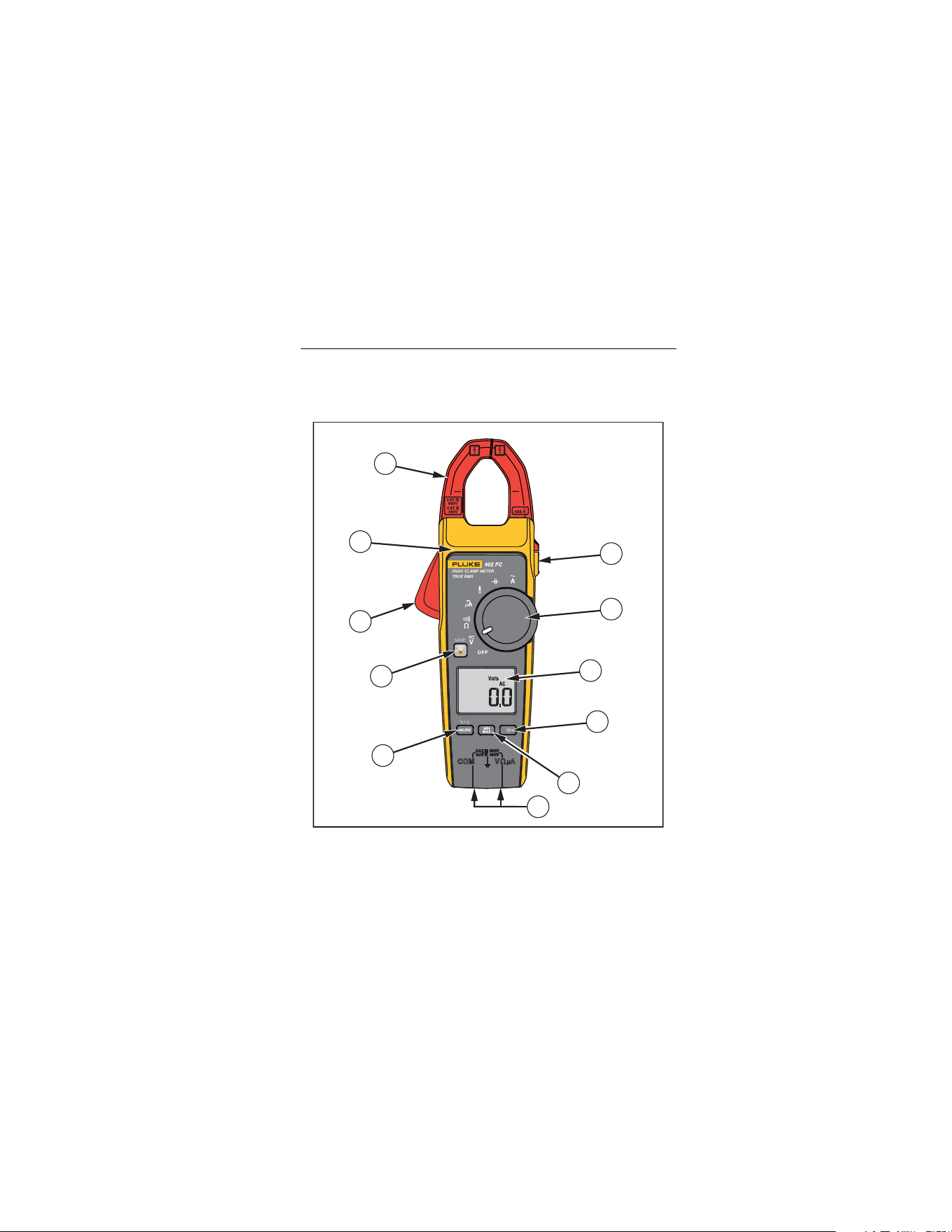
Figure 1 and Table 2 show the features of the Product.
1
2
3
4
11
9
8
7
6
5
10
iad01.eps
Figure 1. Product Features
1.888.610.7664 sales@GlobalTestSupply.com
Fluke-Direct.com

902 FC
Users Manual
10
Table 2. Product Features
Item Description
Fluke Connect
Jaw release
Tactile barrier
Jaws
Hold button
Rotary switch:
AC and DC voltage
Resistance and continuity
DC microamps
Degrees Fahrenheit / degrees Celsius
Capacitance
AC current
OFF
Turns off the Product
Display
Backlight button
MIN MAX button
Input Terminals
AC/DC, button
1.888.610.7664 sales@GlobalTestSupply.com
Fluke-Direct.com
HVAC True-rms Clamp Meter
Product Familiarization
11
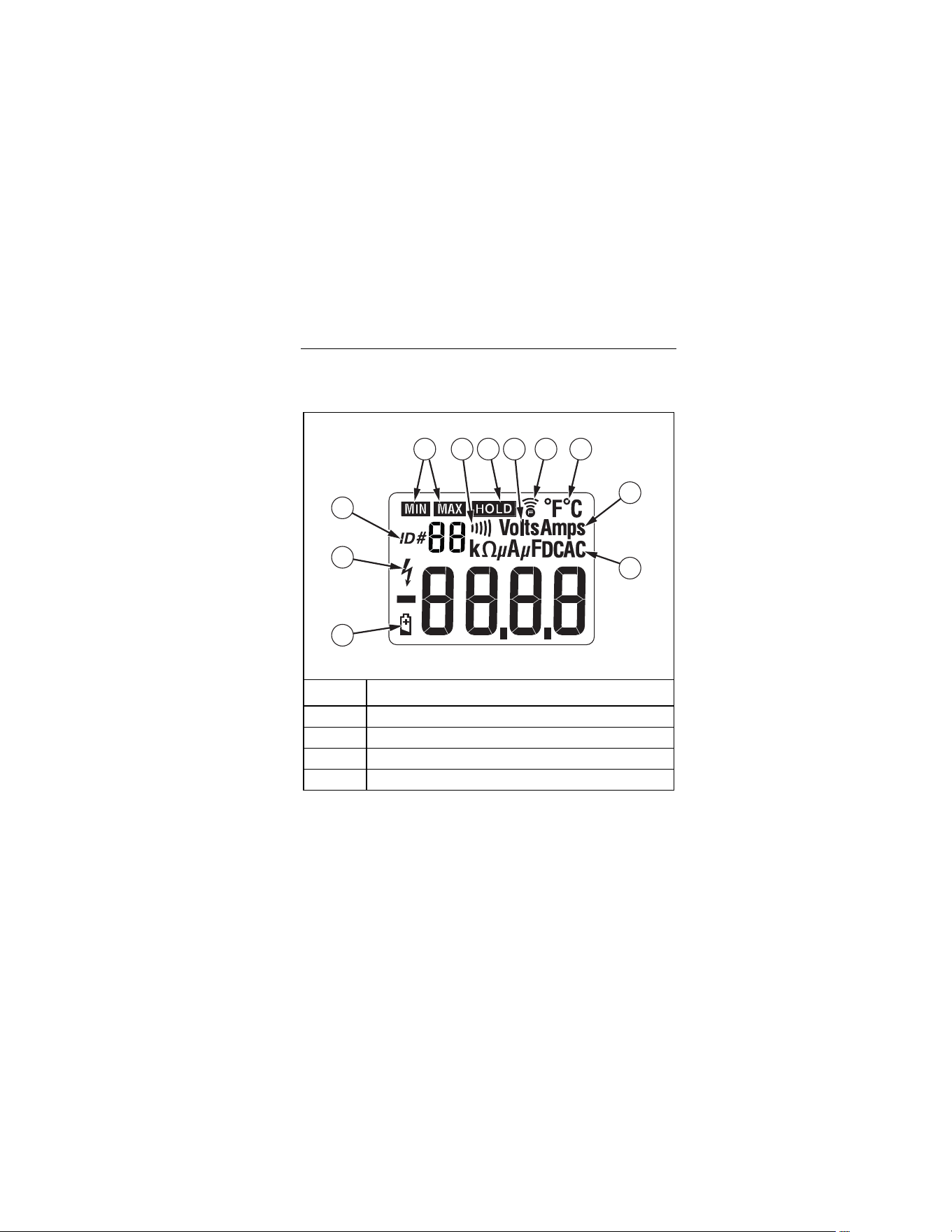
Table 3 shows the items on the display.
Table 3. Display
1
2
3
4 6 7 98
10
11
5
iad06.eps
Item Description
Battery is low and should be changed
Indicates the presence of high voltage
ID number
Indicates minimum or maximum recording mode
1.888.610.7664 sales@GlobalTestSupply.com
Fluke-Direct.com

902 FC
Users Manual
12
Table 3. Display (cont.)
Item Description
Beeper
Display Hold is active
Volts
Fluke Connect is enabled
Degrees (Farenheit or Celcius)
Amps
Ohms
Microamps
Microfarads
DC Direct Current
AC Alternating Current
Use the Product
Measure AC and DC Voltage
1. Insert the test leads into the Product.
2. Turn the rotary switch to
.
3. Push to choose ac or dc voltage.
1.888.610.7664 sales@GlobalTestSupply.com
Fluke-Direct.com

HVAC True-rms Clamp Meter
Use the Product
13
The chosen voltage mode shows on the display.
4. Measure the voltage by touching the probes to the correct test
points of the circuit.
5. Read the measured voltage on the display.
Note
When a measured voltage is above 30 V,
shows on
the display. When the voltage drops below 30 V,
disappears.
Measure Resistance and Continuity
XW Warning
To avoid false readings that can lead to electrical
shock and injury, de-energize the circuit before
taking the measurement.
To measure resistance or continuity:
1. Insert the test leads into the Product.
2. Turn the rotary switch to
.
1.888.610.7664 sales@GlobalTestSupply.com
Fluke-Direct.com

902 FC
Users Manual
14
3. Measure the resistance by touching the probes to the desired
test points of the circuit.
4. Read the measured resistance on the display.
Note
If the resistance is <30
e
, the continuity beeper sounds
and indicates a short circuit.
Measure Microamps
μ
A
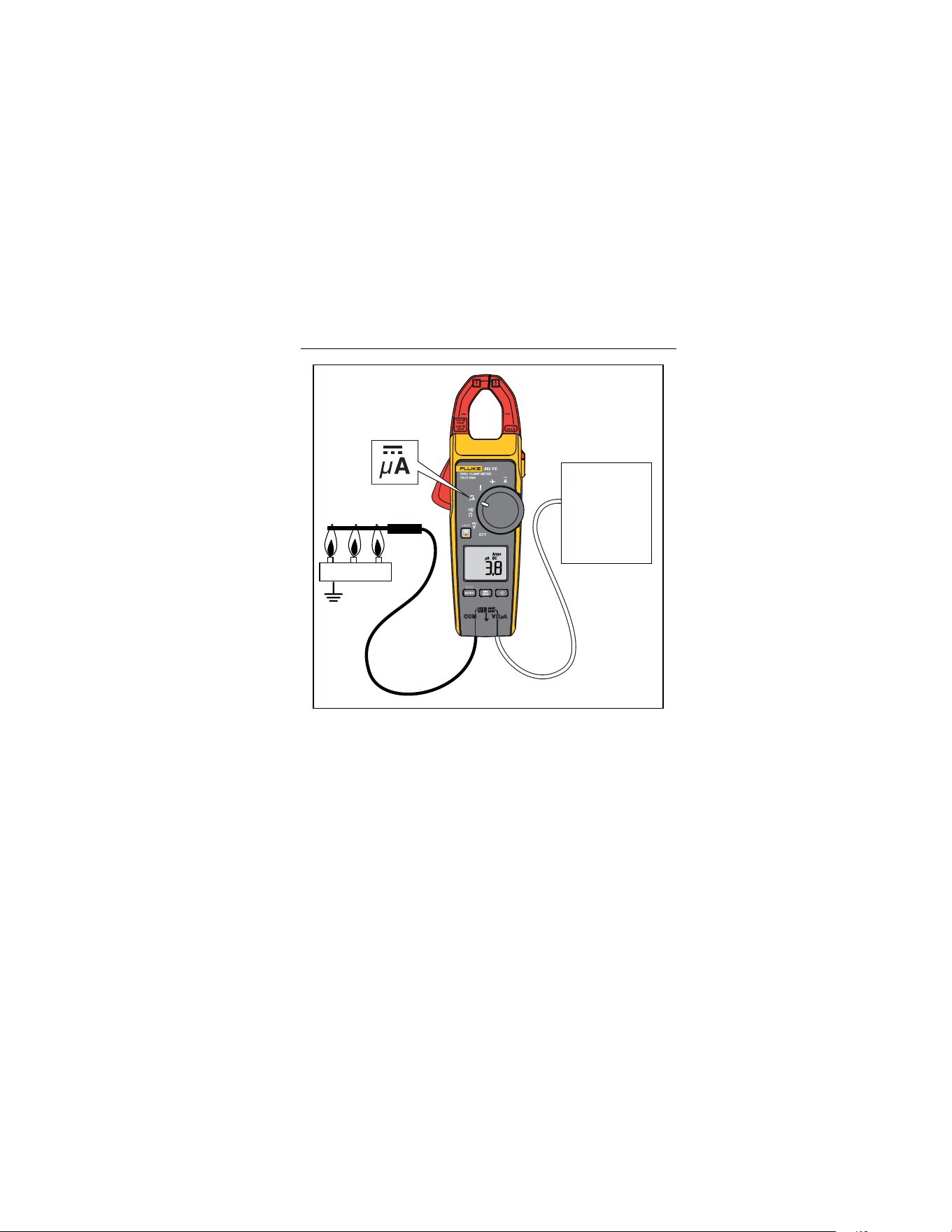
The μA dc () function on the Product is primarily for HVAC flame
rod testing.
To test a heating system flame rod (see Figure 2):
1. Turn the heating unit off.
2. Locate the wire between the gas-burner controller and the
flame rod, and break this connection.
3. Turn the rotary switch to
.
4. Use alligator clips to connect test leads between the flame
sensor probe and control-module wire.
5. Turn heating unit on.
6. Read the measured amps on the display.
7. Refer to the heating unit documentation for what the desired
value should be.
1.888.610.7664 sales@GlobalTestSupply.com
Fluke-Direct.com
HVAC True-rms Clamp Meter
Use the Product
15
Burner
Gas Burner
Controller
Gas Burner
Controller
iad04.eps
Figure 2. Test a Flame Rod
1.888.610.7664 sales@GlobalTestSupply.com
Fluke-Direct.com

902 FC
Users Manual
16
Measure Temperature
The Product measures temperature in either Celsius (°C) or
Fahrenheit (°F).
XW Warning
To prevent possible electrical shock, fire, or
personal injury, do not touch voltages >30 V ac rms,
42 V ac peak, or 60 V dc.
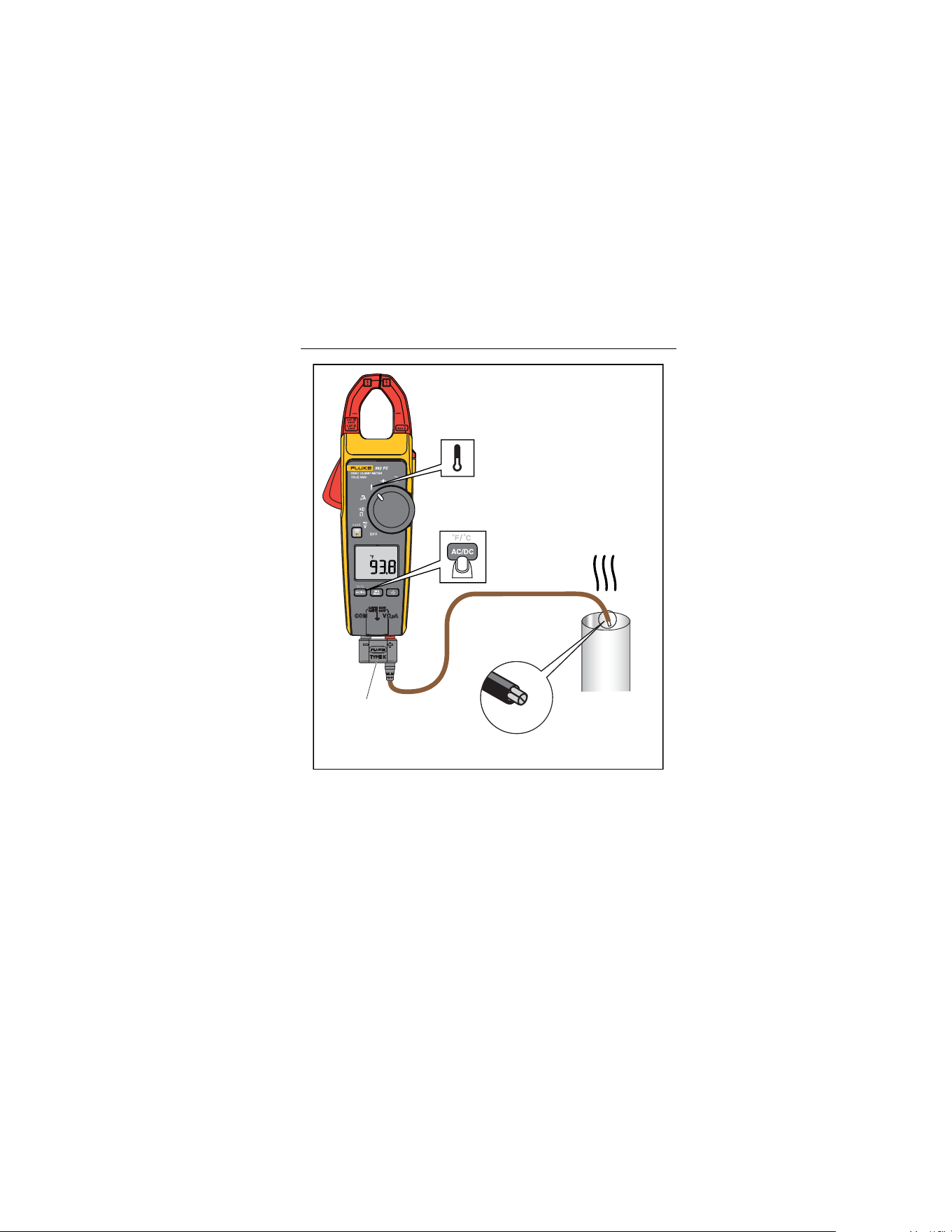
To measure temperature (see Figure 3):
1. Connect the Probe to the input jacks noting correct polarity of
the probe.
2. Turn the rotary switch to
.
3. Push to select °C or °F.
The chosen temperature mode shows on the display.
4. Position the Probe to take the measurement.
5. Read the measured temperature on the display.
Note
To meet stated accuracy, the Product and plug of the
Probe must be at the same temperature.
1.888.610.7664 sales@GlobalTestSupply.com
Fluke-Direct.com
HVAC True-rms Clamp Meter
Use the Product
17
80BK
Integrated
Temperature Probe
(Type K)
Vent
or
Pipe
iad05.eps
Figure 3. Measure Temperature
1.888.610.7664 sales@GlobalTestSupply.com
Fluke-Direct.com

902 FC
Users Manual
18
Measure Capacitance
1. Turn off power to the circuit.
2. Disconnect and discharge the capacitor.
3. Turn the rotary switch to
.
4. Take the measurement noting the correct polarity of the
capacitor.
If the capacitor requires more discharging, diSC shows while the
capacitor discharges.
Measure AC Current
XW Warning
To prevent possible electrical shock, fire, or
personal injury:
• Remove Test Leads before making current
measurements.
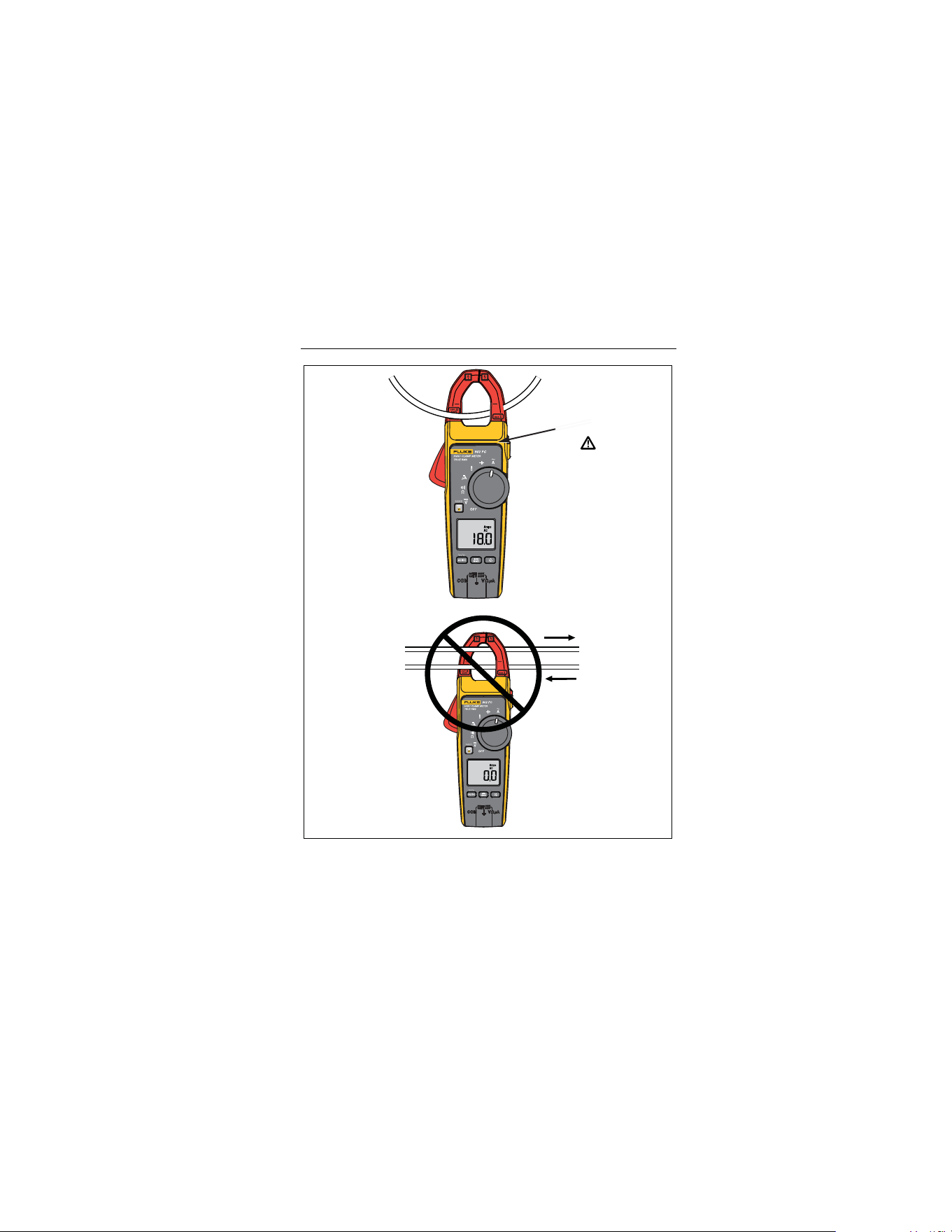
• Do not hold the Product anywhere beyond the
tactile barrier (see Figure 4).
1. Turn the rotary switch to
.
2. Center the wire within the clamp jaws below the horizontal line
located on the clamp (see Figure 4).
Note
Measure one wire at a time because currents moving in
different directions will cancel each other out (see
Figure 4).
1.888.610.7664 sales@GlobalTestSupply.com
Fluke-Direct.com
HVAC True-rms Clamp Meter
Use the Product
19
Tactile Barrier
Currents Cancel
iad03.eps
Figure 4. Proper AC Current Measurement
1.888.610.7664 sales@GlobalTestSupply.com
Fluke-Direct.com

902 FC
Users Manual
20
Backlight
Push to toggle the backlight on and off. The backlight
automatically turns off after 2 minutes.
To disable the automatic backlight timeout:
1. Hold and turn on the Product.
2. Push .
MIN MAX Recording Mode
The MIN MAX recording mode captures the minimum and
maximum input values. When a new high or low is detected, the
Product beeps.
To use this feature:
1. Turn the rotary switch to the desired measurement function.
2. Push to enter MIN MAX Mode.
and the highest reading detected since entering MIN
MAX mode show on the display.
3. Push to step through the minimum (MIN) and present
readings.
4. To pause MIN MAX recording without erasing stored values,
push . shows on the display.
5. To resume MIN MAX recording, push again.
6. To exit MIN MAX mode and erase stored readings, push
for at least 2 seconds.
1.888.610.7664 sales@GlobalTestSupply.com
Fluke-Direct.com

HVAC True-rms Clamp Meter
Use the Product
21
Display HOLD
In the Display HOLD mode, the Product freezes the display. The
Product also beeps every 4 seconds and flashes to remind
the user.
XW Warning
To avoid possible electric shock or personal injury,
do not use the HOLD function to measure unknown
potentials. When HOLD is turned on, the display
does not change when a different potential is
measured.
1. Push to activate Display HOLD.
shows on the display, and the reading is stored.
2. To exit and return to normal operation, push .
Auto Off
The Product automatically turns off after 20 minutes. To restart the
Product, turn the rotary switch to OFF and then back on. Auto Off
is disabled during MIN MAX mode.
To disable Auto Off:
1. Hold and turn on the Product.
2. Push .
1.888.610.7664 sales@GlobalTestSupply.com
Fluke-Direct.com

902 FC
Users Manual
22
Maintenance
XW Warning
To prevent possible electrical shock, fire, or personal
injury:
• Have an approved technician repair the Product.
• Use only specified replacement parts.
Clean the Product
XW Warning
To prevent possible electrical shock, fire, or personal
injury, remove the input signals before you clean the
Product.
W Caution
To avoid damage to the Product, do not use aromatic
hydrocarbons or chlorinated solvents to clean the
Product. These solutions will react with the plastics
used in the Product.
Clean the instrument case with a damp cloth and mild detergent.
1.888.610.7664 sales@GlobalTestSupply.com
Fluke-Direct.com

HVAC True-rms Clamp Meter
Maintenance
23
Battery Replacement
XW Warning
To prevent possible electrical shock, fire, or personal
injury:
• Remove all probes, test leads, and accessories before
the battery door is opened.
• Remove the batteries if the Product is not used for an
extended period of time, or if stored in temperatures
above 50 °C. If the batteries are not removed, battery
leakage can damage the Product.
• Replace the batteries when the low battery indicator
shows to prevent incorrect measurements.
• The battery door must be closed and locked before
you operate the Product.
• When batteries are changed, ensure that the
calibration seal in the battery compartment is not
damaged. If damaged, the Product may not be safe to
use. Return the Product to Fluke for replacement of
the seal.
• Repair the Product before use if the battery leaks.
1.888.610.7664 sales@GlobalTestSupply.com
Fluke-Direct.com
902 FC
Users Manual
24
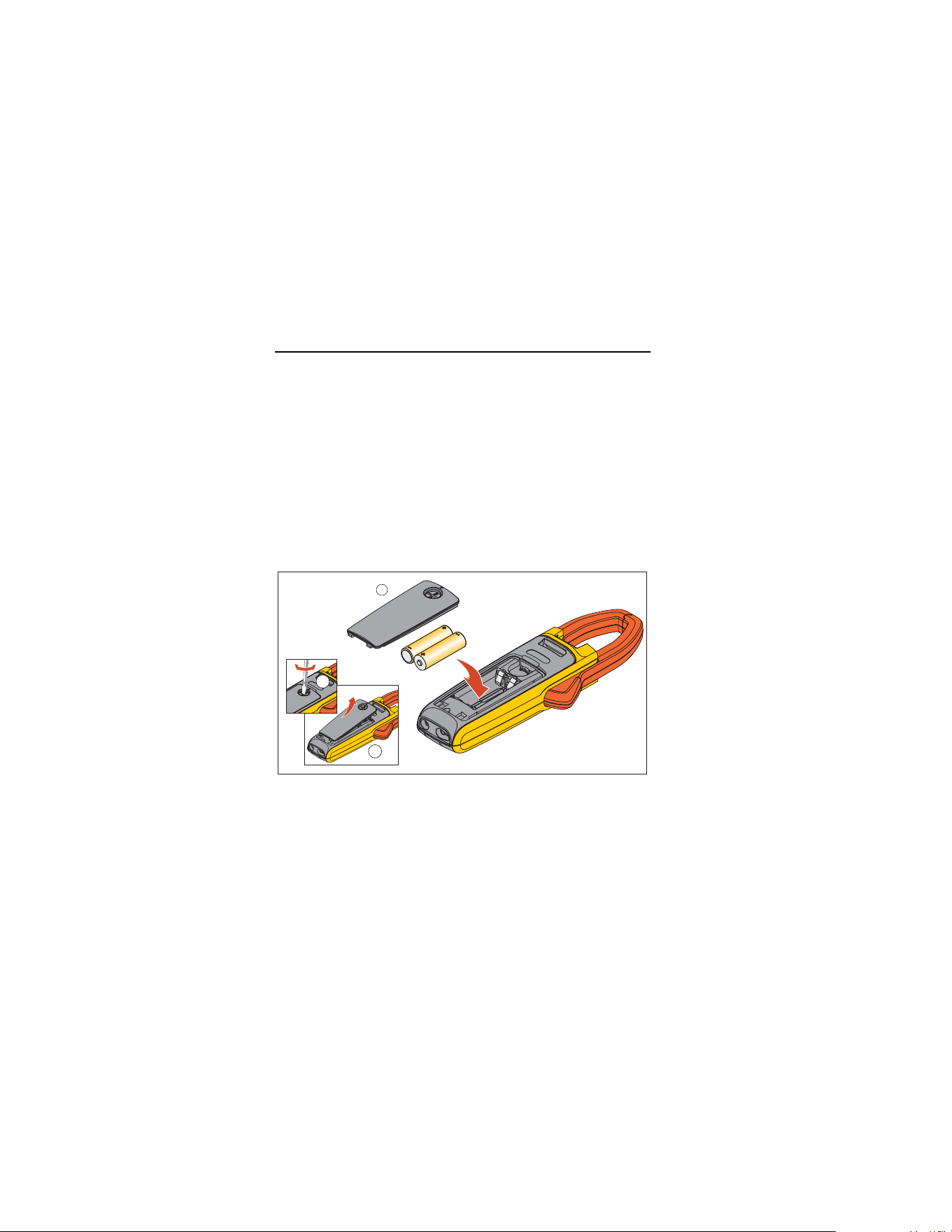
To replace the batteries (see Figure 5):
1. Turn the rotary switch to OFF.
2. Remove the test leads from the terminals.
3. Loosen the battery door fastener and remove the door from
the case bottom.
4. Remove the batteries.
5. Replace the batteries with two new AA batteries.
6. Reattach the battery door to the case bottom and tighten the
fastener.
1
2
3
iad12.eps
Figure 5. Battery Replacement
1.888.610.7664 sales@GlobalTestSupply.com
Fluke-Direct.com
HVAC True-rms Clamp Meter
Replacement Parts
25
Replacement Parts
Table 4 lists the replacement parts.
Table 4. Replacement Parts
Item Qty. Part Number
Battery, AA 1.5 V 2 376756
Battery Door Assembly 1 4696918
TL75 Test lead set 1 4306653
80BK Thermocouple set, K-type 1 1997234
Softcase 1 1997276
Fluke Connect
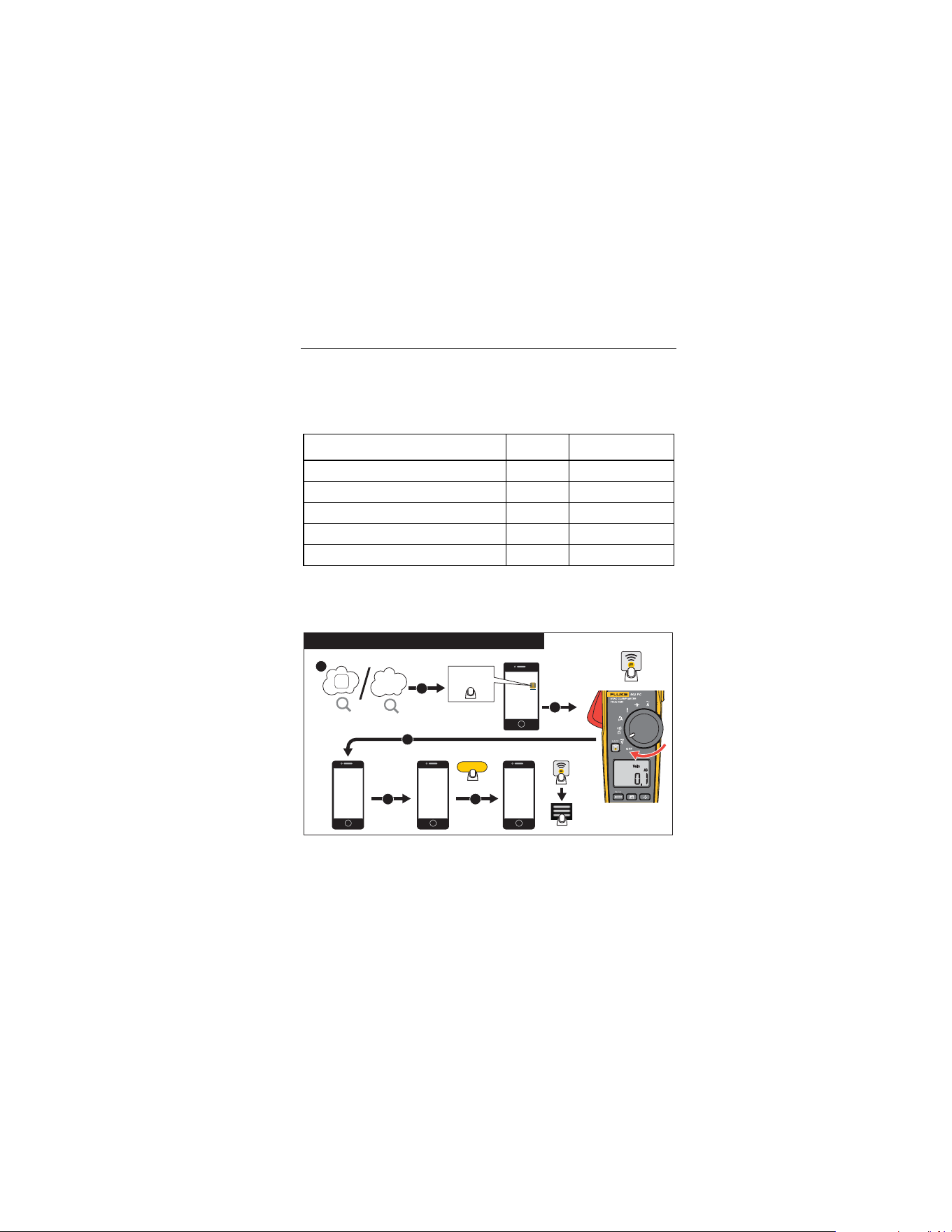
Figure 6 shows how to use Fluke Connect with the Product.
FC Module
2
3
5 6
CAPTURE
Connect
Fluke Connect
TM
4
Go to www.flukeconnect.com
1
SAVE
SAVE
Fluke Connect
TM
Bluetooth
®
Connection to FC Tools
flukeconnect.eps
Figure 6. Fluke Connect Operation
1.888.610.7664 sales@GlobalTestSupply.com
Fluke-Direct.com

902 FC
Users Manual
26
Specifications
Electrical Specifications
Function Range Resolution Accuracy
Voltage DC 600 V 0.1 V 1.0 % ±5 counts
Voltage AC
(True-rms)
600 V 0.1 V
1.5 % ±5 counts,
(45 Hz to 400 Hz)
Current AC
(True-rms)
600 A 0.1 A
2.0 % ±5 counts,
(45 Hz to 65 Hz)
2.5 % ±5 counts,
(65 Hz to 400 Hz)
Max Crest Factor (50 Hz/60 Hz)
3 @ 180 A
2.5 @ 220 A
1.42 @ 600 A
Note: Add 2 % for C.F. >2
Current DC 200 μA 0.1 μA 1.0 % ±5 counts
Resistance
600 Ω
6000 Ω
60 kΩ
0.1 Ω
1 Ω
0.01 kΩ
1.0 % ±5 counts
Continuity <30 Ω -- --
Temperature
-40 °C to
400 °C
0.1 °C 1.0 % ±8 counts
Capacitance
100 μF
1000 μF
0.1 μF
1 μF
1.0 % ±4 counts
1.888.610.7664 sales@GlobalTestSupply.com
Fluke-Direct.com

HVAC True-rms Clamp Meter
Specifications
27
General Specifications
Operating Temperature -10 °C to +50 °C
Storage Temperature
-30 °C to +60 °C, without batteries
installed
Operating Humidity
Non condensing (<10 °C)
≤90 % RH (10 °C to 30 °C)
≤75 % RH (30 °C to 40 °C)
≤45 % RH (40 °C to 50 °C)
Operating Altitude 2000 meters above mean sea level
Storage Altitude 12,000 meters above mean sea level
IP Rating IEC 60529: IP30
Radio Frequency Certification FCC ID:T68-FBLE IC:6627A-FBLE
Wireless Radio Frequency
Range
2412 MHz to 2483.5 MHz
Temperature Coefficients
0.1 x (specified accuracy) / °C
(<18 °C or >28 °C)
Size (H X W X L)
(230 x 83.7 x 45.4) mm
(9.1 x 3.3 x 1.8) inches
Weight 0.84 lb (382 g)
Safety
IEC 61010-1, Pollution Degree 2
IEC 61010-2-032: CAT III 600 V / CAT IV
300 V
IEC 61010-2-033: CAT III 600 V / CAT IV
300 V
1.888.610.7664 sales@GlobalTestSupply.com
Fluke-Direct.com

902 FC
Users Manual
28
Power Requirements Two AA Batteries, IEC LR6
Electromagnetic Compatibility (EMC)
International
IEC 61326-1: Portable Electromagnetic
Environment; IEC 61326-2-2; CISPR 11:
Group 1, Class A
Group 1: Equipment has intentionally generated and/or uses
conductively-coupled radio frequency energy that is necessary for
the internal function of the equipment itself.
Class A: Equipment is suitable for use in all establishments other
than domestic and those directly connected to a low-voltage power
supply network that supplies buildings used for domestic purposes.
There may be potential difficulties in ensuring electromagnetic
compatibility in other environments due to conducted and radiated
disturbances. Emissions that exceed the levels required by
CISPR 11 can occur when the equipment is connected to a test
object.
1.888.610.7664 sales@GlobalTestSupply.com
Fluke-Direct.com