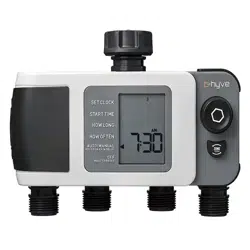
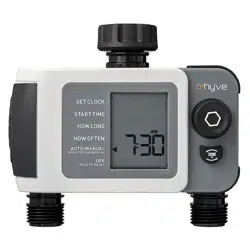
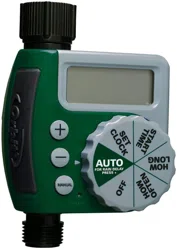
B-hyve XD Bluetooth Hose Faucet Timer Quick Start Guide
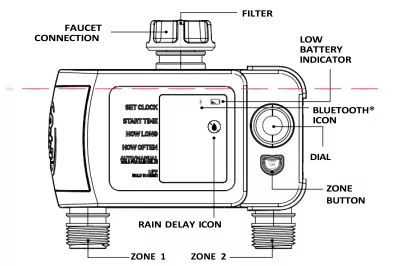
Write down the MAC address: 12-digit alphanumeric code located on the bottom of the timer.
Timer MAC Address: ______________
Installing the Batteries
Insert two AA (1.5V) alkaline batteries (not included) and replace the tray.
Note: Firmly replace the battery tray to ensure water resistance and increase battery life. You will know the battery tray is fully inserted if it does not pull out easily.
Replace batteries when low battery icon appears on display. Used-up or dead batteries must be removed from the timer and disposed of properly. Do not dispose of batteries in fire. Batteries may explode or leak. Remove batteries when storing timer.
Programming the Timer with Bluetooth
Open the B-hyve App
Log into your B-hyve account and tap "My B-hyve". Go to "devices" then "add device". Select the B-hyve XD timer. The app will walk you through the rest of the process.
Need Help?
If you encounter a problem, please contact us before returning your B-hyve to the store. Scan the QR Code to access the help page online.
For new users, search apps for "B-hyve" and download the free Android or iOS app. Create an account to begin setup. The Bluetooth® icon on the display should be flashing indicating the timer is in pairing mode.
Factory reset / re-pair: If at any time you need to re-pair or do a factory reset, turn the dial so the arrow is pointing to OFF, press and hold the dial for 5 seconds.
Note: When the display shows a full screen of symbols release the dial. The display will show 12:00 pm in the AUTO/MANUAL mode verifying the reset has been completed. Resetting the timer will erase all programs and it will need to be reprogrammed to your desired watering schedule.
Note: Your display will show a lock icon to indicate that the timer is using the B-hyve app to program your timer.
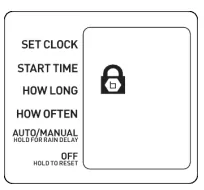
Programming the Timer at the Faucet
Set Clock
- Turn the dial so the arrow is pointing to SET CLOCK.
- Press the dial to confirm the selection, the hour will begin to flash.
- Turn the dial until the current hour is displayed including the correct AM or PM, then press the dial to confirm the selection. The minutes will begin to flash indicating the next step in the process.
- Turn the dial until the current minutes are displayed then press the dial to confirm the selection.
Start Time
- Turn the dial so the arrow is pointing to START TIME.
- Verify zone 1 is selected, noted by the zone number on the display. To switch zones, press the zone button.
- Press the dial to confirm the selection, the time slot will begin to flash.
- Turn the dial until the desired start time hour is displayed including the correct AM or PM, then press the dial to confirm the selection. The minutes will begin to flash, indicating the next step in the process.
- Turn the dial until the desired minutes are displayed, then press the dial to confirm the selection.
How Long
- Turn the dial so the arrow is pointing to HOW LONG.
- Press the dial to confirm the selection, the time slot will begin to flash.
- Turn the dial until the desired number of minutes are displayed. Press the dial to confirm the selection.
How Often
- Turn the dial so the arrow is pointing to HOW OFTEN.
- Press the dial to confirm the selection, the number slot will begin to flash.
- Turn the dial until the desired interval is displayed, then press the dial to confirm the selection.
Note: 1 day is every day, 2 days is every other day, etc.
Zone 1 is now programmed! You can now follow the steps to program Zone 2, or you can skip to the Auto Mode Section.
Programming Zones 2-4
- Turn the dial so the arrow is pointing to Start Time.
- Press the Zone Button to select desired zone 2, 3, or 4.
- With zone now selected, repeat the steps for Start Time, How Long, and How Often.
AUTO Mode
- Turn the dial so the arrow is pointing to AUTO/MANUAL.
- Press the dial to confirm the selection, the arrow will stop flashing and you are now in AUTO mode.
Congratulations! Your timer is now programmed. The display will flash between the current time and how long until the next start time.
While watering is in process, the dial at the timer will deactivate and will not scroll until the current watering cycle is finished. To stop active watering press the dial.
Additional Features
Rain Delay
Rain delay allows you to postpone your watering schedule for a set period of time. To access the rain delay feature at the timer, follow the steps below.
- With the timer in the AUTO mode, press and hold the dial for 3 seconds.
- The rain delay icon will appear and the number slot will begin to flash.
- Turn the dial until the desired amount of time to delay watering is displayed, then press the dial to confirm the selection.
- The display will flash between the current time and how long until the rain delay ends.
To remove a rain delay, press and hold the  dial for 3 seconds. The rain delay icon will turn off and your timer will resume its programmed watering schedule.
Manual / Hand Watering
This feature allows you to water without interrupting your programmed watering schedule. To access this feature, follow the steps below.
- With the timer in AUTO mode, press the dial once quickly to access the MANUAL feature.
- "Manual" will appear on the display and the time slot will begin to flash. Verify the zone you want to water from is selected, if not press the zone button.
- Turn the dial until the desired number of minutes are displayed, then press the dial to confirm selection.
- The watering icon will appear on the display and the display will begin to flash between the current time and the remaining manual watering minutes.
Note: There may be a slight delay between the time the dial is pressed and when manual watering begins.
To stop manual watering, press the dial. The watering icon will disappear, and your timer will resume its programmed watering schedule.
If the manual watering feature will overlap a programmed watering schedule, the timer will delay that program until the manual watering feature is done.
Specifications
- Timer Range: 150 ft without interference
- Pressure Operating Range: 10-100 PSI
- Temperature Operating Range: 35°F - 122°F (2°C - 50°C)
- For Outdoor Use with Cold Water Only
- Not for Use with Appliances
Purchase the B-hyve Wi-Fi Hub 2.0 to enable wireless capabilities at Orbitonline.com
Need Help?
If you encounter a problem, please contact us before returning your B-hyve to the store.
Scan the QR Code to access the help page online.
Call us: 1-800-488-6156
Text us: 801-797-2319
FCC and IC Statements
FCC Statement: FCC ID: ML6HT32BT. This device complies with Part 15 of the FCC Rules. Operation is subject to the following two conditions: (1) This device may not cause harmful interference, and (2) this device must accept any interference received, including interference that may cause undesired operation.
FCC Warning: Any changes or modifications not expressly approved by the party responsible for compliance could void the user's authority to operate this equipment.
Note: This equipment has been tested and found to comply with the limits for a Class B digital device, pursuant to Part 15 of the FCC Rules. These limits are designed to provide reasonable protection against harmful interference in a residential installation. This equipment generates, uses, and can radiate radio frequency energy and, if not installed and used in accordance with the instructions, may cause harmful interference to radio communications. However, there is no guarantee that interference will not occur in a particular installation.
If this equipment does cause harmful interference to radio or television reception, which can be determined by turning the equipment off and on, the user is encouraged to try to correct the interference by one of the following measures:
- Reorient or relocate the receiving antenna.
- Increase the separation between the equipment and the receiver.
- Connect the equipment into an outlet on a circuit different from that to which the receiver is connected.
- Consult the dealer or an experienced radio/TV technician for help.
This device meets the FCC and IC requirements for RF exposure in public or controlled environments. The end user is advised to maintain a distance of 20 cm from the timer and any personnel to ensure compliance with RF exposure regulations.
IC Statement: IC: 3330A-HT32BT. This device complies with Industry Canada license exempt RSS standard(s). Operation is subject to the following two conditions: (1) This device may not cause harmful interference, and (2) this device must accept any interference received, including interference that may cause undesired operation. This Class B digital apparatus complies with Canadian ICES-003.
Déclaration IC (French)
Remarque: cet appareil a été testé et déclaré conforme aux limites d'exposition pour les appareils numériques de classe B, selon la section 15 de la Règlementation de la FCC. Ces limites sont conçues pour fournir une protection raisonnable contre les interférences nuisibles dans une installation résidentielle. Cet appareil produit, utilise et peut émettre de l'énergie radio fréquence et, si elle n'est pas installée et utilisée conformément aux instructions, peut causer des interférences nuisibles aux communications radio. Cependant, il n'est pas garanti que des interférences ne se produisent pas dans une installation particulière. Si cet appareil cause des interférences gênantes à la réception d'un signal radio ou de télévision, ce qui peut être déterminé en allumant et en éteignant l'appareil, l'utilisateur peut corriger les interférences en suivant une des mesures suivantes :
- Réorientez ou repositionnez l'antenne de réception.
- Augmentez la distance entre l'appareil et le récepteur.
- Branchez l'appareil dans une prise sur un circuit différent du circuit sur lequel le récepteur est branché.
- Consulter le revendeur ou un technicien radio/TV expérimenté pour obtenir de l'aide.
Cet appareil est conforme aux exigences de la FCC et de l'IC concernant l'exposition aux ondes dans un environnement public ou contrôlé. Il est conseillé à l'utilisateur final de maintenir une distance de 20 cm du contrôleur pour assurer la conformité aux réglementations d'exposition RF.
Information de conformité pour le Canada – Déclaration de l'IC : Cet appareil est conforme à la norme RSS d'Industry Canada. Son fonctionnement est soumis aux deux conditions suivantes : (1) cet appareil ne doit pas causer d'interférences nuisibles, et (2) cet appareil doit tolérer toutes les interférences, dont les interférences pouvant causer un fonctionnement non désiré. Cet appareil numérique de classe B est conforme à la norme canadienne ICES-003.