
USER MANUAL
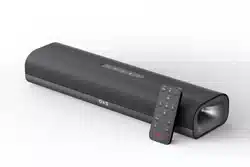
OXS S3
BENUTZERHANDBUCH
MANUAL DE USUARIO
РУКОВОДСТВО ПОЛЬЗОВАТЕЛЯ
用户手册
使用手冊
ユーザーマニュアル
사용자 매뉴얼
V1.1

ENG-1
ABOUT THIS MANUAL
The user manual has two parts: this simple paper USER MANUAL and a detailed FULL
MANUAL you can download.
Design and specications are subject to change without prior notice.
USER MANUAL
See this manual for product installation, components and connections.
FULL MANUAL
You can access the FULL MANUAL or download it in document format from OXS’s website.
(http://www.oxsaudio.com/support)

ENG-2
CONTENTS
WHAT’S INSIDE ENG-3
DEVICE LAYOUT ENG-4
INDICATOR LIGHT ENG-5
REMOTE ENG-6
HOW TO USE ENG-7
1.WALL MOUNTING ENG-7
2.AUDIO CABLE CONNECTION: USB CONNECTION ENG-7
3.OPTICAL AND COAXIAL CABLE CONNECTION ENG-8
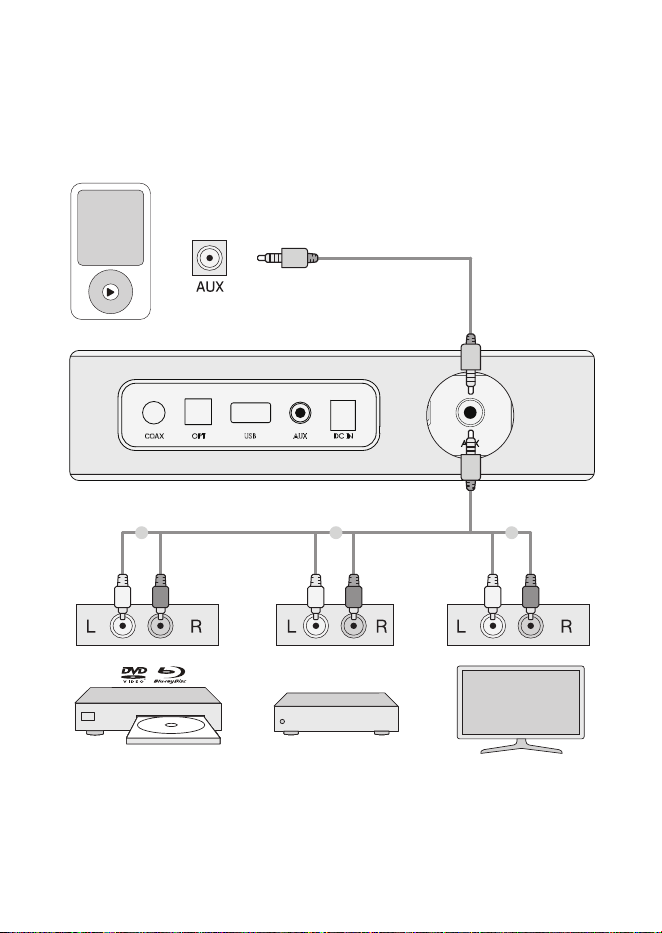
4.AUDIO CABLE CONNECTION: AUX CABLE ENG-9
5.CONNECT THE POWER ENG-10
6.BLUETOOTH FUNCTION INTRODUCTION ENG-11
ENG-3
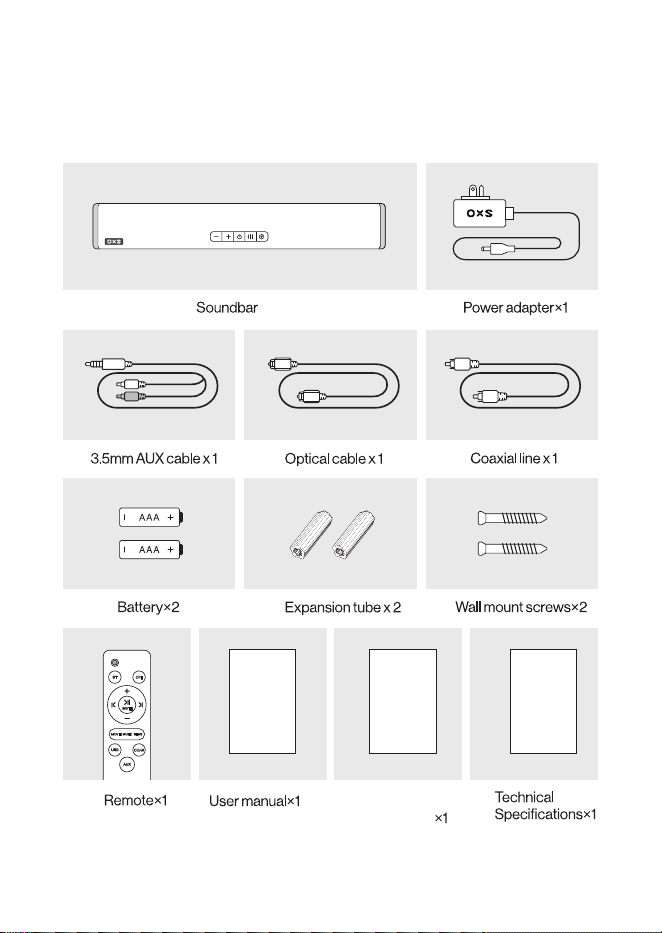
WHAT’S INSIDE
Safety&
Maintanence
ENG-4
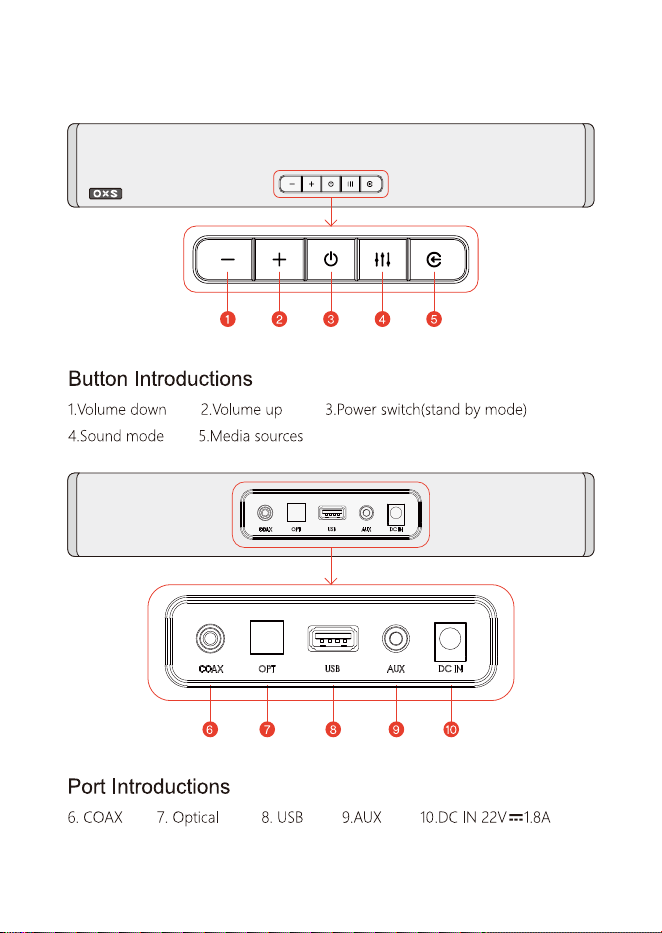
DEVICE LAYOUT
ENG-5
INDICATOR LIGHT
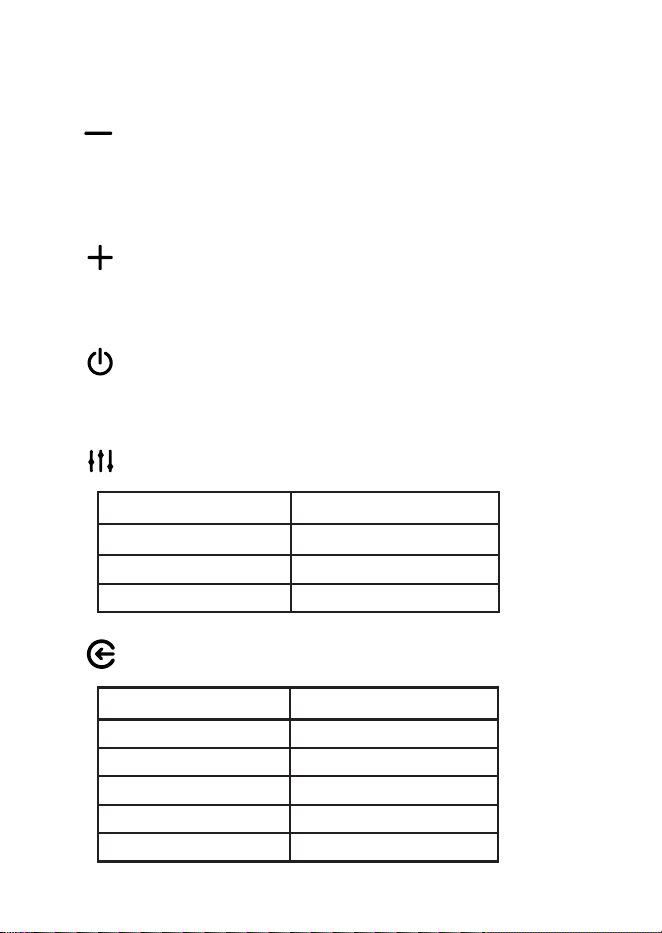
When the button is pressed, the indicator light will briefly flash, and when the volume
is reduced to the lowest or kept at the lowest level, the indicator light will stay on
continuously.
1. Volume down
When the button is pressed, the indicator light will briefly flash, and when the volume
is increased to the maximum, the indicator light will stay continuously lit.
Turn on the audio system (indicator light will be white) or set it to standby mode
(indicator light will change to red).
2. Volume up
3. Power
4. Switch sound mode
5. Switch media sources
Mode Light Color
Music Yellow
News Green
Movie Purple
Port Light Color
OPT Yellow
COAX White
AUX Green
BT Blue
USB Purple
ENG-6
REMOTE
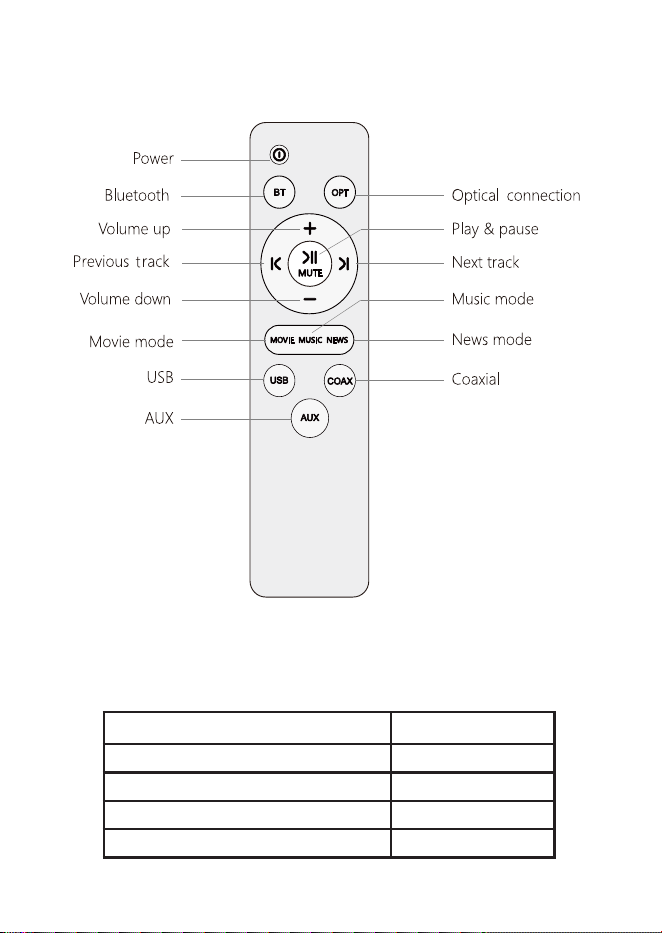
SELECT SOUND MODE
Audio source Sound mode
Strong bass lm,Strong bass music Music / News
General lm,Pop music Movie/ News
Documentary,Light music Music/ News
Variety Show,News / Dialog Music/ News
ENG-7
HOW TO USE
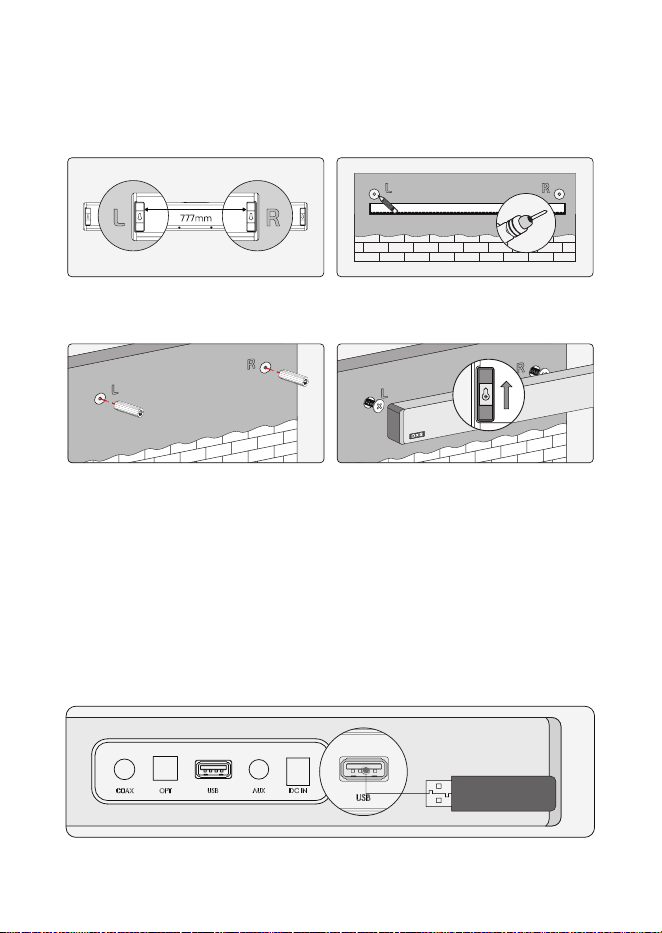
1.WALL MOUNTING
2.AUDIO CABLE CONNECTION: USB CONNECTION
1.The distance between the two wall
mount brackets is 777mm (30.59 inches).
2.Mark the drilling positions and drill two
holes on the wall.
3.Insert two expansion plugs into the
holes, if necessary, gently tap them with
a hammer.
4.Secure the brackets to the wall using
two screws and tighten the screws.
Please select the correct audio source before connecting it to the device.
ENG-8
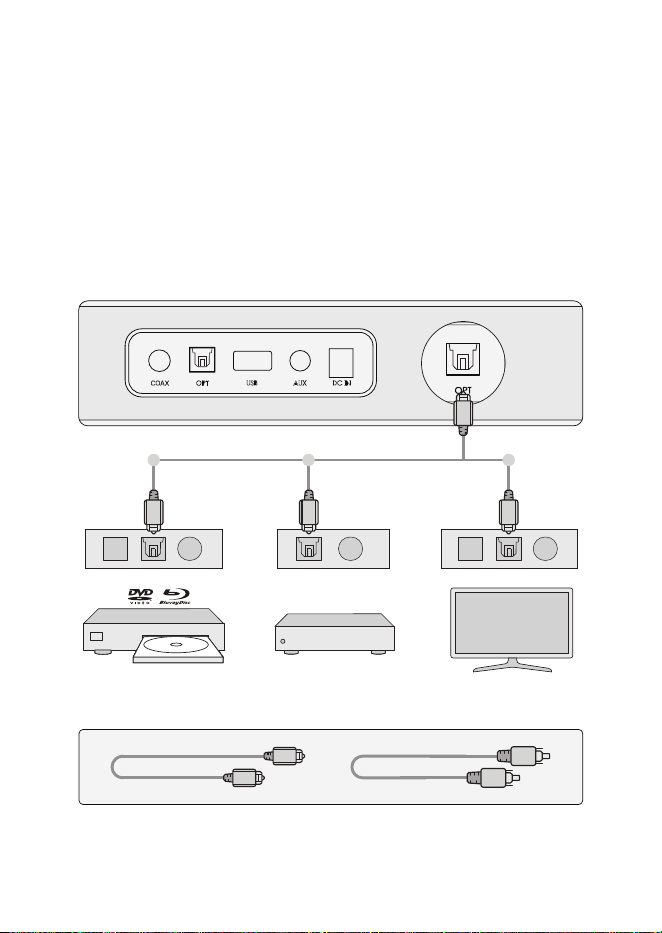
3.OPTICAL AND COAXIAL CABLE CONNECTION
IPTV SetTop Box
IPTV SetTop Box
If there is no signal of input for 15 minutes after turning the sound bar on, it will automat-
ically enter standby mode.
If the signal is interrupted while in standby mode, the speaker will automatically restore
the last media source and sound mode.
ENG-9
4.AUDIO CABLE CONNECTION: AUX CABLE
IPTV SetTop Box
ENG-10
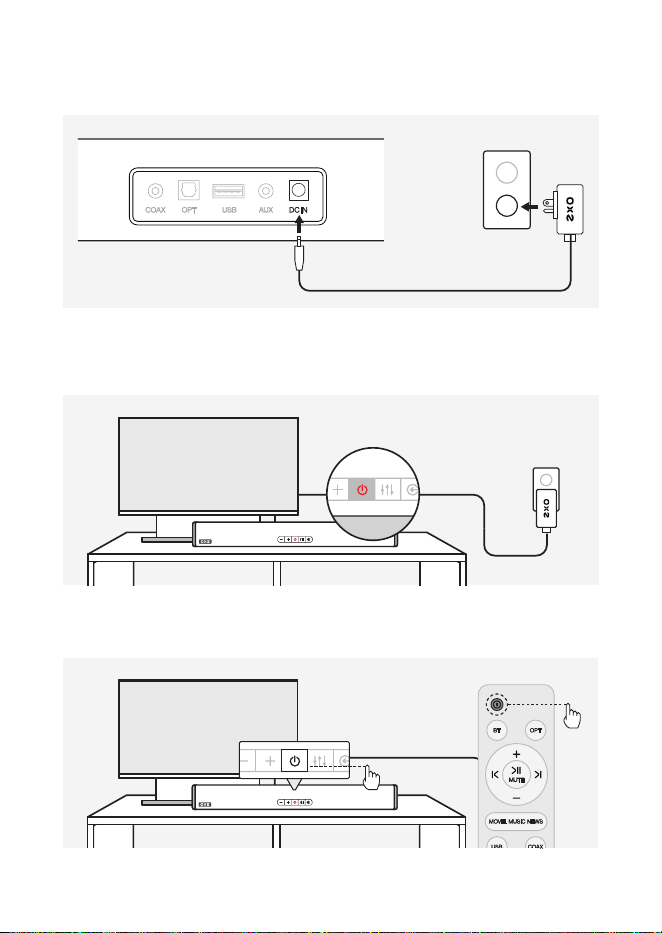
5.CONNECT THE POWER
1.Insert the power adapter into the DC IN socket and then plug it into the appro-
priate power outlet.
2.The red power indicator light illuminates when the speaker is in standby mode.
3.Press the power button on the speaker or on the remote control.
ENG-11
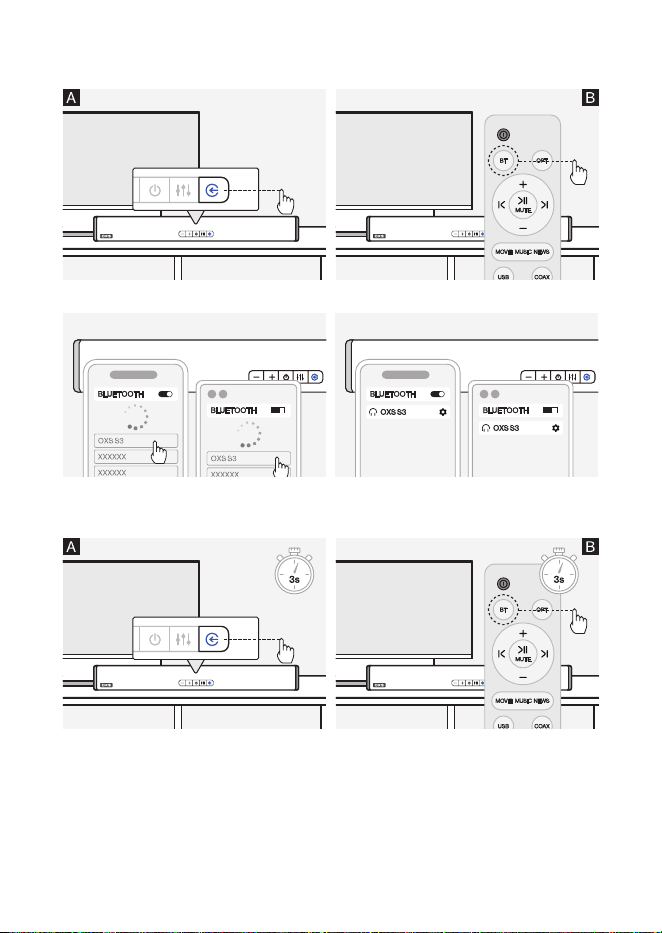
6.BLUETOOTH FUNCTION INTRODUCTION
2.Enable the Bluetooth function on your
external device and search for Bluetooth
devices.
1.To select Bluetooth mode, briey press the button.
3.Select OXS S3 from the list of Bluetooth
devices.
4.To reset Bluetooth and enter pairing mode, press and hold the button for 3 seconds.