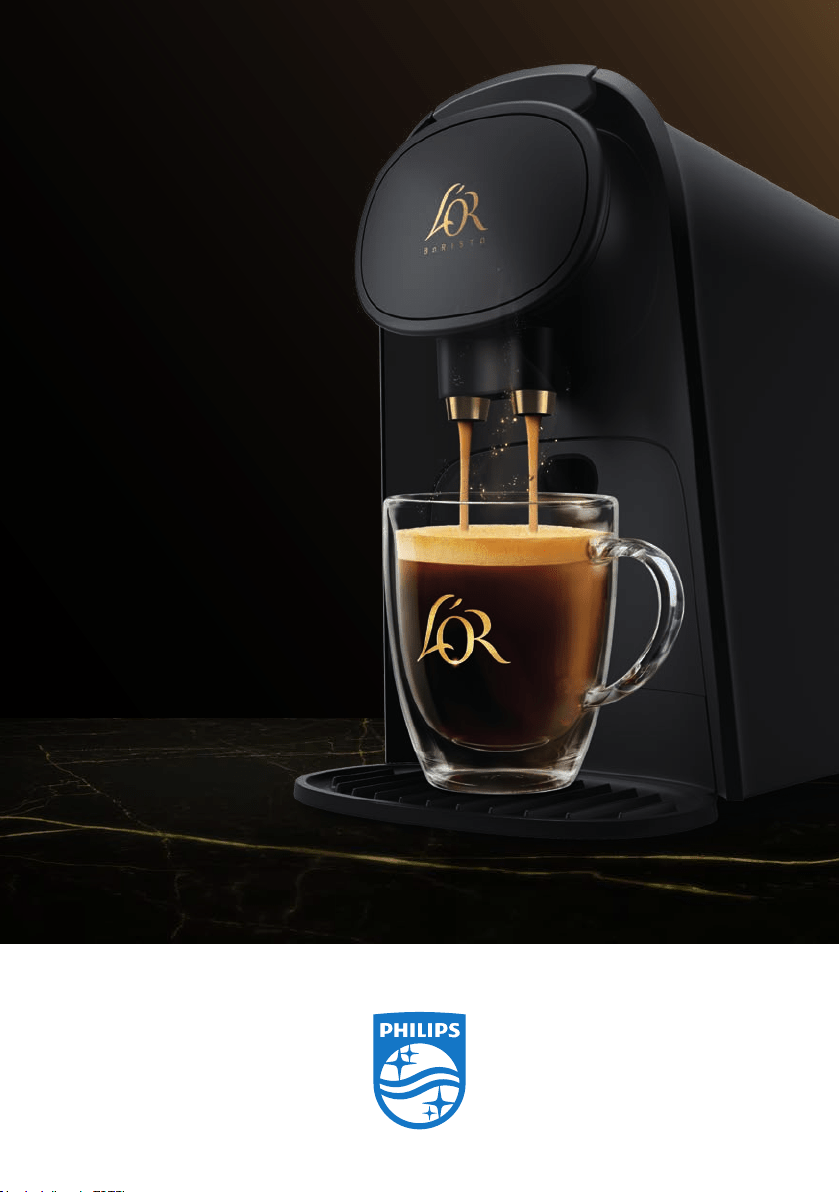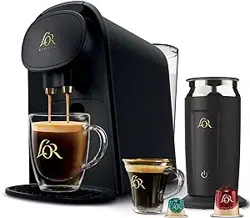

HIGH-PRESSURE ARTISAN
COFFEE & ESPRESSO SYSTEM
DIRECTIONS FOR USE
19 BAR L’OR BARISTA COFFEE AND ESPRESSO SYSTEM
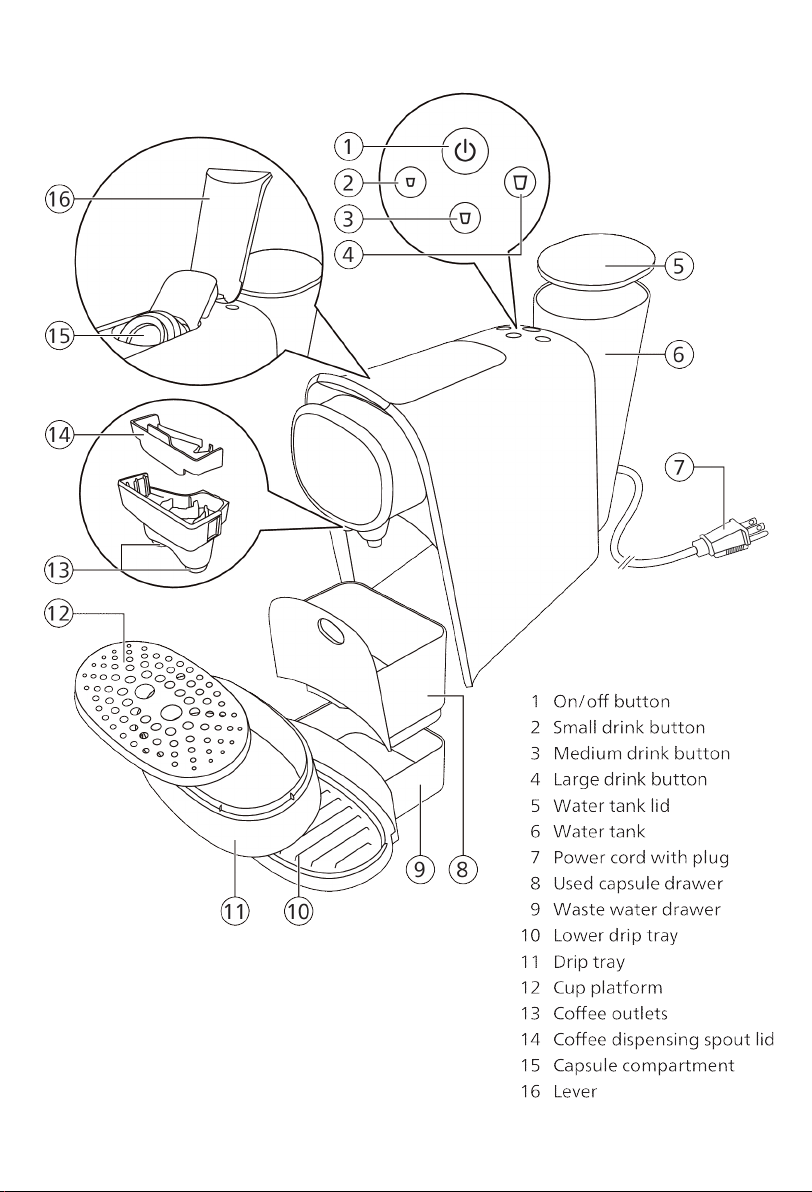
3
English
Introduction
Welcome to the L'OR Barista world! The L'OR BARISTA system is a high-
pressure artisan coffee & espresso system. Thanks to the Dual Capsule
Recognition technology, the L’OR BARISTA system automatically
recognizes the capsule size and adapts the volume accordingly. All you
need to do is press the button for the type of coffee you desire (small,
medium or large).
Capsule compatibility
The L'OR Barista coffee & espresso system has been designed to work
with L’OR Espresso capsules and L’OR Coffee capsules, as well as with
Nespresso* original compatible capsules and aluminum capsules from
coffee brands produced by Jacobs Douwe Egberts, such as Peet's, Illy
and more.
*brand of a third party not connected to JACOBS DOUWE EGBERTS
USA and / or PHILIPS
Preparing for use
Before first use, remove all packaging materials from the system.
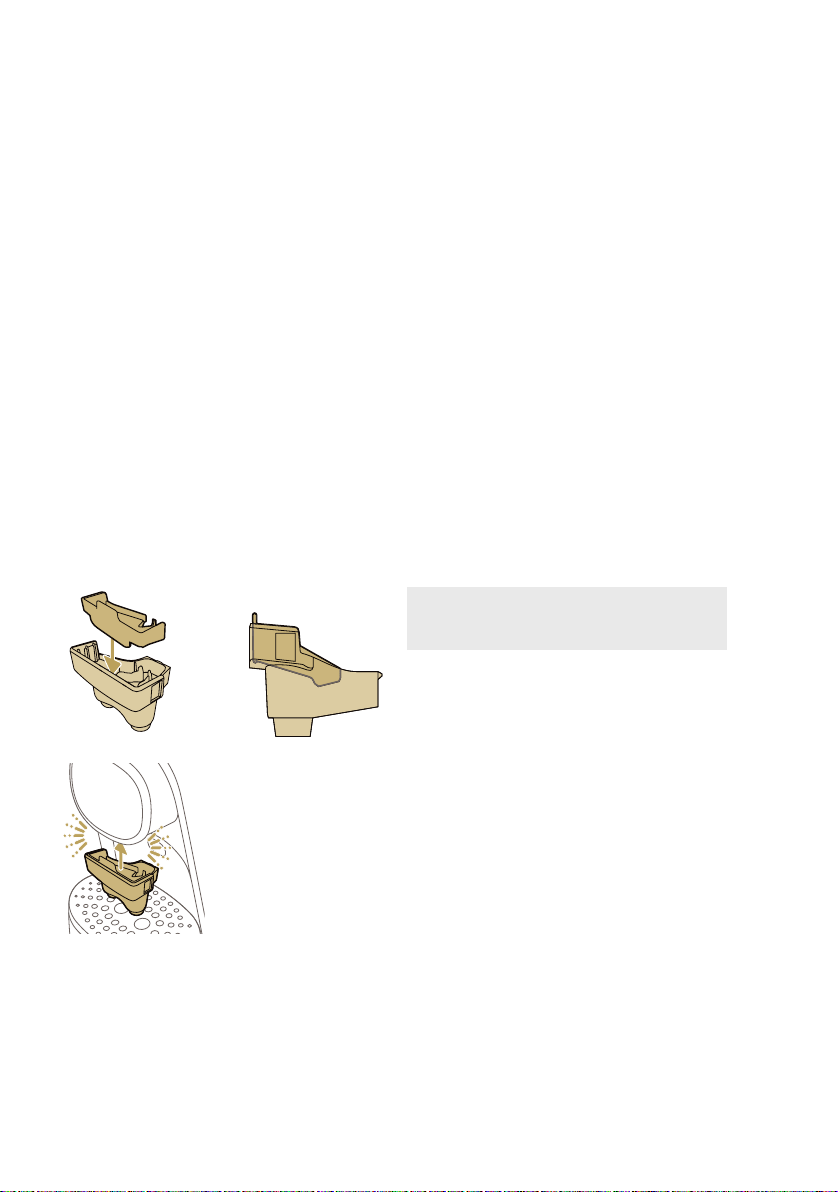
Note: the spout of your L’OR BARISTA
system is removable and washable to
ensure the best quality and coffee taste.
Install the two-piece coffee dispensing
spout:
Remove any packing or tape and insert the
grey piece into the black piece. Attach the
spout by pushing both pieces upwards into
the appliance until they 'click' into place.
4
English
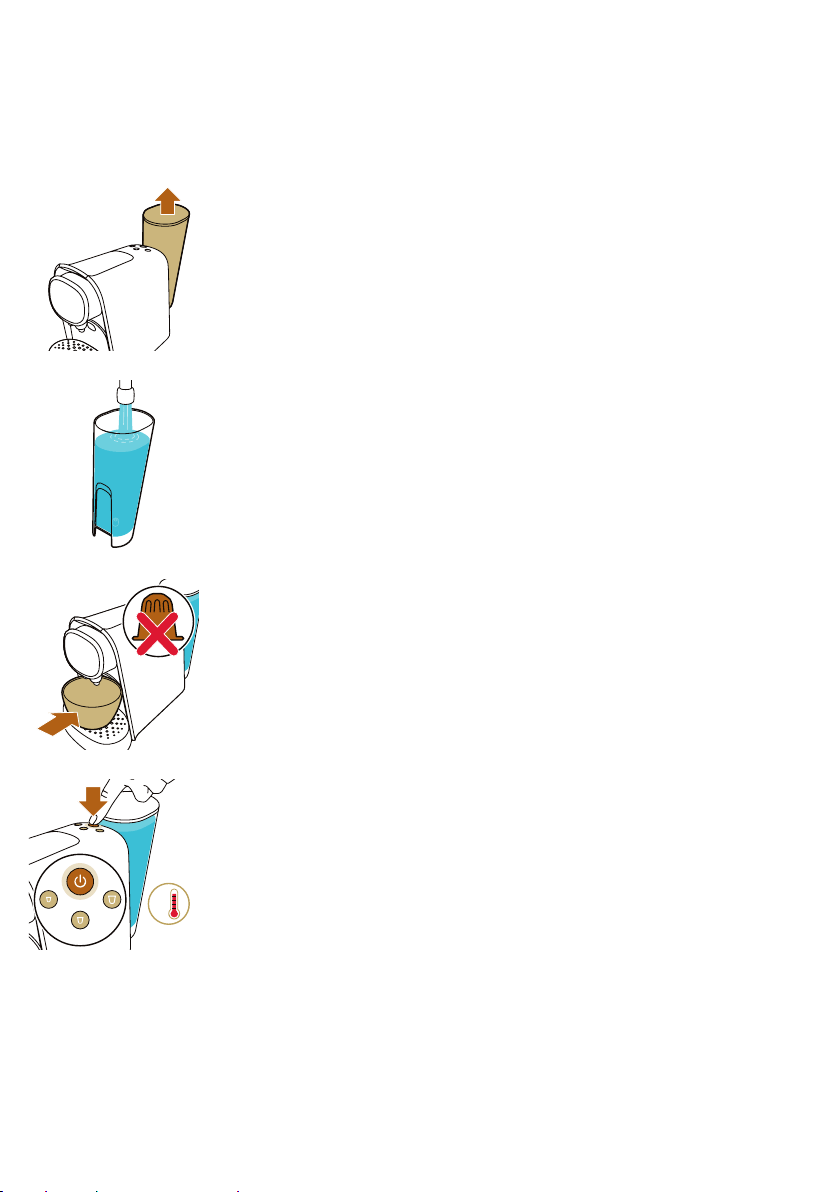
When you use the system for the first time or if you have not used it for 1 day or
longer, perform the following steps:
1. Remove the water tank from the system.
2. Rinse and fill the water tank under the tap. Place the water tank back
onto the system.
3. Place a bowl under the coffee dispensing spout. Do not insert a
capsule and make sure that the lever is closed.
4. Press the on/off button to switch on the system.
- The on/off button flashes slowly to indicate that the system is
heating up.
25 sec
°F
English
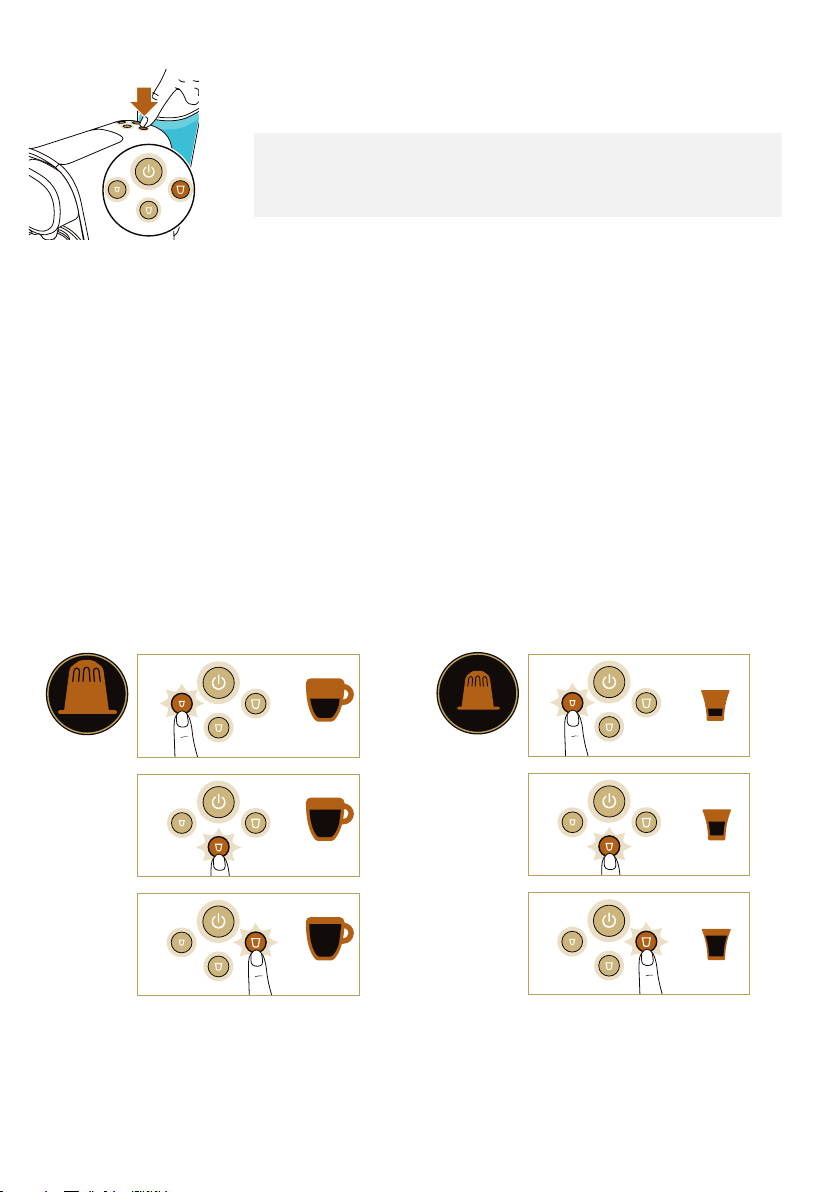
5. When all buttons light up continuously, press the large drink button.
- Water flows from the coffee dispensing spout.
Note: It is normal for the system to produce a sound as it fills with water
for the first time and when the water tank is low. The system produces a
humming sound when the internal water system is not completely full.
Once water is flowing, it produces a less loud humming sound.
6. The system is ready when all buttons light up continuously.
7. Empty the drip tray and waste water drawer.
The system is now ready for use.
Brewing coffee and espresso
Beverages and capsules
Capsules
L’OR aluminum capsules are available online at www.lorcoffee.com
Beverages
Thanks to the Dual Capsule Recognition technology, the L'OR BARISTA
system automatically recognizes the capsule size and adapts the volume
of your drink accordingly. All you need to do is press the button for the
type of coffee you desire (small, medium or large).
COFFEE
CAPSULE
SmallLarge
Medium
SmallLarge
Medium
Medium
SmallLarge
Medium
5oz
8oz
12oz
5
ESPRESSO
CAPSULE
SmallLarge
Medium
SmallLarge
Medium
Medium
SmallLarge
Medium
1.4oz
2.7oz
3.7oz
English
Preparing coffee
1. Press the on/off button to switch on the system. The on/off button
starts flashing to indicate that the system is heating up.
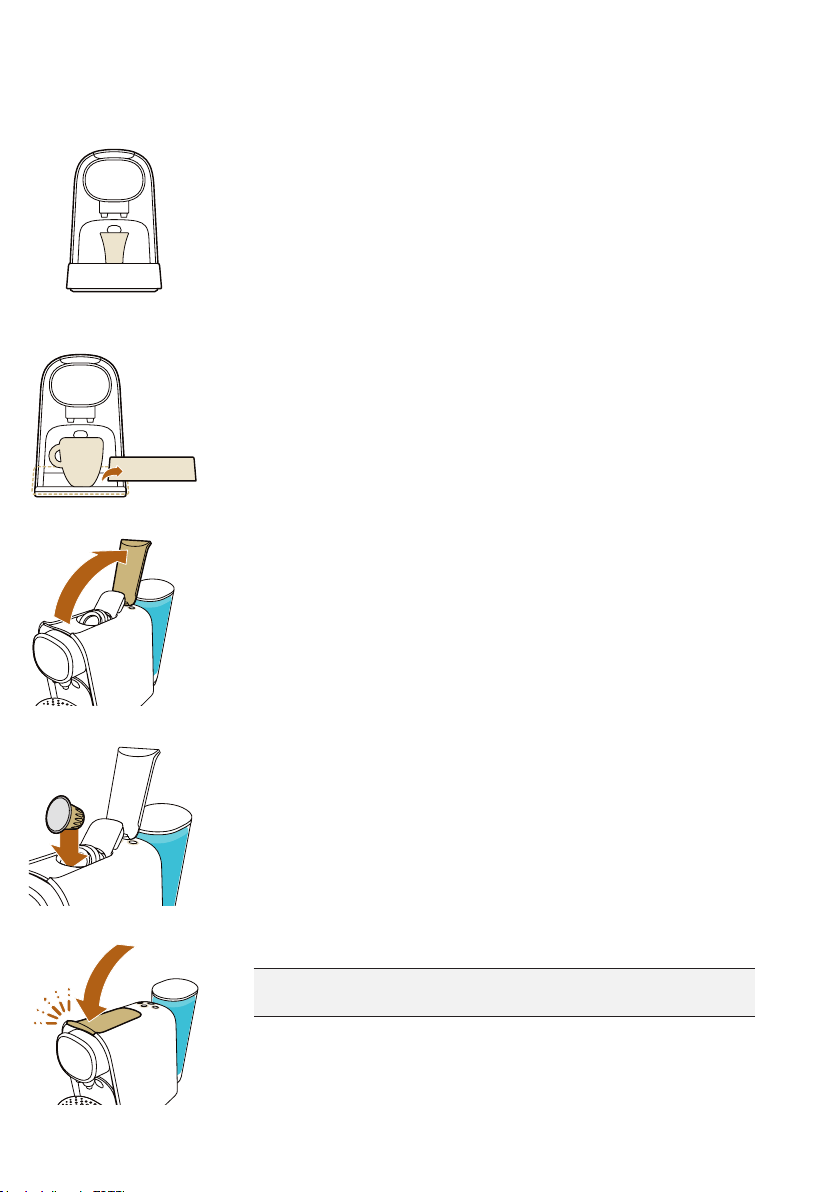
2. For one coffee, place one cup under the coffee dispensing spout.
3. For a large coffee, remove the cup platform and the drip tray, place
the cup platform on the lower drip tray and place a large cup or mug
on the cup platform under the coffee dispensing spout. Ensure the
spouts are above the rim of the cup for easy removal after brewing.
4. Lift the lever.
5. Insert a capsule.
- For coffee, insert a L'OR Barista Coffee capsule.
- For espresso, insert an espresso capsule.
6. Close the lever by pushing it down.
Warning: Do not insert a nger into the brew chamber when
closing the lever.
6
English
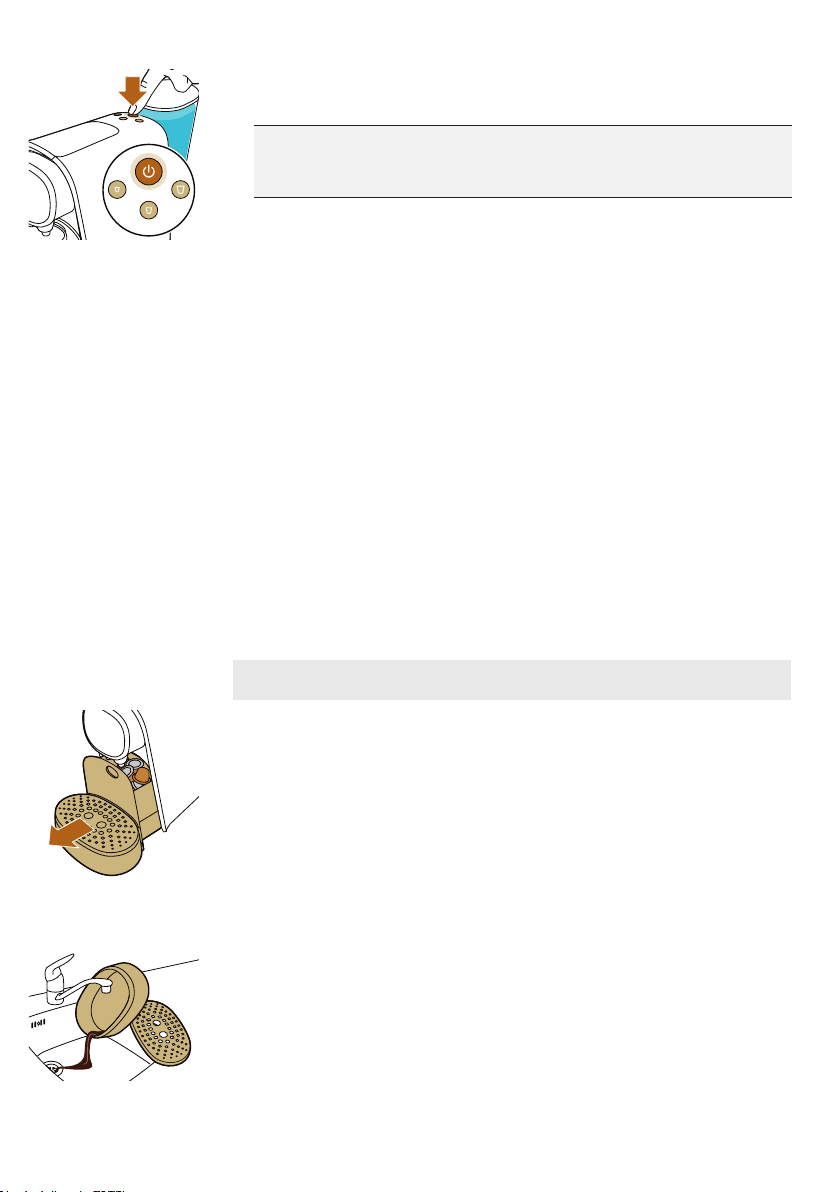
7. When the on/off button stops flashing and all buttons light up
continuously, press the button for the type of coffee you desire.
Caution: Do not lift the lever until the brewing process has
nished. Brewing is nished when the lights stop ashing and no
more coffee comes out of the coffee dispensing spout.
Resetting to Factory Settings
To reset the coffee quantities to their factory settings:
1. Press the on/off button to switch on the system.
2. Wait until the system has heated up and all buttons light up.
3. Press and hold the small, medium and large drink buttons
simultaneously until all buttons flash quickly to show that the system
has been reset to factory settings.
Cleaning and maintenance
Cleaning the used capsule drawer and waste water drawer
Check the used capsule drawer and waste water drawer regularly.
Note: For optimal cleanliness, pull up the lever after use to ensure the
last used capsule falls into used capsule drawer.
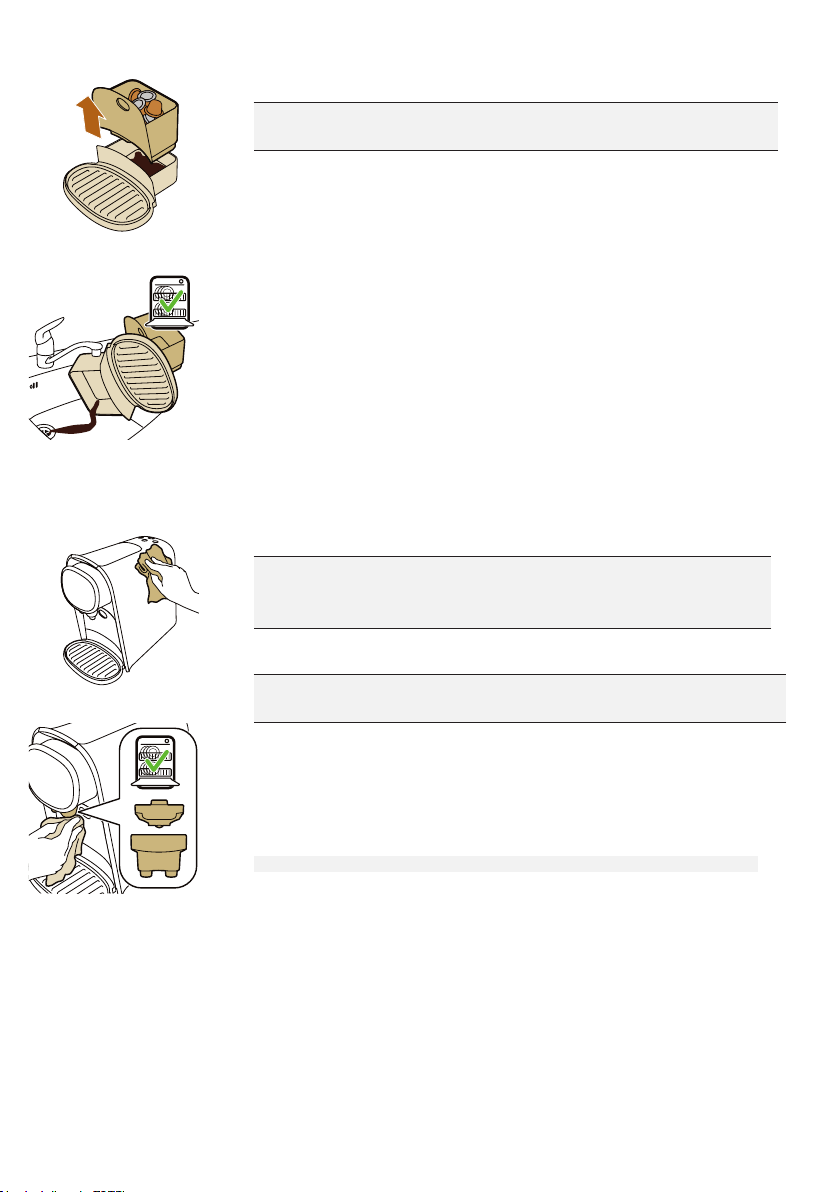
1. Pull the used capsule drawer and the waste water drawer out of the
system.
2. Remove the drip tray from the lower drip tray and rinse the drip tray
and the cup tray under a warm tap. Do not clean these parts in the
dishwasher.
7
English
3. Remove the used capsule drawer by pulling it up and empty it.
Caution: Be careful when you remove the used capsule drawer.
Capsules are still hot immediately after brewing.
4.
Rinse all parts under a warm tap. Dry all parts with a soft cloth. You
can also clean all these parts in the dishwasher.
5. Reinsert the used capsule drawer into the waste water drawer.
6. Insert the waste water drawer with the used capsule drawer into the
system.
7. Place the drip tray back onto the lower drip tray. Place the cup
platform onto the drip tray.
Cleaning other parts of the system
1. Clean the outside of the system with a soft damp cloth.
Caution: Never use scouring pads, abrasive cleaning agents or
aggressive liquids such as oil based, petroleum or acetone to
clean the system.
Warning: Do not insert a nger into the capsule compartment to
avoid injury. There is an invisible piercer inside.
2. Clean the front of the system with a soft damp cloth and clean the
two parts of the coffee dispensing spout (the coffee outlets and the
spout lid) under a warm tap or in the dishwasher.
3. Clean the water tank by rinsing it under a warm tap. The water tank is
not dishwasher-safe.
Note: Rinse the water tank and fill it with fresh water every 24 hours.
8
English
Cleaning the coffee dispensing system
Clean the coffee dispensing system every week to ensure you get coffee
with an optimum quality and taste.
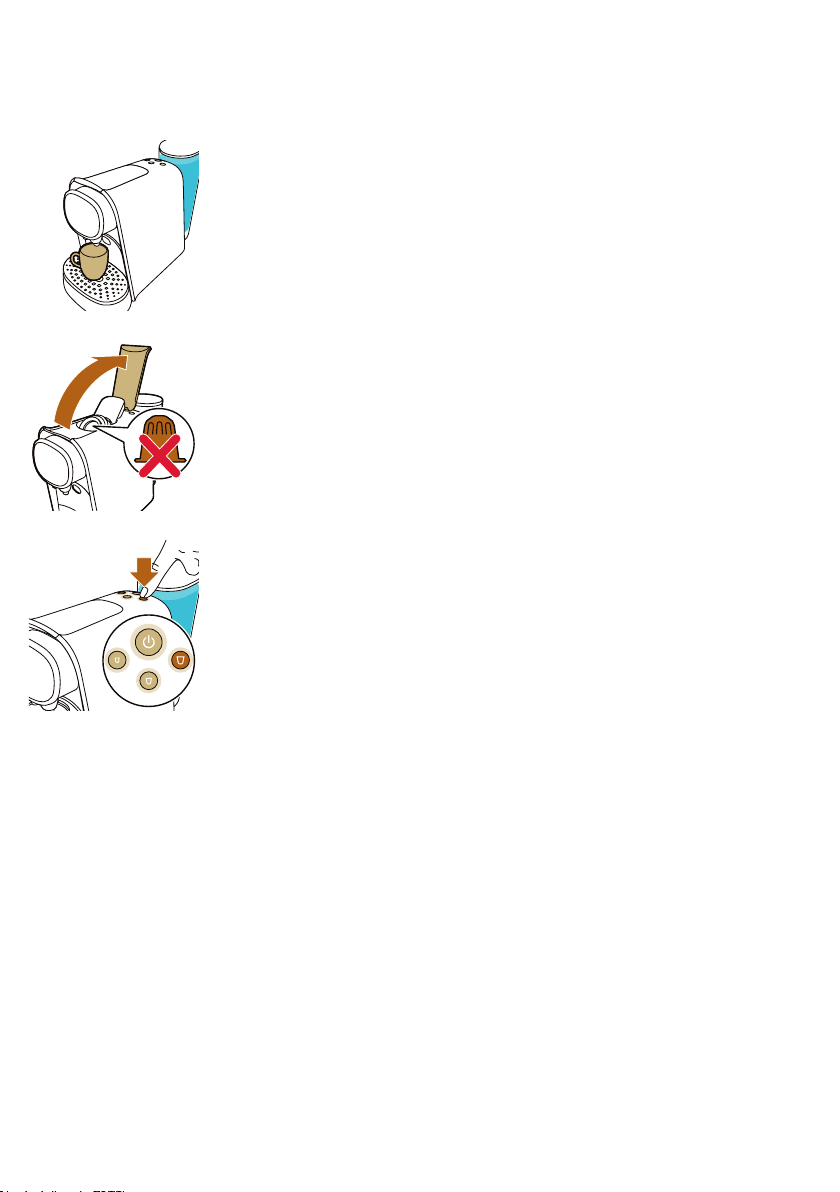
4. Place a cup under the coffee dispensing spout.
5. Lift the lever to ensure the last used capsule falls into the used
capsule drawer.
6. Do not insert a new capsule and close the lever.
7. Press the large drink button.
8. Empty the cup after the system has finished dispensing water.
9. Open the lever and repeat steps 3 to 5 to ensure proper cleaning of
the coffee dispensing system.
The system is now ready for use.
9

English
Descaling
When to descale
Descale the system when the small drink and large drink buttons are
flashing at the same time. The descaling procedure takes up to 40
minutes and consists of a descaling cycle and a rinsing cycle. Do not
interrupt the descaling procedure.
Why to descale
Descaling is essential for the following reasons:
- It prolongs the life of your L'OR Barista coffee & espresso system
- It ensures maximum cup volume
- It ensures maximum coffee temperature
- The system produces less sound during brewing
- It prevents malfunctioning
If the descaling procedure is not performed correctly, scale residue
remains behind in the system. This causes scale to build up more quickly
and may cause permanent and irreparable damage to the system.
Use the correct descaler
Only lactic acid-based descalers are suitable for descaling the L‘OR
Barista system. This type of descaler descales the machine without
damaging it.
We recommend the Philips CA6700 liquid descaling agent. It is
available on Amazon in bottles that contain enough liquid for two
descaling procedures. You will need half a bottle for one descaling
procedure and can store the other half for the next descaling procedure.
Descaling procedure
Note: If something goes wrong during the descaling procedure, e.g.
you accidentally interrupt the descaling cycle, you have to restart the
descaling procedure from step 1.
1. Press the on/off button to switch on the system.
10
English
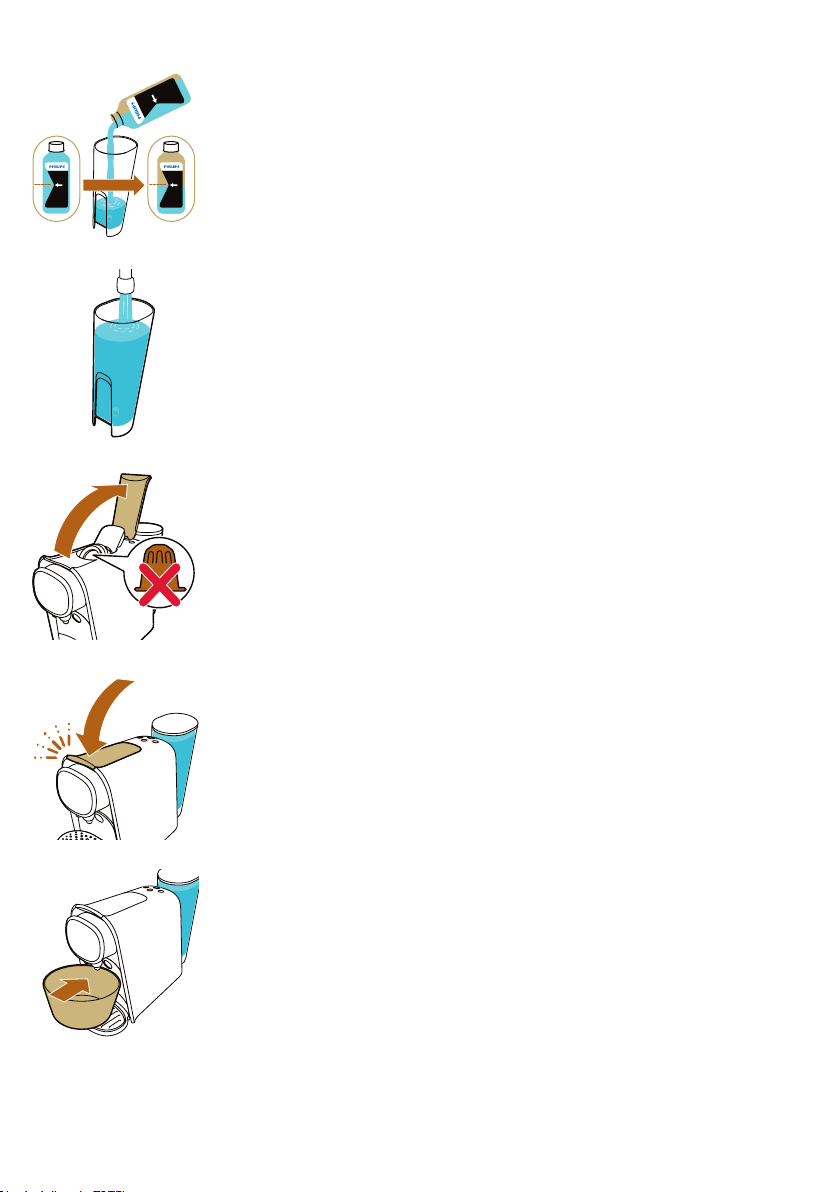
2. Pour half a bottle of L'OR Barista liquid descaler into the water tank.
3. Fill up the water tank with fresh tap water.
4. Make sure that there is no capsule in the capsule compartment.
5. Close the lever.
6. Place a bowl with a minimum capacity of 1.5 liters / 51oz on the
lower drip tray under the coffee dispensing spout to collect the
descaling solution.
CA6700
51 oz /1.5L
11
English
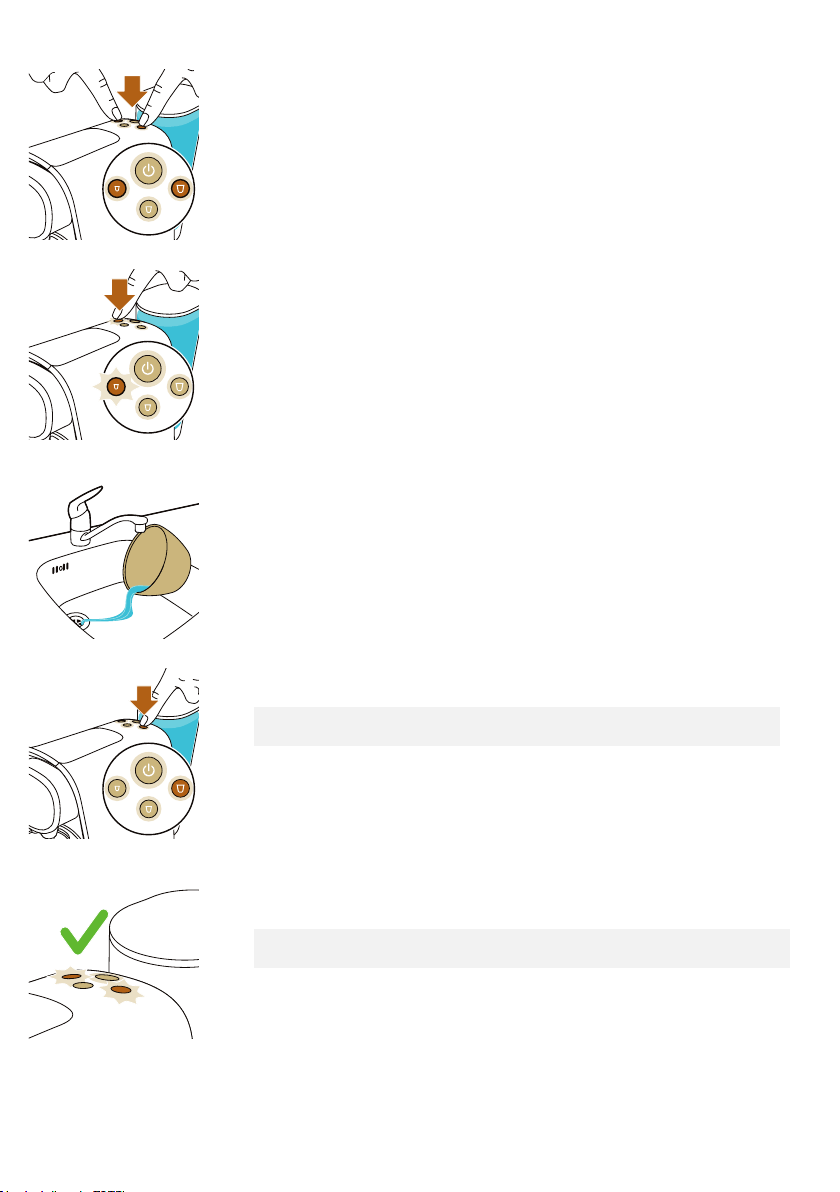
7. Press the small drink and large drink buttons briefly at the same time.
8. The small drink button starts to flash quickly. Press the small drink
button to activate the descaling cycle.The system dispenses the entire
descaling solution at regular intervals. This takes up to 30 minutes.
- When the large drink button starts to flash quickly again, the first
phase of the descaling cycle has finished.
9. Remove and empty the bowl. Place the bowl back onto the lower
drip tray under the coffee dispensing spout.
10. Remove the water tank and rinse it under the tap. Fill the water tank
with cold tap water and place it back onto the system.
11. Press the large drink button to start the flushing cycle.
Note: The water tank will be emptied without interruption. The flushing
cycle lasts about 3 minutes.
12. When the flushing cycle has finished, the small drink and large drink
buttons flash a few times.
Note: It is normal that some water remains behind in the water tank after
the descaling procedure.
The system switches off. The descaling procedure is finished.
12

English
Meaning of light signals
The on/off button flashes
slowly
The system is heating up.
The on/off button flashes
quickly
The water tank is empty, fill
the water tank with tap water.
All buttons light up
continuously
The system is ready for use.
The selected drink button
flashes slowly
The system is preparing the
coffee recipe.
The small drink and large drink
buttons flash simultaneously
after brewing coffee
You need to descale the
system.
Troubleshooting
This chapter summarizes the most common problems you could
encounter with your system. If you are unable to solve the problem
with the information below, visit www.lorcoffee.com/support for a list
of frequently asked questions or contact the Consumer Care Center by
phone 1 (877) 832-3678 or email [email protected]
Problem Possible cause Solution
The system does not switch
on.
The system is not connected to
the power outlet.
Put the plug in a properly
grounded wall outlet.
The on/off button is flashing
slowly.
The system is heating up. This is normal.
The brewing time is longer
than before.
The system is clogging up with
scale.
Descale the system (see
'Descaling procedure').
The temperature of freshly
brewed coffee gradually
decreases.
The system is clogging up with
scale.
Descale the system (see
'Descaling procedure').
The pump makes a lot of
noise.
There is not enough water in the
water tank.
Fill the water tank with fresh tap
water.
The water tank is not placed
correctly.
Place the water tank correctly
and push it downwards.
13

English
Problem Possible cause Solution
The system suddenly stops
brewing coffee.
There is not enough water in the
water tank.
Fill the water tank with fresh
tap water. Press the button
of the selected type of coffee
again to continue brewing.
When the cup is full, press the
same button again to stop the
brewing process.
The on/off button flashes
quickly.
The water tank is empty. Fill the water tank with fresh
tap water. Press the button
of the selected type of coffee
again to continue brewing.
When the cup is full, press the
same button again to stop the
brewing process.
I cannot close the capsule
compartment lever
completely.
Check if you use the
recommended L'OR capsule.
Other capsules may cause
problems during use.
The used capsule drawer is full. Empty the used capsule drawer
and insert the capsule again.
The capsule is not inserted
correctly.
Insert the capsule again and
check if it is inserted correctly.
The capsule is stuck. Open and close the lever a few
times with moderate force to
remove the capsule.
The lever does not open
completely.
The used capsule drawer is full. Empty the used capsule
drawer.
The system does not
dispense coffee or only
dispenses drops of coffee.
You have not flushed the system
before first use.
Flush the system before first
use (see 'Preparing for use').
There is not enough water in the
water tank.
Fill the water tank with fresh tap
water.
Scale has built up inside the
system (see 'Descaling').
Descale the system (see
'Descaling').
Coffee grounds end up in
the cup of coffee.
A small amount of ground coffee
will always end up on the bottom
of the cup.
This is normal.
The coffee flow splits or is
not straight.
The coffee dispensing spout cap
is not placed correctly or it is
missing.
Snap the coffee dispensing
spout onto the coffee outlets.
14