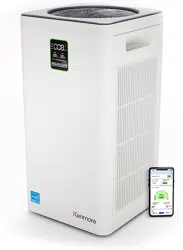

www.kenmorefloorcare.com
Air Purifier Help Line:
1-877-531-7321 (US) / 1-844-608-3081 (CA)
8:00am-5:00pm EST, M-F
Use & Care Guide
Manual de Uso y Cuidado
Manuel d'entretien et d'utilisation
SMART 2300e Series Air Purifier
Purificador de Aire SMART Serie 2300e
Purificateur d’air SMART série 2300e
Model/Modelo/Modèle: PM4030

- 2 -
Before Using Your New Air Purifier ................................................................................. 2
Packing List ..................................................................................................................... 2
Important Safety Instructions ........................................................................................ 3-5
Air Purifier Warranty ....................................................................................................... 6
Parts and Features ........................................................................................................ 7-8
Assembly Instructions ................................................................................................. 9-10
Operating Instructions ...............................................................................................10-13
Air Purifier Maintenance and Care ............................................................................ 14-15
Troubleshooting .........................................................................................................16-17
Requesting Assistance or Service ......................................................................Back Cover
TABLE OF CONTENTS
PACKING LIST
Your KENMORE AIR PURIFIER is packaged with the following parts and components
assembled separately in the carton:
1 Air Purifier
2 Composite Filters (Pre-installed in the air purifier)
1 Use & Care Guide
Read this Use & Care Guide. It will help you assemble and operate your new Kenmore air
purifier in the safest and most effective way.
For more information about air purifier care and operation, call the Air Purifier Help Line at
1-877-531-7321 (US) / 1-844-608-3081 (CA). You will need the complete model and serial
numbers when requesting information.
Your air purifier’s model and serial numbers are located on the Model and Serial Number
Plate. Use the space below to record the model number and serial number of your new
Kenmore air purifier.
Model No.____________________________________________
Serial No. ____________________________________________
Date of Purchase ______________________________________
Keep this book and your sales check (receipt) in a safe place for future reference.
BEFORE USING YOUR NEW AIR PURIFIER

- 3 -
WARNING!
Your safety is important to us. To reduce the risk of fire, electrical shock, injury to persons
or damage when using your air purifier, follow basic safety precautions including the
following:
IMPORTANT SAFETY INSTRUCTIONS
• Use your air purifier only as described
in this Use & Care Guide. Use only
manufacturer’s recommended
attachments.
• Disconnect the air purifier from the power
supply before servicing or cleaning.
• Do not use without removing the plastic
wrap from the filter. The purifier will not
filter air, and may overheat, causing a
fire hazard.
• To reduce the risk of electrical shock - Do
not use outdoors.
• Keep the air purifier away from water,
and wet or damp areas. Never place in
water or liquid.
• Keep the air purifier away from heat
sources.
• Do not use in excessively humid areas.
• Do not use where combustible gases,
vapors, metallic dust, aerosol (spray)
products, or fumes from industrial oil are
present.
• Keep 5 ft / 1.5 m away from where
oxygen is being administered.
• Supervise children when they are near
the air purifier. Do not allow children to
play with the air purifier.
• Children should not clean or perform
maintenance on the air purifier without
supervision.
• Do not put any objects into any opening
on the air purifier.
• Do not sit or place heavy objects on the
air purifier.
• Do not block the air inlet and air outlet.
Read all instructions in this guide before assembling or using your air purifier.
• Keep the inside of the air purifier dry. To
prevent moisture buildup, avoid placing
in rooms with major temperature changes
or underneath air conditioners.
• Do not use with a damaged cord, plug,
or other parts.
• Do not use your air purifier if it is
damaged or not working correctly. Do
not try to repair it yourself. Call 1-877-
531-7321 (US) / 1-844-608-3081 (CA) for
assistance.
• Do not run cord under carpeting. Do
not cover cord with rugs, runners, or
other coverings. Do not route cord under
furniture or appliances. Direct cord away
from traffic areas where it will not be
tripped over.
• Never place the cord near any heat
sources.
• Keep the air purifier near the outlet it is
plugged into.
• Do not touch the power plug or power
adapter with wet hands.
• Be careful when cleaning the air purifier.
Strong corrosive detergent will damage
the surface of the air purifier.
• Remove the dust from the air purifier
body and power plug periodically.
• Do not rinse or reuse the high-efficiency
composite filter.
• This appliance has a polarized plug (one
blade is wider than the other). To reduce
the risk of electric shock, this plug is
intended to fit in a polarized outlet only
one way. If the plug does not fit fully in

- 4 -
IMPORTANT SAFETY INSTRUCTIONS
the outlet, reverse the plug. If it still does
not fit, contact a qualified electrician. Do
not attempt to defeat this safety feature.
• This air purifier is not to be used by
persons (including children) with reduced
physical, sensory, or mental capacities,
or lack of experience and knowledge,
unless they have been given supervision
or instruction concerning the use of the
appliance by a person responsible for
their safety.
Electromagnetic Fields (EMF)
Your air purifier complies with all standards
regarding electromagnetic fields (EMF).
If handled properly and according to the
instructions in this Use & Care Guide, the
appliance is safe to use based on scientific
evidence available today.
FCC COMPLIANCE
This device complies with Part 15 of the FCC
Rules. Operation is subject to the following
two conditions:
• This device may not cause harmful
interference, and
• This device must accept any interference
received, including interference that may
cause undesired operation.
WARNING
To reduce the risk of fire or electric
shock, do not use this air purifier with
any solid-state speed control device.
NOTE:
This equipment has been tested and
found to comply with the limits for a Class B
digital device, pursuant to part 15 of the FCC
Rules. These limits are designed to provide
reasonable protection against harmful
interference in a residential installation.
This equipment generates, uses, and can
radiate radio frequency energy and, if not
installed and used in accordance with the
instructions, may cause harmful interference
to radio communications. However, there
is no guarantee that interference will not
occur in a particular installation. If this
equipment does cause harmful interference
to radio or television reception, which can
be determined by turning the equipment
off and on, the user is encouraged to try to
correct the interference by one or more of
the following measures:
• Reorient or relocate the receiving
antenna.
• Increase the separation between the
equipment and receiver.
• Connect the equipment into an outlet on
a circuit different from that to which the
receiver is connected.
• Consult the dealer or an experienced
radio/TV technician for help.
To satisfy FCC / IC RF exposure
requirements, a separation distance of 20
cm or more should be maintained between
the antenna of this device and persons
during device operation.
To ensure compliance, operations at closer
than this distance is not recommended.
CAUTION
Any changes or modifications not
expressly approved by the party
responsible for compliance could void
the user's authority to operate the
equipment.

- 5 -
IMPORTANT SAFETY INSTRUCTIONS
READ AND SAVE THESE INSTRUCTIONS
Proper assembly and safe use of your air purifier are your responsibilities. Your air purifier
is intended for
Household Use
. Read this Use & Care Guide carefully for important use
and safety information. This guide contains safety statements under warning and caution
symbols.

- 6 -
AIR PURIFIER WARRANTY
LIMITED WARRANTY
FOR TWO YEARS from the date of sale this product is warranted against defects in
material or workmanship.
WITH PROOF OF SALE a defective product will be replaced free of charge.
The Kenmore brand is used under license. Direct all claims for warranty service to:
1-877-531-7321 (US) / 1-844-608-3081 (CA).
This warranty does not cover filters which are expendable parts that can wear out from
normal use within the warranty period.
This warranty is void if this product is ever used for other than private household purposes.
This warranty gives you specific legal rights, and you may also have other rights which
vary from state to state.
Cleva North America, Inc., Greenville SC 29607
- 7 -
PARTS AND FEATURES
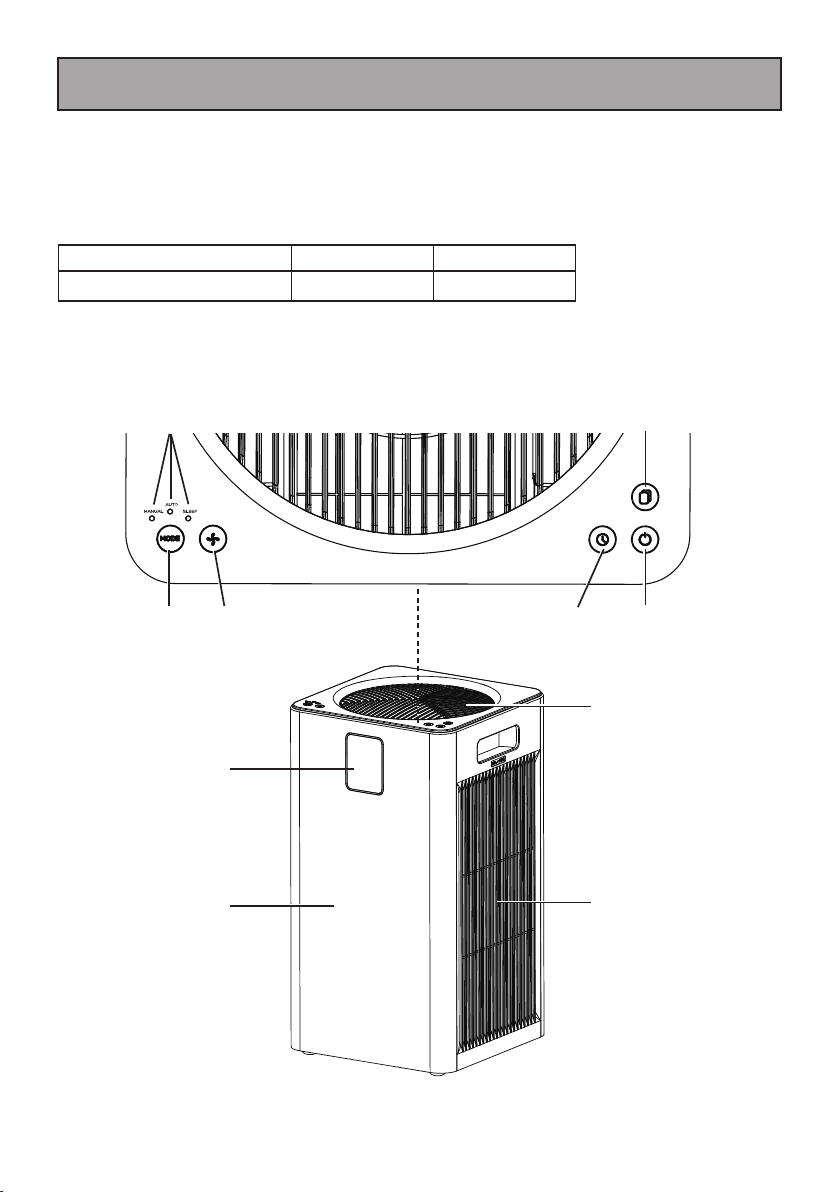
It is important to know your air purifier’s parts and features to ensure its proper and safe
use. Review these before using your air purifier.
REPLACEMENT PARTS
To order a replacement part, call 1-877-531-7321 (US) / 1-844-608-3081 (CA) or order
from www.kenmorefloorcare.com.
Part Part No.(US) Part No.(CA)
Composite Filter
KF465 KF465
Filter
Reset
Button
ON/OFF
Button
Mode
Indicator
Lights
Air Outlet
Main Body
Air Inlet/
Filter Cover
Display Screen
Timer
Button
Mode
Button
Fan
Speed
Button

- 8 -
PARTS AND FEATURES
DISPLAY SCREEN
PM2.5 /
Fan Speed /
Time Display
Temperature
Filter Life
Wi-Fi Indicator
SLEEPAUTO
Child Lock
Timer
Humidity
Air Quality
Indicator Ring
NOTE:
The pre-filter, HEPA filter, and activated carbon filter are combined in the
composite filter.
• Pre-filter: Intercept hair, fiber fleece, large particles, dander, etc.
• High Efficiency HEPA Filter: Filter out particles as small as 0.3 microns, such as PM2.5,
smoke, pollen, mites, etc.
• Activated Carbon Filer: Purify gaseous harmful pollutants.
COMPOSITE FILTERS
Filter Cover Filter Cover
Composite
Filter
Composite
Filter
- 9 -
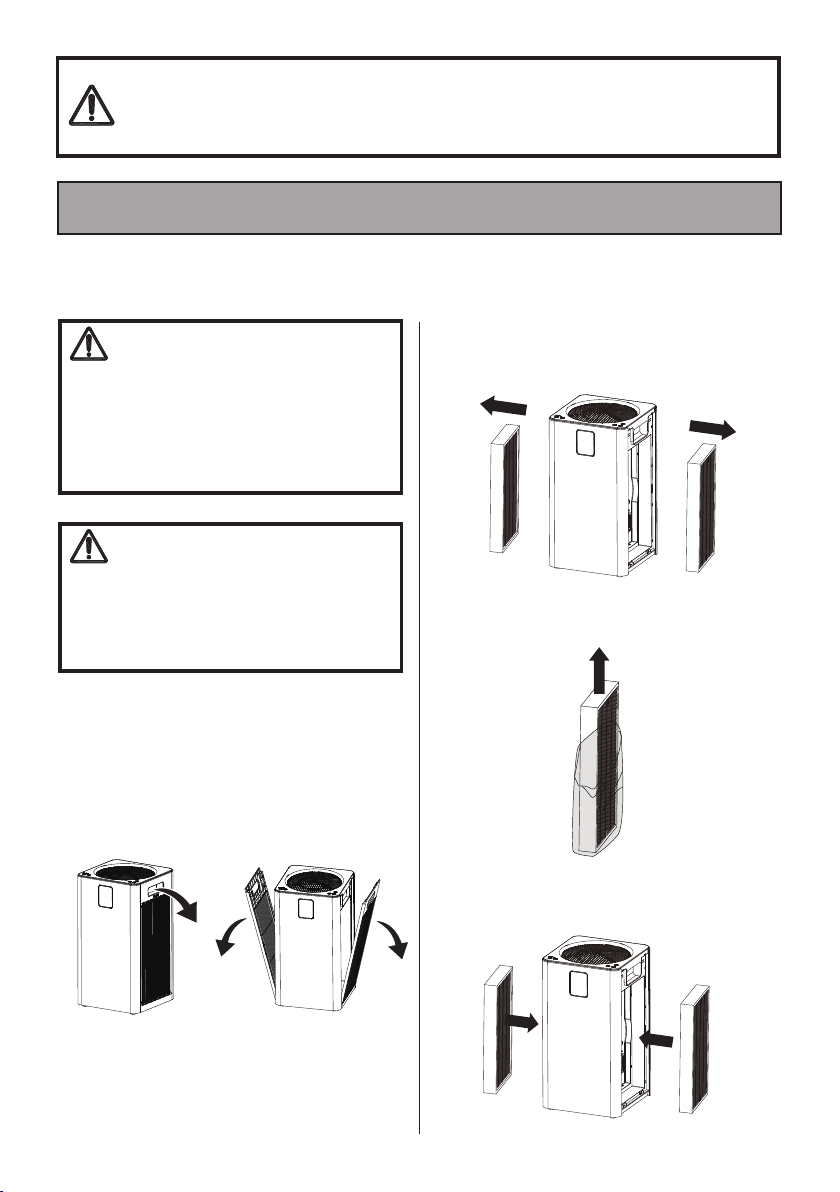
1. Place the air purifier on a flat, stable
surface.
2. Put your hand on the clasp of the filter
cover and pull it out gently. Remove the
filter covers from both sides.
Before assembling the air purifier, check the PACKING LIST (page 2). Use this list to verify
that you have received all the components of your new Kenmore air purifier.
Please pay special attention to these hazard alert boxes, and follow any
instructions given.
WARNING
statements alert you to such hazards as fire,
electric shock, burns and personal injury.
CAUTION
statements alert you to
such hazards as personal injury and/or property damage.
ASSEMBLY INSTRUCTIONS
WARNING
Electrical Shock Hazard
DO NOT plug into electrical supply until
assembly is complete. Failure to do so
could result in electrical shock or injury.
To reduce the risk of electric shock, do
not expose to rain.
CAUTION
The included filters are placed inside
the air purifier. Make sure the plastic
packaging on the filter is removed and
the filters are installed correctly before
using.
3. Remove the new filters with the plastic
packaging from inside the air purifier.
4. Remove all plastic packaging from the
filters.
5. Install the filters back into the air purifier
with pre-filter facing out.
- 10 -
ASSEMBLY INSTRUCTIONS
6. Install the filter covers back into place.
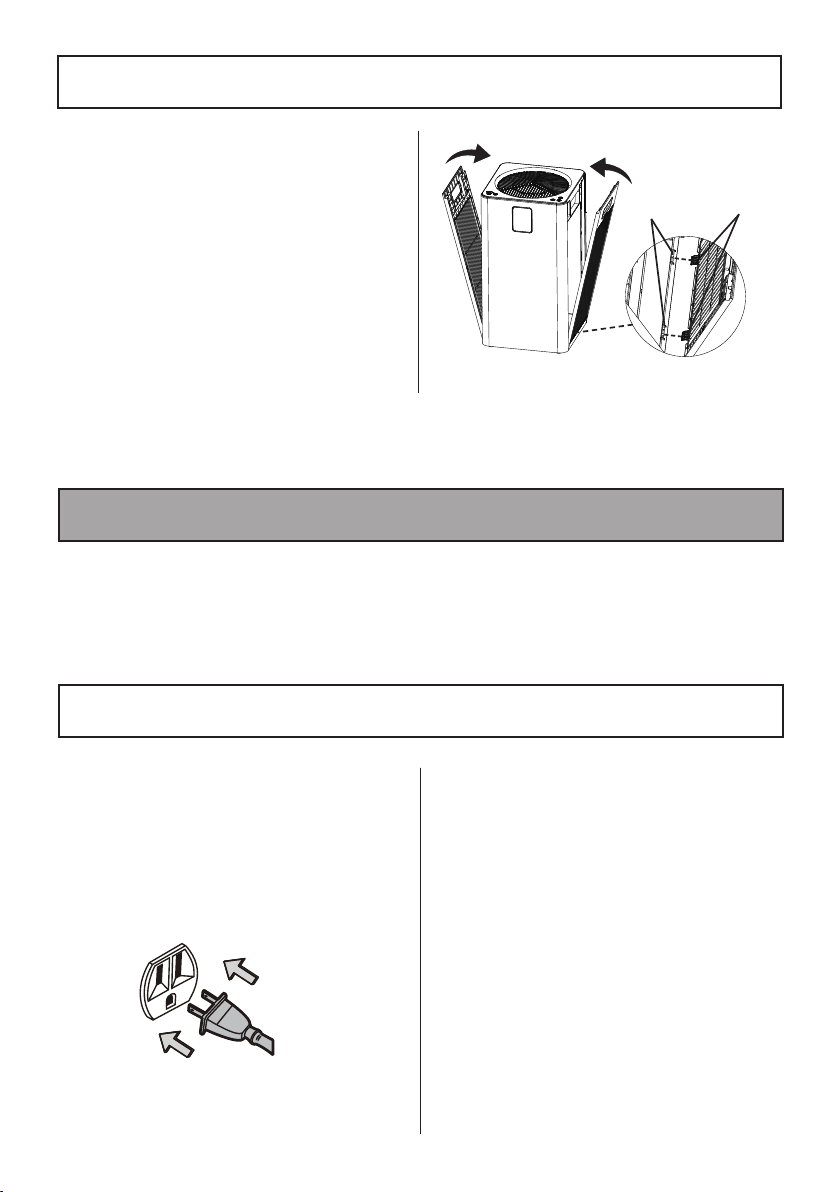
First insert the two locking tabs on
the filter cover into the slots in the
air purifier as shown. Make sure both
locking tabs are inserted into place
completely. Then push the upper part of
the filter cover near the air purifier until
it snaps into position. Make sure both
filter covers are installed correctly.
NOTE:
The filter covers are attracted by
magnets equipped inside the air purifier.
1. When using the air purifier, keep it away
from anything that would block airflow,
such as curtains.
2. Plug the power cord into the outlet.
When powered on, a "Ding" sound will
be heard and the ON/OFF button will
turn red. The air purifier is in the standby
state.
OPERATING INSTRUCTIONS
USING THE AIR PURIFIER
3. Tap the ON/OFF Button to turn on
the air purifier. A "Ding" sound will be
heard. The ON/OFF button will turn
white and the display screen lights up.
The air purifier enters into AUTO mode.
4. To turn off the air purifier, tap the ON/
OFF button again. A "Ding" sound will
be heard. The ON/OFF button will turn
red and the display screen turns off. The
air purifier enters into the standby state.
Unplug the power cord plug from the
outlet if necessary.
Locking
Tabs
Slots
NOTE:
To reduce the risk of electric shock, this air purifier has a polarized plug; one blade
is wider than the other. This plug will fit in a polarized outlet only one way. If the plug
does not fit fully in the outlet, reverse the plug. If it still does not fit, contact a qualified
electrician to install the proper outlet. Do not change the plug in any way.
- 11 -
ON/OFF Button
Tap
to turn on/off the air purifier.
• In the standby state, tapping
will
turn on the air purifier. The air purifier
operates in the lowest fan speed setting
in Auto mode by default before it detects
the PM2.5 particle value, and the Auto
mode indicator light is on. In the process
of the PM2.5 sensor initialization, the air
quality indicator ring is green, and the
PM2.5 particle value shows as “---” on
the display screen.
• When the PM2.5 sensor completes
detection, the air quality indicator ring
will change into the corresponding color
according to the air quality. Please see
REAL-TIME DISPLAY OF AIR QUALITY
below.
REAL-TIME DISPLAY OF AIR QUALITY
• After the air purifier completes
initialization, the PM2.5 particle value
will be displayed on the screen. The
fan speed will change based on the air
quality when in Auto mode. Temperature
and humidity value will show on display
screen.
• In the working state, tapping
will turn
off the air purifier. The air purifier enters
into the standby state.
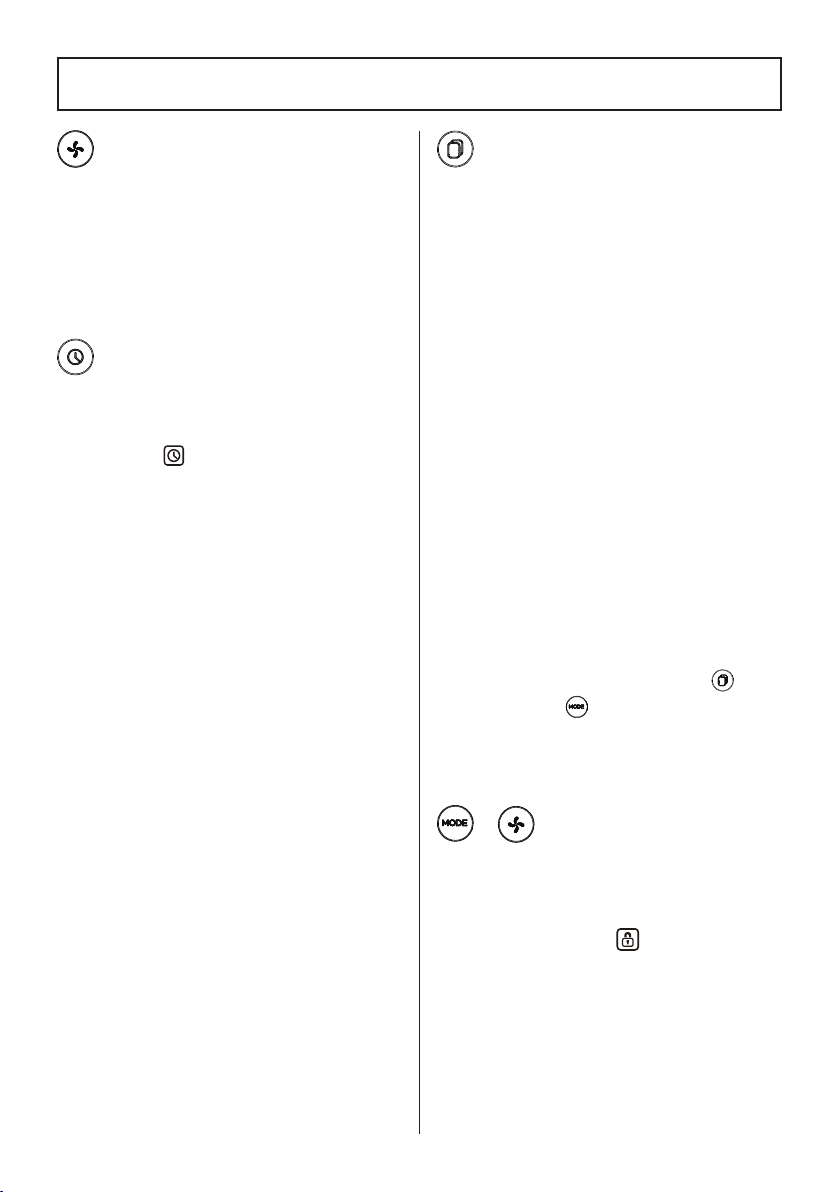
Tapping the Mode button will switch the air
purifier into: AUTO mode
SLEEP mode
Manual mode AUTO mode. The
corresponding light will turn on to indicate
the mode.
AUTO mode:
• In the working state, tapping the Mode
button will switch the air purifier to Auto
mode. The Auto mode indicator and
Auto mode icon
will illuminate. The
air purifier will automatically adjust to
the corresponding fan speed according
to the PM2.5 particle value detected by
the internal sensor (see page 11).
SLEEP mode:
• In the working state, after switching to
sleep mode by tapping the Mode button,
the fan will run at the lowest fan speed.
• The sleep mode indicator and sleep
mode icon
will illuminate, and
the display screen turns off. After 10
seconds, the sleep mode indicator and
sleep mode icon will turn off.
• In sleep mode, tapping any button will
wake up the air purifier.
MANUAL mode:
• In the working state, tapping the Mode
button will switch the air purifier to
manual mode. The manual mode’s
corresponding indicator light will
illuminate. Fan speed can be adjusted
manually using the Fan Speed button.
NOTE:
When you want to switch the air
purifier from sleep mode to manual mode,
after the unit is woke up from sleep mode,
be sure to tap the Mode button within 10
seconds during the air purifier being woke
up.
CONTROLS & DISPLAY
PM2.5
Value
Air
Quality
Air Quality
Indicator Color
Fan
Speed
000-012
Very
Good
Green 1
013-035 Good Blue 2
036-055
Fair Orange 3
056+
Poor Red 4
MODE Button & Mode
Indicator Lights
- 12 -
Fan Speed Button
• Tap the Fan Speed button to cycle the
air purifier through the 5 fan speeds.
The fan speed will show on the display
screen.
• Tap the Fan Speed button while the air
purifier is in AUTO Mode or SLEEP Mode
and the air purifier will exit that mode.
Timer Button
• In the working state, tap the Timer
button once, the current timing status will
be shown on the display screen, and the
Timer icon
will light on. If there is no
timer, “00” will be shown on the display
screen. If there is a timer, the remaining
time of the current timer will display in 1
hour increments.
NOTE:
When the remaining time is less
than 1 hour, the screen displays minutes,
e.g. 59.
• Timer will lock in the current setting for
1-12 hours. After the time is completed,
the air purifier will automatically turn
off. When the Timer indicator is on, it
means the timing is set successfully. Set
it to 0 hours to exit the timer.
• Each tap on the Timer button will switch
the screen to the timer display from the
current setting. If you don't continue
to tap within 3 seconds, it will switch
back to the PM2.5 value display. If you
continue to tap within 3 seconds, it will
enter the timer state and add to the
timer in 1 hour increments.
• In the standby state, the button can
be used to set the start-up time. In the
power-on state, the button can be used
to set the shutdown time. Restarting the
unit will reset the timer.
CONTROLS & DISPLAY
• The filter life is about 6 months. When
the filter life is about to expire, the last
frame of filter life indicator will flash to
remind user to replace the filters until
the filter life is reset.
• Filter life reset:
When the last frame of filter life
indicator flashes, replace with new filters
(page 14-15). Turn on the air purifier.
Press and hold the Filter Reset button for
more than 3 seconds, the filter life will
be reset. All of the filter life indicator
bars will be illuminated.
NOTE:
The filter life indicator cannot be
reset before the last indicator bar flashes.
Long pressing the Filter Reset Button will
not reset the filter life indicators. Only a
"Ding" sound is emitted.
• Forced filter life reset:
If the filters are changed before the last
frame of filter life indicator flashes, to
reset the filter life: Within 30 seconds of
powering on, in the standby state, press
and hold the Filter Reset button
and
Mode button
at the same time for
more than 3 seconds. All indicators on
the screen will flash for 3 seconds to
indicate that the filter life is reset.
• In the working state, press and hold the
Mode button and the Fan Speed button
for more than 3 seconds at the same
time, the child lock function will activate.
The Child Lock icon
on the display
screen will illuminate, and all other
buttons cannot be operated.
• Press the Mode button and Fan Speed
button for 3 seconds at the same time
again, to exit the child lock function. The
child lock icon will turn off and all other
buttons can now be used.
+
Filter Reset Button
Child Lock
- 13 -
CONTROLS & DISPLAY
WI-FI Connection
NOTE:
The Kenmore air purifier supports
2.4GHz Wi-Fi networks and is compatible
with Apple iOS11 and above & Android 6
and above.
SCAN HERE to download the Kenmore
Smart™ app to your device and create a
profile.
• When the air purifier is plugged in for
the first time, it enters the standby state.
The Wi-Fi starts pairing. The Wi-Fi
indicator on the air purifier flashes (1HZ).
• Open the APP, and configure the
network according to the APP operation
process. After the network configuration
is successful, select the device name
“Kenmore_4030”, and then start APP
operation.
• When the air purifier is successfully
connected to the Wi-Fi network, the Wi-
Fi indicator on the unit will illuminate
steadily.
• If there is no Wi-Fi connection, after
flashing for 10 minutes, the Wi-Fi
indicator light on the unit will be off.
WI-FI Connection Reset:
In the working/
standby state, press and hold the ON/OFF
button for more than 5 seconds. "Ding-
Ding-Ding" sound will be emitted, and the
air purifier re-starts the Wi-Fi pairing. The
Wi-Fi indicator on the air purifier flashes
(1HZ).
SCAN HERE
Or Visit
kenmorefloorcare.com/smart-2300e-
series/
for full product instructions.
How To Distinguish Between 2.4 GHz and
5 GHz Networks
Newer routers can have a dual-band router
with both 2.4 GHz and 5 GHz bands. Go
into your Wi-Fi settings to check and if
you see two or more Wi-Fi network names
that belong to you, you may have a dual-
band router. A 2.4 GHz network may
have “24G”, “2.4” or “24” added to the
end of the network name. For example:
“Myhomeinternet2.4”. Connect to the 2.4
GHz network before setting up your air
purifier.
Memory Function
• If the air purifier is turned off but still
plugged in, when it is turned on again, it
will remember its previous AUTO mode
or Manual mode settings.
• If the filter cover is opened during the
operation of the air purifier, the motor
will stop working. The indicator lights
on the control panel will be off with an
“E6” error code shown on the display
screen. If the filter cover is still open
after 5 minutes, the “E6” error code on
the display screen will turn off. After the
filter cover is closed, the display screen
and control panel return to the original
settings, and the motor starts to work
again.
• At any time when the air purifier is
unplugged or powered off, it will be
in the standby state when powered on
again.
NOTE:
The air purifier must be unplugged
before cleaning.
1. Cleaning the main body.
1) Use a soft cloth to wipe down main
body.
2) Use a soft cloth and mild detergent to
remove tough stains.
NOTE:
Do not scratch the main body with
hard objects during maintenance. Please
operate according to the instructions and
do not damage the machine parts when
removing the filter covers.
2. Replacing the filter.
1) The filter life may vary depending on
the environment and fan speed. The
The outer surface of the filter should be
cleaned every 2–4 weeks to increase
efficiency and extend the life of the
composite filter.
When the filter life will expire, the last
frame of filter life indicator bars will flash
to remind user to replace the filters. It is
recommended to replace the composite
filter every 6 months.
filter may need to be replaced if there
is increased noise when the air purifier
is on, decreased airflow, unusual
odors, or the filter is visibly clogged.
2) When the surface of the outer pre-
filter is dusty, cleaning it with soft
cloth can extend the filter life.
3) The filter is recommended to be
replaced when Filter Life indicator
flashes.
NOTE:
The filter lifespan may be shorter or
longer based upon fan speed, run time and
environment.
Please dispose the used filters as
combustible rubbish.
1. Unplug the air purifier. Remove the
filter covers as outlined in ASSEMBLY
INSTRUCTIONS (page 9).
2. Remove the old filters from inside the air
purifier.
- 14 -
Always follow all safety precautions when performing maintenance to the air purifier.
AIR PURIFIER MAINTENANCE AND CARE
CLEANING AND MAINTENANCE
CLEANING & REPLACING FILTERS
WARNING
Electrical Shock and Personal Injury Hazard
Disconnect electrical supply before servicing or cleaning the air purifier. Failure to do so
could result in electrical shock or personal injury from air purifier suddenly starting.
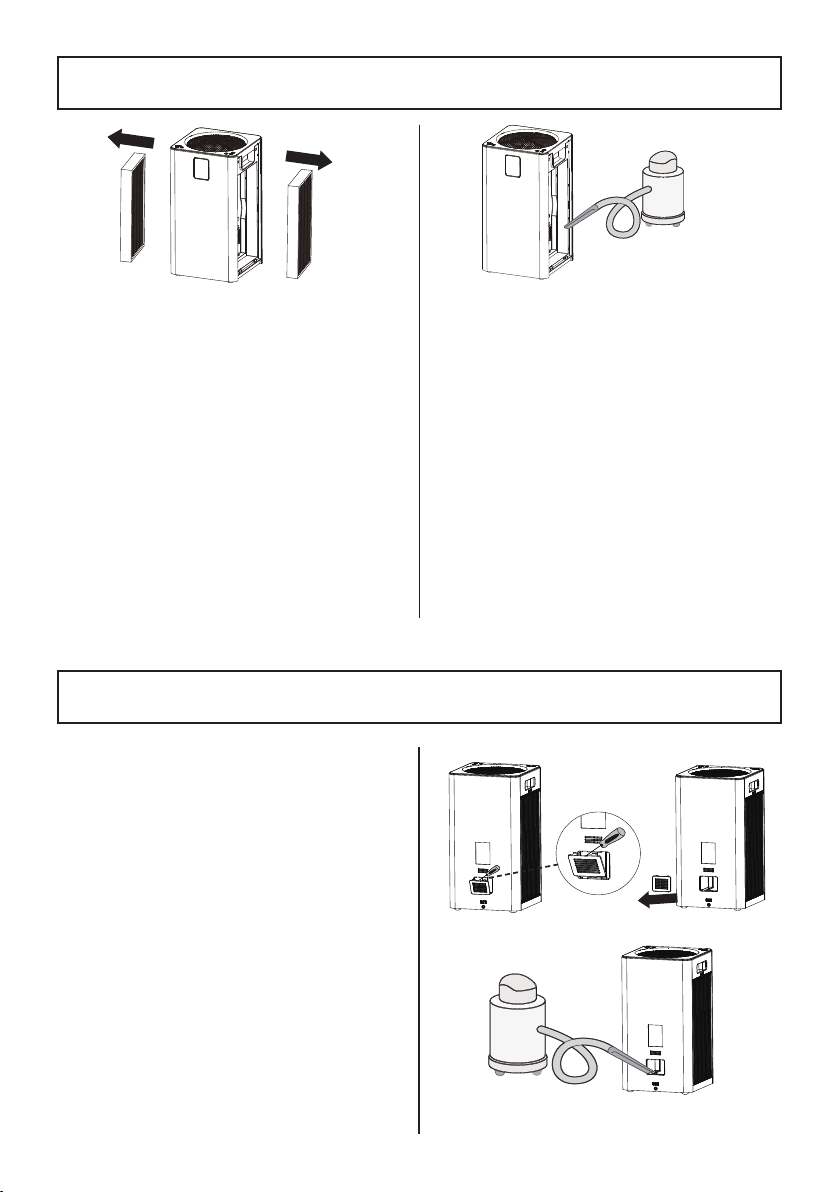
3. Clean outer surface of the filter using a
soft cloth to remove hair, dust, and large
particles.
NOTE:
Do not clean the filter with water or
other liquids.
ONLY clean the pre-filter surface. Do not
clean the HEPA filter, and activated carbon
filter.
4. Clean out any remaining dust or hair
inside the air purifier using a vacuum
hose. Do not use water or liquids to
clean the air purifier.
5. Replace the cleaned filters back
into the air purifier. See ASSEMBLY
INSTRUCTIONS (page 9).
6. If required, replace with new filters.
Unwrap the new filters from the
packaging and install them into the air
purifier. See page 7 for instructions on
how to order new filters.
7. Install the filter covers back into the air
purifier. See ASSEMBLY INSTRUCTIONS
(page 10).
8. Plug in the air purifier. Reset the filter life
as outlined in Filter Reset Button (page 12).
There is a PM2.5 sensor at the back side
of the air purifier. It can be blocked by
dust, affecting the sensor's accuracy. It is
recommended to clean the sensor every 3
months.
If the air purifier is used in an environment
with more dust, you may need to clean the
sensor more often.
1. Unplug the air purifier. Carefully pry the
sensor cover with a flat head screwdriver
and remove the cover.
2. Use a vacuum hose to clean out any dust
inside the sensor area.
3. Install the cover back into place.
CLEANING THE SENSOR
- 15 -
CLEANING & REPLACING FILTERS
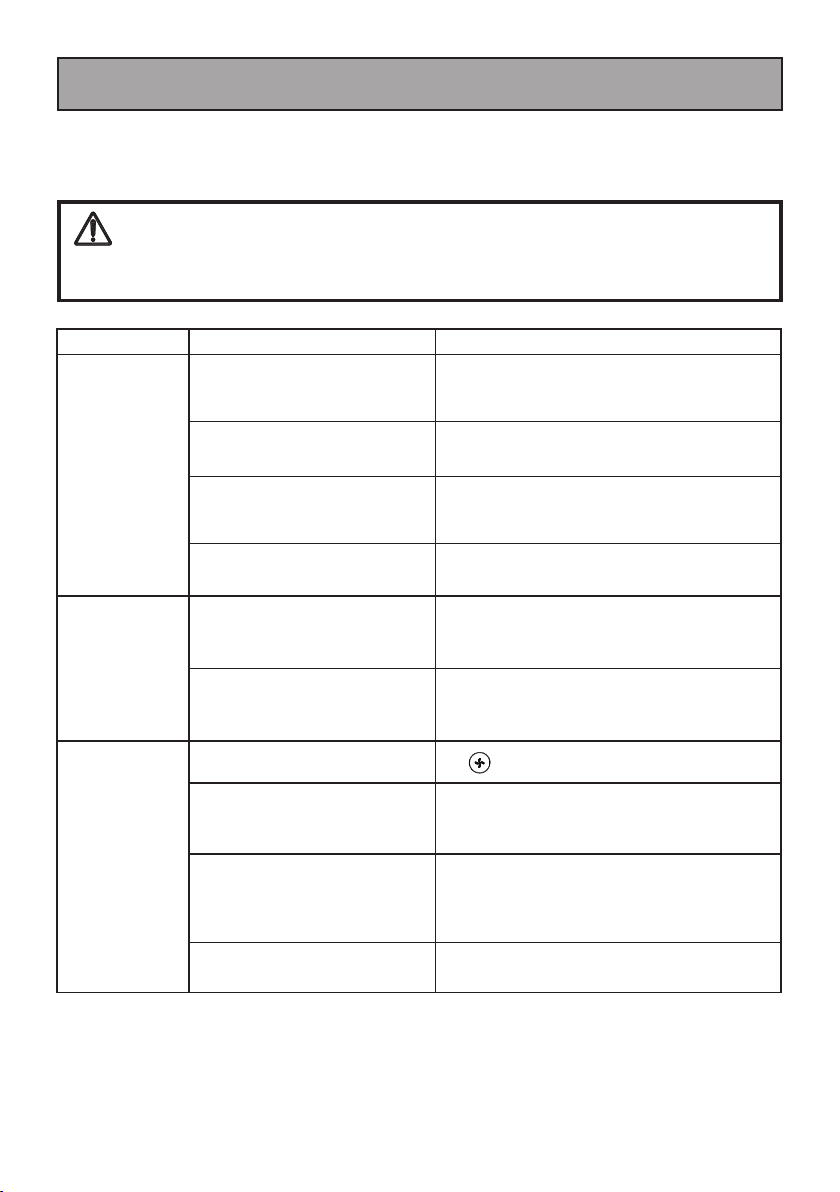
PROBLEM POSSIBLE CAUSE SOLUTION
Air purifier will
not turn on or
respond to button
controls.
Connection problem.
Make sure that the power cord is fully plugged
into the wall outlet, and the ON/OFF button is
turned on.
Filter covers are not installed
properly.
Re-install the filters and filter covers correctly.
Defective wall outlet.
Check with a good appliance or lamp. Be sure
the power plug is fully plugged into a good
wall outlet.
The power cord is damaged.
Call 1-877-531-7321 (US) / 1-844-608-3081
(CA) for assistance.
Fresh air cannot
be delivered
smoothly from
the air outlet.
The plastic packaging on the new
filters has not been removed.
Remove the plastic packaging.
The air outlets of the air purifier
are blocked by foreign objects.
Remove the foreign objects.
Poor air
purification
quality.
Low fan speed. Tap
to change fan speed.
The air inlet or outlet is blocked
by foreign objects.
Remove the foreign objects.
The room exceeds the applicable
area of this product.
If the room is larger than 465 ft² / 43 m², air
purification will take longer. The air purifier may
not be as effective in larger rooms. Close doors
and windows while using the air purifier.
The composite filter needs to be
replaced.
Replace the filter. See page 7 for instructions
on how to order new filters.
- 16 -
Review this table to find do-it-yourself solutions for minor performance problems. Any
service needed, other than maintenance described in this Use & Care Guide, should be
performed by a qualified service agent.
TROUBLESHOOTING
WARNING
Disconnect electrical supply before performing maintenance to the air purifier. Failure
to do so could result in electrical shock or personal injury.
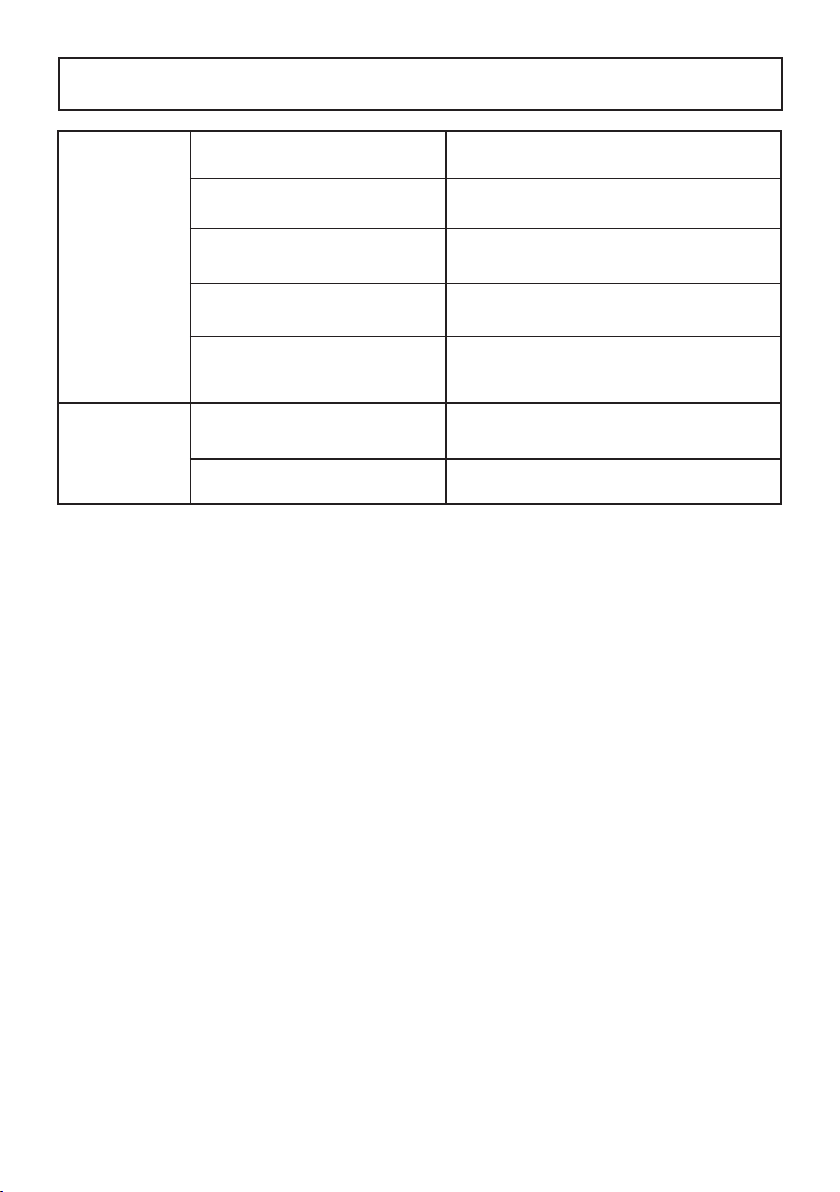
Abnormal noises
during operation.
The plastic packaging on the new
filters has not been removed.
Remove the plastic packaging.
The air purifier is not placed on a
level surface during operation.
Make sure the air purifier is operating on a
hard, flat, level surface.
The air inlet or outlet is blocked by
foreign objects.
Remove the foreign objects.
The composite filter needs to be
replaced.
Replace the filter. See page 7 for instructions
on how to order new filters.
Foreign object may be inside the
air purifier.
Stop using the air purifier and call 1-877-
531-7321 (US) / 1-844-608-3081 (CA) for
assistance.
Strange odor
comes from the
air purifier.
The composite filter needs to be
cleaned or replaced.
Clean the filter or replace if necessary.
High humidity. Avoid using in an area with high humidity.
- 17 -
TROUBLESHOOTING
