1

Thank You for Choosing Us!
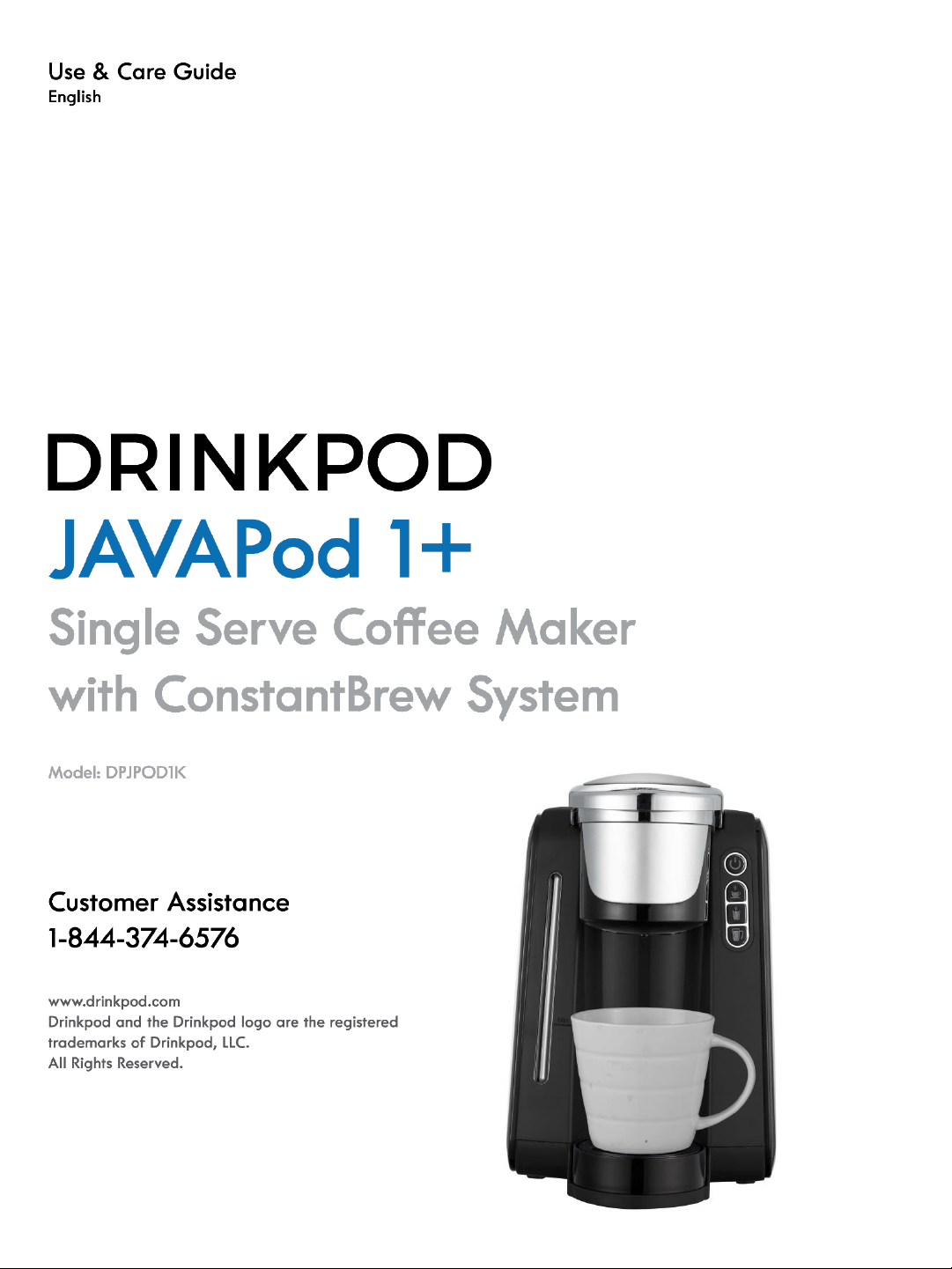
Get ready to enjoy your new JavaPod 1+
Single Serve Coffee Maker with Refill Kit!
Instructions for the ConstantBrew refill
system are included in a separate guide.
IMPORTANT SAFEGUARDS -------------------------------------------------------------------------3
NOTES ON THIS MANUAL --------------------------------------------------------------------------4
UNPACKING ------------------------------------------------------------------------------------------- 5
STARTING UP------------------------------------------------------------------------------------------5
OVERVIEW OF THE CONSTANTBREW PARTS AND CONTROLS----------------------------6
INSTALLING THE CONSTANTBREW WATER LINE (ACCELERATED METHOD) -----------7
INSTALLING THE CONSTANTBREW WATER LINE (STANDARD METHOD) ---------------8
INSTALLING THE CONSTANTBREW REFILL SYSTEM ----------------------------------------12
USING THE CONSTANTBREW REFILL SYSTEM -----------------------------------------------14
OVERVIEW OF THE JAVAPOD PARTS AND CONTROLS-------------------------------------15
HOW TO BREW -------------------------------------------------------------------------------------16
HOW TO PROGRAM YOUR DEFAULT COFFEE VOLUME------------------------------------18
HELPFUL HINTS -------------------------------------------------------------------------------------18
CLEANING AND MAINTAINING YOUR SINGLE SERVE BREWER--------------------------19
TROUBLESHOOTING YOUR SINGLE SERVE BREWER----------------------------------------20
WARRANTY / TECHNICAL DATA -----------------------------------------------------------------22
TABLE OF CONTENTS
Drinkpod LLC 888 852 7873
www.drinkpod.com
2

IMPORTANT SAFEGUARDS
When using electrical appliances, basic safety precautions should be followed, including the
following:
1. Read all instructions before using.
2. Do not touch hot surfaces. Use handles and knobs when available. Scalding may occur if
the coffee brewer is moved or opened or K-Cup® Pack is disturbed during brewing cycles.
3. This appliance must be properly installed and located in accordance with these
instructions before it is used.
4. The use of other accessory attachments not recommended by Drinkpod LLC may result in
fire, electrical shock or injury to persons.
5. Do not place on or near a hot gas or electric burner, or in a heated oven.
6. Do not use outdoors.
7. To protect against fire, electric shock and injury, do not immerse cords, plugs or the
appliance in water or any other liquid.
8. Only use Water in this appliance! Do not put any other liquids or foods in the Water
Reservoir.
9. To disconnect, unplug power cord when not in use and before cleaning. Allow to cool
before putting on or taking off parts, and before cleaning the appliance.
10. Do not operate any appliance with a damaged cord or plug or after the appliance
malfunctions or is damaged in any manner.
11. Do not let the cord hang over the edge of the table or counter.
12. Close supervision is necessary when any appliance is used by or near children.
13. Do not open the brewer while brewing is in progress.
14. Do not use appliance for other than intended use.
15. To disconnect, turn any control to “off,” then remove plug from wall outlet.
16. Risk of Fire or Electric Shock. Do not open internally . No user serviceable parts are
inside. Repair should be done by authorized service personnel only.
17.Do not open the brewer head or take away the cup until the size serving button stops
flashing.
CAUTION: There are two sharp needles that puncture the K-Cup® pack, one above the K-
Cup® pack Holder and the other in the bottom of the K-Cup® pack Holder. To avoid risk of
injury, do not put your fingers in the K-Cup® pack Assembly Housing.
CAUTION: There is extremely hot water/steam in the K-Cup® pack Holder during the brew
process. To avoid risk of injury, do not lift the Handle or open the K-Cup® pack Assembly
Housing during the brewing process.
WARNING: To reduce the risk of fire or electric shock, do not remove any service covers.
There are no user serviceable parts inside the coffeemaker. Only authorized personnel
should repair the coffeemaker.
Drinkpod LLC 888 852 7873
www.drinkpod.com
3

Notes on this operating manual
This operating manual cannot cover all possible circumstances. For further information or in case
of problems not adequately covered in this operating manual, please contact the service and sales
center.
Please keep this operating manual safe and pass it on to the
next user.
SPECIAL CORD SET INSTRUCTIONS
1. A short power supply cord is provided to reduce the hazards resulting from becoming
entangled in, or tripping over, a longer cord.
2. An extension cord may be purchased and used if care is exercised in its use.
3. If an extension cord is used, the marked electrical rating of the extension cord must be at as
great as the electrical rating of the appliance. If the appliance is of the grounded type, the
extension cord should be a grounding type 3-wire cord. The resulting extended cord must be
arranged so that it will not drape over a countertop or tabletop where it can be pulled on by
children or tripped over accidentally.
Please read all the instructions in this manual carefully before you begin to use this appliance.
Proper care and maintenance will ensure a long life and a trouble-free operation for this appliance.
Please save these instructions and refer to them for cleaning and care tips.
SERVICING SHOULD BE PERFORMED BY AN
AUTHORIZED SERVICE FACILITY.
SAVE THESE INSTRUCTIONS
Drinkpod LLC 888 852 7873
www.drinkpod.com
4
Starting up
Before using for the first time
Caution: improper handling of electrical equipment is dangerous
Please pay attention to the safety safeguards in this manual, specifically the following:
• Danger of scalding: beware of hot water & steam
• Do not operate the machine with an empty water tank or water is less than MINIMUM
level.
• Hot water will be dropped during pre-heating. Do not put the hands under the water drip
• Do not open the handle when the machine is brewing.
• Always pull out the power plug before cleaning the machine
• Only use the machine in a dry room
Thoroughly rinse out the water tank with fresh water before using for the
first time. Clean the k-cup coffee brewer using a damp cloth only.
UNPACKING
− Remove your coffee brewer from its packaging
− After unpacking, please check that the following parts are included:
1. JavaPOD1+ Coffee Brewer
2. ContantBrew Refill System
3. ConstantBrew Installation Kit
4. K-Cup Optional Reuable Filter Holder
5. 50 White Paper Coffee Filters
Note:
− Check that your home power supply voltage is
the same as marked on the machine rating plate
− Destroy all the plastic bags to prevent danger to children.
Tip:
Keep the packaging boxes for transporting the machine
(e.g. for removals, servicing, etc.)
Note:
You may find a little water remaining in the machine.
In order to ensure that this machine works perfectly, it was tested with water before leaving the
factory.
The exclamation point within an equilateral triangle is intended to alert the user to the
presence of important operating and maintenance (servicing) instructions in the literature
accompanying the appliance.
The lightning flash with arrowhead symbol, within an equilateral triangle, is intended to
alert the user to the presence of uninsulated “dangerous voltage” within the product’s
enclosure that may be of enough magnitude to constitute a risk of fire or electric shock to
persons.
Drinkpod LLC 888 852 7873
www.drinkpod.com
5
ConstantBrew System
Drinkpod LLC 888 852 7873
www.drinkpod.com
6
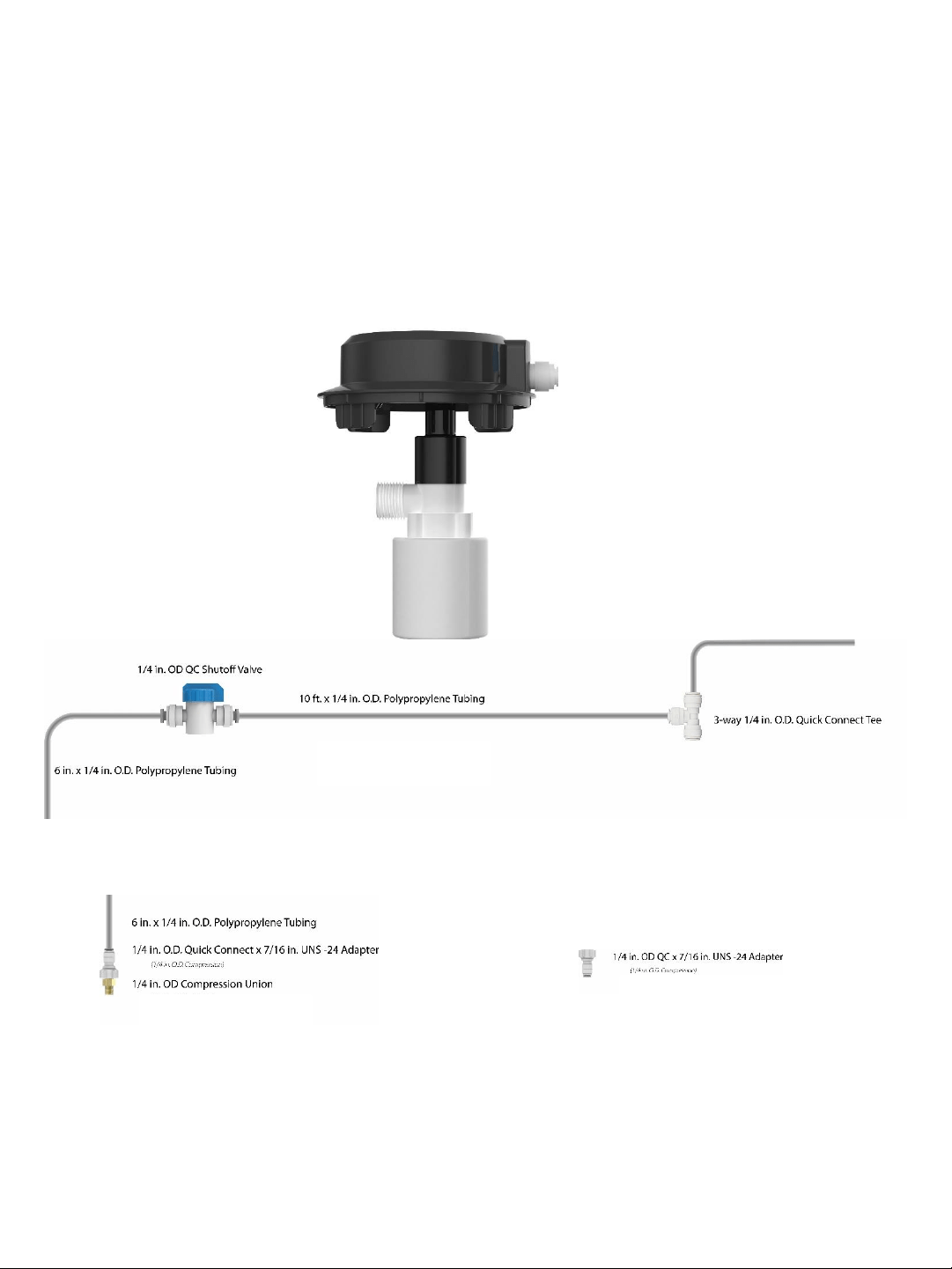
ConstantBrew Refill System
Kit Includes:
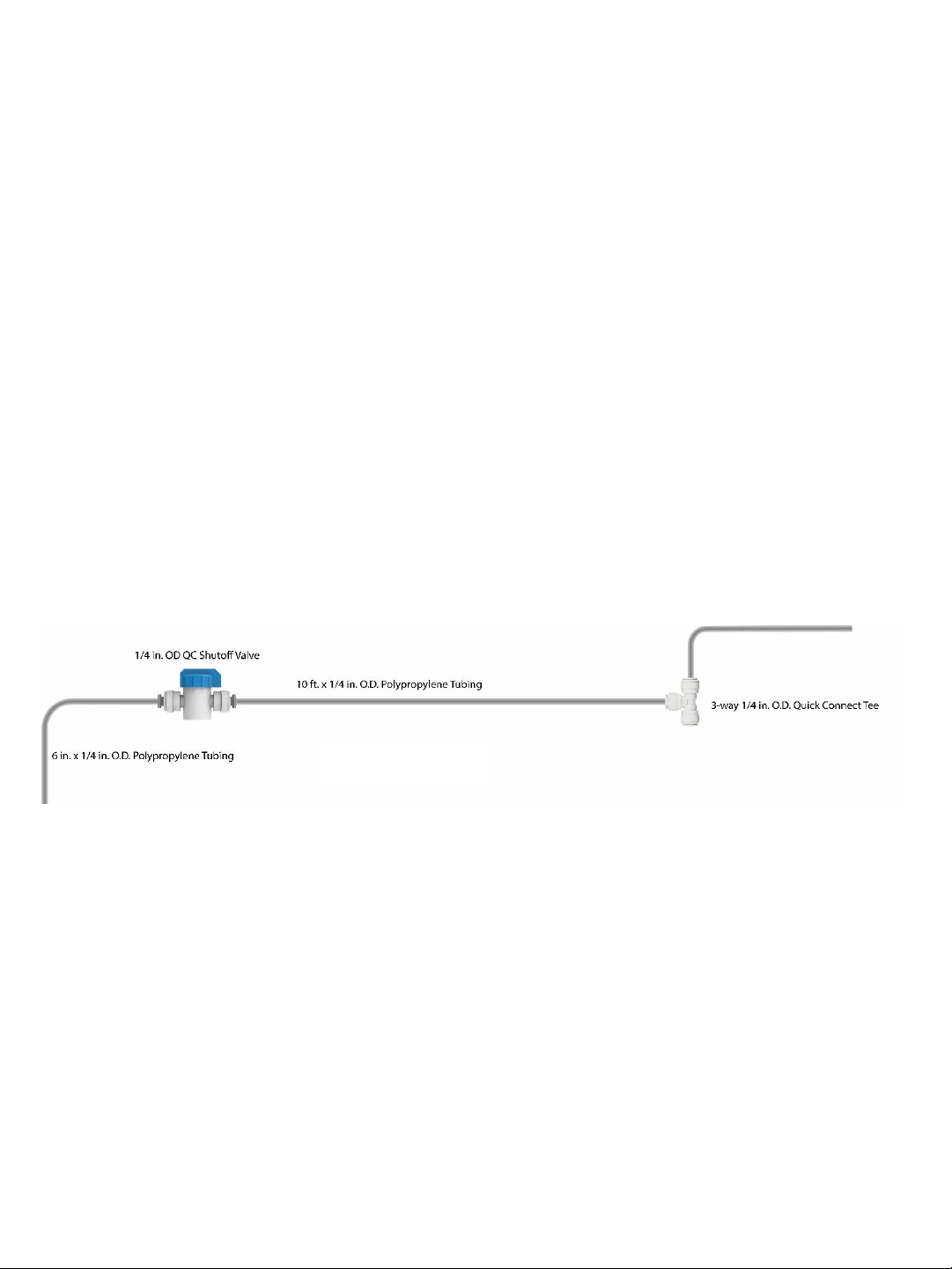
Assembly 1
Connect Point (A)
Connect Point (B1)
Connect Point (C1)
Assembly 2
Connect Point (C2)
Connect Point (D)
Adapter
Connect Point (E)
Connect Point (B2)
The ConstantBrew system refills the water reservoir automatically whenever the
water level is low. ConstantBrew is designed to connect to water line that goes
into a kitchen appliance for like a refrigerator. The following installation instruction
is under the circumstance that you need 1/4 inch water line. If that is not the
case, an adapter is required for the installation.
Drinkpod LLC 888 852 7873
www.drinkpod.com
7
Installing The ConstantBrew Water Line
Installation Overview
Are you ready to impress your significant other, parents, or cat with your mad plumbing skills
with ease? Let’s get started!
Directly below, we’ve provided the option for a shortcut installation method. It requires that you
have a ‘plastic’ water line (not copper or braided stainless steel) and don’t mind cutting it.
However, if you need to be able to disconnect everything and return it to it’s initial state (i.e. if
you rent or lease) continue on to the standard installation method on the next page.
Accelerated Installation Method (unreversible)
1. Identify and turn off water source.
2. Choose where you want to splice into your water line and slice it at a 90 degree angle (it
helps to put a towel below to catch the dripping water).
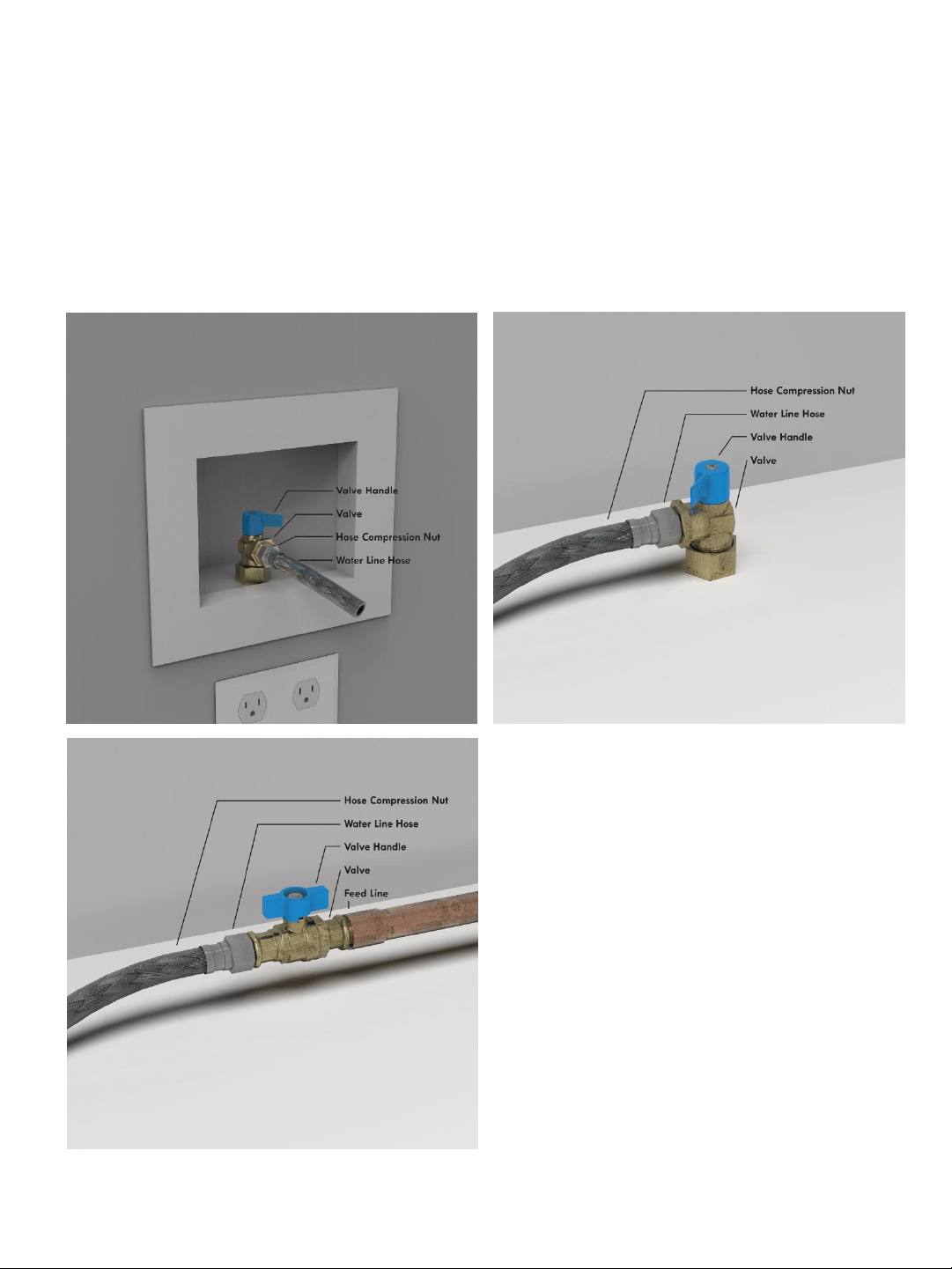
3. Remove the short run of tubing attached to Connect Point B1 on Assembly 1 (see below).
4. Connect one end of your spliced ice maker water line to where you removed the tubing
(Connect Point B1) and connect the other end to Connect Point C1.
5. Remove the transparent plastic cap from the reservoir on your JavaPod, and replace with the
ConstantBrew system.
6. Insert the tubing from (Connect Point A) to the port on the back of the ConstantBrew
system.
7. Turn on the water source and the shutoff valve on Assembly 1.
8. Read the instructions for using the ConstantBrew system.
Assembly 1
Connect Point (A)
Connect Point (B1)
Connect Point (C1)
Drinkpod LLC 888 852 7873
www.drinkpod.com
8
Installing The ConstantBrew Water Line
Standard Installation Method
Step #1 – Shutting off your water source.
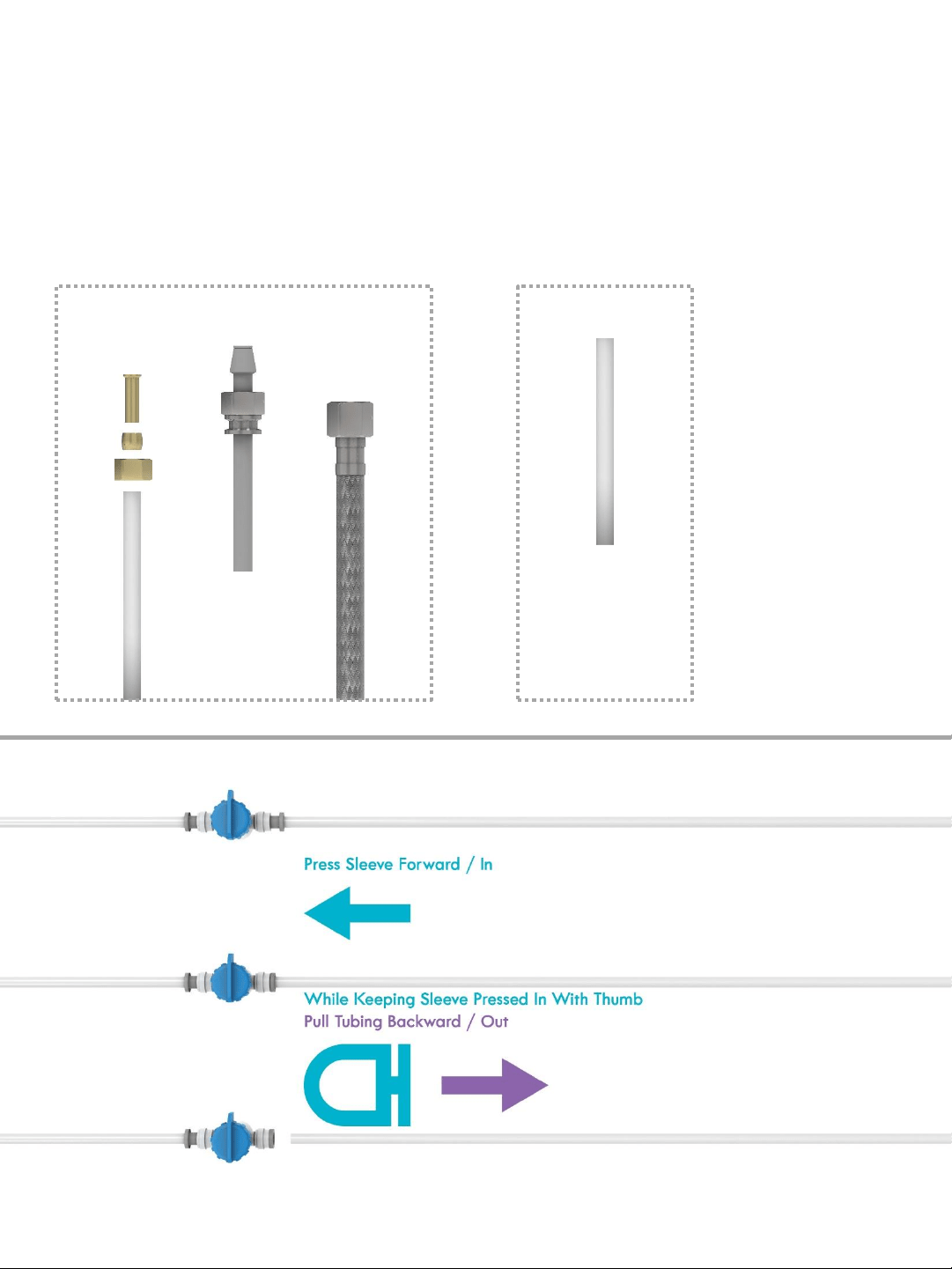
The images below illustrate the most common formats for your ice maker water source. Once
you’ve located yours, shut off the valve.
Drinkpod LLC 888 852 7873
www.drinkpod.com
9
Installing The ConstantBrew Water Line
Step #2 – Disconnecting your ice maker line.
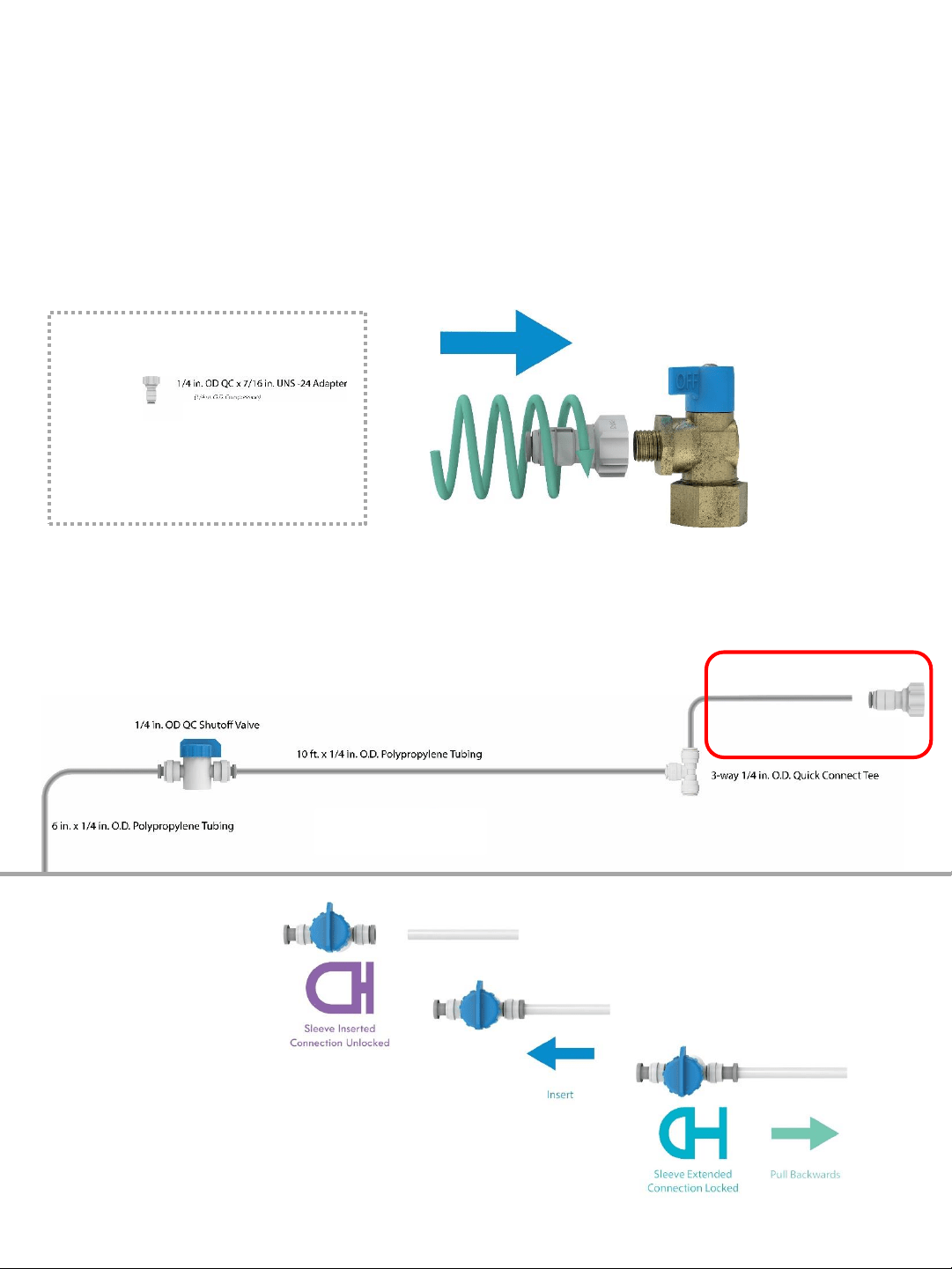
The images below illustrate what your water line may look like. To simply things, it’s either
threaded (compression) or not threaded (quick connect). If it’s threaded, use a wrench or pliers
to unscrew the compression nut at the end and disconnect it. If it’s not threaded, see the
illustration at the bottom of the page for how to disconnect Quick Connect fittings.
Quick Connect
Tubing with
Brass Fitting
Copper or Plastic
Water Line
Braided
Stainless Steel
Water Line
Compression
Quick Connect
Tubing (no
fittings)
Quick Connect
Disconnecting Quick Connect Fittings
Drinkpod LLC 888 852 7873
www.drinkpod.com
10
Installing The ConstantBrew Water Line
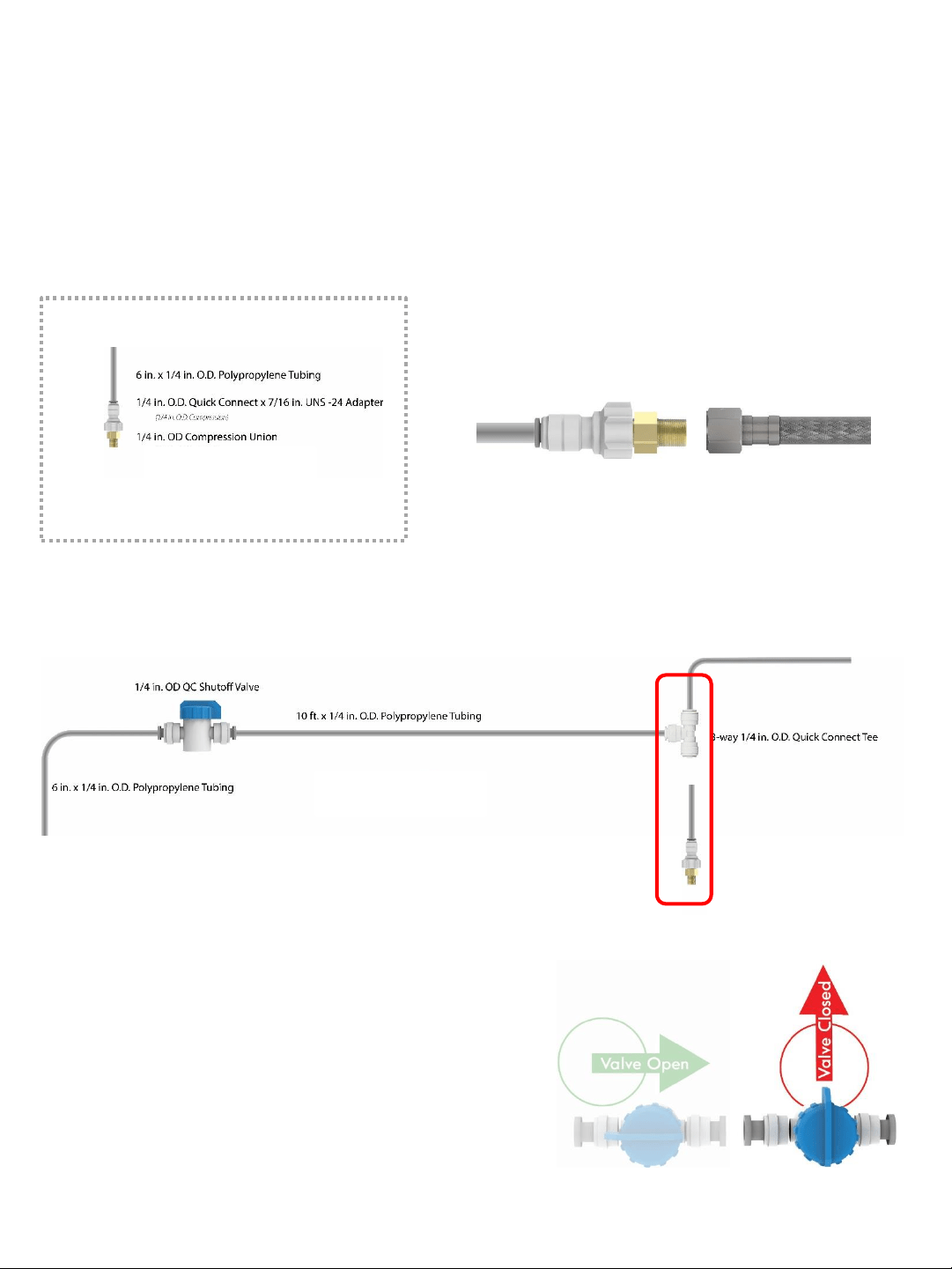
Step #3 – Connecting Assembly 1 to ice maker source.
Now we want to hook up Connect Point (B1) on Assembly 1 to your water source.
If your connection is threaded (1/4 in. O.D. compression):
Screw Connect Point (E) on the Adapter (included with your kit) onto the threaded connection of
your ice maker water source. If it’s not threaded, skip this part.
Step #3 (continued)
Now insert the tubing (Connect Point (B1) on Assembly 1 to your ice maker source or Connect
Point (B2) on the Adapter (if it is threaded) following the illustration at the bottom.
Assembly 1
Connect Point (B1)
Adapter
Connect Point (E)
Connect Point (B2)
Connecting Quick
Connect Fittings
Connect Point (B2)
Connect Point (E)
Drinkpod LLC 888 852 7873
www.drinkpod.com
11
Installing The ConstantBrew Water Line
Step #4 – Connecting Assembly 1 to ice maker.
Now we want to hook up Connect Point (C1) on Assembly 1 to your ice maker (water line).
If your hose is threaded (1/4 in. O.D. compression):
Screw it onto Connect Point (D) on Assembly 2 (included with your kit. If it’s not threaded, skip
this part.
Step #4 (continued)
Now insert the tubing of your ice maker hose or (if it is threaded) Connect Point (C2) on
Assembly 2 to Connect Point (C1) on the Assembly 1.
Assembly 2
Connect Point (C2)
Connect Point (D)
Assembly 1
Connect Point (C1)
Connect Point (C2)
Assembly 2
Connect Point (D)
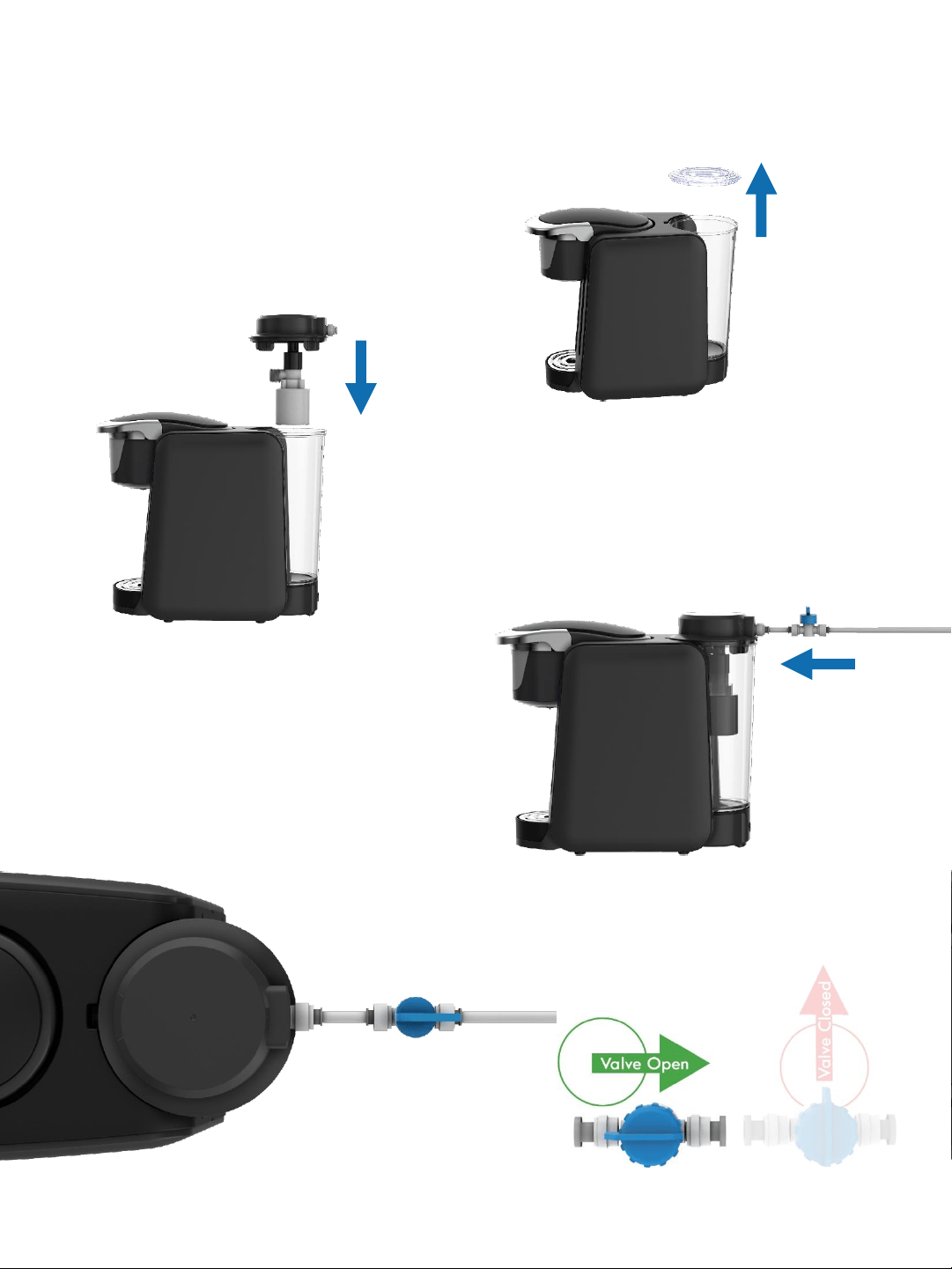
Step #5 – Confirm Assembly 1 shutoff valve is closed.
Before we open your ice maker water source shutoff valve, we want to make sure that the valve
on your Assembly 1 is closed so water doesn’t spray everywhere. The handle should be twisted
so that it is perpendicular to the ports at either end.
Step #6 – Open ice maker water source shutoff
valve.
Now you can re-open (turn back on) the valve on your
ice maker box (water source).
Drinkpod LLC 888 852 7873
www.drinkpod.com
12
Installing The ConstantBrew Refill System
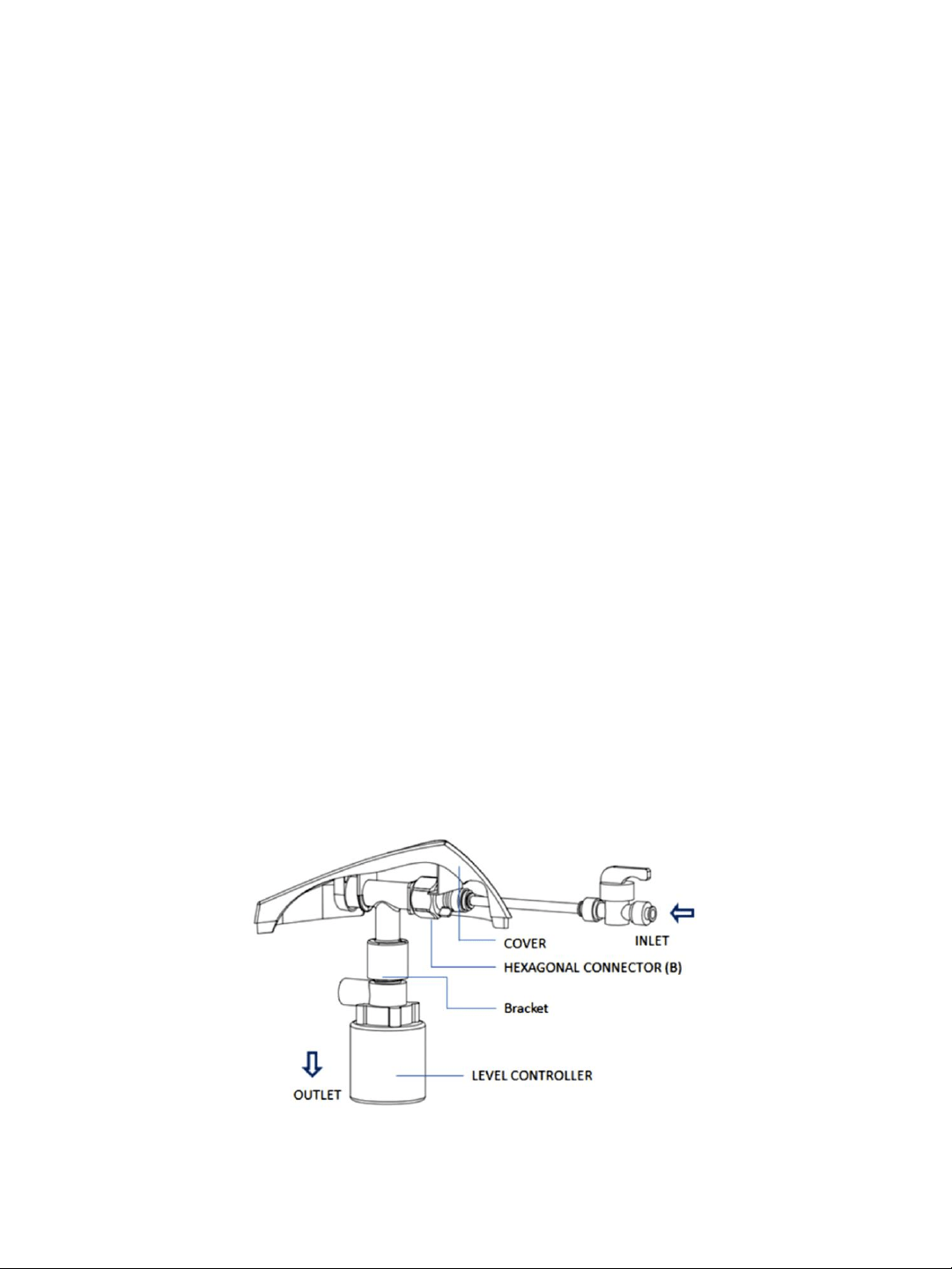
Step #7 – Remove JavaPod Reservoir Lid.
Pull off the transparent lid on the reservoir
mounted at the back of the JavaPod.
Step #8 – Install the ContantBrew system.
Insert the ConstantBrew system down and into the
reservoir so that the port is located at the back.
Step #9 – Connect water line.
Insert the ConstantBrew system down and into the
reservoir so that the port is located at the back.
Step #10 – Turn on water.
Turn the blue handle on the shutoff valve 45 degrees
CCW to enable water flow.
Drinkpod LLC 888 852 7873
www.drinkpod.com
13
Using The ConstantBrew Refill System
ATTENTION
You should always shut off the water valve:
a) Before you remove the ConstantBrew system from the water reservoir.
b) If the system will be unsupervised for long periods of time (i.e. vacation).
Under no circumstance is Drinkpod responsible for any damages caused from failing to
shut off the water valve.
Usage Tips
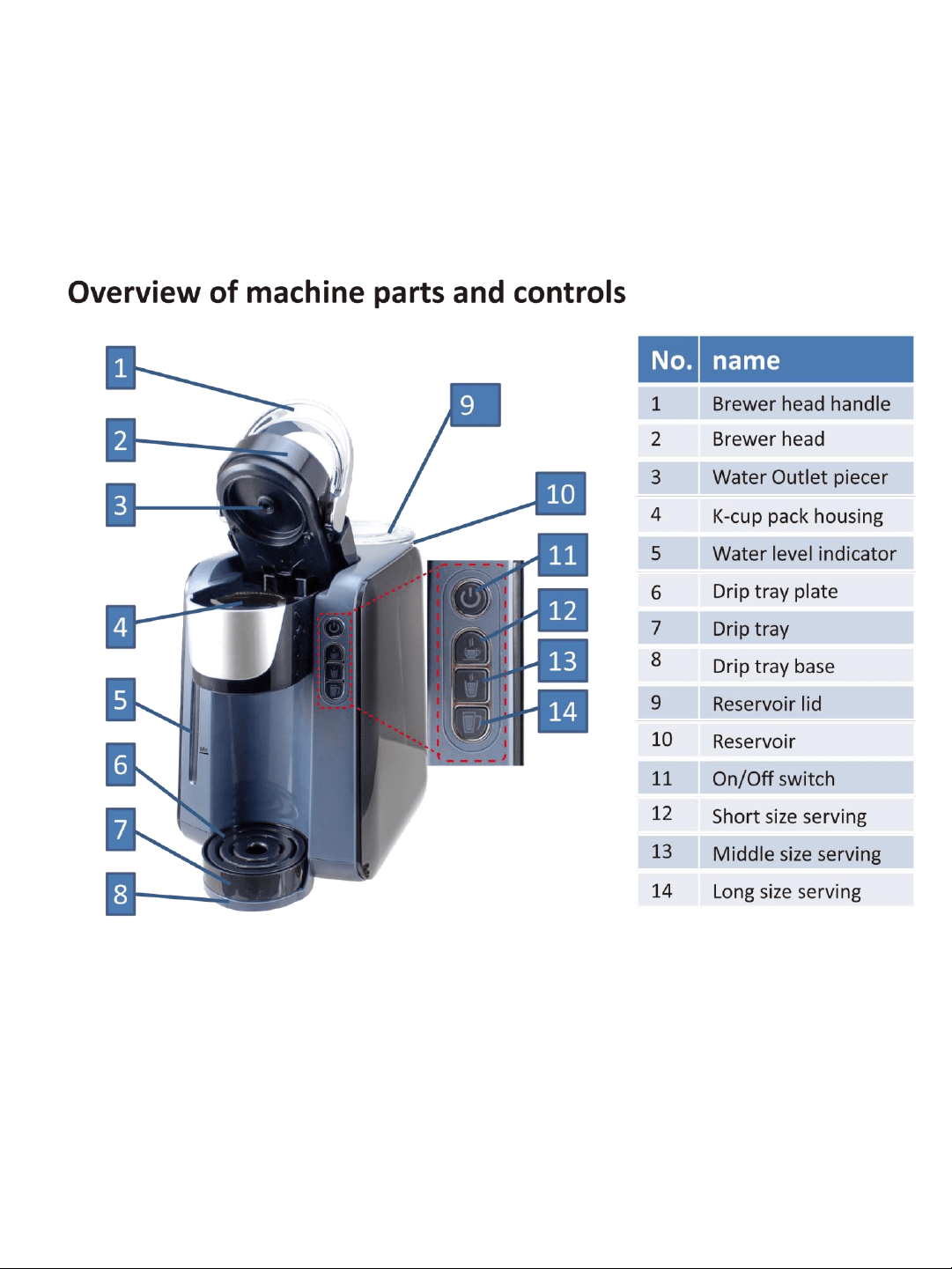
If you experience any dripping, use a wrench or pliers to tighten the hexagonal connector
(see below).
Due to the potential for scale buildup leading to the float valve becoming immobilized,
for household use, we suggest replacing your ConstantBrew system every 18 months. For
Commercial usage, we suggest replacing after 6 months. Use with a water filter is
recommended.
To maximize the life of the auto refill system, please shut off the water valve when you
are not using it.
Sometimes, users with higher than normal water pressure may experience the float valve
not shutting off soon enough (leading to over filling). Should this occur, the water
pressure to the system can be reduced by turning the shutoff valve to a midway position
(between open and closed).
Drinkpod LLC 888 852 7873
www.drinkpod.com
14
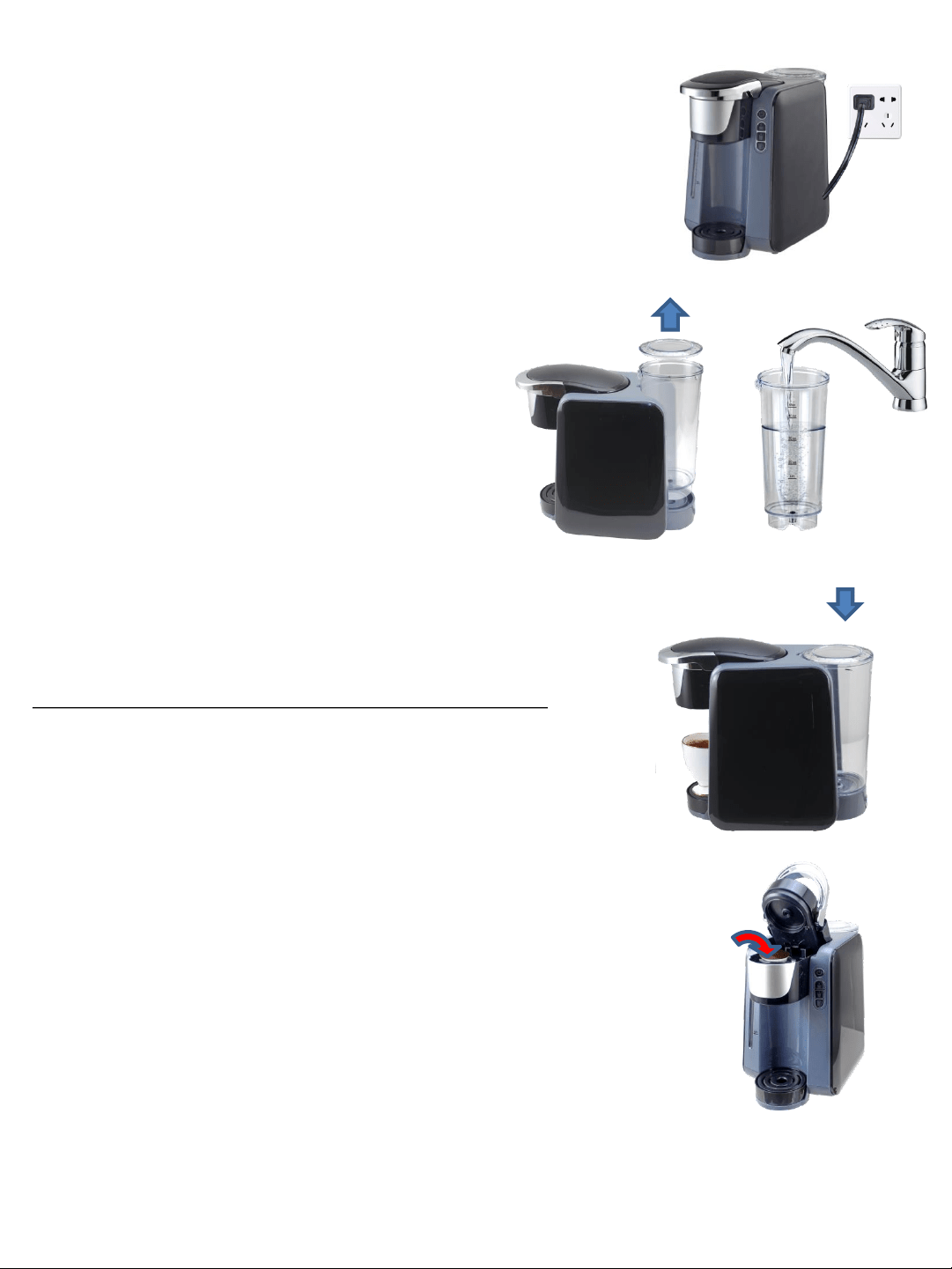
POWER UP
Place Brewer upright on a flat surface, remove all product packaging
and plug into outlet.
FILL THE RESERVOIR
Option 1: Manual Fill
Remove reservoir and reservoir lid, then fill with
water to the MAX FILL line.
Option 2: Direct Connect to a Water Source
Please refer to the ConstantBrew Manual included
in the box.
SET RESERVOIR ON BREWER
Replace reservoir lid and place reservoir on top Brewer.
Note: make sure that the reservoir is well put on the brewer
IMPORTANT NOTE
The JavaPOD appliance has a water level sensor. If the water level is
lower than the minimum line, the brewer will not brew until the new
water is above the minimum line. An indication of a flashing light in the
water level indicator will appear.
CHOOSE YOUR COFFEE
The JavaPOD offers 2 ways to Brew.
Option 1: Use Ground Coffee
1. Use the Refillable, Reusable K-Cup Coffee Filter included in the Box.
2. Place 1 Paper Filter in the Mesh Holder
3. Choose your favorite Ground Coffee and add it inside the paper
filter.
4. Lift the handle of the brewer and insert the Reusable K-Cup Coffee
Filter into the k-cup pack housing.
Drinkpod LLC 888 852 7873
www.drinkpod.com
15
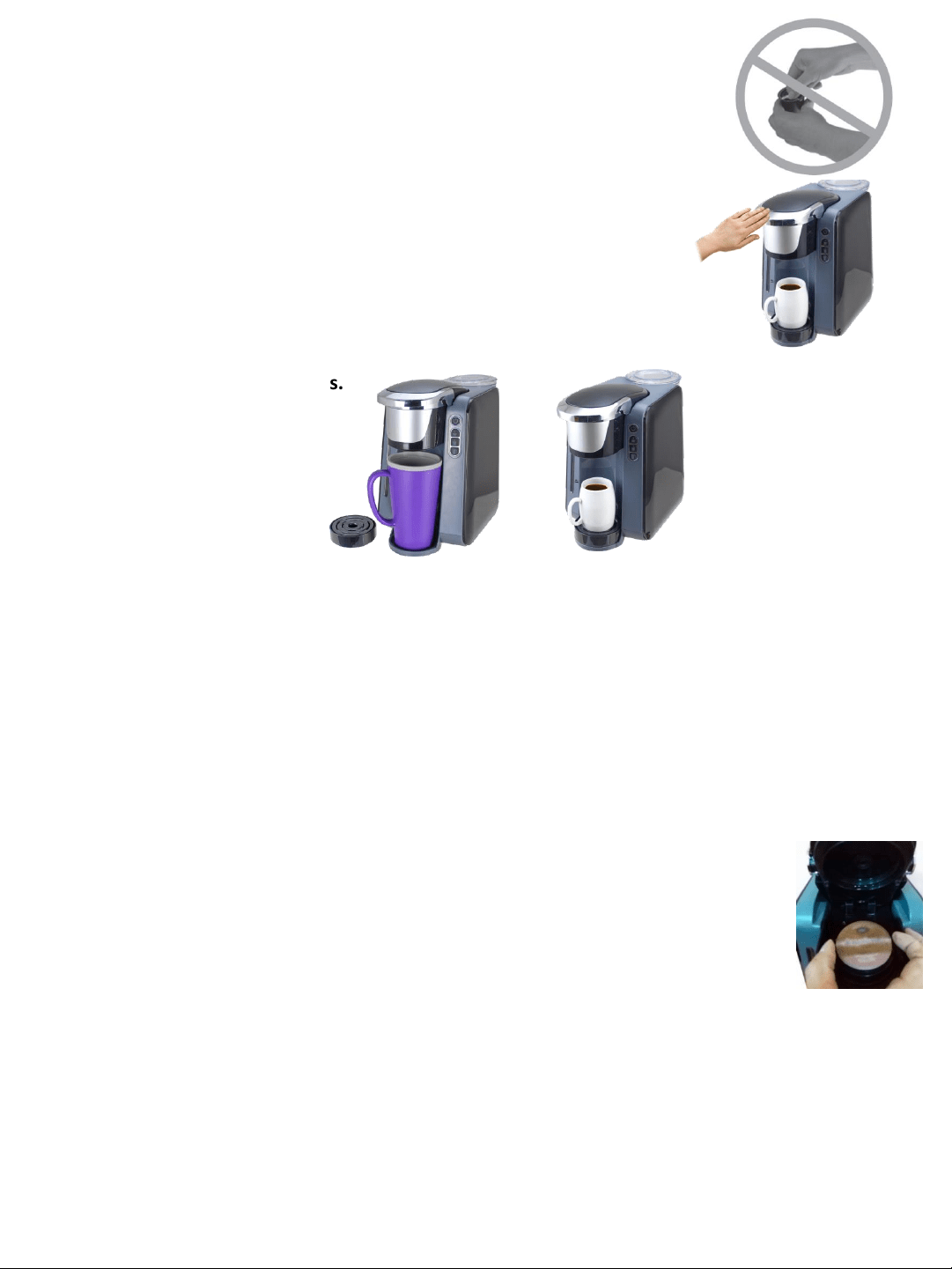
Option 2: Choose your K-Cup
Lift the handle of the brewer and insert a chosen K-Cup® pack into
the k-cup pack housing. Do NOT peel off the foil cover of the k-cup
pack.
CAUTION: Avoid the sharp piercing pin inside the brew head (it will
be hidden when the handle is opened)
Close by pressing down on top of the brew head handle
NOTE: K-Cup® pack will be punctured when closing the brew head.
TURN ON
Press the On/Off button to start the heating process.
After 30 seconds, the buttons will stop blinking indicating the heating up process is complete.
LETS GET BREWING
Select Brew Size by pressing the serving size button . You will hear a beep indicating the brew is
starting.
During the brewing process, the button will flash and it will automatically stop when the
brewing time is reached . You will hear 2 beeps.
(The process can be stopped manually by pressing the same button and beep 2 x).
Caution: Before opening the lid, allow the JavaPOD brewer to escape steam & residual water
for 20 seconds.
YOUR COFFEE IS READY
Remove the used K-cup from the brewer as per the figure,
& keep your hands far from the hot water outlet.
Caution: Do not open the handle when the machine is brewing, if the brewer is opened
unintentionally the pump will stop the brewing with all lights flashing & beeping indicating it is
danger of scalding and hot water spitting from the brewer head. Close the handle immediately
to its position.
Pump always stops earlier while this does not mean the brewing process is complete. The
button continues to blink for 20 seconds to allow steam/residual water to escape. Do NOT lift
the handle during this steam/residual water escaping stage.
Place your coffee cup in the dispense area on the drip tray.
NOTE: Drip Tray and Drip Tray Plate can be removed to
accommodate larger travel mugs.
Drinkpod LLC 888 852 7873
www.drinkpod.com
16
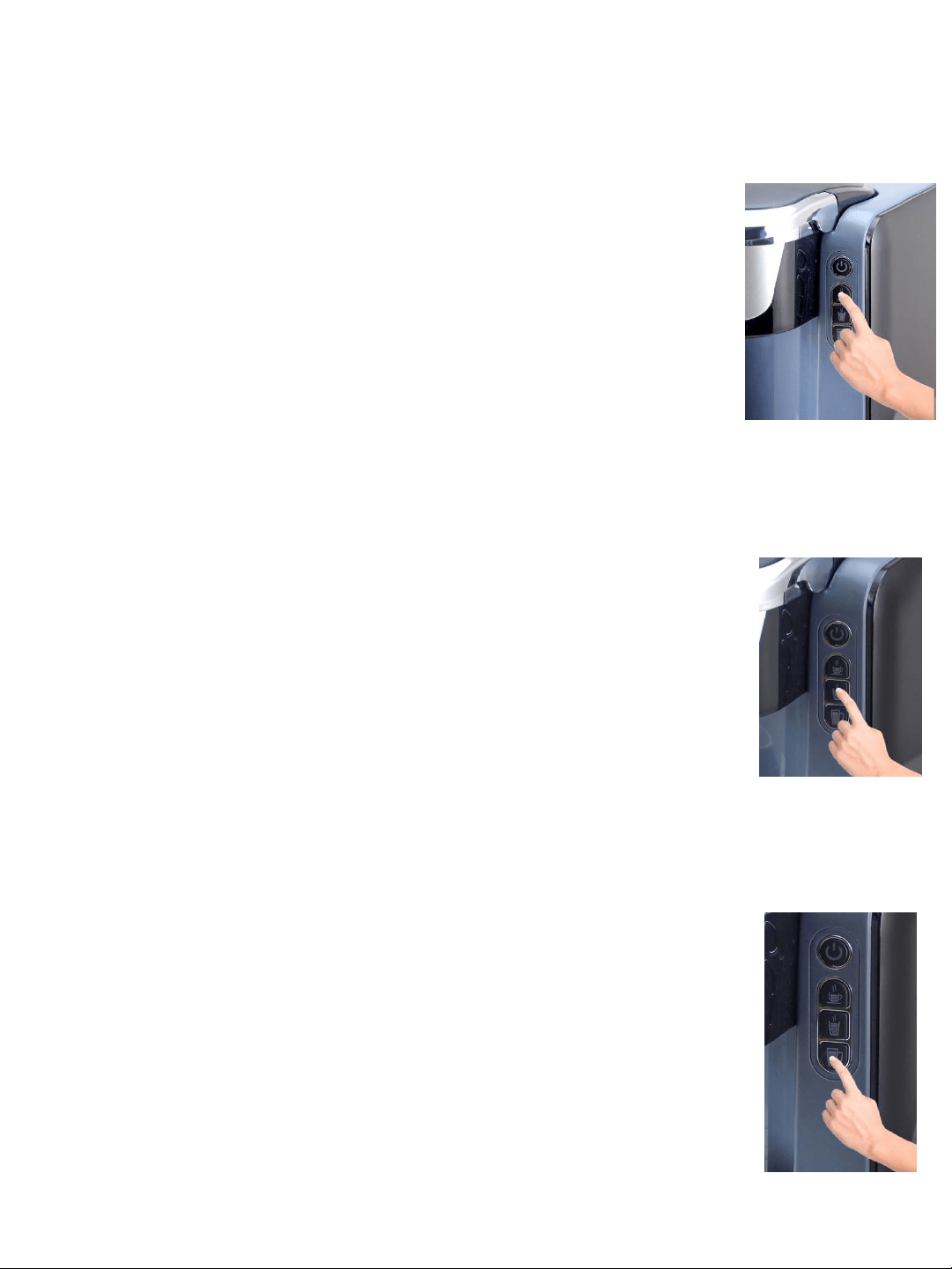
How to change default coffee volume ( 6oz- 8 oz-10 oz):
A. Leave the machine unplugged.
B. Press the hold the small cup button while simutaneously inserting the plug
into the socket..
C. The middle cup button is lit steadily, which stands for the factory default
setting.
D. You can press the small cup size to set the default volume at: 4oz- 6oz- 8 oz
for the 3 buttons.
E. Or you can Press the big cup button to set the default volume at: 8oz- 10oz-
12oz.
F. After you choose the setting, press the on/off button. All buttons will go off.
G..Turn on the brewer by pressing on/off button and the new coffee volume is
programmed.
How to set the Stand-by time
The brewer will shut off automatically once the auto shut off time is reached.
The default setting from the factory is 1 hour. To change the auto shut off time
follow the instructions below
1. Ensure that the brewer is unplugged before programming
2. Press the MEDIUM CUP button and hold it down while simultaneously while
plugging the brewer into the outlet. Hold the button in until you hear two short
beeps. The ON/OFF button will begin to blink and the MEDIUM CUP button will
illuminate steadily which represents the default setting of 1 hour before your
brewer automatically turns off.
3. Press the SMALL cup button to change the setting to fifteen minutes
4. Press the LARGE cup button to change the setting to two hours.
5. After you have selected the preferred auto-off time press the ON/OFF
button to record the setting to the brewer memory.
6. Press the ON/OFF button again to turn your brewer back on using your new
settings.
7. The new settings will stay in memory regardless if the machine is unplugged.
You only need to set it one time.
How to reset the machine.
A. Leave the machine unplugged.
B. Press the big cup button & simutaneously insert the plug into socket.
C. The blue light of the water level gauge will flash twice with beeps, indicating
the reset is completed.
D. After the reset, the volume setting is 6oz- 8oz-10 oz for the 3 buttons.
The auto shut off time is 60 minutes.
TIP FOR FIRST TIME USE: It is suggested to make a cup of water that will rinse the inside as well
as help warm up the machine.
Drinkpod LLC 888 852 7873
www.drinkpod.com
17

• De-Scaling – Mineral content in water varies from place to place. Depending on the mineral
content of the water in your area, calcium deposits or scale may build up in your Brewer.
Scale is non-toxic, but left unattended, it can hinder Brewer performance. De-scaling your
Brewer helps maintain the heating element and other internal parts of the Brewer that come
in contact with water.
• Storing – When storing your Brewer, carefully empty the Drip tray and water reservoir.
Store your Brewer upright in a safe, dry, frost-free environment.
CLEANING AND MAINTAINING YOUR SINGLE SERVE BREWER
Cleaning External Parts
IMPORTANT: Make sure the Brewer is unplugged before cleaning Regular cleaning of the
Brewer’s external components is recommended. Allow to Cool.
1. Never immerse the Brewer in water or other liquids. The Housing and other external
components may be cleaned with a soapy, damp, non-abrasive cloth.
2. The Drip Tray can accumulate liquids. The Drip Tray and Drip Tray Plate should be
periodically inspected and cleaned with a damp soapy nonabrasive lint free cloth. The Drip
Tray and Drip Tray Plate should not be put into the dishwasher. To remove the Drip Tray
Assembly, simply slide it toward you, keeping it level at all times to avoid spilling.
• Brewing Into a Tall Mug – To brew into a tall mug, simply remove the Drip Tray Assembly and
place the tall mug on the Drip Tray Base.
• The Drip Tray – Any liquid overflow (from your cup or the Cold Water Reservoir) will be
caught in the Drip Tray. Be sure to empty the Drip Tray. The Drip Tray has a snug fit to ensure it
stays put in transit. • Clean Your Brewer Regularly – To keep your Brewer looking and
performing its best, be sure to clean the external and internal components on a regular basis.
Helpful Hints
• Initial Cleansing Brew – Before you use your JavaPOD Brewer for the first time, perform an initial
cleansing brew by running clean water through the brew cycle without using a K-Cup® pack.
• One Cup at a Time – Your new Brewer makes one fresh beverage at a time.
• The Right Water Makes a Difference – For the best tasting gourmet coffee, tea or hot cocoa, we
recommend using bottled or filtered water. We do not recommend using distilled or reverse
osmosis water. Water quality varies from place to place. If you notice an undesirable taste in your
cup of coffee such as chlorine or other mineral taste, we recommend you consider using bottled
water or water from a filtration system.
• Customize Your Flavor & Brew – With the choice of over 200 varieties of K-Cup® pack, your
Brewer gives you endless options to customize the flavor and strength that’s perfect for you. For a
strong, intense cup, select an Extra Bold K-Cup® pack (with up to 30% more ground coffee than
regular varieties). Fill the reservoir with filtered or bottled water up to the FILL LEVEL indicator and
brew normally.
Drinkpod LLC 888 852 7873
www.drinkpod.com
18

Cleaning and Emptying the Reservoir
Discard the remaining water by removing the reservoir lid and turning reservoir upside down over
the sink. It is recommended to empty the water reservoir between uses and use fresh water for
each brew. Do not immerse appliance in water.
Storage
Empty the reservoir before storing and take care to ensure that you store your Brewer in a safe and
frost free environment. It is suggested to store your Brewer in the upright position. If you store the
Brewer in a cold environment, you run the risk of condensation freezing inside the Brewer and
causing damage. When you prepare to use it after storage, we recommend wiping the reservoir
with a damp lint-free cloth and running three rinse brews without a K-Cup® pack.
If your Brewer has been in an environment below freezing, please be sure to let it warm to room
temperature for 2 hours before using.
CAUTION: There are sharp needles that
puncture the K-Cup® pack above the K-
Cup® pack Holder and in the bottom of
the K-Cup® pack Holder. To avoid risk of
injury, do not put your fingers in the K-
Cup® pack Assembly Housing.
Cleaning the K-Cup® pack Holder Assembly
1. Cleaning the Parts – The K-Cup® pack Holder Assembly can be placed onto the top shelf of a
dishwasher. NOTE: Use low temperature cycles in the dishwasher. To remove from the Brewer,
lift the front face of the Brewer.
Grasp the top of the K-Cup® pack Holder with one hand while twist clockwise on the bottom of
the K-Cup® pack Holder to unlock it. After cleaning, align the opening of the bottom to the rib of
the holder and lock the bottom with anti-clockwise direction.
2. Cleaning the Funnel – The Funnel can be removed from the K-Cup® pack Holder by pulling on
it until it snaps off (fig. 1). The Funnel is dishwasher safe. To replace it, just snap it back onto the
K-Cup® pack Holder Assembly.
3. Cleaning the Exit Needle – The Exit Needle is located on the inside bottom of the K-Cup® pack
Holder Assembly. Should a clog arise due to coffee grinds, it can be cleaned using a clean
household tool. Remove K-Cup® pack Holder assembly and detach Funnel. Insert the household
tool into the Needle to loosen the clog and push it out. The K-Cup® pack Holder is dishwasher
safe.
Drinkpod LLC 888 852 7873
www.drinkpod.com
19

20
PROBLEM
CAUSE SOLUTION
Brewer does not have
power
Check to be sure that it is plugged
in securely.
Plug into a different outlet.
Brewer will not brew/
Brewer will not heat up.
1) No water in the reservoir.
2) The brew head hasn’t been closed.
1) Check to make sure there is
water in the reservoir
2) Close the brew head handle
TROUBLESHOOTING YOUR SINGLE SERVE BREWER
Beyond these recommended cleaning and maintenance procedures this Brewer is not
user serviceable, for service please refer to the Warranty section in this guide.
pack.
Step 4: Start a brew but power off the Brewer just after it starts to dispense and then allow it to
sit for at least 30 minutes.
Step 5: After the prescribed period of time, perform a brew without adding a K-Cup® pack.
Empty the contents of the ceramic mug into the sink, be careful as contents may be hot.
Step 6: Fill the reservoir with 8 ounces of bottled water, close the brew head, place a cup on the
Drip Tray Plate and perform a brew.
Step 7: Repeat Step 6 three times using bottled water (with no K-Cup® pack in place) to clean
the Brewer plumbing and get rid of any residual taste from the vinegar. The Brewer is now ready
for normal use again.
DE-SCALING YOUR JavaPOD
Mineral content in bottled or filtered water varies. Depending on the mineral content of the water,
calcium deposits or scale may build up in your Brewer. Scale is non-toxic but left unattended, it can
hinder Brewer performance. Descaling your Brewer helps maintain the heating element, and other
internal parts of the Brewer that come in contact with water.
The Brewer should be de-scaled every 3-6 months to ensure optimal performance or when there are
white deposits in the reservoir. It is possible for calcium deposits to build up faster, making it
necessary to de-scale more often.
To de-scale the Brewer:
Step 1: Make sure you have at least 8 ounces of undiluted white vinegar on hand. You will also
need a 10 oz ceramic mug (do not use a paper cup) and access to a sink.
Step 2: Fill reservoir with 8 ounces of undiluted white vinegar, place a ceramic mug on the Drip
Tray Plate.
Step 3: Close the brew head and perform a brew into the ceramic mug without adding a K-Cup®
Drinkpod LLC 888 852 7873
www.drinkpod.com
20
21
PROBLEM
CAUSE SOLUTION
Brewing a partial cup
1) K-Cup® pack Holder may be
clogged
2) Water is not enough to brew
the selected size.
3) Calcium or scale is built up in
the brewer.
1) Clean K-Cup® pack Holder if
necessary and rinse under faucet
2) Make sure there is
enough water in the reservoir to
brew the selected serving size
3) De-scale the Brewer
Brewer is working but no
water comes out in first
time use or after long
time no use .
The pump is dry causing difficulty
for priming.
Plug the brewer in OFF mode, keep
pressing the POWER button to
initiate the pump till priming
succeeds.
Reservoir rattling Check to be sure that the
reservoir is well put on the
brewer
Put the reservoir on the brewer
perfectly.
Not priming at the first
use.
1) The reservior is empty .
2) Pump is dry after long storage or
at the first use.
1) Fill the water reservoir,
2) Turn off the brewer with the on/off
button, press the on/off button
and keep it pressed , the pump
starts to draw water, release the
button until water comes out.
Coffee drops around the
brewer hold when brewing.
1) Ground coffee stuck on to the
Water Outlet gasket as a result
the sealing is not good.
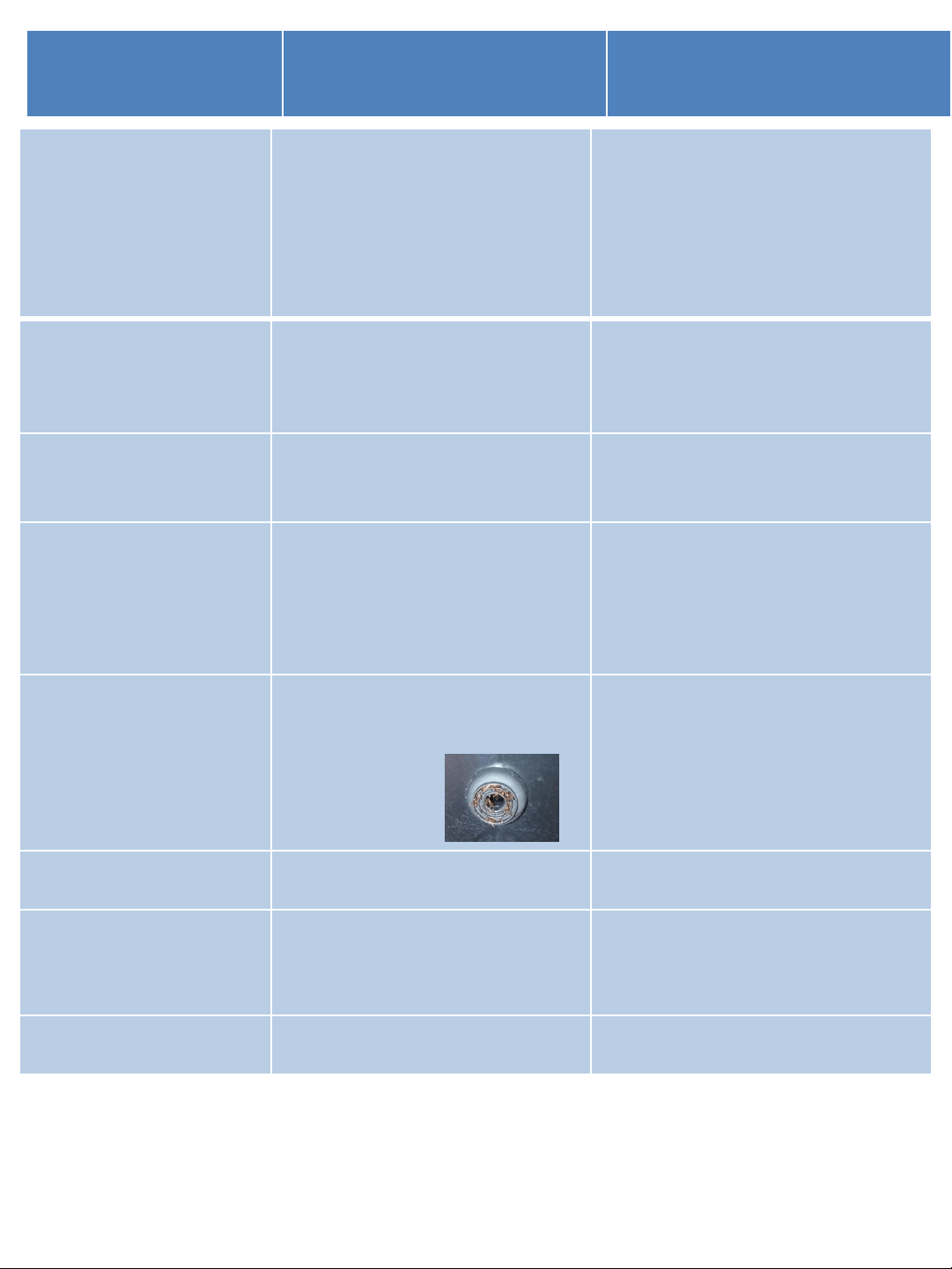
Pull off the gasket gently and rinse the
gasket with water, put it back gently
after rinse.
The on/off button is flashing Temperature sensor does not work
properly.
Call service line.
Water spitting from the
outlet of the brewer head.
1)
The brewing is stopped manually.
2) The handle or brewer head is
lifted while the button is flashing.
1) Leave the brewer to escape
steam/residual water completely, in 20
seconds from the brewing process is
interrupted.
K-cup is shrinked after
brewing
It is normal, depending on K-cup
from different brand.
Drinkpod LLC 888 852 7873
www.drinkpod.com
21

22
WARRANTY INFORMATION
1-YEAR LIMITED WARRANTY
Drinkpod warrants that for a period of one year from the date of purchase, this product will
be free from defects in material and workmanship. Drinkpod , at its option, will repair or
replace this product or any component of the product found to be defective during the
warranty period. Replacement will be made with a new or remanufactured product or
component. If the product is no longer available, replacement may be made with a similar
product of equal or greater value. This is your exclusive warranty. Do NOT attempt to repair
or adjust any electrical or mechanical functions on this product. Doing so will void this
warranty.
This warranty is valid for the original retail purchaser from the date of initial retail purchase
and is not transferable. Keep the original sales receipt. Proof of purchase is required to
obtain warranty performance. Drinkpod’s dealers, service centers, or retail stores selling
Drinkpod products do not have the right to alter, modify or any way change the terms and
conditions of this warranty.
This warranty does not cover normal wear of parts or damage resulting from any of the
following: negligent use or misuse of the product, use on improper voltage or current, use
contrary to the operating instructions, disassembly, repair or alteration by anyone other than
Drinkpod or an authorized Drinkpod service center. Further, the warranty does not cover:
Acts of God, such as fire, flood, hurricanes and tornadoes.
What are the limits on Drinkpod Liability?
Drinkpod shall not be liable for any incidental or consequential damages caused by the
breach of any express, implied or statutory warranty or condition.
Except to the extent prohibited by applicable law, any implied warranty or condition of
merchantability or fitness for a particular purpose is limited in duration to the duration of
the above warranty.
Drinkpod disclaims all other warranties, conditions or representations, express, implied,
statutory or otherwise.
Drinkpod shall not be liable for any damages of any kind resulting from the purchase, use or
misuse of, or inability to use the product including incidental, special, consequential or
similar damages or loss of profits, or for any breach of contract, fundamental or otherwise,
or for any claim brought against purchaser by any other party.
Some provinces, states or jurisdictions do not allow the exclusion or limitation of incidental
or consequential damages or limitations on how long an implied warranty lasts, so the above
limitations or exclusion may not apply to you.
This warranty gives you specific legal rights, and you may also have other rights that vary
from province to province, state to state or jurisdiction to jurisdiction.
Drinkpod LLC 888 852 7873
www.drinkpod.com
Technical data:
Rated Voltage: 120V AC
Rated Frequency: 60Hz
Rated Power: 1,420W
N.W./G.W.: 3.1/3.5 kg appr.
Pump Pressure: Max. 3 Bars
Water Tank Capacity: 45 oz
*Right for improvements changes are
reserved in the interest of technical
progress.
*K-Cup® pack is a product of Keurig inc,
has no relationship to the manufacturer
or its distributors of this brewer.
