5. Keep the Cavdle espresso machine out of direct sunlight and away from
any appliances which produce heat like ovens and hotplates.
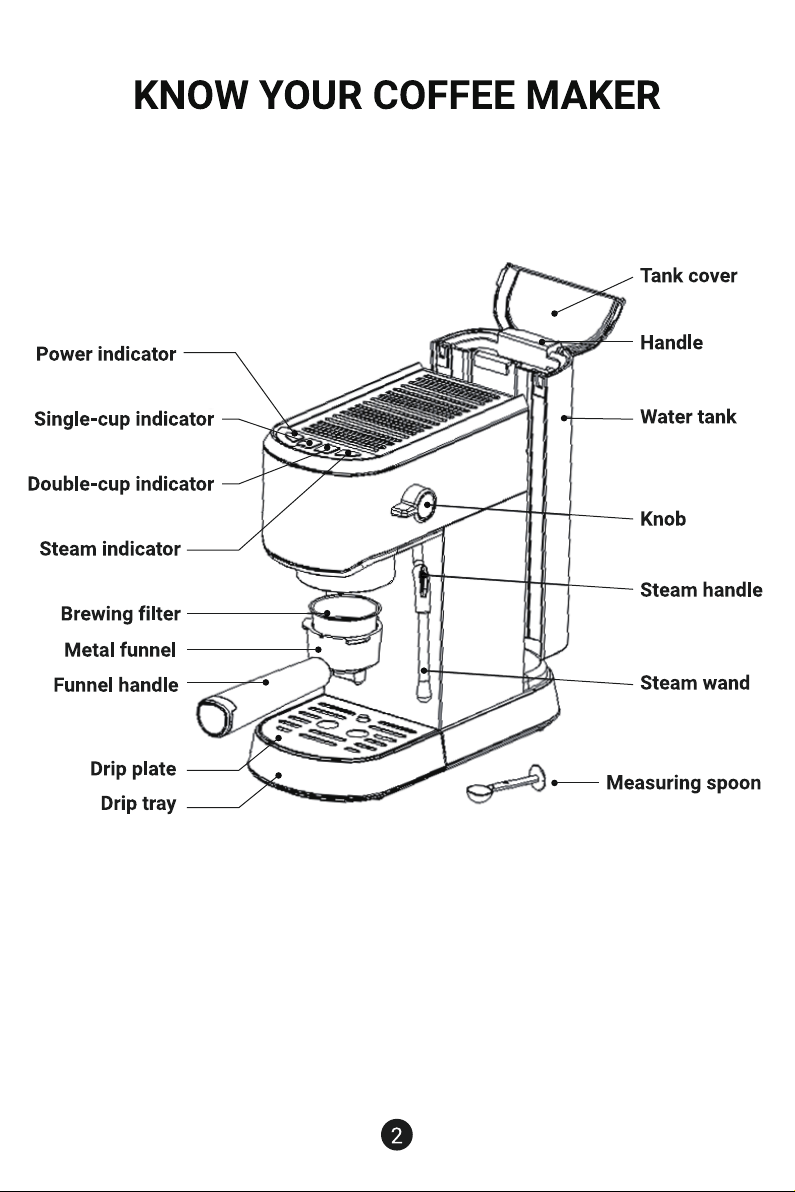
3. When the " " and " " lights are on, press the " " button
or “ ” button to discharge corresponding amount of coffee.
4. Wait for the coffee to drip into the cup, it's done!
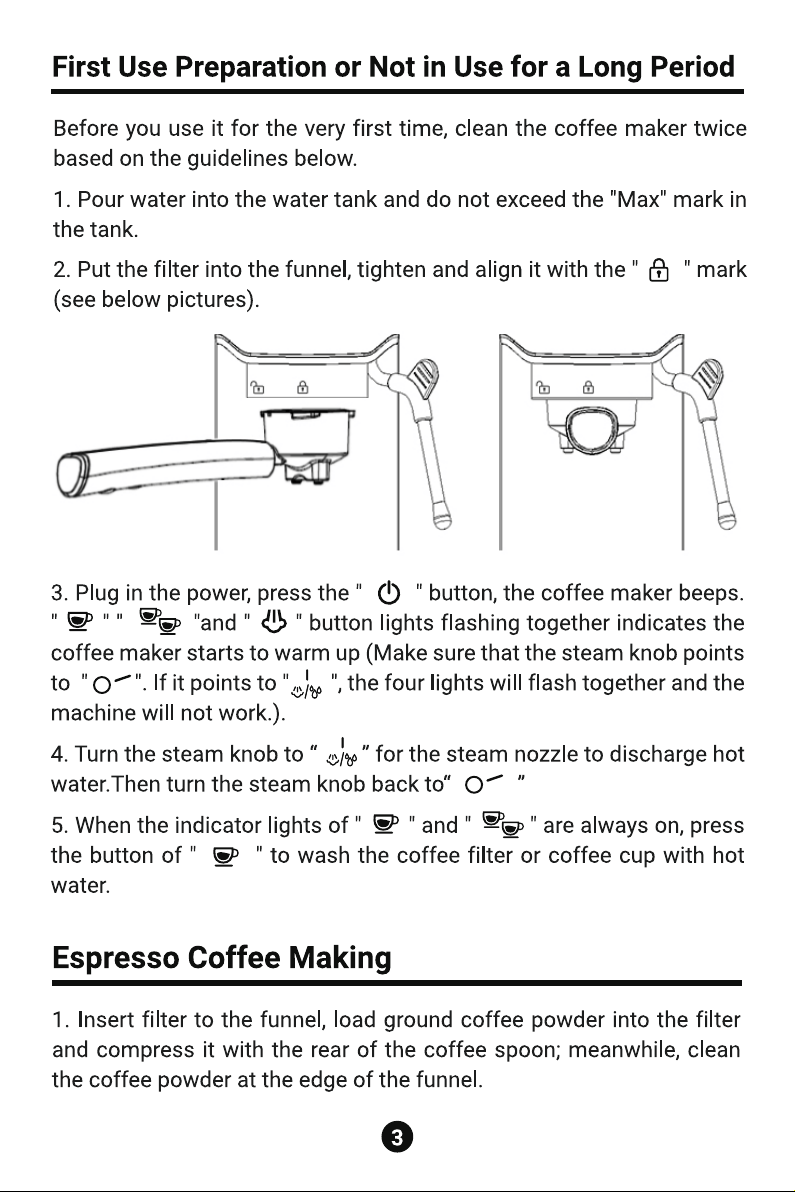
Note: When inserting the filter, please first align the small groove and
then slightly rotate the filter to prevent it from falling. When removing
the filter, please turn the filter back to the small groove position.
4
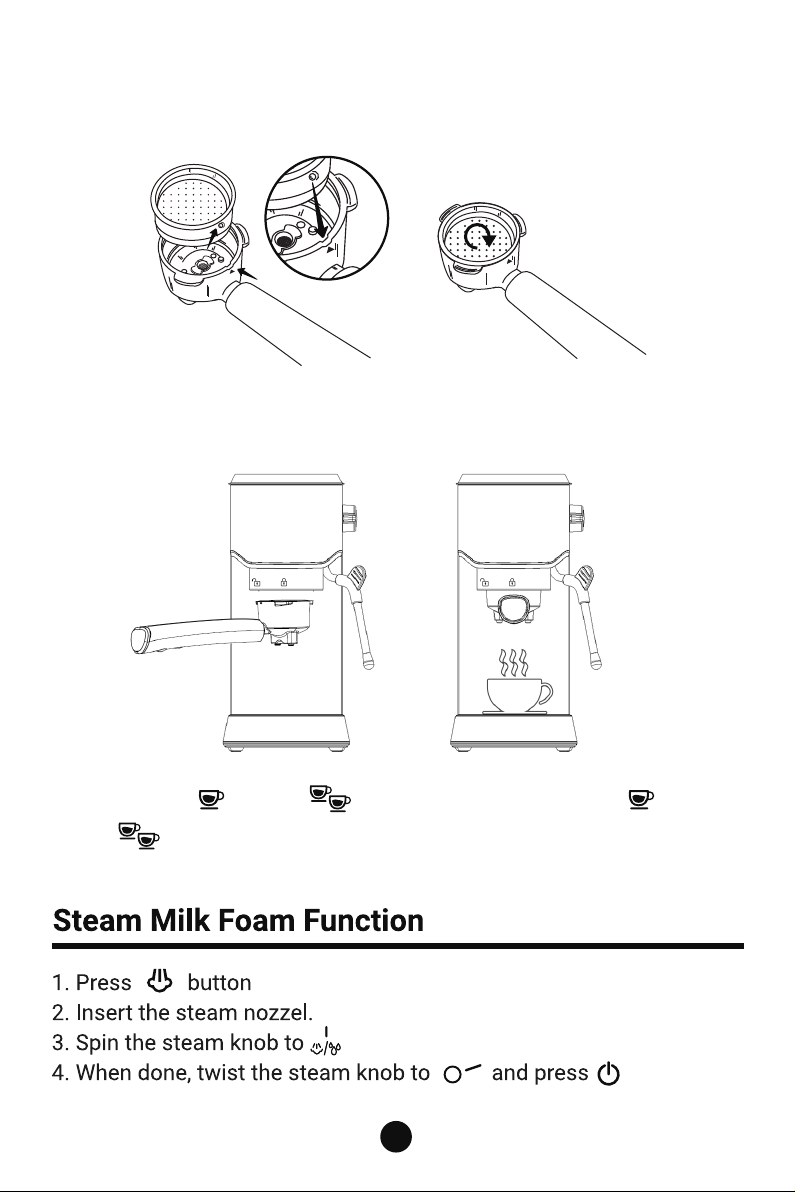
2. Insert the funnel and lock it tightly as shown by the indication sign,
then place a cup under the funnel.
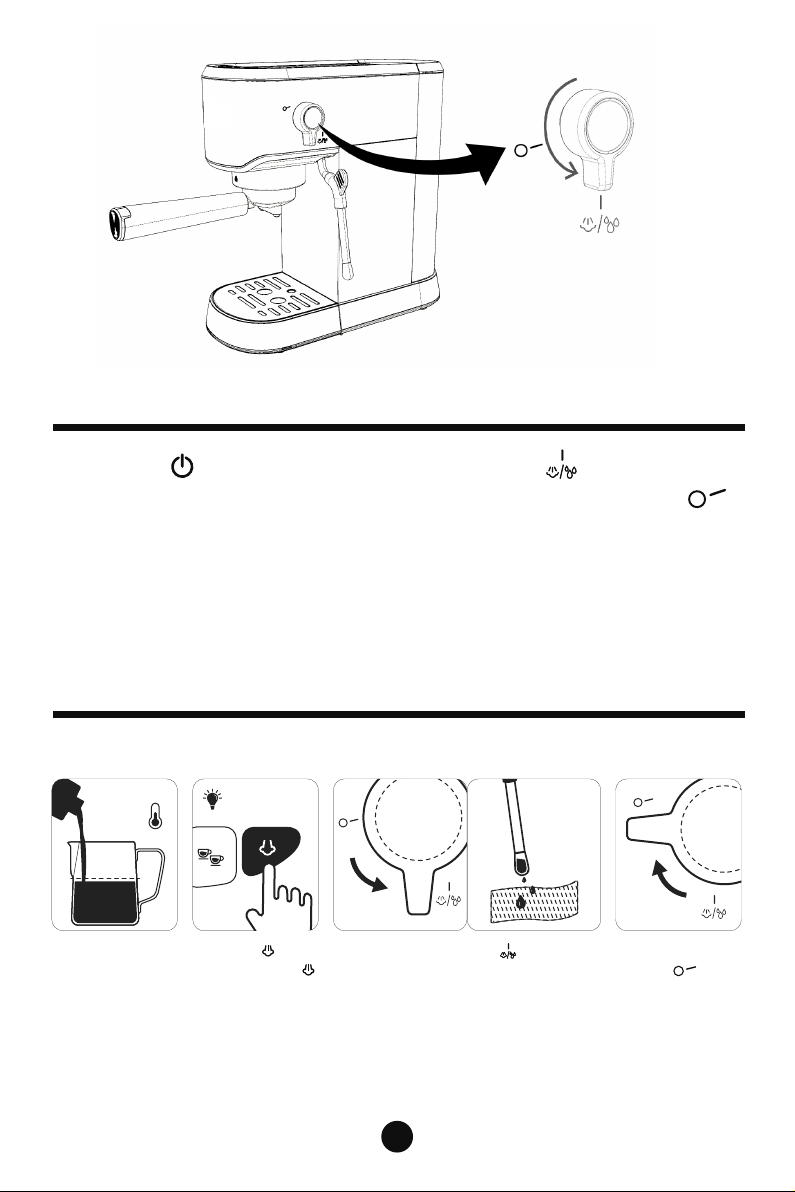
Press the " " button, turn the "steam knob" to " ", and the steam
pipe will start to discharge hot water; Turn the "steam knob" to " "
to stop the hot water.
Note: it is normal for the machine to make relatively large vibration
sound during the process of discharging hot water.
Hot Water Function
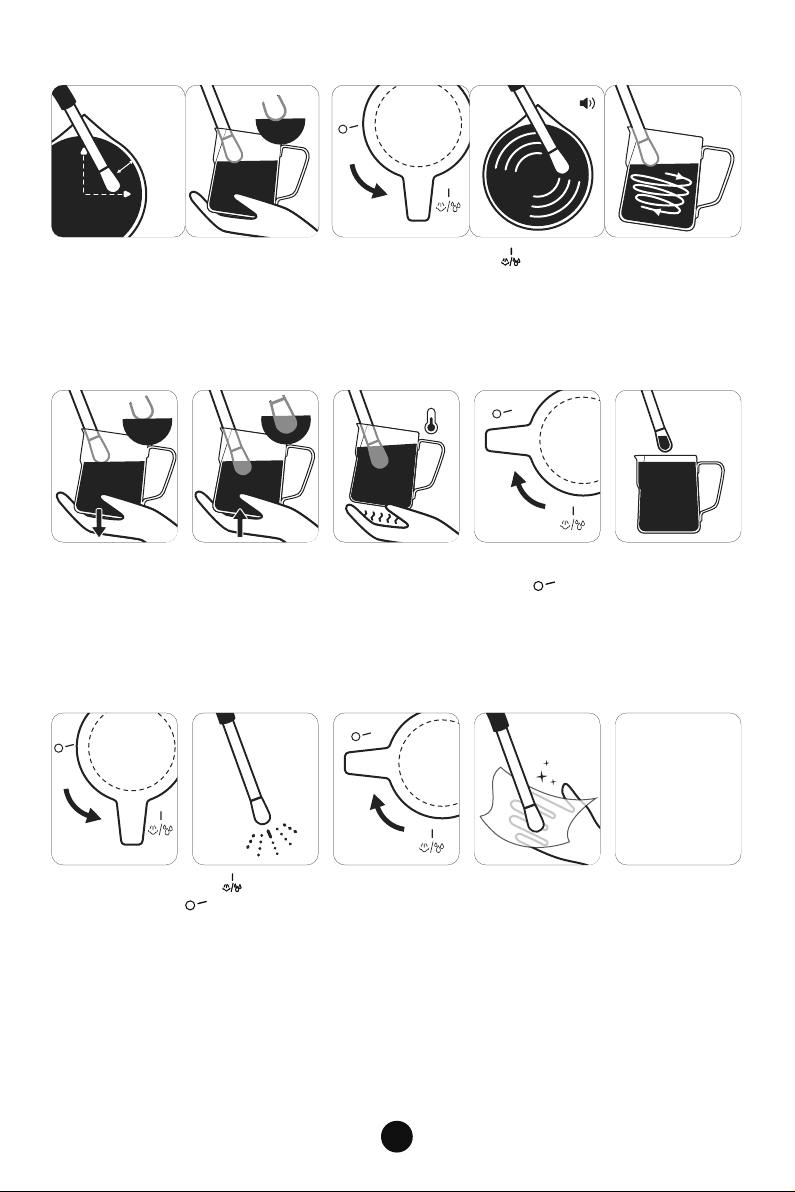
How to Make the Perfect Latte
5
1.Prep Milk Jug 2.Before Texturing Milk
Fill Jug with cold
milk just below
the bottom
of the spout.
Spin the steam knob to and hold it
for 3 secs to drain the remaining
water in the pipe.
Spin the steam
knob to .
Press the
button until the
button stops
flashing.
4℃
FILL
MAX
·3 Sec.
6
3.Position Steam Wand 4.Start Texturing Milk
Insert Steam Wand Arm at 12 o'clock.
Tip at 3 o'clock. Keep Finger Width
from edge and the steam vent is just
a little below the surface of the milk.
Spin the steam knob to to start texturing milk. Texturing
makes a smooth hissing noise. Milk is moving in a whirlpool
action.
5.Milk Texturing
As milk level
rises, lower Jug
to keep Tip just
below surface.
When desired
microfoam
achieved,
immerse Steam
Wand half way.
Milk ready when
Milk Jug base is
too hot to touch
for 3 sec.
Spin the steam
knob to .
Remove Jug from
Steam Wand.
6.Purge Clean Steam Wand
IMPORTANT
AND BASIC:
Spin the steam knob to on for 3 secs and then turns
the steam knob to .
Remove the
stainless steel
foaming nozzle
Wipe the milk dirt
at the steam port
with a cloth.
Clean the foam
nozzle
immediately after
making steamed
milk foam.
·3 Sec.
finger
width
60℃-65℃
3
12
1. When all the indicator lights are on, press and hold the " " button
for 3 seconds to enter the flow setting function, the light for single-cup
coffee is always on, press it again and the funnel starts to pour coffee.
When the desired amount is reached,releasethe " " button,you will
hear a sound from the coffee maker. That meansthetime has been
memorized.
Note:The single-cup flow rate setting limit is at least 30ml and at
most 70ml.
2. " " two-cup button memorized coffee making function setting
can be operated the same as above. The minimum flow setting limit of
the double cup is 80ml and the maximum is 120ml.
3. Hold and press together “ ” “ ” “ ” for 3 seconds. All the
button will keep light fixed, the machine will back to ready mode.The
machine is restored to the default setting.
Memorized Coffee Making Function
7
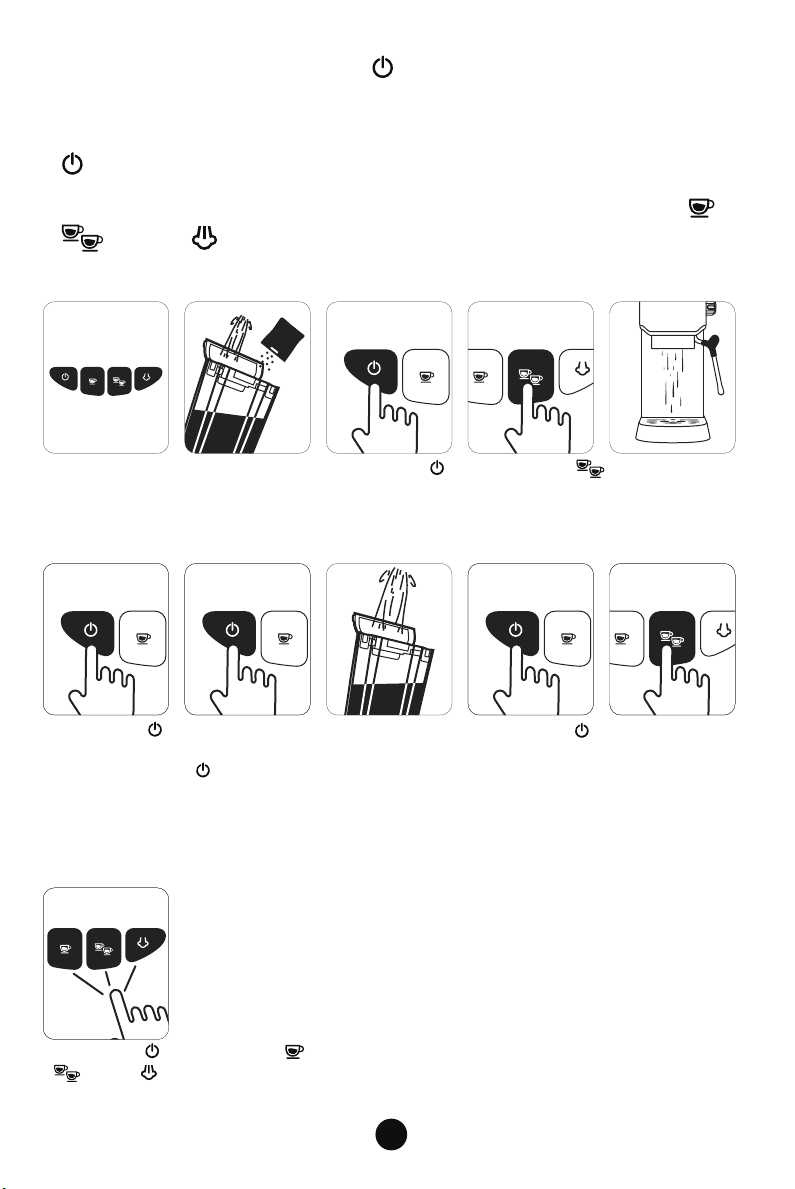
Descaling Reminder Function
1. After 500 cups of coffee, the coffee maker will warn for descaling.
2. When the coffee maker is turned on, the control panel lights (all 4
buttons) will flash 5 times and the coffee maker will beep for 5 times.
This warning reminder shall happen each time the coffee maker is
turned on until the reminder is cancelled.
3. Fill the water tank with water and descaler to the MAX level (The
scale of water and descaler is 4:1, the detail refers to the instruction of
descaler. Please use “household descaler”).
4. Press the " " button to turn on the coffee machine.
Press “ ”button to allow water to flow into the drip tray. Then turn
off the appliance and leave the descaling solution in the appliance for
5 minutes.
8
5. After five minutes, press the " " button and repeat the Step 4 for
3 times.
6. Fill the water tank with water(No need to put in descaler). Press the
" " button and repeat the Step 4 for 3 times.
7. To cancel the descaling reminder after cleaning, please press “ ”
“ ” and “ ”at the same time for 3 seconds to cancel the flash-
ing light.
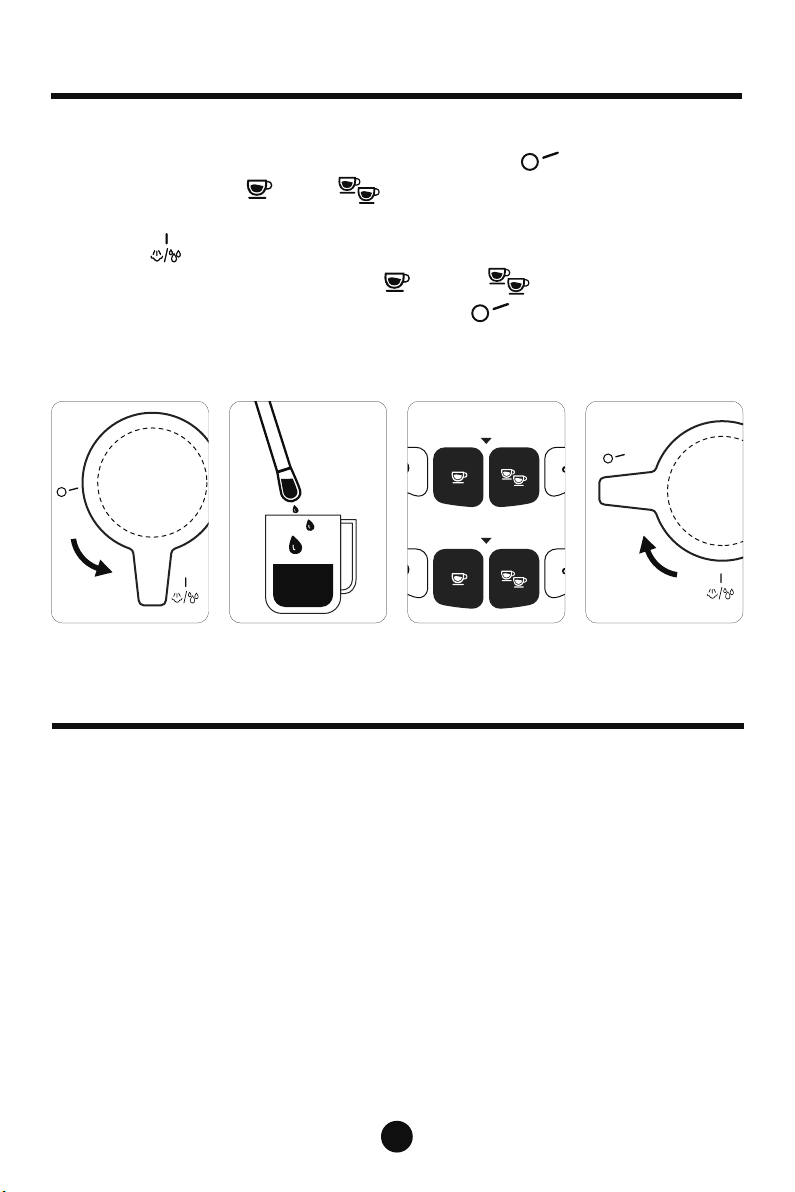
1. All 4 buttons
Flash 5 times and
the coffee maker
beeps for 5 times.
4 . Press the " " button and hot
water flows into the drip tray.
7 . Fill the water
tank with water
(No need to put
in descaler).
8 . Press the " " button and repeat
the Step 4 for 3 times.
9 . Press the " " button. Press “ ”
“ ” and “ ” button at the same
time for 3 seconds to cancel the flashing light.
5 . Press the " "
button to shut
down and leave
the descaling
solution in the
water pipe for 5
minutes.
6 . After five
minutes,press the
" " button to
start the machine
and repeat the
Step 3 and the
Step 4 for 3 times.
2 . Fill the water
tank with water
and descaler
to the MAX level.
3 . Press the " "
button to start to
heat the water.
— MAX —
— MAX —
Flashing at
the same time
Turn onTurn onTurn off
Turn on
9
1. Unplug the power cord and make sure the coffee maker completely
cools down before cleaning it.
2. Wipe the exterior parts of the coffee maker with a damp cloth or a
clean sponge.
3. Please clean the gadgets when they are taken off from the coffee
maker.
4. Clean the water tank once a week with mixture of soap and cleanser.
5. Do not use alcohol or solvent cleaner, do not clean the coffee maker
while it is in the water.
6. Do not use the steam function to clean the coffee maker.
Cleaning and Maintenance
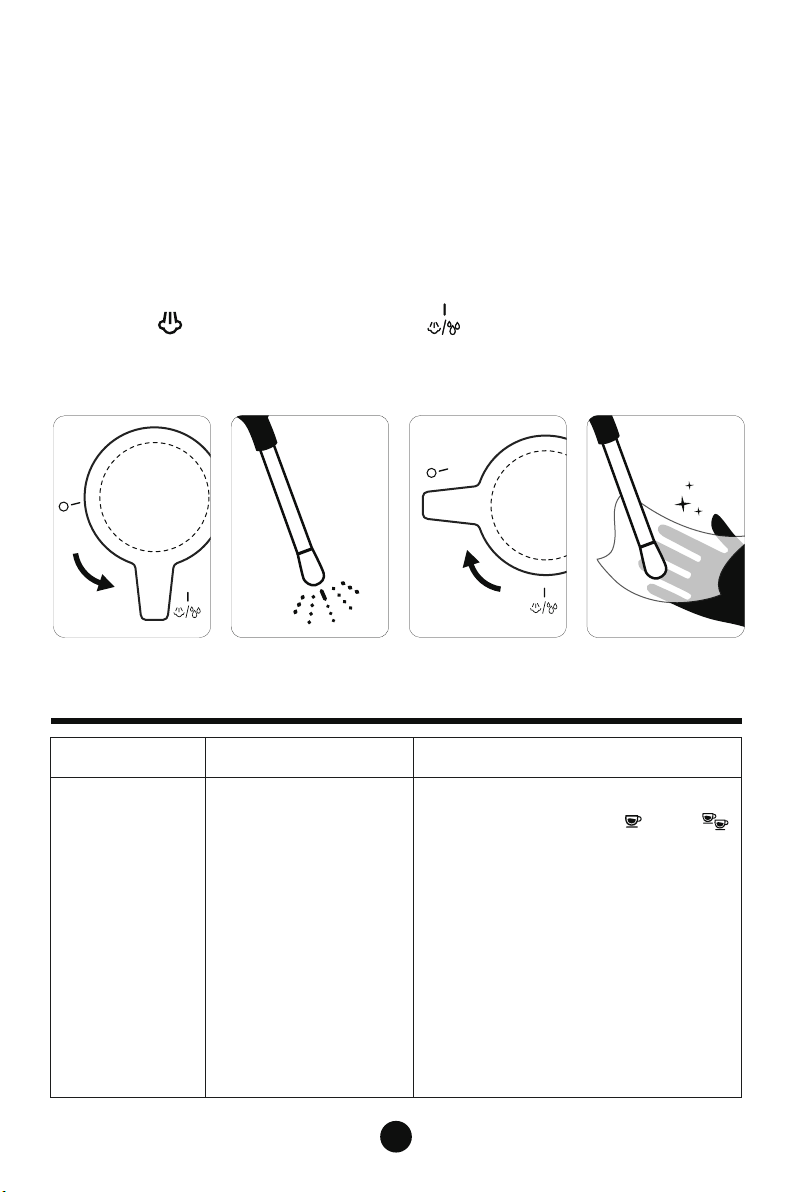
Cooling Function
When the coffee maker is operating in a high temperature,please
make sure that the steam knob is turned to " ". And when the
indicator lights for " "and" " buttons flash quickly, which means
that the coffee maker need to be cooled. At this time, rotate the "steam
knob" to" ", and the steam pipe starts to continuously discharge
water and cool down. Once the " " and " " indicator lights stop
flashing quickly, turn the steam knob to " " and the machine will
stop cooling down. You can start making coffee when the power
indicator is on.
·Flicker
·Always bright
10
Troubleshooting
Problem Reason Method
No water/steam
1. Fill the tank with water and press the
ON/OFF button and the " " and " "
button.
2. The coffee maker needs to be
preheated before the coffee can be
produced. That is, the coffee maker will
turn to normal light from the flickering
state.
3. Use a small wire to poke around the
steam hole.
4. Turn on the steam button and/or
steam knob and wait for the preheating
to complete before steam comes out.
1. There is no water in
the water tank.
2. The coffee maker is
not preheated.
3. Steam pipe has clot.
4. Steam button and/or
steam knob are not on
or the preheating is not
completed
7. Do not scrub the coffee maker with a metal brush.
8. Unscrew the coffee funnel and clean the coffee grounds in the filter.
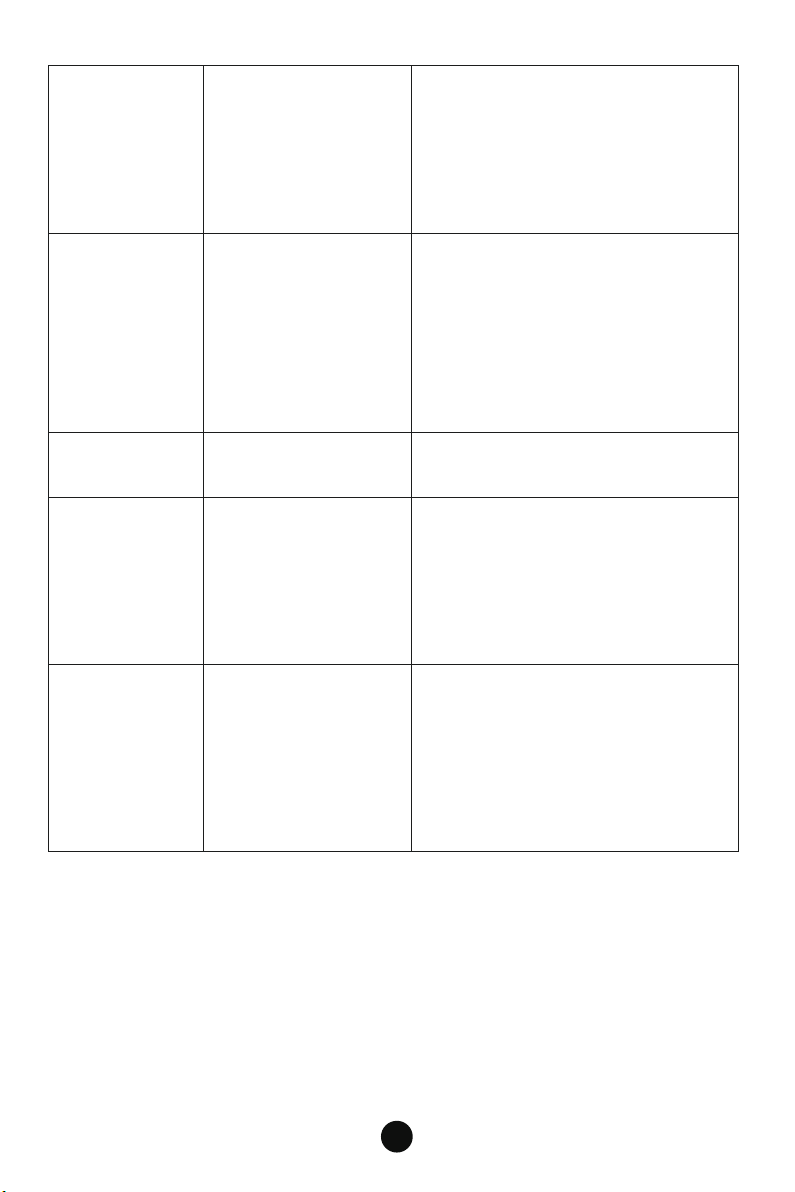
9. Clean the frothing nozzle each time after using it:
A. Make sure there is water in the water tank. The water should not exceed the
maximum level of the water tank.
B. Put a cup (with water) underneath the frothing nozzle and immerse the frothing
nozzle in the cup.
C. Press " " and turn the steam knob to " " for 3-5 seconds.
D. Remove the cup.
E. Wipe it and let it dry.
11
No grease
1. Change to a finer ground coffee
and use the back of the coffee scoop
to flatten it horizontally.
2. Use fresh coffee beans/ground.
1.The coffee grounds
are too thick or the
grounds are not
pressed.
2. Coffee beans are not
fresh enough.
1. Whether it is whole
milk.
2. The steam is
discharged too early.
The milk does
not foam well
No coffee,
coffee light flash
The temperature is too
high after steaming.
Please see “Cooling Function” section.
1. Use whole milk.
2. Steam nozzle can only be started
after the indicator light for steam
button turns from flashing to
constant light.
3. Please see “How to Make the
Perfect Latte” section.
Water scale
Purified water is recommended. If the
water quality in your area is poor,
please perform a descaling operation
every 2 months.
Please see “Descaling Reminder
Function” section.
The coffee maker has
been used for a fairly
long time.
Coffee not
hot enough
1. Adjust the grinding degree of freshly
coffee ground.
2. Flush the filter and coffee cup with
hot water.
1. The coffee ground is
too fine and too much,
resulting in too little
water output.
2. Ambient temperature
or cup temperature is
too low.
12
Problem Reason Method
The steam knob points
to the wrong place and
the coffee maker will
not operate.
Rotate the steam knob
to .
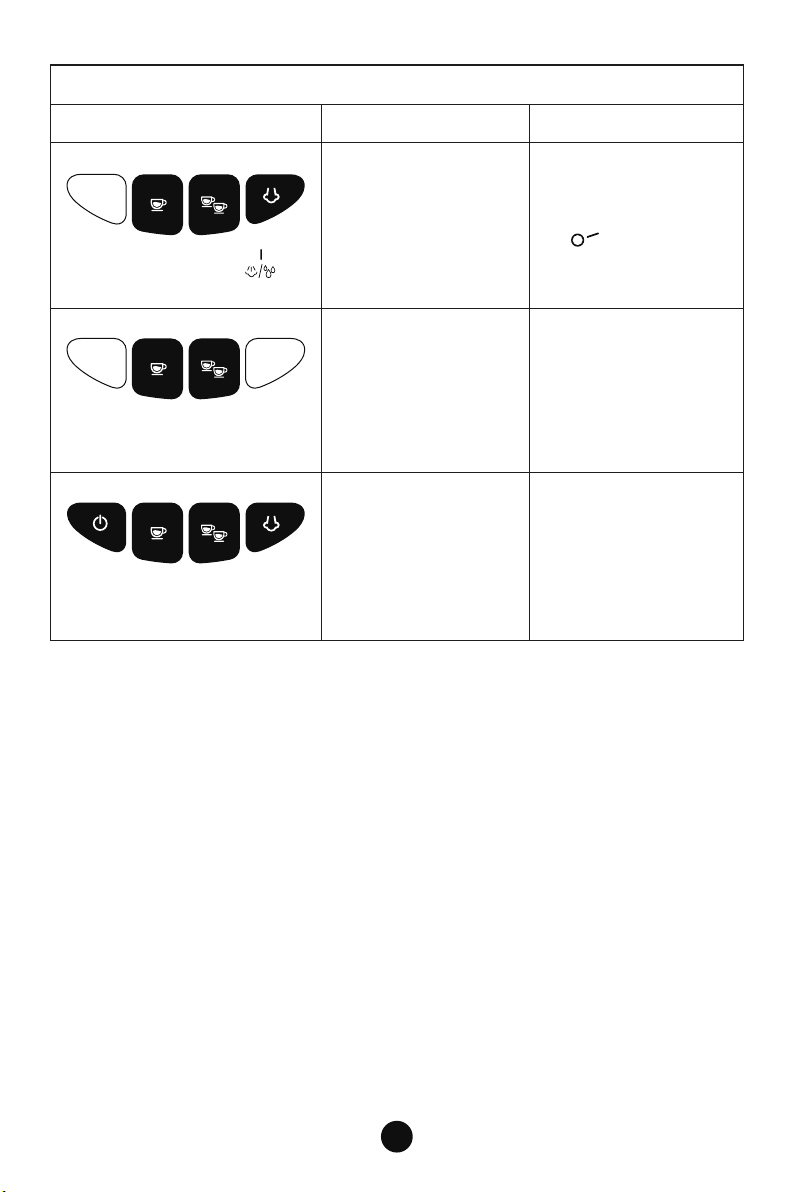
Flash altogether,
steam knob points to
The coffee maker
is hot.
Please see “Cooling
Function” section.
The coffee maker
needs to be descaled.
Please see “Descaling
Reminder Function ”
section.
Flash after use and the coffee
maker becomes hot.
Flash 5 times and the coffee
maker beeps for 5 times.
Flash and Sound Explanation

13
Disclaimer
Cavdle cannot provide you with a free one-year warranty if:
For the latest warranty service, please refer to the official
website QR code:
For product quality problems:
Warranty
1. Misunderstand and misuse of the manual.
2. Use this product for purposes other than coffee-making.
3. Modifying the coffee maker by consumers instead of technicians
from authorized retailers or Cavdle.
4. Usage of non-original gadgets
We provide 1-year limited quality warranty for all Cavdle Espresso Machine.
The customer shall first bear the freight to send the product back to the local
warehouse of Cavdle, and our after-sale department will judge whether it is
the product quality problem or the damage caused by improper operation.
1.For product quality problem confirmed by our after-sale department, Cavdle
will repair it for free and send it back.
2.For product damage caused by abnormal operation of the customer, Cavdle
will charge the maintenance fee according to the actual maintenance fee and
send it back to the customer after the maintenance is completed.
For all questions, please attach photos or videos to describe the problem and
send them to [email protected]
support@cavdlelife.com
https://cavdlelife.com/
1-855-666-0888
CavdleLife