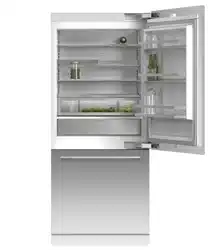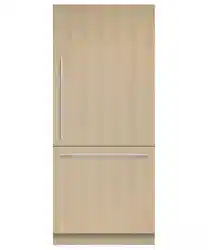
INTEGRATED
REFRIGERATOR & FREEZER
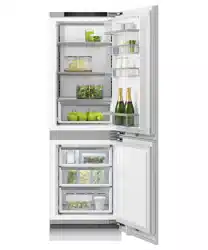
INTEGRATED REFRIGERATOR FREEZER
RS2474B models
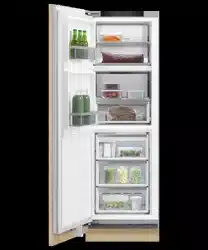
INTEGRATED REFRIGERATOR
RS2474S models
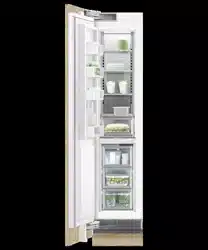
INTEGRATED FREEZER
RS2474F models
USER GUIDE
USER GUIDE
US CA


3
CONTENTS
Registration
To register your product visit our website: fisherpaykel.com/register
Safety and warnings 5
Before you begin 10
Control panel 12
Food modes 13
Features 14
Settings 15
Wi-Fi connection 16
Adjusting the temperature 17
Food mode presets 18
Changing features 19
Changing settings 20
Water dispenser 21
Ice maker 22
Storage features 23
Care and cleaning 24
Food care 28
User warnings and sounds 29
Troubleshooting 30
Service & warranty 33

5
SAFETY AND WARNINGS
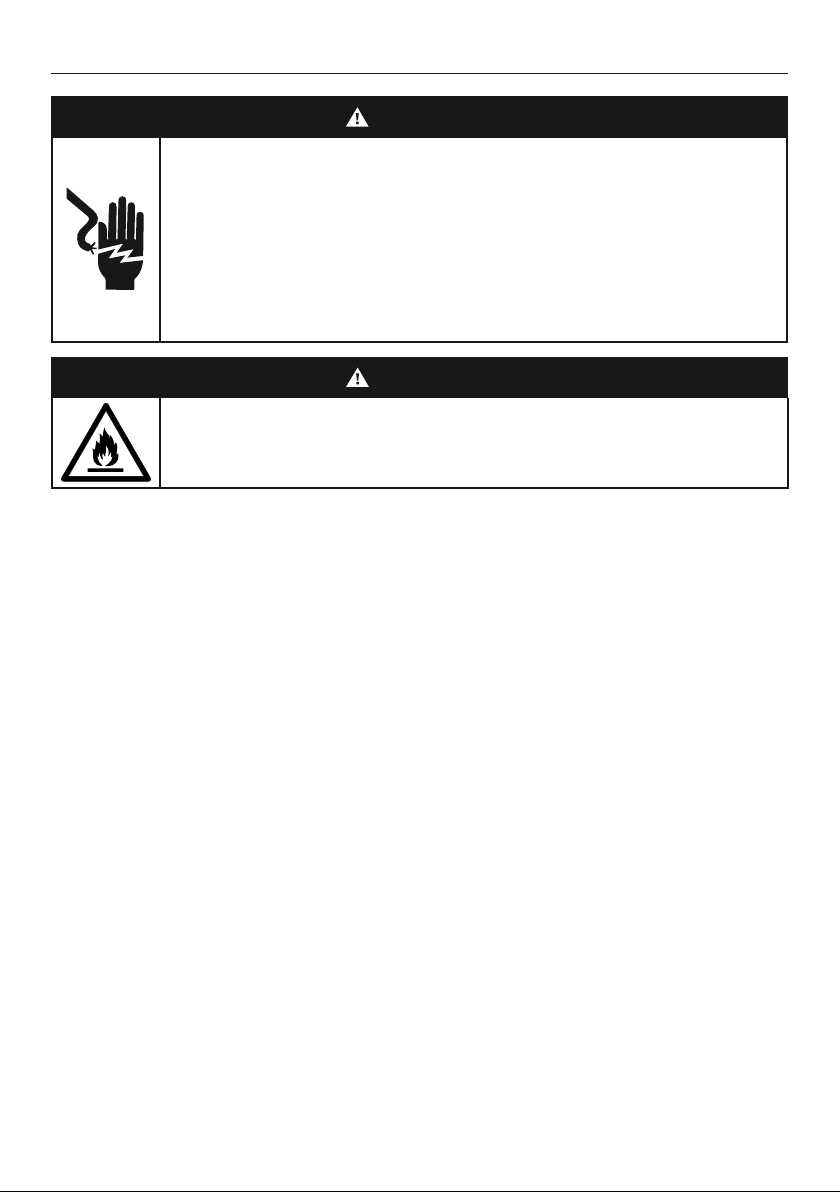
WARNING!
Electric Shock Hazard
Failure to do so can result in death, electric
shock, fire or injury to persons.
• Read and follow the safety and warnings
outlined in this user guide before operating this
appliance.
WARNING!
This appliance contains flammable
refrigerant isobutane (R600a).
READ AND SAVE THIS GUIDE
WARNING!
Read entire manual. Failure to follow all guides and rules could cause personal injury or
property damage. When using this appliance, always exercise basic safety precautions
including thefollowing:
General Use
z
This product has been designed for use in a normal domestic (residential) environment.
z
Children should be supervised to ensure that they do not play with the appliance.
z
Cleaning and user maintenance shall not be undertaken by children without supervision.
z
This appliance can be used by children aged from 8years and above and persons
withreduced physical, sensory or mental capabilities or lack of experience and
knowledge if they have been given supervision or instruction concerning use of
theappliance in a safe way and understand the hazards involved.
z
The manufacturer’s installation instructions for product and cabinetry ventilation
mustbe followed when installing the appliance.
z
To avoid hazard due to instability of the appliance, it must be fixed in accordance
withinstallation instructions.
z
Keep ventilation openings, in the appliance enclosure or the built-in structure,
clearofobstruction.
z
Do not use mechanical devices or other means to accelerate the defrosting process,
other than those recommended by the manufacturer.
z
Do not damage the refrigerant circuit.
z
In case of damage to the refrigerant circuit, ventilate the area by opening all windows.
z
Do not operate electrical equipment or any other equipment that may produce arcs,
sparks or flames in the area. Contact your Fisher & Paykel trained and supported
service technician immediately to arrange for the appliance to be repaired.
z
Connect to potable water supply only.

6
SAFETY AND WARNINGS
z
This refrigerating appliance is intended to be used at ambient temperatures ranging
from 61 °F (16 °C) to 100 °F (38 °C). The product performance may be compromised
when operating outside of this temperature range.
z
For storage of general household foods in the most efficient manner, it is recommended
to use the product in the factory configuration supplied. Moving the shelves and bins
will have a minimal impact on efficiency.
z
It is hazardous for anyone other than a Fisher & Paykel trained and supported service
technician to service this appliance.
z
Ensure the installer has completed the final checklist in the installation guide.
Electrical
z
This appliance must be installed in accordance with the installation instructions
before use.
z
To allow disconnection of the appliance from the supply after installation, incorporate a
switch in the fixed wiring in accordance with the wiring rules.
z
Never unplug your refrigerator by pulling on the power cord. Always grip the plug
firmly and pull straight out from the outlet.
z
Do not plug in any other appliance at the same power point as your refrigerator or use
extension cords or double adapters.
z
Repair or replace immediately all electric service cords that have become frayed or
otherwise damaged. Do not use a cord that shows cracks or abrasion along its length or
at either the plug or appliance end.
z
If the power supply cord is damaged, it must only be replaced by your Fisher & Paykel
trained and supported service technician because special purpose tools are required.
When moving your appliance away from the wall, be careful not to roll over or damage
the power cord.
z
WARNING: Do not use electrical appliances inside the food storage compartments of
the appliance, unless they are of the type recommended by the manufacturer.
z
When positioning the appliance, ensure the power cord is not trapped or damaged.
z
Do not locate multiple portable socket-outlets or portable power supplies at the rear of
the appliance.
Food safety
z
Regularly clean accessible draining systems and surfaces that come in contact
with food.
z
Ensure any raw meat or fish is stored in sealed containers to prevent
cross-contamination.
z
Immediately clean any drips or spills on surfaces.
z
If the appliance will be left empty for long periods, switch off, defrost, clean, dry, and
leave the door open to prevent mould developing within the appliance.
z
Opening the door for long periods can cause a significant increase of the temperature
in the compartments of the appliance.
Storing food and drinks/wine
z
Do not store explosive substances such as aerosol cans with a flammable propellant
inthis appliance.
z
Never store volatile or flammable materials in your appliance as they may explode.
z
Never freeze liquids in glass containers. Liquid expands during freezing, which may
cause the container to explode.
z
Never freeze carbonated drinks. They may explode.

7
SAFETY AND WARNINGS
Servicing
z
Your refrigerator is designed to operate for many years without the need for service
checks. However, if your refrigerator is malfunctioning, have it attended to by your
Fisher & Paykel trained and supported service technician as soon as possible. All
electrical repairs must be carried out by an adequately trained service technician or
qualified electrician.
z
The LED light cannot be serviced by the user. Contact your Fisher & Paykel Dealer or
Fisher & Paykel trained and supported service technician.
z
If you suspect that the product is not getting cold — items such as ice cream are
melting— remove all perishable food and store in another appliance or cooler to prevent
spoilage. Immediately call for a service technician.
Cleaning
z
Use mild dish-washing liquid with warm water and a lint-free cloth to clean the product.
z
Avoid using anti-bacterial cleaning products on either the interior or exterior
of the cabinet as they may cause rusting of metal components and cracking of
plasticcomponents.
Disposal
z
Extreme care must be taken when disposing of your old appliance to avoid hazards:
z
The flammable refrigerant gas must be safely removed by a qualified servicetechnician.
z
The thermal insulation foam in this appliance may contain flammable insulationblowing
gases, any exposed foam may be highly flammable andmustbe carefully treated
during disposal.
z
WARNING: Risk of child entrapment. Before you throw away your old refrigerator or
freezer, the doors and panels should be removed and the racks left in place so that
children may not easily climb inside.
z
Consult your local energy authority or local codes as to the best way to dispose ofyour
old appliance.
z
Remove all packaging and dispose of it responsibly. Recycle items that you can.
Water connection
z
The water connection to your Ice & water refrigerator must be installed by an
authorised plumber or Fisher & Paykel trained and supported service technician.
z
Installation and use MUST comply with all state and local plumbing codes. Check
with your local public works department for plumbing codes. You must follow their
guidelines as you install the water filtration system.
z
If the water tank has not been used for an extended period of time, or has developed
an unpleasant taste or odour, flush the water system. If the problem persists, replace
the water filter cartridge. For more information go to fisherpaykel.com/water-filter.
z
To avoid serious illness or death, only connect your water filter to safe drinking water.
z
The water filter cartridge needs to be changed when the replacement indicator icon
illuminates. This will happen every six months.
z
If the water filtration system has been allowed to freeze, replace filter cartridge. Failure
to replace the disposable filter at recommended intervals may lead to reduced filter
performance and failure of the filter, causing property damage from water leakage
or flooding.
z
In cases of excessively reduced filter life — we recommend that you consult a local
plumber or your water supplier for advice on suitable filtration requirements for the
water supplied to your home.

8
SAFETY AND WARNINGS
z
Filter replacement is the consumer’s responsibility and will not be covered by the
warranty except in the case of faulty parts or materials within the filter cartridge.
z
If the water has not created ice for some time or ice has an unpleasant taste or odour
dispose of ice and flush the water system. If unpleasant taste or odour persists, replace
the water filter cartridge. For more information go to fisherpaykel.com/water-filter.
z
Use new tubing supplied with the refrigerator. DO NOT reuse old tubing from old water
and ice connections.
z
Your water filtration system can withstand up to 120psi (827kPa) of water pressure.
z
If a pressure limiting valve is supplied, ensure that it is installed before installing the
water filtration system. DO NOT install if water pressure exceeds 120psi (827kPa).
To reduce the risk associated with property damage due to water leakage or flooding:
z
DO NOT install systems in areas where ambient temperatures may go above 100°F
(38°C) or drop below 33°F (0.6°C).
z
DO NOT install on hot water supply lines. The maximum operating water temperature of
this filter system is 100°F (38°C).
z
DO NOT install where water hammer conditions may occur. If water hammer conditions
exist, you must install a water hammer arrester.
WARNING!
To reduce the risk associated with choking:
z
DO NOT allow children under 3 years of age to have access to small parts during the
installation of the water filter.
Ice making
z
Avoid contact with the moving parts of the ice maker ejector mechanism, and do not
place your fingers on the automatic ice-making mechanism while the appliance is
inoperation.
z
At first use or after water filter has been replaced, there may be discolouration in the
first bin of ice cubes. Discard the discoloured ice cubes. If discolouration continues in
succeeding bins, contact your Fisher & Paykel trained and supported service technician
Power failure
z
In the event of a power interruption, the appliance will automatically save the current
temperature settings. When power is recovered, the appliance will revert to the current
temperature settings only.
z
Most power failures are corrected within a short period of time. 1 – 2 hours loss of power
will not affect the appliance’s temperatures.
z
To avoid sudden change of temperature while the power is off, you should avoid
opening the door. A refrigerator will keep food safe for up to 4 hours during a power
outage. Keep the door closed as much as possible. Discard refrigerated perishable food
such as meat, poultry, fish, eggs, and leftovers after 4 hours without power.

9
SAFETY AND WARNINGS
IMPORTANT!
This device complies with part 15 of the FCC Rules. Operation is subject to the
following conditions:
z
This device may not cause harmful interference.
z
This device must accept any interference received, including interference that may
cause undesired operation.
z
Do not change or modify the wireless communication device in any way. Changes or
modifications not expressly approved by Fisher & Paykel could void the user’s authority
to operate the equipment.
WARNING: The incorporated Wi-Fi module in this appliance is to operate only from
channel 1 to channel 11 as per FCC rules.
This device contains licence-exempt transmitter /receiver that comply with Innovation,
Science and Economic Development Canada’s licence-exempt RSS(s). Operation is
subject to the following two conditions:
z
This device may not cause interference.
z
This device must accept any interference, including interference that may cause
undesired operation of the device.
10
BEFORE YOU BEGIN
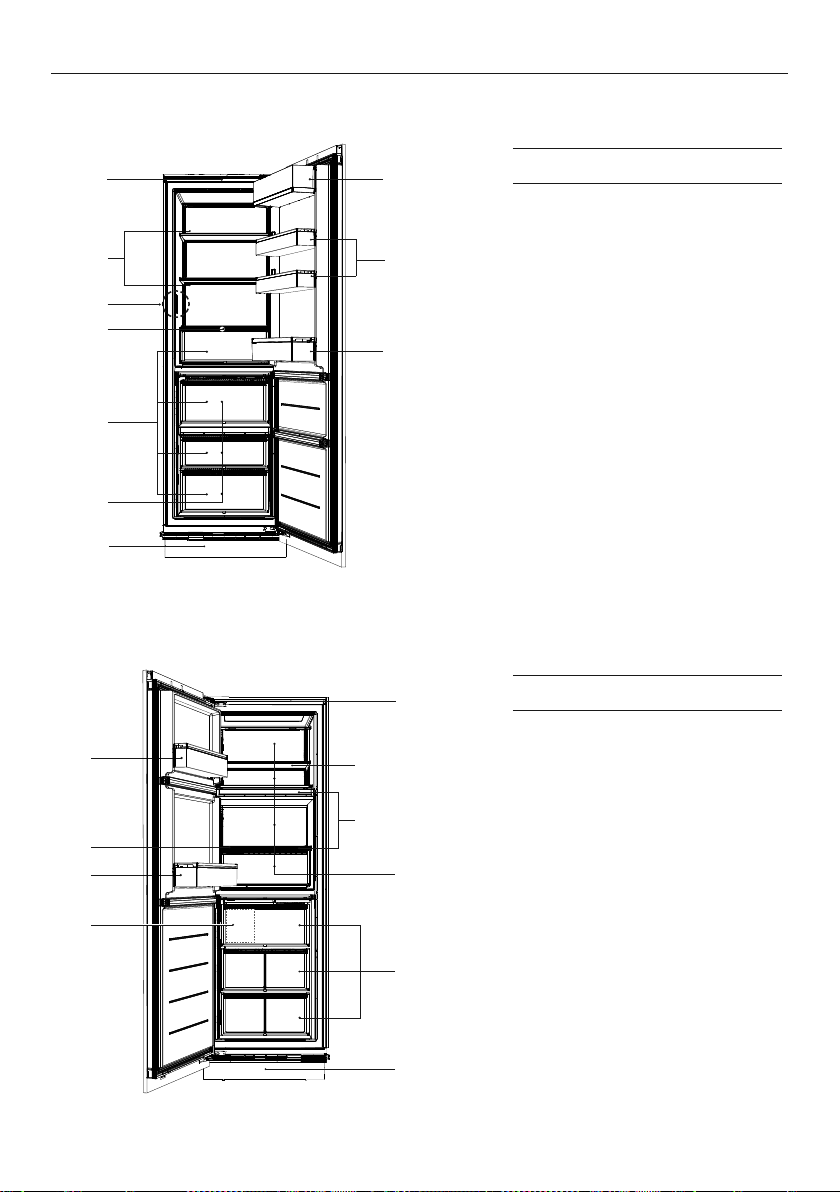
Triple Zone Refrigerator (RS2474S3)
Triple Zone Freezer (RS2474F3)
Features
1 Control panel
2 Pocket shelf
3 Adjustable shelving
4 Fixed shelves
5 Bottle holder accessory
6 Bottle shelf
7 Variable temperature zones
8 Automatic ice maker
(not shown)*
9 Freezer bins
!0 Water filter (not shown)
*Located inside freezer bin.
1
2
6
3
4
5
8
7
2
7
6
4
3
8
5
1
Features
1 Control panel
2 Dairy compartment
3 Adjustable shelving
4 Door shelves
5 Internal water dispenser*
6 Bottle holder accessory
7 Bottle shelf
8 Humidity control bins
9 Variable temperature zones
!0 Water filter (not shown)
*Located in inner left side wall of the
top compartment.
!0
9
!0
9
11
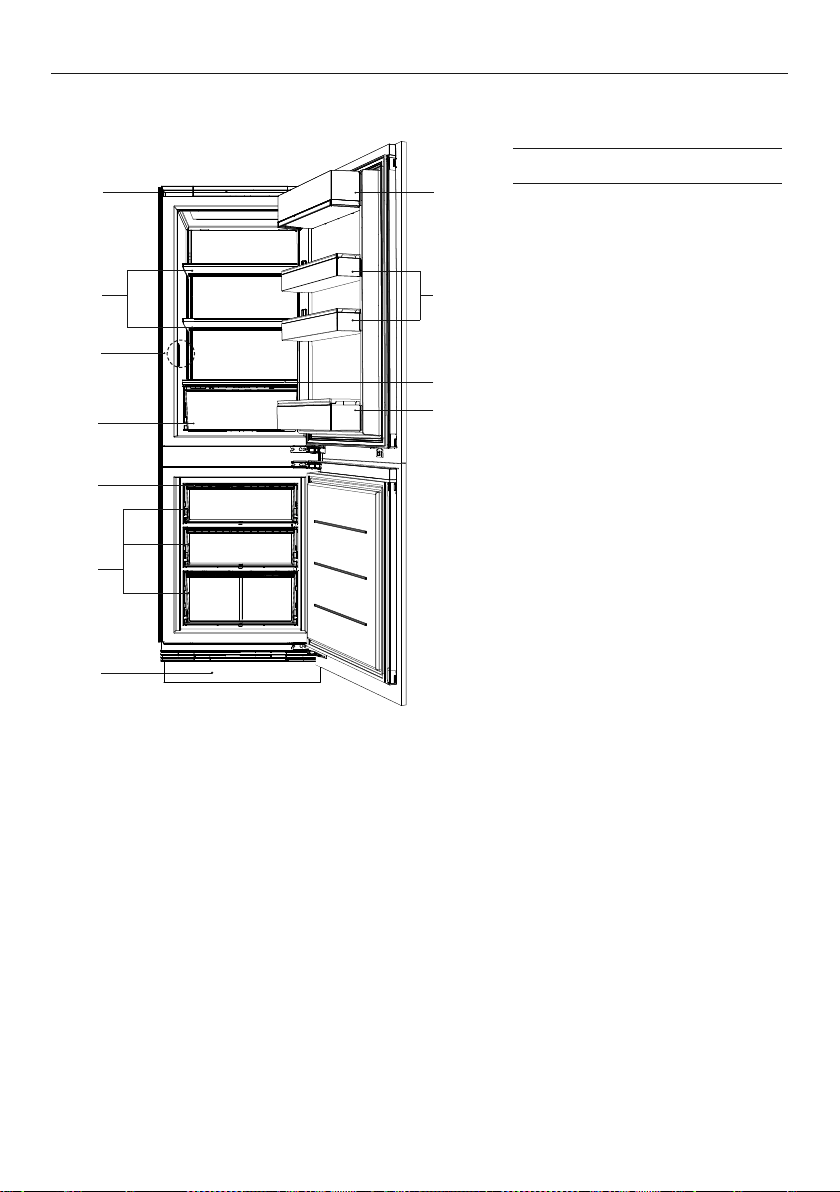
Bottom mount refrigerator (RS2474B)
BEFORE YOU BEGIN
Features
1 Control panel
2 Dairy compartment
3 Adjustable shelving
4 Door shelves
5 Internal water dispenser*
6 Bottle holder accessory
7 Bottle shelf
8 Humidity control bin
9 Ice maker (not shown)
!0 Freezer bins
!1 Water filter (not shown)
*Located in inner left side wall of the
top compartment.
1
5
3
4
8
6
7
2
9
!0
!1
12
CONTROL PANEL
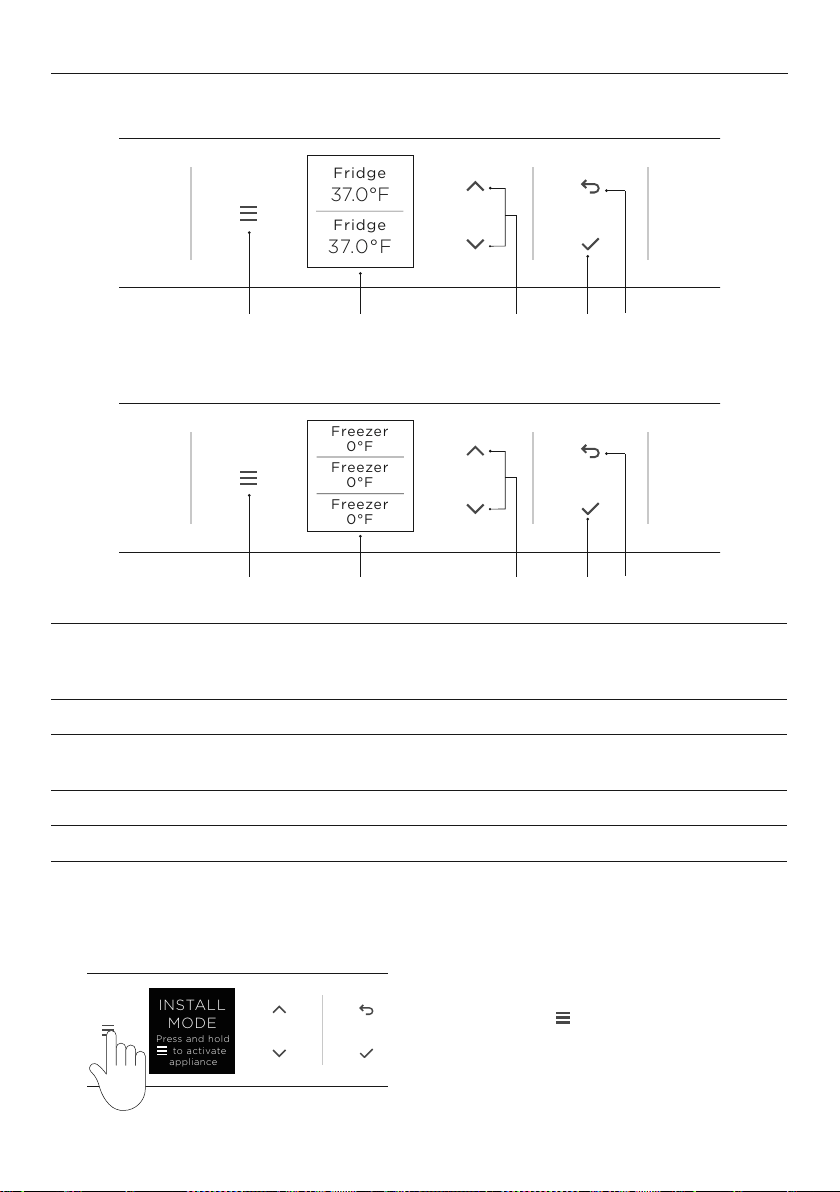
Bottom mount Refrigerator Freezer
Triple Zone Refrigerator / Freezer
1 Menu Press to access product features and settings, or to return to
standby. If the display has been locked, hold for two seconds
to unlock.
2 Display screen Displays product features and settings.
3 Scroll Press to select food modes and adjust temperatures. Enables you
to scroll through the menu, features and settings.
4 Select Press to confirm and activate the selected features and settings.
5 Back Press to go back to the previous menu.
4321 5
4321 5
0°F
Freezer
Freezer
0°F
Freezer
0°F
0°F
37.0°F
Freezer
Fridge
37.0°F
Fridge
Fridge
37.0°F
Fridge
37.0°F
0°F
0°F
Freezer
Freezer
37.0°F
37.0°F
Fridge
Fridge
0°F
Freezer
Freezer
0°F
Freezer
0°F
0°F
37.0°F
Freezer
Fridge
37.0°F
Fridge
Fridge
37.0°F
Fridge
37.0°F
0°F
0°F
Freezer
Freezer
37.0°F
37.0°F
Fridge
Fridge
Install mode
When the product is first delivered it is in Install Mode to help assist installers.
Press and hold
Fridge
3.0 °C
Fridge
3.0 °C
Fridge
5.0 °C
to activate the appliance
and display the menu.
MODE
INSTALL
Press and hold
to activate
appliance
13
FOOD MODES
Variable temperature zones
Separate food modes, in both fridge and freezer, allow you adjust the temperature
independently for optimal storage.
FOOD MODES DESCRIPTION
TYPES OF FOOD
TO STORE
PANTRY
(12°C/54°F)
PANTRY mode provides a cool, dark
place for a wide variety of foods
that perish quickly or may spoil
at room temperature, but are too
sensitive to be stored at normal
refrigerator temperatures.
Bananas, avocados, tomatoes
tropical fruits, root vegetables.
Dry food items such as grains,
flours, sugars, crackers, cereal,
baked goods, tortillas, wraps
and breads.
Spreads, preserves, honey,
tropical fruits, nuts and seeds,
chocolate and fresh herbs.
Wine
FRIDGE
(3°C/37°F)
The ideal mode for fresh, everyday
foods. This mode offers a higher
relative humidity than many other
refrigerators allowing fresh foods such
as fruits and vegetables, meats and
cheeses to stay fresher for longer.
Fruit and vegetables, dairy
products, jams and chutneys/
preserves, meats and drinks.
CHILL
(-0.5°C/31°F)
CHILL mode is an extension of FRIDGE
mode, providing the perfect storage
zone for highly perishable food to
ensure they retain their vital freshness
and quality. These items will last slightly
longer here compared with storage at
FRIDGE mode.
Highly perishable meats,
poultryand seafood.
Alcoholic beverages such
asbeer.
SOFT FREEZE
(-9°C/16°F)
SOFT FREEZE mode is an extension
of your refrigerator, extending the
shelf life of perishable items while
maintaining the quality.
SOFT FREEZE
mode allows easy portioning of food
and the ability to heat, cook or serve
foods straight from the compartment
without waiting for it to thaw.
Meats, seafood, soups, sauces,
pureed foods, bread, desserts
and pastries.
Soft Freeze mode is not
recommended for storage
of creamy desserts such as
ice cream.
FREEZER
(-18°C/0°F)
FREEZER mode is for general frozen
food items that require storage
between 1–12 months.
Meat, poultry, seafood, pre-
cooked foods and leftovers,
some fruits and vegetable,
ice cream, and other
frozen desserts.
Not all food modes available on every model.
Some food modes cannot be used in combination.
14
FEATURE DESCRIPTION
ICE Turns on or off your automatic ice maker in the bottom compartment.
Your ice maker is designed to automatically dispense ice into the ice
storage bin below until it detects the bin is full. The more ice you use,
the more it makes.
Before first use the automatic ice system must be flushed. Refer to your
install guide for further information.
ICE BOOST Increases ice production and deactivates automatically after 24hours.
MAX COLD Boosts the cooling speed by dropping a compartment or the whole
refrigerator to its coldest temperature for a set time.
Durations to comply with: Pantry - 6 hours, fridge - 6 hours,
chill - 4 hours, soft freeze - 12 hours & freezer - 24 hours.
Use
MAX COLD when you are adding food items to your appliance such
as after grocery shopping. This feature will ensure your food is chilled
or frozen within the shortest period of time, locking in freshness and
extending the shelf life of your food.
BOTTLE CHILL Rapidly chills your beverages in the freezer for 15 minutes. Depending on
the size of your beverage, the default time may not be enough to chill
your beverage. If your beverage is notcold enough after the set time,
return it to the compartment and reset the
BOTTLE CHILL feature.
WATER DISPENSER Enables you to lock and unlock the water dispenser.
DOOR ALARM Allows you to temporarily stop door alarms. It will automatically disable
after 20 minutes or when the doors are closed.
DISPLAY LOCK/UNLOCK Enables you to disable the buttons on the control panel. This is useful
when cleaning your appliance.
SABBATH In
SABBATH, alarms, lights and displays are deactivated for 80 hours:
z
The interior light will not turn on when you open the refrigerator.
z
The door alarms will not operate.
z
The display will not illuminate, except the SABBATH.
z
The control panel will not operate.
z
Sabbath mode automatically deactivates after 80 hours.
If you turn off your refrigerator while in
SABBATH, it will resume
automatically once the refrigerator is switched on again.
Not all features available on every model.
FEATURES
15
SETTINGS
SETTING DESCRIPTION
WI-FI SETUP May enable you to connect to your home wireless network and operate
remotely using the app.
WATER FILTER TIMER
RESET
Enables you to reset the water filter replacement reminders.
FORCE ICE FLIP Enables you to force the ice tray to flip. This is used when flushing the
water filter after a vacation or when the filter has been replaced.
DISPLAY SOUND Enables you to silence all control panel sounds.
DISPLAY BRIGHTNESS Enables you to adjust the brightness of the display on the control panel.
TEMPERATURE UNITS Enables you to change the unit of temperature shown on the display
screen between Celsius (°C) and Fahrenheit (°F).
WATER FILTER REMINDERS Enables a notification to indicate when the water filter must be replaced.
FACTORY RESET Enables you to reset your appliance to the default factory settings.
16
Setup
Wi-Fi
Settings
37.0°F
Fridge
Pantry
54.0°F
Chill
32.0°F
Setup
Wi-Fi
Settings
37.0°F
Fridge
Pantry
54.0°F
Chill
32.0°F
Setup
Wi-Fi
Settings
37.0°F
Fridge
Pantry
54.0°F
Chill
32.0°F
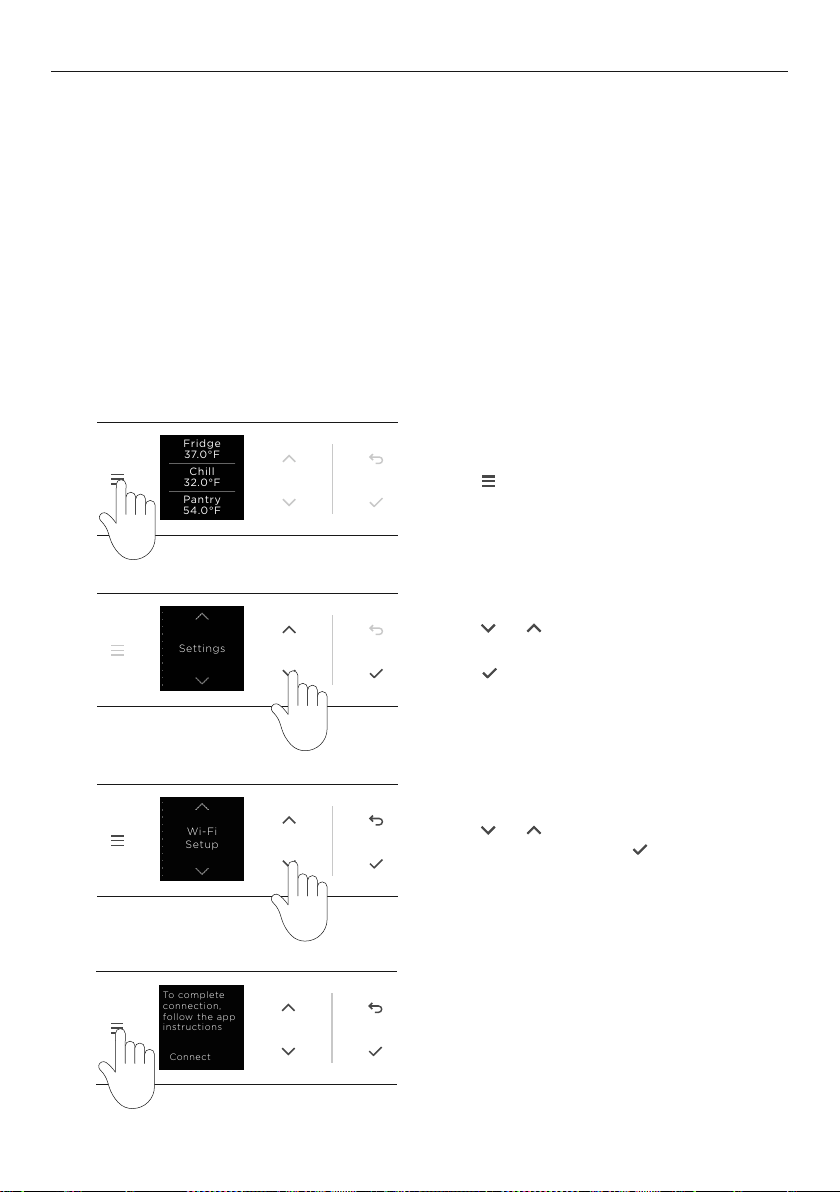
Getting started
Your appliance may be connected to your home wireless network and operated remotely
using the app.
z
Ensure your home Wi-Fi network is turned on.
z
You will be given step by step guidance on both your appliance and mobile device.
z
It may take up to 10 minutes to connect your appliance.
1
2
4
3
Press
Fridge
3.0 °C
Fridge
3.0 °C
Fridge
5.0 °C
to display the menu.
Press
Fridge
3.0 °C
Fridge
3.0 °C
Fridge
5.0 °C
or
Fridge
3.0 °C
Fridge
3.0 °C
Fridge
5.0 °C
to scroll through the list and
select SETTINGS.
Press
Fridge
3.0 °C
Fridge
3.0 °C
Fridge
5.0 °C
to confirm.
Press
Fridge
3.0 °C
Fridge
3.0 °C
Fridge
5.0 °C
or
Fridge
3.0 °C
Fridge
3.0 °C
Fridge
5.0 °C
to scroll through the list and
select WI-FI SETUP. Press
Fridge
3.0 °C
Fridge
3.0 °C
Fridge
5.0 °C
to confirm.
WI-FI CONNECTION
Connecting to Wi-Fi
Illustrations may differ from your purchased appliance.
Follow the prompts on screen and in
the app to complete set-up.
On your mobile device:
1 Download the app from www.fisherpaykel.com/connect
2 Register and create an account.
3 Add your appliance and set up the Wi-Fi connection.
Setup
Wi-Fi
Settings
37.0°F
Fridge
Pantry
54.0°F
Chill
32.0°F
Wi-Fi
CONNECTED
CONNECTED
Wi-Fi
GE_MODULE_03D4
TBPHMPNQ
Connect
To complete
connection,
follow the app
instructions
17
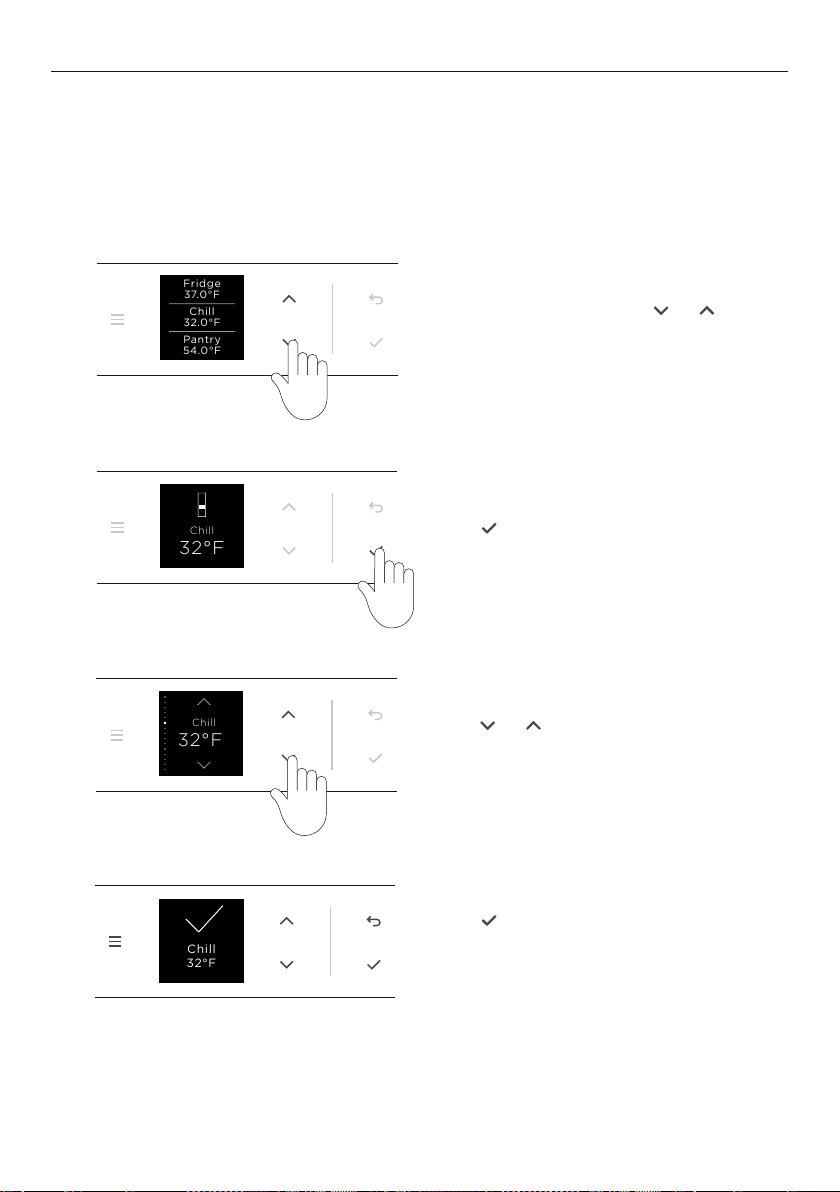
ADJUSTING THE TEMPERATURE
From the idle screen, press
Fridge
3.0 °C
Fridge
3.0 °C
Fridge
5.0 °C
or
Fridge
3.0 °C
Fridge
3.0 °C
Fridge
5.0 °C
to
select the desired compartment.
Press
Fridge
3.0 °C
Fridge
3.0 °C
Fridge
5.0 °C
to confirm the selection.
Press
Fridge
3.0 °C
Fridge
3.0 °C
Fridge
5.0 °C
to confirm.
A confirmation screen will appear and the
change will be reflected on the idle screen.
Press
Fridge
3.0 °C
Fridge
3.0 °C
Fridge
5.0 °C
or
Fridge
3.0 °C
Fridge
3.0 °C
Fridge
5.0 °C
to increase or decrease
the temperature.
Adjusting the temperature from quick access
When you turn on your appliance for the first time, the cooling system will automatically
cool all compartments to their defaultfood mode and temperature (Fridge and 3C for
refrigerators and Freezer and -18C for freezers). This will take about 2-3 hours.
The temperature can be adjusted to user’s preference. Follow the steps below to quickly
adjust the temperature of the food mode in each compartment.
Illustrations may differ from your purchased appliance.
37.0°F
Fridge
Pantry
54.0°F
Chill
32.0°F
37.0°F
Fridge
Pantry
54.0°F
Chill
28.0°F
32°F
Chill
28°F
Chill
32°F
Chill
1
2
3
4
32°F
Chill
Chill
32°F
18
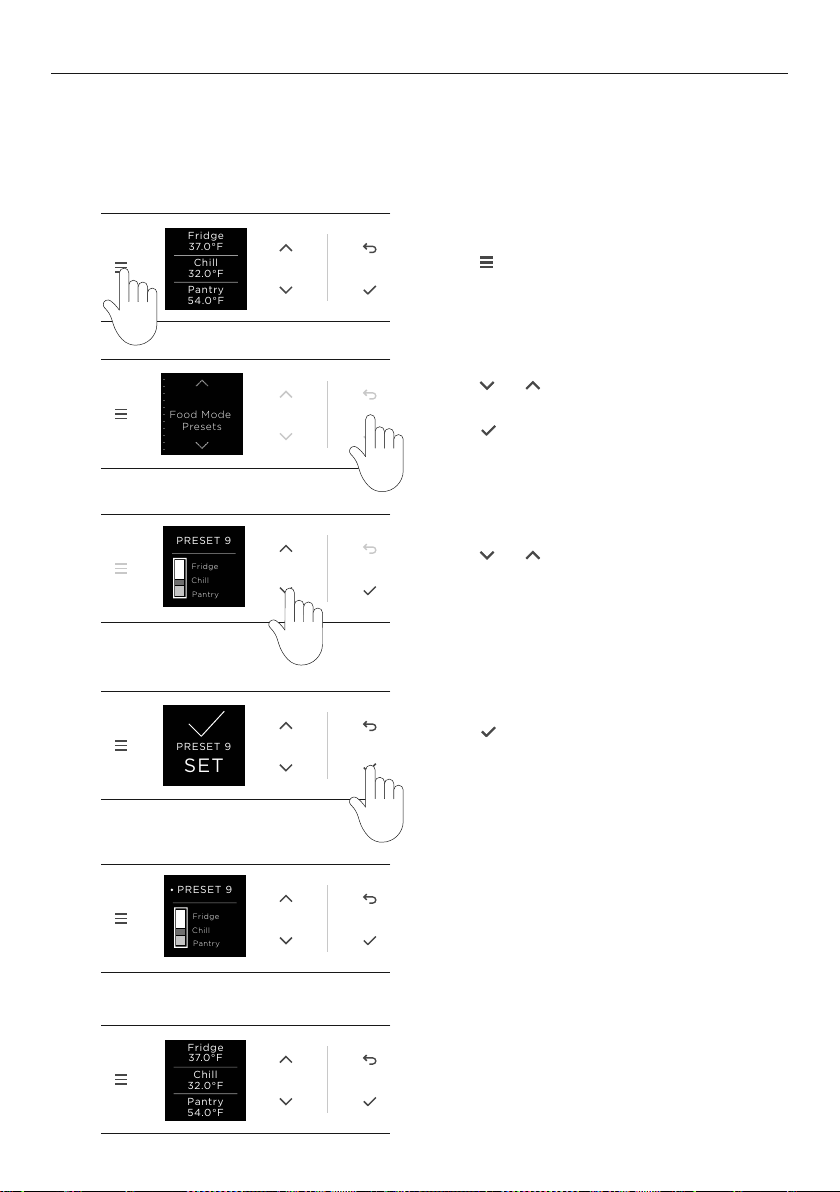
FOOD MODE PRESETS
Food modes have been grouped into preset combinations. Ensure each compartment is
running the intended food mode and is appropriate for the foods being stored. Ensure the
appropriate food mode has been selected for the food types you wish to store. Refer to
‘Food modes’ and ‘Food care’ for information.
Press
Fridge
3.0 °C
Fridge
3.0 °C
Fridge
5.0 °C
Press
Fridge
3.0 °C
Fridge
3.0 °C
Fridge
5.0 °C
to select the desired
Food Mode combination.
Press
Fridge
3.0 °C
Fridge
3.0 °C
Fridge
5.0 °C
or
Fridge
3.0 °C
Fridge
3.0 °C
Fridge
5.0 °C
to scroll through the
preset combinations.
1
2
3
4
The active Food Mode preset will show first
in the list of presets, and be reflected by a
dot adjacent to the preset number.
5
Press
Fridge
3.0 °C
Fridge
3.0 °C
Fridge
5.0 °C
or
Fridge
3.0 °C
Fridge
3.0 °C
Fridge
5.0 °C
to scroll through the list
to Food Mode Presets.
Press
Fridge
3.0 °C
Fridge
3.0 °C
Fridge
5.0 °C
to confirm.
The food mode combination in use will be
shown on the idle screen.
6
Food Mode
Presets
PRESET 9
Fridge
Chill
Pantry
PRESET 9
Fridge
Chill
Pantry
37.0°F
Fridge
Pantry
54.0°F
Chill
32.0°F
PRESET 9
SET
37.0°F
Fridge
Pantry
54.0°F
Chill
32.0°F
Food Mode
Presets
PRESET 9
Fridge
Chill
Pantry
PRESET 9
Fridge
Chill
Pantry
37.0°F
Fridge
Pantry
54.0°F
Chill
32.0°F
PRESET 9
SET
37.0°F
Fridge
Pantry
54.0°F
Chill
32.0°F
Food Mode
Presets
PRESET 9
Fridge
Chill
Pantry
PRESET 9
Fridge
Chill
Pantry
37.0°F
Fridge
Pantry
54.0°F
Chill
32.0°F
PRESET 9
SET
37.0°F
Fridge
Pantry
54.0°F
Chill
32.0°F
Food Mode
Presets
PRESET 9
Fridge
Chill
Pantry
PRESET 9
Fridge
Chill
Pantry
37.0°F
Fridge
Pantry
54.0°F
Chill
32.0°F
PRESET 9
SET
37.0°F
Fridge
Pantry
54.0°F
Chill
32.0°F
Food Mode
Presets
PRESET 9
Fridge
Chill
Pantry
PRESET 9
Fridge
Chill
Pantry
37.0°F
Fridge
Pantry
54.0°F
Chill
32.0°F
PRESET 9
SET
37.0°F
Fridge
Pantry
54.0°F
Chill
32.0°F
Food Mode
Presets
PRESET 9
Fridge
Chill
Pantry
PRESET 9
Fridge
Chill
Pantry
37.0°F
Fridge
Pantry
54.0°F
Chill
32.0°F
PRESET 9
SET
37.0°F
Fridge
Pantry
54.0°F
Chill
32.0°F
19
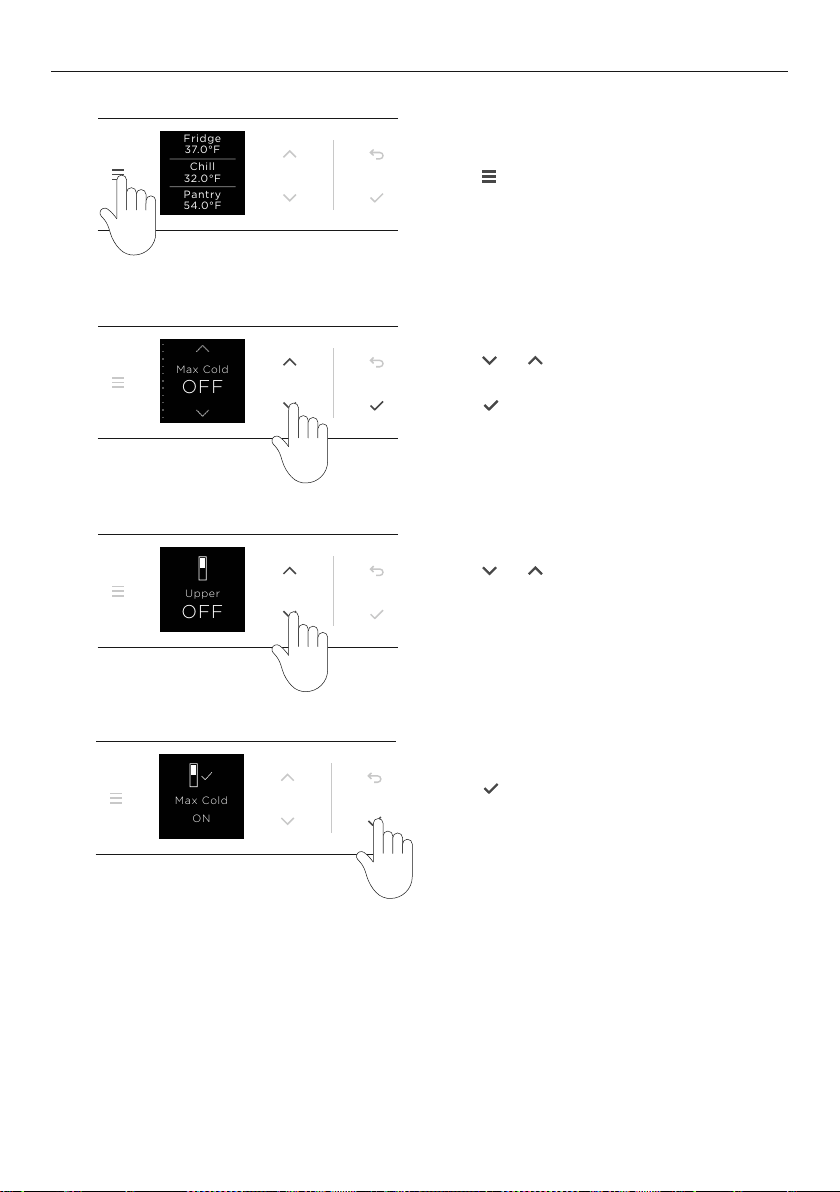
CHANGING FEATURES
Press
Fridge
3.0 °C
Fridge
3.0 °C
Fridge
5.0 °C
to display the menu.
Press
Fridge
3.0 °C
Fridge
3.0 °C
Fridge
5.0 °C
or
Fridge
3.0 °C
Fridge
3.0 °C
Fridge
5.0 °C
to scroll through the
list and select the required feature.
Press
Fridge
3.0 °C
Fridge
3.0 °C
Fridge
5.0 °C
to confirm.
Press
Fridge
3.0 °C
Fridge
3.0 °C
Fridge
5.0 °C
or
Fridge
3.0 °C
Fridge
3.0 °C
Fridge
5.0 °C
to select the
desired compartment if
applicable for the feature.
Press
Fridge
3.0 °C
Fridge
3.0 °C
Fridge
5.0 °C
to activate/deactivate
the feature.
Illustrations may differ from your purchased appliance.
37.0°F
Fridge
Pantry
54.0°F
Chill
32.0°F
Max Cold
OFF
OFF
Upper
Max Cold
Upper: ON
37.0°F
Fridge
Pantry
54.0°F
Chill
32.0°F
Max Cold
OFF
OFF
Upper
Max Cold
Upper: ON
37.0°F
Fridge
Pantry
54.0°F
Chill
32.0°F
Max Cold
OFF
OFF
Upper
Max Cold
Upper: ON
1
2
3
4
Max Cold
ON
20
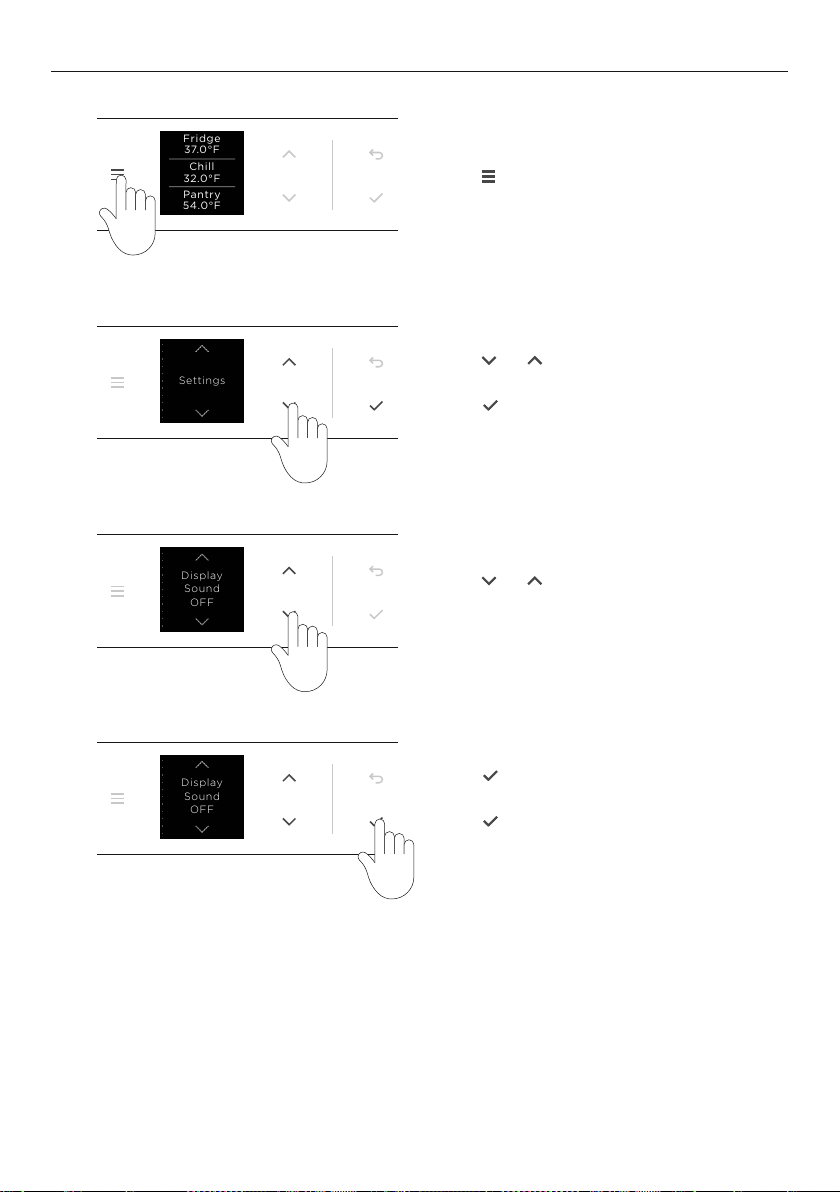
CHANGING SETTINGS
Press
Fridge
3.0 °C
Fridge
3.0 °C
Fridge
5.0 °C
to display the menu.
Press
Fridge
3.0 °C
Fridge
3.0 °C
Fridge
5.0 °C
or
Fridge
3.0 °C
Fridge
3.0 °C
Fridge
5.0 °C
to scroll through
the list and locate SETTINGS.
Press
Fridge
3.0 °C
Fridge
3.0 °C
Fridge
5.0 °C
to confirm.
Press
Fridge
3.0 °C
Fridge
3.0 °C
Fridge
5.0 °C
or
Fridge
3.0 °C
Fridge
3.0 °C
Fridge
5.0 °C
to scroll through the list and
locate the desired setting.
Press
Fridge
3.0 °C
Fridge
3.0 °C
Fridge
5.0 °C
to change the setting or to
enter the setting for more setting options.
Press
Fridge
3.0 °C
Fridge
3.0 °C
Fridge
5.0 °C
to confirm the selection.
37.0°F
Fridge
Pantry
54.0°F
Chill
32.0°F
Settings
OFF
Sound
Display
OFF
Sound
Display
37.0°F
Fridge
Pantry
54.0°F
Chill
32.0°F
Settings
OFF
Sound
Display
OFF
Sound
Display
37.0°F
Fridge
Pantry
54.0°F
Chill
32.0°F
Settings
OFF
Sound
Display
OFF
Sound
Display
1
2
3
4
37.0°F
Fridge
Pantry
54.0°F
Chill
32.0°F
Settings
OFF
Sound
Display
OFF
Sound
Display
21
WATER DISPENSER
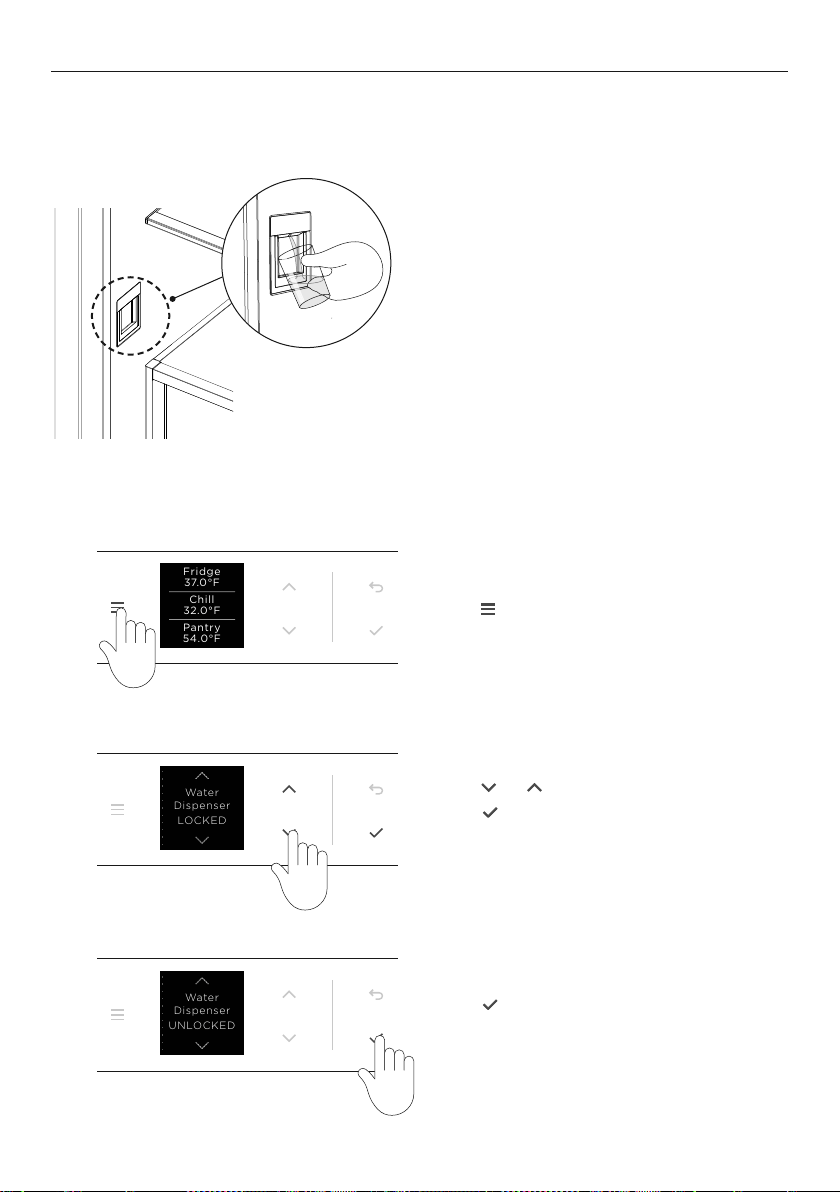
Using the water dispenser (Triple Zone Refrigerator and B model)
The water dispenser is located inside on the left side wall of the top compartment.
To dispense water, gently press the
dispensing pad with a glass or container.
To stop the flow of water, simply pull
your glass or container away from the
dispensing pad.
Pressing hard against the dispensing pad
will not increase the flow or dispense
more water.
When dispensing water for long durations
a time out period may occur. An alarm
will sound. Please wait 4 minutes before
dispensing again.
Locking/unlocking the water dispenser
Press
Fridge
3.0 °C
Fridge
3.0 °C
Fridge
5.0 °C
to display the menu.
Press
Fridge
3.0 °C
Fridge
3.0 °C
Fridge
5.0 °C
or
Fridge
3.0 °C
Fridge
3.0 °C
Fridge
5.0 °C
to scroll to WATER DISPENSER.
Press
Fridge
3.0 °C
Fridge
3.0 °C
Fridge
5.0 °C
to lock or unlock the
water dispenser.
Press
Fridge
3.0 °C
Fridge
3.0 °C
Fridge
5.0 °C
to lock or unlock the
water dispenser.
Illustrations may differ from your purchased appliance.
37.0°F
Fridge
Pantry
54.0°F
Chill
32.0°F
LOCKED
Dispenser
Water
UNLOCKED
Dispenser
Water
37.0°F
Fridge
Pantry
54.0°F
Chill
32.0°F
LOCKED
Dispenser
Water
UNLOCKED
Dispenser
Water
37.0°F
Fridge
Pantry
54.0°F
Chill
32.0°F
LOCKED
Dispenser
Water
UNLOCKED
Dispenser
Water
1
2
3

22
Your automatic ice maker will produce ice into the storage bin below. Ice making will
continue until the storage bin is full. Ice making will resume once you start to use the
stored ice.
On initial start up of your appliance, your ice maker may take several hours to produce
ice. This is normal. Please ensure the ice maker feature is turned
ON. Refer to ‘Changing
features’ for information.
z
An ice scoop is provided for hygienic use.
If a large amount of ice is required, remove the storage bin and allow ice to fall into the
larger bin. For maximum ice storage, level the stored cubes with the ice scoop.
Empty the ice storage bin periodically discarding any old ice. Wash and dry the storage bin
thoroughly and place back into the correct position. Refer to ‘Care and cleaning’.
Turn your ice maker off if:
z
There is no water supply for several hours.
z
You are removing the ice storage bin for a long period of time.
z
You are going on holiday/vacation.
ICE MAKER
23
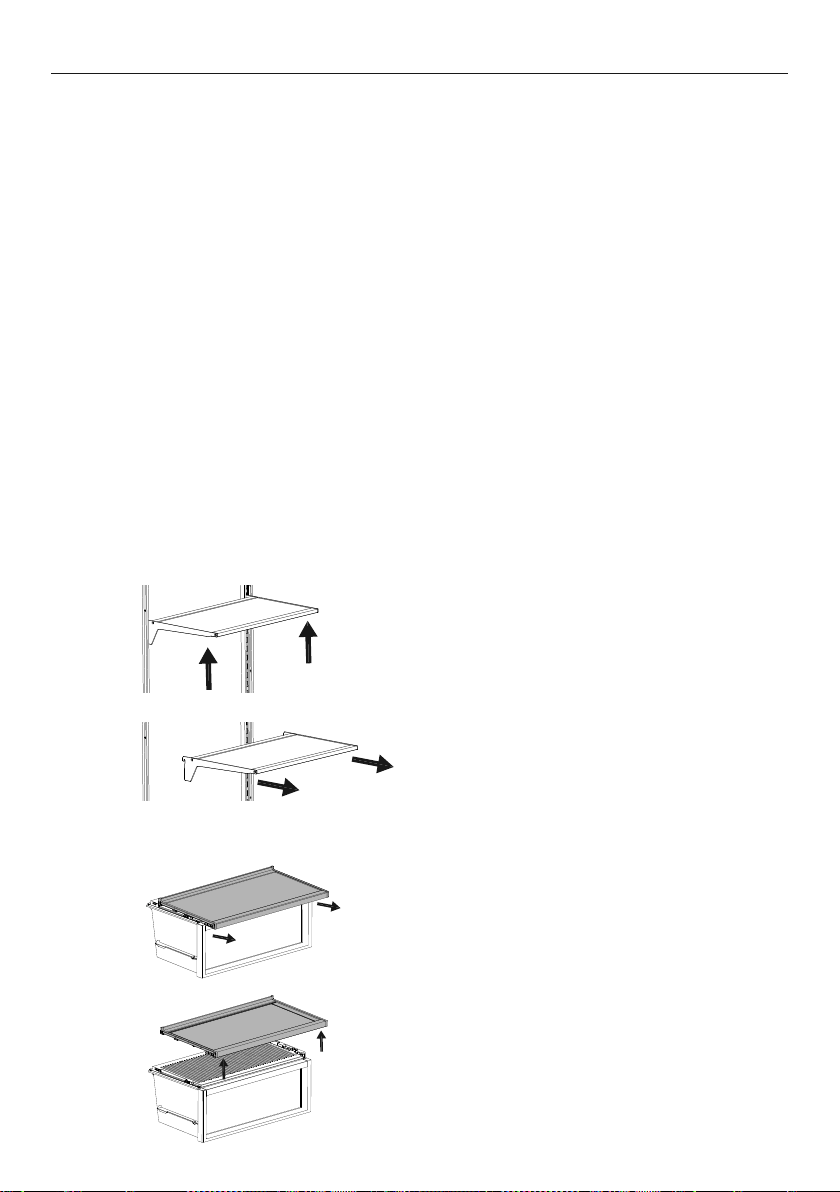
STORAGE FEATURES
REFRIGERATOR
Fruits and vegetables bins
with humidity control lids
Lids create a humid microclimate by reducing dry air going into the bins.
The specially designed groves retain condensation, keeping humidity
high and reduce dripping onto the produce below.
Sepreate fruits and vegetables to prevent ethylene-sensitive produce
from ripening too quickly.
Also used for storing deli items and beverages, or defrosting foods.
Cantilever glass shelving Heat-treated safety glass.
Can be removed and positioned at heights to suit your
storage requirements.
Dairy shelf and door shelves The top door shelf is a dairy compartment for storing butter
and cheeses.
The middle shelves are designed for general items, condiments
and drinks.
The bottom shelf is deisgned to store large drinks or those drinks you
require frequent access to.
Shelves are adjustable
Single bottle holders Can be placed along the length of any shelf to store a variety of bottles.
Store bottles with the neck facing the front of the refrigerator.
FREEZER
Cantilever glass shelving
(RS6019F2 and RS6019F3)
Heat-treated safety glass.
Can be removed and positioned at heights to suit your
storage requirements.
Door Shelves
(RS6019F3)
Designed for general frozen items and alcoholic beverages such as spirits
(
FREEZER and SOFT FREEZE) and beer and wine (CHILL).
Ice Maker
(Ice & Water models only)
Removable ice container. (RS6019BU & RS6019F3 only)
Hygenic ice scoop. (RS6019BU & RS6019F3 only)
Freezer bins Allow for easy storage of frozen food items.
24
CARE AND CLEANING
Do not use harsh chemicals, abrasives, ammonia, chlorine, bleach, concentrated detergents,
solvents or abrasive scouring pads on any part of your appliance. Someofthese chemicals
may damage your appliance.
Clean all surfaces with a mild liquid detergent dissolved in warm water and a soft cloth.
Rinse with clean water and dry with a clean, lint-free cloth.
Exterior cleaning
Condenser coils
The condenser coils of your appliance requires periodic cleaning by a Fisher&Paykel
trained and supported service technician.
Toe kick grilles and filter
We recommend cleaning the grille and filter in conjunction with changing your water filter
every 6months.
1 To maximize operating efficiency, keep ventilation openings clear of obstructions by
regularly vacuuming the flooring in front of your appliance.
2 More frequent cleaning may be necessary for dusty homes or those with pets
sheddinghair.
Interior cleaning
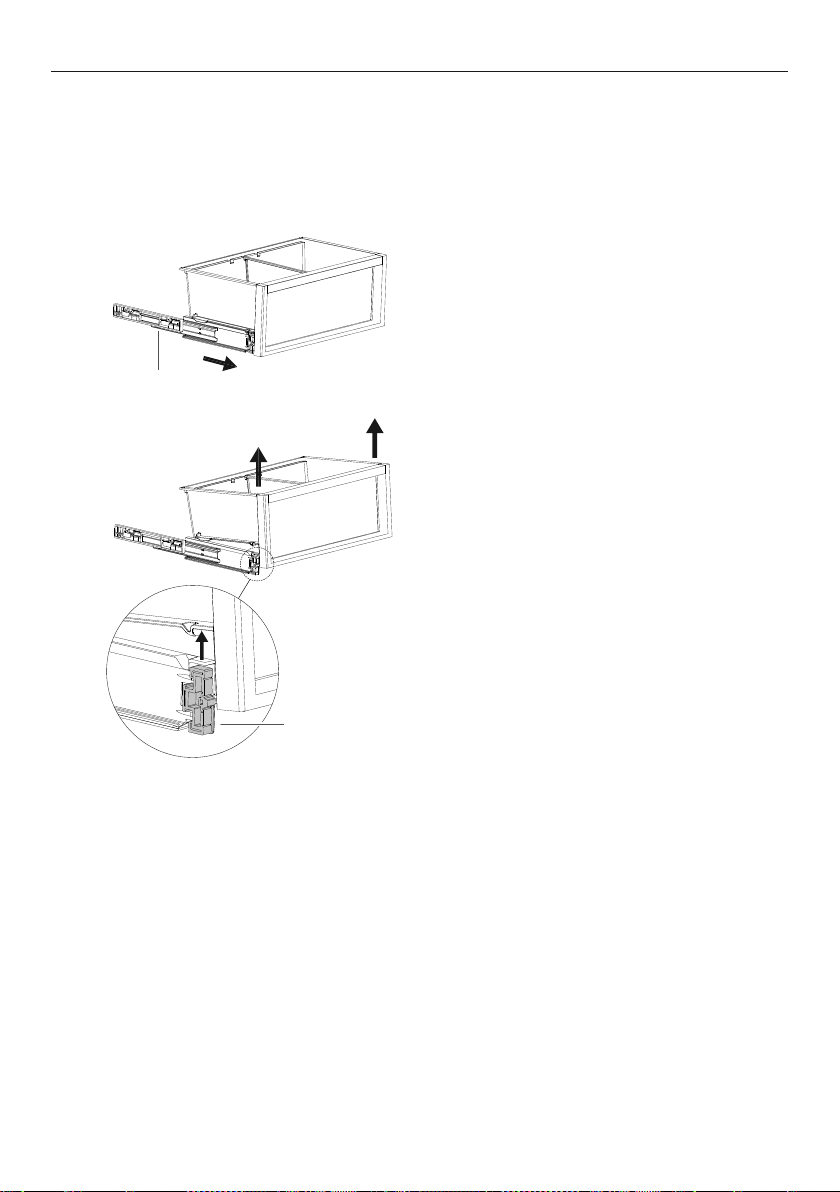
Cantilevered glass shelves
1
2
To remove, hold the front and back edge
of the shelf firmly.
Push the shelf up vertically to dislodge
from back support lugs.
Pull the shelf towards you.
Fixed shelf
1
2
Pull the shelf towards you to release
the clips.
Lift shelf up to remove.
25
CARE AND CLEANING
1
2
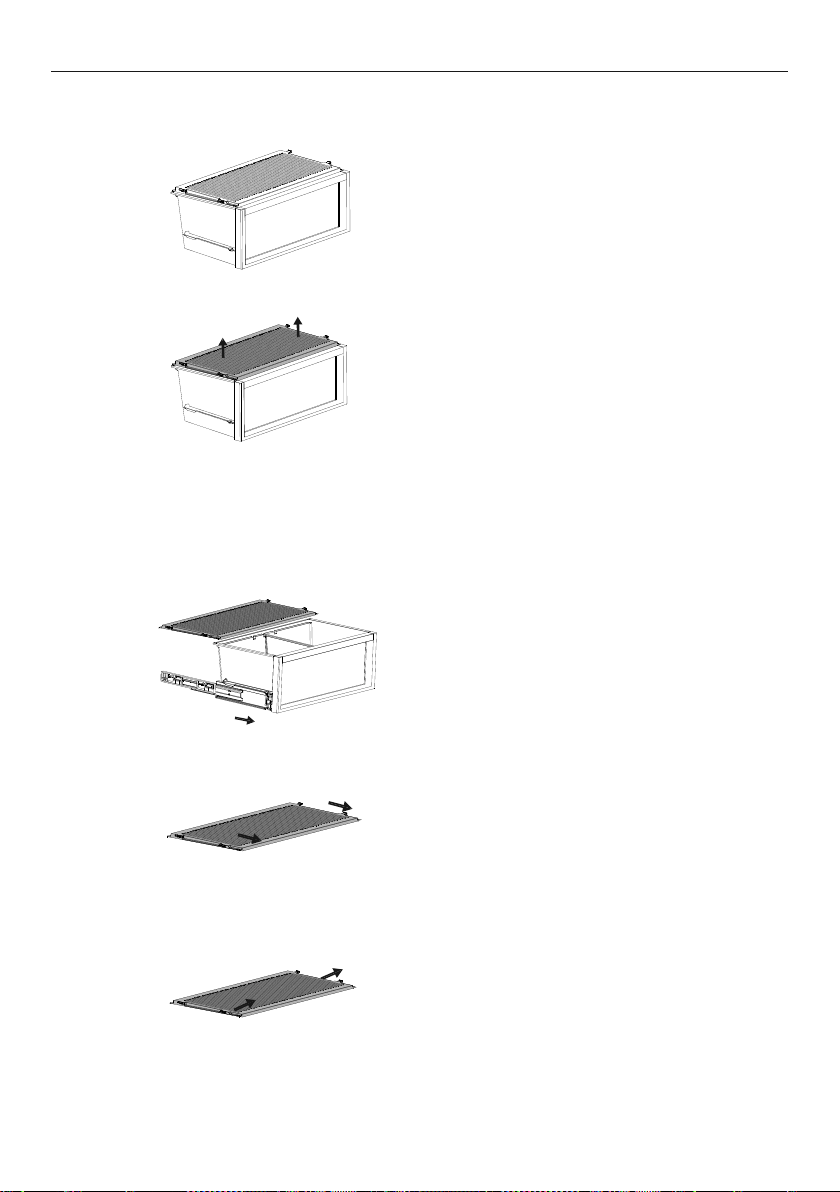
To remove a bin, extend the bin on its
runners, and empty the bin.
Removing the bins
The runners are pre-lubricated to help open and close the bins. Do not remove the
grease from the runners to maintain its smooth function. If the bins are not regularly fully
extended, the extension of the runners may be reduced. To restore the extension of the
runners pull them out.
Push the securing tabs on both sides of
the bin corners, then push the bin firmly
upwards to dislodge from the runners.
runners
securing tab
26
1
2
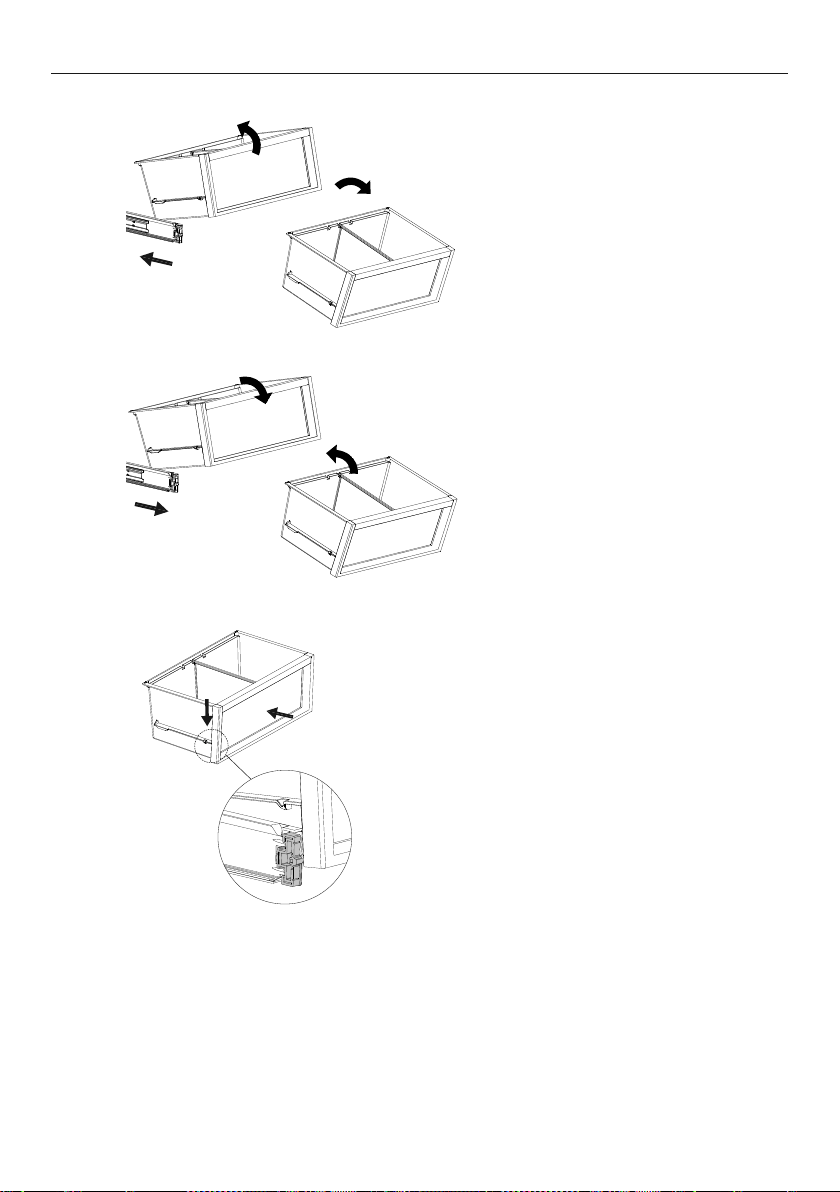
Remove fixed shelf.
Humidity control lids (Upper Compartment)
1
2
Remove the bin.
Pull the humidity control lid towards
you to release the clip.
Humidity control lids (Lower Compartment)
Lift the humidity control lid
upwards to remove
Lift lid up and slide out to remove.
3
CARE AND CLEANING
27
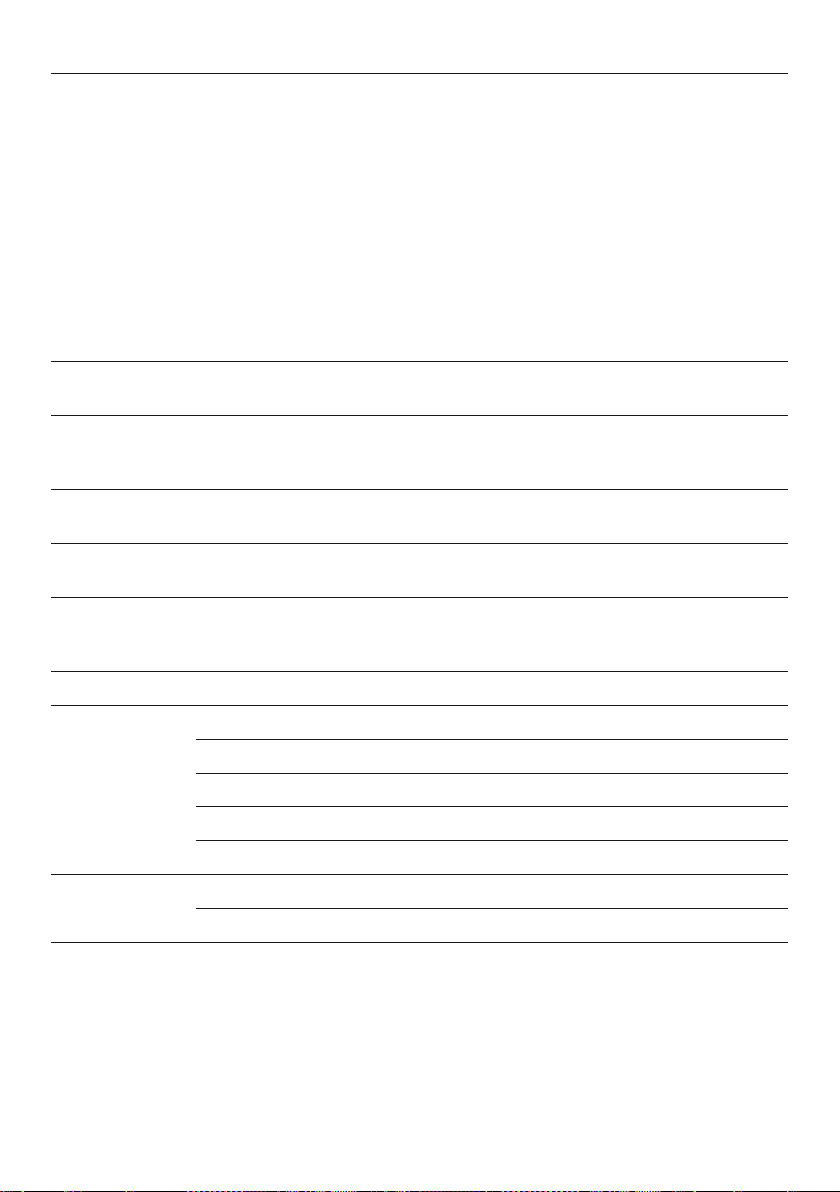
Pull the bin towards you to
remove. Push both runners
back into the appliance.
CLEANING AND CARE
Holiday/vacation (Freezer only)
Before leaving:
Turn the ice maker to
OFF on the control panel.
Shut off the water supply to the appliance.
On return:
Turn on the ice maker. Discard the first full bin of ice.
Push the bin slowly onto the securing
tabs until you feel it clip onto the runners.
Ensurethe bin tabs are clipped securely
onto the runners before use.
To return the bin, extend the
runners and place the bin on
top of the runners.
Bin Removal
1
3
2

28
FOOD CARE
For best food care
z
Store only high-quality, fresh food in your appliance.
z
Store perishable foods in the appliance immediately after purchase. Storingatroom
temperature increases the rate of deterioration and can allow harmfulmicrobialgrowth.
z
Foods such as meat, poultry and seafood should be well wrapped or sealed in
suitablepackaging to prevent dehydration, color deterioration, loss of flavor, and
transfer ofodor.
Note: We recommend storing these foods on the bottom shelf of your appliance
orinone of the bins to prevent potential spills and cross-contamination with otherfoods.
z
Ensure hot foods and beverages are cooled sufficiently before placing them into
theappliance. Hot items may cause other foods to warm to unsafe temperatures.
Itmayalso cause sealed items to sweat/condensate—which is undesirable.
z
Beverages are best stored standing upright in the door shelves or on the bottle
racksprovided.
z
Ensure raw and cooked foods are stored separately to avoid cross-contamination.
z
Consume food items within the recommended storage times. Discard foods that
showsign of spoilage.
z
Keep door openings to a minimum to maintain optimum storage temperatures inside
your appliance.
z
We recommend using MAX COLD when you are adding food items toyour appliance, such
as after grocery shopping. This feature will ensure the food ischilled/frozen within the
shortest period of time, locking in the freshness andextending the shelf life of your food.
z
Storing at temperatures other than the recommended settings may impact
the storage life.
Items stored in your refrigerator
z
Dairy items such as butter and cheeses should be stored in the covered door shelf
tominimize any transfer of odor or odor absorption from other foods.
z
Eggs should be stored in their carton to avoid absorption of strong odors through
theirporous shell structure.
z
Fruits & vegetables should be stored in the humidity control bins. These bins provide
a humid microclimate to extend the storage times of fruit and vegetables.
Items stored in your freezer
We recommended cooling carbonated beverages only when the
BOTTLE CHILL function
isactive.
Do not store carbonated drinks without this function when set to freezer mode. Failure
toremove beverages could lead to freezing liquid and the likelihood ofbottle/canexplosion.
z
Ensure air is removed from packaging to avoid large formation of ice crystals and
prevent freezer burn.
z
To maintain freshness and quality, we recommend defrosting foods in the refrigerator.
Ensure partially or fully defrosted foods are never re-frozen—cook immediately.
29
USER WARNINGS AND SOUNDS
Faults
z
In the unlikely event a fault occurs, 4rapid beeps will be heard and the fault will be
displayed on the control panel.
z
Record the fault code displayed on the control panel and contact a Fisher&Paykel
trained and supported service technician in order to repair thefault. You can do this
by going online to fisherpaykel.com or bycontactingourCustomer Care Center.
Normal appliance sounds
Integrated Refrigerators and Freezers have been designed to have excellent energy ratings
and cooling performance. As a result, it can produce sounds somewhat different to your
oldappliance.
Low frequency
ticking
This is the valve that controls cooling to each compartment. This noise will only last
for a few seconds at a time.
Fan air flow This product has fans which change speed depending on demand. During cooling
periods, such as after frequent door openings, fans circulate thecoldair in the
appliance producing some air flow sound. This is quite normal.
Cracking
or popping
This may occur when the automatic defrost function is operating.
Running water This is the liquid refrigerant in the system and can be heard
as a boiling or gurgling noise.
Hissing sound
after closing the
freezer door
This is due to the pressure difference between the warm air that has entered the
cabinet and suddenly cooled, and the outside airpressure.
Humming This is the compressor running and is quite normal.
Ice maker noises Motor operation (low humming).
Running water as the ice maker and/or water tank fills.
Water valve opening and closing (hissing sound).
Loosened from the ice molding tray (cracking).
Ice dropping into bin (clunking).
Other sounds Cabinet not stable or level.
Bottles or jars rattling on shelves.
30
TROUBLESHOOTING
If there is a problem with your appliance, please check the following points before
contacting your local Fisher & Paykel trained and supported service technician or
theCustomer Care Center.
Product parts and accessories can be purchased through the Fisher & Paykel CustomerCare
Center, or online at fisherpaykel.com (this service is available to selectedmarkets only).
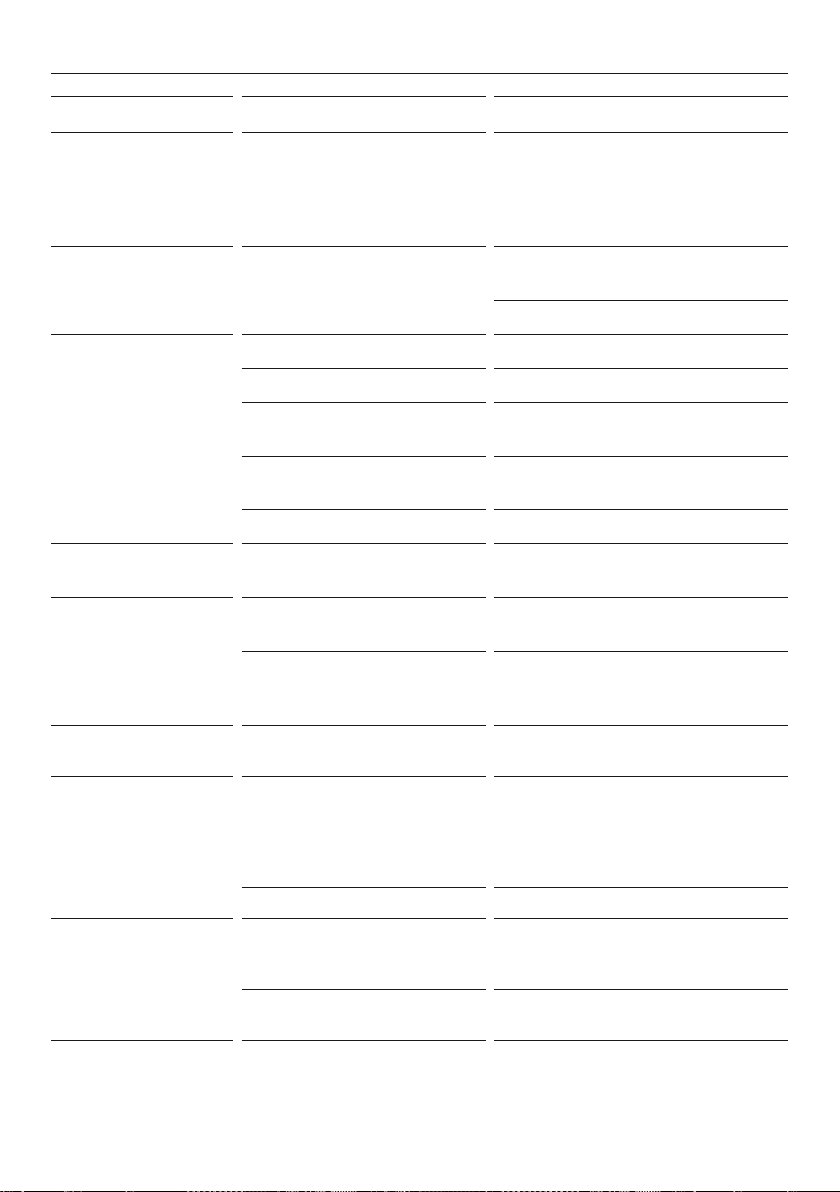
PROBLEM POSSIBLE CAUSES WHAT TO DO
Appliance does
not operate
No electricity at poweroutlet. Check that the plug is correctly connected and
power switched on.
Check another appliance at the sameoutlet.
Check house breaker.
Light not working Light not functioning. The lighting cannot be serviced by the user.
Contact your Fisher & Paykel dealer or trained
and supported servicetechnician.
Appliance not working. Check appliance is turned on at the wall or at
the isolating switch.
Light and display
not working
Product in
SABBATH.
Press
Fridge
3.0 °C
Fridge
3.0 °C
Fridge
5.0 °C
and hold to unlock, scroll to SABBATH
and deactivate.
Storage
compartments
too warm
Temperature setting
notcorrect.
Refer to ‘Food modes’.
Frequent door openings. Minimize door openings to allow temperature
to stabilize.
Large amount of food
has been recentlyadded.
Select
MAX COLD to assist in lowering the
temperature quickly.
Food freezing in
the refrigerator
Temperature setting is
too cold.
Increase the temperature setting. Refer to
‘Adjusting the temperature’ and ‘Food modes’.
Food placed directly infront of
air outlets.
Move chill sensitive foods away from
theair outlets.
Unfamiliar noises Cabinet not stable orlevel. See Installation guide supplied with
thisappliance.
Freezer is defrosting. This is normal.
Ice maker sounds Normal ice maker operation. Refer to ‘User warnings and sounds’.
Food Mode is
not available
Not all food modes are
available in all compartments.
Refer to ‘Food mode presets’ for available food
mode combinations.
31
TROUBLESHOOTING
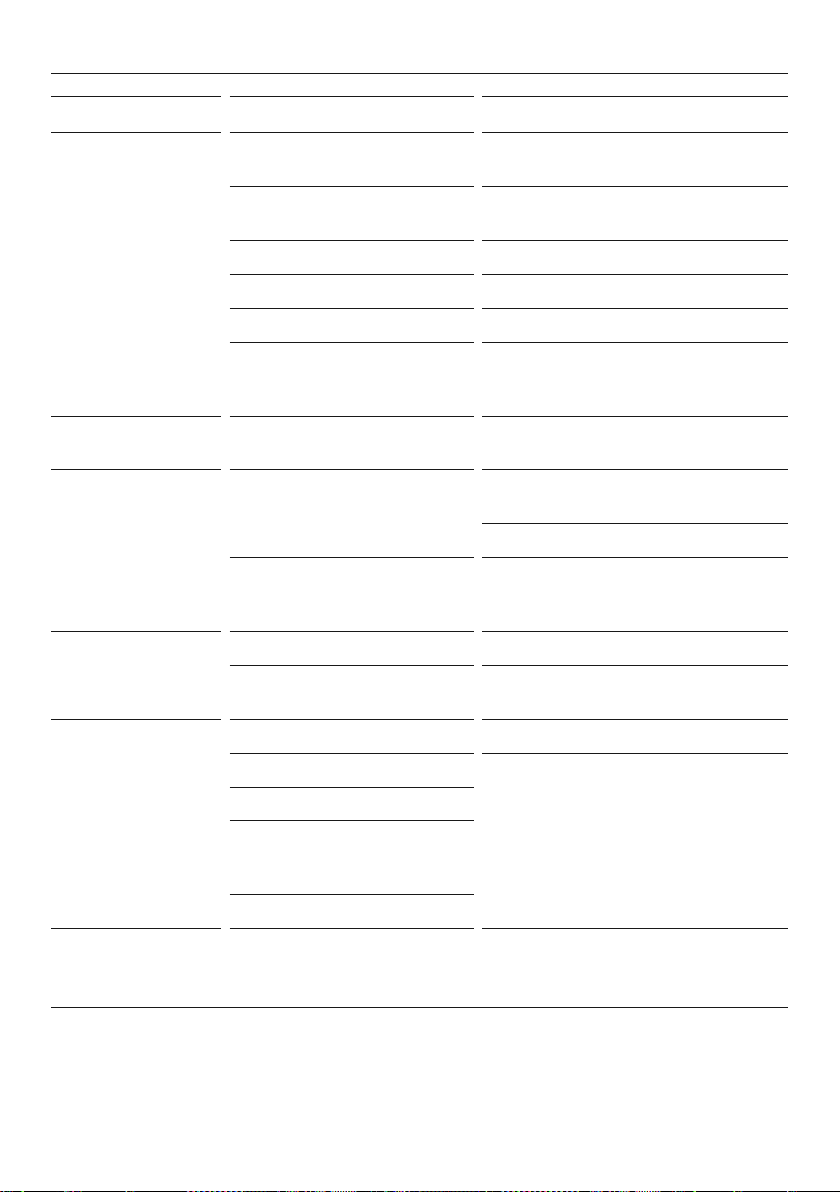
PROBLEM POSSIBLE CAUSES WHAT TO DO
When the appliance
door is opened 4rapid
beeps sound and a
code is displayed on the
control panel
Record the code on the control panel
and contact Customer CareCenter.
Water in the
vegetable bins
Condensation is generated due
to humid environments caused
by fruits and vegetables.
Some condensation is beneficial
for storage of fruits and vegetables.
Wipe out water with a cloth.
Condensation/ice
inside compartment
Frequent or long door openings. Minimize door openings.
Door gasket leaking. Check and clean door gasket seal.
Not unusual during periods of
high humidity.
Wipe dry.
Door not closing tightly. Arrange items in the compartment so
door can close tightly.
Doors not aligned. Call a service technician.
Bin does not slide
inand out evenly
Packaging trapped. Check to ensure no food or packaging is
trapped behind the tray/bin.
Door not closing An obstruction is blocking
door closing.
Move obstruction.
Appliance not installed correctly. Refer to your Installation guide supplied
with this appliance to ensure your
appliance has been installed correctly.
Freezer door will
not open
The door has been
recently opened.
Wait 30seconds and try again.
Small or large ice cubes Water line is kinked/squashed. Check the external water line is
notkinked/squashed. If it is not kinked/
squashed contact Customer Care to
arrange a technician to check the
internal water line.
Blocked water filter. Change filter before calling technicians.
Frozen food items are
soft or melting
Remove items and place in another
freezer or cooler and callCustomer
Care immediately.
Temperature setting not correct. Adjust the temperature setting. Refer to
‘Food modes’.
32
TROUBLESHOOTING
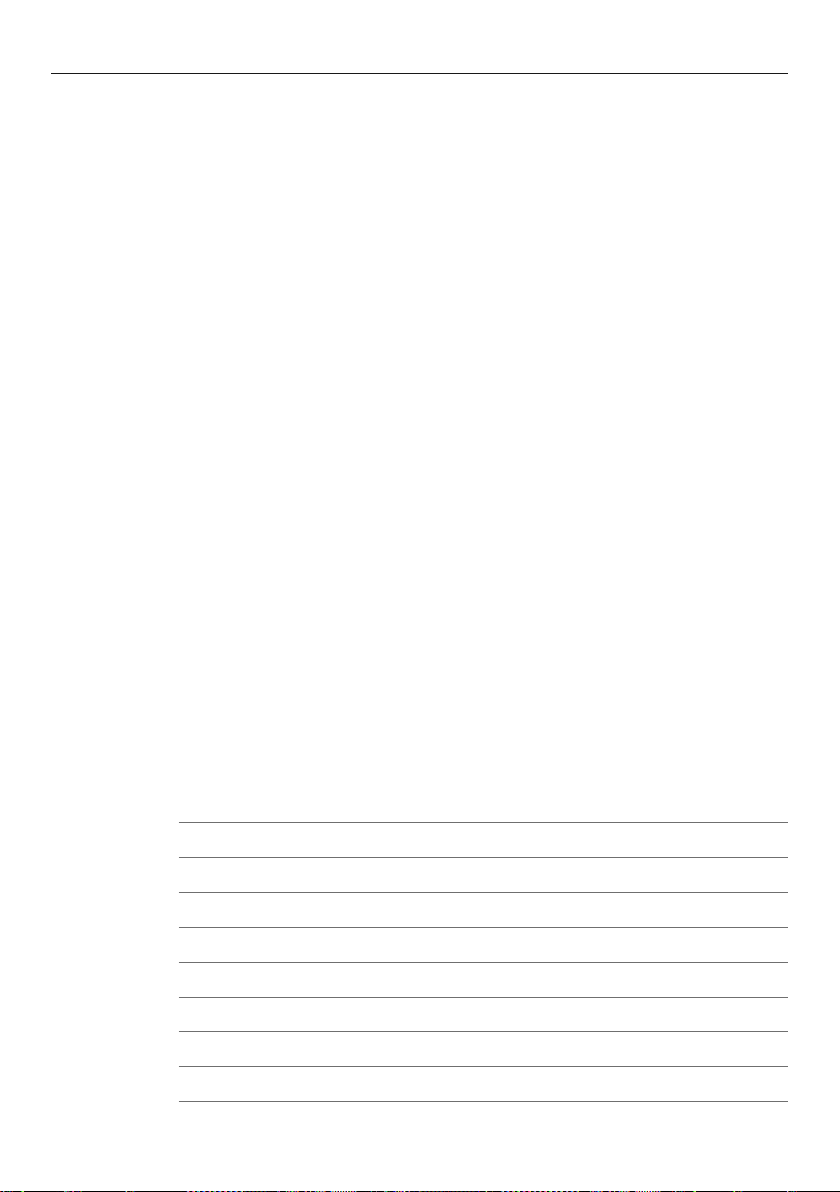
PROBLEM POSSIBLE CAUSES WHAT TO DO
Automatic ice maker
does notwork
Ice maker has not been
turned on.
Switch on ice maker, refer to
‘Changing features’.
Water supply turned off or
not connected.
Connect the water supply.
Water pressure too low. Check water pressure.
Water line kinked/squashed. Check water line for kinks/squashing.
Filter is clogged. Water filter may need replacing.
Ice cubes clumped in bin. Remove ice storage bin, loosen cubes
and remove clumped ice. Replace ice
storage bin.
Freezer compartment
notworking.
Contact Customer Care Center.
Ice cubes taste
tainted
Unsealed foods may be
transmitting odor/taste.
Discard ice cubes and clean ice storage
bin. Refer to ‘Interior cleaning’.
Wrap or cover strong smelling foods.
Poor taste from incoming water. Replace filter cartridge product parts and
accessories can be purchased through our
Customer Care Center.
Slow ice cube freezing Door may have been leftajar. Close door.
Freezer compartment
settoo warm.
Turn temperature to a colder setting. Refer
to ‘Adjusting the temperature’.
Wet ice/ iceclumping Filter is blocked. Replace filter cartridge.
Long freezer door openings. Gently tap ice to unstick or, if large clumps
occur, empty ice bin and make new ice.
High ambient temperature.
Ice bin left out of freezer
compartment for a length
of time.
Ice will stick together overtime.
Ice is discolored Water filter has not been flushed. Refer to your installation guide supplied
with your appliance fordetails on how to
flush your water filter.
33
SERVICE & WARRANTY
Complete and keep for safe reference:
Model
Serial No.
Purchase Date
Purchaser
Dealer
City
State
Zip
Country
For details of your Manufacturer’s Warranty and contacts for servicing, please refer to your
separate ‘Service & Warranty’ book provided with your refrigerator.
This product has been designed for use in a normal domestic (residential environment). This
product is not designed for any commercial use. Any commercial use by the customer will
affect this products Manufacturer’s Warranty.

86750A 09.22
FISHERPAYKEL.COM
© Fisher & Paykel Appliances 2022. All rights reserved.
The models shown in this guide may not be available in all markets
and are subject to change at any time.
The product specifications in this guide apply to the specific products and
models described at the date of issue. Under our policy of continuous product
improvement, these specifications may change at any time.
For current details about model and specification availability in your country,
please go to our website or contact your local Fisher&Paykel dealer.