NECDisplaySolutionsofAmerica,Inc.
MultiSync™LargeMSeriesInstallationGuide [Ver.1.0]
www.necdisplay.com MultiSyncLargeMSeriesDisplays Page1of16
Contents:
ProductDescriptionandNotes Page1
RotationPage1
VentilationRecommendations Page2
DisplayDimensionsPages3‐8
OptionalStandDimensionsPage9
OptionalWallMountDimensionsPage10
OptionalSpeakerDimensionsPage11
Intel®SmartDisplayModuleIntegration Page12
ComputeModuleIntegrationPage13
InputPanelPage14
ASCIICommandsPage15
PDCommsToolPage15
CableConnectionPage16
BrowserControlPage16
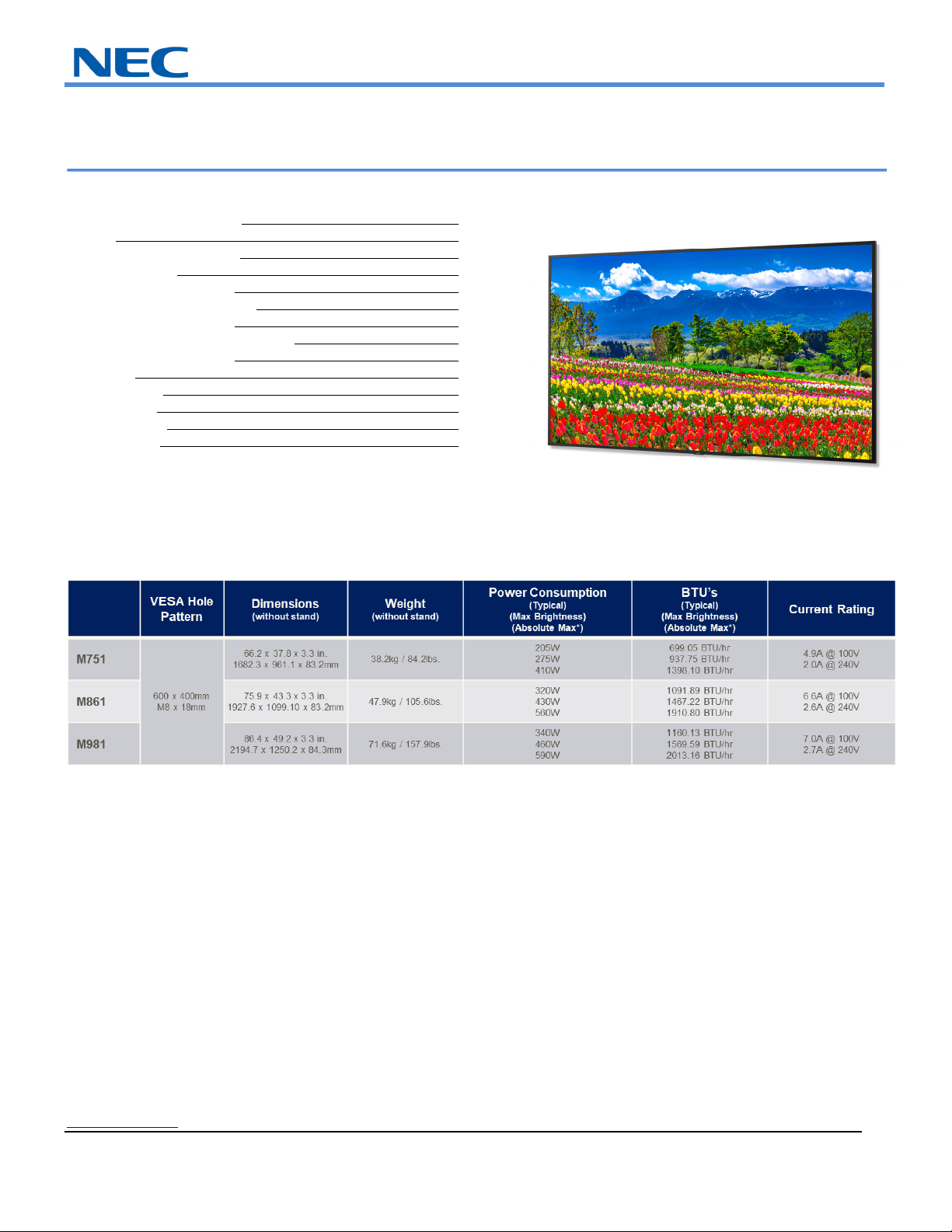
ProductDescription:
Type: LCDDisplay
Resolution: 3840x2160
AspectRatio: 16:9
EMI: ClassB
*AbsoluteMaxreferstowhenthedisplayisatfullbrightnesswithallslotsactiveandvolumeat100.
NOTES:
Thisdocumentisintendedtobeusedasareferenceguidetosupplyusefulinformationforadesignorinstallation.Itisnotintendedtobe
astep‐bystepprocedureforinstallation.
Anyceilingsorwallsmustbestrongenoughtosupportthemonitorandtheinstallation
mustbeinaccordancewithanylocal
buildingcodes.Allmountsshouldmakesecurecontacttowoodstuds.
NECDisplaySolutionsofAmerica,Inc.
www.necdisplay.com MultiSyncLargeMSeriesDisplays Page2of16
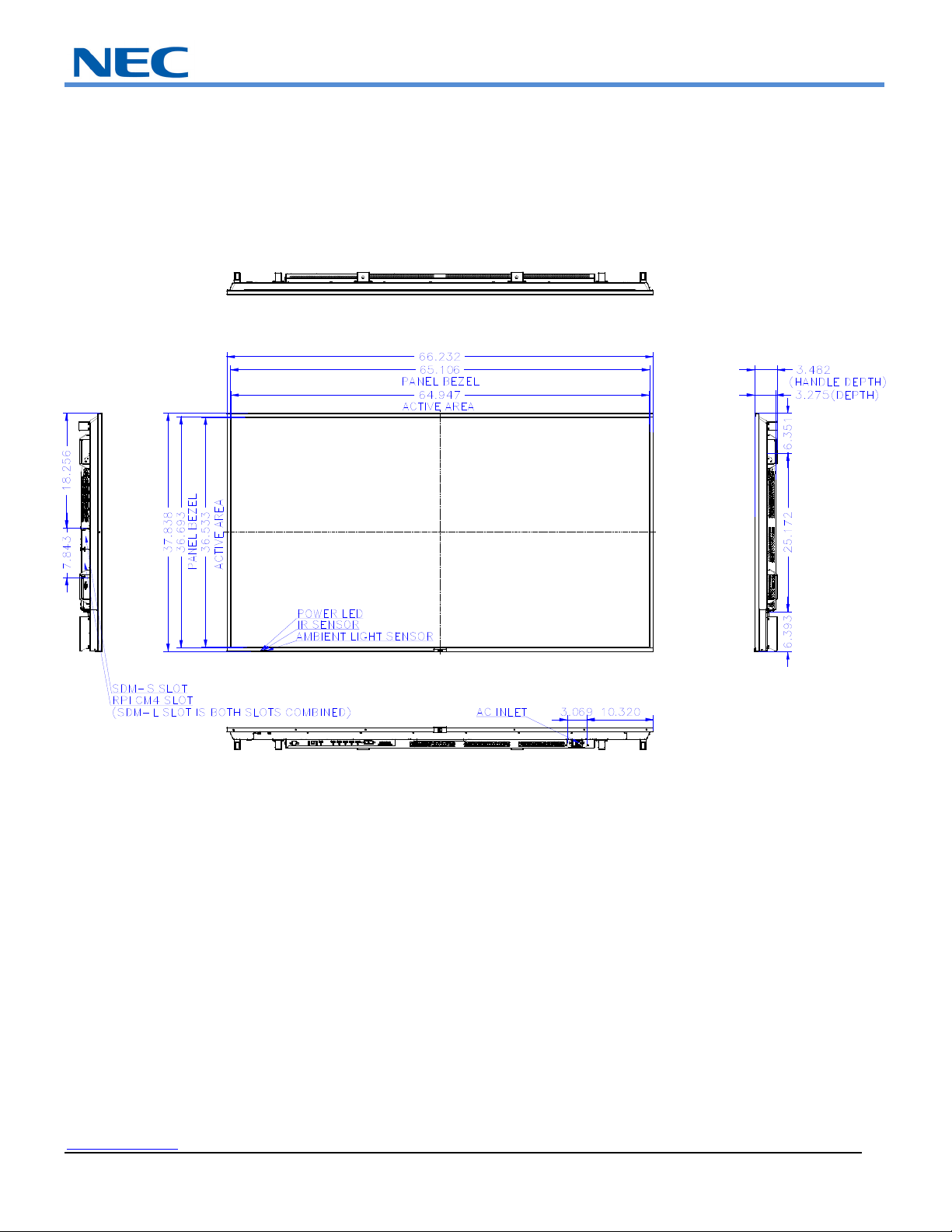
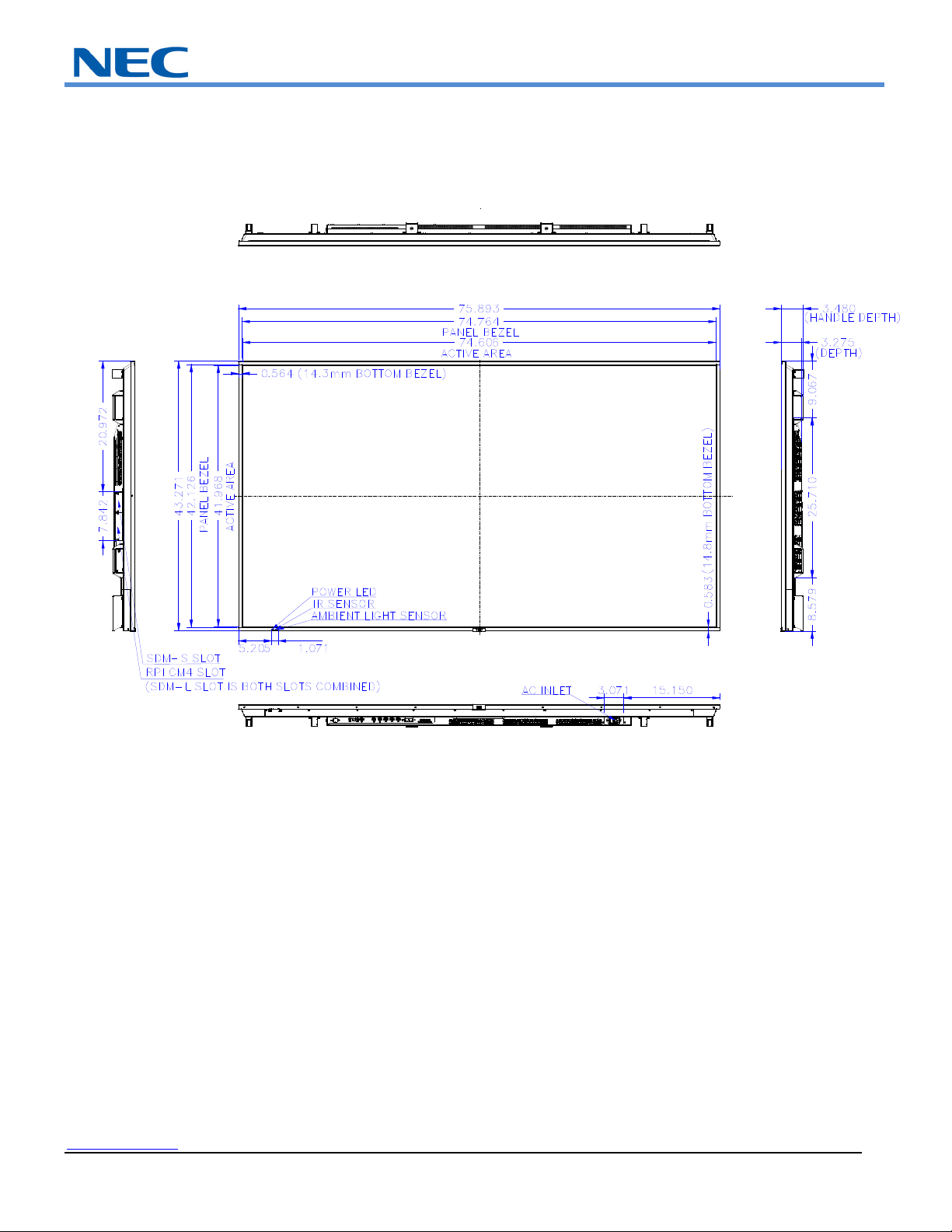
Distancesareininches,formillimetersmultiplyby25.4.Distancesmayvary±5%.
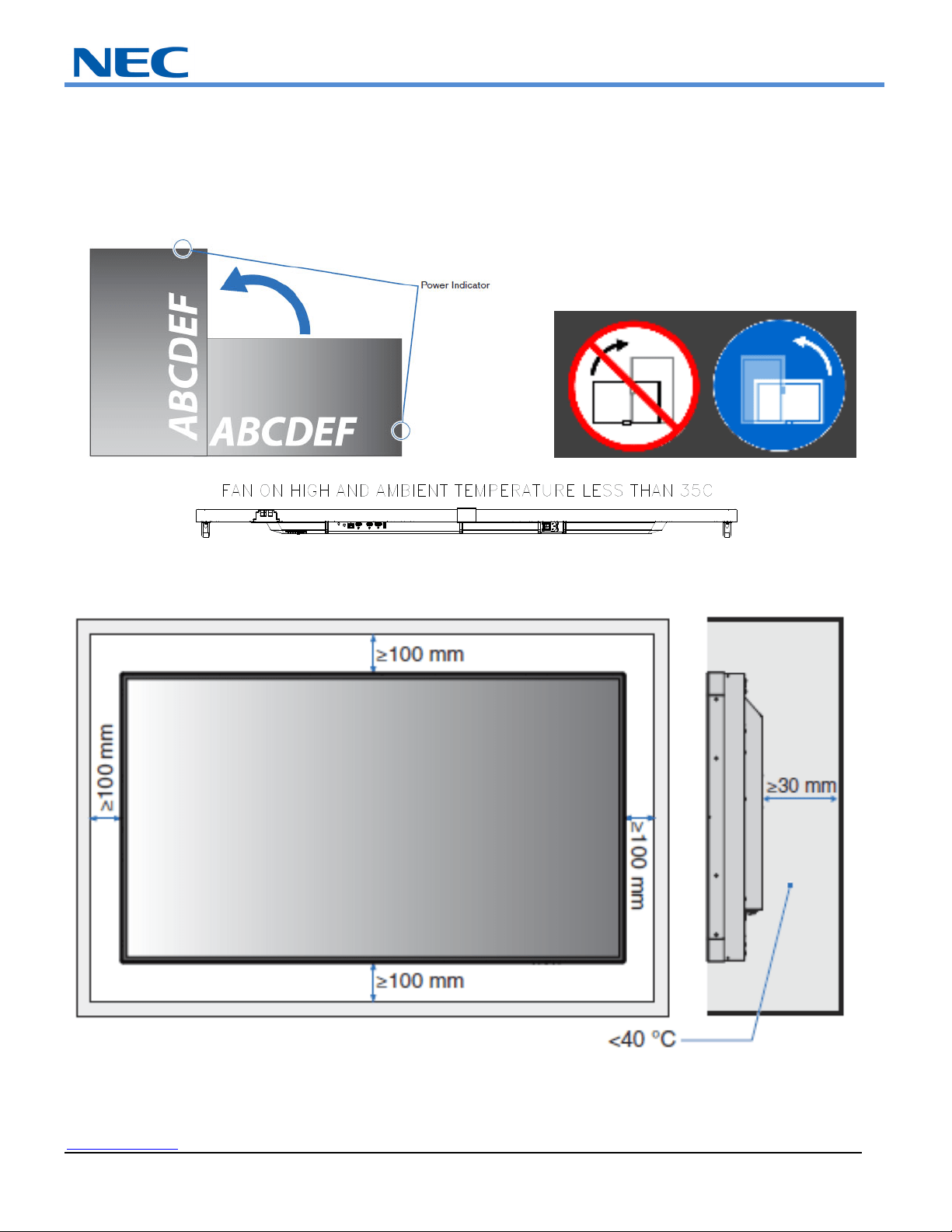
Rotation/FaceUp:
Ifdisplayistobeusedinportraitorientation,rotationneedstobecounterclockwise.Notethatiftheunitisrotatedinthewrong
direction,asymbolshouldappearonthedisplaynotatingthecorrectdirection.FaceUporientationissupportedforthesemodelsonlyif
thefansettingisonHIGHandiftheambienttemperaturestayslessthan35degreesCelsius.
VentilationRecommendations:
Dimensionsbelowareminimumrecommendedforproperventilation
NOTE:
Theabovearerecommendationsinordertokeepyourdisplayascoolaspossible.Ifthedistancesarelessthanthe100mm,extra
ventilationmaybenecessary.Theventilationspaceshouldnotbecoveredorclosedoffatthefrontoftheopening.Ifforsomereasonthe
openingneedstobecovered,othermeansofventilationwillneedtobeincorporatedintothedesign.ContactNECfordesignreviewand
NECDisplaySolutionsofAmerica,Inc.
www.necdisplay.com MultiSyncLargeMSeriesDisplays Page3of16
recommendations.
DisplayDimensions–M751:
NECDisplaySolutionsofAmerica,Inc.
www.necdisplay.com MultiSyncLargeMSeriesDisplays Page4of16
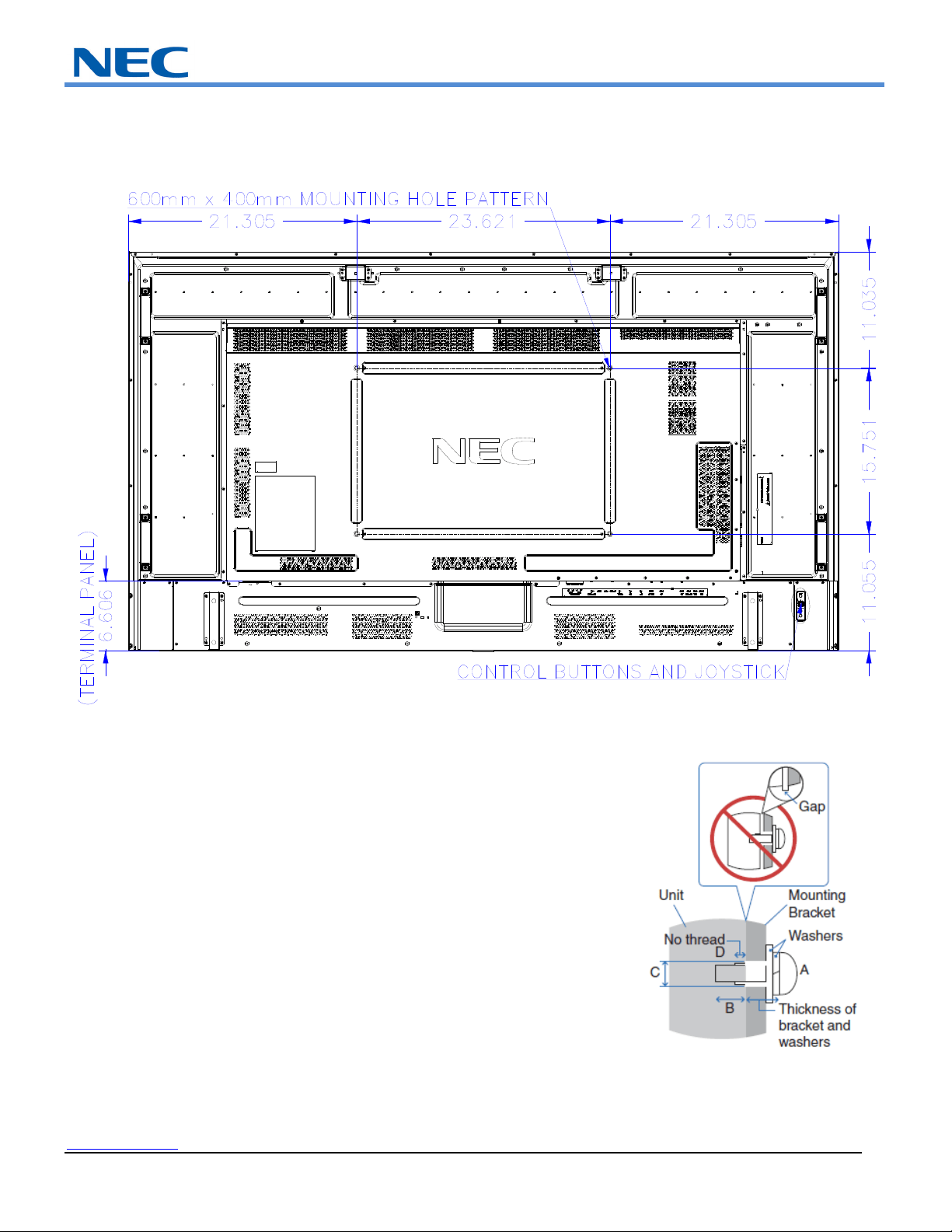
DisplayDimensions–M751cont’d:
NEC strongly recommends using size M8 screws (16 - 18mm
+ the thickness of the bracket and washers in len
g
th
)
.
NECDisplaySolutionsofAmerica,Inc.
www.necdisplay.com MultiSyncLargeMSeriesDisplays Page5of16
DisplayDimensions–M861:
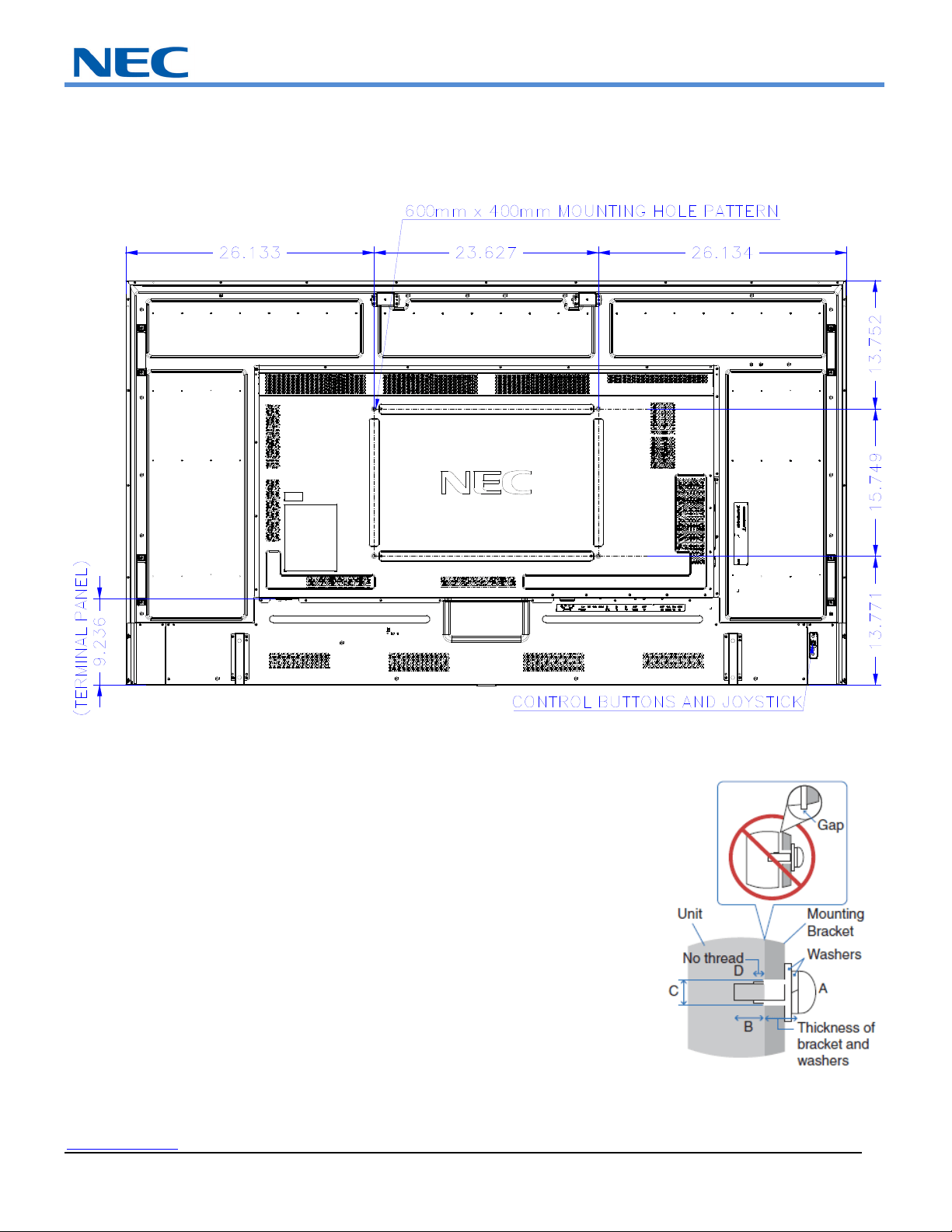
NECDisplaySolutionsofAmerica,Inc.
www.necdisplay.com MultiSyncLargeMSeriesDisplays Page6of16
DisplayDimensions–M861cont’d:
NEC strongly recommends using size M8 screws (16 - 18mm
+ the thickness of the bracket and washers in len
g
th
)
.
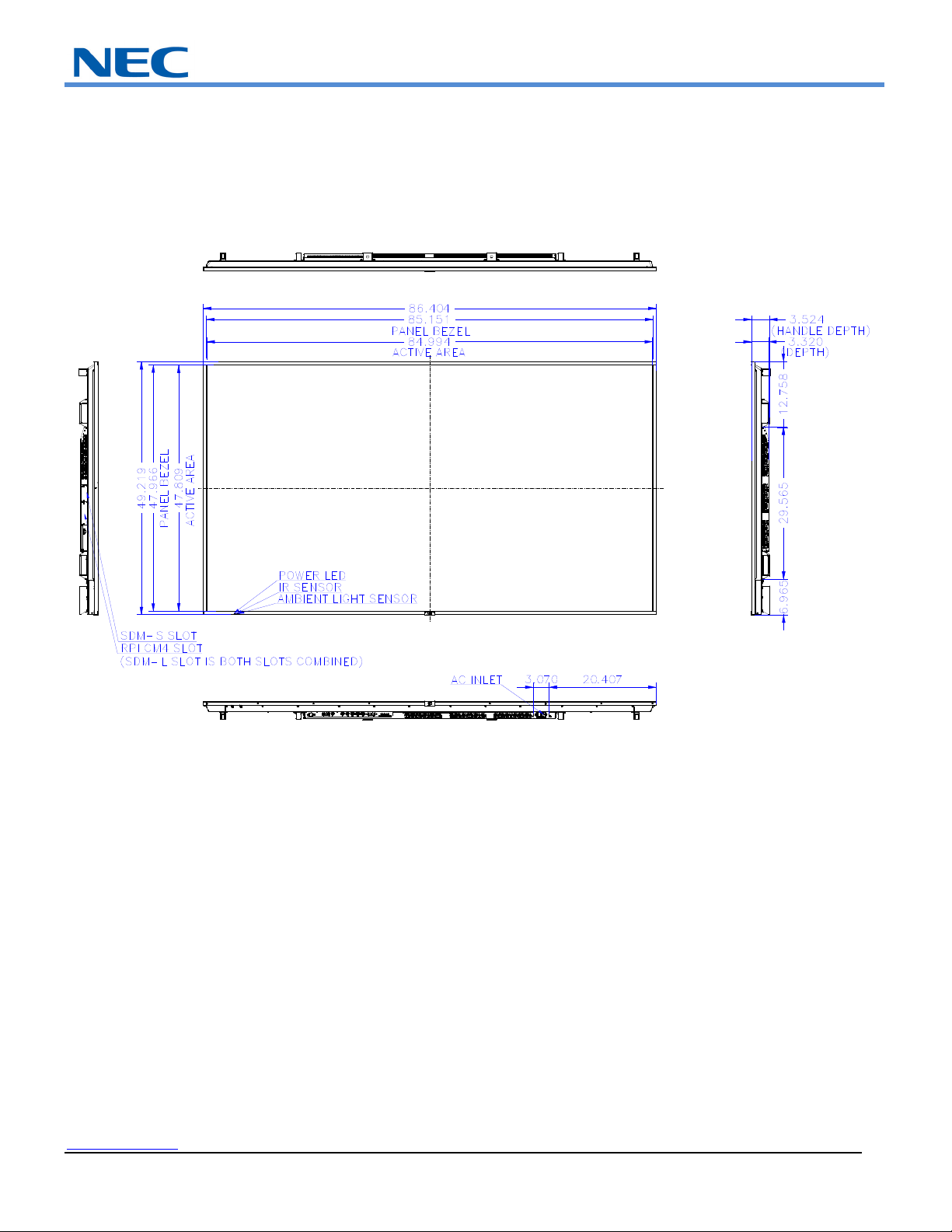
NECDisplaySolutionsofAmerica,Inc.
www.necdisplay.com MultiSyncLargeMSeriesDisplays Page7of16
DisplayDimensions–M981:
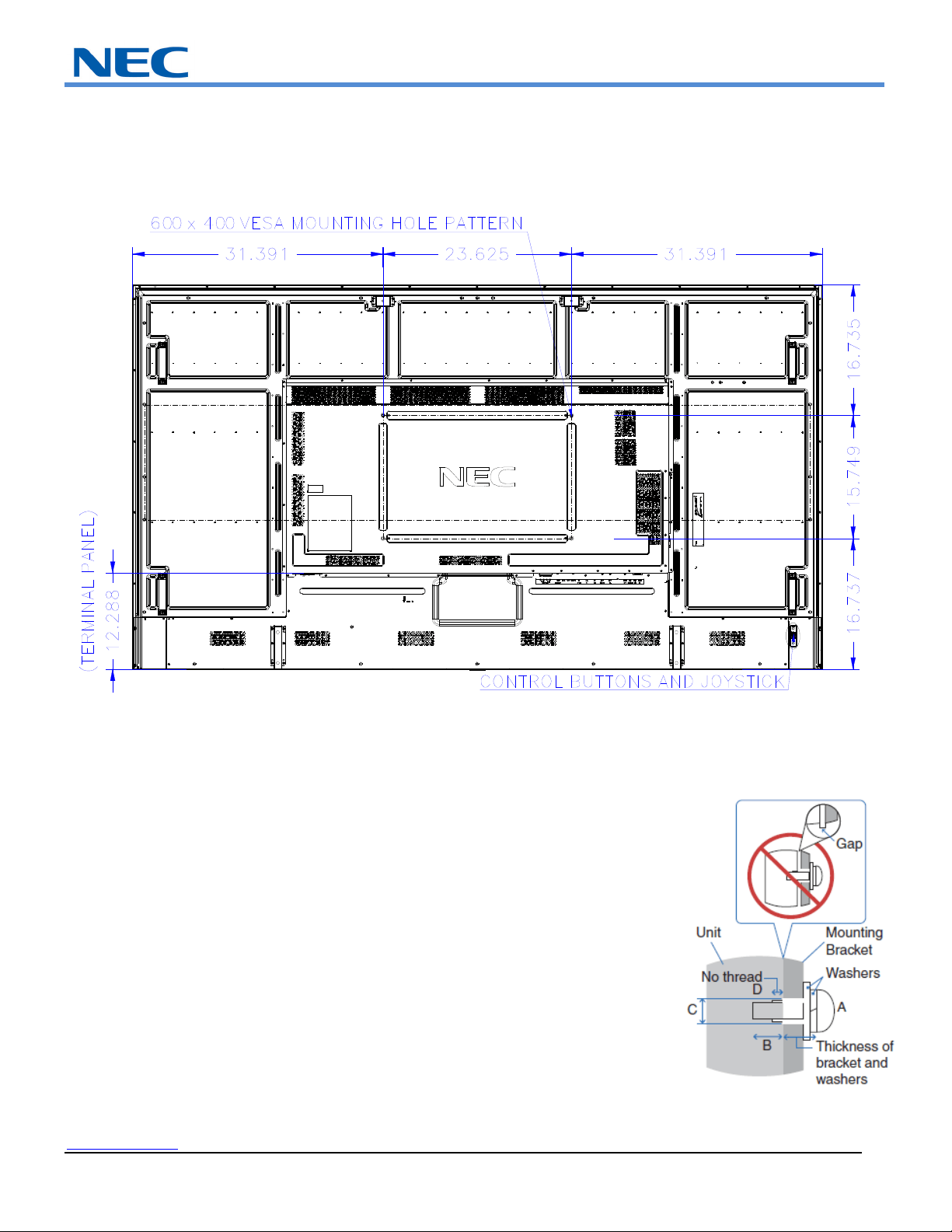
NECDisplaySolutionsofAmerica,Inc.
www.necdisplay.com MultiSyncLargeMSeriesDisplays Page8of16
DisplayDimensions–M981cont’d:
NEC strongly recommends using size M8 screws (16 - 18mm
+ the thickness of the bracket and washers in len
g
th
)
.
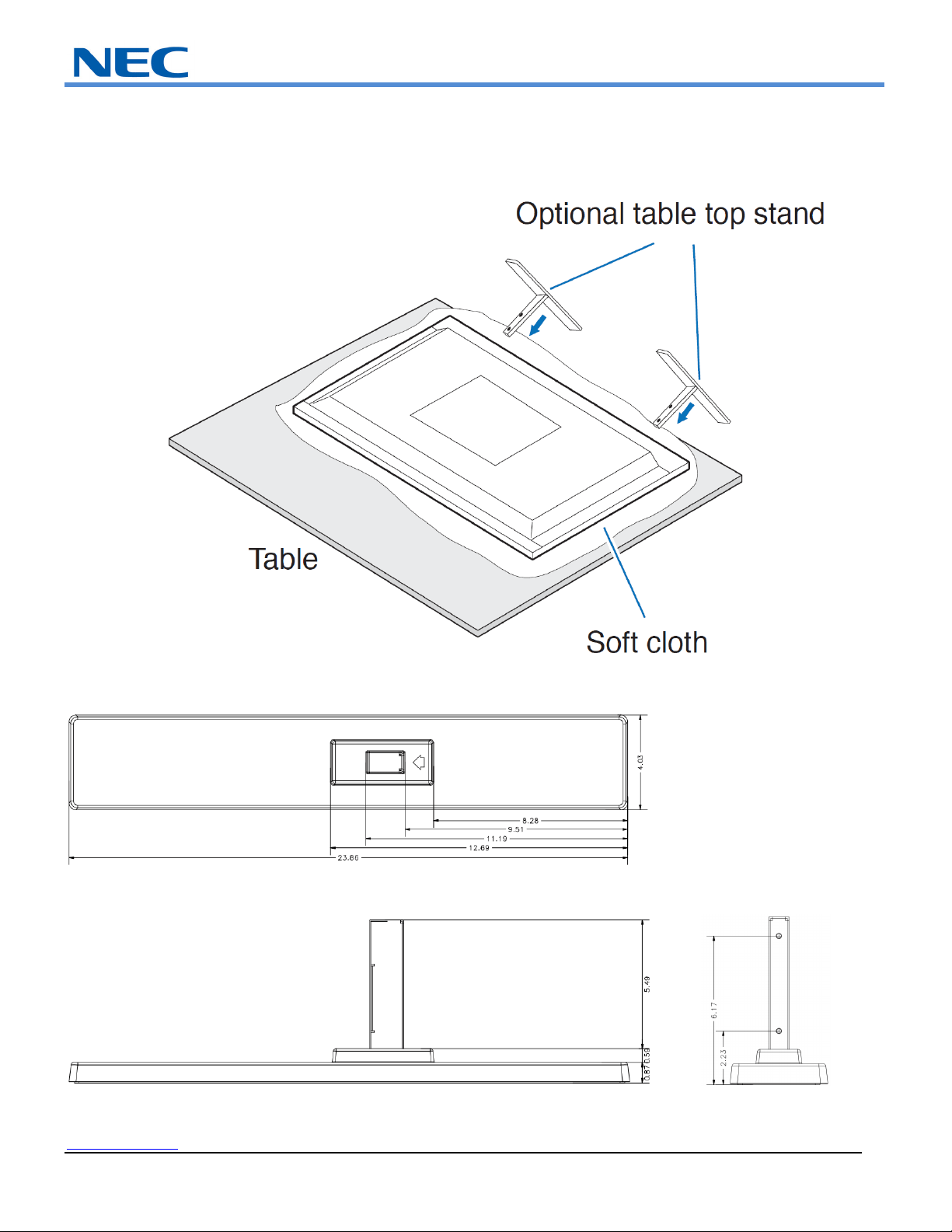
NECDisplaySolutionsofAmerica,Inc.
www.necdisplay.com MultiSyncLargeMSeriesDisplays Page9of16
InstallingandRemovingtheOptionalTableTopStand
TheM751,M861andM981usetheST‐801stand
Onlyusethescrewsthatareincludedwiththeoptionalstand.
TableTopStandDimensions(ST‐801picturedbelow):
NECDisplaySolutionsofAmerica,Inc.
www.necdisplay.com MultiSyncLargeMSeriesDisplays Page10of16
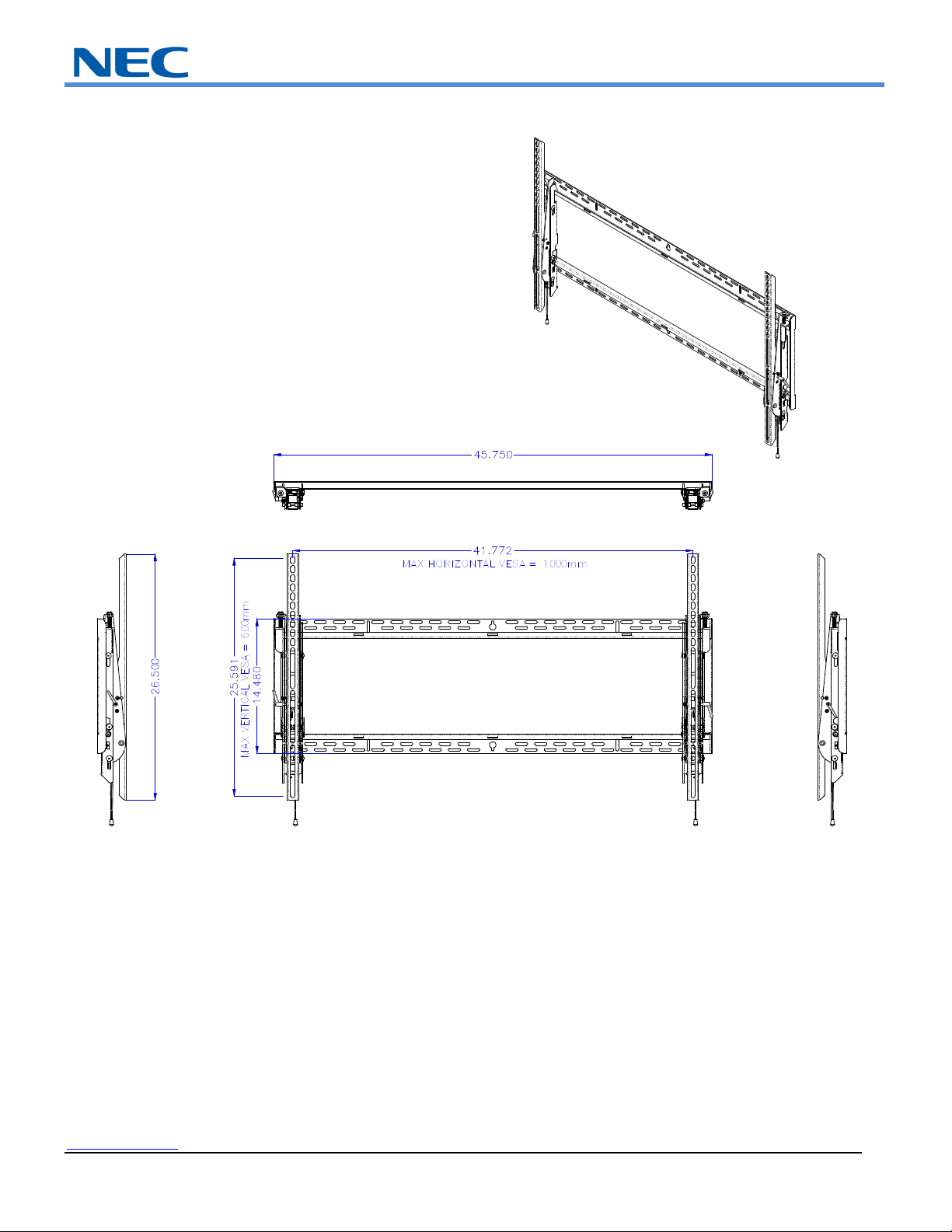
OptionalLargeWallMount(WMK‐7598T):
NECDisplaySolutionsofAmerica,Inc.
www.necdisplay.com MultiSyncLargeMSeriesDisplays Page11of16
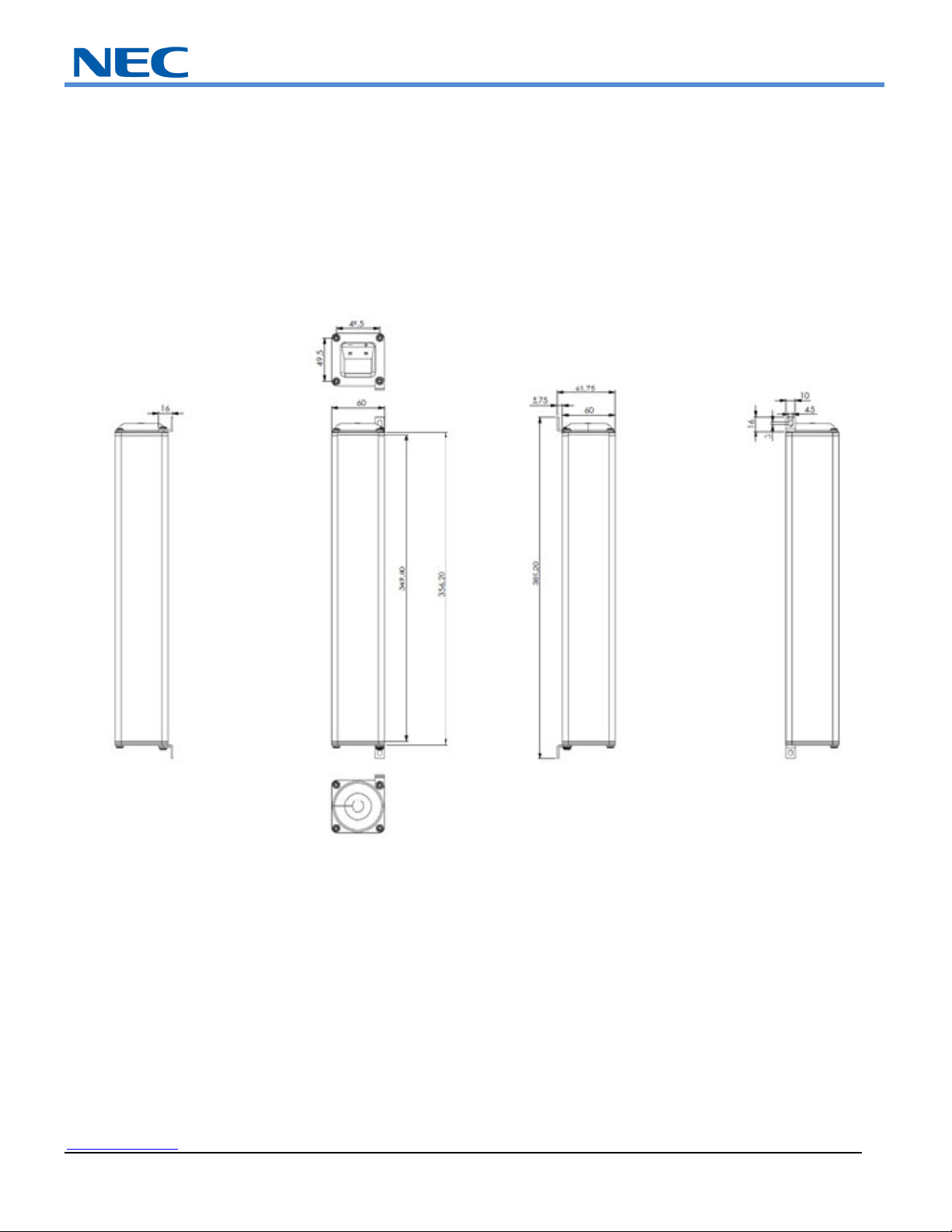
OptionalSpeakerDimensions(SP‐RM3):
NECDisplaySolutionsofAmerica,Inc.
www.necdisplay.com MultiSyncLargeMSeriesDisplays Page12of16
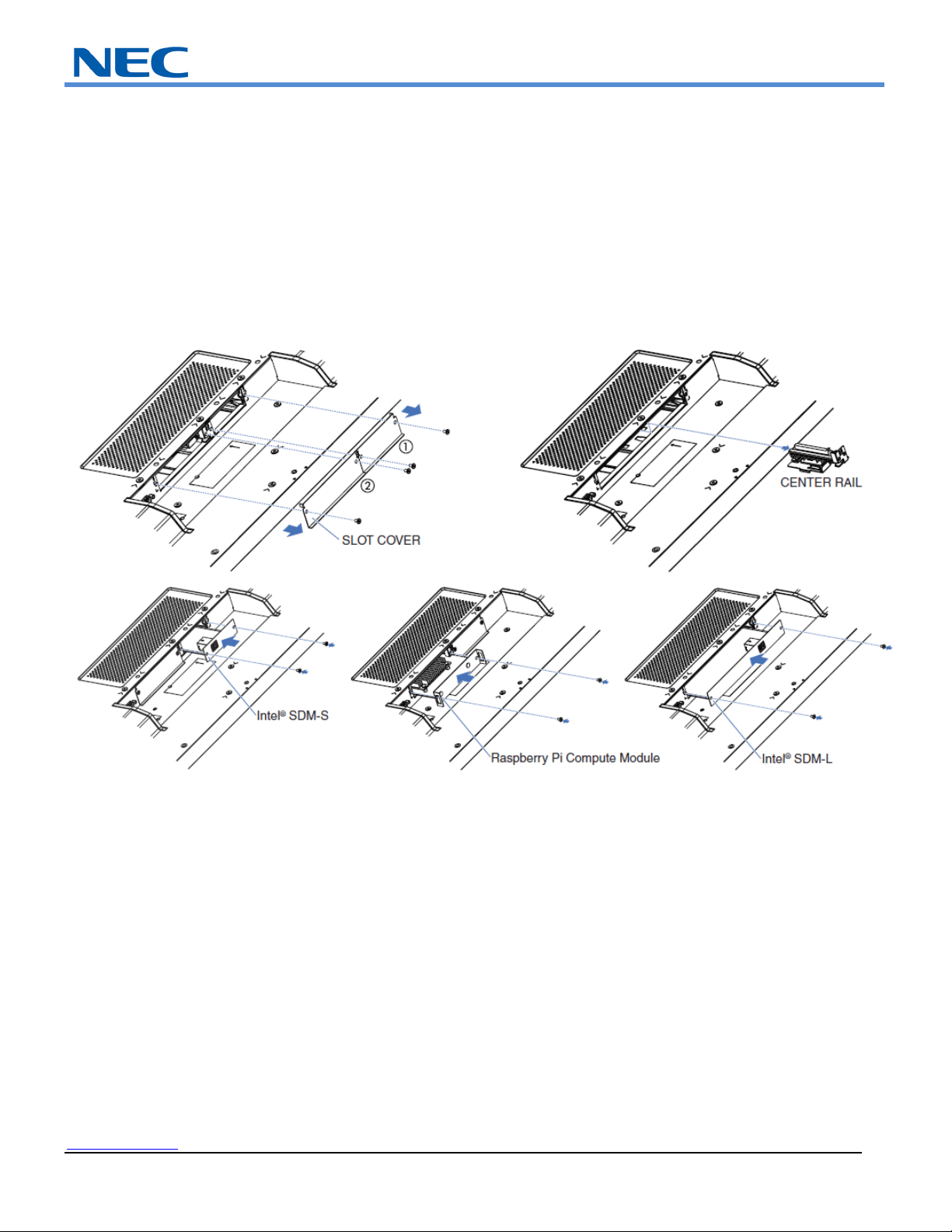
Intel®SmartDisplayModuleIntegration:
1. Place the monitor face down on a flat even surface that is larger than the monitor screen. Use a sturdy table that can easily
support the weight of the monitor. To avoid scratching the LCD panel, always place a soft cloth, such as a blanket that is larger
than the monitor’s screen area, on the table before laying the monitor face down. Make sure there is nothing on the table that can
damage the monitor.
2. Remove the SLOT COVER and note that when using Intel® SDM-L type option board, the CENTER RAIL will also need to be
removed. Reverse the process to re-attach
3. Gently push in SDM-S, Raspberry Pi Compute Module IF Board or SDM-L module until you feel a slight click.
4. Screw in module using SLOT COVER screws if necessary
NECDisplaySolutionsofAmerica,Inc.
www.necdisplay.com MultiSyncLargeMSeriesDisplays Page13of16
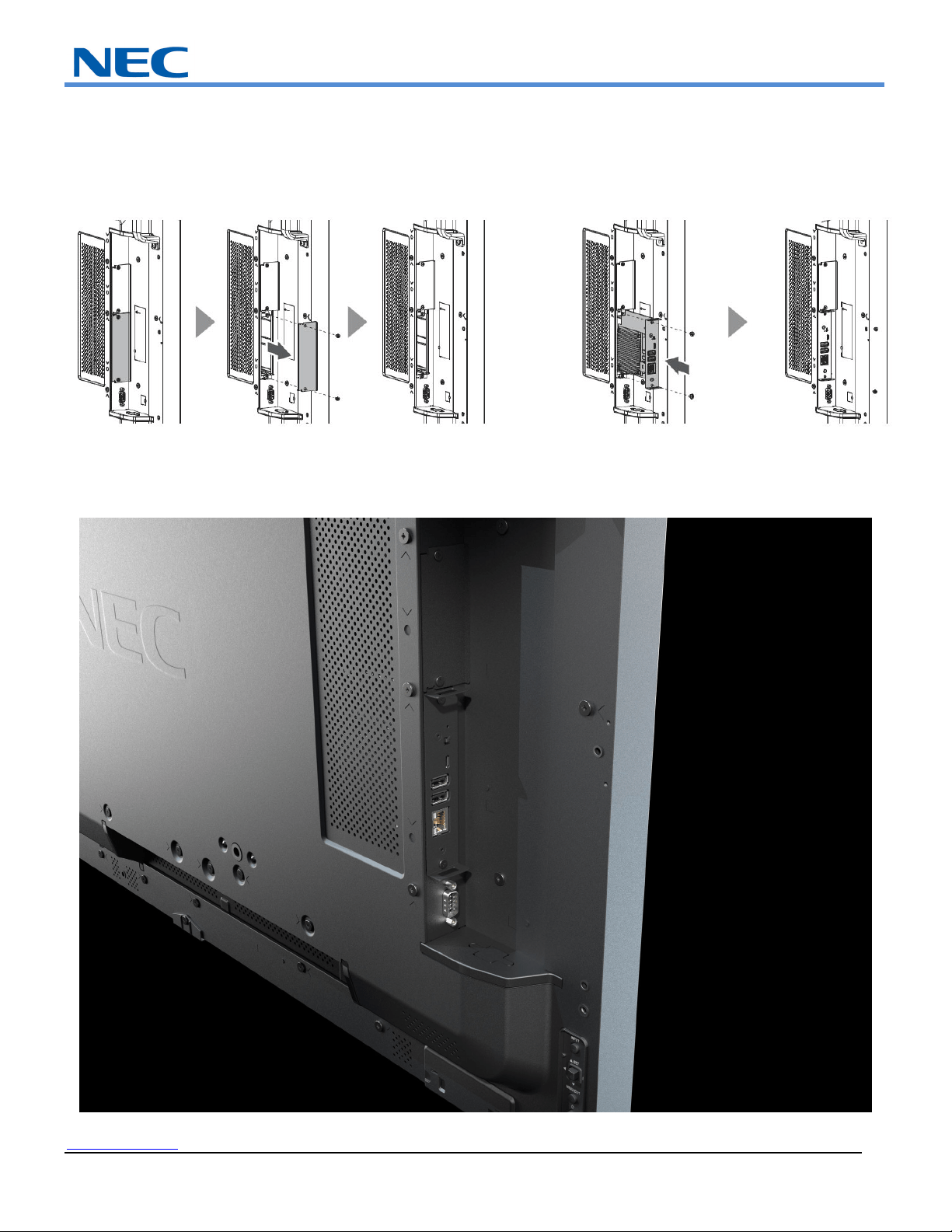
ComputeModuleIntegration:
PleaseseeseparateMPi4Einstallationguideforfullintegration.Imagebelowmaynotrepresentactualbackofunitbuttheconceptisthe
same.
RemovingtheOPTIONCOVERisnecessaryforinstallation
FinalinstalledMPi4EorMPi4Wbelow
NECDisplaySolutionsofAmerica,Inc.
www.necdisplay.com MultiSyncLargeMSeriesDisplays Page14of16
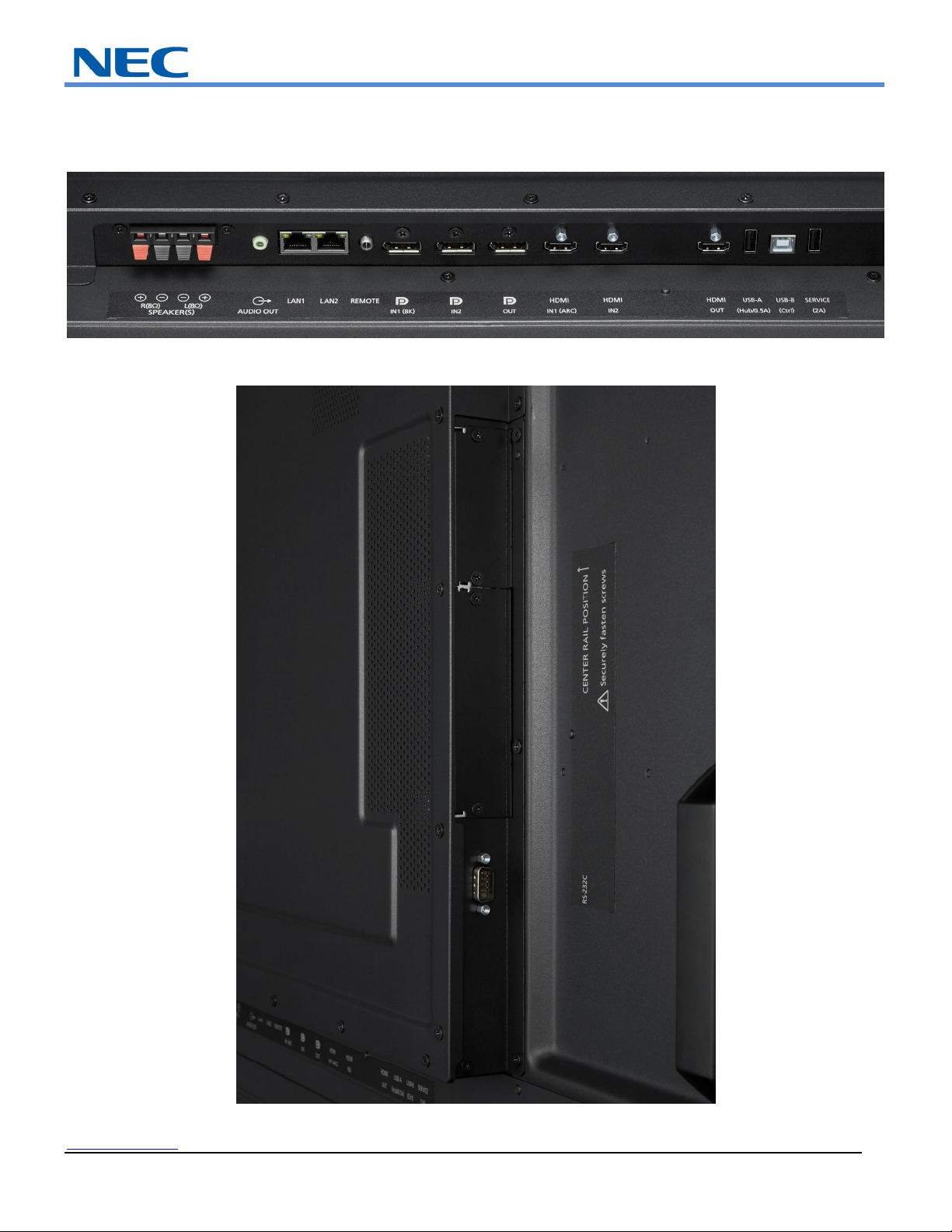
InputPanel:
Bottom
Side(Rotated)
NECDisplaySolutionsofAmerica,Inc.
www.necdisplay.com MultiSyncLargeMSeriesDisplays Page15of16
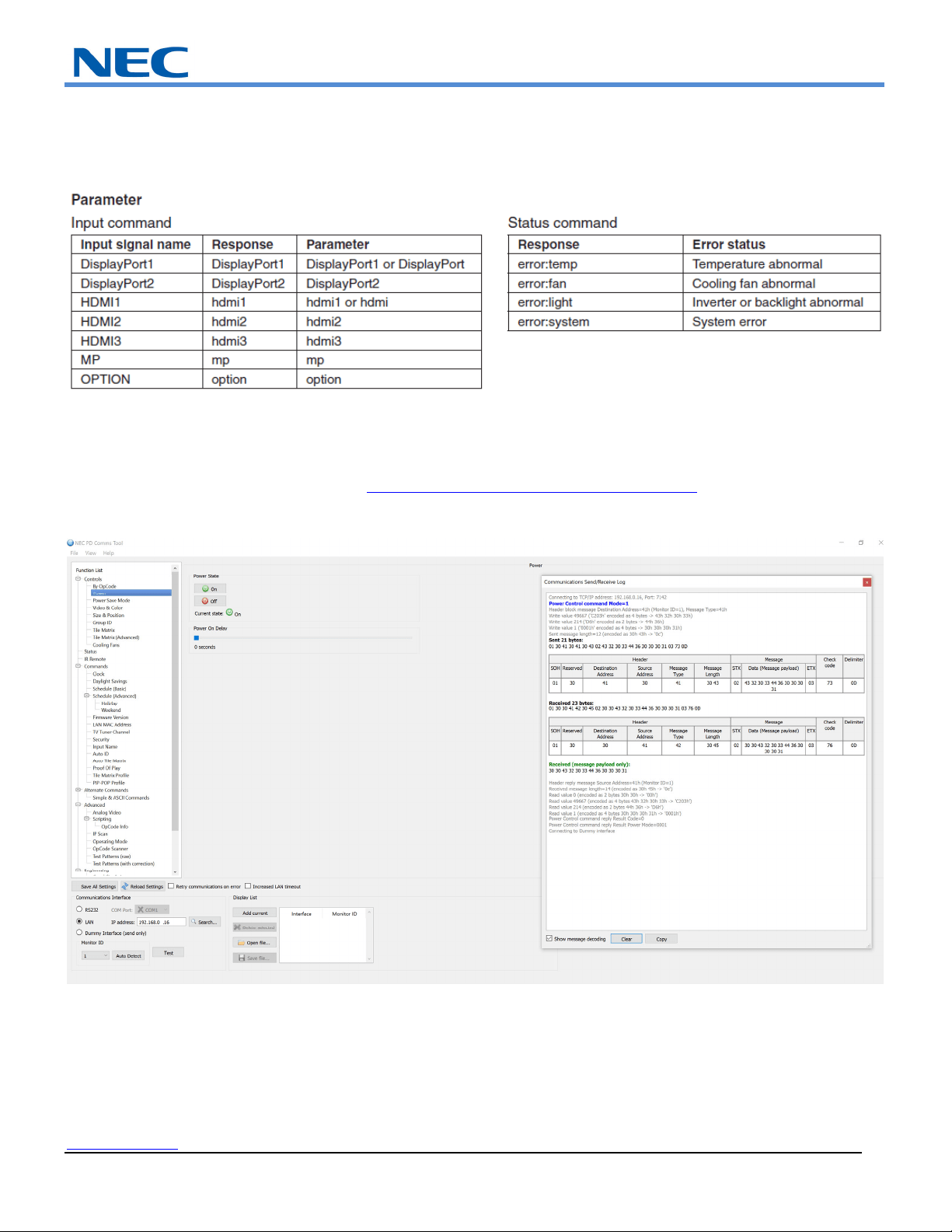
ASCIICommonCommands:
ThismonitorsupportscommonASCIIcontrolcommandswithmanyotherNECprojectors.Formoreinformationonthis,pleaseseeour
website.
PDCommsTool
PleasedownloadPDCommsToolandopentheCommunicationsLogbygoingtoViewCommunicationsLog.Fromhereyoucanfind
anyexternalcontrolcodenecessaryforyourinstallation
PDCommsToolcanbedownloadedfromhere:https://www.sharpnecdisplays.us/faqs/pdcommstool/179
NECDisplaySolutionsofAmerica,Inc.
www.necdisplay.com MultiSyncLargeMSeriesDisplays Page16of16
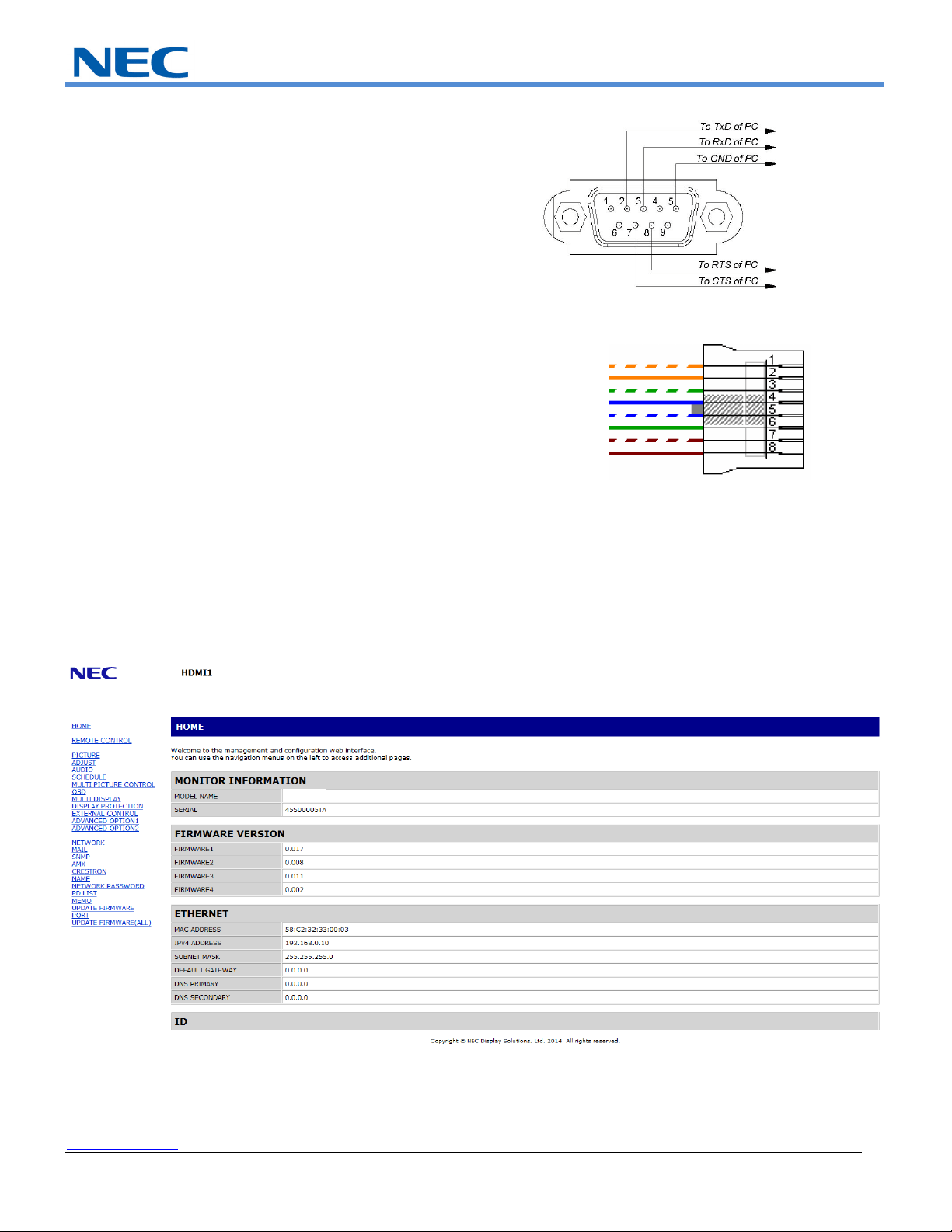
CableConnection
CommunicationProtocol:
Interface: RS‐232C
CommunicationSystem: Asynchronous
BaudRate: 9600bps
DataLength: 8bits
Parity: None
StopBit 1bit
CommunicationCode: ASCII
Interface: Ethernet(CSMA/CD
CommunicationSystem: TCP/IP(InternetProtocolSuite)
CommunicationLayer: Transportlayer(TCP)
IPAddress: 192.168.0.10(defaultoutofbox)
PortNumber: 7142(Fixed)
BrowserControl:
InformationandcontrolcanalsobeavailablethroughtheHTTPbrowsercontrolmenu.
Inordertoaccomplishthis,type:http://<theMonitor’sIPaddress>/pd_index.html
NotethattheLANPowerneedstobeturnedoninorderforthedisplaytobecontrolledwhiletheunitsareoff.
AlldisplaysaresettotheIPaddress192.168.0.10outoftheboxunlesschangedthroughtheinitialsetupguide
CommunicatingnetworkPCneedstobeonthesamesubnetasdisplaythatisbeingcommunicatedwith
Transmit Data+
Transmit Data-
Receive Data+
Receive Data-
Not Used
Not Used
Not Used
Not Used