OWNER'S MANUAL
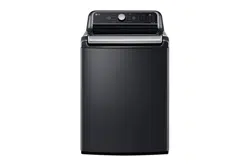
WASHING MACHINE
Read this owner's manual thoroughly before operating the
appliance and keep it handy for reference at all times.
ENGLISH
WT7250C* / WT7300C* / WT7400C* / WT7480C*
MFL68267066
Rev.01_112522
www.lg.com
Copyright © 2022 LG Electronics Inc. All Rights Reserved.
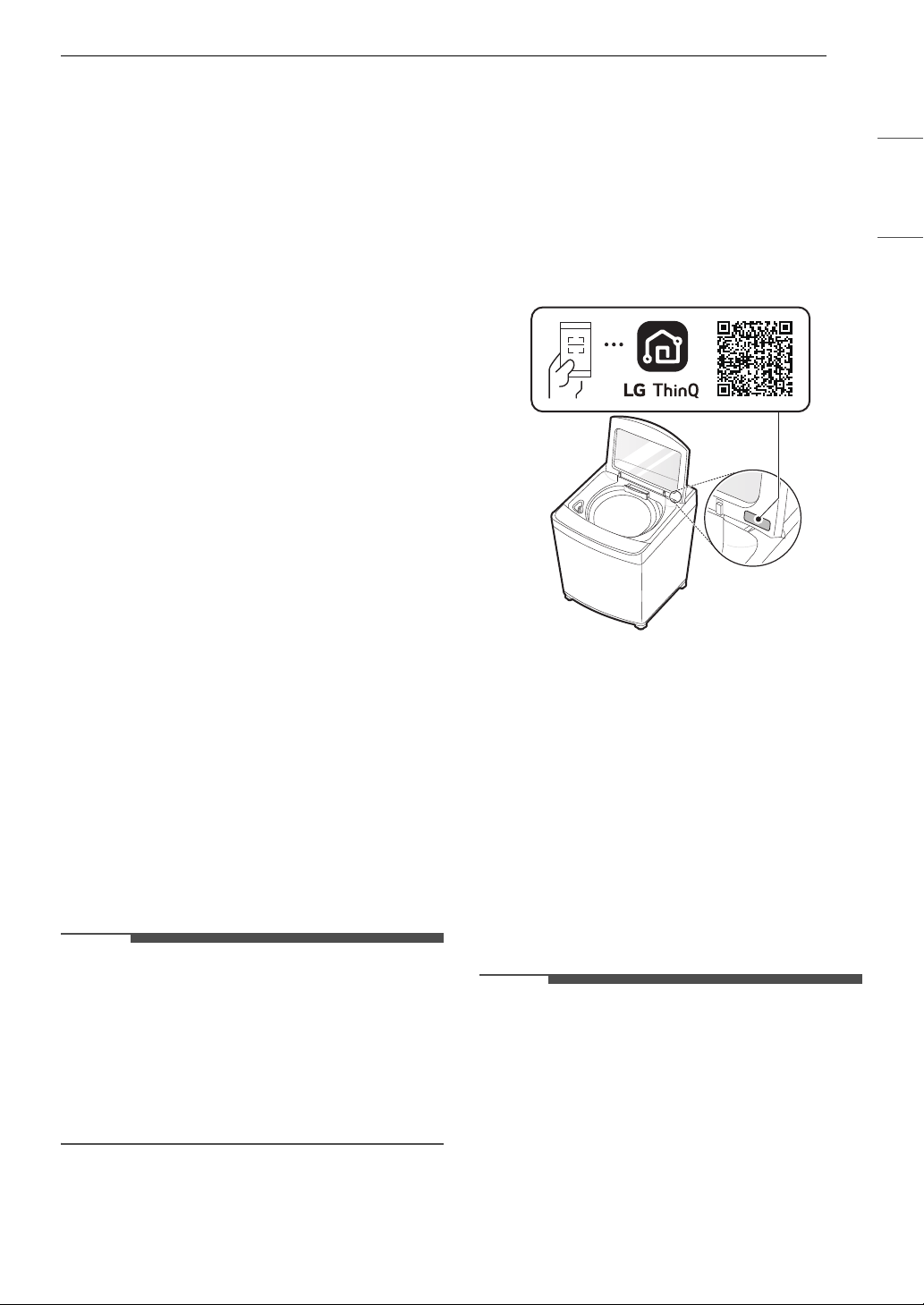
Scan to see the online manual.
TABLE OF CONTENTS
2
3 IMPORTANT SAFETY
INSTRUCTIONS
3 READ ALL INSTRUCTIONS BEFORE USE
3 WARNING STATEMENTS
6 CAUTION STATEMENTS
7 PRODUCT OVERVIEW
7 Product Features
9 INSTALLATION
9 Before Installing
10 Choosing the Proper Location
11 Unpacking and Removing Shipping Material
11 Connecting the Water Inlet Hoses
12 Connecting the Drain Hose
13 Leveling the Washer
14 Final Installation Check
16 OPERATION
16 Before Use
17 Sorting Laundry
18 Loading the Washer
19 Adding Cleaning Products
22 Control Panel
24 Wash Cycles
27 Cycle Modifiers
27 Special Care Features
28 Options and Extra Functions
31 SMART FUNCTIONS
31 LG ThinQ Application
34 Smart Diagnosis
TM
Function
35 MAINTENANCE
35 Regular Cleaning
35 Periodic Maintenance
38 Care in Cold Climates
40 TROUBLESHOOTING
40 Before Calling for Service
48 LIMITED WARRANTY
48 USA
51 CANADA
3IMPORTANT SAFETY INSTRUCTIONS
ENGLISH
IMPORTANT SAFETY INSTRUCTIONS
READ ALL INSTRUCTIONS BEFORE USE
Safety Messages
Your safety and the safety of others are very important.
We have provided many important safety messages in this manual and on your appliance. Always read and
follow all safety messages.
All safety messages will tell you what the potential hazard is, tell you how to reduce the chance of injury,
and tell you what may happen if the instructions are not followed.
WARNING STATEMENTS
WARNING
• To reduce the risk of explosion, fire, death, electric shock, scalding or injury to persons when using this
product, follow basic precautions, including the following:
Installation
• Adhere to all industry recommended safety procedures including the use of long-sleeved gloves and
safety glasses.
• Never attempt to operate this appliance if it is damaged, malfunctioning, partially disassembled, or has
missing or broken parts, including a damaged cord or plug.
• Before use, the appliance must be properly installed as described in this manual.
• To reduce the risk of severe injury or death, follow all installation instructions.
• Refer to the INSTALLATION INSTRUCTIONS for detailed grounding procedures. Installation instructions
are packed with the appliance for the installer’s reference. If the appliance is moved to a new location,
have it checked and reinstalled by qualified service personnel.
• Moving or installation of the appliance requires two or more people.
• Do not install the appliance in humid spaces.
• Store and install the appliance where it will not be exposed to temperatures below freezing or exposed
to outdoor weather conditions.
• This appliance is not designed for maritime use or for mobile installations such as in RVs, trailers, or
aircraft.
• Strongly recommend not using a drain pan when installing this appliance, as standing water in the drain
pan may increase the risk of electric shock, injury, or death.
This is the safety alert symbol.
This symbol alerts you to potential hazards that can kill or injure you and others. All safety messages
will follow the safety alert symbol and either the word WARNING or CAUTION.
These words mean:
WARNING
You may be killed or seriously injured if you do not follow instructions.
CAUTION
You may be injured or cause damage to the product if you do not follow instructions.

4 IMPORTANT SAFETY INSTRUCTIONS
• Keep packing materials out of the reach of children. Packaging material can be dangerous for children.
There is a risk of suffocation.
• Destroy the carton, plastic bag, and other packing materials after the appliance is unpacked. Children
might use them for play. Cartons covered with rugs, bedspreads, or plastic sheets can become airtight
chambers.
• The appliance must be installed and electrically grounded by qualified service personnel in accordance
with local codes.
• When installing or moving the appliance, be careful not to pinch, crush, or damage the power cord.
• Connect to a properly rated, protected, and sized power circuit to avoid electrical overload.
• This appliance must be positioned near to an electrical power supply.
• Disconnect the power cord, house fuse or circuit breaker before installing or servicing the appliance.
• The power cord of this appliance is equipped with a 3-prong (grounding) plug which mates with a
standard 3-prong (grounding) wall outlet to minimize the possibility of electric shock from this appliance.
• Do not, under any circumstances, cut or remove the third (ground) prong from the power cord.
• Use new hoses when connecting the appliance to the water supply. Do not reuse old hoses.
Operation
• Read all instructions before using the appliance and save these instructions.
• Use this appliance only for its intended purpose.
• Clothing or articles that are waterproof or water resistant must be washed in the Waterproof cycle only.
(Examples include water resistant clothing, mattress covers, outdoor clothes, plastic mats.) WARNING:
Failure to closely follow these instructions may result in an abnormal vibration and out-of-balance
condition that could result in injury, property damage, and/or appliance damage.
• If the product has been submerged in water, sitting in standing water, or waterlogged, do not come in
contact with the product and immediately contact an LG Electronics customer information center for
instructions before resuming use.
• If you detect a strange sound, a chemical or burning smell, or smoke coming from the appliance, unplug
it immediately, and contact an LG Electronics Customer Information Center.
• Under certain conditions, hydrogen gas may be produced in a hot-water system that has not been used
for two weeks or more. HYDROGEN GAS IS EXPLOSIVE. If the hot-water system has not been used for
such a period, before using the appliance, turn on all hot water faucets and let the water flow from each
for several minutes. This will release any accumulated hydrogen gas. As the gas is flammable, do not
smoke or use an open flame during this time.
• Do not reach into the washer if the tub or drum, agitator, or any interior parts are moving. Before
loading, unloading, or adding items, press Start/Pause and allow the tub or drum to coast to a complete
stop before reaching inside.
• This appliance is not intended for use by persons (including children) with reduced physical, sensory or
mental capabilities, or lack of experience and knowledge, unless they have been given supervision or
instruction concerning the use of the appliance by a person responsible for their safety.
• Do not allow children or pets to play on, in or with the appliance. Close supervision is necessary when the
appliance is used near children or pets.
• Keep laundry products out of children’s reach. To prevent injury to persons, observe all warnings on
product labels.
• Repair or immediately replace all power cords that have become frayed or otherwise damaged. Do not
use a cord that shows cracks or abrasion damage along its length or at either end.
• Never unplug the appliance by pulling on the power cord. Always grip the plug firmly and pull straight
out from the outlet.
• Do not use an extension cord or adapter with this appliance.
• Do not grasp the power cord or touch the appliance controls with wet hands.

5IMPORTANT SAFETY INSTRUCTIONS
ENGLISH
• Do not modify or extend the power cord.
• If the electrical supply cord is damaged, it must only be replaced by the manufacturer or its service agent
or a similar qualified person in order to avoid a hazard.
• Do not put oily or greasy clothing, candles or flammable materials on top of the appliance.
• Keep the area underneath and around your appliances free of combustible materials (lint, paper, rags,
etc.), gasoline, chemicals and other flammable vapors and liquids.
• Do not store or use gasoline or other flammable vapors and liquids in the vicinity of this or any other
appliance.
• Do not mix chlorine bleach with ammonia or acids such as vinegar. Follow package directions when
using laundry products. Incorrect usage can produce poisonous gas, resulting in serious injury or death.
• Never use harsh chemicals, abrasive cleaners, or solvents to clean the washer. They will damage the
finish.
• Do not wash laundry that has been previously cleaned in, washed in, soaked in, or spotted with gasoline,
dry-cleaning solvents, vegetable or cooking oil, or other flammable or explosive substances, as they give
off vapors that could ignite or explode.
• Do not add gasoline, dry cleaning solvents, or other flammable or explosive substances to the wash
water. These substances give off vapors that could ignite or explode.
• In the event of a gas leak (propane gas, LP gas, etc.), do not operate this or any other appliance. Open a
window or door to ventilate the area immediately.
• Do not tamper with controls.
• Fix the drain hose securely in place to avoid flooding.
• Do not abuse, sit on, or stand on the lid of the appliance.
• Keep hands and foreign objects clear of the lid and latch area when closing the lid.
• Always check the inside of the appliance for foreign objects.
Maintenance
• Do not repair or replace any part of the appliance. All repairs and servicing must be performed by
qualified service personnel unless specifically recommended in this owner’s manual. Use only authorized
factory parts.
• Disconnect this appliance from the power supply before cleaning and attempting any user maintenance.
Turning the controls to the OFF position does not disconnect this appliance from the power supply.
• Remove any dust or foreign matter from the power plug pins.
• Do not disassemble or repair the appliance by yourself.
• Remove the lid before the appliance is removed from service or discarded to avoid the danger of
children or small animals getting trapped inside.
• Make sure the dispenser drawer or lid is closed at all times when not being filled with laundry products.
Grounding Instructions
• Improper connection of the equipment-grounding conductor can result in a risk of electric shock. Check
with a qualified electrician or service personnel if you are in doubt whether the appliance is properly
grounded. Do not modify the plug provided with the appliance; if it will not fit the outlet, have a proper
outlet installed by a qualified electrician.
• The appliance must be grounded. In the event of a malfunction or breakdown, grounding will reduce the
risk of electric shock by providing a path of least resistance for electric current. The appliance is
equipped with a cord having an equipment-grounding conductor and a grounding plug. The plug must
be plugged into an appropriate outlet that is installed and grounded in accordance with all local codes
and ordinances.
6 IMPORTANT SAFETY INSTRUCTIONS
SAVE THESE INSTRUCTIONS
CAUTION STATEMENTS
CAUTION
• To reduce the risk of minor or moderate injury to persons, malfunction, or damage to the product or
property when using this product, follow basic precautions, including the following:
Installation
• Install the product on a firm and level floor.
Operation
• Do not place objects on top of the appliance.
• Turn off the water faucets and unplug the appliance if the appliance is to be left for an extended period
of time, such as during vacations.
• ALWAYS follow the fabric care instructions supplied by the garment manufacturer.
• Use fabric softeners or products to eliminate static only as recommended by the manufacturer.
• Do not combine laundry products for use in one load unless specified on the label.
• Do not touch draining water which may be hot.
• If the drain hose and the water inlet hose are frozen in winter, defrost them before using the appliance.
• Do not store or spill liquid detergents, cleaners, or bleaches (chlorine bleach, oxygen bleach) on the
appliance. Doing so may result in corrosion, discoloration or damage to the surface of the appliance.
7PRODUCT OVERVIEW
ENGLISH
PRODUCT OVERVIEW
Product Features
The images in this guide may be different from the actual components and accessories, which are subject
to change by the manufacturer without prior notice for product improvement purposes.
NOTE
• For your safety and for extended product life, use only authorized components. The manufacturer is not
responsible for product malfunction, property damage or bodily injury caused by the use of separately
purchased unauthorized components, parts, or non-LG products.
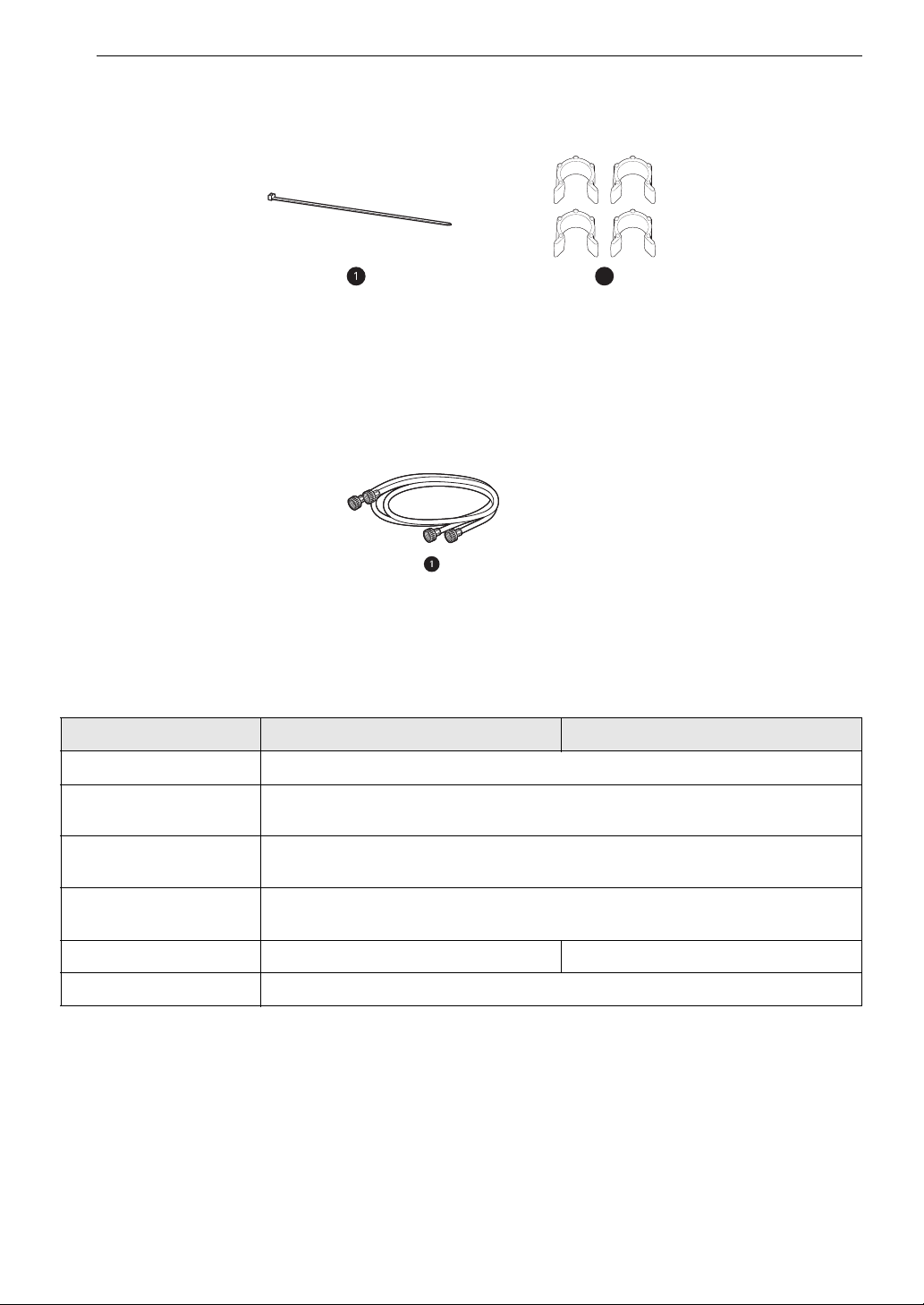
Front View
a Lid
b Control Panel
c Detergent Dispenser Drawer
d Liquid Bleach Compartment
e Tub
f Leveling Feet
Rear View
a Water Inlets
b Power Cord
c Drain Hose
8 PRODUCT OVERVIEW
Accessories
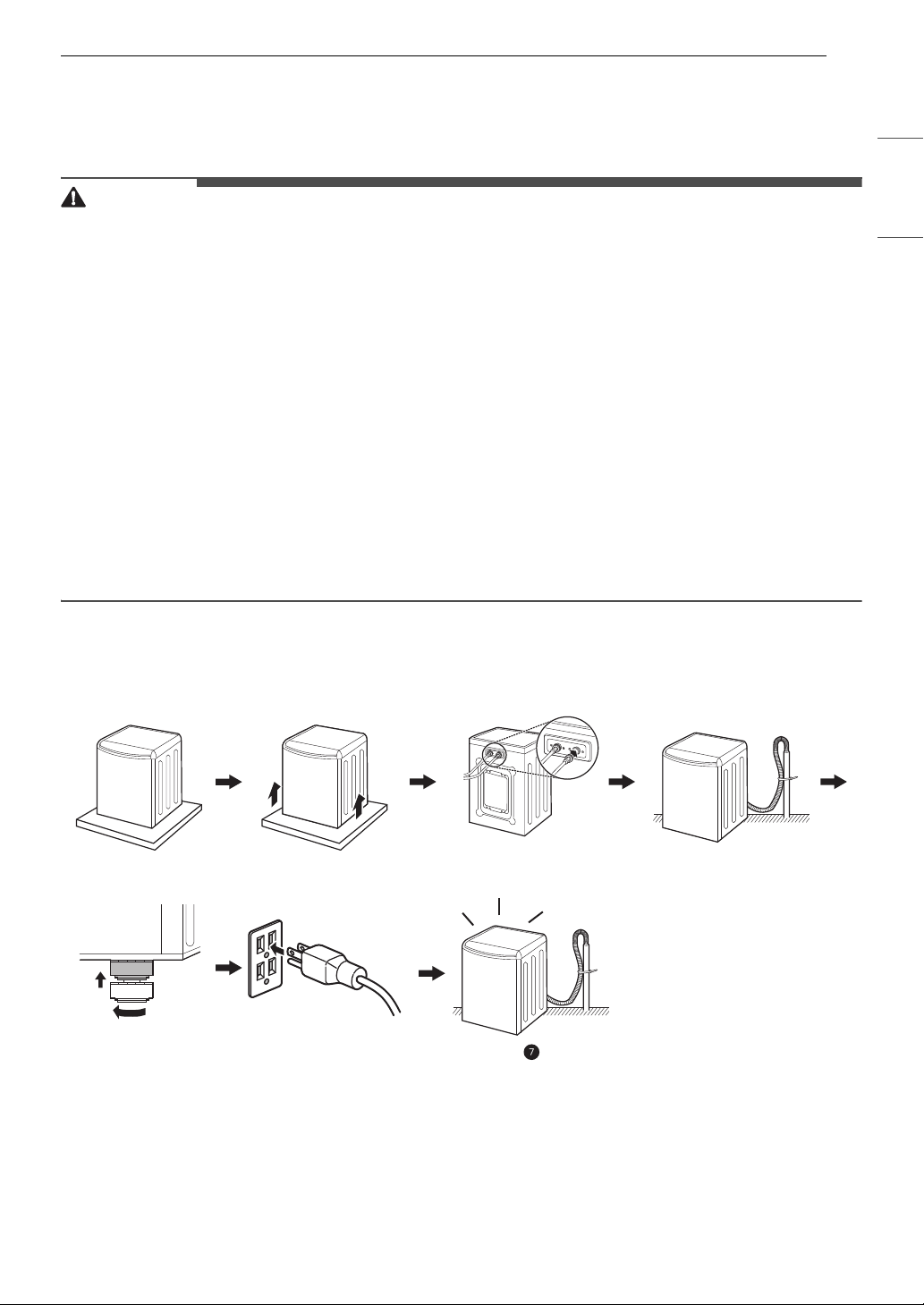
Included Accessories
a Tie Strap
b Leg Holders
†
† Refer to the installation guide included with the leg holders for instructions on proper usage.
Required Accessories (sold separately)
a Hot and Cold Water Hoses
Product Specifications
The appearance and specifications listed in this manual may vary due to constant product improvements.
Model WT7250C* / WT7300C* WT7400C* / WT7480C*
Electrical Requirements 120 VAC @ 60 Hz
Min. / Max. Water
Pressure
20 - 120 psi (138 - 827 kPa)
Dimensions (Width X
Depth X Height)
27" X 28 3/8" X 44 1/2" (68.6 cm X 72.1 cm X 113 cm)
Maximum Height with
Lid Open
57 1/4” (145.3 cm)
Net Weight 127.9 lb (58.0 kg) 132.3 lb (60 kg)
Max. Spin Speed 950 RPM (±50 rpm)
9INSTALLATION
ENGLISH
INSTALLATION
Before Installing
WARNING
• Moving or installation of the appliance requires two or more people. Failure to follow these instructions
may result in injury.
• Store and install the appliance where it will not be exposed to temperatures below freezing or exposed
to outdoor weather conditions. Failure to follow this warning can cause product or part failure, serious
injury, fire, electric shock, or death.
• Properly ground the washer to conform with all governing codes and ordinances. Failure to follow this
warning can cause serious injury, fire, electric shock, or death.
• To reduce the risk of electric shock, do not install the appliance in humid spaces. Failure to follow this
warning can cause serious injury, fire, electric shock, or death.
• To ensure proper airflow, do not block the large opening on the bottom of the washer with carpeting or
other materials.
• Do not remove the ground prong from the power cord. Do not use an adapter or extension cord. Plug
into a grounded 3-prong outlet. Failure to follow this warning can cause serious injury, fire, electric
shock, or death.
• Certain internal parts are intentionally not grounded and may present a risk of electric shock only during
servicing. Service personnel - Do not contact the following parts while the appliance is energized: pump,
motor, noise filter cover, protective cover and heater (on applicable models).
Installation Overview
Please read the following installation instructions first after purchasing this washer or transporting it to
another location.
a Choosing the Proper Location
b Unpacking and Removing Shipping Material
c Connecting the Water Inlet Hoses
d Connecting the Drain Hose
e Leveling the Washer
ab c
d
ef
10 INSTALLATION
f Connecting to the Power Supply
g Final Installation Check
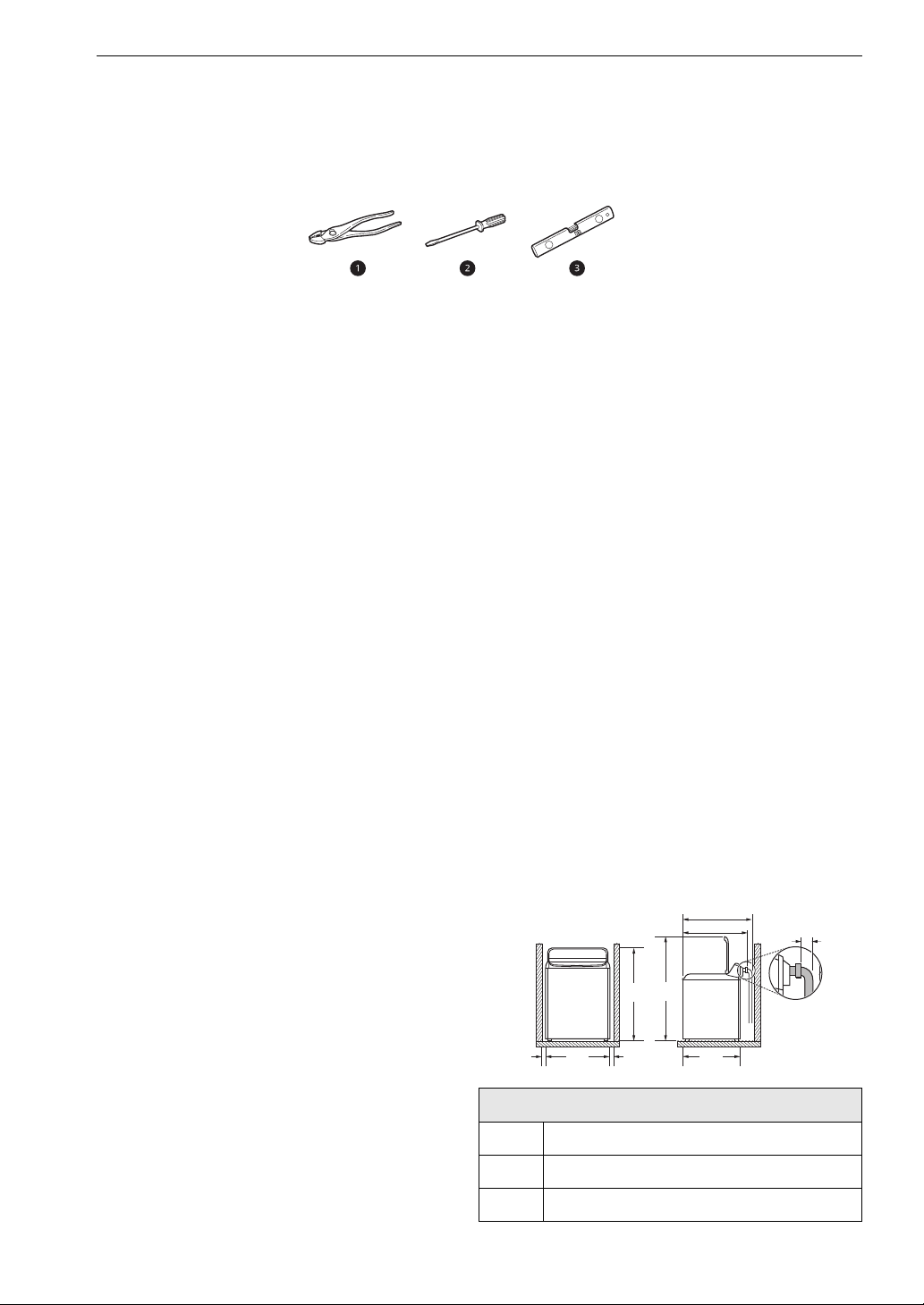
Tools Needed
a Pliers
b Flat-Blade Screwdriver
c Level
Choosing the Proper
Location
Check the following requirements for the install
location before installing the washer.
• Allow for sufficient space between the walls and
the washer for installation.
• Make sure that the floor is clean, dry and free of
dust, dirt, water and oil so the leveling feet
cannot slide easily. Leveling feet that can move
or slide on the floor can contribute to excess
vibration and noise.
• If the floor has too much flex, reinforce it to
make it more rigid. If the floor is not solid, it may
cause severe vibration and noise.
Power Outlet
The power outlet must be within 60 inches (1.5 m)
of either side of the washer.
• Position the washer so that the outlet and plug
are easily accessible.
• Do not overload the outlet with more than one
appliance.
• The outlet must be grounded in accordance with
current electrical wiring codes and regulations.
• Use a time-delay fuse or circuit breaker.
• It is the personal responsibility and obligation of
the washer owner to have a proper outlet
installed by a qualified electrician.
Flooring
• To minimize noise and vibration, install the
washer on a level, solidly constructed floor
capable of supporting the washer without
flexing or bouncing.
• The washer must be installed on firm flooring to
minimize vibration during the spin cycle.
Concrete flooring is best, but a wood floor is
sufficient, provided it is built to FHA standards.
• The floor under the washer must not slope more
than 1 inch (2.5 cm) from front to back or side to
side.
• Installing on carpeting and soft tile surfaces is
not recommended.
• Never install the washer on a platform or weakly
supported structure.
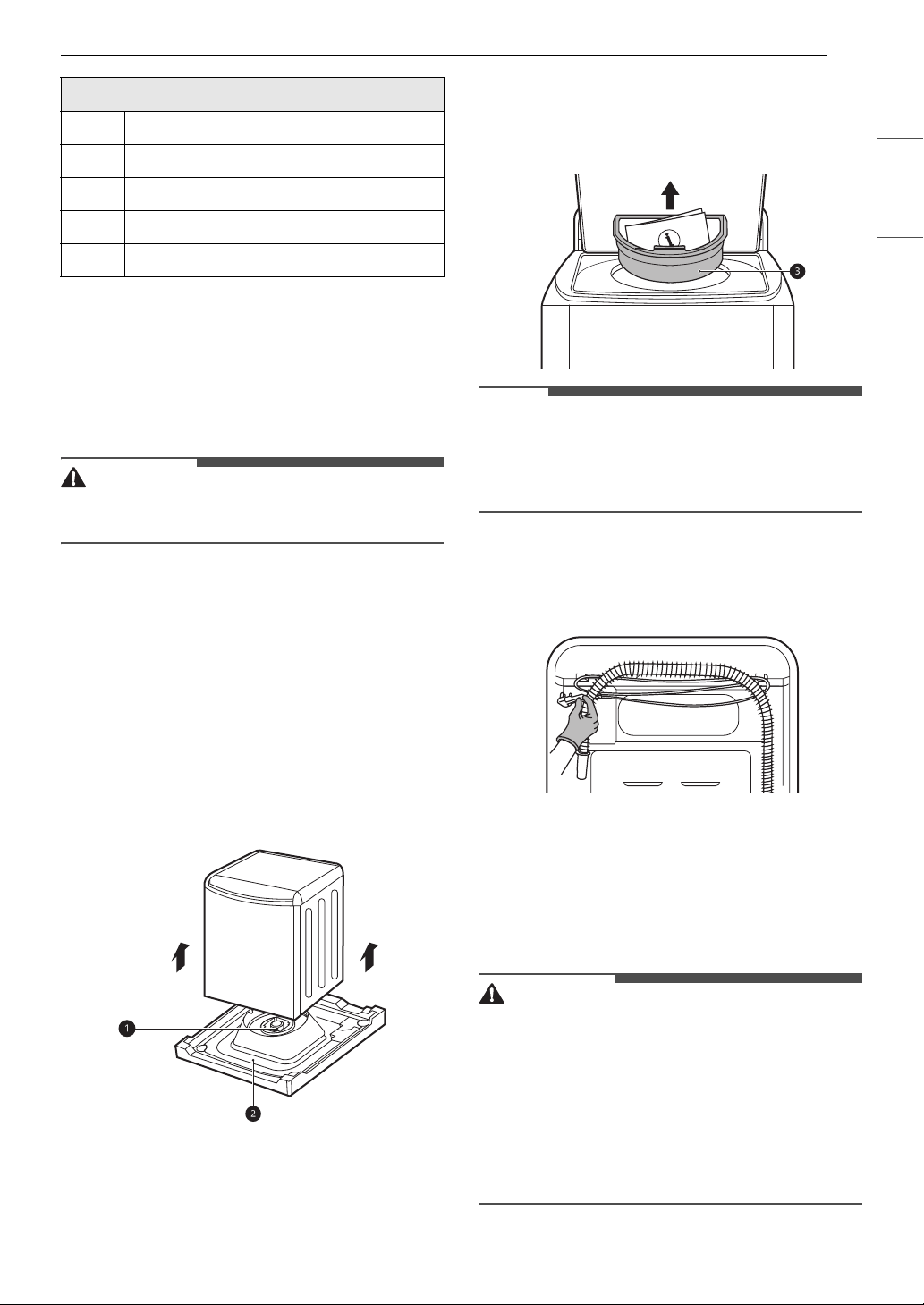
Floor Installation
To ensure sufficient clearance for water inlet
hoses, drain hose and airflow, allow minimum
clearances of at least 1 inch (2.5 cm) at the sides
and 4 inches (10 cm) behind the washer. Be sure
to allow for wall, door, or floor moldings that may
increase the required clearances.
Minimum vertical space from floor to overhead
shelves, cabinets, ceilings, etc., is 58 inches (147
cm).
Dimensions and Clearances
A 1” (2.5 cm)
B 27” (68.6 cm)
C 44 1/2” (113 cm)
C
BAA
D
E
H
G
F
11INSTALLATION
ENGLISH
Unpacking and Removing
Shipping Material
Remove all shipping materials from the washer for
proper operation and inspect it for shipping
damage.
CAUTION
• Failure to remove shipping materials can cause
excessive noise and vibration.
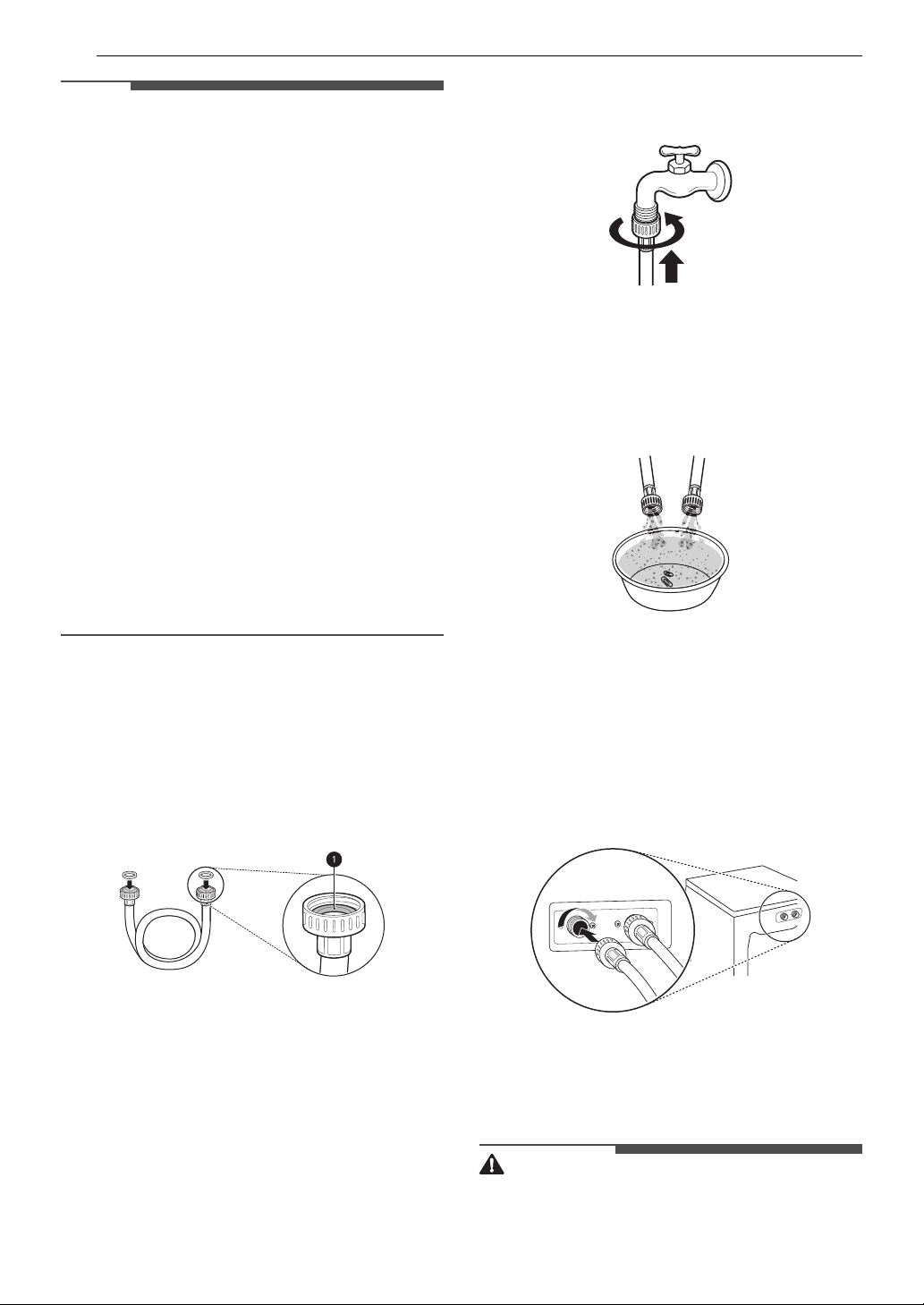
Unpacking Shipping Material
1 Lift the washer off of the foam base.
• After removing the carton and shipping
material, lift the washer off the foam base.
• Make sure the plastic tub support a comes
off with the base and is not stuck to the
bottom of the washer.
• If you must lay the washer down to remove
the carton base b, always protect the side
of the washer and lay it carefully on its side.
Do not lay the washer on its front or back.
2 Remove the foam tub insert.
• To prevent damage, do not remove the
foam insert c from the tub until the washer
is in the final location.
NOTE
•Once removed, save the foam insert for future
use. If the washer needs to be moved, the foam
insert will help prevent damage during
transportation.
3 Unfasten the power cord.
• Unfasten the power cord from the back of
the washer.
Connecting the Water Inlet
Hoses
To avoid the risk of costly water damage, purchase
and install new inlet hoses when installing the
washer.
WARNING
• Do not overtighten the hoses or cross-thread the
hose fittings. Overtightening or cross-threading
can damage the valves or couplings, resulting in
leaking and property damage.
• Do not reuse old hoses. Use only new hoses
when installing the washer. Old hoses could leak
or burst causing flooding and property damage.
Contact an LG Customer Information Center for
assistance in buying hoses.
D 57 1/4” (145.3 cm)
E 26 3/4” (68 cm)
F 3 1/2” (9 cm)
G 32” (81.1 cm)
H 28 3/8” (72.1 cm)
Dimensions and Clearances
12 INSTALLATION
NOTE
• Periodically check the hoses for cracks, leaks,
and wear, and replace the hoses every five years.
• Do not stretch the water hoses intentionally, and
make sure that they are not pinched, crushed or
kinked by other objects.
• Water supply pressure must be between 20 psi
and 120 psi (138 - 827 kPa). If the water supply
pressure is more than 120 psi, a pressure
reducing valve must be installed.
• Your hot water heater should be set to deliver
water at 120 - 135°F (48 - 57°C) to allow the
washer to properly control wash temperatures.
• Do not store or install the washer in a location
subject to freezing temperatures. Damage to the
water inlet hoses and internal mechanisms of
the washer can result. If the washer was
exposed to freezing temperatures prior to
installation, allow it to stand at room
temperature for several hours before use and
check for leaks prior to operation.
• Do not use flood-preventing hoses with auto
shutoff devices. The devices can be tripped
during fill and prevent the washer from filling
properly.
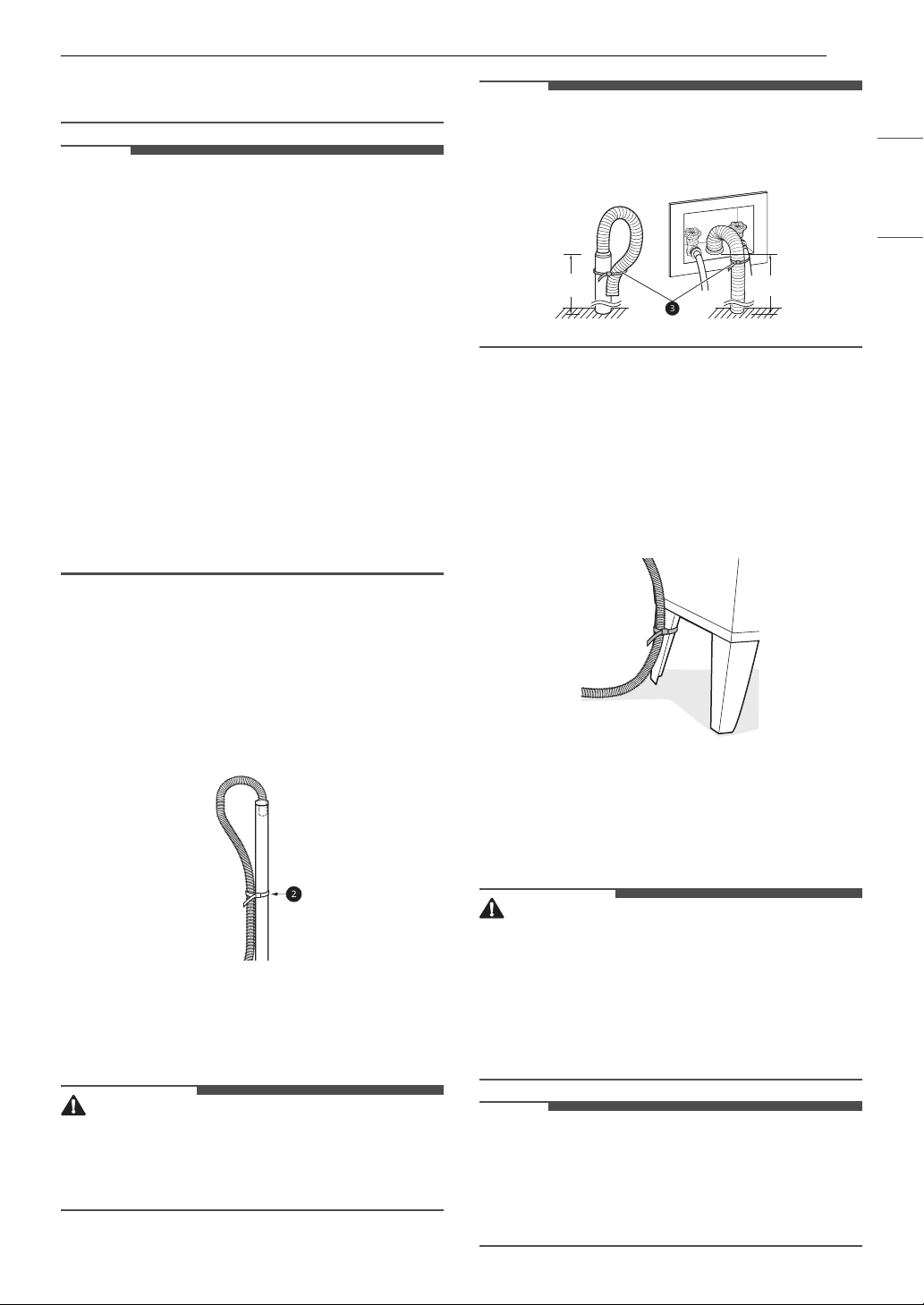
How to Connect the Water Inlet
Hoses
1 Check the fittings and seals.
• Inspect the threaded fitting on each hose
and make sure there is a rubber seal a in
place in both ends of each hose to prevent
leaking.
2 Connect the water supply hoses.
• Connect the water inlet hoses to the hot
and cold water faucets tightly by hand and
then tighten another 2/3 turn with pliers.
• Connect the blue hose to the cold water
faucet and the red hose to the hot water
faucet.
3 After the hoses are connected, turn on the
water faucets and flush out any foreign
substances such as dirt, sand, or sawdust.
• Let the water drain into a bucket, and check
the water temperature to make sure you’ve
connected the hoses to the correct faucets.
4 Attach the inlet hoses to the back of the
washer.
• Attach the hot water inlet hose to the hot
water inlet on the back of the washer.
Attach the cold water inlet hose to the cold
water inlet on the back of the washer.
• Tighten the fittings securely. Turn on both
faucets all the way and check for leaks at
both ends of the hoses.
Connecting the Drain Hose
Connect the drain hose to either a standpipe or
laundry tub.
WARNING
• The drain hose should always be properly
secured. Failure to properly secure the drain
13INSTALLATION
ENGLISH
hose can result in flooding and property
damage.
NOTE
• The drain must be installed in accordance with
any applicable local codes and regulations.
• Make sure that the drain hose is not stretched,
pinched, crushed, or kinked.
• The end of the drain hose should be located a
minimum of 29.5 inches (75 cm) and a
maximum of 96 inches (244 cm) above the
bottom of the washer.
• For best results, locate the end of the drain hose
no higher than 66 inches (168 cm) above the
bottom of the washer. As the drain outlet is
raised beyond 66 inches (168 cm), the drain
function will be increasingly affected.
• Never create an airtight seal between the hose
and the drain with tape or other means. If no air
gap is present, water can be siphoned out of the
tub resulting in poor wash/rinse performance or
clothing damage.
Using a Standpipe to Drain
1 Insert the end of the drain hose into the
standpipe.
2 Use the provided tie strap a to secure the
drain hose in place.
3 If the water valves and drain are built into the
wall, fasten the drain hose to one of the water
hoses with the provided tie strap b (ribbed
side on inside).
CAUTION
• Do not insert the end of the drain hose into the
standpipe more than 8 inches (20 cm). Doing so
can cause siphoning, odors, or improper
draining.
NOTE
• If the drain is large enough for the flange on the
hose to fit inside, then do not insert the flange
more than 1 - 2 inches into the drain.
Using a Laundry Tub to Drain
1 Hang the end of the drain hose over the side
of the laundry tub.
2 Use the provided tie strap to secure the drain
hose in place.
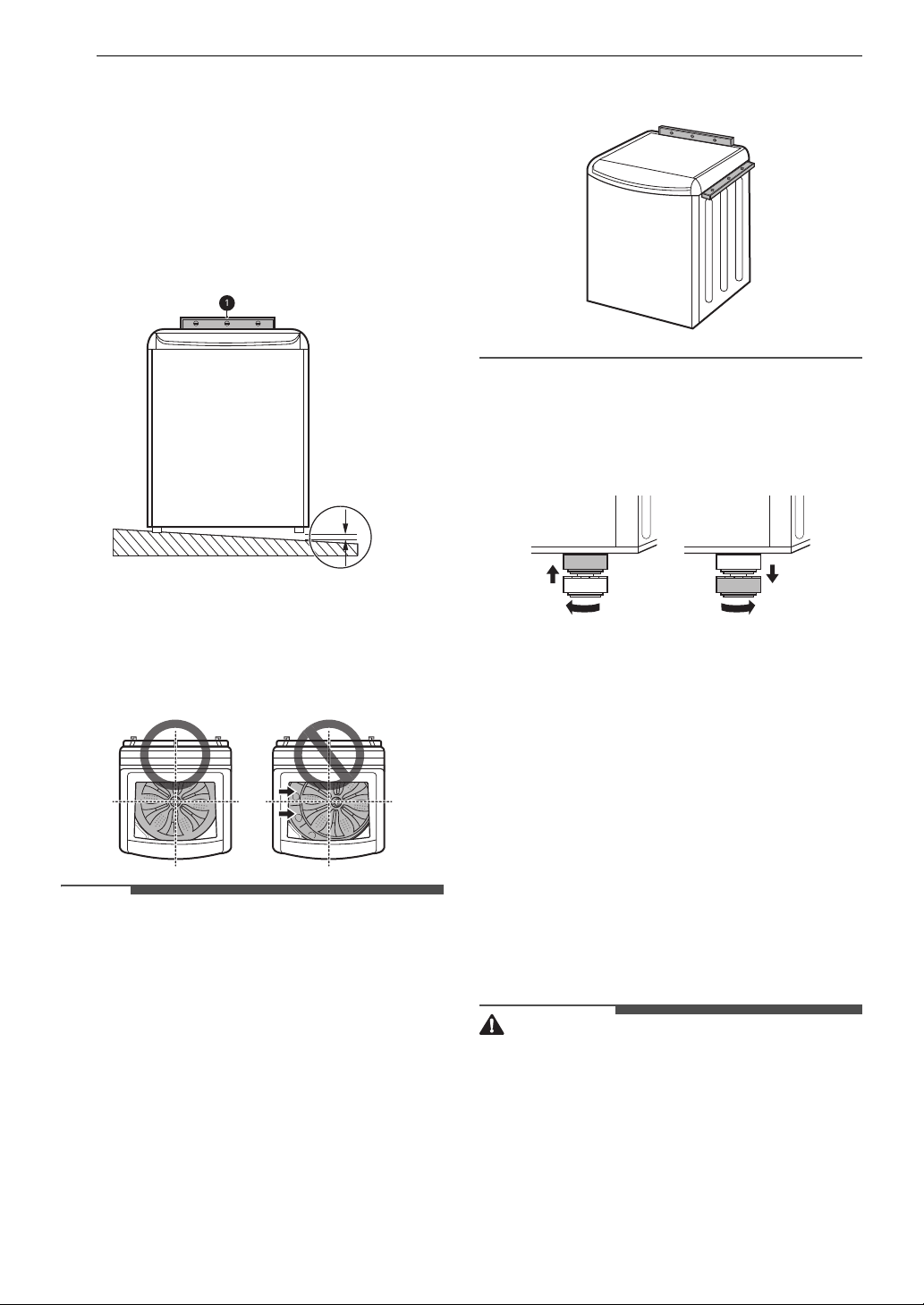
Leveling the Washer
The tub of the washer spins at very high speeds. To
minimize vibration, noise, and unwanted
movement, the floor must be a solid, level surface.
CAUTION
• Using the washer without leveling it may cause
excess vibration and noise, leading to a washer
malfunction.
• Adjust the leveling feet only as far as necessary
to level the washer. Extending the leveling feet
more than necessary can cause the washer to
vibrate.
NOTE
• Before installing the washer, make sure that the
floor is clean, dry and free of dust, dirt, water
and oil so the washer feet cannot slide easily.
Feet that move or slide on the floor can
contribute to excessive vibration and noise.
29.5 - 96 "
(75 - 244 cm)
29.5 - 96 "
(75 - 244 cm)
14 INSTALLATION
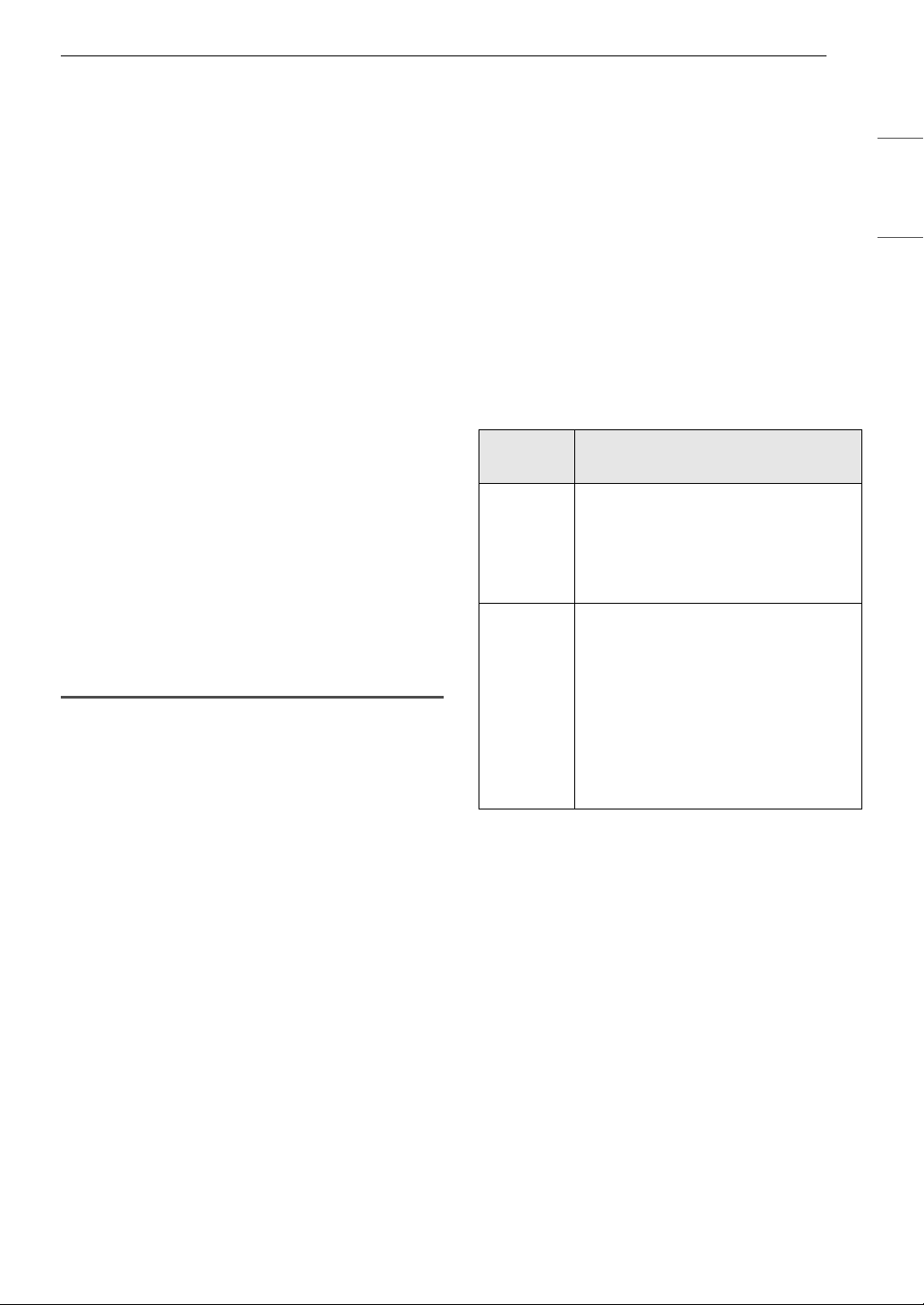
How to Level the Washer
1 Position the washer in its final location.
• Take special care not to pinch, strain, or
crush the water and drain hoses. If you have
a carpenter’s level a, you can use it to
check that the washer is level. The slope
beneath the washer should not exceed 1
inch, and all 4 leveling feet must rest firmly
on the floor.
2 Open the lid and look from above to see if the
tub is centered.
• If the tub is not centered, readjust the front
feet. If you have a level, check the washer
with the level.
NOTE
• To check if the washer is level from side to side,
place a level on the back edge of the lid.
• To check if the washer is level from front to back,
place a level on the edge where the cabinet side
meets the top cover. Do not place the level on
the top of the lid. Using these surfaces will result
in the washer being unlevel.
3 Adjust the leveling feet.
• Turn all 4 leveling feet in one direction to
raise the washer or the other direction to
lower it.
4 Recheck the washer’s levelness.
• Push or rock the top edges of the washer
gently to make sure the washer does not
rock. If the washer rocks,readjust the
leveling feet.
• If the lid does not stay open properly,
extend the front leveling legs until the
washer is level from front to back.
Final Installation Check
Connecting to the Power Supply
Plug the washer into a 120 VAC, 60 Hz grounded 3-
prong outlet.
WARNING
• Do not use a worn or damaged power cord or
power plug. Replace or repair it immediately.
Failure to do so may result in death, fire, electric
shock, or malfunction.
• Do not modify the power cord and plug provided
with the appliance. Do not damage it when
installing or moving the appliance. Doing so may
result in death, fire, electric shock, or
malfunction.
• Make sure that the appliance is grounded.
1″
15INSTALLATION
ENGLISH
• Connect this appliance to a grounded outlet
conforming to the rating prior to use. Failure to
do so may result in fire, electric shock, or
malfunction.
• Do not damage or cut off the ground prong of
the power cord. Doing so may cause death, fire,
electric shock, or product malfunction.
• Improper connection of the equipment-
grounding conductor can result in risk of electric
shock. Check with a qualified electrician or
service technician if you are in doubt as to
whether the appliance is properly grounded. If it
does not fit the outlet, have a proper outlet
installed by a qualified electrician.
• The appliance and outlet must be positioned so
that the plug is easily accessible.
• Do not use adapter or extension cords. Doing so
may result in serious injury, fire, electric shock,
or death.
• For best performance, plug the appliance into its
own individual outlet. This helps prevent
overloading house wiring circuits which could
cause a fire hazard from overheated wires.
• If necessary, use a new, UL-listed 3-prong
(grounding) plug rated at no less than the
branch circuit. Do not use an extension cord
longer than 3 feet. Failure to follow these
warnings may result in serious injury, fire,
electric shock, or death.
Testing the Washer
Check if the washer is properly installed and run a
test cycle.
1 Make sure that the tub is empty. Do not load
anything in the tub for this test. Make sure
that the water faucets for the washer are fully
turned on.
2 Press the Power button.
3 Press and hold the Spin and Soil buttons
simultaneously until an 1N s code appears in
the display.
• 1N is displayed first, and s, sO, or sE is
displayed.
• 1N s : Initial test
• 1N sO : Previous test result was good.
• 1N sE : Previous test ended with an error.
• The indication is different for each model.
4 Press the Start/Pause button.
• The test will run for about 3 minutes.
• The test automatically checks the water
inlet hoses and the drain hose.
5 Check the display for results.
6 At the end of the test cycle, ENd or O will
display. The washer will shut off automatically
after a short delay.
Installation Check Error Codes
Refer to the chart below before calling for service.
Error
Code
Solution
IE
• Fully open the water faucet.
• Straighten out any kinks in the
inlet hoses and make sure the
hoses are not pinched against the
wall or under the washer.
OE
• Straighten out any kinks in the
drain hose and make sure the
hose is not pinched against the
wall or under the washer.
• Remove and flush out the drain
hose to remove clogs.
• Adjust or repair the drain.
Maximum drain height is 96
inches.
16 OPERATION
OPERATION
Before Use
WARNING
• To reduce the risk of fire, electric shock, or injury
to persons, read the SAFETY INSTRUCTIONS
before operating this appliance.
Operation Overview
1 Sort laundry and load the washer.
• Sort laundry by fabric type, soil level, color
and load size, as needed. Open the lid and
load items into the washer.
• If using single-use detergent packs, or gel
or tablet detergents, place them in the tub
before loading the laundry.
2 Add cleaning products.
• Add the proper amount of HE (High-
Efficiency) detergent to the detergent
dispenser.
• If desired, add bleach or fabric softener to
the appropriate dispensers.
• Do not place liquid or powdered detergent
packs, or gel or tablet detergents in the
dispenser.
3 Turn on the washer.
• Press the Power button to turn on the
washer.
• The lights above the cycle buttons will
illuminate and a chime will sound.
4 Select a cycle.
• Turn the cycle selector knob or press the
cycle buttons repeatedly until the desired
cycle is selected.
• The preset wash temperature, spin speed,
soil level and option settings for the
selected cycle are shown.
•The Normal cycle must be selected in order
to change its default settings.
• Pressing the Start/Pause button without
selecting a cycle immediately starts the
Normal cycle with the default settings.
5 Adjust settings.
• Default settings for the selected cycle can
be changed, if desired, using the cycle
modifier and option buttons.
• Not all modifiers and options are available
on all cycles. A different chime sounds and
the LED does not light up if the selection is
not allowed.
6 Begin cycle.
•Press the Start/Pause button to begin the
cycle. The lid locks, and the washer agitates
briefly without water to measure the weight
of the load.
•If the Start/Pause button is not pressed
within a certain time, the washer shuts off
and all settings are lost.
NOTE
• You must press and hold the Power button
when turning off the appliance. This helps
prevent accidentally turning it off during a cycle.
7 If necessary, add additional items to the tub
while the Add Garments light is on.
• This light turns on at the beginning of the
wash cycle to indicate when it is safe to add
items to the tub.
•Press the Start/Pause button to pause the
cycle and add items to the tub. Press the
Start/Pause button to resume the cycle.
• Adding items after the Add Garments light
turns off may result in poor wash
performance.
8 End of cycle.
• When the cycle is finished, a melody
sounds. Immediately remove the clothing
from the washer to reduce wrinkling.
• If the washer includes lint filters, remember
to check lint filters after every 2 to 3 loads.
17OPERATION
ENGLISH
Sorting Laundry
Grouping Similar Items
For the best washing results, and to reduce the
possibility of damage to clothing, sort clothing into
loads made up of similar items.
Mixing different fabric types and/or soil levels can
result in poor wash performance, color transfer,
discoloration, fabric damage or linting. Fabrics
should be sorted into groups as described below.
Colors
Sort articles by color. Wash dark clothes separately
from light colors or whites. Mixing dark clothes
with light clothes can result in dye transfer or
discoloration of the lighter clothes.
Soil Level
Wash heavily soiled clothing together. Washing
lightly soiled clothing in the same load with heavily
soiled clothing could result in poor wash
performance for the lightly soiled clothing.
Fabric Type
Delicate articles should not be mixed with heavy or
sturdy fabric types. Washing heavy fabrics with
delicates can result in poor wash performance for
the heavy fabrics and possible damage to the
delicates.
Lint Type
Some fabrics attract and bind lint to them while
others give off lint in the laundry process. Avoid
mixing these lint collectors and lint producers in
the same load. Mixing these fabrics will result in
pilling and linting on the lint collectors. (For
example, lint collector - knit sweater; lint producer
- terry cloth towels.)
How to Sort Laundry
CAUTION
• The washer can be fully loaded, but the tub
should not be tightly packed with items. The lid
of the washer should close easily.
•Use the Bedding cycle for buoyant or
nonabsorbent items such as pillows or
comforters. Failure to follow this caution can
result in leakage.
• Clothing or articles that are waterproof or water
resistant must be washed in the Waterproof
cycle only. (Examples include water resistant
clothing, mattress covers, outdoor clothes, and
plastic mats.) Using another cycle may result in
personal injury or damage to the washer,
clothes, walls, floor, and surrounding objects
due to abnormal vibration.
Fabric Care Labels
Many articles of clothing include a fabric care label.
Using the chart below, adjust the cycle and option
selections to care for your clothing according to
the manufacturer’s recommendations.
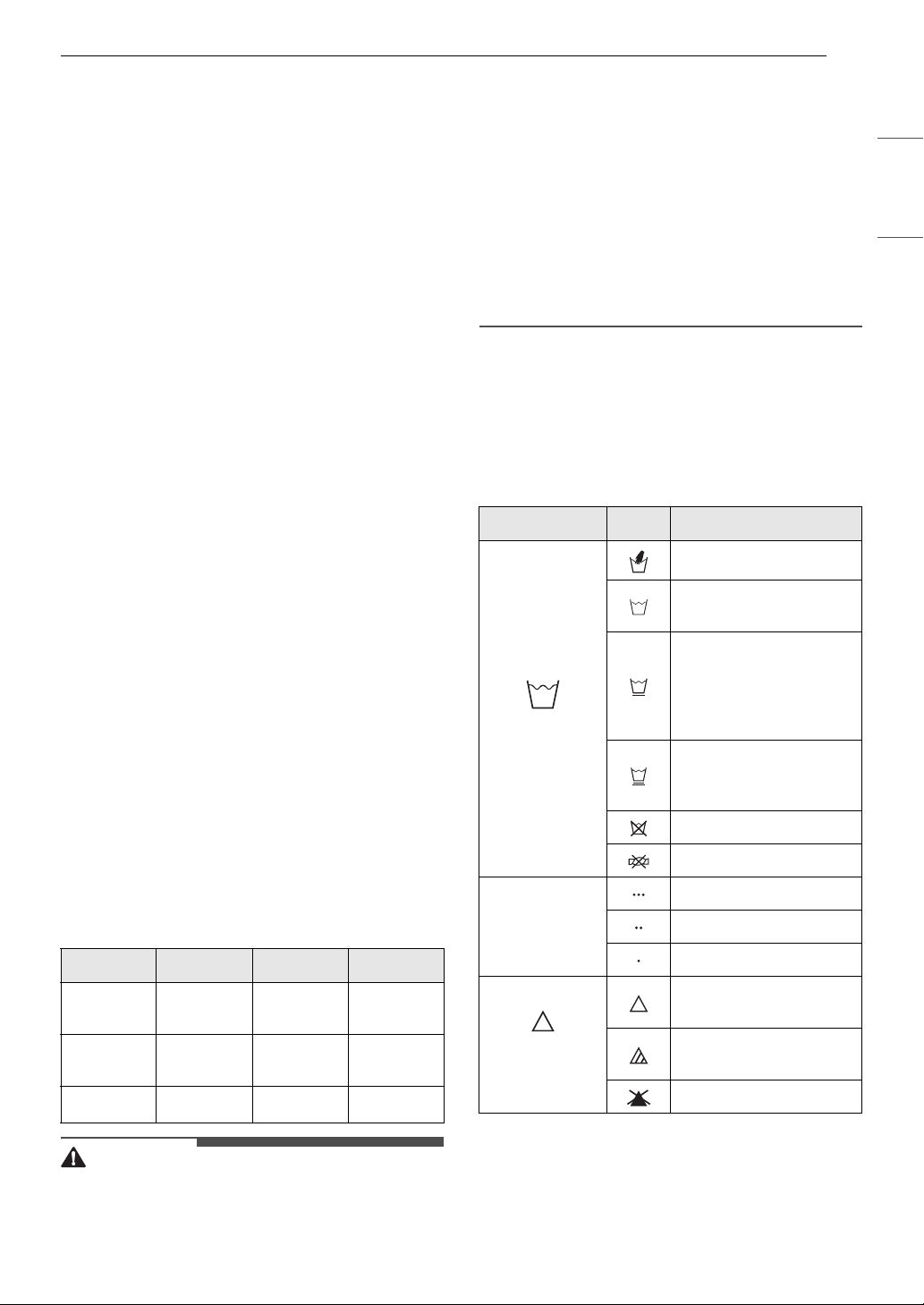
By Colors By Soil By Fabric By Lint
Whites Heavy Delicates Lint
Producer
Lights Normal Easy Care Lint
Collector
Darks Light Sturdy
Category Label Directions
Washing
Hand wash
Machine wash, Normal
cycle
Perm Press/Wrinkle
Resistant setting (which
has a cool down or cold
spray before the slower
spin)
Gentle/Delicate setting
(slow agitation and/or
reduced wash time)
Do not wash
Do not wring
Water
Temperature
Hot
Warm
Cold/Cool
Bleach
Symbols
Any bleach (when
needed)
Only non-chlorine
bleach (when needed)
Do not bleach
18 OPERATION
Loading the Washer
General Tips
• Check and empty pockets. Paper clips, coins,
matches, and other items can damage clothing
and the washer.
• Close zippers and hooks, and tie drawstrings to
prevent snagging or tangling of clothes.
• Pretreat heavily stained areas for best results.
• Brush off heavy soil, dust, and hair from items
before washing. Excess dirt or sand can abrade
other fabrics and lead to poor wash
performance.
• Combine large and small items in the tub. Load
large items first. Large items should not be more
than half of total load.
• For best results, load dry items only. If washing
very wet items, wring out excess water before
loading, or run a Spin Only cycle to extract
excess water before adding detergent and
starting the desired cycle.
• The washer can be fully loaded, but the tub
should not be tightly packed with items. The lid
of the washer must close easily.
• The washer will not fill or operate with the lid
open.
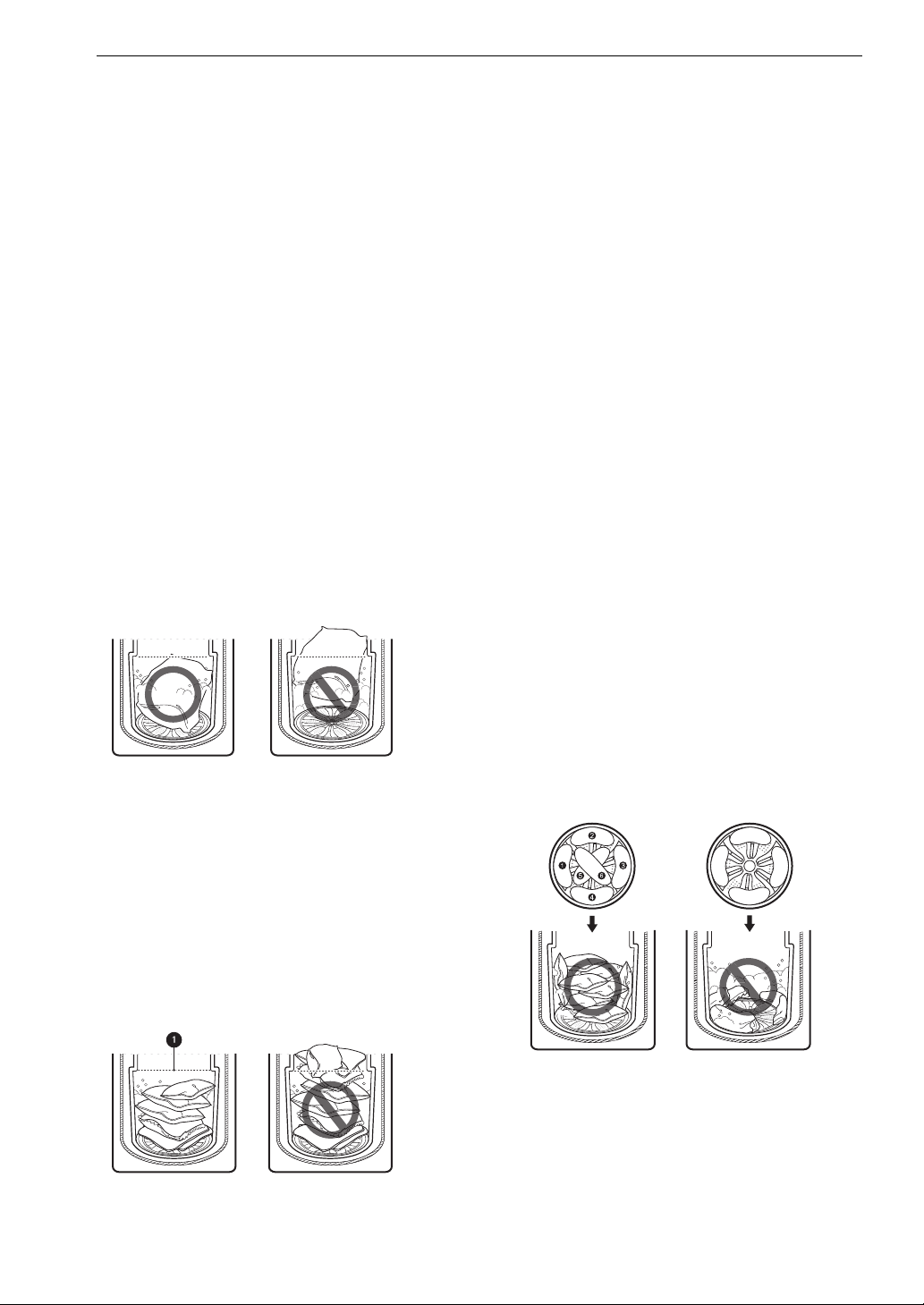
• Do not overload the tub. Clothes should fit
loosely in the tub under the maximum fill line
a.
Loading clothes over the fill line may result in
damage to clothing and the washer.
- Do not press down on items while stacking
them in the tub.
- Load clothes loosely, and do not overfill the
tub. Clothes need room to circulate in order to
get clean.
Bulky Items
• Do not wash entire pillows or cushions. Remove
pillow or cushion inserts and wash the covers
only.
•Use the Bedding cycle for large or bulky items
such as poly-filled jackets, comforters, pillows,
etc. These items may not be as absorbent as
other laundry items and should be sorted into a
separate wash load for best performance.
• Bulky items should be placed as far down in the
tub as possible for best performance. Always
place buoyant items at the bottom of the tub.
The washer will automatically detect the load
size. Because of the high efficiency wash system,
the water level may not completely cover the
load.
Small Items
• Do not wash a single small item. Add enough
similar items to the load to prevent an out-of-
balance load.
• Wash small, light items in a mesh bag. Small
items can get caught in the impeller at the
bottom of the tub, and brassiere hooks can
damage other items or the tub.
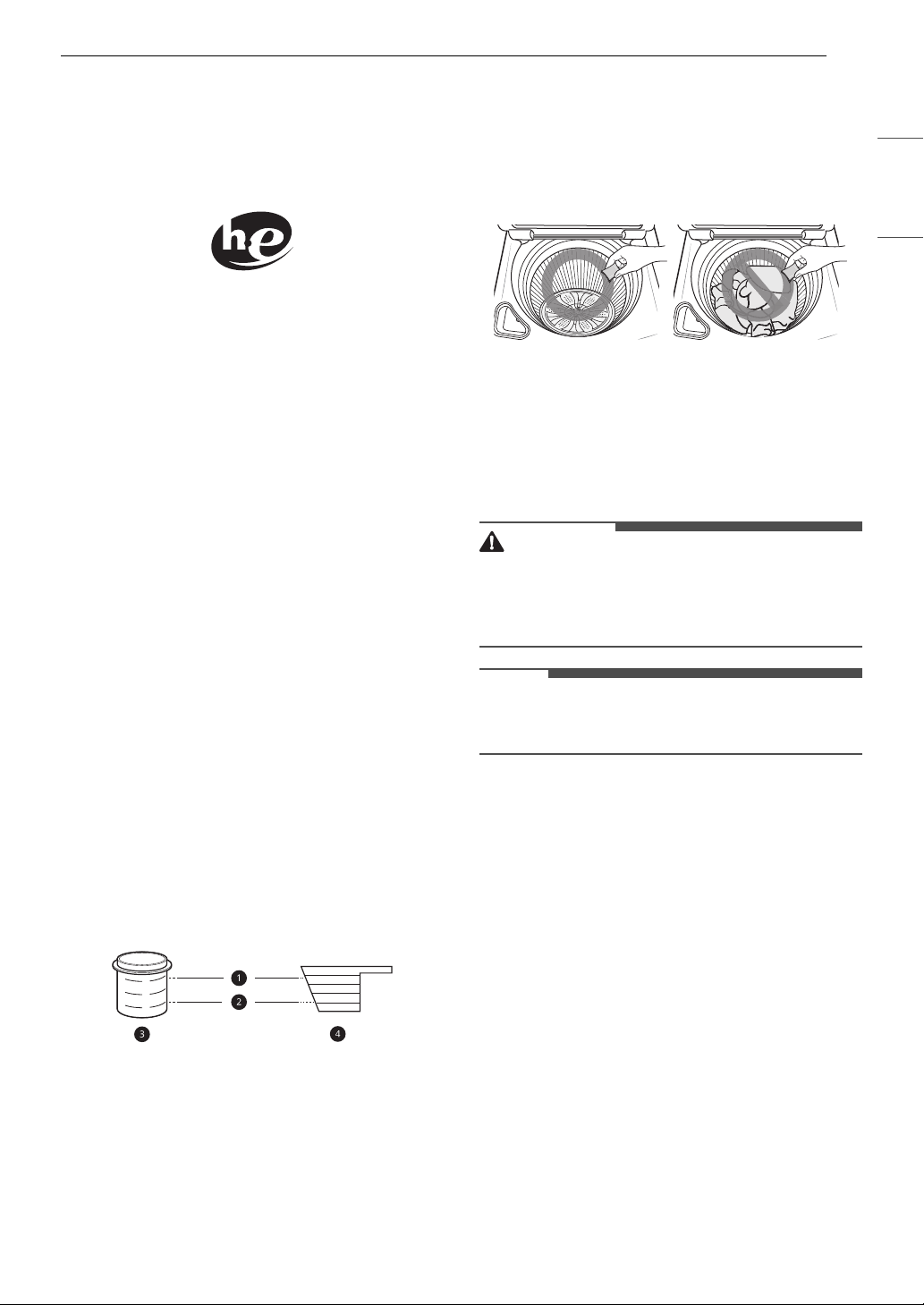
General Tips for Models with an
Impeller
If the appliance uses a low profile rotating hub in
the drum, follow these instructions when loading
the washer.
• For best performance, load clothes as shown.
• Wash thick, bulky items individually. Heavy
blankets, comforters, bedspreads, or pet beds
can get tangled or cause an unbalanced load if
combined with other items.
19OPERATION
ENGLISH
Adding Cleaning Products
About Detergent Use
This washer is designed for use with only HE (High-
Efficiency) detergents.
• HE detergents produce fewer suds, dissolve
more efficiently to improve washing and rinsing
performance, and help to keep the interior of
the washer clean. Using detergent that is not HE
may cause oversudsing and unsatisfactory
performance which could result in error codes,
cycle failure, and washer damage.
• Detergents designated as HE-compatible may
not provide optimal results.
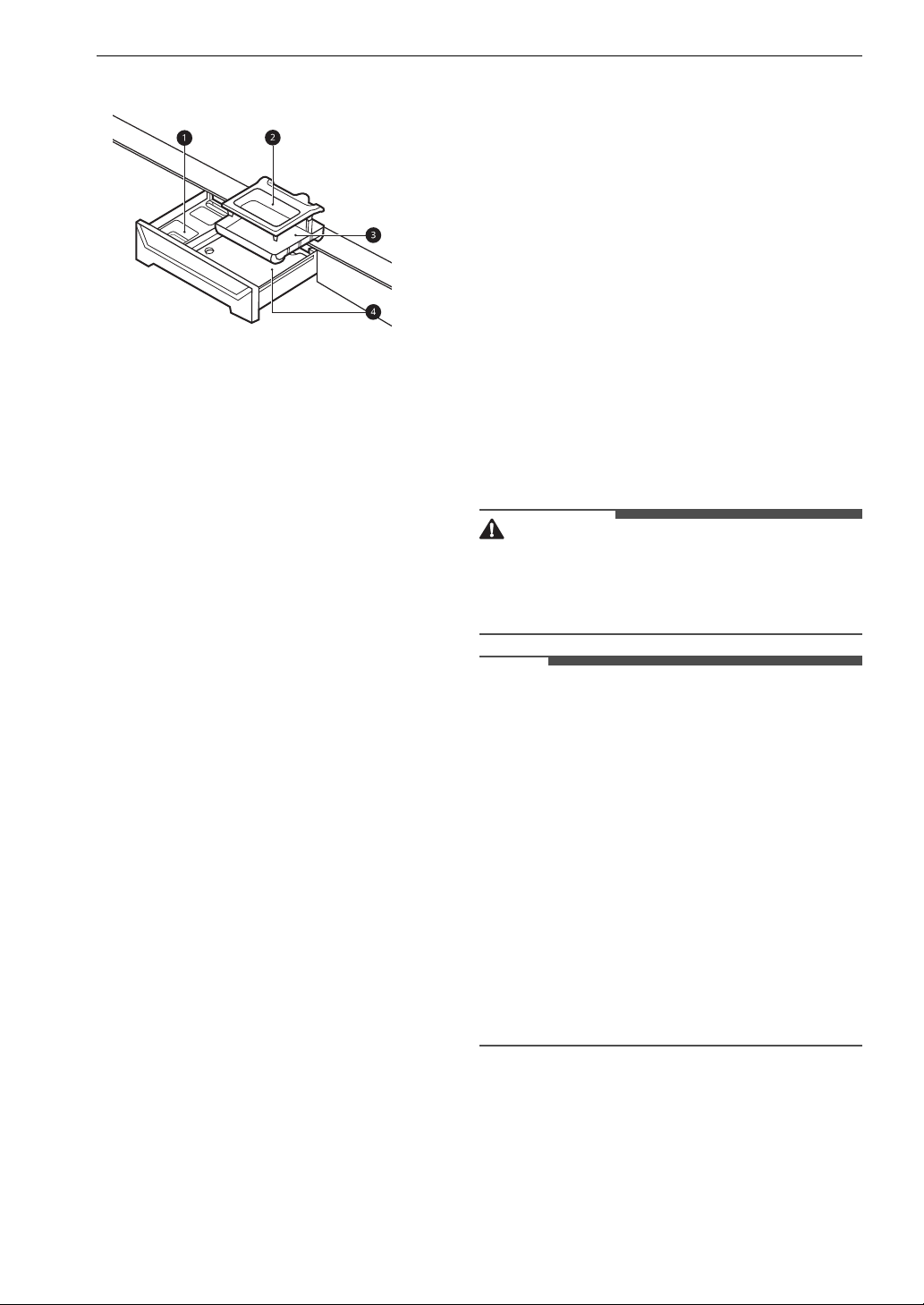
• For proper wash performance, always measure
detergent using the measuring device provided
by the detergent manufacturer. For an average
load, use less than half of the recommended
maximum. Use less detergent for soft water,
light soil, or smaller loads.
• Use extra care when measuring 2X and 3X
concentrated detergents because even a small
amount of extra detergent can lead to problems.
• Never use more than the maximum amount of
detergent recommended by the manufacturer.
Using too much detergent can lead to
oversudsing, poor rinsing, detergent buildup in
clothing, and residue buildup that can contribute
to odors in the washer.
• Do not use more than one single-use detergent
pack or detergent tablet in the washer. Using too
much detergent may cause oversudsing and
unsatisfactory performance. Reduce detergent
amount or add an extra rinse if detergent
residue is left on fabrics. To add an extra rinse,
select the Extra Rinse option.
a Maximum fill line
b Average load fill line
c Liquid detergent
d Powdered detergent
Single-Use Detergent Packs / Gel or
Tablet Detergents
Place liquid or powdered detergent packs, or gel
or tablet detergents in the tub before loading
laundry. Do not place these detergents in the
dispenser.
About the Dispensers
The automatic dispenser consists of two
compartments which hold:
• Liquid fabric softener
• Liquid or powdered detergent for main wash
CAUTION
• Do not place or store laundry products, such as
detergent, bleach, or liquid fabric softener, on
top of your washer. These products can damage
the washer’s finish and controls.
NOTE
• Follow the manufacturer’s recommendations
when adding cleaning products.
Using the Detergent and Softener
Dispenser Drawer
To add detergent and fabric softener to the
automatic dispenser drawer:
1 Open the dispenser drawer.
2 Load the laundry products into the
appropriate compartments.
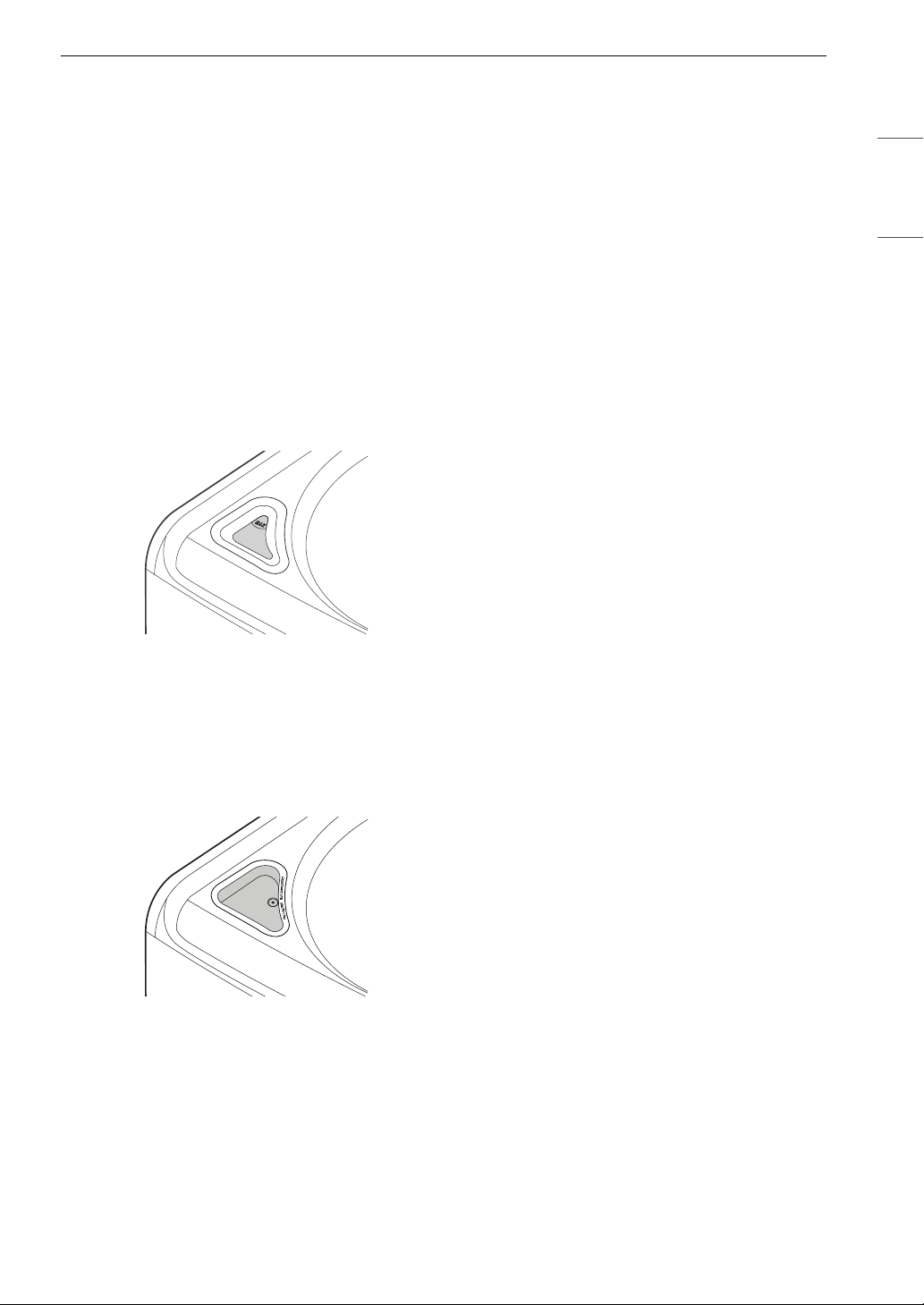
20 OPERATION
a Liquid fabric softener compartment
b Main wash liquid detergent cup
c Insert
d Main wash powdered detergent
compartment
3 Gently close the detergent dispenser drawer
before starting the cycle.
• Slamming the drawer closed may result in
the detergent overflowing into another
compartment or dispensing into the drum
earlier than programmed.
• Be careful not to get a hand caught in the
drawer while closing.
• It is normal for a small amount of water to
remain in the dispenser compartments at
the end of the cycle.
Main Wash Detergent Compartment
This compartment holds laundry detergent for the
main wash cycle. Either powdered or liquid
detergent may be used in this compartment.
• The detergent is added to the load at the
beginning of the cycle. Always use HE (High-
Efficiency) detergent with your washer.
• Do not exceed the maximum fill line. Using too
much detergent can result in detergent buildup
in clothing and the washer.
• Liquid or powdered color-safe bleach may be
added to the main wash compartment with
detergent of the same type. Do not mix liquids
and powders.
• When using liquid detergent, make sure the
liquid detergent cup and insert are in place.
• When using powdered detergent, remove the
insert
c and liquid detergent cup b from the
dispenser. Powdered detergent will not dispense
with the liquid detergent cup and insert in place.
• If you use a detergent that does not dissolve
easily or a detergent with high viscosity, it will
leave a residue and clog the dispenser.
Fabric Softener Compartment
This compartment holds liquid fabric softener,
which is automatically dispensed during the final
rinse cycle.
• Do not exceed the maximum fill line. Using too
much fabric softener may stain clothes.
• Dilute concentrated fabric softeners with warm
water.
• Never pour fabric softener directly onto the load
or into the tub.
Using the Liquid Bleach Dispenser
The bleach dispenser is a separate compartment
at the left front of the tub opening.
WARNING
• Do not mix chlorine bleach with ammonia or
acids such as vinegar or rust/scale remover.
Mixing chemicals like these can produce a lethal
gas, resulting in severe injury or death.
NOTE
• Do not add powdered bleach to this dispenser.
The bleach dispenser is designed to dispense
liquid bleach only. Powdered or liquid color-safe
bleach will not dispense properly.
• Do not place laundry items on top of the bleach
dispenser when loading and unloading the
washer.
• Never add more than one cup of bleach and do
not exceed the maximum fill line since this can
cause the bleach to be dispensed immediately.
Using too much bleach can damage fabrics.
• Never pour undiluted liquid chlorine bleach
directly onto the load or into the tub. Fabric
damage can occur.
• Do not use color-safe bleach or Oxi products in
the same cycle with liquid chlorine bleach.
1 Check clothing care labels for special
instructions.
2 Measure liquid bleach carefully, following the
instructions on the bottle.
• HE (High-Efficiency) washers use less water,
so less bleach is needed. One half cup is
enough for most loads.
21OPERATION
ENGLISH
3 Carefully pour the pre-measured amount of
bleach directly into the bleach dispenser.
• If you are using powdered bleach of any
kind, pour it directly into the tub before
adding the laundry.
• Never add powdered bleach to the liquid
bleach dispenser.
Automatic Bleach Dispenser
On some models, the bleach dispenser is
connected to the inlet valve. The bleach is
automatically diluted and dispensed at the proper
time in the wash cycle.
• The dispenser is activated twice to ensure
complete dispensing of the bleach. Any liquid
remaining in the dispenser at the end of the
cycle is water, not bleach.
Immediate Bleach Dispenser
On some models, when you pour the bleach into
the bleach dispenser, the bleach is immediately
added to the tub as it fills with water, safely
diluting the bleach.
• The dispenser cover cannot be removed. To
clean the cover, wipe it with a damp paper towel.
22 OPERATION
Control Panel
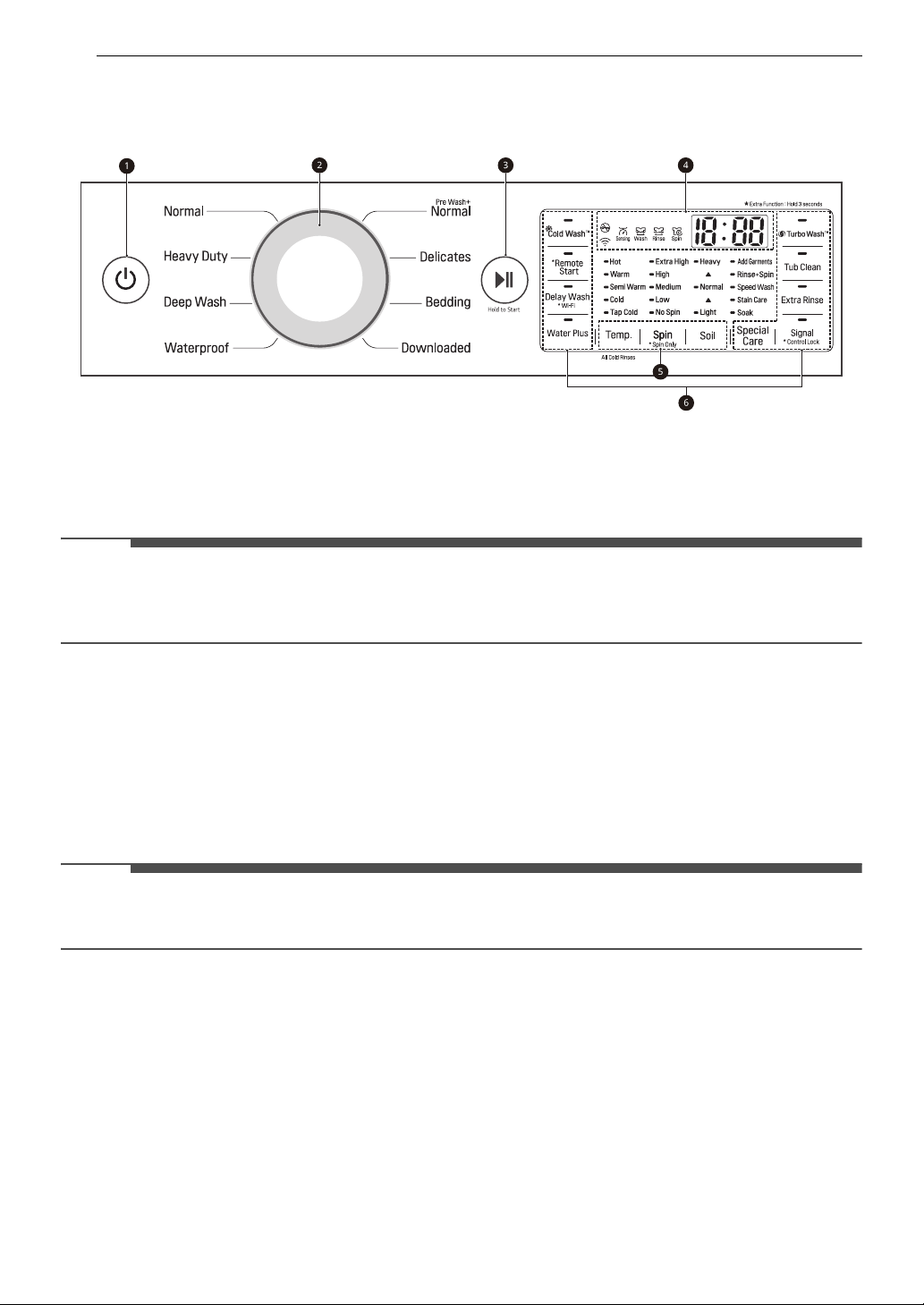
Control Panel Features
a Power On/Off Button
• Press this button to turn the washer on or off.
• Pressing this button during a cycle will cancel that cycle and any load settings will be lost.
• The door will unlock after a brief pause.
NOTE
• If there is any water remaining in the drum after the washer shuts off, it will drain after a delay. The
washer can be restarted at any time before the drain begins. However, once the water begins to drain,
all functions will be suspended until the water has been completely drained and the washer shuts off.
b Cycle Selector Knob
• Turn this knob to select the desired cycle.
• Once the desired cycle has been selected, the standard presets will appear in the display. These
settings can be adjusted using the Cycle Modifier buttons at any time before starting the cycle.
c Start/Pause Button
• Press this button to start the selected cycle.
• If the washer is running, use this button to pause the cycle without losing the current settings.
NOTE
• If the Start/Pause button is not pressed to start the selected cycle, after a delay the washer
automatically turns off and all cycle settings are lost. Any water remaining in the drum will be drained.
d Time and Status Display
e Cycle Modifier Buttons
• Use these buttons to adjust the wash temperature, spin speed and soil level settings for the selected
cycle.
• The current settings are shown in the display.
• Press the button for that option to select other settings.
f Option and Extra Function Buttons
• These buttons allow you to select additional cycle options. Certain buttons also allow you to activate
special functions by pressing and holding the button for 3 seconds.
23OPERATION
ENGLISH
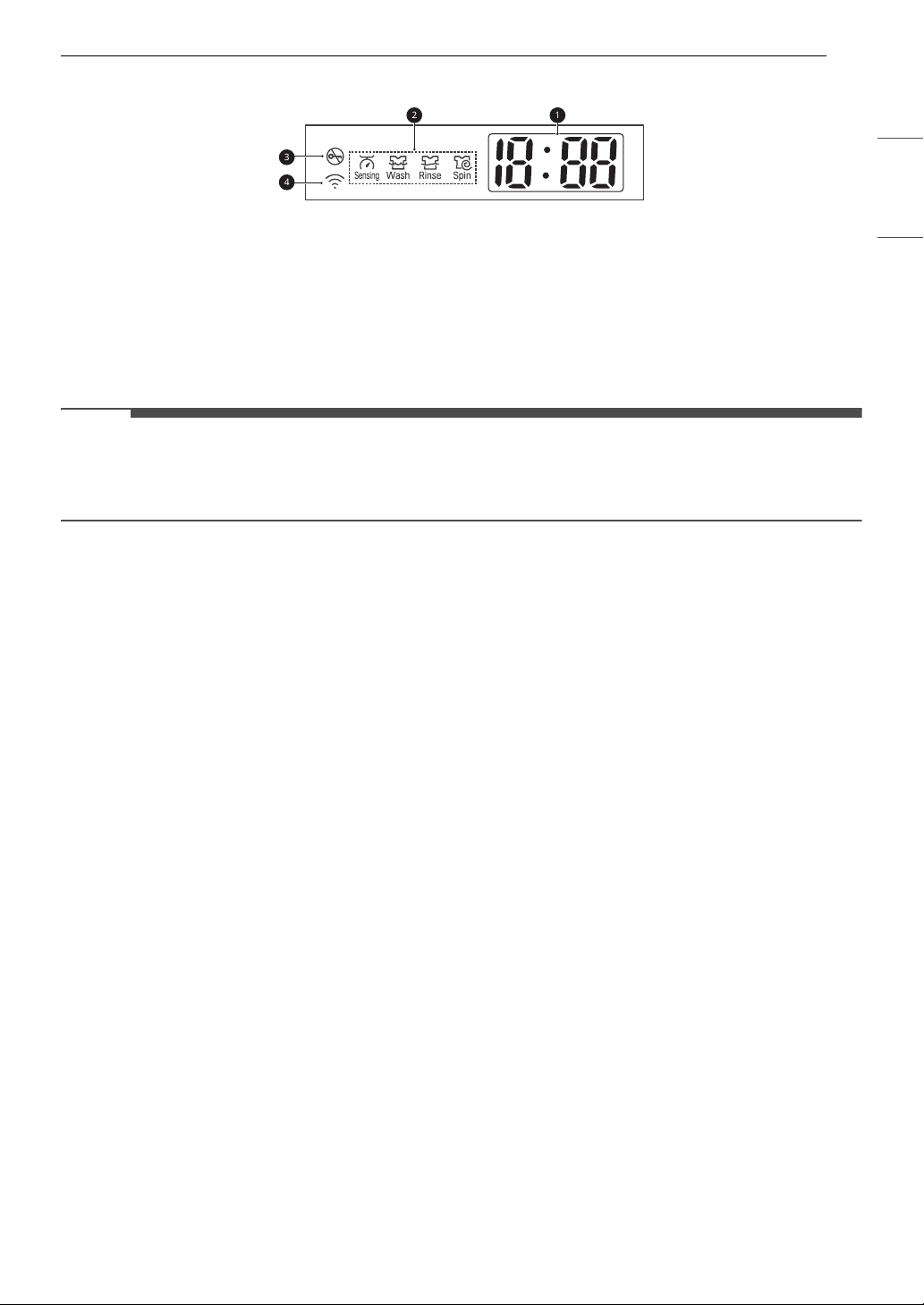
Time and Status Display
a Estimated Time Remaining
• When a cycle is selected, the default time for that cycle is displayed. This time will change as modifiers
or options are selected.
• If the display shows ---, then the time will be displayed after the load sensing has detected the load
size.
• The time shown is only an estimate. This time is based on normal operating conditions. Several
external factors (load size, room temperature, incoming water temperature, etc.) can affect the actual
time.
NOTE
• Once the Start/Pause button is pressed, the washer will measure the size of the load. The estimated
time may change once the load size has been measured.
• If the Delay Wash function is set, the remaining delay time counts down until the cycle begins.
b Cycle Status Indicators
• These LEDs will blink when a cycle is selected to indicate which stages will run.
• When a cycle is running, the LED for the active stage will blink, and the LEDs for the remaining stages
will remain steady. Once a stage is complete, the LED will turn off. If a cycle is paused, the active stage
LED will stop blinking.
c Door Lock Indicator
• This indicator lights up when the cycle starts and the door is locked.
• The indicator light stays on until the cycle is paused, stopped or has finished.
d Wi-Fi Indicator
• This indicator is lit when the product is connected to a home Wi-Fi network.
24 OPERATION
Wash Cycles
The wash cycles are designed for specific types of wash loads. Select the cycle that best matches the load
contents for maximum wash performance and fabric care.
See the Sorting Laundry section for best results, and follow the fabric care labels on your garments. For a
guide to fabric care symbols, see the Sorting Laundry section.
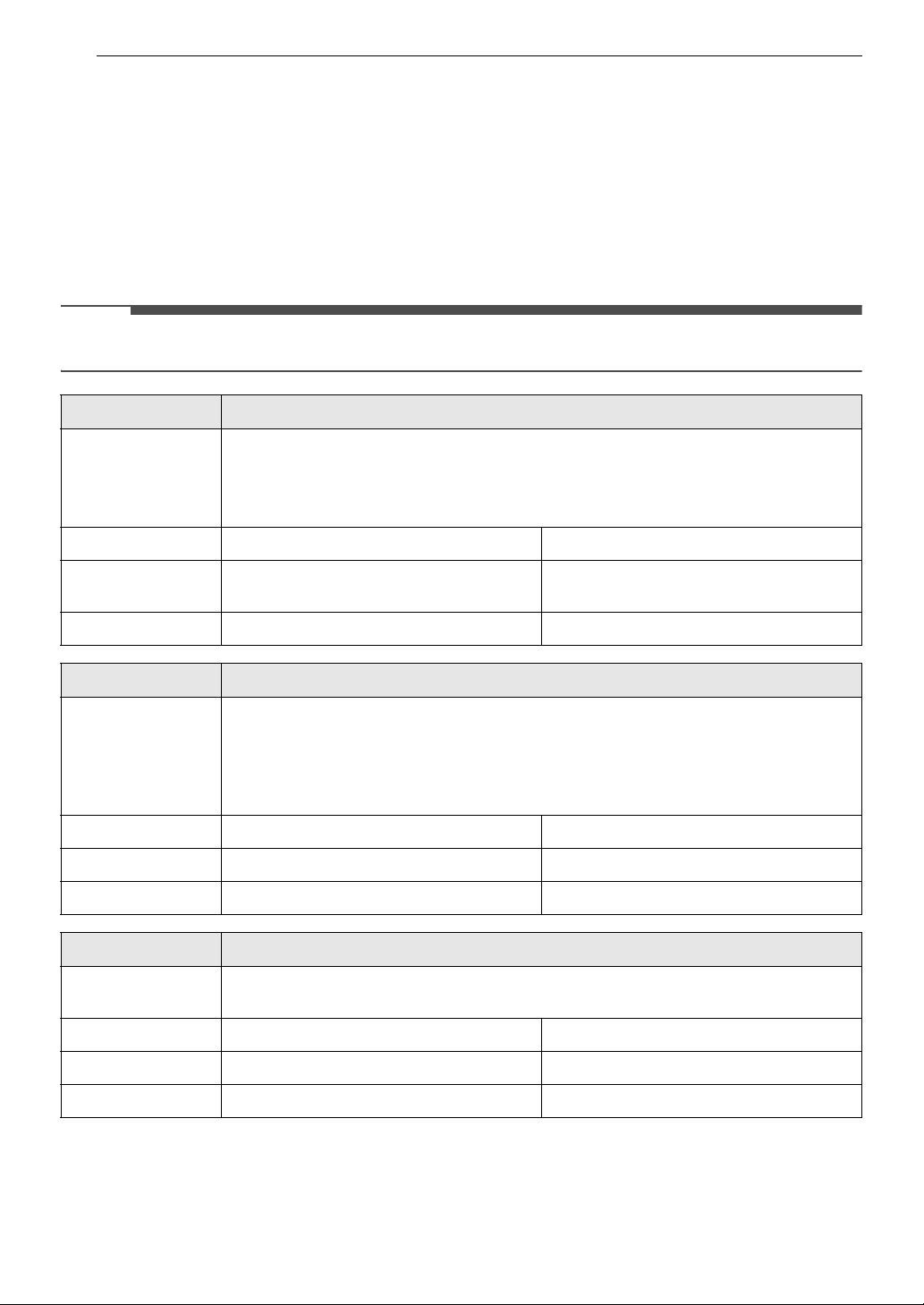
Cycle Guide
Turn the knob or press the button to select the desired cycle. When you select a wash cycle, the light for
the corresponding wash cycle will turn on.
NOTE
• Whenever load weights are mentioned, assume 1 lb (0.45 kg) = 1 thick bath towel (dry).
Cycle Normal
Description Use to wash all normal items such as cotton, linen, shirts, jeans or mixed loads, except
delicate fabrics such as wool or silk.
•Pressing the Start/Pause button without selecting a cycle will cause the Normal
cycle to begin immediately, using the default settings.
Wash Temp. Default: Warm Available: All
Spin Speed Default: High Available: Extra High, High, Medium, No
Spin
Soil Level Default: Normal Available: All
Cycle Heavy Duty
Description Suitable for washing heavily soiled laundry, such as cotton fabrics, using more powerful
wash motions.
• When washing large loads, there will be brief periods of 2 minutes or more
without agitation. These soak periods are part of the cycle’s design, and are
normal.
Wash Temp. Default: Warm Available: All
Spin Speed Default: High Available: All
Soil Level Default: Heavy Available: All
Cycle Deep Wash
Description Provides additional water and washes heavily soiled mixed items, except delicate
fabrics.
Wash Temp. Default: Warm Available: All
Spin Speed Default: Medium Available: All
Soil Level Default: Normal Available: All
25OPERATION
ENGLISH
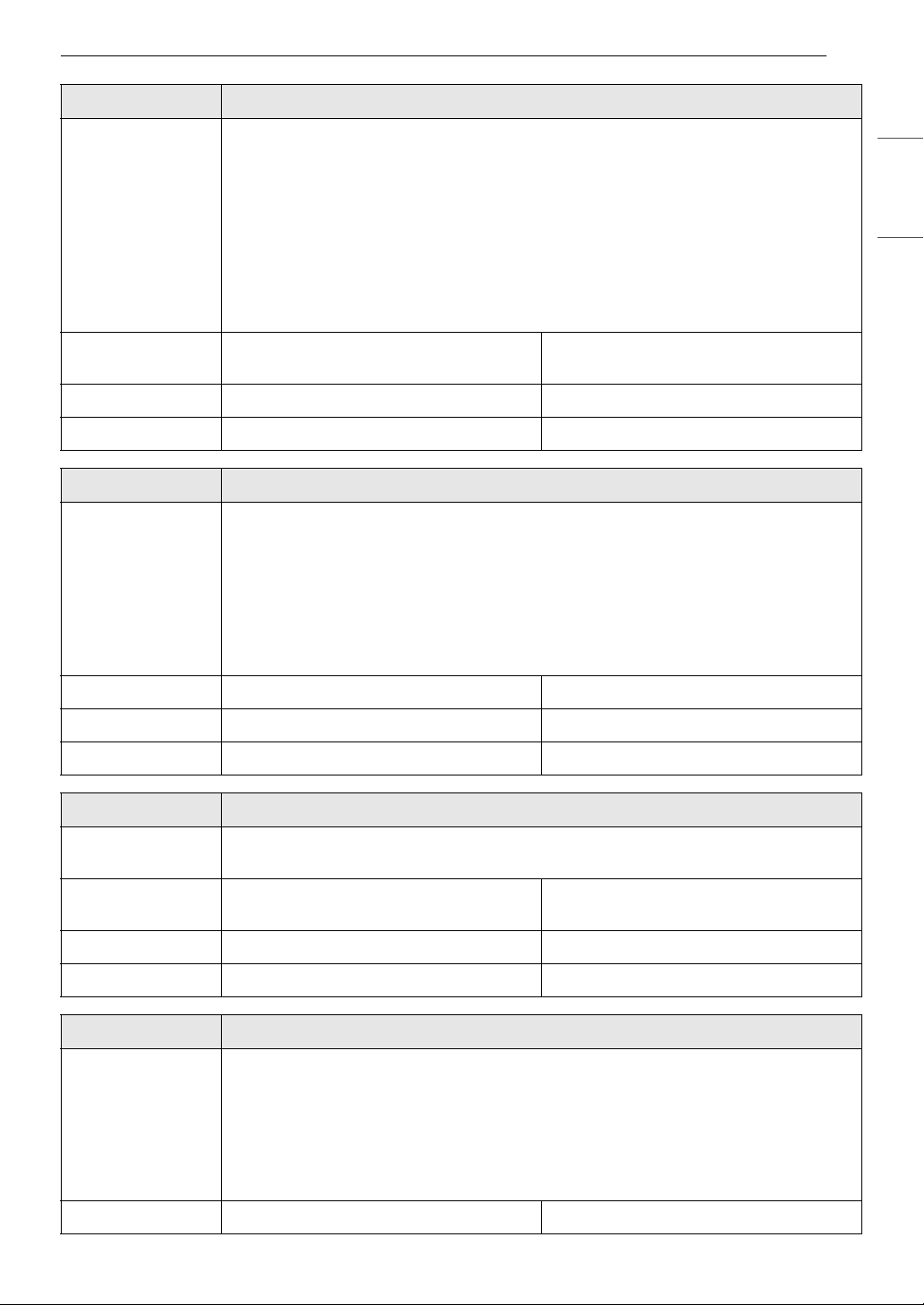
Cycle Waterproof
Description Suitable for washing waterproof items such as water resistant clothing, mattress
covers, outdoor clothes, and plastic mats. (less than 14 lb)
NOTE
• Do not use any other wash cycle to wash waterproof items.
• Do not use this cycle to wash a mixed load of waterproof and non-waterproof
items.
• Check the fabric care label on the garments before using this cycle.
• Do not wash other fabrics using this cycle.
Wash Temp. Default: Warm Available: Warm, Semi Warm, Cold, Tap
Cold
Spin Speed Default: Low Available: Low, No Spin
Soil Level Default: Light Available: All
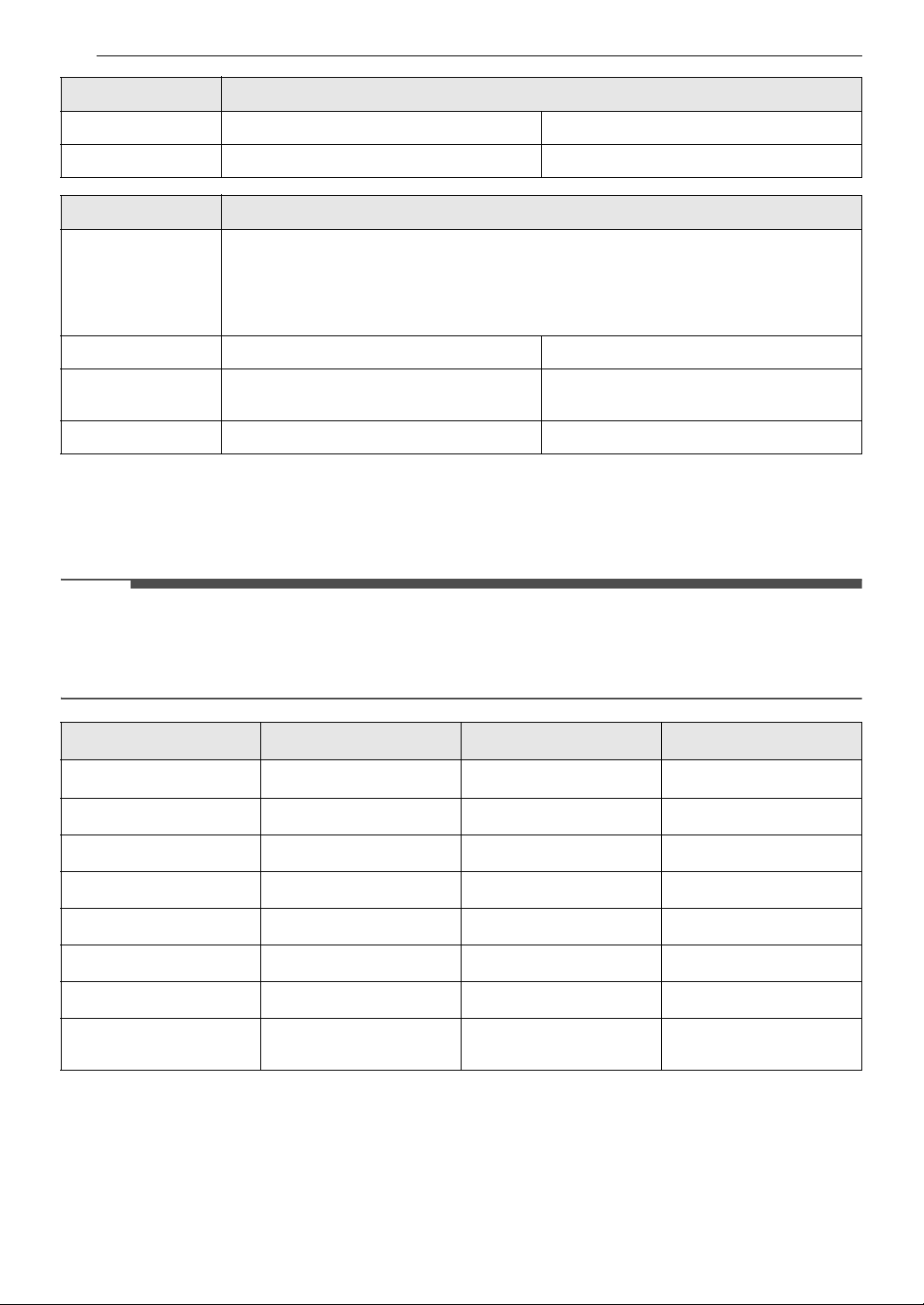
Cycle Pre Wash+Normal
Description Use this cycle to prewash stains without needing to hand wash. Prompt treatment helps
to prevent stains from setting or odors from developing.
NOTE
• When chime sounds, press Start/Pause to unlock lid, add main detergent to
dispenser, and insert remainder of laundry. If Start/Pause is not pressed within
about 3 minutes, the cycle continues. (If Signal is turned off, the chime won’t
sound.)
Wash Temp. Default: Warm Available: All
Spin Speed Default: High Available: All
Soil Level Default: Normal Available: Normal, Light
Cycle Delicates
Description Suitable for washing dress shirts/blouses, nylons, lingerie, or sheer and lacy clothes
which can easily be damaged. (less than 8 lb)
Wash Temp. Default: Tap Cold Available: Warm, Semi Warm, Cold, Tap
Cold
Spin Speed Default: Low Available: Low, No Spin
Soil Level Default: Light Available: All
Cycle Bedding
Description Suitable for washing blankets or bulky items which have difficulty absorbing water,
such as pillows, blankets, comforters, sheets or pet bedding.
• Do not use this cycle to wash a mixed load of bedding and non-bedding items.
• Do not mix large/bulky items with smaller articles of clothing.
• Do not wash excessively large items. If large/bulky items do not fit easily into the
tub, there may not be enough room for them to move during washing.
Wash Temp. Default: Warm Available: All
26 OPERATION
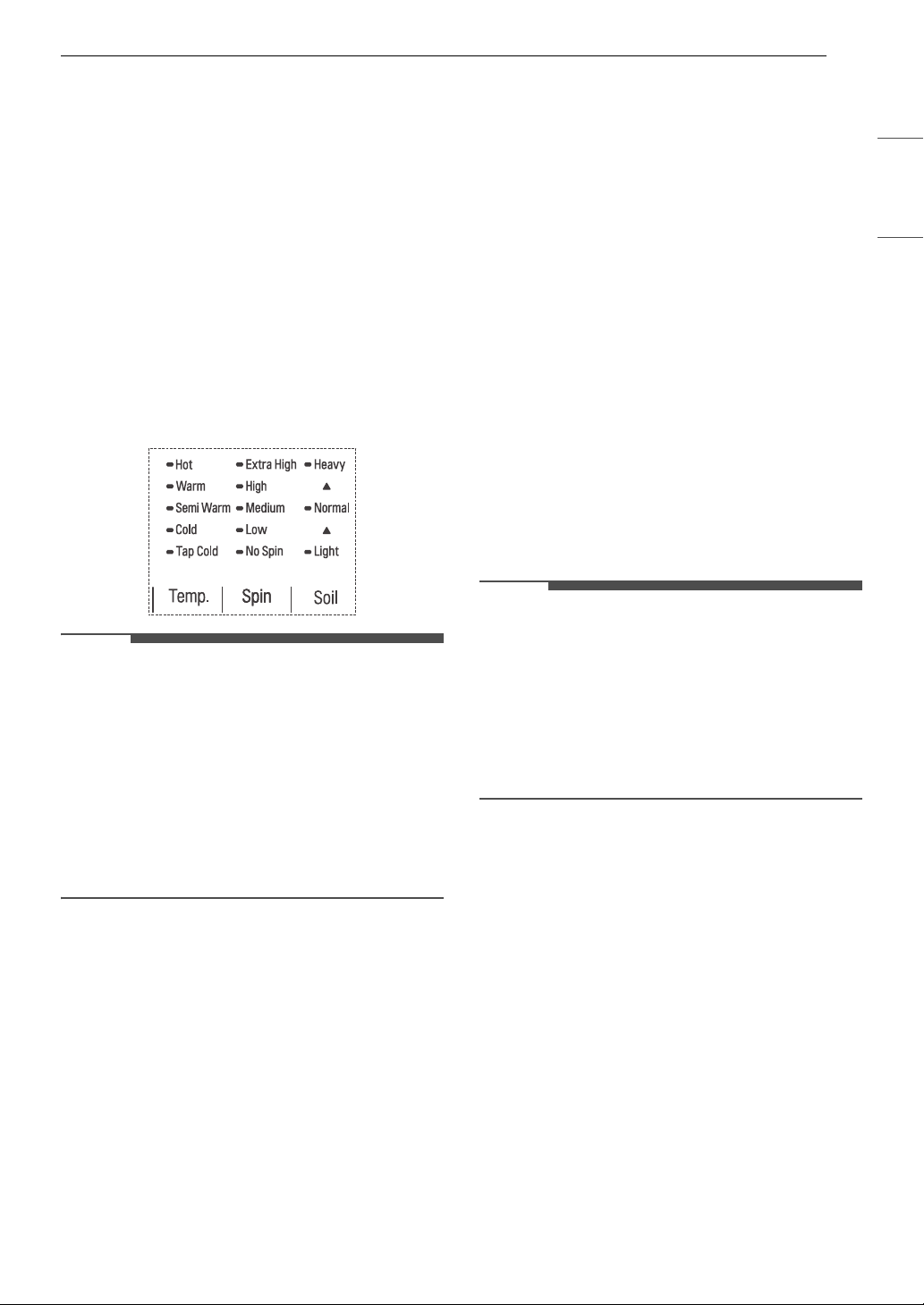
Available Options
† This option is automatically included in the cycle and cannot be deselected.
NOTE
•The Delay Wash and Extra Rinse can be selected for every cycle in this table.
•The Soak option is available for every cycle in this table except for the Waterproof cycle.
•The Water Plus option is available for every cycle in this table except for the Bedding cycle.
Spin Speed Default: Low Available: Medium, Low, No Spin
Soil Level Default: Normal Available: All
Cycle Downloaded (Small Load)
Description You can use a smartphone to download a specialized cycle to this cycle position.
• The default cycle is Small Load, used for normally soiled loads with a few items.
This cycle is also available for download.
• Refer to the LG ThinQ application to see the cycles available for download.
Wash Temp. Default: Warm Available: All
Spin Speed Default: Medium Available: Extra High, High, Medium, No
Spin
Soil Level Default: Light Available: All
Cycle Stain Care
Cold Wash
TM
Turbo Wash
TM
Normal
##
#
†
Heavy Duty
##
Deep Wash
Waterproof
Pre Wash+Normal
#
Delicates
Bedding
#
Downloaded
Default : Small Load
###
Cycle Bedding
27OPERATION
ENGLISH
Cycle Modifiers
About Modifier Buttons
Each cycle has default settings that are selected
automatically. You may also customize these
settings using the cycle modifier buttons.
• Repeatedly press the button for the desired
modifier until the indicator light for the desired
setting is lit.
• The washer automatically adjusts the water level
for the type and size of wash load for best results
and maximum efficiency.
• This is a high-efficiency washer, and the water
levels may be much lower than you expect. This
is normal, and cleaning/rinsing performance will
not be compromised.
NOTE
• The LED next to the setting lights up when the
setting is selected.
• To protect your garments, not every wash
temperature, spin speed, soil level, or option is
available with every cycle.
• A chime will sound twice and the LED will not
light if the desired setting is not allowed for the
selected cycle.
• Follow the fabric care labels on the garment for
best results.
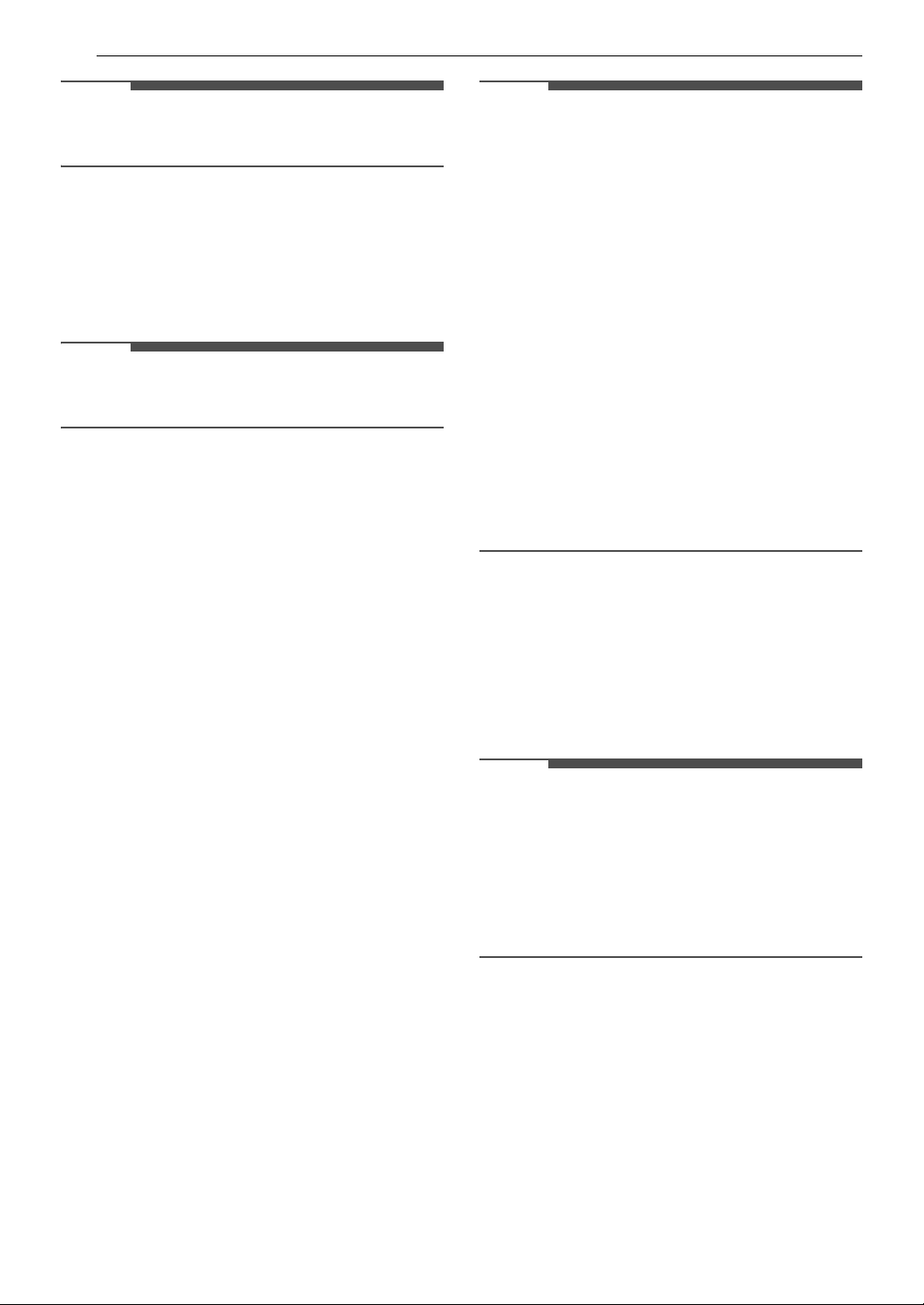
Temp.
Make sure the water temperature is suitable for
the type of load you are washing.
• Press the Temp. button repeatedly to select the
wash temperature combination for the selected
cycle.
• All rinses use unheated cold water.
• Cold rinses use less energy. The actual cold rinse
temperature depends on the temperature of the
cold water at the faucet.
Spin
Higher spin speeds extract more water from
clothes, reducing drying time and saving energy.
•Press the Spin button repeatedly until the
desired speed is selected.
• Some fabrics, such as delicates, require a slower
spin speed. To protect your clothing, not all spin
speeds are available for all cycles.
Soil
Adjusting the soil level setting will modify the cycle
times and/or wash actions.
• Press the Soil button repeatedly until the desired
soil level is selected.
•The Heavy soil setting may increase cycle times.
The Light soil setting may decrease cycle times.
Special Care Features
Using Special Care Features
Press the Special Care button to to select
additional features, such as Soak, Stain Care,
Speed Wash, and Rinse+Spin. Press the button
repeatedly to move through the available features.
NOTE
• Pressing the Special Care button before
selecting a cycle will automatically default to the
Normal cycle with the Soak feature selected.
• To protect your garments, not every feature is
available with every cycle.
• If the Start/Pause button is not pressed within
60 minutes to start the cycle, the washer will
shut off and all settings will be lost.
Soak
This option provides a 30-minute presoak prior to
the start of the selected cycle. Use this option to
presoak garments to help remove difficult spots or
stains on fabrics. At the end of the presoak time,
the selected cycle will begin with the same water
used for soaking.
Stain Care
Use this option for heavily soiled loads that need
improved stain treatment. When Stain Care is
selected, the wash cycle will begin with warm
water to help prevent the setting of certain types
of stains. Then, as the cycle progresses, hot water
will be added to gradually increase the water
temperature to help remove stains that require
treatment at higher temperatures.
28 OPERATION
NOTE
• Best results are obtained with smaller loads (less
than 6 lb.)
Speed Wash
Use this option to quickly wash lightly soiled
clothing and small loads. For high wash and rinse
efficiency, wash small loads of 2-3 lightly soiled
garments.
NOTE
• Use very little detergent in this cycle. To add an
extra rinse, use the Extra Rinse button.
Rinse+Spin
Select this option to rinse and spin a load
separately from a regular cycle. This can be helpful
in preventing fresh stains from setting in fabrics.
1 Press the Power button to turn on the
washer.
2 Press the Special Care button repeatedly until
Rinse+Spin is selected.
3 Press the Start/Pause button to begin.
Add Garments
If you’ve forgotten to add an item or need to
remove foreign objects like coins or keys after the
cycle has started, the best time to do so is while
the Add Garments indicator is on.
• Once the indicator turns off, adding garments
may affect the cycle time or wash performance.
1 Press the Start/Pause button. The cycle
pauses and the lid (door) unlocks.
2 Open the lid, add garments or remove foreign
objects, and close the lid.
3 Press the Start/Pause button to resume the
cycle. The cycle continues automatically.
NOTE
• This washer is equipped with a special drain
feature that is designed to make your washer as
safe as possible. If the washer is paused or shut
off while there is still water in the tub, the water
will drain automatically after several minutes of
inactivity. This helps keep children safe by
reducing the possibility of water remaining in
the tub.
Any water remaining in the tub will automatically
drain 4 minutes after the washer has shut off. If
the washer is paused and the Start/Pause
button is not pressed within 60 minutes, the
washer will shut off and all cycle settings will be
lost. Any water remaining in the tub will be
drained.
The washer can be turned on or restarted any
time before the drain begins. However, once the
washer begins to drain, all controls and
functions will be disabled until the water has
been completely drained and the washer shuts
off.
Options and Extra Functions
Your washer includes several additional cycle
options to customize cycles to meet your individual
needs.
• Select the desired option after selecting the
desired cycle and settings.
NOTE
• The LED for the option will light when the option
is selected.
• To protect your garments, not every option is
available with every cycle.
• A chime will sound twice and the LED will not
light if the selected option is not allowed for the
selected cycle.
Spin Only
Use this option to spin clothes and drain the water
from the tub.
• Use this option to drain water if the wash cycle is
interrupted by a power failure or to spin dry
hand-washed items.
1 Press the Power button to turn on the
washer.
• Do not select a cycle.
29OPERATION
ENGLISH
2 Press and hold the Spin button for 3 seconds.
• You can change the spin speed by pressing
the Spin button.
3 Press the Start/Pause button to begin.
Cold Wash
Use this option to save energy by using cooler
water while increasing the wash and rinse times to
maintain wash performance.
• Wash time will increase up to several minutes
with this option.
• For best wash results, only wash small loads (less
than 8 lb) with this option.
Delay Wash
Once you have selected the cycle and other
settings, press this button to delay the start of the
wash cycle.
• Each press of the button increases the delay
time by 1 hour, for up to 19 hours.
• Once the desired delay time is set, press the
Start/Pause button to start the delay time.
NOTE
• If the Start/Pause button is not pressed to begin
the delay time, the washer automatically turns
off after a certain time and all cycle settings are
lost.
Water Plus
Use this option to add extra water to the wash
cycle for better wash performance with large or
bulky items.
NOTE
• If the washer reaches its maximum water level,
this button will have no effect.
• To add more water while a cycle is running,
pause the cycle and select this option.
• When you select Normal cycle and Water Plus
option, the cycle will be changed to Deep Wash
cycle before starting.
Signal
The washer plays a melody when the wash cycle is
finished. The buttons make a sound each time they
are pressed.
•Press the Signal button to turn the sounds on or
off.
• When no signal is heard, the signal is off. The
signal can be turned on at any time as long as
the washer is turned on.
Extra Rinse
This option adds an extra rinse to the selected
cycle. Use this option to help ensure the removal
of detergent or bleach residue from fabrics.
• Pressing the Extra Rinse button twice will add
two additional rinses to the cycle.
• If a liquid fabric softener is used, it is always
dispensed in the final rinse.
NOTE
• You cannot select this option with the Spin Only
option and Tub Clean cycle.
• Selecting the Extra Rinse option with the
Normal cycle automatically changes the cycle to
the Deep Wash cycle.
Turbo Wash
TM
Adding this option reduces the cycle time while still
providing similar wash performance to the same
cycle without Turbo Wash
TM
.
NOTE
• This option cannot be used with all cycles.
Control Lock
Use this function to disable the controls. This
function can prevent children from changing
cycles or operating this washer.
NOTE
• The function does not lock the door.
• Once this function is set, all buttons are locked
except the Power button.
• When the controls are locked, CL and the
remaining time are alternately shown on the
display during the wash cycle.

30 OPERATION
NOTE
• Turning off the power will not reset this function.
You must deactivate this function before you can
access any other options and functions.
Locking the Control Panel
1 Turn on the power.
2 Press and hold the Signal button for 3
seconds to activate this function.
Unlocking the Control Panel
1 Turn on the power.
2 Press and hold the Signal button for 3
seconds to deactivate this function.
• When this function is deactivated, a chime
will sound and the remaining time for the
current cycle will reappear on the display.
31SMART FUNCTIONS
ENGLISH
SMART FUNCTIONS
LG ThinQ Application
The LG ThinQ application allows you to
communicate with the appliance using a
smartphone.
LG ThinQ Application Features
For the product that contains the Wireless LAN
module
• Remote Start
- Control the appliance remotely from the LG
ThinQ application.
• Downloaded
- Download new and specialized cycles that are
not included in the standard cycles on the
appliance.
• Tub Clean Coach
- This function shows how many cycles remain
before running the Tub Clean cycle.
• Energy Monitoring
- This feature keeps track of how the washer’s
power consumption is affected by selected
washing cycles and options.
• Smart Diagnosis
TM
- This function provides useful information for
diagnosing and solving issues with the
appliance based on the pattern of use.
• Settings
- Allows you to set various options on the
appliance and in the application.
• Push Alerts
- When the cycle is complete or the appliance
has problems, you will receive a push
message.
NOTE
• If you change your wireless router, Internet
service provider, or password, delete the
connected appliance from the LG ThinQ
application and connect it again.
• This information is current at the time of
publication. The application is subject to change
for product improvement purposes without
notice to users.
Installing LG ThinQ App and
Connecting an LG Appliance
Models with QR Code
Scan the QR code attached to the product using
the camera or a QR code reader app on your
smartphone.
Models without QR Code
1 Search for and install the LG ThinQ app from
the Google Play Store or Apple App Store on a
smartphone.
2 Run the LG ThinQ app and sign in with your
existing account or create an LG account to
sign in.
3 Touch the add (~) button on the LG ThinQ
app to connect your LG appliance. Follow the
instructions in the app to complete the
process.
NOTE
• You may be asked to provide a password to
connect to the LG network (not your home
network) during the Wi-Fi setup. The password is
the last 4 characters of the network name,
repeated twice, with no spaces. For example, if
the network name appears as LG_XXXX_8b92,
then you would enter 8b928b92 as your
password. The password is case sensitive and
the last 4 characters are unique to your
appliance.
32 SMART FUNCTIONS
NOTE
• To verify the Wi-Fi connection, check that the f
icon on the control panel is lit.
• The appliance supports 2.4 GHz Wi-Fi networks
only. To check your network frequency, contact
your Internet service provider or refer to your
wireless router manual.
• LG ThinQ is not responsible for any network
connection problems or any faults, malfunctions,
or errors caused by network connection.
• If the appliance is having trouble connecting to
the Wi-Fi network, it may be too far from the
router. Purchase a Wi-Fi repeater (range
extender) to improve the Wi-Fi signal strength.
• The Wi-Fi connection may not connect or may be
interrupted because of the home network
environment.
• The network connection may not work properly
depending on the Internet service provider.
• The surrounding wireless environment can
make the wireless network service run slowly.
• If the appliance cannot be registered due to
problems with the wireless signal transmission,
unplug the appliance and wait about a minute
before trying again.
• If the firewall on your wireless router is enabled,
disable the firewall or add an exception to it.
• The wireless network name (SSID) should be a
combination of English letters and numbers. (Do
not use special characters.)
• Smartphone user interface (UI) may vary
depending on the mobile operating system (OS)
and the manufacturer.
• If the security protocol of the router is set to
WEP, network setup may fail. Change the
security protocol (WPA2 is recommended) and
connect the product again.
Using the Appliance Remotely
Remote Start
Use a smartphone to control your appliance
remotely. You can also monitor your cycle
operation so you know how much time is left in the
cycle.
Using Remote Start
1 Put the laundry in the drum and add
detergent to the detergent dispenser drawer.
• If desired, add bleach or fabric softener to
the appropriate areas of the dispenser.
2 Press the Power button.
3 Press and hold the Remote Start button for 3
seconds to enable the remote control
function.
4 Start a cycle from the LG ThinQ application on
your smartphone.
NOTE
• Once this function is enabled, you can only start
a cycle from the LG ThinQ smartphone
application. If the cycle is not started, the
appliance will wait to start the cycle until it is
turned off remotely from the application or this
function is disabled.
• If the door has been opened, you cannot start a
cycle remotely.
Disabling Remote Start Manually
When the function is activated, press and hold the
Remote Start button for 3 seconds.
Download Cycle
You can download new and specialized cycles that
are not included in the standard cycles on the
appliance.
Appliances that have been successfully connected
can download a variety of specialty cycles specific
to the appliance.
Once cycle download is completed in the
appliance, the product keeps the downloaded
cycle until a new cycle is downloaded.
NOTE
• Only one downloaded cycle can be stored on the
appliance at a time.
Wireless LAN Module Specifications
Frequency
Range
2412 - 2462 MHz
33SMART FUNCTIONS
ENGLISH
FCC Notice
The following notice covers the transmitter
module contained in this product.
This equipment has been tested and found to
comply with the limits for a Class B digital device,
pursuant to Part 15 of the FCC Rules. These limits
are designed to provide reasonable protection
against harmful interference in a residential
installation. This equipment generates, uses, and
can radiate radio frequency energy and, if not
installed and used in accordance with the
instructions, may cause harmful interference to
radio communications. However, there is no
guarantee that interference will not occur in a
particular installation. If this equipment does
cause harmful interference to radio or television
reception, which can be determined by turning the
equipment off and on, the user is encouraged to
try to correct the interference by one or more of
the following measures:
• Reorient or relocate the receiving antenna.
• Increase the separation between the equipment
and the receiver.
• Connect the equipment to an outlet on a circuit
different from that to which the receiver is
connected.
• Consult the dealer or an experienced radio/TV
technician for help.
This device complies with part 15 of the FCC Rules.
Operation is subject to the following two
conditions:
(1) This device may not cause harmful interference
and
(2) This device must accept any interference
received, including interference that may cause
undesired operation.
Any changes or modifications in construction of
this device which are not expressly approved by
the party responsible for compliance could void
the user’s authority to operate the equipment.
FCC RF Radiation Exposure
Statement
This equipment complies with FCC radiation
exposure limits set forth for an uncontrolled
environment. This transmitter must not be co-
located or operating in conjunction with any other
antenna or transmitter.
This equipment should be installed and operated
with a minimum distance of 20 cm (7.8 inches)
between the antenna and your body. Users must
follow the specific operating instructions for
satisfying RF exposure compliance.
Industry Canada Statement
This device contains licence-exempt transmitter(s)/
receiver(s) that comply with Innovation, Science
and Economic Development Canada’s licence-
exempt RSS(s). Operation is subject to the
following two conditions:
(1) This device may not cause interference.
(2) This device must accept any interference,
including interference that may cause undesired
operation of the device.
IC Radiation Exposure Statement
This equipment complies with IC radiation
exposure limits set forth for an uncontrolled
environment.
This equipment should be installed and operated
with a minimum distance of 20 cm (7.8 inches)
between the antenna and your body.
NOTE
• THE MANUFACTURER IS NOT RESPONSIBLE FOR
ANY RADIO OR TV INTERFERENCE CAUSED BY
UNAUTHORIZED MODIFICATIONS TO THIS
EQUIPMENT. SUCH MODIFICATIONS COULD
VOID THE USER’S AUTHORITY TO OPERATE THE
EQUIPMENT.
Open Source Software Notice
Information
To obtain the source code that is contained in this
product, under GPL, LGPL, MPL, and other open
source licenses that have the obligation to disclose
source code, and to access all referred license
terms, copyright notices and other relevant
documents, please visit https://
opensource.lge.com.
LG Electronics will also provide open source code
to you on CD-ROM for a charge covering the cost
of performing such distribution (such as the cost of
media, shipping, and handling) upon email
request to opensource@lge.com.
This offer is valid to anyone in receipt of this
information for a period of three years after our
last shipment of this product.
Output Power
(Max)
< 30 dBm
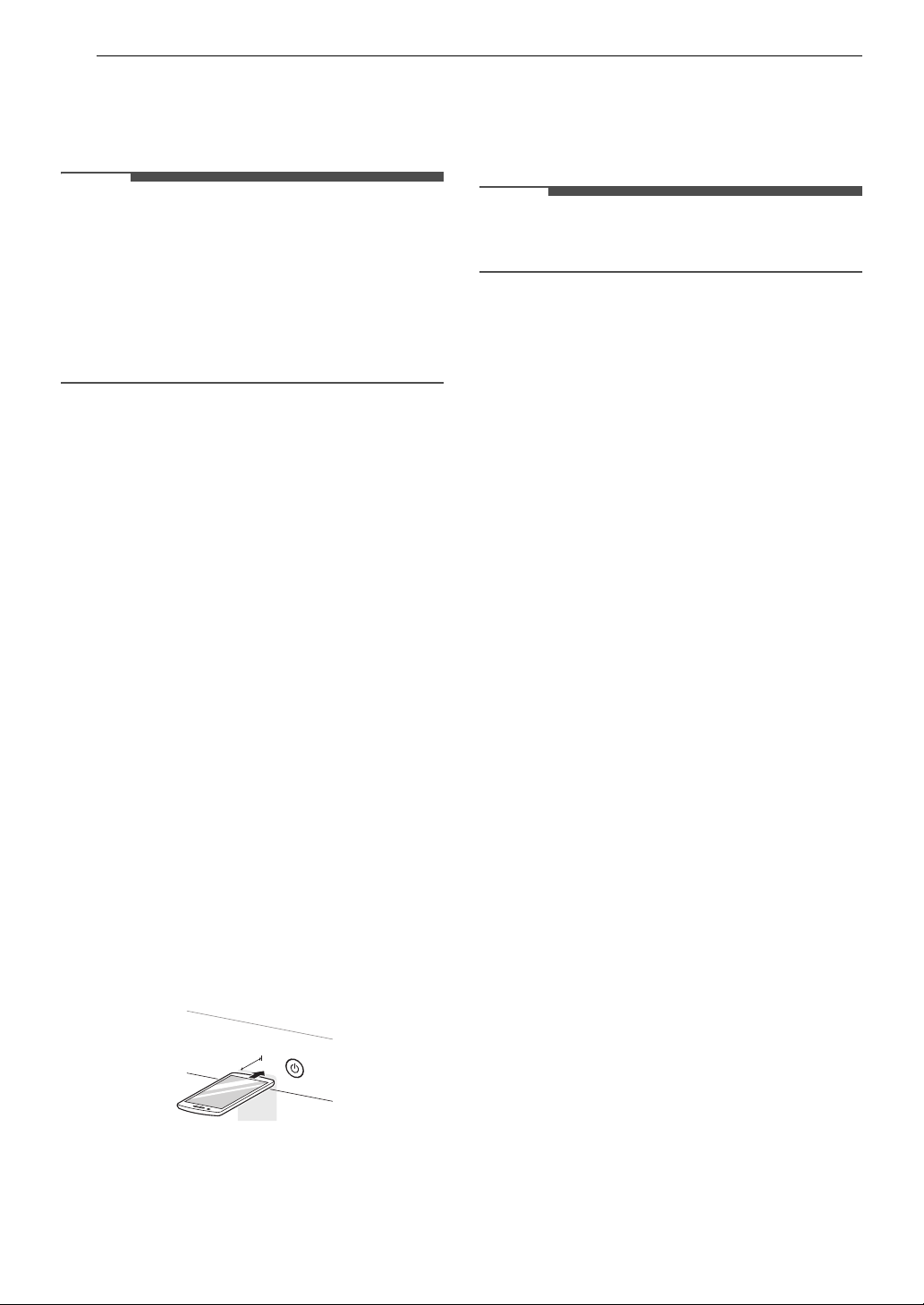
34 SMART FUNCTIONS
Smart Diagnosis
TM
Function
Use this feature to help you diagnose and solve
problems with your appliance.
NOTE
• For reasons not attributable to LGE’s negligence,
the service may not operate due to external
factors such as, but not limited to, Wi-Fi
unavailability, Wi-Fi disconnection, local app
store policy, or app unavailability.
• The feature may be subject to change without
prior notice and may have a different form
depending on where you are located.
Using LG ThinQ to Diagnose Issues
If you experience a problem with your Wi-Fi
equipped appliance, it can transmit
troubleshooting data to a smartphone using the
LG ThinQ application.
• Launch the LG ThinQ application and select the
Smart Diagnosis
TM
feature in the menu. Follow
the instructions provided in the LG ThinQ
application.
Using Audible Diagnosis to
Diagnose Issues
Follow the instructions below to use the audible
diagnosis method.
• Launch the LG ThinQ application and select the
Smart Diagnosis
TM
feature in the menu. Follow
the instructions for audible diagnosis provided
in the LG ThinQ application.
1 Press the Power button to turn on the
appliance.
• Do not press any other buttons.
2 Hold the mouthpiece of your phone close to
Power button.
3 Press and hold the Temp. button for 3
seconds or longer while continuing to hold
your phone near the Power button.
4 Keep the phone in place until the tone
transmission has finished. The display will
count down the time. Once the countdown is
over and the tones have stopped, the
diagnosis will be displayed in the application.
NOTE
• For best results, do not move the phone while
the tones are being transmitted.
Max.
10 mm

35MAINTENANCE
ENGLISH
MAINTENANCE
WARNING
• To reduce the risk of fire, electric shock, or injury to persons, read this entire owner’s manual, including
the SAFETY INSTRUCTIONS, before operating this appliance.
• Unplug the appliance before cleaning to avoid the risk of electric shock. Failure to follow this warning
can cause serious injury, fire, electric shock, or death.
• Do not use volatile substances (benzene, paint thinner, alcohol, acetone, etc.), abrasive cleaners, or
detergents with strong chemical components when cleaning the appliance. Doing so may cause
discoloration or damage to the appliance, or may cause a fire.
• Certain internal parts are intentionally not grounded and may present a risk of electric shock only during
servicing. Service personnel - Do not contact the following parts while the appliance is energized: pump,
motor, noise filter cover, and heater (on applicable models).
Regular Cleaning
Care after Wash
• Always remove items from the washer as soon
as the cycle is complete. Leaving damp items in
the washer can cause wrinkling, color transfer,
and odor.
• After the cycle is finished, wipe the lid and the
inside of the lid seal to remove any moisture.
- Wipe the body of the washer with a dry cloth to
remove any moisture.
- Leave the lid open to dry the tub interior.
NOTE
• Make sure children and pets do not climb into
the tub. Engage the Control Lock feature if
needed to prevent children from accidentally
starting a wash cycle.
Cleaning the Exterior
Proper care of your washer can extend its life.
Lid:
• Wash with a damp cloth on the outside and
inside and then dry with a soft cloth.
Exterior:
• Immediately wipe off any spills.
• Wipe with a damp cloth.
• Do not touch the surface or the display with
sharp objects.
Periodic Maintenance
Cleaning the Tub
Over time, residue may build up in the tub, leading
to mildew or a musty odor. Run the Tub Clean
cycle monthly to remove residue and prevent
odor.
NOTE
• Make sure to run the Tub Clean cycle only when
the tub is empty. Never load laundry while using
this cycle. The laundry may be damaged or
contaminated with cleaning products.
• Run the cycle more often under heavy use
conditions or if odor is already present.
• If mildew or musty smell already exists, run this
cycle once a week for three consecutive weeks.
1 Remove any clothing from the tub.
2 Adding cleaning agents.
Cleaner Instructions
Tub cleaner Follow manufacturer’s
recommendations.
Lime scale
remover
Liquid chlorine
bleach
Add to main wash liquid
detergent dispenser.
Powdered cleaner Follow manufacturer’s
recommendations.
Cleaning tablets Place directly into the washer
tub.

36 MAINTENANCE
• For other tub cleaning products, follow the
cleaner manufacturer’s instructions and
recommendations.
• Do not exceed the maximum fill line when
adding bleach or powdered cleaners.
Powdered cleaners may remain in the tub
after cleaning.
3 Close the lid and press the Power button to
turn on the washer.
4 Turn the knob or press the cycle buttons to
select the Tub Clean cycle then press the
Start/Pause button to begin the cycle.
5 After the cycle ends, open the lid and allow
the tub interior to dry completely.
WARNING
• Make sure children and pets do not climb into
the tub. Engage the Control Lock feature if
needed to prevent children from accidentally
starting a wash cycle.
NOTE
• If you use a descaler or tub cleaner during the
Tub Clean cycle, use the Rinse+Spin option to
rinse the washer tub before running your next
wash cycle.
Removing Mineral Buildup
In areas with hard water, mineral scale can form
on internal components of the washer. Periodically
clean the mineral buildup on the internal
components to extend the lifespan of the washer.
Use of a water softener is recommended in areas
with hard water.
• Use a descaler to remove visible mineral buildup
on the washer tub.
• After descaling, always run the Tub Clean cycle
before washing clothing.
• Mineral scale and other spots may be removed
from the stainless steel tub using a soft cloth
soaked in stainless steel cleaner.
• Do not use steel wool or abrasive cleaners.
Leaving the Lid Open
After you finish using the washer, leave the lid
open overnight to allow air to circulate and dry the
tub. This helps prevent odors.
Cleaning the Dispenser Drawer
Detergent and fabric softener may build up in the
dispenser drawer. Remove the drawer and inserts
and check for buildup once or twice a month.
WARNING
• Do not spray water inside the washer. Doing so
may cause fire or electric shock.
1 Turn off the washer, and unplug the power
cord.
2 Remove the drawer by pulling it straight out
until it stops. Lift the front of the drawer
upwards and pull it completely out.
3 Remove the inserts from the two
compartments.
4 Clean the inserts and drawer with warm
water.
• Use a soft cloth or brush to clean and
remove any residue.
• Do not use soap when cleaning the drawer
and inserts.
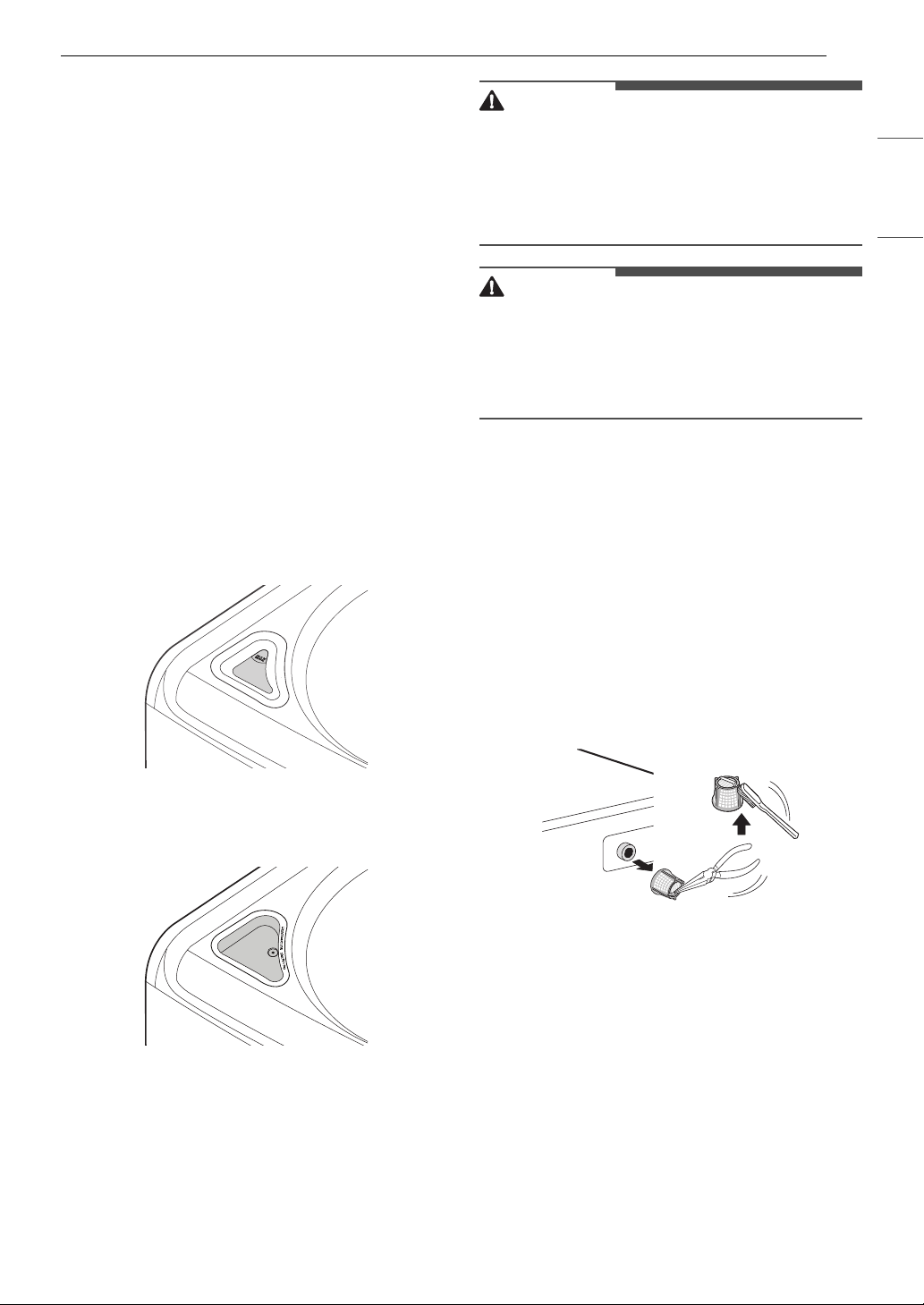
37MAINTENANCE
ENGLISH
5 Wipe off any moisture with a dry towel or
cloth after cleaning.
6 To clean the drawer opening, use a small,
non-metal brush to clean the recess. Remove
all residue from the upper and lower parts of
the recess.
7 Return the inserts to the proper
compartments and replace the drawer.
• Set the drawer into the opening at an angle,
then lower it and slide it into place.
Cleaning the Bleach Dispenser
Bleach may build up on the bleach dispenser
cover. Check for buildup and clean the cover once
or twice a month.
Automatic Bleach Dispenser
Remove the cover from the bleach dispenser.
Clean the cover and the opening with warm water.
Immediate Bleach Dispenser
The cover cannot be separated from the dispenser.
Clean the cover using a brush and warm water.
Cleaning the Water Inlet Filters
If the washer does not fill properly, an error
message will appear on the display. The inlet valve
filter screens could be clogged by hard water scale,
sediment in the water supply, or other debris.
WARNING
• The inlet screens protect the delicate parts of the
inlet valve from being damaged by particles that
could enter the valves with the water supply.
Operating the washer with these filters removed
could cause a valve to open continuously,
resulting in flooding and/or property damage.
CAUTION
• Do not use the washer without the inlet filters.
Doing so it will cause leaks and malfunction.
• If you use the washer in an area with hard water,
the inlet filter may clog due to lime buildup and
require more frequent cleaning.
1 Turn off the washer, and unplug the power
cord.
2 Turn off hot and cold water faucets.
3 Unscrew the hot and cold water hoses from
the back of the washer.
4 Remove the filters from the water valves
carefully.
• Use pliers to pull out the filters from the
water valves.
5 Remove foreign objects and soak the filters in
white vinegar or a lime scale remover.
• If using a lime scale remover, follow the
manufacturer’s instructions. Be careful not
to damage the filters while cleaning them.
6 Rinse filters thoroughly and press them back
into place.
7 Flush then reattach the water hoses.
• Before reattaching the water inlet hoses,
flush them by running several gallons of
water through them into a bucket or drain,
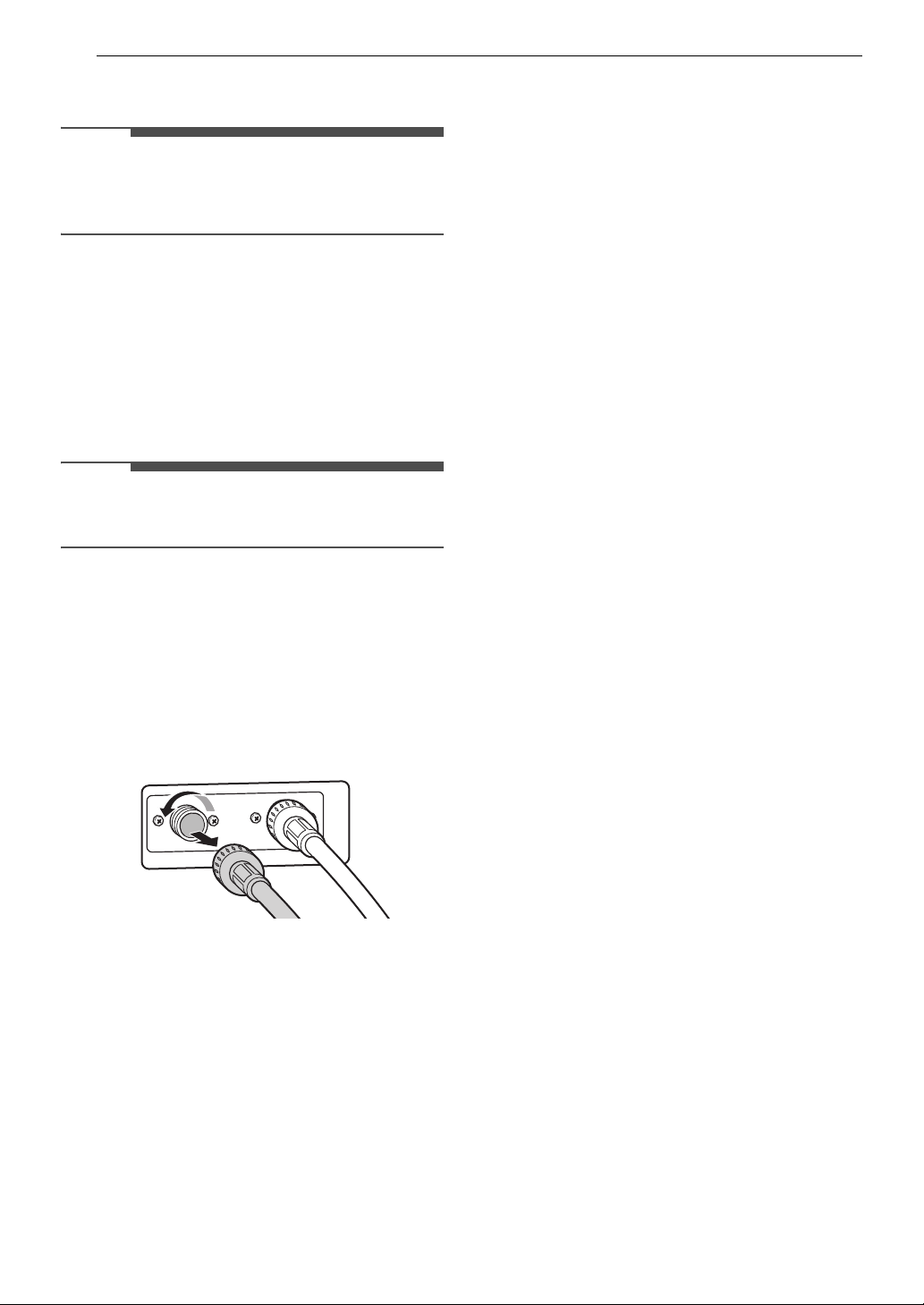
38 MAINTENANCE
preferably with the faucets wide open for
maximum flow.
NOTE
•An IE error message may blink on the display
when the water pressure is low or an inlet filter
is clogged with dirt. Clean the inlet filter.
Care in Cold Climates
Storing the Washer
If the washer will not be used for an extended
period of time and is in an area that could be
exposed to freezing temperatures,follow these
steps to protect the washer from damage.
NOTE
• Make sure the tub is empty before following
these steps.
1 Turn off the washer, and unplug the power
cord.
2 Turn off the water faucets.
3 Disconnect hoses from water supply and
drain water from hoses.
4 Plug the power cord into a properly grounded
electrical outlet.
5 Add 1 gallon of nontoxic recreational vehicle
(RV) antifreeze to the empty tub and close the
lid.
• Never use automotive antifreeze.
6 Turn on the washer and select the Spin cycle.
7 Press the Start/Pause button to start the
drain pump for 1 minute.
• This will expel some of the antifreeze,
leaving enough to protect the washer from
damage.
8 Turn off the washer and unplug the power
cord.
9 Dry the tub interior with a soft cloth, and close
the lid.
10 Store the washer in an upright position.
11 Remove the inserts from the dispenser. Drain
any water in the compartments and let them
dry.
12 To remove the antifreeze from the washer
after storage, run a Speed Wash cycle using
detergent.
• Do not add laundry to this cycle.
When the Water Inlet Hoses are
Frozen
1 Turn off the washer, and unplug the power
cord.
2 Turn off the faucets connected to the water
inlet hoses.
3 Pour hot water on the frozen faucets to thaw
the water inlet hoses and remove the water
inlet hoses.
4 Immerse the water inlet hoses in hot water to
thaw them.
5 Reconnect the water inlet hoses to the water
inlets of the washer and to the faucets.
•See Connecting the Water Inlet Hoses for
details.
6 Turn on the faucets.
7 Press the Power button to turn on the
washer.

39MAINTENANCE
ENGLISH
8 Press and hold the Spin button for 3 seconds
to operate Spin Only cycle for draining and
spinning.
9 Press the Start/Pause button and check that
the water fills properly.
When the Drain Hose is Frozen
1 Pour hot water in the washer tub and close
the lid.
2 Wait for 1 - 2 hours.
3 Press the Power button to turn on the
washer.
4 Press and hold the Spin button for 3 seconds
to operate Spin Only cycle for draining and
spinning.
5 Press the Start/Pause button to make sure
the water drains.
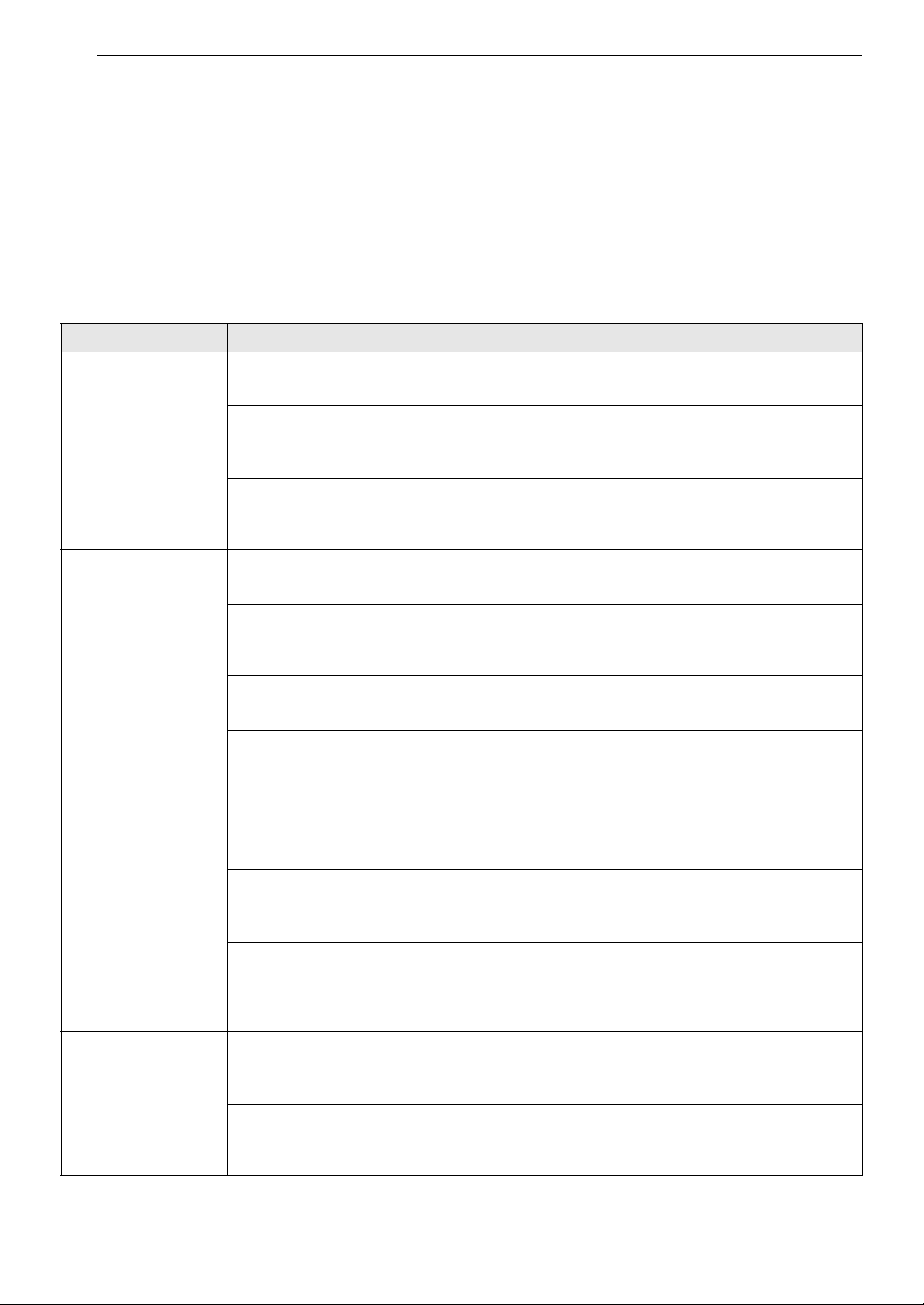
40 TROUBLESHOOTING
TROUBLESHOOTING
The washer is equipped with an automatic error-monitoring system to detect and diagnose problems at an
early stage. If the washer does not function properly or does not function at all, check the following before
you call for service.
Before Calling for Service
Error Messages
Problem Possible Cause & Solution
UE
UNBALANCE ERROR
The load is too small.
• Add additional items to allow the washer to balance the load.
Heavy articles are mixed with lighter items.
• Always try to wash articles of somewhat similar weight to allow the washer to evenly
distribute the weight of the load for spinning.
The load is out of balance.
• Manually redistribute the load if articles have become tangled, preventing the automatic
rebalancing from working properly.
IE
INLET ERROR
Water supply faucets are not fully open.
• Make sure that the water faucets are fully open.
Water inlet hoses are kinked, pinched, or crushed.
• Make sure that the hoses are not kinked, pinched or crushed behind or under the washer.
Be careful when moving the washer during cleaning or maintenance.
Water inlet filters are clogged.
• Clean the inlet filters. See MAINTENANCE.
Water supply pressure to faucet or house is too low.
• Check another faucet in the house to make sure that household water pressure is
adequate and flow is not restricted.
• Disconnect the water inlet hoses from the washer and run a few gallons of water through
the hoses to flush out any dirt.
• If flow is too low, contact a plumber to have the water supply lines repaired.
Water supply connected with leak-limiting hoses.
• The use of hoses designed to limit leaks is not recommended. Leak-limiting hoses can trip
falsely and prevent the washer from filling.
The end of the drain hose is lower than 29.5 inches (75 cm) above the bottom of the
washer.
• Move the end of the drain hose so that it is higher than 29.5 inches (75 cm) above the
bottom of the washer.
OE
WATER OUTLET
ERROR
Drain hose is kinked, pinched, or clogged.
• Make sure that the drain hose is free of clogs or kinks and is not pinched behind or under
the washer.
The end of the drain hose is more than 96 inches (2.4 m) above the bottom of the
washer.
• Move the end of the drain hose so that it is lower than 96 inches (2.4 m).
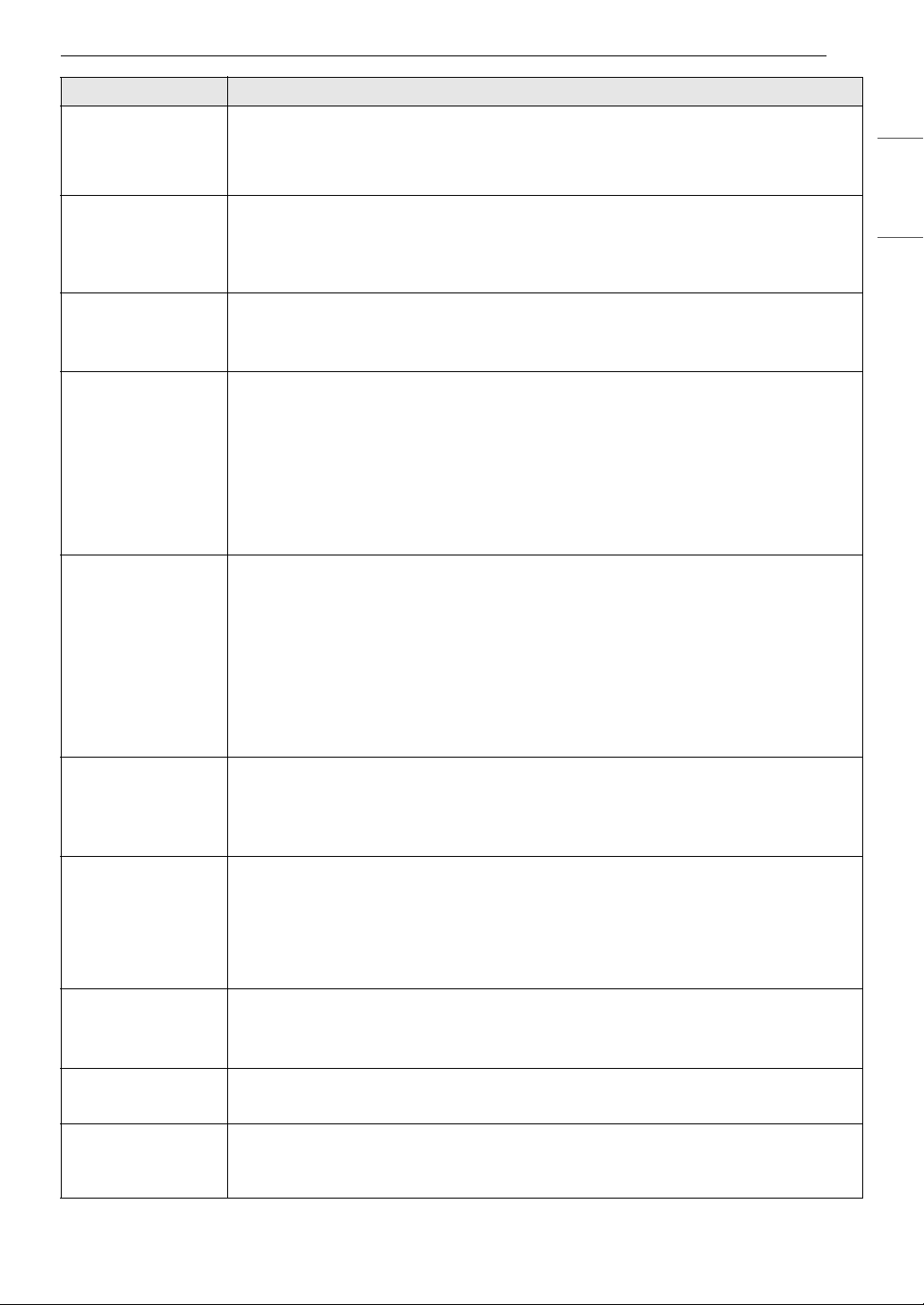
41TROUBLESHOOTING
ENGLISH
CL
CONTROL LOCK
FUNCTION
The control lock function is on to prevent anyone from changing cycles or operating
the washer.
• Turn off the control lock function in the control panel. See Control Lock under Options
and Extra Functions.
dr
DRAIN FEATURE
Special drain feature
• If the washer is paused during a cycle for more than 4 minutes, the cycle will be canceled
and any water remaining in the tub will be drained.
• This is not an error code. It indicates that the drain function is operating.
dE
LID ERROR
Lid is not closed properly.
• Close the lid properly.
• If the lid is closed and this error message is still displayed, call for service.
dL
LID LOCK ERROR
Lid is not locked properly.
• Make sure that the lid is closed properly and press the Start/Pause button. You can hear
the locking sound to lock the lid in the beginning of the cycle. The washer will not operate
unless the lid is locked.
• Make sure that nothing is caught under the lid, including shipping material or clothing.
• Make sure that the latch mechanism is fully retracted.Make sure that the latch mechanism
is fully retracted.
• If the lid is closed and this error message is still displayed, call for service.
LE1
FOREIGN OBJECT
ERROR
Foreign objects such as coins, pins, clips, etc., are caught between the pulsator and the
inner tub.
• Turn the washer off then on again. Press the Spin button without selecting a cycle to drain
and spin the load.
• When the Spin cycle is completed, empty the tub and find and remove any objects caught
in the pulsator.
• Always check pockets, etc., before washing to prevent error codes or damage to the
washer or clothing.
•For some models,
LE is displayed first, then the 1 is displayed.
tcL
TUB CLEAN ALARM
It is time to run the Tub Clean cycle.
• This is not an error code. It indicates that the Tub Clean cycle is running or needs to be run
to clean the washer tub.
•For some models, tc is displayed first, then the L is displayed.
vb
UNBALANCE
DETECTION
The washer has detected an out of balance load.
• This display is for your information only, and no action is required. If the washer detects a
load that is too far out of balance to spin, it will display this code while it is attempting to
rebalance the load. The washer will add water and try to redistribute the load
automatically.
• As a result, the cycle will take longer than initially estimated.
tE
TEMPERATURE
SENSOR ERROR
Control error
• Unplug the washer and wait 60 minutes. Reconnect power and try again.
• If the error code is still displayed, call for service.
FE
OVERFLOW ERROR
Water level is too high due to a faulty water valve.
• Close the water faucets, unplug the washer, and call for service.
PE
PRESSURE SENSOR
ERROR
The water level sensor is not working correctly.
• Close the water faucets, unplug the washer, and call for service.
Problem Possible Cause & Solution
42 TROUBLESHOOTING
Noises
LE
MOTOR LOCKED
ERROR
A motor error has occurred.
• Allow the washer to stand for 30 minutes and then restart the cycle.
• If the error code is still displayed, call for service.
Eb
CLUTCH ERROR
Clutch error
• Mechanical failure
• Unplug the washer and call for service.
Ps
SUPPLY VOLTAGE
ERROR
Supply voltage is not correct.
• Please call LG service center. You can find your local LG service center phone number on
the back cover page.
Problem Possible Cause & Solution
Clicking Lid lock sounds when the lid locks or unlocks.
• Normal operation
Spraying or hissing Water spraying or circulating during the cycle
• Normal operation
Humming or
Gurgling
Drain pump is pumping water from the washer at times during a cycle.
• Normal operation
Water sloshing A liquid in the balance ring around the pulsator helps the basket spin smoothly.
• Normal operation
Water being added
after the washer has
already begun to
operate
The washer adapts to the load size and type to add more water to the cycle as needed.
• Normal operation
The wash load may be unbalanced. If the washer senses that the load is unbalanced, it
will stop and refill to redistribute the load.
• Normal operation
The washer may be diluting laundry additives to add to the wash load.
• Normal operation
Rattling and
clanking noise
Foreign objects, such as keys, coins, or safety pins may be in tub or pump.
• Stop the washer, check the tub and the drain filter for foreign objects.
• If noise continues after the washer is restarted, call for service.
Thumping sound Heavy wash loads may produce a thumping sound.
• This is normal, but if the sound continues, the washer is probably out of balance. Stop and
redistribute wash load.
Wash load may be out of balance.
• Pause the cycle and redistribute the load after the lid unlocks.
Vibrating noise Packaging materials were not removed.
•See Unpacking and Removing Shipping Material in INSTALLATION.
Wash load may be unevenly distributed in the tub.Wash load may be unevenly
distributed in the tub.
• Pause the cycle and redistribute the load after the lid unlocks.
Problem Possible Cause & Solution
43TROUBLESHOOTING
ENGLISH
Operation
Vibrating noise Not all leveling feet are resting firmly and evenly on the floor.
•See Leveling the Washer in INSTALLATION.
Floor is not rigid enough.
• Make sure that the floor is solid and does not flex. See Flooring in INSTALLATION.
Squeaking noise Packaging materials were not removed.
•See Unpacking and Removing shipping Material in INSTALLATION.
Banging noise when
the washer is filling
with water.(Water
hammer)
Plumbing in the home moves or flexes when the water valves in the washer shut off.
• Water hammer is not caused by a defect in the washer. Install water hammer arrestors
(purchased separately at hardware or home improvement store) between the fill hose and
the washer for best results.
Household water supply pressure is very high.
• Adjust household water supply regulator to a lower pressure or contact a plumber.
Problem Possible Cause & Solution
Water Leaking Hoses are not connected correctly.
• Check hoses and connectors for leaks, cracks, and splits.
• Check and tighten hose connections.
House drain pipes are clogged.
• The washer pumps out water very rapidly. Check for water backing up out of the drain pipe
during drain. If water is seen coming out of the drain, check for proper drain hose
installation and check for restrictions in the drain.
• Contact a plumber to repair drain pipe.
Drain hose has come out of the drain connector or is not inserted far enough.
• Tie drain hose to inlet hose or standpipe to prevent it from coming out during drain.
• For smaller drain pipes, insert the drain hose into the pipe as far as the drain hose flange.
For larger drain pipes, insert the drain hose into the pipe 1 - 2 inches past the flange.
A large item such as a pillow or blanket is above the top of the tub.
• Use the Bedding cycle for large or bulky items. Use extra care and never wash more than
half a load of items that float, such as pillows.
• Stop the washer and check the load. Make sure that the load does not crest above the top
edge of the tub.
Oversudsing of detergent
• Oversudsing may create leaks, and may be caused by the type and amount of detergent
used. HE (High-Efficiency) detergent is the only detergent recommended. The normal
amount of detergent to use is 1/4 to 1/2 of the maximum amount recommended by the
detergent manufacturer.
• Always reduce the amount of detergent if the load is small or lightly soiled, or if the water
is very soft.
• Never use more than the maximum amount recommended by the detergent
manufacturer.
Excessive sudsing Too much detergent or incorrect detergent
• HE detergents are formulated specifically for HE (High-Efficiency) washers and contain
suds reducing agents. Only use detergent with the HE (High-Efficiency) logo.
• For detergent quantities refer to Detergent Use in OPERATION. If sudsing or detergent
residue continues to be an issue, add an extra rinse.
Problem Possible Cause & Solution
44 TROUBLESHOOTING
Washer will not turn
on.
Power cord is not properly plugged in.
• Make sure that the plug is plugged securely into a grounded, 3-prong, 120-VAC, 60 Hz
outlet.
House fuse is blown, circuit breaker has tripped, or power outage has occurred.
• Reset circuit breaker or replace fuse. Do not increase fuse capacity. If the problem is a
circuit overload, have it corrected by a qualified election.
Wash cycle time is
longer than usual.
The washer automatically adjusts the wash time for the amount of laundry, water
pressure and other operating conditions.
• This is normal. The washer adjusts cycle time automatically to provide optimal results for
the selected cycle. The time remaining shown in the display is only an estimate. Actual time
may vary.
Incomplete or no
dispensing of
detergent
Detergent compartments clogged from incorrect filling.
• Make sure that detergent and additives are put into the correct dispenser compartments.
• For all detergent types, always make sure that the dispenser drawer is fully closed before
the start of the cycle.
Too much detergent used.
• Make sure that the suggested amount of detergent is used according to the
manufacturer’s recommendations. You may also dilute the detergent with water to the
maximum fill line on the compartment to avoid clogging. Use only HE (High-Efficiency)
detergent.
- Always use as little detergent as possible. HE (High-Efficiency) washers need very little
detergent to achieve optimum results. Using too much detergent will cause poor wash
and rinse performance and may contribute to odors in the washer.
Insufficient water supply
• Make sure that both hot and cold water faucets are turned on all the way.
Normal residue
• It is normal for a small amount of detergent to remain in the dispenser. If this residue
builds up, it can interfere with normal dispensing of detergents. Refer to the cleaning
instructions.
Washer will not
operate.
Control panel has powered off due to inactivity.
• This is normal. Press the Power button to turn on the washer.
Washer is unplugged.
• Make sure that the power cord is plugged securely into an electrical outlet.
Water supply is turned off.
• Turn both hot and cold faucets fully on.
Controls are not set properly.
• Make sure that the cycle was set correctly, close the lid and press the Start/Pause button
to start the wash cycle.
Lid is open.
• Close the lid and make sure that noting is caught under the lid preventing it from closing
completely.
Circuit breaker/fuse is tripped/blown.
• Check house circuit breakers/fuses. Replace fuses or reset breaker. The washer should be
on a dedicated branch circuit.
Start/Pause button was not pressed after the cycle was set.
• Press the Power button then reselect the desired cycle and press the Start/Pause button.
If the Start/Pause button is not pressed within a certain time, the washer will be turned
off. (The time varies by model, from 4 to 60 minutes.)
Problem Possible Cause & Solution
45TROUBLESHOOTING
ENGLISH
Washer will not
operate.
Extremely low water pressure.
• Check another faucet in the house to make sure that household water pressure is
adequate.
Washer is too cold.
• If the washer has been exposed to temperatures below freezing for an extended period of
time, allow it to warm up before pressing the Power button. Otherwise, the display will not
come on.
Washer is not filling
properly.
Filter is clogged.
• Make sure that inlet filters on the fill valves are not clogged. Refer to Cleaning the Water
Inlet Filters in MAINTENANCE.
Inlet hoses may be kinked.
• Check that inlet hoses are not kinked or clogged.
Energy efficiency
• This is a High-Efficiency (HE) washer. As a result, the water level settings for this washer
may be different than for conventional washer.
Insufficient water supply
• Make sure that both hot and cold water faucets are turned on all the way.
Washer lid is open.
• Close the lid and make sure that nothing is caught under the lid preventing it from closing
completely.
Water level is too low.
• The water will not normally cover the clothes. The fill level is optimized for the wash
motion to achieve the best wash performance.
Water in the washer
does not drain or
drains slowly.
Drain hose is kinked, pinched, or clogged.
• Make sure that the drain hose is free of clogs or kinks and is not pinched behind or under
the washer.
The end of the drain hose is more than 96 inches (2.4 m) above the bottom of the
washer.
• Move the end of the drain hose so that it is lower than 96 inches (2.4 m).
Bleach does not
dispense.
Bleach dispenser cover is not properly installed (on some models).
• Make sure that the bleach cover is properly installed and snapped into place before the
beginning of the cycle.
Bleach dispenser is dirty or clogged.
• Lift out the bleach dispenser cover and clean out the reservoir. Lint and other foreign
debris that are collected inside the dispenser may prevent proper dispensing of the
bleach.
Premature
dispensing of bleach
Bleach dispenser filled for future load.
• You cannot store bleach in the dispenser for future use. The bleach will be dispensed every
load.
Overfilling the bleach dispenser
• Overfilling the bleach dispenser will cause the bleach to dispense immediately, which will
damage the laundry or the washer. Always measure bleach, but never fill above the max
line on the dispenser. A half cup of bleach is sufficient for most loads. Never use more
than 1 cup of bleach.
Problem Possible Cause & Solution
46 TROUBLESHOOTING
Performance
Wi-Fi
Problem Possible Cause & Solution
Wrinkling Washer is not unloaded promptly.
• Always remove items from the washer as soon as the cycle is complete.
Washer is overloaded.
• The washer can be fully loaded, but the tub should not be tightly packed with items. The lid
of the washer should close easily.
Hot and cold water inlet hoses are reversed.
• Hot water rinse can set wrinkles in garments. Check the Inlet hose connectors.
Staining Bleach or softener dispensed too soon.
• Dispenser compartment was overfilled, causing the bleach or softener to dispense
immediately. Always measure bleach, and never use more than 1 cup.
Bleach or softener was added directly to the wash load in the tub.
• Always use the dispensers to ensure that laundry products are properly dispensed at the
right time in the cycle.
Washer was not unloaded promptly.
• Always remove items from the washer as soon as possible after the cycle is completed.
Clothes were not properly sorted.
• Always wash dark colors separately from light colors and whites to prevent discoloration.
• Never wash heavily soiled items with lightly soiled items.
Poor stain removal Proper options are not selected.
• Heavier soils and tougher stains may require extra cleaning power. Select the Soak or
Stain Care feature to boost the cleaning power of the selected cycle.
Previously set stains.
• Articles that have previously been washed may have stains that have been set. These
stains may be difficult to remove and may require hand washing or pre-treating to aid in
stain removal.
Musty or mildewy
odor in the washer
Incorrect or too much detergent has been used.
• Use only HE (High-Efficiency) detergent in accordance with the manufacturer’s
instructions.
Inside of the tub was not cleaned properly.
• Run the Tub Clean cycle regularly.
Problem Possible Cause & Solution
Your home appliance
and smartphone are
not connected to the
Wi-Fi network.
The password for the Wi-Fi that you are trying to connect to is incorrect.
• Find the Wi-Fi network connected to your smartphone and remove it, then connect your
appliance on LG ThinQ.
Mobile data for your smartphone is turned on.
• Turn off the Mobile data of your smartphone and connect the appliance using the Wi-Fi
network.
The wireless network name (SSID) is set incorrectly.
• The wireless network name (SSID) should be a combination of English letters and
numbers. (Do not use special characters.)
47TROUBLESHOOTING
ENGLISH
Your home appliance
and smartphone are
not connected to the
Wi-Fi network.
The router frequency is not 2.4 GHz.
• Only a 2.4 GHz router frequency is supported. Set the wireless router to 2.4 GHz and
connect the appliance to the wireless router. To check the router frequency, check with
your Internet service provider or the router manufacturer.
The appliance is too far from the router.
• If the appliance is too far from the router, the signal may be weak and the connection may
not be configured correctly. Move the location of the router so that it is closer to the
appliance.
Problem Possible Cause & Solution
48 LIMITED WARRANTY
LIMITED WARRANTY
USA
TERMS AND CONDITIONS
ARBITRATION NOTICE: THIS LIMITED WARRANTY CONTAINS AN ARBITRATION PROVISION THAT
REQUIRES YOU AND LG ELECTRONICS (“LG”) TO RESOLVE DISPUTES BY BINDING ARBITRATION
INSTEAD OF IN COURT, UNLESS YOU CHOOSE TO OPT OUT. IN ARBITRATION, CLASS ACTIONS AND
JURY TRIALS ARE NOT PERMITTED. PLEASE SEE THE SECTION TITLED “PROCEDURE FOR RESOLVING
DISPUTES” BELOW.
Should your LG Washer (“Product”) fail due to a defect in materials or workmanship under normal and
proper use, during the warranty period set forth below, LG will, at its option, repair or replace the Product.
This limited warranty is valid only to the original retail purchaser of the Product (“You”) and applies only
when purchased lawfully and used within the United States including U.S. Territories.
• Replacement Products and parts are warranted for the remaining portion of the original warranty period
or ninety (90) days, whichever is greater.
• Replacement Products and parts may be new, reconditioned, refurbished, or otherwise factory
remanufactured.
• Replaced Product or part(s) will be the property of LG.
• Proof of original retail purchase specifying the Product model and date of purchase is required to obtain
warranty service under this limited warranty.
EXCEPT TO THE EXTENT PROHIBITED BY APPLICABLE LAW, ANY IMPLIED WARRANTY OF
MERCHANTABILITY OR FITNESS FOR A PARTICULAR PURPOSE ON THE PRODUCT IS LIMITED IN
DURATION TO THE DURATION OF THE ABOVE LIMITED WARRANTY. UNDER NO CIRCUMSTANCES
SHALL LG OR ITS U.S. DISTRIBUTORS/DEALERS BE LIABLE FOR ANY INDIRECT, INCIDENTAL,
CONSEQUENTIAL, SPECIAL, OR PUNITIVE DAMAGES, INCLUDING, WITHOUT LIMITATION, LOST
GOODWILL, LOST REVENUES OR PROFITS, WORK STOPPAGE, IMPAIRMENT OF OTHER GOODS, COST OF
REMOVAL AND REINSTALLATION OF THE PRODUCT, LOSS OF USE, OR ANY OTHER DAMAGES WHETHER
BASED IN CONTRACT, TORT, OR OTHERWISE. LG’S TOTAL LIABILITY, IF ANY, SHALL NOT EXCEED THE
PURCHASE PRICE PAID BY YOU FOR THE PRODUCT.
SOME STATES DO NOT ALLOW THE EXCLUSION OR LIMITATION OF INCIDENTAL OR CONSEQUENTIAL
DAMAGES OR LIMITATIONS ON HOW LONG AN IMPLIED WARRANTY LASTS, SO THE ABOVE
EXCLUSIONS OR LIMITATIONS MAY NOT APPLY TO YOU. THIS LIMITED WARRANTY GIVES YOU
SPECIFIC LEGAL RIGHTS AND YOU MAY ALSO HAVE OTHER RIGHTS THAT VARY FROM STATE TO STATE.
THIS LIMITED WARRANTY DOES NOT COVER:
• Service trips to deliver, pick up, or install, educate how to operate, correct wiring, or correct
unauthorized repairs.
• Damage or failure of the Product to perform during power failures and interrupted or inadequate
electrical service.
• Damage or failure of the Product caused by leaky or broken water pipes, frozen water pipes, restricted
drain lines, inadequate or interrupted water supply or inadequate supply of air.
WARRANTY PERIOD
Washer Stainless Steel Tub
Direct Drive Motor (Stator and
Rotor)
Parts (internal/ functional parts
only) and Labor: One (1) year from
the date of original retail purchase
Parts Only: Three (3) years from
the date of original retail purchase
You are responsible for any
applicable labor cost.
Parts Only: Ten (10) years from the
date of original retail purchase
You are responsible for any
applicable labor cost.

49LIMITED WARRANTY
ENGLISH
• Damage or failure of the Product resulting from operating the Product in a corrosive atmosphere or
contrary to the Product owner’s manual.
• Damage or failure of the Product caused by accidents, pests and vermin, lightning, wind, fire, floods, acts
of nature, or any other causes beyond the control of LG.
• Damage or failure of the Product caused by unauthorized modification or alteration, or if the Product is
used for other than the intended purpose, or any water leakage where the Product was not properly
installed.
• Damage or failure of the Product caused by incorrect electrical current, voltage, or plumbing codes.
• Damage or failure of the Product caused by transportation, storage, and/or handling, including
scratches, dents, chips, and/or other damage to the finish of the Product, unless such damage is
reported within one (1) week of delivery.
• Damage or failure of the Product resulting from misuse, abuse, improper installation, repair, or
maintenance. Improper repair includes the use of parts not authorized by LG. Improper installation or
maintenance includes installation or maintenance contrary to the Product owner’s manual.
• Damage or failure of the Product caused by the use of parts, components, accessories, consumable
cleaning products, or any other products or services that were not authorized by LG.
• Damage or missing items to any display or open box Product.
• Refurbished Product or any Product sold “As Is”, “Where Is”, “With all Faults”, or similar disclaimer.
• Products with original serial numbers that have been removed, altered, or cannot be readily determined.
• Increases in utility costs and additional utility expenses.
• Any noises associated with normal operation.
• Products used for other than normal and proper household use (e.g., commercial or industrial use) or
contrary to the Product owner’s manual.
• Costs associated with removal and reinstallation of the Product for repairs, or the removal and
reinstallation of the Product if it is installed in an inaccessible location or not installed in accordance with
the Product Owner's manual.
• Accessories, removable components, or consumable parts (e.g. Shelves, door bins, drawers, water/air
filters, racks, light bulbs, batteries, etc., as applicable), except for internal/functional parts covered under
this limited warranty.
The cost of repair or replacement under these excluded circumstances shall be borne by You.
TO OBTAIN WARRANTY SERVICE AND ADDITIONAL INFORMATION
Call 1-800-243-0000 and select the appropriate option from the menu.
Or visit our website at http://www.lg.com
Or by mail: LG Electronics Customer Service P.O. Box 240007 Huntsville, AL 35813 ATTN: CIC
PROCEDURE FOR RESOLVING DISPUTES:
ALL DISPUTES BETWEEN YOU AND LG ARISING OUT OF OR RELATING IN ANY WAY TO THIS LIMITED
WARRANTY OR THE PRODUCT SHALL BE RESOLVED EXCLUSIVELY THROUGH BINDING ARBITRATION, AND
NOT IN A COURT OF GENERAL JURISDICTION. BINDING ARBITRATION MEANS THAT YOU AND LG ARE EACH
WAIVING THE RIGHT TO A JURY TRIAL AND TO BRING OR PARTICIPATE IN A CLASS ACTION.
Definitions. For the purposes of this section, references to “LG” mean LG Electronics U.S.A., Inc., its
parents, subsidiaries and affiliates, and each of their officers, directors, employees, agents, beneficiaries,
predecessors in interest, successors, assigns and suppliers; references to “dispute” or “claim” shall include
any dispute, claim or controversy of any kind whatsoever (whether based in contract, tort, statute,
regulation, ordinance, fraud, misrepresentation or any other legal or equitable theory) arising out of or
relating in any way to the sale, condition or performance of the product or this Limited Warranty.
Notice of Dispute. In the event you intend to commence an arbitration proceeding, you must first notify
LG in writing at least 30 days in advance of initiating the arbitration by sending a letter to LG at LG
Electronics USA, Inc. Attn: Legal Department- Arbitration 111 Sylvan Avenue, Englewood Cliffs, NJ 07632.
You and LG agree to engage in good faith discussions in an attempt to amicably resolve your claim. The

50 LIMITED WARRANTY
notice must provide your name, address, and telephone number; identify the product that is the subject of
the claim; and describe the nature of the claim and the relief being sought. If you and LG are unable to
resolve the dispute within 30 days, either party may proceed to file a claim for arbitration.
Agreement to Binding Arbitration and Class Action Waiver. Upon failure to resolve the dispute during
the 30 day period after sending written notice to LG, you and LG agree to resolve any claims between us
only by binding arbitration on an individual basis, unless you opt out as provided below. Any dispute
between you and LG shall not be combined or consolidated with a dispute involving any other person’s or
entity’s product or claim. More specifically, without limitation of the foregoing, any dispute between you
and LG shall not under any circumstances proceed as part of a class or representative action. Instead of
arbitration, either party may bring an individual action in small claims court, but that small claims court
action may not be brought on a class or representative basis.
Arbitration Rules and Procedures. To begin arbitration of a claim, either you or LG must make a written
demand for arbitration. The arbitration will be administered by the American Arbitration Association
(“AAA”) and will be conducted before a single arbitrator under the AAA’s Consumer Arbitration Rules that
are in effect at the time the arbitration is initiated (referred to as the “AAA Rules”) and under the
procedures set forth in this section. The AAA Rules are available online at www.adr.org/consumer. Send a
copy of your written demand for arbitration, as well as a copy of this provision, to the AAA in the manner
described in the AAA Rules. You must also send a copy of your written demand to LG at LG Electronics USA,
Inc. Attn: Legal Department- Arbitration 111 Sylvan Avenue, Englewood Cliffs, NJ 07632. If there is a conflict
between the AAA Rules and the rules set forth in this section, the rules set forth in this section will govern.
This arbitration provision is governed by the Federal Arbitration Act. Judgment may be entered on the
arbitrator’s award in any court of competent jurisdiction. All issues are for the arbitrator to decide, except
that issues relating to the scope and enforceability of the arbitration provision and to the arbitrability of
the dispute are for the court to decide. The arbitrator is bound by the terms of this provision.
Governing Law. The law of the state of your residence shall govern this Limited Warranty and any
disputes between us except to the extent that such law is preempted by or inconsistent with applicable
federal law.
Fees/Costs. You do not need to pay any fee to begin an arbitration. Upon receipt of your written demand
for arbitration, LG will promptly pay all arbitration filing fees to the AAA unless you seek more than $25,000
in damages, in which case the payment of these fees will be governed by the AAA Rules. Except as
otherwise provided for herein, LG will pay all AAA filing, administration and arbitrator fees for any
arbitration initiated in accordance with the AAA Rules and this arbitration provision. If you prevail in the
arbitration, LG will pay your attorneys’ fees and expenses as long as they are reasonable, by considering
factors including, but not limited to, the purchase amount and claim amount. Notwithstanding the
foregoing, if applicable law allows for an award of reasonable attorneys’ fees and expenses, an arbitrator
can award them to the same extent that a court would. If the arbitrator finds either the substance of your
claim or the relief sought in the demand is frivolous or brought for an improper purpose (as measured by
the standards set forth in Federal Rule of Civil Procedure 11(b)), then the payment of all arbitration fees will
be governed by the AAA Rules. In such a situation, you agree to reimburse LG for all monies previously
disbursed by it that are otherwise your obligation to pay under the AAA Rules. Except as otherwise
provided for, LG waives any rights it may have to seek attorneys’ fees and expenses from you if LG prevails
in the arbitration.
Hearings and Location. If your claim is for $25,000 or less, you may choose to have the arbitration
conducted solely on the basis of (1) documents submitted to the arbitrator, (2) through a telephonic
hearing, or (3) by an in-person hearing as established by the AAA Rules. If your claim exceeds $25,000, the
right to a hearing will be determined by the AAA Rules. Any in-person arbitration hearings will be held at a
location within the federal judicial district in which you reside unless we both agree to another location or
we agree to a telephonic arbitration.
Opt Out. You may opt out of this dispute resolution procedure. If you opt out, neither you nor LG can
require the other to participate in an arbitration proceeding. To opt out, you must send notice to LG no
later than 30 calendar days from the date of the first consumer purchaser’s purchase of the product by
either: (i) sending an e-mail to opto[email protected], with the subject line: “Arbitration Opt Out” or (ii) calling 1-
800-980-2973. You must include in the opt out e-mail or provide by telephone: (a) your name and address;
(b) the date on which the product was purchased; (c) the product model name or model number; and (d)
the serial number (the serial number can be found (i) on the product; or (ii) online by accessing https://
www.lg.com/us/support/repair-service/schedule-repair-continued and clicking on “Find My Model & Serial
Number”).
51LIMITED WARRANTY
ENGLISH
You may only opt out of the dispute resolution procedure in the manner described above (that is, by e-mail
or telephone); no other form of notice will be effective to opt out of this dispute resolution procedure.
Opting out of this dispute resolution procedure will not affect the coverage of the Limited Warranty in any
way, and you will continue to enjoy the full benefits of the Limited Warranty. If you keep this product and
do not opt out, then you accept all terms and conditions of the arbitration provision described above.
CANADA
TERMS AND CONDITIONS
ARBITRATION NOTICE: THIS LIMITED WARRANTY CONTAINS AN ARBITRATION PROVISION THAT
REQUIRES YOU AND LG TO RESOLVE DISPUTES BY BINDING ARBITRATION INSTEAD OF IN COURT,
UNLESS THE LAWS OF YOUR PROVINCE OR TERRITORY DO NOT PERMIT THAT, OR, IN OTHER
JURISDICTIONS, IF YOU CHOOSE TO OPT OUT. IN ARBITRATION, CLASS ACTIONS AND JURY TRIALS
ARE NOT PERMITTED. PLEASE SEE THE SECTION TITLED “PROCEDURE FOR RESOLVING DISPUTES”
BELOW.
Should your LG Washer ("Product") fail due to a defect in materials or workmanship under normal and
proper use, during the warranty period set forth below, LG Electronics Canada, Inc. ("LGECI") will, at its
option, repair, replace or pro rate the Product upon receipt of proof of the original retail purchase. This
limited warranty is valid only to the original retail purchaser of the Product and applies only to a Product
distributed, purchased from an authorized retailer and used within Canada, as determined at the sole
discretion of LGECI.
• Replacement products and parts are warranted for the remaining portion of the original warranty period
or ninety (90) days, whichever is greater.
• Replacement products and parts may be new, reconditioned, refurbished, or otherwise factory
remanufactured, all at the sole discretion of LGECI.
• Proof of original retail purchase specifying the Product model and date of purchase is required to obtain
warranty service under this Limited Warranty.
LGECI’S SOLE LIABILITY IS LIMITED TO THE LIMITED WARRANTY SET OUT ABOVE. EXCEPT AS
EXPRESSLY PROVIDED ABOVE, LGECI MAKES NO, AND HEREBY DISCLAIMS, ALL OTHER WARRANTIES
AND CONDITIONS RESPECTING THE PRODUCT, WHETHER EXPRESS OR IMPLIED, INCLUDING BUT NOT
LIMITED TO, ANY IMPLIED WARRANTY OR CONDITION OF MERCHANTABILITY OR FITNESS FOR A
PARTICULAR PURPOSE, AND NO REPRESENTATIONS SHALL BE BINDING ON LGECI. LGECI DOES NOT
AUTHORIZE ANY PERSON TO CREATE OR ASSUME FOR IT ANY OTHER WARRANTY OBLIGATION OR
LIABILITY IN CONNECTION WITH THE PRODUCT. TO THE EXTENT THAT ANY WARRANTY OR
CONDITION IS IMPLIED BY LAW, IT IS LIMITED TO THE WARRANTY PERIOD SET OUT ABOVE. UNDER
NO CIRCUMSTANCES SHALL LGECI, THE MANUFACTURER OR DISTRIBUTOR OF THE PRODUCT, BE
LIABLE FOR ANY INCIDENTAL, CONSEQUENTIAL, SPECIAL, DIRECT, INDIRECT, PUNITIVE OR
EXEMPLARY DAMAGES, INCLUDING, WITHOUT LIMITATION, LOSS OF GOODWILL, LOST PROFITS, LOSS
OF ANTICIPATED PROFITS, LOST REVENUE, LOSS OF USE, OR ANY OTHER DAMAGE, WHETHER ARISING
DIRECTLY OR INDIRECTLY FROM ANY CONTRACTUAL BREACH, FUNDAMENTAL BREACH, TORT OR
OTHERWISE, OR FROM ANY ACTS OR OMISSIONS. LGECI’S TOTAL LIABILITY, IF ANY, SHALL NOT
EXCEED THE PURCHASE PRICE PAID BY YOU FOR THE PRODUCT.
WARRANTY PERIOD (Note: If the original date of purchase cannot be verified, the warranty will
begin sixty (60) days from the date of manufacture)
Washer Stainless Steel Tub
Direct Drive Motor (Stator or
Rotor)
One (1) year from the date of
original retail purchase
Three (3) years from the date of
original retail purchase
Ten (10) years from the date of
original retail purchase
Parts and Labor (internal/
functional parts only)
Parts only (Consumer will be
charged for labor)
Part only (Consumer will be
charged for labor)

52 LIMITED WARRANTY
This Limited Warranty gives you specific legal rights. You may also have other rights that vary from
province to province depending on applicable provincial laws. Any term of this Limited Warranty that
negates or varies any implied condition or warranty under provincial law is severable where it conflicts
with such provincial law without affecting the remainder of this warranty’s terms.
THIS LIMITED WARRANTY DOES NOT COVER:
• Service trips to i) deliver, pick up, or install or; educate on how to operate the Product; ii) correct wiring or
plumbing; or iii) correct unauthorized repairs or installations of the Product;
• Damage or failure of the Product to perform during power failures and interrupted or inadequate
electrical service;
• Damage or failure caused by leaky or broken water pipes, frozen water pipes, restricted drain lines,
inadequate or interrupted water supply or inadequate supply of air;
• Damage or failure resulting from operating the Product in a corrosive atmosphere or contrary to the
instructions outlined in the Product’s owner’s manual;
• Damage or failure to the Product caused by accidents, pests and vermin, lightning, wind, fire, floods, acts
of God, or any other causes beyond the control of LGECI or the manufacturer;
• Damage or failure resulting from misuse, abuse, improper installation, repair, or maintenance of the
Product. Improper repair includes use of parts not authorized or specified by LGECI. Improper
installation or maintenance includes installation or maintenance contrary to the Product’s owner’s
manual;
• Damage or failure caused by unauthorized modification or alteration of the Product, or if used for other
than the intended household purpose/use of the Product, or damage or failure resulting from any water
leakage due to improper installation of the Product;
• Damage or failure caused by incorrect electrical current, voltage or plumbing codes;
• Damage or failure caused by use that is other than normal household use, including, without limitation,
commercial or industrial use, including use in commercial offices or recreational facilities, or as
otherwise outlined in the Product’s owner’s manual;
• Damage or failure caused by the use of any accessories, components or cleaning products, including,
without limitation, that are not approved/authorized by LGECI;
• Damage or failure caused by transportation and handling, including scratches, dents, chips and/or other
damage to the finish of the Product, unless such damage results from defects in materials or
workmanship and is reported to LGECI within one (1) week of delivery of the Products;
• Damage or missing items to any display, open box, refurbished or discounted Product;
• Refurbished Product or any Product sold “As Is”, “Where Is”, “With all Faults”, or any similar disclaimer;
• Products with original serial numbers that have been removed, altered or cannot be readily determined
at the discretion of LGECI;
• Increases in utility costs and additional utility expenses in any way associated with the Product;
• Replacement of light bulbs, filters, fuses or any other consumable parts;
• Costs associated with removal and/or reinstallation of the Product for repairs;
• Noises associated with normal operation and failure to follow instructions found in the use and care and
installation guides or operating the unit in an unsuitable environment will not be covered under this
warranty.
• Coverage for "in Home" repairs, for products in-warranty, will be provided if the Product is within a 150
km radius from the nearest authorized service center (ASC), as determined by LG Canada. If your Product
is located outside a 150 km radius from a ASC, as determined by LG Canada, it will be your responsibility
to bring the Product, at your sole expense, to the ASC for in-warranty repair.
All costs and expenses associated with the above excluded circumstances, listed under the heading,
This Limited Warranty Does Not Cover, shall be borne by the consumer.
TO OBTAIN WARRANTY SERVICE AND ADDITIONAL INFORMATION, PLEASE CALL OR VISIT OUR WEBSITE:

53LIMITED WARRANTY
ENGLISH
Call 1-888-542-2623 and select the appropriate option from the menu, or visit our website at http://
www.lg.com
PROCEDURE FOR RESOLVING DISPUTES:
EXCEPT WHERE PROHIBITED AT LAW, ALL DISPUTES BETWEEN YOU AND LG ARISING OUT OF OR RELATING
IN ANY WAY TO THIS LIMITED WARRANTY OR THE PRODUCT SHALL BE RESOLVED EXCLUSIVELY THROUGH
BINDING ARBITRATION, AND NOT IN A COURT OF GENERAL JURISDICTION. EXCEPT WHERE PROHIBITED
AT LAW, YOU AND LG BOTH IRREVOCABLY AGREE TO WAIVE THE RIGHT TO A JURY TRIAL AND TO BRING
OR PARTICIPATE IN A CLASS ACTION.
Definitions. For the purposes of this section, references to “LG” mean LG Electronics Canada, Inc., its
parents, subsidiaries and affiliates, and each of their officers, directors, employees, agents, beneficiaries,
predecessors in interest, successors, assigns and suppliers; references to “dispute” or “claim” shall include
any dispute, claim or controversy of any kind whatsoever (whether based in contract, tort, statute,
regulation, ordinance, fraud, misrepresentation or any other legal or equitable theory) arising out of or
relating in any way to the sale, condition or performance of the product or this Limited Warranty.
Notice of Dispute. In the event you intend to commence an arbitration proceeding, you must first notify
LG in writing at least 30 days in advance of initiating the arbitration by sending a letter to LGECI Legal
Team at 20 Norelco Drive, North York, Ontario, Canada M9L 2X6 (the “Notice of Dispute”). You and LG
agree to engage in good faith discussions in an attempt to amicably resolve your claim. The notice must
provide your name, address, and telephone number; identify the product that is the subject of the claim;
and describe the nature of the claim and the relief being sought. If you and LG are unable to resolve the
dispute within 30 days of LG’s receipt of the Notice of Dispute, the dispute shall be resolved by binding
arbitration in accordance with the procedure set out herein. You and LG both agree that, during the
arbitration proceeding, the terms (including any amount) of any settlement offer made by either you or LG
will not be disclosed to the arbitrator until the arbitrator determines the dispute.
Agreement to Binding Arbitration and Class Action Waiver. Upon failure to resolve the dispute during
the 30 day period after LG’s receipt of the Notice of Dispute, you and LG agree to resolve any claims
between you and LG only by binding arbitration on an individual basis, unless you opt out as provided
below, or you reside in a jurisdiction that prevents full application of this clause in the circumstances of the
claims at issue (in which case if you are a consumer, this clause will only apply if you expressly agree to the
arbitration). To the extent permitted by applicable law, any dispute between you and LG shall not be
combined or consolidated with a dispute involving any other person’s or entity’s product or claim. More
specifically, without limitation of the foregoing, except to the extent such a prohibition is not permitted at
law, any dispute between you and LG shall not under any circumstances proceed as part of a class or
representative action. Instead of arbitration, either party may bring an individual action in small claims
court, but that small claims court action may not be brought on a class or representative basis except to
the extent this prohibition is not permitted at law in your province or territory of jurisdiction as it relates to
the claims at issue between you and LG.
Arbitration Rules and Procedures. To begin arbitration of a claim, either you or LG must make a written
demand for arbitration. The arbitration will be private and confidential, and conducted on a simplified and
expedited basis before a single arbitrator chosen by the parties under the provincial or territorial
commercial arbitration law and rules of the province or territory of your residence. You must also send a
copy of your written demand to LG at LG Electronics, Canada, Inc., Attn: Legal Department- Arbitration, 20
Norelco Drive, North York, Ontario M9L 2X6. This arbitration provision is governed by your applicable
provincial or territorial commercial arbitration legislation. Judgment may be entered on the arbitrator’s
award in any court of competent jurisdiction. All issues are for the arbitrator to decide, except that, issues
relating to the scope and enforceability of the arbitration provision and to the arbitrability of the dispute
are for the court to decide. The arbitrator is bound by the terms of this provision.
Governing Law. The law of the province or territory of your purchase shall govern this Limited Warranty
and any disputes between you and LG except to the extent that such law is preempted by or inconsistent
with applicable federal or provincial/territorial law. Should arbitration not be permitted for any claim,
action, dispute or controversy between you and LG, you and LG attorn to the exclusive jurisdiction of the
courts of the province or territory of your purchase for the resolution of the claim, action, dispute or
controversy between you and LG.

54 LIMITED WARRANTY
Fees/Costs. You do not need to pay any fee to begin an arbitration. Upon receipt of your written demand
for arbitration, LG will promptly pay all arbitration filing fees unless you seek more than $25,000 in
damages, in which case the payment of these fees will be governed by the applicable arbitration rules.
Except as otherwise provided for herein, LG will pay all filing, administration and arbitrator fees for any
arbitration initiated in accordance with the applicable arbitration rules and this arbitration provision. If you
prevail in the arbitration, LG will pay your attorneys’ fees and expenses as long as they are reasonable, by
considering factors including, but not limited to, the purchase amount and claim amount. Notwithstanding
the foregoing, if applicable law allows for an award of reasonable attorneys’ fees and expenses, an
arbitrator can award them to the same extent that a court would. If the arbitrator finds either the
substance of your claim or the relief sought in the demand is frivolous or brought for an improper purpose
(as measured by the applicable laws), then the payment of all arbitration fees will be governed by the
applicable arbitration rules. In such a situation, you agree to reimburse LG for all monies previously
disbursed by it that are otherwise your obligation to pay under the applicable arbitration rules. Except as
otherwise provided for, LG waives any rights it may have to seek attorneys’ fees and expenses from you if
LG prevails in the arbitration.
Hearings and Location. If your claim is for $25,000 or less, you may choose to have the arbitration
conducted solely (1) on the basis of documents submitted to the arbitrator, (2) through a telephonic
hearing, or (3) by an in-person hearing as established by the applicable arbitration rules. If your claim
exceeds $25,000, the right to a hearing will be determined by the applicable arbitration rules. Any in-
person arbitration hearings will be held at the nearest, most mutually-convenient arbitration location
available within the province or territory in which you reside unless you and LG both agree to another
location or agree to a telephonic arbitration.
Severability and Waiver. If any portion of this Limited Warranty (including these arbitration procedures)
is unenforceable, the remaining provisions will continue in full force and effect to the maximum extent
permitted by applicable law. Should LG fail to enforce strict performance of any provision of this Limited
Warranty (including these arbitration procedures), it does not mean that LG intends to waive or has waived
any provision or part of this Limited Warranty.
Opt Out.You may opt out of this dispute resolution procedure. If you opt out, neither you nor LG can
require the other to participate in an arbitration proceeding. To opt out, you must send notice to LG no
later than 30 calendar days from the date of the first consumer purchaser’s purchase of the product by
either (i) sending an e-mail to [email protected], with the subject line: “Arbitration Opt Out;” or (ii) calling 1-
800-980-2973. You must include in the opt out e-mail or provide by telephone: (a) your name and address;
(b) the date on which the product was purchased; (c) the product model name or model number; and (d)
the serial number (the serial number can be found (i) on the product; or (ii) online by accessing https://
www.lg.com/ca_en/support/repair-service/schedule- repair and clicking on “Find My Model & Serial
Number”).
In the event that you “Opt Out”, the law of the province or territory of your residence shall govern this
Limited Warranty and any disputes between you and LG except to the extent that such law is preempted
by or inconsistent with applicable federal or provincial/territorial law. Should arbitration not be permitted
for any claim, action, dispute or controversy between you and LG, you and LG agree to attorn to the
exclusive jurisdiction of the courts of the province or territory of your residence for the resolution of the
claim, action, dispute or controversy between you and LG.
You may only opt out of the dispute resolution procedure in the manner described above (that is, by e-mail
or telephone); no other form of notice will be effective to opt out of this dispute resolution procedure.
Opting out of this dispute resolution procedure will not affect the coverage of the Limited Warranty in any
way, and you will continue to enjoy the full benefits of the Limited Warranty. If you keep this product and
do not opt out, then you accept all terms and conditions of the arbitration provision described above.
Conflict of Terms. In the event of a conflict or inconsistency between the terms of this Limited Warranty
and the End User License Agreement (“EULA”) in regards to dispute resolution, the terms of this Limited
Warranty shall control and govern the rights and obligations of the parties and shall take precedence over
the EULA.

55Memo
LG Customer Information Center
Register your product Online!
www.lg.com
For inquiries or comments,
visit www.lg.com or call:
1-800-243-0000
U.S.A.
1-888-542-2623
CANADA
