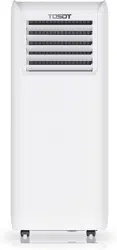

User Manual
Portable Air Conditioner
Before using your TOSOT Portable Air Conditioner,
please read this user manual in its entirety.
MO DEL NUMBERS
GPC05AP-A3NNA1A
GPC06AP-A3NNA1A

Welcome to the TOSOT Direct Family!
We’re extremely happy to welcome you as a new member of our family! Please
read the tips below before using your product for the first time.
1. The portable air conditioner is a heavy object, which needs two or more people
to lift and install. Failure to do so could result in injury or other accidents.
2. Allow the unit to sit upright for at least 3-4 hours before powering on. Shipping
carriers may set the unit on its side, which causes the refrigerant to pool in
certain areas. Standing the unit upright for 3-4 hours allows the refrigerant to
move freely within the coils.
3. Some parts with sharp edges may cause injury, so gloves are highly recommended
for unpacking and installing.
4. Run the unit continuously for 24 hours after letting the unit stand upright for 3-4
hours. This allows the unit to work out any “kinks” that may have resulted during
shipping from our factory to your doorstep.
5. For a quick start video guide of installation, please contact Customer Support.
6. If you have any problems with your product, please send us an email before
submitting a return request, as there might be a simple solution for your issue.
Tips for First-Time Use

Table of Contents
Safety and Instructions
Installation and Setup
Electrical Safety Warning
Parts Description
Operation
Open the Airflow Louver
Control Panel
Remote Control
Combination Buttons
Replacing the Batteries
Installation
Tools Required
Parts List
Installing Your AC
Installing the Exhaust Hose
Removing Collected Water
Installing the Power Cord Hooks
Cleaning and Maintenance
Maintenance Checklists
Troubleshooting
Malfunction Codes
Warranty&Customer Support
01
01
02
05
06
06
07
08
11
11
12
12
12
13
18
19
21
22
23
24
26
27
-------------------------------------------
-------------------------------------------
---------------------------------------
----------------------------------------
-----------------------------------------------------
--------------------------------------------------
-------------------------------------------
-----------------------------------------------------------
----------------------------------------------------
----------------------------------------------------------
------------------------------------------------
------------------------------------
-------------------------------------
-----------------------------
---------------------------------------
----------------------------------------
----------------------------------------------------
-------------------------------------------------
------------------------------------
---------------------------------------------------
------------------------------------------------------------
-----------------------------------------

Safety and Instructions
01
Installation and Setup
Please read all instructions before use and save this user manual for future
reference. A digital version can be obtained from Customer Support.
Your safety and the safety of others are very important to us. We have provided
many important safety messages throughout this manual and on the appliance
itself. Always read and follow all posted safety messages.
To reduce the risk of fire, electric shock, injury, or death to persons using or near
this appliance, please follow some basic safety precautions. These precautions
include, but are not limited to, the following:
● This appliance is not intended for use by any persons (including children) with
reduced or restricted physical, mental, or sensory capabilities, or lack of
experience and knowledge, unless under the direct supervision of a person
responsible for their safety.
● Please keep plastic bags and sheets out of the reach of children as they might
be mistakenly used for play. Packaging materials can become airtight chambers
and may pose a risk of suffocation if not disposed of properly.
● When installing or moving the appliance, be careful not to pinch, crush, or
damage the power cord.
● Never attempt to operate this appliance if it visibly damaged, malfunctioning,
disassembled or has missing or broken parts. This includes exposed wiring on
a damaged cord or electrical plugin. All repairs and servicing must be performed
by qualified service personnel. Use only authorized TOSOT factory OEM parts.
● Keep the product away from fire. Do not store or use flammable gases or
materials near the appliance.
● Do not use heating equipment near the appliance.
● In the event of a gas leak (propane gas, LP gas, etc.) do not operate this or any
other appliance. Open a window or door to ventilate the area immediately.

02
● Only use the appliance in an upright position. Make sure the angle of inclination
<10°. Always place the appliance on a stable, flat, level surface to prevent the
air conditioner from overturning.
Electrical Safety Warning
● If the power cable is damaged, it must be replaced by the manufacturer or an
authorized technical service center in order to avoid all risk.
● Do not damage, alter, excessively bend, twist, pull or heat the power cord.
● Do not cover the power cord with a rug or carpeting.
● Do not rest hot or heavy objects on the appliance and power cord.
● Always plug into a fixed 115V AC ground outlet.
● Never plug or unplug the appliance with wet hands.
● Push the power plug all the way into the wall outlet so that it will not loose.
● Always grip the plug firmly and pull straight out from the outlet when taking it out.
● Never unplug the appliance by pulling on the power cord.
● Never use the appliance if the outlet is damaged or loose.
● This product should be plugged directly into a power outlet. Power outlets should
be properly rated, protected, and sized in order to avoid electrical overload.
● Do not cut or remove the third (ground) prong from the power cord.
● Always unplug the unit from the outlet before cleaning or maintenance operations.
● Your air conditioner must be used in a properly grounded wall receptacle. If the
wall receptacle you intend to use is not adequately grounded or not protected by
a time-delay fuse or circuit breaker, have a qualified electrician install the proper
wall power receptacle before using this appliance.
● Be sure that the air conditioner is properly grounded. To minimize shock and fire
hazards, proper grounding is important. The power cord is equipped with a three-
prong grounding plug for protection against shock hazards.
● Do not run the air conditioner without the plastic shell in place. This could result
in mechanical damage within the air conditioner.
03
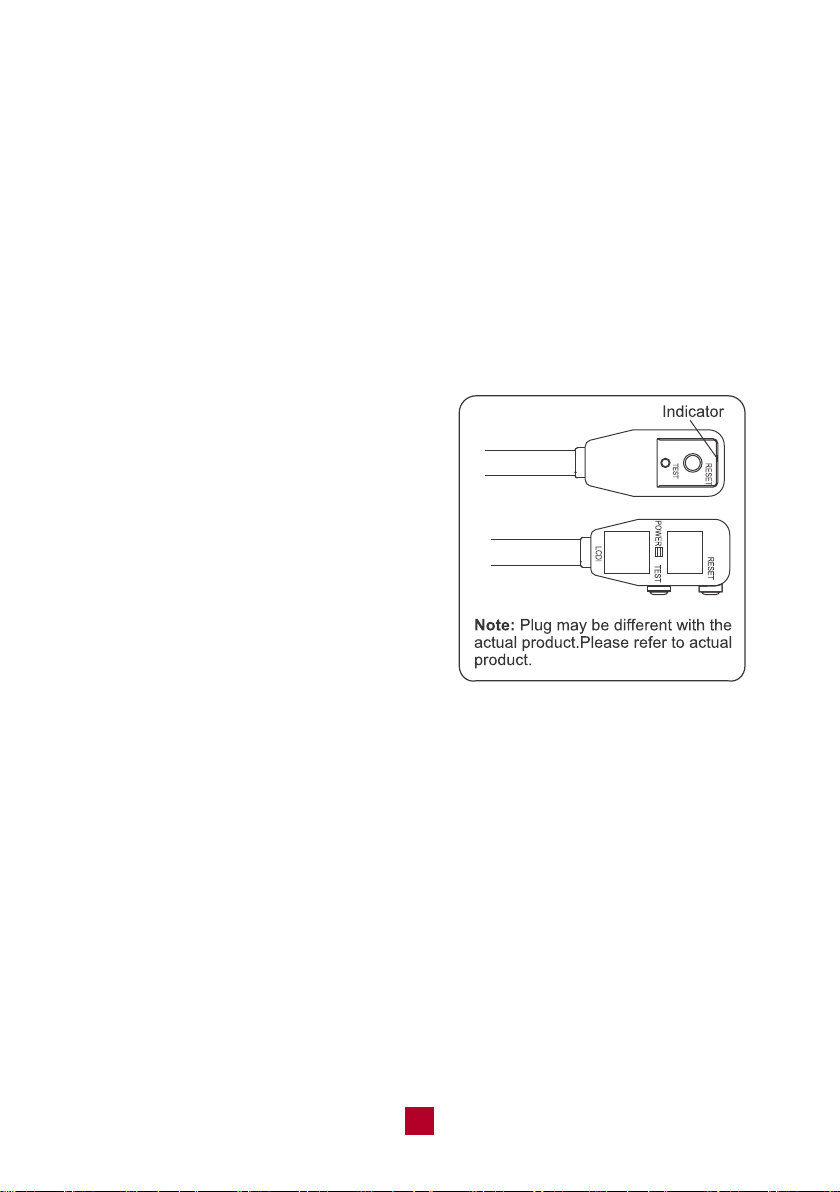
LCDI Power Plug (Leakage Current Detection and Interruption)
The power cord used with this air conditioner contains a current detection device
designed to reduce the risk of fire. In the event that the power supply cord is
damaged, it cannot be repaired. The power supply cord must be replaced with a
replacement cord received from the manufacturer by a trained service technician.
Always finish the test of LCDI plug before use:
Follow 4 steps on the LCDI plug case, if the TEST button does not cause the circuit
breaker trip or the RESET button will not stay engaged, unplug the air conditioner
immediately and contact Customer Support.
1. Plug in the air conditioner.
2. The power supply cord will have two
buttons on the plug head. If you press
the TEST button you should notice a
clicking noise as the RESET button
pops out.
3. Press the RESET button again, and
you will notice a clicking noise as the
button engages.
4. The power supply cord is now supplying
electricity to the unit.
● Do not use the LCDI plug to turn the unit on or off
● Always make sure the RESET button is pushed in for correct operation
● The power supply must be replaced if it fails to reset when either the TEST
button is pushed, or it cannot be reset. Please contact us for more information.
Recommended Operating Environment
● The recommended operating temperature range is 61°F -95°F (16°C-35°C).
● The appliance is for indoor use only.
● The appliance must be positioned so that the plug is easily accessible.
● This air conditioner is intended for residential use, not for commercial or industrial
purposes.
04
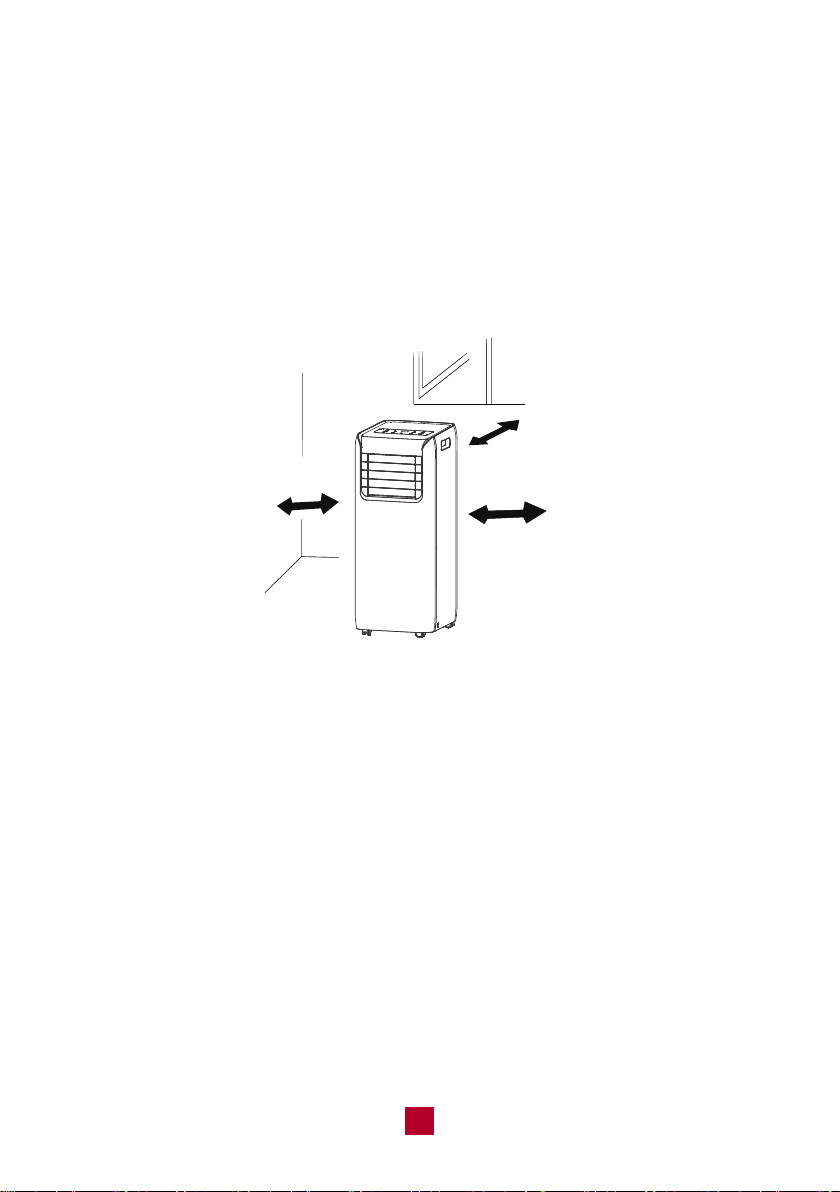
● Open space around the air conditioner should be at least 12 inches (30cm) to
ensure airflow.
● Please keep the air inlet and air outlet clean and free from obstacles.
● During operation, close doors and windows to improve the cooling effect in the
room.
● Please put the air conditioner on smooth and flat ground to avoid noise and
vibration.
● Avoid direct sunlight exposure.
61cm(24
”
)
30cm(12
”
)
30cm(12
”
)
Note: The following locations or conditions may cause malfunction or damage to
your air conditioner. Avoid running the air conditioner under the following conditions:
● Near strong heat sources, vapors, flammable or explosive gas, or volatile objects
spread in the air.
● Around any high-frequency devices (such as welding machines or medical
equipment.)
● Any place with oil or oil fumes in the air.
● Any place with a high concentration of sulfurated gas.
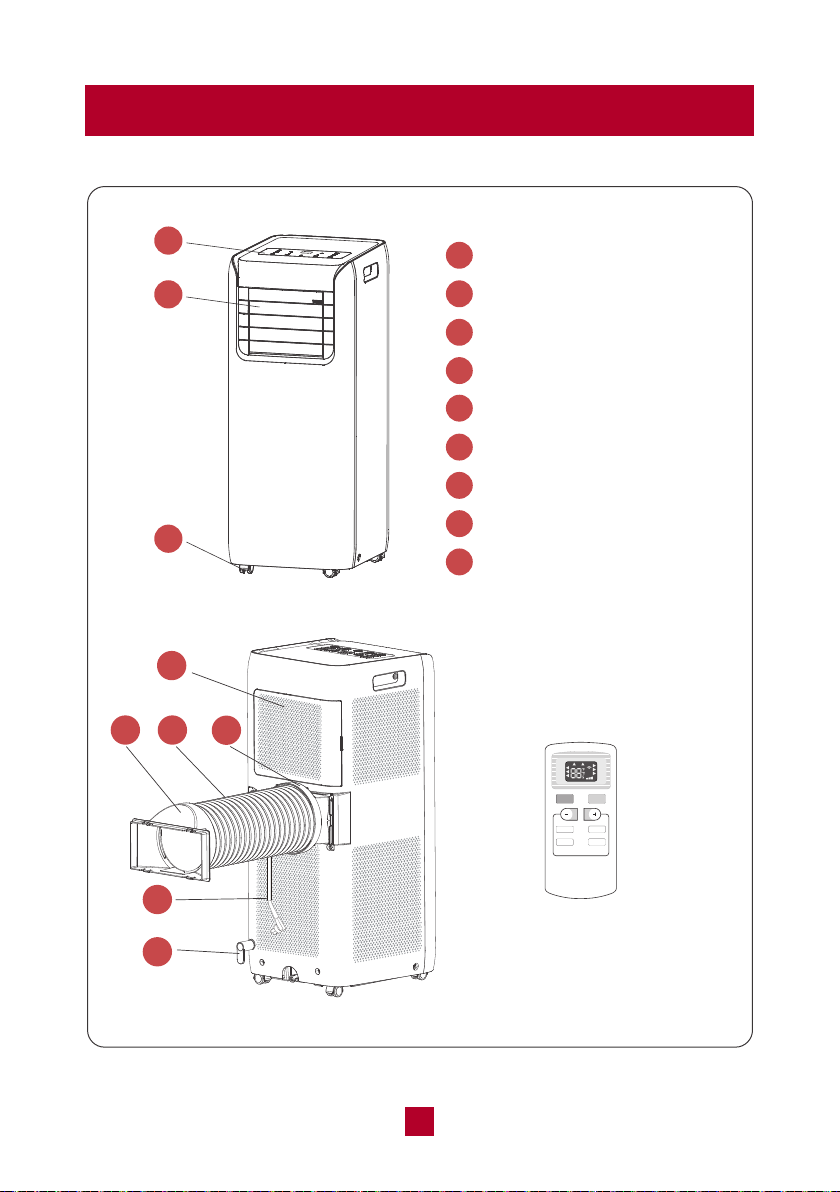
Parts Description
1
2
3
4
5
7
8
9
6
Control Panel
Airflow Louver
Caster Wheels
Removable Filter
Air Exhaust Outlet
Exhaust Hose
Rear Clip
Power Cord
Power Cord Hooks
1
2
3
Remote Control
FAN
ON/OFF MODE
SLEEP
TIMER
X-FAN
X-FAN
SLEEP
SPEED
T-ON
T-OFF
LOCK
H
AUTO
OPER
FAN
DR
COO
Y
L
05
4
7
6
5
8
9
Operation
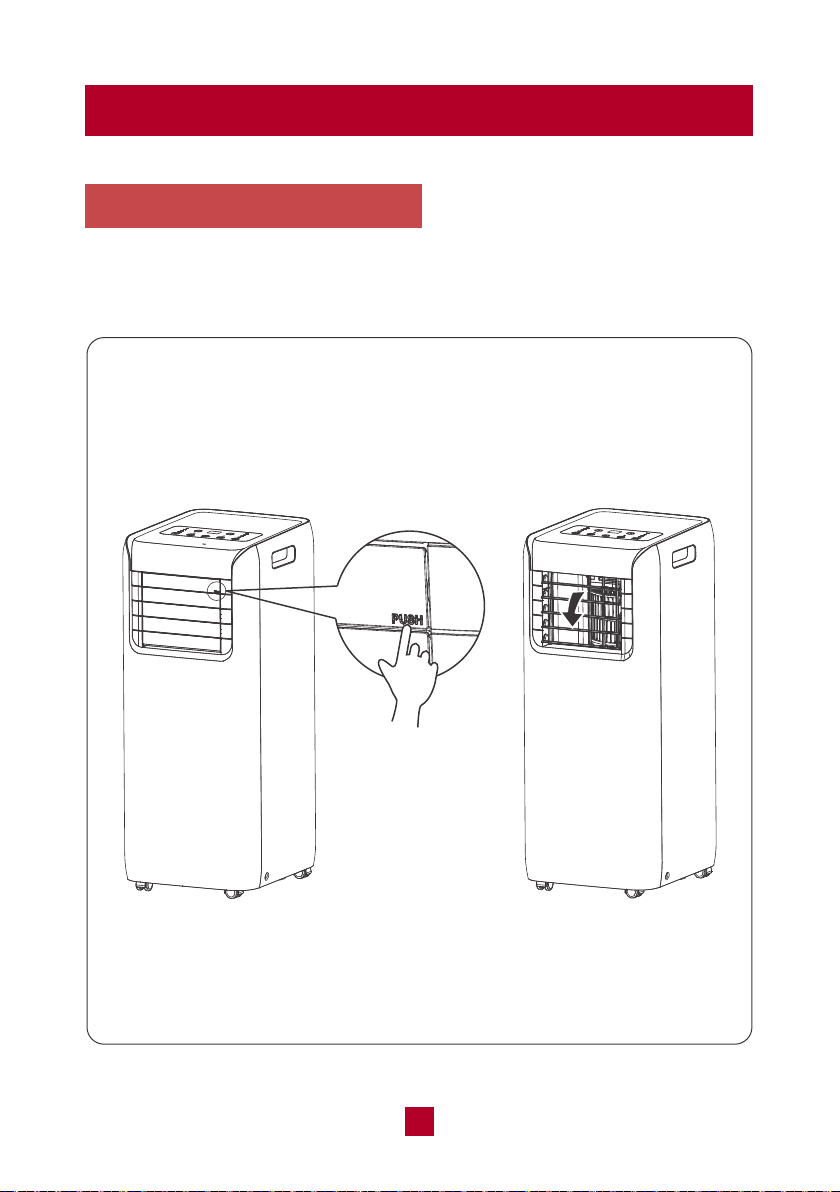
Open the Airflow Louver
Press the position marked with "PUSH" on the airflow louver with fingers to open
the airflow louver before turning on the unit.
06
Control Panel
1
2
2
3
3
4
4
5
5
6
6
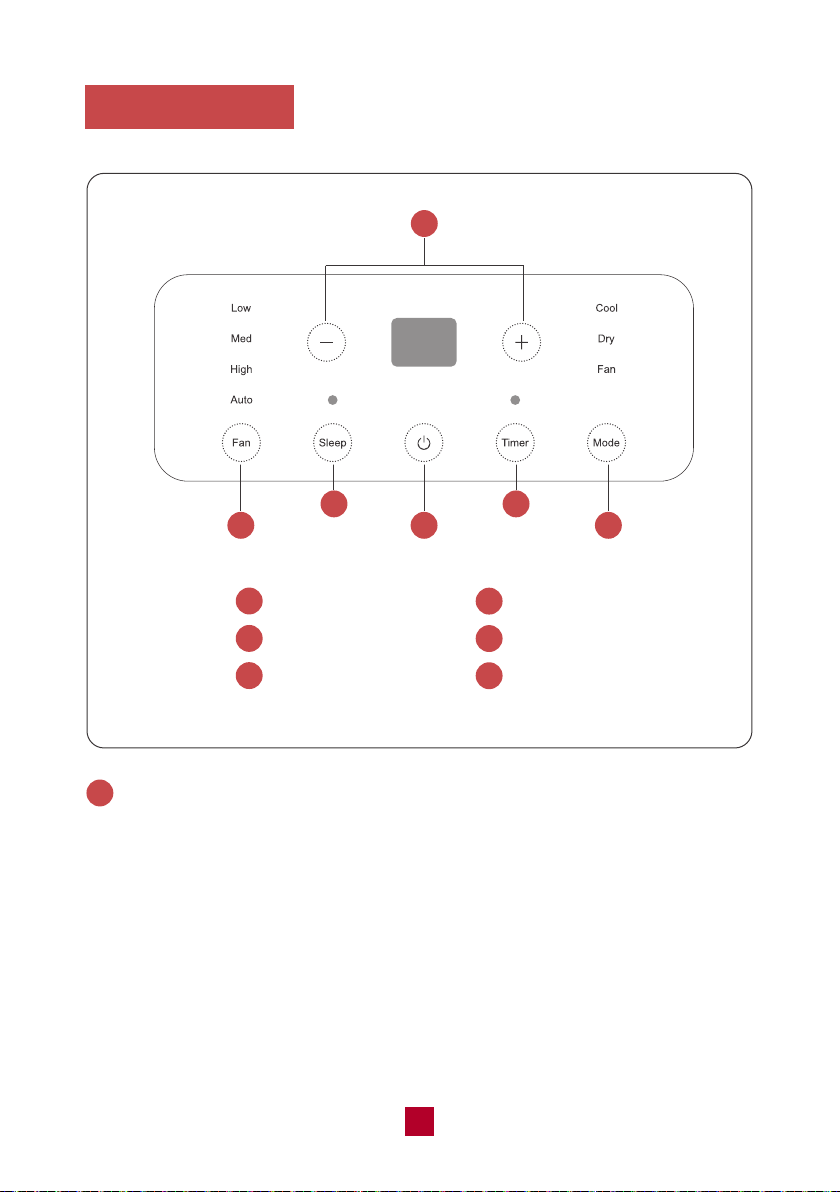
1
+/- Button
Fan Button
Sleep Button
ON/OFF Button
Timer Button
Mode Button
+/- Button
● Pressing this button will allow you to change the temperature setting.
● After pressing the timer button, the +/- buttons will adjust the timer setting from
0.5-24 hours in 0.5-hour increments. After the 10-hour mark, the +/- button will
adjust the timer setting in 1-hour increments. It will take 5 seconds for the timer
settings to be confirmed by the machine.
Note: This button is not valid under dry and fan model.
1
07
2
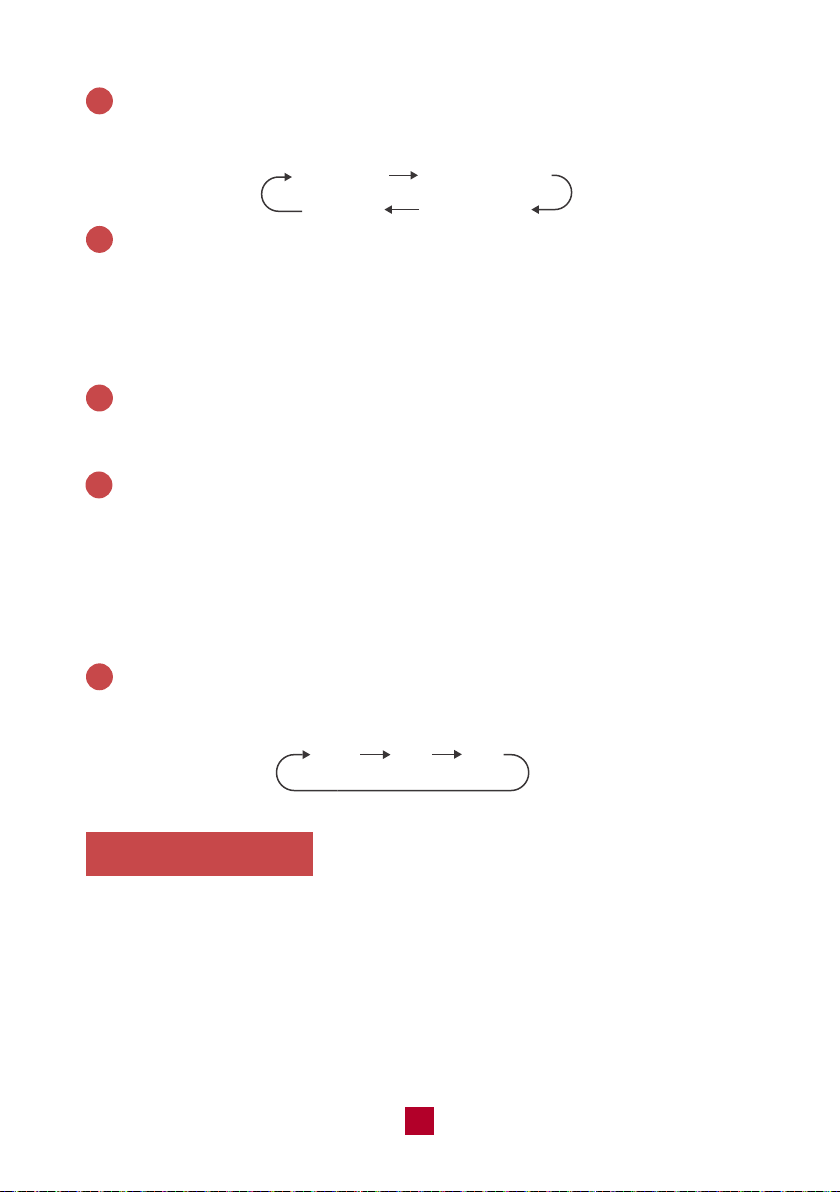
Fan Button
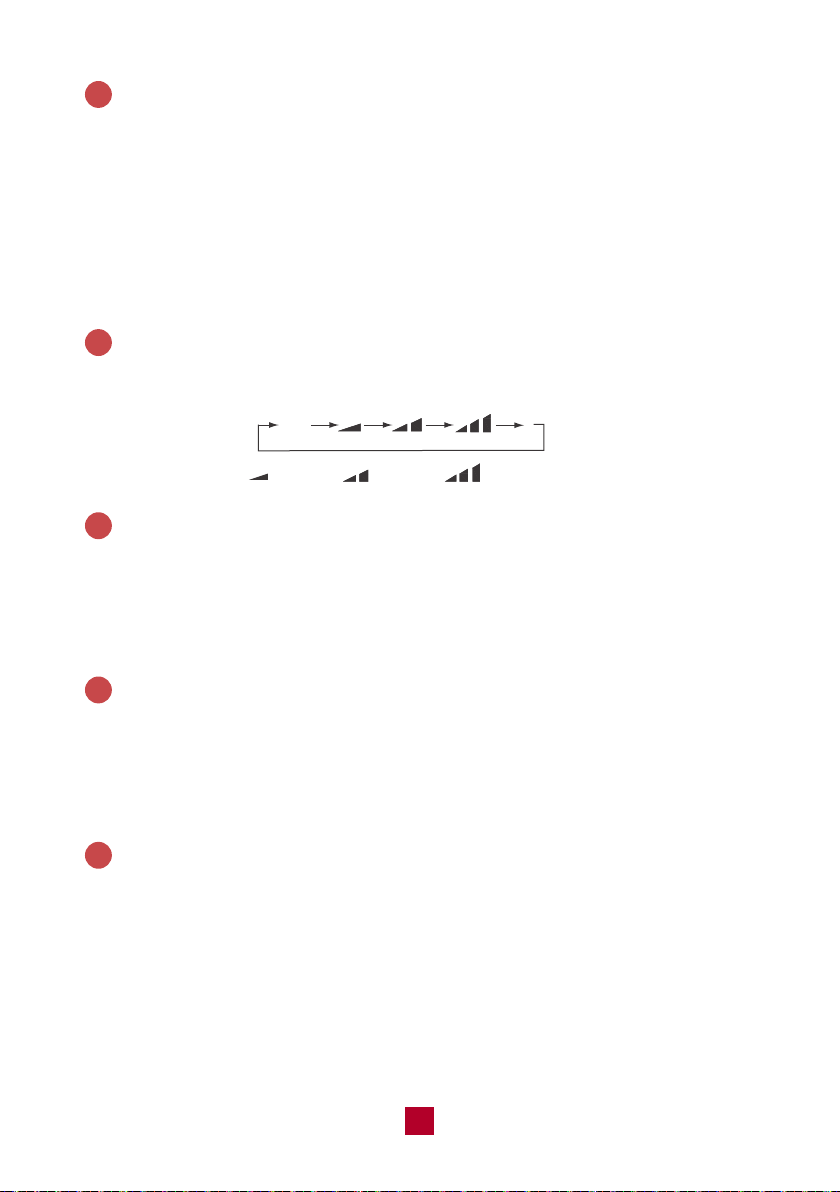
Pressing this button will cycle the fan speed through one of 4 fan modes, as shown
below:
Sleep Button
Press this button to enter the sleep operation mode. Sleep mode is not available
for Fan mode and Dry mode. When in sleep mode, the AC temperature will
automatically increase by 2°F for the first hour and 4°F for the second hour and
then will keep running with this temperature.
ON/OFF Button
Press to power the air conditioner ON or OFF.
Timer Button
● When the unit is running, press this button to schedule when the unit will power
off by using the +/- button to adjust the length of time before powering off.
● When the unit is not running, press this button to schedule when the unit will
power on by using the +/- button to adjust the length of time before powering on.
● Press the timer button to cancel timer mode and shut the timer indicator light off.
Mode Button
Pressing this button will cycle through the following modes, as shown below:
6
3
4
5
auto fan
medium speed
high speed
low speed
Cool
Dry
Fan
Remote Control
This is a universal remote control for a variety of models. If your model does not
have a function listed on the remote control, there will be no changes in the
operation of your unit. The max range of the remote control is 25 feet with no
obstacles or interference from other devices, such as wireless phones or
fluorescent lamps.
The air conditioner will emit a beep sound if the signal from the remote has been
received successfully.
08
1
1
2
2
3
4
3
4
5
5
6
6
7
7
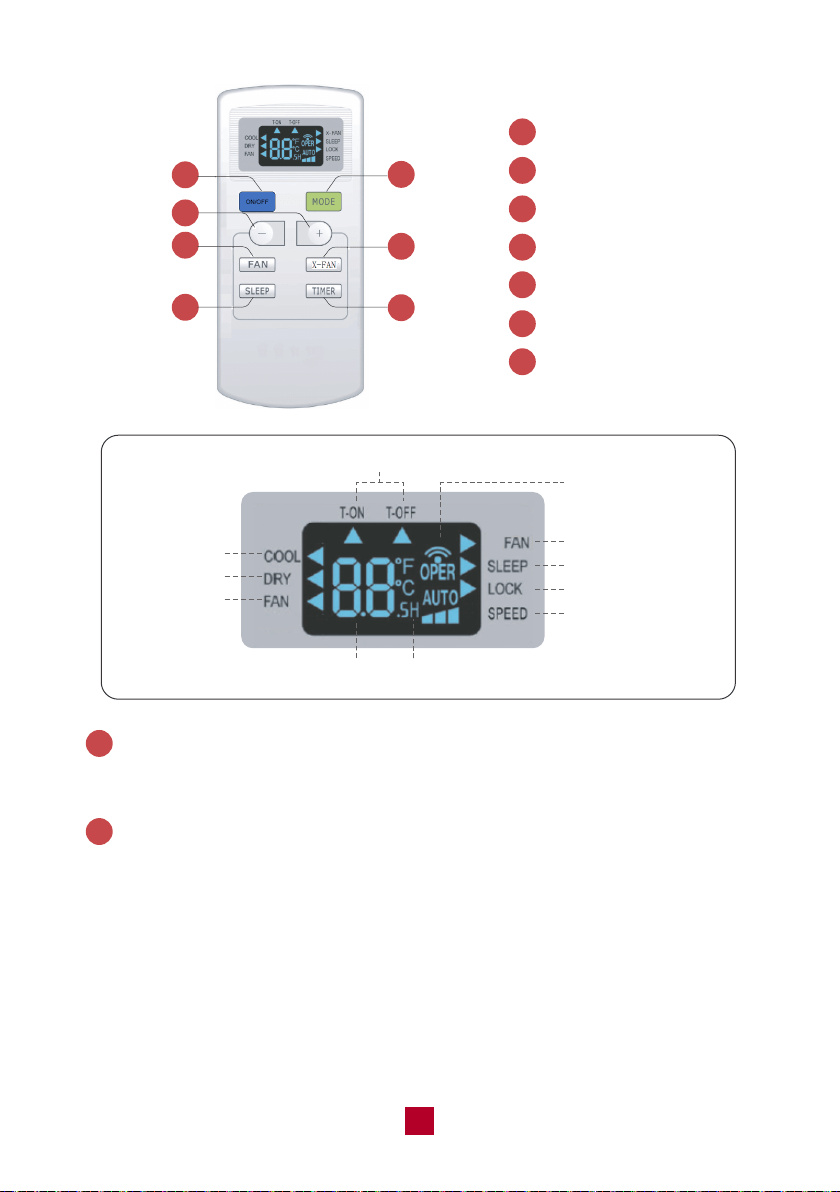
ON/OFF button
MODE button
+/- button
FAN button
X-FAN button
SLEEP button
TIMER button
On/Off
Signal Sending
X-Fan
Sleep Mode
Child Lock Mode
Speed Setting
Time SettingTemperature Setting
Fan Mode
Dry Mode
Cool Mode
X-
ON/OFF Button
Press to power the air conditioner ON or OFF.
Mode Button
Press this button to cycle through the following modes. A corresponding logo
indicator on the left side of the remote will be shown.
● Cool mode: standard cooling mode. The set temperature and fan speed can
both be adjusted.
● Dry mode: the unit will run on low speed for dehumidification. The fan speed
cannot be adjusted.
● Fan Only mode: the air conditioner will not produce cool air, only blow air from
the outside. The fan speed can be adjusted.
1
2
09
3
4
Auto
Speed 1 Speed 2
Speed 3
X-Fan Button
Press this button to toggle the X-Fan mode on when the unit is in operation. When
you turn the machine off you will find the fan is running at a low speed. Press the
X-Fan button again to cancel. The X-Fan mode helps dry residual water inside the
exhaust hose.
+/- Button
● Pressing the “+” or “-” button will increase/decrease the set temperature by 1°F.
Holding the button for 2 seconds will cause the temperature to change rapidly.
Release the button once your desired temperature is reached.
● After pressing the Timer button, each press of the +/- button will increase/
decrease the time by 0.5 hours. Holding the button for 2 seconds will cause the
timer to change rapidly. Release the button once your desired time setting has
been reached.
Fan Button
Press this button to cycle through the Auto mode and 3 fan speeds (Low, Medium,
High)
5
Sleep Button
Press this button to enter the sleep operation mode. While in sleep mode, you
can only use the Cool mode. When in sleep mode, the AC temperature will
automatically increase by 2°F for first hour and 4°F for second hour and then
will keep running with this temperature.
Timer Button
Press this button to activate the timer button. Use the +/- buttons to adjust the
length of the timer before the unit powers off. The time setting range is 0.5-24
hours, in 0.5-hour increments. Press the timer button a second time to confirm
the timer setting. If the characters on the display are blinking, you must press
the Timer button again to confirm the timer setting. If you have confirmed a time
setting, you can press this button again to cancel the timer mode.
6
7
10
Combination Buttons
Light Function
Press and hold the “+” and “FAN” buttons simultaneously for 3 seconds to turn the
lights on the air conditioner on or off. The default setting after being powered on is
for the lights to be on.
Child Lock Function
Press the “+” and “-” buttons simultaneously to enter the child lock function. While
in this mode, the remote control will display a LOCK symbol and will not send any
signal to the air conditioner.
Change Between °F and °C
With the remote powered off, press the Mode and “-” buttons simultaneously to
switch between Fahrenheit and Celsius displays.
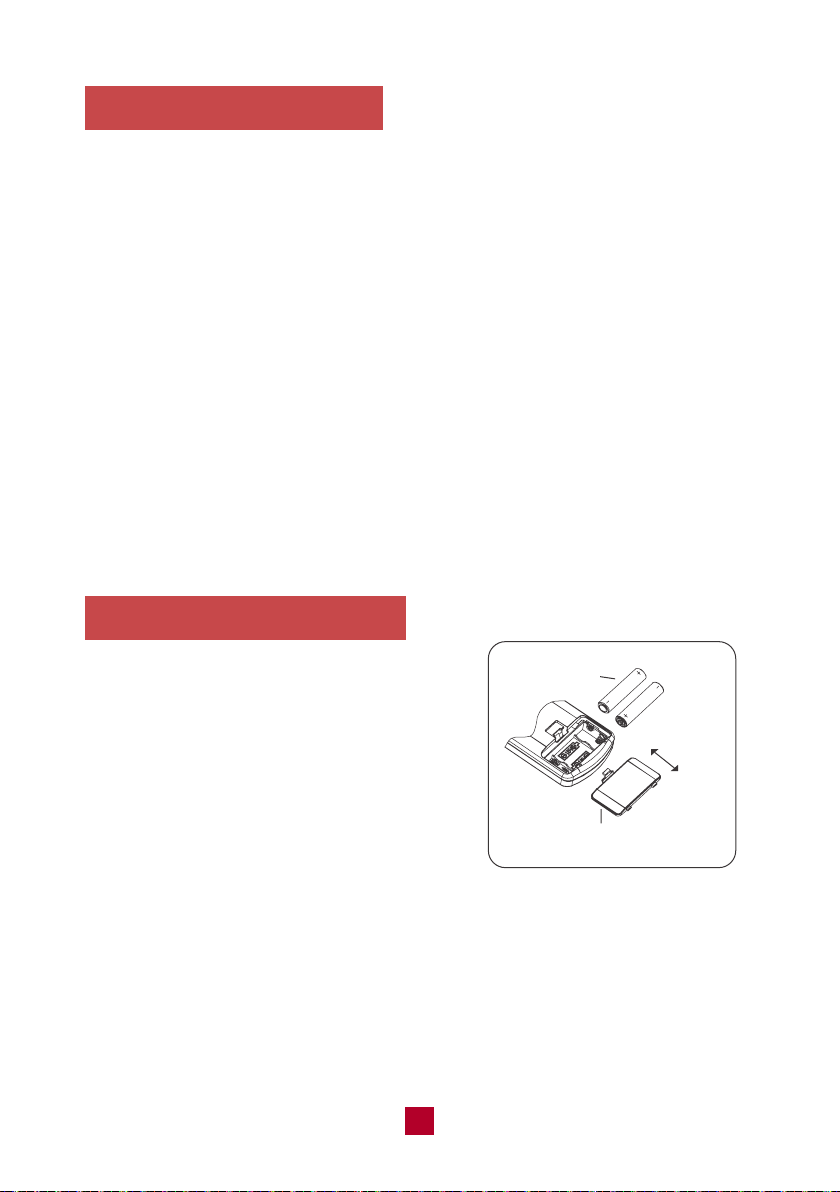
Replacing the Batteries
1. Press the back side of the remote control
battery cover and slide out following the
engraved arrow.
2. Replace with two new AAA(1.5V) batteries
(not included) of the same make and model.
Make sure the polarities (+ & -) are aligned
correctly.
3. Reinstall the battery cover box.
reinstall
remove
battery
cover of battery box
11
Installation
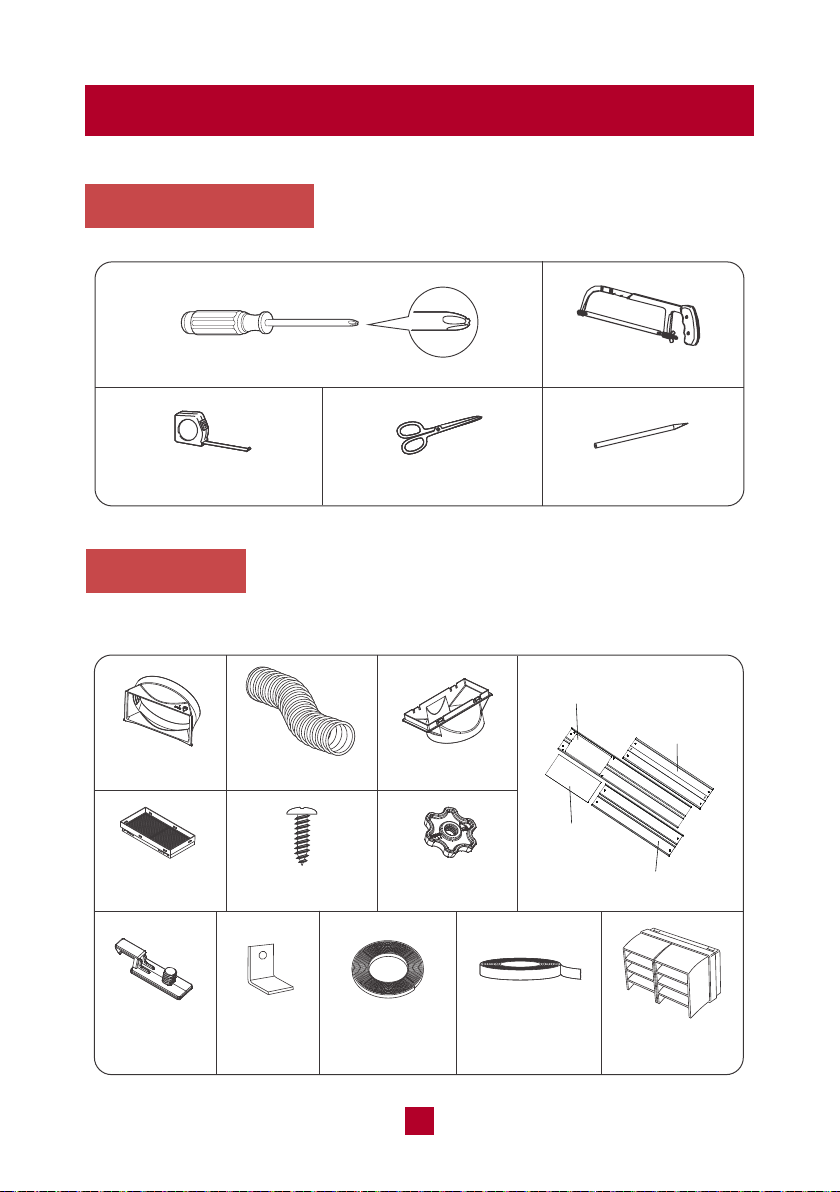
Tools Required
Parts List
Exhaust HoseJoint Rear Clip
Insect Guard Screw x 4pcs
Mounting Plate
x 2pcs
Accessory kit for window installation
Window panel
Extension panel
Exhaust
cover
Adjustment
panel
Fixed Clip
x 2pcs
Bracket
Foam Seal A
(non adhesive)
Foam Seal B
(adhesive type)
Rain Guard
x 2pcs
12
Phillips head screwdriver
Tape measure Scissors
Saw
Pencil
Drain Hose
FAN
ON/OFF MODE
SLEEP
TIMER
LOCK
X-FAN
SLEEP
X-FAN
SPEED
T-ON
T-OFF
H
AU
OPER
TO
FAN
DR
COO
Y
L
Accessory kit for installing
the drain hose
Remote Control
Power Cord Hook
x2pcs
Others
Installing Your AC
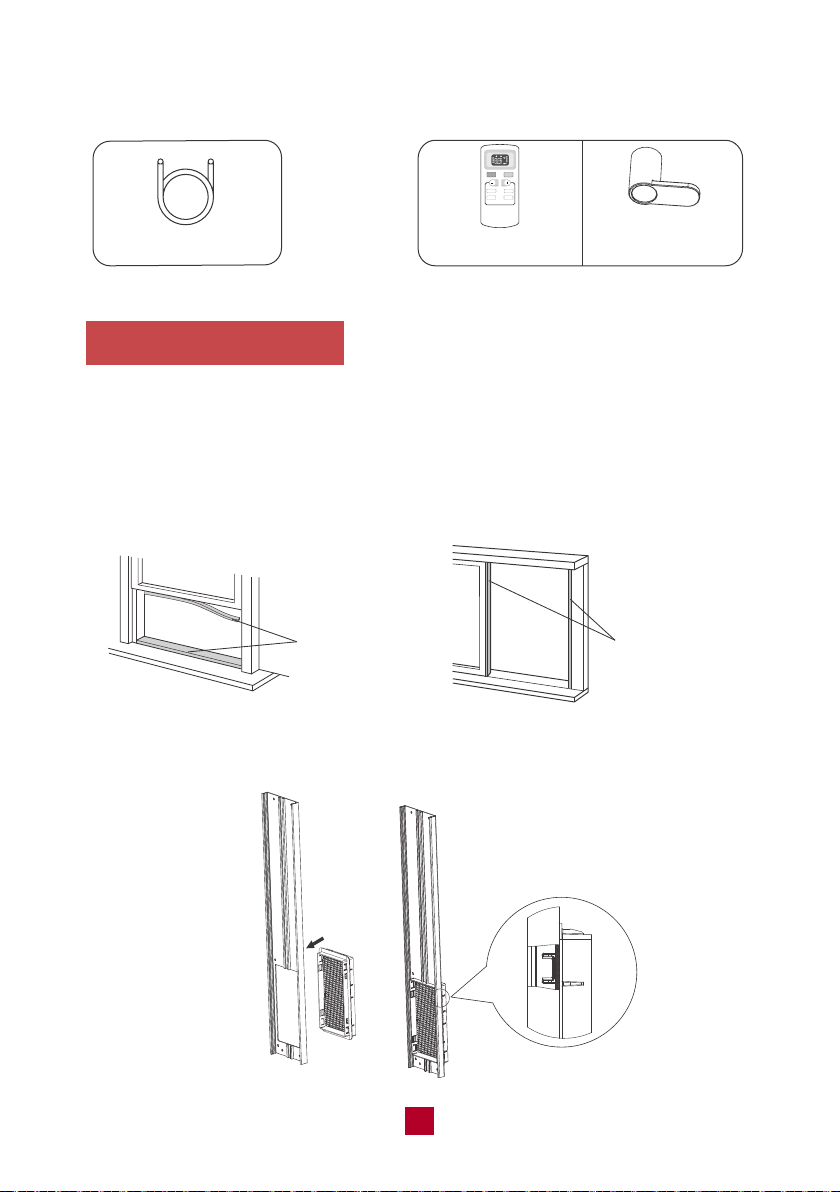
Here are the detailed instructions for installing the window panel into sliding sash
or hung windows. For certain windows, such as a casement window, you will need
to improvise several steps of the installation as each specific window will be different.
1. Cut the Foam seal B (adhesive type) to the proper length and attach it to your
horizontal (or vertical) sliding window.
Foam seal B
(adhesive type)
Foam seal B
(adhesive type)
2. Attach the insect guard to the back side of the window panel. Push in to ensure
that it fits securely. If you do not want to install the rain guard, skip to Step 4 below.
13
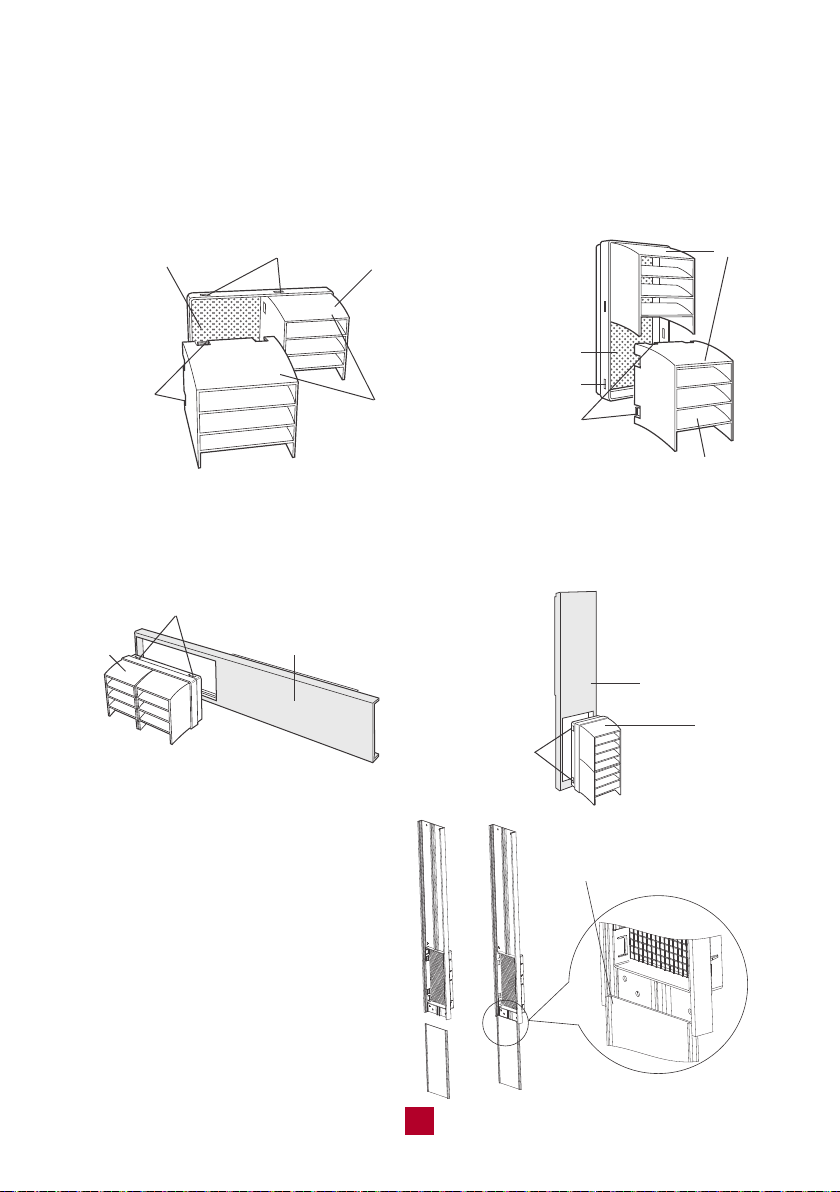
3. Optional: Install the rain guard over the insect guard to prevent rainwater from
leaking into the exhaust hose.
a. Insert the three projections on each rain guard into the holes in the insect guard.
Side “A” should be at the top, as indicated in the diagram below.
Hole
Projection
Insect guard net
Rain guard
"A"
Hole
Projec-
tion
Insect guard net
Rain guard
"A"
Double-hung sash window Sliding sash window
b. Insert the insect guard firmly to ensure that the four projections fit into the holes
of the window panel. Make sure that Side A is on the top.
Double-hung sash window Sliding sash window
Projection
"A"
Window panel
Window panel
Projection
"A"
4. Slide the Exhaust Cover into the
grooves of the Window Panel.
Insert the first groove
14
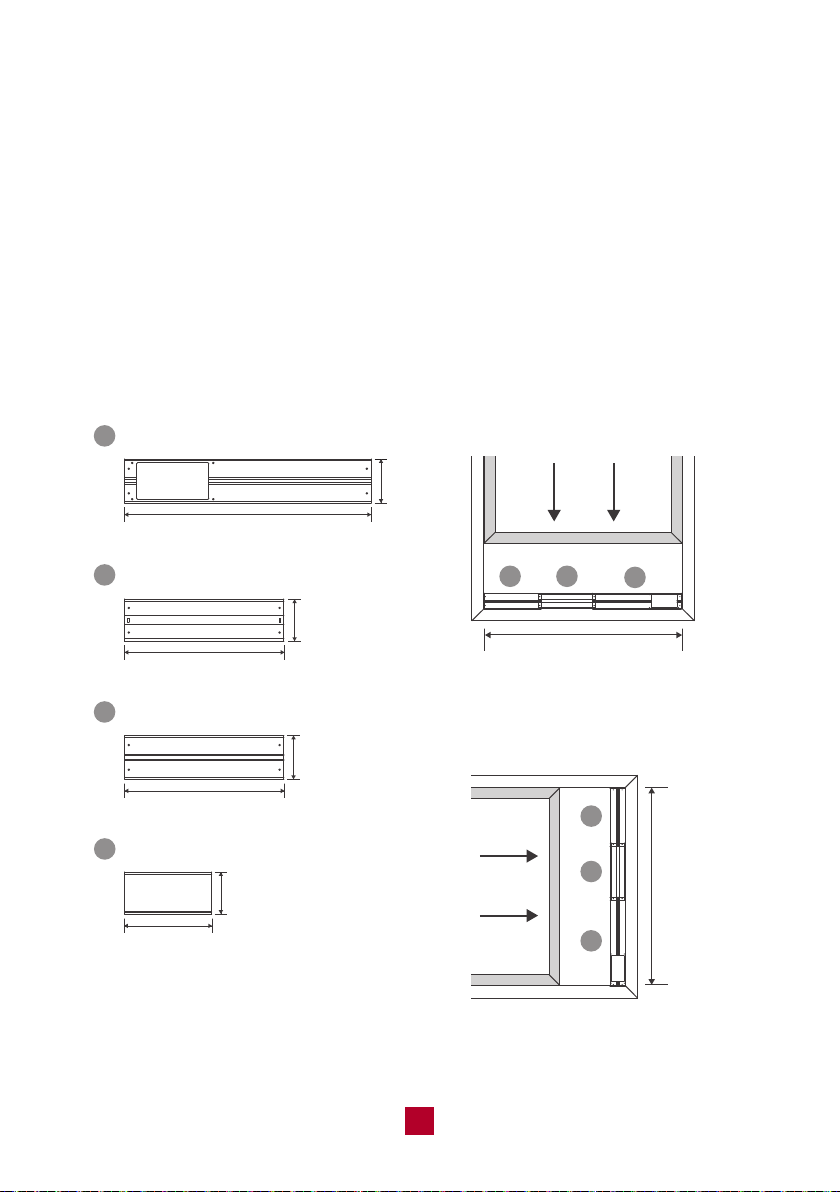
1
1
2
2
3
3
Window width
Max 62inch / Min 9.1inch
Window width
Max 62inch
Min 9.1inch
Window panel (cut if necessary)
Adjustment panel
Extension panel
Exhaust cover
1
2
3
4
28.3inch
18.3inch
18.3inch
10inch
5inch
5inch
4.8inch
4.8inch
You can slide the exhaust cover to
cover the hole of the window panel
when the exhaust hose is removed.
5.Installing the Window Panel(s)
This window installation kit comes with 3 panels to adjust to your exact window size.
You may not need to use all three panels. To begin, please refer to the guide below:
● If your window is less than 28 inches long you only need the window panel. You
may need to saw off part of the window panel if your window is smaller than the
window panel length.
● If your window is 28 to 46 inches long, you will need the window and adjustment
panel. You will not need the extension panel.
● If your window is 46 to 62 inches long, you will need all three panels.
● Last, if your window is longer than 62 inches, you will need all three panels and
then need to improvise to fill the remaining gap.
Hung Window
Sliding Slash Window
15
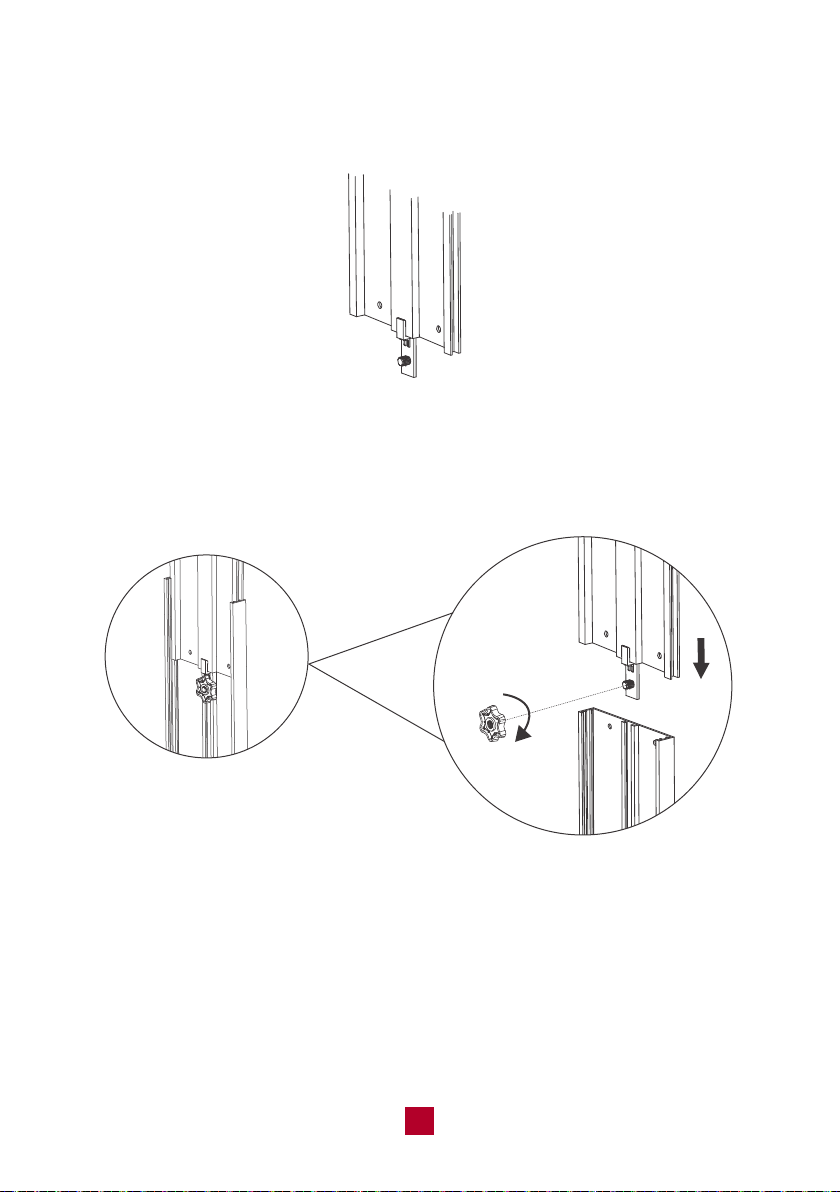
a. Find the adjustment panel (with two grooves on each end), and a Fixed Clip
and Mounting Plate.
b. Insert the fixed clip into the groove of the adjustment panel.
c. Slide the fixed clip into the groove of the window panel and slide the fixed clip
until there is no gap between the two panels.
d. Screw the mounting plate into the fixed clip to secure the panels together once
it is at the length of your window.
mounting plate
fixed clip
e. If needed, follow the above steps to connect the other side of the adjustment
panel to the extension panel. The total length of the panels will reach 62 inches.
If your window is longer than 62 inches, you will need to improvise to fill in the gap.
16
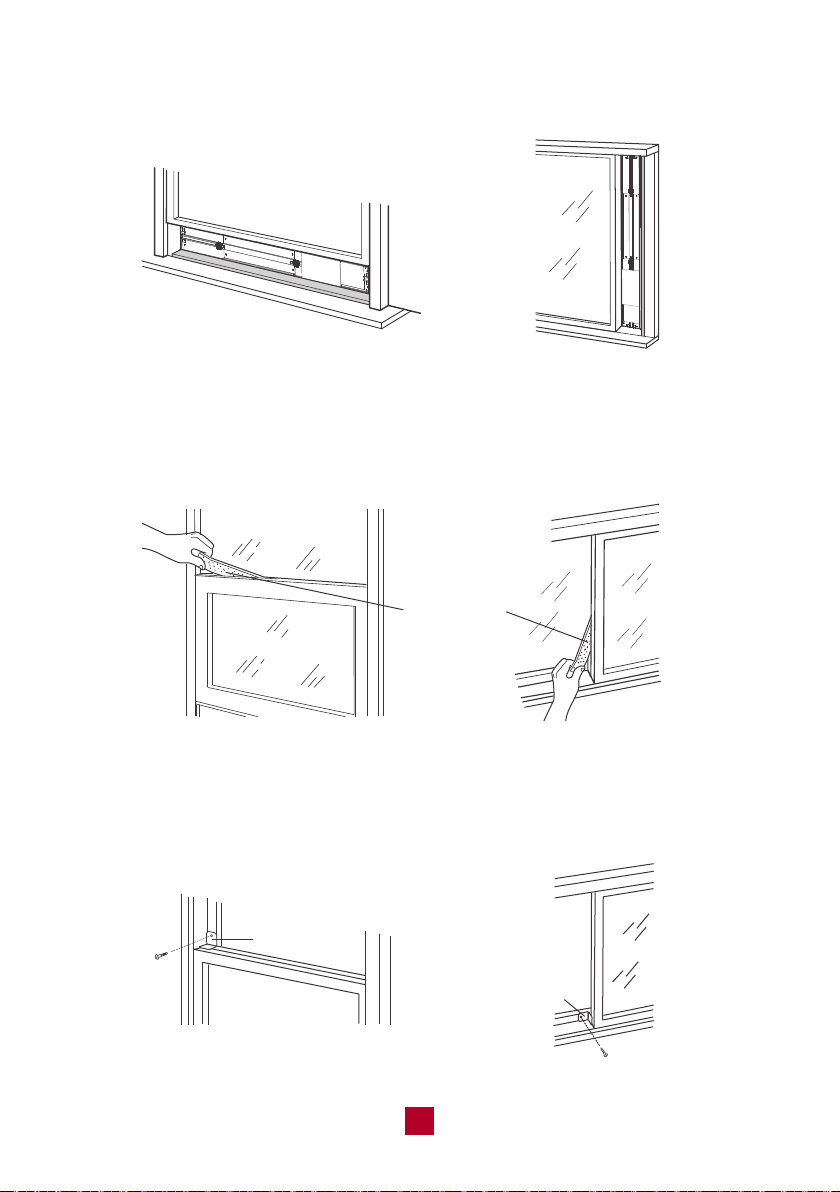
6. Insert the window panel into the window sill and close the window securely
against the Window panel.
7. Stuff Foam Seal A (non adhesive) between the glass and the window to prevent
air and insects from getting into the room.
8. Optional: Attach a bracket to the window frame with a screw to prevent any gaps
from opening up.
Foam Seal A
Bracket
Bracket
17
Installing the Exhaust Hose
Please note that the exhaust hose is REQUIRED to use for this portable air
conditioner. This TOSOT portable air conditioner (like all air conditioners) must
produce heat as a byproduct of producing cool air. If you don’t connect the exhaust
hose your unit will exhaust this hot air into the room you are trying to cool. That
won’t work very well.
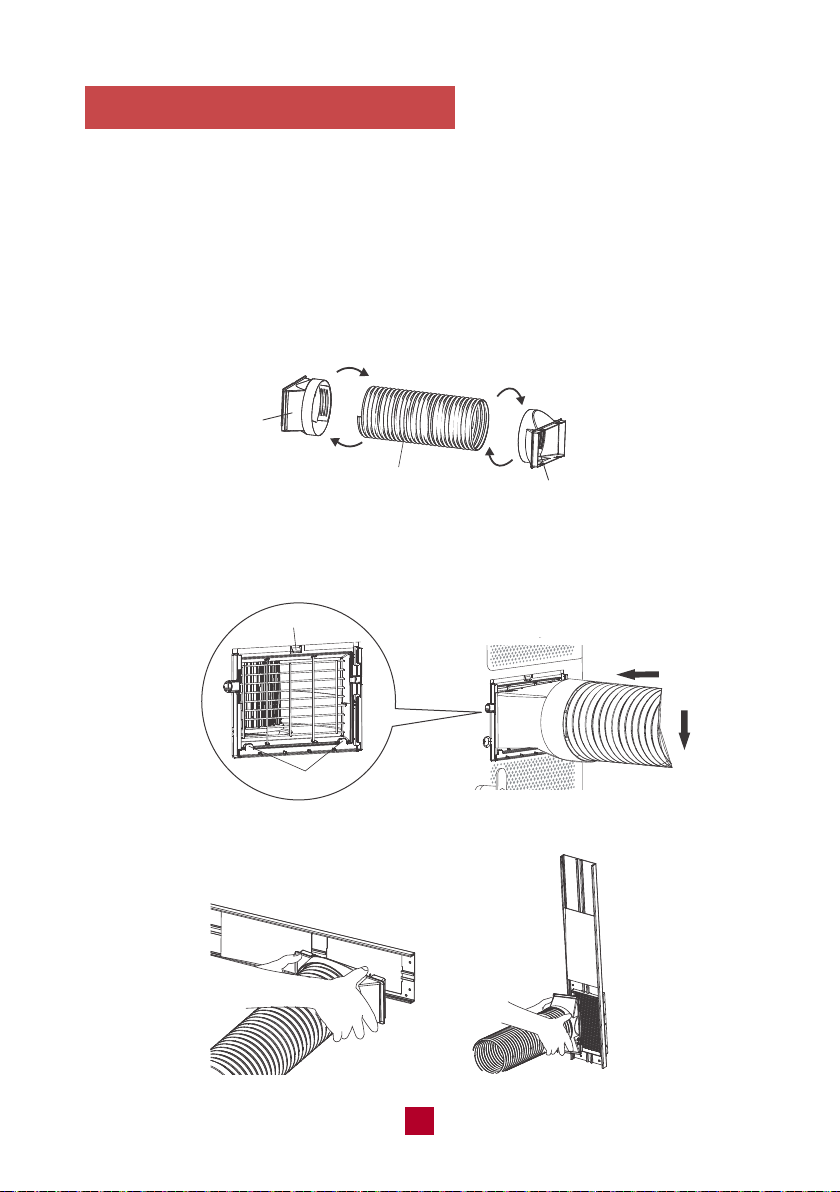
1) Twist the Joint and Rear Clip clockwise onto the exhaust hose.
Clockwise
Rear clip
Exhaust hose
Clockwise
Joint
2) Insert the Joint into the groove on the back of the unit and extend the exhaust hose.
groove
clasp
3) Attach the Rear clip to the window panel.
18
Removing Collected Water
TOSOT portable air conditioner comes with an auto-evaporation system. The unit
automatically evaporates the condensation. There is no need to empty the water
except in humid conditions.
Manual Drainage
When it is filled with water, an alarm will beep 8 times and the display panel will
show an H8 malfunction code to remind you to drain the water. For manual drainage,
you will need to:
1. Move the unit to a suitable place for discharging water. Please keep the unit
horizontal so water does not spill.
2. Remove the rubber plug from the drainage port and the collected water will drain.
Tips:
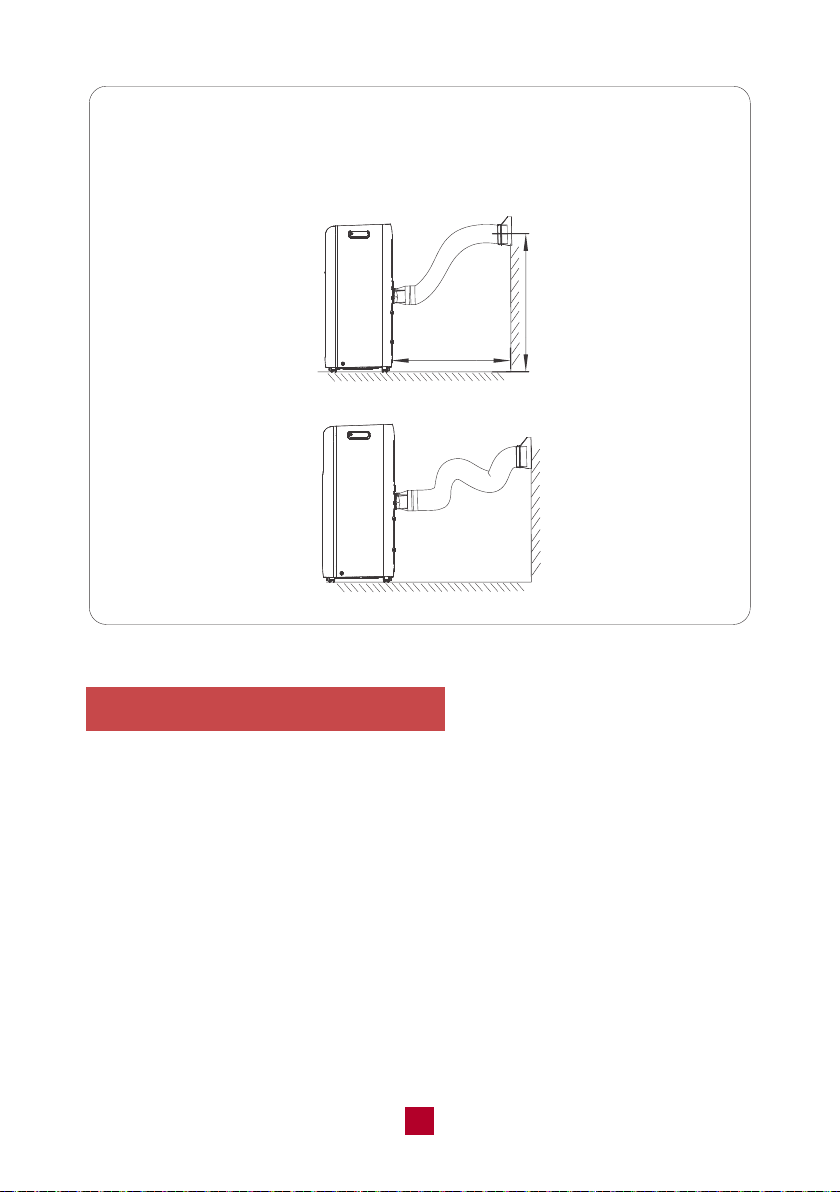
In order to improve the cooling efficiency of your air conditioner, the
exhaust hose should be as short and direct as possible. Our suggested
configuration is shown below.
correct
wrong
under 51 inches
about 24 inches
19
Continuous Drainage
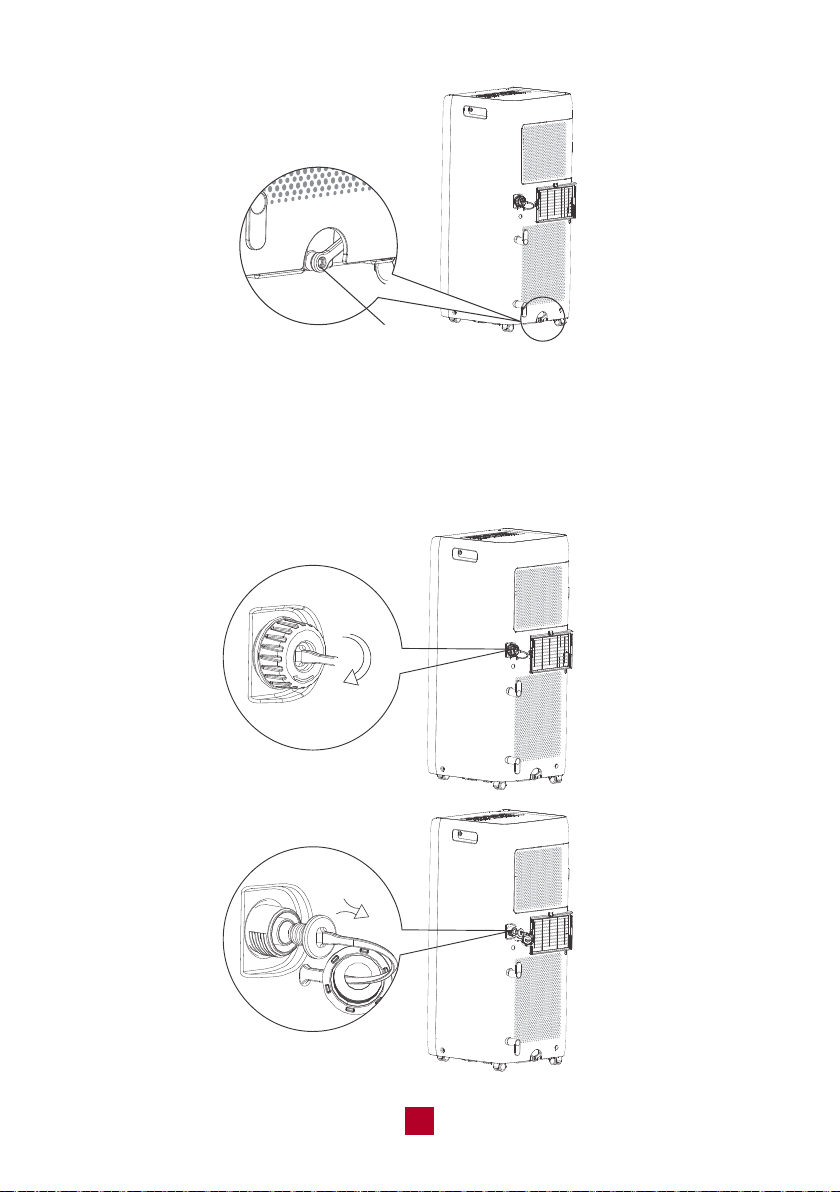
Water can be drained into a floor drain by attaching a drain hose (included) to the
continuous drain port.
1. Remove the continuous drain cap by turning it counter clockwise, then remove
the rubber plug from the spout.
20
drainage port
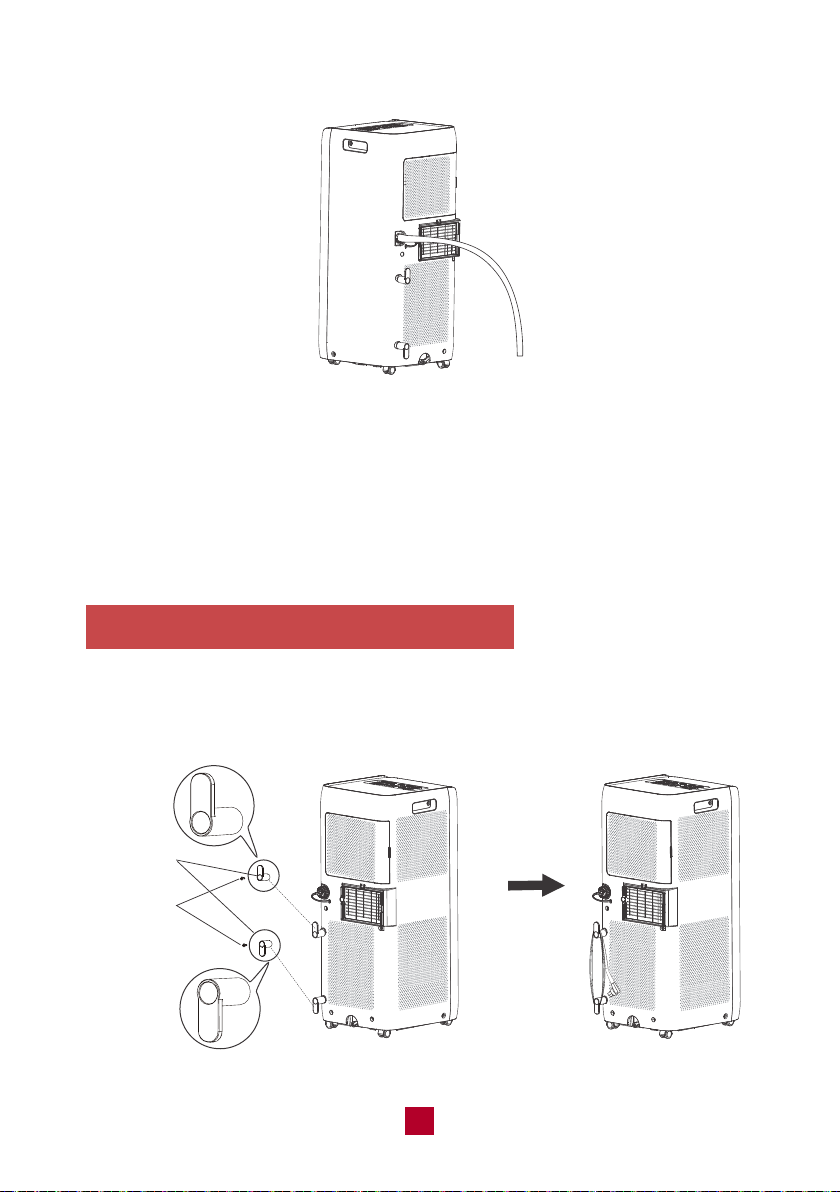
2. Insert the drainage hose into the drain connector.
Note: When using the continuous drainage option make sure that the air
conditioner is located on a flat, level surface and that the drain hose is directed
downwards and clear of any obstructions. Placing the air conditioner on an uneven
surface may result in the chassis filling with water until the H8 malfunction code is
displayed. If this occurs, manually empty the water in the chassis then recheck the
air conditioner location and hose connection.
Installing the Power Cord Hooks
Attach the two power cord hooks on the back of the unit using the included screws
and wrap the power cord around the power cord hooks when not in use.
21
Screws
Cord hooks
Cleaning and Maintenance
Precautions
● Before cleaning the air conditioner, please turn off the unit and disconnect power.
Otherwise, it may cause electric shock.
● Do not wash the air conditioner with water. Otherwise, it may cause electric shock.
● Do not use volatile liquid (such as thinner or gas) to clean the air conditioner.
Otherwise, it may damage the appearance of the air conditioner.
● Do not use liquid or corrosive detergent, clean the appliance and do not splash
water or other liquid onto it, otherwise,it may damage the plastic components,
even causing electric shock.
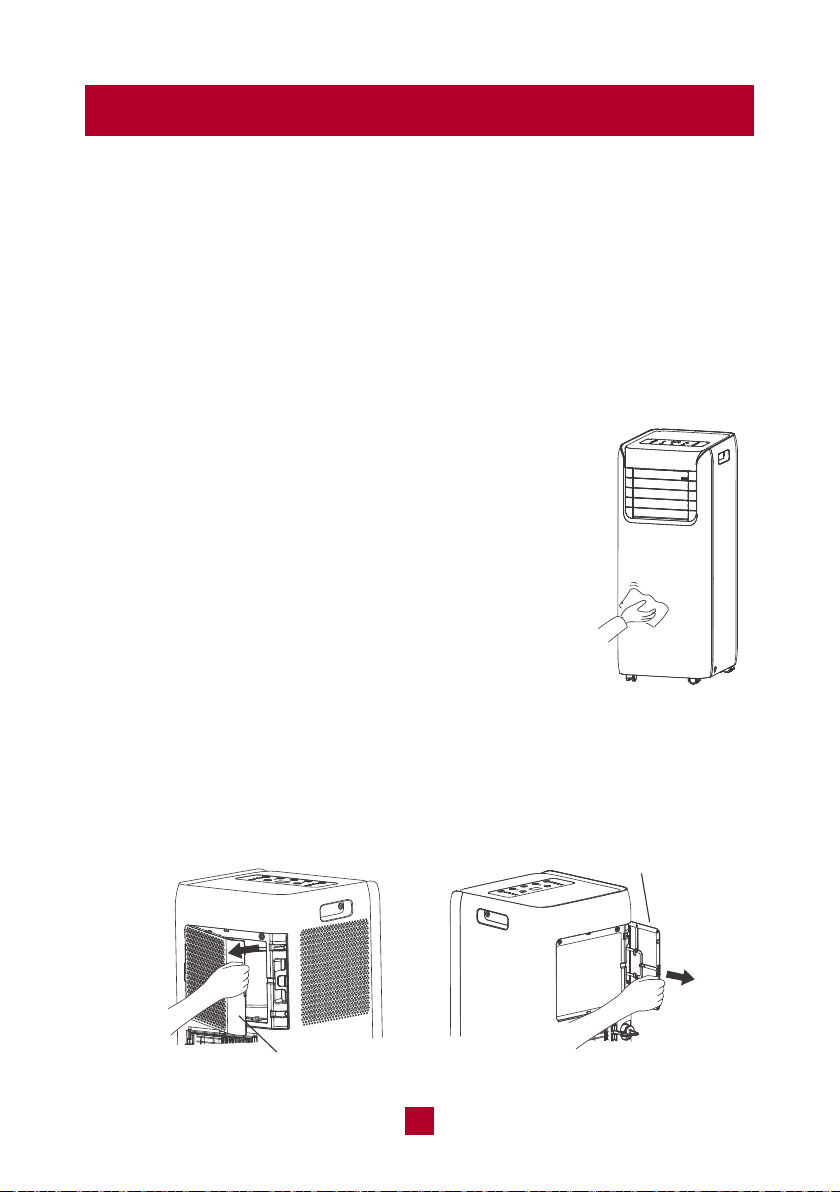
Cleaning outer case
If there's dust on the surface of the outer case,
please use a soft cloth to wipe it. You might need
to use mild detergent to do the cleaning.
Cleaning the filter
1. Remove the filter
Press the clasp at the back of the unit and then remove the filter. You may need
to move the filter around to loosen.
Filter 2
Filter 1
22
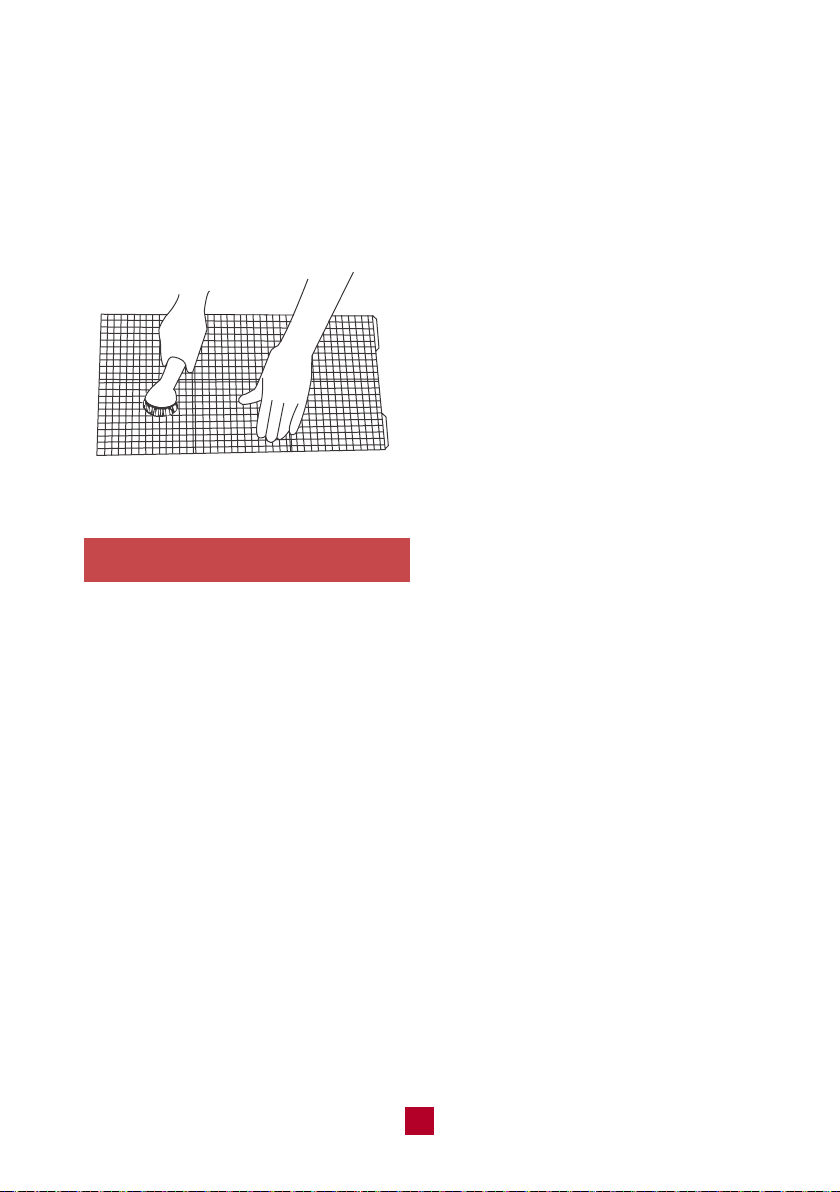
2. Clean the filter
After removing, use the dust attachment of your vacuum to suck up any dirt or
warm water mixed with a mild detergent. A soft bristle brush may help remove
some dirt if needed.
3. Reinstall the filter
After the filter has dried completely, reinstall back into the air conditioner.
Maintenance Checklists
Offseason checklist
1. Make sure there's no accumulated water in the chassis. For detailed instruction,
please refer to the “Removing Collected Water” part on page 19.
2. The exhaust hose is disassembled.
3. Pull out the plug and wrap the power cord.
4. Clean the outer case and filter, then pack it well to prevent dust.
Postseason checklist
1. Check whether air inlets and air outlets are blocked.
2. Check whether plug and socket are in good condition.
3. Check whether the filter is clean.
4. Check whether batteries are installed in the remote control.
5. Check whether the joint, window bracket and exhaust hose are installed tightly.
6. Check whether the exhaust hose is damaged.
Notes:
● Clean the filter at least every three months.
● Do not touch the metal fins in the air conditioner
after removing the filter as they may cause
personal injury.
● Do not attempt to dry the filter with a hairdryer
or other heating elements as this may deform
or ignite the filter.
● Do not operate the air conditioner if the air filter
is missing.
23
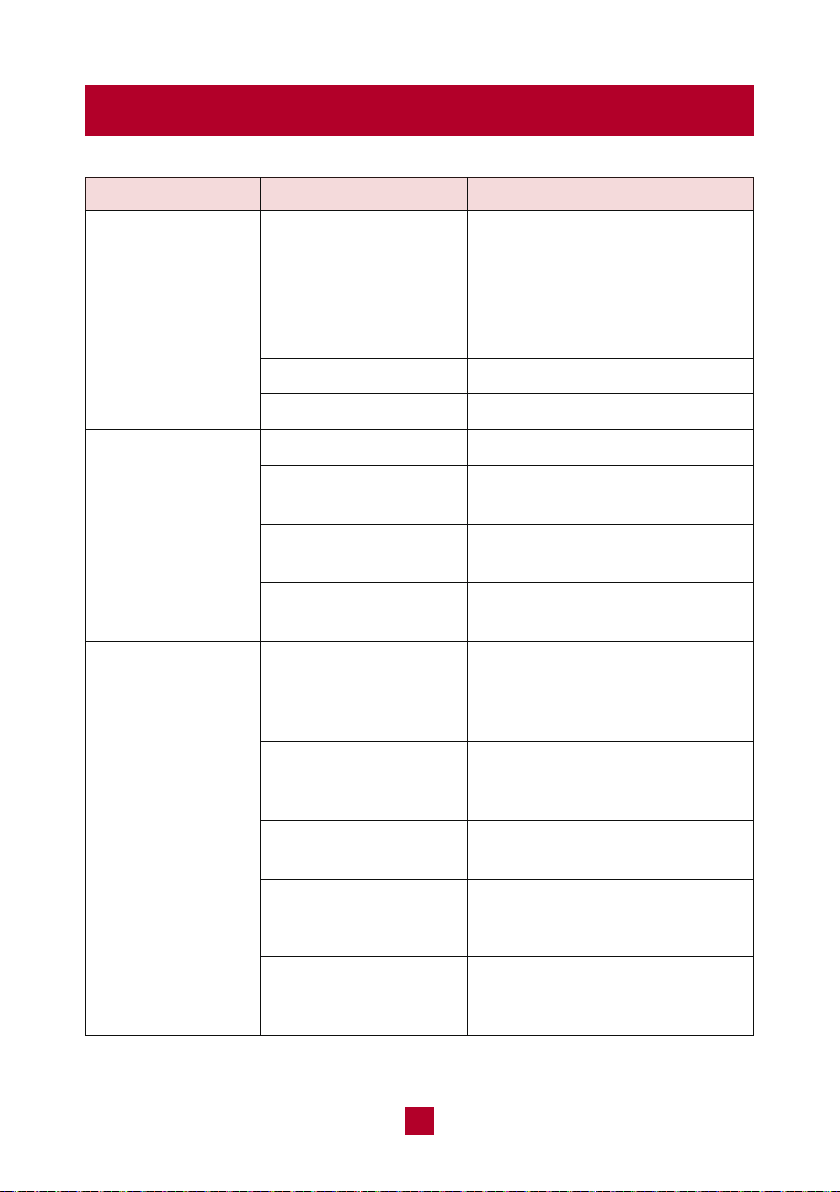
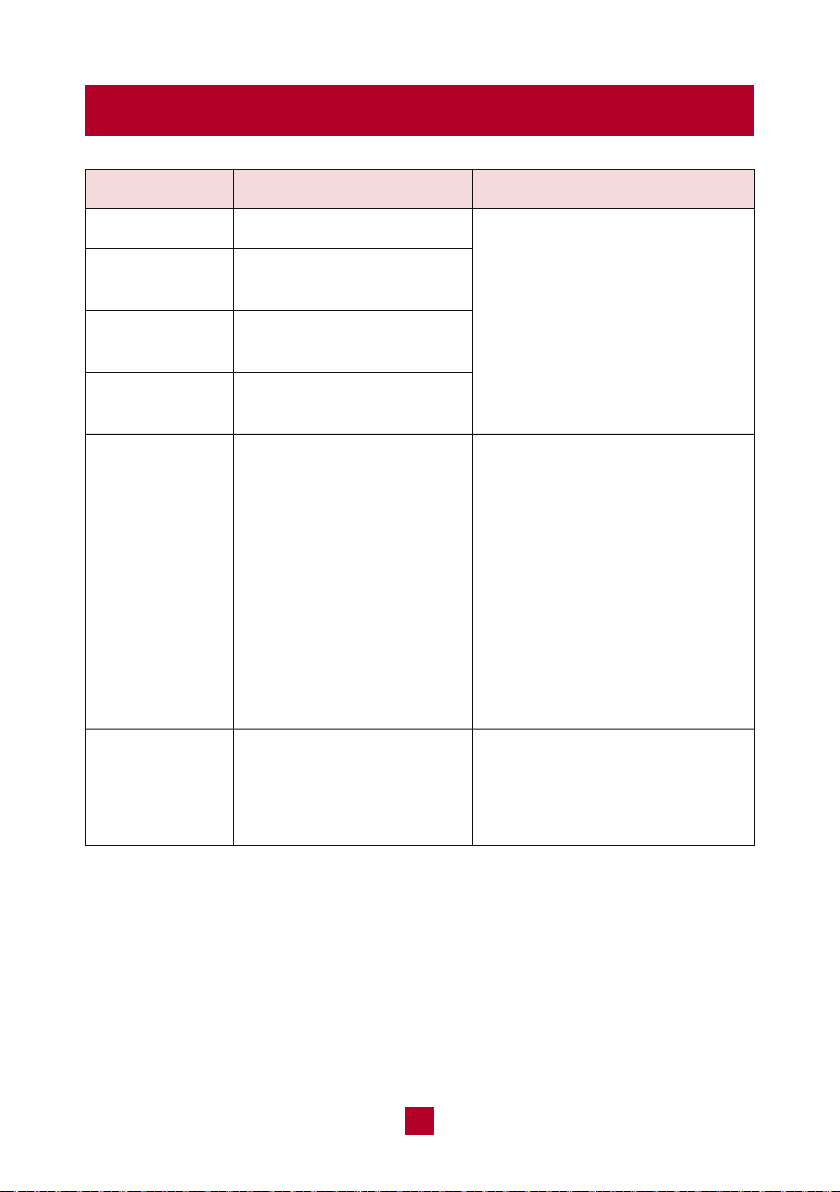
Troubleshooting
Whether the unit is
restarted up after
stopping immediately?
Is plug loose?
Power failure?
Is the power too low?
Whether the air filter
is too dirty?
Whether the set
temperature is proper?
Whether door and
window are closed?
Whether the unit is
interfered seriously
(such as static pressure,
unstable voltage)?
Whether remote control
is within the receiving
range?
Whether it's blocked
by obstacles?
Is sensitivity of remote
control low?
Whether there's a flu-
orescence lamp in the
room?
The unit is experiencing the
3-Minute Compressor Protection.
Wait for 3min, and then turn on
the unit again. For a detailed
explanation, please refer to
the answers below the diagram.
Reinsert the plug.
Wait after power recovery.
Wait after voltage is resumed.
Clean the air filter.
Adjust the temperature.
Close door and window.
Please pull out the plug. Insert
the plug after about 3min, and
then turn on the unit.
The receiving range of remote
control is 25 feet. Do not exceed
this range.
Remove the obstacles.
Check the batteries of the remote
control. If the power is low, please
replace the batteries.
Move the remote control close
to the air conditioner.
Air conditioner
can't operate
Poor cooling
Air conditioner can't
receive signals from
remote control or
remote control is
not sensible.
Issues Self check Possible solutions
24
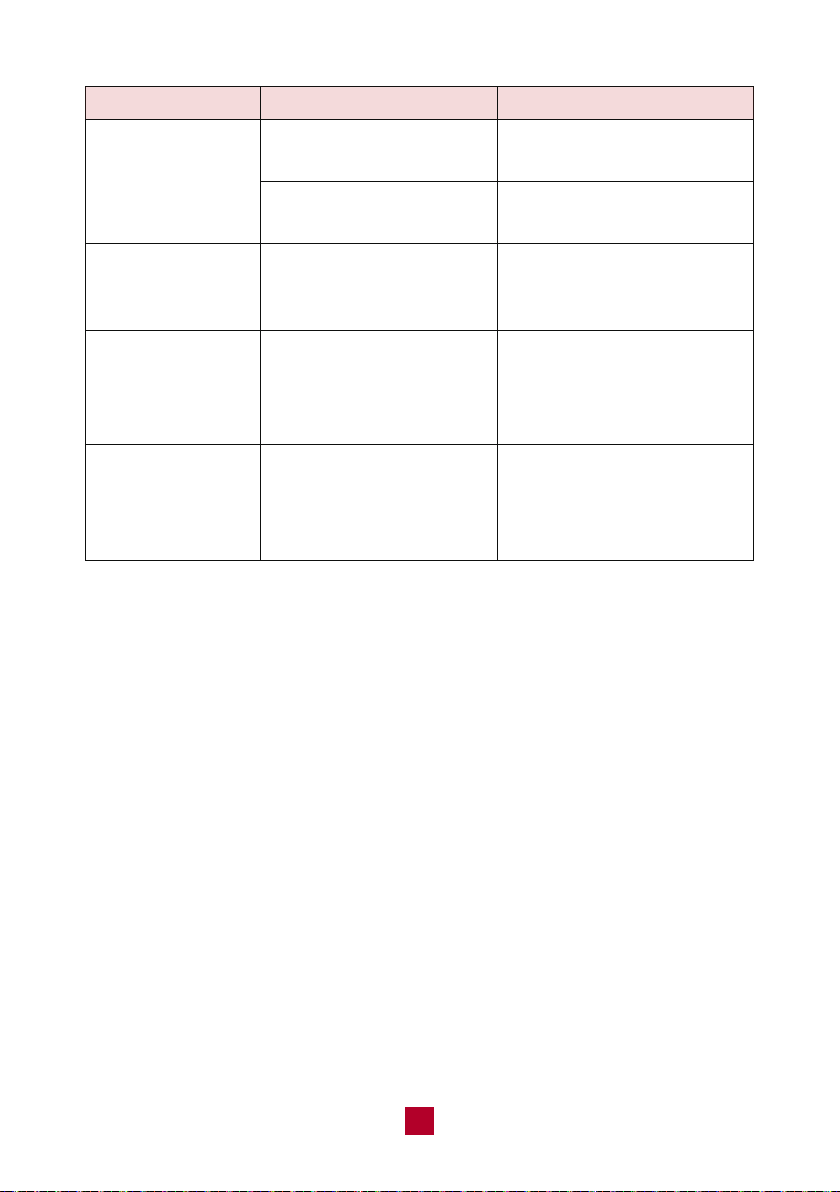
Issues Self check Possible solutions
What is 3-Minute Compressor Protection?
All TOSOT Air Conditioners have a 3-Minute Compressor Protection feature to help
extend the lifespan of your unit. You may notice this happening when the unit is not
blowing cold air or you can’t hear the sound of the compressor. Below are some
situations where the 3-Minute Protection Mode will be activated:
A. Your unit just experienced a power outage. The compressor will restart again
after 3 minutes.
B. After you switch from the fan or dry mode to the cooling mode, there is a
3-minute delay before the compressor starts up.
C. If the unit is powered on, then powered off, then powered on again within a
3-minute period, there will be a 3-minute delay before the compressor starts
again.
D. If the ambient room temperature is lower than the set temperature on your
control panel, the compressor will power off for 3 minutes and restart once the
ambient room temperature rises above the set temperature again.
25
Is the unit in auto mode?
Your desired temperature
exceeds the AC range
Check if the source of the
odor is somewhere in the
room
Has the unit just been
turned on or off?
Has the unit just been
turned on or off?
Temp cannot be adjusted in
auto mode
Temp set range is 61-86°F
Remove the source of the
odor and clean the filter
The flowing water sound is
the refrigerant inside the
air conditioner, which is
completely normal
Changing temperature can
cause the panel to shrink
or expand, causing friction
Set temperature
cannot be adjusted
Air blowing from
the air conditioner
has a weird smell
Abnormal sound
during operation,
such as water
flowing
Abnormal sound
during operation,
such as a rapid
“pop-pop” sound
If you notice or experience any of the following conditions, please turn off the air
conditioner, disconnect from power, discontinue use, and contact support immediately.
● The power cord is overheating or otherwise damaged
● Abnormal sound during operation
● A strange odor is emitted from the unit
● Excessive water leakage the unit
Do not attempt to repair or retrofit the air conditioner by yourself. All repairs must
be performed by qualified individuals.
26
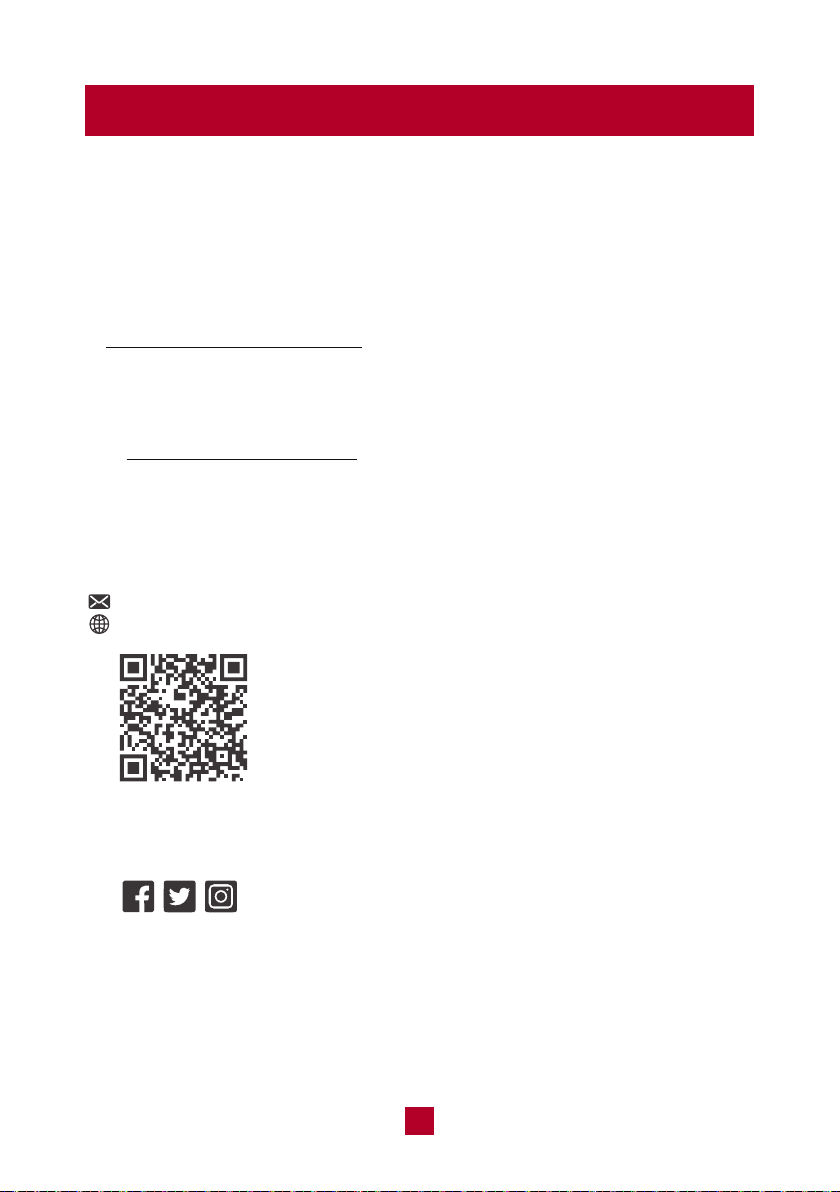
Malfunction Codes
Refrigerant leakage
Ambient temperature
sensor malfunction
Evaporator temperature
sensor malfunction
Exhaust hose temperature
sensor malfunction
Overload malfunction
F0
F1
F2
F4
H3, E8
H8
Error code Trouble shootingPossible causes
Please contact the
manufacture for help.
1. Check if the unit is under a
high-temperature and high-
humidity environment;
restart the unit after the
ambient temperature drops
to 95°F (35°C) below.
2. Check if the evaporator and
condenser are blocked.
If the malfunction codes still
occur, please contact the
manufacturer for help.
Please refer to the "Removing
Collected Water" part on page 19.
If "H8" still exists, please
contact the manufacturer.
Chassis is full of water
Warranty & Customer Support
Warranty Information
1. 1-Year warranty:
TOSOT Portable Air Conditioner comes with a 1-year warranty from the date
of purchase.
This warranty covers manufacturing and material defects. Please visit
https://tosotdirect.com/warranty for more details.
2. Additional 6-Month warranty extension:
You can get a 6-month warranty extension by registering your new product
at www.tosotdirect.com/extend.
Customer Support
Questions? We are here to help
www.tosotdirect.com
Share your experience
@tosotdirect
27
