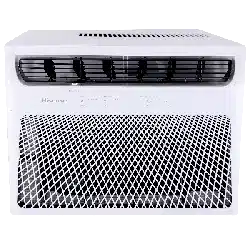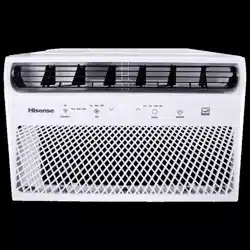

For questions about features, operation/ performance, parts or service,
call: 1-877-465-3566
Para consultas sobre las características, funcionamiento/ rendimiento,
piezas o servicio, llame al: 1-877-465-3566
USE AND INSTALLATION MANUAL
INSTRUCCIONES DE INSTALACIÓN Y USO
Model/ Modelo: AW0823TW1W
AW1023TW1W
AW1222TW1W
AW1422TW1W
2
Table of Contents
Safety Information ..................................3
Important Safety Instructions ........................3
Disposing of the Unit ...............................3
Electrical requirements .............................4
Recommended Grounding Method ....................4
Wiring requirement ................................4
Pre-Installation .....................................
4
Power Supply Cord ................................5
Planning Installation ...............................5
Hardware Included .................................6
Unpack the Air Conditioner ..........................7
Location Requirements .............................7
Window Opening Measurements ......................9
If AC is Blocked by Storm Window .....................9
Installation .......................................10
ON/OFF Settings ..................................14
Operation. . . . . . . . . . . . . . . . . . . . . . . . . . . . . . . . . . . . . . . . . 14
Mode Settings ...................................15
Temperature Settings. . . . . . . . . . . . . . . . . . . . . . . . . . . . . . 15
Fan Speeds .....................................15
Timer, Sleep, Filter Functions ........................15
Wi-Fi ..........................................16
Insert The Batteries ..... ..........................16
Quiet ..........................................18
Super
..........................................
18
Filter ....... ...................................18
Dimmer ........................................
18
Sleep ..........................................
18
Timer ..........................................
19
Care and Cleaning .................................
21
Cleaning the Air Filter .............................
21
Cleaning the Front Panel ...........................
21
Repairing Paint Damage ...........................
21
Annual Maintenance ..............................
21
Removing AC From Window .........................
21
Troubleshooting ...................................
22
Changing Air Direction
.............................
19
Exhaust Air Vent . ................................
20
Normal Sounds
... ..............................20
3
Safety Information
We have provided many important safety messages in this manual
and on your appliance. Always read and obey all safety messages.
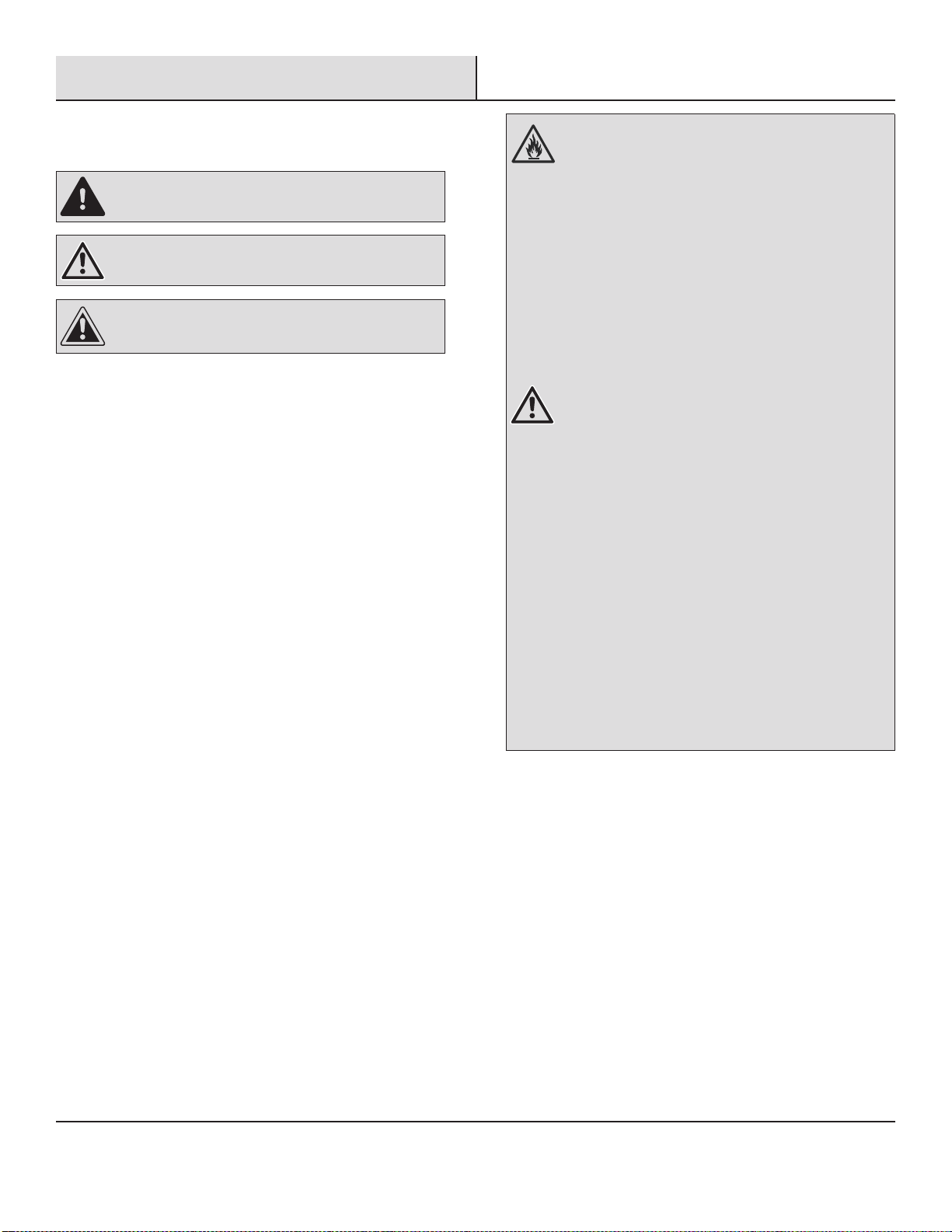
DANGER: This symbol alerts you to a potential hazard,
that if not avoided, will result In death or serious injury.
WARNING:This symbol alerts you to a potential hazard,
that if not avoided, could result In death or serious Injury.
CAUTION: This symbol alerts you to a potential hazard,
that if not avoided, may result in minor or moderate injury.
IMPORTANT SAFETY INSTRUCTIONS
To reduce the risk of re, electrical shock or injury when using your
air conditioner, follow these basic precautions:
□ Plug into a grounded 3-prong outlet.
□ Do not remove ground prong.
□ Do not use an adapter.
□ Do not use an extension cord.
□ Unplug air conditioner before servicing.
□ Use two or more people to move and install air conditioner.
DISPOSING OF THE UNIT
□ Before throwing out the device, it is necessary to remove the
battery cells and dispose or recycle them properly.
□ When you need disposal of the unit consult our dealer. If pipes
are removed incorrectly, refrigerant may blow out and come into
contact with your skin, causing injury. Releasing refrigerant into
the atmosphere also damages the environments.
□ Please recycle or dispose of the product packaging material in
an environmentally responsible manner.
□ Never store or ship the air conditioner upside down or sideways
to avoid damage to the compressor.
□ This appliance is not intended for use by persons (including
children) with reduced physical, sensory or mental capabilities,
or lack of experience and knowledge, unless they have been
given supervision or instruction concerning use of the appliance
by a person responsible for their safety. Children should be
supervised to ensure that they do not play with the appliance.
□ The wiring diagram is shown on nameplate on the air
conditioner.
WARNING: Risk of Fire or Explosion. This unit contains
ammable refrigerant.
Additional safety precautions must be followed.
□ Do not use means to accelerate the defrosting process
or to clean, other than those recommended by the
manufacturer.
□ The appliance shall be stored in a room without
continuously operating ignition sources (for example:
open ames, an operating gas appliance or an operating
electric heater).
□ Do not pierce or burn refrigerant tubing. Be aware that
refrigerants may not contain an odor.
□ Keep ventilation openings clear of obstruction.
□ The maximum refrigerant charge amount is shown on
nameplate on the air conditioner.
□ When handling, installing, and operating the appliance,
care should be taken to avoid damage to the refrigerant
tubing.
□ Do not drill holes in the unit.
□ Maintenance, cleaning, and service should only be
performed by technicians properly trained and qualied
in the use of ammable refrigerants.
□ Dispose of air conditioner in accordance with Federal
and Local Regulations. Flammable refrigerants require
special disposal procedures. Contact your local
authorities for the environmentally safe disposal of your
air conditioner.
□ The appliance shall be stored so as to prevent
mechanical damage from occurring.
□ This product contains small parts such as (batteries,
battery cover and screws) that may cause suffocation
if swallowed by children.
4
Pre-Installation
ELECTRICAL REQUIREMENTS
WARNING: Electrical Shock Hazard
□ Plug into a grounded 3-prong outlet.
□ Do not remove ground prong.
□ Do not use an adapter.
□ Do not use an extension cord.
□ Failure to follow these instructions can result in death, re, or electrical shock.
RECOMMENDED GROUNDING METHOD
This air conditioner must be grounded. This air conditioner is equipped with a power supply cord with a three-prong grounding plug. The
cord must be plugged into a three-prong outlet, grounded in accordance with all local codes and ordinances. If a grounded outlet is not
available, it is the customer’s responsibility to have a properly grounded three-prong outlet installed by a qualied electrical installer.
It is the customer’s responsibility:
□ To contact a qualied electrical installer.
□ To assure that the electrical installation is adequate and conforms to the Nation Electrical Code, ANSI/NFPA 70-last edition, and all local
codes and ordinances.
Copies of the standards listed may be obtained from:
National Fire Protection Association
1 Batterymarch Park
Quincy, Ma 02169-7471
www.nfpa.org
WIRING REQUIREMENT
Power supply Model Time-delay fuse (or circuit breaker)
115V
103.5V min.
126.5 V max.
8K BTU cooling only
10K BTU cooling only
13A
12K BTU cooling only
14K BTU cooling only
15A
5
Pre-Installation (continued)
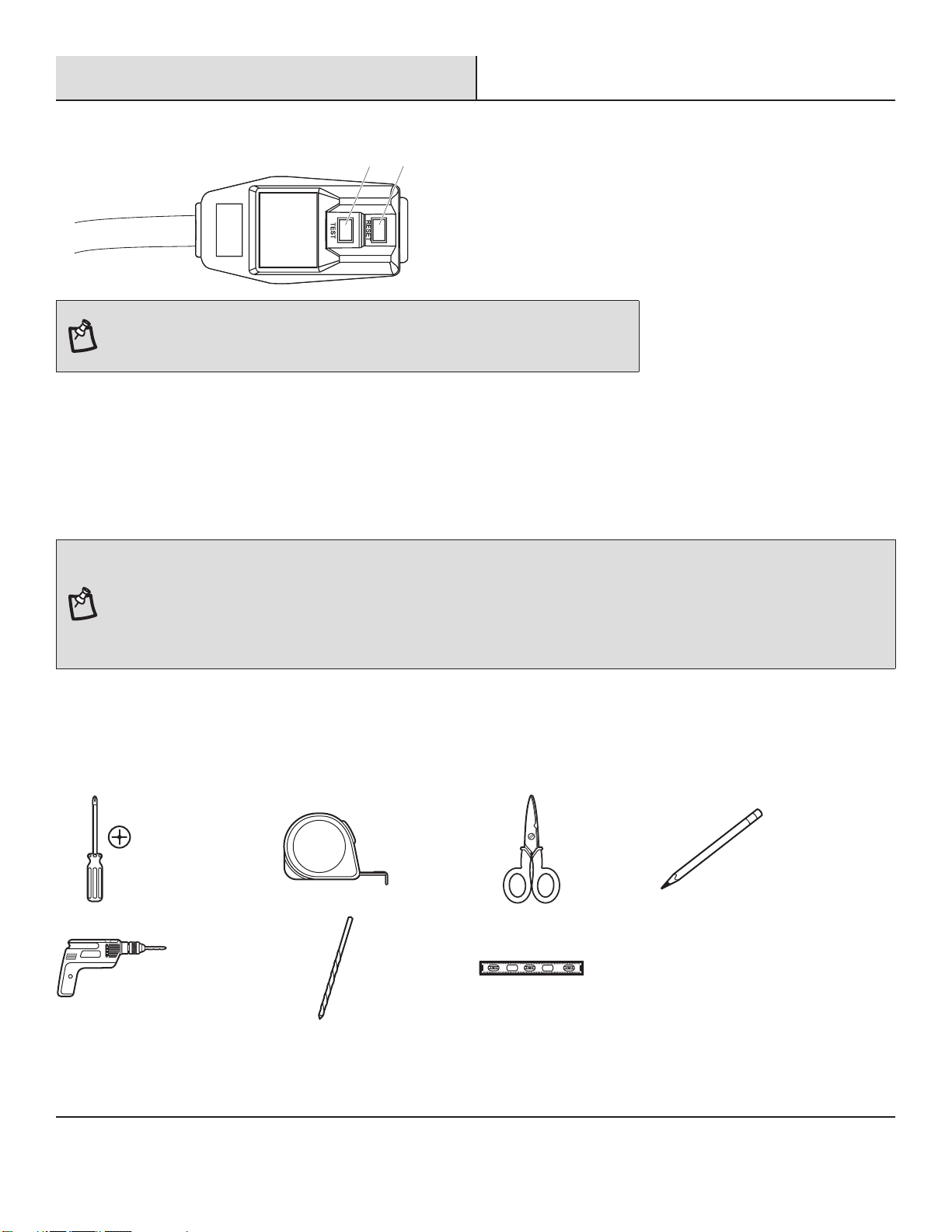
POWER SUPPLY CORD
1
2
NOTE: Your air conditioner’s device may differ from the one shown. This room air conditioner
is equipped with a power supply cord required by UL. This power supply cord contains state-
of-the-art electronics that sense leakage current. If the cord is crushed, the electronics detect
leakage current and power will be disconnected in a fraction of a second.
To test your power supply cord:
1. Plug power supply cord into a grounded 3-prong outlet.
2. Press RESET (2) (on some devices, a green light will turn on).
3. Press TEST (1) and listen for click. The RESET button will trip and on some devices, a green light will turn off.
4. Press and release RESET (2) and listen for click. The RESET button will latch, and on some devices, a green light will turn on. The
power supply cord is ready for operation.
NOTE: The RESET button must be pushed in for proper operation.
□ The power supply cord must be replaced if it fails to trip when the test button is pressed or fails to reset.
□ Do not use the power supply cord as an off/on switch. The power supply cord is designed as a protective device.
□ A damaged power supply cord must be replaced with a new power supply cord obtained from the product manufacturer and must not be
repaired.
□ The power supply cord contains no user serviceable parts. Opening the tamper-resistant case voids all warranty and performance claims.
PLANNING INSTALLATION
Gather the required tools and parts before starting installation. Read and follow the instructions provided with any tools listed here.
TOOLS REQUIRED
Phillips
screwdriver
Tape
measure
Scissors Pencil
Cordless drill 1/8 in. bit Level
6
Pre-Installation (continued)
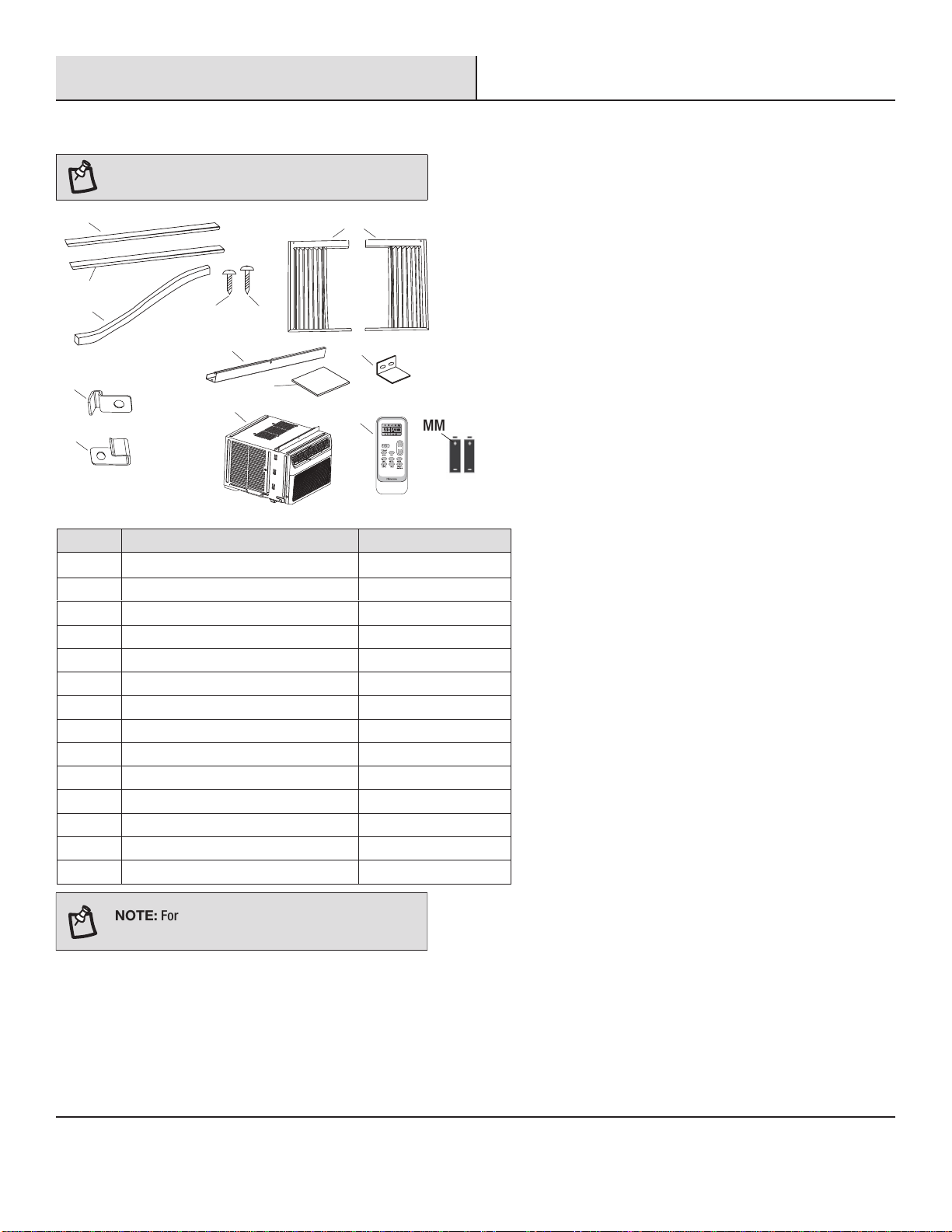
HARDWARE INCLUDED
NOTE: Check that all parts are included in parts
package.
A1
GG
BB
BB
CC
DD
EE
HH
KK
KK
II
JJ
LL
FF
QuantityDescriptionPart
1A2
1Foam sealBB
2Lock frame (for wooden windows)CC
2Lock frame (for vinyl-clad windows)DD
43/8 inch screwsEE
73/4 inch screwsFF
2Side curtainsGG
1Top railHH
1Sash lockII
2EVA foamJJ
1Air conditionerKK
1Remote controlLL
MM Batteries (standard AAA 1.5 Volt) 2
rstuv
wxyz{|
MM
NOTE:
For 12/14K Btu models, top rail(HH) and 3/8
inch screws(EE) had been attached by manufacturer.
A2
1A1 Adhesive seal (gray)
Adhesive seal (black)
7
Pre-Installation (continued)
UNPACK THE AIR CONDITIONER
WARNING: Excessive Weight Hazard
Use two or more people to move and install air conditioner.
Failure to do so can result in back or other injury.
Remove packaging materials
□ Remove and dispose of/recycle packaging materials. Remove tape and glue residue from surfaces before turning on the air
conditioner. Rub a small amount of liquid dish soap over the adhesive with your ngers. Wipe with warm water and dry.
□ Do not use sharp instruments, rubbing alcohol, ammable uids, or abrasive cleaners to remove tape or glue. These products can
damage the surface of your air conditioner.
□ Handle the air conditioner gently.
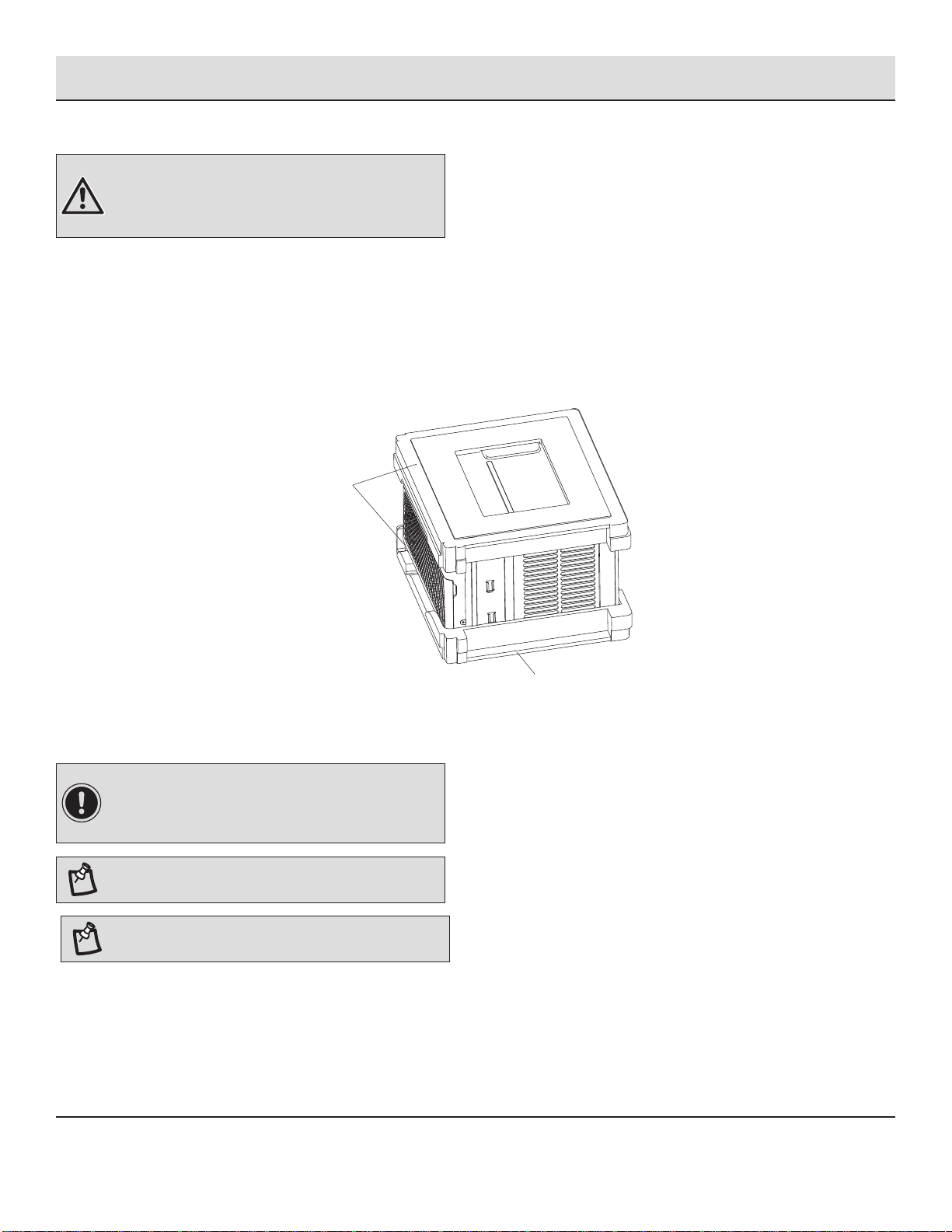
□ Remove top rail (HH) from the packaging material (A).
HH
LOCATION REQUIREMENTS
Before you Begin
Read these instructions completely and carefully.
IMPORTANT:
□ Save these instructions for local inspector’s use.
□ Observe all governing codes and ordinances.
NOTE: Installer, be sure to leave these instructions with
the Consumer.
NOTE: Consumer, keep these instructions for future
reference.
□ Skill level: Installation of this appliance requires basic mechanical skills.
□ Completion time: Approximately 1 hour.
□ We recommend that two people install this product.
(8K/10K BTU models)
A
8
Pre-Installation (continued)
□ Proper installation is the responsibility of the installer.
□ Product failure due to improper installation is not covered under the warranty.
□ You MUST use all supplied parts and use proper installation procedures as described in these instructions when installing this air
conditioner.
IMPORTANT: Observe all governing codes and
ordinances.
Check the location where air conditioner will be installed. Proper installation is your responsibility. Make sure you have everything
necessary for correct installation.
The location should provide:
□ Do not use an extension cord. The appliance shall be installed in accordance with national wiring regulations.
□ Free movement of air in room to be cooled.
□ A large enough opening for the air conditioner.
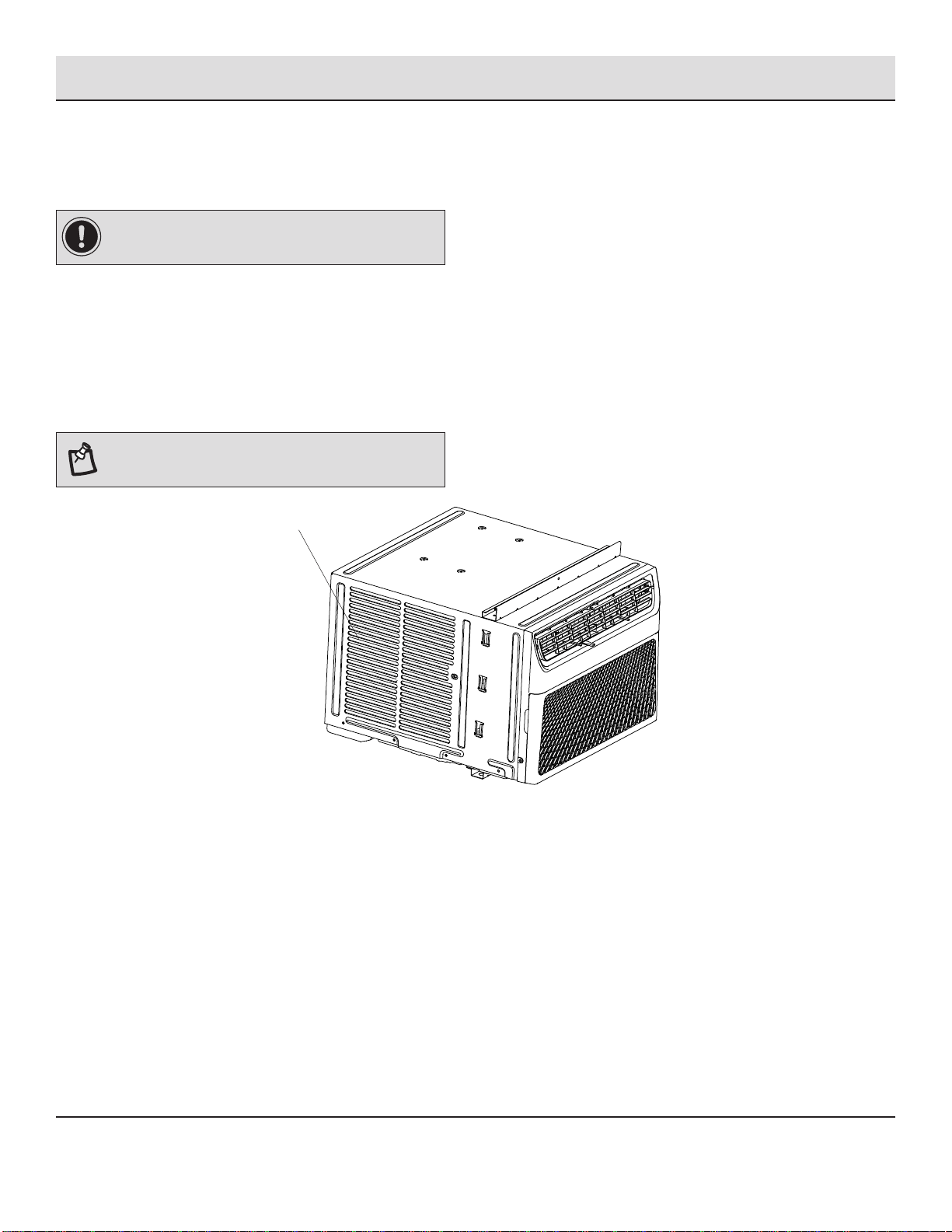
NOTE: Cabinet louvers (A) must not be obstructed. Air
must be able to pass freely through the cabinet louvers.
A
A
A
9
Pre-Installation (continued)
WINDOW OPENING MEASUREMENTS
□ These instructions are for a standard double-hung window. You will need to modify them for other types of windows.
□ The air conditioner can be installed without the side curtain panels if needed to t in a narrow window. See the window opening
dimensions.
□ All supporting parts must be secured to rm wood, masonry or metal.
□ The electrical outlet must be within reach of the power cord.
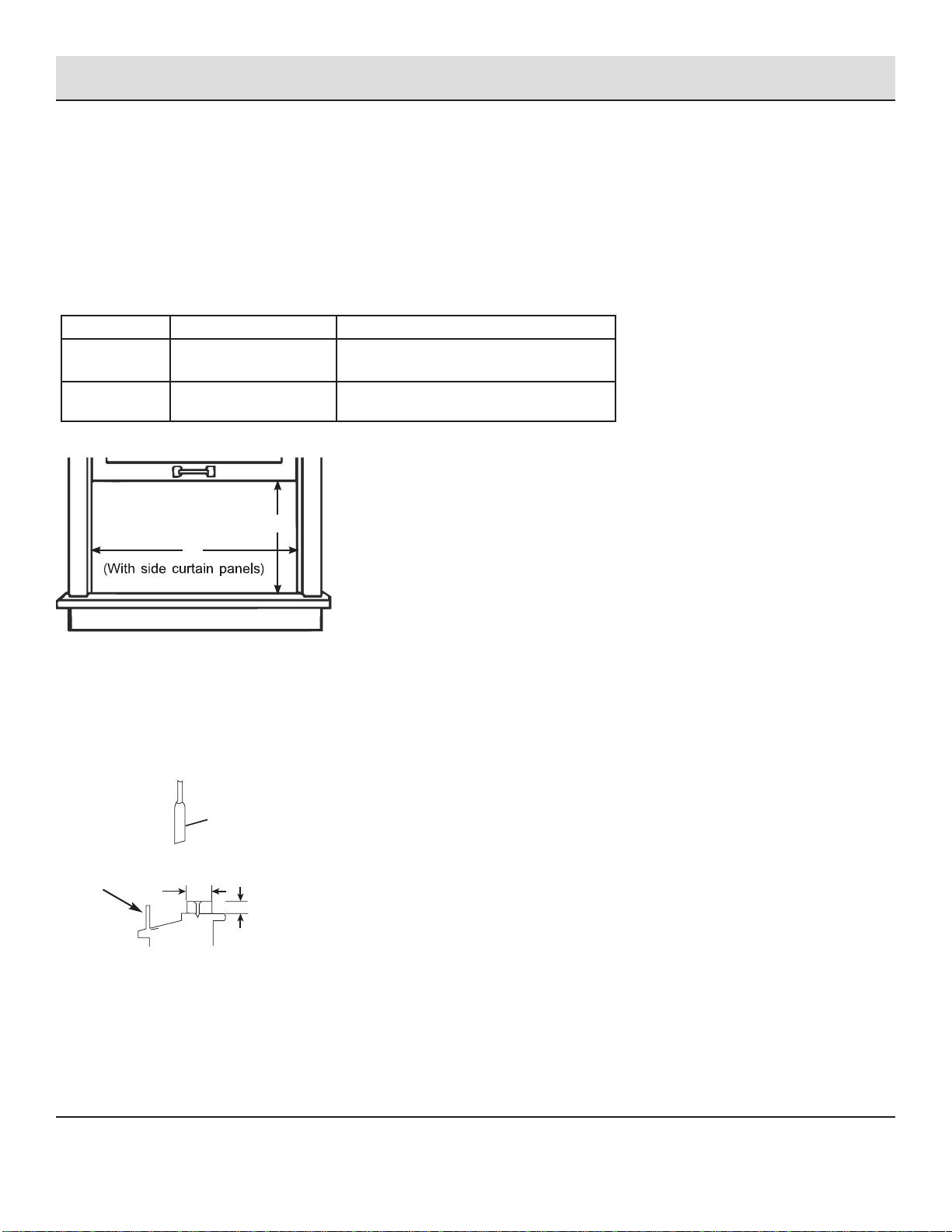
□ Follow the dimensions in the table and illustration for your model.
Models A B
8K BTU
10K BTU
13 3/5 inch (345 mm) min 24 1/2 inch (622 mm) - 39 inch (991 mm)
12K BTU
14K BTU
15 1/5 inch (386 mm) min 24 9/10 inch (632 mm) - 39 inch (991 mm)
A
B
IF AC IS BLOCKED BY STORM WINDOW
Add wood as shown, or remove storm window before air conditioner is installed.
If storm window frame must remain, be sure the drain holes or slots are not caulked or painted shut. Accumulated rain water or
condensation must be allowed to drain out.
Storm window
frame or other
obstruction.
Sash
1 - 1/2 in. min
(38 mm)
Board thickness as
required, for proper
pitch to rear, along
entire sill. Fasten
with nails or screws.
10
Installation
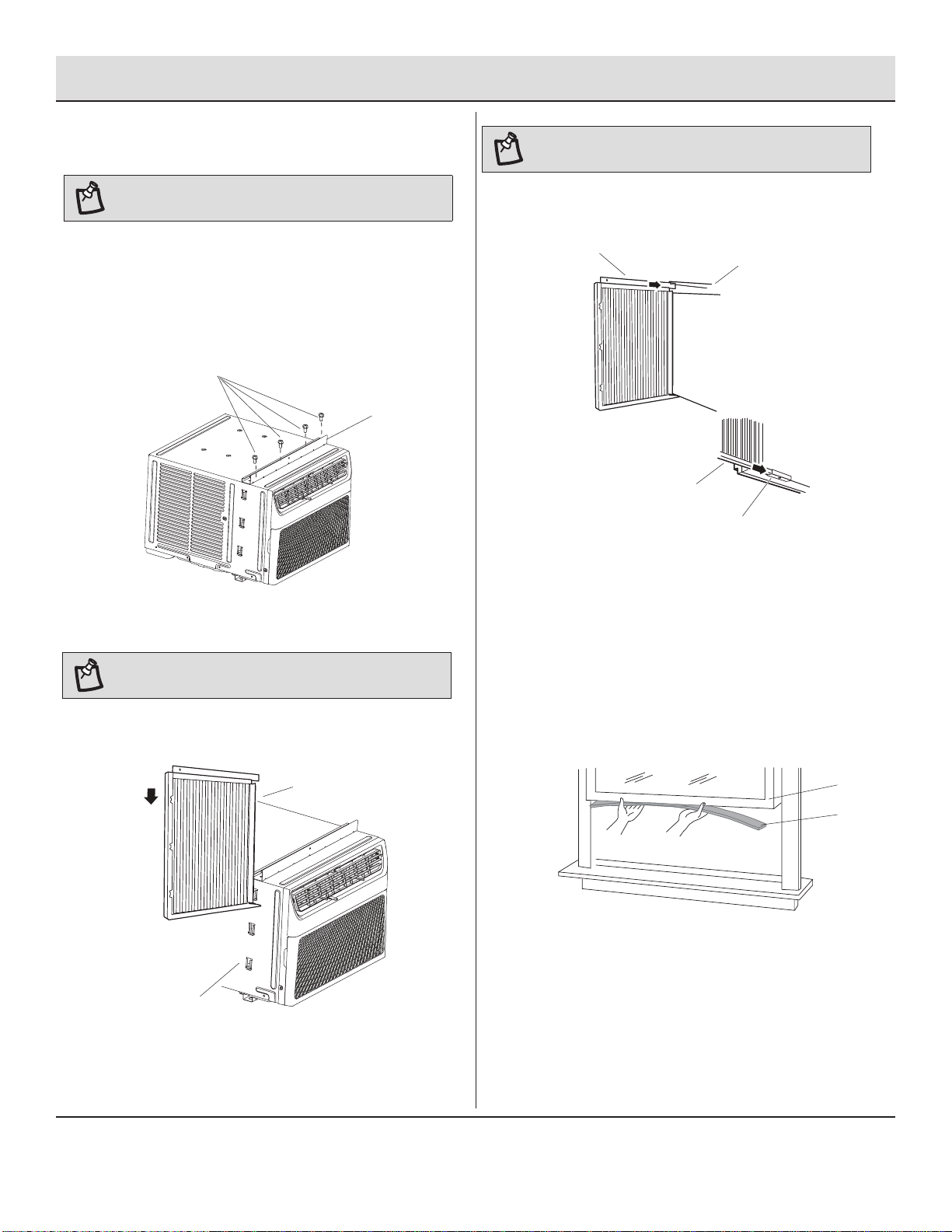
1
Attaching the Top Rail
of the air conditioner cabinet.
□ Using four 3/8 inch (10 mm) screws (EE), attach the top rail
(HH) to the air conditioner cabinet.
EE
HH
NOTE: Attach side curtains to the air conditioner before
placing the air conditioner in window.
2
Installing the Side Curtains
NOTE: Attach curtains to the air conditioner before placing
the air conditioner in window.
□ Slide the side curtain (GG) directly into the cabinet (B).
□ Slide the side curtain (GG) down.
GG
B
NOTE:
For certain models, top rail had been attached by
manufacturer.
B
□ Locate the bag of screws provided.
□ Place the top rail (HH) on top of the air conditioner cabinet,
lining up the 4 holes in the top rail with the 4 holes on top
□ Insert top and then bottom of
left-hand curtain housing(A)
in top rail (HH) and bottom rails (B) on air conditioner.
A
HH
A1
A
A
A
B
□ Slide the curtain housing into the rails as far as it will
go.
□ Repeat above steps for the right-hand curtain.
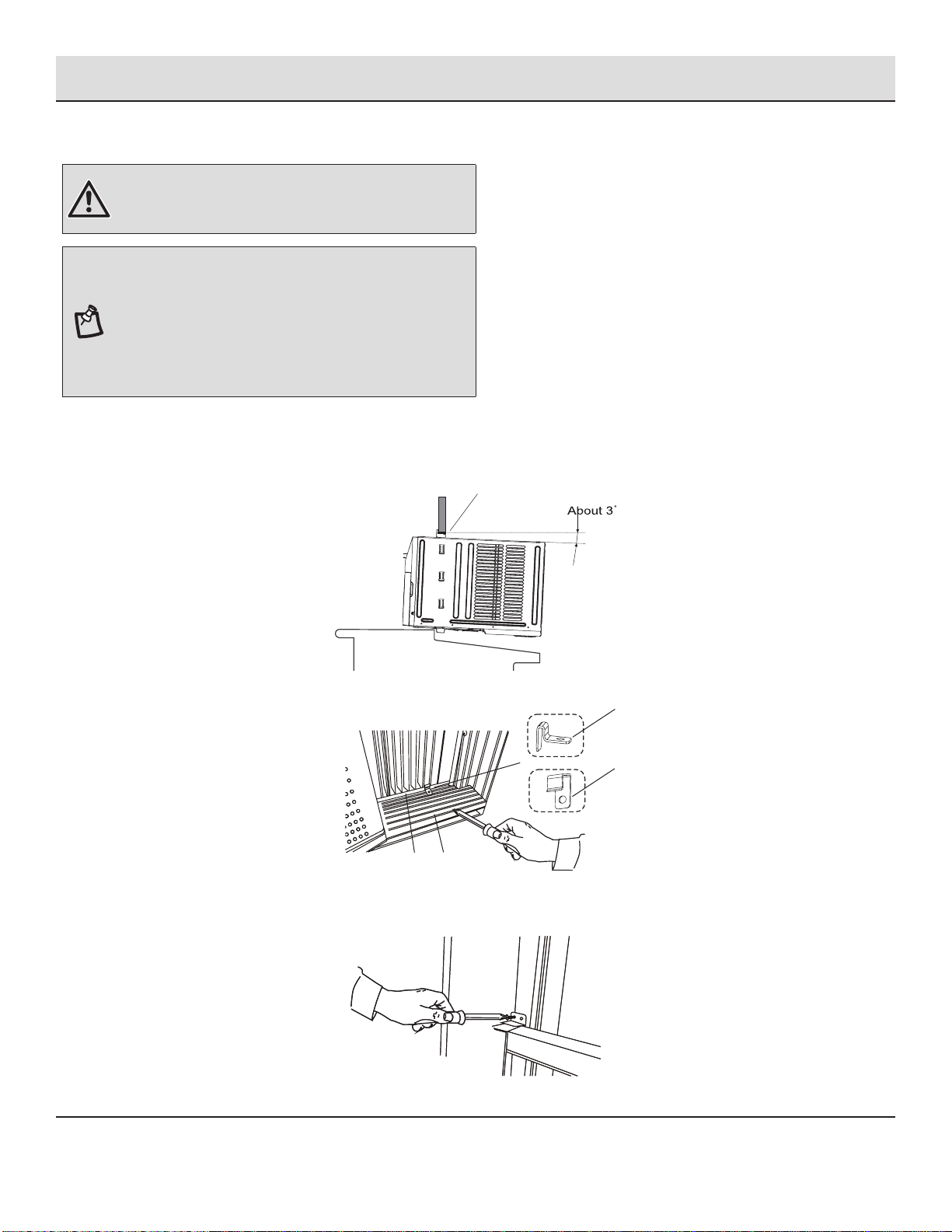
3
Attaching the Adhesive Seal
□ Cut the adhesive seal (gray) (A1) to the width of the lower
window sash (B).
□ Remove the backing from the seal and attach the seal to the
bottom of the lower window sash.
11
Installation (continued)
4
Placing Air Conditioner in Window
WARNING: Excessive Weight Hazard
□ Use two or more people to move and install air conditioner.
□ Failure to do so can result in back or other injury.
NOTES:
□ Handle air conditioner gently.
□ Be sure your air conditioner does not fall out of the opening
during installation or removal.
□ Do not block the louvers in the front panel.
□ Do not block the louvers on the outside of the air conditioner.
□ Your model may differ from the one shown.
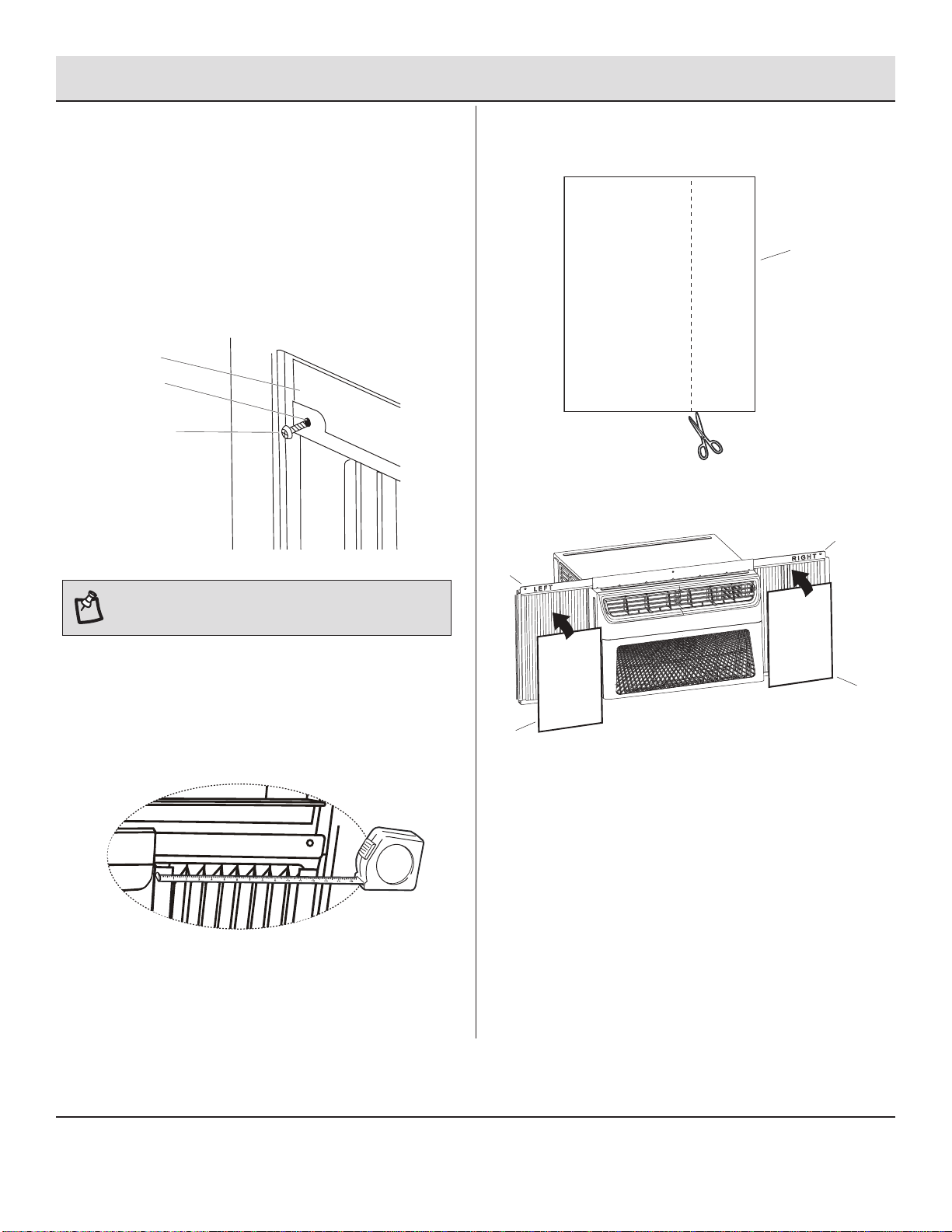
□ To secure lower sash in place, attach sash lock (II) with 3/4 inch (19 mm) screw (FF) as shown.
□ Center air conditioner in window. Lower the window sash behind the top rail (HH) to hold cabinet in place.
□ Keeping a rm grip on the air conditioner, carefully place the unit into the window opening so the bottom of the air conditioner
frame is against the window sill and make sure the unit is staying center of the window.
□ Carefully close the window behind the top rail of the unit.
HH
A
B
CC: For wooden window
□ Place the frame lock (CC) or (DD) between the curtain housing (A) and the window sill (B) with 3/4 inch (19 mm)screw (FF) as shown.
DD: For vinyl-clad window
12
Installation (continued)
5
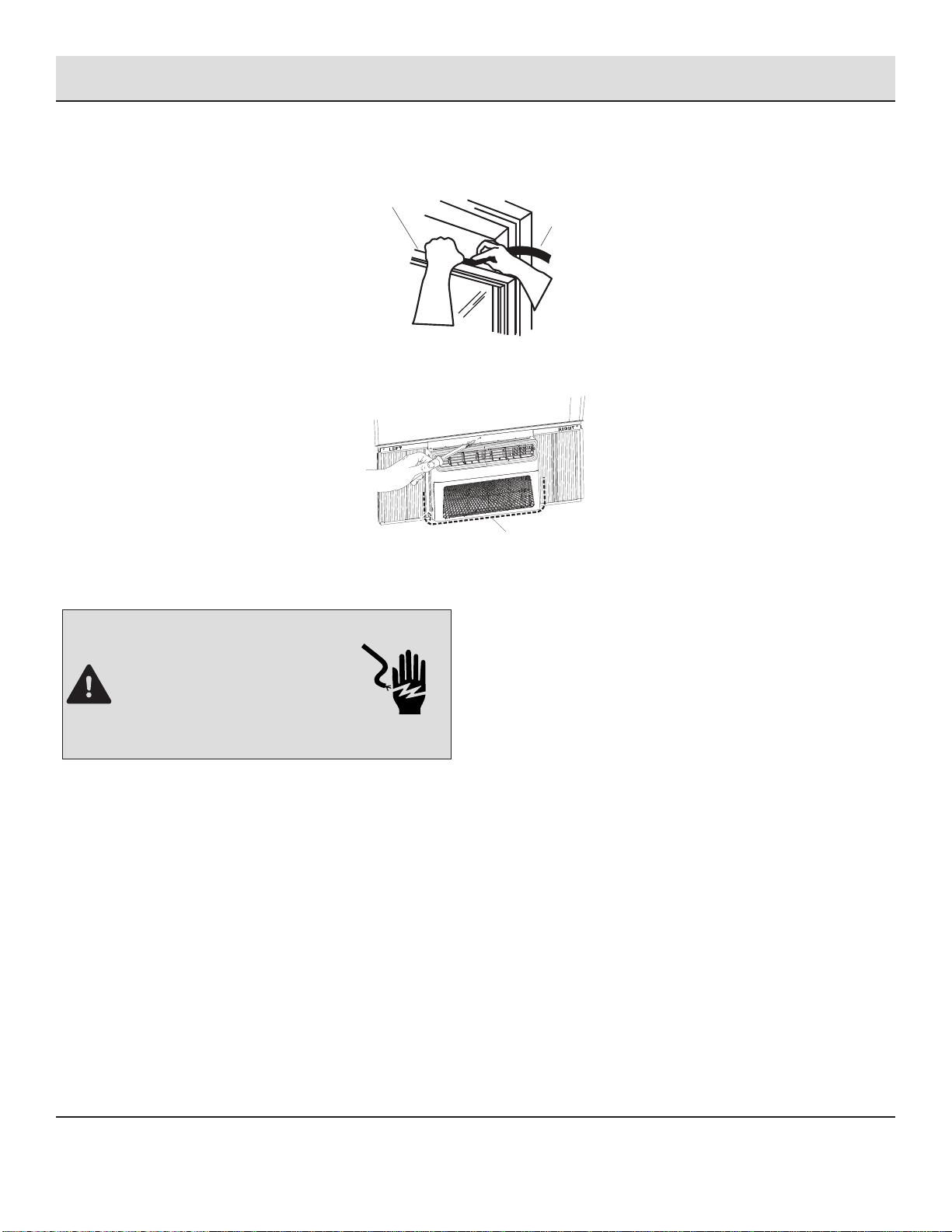
Attaching Side Curtains to Window
□ Pull the left-hand side curtain out until it ts into the window
channel.
□ Use a 1/8 inch (3 mm) drill bit to drill a starter hole through
the hole in the curtain housing (B) .
□ Insert one of the 3/4 inch (19 mm) screws (C) through the
left-hand curtain housing (B) and into the window sash (A).
□ Remark a line on the EVA foam (JJ) according to less 1 /8
inch (3 mm) than the measured width, then cut the EVA
foam (JJ) along the line.
JJ
□ Remove the backing from the EVA foam (JJ). Attach one
EVA foam (JJ) on the curtain housing (A), the side with
adhesive should facing the curtain housing.
A
A
JJ
JJ
□ Repeat for the right-hand curtain.
C
C
B
B
A
A
NOTE:
The remaining steps on this page are only
applicable for E-star models,with E-star LOGO on the control
panel.
□ Put one EVA foam (JJ) on the curtain housing.
□ In order to minimize air leaks and ensure optimal
insulation, it is necessary to install the EVA Foam (JJ)
on
the curtain housing.
□ After the unit is installed to the window, measure the inner
width of the side curtain as shown.
□ Repeat for the left-hand curtain.
13
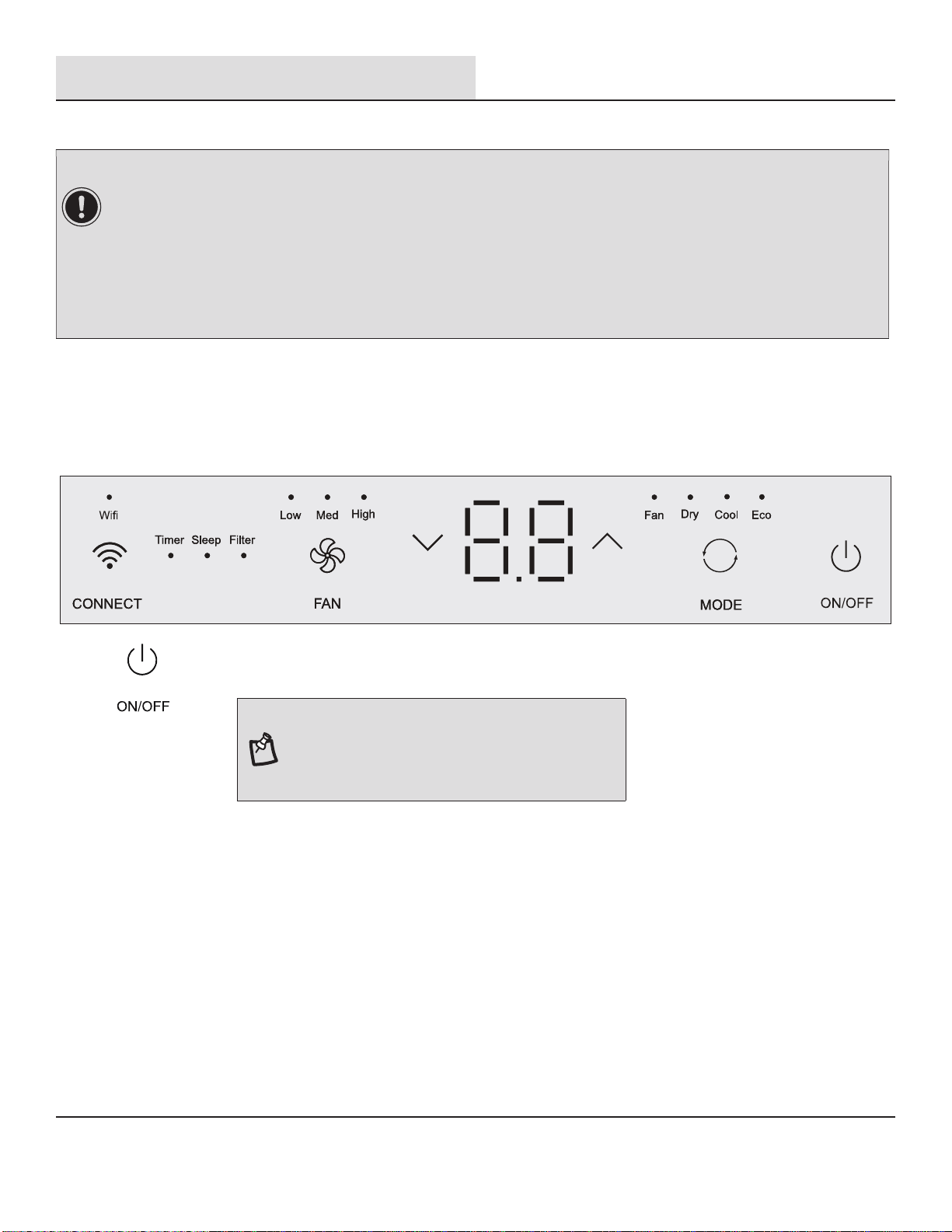
□ Use a 1 /8 inch (3 mm) drill bit to drill a starter hole through the hole in the top rail.
□ Attach top rail to window sash with one 3/4 inch (19 mm)screw to secure window in place.
D
□ Check the gap (D) around the unit and seal it with the adhesive seal (black) (A2) attached.
DANGER: ELECTRICAL SHOCK HAZARD
□ Plug into a grounded 3-prong outlet.
□ Do not remove ground prong.
□ Do not use an adapter.
□ Do not use an extension cord.
□ Failure to follow these instructions can result in death,
re, or electrical shock.
□ Plug into a grounded 3-prong outlet.
□ Press RESET on the power supply cord. See “Electrical Requirements”.
BB
Installation (continued)
6
Completing Installation
□ Insert foam seal (BB) behind the top of the lower window sash (A) and against the glass of the upper window.
A
14
Operation
AIR CONDITIONER USE
□ Operating your air conditioner properly helps you to obtain the best possible results.
□ This section explains proper air conditioner operation.
1
Using the Control Panel
ON/ OFF SETTINGS
□ Press the power button to turn on the air conditioner.
NOTE: When the air conditioner is turned on for the rst
time after it is plugged in, the display will show the current
set temperature and will run in the ECO control.
After cleaning and replacing the lter, press the POWER
button for resetting and the FILTER light will go off.
IMPORTANT:
□ If you turn off the air conditioner, wait at least 3 minutes before turning it back on. This prevents the air conditioner from
blowing a fuse or tripping a circuit breaker.
□ Air conditioner in the Cool mode operation the better limits: Outdoor 64.4-109.4°F (18-43 °C),
≤
80% RH; indoor 62.6-89.6°F
(17-32°C),
≤
80% RH.
□ Air conditioner in the Heat mode operation the better limits: Outdoor 19.4-75.2°F (-7-24 °C),
≤
80% RH; indoor 32-80.6°F
(0-27°C),
≤
80% RH.
□ In the event of a power failure, your air conditioner will operate at the previous settings when the power is restored.
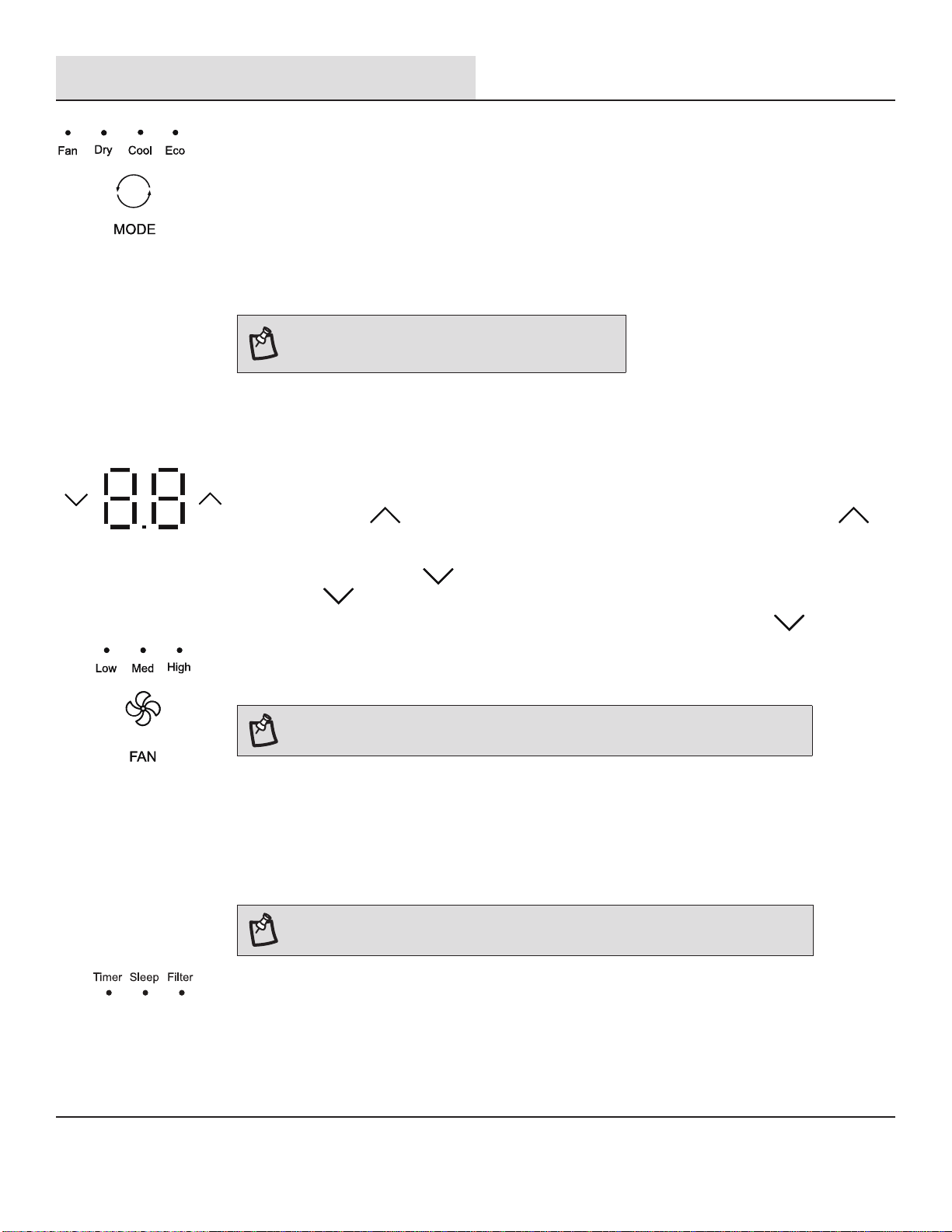
□ Select mode. See
“Mode Settings” on page 15.
□ Set temperature. See
“Temperature Settings” on page 15.
□ Select fan speed. See
“Fan Speeds” on page 15.
15
Operation (continued)
MODE SETTINGS
□ Press MODE repeatedly until you see the indicator light glow for the desired setting.
□ Choose Fan, Dry, Cool, Eco.
□ FAN - To select Fan Only mode.
□ Dry - Dries the room. The air conditioner automatically selects the temperature. Fan runs at Low speed
only.
□ Cool - Cools the room.
□ Eco - Cools the room and saves energy.
NOTE:
Dry mode should not be used to cool the room.
NOTE: The Fan button will operate only when the Fan, Cool, ECO or Heat mode has been
selected.
□ Press FAN until you see the indicator light glow for the desired setting.
□ Choose High, Med, Low.
□ High - for maximum cooling
□ Med - for normal cooling
□ Low - for quieter cooling
NOTE: In ECO mode,the Fan will run at low speed when compressor turns off.
TIMER, SLEEP, FILTER FUNCTIONS
□ The LED light on control panel for Timer, Sleep, Filter.
□ For function operation, see “Using the Remote Control.”
□ For E-star models, the fan will continue to run after the compressor shuts off for 2 minutes (4 minutes
for the rst time), then the fan will shuts off for 10 minutes.The fan then cycles for intervals of 2
minutes on and 10 minutes off until the room temperature is above the set temperature, at which time
the compressor turns back on and Cooling resumes. Select ECO mode to initiate this function.
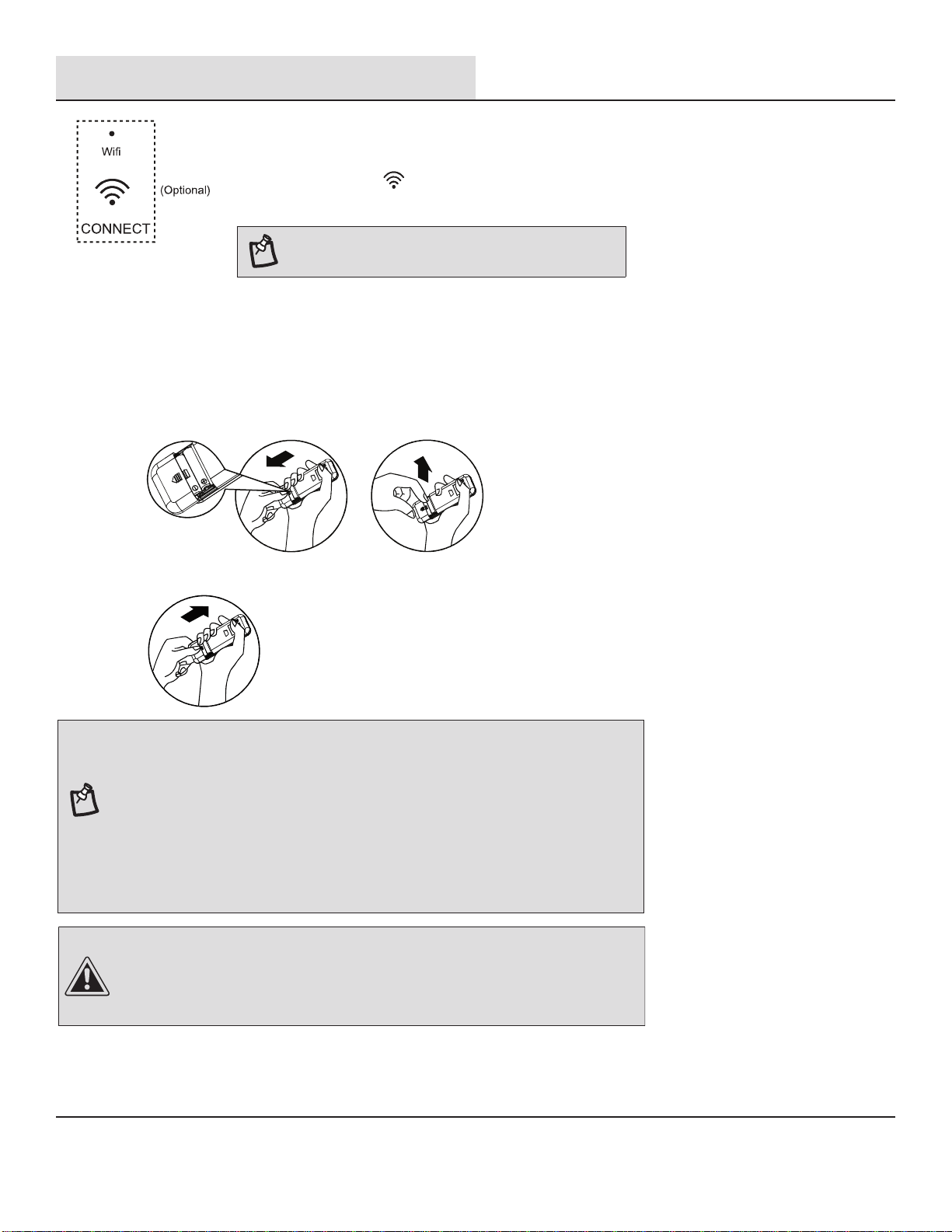
TEMPERATURE SETTINGS
□ Press the plus UP
button to raise the temperature. Each time you press or hold the plus UP
button, the temperature will go up 1 °F (1 °C) until it reaches 86°F (30°C).
□ Press the minus DOWN
button to lower the temperature. Each time you press or hold the
DOWN
button, the temperature will go down 1 °F (1 °C) until it reaches 61 °F (16°C).
□ To change the temperature display from °F to °C: Press both the MODE and DOWN
buttons at
the same time for 5 seconds to switch the display from °F to °C.
FAN SPEEDS
16
Operation (continued)
WI-FI
□ Wi-Fi control is available for connected models with this logo on control panel.
□ Press the CONNECT button for 5 seconds; the LED starts to ash.
□ After the Wi-Fi connects to the router, the LED keeps on or the LED keeps off.
NOTE: Wi-Fi control is available only for Wi-Fi control
models.
2
Using the Remote Control
INSERT THE BATTERIES
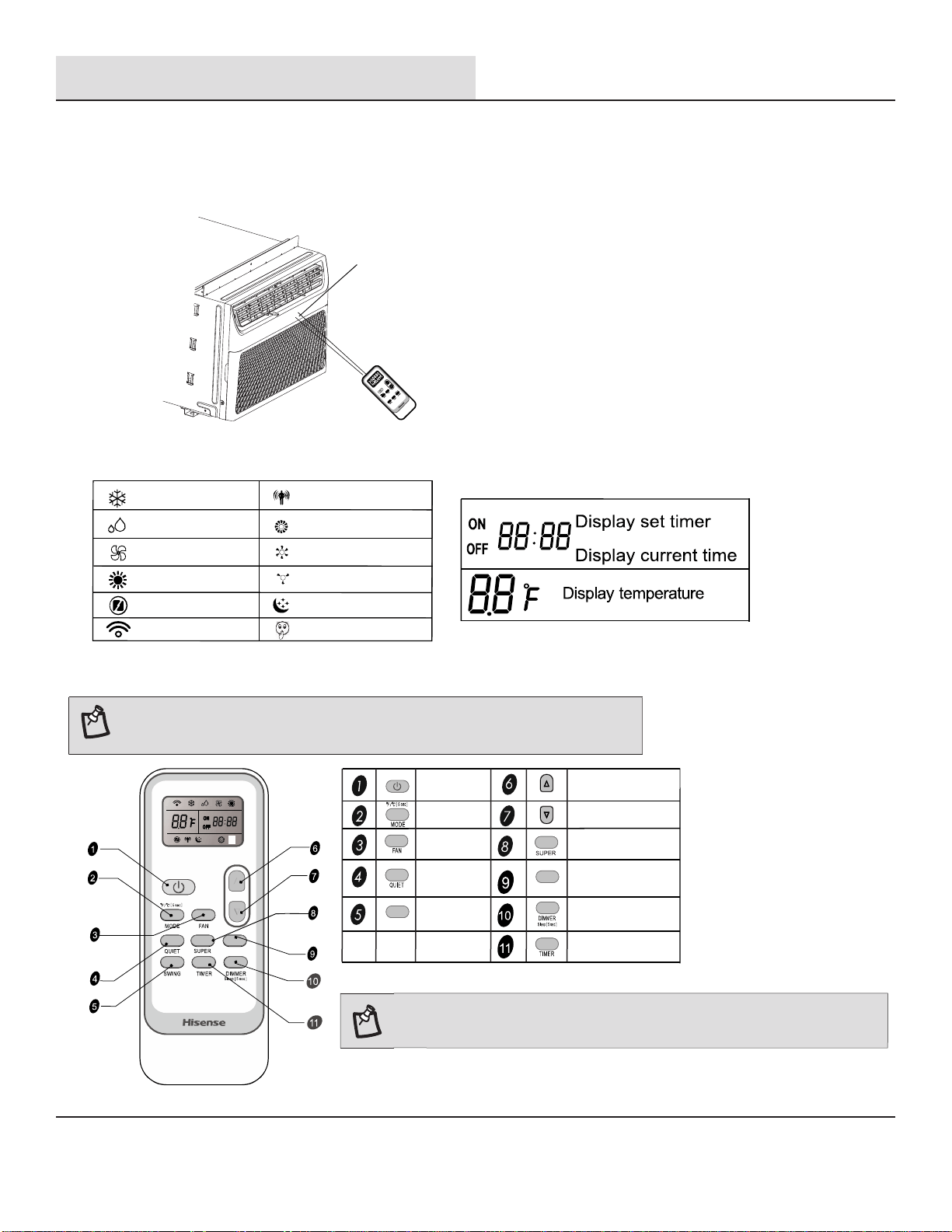
□ Remove the battery cover along the arrow direction.
□
Insert new batteries making sure that the (+) and (-) of battery are matched correctly.
□ Re-attach the cover by sliding it back into position.
NOTE:
□ Use 2 standard AAA (1.5 volt) batteries. Do not use rechargeable batteries.
□ Replace batteries with new ones of the same type when the display becomes dim, or
after 6 months.
□ When replacing batteries, always replace both batteries with new batteries. Do not
mix old and new batteries. Do not mix alkaline, standard( carbon-zinc),or
rechargeable (ni-cd, ni-mh, etc) batteries.
□ If the air conditioner will not be used for an extended period of time, remove the
batteries from the remote.
□
Do not use the remote if the batteries have leaked.
The chemicals in batteries could cause burns or other health hazards.
□ Do not dispose of batteries in a fire. Batteries may explode or leak.
17
Operation (continued)
HOW TO USE
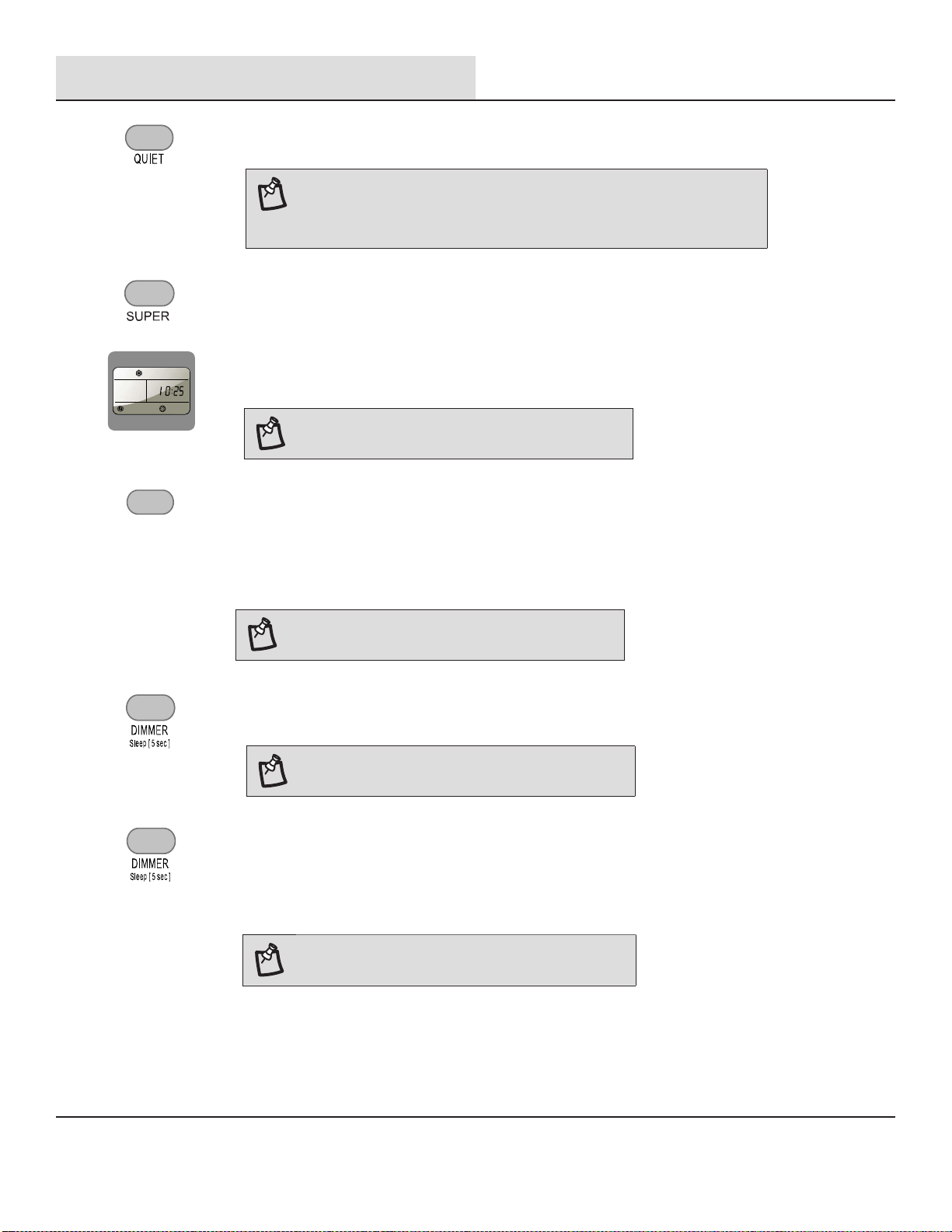
□ To operate the room air conditioner, aim the remote control at the signal receptor. The
remote control will operate the air conditioner at a distance of up to 23' (7m) when
pointed at the signal receptor.
Signal receptor/display
NOTE: Remote control may differ in appearance.
Swing function is not available on this models.
Button AND FUNCTION
SWING
FILTER
ON/ OFF
MODE
FAN
QUIET
SWING
UP
DOWN
SUPER
FILTER
DIMMER or SLEEP
TIMER ON/ OFF
NOTE:
Press and hold the MODE button on the remote for 5 seconds to switch the
temperature display from degrees Fahrenheit (°F) to degrees Celsius (°C).
INDICATION SYMBOLS
Cooling Indicator
Dry indicator
Fan only indicator
Heating Indicator
Super indicator
Signal transmit
Eco Indicator
High fan speed
Medium fan speed
Low fan speed
Sleep Indicator
Quiet indicator
FILTER
18
Operation (continued)
DIMMER
□ Press the DIMMER button to turn off the control panel display.
NOTE: When in DIMMER mode, new control inputs
will return display to normal.
□ Press MODE to select Cool, Dry or ECO.
□ Press FAN to select High, Med or Low.
□ Press the up or down arrow button to set the temperature.
□ Press and hold the DIMMER button on the remote for 5 seconds to switch the DIMMER mode to SLEEP mode.
NOTE: Sleep control cannot be selected in Fan mode.
NOTE:
In the SUPER mode, you can set the timer.
Fast cooling
SLEEP
The SLEEP mode can be set in Cool, Dry or ECO mode. When in sleep mode, the unit
will utilize lower, quieter fan speeds and automatic temperature adjustments offering 8
hours of optimal sleeping conditions before shutting off.
□ After 10 seconds, the light on the control panel display will dim.
□ Press the Quiet button to set or cancel the Quiet Mode operation.
QUIET
NOTE:
□
□
It takes about 2 to 3 minutes to fully enter the quiet mode.
Sometimes it cannot enter the quiet mode because of some protection.
FILTER
□ When the Filter indicator light is lit, remove, clean and replace the air lter. See “Cleaning the Air
Filter”.
□ Press Power button on the machine or FILTER button on remote to reset the lter after cleaning and
replacing the air lter.
NOTE: When the light is on, it will remain on for 180
hours or until you press Clean Filter button.
FILTER
SUPER
The SUPER button is used to start or stop fast cooling.
□ Press the SUPER button. The air conditioner automatically sets the
fan
speed to High and the temperature to 16°C.
□ To turn off Super control, press MODE, FAN, QUIET or SUPER button on
the remote control.
19
Operation (continued)
3
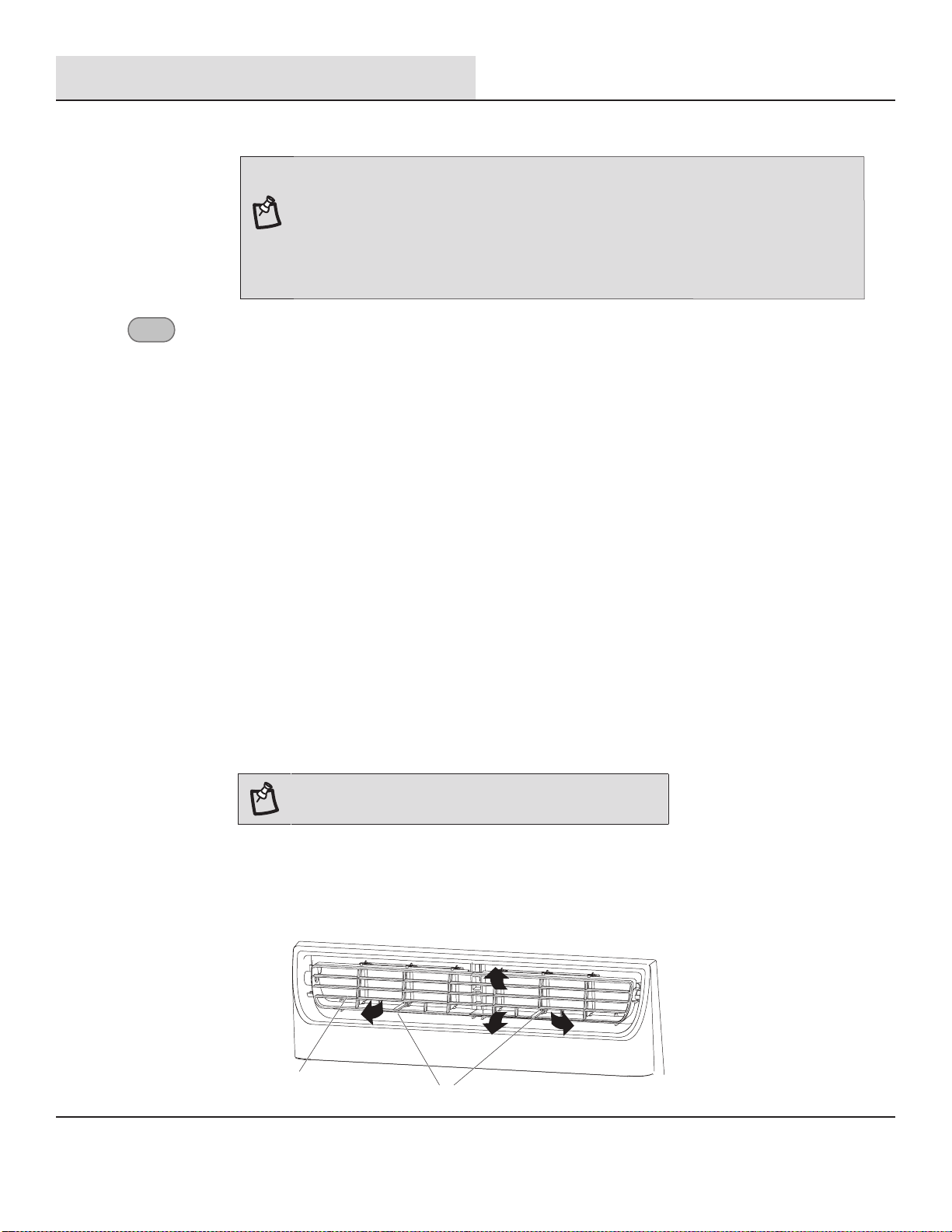
Changing Air Direction
□ Use the Vertical Level Vane (A) to direct the air right or left. Use the whole cartridge (B) to direct air up, down or straight ahead.
B
A
TIMER
NOTE: The TIMER function can only be set using the remote.
□ To turn off Sleep control, press MODE, FAN, SLEEP or wait 8 hours for Sleep control to turn off automatically.
NOTE:
When you press sleep button:
□ The appliance will stop operation automatically after operating for 8 hours.
□ Fan speed is automatically set at low speed.
□ In the Cooling mode, Dry mode, and ECO mode, the set temperature will increase by
4°F (2°C) at most, during 2 hours, and continues running at that temperature until
auto shut off.
TIMER
Setting the Air Conditioner to Turn ON:
□ Plug in the air conditioner and use the remote to power it on.
□ Use the remote to set the desired mode, temperature, fan speed, etc.
□ Use the remote to power off the air conditioner.
□ Press TIMER on the remote and use the UP, DOWN buttons to set the desired delay time until the air
conditioner turns ON. The delay time can be set from 0 to 24 hours in one-hour increments.
□ Press TIMER again to enter the delay time. The TIMER led on the air conditioner illuminates, and the
delay time appears on the remote.
Setting the Air Conditioner to Turn OFF:
□ Plug in the air conditioner and use the remote to power it on.
□ Use the remote to set the desired mode, temperature, fan speed, etc.
□ Press TIMER on the remote and use the UP, DOWN buttons to set the desired delay time until the air
conditioner turns ON. The delay time can be set from 0 to 24 hours in one-hour increments.
□ Press TIMER again to enter the delay time. The TIMER led on the air conditioner illuminates, and the
delay time appears on the remote.
To cancel TIMER:
□
Press the TIMER button again; when a
"Beep"
is heard and the indicator disappears, the TIMER
mode has been canceled.
20
Operation (continued)
4
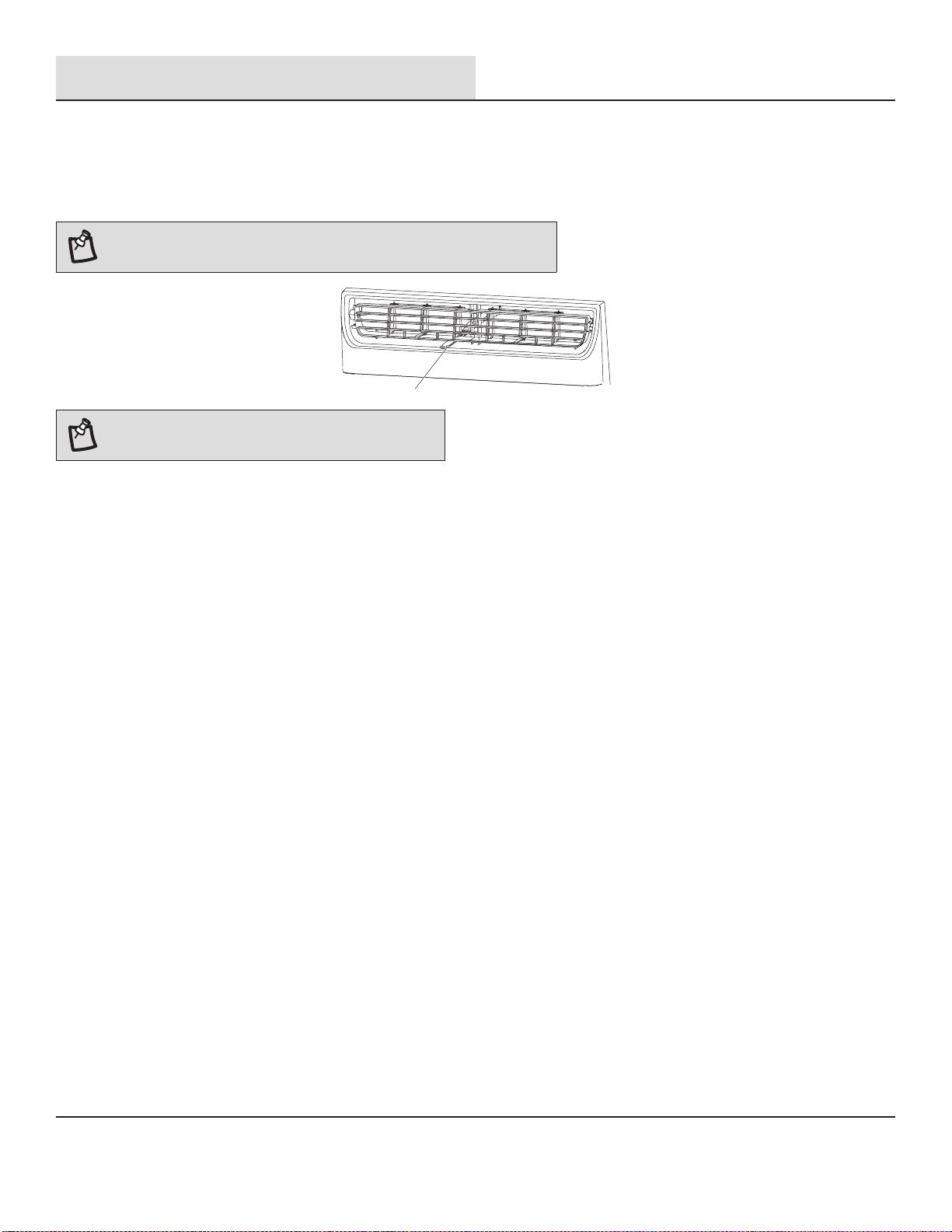
Exhaust Air Vent
□ Pull out the exhaust air vent control to Open the exhaust air vent and draw stale or smoky air from the room.
□ Push in the exhaust air vent control to close the exhaust air vent for maximum continuous cooling.
NOTE: The exhaust air vent control is available only for 12K\14K models.
A
NOTE: The exhaust air vent control will function only
when the fan is running.
5
Normal Sounds
When your air conditioner is operating normally, you may hear sounds such as:
□ Droplets of water hitting the condenser, causing a pinging or clicking sound. The water droplets help cool the condenser.
□ Air movement from the fan.
□ Clicks from the thermostat cycle.
□ Vibrations or noise due to poor wall or window construction.
□ A high-pitched hum or pulsating noise caused by the modern high-efciency compressor cycling on and off.
21
Care and Cleaning
Your new air conditioner is designed to give you many years of dependable service. This section tells you how to clean and care for your air
conditioner properly. Call your local authorized dealer for an annual checkup. Remember the cost of this service call is your responsibility.
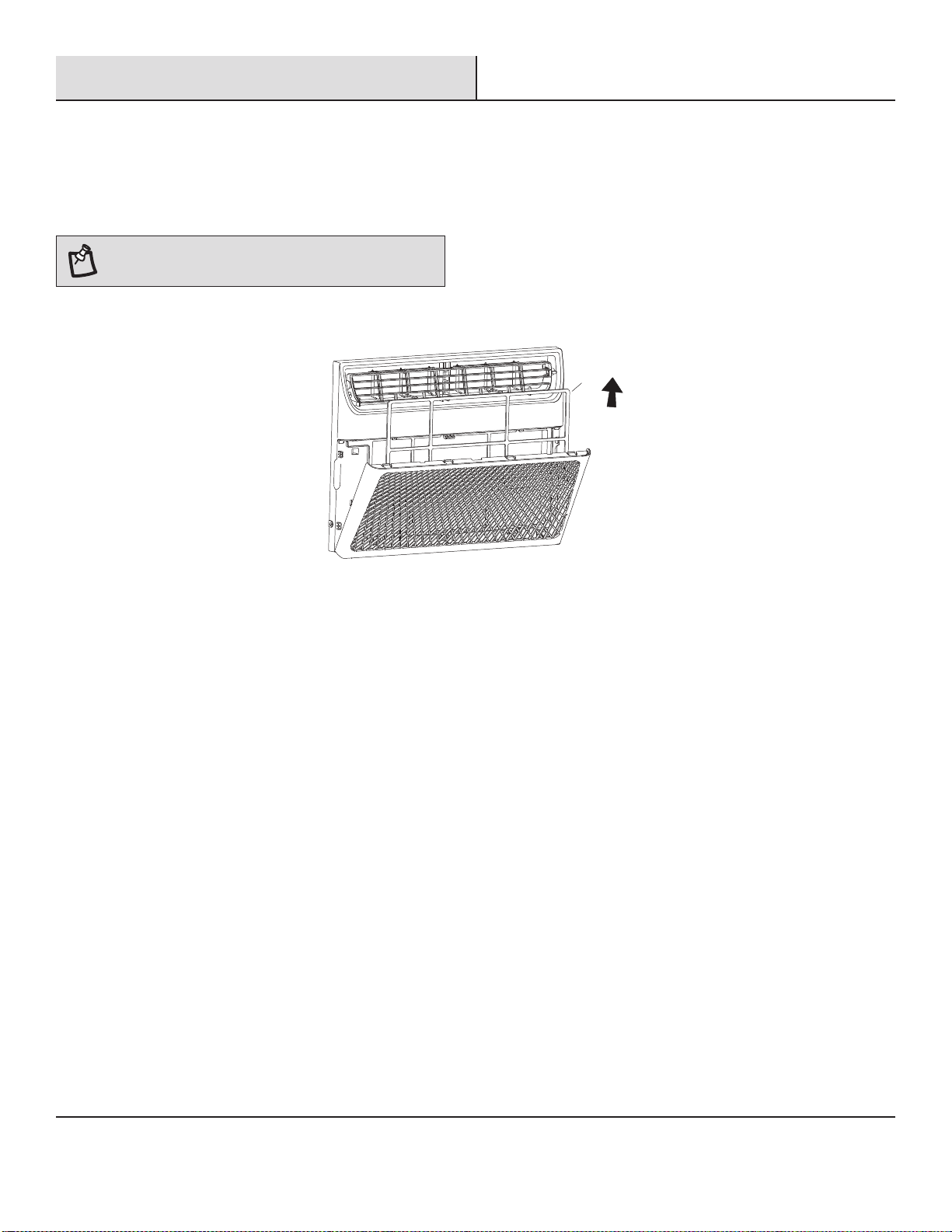
CLEANING THE AIR FILTER
The air lter is removable for easy cleaning. A clean lter helps remove dust, lint, and other particles from the air and is important for best
cooling and operating efciency. Check the lter every 2 weeks to see whether it needs cleaning.
NOTE: Do not operate the air conditioner without the lter
in place.
□ Turn off the air conditioner.
□ Open the front panel. Grasp the lter by the handle and pull it out.
A
□ Use a vacuum cleaner to clean the air lter. If the air lter is very dirty, wash it in warm water with a mild detergent. Do not wash the
air lter in the dishwasher or use any chemical cleaners. Air dry the lter completely before replacing to ensure maximum efciency.
□ Replace the air lter back into the air conditioner.
CLEANING THE FRONT PANEL
□ Turn off the air conditioner.
□ Clean the front panel with a soft, damp cloth.
□ Air dry the front panel completely.
REPAIRING PAINT DAMAGE
Check once or twice a year for paint damage. This is very important, especially in areas near oceans or where rust is a problem. If needed,
touch up with a good grade enamel paint.
ANNUAL MAINTENANCE
Your air conditioner needs annual maintenance to help ensure steady, top performance throughout the year. Call your local authorized
dealer to schedule an annual checkup. The expense of an annual inspection is your responsibility.
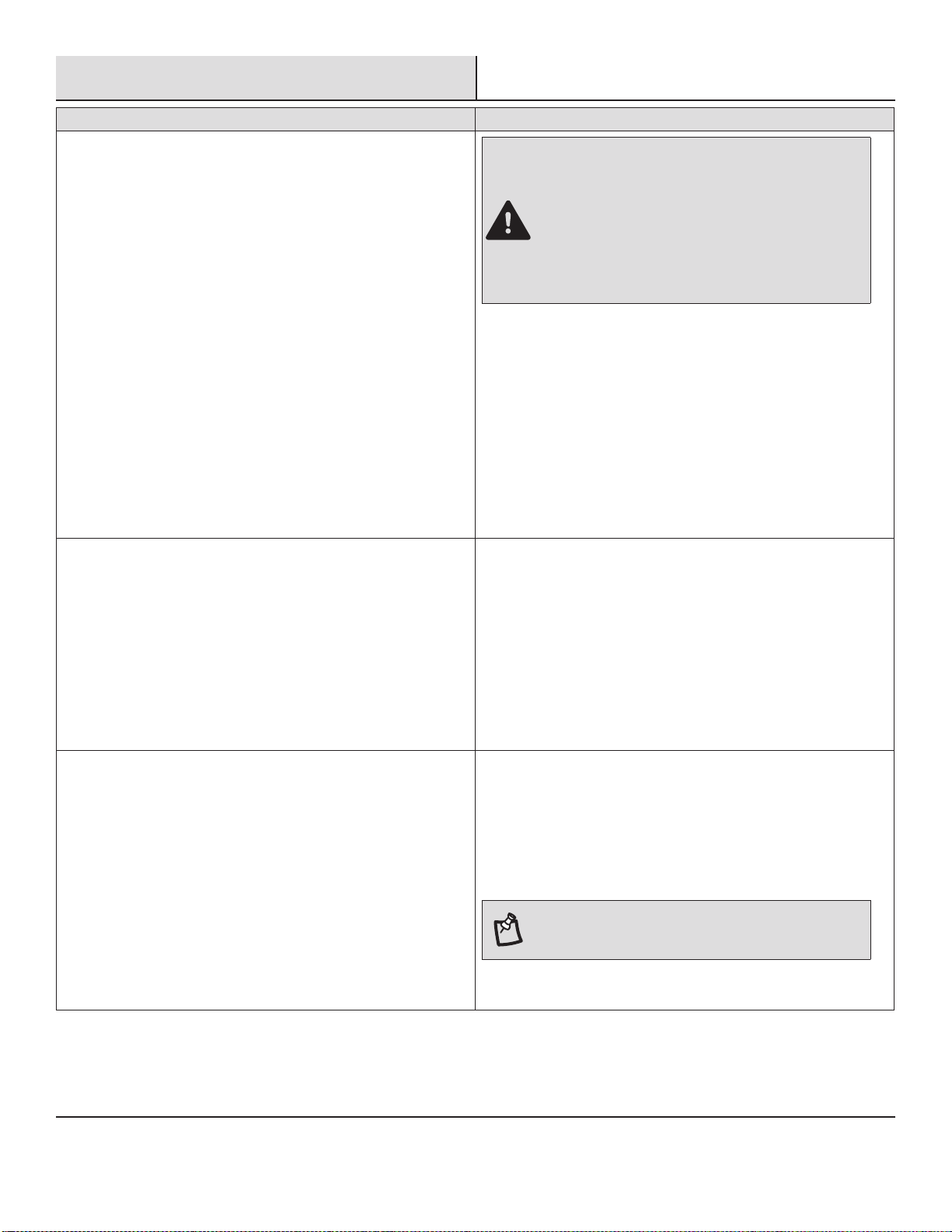
REMOVING AC FROM WINDOW
□ Turn AC off, and disconnect power cord.
□ Remove sash seal from between windows and unscrew safety lock.
□ Remove screws installed through frame and frame lock. Remove the EVA foam (E-star models only).
□ Close the curtain housing.
□ Keeping a rm grip on air conditioner, raise sash and carefully remove.
□ Be careful not to spill any standing water while lifting unit from window. Store parts with the AC.
22
Troubleshooting
Problem Solution
Air conditioner will not operate
DANGER: ELECTRICAL SHOCK HAZARD
□ Plug into a grounded 3-prong outlet.
□ Do not remove ground prong.
□ Do not use an adapter.
□ Do not use an extension cord.
□ Failure to follow these instructions can result in death,
re, or electrical shock.
□ The power supply cord is unplugged. Plug into grounded
3-prong outlet. See “Electrical Requirements”.
□ The power supply cord has tripped (RESET button has popped
out). Press and release RESET to resume operation.
□ A household fuse has blown, or circuit breaker has tripped.
Replace the fuse or reset the circuit breaker. If the problem
continues, call an electrician. See “Electrical Requirements”.
□ The Power button has not been pressed. Press the Power but-
ton.
□ The local power has failed. Wait for power to be restored.
Air conditioner blows fuses or trips circuit breakers □ Too many appliances are being used on the same circuit. Unplug
or relocate appliances that share the same circuit.
□ Time-delay fuse or circuit breaker of the wrong capacity is be-
ing used. Replace with a time-delay fuse or circuit breaker of
the correct capacity. See “Electrical Requirements”.
□ An extension cord is being used. Do not use an extension cord
with this or any other appliance.
□ You are trying to restart the air conditioner too soon after turn-
ing off the air conditioner. Wait at least 3 minutes after turning
off the air conditioner before trying to restart the air conditioner.
Air conditioner power supply cord trips (Reset button pops out) □ Disturbances in your electrical current can trip (RESET button
will pop out) the power supply cord. Press and release RESET to
resume operation.
□ Electrical overloading, overheating, cord pinching or aging can
trip (RESET button will pop out) the power supply cord. After
correcting the problem, press and release RESET to resume
operation.
NOTE: A damaged power supply cord must be
replaced with a new power supply cord obtained from
the product manufacturer and must not be repaired.
23
Problem Solution
Air conditioner seems to run too much □ The current air conditioner replaced an older model. The use of
more efcient components may cause the air conditioner to run
longer than an older model, but the total energy consumption
will be less. Newer air conditioners do not emit the “blast” of
cold air you may be accustomed to from older air conditioners,
but this is not an indication of lesser cooling capacity or ef-
ciency. Refer to the efciency rating (EER) and capacity rating
(in Btu/h) marked on the air conditioner.
□ The air conditioner is in a heavily occupied room, or heat
producing appliances are in use in the room. Use exhaust vent
fans while cooking or bathing and try not to use heat producing
appliances during the hottest part of the day. A higher capacity
air conditioner may be required, depending on the size of the
room being cooled.
Air conditioner cycles on and off too much or does not cool □ The air conditioner is not properly sized for your room. Check
the cooling capabilities of your room air conditioner. Room air
conditioners are not designed to cool multiple rooms.
□ The lter is dirty or obstructed by debris. Clean the lter.
□ The inside evaporator and outside condenser coils are dirty or
obstructed by debris. See Annual Maintenance.
□ There is excessive heat or moisture (open container cooking,
showers, etc.) in the room. Use a fan to exhaust heat or mois-
ture from the room. Try not to use heat producing appliances
during the hottest part of the day.
□ The louvers are blocked. Install the air conditioner in a location
where the louvers are free from curtains, blinds, furniture, etc.
□ The temperature of the room you are trying to cool is extremely
hot. Allow extra time for the air conditioner to cool off a very hot
room.
□ Windows or doors to the outside are open. Close all windows
and doors.
□ The Temp control is not at a cool enough setting. Adjust the
Temp control to a cooler setting by pressing the minus button to
reduce the temperature. Set the Fan Speed control to the high-
est setting.
Water drips from cabinet into your house □ The air conditioner is not properly leveled. The air conditioner
should slope slightly downward toward the outside. Level the air
conditioner to provide a downward slope toward the outside to
ensure proper drainage. See the Installation Instructions.
NOTE: Do not drill a hole in the bottom of the metal
base and condensate pan.
Troubleshooting (continued)
Tabla de Contenidos
25
25
25
26
26
26
26
27
27
28
29
29
31
31
32
36
36
37
37
37
37
38
38
40
40
40
40
40
41
41
42
42
43
43
43
43
43
43
44
Información de Seguridad..................................................................
Instrucciones Importantes de Seguridad.........................................
Eliminación del Aparato...................................................................
Pre-Instalación...................................................................................
Requisitos Eléctricos.......................................................................
Método de Conexión a Tierra Recomendado...................................
Requisitos para el Cableado............................................................
Cable de Alimentación.....................................................................
Planificación de la instalación.........................................................
Hardware Incluido...........................................................................
Desembalaje del aire acondicionado..............................................
Requisitos de Ubicación..................................................................
Medidas de Apertura de la Ventana................................................
Si el Aire Acondicionado está Bloqueado por la Ventana de Tormenta....
Instalación..........................................................................................
Operación...........................................................................................
Configuración de ON/OFF................................................................
Configuración de Modo...................................................................
Configuración de Temperatura.......................................................
Velocidad del Ventilador.................................................................
Funciones de Temporizador, Suspensión y Filtro...........................
Wi-Fi...............................................................................................
Colocación de las pilas...................................................................
Silencio...........................................................................................
Súper...............................................................................................
Filtro................................................................................................
Atenuador........................................................................................
Suspensión......................................................................................
Temporizador..................................................................................
Cambio en la Dirección del Aire......................................................
Ventilación del Aire de Escape........................................................
Sonidos Normales...........................................................................
Limpieza y Cuidado............................................................................
Limpieza del Filtro de Aire...............................................................
Limpieza del Panel Frontal..............................................................
Reparación de la Pintura Dañada....................................................
Mantenimiento Anual......................................................................
Extracción del Aire Acondicionado de la Ventana...........................
Resolución de Problemas..................................................................
24
Información de Seguridad
Hemos proporcionado mensajes de seguridad importantes en este
manual y en el aparato. Lea y siga siempre todos los mensajes de
seguridad.
PELIGRO: Este símbolo le alerta de un peligro potencial
que, si no se evita, resultará en la muerte o lesiones graves.
ADVERTENCIA: Este símbolo le alerta de un peligro
potencial que, si no se evita, podría resultar en la muerte o
lesiones graves.
PRECAUCIÓN: Este símbolo le alerta de un peligro
potencial que, si no se evita, puede resultar en lesiones
leves o moderadas.
INSTRUCCIONES IMPORTANTES DE
SEGURIDAD
□
Conéctelo a una toma con 3 clavijas con conexión a tierra.
□
No quite la terminal a tierra.
□
No utilice el adaptador.
□
No utilice el cable de extensión.
□
Desenchufe el aire acondicionado antes del mantenimiento.
□
Se necesitan dos o más personas para mover e instalar el aire
acondicionado.
ELIMINACIÓN DEL APARATO
□
Antes de desechar el aparato, hay que quitar las pilas y
eliminarlas o reciclarlas adecuadamente.
□
Cuando necesite eliminar el aparato, consulte con nuestro
distribuidor. Si las tuberías se retiran incorrectamente, podría
soplar refrigerante que entre en contacto con su piel,
provocándole lesiones. La liberación de refrigerante a la
atmósfera también daña el medio ambiente.
□
Recicle o elimine el material de embalaje del producto de
manera responsable con el medio ambiente.
□
Nunca almacene ni envíe el aire acondicionado boca abajo ni de
lado para evitar daños en el compresor.
□
Este aparato no se diseña para usarse por personas (incluso
niños) con capacidades físicas, sensoriales y mentales
reducidas o con falta de experiencia y conocimiento a menos
que hayan sido supervisados o instruidos sobre el uso del
aparato por una persona responsable por su seguridad. Se debe
supervisar a los niños para asegurarse de que no jueguen con el
aparato.
□
En la placa del aire acondicionado, se muestra el
diagrama de cableado.
Para reducir el riesgo de incendio, descarga eléctrica o lesiones al
usar el aire acondicionado, siga estas precauciones básicas:
25
□
No utilice medios para acelerar el proceso de
descongelación o de limpieza que no sean los
recomendados por el fabricante.
□
Se debe almacenar el aparato en una sala sin fuentes
de ignición en funcionamiento continuo (por ejemplo,
llamas vivas, aparatos de gas o calentadores eléctricos
en funcionamiento).
□
No perfore ni queme la tubería de refrigerante. Tenga
en cuenta que es posible que los refrigerantes no
tengan olor.
□
Mantenga los orificios de ventilación libres de
obstrucciones.
□
La cantidad máxima de carga del refrigerante se
muestra en la placa del aire acondicionado.
□
Debe tener mucho cuidado para evitar dañar la tubería
refrigerante al manipular, instalar y operar el aparato.
□
No perfore orificios en la unidad.
□
El mantenimiento, la limpieza y el servicio deben ser
realizados solo por técnicos capacitados y calificados
en el uso de refrigerantes inflamables.
□
Deseche el aire acondicionado en conformidad con las
normas federales y locales. Los refrigerantes
inflamables requieren procedimientos de eliminación
especiales. Contacte a las autoridades locales para
eliminar el aire acondicionado de forma segura.
□
El aparato debe almacenarse de forma que no sufra
daños mecánicos.
ADVERTENCIA: Riesgo de Incendio o Explosión. Esta
unidad contiene refrigerante inflamable.
Debe seguir las medidas de precaución adicionales.
□
Este producto contiene piezas pequeñas como (baterías,
tapa de batería y tornillos) que pueden causar asfixia si
son ingeridas por niños.
Pre-Instalación
REQUISITOS ELÉCTRICOS
ADVERTENCIA: Riesgo de Descarga Eléctrica
□
Conéctelo a una toma con 3 clavijas con
conexión a tierra.
□
No quite la terminal a tierra.
□
No utilice el adaptador.
□
No utilice el cable de extensión.
□
Pueden producirse incendios, descargas eléctricas o la muerte si no se siguen estas
instrucciones.
MÉTODO DE CONEXIÓN A TIERRA RECOMENDADO
Este aire acondicionado debe conectarse a tierra. Este aire acondicionado está equipado con un cable de alimentación con un enchufe
de tres clavijas con conexión a tierra. El cable debe estar enchufado a una toma de tres clavijas y debe tener una conexión a tierra de
conformidad con todos los códigos y ordenanzas locales. En caso de no disponer de un tomacorriente, es responsabilidad del cliente
solicitar a un instalador eléctrico cualificado instale una toma de tres clavijas con conexión a tierra adecuada.
Es responsabilidad del cliente:
□
Contactar con un instalador eléctrico cualificado.
□
Garantizar que la instalación eléctrica sea adecuada y conforme al código eléctrico nacional, la última edición de ANSI/NFPA 70 y todos
los códigos y ordenanzas locales.
Las copias de las normas mencionadas se pueden obtener de:
Asociación Nacional de Protección contra el Fuego
1 Batterymarch Park
Quincy, Ma 02169-7471
www.nfpa.org
REQUISITO PARA EL CABLEADO
Fuente de alimentación Modelo Fusible de acción retardada (o disyuntor)
115V
103,5V mín.
126,5V máx.
8K BTU solo frío
10K BTU solo frío
13A
12K BTU solo frío
14K BTU solo frío
15A
26
Pre-Instalación (continuación)
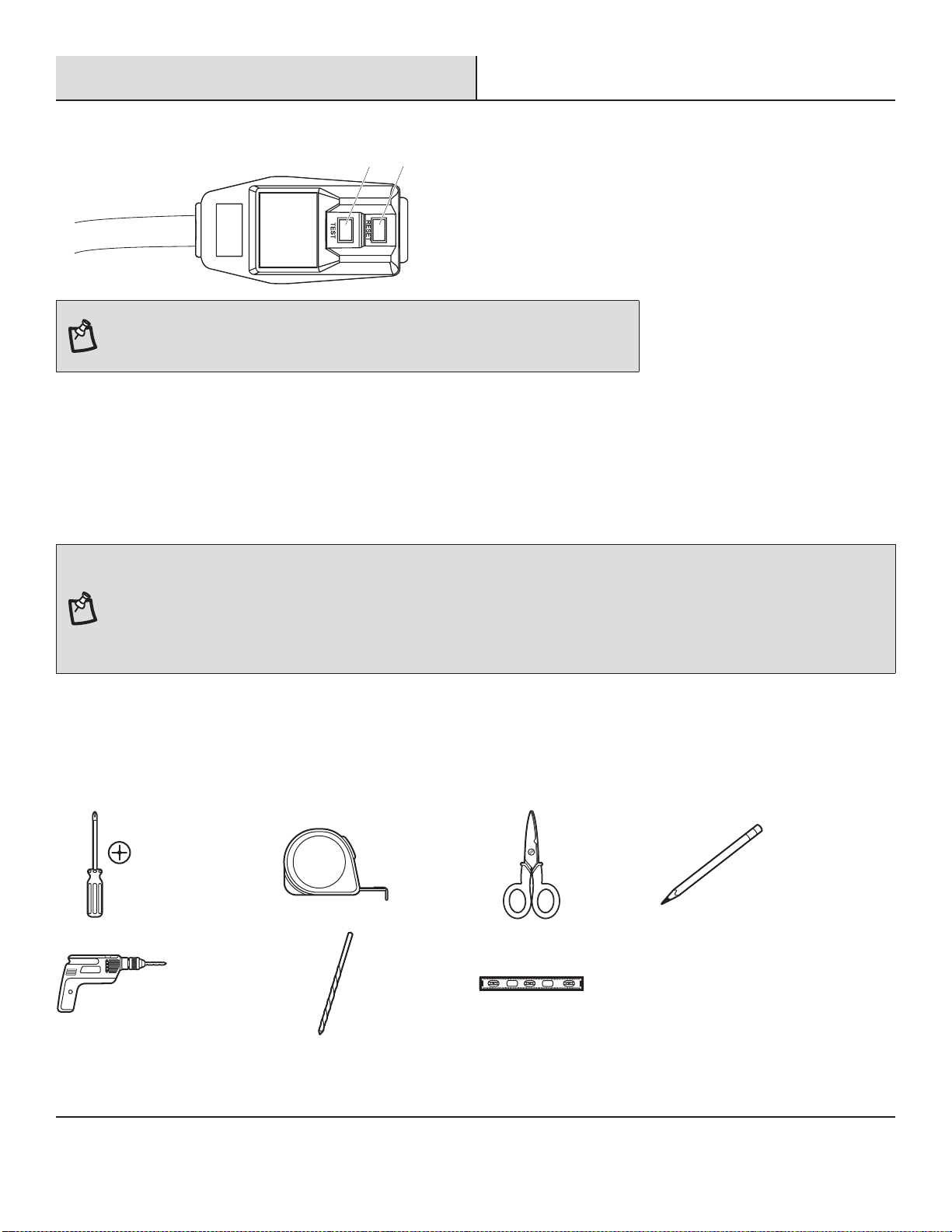
CABLE DE ALIMENTACIÓN
1
2
NOTA: Su aire acondicionado puede diferir del que se muestra aquí. Este aire acondicionado
está equipado con un cable de alimentación por UL. Este cable de alimentación contiene
electrónica avanzada que detecta la corriente residual. Si el cable está aplastado, la electrónica
detecta la corriente residual y la energía se desconectará en una fracción de segundos.
Para probar su cable de alimentación:
1.
Conecte el cable de alimentación a un tomacorriente de 3 patas con conexión a tierra.
2.
Presione RESET (2) (en algunos dispositivos se enciende una luz verde).
3.
Presione TEST (1) y escuche el clic. El botón RESET se activará y, en algunos dispositivos, se apagará la luz verde.
4.
Presione y suelte RESET (2) y escuche el clic. El botón RESET se activará y, en algunos dispositivos, se apagará la luz verde. El
cable de alimentación está listo para funcionar.
NOTA: Para un funcionamiento correcto, debe presionar el botón RESET.
□
Se debe reemplazar el cable de alimentación si falla o se activa al momento de presionar el botón de prueba o si falla al reiniciar.
□
No utilice un cable de alimentación como un interruptor off/on. El cable de alimentación está diseñado como un dispositivo de protección.
□
Se debe reemplazar el cable de alimentación dañado por un cable nuevo que se obtiene del fabricante; no se debe reparar.
□
El cable de alimentación contiene piezas que el usuario no puede reparar. Si abre la caja a aprueba de alteraciones, anulará todas las
garantías y demandas de rendimiento.
PLANIFICACIÓN DE LA INSTALACIÓN
Destornillador
Phillips
Cinta
métrica
Tijeras Lápiz
Taladro
inalámbrico
broca de
1/8 pulg.
Nivel
Reúna las herramientas y piezas necesarias antes de empezar la instalación. Lea y siga las instrucciones proporcionadas con las herramientas
aquí descritas.
HERRAMIENTAS REQUERIDAS
27
Pre-Instalación (continuación)
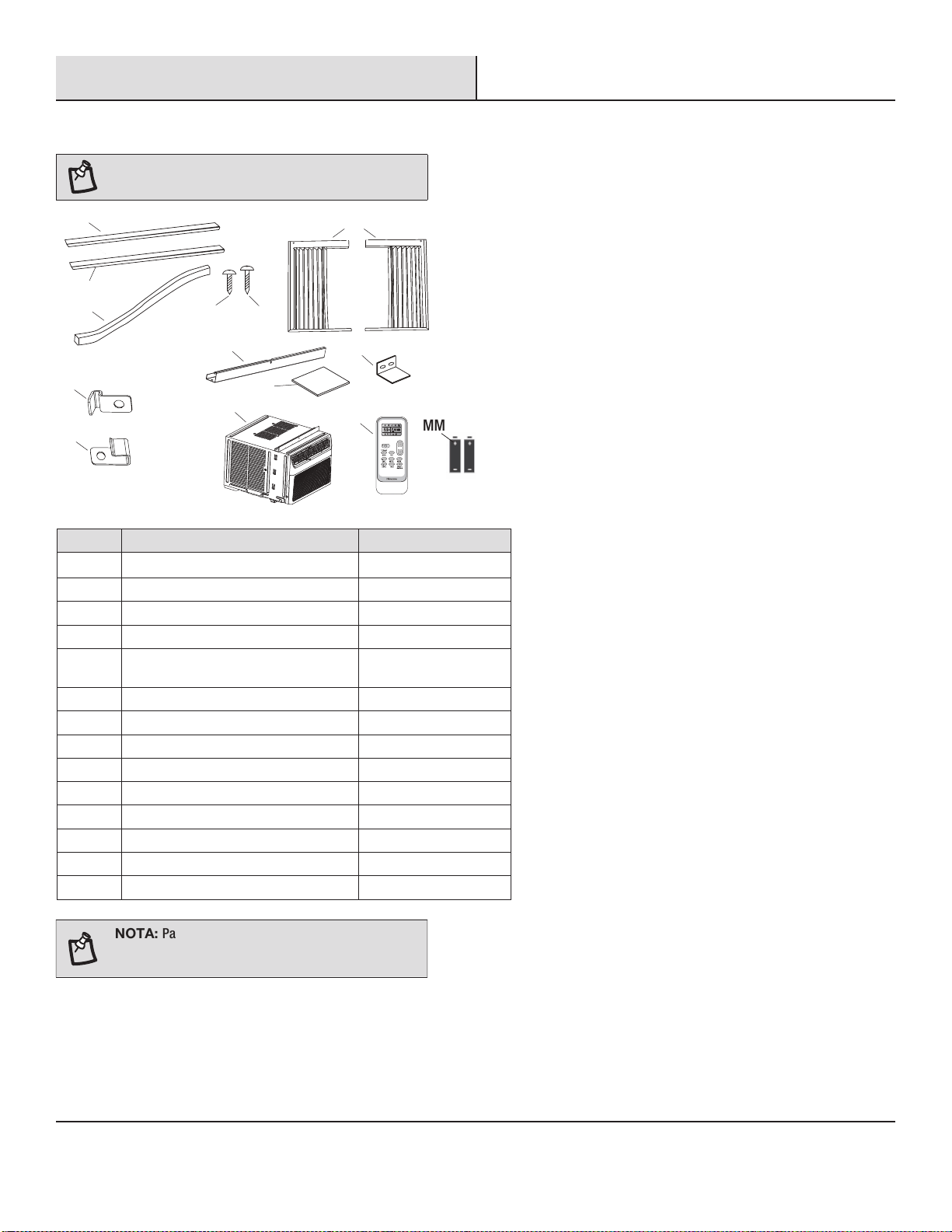
HARDWARE INCLUIDO
NOTA: Compruebe que todas las piezas estén
incluidas en el empaque.
A1
GG
BB
BB
CC
DD
EE
HH
KK
KK
II
JJ
LL
FF
CantidadDescripciónParte
1A2
1
Sello de espuma
BB
2
Marco de seguro (para ventanas de madera)
CC
2
Marco de seguro (para ventanas con
revestimiento de vinilo)
DD
4
Tornillos de 3/8 pulg
EE
7
Tornillos de 3/4 pulg
FF
2
Cortinas laterales
GG
1
Guía superior
HH
1
Bloqueo de guillotina
II
2
Espuma EVA
JJ
1
Aire acondicionado
KK
1
Control remoto
LL
MM
Pilas (estándar AAA de 1,5 voltios)
2
rstuv
wxyz{|
MM
NOTA: Para los modelos de 12/14K Btu, el fabricante
ha fijado el riel superior (HH) y los tornillos de 3/8 de
pulgadas (EE).
A2
1A1
Sello adhesivo (gris)
Sello adhesivo (negro)
28
Pre-Instalación (continuación)
DESEMBALAJE DEL AIRE ACONDICIONADO
ADVERTENCIA: Riesgo de Exceso de Peso
Retirada de los materiales de embalaje
□
Retire y elimine/recicle los materiales de embalaje. Retire la cinta y los residuos de pegamento de las superficies antes de encender el
aire acondicionado. Frote una pequeña cantidad de jabón líquido para lavar platos en el adhesivo con los dedos. Limpie con agua
templada y séquelo.
□
No utilice instrumentos afilados, ni frote alcohol, líquidos inflamables o limpiadores abrasivos para eliminar la cinta o el
pegamento. Estos productos pueden dañar la superficie del aire acondicionado.
□
Manipule suavemente el aire acondicionado.
□
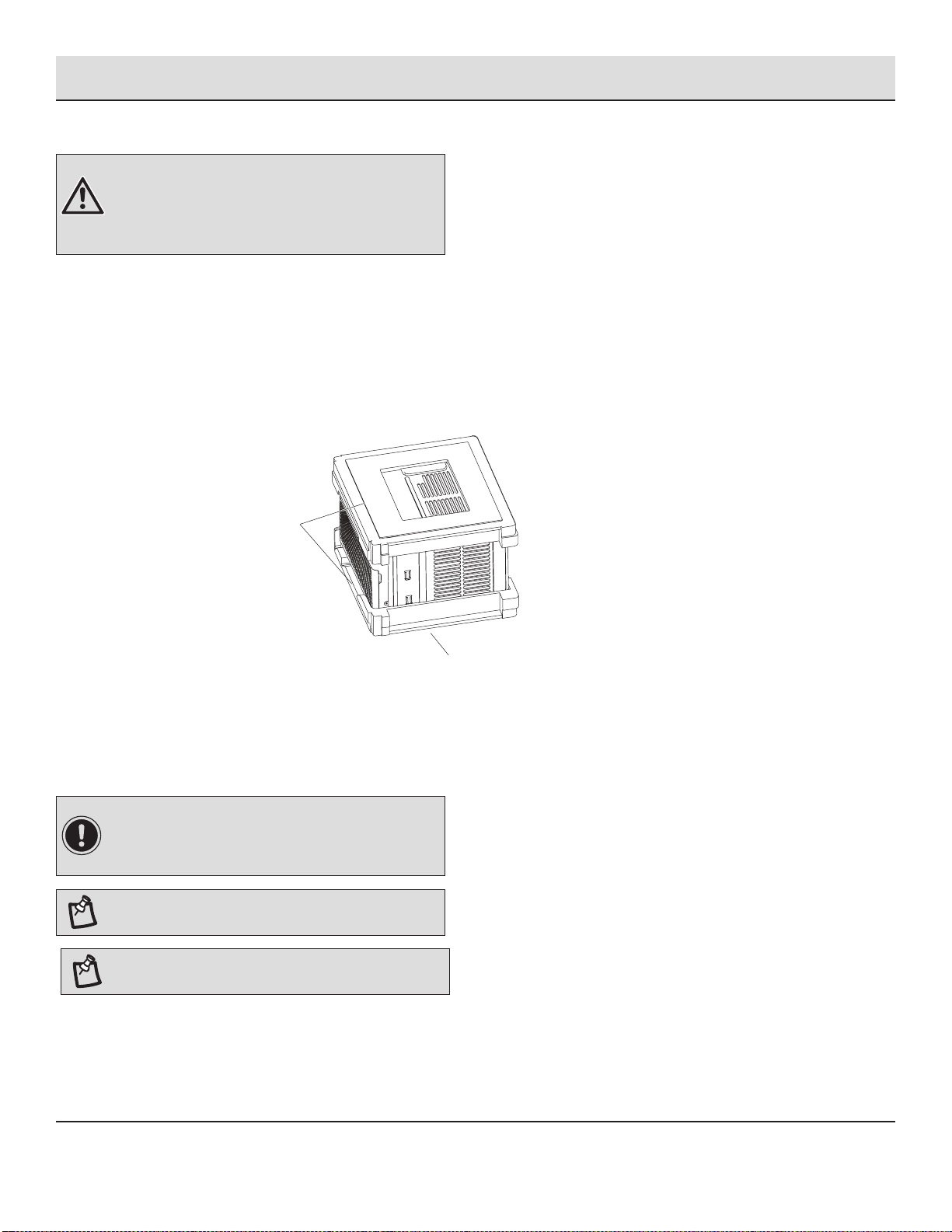
Quite la guía superior (HH) del material de embalaje (A).
A
REQUISITOS DE UBICACIÓN
Antes de Comenzar
Lea completa y cuidadosamente estas instrucciones.
IMPORTANTE:
□
Guarde estas instrucciones para uso del inspector local.
□
Siga todas las normas y ordenanzas.
NOTA: Para el instalador, asegúrese de dejar estas
instrucciones al Consumidor.
NOTA: Para el consumidor, guarde estas instrucciones
para referencias futuras.
□
Nivel de habilidad: La instalación de este aparato requiere habilidades mecánicas básicas.
□
Tiempo de finalización: Alrededor de 1 hora.
□
Recomendamos que dos personas instalen el producto.
HH
(modelos 8K/10K BTU)
Se necesitan dos o más personas para mover e instalar el
aire acondicionado.
De lo contrario, podría resultar en lesiones en la espalda o
de otro tipo.
29
Pre-Instalación (continuación)
□
La instalación correcta es responsabilidad de la persona que lo instala.
□
La falla del producto debido a la instalación incorrecta no está cubierta por la garantía.
□
Al momento de instalar este aire acondicionado, usted DEBE utilizar todas las piezas suministradas y seguir correctamente los
procedimientos de instalación como se describen en estas instrucciones.
IMPORTANTE: Siga todas las normas y
ordenanzas.
Compruebe el lugar donde instalará el aire acondicionado. Es su responsabilidad que la instalación sea correcta. Asegúrese de
tener todo lo necesario para realizar una instalación correcta.
□
No utilice el cable de extensión. El aparato debe instalarse de acuerdo con la normativa nacional de cableado.
□
Buena ventilación del aire en la habitación a ser enfriada.
□
Una abertura lo suficientemente grande para el aire acondicionado.
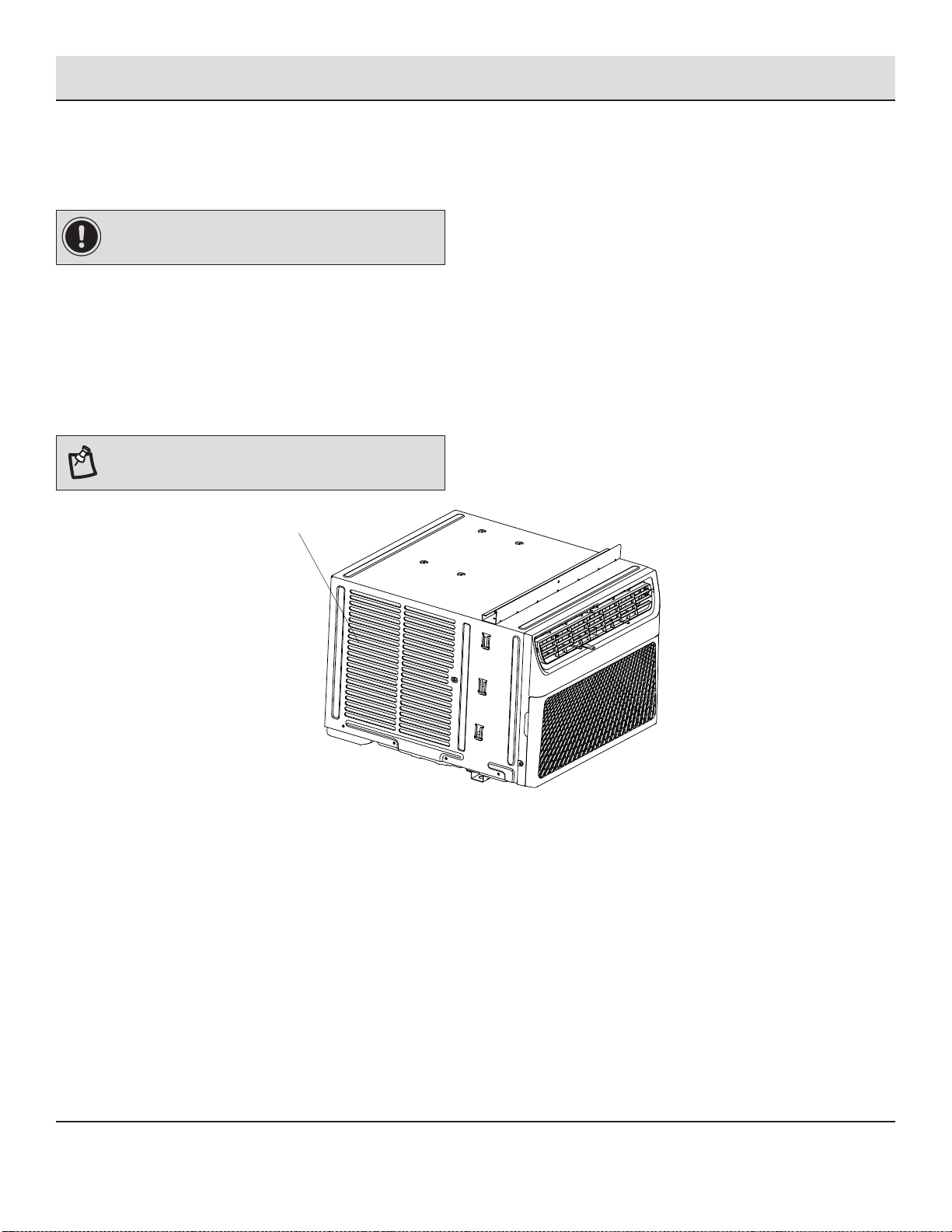
NOTA: No se deben obstruir las rejillas (A) del gabinete. El
aire debe pasar libremente por las rejillas del gabinete.
A
A
A
La ubicación debe brindar:
30
Pre-Instalación (continuación)
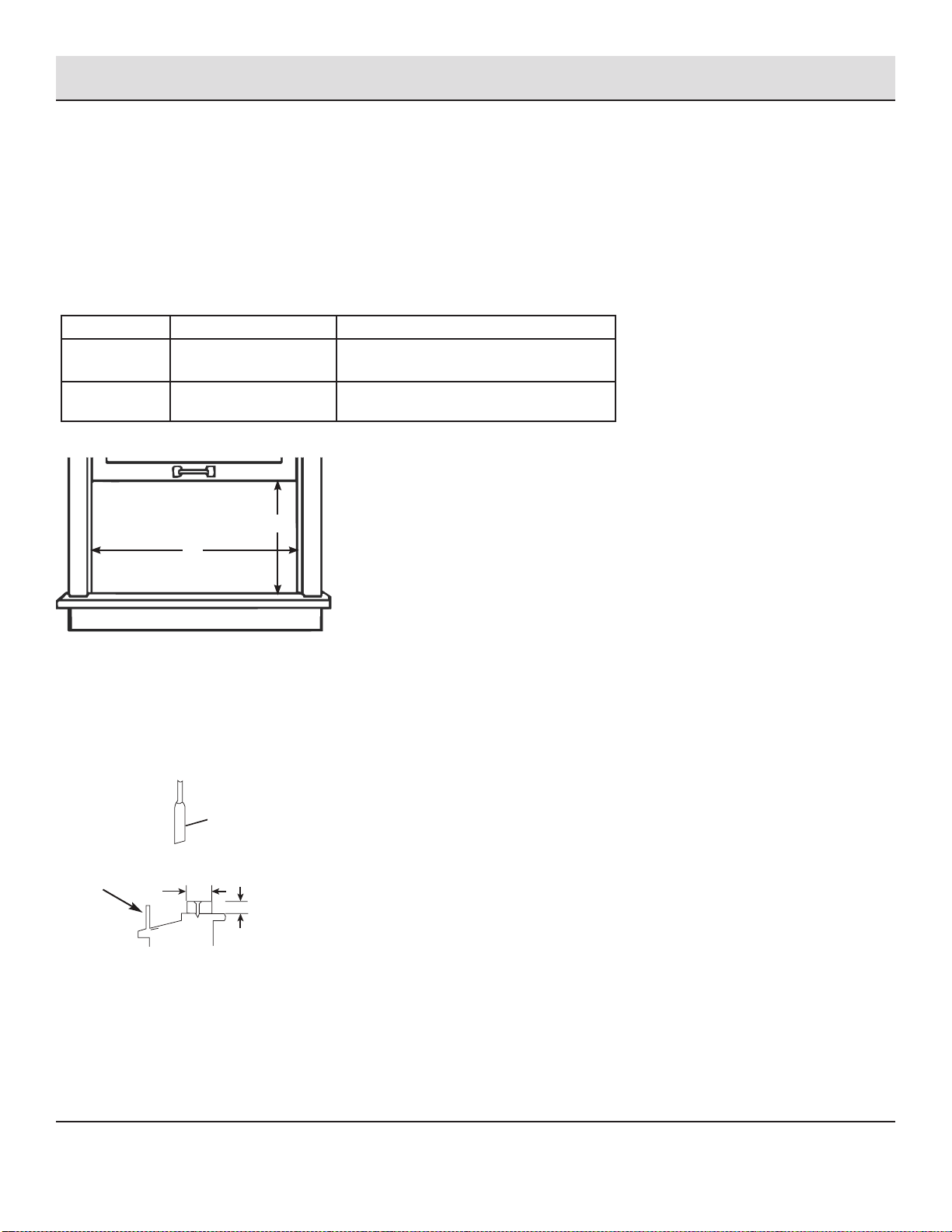
MEDIDAS DE APERTURA DE LA VENTANA
□
Estas instrucciones son para una ventana con doble guillotina. Debe modificarlas para otro tipo de ventanas.
□
Si es necesario instalarlo en una ventana estrecha, el aire acondicionado se puede instalar sin los paneles de las cortinas
laterales. Refiérase a las dimensiones de la abertura de la ventana.
□
Todas las piezas de soporte deben estar aseguradas a una madera, mampostería o metal firme.
□
El tomacorriente debe estar dentro del alcance del cable de alimentación.
□
Siga las dimensiones de la tabla y las ilustraciones para su modelo.
Modelos
A B
8K BTU
10K BTU
13 3/5 pulgadas
(345mm) mín
24 1/2 pulgadas (622mm) - 39 pulgadas
(991mm)
12K BTU
14K BTU
15 1/5 pulgadas
(386mm) mín
24 9/10 pulgadas (632mm) - 39 pulgadas
(991mm)
A
B
SI EL AIRE ACONDICIONADO ESTÁ BLOQUEADO POR LA VENTANA DE TORMENTA
Añada madera como se muestra aquí o quite la ventana antes de instalar el aire acondicionado.
Si el marco de la ventana de tormenta debe permanecer, asegúrese de que los orificios o ranuras de drenaje no estén tapados
con masilla o pintura. Se debe permitir que se drene el agua de lluvia acumulada o la condensación.
Marco de la ventana
de tormenta u otra
obstrucción.
Guillotina
1 - 1/2 pulg.
mín (38mm)
Espesor del panel requerido,
para una inclinación correcta
hacia atrás por el alféizar. Se
asegura con clavos o tornillos.
(Con paneles de cortinas laterales)
31
Instalación
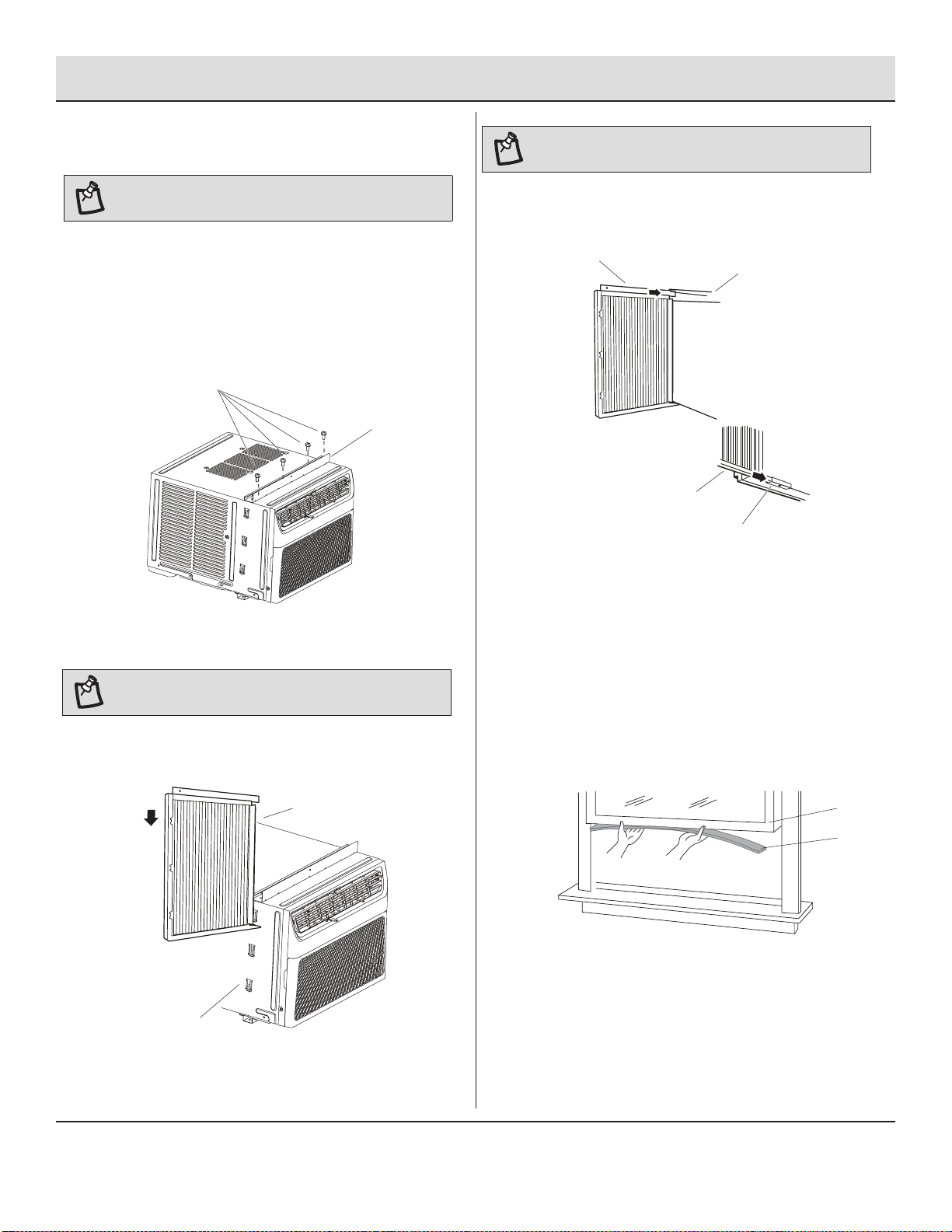
1
Fijación del Riel Superior
Coloque la guía superior (HH) en la parte superior del
gabinete del aire acondicionado, alinee los 4 orificios de la
guía con los 4 orificios de la parte superior del gabinete.
□
Utilizando los cuatro tornillos de 3/8 de pulgada (10mm)
(EE), fije el riel superior (HH) al gabinete del aire
acondicionado.
EE
HH
NOTA: Fije las cortinas al aire acondicionado antes de
colocar el aire acondicionado en la ventana.
2
Instalación de las Cortinas Laterales
NOTA: Fije las cortinas al aire acondicionado antes de
colocar el aire acondicionado en la ventana.
□
Deslice la cortina lateral (GG) directamente en el gabinete (B).
□
Deslice la cortina lateral (GG) hacia abajo.
GG
B
NOTA: Para algunos modelos, el riel superior ha sido
fijado por el fabricante.
B
□
Encuentre la bolsa suministrada de los tornillos.
□
□
Inserte la parte superior y luego la parte inferior de la
carcasa de la cortina izquierda (A) en el riel superior (HH)
y en el riel inferior (B) del aire acondicionado.
A
HH
A1
A
A
A
B
□
Deslice la carcasa de la cortina en los carriles tanto como
sea posible.
□
Repita los pasos anteriores para la cortina de la derecha.
3
Fijación del Sello Adhesivo
□
Corte el sello adhesivo (gris) (A1) al ancho de la guillotina
inferior de la ventana (B).
□
Quite el reverso del sello y fije el sello a la parte de abajo
de la guillotina inferior de la ventana.
32
Instalación (continuación)
4
Colocación del Aire Acondicionado en la Ventana
ADVERTENCIA: Riesgo de Exceso de Peso
□
Se necesitan dos o más personas para mover e instalar el
aire acondicionado.
□
De lo contrario, podría resultar en lesiones en la espalda o
de otro tipo.
NOTAS:
□
Manipule el aire acondicionado con cuidado.
□
Asegúrese de que el aire acondicionado no se caiga durante
la instalación o la extracción.
□
No bloquee las rejillas del panel frontal.
□
No bloquee las rejillas de la parte exterior del aire acondicionado.
□
Su modelo puede diferir del que se muestra aquí.
□
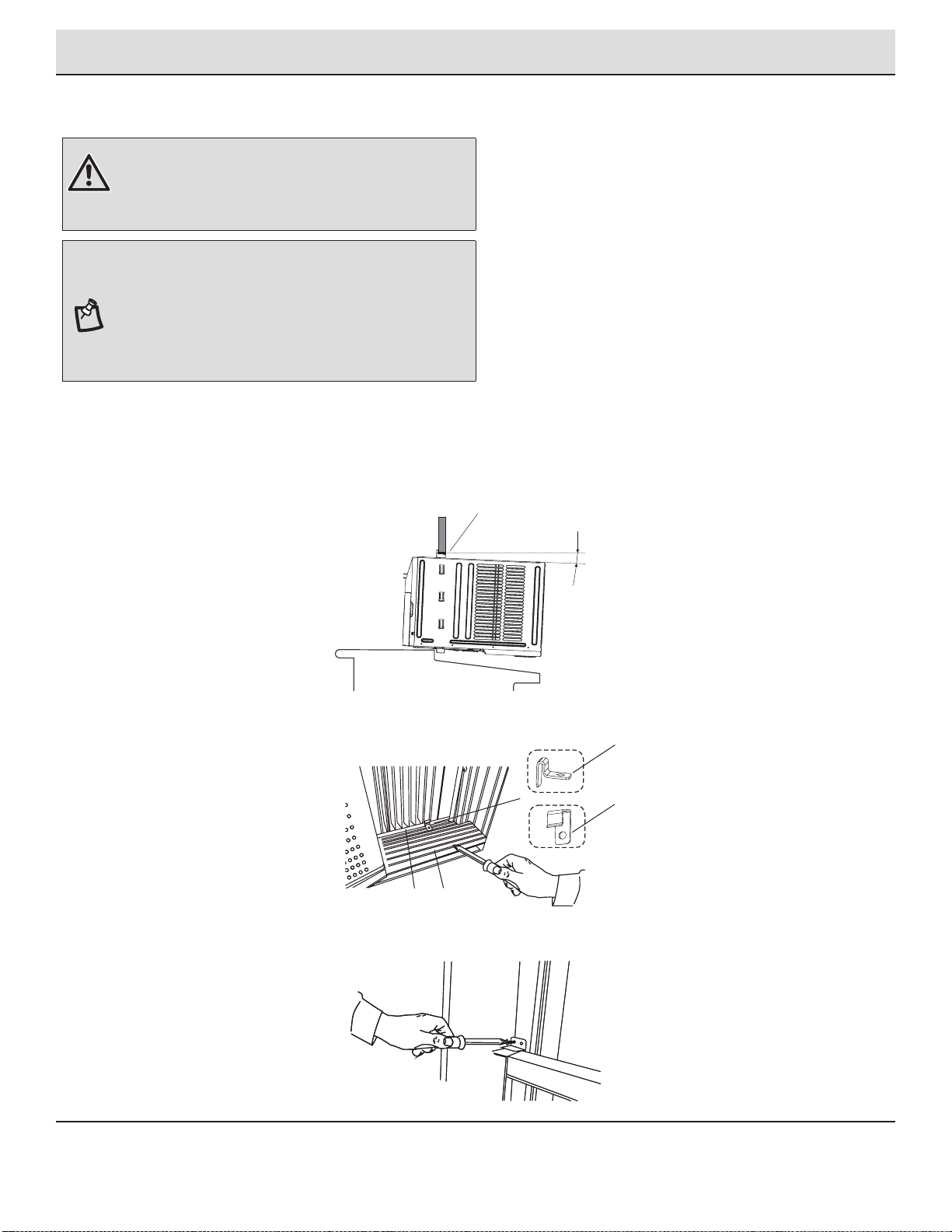
Para asegurar la guillotina inferior en su lugar, fije el bloqueo de la guillotina (II) utilizando el tornillo de 3/4 de pulgada (19mm)
(FF) como se muestra.
□
Centre el aire acondicionado en la ventana. Baje la guillotina de la ventana detrás del riel superior (HH) para mantener el gabinete
en su lugar.
Sostenga firmemente el aire acondicionado; coloque cuidadosamente la unidad en la abertura de la ventana de tal manera que la
parte inferior del marco del aire acondicionado quede contra el alféizar de la ventana y asegúrese de que la unidad quede
centrada en la ventana.
Cierre cuidadosamente la ventana detrás del riel superior de la unidad.
□
□
HH
A
B
CC: Para ventanas de madera
□
Coloque el bloqueo del marco (CC) o (DD) entre la carcasa de la cortina (A) y el alféizar de la ventana (B) con un tornillo de 3/4 de
pulgada (19mm) (FF) como se muestra.
DD: Para ventanas con revestimiento de vinilo
Aproximadamente 3°
33
Instalación (continuación)
5
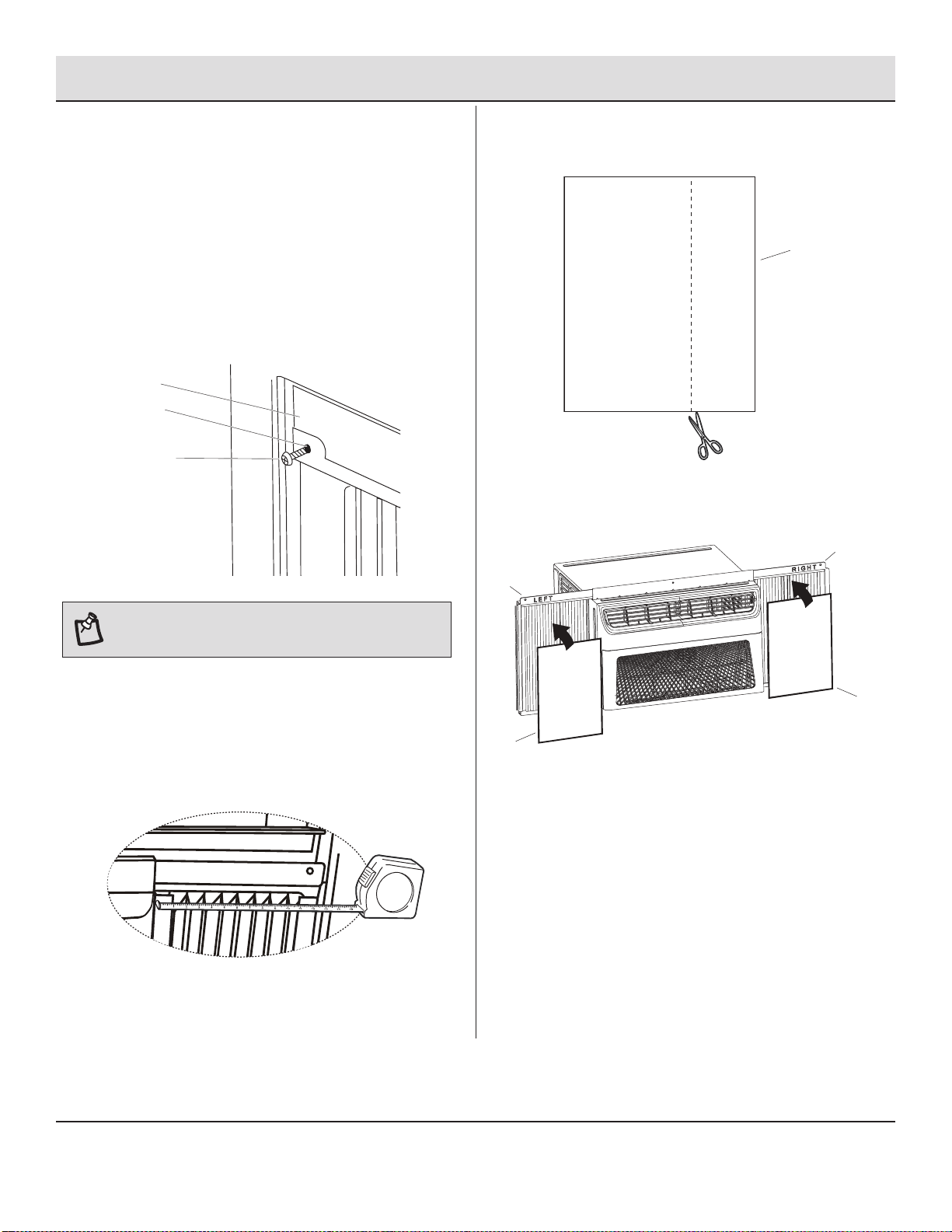
Fijación de las Cortinas Laterales a
la Ventana
□
Saque la cortina de la izquierda de la unidad y adáptela al
canal de la ventana.
□
Utilice la broca de 1/8 de pulgada (3mm) para perforar un
orificio a través del orificio en la carcasa de la cortina (B).
□
Coloque uno de los tornillos de 3/4 de pulgada (19mm) (C)
a través de la carcasa de la cortina de la izquierda (B) y en
la guillotina de la ventana (A).
□
Marque una línea en la espuma EVA (JJ) a 1/8 pulgadas
(3mm) menos que el ancho medido; luego, corte la
espuma EVA (JJ) por la línea.
JJ
□
Quite el reverso de la espuma EVA (JJ). Fije la espuma
EVA (JJ) a la carcasa de la cortina (A), el lado con el
adhesivo debería estar frente a la carcasa de la cortina.
A
A
JJ
JJ
□
Repita para la cortina derecha.
C
C
B
B
AA
NOTA: Los pasos restantes en esta página son solo para
los modelos E-star, con el LOGO E-star en el panel de
control.
□
Coloque una espuma EVA (JJ) en la carcasa de la cortina.
□
Para minimizar las fugas de aire y garantizar un
aislamiento óptimo, si es necesario, instale la Espuma
EVA (JJ) en la carcasa de la cortina.
□
Después de instalar la unidad en la ventana, mida el
ancho interno de la cortina lateral como se muestra.
□
Repita para la cortina izquierda.
34
□
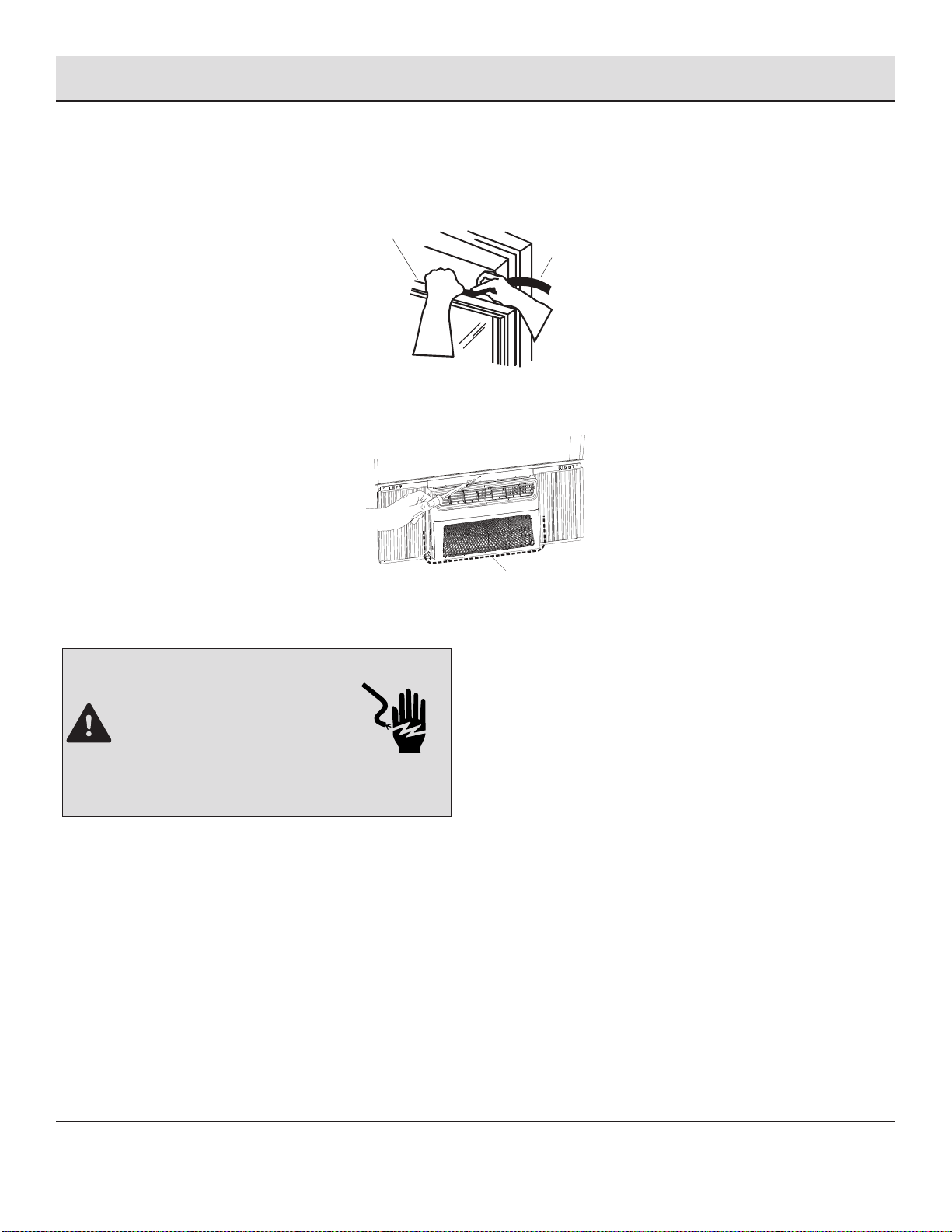
Utilice la broca de 1/8 de pulgada (3mm) para perforar un orificio a través del orificio en el riel superior.
□
Fije el riel superior al marco de la ventana con un tornillo de 3/4 de pulgada (19mm) para asegurar la ventana en su lugar.
D
□
Compruebe el espacio (D) alrededor de la unidad y séllelo con el sello adhesivo (negro) (A2) adjunto.
PELIGRO: PELIGRO DE DESCARGA ELÉCTRICA
□
Conéctelo a una toma con 3 clavijas con
conexión a tierra.
□
No quite la terminal a tierra.
□
No utilice el adaptador.
□
No utilice el cable de extensión.
□
Pueden producirse incendios, descargas eléctricas o
la muerte si no se siguen estas instrucciones.
□
Conéctelo a una toma con 3 clavijas con conexión a tierra.
□
Presione RESET en el cable de alimentación. Consulte “Requisitos Eléctricos”.
BB
Instalación (continuación)
6
Finalización de la Instalación
□
Coloque el sello de espuma (BB) detrás de la parte superior de la guillotina inferior de la ventana (A) y contra el vidrio de la
ventana superior.
A
35
Operación
USO DEL AIRE ACONDICIONADO
IMPORTANTE:
□
Utilizar el aire acondicionado le ayudará a obtener los mejores resultados posibles.
□
1
Uso del Panel de Control
CONFIGURACIÓN DE ON/OFF
□
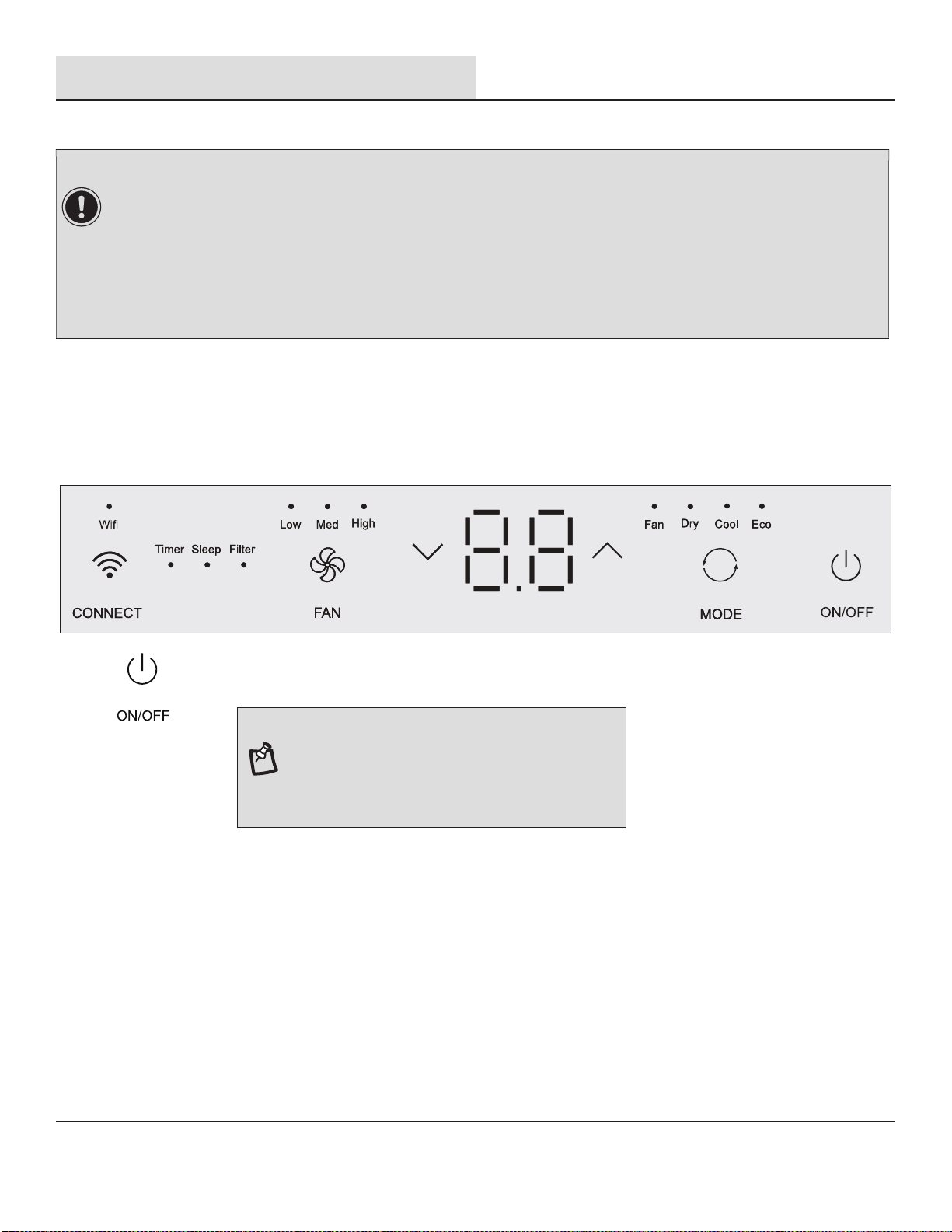
Presione el botón power para encender el aire acondicionado.
NOTA: Cuando se enciende el aire acondicionado por
primera vez después de conectarlo, la pantalla mostrará la
temperatura establecida actual y funcionará en ECO.
Después de realizar la limpieza y volver a conectar el filtro,
presione el botón POWER para reiniciar, la luz del FILTRO
se apagará.
□
Si apaga el aire acondicionado, espere al menos 3 minutos antes de volver a encenderlo. Esto evita que el aire
acondicionado queme un fusible o haga saltar el disyuntor.
□
Mejores límites para aires acondicionados que funcionan en modo de Refrigeración: Exterior 64,4-109,4°F (18-43 °C), ≤
80% RH; interior 62,6-89,6°F (17-32°C), ≤ 80% RH.
□
Mejores límites para aires acondicionados que funcionan en modo de Calefacción: Exterior 19,4-75,2°F (-7-24 °C), ≤ 80%
RH; interior 32-80,6°F (0-27°C), ≤ 80% RH.
□
En caso de fallo de alimentación, el aire acondicionado funcionará con los ajustes previos cuando se restaure la alimentación.
□
Seleccione el modo. Consulte “Configuración de Modo” en la página 15.
□
Ajuste la temperatura. Consulte “Configuración de Temperatura” en la página 15.
□
Seleccione la velocidad del ventilador. Consulte “Velocidad del Ventilador” en la página 15.
Esta sección explica el uso adecuado del aire acondicionado.
36
Operación (continuación)
CONFIGURACIÓN DE MODO
□
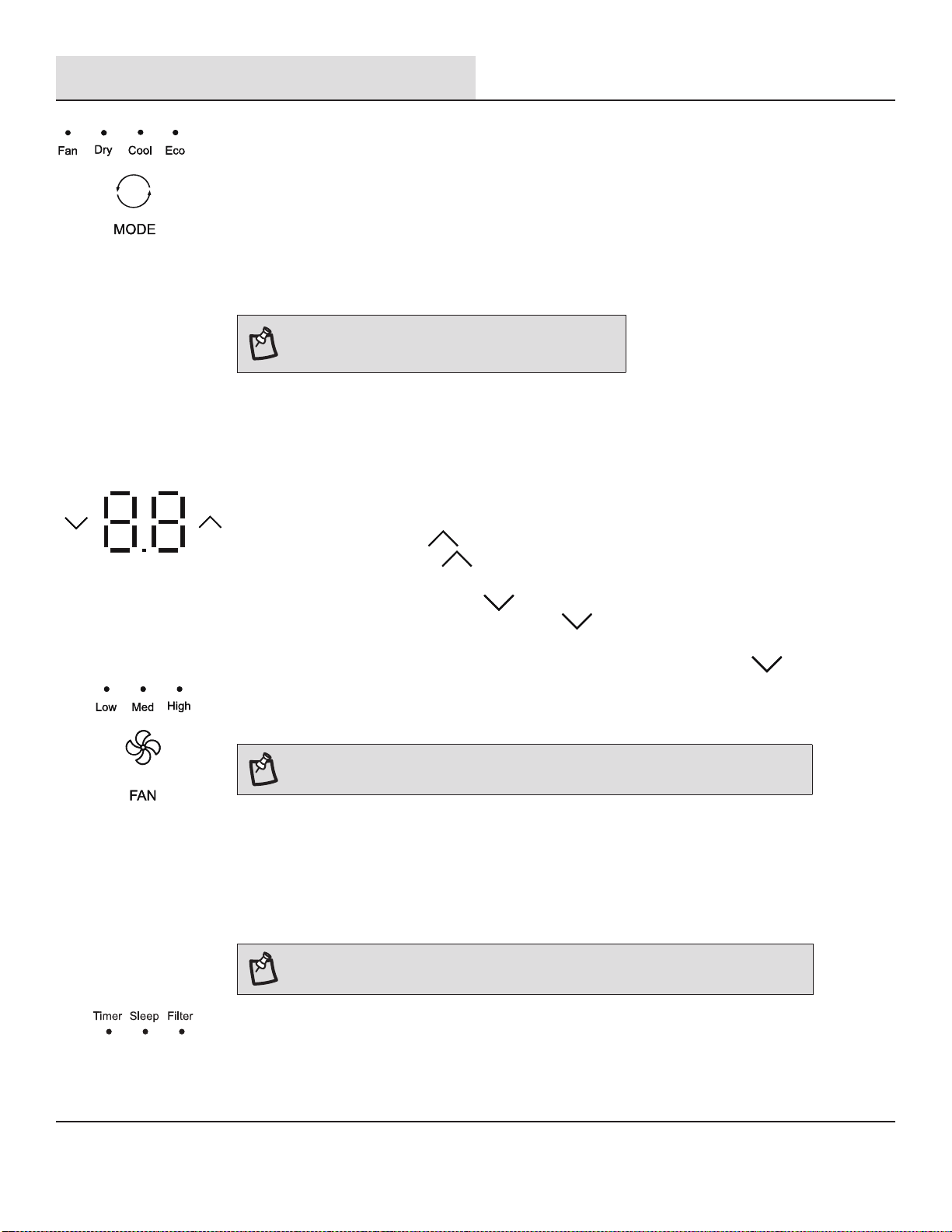
Presione MODE repetidamente hasta que vea que la luz indicadora brille en la configuración deseada.
□
Seleccione Fan (Ventilador), Dry (Seco), Cool (Frío), Eco.
□
FAN - Para seleccionar el modo de Solo Ventilador.
□
DRY - Seca el ambiente. El aire acondicionado selecciona automáticamente la temperatura. El ventilador
funciona solo a baja velocidad.
□
Cool - Enfría la habitación.
□
Eco - Enfría la habitación y ahorra energía.
NOTA: El modo Dry no debe utilizarse para enfriar la sala.
NOTA: El botón Fan funcionará solo cuando se hayan elegido los modos Cool, Fan, ECO
o Heat.
□
Presione FAN hasta que vea que la luz indicadora brille en la configuración deseada.
□
Seleccione High (Alta), Med (Media), Low (Baja).
□
Alta - para una máxima refrigeración
□
Media - para una refrigeración normal
□
Baja- para una refrigeración leve
NOTA: En el modo ECO, el ventilador funcionará a una baja velocidad cuando el
compresor se apague.
FUNCIONES DE TEMPORIZADOR, SUSPENSIÓN, FILTRO
□
La luz LED en el panel de control para Temporizador, Suspensión, Filtro.
□
Para el funcionamiento de las funciones, consulte “Uso del Control Remoto”.
□
Para los modelos E-star, el ventilador seguirá funcionando después de que el compresor se apague
durante 2 minutos (4 minutos para la primera vez), luego el ventilador se apagará durante 10 minutos. A
continuación, el ventilador realiza ciclos de 2 minutos de encendido y 10 minutos de apagado hasta que la
temperatura de la habitación esté por encima de la temperatura ajustada, en este momento, el compresor
se vuelve a encender y reanuda el Enfriamiento. Seleccione el modo ECO para iniciar esta función.
CONFIGURACIÓN DE TEMPERATURA
□
Presione el botón más UP “ ” para aumentar la temperatura. Cada vez que presione o mantenga
presionado el botón más UP “ ”, la temperatura aumentará de a un 1 °F (1 °C) hasta llegar a los 86°F
(30°C).
□
Presione el botón menos DOWN “ ” para disminuir la temperatura. Cada vez que presione o
mantenga presionado el botón menos DOWN “ ”, la temperatura disminuirá de a un 1 °F (1 °C)
hasta llegar a los 61 °F (16°C).
□
Para cambiar la temperatura de °F a °C: Presione los botones MODE y DOWN “ ” al mismo tiempo
durante 5 segundos para cambiar de °F a °C.
VELOCIDAD DEL VENTILADOR
37

Operación (continuación)
Wi-Fi
□
El control WiFi está disponible para los modelos conectados con este logo en el panel de control.
□
Presione el botón CONNECT “ ” durante 5 segundos; la luz LED comenzará a parpadear.
□
Después de que el Wi-Fi se conecta al enrutador, el LED se mantiene encendido o el LED se mantiene
apagado.
NOTA: El control Wi-Fi solo está disponible para
los modelos con control Wi-Fi.
2
COLOCACIÓN DE LAS PILAS
□
Retire la tapa de las pilas en la dirección de la flecha.
□
Inserte pilas nuevas asegurándose de que las marcas (+) y (-) de las pilas coincidan.
□
Vuelva a colocar la tapa volviendo a deslizarla en su posición.
NOTA:
□
Utilice 2 pilas AAA estándar (1,5 voltios). No utilice pilas recargables.
□
Sustituya las pilas por unas nuevas del mismo tipo cuando la pantalla se atenúe o al
cabo de 6 meses.
□
Al reemplazar las pilas, siempre reemplace ambas pilas con las nuevas. No mezcle
pilas viejas y nuevas. No mezcle pilas alcalinas, estándar (carbono-zinc) ni
recargables (ni-cd, ni-mh, etc.).
□
Si no se utiliza el aire acondicionado durante un periodo de tiempo prolongado,
retire las pilas del control remoto.
□
No utilice el control remoto si las pilas tienen fugas.
Los productos químicos de las pilas podrían causar quemaduras u otros peligros para
la salud.
□
No tire las pilas al fuego. Las pilas pueden explotar o tener fugas.
Uso del Control Remoto
(Opcional)
38
Operación (continuación)
CÓMO UTILIZARLO
□
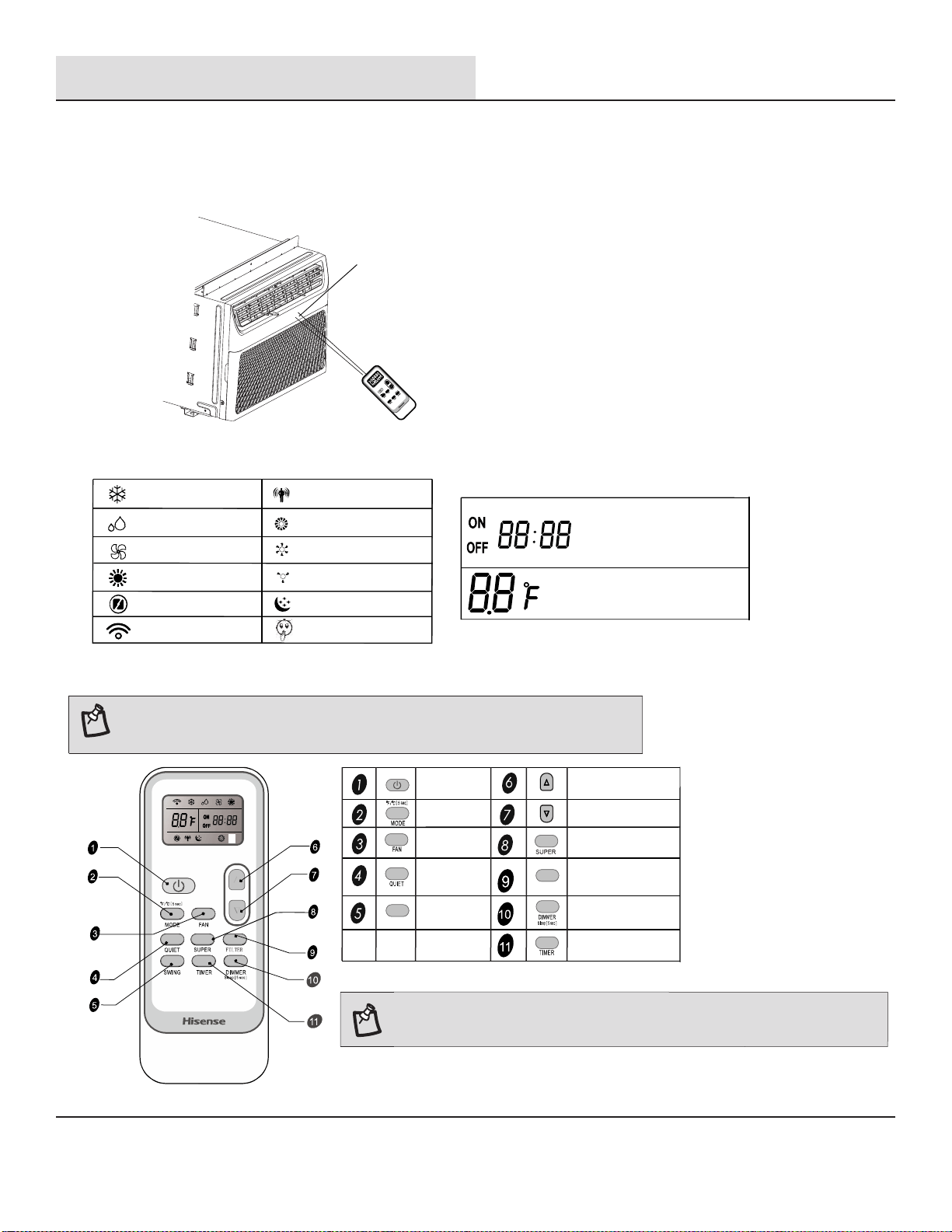
Para operar el aire acondicionado, dirija el control remoto a la señal del receptor. El
control remoto operará el aire acondicionado a una distancia de hasta 23’ (7m)
cuando apunte al receptor de señal del aire acondicionado.
Receptor de señal/pantalla
39
NOTA: El control remoto puede tener un aspecto diferente.
La función giratoria no está disponible en este modelo.
Botón Y FUNCIÓN
SWING
FILTER
ON/OFF
MODO
VENTILADOR
QUIET
(SILENCIO)
OSCILACIÓN
ARRIBA
ABAJO
SÚPER
FILTRO
ATENUADOR o
SUSPENSIÓN
TEMPORIZADOR
ON/OFF
NOTA:
Mantenga presionado el botón MODE en el control remoto durante 5 segundos
para cambiar la visualización de la temperatura de grados Fahrenheit (°F) a
grados Celsius (°C).
SÍMBOLOS DE INDICACIÓN
Indicador de
Refrigeración
Indicador de seco
Indicador de solo
ventilador
Indicador de
Calentamiento
Indicador de silencio
Transmisión de señal
Velocidad de ventilador alta
Velocidad de ventilador
media
Velocidad de ventilador baja
Indicador de suspensión
Mostrar temporizador
ajustado
Mostrar hora actual
Mostrar temperatura
Indicador de ECO
Indicador de
SÚPER
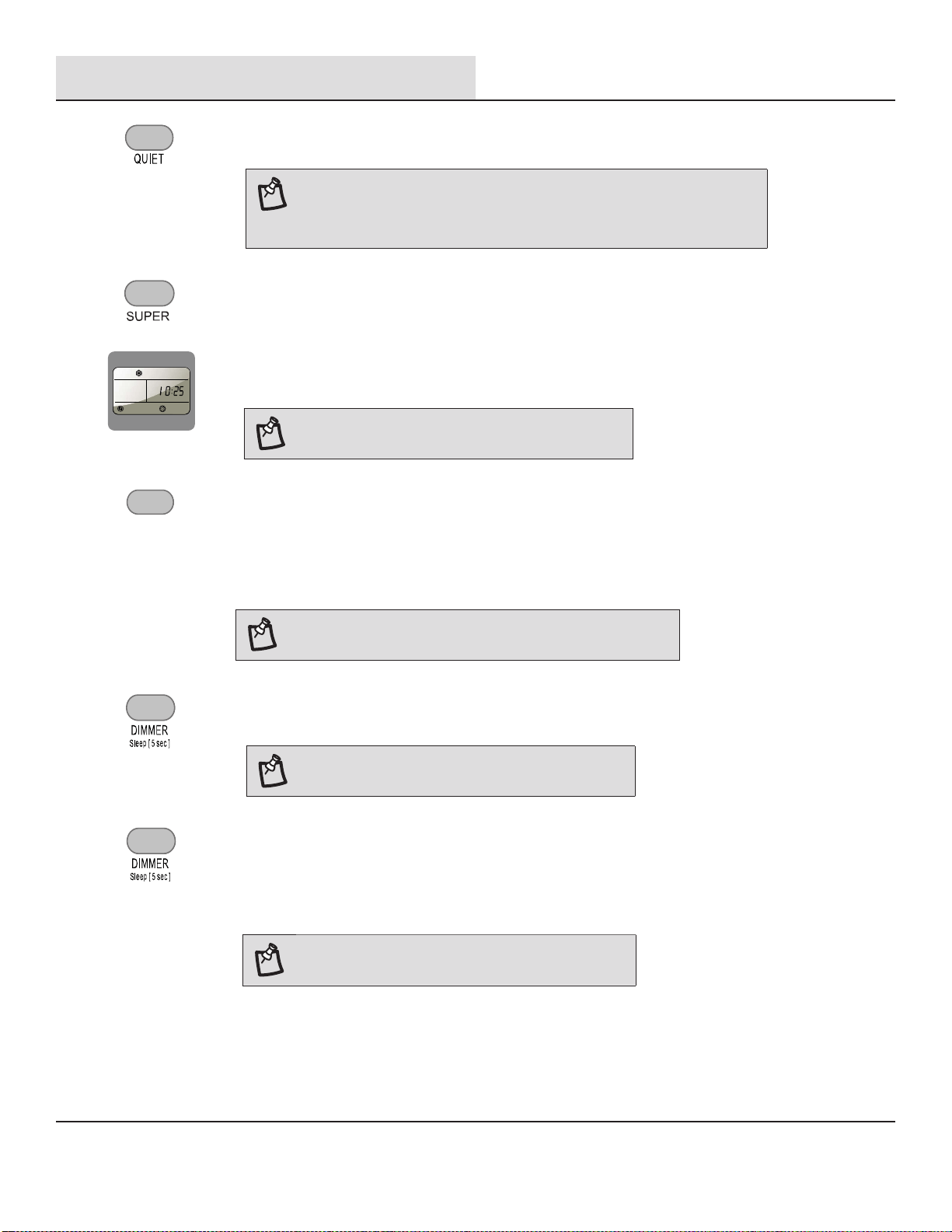
Operación (continuación)
ATENUADOR
□
Presione el botón DIMMER para apagar la pantalla del panel de control.
NOTA: En el modo ATENUADOR, los nuevos
ingresos del control volverán la pantalla a normal.
□
Presione MODE para seleccionar Cool, Dry o ECO.
□
Presione FAN para seleccionar High (Alta), Med (Media), Low (Baja).
□
Presione el botón arriba o abajo para establecer la temperatura.
□
Mantenga presionado el botón DIMMER del control remoto durante 5 segundos para cambiar el modo
ATENUADOR al modo SUSPENSIÓN.
NOTA: El control de suspensión no se puede
seleccionar en el modo Ventilador.
SÚPER
El botón SUPER se utiliza para iniciar o detener el enfriamiento rápido.
□
Presione el botón SUPER. El aire acondicionado ajusta automáticamente la velocidad
del ventilador en Alta y la temperatura en 16°C.
NOTA: En el modo SUPER, puede configurar el
temporizador.
Enfriamiento rápido
SUSPENSIÓN
El modo SUSPENSIÓN puede ajustarse en modo Enfriamiento, Calentamiento o ECO. En modo de
suspensión, la unidad utilizará velocidades de ventilador más bajas y silenciosas y ajustes de temperatura
automáticos que ofrecen 8 horas de condiciones óptimas para suspender antes de apagarse.
□
Al cabo de 10 segundos, la luz del panel de control se atenuarán.
□
Presione el botón Quiet para configurar o cancelar la operación del Modo Silencio.
□
□
Toma cerca de 2 a 3 minutos para ingresar al modo de silencio.
A veces, no se puede ingresar al modo de silencio debido a la
protección.
FILTRO
□
Cuando la luz indicadora del filtro está encendida, quite, limpie y reemplace el filtro de aire.
Consulte “Limpieza del Filtro de Aire”.
□
Presione el botón Power en la máquina o el botón FILTER en el control remoto para reiniciar el filtro
después de realizar la limpieza y el cambio del filtro del aire.
NOTA: Cuando la luz está encendida, permanecerá encendida
por 180 horas o hasta que usted presione el botón Clean Filter.
FILTER
SILENCIO
NOTA:
40
□
Para apagar el control Super, presione MODE, FAN, QUIET o SUPER botón del
control remoto.
Operación (continuación)
3
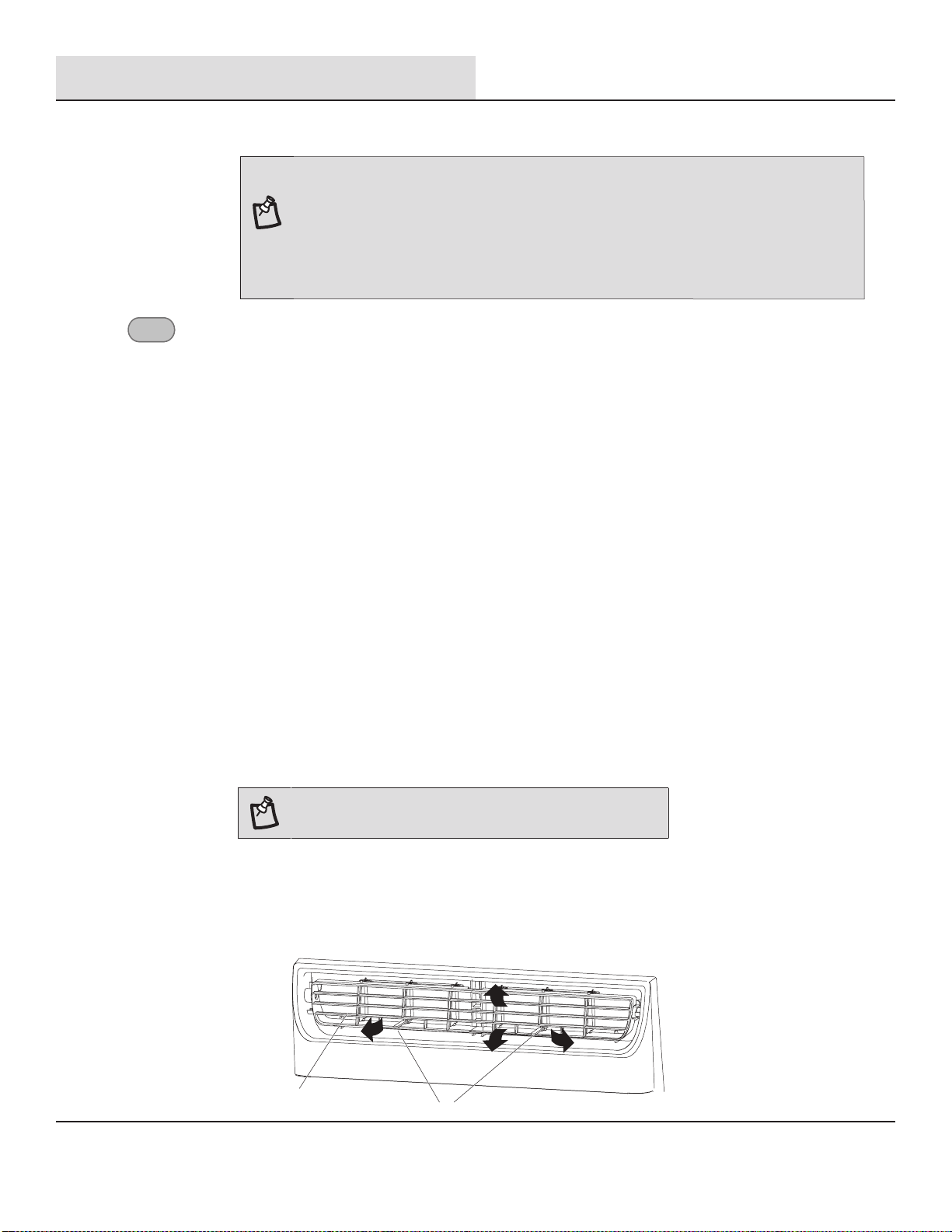
Cambio en la Dirección del Aire
□
Utilice el Aspa de Nivel Vertical (A) para dirigir el aire hacia la izquierda o la derecha. Utilice todo el cartucho (B) para dirigir el aire
hacia arriba, abajo o adelante.
B
A
TIMER
TEMPORIZADOR
Configuración del Aire Acondicionado para que S
e ENCIENDA:
□
Enchufe el aire acondicionado y utilice el control remoto para encenderlo.
□
Utilice el control remoto para configurar el modo deseado, la temperatura, la velocidad del ventilador, etc.
□
Utilice el control remoto para apagar el aire acondicionado.
□
Presione TIMER en el control remoto y utilice los botones UP, DOWN para establecer el tiempo de retraso
deseado hasta que se ENCIENDA el aire acondicionado. El tiempo de retraso se puede configurar de 0 a
24 horas en incrementos de una hora.
□
Presione TIMER de nuevo para introducir el tiempo de retraso. El LED TIMER del aire acondicionado
se ilumina y el tiempo de retraso aparece en el control remoto.
Configuración del Aire Acondicionado para que Se APAGUE:
□
Enchufe el aire acondicionado y utilice el control remoto para encenderlo.
□
Utilice el control remoto para configurar el modo deseado, la temperatura, la velocidad del ventilador, etc.
□
Presione TIMER en el control remoto y utilice los botones UP, DOWN para establecer el tiempo de retraso
deseado hasta que se ENCIENDA el aire acondicionado. El tiempo de retraso se puede configurar de 0 a
24 horas en incrementos de una hora.
□
Presione TIMER de nuevo para introducir el tiempo de retraso. El LED TIMER del aire acondicionado se
ilumina y el tiempo de retraso aparece en el control remoto.
Para cancelar el TIMER:
□
Presione el botón TIMER de nuevo; cuando se escucha un “Beep” y el indicador desaparece, el modo
TIMER ha sido cancelado.
NOTA: La función TIMER solo puede configurarse con el
control remoto.
□
Para desactivar el control de Suspensión, presione MODE, FAN, SLEEP o espere 8 horas para que el
control de Suspensión se desactive automáticamente.
NOTA: Cuando presiona el botón sleep:
□
El aparato dejará de funcionar automáticamente después de funcionar durante 8 horas.
□
La velocidad del ventilador se ajusta automáticamente a velocidad baja.
□
En los modos Enfriamiento, Secado y ECO, la temperatura establecida aumentará a 4°F (2°C)
como máximo durante 2 horas y continuará funcionando a esa temperatura hasta que el auto
se apague.
41
Operación (continuación)
4
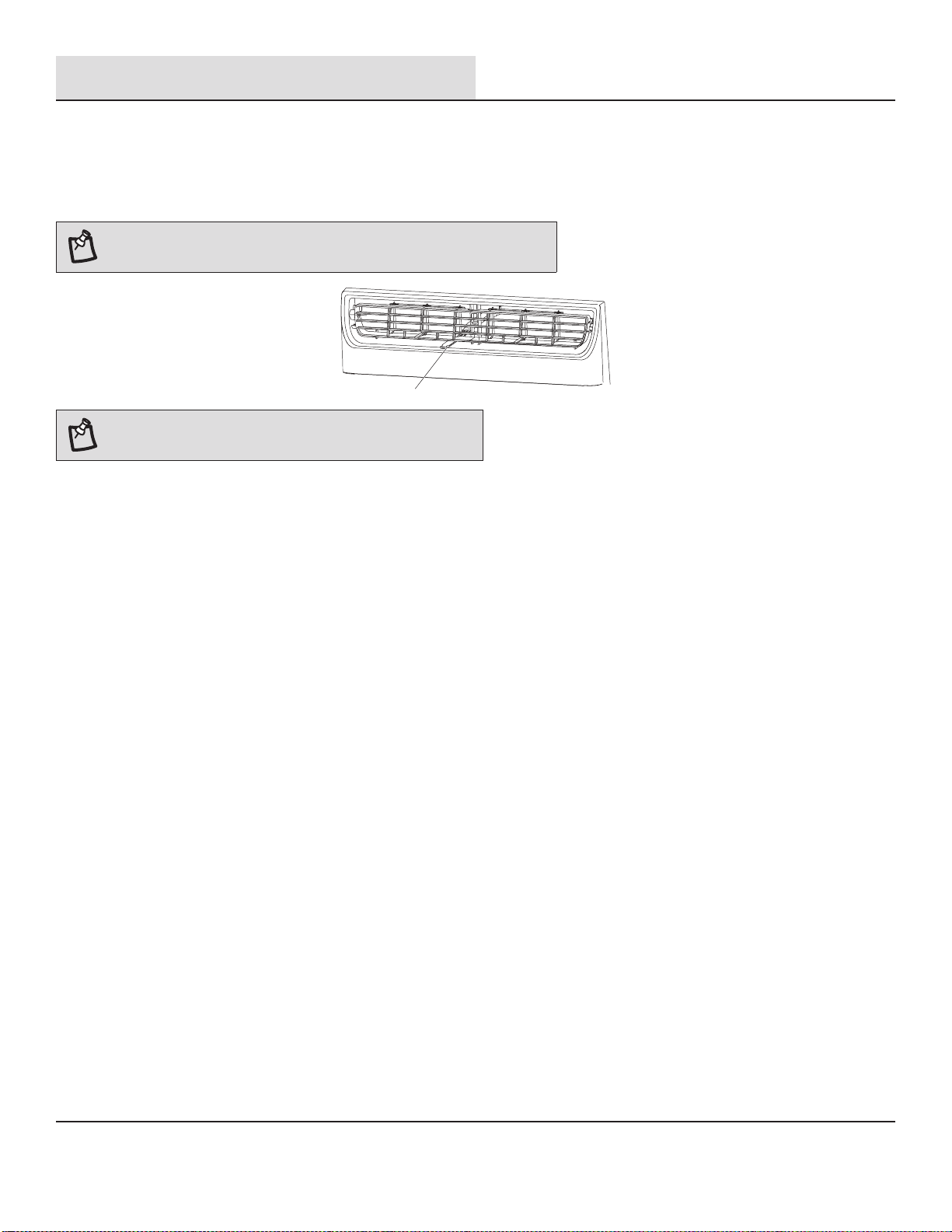
Ventilación del Aire de Escape
□
Abra el control de la ventilación del aire de escape para abrir la ventilación de escape y sacar el aire viciado o el humo de la habitación.
□
Presione el control de la ventilación del aire de escape para cerrar la ventilación de escape para una máxima y continua refrigeración.
NOTA: El control de la ventilación del aire de escape está solo disponible en los
modelos 12K\14K.
A
NOTA: El control de ventilación del aire de escape funciona
solamente cuando el ventilador está funcionando.
5
Sonidos Normales
Cuando el aire acondicionado funcione con normalidad, es posible que escuche sonidos como:
□
Gotas de agua golpeando el condensador, causando un sonido de clic o un tintineo. Las gotas de agua ayudan a enfriar el
condensador.
□
El movimiento del aire desde el ventilador.
□
Chasquidos del ciclo del termostato.
□
Vibraciones o ruido por una mala construcción de la pared o la ventana.
□
Un zumbido agudo o un ruido de pulsación debido al encendido y apagado cíclico del compresor.
42
Limpieza y Cuidado
Su aire acondicionado nuevo está diseñado para brindarle muchos años de servicio confiable. Esta sección le dice cómo limpiar y cuidar
su aire acondicionado correctamente. Llame a su vendedor local autorizado para realizar el control anual. Recuerde que el costo de la
llamada del servicio corre por su cuenta.
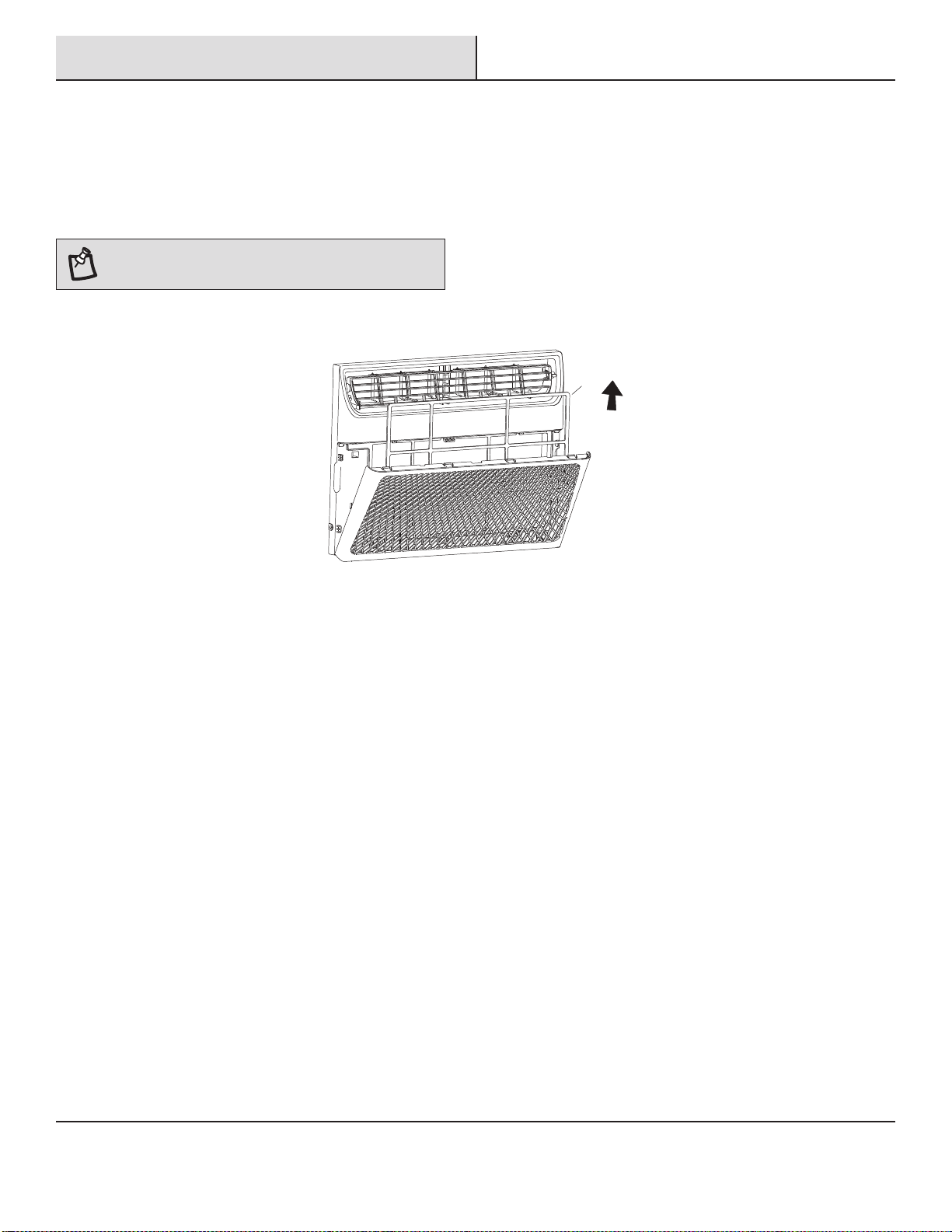
LIMPIEZA DEL FILTRO DE AIRE
Es posible extraer el filtro de aire para limpiarlo fácilmente. Un filtro limpio ayuda a remover el polvo, las pelusas y otras partículas del aire
y es importante para una mejor refrigeración y funcionamiento eficiente. Compruebe el filtro cada 2 semanas para ver si necesita una
limpieza.
NOTA: No opere el aire acondicionado sin el filtro en su
lugar.
□
Apague el aire acondicionado.
□
Abra el panel frontal. Agarre el filtro por la manija y quítelo.
A
□
Utilice una aspiradora para limpiar el filtro del aire. Si el filtro está muy sucio, lávelo con agua tibia y detergente suave. No lave el
filtro del aire con detergente para vajillas ni utilice limpiadores químicos. Deje que el filtro se seque completamente al aire antes de
volver a colocarlo para garantizar la máxima eficacia.
□
Vuelva a colocar el filtro de aire en el aire acondicionado.
LIMPIEZA DEL PANEL FRONTAL
□
Apague el aire acondicionado.
□
Limpie el panel frontal con un paño húmedo y suave.
□
Deje secar completamente el panel frontal.
REPARACIÓN DE LA PINTURA DAÑADA
MANTENIMIENTO ANUAL
EXTRACCIÓN DEL AIRE ACONDICIONADO DE LA VENTANA
□
Apague el aire acondicionado y desconecte el cable de alimentación.
□
Quite el sello de la guillotina entre las ventanas y desatornille el seguro.
□
Quite los tornillos instalados en el marco y en el seguro. Quite la espuma EVA (solo en los modelos E-star).
□
Cierre la carcasa de la cortina.
□
Sostenga firmemente el aire acondicionado, levante la guillotina y retírela cuidadosamente.
□
Tenga cuidado de no derramar agua mientras levantan la unidad de la ventana. Guarde las piezas junto con el aire acondicionado.
Compruebe una o dos veces al año si hay daños en la pintura. Esto es muy importante, especialmente en áreas cerca de océanos o donde
haya problemas de oxidación. Si es necesario, retoque con una pintura de esmalte de buena calidad.
Su aire acondicionado necesita mantenimiento anual para garantizar un rendimiento estable y superior durante el año. Llame a su
vendedor local autorizado para programar el control anual. El costo de la inspección anual corre por su responsabilidad.
43
Resolución de Problemas
Problema Solución
El aire acondicionado no funciona
PELIGRO: PELIGRO DE DESCARGA ELÉCTRICA
□
Conéctelo a una toma con 3 clavijas con conexión a tierra.
□
No quite la terminal a tierra.
□
No utilice el adaptador.
□
No utilice el cable de extensión.
□
Pueden producirse incendios, descargas eléctricas
o la muerte si no se siguen estas instrucciones.
□
El cable eléctrico está desenchufado. Conéctelo a una toma con
3 clavijas con conexión a tierra.
Consulte “Requisitos
Eléctricos”.
El cable de alimentación salta (el botón RESET salta). Presione y
suelte RESET para reanudar la operación.
Se quemó un fusible o el disyuntor saltó. Reemplace el fusible o
restablezca el interruptor. Si el problema persiste, llame a un
electricista. Consulte “Requisitos Eléctricos”.
No se ha presionado el botón Power. Presione el botón Power.
Ha habido un fallo eléctrico local. Espere a que se restaure la
alimentación.
□
□
□
□
El aire acondicionado hace que salten los fusibles o se
dispare el interruptor
□
Se están utilizando demasiados aparatos en el mismo circuito.
Desenchufe o reubique los aparatos que compartan el mismo
circuito.
Se utiliza un fusible de retardo o el interruptor de una
capacidad incorrecta. Reemplácelo por un fusible de retardo o
el interruptor de la capacidad correcta. Consulte “Requisitos
Eléctricos”.
Se utiliza un cable de extensión. No utilice un cable de
extensión con este u otro aparato.
Está tratando de reiniciar el aire acondicionado demasiado
rápido después de haberlo apagado. Espere al menos 3
minutos después de apagar el aire acondicionado antes de
intentar reiniciarlo.
□
□
□
El cable de alimentación del aire acondicionado salta (el botón
Reset salta)
□
Las alteraciones en la corriente eléctrica pueden hacer saltar (el
botón RESET saltará) el cable de alimentación. Presione y suelte
RESET para reanudar la operación.
La sobrecarga eléctrica, el sobrecalentamiento, el cable
apretado o uno viejo pueden hacer saltar (el botón RESET
saltará) el cable de alimentación. Después de corregir el
problema, presione y suelte RESET para reanudar la operación.
□
NOTA: Se debe reemplazar el cable de alimentación
dañado por un cable nuevo que se obtiene del
fabricante, no se debe reparar.
44
Problema Solución
El aire acondicionado parece funcionar demasiado
□
El aire acondicionado actual ha reemplazado un modelo
antiguo. El uso de componentes más eficientes podría provocar
que el aire acondicionado funcione más tiempo que un modelo
antiguo, pero que el consumo energético total sea inferior. Los
aires acondicionados más nuevos no emiten la “ráfaga” de aire
frío a la que puede estar acostumbrado por los aires
acondicionados viejos, pero esto no indica menos capacidad de
enfriado o eficiencia. Consulte el coeficiente de eficiencia
energética (EER) y la calificación de capacidad (en Btu/h)
marcados en el aire acondicionado.
El aire acondicionado se encuentra en una sala muy ocupada, o
se están utilizando aparatos que producen calor en la sala.
Utilice ventiladores de extracción mientras cocine o se bañe y
no utilice aparatos que produzcan calor durante las horas más
cálidas del día. Es posible que sea necesaria una mayor
capacidad del aire acondicionado, según el tamaño de la sala a
enfriar.
□
El aire acondicionado que se apaga y se enciende con frecuencia
o no enfría
□
El aire acondicionado no tiene un tamaño adecuado para la
sala. Compruebe las capacidades de enfriado de su aire
acondicionado. Los aires acondicionados no están diseñados
para refrigerar múltiples habitaciones.
El filtro está sucio u obstruido por residuos. Limpie el filtro.
Las bobinas del evaporador interno y del condensador externo
están sucias u obstruidas por residuos. Consulte Mantenimiento
Anual.
Hay calor o humedad excesiva (cocinas abiertas, duchas, etc.)
en la habitación. Utilice un ventilador para extraer el calor o la
humedad de la sala. Intente no utilizar aparatos que produzcan
calor durante las horas más cálidas del día.
Las rejillas están bloqueadas. Instale el aire acondicionado en
un lugar donde las rejillas no estén obstruidas por cortinas,
persianas, muebles, etc.
La temperatura de la habitación que está intentando enfriar es
extremadamente calurosa. Permita más tiempo para que el aire
acondicionado enfríe la habitación calurosa.
Las ventanas o las puertas están abiertas. Cierre las ventanas y
las puertas.
El control de temperatura no está en una configuración lo
suficientemente fría. Modifique el control de temperatura a un
ajuste más frío al presionar el botón menos para reducir la
temperatura. Establezca el control de la velocidad del
ventilador a un ajuste más alto.
□
□
□
□
□
□
□
Caen gotas de agua desde el gabinete en su hogar
□
El aire acondicionado no está correctamente nivelado. El aire
acondicionado debería inclinarse un poco hacia afuera. Nivele el
aire acondicionado para brindar la inclinación hacia afuera y
garantizar un drenaje correcto. Consulte Instrucciones de
Instalación.
NOTA: No perfore la parte inferior de la base de
metal ni la bandeja de condensado.
Resolución de problemas (continuación)
45