使用說明書
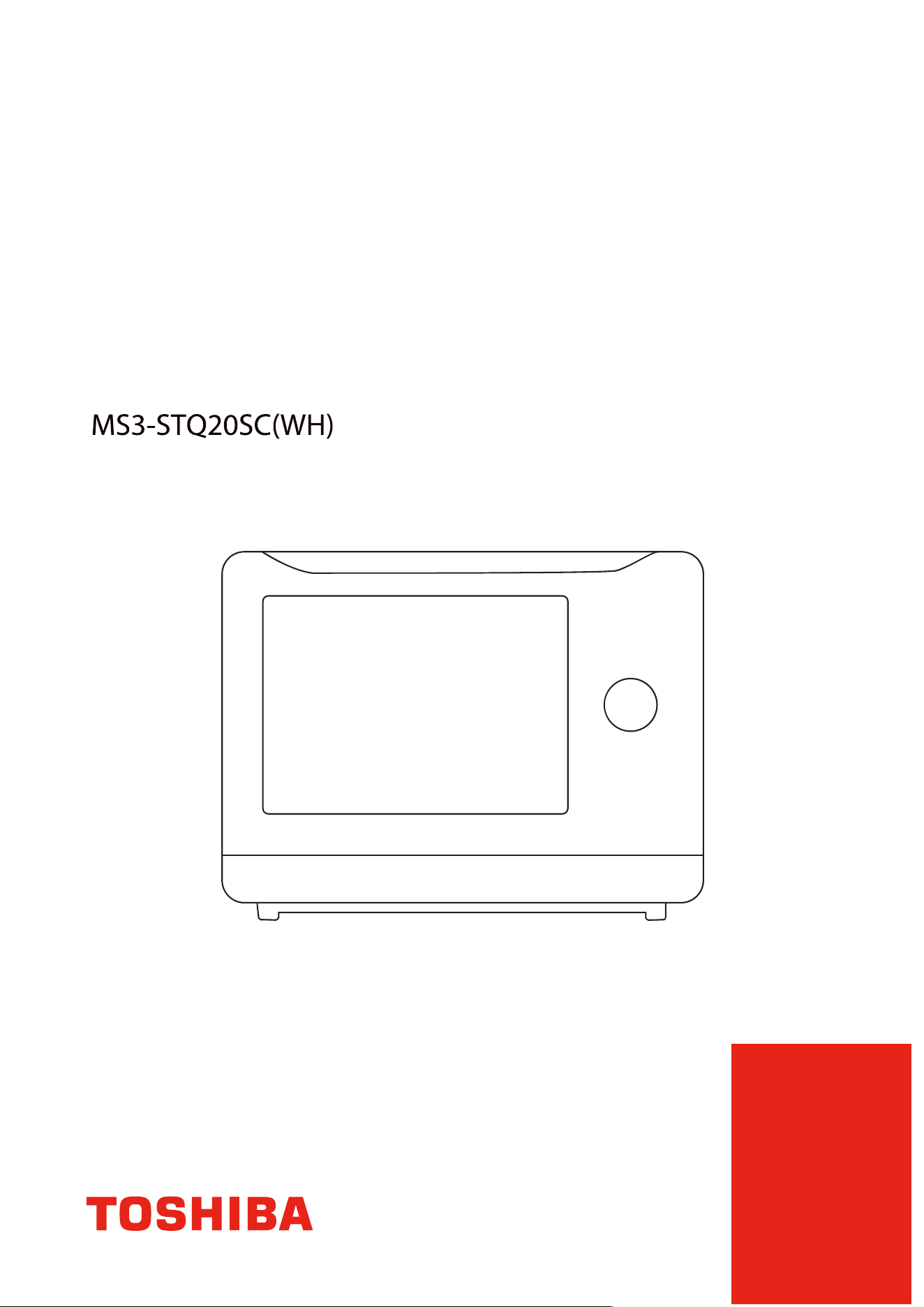
蒸氣焗爐
操作前請仔细閱讀本說明書。

目錄
產品無線網絡連接. CN-01
. CN-02
.
CN-05
CN-07
產品安全
重要安全須知.
CN-08
清潔和保養
清潔和保養
CN-19
使用說明
操作.
CN-23
維護
故障排除.
CN-32
注意
在使用本產品前,請閱讀、理解並遵循以下說明。
請務必保存本手冊以備將來參考。
如何將您的設備連接到TSmartLife
IOT智能控制
app的操作界面
美食交流圈的使用說明
IOT智能控制
產品無線網絡連接.
連接網絡
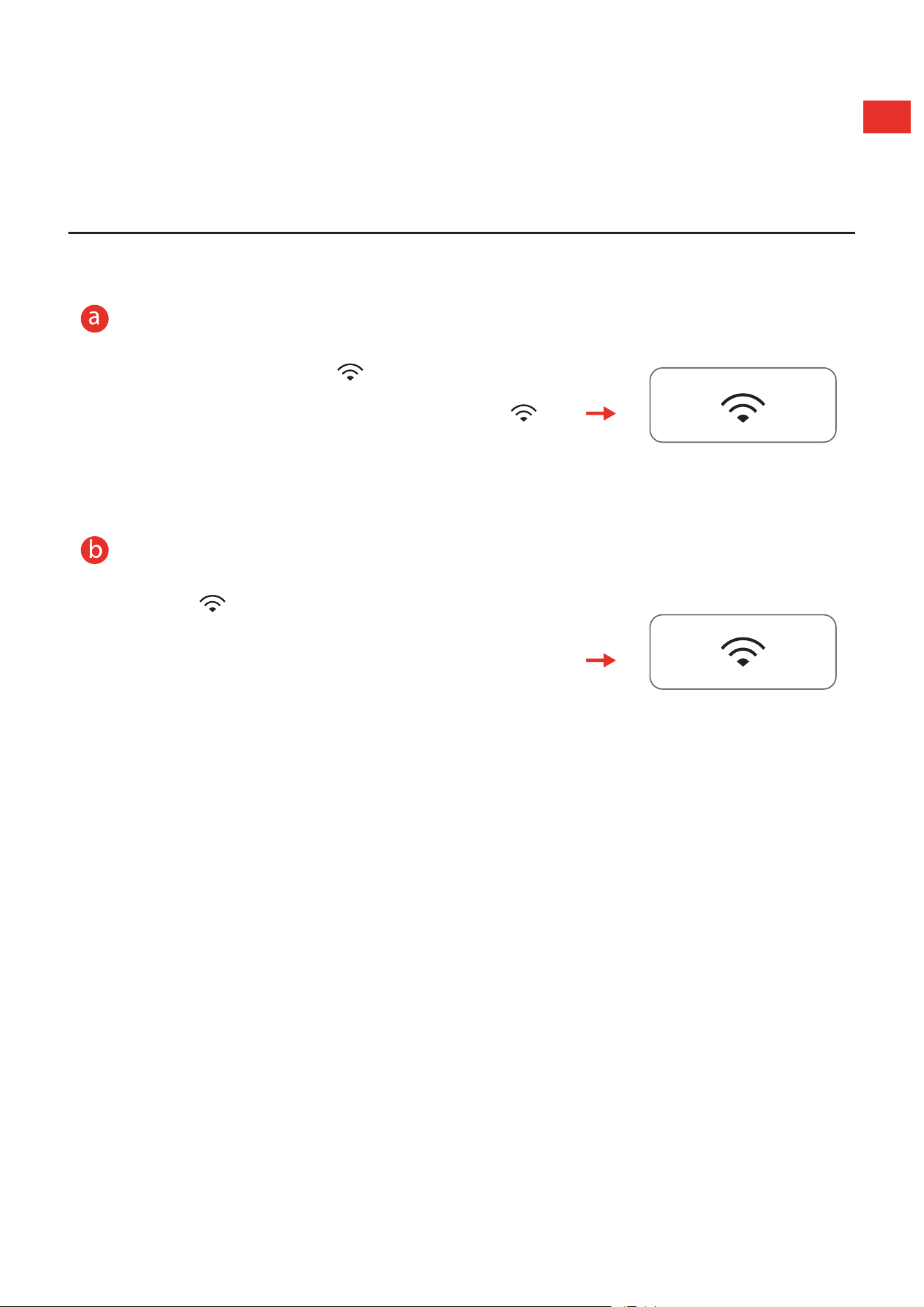
在等待狀態下,長按 " " 鍵 3 秒,直到聽見
提示音“嗶”,顯示屏上出現 "AP" 和閃爍的 " "。
若連接失敗,則顯示 "N0",30 秒後回待機。
斷開網絡連接
長按 " " 鍵 8 秒,直到聽見提示音“嗶”,
“--”閃爍幾秒鐘,如果鏈接已成功斷開,屏幕
將顯示 "8888",3 秒後返回待機狀態。若斷開連
接失敗,則顯示 "FFFF",3 秒後焗爐恢復待機。..
CN-01

如何將您的設備連接到 TSmartLife
1
.
下載 TSmartLife 應用程序
掃描二維碼或在應用商店中找到我們。
登入
註冊
3
將您的設備連接到 TSmartLife
第 1 步:
連接無線網絡,開啓藍牙。
第 2 步:
打開TSmartLife 應用程序。
為所選設備
連接電源
。
第 3 步:
使用以下方法之一
加入
您
的設備:
WLAN
Bluetooth
掃描產品二維碼
尋找
設備
手動選擇
第 4 步:
確保設備和
App
處於
同一
無線網絡下。
第 5 步:
按下面板上的
"
"
按鈕,
保持
3
秒。根據説明進行
設定
,它將自動連接。
第 6 步:
重新命名
您的設備並嘗試
遠距離
控制。
Toshiba
Please select wireless network
for device to connect
Connected device and send wireless
network information
Device is networking
Bind device to Toshiba TSmartLife
Toshiba
Hi,l’m your device!
How would you call me:
已連接
CN-02
註冊或登入
請登錄現有帳戶或註冊新帳戶

如何將您的設備連接到 TSmartLife
温馨提示
.
確保您的設備已
連接電源
。
.
連接時,請保持手機靠近您的設備。
.
將手機連接到家中無線網絡。
.
啓用無線網絡路由器上的
24GHz
頻率。目前
5GHz.Wi-Fi
網絡不可用。
.
設備無法連接需要認證的無線網絡,即酒店、餐廳等公共區域的無線網絡。
.
建議使用僅包含字母和數字的無線網絡名稱。如果您的無線網絡名称包含特殊
字符,请在路由器中修改。連接您的設備到網絡時,請禁用.WLAN
+(
Android
)
或.WLAN.助手(iOS)。
.
如需將設備重新
連接
無線網絡,請在
App
主界面點擊“+”,根據
App
提示,
按類別和型號重新
加入
設備。
CN-03

網絡
網絡
網絡
網絡
•
•
•
•
如果第一次無法加入
•
•
如果可以加入網 但連接不穩定
•
•
•
•
•
如果設備離線,請檢查連接狀態。請確認
TSmartLife
CN-04
網絡
網絡
網絡
網絡
網絡
網絡 網絡 網絡
網絡
網絡
加入
網絡
網絡
網絡
網絡
網絡

界面介紹
APP的操作界面
CN-05
兒童鎖
純蒸
熱風對流烤焗/炸
預熱
快蒸
恆溫發酵

APP的操作界面
如何開始烹飪?
1
選擇所需烹飪程序
2
點擊溫度控制位置
3
滑動溫度數字,
選擇所需溫度
4
滑動時間數字,
選擇所需時間
5
按[
開始
]鍵後,
手機界面出現提示語
6
根據指引,在焗爐上
按
[ /暫停],開始烹飪。
CN-06
開始

.
美食交流圈
的使用說明
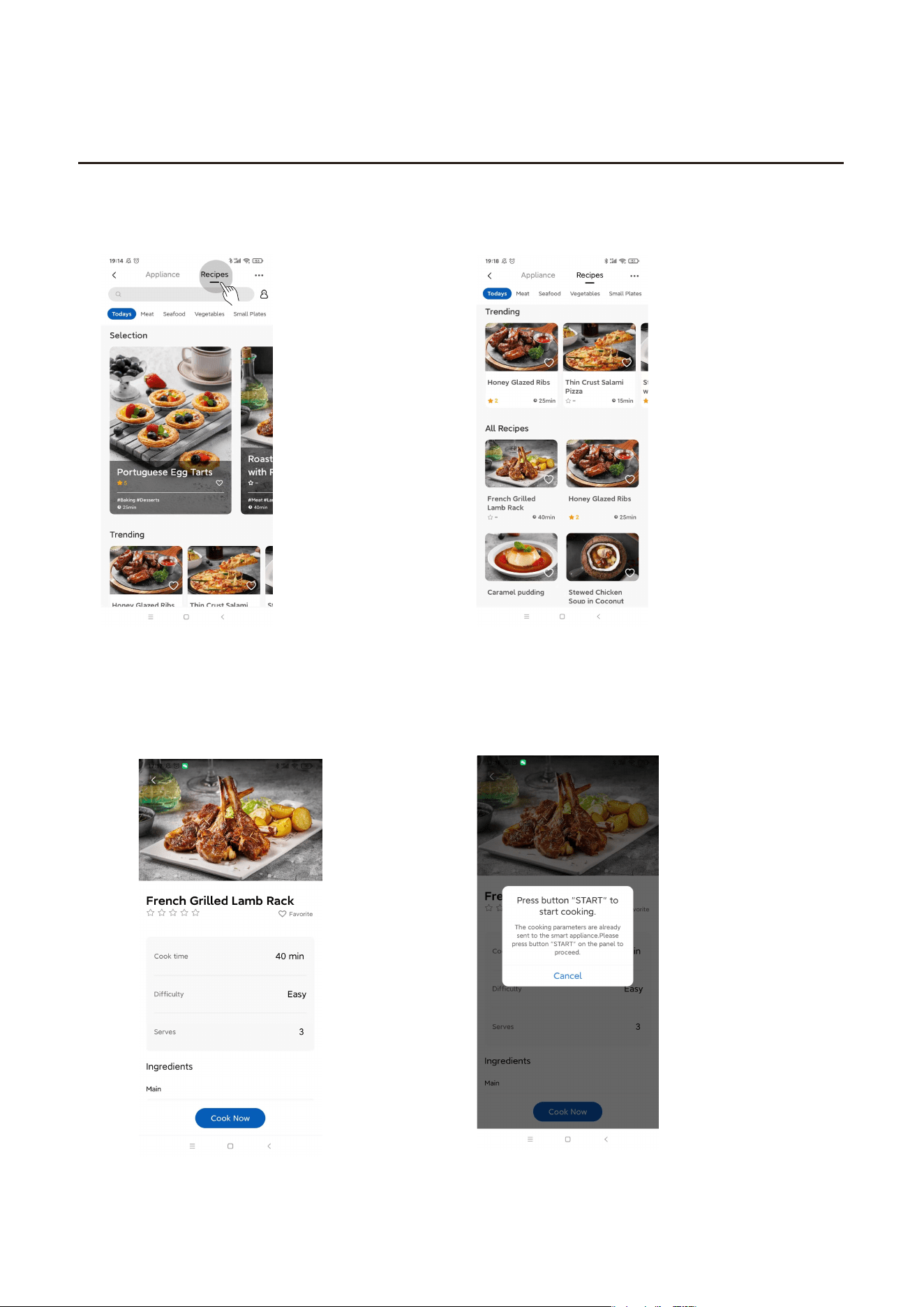
1
選擇美食交流圈
2
選擇心儀的食譜進行烹飪
3
查看食譜,開始烹飪
4
按[一鍵烹飪]鍵後,在
上按
CN-07
焗爐
[ /暫停],開始烹飪。
開始

產品安全
重要安全須知
警告
本設備符合所有相關安
全要求。
但是,使用不當會造成
人員受傷和財產損失。
請在安裝前和首次使用
前仔細閲讀本説明書。
說明書包含有關安裝、
安全、使用和維護的重
要説明。
請將說明書妥善保管,
並確保新用戶熟悉這些
內容。將說明書一併移
交給未來的設備主人。
本設備不適用於身體、
感官或精神有缺陷,或
者缺乏經驗或相關知識
的人群(包括兒童),
除非有人員給予相關使
用設備的監督或指導,
負責其安全。
警告:在設備使用過程
中,可接觸部位可能發
熱。兒童應遠離本設備。
CN-08

重要安全須知
本設備不可通過外部定
時器或分體式遥控系統
来進行操作。
產品運行時,可接觸表
面的温度可能很高,請
小心,以免燙傷。
本設備適用於家庭和類
似的應用環境,如:.
-.商店、辦公室和其他
工作環境中的員工廚房
區域;
-.農舍;
-.酒店、汽車旅館和其
他居住環境中;休息和
早餐區。
如果電線損壞,必須由
製造商、其授權服務
商或相關的合法人員更
换,以免發生危險。
仔細閱讀並妥善保存
CN-09

重要安全須知
(a).請勿在爐腔與爐門之間放置任何物體,或讓雜物
/
清潔劑殘
流物聚積在爐門
封
條表面上。
(b).警告:如果爐門或門封損壞,在專業人員進行修理之前不
得操作焗爐。
後附
如設備沒有保持在良好的清潔狀態下,其表面可能會退化、影
響設備使用壽命,並造成危險。
規格
型號 MS3-STQ20SC(WH)
額定電壓 220-230.V~.50.Hz
蒸氣烤焗
1500-1650.W
蒸氣
熱風對流 1300-1380.W
注意
應用程式和產品將不斷更新。本手冊中的圖片和內容僅供參考,請以實
際應用程式和產品內容為準。
CN-10
1500-1650.W

重要安全須知.
為避免烹飪過程中,排氣口排出的油、煙、蒸氣污染傢俱,甚至
過熱引起火災,焗爐應與牆、櫃保持一定距離。請按下圖所示,安
全放置。
爐頂.
後方
左右側
正面
開放空間
開放空間
>.10cm
>.10cm
●
.為避免對用户造成損害和財產損失,產品
使用說明書
及用戶指南
中包含了正確安全的使用方法等說明。
●
.圖標和符號用於幫助理解,可能與實物產品存在一定
區別
。
●
.使用前請仔細閲讀相關標籤,並嚴格遵守;請妥善保
管以供後續參考。
CN-11

重要安全須知
環境因素
●.請勿靠近易燃或不耐熱的物品。
遠離地毯、桌布、窗簾或不耐熱的傢俱和牆壁,因受熱而變形
和燃燒。
使用注意事項
●.所有包裝材料在使用前必須拆除。
如果包裝不拆除,工作時會引起火花、起火或燒傷。
使用前,請檢查所使用的烹調用具是否與產品相適應。建議使
用耐高温的玻璃、陶瓷或金屬容器盛裝食品。
由於工作電流較大,請使用專用插座。請勿與其他大功率電器(特
●.插座過鬆或難插
如果電源線和電源插頭損壞,請立即停止使用。切勿使用鬆動
的插座,否則可能導致火災、觸電或人員受傷。
握住電源插頭,將其從插座中拔出。
握住電源線拔插頭可能會損壞電源線,導致漏電或火災。
機器長時間不使用時,應拔掉電源插頭,以免絕緣膠線老化造
成漏電起火。
插入電源插頭前,用乾布擦去插頭片上附着的灰塵。
別是空調、取暖器等)使用同一插座,以免電路過載而引起火災。
CN-12

CN-13
使用前請仔細閲讀本使用説明書,並妥善保管,以供後續參考。
禁止將金屬或異物(如金屬絲、手指等)插入蒸氣烤箱後側的
吸氣口、排氣口和百葉窗內。
否則可能導致出點或人員受傷。如果異物不慎進入產品,請拔
下電源線,並聯系本公司客服中心。
排氣孔
百葉
吸入口
後視圖
蒸盤
(可用於蒸煮功能)
烤盤
(可用於烤焗功能,使用時請
鋪上錫紙)
●.僅使用本產品推薦的温度探頭(部分型號)。
產品的排氣孔必須保持暢通,外殼不得被其他物品遮蓋。
切勿用於烹飪以外的用途。
如果電壓過低或不穩定,產品可能無法正常啓動。請立即拔掉
電源線。為便於使用,建議添加一個電壓調節器。.
請扔掉包裝用大塑料袋,不要將其放在兒童可以觸及的地方。
.
蒸烤架
(可用於蒸,烤功能)
重要安全須知

塑料袋套在頭部,會造成窒息。請勿將電源線和插頭靠近排氣口、
外殼或温度或濕度過高的地方,以防止電源線老化,造成危險。
如有煙霧產生,請關閉電源開關或拔掉電源線,保持爐門關閉,
防止火焰蔓延。
本產品不支持外部計時器或單獨的遙控系統操作。
使用完畢後,請及時拔下電源插頭,請勿將電源插頭靠近火源
或浸入水中,請勿將電源線和插頭直接放在機殼上,以免因受
熱而損壞電源線。
請勿拍打產品。
本產品專為家庭加熱和烹飪而設計。不適用於工商業用途。
不要在設備上放置任何物品。
放置食物或任何物品在設備上會導致危險發生。物品可能變形、
燃燒,引發火災。刀具、叉子、勺子和蓋子等金屬物體可能會
受熱發燙。
請勿將產品浸入水中。
烹飪時請勿拔出插頭。
烹飪時拔出插頭會產生火花、起火或觸電。
請勿將任何異物放入爐門的聯鎖開關中。
禁止用於油炸食物。
切勿在焗爐內用油鍋油炸食物,否則可能引發着火。
小心開關爐門。
CN-14
重要安全須知
警告:如果爐門或門封損壞,專業服務人員修理之前,不得使用。

重要安全須知
小心燙傷
烹飪過程中或烹飪後,請勿將臉部或身體其他部位靠近爐門或
排氣口,否則可能導致燒傷。
在
蒸氣
加熱期間和之後,謹防散發的熱
氣
和
蒸氣
,
燙傷。打
開
爐門時請格外小心,因為此時焗爐可能會繼續散發熱蒸
氣
。
拿取食物時請小心,不要撞到
壁或門玻璃。
加熱湯、飲料等液體食品時要小心。
加熱飲料會造成延遲的飛濺和沸騰,因此在取出飲料時請務必
小心。奶瓶和嬰兒食品罐應進行攪拌或搖動;餵食前檢查瓶內
食品的温度,謹防燙傷。
冷卻後清潔
焗爐腔內殘留的污物必須經常清理,以免影響加熱效果。請放
置在兒童觸碰不到的地方。
兒童只有在已接受了充分的指導,能夠以安全的方式使用產品,
並理解不正確使用是危險時,才允許其在沒有監督的情況下使用
產品。當產品在
蒸氣
模式下時,為避免高溫燙傷,兒童必須在成
人的監督下使用。.
產品在使用過程中會發燙,避免與爐腔接觸,謹防燙傷。.
CN-15

注意事項
●.機箱內有高壓電,請勿打開機箱進行維修或改裝。
警告:非專業維修人員的維護操作將導致危險發生。如果您
在使用過程中遇到任何問題,請與我們的客户服務中心聯繫。
●.嚴禁非專業人員拆卸本產品,可能會造成危險。
警告:如果爐門或門封損壞,請勿繼續使用焗爐。請聯繫
合
的
/
東芝服務人員進行維修。
●.如果電源線破損,為避免危險,必須由製造商、其維修部門
或相同資格的專業人員進行更換。
注意事項
● .
爐門和外殼
用微濕的布擦拭。用温和的清潔劑擦拭頑固的污漬,然後用稍
濕的布擦拭。警告:切勿使用大量水擦拭,否則可能導致
蒸氣
焗爐生鏽,造成損壞。
● .
蒸氣排放口
用微濕的布擦拭。
蒸氣
烹飪後,在
蒸氣
排放口附近會有白色的
痕跡(水中溶解的物質)。用微濕的布小心擦拭,確保水已擰
乾。
● .
焗爐腔和爐門(內部)
用微濕的布擦拭。對於有頑固污漬的部位,可用中性清潔劑浸
泡
30
分鐘,然後清洗乾淨。
蒸氣
加熱後,等待
蒸氣
焗爐冷卻,然後用乾布擦去所有冷凝
水。警告:不要使用鋒利的物體,如硬刷或硬叉,否則可能造
成劃痕或裂紋。
CN-16
重要安全須知
資格

重要安全須知
電氣連接
該設備裝有插頭,僅可連接至正確安裝的接地插座上。
只有考慮了適當法規的合格電工才能安裝插座或更換連接電纜。
如果安裝後無法再使用插頭,則必須在安裝側安裝一個全極隔
離開關,其接觸間隙至少為 3.mm。安裝時必須確保接觸間隙。
●
爐門門封
● 拆去爐門封條後如發現爐腔邊表面有斑點,此為生產過程中
產生的焊接點,此為正常現象,請放心使用。
● 用蘸有軟清潔劑(如 )的布擦拭機殼,再用濕布擦
去,最後用乾布擦乾。請勿使用鋼絲刷等硬物擦拭產品。
請勿清潔爐門安全鎖系統。
警告:不要使用粗糙的清潔劑或鋒利的金屬刮刀清潔爐門
玻璃,否則可能導致玻璃破碎。
●
始終保持爐門和爐體接縫的清潔。
烹飪過程中產生的油脂會腐蝕腔室,影響加熱效果,改變食物
味道。因此,請在
蒸氣焗爐
完全冷卻後,用濕布或蘸有軟性清
潔劑的布清潔焗爐。
定期用温水清洗附件。長時間烹飪後,請勿立即用冷水清洗。
請勿使用劣質清潔劑或腐蝕性、揮發性化學溶劑擦拭焗爐,以
免造成損壞。
CN-17
洗潔精

將焗爐插頭插入標準的家用插座。確保其電壓和頻率與額定值
標簽上的
相同
。
警告
請勿將焗爐安裝在爐灶或其他發熱設備上。如果安
裝在熱源附近或上方,
焗
爐可能會損壞,因此造成
的損壞不納入保修。焗爐僅供台式開放空間使用,
不得放置在櫥櫃中。
使用過程,可接觸表面可能變熱
顧客關懷和與服務
感謝您選擇我們的家用電器產品。.
多年來,我們一直致力於為您提供無可挑剔的性能,請仔細閲
讀本説明書。只有這樣,才能確保您安全、正確地操作您的設備。
本指南中的警告和重要説明並不涵蓋所有可能發生的情況和情
形。
在安裝、維護或操作焗爐時,必須保持常識、謹慎和小心。務必
使用原裝備件。請保留使用手冊和安裝説明,以備將來使用或供
後續所有者使用。..
CN-18
重要安全須知

清潔和保養
清潔和保養
警告
● 使用餐具清洗功能時,請務必確認餐具的耐熱温度高於
130
°C
,
且水箱內已注滿水。餐具消毒:使用此功能對餐具進行消毒,適
用於各種餐具的清洗,包括嬰兒奶瓶。
清潔劑
為避免設備表面被不恰當的清潔劑損傷,請注意以下圖片信息。使用前彻底清潔新海綿。
操作:
按【自動功能】 旋轉旋鈕選擇功能
按【 】以啟
動
自
動
功能
34;餐具消毒
自
動
功能
36;用於烹
飪後腔體清潔
自
動
功能
37;使用此功
能去除腔體的殘留氣味
自動功能38;蒸氣系統
清潔,清潔爐內水管
餐具消毒
爐腔清潔
爐腔除味
蒸氣系統清潔
CN-19

温馨提示及注意事項
含蘇打、氨、酸或氯化物的清潔劑含除垢劑的清潔劑。
研磨清潔劑,如粉末清潔劑和霜狀清潔劑、研磨海綿和刷子,
如洗壺器、不鏽鋼清潔劑。
洗碗機清潔劑、焗爐噴霧玻璃清洗劑、溶劑型清洗劑、鋒利的
金屬刮刀。
● 不要使用粗糙的清潔劑或鋒利的金屬刮刀清潔爐門玻璃,否
則可能導致玻璃破碎。
● 不要將電源線和插頭直接放在爐蓋上,以防爐蓋發熱損壞電
源線。
● 爐腔處於高温時,內部水蒸
氣
膨脹。由於氣壓問題,開門後
立即關門會發出哨聲,這屬於正常現象,不影響使用。開
門後10秒內爐 温度略有下降,關門時不會有聲響。
● 拔下插頭,等待設備完全冷卻。
● 用蘸有軟清潔劑的布擦拭產品外殼,並用濕布擦拭乾淨。
● 嚴禁將蒸
氣
焗爐浸入水或其他液體中。
● 為了獲得最佳的清潔效果,建議用温水清洗配件。
為避免損壞設備表面,請勿使用:
CN-20

水箱使用說明
廢水箱
取出 / 重裝
水箱
揭開膠圈,加入適量室溫食水/
蒸餾水,蓋上膠圈,保證
配合良好。
打開水蓋進行清潔,或
將剩餘的水排出。
當水箱缺水時,泵會發出嗶嗶聲,説明機器缺水。此時,請
及時將水箱加滿水,若水箱一直處於缺水狀態,機器會長鳴
30 秒後暫停,並伴有【 】提示音, 幕顯示
首次使用前
初始清潔和加熱
取下 焗爐正面的所有保護箔。
有關更多信息,請參閲首次使用設備前的“清潔和保養”。
首次清洗和加熱
加熱前,最好用濕布擦拭蒸氣焗爐內部。這樣就能夠去除儲存
和解黐器具在包装過程中積聚的爐灰或者殘留的包裝材料。
金屬部件有保護塗層,在首次加熱時可能會發出輕微的氣味。
氣味和任何 在短時間內會消散,並不表示連接或設備有故
障。首次加熱設備時,確保廚房通風良好。
請取下所有配件,並清洗乾淨焗爐。.
新電器首次使用時通常會有異味。首次使用前,請使用自動功
能36進行清潔來去除異味。
1.
在水箱中加入
溫室食水/蒸餾水
,防止水垢影響機器壽命。
2.
烹飪結束後,必須將廢水箱和清水箱中的水排空,以免滋
生細菌。
【
】和
"FILL"。
請將
水盒加水至"MAX"線,並按 繼續烹調。
CN-21

CN-22
初次使用
1. 關上爐門
,
請勿放置任何物件於爐內
2. 將水箱加滿,按鍵,扭動按鈕選擇「36爐腔清潔」
3. 按 鍵,鍵開始清潔,時間約需10分鐘
4. 清潔完成時,蜂鳴器會發出一下聲
響,然後請打開爐門進行冷卻
a. 清潔完成後,請勿馬上用手觸碰 爐腔
b. 冷卻後請用柔軟抹布清潔爐腔
c .徹底冷卻前,請勿關閉爐門

使用說明
操作
控製面板及功能
CN-23
純蒸
熱風對流/蒸氣烤焗
預熱
爐內燈
[
取消
/
兒童鎖
]
[
開始
/
暫停
]
[
顯示屏幕
/
確認
]
旋轉選擇器設定
-
時間
-
溫度
-
自動功能
連接APP
自動功能

操作說明
1 純蒸.
待機模式時,選擇
" " 菜單。
旋轉旋鈕設置時間(1-120 分鐘),默認 20
分鐘。
旋鈕,旋轉設置温度(35-100
°
C),默
認温度為 100
°
C。..
按 " " 開始加熱。
.
運行狀態下,爐門關閉,觸控 " "
鍵,控制
爐內燈的開啓或關閉。
按下
CN-24

3 .
待機模式時,按
"
旋轉旋鈕設置温度(100-230
°
C),熱風對
流默認温度為
170
°
C。(
為
190
°
C)
按下旋鈕,旋轉設置時間(1-120 分鐘),
默認時間為 30 分鐘。.
按 " "
鍵選擇預熱功能。如果不需要預約,
請跳過這個步驟。
按 " " 開始預熱。
待機模式時,按
"
"鍵1次,選擇熱風對流。
"鍵2次,選擇蒸氣烤焗。
蒸氣烤焗默認温度
CN-25
操作說明

操作說明
預熱結束後,蜂鳴器鳴叫,然後開門將食物放
入烤箱,關上門,按 " " 開始烹飪。 .
4 爐腔預熱.
待機模式時,按
" " 鍵選擇預熱功能。
旋轉旋鈕設置温度(100-230
°
C),默認温
度為 170
°
C。.
按 " " 開始預熱。
注意
CN-26
1.
可在運行時或暫停時調節烹飪時間。透過旋鈕調整時間,當前時間閃爍。
觸按
[
開始
/
暫停
]
確認設置。
2.
可以在預熱過程中以及預熱結束時調節溫度。
3.
預熱完成後,如果門未打開,當溫度下降時將繼續加熱。

操作說明
5ECO 模式.
進入 ECO 模式有以下 2 種方式
(1)待機模式時,先關門,再按“ ”鍵,
燈滅。
(2)待機模式時,按“ ”鍵,屏幕熄滅。
關閉
ECO 模式
ECO 模式下,任意按鍵取消。
6 功能.
鎖定焗爐,避免兒童或其他非預期用 操作。
啟動兒童鎖
" 鍵 3 秒,顯示鎖定
待機模式時,長按
"
圖標。
解除鎖定
" 鍵 3 秒,焗爐恢復
待機模式時,長按
"
等待狀態。
CN-27
戶

操作說明
7 自動
待機模式時,按
"
"
鍵進入
自動
功能。
旋轉旋鈕可直接選擇所需
功能
。
按 " " 開始。
CN-28

操作說明
自動功能指南
菜單 顯示
清蒸檸檬鱸魚
01 400g
蒜蓉粉絲蒸蝦
02 400g
日式茶碗蒸
03 600g
蒸娃娃菜
04 500g
牛肉灌湯包
05 600g
戚風蛋糕
06 8 寸
海鮮披薩
07 1
香烤鷄翼
08 600g
蜜汁燒肋骨
09 500g
黑椒牛扒
10 250g
迷迭香烤羊架
11 500g
烤秋刀魚
12 2 條
炸蝦天婦羅
13 8
紙杯蛋糕
14 12
香辣烤魚
15 500g
重量
/
數量
預熱
時間
可調範圍
電力
√
×
×
×
×
√
√
√
√
√
√
√
√
√
√
5分熱風對流
烤焗
預熱
+
蒸
8分20秒
7`00``到
9`40``
熱風對流烤焗
180°C+蒸氣
7分30秒
6`30``到
8`30``
快蒸100°C
24分
20`30``到
27`30``
純蒸100°C
12分
10`10``到
13`50``
快蒸100°C
20分
17`00``到
23`00``
快蒸100°C
×
×
×
×
×
×
×
×
×
×
50分
15分
25分
10分+
15分
20分
40分
15分
18分
23分
15分
熱風對流烤焗
150°C
熱風對流烤焗
220°C
熱風對流烤焗
220°C
熱風對流烤焗
220°C +熱風對
流烤焗180°C
熱風對流烤焗
230°C
熱風對流烤焗
230°C
熱風對流烤焗
220°C
熱風對流烤焗
200°C
熱風對流烤焗
170°C
熱風對流烤焗
200°C
CN-29
氣

操作說明
菜單 顯示 重量 / 數量
蔓越莓餅
16 15
葡撻
17 12
牛油卷
18 9
香蔥芝士曲奇
19 16
香烤 薯
20 4
焦糖布丁
21 12
剁椒魚頭
22 800g
玉子豆腐蒸蝦仁
23 200g
蒸燒賣
24 12
蒸急凍食品
25 12
三文魚蒸飯
26 130g
蒸米飯
27 300g
豉汁蒸排骨
28 500g
菠菜紅豆草餅
29 300g
燉燕窩
30
1500g
(300g 燕窩
+1200ml 水)
預熱
時間
可調範圍
電力
17`00``到
23`00``
20分
快蒸100°C
×
√ 15分
熱風對流烤焗
140°C
×
50分
熱風對流烤焗
230°C
×
√ 10分
熱風對流烤焗
180°C
×
√ 12分
熱風對流烤焗
180°C
×
√ 25分
熱風對流烤焗
200°C
×
√ 16分
熱風對流烤焗
160°C
8`30``到
11`30``
10分
快蒸100°C
13`30``到
18`30``
16分
快蒸100°C
13`00``到
17`00``
15分
快蒸100°C
6`50``到
9`10``
8分
純蒸100°C
38`20``到
51`40``
45分
純蒸100°C
17`00``到
23`00``
20分
快蒸100°C
17`00``到
23`00``
20分
純蒸100°C
42`30``到
57`30``
50分
純蒸100°C
×
×
×
×
×
×
×
×
×
×
CN-30
紅

操作說明
菜單 顯示
大火快蒸
31
穩火慢燉
32
恒溫發酵
33
餐具消毒
34
奶瓶消毒
35
爐腔清潔
36
.
爐腔除味
37
蒸氣系統清潔
38
重量 / 數量
預熱
時間
可調範圍
電力
100°C
1分钟~1小时
10分
100°C
蒸汽
×
35°C ~100°C
1分钟~5小时
50分
100°C
蒸汽
×
30°C ~45°C
1分钟~24小时
30分
35°C
×
30分
×
10分
100°C
×
10分
100°C
×
5分
×
1
小時
×
CN-31

維護
故障檢查
正常
屏幕顯示 "F01"
當爐腔溫度較高時
,相關功能暫時不能使用。待
爐腔
冷卻後再
啓動。
屏幕顯示【 】和“FILL”
水箱無水或安裝不到位。如果不是以上問題,請找售後專業
人員進行維修。
蒸氣積聚在門上,熱空氣
從排氣口排出
烹飪時,.蒸氣可能從食物中冒出。大部分會從通風口排出。
但仍有部分可能在爐門等陰涼處冷凝。這屬於正常現象。
焗爐內無食物時意外啓動。 禁止在沒有任何食物的情況下運行設備,這是非常危險的。
故障 可能的原因 可能的解決方式
焗爐無法啓動。
a.電源線未插緊
b.熔斷器熔斷或斷路器工作
c.插座故障。
a.拔掉插頭。然後在 10 秒鐘
後再次插入。
b.更換保險絲或復位斷路器(我
司專業人員維修)
c.與其他電器一起測試插座。
焗爐不加熱。 爐門未關好。 確保爐門正確關閉。
根據廢棄電子電氣設備(WEEE)指令,WEEE 應單獨收集和處理。如您
將來需要處置本產品,請勿將本產品與生活垃圾一起處置。請將本產品送至
WEEE 收集點(如有)。
CN-32


INSTRUCTION MANUAL
Please review this instruction manual before operating.

CONTENTS
BEFORE OPERATING THIS PRODUCT, READ,
UNDERSTAND, AND FOLLOW THESE INSTRUCTIONS.
BE SURE TO SAVE THIS BOOKLIST FOR FUTURE
REFERENCE.
NOTE
Operation .............................................................................................................................................................EN-24
MAINTENANCE
Trouble shooting ............................................................................................................................................... EN-33
INSTRUCTION FOR USE
PRODUCT SAFETY
.........................................................................................................EN-0
CLEANING AND CARE
...................................................................................................................................... EN-1
............................................................................
........................................................................
.....................................................................................................................
.......................................................................................................
EN-01
EN-02
EN-0
EN-0
.............
.. .....
IOT SMART CONTROL
....
TSmartLif

PRODUCT WIRELESS NETWORK CONNECTION
a
b
press
In waiting state,
and hold " " for 3 seconds,
till a beep sounds, "AP" " " show
on display. If it fails, "N0" will display, and the oven
will return to standby after 30 seconds.
Press and hold " " for 8 seconds,
till a beep sounds, "--"
if the link has been removed successfully, the
screen will display "8888" and then return to standby
after 3 seconds. it fails, "FFFF" will display, and the
oven will return to standby after 3 seconds.
Connect the network
Disconnect from the network
If
EN-01

HOW CONNECT YOUR DEVICES TO TSmartLife
1 Download The TSmartLife App
Scan QR code or nd us on your App
store
2Register and Log in
Log in for existing users or sign up
for new users.
Connect to wireless network
and enable Bluetooth.
STEP 1.
Open the TSmartLife App.
Power on selected device.
STEP 2.
Add your device using one
of the following methods:
STEP 3.
3 Connect your Devices to TSmartLife
Ensure device and App are
under same wireless network.
STEP 4.
STEP 5.
Rename your device and
try to remote control it.
STEP 6.
Press “ ” button for 3 seconds
on the panel.Following
instruction to set up, it will
connect automatically.
SELECT
MANUALLY
SEARCH
DEVICES
SCAN PRODUCT
QR CODE
WLAN
Bluetooth
connected
Toshiba
Please select wireless network
for device to connect
Connected device and send wireless
network information
Device is networking
Bind device to Toshiba TSmartLife
Toshiba
Hi,l’m your device!
How would you call me:
EN-02

HOW CONNECT YOUR DEVICES TO TSmartLife
Make sure your devices are powered on.
Ke
ep your mobile phone close to y
our device during connection.
Connect your mobile phone to the wireless network at home.
Enable the 2.4GHz frequency on your wireless network router.
The device is unable to connect to wireless network that requires authentication
and also appears in public areas such as hotels and restaurants.
It is recommended to use a wireless network name that only contains letters and
numbers. If your wireless network name contains special characters, modify it in
the router. Disable WLAN+ (Android) or WLAN Assistant (iOS) when connecting
your devices to the network.
To reconnect a device to the wireless network, click “+” on the App home screen
and add the device again by the category and model according to the App
prompts.
TIPS
EN-03

TSmartLife APP TROUBLESHOOTING
Background :
Offering dual-band support provides choices and maximum flexibility of the product to have successful experience
on home network. Home networks can be expected to have multiple service possibilities, depending on how
their router is configured. There are four router configuration modes: A, B, C and D.
A. 2.4 GHz only … e.g. older model router
o In this case dual band radio will automatically operate at 2.4GHz
B. 5 GHz only … some people may choose to turn off older 2.4GHz band due to conflicting interference
o In this case dual band radio will automatically operate at 5GHz
C. 2.4G Hz and 5GHz sharing same SSID name … e.g. Johns
o In this case the router and dual-band radio will negotiate the best frequency to use
D. 2.4GHz and 5GHz with different SSID names … e.g. Johns _2G and Johns _5G
o In only this case is there a choice which
band to use.
If unable to join network at the first time
• Cannot see home SSID network :
o Weak signal … Since appliance radio is dual-band this means neither 2.4GHz nor 5GHz signal is being
received by the appliance. Just because the signal can be seen by the phone doesn’t necessarily mean
that the appliance radio can see it if the signal is marginal. Long distance between router and appliance or
encountering too many barriers can reduce the signal level too much. Reorienting the router may improve
the situation slightly. A better solution would be a
repeater or a higher quality router. Recognize that
all routers transmit power is limited by federal regulations, but a higher quality router can do a better
job of transmitting the signal equally in all directions, have more sensitive receivers to better handle weak
signals, and have higher quality software to minimize the dropping of connections.
• SSID network seen but cannot join:
o Networks requiring authentication …often used with public networks at restaurants or hotels.
Products cannot accept the legal agreement required to join the network. Please switch to a network
that does not require authentication.
o Insufficient encryption … for cybersecurity reasons Toshiba does not recommend products to join
non-encrypted or insufficiently encrypted networks (e.g. WEP encryption).
o Password length … for cybersecurity reasons Toshiba recommends networks to have strong passwords,
but the maximum password length supported is 32 characters.
o Incorrect password … If trying to join a different network than the one the phone is currently using,
then it is always possible that the network password in the phone is no longer correct. In this case,
new credentials will need to be provided.
o Illegal SSID name … TSmartLife App accepts any SSID name, but the App may issue warning when
attempting to join network with certain non-alphanumeric or foreign language characters.
• WLAN+ (Android) or WLAN Assistant (iOS) functions are turned on, please turn off and reconnect to the Internet.
If can join network but the connection is unstable
For configuration modes A, B and C, follow the instructions provided by your router manufacturer to make the
indicated router configuration changes :
• In case of router configuration A (see above), Toshiba recommends enabling 5GHz band if it is disabled in your
router and choosing a distinct SSID name for the 5GHz band (e.g. SSIDname_5G). Then follow the normal joining
instructions to join the 5GHz network. If your router is an older 2.4GHz only router, Toshiba recommends
upgrading to a newer dual-band router.
• In case of router configuration B (see above), Toshiba recommends enabling 2.4GHz band (all routers that offer
5GHz also support 2.4GHz), and choose a distinct SSID name for the 2.4GHz band (e.g. SSIDname_2G). Then follow
the normal joining instructions to join the 2.4GHz network.
• In case of router configuration C (see above), Toshiba recommends assigning distinct SSID names for the 2.4GHz
and 5GHz bands. Then follow the normal joining instructions to one of the networks, and subsequently follow the
troubleshooting instructions for mode D.
For these steps router configuration changes are not required:
• In case of router configuration D (see above), then it is worthwhile to try operation on the other band before
making changes to the router configuration or upgrading the router. In other words, if unstable connection using
2.4GHz then try 5GHz instead. Or if unstable connection using 5GHz then try 2.4GHz instead. Follow the
instructions below “How to set the network to 2.4GHz or 5GHz.”
• WLAN+ (Android) or WLAN Assistant (IOS) functions are turned on, please turn off and reconnect to the Internet.
If your Device offline, check your connection status Please confirm that
• Whether the device is properly powered.
• Whether the network signal is stable.
• Whether the name or password has been changed, if so, please add the device again.
Having a dual band radio in the appliance means it is not necessary to change routers or router configuration unless
problems are experienced, in which case knowing what router configuration you have (see above A, B, C or D) is
important to know and understand.
EN-04

TSmartLife OPERATION
INTERFACE INTRODUCTION
Convection
Combi.
EN-05
Pure Steam
Fermentation
Child Lock
Preheat

TSmartLife OPERATION
EN-06
How to start cooking
1 Select Cooking Program
2Click temperature
3Select temperature
4Select time
5Press "start" button
on the phone
6Press "Start/Pause"
button on the device
HOW TO USE ONLINE RECIPES?
1Select "Recipes"
2Select one recipe you prefer
3Check recipe details or
start cooking by press
"Cook Now"
4Press "Start/Pause" button
on the device
EN-07

PRODUCT SAFETY
IMPORTANT SAFETY INSTRUCTIONS
WARNING
This appliance complies
with all relevant safety
requirements.
Inappropriate use can,
however, lead to personal
injury and damage to
property.
To avoid the risk of
accidents and damage
to the appliance, please
read these instructions
carefully before installation
and before using it for the
important notes on
installation, safety, use and
maintenance.
Keep these instructions in a
safe place and ensure that
new users are familiar with
the content. Pass them on
to any future owner.
This appliance is not
intended for use by
persons (including
children) with reduced
physical, sensory or
mental capabilities,
or lack of experience
and knowledge, unless
they have been given
supervision or instruction
concerning use of the
appliance by a person
responsible for their safety.
WARNING: Accessible parts
may become hot during
use. Young children should
be kept away.
EN-08

The appliances are not
intended to be operated
by means of an external
timer or separate remote-
control system.
The temperature of
accessible surfaces may be
high when the appliance is
operating.
This appliances is intended
to be used in household
and similar applications
such as:
- itchen areas in
working environments;
- farm houses;
- by clients in hotels,
motels and other
residential type
environments;
bed and breakfast type
environments.
If the supply cord is
damaged, it must
be replaced by the
manufacturer, its service
persons in order to avoid a
hazard.
READ CAREFULLY AND KEEP FOR FUTURE
REFERENCE
IMPORTANT SAFETY INSTRUCTIONS
EN-09

MODEL
RATED VOLTAGE
COMBINATION
STEAM
CONVECTION
1500-1650 W
220-230 V~ 50 Hz
1500-1650 W
1300-1380 W
IMPORTANT SAFETY INSTRUCTIONS
(a). Do not place any object between the oven front face and the
door or allow soil or cleaner residue to accumulate on sealing
surfaces.
(b). WARNING: If the door or door seals are damaged, the
oven must not be operated until it has been repaired by a
competent person.
ADDENDUM
If the apparatus is not maintained in a good state of cleanliness, its
and lead to a dangerous situation.
SPECIFICATIONS
NOTE
The APP and products will be updated continuously. The pictures and
content in this manual are for reference only, and the actual APP and
product content shall prevail.
EN-10

IMPORTANT SAFETY INSTRUCTIONS
In order to avoid the oil, smoke, and steam discharged from the
overheating in the cooking process, the steam oven should be
kept at a certain distance from the walls and cabinets. Please place
Front
Open space
Rear > 10cm
> 10cmLeft and right side
Top Open Space
• In order to avoid damage and property damage to the user, the
product body and the User' s Guide contain important texts
such as correct and safe use methods.
• Icons and symbols are designed to help understand and may
• Please read the relevant labeling carefully before use and strictly
observe it; please keep it properly for future reference.
EN-11

IMPORTANT SAFETY INSTRUCTIONS
Environmental Considerations
•
Keep away from carpets, tablecloths, curtains, or thermolabile
furniture and walls, because they will be deformed and burnt due
to heat.
Precautions for Use
• All packaging materials must be removed before use.
during work.
Before use, please check if the cooking utensils used are suitable
for the product. It is recommended to use high temperature
resistant glass, ceramic or metal containers for food.
Please use a dedicated socket as the operating current is high.
Do not use the same socket with other high power appliances
(especially air conditioners, heaters, etc.) in order to avoid
•
Stop using immediately if the power cord and power plug are
shock or injury.
Hold the power plug to pull it out of the socket.
Holding the power cord may damage the cord and cause electric
If the machine won’t be used for a long time, unplug the power
insulated rubber wire.
plug blade with a dry cloth.
EN-12

Please read the User’ s Guide carefully before use and keep it
properly for future reference.
It is forbidden to insert metal or foreign objects, such as wire and
side of the steam oven.
Otherwise, it may cause electric shock or injury. If any foreign
object is inserted into the product by accident, please unplug the
power cord and contact our customer service center.
Suction port
Rear view
Exhaust vent
Louver
Baking tray
Steaming tray
• Only use the temperature probe(with some models)
recommended for this product.
The venting holes of the product must be kept clear, and the
enclosure mustn’t be covered by other items
Do not use it for purposes other than cooking
If the voltage is too low or unstable, the product may not start
properly. Please unplug the power cord
immediately. If you want to use, it is recommended to add a
voltage regulator.
(Can be used for steaming function)
(Can be used for combi. function,
please spread tin foil when using)
EN-13
Steam rack
(Can be used for steaming
and grilling)
IMPORTANT SAFETY INSTRUCTIONS

children can reach or abandon them.
keep the power cord and plug close to the exhaust port, enclosure
or places with excessive temperature or humidity, so as to prevent
the power cord from aging and causing hazards.
spreading.
The product can’t be operated in the form of an external timer or a
separate remote control system.
After use, please unplug the power plug in time; do not put it close
and plug directly on the enclosure to avoid damaging the power
cord due to heat.
Do not knock at the product.
This product is designed for home heating and cooking. It is not
suitable for industrial and commercial purposes.
Do not put any item on the enclosure.
It is dangerous to keep food or any item on the enclosure. Items
knives, forks, spoons and lids may become hot.
Do not immerse the product in water.
Do not pull out the plug during cooking.
out.
Do not put any foreign matter into the interlock switch of the oven
door.
It is prohibited to fry food.
Open and close the door carefully.
EN-14
Do not put large plastic bags for packaging in places where
IMPORTANT SAFETY INSTRUCTIONS

WARNING If the oven door or door seal is damaged, it should not
Hot surface, risk of burns
Do not approach the face or other parts of the body to the oven
door or exhaust port during or after cooking, as
this may result in burns.
During and after steam heating, be careful of the heat and vapor
that is emitted. Take extreme care when opening
the oven door, as the oven may continue to emit hot steam at this
moment.
Please take care when taking food, do not impact the chamber or
door glass with utensils
Take care when heating soup, beverages and other liquid food.
Heating the beverage will result in delayed splashing and boiling,
so care must be taken when taking it out. Feeding bottles and
baby food cans should be stirred or shaken; check the temperature
of the food in the bottle before feeding in order to avoid burns.
Clean after cooling
The dirt left in the oven chamber must be cleaned frequently so as
children.
Children can be allowed to use the product without supervision
can use the product in a safe manner and understand that
incorrect use is dangerous. When the product is operated in
steaming mode, the children must use under the supervision of an
adult due to the elevated temperature.
The product will be hot during use, so avoid contact with the oven
chamber to prevent burns.
EN-15
IMPORTANT SAFETY INSTRUCTIONS
• Do not open the enclosure to repair or modify as there is a high
voltage power inside.
service personnel to perform maintenance operations. If you
encounter any problem during use, please contact our customer
service center.
• Non-professionals are strictly prohibited to disassemble this
product, as it may cause danger.
WARNING If the door or door seal is damaged, it can no longer
service personnel for repair.
• If the power cord is damaged, it must be replaced by a
professional from the manufacturer, its service department or
similar department to avoid a hazard.
Cleaning and Maintenance Precautions
• Oven door and enclosure
Wipe with a slightly damp cloth. Wipe stubborn stains with mild
soap and then wipe with a slightly damp cloth. WARNING Do
not use too much water, or else it may cause the steam oven to
rust and cause damage.
• Vapor vent
Wipe with a slightly damp cloth. After steam cooking, there will
be white marks (dissolved substances in the water) near the
vapor vent. Carefully wipe with a slightly damp cloth that the
water has been wrung out.
• Oven chamber and door (interior)
Wipe with a slightly damp cloth. Positions with stubborn stains
can be soaked in a mild soap solution for 30 minutes and then
cleaned.
After steam heating, wait for the steam oven to cool down, and
Toshiba
EN-16
IMPORTANT SAFETY INSTRUCTIONS
Maintenance Precautions

IMPORTANT SAFETY INSTRUCTIONS
then wipe o any condensed water with a dry cloth. WARNING
Do not use sharp objects, such as a sti brush or fork, as this
may result in scratches or cracks.
Electrical connection
The appliance is tted with a plug and must only be connected to
a properly installed earthed socket.
Only a qualied electrician who takes the appropriate regulations
into account may install the socket or replace the connecting
cable. If the plug is no longer accessible following installation, an
• Oven door seal
If water drops or food residues get stuck in the door seal, please
remove the seal with care. Wipe and clean it with a soft cloth
after wringing out the water, and then install it in place.
It is a normal phenomenon that some spots may be found on
the surface of the steam oven cavity after removed the oven
door seal, which are welding points remain caused during
production.
• Wipe the enclosure with a cloth dampened with a soft
detergent (such as detergent), wipe it o with a damp cloth,
and nally wipe with a dry cloth. Do not wipe the product with
a hard object such as a wire brush. Do not clean the door safety
lock system.
WARNING Do not use a rough scrubbing agent or a sharp metal
scraper to clean the glass of the oven door, which may cause
the glass to shatter.
• Always keep the door and the body joint clean
The grease produced during cooking can corrode the chamber
and aect the heating eect, thus changing the taste of the
food. Therefore, please clean the oven chamber with a damp
cloth or a cloth dampened with a soft detergent when the
chamber has fully cooled down.
Clean accessories with warm water regularly. Do not clean with
cold water immediately after cooking for a long time. Do not
wipe the oven with poor cleaning agent or corrosive, volatile
chemical solvent to avoid damage to the oven.
EN-17

Plug your oven into a standard household outlet. Be sure the
voltage and the frequency is the same as the voltage and the
frequency on the rating label.
Do not install oven over a range cooktop or other heat-
producing appliance. If installed near or over a heat
source, the oven could be damaged and the warranty
would be void. The oven is designed for bench-top use
only and must not be placed in a cabinet.
CUSTOMER CARE AND SERVICE
THANK YOU FOR MAKING OUR APPLIANCES A PART OF YOUR
HOME.
We have created it to give you impeccable performance for many
years, Read these instructions carefully. Only then will you be
able to operate your appliance safely and correctly. Warning and
Important Instructions appearing in this guide are not meant to
cover all possible conditions and situations that may occur.
Common sense, caution and care must be exercised when
installing, maintaining or operating a steam oven. Always use
original spare parts. Retain the instruction manual and installation
instructions for future use or for subsequent owners.
WARNING
The accessible surface may become hot during using
EN-18
IMPORTANT SAFETY INSTRUCTIONS
all-pole isolating switch must be present on the installation side
with a contact gap of at least 3 mm. Contact protection must be
ensured by the installation.

CLEANING AND CARE
CLEANING AND CARE
•
tableware has a heat resistance temperature higher than 130°C and that the
water box is full of water.Tableware disinfection: use this function to sterilize
tableware.It is suitable for cleaning all kinds of tableware, including baby
feeding bottles.
Cleaning agent
To ensure that the di erent surfaces are not damaged by using the wrong cleaning agent,
observe the information in the table. Wash new sponge cloths thoroughly before use.
Operation:
Touch [AUTO MENU] Turn the knob to select menu
Touch [START/PAUSE]
to start
Cavity cleaning
Auto menu 36; use
this function for cavity
cleaning after cooking
Auto menu 37; Use this
function to remove the
residual smell of the
cavity
WARNING
Cavity deodorization
Tableware Disinfection
Auto menu 34; Tableware
Disinfection
Steam System Cleaning
Auto menu 38; steam system
cleaning, cleaning the water
pipes in the furnace.
EN-19

Tips and Note
• Do not use a rough scrubbing agent or a sharp metal scraper to
clean the glass of the oven door, which may cause the glass to
shatter.
• Do not place the power cord and plug directly on the cover to
prevent the power cord from being damaged by the heat of the
cover.
• When the furnace is at a high temperature, the internal water
vapor expands. Due to the air pressure problem, a whistling
sound will be generated if the door is closed immediately
temperature of the furnace drops slightly in 10 seconds after
the door is opened, and there will be no sound when the door is
closed.
• Unplug the plug and wait for the machine to completely cool
down.
• Wipe the product case with a cloth dampened with a soft
• It is strictly forbidden to immerse the steam oven in water or
other liquids.
• For best cleaning results, it is recommended to wash the
accessories with warm water.
To avoid damaging the surfaces of your appliance, do not use:
cleaning agents containing soda, ammonia, acids or chlorides
cleaning agents containing descaling agents.
abrasive cleaning agents, e.g. powder cleaners and cream cleaners
hard, abrasive sponges and brushes, e.g. pot scourers stainless
steel cleaning agents.
dishwasher cleaner oven sprays glass cleaning agents solvent-
based cleaning agents sharp metal scrapers.
EN-20

Water Box Use
Waste water box
Take out/reload
Clean water box
Uncover the rubber ring, add a proper
amount of room-temperature boiled
water/distilled water, cover the rubber
Uncover the water lid
to clean, or drain the
remaining water.
When the water box is short of water, the pump will emit a
beeping sound, indicating that the machine is short of water. In
water box is always in a water shortage state, the machine will
beep for 30 seconds and then pause, accompanied by [ Ding, Ding,
Ding, Ding, Ding ]
tone, and the screen displays [ ] and " FILL".
Please add water to clean water box until
reach
"
MAX
"
line,
then press to
continue cooking process.
Initial cleaning and heating
Removing the steam oven all of the protection foil on the front.
use of the appliance.
1. Add room-temperature boiled water/distilled water in the water
box to prevent scale from the life of the machine.
2. After cooking, the water in the waste water box and the clean
water box must be drained to avoid bacterial growth.
EN-21

Before heating, it is best to wipe the steam oven interior with
a damp cloth. In this way, storage and untwisting appliances
accumulated in the packaging process in furnace dust or residual
packing material can be removed.
The smell and any vapors will dissipate after a short time, and
do not indicate a faulty connection or appliance. Ensure that the
kitchen is well ventilated whilst the appliance is being heated up
Please remove all accessories and wash out of the oven.
The new appliance usually smells before use. Please clean and
deodorize the cavity with Auto menu 36.
EN-22

Initial Use
a. Do not touch the oven chamber with your hands immediately after
cleaning.
b. Please wipe off the accumulated water in the oven chamber with
a soft cloth after cooling.
c. Do not close the oven door before the chamber is completely cooled
down.
1. Close the oven door, and do not put anything in the oven.
2. Fill up the water box, press the key and rotate the selector to
select 36 Cavity Cleaning .
3. Press the key to start cleaning, which takes about
10 minutes
4. When cleaning is completed, the buzzer will sound for one times, and
then please open the oven door for cooling.
EN-23

OPERATION
CONTROL PANEL AND FEATURES
Connect App
Auto Menu
Light
Convection/Combi.
Steam
Preheat
Start/ Pause
Cancel/ Hold 3s
Display screen / conrm
Rotary selector for
-time
-temperature
-auto menu
EN-24

OPERATION INSTRUCTIONS
1.PURE STEAM
2.LIGHT
a
In waiting state, choose the " " menu
c
Press the knob and then turn the knob to set
the temperature (35-100 , the default
temperature is 100
b
Turn the knob to set the time (1-120minutes) ,
the defaul time is 20 minutes.
d
Press " " to start cooking
In the running state with oven door closed,
touching " " to control the lamp to
turn or o.
EN-25

OPERATION INSTRUCTIONS
e
Press " " to start preheating
a
In waiting state, press " " once to choose the
b
Turn the knob to set the temperature (100-230 ),
the default
temperature of is 170
(combination cooking is 190 )
c
Press the knob and then turn the knob to set
the time (1-120minutes), the default time is
30 minutes.
d
Press " " to choose preheat function. If you do
convection function.
convection
3.CONVECTION & COMBI.
In waiting state, press " " twice to choose the
combi. function.
not need the preheat function, please skip this step.
EN-26

f
sound, then open the door and put food into oven,
close the door, press " " to start cooking.
OPERATION INSTRUCTIONS
4.
Turn the knob to set the temperature (100-230 ),
the default temperature is 170
Press " " to start preheating.
In waiting state, press " " to choose the
preheating function
a
b
c
OVEN CAVITY PREHEATING
1.You can adjust the cooking time during operation or on pause. Adjust the
time by totating the selector, and the current time ashes. Touch the
to conrm the setting.
2. You can adjust temperature during preheating process and at the end of
preheating.
3. After the preheating is completed, if the door is not opened, heating will
resume when the temperature drops.
NOTE
EN-27

6.
In waiting state, press " " for 3 seconds,
locked icon will display.
In locked state, press " " for 3 seconds,
the oven will return to waiting state.
To activate the function
To deactivate the function
To lock the oven so that it cannot operated by children or other unintended users.
a
b
5. ECO MODE
(1) In waiting state, ose the door and then press “ ”,
(2) In waiting state, ess “
”, .
.
In eco mod ress any key to cancel it.
a
ays to enter the eco mode
b
Cancel the eco mode
OPERATION INSTRUCTIONS
cl
pr
e, p
2 w
CHILD LOCK FUNCTION
EN-28

In waiting state, press " " to enter the
auto menu.
AUTO FUNCTION
a
b
c
Press " " to start.
Turn the knob to choose the desired menu directly.
7.
OPERATION INSTRUCTIONS
EN-29

OPERATION INSTRUCTIONS
AUTO FUNCTION GUIDE
EN-30
√
×
×
×
×
√
√
√
√
√
√
√
√
√
√
×
×
×
×
×
×
×
×
×
×

OPERATION INSTRUCTIONS
EN-31
23
(
)
×
√
×
×
√
×
√
×
√
×
√
×
×
×
×
×
×
×
×
×
×

OPERATION INSTRUCTIONS
EN-32
×
×
×
×
×
×
×
×

TROUBLE SHOOTING
NORMAL
Screen displays “F01”
When the temperature of the cavity is high, the relevant
functions do not operate. Start again After the cavity is cooled.
Screen displays [ ] and
“FILL”
The water box is out of water or not installed in place. Otherwise,
look for after-sales professional for maintenance.
Steam accumulating on
door, hot air out of vents
In cooking, steam may come out of food. Most will get out from
vents. But some may accumu-late on cool place like oven door. It
is normal.
Oven started accidentally
with no food in.
It is forbidden to run the unit without any food inside.It is very
dangerous.
TROUBLE POSSIBLE CAUSE POSSIBLE REMEDY
Oven cannot be started.
a. Power cord is not plugged in
tightly.
b. Fuse blowing or circuit breaker
works.
c. Trouble with outlet.
a. Unplug. Then plug again after
10 seconds.
b. Replace fuse or reset
circuit breaker (repaired by
professional personnel of our
company)
c. Test outlet with other
electrical appliances.
Oven does not heat. The door is not closed properly.
Make sure the door is properly
closed.
According to Waste of Electrical and Electronic Equipment (WEEE) directive, WEEE
should be separately collected and treated. If at any time in future you need to
dispose of this product please do NOT dispose of this product with household
waste. Please send this product to WEEE collecting points where available.
MAINTENANCE
PN.:16170000A95357
EN-33

#
Details
Matter