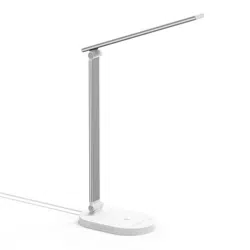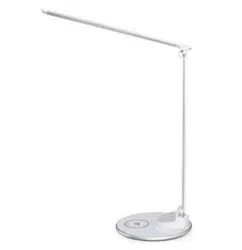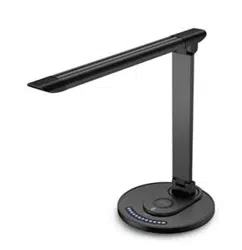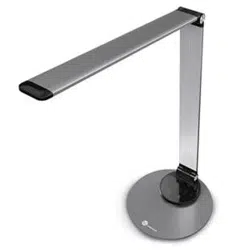

TAOTRONICS LED DESK LAMP
User Guide
MODEL: TTDL066
EUROPE
E-mail:
support.uk@taotronics.com(UK)
support.de@taotronics.com(DE)
support.fr@taotronics.com(FR)
support.es@taotronics.com(ES)
support.it@taotronics.com(IT)
EU Importer: ZBT International Trading GmbH
Address: Halstenbeker Weg 98C, 25462 Rellingen, Deutschland
NORTH AMERICA
E-mail : support@taotronics.com(US)
support.ca@taotronics.com(CA)
Tel : 1-888-456-8468 (Monday-Friday: 9:00 – 17:00 PST)
US Distributor: SUNVALLEYTEK INTERNATIONAL INC.
Address:46724 Lakeview Blvd, Fremont, CA 94538
Manufacturer: Shenzhen NearbyExpress Technology Development Co.,Ltd.
Address: 333 Bulong Road, Shenzhen, China, 518129
MANUFACTURER
Learn more about the EU Declaration of Conformity:
https://www.taotronics.com/downloads-TT-DL066-CE-Cert.html
ASIA PACIFIC
E-mail: support.jp@taotronics.com(JP)
Tel:03-5542-0238(10〜18時/土日祝除く)
JPImporter:株式会社SUNVALLEYJAPAN
〒104-0032東京都中央区八丁堀3丁目18-6PMO京橋東9F
www.taotronics.com
MADE IN CHINA
TT-DL066_V1.0
English
Deutsch
Français
Español
Italiano
日本語
CONTENTS
01/05
06/10
11/15
16/20
21/25
26/30

Thank you for choosing the TaoTronics LED Desk Lamp. Please read
this guide carefully and keep it for future reference.
US UK CA
Product Features
Ultrathin, minimalist design
Full aluminum alloy lamp body
Energy ecient LED
Three levels of adjustable lighting color and six levels of brightness
Memory function
USB port for charging mobile devices
Package Contents
1 x TaoTronics LED Desk Lamp (Model: TT-DL066)
1 x Power Adapter
1 x Cleaning Cloth
1 x User Guide
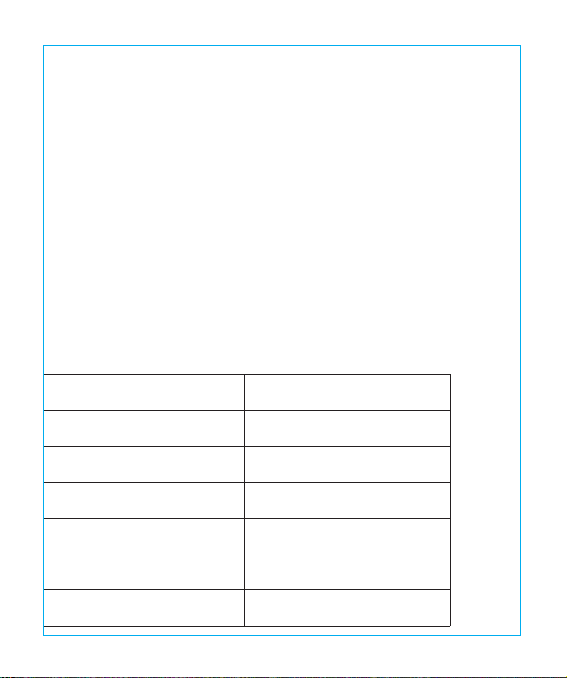
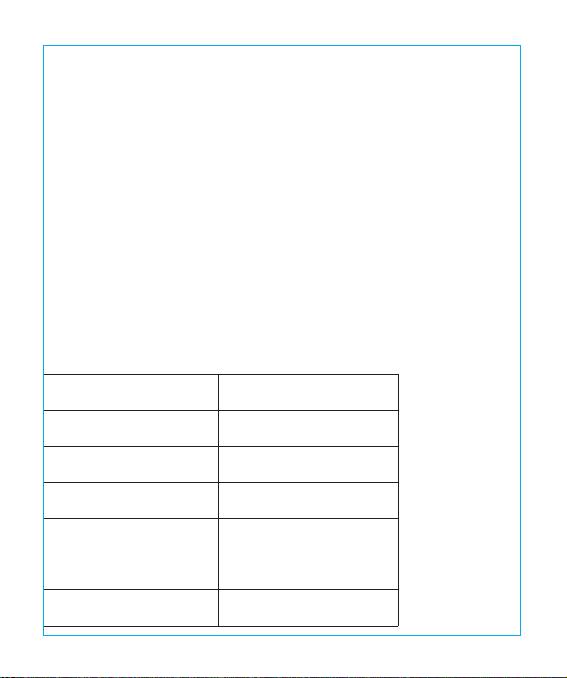
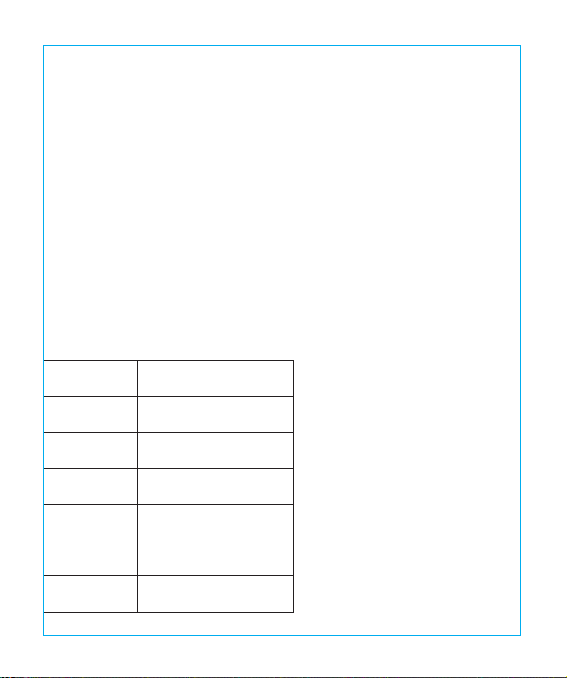
Specifications
Model
Operating Voltage
USB Output
Power
Color Temperature
CRI
TT-DL066
DC 12V / 1A
DC 5V / 1A
10W Max
Study Mode: 5000K
Relax Mode: 4000K
Sleep Mode: 3000K
> 80
01/02
Thank you for choosing the TaoTronics LED Desk Lamp. Please read
this guide carefully and keep it for future reference.
US UK CA
Product Features
Ultrathin, minimalist design
Full aluminum alloy lamp body
Energy ecient LED
Three levels of adjustable lighting color and six levels of brightness
Memory function
USB port for charging mobile devices
Package Contents
1 x TaoTronics LED Desk Lamp (Model: TT-DL066)
1 x Power Adapter
1 x Cleaning Cloth
1 x User Guide
Specifications
Model
Operating Voltage
USB Output
Power
Color Temperature
CRI
TT-DL066
DC 12V / 1A
DC 5V / 1A
10W Max
Study Mode: 5000K
Relax Mode: 4000K
Sleep Mode: 3000K
> 80
01/02
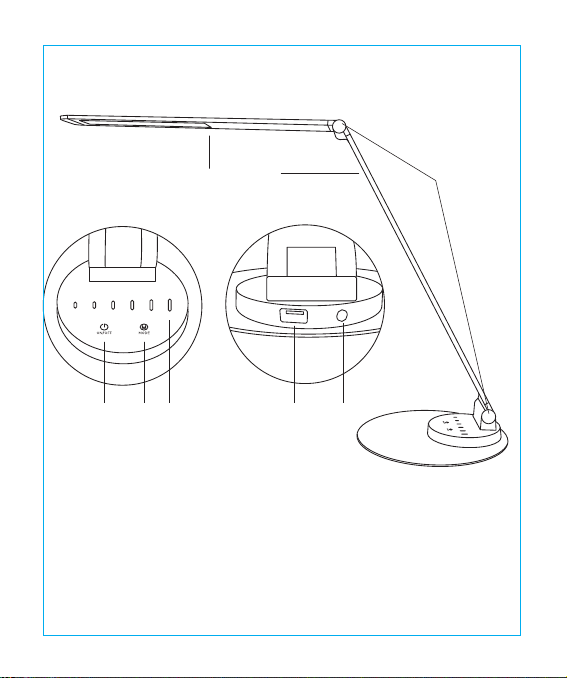
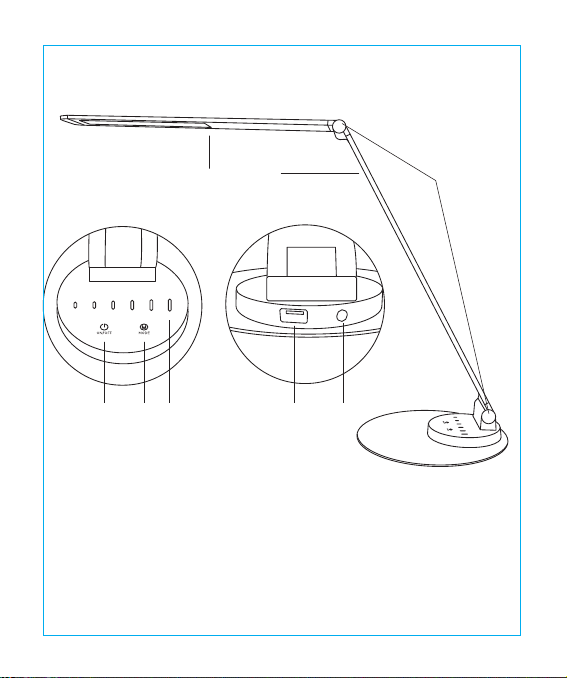
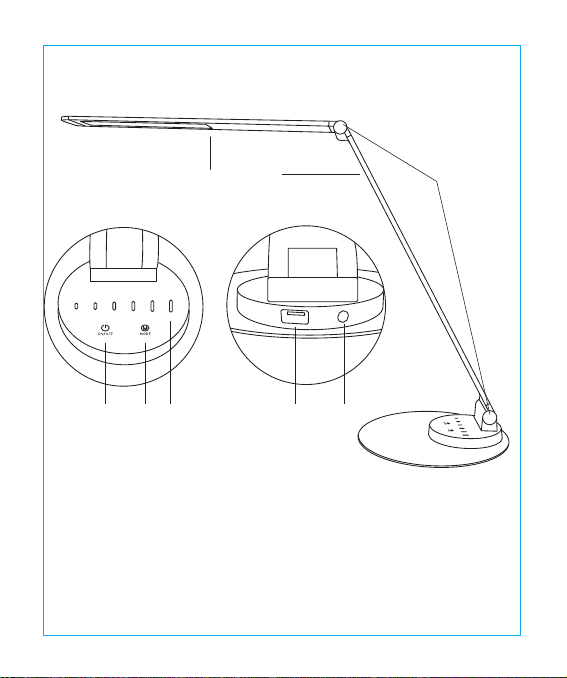
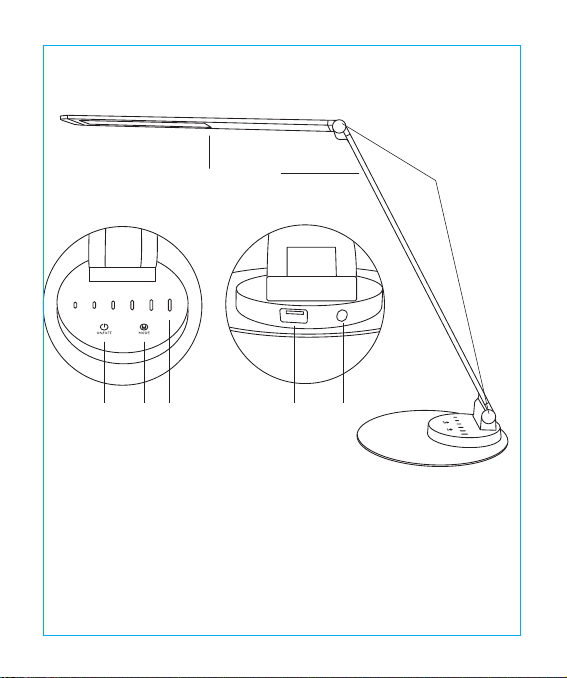
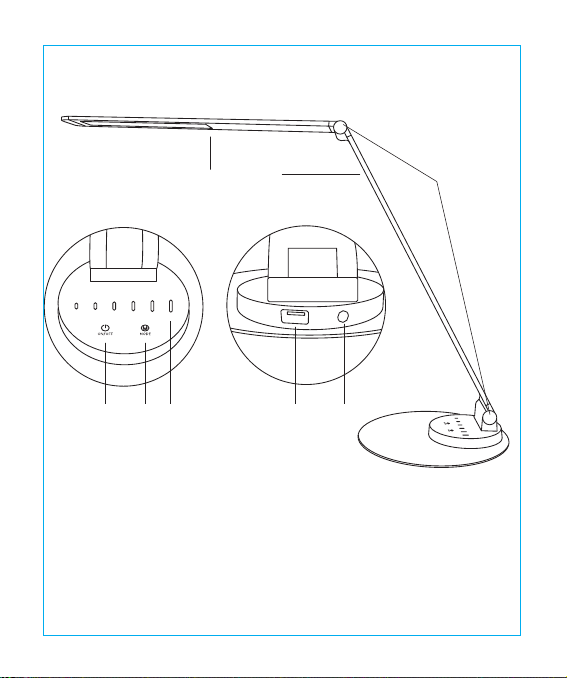
Product Diagram
①Lamp Head ②Arm
③Tension Adjuster ④Power Button
⑤Mode Button ⑥Brightness Button
⑦USB Charging Port ⑧Power Connector
①
④ ⑤ ⑥ ⑦ ⑧
② ③
How to use
Power Button
Tap the Power Button to turn on / o the lamp. It will automatically remember your last
brightness and color temperature selection when turned on.
Brightness Adjustment Button
Slide across the Brightness Buttons to adjust brightness.
Color Temperature Button
Tap the Mode Button to cycle through three levels of lighting color
(color temperature).
Caution
• Use only the supplied AC power adapter.
• Please do not dismantle the product by yourself, always ask professional electricians or
authorized technician for repairs.
• If you smell a bad odor or anything unusual, please turn o the unit immediately.
• Please do not remove the power plug with wet hands as it may cause electrical shock.
• It is not a toy. Keep away from children.
• Do not put this unit near any heat source or under direct sunlight.
• Clean the unit on a regular basis.
• Please store in a dry and shady place.
03/04

Product Diagram
①Lamp Head ②Arm
③Tension Adjuster ④Power Button
⑤Mode Button ⑥Brightness Button
⑦USB Charging Port ⑧Power Connector
①
④ ⑤ ⑥ ⑦ ⑧
② ③
How to use
Power Button
Tap the Power Button to turn on / o the lamp. It will automatically remember your last
brightness and color temperature selection when turned on.
Brightness Adjustment Button
Slide across the Brightness Buttons to adjust brightness.
Color Temperature Button
Tap the Mode Button to cycle through three levels of lighting color
(color temperature).
Caution
• Use only the supplied AC power adapter.
• Please do not dismantle the product by yourself, always ask professional electricians or
authorized technician for repairs.
• If you smell a bad odor or anything unusual, please turn o the unit immediately.
• Please do not remove the power plug with wet hands as it may cause electrical shock.
• It is not a toy. Keep away from children.
• Do not put this unit near any heat source or under direct sunlight.
• Clean the unit on a regular basis.
• Please store in a dry and shady place.
03/04
Vielen Dank, dass Sie sich für die TaoTronics LED Schreibtischlampe entschieden
haben. Bitte lesen Sie diese Anleitung aufmerksam und bewahren Sie sie auf, falls Sie
später etwas nachlesen möchten.
DE
Warranty
TaoTronics products are covered by a 12 month limited warranty from the date of its original
purchase. If any problems occur, please contact our support team.
We can only provide after sales service for products that are sold by TaoTronics or TaoTronics
authorized retailers and distributors. If you have purchased your unit from a dierent place,
please contact your seller for return and warranty issues.
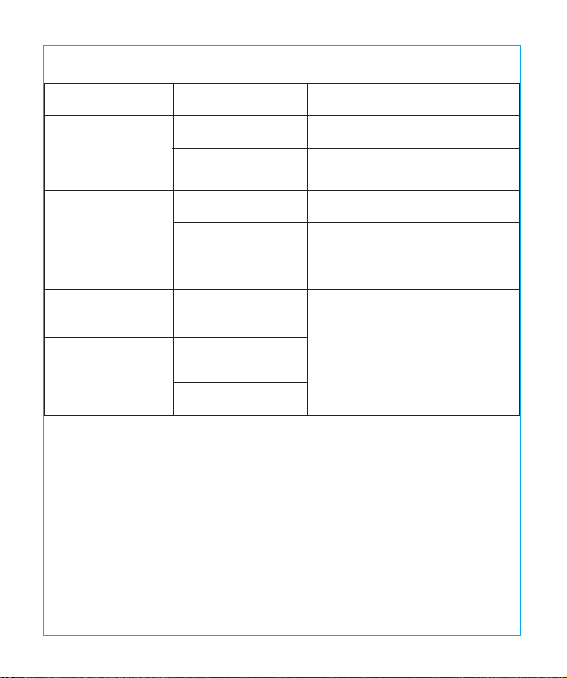
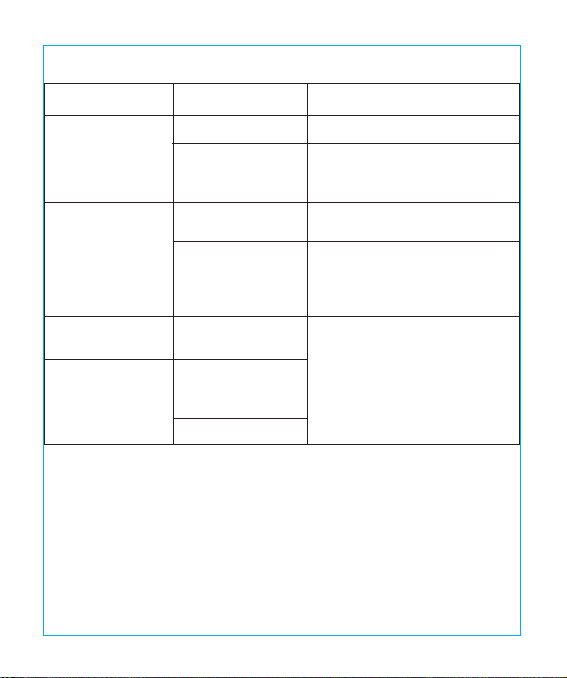
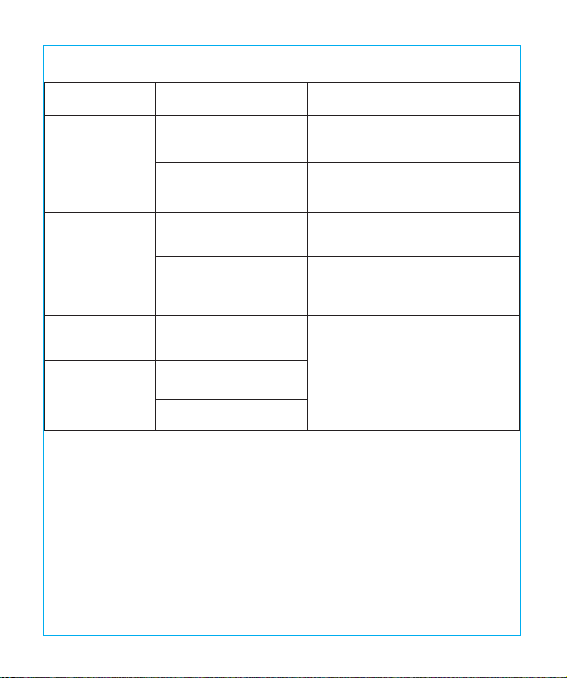
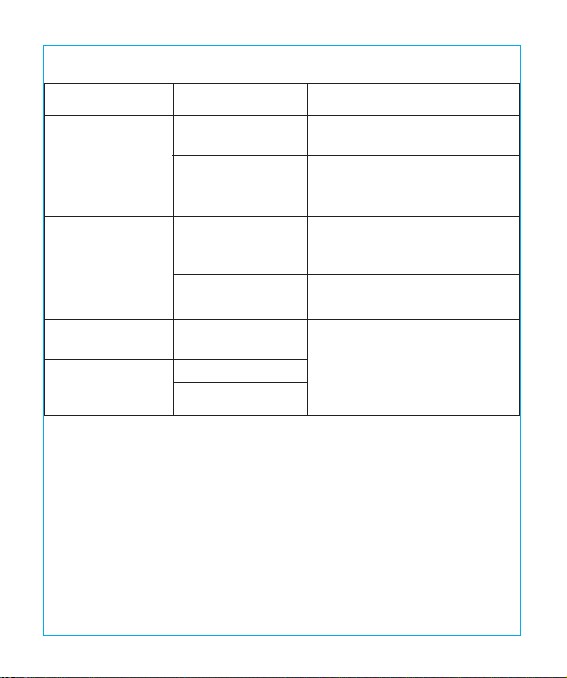
Troubleshooting Guide
Solution
Plug in the power adapter
Refer to the How to Use section
Tap the panel with dry hands
Disconnect power and restart
the lamp
Please contact the TaoTronics
Support Team
Possible Cause
No power supply
Did not press the
ON/OFF Button
Hands are wet
Voltage uctuation
causing panel
failure
LED component
failed
Power adapter
failed
Short circuited
Problem
The lamp does
not light up
The touch panel
is not responsive
LED failure
Bad smell
05/06

Vielen Dank, dass Sie sich für die TaoTronics LED Schreibtischlampe entschieden
haben. Bitte lesen Sie diese Anleitung aufmerksam und bewahren Sie sie auf, falls Sie
später etwas nachlesen möchten.
DE
Warranty
TaoTronics products are covered by a 12 month limited warranty from the date of its original
purchase. If any problems occur, please contact our support team.
We can only provide after sales service for products that are sold by TaoTronics or TaoTronics
authorized retailers and distributors. If you have purchased your unit from a dierent place,
please contact your seller for return and warranty issues.
Troubleshooting Guide
Solution
Plug in the power adapter
Refer to the How to Use section
Tap the panel with dry hands
Disconnect power and restart
the lamp
Please contact the TaoTronics
Support Team
Possible Cause
No power supply
Did not press the
ON/OFF Button
Hands are wet
Voltage uctuation
causing panel
failure
LED component
failed
Power adapter
failed
Short circuited
Problem
The lamp does
not light up
The touch panel
is not responsive
LED failure
Bad smell
05/06
Produkteigenschaften
Ultradünnes, minimalistisches Design
Gehäuse aus Aluminiumlegierung
Energieeziente LED
Drei wählbare Lichtfarben und sechs Helligkeitsstufen
Merkfunktion
USB-Anschluss zur Auadung von mobilen Endgeräten
Lieferumfang
1 x TaoTronics LED Schreibtischlampe (Modell: TT-DL066)
1 x Netzteil
1 x Reinigungstuch
1 x Bedienungsanleitung
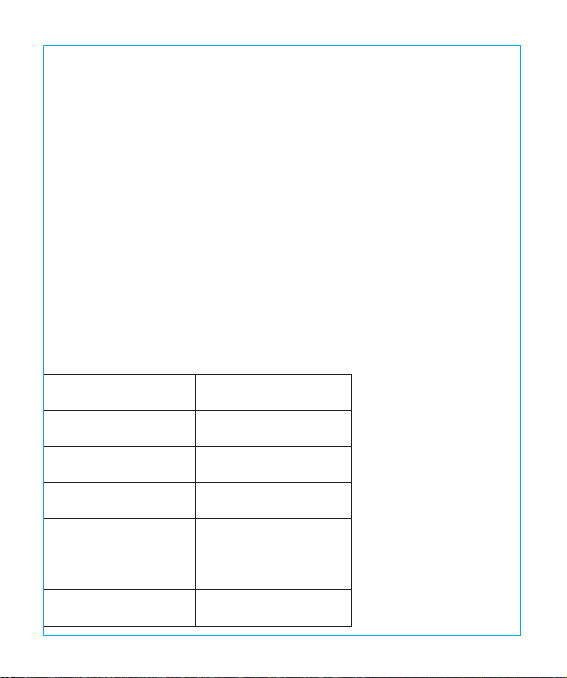
Spezifikationen
Modell
Betriebsspannung
USB-Ausgang
Leistung
Farbtemperatur
CRI
TT-DL066
DC 12V / 1A
DC 5V / 1A
10W max.
lesen: 5000K
entspannen: 4000K
schlafen: 3000K
>80
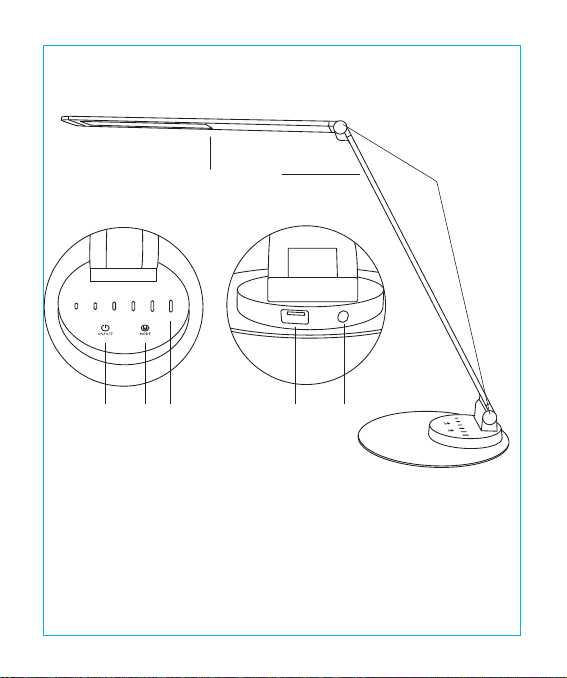
Produktdiagramm
①Lampenkopf ②Arm
③Gelenk ④Stromtaste
⑤Modustaste ⑥Helligkeitsleiste
⑦USB-Ladeanschluss ⑧Stromanschluss
①
④ ⑤ ⑥ ⑦ ⑧
② ③
07/08
Produkteigenschaften
Ultradünnes, minimalistisches Design
Gehäuse aus Aluminiumlegierung
Energieeziente LED
Drei wählbare Lichtfarben und sechs Helligkeitsstufen
Merkfunktion
USB-Anschluss zur Auadung von mobilen Endgeräten
Lieferumfang
1 x TaoTronics LED Schreibtischlampe (Modell: TT-DL066)
1 x Netzteil
1 x Reinigungstuch
1 x Bedienungsanleitung
Spezifikationen
Modell
Betriebsspannung
USB-Ausgang
Leistung
Farbtemperatur
CRI
TT-DL066
DC 12V / 1A
DC 5V / 1A
10W max.
lesen: 5000K
entspannen: 4000K
schlafen: 3000K
>80
Produktdiagramm
①Lampenkopf ②Arm
③Gelenk ④Stromtaste
⑤Modustaste ⑥Helligkeitsleiste
⑦USB-Ladeanschluss ⑧Stromanschluss
①
④ ⑤ ⑥ ⑦ ⑧
② ③
07/08

Bedienung
Stromtaste
Drücken Sie die Stromtaste zum Ein- und Ausschalten der Lampe. Die Lampe merkt sich immer
die letzte Einstellung für Helligkeit und Farbe und stellt diese beim nächsten Einschalten wieder
her.
Helligkeitsleiste
Zum Einstellen der Helligkeit fahren Sie mit einem Finger die Leiste entlang oder drücken Sie
direkt auf die gewünschte Helligkeit.
Modustaste
Drücken Sie die Modustaste um die Lichtfarbe zu ändern (Farbtemperatur).
Warnung
• Benutzen Sie nur das mitgelieferte Netzteil.
• Versuchen Sie nicht, das Produkt selbst zu reparieren. Lassen Sie Reparaturen nur von einem
professionellen Elektriker oder autorisierten Techniker durchführen.
• Falls Sie einen schlechten Geruch oder etwas anderes Ungewöhnliches wahrnehmen,
schalten Sie die Lampe sofort aus.
• Berühren Sie den Stecker nicht mit nassen Händen. Es besteht die
Gefahr eines Stromschlags.
• Die Lampe ist kein Spielzeug. Halten Sie sie von Kindern fern.
• Setzen Sie die Lampe keinen Hitzequellen, Feuchtigkeit oder ätzenden Substanzen aus.
• Säubern Sie die Lampe regelmäßig.
• Lagern Sie die Lampe an einem trockenen und kühlen Platz, falls Sie sie für eine längere Zeit
nicht benutzen wollen.
Garantie
TaoTronics Produkte sind ab dem Kaufdatum durch die 12-monatige Garantie abgedeckt. Falls
das Produkt während dieser Zeit defekt sein sollte, kontaktieren Sie bitte unverzüglich den
Kundendienst.
Wir bieten unseren Kundendienst nur für Produkte an, die bei TaoTronics oder einem von
TaoTronics autorisierten Händler und Vertriebsdienstleister gekauft wurden. Falls Sie Ihr Produkt
bei einem anderen Händler gekauft haben, wenden Sie sich bezüglich des Garantieanspruchs
an den Verkäufer.
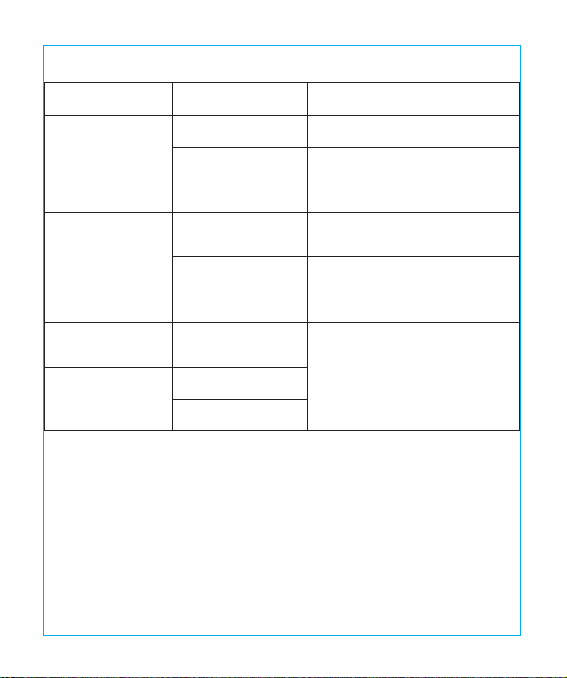
Fehlerbehebung
Lösung
schließen Sie das Netzteil an
drücken Sie die Stromtaste
drücken Sie die Tasten mit
trockenen Händen
ziehen Sie den Stecker und
stecken Sie ihn wieder in
die Steckdose
Bitte kontaktieren Sie den
TaoTronics Kundendienst
mögliche Ursache
keine Stromzufuhr
die Stromtaste
wurde nicht
gedrückt
Hände sind nass
Spannungsuktua-
tionen verursachen
Funktionsfehler
defekte
LED-Komponente
defektes Netzteil
Kurzschluss
Problem
die Lampe
leuchtet nicht
die Tasten
reagieren nicht
LED-Fehlfunktion
schlechter
Geruch
09/10
Bedienung
Stromtaste
Drücken Sie die Stromtaste zum Ein- und Ausschalten der Lampe. Die Lampe merkt sich immer
die letzte Einstellung für Helligkeit und Farbe und stellt diese beim nächsten Einschalten wieder
her.
Helligkeitsleiste
Zum Einstellen der Helligkeit fahren Sie mit einem Finger die Leiste entlang oder drücken Sie
direkt auf die gewünschte Helligkeit.
Modustaste
Drücken Sie die Modustaste um die Lichtfarbe zu ändern (Farbtemperatur).
Warnung
• Benutzen Sie nur das mitgelieferte Netzteil.
• Versuchen Sie nicht, das Produkt selbst zu reparieren. Lassen Sie Reparaturen nur von einem
professionellen Elektriker oder autorisierten Techniker durchführen.
• Falls Sie einen schlechten Geruch oder etwas anderes Ungewöhnliches wahrnehmen,
schalten Sie die Lampe sofort aus.
• Berühren Sie den Stecker nicht mit nassen Händen. Es besteht die
Gefahr eines Stromschlags.
• Die Lampe ist kein Spielzeug. Halten Sie sie von Kindern fern.
• Setzen Sie die Lampe keinen Hitzequellen, Feuchtigkeit oder ätzenden Substanzen aus.
• Säubern Sie die Lampe regelmäßig.
• Lagern Sie die Lampe an einem trockenen und kühlen Platz, falls Sie sie für eine längere Zeit
nicht benutzen wollen.
Garantie
TaoTronics Produkte sind ab dem Kaufdatum durch die 12-monatige Garantie abgedeckt. Falls
das Produkt während dieser Zeit defekt sein sollte, kontaktieren Sie bitte unverzüglich den
Kundendienst.
Wir bieten unseren Kundendienst nur für Produkte an, die bei TaoTronics oder einem von
TaoTronics autorisierten Händler und Vertriebsdienstleister gekauft wurden. Falls Sie Ihr Produkt
bei einem anderen Händler gekauft haben, wenden Sie sich bezüglich des Garantieanspruchs
an den Verkäufer.
Fehlerbehebung
Lösung
schließen Sie das Netzteil an
drücken Sie die Stromtaste
drücken Sie die Tasten mit
trockenen Händen
ziehen Sie den Stecker und
stecken Sie ihn wieder in
die Steckdose
Bitte kontaktieren Sie den
TaoTronics Kundendienst
mögliche Ursache
keine Stromzufuhr
die Stromtaste
wurde nicht
gedrückt
Hände sind nass
Spannungsuktua-
tionen verursachen
Funktionsfehler
defekte
LED-Komponente
defektes Netzteil
Kurzschluss
Problem
die Lampe
leuchtet nicht
die Tasten
reagieren nicht
LED-Fehlfunktion
schlechter
Geruch
09/10

Merci d’avoir choisi la Lampe de Bureau à LED TaoTronics. Veuillez lire ce guide
attentivement et le conserver pour de futures références.
FR
Caractéristiques du Produit
Design Ultran, Minimaliste
Corps de la lampe entièrement en alliage d’aluminium
LED à haute ecacité énergétique
Trois niveaux de réglage de couleur de lumière et six niveaux de luminositéFonction mémoire
Port USB pour charger les appareils mobiles
Contenus de la Boîte
1 x Lampe de Bureau à LED TaoTronics (Modèle : TT-DL066)
1 x Adaptateur Secteur
1 x Chion de Nettoyage
1 x Guide d’Utilisation
Spécifications
Modèle
Tension d’alimentation
Sortie USB
Puissance
Température de couleur
CRI
TT-DL066
DC 12V / 1A
DC 5V / 1A
10W Max
Mode Travail : 5000K
Mode Relaxation : 4000K
Mode Sommeil : 3000K
>80
11/12
Merci d’avoir choisi la Lampe de Bureau à LED TaoTronics. Veuillez lire ce guide
attentivement et le conserver pour de futures références.
FR
Caractéristiques du Produit
Design Ultran, Minimaliste
Corps de la lampe entièrement en alliage d’aluminium
LED à haute ecacité énergétique
Trois niveaux de réglage de couleur de lumière et six niveaux de luminositéFonction mémoire
Port USB pour charger les appareils mobiles
Contenus de la Boîte
1 x Lampe de Bureau à LED TaoTronics (Modèle : TT-DL066)
1 x Adaptateur Secteur
1 x Chion de Nettoyage
1 x Guide d’Utilisation
Spécifications
Modèle
Tension d’alimentation
Sortie USB
Puissance
Température de couleur
CRI
TT-DL066
DC 12V / 1A
DC 5V / 1A
10W Max
Mode Travail : 5000K
Mode Relaxation : 4000K
Mode Sommeil : 3000K
>80
11/12
Description du Produit
① Tête de la Lampe ②Bras
③Verrouillage du Réglage ④Bouton d’Alimentation
⑤Bouton Mode ⑥Bouton de Luminosité
⑦Port de Charge USB ⑧Connecteur d’Alimentation
①
④ ⑤ ⑥ ⑦ ⑧
② ③
Mode d’Emploi
Bouton d’Alimentation
Appuyez sur le Bouton d’Alimentation pour allumer/éteindre la lampe. Elle se souviendra
automatiquement de vos derniers réglages de luminosité et température de couleur quand
vous l’allumerez.
Bouton d’ Ajustement de la Luminosité
Glissez votre doigt à travers le Bouton de Luminosité pour la régler.
Bouton Température de Couleur
Appuyez sur le Bouton Mode pour alterner entre trois niveaux de couleur de lumière
(température de couleur).
Avertissements
• Utilisez uniquement l'adaptateur fourni.
• Veuillez ne pas démonter le produit vous-même, demandez toujours à un électricien
professionnel ou un technicien agréé pour la réparation.
• Si vous sentez une mauvaise odeur ou quelque chose d'inhabituel, veuillez éteindre l'appareil
immédiatement.
• Veuillez ne pas débrancher avec les mains mouillées car cela pourrait causer un choc
électrique
• Tenez hors de la portée des enfants.
• Ne mettez pas cet appareil près d'une source de chaleur extrême, humidité ou substance
corrosive.
• Nettoyez régulièrement la lampe.
• Veuillez conserver dans un endroit sec et frais si vous ne l’utilisez pas pour une longue durée.
13/14

Description du Produit
① Tête de la Lampe ②Bras
③Verrouillage du Réglage ④Bouton d’Alimentation
⑤Bouton Mode ⑥Bouton de Luminosité
⑦Port de Charge USB ⑧Connecteur d’Alimentation
①
④ ⑤ ⑥ ⑦ ⑧
② ③
Mode d’Emploi
Bouton d’Alimentation
Appuyez sur le Bouton d’Alimentation pour allumer/éteindre la lampe. Elle se souviendra
automatiquement de vos derniers réglages de luminosité et température de couleur quand
vous l’allumerez.
Bouton d’ Ajustement de la Luminosité
Glissez votre doigt à travers le Bouton de Luminosité pour la régler.
Bouton Température de Couleur
Appuyez sur le Bouton Mode pour alterner entre trois niveaux de couleur de lumière
(température de couleur).
Avertissements
• Utilisez uniquement l'adaptateur fourni.
• Veuillez ne pas démonter le produit vous-même, demandez toujours à un électricien
professionnel ou un technicien agréé pour la réparation.
• Si vous sentez une mauvaise odeur ou quelque chose d'inhabituel, veuillez éteindre l'appareil
immédiatement.
• Veuillez ne pas débrancher avec les mains mouillées car cela pourrait causer un choc
électrique
• Tenez hors de la portée des enfants.
• Ne mettez pas cet appareil près d'une source de chaleur extrême, humidité ou substance
corrosive.
• Nettoyez régulièrement la lampe.
• Veuillez conserver dans un endroit sec et frais si vous ne l’utilisez pas pour une longue durée.
13/14
Gracias por elegir la Lámpara LED Escritorio TaoTronics. Por favor lea este manual, que
conservará para futuras referencias.
ES
Garantie
TaoTronics fourni une garantie limitée de 12 mois pour ce produit, à compter de la date d’achat
initial. Si votre produit devenait défectueux, veuillez contacter l’équipe du Service Clients par
email.
Nous ne pouvons fournir de service après-vente que pour les appareils vendus par TaoTronics
ou un de ses distributeurs ou revendeurs autorisés. Si vous avez acheté votre appareil depuis un
autre endroit, veuillez contacter le vendeur pour les questions de retour et de garantie.
Guide de Dépannage
Solution
Branchez l’adaptateur secteur
Referez-vous à la section Mode
d’Emploi
Appuyez sur le panneau avec
des mains sèches
Débranchez le courant et
rallumez la lampe
Veuillez contacter l’Équipe du
Support TaoTronics
Cause Possible
Pas de courant
Pas d’appui sur
le bouton
d’alimentation
Mains mouillées
Des variations de
courant ont causé
un plantage du
panneau
Panne des
composants de LED
Panne de
l’adaptateur
secteur
Court-circuit
Problème
La lampe ne
s’allume pas
Le panneau
tactile ne
répond pas
Panne de LED
Mauvaise odeur
15/16

Gracias por elegir la Lámpara LED Escritorio TaoTronics. Por favor lea este manual, que
conservará para futuras referencias.
ES
Garantie
TaoTronics fourni une garantie limitée de 12 mois pour ce produit, à compter de la date d’achat
initial. Si votre produit devenait défectueux, veuillez contacter l’équipe du Service Clients par
email.
Nous ne pouvons fournir de service après-vente que pour les appareils vendus par TaoTronics
ou un de ses distributeurs ou revendeurs autorisés. Si vous avez acheté votre appareil depuis un
autre endroit, veuillez contacter le vendeur pour les questions de retour et de garantie.
Guide de Dépannage
Solution
Branchez l’adaptateur secteur
Referez-vous à la section Mode
d’Emploi
Appuyez sur le panneau avec
des mains sèches
Débranchez le courant et
rallumez la lampe
Veuillez contacter l’Équipe du
Support TaoTronics
Cause Possible
Pas de courant
Pas d’appui sur
le bouton
d’alimentation
Mains mouillées
Des variations de
courant ont causé
un plantage du
panneau
Panne des
composants de LED
Panne de
l’adaptateur
secteur
Court-circuit
Problème
La lampe ne
s’allume pas
Le panneau
tactile ne
répond pas
Panne de LED
Mauvaise odeur
15/16
Características del producto
Ultrana, con un diseño minimalista
El cuerpo de la lámpara de aleación de aluminio completamente
Energía LED eciente
Tres niveles de color de la iluminación ajustable y seis niveles de brillo
Función de memoria
Con un puerto USB para cargar dispositivos móviles.
Contenido del paquete
1 x Lámpara LED Escritorio TaoTronics (Modelo: TT-DL066)
1 x Adaptador de corriente
1 x Paño de limpieza
1 x Guía del usuario
Características Técnicas
Modelo
Tensión de funcionamiento
Salida USB
Potencia
Temperatura del color
CRI
TT-DL066
DC 12V / 1A
DC 5V / 1A
10W Max
Modalidad: 5000K
Modo Relax: 4000K
Modo de suspensión: 3000K
>80
Diagrama de producto
①Cabeza de la lámpara ②Brazo
③Regulador de tensión ④Botón de encendido
⑤Botón de Modo ⑥Botón Brillo
⑦Puerto de carga USB ⑧Conector de alimentación
①
④ ⑤ ⑥ ⑦ ⑧
② ③
17/18
Características del producto
Ultrana, con un diseño minimalista
El cuerpo de la lámpara de aleación de aluminio completamente
Energía LED eciente
Tres niveles de color de la iluminación ajustable y seis niveles de brillo
Función de memoria
Con un puerto USB para cargar dispositivos móviles.
Contenido del paquete
1 x Lámpara LED Escritorio TaoTronics (Modelo: TT-DL066)
1 x Adaptador de corriente
1 x Paño de limpieza
1 x Guía del usuario
Características Técnicas
Modelo
Tensión de funcionamiento
Salida USB
Potencia
Temperatura del color
CRI
TT-DL066
DC 12V / 1A
DC 5V / 1A
10W Max
Modalidad: 5000K
Modo Relax: 4000K
Modo de suspensión: 3000K
>80
Diagrama de producto
①Cabeza de la lámpara ②Brazo
③Regulador de tensión ④Botón de encendido
⑤Botón de Modo ⑥Botón Brillo
⑦Puerto de carga USB ⑧Conector de alimentación
①
④ ⑤ ⑥ ⑦ ⑧
② ③
17/18

Cómo utilizarla
Botón de encendido
Toque el botón de encendido para encender / apagar la lámpara. Recordará automáticamente
su última selección de la temperatura de brillo y color cuando se encienda.
Botón de ajuste de brillo
Deslice a través de los botones de brillo para ajustar el brillo.
Botón de temperatura de color
Toque el botón de modo para cambiar entre tres niveles de color de la iluminación
(temperatura de color).
Precaución
• Utilice únicamente el adaptador de alimentación de CA suministrado.
• No desmonte el producto usted mismo, siempre pida ayuda a un electricista profesional o un
técnico autorizado para su reparación.
• Si huele mal o encuentra algo inusual, por favor apague la
unidad de inmediato.
• Por favor, no retire el enchufe de alimentación con las manos mojadas, ya que puede causar
una descarga eléctrica.
• Aleje la lámpara de los niños.
• No coloque esta unidad cerca de fuentes de calor extremo, humedad o sustancias corrosivas.
• Limpie regularmente la lámpara.
• Guarde en un lugar fresco y seco si no se utiliza durante un largo
periodo de tiempo.
Garantía
TaoTronics ofrece una garantía limitada de 12 meses para este producto desde la fecha de
compra original. Si su producto resulta defectuoso, póngase en contacto con nuestro equipo de
atención al cliente por correo electrónico.
Sólo podemos ofrecer servicios de postventa de los productos que se venden por TaoTronics o
minoristas y distribuidores autorizados por TaoTronics. Si usted ha comprado su unidad desde
un lugar diferente, por favor póngase en contacto con el vendedor directamente para
cuestiones de retorno y de garantía.
Guía para resolver problemas
Solución
Enchufe el adaptador de
corriente
Consulte la sección Cómo
utilizar
Toque el panel con las
manos secas
Desconecte la alimentación y
reinicie la lámpara
Por favor, póngase en contacto
con el Equipo de Soporte
de TaoTronics
Posible Causa
Ninguna fuente de
alimentación
No pulsé el botón
de encendido
Las manos están
mojadas
La uctuación de
voltaje ha provocando
fallos del panel
El componente
LED falló
El adaptador de
corriente falló
Corto circuitada
Problema
La lámpara no
se enciende
El panel táctil
no responde
Fallo en el LED
Mal olor
19/20
Cómo utilizarla
Botón de encendido
Toque el botón de encendido para encender / apagar la lámpara. Recordará automáticamente
su última selección de la temperatura de brillo y color cuando se encienda.
Botón de ajuste de brillo
Deslice a través de los botones de brillo para ajustar el brillo.
Botón de temperatura de color
Toque el botón de modo para cambiar entre tres niveles de color de la iluminación
(temperatura de color).
Precaución
• Utilice únicamente el adaptador de alimentación de CA suministrado.
• No desmonte el producto usted mismo, siempre pida ayuda a un electricista profesional o un
técnico autorizado para su reparación.
• Si huele mal o encuentra algo inusual, por favor apague la
unidad de inmediato.
• Por favor, no retire el enchufe de alimentación con las manos mojadas, ya que puede causar
una descarga eléctrica.
• Aleje la lámpara de los niños.
• No coloque esta unidad cerca de fuentes de calor extremo, humedad o sustancias corrosivas.
• Limpie regularmente la lámpara.
• Guarde en un lugar fresco y seco si no se utiliza durante un largo
periodo de tiempo.
Garantía
TaoTronics ofrece una garantía limitada de 12 meses para este producto desde la fecha de
compra original. Si su producto resulta defectuoso, póngase en contacto con nuestro equipo de
atención al cliente por correo electrónico.
Sólo podemos ofrecer servicios de postventa de los productos que se venden por TaoTronics o
minoristas y distribuidores autorizados por TaoTronics. Si usted ha comprado su unidad desde
un lugar diferente, por favor póngase en contacto con el vendedor directamente para
cuestiones de retorno y de garantía.
Guía para resolver problemas
Solución
Enchufe el adaptador de
corriente
Consulte la sección Cómo
utilizar
Toque el panel con las
manos secas
Desconecte la alimentación y
reinicie la lámpara
Por favor, póngase en contacto
con el Equipo de Soporte
de TaoTronics
Posible Causa
Ninguna fuente de
alimentación
No pulsé el botón
de encendido
Las manos están
mojadas
La uctuación de
voltaje ha provocando
fallos del panel
El componente
LED falló
El adaptador de
corriente falló
Corto circuitada
Problema
La lámpara no
se enciende
El panel táctil
no responde
Fallo en el LED
Mal olor
19/20

Caratteristiche
Design minimalista & ultrasottile
Lampada interamente in lega di alluminio
LED per il risparmio energetico
3 temperature di colore e 6 livelli di luminosità
Funzione memoria
Porta USB per ricaricare dispositivi portatili
Contenuto della Confezione
1 x Lampada LED da Tavolo TaoTronics (Modello: TT-DL066)
1 x Adattatore
1 x Panno in Microbra
1 x Guida Utente
Specifiche Tecniche
Modello
Voltaggio Operativo
Uscita USB
Corrente
Temperatura di Colore
CRI
TT-DL066
DC 12V / 1A
DC 5V / 1A
10W Max
Modalità Studio: 5000K
Modalità Relax: 4000K
Modalità Notte: 3000K
> 80
Grazie per aver scelto la Lampada LED da Tavolo TaoTronics (Modello: TT-DL066). Vi
invitiamo a leggere attentamente il seguente manuale e a conservarlo per
consultarlo in futuro
I T
21/22
Caratteristiche
Design minimalista & ultrasottile
Lampada interamente in lega di alluminio
LED per il risparmio energetico
3 temperature di colore e 6 livelli di luminosità
Funzione memoria
Porta USB per ricaricare dispositivi portatili
Contenuto della Confezione
1 x Lampada LED da Tavolo TaoTronics (Modello: TT-DL066)
1 x Adattatore
1 x Panno in Microbra
1 x Guida Utente
Specifiche Tecniche
Modello
Voltaggio Operativo
Uscita USB
Corrente
Temperatura di Colore
CRI
TT-DL066
DC 12V / 1A
DC 5V / 1A
10W Max
Modalità Studio: 5000K
Modalità Relax: 4000K
Modalità Notte: 3000K
> 80
Grazie per aver scelto la Lampada LED da Tavolo TaoTronics (Modello: TT-DL066). Vi
invitiamo a leggere attentamente il seguente manuale e a conservarlo per
consultarlo in futuro
I T
21/22
Schema del Prodotto
①Testa della Lampada ②Braccio
③Perno Rotante Inclinazione ④Tasto Accensione
⑤Tasto Modalità ⑥Tasto Luminosità
⑦Porta di Ricarica USB ⑧Porta di Alimentazione
①
④ ⑤ ⑥ ⑦ ⑧
② ③
Funzionamento
Tasto Accensione
Premere il tasto per accendere/spegnere la lampada. La lampada si accende automaticamente
all'ultimo livello di luminosità/temperatura di colore impostato.
Tasto Luminosità
Passare un dito sui Tasti della Luminosità e selezionare il livello desiderato
.
Tasto Temperatura di Colore
Premere il tasto modalità per scorrere le 3 temperature di colore e selezionare quella desiderata.
Avvertenze
• Utilizzare esclusivamete l'adattatore AC presente nella confezione.
• Non smantellare il prodotto, rivolgersi sempre a personale qualicato o ad un tecnico
autorizzato per la sua riparazione.
• Spegnere immediatamente il dispositivo in caso di cattivo odore o strano funzionamento.
• Non rimuovere il dispositivo dalla presa di corrente con le mani bagnate in quanto potrebbe
procurare uno shock elettrico.
• Tenere lontano dalla portata dei bambini.
• Non esporre il dispositivo a fonti di calore eccessivo, umidità o sostanze corrosive.
• Si raccomanda di pulire periodicamente la lampada.
• Conservare in un luogo asciutto e riparato in caso di inutilizzo prolungato.
23/24

Schema del Prodotto
①Testa della Lampada ②Braccio
③Perno Rotante Inclinazione ④Tasto Accensione
⑤Tasto Modalità ⑥Tasto Luminosità
⑦Porta di Ricarica USB ⑧Porta di Alimentazione
①
④ ⑤ ⑥ ⑦ ⑧
② ③
Funzionamento
Tasto Accensione
Premere il tasto per accendere/spegnere la lampada. La lampada si accende automaticamente
all'ultimo livello di luminosità/temperatura di colore impostato.
Tasto Luminosità
Passare un dito sui Tasti della Luminosità e selezionare il livello desiderato
.
Tasto Temperatura di Colore
Premere il tasto modalità per scorrere le 3 temperature di colore e selezionare quella desiderata.
Avvertenze
• Utilizzare esclusivamete l'adattatore AC presente nella confezione.
• Non smantellare il prodotto, rivolgersi sempre a personale qualicato o ad un tecnico
autorizzato per la sua riparazione.
• Spegnere immediatamente il dispositivo in caso di cattivo odore o strano funzionamento.
• Non rimuovere il dispositivo dalla presa di corrente con le mani bagnate in quanto potrebbe
procurare uno shock elettrico.
• Tenere lontano dalla portata dei bambini.
• Non esporre il dispositivo a fonti di calore eccessivo, umidità o sostanze corrosive.
• Si raccomanda di pulire periodicamente la lampada.
• Conservare in un luogo asciutto e riparato in caso di inutilizzo prolungato.
23/24
この度は、TaoTronicsLEDデスクライトをお買い上げ頂きまして誠にありがとうございま
す。.こちらの取扱説明書をよくお読みになり、正しく安全にお使いください。
JP
Garanzia
TaoTronics fornisce per questo prodotto, una garanzia limitata di 12 mesi dalla sua data
d'acquisto. In caso di difetti del prodotto, si prega di contattare via email il nostro team di
supporto clienti.
Forniamo servizio di post vendita esclusivamente per prodotti venduti da TaoTronics o da
distributori e rivenditori autorizzati TaoTronics. Se acquistati da terzi, vi invitiamo a rivolgervi al
vostro venditore per casi attinenti alla restituzione del prodotto e questioni sulla garanzia.
Troubleshooting Guide
Soluzione
Collegare all'alimentazione
Consultare la sessione
Funzionamento della
Guida Utente
Asciugarsi le mani prima di
toccare la supercie
touch-control
Interrompere l'alimentazione
per riavviare la lampada
Contattare il Team di
Supporto TaoTronics
Possibile Causa
Mancanza di
alimentazione
L'interruttore della
lampada non è
acceso
Mani bagnate
Fluttuazione di
tensione
LED guasto
Adattatore guasto
Cortocircuito
Problema
La lampada non
si accende
Il pannello tattile
non risponde
LED non si
accende
Cattivo/strano
odore
25/26

この度は、TaoTronicsLEDデスクライトをお買い上げ頂きまして誠にありがとうございま
す。.こちらの取扱説明書をよくお読みになり、正しく安全にお使いください。
JP
Garanzia
TaoTronics fornisce per questo prodotto, una garanzia limitata di 12 mesi dalla sua data
d'acquisto. In caso di difetti del prodotto, si prega di contattare via email il nostro team di
supporto clienti.
Forniamo servizio di post vendita esclusivamente per prodotti venduti da TaoTronics o da
distributori e rivenditori autorizzati TaoTronics. Se acquistati da terzi, vi invitiamo a rivolgervi al
vostro venditore per casi attinenti alla restituzione del prodotto e questioni sulla garanzia.
Troubleshooting Guide
Soluzione
Collegare all'alimentazione
Consultare la sessione
Funzionamento della
Guida Utente
Asciugarsi le mani prima di
toccare la supercie
touch-control
Interrompere l'alimentazione
per riavviare la lampada
Contattare il Team di
Supporto TaoTronics
Possibile Causa
Mancanza di
alimentazione
L'interruttore della
lampada non è
acceso
Mani bagnate
Fluttuazione di
tensione
LED guasto
Adattatore guasto
Cortocircuito
Problema
La lampada non
si accende
Il pannello tattile
non risponde
LED non si
accende
Cattivo/strano
odore
25/26
商品の特徴
スリムでシンプル ミニマリストなデザイン
スタイリッシュなアルミのボディ
エネルギー効率のいいLEDライト
色温度は3段階 明るさは6段階で調整可能
メモリー機能搭載
モバイル充電可能のUSBポート搭載
セ ット 内 容
1xTaoTronicsLEDデスクライト(型番:TT-DL066)
1x電源アダプター
1xクリーニングクロス
1x取扱説明書
製品仕様
型番
動作電圧
USB出力
出力
色温度
CRI
TT-DL066
DC12V/1A
DC5V/1A
10WMax
勉強モード:5000K
リラックスモード:4000K
お休みモード:3000K
>80
製品図
①ライトヘッド②アーム
③傾き調整④電源ボタン
⑤モードボタン⑥明るさボタン
⑦USB充電ポート⑧電源差し込み口
①
④ ⑤ ⑥ ⑦ ⑧
② ③
27/28
商品の特徴
スリムでシンプル ミニマリストなデザイン
スタイリッシュなアルミのボディ
エネルギー効率のいいLEDライト
色温度は3段階 明るさは6段階で調整可能
メモリー機能搭載
モバイル充電可能のUSBポート搭載
セ ット 内 容
1xTaoTronicsLEDデスクライト(型番:TT-DL066)
1x電源アダプター
1xクリーニングクロス
1x取扱説明書
製品仕様
型番
動作電圧
USB出力
出力
色温度
CRI
TT-DL066
DC12V/1A
DC5V/1A
10WMax
勉強モード:5000K
リラックスモード:4000K
お休みモード:3000K
>80
製品図
①ライトヘッド②アーム
③傾き調整④電源ボタン
⑤モードボタン⑥明るさボタン
⑦USB充電ポート⑧電源差し込み口
①
④ ⑤ ⑥ ⑦ ⑧
② ③
27/28

使い方
電 源 ボタン
電源ボタンを押して電気をつけたり消したりできます。メモリー機能があるため、電気を付けた時に
は、前回の色温度と明るさでライトがつきます。
明るさの調整ボタン
お好みの明るさになるよう、明るさボタンをスライドして調整してください。
色温度の変更ボタン
モードボタンをタップすることで、3種類の明かり(色温度)が順番に切り替わります。
ご注意
• 修理や分解はどんな場合でもしないようにしてください
•直射日光の当たる場所など極端に暑い場所では使わないようにしてください。
•平らな安全な場所で使ってください。
•必ず付属のACアダプターをお使いください。
•ダメージがあるケーブルなどを使わず安全な電源でお使いください。
•濡れた手で電源部分を使わないようにしましょう.
•ライトの清潔を乾燥を保つようにしてください。
•使っていない時はプラグを抜きましょう
•柔らかい清潔な布で清掃してください。きつい洗剤などを使わないように。
•負荷が強い電圧で使うのは感電や火災の原因になるのでおやめください。
安心保証
本製品はご購入日から12カ月の安心保障をご提供いたします。万が一、商品不具合のようでしたら、弊
社までご連絡ください。商品状況に応じて返品、交換、修理及び返金と対応させていただきます。
TaoTronicsに販売の権限を授けられた販売業者から購入された場合のみTaoTronicsアフターサービ
スをご提供いたします。
故障対策ガイド
対策
電源アダプタと正しく接 続して
くだ さい。
「使い方」をお読みください。
乾燥手でパネルをタッチして
ください。
ランプを電源から外してから、
再起動してみてください。
TaoTronicsカスタマサポート
までご連絡ください。
可能な原因
電源と接続していない
電源ボタンをタップし
なかった
濡れ手で操作した
電圧変動がパネルの
故障を起こした
LED構造故障
電源アダプタ故障
短路
故障
ランプがつかない
タッチパネルが反
応しない
LED故障
匂いが悪い
29/30
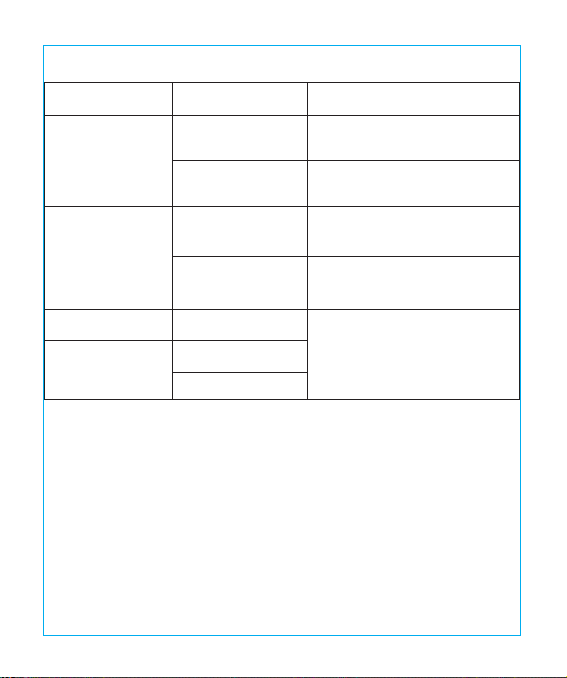
使い方
電 源 ボタン
電源ボタンを押して電気をつけたり消したりできます。メモリー機能があるため、電気を付けた時に
は、前回の色温度と明るさでライトがつきます。
明るさの調整ボタン
お好みの明るさになるよう、明るさボタンをスライドして調整してください。
色温度の変更ボタン
モードボタンをタップすることで、3種類の明かり(色温度)が順番に切り替わります。
ご注意
• 修理や分解はどんな場合でもしないようにしてください
•直射日光の当たる場所など極端に暑い場所では使わないようにしてください。
•平らな安全な場所で使ってください。
•必ず付属のACアダプターをお使いください。
•ダメージがあるケーブルなどを使わず安全な電源でお使いください。
•濡れた手で電源部分を使わないようにしましょう.
•ライトの清潔を乾燥を保つようにしてください。
•使っていない時はプラグを抜きましょう
•柔らかい清潔な布で清掃してください。きつい洗剤などを使わないように。
•負荷が強い電圧で使うのは感電や火災の原因になるのでおやめください。
安心保証
本製品はご購入日から12カ月の安心保障をご提供いたします。万が一、商品不具合のようでしたら、弊
社までご連絡ください。商品状況に応じて返品、交換、修理及び返金と対応させていただきます。
TaoTronicsに販売の権限を授けられた販売業者から購入された場合のみTaoTronicsアフターサービ
スをご提供いたします。
故障対策ガイド
対策
電源アダプタと正しく接 続して
くだ さい。
「使い方」をお読みください。
乾燥手でパネルをタッチして
ください。
ランプを電源から外してから、
再起動してみてください。
TaoTronicsカスタマサポート
までご連絡ください。
可能な原因
電源と接続していない
電源ボタンをタップし
なかった
濡れ手で操作した
電圧変動がパネルの
故障を起こした
LED構造故障
電源アダプタ故障
短路
故障
ランプがつかない
タッチパネルが反
応しない
LED故障
匂いが悪い
29/30
FCC Compliance
This device complies with Part 15 of the FCC Rules. Operation is subject to the following two conditions: (1) This
device may not cause harmful interference, and (2) this device must withstand any interference received, including
interference that may cause undesired operation.
WEEE Compliance
Correct Disposal of This Product (Waste Electrical & Electronic Equipment)
(Applicable in countries with separate collection systems)
This marking on the product, accessories or literature indicates that the product and its electronic accessories
should not be disposed of with other household waste at the end of their working life. To prevent possible harm to
the environment or human health from uncontrolled waste disposal, please separate these items from other types
of waste and recycle them responsibly to promote the sustainable reuse of material resources. Household users
should contact either the retailer where they purchased this product, or their local government oce, for details of
where and how they can take these items for environmentally safe recycling. Business users should contact their
supplier and check the terms and conditions of the purchase contract. This product and its electronic accessories
should not be mixed with other commercial wastes for disposal.
TAOTRONICS LED DESK LAMP
User Guide
MODEL: TTDL066
EUROPE
E-mail:
EU Importer: ZBT International Trading GmbH
Address: Halstenbeker Weg 98C, 25462 Rellingen, Deutschland
NORTH AMERICA
E-mail : [email protected](US)
Tel : 1-888-456-8468 (Monday-Friday: 9:00 – 17:00 PST)
US Distributor: SUNVALLEYTEK INTERNATIONAL INC.
Address:46724 Lakeview Blvd, Fremont, CA 94538
Manufacturer: Shenzhen NearbyExpress Technology Development Co.,Ltd.
Address: 333 Bulong Road, Shenzhen, China, 518129
MANUFACTURER
Learn more about the EU Declaration of Conformity:
https://www.taotronics.com/downloads-TT-DL066-CE-Cert.html
ASIA PACIFIC
E-mail: [email protected](JP)
Tel:03-5542-0238(10〜18時/土日祝除く)
JPImporter:株式会社SUNVALLEYJAPAN
〒104-0032東京都中央区八丁堀3丁目18-6PMO京橋東9F
www.taotronics.com
MADE IN CHINA
TT-DL066_V1.0