
Caring about your money
2

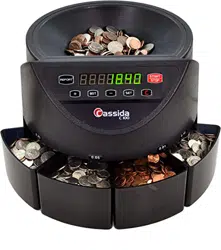
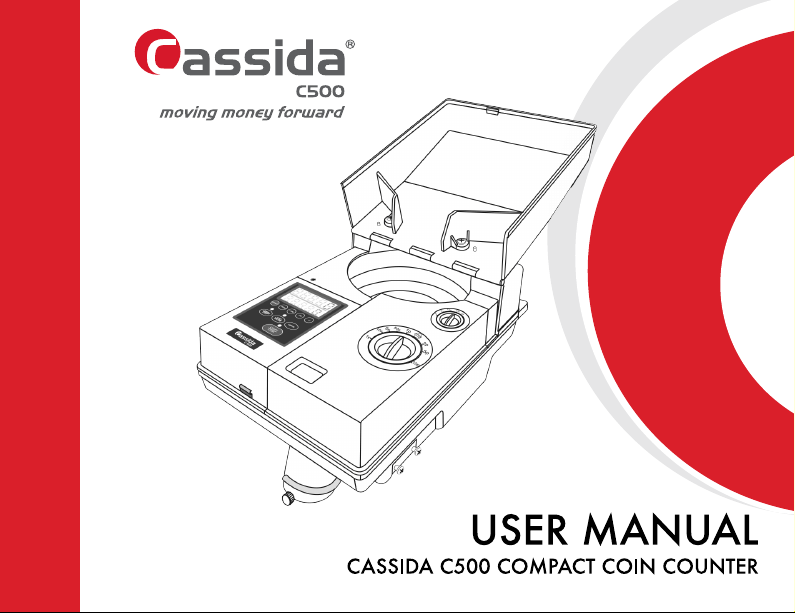
Cassida C500 Compact Coin Counter
1
This manual contains important information on safety
measures and operational features. Please read
carefully before operating your coin counter, and keep
it for future reference.

Caring about your money
2
Contents
1. Introduction . . . . . . . . . . . . . . . . . . . . . . . . . . . . . . . . . . . . . . . . 3
1.1 About the Cassida C500 Compact Coin Counter . . . . . . . . 3
1.2 Box contents . . . . . . . . . . . . . . . . . . . . . . . . . . . . . . . . . . . . 3
1.3 Front and rear view . . . . . . . . . . . . . . . . . . . . . . . . . . . . . . 4
1.4 Keypad . . . . . . . . . . . . . . . . . . . . . . . . . . . . . . . . . . . . . . . . 5
1.5 Setup . . . . . . . . . . . . . . . . . . . . . . . . . . . . . . . . . . . . . . . . . 6
1.6 Display . . . . . . . . . . . . . . . . . . . . . . . . . . . . . . . . . . . . . . . 7
1.7 Diameter and thickness adjustment knobs . . . . . . . . . . . . . . 7
1.8 Technical specifications . . . . . . . . . . . . . . . . . . . . . . . . . . . . 8
1.9 Safety notes . . . . . . . . . . . . . . . . . . . . . . . . . . . . . . . . . . . . 9
2. OPERATION. . . . . . . . . . . . . . . . . . . . . . . . . . . . . . . . . . . . . . . 10
2.1 Count . . . . . . . . . . . . . . . . . . . . . . . . . . . . . . . . . . . . . . . . 10
2.2 Add mode . . . . . . . . . . . . . . . . . . . . . . . . . . . . . . . . . . . . 10
2.3 Batch mode . . . . . . . . . . . . . . . . . . . . . . . . . . . . . . . . . . . 11
2.4 Counting mixed coin denominations . . . . . . . . . . . . . . . . . 12
2.5 Counting tokens or non-US denomination coins . . . . . . . . 12
3. MAINTENANCE AND TROUBLESHOOTING . . . . . . . . . . . . . . . 14
3.1 Maintenance . . . . . . . . . . . . . . . . . . . . . . . . . . . . . . . . . . 14
3.2 Exterior Cleaning . . . . . . . . . . . . . . . . . . . . . . . . . . . . . . . 15
3.3 Troubleshooting . . . . . . . . . . . . . . . . . . . . . . . . . . . . . . . . 15
4. WARRANTY AND CONTACT INFORMATION . . . . . . . . . . . . . . 17
4.1 Warranty . . . . . . . . . . . . . . . . . . . . . . . . . . . . . . . . . . . . . 17
4.2 Contact information . . . . . . . . . . . . . . . . . . . . . . . . . . . . . 18

Cassida C500 Compact Coin Counter
3
1. Introduction
1.1 About the Cassida C500 Compact Coin Counter
Thank you for choosing the Cassida C500 Coin Counter. We hope that you will enjoy using
the machine.
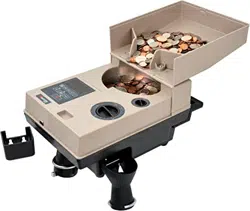
The Cassida C500 Coin Counter is intended for counting and sorting coins or tokens at
banks, retail stores, entertainment complexes and other businesses accepting cash and coin.
Features of the Cassida C500 include ease of operation and portable design. It is compact
and has an attached handle for easy transport. The machine can count in simple count. add
or batch modes.
The Cassida C500 is a perfect solution for fast, accurate and reliable coin counting.
1.2 Box contents
•Cassida C500 Coin Counter
•Power cord
•Reject coin bin
•Reject coin bag adapter
•User’s manual
Caring about your money
4
1.3 Front and rear view
Front view
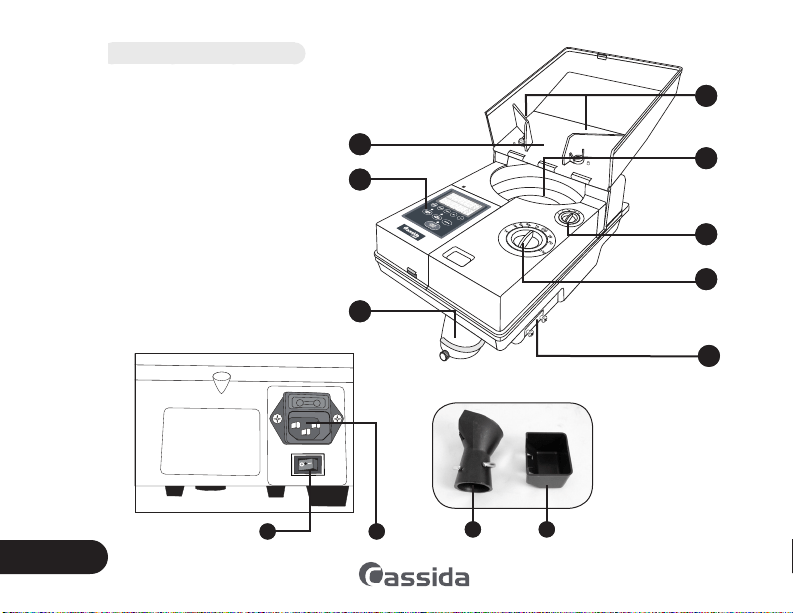
1. Control panel
2. Hopper
3. Coin guide arms
4. Coin hopper
5. Diameter adjustment knob
6. Thickness adjustment knob
7. Coin outlet
8. Reject coin outlet
Rear view
1. Power switch
2. Power outlet
1
2
7
3
4
6
5
8
21
Accessories
1. Reject coin bag
adapter
2. Reject coin box
1 2
Cassida C500 Compact Coin Counter
5
1.4 Keypad
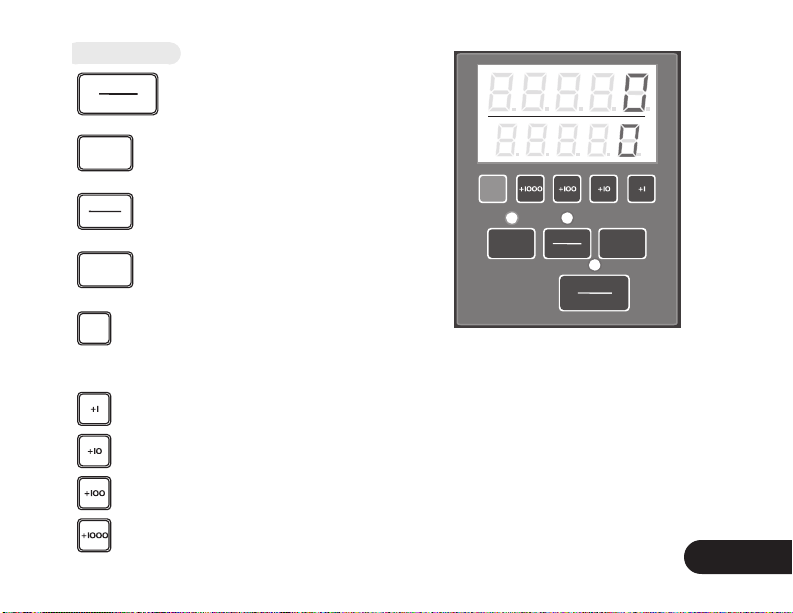
START
STOP
To start/stop coin counting.
ADD
To enable or disable add mode.
COUNT
BATCH
To switch between count mode and preset
batch mode.
CLEAR
To clear the count.
M
To display last count while in add mode or the
total value of coins counted from when the
machine is powered on while in count mode.
increase batch size +1
increase batch size +10
increase batch size +100
increase batch size +1000
ADD
COUNT
BATCH
CLEAR
M
START
STOP
Caring about your money
6
1.5 Setup
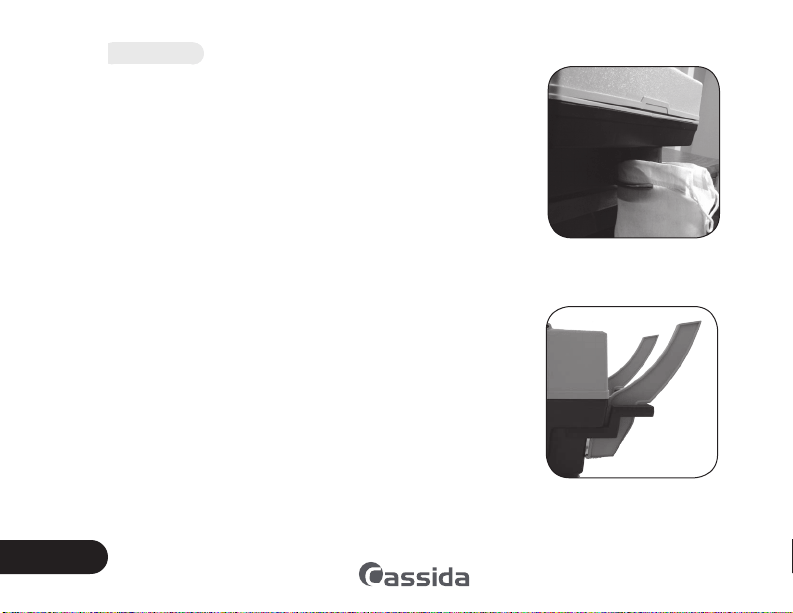
1. Attach the coin bag to the front of the machine at the coin
outlet. To attach the coin bag, slide the metal ring up and
fit the bag on the end of the dispenser, then slide the ring
down over the fabric of the bag until it fits snug on the
dispenser (see photo).
2. Make sure that the coin bag is supported to prevent the
machine from tipping.
3. Attach the reject coin box at the side outlet (alternately,
attach the bag adapter and bag).
4. Install the brackets provided to prop the hopper cover at
an angle. Insert the brackets through handle. Gently pull
back on the bracket until it locks into position (see photo).
5. Open the machine cover and position the coin guard arms
open to allow coins to feed into the coin hopper.
6. Set the coin diameter and thickness to the correct settings
for the coins to be counted. Refer to section 2 for operation
details.
7. The machine is ready to operate.
Proper attachment of a coin
bag.
Correct position for hopper
cover brackets
Cassida C500 Compact Coin Counter
7
1.6 Display
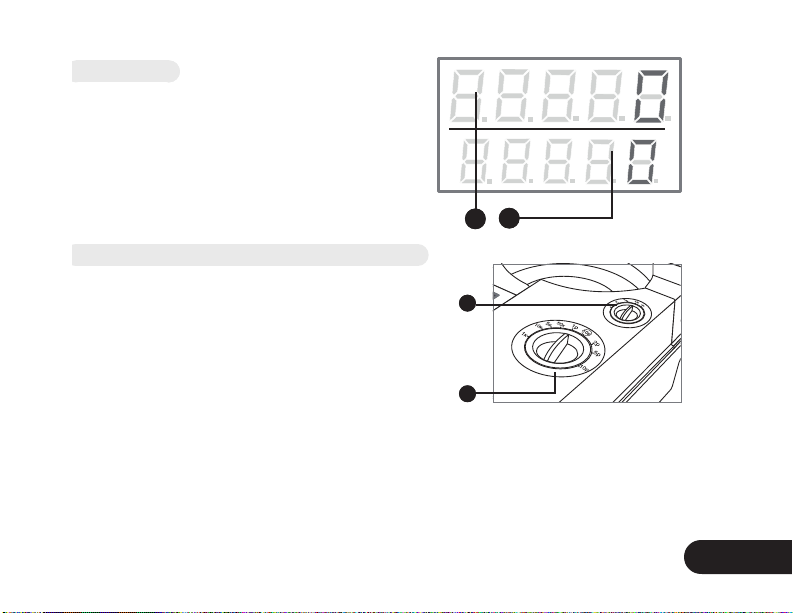
1. Upper display: shows the number of coins
counted in the current batch (or total coins in
add mode)
2. Lower display: Displays the preset batch size,
the last count, or the total count since the
machine was last turned on.
1.7 Diameter and thickness adjustment knobs
1. Diameter adjustment knob
2. Thickness adjustment knob
When counting mixed denomination coins the largest
diameter coins need to be counted first. Set the diameter
dial to the largest diameter coin in the hopper. Set the
thickness to the thickest coin in the hopper. Note: Nickels
are thicker than quarters. The largest diameter coin will
be counted while all others will be sorted into the reject
coin box.
After the largest diameter coins are counted load the rejected coins back into the hopper. Set
the diameter dial to the largest diameter coin in the hopper. Set the thickness to the thickest
coin in the hopper. Count the coins. Repeat the process until all coins have been counted
and sorted.
2
1
2
1
Caring about your money
8
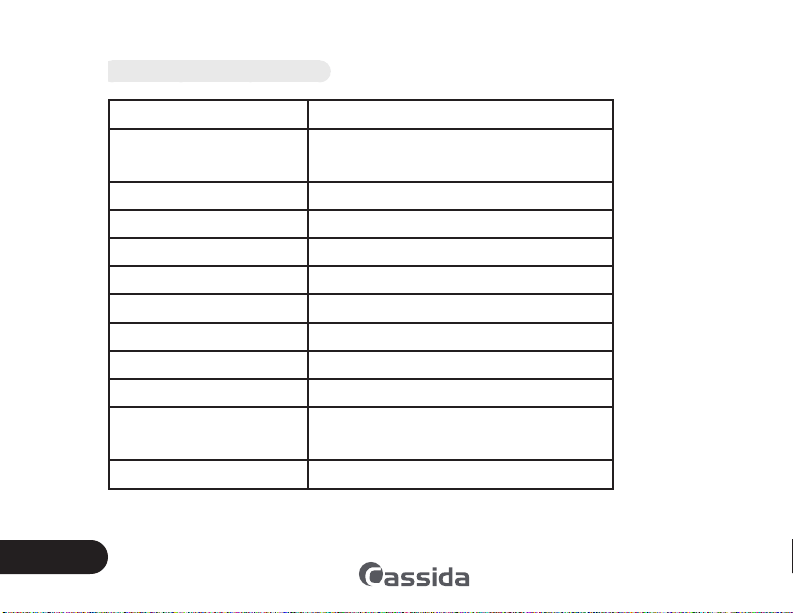
1.8 Technical specifications
Counting speed: Over 2000 coins/minute
Counting coin size: Thickness: 1.0mm - 3.4mm
Diameter: 14mm - 34mm
Coin hopper capacity: Up to 4000 coins (dimes)
Batch size capability: 20-9999
Max count display: Upper: 1-9999 Lower: 1-9999
Count modes: Count, Batch or Add
Power supply: AC 110V, 60 Hz
Power consumption: 60 watt
Operating temperature: 0°C-40°C (32°F-104°F)
Operating humidity: 40%-90%
Dimensions: 226mm x 381mm x 185mm (W x D x H)
8.9” x 15” x 7.3”
Weight: 7.5 kg (16.5 lbs)

Cassida C500 Compact Coin Counter
9
1.9 Safety notes
When using this unit, basic safety precautions should always be taken, including the following:
•Before loading coins into the hopper, please remove all paper scraps, lint, rubber bands
or other foreign objects. Foreign objects can cause jamming or faulty counting.
•When using a bag to collect counted coins, place the bag on the floor or on a stand to
prevent the machine from tipping over.
•Make sure the unit is installed on a flat surface. Do not operate the machine in areas with
high temperature, humidity or smoke: it may prevent it from working correctly.
•To avoid the risk of electrical shock, do not disassemble this unit. Disassembling it will
expose you to high voltage current and other risks. Incorrect re-assembly can cause
electrical shock during use.
•Only qualified technicians are authorized to perform service or repair on the C500 coin
counter.
•Only use the power cord supplied with the unit. Plug the power cord into a properly
grounded wall outlet. Do not remove the ground pin from the power cord. Failure to
properly ground the unit can result in severe injury or fire.
•When not using the unit for an extended period of time, remove the power plug from
the wall outlet.
•Do not use near water or other liquids.
•Avoid dropping the machine as it may cause a damage or malfunction.
•Do not over-fill the hopper. The coins may spill out if the hopper overflows during
counting.

Caring about your money
10
2. OPERATION
2.1 Count
Plug the power cord into outlet on the machine back side and turn on the power switch.
The machine will display «0», when it is ready for operation. Set the diameter and thickness
settings for the type of coin to be counted. To start counting, press the START/STOP button.
The machine will automatically stop when counting is completed.
After stopping, the display will reset to zero when counting is resumed. To display the total
number of coins counted since the machine was powered on, press and hold the M button.
To clear the display, press the clear key.
2.2 Add mode
Press the ADD key to turn on the add mode (the indicator light above the ADD key will be lit).
In this mode, the last count displayed on the screen will be added to your new count. Set the
diameter and thickness settings for the type of coin to be counted. Press the START/STOP key
to begin counting. The upper display will show the number of counted coins. The machine will
automatically stop shortly after counting all coins. If necessary, the machine can be stopped
manually during the counting by pressing the START/STOP key.
To display the total number of coins in the last count, press and hold the M button. Add mode
can be used in either count or batch mode.

Cassida C500 Compact Coin Counter
11
2.3 Batch mode
Press the COUNT/BATCH key to choose batch mode (the light above the COUNT/BATCH
key will be unlit).
The batch amount can be set from 20 to 9999. Enter your desired batch amount by pressing
the +1, +10, +100, and +1000 keys. The batch amount will be shown on the lower display
after the letter “P”. If the batch amount is accidentally set too high, then exit and re-enter
batch mode to start over from the minimum batch amount.
Set the diameter and thickness settings for the type of coin to be counted. Press the START/
STOP key to start counting. The machine will automatically stop when the batch is finished
(the letter «P» will flash on the display and the indicator light will turn off). Press the START/
STOP key to start the next batch. If the last batch did not finish because the hopper was empty,
load coins into the hopper and press the START/STOP key to resume.
To display the total number of coins counted since the machine was powered on, press and
hold the M key.

Caring about your money
12
2.4 Counting mixed coin denominations
When counting mixed denomination coins the largest diameter coins need to be counted
first. Set the diameter dial to the largest diameter coin in the hopper. Set the thickness to the
thickest coin in the hopper. Note: Nickels are thicker than quarters. The largest diameter coin
will be counted while all others will be sorted into the reject coin box.
After the largest diameter coins are counted, load the rejected coins back into the hopper. Set
the diameter dial to the largest coin in the hopper. Set the thickness to the thickest coin in the
hopper. Count the coins. Repeat the process until all coins have been counted and sorted.
IMPORTANT: Full bags of coins can be heavy. To avoid injury from heavy bags disconnecting
from the machine and falling, use special coin bags that can stand the weight of the coins,
and make sure that the coin bag rests on a supported surface.
2.5 Counting tokens or non-US denomination coins
Before counting tokens or foreign denominations, the physical size (in millimeters) of the
coins/tokens must be measured. It is recommended that the measurements be taken on
several coins/tokens using a set of calipers. If the coin/token dimensions are published, those
values may also be used as a starting point. Please note that used coins/tokens will be slightly
thinner than new coins/tokens.
When counting mixed size coins/tokens the largest diameter coins need to be counted first.
Set the diameter dial to the largest diameter coin/token in the hopper. Set the thickness to
the thickest coin/token the hopper. Note: Largest diameter coin may not be the thickest. The
largest diameter coin/token will be counted while all others will be sorted into the reject coin
box.
Cassida C500 Compact Coin Counter
13
After the largest diameter coins/tokens are counted load the rejected
coins/tokens back into the hopper. Set the diameter dial to the
largest diameter coin/token in the hopper. Set the thickness to the
thickest coin/token in the hopper. Count the coins/tokens. Repeat
the process until all coins/tokens have been counted and sorted.
Several trial runs should then be performed to determine the
machine’s optimal settings. The following suggestions should help
establish proper settings. Coin jamming may be experienced during
trial runs.
•If coins/tokens are observed in the reject coin box, the diameter
adjustment should be decreased by 0.25mm (one click).
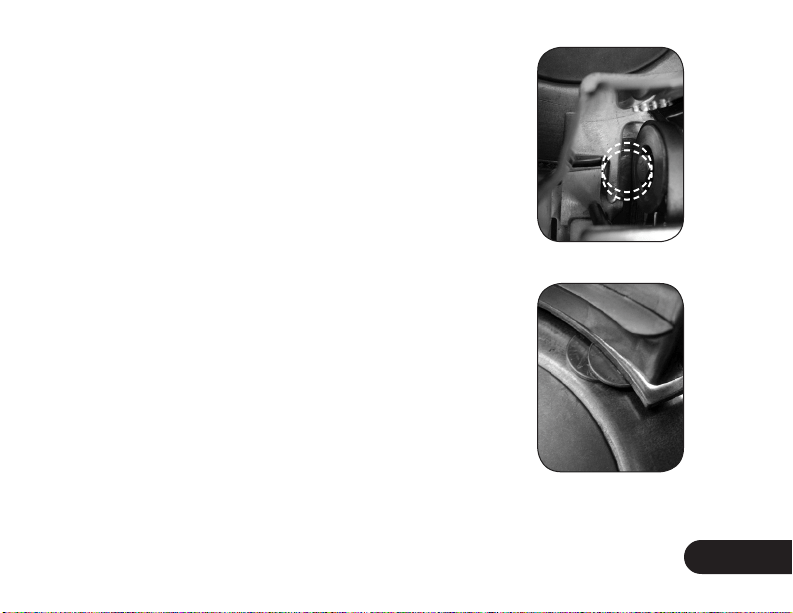
•If coin jamming on the coin runway is experienced, the diameter
setting should be increased by 0.25mm (one click).
•If double-stacked coins/tokens are observed under the lock
plate, this can indicate that the thickness setting is too large. Try
decreasing the setting by 0.05mm.
•If centrifugal wheel jamming is observed, it could indicate that
the thickness setting is too small. Try increasing the thickness
setting by 0.05mm.
Coins jammed in the
runway.
Double-stacked coins on
the centrifugal disc.
Caring about your money
14
3. MAINTENANCE AND TROUBLESHOOTING
3.1 Maintenance
Most of the problems in the machine operation can be
avoided through regular and preventative maintenance.
Regular maintenance of your coin counter significantly
prolongs its service life.
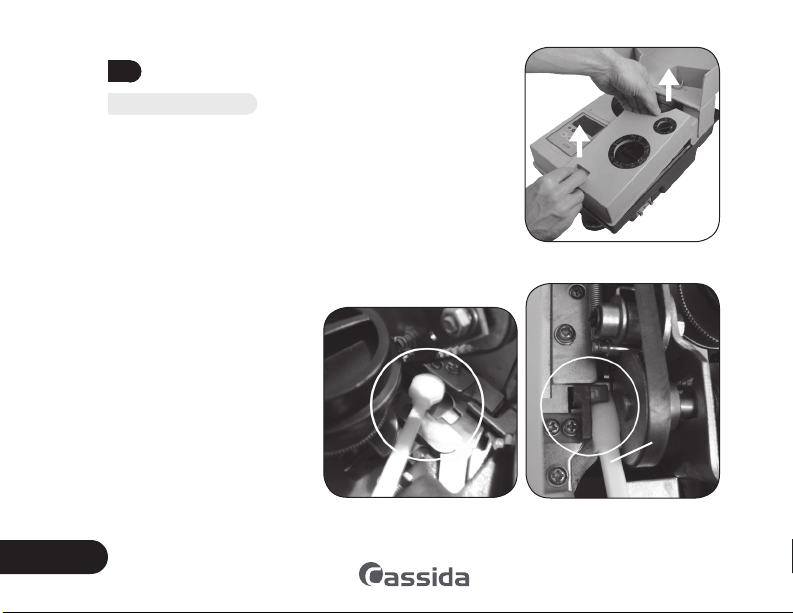
1. Turn off and unplug the machine. Remove the cover
over the thickness and diameter dials.
2. Use a vacuum or air duster to remove dust from the
hopper and runway.
3. Clean the coin runway and the counting sensor using
a small soft-bristled
paintbrush. Be careful
when cleaning the
machine to keep hands
and fingers away from
the coin runway so as to
avoid injury.
4. Use a Cassida Clean Pro
cleaning swab to clean
the counting sensor and
runway.
5. Check whether the feed
belt is dirty or worn. If it
Removing the cover over the
thickness and diameter dials.
Cleaning the sensor using a Clean
Pro swab.
Cleaning the coin runway using a
Clean Pro swab.
swab

Cassida C500 Compact Coin Counter
15
is dirty, it may be cleaned using a Cassida Clean Bill cleaning card or a soft cloth
moistened with denatured alcohol. If the belt is worn, it should be replaced - contact
the Cassida Service Center.
3.2 Exterior Cleaning
Clean the machine with a soft, lint-free cloth or duster. Do not use synthetic fabrics, detergents,
water, or cleaning sprays as these may damage the machine.
3.3 Troubleshooting
Problem #1: Coins are counted incorrectly.
Make sure the diameter and thickness settings are correct. Set the diameter dial to the largest
diameter coin/token in the hopper. Set the thickness to the thickest coin/token in the hopper.
Incorrect settings may lead to jamming or incorrect rejection of the
coins. If the machine is set for too large a diameter, the machine
may incorrectly reject more coins.
Problem #2: Coins are spinning inside the machine and are
not dropping into the coin bag.
Make sure the diameter and thickness settings are correct. Set the
diameter dial to the largest diameter coin/token in the hopper. Set
the thickness to the thickest coin/token in the hopper. Incorrect
settings may lead to jamming or incorrect rejection of the coins. If
the machine is set for too small a diameter, coins will not be able to
pass through the gate and into the bag. Additionally, if the thickness
setting is too high, coins may become double-stacked in the gate
and cause jamming (see photo).
Coins double-stacked in the gate.
Caring about your money
16
Problem #3: Machine will not power on.
Check whether the machine is connected to proper voltage.
The machine requires 110VAC for proper operation.
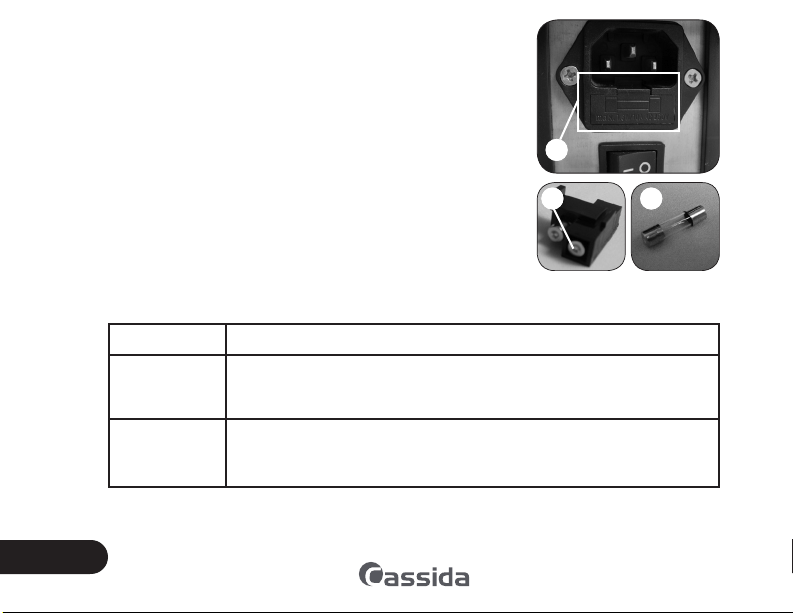
Unplug the unit from the wall outlet. Check the fuse located
under the cover beneath the power cord connector. If the fuse
is blown, replace it with the spare fuse included under the fuse
cover.
Problem #4: The displayed data do not correspond the
actual data.
The counting sensor might be damaged or dirty. Please contact
the Cassida Service center.
Problem #5: When turning on the machine the following
errors are displayed:
Error code Cause/Corrective actions
0
Coins are jammed in the machine. Stop the machine, open the cover
(refer to section 3.1. “Maintenance”). Clear the jam. Then press the
start/stop key and restart the machine.
0
The machine cover is removed or not installed properly. Stop the machine
and make sure the cover is secure, then start the machine again.
4.
5.
1. Location of fuse cover, 2.
spare fuse in fuse holder, and
3. fuse.
32
1

Cassida C500 Compact Coin Counter
17
6. WARRANTY AND CONTACT INFORMATION
6.1 Warranty
All Cassida products are warranted for a period of one year from the date of purchase. In
most cases, the malfunction of the machine can be resolved by cleaning the unit. Please refer
to section 3.1 ”Maintenance” for guidelines.
To activate your warranty please register your product online by visiting http://cassidausa.
com/register.html
Coverage:
The warranty covers defects in materials and workmanship. It does not cover maintenance
and cleaning (cleaning parts or sensors of dust, replacing parts such as rubber rollers, V belts,
etc. that are worn out by a natural cycle of work.)
Shipping:
Return shipping from the Cassida service center is included for items under warranty. Shipping
to the service center is at the customer’s expense.
Non-warranty service:
Cassida can perform maintenance and cleaning for an extra fee. For a non-warranty repair
or maintenance quotation, contact Cassida Technical Support.

Caring about your money
18
6.2 Contact information
email: [email protected]
phone: 1-888-800-0303
When contacting Cassida Technical Support, please have the following information available:
• Product model - located on the rear panel of your currency counter.
• Serial number - located on the bottom of your currency counter.
• Nature of the problem - what happens, an when does it happen? Does the display show
an error message?
• Steps already taken to resolve the problem.

Cassida C500 Compact Coin Counter
19
Designed by Cassida USA
Printed in China
011001