INSTRUCTION MANUAL
MODEL 48020 / 48021
™
2
www.celestron.com
FEATURES
w
Wind Speed Measurement – Pick Current
(Cu), Maximum (MAX) or Average (AVG).
w
Temperature with built-in thermometer reading
in °F (Fahrenheit) or °C (Celsius).
w
Wind Chill Indication.
w
Five choices of Wind Measurement Units – m/s (meters per
second), Km/h (kilometers per hour), ft/min (feet per minute),
Knots, mph (miles per hour). Wind Meter Conversions to
compare between units are readily available on the internet.
w
Beaufort Wind Force Scale – Beaufort numbers 0-12 are
a measure for describing wind speed based on observed sea
conditions. Detailed information can be found on the internet.
w
Manual and Auto Power Off
w
Low Battery Indication
w
Lanyard Included
w
Backlight – blue color display of LCD
w
Rubberized Protective Cover
w
Weather Resistant
OPERATION
w
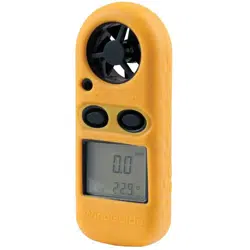
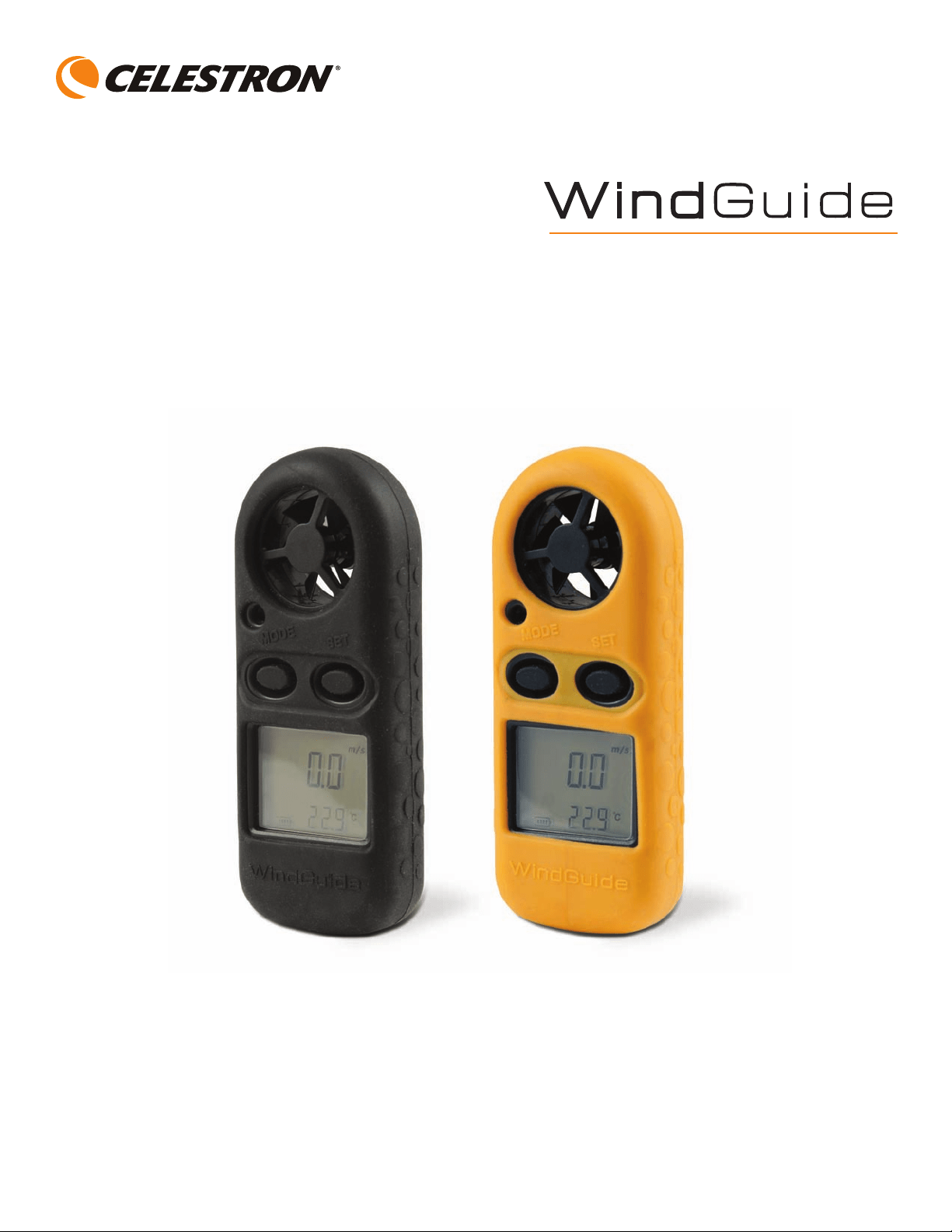
Turn Power On – Press the “Mode” button for 2 seconds to turn
on the unit. The LCD will display Wind Speed, Temperature
and Battery Condition.
w
Set Unit of Wind Speed – Press the “Mode” button for 3
seconds until “m/s” starts to blink. Press the “Set” button to
navigate through the choices and press the “Mode” button
to confirm your choice. The setting will be stored on your unit
even after turning it off.
w
Turn Power Off – Press the “Mode” button and the “Set”
button at the same time for 1 second to power the unit off.
w
Set Wind Speed Measurement – After turning the unit off,
turn it back on and press the “Mode” button for about 3 seconds
until the “m/s” starts to blink. Press the “Set” button to navigate
through the units of wind speed and into the choices of
wind speed measurement – “Cu” for current wind speed,
“MAX” for maximum wind speed and “AVG” for average wind
speed. Press the “Mode” button to confirm your choice.
The setting will be stored in your unit even after turning it off.
The MAX wind speed will indicate the highest wind speed
recorded once it is set unless you reset to another measurement
unit. The AVG wind speed will indicate the last 8 sample periods
or 4 seconds of running average.
w
Wind Display on the LCD – When the impeller (fan/vane)
turns, the LCD will instantly display the wind speed and
temperature per the settings you chose along with the
Beaufort scale.
w
Set the Temperature Unit – On the rear of the unit is a
hidden switch key with “C/F” noted below it. Use a small pin
(or other thin object) to press the key to convert the
temperature reading between “C” and “F”.
w
Wind Chill – When temperature drops below 32° F (0° C),
the wind icon “WIND CHILL” will be indicated on the LCD.
w
Backlight Display – Press either button to activate the
backlight. It will stay on for about 10 seconds.
w
Auto Power Off – The unit will turn off automatically if not
operating for about 14 minutes.
w
Changing the Battery – When the battery icon “ “ is shown
on the LCD, change the battery. Turn the battery compartment
door with a coin in the direction indicated and use a very small
flat screwdriver to remove the door cover. Replace the CR2032
battery with the “+” position facing up. Put the battery cover
back on and close.
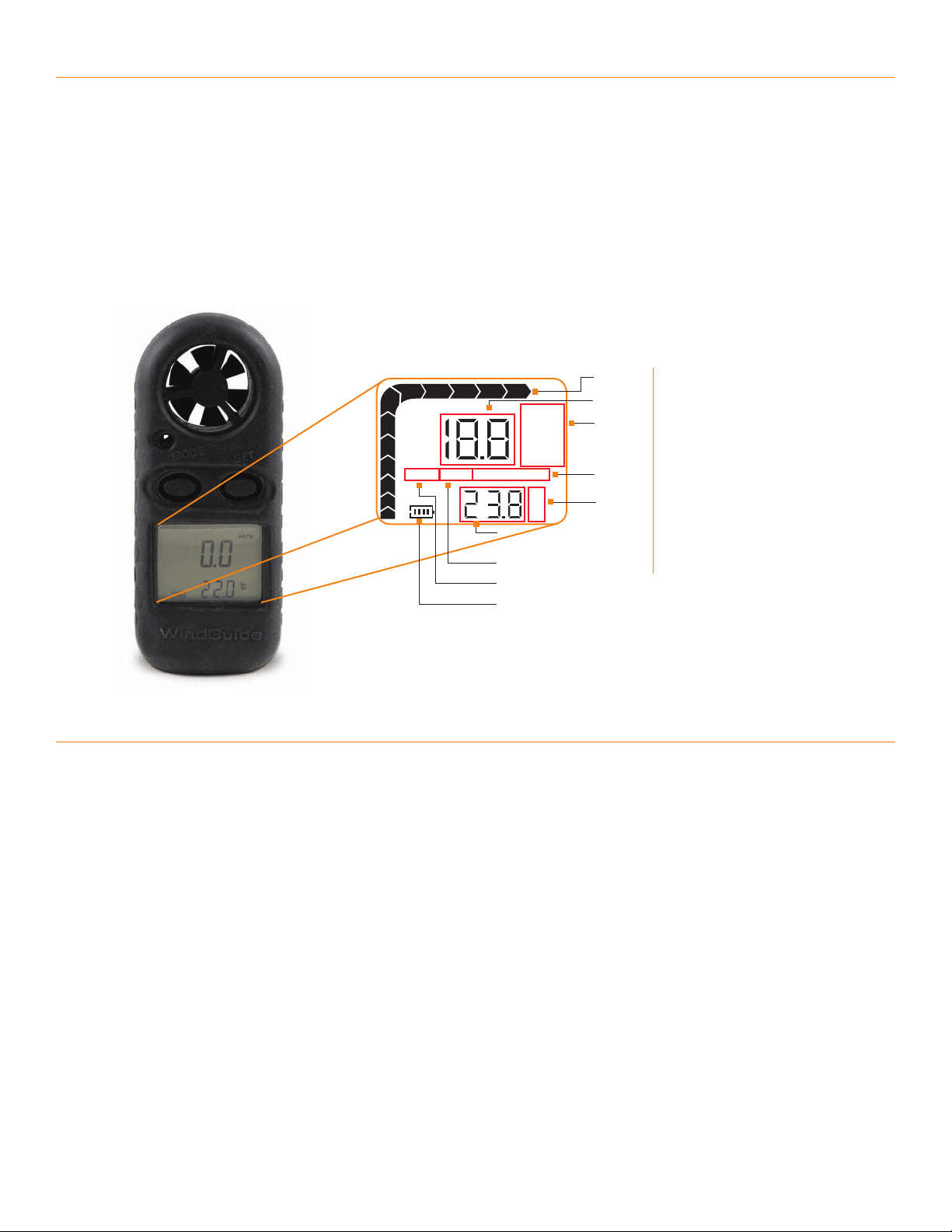
1. Beaufort Scale
2. Wind Speed
3. Units of Wind Speed
4. Wind Chill Icon
5. Temperature Unit – F or C
6. Temperature Reading
7. AVG Speed Measurement
8. MAX Speed Measurement
9. Battery Power Remaining
1.
2.
3.
4.
5.
7.
8.
9.
LCD DISPLAY
m/s
ft/min
mph
Km/h
Knots
º
C
º
F
MAX
1
2
3
4
5
6
7
89 10 11 12
AV G WINDCHILL
6.

Your Celestron WindGuide has a Two Year Limited Warranty.
For detailed warranty information and to register your new product,
please visit our website:
www.celestron.com
This device complies with Part 15 of FCC Rules.
Operation is subject to the following two conditions:
1. This device may not cause harmful interference, and
2. This device must accept any interference received,
including interference that may cause undesired operation.
This product is designed and intended for those 13 years of age and older.
©2012 Celestron
2835 Columbia Street
Torrance, CA 90503 U.S.A.
Telephone: 310.328.9560
Fax: 310.212.5835
0112
SPECIFICATIONS
TEMPERATURE/OTHER
UNIT RANGE RESOLUTION ACCURACY
°C / °F -10ºC to +45ºC / 14°F to 113°F 0.2 / 0.36 ±2°C ±3.6°F
Thermometer/Storage NTC / -40° to +60°C (-40° to 140°F)
Battery CR2032 Lithium Button Cell 3.0Volt –
Average Life of 73 hours continuous operation –
Current consumption approximately 3mA
Impeller (fan/vane) 25.4 mm (1.0”) – Not removable or replaceable
LCD Screen 30 mm x 23 mm (1.2” x 0.8”) – Transflective, positive
Dimensions/Weight 4.3” x 2.0” x 0.8” (110 mm x 50 mm x 20 mm)
/ 2.4oz (68g)
WIND SPEED
UNIT RANGE RESOLUTION THRESHOLD ACCURACY
m/s 0~30 0.1 0.1 ±5%
ft/min 0~5860 19 39 ± 5%
Knots 0~55 0.2 0.1 ± 5%
Km/h 0~90 0.3 0.3 ± 5%
mph 0~65 0.2 0.2 ± 5%

MANUEL D’INSTRUCTIONS
MODÈLE NO 48020 / 48021
™

www.celestron.com
CARACTÉRISTIQUES
w
Mesure de la vitesse du vent – choisissez entre la mesure actuelle (Cu),
maximale (MAX) ou moyenne (AVG).
w
Température avec thermomètre intégré offrant les mesures en °F (Fahrenheit)
ou °C (Celsius).
w
Indication de refroidissement éolien.
w
Cinq choix d’unités de mesure du vent – m/s (mètres par seconde), km/h
(kilomètres par heure), pi/min (pied par minute), nœuds, mi/h (milles par
heure). Les conversions des mesures du vent pour comparer les unités sont
disponibles sur Internet.
w
Échelle de Beaufort pour la force du vent – les nombres de 0 à 12 de
Beaufort sont les mesures décrivant la vitesse du vent selon les
conditions maritimes observées. Vous pouvez trouver sur Internet
des informations détaillées.
w
Arrêt manuel et automatique
w
Indicateur de pile faible
w
Cordon inclus
w
Rétroéclairage – écran ACL de couleur bleue
w
Couvercle de protection en caoutchouc
w
Résistant aux intempéries
FONCTIONNEMENT
w
Mettre en marche – Appuyez sur le bouton « Mode » pendant 2 secondes
pour mettre l’appareil en marche. L’écran ACL affichera la vitesse du vent,
la température et l’état de la pile.
w
Réglage des unités de la vitesse du vent – Appuyez sur le bouton
« Mode » pendant environ 3 secondes jusqu’à ce que « m/s » commence
à clignoter. Appuyez sur le bouton « Set » (Réglage) pour parcourir les
choix et appuyez sur le bouton
« Mode » pour confirmer votre sélection. Le
paramètre sera sauvegardé dans votre appareil même après qu’il soit éteint.
w
Arrêter – Appuyez simultanément sur les boutons « Mode » et « Set »
(Réglage) pendant 1 seconde pour éteindre l’appareil.
w
Réglage de la mesure de la vitesse du vent – Après avoir éteint
l’appareil, rallumez-le et appuyez sur le bouton
« Mode » pendant
3 secondes jusqu’à ce que « m/s » commence à clignoter. Appuyez
sur le bouton
« Set » (Réglage) pour parcourir les unités et les mesures
de la vitesse du vent –
« Cu » pour la vitesse actuelle du vent, « MAX »
pour la vitesse maximale du vent et
« AVG » pour la vitesse moyenne
du vent. Appuyez sur le bouton « Mode » pour confirmer votre sélection.
Le paramètre sera sauvegardé dans votre appareil même après qu’il soit
éteint. La vitesse MAX du vent indiquera la vitesse du vent la plus élevée
enregistrée une fois réglée, sauf si vous avez réinitialisé à une autre unité
de mesure. La vitesse moyenne du vent indiquera les 8 dernières périodes
enregistrées ou la moyenne d’utilisation pendant 4 secondes.
w
Affichage du vent sur l’écran ACL – Quand la turbine (ventilateur/
ailette) tourne, l’écran ACL affiche instantanément la vitesse du vent et la
température selon les réglages sélectionnés ainsi que l’échelle de Beaufort.
w
Réglage de l’unité de température – À l’arrière de l’appareil se trouve
une touche masquée avec l’indication
« C/F » en dessous. Utilisez une
petite épingle (ou un autre objet fin) pour appuyer sur la touche afin de
mettre la température en
« C » ou « F ».
w
Refroidissement éolien – Lorsque la température chute sous 0 °C (32 °F),
l’icône du vent « WIND CHILL » (refroidissement éolien) s’affichera sur
l’écran ACL.
w
Rétroéclairage – Appuyez sur un bouton pour activer le rétroéclairage.
Il restera activé pendant environ 10 secondes.
w
Arrêt automatique – L’appareil s’arrêtera automatiquement s’il n’est pas
utilisé pendant environ 14 minutes
.
w
Changement de la pile – Quand l’icône de la pile « » apparaît sur
l’écran ACL, changez la pile. Avec une pièce de monnaie, tournez la porte
du couvercle du compartiment à pile dans le sens indiqué et utilisez un
tournevis plat très petit pour retirer le couvercle. Remplacez la pile CR2032
avec le
« + » faisant face vers le haut. Replacez ensuite le couvercle du
compartiment à pile et fermez-le
.
1. Échelle de Beaufort
2. Vitesse du vent
3. Unités de vitesse du vent
4. Icône de refroidissement éolien
5. Unité de température – F ou C
6. Affichage de la température
7. Mesure de la vitesse moyenne
8. Mesure de la vitesse maximale
9. Alimentation restante de la pile
2
1.
2.
3.
4.
5.
7.
8.
9.
ÉCRAN ACL
m/s
ft/min
mph
Km/h
Knots
º
C
º
F
MAX
1
2
3
4
5
6
7
89 10 11 12
AV G WINDCHILL
6.
Votre appareil WindGuide de Celestron possède une garantie limitée de deux ans.
Pour en savoir plus sur la garantie et pour enregistrer votre nouveau produit, veuillez visiter
notre site Web :
www.celestron.com
Cet appareil est conforme à la partie 15 des normes FCC.
Son fonctionnement est sujet aux deux conditions suivantes :
1. Cet appareil ne doit pas générer d’interférences nuisibles et
2. Il doit accepter toute interférence reçue, y compris celle pouvant
causer une utilisation non voulue.
Ce produit est conçu et destiné aux personnes de 13 ans et plus.
©2012 Celestron
2835 Columbia Street
Torrance, CA 90503 U.S.A.
Téléphone : 310.328.9560
Téléc. : 310.212.5835
0112
SPÉCIFICATIONS
TEMPÉRATURE/AUTRE
UNITÉ INTERVALLE RÉSOLUTION PRÉCISION
°C / °F -10 ºC à +45 ºC / 14 °F à 113 °F 0,2 / 0,36 ±2 °C ±3,6 °F
Thermomètre/Rangement NTC / -40 °C à +60 °C (-40 °F à 140 °F)
Pile Pile ronde au lithium CR2032 de 3,0 volts –
Durée de vie moyenne de 73 heures en
utilisation continue –
Consommation actuelle d’environ 3 mA
Turbine (ventilateur/ailette) 25,4 mm (1,0 po) – non retirable et non remplaçable
Écran ACL 30 mm x 23 mm (1,2 po x 0,8 po) – Transflectif, positif
Dimensions/Poids 4,3 po x 2,0 po x 0,8 po (110 mm x 50 mm x 20 mm)
/ 2,4 oz (68 g)
VITESSE DU VENT
UNITÉ INTERVALLE RÉSOLUTION SEUIL PRÉCISION
m/s 0~30 0,1 0,1 ± 5 %
pi/min 0~5860 19 39 ± 5 %
Nœuds 0~55 0,2 0,1 ± 5 %
Km/h 0~90 0,3 0,3 ± 5 %
Mi/h 0~65 0,2 0,2 ± 5 %

MANUAL DE INSTRUCCIONES
MODELO N.º 48020 / 48021
™

2
www.celestron.com
CARACTERÍSTICAS
w
Medida de velocidad del viento: Seleccione Actual (Ac),
Máxima (MÁX.) o Media (MED).
w
Temperatura con lectura de termómetro incorporado
en °F (Fahrenheit) o °C (Celsius).
w
Indicación de frío del viento.
w
Cinco opciones para las unidades de medida del viento:
m/s (metros por segundo), km/h (kilómetros por hora),
pies/min (pies por minuto), nudos, mph (millas por hora).
Las conversiones métricas del viento para compararlas entre
unidades se encuentran fácilmente disponibles en Internet.
w
Escala de Beaufort para la intensidad del viento: Los números
de esta escala van del 0 al 12 y son medidas para describir la
velocidad del viento basada en las observaciones del estado
del mar. Podrá consultar más información en Internet.
w
Apagado manual y automático
w
Indicación de batería baja
w
Correa incluida
w
Retroiluminación: Indicación de la pantalla LCD en azul
w
Funda de protección de goma
w
Resistente a la intemperie
FUNCIONAMIENTO
w
Encendido: Pulse el botón “Modo” durante dos segundos para
encender el dispositivo. La pantalla LCD mostrará la velocidad del
viento, temperatura y nivel de batería.
w
Configurar la unidad de velocidad del viento: Pulse el
botón “Modo” durante tres segundos hasta que “m/s” comience
a parpadear. Pulse el botón “Configurar” para navegar por las
opciones y pulse el botón “Modo” para confirmar su elección.
La configuración se almacenará en el dispositivo incluso después
de apagarlo.
w
Apagado: Pulse los botones “Modo” y “Configurar” al mismo
tiempo durante un segundo para apagar el dispositivo.
w
Configurar la medida de velocidad del viento: Después
de apagar el dispositivo, vuelva a encenderlo y pulse el botón
“Modo” durante unos tres segundos hasta que “m/s” comience
a parpadear. Pulse el botón “Configurar” para navegar por las
unidades de velocidad del viento y por las opciones de medida
de velocidad del viento: “Ac” para la velocidad actual del viento,
“MÁX.” para la velocidad máxima del viento y “MED” para la
velocidad media del viento. Pulse el botón “Modo” para confirmar
su elección. La configuración se almacenará en el dispositivo
incluso después de apagarlo. La velocidad MÁX. del viento indicará
la velocidad más alta del viento almacenada una vez que se ajuste
a menos que reajuste otra unidad de medida. La velocidad MED
del viento indicará los ocho últimos períodos de muestra o cuatro
segundos de media de actividad.
w
Indicación del viento en la pantalla LCD: Cuando gira el
impulsor (ventilador/veleta), la pantalla LCD indicará de inmediato
la velocidad del viento y temperatura según la configuración que
eligió además de la escala de Beaufort.
w
Configurar la unidad de temperatura: En la parte trasera de
la unidad se encuentra un botón oculto con el símbolo de “C/F”
debajo. Utilice un alfiler pequeño (u otro objeto fino) para pulsar
el botón y cambiar la lectura de la temperatura en “C” o “F”.
w
Frío del viento: Cuando la temperatura cae por debajo de los
32° F (0° C), el icono del viento “FRÍO DEL VIENTO” aparecerá
en la pantalla LCD.
w
Indicación de retroiluminación: Pulse algún botón para activar
la retroiluminación. Permanecerá encendida diez segundos
aproximadamente.
w
Apagado automático: La unidad se apagará automáticamente
si no se encuentra en funcionamiento durante 14 minutos.
w
Cambio de batería: Cuando el icono de la batería “ ”
aparezca en la pantalla, sustituya la batería. Gire la cubierta
del compartimento de la batería con una moneda hacia la
dirección indicada y utilice un destornillador plano y muy
pequeño para quitar la cubierta. Sustituya la batería CR2032
con la posición “+” hacia arriba. Vuelva a colocar la tapa de
la batería y ciérrela.
1. Escala de Beaufort
2. Velocidad del viento
3. Unidades de velocidad del viento
4. Icono del frío del viento
5. Unidad de temperatura (°F o °C)
6. Lectura de temperatura
7. Medida de velocidad MED
8. Medida de velocidad MÁX.
9. Batería restante
1.
2.
3.
4.
5.
7.
8.
9.
PANTALLA LCD
m/s
ft/min
mph
Km/h
Knots
º
C
º
F
MAX
1
2
3
4
5
6
7
89 10 11 12
AV G WINDCHILL
6.

El dispositivo WindGuide de Celestron tiene una garantía
limitada de dos años.
Si desea obtener más información sobre la garantía o registrar
el nuevo producto, visite nuestro sitio web:
www.celestron.com
Este dispositivo cumple con la parte 15 de la normativa FCC.
Su funcionamiento está sujeto a las siguientes dos condiciones:
1. Este dispositivo no puede causar interferencias perjudiciales, y
2. Este dispositivo debe aceptar todas las interferencias recibidas, incluyendo
las interferencias que podrían causar un funcionamiento no deseado.
Este producto está diseñado y destinado para personas de 13 años en adelante.
©2012 Celestron
2835 Columbia Street
Torrance, CA 90503 U.S.A.
Teléfono: 310.328.9560
Fax: 310.212.5835
0112
ESPECIFICACIONES
TEMPERATURA/OTROS
UNIDAD RANGO RESOLUCIÓN PRECISIÓN
°C / °F -10ºC a +45ºC / 14°F a 113°F 0.2 / 0.36 ±2°C ±3.6°F
Termómetro/Almacenamiento CNT / -40° a +60°C (-40° a 140°F)
Batería CR2032 de celdas de litio de 3.0 V.
Duración media de 73 horas en
funcionamiento continuo.
Consumo actual aproximado 3 mA
Impulsor (ventilador/veleta) 25.4 mm (1.0"). No desmontable o sustituible
Pantalla LCD 30 mm x 23 mm (1.2" x 0.8").
Transflectiva, positiva
Dimensiones/Peso 4.3" x 2.0" x 0.8" (110 mm x 50 mm x 20 mm)
/ 2.4 oz (68 gr.)
VELOCIDAD DEL VIENTO
UNIDAD RANGO RESOLUCIÓN UMBRAL PRECISIÓN
m/s 0~30 0.1 0.1 ±5%
pies/min 0~5860 19 39 ±5%
nudos 0~55 0.2 0.1 ±5%
km/h 0~90 0.3 0.3 ±5%
mph 0~65 0.2 0.2 ±5%

BEDIENUNGSANLEITUNG
MODELL 48020 / 48021
™

2
www.celestron.com
AUSSTATTUNG
w
Windgeschwindigkeitsmessung – Aktuelle Windgeschwindigkeit
(Cu), Maximum (MAX) oder Durchschnitt (AVG).
w
Temperatur mit integrierter Thermometeranzeige in °F oder °C.
w
Wind-Chill-Anzeige.
w
Fünf verschiedene Einheiten für Windgeschwindigkeit – m/s (Meter
pro Sekunde), km/h (Kilometer pro Stunde), ft/min (Fuß pro Minute),
Knoten, mph (Meilen pro Stunde). Informationen zur Umrechnung
von Windgeschwindigkeitseinheiten sind im Internet verfügbar.
w
Beaufort-Skala – Mit den Beaufort-Werten 0-12 wird die
Windgeschwindigkeit basierend auf Windbeobachtungen auf
See beschrieben. Weitere Informationen finden Sie im Internet.
w
Manuelles und automatisches Abschalten
w
Batteriekontrollanzeige
w
Handschlaufe im Lieferumfang
w
Hintergrundbeleuchtung – blaue LCD-Anzeige
w
Gummierte Schutzhülle
w
Wetterbeständig
BETRIEB
w
Einschalten – Halten Sie die Taste „Mode“ 2 Sekunden lang
gedrückt, um das Gerät einzuschalten. Daraufhin werden auf der
LCD-Anzeige die Windgeschwindigkeit, die Temperatur und der
Batterieladezustand angezeigt.
w
Einheit für Windgeschwindigkeit einstellen – Halten Sie die
Taste „Mode“ ca. 3 Sekunden lang gedrückt bis „m/s“ anfängt
zu blinken. Drücken Sie die Taste „Set“, um durch die Optionen
zu navigieren, und bestätigen Sie die Auswahl durch Drücken der
Taste „Mode“. Die Einstellung wird auch beibehalten, wenn das
Gerät ausgeschaltet wird.
w
Ausschalten – Halten Sie die Taste „Mode“ und die Taste „Set“
gleichzeitig 1 Sekunde lang gedrückt, um das Gerät auszuschalten.
w
Windgeschwindigkeitsmessung einstellen – Schalten Sie
das Gerät aus und wieder ein. Halten Sie die Taste „Mode“ ca.
3 Sekunden lang gedrückt bis „m/s“ anfängt zu blinken. Drücken
Sie die Taste „Set“, um durch die verfügbaren Einheiten und
Optionen für die Windgeschwindigkeitsmessung zu navigieren -
„Cu“ steht für die aktuelle Windgeschwindigkeit, „MAX“ für die
maximale Windgeschwindigkeit und „AVG“ für die durchschnittliche
Windgeschwindigkeit. Bestätigen Sie Ihre Auswahl durch Drücken
der Taste „Mode“. Die Einstellung wird auch beibehalten, wenn
das Gerät ausgeschaltet wird. Bei der Einstellung „MAX“ wird
die höchste gemessene Windgeschwindigkeit angezeigt, es sei
denn, nach dem Einstellen von „MAX“ wird eine andere Maßeinheit
eingestellt. Bei der Einstellung „AVG“ wird die durchschnittliche
Windgeschwindigkeit basierend auf den letzten 8 Messzyklen
bzw. die durchschnittliche Windgeschwindigkeit, die im Zeitraum
von 4 Sekunden nach dem Einstellen von „AVG“ gemessen
wurde, angezeigt.
w
Windanzeige auf der LCD-Anzeige – Wenn sich das Flügelrad
(Lüfter/Windflügel) dreht, werden auf der LCD-Anzeige sofort
die Windgeschwindigkeit und -temperatur entsprechend den
gewählten Einstellungen sowie die Beaufort-Skala angezeigt.
w
Einstellen der Temperatureinheit – Auf der Rückseite des
Geräts befindet sich eine versteckte Taste, die mit „C/F“ beschriftet
ist. Drücken Sie die Taste mit einem kleinen Stift (oder einem
anderen spitzen Gegenstand), um die Temperatureinheit zwischen
„°C“ und „°F“ umzuschalten.
w
Wind-Chill-Effekt – Wenn die Temperatur unter 32°F (0°C)
absinkt, wird das Windsymbol „WIND CHILL“ auf der
LCD-Anzeige angezeigt.
w
Hintergrundbeleuchtung – Drücken Sie eine beliebige Taste,
um die Hintergrundbeleuchtung zu aktivieren. Daraufhin leuchtet
die Hintergrundbeleuchtung ca. 10 Sekunden lang.
w
Automatische Abschaltung – Das Gerät wird automatisch
abgeschaltet, wenn es ca. 14 Minuten lang nicht benutzt wurde.
w
Auswechseln der Batterie – Wenn das Batteriesymbol
„ “ auf der LCD-Anzeige angezeigt wird, wechseln Sie die
Batterie aus. Drehen Sie die Batteriefachabdeckung mit einer
Münze in die angegebene Pfeilrichtung und hebeln Sie die
Batteriefachabdeckung mit einem kleinen Schlitzschraubendreher
heraus. Nehmen Sie die leere CR2032-Batterie heraus, und
setzen Sie die neue Batterie mit der mit „+“ gekennzeichneten
Seite nach oben an der vorgesehenen Position ein. Setzen Sie
die Batteriefachabdeckung ein und drehen Sie sie fest.
1. Beaufort-Skala
2. Windgeschwindigkeit
3. Einheiten für
Windgeschwindigkeit
4. Wind-Chill-Symbol
5. Temperatureinheit – °F oder °C
6. Temperaturmesswert
7. Durchschnittliche
Windgeschwindigkeit „AVG“
8. Maximale
Windgeschwindigkeit „MAX“
9. Verbleibende Batterieleistung
1.
2.
3.
4.
5.
7.
8.
9.
LCD-ANZEIGE
m/s
ft/min
mph
Km/h
Knots
º
C
º
F
MAX
1
2
3
4
5
6
7
89 10 11 12
AV G WINDCHILL
6.

Die Garantie für Ihren Celestron WindGuide ist auf zwei
Jahre beschränkt.
Ausführliche Informationen zur Garantie und die Möglichkeit zur
Registrierung Ihres neuen Produkts finden Sie auf unserer Website:
www.celestron.com
Dieses Gerät entspricht Teil 15 der FCC-Bestimmungen.
Der Betrieb unterliegt den folgenden zwei Bedingungen:
1. Das Gerät darf keine schädliche Störstrahlung aussenden, und
2. Das Gerät muss für jegliche empfangene Störstrahlung ausgelegt sein,
einschließlich Störungen, die einen unerwünschten Betrieb verursachen.
Dieses Produkt ist für Personen ab 13 Jahren konzipiert und bestimmt.
©2012 Celestron
2835 Columbia Street
Torrance, CA 90503 U.S.A.
Telefon: 310.328.9560
Fax: 310.212.5835
0112
TECHNISCHE DATEN
TEMPERATUR/SONSTIGES
EINHEIT BEREICH AUFLÖSUNG GENAUIGKEIT
°C / °F -10ºC bis +45ºC / 14°F bis 113°F 0,2 / 0,36 ±2°C ±3,6°F
Thermometer/Speicher NTC / -40° bis +60°C (-40° bis 140°F)
Batterie CR2032 Lithium-Knopfzelle 3 Volt –
Durchschnittliche Lebensdauer von
73 h bei Dauerbetrieb –
Stromaufnahme von ca. 3 mA
Flügelrad (Lüfter/Windflügel) 25,4 mm (1,0 Zoll) – Nicht demontierbar
oder austauschbar
LCD-Anzeige 30 mm x 23 mm (1,2 Zoll x 0,8 Zoll) –
transflektiv, positiv
Abmessungen/Gewicht 4,3 Zoll x 2,0 Zoll x 0,8 Zoll
(110 mm x 50 mm x 20 mm) / 68 g (2,4 oz)
WINDGESCHWINDIGKEIT
EINHEIT BEREICH AUFLÖSUNG SCHWELLWERT GENAUIGKEIT
m/s 0~30 0,1 0,1 ±5 %
ft/min 0~5860 19 39 ±5 %
Knoten 0~55 0,2 0,1 ±5 %
km/h 0~90 0,3 0,3 ±5 %
mph 0~65 0,2 0,2 ±5 %
MANUALE DI ISTRUZIONI
MODELLO 48020 / 48021
™

www.celestron.com
CARATTERISTICHE
w
Misurazione della velocità del vento: rileva corrente (Cu), massima (MAX)
o media (AVG).
w
Temperatura con lettura integrata del termometro in °F (Fahrenheit)
o °C (Celsius).
w
Indicazione di Wind Chill.
w
Cinque opzioni di unità di misurazione del vento: m/s (metri al secondo),
Km/h (chilometri all'ora), ft/min (piedi al minuto), Knots (nodi), mph (miglia
orarie). Le conversioni delle misure del vento per confrontare tra le unità
sono facilmente disponibili su internet.
w
Scala di forza del vento Beaufort: i numeri Beaufort da 0 a 12 sono una
misura per descrivere la velocità del vento in base alle condizioni del mare
osservate. Su internet è possibile trovare informazioni dettagliate.
w
Spegnimento manuale e automatico
w
Indicazione della batteria in esaurimento
w
Sagola inclusa
w
Retroilluminazione: display LCD a colori blu
w
Coperchio protettivo gommato
w
Resistente agli agenti atmosferici
FUNZIONAMENTO
w
Accendere: premere il pulsante "Mode" (Modalità) per due secondi
per accendere l'unità. L'LCD visualizza Wind Speed (Velocità del vento),
Temperature (Temperatura) e Battery Condition (Stato della batteria).
w
Impostare l'unità di velocità del vento: premere il pulsante "Mode"
(Modalità) per tre secondi finché "m/s" non inizia a lampeggiare. Premere
il pulsante "Set" (Imposta) per scorrere le opzioni e premere il pulsante
"Mode" (Modalità) per confermare la selezione. L'impostazione verrà
salvata nell'unità anche dopo lo spegnimento.
w
Spegnimento: premere il pulsante "Mode" (Modalità) e il pulsante "Set"
(Imposta) contemporaneamente per un secondo per spegnere l'unità.
w
Impostare la misurazione della velocità del vento: dopo aver spento
l'unità, accenderla nuovamente e premere il pulsante "Mode" (Modalità)
per circa tre secondi finché "m/s" non inizia a lampeggiare. Premere il
pulsante "Set" (Imposta) per scorrere tra le unità di velocità del vento
e le opzioni di misurazione della velocità del vento: "Cu" per la velocità
corrente del vento, "MAX" per la velocità massima del vento e "AVG" per
la velocità media del vento. Premere il pulsante "Mode" (Modalità) per
confermare la selezione. L'impostazione verrà salvata nell'unità anche
dopo lo spegnimento. La velocità del vento MAX indica la velocità del
vento più alta registrata una volta impostata, a meno che non si cambi
a un'altra unità di misurazione. La velocità AVG del vento indica gli ultimi
8 periodi di campionamento o 4 secondi di media in corsa.
w
Visualizzazione del vento sull'LCD: quando il girante (ventola/aletta)
ruota, l'LCD visualizza immediatamente la velocità del tempo e la
temperatura secondo le impostazioni scelte sulla scala di Beaufort.
w
Impostare l'unità della temperatura: sul retro dell'unità si trova un
interruttore nascosto con sotto scritto "C/F"
. Utilizzare uno spillo (o un
altro oggetto sottile) per premere il tasto e convertire la lettura della
temperatura tra "C" e "F".
w
Wind Chill: quando la temperatura scende sotto 0 °C (32 °F), compare
l'icona del vento "WIND CHILL" sull'LCD.
w
Display retroilluminato: premere qualsiasi pulsante per attivare
la retroilluminazione. Rimane attiva per circa 10 secondi.
w
Spegnimento automatico: l'unità si spegne automaticamente se rimane
inattiva per circa 14 minuti.
w
Sostituzione della batteria: quando sull'LCD compare l'icona della
batteria " " , sostituire la batteria. Ruotare lo sportello dello scomparto
batteria con una moneta nella direzione indicata e utilizzare un cacciavite
piatto molto piccolo per rimuovere il coperchio dello sportello. Sostituire
la batteria di tipo CR2032 con la posizione "+" rivolta verso l'alto.
Riposizionare il coperchio della batteria e chiudere.
1. Scala di Beaufort
2. Velocità del vento
3. Unità della velocità del vento
4. Icona Wind Chill
5. Unità di temperatura: F o C
6. Lettura della temperatura
7. Misurazione della velocità AVG
8. Misurazione della velocità MAX
9. Carica rimanente nella batteria
2
1.
2.
3.
4.
5.
7.
8.
9.
DISPLAY LCD
m/s
ft/min
mph
Km/h
Knots
º
C
º
F
MAX
1
2
3
4
5
6
7
89 10 11 12
AV G WINDCHILL
6.

Il WindGuide Celestron è coperto da una garanzia limitata di due anni.
Per informazioni dettagliate sulla garanzia e per registrare un nuovo prodotto,
visitare il sito www.celestron.com.
www.celestron.com
Questo dispositivo risulta conforme alla Parte 15 delle norme FCC.
Il funzionamento è soggetto alle seguenti due condizioni:
1. Questo dispositivo non può causare interferenze dannose
2. Questo dispositivo deve accettare qualsiasi interferenza ricevuta, comprese
le interferenze che potrebbero causare un funzionamento indesiderato.
Questo prodotto è progettato e concepito per persone di almeno 13 anni di età.
©2012 Celestron
2835 Columbia Street
Torrance, CA 90503 U.S.A.
Telefono: 310.328.9560
Fax: 310.212.5835
0112
DATI TECNICI
TEMPERATURA/ALTRO
UNITÀ INTERVALLO RISOLUZIONE PRECISIONE
°C / °F - da 10 ºC a +45 ºC / da 14 °F a 113 °F 0,2 / 0,36 ±2 °C ±3,6 °F
Termometro/Memoria NTC / da -40 a +60 °C (da -40 a 140 °F)
Batteria CR2032 al litio a bottone 3,0 Volt:
la durata media è di 73 di funzionamento continuo,
il consumo di corrente è di circa 3 mA
Girante (ventola/aletta) 25,4 mm (1,0"): non rimovibile né sostituibile
Schermo LCD 30 x 23 mm (1,2" x 0,8"): transflettivo, positivo
Dimensioni/peso 110 x 50 x 20 mm (4,3 x 2,0 x 0,8")
/68 g (2,4 once)
VELOCITÀ DEL VENTO
UNITÀ INTERVALLO RISOLUZIONE SOGLIA PRECISIONE
m/s 0~30 0,1 0,1 ± 5%
ft/min 0~5860 19 39 ± 5%
Knots 0~55 0,2 0,1 ± 5%
Km/h 0~90 0,3 0,3 ± 5%
mph 0~65 0,2 0,2 ± 0,05