AW043638
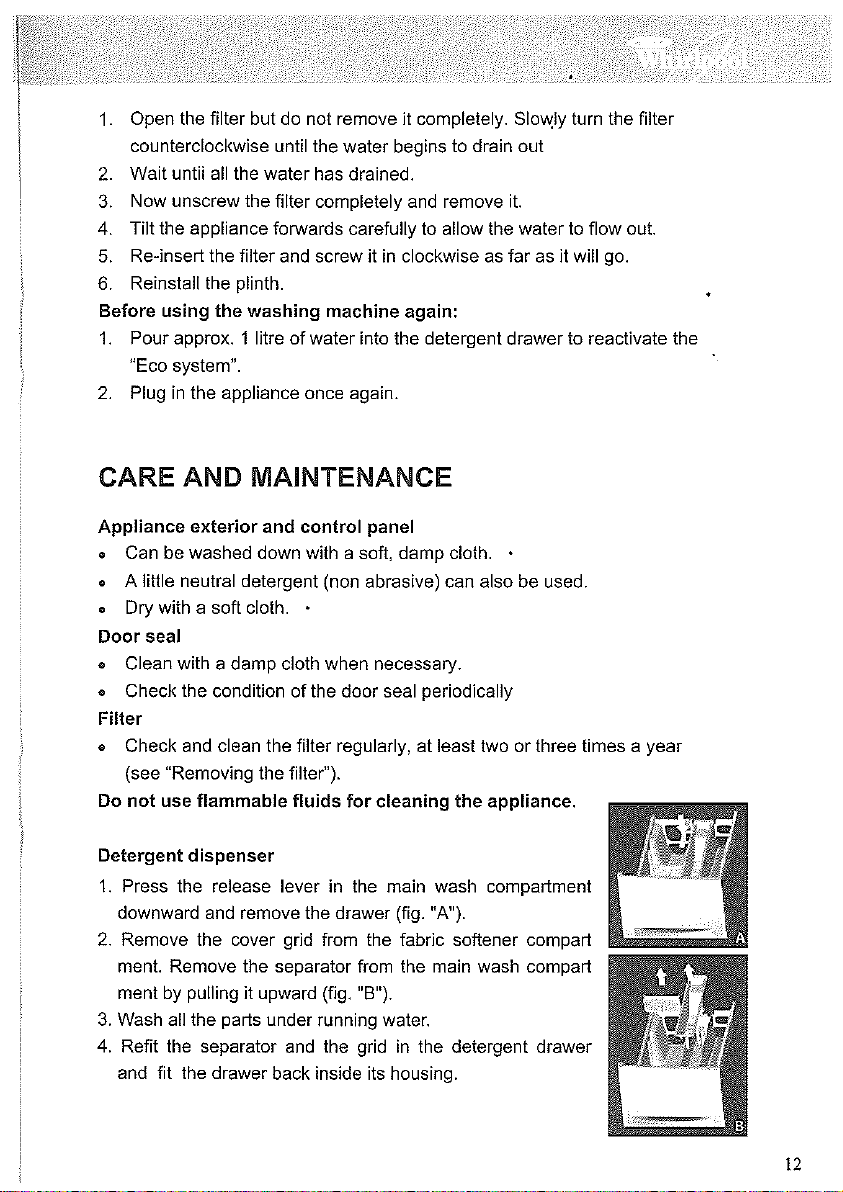
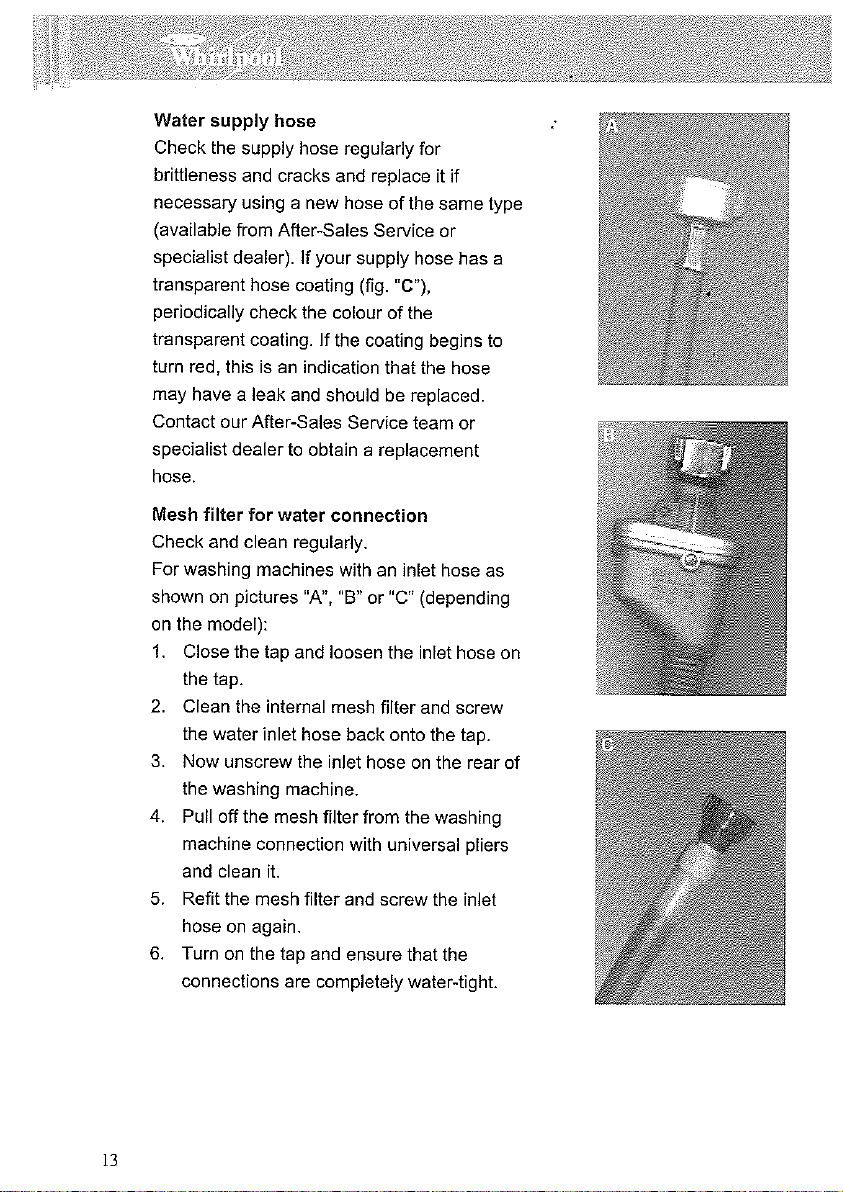
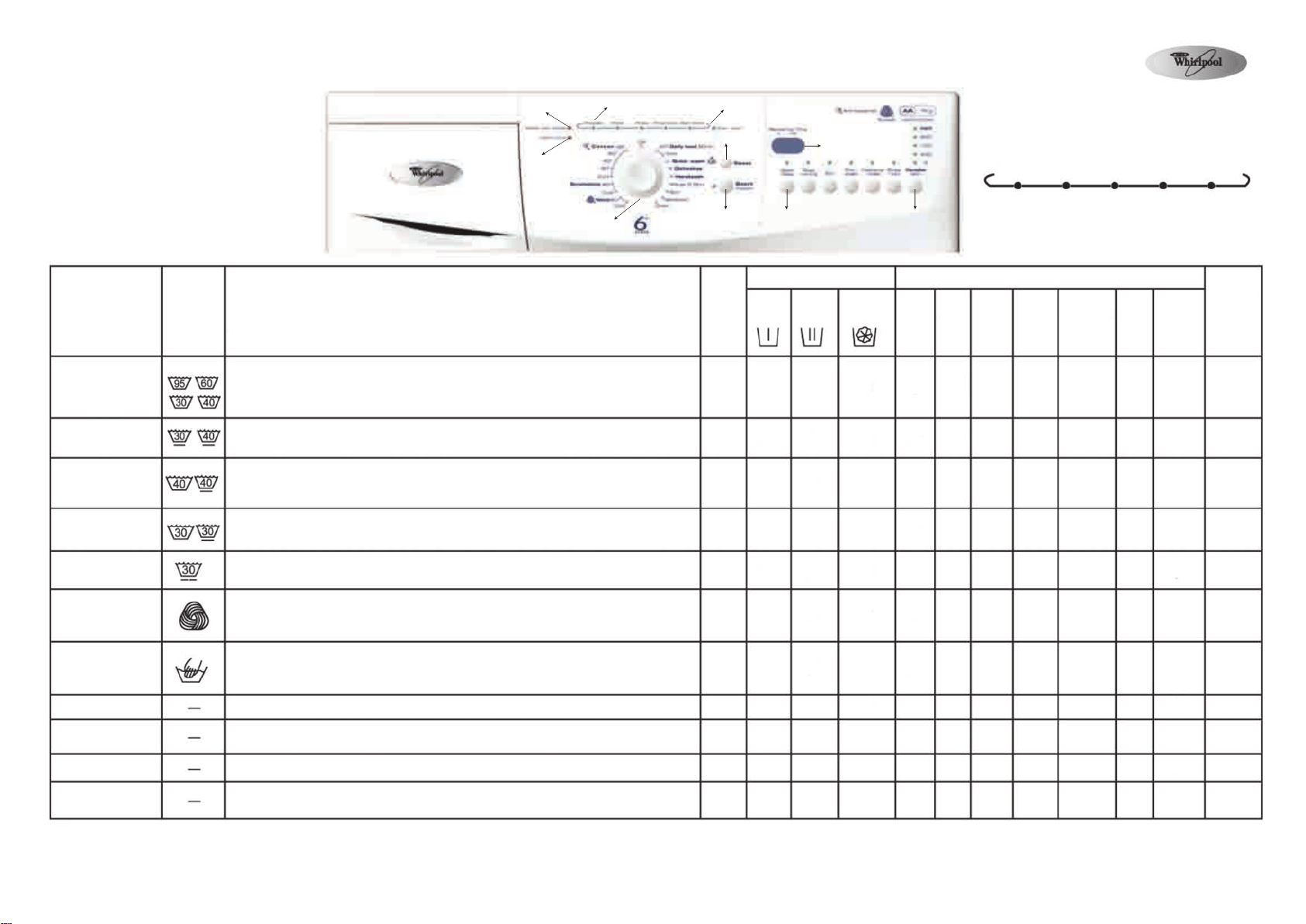
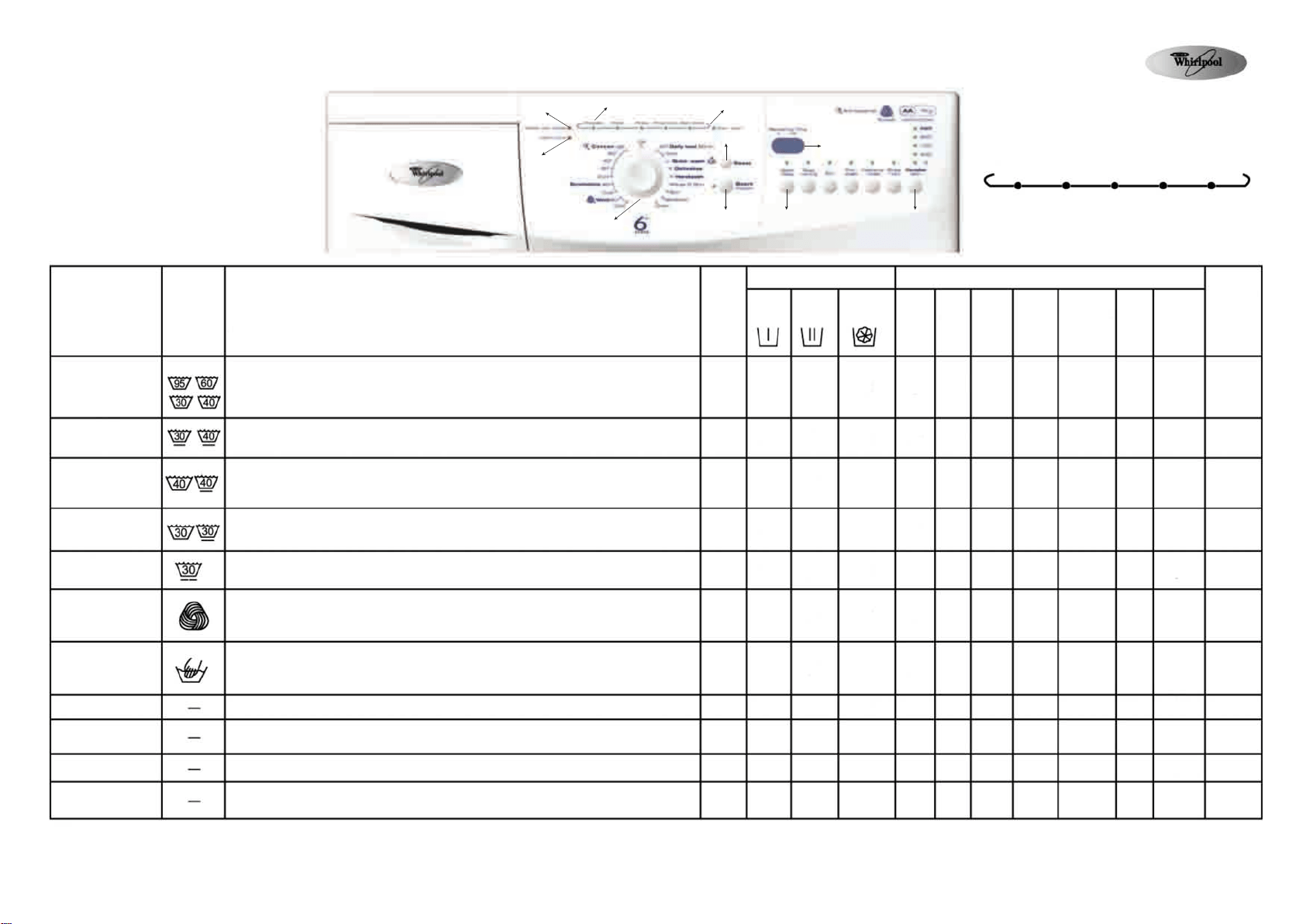
A. 開門指示燈
本機具有自動安全保護功能,在開始出現故障時,
可自動進行檢查、診斷,並作出適當調整。
B. 入水喉關閉指示燈
請檢查水源壓力、水龍頭
C. 清理過濾器指示燈
D. 程序選擇旋鈕
E. 啟動暫停鍵
F. 脫水轉速選擇鍵
G. 程序過程指示燈
H. 重設鍵
I. 預校開機時間鍵
J. 剩餘時間顯示窗
預洗 主洗 過水 延遲脫水 脫水排水
洗衣程序
全棉
冷水、30℃、40℃
60℃、95℃
合成纖維
冷水、40℃
60分鐘
日日洗
冷水、40℃
30分鐘速洗
30℃
纖幼
30℃
羊毛
冷水、40℃
手洗
冷水
過水+脫水
脫水
輕柔脫水
排水
衣服標簽
衣物種類/骯髒程度
洗滌溫度的選擇,請按照衣物標簽上的建議進行
非常骯髒到中度骯髒的床單、枱布、內衣、毛巾、襯衫等全棉或棉麻衣物。
對於非常骯髒的衣物,可選擇“預洗”功能。
中度骯髒的上衣、襯衫及其它合成纖維衣物(滌綸、聚酯纖維)外衣或棉混
紡衣物。
輕微骯髒、中度骯髒的棉質或合成纖維衣物。
穿了一會兒的外套、棉衣、聚酯纖維、聚酯氨和混紡運動服裝。
窗簾、質料纖幼的裙子、襯衫、外套。
只能洗滌有羊毛標記,及可機洗的羊毛衣物
如果選擇了“延遲脫水”功能,切勿讓衣物長時間在水中浸泡。
標記為手洗的棉麻、絲綢、人造絲的衣物
如果選擇了“延遲脫水”功能,切勿讓衣物長時間在水中浸泡,程序結束時
會進行輕柔脫水操作。
與“全棉”程序的最後一次過水、脫水過程相同。
強力脫水,與“全棉”程序的脫水過程相同。
輕柔脫水,與“全棉”程序的脫水過程相同。
此程度只進行排水,並沒有脫水操作,可作為“延遲脫水”後啟動排水操
作,然後結束程序。
* 可選是︰必須加入
(1)為了呵護衣物,脫水速度限制為900轉分鐘。
(2)為了呵護衣物,脫水速度限制為400轉分鐘。
最大洗
衣量
Kg
7.5
2.5
3.0
3.0
1.5
1.0
1.0
7.5
7.5
1.0
__
洗衣劑和柔順劑
預洗
*
*
-
-
*
-
-
-
-
-
-
主洗
是
是
是
是
是
是
是
是
-
-
-
柔順劑
*
*
*
*
*
*
*
*
-
-
-
洗衣功能選擇
預校
開機
*
*
*
*
*
*
*
*
*
*
-
慳電
*
*
-
-
-
-
-
-
-
-
-
預洗
*
*
-
-
*
-
-
-
-
-
-
易燙貼
*
*
-
-
-
-
-
-
-
-
-
深層過水
*
*
*
-
-
-
-
-
-
-
-
延遲
脫水
*
*
*
*
*
*
*
*
-
-
-
脫水
轉速
選擇
*
*
*
*
*
*
*
*
*
*
-
最高脫水
轉速
轉分鐘
1050
900(1)
1050
1050
900(1)
900(1)
400 (2)
1050
1050
900(1)
-
惠而浦是美國 (Whirlpool) 公司的註冊商標
基本程序表
程序表
B
C
D
E
G
A
H
I
J
F
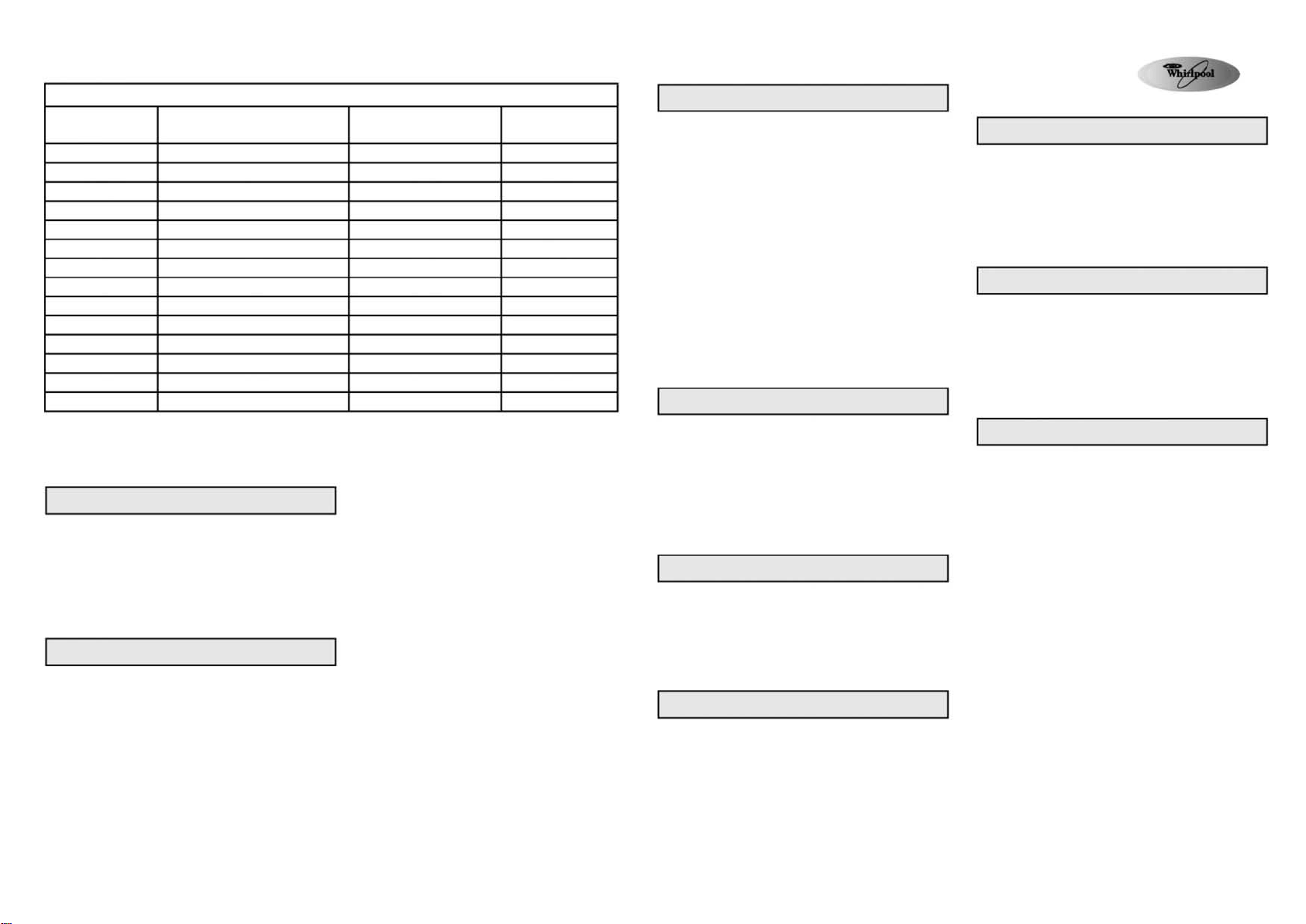
選擇附加功能
按下希望增加的功能鍵,對應的指示燈亮起。
當選擇的程序和附加功能不配合時,不能組合的功
能將自動取消,指示燈隨即熄滅。
慳電洗
●
洗滌時間延長,洗滌溫度降低,可達到完美的洗衣
效能,而且大大降低耗電量。
預洗
●
適用於非常骯髒的衣物(如沙土、灰塵),程序時
間延長15分鐘。
易燙貼
●
可以與全棉、合成纖維程序組合,令衣物更易熨燙。
●
為減少起皺,增加用水量,並進行輕柔脫水。
性能數據
程序
全棉※※
全棉※※※
全棉
全棉
全棉
合成纖維
合成纖維
60分鐘日日洗
60分鐘日日洗
30分鐘速洗
纖幼
羊毛
羊毛
手洗
溫度
(°C)
95
60
40
30
冷水
40
冷水
40
冷水
30
30
40
冷水
冷水
洗衣量
(公斤)
7.5
7.5
7.5
7.5
7.5
2.5
2.5
3.0
3.0
3.0
1.5
1.0
1.0
1.0
程序持續時間
(大約)(小時︰分鐘)
2:15
2:10
1:59
1:55
1:54
1:15
1:10
0:55
0:50
0:30
0:40
0:46
0:41
0:35
性能數據是按照IEC/EN60456, GB/T4288標準,在正常條件下測試結果,與用戶使用時的實際耗水、耗電量、水溫、水壓以及洗滌衣物種類有關。
※ 程序實際運行時間,可能與表中數據不同,洗衣機能根據洗滌條件自動調節 。
※※ 為降低水溫,防止衣物起皺,主洗過程結束後、排水前,洗衣機會自動加入冷水降溫。
※※※ 標準測試洗衣程序。
加入洗衣劑,關好機門,選擇程序
根據使用手冊中“洗衣劑和柔順劑”一節的說明,
加入洗衣劑後,關好機門。
1. 將程序選擇旋鈕轉到所須程序和溫度的位置。
2. 剩餘時間顯示示窗,顯示所選程序的時間(時、
分),啟動暫停鍵旁的指示燈閃動。
3. 程序建議的脫水轉速的指示燈亮起,視窗顯示程序
時間。
深層過水
●
增加一次過水洗程序,並延長過水時間。
●
本功能適合於水質很軟的地區,或洗滌嬰兒衣
物,或對洗衣劑過敏的人。
延遲脫水
●
洗滌衣物將留在最後一次過水中,洗衣機並不
進行脫水。可避免衣物顏色變暗、起皺。
●
建議洗滌纖維、纖柔衣物時,選擇此功能。
●
如果希望延遲脫水時間,此功能很有效用。
註︰ 當洗衣程序的延遲脫水指示燈亮起、啟動
暫停 鍵的指 示燈閃 動時 , 運行 到 延遲
脫水時,洗衣程序便會停止。
如何停止延遲脫水
●
按啟動暫停鍵,洗衣機自動運轉至當前選擇
程序的脫水過程,結束程序。
●
如果你不想將衣物進行脫水,請把程序選擇旋
鈕轉到排水位置,然後按自動暫停鍵。
脫水轉速
●
程序自動選擇預設的最高脫水轉速。
●
按鍵選擇其它脫水轉速。
●
如果選擇脫水轉速為“0”,最後脫水過程將被
取消,程序結束時只進行排水,但過水過程仍
會進行脫水操作。
預校開機時間功能
預校開機時間功能讓你在方便的時候洗滌衣物,如在
電費較便宜的晚間時份使用。
●
選擇程序、溫度、附加功能。
●
按預校開機時間功能鍵,選擇1∼23小時延遲開機
時間。
●
按啟動暫停鍵,指示燈亮起,洗衣機開始倒數計時。
●
當程序開始後,預校開機時間掣開機指示燈熄滅,
數碼視窗顯示剩餘時間。
●
當按下啟動暫停鍵,以及再次按下預校開機時間
掣,便可更改設定的預校開機時間。
取消預校開機時間功能
●
在按啟動暫停鍵之前,轉動程序選擇旋鈕到另一
個程序位置,或按重設鍵。
●
在按啟動暫停鍵後,持續按下重設鍵3秒,預校開
機時間便從顯示窗消失。
啟動程序
開啟水龍頭,按啟動暫停鍵,開始洗衣程序,啟動
暫停鍵旁的指示燈亮起,程序過程指示燈顯示洗衣
程序的進度,從左到右依次顯示預洗、主洗、過水、
脫水排水操作。時間顯示窗顯示程序剩餘時間。由
於衣物、進水溫度的變化,控制器在某個程序階段會
重新計算剩餘時間。此時顯示窗將顯示動畫圖案。
開門指示燈
啟動程序前和程序結束後,指示燈亮起,表示可打開
機門,只要程序正在運行,機門保持鎖定,便不能用
力打開機門以免損壞機器。如果急需在程序運行過程
中打開機門,請參考程序結束前取消重設一節。
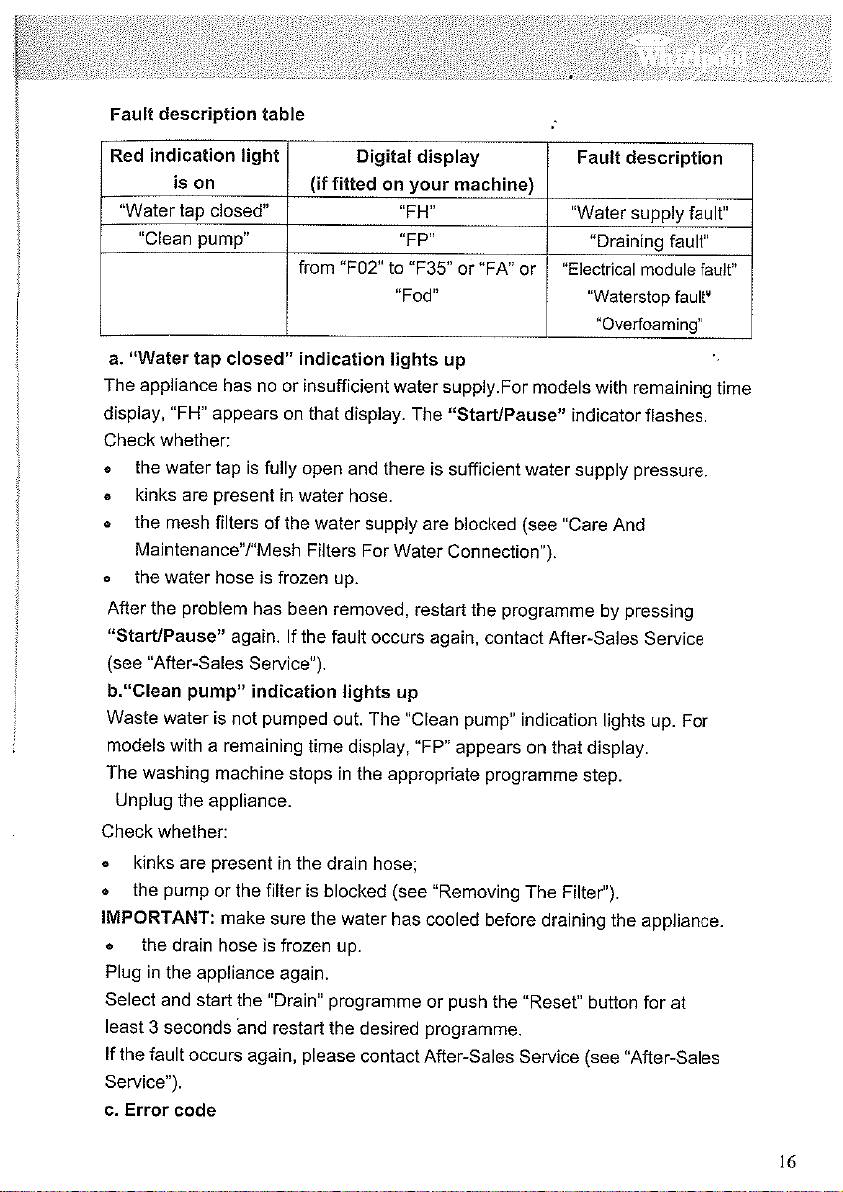
紅燈警示
入水喉關閉
洗衣機沒有供水或供水不足,請開啟水龍頭。如果指示
燈仍然亮起。請參考使用手冊的“故障排除”一節。
清理過濾器
洗滌用水沒有排出,請檢查排水管是否打結、堵塞。
清理過濾器,如屬後者,請參考使用手冊“清理過濾
器”一節。
程序結束
●
所有程序過程指示燈熄滅。“開門”指示燈亮起。
1. 把程序選擇旋鈕轉到“關”的位置。
2. 關閉水龍頭。
3. 打開機門,取出衣物。
4. 機門微開,讓洗衣桶吹乾。
程序開始後更改程序、附加功能
1. 按啟動暫停鍵中止程序,指示燈閃動。
2. 選擇新程序、附加功能。如需要可選擇脫水轉速。
3. 再次按啟動暫停鍵開始新程序。
新洗衣程序將在上一個程序中止的位置繼續運行,
因此不要添加洗衣劑。
程序結束前取消重設
在程序結束前,按“重設”鍵取消洗衣程序。
●
按“重設”鍵至少3秒。在開門前排出機內積水。
惠而浦是美國 (Whirlpool) 公司的註冊商標
461970433401
AW043638
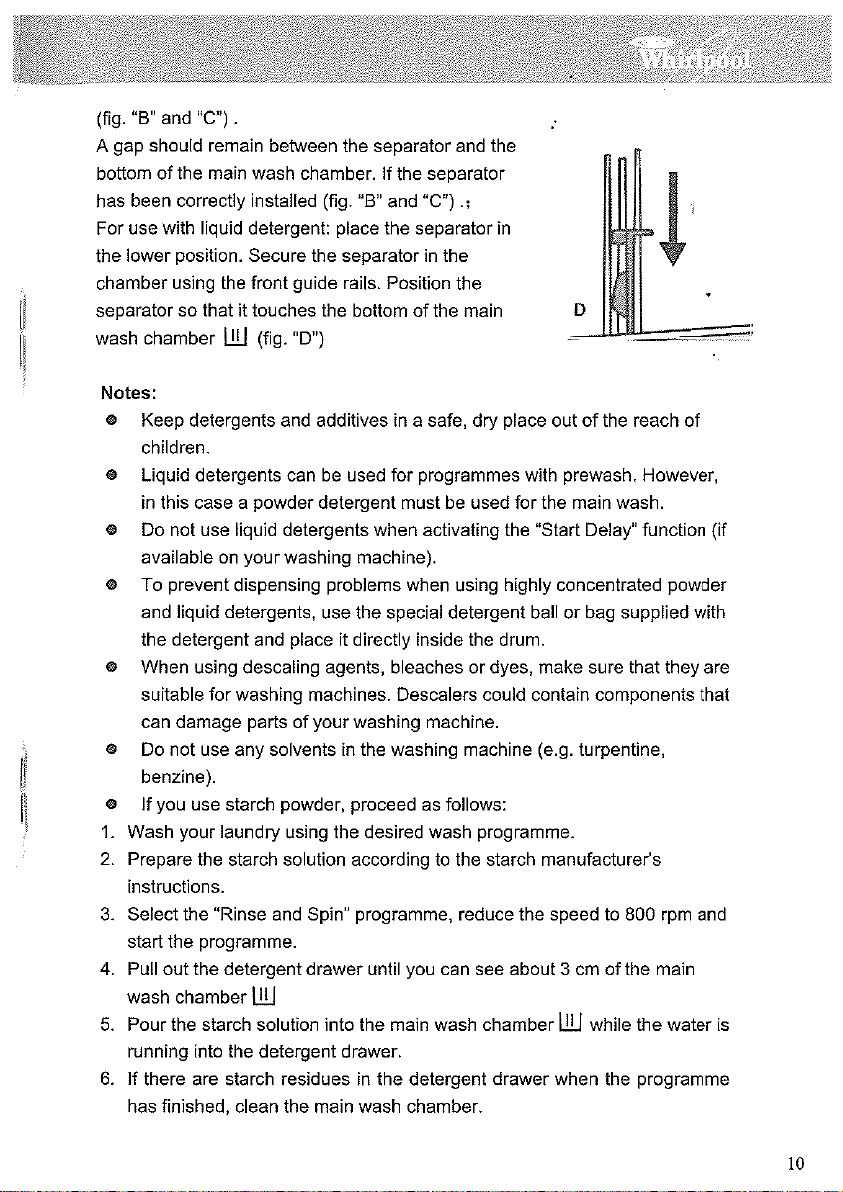
A. “Door Open” Indicator
In this machine, there is a built-in safety function
which automatically performs checking, diagnosis
and self-adjustment when problem arises.
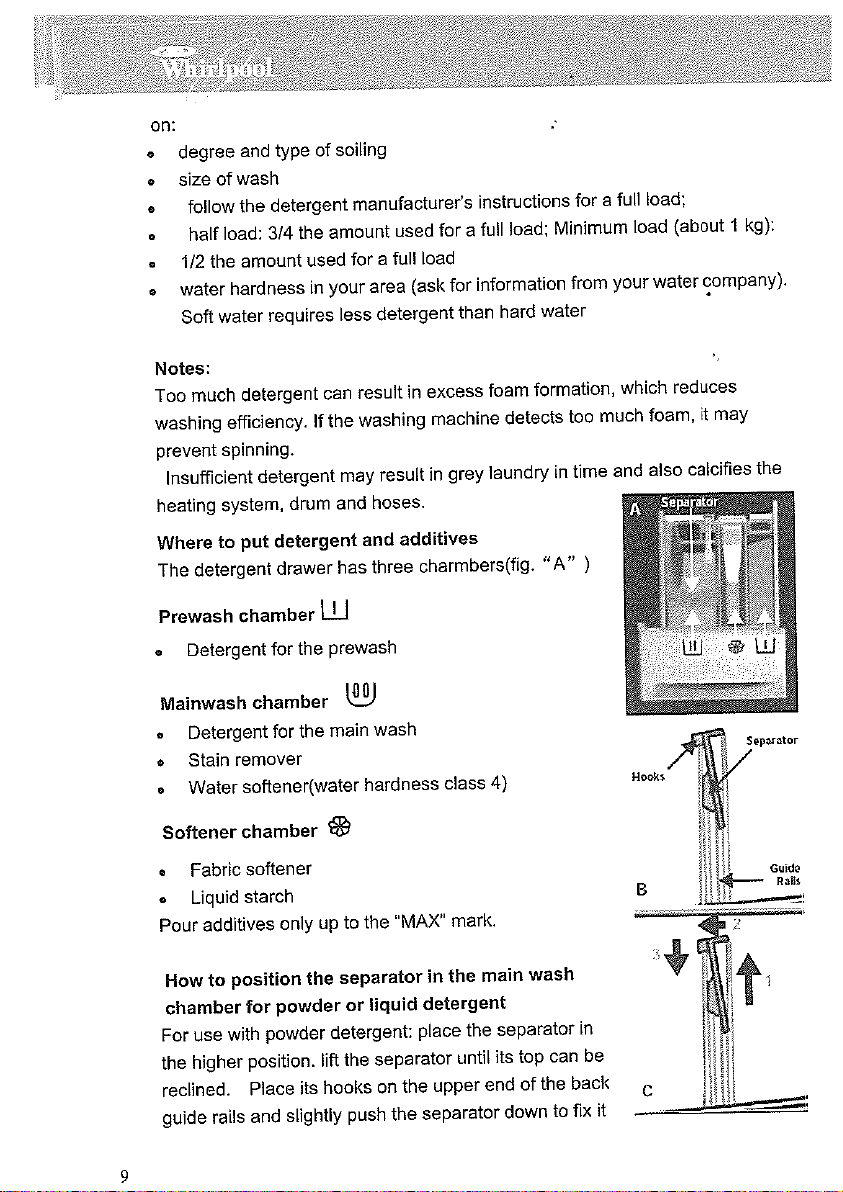
B. “Water tap closed” Indicator
Please check the inlet water pressure and tap.
C. “Clean pump” Indicator
D. Program Selector Knob
E. “Start/Pause” button
F. “Variable spin” button
G. “Program Sequence” Indicator
H. “Reset” button
I. “Start Delay” button
J. Remaining time Display
Pre-wash Wash Rinse Rinse Hold Spin/Drain
Washing Program
Cotton
Cold Water; 30°C ;
40°C ; 60°C ; 95°C
Synthetics
Cold water; 40°C
Daily load 60 min
Cold water; 40°C
Quick wash 30 min
30°C
Delicate
30°C
Wool
Cold water; 40°C
Handwash
Cold water
Rinse + Spin
Spin
Gentle spin
Drain
Care Labels
Type of wash/ Degree of dirtiness
For temperature selection, please follow the recommendations on the care label.
For heavily soiled to normally soiled bed sheet, table cloth, underwear, towels, shirts, made of cotton or linen. Please
select an additional “Pre-wash” function for heavily soiled clothes.
Normally soiled jackets, blouses, clothes and coats made of synthetics fibres (polyester fiber, trevira) or blends with
cotton.
Slightly or normally soiled clothes made of cotton or synthetic.
Shortly worn outer clothing made of cotton, polyester fibre, polyesteramine and blends with fabric.
Curtain and skirts, blouses, coats made of delicate materials.
Only woolens labeled with the woolmark and identified as machine washable.
If the “Rinse hold” function is chosen, do not leave the clothes to soak for too long.
Clothes made of linen, silk, viscose and labeled as handwashable
If the “Rinse hold” function is chosen, do not leave the clothes to soak for too long. The Gentle Spin function will
operate when the program ends.
Same as the last rinse and spin in the “Cotton” programme.
Intensive Spinning, same as the spin cycle in the “Cotton” programme.
Gentle spinning, same as the spin cycle in the “Cotton” programme.
Drain only no - spinning. It can be treated as no-spin option after “Rinse Hold” to end programme.
* Optional/Yes: dosing required
(1)For caring garment quality, spin speed is restricted to 900rpm in this programme.
(2)For caring garment quality, spin speed is restricted to 400rpm in this programme.
Max
Load
Kg
7.5
2.5
3.0
3.0
1.5
1.0
1.0
7.5
7.5
1.0
__
Detergents and Softener
Pre-wash
*
*
-
-
*
-
-
-
-
-
-
Main
Wash
Yes
Yes
Yes
Yes
Yes
Yes
Yes
Yes
-
-
-
Softener
*
*
*
*
*
*
*
*
-
-
-
Wash Function Selection
Start
Delay
*
*
*
*
*
*
*
*
*
*
-
Eco
*
*
-
-
-
-
-
-
-
-
-
Prewash
*
*
-
-
*
-
-
-
-
-
-
Easy
ironing
*
*
-
-
-
-
-
-
-
-
-
Intensive
Rinse
*
*
*
-
-
-
-
-
-
-
-
Rinse
hold
*
*
*
*
*
*
*
*
-
-
-
Variable
spin
*
*
*
*
*
*
*
*
*
*
-
Max Spin
Speed
rpm
1050
900(1)
1050
1050
900(1)
900(1)
400 (2)
1050
1050
900(1)
-
Whirlpool is a registered trademark of Whirlpool USA
Basic Programme Chart
Program Chart
B
C
D
E
G
A
H
I
J
F
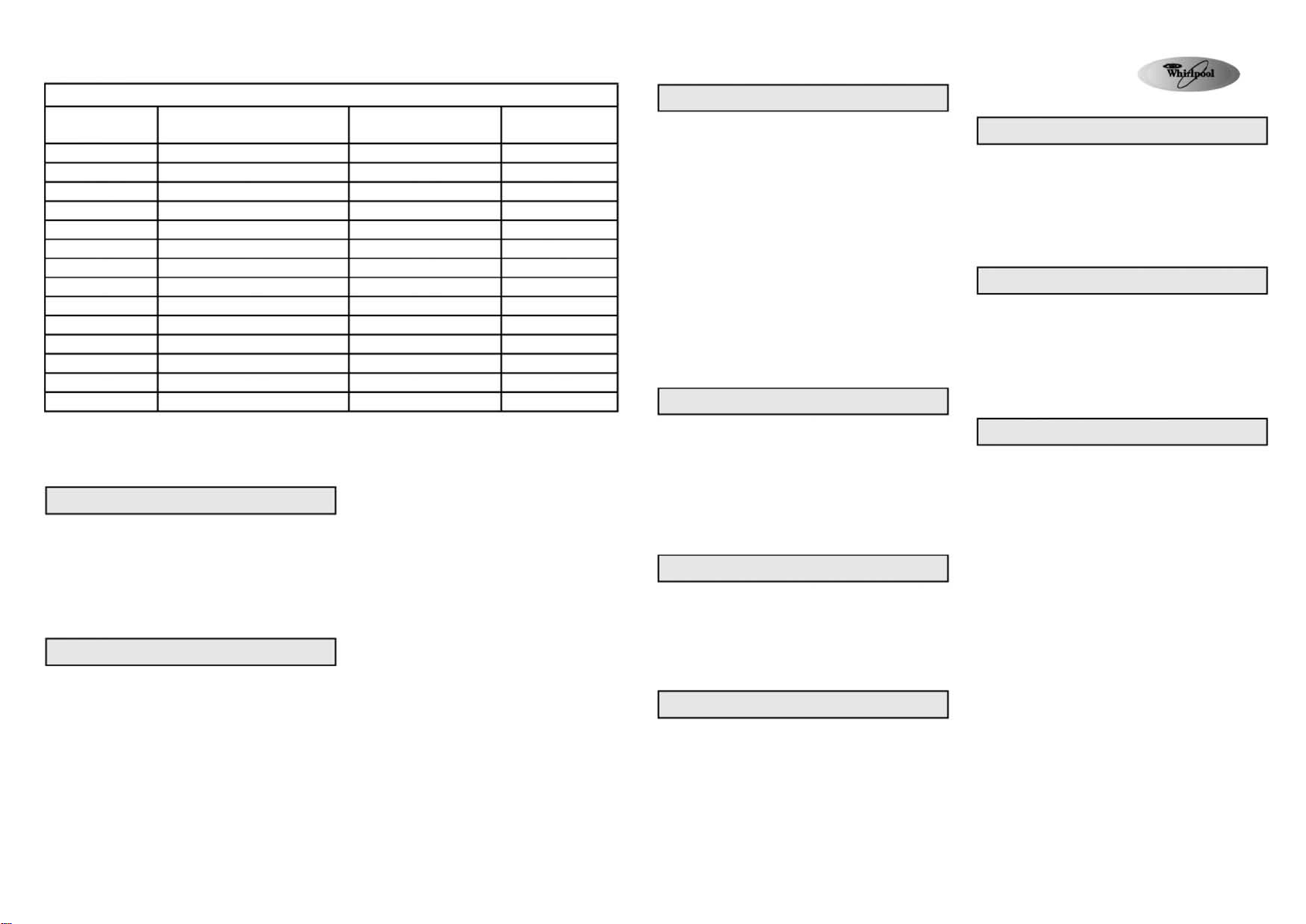
SELECT DESIRED FUNCTION
Press the desired option button and the corresponding indicator lights up.
When the combination of selected programme and the desired additional
option is not practicable, the option will be cancelled and the indicator
switches off immediately..
“Eco”
●
With a prolonged washing duration and lower washing temperature, a
desirable washing performance can be obtained and reduces energy
consumption.
“Prewash”
●
Suitable for heavily soiled loads (for example with sand and dust) and
the programme duration is prolonged for 15 minutes.
“Easy Ironing”
●
Can be used together with “Cotton”, “Synthetics” programmes to make
ironing easier.
●
To avoid creasing, water level is increased and gentle spin programme
is applied.
Performance Data
Programme
Cotton※※
Cotton※※※
Cotton
Cotton
Cotton
Synthetics
Synthetics
Daily Load 60 min
Daily Load 60 min
Quick Wash 30 min
Delicate
Wool
Wool
Handwash
Temperature
(°C)
95
60
40
30
Cold water
40
Cold water
40
Cold water
30
30
40
Cold water
Cold water
Load
(kg)
7.5
7.5
7.5
7.5
7.5
2.5
2.5
3.0
3.0
3.0
1.5
1.0
1.0
1.0
Programme Duration
(approximately) (hour:minute)
2:15
2:10
1:59
1:55
1:54
1:15
1:10
0:55
0:50
0:30
0:40
0:46
0:41
0:35
Performance data is measured in normal condition in compliance with IEC/EN60456 GB/T4288 standard. Energy and water consumption of domestic use is subject
to water pressure, temperature and the type of wash.
※ The actual programme time may deviate from the values in the table. The washing programme will be adjusted automatically according to the washing condition.
※※ To reduce the water temperature for preventing of wrinkles, cold water is added automatically after the main wash cycle and before draining process.
※※※ Standard Testing for Washing Programme
ADD DETERGENTS, CLOSE THE DOOR AND SELECT THE PROGRAMME
Add the detergents as described in the “Detergents and softener” section
in the User Manual and close the door after adding detergents.
1. Turn the programme selector knob to the desired programme and
temperature.
2. The remaining time display shows the duration of the chosen
programme (in hours and minutes) and the indicator next to the
“Start / Pause” button is flashing.
3. The predefined spin speed indicator corresponding to the selected
programme lights up, display shows programme time.
“Intensive Rinse”
●
Adding one more rinsing programme and extend its rinsing duration.
●
This option is particularly suitable for areas with very soft water,
washing baby linen and helps people with allergies.
“Rinse Hold”
●
The laundry remains in the last rinse water without proceeding to
the spin cycle to avoid creasing and fading
●
This function is recommended for washing synthetic and delicate
clothes.
●
This function is very effective to delay the spinning time.
Note: When the “rinse-hold” light in the programme sequence is on and
the indicator next to “Start / Pause” button flashes, the programme
switches to rinse hold sequence and the programme stops.
How to stop the “Rinse Hold” Programme
●
Press the “Start / Pause” button, the washing machine
automatically switches to the spinning process of the selected
programme option, and the programme ends.
●
If you do not want to spin the clothes, please turn the programme
selector knob to the position of “Drain” programme and press the
“Start / Pause” button.
Variable Spin
●
Every programme has an automatic predifined maximum spin speed
●
Press button to select desired spin speed.
●
If the spin speed “0” is selected, the final spinning is cancelled.
Draining will occur when the programme ends, but spinning
continues during rinsing programme.
Start Delay Function
Start Delay Function allows running the machine at your convenience, for
example during night time when electricity is cheaper.
●
Select programme, temperature and additional function
●
Press the Start Delay button to select the delay time by 1 to 23 hours
●
Press the “Start / Pause” button, the indication light is on and the
machine starts the count down.
●
Start Delay indication light will go off when the programme starts, and
the remaining time is shown on the digital display
●
By pressing the “Start / Pause” button, and pressing the Start Delay
button again, the preset hours of the Start Delay can be adjusted.
Cancel the Start Delay function
●
Before pressing the “Start / Pause” button, turn the programme selector
knob to another programme position, or press the Reset button
●
After pressing the “Start / Pause” button, press and hold the Reset
button for 3 seconds, the Start Delay time will disappear from the
display.
Programme Start
Open the tap and press the “Start/Pause” button to start the wash
programme. The indicator next to the “Start/Pause” button lights up. The
programme sequence indicator will show the progress of the current
Prewash,wash programme. The sequence indication runs from left to
right to show Prewash, Wash, Rinse, Spin/Drain functions. The
Remaining Time Display will show the programme remaining time. With
the variations in the type of clothes and temperature of the inlet water, the
control will recount the remaining time at a certain stage when the
programme is running. At the same time, the display will show the
corresponding icons.
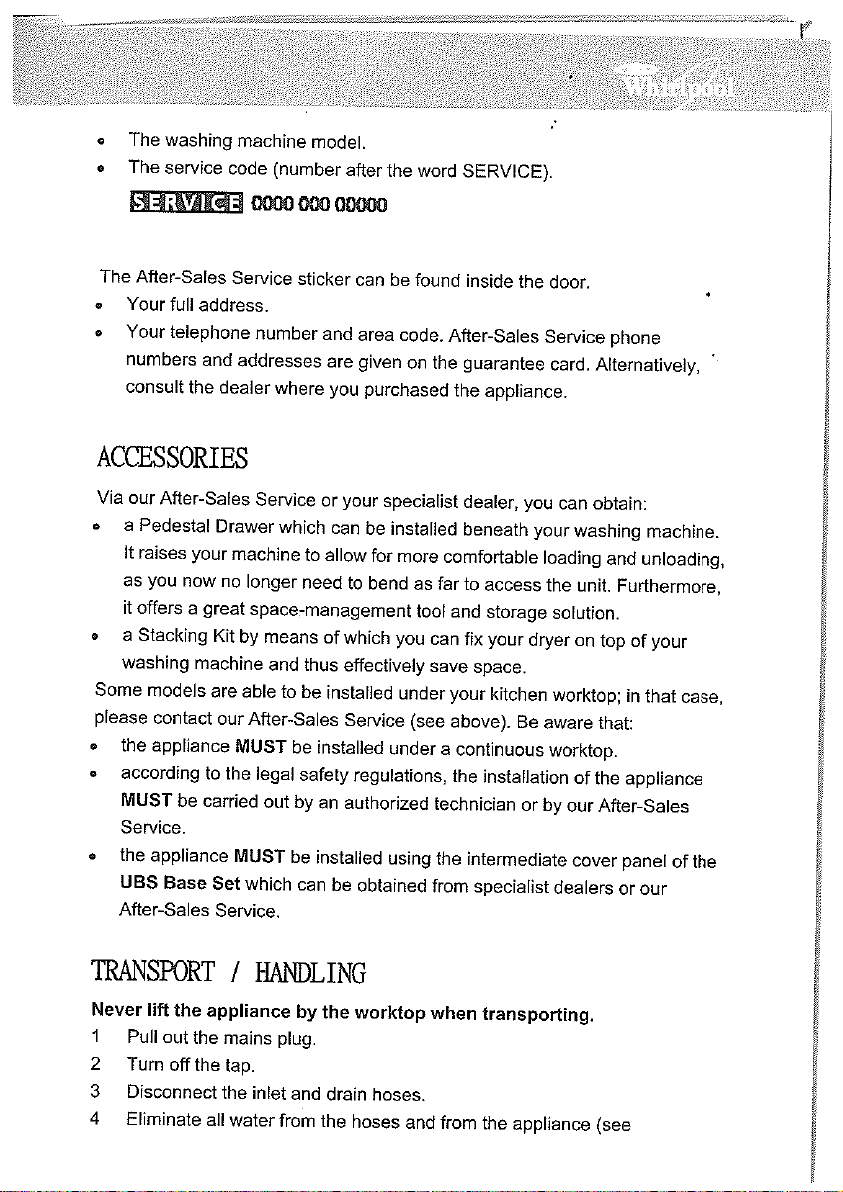
“Door Open” Indicator
Before the programme starts and after it ends, the indicator will light up
and the door of the machine can be opened. When the Programme is
running, the door will remain locked and cannot be forced open or the
machine will be damaged. If you need to open the door urgently during
the programme is running, please refer to the Chapter of “Cancel / Reset
A Running Programme Before It Ends”.
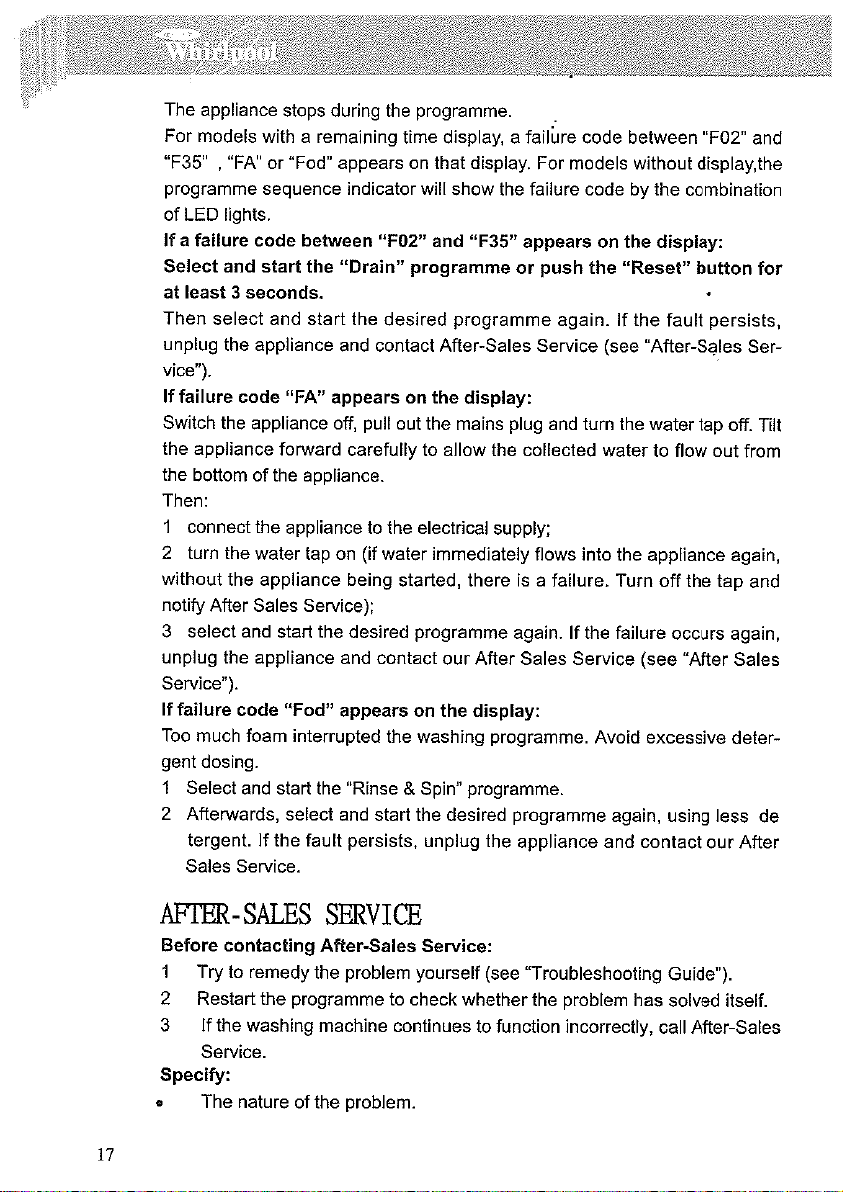
Red Indicator for Warning
Water tap closed
The appliance has no or insufficient water supply. Open the water tap; if
the indicator still lights up, refer to the “Troubleshooting Guide” in the
Instructions for Use.
Clean Pump
Waste water is not pumped out. Check whether the drain hose is kinked
or clogged. Clean the filter if it is the latter case. Please refer to the
chapter of “Removing the filter” in the Instructions for Use.
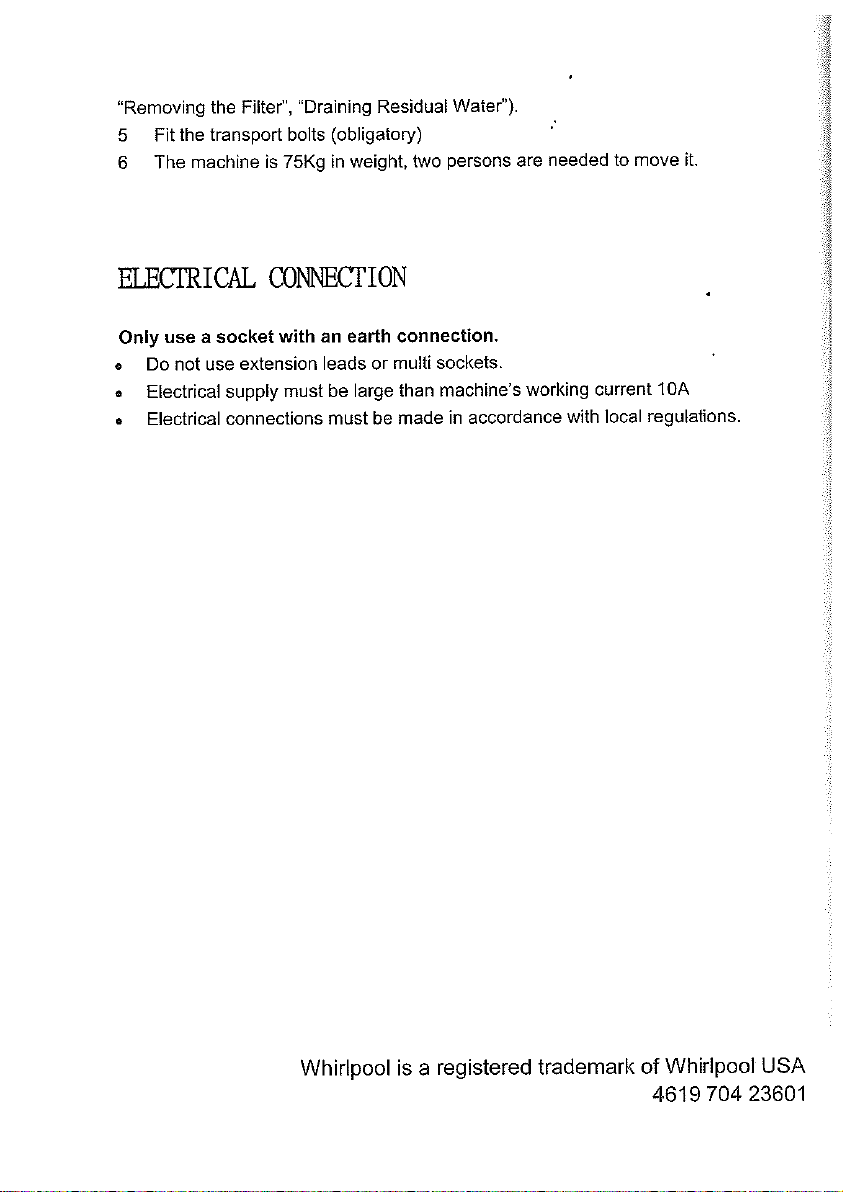
Programme Ends
●
All of the lights of the programme sequence are off. “Door Open”
indicatior lights up.
1. Turn the Programme selector to the “Off” position.
2. Close the water tap.
3. Open the door and unload the machine.
4. Leave the door ajar to allow the drum to dry out.
Change Programme and Options after the Programme Starts
1 Press the “Start/Pause” button to pause the Programme. The indicator
flashes.
2. Select the new programme and any additional function. Select the
spin speed if necessary.
3. Press the “Start/Pause” button again to start a new programme.
The new Programme continues at the same position where the
previous Programme was interrupted, so no additional detergent is
needed.
Cancel / Reset A Running Programme Before It Ends
Press the “Reset” button to cancel a programme before the programme
ends
●
Press the “Reset” button for at least 3 seconds. Any water that
remains in the appliance will be drained out before the door is opened.
Whirlpool is a registered trademark of Whirlpool USA
461970433391
目錄
使用洗衣機前
2
注意事項及綜合建議
4
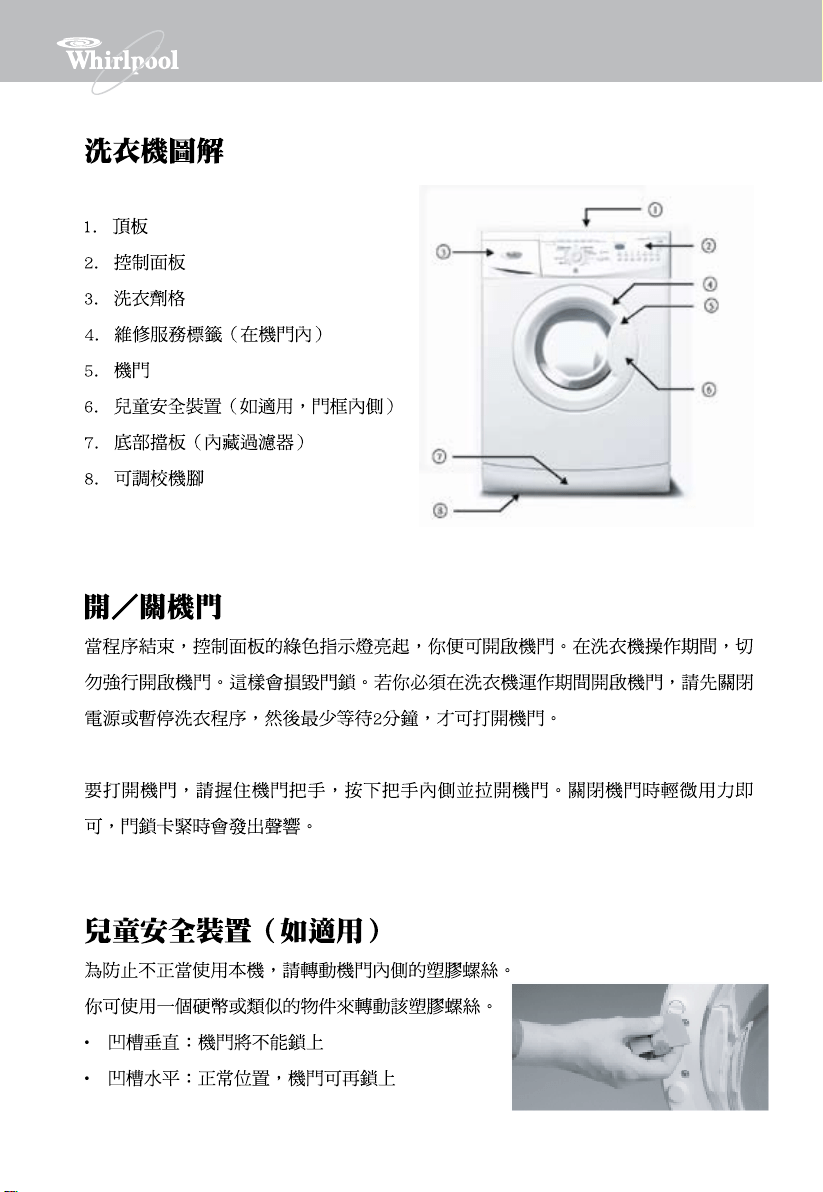
洗衣機圖解
5
開/關機門
5
兒童安全裝置(如適用)
5
第一次洗衣之前
6
洗衣準備
6
洗衣劑及添加劑
7
清理過濾器
10
排走積水
11
保養及維修
11
故障處理指引
13
售後服務
17
配件
17
搬運
18
電源連接
18
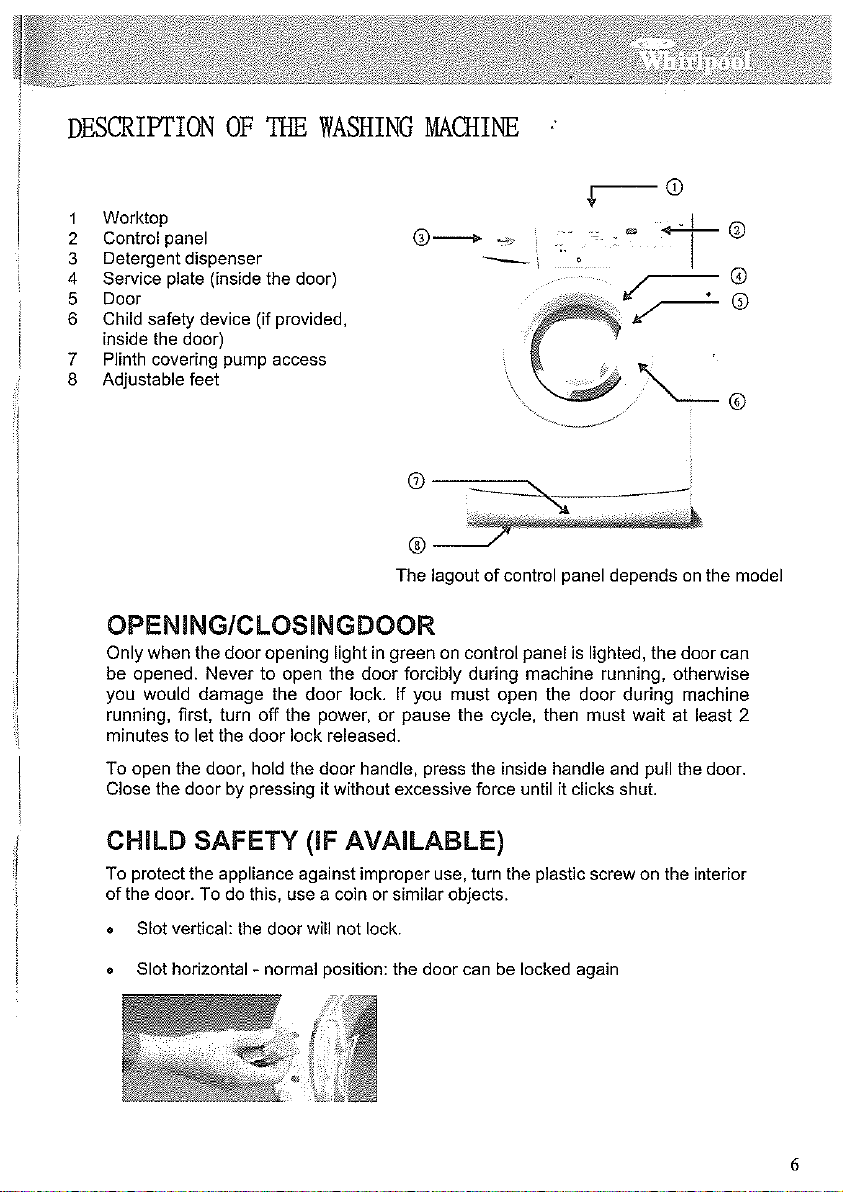
惠而浦
前置式洗衣機
使用說明書
1
2
3
4
5
控制板面設計取決於機型而不同
6
7
8
9
10
11
12
13
14
15
16
17
18

惠而浦是美國Whirlpool公司的注冊商標
461970433351