Leica DISTO
TM
E7500i
The original laser distance meter

Leica DISTO
TM
E7500i 792324b
1
ENTable of Contents
Instrument Set-up - - - - - - - - - - - - - - - - - - - - - - - - - - 2
Introduction - - - - - - - - - - - - - - - - - - - - - - - - - - - - - - - - - - - 2
Overview - - - - - - - - - - - - - - - - - - - - - - - - - - - - - - - - - - - - - 2
Basic measuring screen - - - - - - - - - - - - - - - - - - - - - - - - - - - - 3
Selection screen- - - - - - - - - - - - - - - - - - - - - - - - - - - - - - - - - 3
Pointfinder (Viewscreen)- - - - - - - - - - - - - - - - - - - - - - - - - - - 4
Insert batteries - - - - - - - - - - - - - - - - - - - - - - - - - - - - - - - - - 4
Operations - - - - - - - - - - - - - - - - - - - - - - - - - - - - - - - - - - 5
Switching ON/OFF - - - - - - - - - - - - - - - - - - - - - - - - - - - - - - 5
Clear - - - - - - - - - - - - - - - - - - - - - - - - - - - - - - - - - - - - - - - - 5
Message Codes - - - - - - - - - - - - - - - - - - - - - - - - - - - - - - - - - 5
Multifunctional endpiece - - - - - - - - - - - - - - - - - - - - - - - - - - - 5
Permament / Minimum-Maximum measuring- - - - - - - - - - - - - 5
Add / Subtract - - - - - - - - - - - - - - - - - - - - - - - - - - - - - - - - - 6
Pointfinder (Viewscreen)- - - - - - - - - - - - - - - - - - - - - - - - - - - 6
Settings - - - - - - - - - - - - - - - - - - - - - - - - - - - - - - - - - - - - - 7
Overview - - - - - - - - - - - - - - - - - - - - - - - - - - - - - - - - - - - - - 7
Tilt units - - - - - - - - - - - - - - - - - - - - - - - - - - - - - - - - - - - - - - 7
Distance units - - - - - - - - - - - - - - - - - - - - - - - - - - - - - - - - - - 8
Beep ON/OFF - - - - - - - - - - - - - - - - - - - - - - - - - - - - - - - - - 8
Digital level ON/OFF - - - - - - - - - - - - - - - - - - - - - - - - - - - - - 8
De-/Activate keylock - - - - - - - - - - - - - - - - - - - - - - - - - - - - - 9
Switch on with keylock - - - - - - - - - - - - - - - - - - - - - - - - - - - - 9
De-/Activate Bluetooth
®
Smart - - - - - - - - - - - - - - - - - - - - - - 9
Calibration of tilt sensor (Tilt Calibration) - - - - - - - - - - - - - - 10
Personalized favorites - - - - - - - - - - - - - - - - - - - - - - - - - - - - 11
Illumination - - - - - - - - - - - - - - - - - - - - - - - - - - - - - - - - - - - 11
Offset- - - - - - - - - - - - - - - - - - - - - - - - - - - - - - - - - - - - - - - 12
Reset - - - - - - - - - - - - - - - - - - - - - - - - - - - - - - - - - - - - - - - 12
Functions- - - - - - - - - - - - - - - - - - - - - - - - - - - - - - - - - - - 13
Overview - - - - - - - - - - - - - - - - - - - - - - - - - - - - - - - - - - - - 13
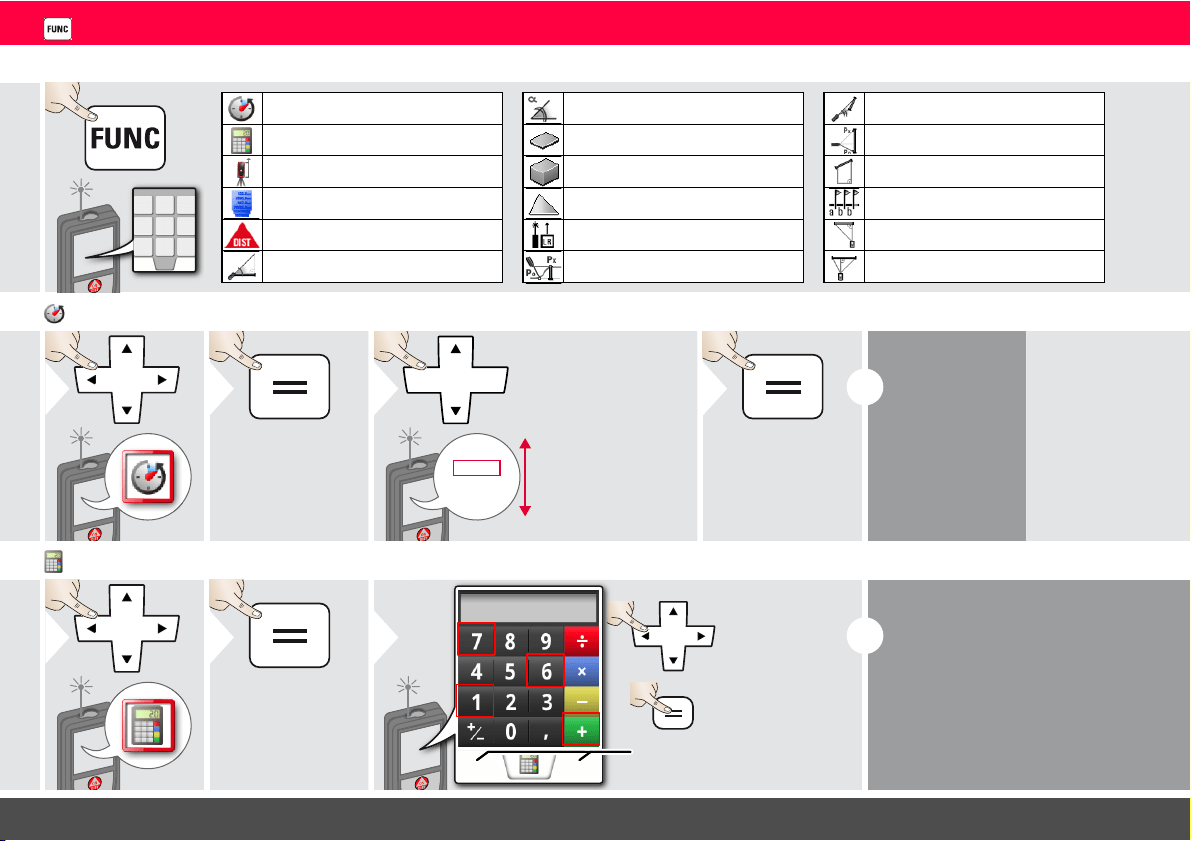
Timer- - - - - - - - - - - - - - - - - - - - - - - - - - - - - - - - - - - - - - - 13
Calculator - - - - - - - - - - - - - - - - - - - - - - - - - - - - - - - - - - - - 13
Adjusting measuring reference/tripod - - - - - - - - - - - - - - - - - 14
Memory- - - - - - - - - - - - - - - - - - - - - - - - - - - - - - - - - - - - - - 14
Measuring single distance - - - - - - - - - - - - - - - - - - - - - - - - - - 15
Smart Horizontal Mode - - - - - - - - - - - - - - - - - - - - - - - - - - - 15
Inclination tracking- - - - - - - - - - - - - - - - - - - - - - - - - - - - - - - 15
Area - - - - - - - - - - - - - - - - - - - - - - - - - - - - - - - - - - - - - - - - 16
Volume - - - - - - - - - - - - - - - - - - - - - - - - - - - - - - - - - - - - - - 17
Triangular area - - - - - - - - - - - - - - - - - - - - - - - - - - - - - - - - - 18
Long range mode - - - - - - - - - - - - - - - - - - - - - - - - - - - - - - - 18
Height-profile measurement - - - - - - - - - - - - - - - - - - - - - - - - 19
Sloped objects - - - - - - - - - - - - - - - - - - - - - - - - - - - - - - - - - 20
Height tracking - - - - - - - - - - - - - - - - - - - - - - - - - - - - - - - - - 21
Trapezium - - - - - - - - - - - - - - - - - - - - - - - - - - - - - - - - - - - - 22
Stake out - - - - - - - - - - - - - - - - - - - - - - - - - - - - - - - - - - - - - 23
Pythagoras (2-point) - - - - - - - - - - - - - - - - - - - - - - - - - - - - - 24
Pythagoras (3-point) - - - - - - - - - - - - - - - - - - - - - - - - - - - - - 25
Technical Data - - - - - - - - - - - - - - - - - - - - - - - - - - - - - 26
Message Codes - - - - - - - - - - - - - - - - - - - - - - - - - - - - - 27
Care- - - - - - - - - - - - - - - - - - - - - - - - - - - - - - - - - - - - - - - - - 27
Warranty - - - - - - - - - - - - - - - - - - - - - - - - - - - - - - - - - - - 27
Safety Instructions - - - - - - - - - - - - - - - - - - - - - - - - - 27
Areas of responsibility - - - - - - - - - - - - - - - - - - - - - - - - - - - - 27
Permitted use - - - - - - - - - - - - - - - - - - - - - - - - - - - - - - - - - - 28
Prohibited use - - - - - - - - - - - - - - - - - - - - - - - - - - - - - - - - - 28
Hazards in use - - - - - - - - - - - - - - - - - - - - - - - - - - - - - - - - - 28
Limits of use - - - - - - - - - - - - - - - - - - - - - - - - - - - - - - - - - - - 28
Disposal- - - - - - - - - - - - - - - - - - - - - - - - - - - - - - - - - - - - - - 28
Electromagnetic Compatibility (EMC) - - - - - - - - - - - - - - - - - 28
FCC statement (applicable in U.S.) - - - - - - - - - - - - - - - - - - - 29
Use of the product with Bluetooth
®
- - - - - - - - - - - - - - - - - - - 29
Laser classification - - - - - - - - - - - - - - - - - - - - - - - - - - - - - - - 30
Labelling - - - - - - - - - - - - - - - - - - - - - - - - - - - - - - - - - - - - - 30
Leica DISTO
TM
E7500i 792324b
2
ENInstrument Set-up
Introduction
The safety instructions and the user manual should be read
through carefully before the product is used for the first time.
The person responsible for the product must ensure that all
users understand these directions and adhere to them.
The symbols used have the following meanings:
WARNING
Indicates a potentially hazardous situation or an unintended use
which, if not avoided, will result in death or serious injury.
CAUTION
Indicates a potentially hazardous situation or an unintended use
which, if not avoided, may result in minor injury and/or appreciable
material, financial and environmental damage.
Important paragraphs which must be adhered to in practice as
they enable the product to be used in a technically correct and
efficient manner.
i
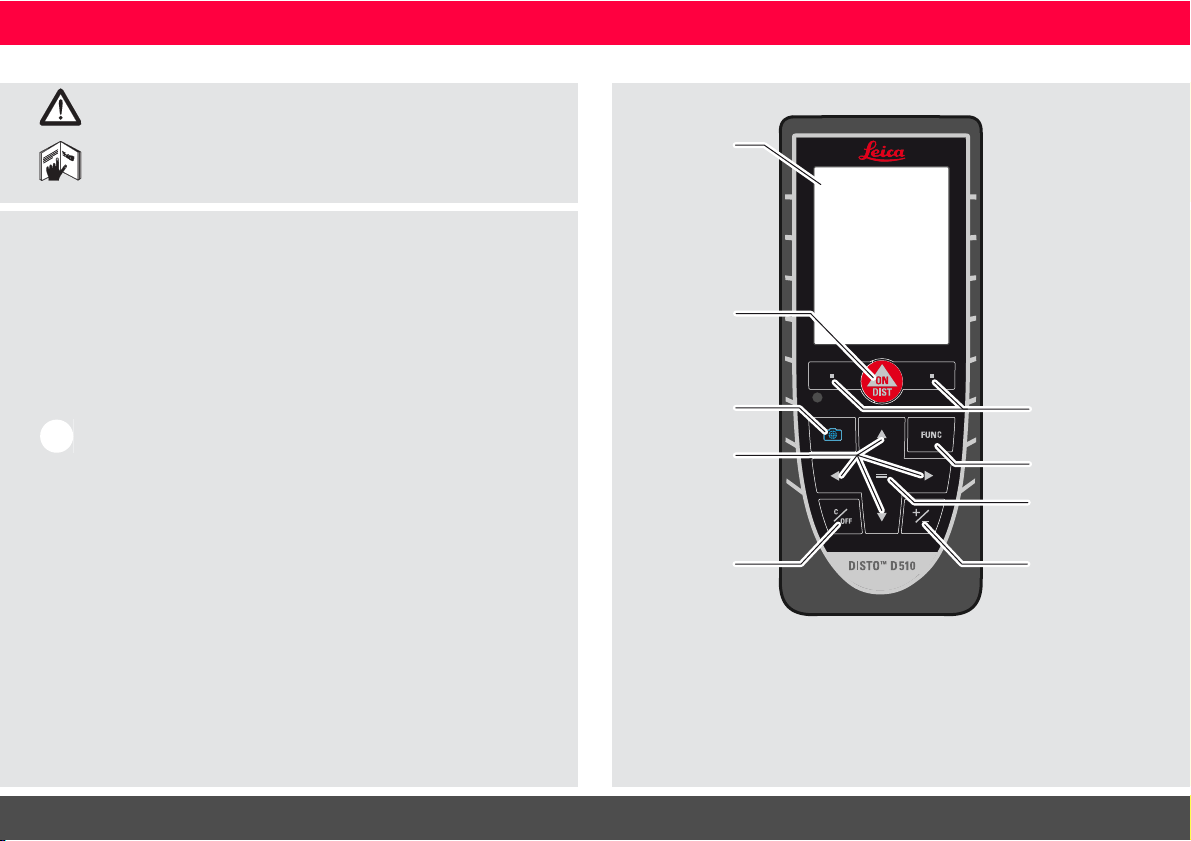
Overview
Display
On/Measure
Pointfinder
(Viewscreen)
Navigation
Clear / Off
Selection keys
linked to sym-
bols above
Return /
Equal
Function
screen
Add /
Subtract
Leica DISTO
TM
E7500i 792324b
3
ENInstrument Set-up
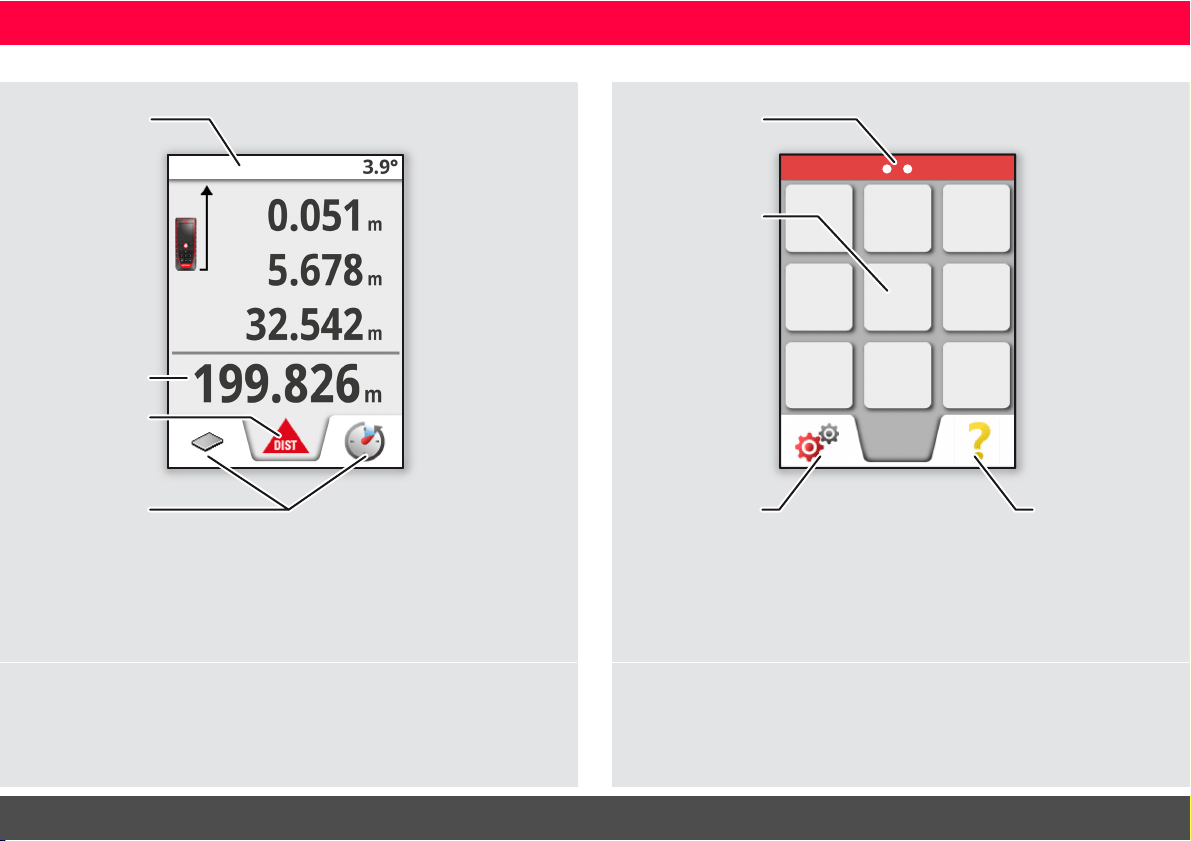
Basic measuring screen
Status bar
Favorites
Main line
Active function
Selection screen
FUNC
Page indicator
Settings
Function /
Settings
Help
function
Leica DISTO
TM
E7500i 792324b
4
ENInstrument Set-up
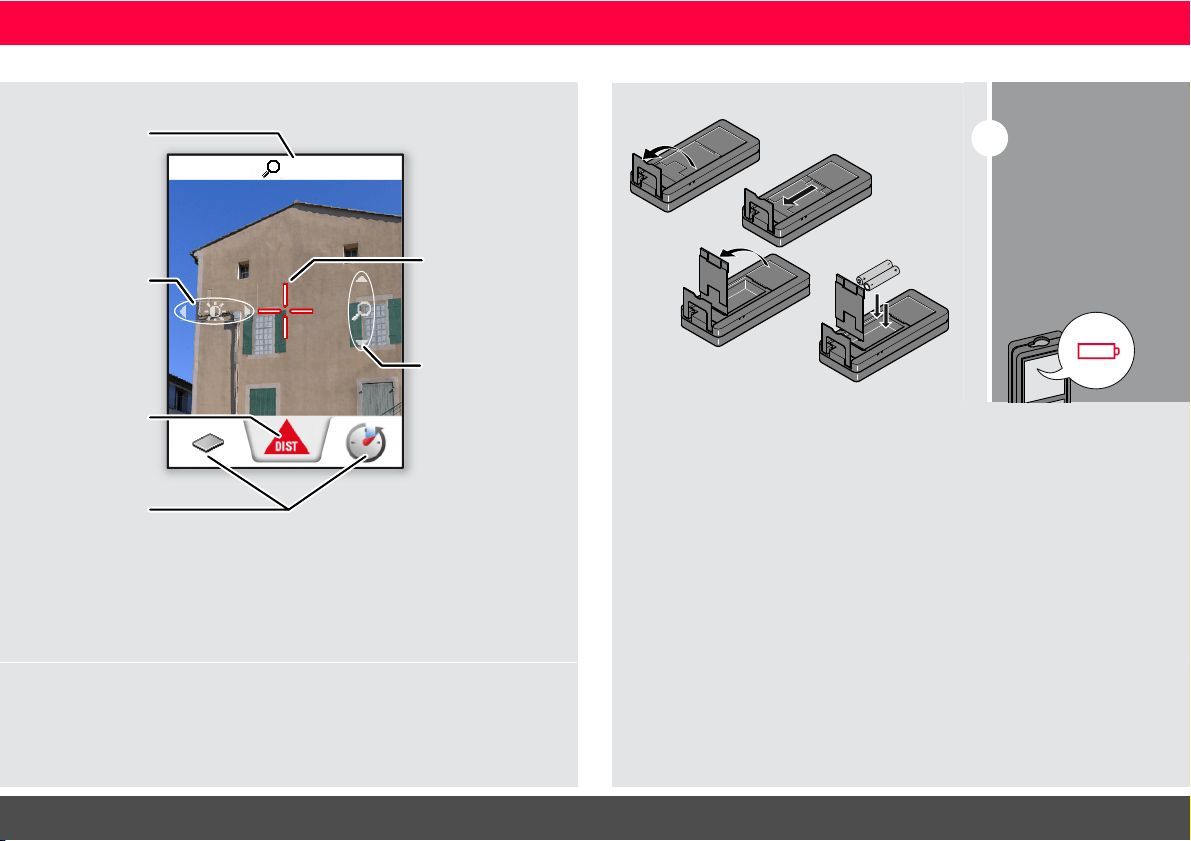
Pointfinder (Viewscreen)
1x
Zoom stage
Favorites
Illumination
adjustment
with navigation
keys left and
right
Active function
Zoom (1x, 2x, 4x)
with navigation
keys up and down
Crosshair
Insert batteries
i
To ensure a reliable
use, do not use zinc-
carbon batteries.
We recommend
using high quality
batteries.
Change batteries
when battery symbol
is flashing.
Leica DISTO
TM
E7500i 792324b
5
ENOperations
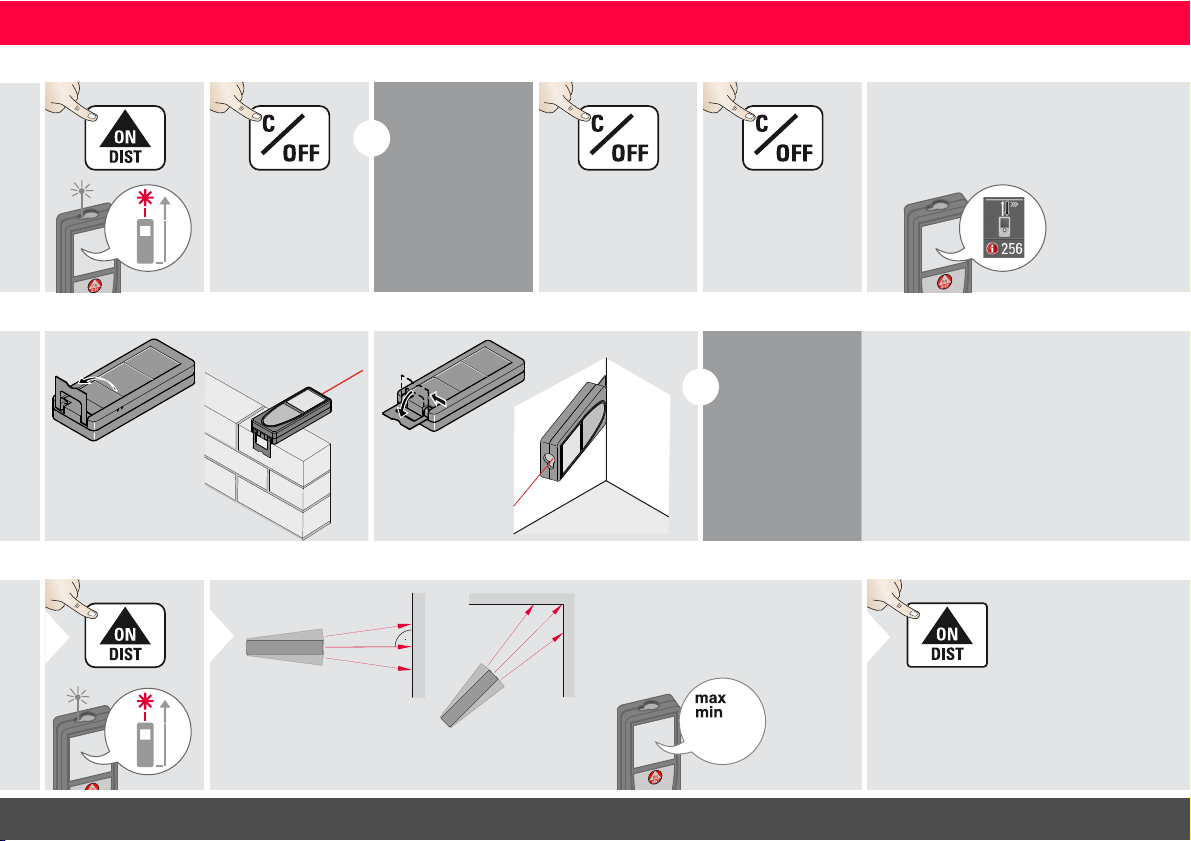
Switching ON/OFF Clear Message Codes
ON
OFF
2 sec
Device is turned
OFF.
i
If no key is
pressed for 180
sec, the device
switches off au-
tomatically.
1x
Undo last action.
2x
Leave actual func-
tion, go to default
operation mode.
If the info icon appears with a
number, observe the instructions in
section "Message Codes".
Example:
Multifunctional endpiece
i
The orientation
of the endpiece
is automatically
detected and
the zero point is
accordingly ad-
justed.
Permament / Minimum-Maximum measuring
1
2 sec
8.532 m
Used to measure room diagonals (maximum val-
ues) or horizontal distance (minimum values)
The minimum and maximum dis-
tance measured is displayed (min,
max.). The last value measured is
displayed in the main line.
min.
max.
2
Stops permanent / minimum-
maximum measuring.
3
Leica DISTO
TM
E7500i 792324b
6
ENOperations
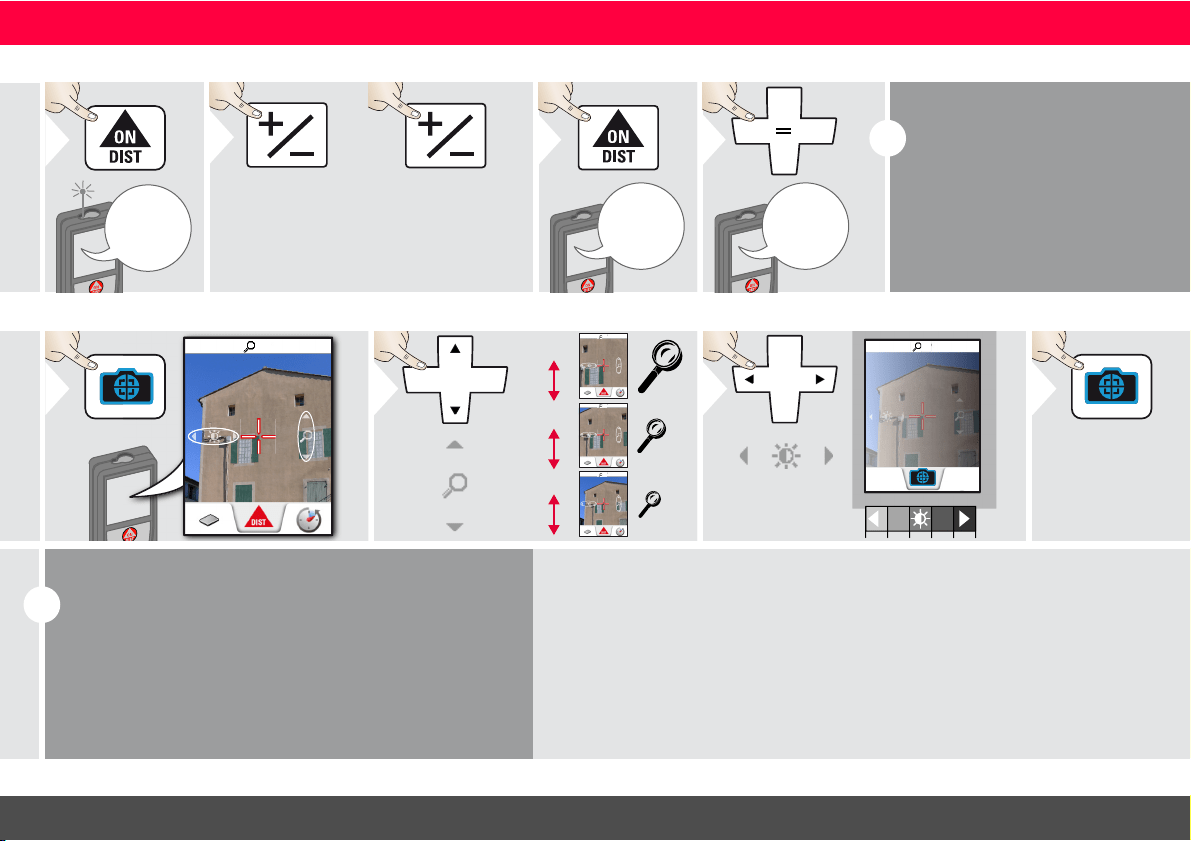
Add / Subtract
7.332 m
1
The next meas-
urement is added
to the previous
one.
2
The next meas-
urement is sub-
tracted from the
previous one.
2x
7.332 m
12.847 m
3
20.179 m
4
i
This process can be repeated as
required. The same process can
be used for adding or subtracting
areas or volumes.
Pointfinder (Viewscreen)
1x
1
1x
2x
4x
2
4x
2x
1x
1x
3
Exit pointfinder
(viewscreen).
4
i
This is a great help for outdoor measuring. The integrated
pointfinder (viewscreen) shows the target on the display.
The device measures in the middle of the cross hair, even if
the laser dot is not visible.
Parallax errors occur when the pointfinder camera is used
on close targets, with the effect that the laser appears dis-
placed in the crosshair. In this case rely on the real laser dot.
Leica DISTO
TM
E7500i 792324b
7
ENSettings
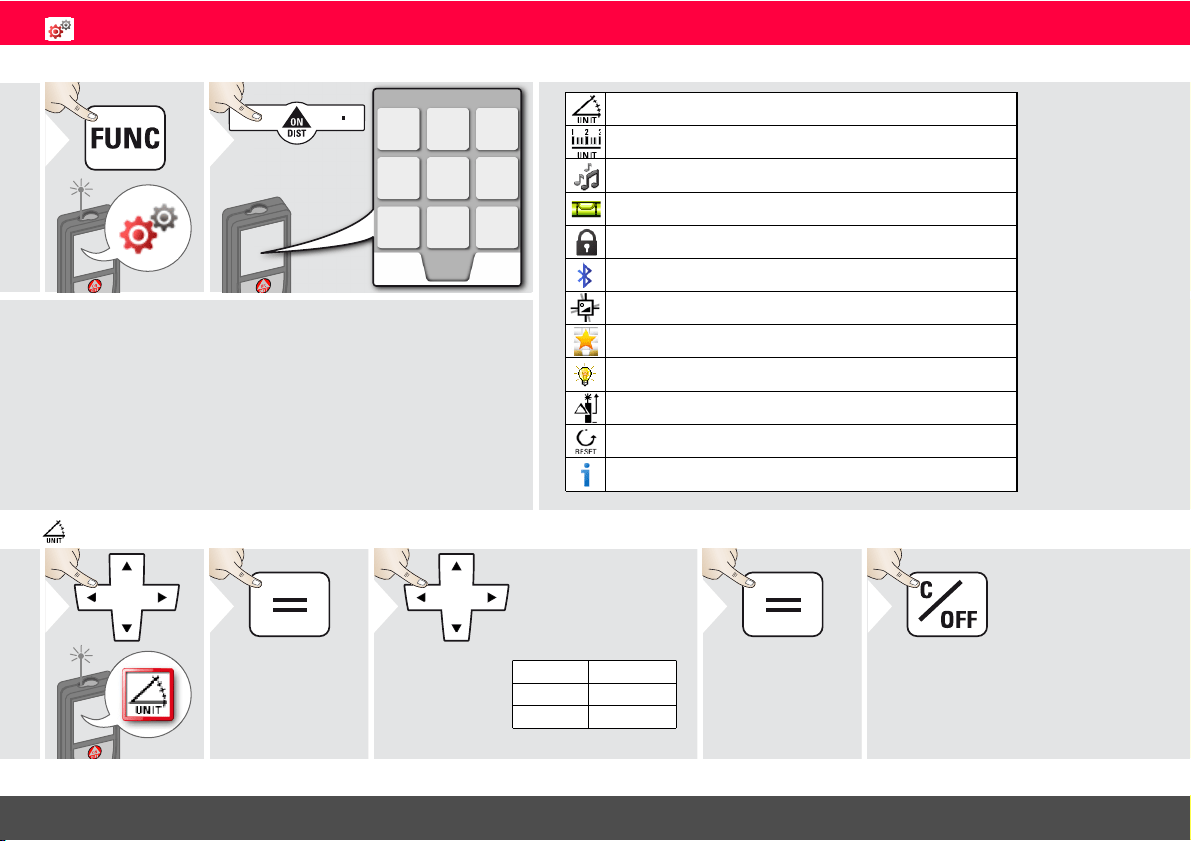
Overview
1
2
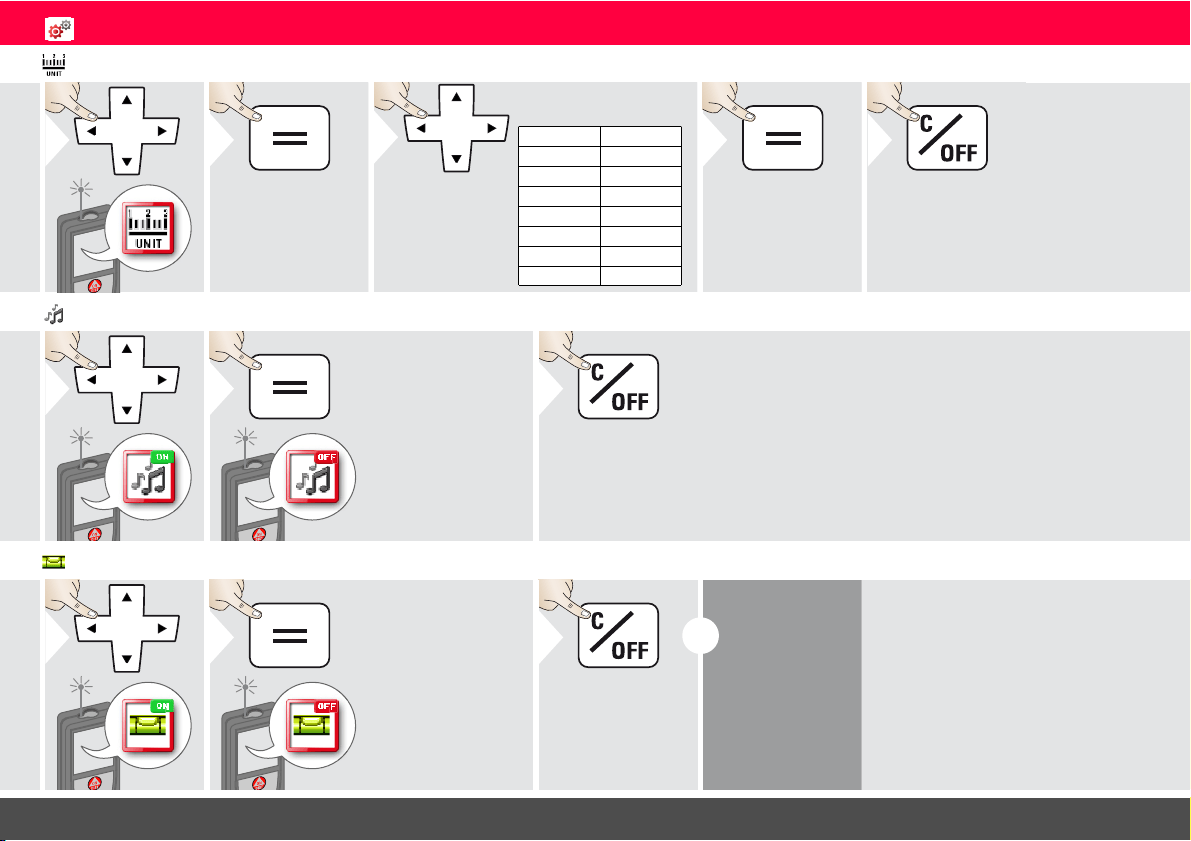
Tilt units
Distance units
Beep
Digital level
Keypad lock
Bluethooth
®
Tilt calibration
Favorites
Illumination
Offset
Reset
Information
Tilt units
1
2
360.0°
± 180.0°
± 90.0°
0.00 %
0.0 mm/m
0.00 in/ft
Switch between the
following units:
3
4
Confirm setting.
Exit settings.
5
Leica DISTO
TM
E7500i 792324b
8
ENSettings
Distance units
1
2
0.0000 m
0.000 m
0.00 m
0.0 mm
0.00 ft
0‘00‘‘ 1/32
0‘00‘‘ 1/16
0‘00‘‘ 1/8
0‘00‘‘ 1/4
0.0 in
0 in 1/32
0 in 1/16
0 in 1/8
0 in 1/4
0.000 yd
Switch between the
following units:
3
4
Confirm setting.
Exit settings.
5
Beep ON/OFF
1
ON
2
To switch ON,
repeat procedure.
OFF
Exit settings.
3
Digital level ON/OFF
1
ON
2
To switch ON,
repeat procedure.
OFF
Exit settings.
3
i
The digital level
is displayed in
the status bar.
Leica DISTO
TM
E7500i 792324b
9
ENSettings
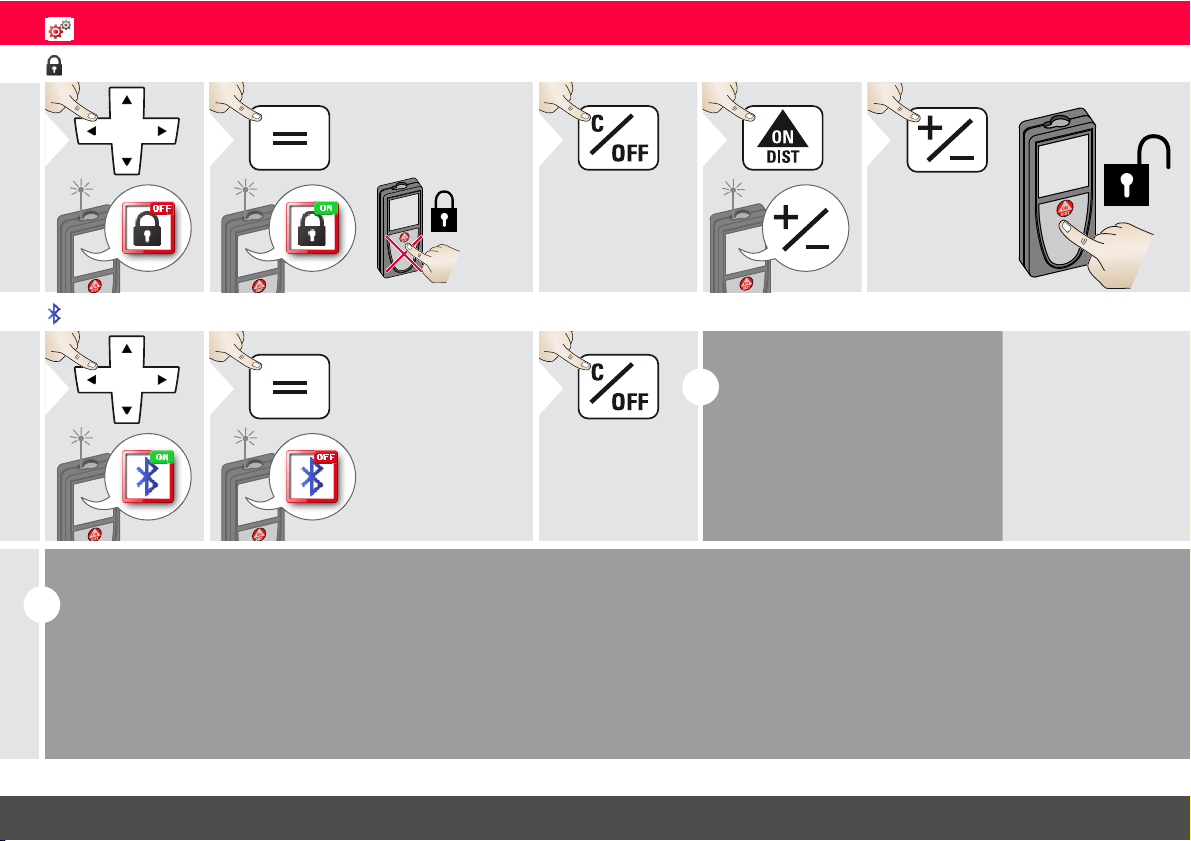
De-/Activate keylock Switch on with keylock
1
OFF
2
To deactivate, repeat
procedure. The keylock
is active if device is
switched off.
ON
Exit settings.
3
1
within
2 sec
2
De-/Activate Bluetooth
®
Smart
1
ON
2
To switch ON,
repeat procedure.
OFF
Exit settings.
3
i
Default mode:
Bluetooth
®
is switched on.
Bluetooth
®
icon in status line is
displayed if device is connected
with Bluetooth
®
.
i
Switch on Bluetooth
®
Smart in Settings.
Connect the device with your smart phone, pad, laptop,…
The actual measurement is transferred automatically if Bluetooth
®
con-
nection is established. To transfer a result from the main line, press =.
Bluetooth
®
switches off as soon as the laser distance meter is switched
off.
The efficient and innovative Bluetooth
®
Smart module (with the new
Bluetooth
®
standard V4.0) works together with all Bluetooth
®
Smart
Ready devices. All other Bluetooth
®
devices do not support the energy
saving Bluetooth
®
Smart Module, which is integrated in the device.
We provide no warranty for free DISTO
™
software and offer no sup-
port for it. We accept no liability whatsoever arising from the use of the
free software and we are not obliged to provide corrections nor to de-
velop upgrades. A wide range of commercial software can be found on
our homepage. Apps for Android
®
or Mac iOS can be found in special
internet shops.
For more details, see our homepage.

Leica DISTO
TM
E7500i 792324b
10
ENSettings
Calibration of tilt sensor (Tilt Calibration)
1
2
3
Place device on absolutely flat surface.
180°
4
180°
5
Turn the device horizontally by 180°
and place it again on absolutely flat
surface.
6
7
Place device on absolutely flat surface.
180°
8
180°
9
Turn the device horizontally by 180°
and place it again on absolutely flat
surface.
10
i
After 2 sec
the device
goes back to
the basic
mode.
Leica DISTO
TM
E7500i 792324b
11
ENSettings
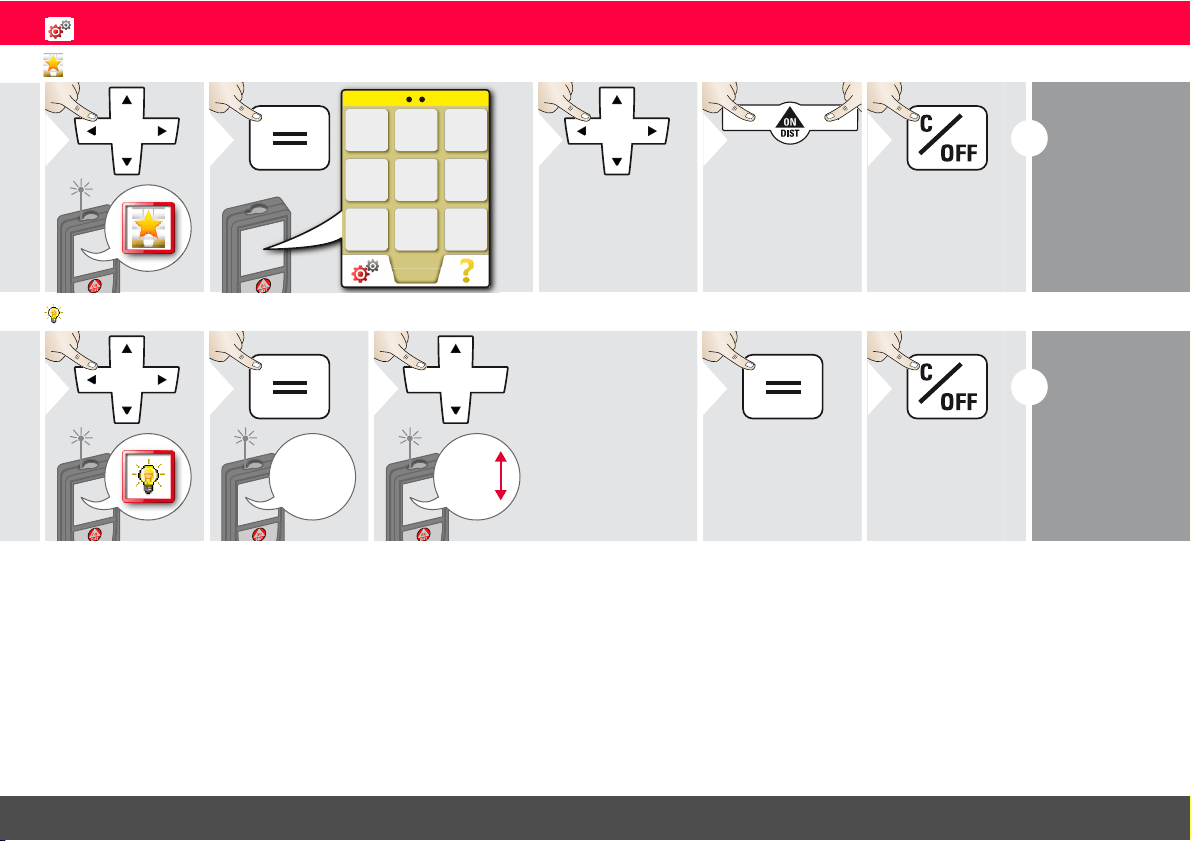
Personalized favorites
1
Favorite
2
3
Select favorite
function.
4
Press selection
key left or right.
Function is set as
favorite above the
corresponding se-
lection key.
Exit settings.
5
i
Select your fa-
vorite functions
for quick access.
Short cut:
Press 2 sec on a
selection-key in
the measuring
mode.
Illumination
1
1/6
2
1/6
2/6
3/6
4/6
5/6
6/6
3
Select brightness.
4
Confirm setting.
Exit settings.
5
i
To save
power re-
duce bright-
ness if not
necessary.
Leica DISTO
TM
E7500i 792324b
12
ENSettings
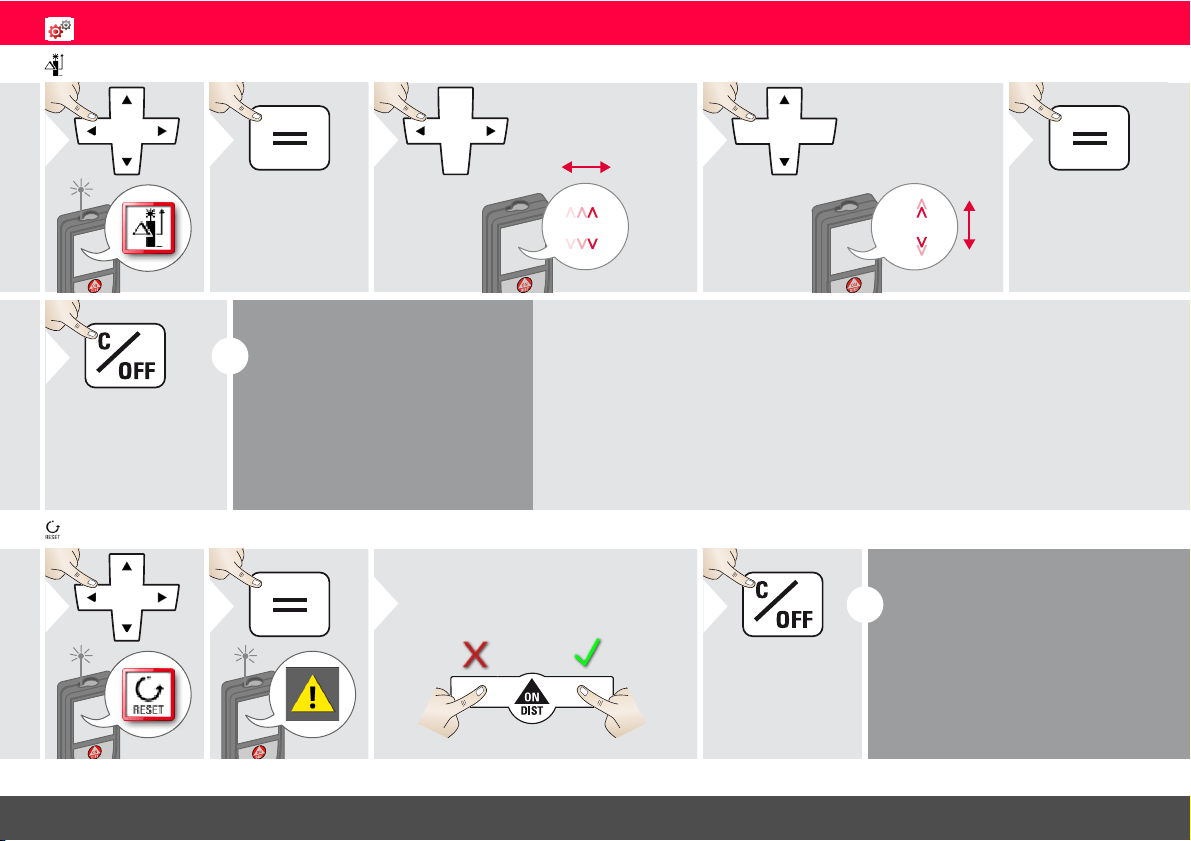
Offset
1
2
1.012 m
3
Select digit.
1.012 m
4
Adjust digit.
5
Approve
value.
Exit settings.
6
i
An offset adds or subtracts a
specified value automatically to or
from all measurements. This func-
tion allows tolerances to be taken
into account. The offset icon is
displayed.
Reset
1
2
Second confirmation with selection
keys:
3
Refuse:
Confirm:
Exit settings.
4
i
Reset returns the instrument to
the factory settings. All custom-
ized settings and memories are
lost.
Leica DISTO
TM
E7500i 792324b
13
ENFunctions
Overview
Timer
Calculator
Adjusting measuring reference
Memory
Single Distance Measurement
Smart Horizontal Mode
Area
Volume
Triangle area
Long Range Mode
Inclination Tracking
Height-profile Measurement
Height Tracking
Trapezium
Stake out
Pythagoras 1
Measuring on sloped objects
Pythagoras 2
Timer
1
2
Off
30 sec
5 sec
2 sec
3
Select release
time.
4
Confirm setting.
i
The self release
starts if
ON/Measure
key is pressed.
Calculator
1
2
C/CE
=
3
Select key on
display.
Confirm every
key.
Use selection keys for
clear or result.
i
The measurement result from the
main line is taken over to the cal-
culator and can be used for fur-
ther calculations.
Ft/in fractions are converted into
ft/in decimal.
Leica DISTO
TM
E7500i 792324b
14
ENFunctions
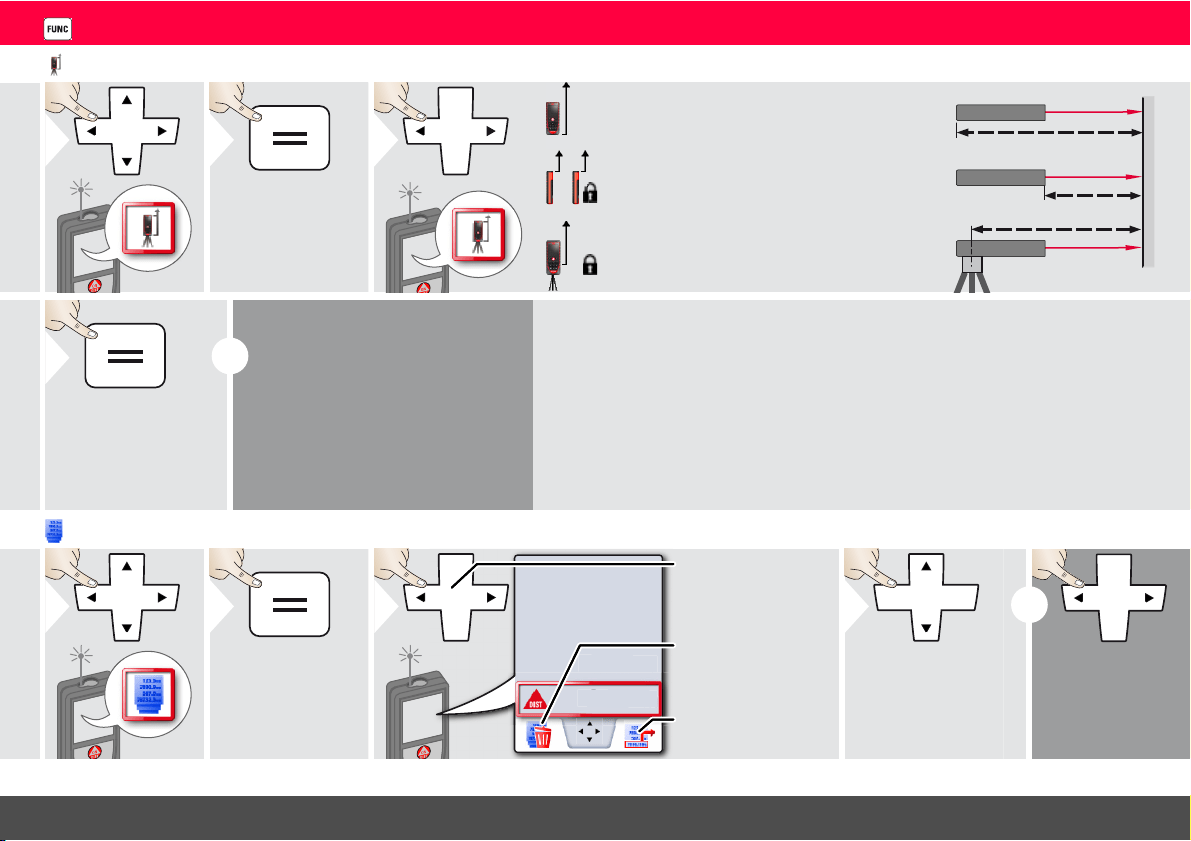
Adjusting measuring reference/tripod
1
2
3
Distance is measured from the rear of the
device (standard setting).
Distance is measured from the front of the
device (lock symbol = permanently).
Distance is measured from the tripod
thread permanently.
4
Confirm setting.
i
If device is switched off, reference
goes back to standard setting
(rear of the device).
If you use an original Leica DISTO
adapter, the reference does not
need to be adapted to tripod
thread!
Memory
1
2
12.208 m
6.554 m
23.889 m
8.449 m
8
.4
4
9
m
3
Switch between
measurements.
Take over value for
further actions.
Delete memory.
4
Use Up/Down
navigation keys to
show more detailed
results of the speci-
fic measurement.
i
Short cut
Leica DISTO
TM
E7500i 792324b
15
ENFunctions
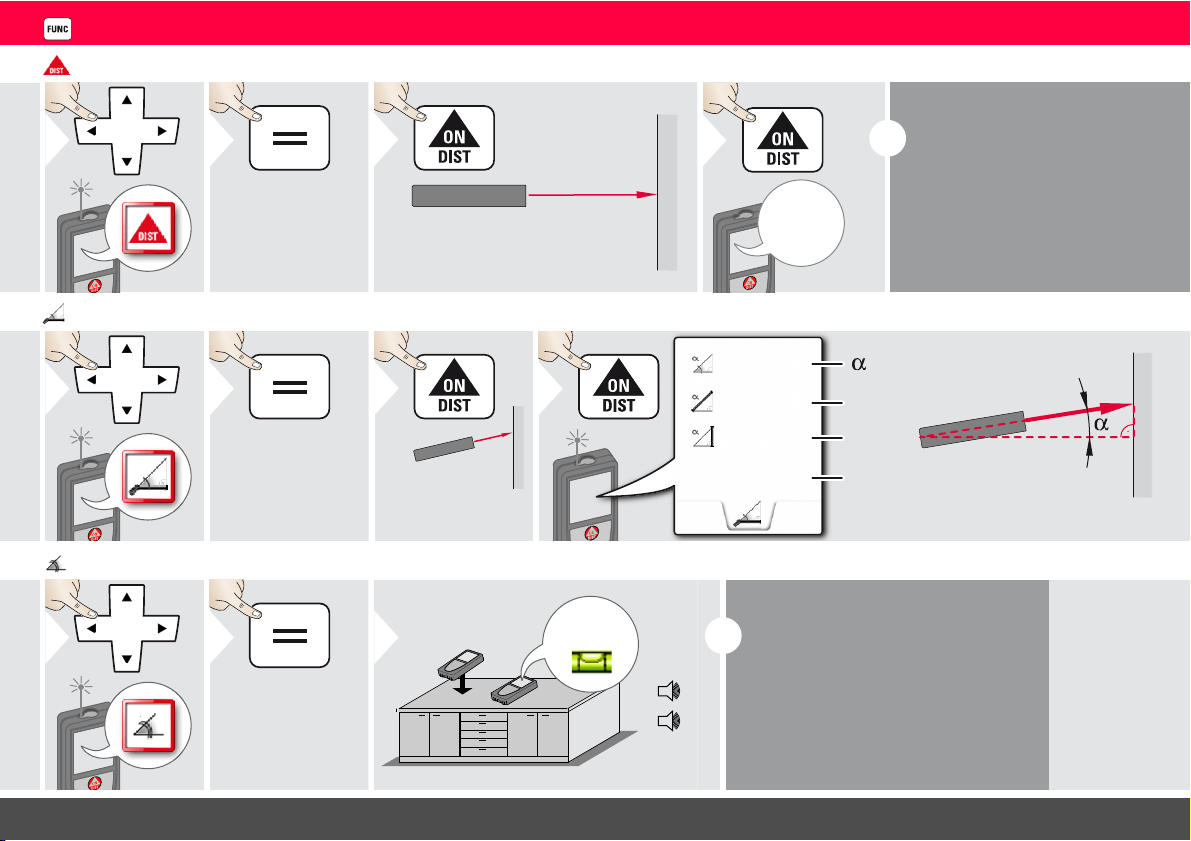
Measuring single distance
1
2
Aim active laser at target.
3
8.532 m
4
i
Target surfaces:
Measuring errors can occur when
measuring to colourless liquids,
glass, styrofoam or semi-permea-
ble surfaces or when aiming at
high gloss surfaces. Against dark
surfaces the measuring time in-
creases.
Smart Horizontal Mode
1
2
Aim laser at
target.
3
z
x
y
40.8 °
x
y
z
5.204 m
0.032 m
4.827 m
4
(up to 360° and a transverse
tilt of ±10°)
Inclination tracking
1
2
89.3°
90°
0°
3
i
Inclination is permanently displayed.
Instrument beeps at 0° and 90°. Ideal
for horizontal or vertical adjustments.
Leica DISTO
TM
E7500i 792324b
16
ENFunctions
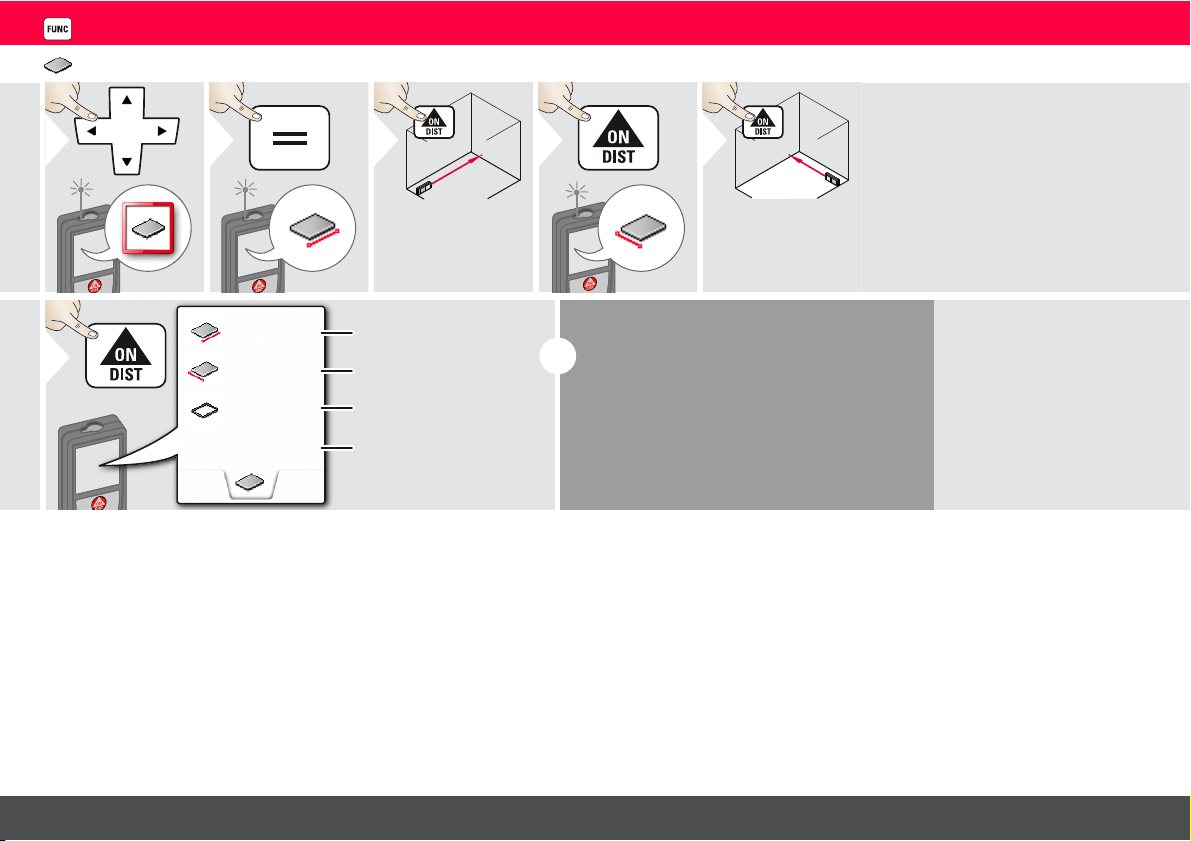
Area
1
2
3
Aim laser at first
target point.
4
5
Aim laser at sec-
ond target point.
20.276 m
3.9I0 m
6.228 m
24.352 m
2
First distance
Second distance
Circumference
Area
6
i
The result is shown in the main line and the
measured value above.
Partial Measurements / Painter function:
Press + or - before starting the first measure-
ment. Measure and add or subtract distanc-
es. Finish with =. Measure 2nd length.
Leica DISTO
TM
E7500i 792324b
17
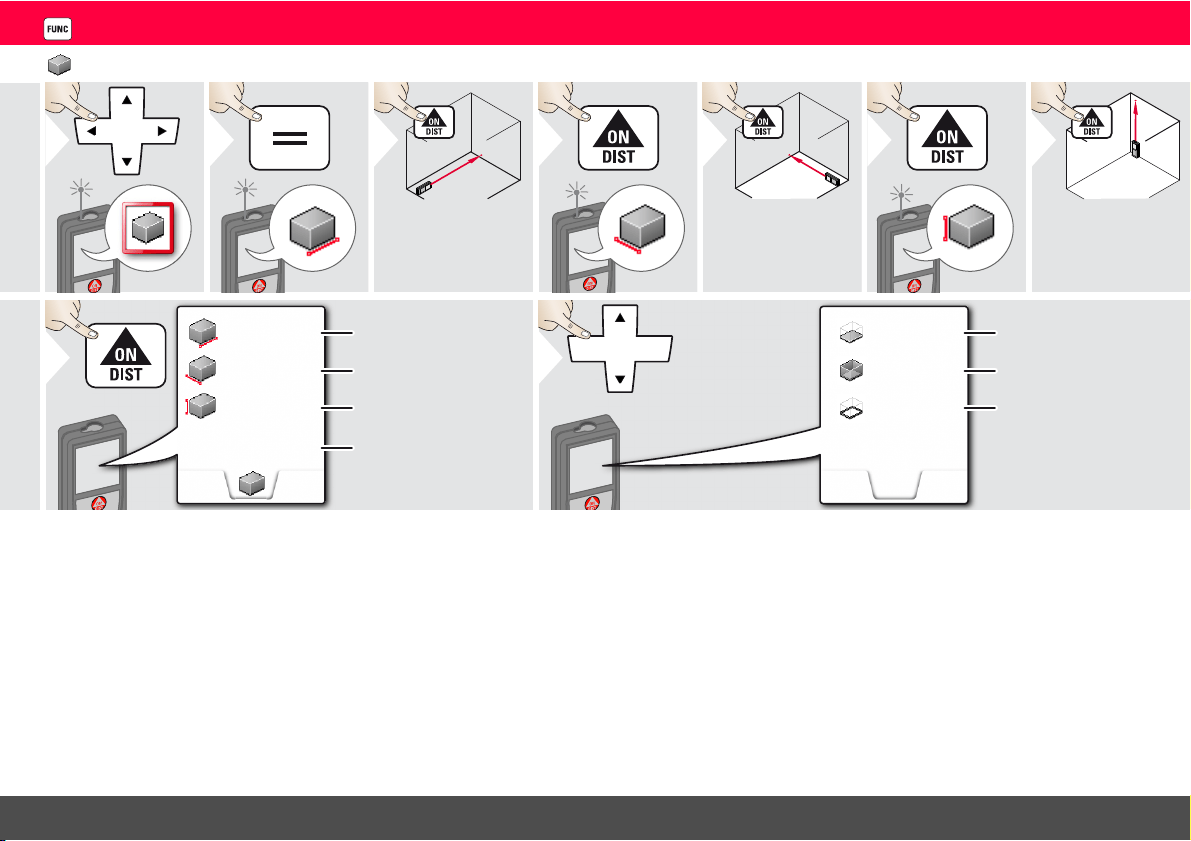
ENFunctions
Volume
1
2
3
Aim laser at first
target point.
4
5
Aim laser at sec-
ond target point.
6
7
Aim laser at third
target point.
2.431 m
2.338 m
5.744 m
32.653 m
3
First distance
Second distance
Third distance
Volume
8
16.164 m
39.300 m
2
13.430 m
2
9
Use Up/Down
navigation keys to
show more re-
sults.
Ceiling/floor area
Wall areas
Circumference
Leica DISTO
TM
E7500i 792324b
18
ENFunctions
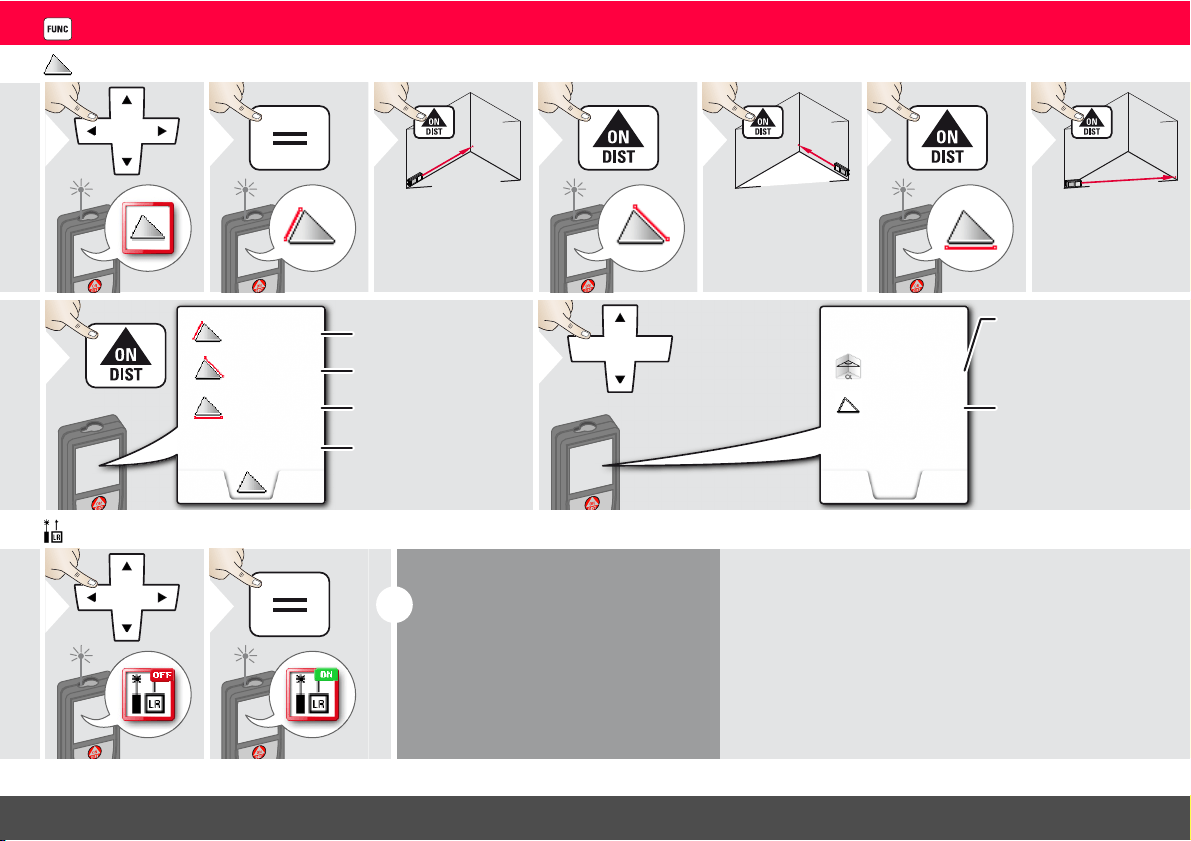
Triangular area
1
2
3
Aim laser at first
target point.
4
5
Aim laser at sec-
ond target point.
6
7
Aim laser at third
target point.
4.855 m
2
2.425 m
4.129 m
4.248 m
Triangular area
8
First distance
Second distance
Third distance
33.60°
10.802 m
9
Use Up/Down
navigation keys to
show more re-
sults. Switch off
Pointfinder if acti-
vated.
Circumference
Angle between first
and second
measurement
Long range mode
1
2
i
The long range mode allows measur-
ing of difficult targets in unfavorable
conditions e.g. bright ambient light or
bad target reflectivity. The measuring
time is increased.
An icon in the status line shows if the
function is active.
Leica DISTO
TM
E7500i 792324b
19
ENFunctions
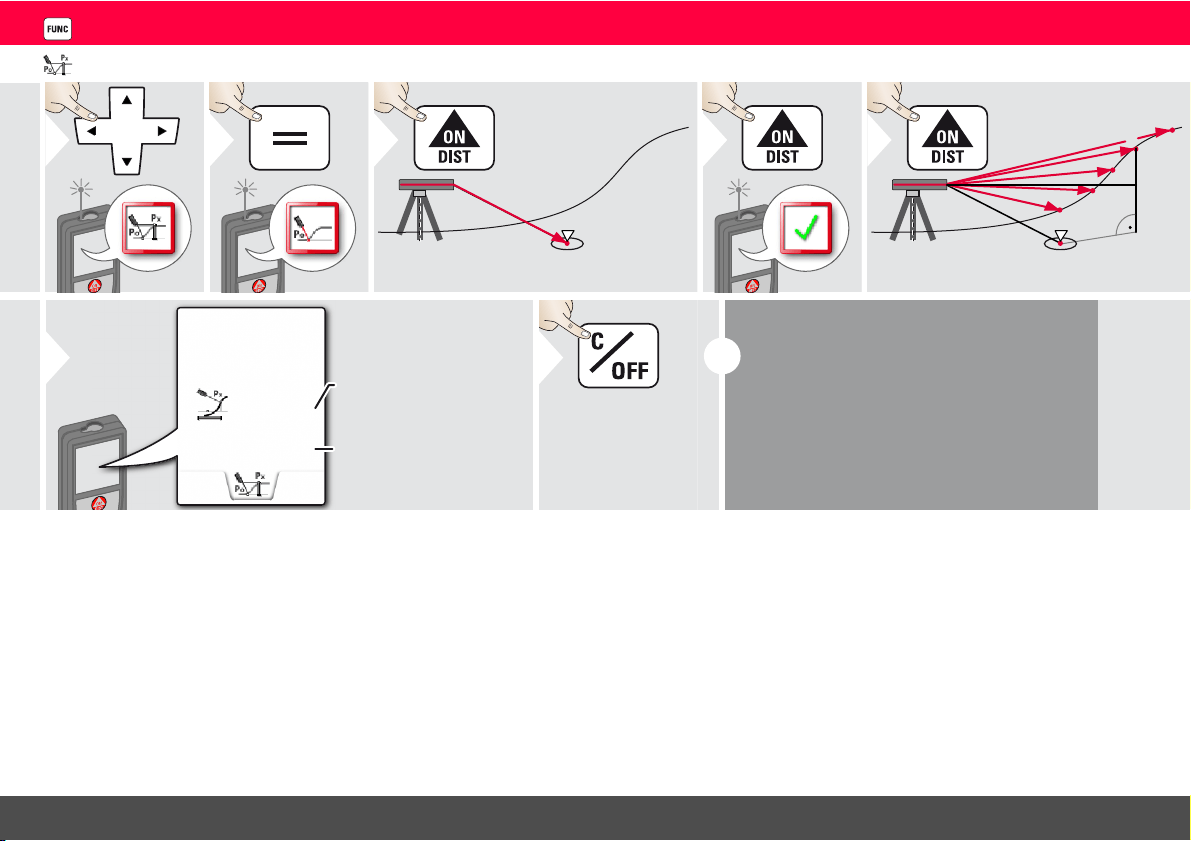
Height-profile measurement
1
2
REF
0
Aim at reference point (REF).
3
4
REF
1
0
2
3
4
5
h
d
Aim at additional points 1-x.
5
d
h
2.042 m
0.054 m
Horizontal distance to
device
Height difference to
reference point (REF).
6
Exit function.
7
2x
i
Ideal for measuring of height differences to a
reference point. Can be also used to meas-
ure profiles and terrain sections. After meas-
uring the reference point, the horizontal
distance and height is displayed for each fol-
lowing point.
Leica DISTO
TM
E7500i 792324b
20
ENFunctions
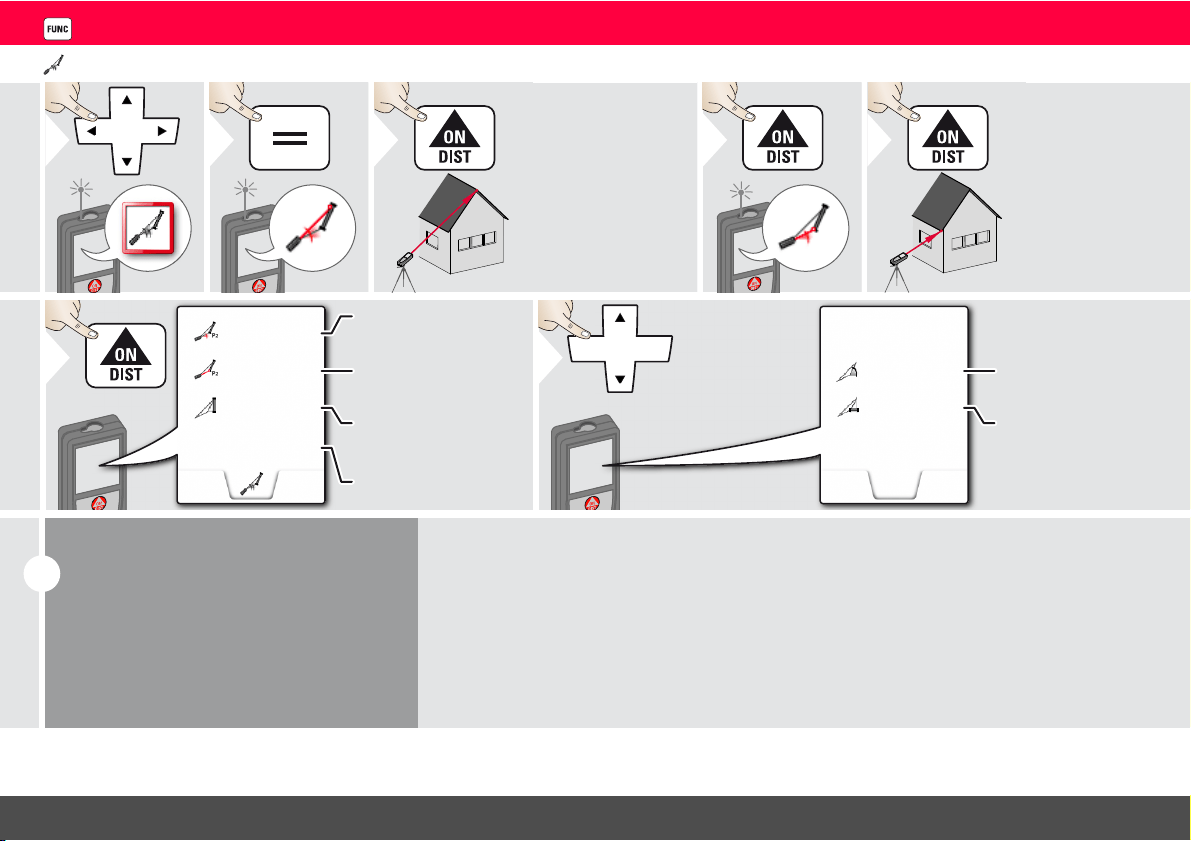
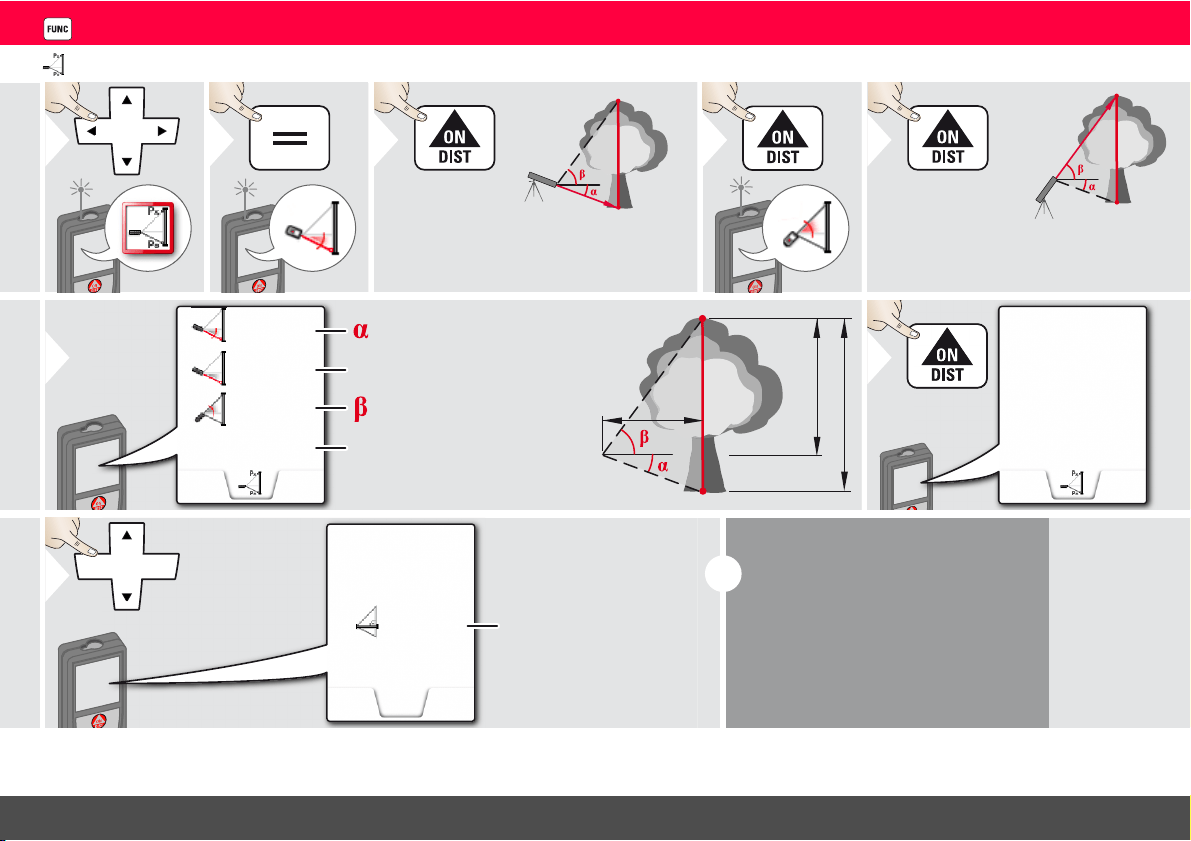
Sloped objects
1
2
3
Aim laser at upper
target point.
4
5
Aim laser at lower
target point.
11.00 °
-3.440 m
30.367 m
5.452 m
P2 distance
Vertical height be-
tween both points
P2 angle
Distance between
both points
6
-4.230 m
39.10 °
7
Use Up/Down
navigation keys to
show more re-
sults. Switch off
Pointfinder if acti-
vated.
Horizontal distance
between both points
Included angle be-
tween both points
i
Indirect distance measuring between 2
points with additional results. Ideal for ap-
plications such as length and slope of roof,
height of chimneys,…
It is important, that the instrument is posi-
tioned in the same vertical plane as the 2
measured points. The plane is defined of
the line between the 2 points.
Leica DISTO
TM
E7500i 792324b
21
ENFunctions
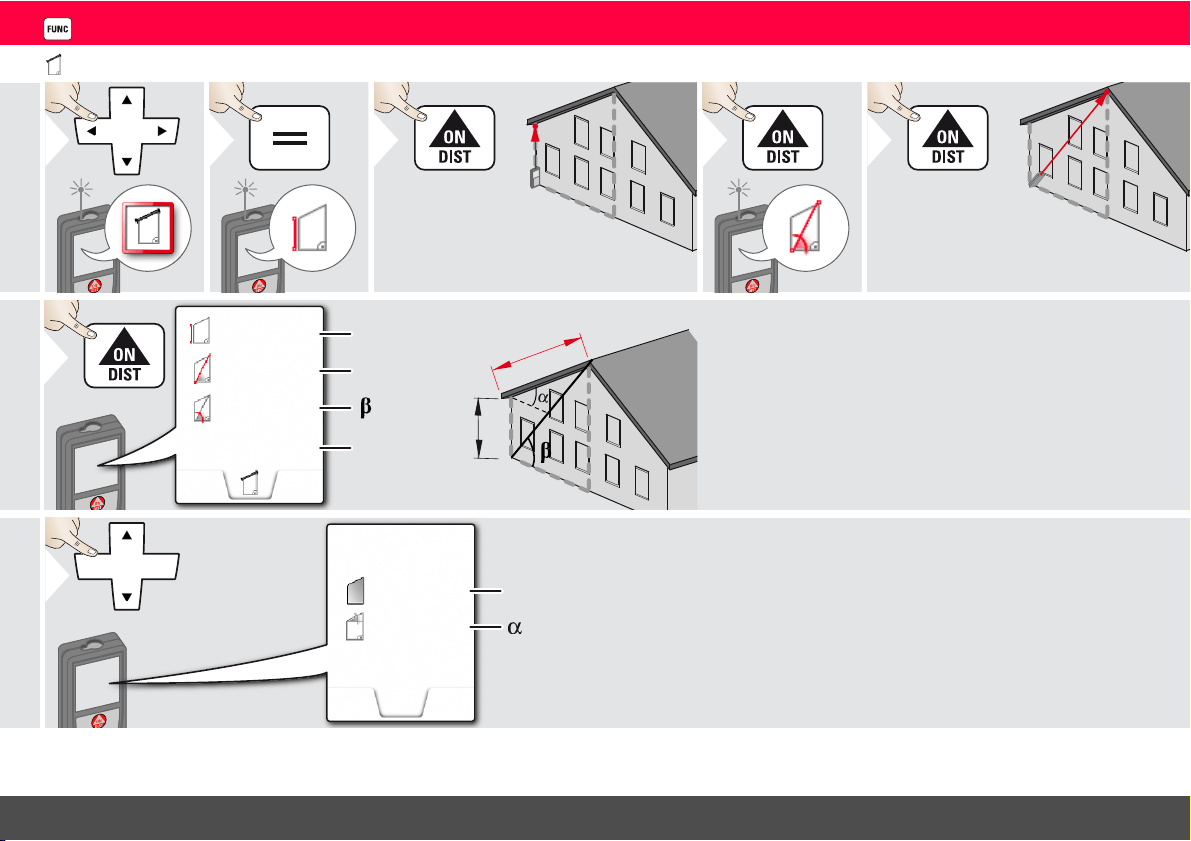
Height tracking
1
2
P0
Px
Aim laser at lower point.
3
4
P0
Px
Aim laser at upper points and angle/
height tracking starts automatically.
5
x
y
P0
y
29.89 °
6.271 m
-10.55 °
3.475 m
P0
Px
z
6
= Tracking height if device is
turned on tripod
= Tracking angle if device is
turned on tripod
44.80 °
6.271 m
-10.55 °
8.478 m
7
Stops height
tracking.
z
7.160 m
8
Use Up/Down
navigation keys to
show more re-
sults. Switch off
Pointfinder if acti-
vated.
i
Heights of buildings or trees without
suitable reflective points can be deter-
mined. At the bottom point, distance
and tilt is measured - which needs a re-
flective laser target. The upper point
can be targeted with the pointfinder /
crosshair and does not need a reflec-
tive laser target as only the inclination is
measured.
Leica DISTO
TM
E7500i 792324b
22
ENFunctions
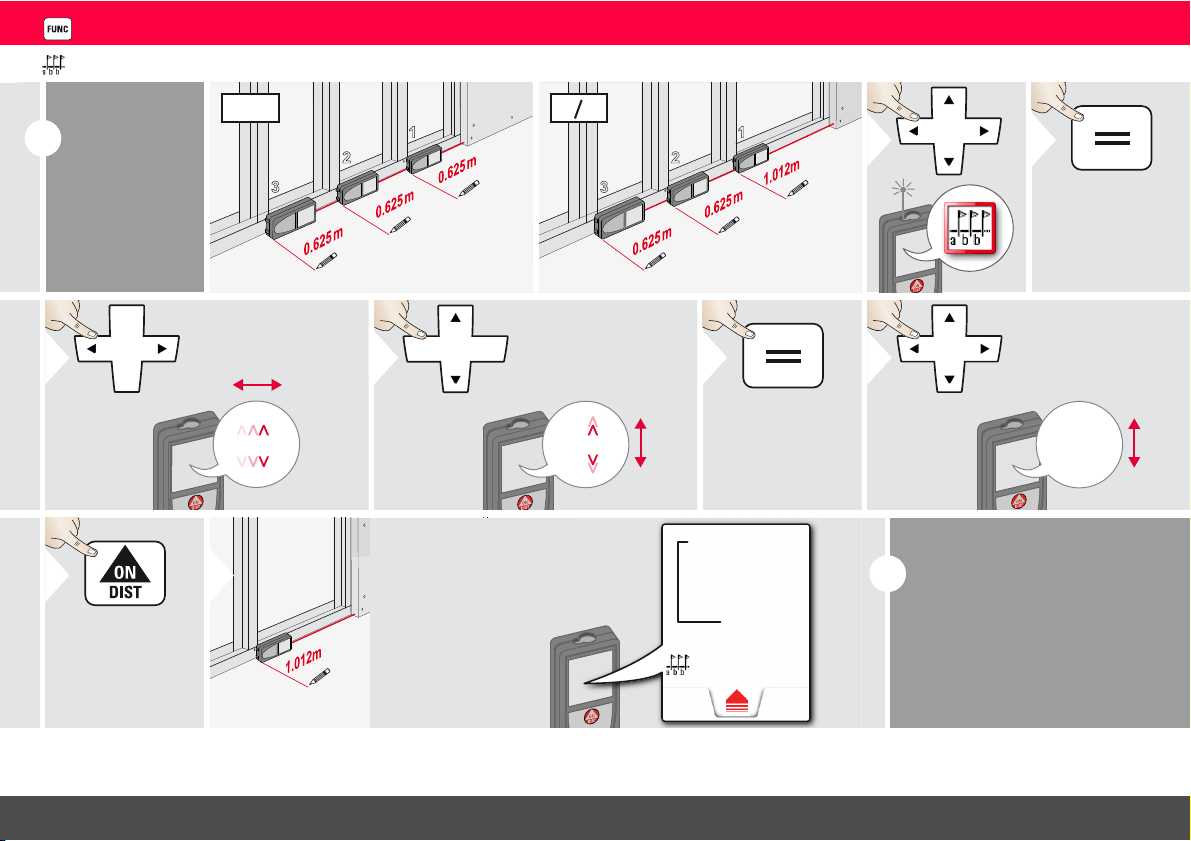
Trapezium
1
2
3
Aim laser at upper
point.
4
5
Aim laser at 2nd
point.
x
x
y
h
y
h
70.80
°
5.790 m
13.459 m
16.440 m
6
20.9
°
78.383 m
2
7
Use Up/Down
navigation keys to
show more re-
sults. Switch off
Pointfinder if acti-
vated.
Trapezium area
Leica DISTO
TM
E7500i 792324b
23
ENFunctions
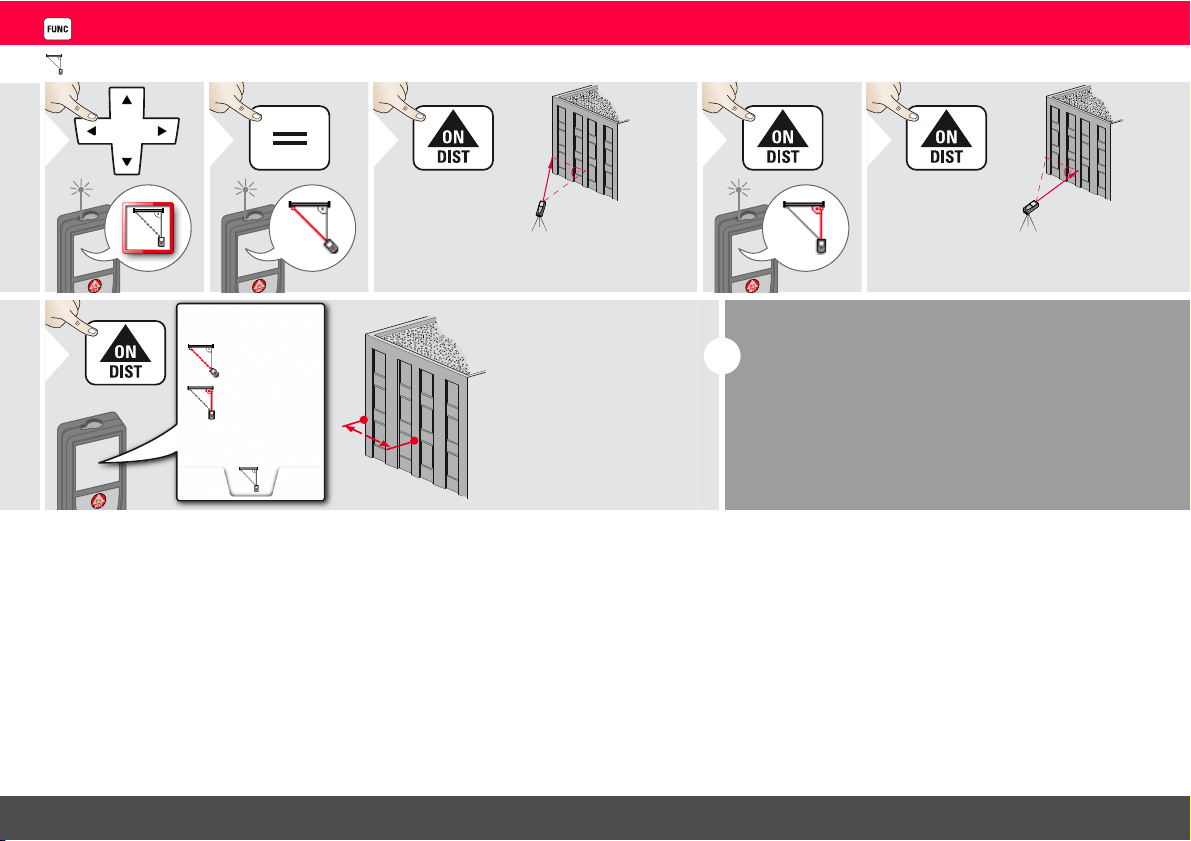
Stake out
i
Two different
distances (a
and b) can be
entered to
mark off de-
fined measured
lengths.
1
2
3
a
b
b
a
=
b
1
2
3
a
b
b
a
=
b
1
2
1.012 m
3
Select digit.
1.012 m
4
Adjust digit.
5
Approve
value "a".
0.625 m
6
Adjust
value "b".
7
Approve value "b"
and start meas-
urement.
8
Move device
slowly along the
stake-out line.
The distance to
the next stake out
point is displayed.
0.240 m
0.625 m
0.240 m is
missing up to
next 0.625 m
distance.
Next stake
out distance
i
When approaching a stake
out point to less than 0.1 m
the instrument starts to beep.
The function can be stopped
by pressing the CLEAR/OFF
button.
Leica DISTO
TM
E7500i 792324b
24
ENFunctions
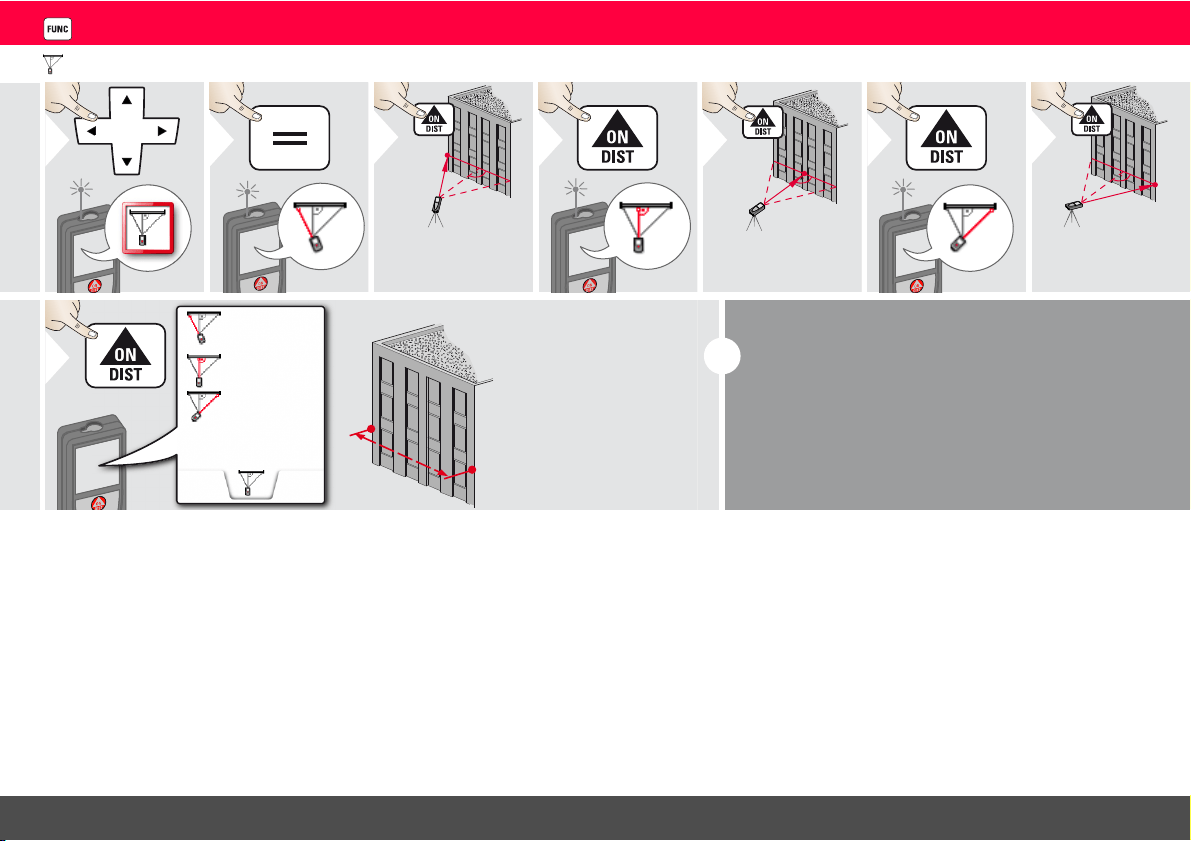
Pythagoras (2-point)
1
2
3
Aim laser at first
target.
4
5
Aim laser at second
target.
13.207 m
21.383 m
25.133 m
6
i
The result is shown in the main line.
Pressing the measuring key for 2 sec in the function ac-
tivates automatically Minimum or Maximum measure-
ment.
We recommend to use the pythagoras only for indirect
horizontal measuring.
For height measuring (vertical) it is more precise to use
a function with the inclination measuring.
Leica DISTO
TM
E7500i 792324b
25
ENFunctions
Pythagoras (3-point)
1
2
3
Aim laser at first
target.
4
5
Aim laser at sec-
ond target.
6
7
Aim laser at
third target.
20.571 m
23.018 m
21.264 m
24.298 m
8
i
The result is shown in the main line.
Pressing the measuring key for 2 sec in the function
activates automatically Minimum or Maximum meas-
urement.
We recommend to use the pythagoras only for indi-
rect horizontal measuring.
For height measuring (vertical) it is more precise to
use a function with inclination measurement.

Leica DISTO
TM
E7500i 792324b
26
ENTechnical Data
* applies for 100 % target reflectivity (white painted wall),
low background illumination, 25 ºC
** applies for 10 to 100 % target reflectivity, high background
illumination, - 10 ºC to + 50 ºC
*** Tolerances apply from 0.05 m to 10 m with a confidence
level of 95%. The maximum tolerance may deteriorate to
0.1 mm/m between 10 m to 30 m, to 0.20 mm/m between
30 m to 100 m and to 0.30 mm/m for distances above 100 m
**** applies for 100 % target reflectivity, background illumi-
nation of approximately 30'000 lux
***** after user calibration. Additional angle related devia-
tion of +/- 0.01° per degree up to +/-45° in each quadrant.
Applies at room temperature. For the whole operating
temperature range the maximum deviation increases by
+/-0.1°.
For accurate indirect results, the use of
a tripod is recommended. For accurate
tilt measurements a transverse tilt should be
avoided.
Distance measurement
Typical Measuring Tolerance* ± 1.0 mm / ~1/16" ***
Maximum Measuring
Tolerance**
± 2.0 mm / 0.08 in ***
Typical Range* 200 m / 660 ft
Range at unfavourable
condition ****
80 m / 260 ft
Smallest unit displayed 0.1 mm / 1/32 in
Power Range Technology
™
yes
Ø laser point
at distances
6 /30 / 60 mm
(10 / 50 / 100 m)
Tilt measurement
Measuring tolerance to laser
beam*****
± 0.2°
Measuring tolerance to
housing*****
± 0.2°
Range 360°
General
Laser class 2
Laser type 635 nm, < 1 mW
Protection class IP65 (dust tight and jet
water protected)
Autom. laser switch off after 90 s
Autom. power switch-off after 180 s
Bluethooth® Smart Bluethooth v4.0
Range of Bluethooth® 10 m
Battery durability (2 x AA) up to 5000 measure-
ments
Dimension (H x D x W) 143 x 58 x 29 mm
5.6 x 2.28 x 1.14 in
Weight (with batteries) 198 g / 6.37 oz
Temperature range:
-Storage
-Operation
-25 to 70 °C
-13 to 158 °F
-10 to 50 °C
14 to 122 °F
i
Functions
Distance measuring yes
Min/Max measuring yes
Permanent measuring yes
Stake-out yes
Addition/Subtraction yes
Area yes
Triangle area yes
Volume yes
Trapezium yes
Painter function (area with
partial measurem.)
yes
Pythagoras 2-point, 3-point
Smart Horizontal Mode /
Indirect height
yes
Height-profile measurement yes
Inclination tracking yes
Sloped objects yes
Height tracking yes
Memory 30 displays
Beep yes
Illuminated colour display yes
Multifunctional endpiece yes
Pointfinder (Viewscreen) 4xZoom
Digital Level yes
Bluetooth
®
Smart yes
Personalized Favorites yes
Timer yes
Long Range Mode yes
Calculator yes

Leica DISTO
TM
E7500i 792324b
27
ENMessage Codes
If the message Error does not disappear
after switching on the device repeatedly,
contact the dealer.
If the message InFo appears with a number,
press the Clear button and observe the
following instructions:
Care
• Clean the device with a damp, soft cloth.
• Never immerse the device in water.
• Never use aggressive cleaning agents or
solvents.
Warranty
Lifetime Manufacturer's Warranty
Warranty coverage for the entire usage time
of the product according to Leica Geosys-
tems International Limited Warranty. Free of
charge repair or replacement for all products
that suffer defects as a result of faults in mate-
rials or manufacturing, for the entire life of
the product.
3 Years no Cost
Guaranteed service should the product
become defective and require servicing
under normal conditions of use, as described
in the user manual, at no additional charge.
To receive the "3 years no cost" period, the
product must be registered at www.leica-
geosystems.com/registration within 8 weeks
of the purchase date. If the product is not
registered, a "2 years no cost" period applies.
Safety Instructions
The person responsible for the instrument
must ensure that all users understand these
directions and adhere to them.
Areas of responsibility
Responsibilities of the manufacturer
of the original equipment:
Leica Geosystems AG
Heinrich-Wild-Strasse
CH-9435 Heerbrugg
Internet: www.disto.com
The company above is responsible for
supplying the product, including the User
Manual in a completely safe condition.
The company above is not responsible for
third party accessories.
Responsibilities of the person in
charge of the instrument:
• To understand the safety instructions on
the product and the instructions in the
User Manual.
• To be familiar with local safety regulations
relating to accident prevention.
• Always prevent access to the product by
unauthorised personnel.
No. Cause Correction
156 Transverse tilt greater
than 10°
Hold the instrument
without any transverse tilt.
162 Calibration mistake Make sure, the device is
placed on a absolutely
horizontal and flat surface.
Repeat the calibration
procedure. If the mistake
still occurs, contact your
dealer.
204 Calculation error Perform measurement
again.
240 Data transfer error Repeat procedure.
252 Temperature too high Let device cool down.
253 Temperature too low Warm device up.
255 Received signal too
weak, measuring time
too long
Change target surface
(e.g. white paper).
256 Received signal too
high
Change target surface
(e.g. white paper).
257 Too much back-
ground light
Shadow target area.
258 Measurement outside
of measuring range
Correct range.
260 Laser beam inter-
rupted
Repeat measurement.

Leica DISTO
TM
E7500i 792324b
28
ENSafety Instructions
Permitted use
• Measuring distances
• Tilt measurement
• Data transfer with Bluetooth
®
Prohibited use
• Using the product without instruction
• Using outside the stated limits
• Deactivation of safety systems and
removal of explanatory and hazard labels
• Opening of the equipment by using tools
(screwdrivers, etc.)
• Carrying out modification or conversion of
the product
• Use of accessories from other manufac-
turers without express approval
• Deliberate dazzling of third parties; also in
the dark
• Inadequate safeguards at the surveying site
(e.g. when measuring on roads, construc-
tion sites, etc.)
• Deliberate or irresponsible behaviour on
scaffolding, when using ladders, when
measuring near machines which are
running or near parts of machines or instal-
lations which are unprotected
• Aiming directly in the sun
Hazards in use
WARNING
Watch out for erroneous measurements if
the instrument is defective or if it has been
dropped or has been misused or modified.
Carry out periodic test measurements.
Particularly after the instrument has been
subject to abnormal use, and before, during
and after important measurements.
CAUTION
Never attempt to repair the product your-
self. In case of damage, contact a local dealer.
WARNING
Changes or modifications not expressly
approved could void the user’s authority to
operate the equipment.
Limits of use
Refer to section "Technical data".
The device is designed for use in areas
permanently habitable by humans. Do not
use the product in explosion hazardous areas
or in aggressive environments.
Disposal
CAUTION
Flat batteries must not be disposed of with
household waste. Care for the environment
and take them to the collection points
provided in accordance with national or local
regulations.
The product must not be disposed with
household waste.
Dispose of the product appropriately
in accordance with the national regu-
lations in force in your country.
Adhere to the national and country specific
regulations.
Product specific treatment and waste
management can be downloaded from our
homepage.
Electromagnetic Compatibility
(EMC)
WARNING
The device conforms to the most stringent
requirements of the relevant standards and
regulations.
Yet, the possibility of causing interference in
other devices cannot be totally excluded.
i

Leica DISTO
TM
E7500i 792324b
29
ENSafety Instructions
FCC statement (applicable in
U.S.)
This equipment has been tested and found to
comply with the limits for a Class B digital
device, pursuant to part 15 of the FCC Rules.
These limits are designed to provide reason-
able protection against harmful interference
in a residential installation.This equipment
generates, uses and can radiate radio
frequency energy and, if not installed and
used in accordance with the instructions,
may cause harmful interference to radio
communications.
However, there is no guarantee that interfer-
ence will not occur in a particular installation.
If this equipment does cause harmful interfer-
ence to radio or television reception, which
can be determined by turning the equipment
off and on, the user is encouraged to try to
correct the interference by one or more of
the following measures:
• Reorient or relocate the receiving antenna.
• Increase the separation between the
equipment and receiver.
• Connect the equipment into an outlet on a
circuit different from that to which the
receiver is connected.
• Consult the dealer or an experienced
radio/TV technician for help.
This device complies with part 15 of the FCC
Rules. Operation is subject to the following
two conditions:
• This device may not cause harmful interfer-
ence, and
• this device must accept any interference
received, including interference that may
cause undesired operation.
This device complies with Industry Canada
license-exempt RSS standard(s). Operation
is subject to the following two conditions:
• This device may not cause interference and
• this device must accept any interference,
including interference that may cause
undesired operation of the device.
Cet appareil est conforme à la section 15 des
règlements FCC. Son fonctionnement est
soumis aux deux conditions suivantes :
• cet appareil ne doit pas causer d'inter-
férences nuisibles, et
• cet appareil doit accepter toute autre
interférence reçue, y compris les inter-
férences pouvant entraîner un fonc-
tionnement non désiré.
Ce dispositif est conforme à la norme RSS-
210 d’Industrie Canada. L’utilisation est
sujette aux deux conditions suivantes :
• ce dispositif ne pas doit pas être la source
d’interférences nuisibles, et
• ce dispositif doit accepter toutes les inter-
férences, y compris les interférences
pouvant induire des opérations non
souhaitées.
Use of the product with Blue-
tooth
®
WARNING
Electromagnetic radiation can cause distur-
bances in other equipment, in installations
(e.g. medical ones such as pacemakers or
hearing aids) and in aircraft. It can also affect
humans and animals.
Precautions:
Athough this product conforms to the most
stringent standards and regulations, the
possibility of harm to people and animals
cannot totally excluded.
• Do not use the product near petrol
stations, chemical plants, in areas with a
potentially explosive atmosphere and
where blasting takes place.
• Do not use the product near medical
equipment.
• Do not use the product in airplanes.
• Do not use the product near your body for
extended periods.
Leica DISTO
TM
E7500i 792324b
30
ENSafety Instructions
Laser classification
The device produces visible laser beams,
which are emitted from the instrument:
It is a Class 2 laser product in accordance
with:
• IEC60825-1 : 2014„Radiation safety of
laser products“
Laser Class 2 products:
Do not stare into the laser beam or direct it
towards other people unnecessarily. Eye
protection is normally afforded by aversion
responses including the blink reflex.
WARNING
Looking directly into the beam with optical
aids (e.g. binoculars, telescopes) can be
hazardous.
CAUTION
Looking into the laser beam may be
hazardous to the eyes.
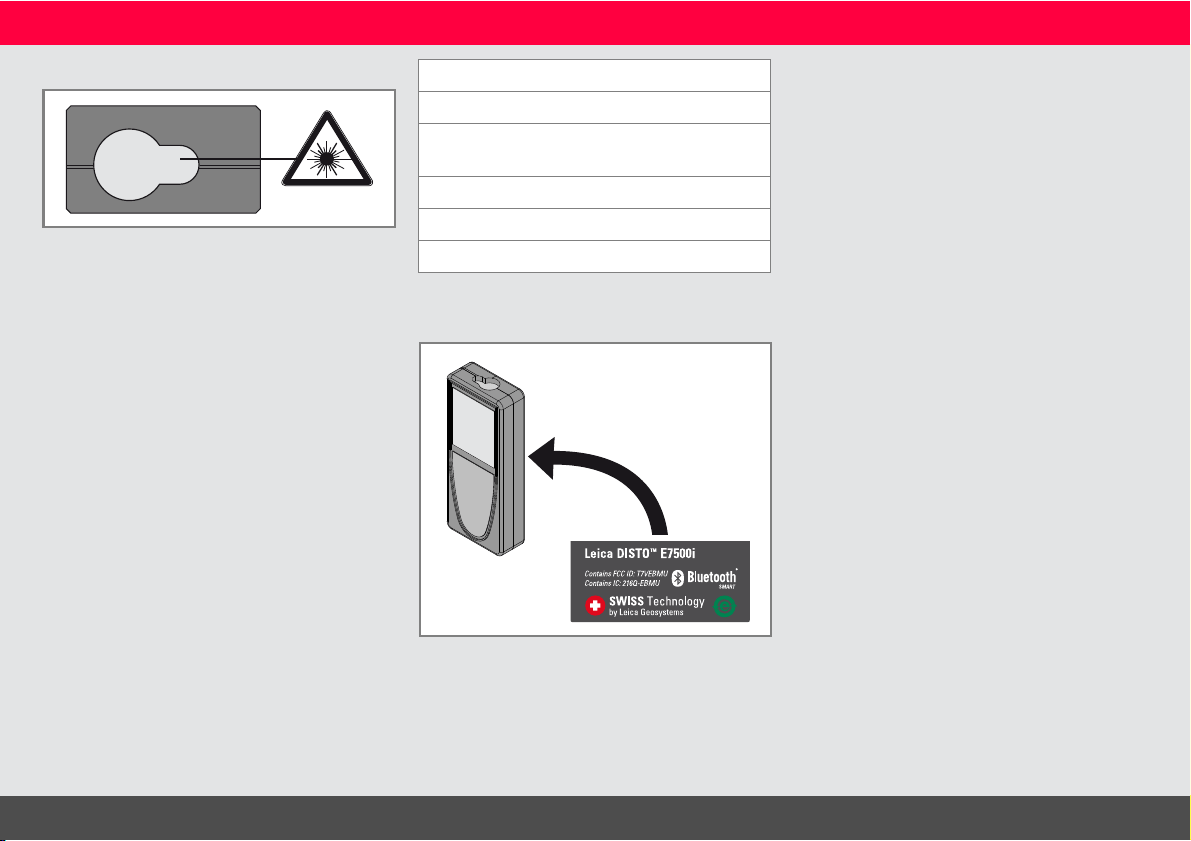
Labelling
Subject to change (drawings, descriptions
and technical data) without prior notice.
Description Value
Wavelength 620 - 690 nm
Maximum radiant output
power for classification
< 1mW
Pulse repetition frequency 320 MHz
Pulse duration > 400 ps
Beam divergence
0.16 x 0.6 mrad

Leica Geosystems AG
CH-9435 Heerbrugg
(Switzerland)
www.disto.com
Leica Geosystems AG, Heerbrugg, Switzerland has been certified as being
equipped with a quality system which meets the International Standards of
Quality Management and Quality Systems (ISO standard 9001) and Environ-
mental Management Systems (ISO standard 14001).
Total Quality Management - Our commitment to total customer satisfaction.
Ask your local Leica Geosystems agent for more information about our TQM
program.
Copyright Leica Geosystems AG, Heerbrugg,
Switzerland 2015
Original text (792324b EN)
Pat. No.: WO 9427164, WO 9818019, WO 0244754, WO 0216964,
US 5949531, EP 1195617, US 7030969, US 8279421 B2,
Patents pending
