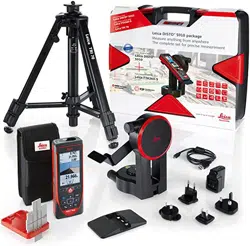

Leica DISTO
TM
S910
The original laser distance meter
Leica DISTO
TM
S910
The original laser distance meter

Leica DISTO
TM
S910 808167a
1
ENTable of Contents
Instrument Set-up - - - - - - - - - - - - - - - - - - - - - - - - - - - - - - - 2
Introduction- - - - - - - - - - - - - - - - - - - - - - - - - - - - - - - - - - - - 2
Overview - - - - - - - - - - - - - - - - - - - - - - - - - - - - - - - - - - - - - 2
Basic measuring screen - - - - - - - - - - - - - - - - - - - - - - - - - - - - - 3
Selection screen - - - - - - - - - - - - - - - - - - - - - - - - - - - - - - - - - 3
Pointfinder (Viewscreen)- - - - - - - - - - - - - - - - - - - - - - - - - - - - 4
Icons on Status bar - - - - - - - - - - - - - - - - - - - - - - - - - - - - - - - 4
Charging the Li-Ion battery via USB - - - - - - - - - - - - - - - - - - - - - 5
Using the Smart Base - - - - - - - - - - - - - - - - - - - - - - - - - - - - - - 6
Using the Smart Base Extension - - - - - - - - - - - - - - - - - - - - - - - 6
Operations - - - - - - - - - - - - - - - - - - - - - - - - - - - - - - - - - - - - - 7
Using the Touch Screen - - - - - - - - - - - - - - - - - - - - - - - - - - - - 7
Switching ON/OFF - - - - - - - - - - - - - - - - - - - - - - - - - - - - - - - 8
Clear - - - - - - - - - - - - - - - - - - - - - - - - - - - - - - - - - - - - - - - - 8
Message Codes- - - - - - - - - - - - - - - - - - - - - - - - - - - - - - - - - - 8
Permanent / Minimum-Maximum measuring - - - - - - - - - - - - - - - 8
Add / Subtract - - - - - - - - - - - - - - - - - - - - - - - - - - - - - - - - - - 8
Pointfinder (Viewscreen)- - - - - - - - - - - - - - - - - - - - - - - - - - - - 9
Screenshot- - - - - - - - - - - - - - - - - - - - - - - - - - - - - - - - - - - - - 9
Memory - - - - - - - - - - - - - - - - - - - - - - - - - - - - - - - - - - - - - 10
Settings - - - - - - - - - - - - - - - - - - - - - - - - - - - - - - - - - - - - - - - 11
Overview - - - - - - - - - - - - - - - - - - - - - - - - - - - - - - - - - - - - 11
Tilt units - - - - - - - - - - - - - - - - - - - - - - - - - - - - - - - - - - - - - 11
Move Alert of Levelling - - - - - - - - - - - - - - - - - - - - - - - - - - - - 12
Distance units - - - - - - - - - - - - - - - - - - - - - - - - - - - - - - - - - - 13
Beep ON/OFF - - - - - - - - - - - - - - - - - - - - - - - - - - - - - - - - - 14
Digital level ON/OFF- - - - - - - - - - - - - - - - - - - - - - - - - - - - - 14
De-/Activate keylock- - - - - - - - - - - - - - - - - - - - - - - - - - - - - 14
Switch on with keylock - - - - - - - - - - - - - - - - - - - - - - - - - - - - 14
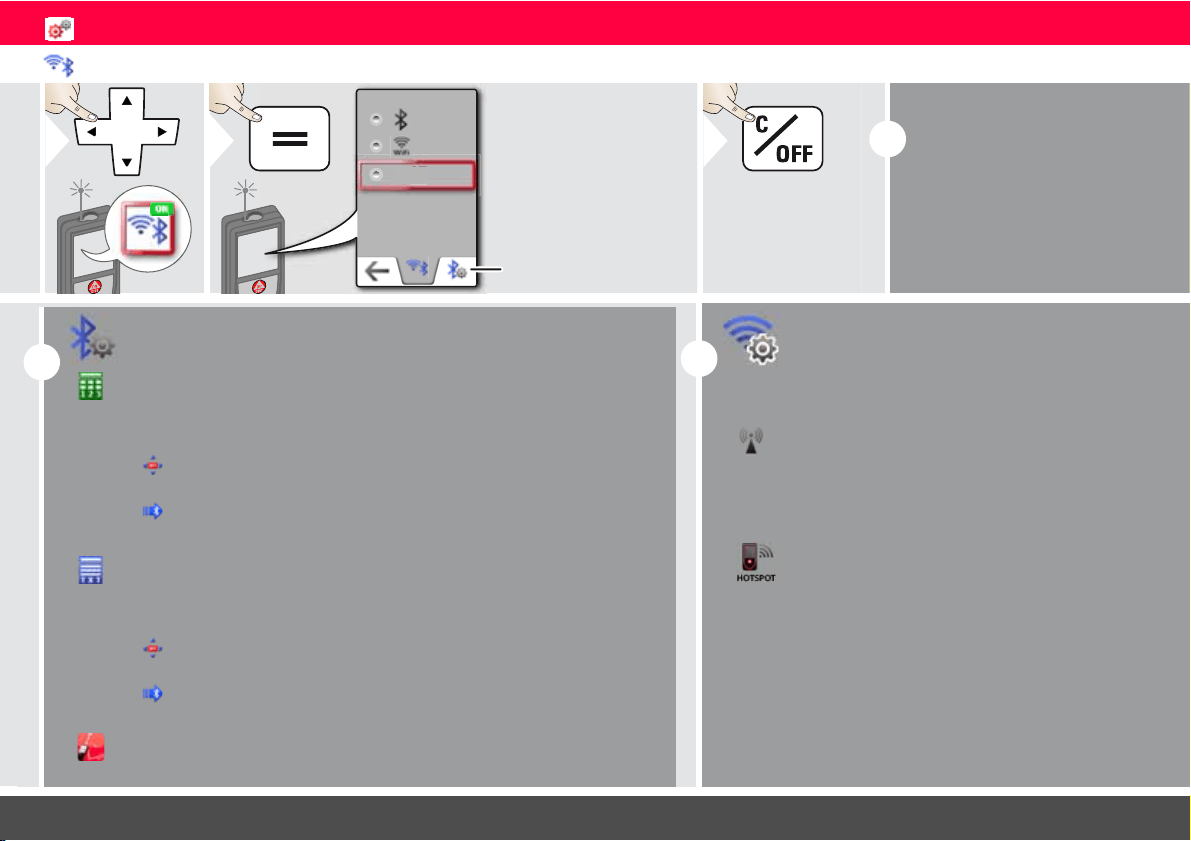
Bluetooth
®
/WLAN - - - - - - - - - - - - - - - - - - - - - - - - - - - - - 15
Calibration of tilt sensor (Tilt Calibration) - - - - - - - - - - - - - - - - 17
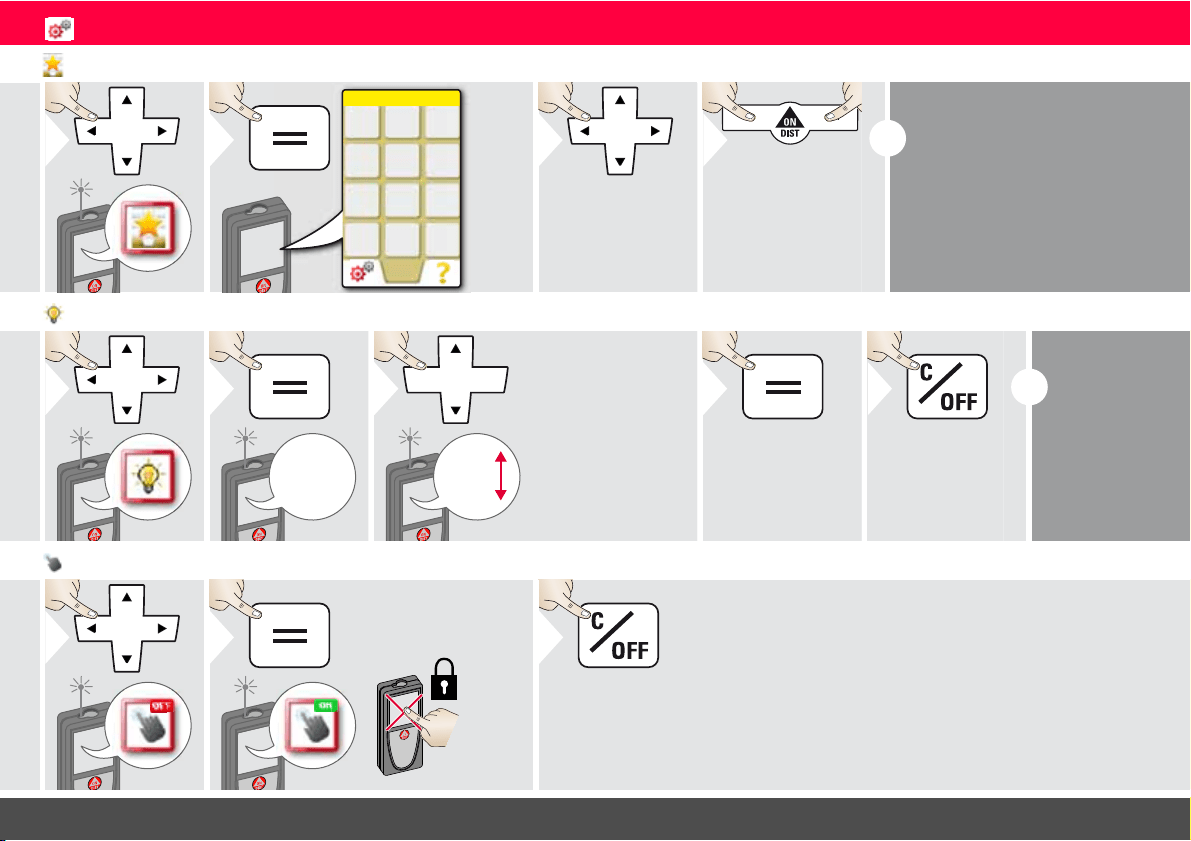
Personalized favorites- - - - - - - - - - - - - - - - - - - - - - - - - - - - - 18
Illumination - - - - - - - - - - - - - - - - - - - - - - - - - - - - - - - - - - - 18
Touch Screen ON/OFF - - - - - - - - - - - - - - - - - - - - - - - - - - - 18
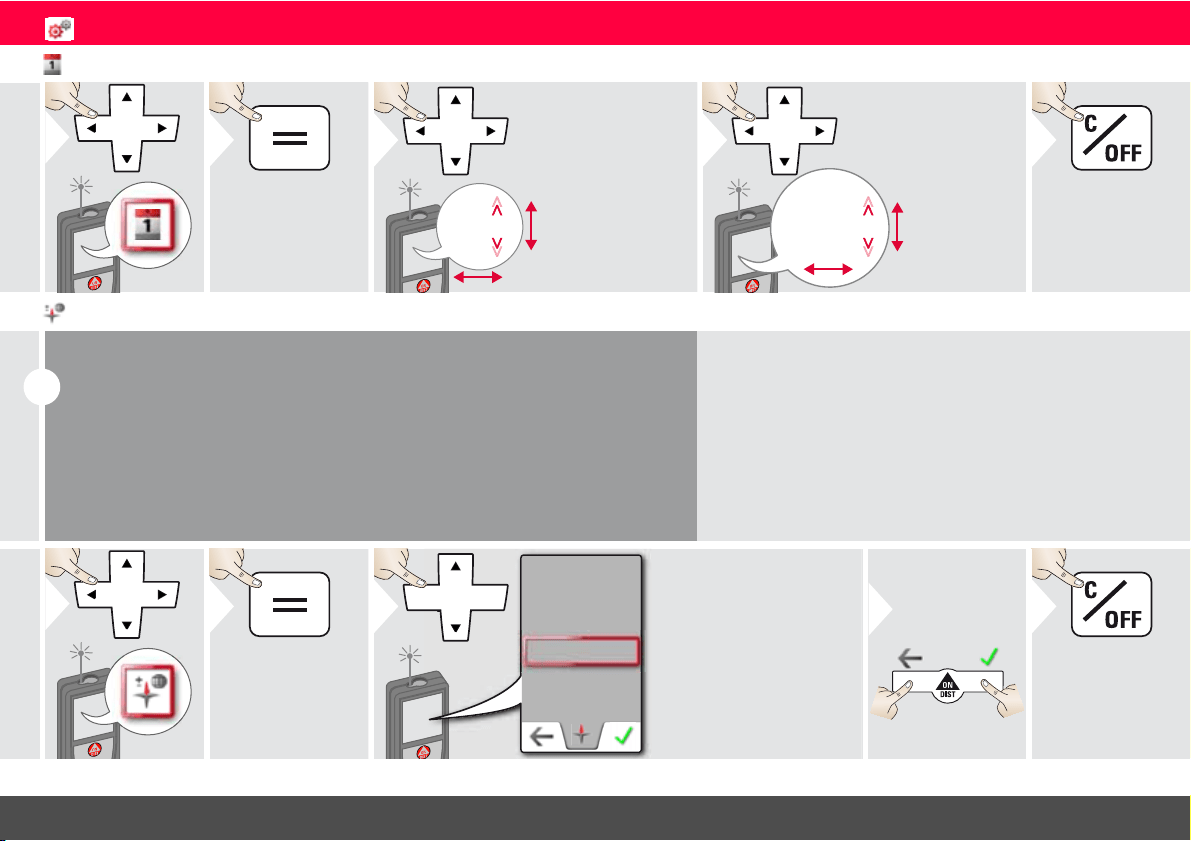
Date and Time - - - - - - - - - - - - - - - - - - - - - - - - - - - - - - - - - 19
Compass Adjustment - - - - - - - - - - - - - - - - - - - - - - - - - - - - - 19
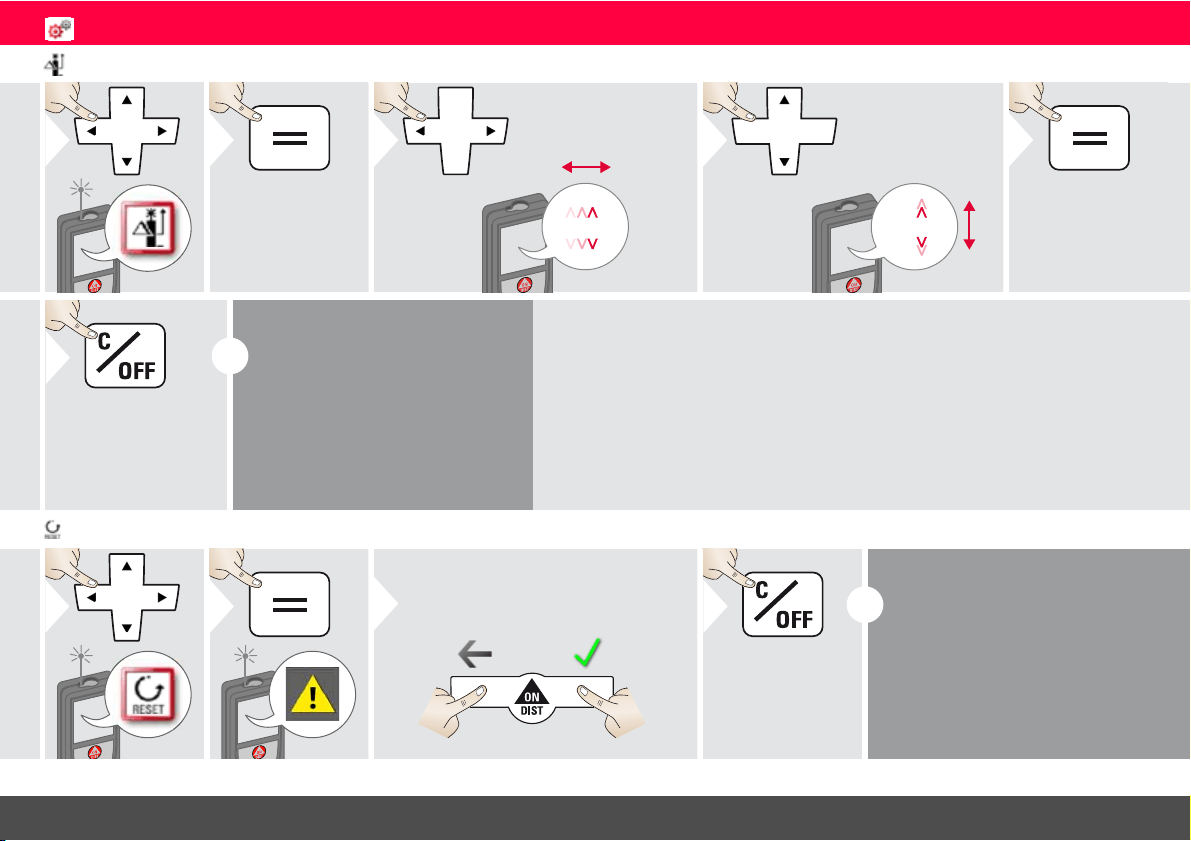
Offset - - - - - - - - - - - - - - - - - - - - - - - - - - - - - - - - - - - - - - - 20
Reset - - - - - - - - - - - - - - - - - - - - - - - - - - - - - - - - - - - - - - - 20
Information/Software Update - - - - - - - - - - - - - - - - - - - - - - - 21
Functions - - - - - - - - - - - - - - - - - - - - - - - - - - - - - - - - - - - - - 22
Overview - - - - - - - - - - - - - - - - - - - - - - - - - - - - - - - - - - - - 22
Calculator - - - - - - - - - - - - - - - - - - - - - - - - - - - - - - - - - - - - 23
Smart Horizontal Mode - - - - - - - - - - - - - - - - - - - - - - - - - - - 23
Smart Angle measurement - - - - - - - - - - - - - - - - - - - - - - - - - - 24
Level - - - - - - - - - - - - - - - - - - - - - - - - - - - - - - - - - - - - - - - - 24
Measuring single distance - - - - - - - - - - - - - - - - - - - - - - - - - - - 25
Point to point measurements - - - - - - - - - - - - - - - - - - - - - - - - 26
DXF data capture- - - - - - - - - - - - - - - - - - - - - - - - - - - - - - - - 27
Photo - - - - - - - - - - - - - - - - - - - - - - - - - - - - - - - - - - - - - - - 28
Volume - - - - - - - - - - - - - - - - - - - - - - - - - - - - - - - - - - - - - - 29
Smart Area measurement- - - - - - - - - - - - - - - - - - - - - - - - - - - 30
WLAN data transmission - - - - - - - - - - - - - - - - - - - - - - - - - - - 31
Gallery - - - - - - - - - - - - - - - - - - - - - - - - - - - - - - - - - - - - - - - 32
Area - - - - - - - - - - - - - - - - - - - - - - - - - - - - - - - - - - - - - - - - 33
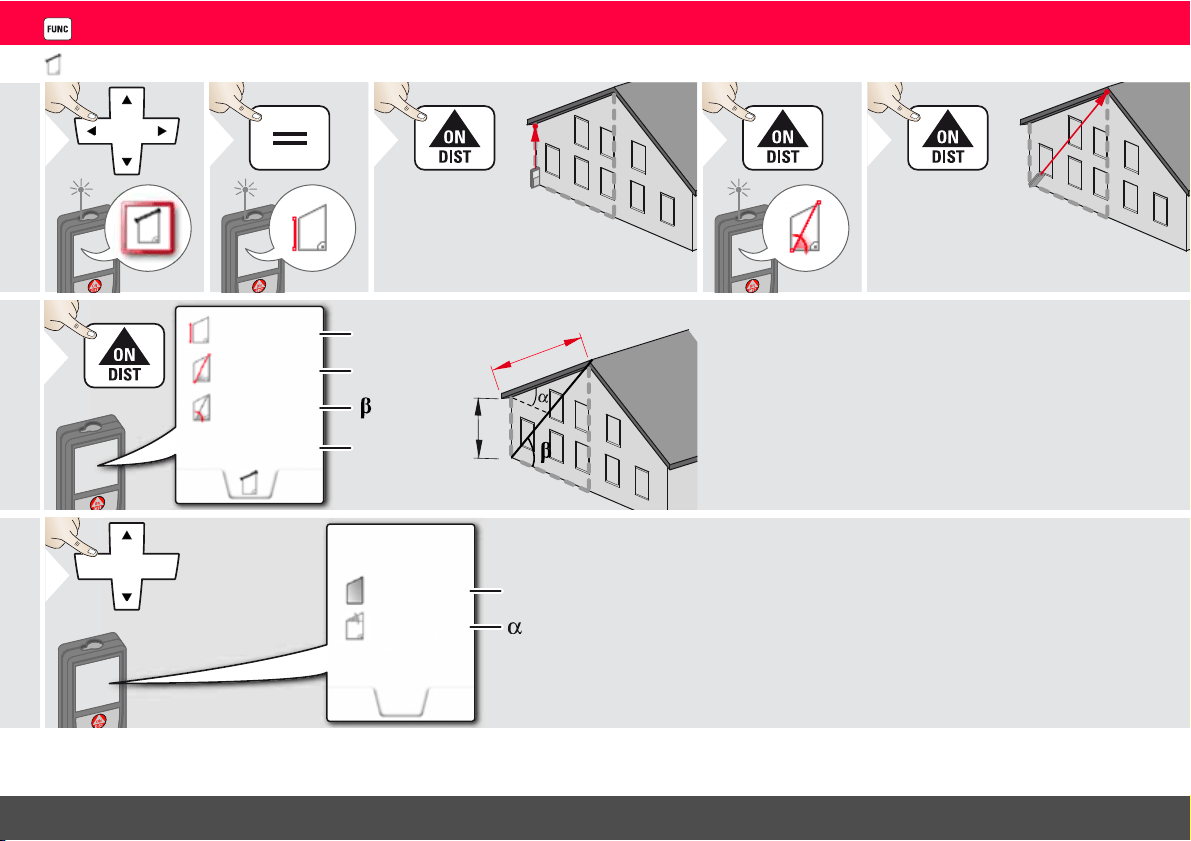
Sloped objects - - - - - - - - - - - - - - - - - - - - - - - - - - - - - - - - - - 34
Width - - - - - - - - - - - - - - - - - - - - - - - - - - - - - - - - - - - - - - - 35
Timer - - - - - - - - - - - - - - - - - - - - - - - - - - - - - - - - - - - - - - - 36
Triangular area- - - - - - - - - - - - - - - - - - - - - - - - - - - - - - - - - - 37
Height-profile measurement - - - - - - - - - - - - - - - - - - - - - - - - - 38
Diameter - - - - - - - - - - - - - - - - - - - - - - - - - - - - - - - - - - - - - 39
Adjusting measuring reference- - - - - - - - - - - - - - - - - - - - - - - - 40
Pythagoras (2-point) - - - - - - - - - - - - - - - - - - - - - - - - - - - - - - 41
Height tracking- - - - - - - - - - - - - - - - - - - - - - - - - - - - - - - - - - 42
Area from Photo - - - - - - - - - - - - - - - - - - - - - - - - - - - - - - - - 43
Compass - - - - - - - - - - - - - - - - - - - - - - - - - - - - - - - - - - - - - 44
Pythagoras (3-point) - - - - - - - - - - - - - - - - - - - - - - - - - - - - - - 45
Trapezium - - - - - - - - - - - - - - - - - - - - - - - - - - - - - - - - - - - - 46
Stake out - - - - - - - - - - - - - - - - - - - - - - - - - - - - - - - - - - - - - 47
Technical Data- - - - - - - - - - - - - - - - - - - - - - - - - - - - - - - - - - 48
Message Codes - - - - - - - - - - - - - - - - - - - - - - - - - - - - - - - - - 49
Care - - - - - - - - - - - - - - - - - - - - - - - - - - - - - - - - - - - - - - - - - - 49
Warranty - - - - - - - - - - - - - - - - - - - - - - - - - - - - - - - - - - - - - - 50
Safety Instructions- - - - - - - - - - - - - - - - - - - - - - - - - - - - - - - 50
Areas of responsibility - - - - - - - - - - - - - - - - - - - - - - - - - - - - - 50
Permitted use - - - - - - - - - - - - - - - - - - - - - - - - - - - - - - - - - - 50
Prohibited use - - - - - - - - - - - - - - - - - - - - - - - - - - - - - - - - - - 50
Limits of use - - - - - - - - - - - - - - - - - - - - - - - - - - - - - - - - - - - 51
Disposal - - - - - - - - - - - - - - - - - - - - - - - - - - - - - - - - - - - - - - 51
Electromagnetic Compatibility (EMC) - - - - - - - - - - - - - - - - - - - 51
FCC statement (applicable in U.S.) - - - - - - - - - - - - - - - - - - - - - 51
Déclaration FCC, applicable aux Etats-Unis - - - - - - - - - - - - - - - 52
Use of the product with Bluetooth
®
- - - - - - - - - - - - - - - - - - - - 53
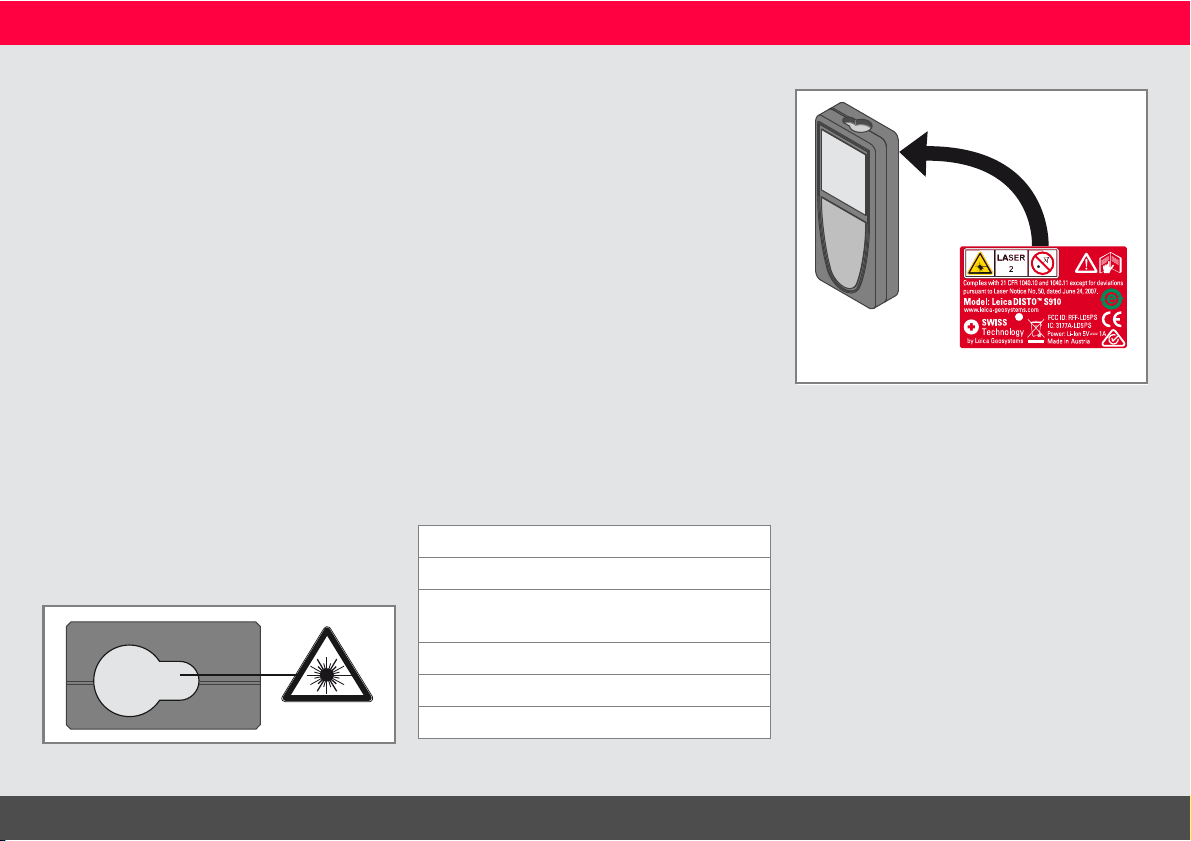
Laser classification - - - - - - - - - - - - - - - - - - - - - - - - - - - - - - - 53
Labelling - - - - - - - - - - - - - - - - - - - - - - - - - - - - - - - - - - - - - - 53
Leica DISTO
TM
S910 808167a
2
ENInstrument Set-up
Introduction
The safety instructions and the user manual should be read
through carefully before the product is used for the first time.
The person responsible for the product must ensure that all
users understand these directions and adhere to them.
The symbols used have the following meanings:
WARNING
Indicates a potentially hazardous situation or an unintended use
which, if not avoided, will result in death or serious injury.
CAUTION
Indicates a potentially hazardous situation or an unintended use
which, if not avoided, may result in minor injury and/or appreciable
material, financial and environmental damage.
Important paragraphs which must be adhered to in practice as
they enable the product to be used in a technically correct and
efficient manner.
i
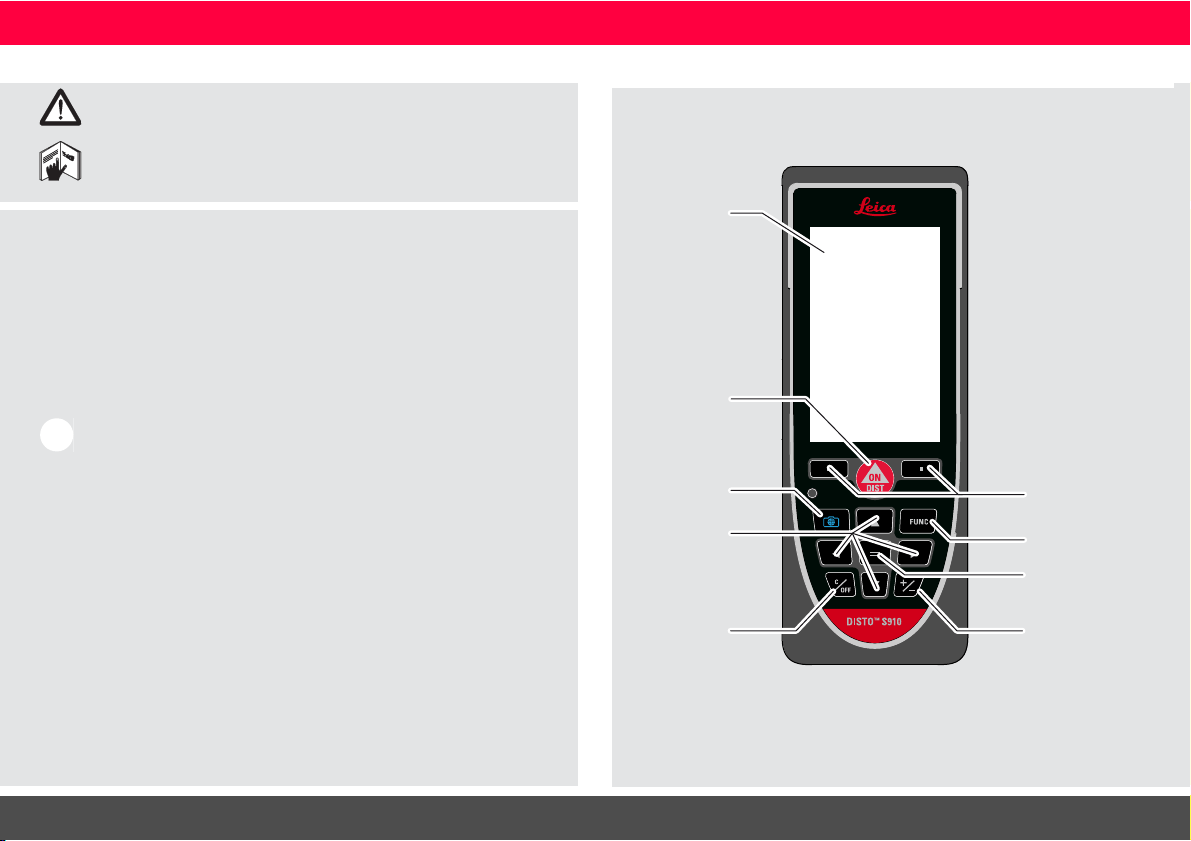
Overview
Display
On/Measure
Pointfinder
(Viewscreen)
Navigation
Clear / Off
Selection keys
linked to symbols
above
Enter / Equal
Function screen
Add / Subtract
Leica DISTO
TM
S910 808167a
3
ENInstrument Set-up
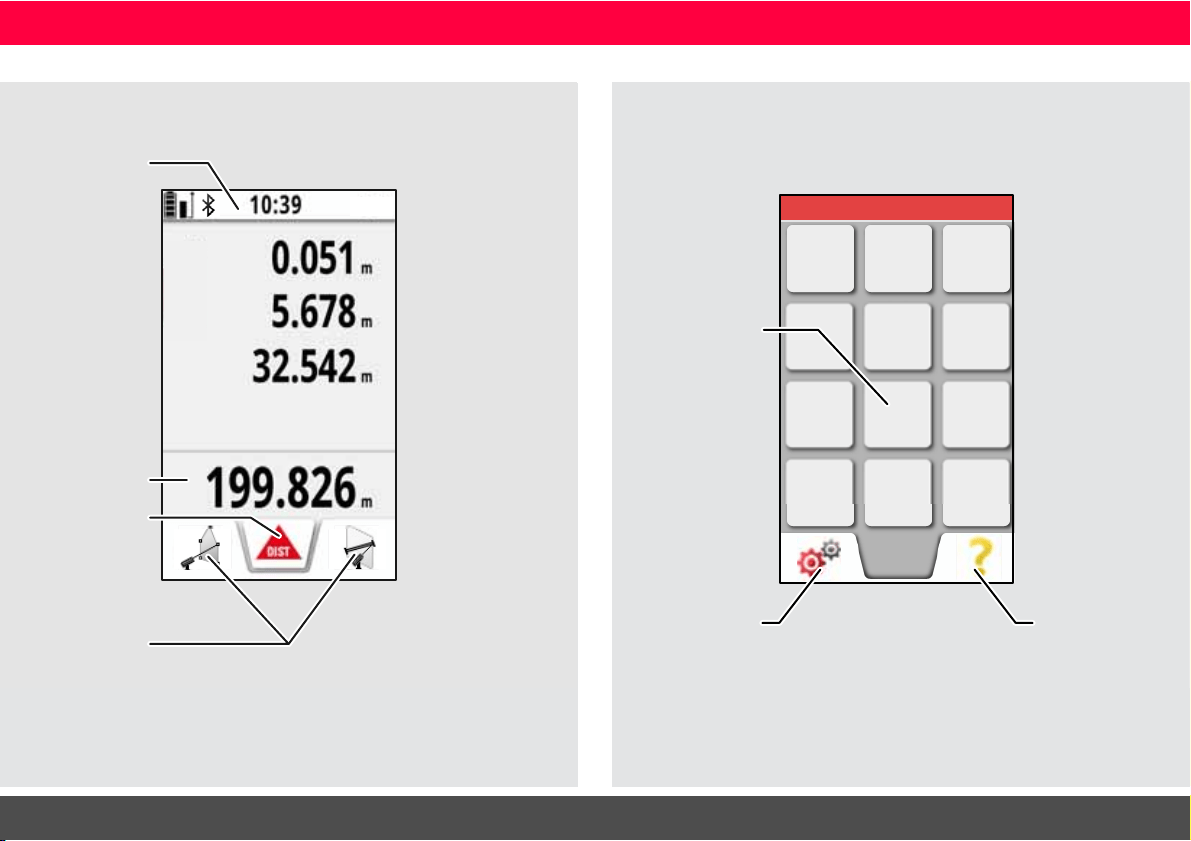
Basic measuring screen
Status bar
Favorites
Main line
Active function
Tap here to start
ON/DIST in a dis-
tance function
Selection screen
FUNC
Settings
Function /
Settings
Help function
Leica DISTO
TM
S910 808167a
4
ENInstrument Set-up
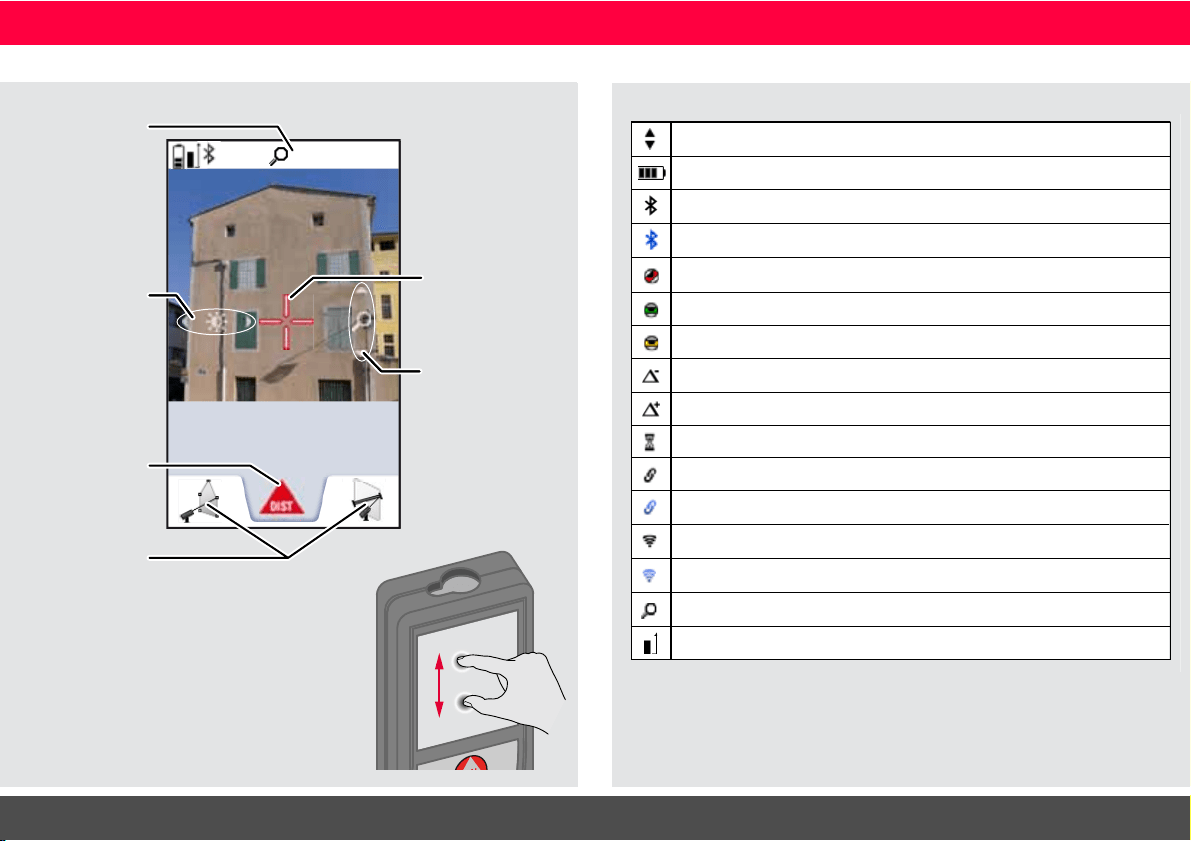
Pointfinder (Viewscreen)
1x
24.210
m
Zoom stage
Favorites
Illumination
adjustment
with navigation
keys left and
right
Active function
Zoom with
navigation keys
up and down
Crosshair
Spread 2 fingers apart to zoom
on the touch screen
Icons on Status bar
Scroll up and down for further results
Battery power
Bluetooth
®
is switched on
Bluetooth
®
connection established
Device is not leveled
Offset is activated and subtracts the defined value from measured distance
Offset is activated and adds the defined value from measured distance
WLAN client mode activated
DISTO™ connected as client to WLAN
Zoom
Device is leveled
DISTO™ WLAN hotspot activated
Other device connected to DISTO™ WLAN hotspot
Device is measuring
Measuring reference
Device was moved after leveling - affects measuring accuracy
Leica DISTO
TM
S910 808167a
5
ENInstrument Set-up
Charging the Li-Ion battery via USB
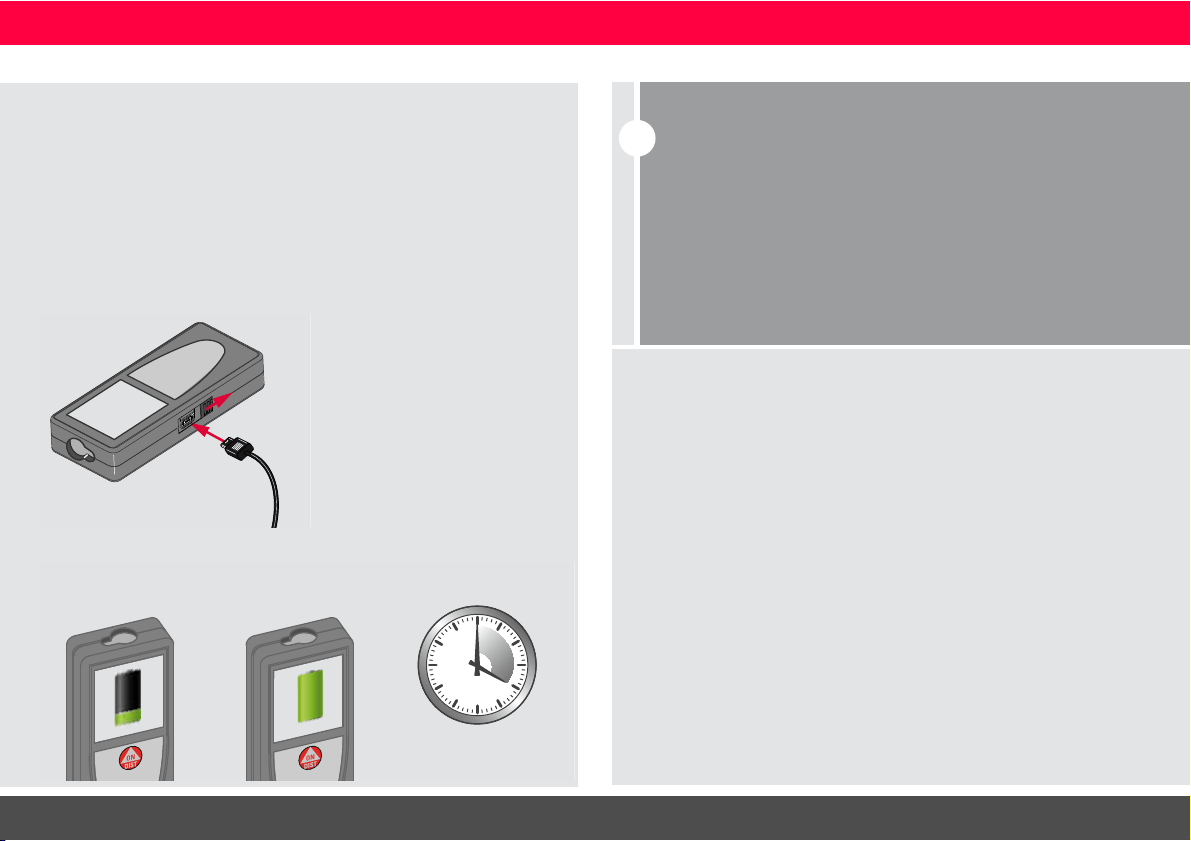
Charge the battery before using it for the first time. Use the
provided cable to charge the battery.
Plug the small end of the cable into the port of the device, and plug
the end of the charger into an electrical socket. Select the appro-
priate connector for your country. The device cannot be used while
it is charging.
The computer can also be used to charge the device, but this takes
more time. If the device is connected to the computer via USB
cable, you can download or delete the gallery. It is not possible
to upload any data.
When you charge the battery, the following icons show the status:
4
h
Charging Fully charged
CAUTION
Connecting the charger improperly may cause serious damage
to the device. Any damage caused by misuse is not covered by
the warranty. Use only Leica-approved chargers, batteries, and
cables. Unapproved chargers or cables can cause the battery
to explode or damage the device.
If the device is connected to the computer via USB cable, you
can download or delete the gallery. It is not possible to upload
any data.
i
Charge batteries when battery symbol is flashing.
While charging, the device may heat up. This is normal and should
not affect the device’s lifespan or performance. If the battery gets
hotter than 40°C / 104°F, the charger stops.
At a recommended storage temperature of -20°C to +30°C
(-4°F to +86°F), batteries containing a 50% to 100% charge can
be stored up to 1 year. After this storage period the batteries
must be recharged.
To save energy, unplug the charger when not in use.
Leica DISTO
TM
S910 808167a
6
ENInstrument Set-up
Using the Smart Base
Using the Smart Base Extension
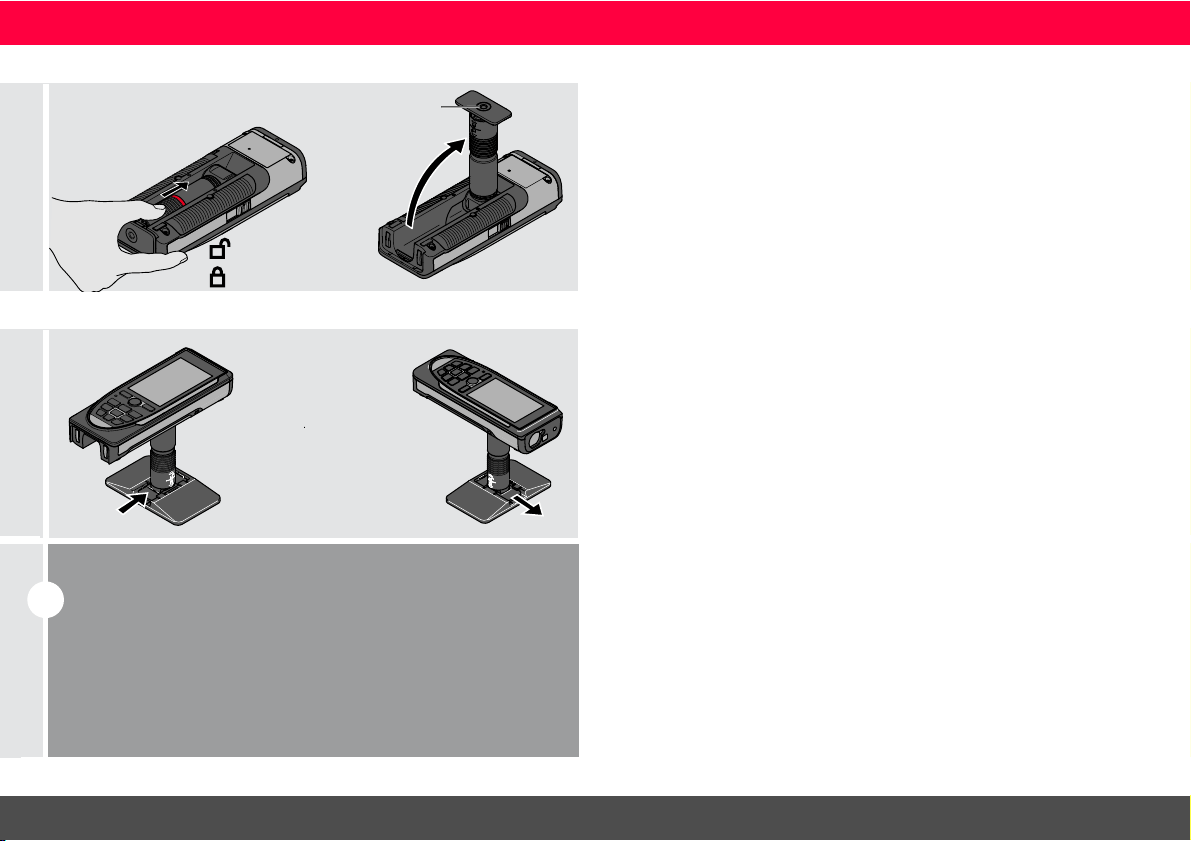
Unlock
Lock
Tripod or
Adapter thread
Fold out Smart Base.
Use it as mini tripod.
The Smart Base Extension
allows for stable targeting
without unintentionally tilt-
ing the device..
i
Do not move or tilt the Smartbase during measuring.
We recommend the use of a tripod with the Leica
FTA360-S adapter.
Leica DISTO
TM
S910 808167a
7
ENOperations
Operations
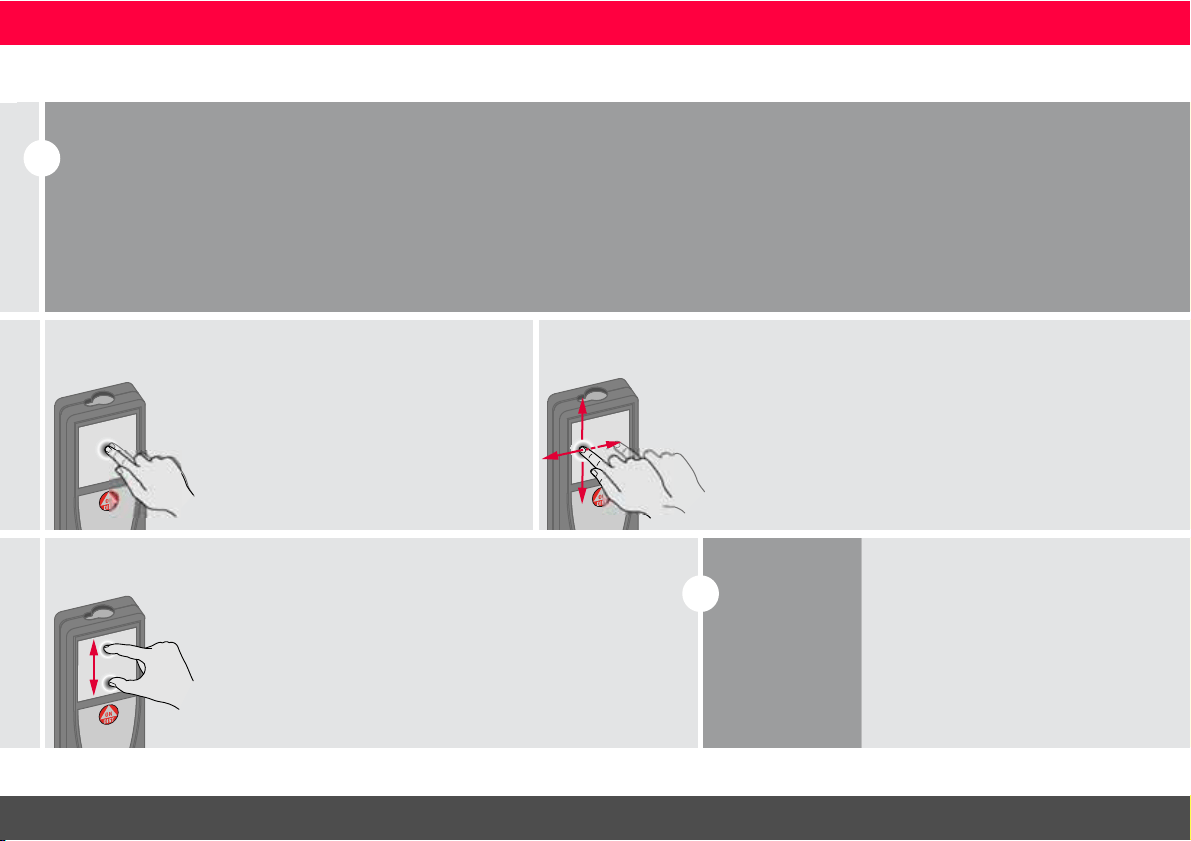
Using the Touch Screen
i
Use only fingers to use the touch screen.
Do not allow the touch screen to come into contact with other elec-
trical devices.
Electrostatic discharges can cause the touch screen to malfunction.
Do not allow the touch screen to contact water. The touch screen
may malfunction in humid conditions or when exposed to water.
To avoid damaging the touch screen, do not tap it with anything sharp
or do not apply excessive pressure to it with your fingertips.
Tapping
Tap on the display to open an on-
screen button or to make a selection.
Tapping on the icon in the middle of
the bottom line activates the distance
measurement or triggers the camera.
Dragging
Drag on the display to move to previous
or to next screen in the galerie function.
Pinching
Spread 2 fingers apart to zoom if
pointfinder is activated
.
i
Instead of using
the touch
screen, the nor-
mal keypad but-
tons can be
used also.
Leica DISTO
TM
S910 808167a
8
ENOperations
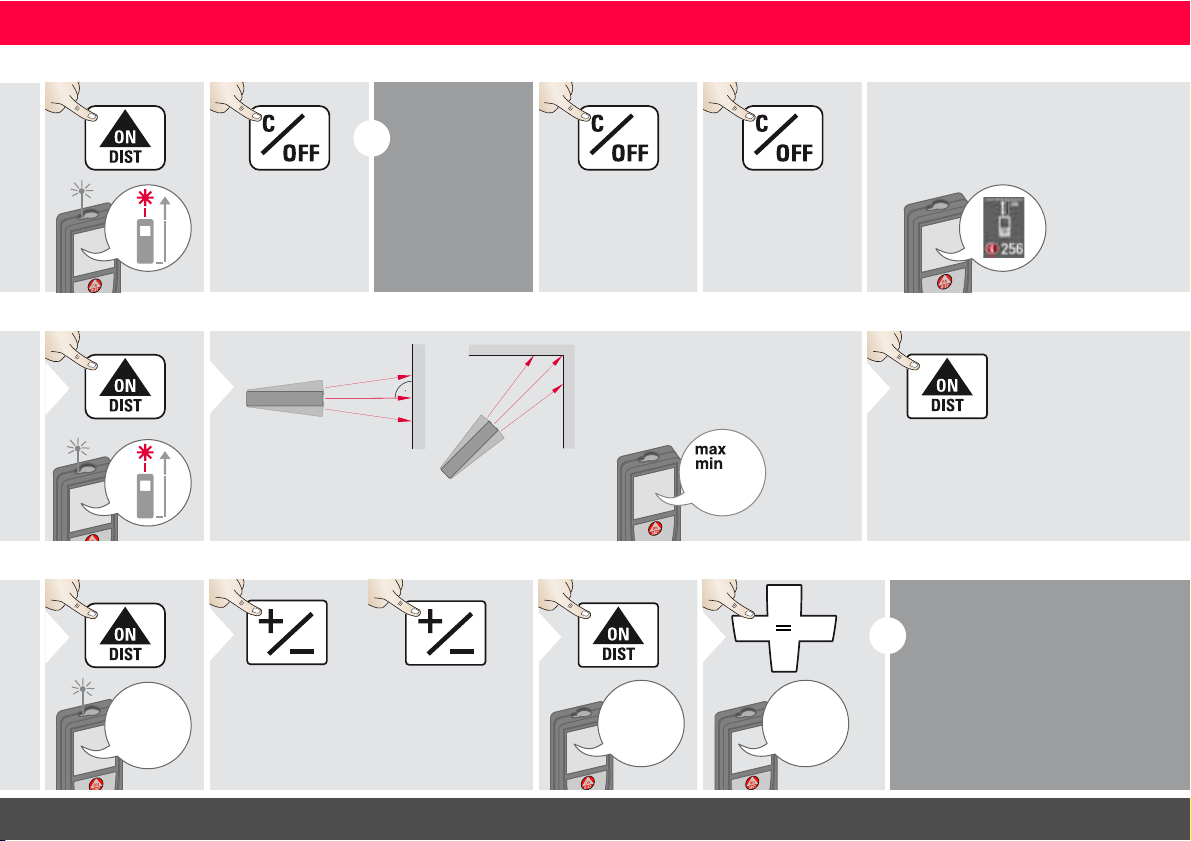
Switching ON/OFF Clear Message Codes
ON
OFF
2 sec
Device is turned
OFF.
i
If no key is
pressed for 180
sec, the device
switches off au-
tomatically.
1x
Undo last action.
2x
Leave actual func-
tion, go to default
operation mode.
If the info icon appears with a
number, observe the instructions in
section "Message Codes".
Example:
Permanent / Minimum-Maximum measuring
1
2 sec
8.532 m
Used to measure room diagonals (maximum val-
ues) or horizontal distance (minimum values)
The minimum and maximum dis-
tance measured is displayed (min,
max.). The last value measured is
displayed in the main line.
min.
max.
2
Stops permanent / minimum-
maximum measuring.
3
Add / Subtract
7.332 m
1
The next meas-
urement is added
to the previous
one.
2
The next meas-
urement is sub-
tracted from the
previous one.
2x
7.332 m
12.847 m
3
20.179 m
4
i
This process can be repeated as
required. The same process can
be used for adding or subtracting
areas or volumes.
Leica DISTO
TM
S910 808167a
9
ENOperations
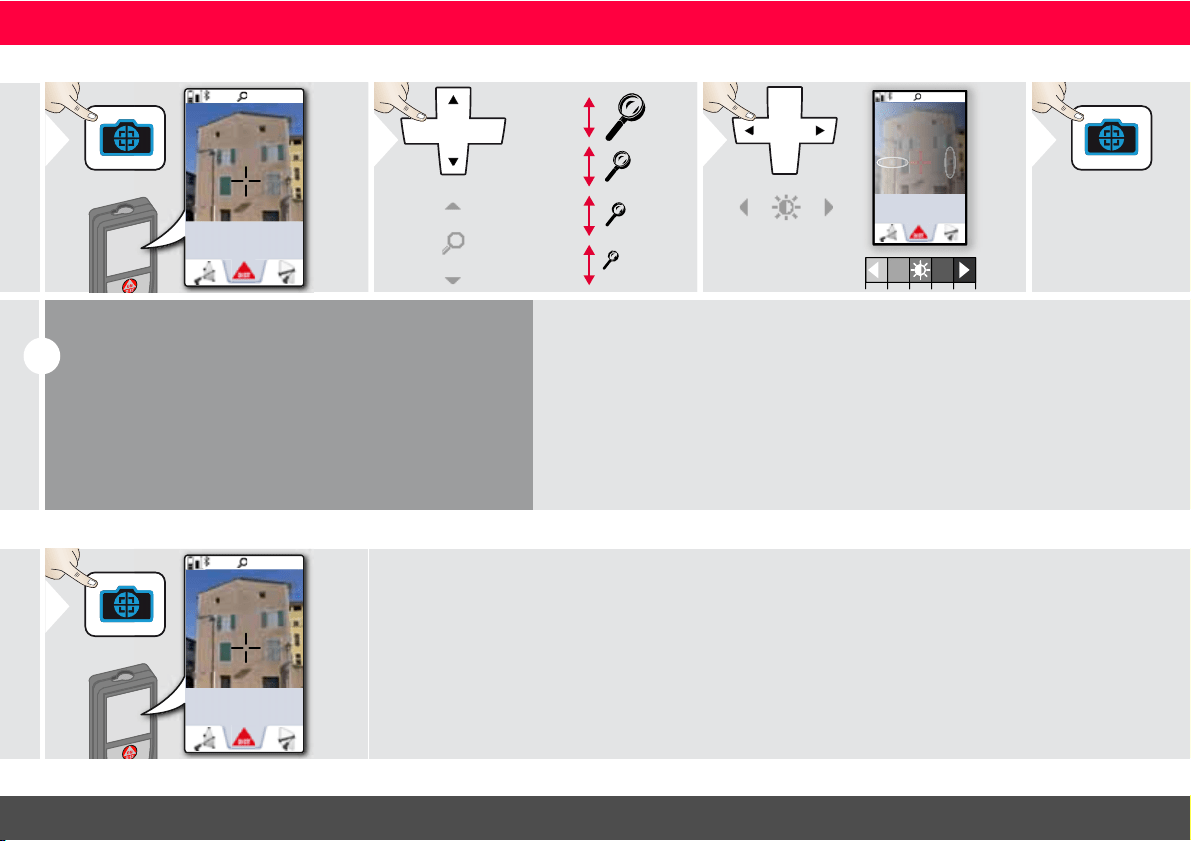
Pointfinder (Viewscreen)
1x
0.00
m
1
OV
*
1x
2x
4x
2
1x
0.00
m
3
Exit pointfinder
(viewscreen).
4
i
This is a great help for outdoor measuring. The integrated
pointfinder (viewscreen) shows the target on the display.
The device measures in the middle of the cross hair, even if
the laser dot is not visible.
Parallax errors occur when the pointfinder camera is used
on close targets, with the effect that the laser appears dis-
placed in the crosshair. In this case the error is automatically
corrected with a shift of the crosshair.
* OV = Overview
Screenshot
1x
0.00
m
1
2 sec
Screenshot photo is saved in gallery.
Leica DISTO
TM
S910 808167a
10
ENOperations
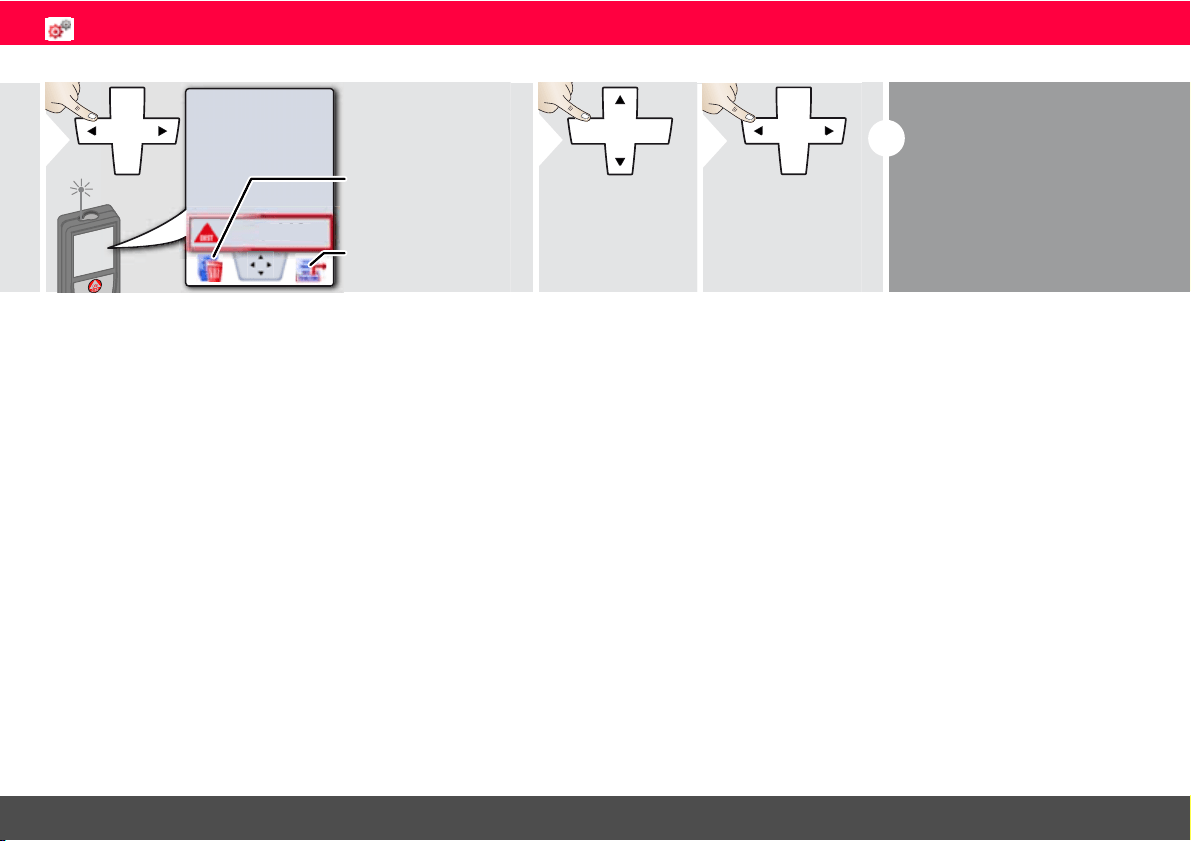
Memory
8.449 m
8
.4
4
9
m
1
Take over value for
further actions.
Delete memory.
2
Use Up/Down
navigation keys to
show more detailed
results of the speci-
fic measurement.
3
Use Left/Right
navigation keys to
switch between
measurements.
i
Pointfinder needs to be
switched off.
Leica DISTO
TM
S910 808167a
11
ENSettings
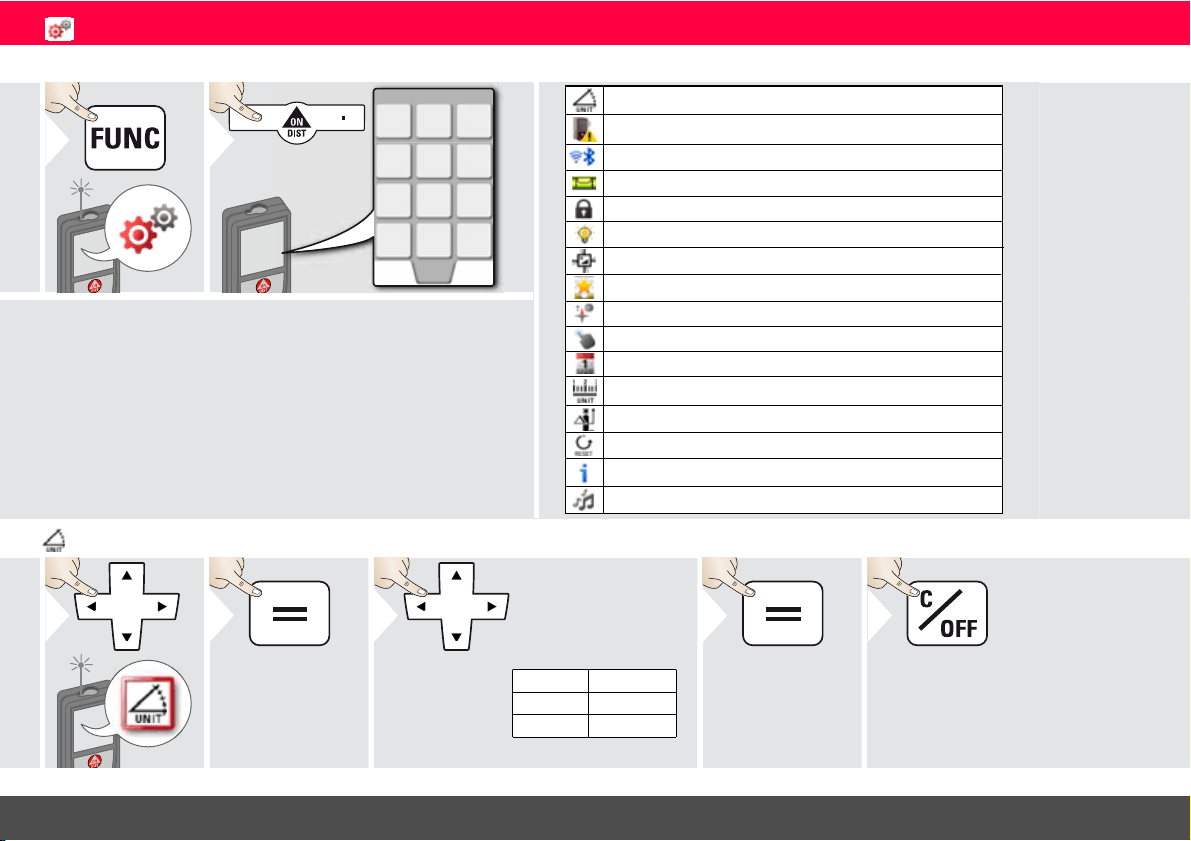
Overview
1
2
Move Alert
WLAN / Bluetooth
®
Digital level
Keypad lock
Illumination
Favorites
Compass adjustment
Touch screen
Reset
Information/Software Update
Beep
Tilt calibration
Distance units
Offset
Date and Time
Tilt units
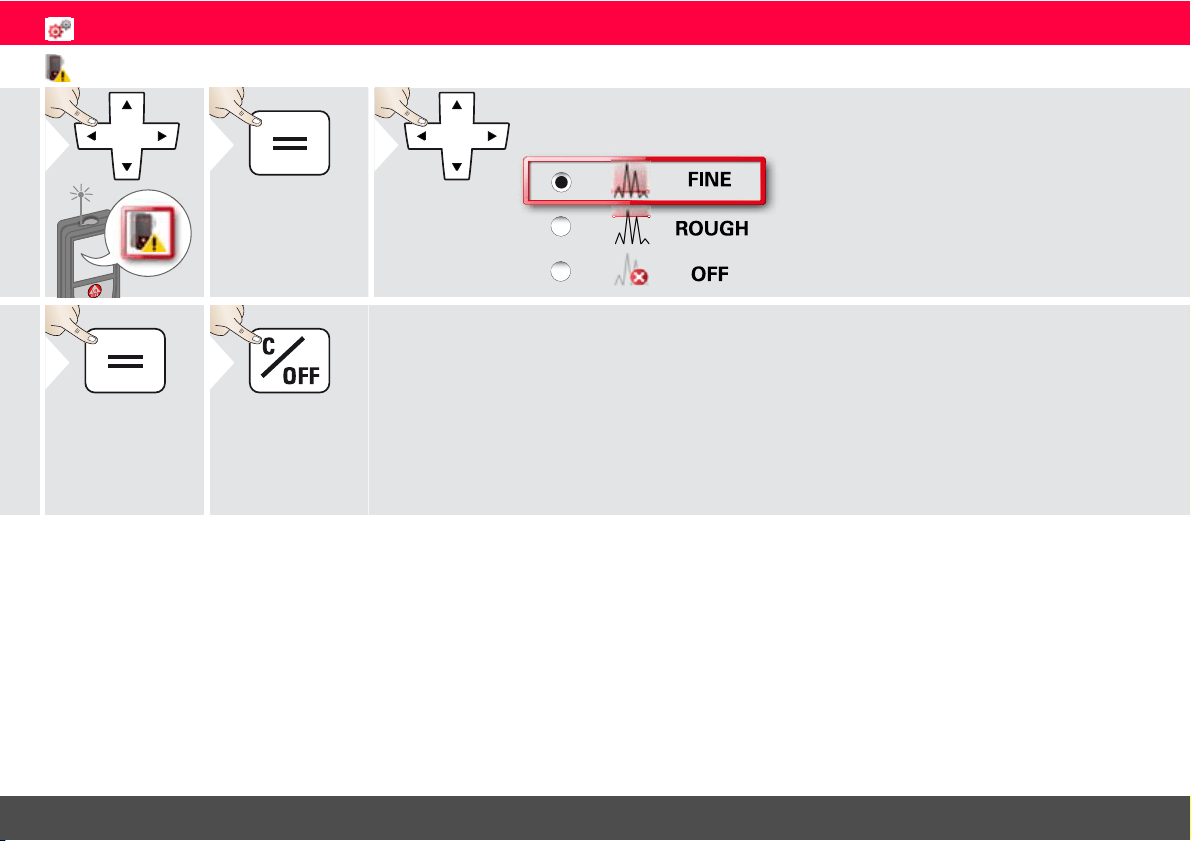
Tilt units
1
2
360.0°
± 180.0°
± 90.0°
0.00 %
0.0 mm/m
0.00 in/ft
Switch between the
following units:
3
4
Confirm setting.
Exit settings.
5
Leica DISTO
TM
S910 808167a
12
ENSettings
Move Alert of Levelling
1
2
3
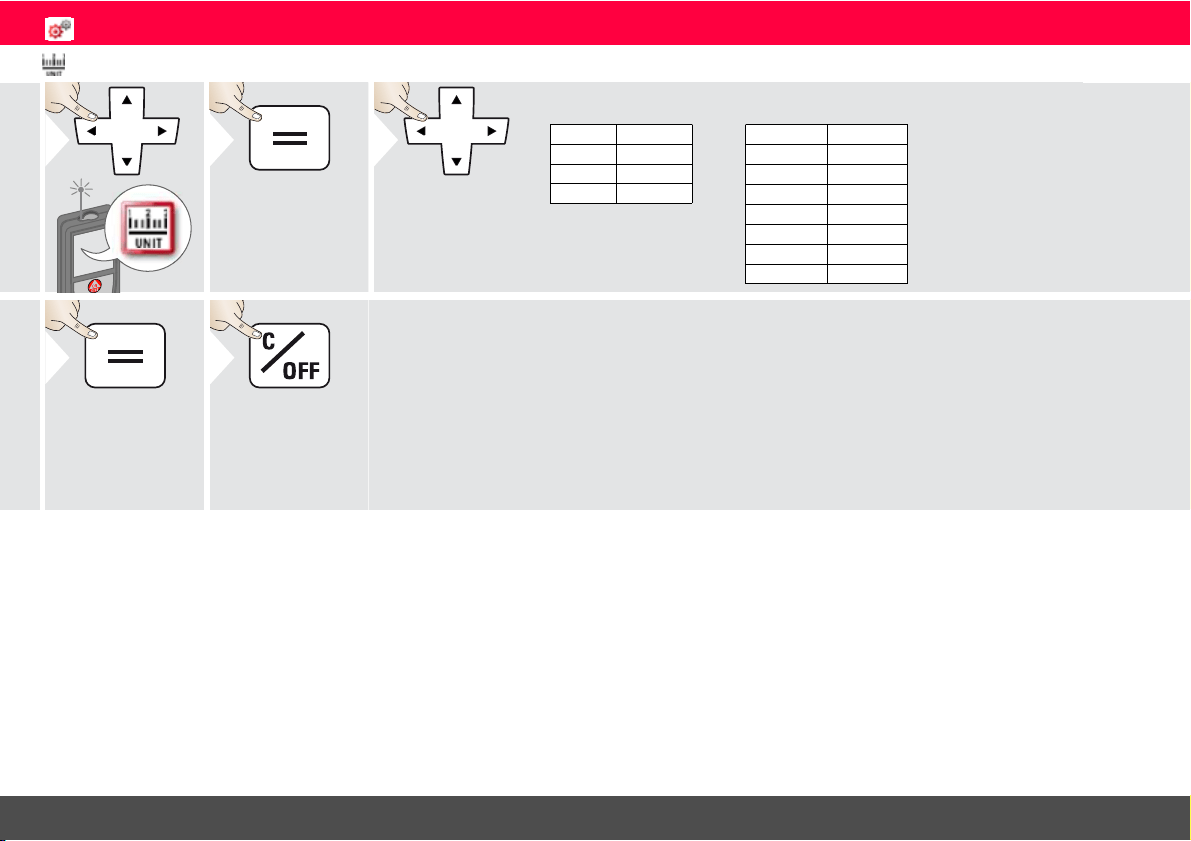
Choose the sensitivity of the levelling, which is
needed for some measuring functions.
FINE means, that the levelling of the device is sen-
sitive to any small vibrations.
Choose ROUGH when working in harsh con-
struction environment with many shocks and vi-
brations. In this case the accuracy is decreased in
correlation with the movements.
4
Confirm setting.
5
Exit settings.
Leica DISTO
TM
S910 808167a
13
ENSettings
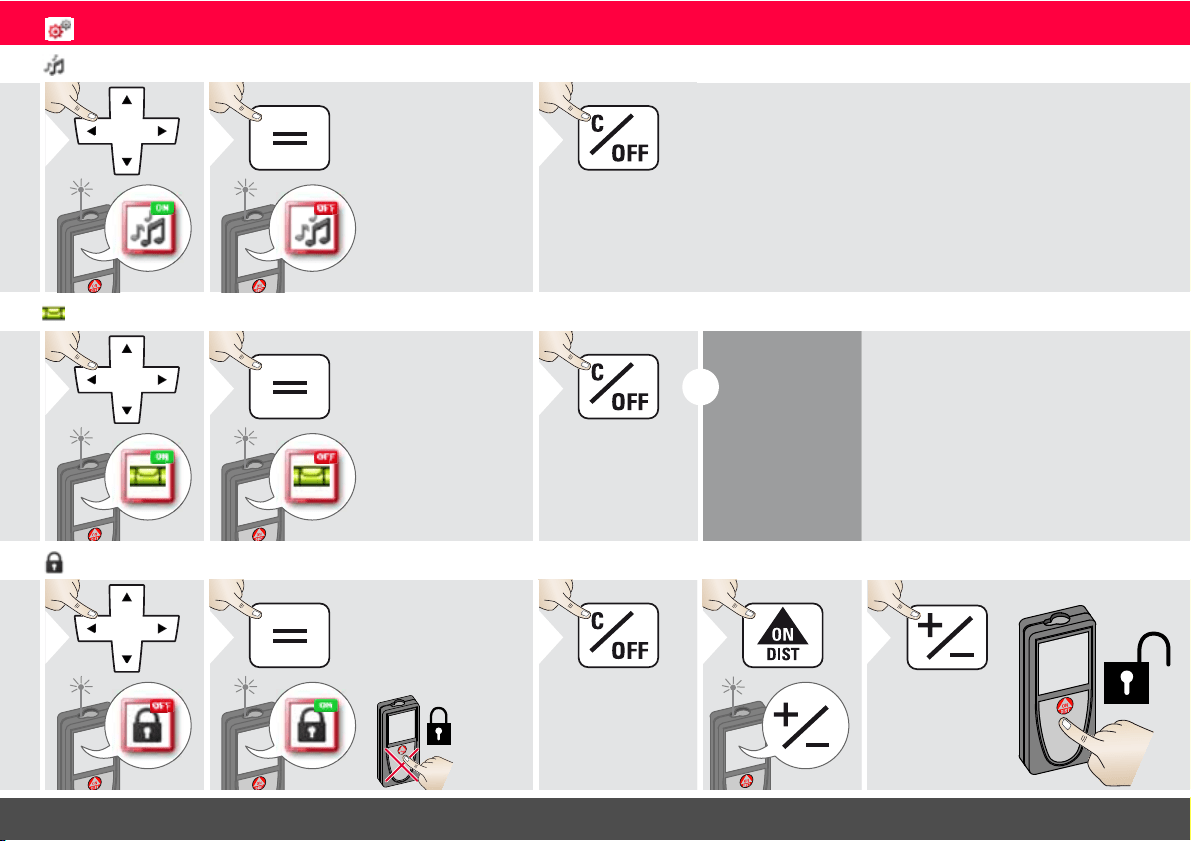
Distance units
1
2
0.00 m
0.000 m
0.0000 m
0.0 mm
0.00 ft
0.00 in
0 in 1/32
0'00" 1/32
0.00 m
0.000 m
0.0000 m
0.0 mm
0.00 ft
0
'
00
"
1/32
0
'
00
"
1/16
0
'
00
"
1/8
0
'
00
"
1/4
0.00 in
0 in 1/32
0 in 1/16
0 in 1/8
0 in 1/4
0.000 yd
Art. No. 805080:
3
US-Model Art. No. 808183:
Switch between
the following
units:
4
Confirm setting.
Exit settings.
5
Leica DISTO
TM
S910 808167a
14
ENSettings
Beep ON/OFF
1
ON
2
To switch ON,
repeat procedure.
OFF
Exit settings.
3
Digital level ON/OFF
1
ON
2
To switch ON,
repeat procedure.
OFF
Exit settings.
3
i
The digital level
is displayed in
the status bar.
De-/Activate keylock Switch on with keylock
1
OFF
2
To deactivate, repeat
procedure. The keylock
is active if device is
switched off.
ON
Exit settings.
3
1
within
2 sec
2
Leica DISTO
TM
S910 808167a
15
ENSettings
Bluetooth
®
/WLAN
1
ON
OFF
O
F
F
2
OFF
Explanation see
info box below.
Special Settings for
data transfer.
Exit settings.
3
i
Bluetooth
®
/WLAN is switched
on and black Bluetooth
®
/WLAN
icon is displayed in status bar.
If connection is established the
color of the icon changes to blue.
i
Special Bluetooth
®
Settings
Figure Mode: Use this mode if the data needs to be transferred in
figures, e.g. working with spread sheets. Ft/in fractional is converted
into ft/in decimal. An additional press on the Bluetooth
®
Settings Icon
allows further adjustments for data transfer.
Text Mode: Use this mode if the data needs to be transferred as text,
e.g. working with word processing programs.
App Mode: Use this mode to transfer the data using an App.
Special properties: ENCRYPTED is the default setting. In case of trou-
ble with data transfer, select mode UNENCRYPTED.
Allows the arrow keys to move the cursor on your computer.
sends the value of the main line to the computer.
Allows the arrow keys to move the cursor on your computer.
sends the value of the main line to the computer.
Device is connected. Favorites disappear and two softkeys appear:
Device is connected. Favorites disappear and two softkeys appear:
i
Special WLAN Settings
Available WLAN network can be choosen with
the possibility to enter a password.
Recommended for GIS applications.
WLAN: DISTO™ acts as hotspot.
Data transfer unsecured or secured with serial
number as password. Recommended for stand-
ard use.

Leica DISTO
TM
S910 808167a
16
ENSettings
i
Connect the device with your smart phone, tablet, laptop,…
The actual measurement is transferred automatically if Blue-
tooth
®
connection is established. To transfer a result from
the main line, press =. Bluetooth
®
switches off as soon as the
laser distance meter is switched off.
We provide no warranty for free DISTO
™
software and of-
fer no support for it. We accept no liability whatsoever
arising from the use of the free software and we are not
obliged to provide corrections nor to develop upgrades. A
wide range of commercial software can be found on our
homepage. Apps for Android
®
or Mac iOS can be found in
special internet shops.
For more details, see our homepage.
The efficient and innovative Bluetooth
®
Smart module
(with the new Bluetooth
®
standard V4.0) works together
with all Bluetooth
®
Smart Ready devices. All other Blue-
tooth
®
devices do not support the energy saving Blue-
tooth
®
Smart Module, which is integrated in the device.
Bluetooth
®
data transfer
i
Only data from the function Point Data transmission can be
transferred with WLAN. A corresponding program is need-
ed to receive the data, e.g. DISTO
™
transfer.
For more details, see our homepage.
WLAN data transfer

Leica DISTO
TM
S910 808167a
17
ENSettings
Calibration of tilt sensor (Tilt Calibration)
1
2
3
Place device on absolutely flat surface.
180°
4
180°
5
Turn the device horizontally by 180°
and place it again on absolutely flat
surface.
6
7
Place device on absolutely flat surface.
180°
8
180°
9
Turn the device horizontally by 180°
and place it again on absolutely flat
surface.
10
i
After 2 sec
the device
goes back to
the basic
mode.
Leica DISTO
TM
S910 808167a
18
ENSettings
Personalized favorites
1
Favorite
2
3
Select favorite
function.
4
Press selection
key left or right.
Function is set as
favorite above the
corresponding se-
lection key.
i
Select your favorite functions for
quick access.
Short cut:
Press 2 sec on a selection-key in
the measuring mode. Select your
favorite function and press again
short on the corresponding se-
lection key.
Illumination
1
1/6
2
1/6
2/6
3/6
4/6
5/6
6/6
3
Select brightness.
4
Confirm setting.
Exit settings.
5
i
To save
power re-
duce bright-
ness if not
necessary.
Touch Screen ON/OFF
1
OFF
2
To deactivate, repeat
procedure.
ON
Exit settings.
3
Leica DISTO
TM
S910 808167a
19
ENSettings
Date and Time
1
2
00 : 00
3
Set time
(hh:mm)
2013-04-08
4
Set date
(yyyy-mm-dd)
Exit settings.
5
Compass Adjustment
i
Depending on your geographic location, the angle of declination may vary from
other locations, as the geographic and magnetic poles are aligned. However, if the
reference location is not selected, the difference in declination between the poles
can differ greatly. For best results, select the nearest geographic reference point
using the steps below.
Adjusting the magnetic declination
1
2
CH -Züric h
3
Select the nearest loca-
tion and the device ad-
justs the declination
accordingly.
4
Confirm
Back
Exit settings.
5
Leica DISTO
TM
S910 808167a
20
ENSettings
Offset
1
2
1.012 m
3
Select digit.
1.012 m
4
Adjust digit.
5
Approve
value.
Exit settings.
6
i
An offset adds or subtracts a
specified value automatically to or
from all measurements. This func-
tion allows tolerances to be taken
into account. The offset icon is
displayed.
Reset
1
2
Second confirmation with selection
keys:
3
Refuse:
Confirm:
Exit settings.
4
i
Reset returns the instrument to
the factory settings. All custom-
ized settings and memories are
lost.
A HARDWARE-RESET is
done by pressing 15 sec on
ON/DIST key.
Leica DISTO
TM
S910 808167a
21
ENSettings
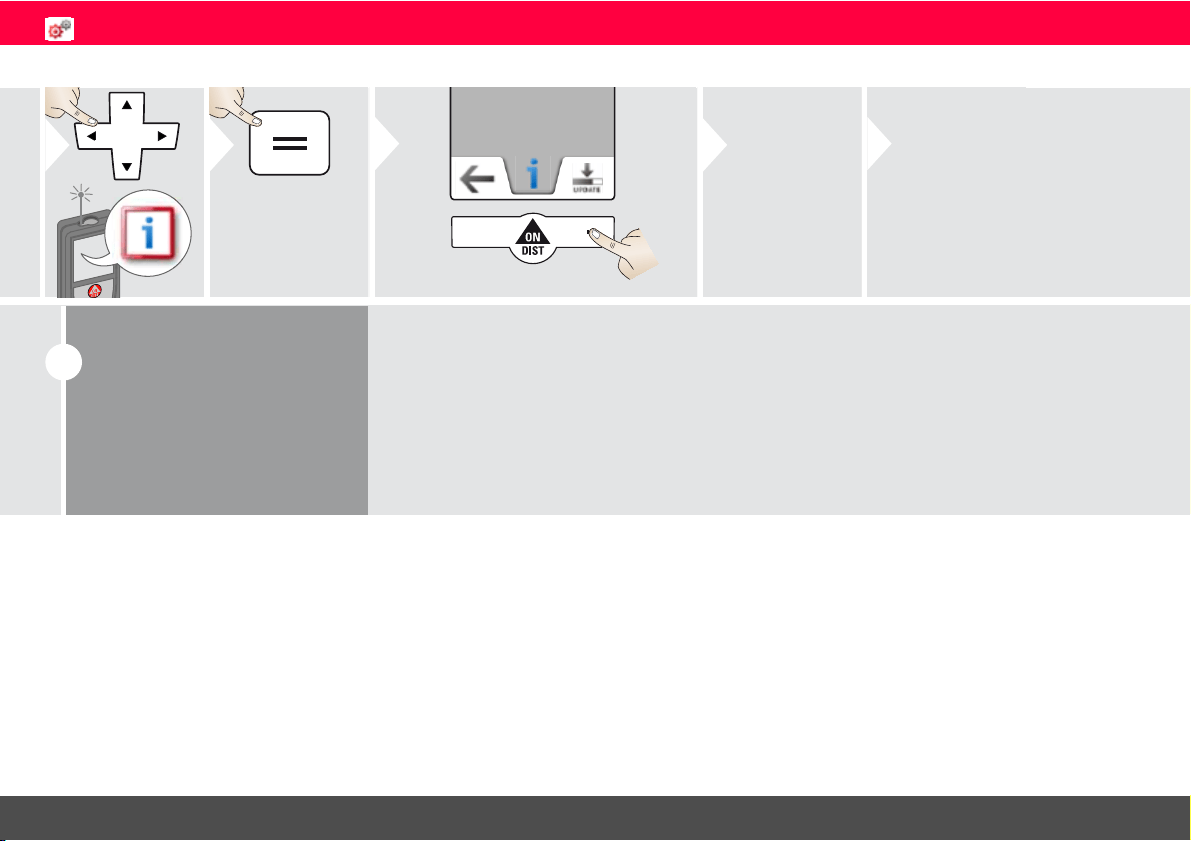
Information/Software Update
1
2
3
4
Connect the
device with
USB to your
computer.
5
Software updates with corre-
spondent instructions can be
found on our homepage
www.disto.com.
i
Make sure that you use
always the newest soft-
ware version.
Leica DISTO
TM
S910 808167a
22
ENFunctions
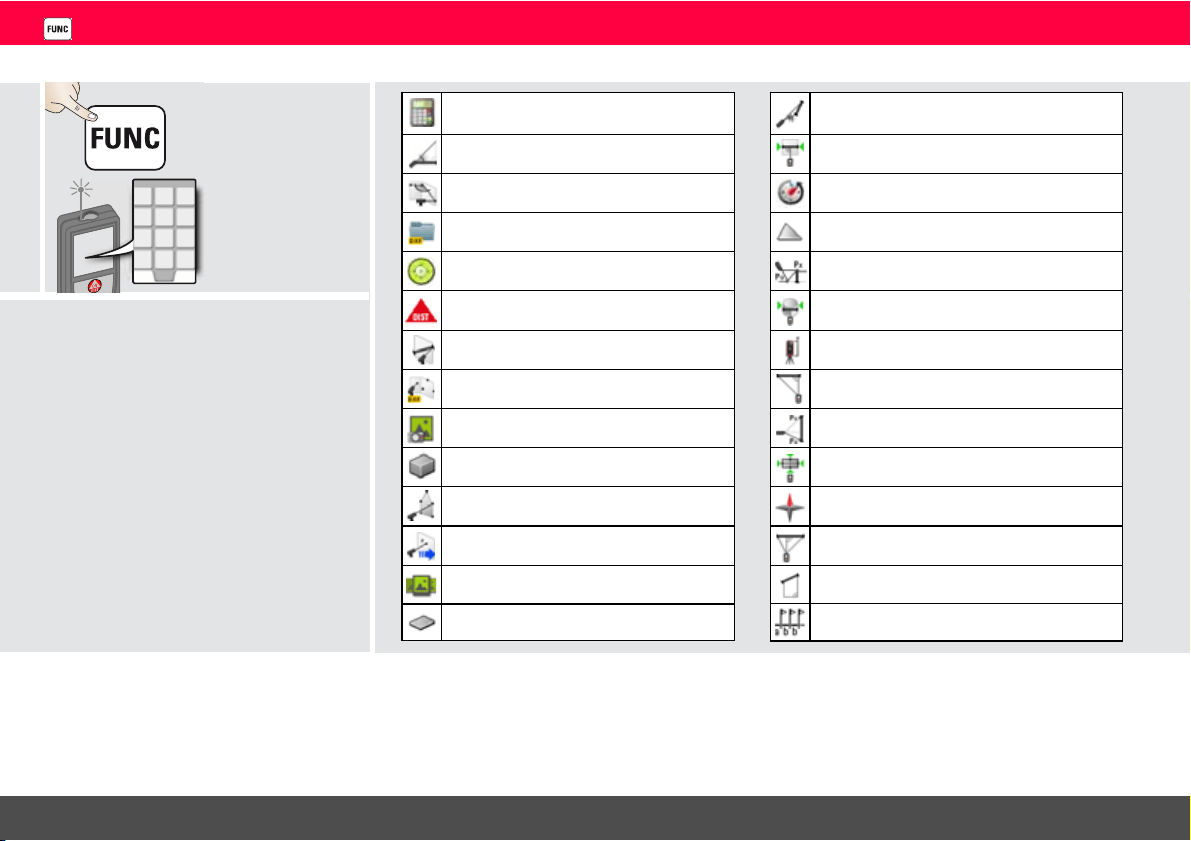
Overview
Timer
WLAN data transmission
Smart Angle measurement
Level
Photo
DXF Folder
DXF data capture
Area
Height Tracking
Smart Horizontal Mode
Measuring on sloped objects
Pythagoras (2-point)
Volume
Calculator
Width
Stake out
Diameter
Trapezium
Gallery
Area from Photo
Adjusting measuring reference
Pythagoras (3-point)
Single Distance measurement
Point to point measurements
Smart Area measurement
Triangular area
Compass
Height-profile Measurement
Leica DISTO
TM
S910 808167a
23
ENFunctions
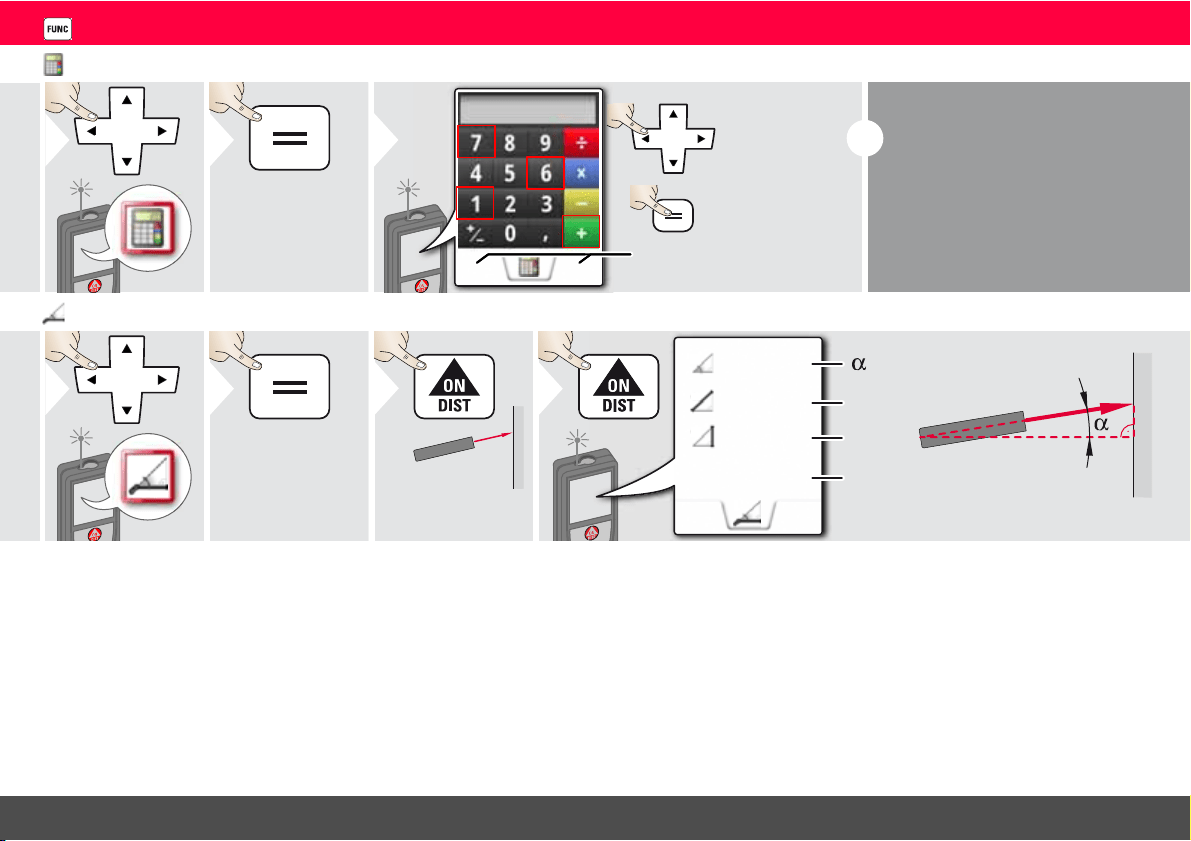
Calculator
1
2
C/CE
=
3
Select key on
display.
Confirm every
key.
Use selection keys for
clear or result.
i
The measurement result from the
main line is taken over to the calcula-
tor and can be used for further calcu-
lations.
Ft/in fractions are converted into
ft/in decimal.
To take over a result from the calcu-
lator in the basic mode press DIST
before leaving the calculator function.
Smart Horizontal Mode
1
2
Aim laser at
target.
3
z
x
y
40.8 °
x
y
z
5.204 m
0.032 m
4.827 m
4
(up to 360° and a transverse
tilt of ±10°)
Leica DISTO
TM
S910 808167a
24
ENFunctions
Smart Angle measurement
1
2
1
3
Aim laser at point
on first wall.
4
2
5
Aim laser at corner.
6
3
7
Aim laser at point
on second wall.
1.246m
5.269m
D
D
89.56°
8
Continues distance and
angle measurement.
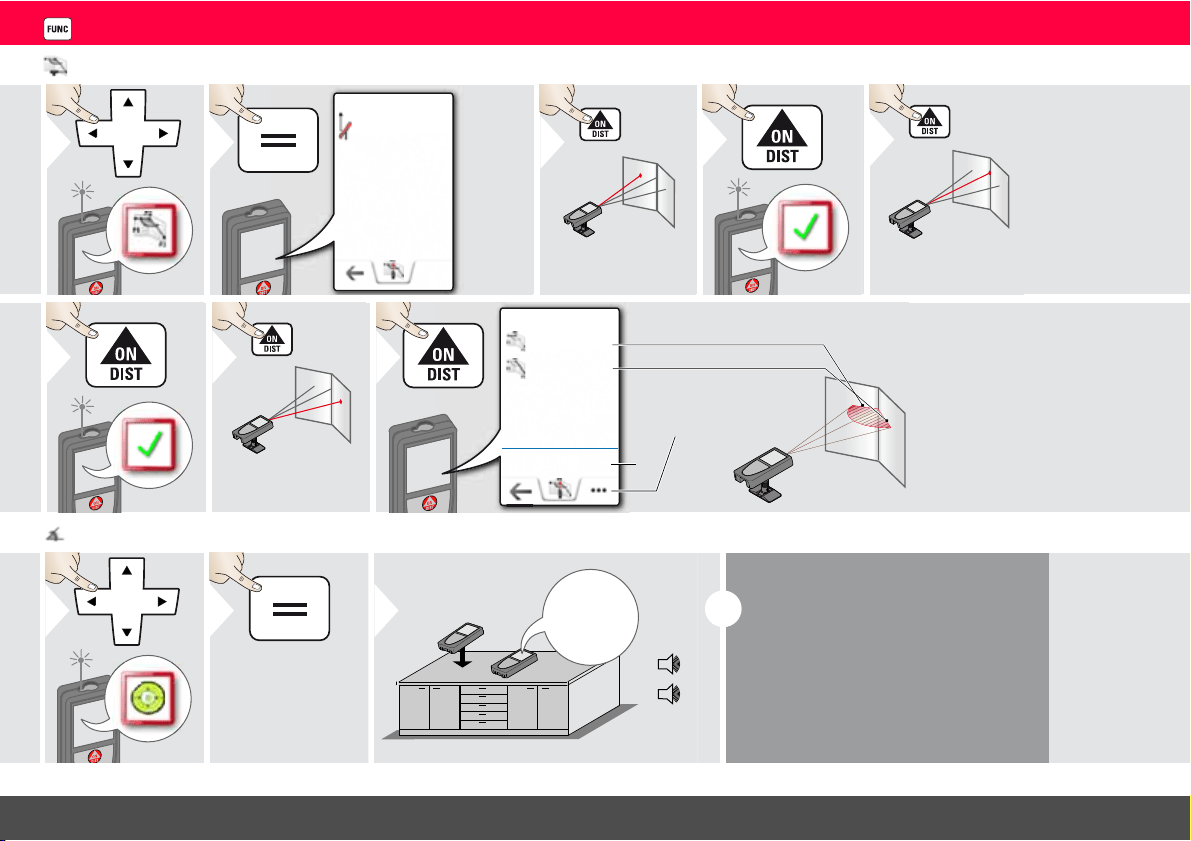
Level
1
2
0.3°
90°
0°
3
i
Displays inclinations of 360° with a
transverse inclination of +/- 10°. In-
strument beeps at 0° and 90°. Ideal
for horizontal or vertical adjustments.
Leica DISTO
TM
S910 808167a
25
ENFunctions
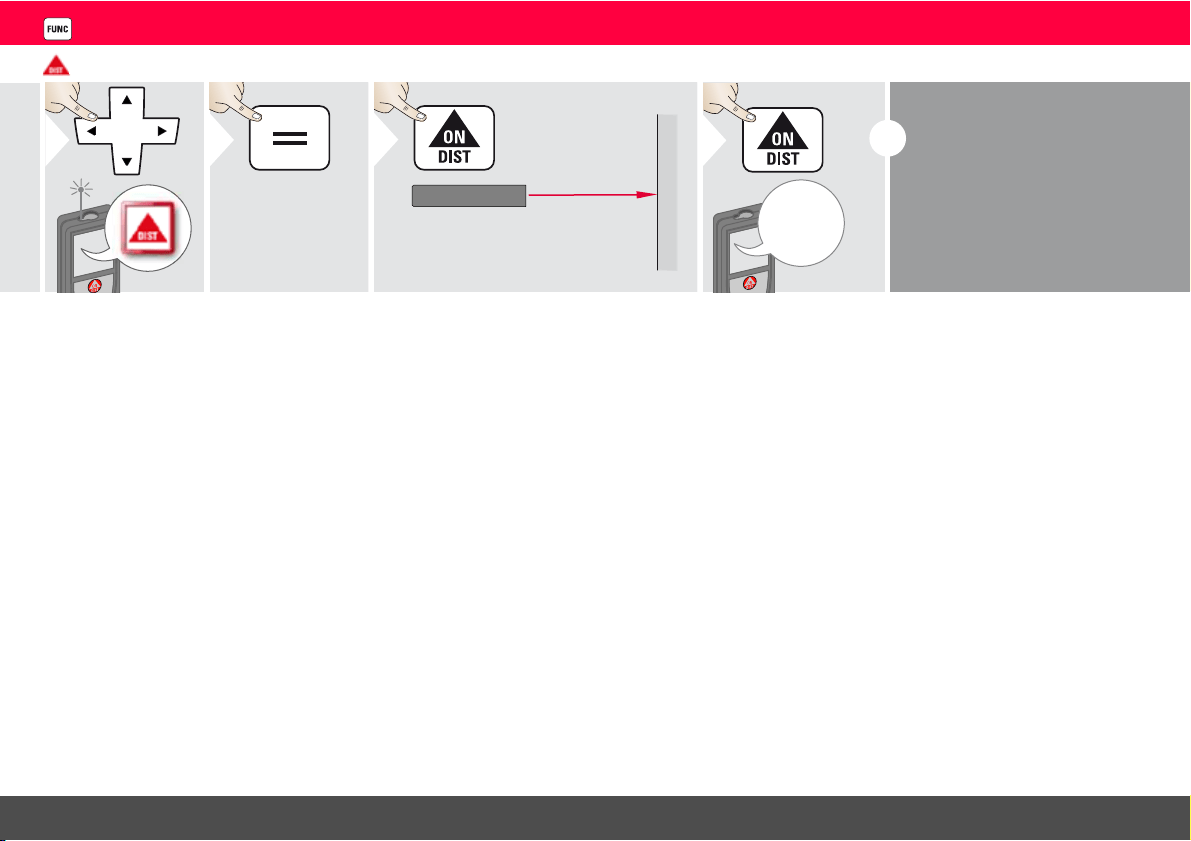
Measuring single distance
1
2
Aim active laser at target.
3
8.532 m
4
i
Target surfaces:
Measuring errors can occur when
measuring to colourless liquids,
glass, styrofoam or semi-permea-
ble surfaces or when aiming at
high gloss surfaces. Against dark
surfaces the measuring time in-
creases.
Leica DISTO
TM
S910 808167a
26
ENFunctions
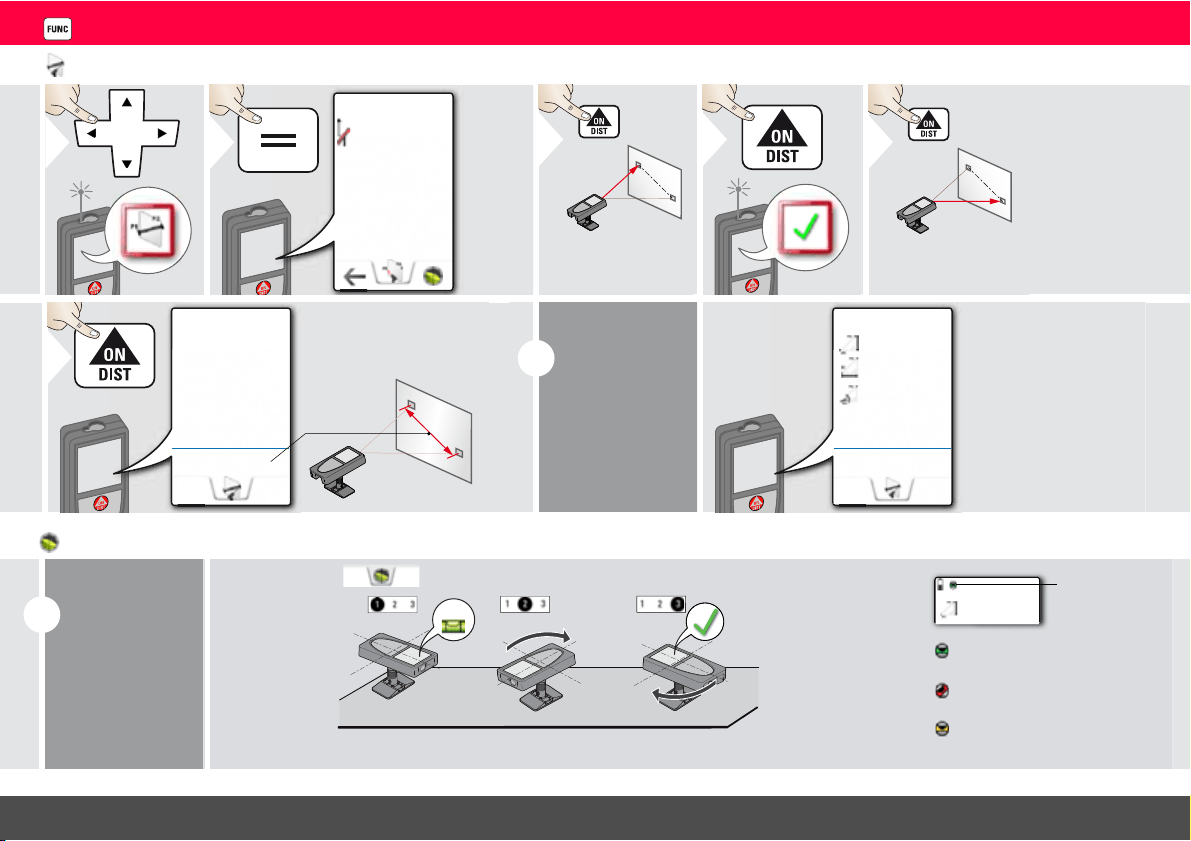
Point to point measurements
1
P1
2
Initialize
device for
vertical and
horizontal
values.
See "Level-
ling".
1
3
Aim laser at first
target.
4
2
5
Aim laser at second
target.
13.207m
6
i
Level the device
and further
values are
displayed !
Do not move
Smart Base
after levelling!
-1.697
m
2.419
m
35.06°
2.995m
Levelling
i
Level the device
to get more
measuring data.
Do not move
device after
levelling.
90°
90°
±5°
-1.697m
Rotate the device
two times clock-
wise 90°. Follow
the instructions on
the display. Level-
ling is finished when
OK icon appears
on the display.
For levelling,
Smart Base has
to be folded out
and device needs
to be in an incli-
nation range of
+/-5°.
Check status
line:
indicates proper levelling
indicates insufficient levelling
indicates that smart base was tilt-
ed and can affect measuring ac-
curacy
Leica DISTO
TM
S910 808167a
27
ENFunctions
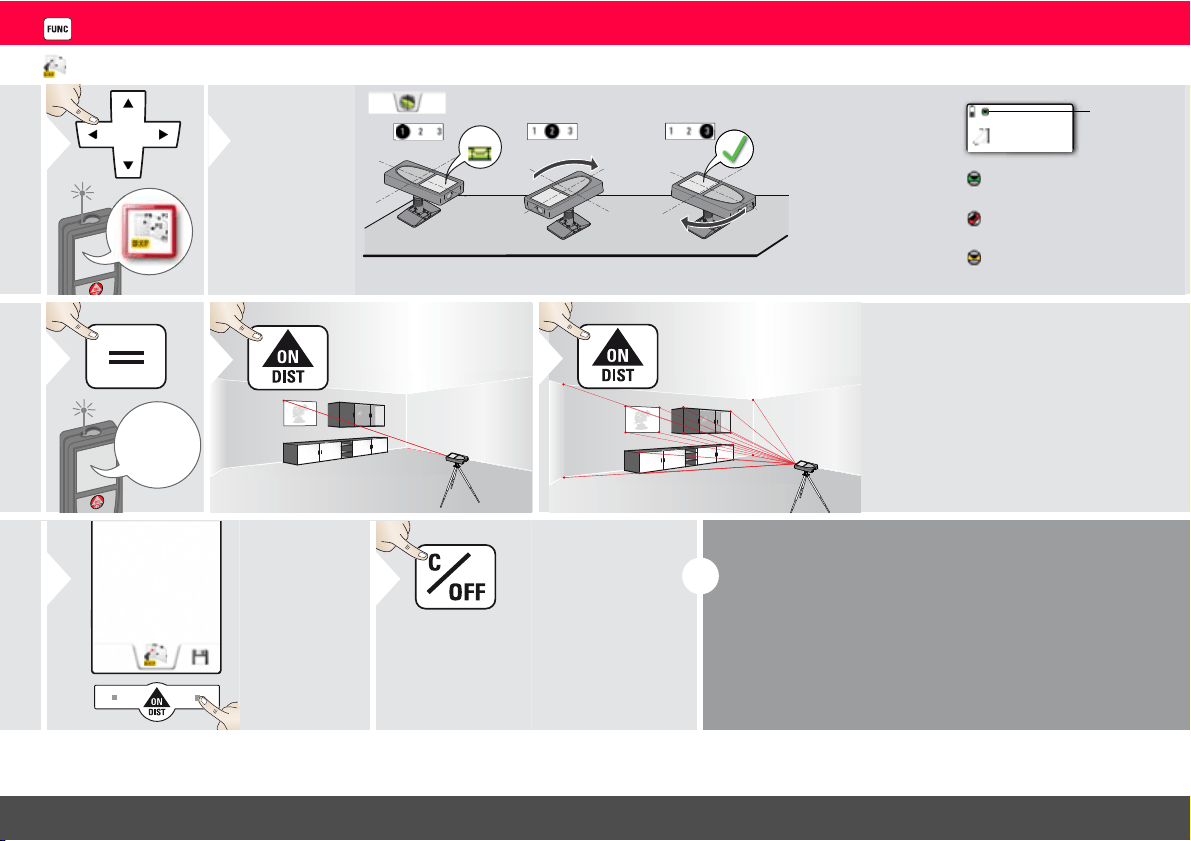
DXF data capture
1
90°
90°
±5°
-1.697m
2
Levelling is man-
datory!
For levelling,
Smart Base has
to be folded out
and device
needs to be in
an inclination
range of +/-5°.
Check
status
line:
indicates proper levelling
indicates insufficient level-
ling
Rotate the device
two times clockwise
90°. Follow the in-
structions on the dis-
play. Levelling is
finished when OK
icon appears on the
display.
Do not move device after levelling!
indicates that smart base was
tilted and can affect measur-
ing accuracy
P
3
4
Aim at first point.
5
Aim at additional
points (max. 30)
6
Stops DXF
capture and
saves data.
7
Leave actual
function, go to
default opera-
tion mode.
2x
i
Max. 20 DXF files can be generated (with 30 meas-
uring points/photos each).
If pointfinder is switched on, the corresponding
photos are saved with a resolution of 300 x 400 dpi.
Do not forget to save your data!
Leica DISTO
TM
S910 808167a
28
ENFunctions
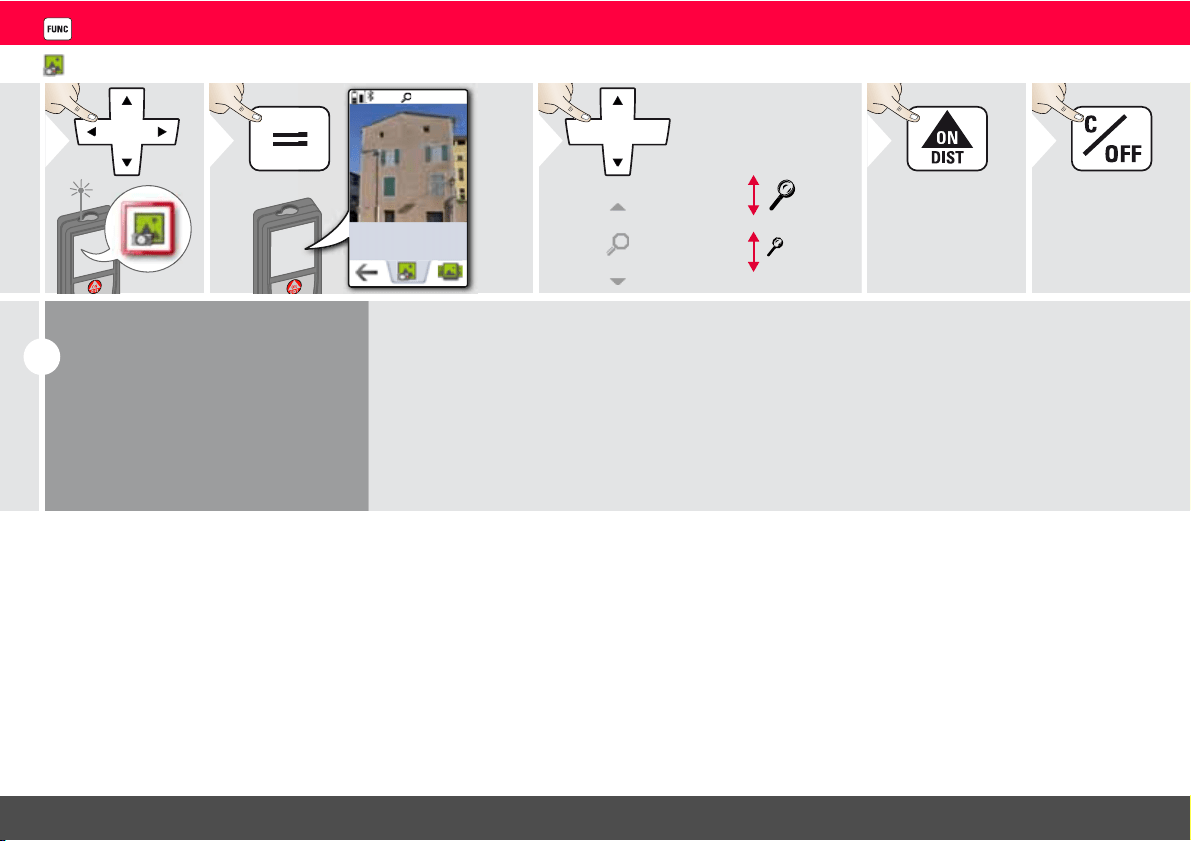
Photo
1
1x
2
OV
*
2x
3
Take photo.
4
Exit.
5
i
Tap on the camera icon in the mid-
dle of the bottom line to take a pho-
to.
For screenshots, press camera key
for 2 sec.
* OV = Overview
Leica DISTO
TM
S910 808167a
29
ENFunctions
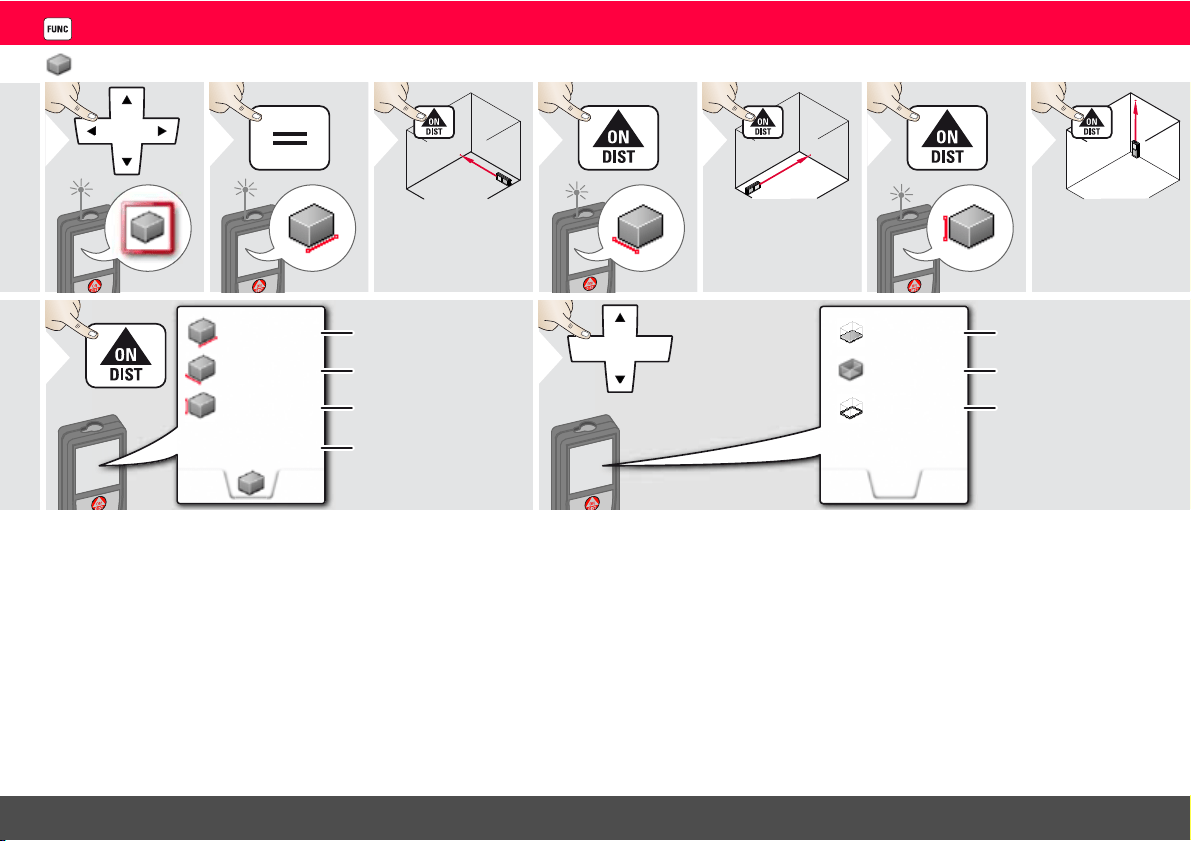
Volume
1
2
3
Aim laser at first
target point.
4
5
Aim laser at sec-
ond target point.
6
7
Aim laser at third
target point.
2.431 m
2.338 m
5.744 m
32.653 m
3
First distance
Second distance
Third distance
Volume
8
16.164 m
39.300 m
2
13.430 m
2
9
Use Up/Down
navigation keys to
show more re-
sults.
Ceiling/floor area
Wall areas
Circumference
Leica DISTO
TM
S910 808167a
30
ENFunctions
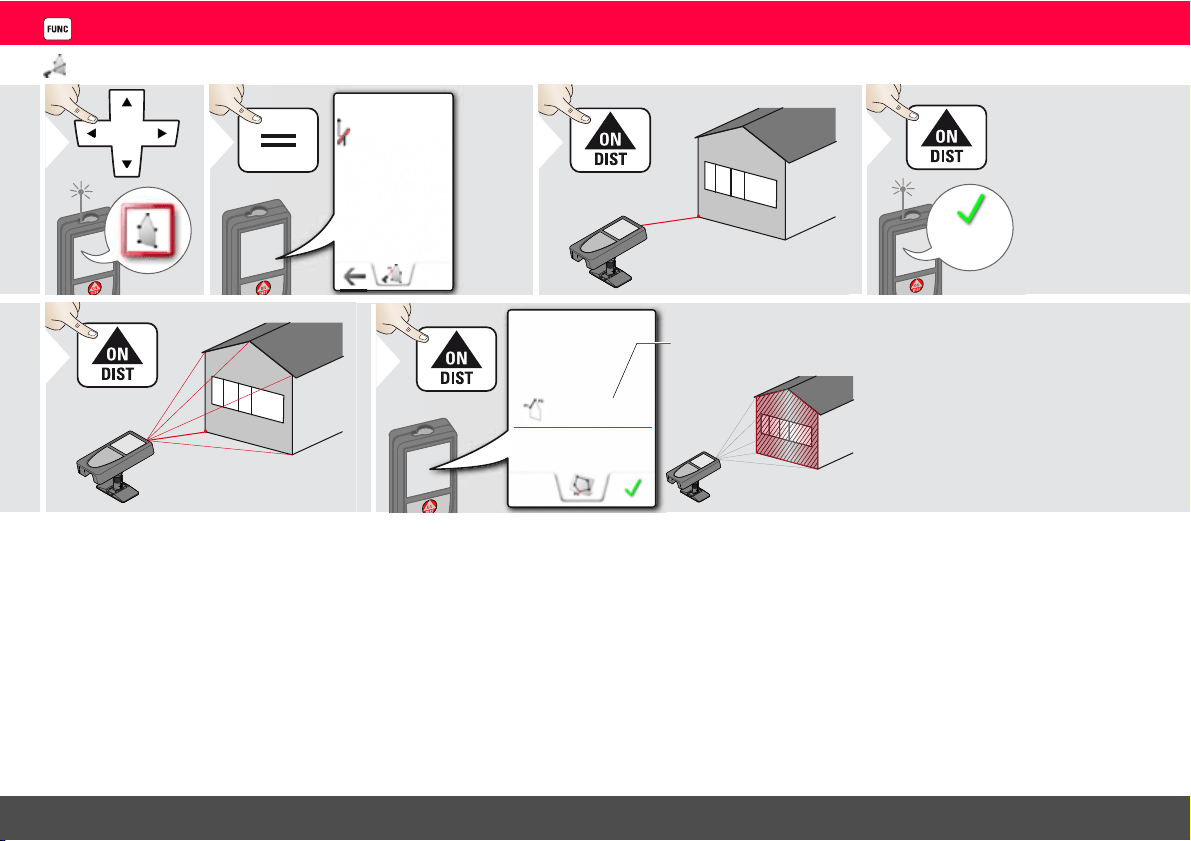
Smart Area measurement
1
2
1
3
Aim at first point.
5.873m
4
1
1
2
3
4
5
5
Aim at additional points
(max. 30)
84.675
m
2
2.075
m
6
Point to Point distance between the last
two measured points
Leica DISTO
TM
S910 808167a
31
ENFunctions
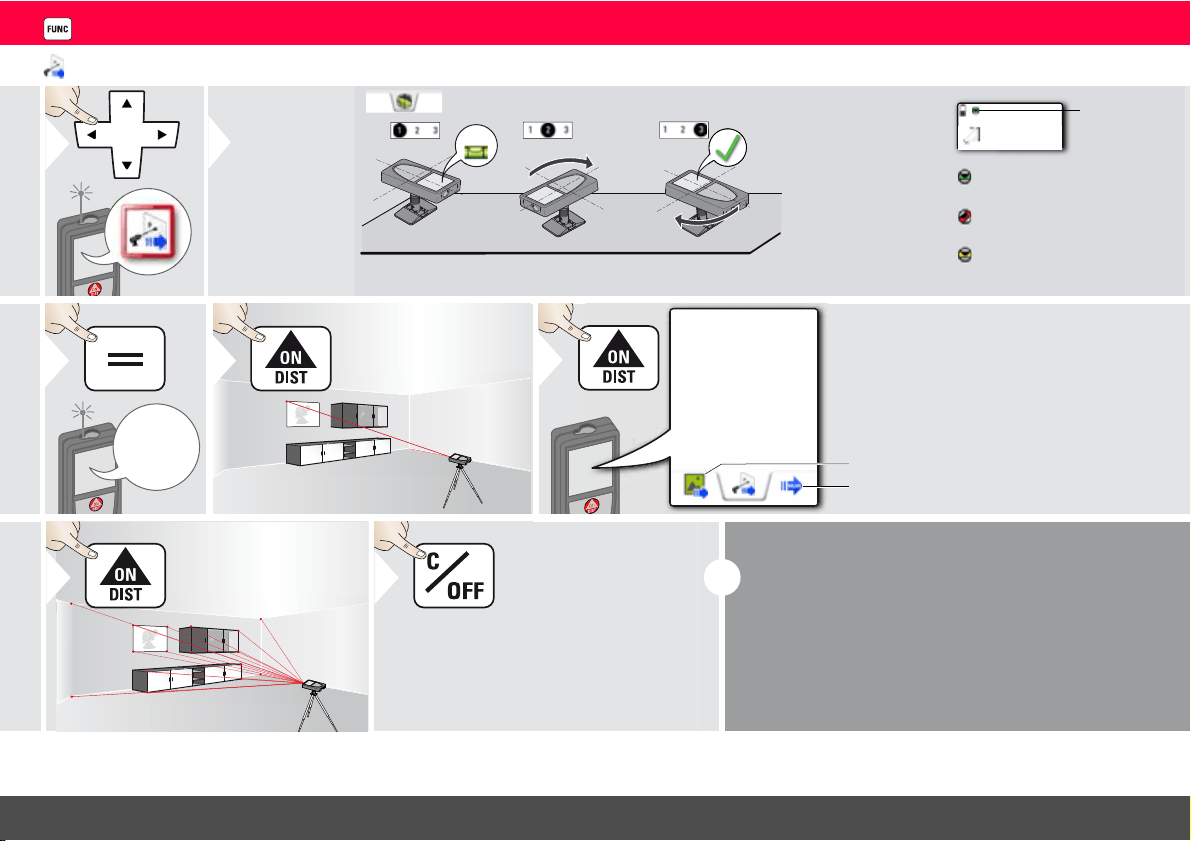
WLAN data transmission
1
90°
90°
±5°
-1.697m
2
For levelling,
Smart Base has
to be folded out
and device
needs to be in
an inclination
range of +/-5°.
Check
status
line:
indicates proper levelling
indicates insufficient levelling
Rotate the device
two times clockwise
90°. Follow the in-
structions on the dis-
play. Levelling is
finished when OK
icon appears on the
display.
Do not move device after levelling!
indicates that smart base was
tilted and can affect measur-
ing accuracy
P
3
4
Aim laser at first
point.
13.207 m
5
WLAN data transfer
of point coordinates
with pointfinder photo
without pointfinder photo
6
Aim at additional
points.
Leave actual function, go to
default operation mode.
7
2x
i
If smart base is folded out, device sends x,y,z coordi-
nates of measured point. If smart base is not folded
out, device sends only inclination and slope distance.
If WLAN is switched off, the device requests to
switch on WLAN.
Data transfer works only with WLAN.
Leica DISTO
TM
S910 808167a
32
ENFunctions
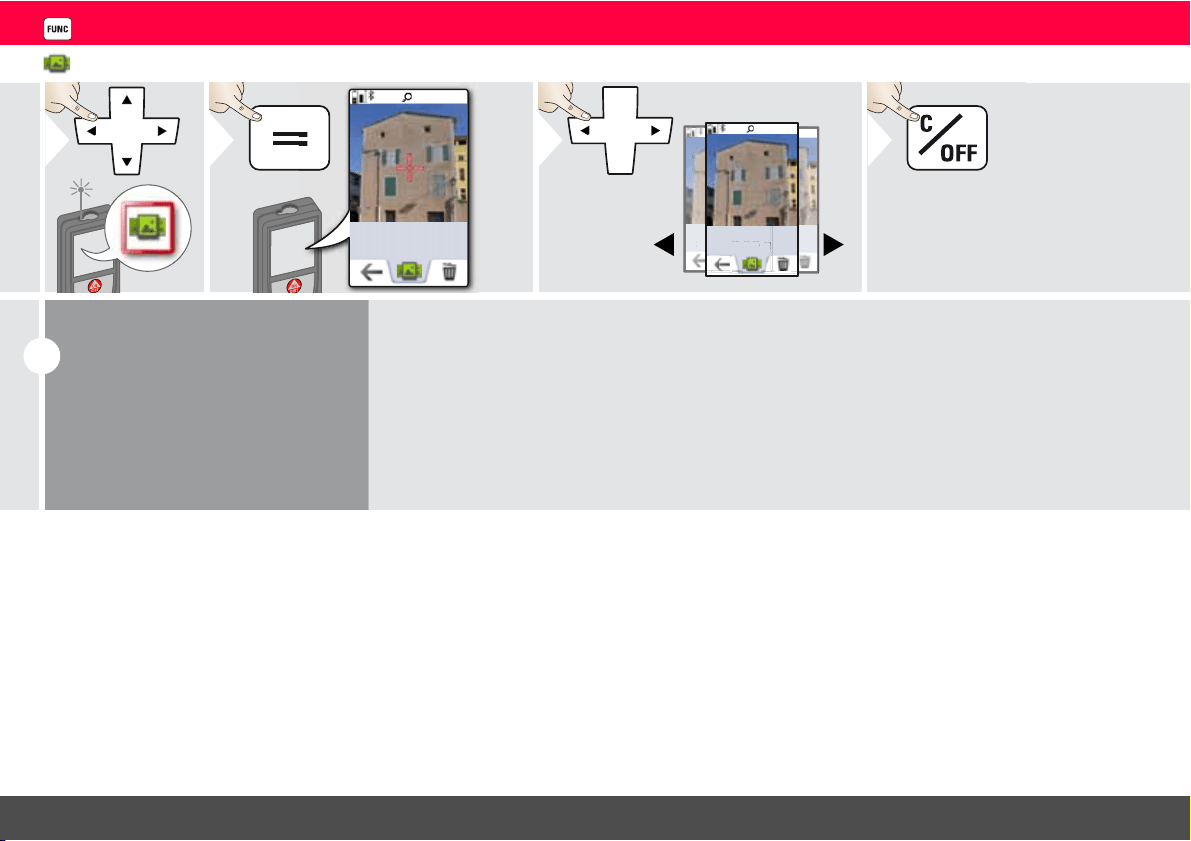
Gallery
1
1x
2
1x
2013 - 07 - 03_13:25
201
1x
2013 - 07 - 03_13:25
:25
1x
13
-
0
7 -
03_13:25
- 03_
13:
03
- 07
_13
:
25
_13:25
7
1x
2013 - 07 - 03_13:25
3
Exit.
4
i
If the device is connected to the
computer via USB cable, you can
download or delete the gallery. It is
not possible to upload any data.
Leica DISTO
TM
S910 808167a
33
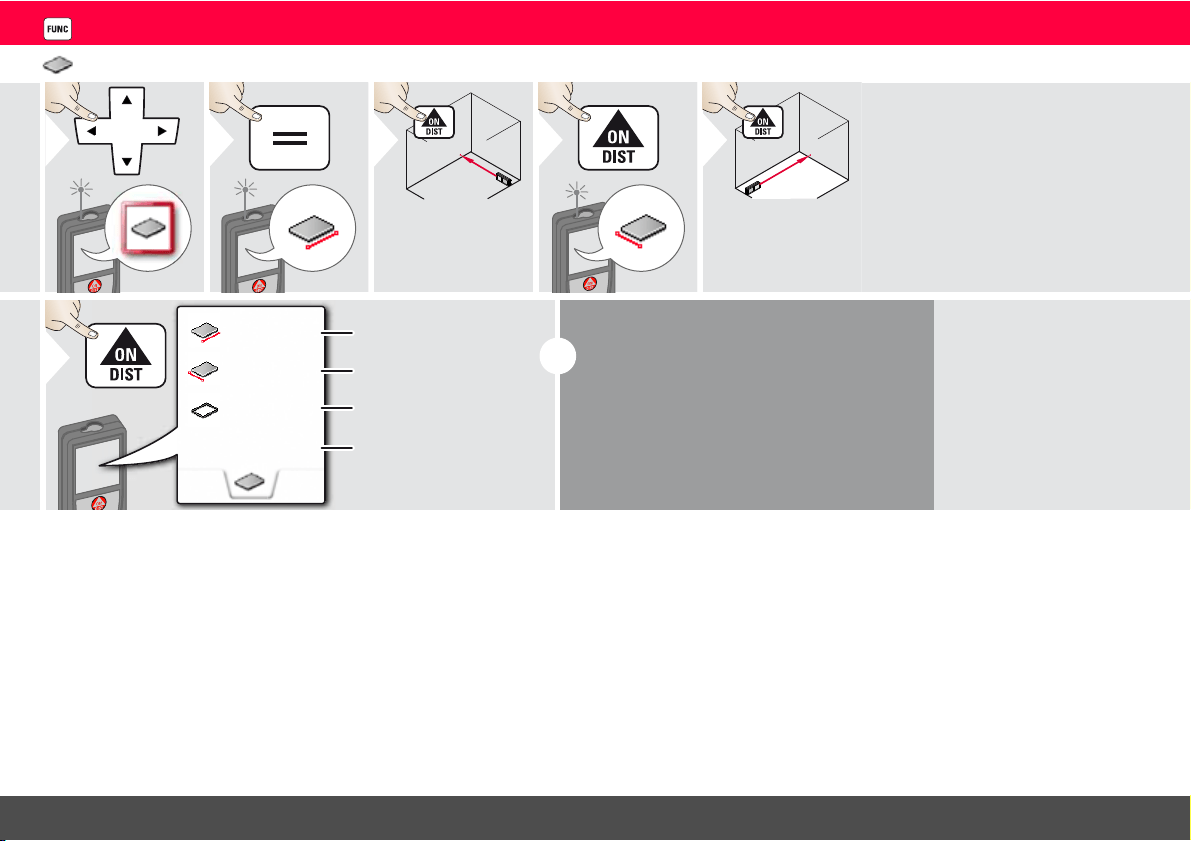
ENFunctions
Area
1
2
3
Aim laser at first
target point.
4
5
Aim laser at sec-
ond target point.
20.276 m
3.9I0 m
6.228 m
24.352 m
2
First distance
Second distance
Circumference
Area
6
i
The result is shown in the main line and the
measured value above.
Partial Measurements / Painter function:
Press + or - before starting the first measure-
ment. Measure and add or subtract distanc-
es. Finish with =. Measure 2nd length.
Leica DISTO
TM
S910 808167a
34
ENFunctions
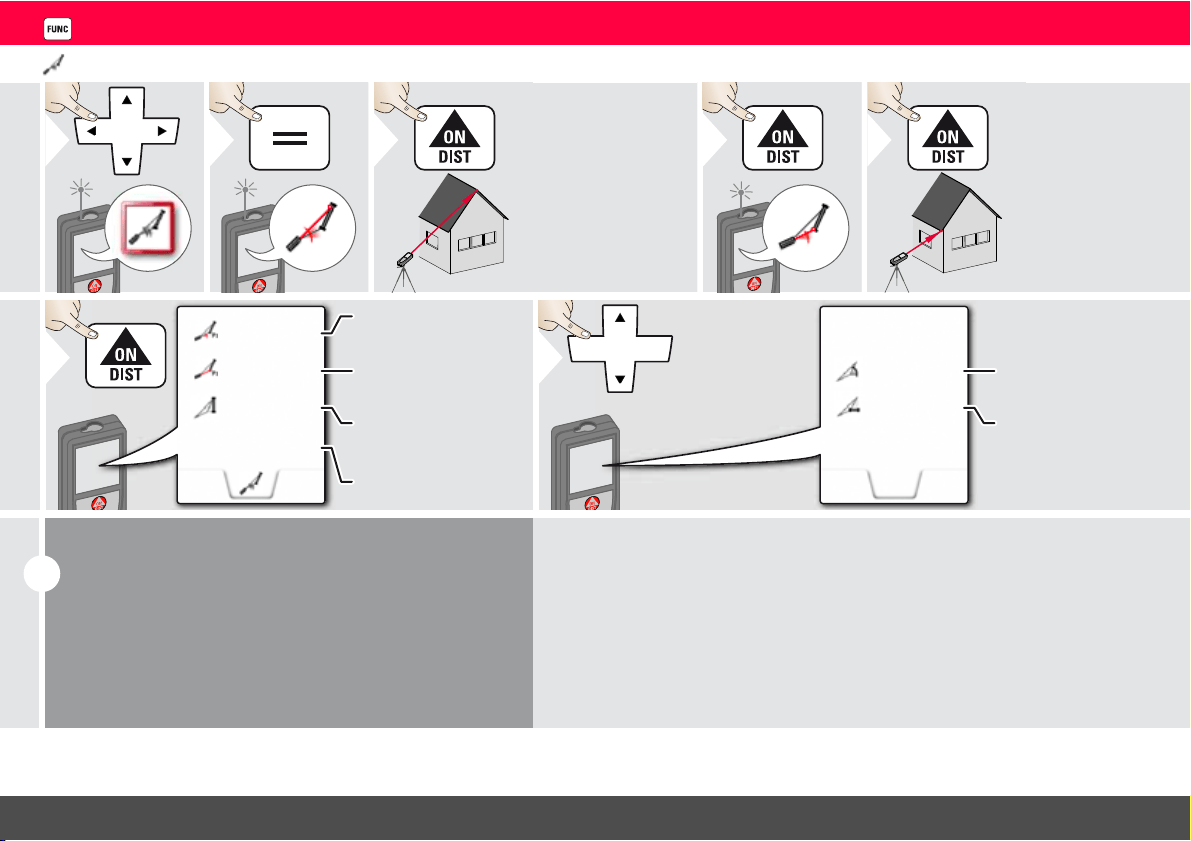
Sloped objects
1
2
3
Aim laser at upper
target point.
4
5
Aim laser at lower
target point.
11.00 °
-3.440 m
30.367 m
5.452 m
P2 distance
Vertical height be-
tween both points
P2 angle
Distance between
both points
6
-4.230 m
39.10 °
7
Use Up/Down
navigation keys to
show more re-
sults.
Horizontal distance
between both points
Included angle be-
tween both points
i
Indirect distance measuring between 2 points with addi-
tional results. Ideal for applications such as length and slope
of roof, height of chimneys,…
It is important, that the instrument is positioned in the
same vertical plane as the 2 measured points. The plane is
defined of the line between the 2 points. This means, that
the device on the tripod is only moved vertically and not
turned horizontally to reach both points.
Leica DISTO
TM
S910 808167a
35
ENFunctions
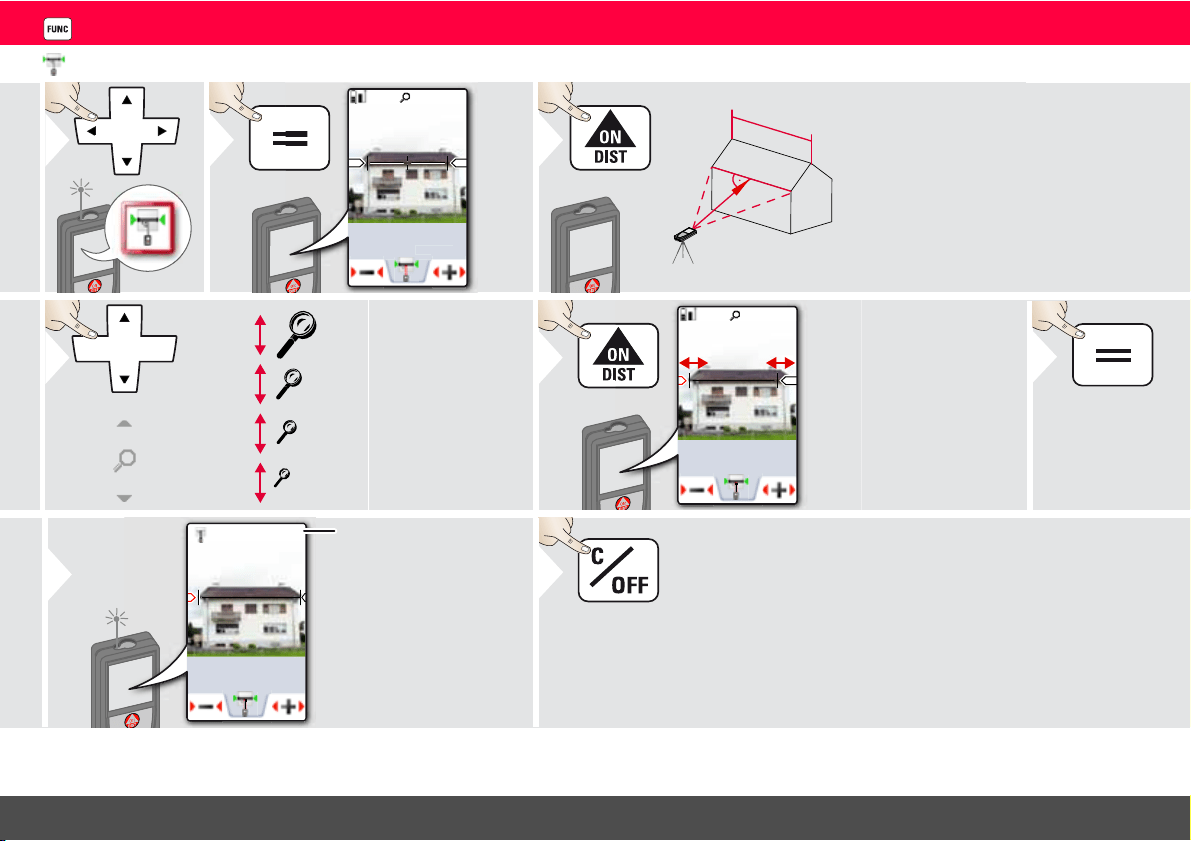
Width
1
-.--- m
1x
2
16.42m
3
It is absolutely
necessary to aim
with the laser per-
pendicular to the
object.
OV
*
1x
2x
4x
4
If necessary, use the
Zoom for precise
aiming.
* OV = Overview
1x
16.42 m
5
Select arrows with the
cursor keys or by tapping
on the display and adjust
with softkeys. Corre-
sponding width is calcu-
lated.
Confirm
measurement.
6
16.42
m
27.539 m
7
Distance to object
Exit.
8
Leica DISTO
TM
S910 808167a
36
ENFunctions
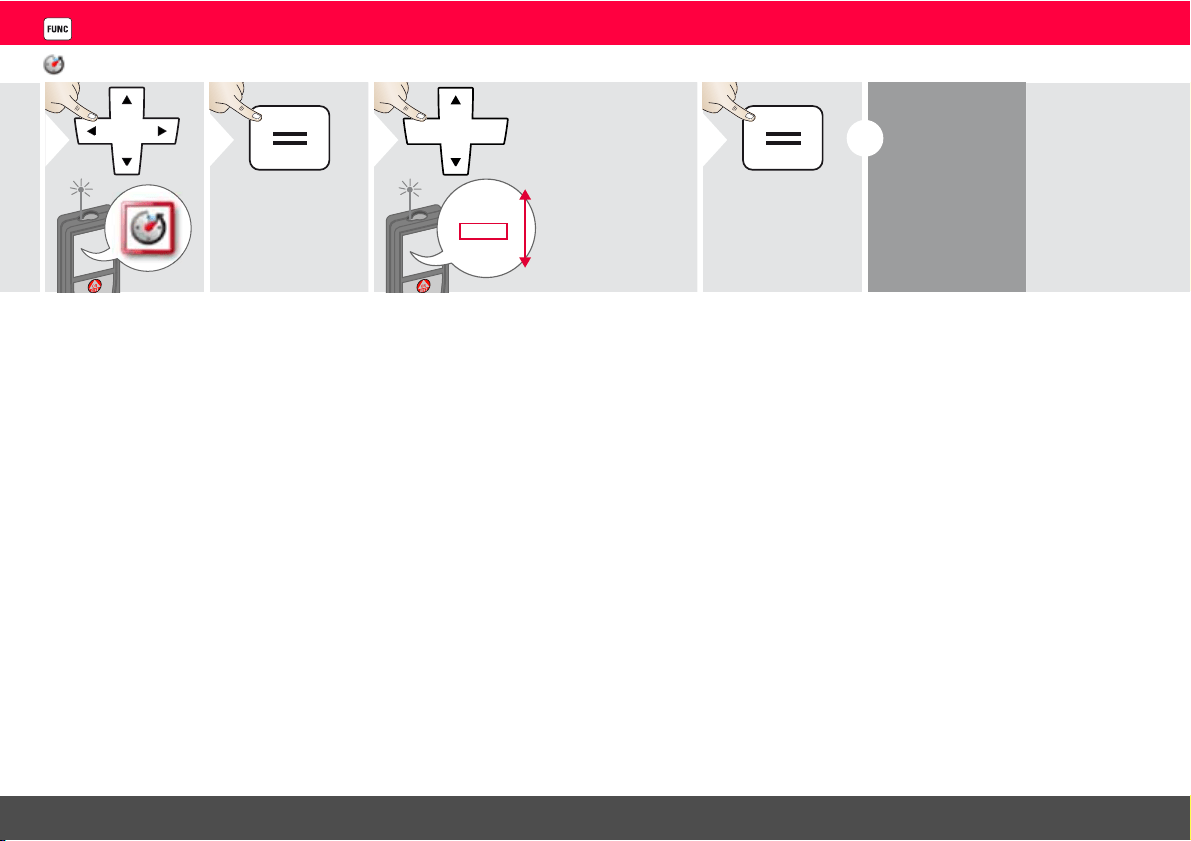
Timer
1
2
Off
30 sec
10 sec
2 sec
5 sec
3
Select release
time.
4
Confirm setting.
i
The self release
starts if
ON/Measure
key is pressed.

Leica DISTO
TM
S910 808167a
37
ENFunctions
Triangular area
1
2
3
Aim laser at first
target point.
4
5
Aim laser at sec-
ond target point.
6
7
Aim laser at third
target point.
4.855 m
2
2.425 m
4.129 m
4.248 m
Triangular area
8
First distance
Second distance
Third distance
33.60°
10.802 m
9
Use Up/Down
navigation keys to
show more re-
sults.
Circumference
Angle between first
and second
measurement
Leica DISTO
TM
S910 808167a
38
ENFunctions
Height-profile measurement
1
2
REF
0
Aim at reference point (REF).
3
4
REF
1
0
2
3
4
5
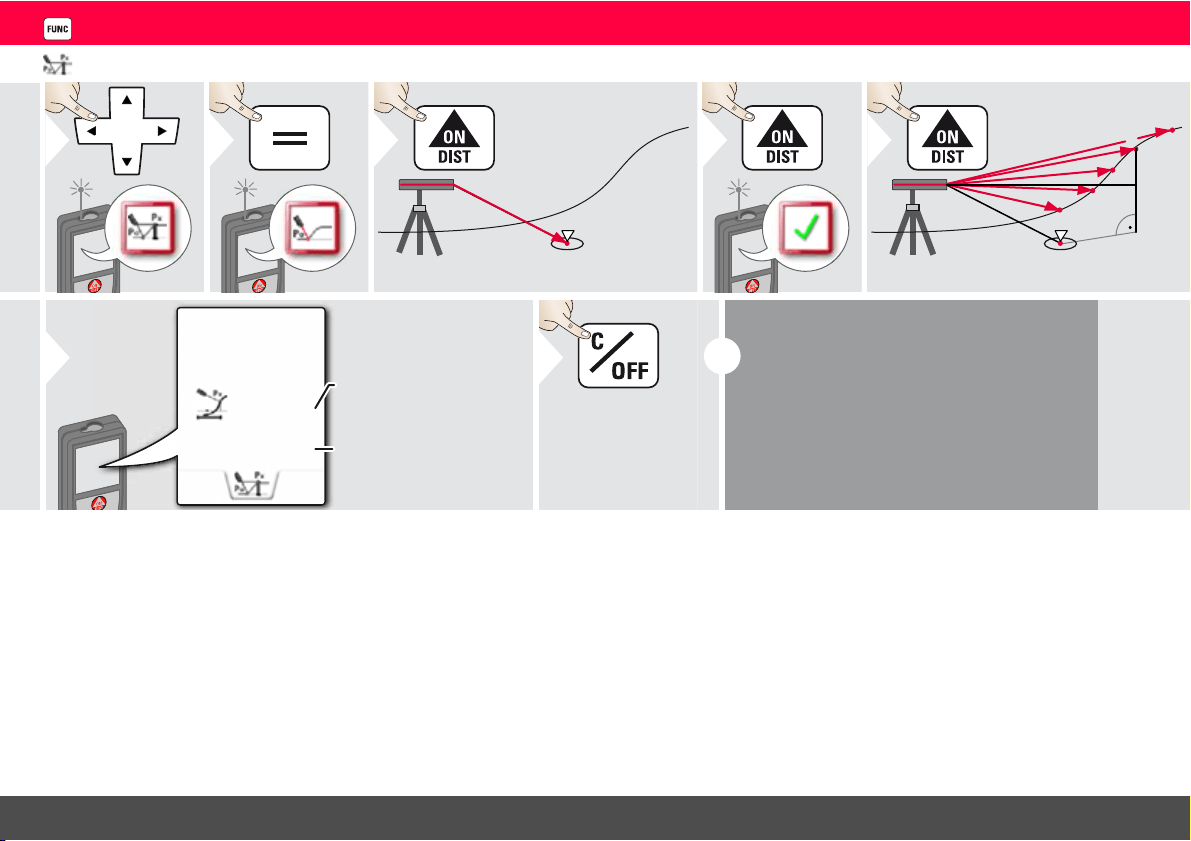
h
d
Aim at additional points 1-x.
5
d
h
2.042 m
0.054 m
Horizontal distance to
device
Height difference to
reference point (REF).
6
Exit function.
7
2x
i
Ideal for measuring of height differences to a
reference point. Can be also used to meas-
ure profiles and terrain sections. After meas-
uring the reference point, the horizontal
distance and height is displayed for each fol-
lowing point.
Leica DISTO
TM
S910 808167a
39
ENFunctions
Diameter
1
-.--- m
1x
2
Ø
3
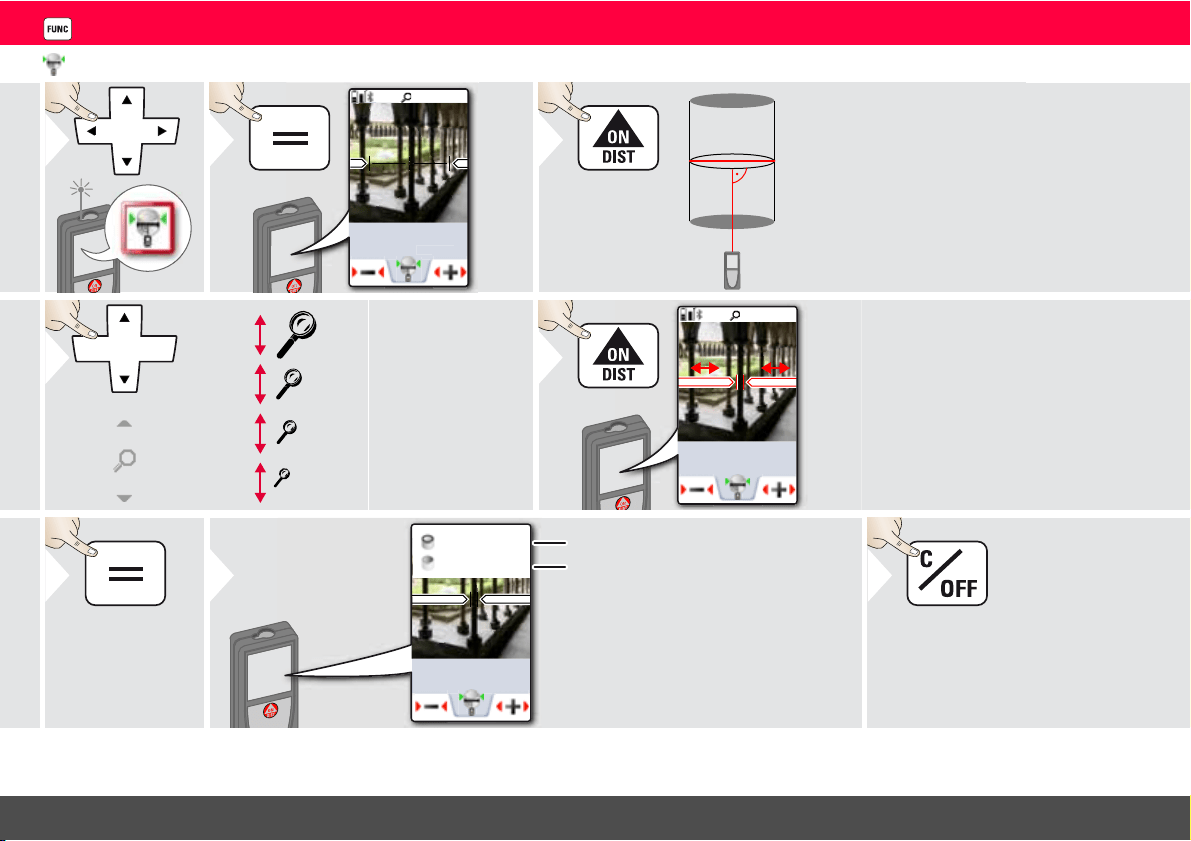
Aim laser perpendicular
to the middle of the
round object.
OV
*
1x
2x
4x
4
If necessary, use the
Zoom for precise
aiming.
* OV = Overview
0.237 m
1x
5
Select arrows with the
cursor keys or by tapping
on the display and adjust
with softkeys. Corre-
sponding diameter is cal-
culated.
6
Confirm meas-
urement.
0.237 m
0.744 m
0.044 m
2
7
More results are
displayed.
Circumference
Circular area
Exit.
8
Leica DISTO
TM
S910 808167a
40
ENFunctions
Adjusting measuring reference
1
2
3
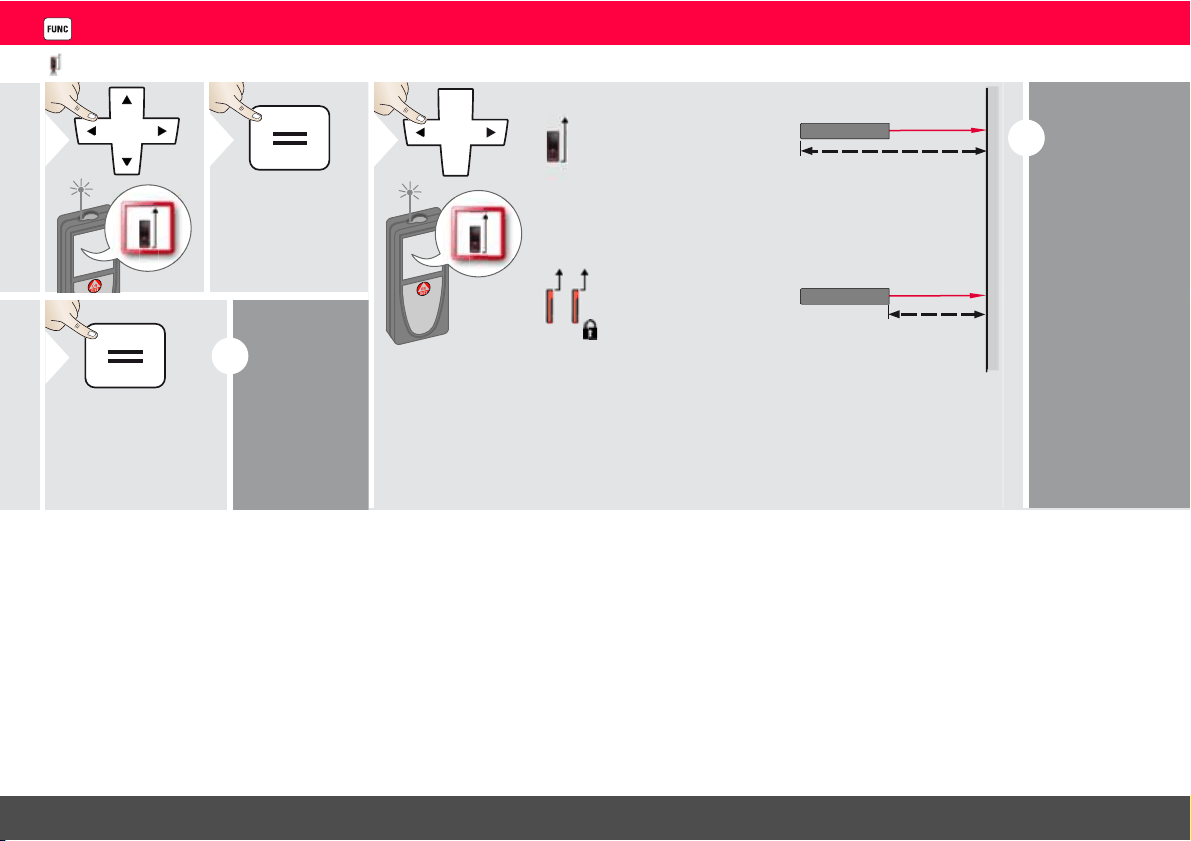
Distance is measured
from the rear of the de-
vice (standard setting).
Distance is measured
from the front of the de-
vice (lock symbol = per-
manently).
i
The orienta-
tion of the
Smart Base is
automatically
detected and
the zero point
is accordingly
adjusted.
4
Confirm setting.
i
If device is
switched off,
reference
goes back to
standard set-
ting (rear of
the device).
Leica DISTO
TM
S910 808167a
41
ENFunctions
Pythagoras (2-point)
1
2
3
Aim laser at first
target.
4
5
Aim laser at second
target.
13.207 m
21.383 m
25.133 m
6
i
The result is shown in the main line.
Pressing the measuring key for 2 sec in the function ac-
tivates automatically Minimum or Maximum measure-
ment.
We recommend to use the pythagoras only for indirect
horizontal measuring.
For height measuring (vertical) it is more precise to use
a function with the inclination measuring.
Leica DISTO
TM
S910 808167a
42
ENFunctions
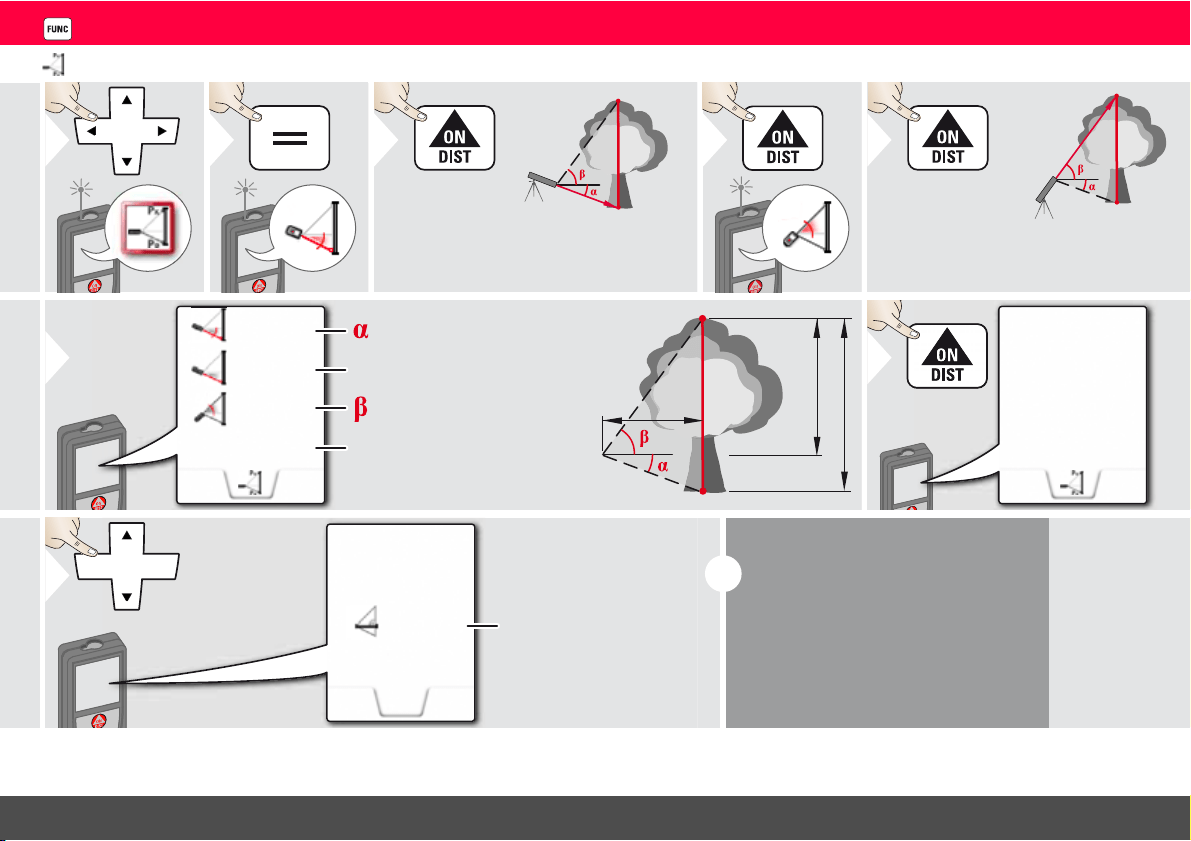
Height tracking
1
2
P0
Px
Aim laser at lower point.
3
4
P0
Px
Aim laser at upper points and angle/
height tracking starts automatically.
5
x
y
P0
y
29.89 °
6.271 m
-10.55 °
3.475 m
P0
Px
z
6
= Tracking height if device is
turned on tripod
= Tracking angle if device is
turned on tripod
44.80 °
6.271 m
-10.55 °
8.478 m
7
Stops height
tracking.
z
7.160 m
8
Use Up/Down
navigation keys to
show more re-
sults.
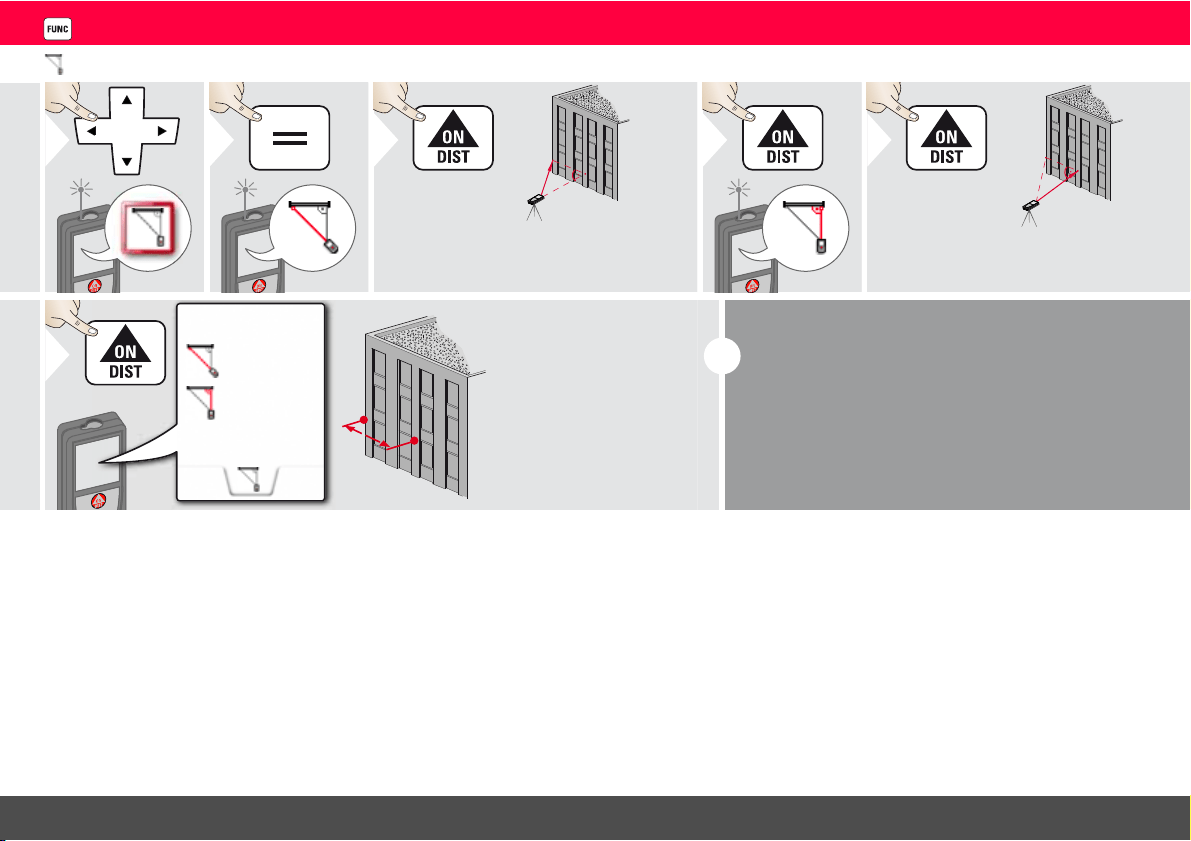
i
Heights of buildings or trees without
suitable reflective points can be deter-
mined. At the bottom point, distance
and tilt is measured - which needs a re-
flective laser target. The upper point
can be targeted with the pointfinder /
crosshair and does not need a reflec-
tive laser target as only the inclination is
measured.
Leica DISTO
TM
S910 808167a
43
ENFunctions
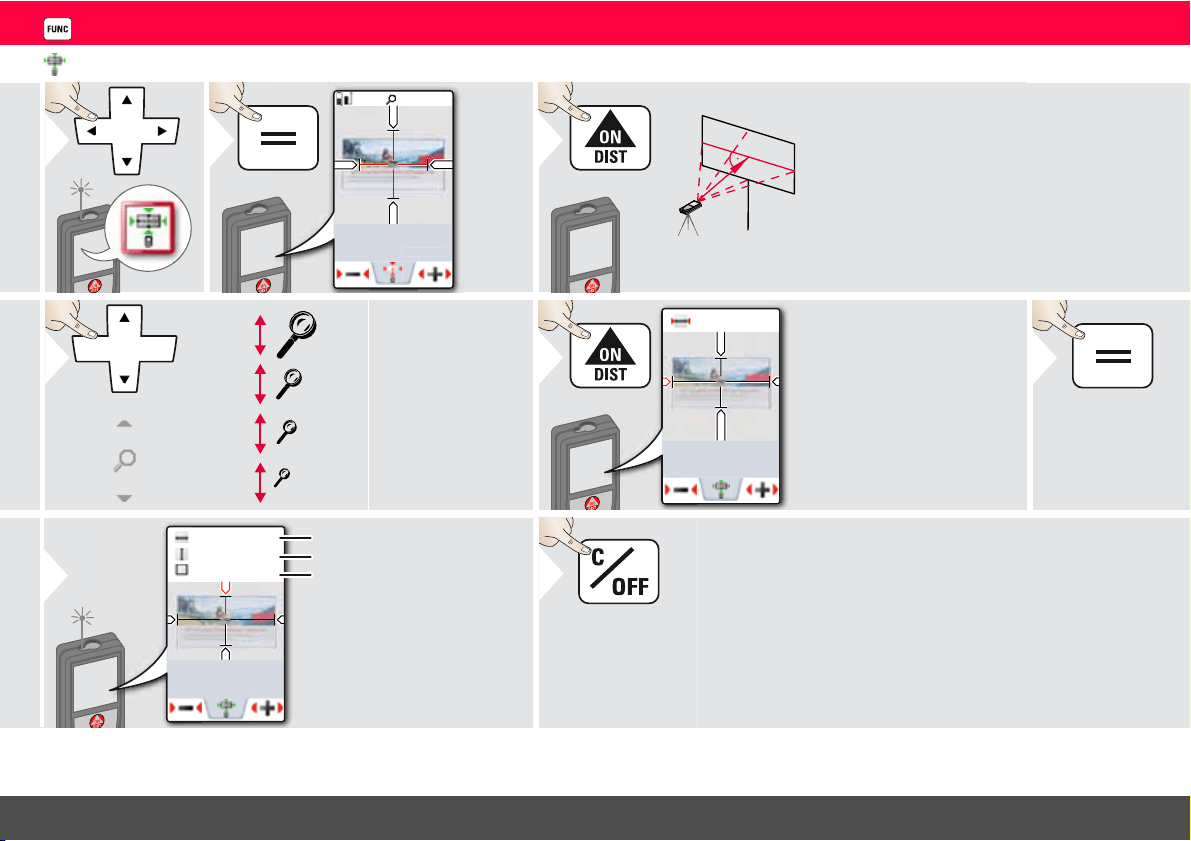
Area from Photo
1
-.--- m
2
1x
2
3
Aim perpendicular
to the horizontal
center line of the ar-
ea. This area must be
perfectly flat on the
vertical plane.
OV
*
1x
2x
4x
4
If necessary, use the
Zoom for precise
aiming.
* OV = Overview
2.015m
9.232m
2
5
Select arrows with the
cursor keys or by tapping
on the display and adjust
with softkeys. Corre-
sponding area is calculat-
ed.
Confirm
measurement.
6
4.581
m
2.015
m
13.192
m
9.232m
2
7
Width
Length
Circumference
8
Exit.
Leica DISTO
TM
S910 808167a
44
ENFunctions
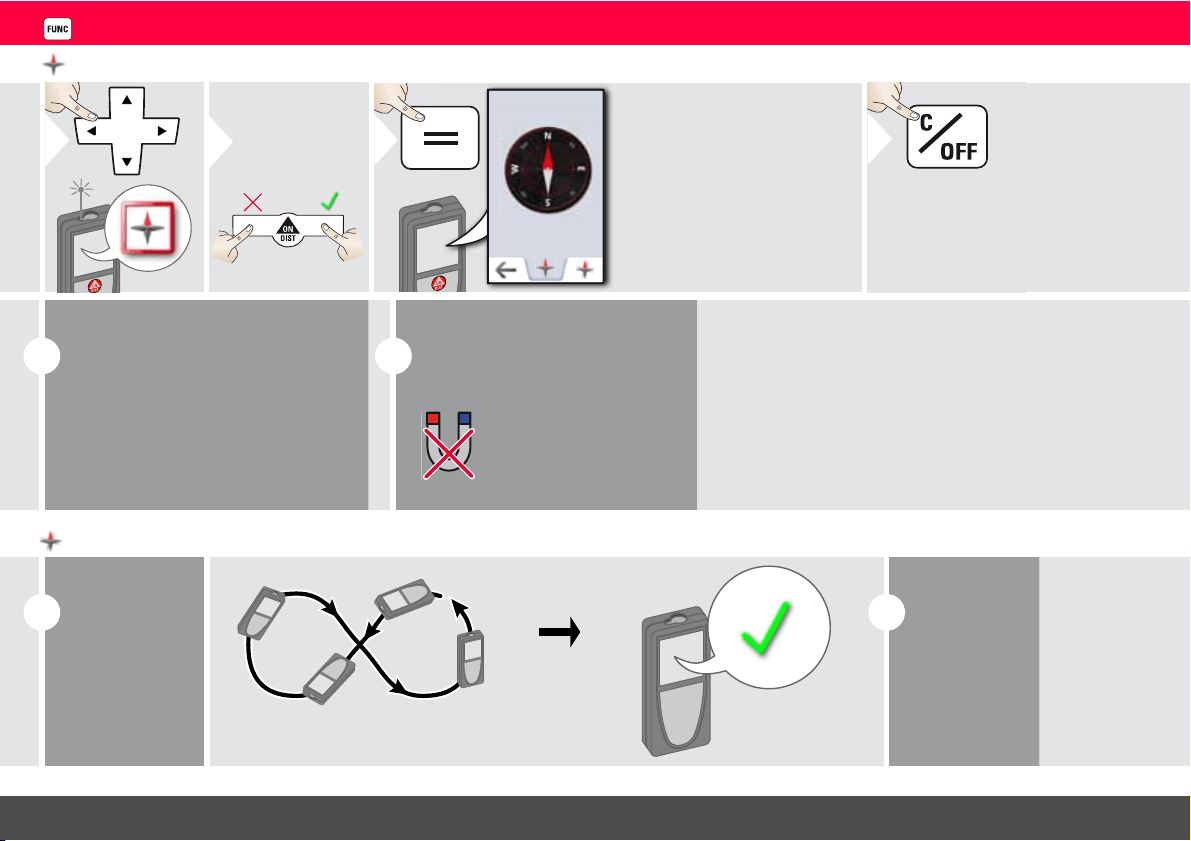
Compass
1
2
Calibrate
Compass?
Refuse Confirm
0.0°N
The arrow always
points to true north.
3
Exit.
4
i
At the following places the compass
probably does not work correctly:
• Inside of buildings
• Close to high voltage lines (e.g. on
train platforms)
• Close to magnets, metal objects or
electrical household appliances
i
If an error message occurs, the
device is tilted too much (>20°
over the front / > 10° side-
wise).
Keep the device
away from any
magnet!
Calibration of Compass:
i
The compass
has to be cali-
brated before
every first
measurement
after switching
on the device.
Rotate the device slowly in a figure 8 motion until OK
icon appears on the display.
i
After 2 sec the
device goes
back to the
compass mode.
Leica DISTO
TM
S910 808167a
45
ENFunctions
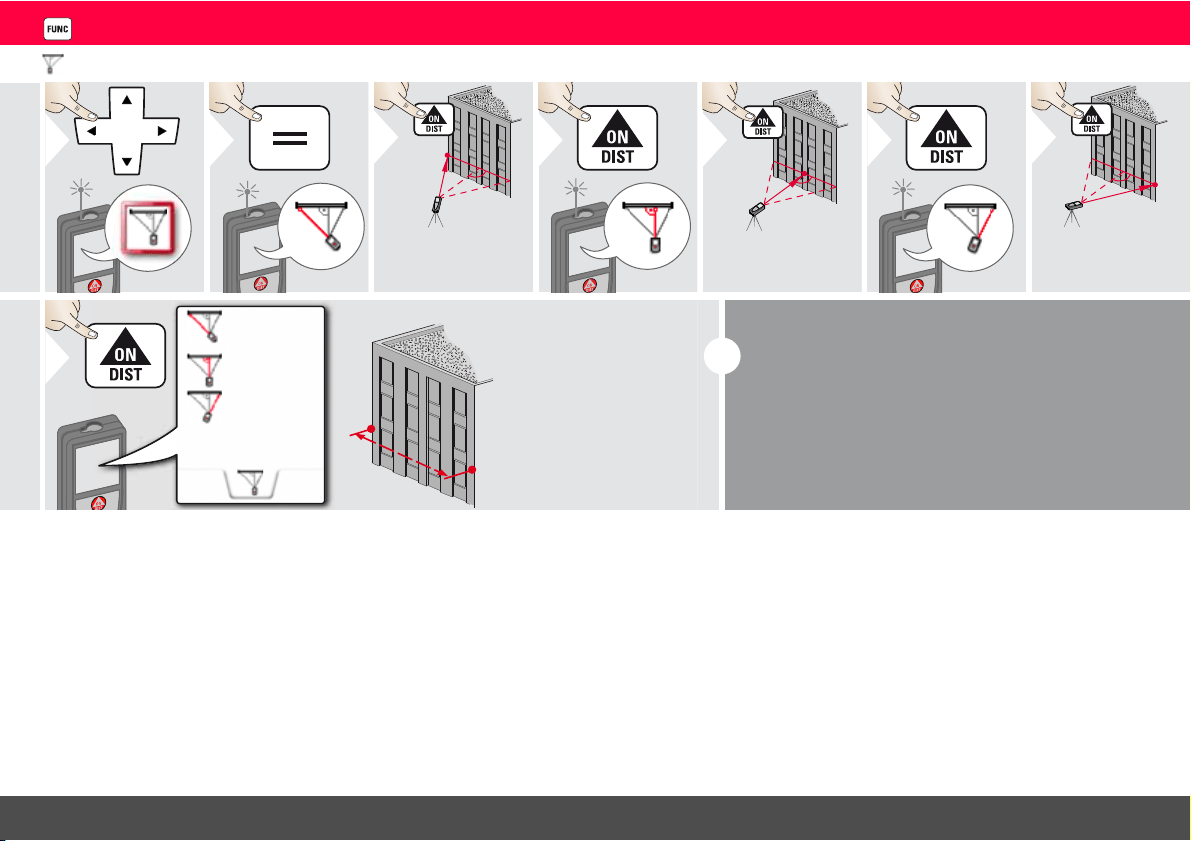
Pythagoras (3-point)
1
2
3
Aim laser at first
target.
4
5
Aim laser at sec-
ond target.
6
7
Aim laser at
third target.
20.571 m
23.018 m
21.264 m
24.298 m
8
i
The result is shown in the main line.
Pressing the measuring key for 2 sec in the function
activates automatically Minimum or Maximum meas-
urement.
We recommend to use the pythagoras only for indi-
rect horizontal measuring.
For height measuring (vertical) it is more precise to
use a function with inclination measurement.
Leica DISTO
TM
S910 808167a
46
ENFunctions
Trapezium
1
2
3
Aim laser at upper point.
4
5
Aim laser at 2nd point.
x
x
y
h
y
h
70.80
°
5.790 m
13.459 m
16.440 m
6
20.9
°
78.383 m
2
7
Use Up/Down
navigation keys to
show more re-
sults.
Trapezium area
Leica DISTO
TM
S910 808167a
47
ENFunctions
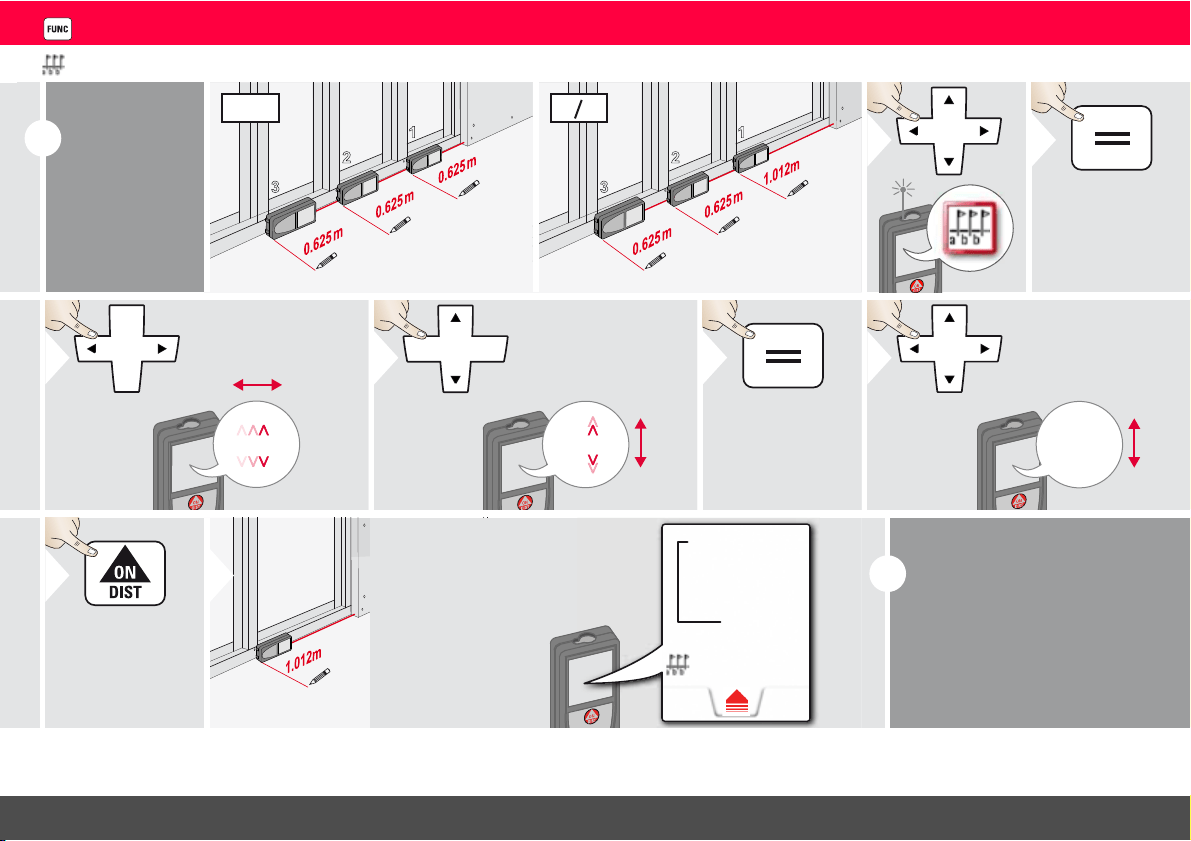
Stake out
i
Two different
distances (a
and b) can be
entered to
mark off de-
fined measured
lengths.
1
2
3
a
b
b
a
=
b
1
2
3
a
b
b
a
=
b
1
2
1.012 m
3
Select digit.
1.012 m
4
Adjust digit.
5
Approve
value "a".
0.625 m
6
Adjust
value "b".
7
Approve value "b"
and start meas-
urement.
8
Move device
slowly along the
stake-out line.
The distance to
the next stake out
point is displayed.
0.240 m
0.625 m
0.240 m is
missing up to
next 0.625 m
distance.
Next stake
out distance
i
When approaching a stake
out point to less than 0.1 m
the instrument starts to beep.
The function can be stopped
by pressing the CLEAR/OFF
button.
Leica DISTO
TM
S910 808167a
48
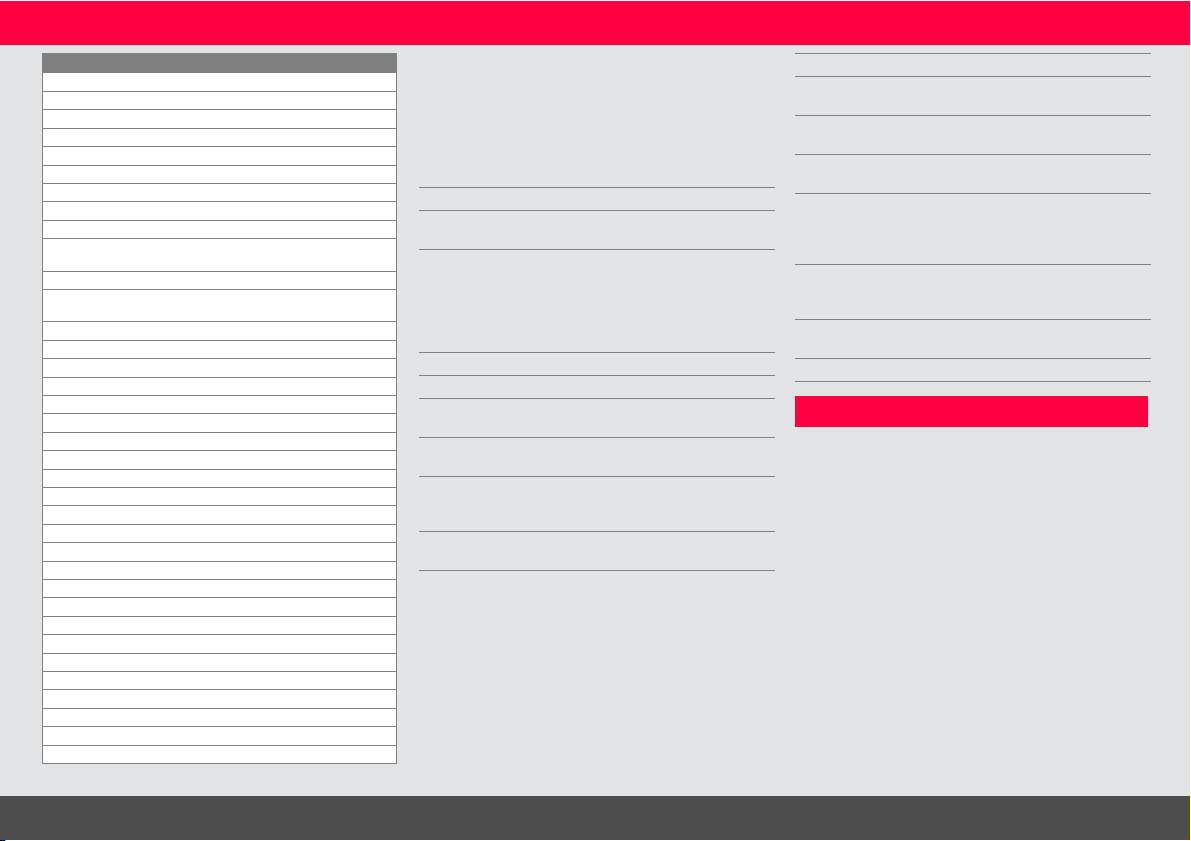
ENTechnical Data
* favourable conditions are: white and diffuse reflecting
target (white painted wall), low background illumination and
moderate temperatures.
** unfavourable conditions are: targets with lower or higher
reflectivity or high background illumination or temperatures
at the upper or lower end of the specified temperature
range.
*** Tolerances apply from 0.05 m to 10 m with a confidence
level of 95%. With favourable conditions the tolerance may
deteriorate by 0.05 mm/m for distances between 10 m to
30 m, by 0.10 mm/m between 30 m and 100 m and by 0.20
mm/m for distances above 100 m.
With unfavourable conditions the tolerance may deterio-
rate by 0.10 mm/m for distances between 10 m to 30 m, by
0.20 mm/m between 30 m and 100 m and by 0.30 mm/m
for distances above 100 m.
**** after user calibration. Additional angle related deviation
of +/- 0.01° per degree up to +/-45° in each quadrant.
Applies at room temperature. For the whole operating
temperature range the maximum deviation increases by
+/-0.1°.
At a recommended storage tempera-
ture of -20°C to +30°C (-4°F to
+86°F), batteries containing a 50% to 100%
charge can be stored up to 1 year. After this
storage period the batteries must be
recharged.
For accurate indirect results, the use of
a tripod is recommended. For accurate
tilt measurements a transverse tilt should be
avoided.
Distance measurement (ISO 163331-1)
Accuracy with favourable
conditions *
± 1.0 mm / 0.04 in ***
Accuracy with unfavourable
conditions **
± 2.0 mm / 0.08 in ***
Range with favourable
conditions *
0.05m - 300 m /
0.16 - 1000 ft
Range with unfavourable
condition **
0.05m - 150m
(0.16 – 492 ft)
Smallest unit displayed 0.1 mm / 1/32 in
X-Range Power Technology
™
yes
Ø laser point
at distances
6 /30 / 60 mm
(10 / 50 / 100 m)
Tilt measurement
Measuring tolerance to laser
beam ****
-0.1° / +0.2°
Measuring tolerance to
housing ****
± 0.1°
Range 360°
Smart Base
Working range vertical
sensor
-40° to 80°
Accuracy vertical sensor up to +/- 0.1°
Working range horizontal
sensor
360°
Accuracy horizontal sensor up to +/- 0.1°
Tolerance P2P function
at distances (combination of
sensors and distance meas-
uring)
approx. :
+/- 2 mm / 2 m
+/- 5 mm / 5 m
+/- 10 mm /10 m
Device levelling
Levelling range +/- 5°
Levelling accuracy +/- 0.05°
General
Laser class 2
Laser type 635 nm, < 1 mW
Protection class IP54 (dust- and splash
water protected)
Autom. laser switch off after 90 s
Autom. power switch-off after 180 s
Bluetooth
®
Smart Bluetooth
®
v4.0
Range of Bluetooth
®
<10 m
WLAN yes
Range of WLAN 10 m
Dimension (H x D x W) 61 x 32 x 164 mm
2.4 x 1.3 x 6.5 in
Weight 291 g /10.2 oz
Temperature range:
-Storage
-Operation
-Charging
-25 to 60 °C
-13 to 140 °F
-10 to 50 °C
14 to 122 °F
-10 to 40 °C
14 to 104 °F
Digital data
Resolution for photos 800 x 600 dpi
Resolution for screenshots 240 x 400 dpi
File format JPG, DXF
Download USB
Battery (Li-Ion)
Rated voltage 3.7 V
Capacity 2.6 Ah
Measurements per battery
charge
Approx. 4000
Charging time Approx. 4 h
Output voltage 5.0 V
Charging current 1 A
i
i
Leica DISTO
TM
S910 808167a
49
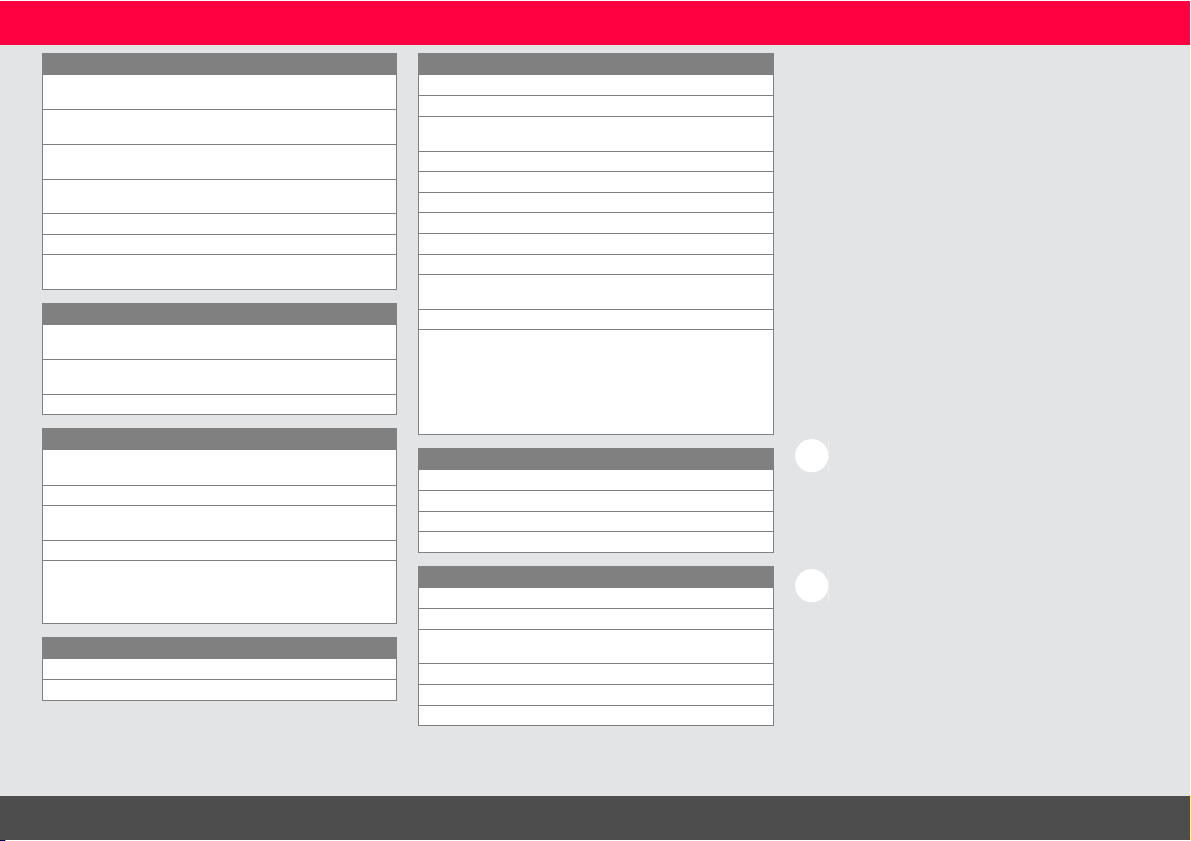
ENMessage Codes
If the message Error does not disappear
after switching on the device repeatedly,
contact the dealer.
If the message InFo appears with a number,
press the Clear button and observe the
following instructions:
Care
• Clean the device with a damp, soft cloth.
• Never immerse the device in water.
• Never use aggressive cleaning agents or
solvents.
Functions
Distance measuring yes
Min/Max measuring yes
Permanent measuring yes
Stake-out yes
Addition/Subtraction yes
Area yes
Triangle area yes
Volume yes
Trapezium yes
Painter function (area with partial
measurem.)
yes
Pythagoras 2-point, 3-point
Smart Horizontal Mode /
Indirect height
yes
Height-profile measurement yes
Level yes
Sloped objects yes
Height tracking yes
Memory yes
Beep yes
Illuminated colour display yes
Pointfinder (Viewscreen) 4x zoom, OV
Bluetooth
®
Smart yes
Personalized Favorites yes
Timer yes
Calculator yes
Photo/Screenshot yes
Compass yes
Gallery with USB download yes
Diameter yes
Width yes
Area from Photo yes
Smart Base yes
Pointdata transmission yes
Point to point function /distance yes
Smart Angle yes
Smart Area yes
DXF Data capture yes
No. Cause Correction
156 Transverse tilt
greater than 10°
Hold the instrument without
any transverse tilt.
162 Calibration mistake Make sure, the device is
placed on a absolutely hori-
zontal and flat surface.
Repeat the calibration
procedure. If the mistake still
occurs, contact your dealer.
204 Calculation error Perform measurement again.
240 Data transfer error Repeat procedure.
252 Temperature too
high
Let device cool down.
253 Temperature too
low
Warm device up.
255 Received signal too
weak, measuring
time too long
Change target surface (e.g.
white paper).
256 Received signal too
high
Change target surface (e.g.
white paper).
No. Cause Correction
258 Measurement outside
of measuring range
Correct range.
260 Laser beam inter-
rupted
Repeat measurement.
300 Smart Base not folded
out
Fold out Smart Base.
301 Device was moved,
levelling not valid any
more
Perform levelling again.
Measuring with invalid
levelling is possible, but it
affects the accuracy.
302 «Point data transmis-
sion» is selected, but
WLAN is off
Switch on WLAN.
340 WLAN: Data transfer
error
Repeat procedure.
341 Authentication Error Use correct password.

Leica DISTO
TM
S910 808167a
50
ENWarranty
Warranty under PROTECT by
Leica Geosystems
Lifetime Manufacturer's Warranty
Warranty coverage for the entire usage time
of the product under PROTECT according
to Leica Geosystems International Limited
Warranty and PROTECT General Terms &
Conditions set out under www.leica-geosys-
tems.com/protect. Free of charge repair or
replacement of all products or any parts
under PROTECT that suffer defects as a
result of faults in materials or workmanship.
3 Years No Cost
Additional services should the product under
PROTECT become defective and require
servicing under normal conditions of use, as
described in the user manual, at no additional
charge.
To receive the "3 years No Cost" period, the
product under PROTECT must be regis-
tered at http://myworld.leica-geosys-
tems.com within 8 weeks of the purchase
date. If the product under PROTECT is not
registered, a "2 years No Cost" period
applies.
Safety Instructions
The person responsible for the instrument
must ensure that all users understand these
directions and adhere to them.
Areas of responsibility
Responsibilities of the manufacturer
of the original equipment:
Leica Geosystems AG
Heinrich-Wild-Strasse
CH-9435 Heerbrugg
Internet: www.disto.com
The company above is responsible for
supplying the product, including the User
Manual in a completely safe condition.
The company above is not responsible for
third party accessories.
Responsibilities of the person in
charge of the instrument:
• To understand the safety instructions on
the product and the instructions in the
User Manual.
• To be familiar with local safety regulations
relating to accident prevention.
• Always prevent access to the product by
unauthorised personnel.
Permitted use
• Measuring distances
• Tilt measurement
• Data transfer with Bluetooth
®
/ WLAN
Prohibited use
• Using the product without instruction
• Using outside the stated limits
• Deactivation of safety systems and
removal of explanatory and hazard labels
• Opening of the equipment by using tools
(screwdrivers, etc.)
• Carrying out modification or conversion of
the product
• Use of accessories from other manufac-
turers without express approval
• Deliberate dazzling of third parties; also in
the dark
• Inadequate safeguards at the surveying site
(e.g. when measuring on roads, construc-
tion sites, etc.)
• Deliberate or irresponsible behaviour on
scaffolding, when using ladders, when
measuring near machines which are
running or near parts of machines or instal-
lations which are unprotected
• Aiming directly in the sun

Leica DISTO
TM
S910 808167a
51
ENSafety Instructions
WARNING
Watch out for erroneous measurements if
the instrument is defective or if it has been
dropped or has been misused or modified.
Carry out periodic test measurements.
Particularly after the instrument has been
subject to abnormal use, and before, during
and after important measurements.
CAUTION
Never attempt to repair the product your-
self. In case of damage, contact a local dealer.
WARNING
Changes or modifications not expressly
approved could void the user’s authority to
operate the equipment.
Limits of use
Refer to section "Technical data".
The device is designed for use in areas
permanently habitable by humans. Do not
use the product in explosion hazardous areas
or in aggressive environments.
Disposal
CAUTION
Flat batteries must not be disposed of with
household waste. Care for the environment
and take them to the collection points
provided in accordance with national or local
regulations.
The product must not be disposed with
household waste.
Dispose of the product appropriately
in accordance with the national regu-
lations in force in your country.
Adhere to the national and country specific
regulations.
Product specific treatment and waste
management can be downloaded from our
homepage.
Electromagnetic Compatibility
(EMC)
WARNING
The device conforms to the most stringent
requirements of the relevant standards and
regulations.
Yet, the possibility of causing interference in
other devices cannot be totally excluded.
FCC statement (applicable in
U.S.)
This equipment has been tested and found to
comply with the limits for a Class B digital
device, pursuant to part 15 of the FCC Rules.
These limits are designed to provide reason-
able protection against harmful interference
in a residential installation.This equipment
generates, uses and can radiate radio
frequency energy and, if not installed and
used in accordance with the instructions,
may cause harmful interference to radio
communications.
However, there is no guarantee that interfer-
ence will not occur in a particular installation.
If this equipment does cause harmful interfer-
ence to radio or television reception, which
can be determined by turning the equipment
off and on, the user is encouraged to try to
correct the interference by one or more of
the following measures:
• Reorient or relocate the receiving antenna.
• Increase the separation between the
equipment and receiver.
• Connect the equipment into an outlet on a
circuit different from that to which the
receiver is connected.
• Consult the dealer or an experienced
radio/TV technician for help.
i

Leica DISTO
TM
S910 808167a
52
ENSafety Instructions
This device complies with part 15 of the FCC
Rules. Operation is subject to the following
two conditions:
• This device may not cause harmful interfer-
ence, and
• this device must accept any interference
received, including interference that may
cause undesired operation.
This device complies with Industry Canada
license-exempt RSS standard(s). Operation
is subject to the following two conditions:
• This device may not cause interference and
• this device must accept any interference,
including interference that may cause
undesired operation of the device.
Déclaration FCC, applicable aux
Etats-Unis
Ce produit a été testé et ses limites ont été
jugées conformes à celles prescrites pour les
dispositifs numériques de classe B, décrites
dans le paragraphe 15 des règles FCC. Ces
limites ont pour but de fournir une protec-
tion raisonnable contre des interférences
nocives dans une installation résidentielle.
Les appareils de ce type génèrent, utilisent et
peuvent rayonner de hautes fréquences. Ils
sont de ce fait susceptibles de perturber la
réception radiophonique en cas d'installation
non conforme aux instructions.
Même en cas de respect des instructions,
l'absence d'interférences dans une installa-
tion particulière ne peut cependant être
garantie. Si cet instrument perturbe la récep-
tion radiophonique ou télévisuelle, ce que
l'on constate en éteignant puis en rallumant
l'instrument, l'utilisateur peut tenter de
corriger ces interférences en appliquant les
mesures suivantes :
• Réorienter ou repositionner l'antenne de
réception.
• Augmenter la distance entre l'instrument
et le récepteur.
• Connecter l'instrument à un autre circuit
que celui du récepteur.
• Consulter le revendeur ou un technicien
expérimenté dans le domaine radio/TV.
Cet appareil est conforme à la section 15 des
règlements FCC. Son fonctionnement est
soumis aux deux conditions suivantes :
• cet appareil ne doit pas causer d'inter-
férences nuisibles, et
• cet appareil doit accepter toute autre
interférence reçue, y compris les inter-
férences pouvant entraîner un fonc-
tionnement non désiré.
Ce dispositif est conforme à la norme RSS-
210 d’Industrie Canada. L’utilisation est
sujette aux deux conditions suivantes :
• ce dispositif ne pas doit pas être la source
d’interférences nuisibles, et
• ce dispositif doit accepter toutes les inter-
férences, y compris les interférences
pouvant induire des opérations non
souhaitées.
Leica DISTO
TM
S910 808167a
53
ENSafety Instructions
Use of the product with Blue-
tooth
®
WARNING
Electromagnetic radiation can cause distur-
bances in other equipment, in installations
(e.g. medical ones such as pacemakers or
hearing aids) and in aircraft. It can also affect
humans and animals.
Precautions:
Athough this product conforms to the most
stringent standards and regulations, the
possibility of harm to people and animals
cannot totally excluded.
• Do not use the product near petrol
stations, chemical plants, in areas with a
potentially explosive atmosphere and
where blasting takes place.
• Do not use the product near medical
equipment.
• Do not use the product in airplanes.
• Do not use the product near your body for
extended periods.
Laser classification
The device produces visible laser beams,
which are emitted from the instrument:
It is a Class 2 laser product in accordance
with:
• IEC60825-1 : 2014 „Radiation safety of
laser products“
Laser Class 2 products:
Do not stare into the laser beam or direct it
towards other people unnecessarily. Eye
protection is normally afforded by aversion
responses including the blink reflex.
WARNING
Looking directly into the beam with optical
aids (e.g. binoculars, telescopes) can be
hazardous.
CAUTION
Looking into the laser beam may be
hazardous to the eyes.
Labelling
Subject to change (drawings, descriptions
and technical data) without prior notice.
Description Value
Wavelength 620 - 690 nm
Maximum radiant output
power for classification
0.95 mW
Pulse repetition frequency 320 MHz
Pulse duration > 400 ps
Beam divergence
0.16 x 0.6 mrad

Leica Geosystems AG
CH-9435 Heerbrugg
(Switzerland)
www.disto.com
Leica Geosystems AG, Heerbrugg, Switzerland has been certified as being
equipped with a quality system which meets the International Standards of
Quality Management and Quality Systems (ISO standard 9001) and Environ-
mental Management Systems (ISO standard 14001).
Copyright Leica Geosystems AG, Heerbrugg,
Switzerland 2015
Original text (808167a EN)