Need Assistance ?
Call us on our toll free customer support line :
1-866-915-8626
• Technical questions
• Replacement parts
• Parts missing from package
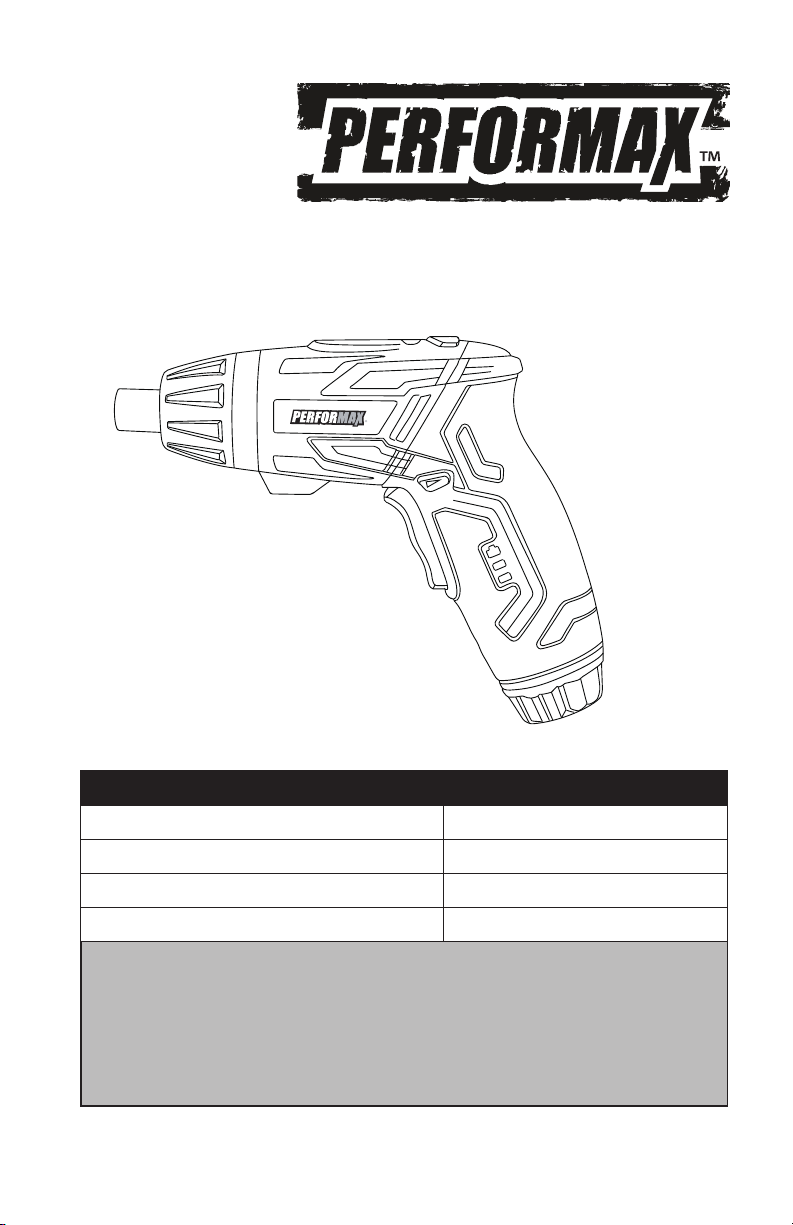
4-Volt CORDLESS SCREWDRIVER
WITH FLASHLIGHT
241-1371
Owner's Manual
SPECIFICATIONS
Rechargeable Battery 4V DC, LITHIUM-ION
Normal Charging Time 3~5 Hours
No Load Speed 220 RPM
Chuck Size 1/4” Hex Collet

2
TABLE OF CONTENTS
RULES FOR SAFE OPERATION………..……………………………...…Page 3
DESCRIPTION………..……………………………………………........ Page 6
OPERATION………..………………………………………………….. Page 7
MAINTENANCE………..………………………………………............. Page 9
PARTS LIST
SCHEMATIC DRAWING
……………..……………………………………………...
……………..…………………………………
Page 10
Page 11

3
RULES FOR SAFE OPERATION
KNOW THE TOOL
To operate this tool, carefully read this Owner’s Manual and all labels affixed
to the tool before using. Keep this Manual available for future reference.
IMPORTANT
This tool should only be serviced by a qualified service technician.
READ ALL INSTRUCTIONS THOROUGHLY
GENERAL SAFETY RULES FOR ALL POWER TOOLS
WARNING! Read and understand all instructions. Failure to follow all in-
structions listed below may result in electric shock, fire, and/or serious per-
sonal injury. The term “power tool” in all of the warnings listed below refers to
corded power tools or battery-operated (cordless) power tools.
SAVE THESE INSTRUCTIONS
WORK AREA
Keep the work area clean and well lit. Cluttered benches and dark areas
invite accidents.
Do not operate power tools in an explosive environment, such as in the
presence of flammable liquids, gases, or dust. Power tools create sparks
which may ignite dust or fumes.
Keep bystanders, children, and visitors away while operating a power
tool. Distractions can cause you to lose control.
ELECTRICAL SAFETY
A battery-operated tool with batteries or separate battery pack must be
recharged only with the specified charger for the battery. A charger that
may be suitable for one type of battery may create a risk of fire when used
with another battery.
Use battery operated tool only with specifically designated battery pack.
Use of any other batteries may create a risk of fire.
PERSONAL SAFETY
Stay alert, watch what you are doing and use common sense when
operating a power tool. Do not use the tool while tired or under the
influence of drugs, alcohol, or medication. A moment of inattention while
operating power tools may result in serious personal injury.
Dress properly. Do not wear loose clothing or jewelry. Contain long hair.
Keep your hair, clothing, and gloves away from moving parts. Loose
clothes, jewelry, or long hair can be caught in moving parts.

4
Avoid accidental starting. Be sure switch is off before plugging in or
attaching the battery. Carrying tools with your finger on the switch or
powering tools that have the switch on invites accidents.
Remove adjusting keys or wrenches before turning the tool on. A wrench
or a key that is left attached to a rotating part of the tool may result in
personal injury.
Do not overreach. Keep proper footing and balance at all times. Proper footing
and balance enables better control of the tool in unexpected situations.
Use safety equipment. Always wear eye protection. Dust mask, non-skid safety
shoes, hard hat, or hearing protection must be used for appropriate conditions.
Before connecting the tool to a power source (receptacle, outlet, etc.), be
sure voltage supplied is the same as that specified on the nameplate of
the tool. A power source with voltage greater than that specified for the
tool can result in serious injury to the user – as well as damage to the tool.
TOOL USE AND CARE
Use clamps or other practical ways to support and secure the
workpiece to a stable platform. Holding the work by hand or against
your body is unstable and may lead to loss of control.
Do not force the tool. Use the correct tool for your application. The
correct tool will do the job better and more safely at the rate for which it
is designed.
Do not use the tool if the switch does not turn it on or off. Any tool that
cannot be controlled with the switch is dangerous and must be repaired.
Disconnect the tool from the power source before making any adjustments,
changing accessories, or storing the tool. Such preventive safety measures
reduce the risk of starting the tool accidentally.
Store idle tools out of reach of children and other untrained persons. Tools
are dangerous in the hands of untrained users.
Maintain tools with care. Keep cutting tools sharp and clean. Properly
maintained tools, with sharp cutting edges are less likely to bind and are
easier to control.
Check for misalignment or binding of moving parts, breakage of parts,
and any other condition that may affect the tools operation. If damaged,
have the tool serviced before using. Many accidents are caused by poorly
maintained tools.
Use only accessories that are recommended by the manufacturer for
your model. Accessories that may be suitable for one tool, may become
hazardous when used on another tool.

5
Do not alter or misuse tool. These tools are precision built. Any alteration
or modification not specified is misuse and may result in a dangerous
condition.
Service
Tool service must be performed only by qualified repair personnel. Service or
maintenance performed by unqualified personnel could result in a risk of injury.
When servicing a tool, use only identical replacement parts. Follow
instructions in the Maintenance section of this manual. Use of unauthorized
parts or failure to follow Maintenance Instructions may create a risk of
electric shock or injury.
SPECIFIC SAFETY RULES
Hold the tool by its insulated gripping surfaces when performing an
operation where the tool may contact hidden wiring or its own cord.
Contact with a “live” wire will make exposed metal parts of the tool “live”
and shock the operator.
Do not use dull or damaged bits and accessories.
Only connect the power unit to a 120VAC supply.
Before screwing into a wall, check with a metal/voltage detector to be
sure you are not driving into an electricity, gas, or water supply line.
Avoid frequent stalling when operating, as this could damage the tool.
If the tool stalls, release the trigger immediately, reverse the direction of
rotation and slowly squeeze trigger to back out the bit.
Do not expose the tool and power unit to rain; also protect them from
moisture.
For best results, your battery tool should be charged in a location where the
temperature is more that 32°F (0°C) but less that 104°F (40°C). Do not store
outside or in vehicles.
Do not charge the tool in a damp or wet location. Following this rule will
reduce the risk of electric shock.
Do not operate power unit if it has received a sharp blow, been dropped,
or other-wise damaged in any way; take it to a qualified service person or
contact or visit the nearest Menards store for more information.
Disconnect the power unit from the power supply when not in use.
Following this rule will reduce the risk of electric shock, fire, or serious
personal injury.
6
SAFETY SYMBOLS FOR YOUR TOOL
The label on your tool may include the following symbols.
V Volts
A Amperes
Hz Hertz
W Watts
min Minutes
~
Alternating current
Direct current
n
o
No-load speed
Class II construction, Double Insulated
.../min Revolutions or Strokes per minute
Indicates danger, warning or caution. It means attention!
Your safety is involved.
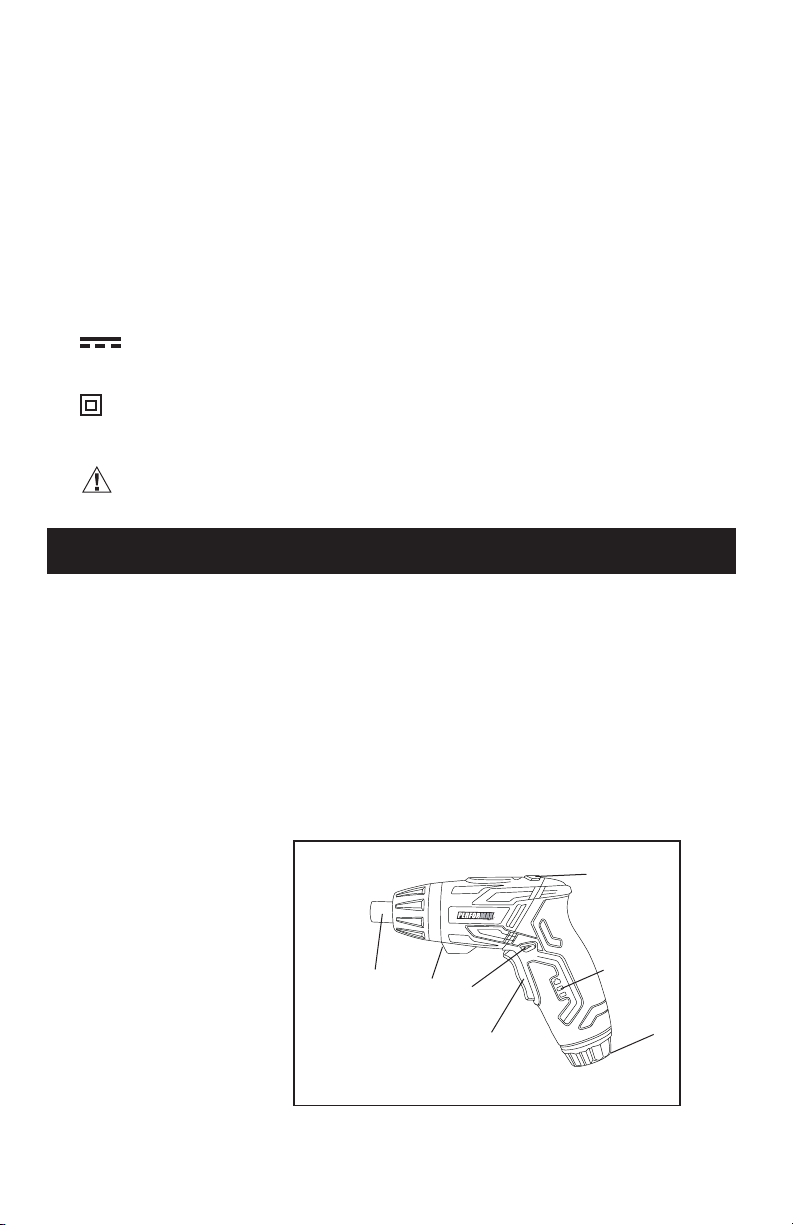
DESCRIPTION
Before attempting to use this product, familiarize yourself with all operating
features and safety rules.
1) On/Off Trigger Switch
2) Forward/Reverse Switch
3) Screwdriver Bit Collet
4) Work Light
5) Battery Capacity Indicator
6) Two Position Adjustment Switch
7) Flash Light
Fig.1
4
3
2
1
6
5
7

7
On/Off trigger switch. To turn tool on, press the trigger switch. To turn the
tool off, release the trigger switch.
Forward/Reverse switch. The forward/reverse switch should only be
operated when the motor is NOT running.
Worklight. For working in dark spaces.
Allows end user to know when to charge tool
LED Battery Capacity Indicator.
Flash light switch. For low-light situations.
Two Position Adjustment Switch .
Adjustable 2-position handle allows for operation in either in-line or pistol-grip.
TO CHARGE
Make sure your screwdriver has completely stopped before attempting to
charge it. Insert the power unit jack into charging socket, making sure they
are properly connected.
ACCESSORIES
Power unit can be used with normal house voltage of 120 volts, 60 Hz, AC
only.
2. Connect the power unit to the power supply.
3. During the charge, the battery indicator (red light) will turn on.
1. After normal usage, the battery requires approximately 3-5 hours charging
time to reach full capacity.
4. After 3-5 hours charging time, pull out from power supply and start the
screwdriver, if 3 battery indicator lights are on, the screwdriver is full
charged.
OPERATION
Phillips driver bits ................................................................................................3 pcs
Torsion bits .......................................................................................................... 3 pcs
Slotted driver bits ............................................................................................... 3 pcs
Square driver bits............................................................................................... 2 pcs
Magnetic bit holder ............................................................................................ 1 pc
Charger .................................................................................................................. 1 pc
8
Do not place the power unit in an area of extreme heat or cold. It works best
at normal room temperature. The base of the tool or power unit may become
warm during charging.
WARNING! Only use the original power unit to charge the tool; use of
other power units may cause fire, explosions, and serious injury.
NOTE: During the charge, the tool can’t be turned on.
FITTING SCREWDRIVER BITS
Place a 1/4” bit into the magnetic bit holder and then insert the bit holder into
the screwdriver collet.
Note: Your drill is intended for light-duty use. For best results, 1⁄4”
screwdriver bits are recommended.
Never engage the trigger switch when changing screwdriver bits.
Always lock the trigger switch when changing drill bits. (See forward/reverse
switch instructions.)
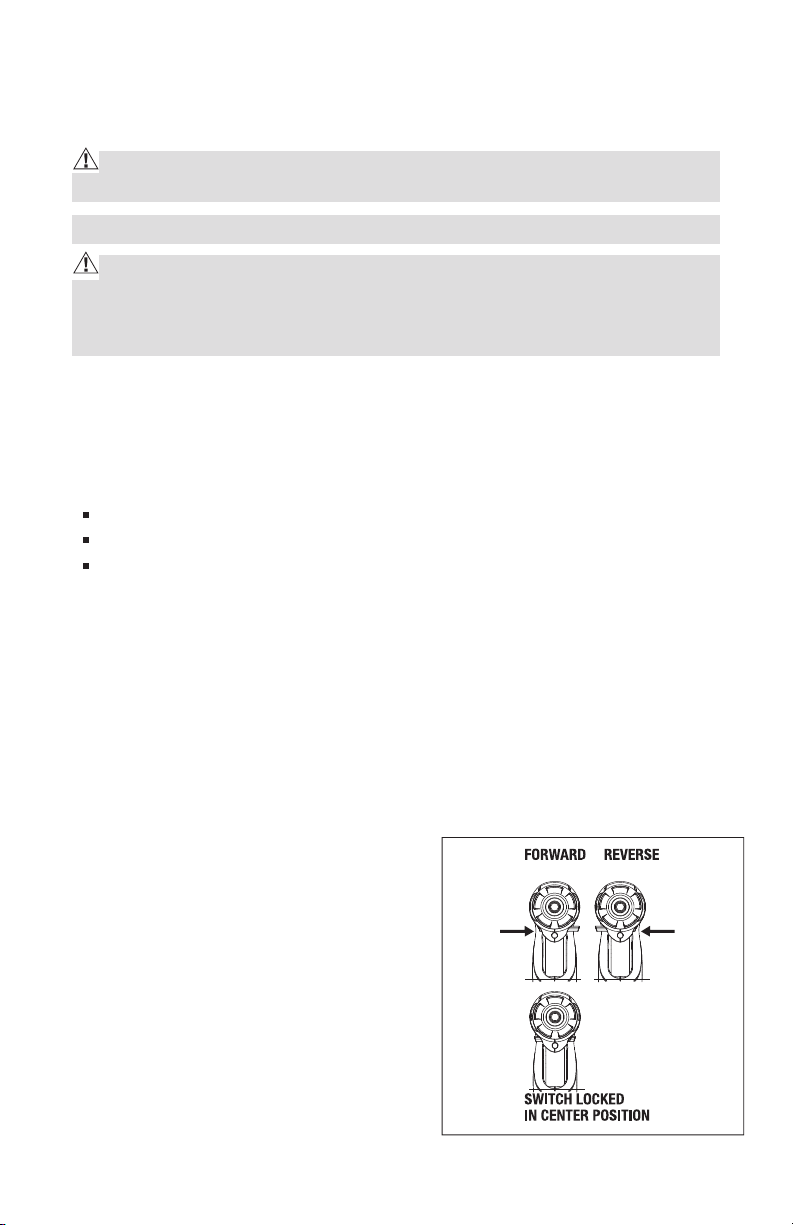
FORWARD/REVERSE SWITCH
The forward/reverse switch
determines the running direction of
the tool and also serves as a trigger
switch lock.
To select the “forward” motion,
release the trigger switch and push
the forward/reverse lever to the right
side of the tool. To select the “reverse”
motion, push the forward/reverse lever
to the left side of the tool.
WARNING! Charging time must not exceed 15 hours; the battery may be
damaged with excessive charging. Avoid charging your screwdriver in freez-
ing conditions. The power unit provided must only be used with this screw-
driver and not with any other products.
Do not insert metal objects into the power unit.
Never change the forward/reverse switch while the screwdriver is rotating,
as this will damage the screwdriver.
Fig. 2
LED Battery Capacity Indicator
The battery capacity is indicated by 3 lights:
Red LED is on - <20%
Red & yellow LED's are on - 20-70%
Red & yellow& green 3 LED's are on - >70%
Once only the red LED is lit, the screwdriver must be re-charged.
9
WARNING! It is recommended
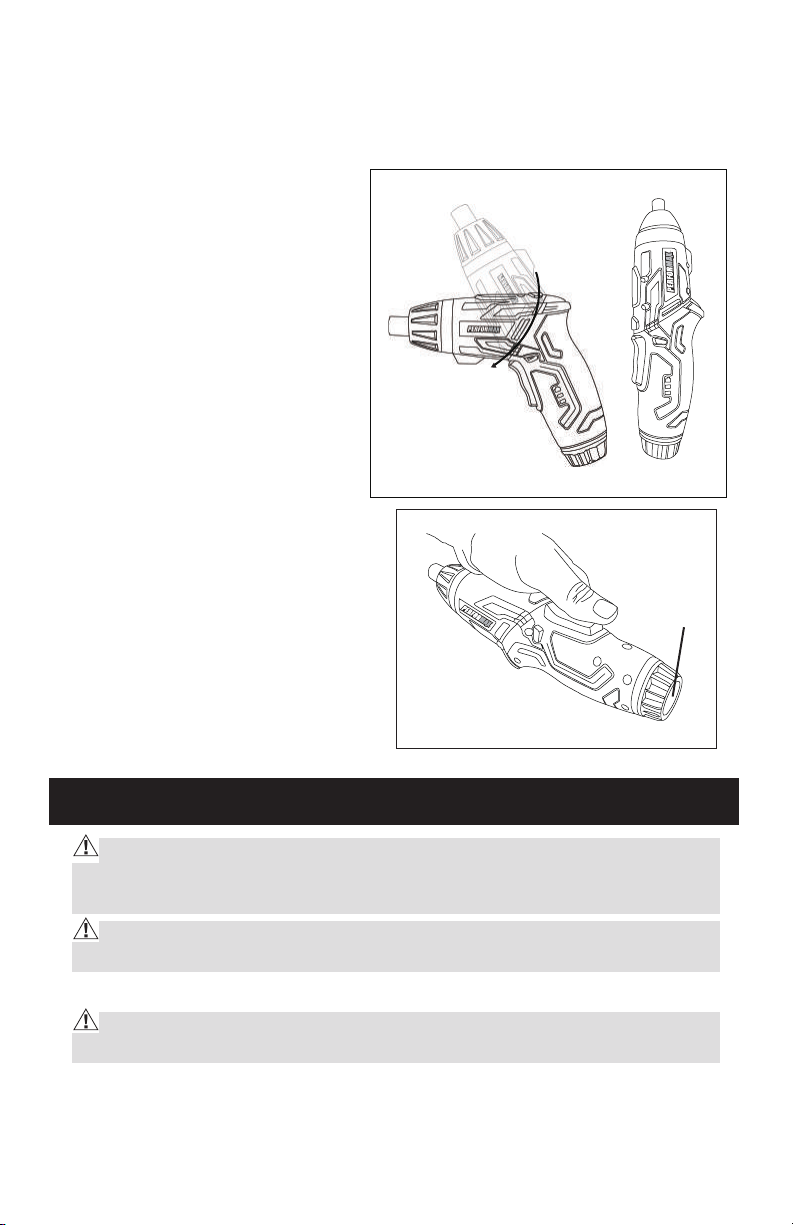
Two Position Adjustment (Fig.3)
The driver can be used as one
straight driver.
First press the rotation button,
turn the front section in an
anticlockwise direction and
then release the button when
can not turn it again.
NOTICE: Do not use screwdriver
as a pry bar in either
position.
CAUTION: To avoid screwdriver
being turned on accidentally, keep
switch locked in center position
Fig.3
Fig.4
Flash light (Fig.4)
Flash light
lens
Push on the lens to turn the light on;
Push on the lens again to turn it off.
that all the repair or replacement for this
tool shall be performed by a qualified service technician. Contact or visit the
nearest Menards store for more information.
WARNING! Always use only a soft, dry cloth to clean your screwdriver,
never use any detergent or alcohol.
Disconnect the power unit from the main supply before cleaning.
CAUTION! No chemical agents are approved for use in cleaning this power
tool. Clean with a dry cloth or towel only.
MAINTENANCE
The center position of the switch
locks the tool in the “OFF” position.
When changing the position of the switch, be sure the trigger is is not
depressed.

10
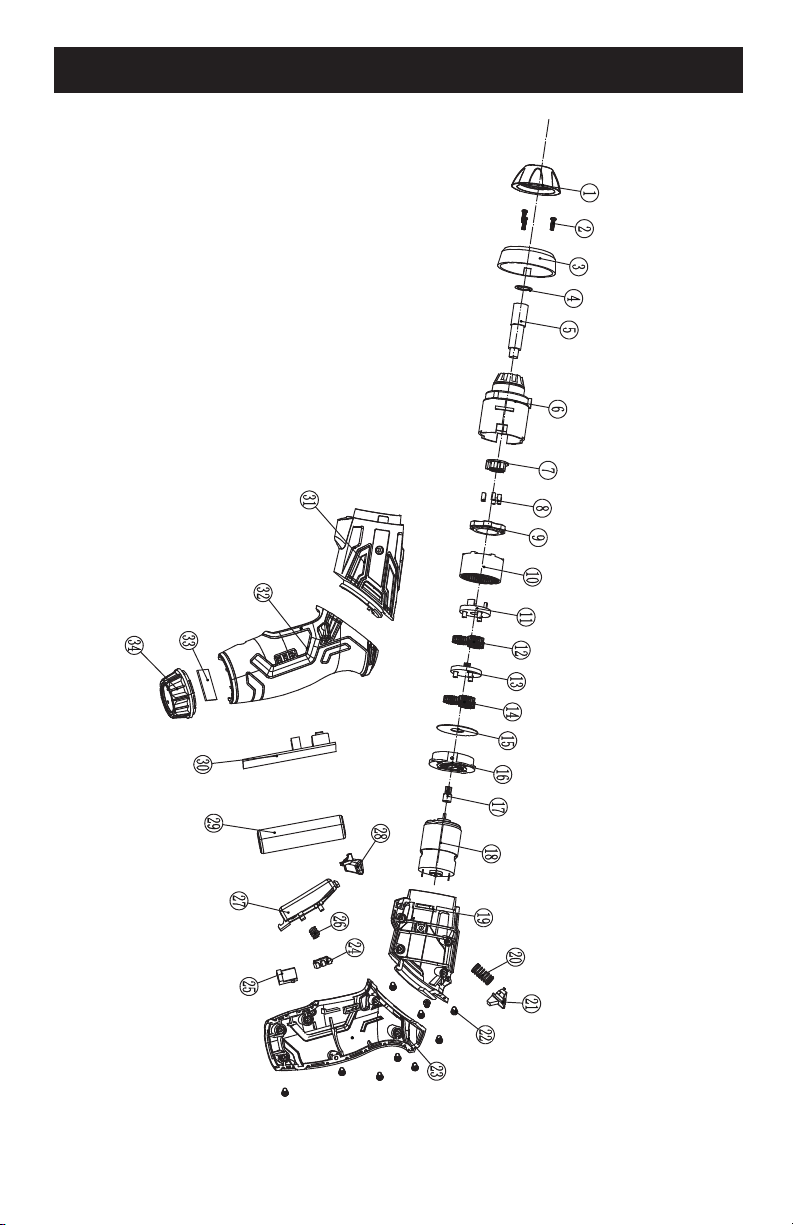
PARTS LIST
NO.
DESCRITION
NO.
DESCRITION
1
Cover
21
PRESS button
2
Screw
22
Screw
3
Plastic retainer
23
Right handle housing
4
Spacer
24
Llampshade
5
Spring
25
DC plate
6
Gear case
26
Switch spring
7
Self-lock lump
27
Switch button
8
Self-lock pin
28
Reverse and backverse switch
9
Bear
29
Battery
10
Gear spacer
30
PCB
11
2
nd
plante carrier
31
Left housing
12
Gear
32
Left handle housing
13
1
st
plante carrier
33
Light plate
14
Gear
34
Light cover
15
Spacer
16
Motor cover
17
Motor gear
18
Motor
19
Right housing
20
PRESS button spring
When servicing, use only original equipment replacement parts. The use of any other parts
may create a safety hazard or cause damage to the cordless screwdriver.
Any attempt to repair or replace electrical parts on this cordless screwdriver may create a safety hazard
aunless repairs re performed by a qualified technician. For more information, call the toll-free helpline, at
1-866-915-8626.
WARNING:
11
SCHEMATIC DRAWING

13
For questions / comment
s, technical assistance or repair parts –
Please Call Toll Free at: 1-866-915-8626 (M-F 9am – 5pm)
SAVE YOUR RECEIPTS. THIS WARRANTYY IS VOID WITHOUTT THEM.
Rev 1.3 12/09/2015
Distributed by: Menard, Inc., Eau Claire, WI 54703
PERFORMAX™ 4-VOLT CORDLESS SCREWDRIVER WARRANTY
30-DAY MONEY B ACK GUARANTEE:
:
This PERFORMAX
TM
brand power tool carries our 30-Day Money Back
Guarantee. If you are not completely satisfied with your PERFORMAX
TM
brand
power tool for any reason within thirty (30) days from the date of purchase, return
the tool with your original receipt to any MENARDS
®
retail store, and we will
provide you a refund – no questions asked.
2-YEAR LIMITED WARRANTY:
This PERFORMAX brand power tool carries a 2-Year Limited Warranty to the
original purchaser. If, during normal use, this PERFORMAX power tool breaks
or fails due to a defect in material or workmanship within two (2) years from the
date of original purchase, simply bring this tool with the original sales receipt
back to your nearest MENARDS retail store. At its discretion, PERFORMAX
agrees to have the tool or any defective part(s) repaired or replaced with the
same or similar PERFORMAX product or part free of charge, within the stated
warranty period, when returned by the original purchaser with original sales
receipt. Notwithstanding the foregoing, this limited warranty does not cover any
damage that has resulted from abuse or misuse of the Merchandise. This
warranty: (1) excludes expendable parts including but not limited to driver blades,
O rings, blades, brushes, belts, bits, light bulbs, and/or batteries; (2) shall be void
if this tool is used for commercial and/or rental purposes; and (3) does not cover
any losses, injuries to persons/property or costs. This warranty does give you
specific legal rights and you may have other rights, which vary from state to
state. Be careful, tools are dangerous if improperly used or maintained. Seller’s
employees are not qualified to advise you on the use of this Merchandise. Any
oral representation(s) made will not be binding on seller or its employees. The
rights under this limited warranty are to the original purchaser of the Merchandise
and may not be transferred to any subsequent owner. This limited warranty is in
lieu of all warranties, expressed or implied including warranties or merchantability
and fitness for a particular purpose. Seller shall not be liable for any special,
incidental, or consequential damages. The sole exclusive remedy against the
seller will be for the replacement of any defects as provided herein, as long as
the seller is willing or able to replace this product or is willing to refund the
purchase price as provided above. For insurance purposes, seller is not allowed
to demonstrate any of these power tools for you.
TM
TM
®
TM
TM