
INSTANT
®
INFUSION BREW PLUS
12-CUP COFFEE MAKER
USER MANUAL

to your new Instant
®
Infusion Brew Plus 12-Cup Coffee Maker!
Brew delicious, smooth coffee anytime you crave it, with maximum flavor
and customization in every cup. Here are some helpful resources as you
get to know your new Instant
®
appliance.
Get started with your Infusion Brew Plus!
.
Welcome

CONTENTS
Important safeguards 2
Whats in the box 5
Using your Instant
®
Infusion Brew Plus 6
Initial setup 7
Brewing coffee 11
Care, cleaning and storage 16
Troubleshooting 18
Learn more 20
Warranty 21

2
User Manual
At Instant, we want you to feel comfortable using our products. This
Instant Coffee Maker was designed with you and your safety in mind.
Read all instructions before using and only use this appliance
as directed. Failure to follow these Important Safeguards may
result in personal injury and/or property damage and will void
your warranty.
When using electrical appliances, basic safety precautions should
always be followed to reduce the risk of fire, electric shock, personal
injury and/or property damage.
READ ALL INSTRUCTIONS
Placement
• DO operate the appliance on a stable, non-combustible, level surface.
• DO NOT place the appliance on or near a hot gas or electric burner,
or in a heated oven.
• DO NOT move the appliance while it is in operation.
General Use
• DO NOT use this coffee maker outdoors.
• DO NOT Fill past waterline
• DO NOT fill the water reservoir with mineral water, milk or other liquids.
Only fill the water reservoir with clean, cold water.
• DO NOT let the coffee maker operate without water.
• DO NOT use the appliance for anything than its intended use. Not for
commercial use. For household use only.
• DO regularly inspect the appliance and power cord.
• DO NOT leave the appliance exposed to sun, wind, and/or snow.
• DO operate and store the appliance above 32°F / 0°C
• DO NOT leave the appliance unattended when in use.
• DO NOT allow children to operate the appliance; close supervision is
required when any appliance is used near children.
• DO NOT let children play with this appliance.
• To avoid the risk of burn injury DO NOT open the top cover during or
immediately after the brew process. Contents may be extremely hot.
Allow contents to cool before opening lid.
IMPORTANT
SAFEGUARDS

3
User Manual
• DO NOT touch hot surfaces with unprotected hands.
• The use of an accessory not evaluated for use with this appliance may
cause personal injuries and/or property damage.
• The container is designed for use with this appliance. It must never be
used on a range top.
• DO NOT set a hot container on a wet or cold surface.
• DO NOT use a cracked container or a container having a loose or
weakened handle.
• DO NOT clean container with cleansers, steel wool pads, or other
abrasive material.
Care and Storage
• DO unplug from outlet when not in use before cleaning. Allow the
appliance to cool before putting on or taking off parts, and before
cleaning the appliance.
• DO NOT store any materials in the brewing chamber when not in use.
Power Cord
A short power-supply cord is used to reduce the risk resulting from it being
grabbed by children, becoming entangled in, or tripping over a longer cord.
Spilled liquids from this coffee maker can cause serious burns and/or
property damage. Keep appliance and cord away from children.
Never drape cord over edge of counter and never use outlet below counter.
• DO NOT let the power cord touch hot surfaces or open flame, including
the stovetop.
• DO NOT use with power converters or adapters, timer switches or
separate remote-control systems.
• DO NOT let the power cord hang over the edge of tables or counters.
• DO unplug your coffee maker by grasping the plug and pull from the
outlet. Never pull from the power cord.
• DO NOT attempt to modify the plug. If the plug does not fit full into the
outlet, reverse the plug.
• DO contact a qualified electrician if the plug does not fit in the outlet.
• DO plug this appliance into a polarized outlet one way. This appliance has
a polarized plug, and one blade is wider than the other.
This appliance has a polarized plug, with one blade wider than the other. To
reduce the risk of electrical shock:
• ONLY plug this appliance into a polarized outlet. If the plug does not fit
fully into the outlet, reverse the plug.
• DO NOT attempt to modify the plug in any way. If it still does not fit,
contact a qualified electrician.

4
User Manual
Electrical Warning
The coffee maker contains electrical components that are an
electrical shock hazard. Failure to follow these instructions may
result in electric shock.
To protect against electrical shock:
• To reduce the risk of fire, property damage, personal injury, and/or
electric shock, do not remove the bottom cover. No user-serviceable
parts inside. Repair should be done by authorized service personnel only.
• To disconnect, turn any control to the off position and remove plug from
power source. Always unplug when not in use, as well as before adding
or removing parts or accessories, and before cleaning. To unplug, grasp
the plug and pull from the outlet. Never pull from the power cord.
• DO regularly inspect the appliance and power cord. DO NOT operate the
appliance if the power cord or plug is damaged, or after the appliance
malfunctions or is dropped or damaged in any manner. For assistance,
contact Customer Care by email at support@instanthome.com.
• DO NOT attempt to repair, replace or modify components of the
appliance, as this may cause property damage, electric shock, fire or
personal injury, and will void the warranty.
• DO NOT tamper with any of the safety mechanisms, as this may
result in personal injury or property damage.
• DO NOT immerse power cord, plug or the appliance in water or
other liquid.
• DO plug this appliance into a polarized outlet one way. This appliance
has a polarized plug, and one blade is wider than the other.
• DO NOT use the appliance in electrical systems other than 120 V ~
60 Hz for North America.
• A longer detachable power-supply cord or extension cord may be
used with the following precautions:
- The marked electrical rating of the detachable power-supply cord
or extension cord should be at least as great as the electrical
rating of the appliance.
- The longer cord should be arranged so that it will not drape over
the countertop or tabletop where it can be pulled on by children
or tripped over.
SAVE THESE INSTRUCTIONS
5
User Manual
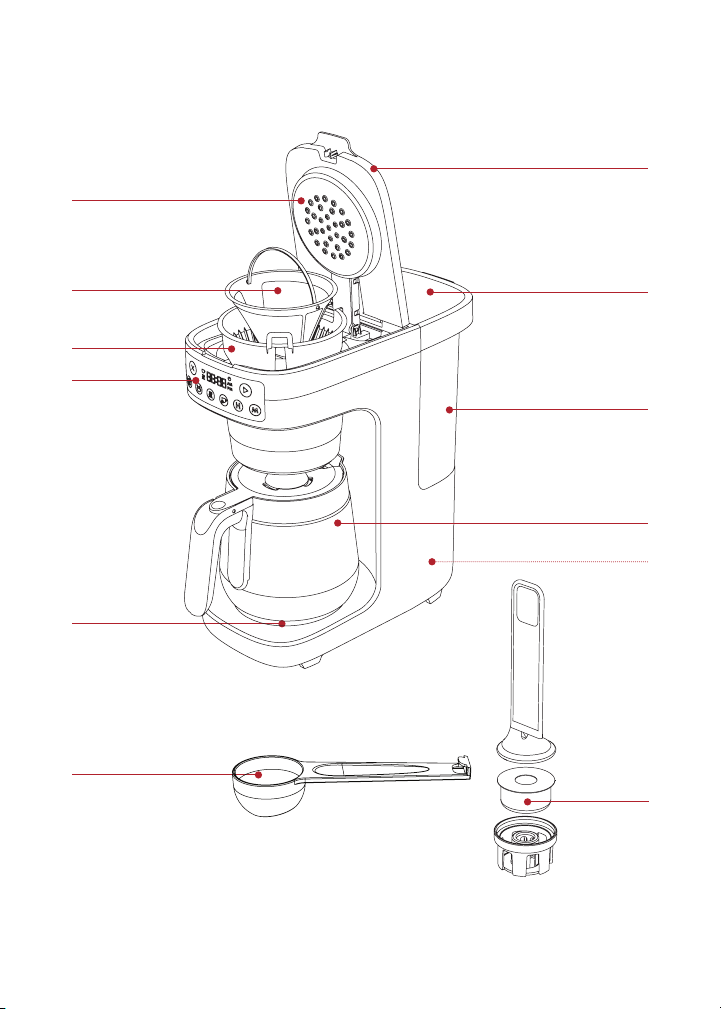
WHATS IN THE BOX
Accessories
Illustrations are for reference only and may differ from the actual product.
Warming plate
Coffee measuring scoop
DRIP COFFEE MAKER - BETTER
DRIP COFFEE MAKER - BETTER
Removable
brew basket
Control panel
Showerhead dispenser
Water reservoir lid
Coffee maker lid
Removable 60-ounce
water reservoir
Gold-Tone permanent
coffee filter
12-Cup glass carafe
Power cord (rear)
Integrated
Carbon Filter
6
User Manual
Remember to recycle!
We designed our packaging with sustainability in mind. Be sure to recycle
at a recycling center in your area.
USING YOUR INSTANT
®
INFUSION BREW PLUS
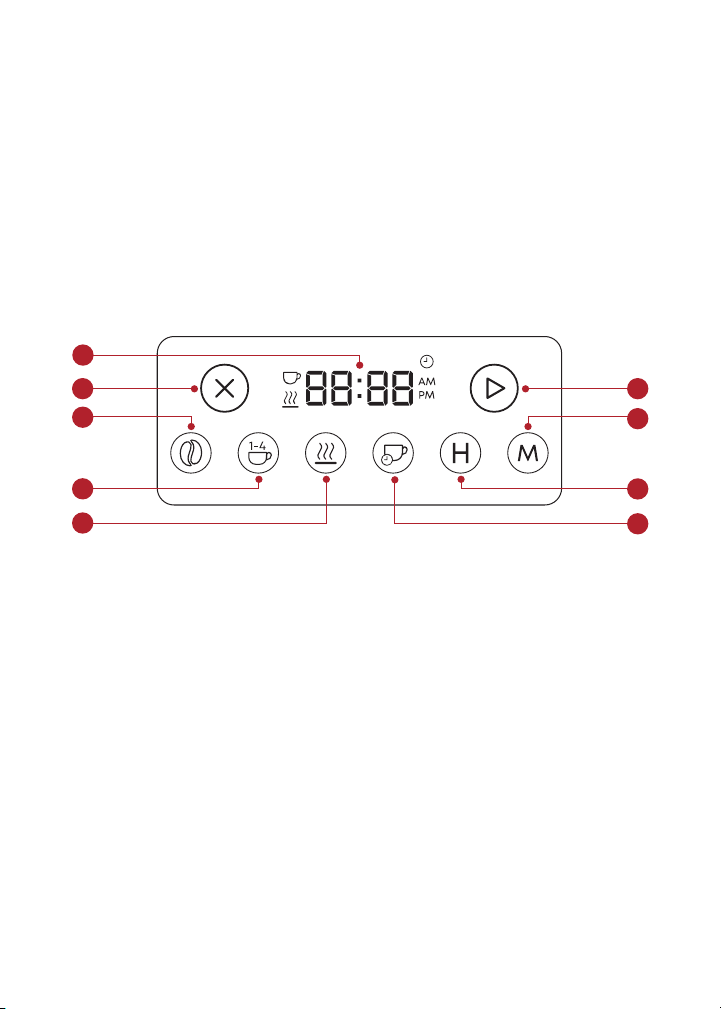
Control panel
We’ve designed the control panel to be simple and easy to read.
1. Clock/ display
2. Cancel
3. Start
4. Bold setting
5. Small batch (1-4 cups)
6. Warming Plate
7. Auto-Brew/Timer
8. Hours
9. Minutes
3
7
8
9
1
2
5
6
4

7
User Manual
INITIAL SETUP
1. Pull the Instant
®
Infusion Brew Plus and all accessories out of
the box.
2. Remove all packaging materials from within and around the unit.
3. Place the unit on a dry, stable and level surface.
4. Plug in your Instant
®
Infusion Brew Plus.
5. You will hear a beep and all display LED buttons will light up.
Note: After 30 minutes of inactivity, your coffee maker will enter standby mode.
The LED control panel will dim. To exit standby mode, press any button or lift the
coffeemaker lid.
Sound Settings
You can turn sound and reminder beeps on or off. The default sound
setting when you open your coffee maker is ON.
1. Make sure your Instant
®
Infusion Brew Plus is on.
2. To turn sound off, press and hold the Bold and Small Batch
buttons at the same time for 2 seconds. The message display will
show SOFF.
3. To turn sound back on, repeat step 2. The message display will
show S On.
Setting the Clock
When you first turn on your Instant
®
Infusion Brew Plus, the clock
display will show the default time of 12:00 AM. Setting and changing
the time is quick and easy.
1. Make sure your Instant
®
Infusion Brew Plus is turned on.
2. Press the
and buttons until the correct time is set. To speed
up, press and hold for 3 seconds.
3. Press
button to save the new time.
4. Your clock is now set!
8
User Manual
Clean before use
1. Lift the water reservoir up to remove from the coffee maker.
2. Handwash the glass carafe, water reservoir, coffee filter and brew
basket with warm water and dish soap. Rinse with warm, clear
water. Wipe with a clean, dry cloth.
3. With a damp cloth, wipe down the coffee maker base and control panel.
Integrated Carbon Filter
The integrated carbon filter ensures your water is free of chlorine and
other impurities before brewing for cleaner, tastier coffee. The filter
cartridge contains activated charcoal and should be replaced every
60 days for the best results.
You will need to assemble and install the integrated carbon filter that
comes with your machine before your first brew.
To assemble:
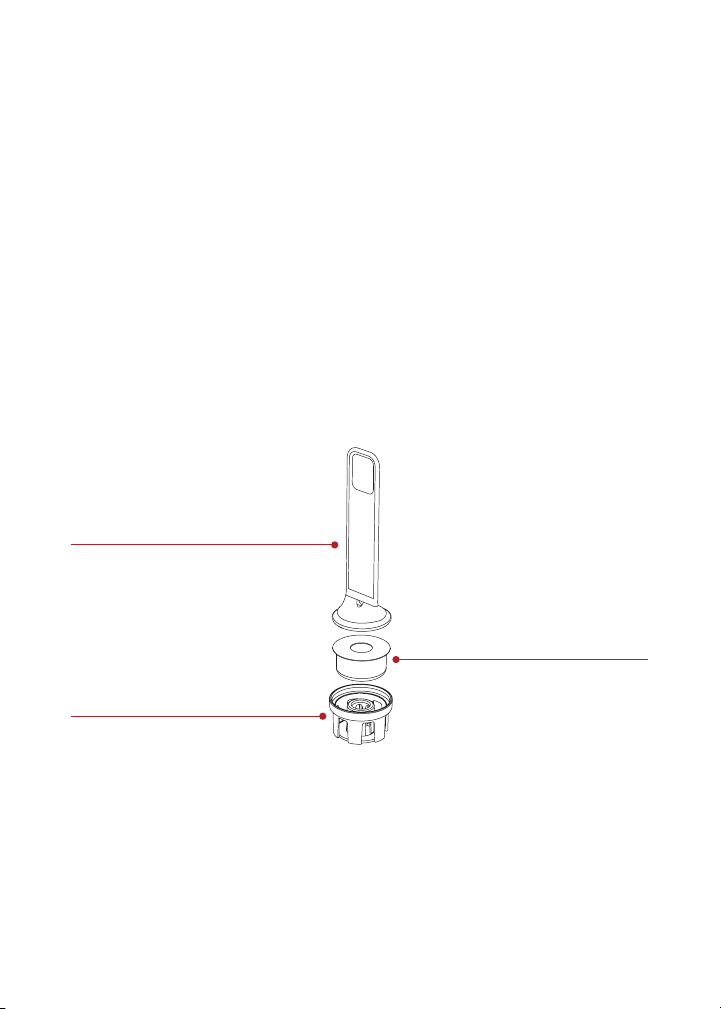
1. Remove the filter base, top handle and filter cartridge from
its packaging.
2. Soak the filter cartridge in cool water for 10 minutes to activate
it before using.
DRIP COFFEE MAKER - BETTER
Filter cartridge
Filter base
Top handle

9
User Manual
3. Place the fully soaked filter cartridge into the filter base.
4. Snap the top handle to the filter base to fully enclose the
filter cartridge.
To install:
1. Place the assembled Integrated carbon filter into the water reservoir.
2. Press the integrated carbon filter into the port at the bottom of
the water reservoir until it is firmly in place.
To replace the filter cartridge:
1. Pull the top handle to remove the integrated carbon filter from the
water reservoir.
2. Unsnap the top handle from the filter base to remove the old filter
cartridge and replace with a new one. See assembly instructions above.
Always soak your new filter cartridge in water for 10 minutes before using
for best results.
Test Run
Before you brew your first carafe of coffee, we recommend flushing
your Instant
®
Infusion Brew Plus to make sure the unit is clean and
working correctly. Do not use coffee for the test run.
1. Remove the water reservoir lid. Lift the water reservoir from the
back of the coffee maker.
2. Fill the water reservoir with cold water to the 12-cup fill line as
indicated. Be careful not to over-fill.
3. Place the water reservoir back onto the coffee maker then replace
water reservoir lid.
4. Place the glass carafe onto the warming plate, under the
removable brew basket.
5. Ensure the coffee maker lid is closed. The
button should light up.
Press
button to begin brewing.

10
User Manual
6. After the brewing cycle ends, the keep warm setting will automatically
activate and the warming plate will stay hot for 2 hours. Press the
button or the
button to turn it off.
7. Carefully remove the glass carafe and discard the water.
CAUTION: The water and warming plate will be hot.
To stop brewing at any time press the button.
8. Carefully place the glass carafe back on to the warming plate
which may still be hot.
9. Your test run is complete and you’re ready to start brewing!

11
User Manual
BREWING COFFEE
Once you’ve cleaned your Instant
®
Infusion Brew Plus and all parts, and
completed a test run, it’s time to program your perfect brew.
Brewing the Perfect Coffee
Water Coffee Grind Ratio
Coffee is 98%
water. Use
great tasting,
cool, filtered
water for the
purest tasting
coffee.
The tastiest,
high-quality beans
make the tastiest,
smoothest coffee.
Store whole beans
in a cool place
(or freezer) and
grind just before
brewing.
For the most
flavorful coffee,
choose a medium-
fine grind when
brewing with your
Instant
®
Infusion
Brew Plus. If you
grind your own
beans, grind just
before brewing
for maximum
freshness.
Getting water to
coffee ratios correct
is key to great
tasting brew that
isn’t too weak or too
strong. See coffee
measurements guide
to start, then adjust
to your personal
taste.
Pre-Infusion Process
Your Instant
®
Infusion Brew Plus uses an innovative showerhead
dispenser and pre-infusion process to extract maximum flavor with
every brew. Pre-infusion gently soaks the ground coffee evenly with
filtered water before brewing. Pre-infusion begins automatically during
all brewing programs with your Instant
®
Infusion Brew Plus.
Brew Preferences and Programs
Your Instant
®
Infusion Brew Plus lets you choose how you want to brew
for maximum taste and customization, and tasty coffee every time.

12
User Manual
Bold Brew
If you prefer a stronger, richer coffee, the Bold Brew setting has been
programmed to extract even deeper flavor from the coffee grounds by
increasing the brewing time slightly.
The Bold Brew button will illuminate when selected.
You can toggle between Classic and Bold Brew settings depending on
your personal preference.
For brew that tastes… Choose this brew strength
Medium flavor, easy drinking, balanced.
Great morning coffee.
Classic
Deep, rich flavor, smooth. Holds up well to
cream/milk and other flavorings.
Bold
Auto-Brew Timer
Set your timer before bed and wake up to perfectly brewed coffee
ready for you to enjoy! You can set your brew to automatically start, up
to 24 hours in advance.
• Make sure the clock is set to the current time. See ‘Setting the
Clock’ on page 7.
• Press the
button then press the and buttons to set the brew
time you want.
• Press
. The button will illuminate and a tone will play
confirming the new brew time is set.
Small Batch Brewing
Use this setting when you are brewing fewer than 4 cups of coffee.
Small batch brewing adjusts the brew process to ensure full flavor and
less waste, whether you want a lot of coffee or a little.
Keep Warm
Once your coffee has finished brewing, the Keep Warm setting keeps it
fresh and hot for up to 4 hours. The default warming is set at

13
User Manual
2 hours on High temperature. Default warming settings can only be
changed while in Ready mode, before brewing.
To change the Keep Warm settings:
1. Press and hold the
button for 3 seconds to change the default
warming temperature or time.
2. To change the temperature, press the
button to select Low,
Medium or High.
Note: The current warming temperature can be changed during or after brewing,
once the warming plate has turned on.
3. To change the time, press the and buttons and toggle through
Hours and Minutes.
Note: you cannot change the time on the warming plate once warming starts.
4. Press the button to confirm choices.
Once you save your preferences, they are stored as your new default settings for
quick and easy brewing next time. You can change settings anytime.
Coffee Measurement Chart
We recommend using a medium-fine grind of coffee with your
Instant
®
Infusion Brew Plus. This will give you optimal results and the
smoothest flavor.
Batch Size Cups Grounds Water
Small batch
button
is on
4 cups 4 rounded scoops or 6 Tbsp. 4-cup line
Full carafe
button is
off
6 cups 6 rounded scoops or 9 Tbsp.
or 1/2 cup + 1 Tbsp.
6-cup line
8 cups 8 rounded scoops or 12 Tbsp.
or 3/4 cup
8-cup line
10 cups 10 rounded scoops or 15 Tbsp.
or 3/4 cup + 3 Tbsp.
10-cup line
12 cups 12 rounded scoops or 18 Tbsp.
or 1 cup + 2 Tbsp.
12-cup line

14
User Manual
How to brew coffee
Prep
1. Lift the water reservoir lid to open. Remove the water reservoir by
pulling straight up.
2. Fill the water reservoir to desired level. See “Coffee
Measurements” for suggested quantities above.
CAUTION: DO NOT attempt to brew if the water level is below the MIN fill line.
3. If using coffee beans, grind them down to a medium or medium-
fine consistency.
Brew
1. Lift the coffee maker lid and place the removable brew basket
into the basket holder, making sure it’s secure. Insert the gold-tone
coffee filter (or a #4 cone paper filter) into the removable
brew basket.
2. Add desired amount of ground coffee into the gold-tone coffee
filter. See “Coffee Measurements” table above.
3. Close the coffee maker lid. The green
button will turn on. Note:
the coffeemaker lid must be closed for brewing to start.
4. Choose preferred strength: press the
button for stronger, bolder
brew flavor, if desired. The button light will illuminate. Press the
button again to turn off light and brew at classic strength.*
5. Choose small batch or full carafe: Press
if you are brewing fewer
than 5 cups. The selected button will illuminate. If you are brewing
a full carafe leave this off.*
6. If brewing immediately, press
to keep default settings and brew
right away. Or see Step 5 to change your default settings. You can
set auto-brew for up to 24 hours ahead of time.
7. Choose brew time: press the
button. Either the default time of
12:00 or the previously set time will flash on the display. Press the
and buttons to adjust your desired start time.

15
User Manual
8. Press the green button to confirm time.
To accelerate through the selections, press and hold the and buttons.
You can cancel brewing and return to Ready mode at any time by pressing
the button.
9. Every brew has an automatic pre-infusion cycle. Brewing will
begin, pause briefly as the coffee grounds are saturated, then
continue brewing.
10. When brewing is complete, automatic warming will begin. See
“Keep Warm” above.
11. Enjoy your freshly brewed coffee!
*Note: Saved settings will activate when you press button the next time you
brew. You can change these at any time.
To avoid the risk of burn injury and/or property damage DO NOT
open the coffee maker lid during or immediately after the brew
process. Water may be extremely hot.
Allow contents to cool before opening the lid.

16
User Manual
CARE, CLEANING AND STORAGE
Clean your Instant
®
Infusion Brew Plus regularly to ensure the best
possible flavor and to prevent mineral deposits from building up in the
coffee maker.
Always let parts cool to room temperature before cleaning. Never use
metal scouring pads, abrasive powders, or harsh chemical detergents
on any of the coffee maker’s parts.
Let all parts dry thoroughly before use and before storage.
Instant
®
Infusion Brew Plus
Part/ Accessory
Cleaning methods and instructions
• Removable water reservoir
• Glass carafe
• Remove the reservoir and hand wash with
dish soap and warm water.
• Not dishwasher safe.
• Removable brew basket
• Gold-Tone coffee Filter
• Remove and hand wash with dish soap
and warm water or place in the top rack of
a dishwasher.
Coffee maker / LED panel • Use a damp dish cloth to clean the outside
of the coffee maker and LED panel
Power cord • DO NOT fold power cord when storing.
CAUTION To avoid fire, electric shock, personal injury and/or property
damage:
• Hand wash only.
• DO NOT rinse or immerse the coffee maker, power cord, or plug in
water or other liquids.
Any other servicing should be performed by an authorized service representative.
For assistance, contact Customer Care at support@instantcare.com.
Descaling / Removing Mineral Deposits
With regular use minerals may accumulate in the coffee maker, which
can affect the temperature and strength of your brew.
To make sure your coffee maker stays in tip top shape, descale it
regularly to keep mineral deposits from building up. Your Instant
®
Infusion Brew Plus has a built-in cycle for quick and easy cleaning.

17
User Manual
After 90 cycles, the button light will turn on and the and button
lights will flash to remind you to clean and descale your coffee maker.
You will have two options:
Cancel cleaning
Press the button to exit reminder mode and return to Ready mode.
Your coffee maker will not begin cleaning and the brew cycle counter
will reset.
Start automatic cleaning cycle.
Follow instructions in “How to Descale your Instant Coffee Maker
Plus” below.
Once the cleaning cycle is completed, the brew cycle counter will reset
(counting up to 90) and the device returns to Ready mode.
How to Descale your Instant
®
Infusion Brew Plus
1. Combine cleaner and water as shown in the table “Descaling
Solution Ratio” below.
2. Fill the water reservoir to the MAX line with the cleaning mixture.
3. Place the glass carafe under the removable brew basket. Make
sure the coffee maker lid is closed.
4. Press and hold the
and buttons for 3 seconds.
5. The
and buttons will flash slowly and the cleaning mixture will
pass through the appliance until the water reservoir is empty.
6. Discard the cleaning mixture from the glass carafe. Be careful: the
mixture will be HOT.
7. Return the emptied glass carafe under the drip nozzle.
8. Remove and rinse the water reservoir and fill to the MAX line with
cool, clean water. Make sure the coffee maker lid is closed.
9. Press and hold the
and buttons for 3 seconds. The cleaning mixture
will pass through the appliance until the water reservoir is empty.
10. Discard the water from the glass carafe. The unit is now clean and
ready to use again.

18
User Manual
Descaling Solution Ratio
Cleaner Cleaner to water ratio
Household descaler 1 : 4
Citric acid 3 : 100
TROUBLESHOOTING
Problem Cause Solution
There is sediment/
grounds in
my coffee.
• The grind of coffee
may be too fine for the
removable filter.
• You forgot to place a
coffee filter into the brew
basket before brewing.
• Using too many grounds
can cause the filter
holder to overflow.
• Try using a slightly coarser
grind. Finely ground coffee
can clog the filter holder.
For best brewing results,
use a medium-grind coffee
• Either the permanent filter
or a paper filter must be in
place when brewing.
• Once cooled, clean out the
filter holder and refill using
the appropriate amount of
coffee (1 scoop per cup).
Coffee is too weak • Classic brew setting
was selected.
• Lighter roast coffee.
• Not enough ground
coffee added.
• For stronger flavor, try
choosing the bold setting
[coffee bean button].
• Use a darker roast.
• Add additional coffee
grounds.
Coffee is too strong • Bold brew setting
was selected.
• Coffee roast was
too dark.
• Try Classic brew setting.
Press
button to turn off
Bold brew.
• Use a lighter roast.
• Use fewer grounds.
The carafe
overflowed during
brewing cycle
• The carafe wasn’t empty
before brewing.
• Water reservoir was filled
above the MAX line
• Make sure carafe is empty.
• Only add water to the MAX
line (60 oz) additional
water to the reservoir
after a brew or cleaning
cycle has already started.

19
User Manual
Problem Cause Solution
Brew cycle will
not start
• NOTE: As part of
the pre-infusion
process, the brew
will start, pause
briefly and
then continue.
• Coffee maker not
turned on.
• Coffee maker lid is
not closed.
• There is no water in
the removable
water reservoir.
• The glass carafe is
not placed on the drip
tray correctly.
• Ensure the unit is powered
on and the display is
illuminated. If there are
no lights, the machine is
not getting power. Try a
different outlet.
• Check to make sure there is
water in the water reservoir.
• Make sure the carafe is
in place. The brewer will
not dispense coffee if the
carafe is not in place.
Coffee maker is
making unknown
or strange sounds
and/or buttons are
flashing.
Contact Consumer Care at
support@instanthome.com

20
User Manual
LEARN MORE
There’s a whole world of Instant Coffee Maker information and help just
waiting for you. Here are some of the most helpful resources.
Register your product
Instanthome.com/register
Contact Consumer Care
In the Instant Brands Connect App
Instanthome.com/customer-care-center
support@instanthome.com
Instant Brands
®
Connect App
Instanthome.com
iOS and Android app stores
Replacement parts and accessories
Instanthome.com
Join the community
Product specifications
Model Volume Wattage Power Weight Dimensions
DCM-1100 60 oz /
1774 mL
water
reservoir
1400 W 120V/
60Hz
6.57 lb
2.98 kg
in: 14.1 H x 6.9 W x 14.4 D
cm: 35.9 H x 17.6 W x 36.6 D

21
User Manual
WARRANTY
One (1) Year Limited Warranty
This One (1) Year Limited Warranty applies to purchases made from authorized retailers
of Instant Brands LLC (“Instant Brands”) by the original appliance owner and is not
transferable. Proof of original purchase date and, if requested by Instant Brands, return
of your appliance, is required to obtain service under this Limited Warranty. Provided the
appliance was used in accordance with the use & care instructions, Instant Brands will,
in its sole and exclusive discretion, either: (i) repair defects in materials or workmanship;
or (ii) replace the appliance. In the event that your appliance is replaced, the Limited
Warranty on the replacement appliance will expire twelve (12) months from the date of
receipt. Failure to register your product will not reduce your warranty rights. The liability
of Instant Brands, if any, for any allegedly defective appliance or part will not exceed the
purchase price of a comparable replacement appliance.
What is not covered by this warranty?
• Products purchased, used, or operated outside of the United States and Canada.
• Products that have been modified or attempted to be modified.
• Damage resulting from accident, alteration, misuse, abuse, neglect, unreasonable
use, use contrary to the operating instructions, normal wear and tear, commercial
use, improper assembly, disassembly, failure to provide reasonable and necessary
maintenance, fire, flood, acts of God, or repair by anyone unless directed by an
Instant Brands representative.
• Use of unauthorized parts and accessories.
• Incidental and consequential damages.
• The cost of repair or replacement under these excluded circumstances.
EXCEPT AS EXPRESSLY PROVIDED HEREIN AND TO THE EXTENT PERMITTED BY
APPLICABLE LAW, INSTANT BRANDS MAKES NO WARRANTIES, CONDITIONS OR
REPRESENTATIONS, EXPRESS OR IMPLIED, BY STATUTE, USAGE, CUSTOM OF TRADE
OR OTHERWISE WITH RESPECT TO THE APPLIANCES OR PARTS COVERED BY THIS
WARRANTY, INCLUDING BUT NOT LIMITED TO, WARRANTIES, CONDITIONS, OR
REPRESENTATIONS OF WORKMANSHIP, MERCHANTABILITY, MERCHANTABLE QUALITY,
FITNESS FOR A PARTICULAR PURPOSE OR DURABILITY.

22
User Manual
Some states or provinces do not allow for: (1) the exclusion of implied warranties of
merchantability or fitness; (2) limitations on how long an implied warranty lasts; and/or
(3) the exclusion or limitation of incidental or consequential damages; so these
limitations may not apply to you. In these states and provinces, you have only the implied
warranties that are expressly required to be provided in accordance with applicable
law. The limitations of warranties, liability, and remedies apply to the maximum extent
permitted by law. This limited warranty gives you specific legal rights, and you may also
have other rights which vary from state to state or province to province.
Product Registration
Please visit www.instanthome.com/register to register your new Instant Brands
appliance. Failure to register your product will not diminish your warranty rights. You
will be asked to provide the store name, date of purchase, model number (found on the
back of your appliance) and serial number (found on the bottom of your appliance) along
with your name and email address. The registration will enable us to keep you up to date
with product developments and recipes, and contact you in the unlikely event of a product
safety notification. By registering, you acknowledge that you have read and understand
the instructions for use, and warnings set forth in the accompanying instructions.
Warranty Service
To obtain warranty service, please contact our Consumer Care Department by email
to support@instanthome.com. You can also create a support ticket online at
www.instanthome.com. If we are unable to resolve the problem, you may be asked to
send your appliance to the Service Department for quality inspection. Instant Brands
is not responsible for shipping costs related to warranty service. When returning your
appliance, please include your name, mailing address, email address, phone number,
and proof of the original purchase date as well as a description of the problem you are
encountering with the appliance.

23
User Manual
NOTES

24
User Manual
NOTES

25
User Manual
NOTES

Distributed by Instant Brands LLC
3025 Highland Parkway, Suite 700
Downers Grove, IL 60515 U.S.
instanthome.com
© 2022 Instant Brands LLC
140-0097-01
Art release date
11/08/2022
INSTANT and INSTANT BRANDS
are registered trademarks of
Instant Brands Holdings Inc.