Sku Number: 356-1112
OUTDOOR WALL LANTERN
Model Number: DJ9016
PACKAGE CONTENTS
Page 1 of 6
190718
Questions, problems, missing parts?
Before returning to your retailer, call our customer service at 1-800-887-6326
Monday – Friday 9:00 a.m. – 5:00 p.m. CST
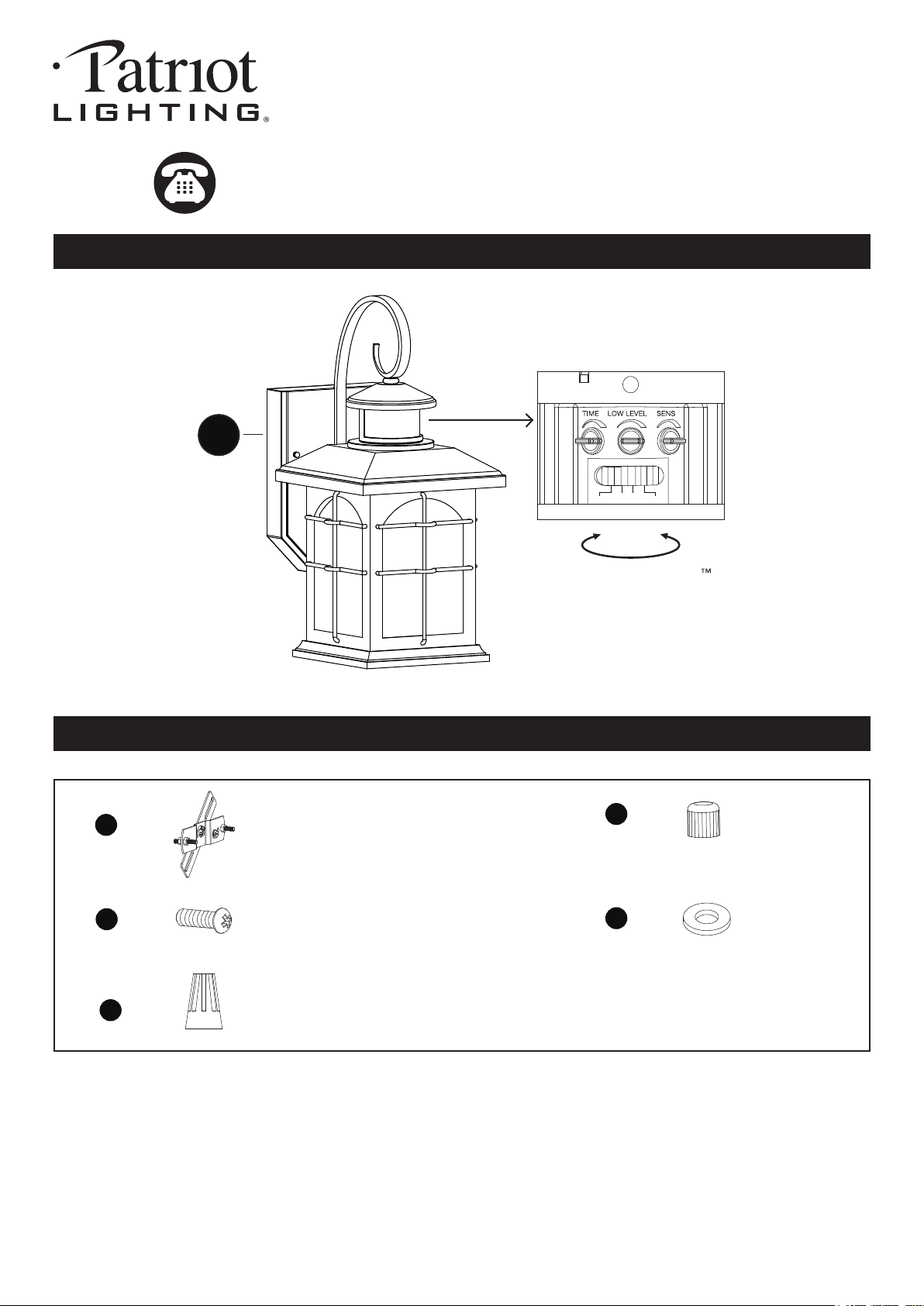
Cross Bar Unit
X1
Mounting Screw
X2
Wire Connector
X3
Ball Nut
X2
Rubber Pad
X2
AA
BB
CC
DD
EE
HARDWARE CONTENTS Note: Hardware not shown actual size.
A
Rotate to access QuickSet
sensor settings
Test
Off
Auto
PC
Please read and understand this entire manual before attempting to assemble, operate or install the product.
WARNING
● Turn off electricity at main fuse box (or circuit breaker box) before beginning installation by removing fuse (or
switching off circuit breaker).
● Be careful not to damage or cut the wire insulation (covering) during fixture installation. Do not permit wires to contact
any surface having a sharp edge. To do so may damage or cut the wire insulation, which could cause serious injury
or death from electric shock.
CAUTION
● All electrical connections must be in agreement with local codes, ordinances or the national electric code (NEC).
Contact your municipal building department to learn about your local codes, permits and/or inspections.
● Risk of fire – most dwellings built before 1985 have supply wire rated for 140°F/60ºC. Consult a qualified electrician
before installation.
● Do not connect this fixture to an electrical system that does not provide a means for equipment grounding. Never use
a fixture in a two-wire system that is not grounded. If you are not sure your lighting system has a grounding means,
do not attempt to install this fixture. Contact a qualified, licensed electrician for information with regards to proper
grounding methods as required by the local electrical code in your area.
●
Before beginning assembly, installation or operation of product, make sure all parts are present. Compare parts with
package contents list and diagram on previous page. If any part is missing or damaged, do not attempt to assemble,
install or operate the product. Contact customer service for replacement parts.
Tools Required for Assembly (not included): Screwdriver, Phillips Screwdriver, Pliers, Electrical Tape, Wire Cutters,
Safety Glasses, Ladder, Wire Stripper.
Page 2 of 6
PREPARATION
ASSEMBLY INSTRUCTIONS
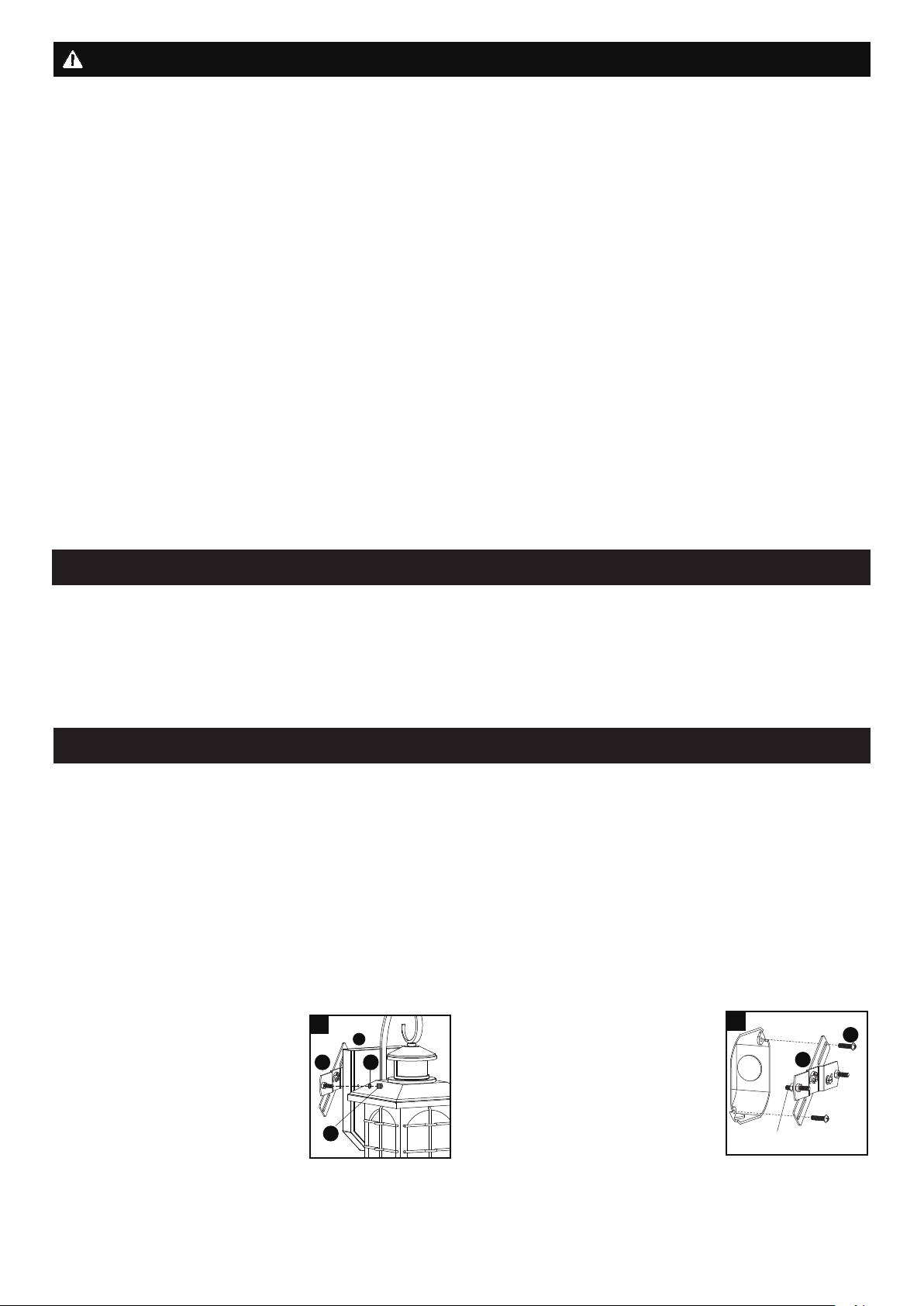
2. Attach the cross bar unit (AA) to
the outlet box using two mounting
screws (BB). Adjust the length of
the preinstalled headless screws if
necessary.
Note: Make sure that the
headless screws are lined up
horizontally to make the fixture
level.
SAFETY INFORMATION
AA
BB
2
Headless Screw
1. Unscrew the two ball nuts (DD).
Remove the two rubber pads (EE)
and the cross bar unit (AA) from
the backplate (A).
Only general ON/OFF wall switch applies for this fixture, the dimmable wall switch shouldn’t be required.
Work Temperature: -22°F~104°F
Important to know
1. This fixture requires a 120 VAC, 60 Hz power source.
2. Make sure the power is switched OFF before installation.
3. Motion sensor: turns light ON automatically when motion is detected and turns light OFF automatically when motion
stops.
4. Photocell keeps the light OFF during the daytime.
5. Compatible with most LED dimmable bulb.
6. Dimmable bulb required .
Installation Steps
Turn off the power at fuse or circuit box.
1
A
EE
AA
DD
190718
Page 3 of 6
ASSEMBLY INSTRUCTIONS (continued)
5. Install a bulb (not included).
See relamping label at socket
area or packaging for maximum
wattage allowed.
Turn on the power at fuse or circuit box
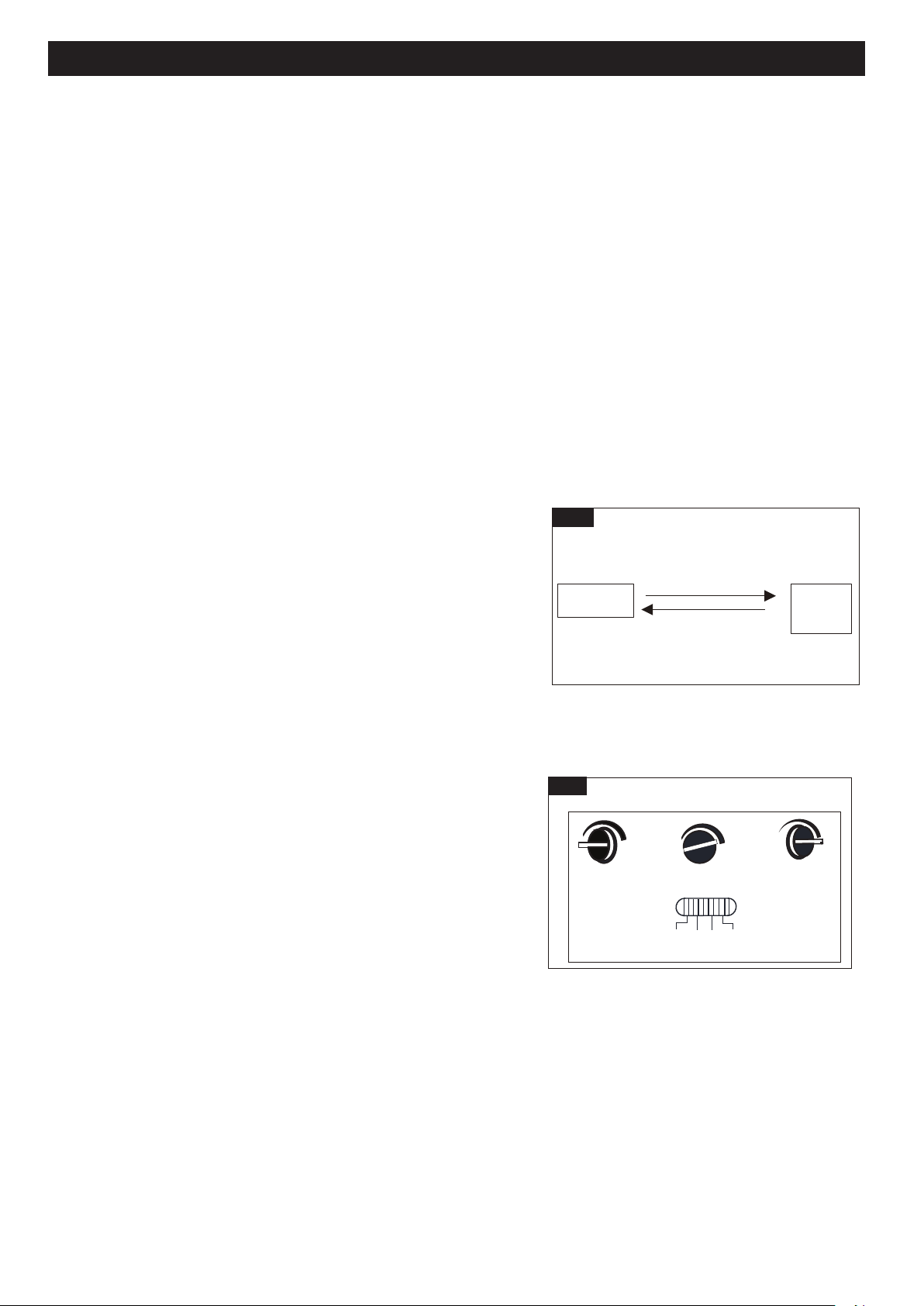
The Position of Control Panel
Step 1: Rotate the sensor lens from left side to right side
to show the adjustable knobs and slide switch.
(See Fig.1)
Step 2: Adjust time
low level brightness and sensitivity
by knobs and choose the mode you want by
slide switch. (See Fig.2 and Fig A).
Step 3: Restore the sensor lens to original position.
(See Fig.3)
“Time” Knob
“Sens” Knob
Slide Switch
“Low Level” Knob
Time Low Level
Sens
Test
Off
Auto
PC
Fig.A
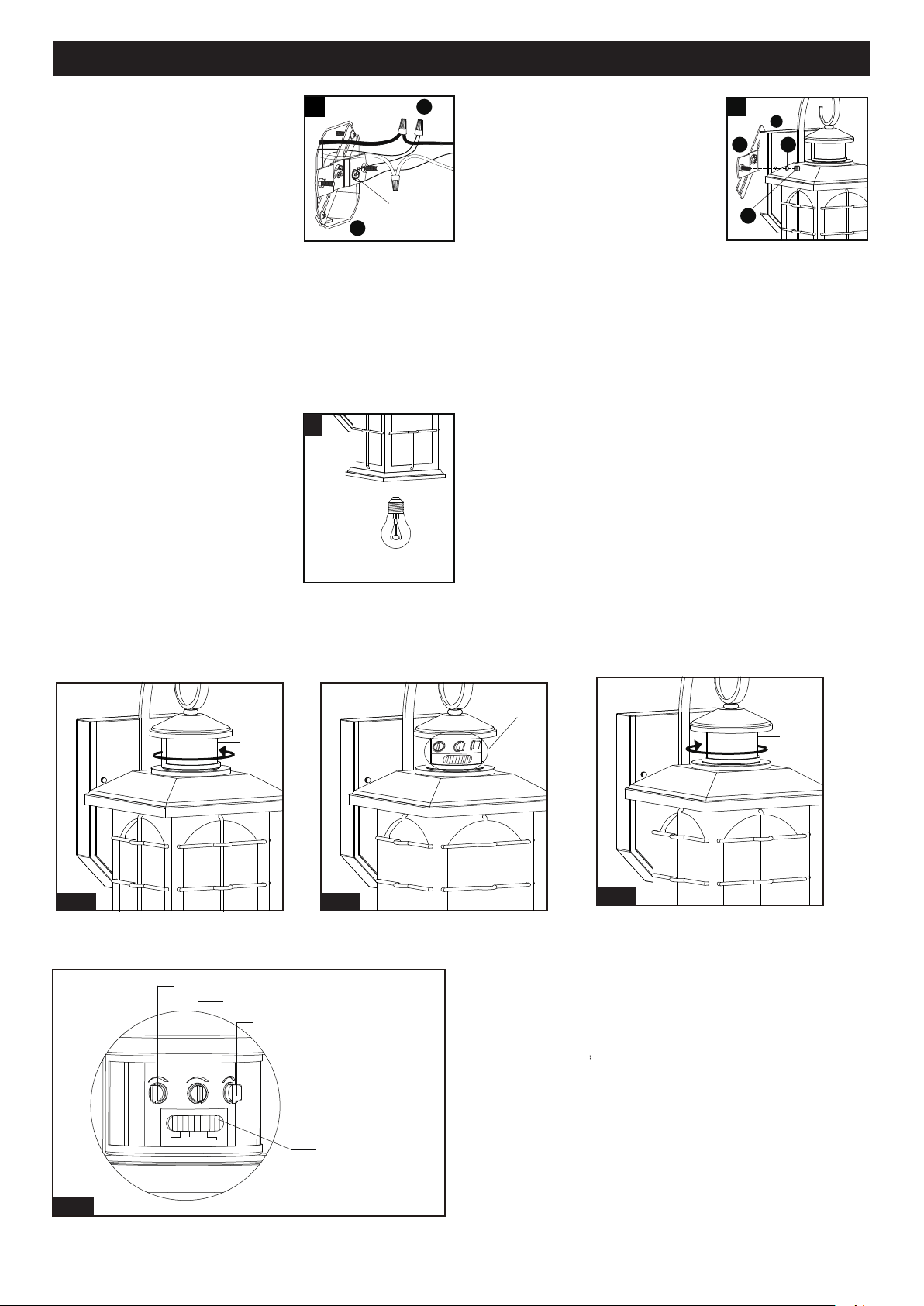
3. Pull out the source wires from the
outlet box. Make wire connections
using wire connectors (CC) as
follows:
• Connect the hot wire (usually
black insulation) from the fixture
to the black wire from the power
source.
• Connect the neutral wire (usually white insulation) from
the fixture to the white wire from the power source.
• Attach the fixture grounding wire (usually green
insulation or bare wire) to the cross bar unit (AA) with
the green grounding screw, then connect it to the
house grounding wire with the wire connector (CC).
Carefully put all of the wires back into the outlet box.
3
AA
CC
Green Grounding
Screw
4. Attach the backplate (A) of the
fixture to the cross bar unit (AA) by
aligning and inserting the two
headless screws from the cross bar
unit (AA) into the open holes on the
backplate (A), then place the two
rubber pads (EE) over the exposed
headless screws before screwing
the two ball nuts (DD).
Note: With silicone caulking compound, caulk
completely around where the backplate meets with
the wall surface to prevent water from seeping into
the outlet box.
5
Max.60W Type A Bulb
(not included)
4
A
EE
AA
DD
Sensor
Lens
Fig.1
Sensor
Lens
Fig.1
Fig.1
View Fig.A
190718
Page 4 of 6
Customization Options
Shut-off Delay
Fig. 5
Test
Off
Auto
PC
Low Level
(View from back of sensor lens)
Time
Sens
Mode
The light will turn on (full brightness) automatically at dusk and turn off automatically at dawn.
Off Mode
Auto Mode
Manual
Override
Manual Override Operation Diagram
Turn wall switch OFF-ON
in 0.5~3 Seconds
Turn wall switch OFF-ON
in 0.5~3 Seconds
Fig. 4
FUNCTION AND OPERATION
Choose a mode by sliding the slide switch. The light will turn on immediately when power is applied. Wait for 30 seconds
to allow the sensor to warm up.
1. Test MODE (daytime and nighttime operation.)
• The light will turn to low-level brightness (0~50%).The light will turn to high-level brightness (full brightness) when
motion is detected, and stay on as long as the motion continues. The light will turn to the low-level brightness you
set after 5 seconds when motion is no longer detected.
2. Off MODE (nighttime operation only)
• At dusk, the light stays off and will turn to high-level brightness (full brightness) when motion is detected, and stay on
as long as the motion continues. When the motion stops, the light will stay on for the predetermined time set
(5 ~ 180 seconds), then the light will turn off automatically.
3. Auto MODE (nighttime operation only)
• At dusk, the light will turn to low-level brightness (0~50%). The light will turn to high-level brightness (full brightness)
when motion is detected, and stay on as long as the motion continues. When the motion stops, the light will remain
on for the predetermined time set (5~180 seconds), and then turn to the low-level brightness you set.
• The light will turn off automatically at dawn.
4. PC MODE (nighttime operation only)
•
5. Manual Override MODE (nighttime operation only)
• To shift to the manual override mode, set the switch to “Off” or “Auto”
mode. Turn the wall switch “OFF” and then turn it “ON” within 3
seconds. The light will stay on through all night. To restore to the
“Off” or “Auto” mode, turn the wall switch “OFF” and then turn it “ON”
within 3 seconds again. (See Fig.4)
• The light will last for one night only and turn off automatically at dawn.
Note: 1. The low level brightness can be adjusted from 0 to 50% by
rotating “Low level” knob. (See Fig.5)
2. Always keep the wall switch in the “ON” position (including the daytime).
3. Please notice the warm up time is 30 seconds, any operations are invalid during this time.
1. The Shut-off delay is the length of time that the light will stay in
high-level brightness after motion stops.
2. The Shut-off delay can be adjusted by using the “Time” knob when
the slide switch is set in “Off” or “Auto” mode.
3. The range of shut-off delay is 5 seconds to 3 minutes.
4. Rotate the knob clockwise for increasing the shut-off delay.
5. Rotate the knob counterclockwise for decreasing the shut-off delay.
Sensitivity of Motion Sensor
1. The sensitivity can be adjusted from 5 to 40 feet by using the "Sens" knob. (See Fig.5).
2. Turn the knob clockwise for increase sensitivity.
3. Turn the knob counterclockwise for decrease sensitivity.
190718
Page 5 of 6
● To clean, turn off and wipe with a damp, non-abrasive cloth.
CARE AND MAINTENANCE
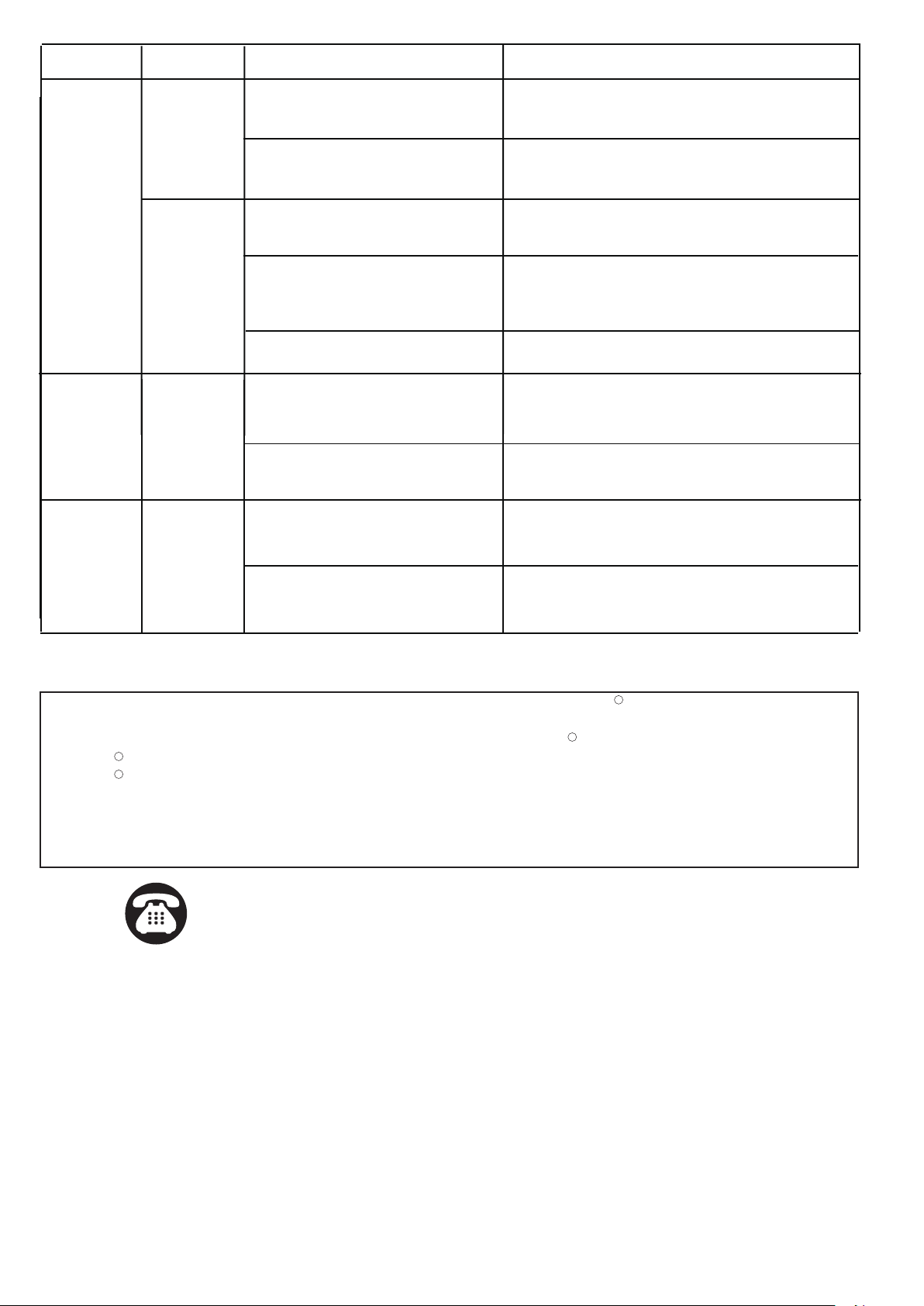
TROUBLESHOOTING
Spare Parts List:
The following parts are available for reorder if damaged or missing. Call our toll free at 1-800-887-6326.
Assembly Kit
4857MM (1 SET)
Cross Bar Unit
X1
Mounting Screw
X2
Wire Connector
X3
AA
BB
CC
Ball Nut
X2
DD
Rubber Pad
X2
EE
Refer to following information to solve your problems.
Set the slide switch in the test mode for testing.
Night
If the light
isn’t on
SYMPTOM
DAY/NIGHT
POSSIBLE CAUSE
SOLUTION
Day
Slide switch is not set in the test
mode.
Wall switch or circuit breaker is off. Turn on wall switch or circuit breaker.
Test the light bulb on normal working light fixture.
Tighten the light bulb.
Check wire connections.
Relocate fixture away from western facing wall.
Eliminate or turn off other light source, block other
light source from shining onto sensor, or relocate
fixture.
Light bulb may be burned out.
Light bulb is loose.
Incorrect or loose wire connections.
Too much sunlight is shining onto
sensor in the early evening.
Too much light is shining onto
sensor due to another light source,
such as a street lamp or other light
fixture.
NOTE:
1. The sensitivity of the motion sensor will increase as the
environmental temperature gets colder. For best performance,
gently clean the lens with a soft cloth every 1 or 2 months to
ensure maximum sensitivity.
2. The magnitude of adjustment for sensitivity and time may not be
precisely proportionate to the amount when the knob is turned.
(See Fig.5)
3.
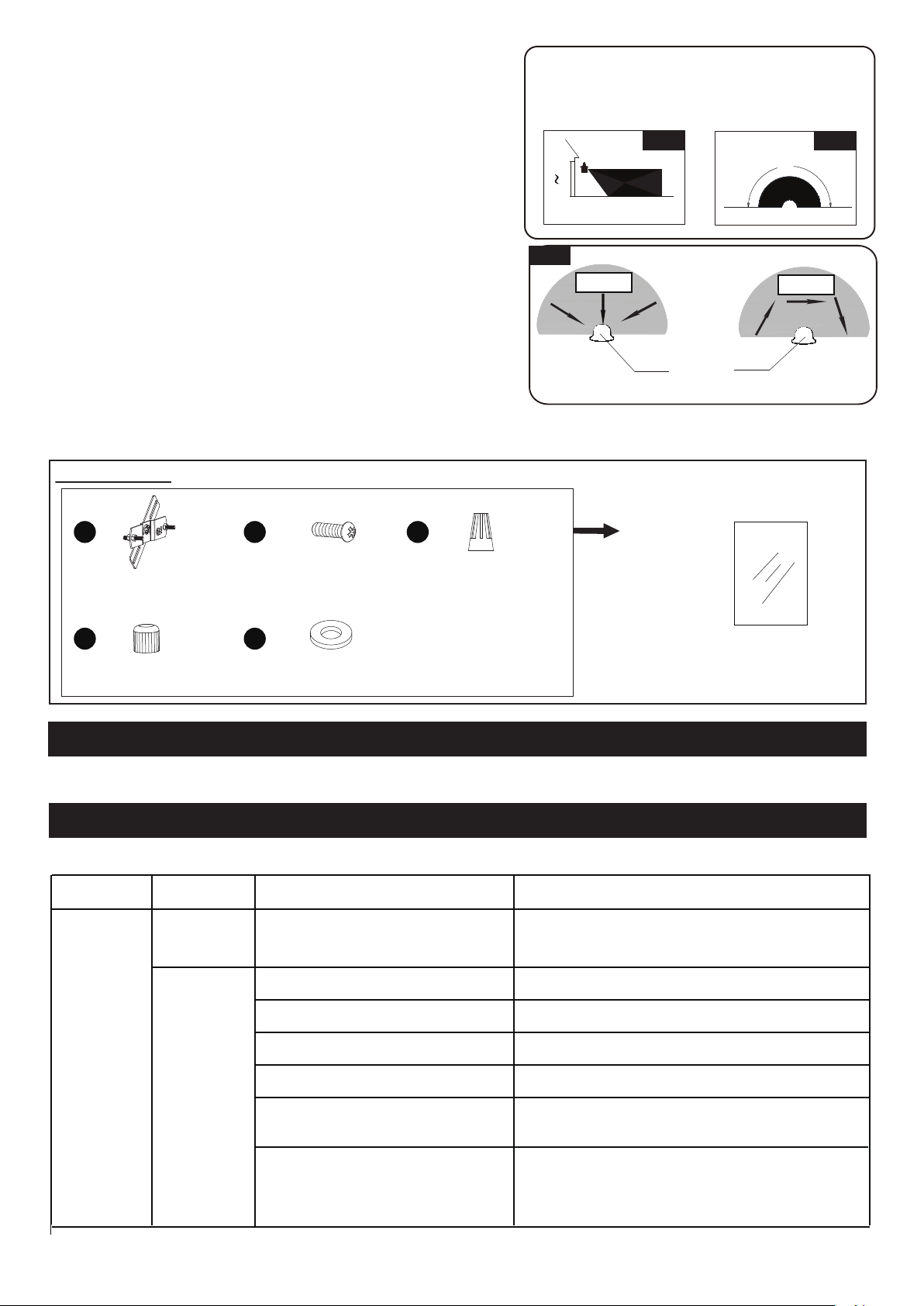
When installed at a height of 6.5 feet, at 77 degrees Fahrenheit,
the light will provide a maximum detection distance of 40 feet
and detection range of 180 degrees. (See Fig.6 Fig.7)
4. The sensor will be more sensitive to motion across its
detection path than motion directly towards it. (See Fig.8)
5. To reduce possible nuisances, do not mount the fixture
near a heat source like an air conditioner, vent or furnace
exhaust, or in a direction facing any reflecting object or
other light source.
Where you install your lantern is important:
Be sure the light is mounted straight on the wall;
otherwise, the detection distance may be limited.
5`
6`
10`
40`
Fig.6
Fig. 7
180˚
Glass Panel
X3
9491CS
190718
Motion
Least sensitivity
Most sensitivity
Sensor
Fig. 8
Motion
Page 6 of 6
If unable to fix any of the above issues, please consult a certified electrician.
FIVE-YEAR LIMITED WARRANTY: If, during normal use, this PATRIOT LIGHTING lighting fixture breaks or fails
due to a defect in material workmanship within five (5) years from the date of original purchase, simply bring this
lighting fixture with the original sales receipt back to your nearest MENARDS retail store. At its discretion, PATRIOT
LIGHTING agrees to have the product or any defective part(s) repaired or replaced with the same or similar PATRIOT
LIGHTING product or part free of charge, within the stated warranty period, when returned by the original purchaser
with original sales receipt. This warranty; (1) excludes expendable parts including but not limited to light bulbs; (2) does
not cover damage that has resulted from abuse or misuse; and (3) does not cover any losses, labor, injuries to
persons/property or costs. This warranty does give you specific legal rights and you may have other rights, which vary
from state to state.
R
R
R
R
Questions, problems, missing parts?
Before returning to your retailer, call our customer service at 1-800-887-6326
Monday – Friday 9:00 a.m. – 5:00 p.m. CST
190718
The bulb is non-dimmable or the
quality of light bulb is not good.
Use another normal incandescent lamp to confirm
if the light function is normal, otherwise change the
bulb.
The light
comes on for
no apparent
reason
If the light
is blinking
Night
Night
Passing cars and reflective objects
interfere with the sensor.
Street or sidewalk traffic is triggering
motion sensor.
False triggering caused by a heat
source, such as a heater, dryer vent,
or heated swimming pool.
Relocate fixture.
Adjust the "Sens" knob to reduce the sensitivity.
Eliminate heat source or relocate fixture.
The fixture may be installed in
shaded area.
Only need to relocate fixture.
No corrective action needed.
On cloudy or overcast days, the light
may stay on longer than anticipated.
Still on the manual override mode. Turn off the light, then turn it on after 5 seconds.
False triggering caused by a heat
source, such as a heater, dryer vent,
or heated swimming pool.
Eliminate heat source or relocate fixture.
The switch is not set in any mode.
Slide it again to the mode you want.
Day
Night
SYMPTOM
DAY/NIGHT
POSSIBLE CAUSE
SOLUTION
If the light
stays on