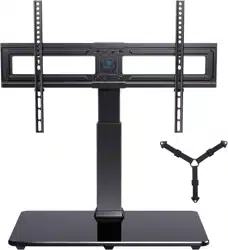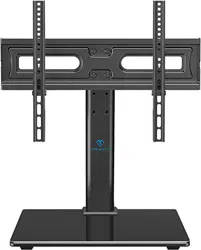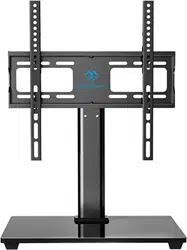

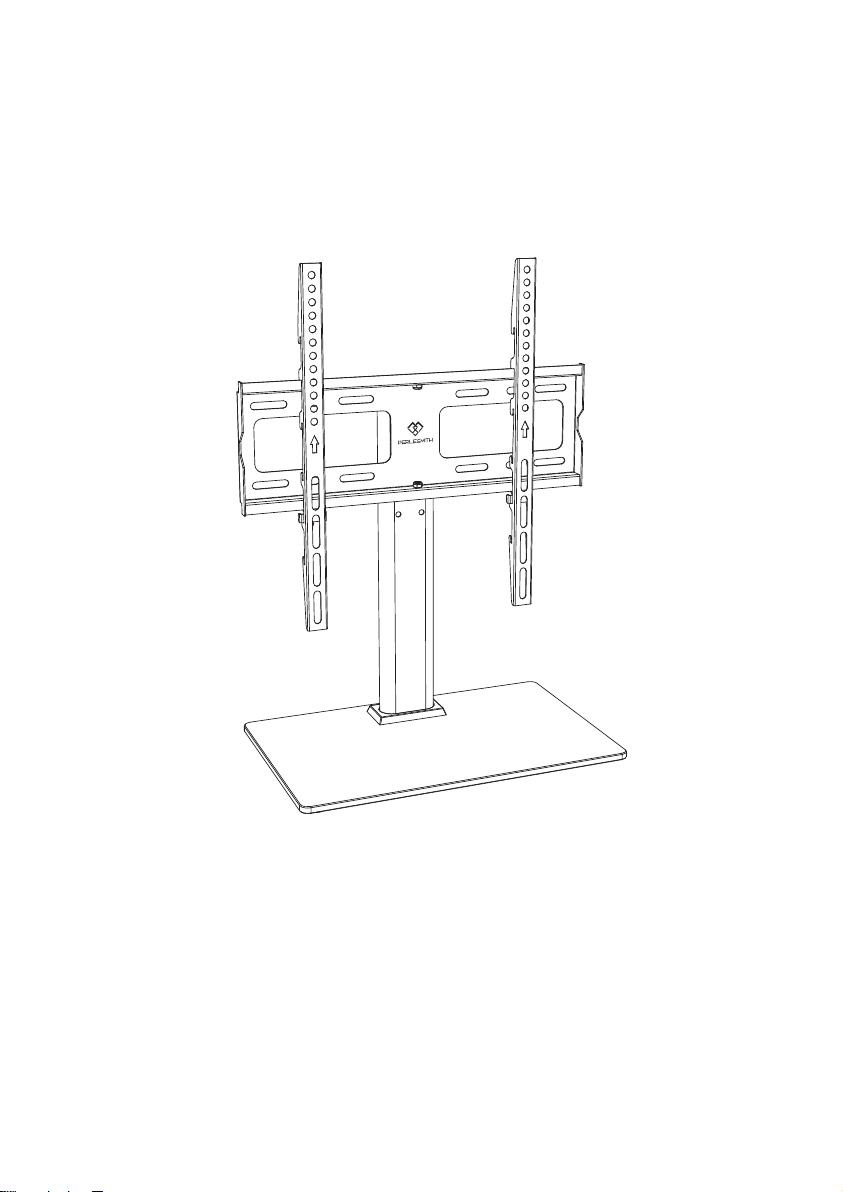
Model: PSTVS09
Table Top TV Stand Instruction
Manual
V5.0
Thank you for choosing this Perlesmith product! At Perlesmith we strive to
provide you with the best quality products and services in the industry.
Please share your experience of our product with others at
www.perlesmith.com/pages/reviews if you are satisfied. Should you have
any issues, please don't hesitate to contact us.
Technical Support:
1-800-556-6806 Mon-Fri 10am - 5pm (PST) (USA) (CAN)
Other Info:
[email protected] (US/CA/DE/UK/FR/IT/ES/AU)
Website:
www.perlesmith.com
P1
IMPORTANT SAFETY INFORMATION
Please carefully read all instructions before attempting installation. If you do not
understand the instructions or have any concerns or questions, please contact
our Technical Support line at 1-800-556-6806 or customer service at
CAUTION: Avoid potential personal injuries and property damage!
Do not use this product for any purpose that is not explicitly specified in this
manual. Do not exceed weight capacity. We are not liable for damage or injury
caused by improper mounting, incorrect assembly or inappropriate use.
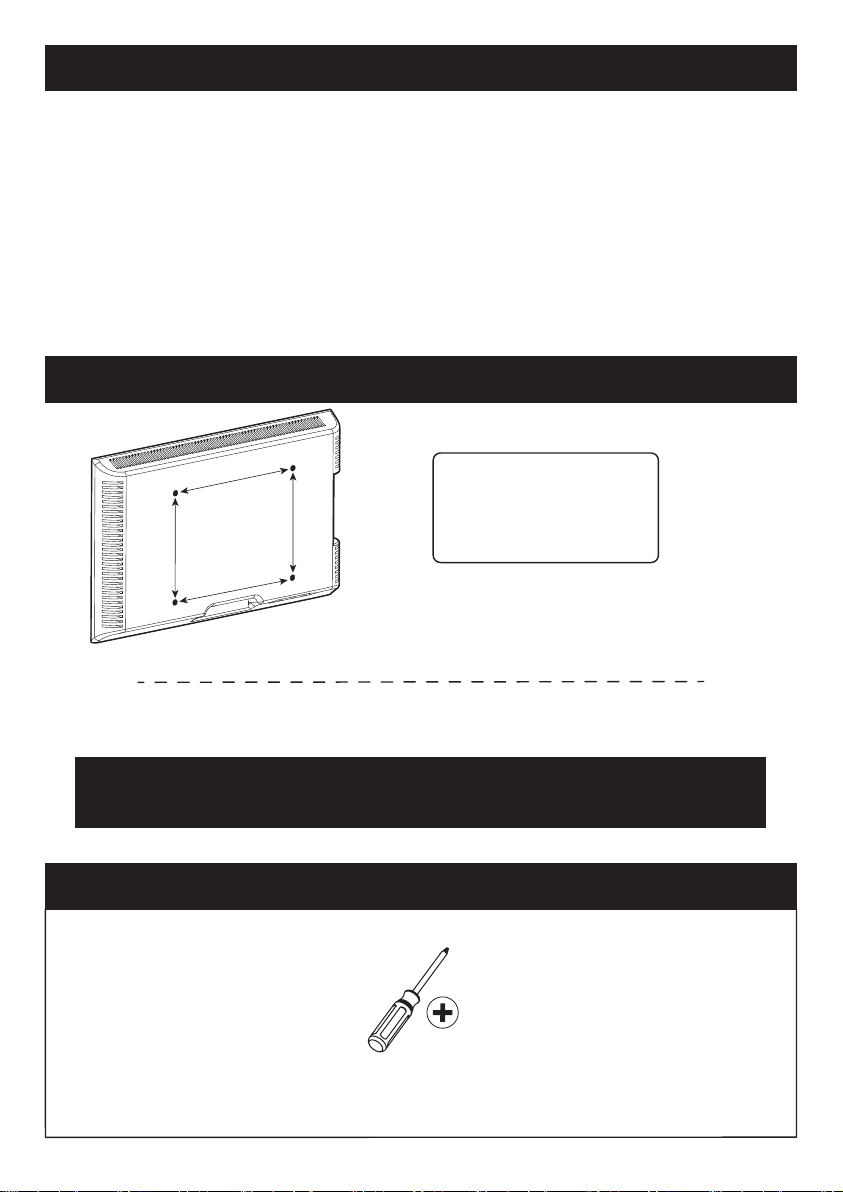
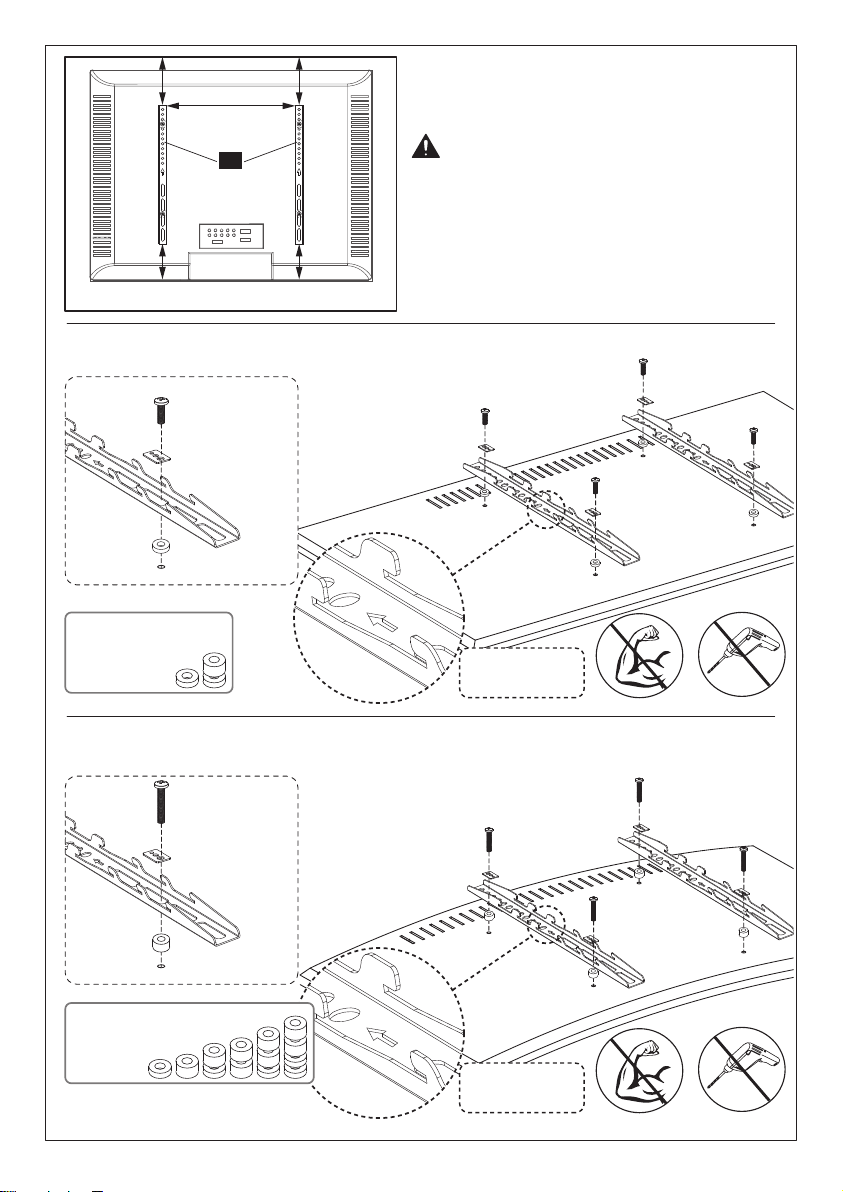
Check the VESA Pattern of TV before the Installation
Minimum VESA pattern: 100mm/4 in.(W)x100mm/4 in.(H)
If your TV VESA is greater than 400x400 mm/16x16 in. or less than
VESA 100x100mm/4x4in., this TV stand is NOT compatible.
If this TV stand is NOT compatible, please contact customer
service at [email protected] to find a compatible product.
MAX: 400mm/16 in.
MAX: 400mm/16 in.
100 mm ≈ 4 in.
200 mm ≈ 7 7/8 in.
300 mm ≈ 11 3/4 in.
400 mm ≈ 15 3/4 in.
Tools Needed (Not lncluded)
Phillips Screwdriver
P2
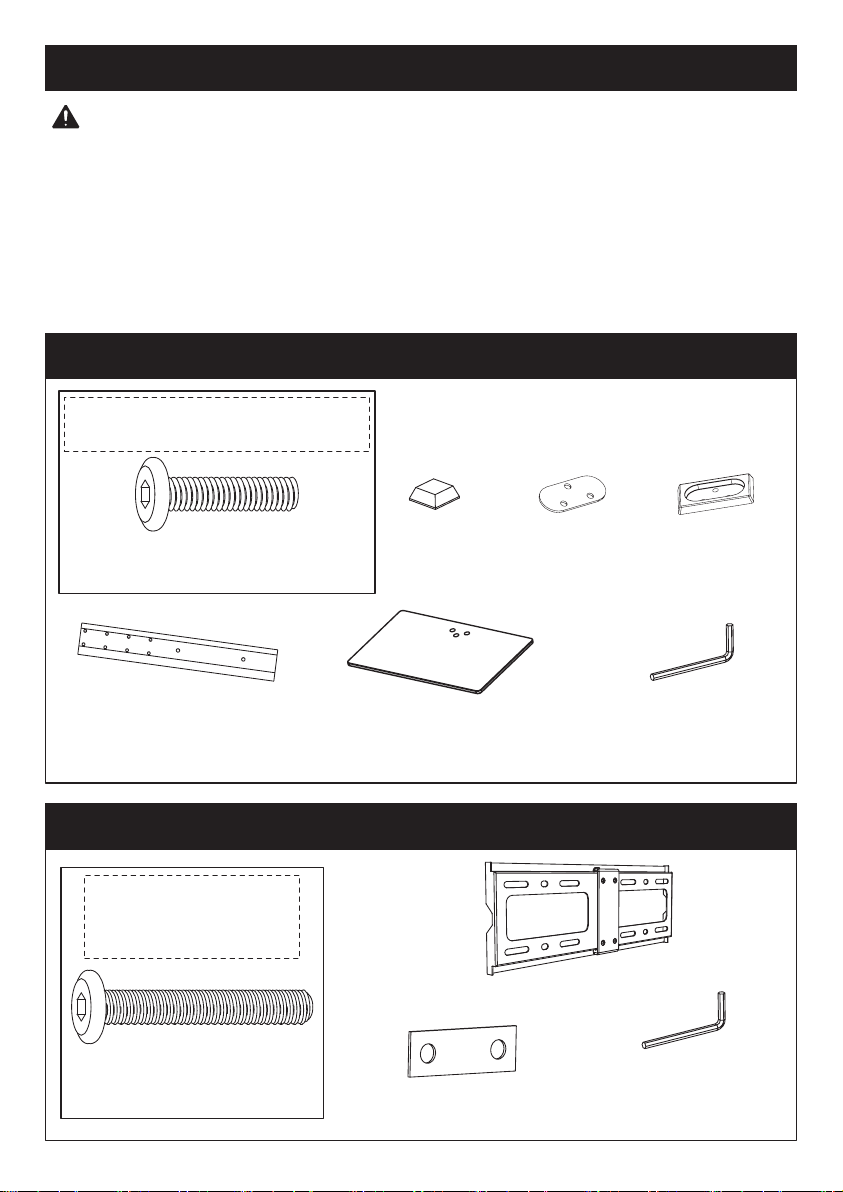
(P) x1
Support Pillar
(W) x4
Foot Pad
(R) x1
Gasket with
3 Holes
(Y) x1
Plastic Cover
(M) x1
TV Plate
(S) x4
M6x40mm
Bolt
(T) x2
D6 Washer
WARNING: This product contains small items that could be a choking
hazard if swallowed.
Before starting assembly, verify all parts are included and undamaged. Do not
use damaged or defective parts. lf you require replacement parts, contact our
Product Support line at 1-800-556-6806 or customer service at
• Please note: Not all hardware included in this package will be used.
(O) x1
Tempered Glass Base
Supplied Parts and Hardware
Supplied Parts and Hardware for Step 1
Supplied Parts and Hardware for Step 2
Note: The bolt is
shown in accordance
with the actual size
Note: The bolt is shown in
accordance with the actual size
(L) x3
M6x25mm Bolt
(V) x1
5/32in. (4mm)
Allen Key
(V) x1
5/32in. (4mm)
Allen Key
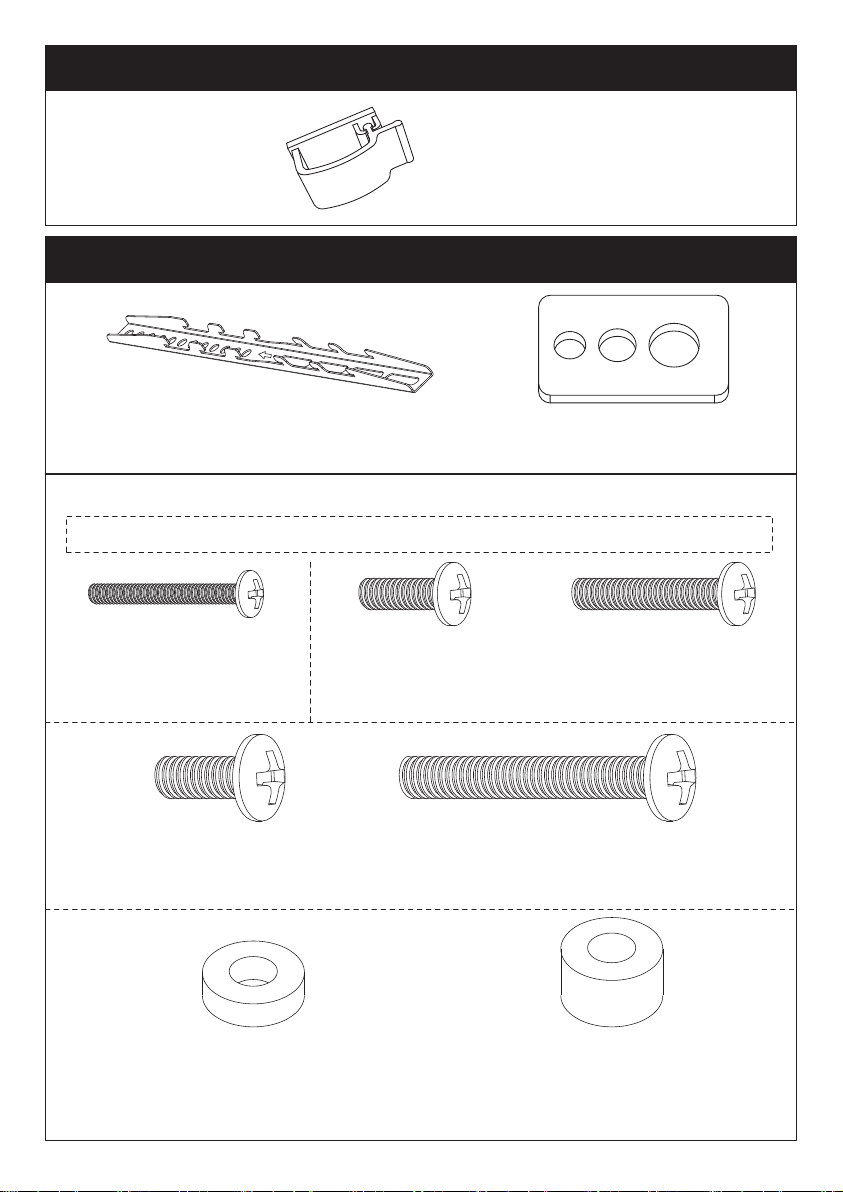
(F) x4
Washers
P3
(J) x2
Wire Clip
(N) x2
TV Bracket
Supplied Part for Step 3
Supplied Parts and Hardware for Step 4
(A) x4
M4x30mm
Bolt
(B) x4
M6x16mm
Bolt
(C) x4
M6x30mm
Bolt
(D) x4
M8x16mm
Bolts
(E) x4
M8x50mm
Bolts
(G) x8
φ8.5x18x5mm
Spacer
(H) x8
φ8.5x18x10mm
Spacer
Note: The bolts and spacers are shown in accordance with the actual size
TV Bolt [Only one bolt size fit your TV]
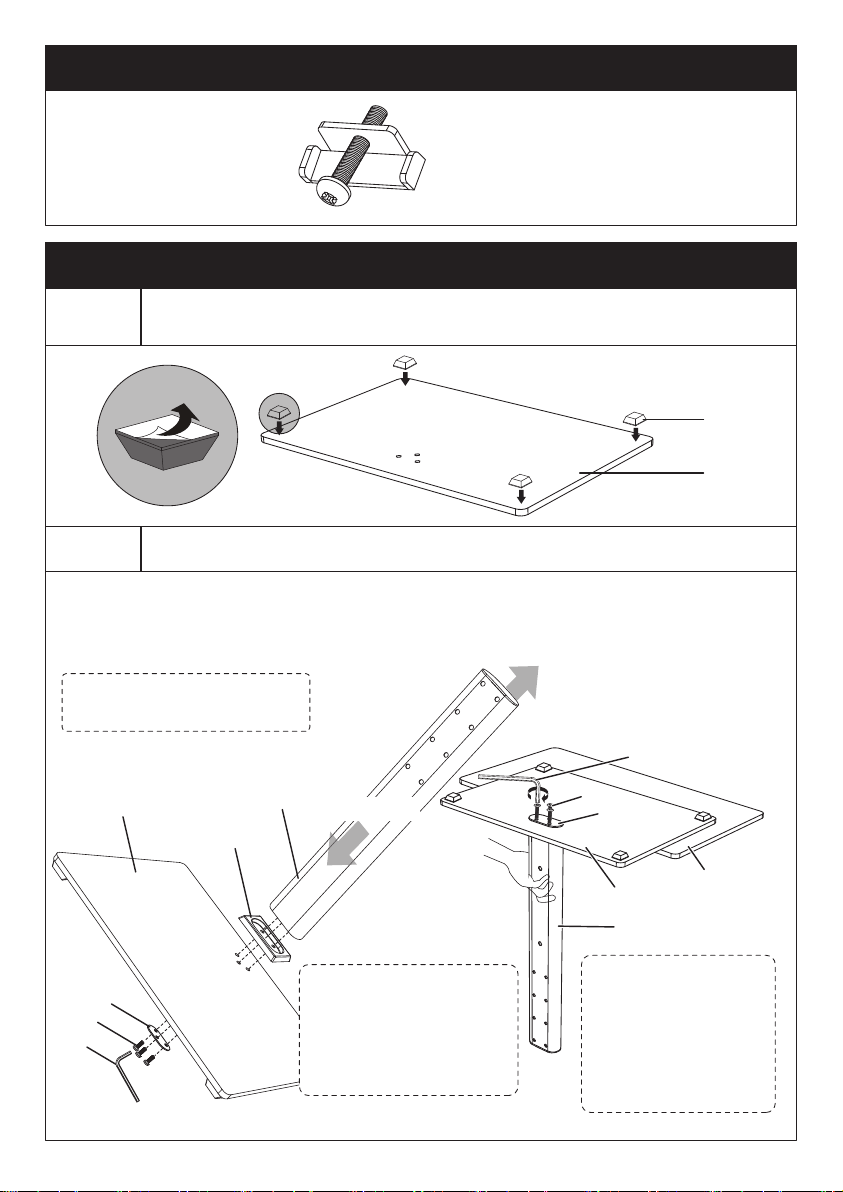
Place foot pads [W] to the frosted side of the tempered glass
base [O] in the corners
Step 1-1
Connect the support pillar [P] to tempered glass base [O]
Step 1-2
Note: The paper
side of the gasket
with 3 holes [R]
should be touched
the tempered glass
base [O]
P4
Secure the support pillar [P] to tempered glass base [O] using plastic cover
[Y], gasket with 3 holes [R], bolts [L] and Allen key [V]
(K)x2
Safety Lock
Note: You may need
assistance with this step.
Supplied Part and Hardware for Step 5
Step 1 Assemble the Base
O
W
R
O
Y
P
L
V
O
V
L
R
Table
P
Back Side
Front Side
Note: Make sure the
side without the wire
clip holes on the
support pillar faces
the front of the stand
P5
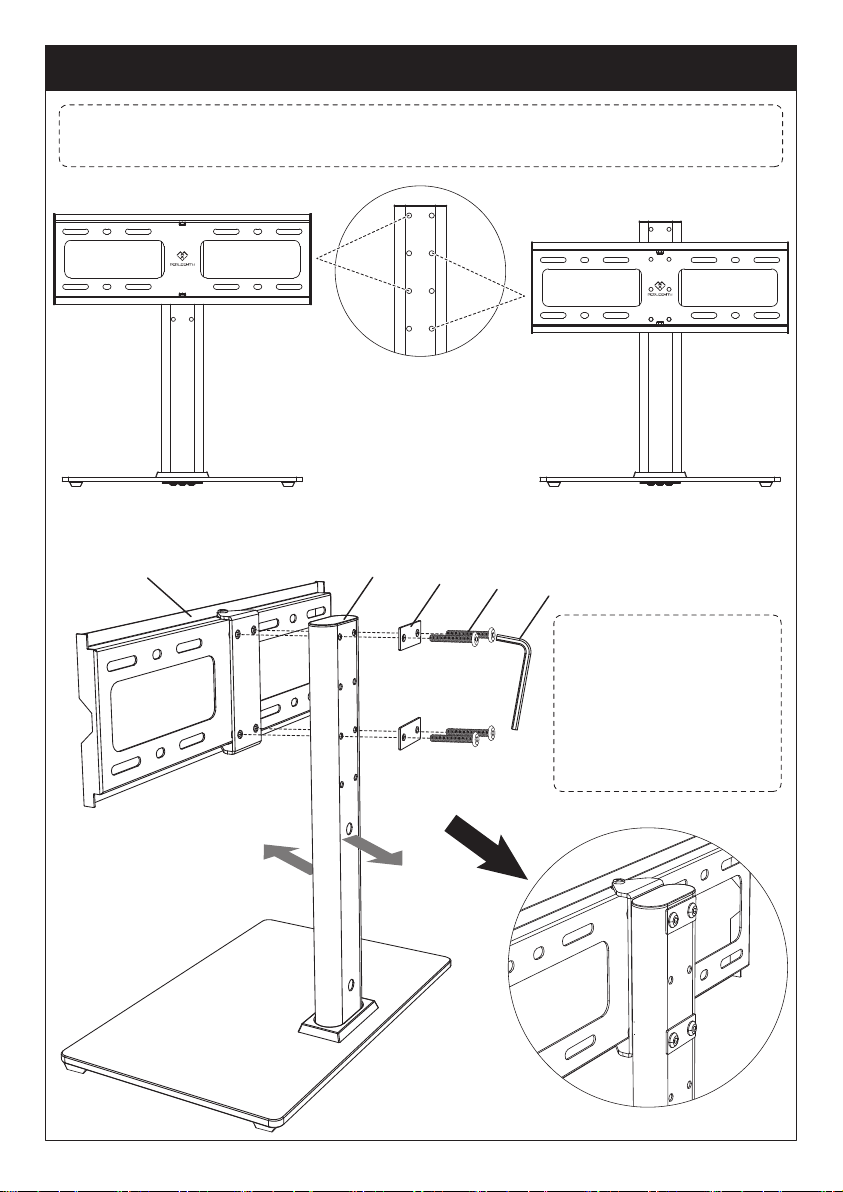
Step 2 Connect the TV Plate [M] to Support Pillar [P]
M P
T
S
V
Front
Back
Note: There are two choices for height adjustment. You can choose your
desired height position while connecting the TV plate [M] to support pillar [P]
Connect TV plate [M] to support pillar [P] using bolts [S] and washer [T]
Note: Connect the TV
plate [M] to the front
side of the support
pillar [P] with the
bump of the TV plate
facing back side of the
stand.
The First Choice The Second Choice
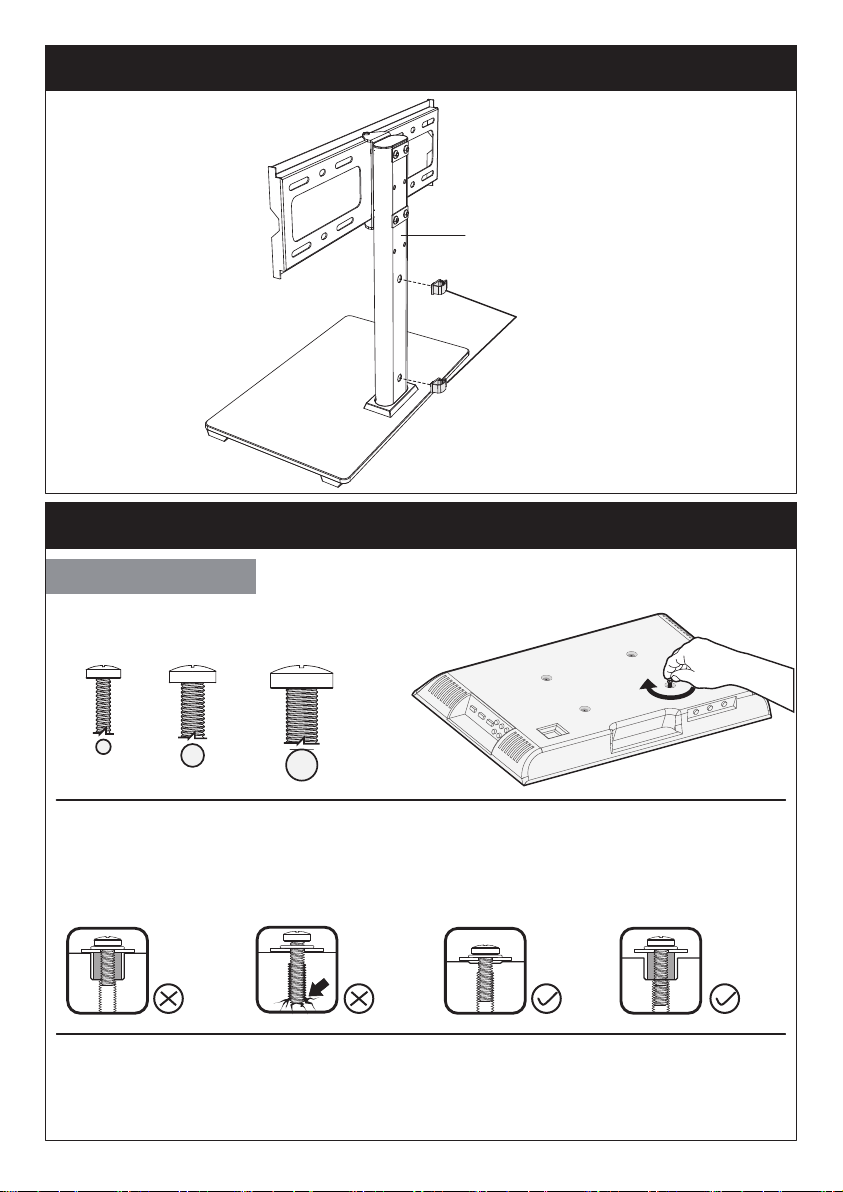
Only one bolt size fits your TV.
Select TV Bolts
P6
Step 3 Secure the Wire Clips [J] to Support Pillar [P]
Step 4 Secure the TV Brackets [N] to TV
Too Long
Correct Correct
Too Short
Bolt length: Verify adequate thread engagement with bolts or bolts/spacers
combination. We recommend thread engagement by at least 5 turns.
-Too short will not hold the TV.
-Too long will damage the TV.
Note: If necessary, the spacers can be used in multi-layer. If the installation
fails after trying various methods, please contact customer service at
M4 M6 M8
P
J
P7
Option B (For Round Back TV)
Option A (For Flat Back TV )
F
A/B/D
G/H
(If needed)
F
A/C/E
G/H
N
CAUTION: Ensure the TV brackets
[N] are EQUALLY CENTERED on your
TV AND securely fastened in place.
Note: Keep
the arrow up
Note: Keep
the arrow up
Alternate
Spacer
Setups
Alternate
Spacer
Setups
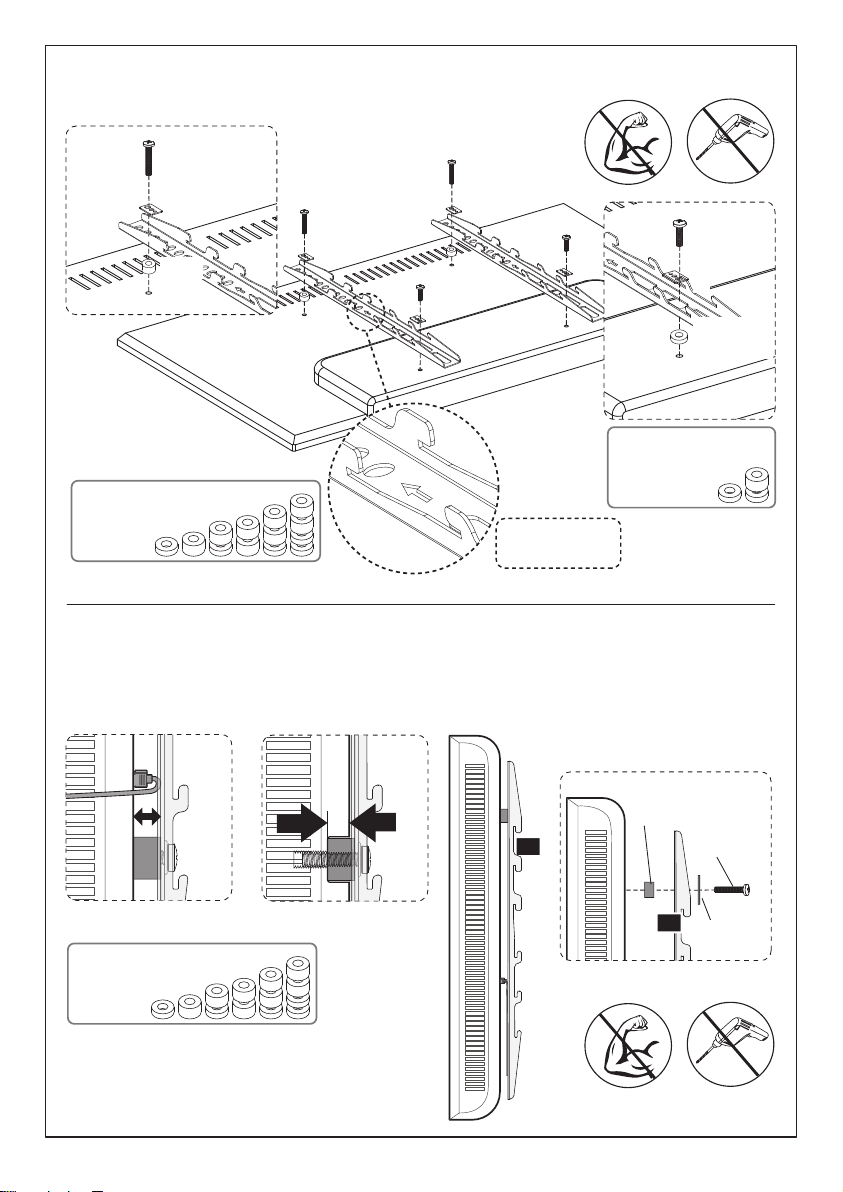
Option D
For cable interference or inset holes, use spacers [G] and [H] to create
extra space between the TV and TV brackets
P8
Spacers may be necessary for 2 holes ONLY.
Option C (For TV with A “Bump”)
F
A/C/E
G/H
A/B/D
F
G/H
(If needed)
A/ C/ E
G/H
F
N
N
Note: Keep
the arrow up
Alternate
Spacer
Setups
Alternate
Spacer
Setups
Alternate
Spacer
Setups
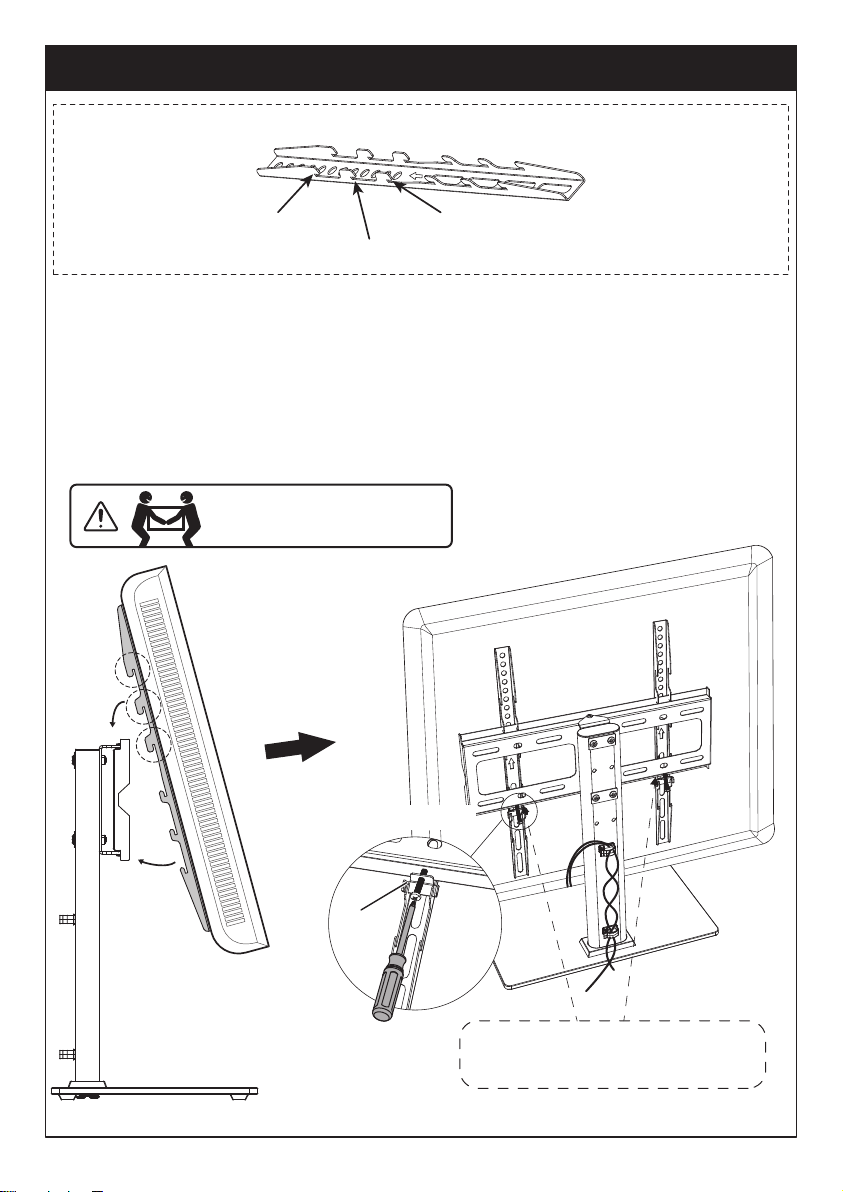
Note: Please note, there is
no bolt holes in the TV plate
P9
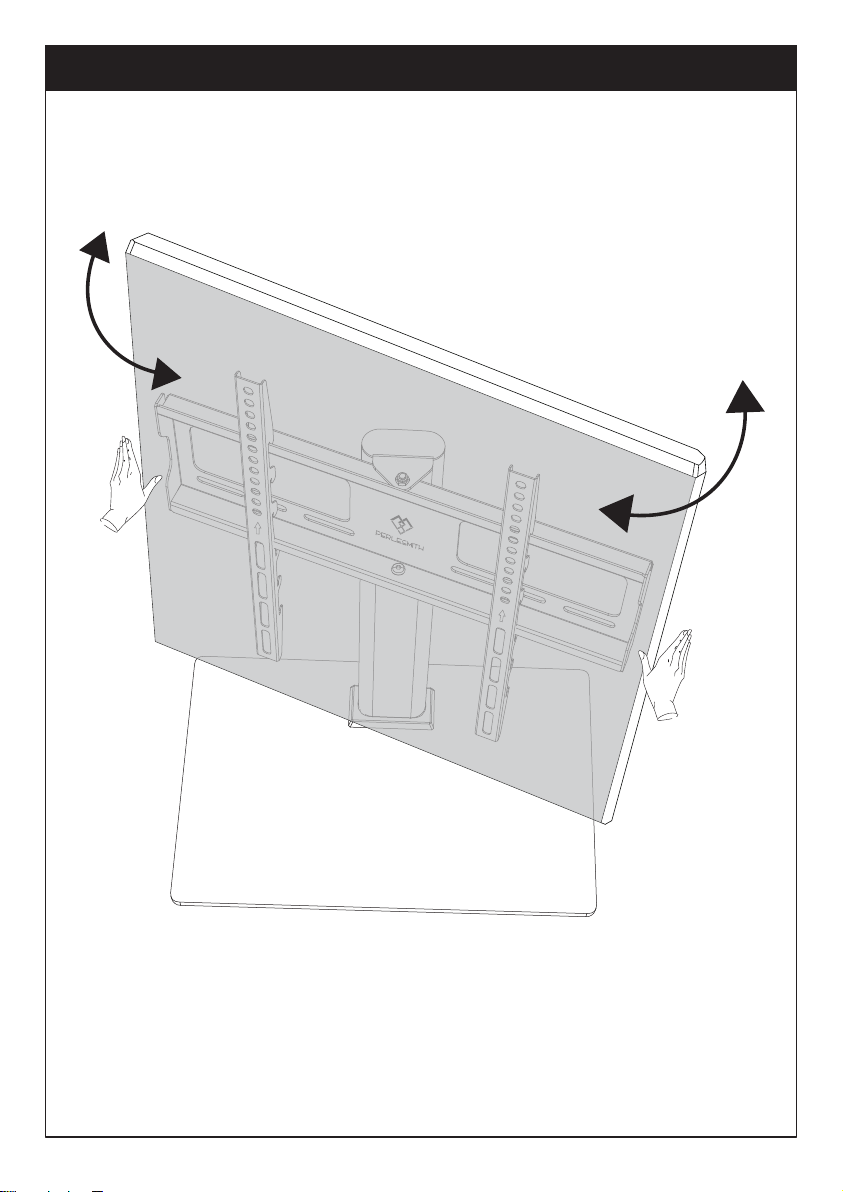
Step 5-1 Hang the TV with brackets to the TV plate
Step 5-2 Push the bottom of the TV to TV plate
Step 5-3 Insert the safety locks [K] into the upward facing hooks at the
midway to lower part of the TV bracket. Please note this is where the lower
part of the TV bracket meets the TV plate. Then tighten the bolts of the
safety lock [K] until the bolts touch the TV plate.
Step 5 Attach TV to the TV Plate [M] and Manage the Wires
The Second Choice
The First Choice
The Third Choice
K
“Be gentle”
③
HEAVY! You may need
assistance with this step.
①
②
TV brackets are three-height-adjustable. You can choose the proper height.
Step 6 Swivel Adjustment
If necessary,the TV plate or TV can be swivelled manually
P10
All of us at Perlesmith do appreciate your product purchase. We hope that you
are as happy with your product as we are designing and manufacturing it for
you. We strive to provide you with the best quality products and services in the
industry. Please share your experience of our product with others at
www.perlesmith.com/pages/reviews if you are satisfied. Should you have any
issues, please don't hesitate to contact us.
Technical Support: 1-800-556-6806 Mon-Fri 10am - 5pm (PST) (USA) (CAN)
Other Info: [email protected] (US/CA/DE/UK/FR/IT/ES/AU)
Please check www.perlesmith.com for more products and company information.
Thank you again for choosing this Perlesmith product!