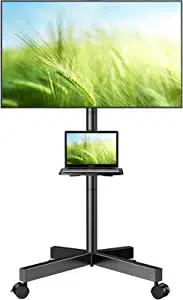
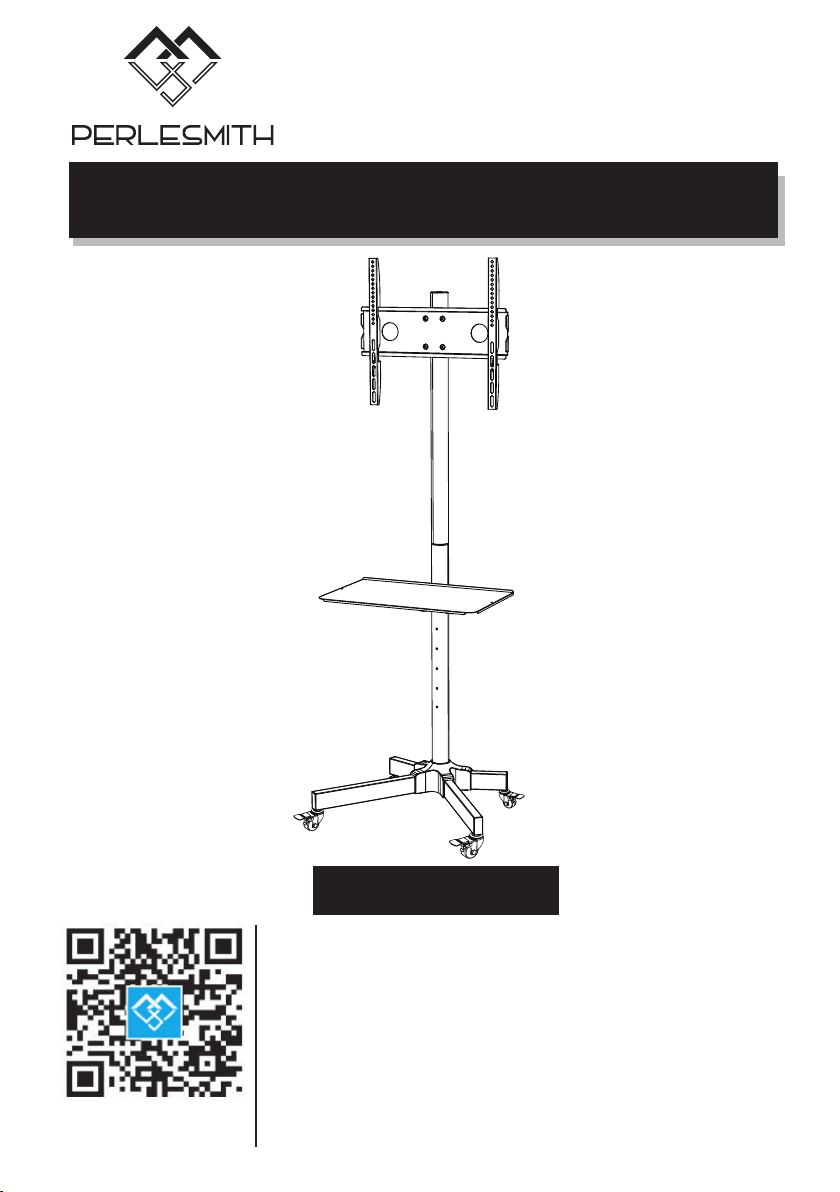
Mobile TV Cart Instruction Manual
Model:PSTVMC04
V5.0
Thank you for choosing this PERLESMITH product! At
PERLESMITH we strive to provide you with the best quality
products and services in the industry. Please share your
experience of our product with others at
www.perlesmith.com/pages/reviews if you are satisfied.
Should you have any issues, please don't hesitate to contact
us.
Technical Support:
1-800-556-6806 Mon-Fri 10am - 5pm (PST) (USA) (CAN)
Other Info:
[email protected] (US)
[email protected] (CA)
Website:
www.perlesmith.com
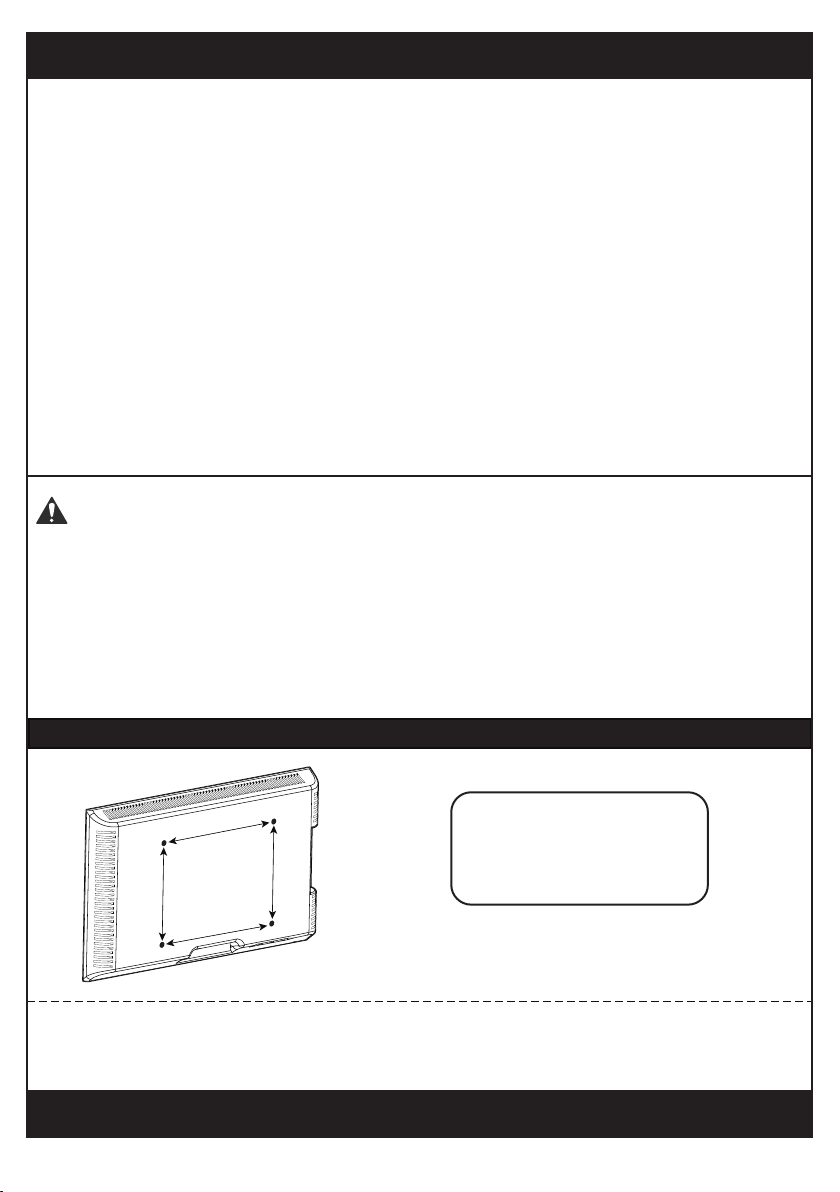
Minimum VESA pattern: 100mm/4 in.(W)x100mm/4 in.(H)
200 mm ≈ 7 7/8 in.
400 mm ≈ 15 3/4 in.
100 mm ≈ 4 in.
300 mm ≈ 11 3/4 in.
MAX:400mm/16 in.
MAX:400mm/16 in.
Check the VESA Pattern of Your TV before the Installation
If your TV VESA is greater than 400x400 mm/16x16 in. or less than VESA
100x100mm/4x4in., this TV cart is NOT compatible.
If this TV cart is NOT compatible, please contact customer service at
[email protected] (US)/[email protected] (CA) to find a compatible product.
Important Safety Information
• Please read through these instructions completely before attempting
installation. If you do not understand the instructions or have any concerns or
questions, please contact customer service at
[email protected] (US)/[email protected] (CA)
• Check package contents against Supplied Parts and Hardware List to assure
that all components were received undamaged. Do not use damaged or defective
parts. lf you require replacement parts, contact customer service at
[email protected] (US)/[email protected] (CA)
• Not all parts and hardware included will be used.
• Do not use this product for any purpose or in any configuration not explicitly
specified in this instruction. We hereby disclaim any liability for injury or damage
arising from incorrect assembly, incorrect mounting, or incorrect use of this
product.
• Please check www.perlesmith.com for more products and company information.
● Serious or fatal crushing injuries can occur from tip over. To help prevent
tipping over:
● Never allow children to climb, stand, hang, or play on any part of TV or TV cart.
● Use tip over restraint or anchor to attach the TV cart to wall.
● Use of tip over restraints may only reduce, but not eliminate risk of tip over.
Tip Over Warning
1
(4pcs)
TV2 (4pcs)
M6x15mm
Bolt
TV3 (4pcs) TV4 (4pcs)
M6x30mm
Bolt
TV5 (4pcs)
M8x50mm
Bolt
M8x25mm
Bolt
TV7 (4pcs)
TV8 (4pcs)
M8
M4
Spacer
TV9 (8pcs) TV10 (4pcs)
5mm
Spacer
20mm
Spacer
Hardware for Attaching TV Brackets to TV
A (8pc)
M6x60mm
04 (1pc)
08 (2pcs)
14 (1pc)
06 (1pc)
H (1pc)
09 (1pc)
01 (2pcs) 02 (2pcs) 03 (4pcs)
C (12pcs)
M6x10mm
E (4pcs)D (4pcs) F (1pc) G (1pc)
15 (2pcs)
10 (1pc)
11 (2pcs)
13 (1pc)
Supplied Parts And Hardware
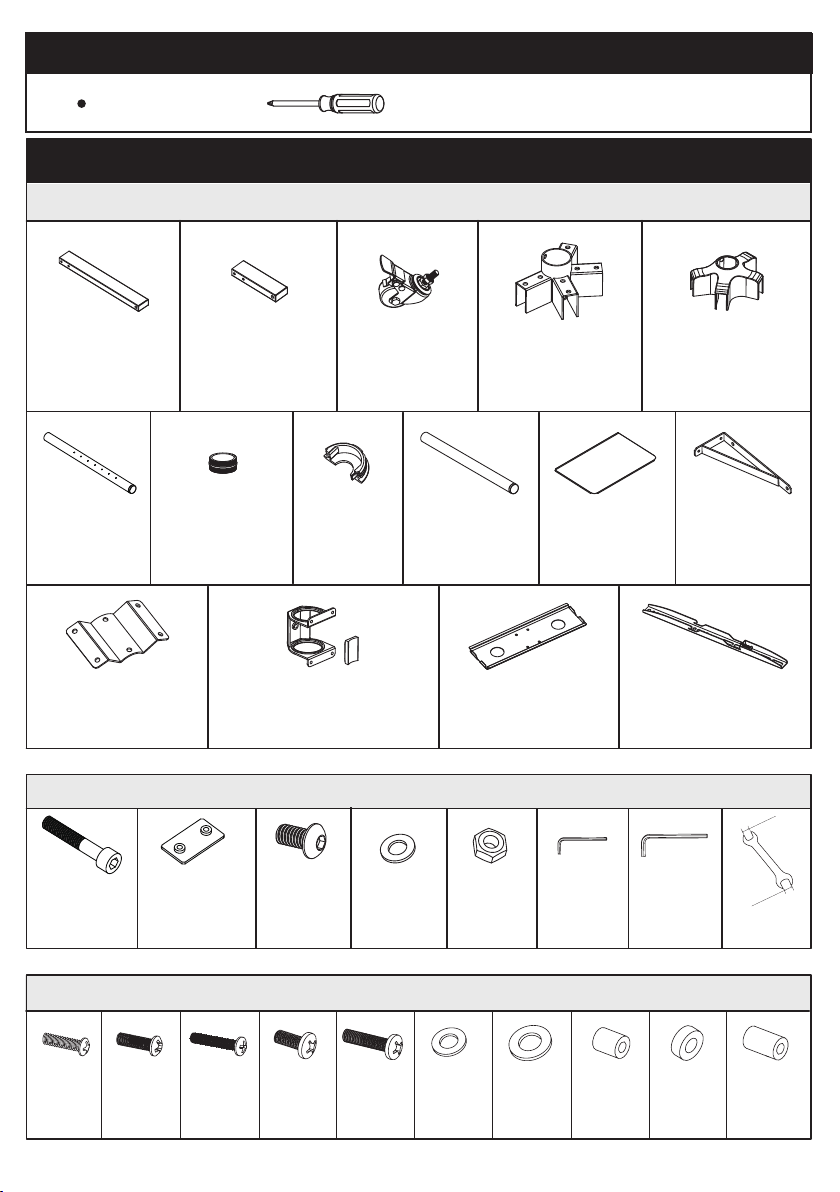
Supplied Parts
Hardware for Assembling the TV Cart
Phillips Screwdriver
Tools Needed (Not lncluded)
M6
M6
4mm
8mm
10mm
14mm
TV1
Tube Connector
Long Square
Tube
Short Square
Tube
Wheel
Lower Pole
with Holes
Pole Cover
Upper pole
without holes
TV Plate
TV Bracket
Shelf
Washer Nut
Bolt
Small
Allen Key
Large
Allen Key
Wrench
Washer
2
Tube Connector
Cover
05 (1pc)
Pole Connector
07 (1pc)
Square Plate Connector
& Rubber Pad
Shelf Support
Shelf Support
Connecting Plate
M4x15mm
Bolt
Bolt
B (4pcs)
M6
Socket Plate
12 (1pc)
TV6 (4pcs)
M6
Washer
Step 1
Step 2
x2
x2
x4
x1
Long Square
Tube
Short Square
Tube
01
02
03
3
M6x60mm
Bolt
M6
Socket Plate
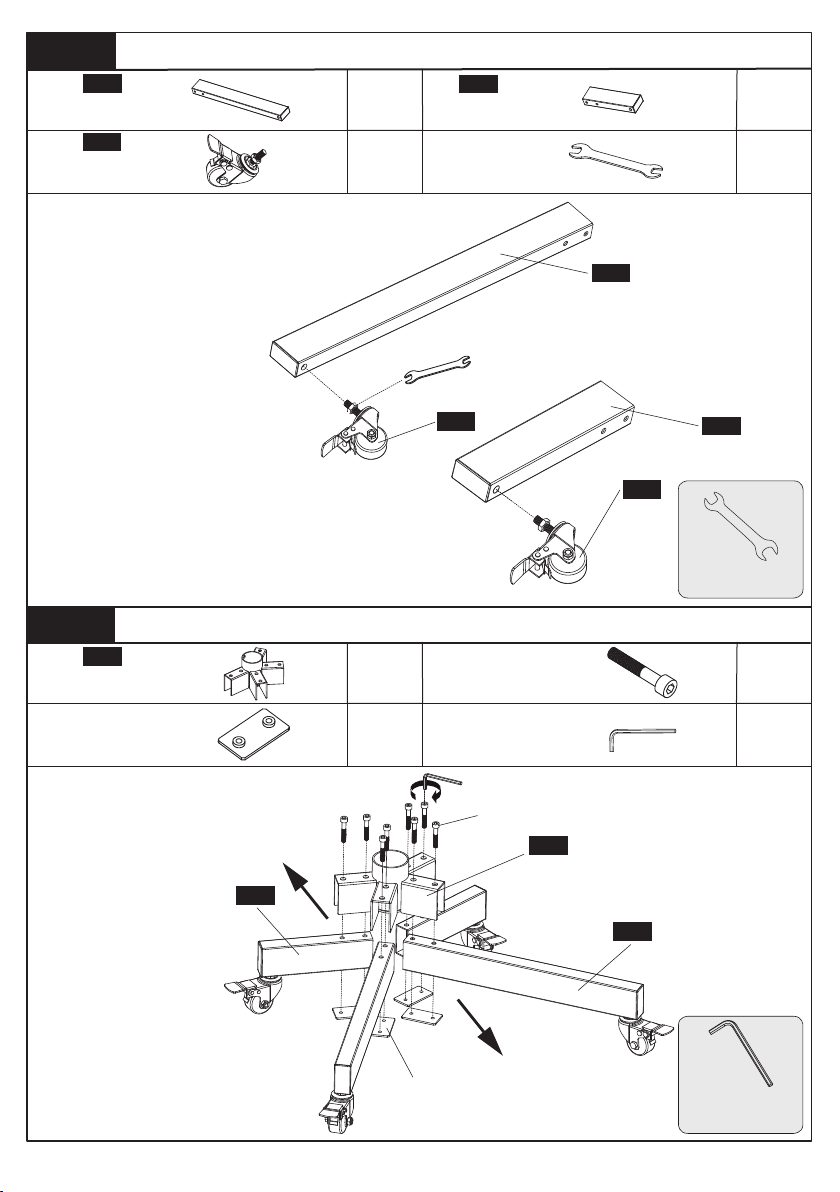
Secure wheels [03] to the square tubes [01]
and [02] by using the provided wrench [H]
Turn this nut to adjust the height of wheel [03]
Step1-1
Step1-2
Secure Wheels to the Square Tubes
Wheel
Wrench
x1
x8
x4
x1
04
04
Secure the square
tubes [01] and [02] to
the tube connector
[03] using M6x60mm
bolts [A] and socket
plate [B]
A
Front
BACK
Tube Connector
Secure Wheels to the Square Tubes
H
01
02
03
03
3/8 in.(10mm)
Wrench
5/16 in.(8mm)
Large Allen Key
B
A
5/16 in.(8mm)
Large Allen Key
B
01
02
G
Step 4
Step 3
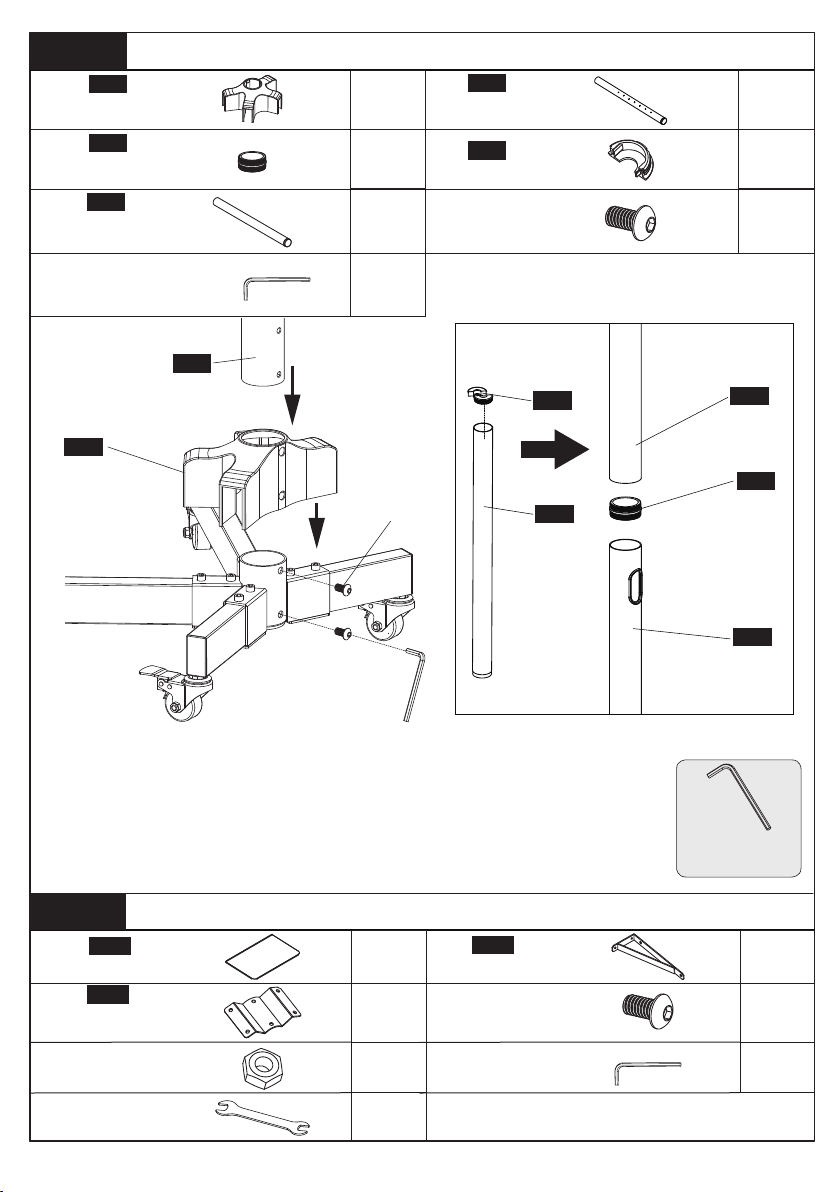
Secure the Poles [06] and [09] to the Base
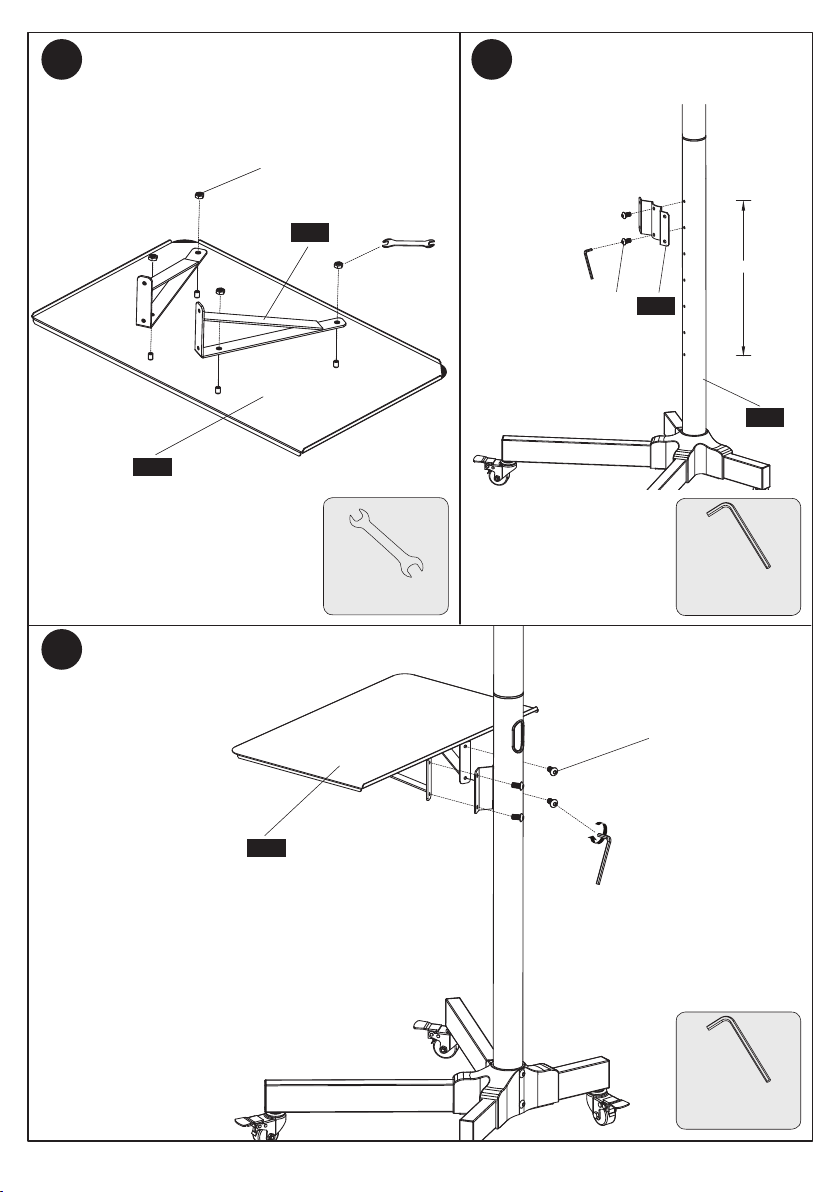
Secure Shelf [10] to Pole [06]
x1
05
x1
x1
07
x2
E
x1
x1
x6
x1
x1
10
12
x4
11
4
Lower Pole
with Holes
Upper Pole
without Holes
x1
09
Pole Connector
C
1. Attach tube connector cover [05] to the tube connector [04].
2. Secure the lower pole [06] to the tube connector [04] upper using M6x10mm
bolts [C] and Allen key [F].
3. Insert the pole cover [08] into the top of the pole [09].
4. Thread the pole connector [07] to the top of the lower pole [06]. Thread the
pole [09] to the pole connector [07].
x2
M6x10mm
Bolt
M6x10mm
Bolt
Shelf
Shelf Support
M6 Nut
x1
Shelf Support
Connecting Plate
Tube Connector
Cover
x1
5/32 in.(4mm)
Small Allen Key
F
08
06
Pole Cover
C
07
06
09
08
09
06
05
5/32 in.(4mm)
Small Allen Key
C
5/32 in.(4mm)
Small Allen Key
F
Wrench
H
5
C
360mm
E
C
Secure shelf supports [11] to the shelf [10]
using M6 nuts [E]
4.1
4.3
4.2
Secure shelf [10] to the shelf support connecting
plate [12] using M6x10mm bolts [C]
Secure shelf support connecting
plate [12] to the pole [06] using
M6x10mm bolts [C]
10
10
11
12
06
5/32 in.(4mm)
Small Allen Key
5/32 in.(4mm)
Small Allen Key
3/8 in.(10mm)
Wrench
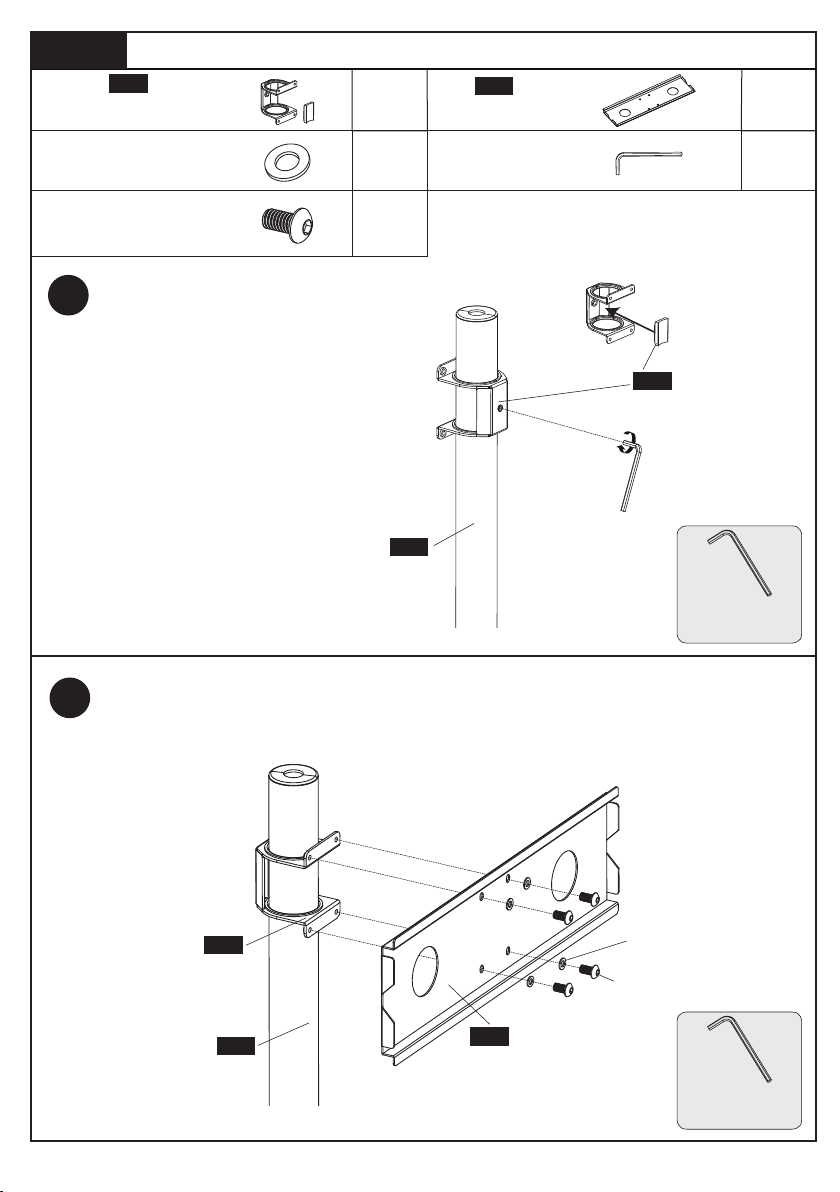
Step 5 Secure Square Plate to Upper Pole [09]
x1
x1
x4
x1
TV Plate
13
14
D
6
5.1
C
D
5.2
Secure the square plate [14] to square plate connector [13] using M6x10mm bolts [C]
and M6 washers [D].
Slide the square plate connector and
rubber pad [13] over the top of the pole
[09] and secure the connector using
Small Allen Key [F].
Square Plate Connector
& Rubber Pad
M6
washer
13
13
14
09
09
5/32 in.(4mm)
Small Allen Key
5/32 in.(4mm)
Small Allen Key
5/32 in.(4mm)
Small Allen Key
F
x4
M6x10mm
Bolt
C
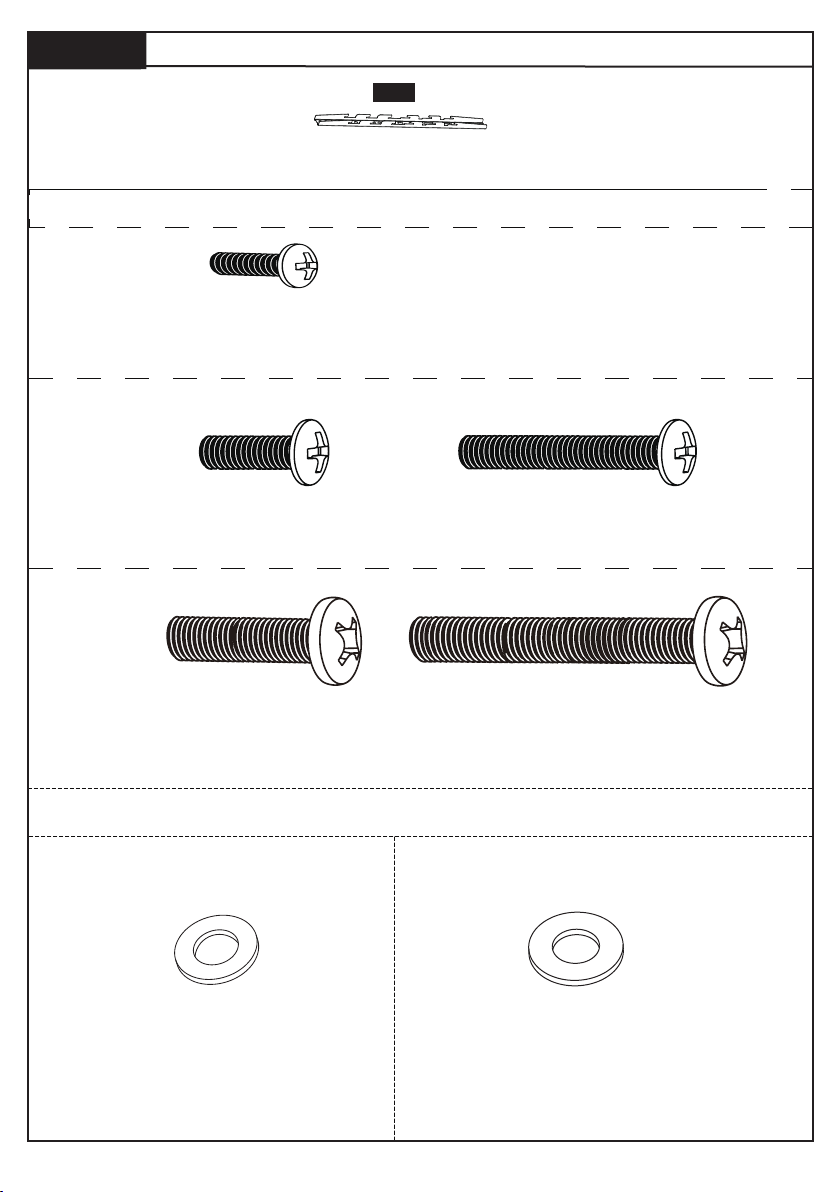
Step 6
Secure the Brackets to the TV
Note: The bolts are shown in accordance with the actual size
M6
TV2 x4
M6 x 15mm
TV3 x4
M6 x 30mm
M4
TV1 x4
M4 x 15mm
M8
TV4x4
M8 x 25mm
TV5 x4
M8 x 50mm
X2
TV Bracket
15
Note: The washers and spacers are shown in accordance with the actual size
TV6x4
M6 Washer
TV7 x4
M8 Washer
7
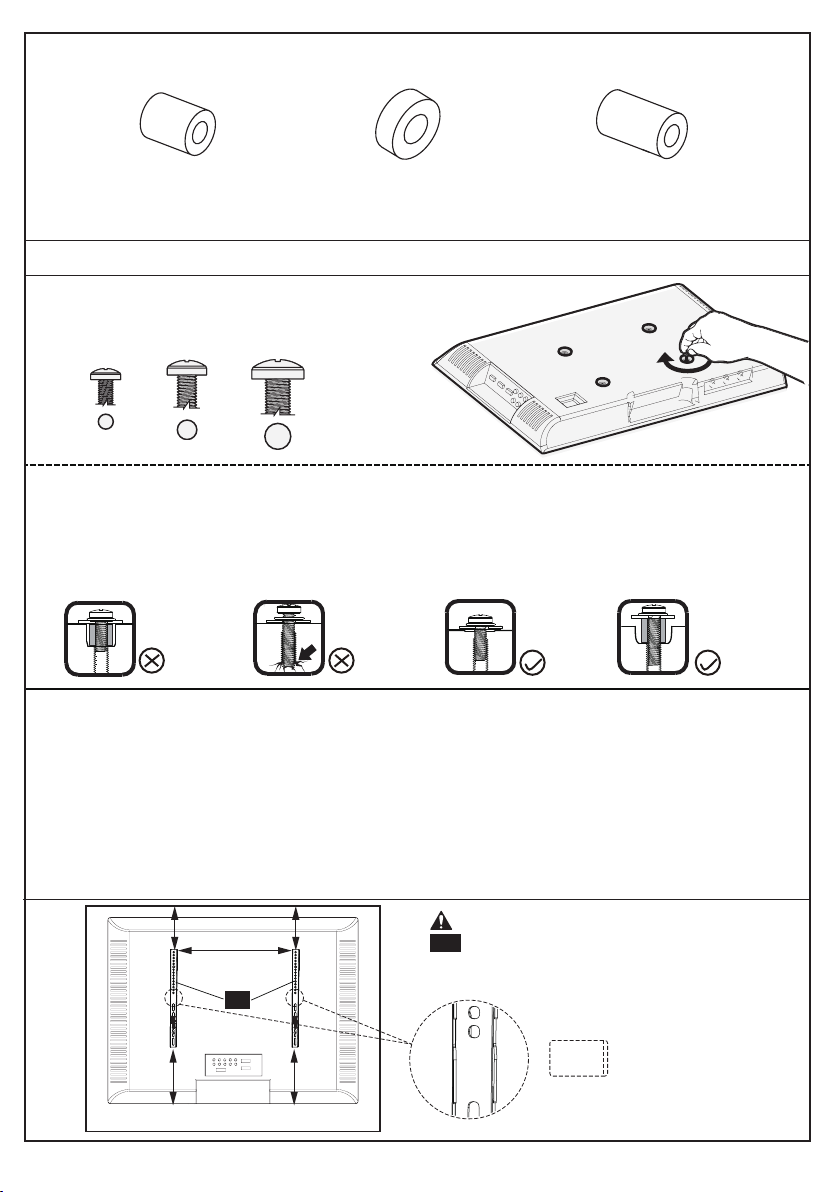
Only one bolt size fits your TV.
M6M4 M8
Bolt length:Verify adequate thread engagement with bolts or bolts/spacers combination.
We recommend thread engagement by at least 5 turns.
-Too short will not hold the TV.
-Too long will damage the TV.
Too Short
Too Long
Correct Correct
Select TV Bolts
Please Note: The provided TV bolts meet most of today's TVs design. However, some TVs require
special bolts which may not be in the hardware bag. In this case we offer our “PSUHP" Universal
Hardware Kit which provides a large selection of bolts that can meet the demand of older and unique
applications.
Please Note: When using the spacers it is important to note that they can be used in multi-layers
(meaning stacked). If you have any difficulty understanding how to install the TV bolts or spacers,
please contact customer service at [email protected] (US) / [email protected] (CA).
CAUTION: Ensure the TV brackets
15 are EQUALLY CENTERED on your
TV AND securely fastened in place.
15
UP
TV9 x8
M6/M8 Spacer(5mm)
TV10 x4
Spacer(20mm)
TV8 x4
Spacers
[if needed]
8
M4 Spacer
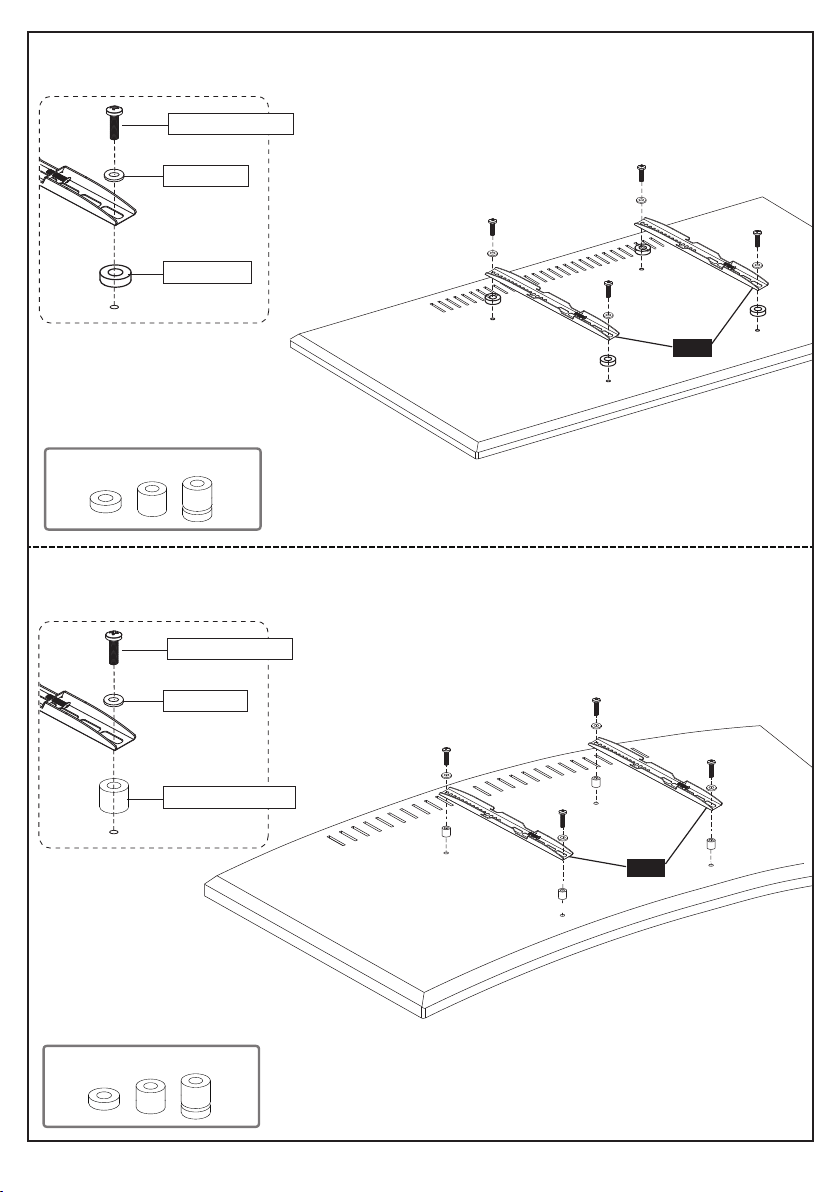
Option B (For Round Back TV)
Option A (For Flat Back TV)
(If needed)
TV1/TV2/TV4
TV8/TV9
TV6/TV7
9
Alternate Spacer Setups
Alternate Spacer Setups
15
15
10
(If needed)
TV1/TV3/TV5
TV8/TV9/TV10
TV6/TV7
10
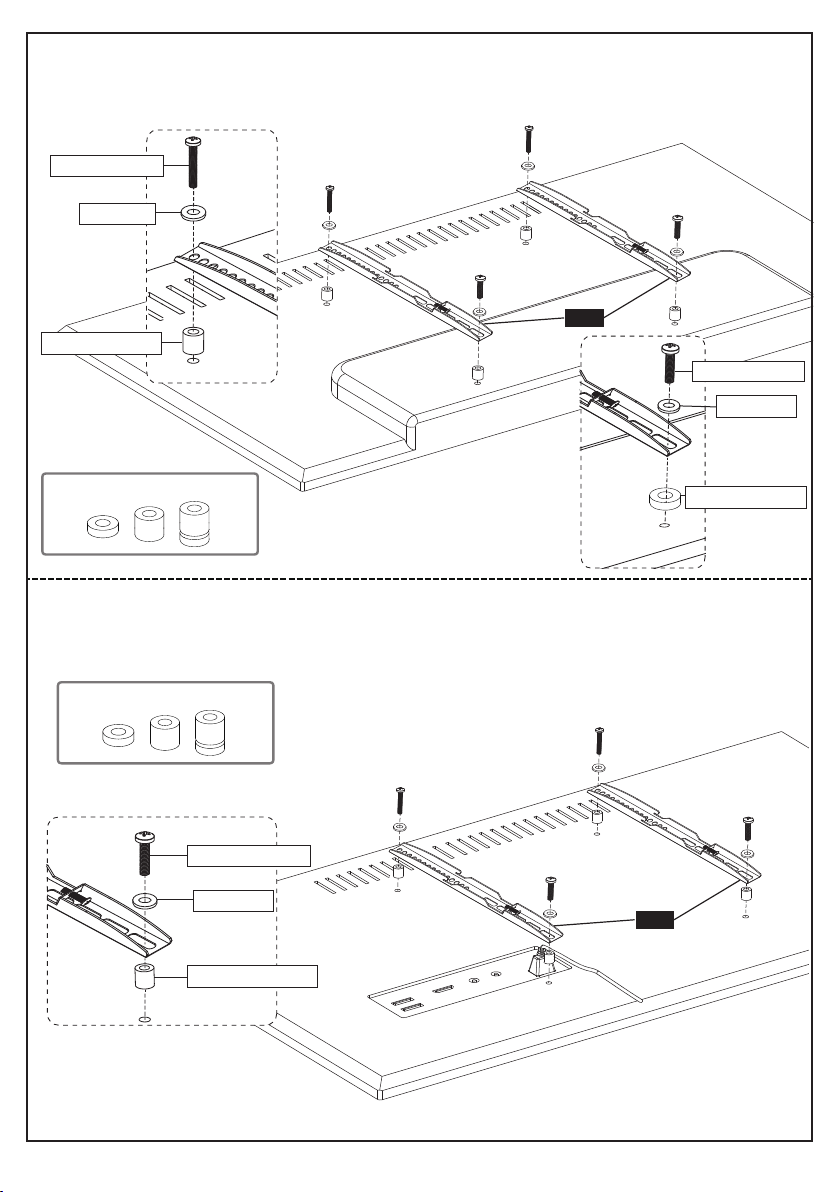
Spacers may be necessary for 2 holes ONLY.
Option C (For TV with A “Bump”)
Option D
For cable interference or inset holes, use spacers to create extra space
between the TV and TV brackets
(If needed)
TV1/TV2/TV4
TV6/TV7
TV8/TV9/TV10
TV1/TV3/TV5
TV1/TV3/TV5
TV6/TV7
TV6/TV7
10
Alternate Spacer Setups
Alternate Spacer Setups
15
15
(If needed)
TV8/TV9/TV10
10
(If needed)
TV8/TV9/TV10
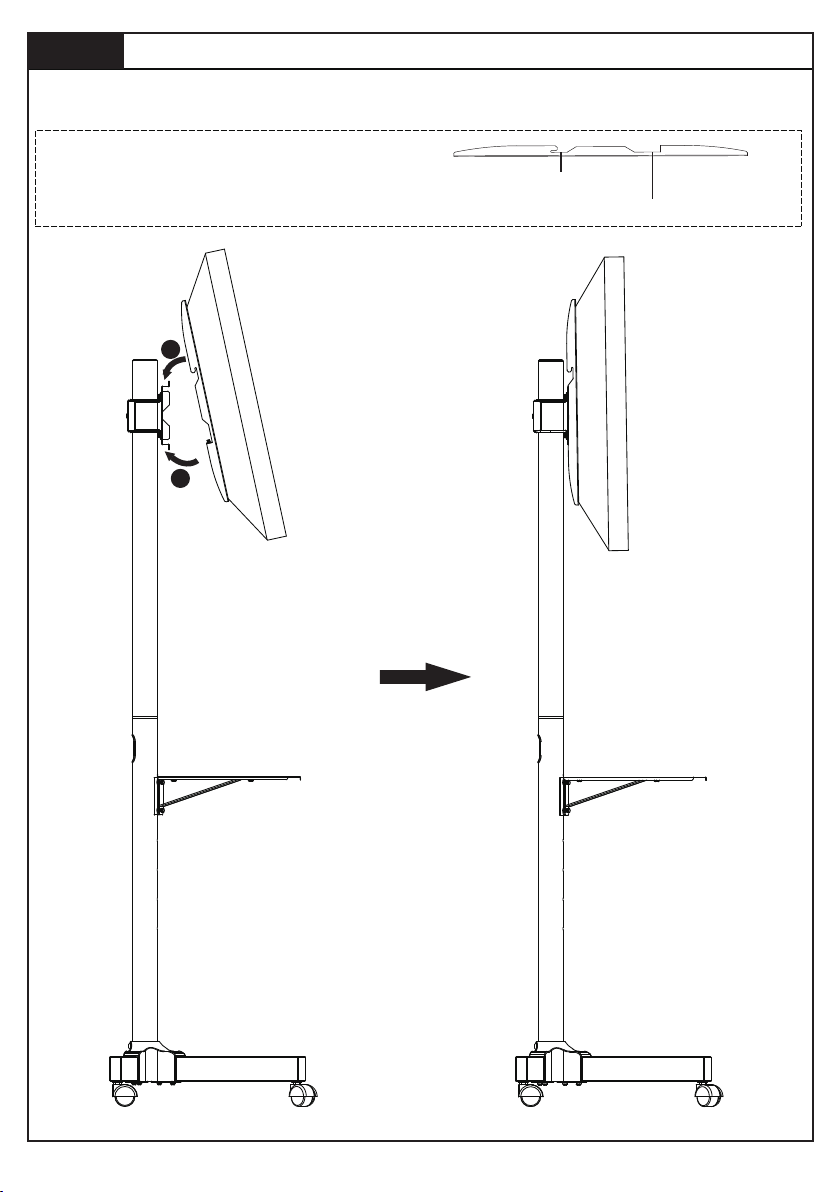
Step 7
Hang TV to TV Plate [15]
7-1 Hang the TV with brackets to the TV plate
7-2 Push the bottom of the TV to TV plate
TV brackets are two-height-adjustable.
You can choose the proper height.
The first choice
The second choice
11
1
2
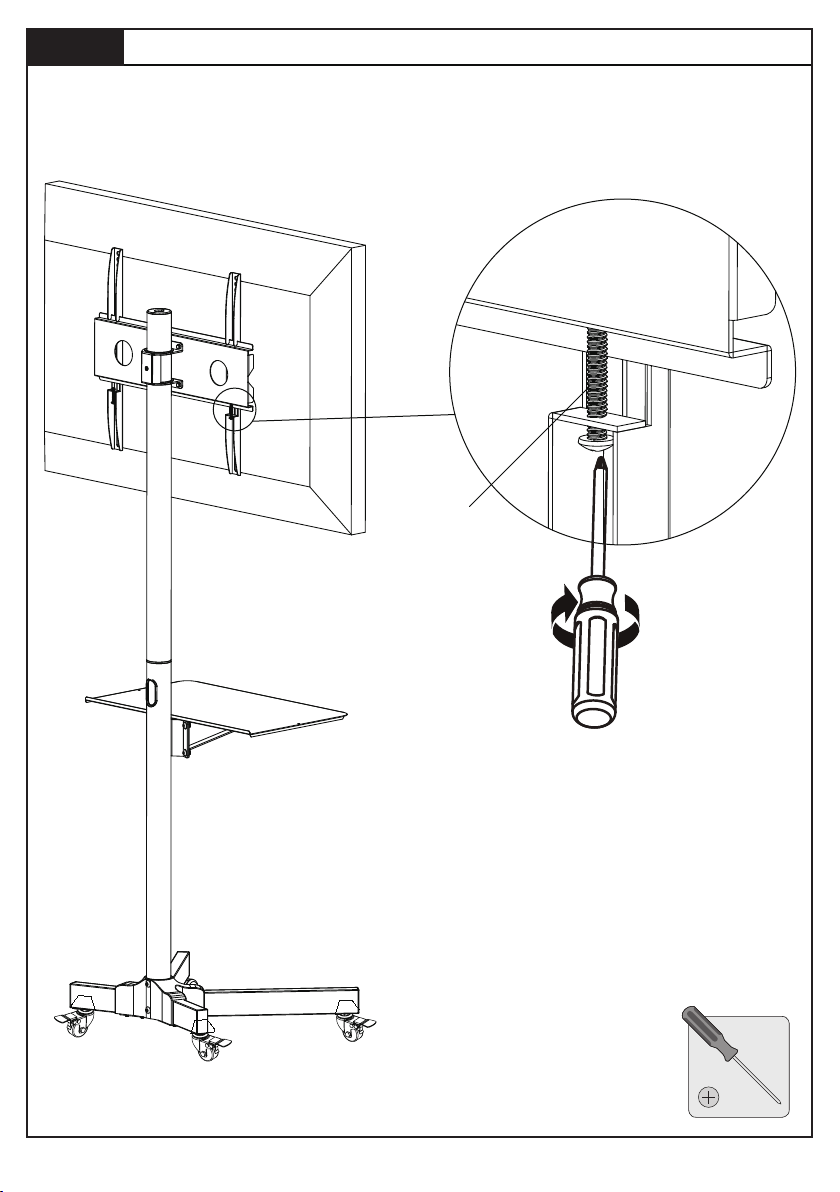
Step 8
Secure TV to TV Plate [15]
12
Tighten the safety bolt on the bottom of the TV brackets to secure TV to the
square plate.
Safety bolt
(Not Included)
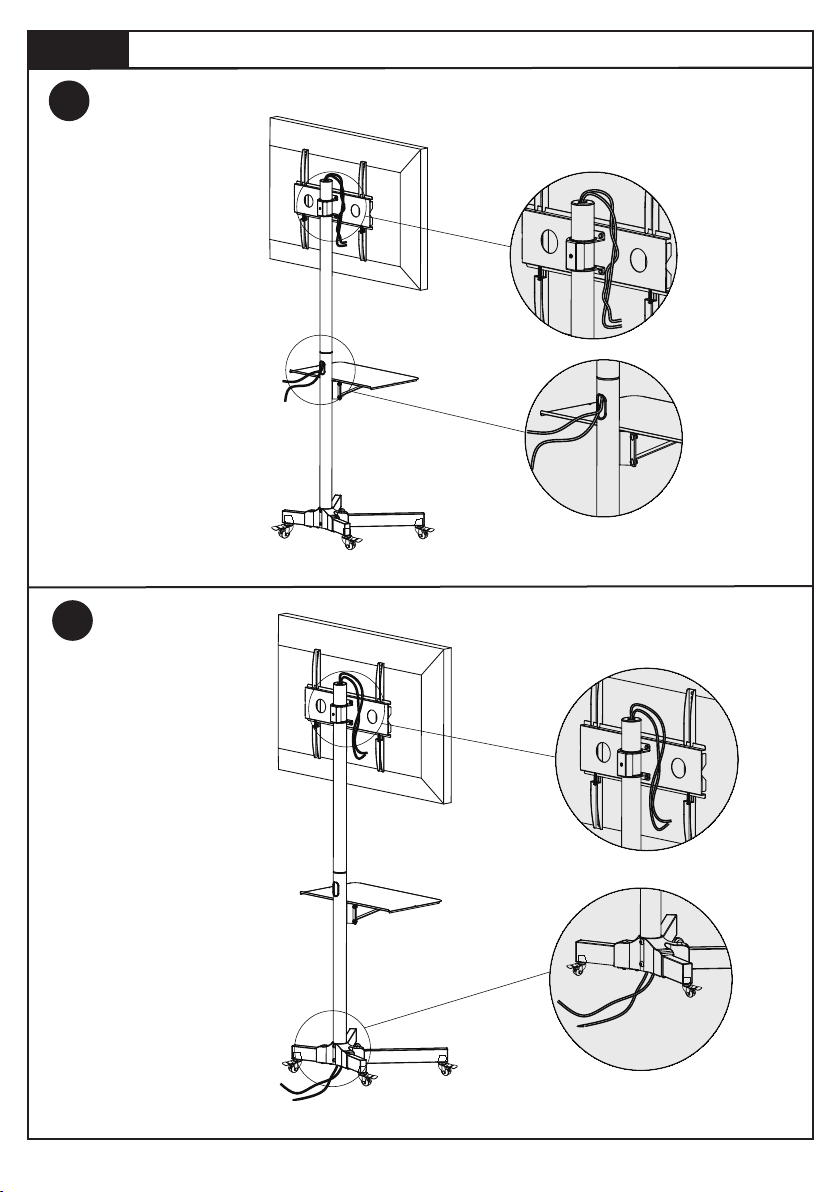
Step 9
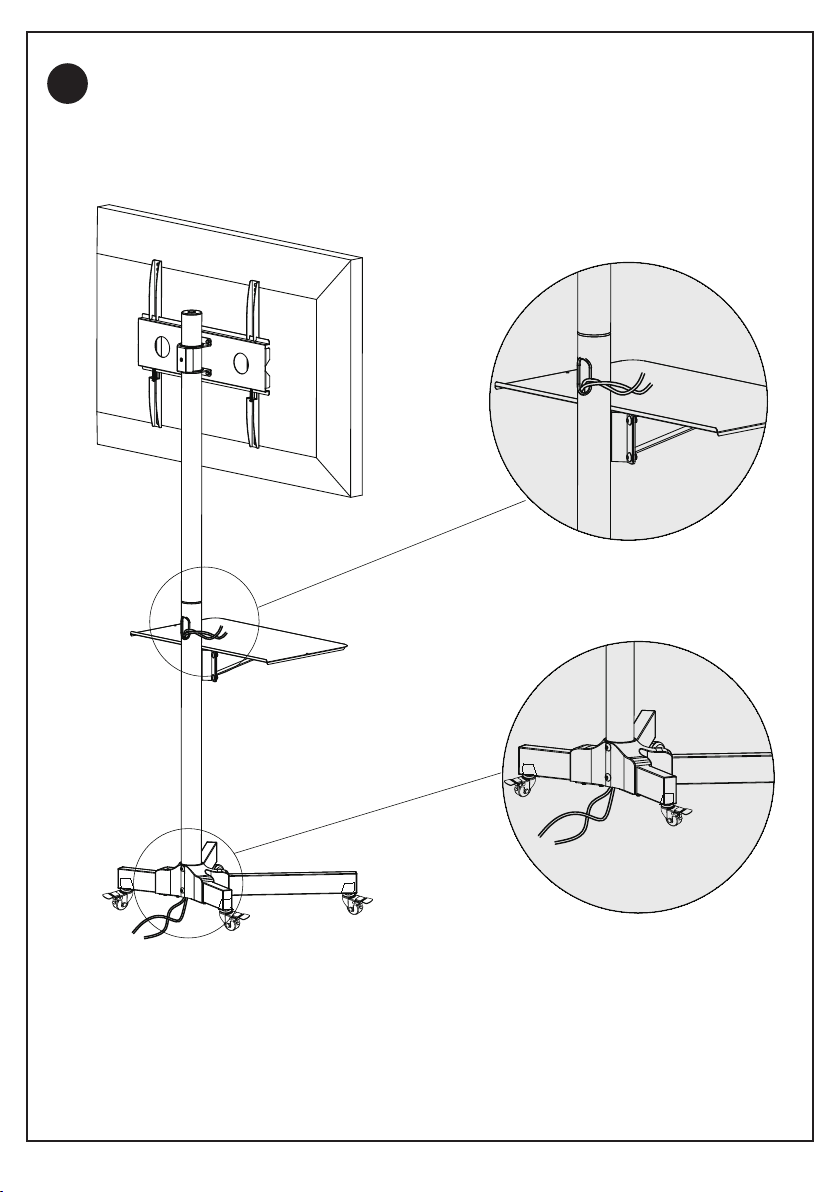
Cables Management
13
9.1
9.2
Option A
Option B
14
9.3
Option C
Thank you again
for choosing this PERLESMITH product!
All of us at PERLESMITH do appreciate your product purchase. We
hope that you are as happy with your product as we designing and
manufacturing it for you. We strive to provide you with the best quality
products and services in the industry. Please share your experience of
our product with others at www.perlesmith.com/pages/reviews if you
are satisfied. If you have any questions please don't hesitate to contact
us at
Technical Support:
1-800-556-6806 Mon-Fri 10am - 5pm (PST) (USA) (CAN)
Other Info:
[email protected] (US)
[email protected] (CA)
Please check
www.perlesmith.com
for more products and
company information.