
1
EN
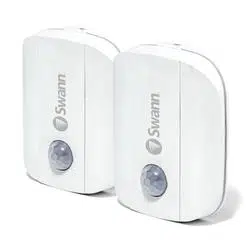
Motion Alert Sensor
Sensor de alerta de movimiento
Capteur d’alerte de mouvement
Sensore di allarme di movimento
Bewegungswarnsensor
EN
Quick Start Guide
ES
Guía de inicio rápido
FR
Guide de démarrage rapide
IT
Guida rapida
DE
Schnellstartanleitung
2
EN
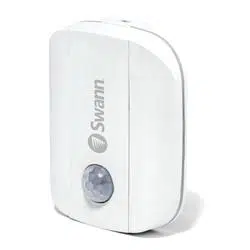
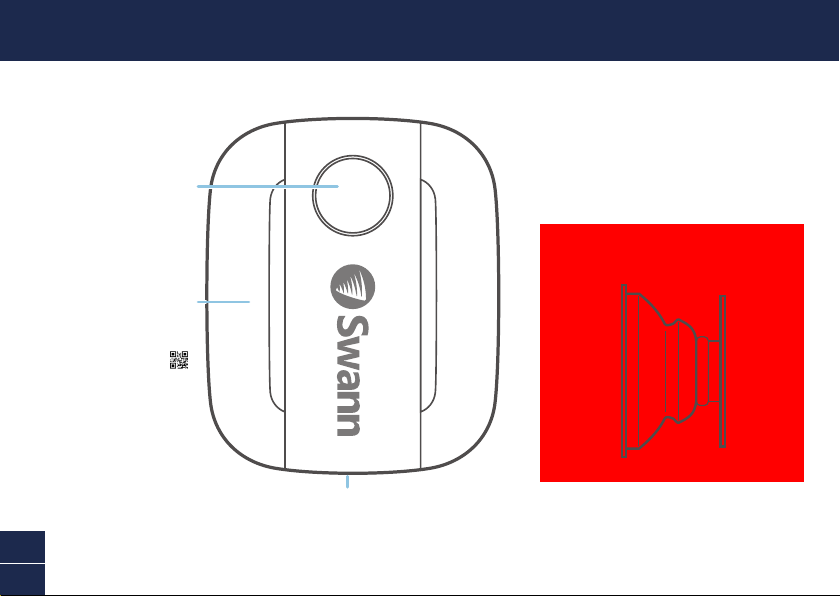
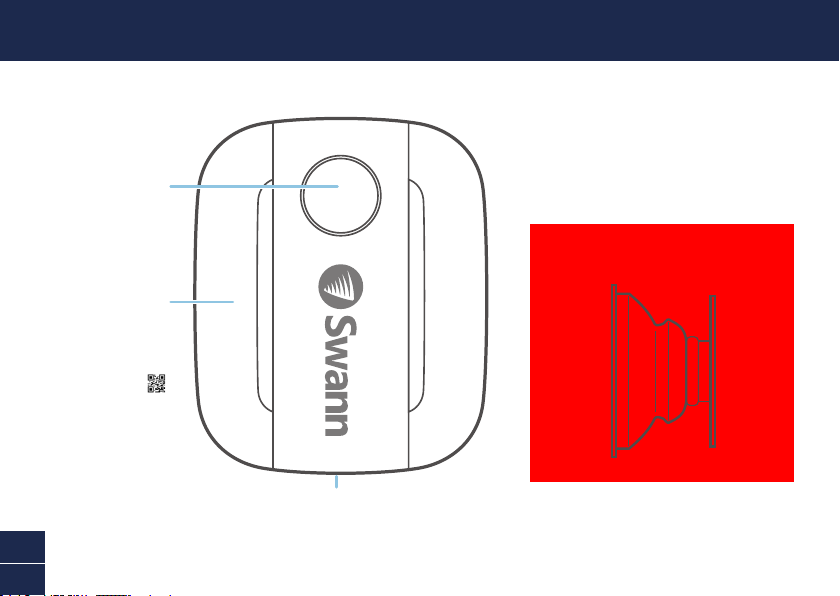
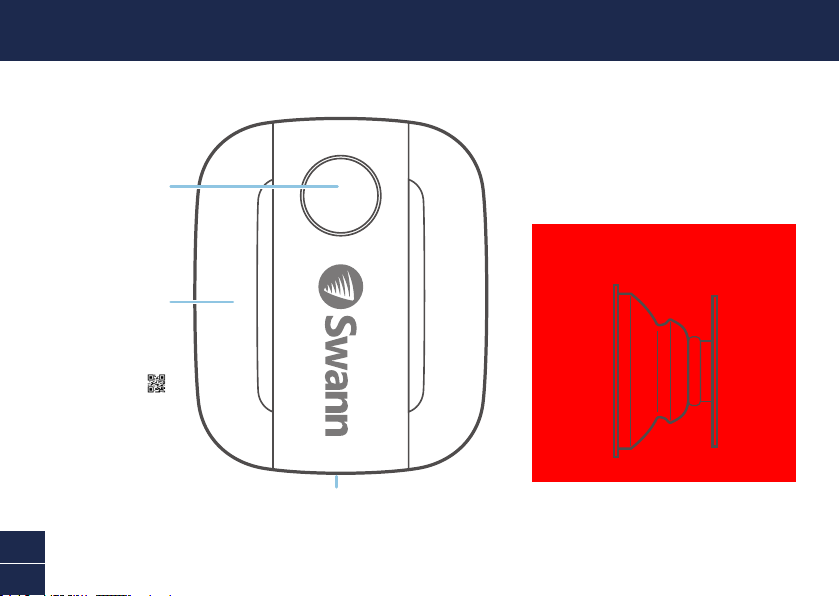
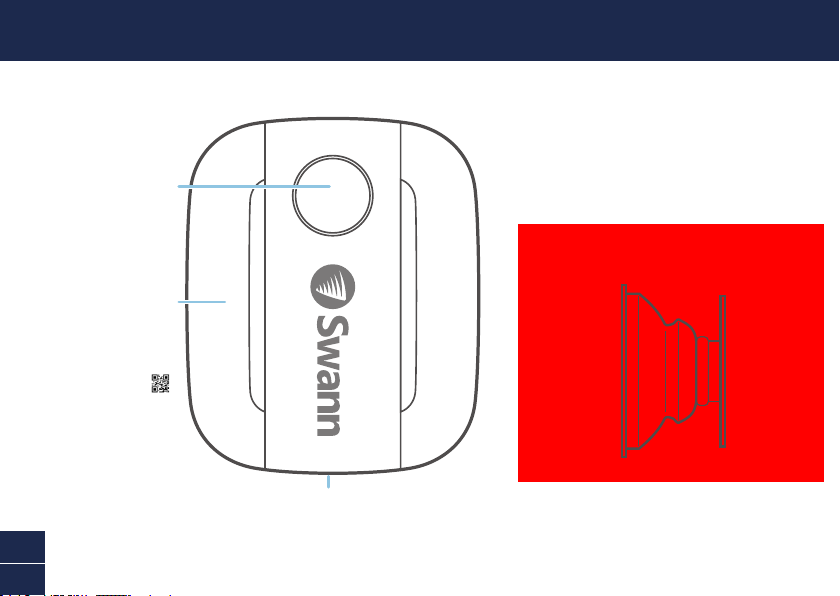
OVERVIEW
Cover
Wall
side
Sensor
side
Passive Infrared
Motion Detector
Status Light
(Optional)
Adjustable Mount Accessory
Remove to access
battery compartment
and QR code
3
EN
BATTERY INSTALLATION
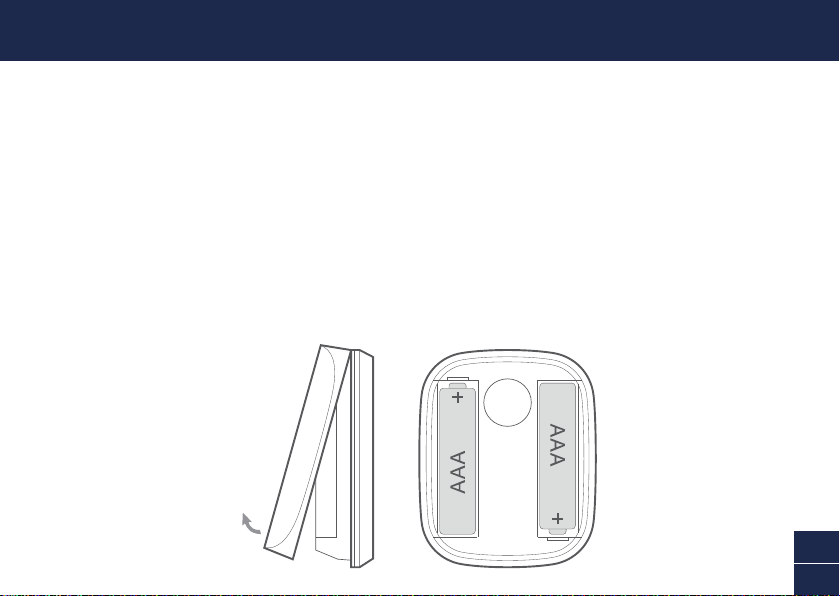
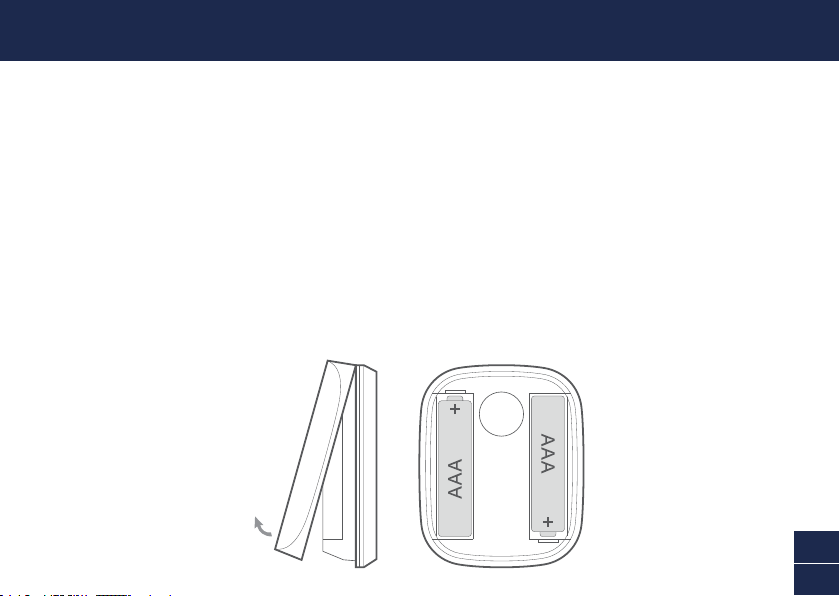
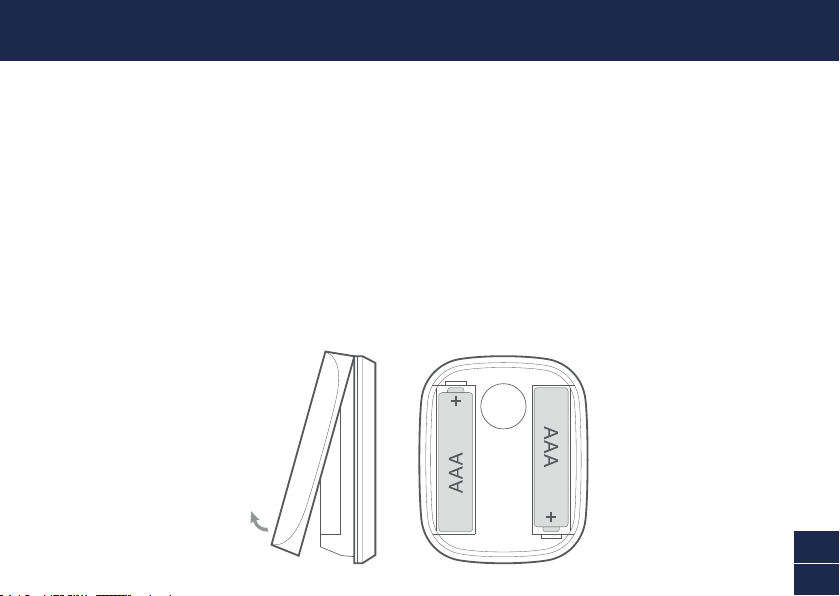
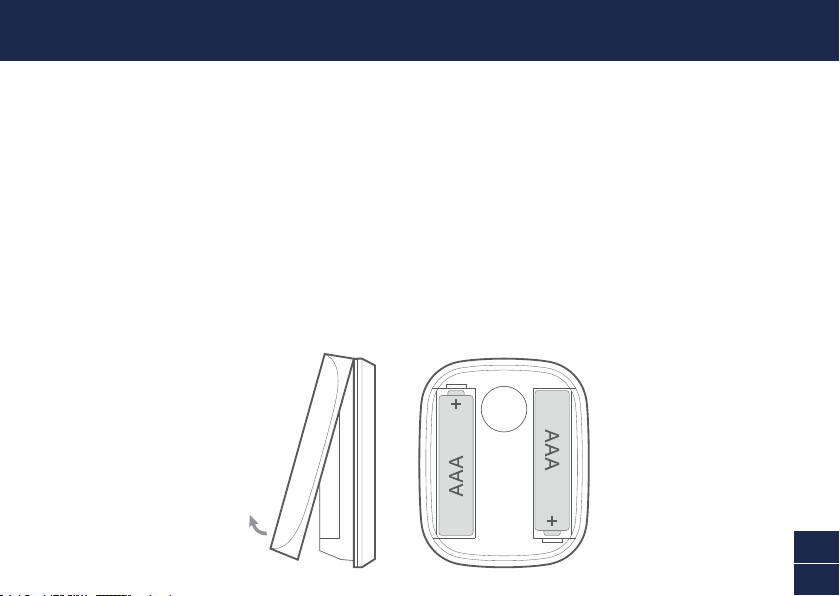
1 Using the tab at the bottom, lift off the sensor cover.
2 Insert the supplied two AAA batteries into the battery compartment according to the polarity
markings (+ and -) shown. Pairing mode will automatically activate on the sensor for 3 minutes
when batteries are inserted. The sensor status light will blink blue slowly during pairing mode.
If you have downloaded the Swann Security app on your mobile device (see page 4), you can
proceed to the pairing process (see page 5).
Note: Pairing mode on the sensor can be activated at any time by re-inserting the batteries.
3 After you have paired the sensor, snap the cover back in place.
4 Should you need to replace the batteries in the future, there is no need to re-pair the sensor.
Simply wait for pairing mode to timeout (3 minutes), after which the sensor will automatically
reconnect to the previously congured Wi-Fi network.
4
EN
DOWNLOAD THE SWANN SECURITY APP
1 Download the latest version of the Swann Security app from the Apple App Store® or Google
Play™ Store on your iOS or Android device. Simply search for "Swann Security".
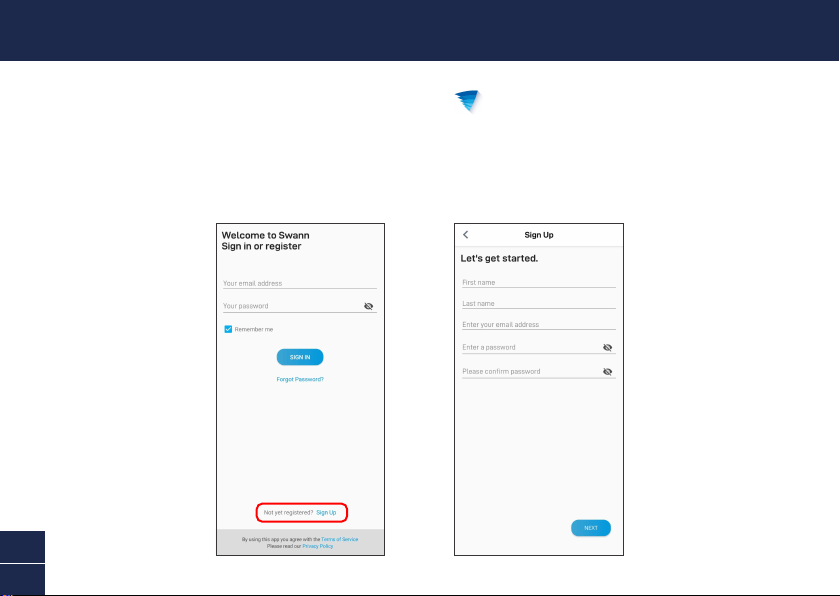
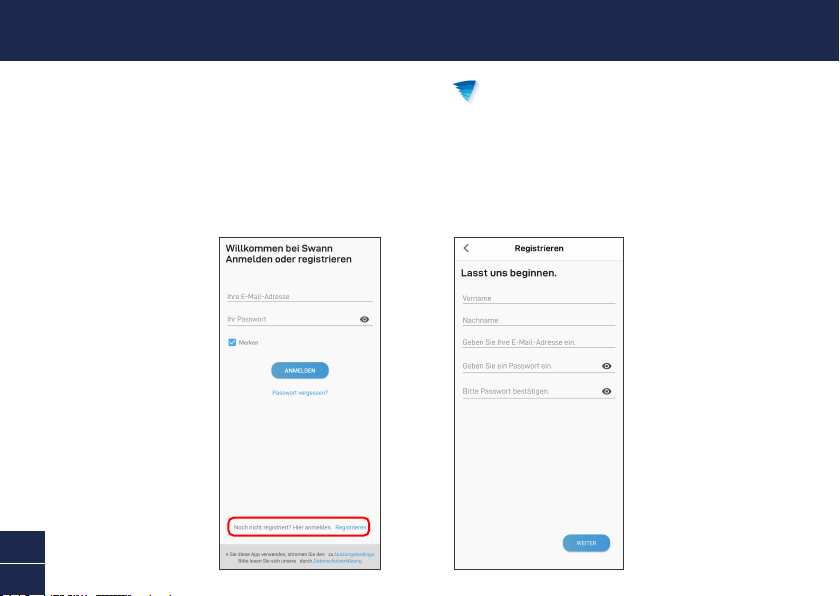
2 Open the app and create your Swann Security account by tapping “Not yet registered? Sign Up” at
the bottom of the screen. Then, activate your Swann Security account by conrming the verication
email that is sent to the registered email address.
5
EN
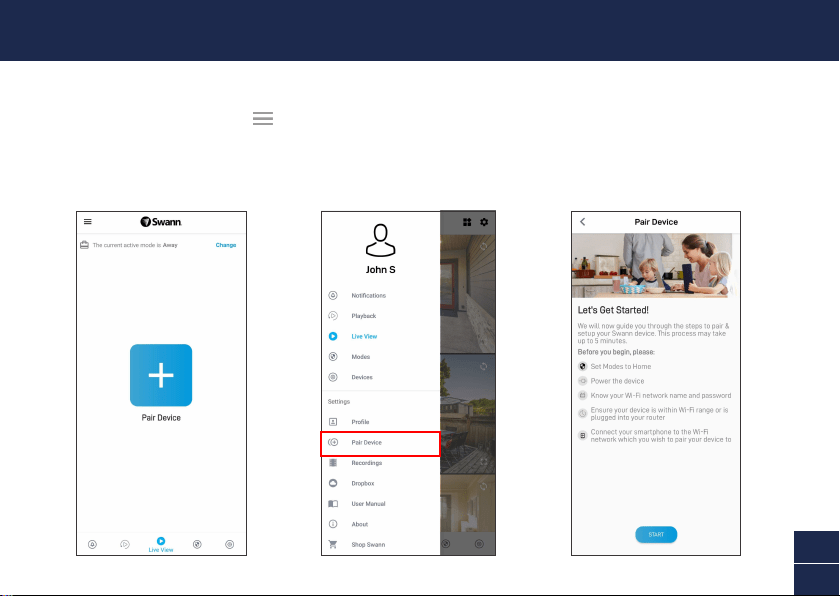
Open the Swann Security app and tap the Pair Device button on the screen. If you have already paired
a device, tap the menu icon in the top left and select “Pair Device”. The app will now guide you
through the pairing process and set up the sensor.
Before you begin, have the sensor with you and be close to your router. Please note that the sensor
can connect to a 2.4GHz Wi-Fi network only.
SET UP THE SENSOR
6
EN
• Place the sensor around your home as required using the included double-sided tape. Also includ-
ed is an optional adjustable mount to allow for exible positioning around tight spaces.
• Make sure the sensor location has strong, reliable Wi-Fi reception available so you can get timely
alerts. As a general rule, the nearer your sensor is to your Wi-Fi router, the better the wireless con-
nection quality. You can expand the Wi-Fi coverage of your current network by installing a Wi-Fi
range extender.
• To prevent false detection, avoid aiming the sensor at heat sources (replaces, air conditioners,
hot air vents, etc), at windows where sunlight can be reected or placing it in direct sunlight. Also,
do not install the sensor on surfaces that can move or vibrate.
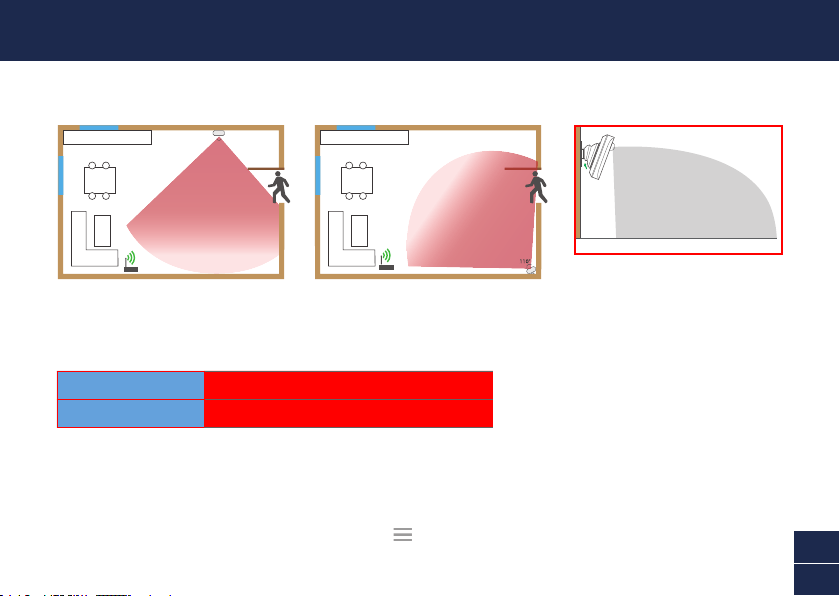
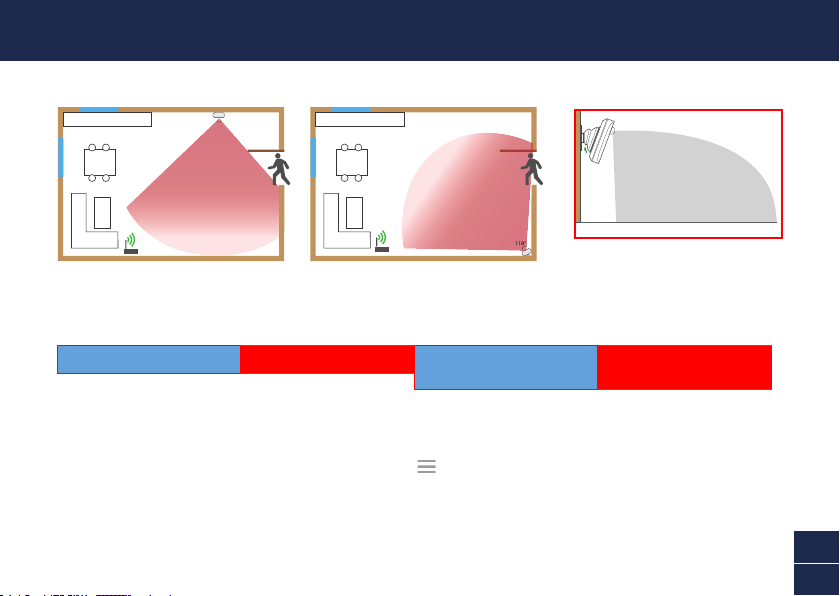
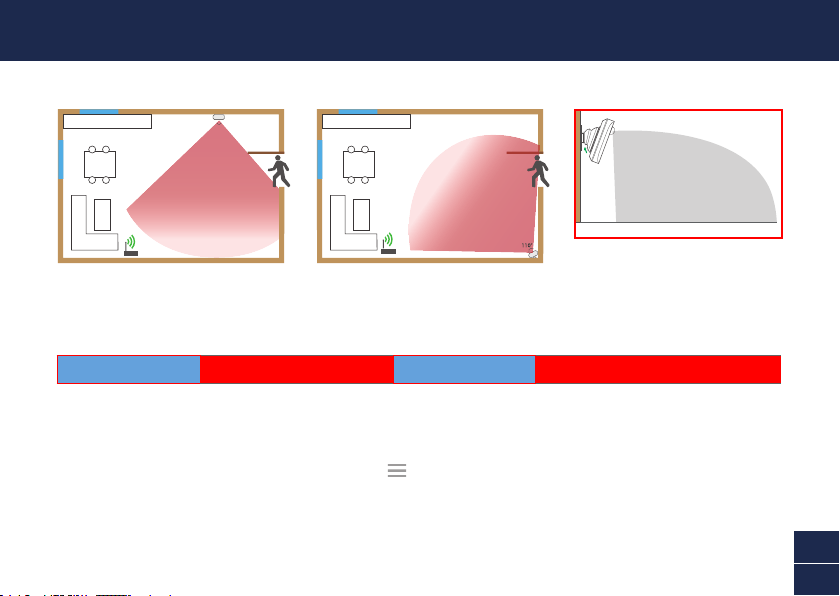
• For best results, the sensor should ideally be installed pointing downwards at an angle where
movement is across the detection area of the sensor. Motion detection is less effective when
movement is directly towards or away from the front of the sensor.
• For reliable bonding, clean the mounting surface with an alcohol/cleaning wipe, and let dry. Do not
use on rough surfaces. When mounting the sensor/adjustable mount, press rmly to the surface
for 60 seconds to ensure proper adhesion.
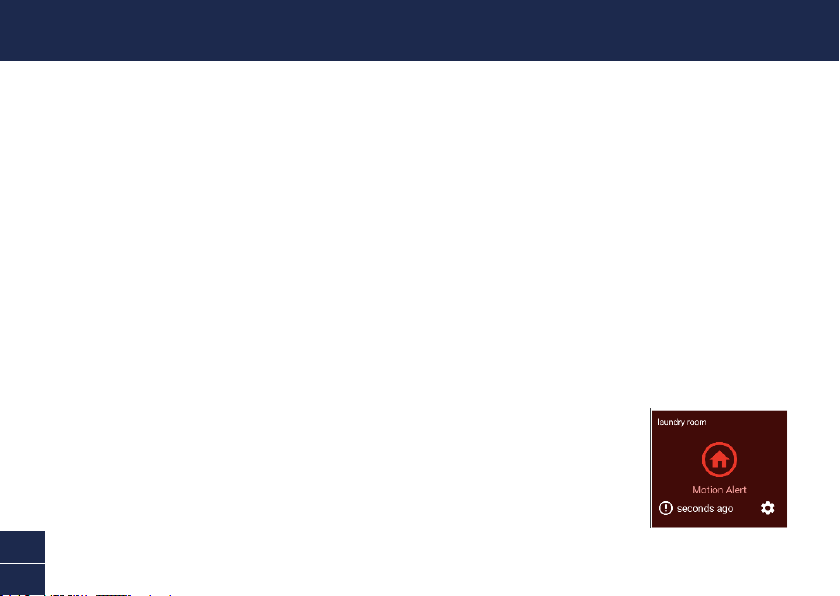
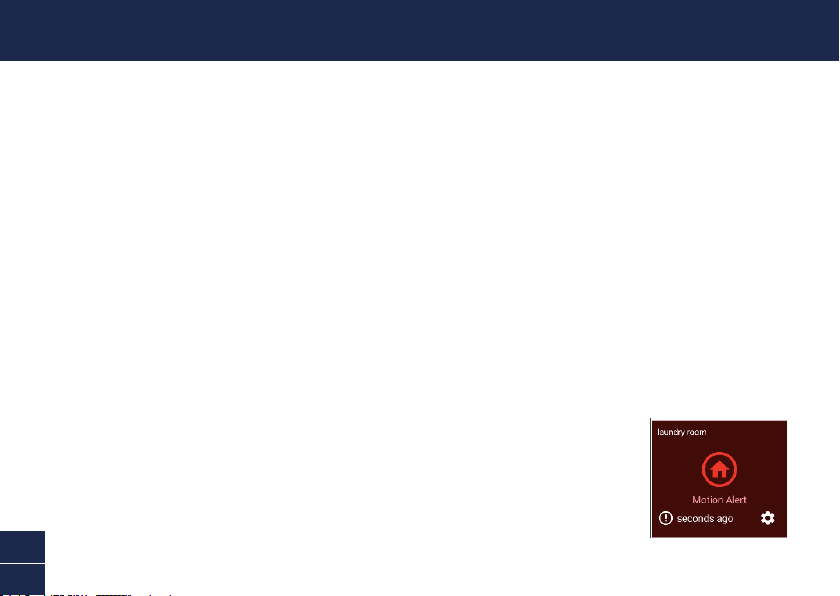
• To test the sensor, walk across the detection area. The app will send you
a push notication, for example, “Motion Detected on Hallway”, when
the sensor detects motion. The sensor tile will also automatically update
its status in the app, as shown on the right. To conserve battery power,
the sensor will enter sleep mode for 3 minutes each time after it detects
motion. During this period, the sensor will not detect any motion activity.
Note: You can use the Modes feature in the app to congure whether or not to receive “Motion
Alert” push notications when the sensor is in Home, Away or Night mode.
MOUNTING THE SENSOR
7
EN
HELP AND RESOURCES
Status Light Guide
The status light on the sensor tells you what is happening with the device connection. When the
sensor is functioning normally, the status light will be off (unless it is out of battery/unpaired).
Mounting Examples
Swann Security App Manual
Access the Swann Security app manual (Menu
> User Manual) at any time to learn more about
navigating through the various screens and functions in the app.
Sensor Battery Level
You can check the battery level of the sensor in the app: Devices tab > Sensor > Battery %
Slow Blinking Blue Pairing mode
Solid Blue (5 seconds) Motion Detected. Connecting to Wi-Fi.
110°
5m
(Actual detection range is subject
to environmental conditions)
8
ES
GENERALIDADES
Cubierta
Da acceso al
compartimiento
de baterías y el
código QR
Lado de
la pared
Lado del
sensor
Detector de
movimiento
infrarrojo pasivo
Luz de estado
(Opcional)
Accesorio de montaje ajustable
9
ES
INSTALACIÓN DE LA BATERÍA
1 Con la pestaña en la parte inferior, levante la cubierta del sensor.
2 Coloque las dos baterías AAA incluidas en el compartimiento de baterías según las marcas de
polaridad (+ y -) que se muestran. El modo de vinculación activará automáticamente el sensor
durante 3 minutos cuando se coloquen las baterías. La luz de estado del sensor parpadeará de
azul lentamente durante el modo de vinculación. Si ha descargado la aplicación Swann Security en
su dispositivo móvil (vea la página 10), puede pasar al proceso de vinculación (vea la página 11).
Aviso: El modo de vinculación en el sensor se puede activar en cualquier momento reinsertando
las baterías.
3 Luego de haber vinculado el sensor, coloque la cubierta de nuevo en su lugar.
4 Si debe reemplazar las baterías en el futuro, no es necesario revincular el sensor. Simplemente
espere a que nalice el tiempo de vinculación (3 minutos), luego del cual el sensor se revinculará
automáticamente a la red Wi-Fi previamente congurada.
10
ES
DESCARGUE LA APLICACIÓN SWANN SECURITY
1 Descargue la última versión de la aplicación Swann Security de las tiendas App Store® de
Apple o Google Play™ en su dispositivo iOS o Android. Simplemente debe buscar "Swann Security".
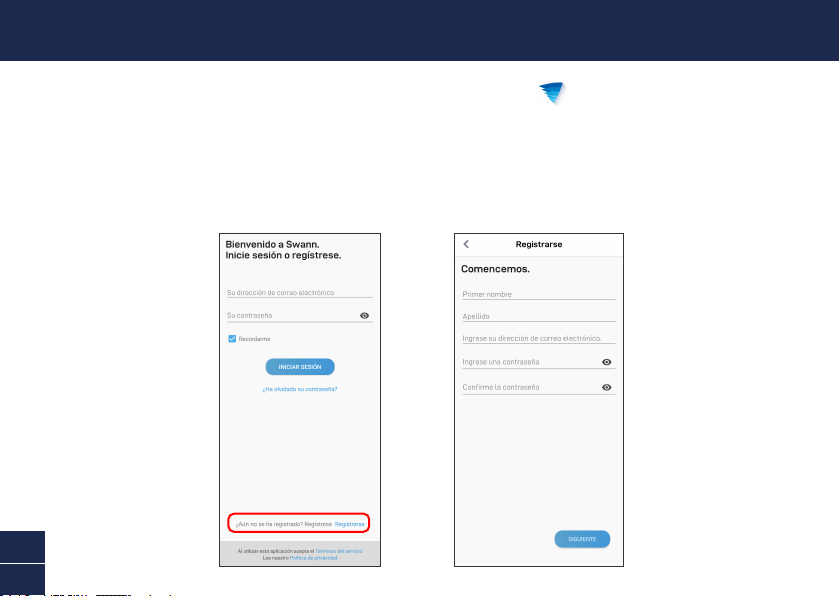
2 Abra la aplicación y cree una cuenta de Swann Security; para ello, haga clic en el botón “¿Aún no
se ha registrado? Regístrese” en la parte inferior de la pantalla. A continuación, active su cuenta
de Swann Security al conrmar el correo electrónico de vericación que se envía a la dirección de
correo electrónico registrada.
11
ES
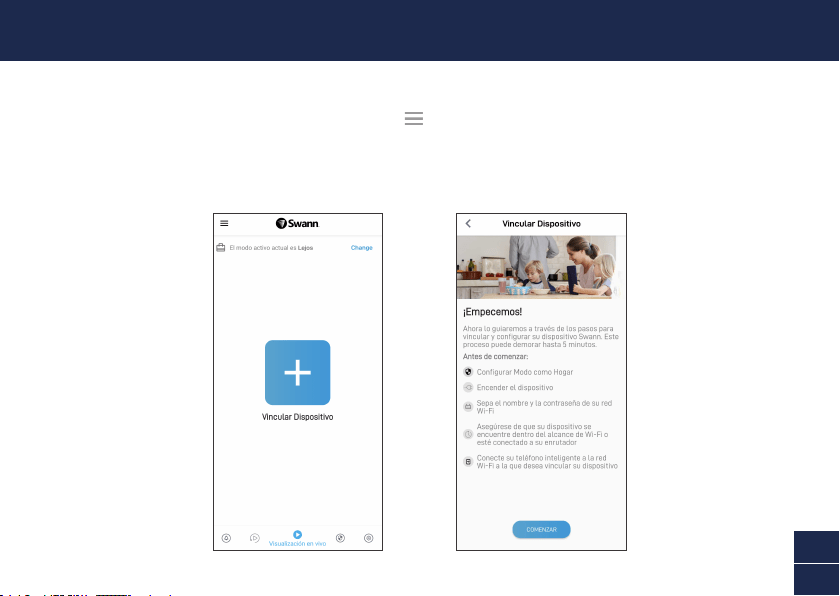
Abra la aplicación Swann Security y toque el botón Vincular dispositivo en la pantalla. Si ya ha
vinculado un dispositivo, toque el ícono de menú en la parte superior izquierda y seleccione
“Vincular dispositivo”. La aplicación ahora lo guiará en el proceso de vinculación y congurará el
sensor. Antes de comenzar, tenga el sensor con usted y esté cerca de su enrutador. Tenga en cuenta
que el sensor solo puede conectarse a una red Wi-Fi 2.4GHz.
CONFIGURACIÓN DEL SENSOR
12
ES
• Coloque el sensor en su hogar donde lo necesite por medio de la cinta de doble faz provista. Además, se incluye
un montaje ajustable opcional para permitir una mayor cobertura e instalación en espacios estrechos.
• Asegúrese de que la ubicación del sensor tenga una recepción fuerte y able de Wi-Fi disponible para que pueda
recibir alertas oportunas. Como regla general, cuanto más cerca esté el sensor del enrutador de Wi-Fi, mejor
será la calidad de la conexión inalámbrica. Puede aumentar la cobertura de Wi-Fi de su red existente mediante
la instalación de un extensor de rango de Wi-Fi.
• Para evitar detecciones falsas, evite el montaje cerca de calefactores, aires acondicionados, bombillas de luz
u orientado hacia una ventana donde se pueda reejar la luz del sol. No lo instale en supercies que se puedan
mover ni vibrar.
• Cuando sea posible, para lograr los mejores resultados, el sensor debe instalarse orientado hacia abajo a un
ángulo en donde pasará la gente por el área de detección.
• Para una vinculación conable, limpie la supercie deseada con un paño de limpieza/alcohol y espere que se
seque. No usar en supercies rugosas.
• Presione el sensor/montaje ajustable de manera rme a la supercie durante 60 segundos para que quede jo.
• Para probar el sensor, camine por el área de detección. Intente probar el área de cobertura caminando más lejos
del sensor. Ajuste la dirección del sensor, de ser necesario. La aplicación enviará una noticación push cuando
el sensor detecte movimiento, por ejemplo, “Movimiento detectado en el Pasillo”. El
mosaico del sensor también actualizará automáticamente su estado en la aplicación,
como se muestra a la derecha. Para conservar la energía de la batería, el sensor
entrará en modo de suspensión durante 3 minutos cada vez que detecte movimiento.
Durante este período, el sensor no detectará ninguna actividad de movimiento.
Aviso: Puede usar la función de Modos en la aplicación para congurar recibir o no
noticaciones push “Alerta de Movimiento” cuando el sensor esté en modo Hogar, Lejos
o Noche.
MONTAJE DEL SENSOR
13
ES
AYUDA Y RECURSOS
Guía de luz de estado
La luz del estado en el sensor le indica lo que está sucediendo con la conexión del dispositivo. Cuando el sensor esté
funcionando normalmente, la luz del estado estará apagada (a menos que no tenga batería o no esté vinculado).
Ejemplos de montaje
Manual de la aplicación Swann Security
Acceda al manual de la aplicación Swann Security (Menú
> Manual del usuario) en cualquier momento para
aprender más sobre navegar por las diversas pantallas y funciones de la aplicación.
Nivel de batería del sensor
Puede controlar el nivel de batería del sensor en la aplicación: Pestaña del dispositivo > Sensor > % de batería)
Azul con intermitencia lenta Modo de vinculación
110°
Azul permanente (5 segundos) Movimiento detectado.
Conectando al Wi-Fi.
¿Tiene preguntas?
¡Estamos para ayudarlo! Visite nuestro Centro de Atención en support.swann.com. Además, puede enviarnos un
correo electrónico en cualquier momento a: [email protected]
5m
(El rango de detección real está
sujeto a condiciones ambientales)
14
FR
APERÇU
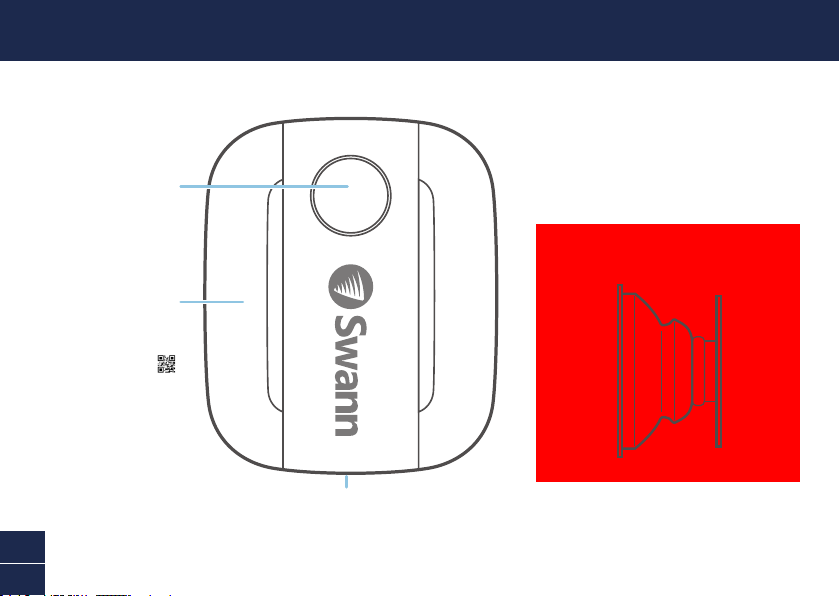
Couvercle
Permet d’accéder
au compartiment
des piles et au
code à barres
Côté du
mur
Côté du
capteur
Détecteur de
mouvement
infrarouge passif
Voyant d'état
(En option)
Accessoire de montage réglable
15
FR
INSTALLATION DES PILES
1 À l'aide de la languette en bas, soulevez le couvercle du capteur.
2 Insérez les deux piles AAA fournies dans le compartiment des piles en respectant les marques
de polarité (+ et -) indiquées. Le mode de jumelage s'activera automatiquement sur le capteur
pendant 3 minutes lorsque les piles sont insérées. Le voyant d'état du capteur clignote lentement
en bleu pendant le mode de jumelage. Si vous avez téléchargé l'application Swann Security sur votre
appareil mobile (voir page 16), vous pouvez procéder au processus de jumelage (voir page 17).
Remarque: le mode de jumelage sur le capteur peut être activé à tout moment en réinsérant les
piles.
3 Après avoir jumelé le capteur, remettez le couvercle en place.
4 Si vous devez remplacer les piles à l'avenir, il n'est pas nécessaire de jumeler à nouveau le capteur.
Attendez simplement que le mode de jumelage expire (3 minutes), après quoi le capteur se recon-
nectera automatiquement au réseau Wi-Fi configuré précédemment.
16
FR
TÉLÉCHARGEZ L'APPLICATION SWANN SECURITY
1 Téléchargez la dernière version de l'application Swann Security depuis l’Apple App Store
MD
ou Google Play
MC
sur votre appareil iOS ou Android. Effectuez simplement une recherche pour
«Swann Security».
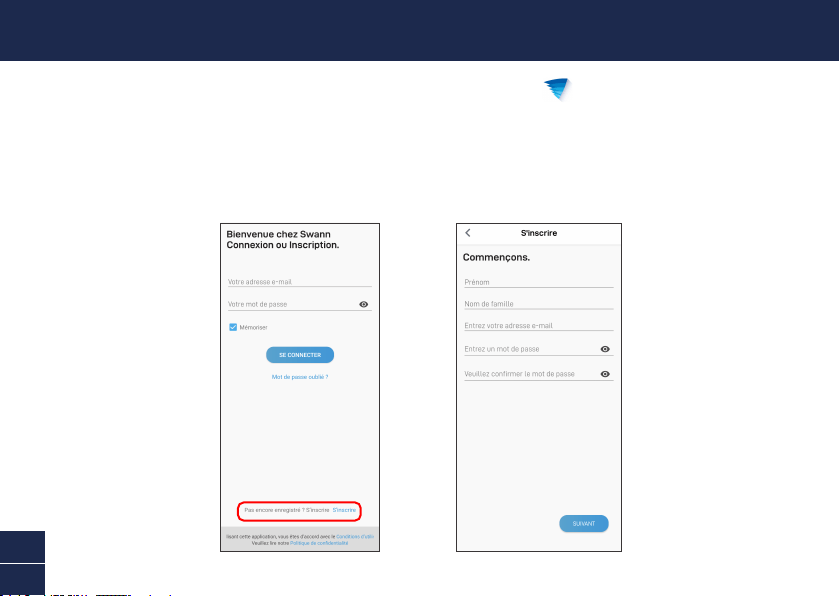
2 Ouvrez l'application et créez votre compte Swann Security en appuyant sur «Pas encore
enregistré? S’inscrire» au bas de l’écran. Ensuite, activez votre compte Swann Security en
confirmant le courriel de vérification qui est envoyé à l'adresse courriel enregistrée.
17
FR
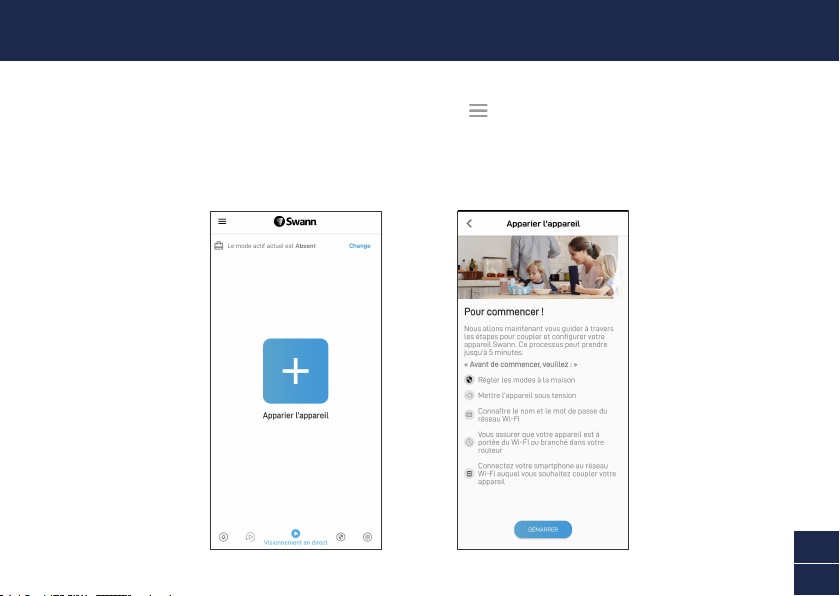
Ouvrez l'application Swann Security et appuyez sur le bouton Apparier l’appareil sur l'écran. Si vous
avez déjà jumelé un appareil, appuyez sur l'icône de menu en haut à gauche et sélectionnez
«Apparier l’appareil». L'application va maintenant vous guider tout au long du processus de jumelage
et configurer le capteur.
Avant de commencer, ayez le capteur avec vous et soyez à proximité de votre routeur. Veuillez noter
que le capteur ne peut se connecter qu'à un réseau Wi-Fi de 2,4 GHz.
CONFIGURATION DU CAPTEUR

18
FR
• Placez le capteur autour de votre maison selon les besoins à l'aide du ruban adhésif double face inclus. Un support
réglable en option est également inclus pour permettre une couverture plus large et une installation dans des
espaces restreints.
• Assurez-vous que l'emplacement du capteur dispose d'une réception Wi-Fi puissante et fiable afin que vous puis-
siez recevoir des alertes en temps opportun. En règle générale, plus votre capteur est proche de votre routeur
Wi-Fi, meilleure est la qualité de la connexion sans fil. Vous pouvez augmenter la couverture Wi-Fi de votre réseau
existant en installant un prolongateur de portée Wi-Fi.
• Pour éviter une fausse détection, évitez de monter à proximité de radiateurs, de climatiseurs, d'ampoules ou face à
une fenêtre où la lumière du soleil peut être rééchie. Ne pas installer sur des surfaces qui peuvent bouger ou vibrer.
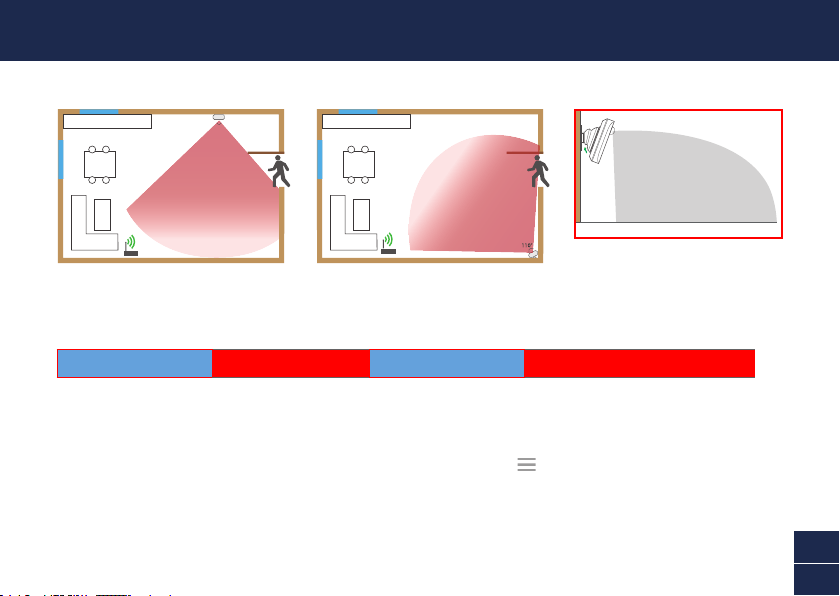
• Dans la mesure du possible, pour de meilleurs résultats, le capteur doit être installé pointant vers le bas à un angle
où les personnes se déplaceront à travers la zone de détection.
• Pour une liaison able, nettoyez la surface souhaitée avec une lingette alcoolisée/nettoyante et laissez sécher. Ne
pas utiliser sur des surfaces rugueuses.
• Appuyez fermement sur le capteur/support réglable sur la surface pendant 60 secondes pour le xer en place.
• Pour tester le capteur, traversez la zone de détection. Essayez de tester la zone de couverture en vous éloignant
davantage du capteur. Ajustez la direction du capteur, si nécessaire. L'application vous enverra une notication
poussée lorsque le capteur détecte un mouvement, par exemple, « Mouvement détecté dans le couloir».
La vignette du capteur mettra également automatiquement à jour son statut dans
l'application, comme indiqué à droite. Pour économiser la batterie, le capteur entre
en mode veille pendant 3 minutes à chaque fois après avoir détecté un mouvement.
Pendant cette période, le capteur ne détectera aucune activité de mouvement.
Remarque: Vous pouvez utiliser la fonction Modes de l'application pour congurer la
réception ou non des notications poussée «Alerte de mouvement» lorsque le capteur
est en mode «À la maison», «Absent» ou «Nuit».
MONTAGE DU CAPTEUR
19
FR
AIDE ET RESSOURCES
Guide du voyant d’état
Le voyant d'état sur le capteur vous indique ce qui se passe avec la connexion de l'appareil. Lorsque le capteur
fonctionne normalement, le voyant d'état est éteint (à moins que la pile ne soit épuisée/non jumelé).
Exemples de montage
Manuel de l'application Swann Security
Accédez à tout moment au manuel de l'application Swann Security (Menu
> Manuel de l'utilisateur) pour en
savoir plus sur la navigation dans les différents écrans et fonctions de l'application.
Niveau de la pile du capteur
Vous pouvez vérifier le niveau de la pile du capteur dans l'application: Onglet Appareils > Capteur > % de la pile
Bleu clignotant lentement Mode de jumelage
110°
Bleu fixe (5 secondes) Mouvement détecté. Connexion au Wi-Fi.
Questions?
Nous sommes là pour vous aider! Visitez notre Centre de soutien au support.swann.com. Vous pouvez également
nous envoyer un courriel à tout moment via: [email protected]
5m
(La portée de détection réelle est soumise
aux conditions environnementales)
20
IT
PANORAMICA
Coperchio
Fornisce l’accesso
al vano batteria e
al codice QR
Lato
muro
Lato
sensore
Rilevatore di
movimento a
infrarossi passivo
Luce di stato
(Opzionale) Accessorio di
montaggio regolabile
21
IT
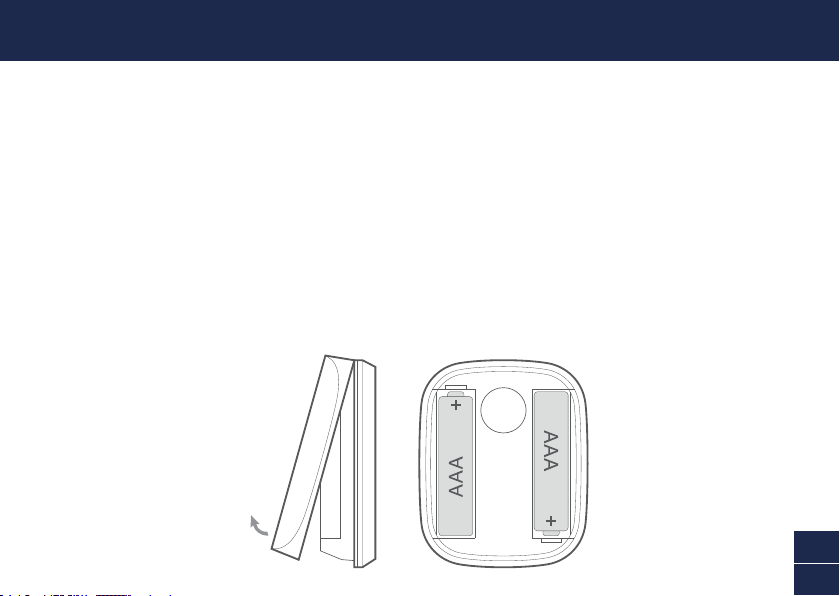
INSTALLAZIONE DELLA BATTERIA
1 Usando la linguetta in basso, sollevare il coperchio del sensore.
2 Inserire le due batterie AAA in dotazione nel vano batterie secondo i segni di polarità (+ e -)
indicati. La modalità di abbinamento si attiva automaticamente sul sensore per 3 minuti quando
le batterie sono inserite. La luce di stato del sensore lampeggerà lentamente in blu durante la
modalità di abbinamento. Dopo aver scaricato l’app Swann Security sul dispositivo mobile (vedi
pagina 22), procedere al processo di abbinamento (vedi pagina 23).
Nota: La modalità di abbinamento del sensore può essere attivata in qualsiasi momento
reinserendo le batterie.
3 Dopo aver abbinato il sensore, far scattare il coperchio al suo posto.
4 Se in futuro dovesse essere necessario sostituire le batterie, non c’è bisogno di riparare il senso-
re. Basta attendere il timeout della modalità di abbinamento (3 minuti), dopo di che il sensore si
riconnetterà automaticamente alla rete Wi-Fi precedentemente congurata.
22
IT
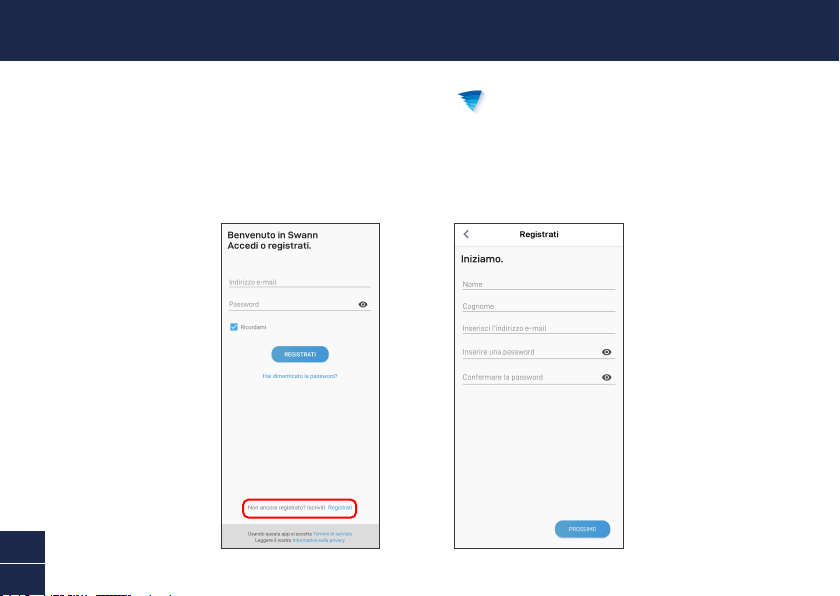
DOWNLOAD DELL’APPLICAZIONE SWANN SECURITY
1 Scaricare l’ultima versione dell’app Swann Security dall’Apple App Store® o Google Play™
Store sul dispositivo iOS o Android. Basta cercare "Swann Security".
2 Aprire l’app e creare l’account Swann Security toccando “Non ancora registrato? Iscriviti” nella
parte inferiore dello schermo. Quindi, attivare l’account Swann Security confermando l’email di
verica inviata all’indirizzo email registrato.
23
IT
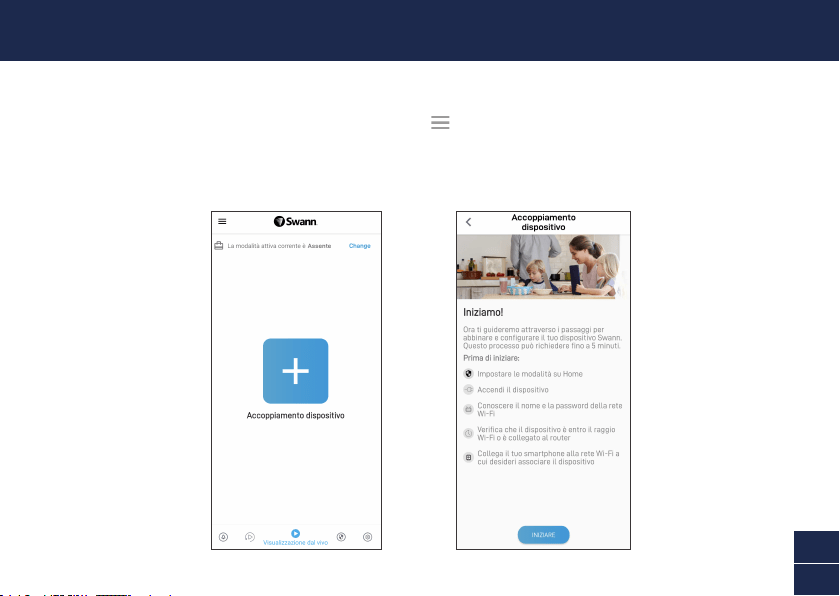
Aprire l’app Swann Security e toccare il tasto Accoppiamento dispositivo sullo schermo. Se è stato
già abbinato un dispositivo, toccare l’icona del menu in alto a sinistra e seleziona “Accoppiamento
dispositivo”. L’app guiderà ora attraverso il processo di abbinamento e imposterà il sensore.
Prima di iniziare, abbianare il sensore e avvicinarsi al router. Si prega di notare che il sensore può
connettersi solo ad una rete Wi-Fi a 2,4GHz.
IMPOSTARE IL SENSORE
24
IT
• Posizionare il sensore vicino casa dove necessario usando il nastro biadesivo incluso. È incluso anche un sup-
porto regolabile per consentire una copertura più ampia e l’installazione in spazi ristretti.
• Assicurarsi che la posizione del sensore abbia una ricezione Wi-Fi forte e afdabile, in modo da poter ricevere
avvisi tempestivi. Di norma, quanto più vicino il sensore al Wi-Fi router, tanto migliore sarà la qualità di connes-
sione. È possibile potenziare la copertura Wi-Fi della rete esistente installando un estensore di portata Wi-Fi.
• Per evitare falsi rilevamenti, evitare di montare vicino a riscaldatori, condizionatori d’aria, lampadine, o di fronte a
una nestra dove la luce del sole può essere riessa. Non installare su superci che possono muoversi o vibrare.
• Ove possibile, per ottenere i migliori risultati, il sensore dovrebbe essere installato puntando verso il basso ad un
angolo in cui le persone si muovono attraverso l’area di rilevamento.
• Per un ssaggio afdabile, pulire la supercie desiderata con una salvietta di alcool/pulitura e lasciare asciugare.
Non utilizzare su superci ruvide.
• Premere saldamente il sensore/supporto regolabile alla supercie per 60 secondi per ssarlo in posizione.
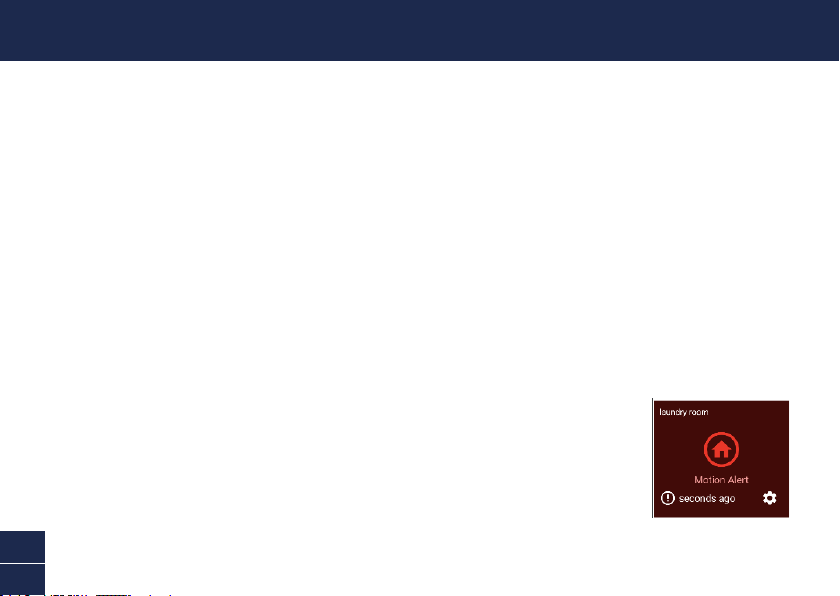
• Per testare il sensore, camminare attraverso l’area di rilevamento. Prova a testare l’area di copertura
camminando più lontano dal sensore. Regolare la direzione del sensore, se necessario. L’app invierà una
notica push quando il sensore rileva un movimento, ad esempio, “Rilevato movimento nel corridoio”.
La scheda del sensore aggiornerà anche automaticamente il suo stato nell’app, come
mostrato sulla destra. Per conservare la carica della batteria, il sensore entrerà in
modalità di sospensione per 3 minuti ogni volta dopo aver rilevato un movimento.
Durante questo periodo, il sensore non rileverà alcuna attività di movimento.
Nota: È possibile usare la funzione Modalità nell’app per congurare se ricevere o meno
le notiche push “Avviso movimento” quando il sensore è in modalità Home, Away o
Night.
MONTARE IL SENSORE
25
IT
AIUTO E RISORSE
Guida alle luci di stato
La luce di stato sul sensore dice cosa sta succedendo con la connessione del dispositivo. Quando il sensore
funziona normalmente, la luce di stato sarà spenta (a meno che non sia senza batteria o non sia guasto).
Esempi di montaggio
Manuale dell’app Swann Security
Accedere al manuale dell’app Swann Security (Menu
> Manuale dell’utente) in qualsiasi momento per saperne di
più sulla navigazione nelle varie schermate e funzioni dell’app.
Livello della batteria del sensore
Controllare il livello della batteria del sensore nell’app: Scheda Dispositivi > Sensore > % Batteria
Blu lampeggiante lento Modalità di accoppiamento
110°
Blu fisso (5 secondi) Rilevato movimento. Connesso con Wi-Fi.
Domande?
Siamo a disposizione per aiutarvi! Visitate il nostro Centro di supporto su support.swann.com. Potete anche inviare
un'e-mail in qualsiasi momento a: [email protected]
5m
(Il campo di rilevamento effettivo è
soggetto alle condizioni ambientali)
26
DE
ÜBERBLICK
Abdeckung
Ermöglicht den
Zugang zum
Batteriefach und
zum QR-Code
WandseiteSensorseite
Passiv-Infrarot-
Bewegungsmelder
Statusanzeige
(Optional)
Verstellbares Montagezubehör
27
DE
INSTALLATION DER BATTERIE
1 Heben Sie die Sensorabdeckung mit Hilfe der Lasche an der Unterseite ab.
2 Legen Sie die zwei mitgelieferten AAA-Batterien entsprechend der dargestellten
Polaritätsmarkierungen (+ und -) in das Batteriefach ein. Der Kopplungsmodus wird automatisch
für 3 Minuten am Sensor aktiviert, wenn die Batterien eingelegt werden. Die Sensorstatus-Anzeige
blinkt während des Kopplungsmodus langsam blau. Wenn Sie die Swann Security-App auf Ihr
Mobilgerät heruntergeladen haben (siehe Seite 28), können Sie mit dem Kopplungsprozess
fortfahren (siehe Seite 29). Hinweis: Der Kopplungsmodus am Sensor kann jederzeit durch
erneutes Einlegen der Batterien aktiviert werden.
3 Nachdem Sie den Sensor gekoppelt haben, lassen Sie die Abdeckung wieder einrasten.
4 Sollten Sie in Zukunft die Batterien austauschen müssen, ist es nicht notwendig, den Sensor neu
zu koppeln. Warten Sie einfach, bis der Kopplungsmodus abgelaufen ist (3 Minuten). Danach ver-
bindet sich der Sensor automatisch wieder mit dem zuvor kongurierten WLAN.
28
DE
HERUNTERLADEN DER SWANN SECURITY-APP
1 Laden Sie die aktuelle Version der Swann Security- App aus dem Apple App Store® oder im
Google Play™ Store auf Ihr iOD oder Android-Gerät herunter. Suchen Sie einfach nach „Swann
Security“.
2 Öffnen Sie die App und erstellen Ihr Swann Security-Konto, indem Sie unten im Bildschirm auf
„Noch nicht registriert? Hier anmelden” Sie sich unten im Bildschirm an. Dann aktivieren Sie
Ihr Swann Security Konto, indem Sie die Bestätigungs-E-Mail bestätigen, die an die registrierte
E-Mail-Adresse gesendet wurde.
29
DE
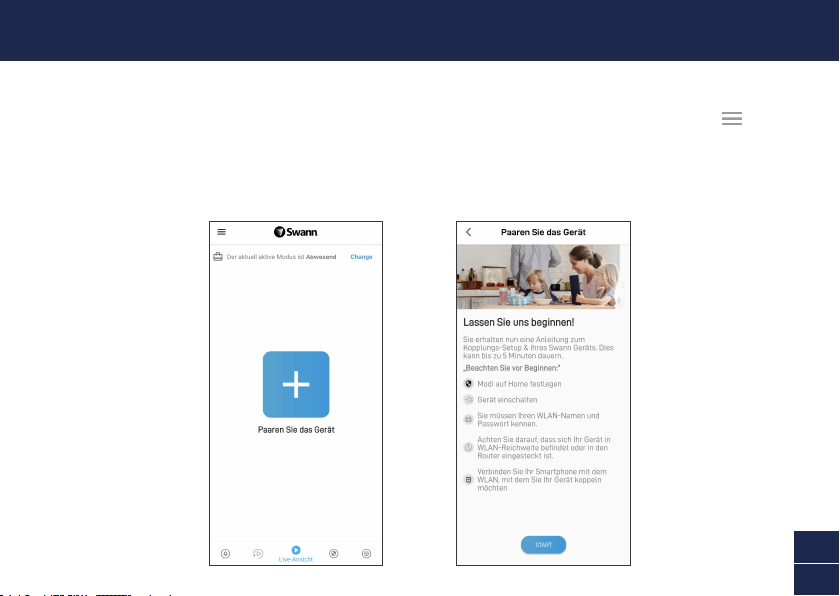
Öffnen Sie die Swann Security-App und tippen Sie im Bildschirm auf die Schaltäche Paaren Sie das
Gerät. Wenn Sie bereits ein Gerät gekoppelt haben, tippen Sie oben links auf das Menüsymbol und
wählen Sie „Paaren Sie das Gerät”. Die App wird Sie nun durch den Kopplungsprozess führen und den
Sensor einrichten. Bevor Sie beginnen, sollten Sie den Sensor bereit haben und sich in der Nähe Ihres
Routers benden. Bitte beachten Sie, dass die Sensor nur mit einem 2,4 GHz WLAN verbunden werden
kann.
SENSOR EINRICHTEN
30
DE
• Platzieren Sie den Sensor mit dem beiliegenden doppelseitigen Klebeband nach Bedarf in Ihrer Wohnung. Außer-
dem ist eine verstellbare Halterung enthalten, die eine größere Reichweite und die Installation in engen Räumen
ermöglicht.
• Stellen Sie außerdem sicher, dass am Standort des Sensors ein starker, zuverlässiger WLAN-Empfang verfügbar
ist, damit Sie rechtzeitig Warnmeldungen erhalten. Allgemein gilt, je näher sich der Sensor am WLAN-Router
bendet, desto besser ist die Qualität der Funkverbindung. Sie können die WLAN-Abdeckung des bestehenden
Netzwerks verstärken, indem Sie einen WLAN-Extender installieren.
• Um eine Falscherkennung zu vermeiden, sollte eine Montage in der Nähe von Heizungen, Klimaanlagen,
Glühbirnen oder gegenüber einem Fenster, an dem Sonnenlicht reektiert werden kann, vermieden werden.
Installieren Sie das Gerät nicht auf Oberächen, die sich bewegen oder vibrieren können.
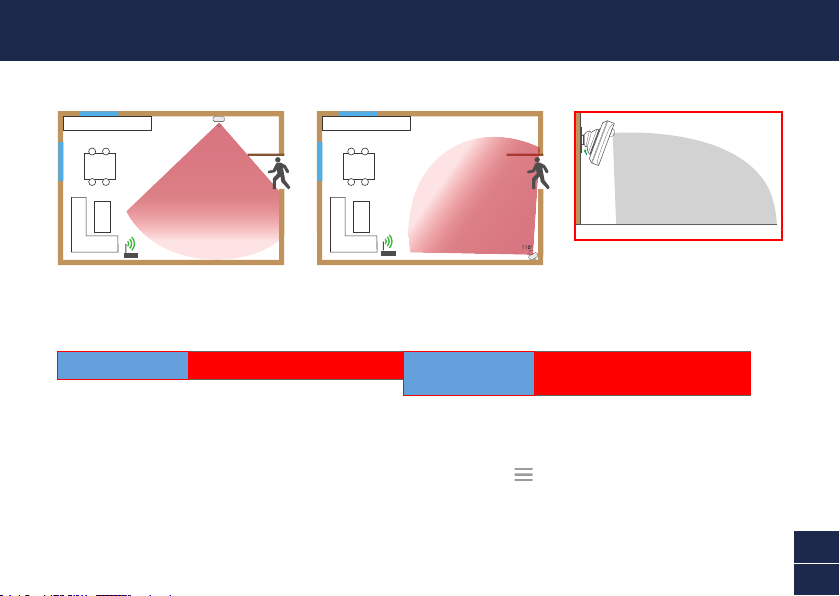
• Wenn möglich, sollte der Sensor für beste Ergebnisse in einem Winkel nach unten gerichtet installiert werden, in
dem sich Personen über den Erfassungsbereich bewegen.
• Für eine zuverlässige Verklebung reinigen Sie die gewünschte Oberäche mit einem Alkohol-/Reinigungstuch
und lassen Sie sie trocknen. Nicht auf rauen Oberächen verwenden.
• Drücken Sie den Sensor/die verstellbare Halterung 60 Sekunden lang fest auf die Oberäche, um sie zu xieren.
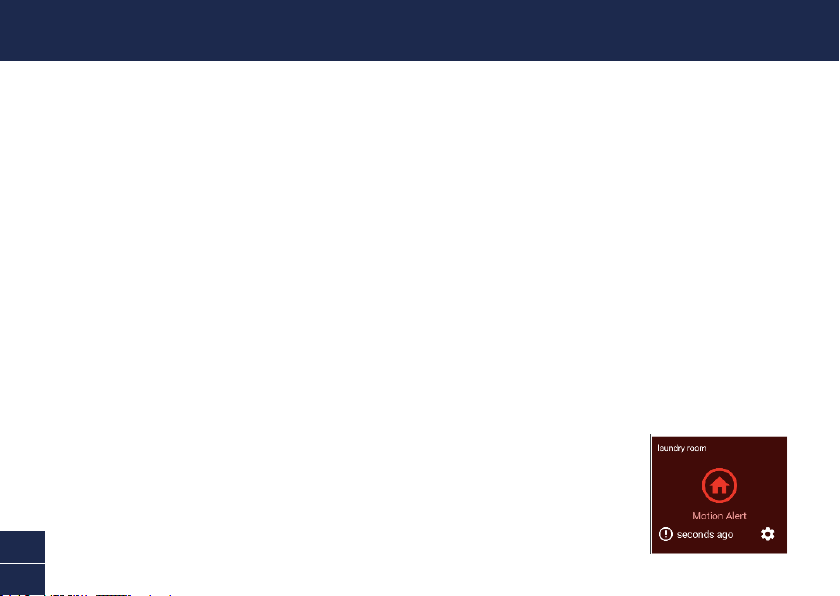
• Um den Sensor zu testen, gehen Sie durch den Erkennungsbereich. Testen Sie den Erkennungsbereich, indem
Sie sich weiter vom Sensor entfernen. Stellen Sie die Richtung des Sensors ein, falls erforderlich. Die App sendet
Ihnen eine Push-Benachrichtigung, wenn der Sensor eine Bewegung erkennt, z. B.
„Bewegung im Hausur erkannt“. Die Sensorkachel wird auch automatisch ihren Status
in der App aktualisieren, wie rechts dargestellt. Um Batteriestrom zu sparen, wechselt der
Sensor jedes Mal für 3 Minuten in den Ruhemodus, nachdem er eine Bewegung erkannt
hat. Während dieser Zeit erkennt der Sensor keine Bewegungsaktivität. Hinweis: Mit der
Funktion „Modi“ in der App können Sie kongurieren, ob Sie Push-Benachrichtigungen
„Bewegungswarnung“ erhalten möchten, wenn sich der Sensor im Modus Home, Away
oder Night bendet.
MONTAGE DES SENSORS
31
DE
HILFE UND RESSOURCEN
Bedeutung der Statusanzeigen
Die Statusanzeige am Sensor zeigt Ihnen den Status der Geräteverbindung an. Wenn der Sensor normal funktioniert,
ist die Statusanzeige aus (es sei denn, die Batterie ist leer bzw der Sensors ist nicht gekoppelt.)
Befestigungsbeispiele
Swann Security-App-Handbuch
Greifen Sie jederzeit auf das Handbuch der Swann Security-App zu (Menü
> Benutzerhandbuch), um mehr über
die Navigation durch die verschiedenen Bildschirme und Funktionen in der App zu erfahren.
Batteriestand des Sensors
Sie können den Batteriestand des Sensors in der App überprüfen: Registerkarte Geräte > Sensor > Batterie %
Blinkt langsam blau Kopplungsmodus
110°
Durchgehend blau
(5 Sekunden)
Bewegung erkannt. WLAN verbunden.
5m
(Der tatsächliche Erkennungsbereich hängt
von den Umgebungsbedingungen ab)
Noch Fragen?
Wir helfen Ihnen gerne. Besuchen Sie unser Support-Center auf support.swann.com. Sie können uns auch jederzeit
per E-Mail erreichen unter: [email protected]

32
EN
© Swann Communications 2021
QSGSWIFIMOTIONVER15L
Model: SWIFI-MOTION
HAVE QUESTIONS?
We’re here to help! Visit our Support Center at support.swann.com
You can also email us at any time via: [email protected]
FCC STATEMENT
This equipment has been tested and found to comply with the limits for Class
B digital device, pursuant to part 15 of the FCC Rules. These limits are designed
to provide reasonable protection against harmful interference in a residential
installation. This equipment generates, uses and can radiate radio frequency
energy and, if not installed and used in accordance with the instructions, may
cause harmful interference to radio communications. However, there is no
guarantee that interference will not occur in a particular installation. If this
equipment does cause harmful interference to radio or television reception, which
can be determined by turning the equipment off and on, the user is encouraged
to try to correct the interference by one or more of the following measures: •
Reorient or relocate the receiving antenna • Increase the separation between the
equipment and the receiver • Connect the equipment into an outlet on a circuit
different from that to which the receiver is connected • Consult the dealer or an
experienced radio/TV technician for help.
This device complies with Part 15 of the FCC Rules. Operation is subject to the
following two conditions: (1) this device may not cause harmful interference, and
(2) this device must accept any interference received, including interference that
may cause undesired operation.
FCC RF Radiation Exposure Statement Caution: To maintain compliance with
the FCC’s RF exposure guidelines, place the product at least 20cm from nearby
persons.
WARNING: Modications not approved by the party responsible for compliance
could void user’s authority to operate the equipment.
CE DECLARATION OF CONFORMITY
Hereby, Swann Communications, declares that this product is in compliance with
the essential requirements and other relevant provisions of Directive 2014/53/
EU. The full test of the EU declaration of conformity is available at the following
internet address: www.swann.com/uk/compliance
RECYCLING
This product bears the selective sorting symbol for Waste electrical and electronic
equipment (WEEE). This means that this product must be handled pursuant to
European directive 2012/19/EU in order to be recycled or dismantled to minimize
its impact on the environment. User has the choice to give his product to a
competent recycling organization or to the retailer when he buys a new electrical
or electronic equipment.
BATTERY SAFETY INFORMATION Replace batteries at the same time. Do not
mix new and old batteries or battery types (for example, alkaline and lithium
batteries). Keep batteries out of reach of children. Dispose of used batteries
promptly in accordance with local regulations. | INFORMACIÓN DE SEGURIDAD
DE LA BATERÍA Sustituya las baterías al mismo tiempo. No mezcle baterías
nuevas y usadas ni tipos de baterías (por ejemplo, baterías alcalinas y de
litio). Mantenga las baterías fuera del alcance de los niños. Deseche las
baterías usadas correctamente de acuerdo con las reglamentaciones locales. |
INFORMATIONS SUR LA SÉCURITÉ DE LA PILE Remplacez les piles en même
temps. Ne mélangez pas des piles ou types de piles neuves et anciennes (par
exemple, des piles alcalines et au lithium). Gardez les piles hors de portée des
enfants. Débarrassez-vous rapidement des piles usagées conformément aux
réglementations locales. | INFORMAZIONI DI SICUREZZA DELLA BATTERIA
Sostituire contemporaneamente le batterie. Non usare insieme batterie nuove e
vecchie o batteri di diverso tipo (ad esempio, batterie alcaline e al litio). Tenere le
batterie fuori dalla portata dei bambini. Smaltire correttamente le batterie usate
nel rispetto delle norme locali. | SICHERHEITSHINWEISE ZU BATTERIEN
Ersetzen Sie die Batterien gleichzeitig. Mischen Sie niemals neue und alte
Batterien oder Batterietypen (z.B. Alkali- und Lithiumbatterien). Batterien von
Kindern fernhalten. Entsorgen Sie verbrauchte Batterien sofort gemäß den
örtlichen Bestimmungen.