ht_://www°l
0
Prior to installation, this air_onditioningi
unit must _ submitt_ for approva| by
the utffffy service _ich provides
(EN 6i000_2, EN 6i0_3 Norm)_
FOR YOUR RECORDS
Wr_e the m,_el and _,r_inu_rs here:
Mo_| #
Serial #
You can find them oin a _abel on the side of each unit,
_aler"s Name,
_te Purchased
= Stap,le your r_eipt to this, pa_ inthe event you need
it t:oprove date ef purcha_ or f,or w_anty issues
READ THIS MANUAL
ins||de you will find many helpful! hints oin how to u_
and maintain your air co_iti,o,_r pro_dy Just a li|t_e
preventive care on your pad can _ve you a great deal
ot time a_ money over the #re o! your air _,nditionero
You'll find many answers to ,common problems in the
chart of troublleshooting tips_ ff you review our char of
Troubleshooting Tips first, you may _t need to cal_
for _¢vkae at all
PRECAUTION
* Contact the a_horized service tech#lc|an 1or
repair or maintenance of this unit.
, Contact the |n_a||er for installation of _|s unit..
-The air conditioner is not |ntend.ed for use by
you_ children or inw|ids without supe_ision..
-Young ch||,d_en shou|d be su_rvi_d to ensu_e
that they do not p|sy with the, air' con.di_oner,
,When the power cord iis to be r'ep|aced,
rep|acement work shall be performed by
authorized p.ersonnel only using only genuine
repla,cement _rts.
-|nsta#ation work must be |n
eccordance with the Nationa| E|ectric Code by
qu_|#ied an_ a_th.or_z_ _rson_e_ o_|y,
Room Air Conditioner
Safety Precautions
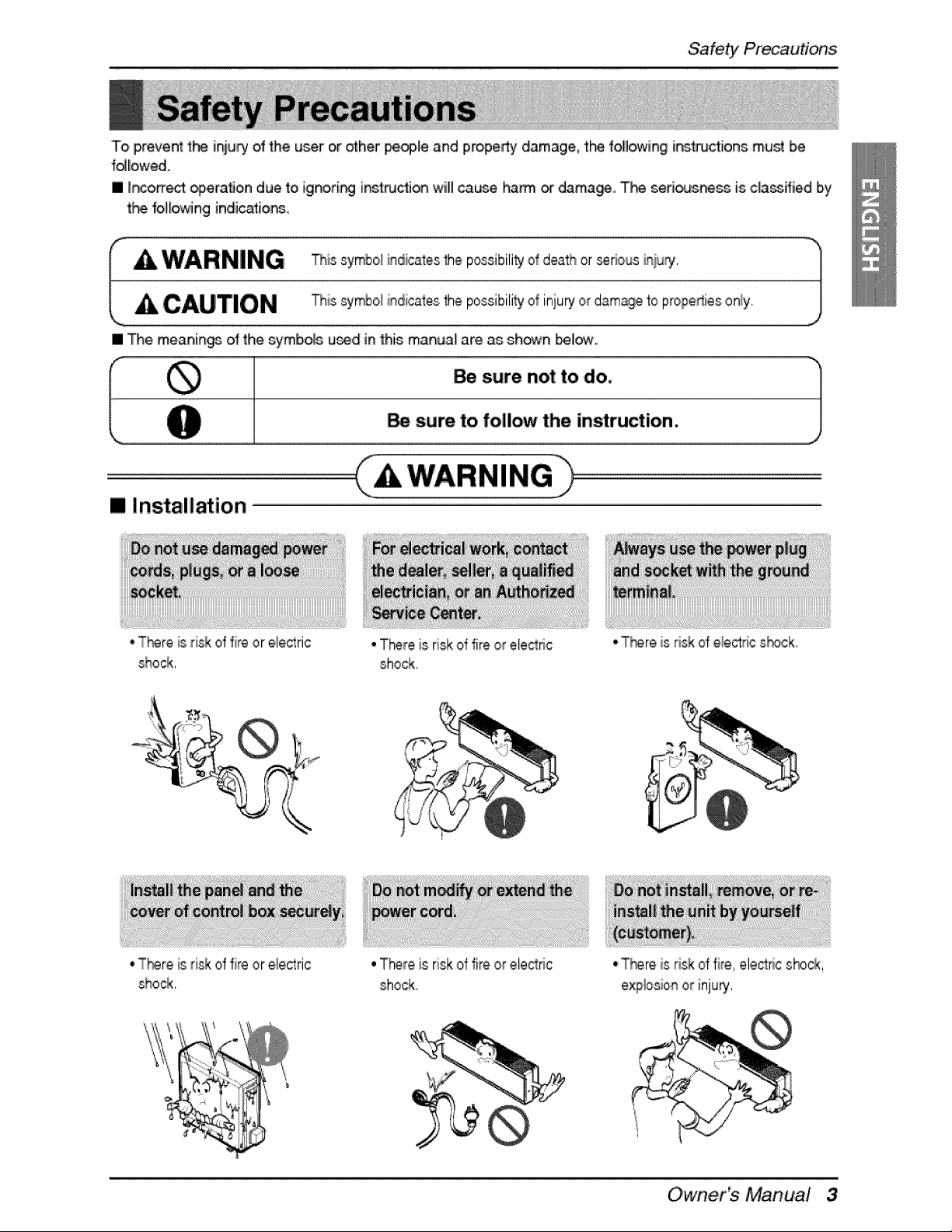
To prevent the iniur/of the u_r or _h,er people and properbj damagm the following i_tructions must be
folliowed,
[] Ir_orrect _erafion due to Jgnori_ insiructJo_ willl cause ham or damage, T_ seri_sr_ss is cla_ffiied Iby
t_'_ _ol_owingindications,
I A WARNING his symbo_indicatesthe possibiti_ o_death or _rious ini_J_, )
CAUTION this symboiindicates the possibili_ ot inju_ or damageto prope_ies oniy_ j
,J
[] The meanin_ of the symbolls used in this manuall are as shown I_11_.
[] Installation
WARNING
.T_reisrisk offire orele_ric
shock,
"There is riskof fire or eiectnc
shock_
° There is risk of fire or ele_ric
shock
• T_re is risk of fire elect#c shock,
explosionor inju_
O wner_ Manual 3
Safety Rre_utJons
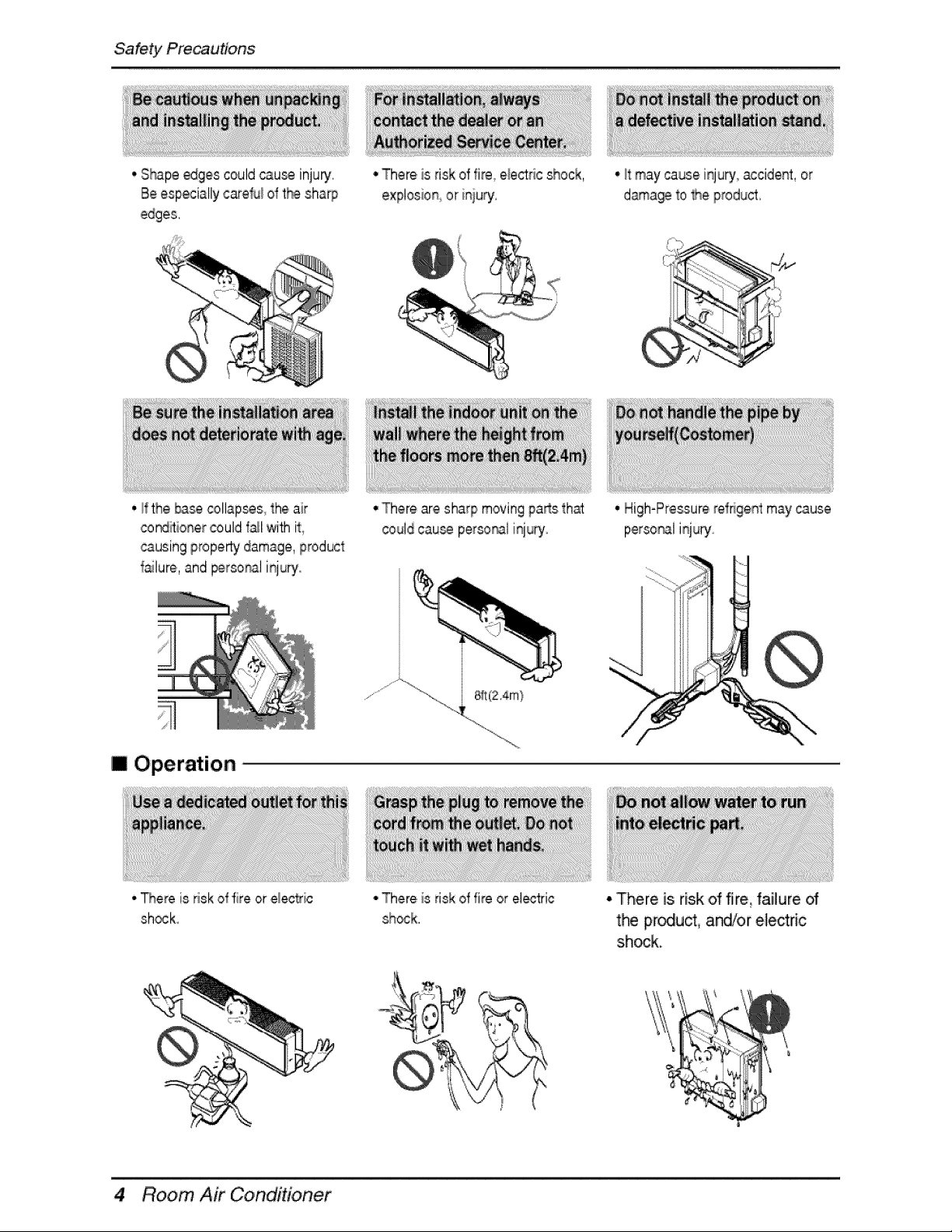
o.Shapeedges couldcau_ inju_,
Be especiallycare_ of the sharp
• There,is risk d fire e_ectricshock,
explosion,,or iniury,
• _tmay cause iqupj accident, or
d_a_ _oMe product,
• _fthe b_,_ _llap_s_ the air
cond_ionercould fail with it_
causingproperty damage, product
failure, and perso_l injury.
• There are sharp movingparts th_
could cau_ perso_l injury
m Operation
• There is risk of fire or elecSic
shocL
• There,is risk of fire or electric
sh_k,
• High-Pressurerefrigent may cause
persor_l injury
• There is risk of fi_e, failure of
the pr_uct, ands/or electric
shock.
4 Room Air Condidoner
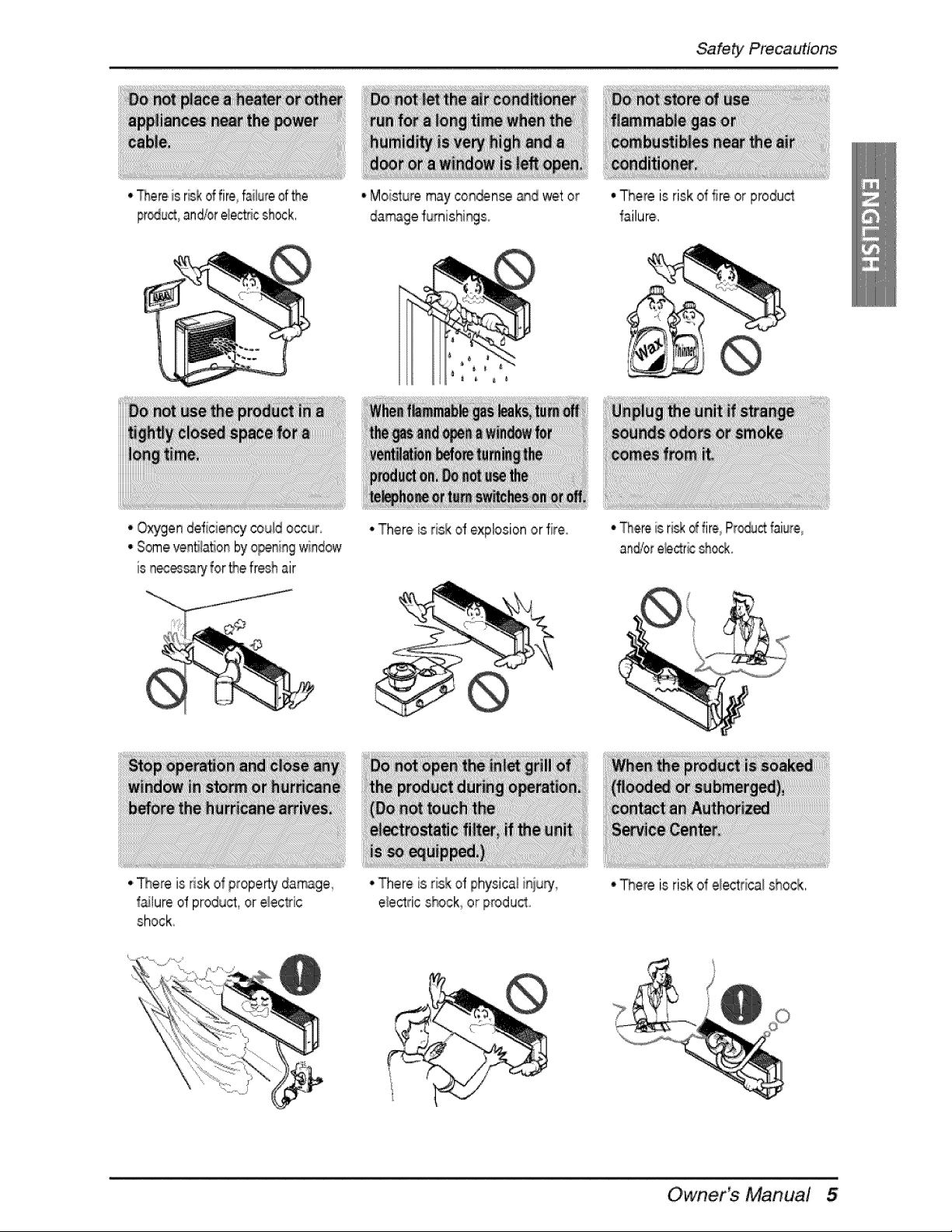
• Thereis r_k dfire, fai!f_reof_e
pr_ and/ore_ec_cchock,
, Moisturemay con_nse and wet or
da_ge fumishi_so
Safety Precac#tons
•Oxygen deficiency-couid occur
•Someventila_onby o_ning window
is nec_cary for thefresh air
•There Wsrisk d explosionor fire
,,There is risk of propertyda_ge
f_!ure of product, or e_ec_sic
shock:
•There is risk of physical i_iury,
e_ectrics_ck or product
• There is risk of fire or product
1allure,
• Tl_,emis ri@d fim_Pr_u_ faiure
and/ore_r_ sho@
° There is risk of e!ectricaishock,
O'wner_ Manual
Safety Rre_utJons
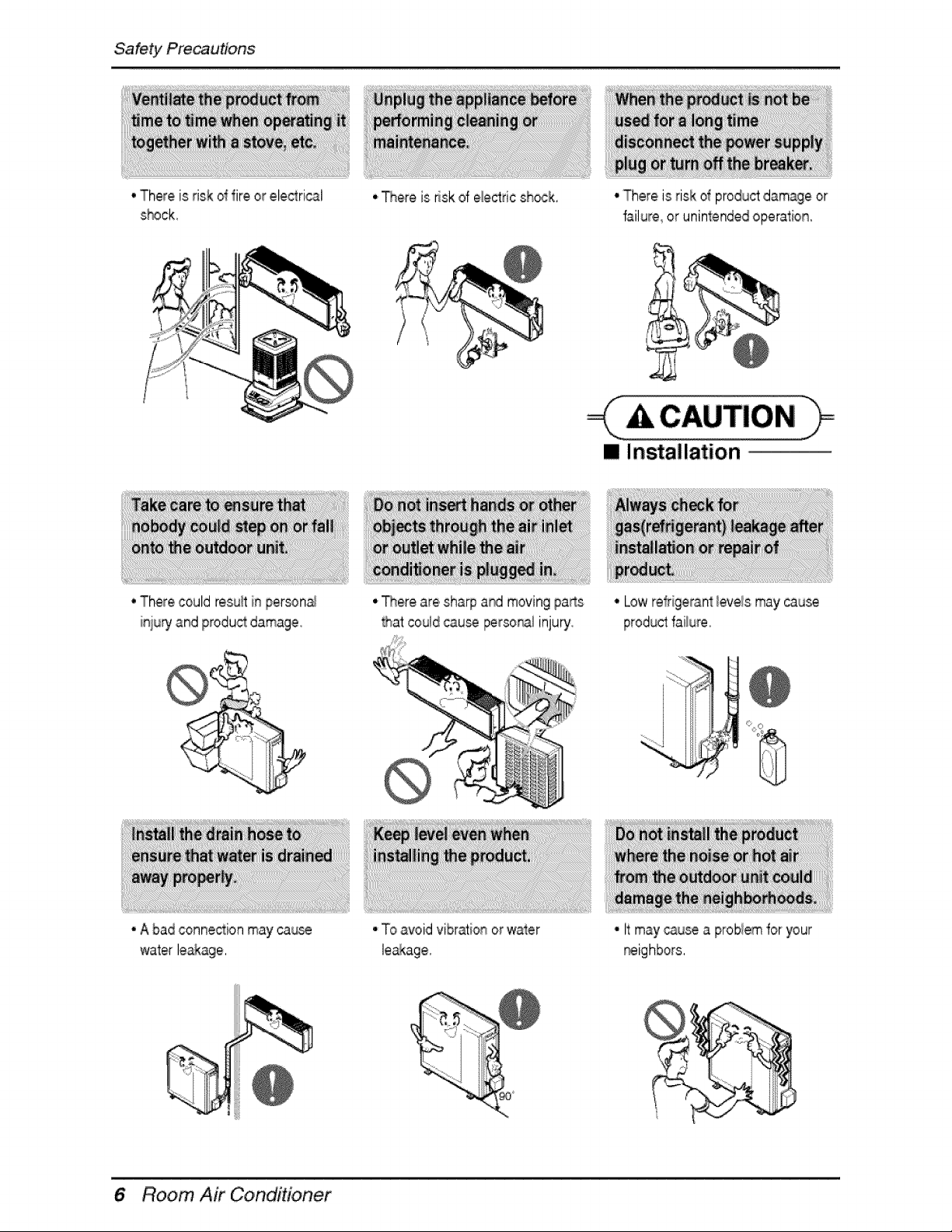
• There is risk d fire or ele_rical
s_#ck,
• There could resu_in personal
inju_ and productdamage
• _ere is risk d ele_ric sh_k,
• There are shia@ ar_ moving pa_s
Rat couldcau_ persoN! inju_
• There is risk d productdamage or
failure or uninlendedoperation,
A CAUTION
[] Insta!lation
• A badconnection may cau_
water le&kage,
• To avoid vibration orwater
• Low refrigerant_evelsmay cause
• It maycause a problemfor your
_ighbors,
Room Air Condidoner
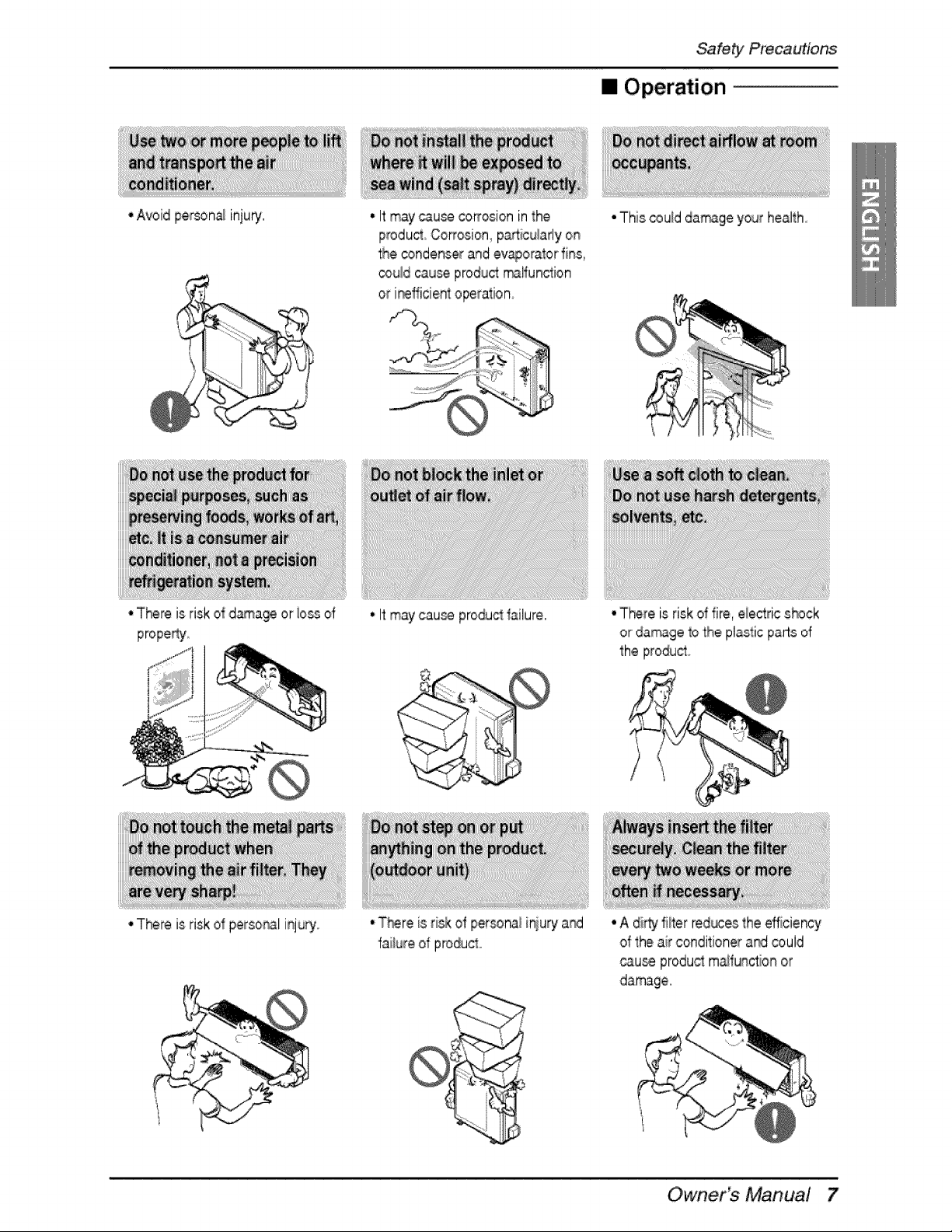
•Avoid perr_na/inju_.
• There is risk of d_a@ or iossd
• There is risk of personal injury
Safety Precac#tons
• Operation
• Itmay cau_ co_osion in the
iProducSCorrosion pa_icularlyon
the condenserand ev_orator fins
co_!dcause productrr_lfunction
or i_fficient operalion
• Itmay cau_ produd failure.
• T#ere is risk d per_nal injury a_
failure of produc_o
• This _uld da_ge your hea!th_
• There is risk of fire electric s_ck
or da_ge 1othe plastic parts of
the produ_o
• A di_ filter redoes the efficiency
of the air conditioner a_ could
_uise produ_ m_tunction or
damage.
O wner_ Manual
Safety Rre_uttons
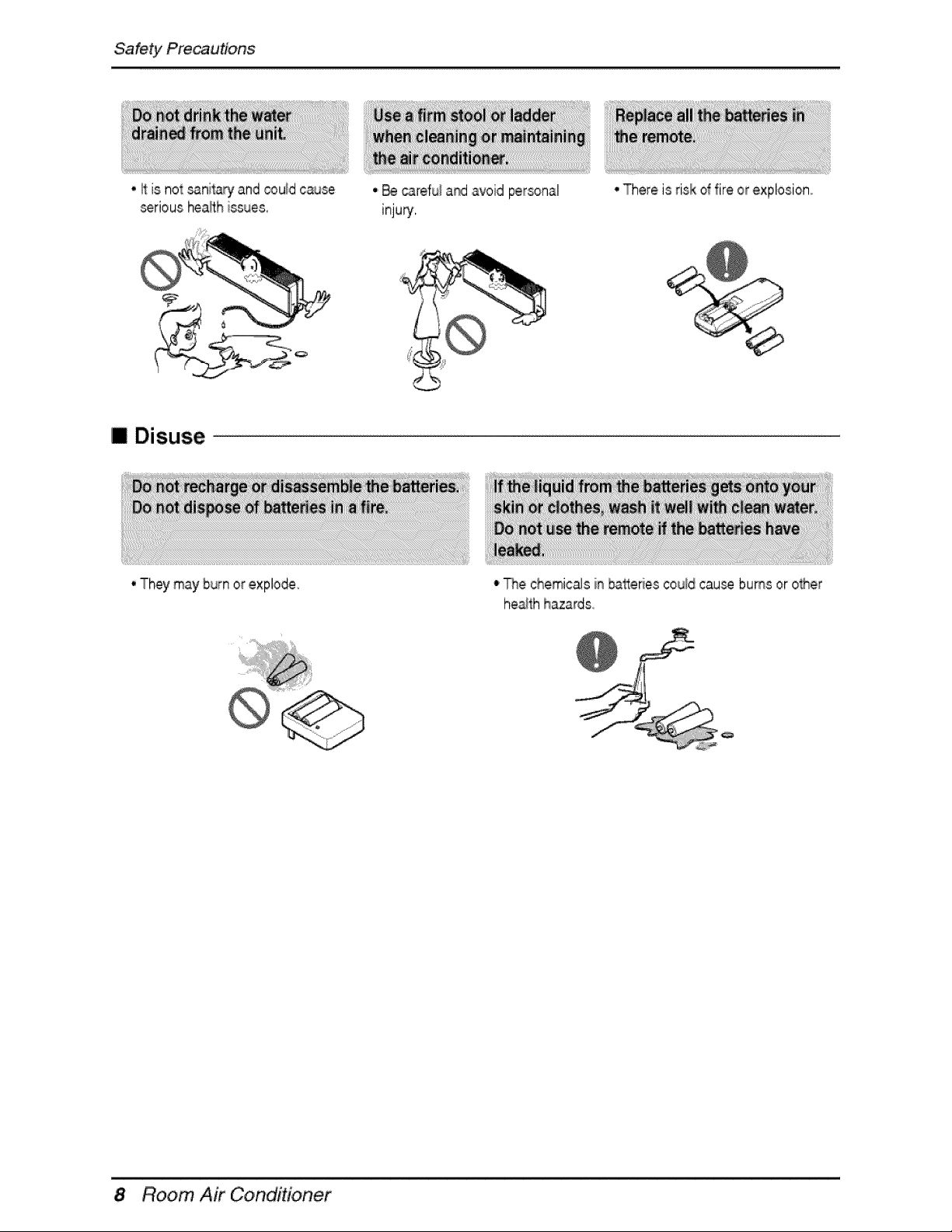
• It is not _nits_y and _u_d cause
seriousheath issues,
[] Disuse
• They may burn orexplode
• _ ,c_3refu_a_ avoid personal
inju_,
• There is rislkol fire or explosion°
• _r_echemicals in batteriescould cause bums or other
heath hazards,
Room Air Conditioner
Prior to operation
!, Con_ct an installati_ s.pecJa_istfor instaJlation.
2, Plug in the power p,_ugpropedy_
3. Uce a d_icated circuirL
4..Do not use an extensi_ _rd.
5..Do not _art/stop oper_ion by p.luggin_unplugging the power cord.
6. If the cord/pfug is damaged, ony rep[a_ it with an autf'#_zed #eplacement part
1 8ei_ exposed to direct airflow for a long time may be h_ard_s to your hea_h_ Do not exp_e
occupan]s._p,ets, or pla_s to ,direct aid!ow for aiong time,
2..Ventilate the r_,m when the air conditi_er is us_ w_:lhother _ating devices. Otherwise the oxygen
supplly may be inadequate.
3..Do not use this air cond_fJonerfor non-specified sp._ial p,ur_.,e (e.g. precervir_ precision devices, 'food,
p,ets_ plants, or ad objects). Such use may damage your prope_ies
1. Do not touch the metal parts d the unit when removing the lifter. _njury can occur.
2. Do not use water to,clean inside the air conditioner. Expos[_re to water can destroy t}-_ insulation,
leading to electdc sh_k..
3,,When cleaning the unit, _rst make sure that _,e power and breaker .are _rned oft The fan rotates at a
ve_ high speed dunng operation, _ere is a p_.ibility of inju_ if the unit power is. accidently tum_ on
while t_ inteffor o_ the unff is being cleaned.
F_ repair and maiintenance, oonta,ct your authorized service dealer.
O'wner Manual
Introduction
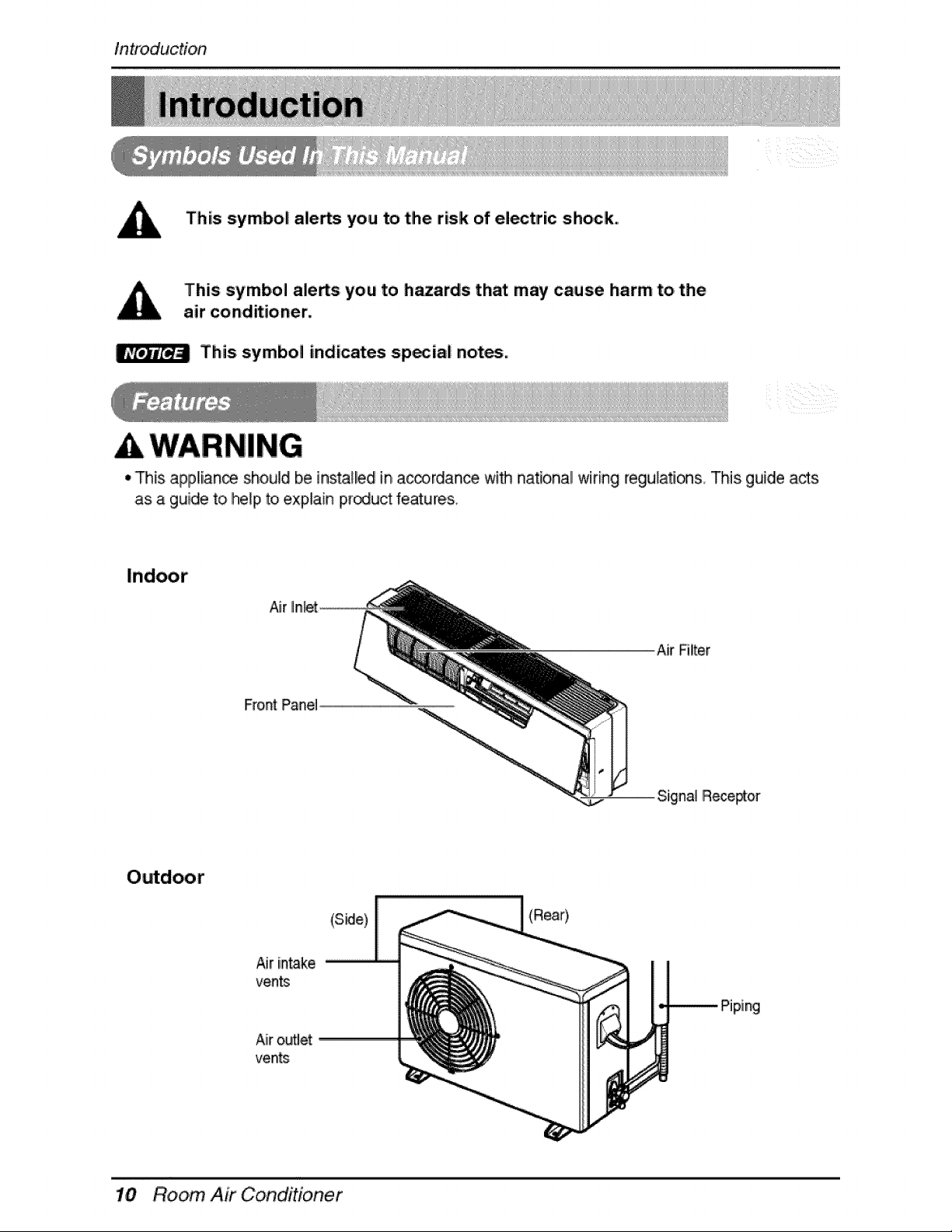
This symbol ale,s you to the risk of electric shock.
This symbol ale,s you to hazards that may cause harm to. the
air conditioner,
This symbol indicates sp._iai notes°
WARNING
• This app!iance sh,ould be installed in a_rdance wi_ nat[onall wiring regulafl_s This guide acts
as a guide to he_pto explain product features,
mr
Air RUter
Front Pane]
Air iin_ke
vents
AiirouUet
vents
(S_e)
(Rear),
piing
Room, Air Conditioner
WARNING
Electflcai/ Safety
,, This appliance must be properly grounded.
To minimize the risk of ele_dc sh_k_ you must alway plug into a grounded oule_
• Do not cut or remove the grounding prong from the power plug.
• Attaching the adapter ground terminal to the wal! receptacle cover screw does
not ground the appliance unless the _ver screw is metal and not insulated, and
the wall receptacle is grounded through the house wiring.
• If you have any doubt whether the air conditioner is prope#y grounded, have the
wa!l receptacle and circuit check_ by a qualified electrician.
Owner_ Manua! 11
Operating Instruction
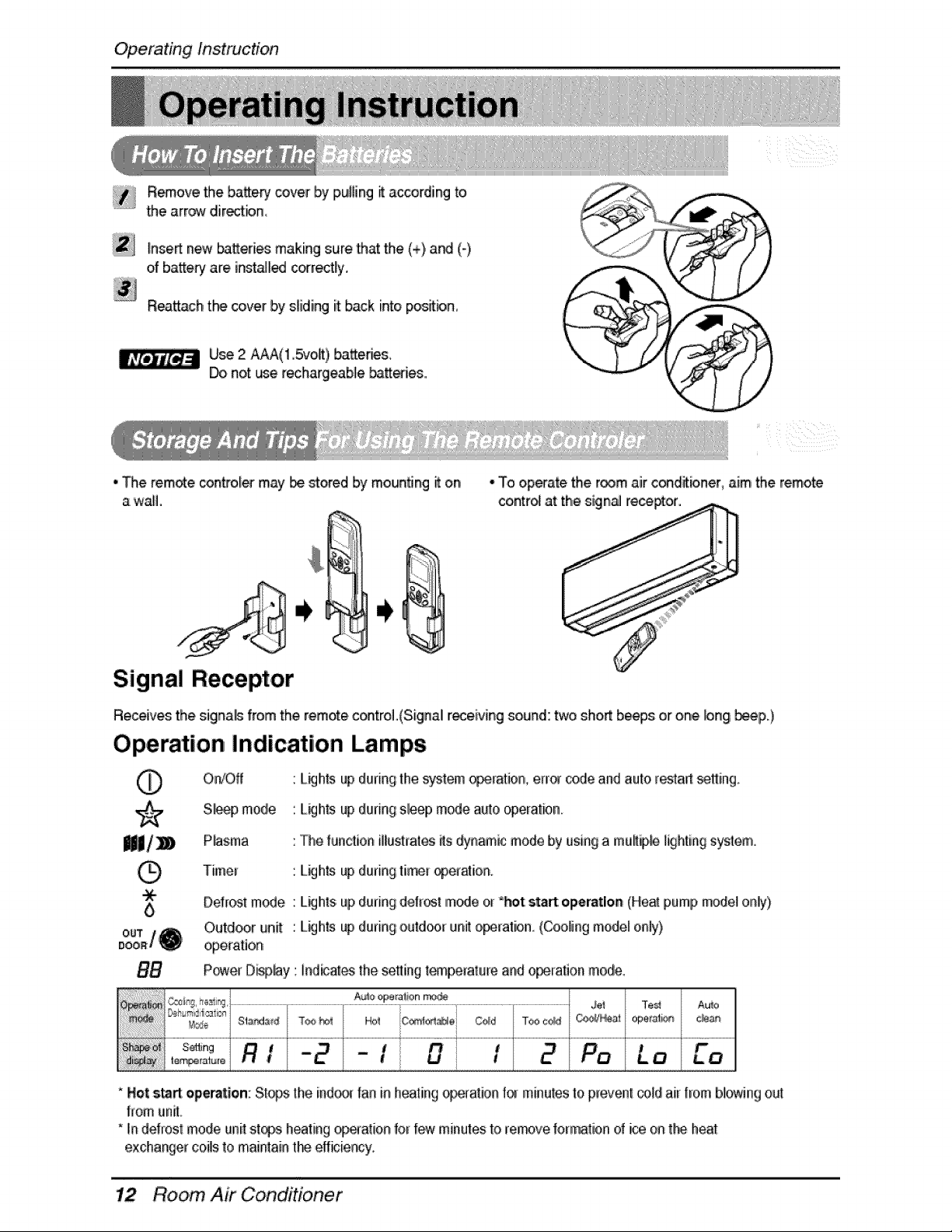
ii_ R_ov,e the _tter_' cover IbyIpuHing_ according to
........the arr,_ directbni,
[nse_ new _tteries making sure 'that the (+),a_ (-),
of battery"are inst_l_ correctly.
Reattachthe cover by sliding it back into pos_bn,
Use 2 AAA(I 5vol_),b,atter_s,
Do not use rechargeab_ebattles,.
• The tempe _ntto,[_ may i_ _ored by mounting _ on
a wail.
zzzzz
• To operate the room air c_ditbner, aim the remote
contrd at the sign_ re_or.
Signal Receptor
Receives the signals from the remote c_trol.(Signal receiving sound: two sho,_b_ps or one bng b_p.)
Operation Indication Lamps
O'rJOff L_h_ up du#ngthe system o_[ation,, e[r_ code and auto _esta__ing.
S_, mode : L_hts up during sleep m_e auto operatmn_
P_sma : The function illustrates its dynamic mode by usinga mult_ lighting system,
Timer : L_hts up duringtier operation
Defrostmode : del[ost mode or _t: start: model
Lkjhts
up
during operation
pump
only)
Outdoor unit : L_hts upduring outdcm_unit o_ration. (Cooling model only)
operation
P_er D_lay : fn,d_atesthe setting t_peratu_e and o_ration mode.
* Not st_ operation:Sto_ the indo,_ fan inheating o_ation for minutesto prevent®,_dair l[om b!owingout
from unit
':in deirost mode unit st@s,heatingo_[ation for few minutesto re_ve formation of ice on t_ heat
exchange[ coils to m,air_taint_ effbie_y.
Room, Air Conditioner
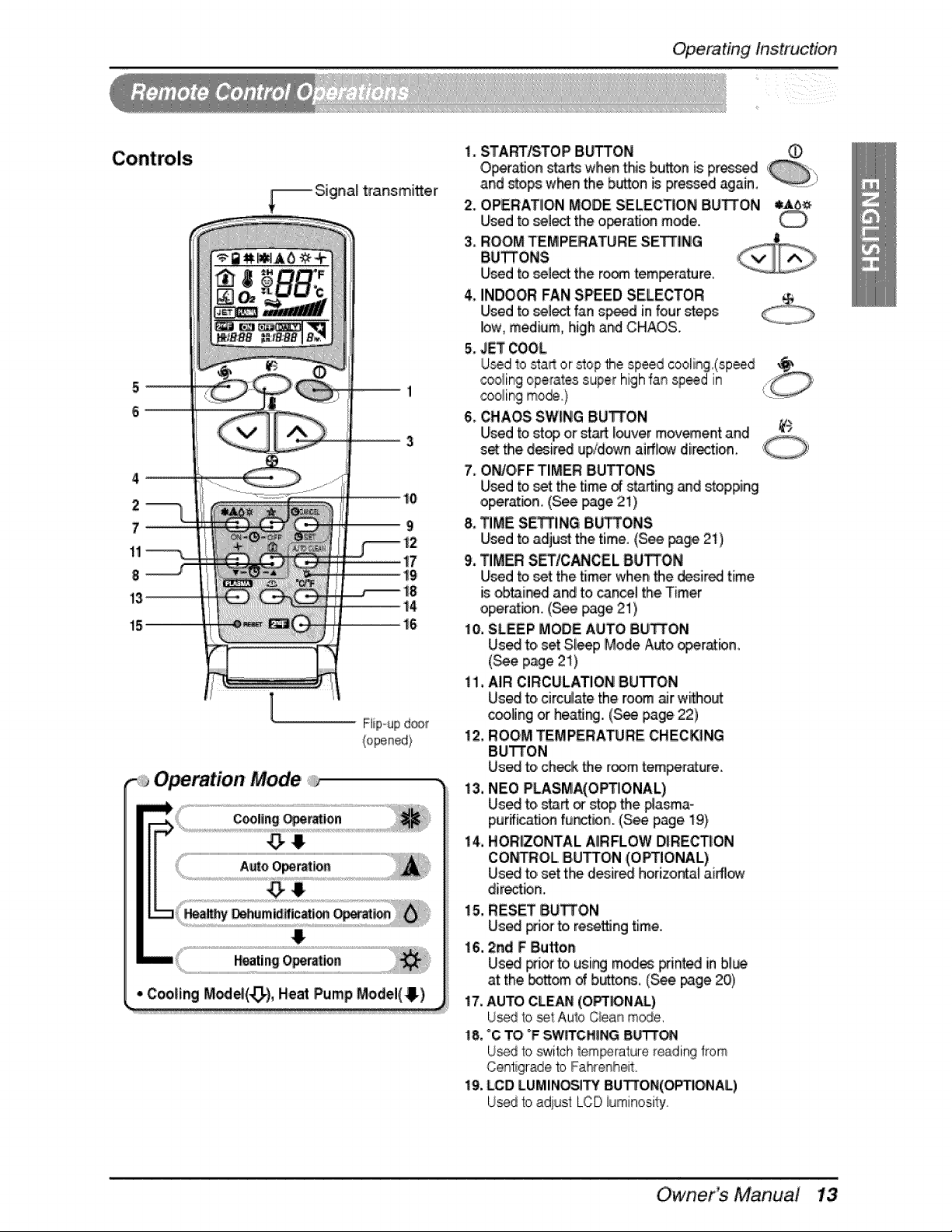
Operating Instruction
ii ii i i iiiiii
-_ Signal transmi_er
2
7
1!
8
15
l
Fiipoupd_
(opened/
Operation Mode
1, STARTISTOPiBOSTON O
Operation sta_ when this button is pressed ,
and stops_when the button _ pre_ed again, .............
2. OPERATION MODE SELECTION BU_ON
Used to select the o_ratJon mode.
3, ROOM TEMPERATURE SETTLING
BU_ONS
Used to select the ro_ tem_rature_
4, INDOOR FAN SPEED SELECTOR
Used to select fan s_d in four steps
low, medium, high and CHAOS..
5, JET COOL
U_d to start or _op the speed cooli_g.(:speed ___
,_oling operatessuper highfan sp_d in 0
cooling too@..} 'L:_......
6. CHAOS SW_NGBU_ON
Used to sty, or st_ l_ver mov_ent and _'_
set the d_ired up/down airflow direction.
7, O_O'FF TIMER BU_ONS,
Used to set the,time _ starting and stopping
operation, (S_ page 21),
8. TIME SE_ING BU_ONS
Used to adju_ the time, (S_ page 2:1)
9, TIMER S_ICANCEL BU_O'N
Used to set the timer when the desired time
is obtained a_ to cancel the,Timer
operation, (S_ page 21),
10.SLEEP MODE AUTO BU_ON
Used to,set Sleep Mode Auto _eratbn_
(See page 21)
il. AIR CIRCULATION BU'I-FO,N
Used to circulate the room _r witho_
c_ling or heatJr_.,(_ page 22)
12, ROOM TEMPERATURE. CHECKING
BU_ON
Used to ch_k the roomtem_rature.
13.NEO PLASMA(OPTIONAL)
Used to,startorstopthe#asma_
pur_icaflon function. (S_ page 19)
i4. HORIZONTAL AIRFLOW DIREC_ON
i
CONTROL.IBUTTON (O_IONAL)
Used to,set the desired hor[zonta_ai_ow
directbin,
15. RESET BU_ON
Used Fior to re_Jng time.
16, 2rid F Button
Us_ pdor to using m_es _nted in bl_
at the bottom d bi_tons, (_e, _ge 20)
17,AUTO CLE_ (OPT_NA/.)
Usedto st Aulo Ciear_mode.
18.°C TO °FSW_CH_NG B_
U_d lo switch l_emperature_eadingf_om
Centigradeto Fahrenheit
19.bCD LUMINOSITYBUlWON(OPTIO,NAL)
IJ_d to ediust LCD_urninoeily
Owner Manual
Operating Instruction
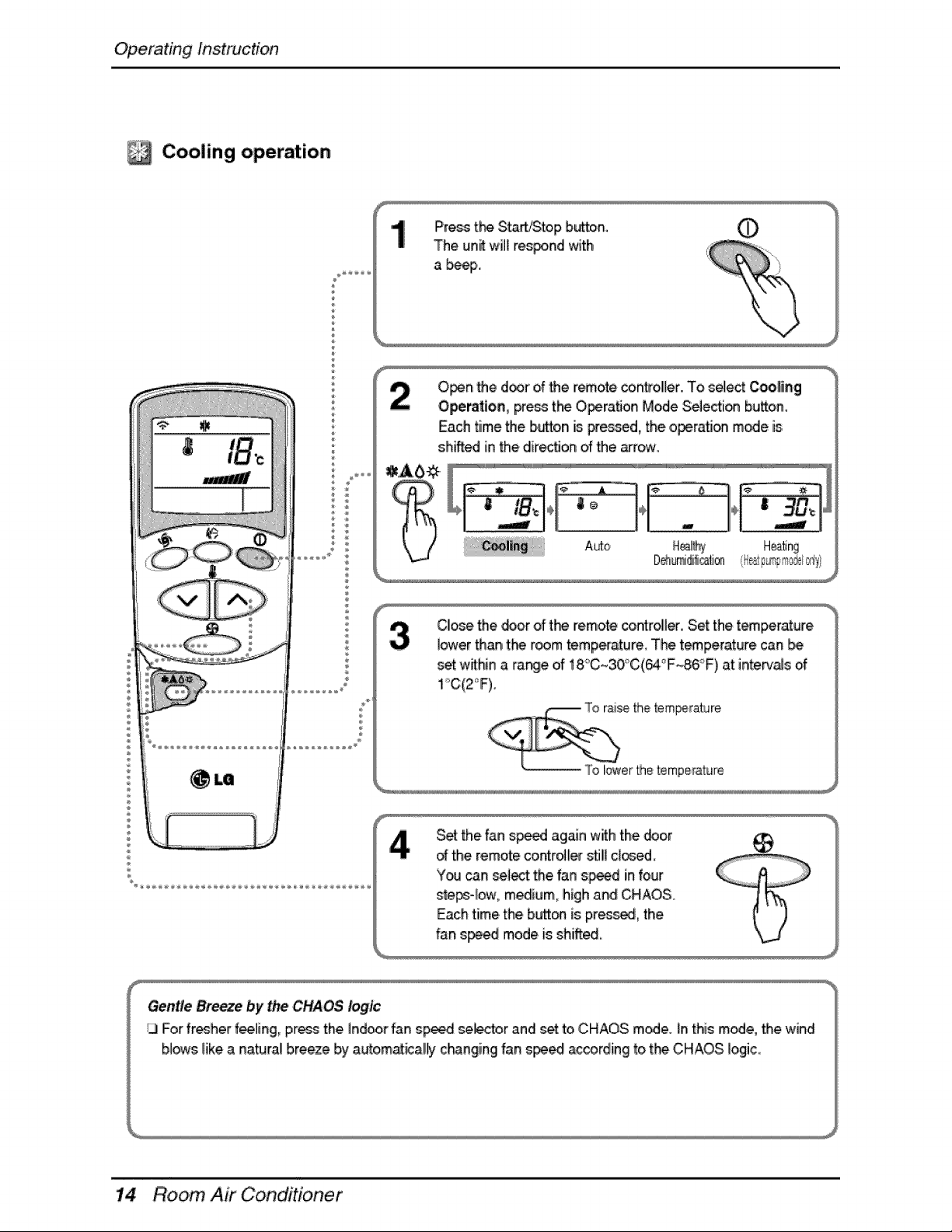
Cooling operation
®
Press th_ Start/Stop bu_on. O
The unit will r_nd with
a be_..
O_n _e d_r of _e remote co_o_ler. To s_ect Coo|ing
Operation, press the O_raSon Mode S_ecti_ button,
Each time the b_on is pressed, the o_ratJon mode is
shined in the dir_on of the arrow..
A_o H÷_ng
CIIo_ethe _or of t#_ remote controller. Set the temperature
io_t_,er_an the room temperature. The t_perature can
_t wffhin a range of 18°C~30"_C(64°F~86'_>F)at:inte.rva_sof
,_ S_ the fan s_ed againw_h the _or t_ I
_ the remote cointro_iersti!_c_d,
Yoa can se_t the fan s_d in four
st,e_qow0 m_ium, high and CHAOS. J _, I
Each time.the butt® is preas_, the {' ) I
fan s_ mode is shiff_ \v-J'
Gentle Breeze by t_ CHAOS logic
13Forfr_h,er feeling, press the indoor fan speed _l_or .and_ toiCHAOS mode. Jnthis mode, _e wind
blows like a natural breeze by automat_ally c_nging fan spe_ according to the CHAOS logic
Room, Air Conditioner
Operating Instruction
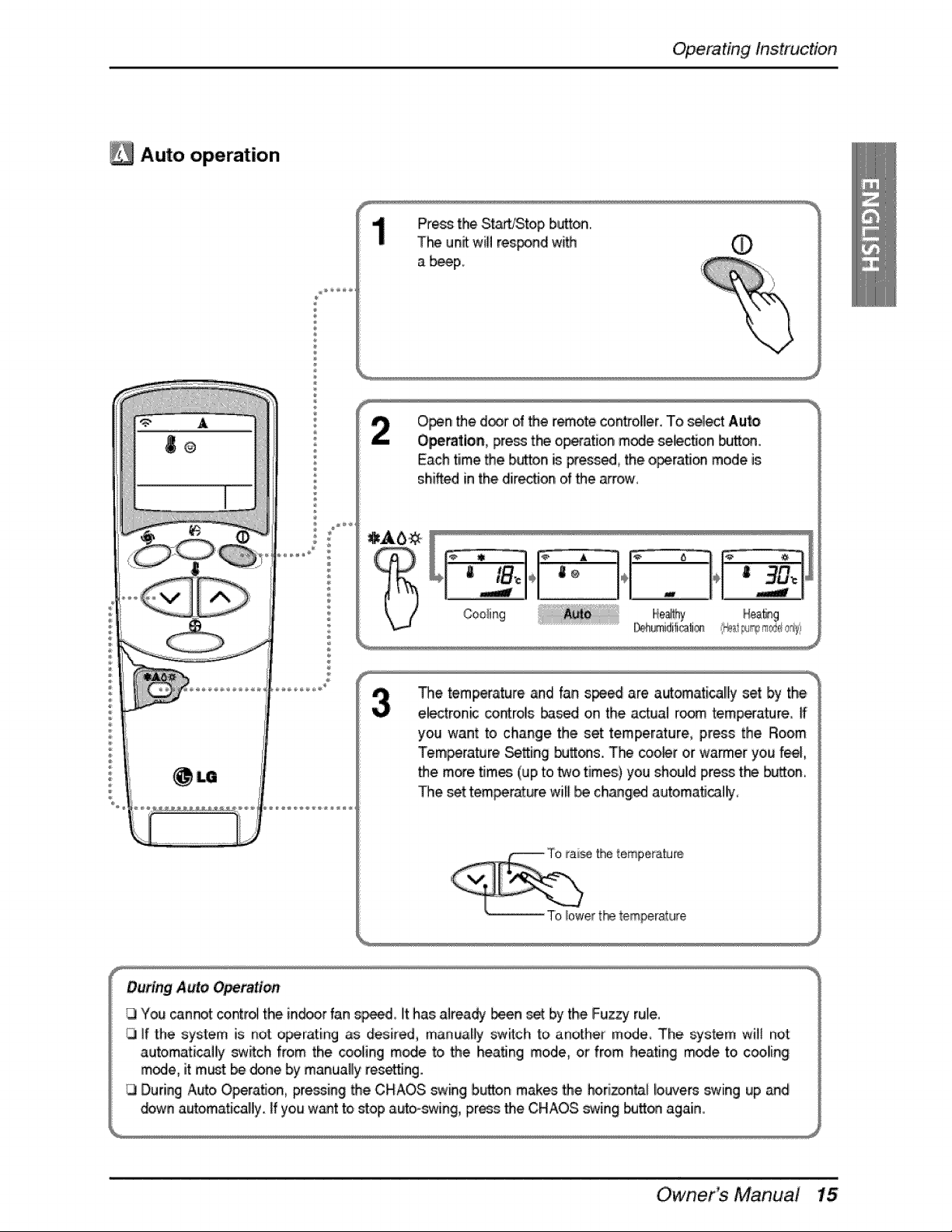
Auto operation
®
Press the St_S,top button.,
T_ UnRWillrespond w_ ,¢
a b_p,
O_n _e d_r of _e r_ote controller. To select Auto
Operation, pre_ the op_ation m_e selection bu_,
Each time the b_on is _e_d, the o_ration mode is
shined in the dir_on of _e _row,
Cooling Hea_g
_e tempeatu[e _d fan s_ are automa,tical!ly set _ the
e_ctron_ controls ba_d on the actual r_m temperature
you want to change, the set temperature, press the Room
Tem_rature Se_ing buttes. T_*_coo,_r or warmer you feel,
• e more times (up to two times) you should press the button,
The _t tem_rature will _ ch_ged automatically,
Our_ng Auto Operatie#
You can.t contr_ the in.or fan speed, [ithas already _n se_by the Fuzzy rule,
if the system is r_ot ,o_rating as desired, manually switch to another mode° The system wi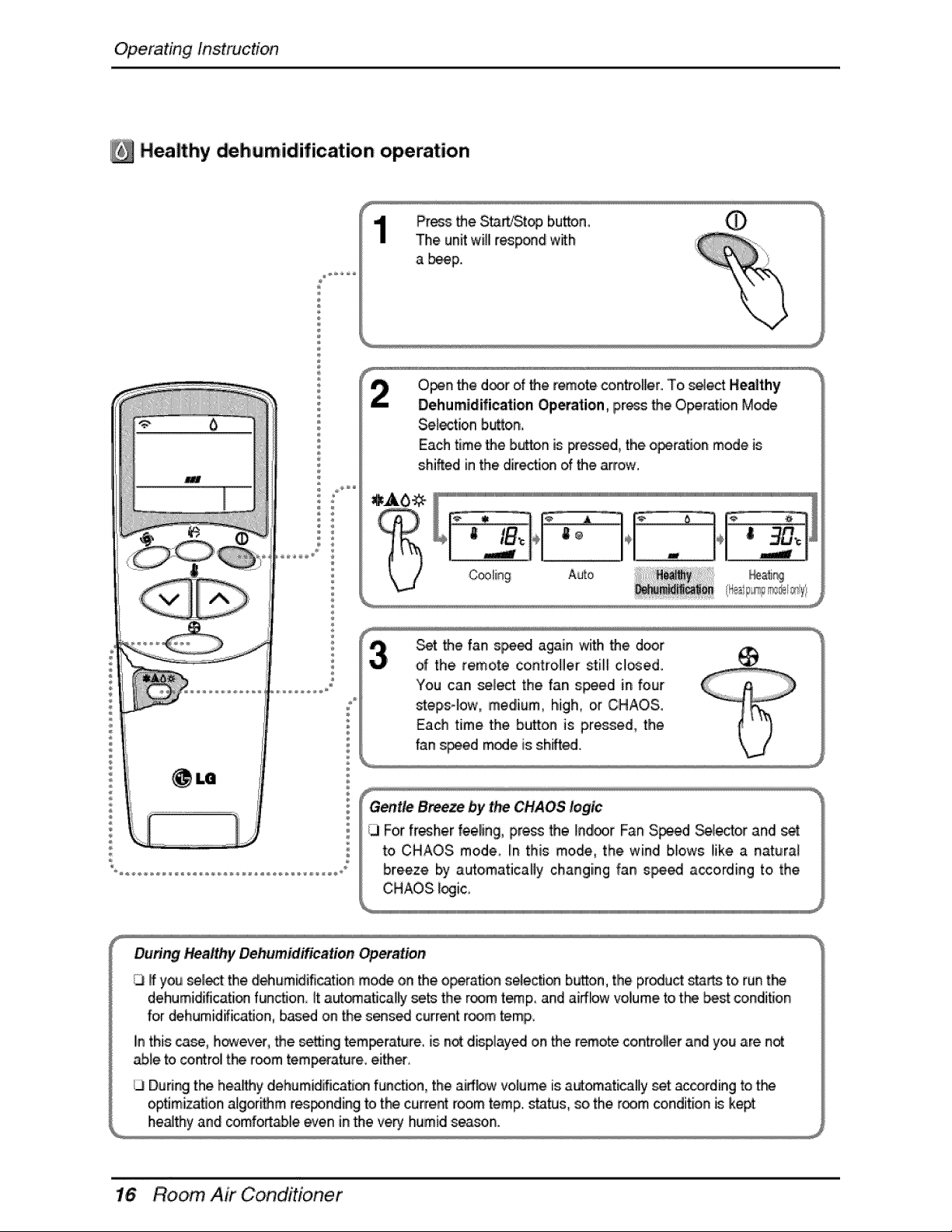
Operating Instruction
Healthy dehumidification operation
®
®
®
Pros _e S_r_J,Stop bu_on,
The unit will respond with
a beeF
Open the door of the remote cont_o,lle.r..To,se4ectHea|thy
Dehum|difieation ,Op_ation_ press the Operation Mode
Se._ectionb,_on,
Each time the bu_o,nis i_ess_ed,the o_ratJon mode is
shifted in the dir_on of the _'row.
Set the fan s_ed again with the d_r
of the remote controller sti_[ cl_ed.
'Youcan se_,ectthe fan s_ed in four
steps-low, medium, high, or CHAOS.
Each time the button is p,r_sed, the
fan speed mode is shAed.
Gentte Breeze by the CHAOS logic
;3 For fresher feeh,g, press the Indoor Fan S_d _[e_o,r and set
to CHAOS mode. I# this mode, the wind blows like a natura_
breeze by autoimaticaHy changing fan speed according to the
CHAOS _ogic,
Dunng Healthy Dehumidification Operation
13If you select the dl_umidification mode on the operation s_ection bu_on, the pr_u_ starts to ru_ t_
dehumidificati® funotJon it a_om.atica_y sets the room t_p_ a_d airflow vo[Iumeto the best conditio_
for dehumidification, b_d on the s_s_ current room temp.
Iinthis ca_, however, the settJngtemperature., is n_ displ.ay_ o,nthe r_ote cor_trol_erand you are not
_e to control t_ room temperature, eith_
During the hea_y dehamid_cation func_on, the airflow volume is automatically set according to t_
optimization a[gor_m rest,haling to t_ current room temp. status, so the room condition is kept
healthy and cornfort_e e,¢e_in the very humid season°
Room, Air Conditioner
Operating Instruction
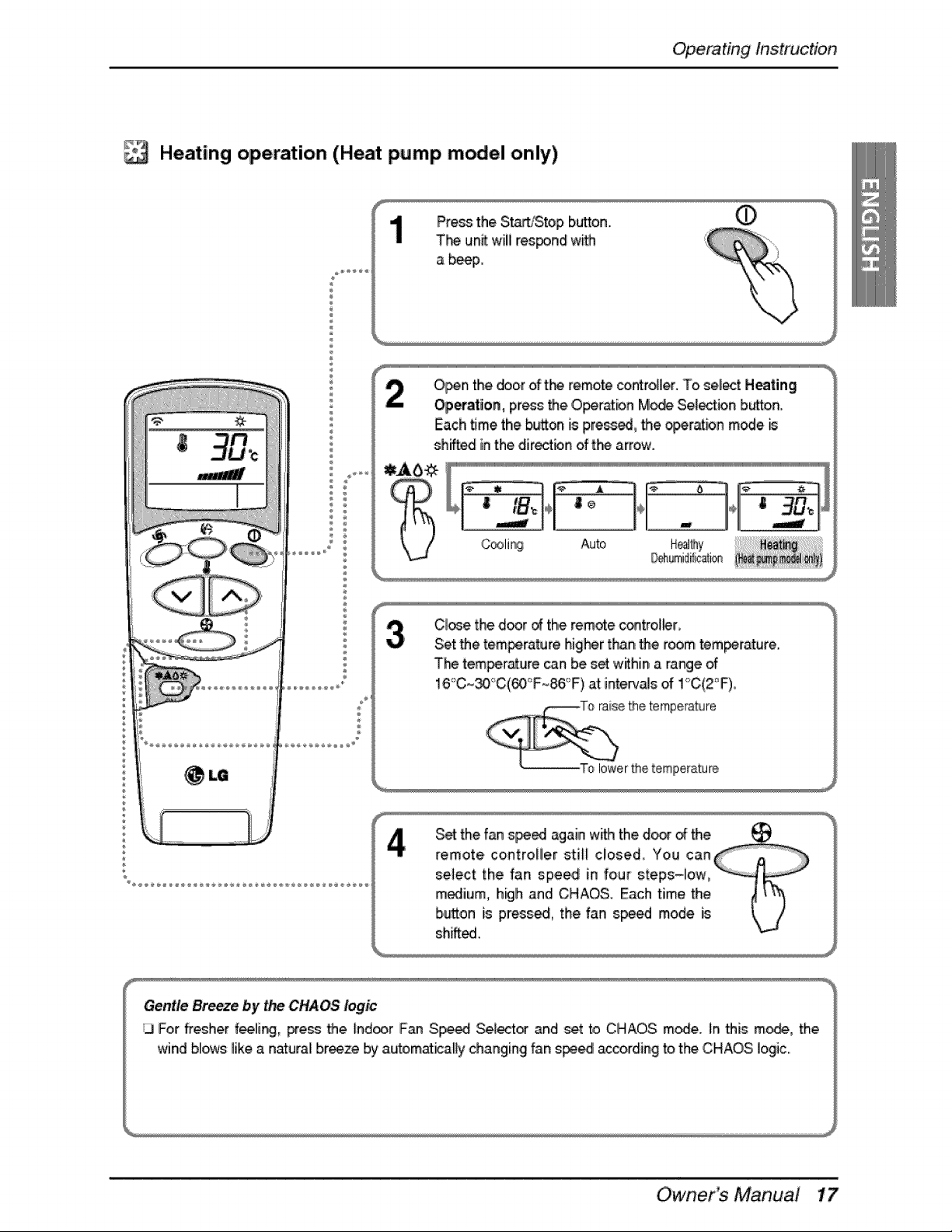
Heating operation (Heat pump model only)
®
®
Pros the Sit_]Stop b_on.
T'_ un_ willres_nd w_
a b_p,
O_n thei door of t_ remote controtler. To sel_t Heating
Operation, pros the ,O_r'_n Mode Sel_ion b_ton.
Each _me the b_on is pressed, the _r'_bn mede
sh_ inthe directbn of the arrow.
"]1 ° °
| ® ÷ |
Auto
C!te the door of the rem_e c®tro!_r
Set _e tem_rature higher tha_ the room,tem_cature.
The tem_r_u!re _n be s_ w_hin a range of
16°C~_'_C(_'F~86;'F) at interv_s of !'_C(2_'F)i,
raise the temperaNre
lower£hetemperature
S_ the fan speed again wit_ the d_r _ the __
remote controHe.r still closed,. You can
select the fan speed in four steps-ilow,
m_ium, h_ih and CHAOS. Each time the
biutt,onis poised, the fan sp_d mode is
shAed.
Gentle Breeze by the CHAOS logic
3 For ff_her feelli_, pres_ _e ind_r F_n Sp_ Set_t_ and set to CHAOS m_e. In _is m,o,_, the.
wind bll_s likea naturali braze by automat_alty changing fan spe_ a_ording to the CHAOS logic..
Owner_ Manual
Operating Instruction
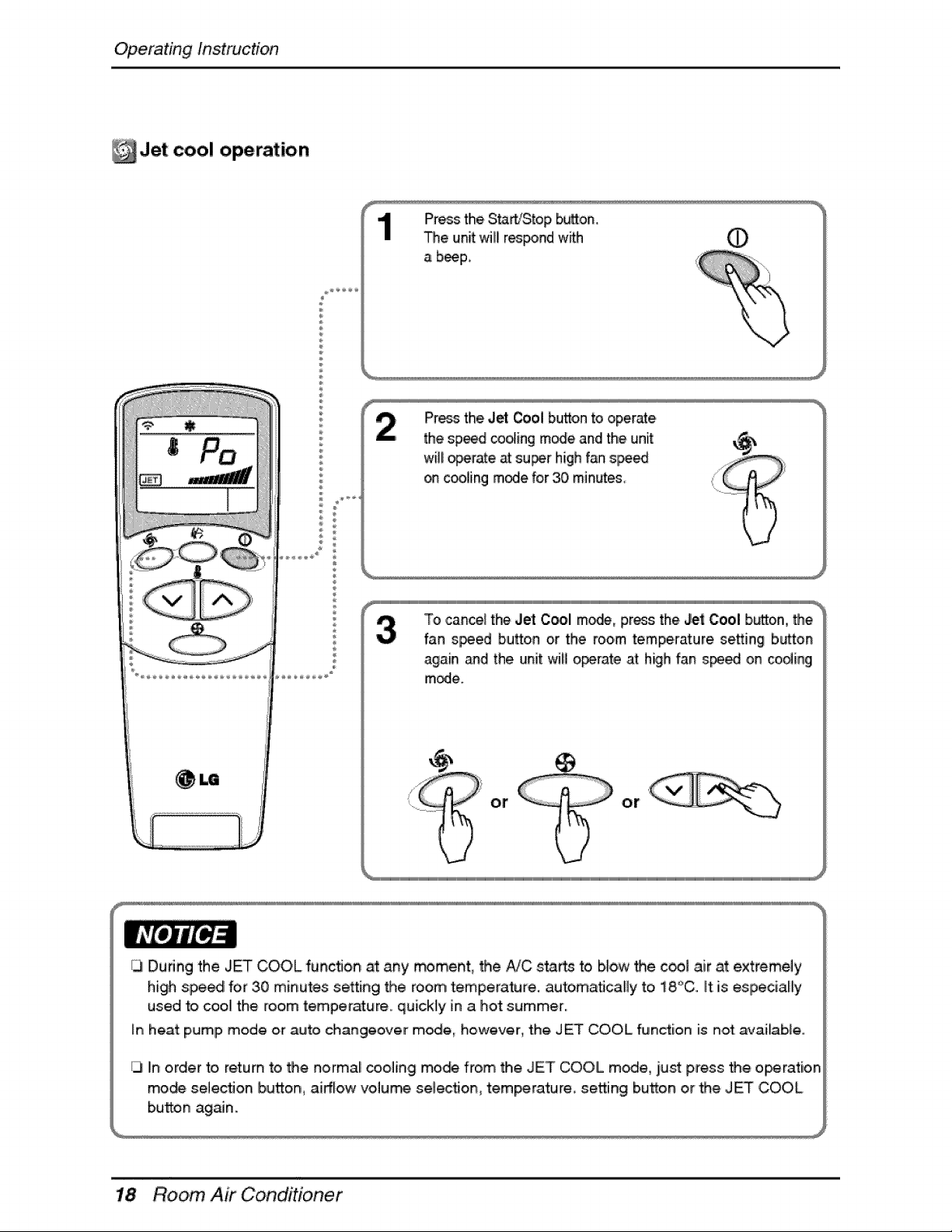
Jet cool operation
®
®
Press the Sita_Stop bu_on.
The unit wilil r_pond with
a b_p,.
wil! _r_e _ super high f_ speed
on cooling mode for 30 min_
To cance_the Jet C_l m_, pros the.Jet Cool button, the
fan speed button or the room temperature se_ing button
again and the unit will operate at high fan spe_ on ¢o_ing
m_e.
or or
/JI During the JET COOL function at any rr#ment, _e AIC sta_ to b,_ow_e cool air at extremely
high spe_ for 30 minutes setting _e room temperature, automa_cally to 18'_°C.It is eslpeciaHy
used to coo_ the room temperature, quickly in a ho_ summer.
_nhea_ pump mode or auto changeover m_e, however, the JET COOL ft_nction is no_ avai_ab_e..
_3In order to return to, _e normal _oling mo_ from _,e JET COOL mode, iust press _e o_ration
mo_ selectJon bu_on, airflow volume selec_om temperature, setting button or the JET COOL
bu_on again.
Room, Air Conditioner
Operating Instruction
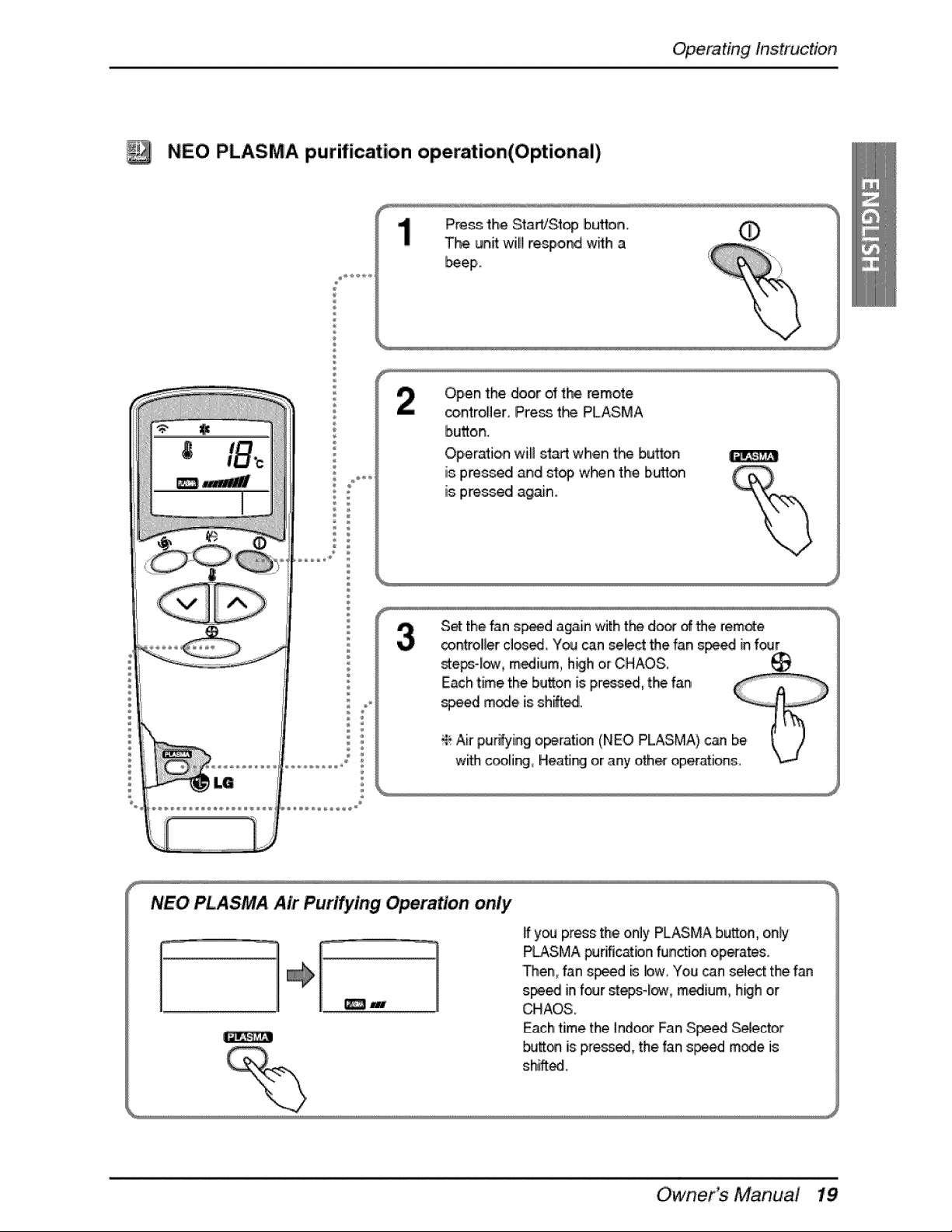
NEO PLASMA purification op,eratioin(Optional)
®
÷
®
÷
Open the door _ the remote
_ntroller Pre_ t_ PLASMA
bu_on.
Operation wiB slart when t_'_ bu_on
is pres_d and sty, w}'_n the b_,o,n
is pres_dl again.
S_ the fan s_ed again with t_ doo_of the remote
_ntrolier dosed You can select the fan s_ in four
_e_-_, m_ium h_h or CHAOS.
NEO PLASMA Air Purifying OPe_tion only
_J
ff y_ press the only PLASMA button, only
PLASMA _rific_ion funcfJonoperates.
_em fan speed is bw0 You _n seJectthe f_
speed inf_r steps,_ow, medium, h_h or
CHAOS,
E_ch time the Indo_ Fan Speed Selector
butt_ is pres_, the fan s_d mode is
shifted.
Owner_ Manua!
Operating Instruction
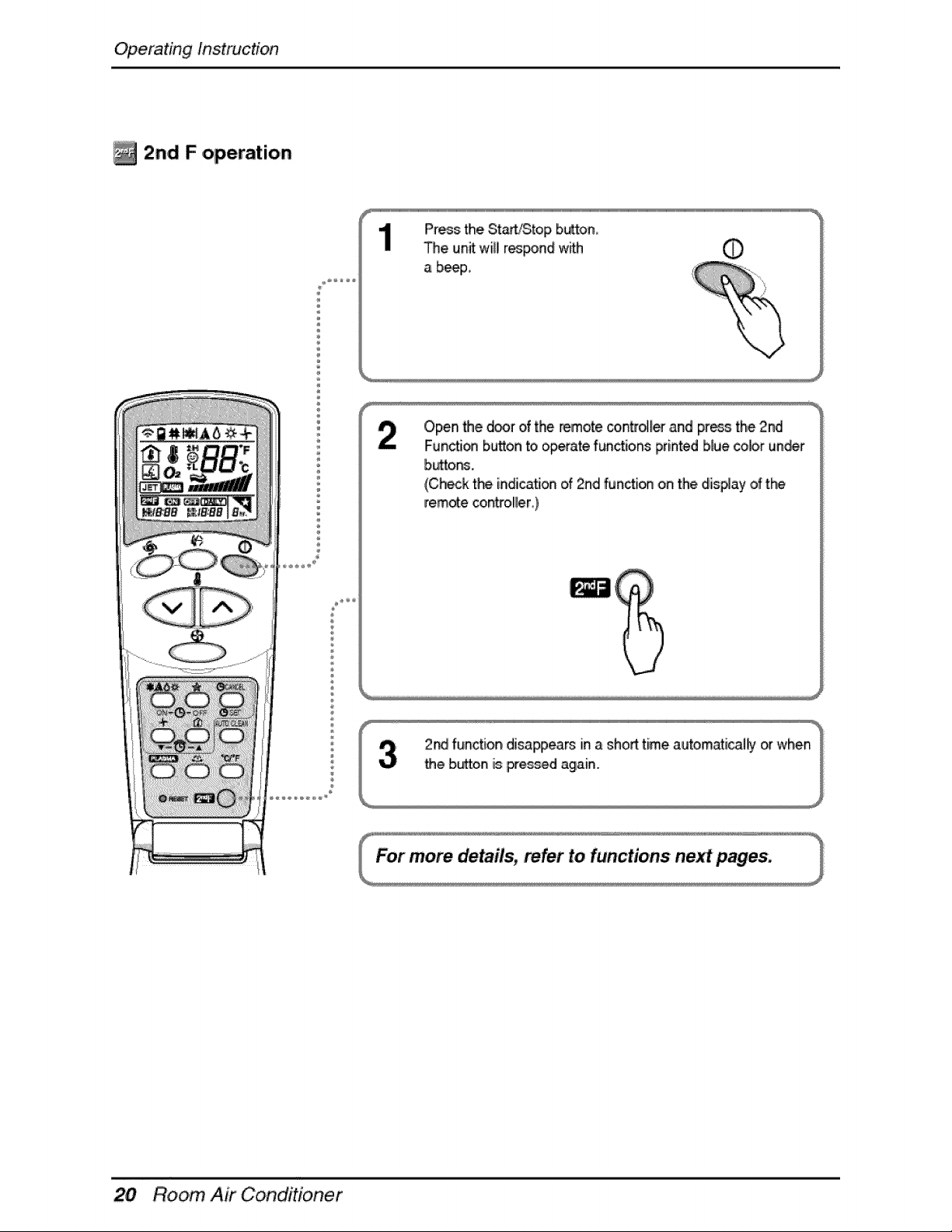
/_ 2n,d F operation
Press the St_iStop button_
The unff wil[Ir_pond w_th
a b_p,,
Open Me d_r of the remote coir_tr_ ,andpress the 2nd
Fun_i_ button _oo,p_ate functions printed blue colo,run_r
b_or_
(Ch_k the indica_on of 2rid functi_ on the display of the
remote cont_ol!ler_)
Room, Air Conditioner
Operating Instruction
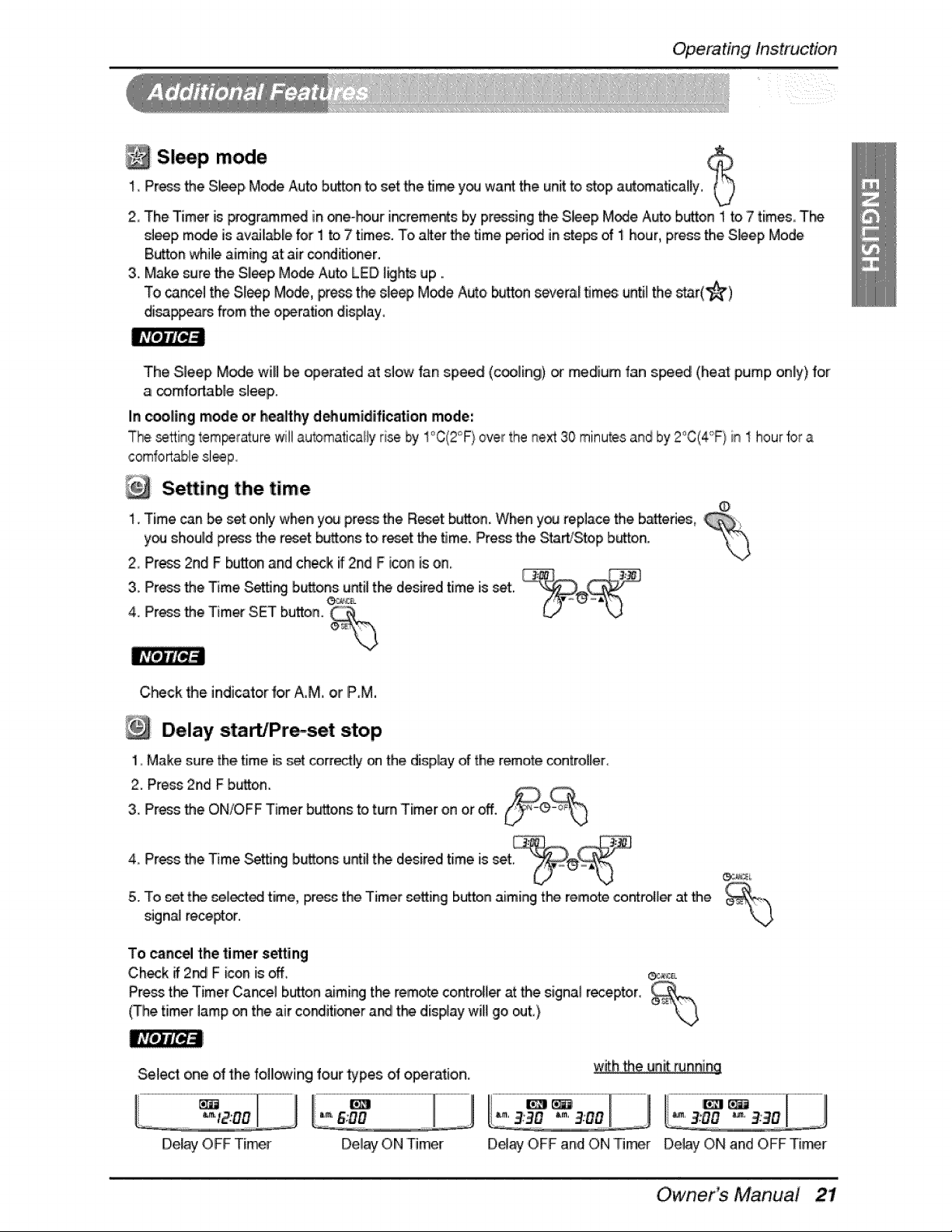
Sleep, mode
1_Press the Sl_p Mode Auto b,_ton to set the _me y_ want the unit to _op a_omaflca_ly,
2 The Timer is _r_m_ in ®e-hour i_reme_s by pressing the Sleep M_e A_o button 1 to 7 times, T_'_
s]_p m_e is ave[able for 1 to 7 times. To after the time peri_ in _epe o_1 hour, press the S_ep Mode
Button whille aiming at air cond_Joner.
3. Make sure the Slleep Mode Auto LED I_h_ up ..
To _ncel the Sl_p Mode, Hess the e_e_ Mode Auto,button s_era[ _m_: until the s_r(_)
di_ppe_s from _e operation dis_ay_
The Sleep M_e will be operated at slow fan speed (cooling) _ medium fan speed (heat pump only) for
a _mfodabie sleep.
In _oling mode or heallthyd_umidificatio,n mode',
The settingtemperaturew411au_matical_yrise by 1°C(2°F)over the _ext 30 minutes and by 2°C(4'°F}in 1 hourfor a
Se ing the time
1. Time _n _ _t onlywhen you press _e Reset b_,on. When you replace the b_ed_,
you should pros the reset b_ons to reset the time. Press _e Sta_Stop b_o,n.
2, Press 2nd F b_on and check if 2nd F i_n is on.
3.4_PressProsthetheTimer_me._ngSET button,buttons¢*_:_,.G until tl-_ desired time is set.
C_,ck the indicator for A,M, or P,M,
i_ ¸
Delay startJPrmset stop
1, Make sure, the time is;_t _lrr_fly on the disphy of' the remete c_ntre[ler
2. Pros 2rid F b_o,n.
3. Pros the ONfOFF Timer buttons to turn Timer on or off.
_._._ :_.
4, Press the Time,_J_ burns until t_ desired time is set _
5. To _et t_ _11_ time,/pree_ the Timer eetting b_en aiming the remote co,ntro_le¢at _e '_,_>.
signal rece_or.
To cancel the timer setting
Check if 2_ F i_n is off, _,_.
Pre_ the Timer Canal b_L_'tonaiming the remo_ contr_l_ at the signal r_ep_r,
(The timer lamp on the air co_iti_er a_ the dispfay wil_go out,)
Select one of the folllowing four _pes of operation.
!
Delay ON Timer De_ay,OFFand ON Timer Delay ON and OFF Tier
Owner Manual
Operating Instruction
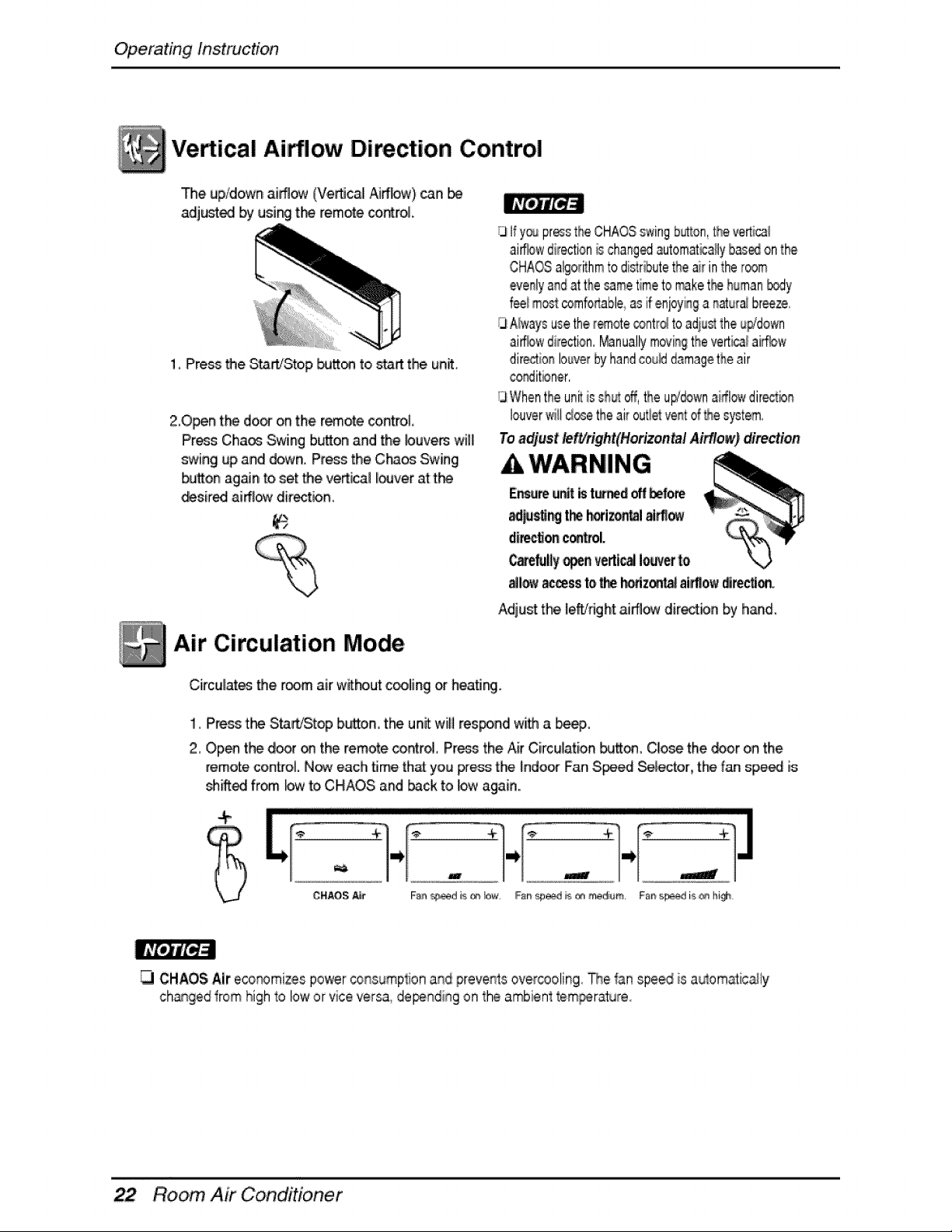
Vedical Airflow Direction Control
The up/down aiffl_ (Vertical _ffbw) _an
adjusted by using t_ remo_e_rol.
1_ Press the S_rtiStop _on to _ff the, unit_
20_n t_ door on the remo_econtrol
Press Chaos .Swingbutton,and the buvem will
swing up and d_¢n. Pressthe C_ Swing
button ag_n to set the vertical I_ver att_
desired aiff!_ direction,
Air Circulation Mode
/3Ify_ presstheCHAOSswingb_®on,theverticai
aiffbw directionb chang_ automat_a_lybas,_onthe
CHAOSalgorithmto distributetheair intheroom
ever_iyandat the_me timeto _ke t#_ehuman_.,dy
feeim_ comfo#_ableasifenjoyi_#a _ura_ breeze,
GAlwaysusethe_,ote _nt_ to.adius_theu_'down
ai_w direction._nually movingtheverticalaiffbw
directionlouverbyhandcouNd_magetheair
co_itbner.
GWhichtheunitisshu__, theu#;_wn airflowdir_io_
louverwiilctosetheair outieve#[of_e system
To adjust/etVdght(Horizen_l Airflow)direction
A WARNING
Adjust the leff/dgN ai_ directbn by hand.
Circulat_ the room air wit_ut c_ling or heati_.
I,Press the Sta&/Stop buttorL the unit will res_nd with a _ep,,
2, Open the d_r _ the remote control Press the Air Circulatio_ bu_, Cl_e the _or on the
remote controli. Now each 5me that you _ess the indoor FanS_ed Selector, the fan speed is
_Aed from bw toiCHAOS and _ckto lowagain..
+
........- .... ;i;:.....- ...........
CHAOi_;_r Faa _d i_ ,r_,low. Fs# _ A _ medium. Fs# spe_ is _ hi_
CHAOS Air eco_mi_es power consumptiona_d preventsoveircooling The f;_nspeed is a_om_ic_ly
ch_qgedfrom high _olow or vice versa, dependi_gon the ambienttem_rature_
Room, Air Conditioner
OperatingInstruction
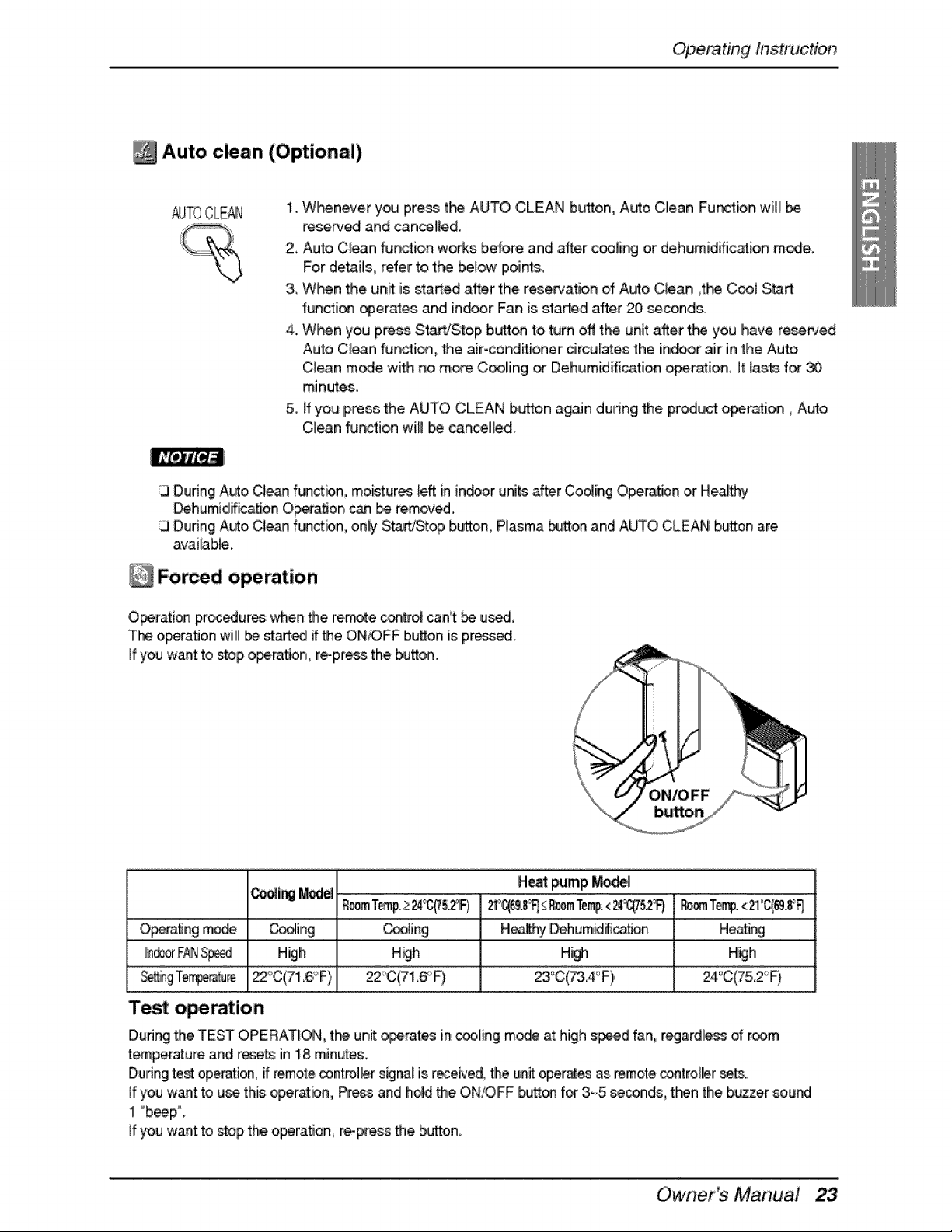
Auto clean ,(Optional)
1,,W}-_never y_ press t_ AUTO CLEAN button, Auto Clean Function will be
_serv_ and cancelled,
2, Auto C_eanfur_tion works b,e{ore and ,after c_lin_ or dehumidifi_ion mode,
For detailm refer to the below points,,
3_When the unit, is started after the reserva_on of Auto Clean _t_ Cool Start
function operates and indoor Fan is started after 20, seconds,,
4. W_n you pre_, S_rt/S|op b_on to turn off the unit after t_ you have resewed
Auto C_eanfur__i_, the _roconditioner circulates the in_r air in the Auto
C_ean m_e with no mo_e Coo_ing or Dehumidification o,peration, it _asts for
minutes.
5, ff you IPres_the AUTO CLEAN b_o,n again during the product o,peration _Auto
C_ean fur_tion will _ cancelled.
[3 Dudng A_o, Clean functbn, mo_tures _eftin in.or uni_ after Coo_ingO_ratbn or Hea_y
Dehumid_ication Operation can be removed.
[3 Dunng Auto Cle_ function, on_ Start/Stop button, Plasma button and A_O CLEAN button are
av,ai_b_0
Forced operation
O_rati_ pro¢_ures when the re.re control _n't _ us_°
Tlheo_ratJon wilil _ st_,ed if the ON/OFF bu_on iispress_.
If you want to _op o_,ration,, re-press the bu_on.
_i_ _ H_t pump _
O_tJng mo_ _ _ing _ _ling _ He.by _hum_ca_n _ Heat_
High High H_ High
22_C(71,6,°F), 22_"C(71,6,_"F) _,C(7&4oF), 24°C(75,,Z-_F)
Test o ration
Dudng the TEST OPERAT_OIN,the unit o_rates incooling m_ at high s_d fan, regardil_s of room
t_perature and resets in 18 minutes.
Duringte_ operation,if remote_ntrol_r s_na_ is received,the unit operates as remote co,ntrolllersets.,
If you wan_to use this ogeratbn, Pr_ and ho_dthe ON/OFF _on f_ 3_5 seconds, then the buzzer sound
I °beep°
Ifyou wan_to stop the operation, re-press the,buttom
Owner Manual
Operating Instruction
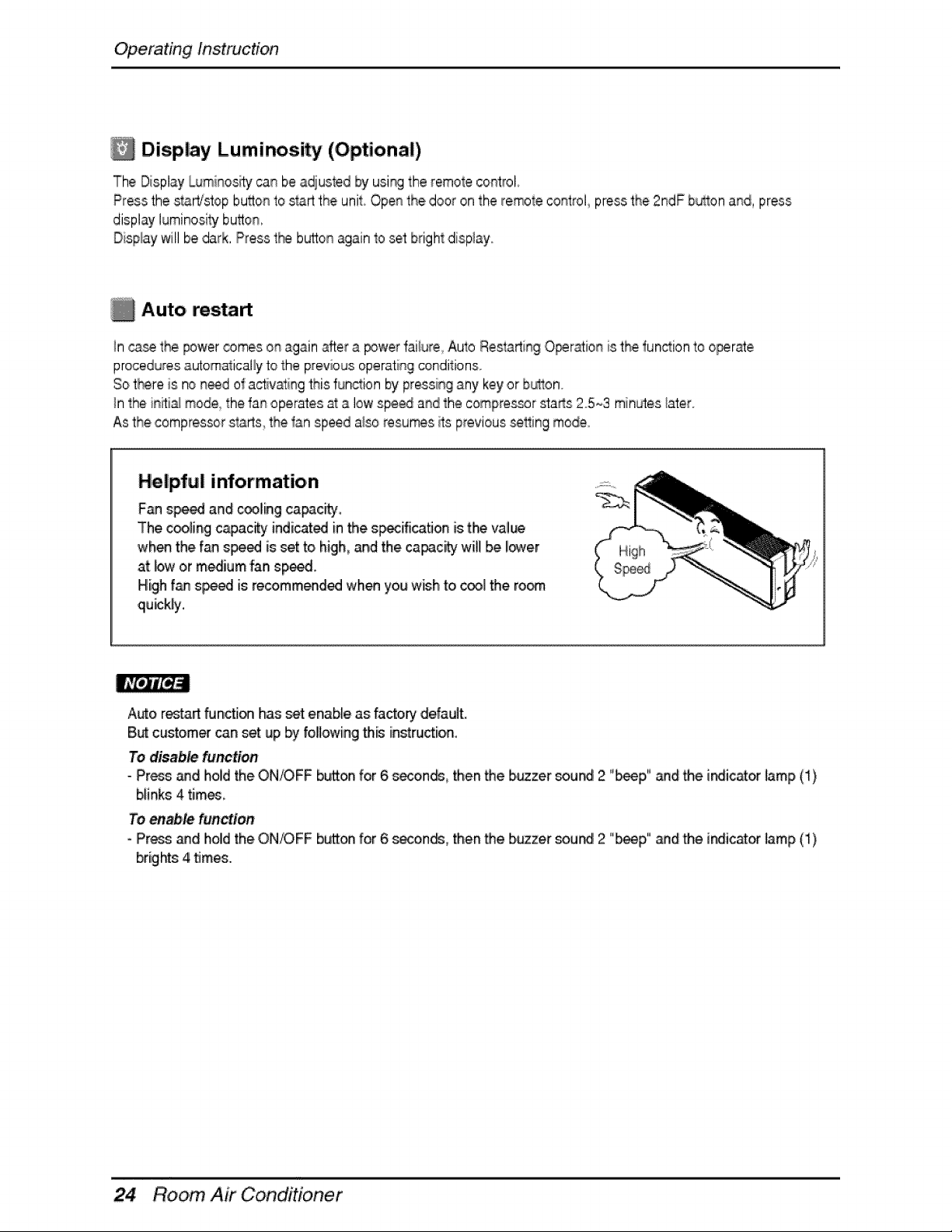
Display Luminosity (Optional)
The Display Luminositycainbe adiusted by using the remole control.
Pressthe stAWstopbu_onto s_rt the unit Open the door on the remote control pressthe 2ndF huron and, press
display luminositybu_on,
Displaywill be dark.Press t_ butto_qagain1oset bright display..
Auto restart
In casethe power comes on againafter a powerfailure Auto Restarti_sgO_r_ion is the functionto ol_rae
proceduresautoma_icaliyto the previousoperating conditions
SotI_re is no n_d ,ofa_ivating this fun_ion by pressingany key or b_ton.
In the is_ti_ mede_the fan operates at a low speed asd the compres@r sta_s Z5_3 minutes_ater.
As the compressorstarts the fan speed a_soresumes wtsprevious_ing mode.
Helpful information
F_7 s_ and cooling capac_y
The c_ling c_city indicated in the s_ifica_on is t_ va!_
when the f_ s_ed is set to higih_and the capacity wil! be iower
at bw or medium fan speed.
High f_ s_ed is recommended when you wish to _l the ro_
qu_k[y.
A_o restar__n,_ion has set en,ab_eas factory default.
But customer can set up by following this instru_ion.
To disable function
- Press _d hold the ON/OFF button for 6 seconds, then the b,_zer _u_ 2 "_p" and the indictor _amp(1)
blinks 4 times
To,_,le function
- Press and holldthe ON/OFF button for 6 se-oonds,then the b_zer sou_ 2 "l_p" _,d the indicator lamp (i)
brights 4 time.
Room, Air Conditioner
Maintenaince and S,e_ice
B_ore _rfo, rmingarty' rr_int_ance, turn off the.m_n _erto the sy_em,
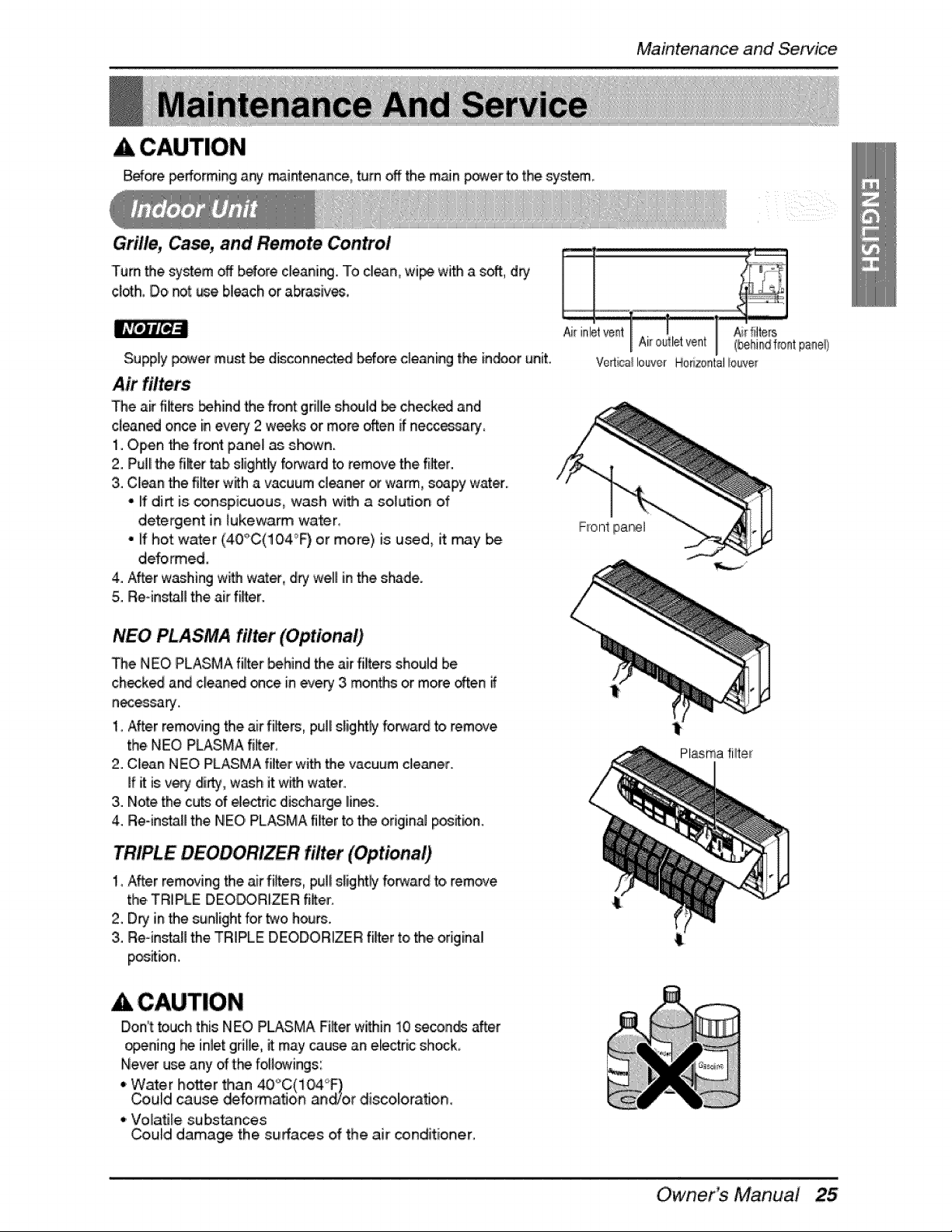
Grille, Ca_, and Remote Control
Turn'the system off b_ore c[eani_.. To cllean,wipe with a soft.,dry
c[_h, Do r_t use bleach or abrasive,
Supply power must be di_onin_ed b_ore cleaning the in,_or unit. Vert_a_louver Ho_zoatal_ouve_
The air filters _.hind the front griUesh_ld _ checked and
cleaned once in every 2 wee_ or more often _ neccessa_,
1. Open _e front pane[ _ shown.
2. Pull[the filter _b slightl_ forwarrdto remove the filter.
3,.Clean the rifler with a vacuum cleaner ot warm, soapy watt..
- ff diA is _nspicuous, wash with a soi_u_o_ of
detergent in _ukewarm water,
° If hot water (40_C(10,4°F) or more) is u_,d, it may be
deformed,
4. After washing with water, dqj welli in the shade.
5i. Reqnsta[[ the air rifler.
NEO PLASMA filter (Optional.)
The NEO PLASMA filter behind the air filters should be
checked and c[eane.d_ce in evePy3 months or more often
n_essaty.
1, After rem_ing the air fiffers, pul_sJight_ fo_ard to remove
the.NEO PLASMA fi_ter,
2. Clan NEO PLASMA fiffer with the vacuum c_e_er.
ff it is ve_ dli_',, wash it with water..
3. Note the cuts of _ectric disclharge Ili_s.
4. Re-ins_H the NEO PLASMA filter to the original p_ition°
TRIPLE DEO filtet (Optional)
1_After removing the air fiffers, pulli sJightlyforward to remove
the,TRIPLE DEO_RfZER filter.
2. Dry in the sunlight for two hours.
3. Re-in_B the TRIPLE DEODORIZER 'filter to,the original
positbn..
A CAUTION
Don°ttouch this NEO PLASMA Fi_er within 10 se_nd_ after
opening _ inletgrille, ff may cau_ an e_ectricshock
Never u_ any of t_ foflo_vings:
•. Water hotter than 40'_C(i04'_
Could cause deformaflo_ a_o,r discoloraflo, n_
•, Volatile substances
Could damage the surfaces of the air conditioner,
Plasma, fiH:er
Owner_ Manual
Maintenance and Servi_
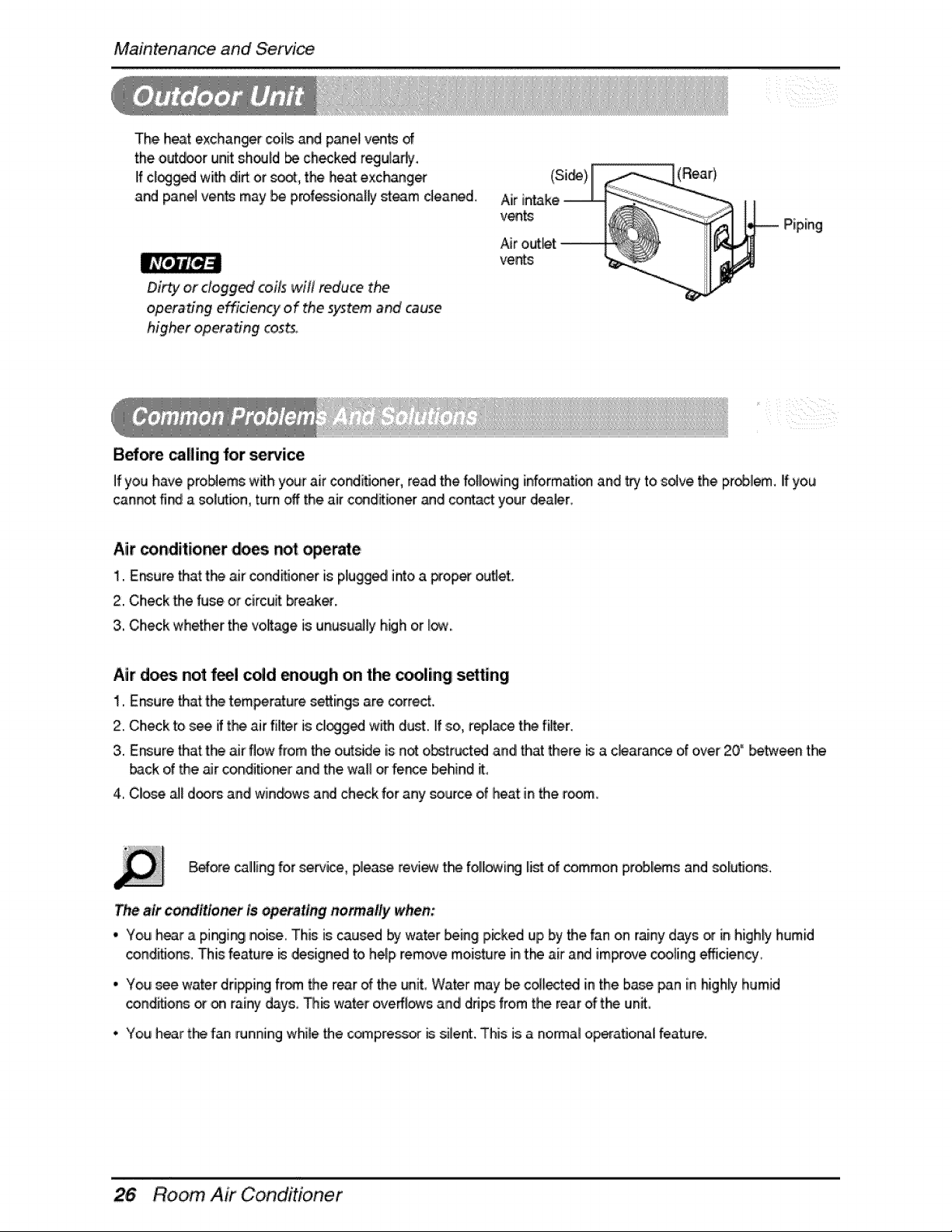
The heat exchanger_i_s and p_el v_ts of
the outdoorunit should be ch_k_ regu_ady,
IIfdogged with dirt or _, the heat exch,ang_
and panel vents may be prof_sionally steam cleared.
Dirty or dogg_ coils will reduce the
operating effidency of the system and cause
higher operadng costs,
B_ore calling for service
vents
(Si_) (Rear)
Piping
If you have problems with yourair cond_oner, read the following informati_ and _ to solve the pr_l_. If you
cannot fi_ a so,l_bn turn off the air conditbner _d contact your dealer,
Air conditioner _ _t ope_e
1.,E_ure 'thatt_ air oond_oner iisplugged intoa D-op_ o_et.
2.,Check the fuse or circuit breaker.
3. Check whether the voyage is unusu_[y high o,r[_,,
Air d_s no_ feel c_d _ough on the c_ling s_ing
I. E_ure 'thatt_ _emper_ure settings are corre_.
2. Check to s_ if the air filter is cllogg_ w_ d[usL ff so,,r_lace the filter.
3. Er_ure that the air flow from the o[_side is n_ obstru_ed and that there _ a c_arance of over 20" betw_n tf-_
back of the _r conditioi_r and the wal! or fer_e behind _,
.4,Close _ d_rs and windows and check for any _urce of heat in _e r_m,
B_ore calliingfor se_ice, please review the folll_ing li_ o,fcommon pro,bli_s and sol[utione..
T_ air conditioner is _rattng normally when:
• You hear a pir_ii_i noi_, This is caused by water _ing picked up by the fan on rainy days or in higHy humid
condiOons,This feature is _sign,ed to help remove moisture in,t_ air at# improvec_ing efficiency_
• You see,water dripping from _e rear of the unit, Water may be collected iinthe base pan in hiighly humid
conditions _ on rainy days, Th_ water oveffl_s, and drips from the rear of the un_,
• You hear the fan running wh,i_ethe compressor _ silent. This is a no,_al o_raSona[ feature.
Room, Air Conditioner
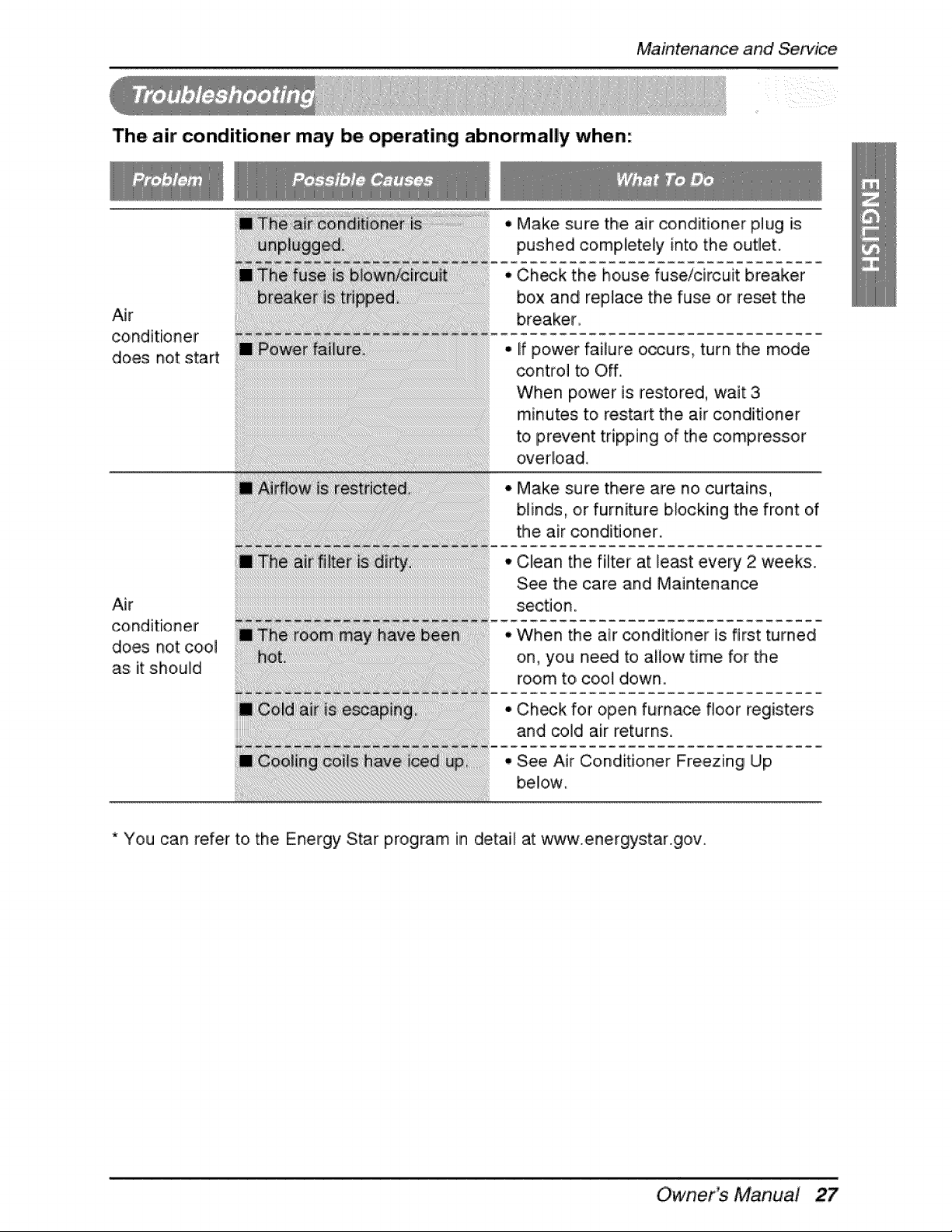
The air conditioner may be o_rating abnormally when:
Maintenaince and Service
Air
conditioner
does not start
Air
conditioner
does not cool
as: it should
• Make sure, the air conditie, ner plug [s
pushed completely into the outlet.
• C:h_k the house fuse/circuit breaker
box and replace the fuse or reset the
o if power failure occurs, turn the mode
control to Off.
When power is restored, wait 3
minutes: to resort the air conditioner
to prevent tripping of the compressor
overload.
° Make sure there are no cu_ains,
blinds, or furniture blocking the front of
the air conditioner.
• Clean the filter at le_t every 2 weeks.
See the care and Maintenance
section.
• When the air conditioner is first turned
on, you need to allow time for the
room to, coo_ down.
C:h_k for open furnace floor registers
and co]di air returns.
See Air Conditioner Freezing Up
bellow
* You can refer to the Energy Star program in detail at w,,_c¢.energystar.g,ow
Owner_ Manual
Memo
28 Room Air Conditioner

LG Electronics Inc.
P/No.: 3828A20434L Printed in Korea
After reading this manual, keep it in a place easily accessible to the user for future reference.

