website lmp:/i_ ww.1
Q • •
Air Conditioner
and thoroughly
,airconditioner.
future reference after
FOR YOUR RECORDS
Wr_e the m_li and _rial nu_rs hers:
Mode| #
Serial #
You can find them oin a mabel!on the side of each uniL
Dealer's Name
Date Purct-_ased
II Staple your receipt to this pa_ in th_ event you need
it to prove d_te of purcha_ or for warranty issues.
READ TH!S MANUAL
Inside _ou wil_ fi_ many helpful hints on how to use
and maintain your air co_iti.o_r p/r_riy Just a little
preventive care on your part can save you a great dea_
ot time ar,d money over the lille of Wi_ _r oio_,ditiot')lell.
You'B find man_ answers to common prob_e,r[m in 'the
chart of troubleshooting tips. tf you review our cha_ of
Troub_eshootJngi Tips first, you may not need to call
for _rv_e at all
* Contact the authorized service technician for
repair or maiintenance _ this unit
. Contact the installer for installation ol _|s unit,,
*The air conditioner is not intended for use by
you_ children or tnw|ids without su_wIsl_
* Young ehi|,dren should [be su_rvised to ensure
that they do not p|ay with the air oondiUonerr,.
*When the power cord is to be teplsced,
repiac;ement work shal| be performed by
authorized personnel only using only genuine
replacement _rts,
,|nsta||ation work must be performed in
8ccordance with the National E|ecttic 'Code by
q_|ified and suthonzed _rsonnel only.
2 Room Air Conditioner
To prevent the iniury of the u_r or other pe_,le and property damage, the follllowing i_4ructions must be
followed
[] _r_orrect _eration due to ignori_ instr_tio_ wiB _u_, harm or damage, The seriousness is classified
by the following indications.
[] The meanings of the symbols used in thiis man_ are as shown I_ow.
i so,.notto°o. iJ
su_ to follow the instruction_
[] Installation
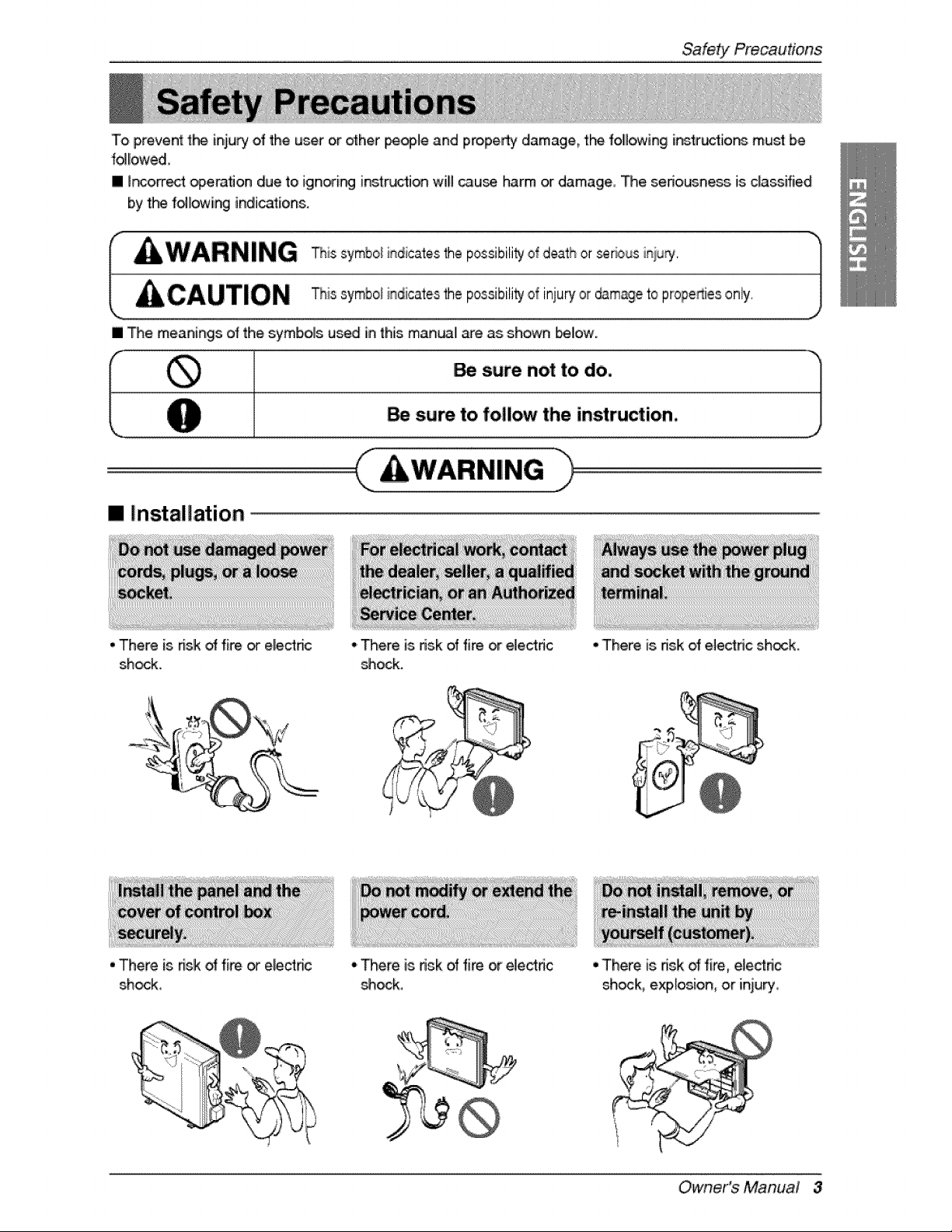
• There is nslk oHfi_. or electnc
shock,
oThere is risk of fi_ or el,ectdc
_ock.
• There is, dsk oHfire or elec4tdc
_ock,
•There is risk of electric sh_k.
•There is nsk _ fire, electnc
shock, explosion, oir iniury,
Owner's Manual 3
SafetY Precautions
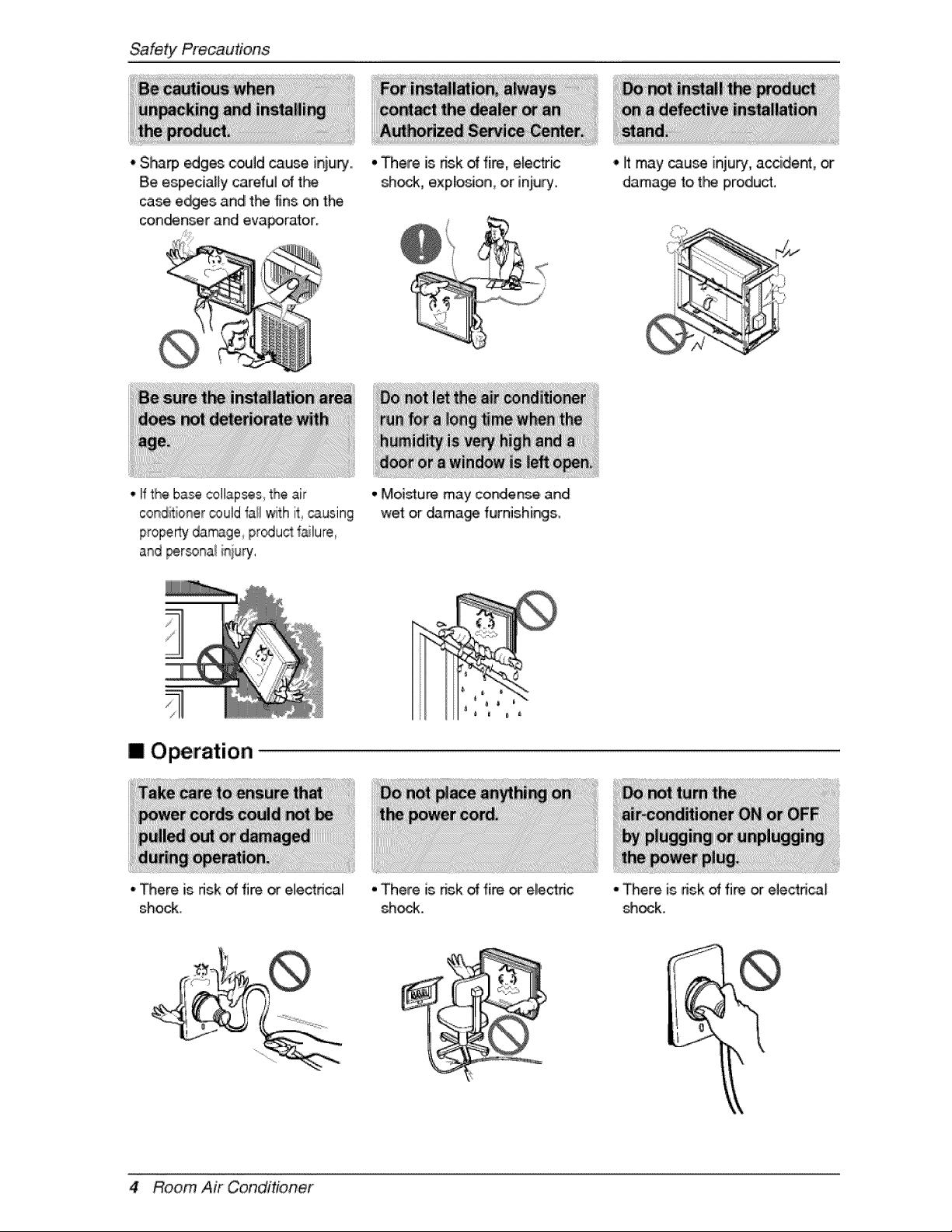
• Sharp _ges could cause ir_iu_..
Be especially careful of t_
case e_es and tl*_ fins on the
con_nser and evaporator.
• There is dsk of fire, elec_ic
sh_, explosion,, or injury.
° If the bsse collapses,the air
conditionercould i_allwith it _using
propertydamage pr_u,_ %lure,
and _rsonal it_juPj,
m Operation
• There is fdsk of fire or electrical
shock.
,,Moisture may condense and
wet or dama_ furnishings,
° There is dsk of fire _ electric
shock.
° iltmay _use inju_, accident, or
dama_ t,ot_ product,
"There, is nsk of fire or electrical
shock.
,k
4 Room Air Conditioner
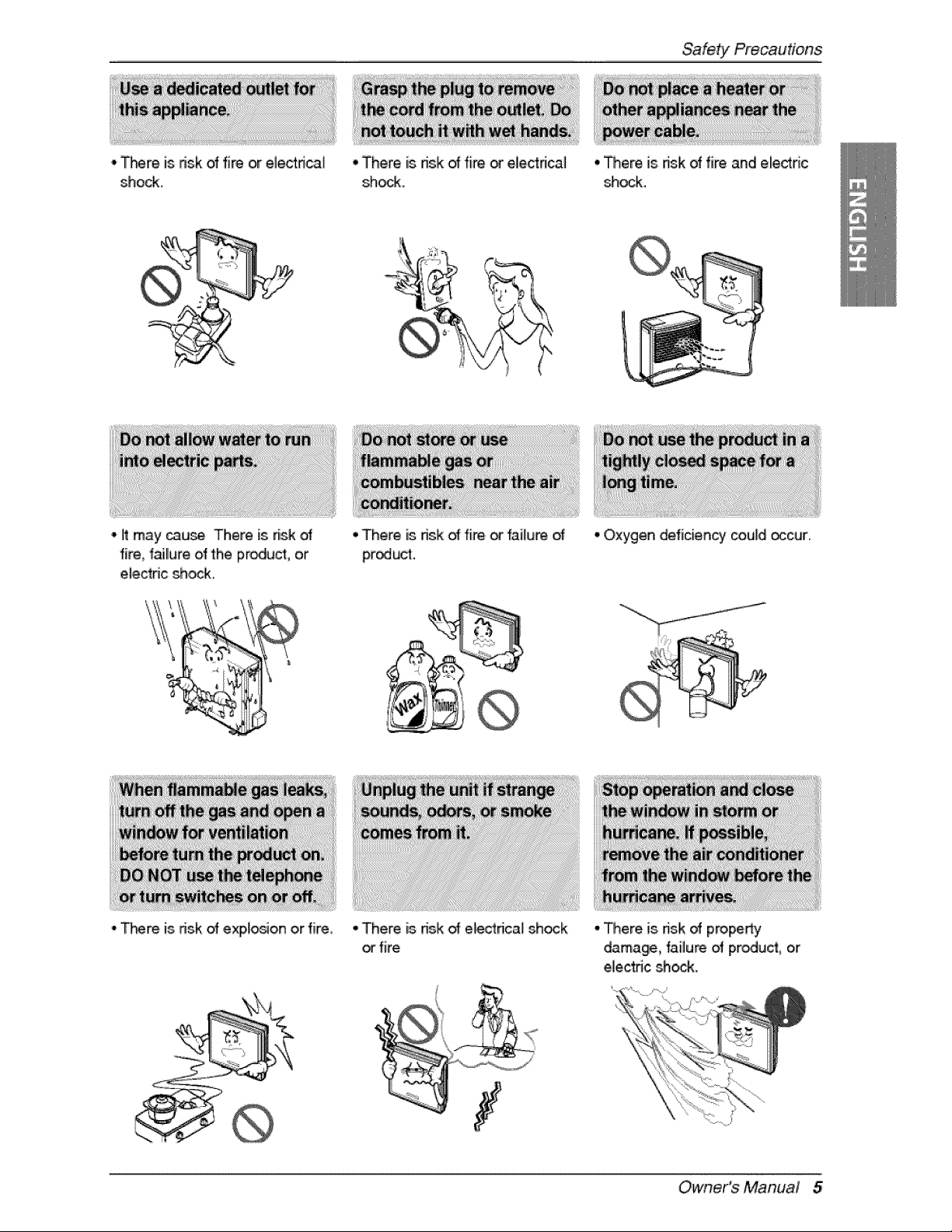
• _m is risk of fire or electrical
shock.
• There is nsk d fire or eliectrica]
shock.
Safety Precautions
• li may cause There is risk
fire, f_llure olfthe product, or
e/ectdc shock,
-T_re is dsk of expto_on or f[re,
• There is risk d fire,or failure d
product.
• There is nsk of ele_rica] sh_k
orfire
7
• There is nsk d fire and electric
_ock.
• Oxygen deficiency could_cur,
- There is dsk of property
damage, failure of produ_, or
ele,ctnc shc_.
Owner's Manual 5
SafetYPrecautions
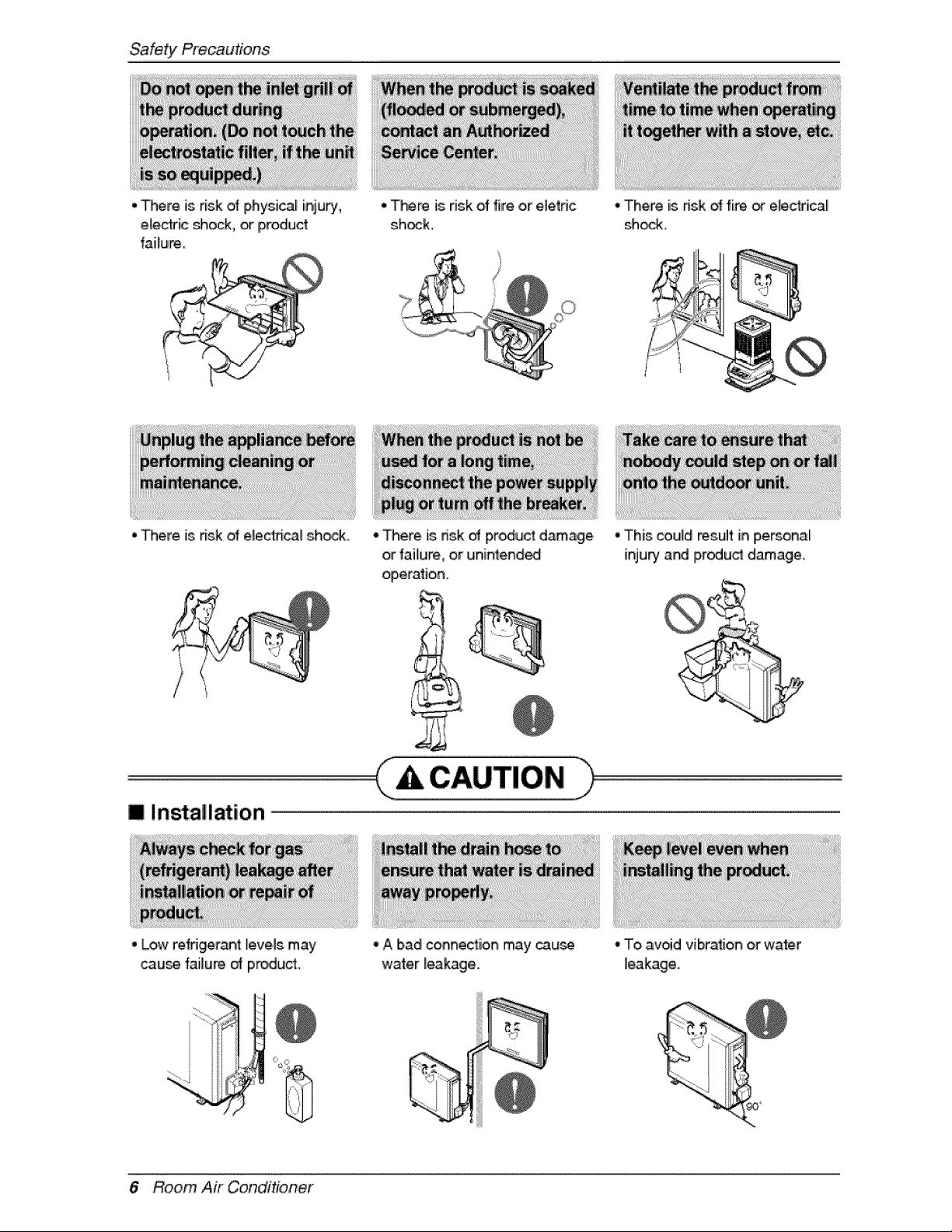
• There is risk of physical injury
electric _ock or iProdu_
failure
• There is risk of electnca_ shock
• There is risk of fire or eletdc
sh_k
° There is risk of product damage
or failure or unintended
operation
• There is ffsk of fire _ e_ectsical
sheik
• This could result in personal[
injupy and product damage
m Insta!la4ion
° Low refrigeran4 feveJs may
_u_ failure of pr_uct.
° A bad conne_iion may cau_
water _eakage
6 Room Air Conditioner
• To mJo_dvibration or water
leakage
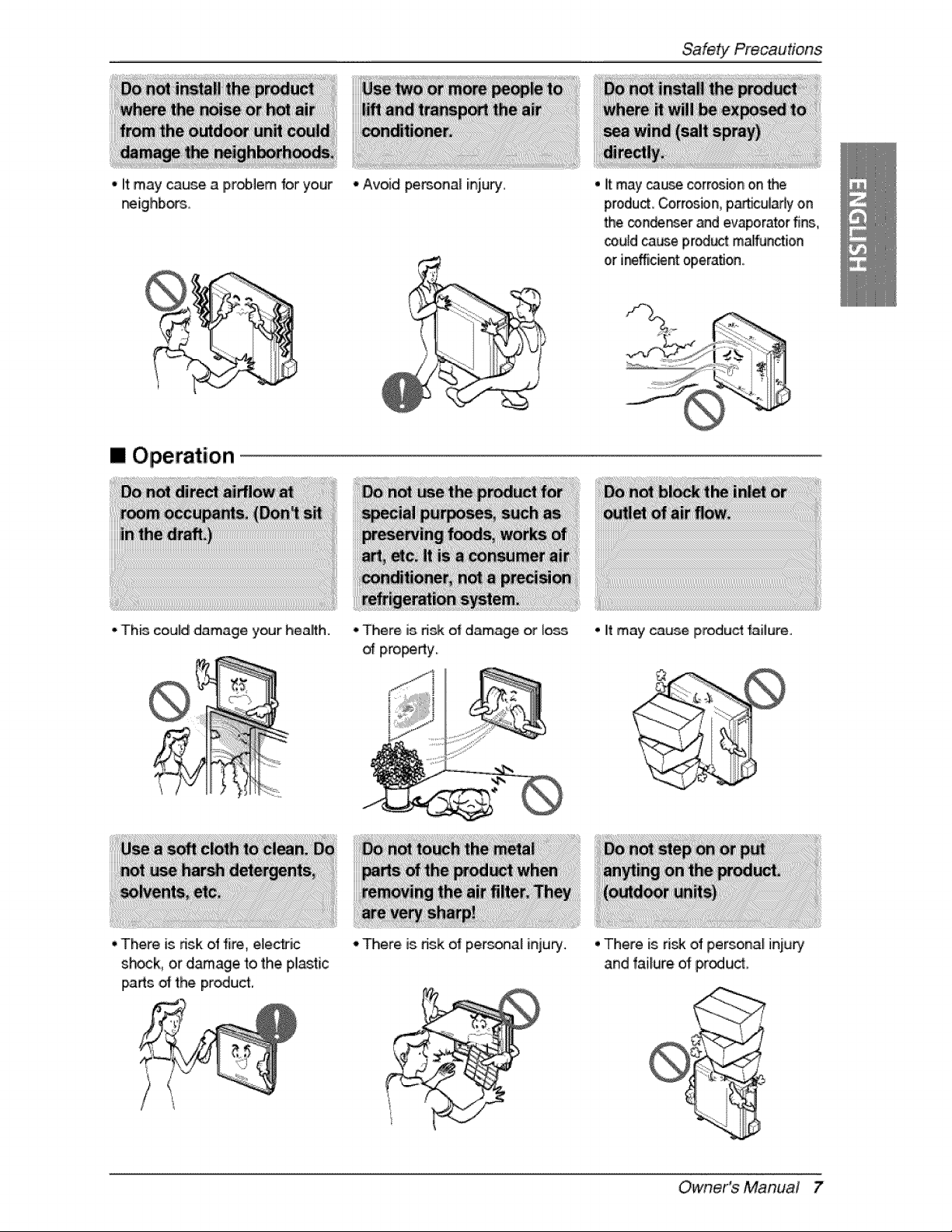
• it maycauseaproblemforyour
f_ighbors.
[] Operation
- This could damage your hea_th,
• There is nsk of fire, e_e_ic
shock, or damage to the plastic
i_rts _ the produ_
- Avoid pemona_ injury,
- There, is,risk o_ damage or loss
o_ pi_i_y,,
Safety Precautions
• it may ca_e corrosion ,onthe
product Corrosion, p.artic:uladyon
the conder_er and evaporator fins,
could cause pr_uct mal_nction
or i_fficient operation.
° it may cause product _ailure.,
o'There is dsk of per,_r_al inju_. ° There is d_ of persona[ inju_
and failure of p,rodud,
Owner's Manual 7
SafetYPrecautions
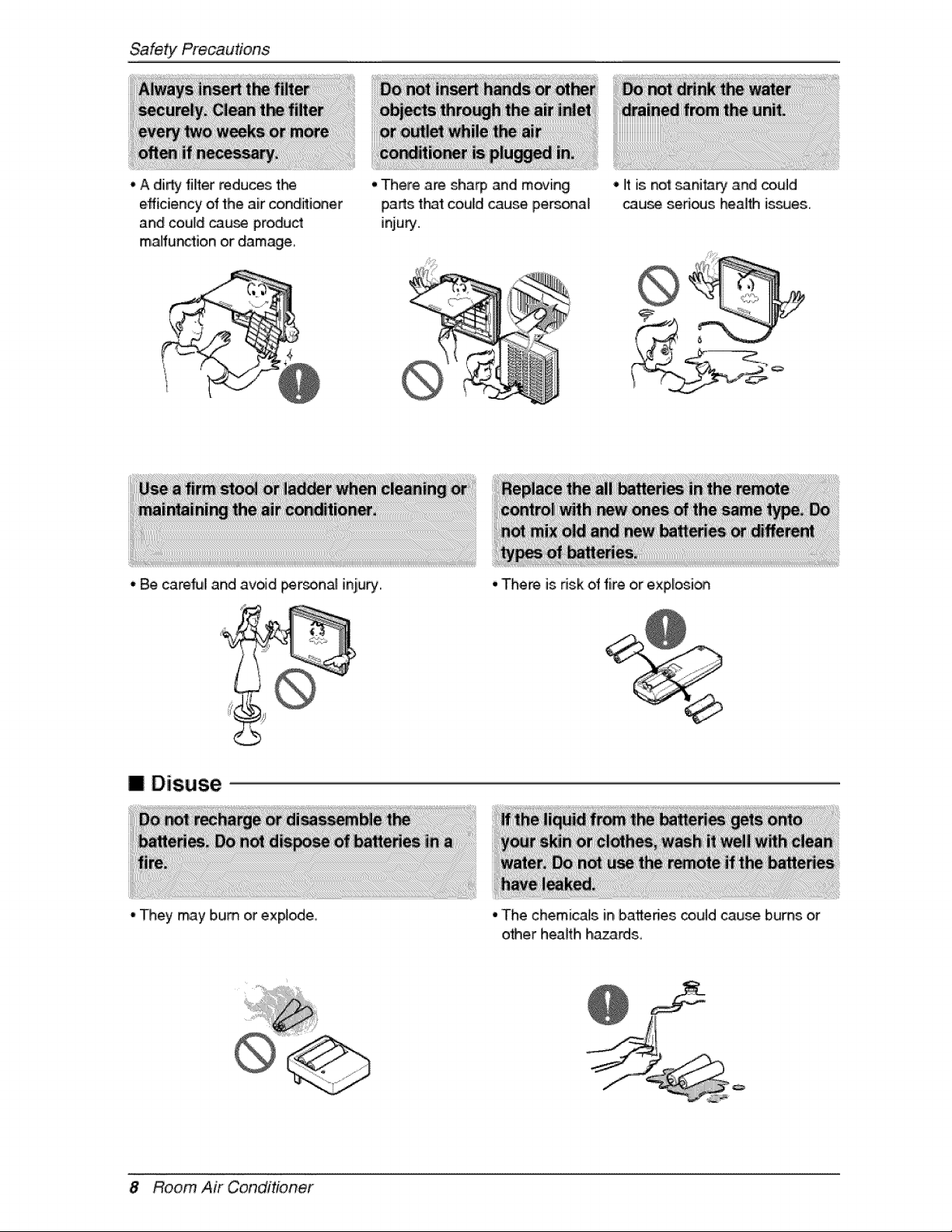
, A di_ filter reduces the
efficien W of the air conditioner
and could cau_ product
malfunction or damage
• There are sha_ and moving
parts t_t could cause personal
injury.
* Be,careful and avoid _rsona] inju_.,
• It is not sanitary and _uld
cau_ sed_s health is_es.
II Disuse
*They may bum or expire.
• There is risk of fire or explosi_
• 'The chemicals in batteries could cause bums or
o'_er heaffh ha_rds,,
8 Room Air Conditioner
Priorto Opera#on
1, Contact an installati_ speciaJist f_ installation,
2, Plug in[the power ptug pro£edy,
3,,.Use a dedicated circuit.
4. Do not use an extensi_ cold.
5. Do not s_rt/stop operation by pluggin_unplugging the power _rd°
6,,ff the co,rd/plug is, damaged, _p, lace it with only an authorized replacement pad,
1.8eir@ exp_ed to,direct airfl_ fo_ a long time may be hazard,s to your heath. Do not ex_e
occup_s, pets, or plants to dirred airflow for a I_g time.
2. Due to the possibili_ o_ oxygen deficiency, ventilate the room when using t}-_ appli_ce toge'_er with
stoves or ot_r heating ,devices.
3..Do not use this air cond_ioner fo_ non-specified special purpose (e.g. pre_i_ precision devices,
food, pe_, plants, _ a_ objects).. Such u_ may damage 'your properties.
ii'i_il
1. Do not touch the metal parts of 'the unit when removing the filter. Iniury can occur.
2..Do not use water to dean in,de the air condffioner. Exp_ure to water can destroy the insulation,
leading to e_ectdc sh_k.
3. When cleaning the unit, fi_t make sure that the power and breaker are turned off_ The, fan rotates at a
very high speed dunng operation, There is a po_ibi[ity of injury, if the un_'s, p_er is triggered whi_e
cleaning inner parts of the un&
For repaiir and main_enan_, contact your authorized se_[ce dea_er,
Owner's Manual 9
Introduction
This symbol alerts you to the, risk oif el_tric shock.
This symbol ale,s you to hazards that may cause harm to the
air cond_ioner.
This symbol indic_es sp_:ial notes.
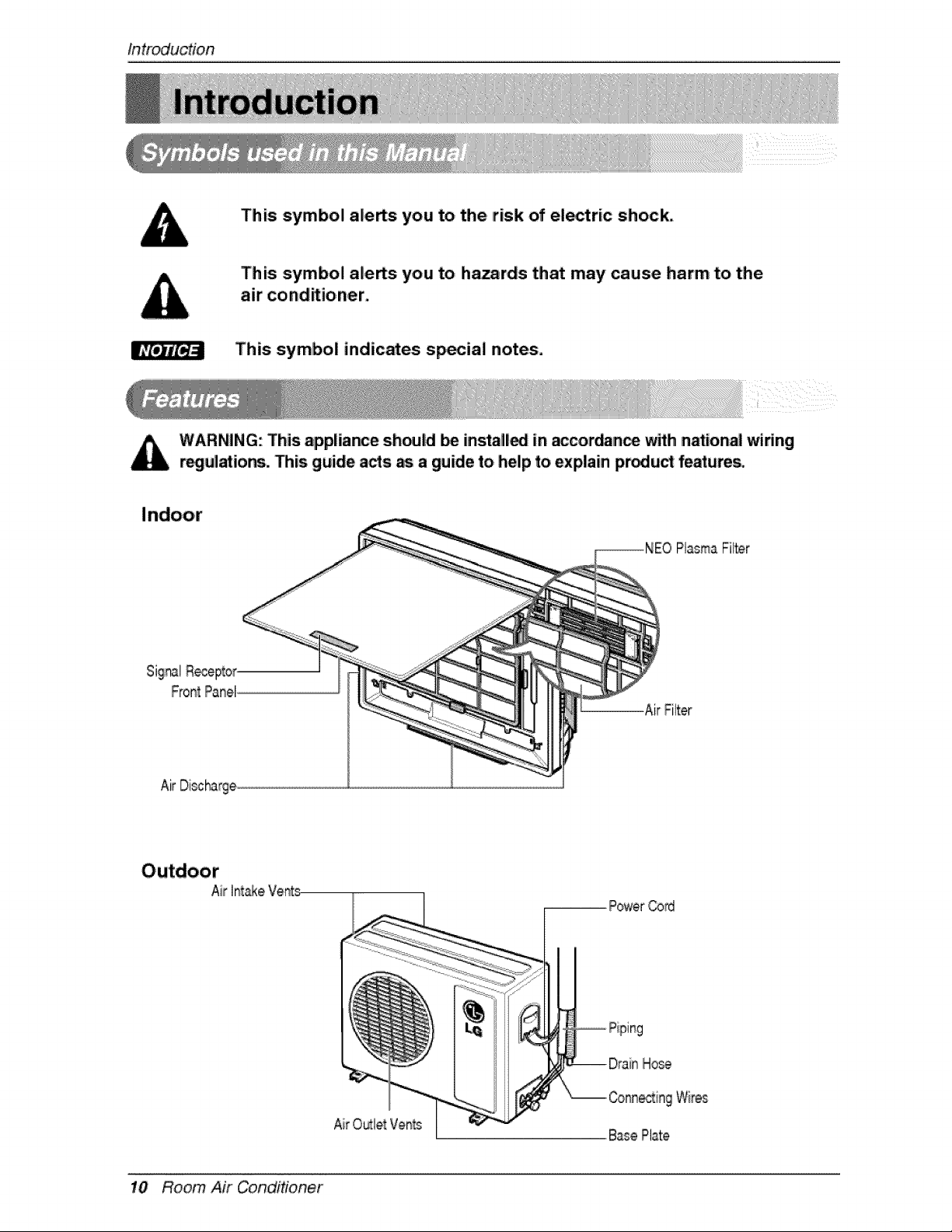
WARNING: This appliance sh_ld Ibe insta_l_ in _cordance with n_:ional wiling
r_ulations. This guide a_s as a guide to help to explain pmdu_ fe_ures.
PlasmaFilter
FrontPanel
-AirFilter
AirDi_harge
Air
Air O_le_ Vents
10 Room Air Conditioner
Electrica!Safety"
This appliance must be pro_rly grounded.
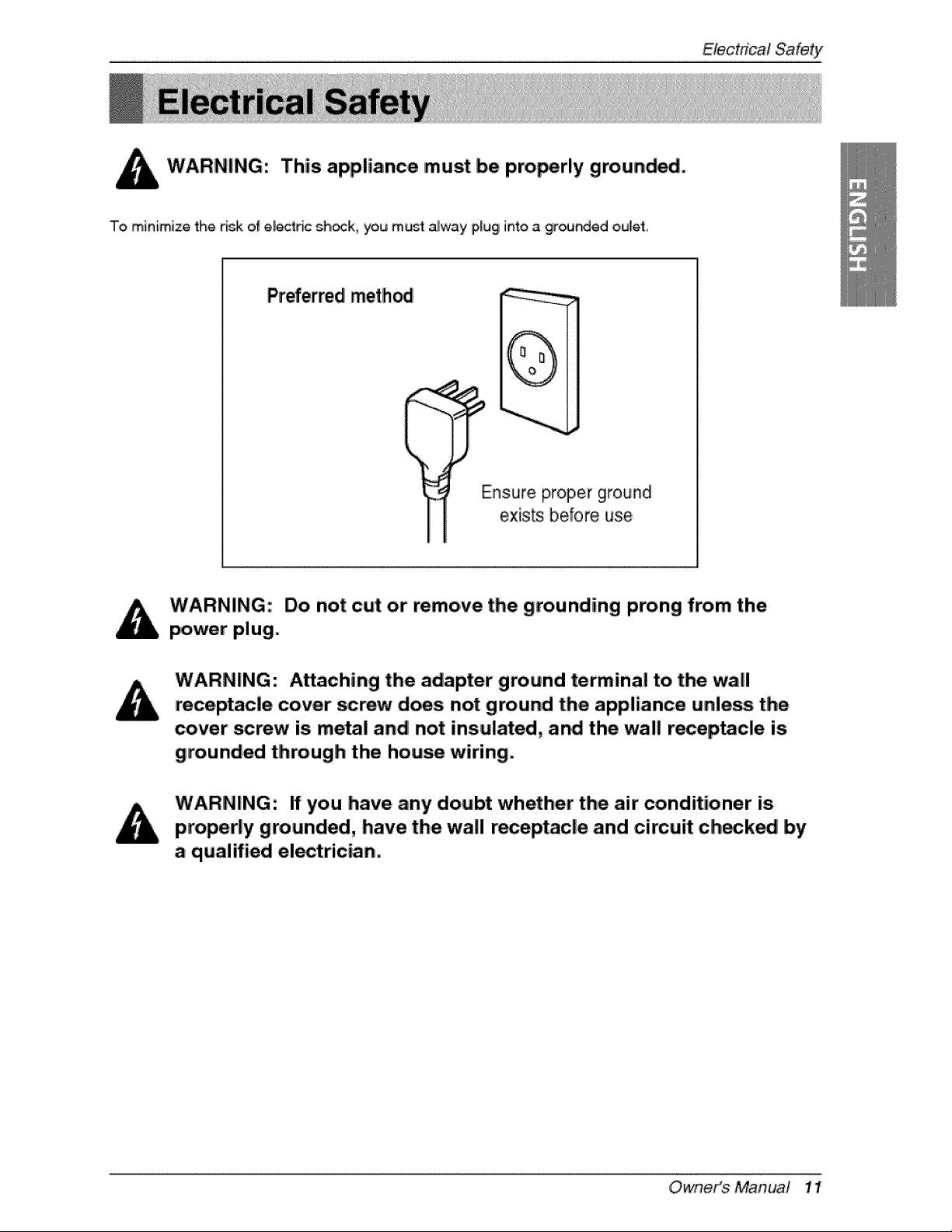
To minimize the risk of el_ric sh_k, you must alway plug into a ,grounded oulet,
Preferred method
(
Ensure proper ground
exists before use,
Do not cut or remove the grounding prong from the
power plug.
Attaching the adapter ground terminal to. the wall
receptacle cover screw does not ground the appliance unless the
cover' _rew is metal and not insulated, and the wall receptacle is
grounded through the hou_ wiring.
If you have any doubt whether the air' conditioner is
properly grounded, have the wall receptacle and cimuit check_ by
a qualified electrician.
OwneiKs Manua! 11
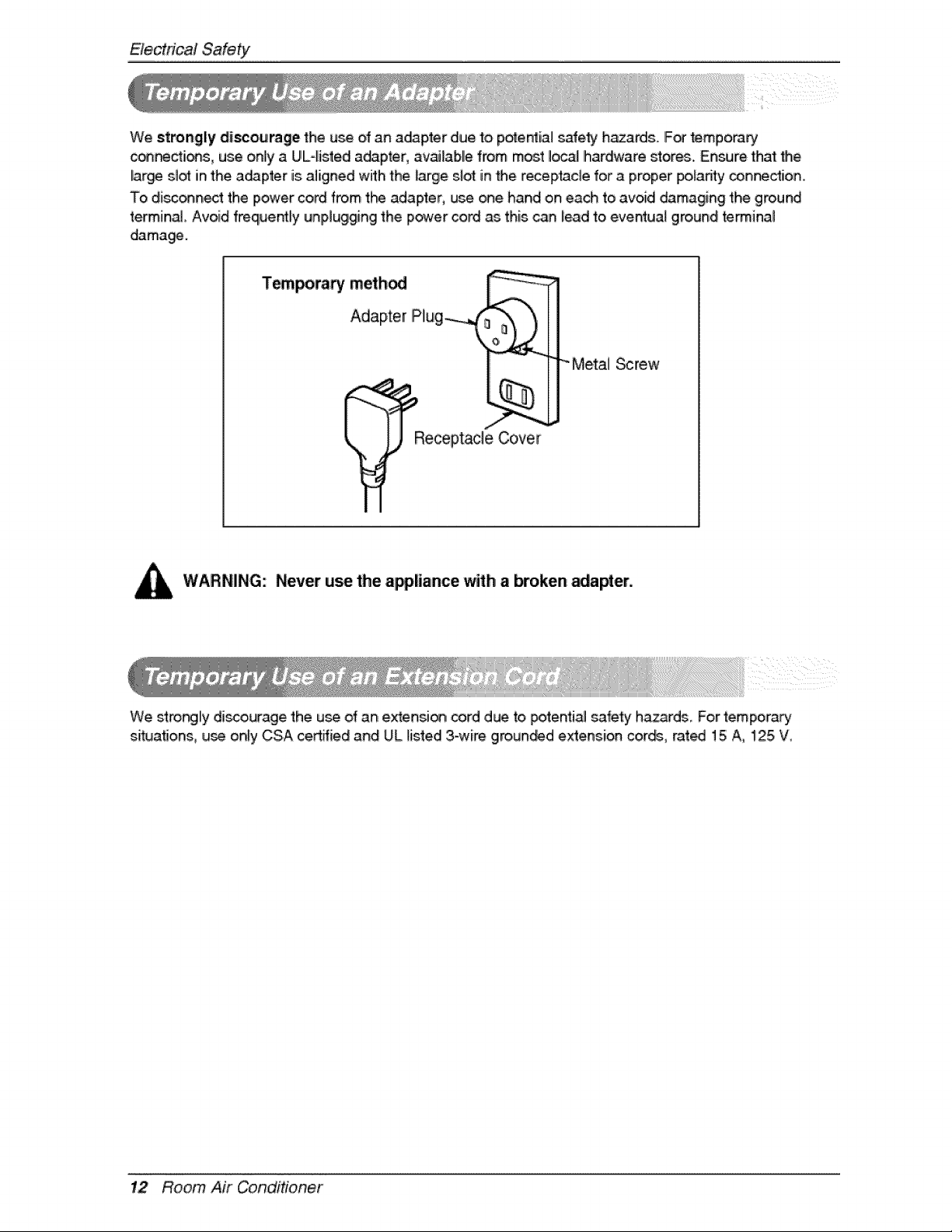
We strongly disco,urage the u_ ,ofan a_pter due to pote_ial safe_ hazards. IF_ temp,orary
(>_ctions, use only a UL4istedi a_pter, available from most Ioc_ Ihardware stores.. Ensure that _e
lar_ st_ in the a_pter is aligned with the large slot in the rece[ptacle for a proper po_adtyconnection,
To disc_nect the power cord from t_ adapter, use one hand on each to avoid damaging the ground
terminal Avoid freque_ly unplugging the power cord as this can lead to eventua_ ground retinal
damage.
T_poraP! method _ _
Plug i m
R_eceptacle Cove_'_r
" Me,_] _rew
WARNING: Never use the appiiance with a broken _apter.
We stro_ly discourage the u_ of an extensi_ cord due to _tentia! safety h.azards, For tempora_
situations, use only CSA certified and UL listed 3-wire grounded extension cor_, rat_ 15 A, 125 W
12 Room Air Conditioner
Operatic Instruct,_ons
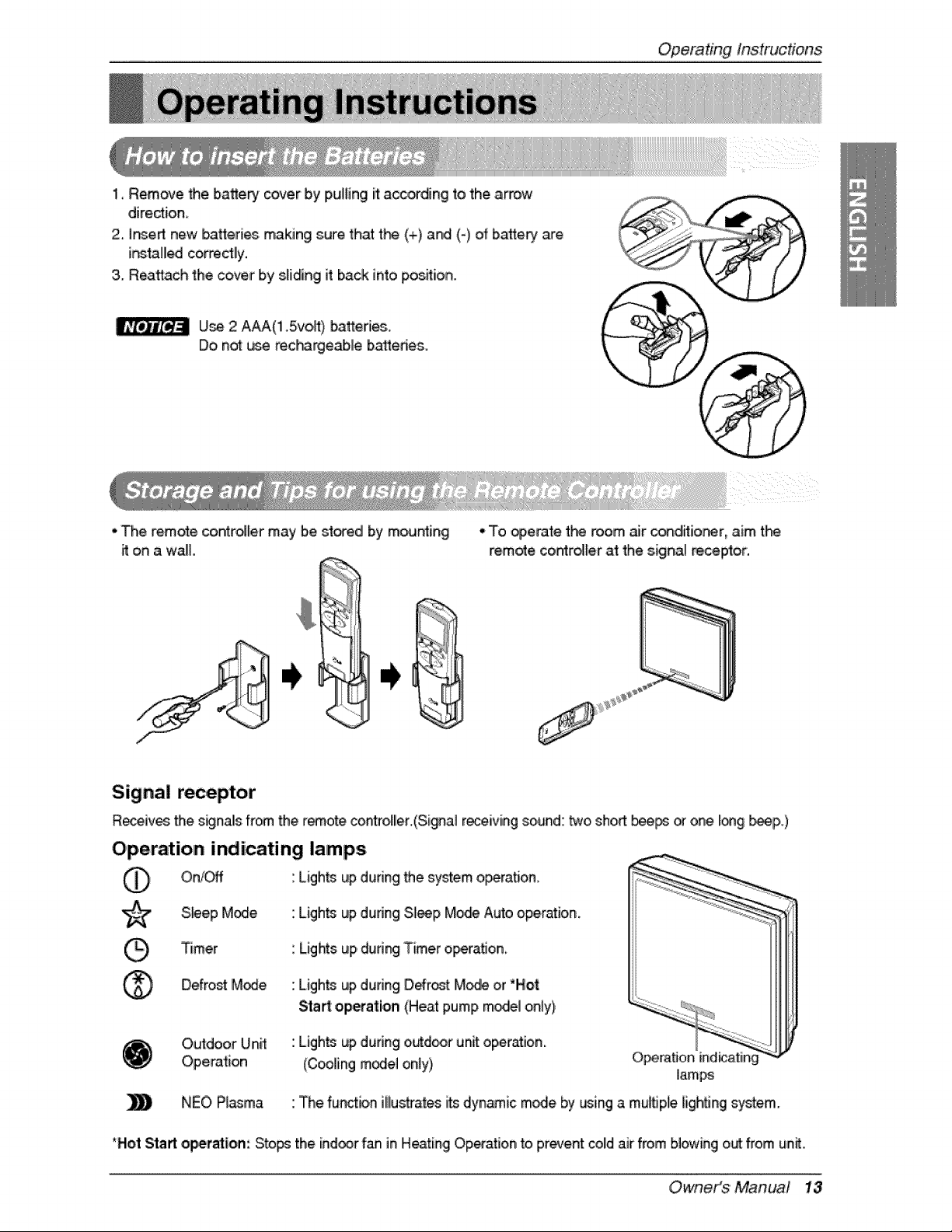
1, Remove the batte_ cover by Ipulling it acceding to the arrow
diredion
2, insert new batteries making sure that t_ (+) and (-} of batte_ are
ir_tal_ corre_lly.
3. Reattach the cover by s_idinglit back into pos_ion.
U_ 2 A_('l1.5vo,P,) batteries..
Do not _.._ereci_rgeab, le b_edes.
• The remote coin_tr_lermay b.e_o_edl by mousing
it on a waE
•.To _,e._te the room i_r' condHiorer, aim t_
remote, co_ro_ler at the signal _ceptor.
Signal receptor
Re-ceiv_ the s_nals from _e r_.ote cont_oller.(Signal r_eiving sound: _o. sho_ bee_ _ one I_g _p,.)
Operation indicating lamps
On/C_f Lights up during _e system o_ra_on
S._ep M_e. Ligh_ up dunng Sl_p Mo,_ Auto operation.
Timer
Defro_ M_e
Orutdoor Unff
Operation
NEO,Plasma
Lights up dudng Timer operation
Ligh_ up dudng Defrost: Mode or "Hot
Sta_ o,p_alion (Heat pump mode_on_y),
Ligh_ up during oL._doorunit operation.
(Cooling model only} Operation
_iamp_
The function illustrates i_ dyn_ic mode by using a mu_ple ligh_ng system.
*Hot Start operation: Sto_ the ind_r fan in Heating Operation to, prevent coldair from blc_wingo_ from un_.
Owneit_$' Manua! 13
Op'eratJngInstructions
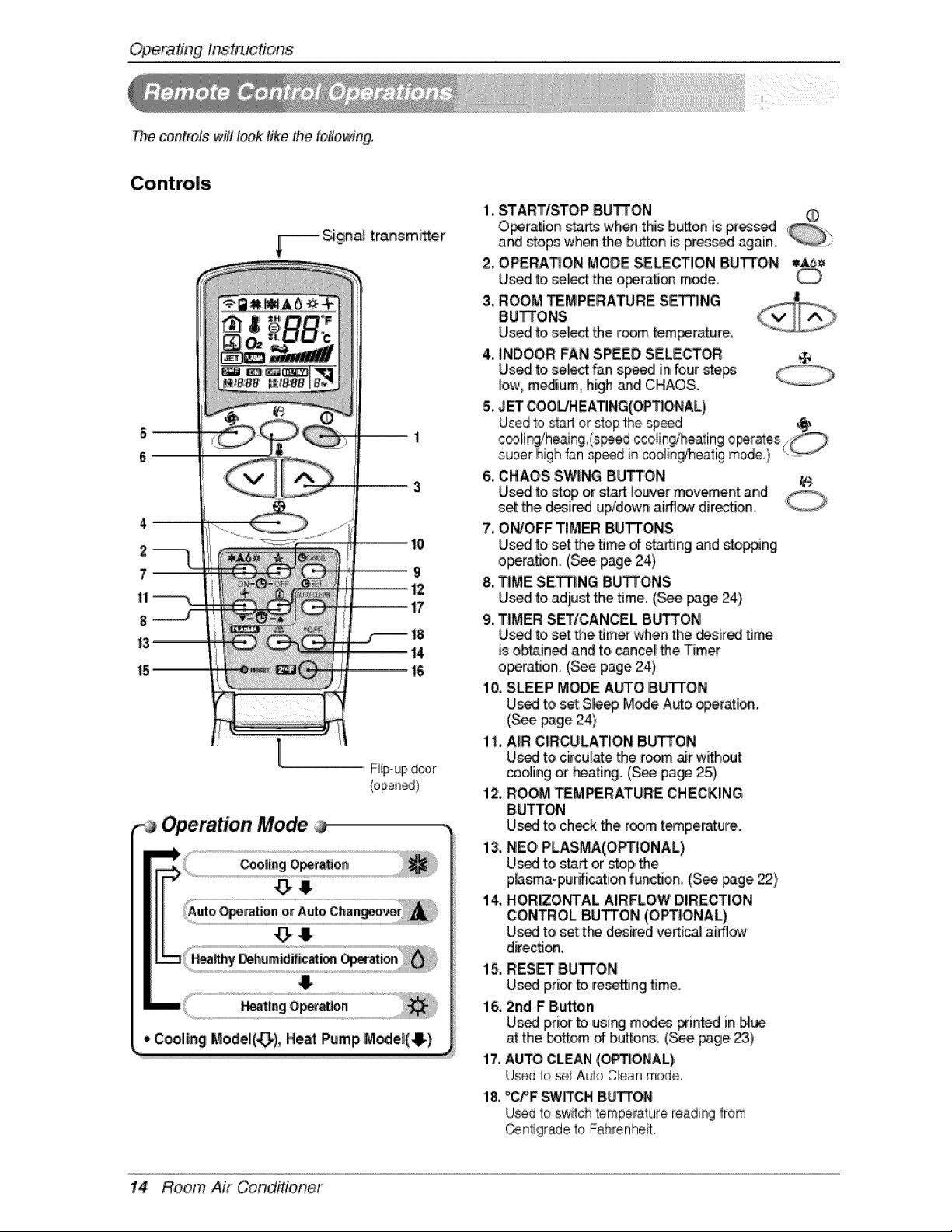
The controls wil! look like the following.
[
,-a Operation Mode
1. START/STOP BUTTON
O_ratio, n _ wh_ this biL_onis p,r_sed
and _ops when the b_on is _essed again, i
2, OPERATION MODE SELECTION BUTTON
Used to select the o_tation m_e_
3. ROOM TEMPERA_RE S_NG
BUTTONS
Us_ to select the r_m tem_rature,,
4. INDOOR:FAN SPEED,SELECTOR
Us_ to,select fan speed in fo,ursteps
low, m_ium0 high _d CHAOS°
5, JET COOL/HEATING(OPTIONAL)
6. CHAOS SWING BUTTON
Uis_ to,_op or start iou!vermovement and
set the d_ired up/down ai_ dire_ion,
7. ON/OFF TIMER BUTTONS
Us_ to,set the time of starting and stop#ng
o_rafl,on. (_e page 24)
8, TIME SETTING BU_ONS
Us_ to,adiust the time. (._e _ge 24)
9. TIMER SETICANCEL BUTTON
Us_ to,set the _mer'when the desired time
is obtained and to, c_ce! the Timer
o_ra_on, (_e page 24)
10, SLEEP' MODE Ab_O IBUTTON
Used to set Slle_ M_e A_o operation.
(S_ page,24)
1I, AiR CIRCULATION BUTTON
U_I to circulate the room air without
co_ing or _ating. (See page 25)
12. ROOM TEMPERATURE CHECKING
8,UTTON
U_I to check the room t_perature.
13. NEO PLASMA(OPTIONAL)
U_ to sta_ or step the
p,Asma-purification funstio,n_(S_ _,ge _),
14, HORIZONTAL AIRFLOW DIRECTION
CONTROL BUTTON (O,_|ONAL)
U_ to set t_ desired vertica_ai_¢_
direction,
15. RES_ 8U"R'ON
U_ p,ri_ to rese_ing time.
l& 2nd FSutten
U_ pri_ to ,usi[_ mod_ printed in blue
at the Ibott_ d: buttons, (See _age,_}
17. AUTO CLEAN (C_I'IONIAL)
Usedto se4tAulo Cleanmode,
18. _C/_FSW_CH BUi_ON
U_d to switch temperalure Ieadi_ from
Cenligradeto Fahrenheit,
14 Room Air Conditioner
OperatingInstrucfons
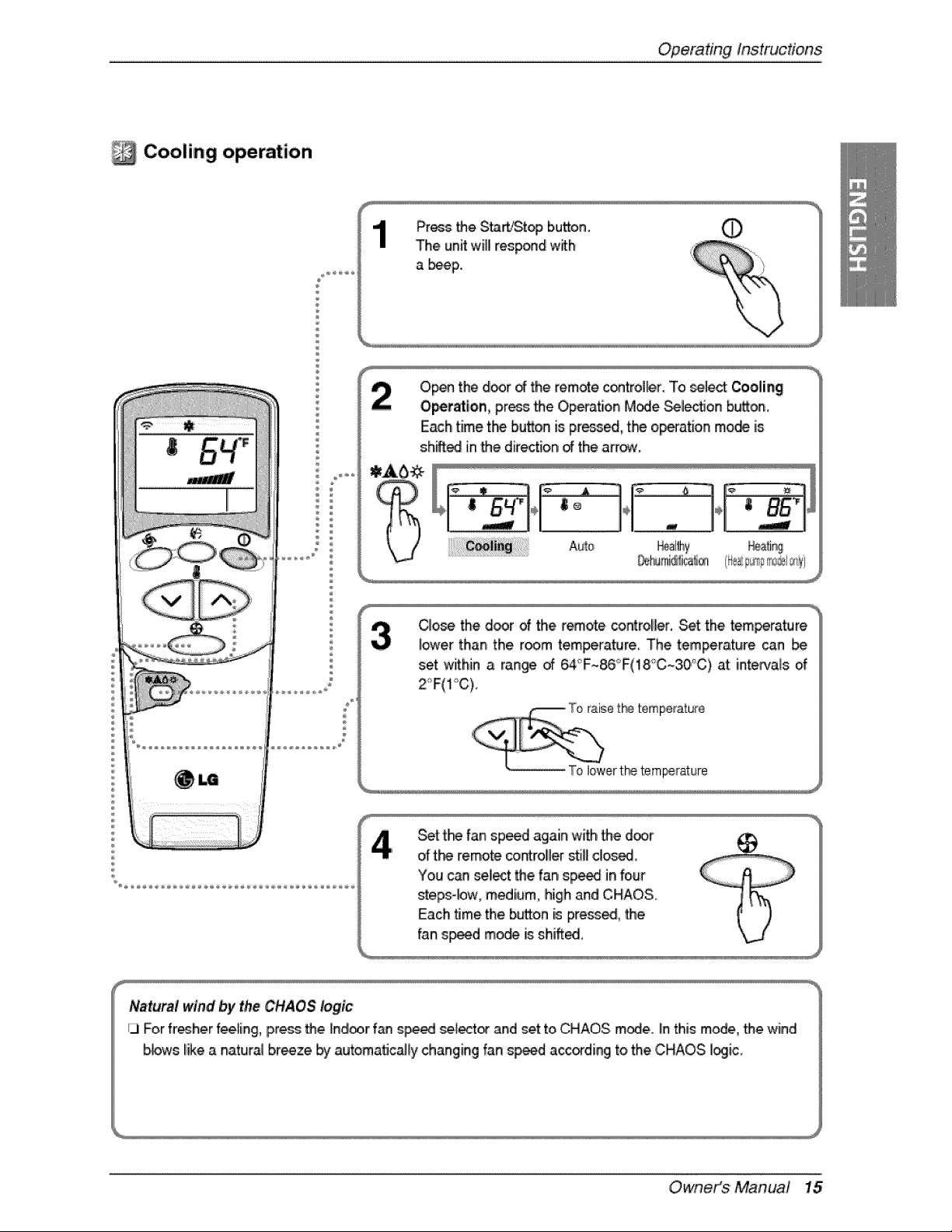
Cooling operation
÷
Pros _e S_!Stc_3 i button. 0
The unitwill resp_d with
a b_p.,
O,p_ the d_r _ the remote,control_r. To _1_ Cooling
Op,etatlon, pros _e O,pe{-ationM_e _lection b_on,
Each time the button is pr_, the op_ation mode is
shiff_ in _e dire_ion of the arr_.
(_ ling y r_
%
CIo_e the d_r of the remote _roller. Set the tem_rature
i_er than the room tem_rature The temperature _n [be
set within a ran_ of 6,4_F~86°F(18_C~30°C)at intervals of
2<'F(1_C).
Set t_ fan sp_d again with _e d_r
of t_ remote controller still dosed,
You can seliectthe fan sp_ in four
steps-bw, medium, high and ,CHAOS.
Each time the button is press_, _e
fan s_d m_ isshiff_,
/Vaitural wind by t;heCHAOS logic
ij For fresherfee_ing,press _e ino_oorf_ s_ed sel_t_ and _et to CHAOS m_e. Iinthis mode, the wind
bbws like a natural braze by _toma_ca_ly changing fan s_d a_ding to the CHAOS i_iic,
Owneit_$' Manua! 15
Op,eradngInstructions
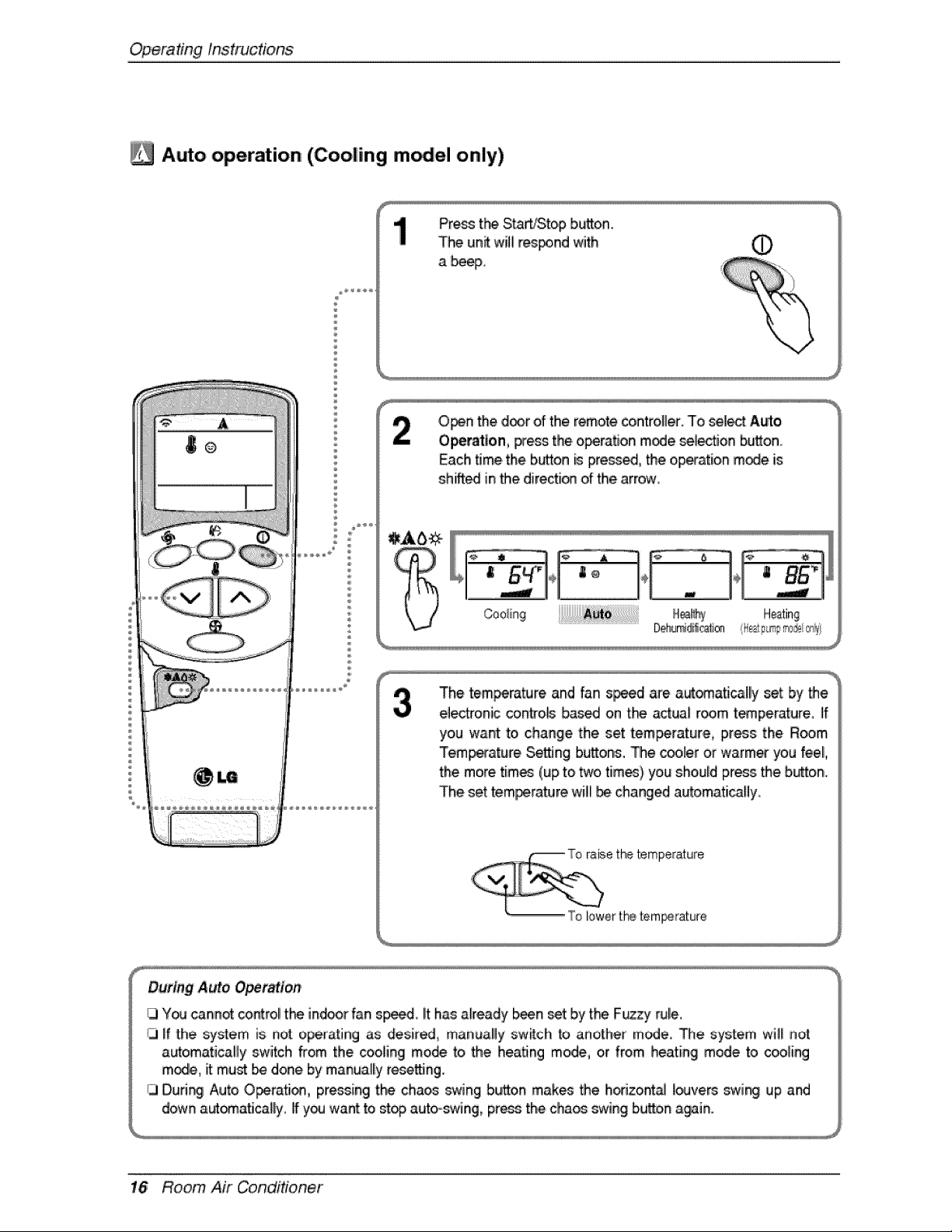
A_o operation (Cooling m_el only)
Press 'tt-_ Start/Stop b_o,n.
The un_ will r_poind 'with @
a beep,
Open the d_,r of the remote controUer.To select A_o
Operation, press the o_atJon mode selection button
Each time the button is pre_ed, _e oip_atioin mode is
shifted in the directi_ of the arrow
The tem_rature and 'fan s_d are a_omatically set by _e
electronic contro_ b_sed on the actual room t_perature, if
you want to, change the set tem_rature, press the R_m
Temperature Se_ng b_ons. The c_ler or warmer you feel,
the more tim_ (up to two tim_} you should press the button.
The set temperature will _ changed automati_Uy.
e t_ temperature
To lowerthe tem_rature
16 Room Air Conditioner
OperatingInstrucdons
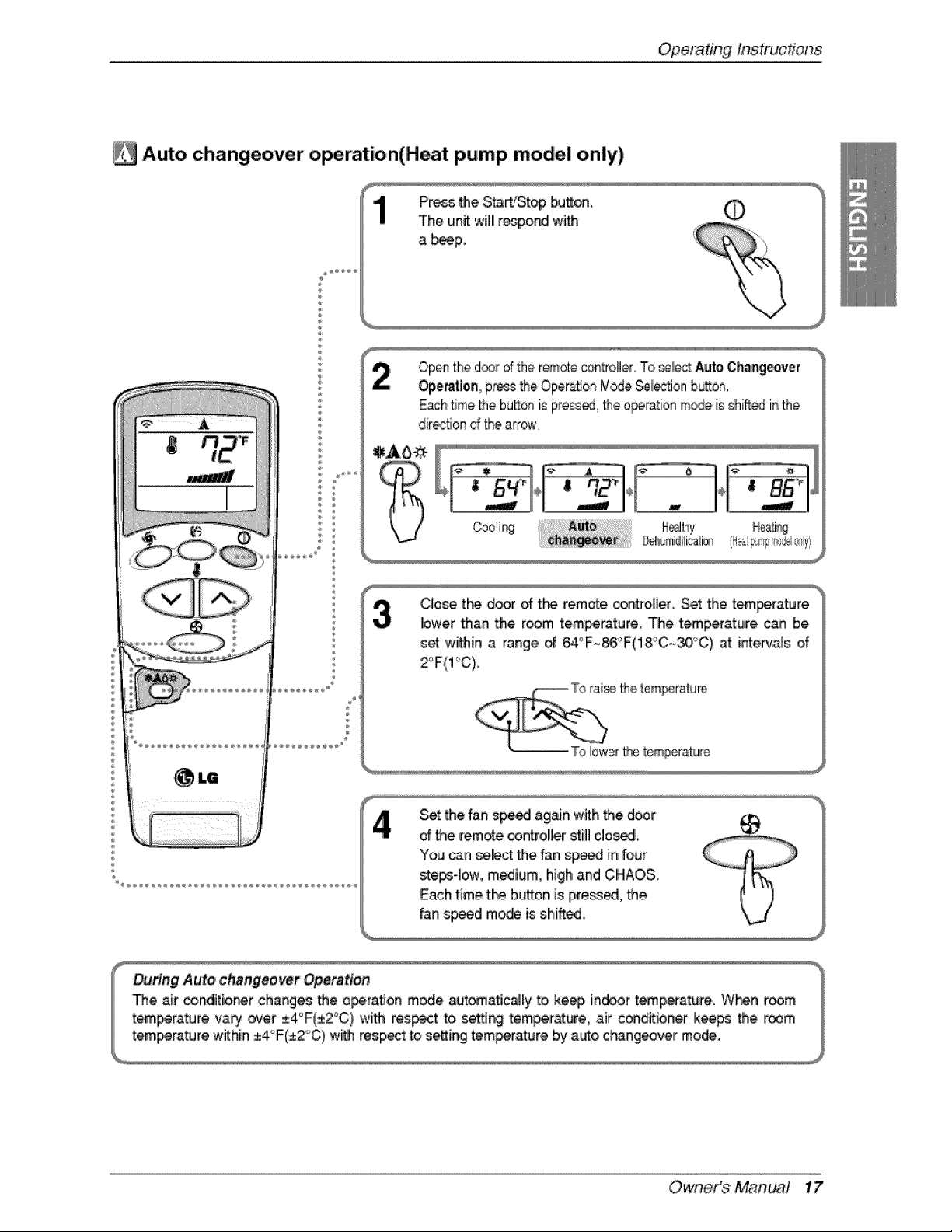
[_ Auto changeover operation(Heat pump model only)
,iiJ
÷
Press the S_WStop butt_.
The unit willlr_po_ with
a _p,,
©
Openthe d®r ofthe r_,ote _ntroller,,'To_lec_ A_to,Changeover
Op,er_tion pressthe OperaSonModeSe_tion bu_on,
EachBrae_e bu_® is press_, _e ,0perationm_e is shift_ inthe
dir_on d _e arr_,
Coolir_ NeaJff_y H@Jir_
CIo_ tl"_ d_r of the remote conffoller. Set the tem_rature
lower than the room tem_rature. The temperature can be
s_ wi_in a range of _°F~_°F(18°C~30_'C) at intervals o,f
Set _e f_nsp_ ag_n wffh 'the door
d the remote co.roller still do_.
You can select the fan sp_ in four
ste_-Iow, medium, high and CHAOS.
Each time t_ b,_on is p,re_ed, the
fan speed m_ is shifted.
Owneit_$ ' Manual 17
Op,eradnginstructions
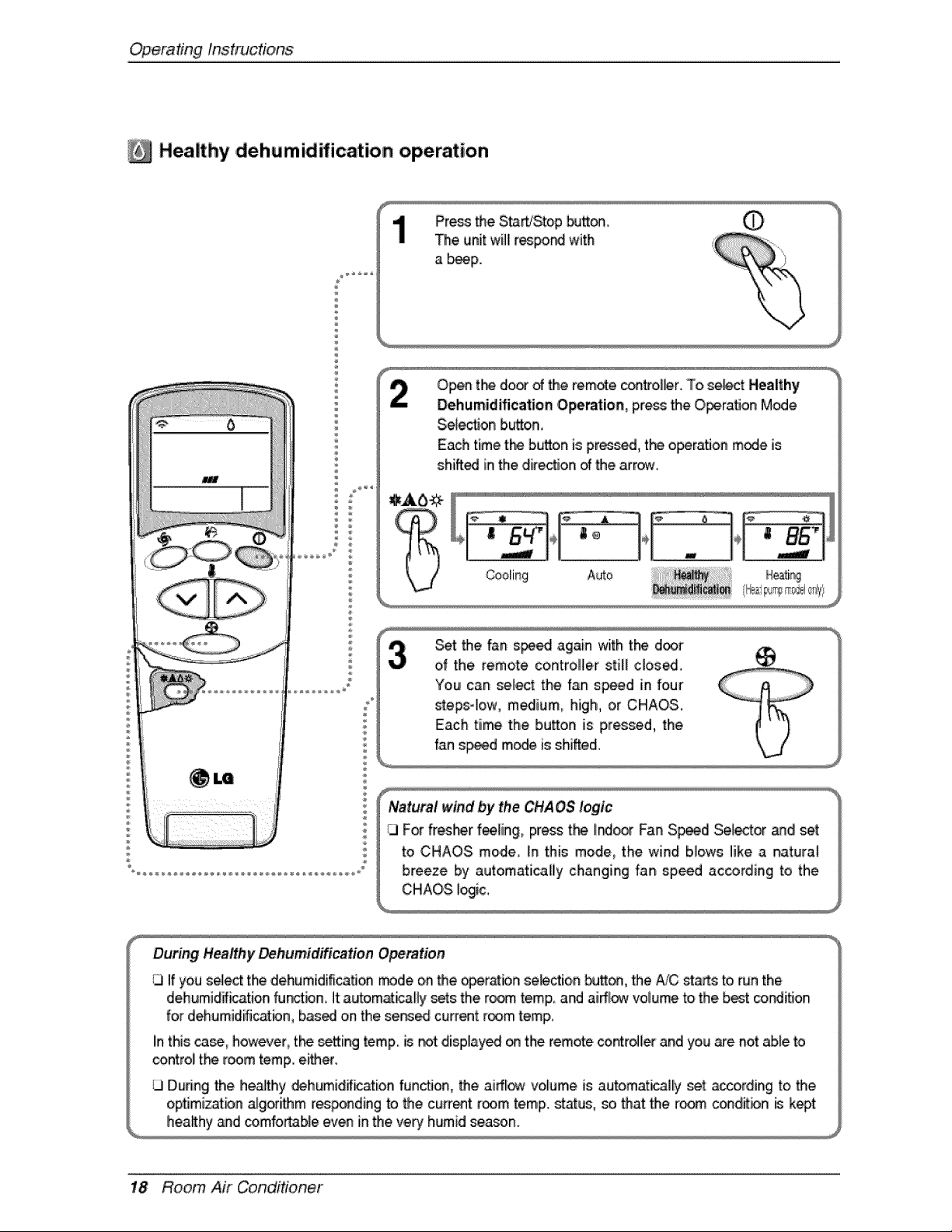
Healthy ,d,ehumidification operation
®
®
Press the S_WStop _tt_
The unit will[r_po_ with
a _p.
Selection b,_on0
Each time the bu_to,nis pr_d,, the opera, on m_e is
shift_ in the ,direc'5on_ the arr_rw.
J
_t the fan s_ again with the d_r
of the remote controller still close..
Natural wind by the CHAOS logic
CI For fresher fee_ing, press t_ I_r Fan S_d _[ector _d set
to CHAOS mode, _nthis mode, the wind biows like a naturat
breeze by automaticaliy changing fan speed according to the
CHAOS _ic,.
During Healthy _humidification O_ra, tion
1.3If you s_ect the dehumidification trade on the op,era_bnseb_ion _on, the #JC st_s to, run the
dehumidff_ation fu_bn, it autom_icaHy sets the ro_ temp and aiff_ volume to the best _ndiflon
for dehumidific_bn, based on the served current room temp.
Iinthis _, however, tl"_ _etting temp. is n_t disp_ay_ _ the remote controller and you a_enot able to
control tl-_ room temp either.
During the healthy _humidif_ation function, the airflow volume is automatically set according to the
optJm,iz;atbnalgorithm res_nding to the cu_ent room temp., status, _ that:the room c_ditbn _ kept
h,eaRhy_d comfortable even in the very humid season.
18 Room Air Conditioner
OperatingInstrucdons
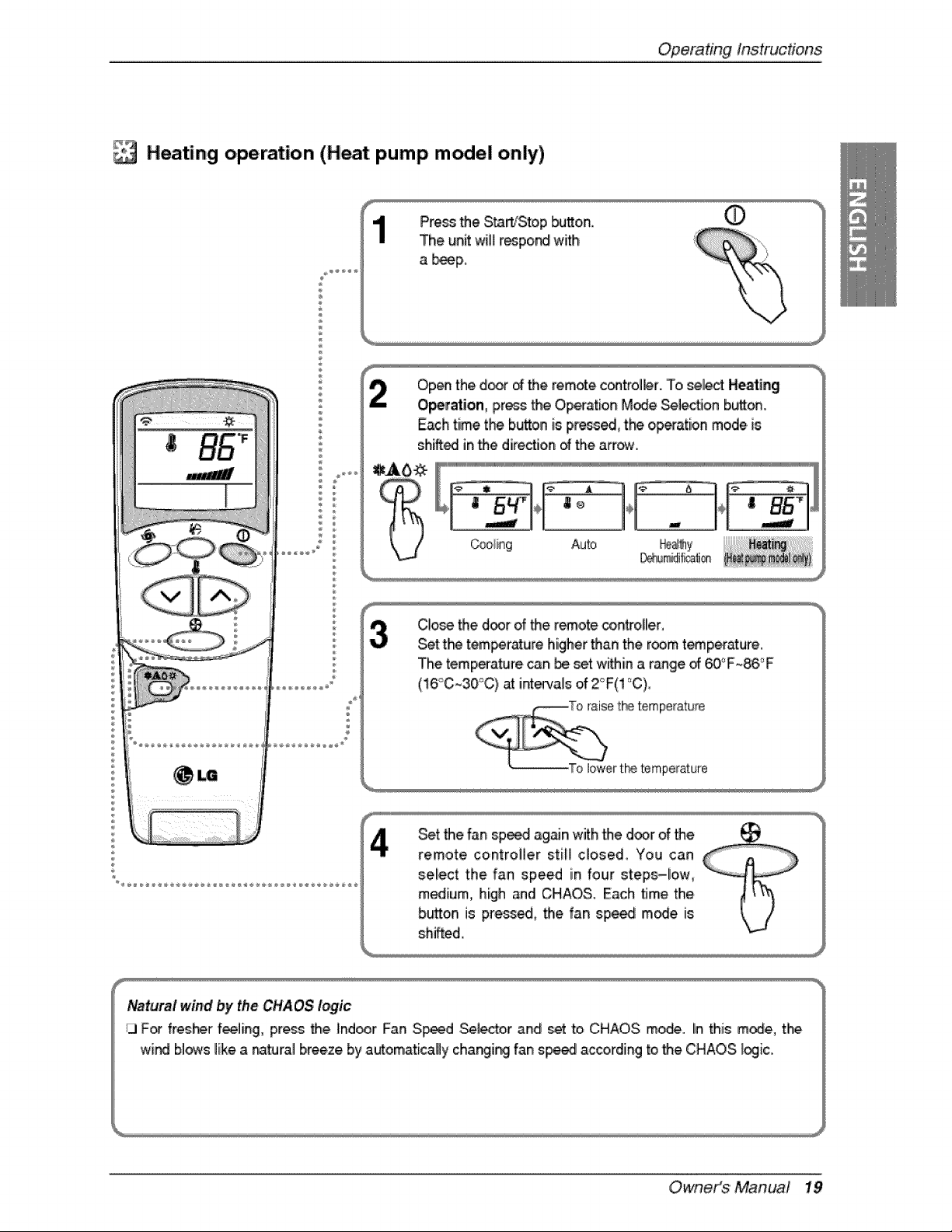
_#;_Heating operation (Heat pump model only)
Pre_ the S_'Sto,p _o,n,
The unit wit_r_po_ with
a b_p_
Op_ the door of the remote c_trol_r.. To _lect Heating
O_ration, pressthe O,p_ation M_e _lecflon button,
Each time the button is press_, tb_ op_ation mode.is
sh_edl inthe direction d the arrow.
E[ i_i[#l#li[#lilililililililil_/e_!l!_O)I/e
_ir_g Auto He_N_
D_dif_li®
ClO_ _e d_rof _e remote controller,
Set t_ 'tem_rr_ure higher'than the room t_perature..
The temperature can be set within a r_ge d _°F_86,°F
(!6'_C~30°C} at inte_,als of 2_F(! °C),
Set the fan sp_.d ag_n with the door of the
remote controller still c_osed, You can
sel!ect the fan speed in four steps-low,
medium, high and CHAOS. Each time the
b_tton is pre_ed, the fan spe_ m_e. is
shifted,
Owneit_$ ' Manua! 19
Op,eradngInstructions
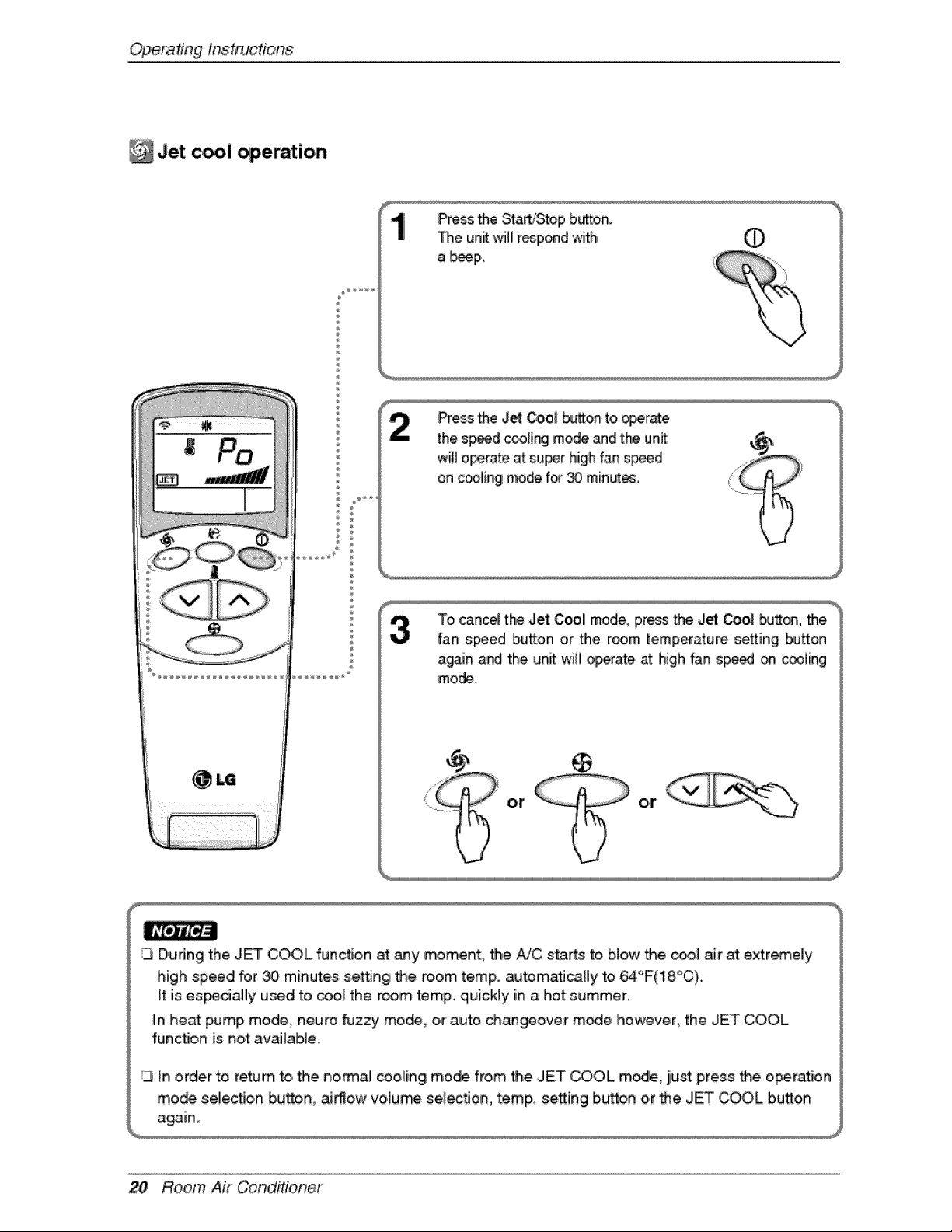
Jet operation
®
Pressthe Starb'Stop button.
The un_ willirespond with O
a _IP,,
Pressthe Jet Ooo_bu_on to _r_e
the sp_d cc_[i_ mode _d the unit:
will operate at su_r high fan s_d
on cooliingmode for 30 min_es°
To cance4the Jet Cool mode, press the Jet ,_o| butt_, the.
fan speed button or the room temperature setting button
again and the unit will o_rate at high fan s_ed on _ling
mode.
or ot
_3During the JET COOL function at any rr#ment_ the AiC starts to blow the c_ air at extremely
high speed for _ minutes setting the room temp. automafi_Hy to 64_F(18,_C).
_tis es_ciaHy used to _ol the room temp. quickly in a hot summer.
_nheat pump mode, neuro fuzzy mo_, or auto changeover m_e however, the JET COOL
function is not available,
3 in order to ream to, _e normal coolii_g mo_ from _e JET COOL modle, iL_stpress _e o_ration
mo_ selec_o,n bu_o,n, airflow vola_ .se_ec_on temp,,, se_ing bu_,on or the JET ,COOL button
20 Room Air Conditioner
OperatingInstrucdons
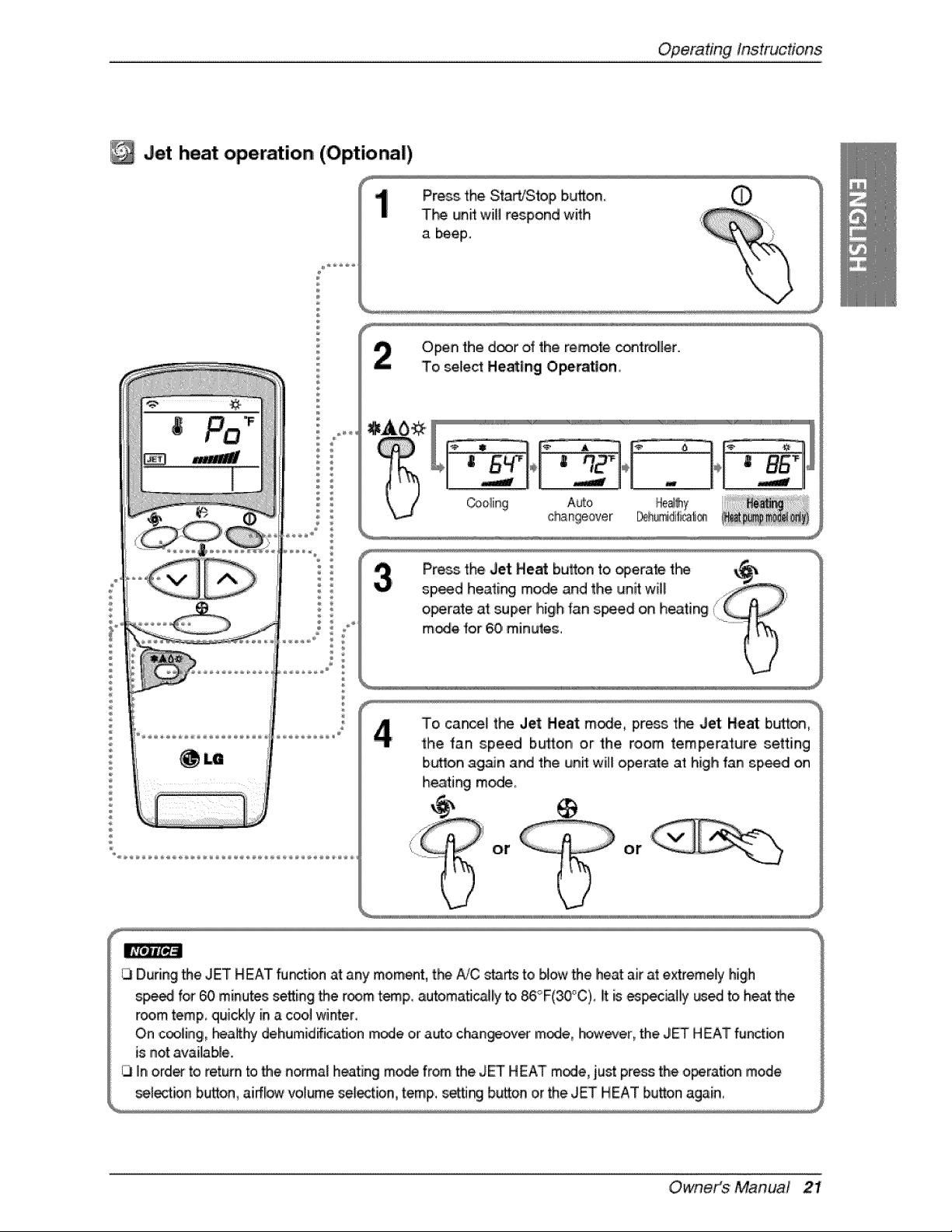
Jet heat operation (,Optional)
÷
1
Open the d_r of the remote controBer.
To select HeaUng Ope_Son
_1_ '__ ...... '................ '
Cooling Auto He_y
changeover _]_idif_a_i_s
To cancelt_ Jet Heat m_e, pre_stheJet He_ bu_:on,
the fan speed buttonor the, room temperature setting
Ib_on again at4 the unff will operate at high fan sp_d on
heating mi_e,
or or
Owneit_$ ' Manua! 21
Op,eradngInstructions
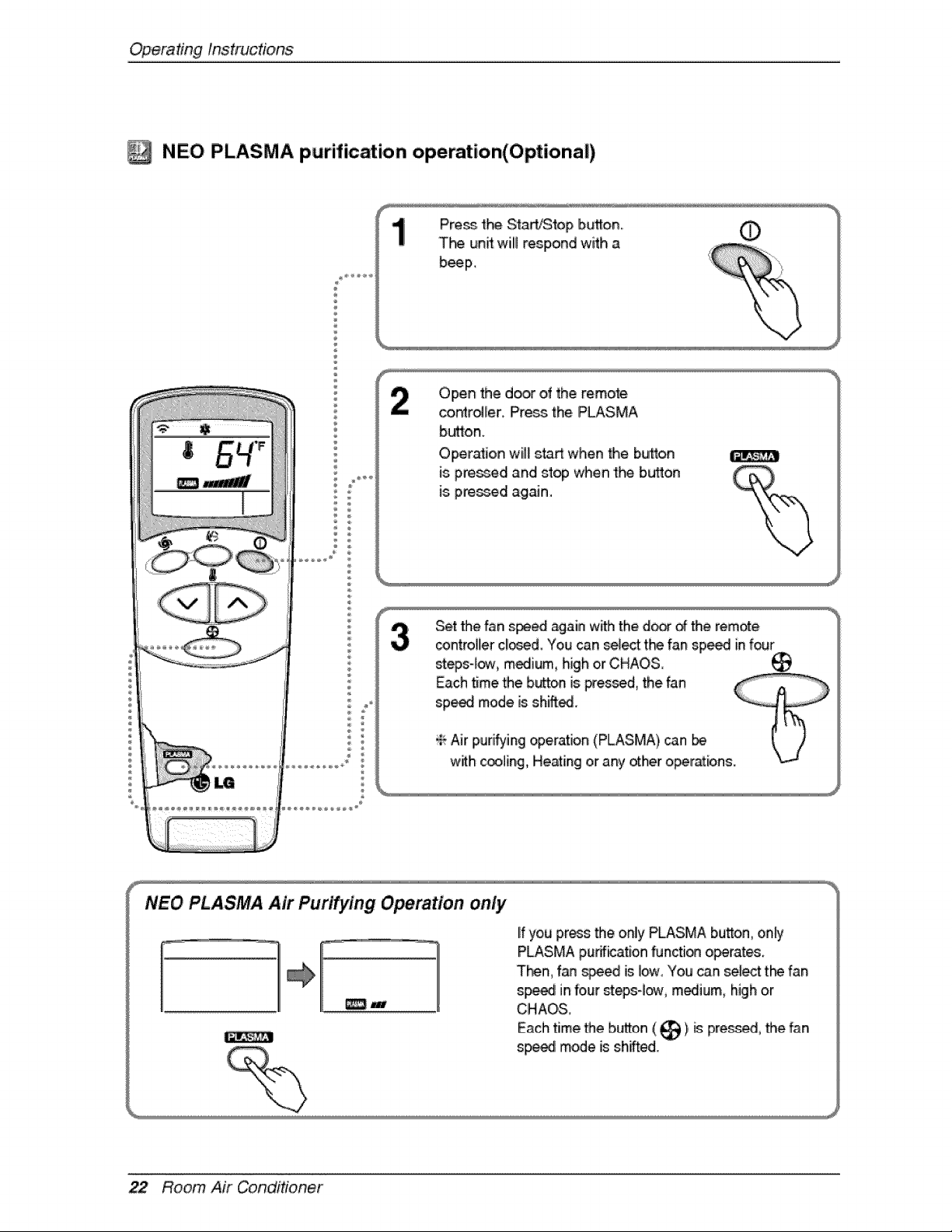
NEO PLASMA purification operation(Optional)
#
Press the StaWStop bL_,on_ 0
T_ un_ will respond with a
b_p.
OpeR the door of the remote
controller, Press.the,PLASMA
b_o,n.
Oper_ion wil_sta_ when _e button
is p,re_d and stop when 'the bu_on
is p,_d isgsJfi,
Set the fan s_ again wW_the d_r _ the rem._e
_ntrol[ler cllo_d, You can sel_t t_ fan sp_d in four
stegs4o,_, m_lium, high or CHAOS,
NEO PLASMA Air Purifying Operation only
_w
lifyou press _e onlly PLASMA bu_on, only
PLASMA purification functi_ o_rates.
T_n, f_n _e_ is Iow_You can _lect:t_ fan
speed,infour st_4_, m_ium, high or
CHAOS,
Each time _e bL_on ( _ ),_ pre_, the fan
sp_i mode is:sh,Aed.
22 Room Air Conditioner
OperatingInstrucfons
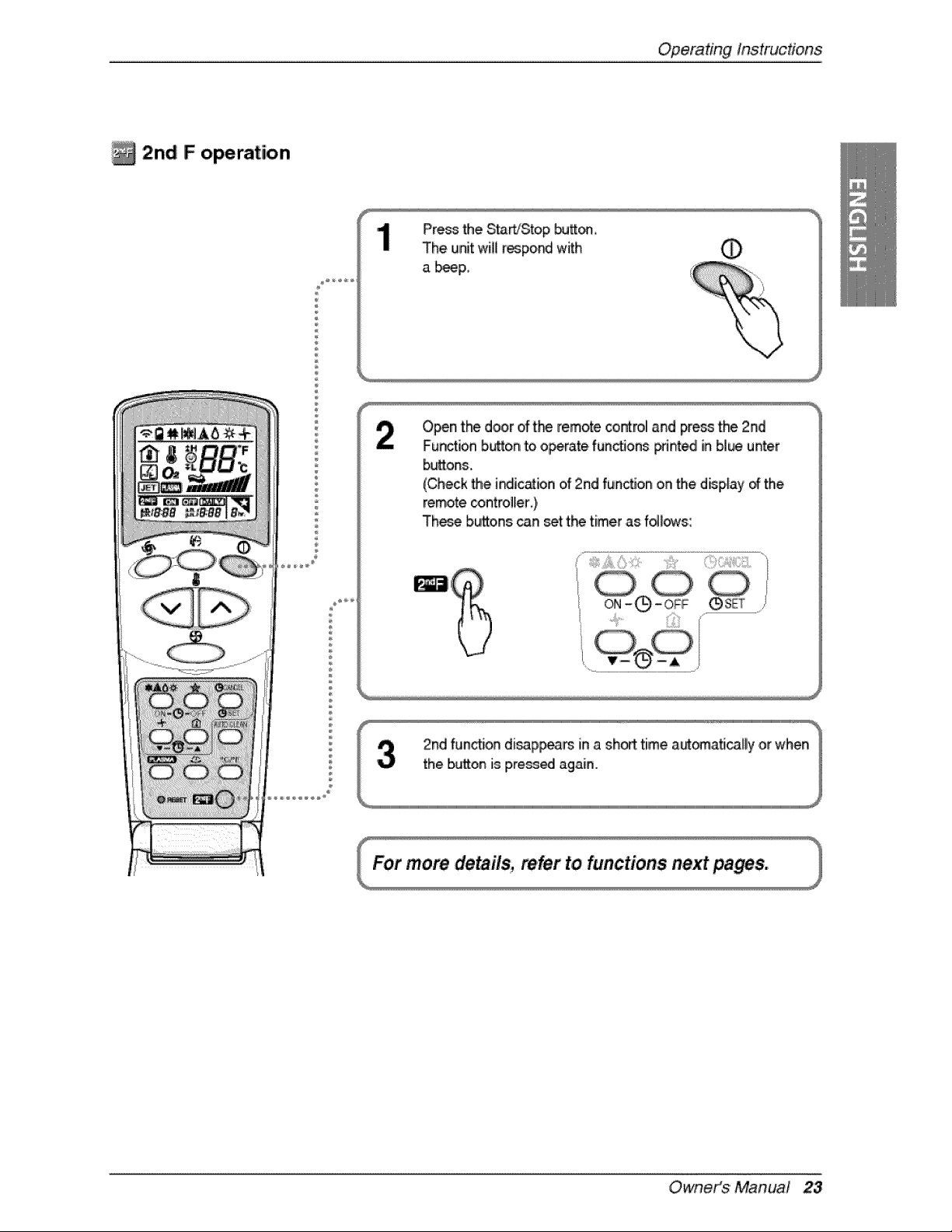
2n,d F operation
®
Pre_ the S_WStop bu_.
The unit will respo_ with O
a _p,,
%
Open t_ door of t_-_remote control and press the 2nd
Function button to o_rate fun_ons F_nted in bl_ u_er
buttons.
(Check _e i_ic_bn of 2nd funcSon on the disp,_ayof the
remote _ntroller ),
These buttons can set t_ timer as f_s:
......_,!i_...... i!Zili
Owneit_$ ' Manua! 23
OperatingInst_ctions
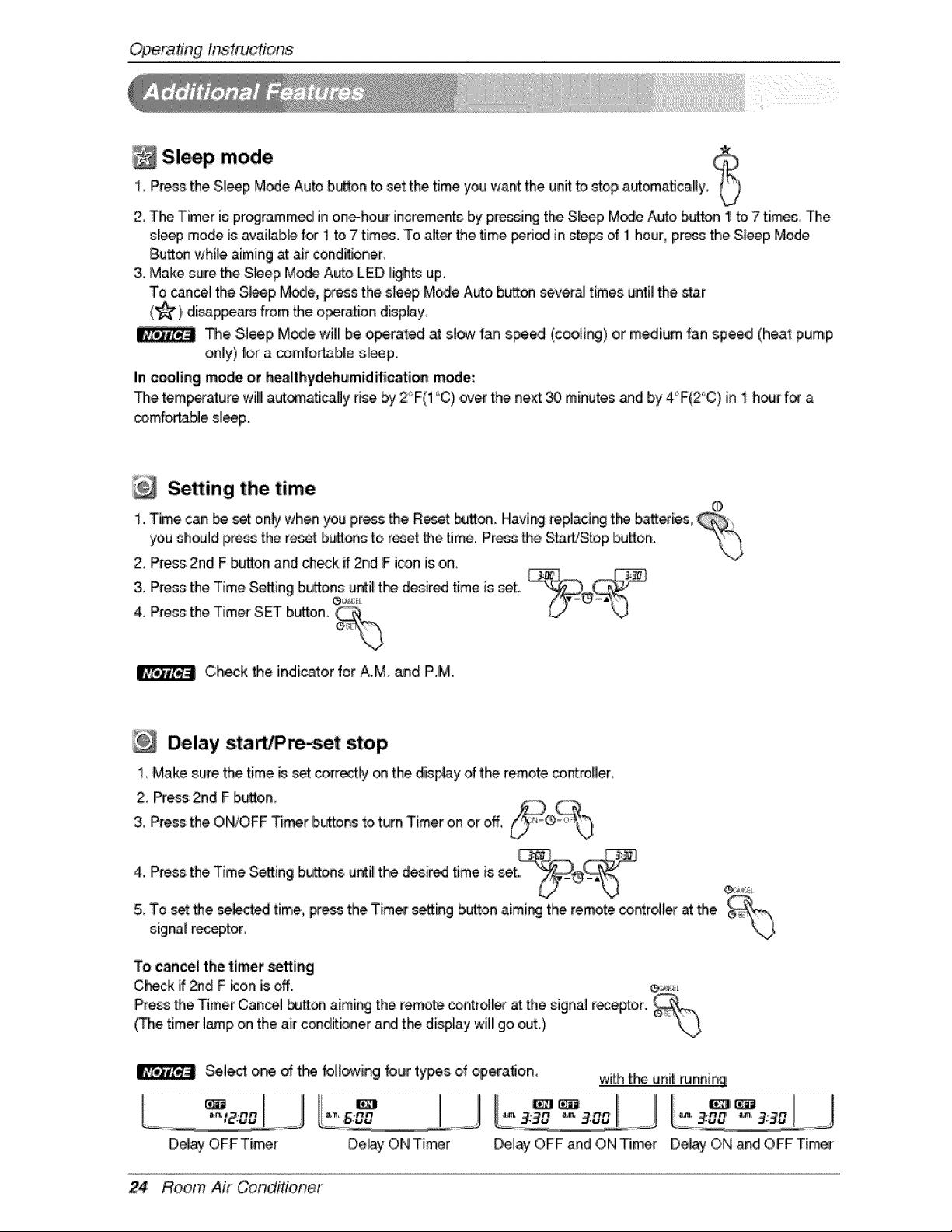
Sl p mode1_Press:the Sl_p Mode Auto b_o.n to set the time you want the unit to _op aut_a_cally_
2 T_ 'Timer is proglramm_ inone-hour increments by pressing the.S_ep M_e Auto button ! to 7 times_The
sl_p mode is avaiAb_ for 1 to 7 times. To,a_er the time _ in _,e_ of i hour, press the Sleep Mode
Bu_ while aiming at air conditioner,
3..Make sure the S_ep Mode Auto LED I_hts up.
To _nce_ the S_ep M_e, pros the s_e_ Mode Auto button severa_times until the _ar
(_) disa#ars from the operation disp.Ay°
The Sleep M_e will be operated at slow fan spe_ (coolie) or medium fan speed (heat pump
only) for a comfo_able sll_p.
In cooling mode or healthydehumid#ication mode:
The temperature willlautomatiically dse by 2°F(1°C) over the neA _ minutes _d b,y4'_F(2°C)in i hour for a
comfortable sl_.p.
Setting the, time
i. Time can _ _ only when you pressthe Reset button. Having replacing t_ b,at_eries,
youshouldpressthe reset buttons to, reset the time. Press the S_WStop _Jtto,n.
2, Press 2nd F b_on and ch_k if 2nd F icon is on,
3. Press the Time Setting buttonse,__u_iilthe desired time is _t.
4. Press the Timer SET button. _'°'_
Ch_k _e indicator for A.M. and P.M.
Delay s,tarb re-set stop
!, Make sure the time is:_t correctly _ the dis#ay of t_ remote controller
2 Press 2nd F button,
3, Pros the ON/OFF Timer ibutto_ to turn Timer on or eft, i
f
4. Press the Time Setting buttons u_iil the desired time is set
5 To set the seiec_ time, p_s the Timer se_ing button aiming the remote contriver at the
signal reseptoir,
\j
To c_n_l the timer _tt_ng
,C_ck if 2rid F _on is off. e,_;,,._
Pressthe Timer Cancel button aiming the remo_ controlller at the signal receptor. ¢
(The timer lamp on the.air c_dffioner andi t_ display will!go _t.)
Sele_ one of t_ fol_owir_ _our ty_s of _eration. w_ the un_ runni_!
Del_ ON Timer Delay OFF and ON Timer Delay ON and OFF Tier
24 Room Air Conditioner
OperatingInstructions
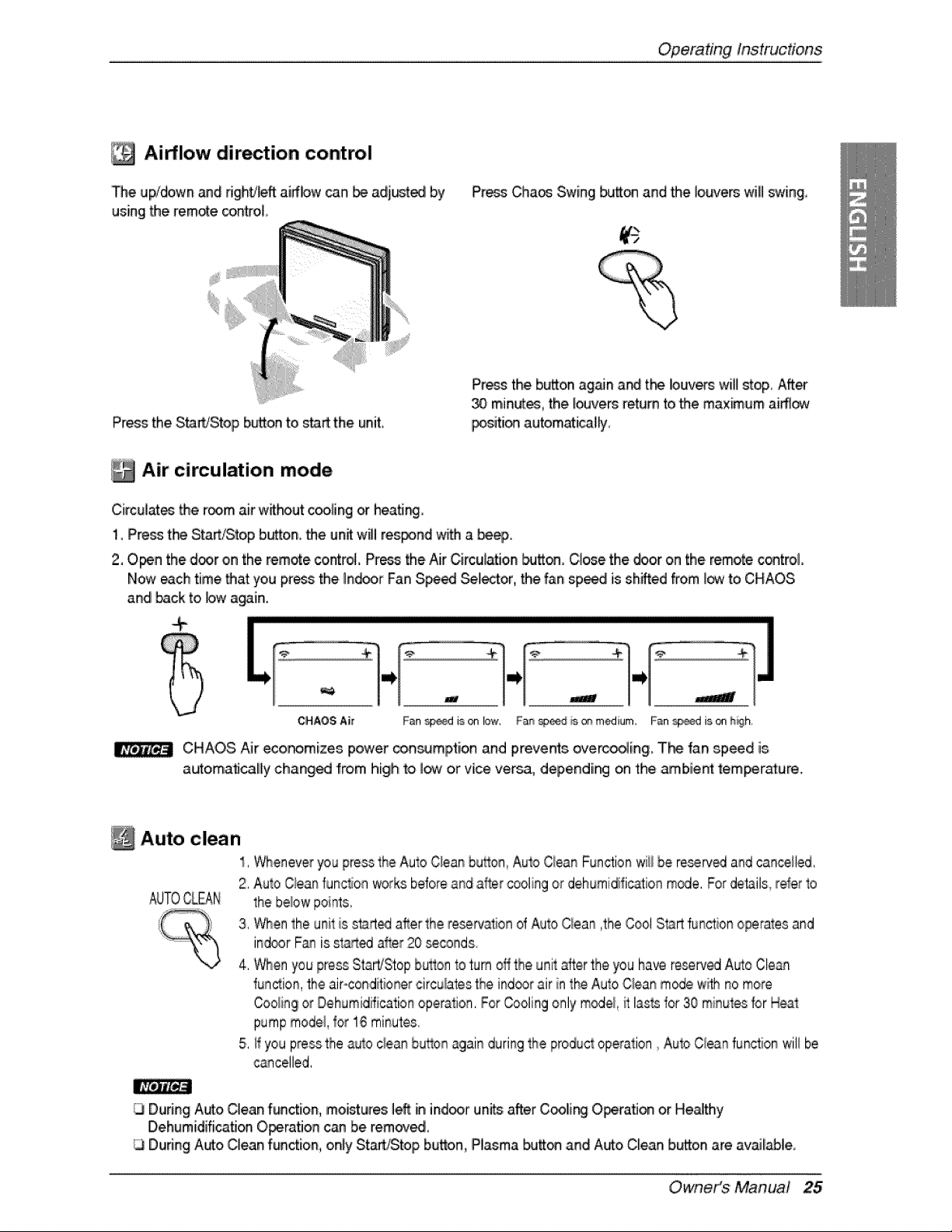
Airflow dir tion control
De Ul;x/downand Hghti_ft airflow _n _ adjured by
using the remote _ntro,t,,
Pre_ Cha_ Swing #Jtt_ and the Jo_/ers wifl swing,
Press the StaWStop b_on to start the uniL
Press the b_on ag_n a_ tP_ louvers will stop, After
minutes_the _vers return _othe maximum airfl_
_sition automati_#y
Air circulation mode
Circulates the room air wthout c_ing or heatJ_
1, Press t_ Start_top b_on, the unt will res_nd w_ a _,
2, Open the door on the remote control Pr_ the Air C;irculatioin_tton, C_e the door on the remote c®trol,
Now each time that you press the Indoor Fan S_ _lector,. the fan sp_ is shifted from J_ to CHAOS
and back to bw a_in.
.....................................................................................................................................................................................................................................................................................................................................................................................................................................................................................
" |! - |! --wl
CHAOS Air Fan _d is on low, Fa_ _@_d _s_ medium, Fan _d is on h_h,
CHAOS Air eco_mizes power _in_mption and prevents overc_ing. The fan speed is
automa_calily changed from high to low or vice versa, depending on the _b'ie_ temperature.
Auto clean
1, Wheneveryou pressthe AutoC!ean button,Auto Ciean Functionwii!be reserv_ and canceiled
2, Auto Qean func_onworks beforeand a_r _oling or dehumidificationm_e, Fordet_ils__eferto
the belowpoints,
3, When the uniFtis start_ after the reservationof Auto Qean ,the Cool Startfunction operatesand
ind®r Fan is ,st,a_d after 20 _conds
4. Whenyou press Start/Stopbutton to turn oflthe unit alter the you have re.fred A_to Clean
function,the air-condiitionetcircu_atestheind_r air in the Auto Cleanm_e with no more
Coo_ingor Dehumidificationoperation.For Coolingonly m_e/, i_tlass for 30 minutesfor IHeat
pumpmodel,_or1,6minutes.
5, _fyou pressthe auto cieanbu_onagain durir_gthe productoperation Auto Cieanfunctionwill be
cancelled,
During Auto Clean function, moi_ures left in indoor un_ after Coolir__O_ratJon or Heathy
Dehumidification Operation c_ be remove.
During Auto Clean function, only St_Stop button, Pl_ma butt_ and Auto Clean button are available.
Owneit_$ ' Manual 25
Operating Instructions
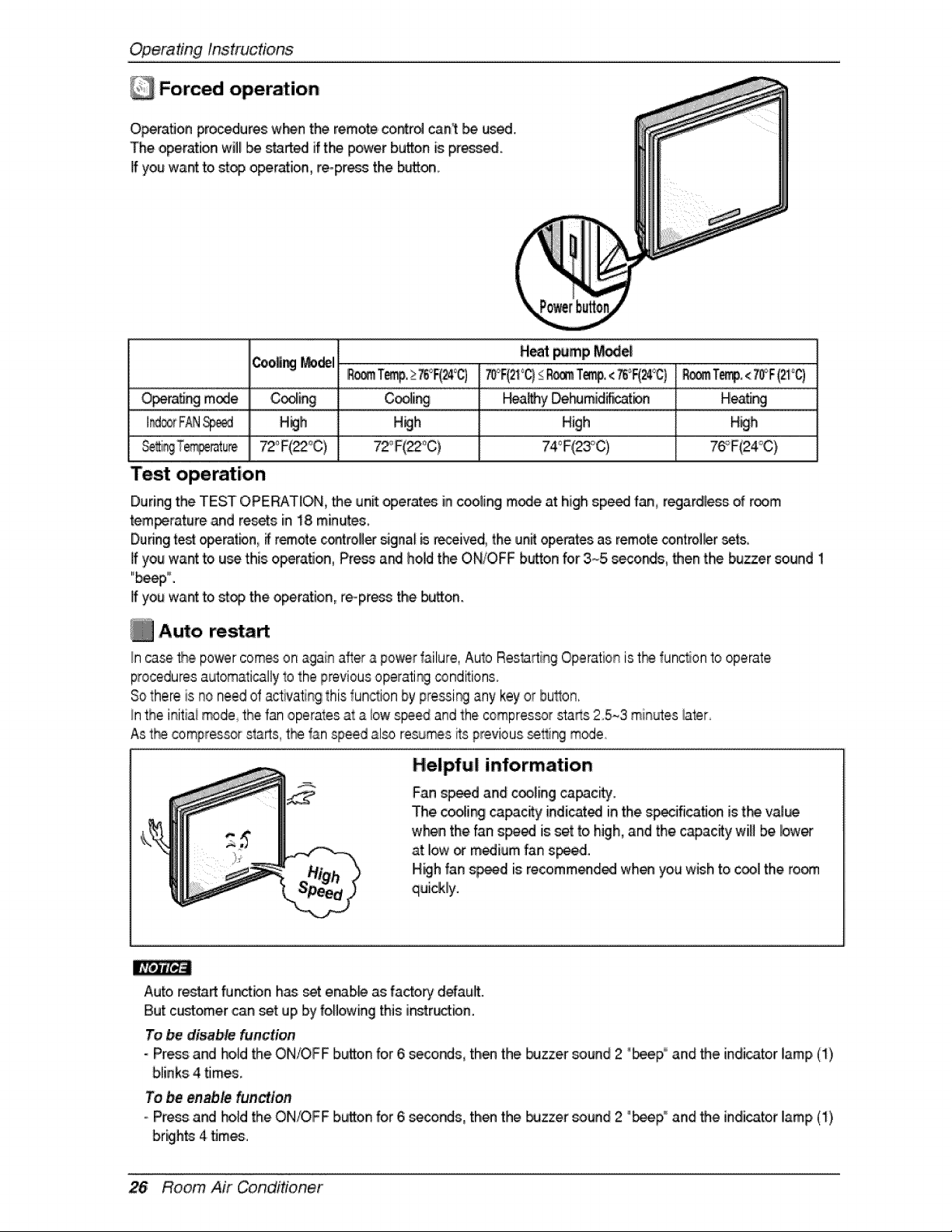
Forced operation
O_ra_on pro_dures w_n the remotecontro_cant _ used.
The operation will I_ started if the power bud,onis pressed.
If you want _ stop operation,repress the b_on,
Coo_ _1 Heat pimp _
IFLo_Te_, >_75_F(24_ _F(21°C)_R_ T_, <_°F(24'_C)_ Temp,<70_'F(2t°q
O_ra_ng mode C_ing C_ir__ _a_y _humidi_t_ He_ng
I_oo_FAN_d H_h H_h High High
76_F(24';C)
Test operation
During the TEST OPERATION, the unit operates in c_ling mode at high sp_ fan, regardless of room
tem_ratu_ and re_ts in 18 minutes
Duringtest _ratbn, #remote c_trolle_ _glna[ _ received, the unit operatesas remote _ntrol_er set&
If you want to u_ this:operation, Pre_ a_ hold the ON/OFF button for 3~5 seconds, then the buzzer sound 1
"b_p °.
If you want to stop the operation, re-pros the buAon.
f_ Auto restart
_ncasethe power comeson i_ a_er _ power _ailure,Aulo ResOrting Operationis the functionto operate
proceduresautomaticallyto the previousoperati_ _nditions
Sothere is no need of _c'tivatingthis fun_ion by preying any key ,orhuron,
!nthe initialmode_the fan ,operatesat a iow speed and the compres_r sta_s 25~3 min_es rater
.Ast_ compressors_rts, t_ fan speed also resumesiitsprevious _ng m_e
H,elpf_l information
Fan s_d and coo_ingca_c_y_
The coo_i_ _pac_y indicated in the s_ifica_on is tk_ va!_
w_n the fan speed is set to high, and the c_ac_y win be bwe_"
iat Ilow_ medium fan s_ed.
High fan s_d is recomm_ded wh_ you wish to cool the ro_
quickly.
Auto r_taA fu_bn h_ set e_b_ as factorldefault.
[Butcustomer can set up by following this i_r_tbn.
To be disable function
- Press and hold the ON/OFF button for 6 _conds, th_ the _zzer _und 2 "_p° and the indicator Iiamp (1)
bliinks4 times.
To be enable _ni_on
oPress and herd the ON!OFF bu_on for 6 seconds, then the buzzer sound 2 "beep,° and the indicator Ilamp(1)
brights 4 times.
26 Room Air Conditioner
Maintenanceand Service
WARNING: Turn the system off _fore cleaning° To ,clean, wi_ w_h a soft, dw cloth°
Do r_t _e bleach o,rabrasive,
Supply I_wer must be. di_onnected b,efom clealningi the ind_r unff
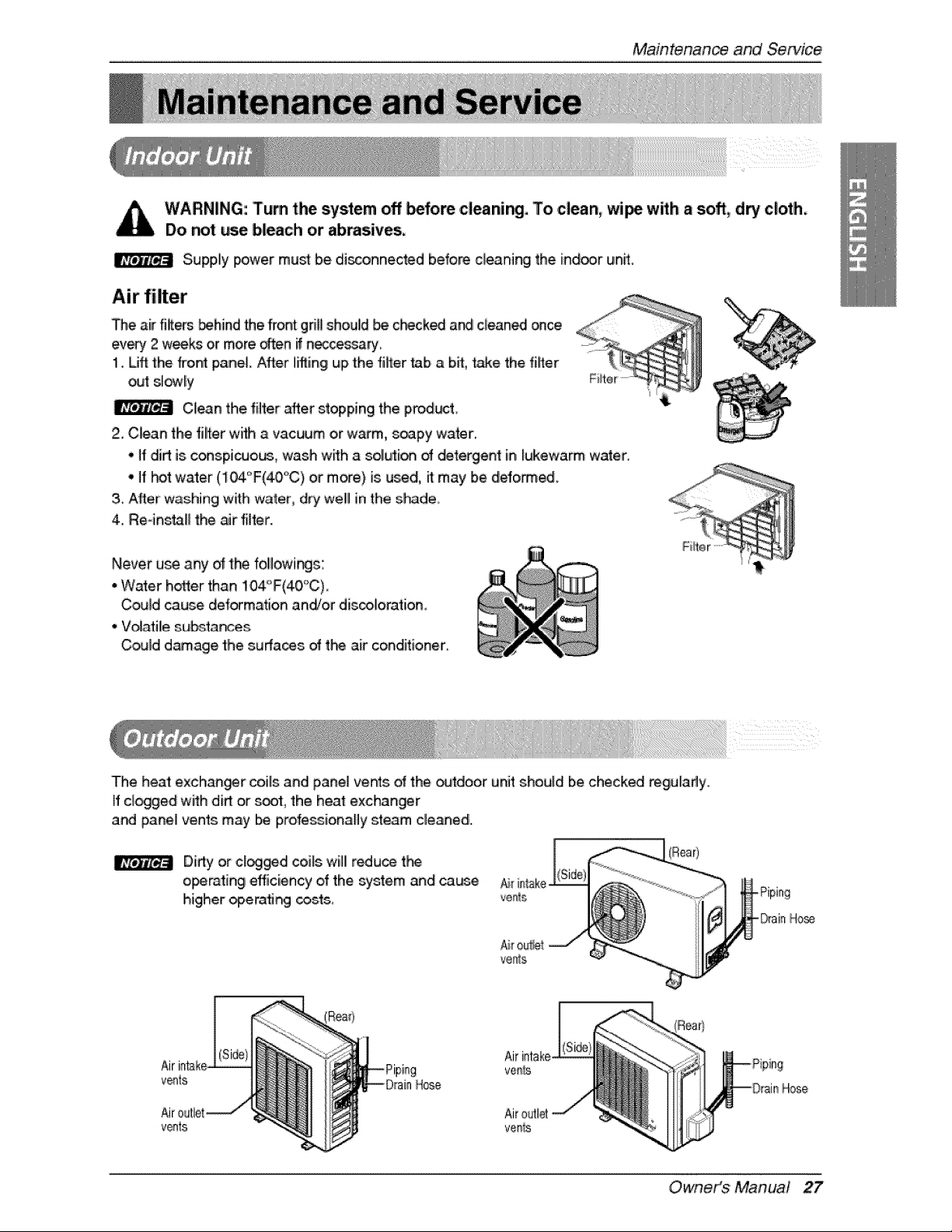
Air filter
De air fi_em _hind Me fron_griUshould _ c_ck_ a_ clean_ once
every 2 wee_ or more often i{n_ce_ary
1. LJffthe fron_ panel After liftingup the filter tab a bit, _ake the f#t_r
o_ sl_ly
Clean the fiffer after stopping the prod_4t,
2. Clean the fiiter wHh a vacuum or warm, soapy water.
- ff dirt is conspicuous, wash with a solution _ delergen_ in lukewarm water.
-If t-#t water (104'_F(40°'C) or more) is used, litmay be deformed.
3_After washing with water, dry web in the s_de,
4. Re-insmB the air filter.
Never use any of the followingc:
• Water hotter than 104"F(40'_C)
Could cause de forma_ion and/or dis_loration,
,,Vo_ati_esub,sta_e_
Could d_age the surfa_s of the air conditioner.
The heat exchan_r coils and panel vents _ t:he_tdoor unit shou{d be check_ regularly.
ff cl_ged with dirt or _t, the heat exchanger
and paneJ vents may be professionally steam clewed.
Dirty or cl_ged coils willl r_u_ tP_
operating efficiency of the system and ca_e
higher _era_ _.ts
(Rear)
Ho_
v@ts
v_ts
vems
Owneit_$ ' Manual 27
MaintenanceandServi_
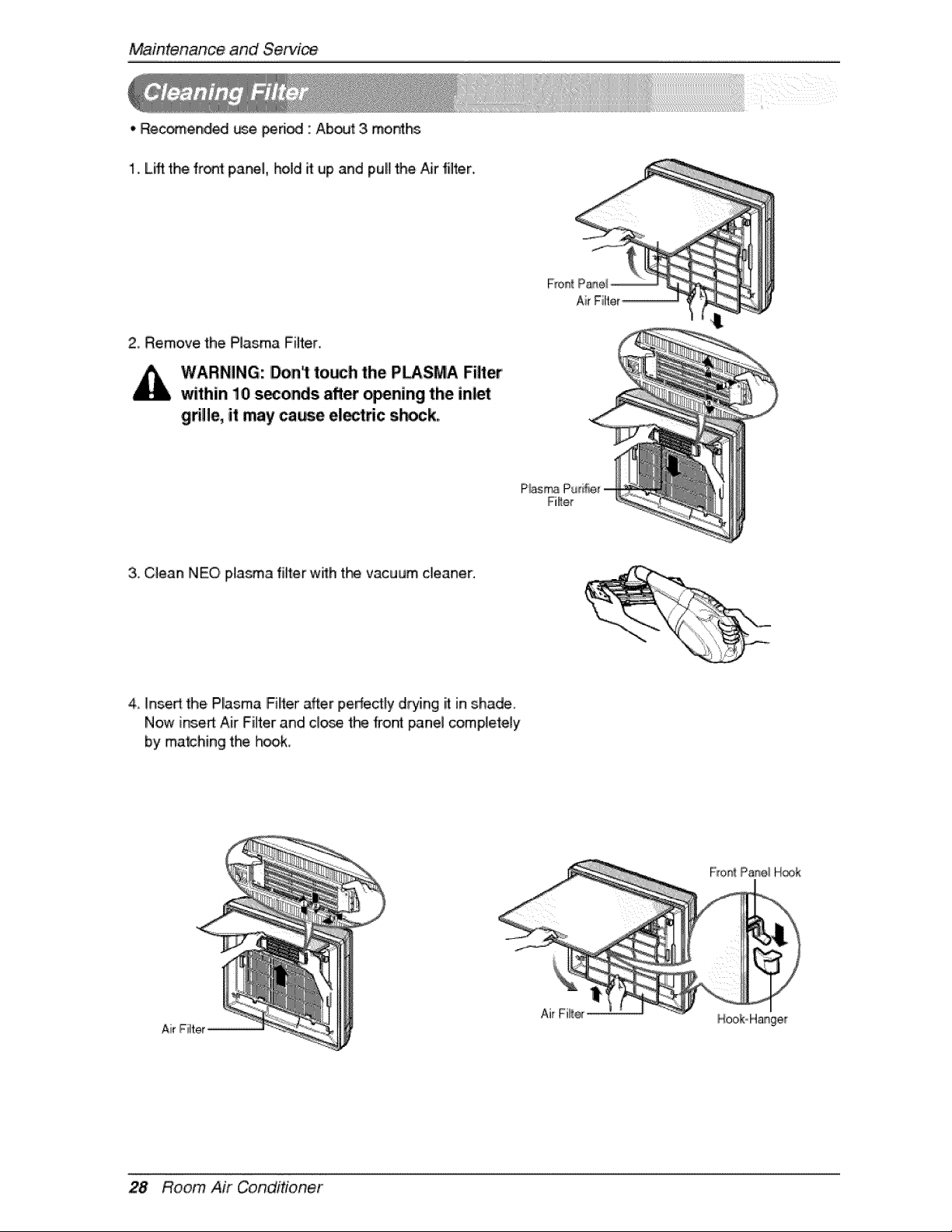
,, Recomend_ _e pedod : Ab_ 3. months
1. Lift the front panel, hold it up and pull the Aiirfilter.
2, Remove the PJas,maFiJter.
WARNING: _n1 to_h the PLASMA Filter
within 10 seconds after _ning the inlet
grille, it may ca_e el_dc s_ck,,
3. ,Clean NEO plasma filter with t_ vacuum ,cleaner:
4 insert the, PI!asma Fiffer after pedect_ydrying it inshade.
Now insert:Air Filter and c_ose t_ kont pane! completely
by matching the hook,
Air Filter_
28 Room Air Conditioner
MaintenanceandService
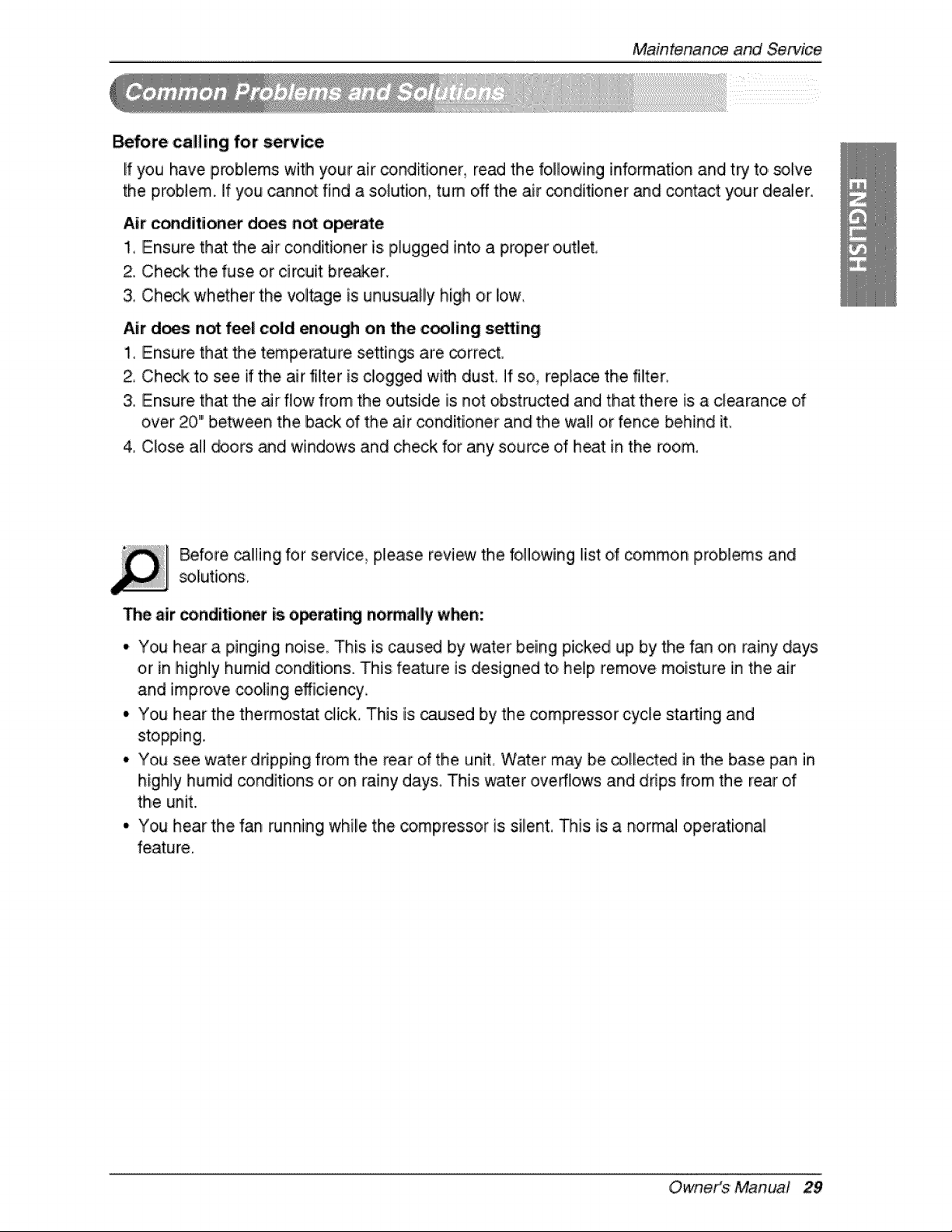
Before c:alling for se_ice
If you have problems witlh your air conditioner, read the following information and try to solve
the problem, if you cannot find a solution, turn oN the air conditioner and contact your dealer.
Air c_diitioner does not ,o_e
1, Ensure that the air conditioner is p,lugged into a proper o,utlet°
2. Check the fuse or circuit brewer.
& Check whether the vol_ge is unusually high or iow,
Air does not feel cold enough on the cooling setting
1_ Ensure that the tempe_ture se:_ings are _,rr,ect.
2, Check to see if the air filter is c!ogged with dust, If so, replace the filter
3. Ensure that the _r flow from the outside is not obstructed and that there is a clearance of
over 20" between the back of the air conditioner and the wall or fence behind it
4 Close al! _ors _d windows and check for any source d heat in the room,
Before ca!ling for service_ please review the following list d common pro,blems and
The air conditior_r is o_rati_ no_all'y when:
• You hear a pinging noise This is caus_ by water being picked up by the fan on rainy days
or in highly humid conditions. This feature is designed to help remove moisture in the air
and improve coo!ing efficiency
• You hear the, thermostat click. This is caused by the, _mpressor cycle sta_ing and
stopping.
• You see water dripping from the rear of the unit Water may be collected in the base pan in
highly humid _nditions or on rainy days. This ,water overflows and drips from the rear of
the unit.
° You hear the fan running while the compressor is silent. This is a normal operational
feature.
Owneit_$ ' Manual 29
Maintenanceand Se_ic_
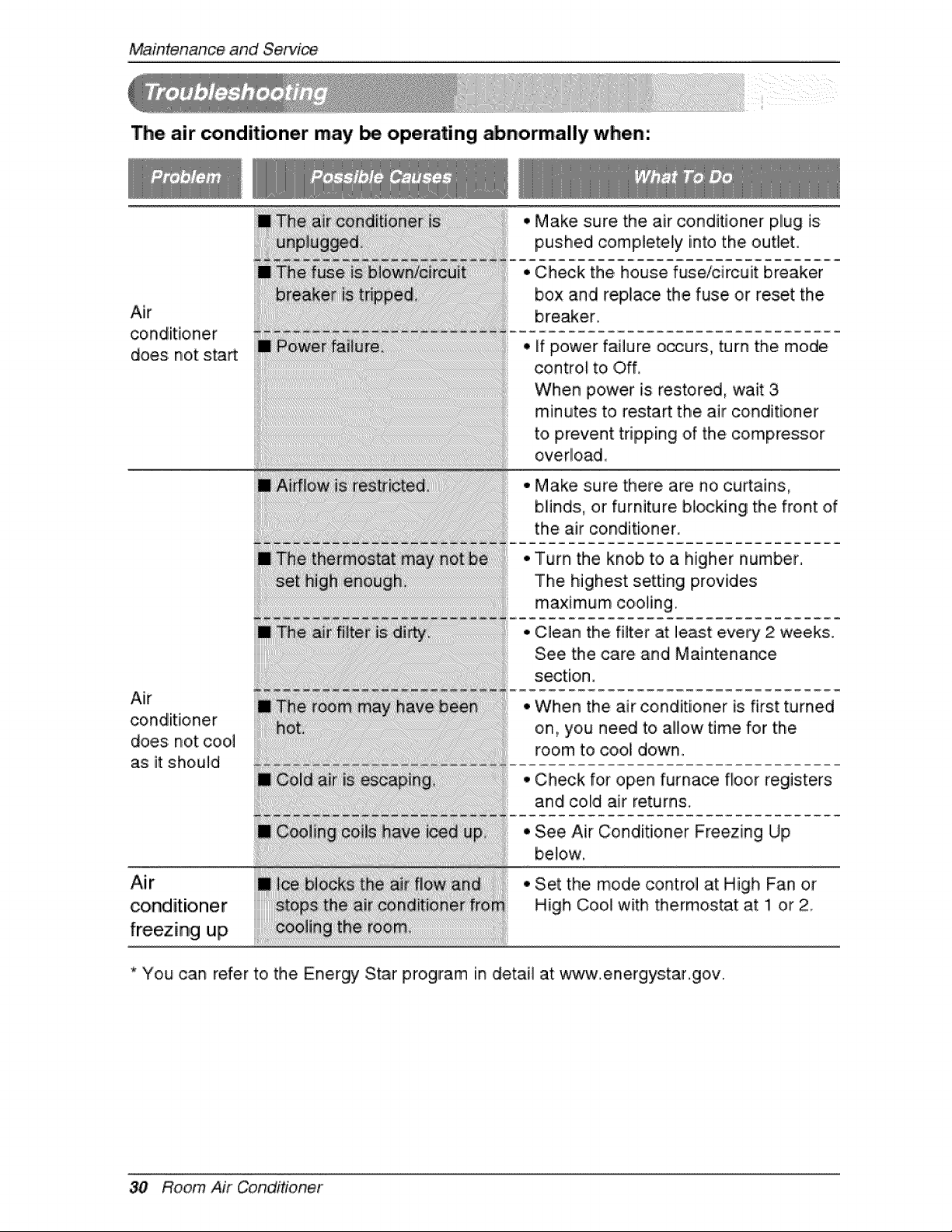
The air conditioner may be operating abnormally when:
Air
does not start
Air
conditioner
does not c,oo,I
as it should
Air
conditioner
freezing up
• Make sure the air conditioner plug is
pushed completely into the outlet.
• Check the, house fuse/circuit breaker
box and replace the fuse or reset the
breaker
• if power failure o_urs, turn the mode
cont:rol to i Off,
When power is restored, wait 3
minutes to restart the air conditioner
to prevent tripping of the compressor
overlload_
° Make sure there are no ,curtains,
blinds:, or furniture blocking the front of
the air conditioner.
Turn the knob to a higher number,
The highest setting provides
maximum co,oling.
Clean the filter at least e.very 2 weeks.
See the care and Maintenance
section.
When the air conditioner is first turned
on, you need to allow time for the
room t,o cool down.
Check for open furna_ floor registers
and colld air returns,
See Air Conditioner Freezing Up
be!ow,
Set the mode control at High Fan or
High Cool with thermostat at !1 or 2
* You can refer to the Energy Star program in detail at www.energys:tar.gov.
30 Room Air Conditioner

