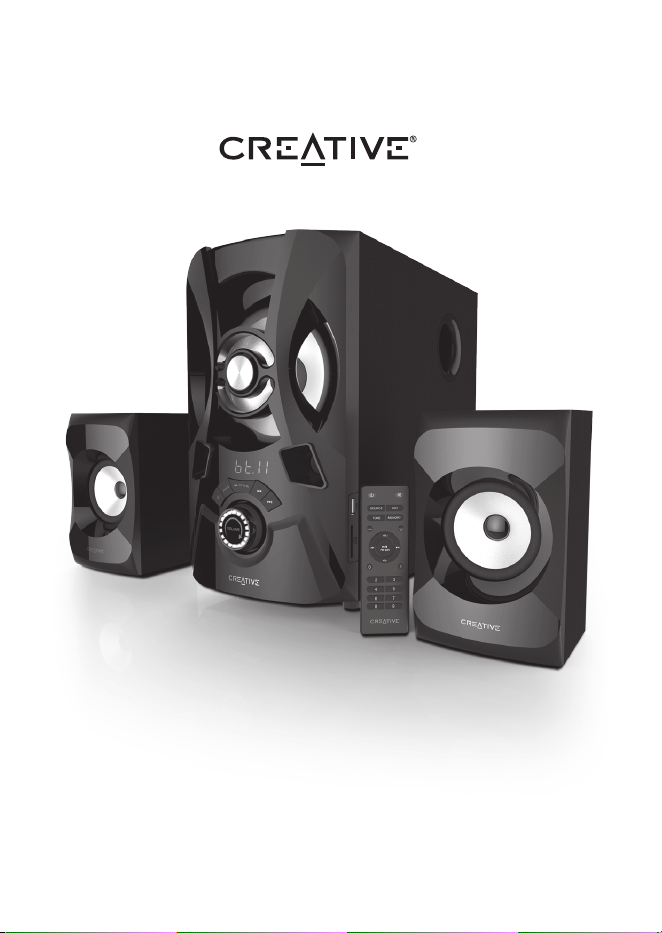
SBS E2900
Quick Start Guide
Model No. MF0490
P/N : 03MF049000000 Rev A
© 2019 Creative Technology Ltd. All rights reserved. Creative and the Creative Logo are trademarks or registered
trademarks of Creative Technology Ltd in the United States and/or other countries. SD logo is a trademark of SD-3C, LLC.
All other trademarks are the property of their respective owners and are hereby recongnized as such. All specifications
are subject to change without notice. Actual contents may dier slightly from those pictured. Use of this product is subject
to a limited warranty.
Technical Specifications
Creative SBS E2900
Bluetooth® Version: Bluetooth® 5.0
Operating Frequency: 2402 - 2480 MHz
Operating Range: Up to 10 meters
Supported Bluetooth® Profiles: A2DP (Wireless Stereo Bluetooth®),
AVRCP (Bluetooth® Remote Control)
Supported Codec: SBC
Supported Audio Formats (USB Mass Storage Devices / SD Cards*): MP3
Input: 110V - 230V
~
50 / 60 Hz 700mA
Speaker Power:
- 15W RMS per channel (2 channels)
- 30W RMS subwoofer
- Total: 60W
- Peak: 120W
Frequency Response: 50 Hz
~
20 KHz
SNR: ≥ 75 dB
FM Radio Scanning Frequency: 87.5 MHz - 108 MHz
*Supports up to 32GB (max) FAT16 and FAT32
*Does not support SDXC memory cards
Safety instructions
Please read the following before using the product:
• Use only approved mains plug supported in your country or region
• Detach mains plug from socket to ensure complete disconnection from the power supply
• If device will not be in use for over a week, please detach the mains plug from socket
Important Notice
The serial number for your Creative SBS E2900 is located on the subwoofer. Please write this
number down and keep it in a secure place.
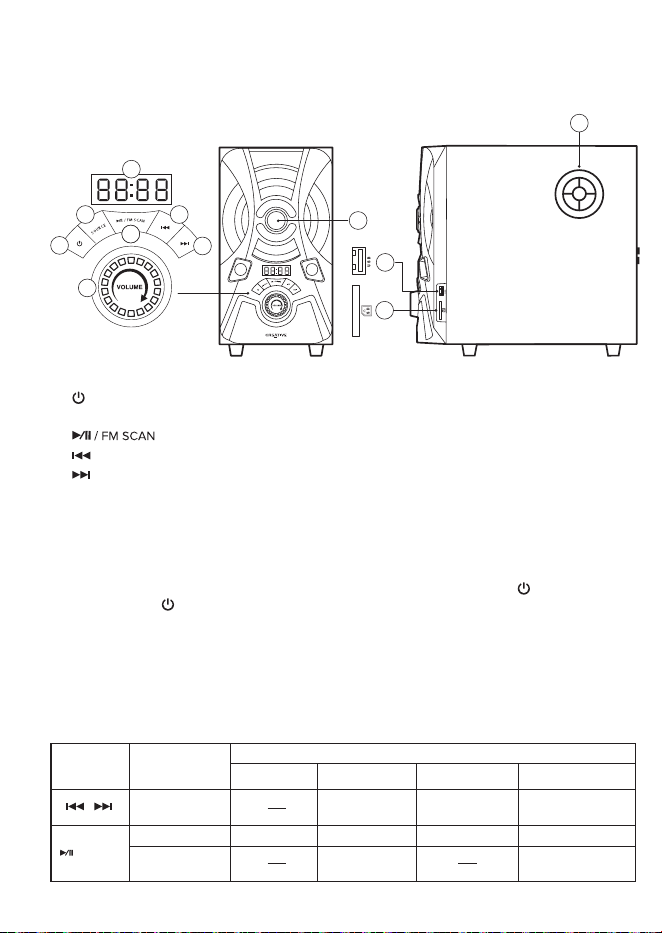
Product Overview
1) Button
2) SOURCE Button
3) Button
4) Previous track / Previous FM station button
5) Next track / Next FM station button
6) LED Display
7) Volume Control Knob
8) LED Lights
9) Subwoofer Port Tube
10) USB Port
11) SD Card Slot
12) FM Antenna Port
To Power ON/OFF Speaker
• Speaker is in “Standby” mode when power supply is switched on and the LED Display
shows “_ _ _ _”. Exit “Standby” mode to turn the speaker on by pressing the “ ” button.
Press and hold “ ” button to enter “Standby” mode again.
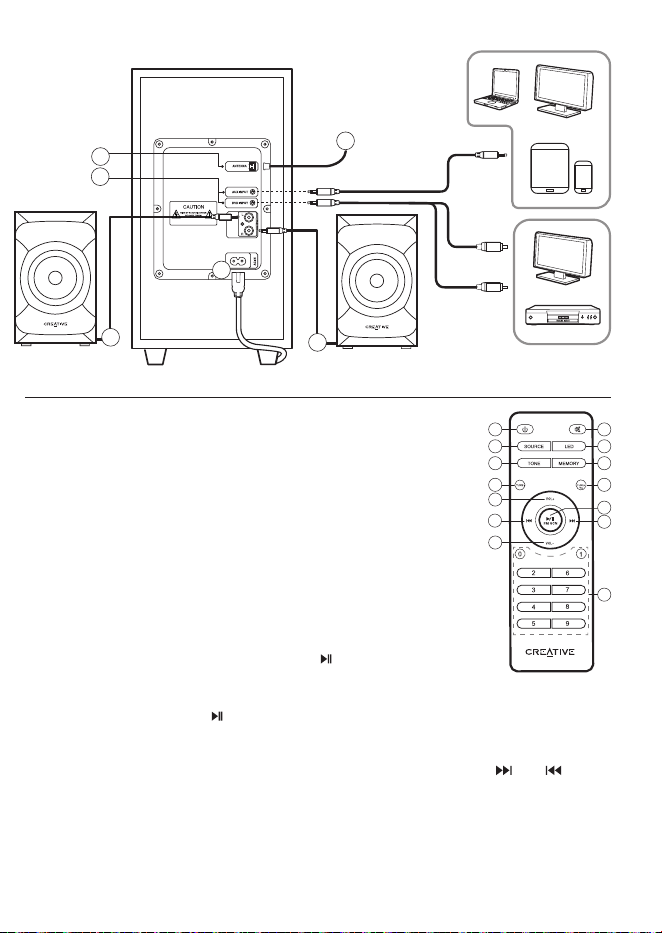
13) Aux-in / DVD-in Ports
14) Left Satellite
15) Right Satellite
16) AC Power Port
17) FM Antenna
To Switch between Sources
• Press “SOURCE” button to switch sources. Cycle through “BT / AUX / DVD / USB / SD Card / FM”
input modes with each press of a button.
(“bt” stands for Bluetooth connectivity; “AU” stands for AUX input; “DUD” stands for DVD input;
“Ub” stands for USB; “Sd” stands for SD Card input; “F and 87.5” stands for FM radio mode.)
/ FM SCAN
Press and hold
Press
Press Mute
AUX Input USB/SD Input
Automatic Search for
FM Radio Stations
Play / Pause
FM Tuner
Mute
Button Action
Inputs
Channel Selection
Previous / Next
Track Selection
Previous / Next
Bluetooth
®
Play / Pause
Track Selection
Previous / Next
1
7
2
3
3
4
5
6
8
9
10
11
17
14
13
12
(Included)
(Not Included)
Sold Separately
15
1) Power On / Standby Mode
2) Mute : Press once to turn volume o.
Press once again to turn volume on.
3) Source : Press to cycle through
sources - BT / AUX / DVD / USB / SD
Card / FM
4) LED : Press to toggle between Red /
Blue / Purple color presets
5) Tone : Press to adjust Bass & Treble
settings by using VOL +/- buttons.
Bass & Treble levels: - 6 (min) – +6 (max)
6) Memory : Press to save favorite
FM radio stations after manual FM tuning
7) Tuning- : For FM Radio’s use only
Infrared Remote Control
• In FM mode, press and hold “ ” to automatically search for FM radio stations.
• Press “TUNING+/-” to manually search for FM radio stations step-by-step (each step = 0.1 MHz).
Press and hold “TUNING+/-” to search for next available channel. Once found, the FM radio station
will automatically play. To save the FM channel, press on Memory button. Press “ ” or “ ” to
toggle between saved FM radio stations.
• In USB and SD Card modes, press “TUNING+” to cycle through repeat mode - Repeat All / Repeat
Once / Repeat O.
• In Bluetooth mode, voice and front-LED Display cues will prompt to initiate Bluetooth Pairing.
By default, the system will search for last paired device (if available) while still remaining discoverable
as long as the speaker system is not connected to any Bluetooth device.
8) Tuning+ : For FM Radio’s use and to
toggle between repeat ALL, repeat
once, OFF for USB flash and SD card
playback
9) Volume+ : + Volume level
10) Previous Track / FM station
11) Play / Pause / FM Auto Scan
12) Next Track / FM Station
13) Volume- : - Volume level
14) 0 - 9 Numeric Keypad : Use the
keypad to select desired track or stored
FM radio stations.
Press the button to play selected
track / FM station
1 2
3 4
5 6
7
8
14
13
9
11
10
12
To initiate
Bluetooth Pairing
2 x AAA batteries
(not included)
16
Product Overview
1) Button
2) SOURCE Button
3) Button
4) Previous track / Previous FM station button
5) Next track / Next FM station button
6) LED Display
7) Volume Control Knob
8) LED Lights
9) Subwoofer Port Tube
10) USB Port
11) SD Card Slot
12) FM Antenna Port
To Power ON/OFF Speaker
• Speaker is in “Standby” mode when power supply is switched on and the LED Display
shows “_ _ _ _”. Exit “Standby” mode to turn the speaker on by pressing the “ ” button.
Press and hold “ ” button to enter “Standby” mode again.
13) Aux-in / DVD-in Ports
14) Left Satellite
15) Right Satellite
16) AC Power Port
17) FM Antenna
To Switch between Sources
• Press “SOURCE” button to switch sources. Cycle through “BT / AUX / DVD / USB / SD Card / FM”
input modes with each press of a button.
(“bt” stands for Bluetooth connectivity; “AU” stands for AUX input; “DUD” stands for DVD input;
“Ub” stands for USB; “Sd” stands for SD Card input; “F and 87.5” stands for FM radio mode.)
/ FM SCAN
Press and hold
Press
Press Mute
AUX Input USB/SD Input
Automatic Search for
FM Radio Stations
Play / Pause
FM Tuner
Mute
Button Action
Inputs
Channel Selection
Previous / Next
Track Selection
Previous / Next
Bluetooth
®
Play / Pause
Track Selection
Previous / Next
1
7
2
3
3
4
5
6
8
9
10
11
17
14
13
12
(Included)
(Not Included)
Sold Separately
15
1) Power On / Standby Mode
2) Mute : Press once to turn volume o.
Press once again to turn volume on.
3) Source : Press to cycle through
sources - BT / AUX / DVD / USB / SD
Card / FM
4) LED : Press to toggle between Red /
Blue / Purple color presets
5) Tone : Press to adjust Bass & Treble
settings by using VOL +/- buttons.
Bass & Treble levels: - 6 (min) – +6 (max)
6) Memory : Press to save favorite
FM radio stations after manual FM tuning
7) Tuning- : For FM Radio’s use only
Infrared Remote Control
• In FM mode, press and hold “ ” to automatically search for FM radio stations.
• Press “TUNING+/-” to manually search for FM radio stations step-by-step (each step = 0.1 MHz).
Press and hold “TUNING+/-” to search for next available channel. Once found, the FM radio station
will automatically play. To save the FM channel, press on Memory button. Press “ ” or “ ” to
toggle between saved FM radio stations.
• In USB and SD Card modes, press “TUNING+” to cycle through repeat mode - Repeat All / Repeat
Once / Repeat O.
• In Bluetooth mode, voice and front-LED Display cues will prompt to initiate Bluetooth Pairing.
By default, the system will search for last paired device (if available) while still remaining discoverable
as long as the speaker system is not connected to any Bluetooth device.
8) Tuning+ : For FM Radio’s use and to
toggle between repeat ALL, repeat
once, OFF for USB flash and SD card
playback
9) Volume+ : + Volume level
10) Previous Track / FM station
11) Play / Pause / FM Auto Scan
12) Next Track / FM Station
13) Volume- : - Volume level
14) 0 - 9 Numeric Keypad : Use the
keypad to select desired track or stored
FM radio stations.
Press the button to play selected
track / FM station
1 2
3 4
5 6
7
8
14
13
9
11
10
12
To initiate
Bluetooth Pairing
2 x AAA batteries
(not included)
16

SBS E2900
Quick Start Guide
Model No. MF0490
P/N : 03MF049000000 Rev A
© 2019 Creative Technology Ltd. All rights reserved. Creative and the Creative Logo are trademarks or registered
trademarks of Creative Technology Ltd in the United States and/or other countries. SD logo is a trademark of SD-3C, LLC.
All other trademarks are the property of their respective owners and are hereby recongnized as such. All specifications
are subject to change without notice. Actual contents may dier slightly from those pictured. Use of this product is subject
to a limited warranty.
Technical Specifications
Creative SBS E2900
Bluetooth® Version: Bluetooth® 5.0
Operating Frequency: 2402 - 2480 MHz
Operating Range: Up to 10 meters
Supported Bluetooth® Profiles: A2DP (Wireless Stereo Bluetooth®),
AVRCP (Bluetooth® Remote Control)
Supported Codec: SBC
Supported Audio Formats (USB Mass Storage Devices / SD Cards*): MP3
Input: 110V - 230V
~
50 / 60 Hz 700mA
Speaker Power:
- 15W RMS per channel (2 channels)
- 30W RMS subwoofer
- Total: 60W
- Peak: 120W
Frequency Response: 50 Hz
~
20 KHz
SNR: ≥ 75 dB
FM Radio Scanning Frequency: 87.5 MHz - 108 MHz
*Supports up to 32GB (max) FAT16 and FAT32
*Does not support SDXC memory cards
Safety instructions
Please read the following before using the product:
• Use only approved mains plug supported in your country or region
• Detach mains plug from socket to ensure complete disconnection from the power supply
• If device will not be in use for over a week, please detach the mains plug from socket
Important Notice
The serial number for your Creative SBS E2900 is located on the subwoofer. Please write this
number down and keep it in a secure place.