Purchase Date
1
4007498
ITEM #2599786
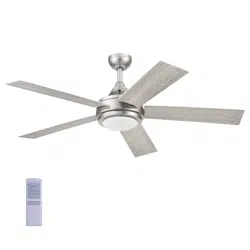
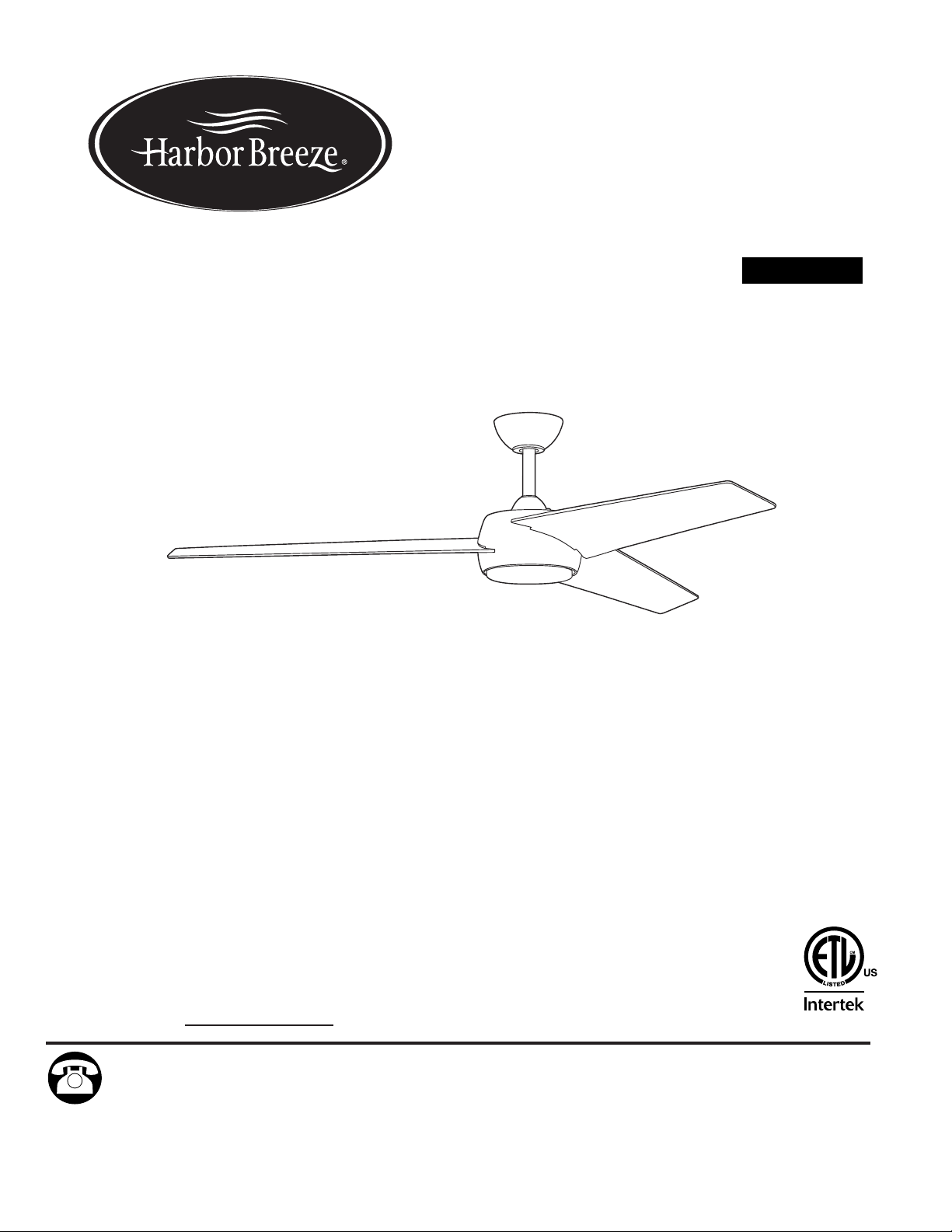
DOVENSHIRE LED
CEILING FAN
Español p. 18
MODEL # CGR60WW3LR
ATTACH YOUR RECEIPT HERE
Harbor Breeze® is a registered trademark
of LF, LLC. All Rights Reserved.
Questions, problems, missing parts? Before returning to your retailer, call our customer service
department at 1-800-643-0067, 8 a.m. - 8 p.m., EST, Monday - Sunday.
SM20411
2
Safety Information ...............................................................................................................
.
. 2
Package Contents ..............................................................................................................
.
. 4
Hardware Contents
...........................................................................................................................
5
Preparation ........................................................................................................................... 5
Initial Installation ................................................................................................................... 5
Wiring ....................................................................................................................................9
Final Installation ................................................................................................................... 11
Operating Instructions ....................................................................................................... 15
Care and Maintenance ........................................................................................................ 16
Troubleshooting..................................................................................................................
..
16
Limited Lifetime Warranty ..................................................................................................
..
17
Replacement Parts List ....................................................................................................... 17
TABLE OF CONTENTS
SAFETY INFORMATION
READ AND SAVE THESE INSTRUCTIONS
• Do not discard fan carton or foam inserts. Should this fan need to be returned to the factory for repairs, it
must be shipped in its original packaging to ensure proper protection against damage that might exceed the
initial cause for return.
• Make sure all electrical connections comply with local codes, ordinances, the National Electrical Code and
ANSI/NFPA 70-1999. Hire a qualified electrician or consult a do-it-yourself wiring handbook if you are
unfamiliar with installing electrical wiring.
• Make sure the installation site you choose allows a minimum clearance of 7 ft. from the blades to the floor
and at least 30 in. from the end of the blades to any obstruction.
• After you install the fan, make sure all connections are secure to prevent the fan from falling.
• The net weight of this fan is: 13.45 lbs.
FCC Compliance Notice
Modifications not approved by the party responsible for compliance could void the user's authority to
operate the equipment.
This device complies with Part 15 of the FCC Rules. Operation is subject to the following two conditions:
(1) this device may not cause harmful interference, (2) this device must accept any interference received,
including interference that may cause undesired operation.
NOTE: This equipment has been tested and found to comply with the limits for a Class B digital device,
pursuant to Part 15 of the FCC Rules. These limits are designed to provide reasonable protection against
harmful interference in a residential installation. This equipment generates, uses and can radiate radio
frequency energy and, if not installed and used in accordance with the instructions, may cause harmful
interference to radio communications. However, there is no guarantee that interference will not occur in a
particular installation. If this equipment does cause harmful interference to radio or television reception,
which can be determined by turning the equipment off and on, the user is encouraged to try to correct the
interference by one or more of the following measures:
* Reorient or relocate the receiving antenna.
* Increase the separation between the equipment and receiver.
* Connect the equipment into an outlet on a circuit different from that to which the
receiver is connected.
* Consult the dealer or an experienced radio/TV technician for help.
Distributed by: Litex Industries Inc., P.O. Box 535639, Grand Prairie, TX, 75053; 1-800-527-1292
SAFETY INFORMATION
3
Be sure outlet box is properly grounded and that a ground wire (green or bare) is present.
Before beginning installation, carefully check all screws, bolts and nuts on fan motor assembly to
ensure that they are secured.
Do NOT tamper with or attempt to repair LED component. The light source is designed for this
specific application and should not be serviced by untrained personnel. If any servicing is
required, call our customer service department.
CAUTION
WARNING
To reduce the risk of fire, electrical shock or personal injury, mount fan to outlet box
marked "ACCEPTABLE FOR FAN SUPPORT OF 35 LBS. OR LESS" and use
mounting screws provided with the outlet box. Most outlet boxes commonly used for the
support of lighting fixtures are not acceptable for fan support and may need to be replaced.
Consult a qualified electrician if in doubt.
When mounting fan to a ceiling outlet box, use a METAL octagonal outlet box; do NOT use a
plastic outlet box. Secure the outlet box directly to the building structure. The outlet box and its
support must be able to support the moving weight of the fan (at least 35 lbs.).
To avoid personal injury, the use of gloves may be necessary while handling fan parts with
sharp edges.
To avoid personal injury, the use of gloves may be necessary while handling fan parts with
sharp edges.
To reduce the risk of fire, electrical shock or personal injury, wire connectors provided with this fan
are designed to accept only one 12-gauge house wire and two lead wires from the fan. If your
house wire is larger than 12-gauge or there is more than one house wire to connect to the
corresponding fan lead wires, consult an electrician for the proper size wire connectors to use.
To reduce the risk of fire or electrical shock, do not use the fan with any solid state speed control
device or control fan speed with a full range dimmer switch.
To reduce the risk of fire, electrical shock or personal injury, do not bend the blades when
installing them, balancing the blades or cleaning the fan. Do not insert objects between the
rotating fan blades.
To reduce the risk of personal injury, use ONLY parts provided with this fan. The use of parts
OTHER than those provided with this fan will void the warranty.
Before installation, be sure to shut off electricity at main switch or circuit breaker in order to avoid
electrical shock.
When using an existing outlet box, make sure the outlet box is securely attached to the building
structure and can support the full weight of the fan. Failure to do this can result in serious injury or
death. The stability of the outlet box is essential in minimizing wobble and noise in the fan after
installation is complete.
To reduce the risk of serious bodily injury, DO NOT use power tools to assemble any part of the
fan, including the blades.
WARNING
The DC Motor will not operate until blades are installed.
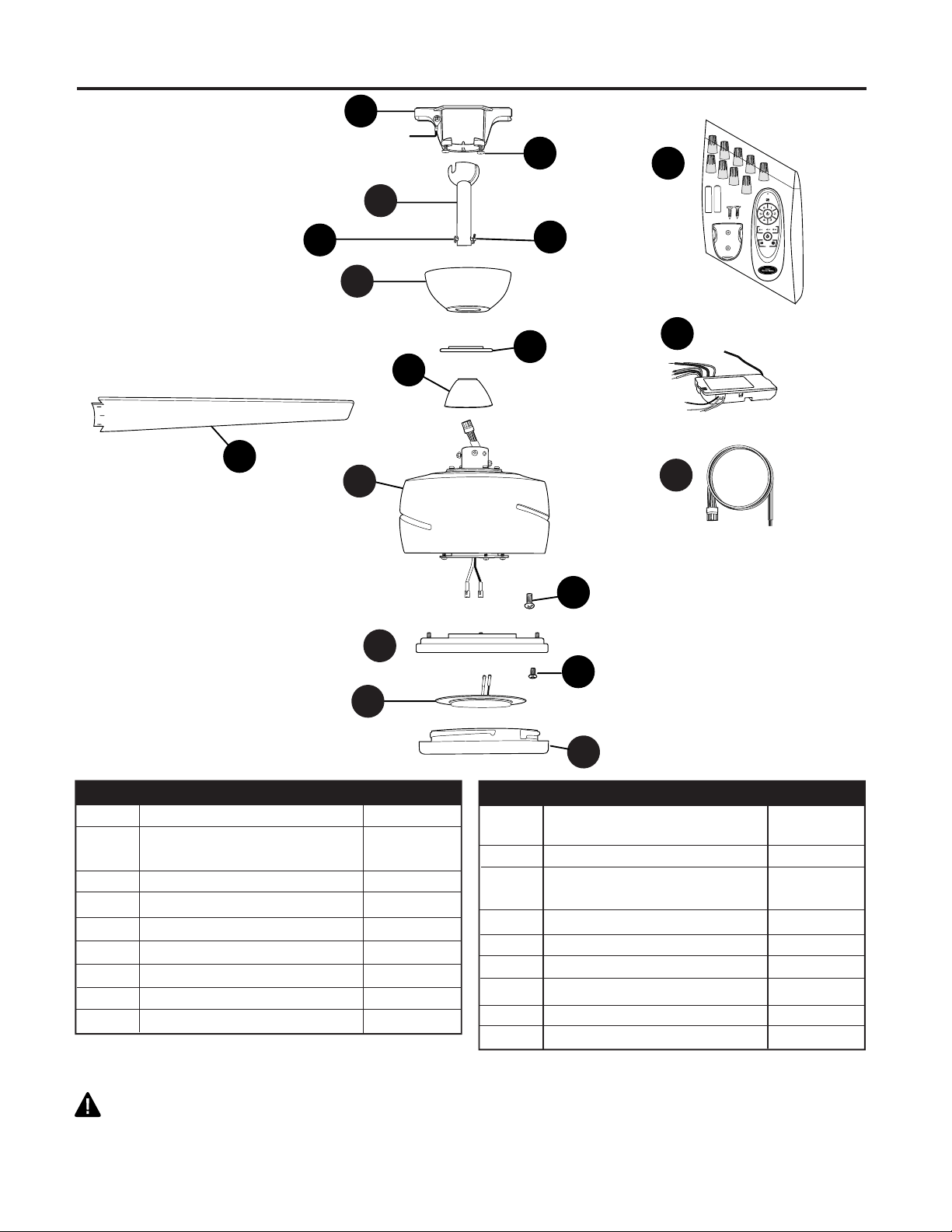
PACKAGE CONTENTS
4
A Mounting Bracket 1
B Canopy Mounting Screw 2
(preassembled)
C Downrod 1
D Pin (preassembled) 1
E Clip (preassembled)
F Canopy 1
G Canopy Cover 1
H Yoke Cover 1
I Motor Assembly 1
DESCRIPTIONPART
QUANTITY
DESCRIPTIONPART
QUANTITY
J Motor Plate Screw 3
(preassembled)
K Fitter Plate 1
L Fitter Plate Screw 3
(preassembled)
M LED Light Kit 1
N Shade 1
O Blade 3
P Wiring 1
Q Remote Control Receiver 1
R Remote Pack 1
IMPORTANT REMINDER: You must use the
parts provided with this fan for proper installation
and safety.
A
L
G
C
D
B
E
H
I
K
J
N
O
M
R
Q
P
F
5
HARDWARE CONTENTS (shown actual size)
Before beginning assembly of product, make sure all parts are present. Place motor on carpet or on
foam to avoid damage to finish. Compare parts with package contents list and hardware contents list.
If any part is missing or damaged, do not attempt to assemble the product.
Estimated Assembly Time: 120 minutes
Tools Required for Assembly (not included): Electrical Tape, Phillips Screwdriver, Pliers, Safety
Glasses, Stepladder, Wire Strippers and Precision Screwdriver (0 x 2 in.).
Helpful Tools (not included): AC Tester Light, Tape Measure, Do-It-Yourself Wiring Handbook and
Wire Cutters.
PREPARATION
INITIAL INSTALLATION
ON
OFF
ON
OFF
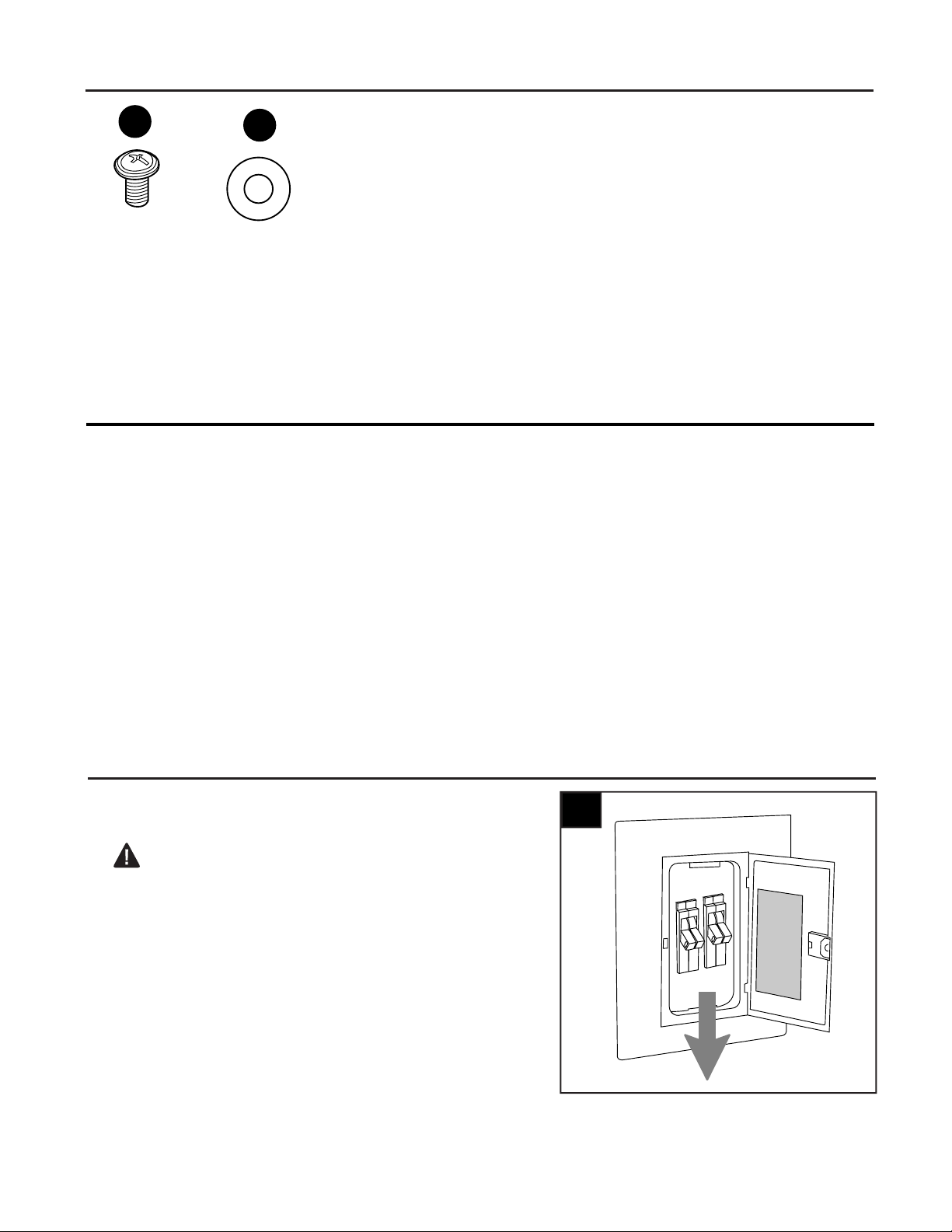
1
Turn off circuit breakers and wall switch to the fan
supply line leads.
DANGER: Failure to disconnect power supply
prior to installation may result in serious injury or
death.
1.
Blade
Screw
Qty. 9
+ 1 extra
AA
Fiber
Blade
Washer
Qty. 9
+ 1 extra
BB
INITIAL INSTALLATION
6
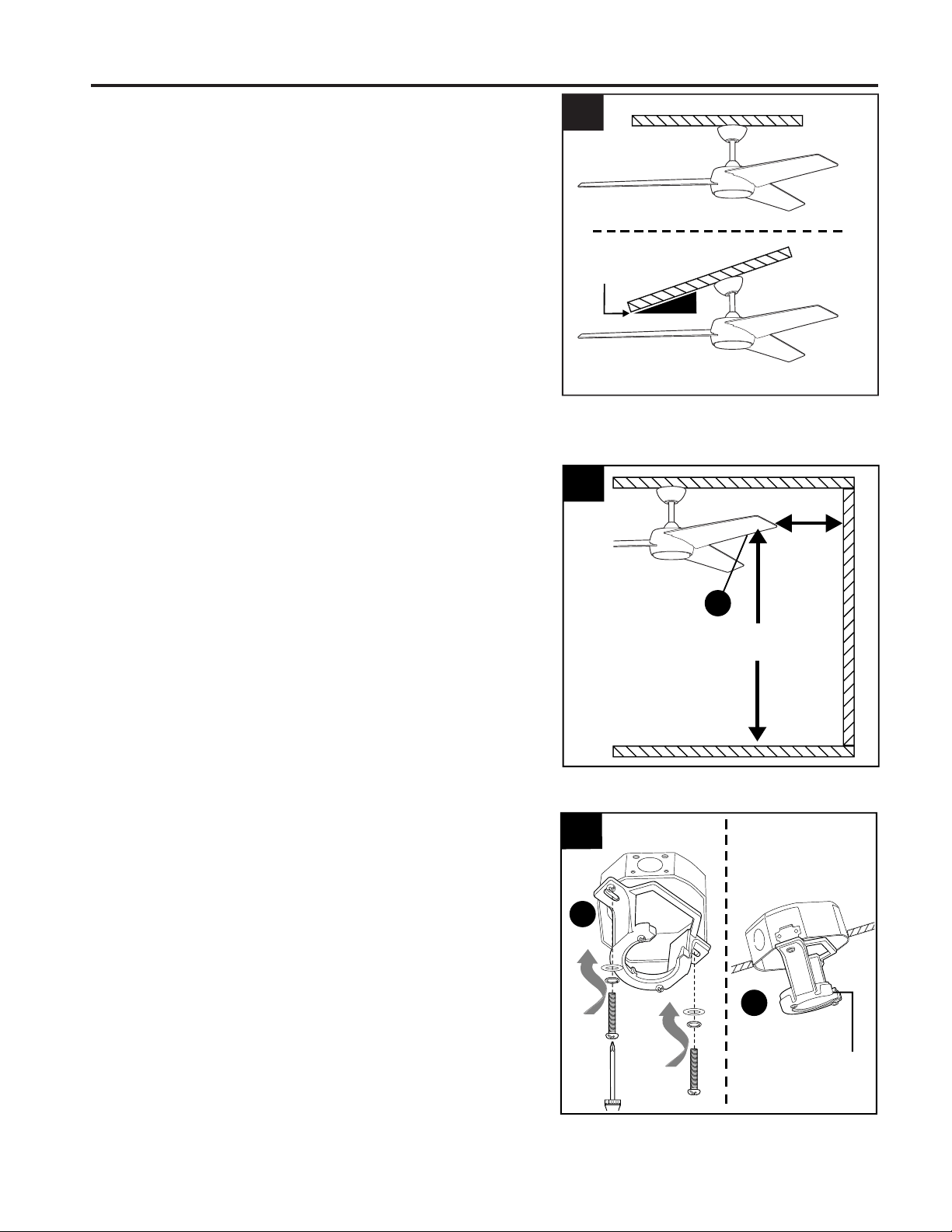
Check to make sure blades (O) will be at least
30 inches from any obstruction at least 7 ft. above
the floor.
3.
2.
Determine mounting method to use.
A. Standard mount
B. Angle mount
IMPORTANT: If using the angle mount, ensure the
ceiling angle is not steeper than 19°.
NOTE: Closemount option is not available for this
fan.
*Helpful Hint: Downrod-style mounting is best
suited for ceilings 8 ft. high or higher. For taller
ceilings you may want to use a longer downrod
(not included). Angle-style mounting is best suited
for angled or vaulted ceilings. A longer downrod is
sometimes necessary to ensure proper blade
clearance.
7 ft.
min.
30 in.
min.
3
4.
Open End
4
A
A
ANGLE MOUNTSTANDARD MOUNT
Secure mounting bracket (A) to outlet box
(not included) using screws, spring washers
and flat washers provided with the outlet
box.
*NOTE: It is very important you use the
proper hardware when installing the
mounting bracket (A) as this will support the
fan.
IMPORTANT: If using the angle mount,
make sure open end of mounting bracket (A)
is installed facing the higher point of the
ceiling, and ensure the ceiling angle is not
steeper than 19°.
2
B
A
19° max.
O
INITIAL INSTALLATION
7
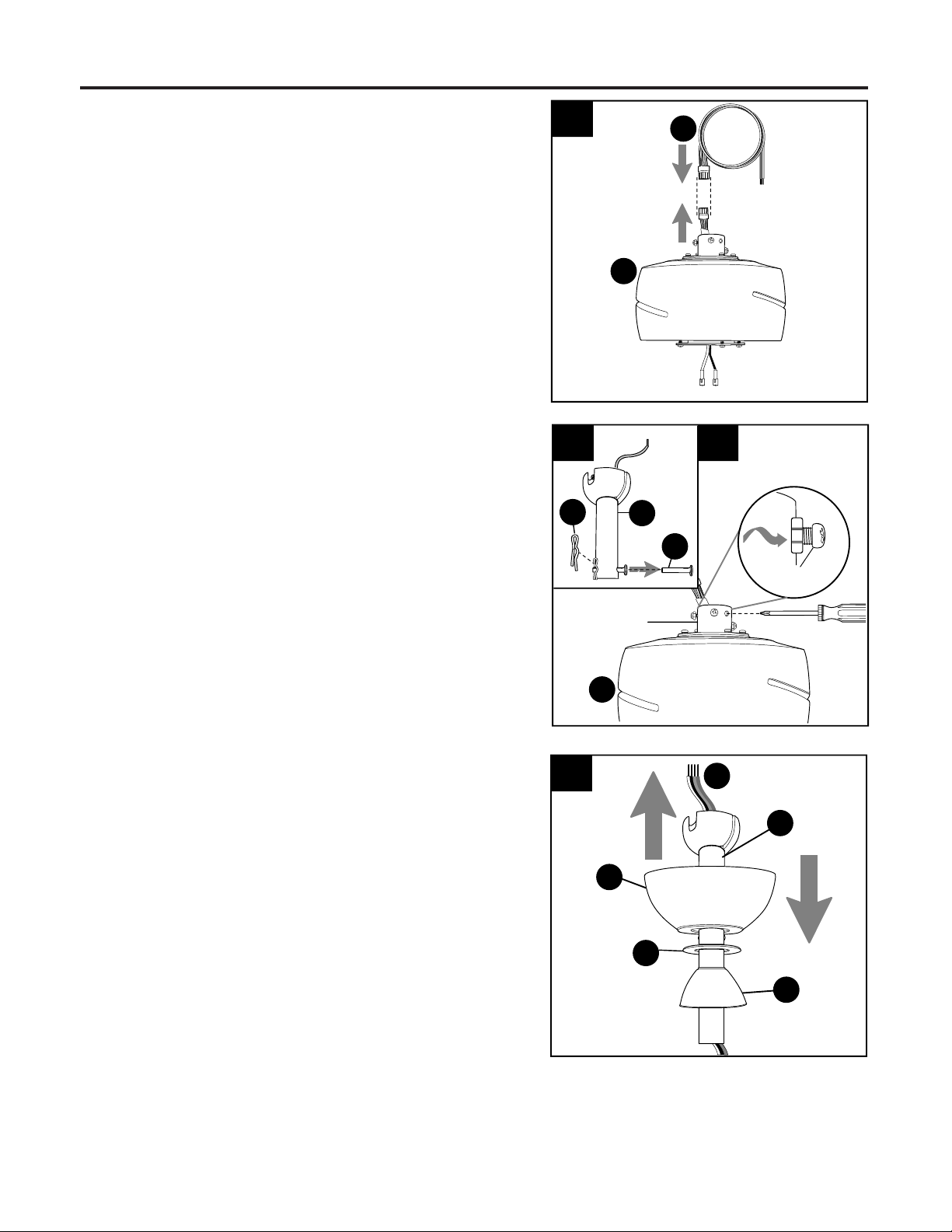
Remove pin (D) and clip (E) from downrod (C).
Partially loosen preassembled set screws and nuts
in yoke at top of motor assembly (I).
6a.
6A
E
6B
C
Set Screw
Sideview
D
Yoke
7.
Insert downrod (C) through canopy (F), canopy
cover (G) and yoke cover (H). NOTE: Canopy
cover (G) must be turned with the shiny side
toward the motor assembly (I).
Then, thread wiring (P) from motor assembly (I)
through downrod (C).
7
F
H
C
6b.
I
I
P
G
5.
5
Connect male plug from motor assembly (I) to
female plug from wiring (P), matching up the
colors on the plugs for correct fit. Make sure
plugs connect tightly.
P
8
INITIAL INSTALLATION
8.
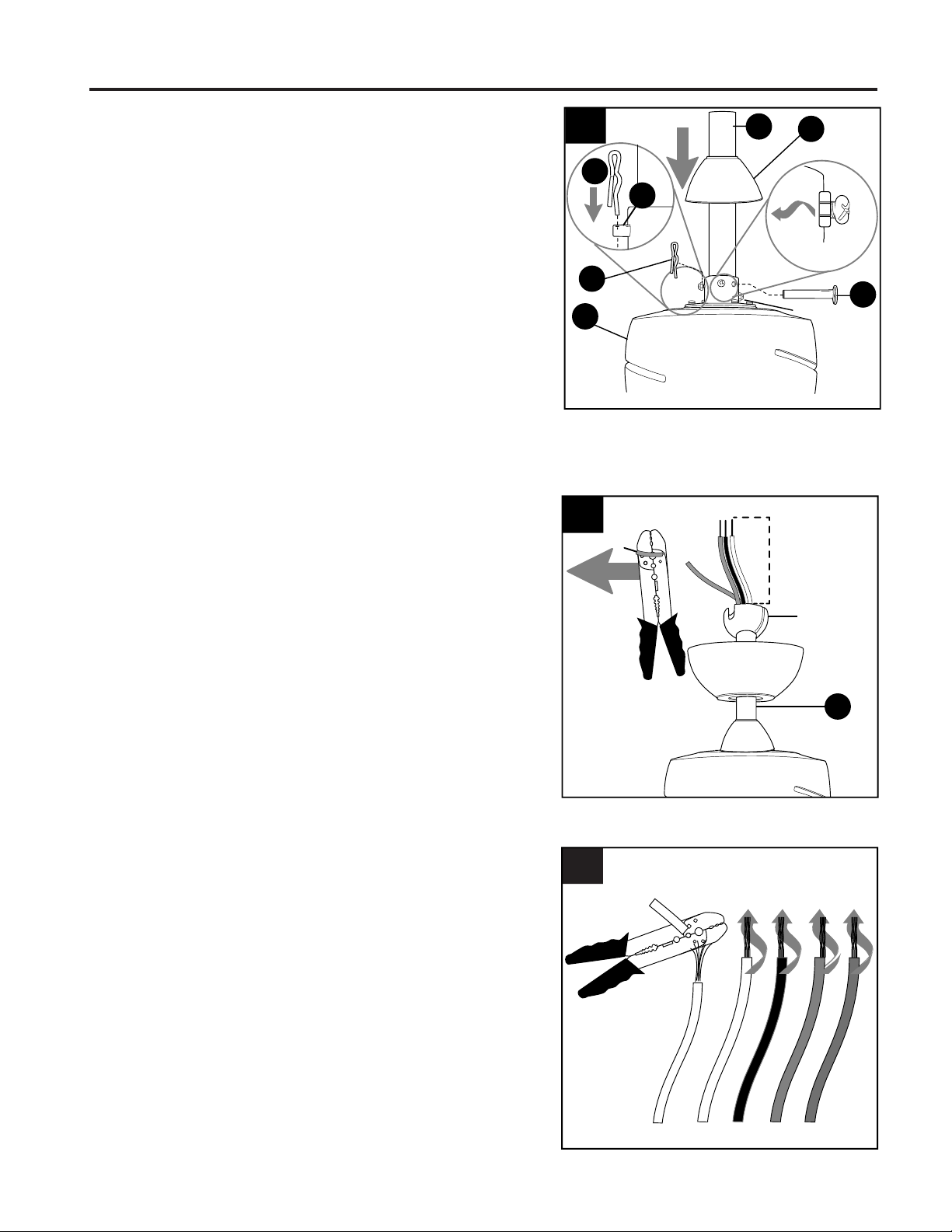
Slip downrod (C) into motor assembly yoke, align
holes and re-install pin (D) and clip (E). Tighten
set screws in motor assembly yoke and then
tighten preassembled nuts on the set screws.
Then, slide yoke cover (H) down until it rests on
top of motor assembly (I).
8
C
I
H
D
E
Yoke
E
D
Set Screw
and Nut
Sideview
9.
If you decided to cut back the lead wires in Step 8,
strip 1/2 in. of insulation from end of each
wire -- WHITE, BLUE, PINK, GREY AND RED (if
applicable). Twist stripped ends of each strand of
wire within the insulation with pliers (not included).
Depending on the length of downrod you use, you
may need to cut the lead wires back to simplify
the wiring. If you decide to cut back the lead
wires, it is suggested you do so in the following
manner:
Take the lead wires and make sure you have
pulled them all the way through the top of the
downrod. Start at the TOP of the hanging ball on
the downrod and measure 8 in. of lead wire, then
cut the excess wire off with wire cutters (not
included).
NOTE: If you do not cut back the lead wires, Step
10 is not necessary and you may proceed to
Step 11 instead.
Hanging
Ball
9
C
8 in.
10.
10
9
WARNING: To reduce the risk of fire, electrical shock or personal injury, wire connectors provided
with this fan are designed to accept only one 12-gauge house wire and two lead wires from the fan. If
your house wire is larger than 12-gauge or there is more than one house wire to connect to the
corresponding fan lead wires, consult an electrician for the proper size wire connectors to use.
CAUTION: Be sure outlet box is properly grounded and that a ground (green or bare) wire is present.
WARNING: If house wires are different colors than referred to in the following steps, stop immediately.
A professional electrician is recommended to determine wiring.
WARNING: Using a full range dimmer switch (not included) to control fan speed will cause a loud
humming noise from fan. To reduce the risk of fire or electrical shock, do NOT use a full range dimmer switch
to control fan speed.
WIRING
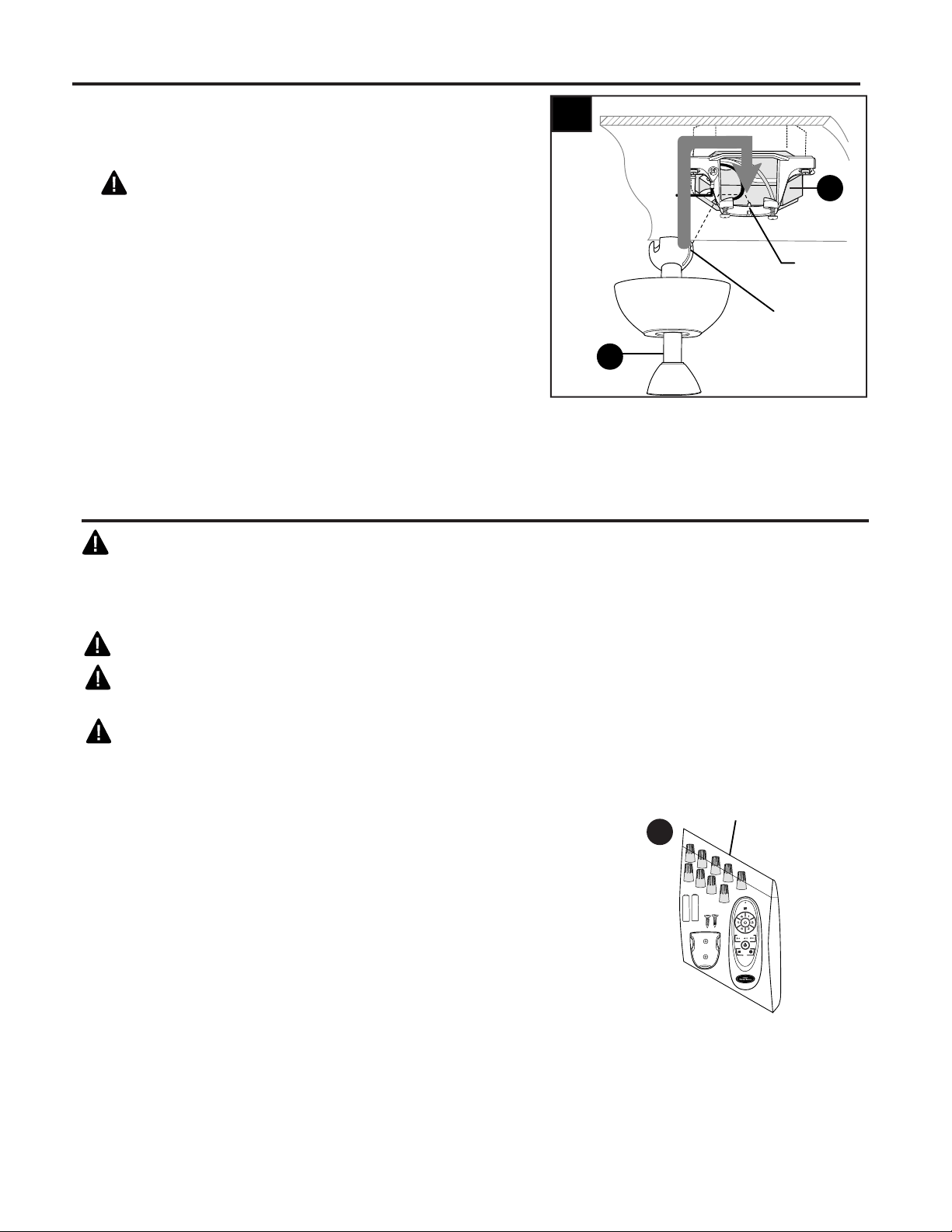
Install hanging ball of downrod (C) into opening of
mounting bracket (A). Align one of the slots in
hanging ball with tab in mounting bracket (A).
DANGER: Failure to align one of the slots in
the ball with the tab may result in serious injury or
death.
C
Tab
11
A
Slot
11.
Wire
Connectors
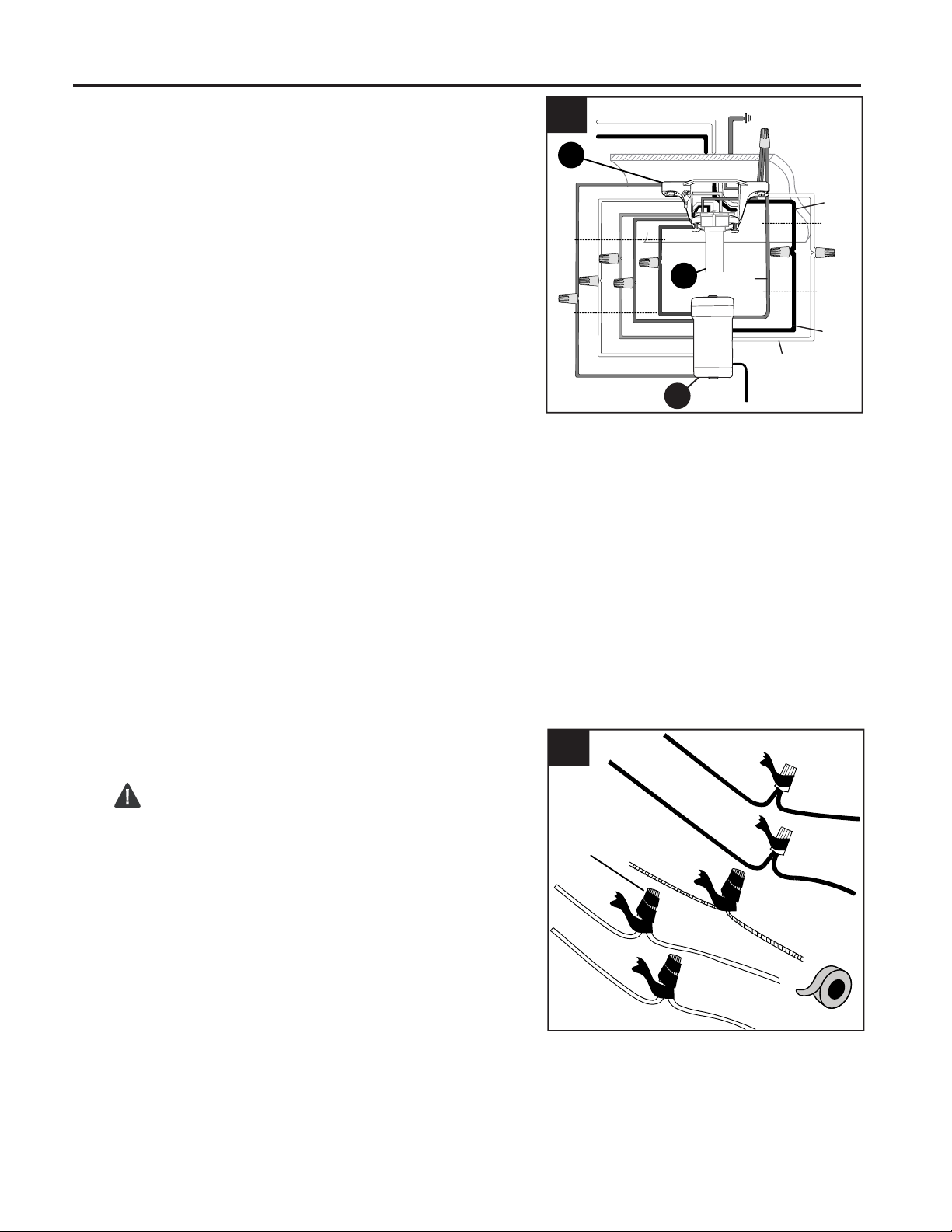
IMPORTANT: Make the necessary wiring connections for
remote control operation as detailed on next page. For each
wire connection, use one of the wire connectors from the
remote pack (R), making sure to screw wire connector on in
a clockwise direction.
R
INITIAL INSTALLATION
10
Wrap electrical tape (not included) around each
individual wire connector down to the wire.
WARNING: Make sure no bare wire or wire
strands are visible after making connections. Place
GREEN and WHITE connections on opposite side of
the outlet box from the BLACK and BLUE (if
applicable) connections.
2.
2
Connect all GROUND (GREEN) wires from fan
(on downrod (C), if applicable, mounting
bracket (A)) and remote control receiver (Q) to
BARE/GREEN supply wire from ceiling.
Connect BLACK wire (labeled AC IN L) from remote
control receiver (Q) to BLACK supply wire from ceiling.
Connect WHITE wire (labeled AC IN N) from remote
control receiver (Q) to WHITE supply wire from ceiling.
Connect RED wire (labeled TO MOTOR) from remote
control receiver (Q) to RED wire from motor
assembly (I).
Connect GRAY wire (labeled TO MOTOR) from remote
control receiver (Q) to GRAY wire from motor
assembly (I).
Connect PINK wire (labeled FOR MOTOR) from remote
control receiver (Q) to PINK wire from motor
assembly (I).
Connect BLUE wire (labeled FOR LIGHT L) from
remote control receiver (Q) to BLUE wire from motor
assembly (I).
Connect WHITE wire (labeled FOR LIGHT N) from
remote control receiver (Q) to WHITE wire from motor
assembly (I).
1.
WIRING
Q
1
WHITE SUPPLY WIRE
BLACK SUPPLY WIRE
PINK
RED
RED
GRAY
GRAY
PINK
WHITE
BLUE
BLUE
WHITE
BLACK
AC IN L
WHITE
AC IN N
WHITE
GROUND (GREEN OR BARE)
GROUND
(GREEN OR BARE)
BLACK
FROM
RECEIVER
FROM
FAN
FROM
RECEIVER
FROM
CEILING
C
A
GREEN/
GROUND
Wire
Connector
11
FINAL INSTALLATION
1.
1
B
F
Knobs
G
Locate two canopy mounting screws (B) on
underside of mounting bracket (A) and remove
canopy mounting screw (B) closest to the open end
of the mounting bracket (A). Partially loosen the
other canopy mounting screw (B). Lift canopy (F) to
mounting bracket (A). Place rounded part of slotted
hole in canopy (F) over loosened canopy mounting
screw (B) and push up. Twist canopy (F) to lock.
Re-insert canopy mounting screw (B) that was
removed, then tighten both canopy mounting
screws (B).
Use arrows on inside of canopy cover (G) to locate
knobs on center ring of canopy cover (G). Slide
canopy cover (G) up to canopy (F), aligning knobs
on canopy cover (G) with openings in bottom of
canopy (F). Press up firmly on the canopy cover (G)
until it fits into the bottom of the canopy (F).
Twist
canopy cover (G) to lock.
WIRING
3
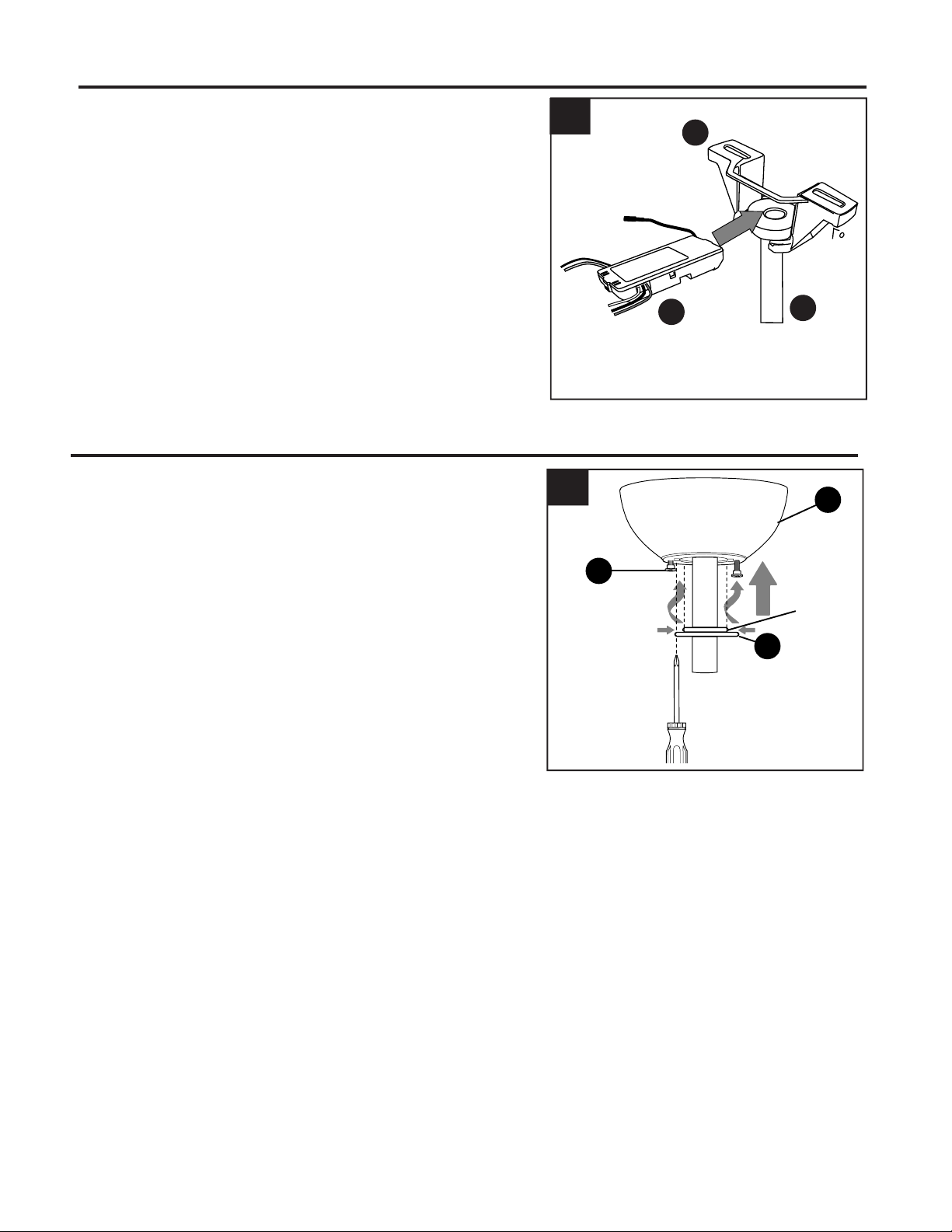
Gently slide remote control receiver (Q) flat-side
up into mounting bracket (A). Turn spliced/taped
wires upward and gently push wires and wire
connectors (CC) into outlet box. Let antenna from
remote control receiver (Q) hang to the side.
NOTE: The remote control included with this fan
meets the following requirements:
a. Not for use with solid state fans.
b. Electrical rating: 120V / 60 Hz;
motor amps:1.25 MAX.
3.
Antenna
C
Q
A
12
2.
Hardware Used
AA
Blade Screw x 9
Fiber Blade Washer x 9
BB
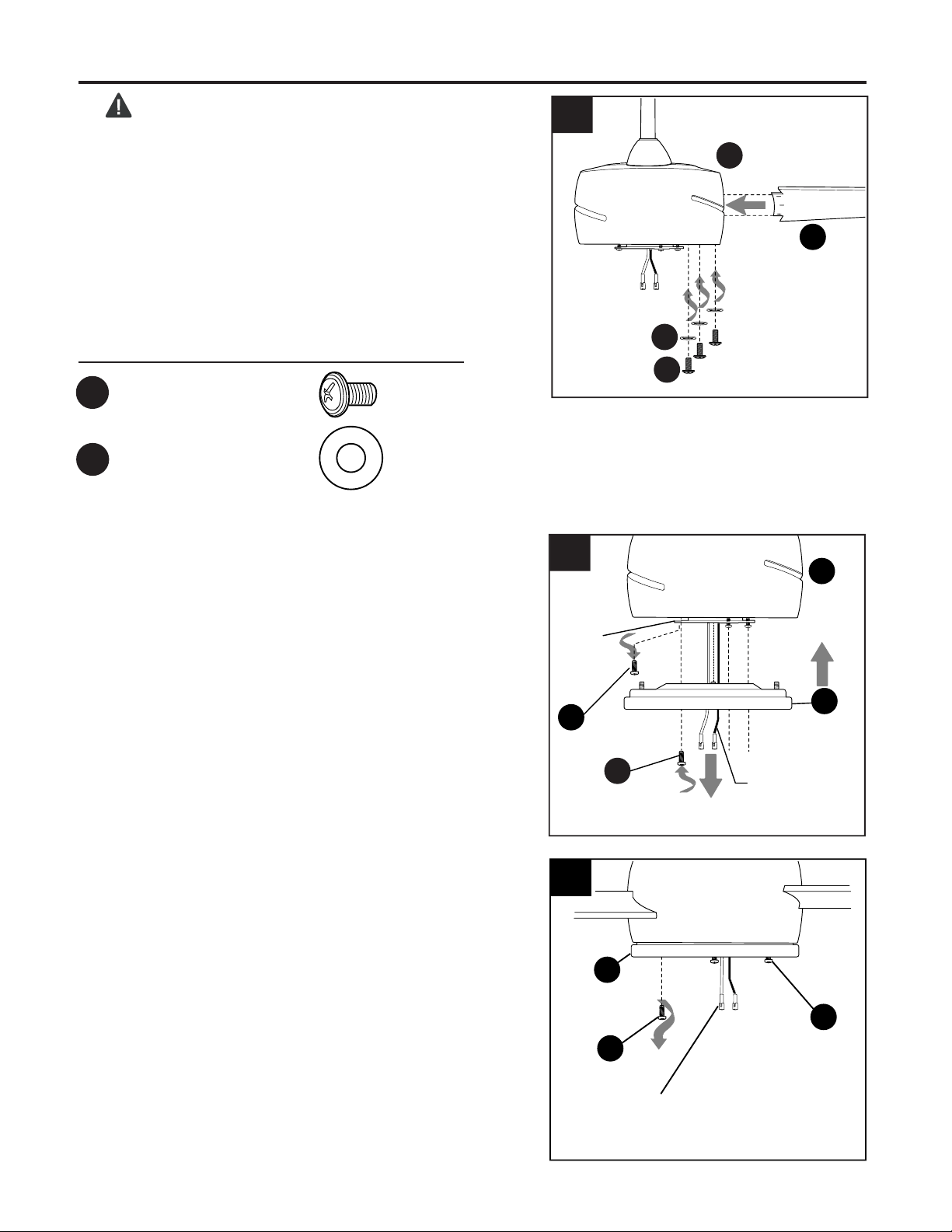
DANGER: To reduce the risk of serious bodily
injury, DO NOT use power tools to assemble the
blades (O). If screws are overtightened, blades (O)
may crack and break.
Insert the blade (O) through the slot on the band of
the motor assembly (I). Align holes in blade (O) with
holes in plate on underside of motor. Attach the
blade (O) with blade screws (AA) and fiber blade
washers (BB). Then, tighten each blade screw (AA),
starting with the one in the middle. Repeat for
remaining blades (O).
4.
3.
3
2
J
BB
AA
I
FINAL INSTALLATION
Remove one fitter plate screw (L) from underside
of fitter plate (K) and partially loosen the other two
fitter plate screws (L).
3
Motor
Plate
Molex
Connections
I
K
I
O
I
K
4
Molex
Connections
L
L
I
J
Remove one motor plate screw (J) from motor
plate on underside of motor assembly (I) and
partially loosen the other two motor plate
screws (J). Align slotted holes in fitter plate (K)
with loosened motor plate screws, allowing
molex connections from motor housing (I) to
come through hole in fitter plate (K). Twist fitter
plate (K) to lock. Re-insert the motor plate
screw (J) that was removed and securely
tighten all three motor plate screws (J).
13
FINAL INSTALLATION
6.
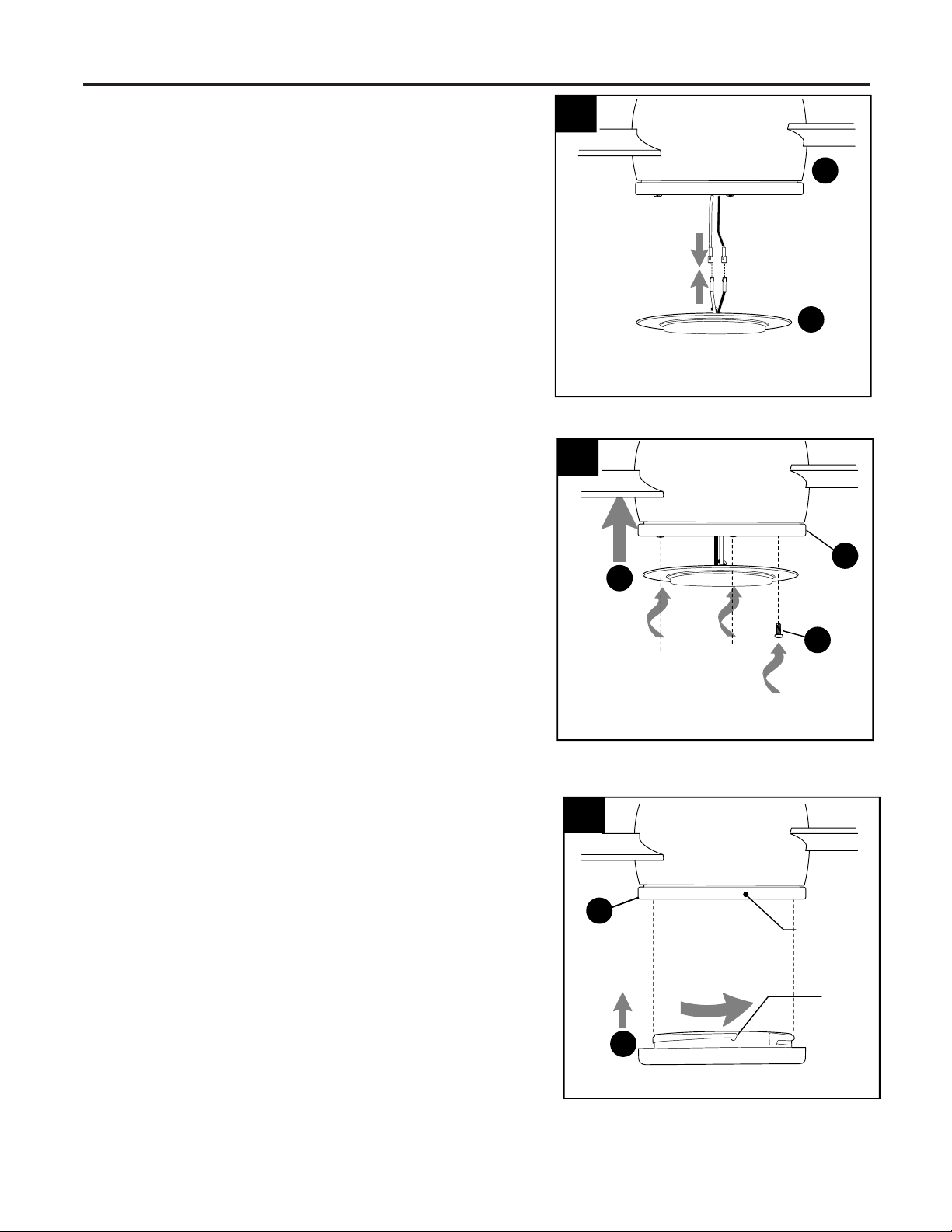
Carefully arrange wiring within the fitter plate (K) to
ensure wires do not get pinched when attaching the
LED light kit (M).
Align slotted holes in LED light kit (M) with
loosened fitter plate screws (L) on fitter plate (N).
Twist LED light kit (M) to lock in place. Re-insert the
previously removed fitter plate screw (L) and
securely tighten all fitter plate screws (L).
K
L
6
M
7.
Align slots on shade (N) with protrusions on
underside of fitter plate (K). Turn shade (N)
clockwise until it no longer turns.
NOTE: Pull down gently on the shade (N) to make
sure it is secured completely.
7
Slot
Protrusion
N
K
I
5.
Connect WHITE wire from LED light kit (M) to
WHITE wire from motor assembly (I). Connect
BLUE wire from LED light kit (M) to BLUE (or
BLACK) wire from motor assembly (I). Make sure
molex connections snap together securely.
M
5
WHITE
BLUE (or BLACK)
WHITE
BLUE
14
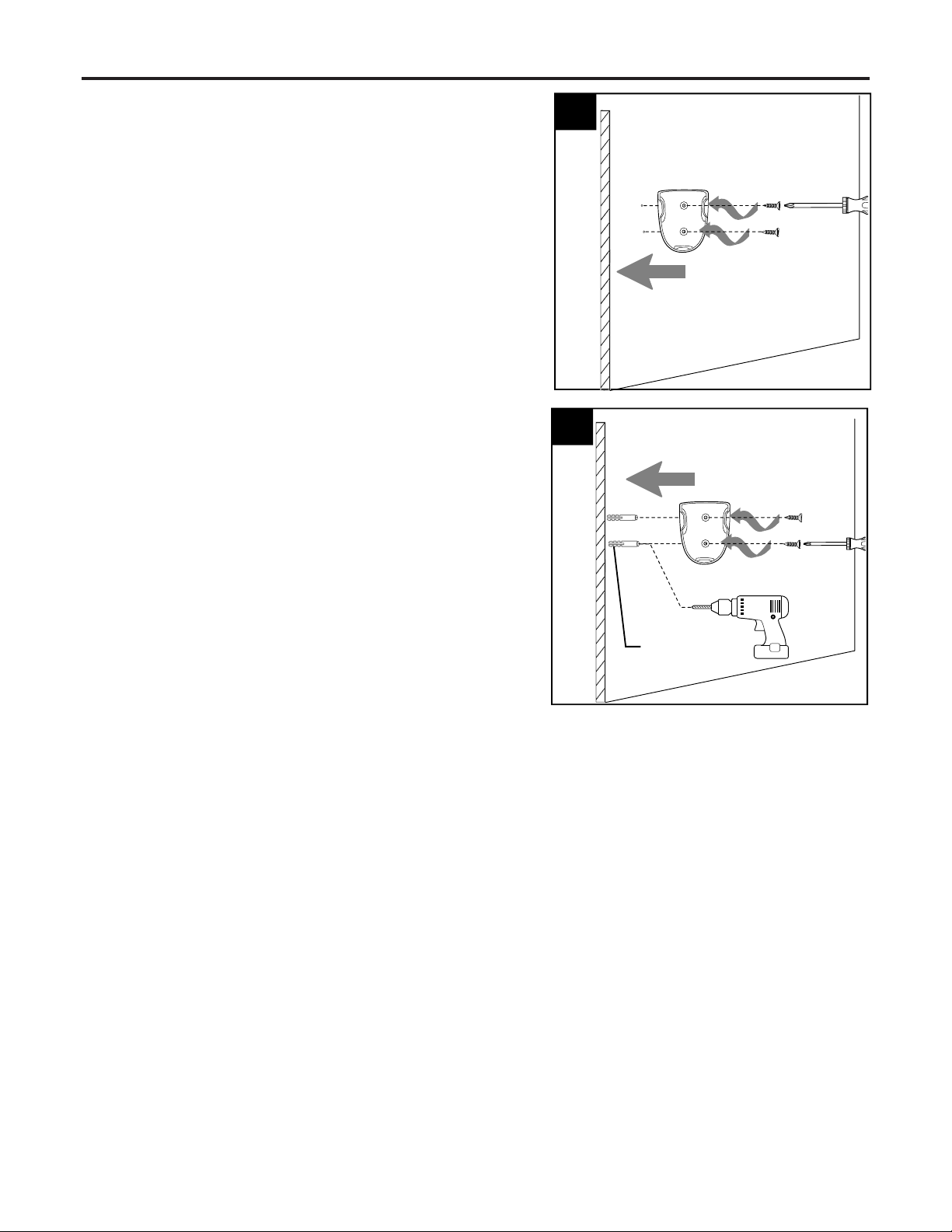
If mounting surface is drywall, mark the
location of the holes using a pencil or a marker
(not included). Use a 7/32 in. drill bit (not
included) to drill two pilot holes in drywall at
marked locations.
Position plastic anchor in each pilot hole. Gently
tap plastic anchors with a hammer (not
included) until flush with wall surface. Screw
bracket screws into plastic anchor.
The remote control transmitter from remote
pack (R) rests inside the bracket.
9.
9
Remote Control
Bracket
Wall
Bracket
Screws
Wall
Anchors
8
Remote Control
Bracket
Wall
Bracket
Screws
If you wish to use the remote control bracket
from remote pack (R) on a wood surface, install
bracket screws from remote pack (R) through
bracket and into the desired installation site.
8.
FINAL INSTALLATION
15
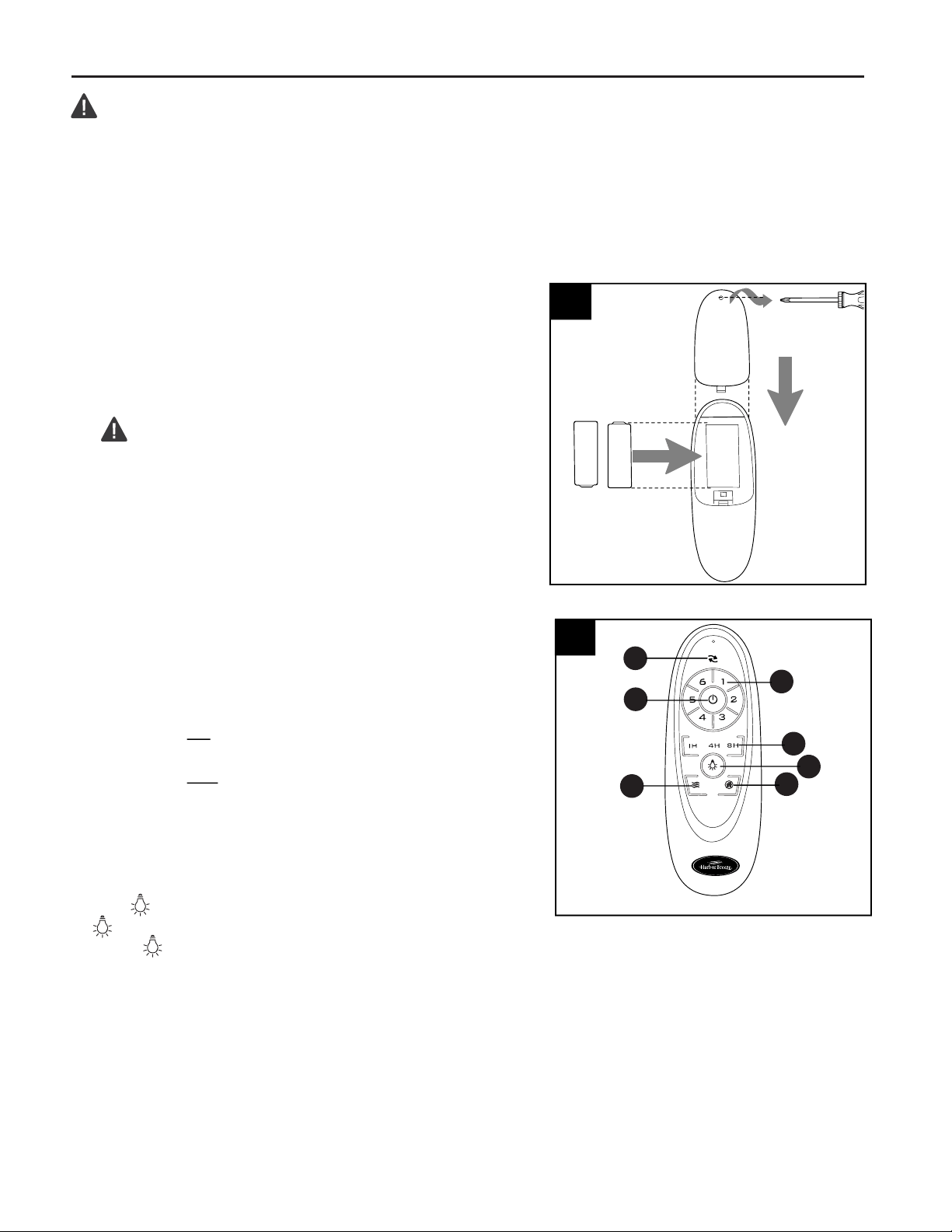
Remove screw on the back of remote control
transmitter in remote pack (R) to remove battery
cover. Install two AAA batteries (included).
Replace battery cover on remote control
transmitter with screw just removed.
WARNING: Choking Hazard - Small parts.
Keep battery away from children.
NOTE: Battery is NOT rechargeable. Remove
battery with low or no charge and dispose of
properly.
1.
(back
side)
1
Battery
Cover
CAUTION: “DO NOT DISPOSE OF BATTERIES IN FIRE, BATTERIES MAY EXPLODE OR
LEAK.” - When disposing of household alkaline batteries, it is best to check with your local and state
recycling or household hazardous waste coordinators concerning the specifics of the program in your
area. You may also locate a recycling center by calling 1-800-8-BATTERY or 1-877-2-RECYCLE or
visit www.epa.gov/epawaste/index.htm or www.earth911.org for more information.
Remote
Control
Transmitter
Battery
2.
IMPORTANT: To prevent damage to remote control transmitter, remove the battery if not used for long
periods. Store the remote control transmitter away from excess heat or humidity.
2
Remote Control Transmitter
Operation buttons on the panel of the remote control
transmitter:
1 - Reverse function for winter & summer
2 - Fan speeds: 1 (lowest) to 6 (highest)
3 - To turn fan ON or OFF
4 - Timer: Fan stops after 1h/4h/8h
5 - To turn light ON or OFF
6 - Breeze: fan speeds automatic cycle
between 1 to 6 speeds.
7 - Vacation mode: switch on the light kit
5 minutes each 2 hours.
Tap button quickly to turn lights off or on. Hold
button down to increase or decrease lights. If you
press button in excess of 0.7 seconds, it becomes
a dimmer. The lights vary cyclically in 8 seconds. The
light button has an auto resume function, which keeps
the light at the same brightness as the last time it was
turned off.
1
2
3
4
5
6
7
OPERATING INSTRUCTIONS
16
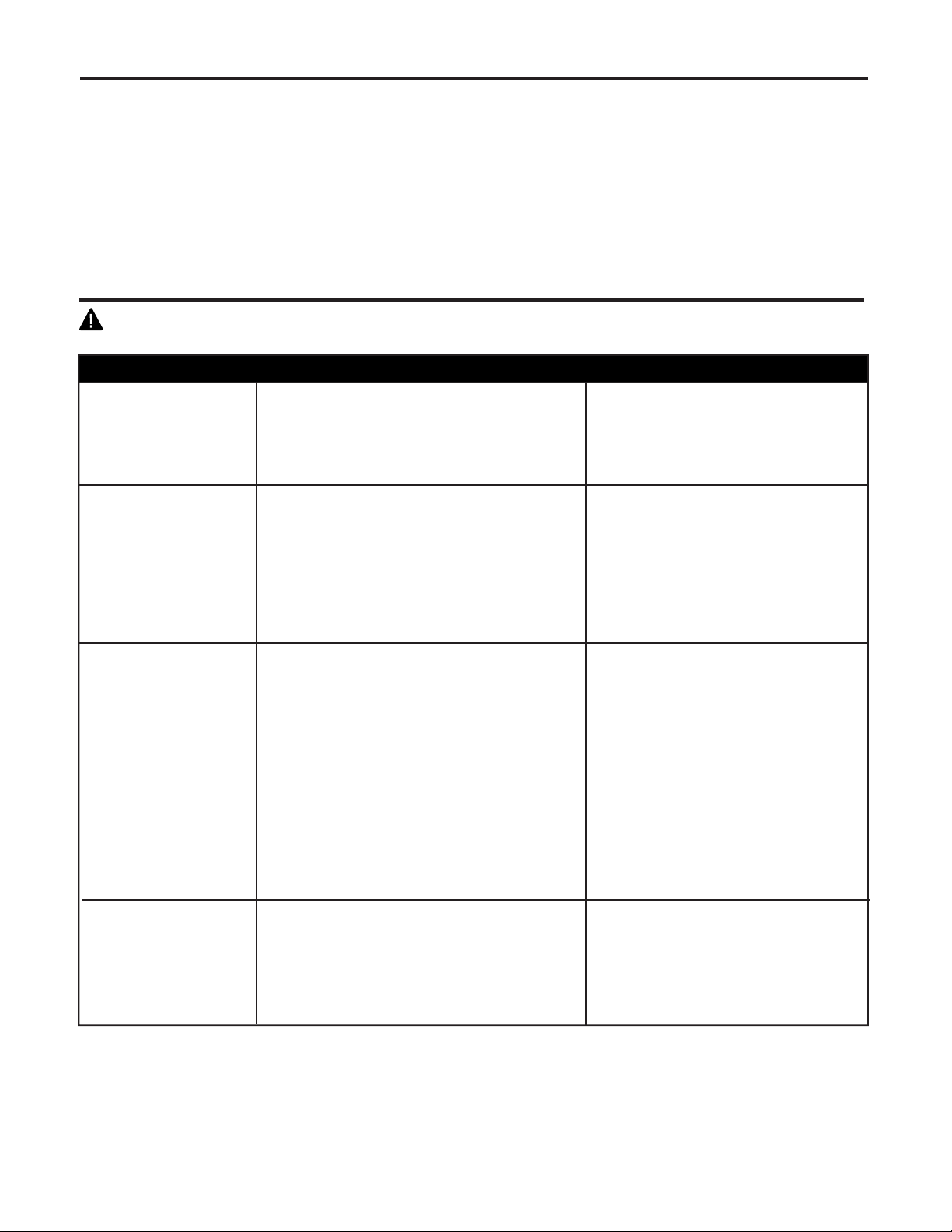
WARNING: Before beginning work, shut off the power supply to avoid electrical shock.
PROBLEM POSSIBLE CAUSE CORRECTIVE ACTION
Fan does not move. 1. Power is off or fuse is blown.
2. Faulty wire connection.
3. Blades are not installed.
1. Turn power on or check fuse.
2. Turn power off. Loosen canopy
and check all connections.
3. Attach blades to fan.
Noisy operation. 1. Blades are loose.
2. Cracked blade.
3. Fan is new.
1. Tighten all blade screws.
2. Replace blade.
3. Allow fan a “break in” period of
a few days, especially when
running the fan at Medium and
High speeds.
Excessive wobbling.
1. Blades are loose.
2. Unbalanced blades.
3. Fan not securely mounted.
4. Fan too close to vaulted ceiling.
5. Set screw(s) on motor assembly yoke
is (are) not tightened properly.
1. Tighten all blade
screws/washers.
2. Switch one blade with a blade
from the opposite side.
3. Turn power off. Carefully loosen
canopy and verify that mounting
bracket is secure.
4. Use a longer downrod or move
fan to another location.
5. Tighten yoke set screw(s)
securely.
NOTE: A small amount of "wobble" is normal and should not be considered a defect.
TROUBLESHOOTING
Fan operates but
light fails.
1. Wires in canopy not wired
properly.
2. Wall switch to fan is off.
1. Check wires in canopy and, if
necessary, re-wire according to
instructions on pages 9 and 10.
2. Make sure that wall switch to
fan is on.
CARE AND MAINTENANCE
At least twice each year, lower canopy (F) to check downrod (C) assembly, and then tighten all screws
on fan. Clean motor assembly (I) with only a soft brush or lint-free cloth to avoid scratching the finish.
Clean blades (O) with a lint-free cloth. You may occasionally apply a light coat of furniture polish to wood
blades for added protection.
IMPORTANT: Shut off main power supply before beginning any maintenance. Do not use water or a
damp cloth to clean the ceiling fan.
Total wattage for this fan is 18 watts; do not attempt to replace the LEDs.
Printed in China
JMLI2008
17
A
F
C
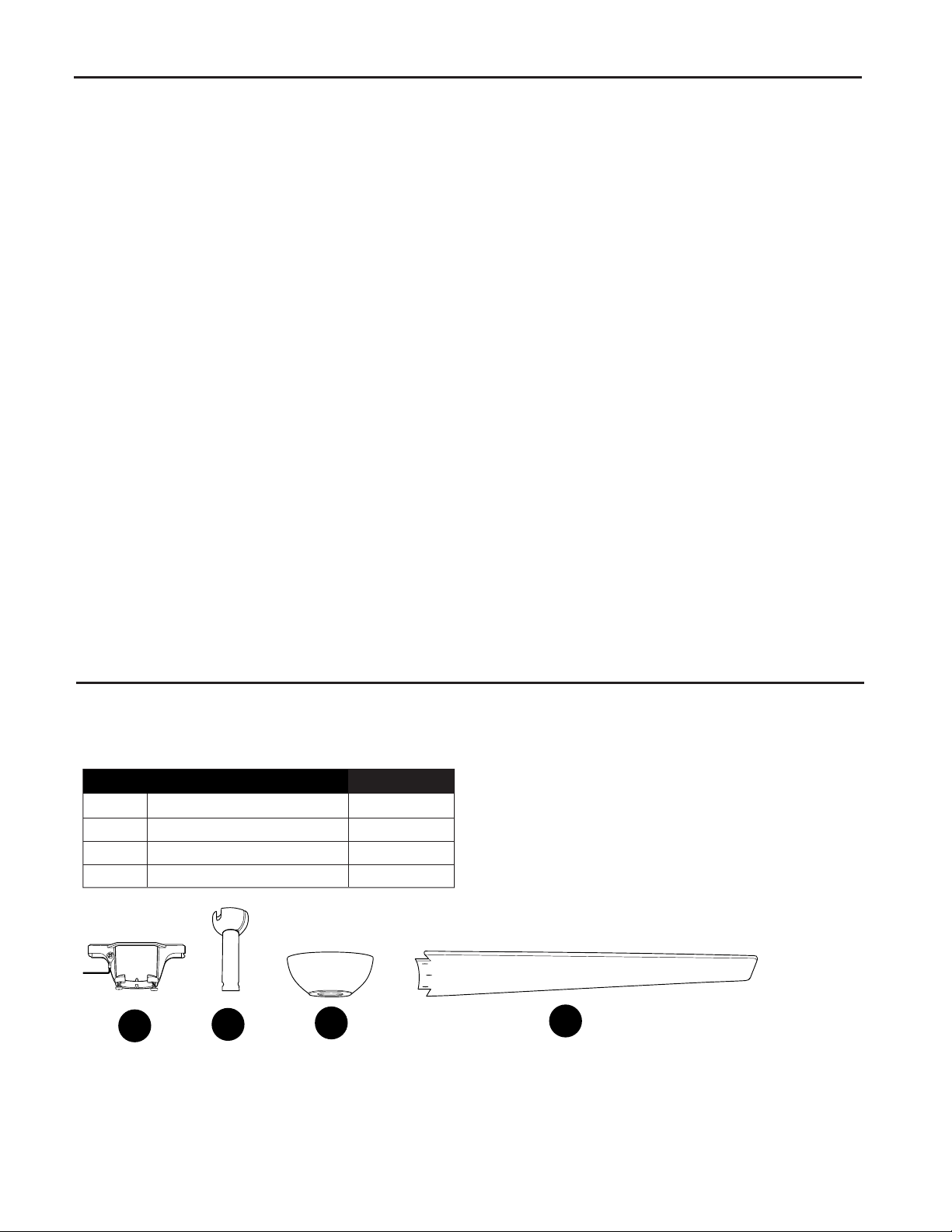
REPLACEMENT PARTS LIST
LIMITED LIFETIME WARRANTY
O
PART DESCRIPTION
A
Mounting Bracket
C
Downrod
F Canopy
O Blade
2599786-A
2599786-C
2599786-F
2599786-J
PART #
For replacement parts, call our customer service department at 1-800-643-0067, 8 a.m. - 8 p.m., EST,
Monday - Sunday.
The distributor warrants this fan to be free from defects in workmanship and materials present at time of
shipment from the factory for Lifetime limited from the date of purchase. This warranty applies only to
the original purchaser. The distributor agrees to correct any defect at no charge or, at our option, replace
the ceiling fan with a comparable or superior model.
To obtain warranty service, present a copy of your sales receipt as proof of purchase. All cost of removal
and reinstallation are the express responsibility of the purchaser. Any damage to the ceiling fan by
accident, misuse or improper installation, or by using parts not produced by the manufacturer of this fan
or affixing accessories not produced by the manufacturer of this fan, are the purchaser's own
responsibility. The distributor assumes no responsibility whatsoever for fan installation during the limited
lifetime warranty. Any service performed by an unauthorized person will render the warranty invalid.
Due to varying climatic conditions, this warranty does not cover changes in brass finish, rusting, pitting,
tarnishing, corroding or peeling. Brass finish fans maintain their beauty when protected from varying
weather conditions. Any glass provided with this fan is not covered by the warranty.
Any replacement of defective parts for the ceiling fan must be reported within the first year from the date
of purchase. For the balance of the warranty, call our customer service department (at 1-800-643-0067)
for return authorization and shipping instructions so that we may repair or replace the ceiling fan. Any
fan or parts returned improperly packaged is/are the sole responsibility of the purchaser. There is no
further express warranty. The distributor disclaims any and all implied warranties. The duration of any
implied warranty which cannot be disclaimed is limited to the limited lifetime period as specified in our
warranty. The distributor shall not be liable for incidental, consequential or special damages arising at or
in connection with product use or performance except as may otherwise be accorded by law. This
warranty gives you specific legal rights and you may also have other rights which vary from state to
state. This warranty supersedes all prior warranties.