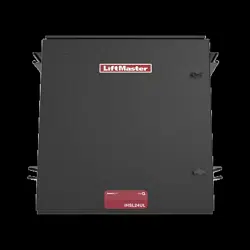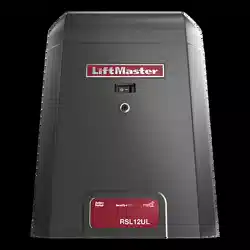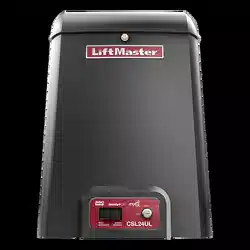
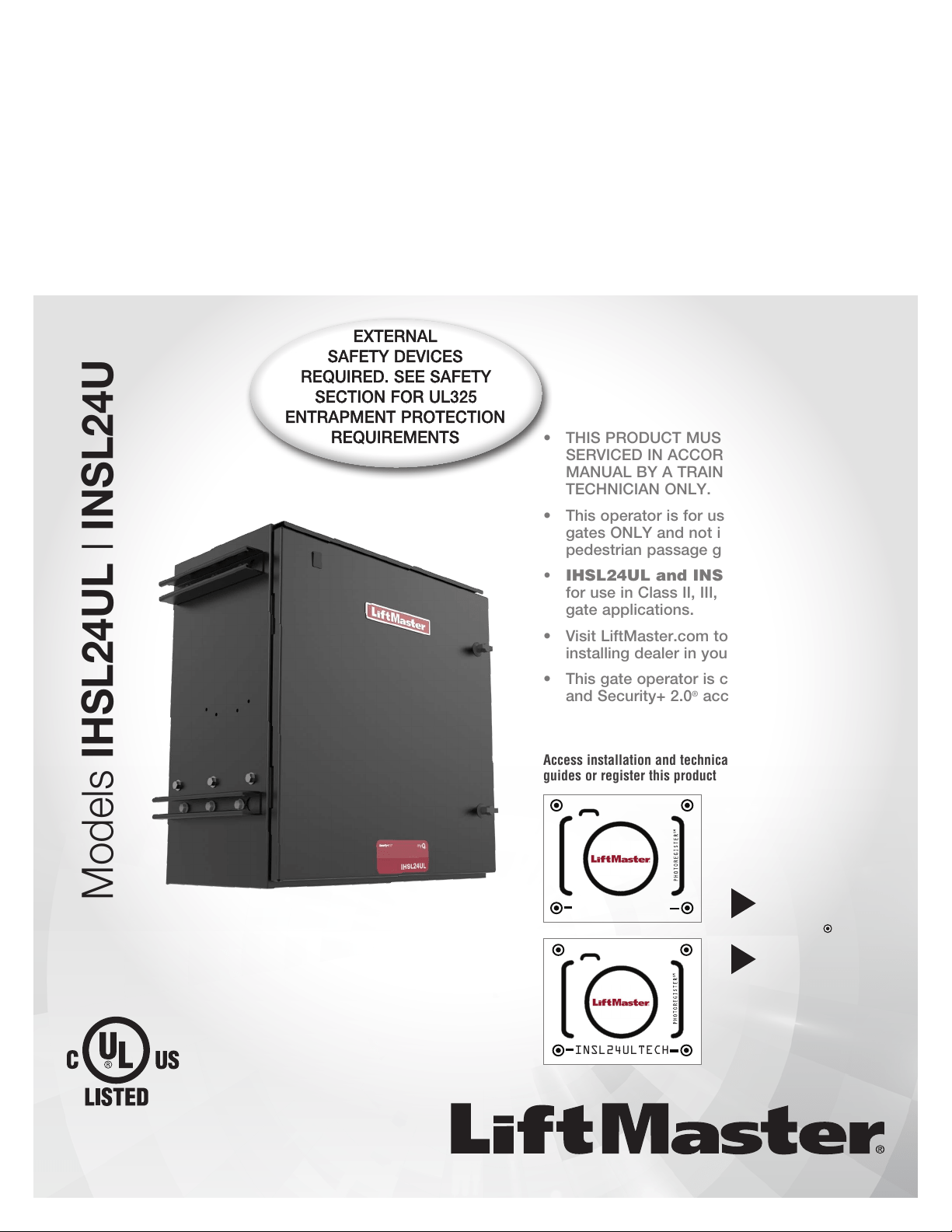
INDUSTRIAL DC
VEHICULAR SLIDE GATE OPERATOR
INSTALLATION MANUAL
• THIS PRODUCT MUST BE INSTALLED AND
SERVICED IN ACCORDANCE WITH THIS
MANUAL BY A TRAINED GATE SYSTEMS
TECHNICIAN ONLY.
• This operator is for use on vehicular passage
gates ONLY and not intended for use on
pedestrian passage gates.
• IHSL24UL and INSL24UL are intended
for use in Class II, III, andIV vehicular slide
gate applications.
• Visit LiftMaster.com to locate a professional
installing dealer in your area.
• This gate operator is compatible with myQ
®
and Security+ 2.0
®
accessories.
LiftMaster
300 Windsor Drive
Oak Brook, IL 60523
Access installation and technical support
guides or register this product
Send it in by texting
the photo to 71403.
Take a photo of the
camera icon including
the points (
).
1.
2.
INSL24ULTECH
Models IHSL24UL I INSL24UL
IHSL24ULTECH
2
SAFETY 2
Safety Symbol and Signal Word Review ................................................2
Usage Class ...........................................................................................3
UL325 Entrapment Protection Requirements ........................................3
Safety Installation Information ............................................................... 4
Role of Dealers, Installers, and Trained Gate System Technicians ........4
Role of End Users/Home Owners ..........................................................4
Gate Construction Information ...............................................................5
INTRODUCTION 6
Carton Inventory ....................................................................................6
Operator Specifications ..........................................................................7
Site Preparation .....................................................................................8
INSTALLATION 9
Step 1 Install the Operator ..................................................................... 9
Step 2 Attach the Chain .......................................................................11
Step 3 Install Entrapment Protection ...................................................12
Step 4 Earth Ground Rod .....................................................................15
Step 5 Power Wiring ............................................................................15
Step 6 Connect Batteries .....................................................................17
Step 7 Dual Gate Setup ........................................................................18
Step 8 Close and Secure the Door ....................................................... 20
Step 9 Install Warning Signs ...............................................................20
ADJUSTMENT 21
Limit, Speed, and Force Adjustment .................................................... 21
Set the Initial Limits, Speed, and Force ...............................................21
Speed Control ......................................................................................22
Fine Tune the Force .............................................................................22
Adjust the Limits ..................................................................................23
Obstruction Test ..................................................................................23
PROGRAMMING 24
Remote Controls (Not Provided) .........................................................24
LiftMaster Internet Gateway (not provided) .........................................25
CAPXLV Connected Access Portal .......................................................25
myQ® Business™: ...............................................................................26
Erase All Transmitter and Keypad Codes .............................................26
Erase Limits .........................................................................................26
Constant Pressure Override (CPO) ......................................................26
Gate Hold Open Feature .......................................................................26
To Remove and Erase Monitored Entrapment Protection Devices .......26
OPERATION 27
Gate Operator Setup Examples ............................................................27
Control Board Overview .......................................................................28
Manual Disconnect ..............................................................................29
Reset Button ........................................................................................29
Operator Alarm ....................................................................................30
Remote Control ....................................................................................30
ACCESSORY WIRING 31
External Control Devices ...................................................................... 31
Locks ...................................................................................................32
Miscellaneous Wiring ...........................................................................32
EXPANSION AND RELAY ADAPTER BOARDS 33
Expansion and Relay Adapter Boards Overview ...................................33
Auxiliary Relays ...................................................................................34
Wiring Accessories to the Expansion Board ........................................35
MAINTENANCE 36
Important Safety Instructions ..............................................................36
Maintenance Chart ...............................................................................37
Batteries ............................................................................................... 37
Drive Train ...........................................................................................37
TROUBLESHOOTING 38
Diagnostic Codes .................................................................................38
Control Board LEDs .............................................................................39
Troubleshooting Chart .........................................................................40
SOLAR PANELS 43
Solar Panel(s) ......................................................................................43
REPAIR PARTS 47
ACCESSORIES 48
WARRANTY 50
APPENDIX 51
SAMS Wiring With Relays Not Energized ............................................51
Dual Gate Settings ...............................................................................51
Manual Adjustments with a Remote Control .......................................52
Wiring Diagram ....................................................................................53
Diagnostic Codes Table .......................................................................55
Site Planning Safety Checklist .............................................................57
Contact Information .............................................................................60
WARNING: This product can expose you to chemicals including lead, which are known to the State of California to cause cancer or birth defects
or other reproductive harm. For more information go to www.P65Warnings.ca.gov.
When you see these Safety Symbols and Signal Words on the following pages, they will alert
you to the possibility of Serious Injury or Death if you do not comply with the warnings that
accompany them. The hazard may come from something mechanical or from electric shock.
Read the warnings carefully.
When you see this Signal Word on the following pages, it will alert you to the possibility of
damage to your gate and/or the gate operator if you do not comply with the cautionary
statements that accompany it. Read them carefully.
IMPORTANT NOTE:
• BEFORE attempting to install, operate or maintain the operator, you must read and fully
understand this manual and follow all safety instructions.
• DO NOT attempt repair or service of your gate operator unless you are a Trained Gate
Systems Technician.
MECHANICAL
ELECTRICAL
TABLE OF CONTENTS
SAFETY
Safety Symbol and Signal Word Review
3
Usage Class
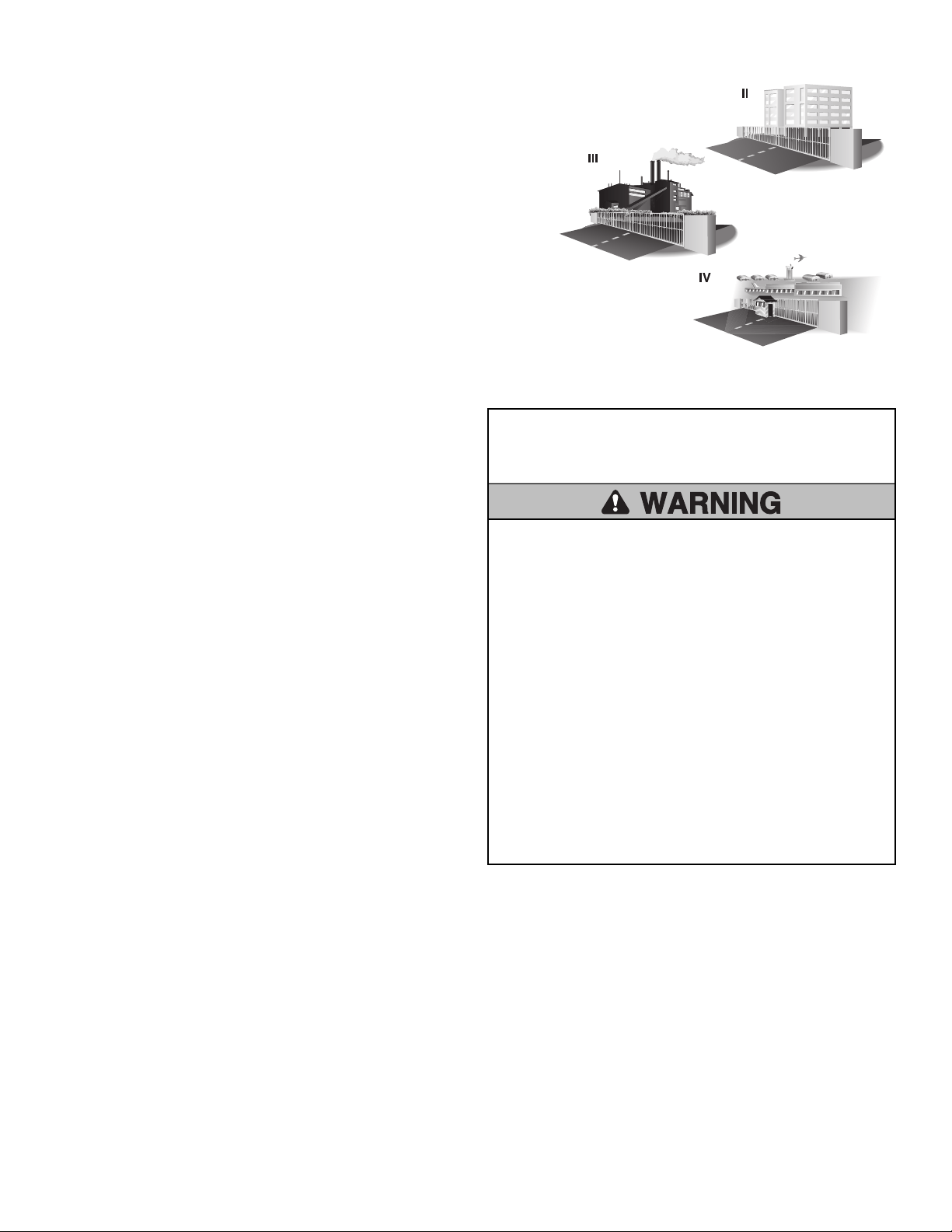
Class II - Commercial/General Access Vehicular Gate
A vehicular gate operator (or system) intended for use in a commercial location or
building such as a multi-family housing unit (five or more single family units), hotel,
garages, retail store, or other buildings accessible by or servicing the general public.
Class III - Industrial/Limited Access Vehicular Gate
A vehicular gate operator (or system) intended for use in an industrial location or
building such as a factory or loading dock area or other locations not accessible by or
intended to service the general public.
Class IV - Restricted Access Vehicular Gate Operator
A vehicular gate operator (or system) intended for use in a guarded industrial location
or building such as an airport security area or other restricted access locations not
servicing the general public, in which unauthorized access is prevented via
supervision by security personnel.
UL325 Entrapment Protection Requirements
Definitions
ENTRAPMENT: The condition when a person is caught or held in a
position that increases the risk of injury.
SLIDE GATE ENTRAPMENT ZONE: An entrapment zone exists if at any
point during travel, the gap between the gate and any opposing fixed
edge or surface such as posts, walls, pillars, columns, or the operator
itself, is less than 16" (406 mm) in a location up to 6 ft. (1.8 m) above
grade.
INDEPENDENT MONITORED ENTRAPMENT PROTECTION DEVICE: An
entrapment protection device is independent if it is a different type
(photoelectric sensors, edge device, inherent protection device) from the
other devices in the same entrapment zone.
Use the Site Planning Safety Checklist in the appendix to identify
entrapment zones found in your installation.
Requirements
•
A minimum of two independent monitored entrapment protection
devices are required to be installed at each entrapment zone.
•
It is the responsibility of the installer to install external monitored
entrapment protection devices for each entrapment zone.
•
The operator will only operate with a minimum of two independent
monitored entrapment protection devices installed in each direction;
two in the open direction and two in the closed direction.
This operator has an inherent entrapment protection device built-in.
The installer MUST provide one additional entrapment protection
device for each entrapment zone.
Acceptable entrapment protection device types include:
•
Inherent (built into the operator)
•
LiftMaster monitored external photoelectric sensors, see page 48 for
acceptable sensors.
•
LiftMaster monitored external edge sensors, see page 48 for
acceptable sensors.
IMPORTANT SAFETY
INSTRUCTIONS
To reduce the risk of INJURY or DEATH:
•
READ AND FOLLOW ALL INSTRUCTIONS.
•
NEVER let children operate or play with gate controls. Keep the
remote control away from children.
•
ALWAYS keep people and objects away from the gate. NO ONE
SHOULD CROSS THE PATH OF THE MOVING GATE.
•
Test the gate operator monthly. The gate MUST reverse on
contact with an object or reverse when an object activates the
noncontact sensors. After adjusting the speed, force, or the
limit of travel, retest the gate operator. Failure to adjust and
retest the gate operator properly can increase the risk of
INJURY or DEATH.
•
Use the manual release ONLY when the gate is not moving.
•
KEEP GATES PROPERLY MAINTAINED. Read this manual. Have a
Trained Gate Systems Technician make repairs to gate hardware.
•
The entrance is for vehicles ONLY. Pedestrians MUST use separate
entrance.
•
SAVE THESE INSTRUCTIONS.

4
Safety Installation Information
1. Vehicular gate systems provide convenience and security. Gate
systems are comprised of many component parts. The gate operator is
only one component. Each gate system is specifically designed for an
individual application.
2. Gate operating system designers, installers and users must take into
account the possible hazards associated with each individual
application. Improperly designed, installed or maintained systems can
create risks for the user as well as the bystander. Gate systems design
and installation must reduce exposure to potential hazards.
3. A gate operator can create high levels of force in its function as a
component part of a gate system. Therefore, safety features must be
incorporated into every gate system design. Specific safety features
include:
•
Edges Sensors (contact)
•
Guards for Exposed Rollers
•
Photoelectric Sensors
•
Screen Mesh
•
Instructional and Precautionary Signage
4. Install the gate operator only when:
a. The operator is appropriate for the construction and the usage
class of the gate.
b. All openings of a horizontal slide gate are guarded or screened
from the bottom of the gate to a minimum of 6 feet (1.8 m) above
the ground to prevent a 2-1/4 inches (6 cm) diameter sphere from
passing through the openings anywhere in the gate, and in that
portion of the adjacent fence that the gate covers in the open
position.
c. All exposed pinch points are eliminated or guarded, and guarding
is supplied for exposed rollers.
5. The gate operator is intended for installation only on gates used for
vehicles. Pedestrians must be supplied with a separate access
opening. The pedestrian access opening shall be designed to promote
pedestrian usage. Locate the pedestrian access such that persons will
not come in contact with the vehicular gate during the entire path of
travel of the vehicular gate.
6. The gate must be installed in a location so that enough clearance is
supplied between the gate and adjacent structures when opening and
closing to reduce the risk of entrapment.
7. The gate must be properly installed and work freely in both directions
prior to the installation of the gate operator.
8. Permanently mounted access controls intended for users to activate,
must be located at least 6 feet (1.8m) away from any moving part of
the gate and where the user is prevented from reaching over, under,
around or through the gate to operate the controls. Outdoor or easily
accessible controls shall have a security feature to prevent
unauthorized use. Exception: Emergency access controls only
accessible by authorized personnel (e.g. fire, police) may be placed at
any location in the line-of-sight of the gate.
9. For a gate operator utilizing a Stop and/or Reset button, it must be
located in the line-of-sight of the gate. Activation of the reset control
shall not cause the operator to start.
10. A minimum of two (2) WARNING SIGNS shall be installed in the area
of the gate. Each warning sign is to be visible by persons located on
the side of the gate on which the sign is installed.
11. For a gate operator utilizing a non-contact sensor:
a. See Install Entrapment Protection section for placement of non-
contact sensor for each type of application.
b. Care shall be exercised to reduce the risk of nuisance tripping,
such as when a vehicle trips the sensor while the gate is still
moving.
c. One or more non-contact sensors shall be located where the risk
of entrapment or obstruction exists, such as the perimeter
reachable by a moving gate or barrier.
12. For a gate operator utilizing a contact sensor such as an edge sensor:
a. One or more contact sensors shall be located where the risk of
entrapment or obstruction exists, such as at the leading edge,
trailing edge and post mounted both inside and outside of a
vehicular horizontal slide gate.
b. A hard wired contact sensor shall be located and its wiring
arranged so the communication between the sensor and the gate
operator is not subject to mechanical damage.
c. A wireless device such as one that transmits radio frequency (RF)
signals to the gate operator for entrapment protection functions
shall be located where the transmission of the signals are not
obstructed or impeded by building structures, natural landscaping
or similar obstruction. A wireless device shall function under the
intended end-use conditions.
Role of Dealers, Installers, and
Trained Gate System Technicians
•
Ensure entire system being designed manufactured and installed meets
all applicable standards and codes including UL 325 and ASTM F2200.
•
Demonstrate the basic functions and safety features of the gate system
to owners/end users/general contractors, including how to turn off
power and how to operate the manual disconnect feature.
•
Leave safety instructions, product literature, installation manual and
maintenance manual with end user.
•
Explain to the owners the importance of testing by a trained gate
system technician that includes a routine re-testing of the entire system
including the entrapment protection devices, and explain the need for
the owners to insure that this testing is performed monthly.
Role of End Users/Home Owners
•
Contact a trained gate systems technician to maintain and repair the
gate system (End users should never attempt to repair the gate
system).
•
Retain and utilize the installation manual and maintenance and
important safety instructions; see page 36.
•
Routinely check all gate operator functions and gate movement.
•
Discontinue use if safety systems operate improperly, the gate is
damaged, or the gate is difficult to move. Contact trained gate systems
technician to repair the gate system.
•
Prominently display and maintain warning signs on both sides of the
gate.
SAFETY

5
Gate Construction Information
Vehicular gates should be installed in accordance with ASTM F2200: Standard Specification for Automated Vehicular Gate Construction. For a copy,
contact ASTM directly at 610-832-9585 or www.astm.org.
1. General Requirements
1.1 Gates shall be constructed in accordance with the provisions
given for the appropriate gate type listed, refer to ASTM
F2200 for additional gate types.
1.2 Gates shall be designed, constructed and installed to not fall
over more than 45 degrees from the vertical plane, when a
gate is detached from the supporting hardware.
1.3 Gates shall have smooth bottom edges, with vertical bottom
edged protrusions not exceeding 0.50inches (12.7 mm)
when other than the exceptions listed in ASTM F2200.
1.4 The minimum height for barbed tape shall not be less than 8
feet (2.44m) above grade and for barbed wire shall not be
less than 6 feet (1.83m) above grade.
1.5 An existing gate latch shall be disabled when a manually
operated gate is retrofitted with a powered gate operator.
1.6 A gate latch shall not be installed on an automatically
operated gate.
1.7 Protrusions shall not be permitted on any gate, refer to ASTM
F2200 for Exceptions.
1.8 Gates shall be designed, constructed and installed such that
their movement shall not be initiated by gravity when an
automatic operator is disconnected, in accordance with the
following.
1.8.1 Vehicular horizontal slide gate shall not result in continuous,
unimpeded movement in either lineal direction of its travel.
1.9 For pedestrian access in the vicinity of an automated
vehicular gate, a separate pedestrian access shall be provided
or available. The pedestrian access shall be installed in a
location such that a pedestrian shall not come in contact with
a moving vehicular access gate during the entire path of travel
of the vehicular gate. A pedestrian gate shall not be
incorporated into an automated vehicular gate panel.
2. Specific Applications
2.1 Any non-automated gate that is to be automated shall be
upgraded to conform to the provisions of ASTMF2200.
2.2 This specification shall not apply to gates generally used for
pedestrian access and to vehicular gates not to be automated.
2.3 When the gate operator requires replacement, the existing
gate shall be upgraded to conform to the provisions of
ASTMF2200.
2.4 When the gate of an automated gate system requires
replacement, the new gate shall conform to the provisions of
ASTMF2200.
3. Vehicular Horizontal Slide Gates
3.1 The following provisions shall apply to Class I, Class II and Class III
vehicular horizontal slide gates:
3.1.1 All weight bearing exposed rollers 8feet (2.44m), or less, above
grade shall be guarded or covered.
3.1.2 All openings shall be designed, guarded, or screened from the
bottom of the gate to the top of the gate or a minimum of 6 ft.
(1.83m) above grade, whichever is less, to prevent a 2 1⁄4in.
(57mm) diameter sphere from passing through the openings
anywhere in the gate, and in that portion of the adjacent fence that
the gate covers in the open position. The gate panel shall include
the entire section of the moving gate, including any back frame or
counterbalance portion of the gate.
3.1.3 A gap, measured in the horizontal plane parallel to the roadway,
between a fixed stationary object nearest the roadway, (such as a
gate support post) and the gate frame when the gate is in either the
fully open position or the fully closed position, shall not exceed
2-1/4inches (57mm). Exception: All other fixed stationary objects
greater than 16 in. (406 mm) from the gate frame shall not be
required to comply with this section.
3.1.4 Positive stops shall be required to limit travel to the designed fully
open and fully closed positions. These stops shall be installed at
either the top of the gate, or at the bottom of the gate where such
stops shall horizontally or vertically project no more than is
required to perform their intended function.
3.1.5 All gates shall be designed with sufficient lateral stability to assure
that the gate will enter a receiver guide, refer to ASTM F2200 for
panel types.
3.2 The following provisions shall apply to Class IV vehicular horizontal
slide gates:
3.2.1 All weight bearing exposed rollers 8feet (2.44m), or less, above
grade shall be guarded or covered.
3.2.2 Positive stops shall be required to limit travel to the designed fully
open and fully closed positions. These stops shall be installed at
either the top of the gate, or at the bottom of the gate where such
stops shall horizontally or vertically project no more than is
required to perform their intended function.
SAFETY
6
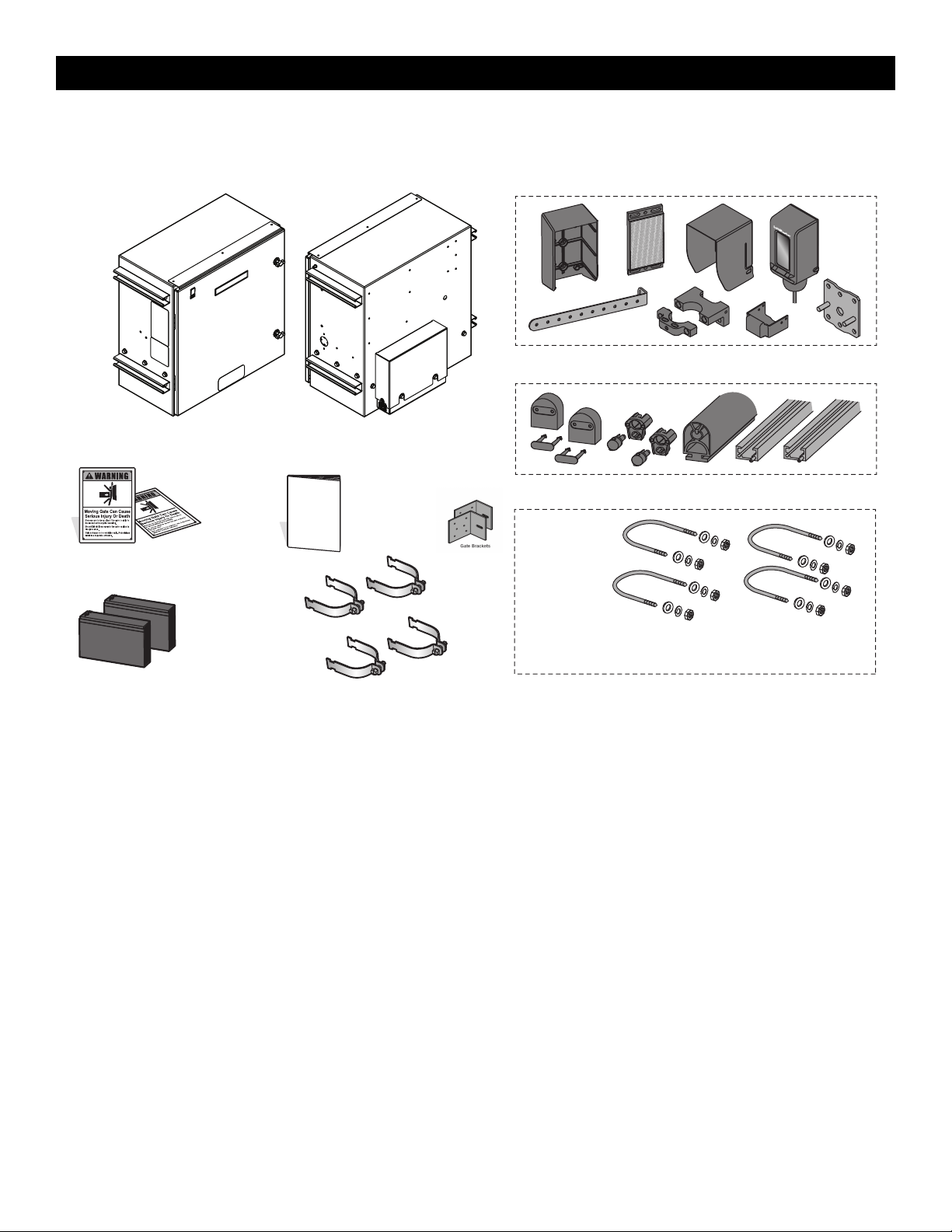
Carton Inventory
NOT SHOWN: Documentation Packet, Chain #40 - 30 feet with master link (INSL24UL ONLY), Chain #50 - 25 feet with master link (IHSL24UL ONLY), Eye
Bolt Kit, Antenna
LiftMaster Monitored Retro-Reflective Photoelectric Sensor Model LMRRUL (1)
5 ft. Edge Sensor Kit Model S505AL (1)
Battery 12 Vdc 7AH (2)
Warning Signs (2)
Installation Manual
Operator BackOperator Front
MONITORED ENTRAPMENT PROTECTION DEVICES
Hardware
Clamps
INTRODUCTION
7
Operator Specifications
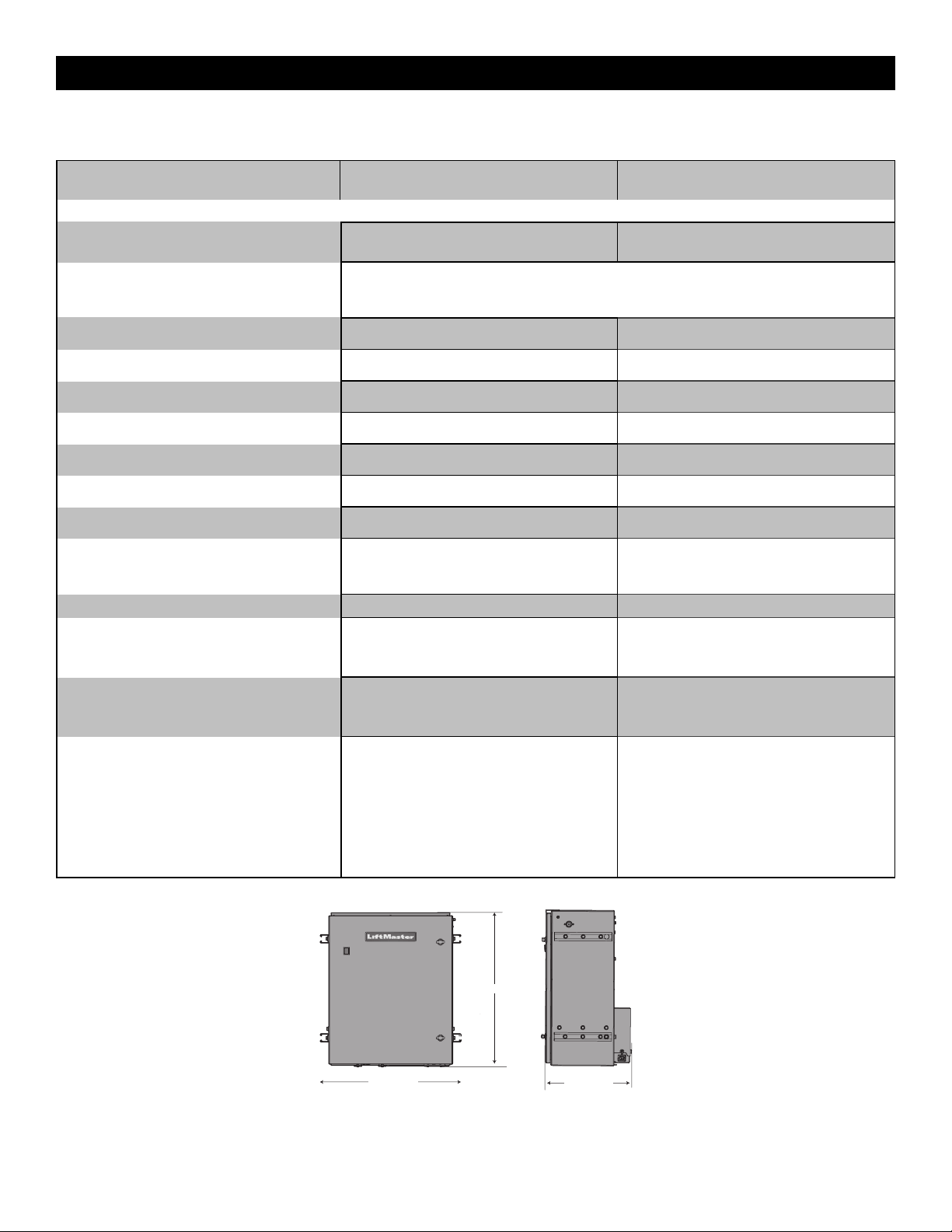
INSL24UL IHSL24UL
Usage Classification
Class II, III, and IV
Main AC Supply
120 Vac, 9.3 Amps including Accessory Outlets
OR 240 Vac, 1.8 Amps
120 Vac, 13.0 Amps including Accessory Outlets
OR 240 Vac, 3.7 Amps
Optional Transformer Kit
When Optional Transformer Kit Model 3PHCONV is installed in the field, operator is rated
208/240/480/575 VAC, 5.2/4.5/2.3/1.9 A, 60 Hz, 1 PH
System Operating Voltage
24 Vdc Transformer Run / Battery Backup
24 Vdc Transformer Run / Battery Backup
Accessory Power
24 Vdc, 1A max. for ON + SW (switched)
24 Vdc, 1A max. for ON + SW (switched)
Solar Power Max
24 Vdc at 60 watts max.
24 Vdc at 60 watts max.
Maximum Gate Weight
2,200 lbs. (998 kg)
5,500 lbs. (2,495 kg)
Minimum Gate Travel Distance
4 feet (1.2 m)
4 feet (1.2 m)
Maximum Gate Travel Distance
70 feet (21.34 m)
90 feet (27.43 m)
Maximum Gate Travel Speed
1 ft./sec.
1 ft./sec.
Maximum Daily Cycle Rate
Continuous for line voltage, not continuous for
solar
Continuous for line voltage, not continuous for
solar
Maximum Duty Cycle
Continuous Continuous
Operating Temperature
Without Heater: -20°C to 60°C (-4°F to 140°F)
With Optional Heater: -40°C to 60°C (-40°F to
140°F)
Without Heater: -20°C to 60°C (-4°F to 140°F)
With Optional Heater: -40°C to 60°C (-40°F to
140°F)
120VAC accessory power outlets
6 amps
When the 3PHCONV kit is used, the outlets are
rated 1 Amp
6 amps
When the 3PHCONV kit is used, the outlets are
rated 1 Amp
External Entrapment Protection Device Inputs
Control Board - up to 2 close entrapment
protection devices and 1 open entrapment
protection device.
Expansion board - up to 3 entrapment protection
devices configurable to either the close or open
direction and up to 8 edge sensors when using
the wireless edge sensor kit model LMWEKITU
and LMWETXU.
Control Board - up to 2 close entrapment
protection devices and 1 open entrapment
protection device.
Expansion board - up to 3 entrapment protection
devices configurable to either the close or open
direction and up to 8 edge sensors when using
the wireless edge sensor kit model LMWEKITU
and LMWETXU.
27.25 " 69.215 cm
25.26 " 64.160 cm
17.68 " 44.915 cm
INTRODUCTION
8
Site Preparation
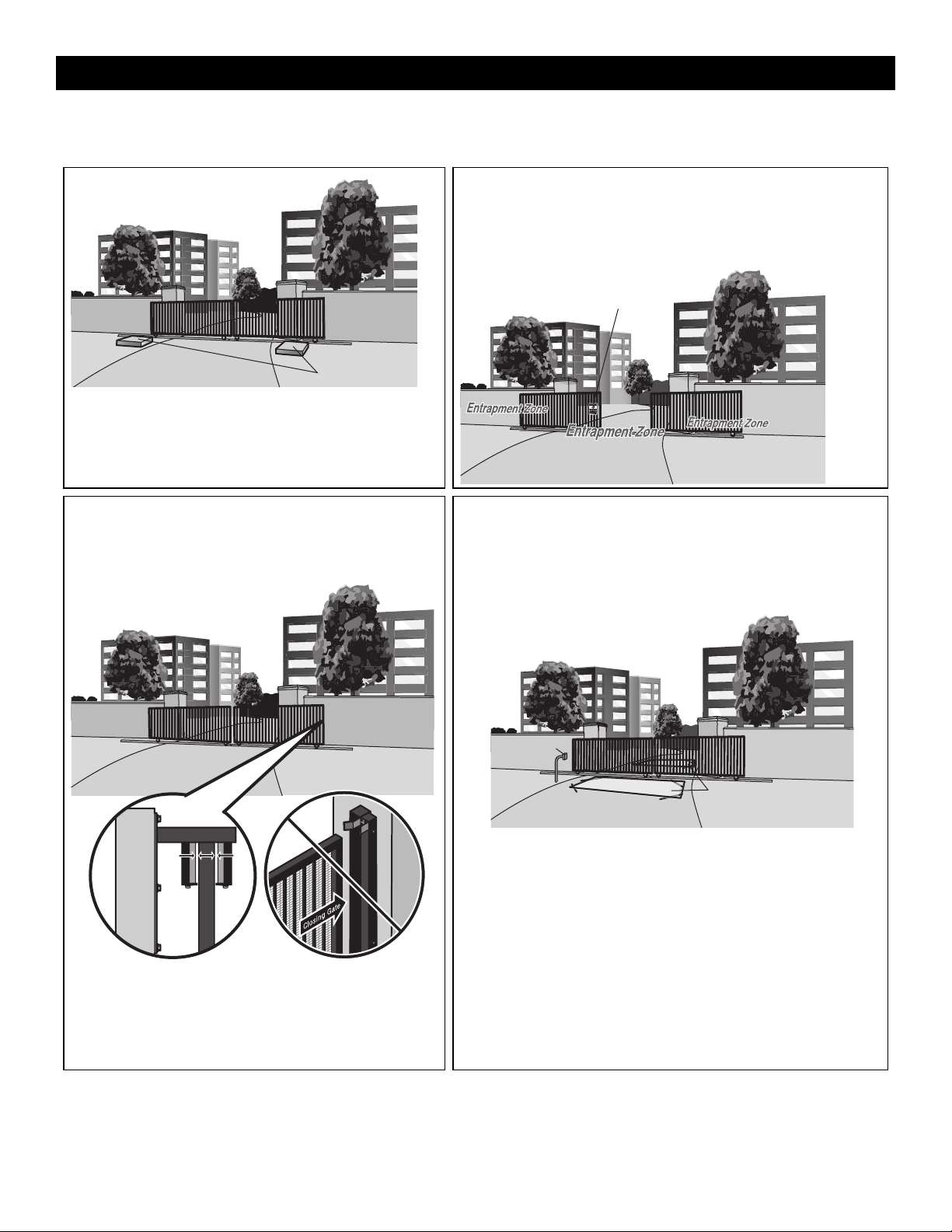
Check the national and local building codes BEFORE installation. Refer also to the Site Planning Safety Checklist in the Appendix.
Concrete Pads
Safety
Entrapment protection devices are required to protect against any entrapment
or safety conditions encountered in your gate application. Install a warning
sign (two provided) on the inside and outside of the property, where easily
visible.
Warning Sign
Gate
Gate must be constructed and installed according to ASTM F2200
standards (refer to page 4). Gate must fit specifications of operator
(refer to specifications).
SAFETY CATCH ROLLERS
Install catch rollers with safety covers
on the side of a post or wall with a
minimal distance of half an inch
between the rollers and gate
DO NOT use a gate catch post.
Because the coasting distance may
vary due to changes in temperature, it
is NOT recommended to install a
catch post in front of the gate's path.
To do so will cause the gate to hit the
post in certain instances.
Additional Accessories
The vehicle loops allow the gate to stay open when vehicles are obstructing
the gate path. Suggested for vehicles 14 feet (4.27 m) or longer. Vehicle loops
are not required but are recommended. Before installing your Access Control
Device(s) be sure to complete a site survey and determine the best device for
your site needs.
Outside Property
Vehicle Loops
Access Control
Device
INTRODUCTION
9
•
To AVOID damaging gas, power or other underground utility lines,
contact underground utility locating companies BEFORE digging
more than 18 inches (46 cm) deep.
•
To prevent damage to the operator or gate, DO NOT drive the limit
(nuts) actuators on the shaft past their normal positions.
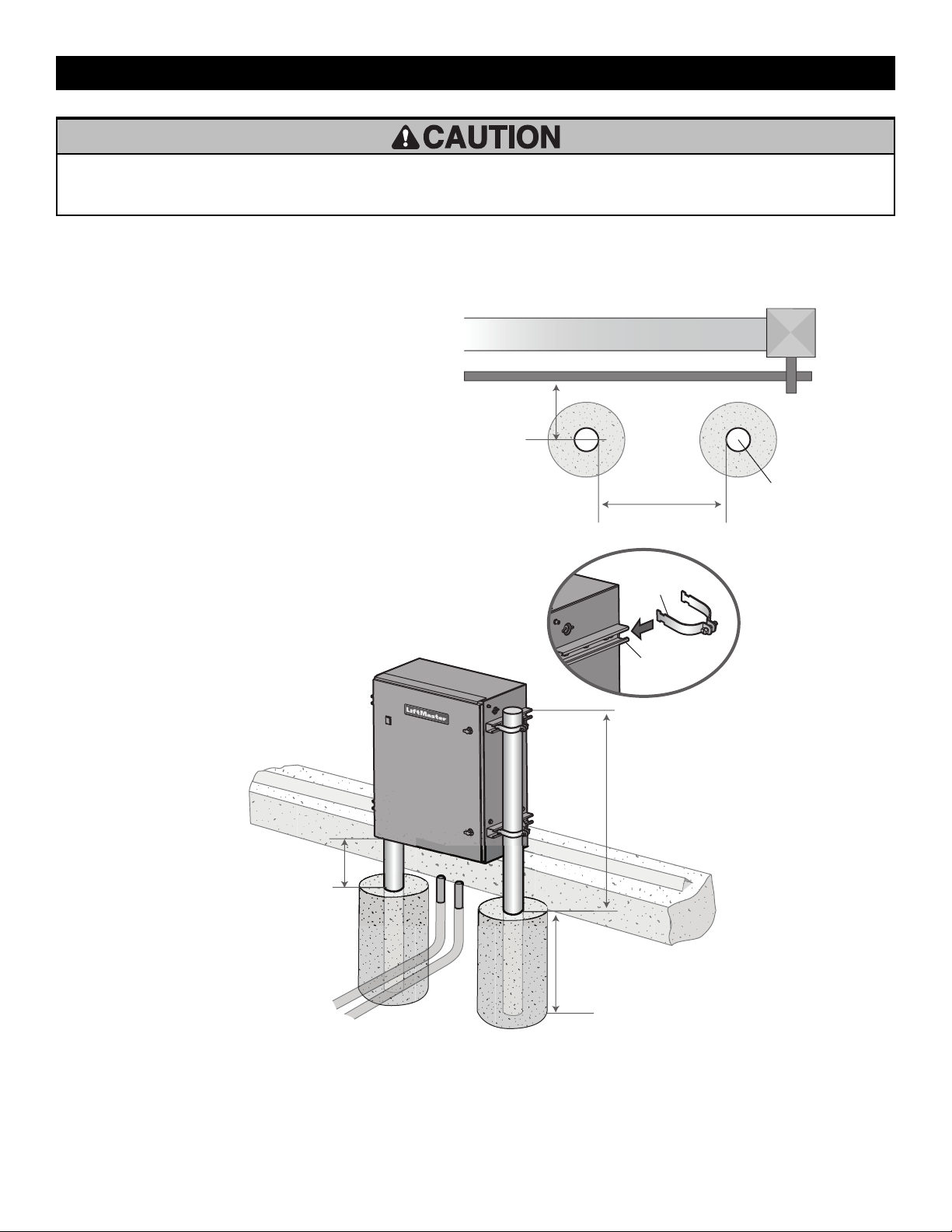
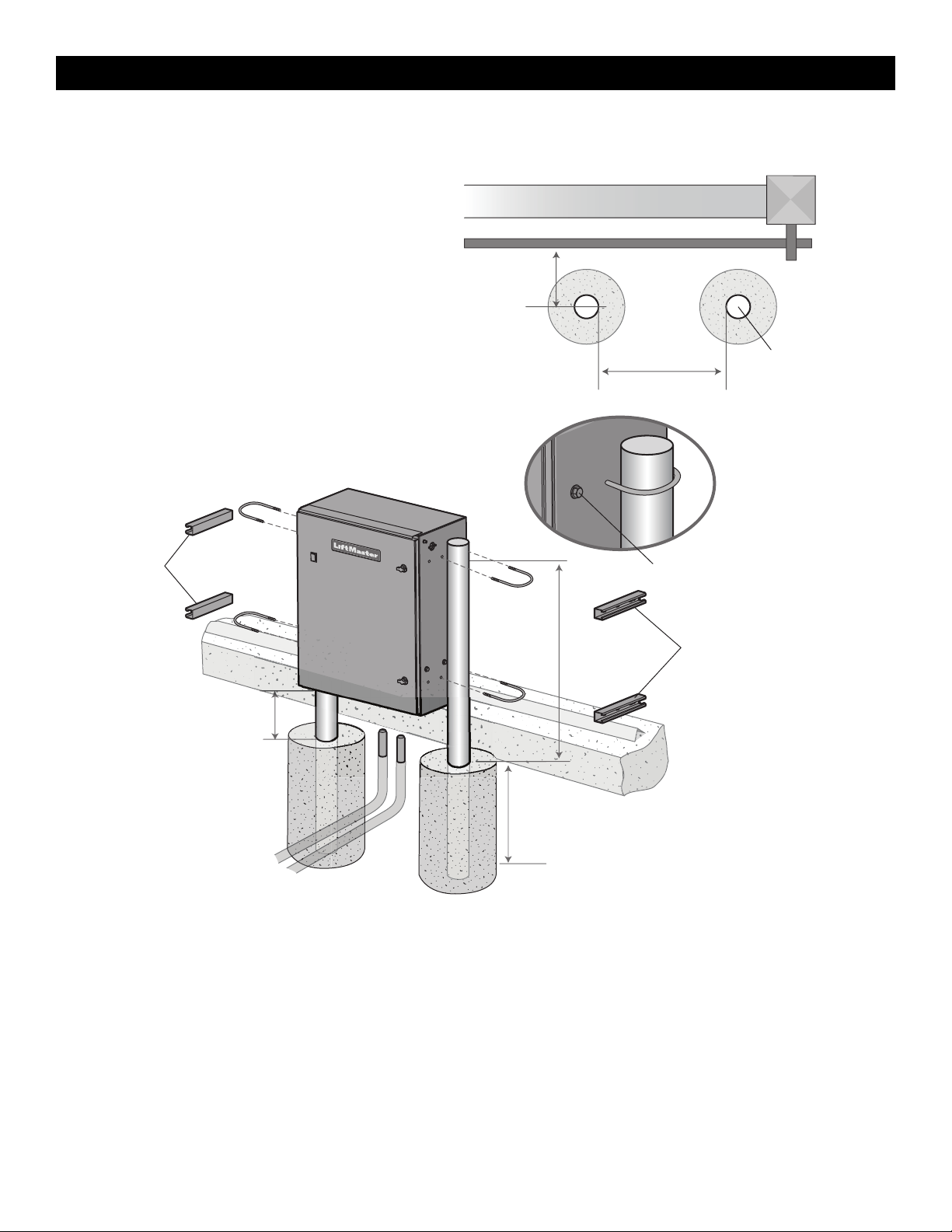
Step 1 Install the Operator
Check the national and local building codes before installation.
Install With Adjustable Rails
1. Locate and anchor two posts made of 3" (7.6 cm) outer diameter
heavy walled pipe. Posts should be parallel and square to the gate.
2. Locate electrical conduit, as required, prior to pouring concrete.
3. Slide the four 3" (7.6 cm) clamps (provided) into the rails on the
sides of the operator.
4. Slide the posts into the clamps and tighten the screws on the
clamps to secure the operator.
8.5" (21.6 cm)
27-1/4" (69.2 cm)
3" (7.6 cm) outside
diameter heavy wall
fence pipe
(Gate)
Drive and idler sprocket toward gate side
Clamp
Rail
39" (99.1 cm)
Minimum
Depth Required By
Local Codes or Below
Frost Line
12" (30.5 cm)
Minimum from
ground
Power and Control Wiring Must
Be Run In Separate Conduit
INSTALLATION
10
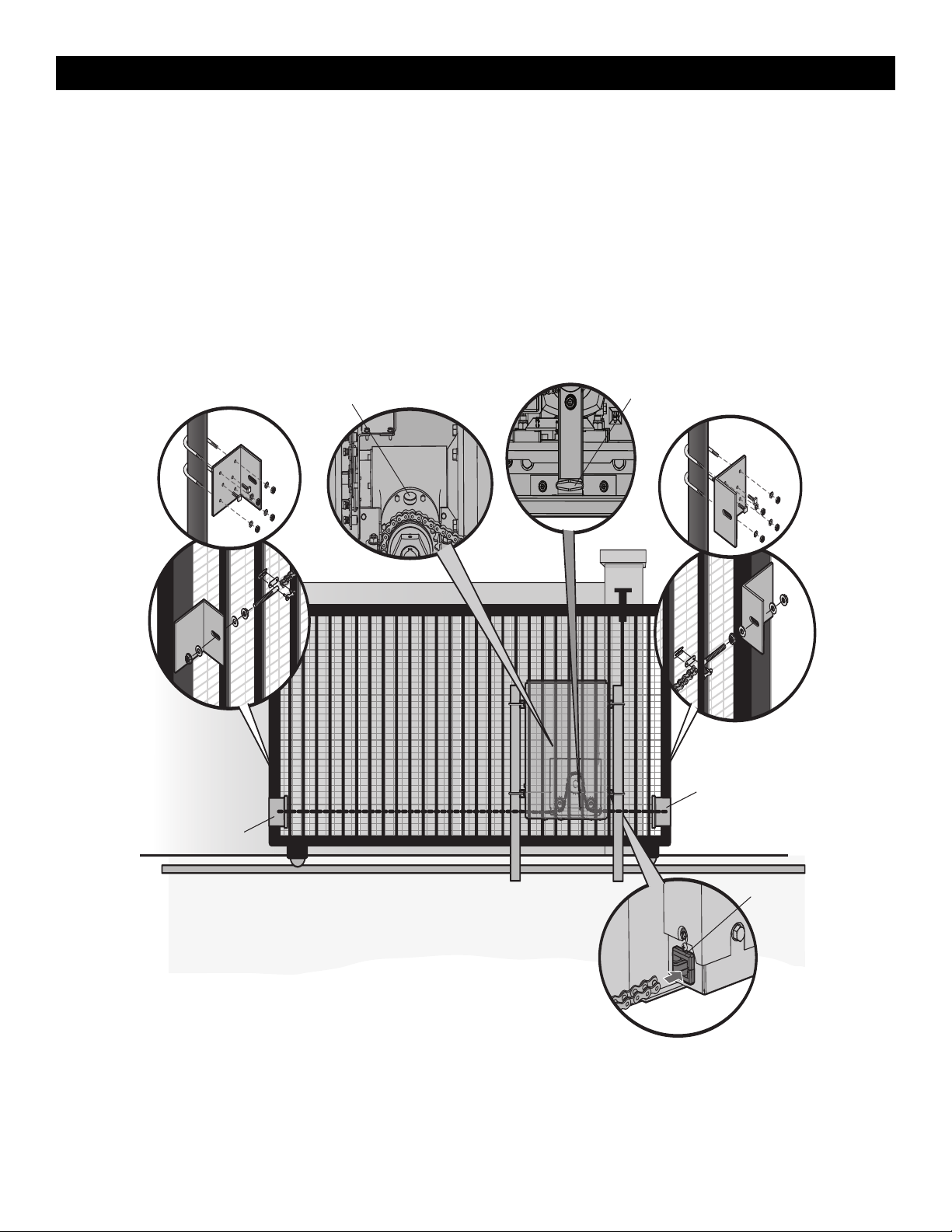
Install Without Adjustable Rails
Check the national and local building codes before installation.
NOTE: The rails will have to be removed for retro-fit installations.
1. Locate and anchor two posts made of 3" (7.6 cm) outer diameter
heavy walled pipe. Posts should be parallel and square to the gate.
2. Locate electrical conduit, as required, prior to pouring concrete.
3. Remove the rails from the sides of the operator.
4. Secure Operator to posts using four 3" (7.6cm) U-bolts and
hardware. The backing plate and gasket within the cabinet must be
utilized with the U-bolts.
5. Fill any empty holes on the side of the operator with the extra bolts
from the rails or apply a sealant.
8.5" (21.6 cm)
24" (61 cm)
3" (7.6 cm) outside
diameter heavy wall
fence pipe
(Gate)
Drive and idler sprocket toward gate side
Make sure any empty holes on the
side of the operator are filled using
the extra bolts from the rails.
Rails
Rails
39" (99.1 cm)
Minimum
Depth Required By
Local Codes or Below
Frost Line
12" (30.5 cm)
Minimum from
ground
Power and Control Wiring Must
Be Run In Separate Conduit
INSTALLATION
11
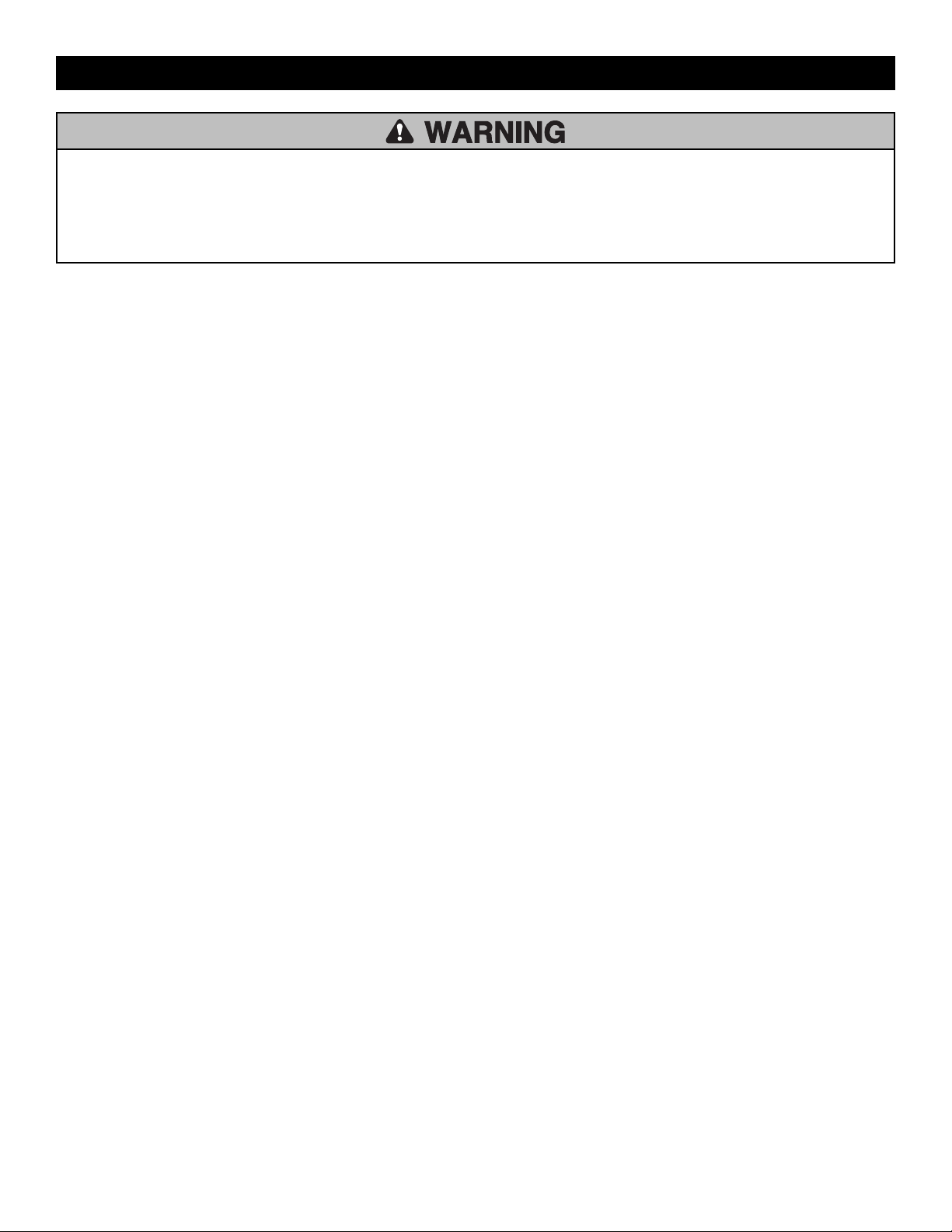
Step 2 Attach the Chain
DO NOT run the operator until instructed.
1. Mount gate brackets to the vertical front and rear posts of the gate.
2. Open operator door.
3. Locate the black T-shaped manual release handle attached to the gearbox in the bottom of the cabinet. Pull firmly until it latches into place.
4. Ensure that the drive and idler sprockets are in line with each other. Thread the chain through the plastic chain guide, around drive and idler
sprockets, and then through the second plastic chain guide toward front gate bracket.
5. Adjust the chain to proper length and connect the chain to the front bracket with the provided hardware. Adjust nuts on chain take-up bolts to remove
chain slack. A general rule of thumb is to leave a maximum of 1" (2.5 cm) of chain slack for every 10' (3.1 m) of chain length. Do not overtighten
chain. NOTE: The operator can be moved forward or back along the rails to ensure the chain is aligned correctly with the operator.
6. Remove the pin from the vent plug on the gear box.
7. Push the plate down to release the manual release handle to re-engage the motor and gear box.
Manual Release
Handle
Vent Plug
Front Gate Bracket
Chain Guide
Rear Gate Bracket
Gate brackets must be level
and centered with bottom of
idler sprocket.
INSTALLATION
12
To prevent SERIOUS INJURY or DEATH from a moving gate:
•
ALL gate operator systems REQUIRE two independent entrapment
protection systems for each entrapment zone.
•
Entrapment protection devices MUST be installed to protect anyone
who may come near a moving gate.
•
Entrapment protection devices MUST be located to protect in BOTH
the open and close gate cycles.
•
Locate entrapment protection devices to protect between moving
gate and RIGID objects, such as posts, walls, pillars, columns, or
operator itself.
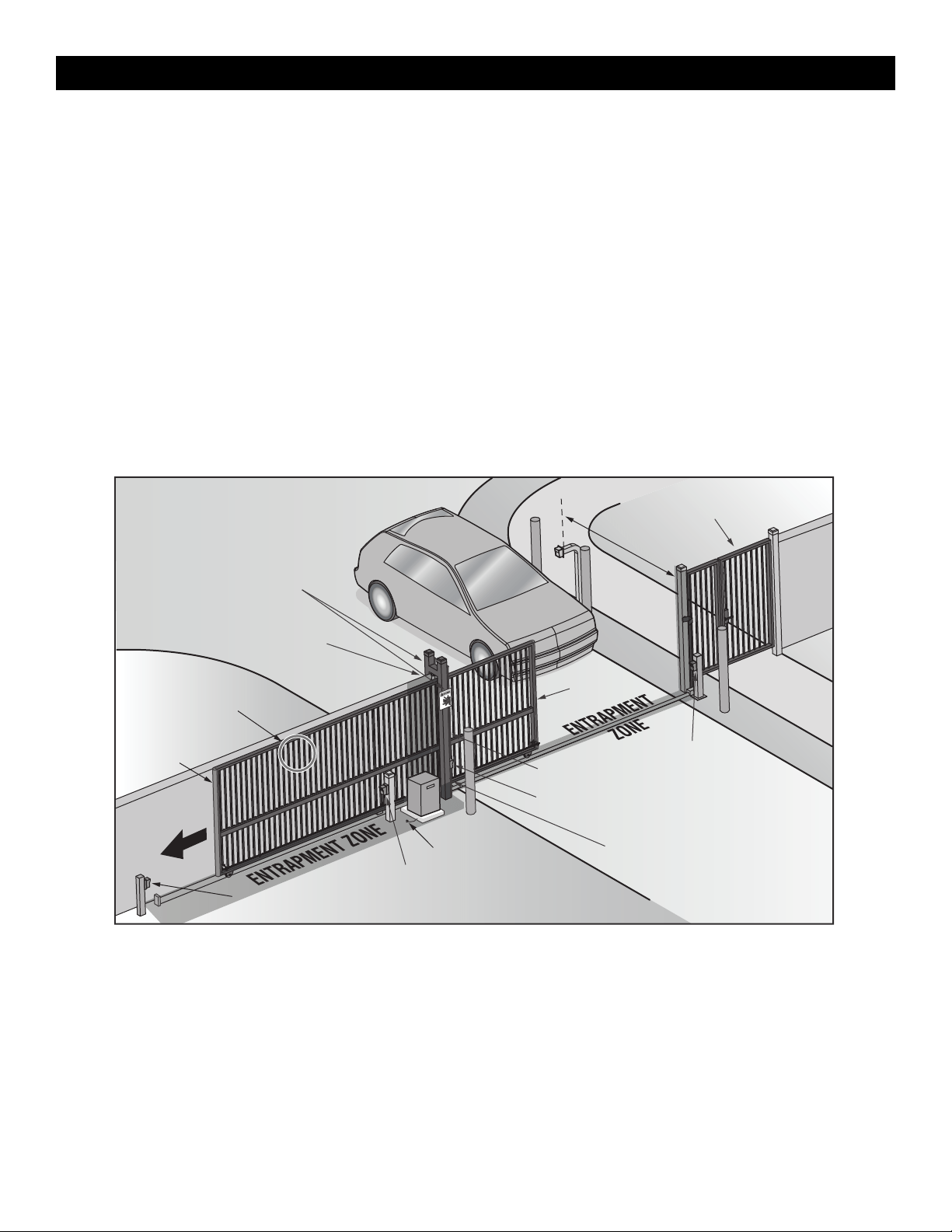
Step 3 Install Entrapment Protection
Definitions
ENTRAPMENT:
The condition when a person is caught or held in a position that
increases the risk of injury.
SLIDE GATE ENTRAPMENT ZONE:
An entrapment zone exists if at any point during travel, the gap between
the gate and any opposing fixed edge or surface such as posts, walls,
pillars, columns or operator itself, is less than 16" (406 mm) in a location
up to 6 ft. (1.8 m) above grade.
INSTALLATION
13
Install entrapment protection devices according to the UL 325 Entrapment Protection Requirements section, see page 3. Use the Site Planning Safety
Checklist in the appendix, to identify entrapment zones that will result from the installation. See Accessories for approved entrapment protection devices.
Requirements
1. Install entrapment protection devices for ALL entrapment zones.
This operator has an inherent entrapment protection device built-in.
The installer MUST provide one additional entrapment protection
device for each entrapment zone.
2.
The operator will NOT run unless a minimum of two external
devices are connected; one in the open direction and one in the
closed direction.
3. Test ALL entrapment protection devices AFTER installing the
operator, refer to the manual provided with your entrapment
protection device. Test the inherent entrapment protection by
following the Obstruction Test instructions page 23.
See Wire Entrapment Protection Devices page 14.
Illustration is for example only; your site may have additional entrapment
zones which MUST be protected.
Secure Side
Public Side
Gap between vertical
bars MUST be less
than 2-1/4" (57 mm)
Interior posts,
non-pinch rollers (2x)
Place warning signs on both
sides of the gate in clear view
Take a photograph of the complete installation site for your records
Any gap larger than 2-1/4" (57 mm) between
gate and fixed objects MUST be protected.
Install edge sensors where gap between post
and gate creates an entrapment zone.
Pedestrian gate located near the slide gate.
Make sure a separate pedestrian entrance is
available and the path is clearly designated.
6' (1.8 m)
minimum
Photoelectric sensor
(close direction)
Photoelectric sensor
(close direction)
Photoelectric sensor (open direction)
Photoelectric sensor (open direction)
Left hand
gate opening
Edge sensor
Edge sensor
Edge sensor
Earth ground
Illustrations provided by DASMA Gate Systems Safety Guide
INSTALLATION
14
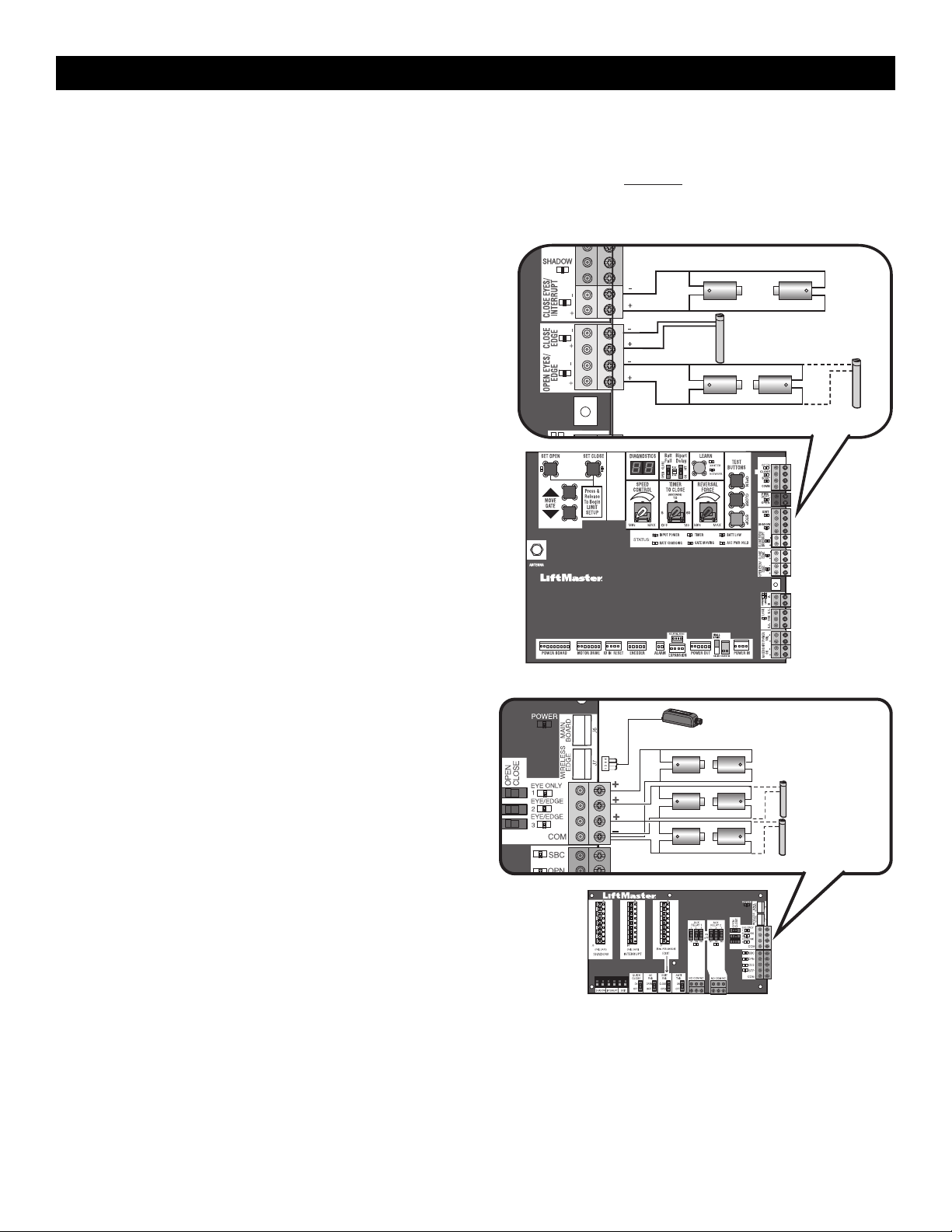
Wire Entrapment Protection Devices
There are three options for wiring external entrapment protection devices depending on the specific device and how the device will function. Refer to the
manual included with your entrapment protection device for more information. These entrapment protection device inputs are for monitored devices,
which include pulsed photoelectric sensors, resistive edge sensors, and pulsed edge sensors. Only one monitored
entrapment protection device may
be wired to each input. Additional monitored entrapment protection devices may be wired to the expansion board.
NOTE: Board inputs for entrapment protection devices are yellow.
Control Board
CLOSE EYES/INTERRUPT
(2 Terminals) The CLOSE EYES/INTERRUPT input is for photoelectric
sensor entrapment protection for the close direction. When an
obstruction is sensed during gate closing the gate will open to the full
open position and resets the Timer-to-Close. This input will be
disregarded during gate opening.
CLOSE EDGE
(2 Terminals) The CLOSE EDGE input is for edge sensor entrapment
protection for the close direction. When an obstruction is sensed during
gate closing the gate will reverse to the full open position, disengaging
the Timer-to-Close. This input will be disregarded during gate opening.
OPEN EYES/EDGE
(2 Terminals) The OPEN EYES/EDGE input is for photoelectric sensor or
edge sensor entrapment protection for the open direction. When an
obstruction is sensed during gate opening the gate will reverse for 4
seconds then stop. This input will be disregarded during gate closing.
Close Photoelectric Sensors
Open Photoelectric Sensors OR Open Edge
Close Edge
Expansion Board
EYE ONLY and COM
Open or Close Direction Photoelectric Sensors, the functionality is based
on the switch settings (located next to the terminals)
Switch set to CLOSE: gate reverses fully when an obstruction is sensed
Switch set to OPEN: gate reverses 4 seconds when an obstruction is
sensed
EYE/EDGE and COM
Open or Close Direction Photoelectric Sensors or Edge Sensor, the
functionality is based on the switch settings (located next to the
terminals)
Switch set to CLOSE: gate reverses fully when an obstruction is sensed
Switch set to OPEN: gate reverses 4 seconds when an obstruction is
sensed
WIRELESS EDGE
Connection for wireless edge receiver. NOTE: ONLY one wireless edge
receiver may be connected to an operator. Up to 4 wireless edge
transmitters LMWETXU may be programmed to the receiver.
Photoelectric Sensors
Wireless Edge Receiver
Photoelectric
Sensors
OR
Edge
Sensor
INSTALLATION
15
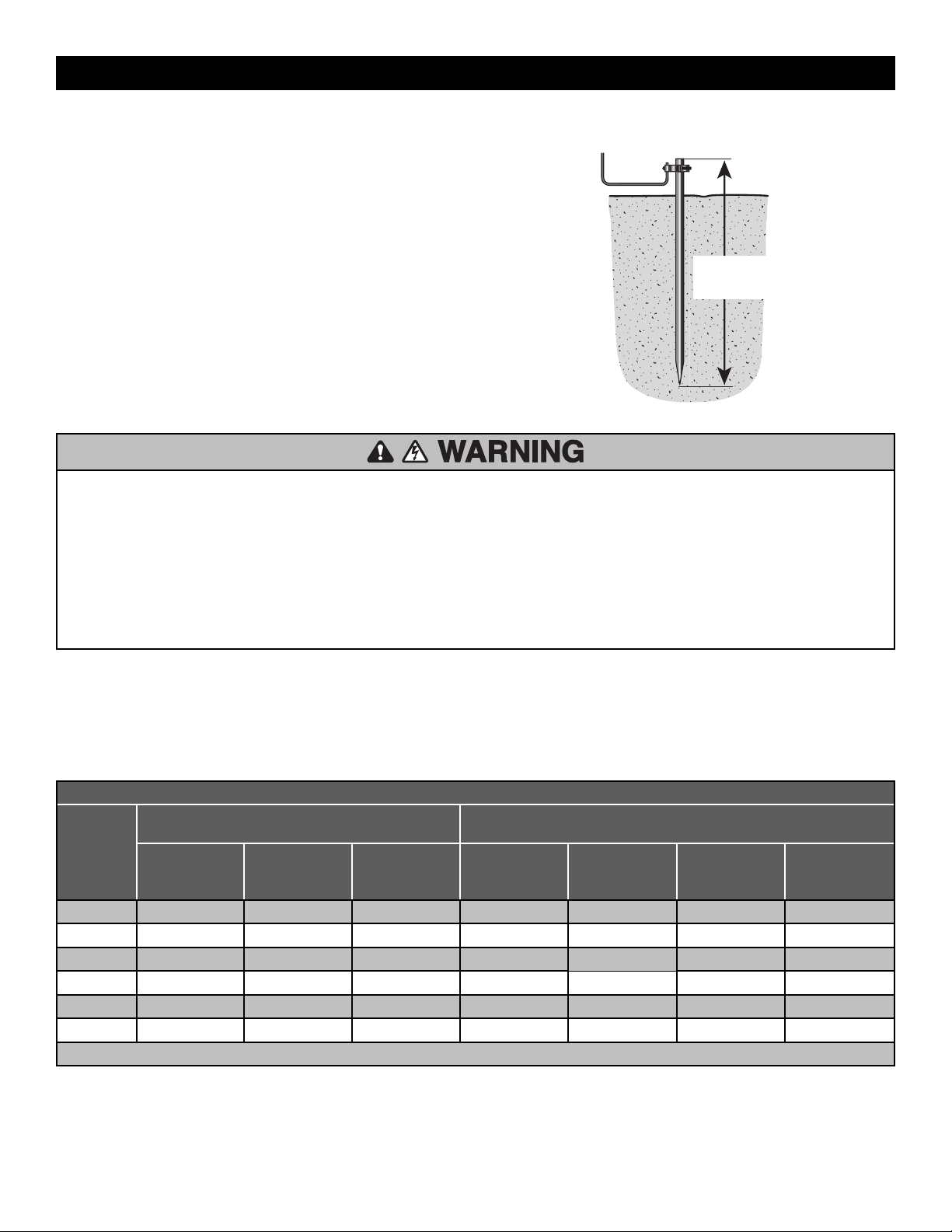
Step 4 Earth Ground Rod
Use the proper earth ground rod for your local area. The ground wire
must be a single, whole piece of wire. Never splice two wires for the
ground wire. If you should cut the ground wire too short, break it, or
destroy its integrity, replace it with a single wire length.
NOTE: If the operator is not grounded properly the range of the remote
controls will be reduced and the operator will be more susceptible to
lightning and surge damage.
To operator
Check national and
local codes for
proper depth
Step 5 Power Wiring
To reduce the risk of SEVERE INJURY or DEATH:
•
ANY maintenance to the operator or in the area near the operator
MUST NOT be performed until disconnecting the electrical power (AC
or solar and battery) and locking-out the power via the operator
power switch. Upon completion of maintenance the area MUST be
cleared and secured, at that time the unit may be returned to service.
•
Disconnect power at the fuse box BEFORE proceeding. Operator
MUST be properly grounded and connected in accordance with
national and local electrical codes. NOTE: The operator should be on
a separate fused line of adequate capacity.
•
ALL electrical connections MUST be made by a qualified individual.
•
DO NOT install ANY wiring or attempt to run the operator without
consulting the wiring diagram.
•
ALL power wiring should be on a dedicated circuit and well protected.
The location of the power disconnect should be visible and clearly
labeled.
•
ALL power and control wiring MUST be run in separate conduit.
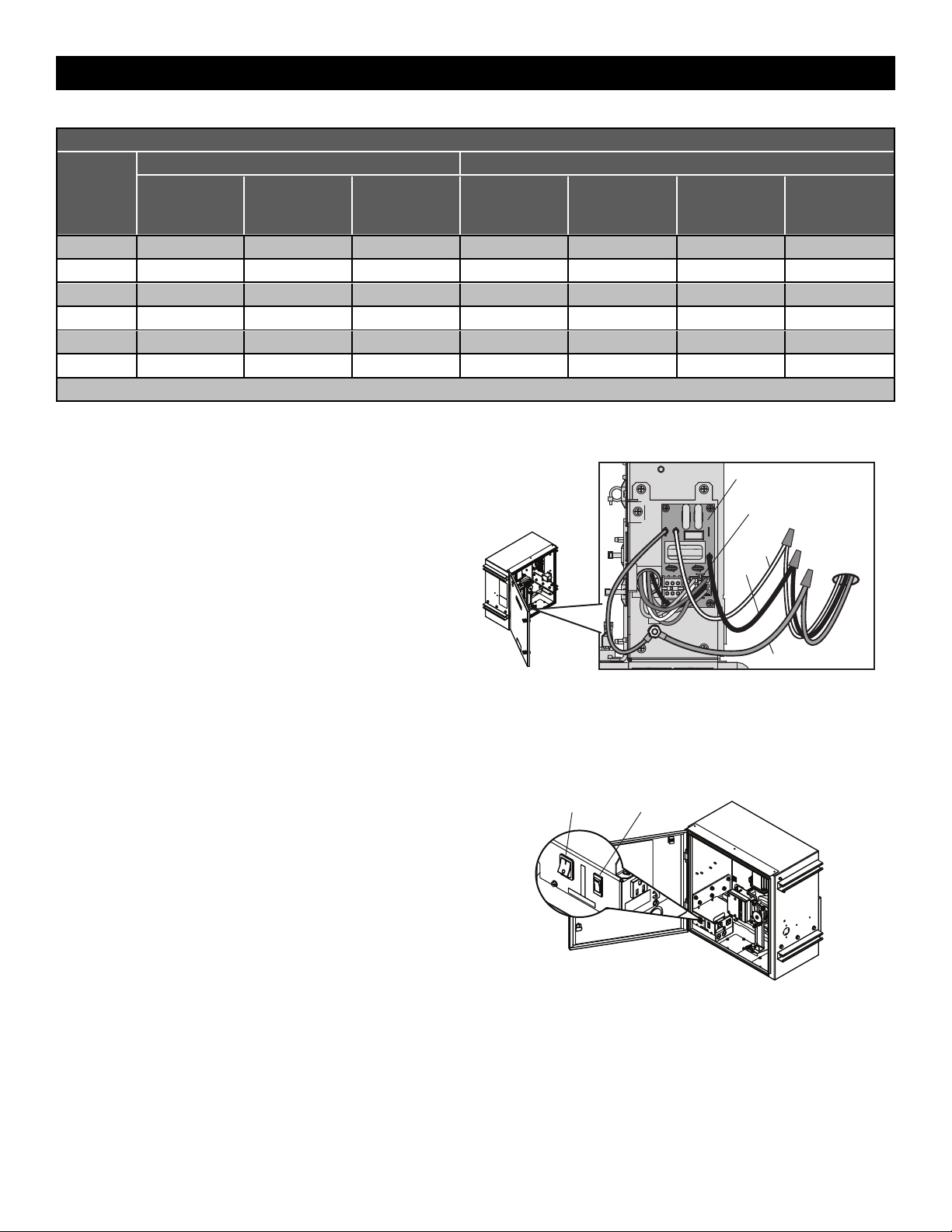
The operator can be wired for either 120 Vac or 240 Vac or a solar panel (not provided). Follow the directions according to your application. An
optional Transformer Kit (Model 3PHCONV) can be used to change the input voltage (208/240/480/575 Vac) to an output voltage of 120 Vac (refer
to Accessories). For dual gate applications, power will have to be connected to each operator. Main power supply and control wiring MUST be
run in separate conduits.
NOTE: If using an external receiver use shielded wire for the connections and mount the receiver away from the operator to avoid interference from the
operator.
INSL24UL MAXIMUM WIRE LENGTH
AMERICAN
WIRE
GAUGE
(AWG)
STANDARD OPERATOR
OPERATOR + ACCESSORIES POWERED BY TRANSFORMER KIT
accessory power outlets rated at 1 amp when the 3PHCONV kit is used
120 VAC, 9.3A
(includes fully
loaded outlets)
120 VAC, 3.3 A 240 VAC, 1.8 A 208 VAC, 2.8 A 240 VAC, 2.4 A 480 VAC, 1.2 A 575 VAC, 1 A
14
105 300 1,100 615 830 3,300 4,800
12
170 480 1,700 980 1,300 5,300 8,600
10
270 760 2,800 1,500 2,100 8,400 12,000
8
430 1,200 4,400 2,400 3,300 13,000 19,000
6
680 1,900 7,000 3,900 5,300 21,000 30,000
4
1,000 3,000 11,000 6,200 8,400 34,000 48,000
Chart assumes: copper wire, 65°C, 5% drop
INSTALLATION
16
IHSL24UL MAXIMUM WIRE LENGTH
AMERICAN
WIRE
GAUGE
(AWG)
STANDARD OPERATOR 3PHCONV kit powering operator + heater + 1 Amp on outlets
120 VAC, 13 A
(includes fully
loaded outlets)
120 VAC, 7 A 240 VAC, 3.5 A 208 VAC, 5.2 A 240 VAC, 4.5 A 480 VAC, 2.3A 575 VAC, 1.9 A
14
75 140 600 330 440 1,700 2,500
12
120 225 900 525 700 2,700 4,000
10
200 360 1,440 840 1,100 4,400 6,300
8
300 600 2,300 1.300 1,800 6,900 10,000
6
500 900 3,600 2,100 2,800 11,000 16,000
4
800 1,400 5,800 3,400 4,500 17,000 25,000
Chart assumes: copper wire, 65°C, 5% drop
All control wiring used to connect external devices to Class 2 circuits of the operator must be (QPTZ) Power-Limited Circuit Cables, Type CL2, CL2P,
CL2R, or CL2X or other cable with equivalent or better electrical, mechanical, and flammability ratings.
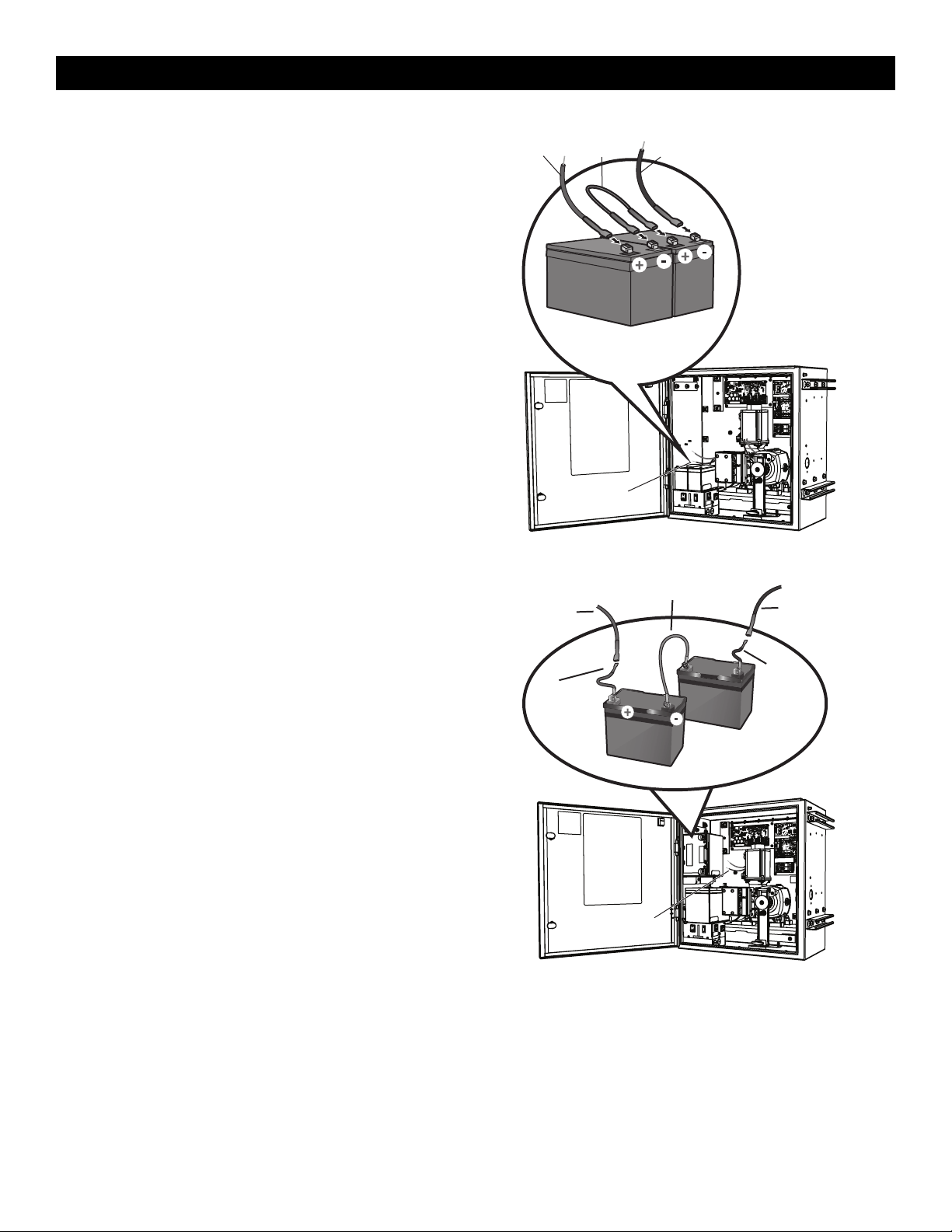
1. Turn off the AC power from the main power source circuit breaker.
2. Run the AC power wires to the operator.
3. Make sure the operator AC switch is in the OFF position, see page
16.
4. Remove the junction box cover from the electrical box by loosening
the screws and sliding the cover to the side.
5.
120 Vac: Factory default is 120 Vac. Skip to 6.
240 Vac: Unplug the power wiring connector from the 120 Vac
socket (factory default location) and plug it into the 240 Vac socket.
NOTE: The accessory outlets are disabled and cannot be used with
the 240 Vac option.
6. Connect the incoming green wire to the earth ground nut.
7. Connect the white wire to NEUTRAL using a wire nut.
8. Connect the black wire to HOT using a wire nut.
9. Replace the junction box cover. Ensure the wires are not pinched.
Power Wiring
Connector
EMI Board
Incoming
Power
White
Black
Green ground wire
AC Power Switch
The AC switch on the operator turns the incoming 120/240 Vac power
ON or OFF. The AC switch ONLY turns off AC power to the control board
and DOES NOT turn off battery power.
Battery Switch
The battery switch turns the battery power on or off.
AC Power SwitchBattery Switch
INSTALLATION
17
Step 6 Connect Batteries
7AH Batteries
The batteries are charged in the circuit by the integrated transformer.
1. Turn the AC power switch to OFF.
2. Turn the battery switch OFF .
3. Connect a jumper between the positive(+) terminal of the battery to
the negative terminal(-) of the other battery.
4. Connect the red battery wire from the operator to the positive(+)
terminal of the battery.
5. Connect the black battery wire from the operator to the negative (-)
terminal of the battery.
6. Turn the battery switch ON .
7. Turn the AC power switch to ON to restore AC power.
Battery Wiring
Red Wire
Black Wire
Jumper
33AH Batteries
The batteries are charged in the circuit by the integrated transformer.
The 33AH application requires battery harness K41-0102-000, see
Accessories.
1. Turn the AC power switch to OFF.
2. Turn the battery switch OFF.
3. Connect a jumper between the positive(+) terminal of the battery to
the negative terminal(-) of the other battery.
4. Connect the (+) terminal of the battery to the red battery wire from
the operator using the RED harness kit wire .
5. Connect the (-) terminal of the battery to the black battery wire from
the operator using the BLACK harness kit wire.
6. Turn the battery switch ON .
7. Turn the AC power switch to ON to restore AC power.
Battery Wiring
Red Wire
Black Wire
Jumper (White Wire)
from K41-0102-000
Red wire from
battery harness
33AH, HD Gates
K41-0102-000
Black wire
from battery
harness 33AH,
HD Gates
K41-0102-000
INSTALLATION
18
Step 7 Dual gate setup-Wireless
There are two options for dual gate communication: wired or wireless. Follow the directions according to your application. Do not use wired and
wireless communication simultaneously. Use only the same operator models in a dual gate setup. Wired dual gate applications will have a longer
battery standby time than wireless applications.
Wireless setup
To activate the wireless feature:
1. Choose an operator to be the network primary operator. Program all wireless accessories to the primary operator except for any wireless entrapment
protection devices required for the second operator. NOTE: We recommend that all accessories, except entrapment protection devices, and board
configurations are set on the primary operator.
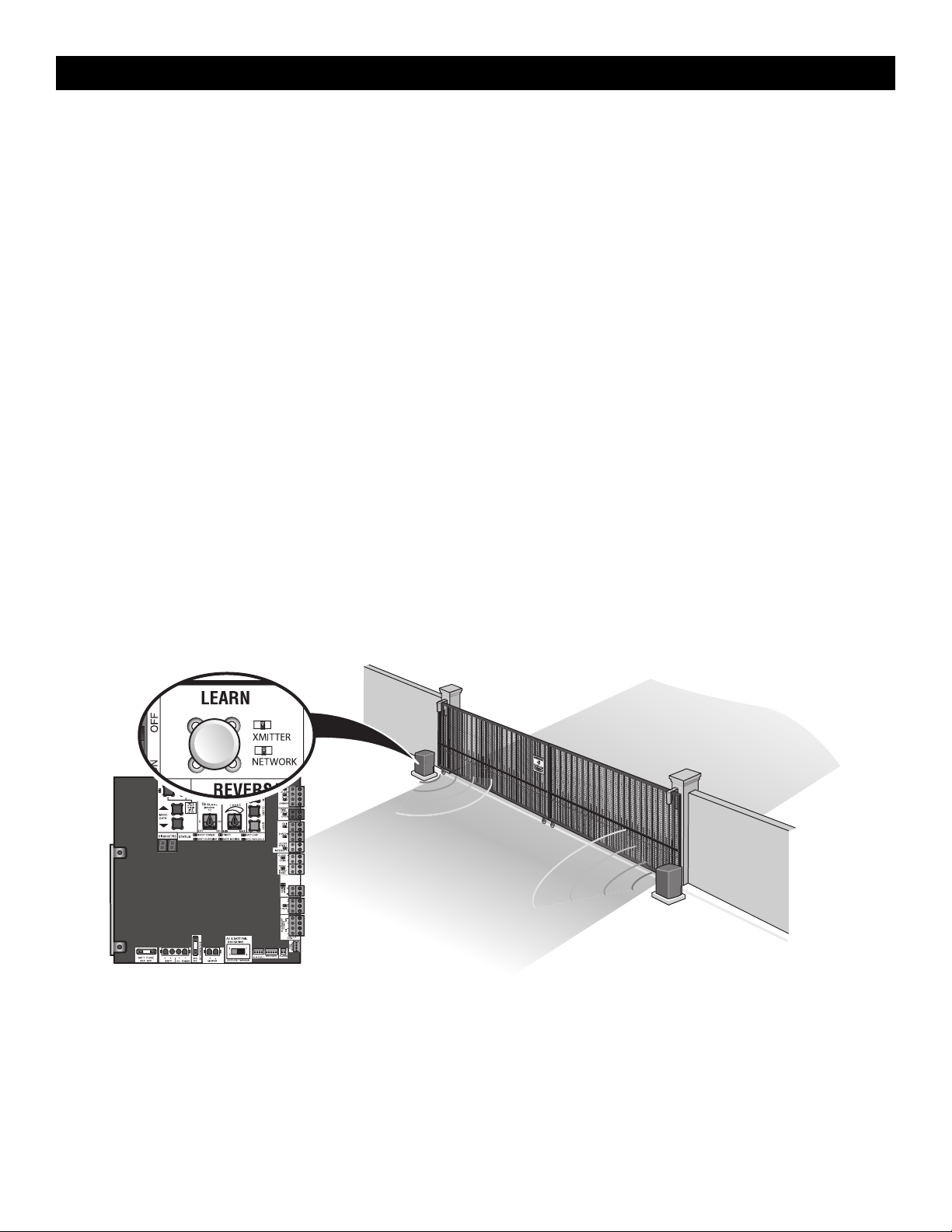
2.
Press and release the LEARN button on the primary operator. The green XMITTER LED will light. NOTE: The operator will time out of programming
mode after 180 seconds.
3. Press and release the LEARN button again on the primary operator. The yellow NETWORK LED will light.
4. Press and release the OPEN test button to assign this operator as network primary.
5. Press and release the LEARN button on the second operator. The green XMITTER LED will light.
6. Press and release the LEARN button again on the second operator. The yellow NETWORK LED will light.
7. Press and release the CLOSE test button to assign this operator as network second.
Both operators will beep and the yellow NETWORK LEDs will turn off indicating programming is successful.
To deactivate the wireless feature:
1. Press and release the LEARN button on either operator. The green XMITTER LED will light.
2. Press and release the LEARN button again on the same operator. The yellow NETWORK LED will light.
3. Press and hold the LEARN button for 5 seconds. The yellow NETWORK LED will blink (operator will beep) then turn off indicating successful
deactivation.
4. Press and release SET OPEN and SET CLOSE buttons simultaneously. The yellow SET OPEN and SET CLOSE LEDs will light.
5. Press and release SET OPEN and SET CLOSE buttons simultaneously again. Both yellow LEDs will turn off and entrapment protection devices will be
relearned.
6. Repeat the steps for the other operator.
Outside
P
roperty
Inside
Property
INSTALLATION
19
Wired setup
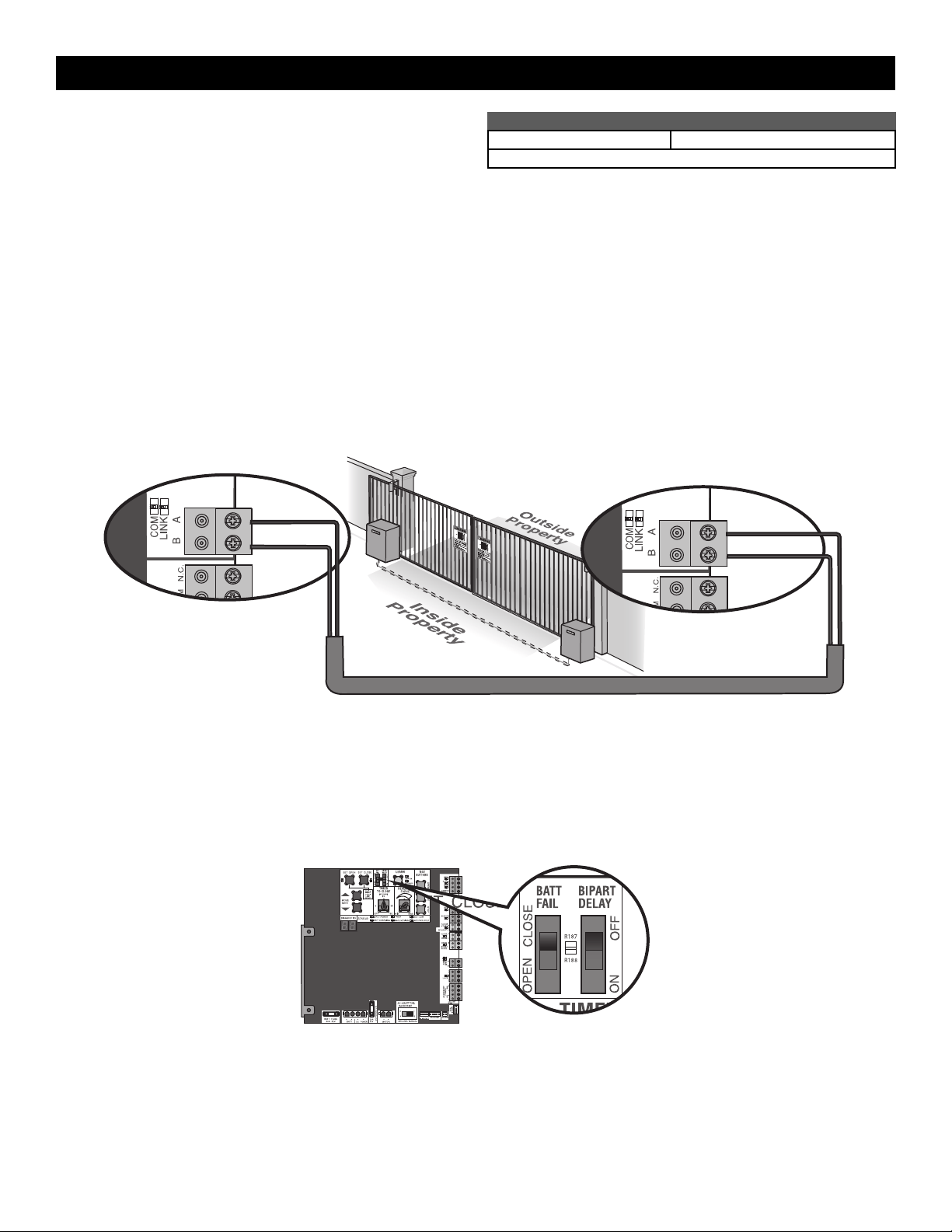
Use only the same operator models in a dual gate setup. Before
digging, contact local underground utility locating companies. Use PVC
conduit to prevent damage to cables.
1.
Disconnect ALL power to the operator and turn OFF the battery and
AC power switches.
2. Trench across driveway to bury the shielded twisted pair cable.
3. Connect the wires from the shielded twisted pair cable to the Com Link
terminals on the primary gate operator control board. NOTE: We
recommend that all accessories and board configurations are set on
the primary operator.
4. Route the shielded twisted pair cable to the secondary gate operator's
control board.
5. Connect the wires from the shielded twisted pair cable to the Com Link
terminals on the secondary control board (Com Link A to Com Link A
and Com Link B to Com Link B). Ground the shield of the cable to the
chassis ground of one operator.
6.
Connect ALL power to the operator and turn ON the battery and AC
power switches.
DUAL GATE WIRE TYPE (SHIELDED TWISTED PAIR CABLE)
22AWG up to 200feet (61m) 18AWG - 200-1000feet (61-305m)
Wire must be rated at 30 Volt minimum
Com Link Data A
Com Link Data B
Com Link Data A
Com Link Data B
Bipart delay/synchronized close
The BIPART DELAY switch is used only with dual gate applications and serves two functions:
•
BIPART DELAY
Not applicable for slide gate applications.
•
SYNCHRONIZED CLOSE
To synchronize the closing of the gates, set the BIPART DELAY switch to ON for both operators.
INSTALLATION
20
Step 8 Close and Secure the Door
Before securing the door, follow the instructions in the Adjustment
section to adjust the limits, speed, and force.
1. Close the door.
2. Turn both latches 90 degrees.
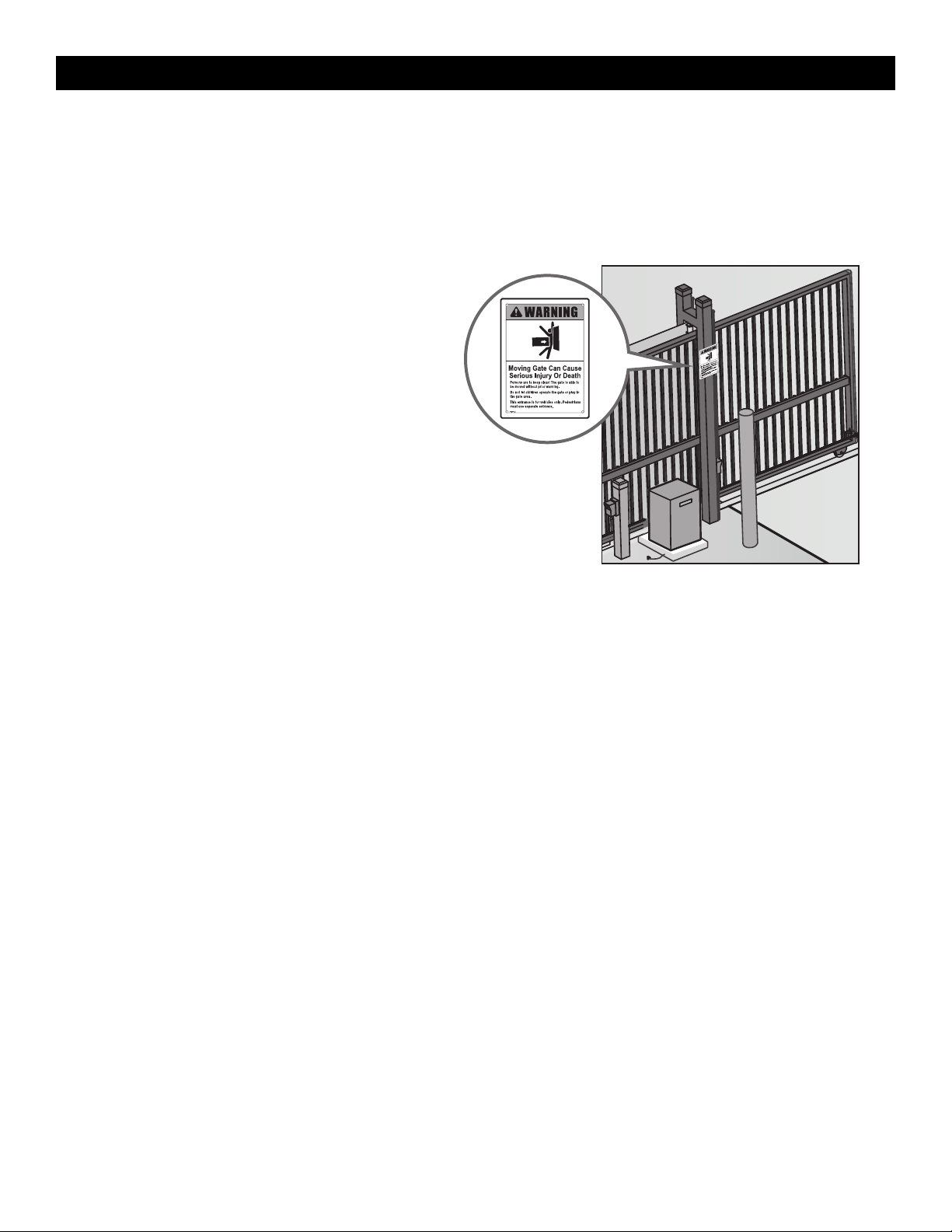
Step 9 Install Warning Signs
Installers MUST install the UL required warning signs. The signs MUST
be installed in plain view on both sides of each gate installed. Use the
fastening holes in each corner to permanently secure the sign.
Place warning signs
on both sides of the
gate in clear view
The basic installation is complete.
INSTALLATION
21
Limit, Speed, and Force Adjustment
To reduce the risk of SEVERE INJURY or DEATH:
•
Without a properly installed safety reversal system, persons
(particularly small children) could be SERIOUSLY INJURED or
KILLED by a moving gate.
•
Too much force on gate will interfere with proper operation of safety
reversal system.
•
NEVER increase force beyond minimum amount required to move
gate.
•
NEVER use force adjustments to compensate for a binding or
sticking gate.
•
If one control (force, speed or travel limits) is adjusted, the other
controls may also need adjustment.
•
After ANY adjustments are made, the safety reversal system MUST
be tested. Gate MUST reverse on contact with an object.
•
Faster gate speed increases risk to pedestrians. Use minimum speed
necessary to move gate.
Introduction
Your operator is designed with electronic controls to make travel limit
and force adjustments easy. The adjustments allow you to program
where the gate will stop in the open and close position. The electronic
controls sense the amount of force required to open and close the gate.
The force is adjusted automatically when you program the limits but
should be fine tuned using the REVERSAL FORCE dial on the control
board (refer to Fine Tune the Force section) to compensate for
environmental changes. The limit setup LEDs (located next to the SET
OPEN and SET CLOSE buttons) indicate the status of the limits, refer to
the table to the right.
The limits can be set using the control board (below) or a remote control
(refer to Limit Setup with a Remote Control in the Appendix). Setting the
limits with a remote control requires a 3-button remote control
programmed to OPEN, CLOSE, and STOP.
NOTE: The TEST buttons on the control board will not work until the
limits have been set and the required entrapment protection devices are
installed.
Set the Initial Limits, Speed, and Force
For dual gate applications the limits will have to be set for each
operator. The gate MUST be attached to the operator before setting
the limits and force.
For slide gate applications the open limit and closed limit MUST be
set at least four feet apart.
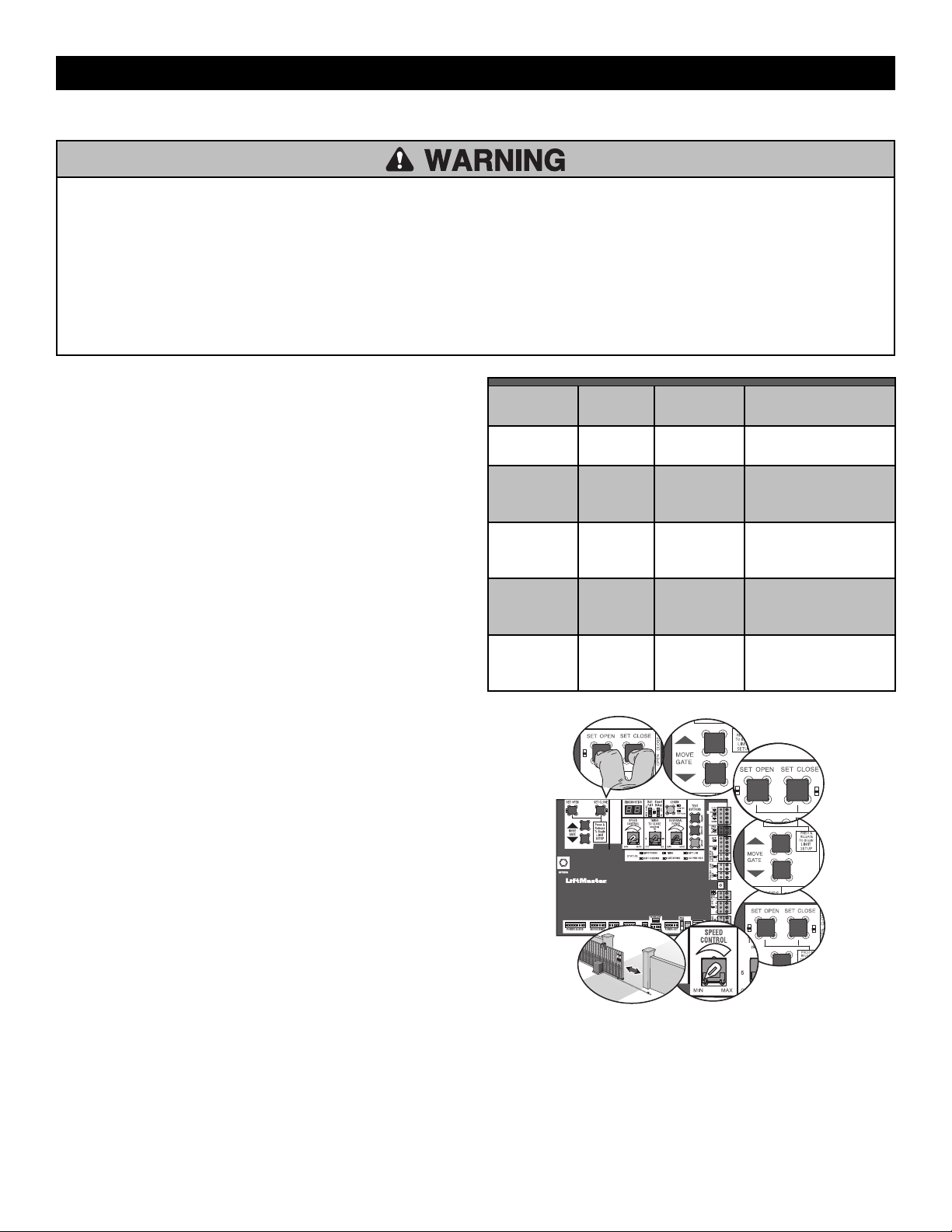
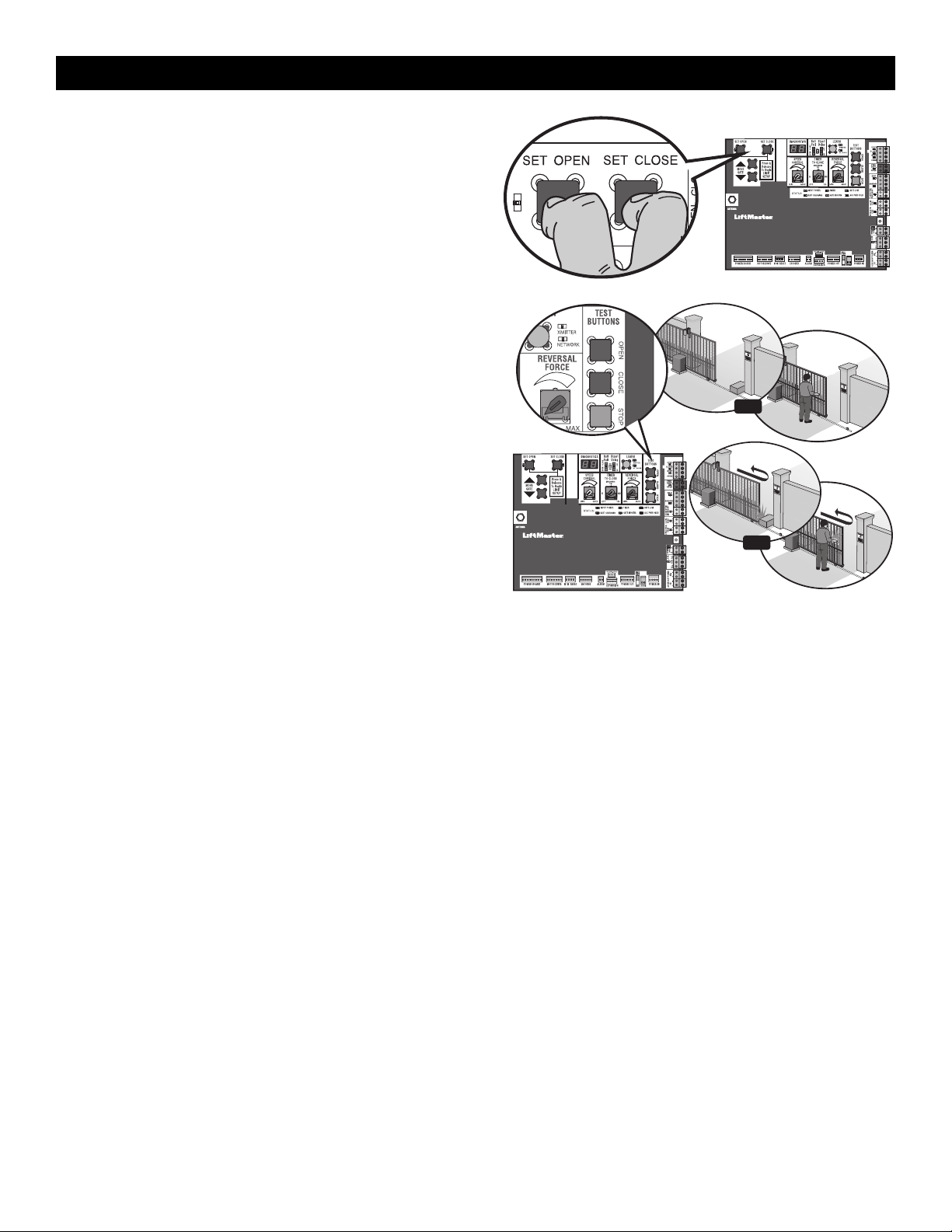
1. Press and release the SET OPEN and SET CLOSE buttons
simultaneously to enter limit setting mode.
2. Press and hold one of the MOVE GATE buttons to move the gate to
the open or close limit.
3. Press and release the SET CLOSE or SET OPEN button depending
on which limit is being set.
4. Press and hold one of the MOVE GATE button to move the gate to
the other limit.
5. Press and release the SET CLOSE or SET OPEN button depending
on which limit is being set.
6. Set the speed dial to the desired setting, see page 22. 0.5 ft/sec. min
- 1 ft./sec. max.
7. Cycle the gate open and close. This automatically sets the force.
When limits are set properly the operator will automatically exit limit
setting mode.
SET OPEN
LED
SET CLOSE
LED
OPERATOR
MODE
EXPLANATION
OFF OFF NORMAL
MODE
Limits are set
BLINKING BLINKING LIMIT
SETTING
MODE
Limits are not set
BLINKING ON LIMIT
SETTING
MODE
Open limit is not set
ON BLINKING LIMIT
SETTING
MODE
Close limit is not set
ON ON LIMIT
SETTING
MODE
Limits are set
5
2
6
3
4
1
7
ADJUSTMENT
22
Speed Control
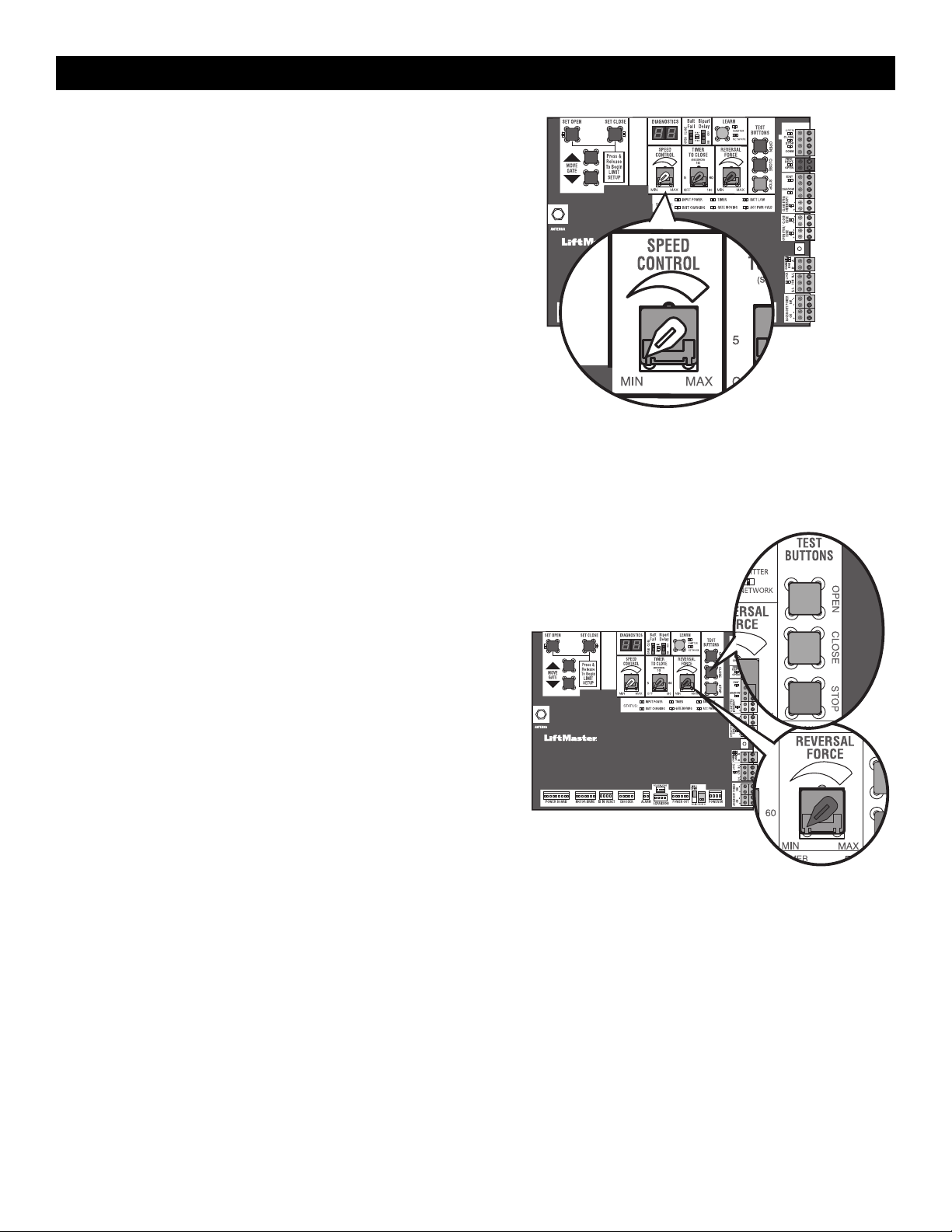
The SPEED CONTROL dial controls the speed of the operator. The dial is
preset to minimum from the factory. Set the speed as low as possible for
the intended application.
Gate operating speed: 0.5 ft./sec. - 1 ft./sec.
For dual gate setup, set the SPEED CONTROL dial on each operator to
the same setting or make sure the gate that travels further is set faster
than the other operator for the smoothest operation.
After any speed adjustment:
1. Cycle the gate open and close to automatically relearn the forces.
2. Perform the Obstruction Test, see page 23.
Fine Tune the Force
Once the initial limits have been set, the REVERSAL FORCE DIAL on the control board is used for fine tuning the force where wind or environmental
changes may affect the gate travel. The REVERSAL FORCE DIAL is set to minimum at the factory.
Based on the length and weight of the gate it may be necessary to make additional
force adjustments. The force setting should be high enough that the gate will not
reverse by itself nor cause nuisance interruptions, but low enough to prevent serious
injury to a person. The force setting is the same for both the open and close gate
directions.
1. Open and close the gate with the TEST BUTTONS.
2. If the gate stops or reverses before reaching the fully open or closed position,
increase the force by turning the force control slightly clockwise.
3. Perform the “Obstruction Test” after every limit, speed, and force setting
adjustment see page 23.
Settings 1-3: Fixed force settings (gate will not adjust due to gate wear or
temperature changes).
Settings 4-10: Automatically increase the force due to gate wear or temperature
changes.
ADJUSTMENT
23
Adjust the Limits
After both limits are set and the operator is ready to run, one limit can be adjusted
independently from the other by following steps 1-3 of the Initial Limit and Force
Adjustment section.
After any limit adjustment:
1.
Cycle the gate open and close to automatically relearn the forces.
2. Perform the Obstruction Test, see page 23.
Obstruction Test
The operator is equipped with an inherent (built in to the operator)
obstruction sensing device. If the gate encounters an obstruction during
motion, the operator will reverse direction of the gate and then stop. The
following procedure will test ONLY the inherent (built in to the operator)
obstruction sensing device:
1. Open and close the gate with the TEST BUTTONS, ensuring that the
gate is stopping at the proper open and close limit positions.
2. Either place an object between the open gate and the fixed closed
catch post or obstruct the gate by hand. Make sure that any external
entrapment protection devices, such as an edge or photoelectric
sensor will NOT be activated by the object or by hand.
3. Run the gate in the close direction. The gate should stop and
reverse upon contact with the object or hand. If the gate does not
reverse, reduce the force setting by turning the force control slightly
counter-clockwise. The gate should have enough force to reach
both the open and close limits, but MUST reverse after contact with
an object or hand.
4. Repeat the test for the open direction.
Test the operator after any adjustments are made.
2
3
1
OR
OR
ADJUSTMENT
24
Remote Controls (Not Provided)
A total of 50 Security+ 2.0
®
remote controls or KPW250 keypads and 2
keyless entries (1 PIN for each keyless entry) can be programmed to the
operator. When programming a third keyless entry to the operator, the
first keyless entry will be erased to allow the third keyless entry to be
programmed. When the operator’s memory is full it will exit the
programming mode and the remote control will not be programmed. The
memory will need to be erased before programming any additional
remote controls. NOTE: If installing an 86LM to extend the range of the
remote controls DO NOT straighten the antenna.
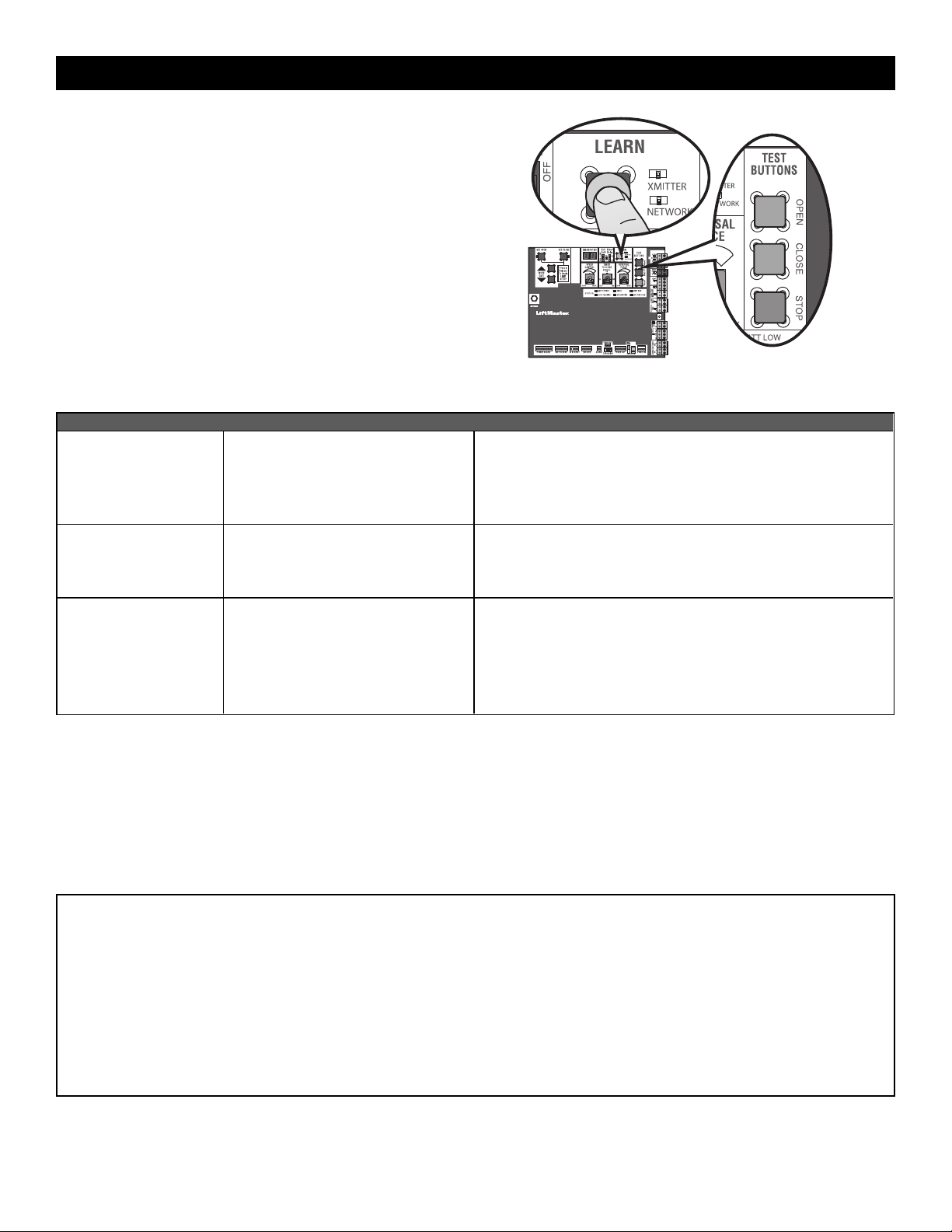
There are 3 different options for programming the remote control depending on how you would like the remote control to function. Choose a
programming option:
OPTION DESCRIPTION PROGRAMMING STEPS
Single button as OPEN
only
Program a single button on the remote
control for open only. The Timer-to-Close
can be set to close the gate.
1. Press and release the LEARN button (operator will beep and green
XMITTER LED will light). NOTE: The operator will time out of
programming mode after 30 seconds.
2. Press the OPEN button.
3. Press the remote control button that you would like to program.
Single button (SBC) as
OPEN, CLOSE, and STOP
Program one remote control button as an
open, close, and stop.
1. Press and release the LEARN button (operator will beep and green
XMITTER LED will light). NOTE: The operator will time out of
programming mode after 30 seconds.
2. Press the remote control button that you would like to program.
Three separate buttons as
OPEN, CLOSE, and STOP
Program each remote control button as
an open, close, and stop.
1. Press and release the LEARN button (operator will beep and green
XMITTER LED will light). NOTE: The operator will time out of
programming mode after 30 seconds.
2. Press the OPEN, CLOSE, or STOP button, depending on the desired
function.
3. Press the remote control button that you would like to program.
The operator will automatically exit learn mode (operator will beep and green XMITTER LED will go out) if programming is successful. To program
additional Security+ 2.0
®
remote controls or remote control buttons, repeat the programming steps above.
Entering programming mode using external reset button or 3-button control station:
1. Make sure gate/door is closed.
2. Give the operator an OPEN command.
3. To put the operator into high band programming mode, give the operator an OPEN command. Within 30 seconds, when the gate is at the open limit,
press the reset button three times or push the button on the control station three times. NOTE: The operator will time out of programming mode after
30 seconds.
NOTICE: This device complies with Part 15 of the FCC rules and Industry Canada’s license-exempt RSSs. Operation is subject to the following two conditions: (1) this device may not cause
harmful interference, and (2) this device must accept any interference received, including interference that may cause undesired operation.
Any changes or modifications not expressly approved by the party responsible for compliance could void the user’s authority to operate the equipment.
This device must be installed to ensure a minimum 20 cm (8 in.) distance is maintained between users/bystanders and device.
This device has been tested and found to comply with the limits for a Class B digital device, pursuant to part 15 of the FCC rules and Industry Canada ICES standard. These limits are designed to
provide reasonable protection against harmful interference in a residential installation. This equipment generates, uses and can radiate radio frequency energy and, if not installed and used in
accordance with the instructions, may cause harmful interference to radio communications. However, there is no guarantee that interference will not occur in a particular installation. If this
equipment does cause harmful interference to radio or television reception, which can be determined by turning the equipment off and on, the user is encouraged to try to correct the
interference by one or more of the following measures:
- Reorient or relocate the receiving antenna.
- Increase the separation between the equipment and receiver.
- Connect the equipment into an outlet on a circuit different from that to which the receiver is connected.
- Consult the dealer or an experienced radio/TV technician for help.
PROGRAMMING
25
LiftMaster Internet Gateway
(notprovided)
To program the operator to the LiftMaster Internet Gateway:
1. Connect the ethernet cable to the LiftMaster Internet Gateway and the
router.
2. Connect power to the LiftMaster Internet Gateway.
3. Download the myQ
®
App.
4. Set up an account and follow the app instructions to add your gate
operator.
5. The LiftMaster Internet Gateway will pair to the operator if it is within
range and the operator will beep if programming is successful.
The gate operator can then be controlled through the myQ
®
App.
To erase the gateway:
1.
Press and release the LEARN button on either operator. The green
XMITTER LED will light.
2. Press and release the LEARN button again on the same operator. The
yellow NETWORK LED will light.
3. Press and hold the LEARN button for 5 seconds. The yellow
NETWORK LED will blink (operator will beep) then turn off indicating
devices have been successfully erased.
CAPXLV Connected Access Portal
The CAPXLV can communicate wirelessly to LiftMaster
®
UL325 2016 gate
operators to send open commands, monitor gate position, and send email
notifications if an error occurs in the operator (email notifications are
configured in myQ
®
Business™). Up to 8 gate operators can be paired with
the CAPXLV - one for each primary and auxiliary relay. If using dual gates,
program the CAPXLV to the primary operator.
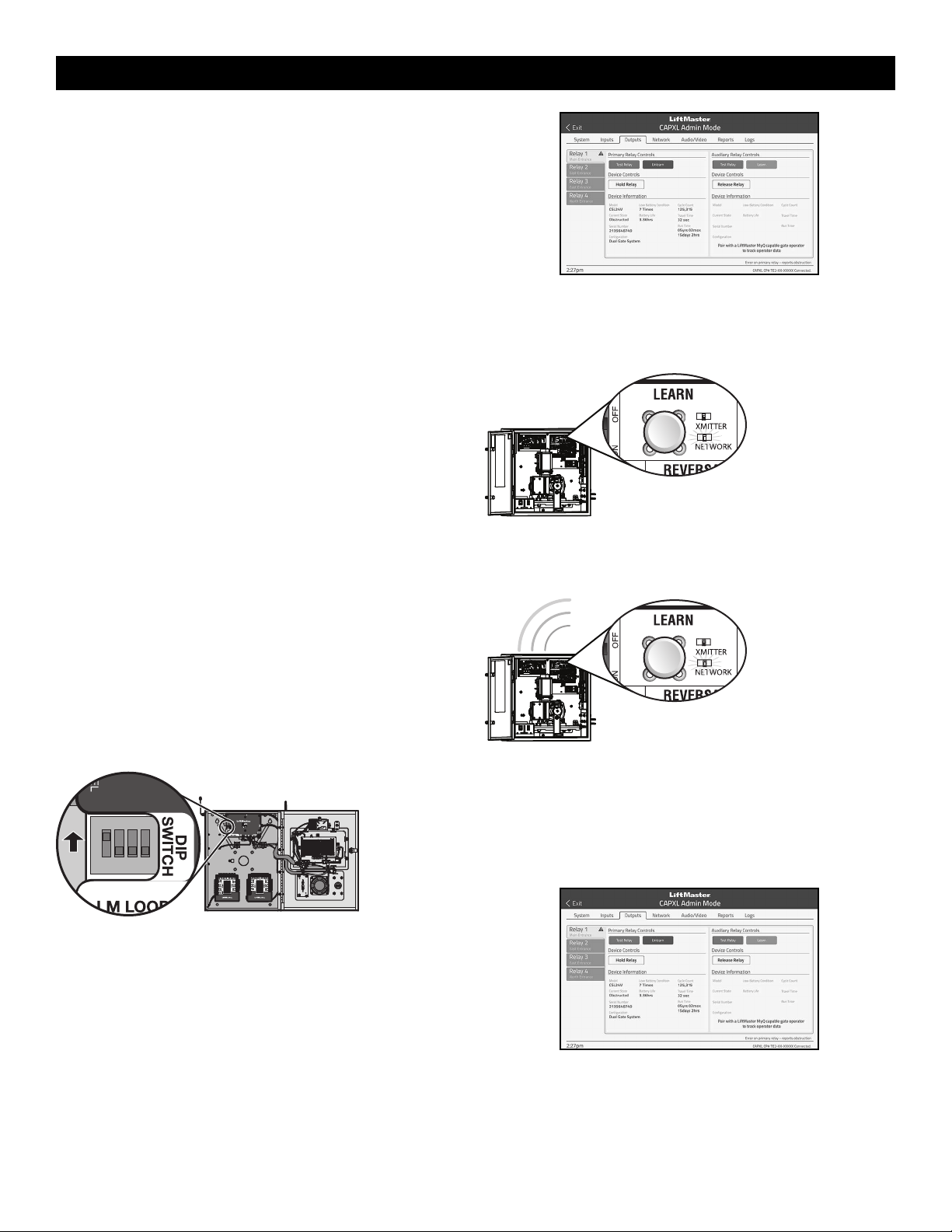
To Program the CAPXLV:
1. Enter Admin Mode - Flip dipswitch #1 to the ON position to enter
Admin Mode. NOTE: For new installations press the login button
without entering information in the Admin Username and Admin
Password fields.
CAPXLV
ON
ON
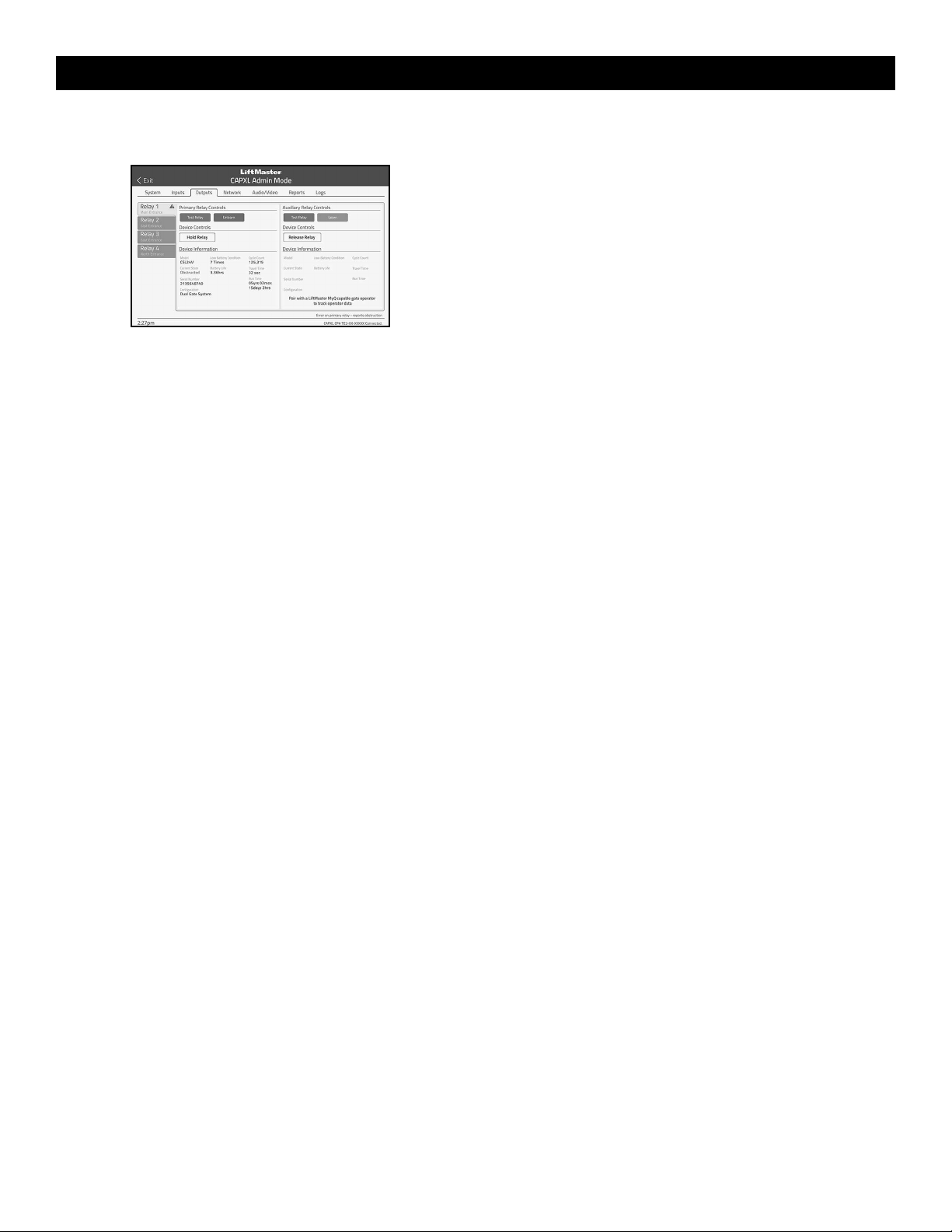
2. Select Outputs and Relay - Select the Outputs tab. Then select the
desired relay on the left-hand side (1 through 4).
3. Press LEARN button on gate operator - Press and release the LEARN
button on the primary operator. The green XMITTER LED will light.
NOTE: The operator will time out of programming mode after 180
seconds.
4. Press LEARN button on gate operator again - Press and release the
LEARN button again on the primary operator. The yellow NETWORK
LED will light.
5. Select LEARN on display - Select the LEARN button on the display and
the Learn button will go from blue to red. The gate operator and the
CAPXL will beep once and the NETWORK LED on the gate operator will
turn off indicating programming is successful. NOTE: 4 beeps/blinks
indicate you are not programming to the primary operator. Reattempt
programming from the other operator.
PROGRAMMING
26
6. Validate - Validate functionality by selecting Test Relay on the CAPXLV
display.
For more information refer to the CAPXL documentation.
myQ
®
Business™:
To find out more on how to simply secure all of your access points with an
easy to manage integrated system, myQ Business, please visit:
www.myqbusiness.com.
Erase All Transmitter and Keypad Codes
1. Press and release the LEARN button (operator will beep and green
XMITTER LED will light).
2. Press and hold the LEARN button again until the green XMITTER LED
flashes and then release the button (approximately 6 seconds). All
remote control codes are now erased.
Erase Limits
1. To erase the limits, press and hold the SET OPEN and SET CLOSE
buttons simultaneously (5 seconds) until both the SET OPEN and SET
CLOSE LEDs blink rapidly and the operator beeps.
2. Release the buttons and the SET OPEN and SET CLOSE LEDs will blink
slowly indicating the limits will need to be set.
Constant Pressure Override (CPO)
Constant Pressure Override is for use with KPW5 and KPW250 keypads
(not provided). The KPW5/KPW250 wireless commercial keypads are
security keypads and can only be programmed to ONE gate operator (see
the KPW5/KPW250 manual for complete programming instructions).
The Constant Pressure Override feature is intended to temporarily override
a fault in the entrapment protection system, in order to operate the gate
until the external entrapment protection device is realigned or repaired. Use
the feature only in line of sight of the gate when no obstructions to travel
are present. External entrapment protection devices include LiftMaster
monitored photoelectric sensors and LiftMaster monitored wired and
wireless edge sensors. Be sure to repair or replace these devices promptly
if they are not working properly.
To use Constant Pressure Override:
1. Enter a valid 4-digit PIN.
2. Press and hold # for 5 seconds to enter CPO. Continue to hold # to
keep the operator in motion. A continuous tone will sound until limit is
met and/or # is released.
3. The operator will stop when either the operator reaches a limit or the
user releases #.
Gate Hold Open Feature
The gate hold open feature will disable the timer and keep the gate at the
open limit. The gate hold open feature can be activated with the reset
button, see page 29 or on the KPW5 and KPW250 keypads (not provided).
To use the gate hold open feature on a keypad:
1. Enter a valid 4-digit PIN when the gate is at the open limit and the
timer is running
2. The operator will chirp indicating the timer is canceled.
To restart the gate:
1. Re-enter the 4-digit PIN
2. Activate a hard input or a programmed remote
To Remove and Erase Monitored Entrapment
Protection Devices
1. Remove the entrapment protection device wires from the terminal
block.
2. Press and release the SET OPEN and SET CLOSE buttons
simultaneously. The SET OPEN and SET CLOSE LEDs will turn on
(entering learn limit mode).
3. Press and release both SET OPEN and SET CLOSE buttons again to
turn off the SET OPEN and SET CLOSE LEDs (exiting learn limit mode).
PROGRAMMING
27
Gate Operator Setup Examples
The following are example setups for the gate operator. Your specific site requirements may be different. Always setup the operator system to the site
requirements, including all necessary entrapment protection devices.
COMMERCIAL/GENERAL ACCESS: A residential community (more than four homes) having one or more gated entrances/exits, allowing vehicle access
trumps security concerns
COMMERCIAL: Business site where security (gate closed) is important
INDUSTRIAL: Large business site where security is required
SETTING
COMMERCIAL/GENERAL ACCESS
COMMERCIAL INDUSTRIAL
Quick Close switch setting
Normally set to OFF. Normal gate close
(timer or control).
Normally set to OFF. Normal gate close
(timer or control).
Set to ON, so that gate closes immediately
after vehicle passes CLOSE EYES/Interrupt
loop.
AC Fail Open switch setting
Normally set to BATT. For local jurisdiction
requirement, set to OPEN so that the gate will
open approximately 15 seconds after AC
power fail.
Normally set to BATT. Run on battery if AC
power fails.
Normally set to BATT. Run on battery if AC
power fails.
Low Battery switch setting
Normally set to OPEN. If powered from
battery and battery is low, gate automatically
opens and stays open.
Normally set to CLOSE. If powered from
battery and battery is low, gate stays closed.
Normally set to CLOSE. If powered from
battery and battery is low, gate stays closed.
Anti-Tail switch setting
Normally set to OFF. CLOSE EYES/Interrupt
loop reverses a closing gate.
Set to ON. In attempt to prevent vehicle tail-
gating, CLOSE EYES/ Interrupt loop pauses a
closing gate.
Set to ON. In attempt to prevent vehicle tail-
gating, CLOSE EYES/ Interrupt loop pauses a
closing gate.
Bipart Delay switch setting
For DUAL-GATE site, set to ON for gate that
delays upon opening.
For DUAL-GATE site, set to ON for gate that
delays upon opening.
For DUAL-GATE site, set to ON for gate that
delays upon opening.
Aux Relay Out – Open Limit
Switch
Use with SAMS (Sequence Access
Management System).
1. Use with SAMS (Sequence Access
Management System).
2. Connect “Gate Open” indicator (e.g.
light).
1. Use with SAMS (Sequence Access
Management System).
2. Connect “Gate Open” indicator (e.g.
light).
Aux Relay Out – Close Limit
Switch
Typically not required. Connect “Gate Close/Secure” indicator (e.g.
light).
Connect “Gate Close/Secure” indicator (e.g.
light).
Aux Relay Out – Gate
Motion
Attach alert signal (audible or visual alert
system).
Attach alert signal (audible or visual alert
system).
Attach alert signal (audible or visual alert
system).
Aux Relay Out – Pre-Motion
Delay
Attach alert signal (audible or visual alert
system).
Attach alert signal (audible or visual alert
system).
Attach alert signal (audible or visual alert
system).
Aux Relay Out – Power
Attach visual alert to know when system is
charging batteries (i.e. not running on
batteries).
Attach visual alert to know when system is
charging batteries (i.e. not running on
batteries).
Attach visual alert to know when system is
charging batteries (i.e. not running on
batteries).
Aux Relay Out – Tamper
(Slide Gates Only)
Attach alert signal (audible or visual alert
system) to indicate if gate is manually
tampered with by being pushed off of close
limit.
Attach alert signal (audible or visual alert
system) to indicate if gate is manually
tampered with by being pushed off of close
limit.
Attach alert signal (audible or visual alert
system) to indicate if gate is manually
tampered with by being pushed off of close
limit.
Cycle Quantity Feedback
Use during servicing only to determine
operator cycles.
Use during servicing only to determine
operator cycles.
Use during servicing only to determine
operator cycles.
Fire Dept Open Input
Connect emergency access system (Knox box
switch, SOS system, etc.).
Typically not required. Typically not required.
OPERATION
28
Control Board Overview
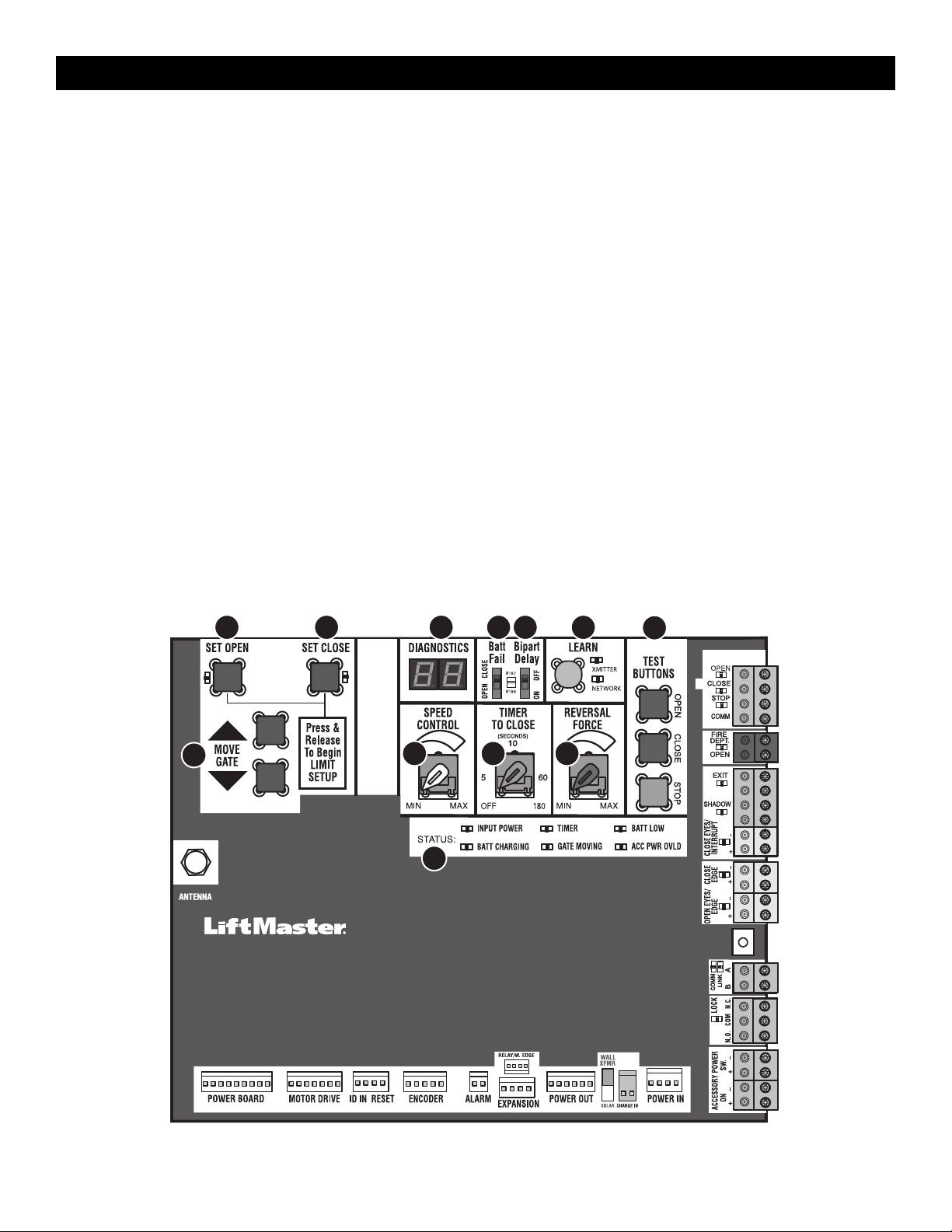
1 SET OPEN Button: The SET OPEN button sets the OPEN limit. See Adjustment section.
2 SET CLOSE Button: The SET CLOSE button sets the CLOSE limit. See Adjustment section.
3 DIAGNOSTICS Display: The diagnostics display will show the operator type, firmware version, and codes. he operator type will display as "IH" for heavy
and "IN" for light, followed by a "24" which indicates the operator type as IHSL24UL/ INSL24UL. The firmware version will show after the operator type,
example "1.2".
4 BATT FAIL:
•
When AC power is OFF and battery voltage is critically low the gate will latch at a limit until AC power is restored or batteries voltage increases.
•
Option select switch set to OPEN forces gate to automatically open and then latch at the OPEN limit until AC power is restored or battery voltage
increases.
•
Option select switch set to CLOSE forces gate to latch at CLOSE limit if at CLOSE limit or on next CLOSE command until AC power restored or battery
voltage increases.
•
Constant pressure on a hard command input overrides to open or close the gate.
•
Critically low battery is less than 23 VDC.
5 BIPART DELAY Switch: The BIPART DELAY switch is used only for dual gates. See Bipart delay/synchronized closed page 19.
6 LEARN Button: The LEARN button is for programming remote controls and the network.
7 TEST BUTTONS: The TEST BUTTONS will operate the gate (OPEN, STOP and CLOSE).
8 MOVE GATE Buttons: The MOVE GATE buttons will either open or close the gate when the operator is in Limit setting mode. See Adjustment section.
9 SPEED CONTROL dial: Sets maximum gate speed. See Speed Control page 22.
10 TIMER-TO-CLOSE dial: The TIMER-TO-CLOSE (TTC) dial can be set to automatically close the gate after a specified time period. The TTC is factory set
to OFF. If the TTC is set to the OFF position, then the gate will remain open until the operator receives another command from a control. Rotate the TIMER-
TO-CLOSE dial to the desired setting. The range is 0 to 180 seconds, 0 seconds is OFF. NOTE: Any radio command, single button control, or CLOSE
command on the control board prior to the TTC expiring will close the gate. The TTC is reset by any signals from the open controls, loops, close edges,
and close photoelectric sensors (IR’s).
11 REVERSAL FORCE dial: The REVERSAL FORCE dial fine tunes the force. See Fine Tune the Force page 22.
12 STATUS LEDs: The STATUS LEDs indicate the status of the operator. See Status LED Chart in the Troubleshooting section.
1 2 4 5 6
9
3
12
10 11
7
8
OPERATOR OVERVIEW
29
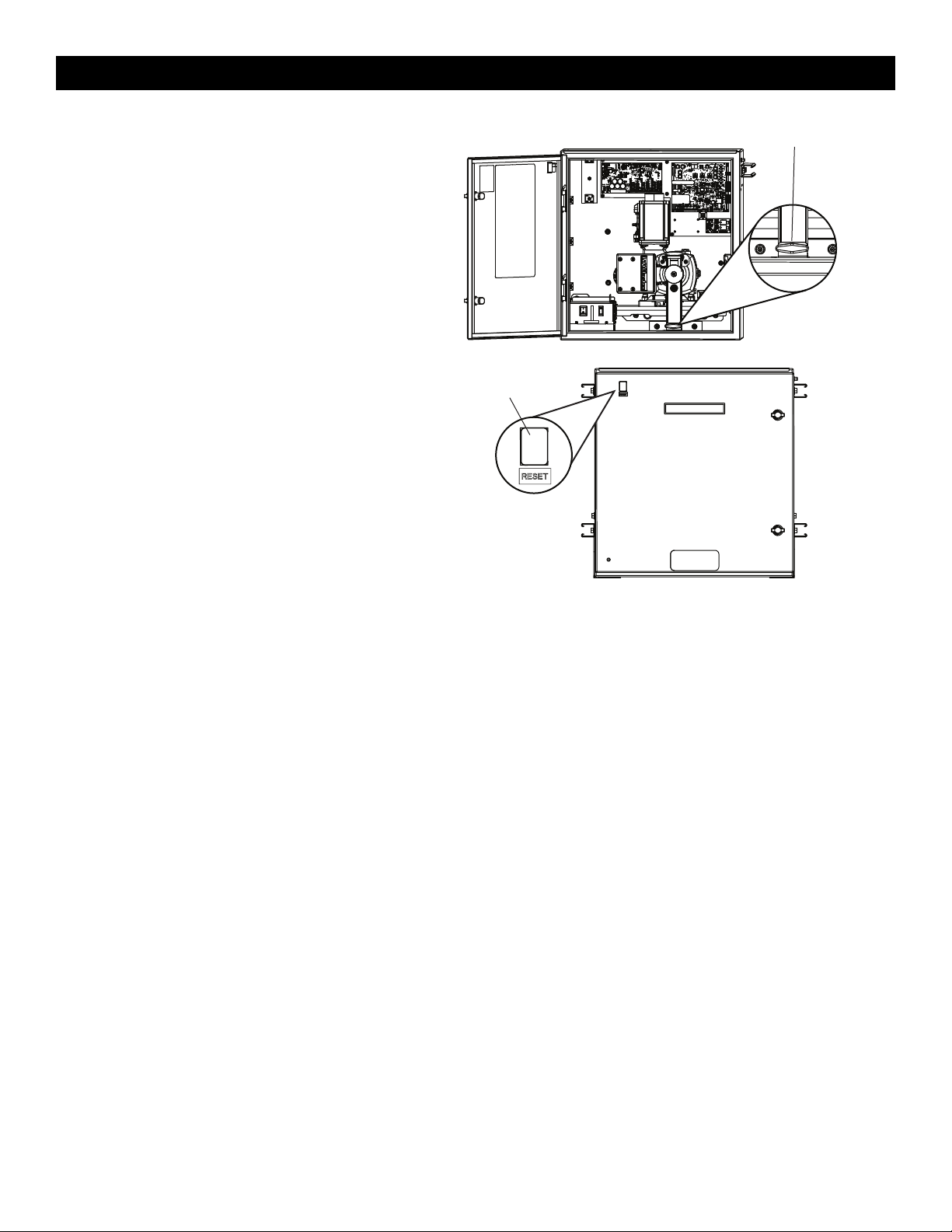
Manual Disconnect
1. Open the cabinet door.
2.
Locate the black T-shaped manual release handle attached to the
gearbox in the bottom of the cabinet.
3. Pull firmly until it latches into place.
To resume normal function, push the plate down to release the handle
and re-engage the motor and the gearbox.
Reset Button
The reset button has the following functions:
•
Press the reset button to stop a moving gate during a normal
open/close cycle, like a stop button.
•
Press the reset button once while the gate is in open position to
disable the Timer-to-Close. The gate will stay in the open position.
To restart the Timer-to-Close either press the reset button or activate
the gate with a programmed remote control.
•
Press the reset button to shut off the alarm and reset the operator.
Manual Release Handle
Reset Button
OPERATOR OVERVIEW
30
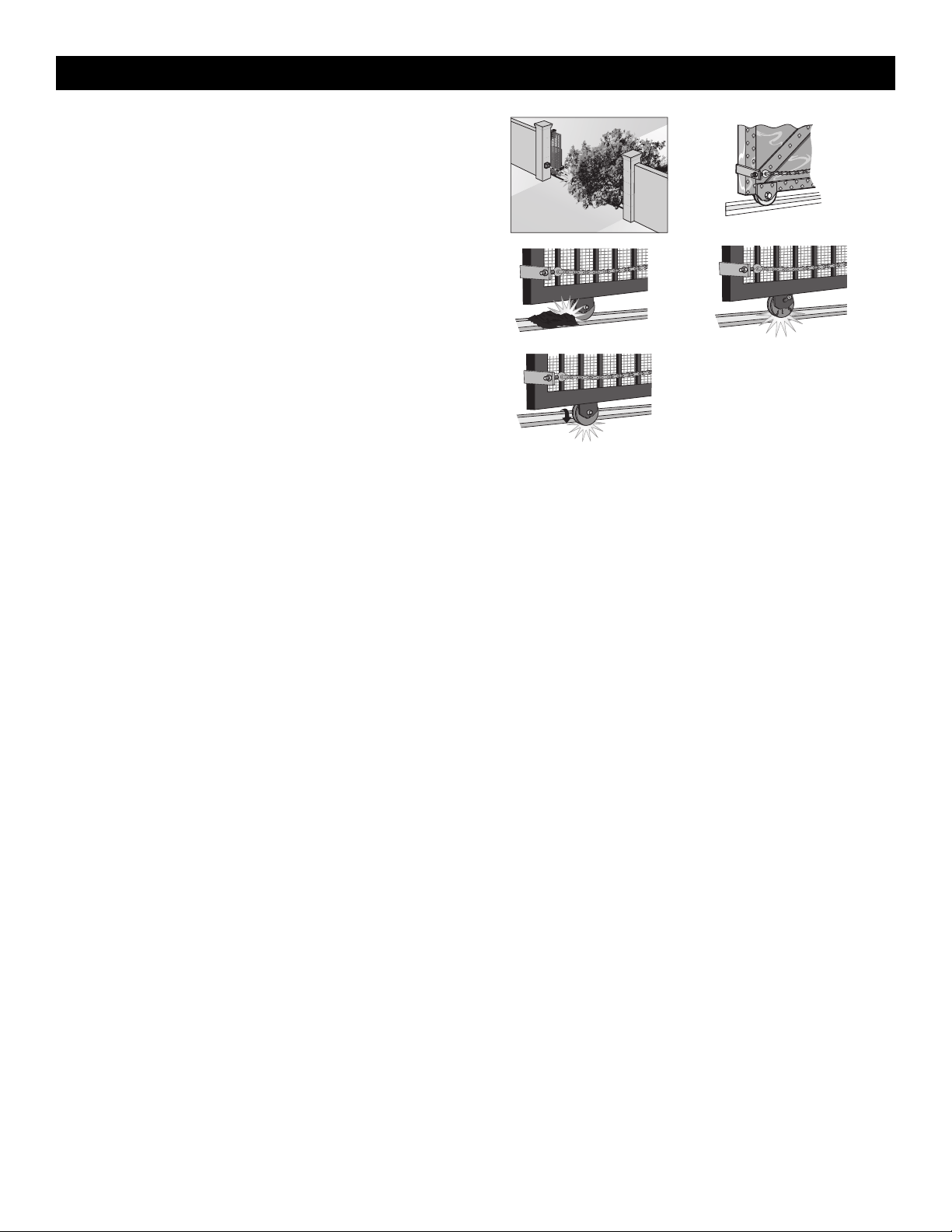
Operator Alarm
When the inherent force of the operator detects the following twice
consecutively, the alarm will sound up to 5 minutes and the operator will
need to be reset.
A. The gate is hitting an obstruction.
B. The gate does not meet specifications.
C. Debris is on the gate's track such as mud, rocks, dirt, etc.
D. The gate has one or more broken axles or wheels.
E. The gate wheel is off the gate rail.
The operator alarm will beep 3 times with a command if the battery is
low.
Remove any obstructions or repair gate system. Press the reset button
to shut off the alarm and reset the operator. After the operator is reset,
normal functions will resume.
E
D
B
C
A
Remote control
There are 3 different options for programming the remote control depending on how you would like the remote control to function, see page 24.
Single Button Open Only
When gate is in the closed position, activation of the remote control button will open the gate. The Timer-to-Close can be set to close the gate.
Single Button Control (SBC) Functionality
Program one remote control button as an open, close, and stop
When gate is in the closed position, activation of the remote control button will open the gate. During the open cycle another activation of the remote
control will stop the gate and the next activation of the remote control will close the gate.
When the gate is in the open position, activation of the remote control button will close the gate. If the remote control is activated while the gate is closing,
the gate will stop and the next activation will open the gate.
Three Button Remote Control
Program each remote control button as an open, close, and stop.
OPERATION
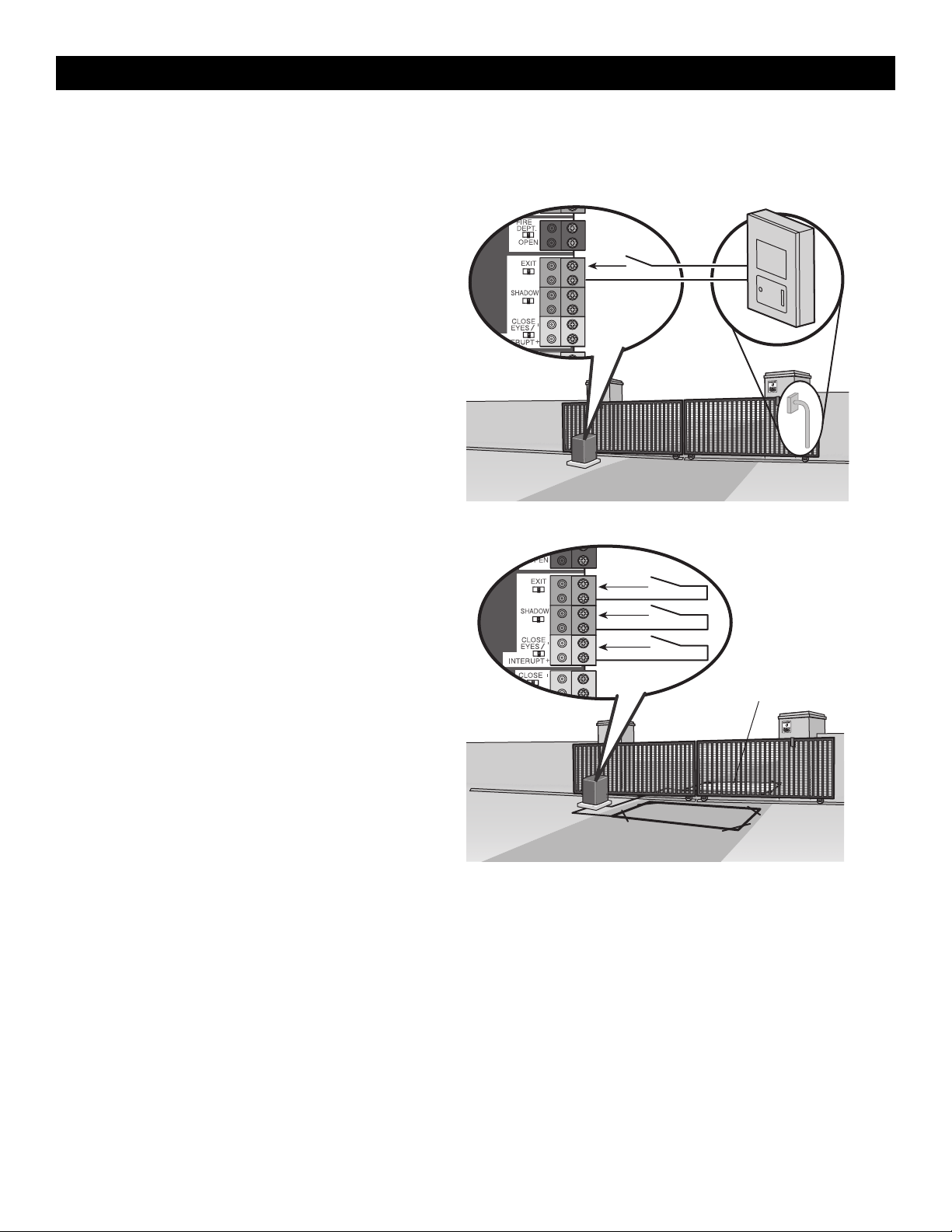
31
All control wiring used to connect external devices to Class 2 circuits of the operator must be (QPTZ) Power-Limited Circuit Cables, Type CL2, CL2P,
CL2R, or CL2X or other cable with equivalent or better electrical, mechanical, and flammability ratings.
External Control Devices
NOT TO BE USED AS ENTRAPMENT PROTECTION
EXIT (2 Terminals)
This input is a soft open command (maintained switch does not override
external safeties and does not reset alarm condition). Used for exit
probe, telephone entry, external exit loop detector, or any device that
would command the gate to open.
•
Opens a closed or closing gate and holds open an open gate, if
maintained, pauses Timer-to-Close at OPEN limit.
SHADOW (2 Terminals)
This input is used for external shadow loop detector when loop is
positioned under the swing of the gate.
•
Holds open gate at open limit
•
Only active when the gate is at the OPEN limit, disregarded at all
other times
•
Pauses Timer-to-Close at OPEN limit
INTERRUPT (2 Terminals)
This input is used for an external interrupt loop detector when loop is on
the outside of the gate.
•
Holds open gate at open limit
•
Stops and reverses a closing gate to open limit
•
Pauses Timer-to-Close at OPEN limit, activates quick close and anti-
tailgate features when enabled on the expansion board
Access control device wiring
Access Control Device
Exit
Com
Control board
Loop wiring
Interrupt Loop
Control board
Exit
Com
Shadow
Com
Interrupt
Com
Exit Loop
ACCESSORY WIRING
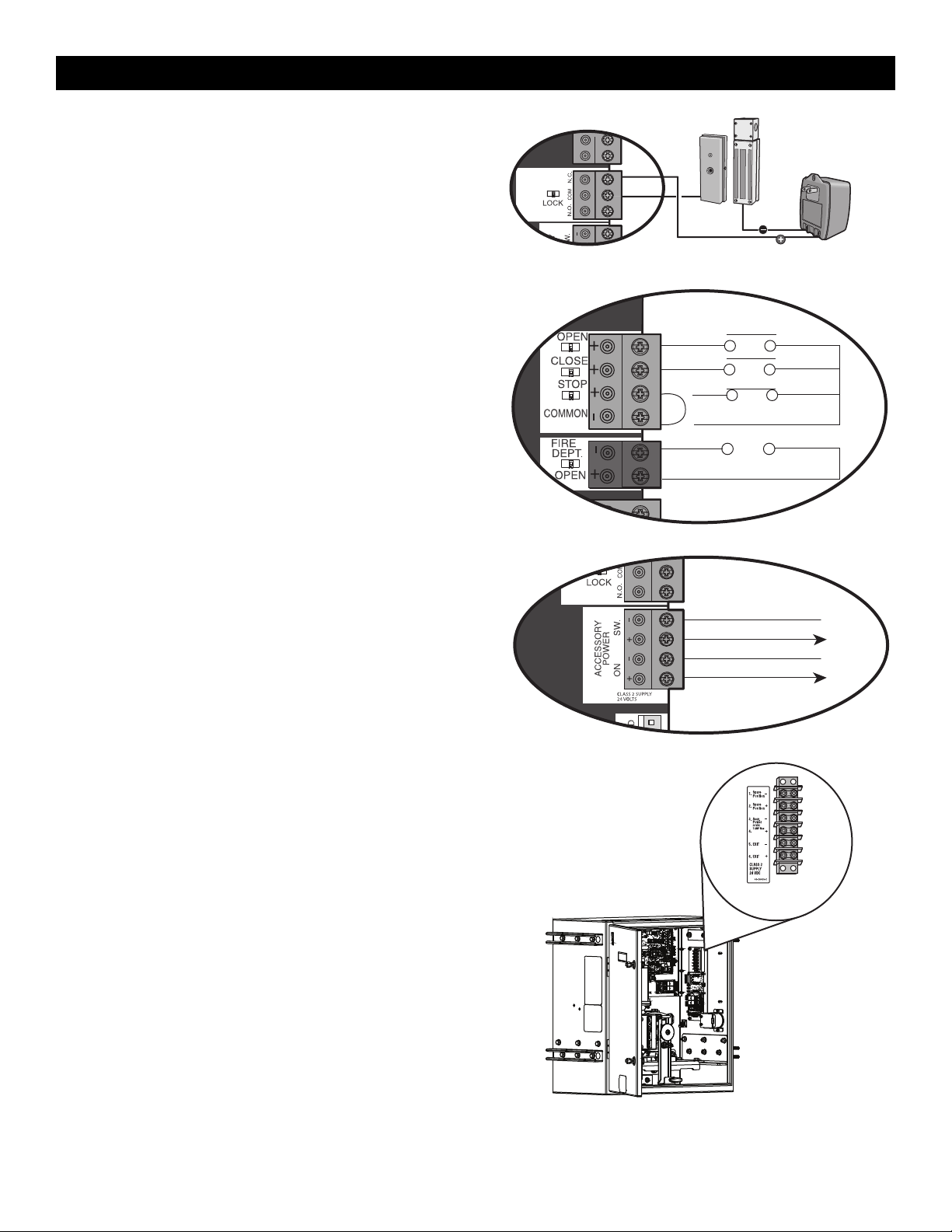
32
Locks
Maglock (2 Terminals, N.C. and COM)
Relay contact output, Normally - closed (N.C.) output for maglocks.
Relay activates prior to motor activation and during motor run. Relay is
off when motor is off.
CONTROL BOARD MAGLOCK
NOT
PROVIDED
Miscellaneous Wiring
Three button control station (4 Terminals)
•
OPEN and COM: Opens a closed gate. Hard open (maintained switch
overrides external safeties and resets alarm condition). If maintained,
pauses Timer-to-Close at OPEN limit. Opens a closing gate and holds open
an open gate (within line-of-sight).
•
CLOSE and COM: Closes an open gate. Hard close (maintained switch
overrides external safeties and resets alarm condition within line-of-sight)
•
STOP and COM: Stops a moving gate. Hard stop (maintained switch
overrides Open and Close commands and resets alarm condition). If
maintained, pauses Timer-to-Close at OPEN limit. Overrides Open and Close
commands (within line-of-sight).
Fire department open input (2 Terminals)
Acts as hard open.
Maintained input overrides (ignores) external safeties (photoelectric sensor and
edge), pauses Timer-to-Close momentary input logic as single button control
and safeties remain active, re-enables Timer-to-Close.
Accessory power class 2 supply 24 VDC, MAX 1 Amp
(4 Terminals)
•
SWITCHED: Switched ON with gate motion and at the open limit when
Timer-to-Close is active. Turns off 5 seconds after motion.
•
UNSWITCHED: 24 Vdc voltage out to power accessories, always ON.
CONTROL BOARD
Three Button Control Station
Open
Close
N.C.
Stop
Com
Fire Dept
Com
Fire Department
CONTROL BOARD
Accessory Power Switched
Com (-)
Acc power +24 Vdc
Com (-)
Acc power +24 Vdc
Accessory Power Unswitched
Terminal Block
The terminal block provides additional space for accessory wiring.
Terminal Block
ACCESSORY WIRING
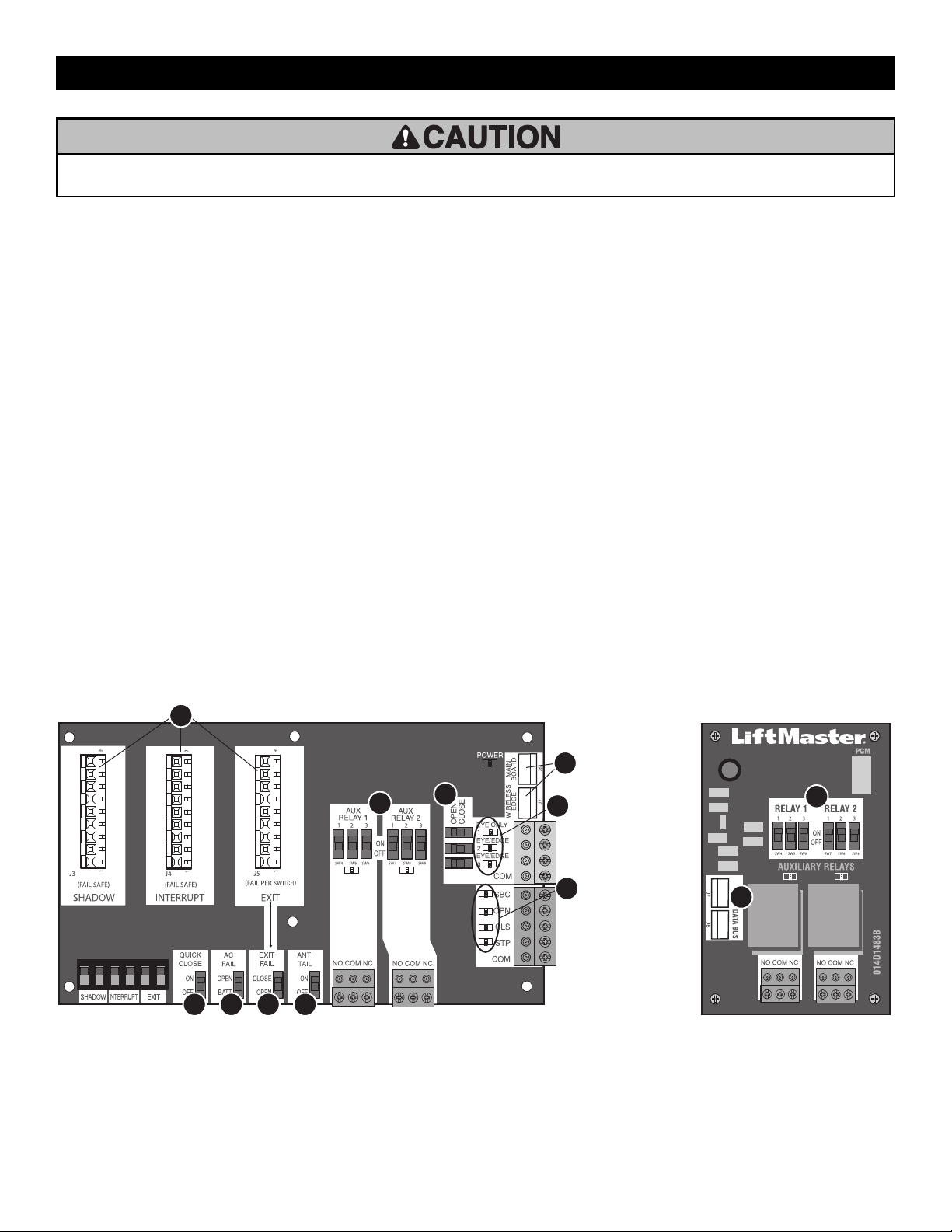
33
•
To AVOID damaging the circuit board, relays or accessories, DO NOT connect more than 42 Vdc (32 Vac) to the AUX relay contact terminal
blocks.
Expansion and Relay Adapter Boards Overview
1.
QUICK CLOSE switch:
OFF: No change to the gate's normal operation.
ON: When CLOSE EYES/Interrupt loop is deactivated it causes an
opening or a stopped gate to close (ignores the Timer-to-Close).
2. AC FAIL switch:
OPEN: Loss of AC power will cause the gate to open approximately 15
seconds after AC power fail and remain OPEN until AC power is
restored (enabling the Timer-to-Close).
BATT: With loss of AC power, gate will remain in present position and
operator is powered from batteries.
3. EXIT FAIL switch:
When set to OPEN, if the EXIT plug-in loop detector (Model
LOOPDETLM) detects a fault, then the gate will open and remain open
until fault is cleared. When set to CLOSE, then plug-in EXIT loop
detector faults are ignored (EXIT loop is faulted and inoperative).
4. ANTI-TAIL switch:
OFF: When CLOSE EYES/Interrupt loop is activated it causes a closing
gate to stop and reverse.
ON: When CLOSE EYES/Interrupt loop is activated it causes a closing
gate to pause. Once the vehicle is clear the gate will continue to close.
5. AUX RELAY switches:
Set the AUX RELAY switches as needed to obtain the desired function
as shown on the following page.
6. EYE/EDGE switches:
Set the EYE/EDGE switches as needed to obtain the desired OPEN or
CLOSE functionality.
7. 1, 2, and 3 LEDs:
LEDs indicating the status of the EYE/EDGE inputs. Also used to check
the firmware version of the expansion board:
1. Locate the 1, 2, and 3 LEDs on the expansion board.
2. Disconnect AC/DC power to the control board for 15 seconds.
3. Connect power. The 1, 2, and 3 LEDs will flash in sequence until
the control board firmware revision is displayed. When the green
POWER LED glows solid the LED 1 will flash the version number,
then stop, then the LED 2 will flash the revision number (for
example: For version 5.1 when the green POWER LED is solid the
LED 1 will flash 5 times, then stop, then the LED 2 will flash
once).
8.
J6 and J7 inputs:
Communication bus connects control board, expansion board, or
relay adapter board. Also connects LiftMaster wireless edge receiver
LMWEKITU. NOTE: ONLY one wireless edge receiver may be
connected to an operator. Up to 4 wireless edge transmitters
LMWETXU may be programmed to the receiver.
9. Input LEDs:
LEDs indicating the status of the SBC, OPN, CLS, and STP inputs.
10. Loop detector inputs:
Inputs for the Plug-In Loop Detectors (Model LOOPDETLM)
1 2 3 4
6
9
8
7
10
5
RELAY ADAPTER BOARDEXPANSION BOARD
5
8
EXPANSION AND RELAY ADAPTER BOARDS
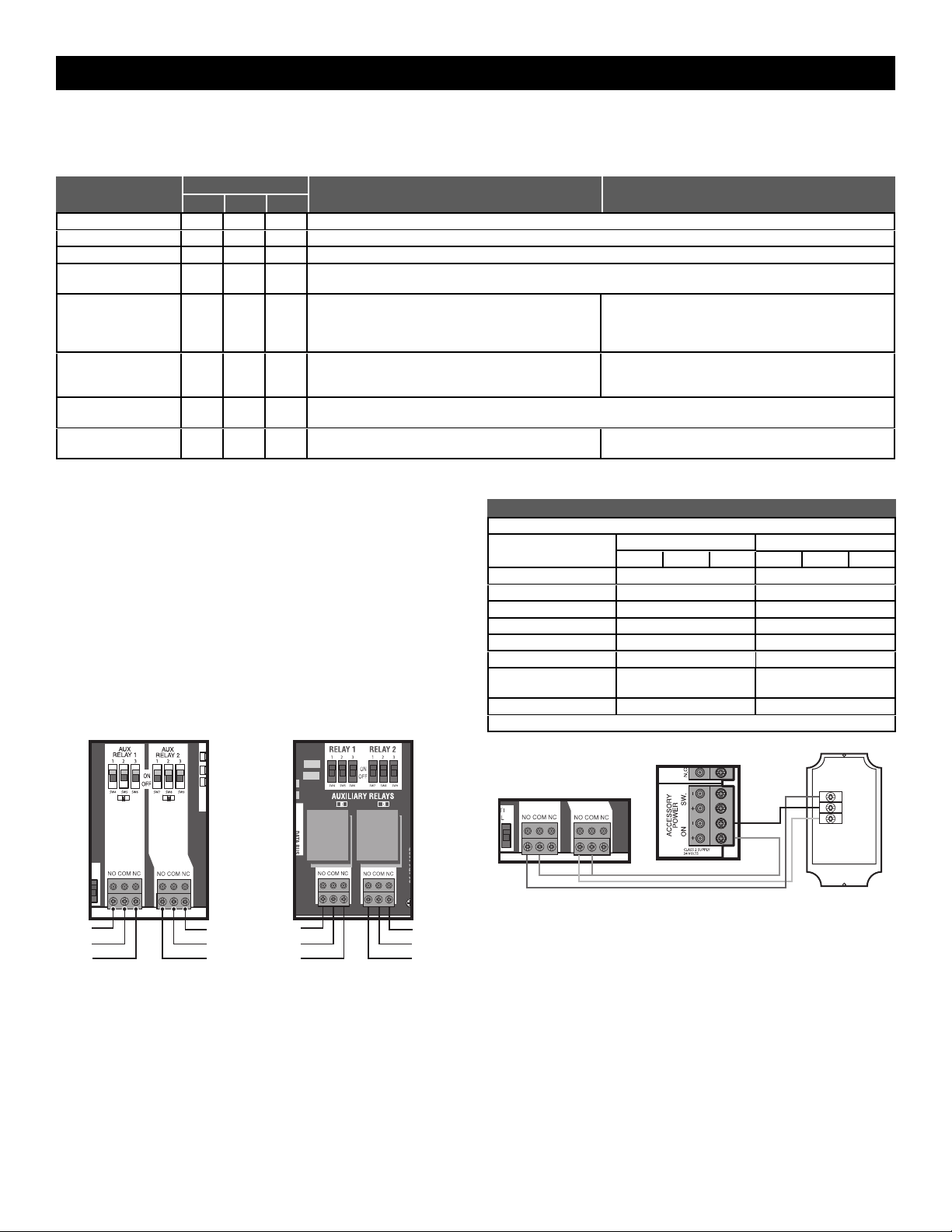
34
Auxiliary Relays
The expansion board and relay adapter board provide Normally Open (N.O.) and Normally Closed (N.C.) relay contacts to control external devices, for
connection of Class 2, low voltage (42 Vdc [34 Vac] max 5 Amps) power sources only. Function of relay contact activation determined by switch settings.
AUX RELAY
SETTING
SWITCH SETTINGS
AUX RELAY 1 AUX RELAY 2
1 2 3
Off (no feature selected)
OFF OFF OFF Relay always off. Use this Aux Relay setting to conserve battery power.
Open Limit Switch
OFF OFF ON Energizes at open limit. Use with SAMS (Sequenced Access Management System, jointly with barrier gate).
Close Limit Switch
OFF ON OFF Energizes when not at close limit. For an additional audible or visual display, connect an external light (low voltage).
Gate Motion
OFF ON ON
Energizes when motor is on (gate in motion). For an additional audible or visual display, connect an external buzzer or light (low
voltage).
Pre-Motion Delay -
Expansion Board Only
ON OFF OFF
Energizes 3 seconds before gate motion and remains energized
during gate motion. The onboard alarm will sound. For an
additional audible or visual display, connect an external buzzer or
light (low voltage).
Energizes 3 seconds before gate motion and remains energized
during gate motion. For an additional audible or visual display,
connect an external buzzer or light (low voltage).
Power
ON ON OFF
Energizes when AC power or solar power is present. There is
approximately a 10-12 second delay before relay cutoff, after AC
shutdown.
Energizes when on battery power. There is approximately a 10-12
second delay before relay cutoff, after AC shutdown.
Tamper
ON OFF ON
Energizes if gate is manually tampered with by being pushed off of close limit. For an additional audible or visual display, connect an
external buzzer or light (low voltage).
Cycle Count - Expansion
Board Only
ON ON ON
The 1, 2, and 3 LEDs will blink out the cycle count (cycle count is
stored on the control board). See below.
Red/green light functionality, see below.
* Cycle count
First, note the current Aux Relay switch positions. To determine the
actual cycles that the gate operator has run (in thousands), set all three
Aux Relay switches to the ON setting for Aux Relay 1. The Expansion
Board’s 1, 2, and 3 LEDs will blink out the cycle count, with 1 LED
blinking 1000’s, 2 LED blinking 10,000’s, 3 LED blinking 100,000’s, and
simultaneously all three LED’s blink 1,000,000’s (e.g. 1 LED blinks 3
times, 2 LED blinks 6 times, and 3 LED blinks once. Cycle count is
163,000.). Cycle count displayed is between 1,000 and 9,999,000
cycles. After servicing, set Aux Relay switches back to their appropriate
positions. Cycle count cannot be reset or changed. If under 1,000 cycles
the 1, 2, and 3 LEDs will turn on for 10 seconds, then turn off.
NOTE: The expansion board will flash the cycle count 3 times then all the
LEDs will turn on solid for 10 seconds then turn off.
N.O.
Com
N.C.
N.O.
Com
N.C.
EXPANSION BOARD RELAY ADAPTER BOARD
N.O.
Com
N.C.
N.O.
Com
N.C.
RED/GREEN LIGHT FUNCTIONALITY
Red light wired to AUX RELAY 1. Green light wired to AUX RELAY 2.
GATE STATE
AUX RELAY 1 SWITCHES
AUX RELAY 2 SWITCHES
1 OFF 2 OFF 3 OFF 1 ON 2 ON 3 ON
Closed
Red light OFF* Green light OFF
Opening
Red light ON/Flash Green light OFF
Open
Red light OFF Green light ON
Closing
Red light ON/Flash Green light OFF
Defined Mid Stop
n/a n/a
Undefined Mid Stop
Red light ON Green light OFF
Timer more than 5
seconds
Red light OFF Green light ON
Timer less than 5 seconds
Red light ON/Flash Green light OFF
* For red light ON when gate is closed, set switch 1 on AUX RELAY 1 to ON
Control board
Expansion board
RED
COM
GREEN
Red/green light RGL24LY
EXPANSION AND RELAY ADAPTER BOARDS
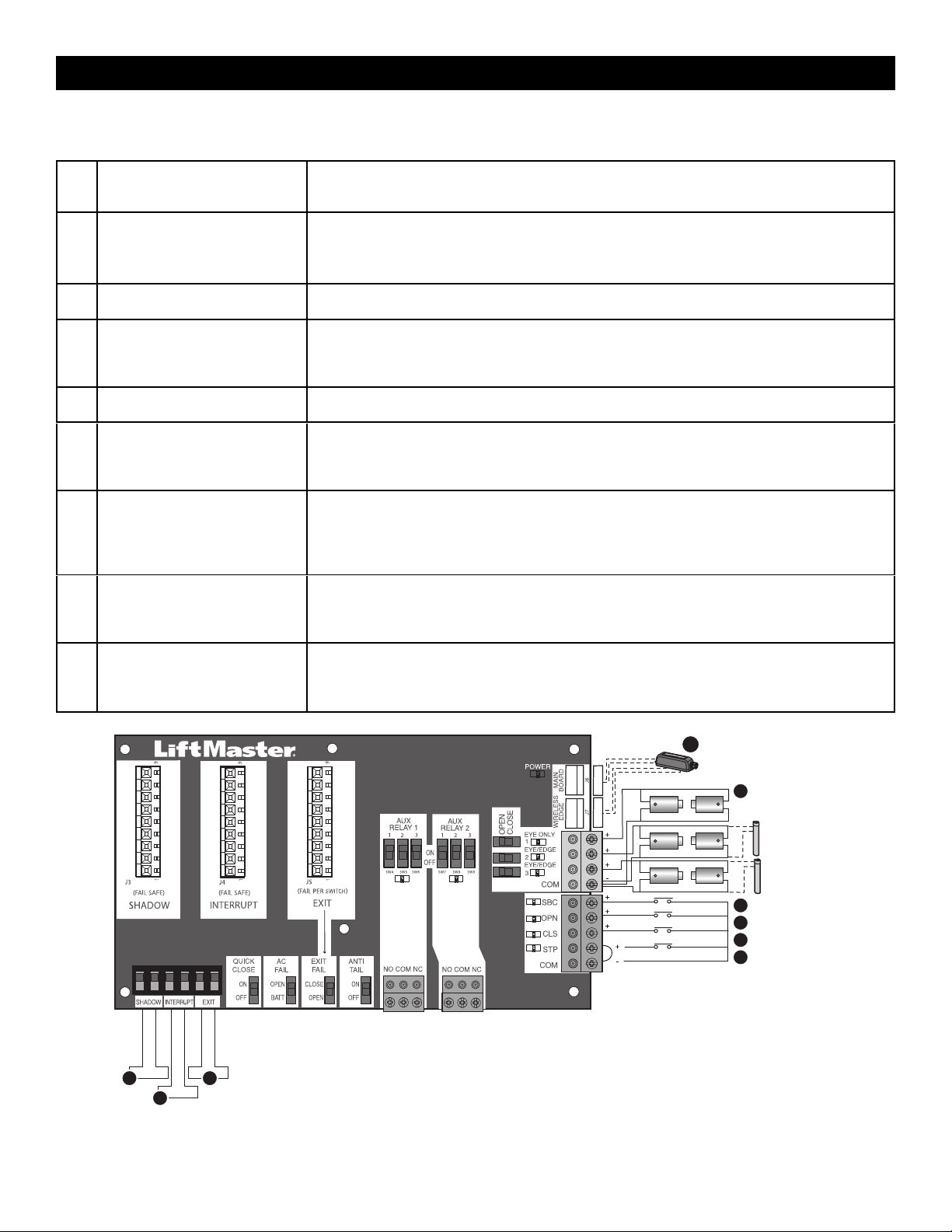
35
Wiring Accessories to the Expansion Board
Refer to the chart below and the corresponding image for a description of the expansion board inputs.
1 Wireless edge, control board, or
relay adapter board
Connection for wireless edge receiver, control board or relay adapter board. NOTE: ONLY one wireless
edge receiver may be connected to an operator. Up to 4 wireless edge transmitters LMWETXU may be
programmed to the receiver.
2 Entrapment Protection Device
Inputs (4 terminals total), Open or
Close Direction based on switch
setting next to inputs
EYES ONLY Input: Open or Close Direction Photoelectric Sensors, Close: reverses fully, Open: reverses 4
seconds.
EYES/EDGE Input(s): Open or Close Direction Photoelectric Sensors, Infra-red detector wired or Edge
Sensor, Close: reverses fully, Open: reverses 4 seconds.
3 Single Button Control, SBC
(2terminals)
Gate command sequence - Open, Stop, Close, Stop, ... Soft Open ,Soft Close, Soft Stop (maintained
switch does not override external safeties and does not reset alarm condition)
4 Open Input (& common) (3-Button
Control Station, 4 terminals total)
Open command - opens a closed gate.
Soft open (maintained switch does not override external safeties and does not reset alarm condition) If
maintained, pauses Timer-to-Close at OPEN limit.
Opens a closing gate and holds open an open gate.
5 Close Input (& common) (3-Button
Control Station, 4 terminals total)
Close command - closes an open gate.
Soft close (maintained switch does not override external safeties and does not reset alarm condition).
6 Stop Input (& common) (3-PB
station, 4 terminals total)
Stop command - stops a moving gate.
Hard stop (maintained switch overrides Open and Close commands and resets alarm condition) If
maintained, pauses Timer-to-Close at OPEN limit.
Overrides an Open or Close command.
7 Exit Loop Input (2 terminals)
Loop wire connection for plug-in loop detector when loop is inside secured area near gate.
Open command - opens a closed gate.
Soft open (maintained switch does not override external safeties and does not reset alarm condition) If
maintained, pauses Timer-to-Close at OPEN limit.
Opens a closing gate and holds open an open gate.
8 Shadow Loop Input (2 terminals)
Loop wire connection for plug-in loop detector when loop is positioned under the gate.
•
Holds open gate at open limit
•
Disregarded during gate motion
•
Pauses Timer-to-Close at Open Limit
9 Interrupt Loop Input (2 terminals)
Loop wire connection for plug-in loop detector when loop is along the side of the gate.
•
Holds open gate at open limit
•
Stops and reverses a closing gate
•
Pauses Timer-to-Close at Open Limit
Shadow Loop
Interrupt Loop
Exit Loop
Photoelectric Sensor
Photoelectric
Sensor or Edge
Photoelectric
Sensor or Edge
7
6
5
4
3
2
9
8
1
Wireless edge receiver,
control board, or relay
adapter board
EXPANSION AND RELAY ADAPTER BOARDS
36
IMPORTANT SAFETY INSTRUCTIONS
To reduce the risk of SEVERE INJURY or DEATH:
•
READ AND FOLLOW ALL INSTRUCTIONS.
•
ANY maintenance to the operator or in the area near the operator
MUST NOT be performed until disconnecting the electrical power
(AC or solar and battery) and locking-out the power via the operator
power switch. Upon completion of maintenance the area MUST be
cleared and secured, at that time the unit may be returned to service.
•
Disconnect power at the fuse box BEFORE proceeding. Operator
MUST be properly grounded and connected in accordance with
national and local electrical codes. NOTE: The operator should be on
a separate fused line of adequate capacity.
•
NEVER let children operate or play with gate controls. Keep the
remote control away from children.
•
ALWAYS keep people and objects away from the gate. NO ONE
SHOULD CROSS THE PATH OF THE MOVING GATE.
•
The entrance is for vehicles ONLY. Pedestrians MUST use separate
entrance.
•
TEST THE GATE OPERATOR MONTHLY. The gate MUST reverse on
contact with an object or reverse when an object activates the
noncontact sensors. After adjusting the force, speed, or the limit of
travel, retest the gate operator. Failure to adjust and retest the gate
operator properly can increase the risk of INJURY or DEATH.
•
Use the manual disconnect release ONLY when the gate is NOT
moving.
•
KEEP GATES PROPERLY MAINTAINED. Read this manual carefully.
Have a qualified service person make repairs to gate hardware.
•
ALL maintenance MUST be performed by a Trained Gate Systems
Technician.
•
Activate gate ONLY when it can be seen clearly, is properly adjusted
and there are no obstructions to gate travel.
•
To reduce the risk of FIRE or INJURY to persons use ONLY
LiftMaster part 29-NP712 for replacement batteries.
•
SAVE THESE INSTRUCTIONS.
•
ALWAYS wear protective gloves and eye protection when changing the battery or working around the battery compartment.
MAINTENANCE
37
Maintenance Chart
Disconnect all power (AC, solar, battery) to the operator before servicing.
DESCRIPTION TASK CHECK AT LEAST ONCE EVERY
MONTH 6 MONTHS 3 YEARS
Entrapment Protection Devices
Check and test inherent (built into the operator) and external devices for
proper operation
X
Warning Signs
Make sure they are present and replace if worn or broken, see Accessories
X
Manual Disconnect Check and test for proper operation X
Sprockets and Chains Check for excessive slack and lubricate X
Gate Inspect for wear or damage; ensure it still complies with ASTM F2200, see
page 5
X
Accessories Check all for proper operation X
Electrical Inspect all wire connections X
Chassis Mounting Bolts Check for tightness X
Operator Inspect for wear or damage X
Diagnostic History Review diagnostic history for identification of intermittent problems
X
Batteries Replace
X
NOTES:
•
High cycle usage may require more frequent maintenance checks.
•
Limits may have to be reset after any major drive chain adjustments.
•
If lubricating chain, use only lithium spray. Never use grease or silicone spray.
•
It is suggested that while at the site voltage readings be taken at the operator. Using a digital voltmeter, verify that the incoming voltage to the operator
is within ten percent of the operator’s rating.
Batteries
Batteries will degrade over time depending on temperature and usage.
The operator alarm will beep 3 times with a command if the battery is
low. Batteries do not perform well in extremely cold temperatures. For
best performance, the batteries should be replaced every 3 years. Use
only LiftMaster part 29-NP712 for replacement batteries. The batteries
contain lead and need to be disposed of properly.
The operator comes with two 7AH batteries. Two 33AH batteries
(A12330SGLPK), with battery harness model K41-0102-000 (not
provided), may be used in place of the 7AH batteries.
Drive Train
Over time, the drive chain on the operator will stretch and need to be tightened.
To tighten the drive chain adjust either of the two chain eye bolts. NOTE:The
chain should have no more than 1 inch of sag for every 10 feet of chain length.
MAINTENANCE
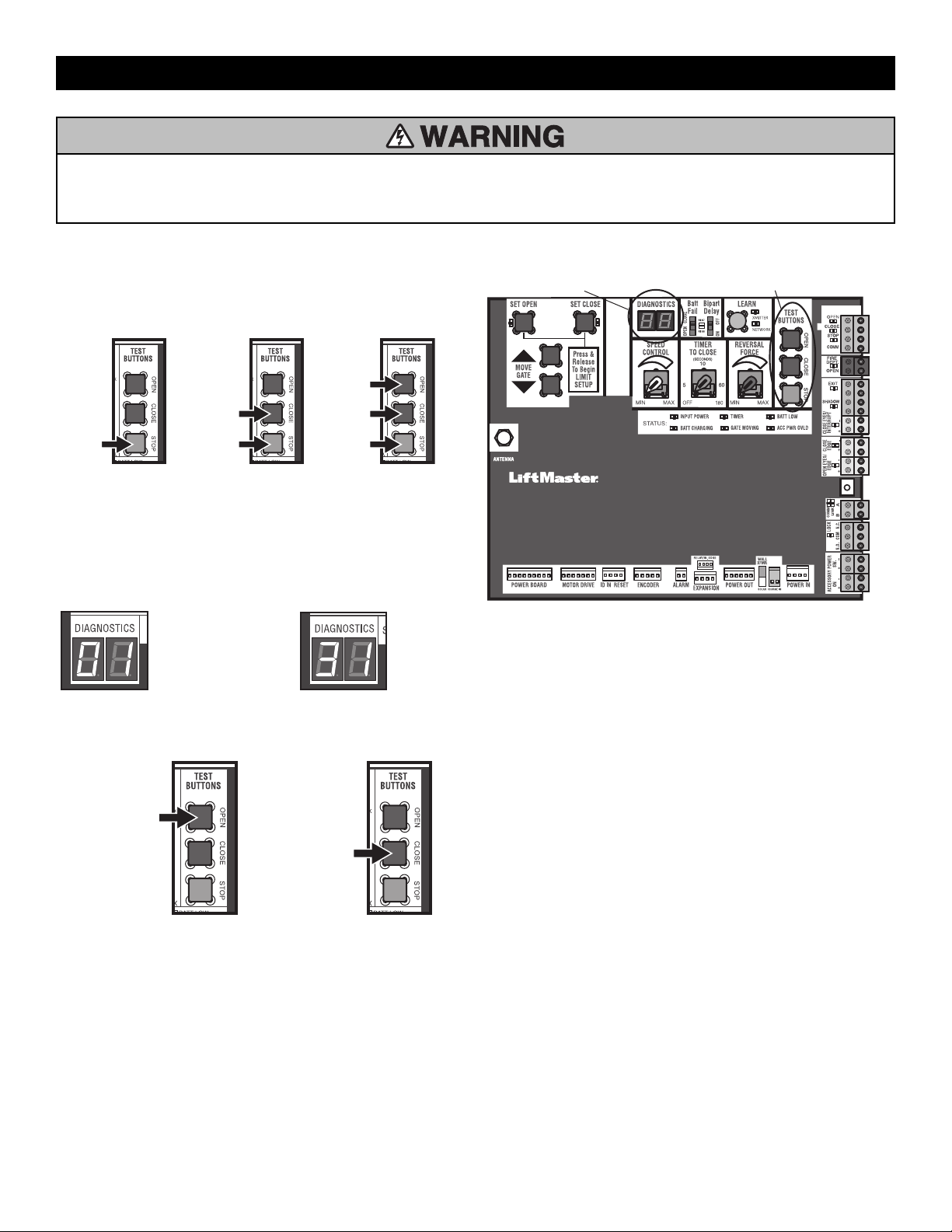
38
To protect against fire and electrocution:
•
DISCONNECT power (AC or solar and battery) BEFORE installing or
servicing operator.
For continued protection against fire:
•
Replace ONLY with fuse of same type and rating.
Diagnostic Codes
To View the Codes
The codes will show on the diagnostic display.
Press and
hold the
STOP
button...
...then press
and hold the
CLOSE button...
...then press
and hold the
OPEN button
until "Er"
shows on
the display.
The operator will show the code sequence number followed by the code
number:
A SECOND
LATER....
CODE SEQUENCE NUMBER
The first number shown is the
most recent code (example:
"01"). The display will show the
sequence of codes that
occurred starting with "01" and
going up to code "20".
CODE NUMBER
The second number shown after
the code sequence number is
the code itself (31-99, example"
"31"). Refer to the chart on
page 55 for an explanation of
each code.
To Scroll Through the Saved Codes
Press the OPEN button
to cycle to the most
recent code ("01").
Press the CLOSE button
to cycle to the oldest
code (up to "20").
The operator will only keep track of up to 20 codes, then will start saving
over the oldest codes as new codes occur.
DIAGNOSTICS DISPLAY
OPEN, CLOSE, & STOP BUTTONS
To Exit
Press and release the STOP button to exit. The display will also time out
after two minutes of inactivity.
To Reset the Code History
1. Press and hold the STOP button for six seconds. The display will show
"Er" then "CL" alternately for six seconds.
2. Release the STOP button. The code history has now been reset and
the display will show "- -" until a new code occurs.
3. Press and release the STOP button to exit.
See the diagnostic codes table page 55.
TROUBLESHOOTING
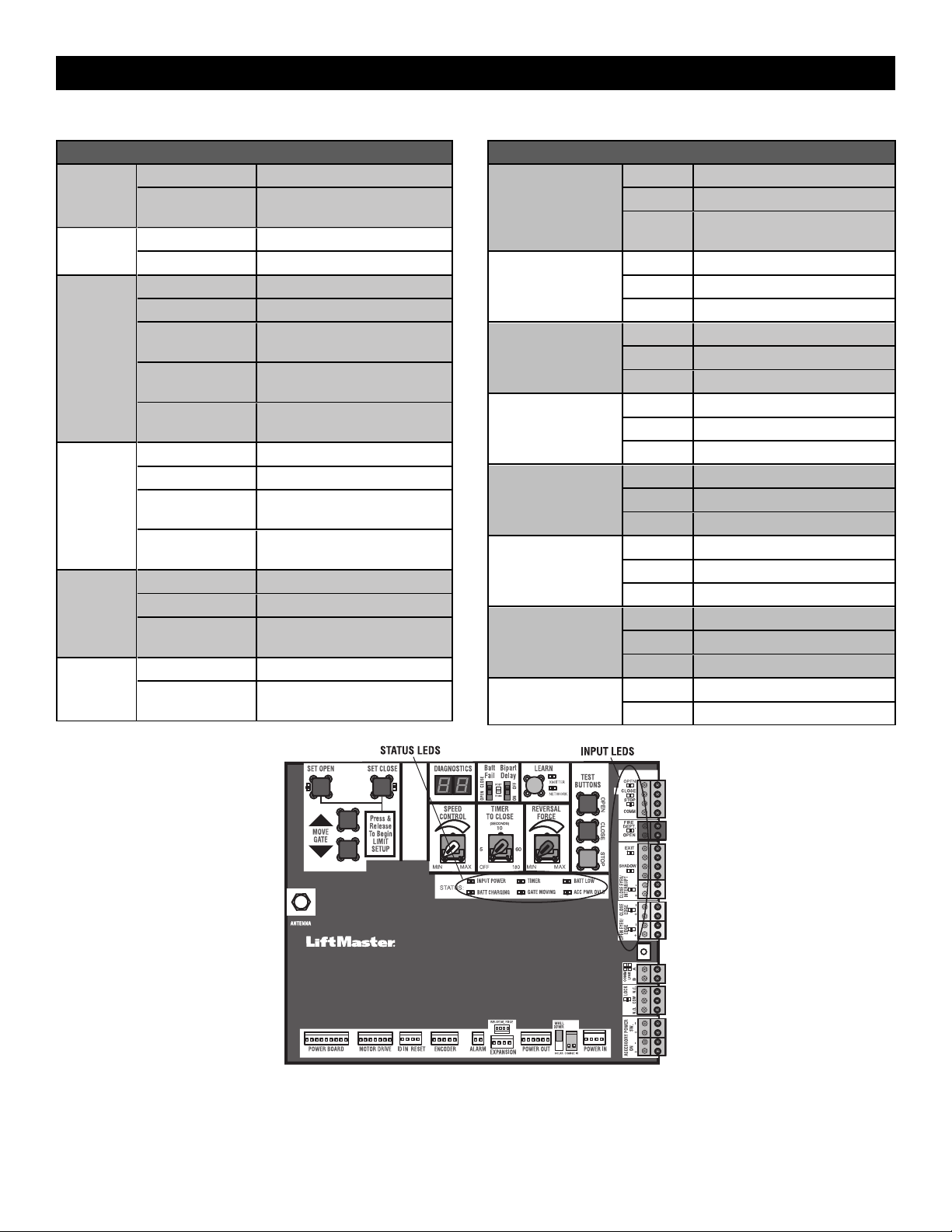
39
Control Board LEDs
STATUS LEDS
INPUT
POWER
OFF OFF state
ON AC charger or Solar power
available
BATT
CHARGING
OFF Not charging
ON Three stage battery charging
TIMER
OFF The timer is disabled
ON The timer is enabled
MEDIUM BLINK (1
blink per second)
The timer is running
FAST BLINK (2
blinks per second)
The timer is paused
FASTEST BLINK (8
blinks per second)
The timer is canceled
GATE
MOVING
OFF The gate is stopped
ON The gate is opening or closing
MEDIUM BLINK (1
blink per second)
Operator is in E1 (single
entrapment)
FASTEST BLINK (8
blinks per second)
The operator is in E2 (double
entrapment)
BATT LOW
OFF No battery error
ON Battery low
MEDIUM BLINK (1
blink per second)
Battery critically low
ACC PWR
OVLD
OFF Accessory power is okay
ON Accessory overload protector
opened
INPUT LEDS
OPEN, CLOSE,
STOP INPUT
OFF Input inactive
ON Input active
BLINK Input active on other operator or
expansion board
FIRE DEPT INPUT
OFF Input inactive
ON Input active
BLINK Input active on other operator
EXIT
OFF Input inactive
ON Input active
BLINK Input active on other operator
SHADOW
OFF Input inactive
ON Input active
BLINK Input active on other operator
CLOSE
EYES/INTERRUPT
OFF Input inactive
ON Input active
BLINK Input active on other operator
CLOSE EDGE
OFF Input inactive
ON Input active
BLINK Input active on other operator
OPEN EYES/EDGE
OFF Input inactive
ON Input active
BLINK Input active on other operator
LOCK
OFF Maglock relay inactive
ON Maglock relay active
TROUBLESHOOTING
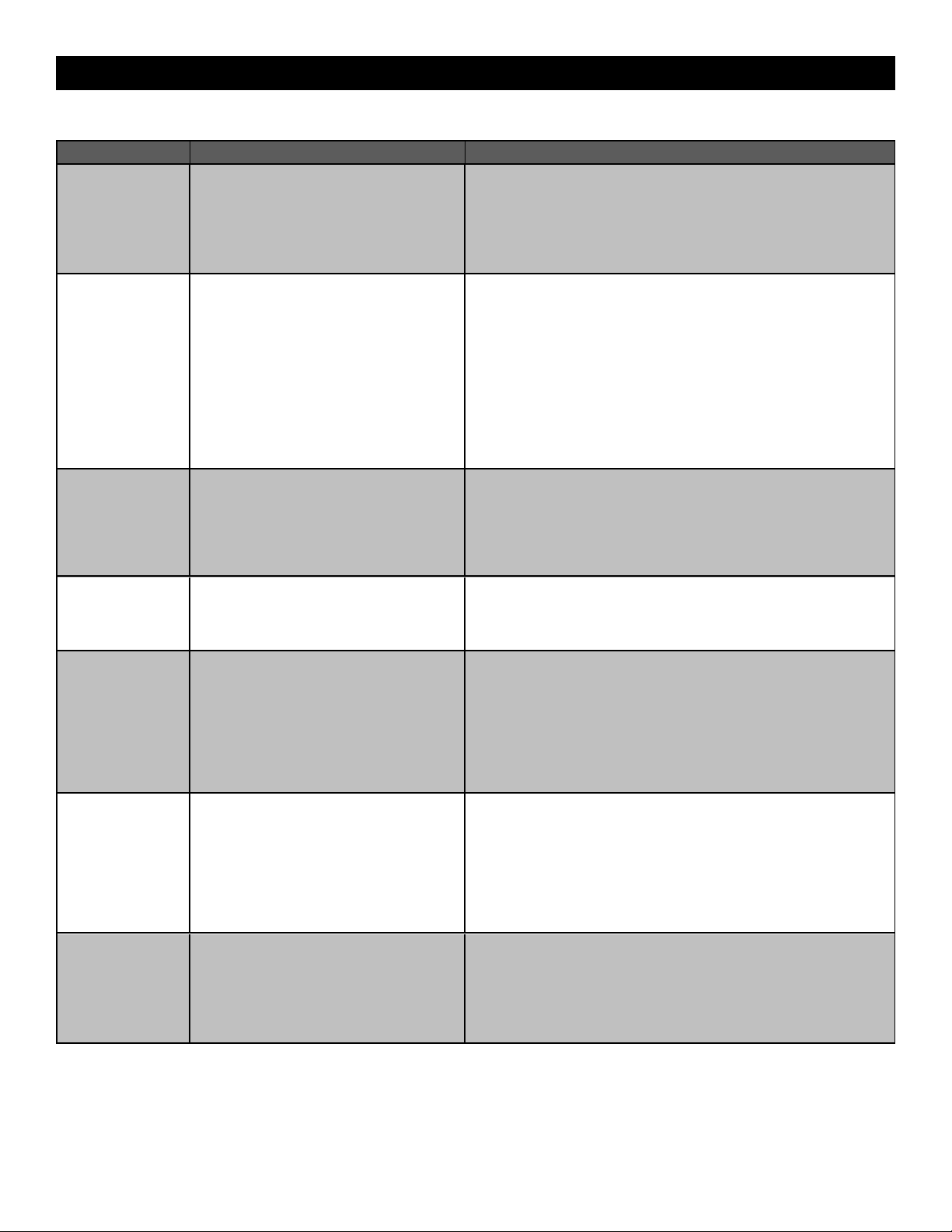
40
Troubleshooting Chart
SYMPTOM POSSIBLE CAUSES SOLUTIONS
Operator does not
run and diagnostic
display not on.
a. No power to control board
b. Open fuse
c. If on battery power only, low or dead
batteries
d. Inoperable control board
e. Inoperable BLDC Motor Drive Board
a. Check AC and battery power
b. Check fuses on the BLDC Motor Drive Board
c. Charge batteries by AC or solar power or replace batteries
d. Replace inoperable control board
e. Replace BLDC Motor Drive Board
Control board
powers up, but
motor does not run.
a. Reset button is stuck in the RESET
position
b. Jumper is not in place for stop circuit
c. If on battery power only, low or dead
batteries
d. Open or close input active
e. Entrapment protection device active
f. Vehicle loop detector or probe active
g. Inoperable control board
h. Inoperable motor or BLDC Motor Drive
Board
a. Check reset button
b. Put a jumper on the stop circuit
c. Charges batteries by AC or solar power or replace batteries
d. Check all open and close inputs for a “stuck on” input
e. Check all entrapment protection device inputs for a “stuck on” sensor
f. Check all vehicle detector inputs for a “stuck on” detector
g. Replace inoperable control board
h. Replace motor or BLDC Motor Drive Board
Gate moves, but
cannot set correct
limits.
a. Gate does not move to a limit position
b. Gate is too difficult to move
c. Limits are set too close
a. Use manual disconnect, manually move gate, and ensure gate moves
easily limit to limit. Repair gate as needed.
b. Gate must move easily and freely through its entire range, limit to limit.
Repair gate as needed.
c. Ensure the gate moves at least four feet between the OPEN limit and
the CLOSE limit.
Gate does not fully
open or fully close
when setting limits.
a. Gate does not move to a limit position
b. Gate is too difficult to move
a. Use manual disconnect, manually move gate, and ensure gate moves
easily limit to limit. Repair gate as needed.
b. Gate must move easily and freely through its entire range, limit to limit.
Repair gate as needed.
Operator does not
respond to a wired
control/command
(example: open,
close, SBC, etc.)
a. Check open and close command input
LEDs
b. Reset button is stuck
c. If on battery power only, low or dead
batteries
d. Entrapment protection device active
e. Vehicle loop detector or vehicle probe
active
a. Check all open and close inputs for a “stuck on” input
b. Set reset button to NORMAL OPERATION, see page 29
c. Charges batteries by AC or solar power or replace batteries
d. Check all entrapment protection device inputs for a “stuck on” sensor
e. Check all vehicle detector inputs for a “stuck on” detector
Operator does not
respond to a
wireless control or
transmitter
a. Check XMITTER LED when wireless
control is active
b. Reset button is stuck
c. Poor radio reception
a. Activate wireless control and check XMITTER LED is on. Re-learn
wireless control/transmitter to control board. Replace wireless control
as needed.
b. Set reset button to NORMAL OPERATION, see page 29
c. Check if similar wired control operates correctly. Check if wireless
controls works properly when within a few feet of operator. Check
operator’s antenna and antenna wire. Check other wireless controls or
devices.
Gate stops during
travel and reverses
immediately.
a. Control (open, close) becoming active
b. Vehicle loop detector active
c. Low battery voltage
d. Inherent entrapment protection was
activated while moving
a. Check all open and close inputs for an active input
b. Check all vehicle detector inputs for an active detector
c. Battery voltage must be 23 VDC or higher. Charge batteries by AC or
solar power or replace batteries
d. If there are no obstructions in gate path, manually disconnect the gate,
and ensure it moves easily limit to limit. Repair gate as needed.
TROUBLESHOOTING
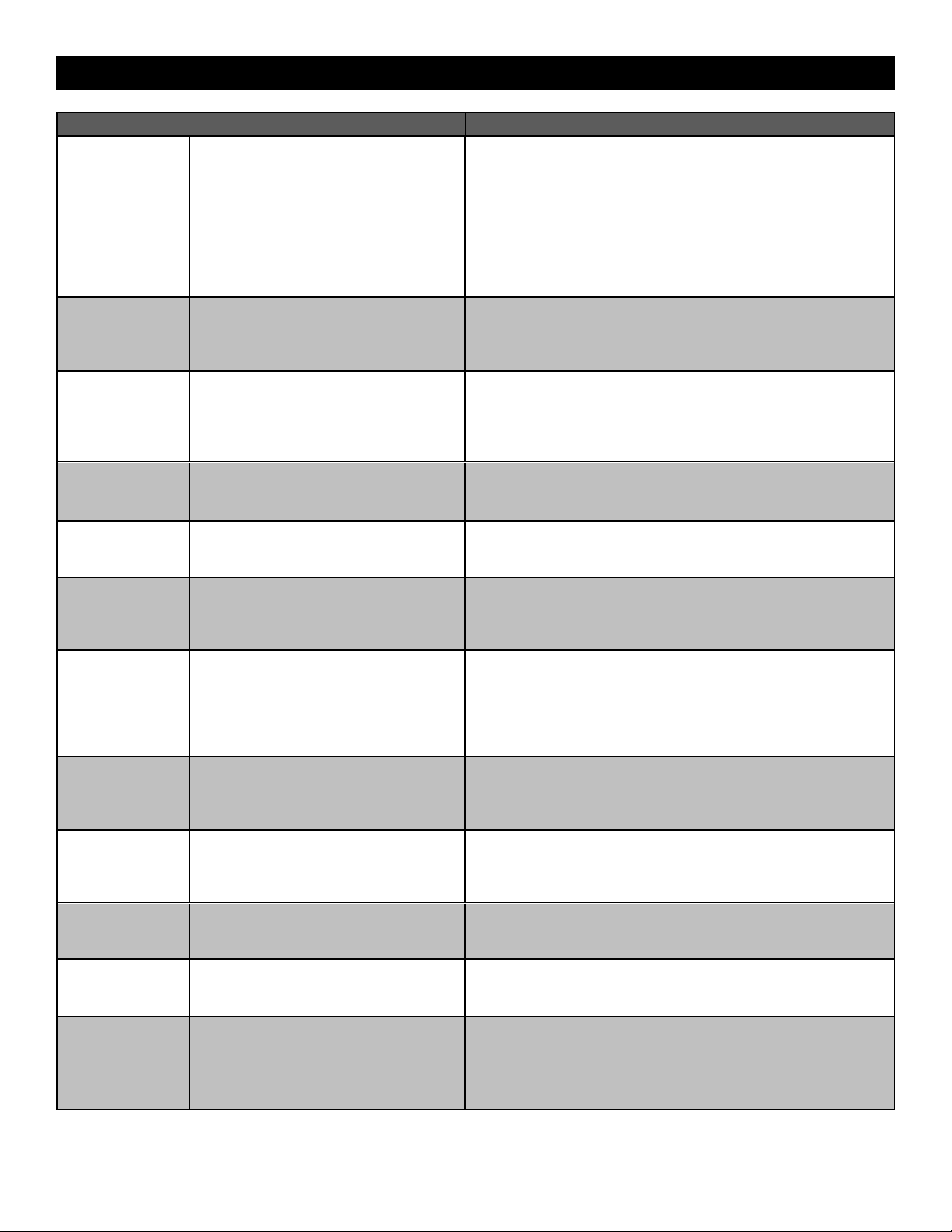
41
SYMPTOM POSSIBLE CAUSES SOLUTIONS
Gate opens, but will
not close with
transmitter or
Timer-to-Close.
a. Open control active
b. Vehicle loop detector active
c. Loss of AC power with AC FAIL set to
OPEN
d. Low battery with LOW BATT set to OPEN
e. Fire dept input active
f. Timer-to-Close not set
g. Close entrapment protection device active
a. Check all open inputs for an active input
b. Check all vehicle detector inputs for an active detector
c. Check AC power and AC Fail option setting
d. Check if AC power is available. If no AC power, then running on
batteries and battery voltage must be 23 Vdc or higher. Charge
batteries by AC or solar power or replace batteries.
e. Check Fire Dept input
f. Check Timer-to-Close (TTC) setting
g. Check all entrapment protection device inputs for an active sensor
Gate closes, but
will not open.
a. Vehicle loop detector active
b. Low battery with LOW BATT option set to
CLOSE
a. Check all vehicle detector inputs for an active detector
b. Check if AC power is available. If no AC power, then running on
batteries and battery voltage must be 23 VDC or higher. Charge
batteries by AC or solar power or replace batteries.
Exit loop activation
does not cause gate
to open.
a. Exit vehicle detector setup incorrectly
b. Inoperable exit loop detector
c. Low battery with LOW BATT option set to
CLOSE
a. Review exit loop detector settings. Adjust settings as needed.
b. Replace inoperable exit loop detector.
c. Check if AC power is available. If no AC power, then running on
batteries and battery voltage must be 23 VDC or higher. Charge
batteries by AC or solar power or replace batteries.
Interrupt loop does
not cause gate to
stop and reverse.
a. Vehicle detector setup incorrectly
b. Inoperable vehicle loop detector
c. Anti-tail set to ON
a. Review Interrupt loop detector settings. Adjust settings as needed.
b. Replace inoperable Interrupt loop detector.
c. Set anti-tail to OFF.
Shadow loop does
not keep gate at
open limit.
a. Vehicle detector setup incorrectly
b. Inoperable vehicle loop detector
a. Review shadow loop detector settings. Adjust settings as needed.
b. Replace inoperable shadow loop detector.
Obstruction in
gate's path does not
cause gate to stop
and reverse.
a. Force adjustment needed a. Refer to the Adjustment section to conduct the obstruction test and
perform the proper force adjustment that is needed.
Photoelectric
sensor does not
stop or reverse
gate.
a. Incorrect photoelectric sensor wiring
b. Inoperable photoelectric sensor
a. Check photoelectric sensor wiring. Retest that obstructing
photoelectric sensor causes moving gate to stop, and may reverse
direction.
b. Replace inoperable photoelectric sensor. Retest that obstructing
photoelectric sensor causes moving gate to stop, and may reverse
direction.
Edge sensor does
not stop or reverse
gate.
a. Incorrect edge sensor wiring
b. Inoperable edge sensor
a. Check edge sensor wiring. Retest that activating edge sensor causes
moving gate to stop and reverse direction.
b. Replace inoperable edge sensor. Retest that activating edge sensor
causes moving gate to stop and reverse direction.
Alarm sounds for 5
minutes or alarm
sounds with a
command.
a. Double entrapment occurred (two
obstructions within a single activation)
a. Check for cause of entrapment (obstruction) detection and correct.
Press the reset button to shut off alarm and reset the operator.
Alarm beeps three
times with a
command.
a. Low battery a. Check if AC power is available. If no AC power, then running on
batteries and battery voltage must be 23 Vdc or higher. Charge
batteries by AC or solar power or replace batteries
Alarm beeps when
running.
a. Expansion board setting
b. Constant pressure to open or close is
given
a. Pre-warning is set to "ON"
b. Constant pressure to open or close is given
Expansion board
function not
controlling gate.
a. Inoperable control board to expansion
board wiring
b. Incorrect input wiring to expansion board
c. Inoperable expansion board or inoperable
control board
a. Check control board to expansion board wiring. If required, replace
wire cable.
b. Check wiring to all inputs on expansion board.
c. Replace inoperable expansion board or control board.
TROUBLESHOOTING
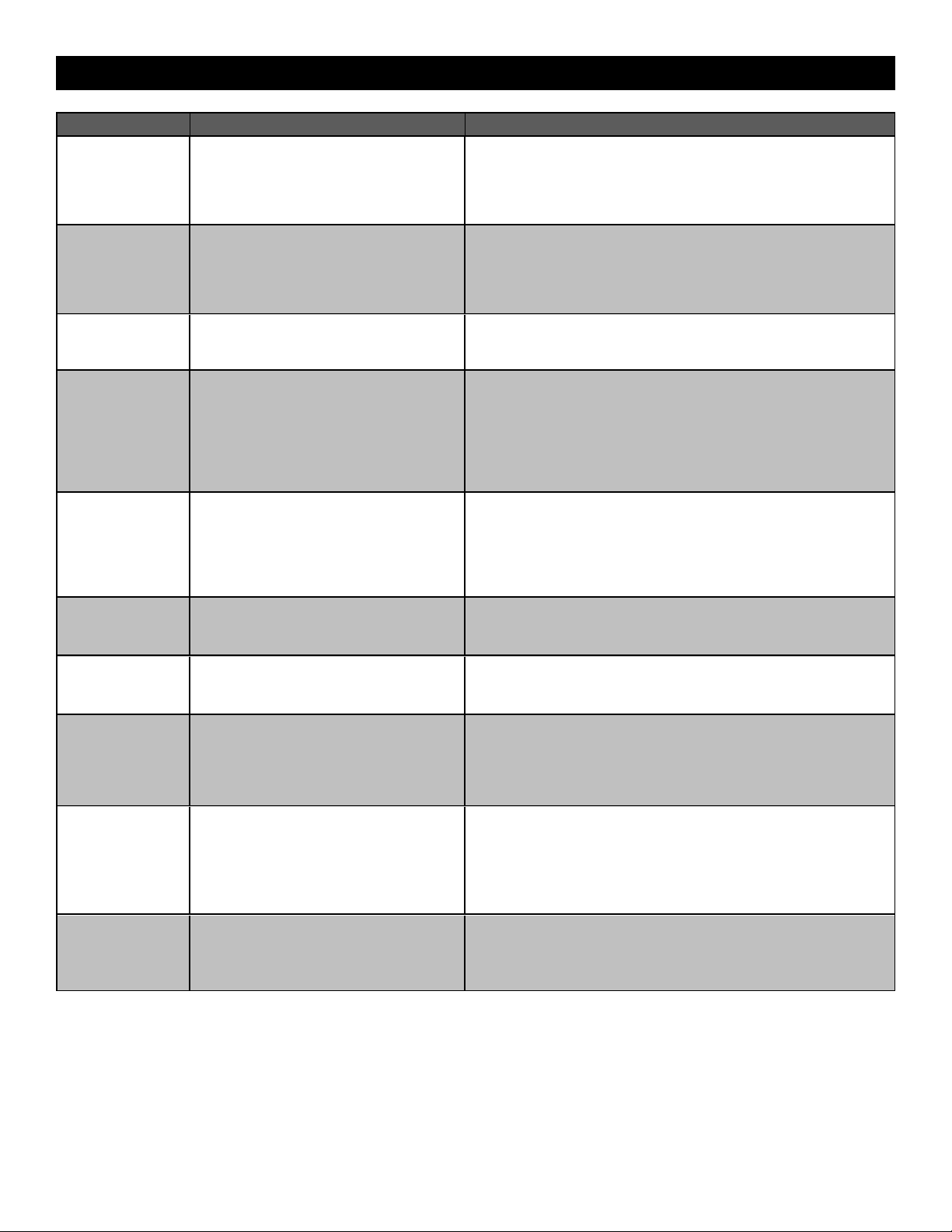
42
SYMPTOM POSSIBLE CAUSES SOLUTIONS
Maglock not
working correctly.
a. Maglock wired incorrectly a. Check that maglock is wired to N.C. and COM terminals. Check that
maglock has power (do not power maglock from control board
accessory power terminals). If shorting lock’s NO and COM wires does
not activate maglock, then replace maglock or maglock wiring (refer to
wiring diagram).
Solenoid lock not
working correctly.
a. Solenoid wired incorrectly a. Check that solenoid is wired to N.O. and COM terminals. Check that
solenoid has power (do not power solenoid from control board
accessory power terminals). If shorting lock’s NC and COM wires does
not activate solenoid, then replace solenoid lock or solenoid wiring
(refer to wiring diagram).
Switched (SW)
accessory power
remaining on.
a. In limit setup mode a. Learn the limits
Accessories
connected to
switched (SW)
accessory power
not working
correctly, turning
off, or resetting.
a. Normal behavior a. Move accessory to accessory power "ON"
Accessories
connected to
Accessory power
not working
correctly, turning
off, or resetting.
a. Accessory power protector active
b. Inoperable control board
a. Disconnect all accessory powered devices and measure accessory
power voltage (should be 23 – 30 Vdc). If voltage is correct, connect
accessories one at a time, measuring accessory voltage after every
new connection.
b. Replace inoperable control board
Quick close not
working correctly.
a. Quick close setting incorrect
b. Interrupt loop detector
c. Inoperable expansion board
a. Check that quick close setting is ON
b. Check operation of interrupt loop detector
c. Replace inoperable expansion board
Anti-tailgating not
working correctly.
a. Anti-tail setting incorrect
b. Interrupt loop detector
c. Inoperable expansion board
a. Check that anti-tail setting is ON
b. Check operation of Interrupt loop detector
c. Replace inoperable expansion board
AUX relay not
working correctly.
a. AUX relay setting incorrect
b. AUX relay wiring incorrect
c. Inoperable expansion board or relay
adapter board
a. Check AUX relay switches settings
b. Check that wiring is connected to either N.O. and COM or to N.C. and
COM.
c. Set AUX relay to another setting and test. Replace inoperable
expansion board or relay adapter board.
Solar operator not
getting enough
cycles per day.
a. Insufficient panel wattage
b. Excessive accessory power draw
c. Old batteries
d. Solar panels are not getting enough
sunlight
a. Add more solar panels
b. Reduce the accessory power draw by using LiftMaster low power
accessories
c. Replace batteries
d. Relocate the solar panels away from obstructions (trees, buildings,
etc.)
Solar operator,
insufficient standby
time.
a. Insufficient panel wattage
b. Excessive accessory power draw
c. Battery capacity too low
a. Add more solar panels
b. Reduce the accessory power draw by using LiftMaster low power
accessories
c. Use batteries with higher amp hour (AH) rating
TROUBLESHOOTING
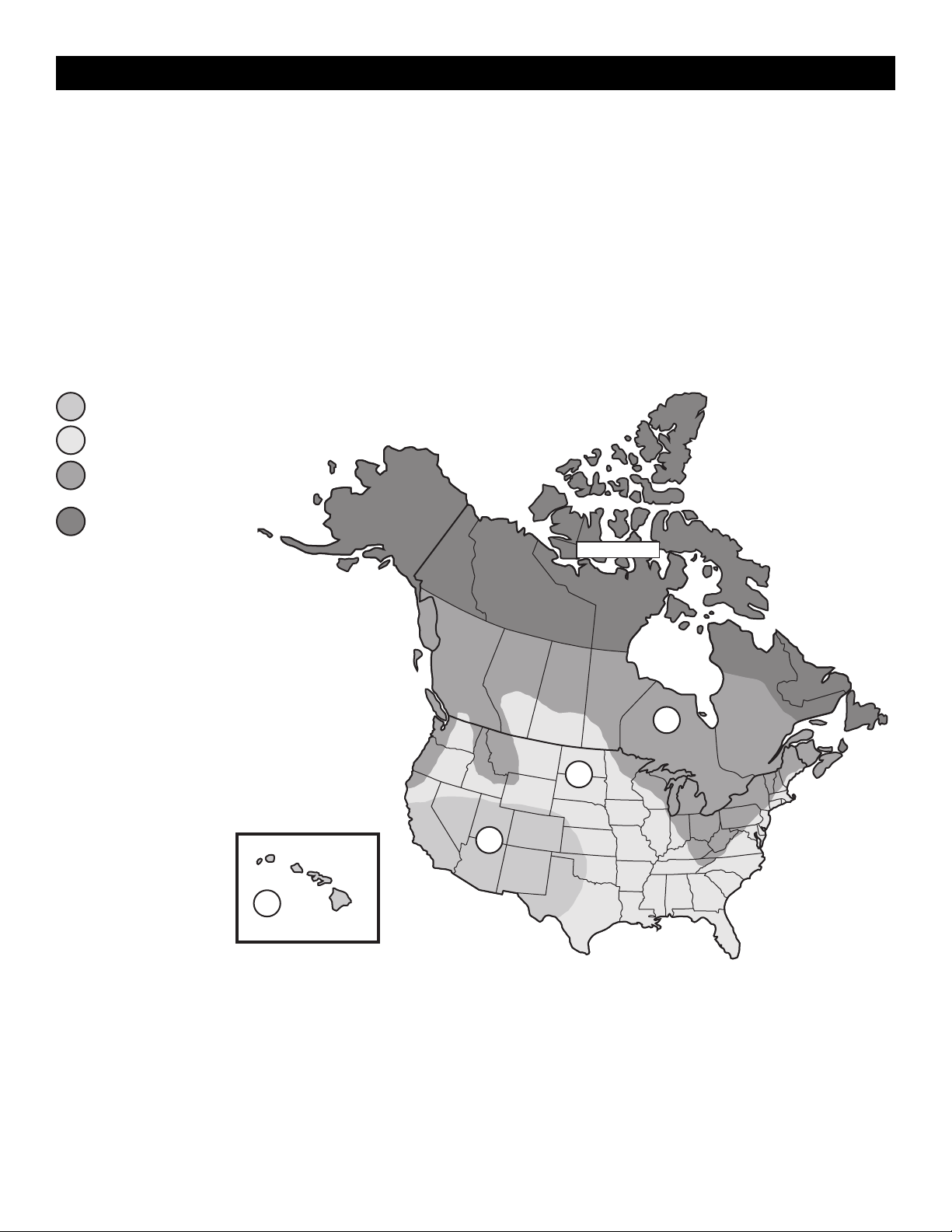
43
Solar Panel(s)
SOLAR PANELS ARE NOT PROVIDED. SEE ACCESSORIES
NOTE: The use of photoelectric sensor heaters (models LMRRUL and LMTBUL) is NOT recommended in solar applications.
Solar Application Requirements
•
A minimum of two 10W solar panels in series (Model SP10W12V).
•
A maximum of six 10W solar panels (Model SP10W12V).
•
A heater cannot be used with a solar application.
Solar Zones
Solar panel recommendations are based upon the average solar radiation
and the temperature effects on batteries in the given zones as shown on
the map below. Local geography and weather conditions may require
additional solar panels. Solar powered gate operator installations are not
supported in northern climates due to cold weather and a reduced number
of hours of sunlight during the winter months. The cycles/day ratings are
approximations. Ratings vary based on gate construction, installation, and
temperature. Solar panels cannot be installed in areas that experience long
periods of heavy fog, lake effect snow, or rain.
ZONE 1 (6 Hours of Sunlight/Day): Ideal for
solar application
ZONE 2 (4 Hours of Sunlight/Day):
Recommended for solar application
ZONE 3 (2 Hours of Sunlight/Day): Success
of solar application will depend on type of
gate operator and location of the solar panel
NOT AVAILABLE
1
2
3
3
2
1
1
NOT AVAILABLE
SOLAR PANELS
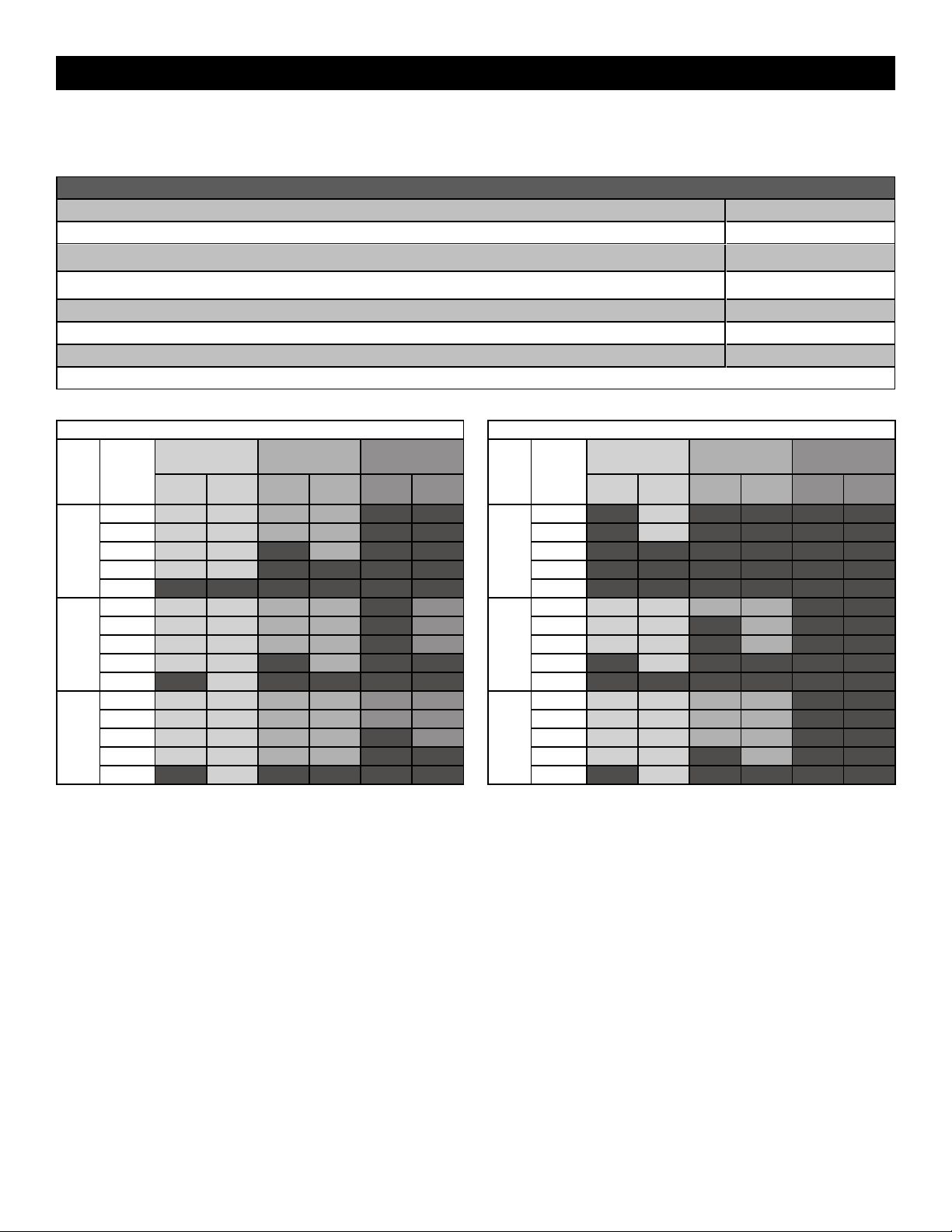
44
Solar usage guide
All performance metrics are estimates and are subject to change at any time. Actual results will vary due to variables specific to the site.
NOTE: For additional details and specifications on solar usage, please refer to liftmaster.com.
Typical System Standby Battery Current Consumption (mA)
System voltage 24V
Control board with no radios programmed 2.7 mA
One or more LiftMaster
®
remote controls programmed +1 mA
myQ
®
device or wireless dual gate programmed +2.4 mA
Expansion board +11.1 mA
Relay adapter board +11.1 mA
Per loop detector LOOPDETLM (up to 3 loop detectors can be plugged in to the expansion board) +3.8 mA
Add up current draw by feature and accessory to determine total current draw
NOTE: The use of photoelectric sensor heaters (models LMRRUL and LMTBUL) is NOT recommended in solar applications.
INSL24UL SOLAR GATE CYCLES PER DAY - 1,000 lb. gate 20 ft. travel
BATTERY
CURRENT
DRAW
(mA)
ZONE 1
(6 Hrs Sunlight/Day)
ZONE 2
(4 Hrs Sunlight/Day)
ZONE 3
(2 Hrs Sunlight/Day)
7AH
batteries
33AH
batteries
7AH
batteries
33AH
batteries
7AH
batteries
33AH
batteries
20W
SOLAR
PANEL
5
20 23 12 14
15 18 22 10 12
20 18 21 12
50 13 16
100
40W
SOLAR
PANEL
5
38 53 23 32 13
15 36 51 21 30 12
20 35 50 20 29 11
100 20 34 15
200 17
60W
SOLAR
PANEL
5
47 84 28 51 12 21
15 45 82 26 49 10 20
20 44 81 26 48 19
100 29 63 12 32
250 33
IHSL24UL SOLAR CYCLES PER DAY - 3,000 lb. gate 20 ft travel
BATTERY
CURRENT
DRAW
(mA)
ZONE 1
(6 Hrs Sunlight/Day)
ZONE 2
(4 Hrs Sunlight/Day)
ZONE 3
(2 Hrs Sunlight/Day)
7AH
batteries
33AH
batteries
7AH
batteries
33AH
batteries
7AH
batteries
33AH
batteries
20W
SOLAR
PANEL
5
11
15 10
20
50
100
40W
SOLAR
PANEL
5
18 25 11 15
15 17 24 14
20 16 23 14
100 16
200
60W
SOLAR
PANEL
5
22 39 13 24
15 21 38 12 23
20 20 38 12 22
100 13 30 15
250 15
SOLAR PANELS
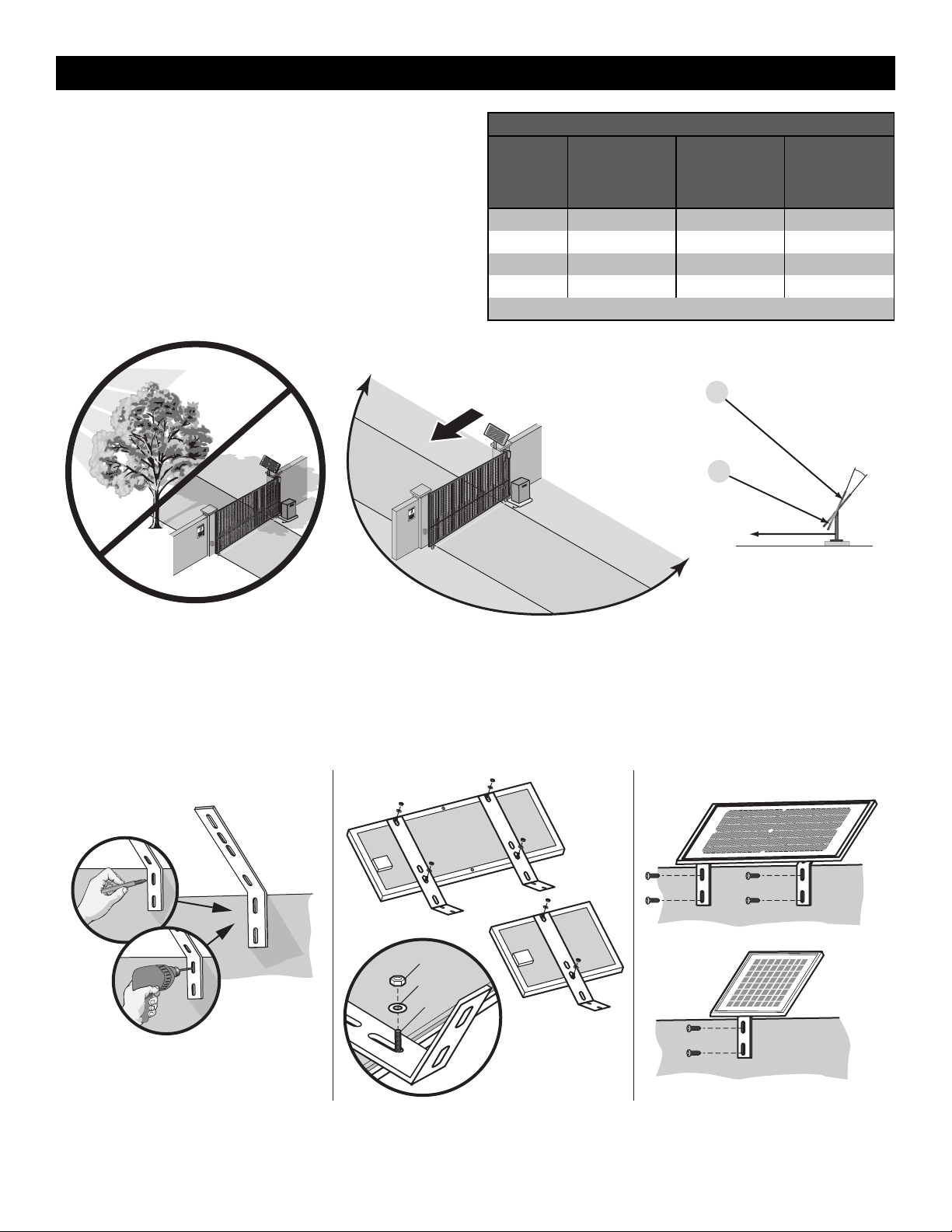
45
Position
The location of the panel(s) is critical to the success of the installation. In
general, the panel(s) should be mounted using the provided angle bracket
facing due south. The solar panel(s) should be mounted in an area clear of
all obstructions and shade from buildings and trees. If the panel(s) is not
casting a shadow, the battery is not being charged.
NOTE: Tall trees or buildings that do not shade the solar panel(s) in the
summer could shade the solar panel(s) during the winter months when the
sun sits lower in the sky.
MAXIMUM WIRE LENGTH
AMERICAN
WIRE
GAUGE
(AWG)
20 WATTS OF
PANELS
40 WATTS OF
PANELS
60 WATTS OF
PANELS
16 235 (71.6 m) 115 (35.1 m) 80 (24.4 m)
14 375 (114.3 m) 190 (57.9 m) 125 (38.1 m)
12 600 (182.9 m) 300 (91.4 m) 200 (61 m)
10 940 (286.5 m) 475 (144.8 m) 315 (96 m)
Chart assumes: copper wire, 65°C, 5% drop, 30V nominal
TIP: The area around the solar panel(s)
should be clear of shadows or obstructions
to the sun for a 180° arc east to west.
Sun’s position
Summer Sun Height
Winter Sun Height
Up to 15°
South
South
180°
TIP: To optimize the system for winter
operation the angle can be increased an
additional 15° (solar panel(s) sits more
vertical).
Installation
Solar panel(s) MUST be installed facing south. Use a compass to determine direction. Below are general instructions for installing the solar panel(s). Your
installation may vary slightly depending on the solar panel purchased.
1. Position the mounting bracket on the mounting surface. Mark and drill holes.
2. Secure the solar panel to the mounting bracket using the hex bolts, hex nuts and washers provided.
3. Secure the solar panel to the mounting surface using lag screws provided.
Hex Nut
Washer
Hex Bolt
Mounted panel must face SOUTH
1 2 3
Mounting
Surface
Mounting
Surface
SOLAR PANELS
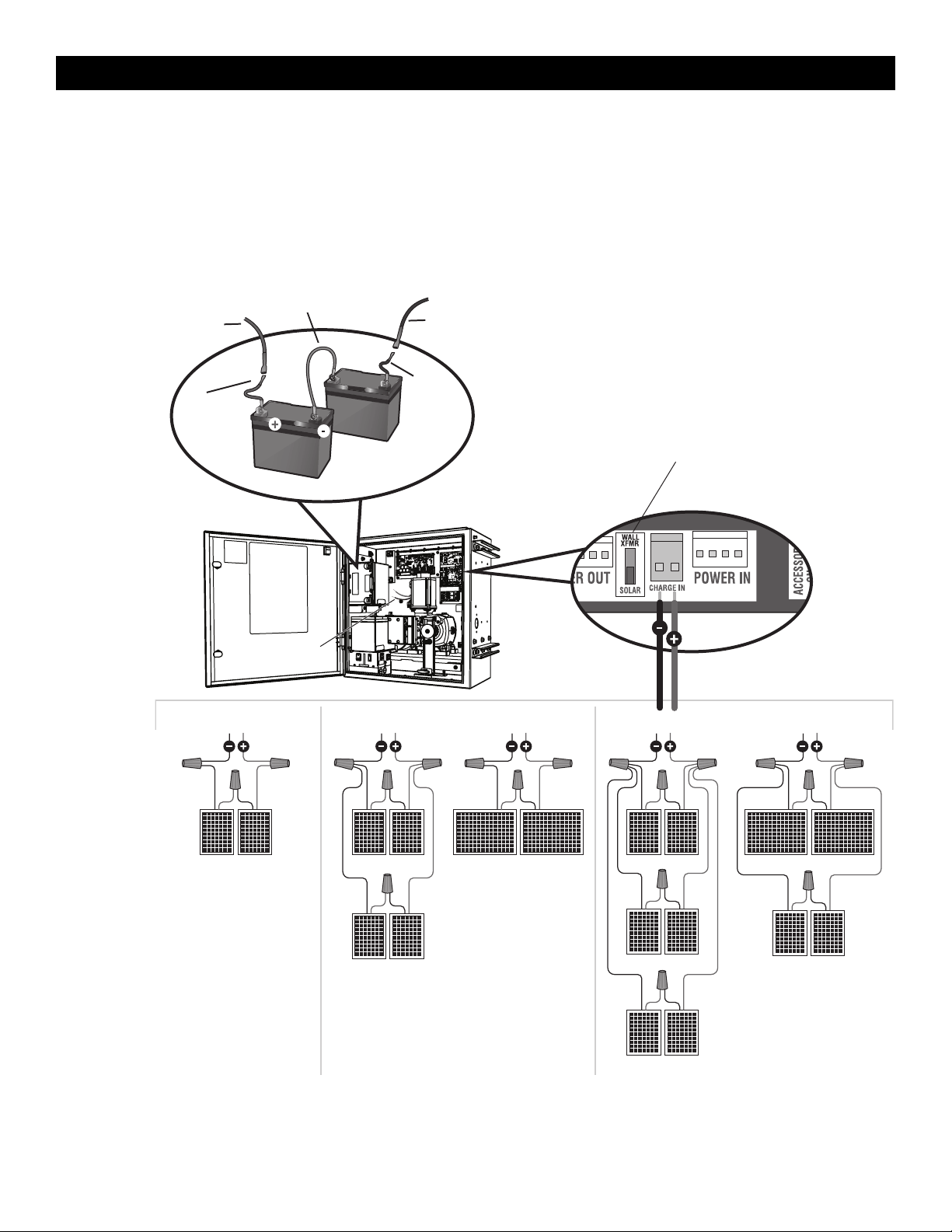
46
Wire the Solar Panels and Batteries
20W min. - 60Wmax. for solar applications.
NOTE: 33AH batteries are strongly recommended for optimal solar
performance.
1. Connect (+) wire from solar panels to (+) pin on CHARGE IN
connector on control board.
2. Connect (-) wire from solar panels to (-) pin on CHARGE IN
connector on Control board.
3. Set the WALL XFMR/SOLAR switch to SOLAR.
10W 10W
10W 10W
40W APPLICATION IN SERIES
10W 10W
10W 10W
20W 20W
60W APPLICATION IN SERIES
10W 10W
10W 10W
10W 10W
20W 20W
20W APPLICATION IN SERIES
Battery Wiring
Control Board
Red Wire
Black Wire
Jumper (White Wire)
from K41-0102-000
Red wire from
battery harness
33AH, HD Gates
K41-0102-000
Black wire
from battery
harness 33AH,
HD Gates
K41-0102-000
33AH Batteries
Set Switch to SOLAR
SOLAR PANELS
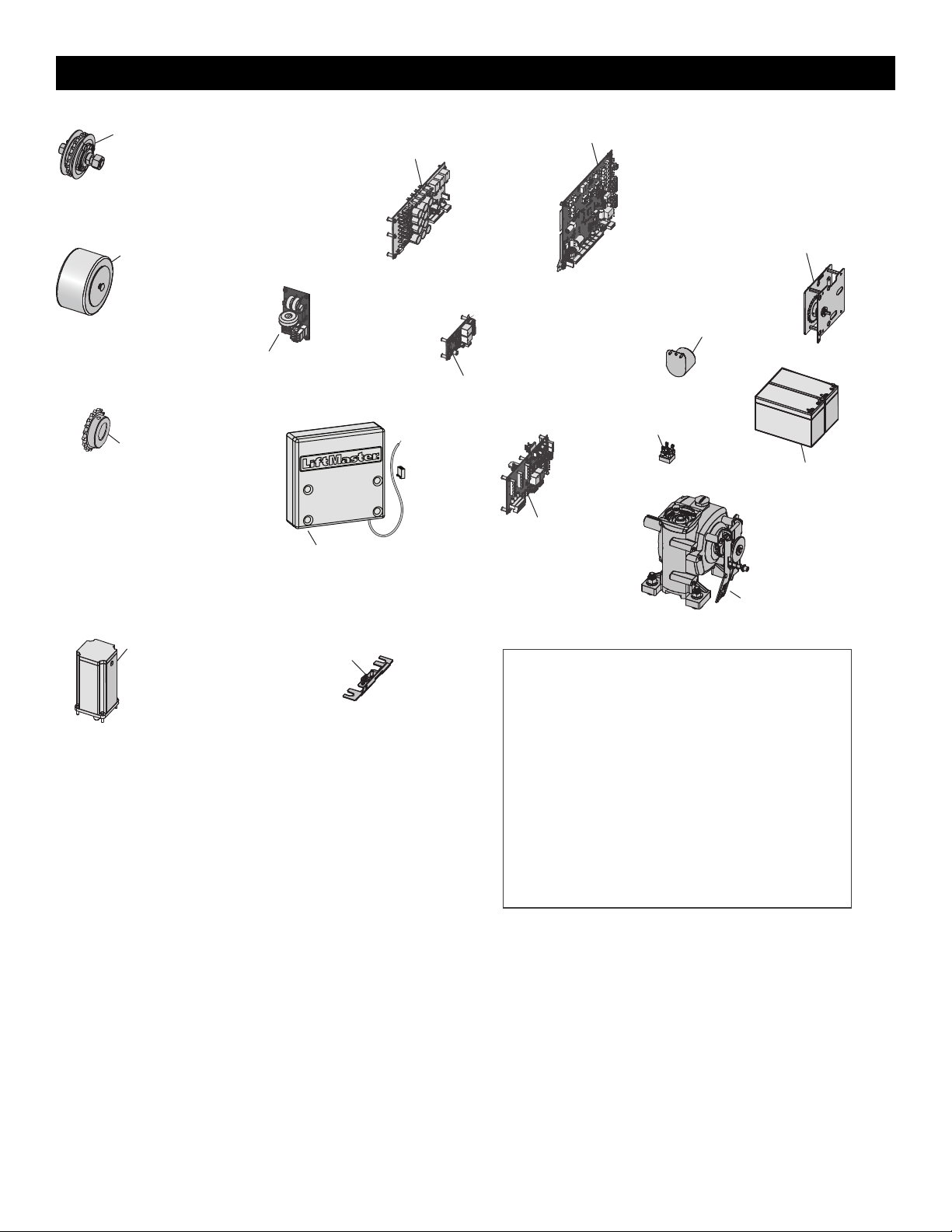
47
Battery, 7AH 12 Vdc
K74-30762 (1)
29-NP712 (2)
Gear Reducer
IHSL24UL - K41-0252-000
INSL24UL - K41-0251-000
Bridge Rectifier
K41-0083-000
Limit System
IHSL24UL, INSL24UL - K41-0247-000
Expansion Board
K1D8387-1CC
Relay Adapter Board
K41-0072-000
BLDC Motor Drive Board
IHSL24UL - K41-0245-000
INSL24UL - K41-0244-000
Control Board
K41-0073-000
Transformer
IHSL24UL - K41-0241-000
INSL24UL - K41-0346-000
Alarm
IHSL24UL, INSL24UL - K41-0248-000
Limit System Encoder
IHSL24UL, INSL24UL - K41-0246-000
Output Sprocket
IHSL24UL - K41-0243-000
INSL24UL - K41-0242-000
Motor
IHSL24UL - K41-0254-000
INSL24UL - K41-0253-000
EMI Board
K1D7078
Interlock Assembly
IHSL24UL - K41-0256-000
INSL24UL - K41-0255-000
Idler Sprocket (QTY 2)
IHSL24UL - K41-0240-000
INSL24UL - K41-0239-000
NOT SHOWN
K41-0257-000 Harness kit, IHSL24UL, INSL24UL
K94-34778 Wire Harness - Control Board to Expansion Board
19-40240D #40 Chain - 10 feet
19-50310 #40 Master Link
K77-36764 Hardware Kit (chain bolt and chain bracket)
K07-50637 Chain Bolt
K41-0102-000 33AH Battery Harness
40-39235 Warning Sign
K41-0249-000 Power Control and Relay Board Mounting Plate
K41-0250-000 Expansion Board and Terminal Block Mounting Plate
K41-0259-000 Chain Guard, IHSL24UL, INSL24UL
K41-0258-000 Idler Bracket Kit, IHSL24UL, INSL24UL
19-3025 #50 Nickel Plated Chain - 25' IHSL24U
19-50ML #50 Master Link
K10-30699-1 Mounting Bracket
REPAIR PARTS
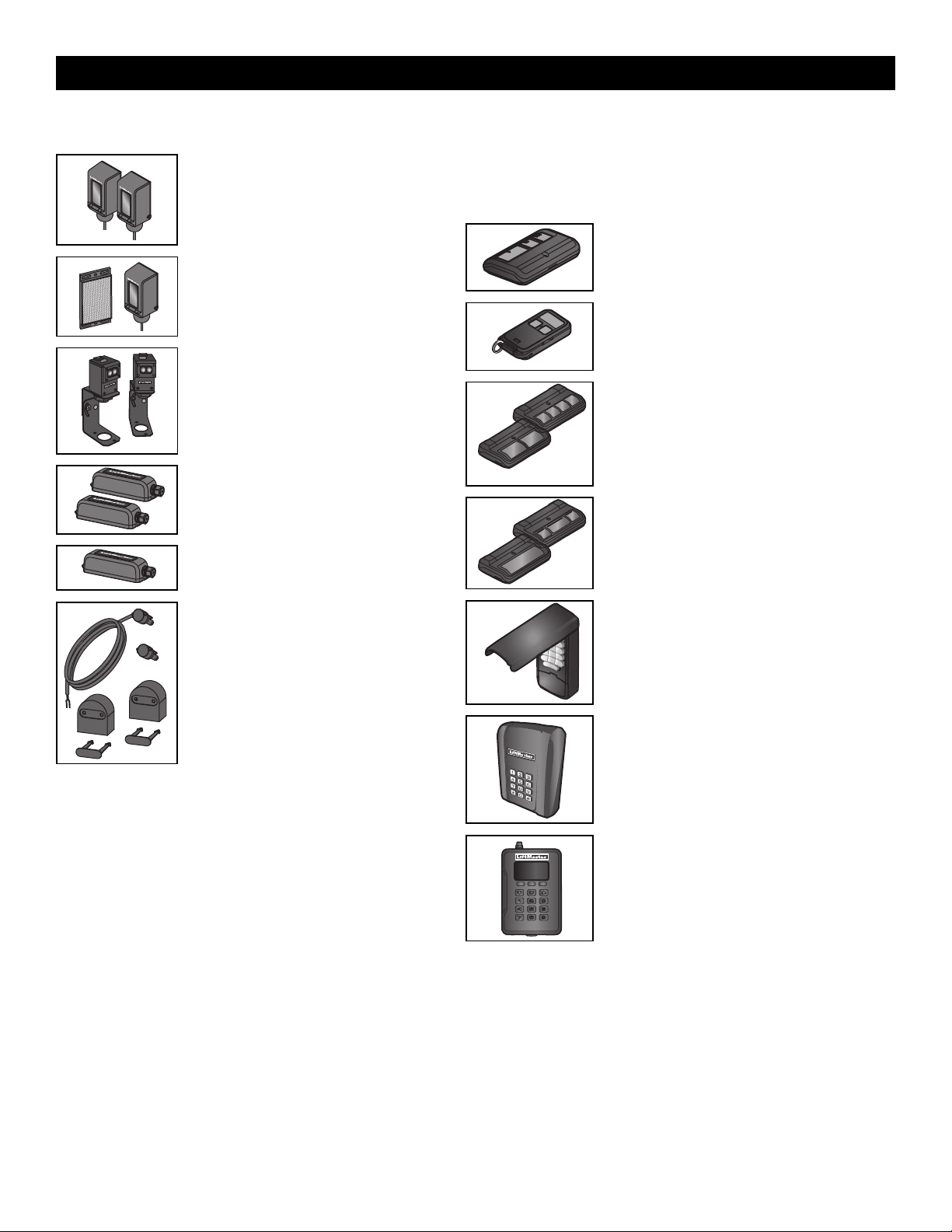
48
Entrapment Protection
LiftMaster monitored through beam photoelectric
sensor
Model LMTBUL
LiftMaster monitored retro-reflective
photoelectric sensor
Model LMRRUL
LiftMaster Monitored Commercial Protector
System
®
Models CPS-UN4 and CPSUN4G
LiftMaster monitored wireless edge kit
(transmitter and receiver)
Model LMWEKITU
LiftMaster monitored wireless edge transmitter
Model LMWETXU
Large profile monitored edge (82 ft. roll)
Model L50
Large profile ends kit (10 pair)
Model L50E
Small profile monitored edge (82 ft. roll)
Model S50
Small profile ends kit (10 pair)
Model S50E
Plastic channel
8 ft. (2.4 m) for both small and large profile edges (pack of 10).
Model L50CHP
Aluminum channel
10 ft. (3.1 m) for both small and large edge profiles (pack of 8).
Model L50CHAL
LiftMaster large profile monitored edges (4ft., 5ft., 6ft.)
Model L504AL, L505AL, L506AL
Remote Controls
LiftMaster offers a variety of LiftMaster remote controls to satisfy your application
needs. Single-button to 4-button, visor or key chain. The following remote controls are
compatible with operators manufactured by LiftMaster after 1993. Contact your
authorized LiftMaster dealer for additional details and options.
3-button remote control
The 3-button remote control can be programmed to
control the operator. Includes visor clip.
Model 893MAX
3-button mini-remote control
The 3-button remote control can be programmed to
control the operator. Includes key ring and fastening strip.
Model 890MAX
Security+ 2.0
®
learning remote controls
One button can control a gate operator and the other(s)
can control garage door(s). It can also be programmed to
Security+
®
or Security+ 2.0
®
code format.
Models 892LT and 894LT
Programmable DIP Remote Controls
Ideal for applications requiring a large number of remote
controls.
Models 811LMX and 813LMX
Keyless entry
Enables homeowner to operate gate operator from
outside by entering a 4-digit code on a specially designed
keypad.
Model 878MAX
Wireless commercial keypad
Durable wireless keypad with blue LED backlight metal
keypad, zinc-alloy metal front cover and 5 year 9V lithium
battery. Security+ 2.0
®
compatible.
Model KPW250
Commercial access control receiver
Access control receiver for up to 1,000 devices (any
combination of remote controls and wireless keyless
entries).
Model STAR1000
ACCESSORIES
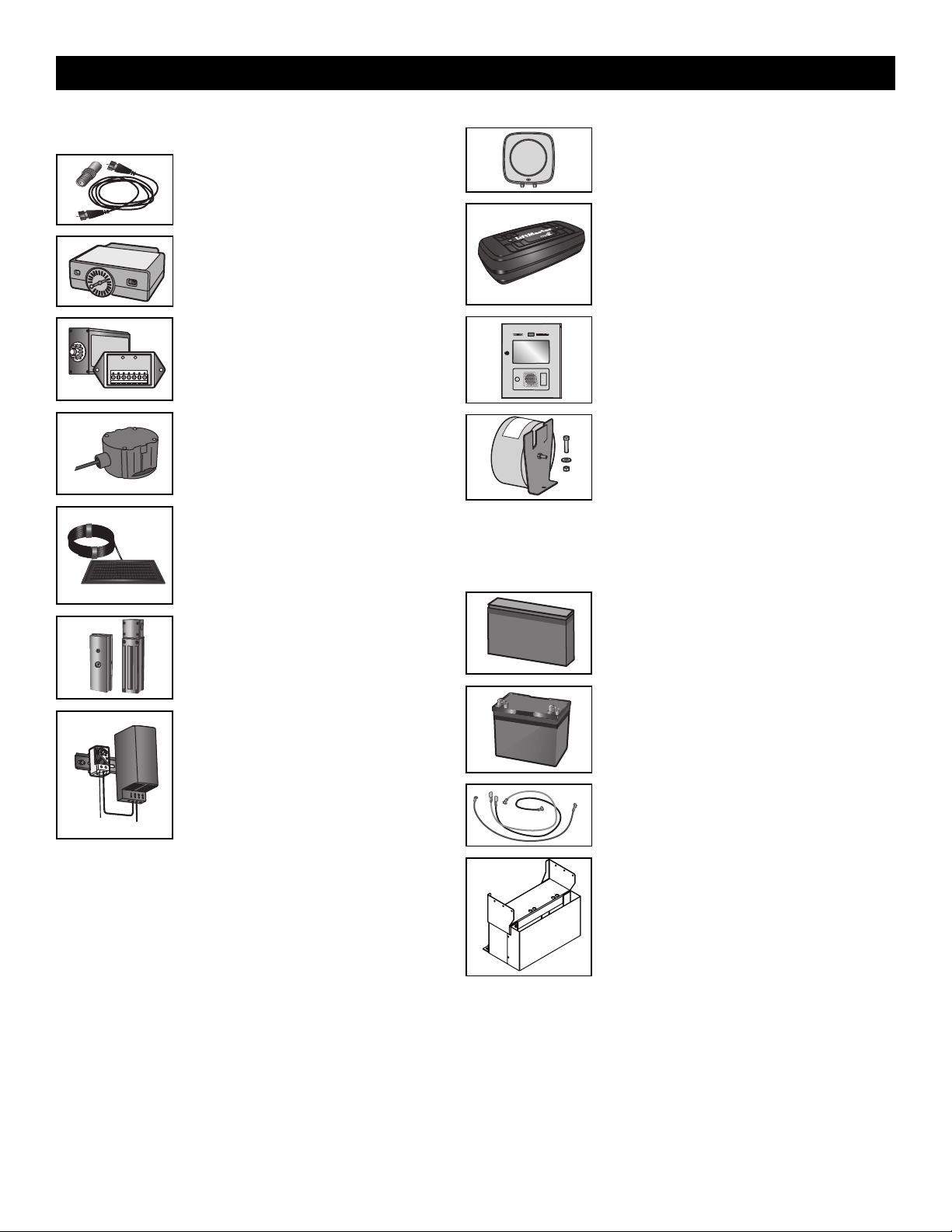
49
Miscellaneous
Remote antenna extension kit
The remote antenna extension kit allows the antenna
to be remotely installed.
Model 86LM
Plug-in loop detector
Low power. Conveniently plugs into existing control
board. Not to be used as entrapment protection.
Model LOOPDETLM
Loop detector
Low power loop detectors mounted and wired
separately inside control box. LiftMaster low power
accessory. Not to be used as entrapment protection.
Model LD7LP
Vehicle sensing probe
The vehicle sensing probe is buried in the ground and
can detect a car as it approaches and will then open
the gate.
Model CP4
Solar panel kit
This kit is to replace or add a solar panel to the
operator application. 60W maximum for 24 Vdc
operators and 30W maximum for 12 Vdc operators.
Models SP10W12V (10 Watt, 12V) and SP20W12V
(20 Watt, 12V)
Magnetic gate lock
Outdoor magnetic lock, transformer, junction box,
mounting plate and hardware. Not for use with Solar
Applications. Must be powered separately.
Model MG1300
Heater
The heater keeps the gearbox and batteries at a
suitable temperature when the outside temperature is
below -4°F (-20°C). The thermostat MUST be set
between 45°F and 60°F (7°C and 15.5°C) to ensure
proper gate operation. The heater can be powered by
110 to 250 Vac.
Model HTR
Solenoid lock harness kit
Model K77-37972
Warning sign
Model 40-39235
#50 Chain Drive Sprocket
(Model INSL24UL ONLY)
Model INSL50CH
Long range RFID reader
Model LMSC1000
LiftMaster
®
Internet Gateway
Internet enabled accessory which connects your gate
operator to your WiFi network and allows you to monitor
and control gate operators and lighting accessories
enabled by myQ
®
technology.
Model 828LM
myQ
®
Business™ connected access protocol - high
capacity
Models CAPXLV and CAPXM
Transformer kit
Changes input voltage (208/240/480/575 Vac) to an
output voltage of 120 Vac. Rated 208/240/480/575 Vac,
5.2/4.5/2.3/1.9 A, 60 Hz, 1 PH
Model 3PHCONV
Batteries
Gate access system batteries replace or upgrade the gate operator batteries. Two
identical 12 Vdc batteries are required for each gate operator. Do not mix 7AH and 33AH
batteries within a gate operator.
7AH batteries
Standard 7 AMP-Hour Battery, 12 Vdc, to replace original
batteries provided with operator. Reuse existing
harnesses.
Models 29-NP712 (2) and K74-30762 (1)
33AH batteries
Upgrade 33 AMP-Hour Battery, 12 Vdc. Ideal for solar
applications and extended battery backup. Two required.
Model A12330SGLPK
Must use INBAT33 - mounting bracket.
Battery harness, 33AH, HD Gates
For 33AH battery applications.
Model K41-0102-000
Riser
Riser for elevating operator for pad mounting and retrofit
to most SL585 applications.
Model MRIN
ACCESSORIES

50
LiftMaster 5 Year Limited Commercial Warranty
LiftMaster (“Seller”) warrants to the first purchaser of this product, for the structure in which this product is originally installed, that it is free from defect
in materials and/or workmanship for a period of 5 year commercial installation from the date of purchase [and that the INSL24UL and IHSL24UL is free
from defect in materials and/or workmanship for a period of 5 year commercial installation from the date of purchase]. The proper operation of this
product is dependent on your compliance with the instructions regarding installation, operation, maintenance and testing. Failure to comply strictly with
those instructions will void this limited warranty in its entirety.
If, during the limited warranty period, this product appears to contain a defect covered by this limited warranty, call 1-800-528-2806, toll free, before
dismantling this product. Then send this product, pre-paid and insured, to our service center for warranty repair. You will be advised of shipping
instructions when you call. Please include a brief description of the problem and a dated proof-of-purchase receipt with any product returned for warranty
repair. Products returned to Seller for warranty repair, which upon receipt by Seller are confirmed to be defective and covered by this limited warranty,
will be repaired or replaced (at Seller’s sole option) at no cost to you and returned pre-paid. Parts will be repaired or replaced with new or factory-rebuilt
parts at Seller’s sole option.
ALL IMPLIED WARRANTIES FOR THE PRODUCT, INCLUDING BUT NOT LIMITED TO ANY IMPLIED WARRANTIES OF MERCHANTABILITY AND
FITNESS FOR A PARTICULAR PURPOSE, ARE LIMITED IN DURATION TO THE 5 YEAR COMMERCIAL LIMITED WARRANTY PERIOD SET FORTH
ABOVE [EXCEPT THE IMPLIED WARRANTIES WITH RESPECT TO THE INSL24UL and IHSL24UL, WHICH ARE LIMITED IN DURATION TO THE 5 YEAR
COMMERCIAL LIMITED WARRANTY PERIOD FOR THE INSL24UL and IHSL24UL, AND NO IMPLIED WARRANTIES WILL EXIST OR APPLY AFTER
SUCH PERIOD. Some states do not allow limitations on how long an implied warranty lasts, so the above limitation may not apply to you. THIS
LIMITED WARRANTY DOES NOT COVER DAMAGE CAUSED BY IMPROPER INSTALLATION, OPERATION OR CARE (INCLUDING, BUT NOT LIMITED
TO ABUSE, MISUSE, FAILURE TO PROVIDE REASONABLE AND NECESSARY MAINTENANCE, UNAUTHORIZED REPAIRS OR ANY ALTERATIONS TO
THIS PRODUCT), LABOR CHARGES FOR REINSTALLING A REPAIRED OR REPLACED UNIT, OR REPLACEMENT OF BATTERIES.
THIS LIMITED WARRANTY DOES NOT COVER ANY PROBLEMS WITH, OR RELATING TO, THE GATE OR GATE HARDWARE, INCLUDING BUT NOT
LIMITED TO THE GATE SPRINGS, GATE ROLLERS, GATE ALIGNMENT OR HINGES. THIS LIMITED WARRANTY ALSO DOES NOT COVER ANY
PROBLEMS CAUSED BY INTERFERENCE. ANY SERVICE CALL THAT DETERMINES THE PROBLEM HAS BEEN CAUSED BY ANY OF THESE ITEMS
COULD RESULT IN A FEE TO YOU.
UNDER NO CIRCUMSTANCES SHALL SELLER BE LIABLE FOR CONSEQUENTIAL, INCIDENTAL OR SPECIAL DAMAGES ARISING IN CONNECTION
WITH USE, OR INABILITY TO USE, THIS PRODUCT. IN NO EVENT SHALL SELLER’S LIABILITY FOR BREACH OF WARRANTY, BREACH OF
CONTRACT, NEGLIGENCE OR STRICT LIABILITY EXCEED THE COST OF THE PRODUCT COVERED HEREBY. NO PERSON IS AUTHORIZED TO
ASSUME FOR US ANY OTHER LIABILITY IN CONNECTION WITH THE SALE OF THIS PRODUCT.
Some states do not allow the exclusion or limitation of consequential, incidental or special damages, so the above limitation or exclusion may not apply to
you. This limited warranty gives you specific legal rights, and you may also have other rights which vary from state to state.
WARRANTY
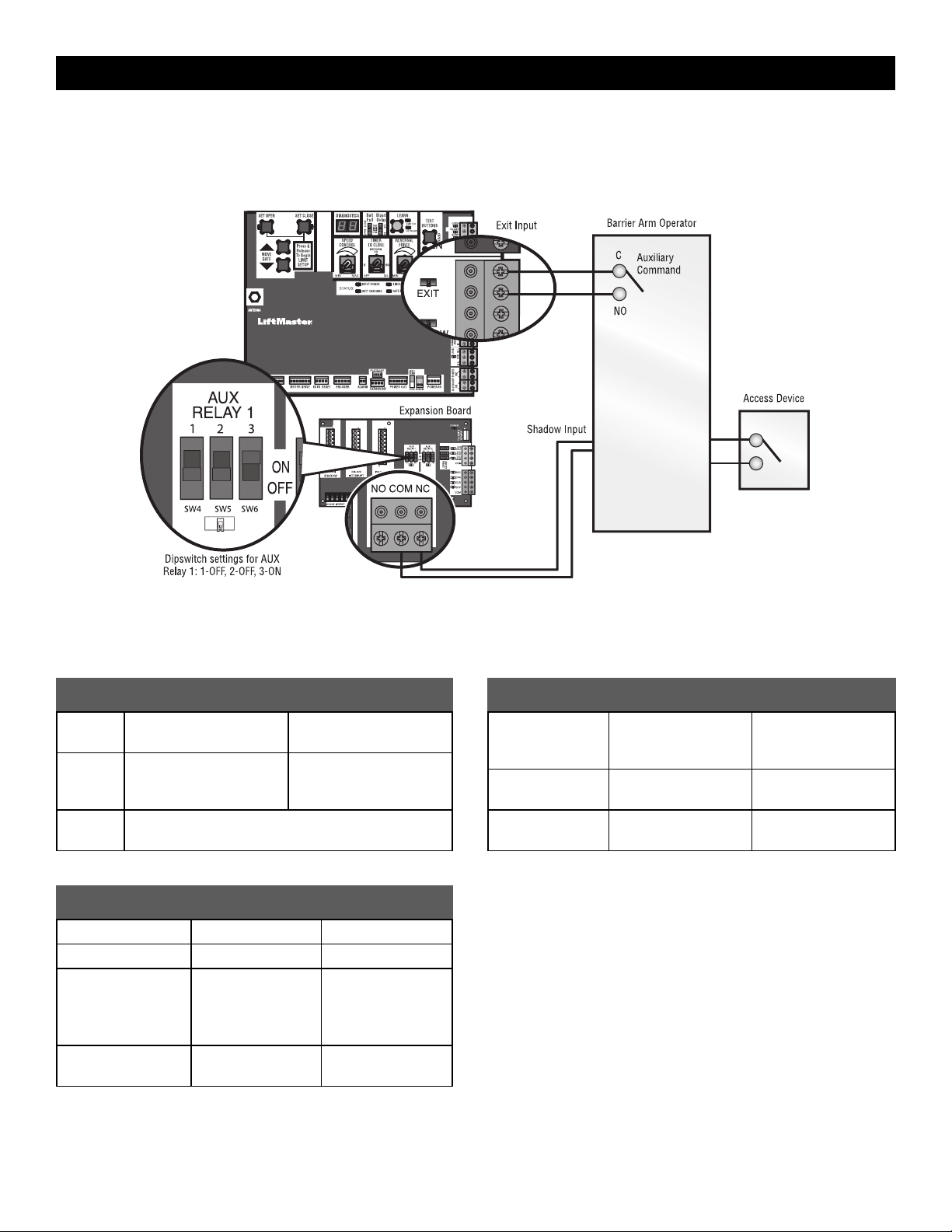
51
SAMS Wiring with Relays Not Energized
SAMS Operation
To keep vehicles from rushing the gate, the barrier arm stays in closed position until the gate reaches fully open position then the barrier arm is released
to open and allow vehicles to pass.
AUX Relay 1
Control Board
Dual Gate Settings
NOTE: We recommend that all accessories, except entrapment protection devices, and board configurations are set on the primary operator.
Control board
FEATURE PRIMARY OPERATOR
SECONDARY
OPERATORpage 22
Timer-to-
Close
Set the TTC dial to desired
setting
OFF
Bi-Part
Delay
Switch
Synchronized Close: ON Synchronized Close: ON
Speed Set the speed control dial on each operator to the desired
setting, see page 22 for more details
Expansion board
FEATURE
PRIMARY
OPERATOR
SECONDARY
OPERATOR
QUICK CLOSE Switch ON OFF
ANTI-TAIL Switch ON OFF
LOW BATT Switch Battery Fail OPEN:
OPEN
Battery Fail CLOSE:
CLOSE
Battery Fail OPEN:
OPEN
Battery Fail CLOSE:
CLOSE
AC FAIL OPEN/BATT
Switch
OPEN OPEN
Accessories
ACCESSORY PRIMARY OPERATOR
SECONDARY
OPERATOR
Remote Controls Program remote
controls 1 to 50 to the
primary operator.
Program remote
controls 51 to 100 to
the secondary operator
LiftMaster Internet
Gateway
Program to primary
operator.
Garage and Gate
Monitor
Program to primary
operator.
APPENDIX

52
Manual Adjustments with a Remote Control
To set the limits using a remote control, first you will need a 3-button remote control that has been programmed for OPEN, CLOSE, and STOP. Refer to
the Programming section.
Initial Limits and Force Adjustment
For dual gate applications the limits will have to be set for each
operator. The gate MUST be attached to the operator before setting
the limits and force.
Ensure the gate is closed.
1. Press and release the SET OPEN and SET CLOSE buttons
simultaneously to enter limit setting mode.
2. Press and hold the OPEN or CLOSE button on the remote control
until the gate reaches the desired open position. The gate can be
jogged back and forth using the OPEN and CLOSE buttons on the
remote control.
3. Once the gate is in the desired open position, press and release the
STOP button on the remote control.
4. Press and release the OPEN button on the remote control again to
set the open limit.
5. Press and hold the CLOSE or OPEN button on the remote control
until the gate reaches the desired close position. The gate can be
jogged back and forth using the OPEN and CLOSE buttons on the
remote control.
6. Once the gate is in the desired close position, press and release the
STOP button on the remote control.
7. Press and release the CLOSE button on the remote control again to
set the close limit.
8. Cycle the gate open and close. This automatically sets the force.
When limits are set properly the operator will automatically exit limit
setting mode.
Refer to the Adjustment section and follow the instructions for Speed
Control, Fine Tune the Force, and Obstruction Test.
Adjust the limits
If the limits have already been set the operator will exit the limit setting
mode after resetting each limit.
Set the Close Limit Only
1. Press and release the SET OPEN and SET CLOSE buttons
simultaneously to enter limit setting mode.
2. Press and hold the CLOSE button on the remote control until the gate
reaches the desired close position. The gate can be jogged back and
forth using the OPEN and CLOSE buttons on the remote control.
3. Once the gate is in the desired close position, press and release the
STOP button on the remote control.
4. Press and release the CLOSE button on the remote control again to set
the close limit.
When the close limit is set properly the operator will automatically exit
limit setting mode.
Set the Open Limit Only
1. Press and release the SET OPEN and SET CLOSE buttons
simultaneously to enter limit setting mode.
2. Press and hold the OPEN button on the remote control until the gate
reaches the desired open position. The gate can be jogged back and
forth using the OPEN and CLOSE buttons on the remote control.
3. Once the gate is in the desired open position, press and release the
STOP button on the remote control.
4. Press and release the OPEN button on the remote control again to set
the open limit.
When the open limit is set properly the operator will automatically exit limit
setting mode.
Perform the obstruction test after every limit, speed, and force setting
adjustment see page 23.
3-Button Remote Control programmed for OPEN, CLOSE, and STOP
APPENDIX
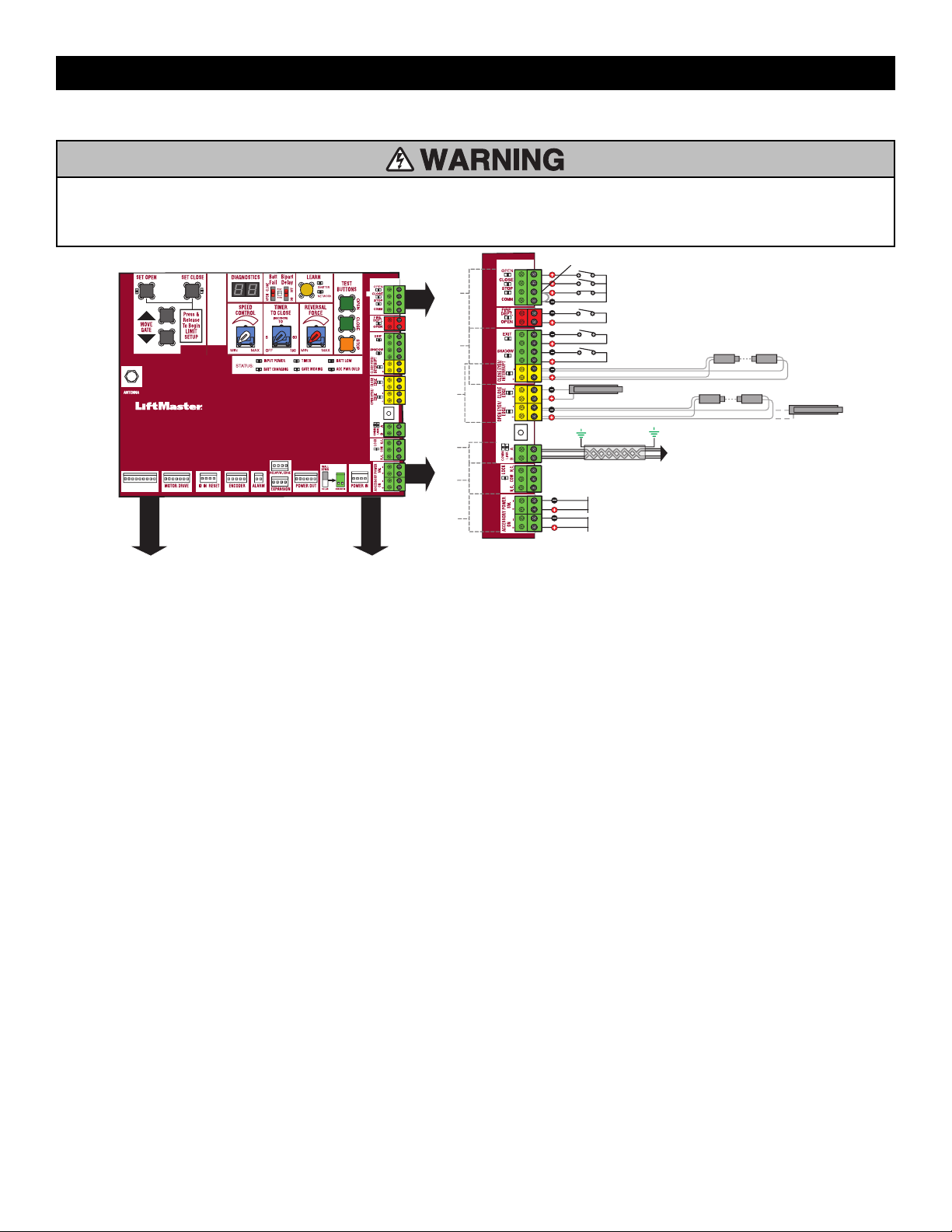
53
Wiring Diagram
To protect against fire and electrocution:
•
DISCONNECT power (AC or solar and battery) BEFORE installing or
servicing operator.
For continued protection against fire:
•
Replace ONLY with fuse of same type and rating.
ACCESSORY ON POWER
24 VDC 1 A Maximum
N.C.
POWER SW
24 VDC 1 A Maximum
Jumper
LOCKS
ACCESSORY
POWER
DUAL
GATES
ENTRAPMENT
PROTECTION
LOOPS CONTROLS
EDGE SENSOR
for CLOSE cycle
SHADOW LOOP
EXIT LOOP
PHOTOELECTRIC SENSORS or EDGE SENSOR
for OPEN cycle
Shielded Twisted Pair Cable
(Primary/Secondary link to other gate operator) Ground the
shield of the cable to the chassis ground of each operator.
CONTROL BOARD
ANTENNA
OPEN and COM: Hard Open (line-of-sight)
CLOSE and COM: Hard Close (line-of-sight)
STOP and COM: Hard Stop(line-of-sight)
EXIT: Soft Open (used for exit probe, telephone entry, external exit
loop detector, or any device that would command the gate to open)
PHOTOELECTRIC SENSORS
for CLOSE cycle
POWER BOARD
APPENDIX
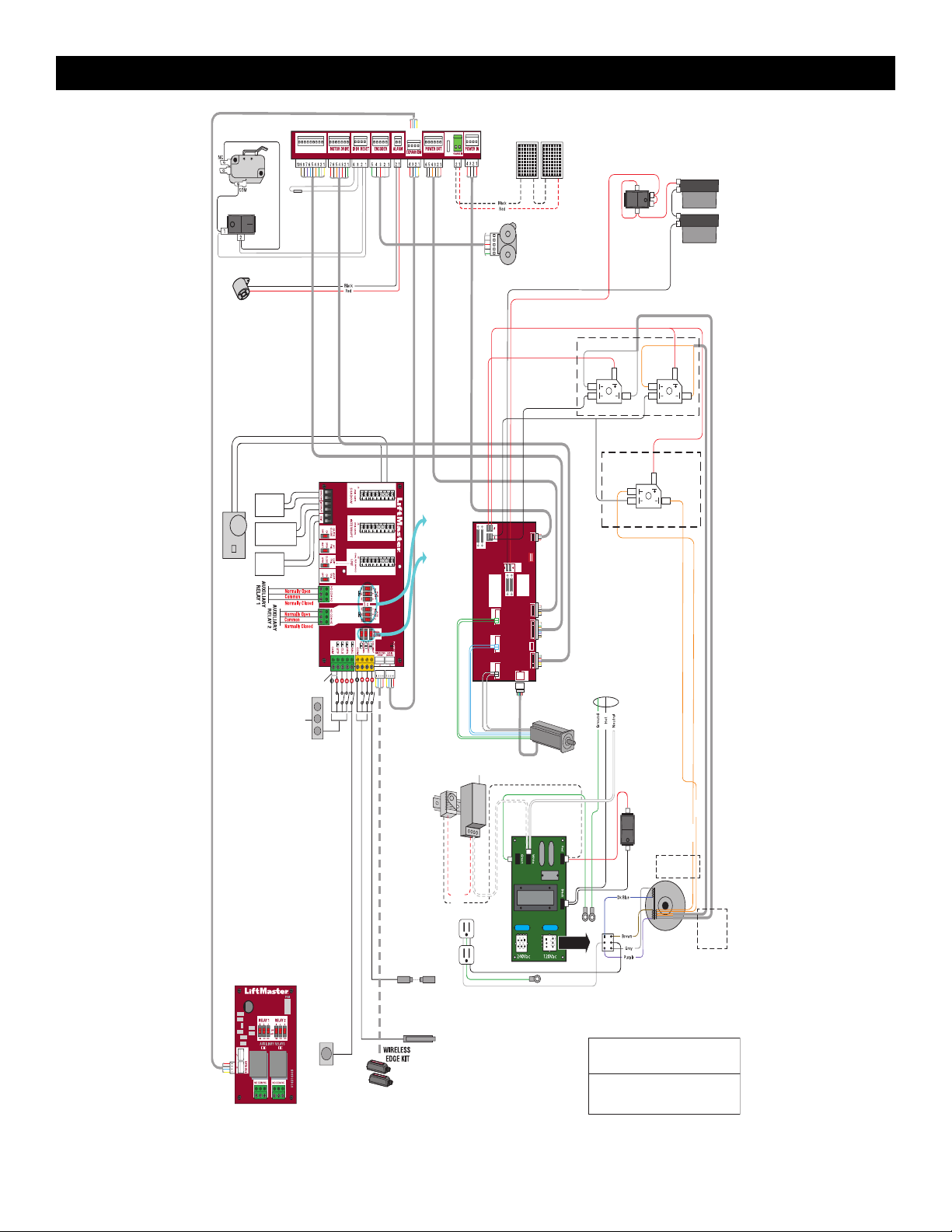
54
PRODUCT
ID
ALARM
MECHANICAL
INTERLOCK
(For slide version only)
BLDC Motor
Drive Board
Control function
of photoelectric
sensor or edge
sensor for the
OPEN or
CLOSE cycle.
Ground wires attached to chassis.
Grounding to remain intact
PLUG-IN
LOOP
DETECTOR
Model
LOOPDETLM
EXPANSION BOARD
N.C.
JUMPER
THREE
BUTTON
STATION
SINGLE BUTTON
CONTROL STATION
PHOTOELECTRIC
SENSORS
PHOTOELECTRIC
SENSORS or EDGE
SENSORS
RESET SWITCH
APS ENCODER
BLDC MOTOR
BRIDGE RECTIFIER
BATTERY SWITCH
TRANSFORMER
CHASSIS
EMI BOARD
12V SOLAR PANELS
IN SERIES
INPUT POWER
CONNECTION
12V BATTERIES
IN SERIES
RELAY ADAPTER
BOARD
SHADOW
LOOP
INTERRUPT
LOOP
Control
function of
Auxiliary
Relays
Red
Black
EXIT
LOOP
Orange
White
Phase W
(Green)
Phase U
(White)
Phase V
(Blue)
PART OF MOTOR
ASSMBLY
9 8 7 6 5 4 3 2 1 7 6 5 4 3 2 16 5 4 3 2 14 3 2 1
DC PWR IN
VARIANT:
FUSES 30A 32V
POWER IN MAIN BOARD
COMM
MOT. CONTROL
HALL
SENSORS
FUSES 30A 32V
BAT
POWER
IN
WARNING:
FOR CONTINUED
PROTECTION AGAINST
FIRE, REPLACE ONLY
WITH SAME TYPE &
RATING FUSE
AVERTISSEMENT - POUT NE PAS
COMPROMETTRE LA PROTECTION
CONTRE LES RISQUES
D’INCENDIE, UTILSER UN
FUSIBLE DE NENES TYPE ET
CARACTERISTIQUES NOMINALES.
POWER OUT
V VWW
INSL24UL
INSL24UL:
2 orange wires
IHSL24UL
IHSL24UL: Red
INSL24UL: Blue
6 5 4 3 2 1
Orange
Orange
U U
H
L
IHSL24UL:
2 orange and
2 white wires
Note
Use Copper Conductors Only
APPENDIX
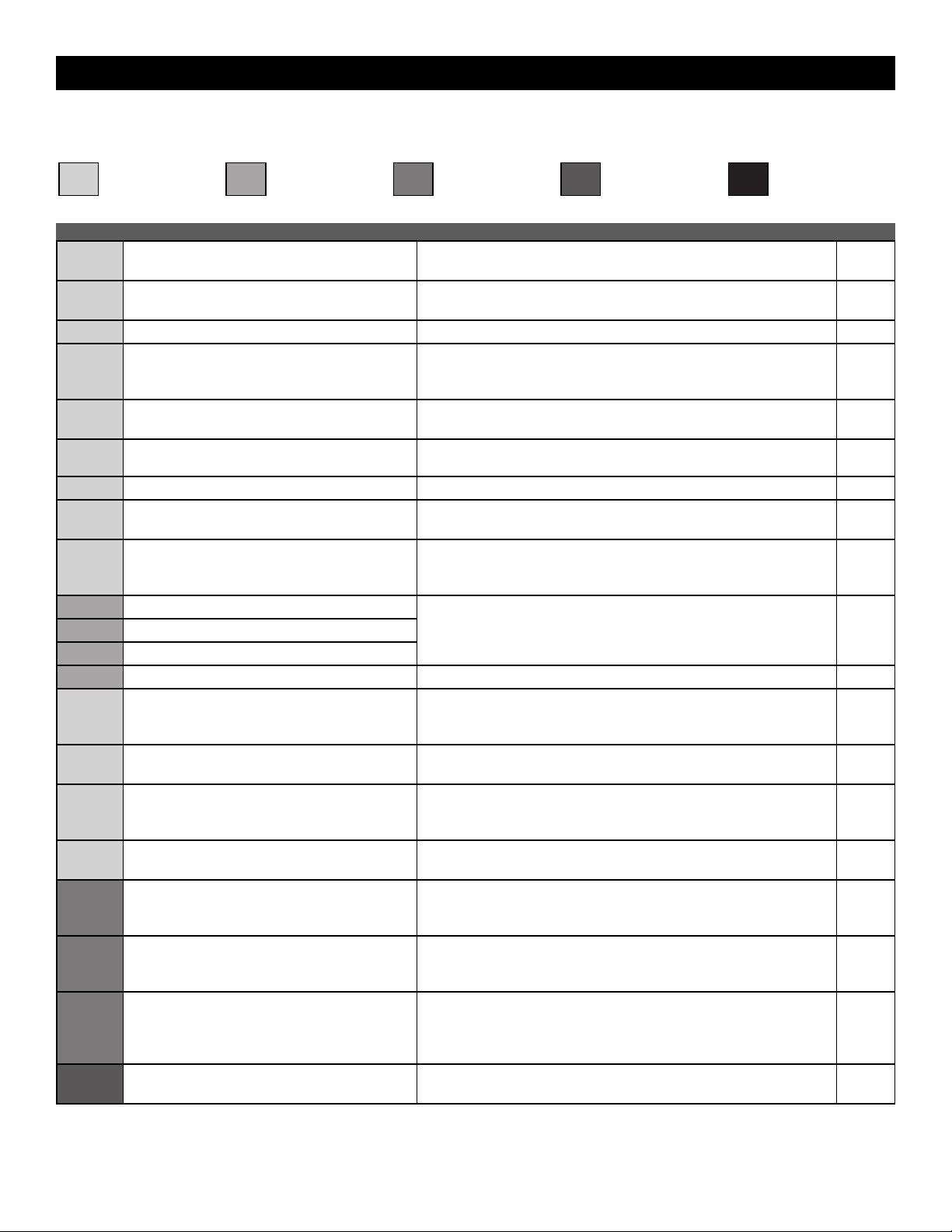
55
Diagnostic Codes Table
Some codes are saved in the code history and some are not. If a code is not saved it will briefly appear on the display as it occurs, then disappear.
LiftMaster System Installed System Informational
External Entrapment
Protection
Inherent Entrapment
Protection
Code Meaning Solution Saved
31
Control board has experienced an internal failure. Disconnect all power, wait 15 seconds, then reconnect power (reboot). If
issue continues, replace control board.
NO
34
Absolute Position Encoder error, not getting
position information from encoder
Check APE assembly and wiring connections. Replace the APE assembly
if necessary.
YES
35
Max-run-time exceeded error Check for an obstruction, then reprogram the limits. YES
36
Product ID error Was the control board just replaced? If so, erase limits, enter limit setup
mode and set limits. If not, disconnect all power, wait 15 seconds, then
reconnect power before changing product ID harness.
YES
37
Product ID failure Unplug product ID harness then plug back in. Disconnect all power, wait
15 seconds, then reconnect power before replacing product ID harness.
YES
38
Hard stop limit (Arm 1) Limit may be set too tightly against a non-resilient hard stop (re-adjust
limit). Operator may be at end of travel (re-adjust mounting).
NO
40
Battery overvoltage Too much voltage on the battery. Check harness. YES
41
Battery overcurrent Possible short of the battery charge harness. Check harness. Make sure
you do NOT have a 12V battery on a 24V system.
YES
42
No battery at boot up Check battery connections and installation. Replace batteries if depleted
to less than 20V on a 24V system. Make sure there is NOT a single 12V
battery on a 24V system.
YES
43
Exit loop error Failure or missing loop (SHORT or OPEN - LiftMaster Plug-in Loop
Detector only). Check loop wiring throughout connection. May be a short
in the loop, or an open connection in the loop.
YES
44
Shadow loop error
45
Interrupt loop error
46
Wireless edge battery low Replace batteries in wireless edge. YES
47
Motor Drive Fault Check motor drive connections. Disconnect all power, wait 15 seconds,
then reconnect power (reboot). If issue persists, replace motor drive
board.
YES
48
Hall Sensor Fault Check motor and motor drive connections. Disconnect all power, wait 15
seconds, then reconnect power (reboot). If issue persists, replace motor.
YES
49
Motor Drive Communications Fault Verify drive board power and connection to control board. Disconnect all
power, wait 15 seconds, then reconnect power (reboot). If issue
continues, replace motor drive
YES
50
Gate overspeed detected Make sure the gate is installed on a level surface and not on an excessive
grade.
YES
53
Brownout occurred
AC/DC board supply dipped below allowable level. Review power supply
and wiring. If rebooting, ensure enough time for discharge of power to
force a fresh boot.
YES
54
Wireless second operator communication error
Check the second operator for power. If OFF, restore power and try to run
the system. If powered, deactivate the wireless feature and then re-learn
the second operator.
YES
59
Configuration error with Motor, Drive Board, or ID
Resistor
Check connections between motor, motor drive, and control board.
Confirm correct part has been replaced, disconnect all power, wait 15
seconds, then reconnect power (reboot). If issue persists, remove and
replace latest part that was changed.
YES
60
Minimum number of monitored entrapment
protection devices not installed.
Review monitored entrapment protection device connections. See page
12 for minimum requirements.
NO
APPENDIX
56
Code Meaning Solution Saved
61
CLOSE EYE/INTERRUPT held
Check wired input on control board; check for alignment or obstruction;
squeeze and release the edge and verify main board edge LED changes;
check for eye alignment or obstruction.
YES
62
CLOSE EDGE held
63
OPEN EYE/EDGE held
64
CLOSE EYE/INTERRUPT held
Check wired input on expansion board; check for alignment or
obstruction; squeeze and release the edge and verify main board edge
LED changes; check for eye alignment or obstruction.
YES
65
CLOSE EYE/EDGE held
66
OPEN EYE/EDGE held
67
Wireless edge triggered extended time
Check wired input for wiring issue or obstruction; squeeze and release
the edge and verify main board edge LED changes
YES
68
Wireless edge loss of monitoring Check wireless edge inputs. YES
69
Wireless edge triggered
IF an obstruction occurred, no action required. If an obstruction did NOT
occur, check inputs and wiring.
NO
70
CLOSE EYE/INTERRUPT triggered, causing
reversal, preventing close, or resetting TTC
IF an obstruction occurred, no action required. If an obstruction did NOT
occur, check alignment, inputs, and wiring on control board
NO
71
CLOSE EDGE triggered, causing reversal,
preventing close, or canceling TTC
72
OPEN EYE/EDGE triggered, causing reversal or
preventing opening
73
CLOSE EYE/INTERRUPT triggered, causing
reversal, preventing close, or resetting TTC
IF an obstruction occurred, no action required. If an obstruction did NOT
occur, check alignment, inputs, and wiring on expansion board.
NO
74
CLOSE EYE/EDGE triggered, causing reversal and
preventing close or canceling TTC
75
OPEN EYE/EDGE triggered, causing reversal or
preventing opening
80
Close input (EYE/EDGE) communication fault from
other operator
Check inputs and communication method between operators, either
wired bus or radio. Ensure operator is powered. May have to erase the
wireless communication and reprogram the two operators.
YES
81
Open input (EYE/EDGE) communication fault from
other operator
82
Close input (EYE/EDGE) communication fault
(expansion board)
Check the connections between the control board and the expansion
board.
YES
83
Open input (EYE/EDGE) communication fault
(expansion board)
84
Non-monitored device detected on the wireless
safety system
Non-monitored contact closure devices are not supported. Make sure
connected devices are monitored. Check edges for proper orientation and
resistive end cap connection.
YES
90
Low Voltage Input to Motor Drive Fault
Verify incoming power meets voltage requirement of operator. Verify
battery voltage is above 20V. Disconnect all power, wait 15 seconds,then
reconnect power (reboot). If issue persists, replace power supply.
YES
91
Force reversal
Check for obstruction. If no obstruction, check that the mechanical
assembly is engaged and free to move. See Adjust the Limits, Speed, and
Force page 21.
YES
93
RPM / STALL reversal
Check for obstruction. If no obstruction, check the operator wiring and
that the mechanical assembly is engaged and free to move. Replace APE
assembly.
YES
95
Motor start failure
Operator attempted to run, no response from motor drive assembly.
Check connector and harness. Check for other error codes and resolve
those first. If connected properly and still not working,test motor and/or
motor drive.
YES
96
Motor Drive Board Fault
Check connections to motor drive board. Power cycle and retry. Replace
motor drive board if issue persists.
YES
99 Normal operation No action required YES
APPENDIX
Swing and Slide Gate Operator UL 325 and
ASTM F2200 Site Planning Safety Checklist
Name:
Address:
City/State/ZIP:
Phone:
Email:
Please Print
ASTM F2200 Standards
Gate Construction Evaluation: Gate Constructed with Safety in mind. ASTM F2200 Standards are followed
Component: Result (Circle) Comments: Figures (On Back)
All Gates
Gates have smooth bottom edges, no protrusions exceed 1/2” beyond base of gate Pass / Fail
5
All access controls at least 6 ft. from gate Pass / Fail
1,4
Barbed tape (razor wire) at least 8 ft. above grade Pass / Fail
Barbed wire at least 6 ft. above grade Pass / Fail
Separate pedestrian gate – out of reach of a moving gate – vehicular gate is
for automotive traf
fi c only
Pass / Fail
1,4
Gate does not move on its own if disconnected from operator
Pass / Fail
Gates prevented from falling over if disconnected from supporting hardware Pass / Fail
SWING
Distance from pivot point to column edge is less than 4 in. or external
entrapment protection is provided
Pass / Fail
4
Distance from open gate to wall, column, or other fi xed object is greater than
16 in. or external entrapment protection is provided
Pass / Fail
4
SLIDE
Roller covers on weight bearing exposed rollers 8 ft., or less, above grade Pass / Fail
1
Meshing installed up to 6 ft. above grade if pickets spaced equal to or
greater than 2 1/4 in. apart
Pass / Fail
3
Gap between gate and fence post less than 2 1/4 in. & gap protected with safety device
Pass / Fail
2
Positive stops at both fully open and fully closed positions Pass / Fail
1
Receiver guides recessed behind receiver post for receiver guides less than 8 ft. Pass / Fail
Other: Pass / Fail
© 2021 LiftMaster All Rights Reserved
300 Windsor Drive, Oak Brook, IL 60523
LMSPCLSWSL
12/19
Please Print
First & Last Name of Dealer:
Name of Dealership:
Dealership Address (Street Address/City/State/Zip):
Dealer Signature:
Customer Signature:
First & Last Name of Installer:
Phone:
Installer Signature:
Satisfactory
Needs Repair/Replacement
Gate Safety Check —
Simple steps to quickly determine if an End User’s gate operator is safe.
UL 325 Standard
Component: Result (Circle)
Comments: Figures (On Back)
1. Gate Operator is approved to current UL 325 standards (check operator label)
Pass / Fail
2. Proper gate warning signs attached to both sides of gate area Pass / Fail
1,4
3. All entrapment zones protected by 2 safety devices/obstruction tested
1,4
Close Side (circle two) Photo Eye
Reversing Edge Inherent Reverse
Pass / Fail
Open Side
(circle two) Photo Eye
Reversing Edge Inherent Reverse
Pass / Fail
Other Entrapment Zones Pass / Fail
*Entrapment Zone:
The location where a person can be caught or held in a position that increases the risk of injury
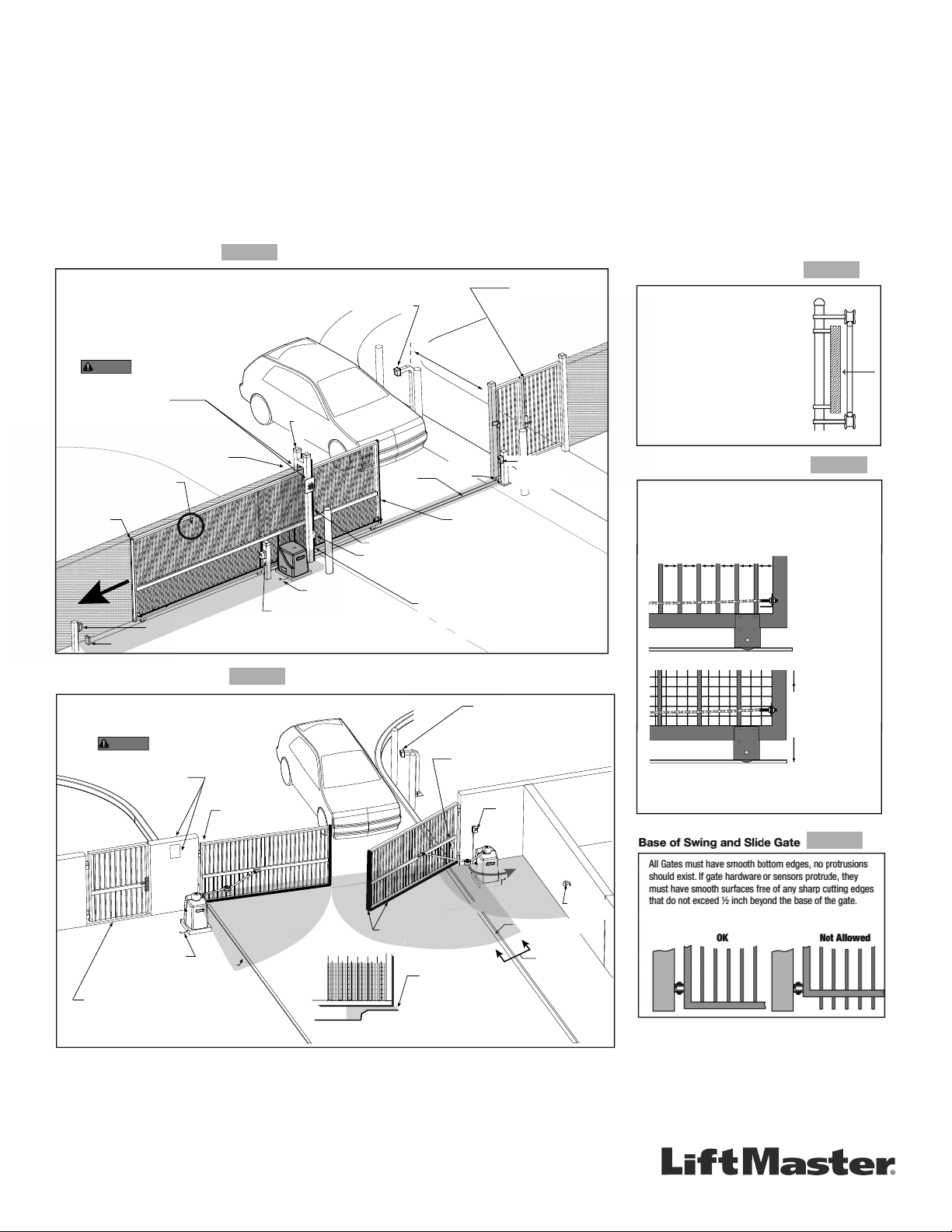
GETTING STARTED WITH SWING AND SLIDE GATE OPERATORS.
• Only install the operator on gates used for vehicular traf c.
• A separate pedestrian entry/exit must be clearly visible to promote pedestrian usage
and located so pedestrians do not come in contact with the vehicular gate while it is
moving.
• Install two independent
†
entrapment protection devices protecting each entrapment
zone.
• Pickets of a slide gate must be designed or screened to prevent persons from
reaching through, or passing through a gate.
• Every Installation is unique. It is the responsibility of the installer to ensure all
entrapment zones are protected with a minimum of two independent
†
entrapment
protection devices.
• A slide gate operator will only operate with a minimum of two independent monitored
entrapment protection devices installed in each direction, two in the open direction
and two in the closed direction
†
.
• A swing gate operator will only operate with a minimum of two independent monitored
entrapment protection devices installed in either the open or closed direction. If
no entrapment zone exists in the other direction, only one means of entrapment
protection is required in that direction
†
.
Always design, install and maintain safe gate access systems in accordance with UL 325 & ASTM F2200 standards.
SLIDE GATE SITE LAYOUT GUIDELINES
SECURE SIDE
PUBLIC SIDE
Be sure to place the
WARNING signs on both
sides of the gate in clear view.
For your records, take a photograph of the
completed installation site.
WARNING
Gap between vertical bars
must be less than 2¼" (57 mm)
Left Hand Gate
opening
Physical stop - at both ends of gate rail.
Photo eye (Emitter or Reflector in the Open direction)
Edge sensor
on Trailing Edge
of gate
Pedestrian gate located
near the slide gate.
Mount access control
devices at least 6 ft
(1.8 m) beyond the gate.
Make sure a separate walk-
through entrance is available
and its pedestrian path is
clearly designated.
Edge sensor on
Leading Edge of gate
V track
(gate rail)
Physical
stop
Earth ground
Interior posts,
Non-pinch
rollers (2x)
Guide
posts
ENTRAPMENT
NOTE: Any gap larger than 2¼" (57 mm) between
gate and fixed objects must be protected. Install
edge sensors where gap between post and gate
creates an entrapment zone.
6 ft (1.8 m) minimum
Photo eye (Receiver)
Photo eye (Receiver)
Photo eye
Emitter or Reflector
(Close direction)
ZONE
Edge sensor (Draw-in zone)
SECURE SIDE
PUBLIC SIDE
Pedestrian gate located
near the swing gate.
Make sure a separate walk-through entrance is
available and its pedestrian path is clearly designated.
Mount access control
devices at least 6 ft
(1.8 m) beyond the gate.
Photo
eyes
ZONE
Photo eye
(public side)
Edge
sensor
Earth ground
Reector
for Photo
Eye
ENTRAPMENT
Be sure to place the
WARNING signs on both
sides of the access point in clear view of vehicles.
For your records, take a photograph of the
completed installation site.
WARNING
ENTRAPMENT
Curb
Curb
A
View A
Cross Section
ENTRAPMENT
ZONE
Photo eye
(public side)
SWING GATE SITE LAYOUT GUIDELINES
Ed
ge
sensor
ENTRAP
RAPMEN
C
Gate Frame and Adjacent Fence Area
6 ft. minimum
X X XX X XX X X XXXXXX X X X
Gate Frame and Adjacent Fence Area
If gaps (xxx)
between vertical
bars of the gate or
fence are less
than 2 1/4", no
further screening
is required.
For gaps (xxx)
equal to or larger
than 2 1/4", a wire
mesh screen must
be applied to the
gate. Wire mesh
screen openings
must be smaller
than 2 1/4". The
minimum height of
wire mesh screen:
6 ft. above grade.
SLIDE GATE OPENINGS GUIDELINES
Openings of a horizontal slide gate must be smaller than 2 1/4"
or else be guarded or screened. These design rules apply to
both the moving gate as well as the portion of adjacent fence
that the gate covers in the open position. See Illustrations
below.
SLIDE GATE SPACING GUIDELINES
Slide Gate Gaps
A gap, measured in the horizontal plane
parallel to the roadway, between a fixed
stationary object nearest the roadway (such
as a gate support post) and the gate frame
when the gate is in either the fully open
position or the fully closed position, shall not
exceed 2 ¼ in.. Exception: All other fixed
stationary objects greater than 16 in. from
the gate frame shall not be required to
comply with this section. Any gap must be
protected. Install safety device to protect
entrapment zone.
**Swing Gate Entrapment Zones: Locations between a moving gate or moving, exposed operator components and a counter
opposing edge or surface where entrapment is possible up to 1.8m (6 ft) above grade. Such locations occur if during any point in travel:
a) The gap between the bottom of a moving gate and the ground is greater than 101.6mm (4 in) and less than 406mm (16 in); or
b) The distance between the center line of the pivot and the end of the wall, pillar, or column to which it is mounted when in the open
or closed position exceeds 101.6mm (4 in). Any other gap between a moving gate and xed counter opposing edges or surfaces or
other xed objects is less than 406mm (16 in) (examples are walls, curbs, berms, or other immovable objects).
Defi nitions
Entrapment: The condition when a person is caught or held in
a position that increases the risk of injury.
Slide Gate Entrapment Zones: An entrapment zone exists if
at any point during travel, the gap between the moving gate
and xed counter opposing edges or surfaces is less than
406mm (16”) in a location up to 1.8 m (6ft.) above grade.
†
Independent the same type of device shall not be utilized for both entrapment
protection devices.
FIGURE 1
The above examples are two of many installation possibilities and are for illustration purposes only.
See device and operator manuals for complete instruction.
Visit DASMA.com for more information.
FIGURE 2
FIGURE 3
FIGURE 4
FIGURE 5