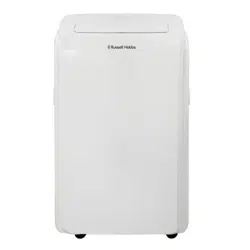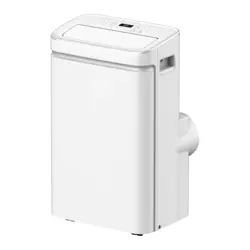
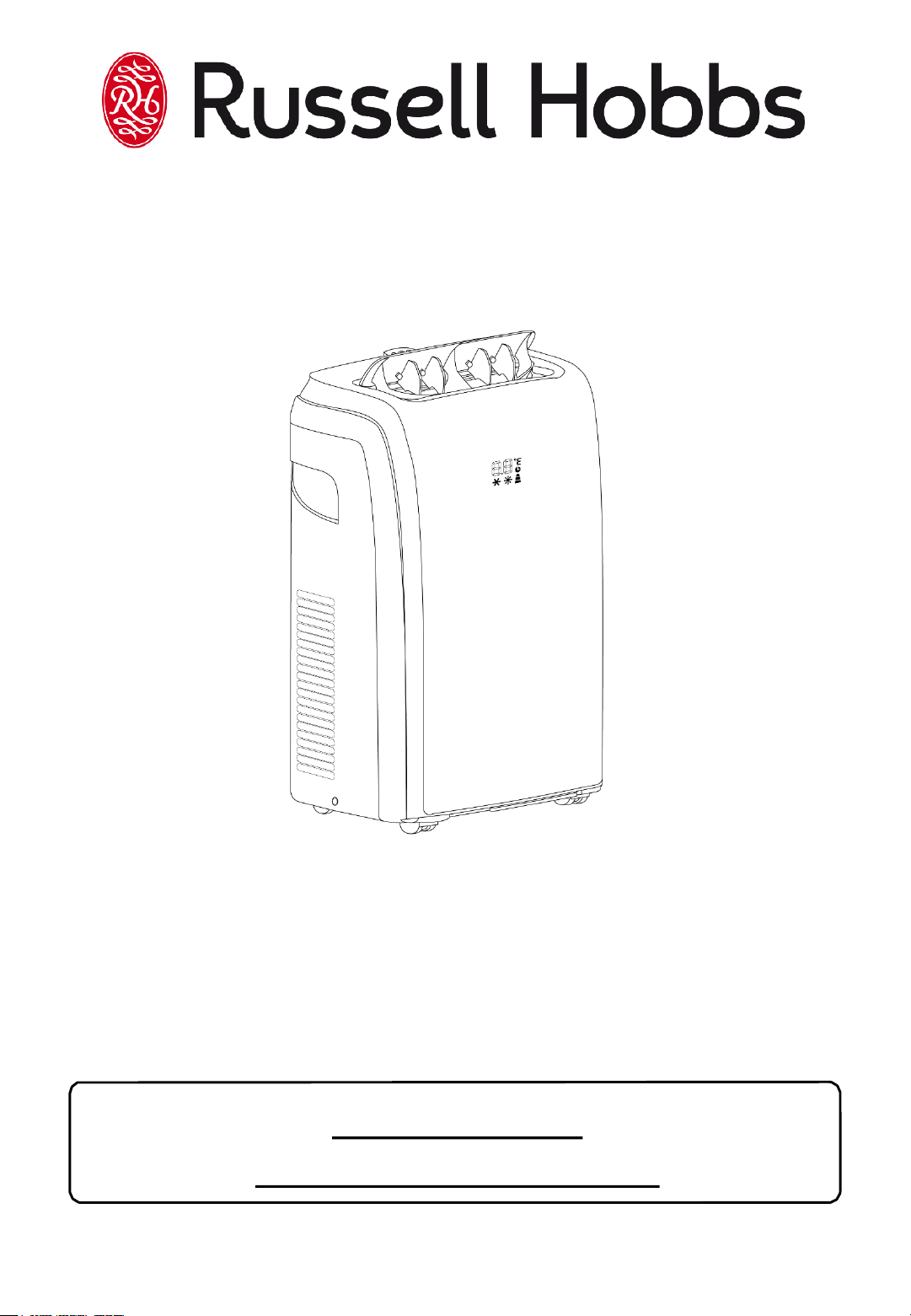
9000BTU Portable Air
Conditioner
For Customer Services & Spare Parts please call 0345 209 7461
Or visit us at https://mda.russellhobbs.com
PLEASE RETAIN
FOR FUTURE REFERENCE
Model Number: RHPAC4002
220-240V AC 50Hz
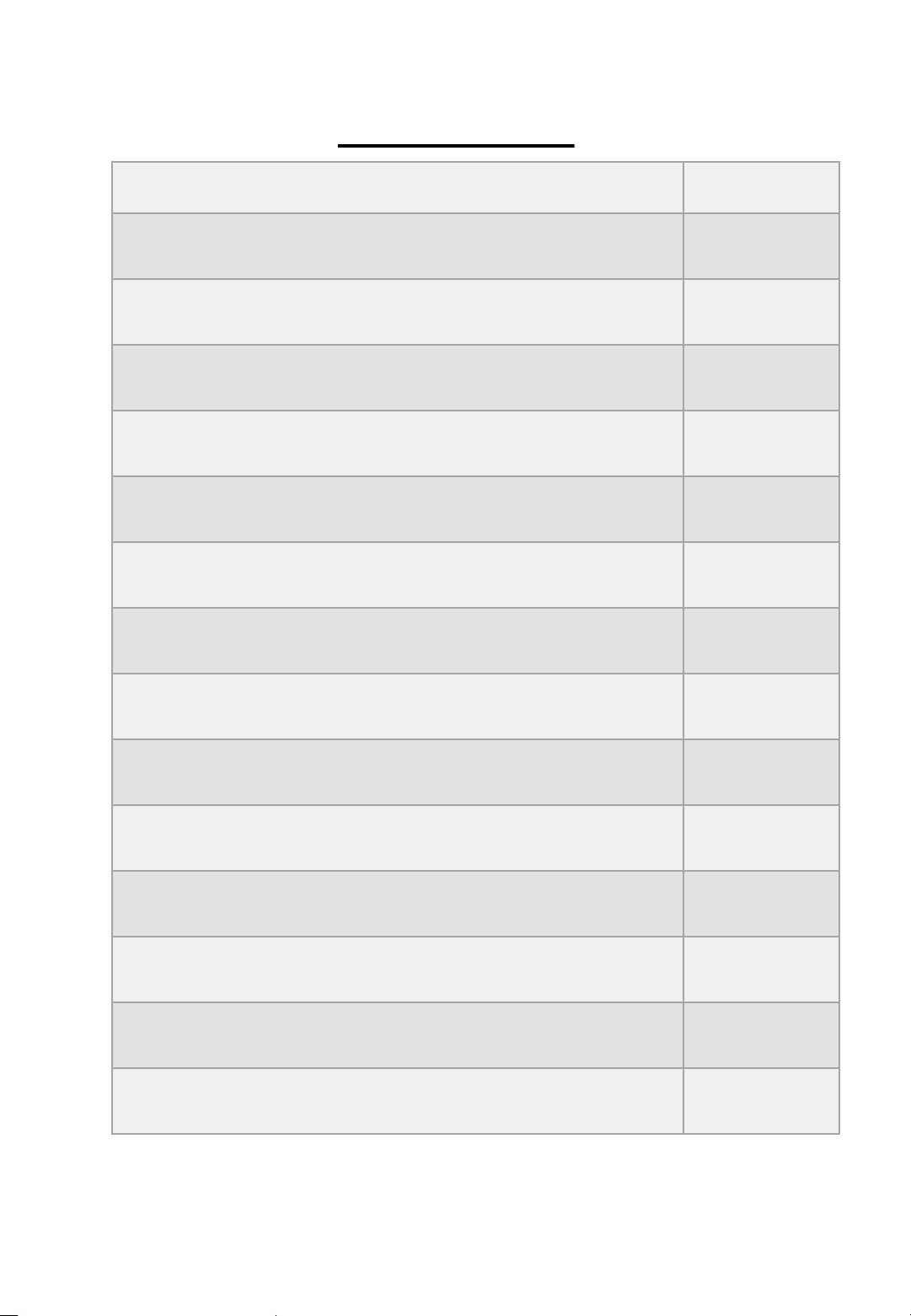
Page(s)
Safety Instructions and Electrical Safety
3 - 5
Electrical Safety
6
Feature
Diagram
7
Control Panel
Diagram
8
Installing your Air Conditioner
9 – 11
Display Screen Diagram
12
Using your Air Conditioner
13 – 21
Draining your Air Conditioner
22 – 24
Cleaning your Air Conditioner
25
Start/End of Season Operations
26
Troubleshooting
27
Spare Parts
28
Specification
29
Notes
30
CONTENTS
RHPAC4002 v2.4 2

Safety Instructions
Important note: Please read this booklet before installing and
switching on this appliance. The manufacturer assumes no
responsibility for incorrect installation and usage as described in this
booklet.
• This model uses natural refrigerant gas as part of its cooling
system. This gas is known as R290 (Propane) and is
environmentally friendly but can be combustible. Care should
therefore be taken when handling or transporting the product to
ensure that none of the refrigeration circuit components are
damaged.
• Do not obstruct ventilation openings on the appliance and
never insert your finger or any other object into the air outlet.
• Do not cover the appliance or place any object on the control
panel.
• The appliance must not be placed or rested on its power cord.
• Do not use adaptors or extension leads when connecting the
appliance to the electrical power supply.
• Do not use the appliance if the plug is damaged.
• Do not pull, twist or damage the power cable.
• Do not plug-in or un-plug the appliance with wet hands to
prevent electrical shock.
• Always store the unit in an upright position in order to maintain
the compressor working in a proper condition.
• This appliance can be used by children aged from 8 years and
above and persons with reduced physical, sensory or mental
capabilities or lack of experience and knowledge if they have
been given supervision or instruction concerning use of the
appliance in a safe way and understand the hazards involved.
Children should not play with the appliance.
RHPAC4002 v2.4 3

Safety Instructions
• This appliance is designed to be used by adults, do not allow
children to play with the appliance.
• The appliance is intended for residential use only.
• When defrosting and cleaning the appliance, do not use any
tools other than those recommended by the manufacturing
company.
• The appliance must be installed, used and stored in an area
that is greater than 13 m2.
• The appliance must be placed in an area without any
continuous sources of ignition (for example: open flames, gas
or electrical appliances in operation).
• R290/R32 is a refrigerant gas that complies with the European
directives on the environment. Do not puncture or damage any
part of the refrigerant circuit.
• If the appliance is installed, operated or stored in a non-
ventilated area, the room must be designed to prevent the
accumulation of refrigerant leaks.
• Individuals who operate or work on the refrigerant circuit
must have the appropriate certification issued by an
accredited organisation that ensures competence in handling
refrigerants according to a specific evaluation recognized by
associations in the industry.
• Maintenance and repairs that require the assistance of other
qualified personnel must be performed under the supervision
of an individual specified in the use of flammable refrigerants.
• Be aware that the refrigerants may not contain an odour.
• Compliance with national gas regulations shall be observed.
• The appliance shall be stored so as to prevent mechanical
damage from occurring.
RHPAC4002 v2.4 4

Safety Instructions
• WARNING: System contains refrigerant under very high
pressure. The system must be serviced and repaired as
recommended by the equipment manufacturer and by
qualified persons only.
• Do not use in the following locations: -
Next to a source of fire.
An area where oil is likely to splash.
An area exposed to direct sunlight.
An area where water is likely to splash.
Near a bath, shower or a swimming pool.
In a greenhouse.
An area where flammable gasses or liquids are present.
RHPAC4002 v2.4 5
Electrical Safety
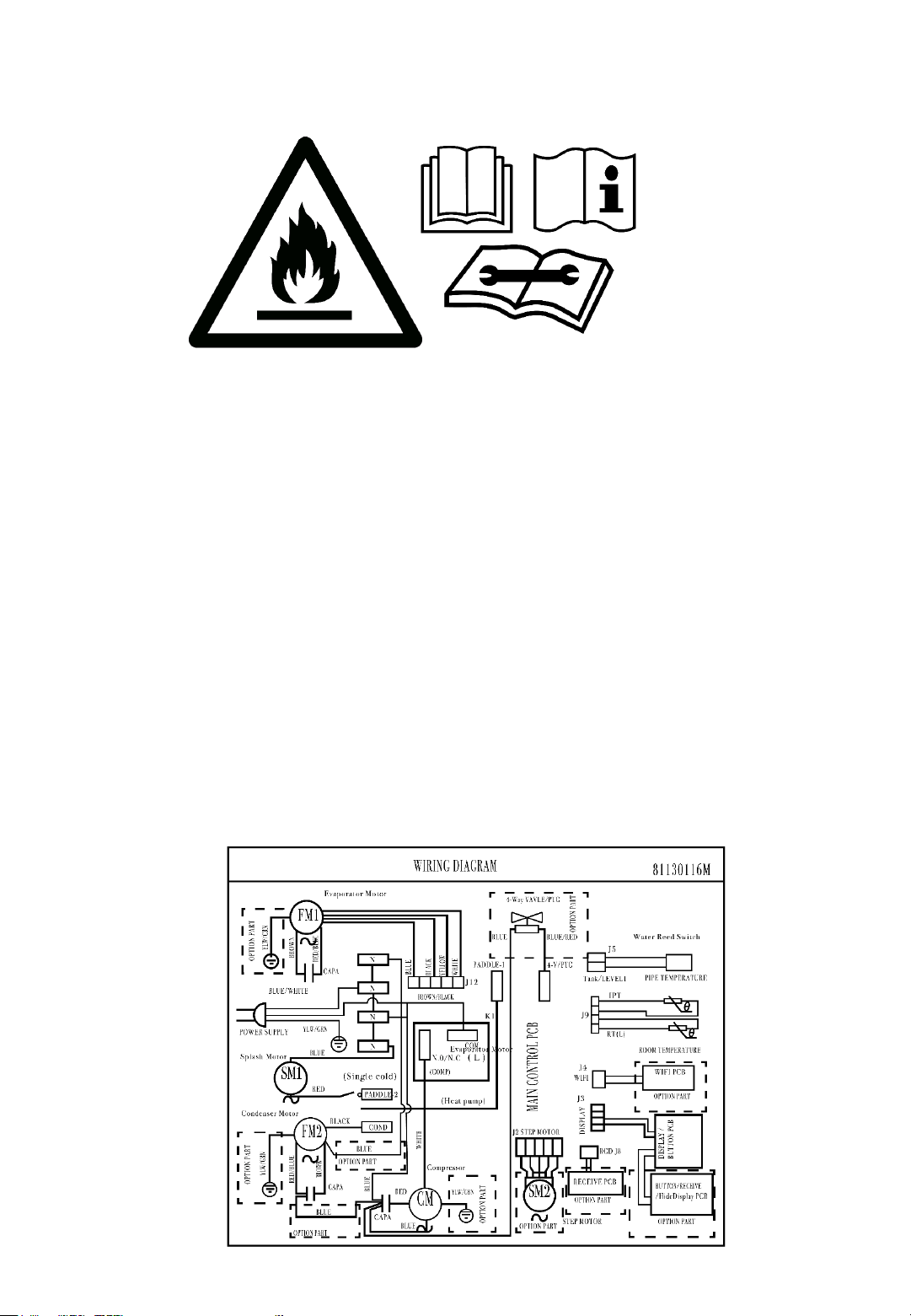
THIS APPLIANCE MUST BE PLUGGED INTO AN EARTHED
SOCKET
• Before switching on, make sure that the voltage of your electricity supply is
the same as that indicated on the rating plate. This product is designed to
operate on 220 – 240V AC; 50Hz. Connection to any other power source
may damage the unit.
• This product may be fitted with a non rewireable plug. If it is necessary to
change the fuse in the plug, the fuse cover must be refitted. If the fuse cover
becomes lost or damaged, the plug must not be used until a suitable
replacement is obtained.
• If the plug has to be changed because it is not suitable for your socket, or
becomes damaged in any way, it should be cut off and an appropriate plug
fitted. This should be carried out by a qualified electrician. The plug
removed must be disposed of safely, as insertion into a 13 Amp socket is
likely to cause an electrical hazard.
RHPAC4002 v2.4 6
FEATURE DIAGRAM
For Customer Services & Spare Parts please call 0345 209 7461
Or visit us at https://mda.russellhobbs.com
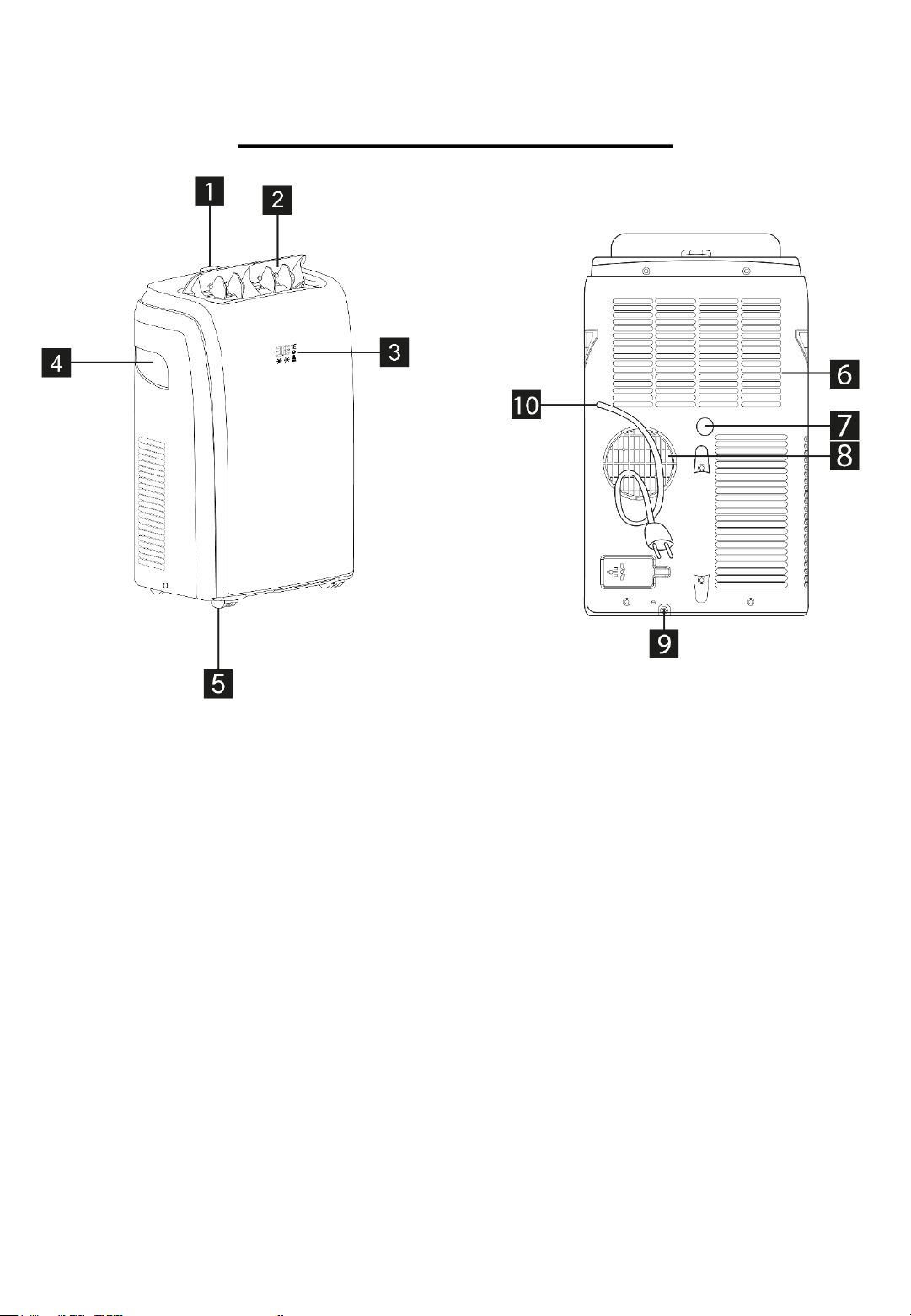
Front
1. Control panel
2. Deflector
3. Display Screen
4. Handle (both sides)
5. Castors
Rear
6. Filter
7. Condensation Drain
(Dehumidification)
8. Air Exhaust Hose
9. Condensation Drain
(Heating)
10. Power Cable
RHPAC4002 v2.4 7
CONTROL PANEL DIAGRAM
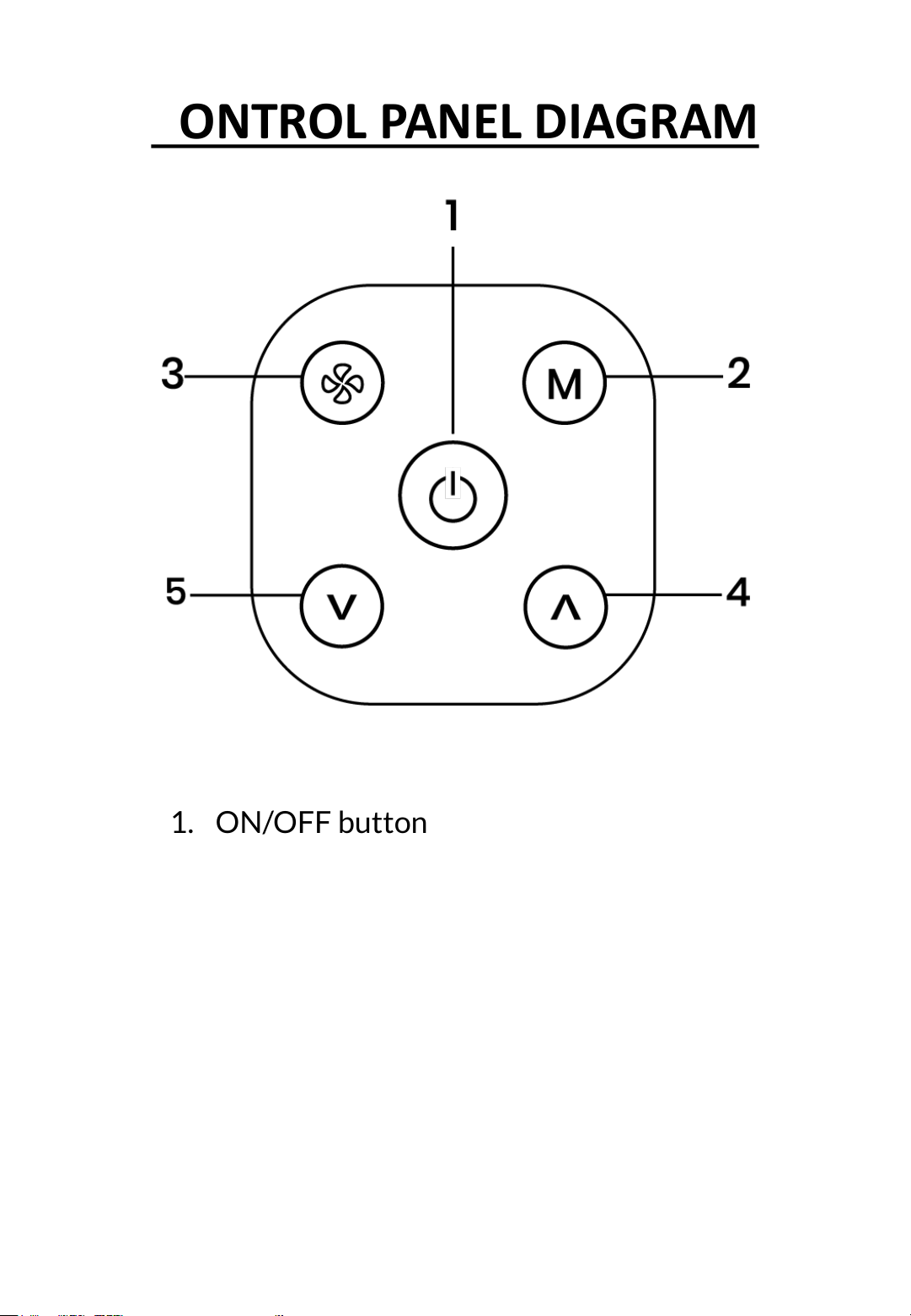
1. ON/OFF button
2. Mode button
3. Fan button
4. Increase button
5. Decrease button
RHPAC4002 v2.4 8
Exhausting Hot Air
In the COOL mode the appliance must be placed close to a
window or opening so that the warm exhaust air can be ducted
from outside.
First position the unit on a flat floor and make sure there is a
minimum of a 45cm (18inch) clearance around the unit and
ensure this is within the vicinity of a plug socket.
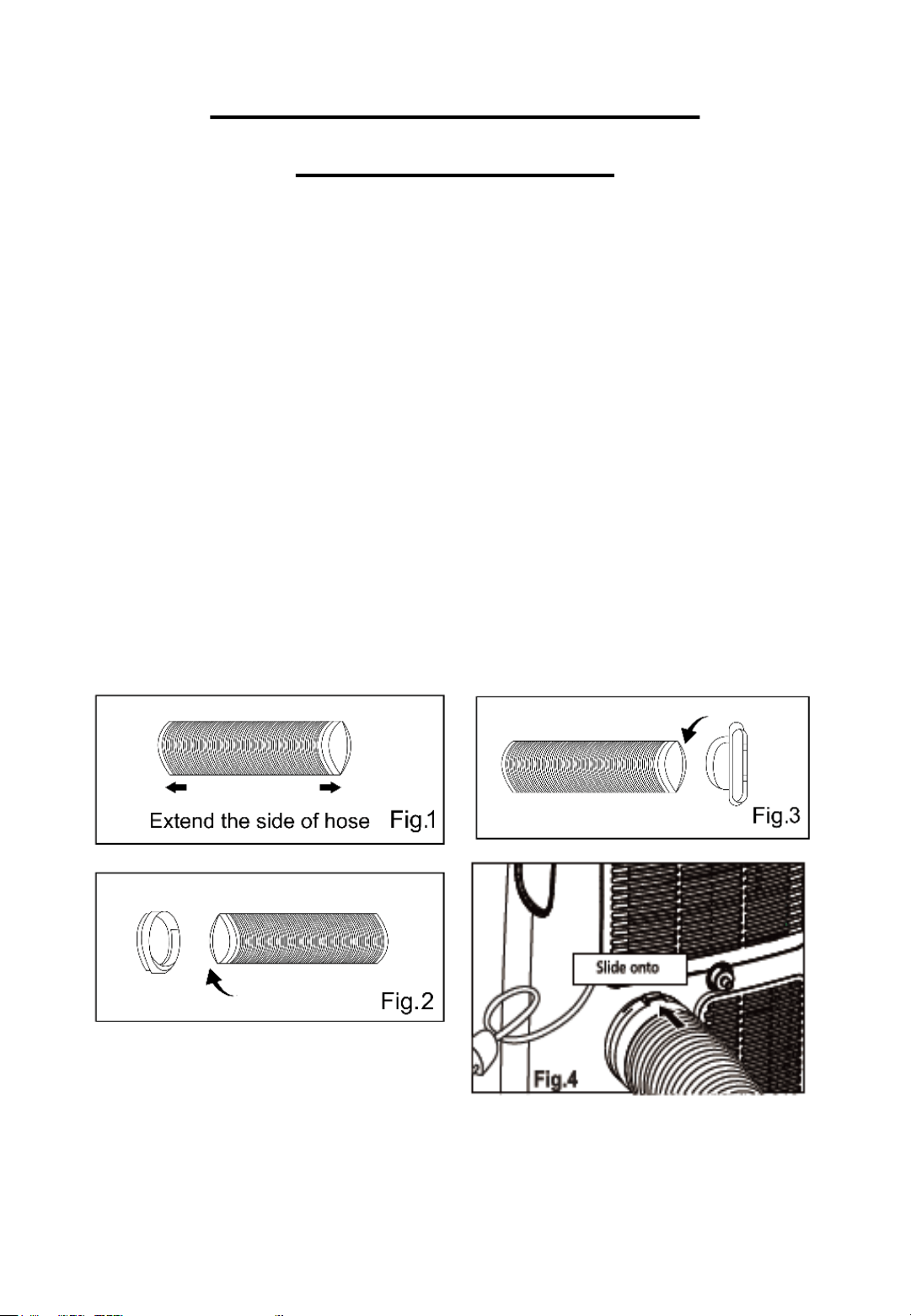
1. Extend either side of the hose (Fig. 1) and screw on the hose
inlet (Fig. 2).
2. Extend the other side of the hose and screw it into the hose
outlet (Fig. 3)
3. Install the hose inlet into the unit (Fig. 4)
4. Affix the hose outlet into the window seal kit and seal
INSTALLING YOUR AIR
CONDITIONER
RHPAC4002 v2.4 9
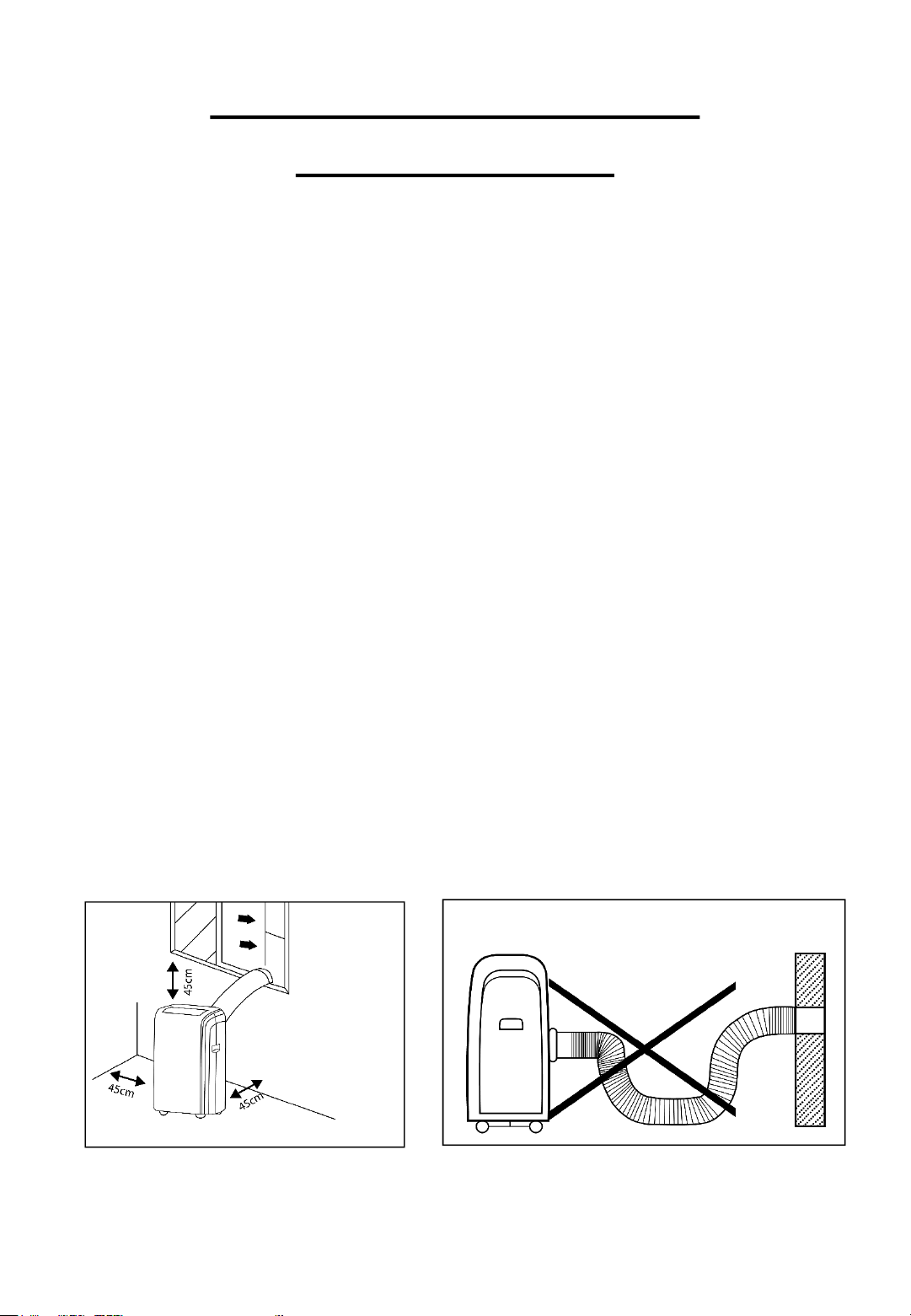
Location
• The unit should be placed on firm ground to help minimise
noise and vibration. For safe and secure positioning, place the
unit on a smooth, level floor which is strong enough to support
the unit.
• This unit has castors to aid placement but it should only be
rolled on smooth, flat surfaces. Use caution when rolling on
carpeted and wooden surfaces. Do not attempt to roll the unit
over other objects.
• The unit must be placed within reach of a properly rated
grounded socket.
• Never place any obstacles around the air inlet or outlet of the
unit.
• Allow at least 45cm of space around, above and away from the
wall to ensure the appliance works efficiently.
• The hose can be extended but it is best to keep it to the
minimum length required. Also ensure that the hose does not
have any sharp bends or sags.
INSTALLING YOUR AIR
CONDITIONER
RHPAC4002 v2.4 10
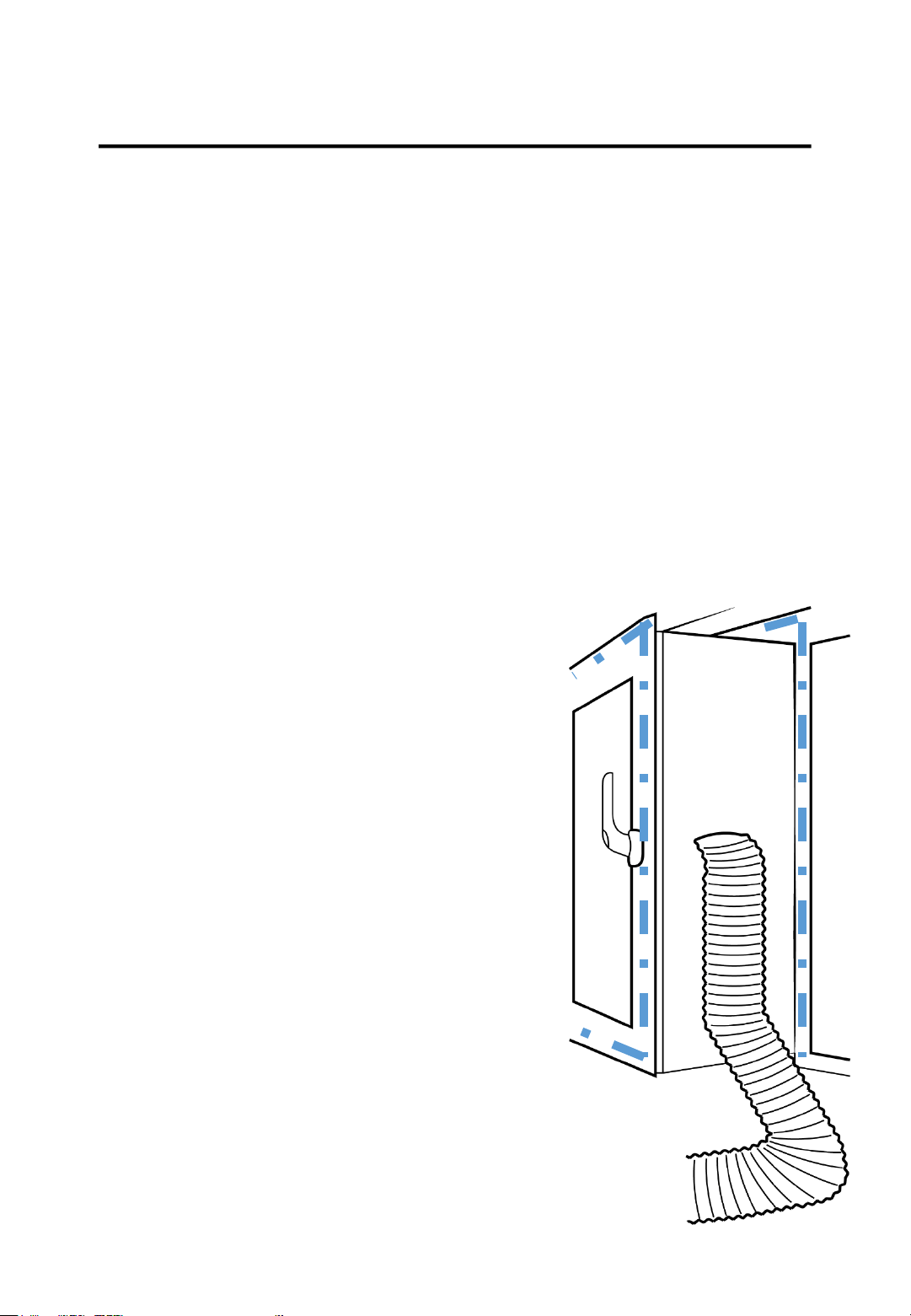
Your Russell Hobbs Air Conditioner has been supplied with a
Window Sealing Kit. The kit is suitable for use on UPVC windows
that open internally or externally either 3 sides, or 4 sides. It is not
suitable for middle opening windows such as skylights, or wooden
frames.
The maximum aperture dimensions of the kit is 400cm. To measure
the dimensions of a 4 point window, measure the frame on all 4
sides. For a 3 point window, measure the frame on the open sides
only.
INSTALLING YOUR WINDOW KIT
To install this window seal, whilst the
window is closed, apply the Velcro tape on
both the inside frame of the window, and
the frame of the window as shown by the
dotted lines. Ensure that the tape is not
clamped or in a position it will become
clamped.
Apply the long side of the seal kit to the
outside frame, and the short side to the
inside window.
Open the window, and ensure there is a
sufficient seal.
Open the zip, and thread your air
conditioner hose through the opening,
then tighten the zip.
11v2.4RHPAC4002

DISPLAY SCREEN DIAGRAM
1. Cool symbol
2. Heat symbol*
3. Fan speed indicator
4. Timer symbol
5. Temperature symbol
6. Temperature indicator
‘*’ means that only heat pump models have this
function.
RHPAC4002 v2.4 12
USING YOUR AIR CONDITIONER
Operating from the control panel
The control panel is on top of the appliance and it enables you to manage
functions without using the remote control. However, to use the appliance to
its full potential you are advised to use the remote control.
To turn the appliance on plug it into a mains socket and the appliance
will enter standby mode.
Press the ON/OFF button to turn the appliance on, the last function
that was active when the appliance was turned off will appear.
“Never turn the appliance off by unplugging it from the mains. Always press
the ON/OFF button, then wait for a few minutes before unplugging. This
allows the appliance to perform a cycle of checks to verify the operation”
COOL Mode
Ideal for hot humid weather when you need to cool and dehumidify the
room.
To set this mode correctly:
- Press the ‘M’ button several times until the COOL symbol appears.
- Select the desired temperature by pressing the INCREASE and
DECREASE buttons until the value you want is displayed. The
temperature ranges from 18-32°C (64-90°F) in this mode.
- Select the required fan speed by pressing the FAN button.
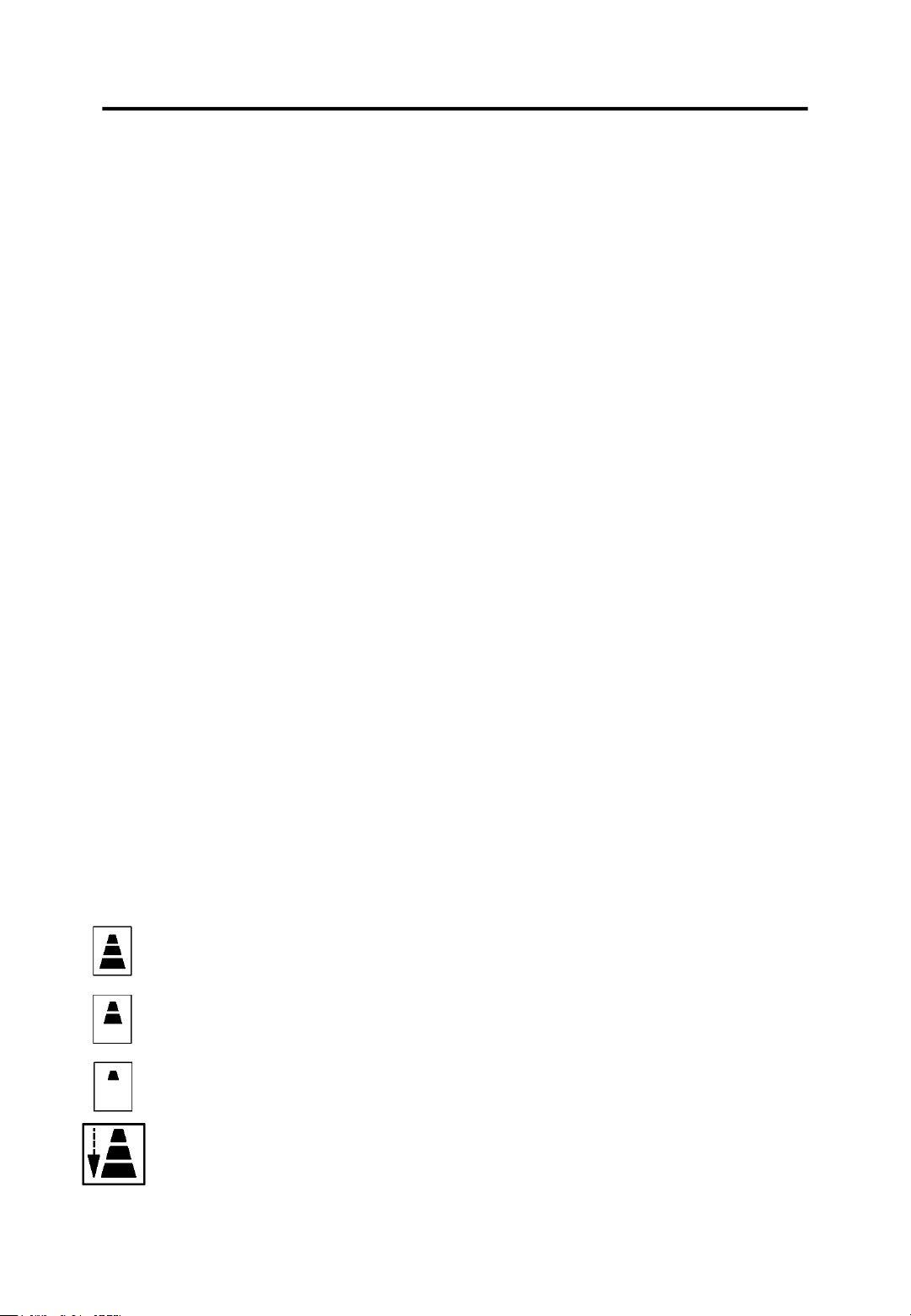
- There are 4 fan speeds to choose from: High/Medium/Low/Auto
High Speed: For maximum fan power
Medium Speed: Reduces noise levels but still
maintains a good level of comfort
Low Speed: For silent operation
Auto Speed: The appliance will automatically select the
most suitable fan speed in relation to the temperature
which it is set at
RHPAC4002 v2.4 13
USING YOUR AIR CONDITIONER
Page 13
HEAT Mode*
‘*’ means only the heat pump model have this function.
To set this mode correctly:
- Press the ‘M’ button several times until the HEAT symbol appears.
- Select the desired temperature by pressing the INCREASE and
DECREASE buttons until the value you want is displayed. The
temperature ranges from 13-27°C (55-81°F) in this mode.
- Select the required fan speed by pressing the FAN button.
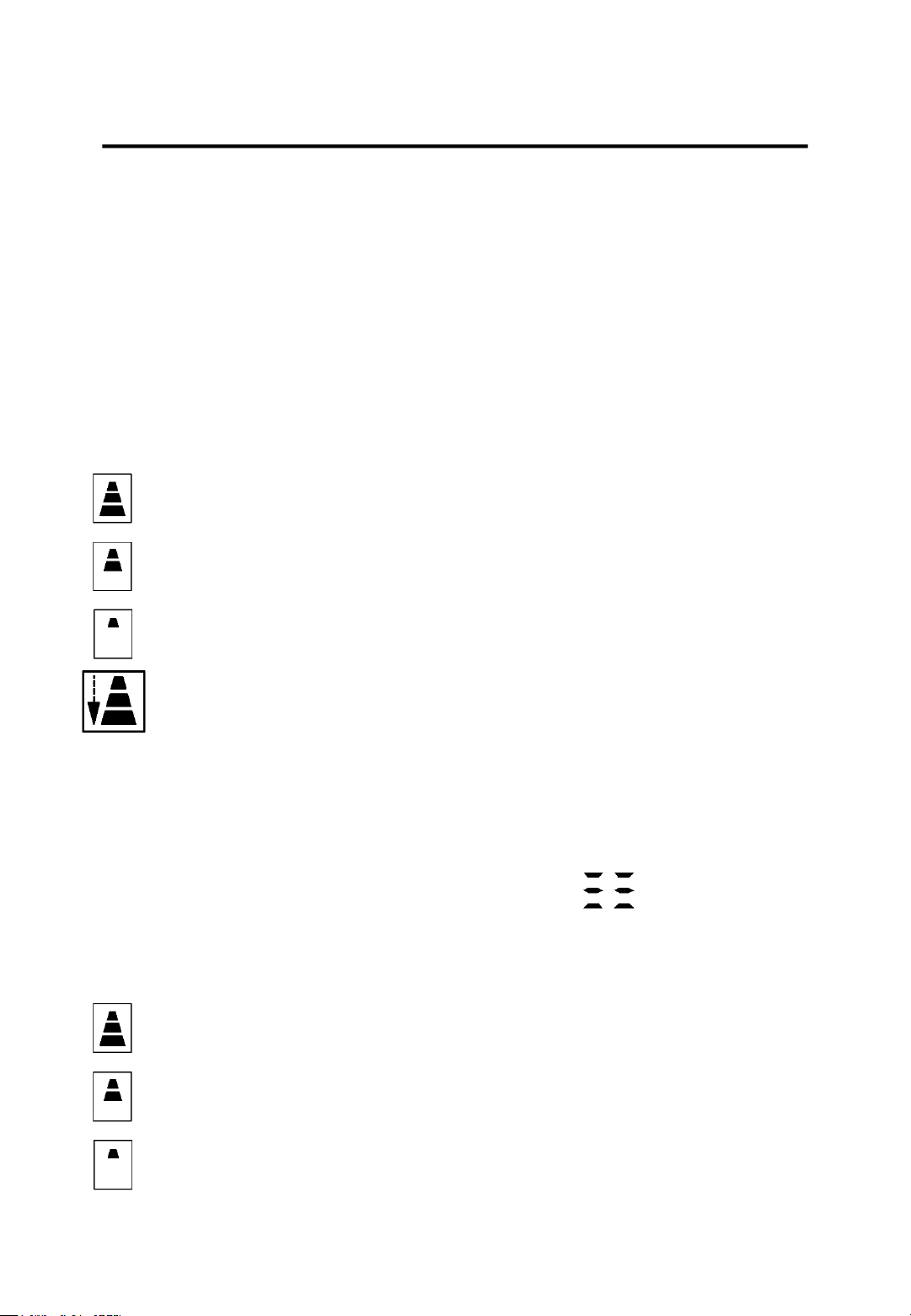
- There are 4 fan speeds to choose from: High/Medium/Low/Auto
High Speed: For maximum fan power
Medium Speed: Reduces noise levels but still
maintains a good level of comfort
Low Speed: For silent operation
Auto Speed: The appliance will automatically select the
most suitable fan speed in relation to the temperature
which it is set at
FAN Mode
When using the appliance in this mode, the air hose does not need to
be attached.
To set this mode correctly:
- Press the ‘M’ button several times until the symbol appears.
- Select the required fan speed by pressing the FAN button.
- There are 3 fan speeds to choose from: High/Medium/Low
Medium Speed: Reduces noise levels but still
maintains a good level of comfort
Low Speed: For silent operation
High Speed: For maximum fan power
RHPAC4002 v2.4 14

USING YOUR AIR CONDITIONER
DRY Mode
Ideal to reduce room humidity (good for use in spring, autumn, damp
rooms and rainy periods)
When in DRY mode the appliance should be prepared in the same
way as for COOL mode, with the air exhaust hose attached to enable
the moisture to be discharged outside.
To set this mode correctly:
- Press the ‘M’ button several times until the symbol appears.
- In this mode, the fan speed is automatically selected by the
appliance and can not be set manually.
Switching the unit of temperature
When the appliance is in standby, hold the ‘M’ button until the
appliance beeps (approx. 20 seconds). Once the appliance has beeped
you will be able to change the unit of temperature.
For example:
Before change and when in cool mode the
screen will display like this.
After the change the screen will then display
like this.
RHPAC4002 v2.4 15
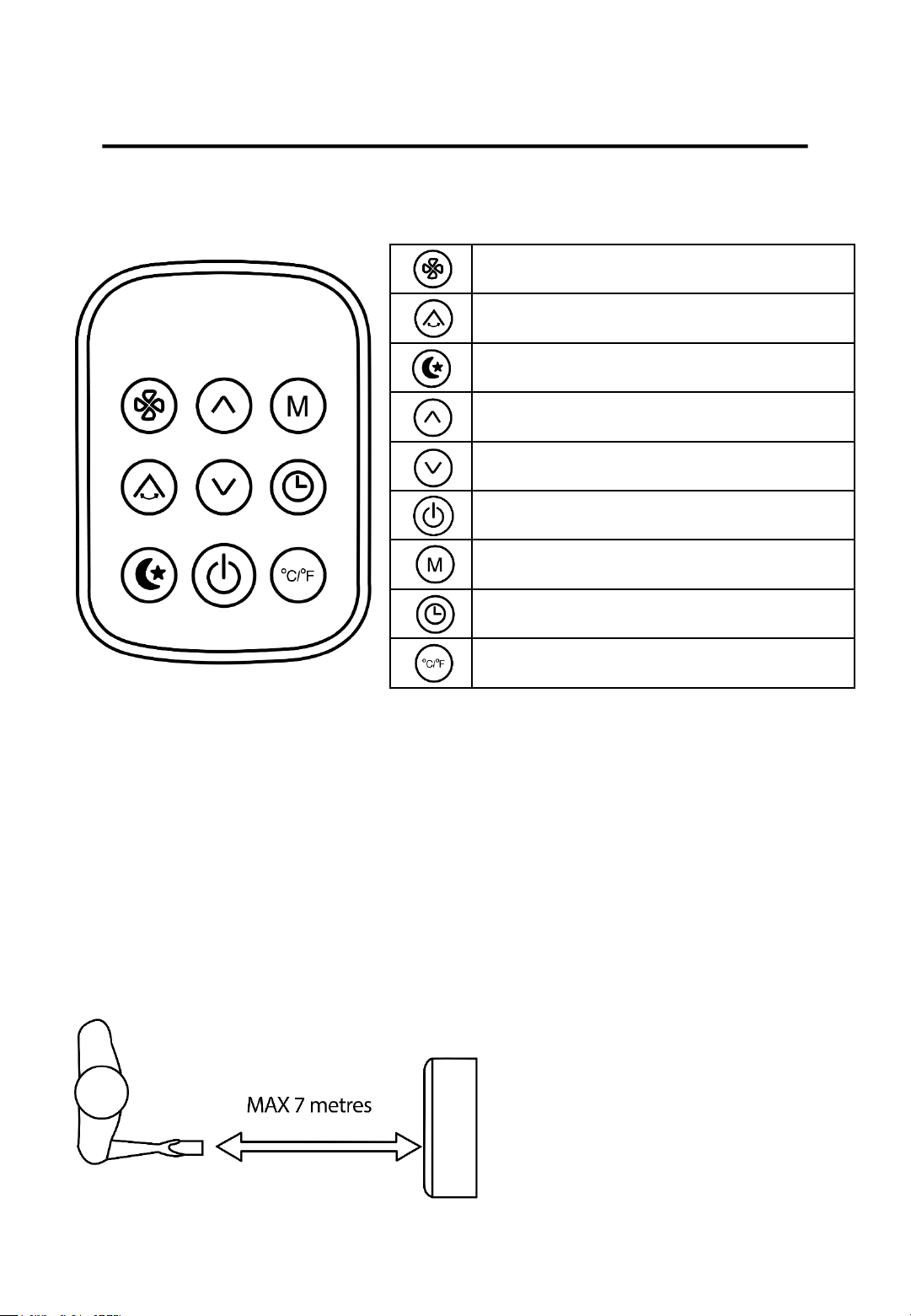
Operating from the remote control
USING YOUR AIR CONDITIONER
Fan button
Oscillating button
Night Mode button
Increase button
Decrease button
On/Off button
Mode button
Timer button
Unit Switch button
• Point the remote control at the receiver on the appliance.
• The remote control must be no more that 7 meters away from the
appliance (without obstacles between the remote control and the
receiver).
• The remote control must be handled with extreme care to ensure
continuous usage. Do not drop or expose the remote to direct
sunlight or sources of heat.
RHPAC4002 v2.4 16
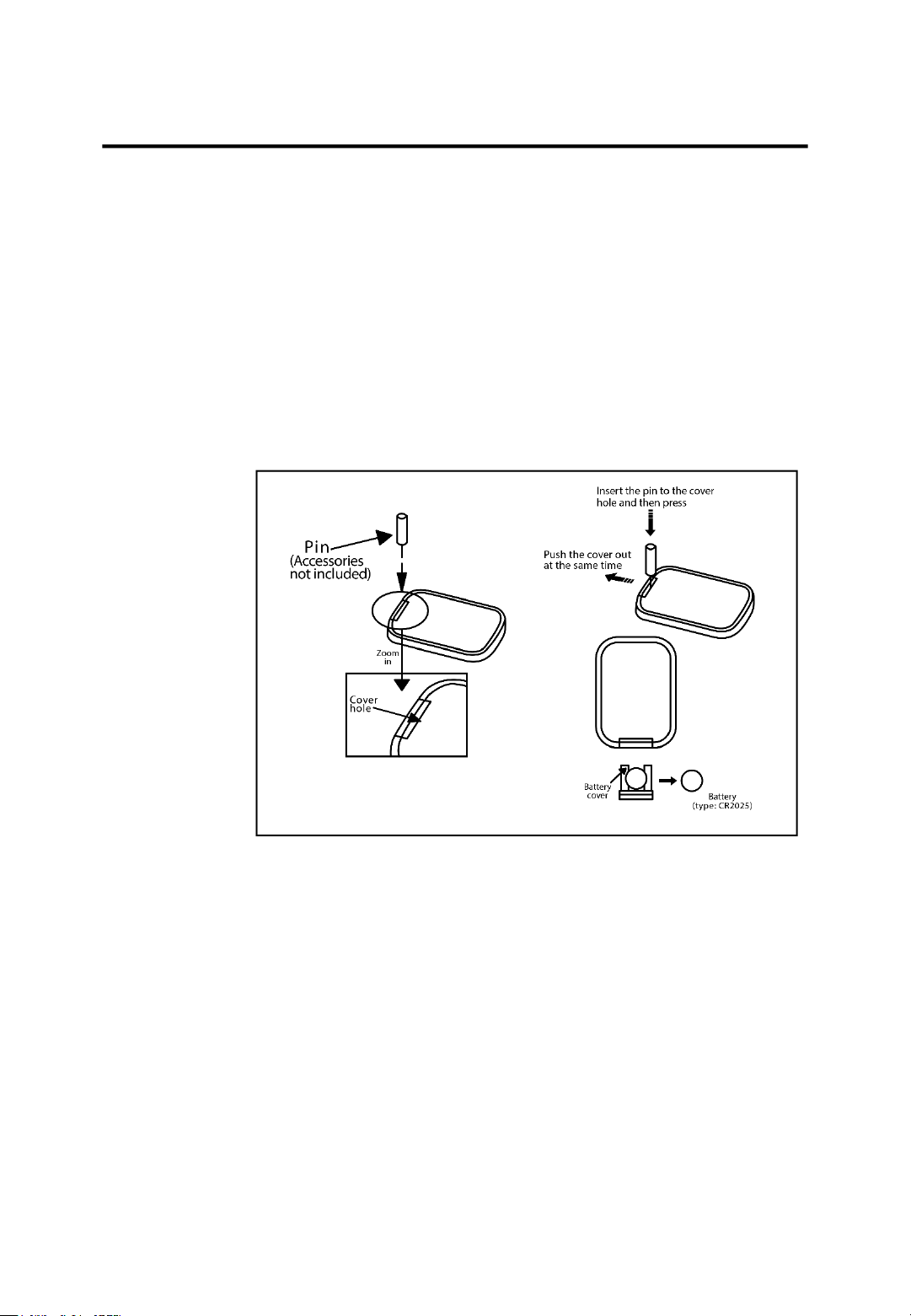
The remote comes with a battery already installed. To use the remote
for the first time, remove the transparent insulating strip by pulling it
out gently.
Replacing the Battery
To replace the battery follow the steps below:
1. Press down the pin and remove the battery cover
2. Replace the battery and then reinstall the battery cover into the
remote.
WARNING: Chemical Burn Hazard – Keep batteries away from
children.
This product contains a lithium button/coin cell battery. If a new or
used lithium button/cell battery is swallowed or enters the body, it can
cause severe internal burns and can lead to death in as little as 2 hours.
Always make sure you completely secure the battery compartment. If
the battery compartment does not close securely, stop using the
product, remove the battery and keep it away from children. If you
think the battery might have been swallowed or placed inside any part
of the body, seek immediate medical attention.
The cells should be disposed of correctly, including keeping them away
from children, even used cells may cause injury.
USING YOUR AIR CONDITIONER
RHPAC4002 v2.4 17

COOL Mode, HEAT Mode, FAN Mode, DRY Mode
To correctly set these four modes using the remote control, follow the
same steps that are stated in the ‘Operating from the control panel’
section of this manual but instead of pressing the buttons mentioned
on the control panel press the corresponding buttons on the remote
control.
Oscillating function
This function is useful for selecting the up and down flow of air delivery.
To set this function correctly:
- Select the desired operating mode as detailed above.
- Press the OSCILLATING button and the deflector will begin to swing.
Night Mode function
This function is useful for the night as it gradually reduces the
operation of the appliance.
To set this function correctly:
- Select the COOL or HEAT mode.
- Press the NIGHT MODE button.
The appliance will then operate in the previously selected mode.
When in this function the display screen will reduce in brightness and
the room will be maintained at the optimum temperature without
excessive fluctuations in temperature or humidity with silent
operation. The fan speed will always be low so you are not disturbed by
excessive noise while you sleep.
When in COOL mode, the selected temperature will increase by 1°C
(1°F) per hour over a 2-hour period. This new temperature will then be
maintained for the next 6 hours. After 6 hours the appliance will turn
itself off.
USING YOUR AIR CONDITIONER
RHPAC4002 v2.4 18
USING YOUR AIR CONDITIONER
When in HEAT mode, the selected temperature will increase by
1°C (1°F) per hour over a 3-hour period. This new temperature
will then be maintained for the next 5 hours. After 5 hours the
appliance will turn itself off.
This function can be cancelled at any time during operation by
pressing either the NIGHT MODE, MODE or FAN SPEED button.
Setting the timer
The timer can be used to schedule the start up or shutting down
of the appliance.
Programming start up:
- Turn on the appliance and select the mode, temperature and
fan speed you desire, then turn off the appliance.
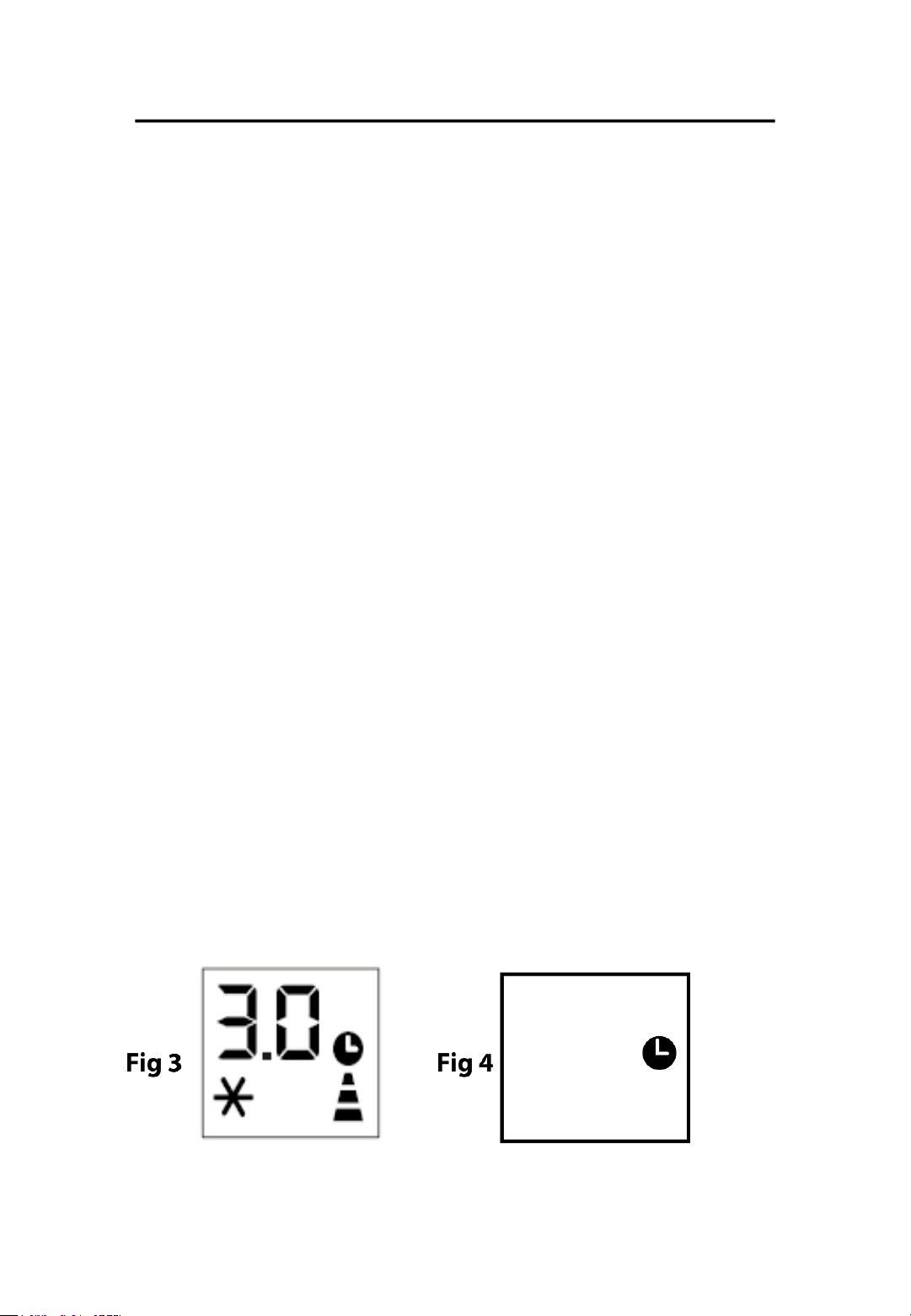
- Press the TIMER button and the screen will display 1-24 hours
while the TIMER symbol will flash (Fig. 3).
- Adjust the timer until the desired time is displayed. Wait for
approximately 5 seconds and then the timer will then be active.
Only the TIMER symbol should be displayed on the screen (Fig.
4).
- Press either the TIMER or the ON/OFF button and the timer
will be cancelled. The TIMER symbol will then disappear from
the screen.
RHPAC4002 v2.4 19
USING YOUR AIR CONDITIONER
Programming shut down:
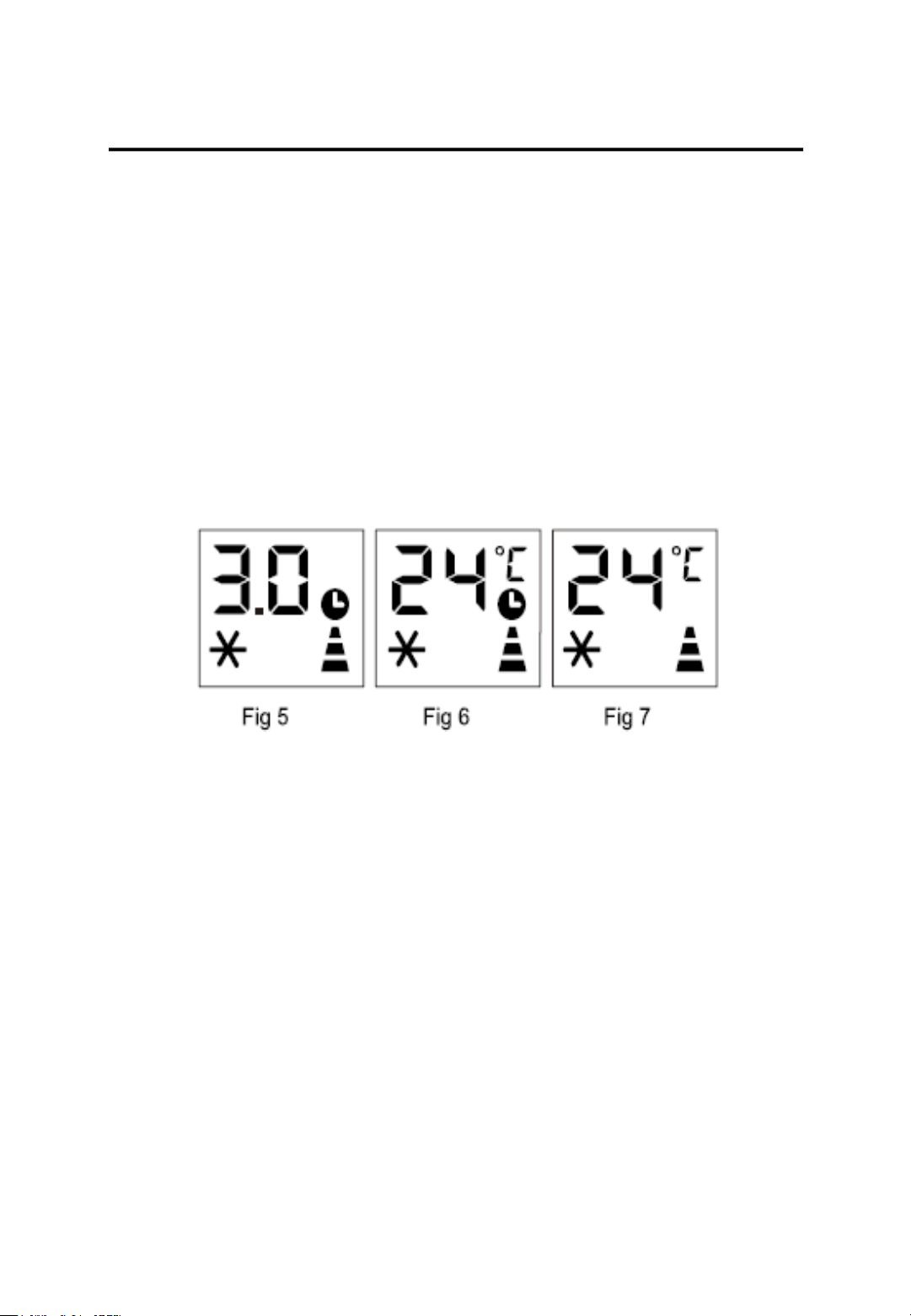
- When the appliance is running press the TIMER button, the screen
will then display the hours and several symbols will flash together
(Fig. 5).
- Adjust the timer until the desired time is displayed. Wait for
approximately 5 seconds and then the timer will be active. Only the
TIMER symbol should be displayed on the screen (Fig. 6).
- Press either the TIMER or the ON/OFF button and the timer will be
cancelled. The TIMER symbol will then disappear from the screen
(Fig. 7).
Tips for correct use
To get the best out of your appliance, follow these recommendations:
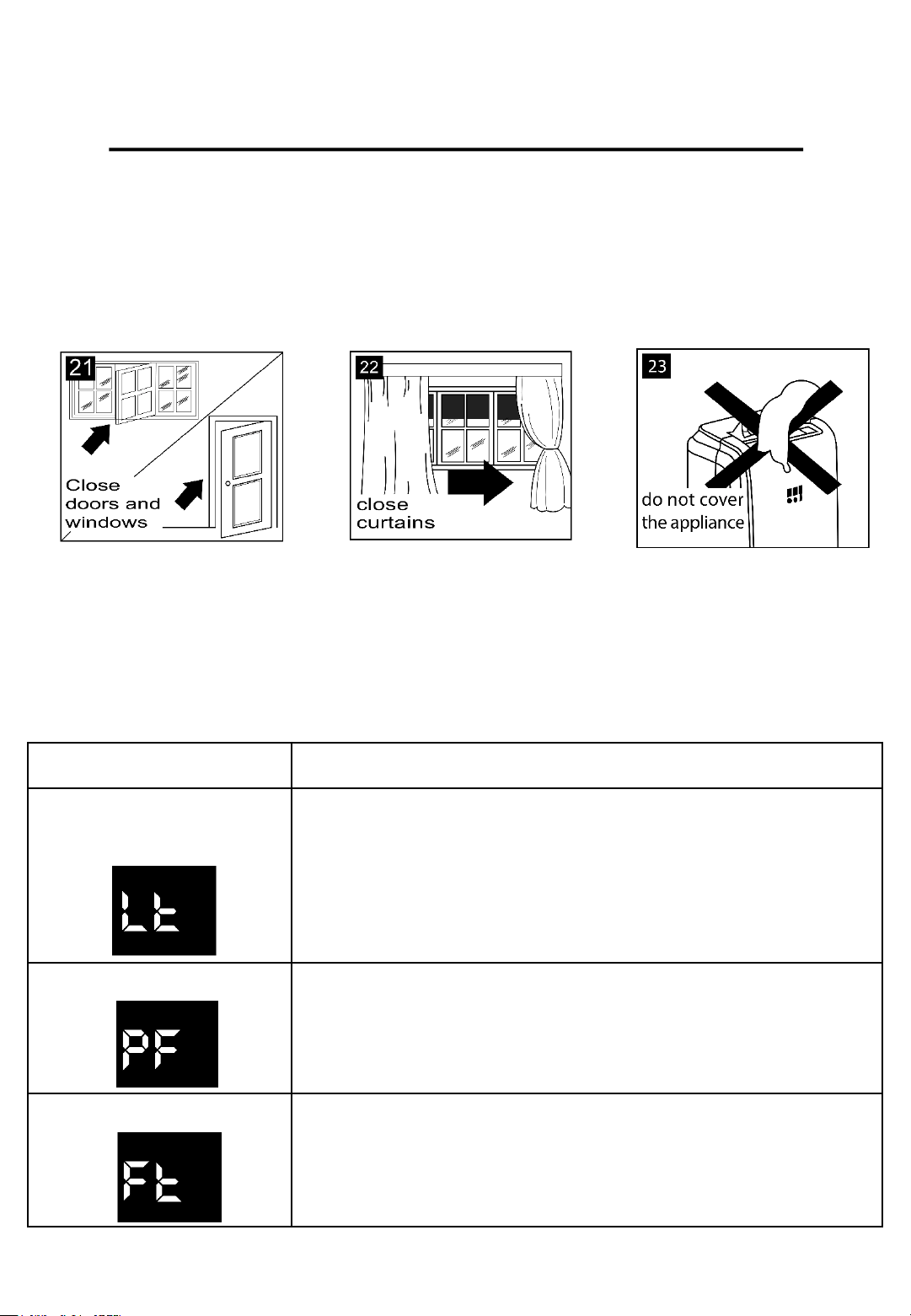
• If possible, close the windows and doors in the room you want to be
air conditioned (Fig 21). When installing the appliance semi-
permanently you should leave a door slightly open (as little as 1cm) to
guarantee correct ventilation.
• Protect the room from direct exposure to the sun by partially closing
curtains and/or blinds to make the appliance much more economical
to run (Fig 22).
• Never rest objects of any kind on the appliance.
• Do not obstruct the air intake and outlet (Fig 23). Ensure the grills are
left free.
• Make sure there are no heat sources within the room.
RHPAC4002 v2.4 20
USING YOUR AIR CONDITIONER
• Never use the appliance in very damp rooms (e.g. Laundry Rooms).
• Never use the appliance outdoors.
• Make sure the appliance is standing on a level surface. If necessary,
place the castor locks under the front wheels.
Self-Diagnosis
This appliance has a self-diagnosis system to help identify a number of
malfunctions.
The following error messages will be displayed is the appliance has
identified a malfunction.
DISPLAY WHAT SHOULD YOU DO?
LOW
TEMPERATURE
The appliance is fitted with a frost protection
device to avoid the excessive formation of ice.
You DO NOT need to do anything when this
happens, the appliance will start back up
automatically once defrosted.
PROBE FAILURE
If this is displayed please contact our Customer
Service team by calling
0345 209 7461.
FULL TANK
Empty the internal safety tank, following the
instructions in the “End of Season Operations”
section of this Instruction Manual
RHPAC4002 v2.4 21
DRAINING YOUR AIR CONDITIONER
Water drainage method
When there is excess water condensation inside the unit, the
appliance will stop running and ‘Ft’ will display (FULL TANK as
mentioned in the self diagnosis). This indicates that water needs
to be drained out using one of the following procedures.
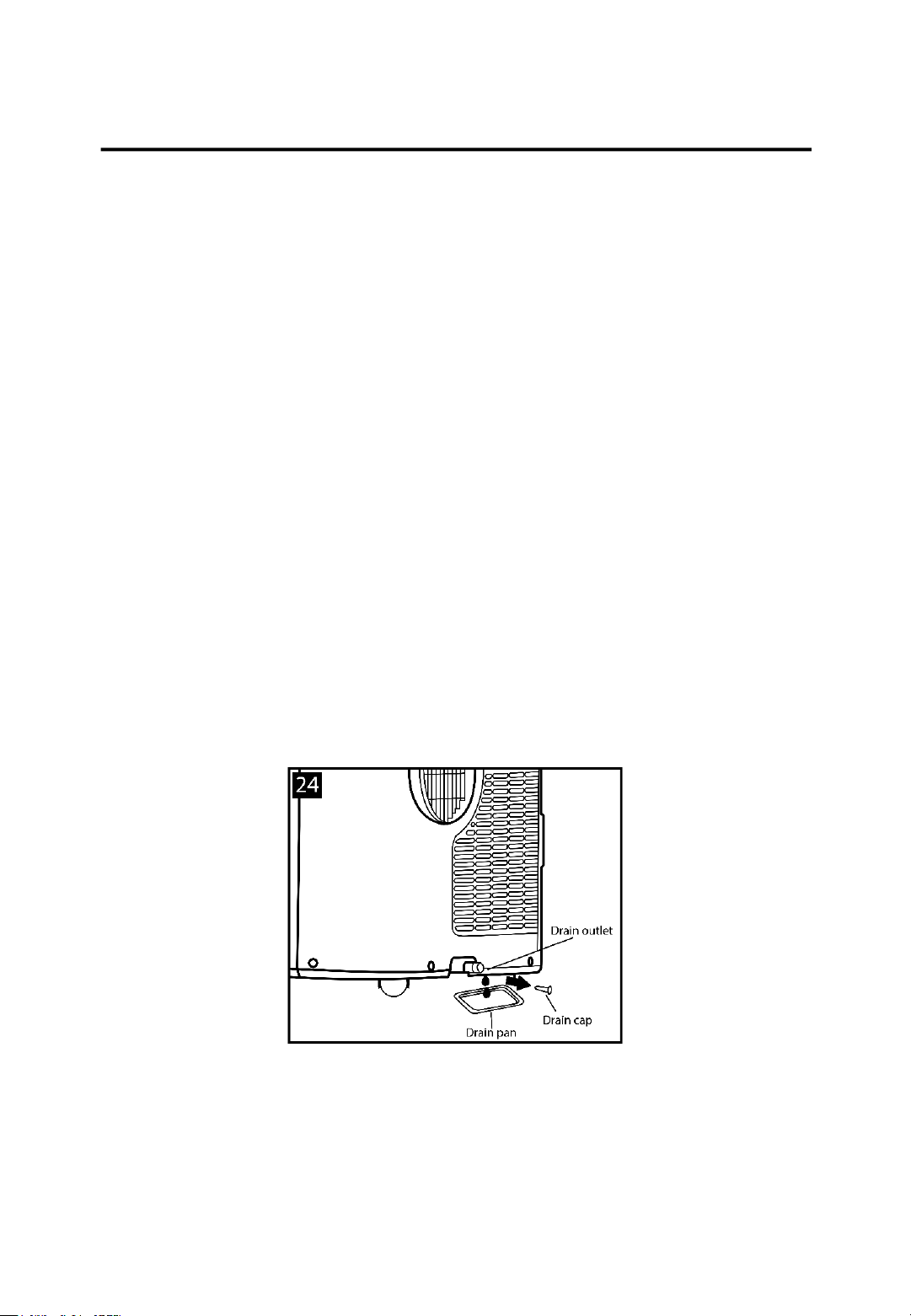
Manual Draining (Fig. 24)
Water may need to be drained in high humidity areas.
1. Unplug the unit from the power source.
2. Place a drain pan under the lower drain plug (see Fig. 24).
3. Remove the lower drain plug
4. Water will drain out and collect in the drain pan (drain pans
not supplied).
5. After all the water has been drained out, replace the lower
drain plug firmly.
6. Plug the unit back into the power source and turn it back on.
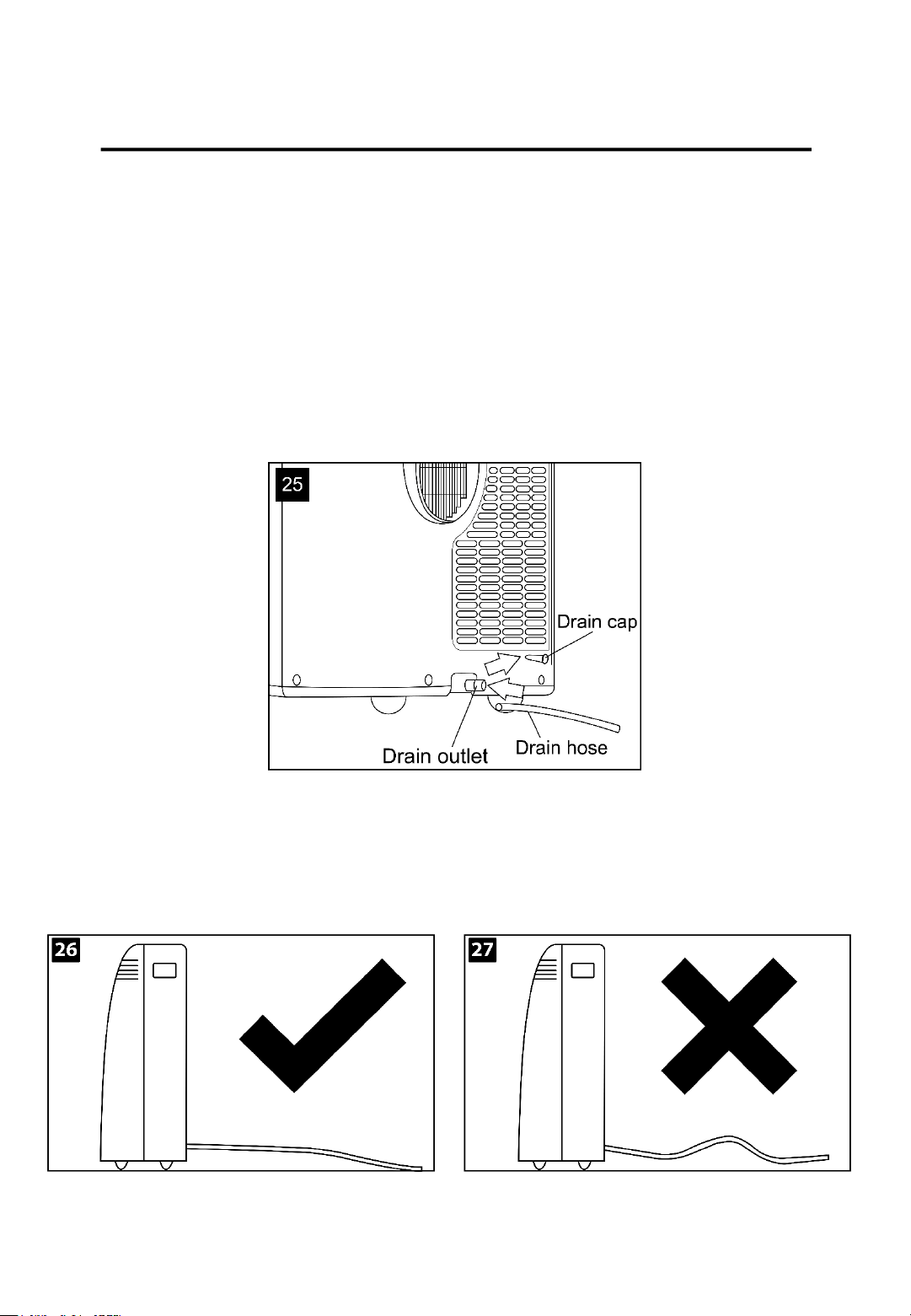
Continuous Draining (Fig. 25)
While using the unit in the dehumidifier mode, it is
recommended to use this method of draining.
1. Unplug the unit from the power source.
RHPAC4002 v2.4 22
DRAINING YOUR AIR CONDITIONER
2. Remove the drain plug. When removing the plug some
residual water may spill out, so ensure you have a pan to
collect the water.
3. Connect the supplied drain hose to the drain outlet.
4. The water can be continuously drained through the hose into
a floor drain or bucket.
5. Plug the unit back into the power source and turn it back on.
NOTE – Please ensure that the height of and the section of the
drain hose should not be higher than the drain outlet , or the
water tank may not be drained (Fig. 26 and 27).
RHPAC4002 v2.4 23
DRAINING YOUR AIR CONDITIONER
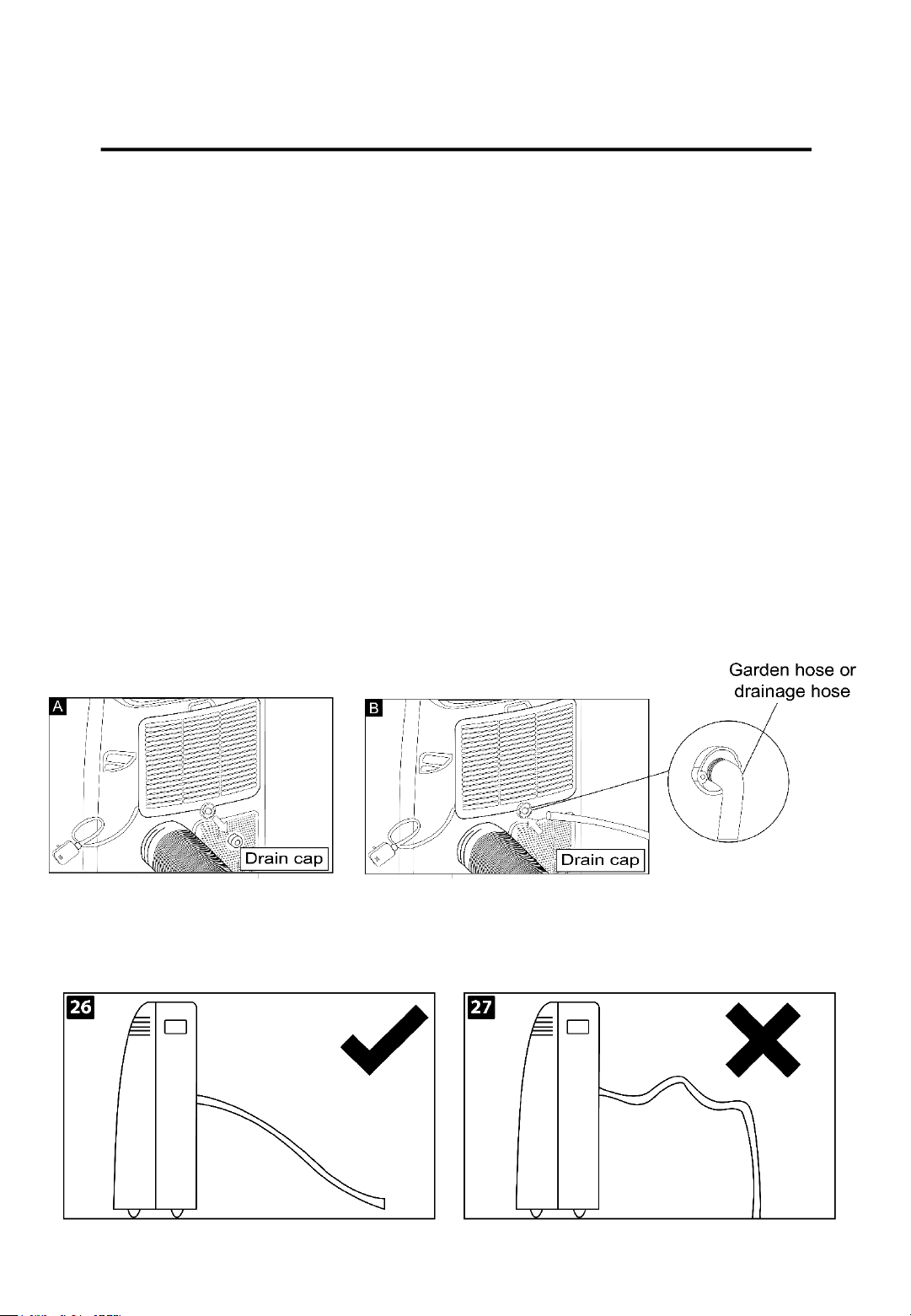
Middle drainage
When the unit is running in DRY mode, you can chose to drain
the appliance through the middle drainage hole. This is done as
follows:
1. Unplug the unit from the power source
2. Remove the drain plug (Fig A). While doing this some residual
water may spill out, so ensure you have a pan to collect the
water.
3. Connect the supplied drain hose to the middle drainage
outlet. (Fig B)
4. The water can be continuously drained through the hose into
a floor drain or bucket.
5. Plug the unit back into the power source and turn it back on.
NOTE – Please ensure that the height of and the section of the
drain hose should not be higher than the drain outlet , or the
water tank may not be drained.
RHPAC4002 v2.4 24
CLEANING YOUR AIR CONDITIONER
Before any cleaning or maintenance, turn the appliance off by
pressing the ON/OFF button on either the control panel or
remote control, wait for a few minutes and then unplug the
appliance from the mains socket.
Cleaning the cabinet
You should clean the appliance with a slightly damp cloth and
then pat dry with a dry cloth.
- Never wash the appliance with water it could be dangerous.
- Never use petrol, alcohol or solvents to clean the appliance.
- Never spray with insecticide or similar liquids.
Cleaning the air filters
To keep your appliance working efficiently, you should clean the
filter every week of operation.
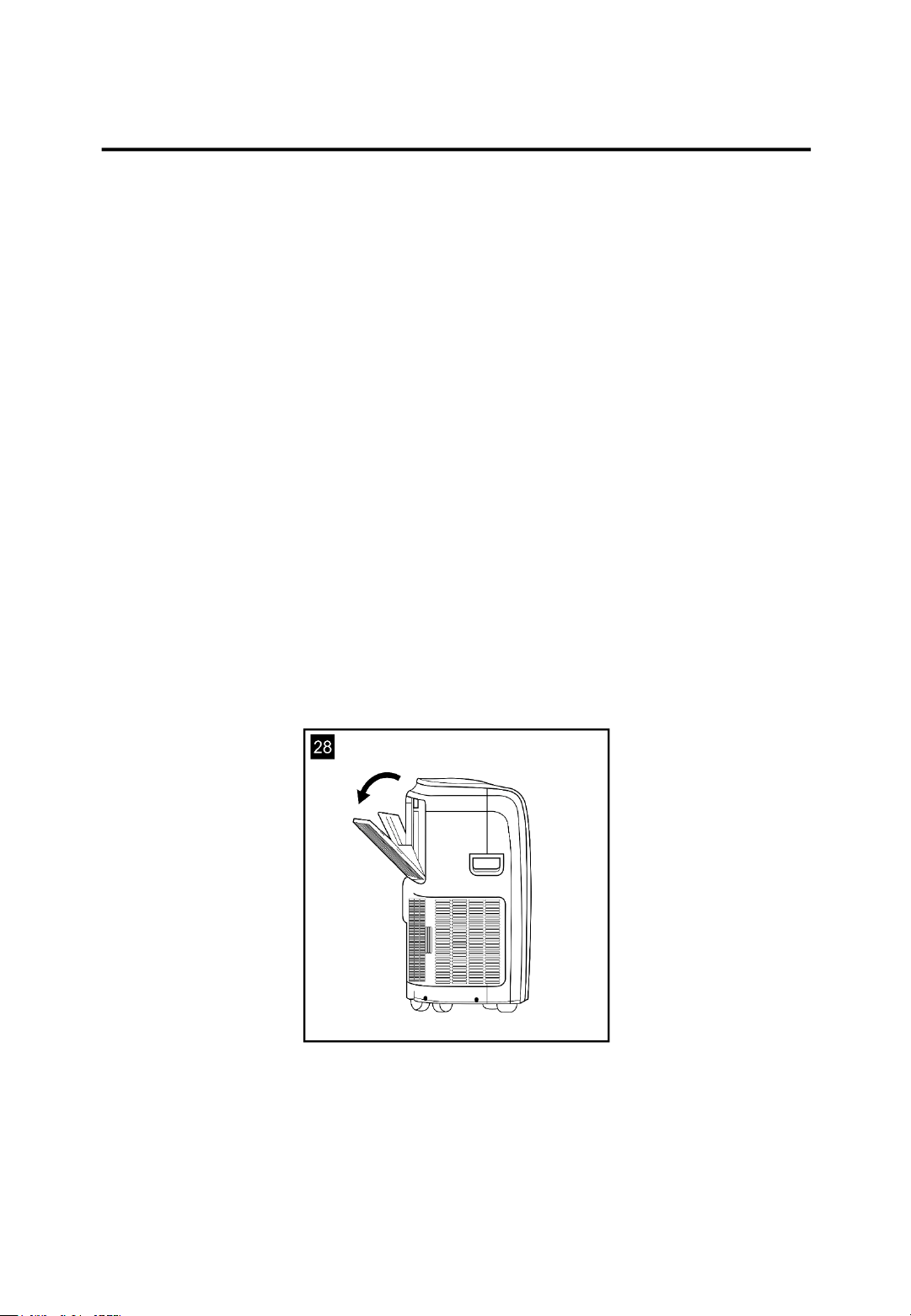
You can remove the evaporator filter as seen in Fig 28.
Use a vacuum cleaner to remove dust accumulation from the
filter. If it is very dirty, immerse the filter in warm water and rinse
it several times, the water should never be hotter than 40°C
(104°F). After washing, leave the filter out to dry and then re-
attach the intake grill to the appliance.
RHPAC4002 v2.4 25
START/END OF SEASON OPERATIONS
Start of season checks
Make sure the power cable and plug are undamaged and the
earth system is efficient.
Follow the installation instructions within this manual precisely.
End of season operations
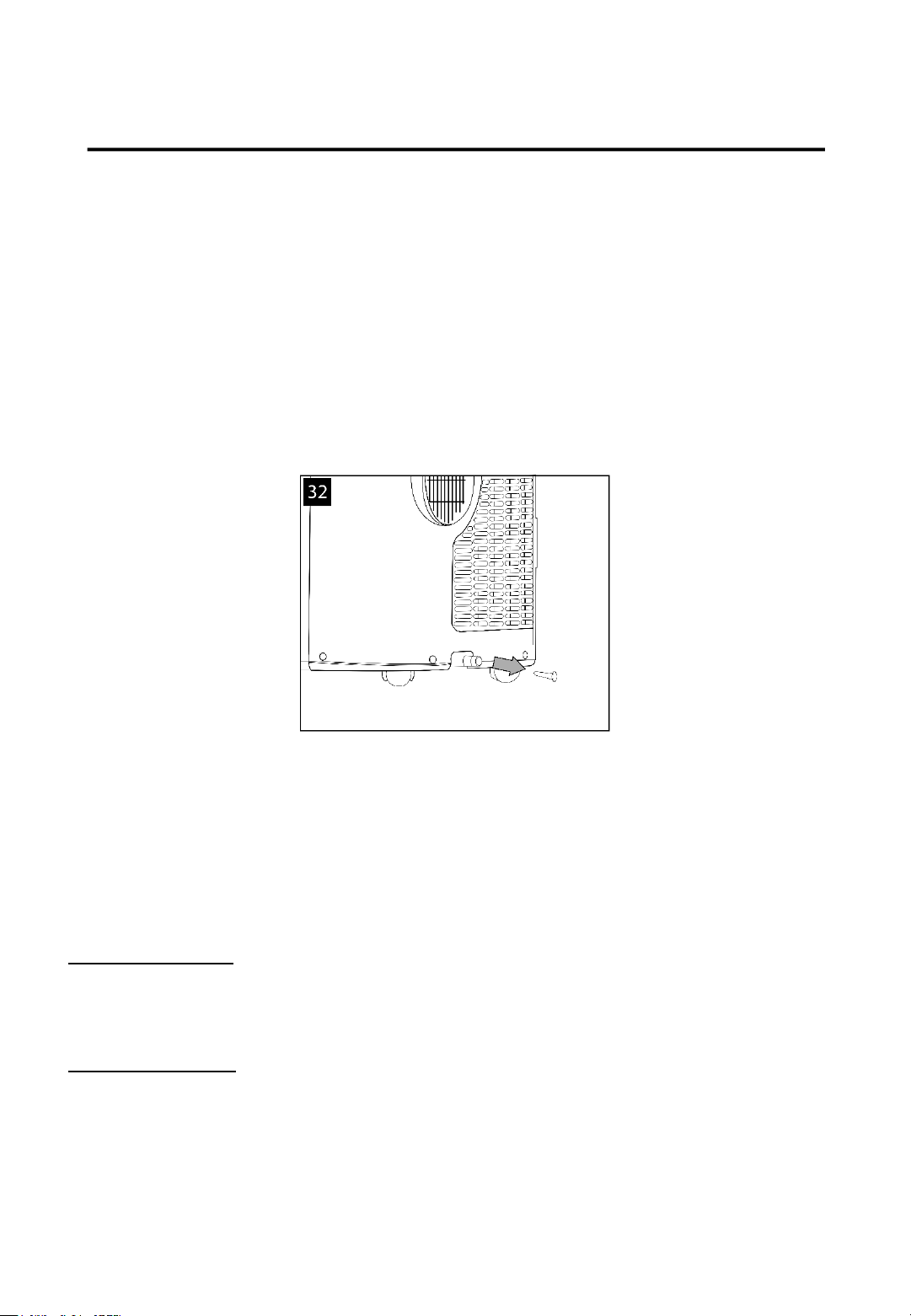
To empty the internal circuit completely of water, remove the
cap (Fig 32) and run all the water off into a pan.
When all the water has been drained, firmly put the cap back in
place. Clean the filter and dry thoroughly before putting it back
into the appliance.
Limit conditions
Cooling Mode
Temperature of room: 18-35°C (64-95°F)
Humidity of room: 30%-90%RH.
Heating Mode
Temperature of room: 10-25°C (50-77°F).
Humidity of room: 30%-90%RH.
RHPAC4002 v2.4 26

TROUBLESHOOTING
PROBLEM CAUSE SOLUTION
The appliance does not
come on
-
There is no current
-
It is not plugged into the
mains
-
The internal safety device
has tripped
-
Wait
-
Plug it into the mains
-Wait 30 minutes and if the
problem persists please
contact our Customer
Service team on
0345 209
7461.
The appliance works for a
short time only
-
There are bends in the air
exhaust hose
-
Something is preventing
the air from being
discharged
-
Position the air exhaust
correctly, keeping it as short
and free of curves as
possible.
-
Check and remove and
obstacles obstructing the air
discharge.
The appliance works but
does not cool the room
-
Windows, doors and/or
curtains are open
-
There are heat sources in
the room (oven, hairdryer
etc.)
-
The air exhaust hose is
detached from the
appliance
-
The technical specification
of the appliance is not
adequate for the room in
which it is located
-
Close doors, windows and
curtains, bearing in mind the
“tips for correct use” given
above
-
Remove the heat sources
-
Fit the air exhaust in the
housing at the back of the
appliance
During operation, there is
an unpleasant smell in the
room
-
The air filter in clogged
-
Clean the filter as
described earlier within this
instruction booklet
The appliance does not
operate for about three
minutes after restarting it
-
The internal compressor
safety device prevents the
appliance from being
restarted until three
minutes have elapsed since
it was last turned off
-
Wait, this delay is part of
the normal operation of the
appliance
The following message
appears on the display:
LT/PF/FT
-
The appliance has a self-
diagnosis system to identify
a number of malfunctions
-
See the SELF-DIAGNOSIS
section of this booklet
RHPAC4002 v2.4 27

SPARE PARTS
For Customer Services & Spare Parts please call 0345 209 7461
Or visit us at https://mda.russellhobbs.com
To check the availability of the following spare parts, simply
contact our friendly Customer Services team using the details
provided at the bottom of this page.
Remote Control
Exhaust Hose
RHPAC4002 v2.4 28

SPECIFICATION
Model
RHPAC4002
Voltage
220
– 240V 50Hz
Power
Input
1000W
Maximum Cooling
Capacity
9000 BTU
Suitable Room Size
10
-16 (m2)
Refrigerant
R290/0.205kg
Overall Size (W x H x D)
42 x 70 x 31 (cm)
Weight
29 KG
Moisture
Removal
1.1 L/hr
Operating Temperature
18
°C - 35°C
Operating Humidity
30%RH
~ 90%RH
RHPAC4002 v2.4 29

NOTES
RHPAC4002 v2.4 30

NOTES
RHPAC4002 v2.4 31

32
Russell Hobbs is a registered trademark used under license from Spectrum Brands
(UK) Ltd. Made under license by
G2S Limited, Wigan, WN2 4AY/G2S (NI) Ltd, Belfast, BT5 5AD
Russell Hobbs Support: call 0345 209 7461 or visit https://mda.russellhobbs.com
.
The ‘wheelie bin’ symbol is known as the 'Crossed-out wheelie bin Symbol'. When this
symbol is marked on a product/batteries, it means that the product/batteries should not be
disposed of with your general household waste. Only discard electrical/electronic/battery
items in separate collection schemes, which cater for the recovery and recycling of materials
contained within. Your co-operation is vital to ensure the success of these schemes and for
the protection of the environment. For your nearest disposal facility, visit
www.recycle-more.co.uk or ask in store for details.
SEDEX – Connecting businesses and their global suppliers to share ethical data and enabling
improvement in ethical performance. Visit www.sedex.org.uk for further information.
We reserve the right, due to possible changes to design, to alter the instruction manual
without prior notice.
v2.4RHPAC4002