Questions, problems, missing parts?
Before returning to your retailer, call our customer service at 1-800-887-6326
Monday – Friday 9:00 a.m. – 5:00 p.m. CST
SKU Number: 346-7200
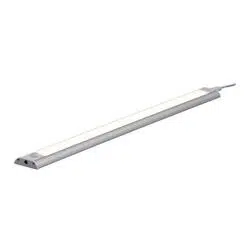
18″ UNDER CABINET LIGHT
Model Number: U2106
HARDWARE CONTENTS Note: Hardware not shown actual size.
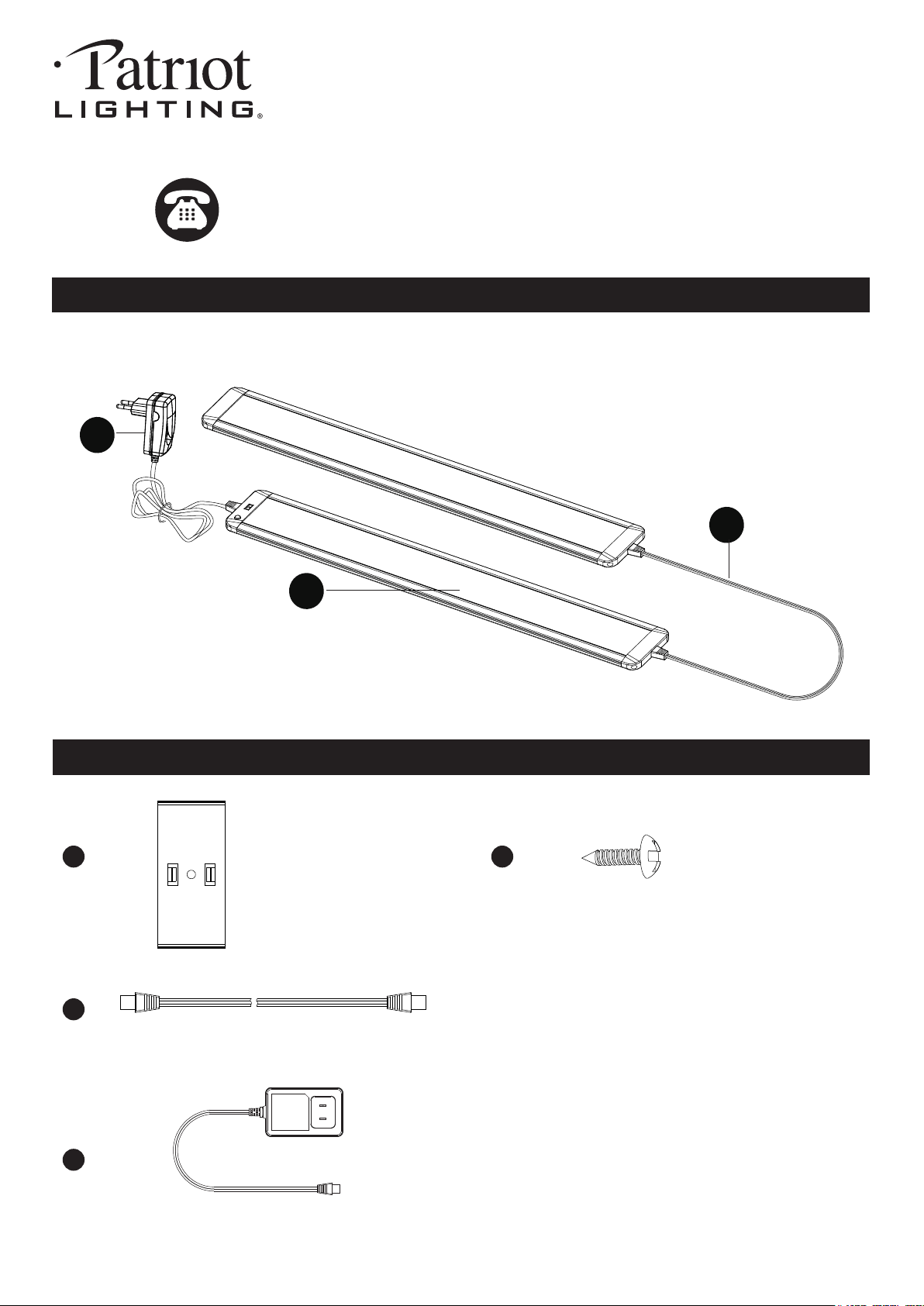
PACKAGE CONTENTS
Drywall Screw
X6
AA
CC
Adaptor
X1
DD
BB
Mounting Clip
X4
Link Cord
X1
211103
DD
A
CC
Page 2 of 4
SAFETY INFORMATION
TION
Please read and understand this entire manual before attempting to assemble, operate or install the product.
WARNING
● Turn off electricity at main fuse box (or circuit breaker box) before beginning installation by removing fuse (or
switching off circuit breaker).
● Be careful not to damage or cut the wire insulation (covering) during fixture installation. Do not permit wires to contact
any surface having a sharp edge. To do so may damage or cut the wire insulation, which could cause serious injury
or death from electric shock.
● LED electronics can be damaged by electro static discharge (ESD) shock. Before installation, discharge yourself
by touching a grounded bare metal surface to remove this hazard. To avoid damage, do not touch the LED module.
CAUTION
● All electrical connections must be in agreement with local codes, ordinances or the national electric code (NEC).
Contact your municipal building department to learn about your local codes, permits and/or inspections.
● Risk of fire – most dwellings built before 1985 have supply wire rated for 140°F/60ºC. Consult a qualified electrician
before installation.
PREPARATION
Before beginning assembly, installation or operation of product, make sure all parts are present. Compare parts with
package contents list and diagram on previous page. If any part is missing or damaged, do not attempt to assemble,
install or operate the product. Contact customer service for replacement parts.
Tools Required for Assembly (not included): Phillips Screwdriver, Safety Glasses, Ladder.
ASSEMBLY INSTRUCTIONS
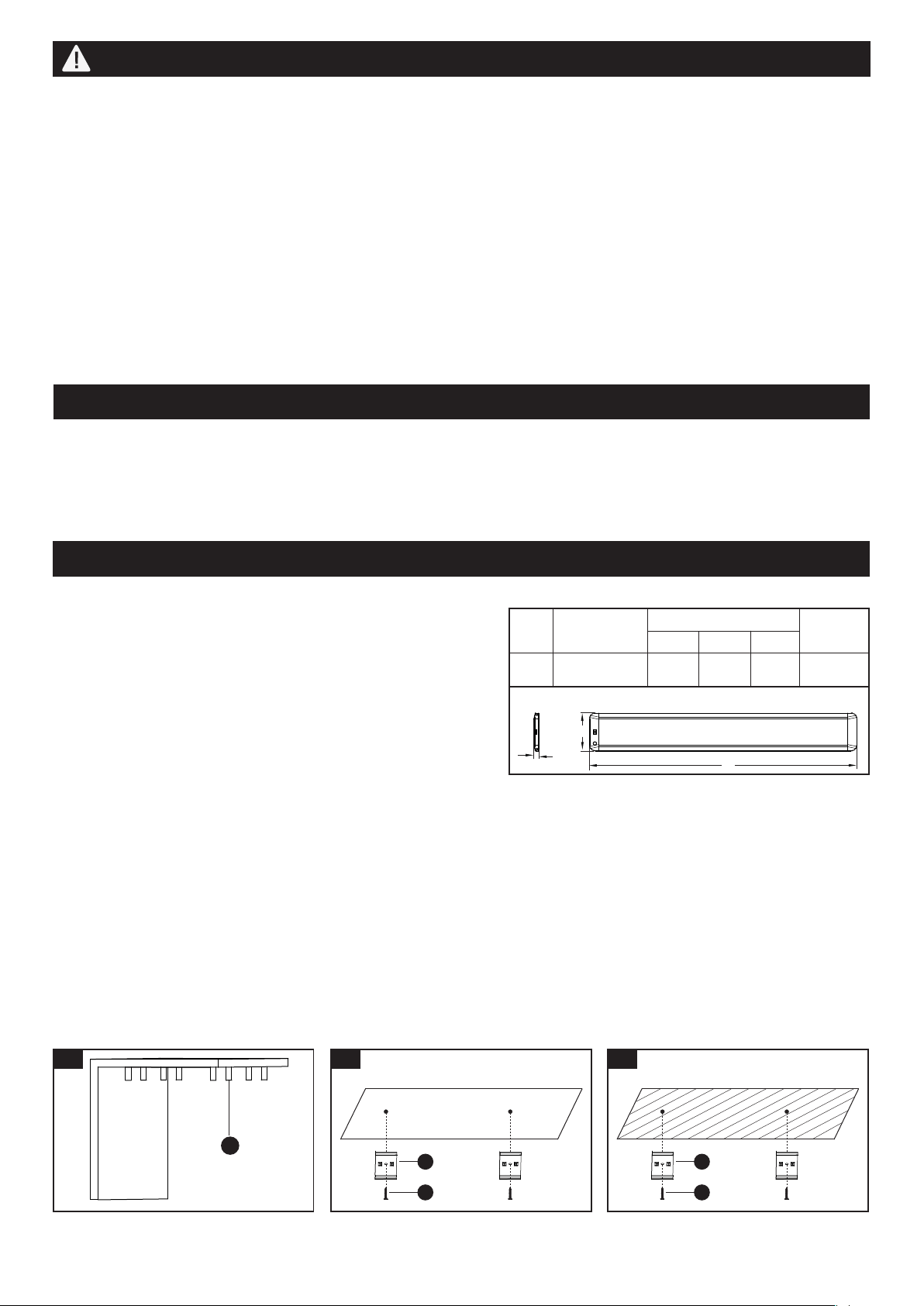
1. ● Identify and mark the desired
location for the LED fixture, then
place the mounting clips (AA) in
the desired location and mark
the intended positions of the
holes with a pencil.
● The distance between two
mounting clips (AA) should be
less than the length of the light,
but more than half the length of
the light.
Installation Steps
Important to know
1. The fixture is dimmable.
2. Do not use in wet locations, use indoors only.
3. Non-replaceable LEDs.
4. Caution: LEDs emit bright light. Avoid looking directly into the
light source for prolonged periods to avoid eye damage.
5. Specifications: Refer to the right chart.
6. Adaptor output: DC 24V 1.5A.
7. Linkable up to three fixtures.
NO.
1
18
2.5
Dimension(inch)
Item #.
346-7200
A
B
C
0.38
Watts
28
211103
1
AA
2
AA
BB
Drywall
A
C
B
2. For mounting to drywall:
Drill holes at the two locations.
Position the mounting clips (AA)
on the locations on the drywall,
then secure them with drywall
screws (BB).
3
AA
BB
Wood
3. For mounting to wood:
Drill holes at the two locations.
Position the mounting clips (AA)
on the locations on the wood, then
secure them with drywall
screws (BB).
Page 3 of 4
ASSEMBLY INSTRUCTIONS (continued)
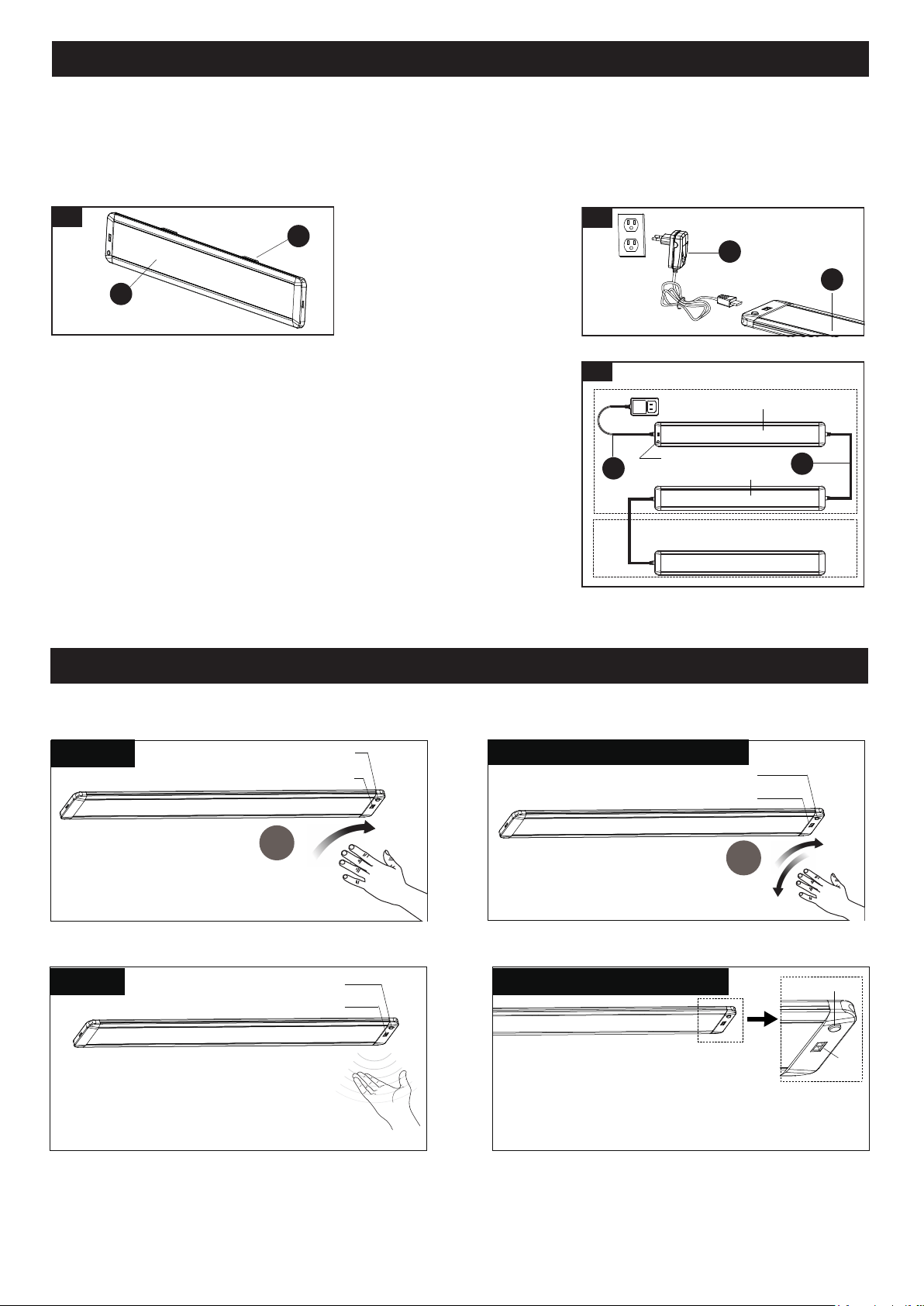
5. Plug the connector of the adaptor (DD) into light
fixture (A) and plug the adaptor (DD) into outlet.
The connector of the adaptor (DD) must be
plugged into the end with sensor.
6.
Linking multiple fixtures:
The fixture can be connected together in a series using the link cord (CC)
included with this product. It will also work with SKU# 346-7201
(Sold Separately), but only one can be connected.
1. Two fixtures can be connected by inserting the link cord (CC) into the
connecting hole at the end of the fixtures. When using the link
cord (CC), the maximum distance between two light fixtures is 18",
and the connector of the link cord ("TOP" mark) must be consistent
with the light-emitting surface.
2. Provide power to the fixtures only after all linking connections have
been made.
3. Only the parent light needs to be plugged into an outlet.
4. Attach the light fixture (A) to the mounting clips (AA) by
sliding one side of the fixture into the mounting clips (AA)
first, then press and push the other side of the fixture into
the mounting clips (AA).
211103
FUNCTION AND OPERATION
4
AA
A
1x
2x
Dimming
IR Sensor Switch
CCT (Correlated Color Temperature)
Button Switch
CCT (Correlated Color Temperature)
Button Switch
CCT (Correlated Color Temperature)
Button Switch
The Brightness Locked Or Unlocked
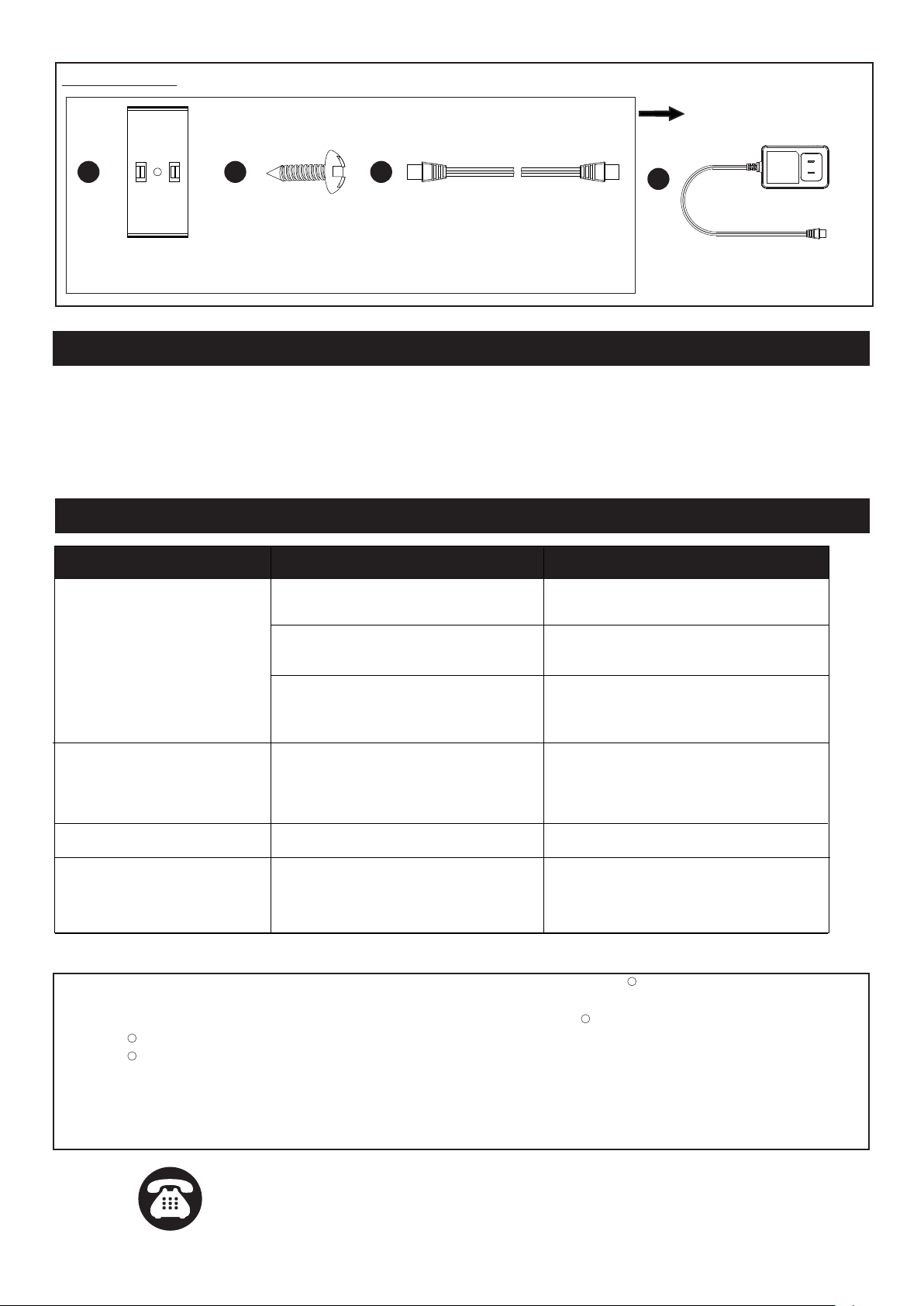
To select the desired color temperature,
cycle through 2700K-4000K-5000K by
pressing the CCT button. When the color
temperature of the light needs to be adjusted, the brightness
of the light must be locked first to prevent interference with
the IR sensor when pressing the CCT button switch.
Selected The Color Temperature
ON-OFF
CCT Button Switch
IR Sensor
Switch
TURNING LIGHTS ON, OFF
Wave hand under sensor once to
turn light on or off.
DIMMING LIGHTS
Hold hand under sensor to adjust brightness.
NOTE: Dimming ranges from 100% ~10%
brightness.
Outlet
5
DD
A
IR Sensor Switch
Child Light
SKU# 346-7200 Parent Light
SKU#346-7201 (Sold Separately)
DD
CC
6
For all the below operations, the distance between the hand and the sensor shall be within 4".
All linked Child Light (s) can be controlled by the IR sensor switch and CCT (Correlated Color Temperature)
button switch on the parent light.
The brightness of the light can be
locked or unlocked by quickly waving
to the sensor twice. If it is locked or unlocked
successfully, it will flash once respectively.
IR Sensor Switch
IR Sensor Switch
Page 4 of 4
211103
TROUBLESHOOTING
CARE AND MAINTENANCE
Caution: Before attempting to clean the fixture, disconnect the power to the fixture by turning the breaker off or
removing the fuse from the fuse box.
This LED light fixture is made from quality materials that will last many years with minimum care. You may want to
periodically clean the fixture with a soft cloth. To maintain the best appearance of the fixture, do not use cleaners with
chemicals, solvents or harsh abrasives. Do not use liquid cleaner on the LEDs, LED drive, or wiring inside the light
fixture.
If unable to fix any of the above issues, please consult a certified electrician.
Spare Parts List:
Assembly Kit
6422MM (1 SET)
The following parts are available for re-order if damaged or missing. Call our toll free at 1-800-887-6326
FIVE-YEAR LIMITED WARRANTY: If, during normal use, this PATRIOT LIGHTING lighting fixture breaks or fails
due to a defect in material workmanship within five (5) years from the date of original purchase, simply bring this
lighting fixture with the original sales receipt back to your nearest MENARDS retail store. At its discretion, PATRIOT
LIGHTING agrees to have the product or any defective part(s) repaired or replaced with the same or similar PATRIOT
LIGHTING product or part free of charge, within the stated warranty period, when returned by the original purchaser
with original sales receipt. This warranty; (1) excludes expendable parts including but not limited to light bulbs; (2) does
not cover damage that has resulted from abuse or misuse; and (3) does not cover any losses, labor, injuries to
persons/property or costs. This warranty does give you specific legal rights and you may have other rights, which vary
from state to state.
R
R
R
R
Adaptor
X1
7197PA
Drywall Screw
X6
AA BB
Mounting Clip
X4
CC
Link Cord
X1
DD
POSSIBLE CAUSE CORRECTIVE ACTION
The power is off.
Check to ensure the power
supply is on.
Check to ensure the circuit
breaker is in the on position.
Check to ensure proper wire
connections are made. Contact a
qualified electrician.
The circuit breaker is off.
There is a bad connection.
The IR Sensor is interfered.
The light is affected when
adjusting the CCT Button
Switch.
Too many fixtures connected. Linkable up to three fixtures at most.
Lock the IR Sensor first then adjust
the CCT Button Switch.
PROBLEM
The fixture doesn't light up.
The light flashes.
The wires are crossed or the power
wire is grounding out.
Check to ensure proper wire
connections are made. Contact a
qualified electrician.
The fuse blows or circuit
breaker trips when the light
is turned on.
Questions, problems, missing parts?
Before returning to your retailer, call our customer service at 1-800-887-6326
Monday – Friday 9:00 a.m. – 5:00 p.m. CST