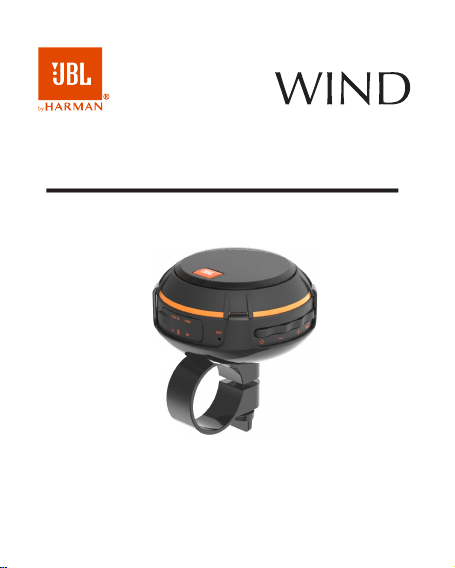
Owner´s manual
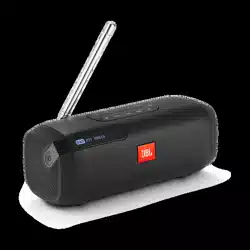
2 in 1 - On the road and on the go speaker

2
Product Overview
Package Contents
1. 1x WIND BT Speaker main unit
2. 1x USB charging cable
3. 1x Aux cable
4. 1x Carabiner
5. 1x Bracket
6.
Compatibility
The product is compatible with BT enabled devices, including I phone,
I Pad, I Pod, Android Phone, tablets and etc. It is also compatible with
devices which have 3.5mm earphone jack to connect to the product.
Features
Wireless and To-Go
Easy connection with your electronic devices wirelessly and use it portably.
The wireless working range is around 8-10 meters (30 feet), no cords and
no hassle.
Hand free calling on-the-go
With a built-in microphone, the unit takes on your calls just free and easy.
2-in-1 design for use in bicycle and backpack
Congratulations for purchase of WIND! To ensure a proper use of WIND
please read this manual before you start to use. Also, please safely keep
this manual for future reference and trouble shooting.
1x User's manual
3
Carabiner and bicycle bar mounter with bracket are provided for two uses
in carrying it over.
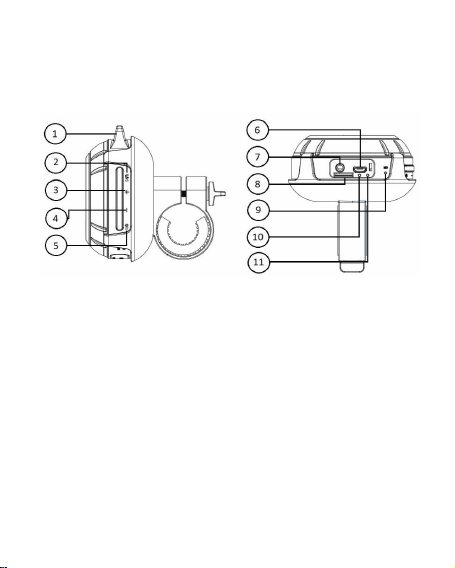
Product Interface
(1) Handle for hanging a carabiner
(2) Play/pause (BT, aux and micro SD / TF), FM Scan and Mute (Radio)
(3) Volume + ( Long press ) - All functions
(4) Volume – ( Long press ) - All functions
(5) "ON / OFF" and "Source" button (BT, aux, micro SD TF and radio)
(6) Connection for USB charging
(7) AUX input
(8) Micro SD / TF Card
(9) Microphone
(10) LED battery charge indicator
Next (Short press) - BT, micro SD / TF and radio functions
Lap (Short press) - BT, micro SD / TF and radio functions
BT connection LED indicator (11)

4
Getting Started
Two easy steps to get your JBL WIND ready to enjoy.
Step 1: Charging before use
Connect your WIND BT Speaker to a USB power source
using the enclosed
USB charging cable.
Step 2: Connecting to play
BT connection
Direct Connection
As soon as the portable WIND box is turned on, the BT indicator will blink and
signal to confirm that the unit is currently in BT pairing mode. Access the BT
settings on your phone, tablet or computer to locate the device called "JBL
WIND" and press to select. A signal will be issued to confirm that the device
has been satisfactorily paired in seconds. The next time you use the WIND
device, the product will automatically connect to your devices once pairing
has been performed. To disconnect the device, press the "Play / Pause"
button for 5 seconds and it will start pairing a new available device.
OBS.: This process needs to be performed only on first use.
region as soon as your radio is ready for use.
press the "Play / Pause" button up to start scanning th FM radios of your
When you turn on your JBL WIND for the first time, after playing the radio,
Click the "+" and "-" buttons to advance and return the radios respectively.
beep, it will start playing the FM radio.
As soon as WIND is turned on, press the source select button again, after the
FM Radio connection
The WIND Portable Box can also connect to devices that have a handset
output or a line-out using the AUX cable shipped with the device.
Micro SD / TF card
Play your music through a micro SD / TF card. Click the "source" button to
switch between signal inputs.

5
Speaker Phone
After paired your mobile phone to
WIND with BT, the speaker phone function
can be used.
Make call : Call will automatically transfer to the speakerphone. If not, tap
play/pause button;
Answer call: Tap play/pause button to answer the incoming call;
when it is not in a call.
play/pause button to redial last number Double tapRedial last number:
Reject call: Hold play/pause button to reject the incoming call;
on during the call to end the call;End call: Tap play/pause butt
Laptop / notebook / PC
Connection
for 10 minutes before turn on the unit.
the unit if the unit is not used longer than 7 days, please chargeNote:
LED indicator will stay on while charging, and goes off after fully charged.
The 4.
fully charge the BT speaker; tohours 2It will take about 3.
indicator will light up while charging;
n the unit. The charging iConnect the Micro USB jack to the USB charging port 2.
;source (like PC, USB power adapter…etc.)
Connect the standard USB end of the supplied USB cable to a USB power 1.
the speaker when you hear the beep.
the speaker, please charge
hen the power is low, a beep will comes out fromW
Charge
As the BT versions for these types of devices vary greatly, the connection methods
will differ as well. If you cannot connect with the WIND BT Speaker using the previous
method instructed, you may need to install a new version of the BT driver.
Please refer the instructions of device for details.

6
Technical parameters
Note: All specifications are subject to change without notice.
place
blank -Do not set the unit in a damp, high temperature or a sun point
unit and place the unit with accessories into the package
If the unit will not be used for an extended period of time, power off the
rage Sto
these can cause the casing to be warped or discolored
Do not use alcohol, benzene, thinners or other chemical detergents as
free cloth to wipe gently-Use a soft, dry, lint
Power off the unit first before clear
instructions below before cleaning the unit: Please follow the
Maintenance
SPL Max: 80dB
IP45 (OBS.: With the connections cover closed)
Memory card capacity: 32GB
Working atmosphere: 0°C 40°C / 20% 90% RH
Working range: up to 10m
BT Version: 4.1
BT Profile Supported: A2DP, AVRCP
Output power: 3W RMS
Built-in Lithium Ion battery: 3.7V 800mAh
Power Supply: USB 5V, 1A
Product name: Wind
Check if the BT indicator light is on. If the indicator light is off, please press
Solution:
successfully after multiple attemptsIssue: Pairing is un
Troubleshooting
the power button to turn the unit on. If the BT indicator light still doesn't come
on after pressing the power button, please charge the unit.

7
Check for other BT devices around the surroundings that may interfere
and charge if necessary.
Please check if the battery level of the unit and the BT device
that may interfere with the signal.
Avoid using the device between concrete or other building structures
Solution:
Issue: Interference or static during playback
attempt pairing again.
Unplug any cables plugged into the AUX IN, restart all devices and then
Power off and then power on the unit to restart the BT function of the unit
devices off. with searching and turn
or your BT device.
Issue: Radios are not working well.
Solution:
Check that the radios have been scanned according to instructions on page 4
heating installation, cooking stove or other heating devices);
t from any overheating devices (such as radiator, Protect the using of the uni
glass, pot, and please avoid placing candle on the speaker surface as well;
Do not place any ware with full water on the top of the unit, such as vase,
contact with water;
ng the unit nearby basins or sinks where it may come in Avoid usi
Do not drop, unpack, open, beat, curve, prink and burn the unit;
;cause the unit to topple and fall, resulting in possible damage or injury
Always position the unit on a stable and level surface. Unstable surface can
listed below:
the guidelines
free operation, please abide by
-
order to make sure the accident
This product is specially designed based on the full attention to safety; in
Safety Instructions
8
Regardless of what reasons cause the unit damage, have the repair
performed only by on authorized JBL dealer or service center;
If you want to do the cleaning, please turn off the unit and unplug the power
cable from the outlet first;
Set the volume properly to prevent injury to the unit and your health;
recycling.
product was purchased. They can take this product for environmental safe
and collection systems or contact the retailer where the use the return
sustainable reuse of material resources. To return your used device, please
uncontrolled waste disposal, recycle it responsibly to promote the
To prevent possible harm to the environment or human health from
sehold wastes throughout the EU. should not be disposed with other hou
This marking indicates that this product . Correct Disposal of this product
only with the same or equivalent type.
CAUTION: Danger of explosion if battery is incorrectly replaced. Replace
the apparatus.
No naked flame sources, such as lighted candles, should be placed on
ne, fire or the like.excessive heat such as sunshi
The battery (battery or batteries or battery pack) shall not be exposed to
WARNING:

9
Warning:
and casual use on a bicycle as an entertaining device. We are not liable to risk
in using WIND while you ride on a bicycle for speed racing, BMX performance,
down hill riding, jumping and etc. Please always use WIND on a bike in a manner
of safe riding.
WIND is designed as multipurpose speaker which includes common

HARMAN International Industries, Inc.
Headquarters:
400 Atlantic St.
Stamford, CT 06901 - USA.
www.harman.com
© 2017 HARMAN International Industries, Incorporated. All rights reserved.
Harman do Brasil Industria Eletrônica e Participações Ltda. is a trademark of
Harman International Industries, registered in the United States and/or other
countries. Features, specifications and appearance are subject to change without
notice.
Printed in China