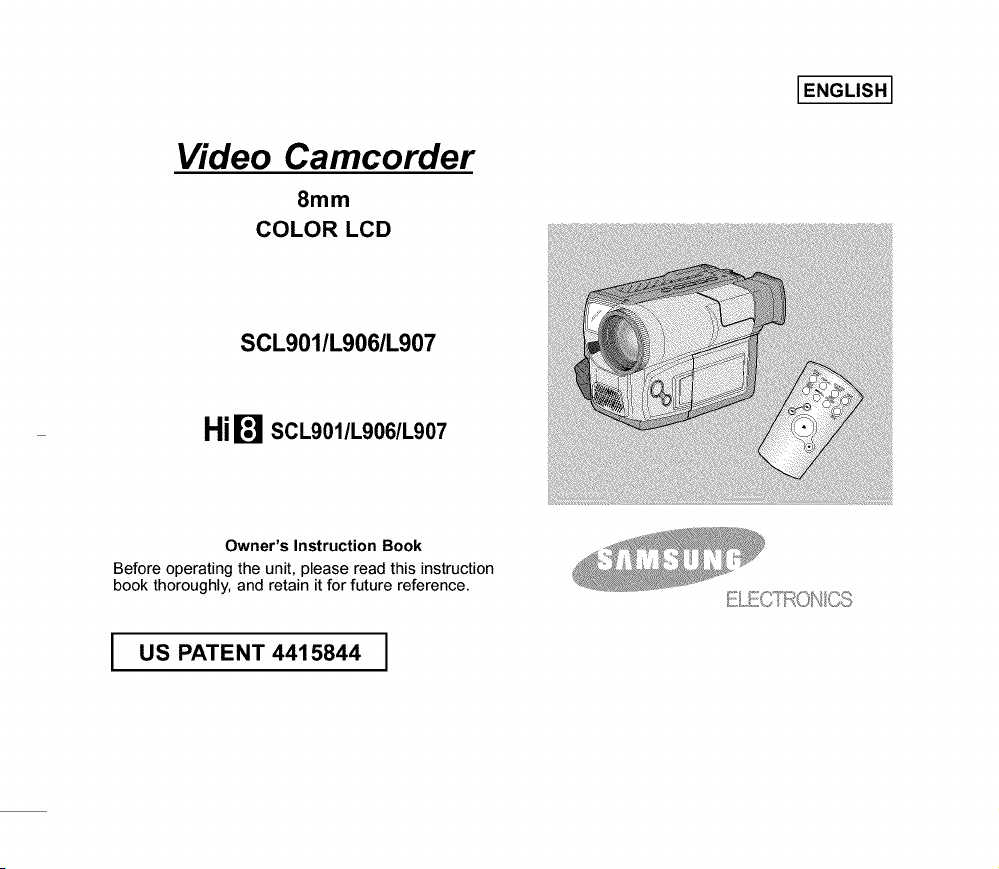
Video Camcorder
8mm
COLOR LCD
I ENGLISH I
SCL901/L906/L907
HiW SCL901/L906/L907
Owner's Instruction Book
Before operating the unit, please read this instruction
book thoroughly, and retain it for future reference.
E/,,ECTRONCS
I US PATENT 4415844

I ENGLISH I
Notices and Safety Instructions
_oY_,Tuj/[o_
/_ RISK OF ELECTRIC //_SHOCK
DO NOT OPEN
CAUTION:
TO REDUCE THE RISK OF ELECTRIC SHOCK, DO NOT
REMOVE COVER(OR BACK). NO USER SERVICEABLE
PARTS INSIDE, REFER SERVICING TO QUALIFIED
SERVICE PERSONNEL.
To prevent electricshock, match wide blade of plug
to wide slot and fully insert.
,_ This symbol is intended to alert the user to the presence of
uninsulated dangerous voltage within the product's
enclosurethat may be of sufficient magnitudeto constitute
a risk of fire or electric shock.
///_ This symbol is intended to alert the user to the presence of
important operatingand maintenanceinstructions in the
literature accompanyingthis product.
1. READ INSTRUCTIONS:
All the safety and operatinginstructionsshould be read
beforethe CAMCORDERis operated.
2. RETAININSTRUCTIONS:
The safety and operating instructionsshouldbe retained for
future reference.
3. HEEDWARNINGS:
All warnings on the CAMCORDERand in the operating
instructionsshould be adhered to.
4. FOLLOW INSTRUCTIONS:
All operatingand maintenanceinstructionsshould be
followed.
5. CLEANING:
Unplugthis CAMCORDERfrom the wall outlet before
cleaning.
Do not use liquidor aerosol cleaners.
Usea dry cloth usedfor dusting cabinets.
6. ATTACHMENTS:
Do not useattachments not recommendedby the
CAMCORDERproductmanufactureras they may be
hazardous.
7. WATERAND MOISTURE:
Do not use this CAMCORDER near water;
for example, near a bathtub,wash bowl, kitchensink, laundry
tub, in a wet basement,near a swimming pool or lake.
8. ACCESSORIES:
Do not place this CAMCORDERon an unstablecart, stand,
tripod, bracket or table. TheCAMCORDER may fall, causing
serious injury to a child or adult, and serious damage to the
unit.
Useonly with a cart, stand, tripod, bracket, ortable
recommended bythe manufactureror sold with the
CAMCORDER.Any mountingof the unit shouldfollow the
manufacturer's instructionsand should usea mounting
accessory recommendedby the manufacturer.
A. An appliance and cart combinationshould be moved with
care.
Quick stops, excessiveforce and unevensurfaces may
cause the appliance and cart combinationto overturn.
PORTABLECART WARNING
(Symbolprovided by RETAC)
I ENGLISH I
Notices and Safety Instructions
9, VENTILATION:
Slotsand openingsin the cabinet are providedfor
ventilationto ensure reliableoperation of the
CAMCORDERand to protectit from overheating.These
openingsmustnot be blocked or covered. Never place
your CAMCORDERon a bed, sofa, rug, or other similar
surface:on or near a radiatoror heat register.
ThisCAMCORDERshould not be placed in a built-in
installationsuch as a bookcase or rackunless proper
ventilationis providedor the manufacturer's instructions
havebeen adhered to.
10. POWERSOURCES:
The CAMCORDERshould be operatedonly from the
typeof power source indicated on the label.
If you are not sure of the type of power supply at your
home,consult your appliance dealer or local power
company.
A CAMCORDERis intendedto be operated from battery
power,or other sources, referto the operating
instructions.
11. GROUNDINGOR POLARIZATION:
ThisCAMCORDER may be equippedwith either a
polarized2-wireAC line plug (a plug havingone blade
widerthan the other) or a 3-wire grounding type plug, a
plughaving a third (grounding)pin.
If you are unableto insert the plug fully into the outlet, try
reversingthe plug.If the plug still fails to fit, contact your
electricianto replace your outlet. Do not defeatthe safety
purposeof the polarizedplug.
12.
13.
POWER-CORDPROTECTION:
Power-supplycords should be routed so that they are not
likely to be walked on or pinched by items placedupon or
againstthem, paying particularattention to cords or plugs,
convenientreceptacles, and the point where they exit
from the unit.
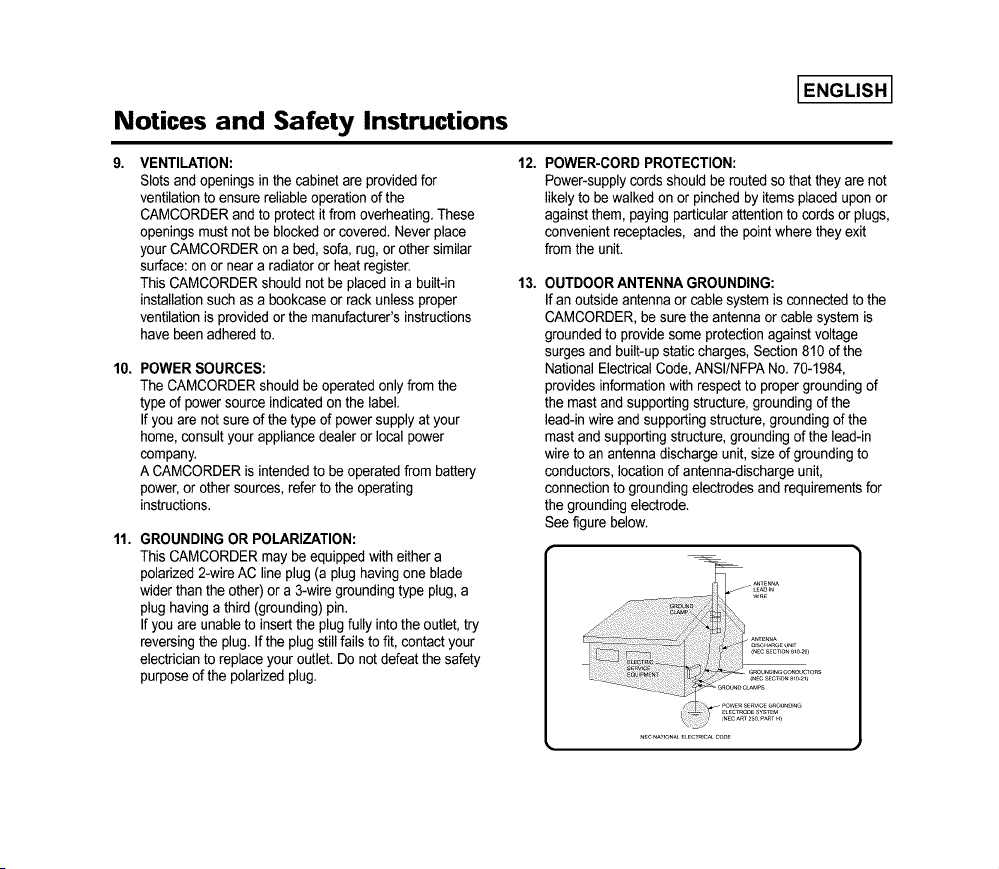
OUTDOORANTENNA GROUNDING:
If an outside antennaor cable system is connectedto the
CAMCORDER,be surethe antennaor cable system is
groundedto provide some protection againstvoltage
surges and built-up staticcharges, Section 810 of the
National ElectricalCode,ANSI/NFPANo. 70-1984,
provides informationwith respectto proper groundingof
the mast and supportingstructure,grounding of the
lead-in wire and supportingstructure,grounding of the
mastand supportingstructure, groundingof the lead-in
wire to an antenna dischargeunit,size of groundingto
conductors,locationof antenna-dischargeunit,
connectionto grounding electrodesand requirementsfor
the grounding electrode.
See figure below.
[ENGLISH]
Notices and Safety Instructions
14. LIGHTNING:
Foradded protectionof this CAMCORDERduring a
lightningstorm when it is left unattendedand unusedfor
longperiods of time, unplugit from the wall outlet and
disconnectthe antennaor cable system.
This will prevent damageto the CAMCORDERdue to
lightningand power-line surges.
15. POWERLINES:
An outside antennasystem should not be located in the
vicinity of overhead powerlines or otherelectriclight or
power circuitswhere it can fall into such power linesor
circuits. When installingan outsideantennasystem,
extreme careshould be taken to keep from touching such
power linesor circuits as contact withthem might be fatal.
16. OVERLOADING:
Do not overload wall outlets and extension cords as this
can result in a risk of fire or electricshock.
17. OBJECTS AND LIQUIDS:
Never pushobjects of any kind intothis CAMCORDER
through openingsas they may touch dangerousvoltage
pointsor short out a part that could result in a fire or
electricshock.
Neverspill liquidsof any kind onto the CAMCORDER.
Should spillage occur, unplugunitand haveit checked by
a technicianbefore use.
19. DAMAGE REQUIRINGSERVICE:
Unplugthis CAMCORDERfrom the walloutlet and refer
servicingto qualified service personnelunder the following
conditions:
a. When the power-supplycord or plugis damaged.
b. If any liquid has beenspilled onto, or objects have
fallen into the CAMCORDER.
c. If the CAMCORDERhas been exposedto rain or
water.
d. If the CAMCORDERdoes not operate normallyby
followingthe operating instructions,adjust only those
controlsthat are covered by the operating instructions.
Improperadjustmentof other controlsmay result in
damageand will often require extensivework by a
qualifiedtechnicianto restore the CAMCORDERto its
normaloperation.
e. If the CAMCORDERhas been droppedor the cabinet
has beendamaged.
f. When the CAMCORDERexhibitsa distinct change in
performance,this indicatesa needfor service.
20. REPLACEMENTPARTS:
When replacementparts are required,be sure the service
technician has usedreplacementparts specifiedby the
manufacturerand having the same characteristicsas the
originalpart.
Unauthorizedsubstitutions mayresult infire, electric
shockor other hazards.
18. SERVICING:
Do not attemptto servicethis CAMCORDERyourself.
Opening or removingcovers may expose you to
dangerous voltage or other hazards.
Refer allservicing to qualifiedservicepersonnel.
21. SAFETYCHECK:
Upon completionof any serviceor repairsto this
CAMCORDER,ask the service technicianto perform
safetychecks to determine that the CAMCORDERis in
safeoperating order.

Notices and Safety Instructions
22. To prevent damagewhich may result in fire or shock
hazard,do not expose this appliance to rain or moisture.
23. If this powersupply is used at 240Vac, a suitable plug
adapter should be use.
I ENGLISH I
NOTE TO CATV SYSTEM INSTALLER:
This reminderis providedto call the CATVsystem installer's
attention to Article820-40 of the NEC that providesguidelines
for propergrounding and, in particular,specifiesthat the cable
ground shall be connectedto the grounding system of the
building as close to the pointof cable entry as practical.
USER INSTALLER CAUTION:
Your authorityto operatethis FCC certifiedequipmentcould be
voided if you makechanges or modificationsnot expressly
approvedby this party responsiblefor complianceto part 15
FCC rules.
NOTE:
"Hg LAMP(S) INSIDE THIS PRODUCT CONTAIN
MERCURY AND MUST BE RECYCLED OR
DISPOSED OF ACCORDING TO LOCAL, STATE
OR FEDERAL LAWS"
00732M SCL901 SEA (1-19) 12/26/03 10:39 AM ¢7e 2
I ENGLISH I
Contents
Features ......................................................................................................................................................................................................................... 8
Descriptions
• Front View/Side View/Rear View ............................................................................................................................................................... 9, 10, 11
• OSD (On Screen Display) .................................................................................................................................................................................. 12
Accessories Supplied with the Camcorder .................................................................................................................................................................. 14
Remote Control (SCL906/L907 only) .......................................................................................................................................................................... 15
• Self Timer Recording ........................................................................................................................................................................................... 15
Adjusting the Hand Strap and Shoulder Strap ............................................................................................................................................................ 16
Attaching the Lens Cover ............................................................................................................................................................................................ 17
Lithium Battery Installation .......................................................................................................................................................................................... 17
Connecting the Power Source ..................................................................................................................................................................................... 18
• To use the AC Power Adapter ............................................................................................................................................................................. 18
• To use the Battery Pack ...................................................................................................................................................................................... 19
Using the Battery Pack ................................................................................................................................................................................................ 20
• Continuous Recording time table ........................................................................................................................................................................ 20
• Battery Level Display ........................................................................................................................................................................................... 21
Inserting and Ejecting a Cassette .............................................................................................................................................................................. 22
..... ..... _:
Making your First Recording ....................................................................................................................................................................................... 23
Hints for Stable Image Recording .............................................................................................................................................................................. 25
• Recording with LCD Screen ................................................................................................................................................................................ 25
• Recording with Viewfinder ................................................................................................................................................................................... 25
Adjusting the LCD ........................................................................................................................................................................................................ 26
Adjusting Focus of the VIEWFINDER ......................................................................................................................................................................... 27
Playing back a tape on the LCD ................................................................................................................................................................................. 28
• Adjusting the LCD during PLAY .......................................................................................................................................................................... 29
• Controlling the Sound from the Speaker ............................................................................................................................................................. 29
• Viewing a Still Picture .......................................................................................................................................................................................... 29
• Picture Search ..................................................................................................................................................................................................... 29
Zooming In and Out ..................................................................................................................................................................................................... 30
Digital Zoom ................................................................................................................................................................................................................ 31
EASY mode (for Beginners) ........................................................................................................................................................................................ 33
CUSTOM-Creating your own customized recording settings ...................................................................................................................................... 34
DIS (Digital Image Stabilizer, SCL906/L907 only) ....................................................................................................................................................... 35
MF/AF (Manual Focus/Auto Focus) ............................................................................................................................................................................ 36
BLC 37

00732M SCL901 SEA (1-19) 12/26/03 10:39 AM ¢7e 3
I ENGLISH I
Contents (continued)
Program AE (Automatic Exposure) ............................................................................................................................................................................. 38
DSE (Digital Special Effects) in CAMERA mode ......................................................................................................................................................... 40
Setting and Recording DATE/TIME ............................................................................................................................................................................. 42
Selecting and Recording a Title ................................................................................................................................................................................... 44
Fade In and Out .......................................................................................................................................................................................................... 46
Snap Shot (SCL906/L907 only) ................................................................................................................................................................................... 47
White Balance ............................................................................................................................................................................................................. 48
Selecting OSD Language ............................................................................................................................................................................................ 49
Demonstration ............................................................................................................................................................................................................. 50
Setting the Date/Title Color ......................................................................................................................................................................................... 51
Lighting Techniques ..................................................................................................................................................................................................... 52
To watch with LCD ...................................................................................................................................................................................................... 53
To watch with TV ........................................................................................................................................................................................................ 53
Various Functions in PLAYER mode ........................................................................................................................................................................... 55
Adjusting the LCD ........................................................................................................................................................................................................ 56
Setting the Speaker ON/OFF ...................................................................................................................................................................................... 56
DSE in PLAYER mode ................................................................................................................................................................................................ 56
Multi Playback (Using a PAL60 System) ..................................................................................................................................................................... 57
Transferring a Digital Image through a USB Connection ............................................................................................................................................ 58
Installing USB Media 2.0 Program .............................................................................................................................................................................. 59
Cleaning and Takingcare of the Camcorder ............................................................................................................................................... 62
• Cleaning the Viewinder ...................................................................................................................................................................... 62
• Cleaning the LCD Panel ....................................................................................................................................................................... 62
• Cleaning the Video Heads .................................................................................................................................................................. 62
• Storing the Camcorder ......................................................................................................................................................................... 62
Self Diagnosis Display ................................................................................................................................................................................ 64
Checking ...................................................................................................................................................................................................... 65
Moisture Condensation ................................................................................................................................................................................ 67

00732M SCL901 SEA (1-19) 12/26/03 10:39 AM ¢7e 4
I ENGLISH I
Notices and Safety Instructions
Please rotate the LCD screen carefully as illustrated•
Unintended rotation maycause damage to the inside of the hinge that connects the LCD screen to the Camcorder.
1) LCD screen closed•
2) Standard recording by using the LCD screen•
3) Making a recording by looking at the LCD screen from the top.
4) Making a recording by looking at the LCD screen from the front.
5) Making a recording with the LCD screen closed.
1)
2)
10 o
4)
5)
90°
•_ Do not let the LENS point toward the sun.
Direct sunlight can damage the CCD (Charge Coupled Device)•
00732M SCL901 SEA (1-19) 12/26/03 10:39 AM ¢7e 5
I ENGLISH I
Notices and Safety Instructions
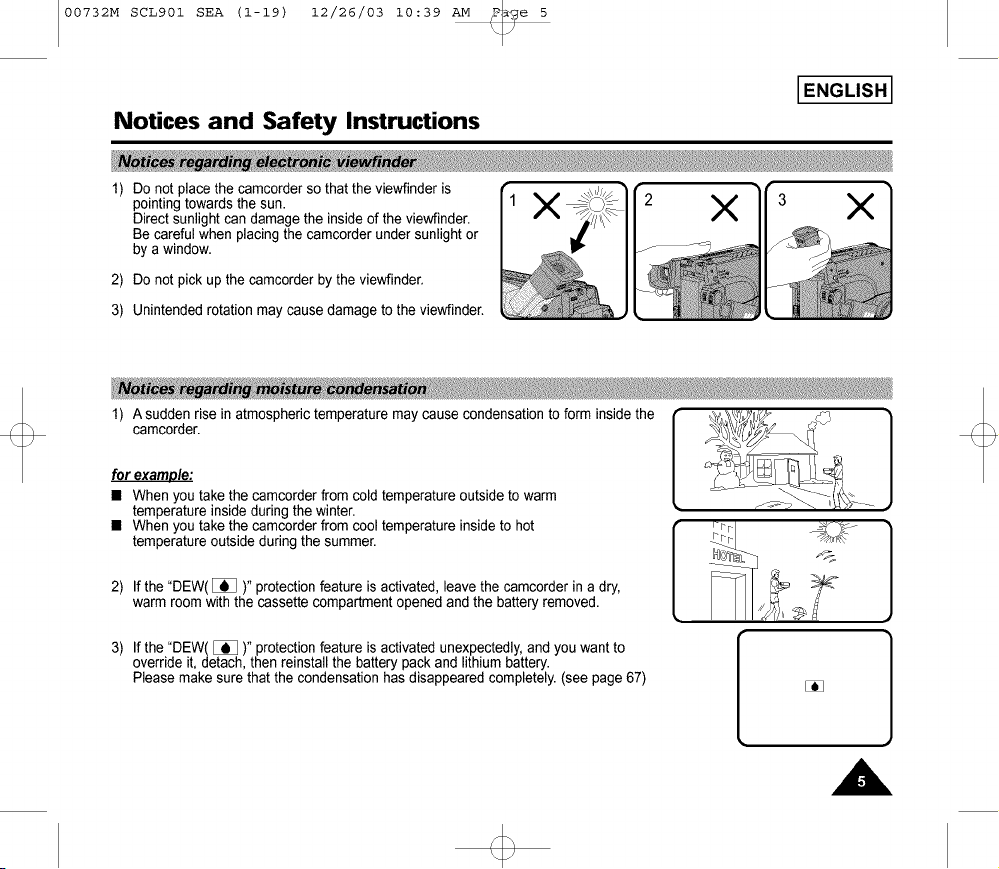
1) Do not place the camcorder so that the viewfinder is r
pointing towards the sun. |1 X X X
Direct sunlight can damagethe inside of the viewfinder.
Be careful when placing the camcorder under sunlight or
by a window.
2) Do not pick up the camcorder by the viewfinder.
3) Unintended rotation may cause damage to the viewfinder.
for example:
• When you take the camcorder from cold temperature outside to warm
temperature inside during the winter.
• When you take the camcorder from cool temperature inside to hot
temperature outside during the summer.
1) Asudde_ise in atmospherictemperature may cause condensation to form insidethe __k__]
2) If the "DEW([]_ )" protectionfeature is activated, leave the camcorder in a dry,
warm room with the cassette compartment opened and the battery removed.
3) If the "DEW( []_ )" protectionfeature is activated unexpectedly,and you want to
override it, detach, then reinstall the battery pack and lithium battery.
Please make sure that the condensation has disappeared completely.(see page 67)
[
]

00732M SCL901 SEA (1-19) 12/26/03 10:39 AM ¢7 e 6
I ENGLISH I
Notices and Safety Instructions
÷ Make sure that the battery pack is charged before recordingoutdoors.
÷ To preserve battery power, keep your camcorder turned off when you are not operating it.
÷ When your camcorder is in CAMERA mode, if it is left in STANDBY for more than 5 minutes without operation,
it will automatically turn off to protectagainst unexpected battery discharge.
÷ It is a good ideato use the viewfinder instead of the LCD when recording for a long time because the LCD uses more
battery power.
÷ Make sure that the battery pack is fitted firmly into place.
Dropping the battery pack might damage it.
÷ When the battery reaches the end of its life, please contact your local dealer.
The batteries have to be dealt with as chemical waste.
Keep the LITHIUM BATTERYout of the reach of children. Should the battery be swallowed,
consult a doctor immediately.
÷ The lithium battery maintains the CLOCK function, TITLE, CUSTOMfunction and preset contents memory;
even if the battery pack or AC power adapter is removed.
÷ The lithium battery for the camcorder lasts about 8~10 months under normal operationfrom time of installation.
÷ When the lithium battery becomesweak or dead, the date/time indicatorflashes about 5 seconds when you set the power
switch to CAMERA. When this occurs, replace the lithium battery with type CR2025. (see page 17)
WARNING:
LITHIUM BATTERY MUST BE RECYCLED OR DISPOSED Y
OF PROPERLY.

00732M SCL901 SEA (1-19) 12/26/03 10:39 AM ¢7e 7
I ENGLISH I
Notices and Safety Instructions
_ • _ • _ , • _ _ , ' _ < _ '_I_• _ !__ _i__!_!_!_!_!_!_!_!_!_!_!_!_ i
1) TheLCD Screen ismanufacturedbyusing high precisiontechnology.
However,there may be sometinyspecks(red, blueor green incolor)that appearon the ,,_
LCD Screen.Thesespecksare normaland do not affectthe recordedpicturein any way. "'~_
2) Whenusingthe LCD Screenoutdoorsindirect sunlght, it maybe difficulttoview.ifthis occurs,use the viewfinder. ___
3) The LCDScreen'sOSD is turned offwhen the LCD is placedin the forwarddirection.
÷ It is veryimportantto adjustthe handstrapfor betterrecording.(see page16)
÷ Do notinsert yourhand inthe handstrapforcibly,the bucklemay bedamaged.
_ _r ,_ _
÷ To ensurenormalrecordingand clearpicture,cleanthe video heads.Whenplayingback the pictures,iftheyare noisyor hardly
visible,the video headsmaybe dirty.If this happens,cleanthe video headswitha dry typecassettecleaner.
÷ Do notusea wet type cassettecleaner.It may damagethe video heads.(seepage62)
÷ To protectagainsttapeand head-drumwear, yourcamcorderwill automaticallyturnoff if it is leftin STANDBYmodewithout
operationformore than5 minutes.

00732M SCL901 SEA (1-19) 12/26/03 10:39 AM ¢7e 8
ENGLISH]
Getting to Know Your Camcorder
Your camcorderhasmany featuresfor recordingand playingback.
Youcan selectthe appropriateOSD LanguageamongEnglish,French,Spanish.
The SnapShotfunctionletsyou recordan objectat a standstillfor a limitedtime inCameramode.(see page47)
Whenyou recorda subjectwiththe lightsource behindthe subjector a subjectwitha light background,use the BLCfunction.
(seepage37)
The DSEenablesyou to give a creativelookto your filmsby addingvariousspecialeffects.(seepage40)
The ProgramAE enablesyouto adaptthe shutterspeedand apertureto the type of sceneto be filmed.(see page38)
The DIScompensatesforunstableimagescausedby handshake,particularlyat highmagnification.(see page35)
Zoomingis a recordingtechniquethat lets youchangethe sizeof the subjectinthe picture.
Formore professionalrecordings,usethe zoomfunction.(see page30)
Zooms morethan22x areperformeddigitally.(seepage 31)
The macrofunctionallowsyouto recordyour subjectat closerange.
You haveto adjustthe zoom fullywide for macrorecording.(see page30)
This modeenableseven the beginnerto easily make a recording.(seepage33)
PAL60is a specialoutputsignal formatwithwhicha PALTV canbe usedto view a tape recordedbyan NTSCrecorder.

00732M SCL901 SEA (1-19) 12/26/03 10:39 AM ¢7e 9
I ENGLISH I
Getting to Know Your Camcorder
1.
2.
3.
4.
5.
2. REC SEARCH _ (REW)
3. LIGHT
(PLAY/STILL)
6.
13. VIDEO LIGHT
1. LENS
9. Remote Senso_
8. MIC
4. REC SEARCH _ (FF)
5. DAT_TIME(STOP)
7. EVF
10. LCD
11. CUSTOM
12. EASY
Lens (see page 68)
REC SEARCH_ (REW)
REC SEARCH _ works inSTANDBYmode.(see page24)
REWworksin PLAYERmode.(see page55)
LIGHT (PLAY/STILL)(see page 54)
PLAY/STILLworksin PLAYERmode.
LIGHTworksin CAMERAmode.(SCL906/L907only)
The built-invideolightturns onwhen LIGHTis pressed.
It enablesrecordinginlow-lightconditions.
REC SEARCH_ (FF)
REC SEARCH _ worksinSTANDBYmode.(see page24)
FF worksinPLAYERmode.(seepage55)
DATE/TIME(STOP)
DATEFIIMEworksin CAMERAmode.(seepage42)
STOPworksinPLAYERmode.(see page54)
6. TAPEEJECT (see page 22)
Use whenejectingthe tape.
7. EVF (Electronic Viewfinder)
8. MIC
MIC worksin CAMERAmode.
9. Remote Sensor(SCL906/Lg07only)
10.LCD (see page26)
11.CUSTOM
CUSTOMworks inCAMERAmode.
12.EASY
EASYworks inCAMERAmode.
13.VIDEO LIGHT(SCL9061L907only)
/
00732M SCL901 SEA (1-19) 12/26/03 10:39 AM _e I0
IENGLISHI
Getting to Know Your Camcorder
24. BLC
MENU ON/OFF
23. FADE
15. ENTER (MF)
20. SPEAKER _ 16. UP/DOWN Dial (VOLUME)
22. LCD Open _ 17. S-VIDEO out
18. P.AE
19. DSE
21, Lithium Battery
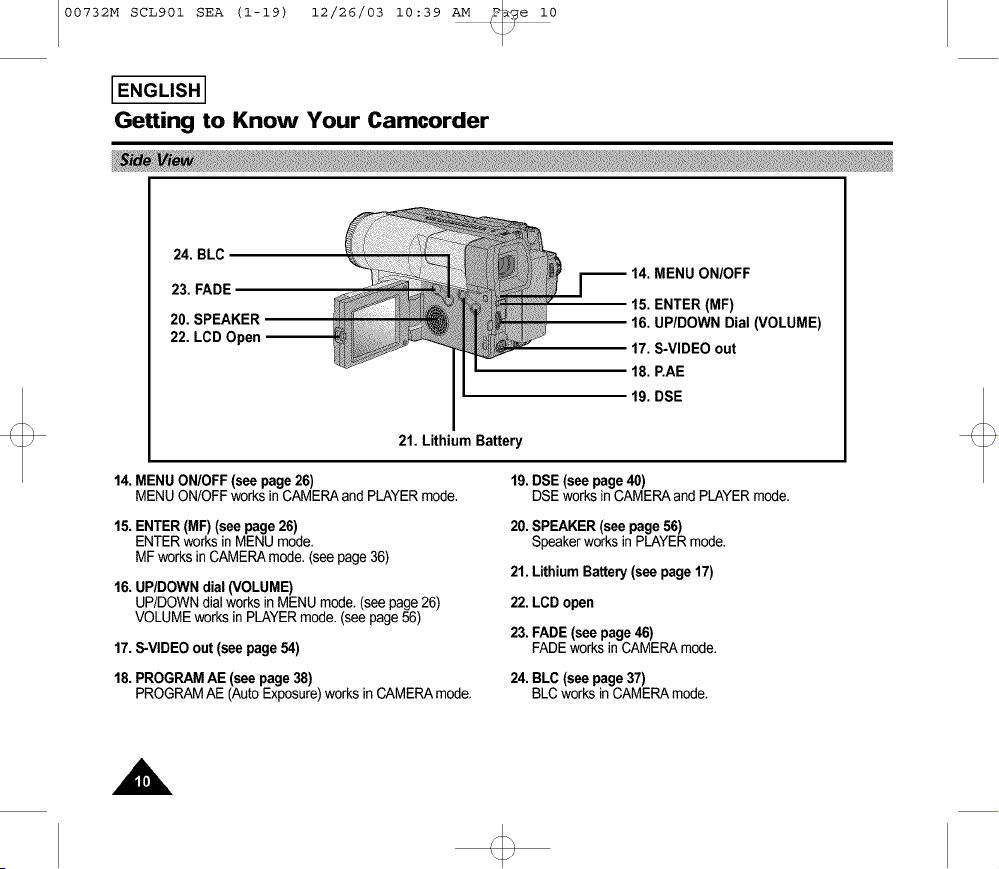
14.MENU ONIOFF(see page26)
MENU ON/OFFworks in CAMERAand PLAYERmode.
15.ENTER(MF) (see page26)
ENTERworksin MENUmode.
MF works inCAMERAmode.(seepage 36)
16. UP/DOWN dial (VOLUME)
UP/DOWN dial works in MENU mode. (see page 26)
VOLUME works in PLAYER mode. (see page 56)
17.S-VIDEOout (see page54)
18.PROGRAMAE (see page 38)
PROGRAMAE (AutoExposure)worksin CAMERAmode.
19. DSE (see page 40)
DSE works in CAMERA and PLAYER mode.
20. SPEAKER (see page 56)
Speaker works in PLAYER mode.
21. Lithium Battery (see page 17)
22. LCD open
23. FADE (see page 46)
FADE works in CAMERA mode.
24. BLC (see page 37)
BLC works in CAMERA mode.

00732M SCL901 SEA (1-19) 12/26/03 10:39 AM _e II
I ENGLISH I
Getting to Know Your Camcorder
25. ZOOM
36. BATTERYEJECT
27. Hooksforshoulderstrap_
28. AUDIONIDEO Out
32. START/STOP
35. Battery
38. Recharging Indicator
34. DC Jack
31. POWER Switch
26. CASSETTE Compartment
(SCL907only)
MIC
(SCL906/L907 only)
P
30. Hand Strap
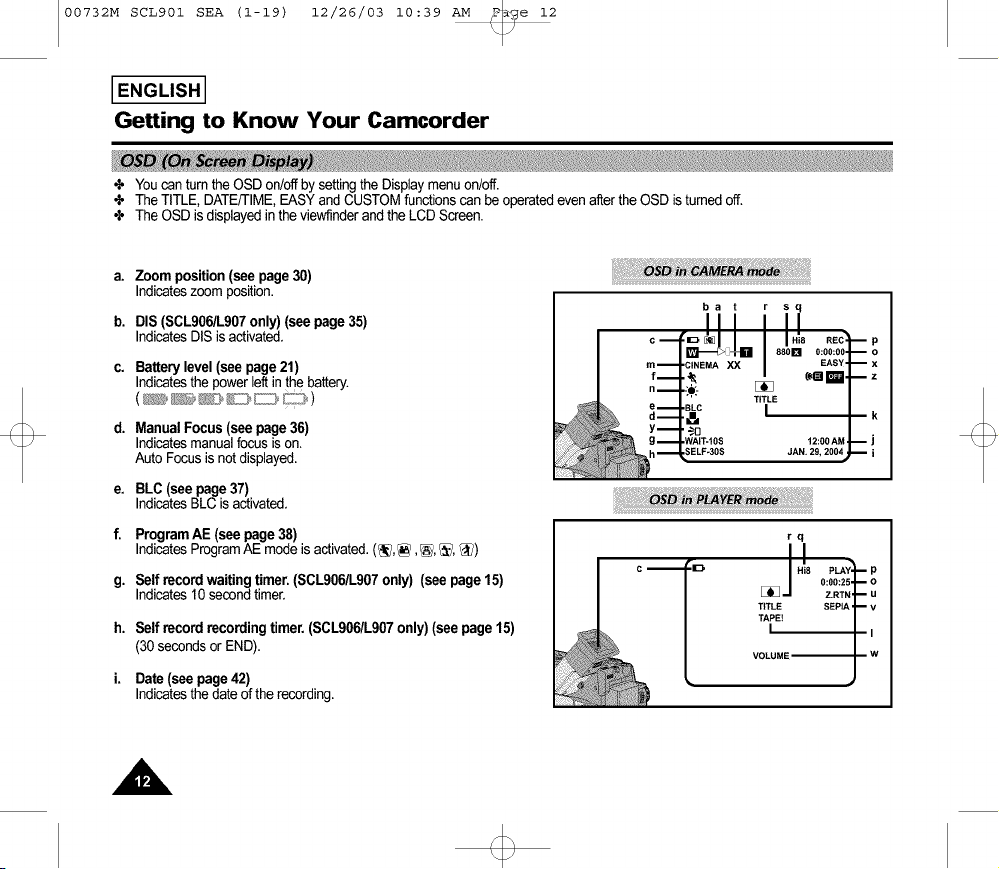
25. ZOOM (see page30)
26. CassetteCompartment
27. Hooksfor ShoulderStrap(see page 17)
28. AUDIONIDEOout (see page53)
29. LENSCap
30. HandStrap (see page16)
31. POWERSwitch(see page18)
- CAMERA: Selectto record.
- OFF : Selectto turn off the camcorder.
- PLAYER: Selectto playback.
32. STARTISTOP(see page23)
START/STOPworksin CAMERAmode.
33. External MIC (see page 68) (SCL906/L907 only)
34. DC Jack (see page 18)
35. Battery Pack Compartment (see page 19)
36. BATTERY EJECT
37. SNAP SHOT/D.ZOOM
SNAP SHOT works in CAMERA mode.
(SCL906/L907 only, see page 47)
D.ZOOM works in CAMERA mode.
(SCL901 only, see page 32)
38. Recharging Indicator (see page 19)
39. USB Jack (SCL907 only) (see page 61)
00732M SCL901 SEA (1-19) 12/26/03 10:39 AM _e 12
I ENGLISH I
Getting to Know Your Camcorder
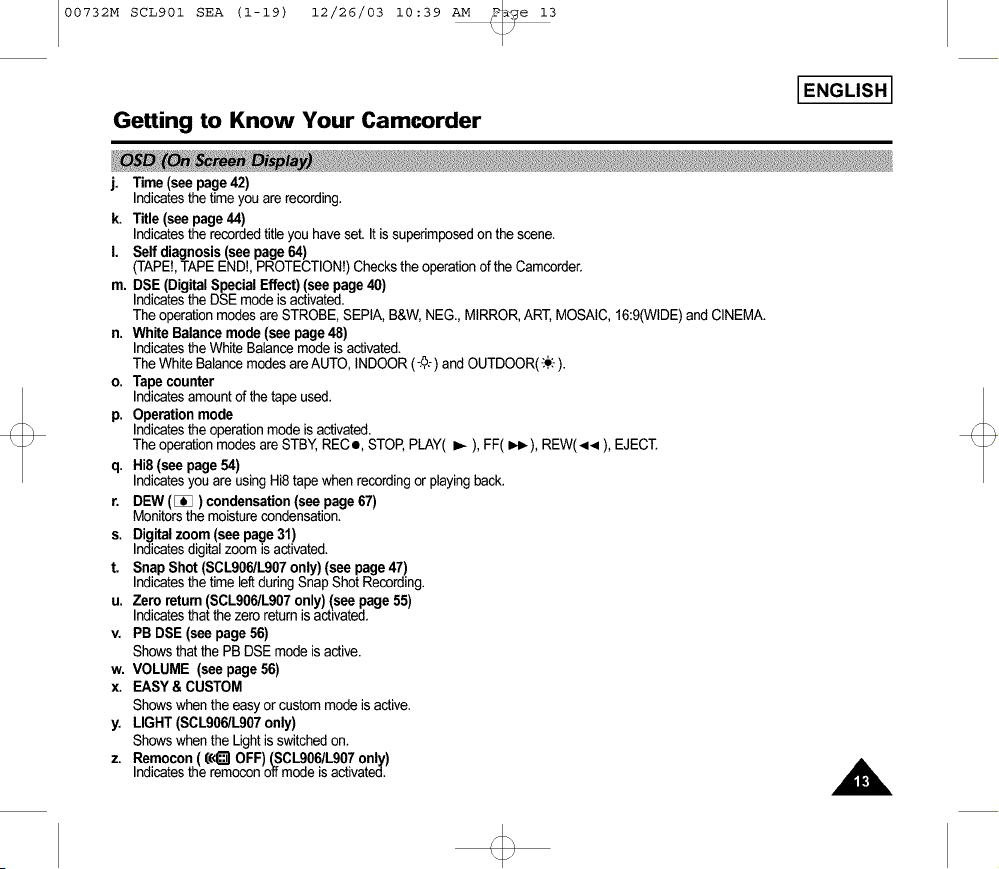
÷ Youcan turnthe OSD on/offby settingthe Displaymenuon/off.
÷ The TITLE, DATE/TIME,EASYand CUSTOMfunctionscan be operatedeven after the OSD isturnedoff.
÷ The OSD is displayedin the viewf]nderand the LCD Screen.
a.
b.
C.
d.
e.
f.
g.
h.
i.
Zoom position(see page30)
Indicateszoom position.
DIS (SCLg06/Lg07only) (see page 35)
IndicatesDIS is activated.
Battery level (see page21)
Indicatesthe power leftinthe battery.
Manual Focus (see page 36)
Indicates manual focus is on.
Auto Focus is not displayed.
BLC (see page 37)
IndicatesBLC is activated.
ProgramAE (see page38)
IndicatesProgramAE modeis activated.(_],_, _, _:_,_)
Self recordwaitingtimer.(SCL906/L907only) (see page15)
Indicates10 secondtimer.
Self record recordingtimer.(SCL9061L907only) (seepage 15)
(30 secondsorEND).
Date(see page42)
Indicatesthe dateof the recording.
ba t sq
00732M SCL901 SEA (1-19) 12/26/03 10:39 AM _e 13
I ENGLISH I
Getting to Know Your Camcorder
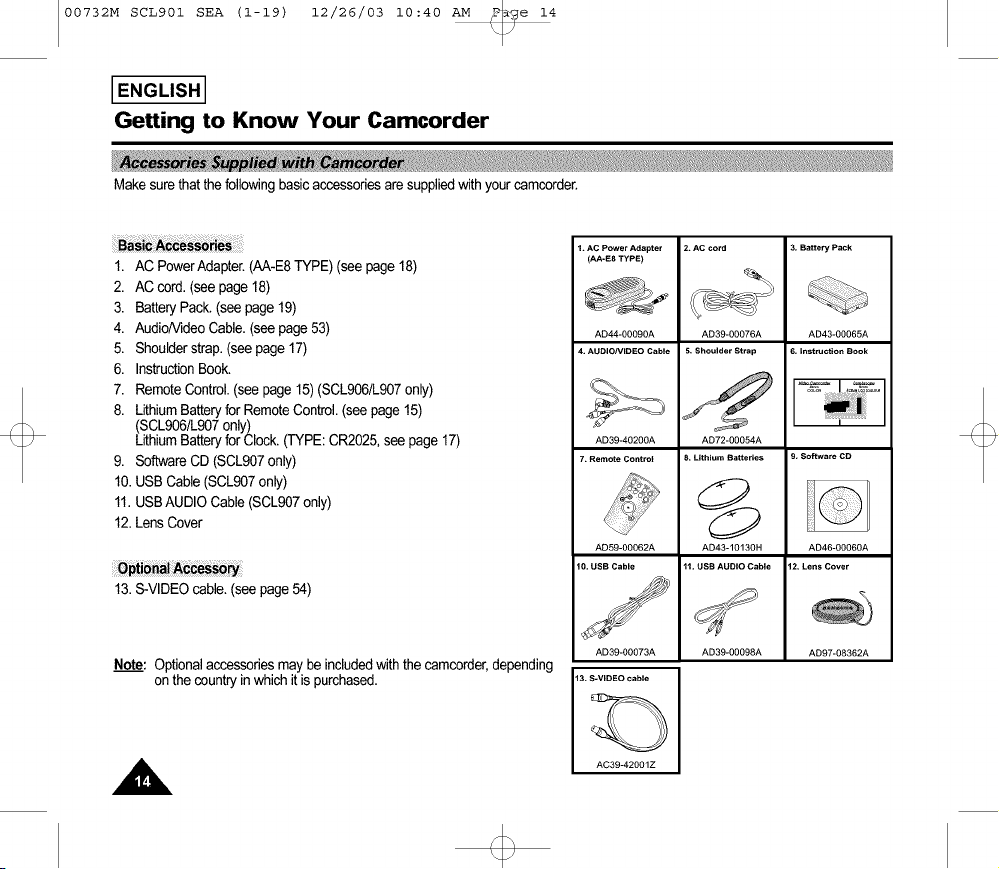
j. Time(see page42)
Indicatesthe time youare recording.
k. Title (see page 44)
Indicatesthe recordedtitleyou haveset. It is superimposedon the scene.
I. Self diagnosis(see page64)
(TAPE!,TAPEEND!,PROTECTION!)Checkstheoperationofthe Camcorder.
m. DSE (DigitalSpecialEffect)(see page40)
Indicatesthe DSEmodeisactivated.
Theoperationmodesare STROBE,SEPIA,B&W,NEG., MIRROR,ART,MOSAIC,16:9(WIDE)and CINEMA.
n. White Balancemode(see page48)
IndicatestheWhiteBalancemodeisactivated.
The White Balancemodesare AUTO,INDOOR(-_:) andOUTDOOR(-:.o:-).
o. Tape counter
Indicatesamountof the tape used.
p. Operation mode
Indicatesthe operationmode is activated.
The operationmodesare STBY,RECe, STOP,PLAY( I_ ),FF(_), REW(<< ), EJECT.
q. Hi8 (see page 54)
Indicatesyouare using Hi8tapewhen recordingor playingback.
r. DEW ([_) condensation(see page 67)
Monitorsthe moisturecondensation.
s. Digital zoom (see page 31)
Indicatesdigitalzoom is activated.
t. Snap Shot(SCL906/L907only) (see page 47)
Indicatesthe time leftduringSnapShotRecording.
u. Zero return (SCLg061Lg07only) (see page 55)
Indicatesthat the zero returnis activated.
v. PB DSE (see page56)
Showsthat the PB DSEmodeis active.
w. VOLUME (see page 56)
x. EASY &CUSTOM
Showswhen theeasyor custommodeis active.
y. LIGHT (SCL9061L907only)
Showswhen the Light isswitchedon.
z. Remocon ( ((<_ OFF)(SCLg06/Lg07only)
Indicatesthe remoconoffmode isactivated.
/
00732M SCL901 SEA (1-19) 12/26/03 10:40 AM _e 14
IENGLISHI
Getting to Know Your Camcorder
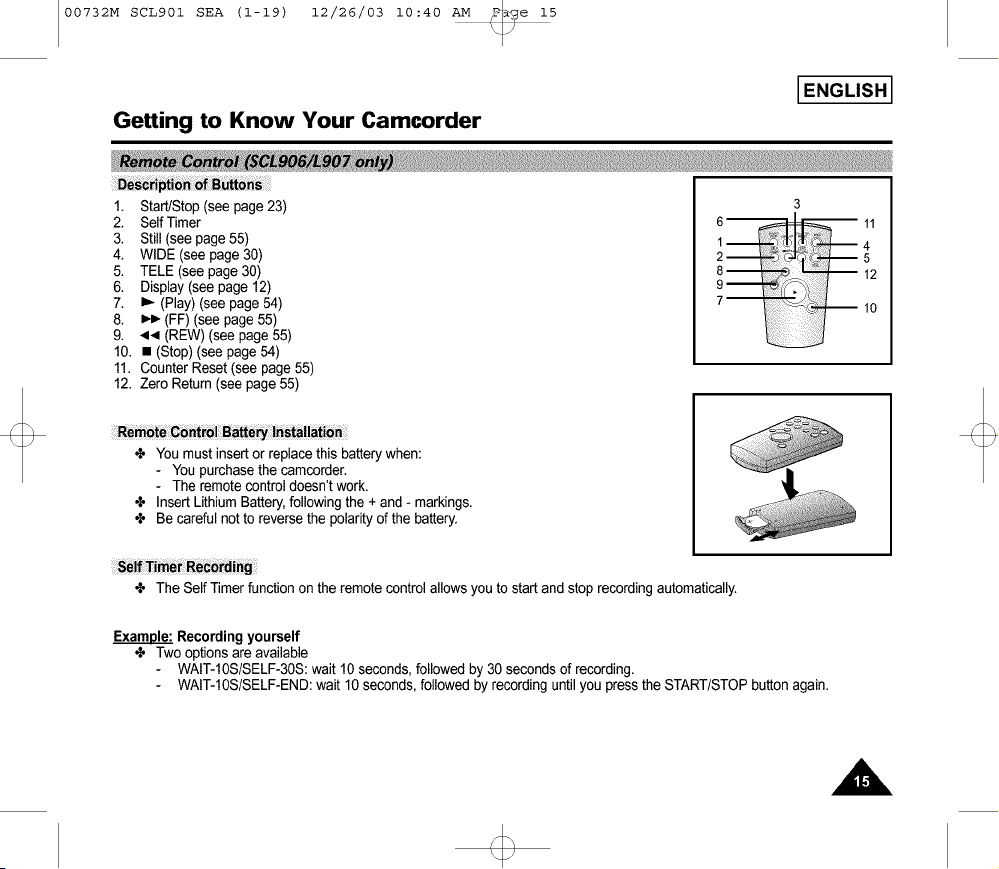
Makesurethatthefollowingbasicaccessoriesaresuppliedwithyourcamcorde_.
1. AC PowerAdapter.(AA-E8TYPE)(see page18)
2. AC cord. (seepage 18)
3. Battery Pack.(seepage 19)
4. AudioNideoCable. (seepage53)
5. Shoulderstrap.(seepage 17)
6. InstructionBook.
7. RemoteControl.(see page 15)(SCL906/L907only)
8. LithiumBatteryfor RemoteControl.(seepage 15)
(SCL906/L907only)
LithiumBatteryforClock.(TYPE:CR2025,seepage 17)
9. SoftwareCD (SCL907only)
10.USB Cable(SCL907only)
11.USBAUDIO Cable(SCL907only)
12.LensCover
13.S-VIDEOcable.(see page54)
Note: Optionalaccessoriesmay be includedwiththe camcorder,depending
on the countryinwhich it is purchased.
1. AC Power Adapter
(AA-E8 TYPE)
AD44-00090A
4. AUDIONIDEO Cable
AD39-40200A
7. Remote Control
AD59-00062A
10. USB Cable
AD39-00073A
AD39-00076A
5. Shoulder Strap
AD72-00054A
< Lithium Batteries
AD43-10130H
'H. USB AUDIO Cable
AD39-0009SA
3, Battery Pack
AD43-00065A
6, Instruction Book
AD46-00060A
12 Lens Cover
AD97-08362A
AC39-42001Z
00732M SCL901 SEA (1-19) 12/26/03 10:40 AM _Te 15
I ENGLISH I
GeRing to Know Your Camcorder
1. Start/Stop (see page 23)
2. Self Timer
3. Still (see page 55)
4. WIDE (see page 30)
5. TELE (see page 30)
6. Display (see page 12)
7. I_ (Play) (see page 54)
8. _ (FF) (see page 55)
9. <.,I (REW) (see page 55)
10. • (Stop) (see page 54)
11. Counter Reset (see page 55)
12. Zero Return (see page 55)
Remote Control Battery I_stallati_
÷ Youmust insert or replace this batterywhen:
- Youpurchasethecamcorder.
- The remotecontrol doesn't work.
÷ Insert LithiumBattery,following the + and - markings.
÷ Be careful not to reversethe polarityof the battery.
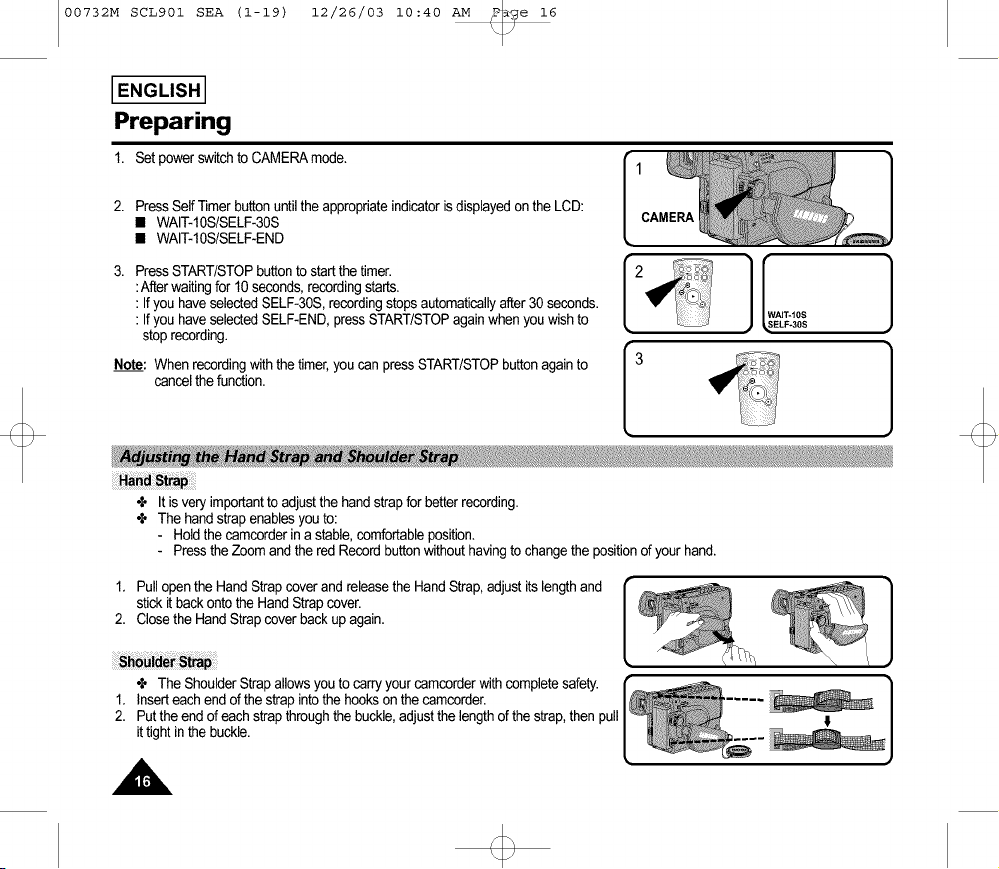
S_!f_im_ Recording;
÷ The Self Timerfunction on the remotecontrol allowsyou to start and stop recording automatically.
Example: Recordingyourself
÷ Two options areavailable
WAIT-10S/SELF-30S:wait 10 seconds,followed by 30 seconds of recording.
WAIT-10S/SELF-END:wait 10 seconds, followed by recordinguntilyou press the START/STOPbutton again.
00732M SCL901 SEA (1-19) 12/26/03 10:40 AM _e 16
I ENGLISH I
Preparing
1. Set powerswitchto CAMERAmode.
2. Press Self Timer button until the appropriate indicator is displayed on the LCD:
• WAIT-10S/SELF-30S
• WAIT-10S/SELF-END
3. Press START/STOPbuttonto startthe timer.
:Afterwaitingfor 10 seconds,recordingstarts.
: If you haveselected SELF-30S,recordingstopsautomaticallyafter 30 seconds.
: If you haveselected SELF-END,pressSTART/STOPagain whenyouwish to
stoprecording.
Note: When recordingwith the timer,youcan press START/STOPbuttonagain to
cancelthe function.
3
÷ It is very importantto adjustthe handstrap forbetterrecording.
÷ The handstrapenablesyou to:
- Holdthe camcorderin a stable,comfortableposition.
- Press theZoom and the redRecordbuttonwithouthavingto changethe positionof your hand.
1. Pullopenthe HandStrapcover and releasethe HandStrap,adjustits length and
stick it backontothe Hand Strapcover.
2. Closethe Hand Strapcover backup again.
÷ The ShoulderStrapallowsyou to carryyour camcorderwithcompletesafety.
1. Inserteach endof the strap into the hookson the camcorder.
2. Putthe end of eachstrapthroughthe buckle,adjustthe lengthof thestrap,then pull
it tightinthe buckle.
00732M SCL901 SEA (1-19) 12/26/03 10:40 AM _e 17
I ENGLISH I
Preparing
l J_ . "3 _._4
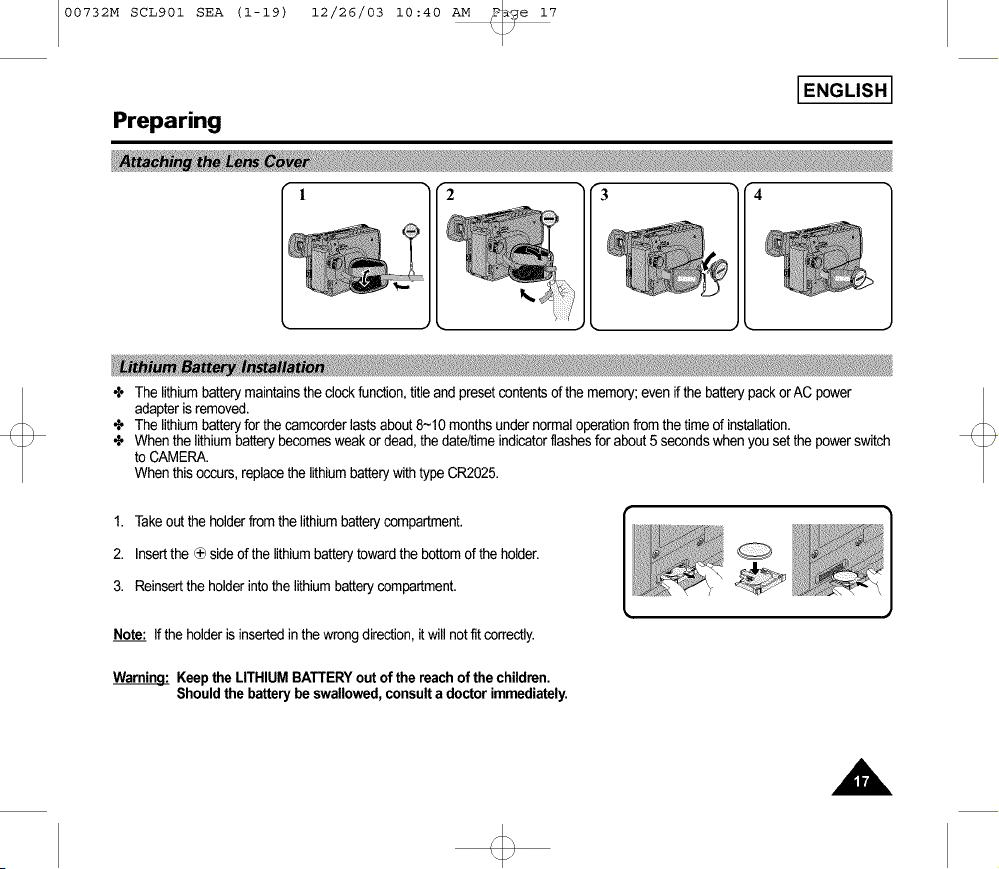
4, The lithiumbatterymaintainsthe clock function,titleand presetcontentsof the memory;even if the batterypackorAC power
adapteris removed.
4, The lithiumbatteryforthe camcorderlastsabout8-10 monthsunder normaloperationfrom the timeof installation.
4, Whenthe lithiumbatterybecomesweakor dead,the date/timeindicatorflashesforabout5 secondswhenyou setthe powerswitch
to CAMERA.
Whenthis occurs,replacethe lithiumbatterywithtypeCR2025.
1. Takeoutthe holderfrom the lithiumbatterycompartment.
2. Insertthe _ side of the lithiumbatterytowardthe bottomof the holder.
3. Reinsertthe holderintothe lithiumbatterycompartment.
Note: If the holderis insertedinthe wrong direction,itwill not fit correctly.
Warningl Keep the LITHIUM BATTERYout of the reach of the children.
Shouldthe battery be swallowed, consulta doctor immediately.
00732M SCL901 SEA (1-19) 12/26/03 10:40 AM _e 18
I ENGLISH I
Preparing
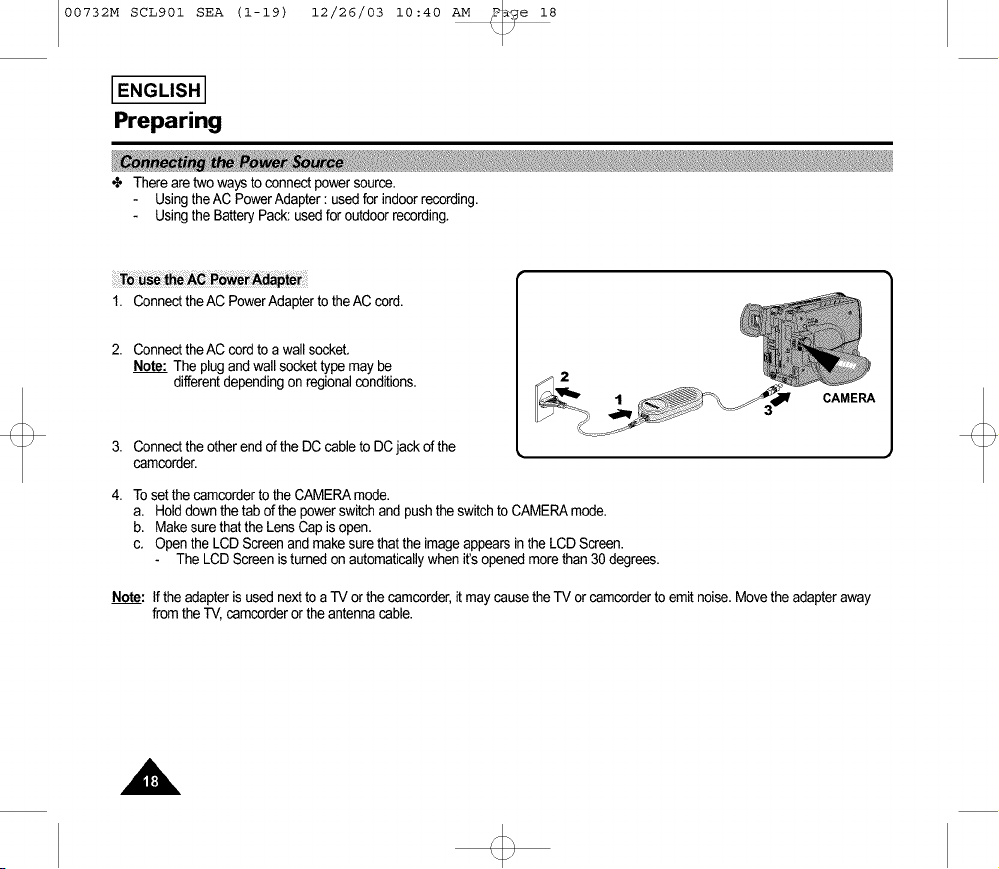
÷ There aretwo ways to connectpowersource.
Usingthe AC PowerAdapter: used for indoorrecording.
Usingthe BatteryPack:usedfor outdoorrecording.
1. Connectthe AC PowerAdapterto the AC cord.
2. Connectthe AC cordto a wall socket,
Note: The plug andwall sockettypemay be
differentdependingon regionalconditions,
3. Connectthe other endof the DC cableto DCjack of the
camcorder.
CAMERA
4. Tosetthe camcorderto the CAMERAmode.
a. Holddown thetab ofthe powerswitchand pushthe switchto CAMERAmode.
b. Makesurethat the LensCap is open,
c, Open the LCD Screenand make surethat the imageappearsinthe LCD Screen.
The LCD Screenis turnedon automaticallywhen it'sopenedmore than30 degrees,
Note: If the adapteris usednext to a -IV or thecamcorder,itmaycause theTV or camcorderto emit noise,Movethe adapteraway
fromthe TV, camcorderor the antennacable.

00732M SCL901 SEA (1-19) 12/26/03 10:40 AM _e 19
I ENGLISH I
Preparing
1. Attachthe batterypackto the camcorder.
2. ConnecttheAC PowerAdapterto the AC cordand connectthe AC cordto a wall
socket.
3. Connectthe DC cable to the DC jackof the camcorder.
4. Turnoff the camcorderpower,and the rechargingindicatorwillstart blinkingand
begin recharging.
Blinkingonce a second: Indicateslessthan50% has beencharged.
Blinkingtwice a second: Indicates50% ~ 75% hasbeen recharged.
Blinkingthree timesa second : Indicates75% - 100%hasbeen recharged.
Blinkingstopsand stayson : Recharginghasbeencompleted.
Onfor a secondand offfor a second:Indicatesthere is an error.Resetthe batterypackand DC cable.
5. If rechargingis completed,separatethe camcorder,AC power adapter,and batterypack.
• Even ifthe poweristurned off,batterywill be discharged.
Note: Batterypack maybe chargeda littleat the time of purchase.

00732M SCL901 SEA (20-45) 12/26/03 10:45 AM _P_ge 20
I ENGLISH I
Preparing
Battery Type LCD ON, EVF OFF LCD OFF, EVF ON
Approximately Approximately
SB-L110A 90 minutes 120 minutes
Approximately Approximately
SB-L160 130 minutes 180 minutes
Approximately Approximately
SB-L320 270 minutes 360 minutes
÷ The continuousrecordingtimesgiven inthe table areapproximate.Actualrecordingtime dependson usage.
Notes."
÷ The batterypackshouldbe rechargedin a roomtemperaturethat is between0°C(32°F)and 40°C(104°F).
It shouldneverbe chargedin a room temperaturethat is below0°C(32°F).
÷ The life and capacityof the batterypackwill be reducedifit is used intemperaturesbelow0°C, evenwhenit is fully recharged.
÷ The life and capacityof the batterypackwill be reducedifthe batterypackis leftintemperaturesabove40°C(104°F)for a long
period,evenwhen it is fully recharged.
÷ Do not put the batterypack near anyheatsource (fireor flames,for example).
00732M SCL901 SEA (20-45) 12/26/03 10:45 AM _P_ge 21
I ENGLISH I
Preparing
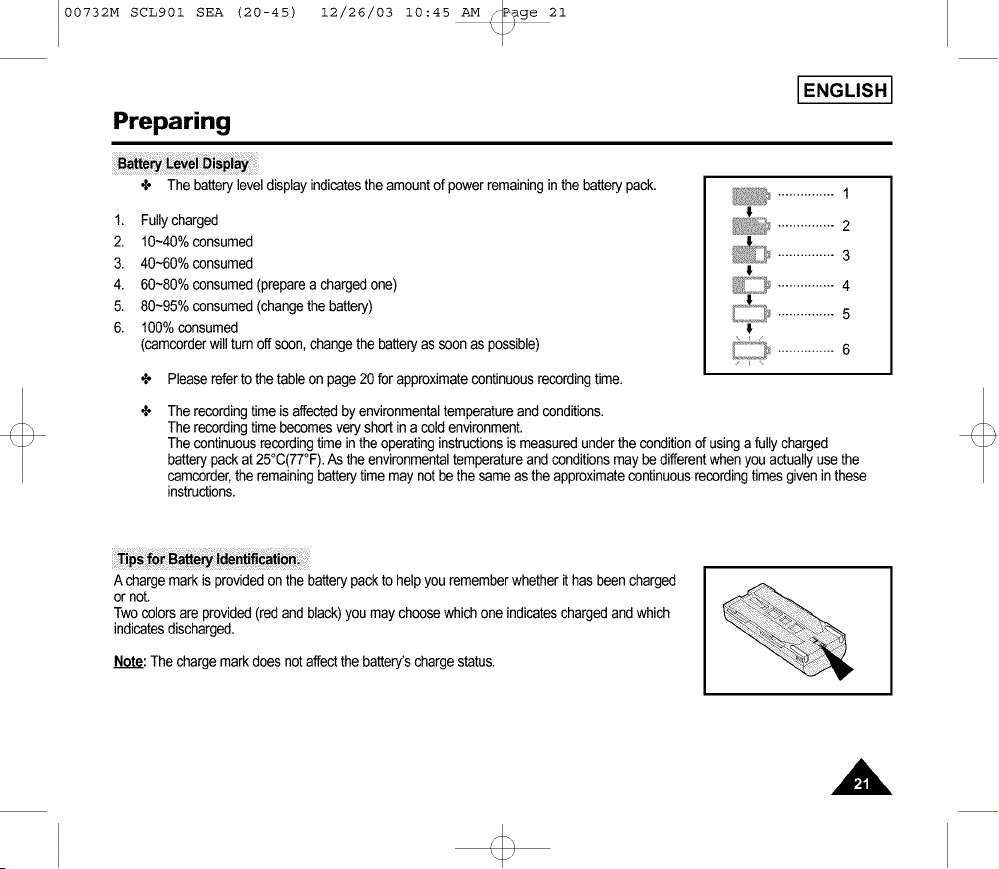
÷ The batteryleveldisplayindicatesthe amountof powerremaininginthe batterypack,
1. Fullycharged
2. 10-40% consumed
3. 40-60% consumed
4. 60~80%consumed(preparea chargedone)
5. 80~95%consumed(changethe battery)
6. 100% consumed
(camcorderwill turn off soon, changethe batteryas soonas possible)
÷ Pleasereferto the tableon page20 for approximatecontinuousrecordingtime.
............... 1
I
............... 2
_ ............... 3
t
............... 4
_ ............... 5
t
[Lo21_............... 6
÷
The recordingtime is affectedby environmentaltemperatureand conditions,
The recordingtime becomesveryshortina cold environment.
The continuousrecordingtime inthe operatinginstructionsis measuredunderthe conditionof using a fullycharged
batterypackat 25°C(77°F).As the environmentaltemperatureand conditionsmay be differentwhen youactuallyusethe
camcorder,the remainingbatterytimemay not be the same asthe approximatecontinuousrecordingtimes givenin these
instructions,
A chargemark is providedon the batterypackto help yourememberwhether it has beencharged
or not,
Twocolorsare provided(redand black)you maychoosewhichone indicateschargedand which
indicatesdischarged,
Note: The chargemarkdoes not affectthe battery'schargestatus,

00732M SCL901 SEA (20-45) 12/26/03 10:45 AM _P_ge 22
I ENGLISH I
Preparing
÷ Thereare severalcassettetypes,dependingon:
Color systemused
Recording/playbacktime.
Hi8
4, Checkto seeif the batterypackis in placeor AC adapteris connected.
Make surethe AN cable is unplugged.
1. Pressthe EJECTbutton.
The compartmentopens automatically.
Insertthe cassettewiththe transparentwindowfacingoutward
and the protectiontab towardthe top.
2. Pressthe PUSHmark untilthe compartmentclicksinto place.
TAPE [ 2
EJECT
Note: Whenyou haverecordeda cassettethatyou wishto keep,you canprotect
itfrom beingaccidentallyerased.
a. RecordingImpossible(Protection):
Push the red tab on the cassetteto coverup the opening.
SAVE
b. Recordingpossible:
If you no longerwishto keep the recordingon the cassette,
pushthe red tab back sothat it no longercoversup the opening.
REC

00732M SCL901 SEA (20-45) 12/26/03 10:45 AM _P_ge 23
I ENGLISH I
Basic Recording
Please make these preparations before recording.
• Did you connect a power source? (Battery Pack orAC PowerAdapter)
• Did youset the powerswitchto CAMERAposition?
• Did youinsert a cassette?(seepage22)
• Openthe LCD Screenand make surethat STBY isdisplayedon the LCD (if the redtab of the cassetteis opened,STBYwill not be
displayed)
• Did youopenthe LENSCAP?
• Makesurethe imageyouwant to recordappears inthe LCD monitor.
• Makesurethe batterylevelindicatesthatthere is enoughremainingpowerforrecording.(seepage21)
• We recommendthat beginners,who are usingthe camcorderfor the firsttime,switchthe EASYmodeon. (see page33)
a. Tostartrecording,pressthe redSTART/STOPbutton.
Recordingstartsand RECshould bedisplayedon the LCD.
00732M SCL901 SEA (20-45) 12/26/03 10:45 AM _ge
I
IENGLISHI
Basic Recording
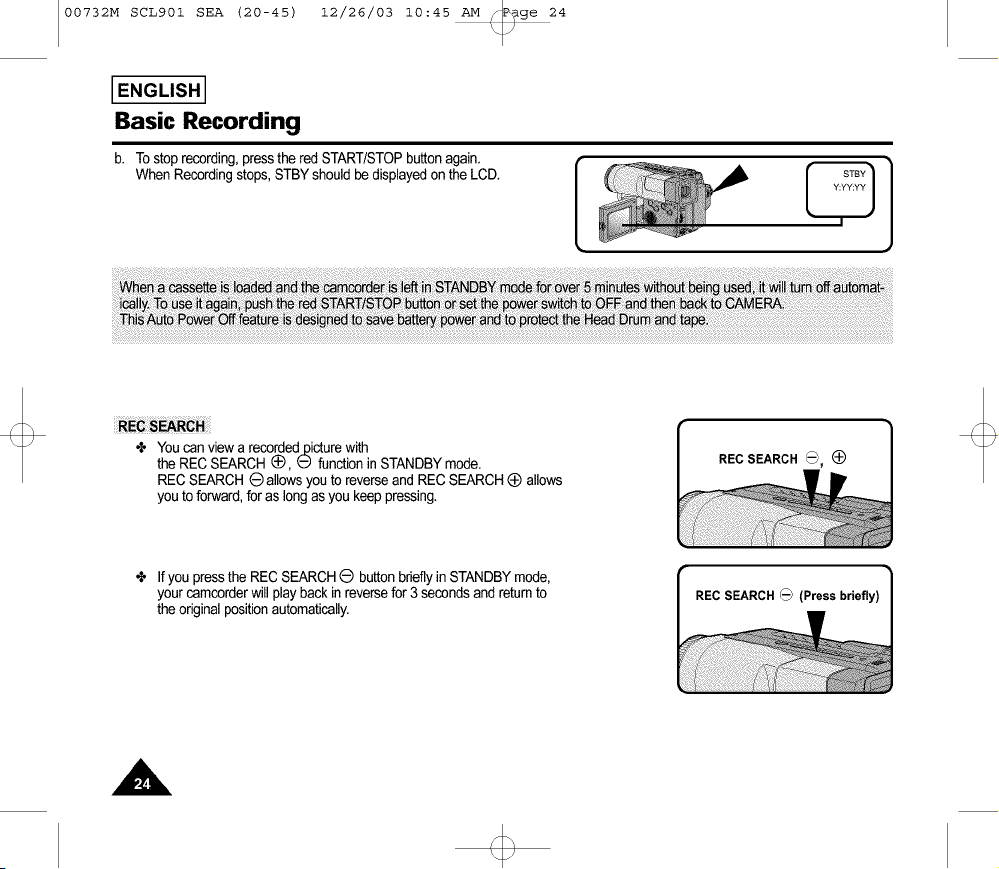
b. To stoprecording,pressthe red START/STOPbuttonagain.
When Recordingstops,STBYshouldbe displayedon the LCD.
24
÷ Youcan viewa recordedpicturewith
the REC SEARCH(_, E) functionin STANDBYmode.
REC SEARCH (_)allowsyouto reverse and RECSEARCH_ allows
youto forward,foras long as youkeep pressing.
REC SEARCH _, (_
÷ If you pressthe RECSEARCHO buttonbrieflyinSTANDBYmode,
your camcorderwill play backin reversefor 3 secondsand returnto
the originalpositionautomatically.
REC SEARCH_
00732M SCL901 SEA (20-45) 12/26/03 10:45 AM _P_ge 25
I ENGLISH I
Basic Recording
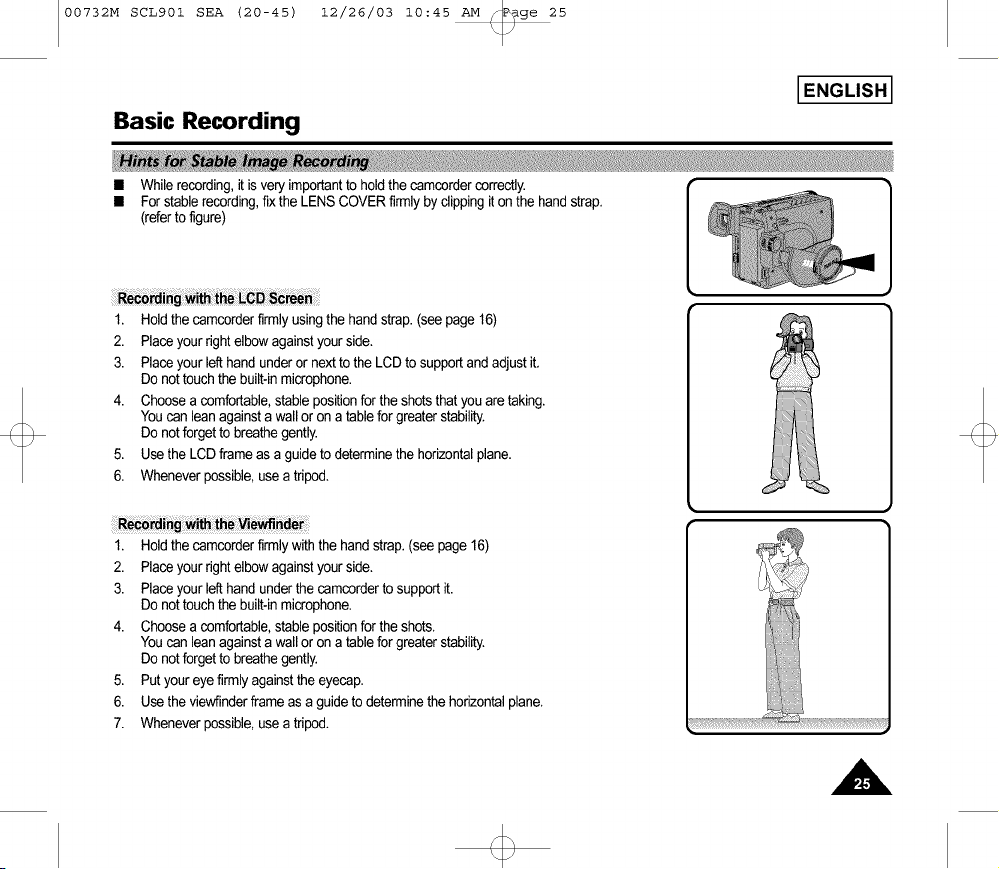
• Whilerecording,it is veryimportantto holdthe camcordercorrectly.
• For stablerecording,fix the LENS COVERfirmlyby clippingiton the handstrap.
(referto figure)
1. Holdthe camcorderfirmly usingthe handstrap.(seepage 16)
2. Placeyourright elbowagainstyour side.
3. Placeyour lefthandunderor nextto the LCD to supportand adjustit.
Do not touchthe built-inmicrophone.
4. Choosea comfortable,stablepositionforthe shotsthat you aretaking.
Youcan leanagainsta wall or on a table for greaterstability.
Do not forgetto breathegently.
5. Usethe LCDframe asa guideto determinethe horizontalplane.
{
6. Wheneverpossible,usea tripod.
1. Holdthe camcorderfirmlywith the handstrap.(see page16)
2. Placeyourright elbowagainstyour side.
3. Placeyour lefthandunderthe camcorderto supportit.
Do not touchthe built-inmicrophone.
4. Choosea comfortable,stablepositionforthe shots.
Youcan leanagainsta wall or on a table for greaterstability.
Do not forgetto breathegently.
5. Put youreyefirmlyagainstthe eyecap.
6. Usethe viewfinderframe asa guideto determinethe horizontalplane.
7. Wheneverpossible,usea tripod.
i!i!!i!7_!Ti!i!ii!_!;;i!ii!_!;;i!ii!_!;; _ii!ii!_!;;i!ii!_!;;i!ii!_!;;i!ii!_!;;i!ii!_!;;i!ii!_!;;
00732M SCL901 SEA (20-45) 12/26/03 10:45 AM _P_ge 26
I ENGLISH I
Basic Recording
_,_,_®_,I,_,_,,_:_,_,-,,,_ _¸¸_,_,_,,_,_,_ _,,_,_,_}_,_,,_,__ _,_ _,_ _ _,9,,_,_:_,_,_,_,_ _, _,_m_: _,_,_,_,, __,_®_,,_,_,,,_,_,_ _,_,__ _ _ _ _, __,,_,
÷ Yourcamcorderisequippedwitha 2.5 inchcolor LiquidCrystalDisplay(LCD)screen,whichallowsyou to view recordingor play-
backdirectly.
÷ Dependingon the conditionsinwhich you are usingthe camcorder(indoorsor outdoorsfor example),you canadjust:
• Brightness
• Color
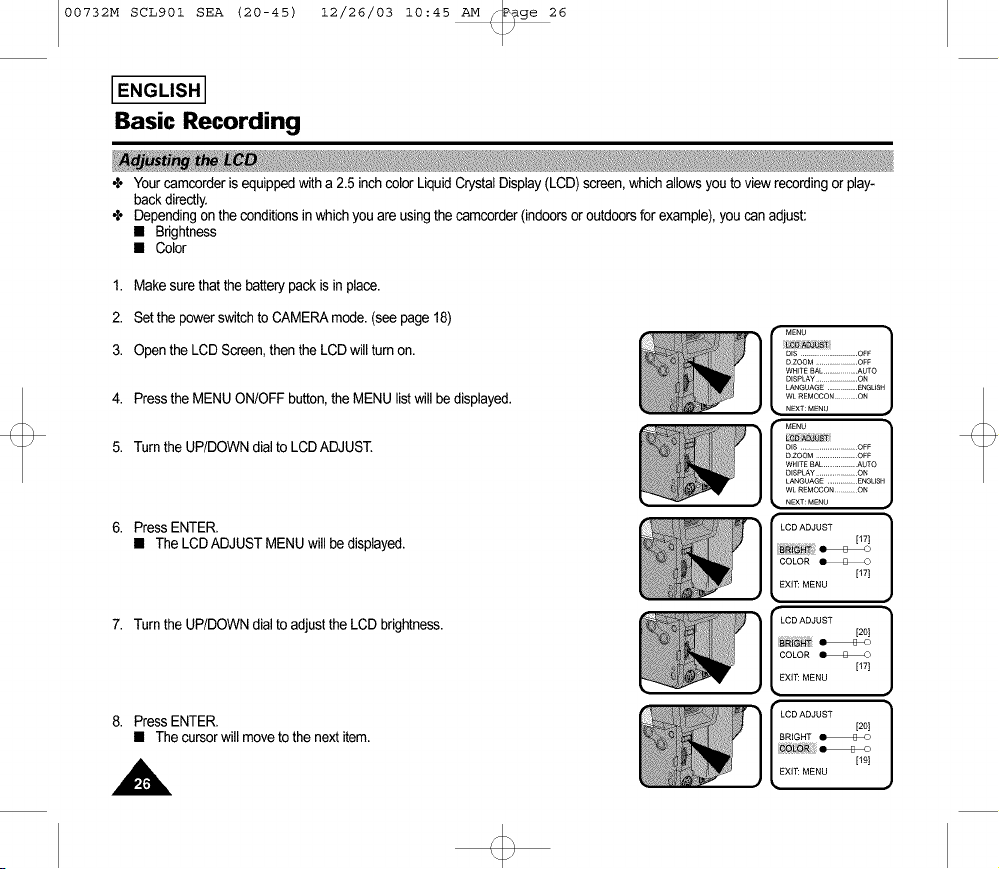
1. Makesure thatthe batterypack is in place.
2. Setthe powerswitchto CAMERAmode.(see page18)
3. Open the LCDScreen,then the LCDwill turn on.
4. Pressthe MENUON/OFFbutton,the MENU listwill be displayed.
5. Turnthe UP/DOWNdial to LCDADJUST.
6. PressENTER.
• The LCDADJUSTMENUwill be displayed.
7. Turnthe UP/DOWNdial to adjustthe LCD brightness.
8. PressENTER.
• Thecursorwill moveto the nextitem.
MENU ]
DiS ..............OFF
OZOOM...................OFF
WHITEBAL.................AUTO
OISPLAY................. ON
LANGUAGE................ENGL(SH
WE REMOCON............ON
NEXT:MENU
[ )....
ms ...................... OFF
OZOOM ...................OFF
WHITE_AL................AUTO
mSPLAY ..................ON
LANGUAGE............. ENGL(SH
NEXT:MENU
_6LgR
[171
EXIT: MENU
EXIT: MENU
_LOR
..... [19I
EXIT: MENU
00732M SCL901 SEA (20-45) 12/26/03 10:45 AM _P_ge 27
Basic Recording
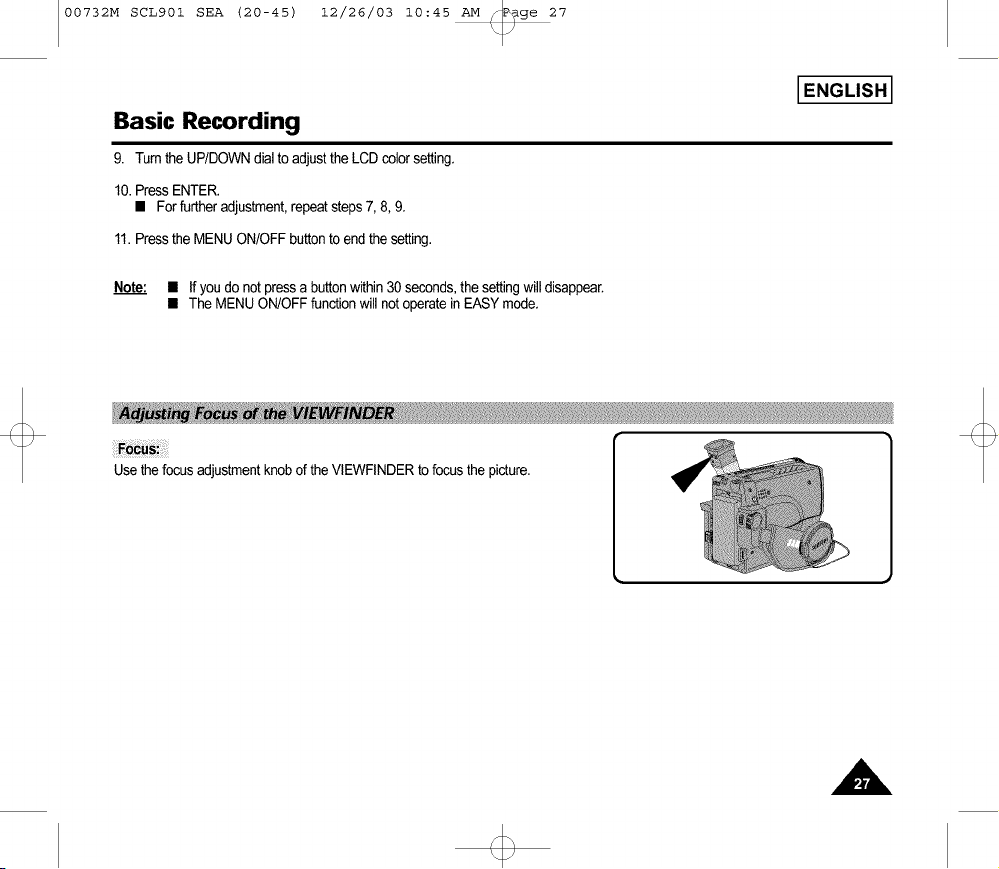
9. Tum the UP/DOWNdialto adjustthe LCD colorsetting.
10.Press ENTER.
• For furtheradjustment,repeatsteps7, 8, 9.
11.Pressthe MENUON/OFFbuttonto end the setting.
Note: • If you do not pressa buttonwithin 30 seconds,the settingwill disappear.
• The MENUON/OFFfunctionwill not operatein EASYmode.
I ENGLISH I
00732M SCL901 SEA (20-45) 12/26/03 10:45 AM _P_ge 28
I ENGLISH I
Basic Recording
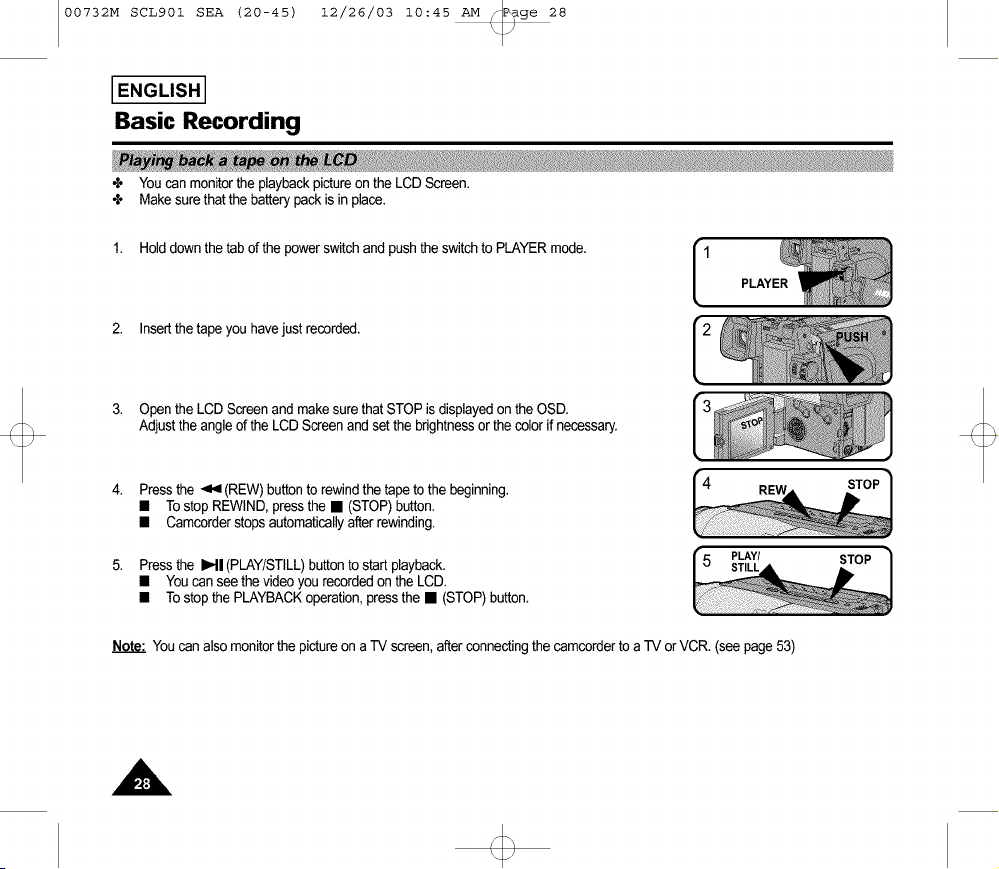
÷ Youcan monitorthe playbackpictureon the LCD Screen.
÷ Makesurethat the batterypackis inplace.
1. Holddown the tab of the powerswitchand push the switchto PLAYERmode.
2. Insertthe tapeyou havejust recorded.
1 PLAYER
3. Open the LCD Screenand make surethat STOP isdisplayedon the OSD.
Adjustthe angle of the LCD Screenand set the brightnessor the color if necessary.
Press the _ (REW)buttonto rewindthe tapeto the beginning.
• Tostop REWIND,pressthe • (STOP)button.
• Camcorderstopsautomaticallyafter rewinding.
Press the IHI (PLAY/STILL)buttonto startplayback.
• Youcanseethe videoyou recordedon the LCD.
• Tostopthe PLAYBACKoperation,pressthe • (STOP)button.
PLAY/ STOP
Note."Youcanalso monitorthe pictureon a TV screen,after connectingthe camcorderto a -IV orVCR. (see page53)

00732M SCL901 SEA (20-45) 12/26/03 10:45 AM _P_ge 29
Basic Recording
The LCDadjustmentmethodin PLAYERmodeis identicalto step
number4 of page26, exceptthe power switchmust beset to PLAYER.
÷ Whenyou usethe LCD Screenwhile playingback,you canhear sound
from the Speaker.
÷ Volumeof the Speakeris controlledby the UP/DOWNdial tab on the
camcorder.
÷ If youclosethe LCD Screen,the LCD Screenand Speakerare turnedoff.
÷ If the speakerdoes notwork properly,check the following:
• Is the LCD Screenclosed?
• Is thevolumeadjustedto a lowlevel?
• Is thespeakeroff?.(see page56)
Notes." • Lowerthe volumeif vibrationfromthe built-inspeakercausesscreen
disturbance.
• Volumedisplaywill automaticallydisappear2 secondsafter adjusting.
• Press IHI (PLAY/STILL)buttonduringplayback.
• To resumeplayback,pressthe IHI (PLAY/STILL)buttonagain.
PLAY/STILL
I ENGLISH I
• KeeppressingMP- (FF) or _,9 (REW)buttonduringplayback.
• To resumenormalplayback,releasethe button.
REW FF
00732M SCL901 SEA (20-45) 12/26/03 10:45 AM _P_ge 30
I ENGLISH I
Advanced Recording
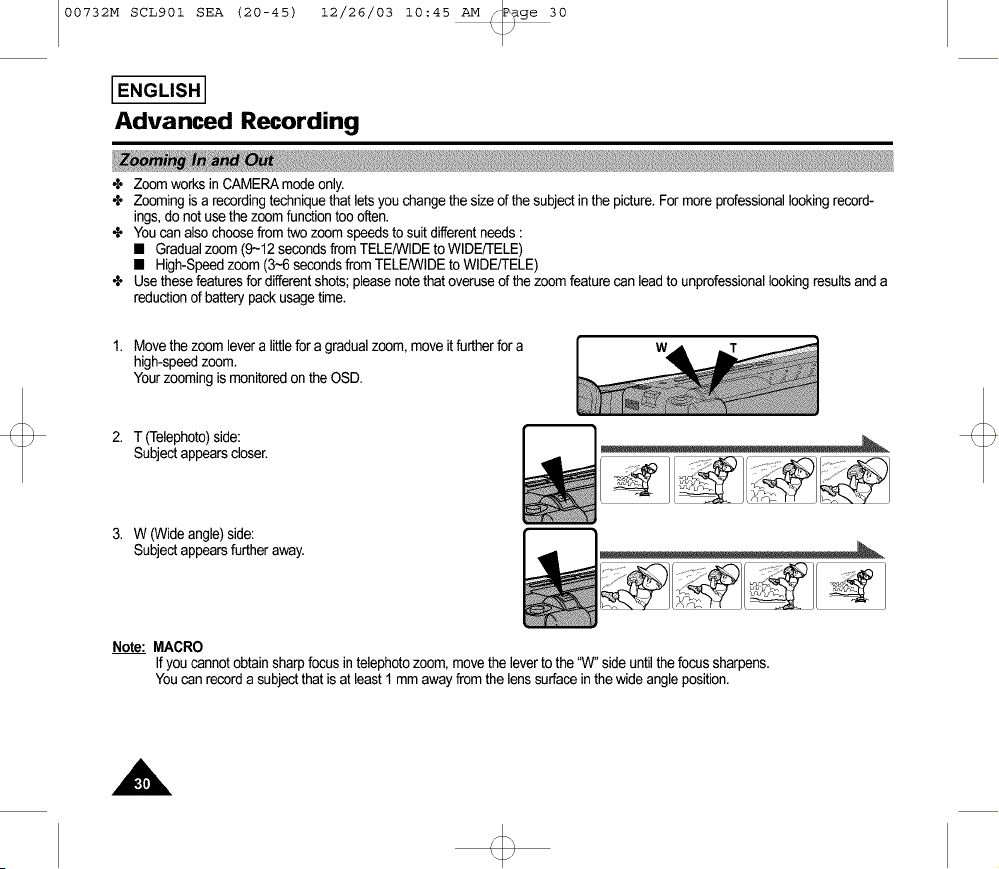
÷ Zoom works in CAMERAmodeonly.
÷ Zooming isa recordingtechniquethat letsyou changethe sizeof the subject inthe picture.For more professionallookingrecord-
ings,do not use the zoom functiontoo often.
÷ Youcan alsochoosefrom two zoom speedsto suit differentneeds:
• Gradualzoom (9~12 secondsfromTELENVIDEto WIDE/TELE)
• High-Speedzoom (34 secondsfrom TELE/WIDEto WIDEFIELE)
÷ Usethese featuresfor differentshots;pleasenotethat overuseof the zoomfeaturecan leadto unprofessionallookingresultsanda
reductionof batterypackusage time.
1. Movethe zoom levera littlefor a gradualzoom,move it furtherfor a
high-speedzoom.
Yourzoomingis monitoredon the OSD.
2. T (Telephoto)side:
Subjectappearscloser.
3. W (Wideangle)side:
Subjectappearsfurtheraway.
w
Note: MACRO
If youcannotobtain sharpfocusin telephotozoom, movethe leverto the "W"side until thefocus sharpens.
Youcan recorda subjectthat isat least1 mmaway fromthe lens surfacein thewide angleposition.
00732M SCL901 SEA (20-45) 12/26/03 10:45 AM _P_ge 31
I ENGLISH I
Advanced Recording
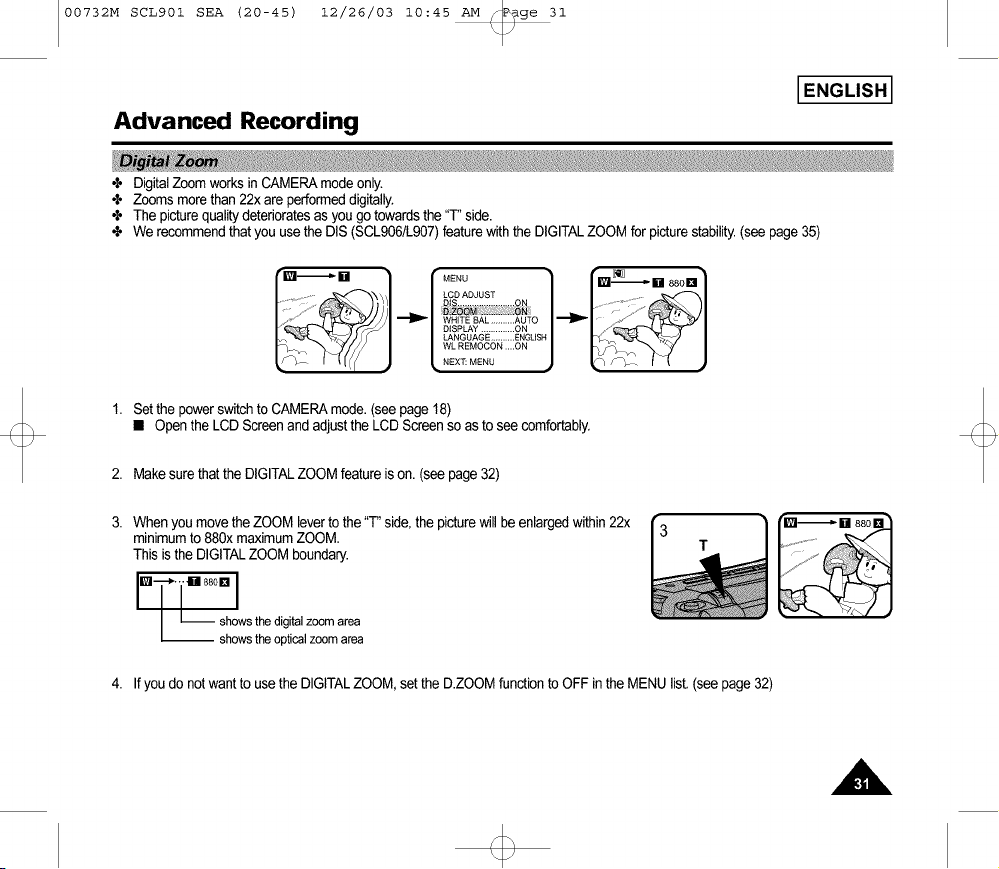
÷ DigitalZoomworks inCAMERAmodeonly.
÷ Zoomsmorethan22x areperformeddigitally.
÷ The picturequalitydeterioratesas you go towardsthe "T"side.
÷ We recommendthat youusethe DIS (SCL906/L907)featurewiththe DIGITALZOOM forpicturestability.(seepage35)
rMENU ]
LCD ADJUST
WHITE BAL .......... AUTO _ _,.
DISPLAY .............. ON _"
LANGUAGE .......... ENGLISH
WL REMOCON ....ON
NEX]_ MENU
1. Set the powerswitchto CAMERAmode.(seepage 18)
• Openthe LCD Screenand adjustthe LCD Screenso asto seecomfortably.
2. Makesurethat the DIGITALZOOM featureis on. (see page32)
Whenyou movethe ZOOM leverto the "F' side,the picturewill be enlargedwithin22x
minimumto 880x maximumZOOM.
This isthe DIGITALZOOM boundary.
i..-...[.sBo.I
l :hhoOW:tthh: doigliitacaliZ:2marer: a
[]
4. If youdo not wantto usethe DIGITALZOOM, setthe D.ZOOMfunctionto OFF inthe MENU list.(seepage 32)
00732M SCL901 SEA (20-45) 12/26/03 10:45 AM _P_ge 32
I ENGLISH I
Advanced Recording
i_'•;_;_ _NG_ i_'•_ _,_ i,_ _ ;_ ,,_i_ __,_,,,_ _ _ _• _,_i_ _, _ _!_ %_,,_ _ _ _ _ _:_ _::!: _ _
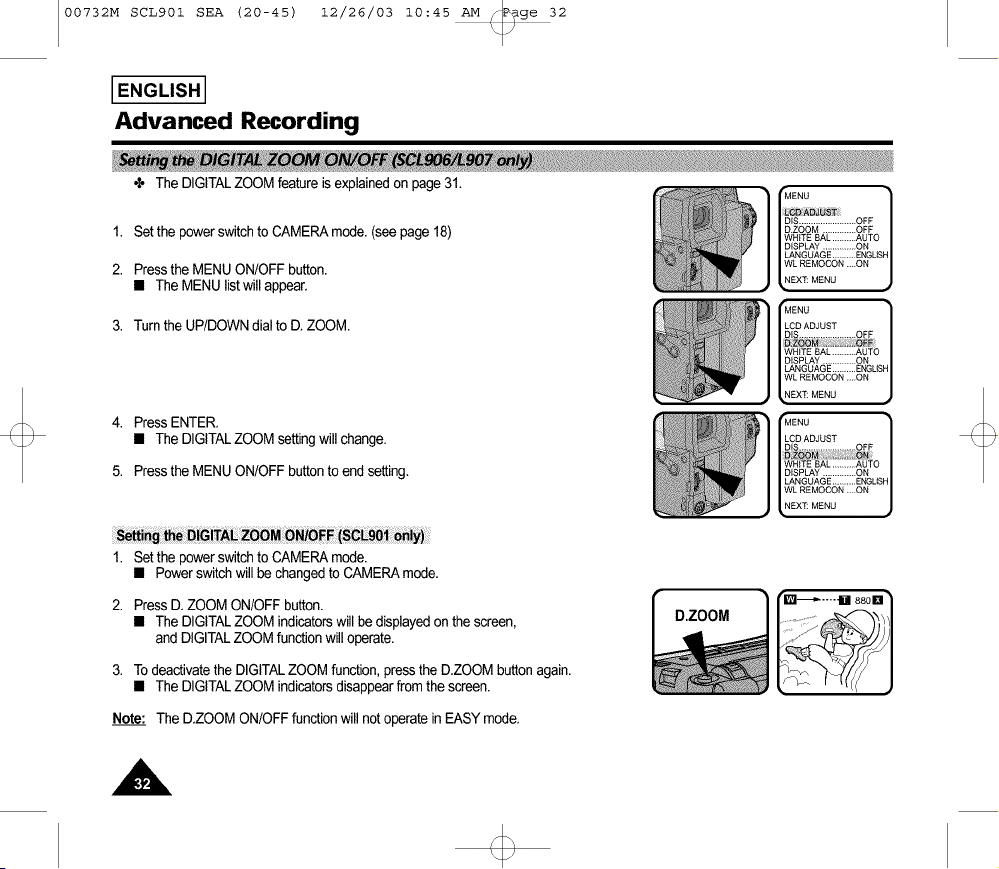
÷ The DIGITALZOOMfeature is explainedon page31. ['MENU_e_eS.rDIS........................OFF ]
1. Set the power switch to CAMERAmode• (see page 18) D.ZOOM..............OFF
WHITE BAL ..........AUTO
DISPLAY ..............ON
LANGUAGE .......... ENGLISH
2. Pressthe MENUON/OFFbutton. WLREMOCON....ON
• The MENUlistwill appear. NEX_MENU
3. Turnthe UP/DOWNdial to D. ZOOM.
4. PressENTER.
• The DIGITALZOOMsettingwill change.
5. Pressthe MENUON/OFFbuttonto endsetting.
1. Setthe powerswitchto CAMERAmode.
• Powerswitchwill be changedto CAMERAmode.
2. PressD. ZOOM ON/OFFbutton.
• The DIGITALZOOM indicatorswill bedisplayedon thescreen,
and DIGITALZOOM functionwill operate.
3. To deactivatethe DIGITALZOOMfunction,pressthe D.ZOOMbuttonagain.
• The DIGITALZOOM indicatorsdisappearfrom the screen.
Ii ENU
LCD ADJUST
DIS........................ OFF
_HtTE BAL ..........AUTO
DISPLAY ..............ON
LANGUAGE .......... ENGUS
WL REMOCON ....ON
EX_ MENU
Ii ENU
LCD ADJUST
DIS........................ OFF
_HiTE BAL ..........AUTO
DISPLAY ..............ON
LANGUAGE .......... ENGUS
WL REMOCON ....ON
EX_ MENU
D.ZOOM
Note: The DZOOM ON/OFFfunctionwill not operateinEASYmode.
00732M SCL901 SEA (20-45) 12/26/03 10:45 AM q_ge 33
I ENGLISH I
Advanced Recording
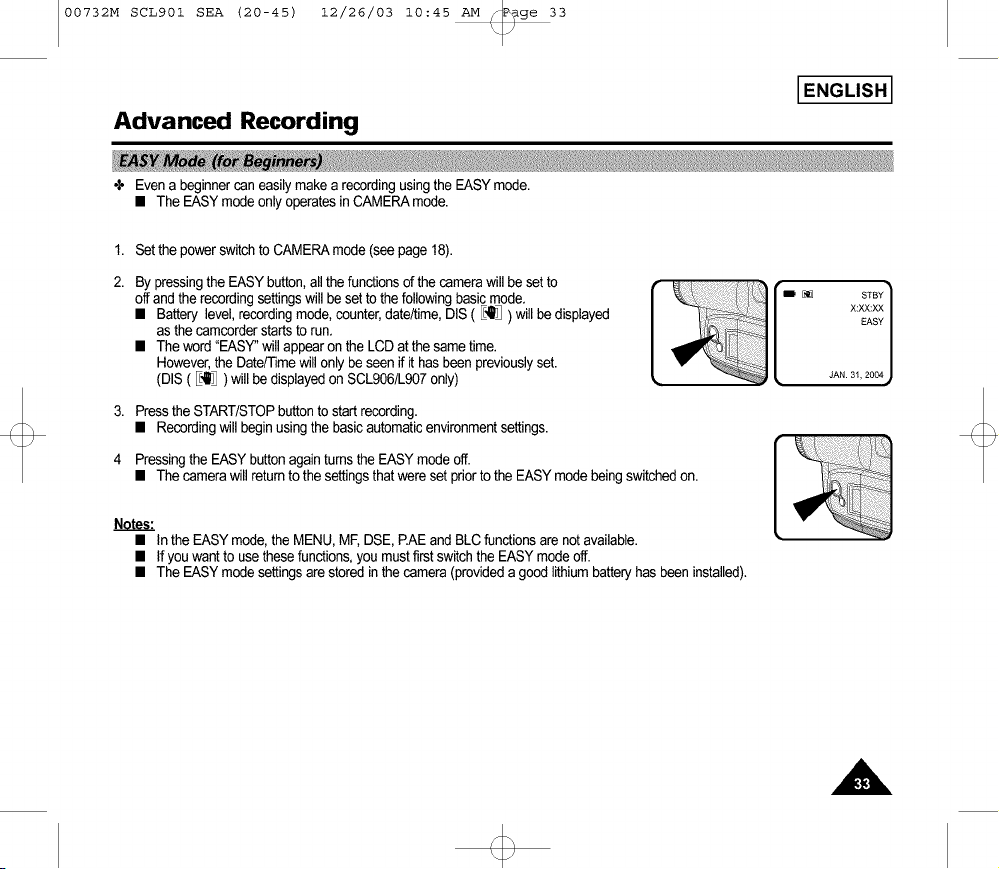
+ Even a beginner can easily make a recording using the EASYmode.
• The EASYmode onlyoperates in CAMERAmode.
1. Set the powerswitchto CAMERAmode(see page18).
2. By pressingthe EASYbutton,allthe functionsof the camerawillbe setto
off and the recordingsettingswill be setto thefollowingbasicmode.
• Battery level,recordingmode,counter,date/time,DIS ( _'_] ) will be displayed
as thecamcorderstartsto run.
• Theword"EASY"willappearon the LCDat the same time.
However,the Date/Timewill only be seenif it hasbeenpreviouslyset.
(DIS ( _] ) will be displayedon SCL906/L907only)
D E_3 STBY
X:XX:XX
EASY
JAN. 31, 2004
3. Pressthe START/STOPbuttonto startrecording.
• Recordingwill begin usingthe basicautomaticenvironmentsettings.
4 Pressingthe EASY buttonagain turnsthe EASYmodeoff.
• The camerawill returnto the settingsthatwereset priorto the EASYmodebeing switchedon.
Notes."
• In the EASYmode,the MENU,ME DSE,EAE and BLC functionsare notavailable.
• If you wantto usethesefunctions,youmust firstswitchthe EASYmodeoff.
• The EASYmode settingsare storedinthe camera (provideda good lithiumbatteryhas beeninstalled).
[
00732M SCL901 SEA (20-45) 12/26/03 10:45 AM _P_ge 34
I ENGLISH I
Advanced Recording
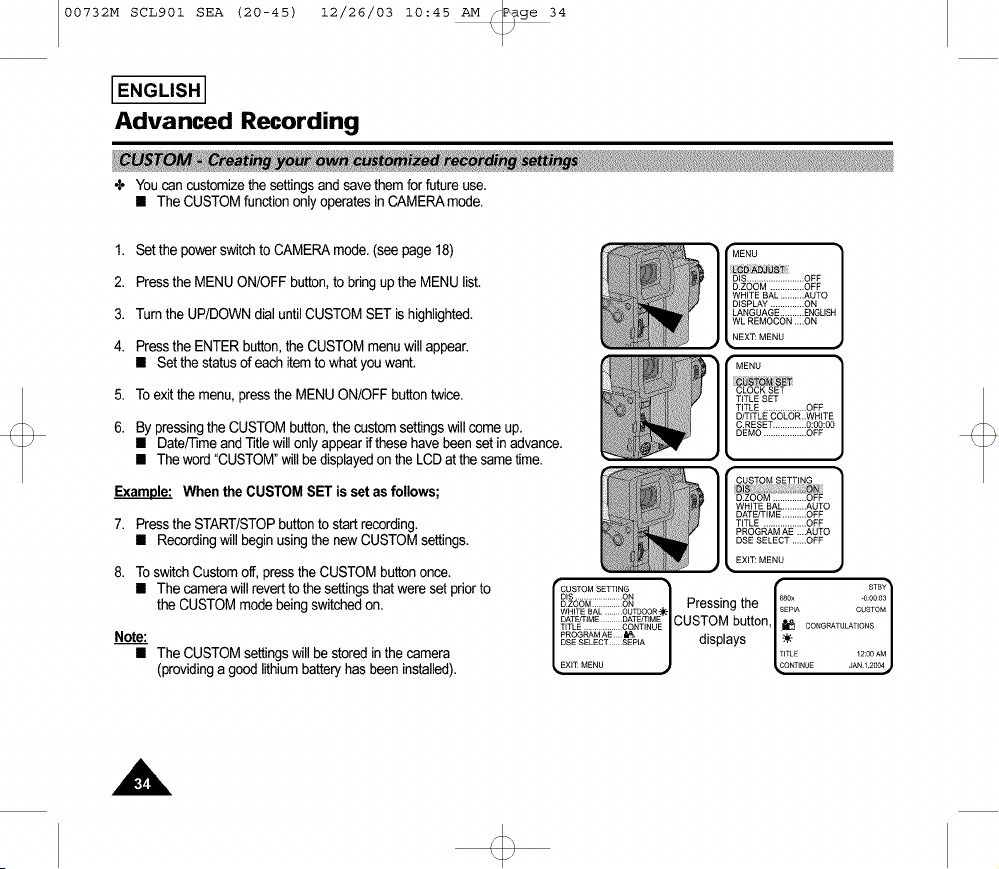
÷ Youcan customizethesettingsand save themforfuture use.
• The CUSTOMfunctiononly operatesin CAMERAmode.
1. Setthe powerswitchto CAMERAmode.(see page18)
2. Pressthe MENUON/OFFbutton,to bringupthe MENUlist,
3. Turnthe UP/DOWNdial untilCUSTOMSETis highlighted,
4. Pressthe ENTERbutton,the CUSTOMmenuwillappear.
• Set the statusof each itemto what youwant.
5. To exit the menu,pressthe MENUON/OFFbuttontwice.
6. Bypressingthe CUSTOMbutton,the customsettingswill come up,
• Date/rime andTitle will onlyappear ifthese havebeenset in advance,
• The word "CUSTOM"will be displayedon the LCDat the sametime.
Example: When the CUSTOMSET is setas follows;
7. Pressthe START/STOPbuttonto startrecording,
• Recordingwill begin usingthe new CUSTOMsettings,
8. To switchCustomoff, pressthe CUSTOMbuttononce,
• The camerawill revertto the settingsthatwereset priorto
the CUSTOM modebeingswitchedon,
Note:
• The CUSTOMsettingswill be storedin the camera
(providinga goodlithium batteryhas beeninstalled).
"CUSTOM SETTING STBY
1 Presslngthe _ ]
D_S......................ON • 880x -0:00:o3
_,'_'_'s,,L::::::::_oo=-_-, i=.......... .
DATE/TiME / _II,£TC_M buffon /.n /
TITLE .................. CONTINUE ...... ' i_ CONGRATULATIONS
_OG_M_E_, | dis_la.s |_. |
o,..................j ., ..... j
EXIT: MENU ONTINUE JAN 1,2OO4
00732M SCL901 SEA (20-45) 12/26/03 10:45 AM _P_ge 35
I ENGLISH I
Advanced Recording
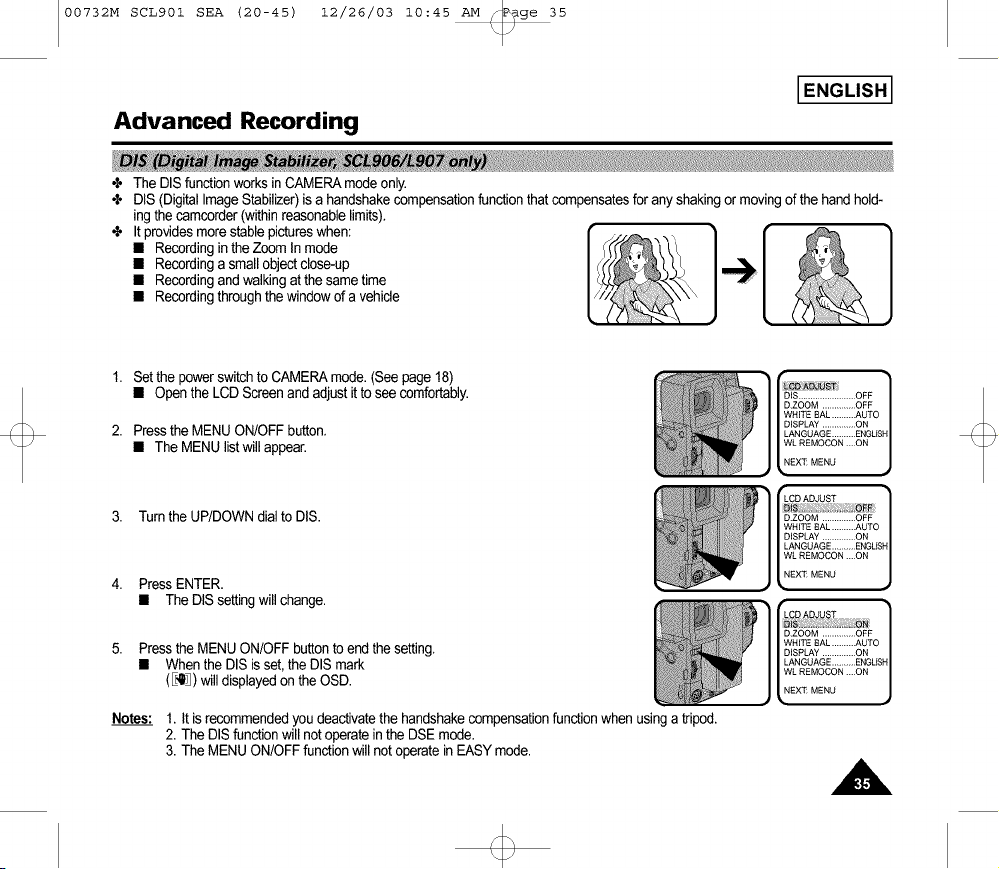
÷ The DISfunctionworksin CAMERAmodeonly.
÷ DIS (DigitalImageStabilizer)is a handshakecompensationfunctionthat compensatesfor any shakingormovingof the hand hold-
ing the camcorder(withinreasonablelimits).
÷ It providesmorestable pictureswhen: ]_[
• Recordinginthe Zoom In mode ?{"<_"¢_<
• Recordinga smallobjectclose-up _{(P2_ [t.L
• Recordingand walkingat thesame time
• Recordingthroughthe windowof a vehicle
1. Set the powerswitchto CAMERAmode.(See page18)
• Open the LCD Screenand adjustit to seecomfortably.
2. Pressthe MENUON/OFFbutton.
• The MENU listwill appear.
3. Turnthe UP/DOWNdial to DIS.
4. Press ENTER.
• The DISsettingwill change.
5. Pressthe MENU ON/OFFbuttonto end the setting.
• Whenthe DISis set,the DISmark
(_) willdisplayedon the OSD.
Notes: 1. It is recommendedyoudeactivatethe handshakecompensationfunctionwhen usinga tripod.
2. The DISfunctionwill not operateinthe DSEmode.
3. The MENUON/OFFfunctionwillnot operatein EASYmode.
IS........................ OFF /
D.ZOOM .............. OFF
J
WHITE 8AL ..........AUTO
DISPLAY ..............ON
LANGUAGE ..........ENGLISH
WL REMOCON ....ON
EX_ MENU
• I
LCDADJUST
D.zooM ..............OFF |
WHITE 8AL ..........AUTO
J
DISPLAY ..............ON
LANGUAGE ..........ENGLISH
WL REMOCON ....ON
NEX_ MENU
• I
|
D.ZOOM .............. OFF |
WHITE 8AL ..........AUTO
J
DISPLAY ..............ON
LANGUAGE ..........ENGLISH
WL REMOCON ....ON
NEX_ MENU

00732M SCL901 SEA (20-45) 12/26/03 10:45 AM _P_ge 36
I ENGLISH I
Advanced Recording
÷ The MF/AFfunctionworks in the CAMERAmodeonly.
÷ In mostsituations,it is betterto usethe AutomaticFocusfeature,as itenablesyouto concentrateon the creativeside of your
recording.
÷ Manualfocusingmaybe necessaryunder certainconditionsthat makeautomaticfocusing inadequate.
÷ The AF (Auto Focus)mode issetautomaticallywhenyou switchon the Power switch.
÷ If you areinexperiencedwith camcorders,we recommendthat you usethe Auto Focusmode.
÷ Inthe followingsituations,youshouldobtain betterresultsbyadjustingthefocus
manually.
a. A picturecontainingseveralobjects,somecloseto the camcorder,othersfurther away.
b. A personenvelopedinfog orsurroundedbysnow.
c. Veryshinyor glossysurfaceslike a car.
d. Peopleor objectsmovingconstantlyor quicklylikean athleteor crowd.
1. Setthe powerswitchto CAMERAmode.(see page18)
2. Pressthe MF button.
3. Zoom in the subjectto be recordedby pushingthe ZOOMtab to the "T"side.
00732M SCL901 SEA (20-45) 12/26/03 10:45 AM _P_ge 37
Advanced Recording
4. Turnthe UP/DOWNdial up or down untilthe objectis focused.
I ENGLISH I
5. Youwill obtaina sharppictureafterzoomingout.
6. Toreturn toAF(AutoFocus),pressthe MF buttonagain.
Note: The MF functionwill not operatein EASYmode.
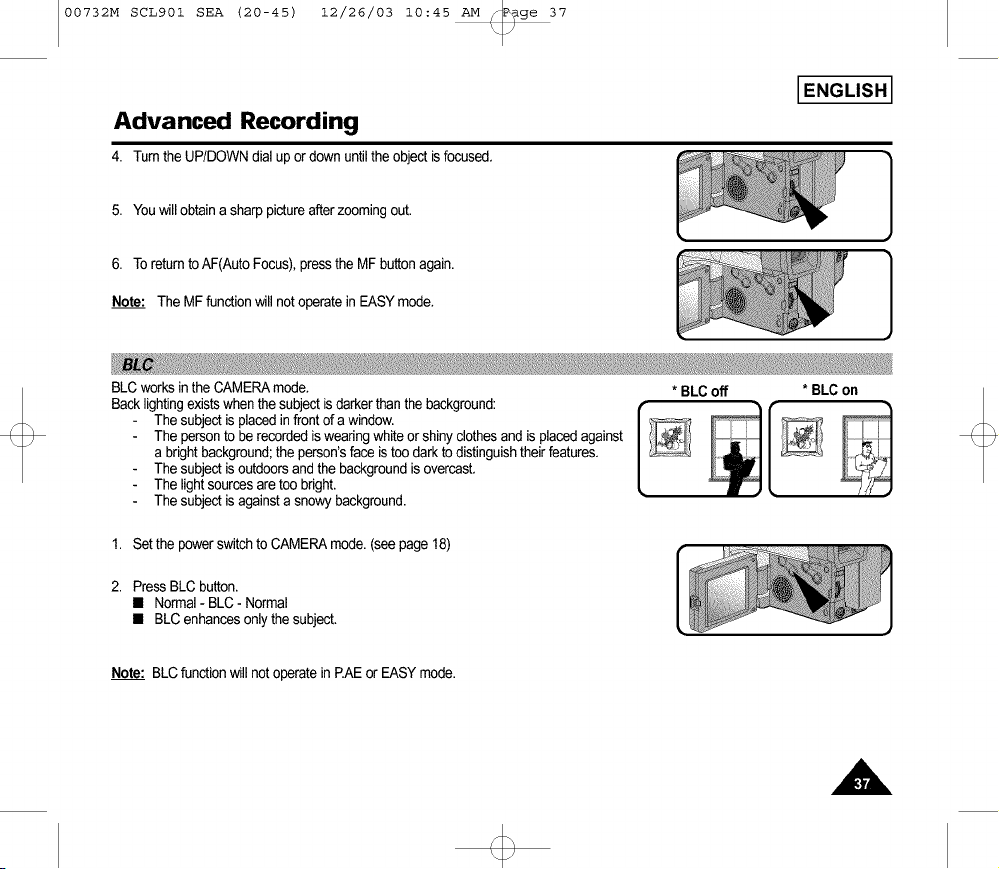
BLC worksinthe CAMERAmode.
Back lightingexistswhenthe subjectis darkerthan the background:
The subjectis placedinfront of a window.
The personto be recordedis wearingwhiteor shinyclothesand is placedagainst
a brightbackground;the person'sface istoo darkto distinguishtheir features.
The subjectis outdoorsandthe backgroundis overcast.
The lightsourcesare too bright.
The subjectis againsta snowybackground.
* BLCoff
* BLCon
1. Set the powerswitchto CAMERAmode.(seepage 18)
2. Press BLC button.
• Normal- BLC - Normal
• BLC enhances only the subject.
Note: BLCfunctionwill not operatein EAE or EASY mode.
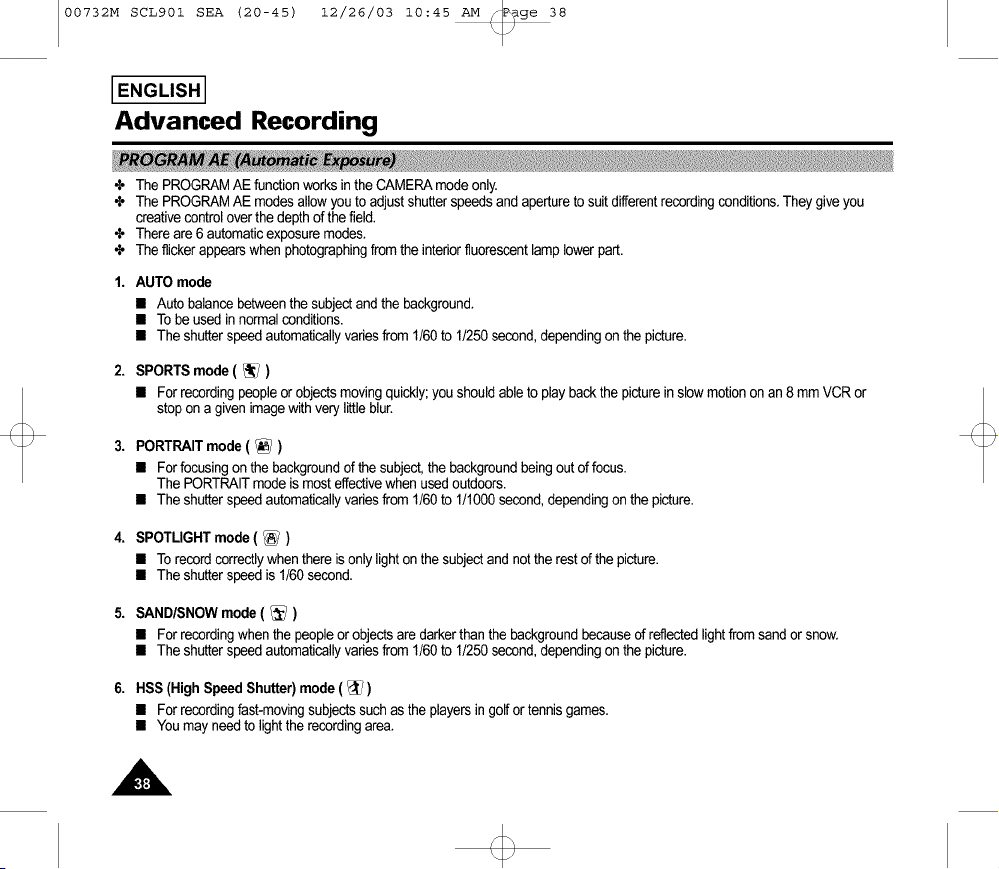
00732M SCL901 SEA (20-45) 12/26/03 10:45 AM _P_ge 38
I ENGLISH I
Advanced Recording
÷ The PROGRAMAE functionworksin the CAMERAmodeonly.
÷ The PROGRAMAE modesallow youto adjustshutterspeedsandapertureto suitdifferentrecordingconditions.Theygive you
creativecontroloverthe depthof the field.
÷ Thereare 6 automaticexposuremodes.
÷ The flickerappearswhen photographingfrom the interiorfluorescentlamp lower part.
1. AUTO mode
• Auto balancebetweenthe subjectand the background.
• To be used in normalconditions.
• The shutterspeedautomaticallyvariesfrom 1/60to 1/250second,dependingon the picture.
2. SPORTSmode ( _ )
• For recordingpeopleorobjectsmovingquickly;youshouldableto play backthe pictureinslowmotionon an 8 mm VCR or
stopon a given imagewithverylittleblur.
3.
PORTRAITmode( _ )
• For focusingonthe backgroundof thesubject,thebackgroundbeing outoffocus.
The PORTRAITmodeis most effectivewhenusedoutdoors.
• Theshutterspeedautomaticallyvariesfrom 1/60to 1/1000second,dependingonthepicture.
4. SPOTLIGHTmode( _ )
• Torecordcorrectlywhenthere isonlylight onthe subjectand notthe rest ofthepicture.
• Theshutterspeed is1/60second.
5. SANDISNOWmode ( _ )
• For recordingwhenthe peopleor objectsaredarkerthanthe backgroundbecauseofreflectedlightfrom sand orsnow.
• Theshutterspeedautomaticallyvariesfrom 1/60to 1/250second,dependingonthepicture.
6. HSS(High SpeedShutter)mode( _ )
• For recordingfast-movingsubjectssuch asthe playersin golfor tennisgames.
• Youmay needto lightthe recordingarea.
00732M SCL901 SEA (20-45) 12/26/03 10:45 AM _P_ge 39
Advanced Recording
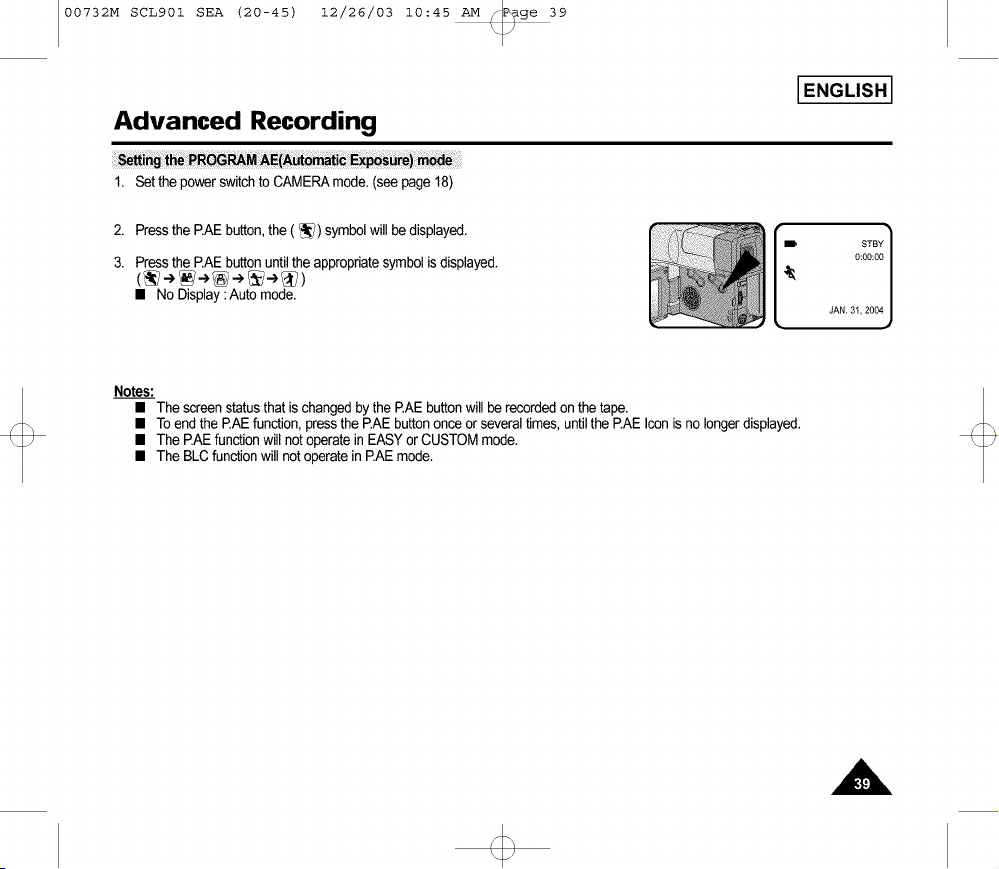
1. Set the powerswitchto CAMERAmode.(seepage 18)
I ENGLISH I
2. Press the EAE button, the (_) symbol will be displayed.
3. Pressthe EAE buttonuntilthe appropriatesymbolis displayed.
• No Display:Auto mode.
STBY]
0:00:00
JAN. 31,2004
Notes:
• The screenstatusthat is changedby the EAE buttonwill be recordedonthe tape.
• To endthe P.AEfunction,press the P.AEbuttononceor severaltimes, untilthe PAE Iconis no longerdisplayed.
• The P.AEfunctionwill not operatein EASYor CUSTOMmode.
• The BLCfunctionwill notoperatein P.AEmode.

00732M SCL901 SEA (20-45) 12/26/03 10:45 AM _P_ge 40
I ENGLISH I
Advanced Recording
÷ The digitaleffectsenableyou to givea creativelookto your recordingby addingvariousspecialeffects.
÷ Selectthe appropriatedigitaleffectforthe type of picturethatyou wish to record.
÷ Thereare severalDSE modes.(SCL901:8 modes,SCL906/L907:9modes)
1. Normalpicture.
2. STROBE:This modeworksby insertinga cuttingeffect onthe image.
Thereare 50 fields ina normalrecordedpicture.(SCL906/L907only)
3. SEPIA:Thismodegivesthe imagea SEPIAeffect.
4. B&W(Black& White):Thismodeallowsthe imageto berecordedin blackandwhite.
5. NEG.(Negative):This modeallowsimagesto be recordedby reflectingthe colorof the
image.
6. MIRROR:This modecuts the imagein half, usingthe mirroreffect.
7. ART:Adds a paint-likeeffect,called solarization,to the image.
8. MOSAIC:Thismodegivesthe imagea checkereddesign.
9. 16:9(WIDE):Thismodeprovidesa 16:9(WIDE)televisiondisplay.
10. CINEMA:This modecoversthe upper/lowerportionof thescreen to give a movie-like
effect.
Notes: • DIS functionwill notoperatein DSEmode.(SCL906/L907only)
• DSEfunctionwill notoperatein EASYmode.
\ I /

00732M SCL901 SEA (20-45) 12/26/03 10:45 AM _P_ge 41
I ENGLISH I
Advanced Recording
_l_ii_ _ _6rdi_g DSE effe_
1. Set the powerswitchto CAMERAmode.(seepage 18)
2. Pressthe DSEbutton,STROBEor SEPIAwill be displayed.
3. Keep pressingthe DSEbutton,until the desiredmodeis displayed.
4. Pressthe START/STOPbuttonto startrecording.
5. To exit the DSEfunctions,pressthe DSEbuttononce orseveraltimesuntil no DSE
mode is displayedon the LCD.
EPIA
Notes:
__ • It is recommendedthatyou setthe DSEmode inSTBYmode.
• DSEfunctionswill not operatein EASYmode.
00732M SCL901 SEA (20-45) 12/26/03 10:45 AM _ge 42
I ENGLISH I
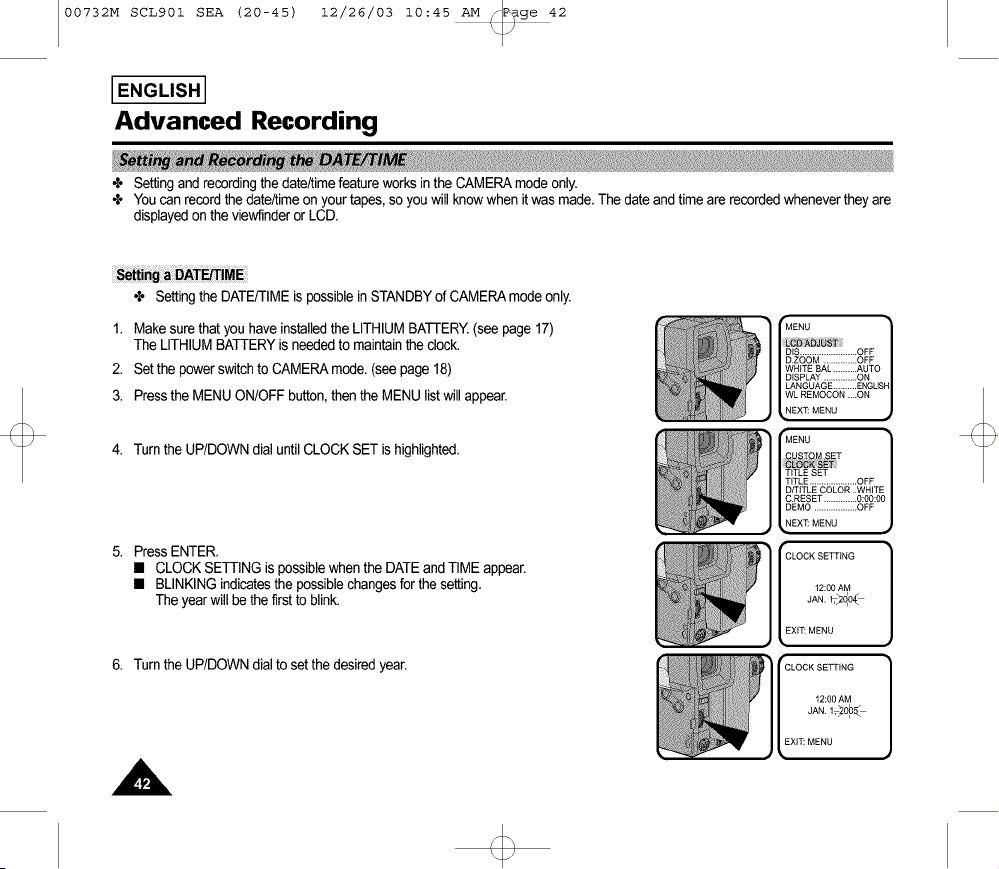
Advanced Recording
÷ Settingand recordingthe date/timefeatureworksinthe CAMERAmodeonly.
÷ Youcan recordthe date/timeon yourtapes, so youwill knowwhen itwas made.The dateand timeare recordedwheneverthey are
displayedon theviewfinderor LCD.
÷ Settingthe DATE/TIMEis possiblein STANDBYof CAMERAmodeonly.
1. Makesure thatyou haveinstalledthe LITHIUMBATTERY.(see page17)
The LITHIUMBATTERYis neededto maintainthe clock.
2. Setthe powerswitchto CAMERAmode.(see page18)
3. Pressthe MENUON/OFFbutton,then the MENUlistwill appear.
4. Turnthe UP/DOWNdial untilCLOCK SET is highlighted.
PressENTER.
• CLOCKSETTINGis possiblewhenthe DATEand TIMEappear.
• BLINKINGindicatesthe possiblechangesfor the setting.
The year will be thefirst to blink.
6. Turnthe UP/DOWNdial to setthe desiredyear.
'_ NU ]
_DJ_ST :
D.ZOOM .............. OFF
WHITE 8AL .......... AUTO
DISPLAY ..............ON
LANGUAGE .......... ENGUSH
WL REMOCON ....ON
EX_ MENU
MENU
U_IQ_ _ET

00732M SCL901 SEA (20-45) 12/26/03 10:45 AM _P_ge 43
Advanced Recording
7. Press ENTER.
• The monthtoberesetwillblink.
I ENGLISH I
8. Turnthe UP/DOWNdialto set the desiredmonth.
9. Press ENTER.
• The dayto be resetwill blink.
10.Youcan set the day,hour and minutefollowingthe sameprocedureusedfor
settingthe yearand month.
11.PressENTERafter settingthe minuteand theclocksettingscreenwilt disappear.
The selecteddateand timewiltthenbe displayed.
1. Make surethat you haveset the DATE/TIME.
2. Set the powerswitchto CAMERAmode.(seepage 18)
• Open the LCD Screenand adjustit to seecomfortably.
3. Pressthe DATE/TIMEbuttonthe requirednumberof times.
• To recordthe dateonly,press the DATE/TIMEbuttononce.
• To recordthe dateand time,pressthe DATE/TIMEbuttontwice.
4. Pressthe START/STOPbuttonto recordthe DATE/TIMEon yourrecording.
]
"CLOCK SETTING
12:00 AM
_F_, 2005
EX$_ MENU
rCLOCK SETTING
12:00 AM
EX$_ MENU
Notes:
• If your dateand timesettingsare notmaintainedinthe camcorder,it meansthe installedLITHIUMBATTERYis discharged.
(see page17)
• Youcannotconcealthe recordeddateortime duringplayback.
• The DATE/TIMEfunctionwill notoperatein EASYor CUSTOMmode.
00732M SCL901 SEA (20-45) 12/26/03 10:45 AM _P_ge 44
I ENGLISH I
Advanced Recording
+ Selecting and recording a TITLEis possible in the CAMERAmode onl7.
÷ The TITLEfeature allows you to select a preset title stored inthe camcorder's memory.
+ You can also select the language of the titles.
÷ Selectinga languageis possiblein STANDBYin CAMERAmodeonly.
÷ The factory defaultlanguageis ENGLISH.
Youcan change the language.
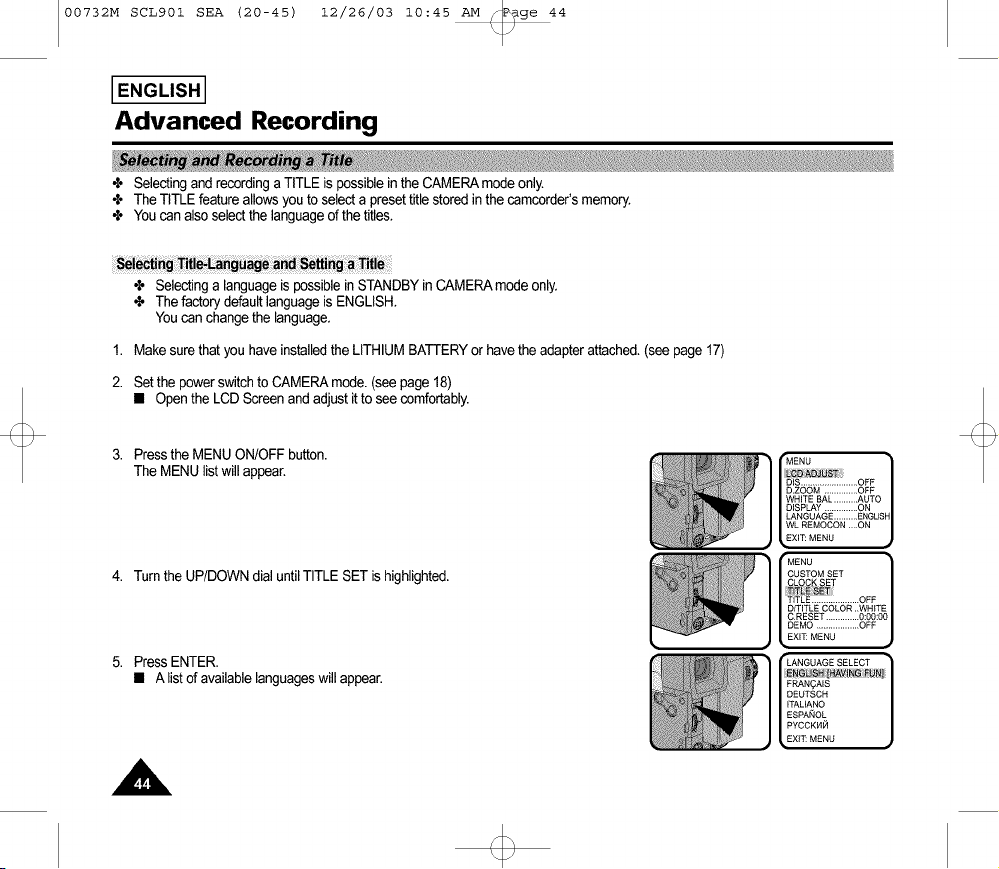
1. Makesure thatyou haveinstalledthe LITHIUMBATTERYor havethe adapterattached.(seepage 17)
2. Setthe powerswitchto CAMERAmode.(see page18)
• Open the LCD Screen andadjustit to see comfortably.
3. Pressthe MENUON/OFFbutton.
The MENUlistwill appear.
4. Turnthe UP/DOWNdial untilTITLE SET is highlighted.
5. PressENTER.
• A listof availablelanguageswillappear.
MENU 1
D.ZOOM .............. OFF
WHITE BAL .......... AUTO
DISPLAY ..............ON
LANGUAGE ..........ENGLISH
WL REMOCON ....ON
EXIT: MENU
MENU
CUSTOM SET
TITLE .................... OFF
D/TITLE COLOR ..WHITE
C.RESET .............. 0:00:00
DEMO .................. OFF
EXIT: MENU •
LANGUAGE SELECT •
/FRAN?AIS
DEUTSCH
ITALIANO
ESPA_OL
PYCCKI4_I
EXI_ MENU •

00732M SCL901 SEA (20-45) 12/26/03 10:45 AM _P_ge 45
Advanced Recording
6. Turnthe UP/DOWNdialto selectthe appropriatelanguage.
• Youmay selectlanguagesamongENGLISH/FRAN(_AIS/DEUTSCH/
ITALIANO/ESPANOL/PYCCKHH.
7. Press ENTER.
• Then,the title listwill appearin the languageyou chose.
8. TurnUP/DOWNdialto whicheverTITLEyou desire.
9. Press ENTER.
• The selectedtitlewill appearon the screenfor 2 ~ 3 seconds andwill disappear.
At the sametime, the camcorderwill returnto the menu mode.
Note: • Makesure thatyou haveselecteda TITLE.
1. Set powerswitchto CAMERAmode.
• Open the LCD Screenand adjustit to seecomfortably.
2. Press MENU.
3. Turnthe UP/DOWNdial untilTITLE...........OFF is highlighted.
4. Press ENTERto chooseamongOFF,AUTO-10S,and CONTINUE.
5. Press START/STOPbuttonto recordthe titlewithyour picture.
• If you wantto changerecordingtime, selecttitlerecordingtime(OFF,AUTO-10S,CONTINUE)on MENU.
I ENGLISH I
FRAN A_S
/OEO4C. /
_TAL(ANO
/EsPA O /
I P¥CCK._ )
f ANN(VERSARY ]
L GRADUATION
HAPPY B(RTHDAY
HAPPY NEW YEAR
HAVING FUN
MENU I
CUSTOM SET
CLOCK SET
TITLE SET
[ D/T(TLE COLOR ..WHITE _
C.RESET .............. 0:00:00
DEMO .................. OFF
EX)_ MENU
Notes: • The titlemoves horizontallyfrom the rightside to the leftside 10secondsafter youturn on the title.
• MENUON/OFFfunctionwill not operatein EASYor RECmode.
/
00732M SCL901 SEA (46-71) 12/26/03 10:46 AM _ge 46
IENGLISHI
Advanced Recording
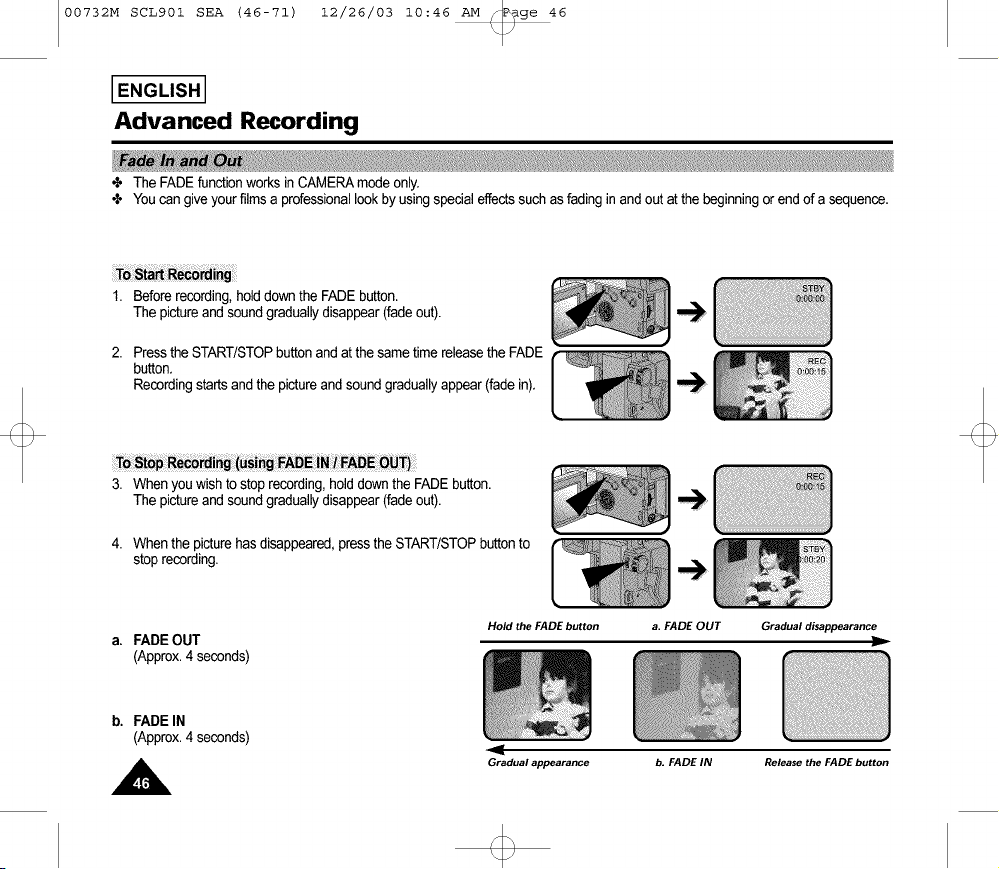
÷ The FADE function works in CAMERA mode only.
4, Youcan give your filmsa professionallook byusingspecialeffectssuchas fading inand out at the beginningor end of a sequence.
1. Beforerecording,holddownthe FADEbutton.
The pictureandsound graduallydisappear(fade out).
2. Press the START/STOPbuttonand at the same timereleasethe FADE
button.
Recordingstartsand the pictureand soundgraduallyappear(fade in).
_g FADE iNi FADEOUT)
3. When youwish to stop recording,holddown the FADEbutton.
The pictureandsound graduallydisappear(fade out).
4. Whenthe picturehas disappeared,pressthe START/STOPbuttonto
stoprecording.
a. FADE OUT
(Approx.4 seconds)
Hold the FADE button
a. FADE OUT Gradual disappearance
b. FADE IN
(Approx.4 seconds)
Gradual appearance
b. FADE IN Release the FADE button
00732M SCL901 SEA (46-71) 12/26/03 10:46 AM _P_ge 47
I ENGLISH I
Advanced Recording
N
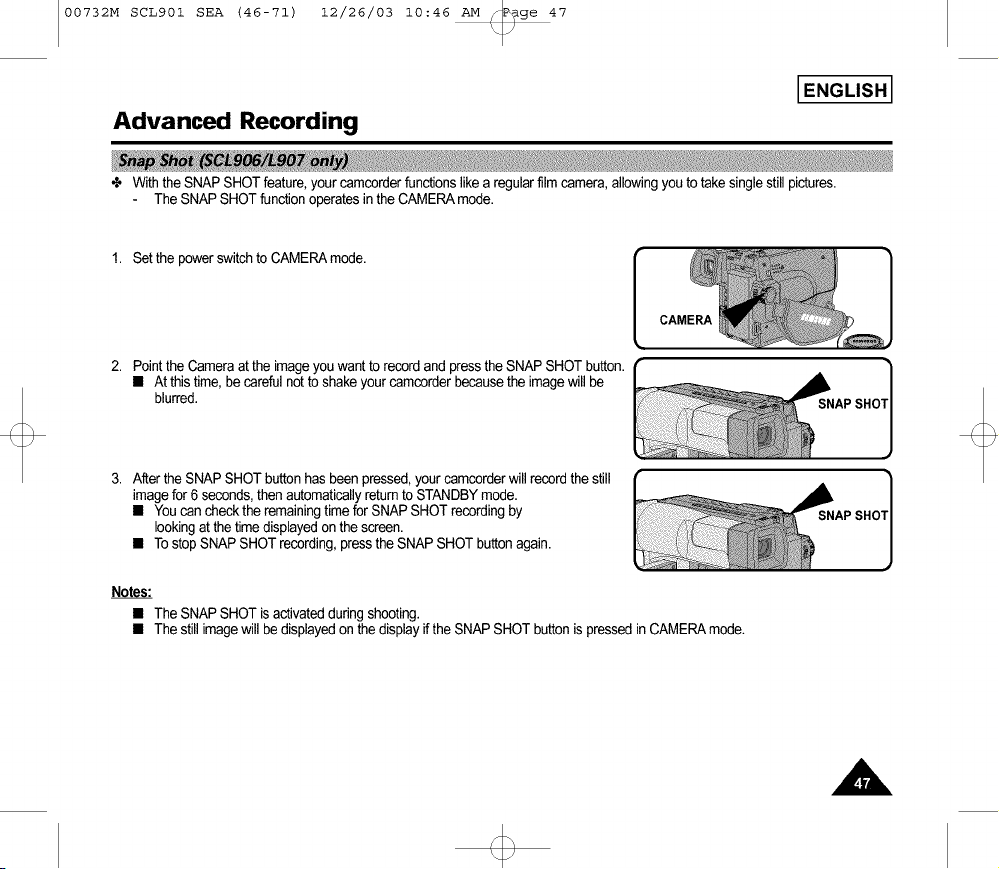
÷ With the SNAP SHOT feature, your came,order functions likea regular filmcamera, allowingyou to take single stillpictures.
The SNAP SHOT function operates in the CAMERAmode.
1. Set the powerswitchto CAMERAmode.
CAMERA
2. Pointthe Cameraat the imageyouwant to recordand press the SNAPSHOT button.
• At thistime, becareful notto shakeyourcamcorderbecausethe imagewill be
blurred.
3. Afterthe SNAP SHOTbuttonhasbeen pressed,your camcorderwill recordthe still
imagefor 6 seconds,then automaticallyreturnto STANDBYmode.
• Youcan checkthe remainingtimefor SNAP SHOTrecordingby
lookingat the time displayedon the screen.
• Tostop SNAPSHOTrecording,pressthe SNAP SHOTbuttonagain.
Notes:
• The SNAP SHOT is activated during shooting.
• The still image will be displayed on the display if the SNAP SHOT button is pressed in CAMERA mode.

00732M SCL901 SEA (46-71) 12/26/03 10:46 AM _P_ge 48
I ENGLISH I
Advanced Recording
•t, WHITE BALANCEis a recordingfunctionthatpreservesthe unique colorof the object inany recordingcondition.
÷ Youmay selectthe appropriateWHITEBALANCEmodeto obtain goodcolor qualityof the image.
AUTO:Thismodeis generallyusedto controltheWHITE BALANCEautomatically.
INDOOR(-._:): ControlsWHITE BALANCEaccordingto the indoorambience.
OUTDOOR('÷:-): ControlsWHITEBALANCEaccordingto the outdoorambience.
1. Set the powerswitchto CAMERAmode.
2. Press the MENUON/OFFbutton,the MENUlistwill be displayed.
3. Turnthe UP/DOWNdial untilWHITEBAL.........AUTOis highlighted.
4. Press ENTER.
• Youcan set it to INDOORor OUTDOORby pressingthe ENTERbutton.
5. Press the MENU ON/OFF button to exit the WHITE BALANCE setting.
Note: The MENUON/OFFfunctionwill notoperatein EASYor REC mode.
MENU
DIS........................ OFF
D.ZOOM .............. OFF
WHITE BAL .......... AUTO
DISPLAY .............. ON
LANGUAGE .......... ENGLISH
WL REMOCON ....ON
EXIT: MENU
MENU
LCD ADJUST
DIS........................ OFF
D.ZOOM .............. OFF
DISPLAY .............. ON
LANGUAGE .......... ENGLISH
WL REMOCON ....ON
EXIT: MENU
MENU
LCD ADJUST
DIS........................ OFF
D.ZOOM .............. OFF
L DISPLAY .............. ON
LANGUAGE .......... ENGLISH
WL REMOCON ....ON
EXIT: MENU
00732M SCL901 SEA (46-71) 12/26/03 10:46 AM _P_ge 49
I ENGLISH I
Advanced Recording
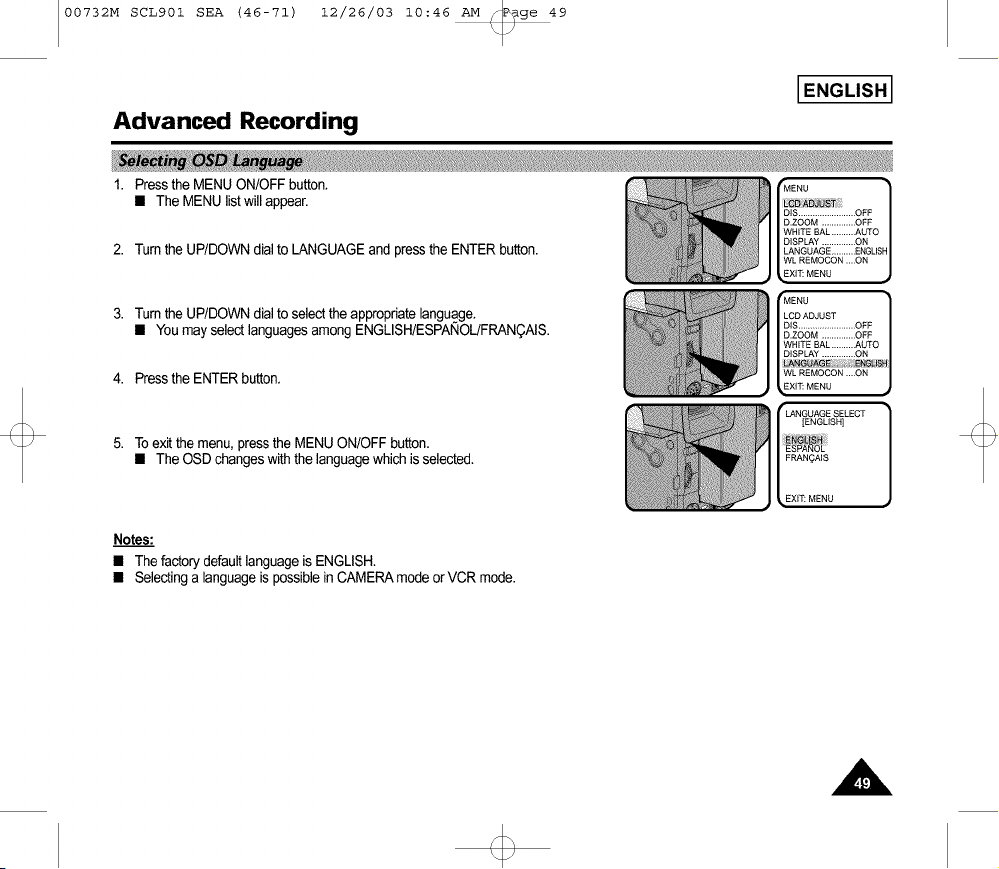
1. Press the MENU ON/OFF button. Mr:ENU ]
• The MENU list will appear.
ot........................
D.ZOOM..............OFF
WHITEBAL..........AUTO
DISPLAY..............ON
2. Turnthe UP/DOWNdial to LANGUAGEand pressthe ENTERbutton. LANGUAG_..........E_GUS_
WL_MOCO_....ON
XlT:MENU
3. Turnthe UP/DOWNdial to selectthe appropriatelanguage.
• Youmay selectlanguagesamongENGLISH/ESPA_IOL/FRANQAIS.
4. Pressthe ENTERbutton.
Toexitthe menu, pressthe MENUON/OFFbutton.
• The OSD changeswith the languagewhich is selected.
LCDADJUST
DIS........................OFF
D.ZOOM..............OFF
WHITEBAL..........AUTO
DISPLAY..............ON
_UAGE : _LI_
[_LR_MOCON....ON JXlT:MENU
r LANGUAGESELECT ]
[ENGLISH]
FRANOAIS
_EXIT:MENU
Notes:
• The factory default language is ENGLISH.
• Selecting a language is possible in CAMERA mode or VCR mode.
00732M SCL901 SEA (46-71) 12/26/03 10:46 AM _P_ge 50
I ENGLISH I
Advanced Recording
÷ Demonstration automati_ly shows you the major functions that are included with your _mcorder so that you may use them more
easily.
÷ The DEMO function is only available in CAMERA mode when a tape is not in the camcorder.
÷ The Demonstration operates repeatedly until the POWER switch is set to OFE
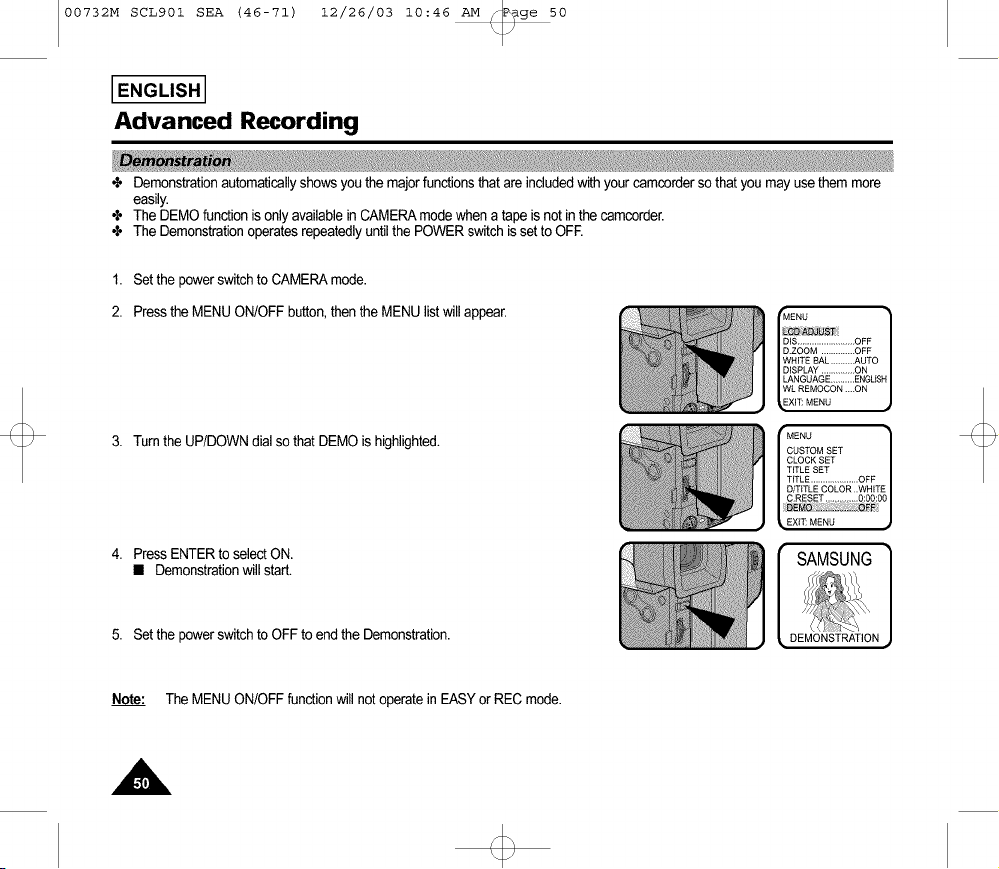
1. Set the power switch to CAMERA mode.
2. Press the MENU ON/OFF button, then the MENU list will appear.
3. Turnthe UP/DOWNdial sothat DEMO is highlighted.
Mf: NOI
llill,ll_;
is o.l........................
D.ZOOM .............. OFF
WHITE BAL .......... AUTO
DISPLAY .............. ON
LANGUAGE .......... ENGLISH
WL REMOCON ....ON
XFE MENU
MENU
CUSTOM SET
CLOCK SET
TITLE SET
TITLE .................... OFF
D/T_TLE COLOR ..WHITE
C.RESET .............. 0:00:00
_. EX_ MENU
4. Press ENTERto selectON.
• Demonstrationwill start.
5. Set the powerswitchto OFF to end the Demonstration.
SAMSUNG
DEMONSTRATION
Note: The MENUON/OFFfunctionwill notoperatein EASYor REC mode.
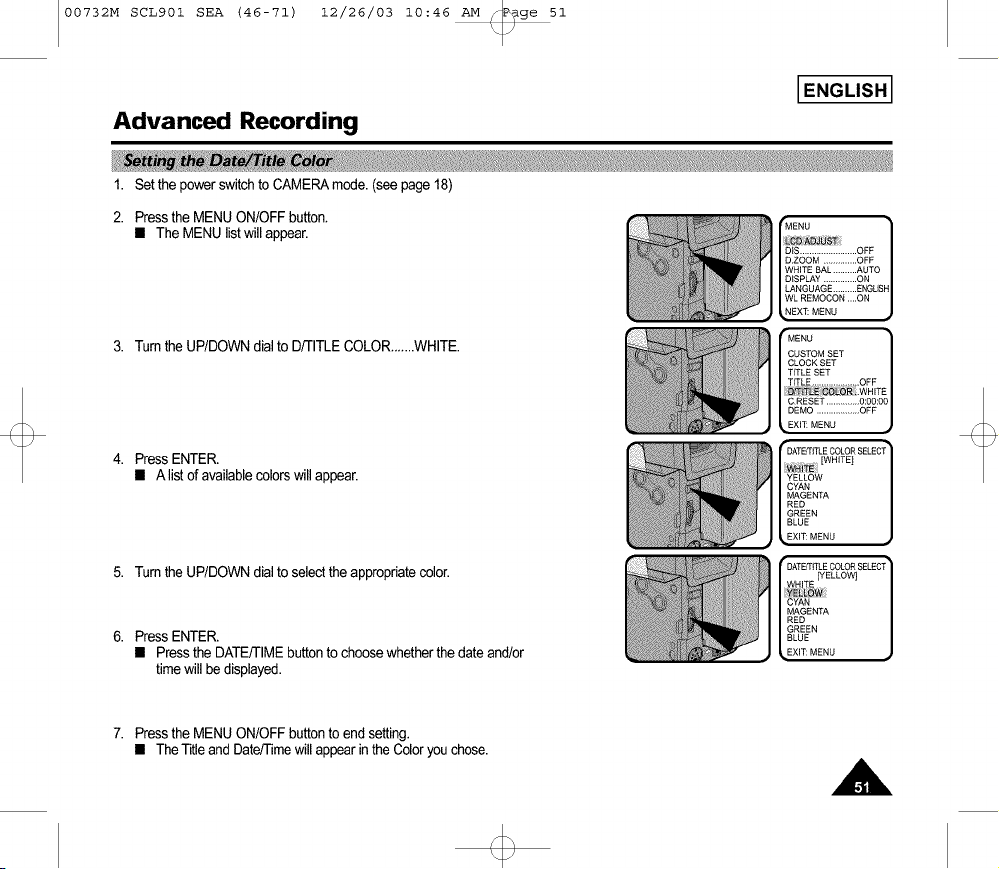
00732M SCL901 SEA (46-71) 12/26/03 10:46 AM _P_ge 51
I ENGLISH I
Advanced Recording
i
1. Set the power switch to CAMERAmode. (see page 18)
2. Press the MENU ON/OFF button.
• The MENU list will appear.
3. Tum the UP/DOWN dial to D/TITLE COLOR__...WHITE.
Press ENTER.
• A listof availablecolorswill appear.
MENU
CUSTOM SET
CLOCK SET
TITLE SET
TITLE .................... OFF
D!Ti LE COLO_ .WHIT_
C.RESET .............. 0:00:00
DEMO .................. OFF
EXl_ MENU
5. Turnthe UP/DOWNdial to selectthe appropriatecolor.
6. Press ENTER.
• Pressthe DATE/TIMEbuttonto choosewhetherthe dateand/or
timewill be displayed.
7. Pressthe MENU ON/OFFbuttonto end setting.
• TheTitle andDate/Timewillappearin theColoryouchose.
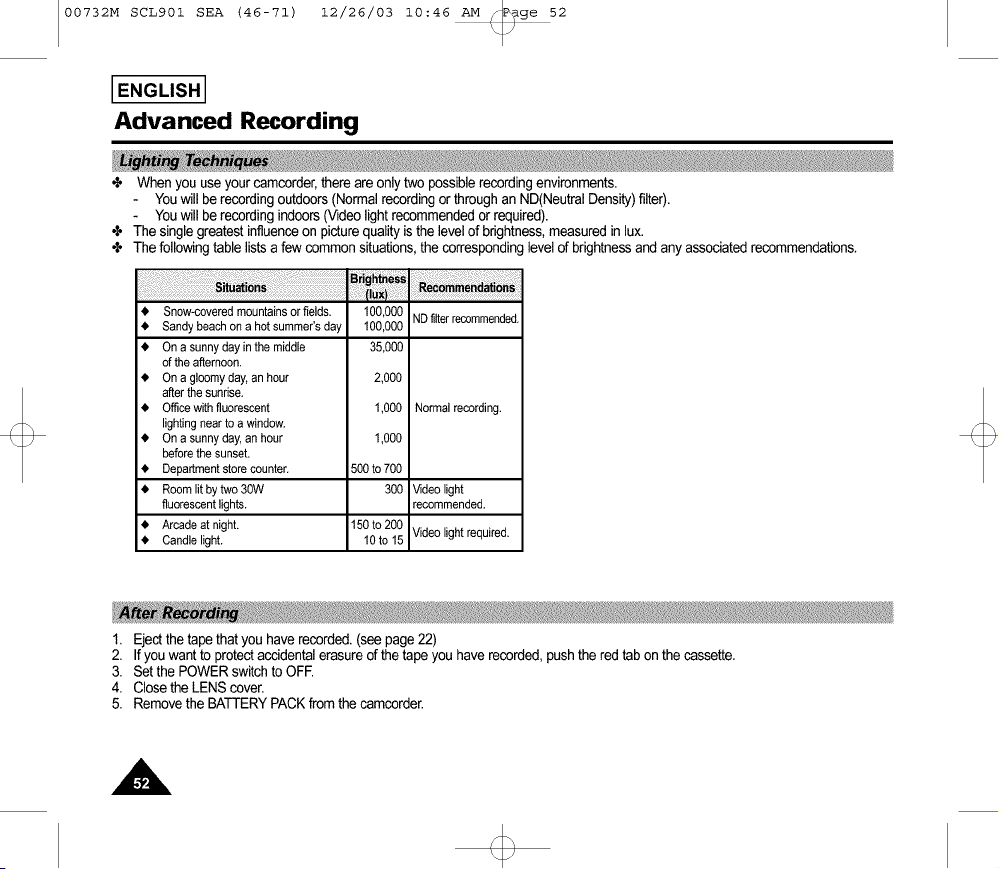
00732M SCL901 SEA (46-71) 12/26/03 10:46 AM _P_ge 52
I ENGLISH I
Advanced Recording
÷ When you use your camcorder, there are onlytwo possiblerecordingenvironments.
You will be recordingoutdoors(Normalrecordingor throughan ND(NeutralDensity)filter).
You will be recordingindoors(Videolightrecommended or required).
÷ The singlegreatestinfluence on picturequalityis the level of brightness,measured in lux.
÷ The followingtable lists a few common situations,the correspondinglevel of brightnessand any associated recommendations.
• Snow-covered mountains or fields. 100,000 ND filter recommended.
• Sandy beach on a hot summer's day 100,000
• On a sunny day in the middle 35,000
of the afternoon.
• On a gloomy day, an hour 2,000
after the sunrise.
• Office with fluorescent 1,000 Normal recording.
lighting near to a window.
• On a sunny day, an hour 1,000
before the sunset.
• Department store counter. 500 to 700
• Room lit by two 30W 300 Video light
fluorescent lights, recommended.
• Arcade at night. 150 to 200 Video light required.
• Candle light. 10to 15
1. Ejectthe tape thatyou haverecorded.(seepage 22)
2. If you want to protect accidental erasure of the tape you have recorded, push the red tab on the cassette.
3. Set the POWER switch to OFE
4. Close the LENS cover.
5. Remove the BATTERY PACK from the camcorder.
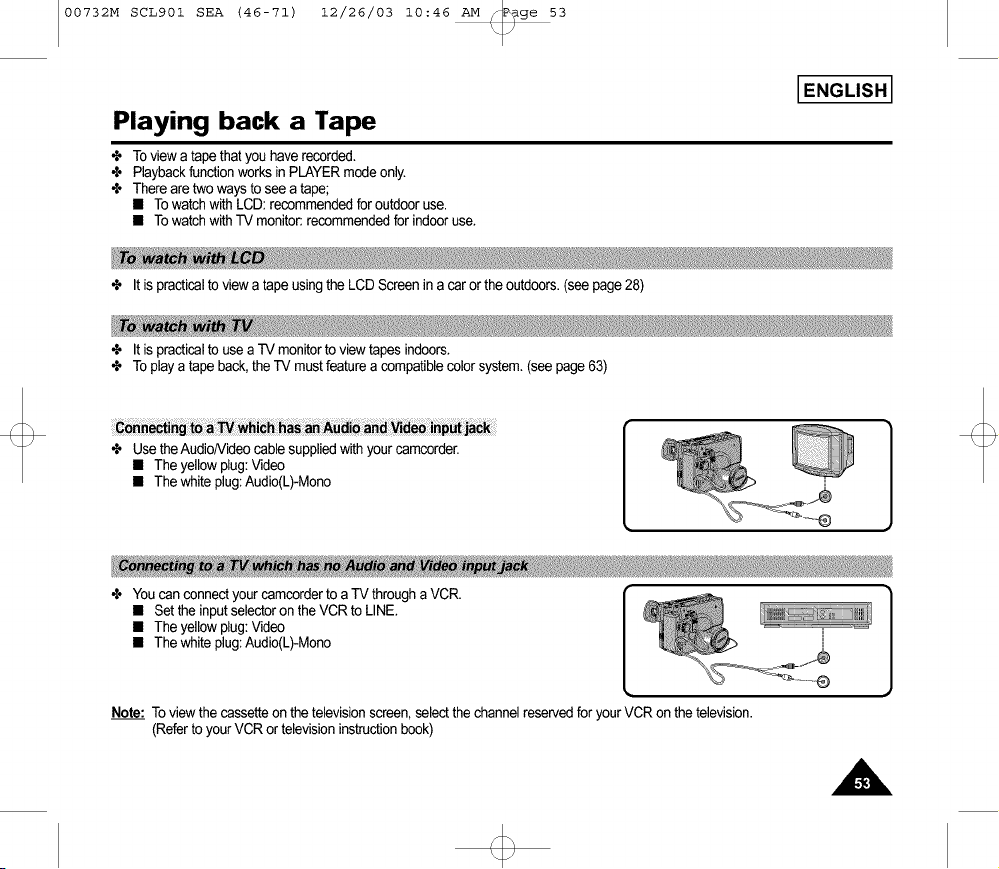
00732M SCL901 SEA (46-71) 12/26/03 10:46 AM _P_ge 53
I ENGLISH I
Playing back a Tape
÷ To view a tapethat you haverecorded.
÷ Playbackfunctionworks inPLAYERmode only.
÷ There aretwo ways to seea tape;
• Towatchwith LCD:recommendedfor outdooruse.
• Towatchwith-IV monitor:recommendedfor indooruse.
+ It is practical to view a tape using the LCD Screen in a car or the outdoors. (see page 28)
÷ It is practicalto use a TV monitorto view tapes indoors.
÷ To playa tape back,theTV mustfeature a compatiblecolorsystem.(see page63)
has anAudi
÷ Usethe Audio/Videocable suppliedwith yourcamcorder.
• The yellowplug:Video
• The whiteplug:Audio(L)-Mono
÷ You can connect your camcorder to a TV through a VCR.
• Set the input selector on the VCR to LINE.
• The yellow plug: Video
• The white plug: Audio(L)-Mono
Note: To view the cassetteon the televisionscreen,selectthe channelreservedforyour VCR on the television.
(Referto your VCR ortelevisioninstructionbook)
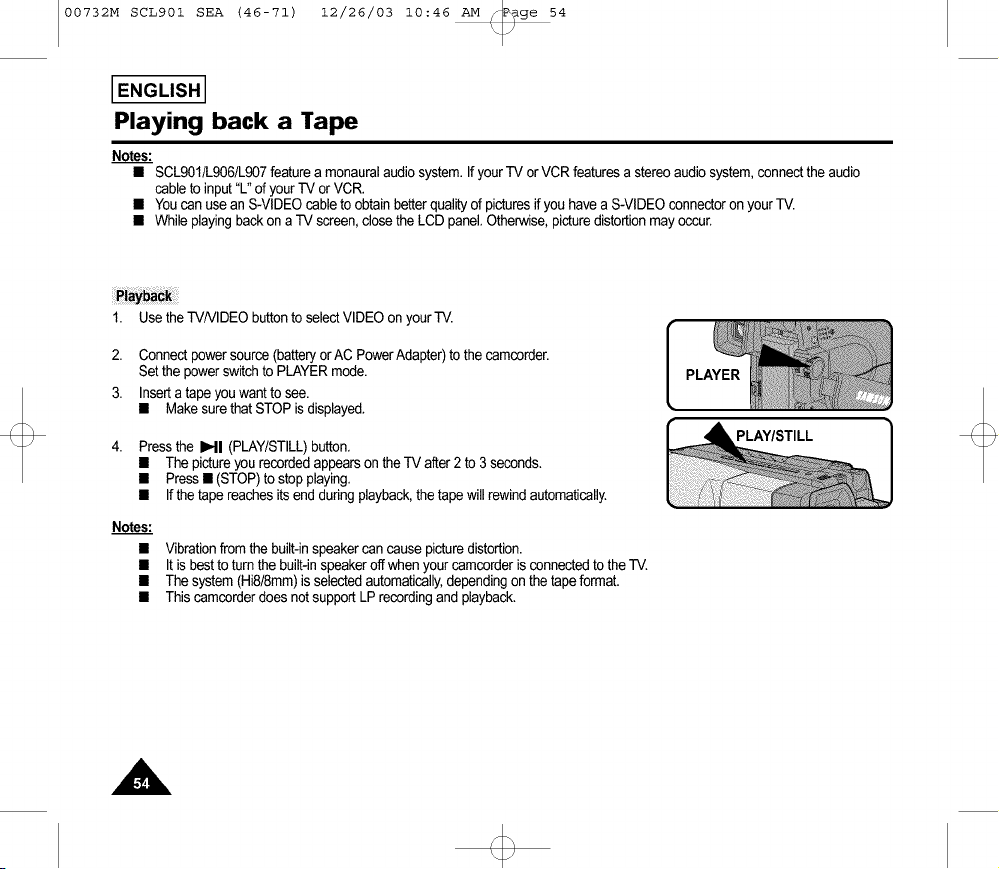
00732M SCL901 SEA (46-71) 12/26/03 10:46 AM _P_ge 54
I ENGLISH I
Playing back a Tape
Notes:
• SCL901/L906/L907featurea monauralaudio system.IfyourTV orVCR featuresa stereoaudio system,connectthe audio
cableto input"L" of your TV or VCR.
• Youcan use an S-VIDEOcable to obtain betterqualityof picturesifyou havea S-VIDEOconnectoron yourTV.
• Whileplaying backon a TV screen,closethe LCD panel.Otherwise,picturedistortionmay occur.
1.
2.
3.
Usethe TV/VIDEObuttonto selectVIDEOon yourTV.
Connectpowersource(batteryor AC PowerAdapter)to the camcorder.
Setthe powerswitchto PLAYERmode.
Inserta tape you want to see.
• Makesure thatSTOP is displayed.
Pressthe I_11(PLAY/STILL)button.
• The pictureyourecordedappearson theTV after2 to 3 seconds.
• Press• (STOP)to stop playing.
• If thetape reachesits end duringplayback,thetape will rewindautomatically.
Notes:
Vibrationfrom the built-inspeakercan causepicturedistortion.
It is bestto turnthe built-inspeakeroffwhen yourcamcorderisconnectedto the -IV.
The system(Hi8/8mm)is selectedautomatically,dependingon the tapeformat.
Thiscamcarderdoes not supportLPrecordingand playback.
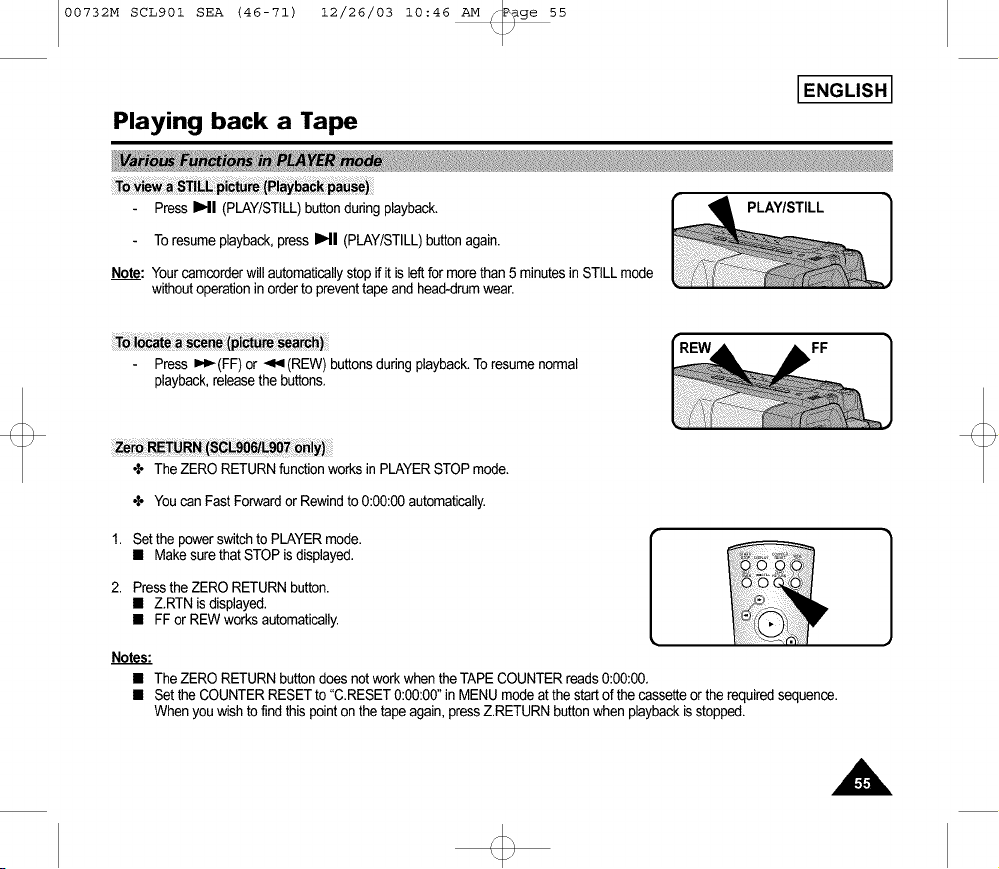
00732M SCL901 SEA (46-71) 12/26/03 10:46 AM _P_ge 55
I ENGLISH I
Playing back a Tape
Press I1_11(PLAY/STILL)buttonduringplayback.
Toresumeplayback,press IHI (PLAY/STILL)buttonagain.
Note: Yourcamcorderwillautomaticallystop if it is leftfor more than5 minutesin STILLmode
withoutoperationinorderto preventtapeand head-drumwear.
ToI_ __ (pi_ _arc_)
Press _'_(FF) or -<'<(REW) buttonsduringplayback.Toresume normal
playback,releasethe buttons.
FF
ZeroRETURN(S_906iL907 o61y)
÷ The ZERORETURNfunctionworks in PLAYERSTOPmode.
÷ Youcan Fast Forwardor Rewindto 0:00:00automatically.
1. Set the powerswitchto PLAYERmode.
• Make surethat STOPis displayed.
2. Press the ZERO RETURN button.
• Z.RTN is displayed.
• FF or REW works automatically.
Notes."
• The ZERORETURNbuttondoes not workwhen theTAPECOUNTERreads0:00:00.
• Setthe COUNTERRESETto "C.RESET0:00:00"in MENUmodeat the startof the cassetteorthe requiredsequence.
Whenyouwish to findthis point on the tapeagain, pressZ.RETURNbuttonwhen playbackis stopped.
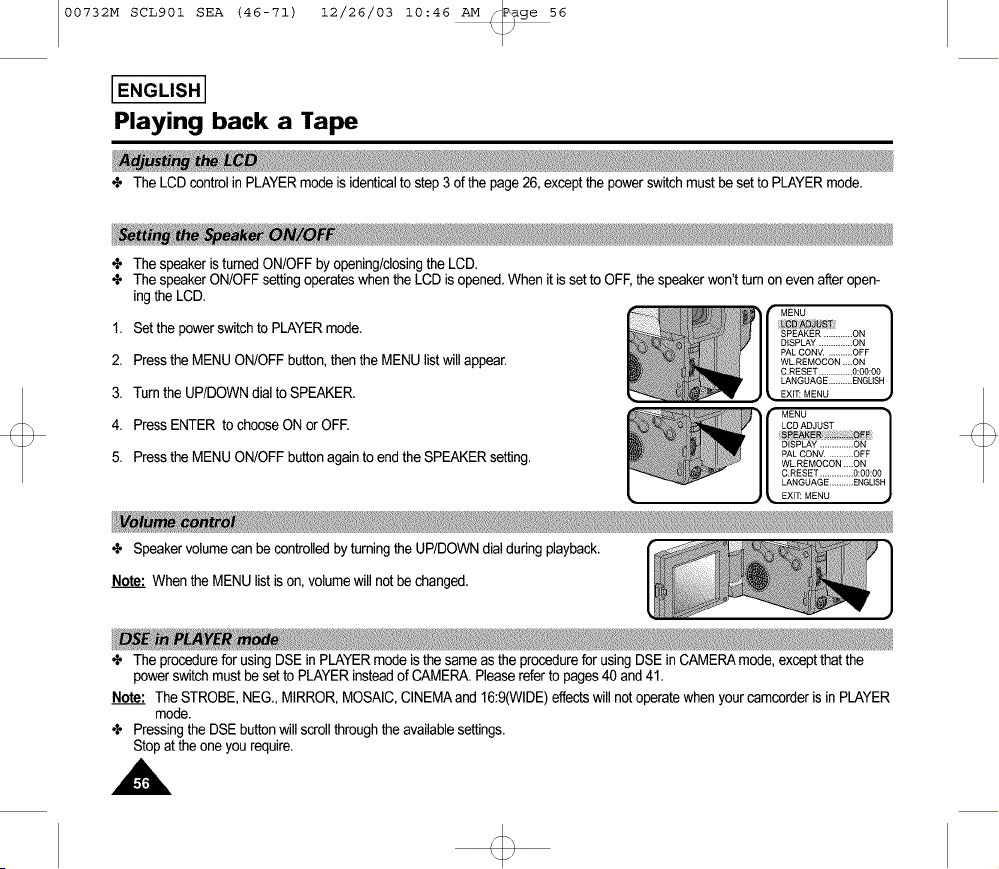
00732M SCL901 SEA (46-71) 12/26/03 10:46 AM _P_ge 56
I ENGLISH I
Playing back a Tape
÷ The LCDcontrol in PLAYERmodeis identicalto step 3 of the page26, exceptthe powerswitchmust be setto PLAYERmode.
÷ The speaker is turnedON/OFFbyopening/closingthe LCD.
÷ The speakerON/OFFsettingoperateswhenthe LCD is opened.When it issetto OFF,the speakerwon't turnon evenafteropen-
ing the LCD.
MENU
1. Set the powerswitchto PLAYERmode.
2. Press the MENUON/OFFbutton,thenthe MENU listwill appear.
3. Turnthe UP/DOWNdialto SPEAKER.
4. Press ENTER to chooseON or OFE
5. Press the MENUON/OFFbuttonagain to end the SPEAKERsetting.
÷ Speakervolumecan be controlledbyturningthe UP/DOWNdial duringplayback. ]
Note: Whenthe MENUlist is on, volumewill not be changed.
÷ The procedurefor usingDSE inPLAYERmode isthe same asthe procedurefor usingDSE inCAMERAmode,exceptthatthe
power switchmust be setto PLAYERinsteadof CAMERA.Pleasereferto pages40 and41.
Note: The STROBE,NEG., MIRROR,MOSAIC,CINEMAand 16:9(WIDE)effectswill not operatewhen yourcamcorderis in PLAYER
mode.
÷ Pressingthe DSE buttonwill scrollthroughthe availablesettings.
Stop at the oneyou require.

00732M SCL901 SEA (46-71) 12/26/03 10:46 AM _P_ge 57
I ENGLISH I
Playing back a Tape
÷ This Camcordercanconvertan NTSCtape recordedin the SPmodeto the "PAL60"format,allowingyouto view it on a PAL-IV
which hasVerticalsync adjustmentcircuitryfor60Hz.
"PAL60"is a specialoutputsignal formatwithwhich a PALTV can be usedto view a tape recordedby an NTSCrecorder.
1. Set powerswitchto PLAYERmode.
2. Insertan NTSCtapeyou want to see.
3. Press MENUON/OFFbutton,thenthe MENU listwill appear.
4. Turnthe UP/DOWNdial to "PALCONV.......OFF".
5. Press ENTER,then it willchangeto
"PALCONV.......PAL60".
• Now youcansee the pictureby pressingthe PLAYbutton.
6. Press MENUON/OFFbuttonto end setting.
Notes:
__ 1. ThisCamcordercan notrecord usingthe "PAL60"system.
2. When an NTSCtape is beingplayedback,the pictureon the monitorscreenshrinksinthe Verticaldirection.
3. If the signalrecordedon the tape is in bad condition,the PAL60playbacksystem maymalfunction.
4. A PAL recordedtapecan not be normallyplayedbackwhen "PAL60" is set ordisplayed.

/
00732M SCL901 SEA (46-71) 12/26/03 10:46 AM _ge 58
ENGLISH]
USB interface (SCL907 only)
÷ Youcan easilytransfera still imagefrom a camera,tape,memorytoa PC withoutadditionaladd-oncardsvia a USBconnection.
÷ If you transferdata to a PC,you needto installthe software(Driver,Editingsoftware)suppliedwith thecamcorder.
• CPU : Intel®PentiumII_ processorcompatibleor better
• Operatingsystem : Windows®98/98SE/ME/2000/XP
• RAM : 64 MBor more
• CD-ROM:4x CD-ROMdrive
• VIDEO : 65,000-colororbettervideo displaycard
• AvailableUSB port
• Hard Disc: 4GB (8GBrecommended)
I ]
Notes:
• Intel®PentiumIITMisa trademarkof the IntelCorporation.
• Windows®is a registeredtrademarkof the Microso_ Corporation.
• All other brandsand names arepropertyof their respectiveowners.
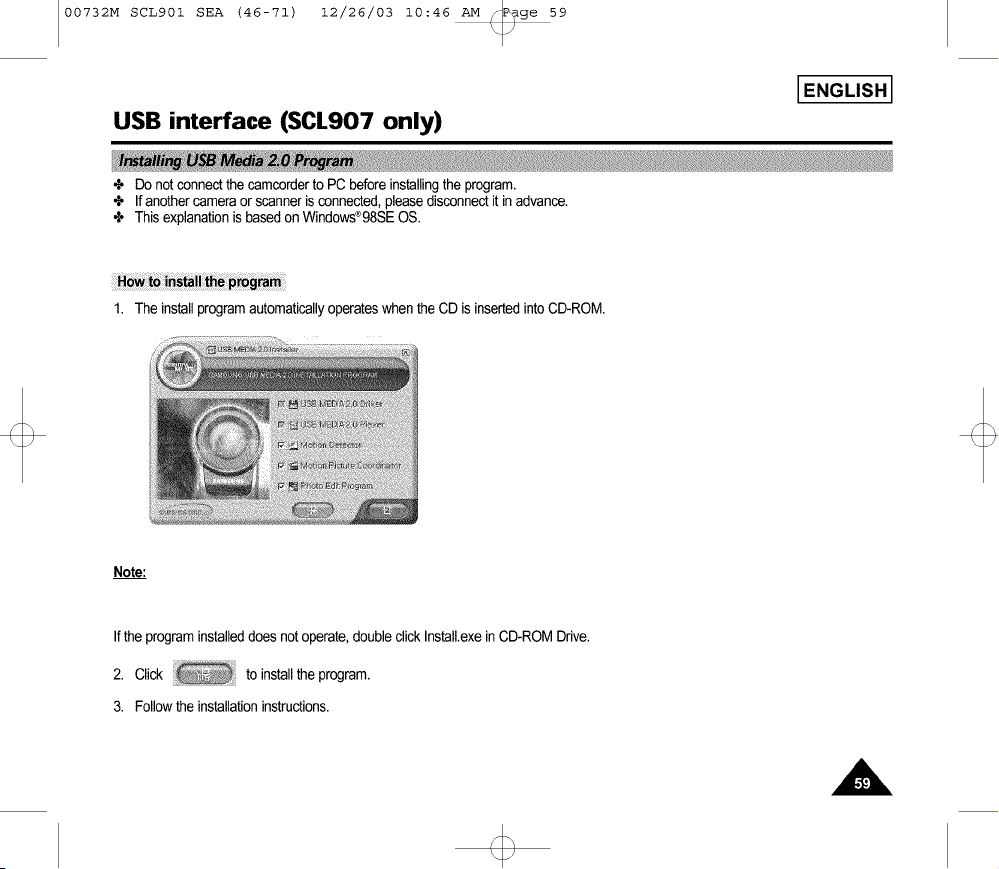
00732M SCL901 SEA (46-71) 12/26/03 10:46 AM _P_ge 59
I ENGLISH I
USB interface (SCL907 only)
÷ Do notconnectthecamcorderto PC before installingthe program.
÷ If anothercameraorscanneris connected,pleasedisconnectit inadvance.
÷ This explanationis based on Windows®98SEOS.
1. The installprogramautomaticallyoperateswhen the CDis insertedintoCD-ROM.
Note:
Ifthe program installeddoes notoperate,doubleclick Install.exein CD-ROMDrive.
2. Click to installthe program.
3. Followthe installationinstructions.
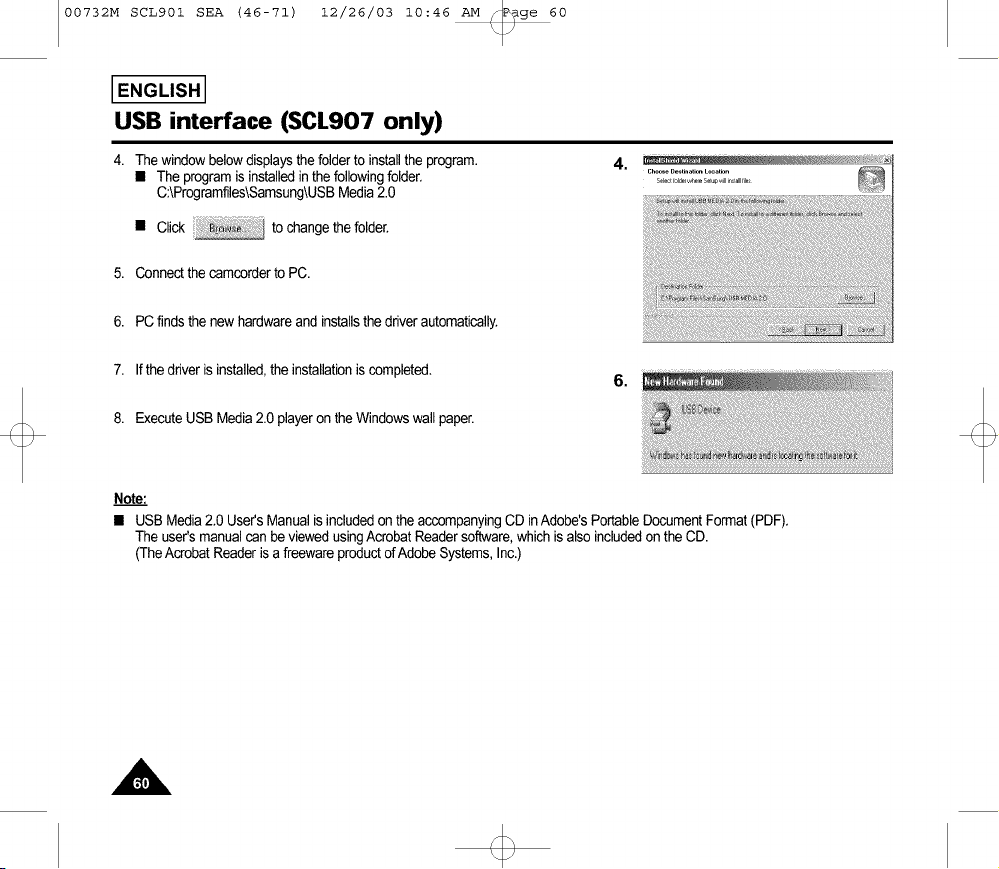
00732M SCL901 SEA (46-71) 12/26/03 10:46 AM _P_ge 60
I ENGLISH I
USB interface (SCL907 only)
4. The windowbelow displaysthe folderto installthe program.
• The programis installedin thefollowingfolder.
C:\Programfiles\Samsung\USBMedia2.0
• Click to change the folder.
4.
5. Connectthe camcorderto PC.
6. PC finds the new hardwareand installsthe driverautomatically.
7. Ifthe driver is installed,the installationis completed.
8. ExecuteUSBMedia2.0 player on the Windowswall paper.
6.
Note:
• USB Media2.0 User'sManualis includedon theaccompanyingCD inAdobe'sPortableDocumentFormat(PDF).
The user'smanualcan be viewedusingAcrobatReadersoftware,which is also includedon the CD.
(TheAcrobatReader isa freewareproductofAdobeSystems,Inc.)

00732M SCLg01 SEA (46-71) 12/26/03 10:46 _v[ _ge
USB interface (SCL907 only)
61
I ENGLISH I
1. Conned a USBcableto the USBport onthe PC.
2. Conned the otherend of the USB cableintothe propertarminalon the camcorder.(USBjack)
3. Connectthe audiocable ta the Line inputjack of the PC.
If the PC has no Lineinputjack, connectthe audiocableto the MIC inputjack.
Thisconnection,however,mayproducenoisedependingonthe PC.
Notes:
• If you disconnectthe USB cablefromthe PC orthe
camcorderwhile transferring,the datatransmissionwill stopandthe datamaybe damaged.
• If you connectthe USBcable ta a PCvia a USB HUBor simultaneouslyconnectthe USBcablealong withother USBdevices,the
camcordermaynotwork properly.
If this occurs,removethe other USBdevicesfrom the PCand reconnectthe camcorder.
USB Cable
USB AUDIO Cable
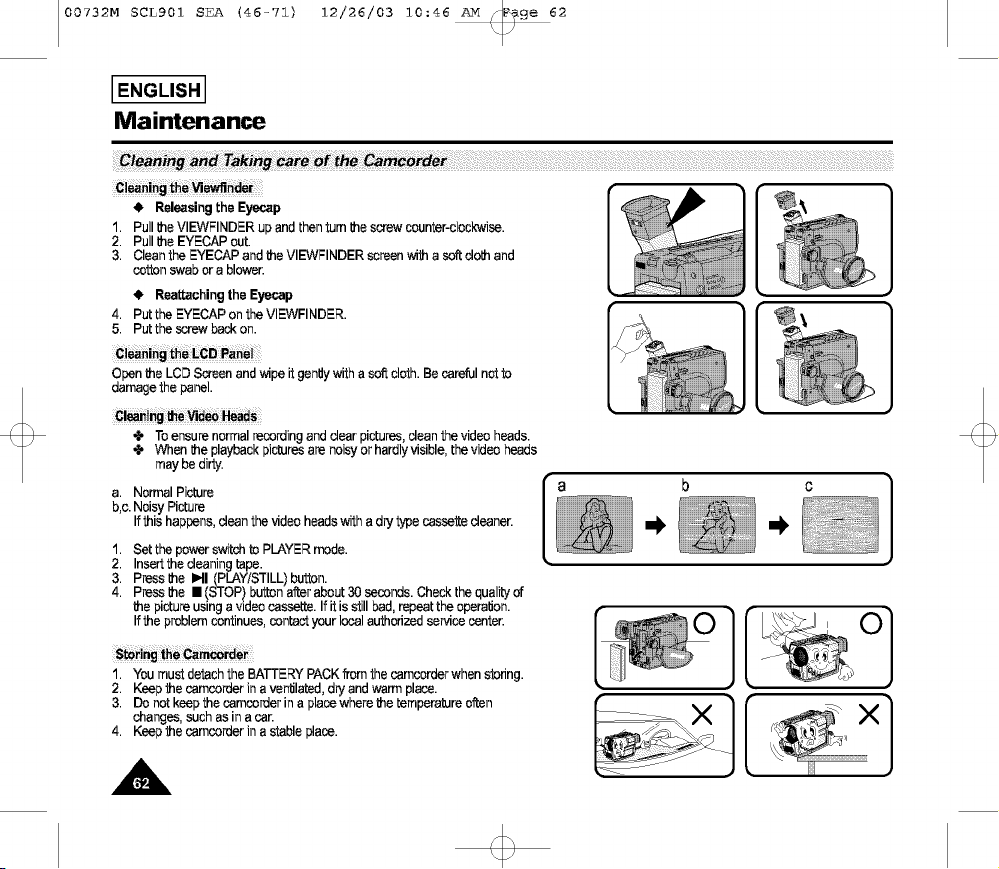
00732M SCLg01 SEA (46-71) 12/26/03 10:46 _v[ _ge 62
ENGLISH]
Maintenance
_!i_i_!_i_!i_i_!_!_:i_!_!iiii_t_!!i_i_i!__i!_!_i!!i_!_!ii_i_!_!i_ii_!!_!!i!_!!i_¸¸iiii!!_!!i!i!!il¸¸iiii!!_!!i!i!!il¸¸iiii!!_!!i!i!!il¸¸iiii!!_!!i!i!!il¸¸iiii!!_!!i!i!!il¸¸iiii!!_!!i!i!!il¸¸iiii!!_!!i!i!!il¸¸iiii!!_!!i!i!!il¸¸iiii!!_!!i!i!!il¸¸iiii!!_!!i!i!!il¸¸iiii!!_!!i!i!!il¸¸iiii!!_!!i!i!!il¸¸iiii!!_!!i!i!!il¸¸iiii!!_!!i!i!!il¸¸iiii!!_!!i!i!!il¸¸iiii!!_!!i!i!!il¸¸iiii!!_!!i!i!!il¸¸iiii!!_!!i!i!!il¸¸iiii!!_!!i!i!!il¸¸iiii!!_!!i!i!!il¸¸iiii!!_!!i!i!!il¸¸iiii!!_!!i!i!!il¸¸iiii!!_!!i!i!!il¸¸iiii!!_!!i!i!!il¸¸iiii!!_!!i!i!!il¸¸iiii!!_!!i!i!!il¸¸iiii!!_!!i!i!!il¸¸iiii!!_!!i!i!!il¸¸iiii!!_!!i!i!!il¸¸iiii!!_!!i!i!!il¸¸iiii!!_!!i!i!!il¸¸iiii!!_!!i!i!!il¸¸iiii!!_!!i!i!!il¸¸iiii!!_!!i!i!!il¸¸iiii!!_!!i!i!!il¸¸iiii!i!i!iil
• Releasing the Eyecap
1. Pull theVIEW;INDER up and then turn thescrew counter-clockwise.
2. Pull the EYECAP out.
3. Clean the EYECAP and the VIEWFINDER screen with a sof_cloth and
cotton swab or a blower.
• Reattaching the Eyecap
4. Put the EYECAP onthe VIEWFINDER.
5. Put the screw back on.
Cleani Panel
Open the LCD Screen and wipe it gently with a soft cloth. Be careful not to
damage the panel.
_ieaning the Videa H_ads
• To ensure normal reoording and dear pictures, dean the video heads.
• When the playback pictures are noisy or hardly visible, the video heads
may be dirty.
a. Normal Picture
b,c.Noisy Picture
Ifthis happens, dean the video heads with a dry typecassette deaner.
1. Set the power switch to PLAYER mode.
2. Insert the deaning tape.
3. Press the MI (PLAY/STILL) button.
4. Press the • (STOP) button after about 30 seconds. Check the quality of
the picture using a video cassette. If it is still bad, repeat the operation.
Ifthe problem continues, oontact your local authonzed service center.
Camcorde
1. You must detach the BATTERY PACK from the camcorder when s_ofing.
2. Keep the camcorder in a ventilated, dry and warm place.
3. Do not keep the camcorder in a place where the temperature often
changes, such as in a car.
4. Keep the camcorder in a stable place.
[ °l
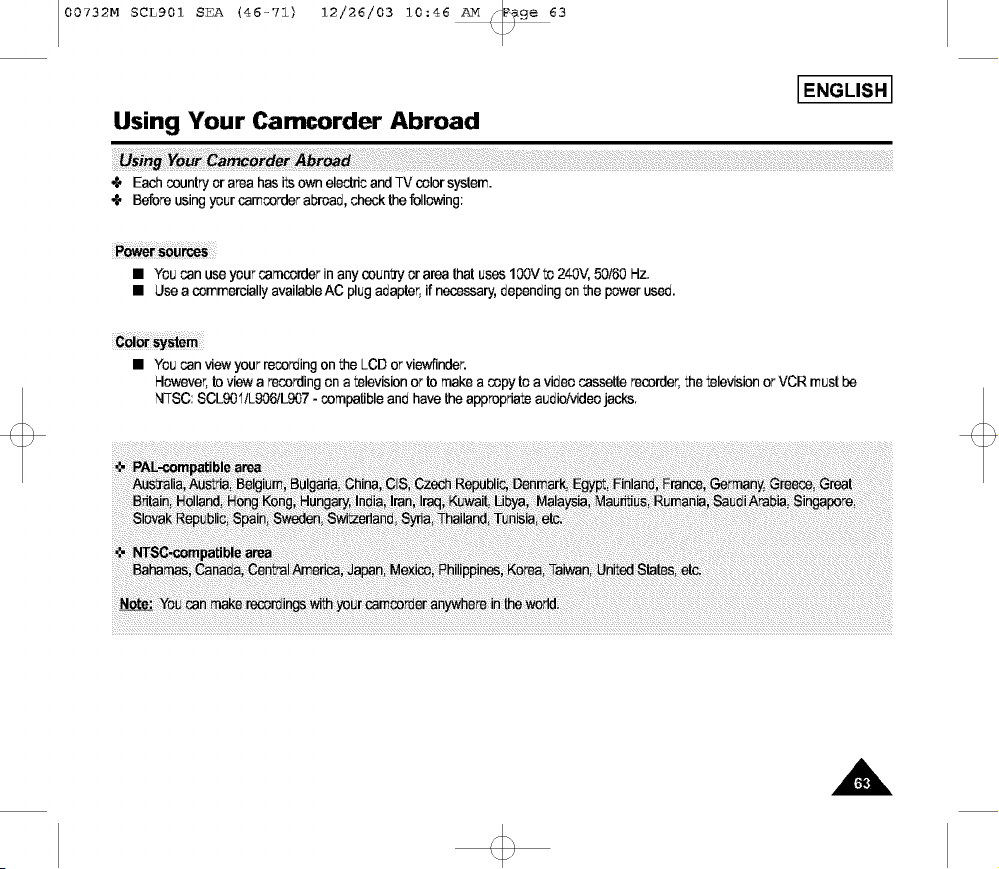
00732M SCLg01 SEA (46-71) 12/26/03 10:46 _v[ _ge 63
Using Your Camcorder Abroad
Each countryorarea has its ownelectricandTV color system.
Beforeusingyour camcorderabroad,checkthefollowing:
I ENGLISH I
ii_i!i!!ii:ii_!i!!ii(_!i!i_'¸i!_i!i_i!_i!i_i!il¸i!i!!ii!!il¸¸iiii!!_!!i!i!!il¸¸iiii!!_!!i!i!!il¸¸iiii!!_!!i!i!!il¸¸iiii!!_!!i!i!!il¸¸iiii!!_!!i!i!!il¸¸iiii!!_!!i!i!!il¸¸iiii!!_!!i!i!!il¸¸iiii!!_!!i!i!!il¸¸iiii!!_!!i!i!!il¸¸iiii!!_!!i!i!!il¸¸iiii!!_!!i!i!!il¸¸iiii!!_!!i!i!!il¸¸iiii!!_!!i!i!!il¸¸iiii!!_!!i!i!!il¸¸iiii!!_!!i!i!!il¸¸iiii!!_!!i!i!!il¸¸iiii!!_!!i!i!!il¸¸iiii!!_!!i!i!!il¸¸iiii!!_!!i!i!!il¸¸iiii!!_!!i!i!!il¸¸iiii!!_!!i!i!!il¸¸iiii!!_!!i!i!!il¸¸iiii!!_!!i!i!!il¸¸iiii!!_!!i!i!!il¸¸iiii!!_!!i!i!!il¸¸iiii!!_!!i!i!!il¸¸iiii!!_!!i!i!!il¸¸iiii!!_!!i!i!!il¸¸iiii!!_!!i!i!!il¸¸iiii!!_!!i!i!!il¸¸if!i!
• Youcan useyour camcorderinanycounty or area that uses100Vto 240V, 50/60Hz.
• Usea commerciallyavailableAC plugadapter,if necessary,dependingon the power used.
• Youcan viewyourrecordingon the LCD or viewfinder.
However,to view a recordingon a televisionor to makea copy to a video cassetterecorder,the televisionor VCR must be
NTSC:SCLg0'I/Lg06/Lg07- compatibleand have the appropriateaudio/videojacks.
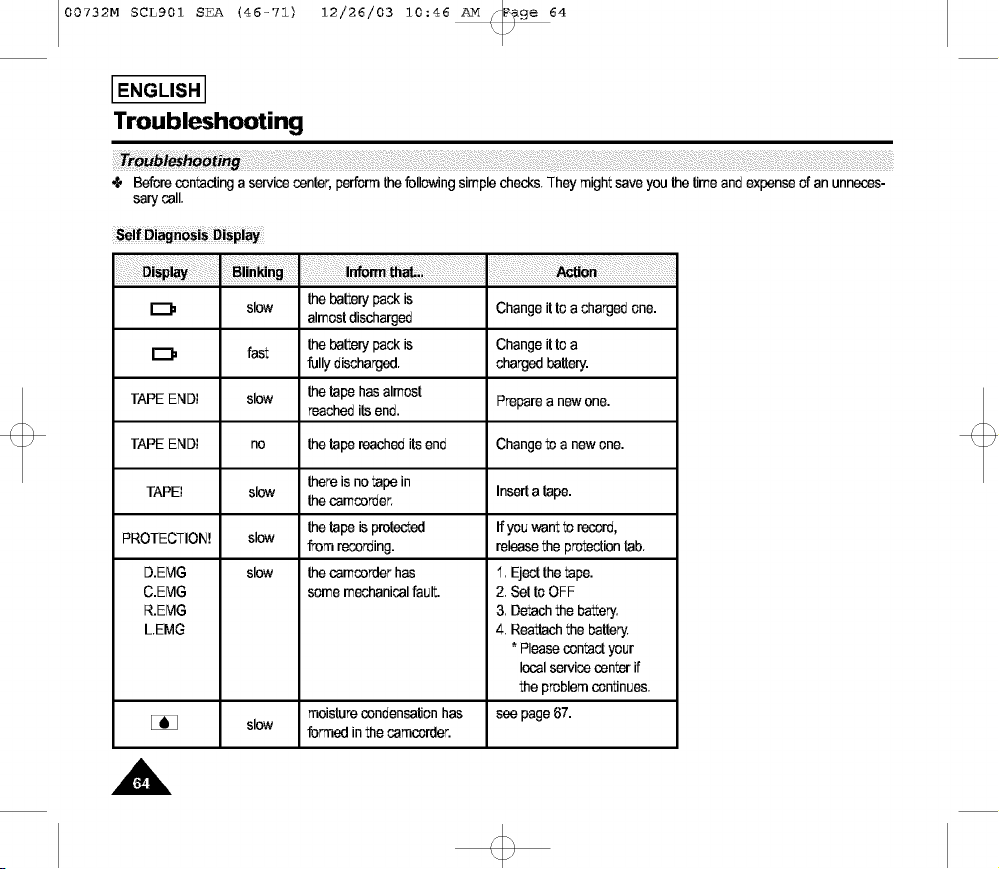
00732M SCLg01 SEA (46-71) 12/26/03 10:46 _3v[ _ge 64
i
IENGUS"I
Troubleshooting
Troub _ing ;;;
# Beforecontactinga servicecenter,performthefollowingsimplechecks.They mightsave youthetimeand expenseof an unneces-
sarycall.
[_= slow thebatterypack is Changeitto a chargedone.
almostdischarged
[_= fast thebatterypack is Changeitto a
fully discharged, chargedbattery.
TAPEEND! slow thetape hasalmost Preparea new one.
reachedits end.
TAPEEND! no thetape reacheditsend Changeto a new one.
thereis notape in Inserta tape.
TAPE! slow thecamcorder.
PROTECTION! slow thetape isprotected If youwant to record,
from recording, releasethe protectiontab.
D.EMG slow the camcorderhas 1. Ejectthe tape.
C.EMG some mechanicalfault. 2. Setto OFF
R.EMG 3. Detachthe battery.
LEMG 4. Reattachthe battery.
* Pleasecontactyour
localservicecenterif
the problemcontinues.
moisturecondensationhas see page67.
slow formed inthe camcorder.
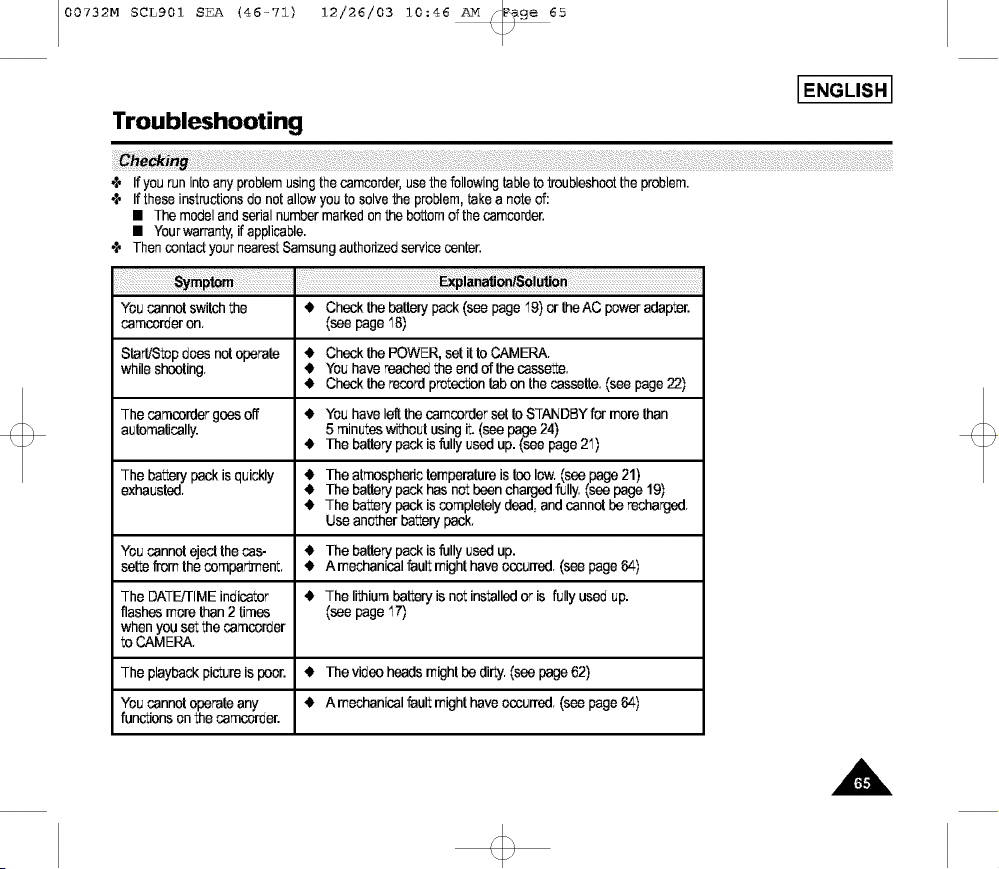
00732M SCLg01 SEA (46-71) 12/26/03 10:46 _v[ _ge 65
I ENGLISH I
Troubleshooting
i_i_ !iiiiii_iiii!!!!!iiii_!ii!!_iii_!!!!_iii!_!!!!_iii!_!!!!_iii!_i!iiii!i_ii!i_i_!_ii!!iiii_:_i!iii_i_iiiii!!_i!_i_ii!iliiiiii!!_ii!ii!_)iiii_iiii_ii_!i_ill_iii!i_!!!!_iii!_i!iiii!i_ii!_:_:_:_ _!!!!_iii!_i!iiii!i_ii!i_i_!!i_!_!:ii!i!i_!_!_,_,ii:ii!_:ii_i_ii:!iiii!i_!!!_iii!_i_ili_ii!i!i!!i!i_!!ii_i_!_i:!_ii::ii_!_ii!__iii!_i:_iiiiiiiiii_!_ii!!_!!!_iii!_!!!_iii!_!!!_iii!_!!!_iii!_!!!_iii!_!!!_iii!_!!!_iii!_!!!_iii!_!!!_iii!_!!!_iii!_!!!_iii!_!!!_iii!_!!!_iii!_i_i!!i
,_ If yourun intoanyproblemusingthe camcerder,usethe followingtableto troubleshootthe problem.
,_ If these instructionsdo not allowyou to solvethe problem,take a noteof:
• The modeland serialnumbermarkedon the bottomof thecamcerder.
• Yourwarranty,if applicable.
,_ ThencontactyournearestSamsungauthorizedservicecenter.
Youcannotswitchthe _1, Checkthe batterypack(see page'lg) orthe AC poweradapter.
camccrderon. (seepage '18)
Start!Stepdoesnotoperate _1, Checkthe POWER,set it to CAMERA.
while shooting. _1,You havereachedthe endof the cassette.
_1, Checkthe recordprotectiontab on the cassette.(see page22)
Thecamcordergoes off _1,You havelef[thecamcordersetto STANDBYfor more than
automatically. 5 minuteswithout usingit. (seepage 24)
_1,The batterypack is fully usedup. (see page2'1)
The batteryback is quickly _1,The atmospherictemperatureis too low.(seepage21)
exhausted. _1,The batterypack has not beenchargedfully.(seepage 19)
_1,The batteryback is completelydead,andcannot be recharged.
Useanotherbatteryback.
Youcannoteject the cas- _1,The batterypack is fully usedup.
settefrom the combari]T_ent _1,A mechanicalfault mighthave occurred.(see page64)
The DATE/TIMEindicator _1,The lithiumbatteryis not installedor is fullyused up.
flashesmorethan 2 times (seepage '17)
when you setthe camccrder
to CAMERA.
The playbackpictureis poor. _1,The video headsmightbe dirty.(seepage62)
Youcannotoperateany _1,A mechanicalfaultmight have occurred.(see page64)
functionson the camccrder.

00732M SCLg01 SEA (46-71) 12/26/03 10:46 _v[ _ge 66
I ENGLISH I
Troubleshooting
,
A verticalstripeappears 41, The contrastbetweenthe subjectand the backgroundis toe
when you record a bright greatfor the cam(orderto operatenormally.Makethe
subjectagainsta dark backgroundbrightto reducethe con_'astor usethe
background(candleflame, BLCfunctionwhileyou arerecording.(seepage37)
for example).
The imagequalityon the 41, The useof VIEWFINDERis recommendedwhen recording
LCD is poor. undersunlight.(see page7)
Adjustthe LCD.(see page26)
The image inthe viewllnder 41, The viewfinderlens hasnet beenadjusted.
is blurred. Turnthe viewfinderfocus ring untilthe screencomesintosharp
focus.(see page27)
The tapedoes not move 41, Setthe POWERswitchto PLAYER.
when you pressthe Play, 41, Youhave reachedthe beginningor end of the cassette.
FastForwardorRewind
buttons.
The picturedoes not appear 41, The LCD Screenisopened.
inthe viewllnder.
There isno soundfrom the 41, Make surethe SPEAKERisON. (see page56)
SPEAKERwhen playing
backthe tape.
The Data/]]meor Title 41, The lithiumbatteryis notinstalledor is fully usedup.
disappearedeventhough (see page17)
you had it set.

00732M SCLg01 SEA (46-71) 12/26/03 10:46 _v[ _ge 67
I ENGLISH I
Troubleshooting
!ii_i!ii_it.rei!_i!!i_ t_"_:_:_!_!_ii_)_!_!_i_i_!_i!!i!!i_i_!_:_:_:_i!!i!_!i_i_!_i!!i!_i_i_i!_!!i!_!!!_i!_ii_i_:!_iii_i!ii_i!:i_i_i_i_i_!i_i_i_!i_ii_ii_!!!i_!_!_ii_ii_iii_!i!_!!_!_!i_i_i_i!:!_!_!i!_i(_iii!_i_(!i!(_i_i!¸_i_!!i!!_ii_i_i_i_!i_!i_ii_i_i!_ii_!_!_!i_ii_!_i_i_!_i!!i!_!i_i_!_i!!i!_!i_i_!_i!!i!_!i_i_!_i!!i!_i_i_i!
4, If the camcerderis broughtdirectlyfroma cold placeto a warm place,moisturemay condenseinsidethe camcorder,
on the surfaceof the tape,or on the lens.In this condition,the tape maystickto the headdrum and be damagedorthe unitmay net
operatecorrectly.
Topreventpossibledamageunderthese circumstances,the camcerderhasa built-inmoisturesensor.
If there is moistureinsidethe camcorder,"DEW( [_ )" isdisplayed.
If this happens,noneof the functionsexceptcassetteejectionwill work.
Open the cassettecompartmentand removethe batteryforat leasttwo heuls
in a warm dry room.
DEW
Pleasefollow this procedurewhen the DEW protectionfeatureis unexpectedlyactivated
and youwant to overrideit:
(Pleasemakesurethatthe condensationhasdisappearedcompletely.)
1. Takethe batterypack out.
2. Takethe lithiumbatteryout. ¥
3. Put the lithiumbatteryback.
4. Put the batteryback back.
[ ]
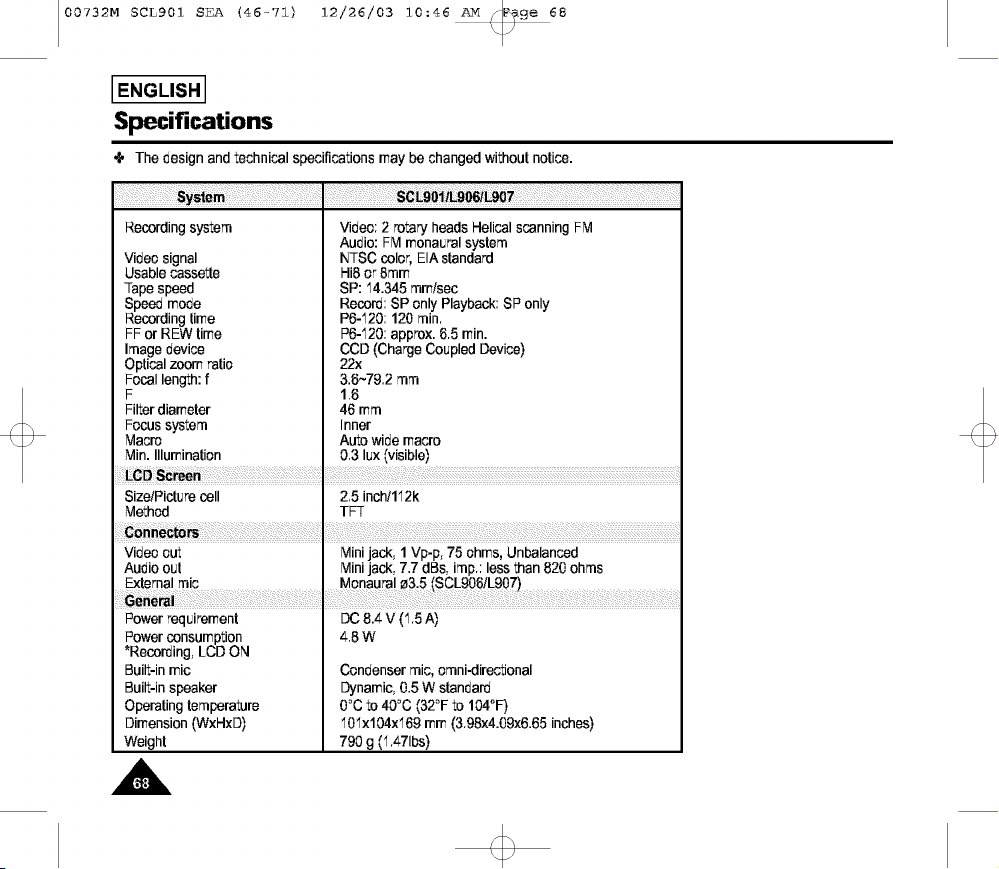
00732M SCLg01 SEA (46-71) 12/26/03 10:46 _v[ _ge 68
I ENGLISHI
Specifications
The design and technical specifications may be changed without notice.
Recordingsystem Video: 2 rotary heads Helical scanning FM
Audio: FM monauralsystem
Video signal NTSC color,EIA standard
Usable cassette Hi8 or 8ram
Tapespeed SP: 14.345mm/sec
Speedmode Record:SP only Playback:SP only
Recordingtime P6-120:120 rain.
FF or REW time P6-120:approx.6.5 rain.
Image device CCD(ChargeCoupled Device)
Opticalzoom ratio 22x
Focal length:f 3.6~79.2 mm
F 1.6
Filterdiameter 46 mm
Focus system Inner
Macro Auto wide macro
Min. Illumination 0.3 lux (visible)
LCD S_re I
Size/Picturecell 2.5 inch/112k
Method TFT
Video out Minijack, 1 Vp-p, 75 ohms, Unbalanced
Audio out Minijack, 7.7 dBs, imp.: lessthan 820 ohms
Power requirement OC8.4 V (1.5 A)
Power consumption 4.8 W
*Recording,LCD ON
Built-inmic Condensermic, emni-directional
Built-inspeaker Dynamic,0.5 W standard
Operatingtemperature 0°C to 40°C (32°F to 104°F)
Dimension (WxHxO) 101x104x169mm (3.98x4.09x6.65inches)
Weight 790 g (1.471bs)
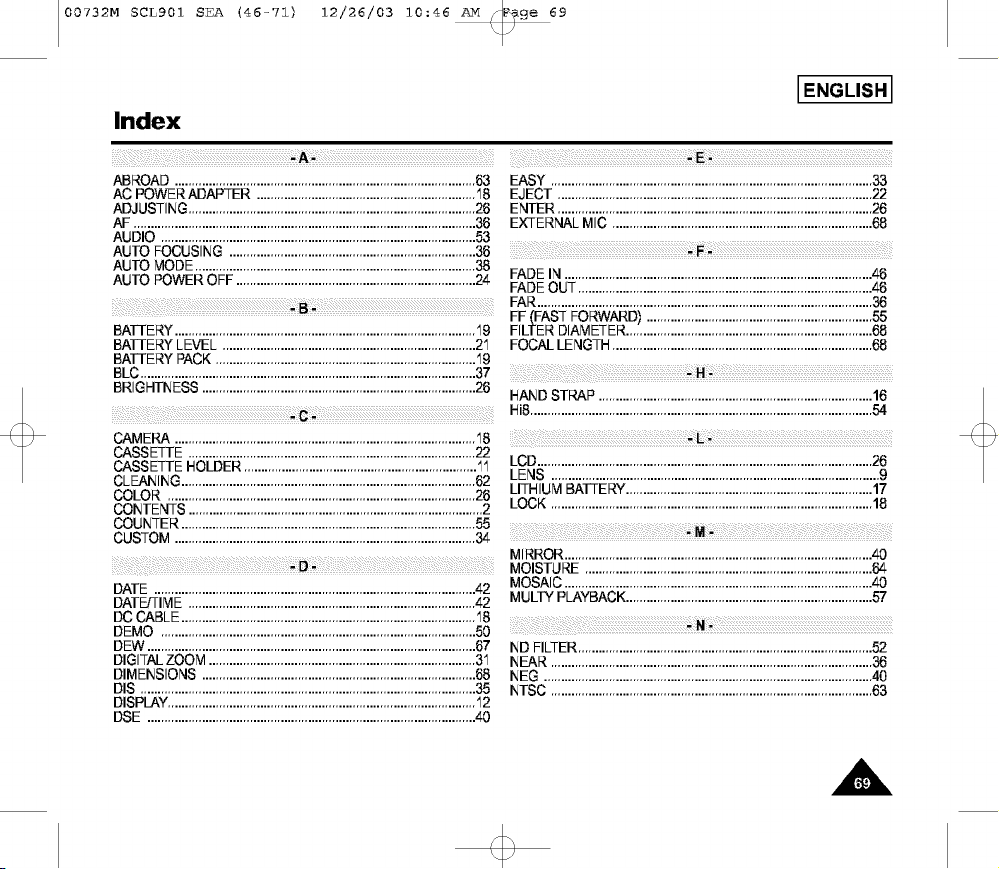
00732M SCLg01 SEA (46-71) 12/26/03 10:46 _v[ _9e 69
I ENGLISH I
Index
ABROAD ........................................................................................ 63
AC POWER ADAPTER ................................................................ '18
ADJUSTING .................................................................................... 26
AF .................................................................................................... 3_
AUDIO ............................................................................................ 53
AUTO FOCUSING ........................................................................ 36
AUTO MODE .................................................................................. 38
AUTO POWER OFF ...................................................................... 24
i!ii!¸)i)iii:!ii!(iili!!¸¸¸iii¸¸¸¸¸¸!!iiiii!i(ii)i!!iii:::::::::::::::::::::::::::::::!!_!)(Bi_!i!i!(:::::::::::::::::::::::::::::::::::::::::::::::::::ii!ill
BATTERY ........................................................................................ '19
BATTERY LEVEL .......................................................................... 2'1
BAI-I-E RY PACK ............................................................................ '19
BLC .................................................................................................. 37
BRIGHTNESS ................................................................................ 26
ii!iii¸(i¸!ii!(il¸il)ii¸()!ilil i:i:::::::::::::::::::::::::::::::::::::::::::::::::::::::::::::::::::_i_!iC!!_i! _i!il(!!i¸_i
CAMERA ........................................................................................ '18
CASSETTE .................................................................................... 22
CASSETTE HOLDER .................................................................... '1'1
CLEANING ...................................................................................... 62
COLOR .......................................................................................... 26
CONTENTS ...................................................................................... 2
COUNTER ...................................................................................... 55
CUSTOM ........................................................................................ 34
EASY .............................................................................................. 33
EJECT ............................................................................................ 22
ENTER ............................................................................................ 26
EXTERNAL MIC ............................................................................ 68
iii¸!_ii!i:_ii_!!:!i_<;_!_!_:!_:!_:!_:!_:!_:!_:!_:!_:!_:!_:!_:!_:!_:!_:!_:!_:!_:!_:!_:!_:!_:!_:!_:!_:!_:!_:!_:!_:!_:!_:!_:!_:!_:!_:!_:!_:_!;!F!¸_:!!!_!_:_!_:!_:!_:!_:!_:!_:!_:!_:!_:!_:!_:!_:!_:!_:!_:!_:!_:!_:!_:!_:!_:!_:!_:!_:!_:!_:!_:!_:!_:!_:!_:!_:!_:!_:!_:!_:!_:!_:!_:!_:!_:!_:!_:!_:!_:!_:!_:!_:!_:!_:_¸¸_iiii
FADE IN .......................................................................................... 46
FADE OUT ...................................................................................... 46
FAR .................................................................................................. 36
FF--(IFASTFORWARD) .................................................................. 55
FILTER DIAMETER ........................................................................ 68
FOCAL LENGTH ............................................................................ 68
iiii_iiii!iii__(!:i¸¸I¸i::i)ii_i!i!!ii:!ii:i(ii!iiiiiiiilliiilliiilliiilliiilli!i_iH_!iii¸(ili¸i_!iiiiiIiiilliiilliiilliiilliiilliiilliiilliiilliiilliiilliiilliiilli
HAND STRAP ................................................................................ 16
Hi8 .................................................................................................... 54
ii_iiil!i!i:!i_!iiillilifilliifilliifilliifilliifilliifilliifilliifilliifilliifilliifillii(_>L!ii_ii¸_i!iiilfilli¸¸Ifilli¸¸Ifilli¸¸Ifilli¸¸Ifilli¸¸Ifilli¸¸Ifilli¸¸Ifilli¸¸Ifilli¸¸Ifilli¸¸Ifilli¸¸Ifilli¸¸Ifilli¸¸Ii¸¸I¸
LCD .................................................................................................. 26
LENS ................................................................................................ 9
LITHIUM BATTERY ........................................................................ 17
LOCK .............................................................................................. 18
MIRROR .......................................................................................... 40
MOISTURE .................................................................................... 64
DATE .............................................................................................. 42
DATE/TIME .................................................................................... 42
DC CABLE ...................................................................................... '18
DEMO ............................................................................................ 50
DEW ................................................................................................ 67
DIGITAL ZOOM .............................................................................. 3'1
DIMENSIONS ................................................................................ 68
DIS .................................................................................................. 35
DISPLAY .......................................................................................... '12
DSE ................................................................................................ 40
MOSAIC .......................................................................................... 40
MULTY PLAYBACK ........................................................................ 57
iiii!!!i!!i:iii¸¸!iil!!i:((il¸¸¸:::ii_:i!i_¸¸¸¸¸:i¸¸::i¸::i¸¸:¸:i¸::i¸¸:¸:i¸::i¸¸:¸:i¸::i¸¸:¸:i¸::i¸¸:¸:i¸::i¸¸:¸:i¸::i¸¸:¸i_i¸I"1;;_i(i(¸¸¸¸¸¸ii¸!::i¸::i¸¸:¸:i¸::i¸¸:¸:i¸::i¸¸:¸:i¸::i¸¸:¸:i¸::i¸¸:¸:i¸::i¸¸:¸:i¸::i¸¸:¸:i¸::i¸¸:¸:i¸::i¸¸:¸:i¸::i¸¸:¸:i¸::i¸¸:¸:i¸::i¸¸:¸:i¸::i¸¸:¸:i¸::i¸¸:¸
ND FILTER ...................................................................................... 52
NEAR..............................................................................................36
NEG................................................................................................ 40
NTSC..............................................................................................63
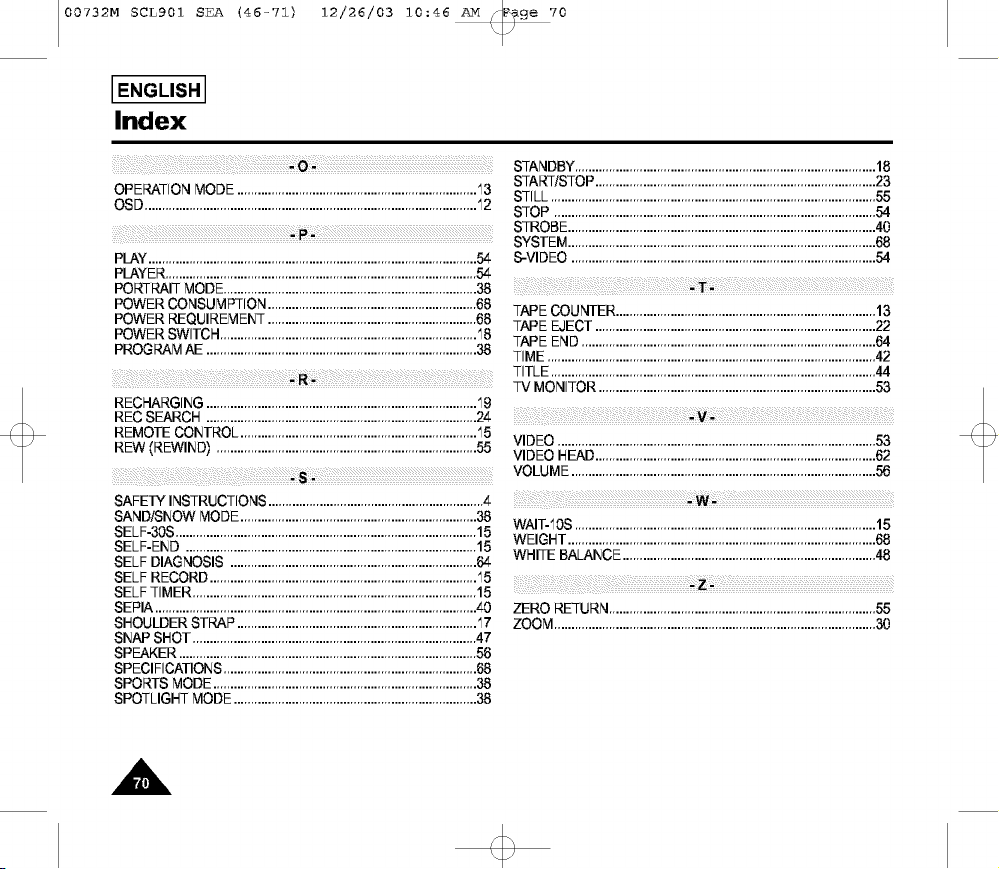
00732M SCLg01 SEA (46-7Z) 12/26/03 10:46 _lv[_9e 70
I ENGLISH I
Index
OPERATIONMODE......................................................................13
OSD.................................................................................................12
PLAY ................................................................................................ 54
PLAYER ........................................................................................... 54
PORTRAIT MODE .......................................................................... 38
POWER CONSUMPTION ............................................................. 68
POWER REQUIREMENT ............................................................. 68
POWER SWITCH ........................................................................... 18
PROGRAM AE ............................................................................... 38
START/STOP .................................................................................. 23
STILL ............................................................................................... 55
STOP .............................................................................................. 54
STROBE .......................................................................................... 40
SYSTEM .......................................................................................... 68
S-VIDEO ......................................................................................... 54
TAPE COUNTER ............................................................................ 13
TAPE EJECT .................................................................................. 22
TAPE END ...................................................................................... 64
TIME ................................................................................................ 42
il_iili:!i!!i:i!iiiiii!!i!iiii _iiililliiiiii_i!i_iii!ii:ii:ii!i!_ii!ii:ii:ii!i__i:____i:__ :_:i__ :_:i__ :_:i__ :_:i__ :_i TITLE...............................................................................................44
.... TV MONITOR.................................................................................53
RECHARGING...............................................................................19
RECSEARCH ...............................................................................24
REMOTECONTROL.....................................................................15
REW(REWlNDI ............................................................................55 VIDEO .............................................................................................53
VIDEO HEAD
..................................................................................
62
VOLUME.........................................................................................56
SAFETY INSTRUCTIONS; ............................................................... 4
SAND/SNOW MODE ..................................................................... 38
SELF-30S ........................................................................................ 15
SELF-END ..................................................................................... 15
SELF DIAGNOSIS ........................................................................ 64
SELF RECORD .............................................................................. 15
SELF TIMER ................................................................................... 15
SEPIA .............................................................................................. 40
SHOULDER STRAP ...................................................................... 17
SNAP SHOT ................................................................................... 47
SPEAKER ....................................................................................... 56
SPECIFICATIONS .......................................................................... 68
SPORTS MODE ............................................................................. 38
SPOTLIGHT MODE ....................................................................... 38
ii!!!iii !!i! il_iii;!:ii:i::::::::::::::::::::::::::::::::::::i_iW i_¸!ii¸!II!_!!:i:::::::::::::::::::::::::::::::::::::::::::::::::::_
WAIT-10S........................................................................................15
WEIGHT..........................................................................................68
WHITEBALANCE..........................................................................48
ZERO RETURN..............................................................................55
ZOOM..............................................................................................30
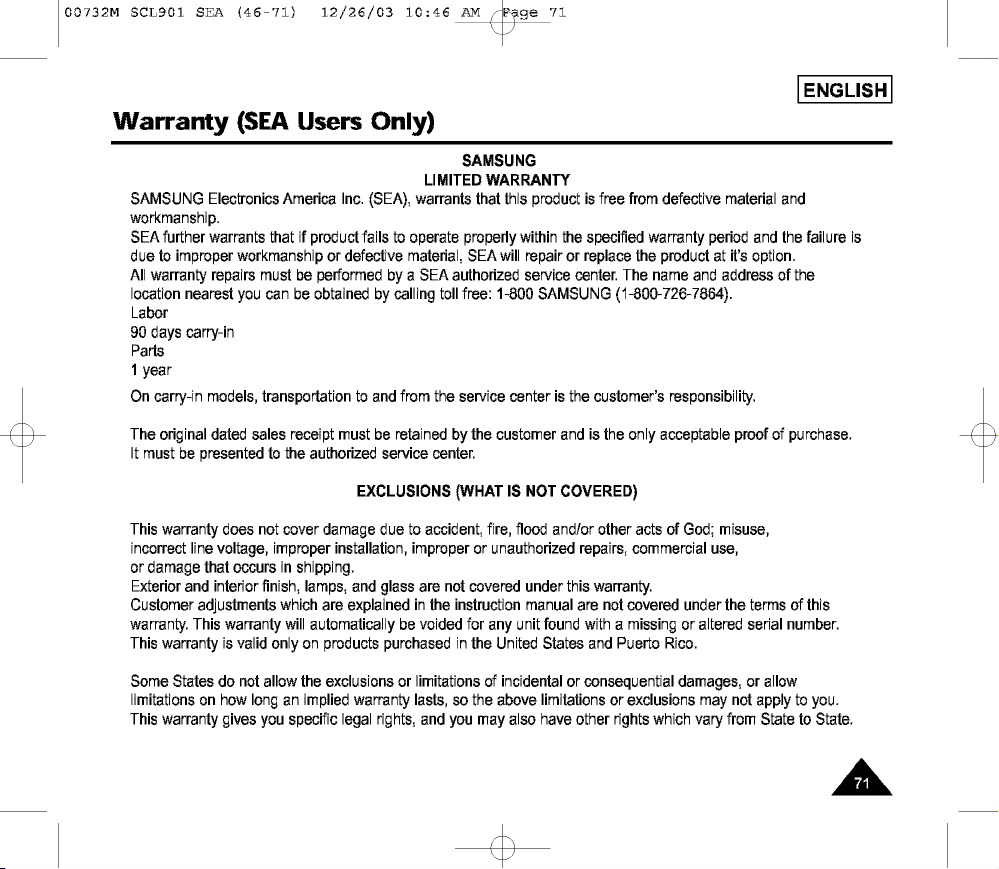
00732M SCLg01 SEA (46-71) 12/26/03 10:46 _v[ _ge 71
I ENGLISH I
Warranty (SEA Users Only)
SAMSUNG
LIMITED WARRANTY
SAMSUNG Electronics America Inc. (SEA), warrants that this product is free from defectivematerial and
workmanship.
SEA further warrants that if product fails to operate properly within the specified warranty period and the failure is
due to improper workmanship or defective material, SEAwill repair or replace the product at it's option.
All warranty repairs must be performed by a SEA authorized service center. The name and address of the
location nearest you can be obtained by calling toll free: 1-800 SAMSUNG (1-800-726-7864).
Labor
90 days carry-in
Parts
1 year
On carry-in models, transportation to and from the service center is the customer's responsibility.
The original dated sales receipt must be retained by the customer and is the only acceptable proof of purchase.
It must be presented to the authorized service center.
EXCLUSIONS (WHAT IS NOT COVERED)
This warranty does not cover damage due to accident, fire, flood and/or other acts of God; misuse,
incorrect line voltage, improper installation, improper or unauthorized repairs, commercial use,
or damage that occurs in shipping.
Exterior and interior finish, lamps, and glass are not covered under this warranty.
Customer adjustments which are explained in the instruction manual are not covered under the terms of this
warranty. This warranty will automatically be voided for any unit found with a missing or altered serial number.
This warranty is valid only on products purchased in the United States and Puerto Rico.
Some States do not allow the exclusions or limitations of incidentalor consequential damages, or allow
limitations on how long an implied warranty lasts, so the above limitations or exclusions may not apply to you.
This warranty gives you specific legal rights, and you may also have other rights which vary from State to State.

00732M SCLg01 SEA
IENGL=SHI
(1-19) 12/26/o3
10:39 Nv[ ¢_e I00
THIS CAMCORDER IS MANUFACTURED BY:
i_iii_iii_iii_iii_iii_iii_iii_iii_iii_iii_iii_iii_iii_iii_iii_iii_iii_iii_iii_iii_iii_iii_iii_iii_iii_iii_iii_iii_iii_iii_iii_iii_iii_iii_iii_iii............
......_ii_iiiiiiiiiiiiiiiiiiiiiiiiiiiiiiiiiiiiiiiiiiiiiiiiiii
T T+:: • 4:,,, +:::
,',,, ,II
SERVICE DIVISION
400 Valley Road, Suite 201, Mr. Arlington N.J. 07856
Tel: 1-800-SAMSUNG
(1-800-726-7864)
*Samsung Electronics' Internet Home Page
http:iiwww.samsu ng usa.corn AD68-00732M