Operating instructions
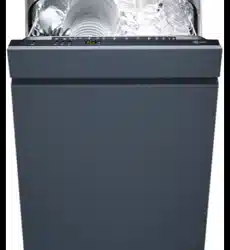
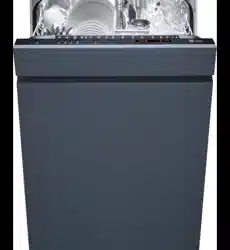
Adora SL fully integrated and design integrated
Dishwasher

Thank you for choosing to buy one of our products. Your appliance is made to
high standards and is easy to use. Nevertheless, please take the time to read
these operating instructions in order to familiarise yourself with the appliance
and get the best use out of it.
Please follow the safety precautions.
Modifications
Text, diagrams and data correspond to the technical standard of the appliance
at the time these operating instructions went to press. The right to make tech-
nical modifications for the purpose of the further development of the appliance
is reserved.
Validity
The product family (model number) corresponds to the first alphanumerics on
the identification plate. These operating instructions apply to:
ModelTypeProduct familySize system
Adora 55 SLGS 55SLdi41001SMS 55
Adora 55 SLGS 55SLVi41002SMS 55
Adora 55 SLGS 55SLGdi41003 / 41040SMS 55
Adora 55 SLGS 55SLGVi41004 / 41041SMS 55
Adora 60 SLGS 60SLdi41005EURO 60
Adora 60 SLGS 60SLVi41006EURO 60
Adora 60 SLGS 60SLGdi41007 / 41042EURO 60
Adora 60 SLGS 60SLGVi41008 / 41043EURO 60
Adora 60 SLWPGS 60SLWPdi41009EURO 60
Adora 60 SLWPGS 60SLWPVi41038EURO 60
Variations depending on the model are noted in the text.
© V-ZUG Ltd, CH-6301 Zug, 2016
2

Contents
1Safety precautions5
1.1
Symbols used.............................................................................................5
1.2
General safety precautions......................................................................6
1.4
Instructions for use....................................................................................8
2Disposal12
3Your appliance13
3.1
Appliance description.............................................................................13
3.2
Appliance construction...........................................................................14
3.3
Operating and display elements..........................................................15
4Programme overview17
4.1
Programmes.............................................................................................17
4.2
Additional functions................................................................................19
5User settings20
5.1
Changing user settings..........................................................................20
5.2
Language..................................................................................................22
5.3
Contrast.....................................................................................................22
5.4
Acoustic signal........................................................................................23
5.5
«All in 1» detergent.................................................................................23
5.6
Childproof lock........................................................................................24
5.7
Rinse agent dosage...............................................................................24
5.8
Water hardness.......................................................................................24
5.9
Hot water connection..............................................................................26
5.10
Temperature unit.....................................................................................26
5.11
Storage duration of tank........................................................................27
5.12
Automatic door opening........................................................................27
5.13
Interior illumination..................................................................................27
5.14
Heat pump *.............................................................................................28
5.15
Factory settings.......................................................................................28
6Operation29
6.1
Preparing the appliance.........................................................................29
6.2
Dishwashing tips.....................................................................................30
6.3
Loading the baskets...............................................................................31
6.4
Loading tips for the cutlery drawer *...................................................32
6.5
Loading tips for the upper basket........................................................34
3

6.6
Loading tips for the lower basket.........................................................39
6.7
Adding the detergent..............................................................................43
6.8
Selecting a programme.........................................................................45
6.9
Selecting the economy programme....................................................45
6.10
Selecting additional functions...............................................................46
6.11
Saving additional functions...................................................................46
6.12
Delayed start............................................................................................47
6.13
Interrupting a programme ....................................................................48
6.14
Aborting a programme .........................................................................48
6.15
End of programme..................................................................................49
6.16
Operation with childproof lock activated............................................50
7Care and maintenance51
7.1
Cleaning the interior...............................................................................51
7.2
Cleaning the exterior..............................................................................51
7.3
Cleaning the filter system......................................................................52
7.4
Cleaning the spray arms........................................................................52
7.5
Filling with regeneration salt.................................................................53
7.6
Filling with rinse agent............................................................................54
7.7
Water inlet filter, cleaning......................................................................55
7.8
Emptying the storage tank....................................................................56
8Trouble-shooting57
8.1
What to do if …........................................................................................57
8.2
Power failure............................................................................................63
9Accessories and spare parts64
10Technical data66
10.1
Overview...................................................................................................66
10.2
Consumption data...................................................................................67
10.3
Note for testing institutes.......................................................................69
10.4
Noise measurement................................................................................69
11Index70
12Notes72
13Service & Support75
4
1 Safety precautions
1.1 Symbols used
Denotes important safety precautions.
Failure to observe said precautions can result in injury or in dam-
age to the appliance or fittings!
Information and precautions that should be observed.
Information on disposal
Information about the operating instructions
▸Indicates step-by-step instructions.
– Describes how the appliance reacts to the steps taken.
▪ Indicates a list.
5

1 Safety precautions
1.2 General safety precautions
▪ Read the operating instructions before using the appliance for
the first time!
▪ This appliance can be used by persons (including children)
with reduced physical, sensory or mental capabilities, or lack
of experience and/or knowledge, provided they are super-
vised or have been instructed on the safe use of the appli-
ance and have understood the hazards involved. Children
shall not play with the appliance. Cleaning and user mainten-
ance shall not be undertaken by children without supervision.
▪ If an appliance is not equipped with a mains cable and a plug
or other means for disconnecting from the mains with a con-
tact opening on each pole complying with the conditions of
overvoltage category III for full isolation, an isolating device
must be incorporated into the permanently installed electrical
installation in accordance with the installation regulations.
▪ If the mains cable of this appliance is damaged, it must be re-
placed by the manufacturer or its Customer Services or a sim-
ilarly qualified person in order to avoid hazard.
6

1 Safety precautions
1.3 Appliance-specific safety precautions
▪ The appliance is only suitable for washing household dishes
and cutlery with water and standard dishwasher detergent.
The appliance is for use in the home and for the intended pur-
pose only. No liability is assumed for any damage caused by
improper or incorrect use.
▪ Children under 3 years of age must be kept away from the
appliance unless they are constantly supervised.
▪ Under no circumstances use a steam cleaner to clean this ap-
pliance.
▪ Ensure that any ventilation openings in the base of the appli-
ance are not obstructed by carpet.
▪ Only leave the appliance door open in the at-rest position. An
open appliance door poses a danger of tripping or injury! Do
not sit or rest on the appliance door or use it as a storage
surface.
▪ CAUTION: Knives and other objects with sharp points must be
placed into the basket with the points facing downwards or be
laid down horizontally in the basket.
▪ CAUTION: Do not drop or insert any knives, forks or other
pointed objects into the door lock opening.
▪ Ensure no cleaning agent gets into the door lock opening.
This can cause the door lock to malfunction.
7

1 Safety precautions
1.4 Instructions for use
Before using for the first time
▪ The appliance must be installed and connected to the electricity supply in
accordance with the separate installation instructions. Have a qualified fitter/
electrician carry out the necessary work.
The appliance was tested with water before being shipped. There may
therefore still be traces of water left in the appliance.
Correct use
▪ Any repairs, modifications or manipulations to the appliance, especially any
electrically live parts, may only be carried out by the manufacturer, its Cus-
tomer Services or a similarly qualified person. Repairs if carried out incor-
rectly may cause serious injury, damage to the appliance and fittings, as
well as affect the functioning of the appliance. If the appliance is not work-
ing properly or in case of a repair order, follow the instructions given in the
«Service & Support» section. Please contact our Customer Services if ne-
cessary.
▪ Use original spare parts only.
▪ Retain these operating instructions for future reference.
Children in the home
▪ The water in the appliance is not to be used as drinking water. Detergent
residue in the appliance could cause eye or skin irritation! Keep children
away from the open appliance.
Note on use
Switching off the power to the appliance disables the built-in over-
flow protection system.
Dishwasher detergents are strongly alkaline. They can be extremely
dangerous if swallowed. Avoid contact with the skin and eyes and
keep children away from the dishwasher when the door is open.
Check that the detergent receptable is empty after completion of the
wash cycle.
▪ Use the childproof locking facility.
8

1 Safety precautions
▪ If the appliance is visibly damaged, do not use it. Contact our Customer
Services.
▪ If the appliance is not operating properly, disconnect it from the power sup-
ply immediately.
▪ Before closing the appliance door and starting a programme ensure that
there are no foreign objects or pets in the appliance. Foreign objects, such
as nails and paper clips, can damage parts of the appliance as well as the
dishes.
▪ Only use detergent, rinse agent and regeneration salt explicitly recommen-
ded for use with your appliance by the manufacturer in its instructions for
use. Follow the corresponding instructions for use carefully.
▪ Do not use the appliance without any or too little detergent – risk of causing
damage to the appliance!
▪ Do not use washing-up liquid as it can cause excessive foaming, causing
your appliance to malfunction.
▪ After filling the salt reservoir, run the
programme without dishes.
▪ Never fill the rinse agent reservoir or the regeneration salt reservoir with de-
tergent. If this were to happen, however, do not operate the appliance under
any circumstances, as this could cause expensive damage to it. Call Cus-
tomer Services.
▪ Never operate the appliance without the filter system in place.
▪ Only use soft materials for cleaning beneath the filter system. Never use
metal objects for cleaning.
Caution: Risk of burns!
▪ Do not wash objects that are soiled with inflammable or corrosive solvent,
paint, wax, chemicals (acids or bases) or iron chippings or that can shed
fibres in the appliance.
▪ Avoid opening the appliance door unnecessarily during operation. The
dishes and water may be hot – scalding hazard! The steam that escapes
can damage wood combination fascias. Spectacles can steam up, impair-
ing your vision.
Caution: Risk of injury!
▪ Do not lean on any part of the appliance – risk of accident!
▪ Keep pets away from the appliance.
9
1 Safety precautions
Caution: Risk to life!
▪ Packaging material, e.g. plastic film and polystyrene, can be dangerous for
children. Danger of suffocation! Keep packaging material away from chil-
dren.
How to avoid damaging the appliance
▪ Turn off the water tap during longer absences.
▪ Please note: The appliance must be connected to the mains supply to en-
sure appliance protection (overflow protection, among other things).
The door must not be closed when
Automatic door opening
/
Do not close the door!
appears in the display, otherwise the
door opener can get damaged.
Refill the salt reservoir with regeneration salt when the refill in-
dicator illuminates, even if using
detergent.
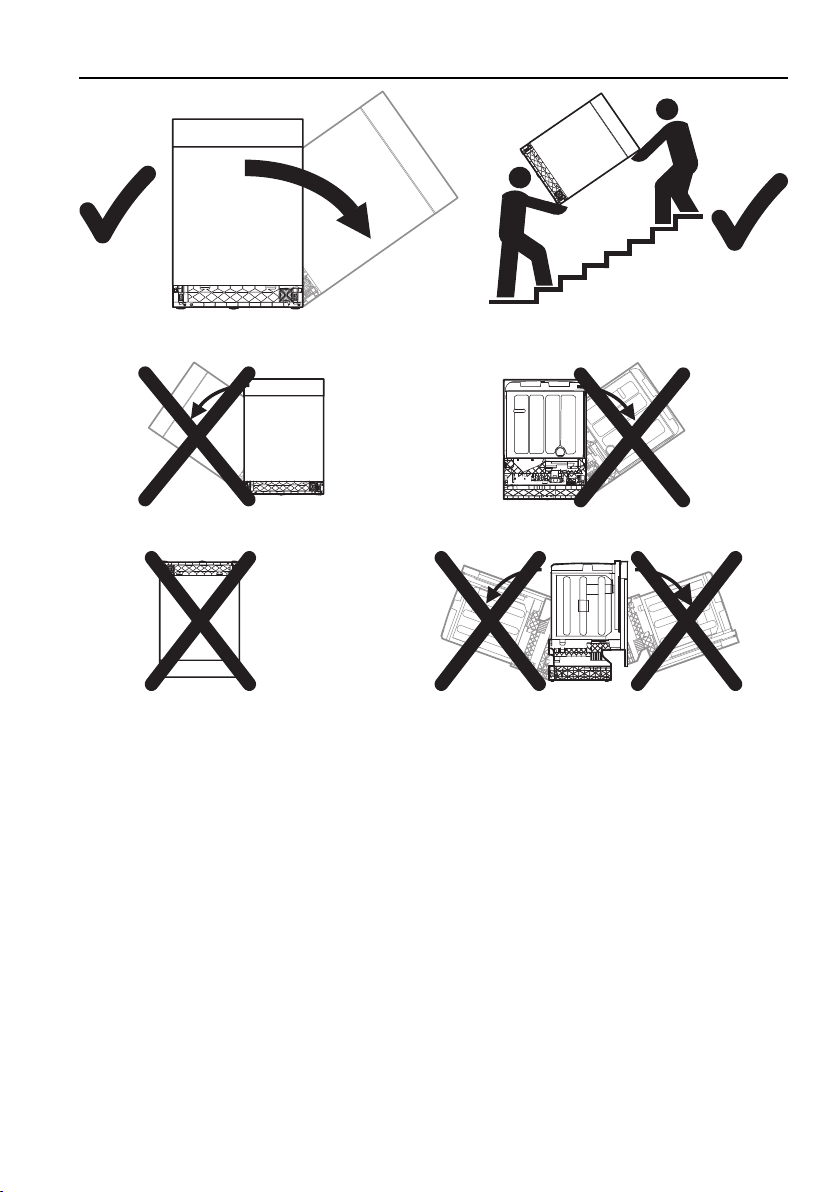
▪ Transport the appliance in an upright position only! Transporting it in any
other position will result in damage to the appliance! When carried carefully
without being shaken, the appliance may be tilted a maximum of 90° to the
left (viewed from the front).
10
1 Safety precautions
Front
Front Back
Front,
upside down Side
Front
11

2 Disposal
Packaging
▪ All packaging materials (cardboard, plastic film (PE) and polystyrene (EPS))
are marked and should, if possible, be collected for recycling and disposed
of in an environmentally friendly way.
Disconnection
▪ Disconnect the appliance from the mains. With a fixed appliance, this is to
be carried out by a qualified electrician!
Safety
▪ Disable the appliance to prevent accidents caused by improper use, espe-
cially through children playing.
▪ Pull the plug out of the mains socket or have the appliance disconnected
from the mains by an electrician. Then cut the mains cable off flush with the
appliance.
▪ Remove or disable the lock on the appliance door.
Disposal
▪ The old appliance should not be discarded as worthless rubbish. If dis-
posed of correctly, the raw materials can be recovered for recycling.
▪ The
symbol on the identification plate warns that the appliance may not
be disposed of in normal household waste.
▪ The appliance must be disposed of in accordance with local regulations on
waste disposal. For more information on the handling, disposal and recyc-
ling of the product, please contact the local authorities, the local recycling
facilities for household waste or the retailer from whom you purchased the
appliance.
Note on heat pump
This appliance is CFC-free (the cold circuit contains R134a).
12

3 Your appliance
3.1 Appliance description
▪ Load capacity
–12 or 13 international place settings (SMS 55, cutlery drawer) *
–13 or 14 international place settings (EURO 60, cutlery drawer) *
▪ 10 programmes
– «Automatic»– «Fondue/Raclette»
– «Daily quick»– «Hygiene»
– «Sprint»– «Pre-rinsing»
– «Glass»– «Appliance hygiene»
– «Intensive»– «Economy programme»
▪ Additional functions
– «Energy saving»– «Partial load»
– «SteamFinish»– «Delayed start»
▪ Language selection
▪ «All in 1» detergent
▪ Childproof lock
▪ Acoustic signal
▪ Interior LED illumination
▪ Function light * (for fully integrated Adora SL)
▪ Plain text display
▪ Hot water connection
▪ Automatic water softener with limescale sensor
▪ Water hardness control
▪ Automatic rinse agent dosage
▪ Soil sensor
▪ Heat pump *
* Depending on model
13
3 Your appliance
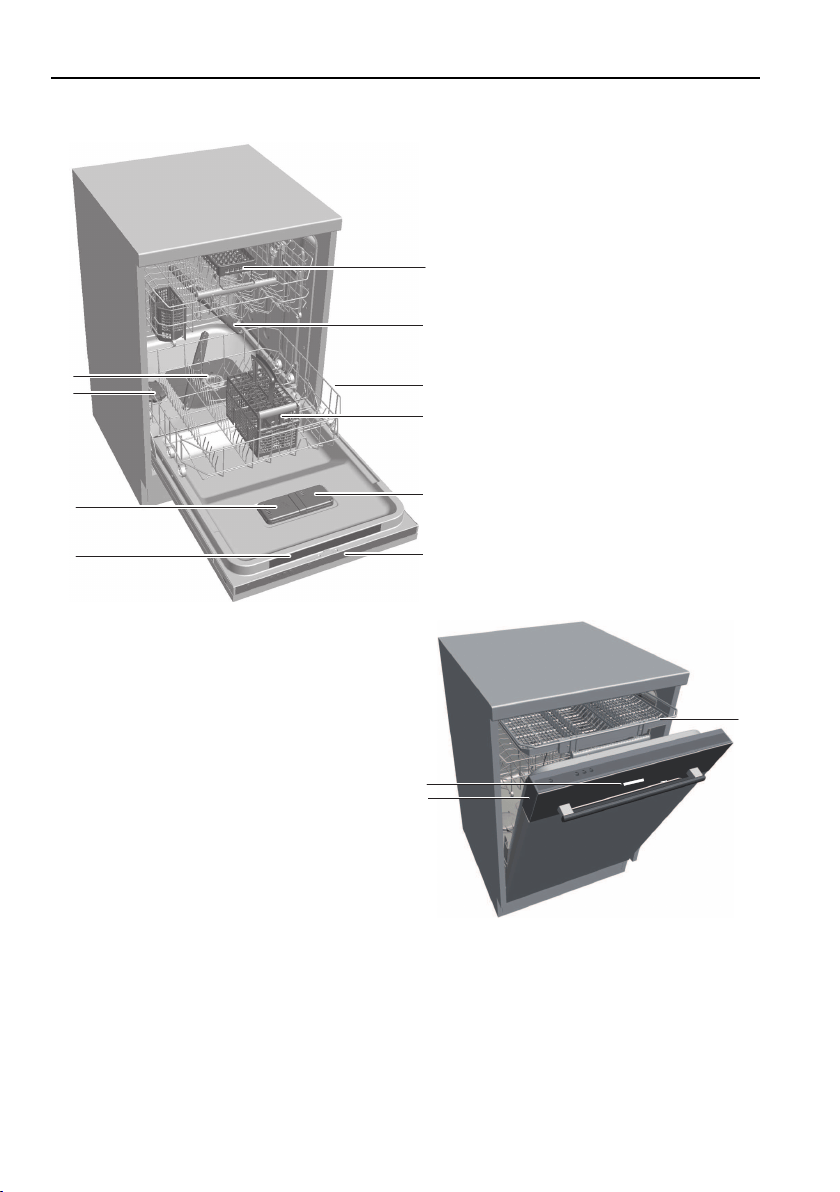
3.2 Appliance construction
2
4
3
5
9
8
7
10
1
6
1
Vario cutlery basket insert *
13
11
12
* Depending on model
2
Spray arm
3
Basket
4
Cutlery basket *
5
Rinse agent reservoir
6
Operating and display elements
7
Quick operating instructions
8
Detergent dispenser
9
Salt reservoir
10
Filter system
11
Cutlery drawer *
12
Function light *
13
Plain text display on glass panel *
14
3 Your appliance
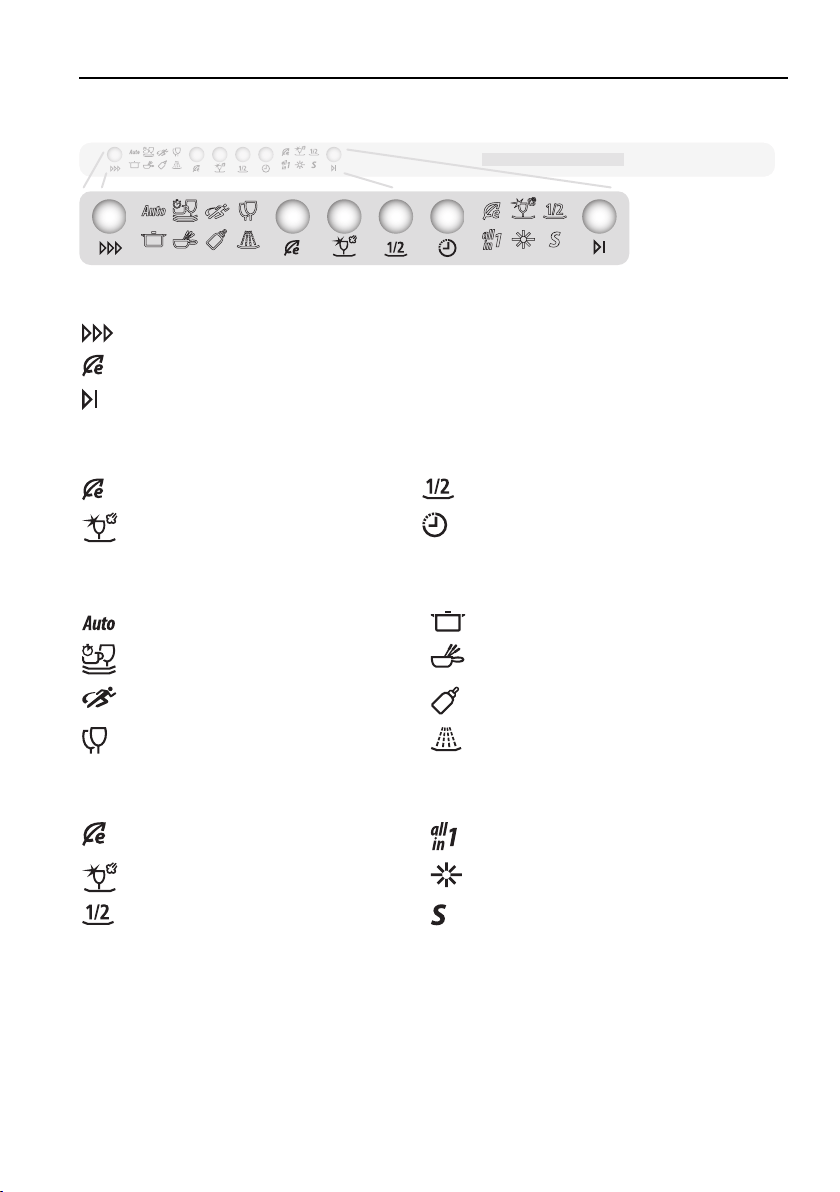
3.3 Operating and display elements
Programme buttons
Programme selection
Economy programme
End of programme
Additional functions (buttons)
Energy savingPartial load
SteamFinishDelayed start
Programme symbols
AutomaticIntensive
Daily quickFondue/Raclette
SprintHygiene
GlassPre-rinsing
Additional functions/indicators (symbols)
Energy saving«All in 1» detergent
SteamFinishRinse agent refill indicator
Partial loadSalt refill indicator
15

3 Your appliance
Display (plain text display)
Various information appears in the display during the programme selection
and the programme sequence:
▪ Programme name with duration/temperature
▪ Programme progress and time remaining
▪ Additional functions
▪ Delayed start
▪ Childproof lock
▪ Hints and trouble-shooting
Acoustic signal
An acoustic signal is emitted at the end of the programme and in the event of
a malfunction.
Function light *
▪ illuminates during the programme sequence
▪ flashes during the final drying phase
* Depending on model
16
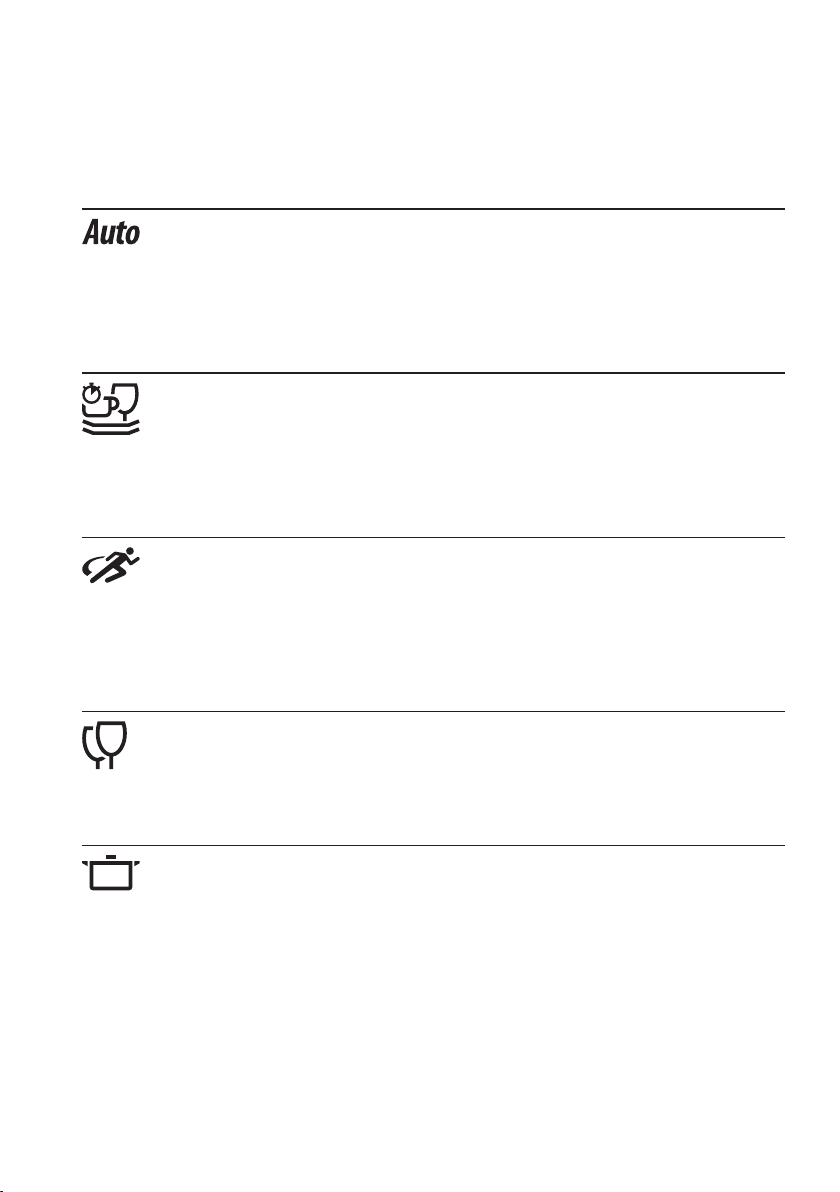
4 Programme overview
4.1 Programmes
Automatic
Optimum cleaning results with minimal water and energy consump-
tion. For normal soiling. Not suitable for burned-on or heavily dried-on
soiling.
Daily quick
Quick programme for normal soiling. Cleans with higher spray pres-
sure.
Sprint
Quick programme for light soiling, e.g. aperitif dishware and tea and
coffee cups and saucers. With the «All in 1» setting, the programme
is extended by 10 minutes. Not suitable for slowly dissolving tabs.
Glass
Gentle programme for glasses.
Intensive
For heavy soiling. Particularly suitable for starchy soiling (mashed
potato, rice...).
17
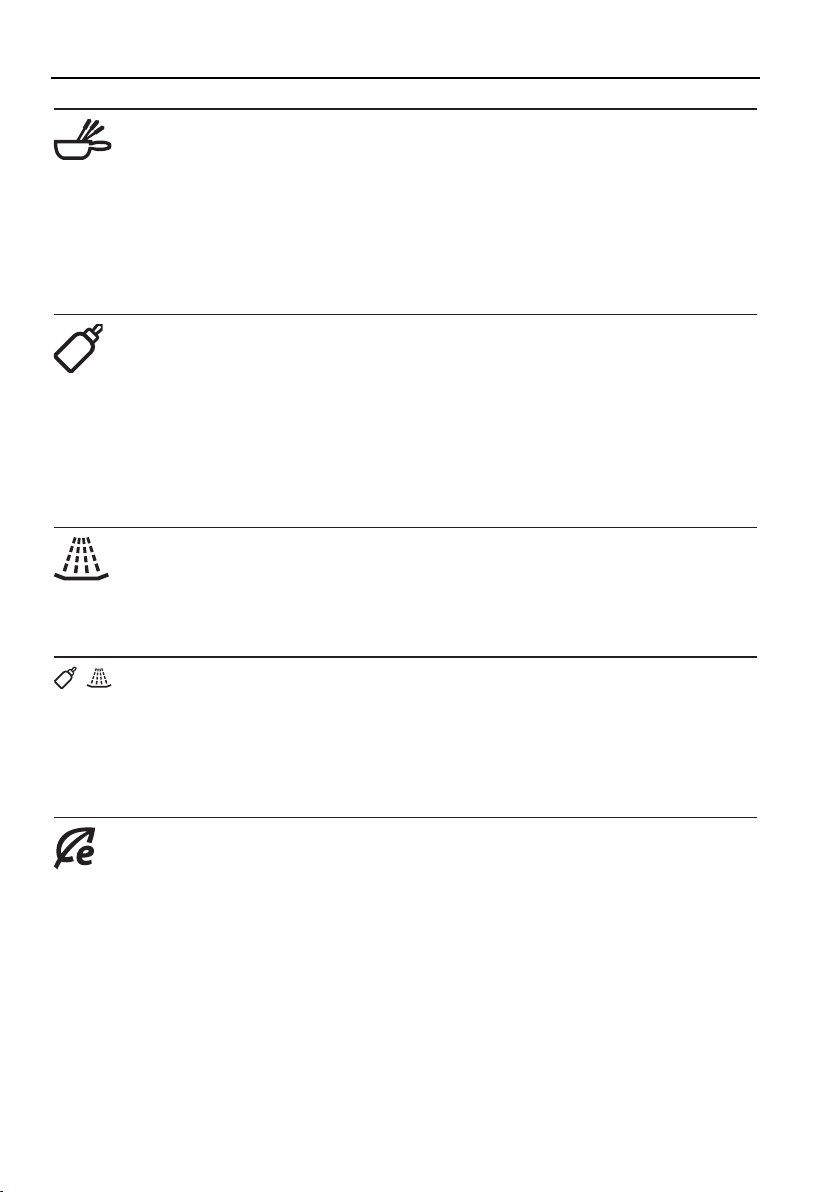
4 Programme overview
Fondue/Raclette
For heavy soiling. Particularly suitable for burned-on soiling (fondue
and raclette pans, gratin dishes...). Only use dishwasher-safe fondue
pans. Add detergent to the pre-rinsing compartment to improve the
cleaning results.
Hygiene
Where hygiene requirements are high (baby bottles, cutting
boards...), items can be cleaned at a higher temperature. Clean the
filter system before starting the programme. For cleaning the appli-
ance and the water outlet thoroughly.
Pre-rinsing
To prevent soiling drying on if intending to start a programme later.
+
Appliance hygiene
The appliance and in particular the storage tank are rinsed hygienic-
ally clean. Before starting a programme, clean the filter system and
add detergent to the reservoir.
Economy programme
Most efficient programme in terms of water and energy consumption
for normally soiled tableware (declaration programme).
18
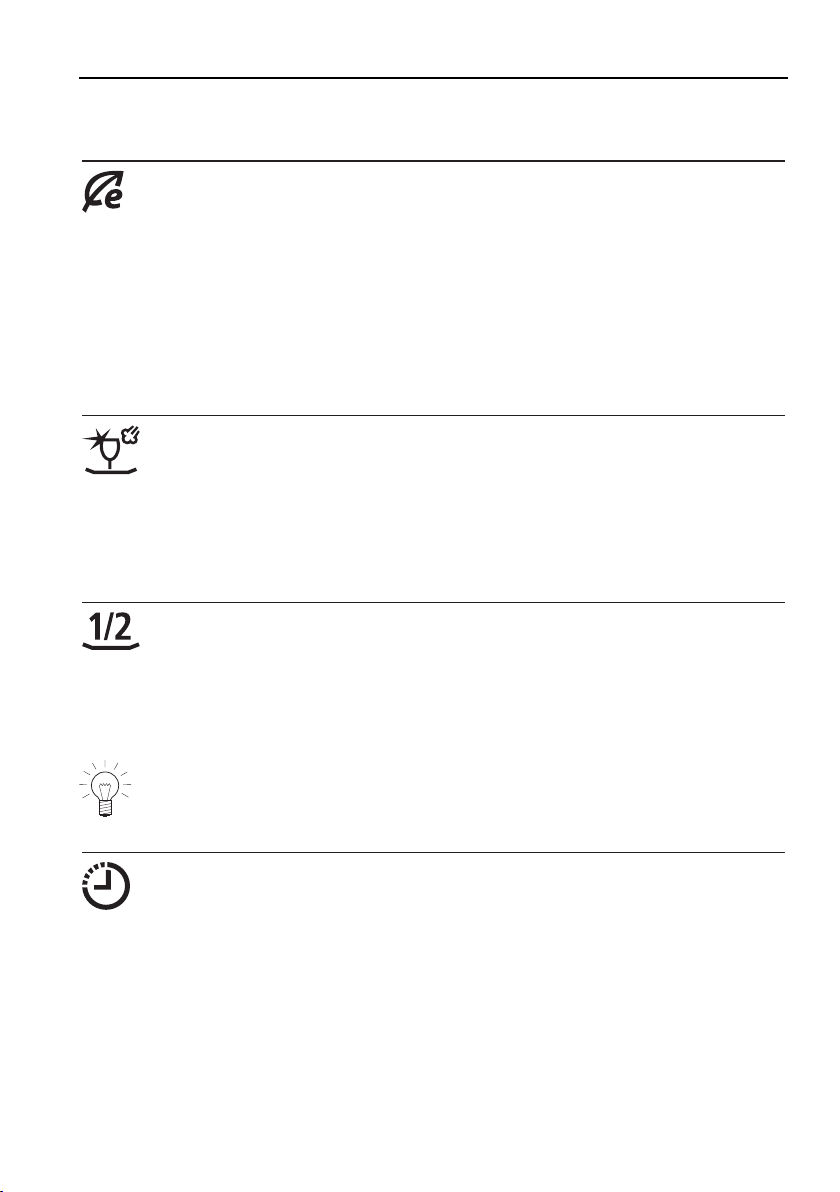
4 Programme overview
4.2 Additional functions
Energy saving
Reduces the wash temperature during cleaning by 5°C, providing
energy savings of about 10% and gentle washing for glassware.
For appliances with a heat pump, up to a certain wash temperature
only the heat pump is used for heating, reducing energy consumption
overall by up to 30% and extending the programme duration.
SteamFinish
An active steam phase runs while rinsing with rinse agent. The steam
hits the dishes and produces optimum, sparkling drying results. The
programme duration is extended by about 15minutes.
Partial load
With partial load, the programme is adapted to the smaller load. The
quantity of water is reduced significantly, saving between 1and6l of
water.
With the additional «Partial load» function, the programme duration is
shortened by up to 30minutes.
Delayed start
The delayed start allows you to wash during off-peak hours (e.g. at
off-peak electricity rates). A delayed start of between 30 minutes and
24 hours can be set. The delayed start duration last entered is shown
as a suggestion.
19
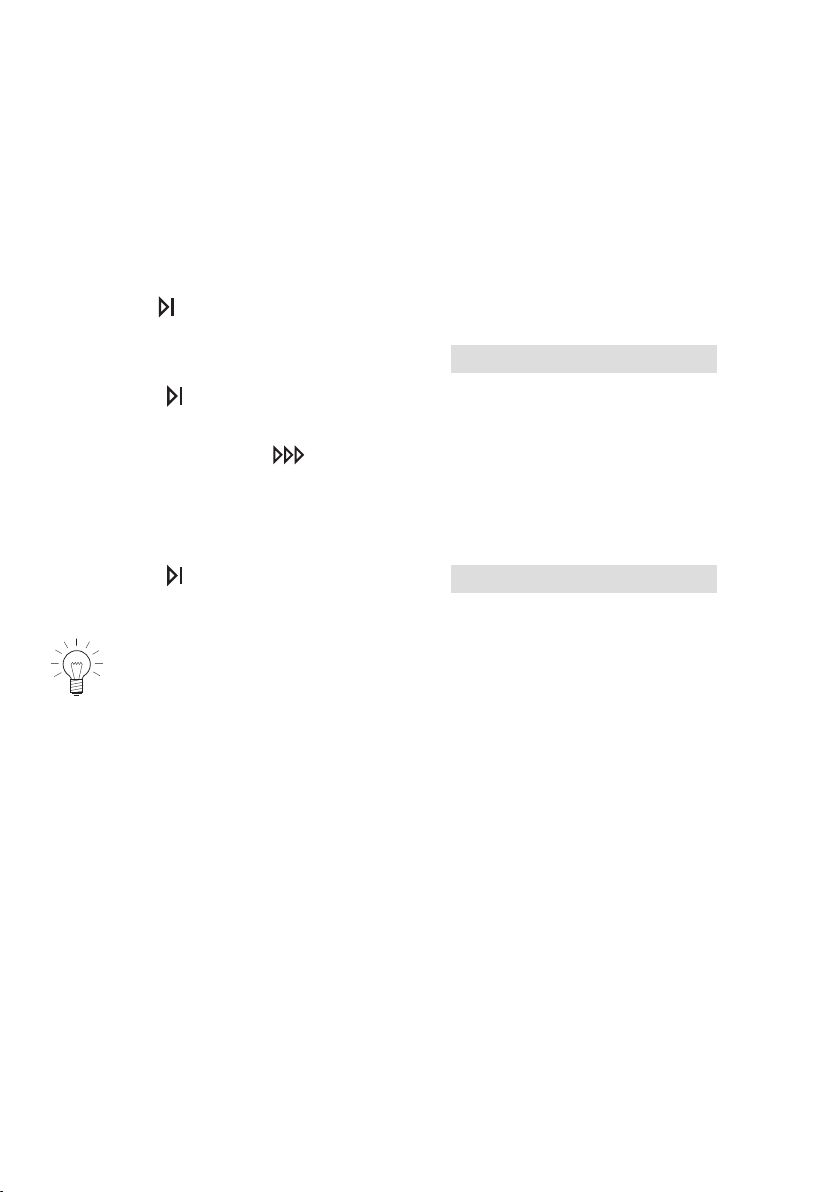
5 User settings
5.1 Changing user settings
User settings can only be changed when no programme is running. The pro-
cedure is generally the same for all settings.
Changing user settings
▸Hold the button depressed (for about
5seconds) until in the display appears:
User settings
▸Press the button repeatedly until the required setting appears in the dis-
play.
▸To change, press the
button.
– The setting is accepted.
Exiting user settings
▸Press the button repeatedly until in the
display appears:
Configuration saved
If no button is pressed within about 15 seconds, the user settings are
saved and the display goes out.
20
5 User settings
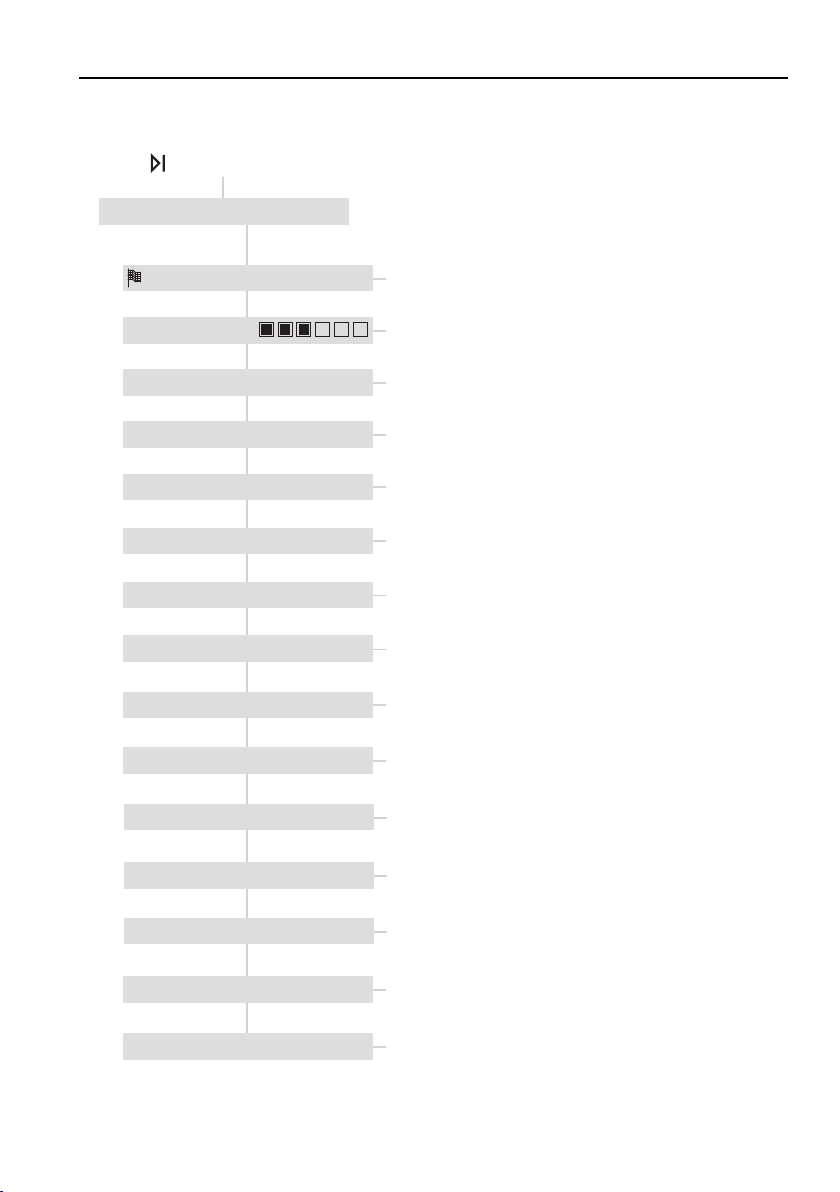
Possible settings
The following diagram gives an overview of the possible user settings.
Hold the button depressed for 5 seconds
• 7 selectable levels
• Off **
• On
• Select desired language
• Off
• Low **
• High
* Depending on the model
** Factory setting
• Off **
• On
• Automatic **
• 13 selectable levels (°fH)
• 13 selectable levels (°dH)
• Automatic **
• Off
• 1..2..12
• °fH **
• °dH
• No **
• Yes
• No **
• Yes
• Without heating
• °C **
• °F
User settings
Language ENGLISH
Contrast
Acoustic signal HIGH
All in 1 OFF
Childproof lock OFF
Rinse agent AUTOMATIC
Water hardness unit °fH
Water hardness AUTOMATIC
Hot water NO
Temperature unit °C
Factory settings NO
• Off
• 12h, 24h, 36h **
Storage duration of the tank 36h
• No
• Yes **
Automatic door opening YES
• Off
• 1, 2, 5, 10**, 20 min
Interior illumination 10min
• Off
• On **
Heat pump * ON
21
5 User settings
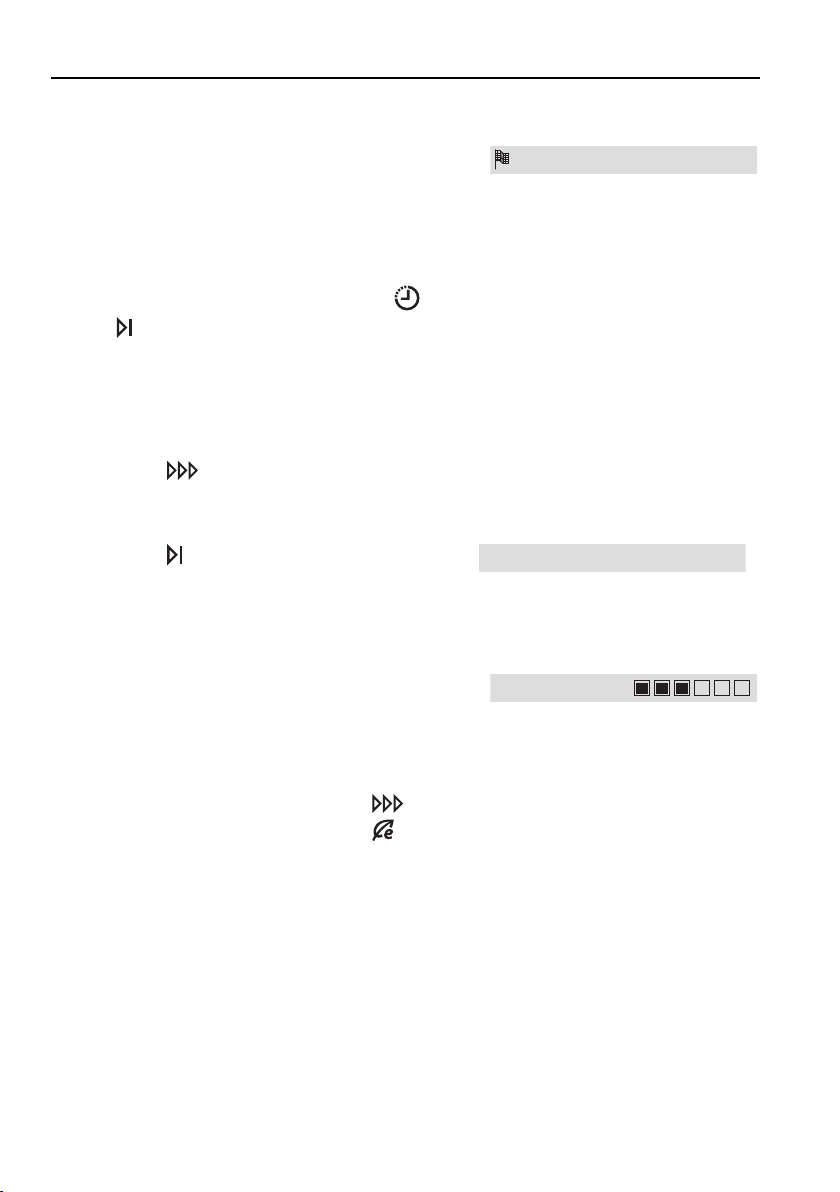
5.2 Language
The language in the display can be changed.
Language ENGLISH
Changing the language (see page 20)
Resetting the language
▸With the hob switched off, hold the
and buttons depressed for 10
seconds.
– User settings are started and the
language setting appears in the dis-
play in a predefined language.
▸Press the
button repeatedly until the
required language appears in the dis-
play.
▸Press the button repeatedly until in the
display appears:
Configuration saved
5.3 Contrast
With this function, the contrast of the display
can be changed.
Contrast
Changing the contrast (see page 20)
▸Increase contrast: De-
crease contrast:
Button
Button
22
5 User settings
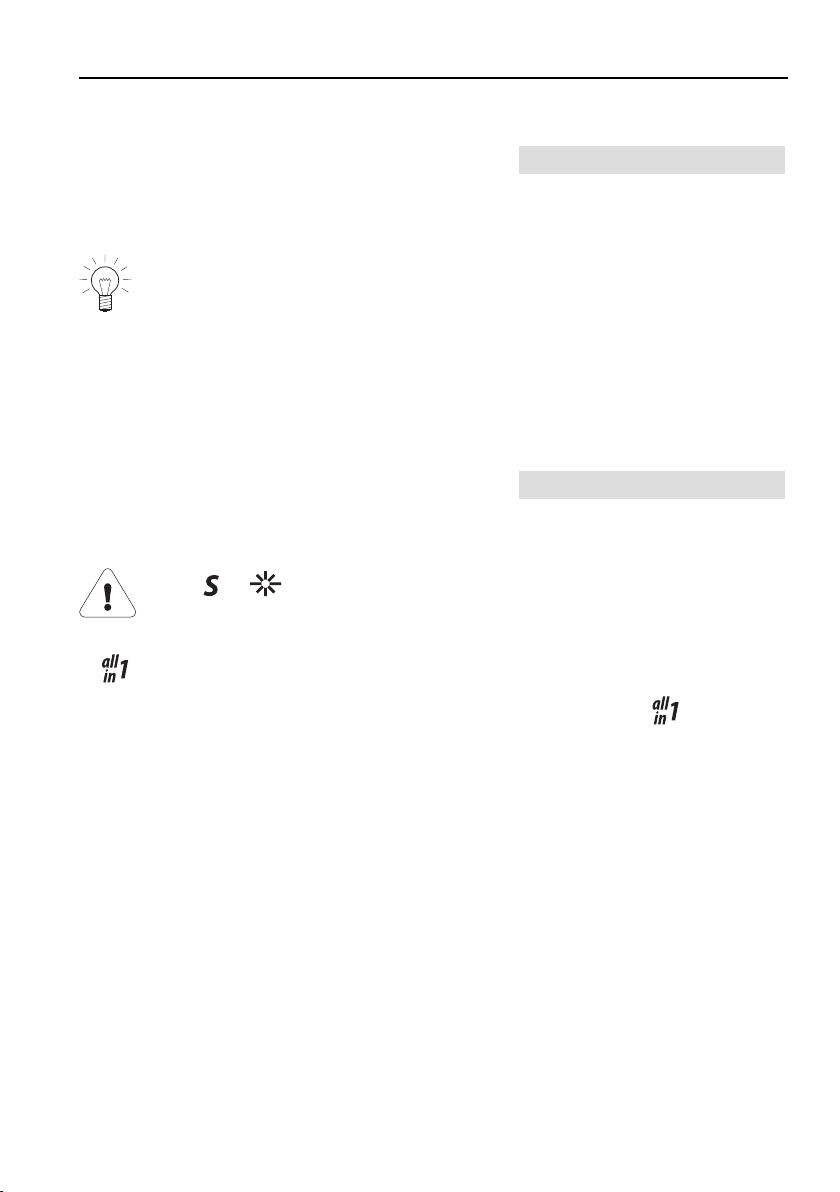
5.4 Acoustic signal
An acoustic signal is emitted at the end of a
programme and if the appliance malfunctions.
Acoustic signal LOW
It can be set at one of three levels («Off», «Low», «High»).
In the event of a malfunction, an acoustic signal is emitted even if it is set
to off.
If a delayed start has been set, no acoustic signal is emitted at the
end of the programme.
Changing the loudness (see page 20)
5.5 «All in 1» detergent
The «All in 1» setting adapts the programme
for use with detergent with integrated salt and
rinse agent function in an optimal way.
All in 1 OFF
If the or refill indicators illuminate, still refill with regenera-
tion salt or rinse agent.
▪
products can only be used up to a certain water hardness.
▪ The duration of very short programmes is extended because detergent
takes longer to dissolve.
Setting for «All in 1» detergent (see page 20)
23

5 User settings
5.6 Childproof lock
The childproof lock prevents a programme
from being started accidentally.
Childproof lock OFF
When the childproof lock is on, a programme can only be started by pressing
two buttons simultaneously.
Setting the childproof lock (see page 20)
5.7 Rinse agent dosage
The rinse agent dosage is automatically adjus-
ted to the load level and the water hardness.
Rinse agent AUTOMATIC
If the drying result is unsatisfactory, then the dosage can be switched off
manually («Off» setting) or set to one of 12 levels.
▪ If the dishes are still wet or there are water spots, set the dosage to level 6
or higher.
▪ If the dishes are streaky, set the dosage to level 3.
Setting the rinse agent dosage (see page 20)
5.8 Water hardness
The built-in water softener removes limescale from the water, enabling prob-
lem-free cleaning. Automatic regeneration occurs at regular intervals, thus
guaranteeing its effectiveness.
Your appliance is equipped with an automatic limescale sensor. Configuring
the level of water hardness is therefore not necessary. The appliance automat-
ically starts the regeneration process at the right time.
After regeneration, the next programme starts by rinsing out the water softener
by pumping water through it and draining simultaneously.
For hygiene reasons, regeneration salt is also recommended for use with low
water hardness and
detergents.
For information on the level of water hardness in your area, contact
your local water authority.
24
5 User settings
The unit of water hardness can be set to the
French degree of water hardness (°fH) or the
German degree of water hardness (°dH).
Water hardness unit °fH
Setting the water hardness unit (see page 20)
The water hardness setting can be changed to
suit local conditions.
Water hardness AUTOMATIC
Setting the water hardness (see page 20)
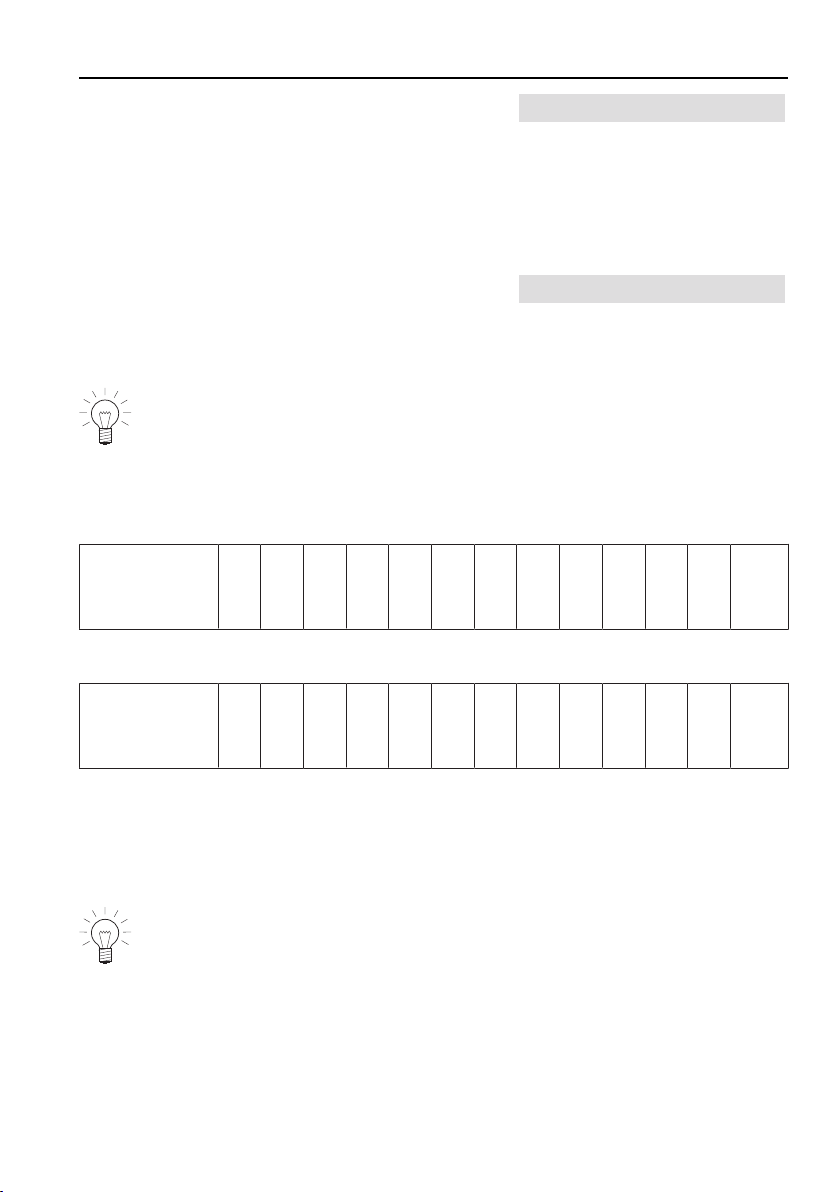
The water softener is deactivated at level 0‑5 °fH or 0‑3 °dH.
Levels of water hardness
Possible settings in °fH (French degree of water hardness)
Automatic0
–
5
6
–
10
11
–
15
16
–
20
21
–
25
26
–
30
31
–
35
36
–
40
41
–
50
51
–
60
61
–
70
71
–
80
81
–
120
Possible settings in °dH (German degree of water hardness)
Automatic0
–
3
4
–
6
7
–
9
10
–
12
13
–
14
15
–
16
17
–
19
20
–
22
23
–
27
28
–
32
33
–
38
39
–
45
46
–
65
Settings for external ion exchanger (water softener)
The appliance must be set up for a 0-5 °fH level of hardness if:
▪ the hardness of the water intake is 40 °fH or above before passing through
the ion exchanger.
Ensure that the water used in the appliance passes through the ion
exchanger. Otherwise no settings have to be made. The appliance
automatically adjusts to the water hardness.
25

5 User settings
5.9 Hot water connection
The available hot water is used optimally.
Hot water No
If the water intake is still too cold, a short pre-rinse is carried out. The clean-
ing phase with hot water follows. If the additional energy saving function is se-
lected, the water is heated up further electrically to only a minimum temperat-
ure, reducing energy consumption further.
Setting the hot water connection (see page 20)
«NO HEATING» setting
The water is not heated up further by the integrated heating element. For this
reason, this setting should only be selected if a water inlet temperature of 60
°C is ensured. Satisfactory cleaning and drying results are not guaranteed at a
lower temperature.
5.10 Temperature unit
The unit of temperature can be set to degrees
Celsius [°C] or degrees Fahrenheit [°F].
Temperature unit °C
Changing the unit of temperature (see page 20)
26
5 User settings
5.11 Storage duration of tank
If the quality of the last rinse water allows, it is
stored in a tank and used for the next pro-
gramme.
Storage duration of the tank 36h
After the duration set, the water is drained and pumped off. This procedure is
carried out when the appliance is powered off and may create some noise.
– In the display appears:
Emptying the tank…
.
– It is possible that for several minutes no programme can be selected.
If this function is switched off no rinse water will flow into the tank.
After running programmes around 20 times, the tank is rinsed with hot
water. This extends the duration of the programme by around
30minutes.
with rinsing of the tank
appears briefly during pro-
gramme selection.
Changing the storage duration of the tank (see page 20)
5.12 Automatic door opening
The automatic door opening provides optimum
drying results with low energy consumption.
Automatic door opening YES
The appliance door automatically opens slightly during the drying or final dry-
ing phases. The automatic door opening can be switched off, which extends
the duration of the programme by around 10 minutes.
Setting the automatic door opening (see page 20)
5.13 Interior illumination
The interior of the dishwasher illuminates for a
set time when the appliance door is opened
beyond a certain angle.
Interior illumination 10min
The interior illumination can be switched off.
To switch the interior illumination off earlier, press the button.
27
5 User settings
Changing the interior illumination (see page 20)
5.14 Heat pump *
Using the heat pump sharply reduces energy
consumption and extends the programme dur-
ation.
Heat pump ON
The length of time the heat pump is switched on depends on the temperature
of the wash. If several programmes are started in succession, the heat pump
may remain switched off. The heat pump may produce some noise when run-
ning.
To ensure the heat pump is well ventilated, it may continue to make some
slight noise for several hours after the appliance has been switched off.
The heat pump can be switched off by setting the setting to "OFF".
The duration of a programme varies with the settings (user settings, additional
functions). Taking the «Daily Quick» programme as an example:
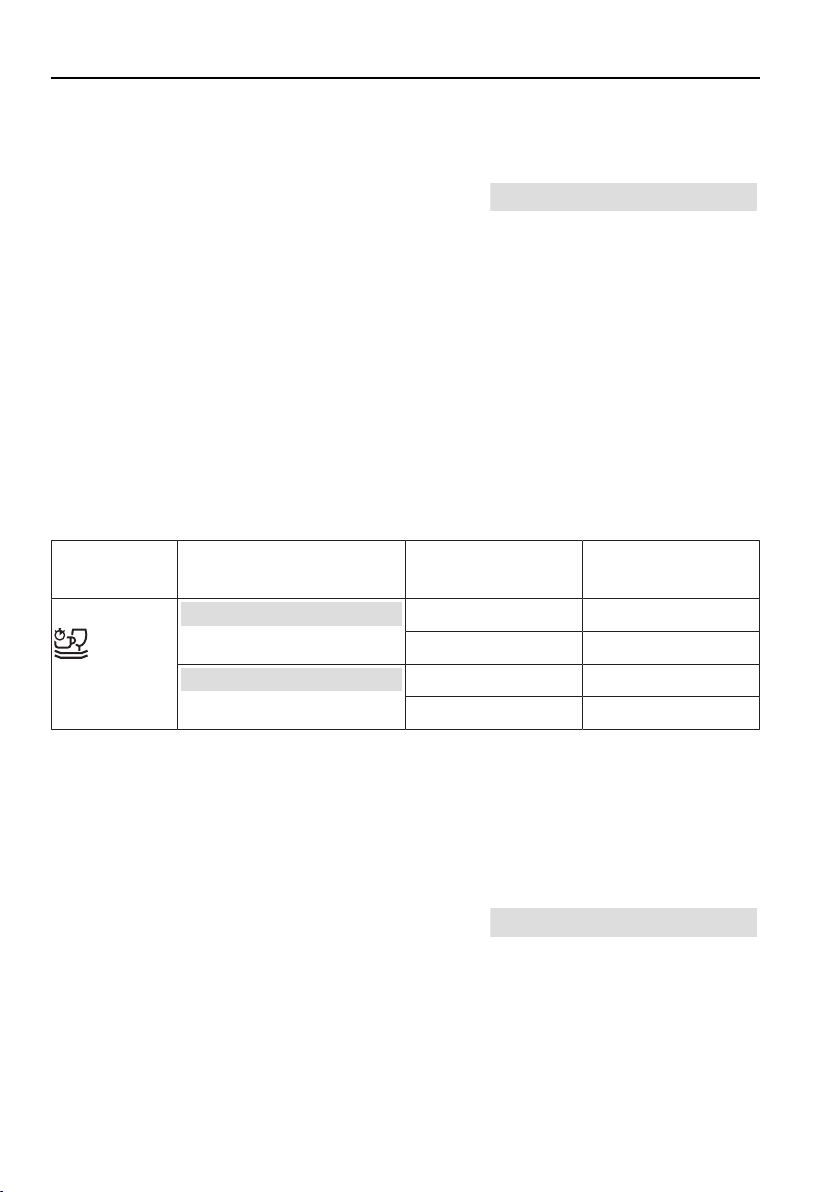
ProgrammeUser setting
Heat pump
Additional energy
saving function
Programme dura-
tion
Daily Quick
Heat pump OFF
Not selected0h51
Selected0h49
Heat pump ON
Not selected0h48
Selected0h58
Setting the heat pump (see page 20)
* Depending on model
5.15 Factory settings
The factory settings can be restored.
Factory settings No
Restoring factory settings (see page 20)
28
6 Operation
6.1 Preparing the appliance
An appliance with a heat pump can only be operated after standing in
the normal operating position for around 2 hours.
Opening the appliance door
▸Pull the door handle forwards.
– Any programme that is running will be automatic-
ally interrupted.
Before using for the first time
▸Switch the power on.
▸Turn on the water tap.
▸Fill the salt reservoir with approximately 1.0l water and 1kg regeneration
salt.
For hygiene reasons, regeneration salt is also recommended for use with
low water hardness and
detergents.
▸Wipe away excess salt on the edge of the salt reservoir.
▸Fill the rinse agent reservoir with rinse agent.
▸Run the
programme without dishes to protect the appliance from corro-
sion from any excess salt and to remove factory-related grease deposits.
On initial use, the refill indicator can remain illuminated for several
wash cycles.
goes out when the salt concentration in the reservoir is evenly dis-
tributed (after about 10 wash cycles).
29

6 Operation
6.2 Dishwashing tips
Tableware
Not all table- and kitchenware are dishwasher safe.
▪ Handcrafted objects and wooden or plastic parts that are sensitive to heat
or detergent suds should be cleaned by hand.
▪ The printing on glass and porcelain is hard-wearing only to a point and
eventually over time can wear off.
▪ Pottery has a tendency to crack or chip.
▪ Objects made of silver, copper and tin have a tendency to discolour, turning
brown or black.
▪ Stress and tension in thick cut crystal glasses and dishes can cause crack-
ing.
▪ Depending on the type of glassware and the detergent being used, perman-
ent clouding may result. Check with your glassware supplier as to whether
your glassware is dishwasher safe.
▪ Spots tend to form on aluminium. This can affect other items being washed
(spots on porcelain). Aluminium should therefore ideally be washed separ-
ately.
▪ Tableware with adhesive labels should not be washed in the dishwasher.
The adhesive labels can clog up the filter system.
General note
▪ To prevent damage to glass and water spots, arrange glasses in such a
way that they do not touch.
▪ Do not overload the baskets.
▪ Load beverage and food containers such as cups, glasses, pots, etc. with
the opening facing downwards so that the water can drain off.
▪ Save energy, water and detergent by loading the appliance to capacity.
▪ When washing range hood grease filters use the maximum amount of deter-
gent.
▸Select the
programme.
▪ In case of a build-up of odours, reduce the storage duration of the tank.
30

6 Operation
6.3 Loading the baskets
Not all table- and kitchenware are dishwasher safe. Follow the tips
and advice in the 'Dishwashing tips' section.
▸Remove any coarse or hard pieces of food or foreign objects left on the
dishes.
▸Make sure no toothpicks get into the appliance. Toothpicks can cause the
filter system to become clogged up.
▸Dishes, pots and pans with heavily burned-on food debris stuck to them
should be soaked in water first.
▸After loading the dishes, check that the spray arms can turn freely.
In the following you will find some loading tips to help you get the best results
from your appliance.
31
6 Operation
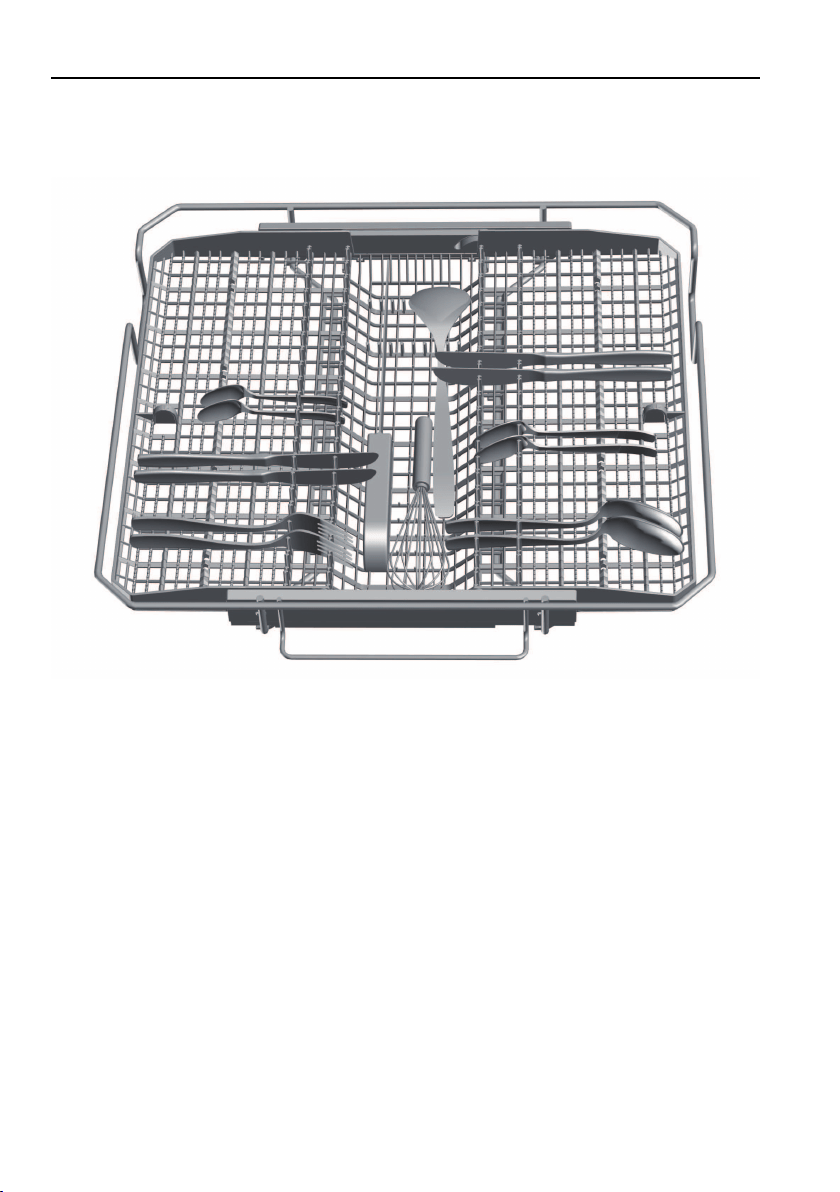
6.4 Loading tips for the cutlery drawer *
* Depending on model
▸Where possible, load spoons with handles between the tines.
▸With thick-handled spoons or if the side is raised, the mouthpiece can be
placed between the tines.
32
6 Operation
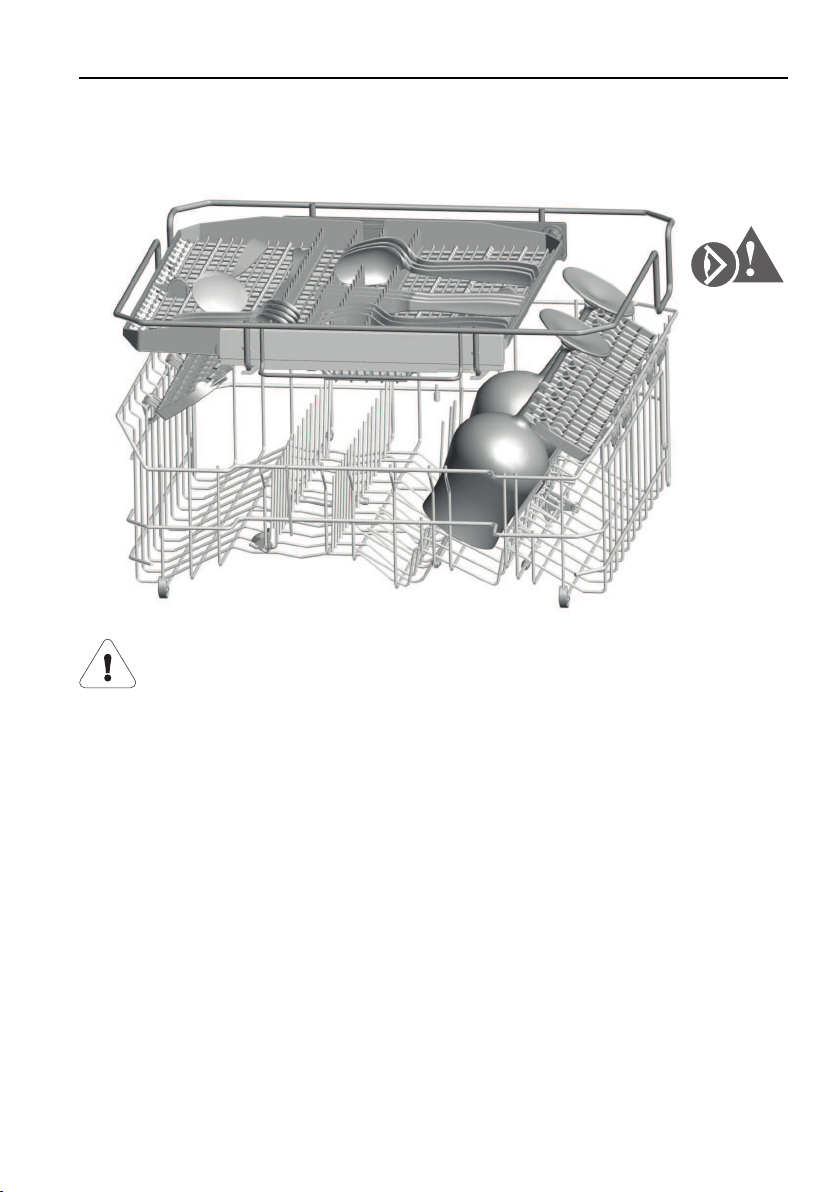
The cutlery drawer can be adjusted to accommodate the load:
If tall glasses are loaded into the upper basket, the right side can be raised by
2cm or be pushed over to the middle.
Take care when loading tall glasses into the upper basket. If they
hit the cutlery drawer frame, they could get damaged.
33
6 Operation
6.5 Loading tips for the upper basket
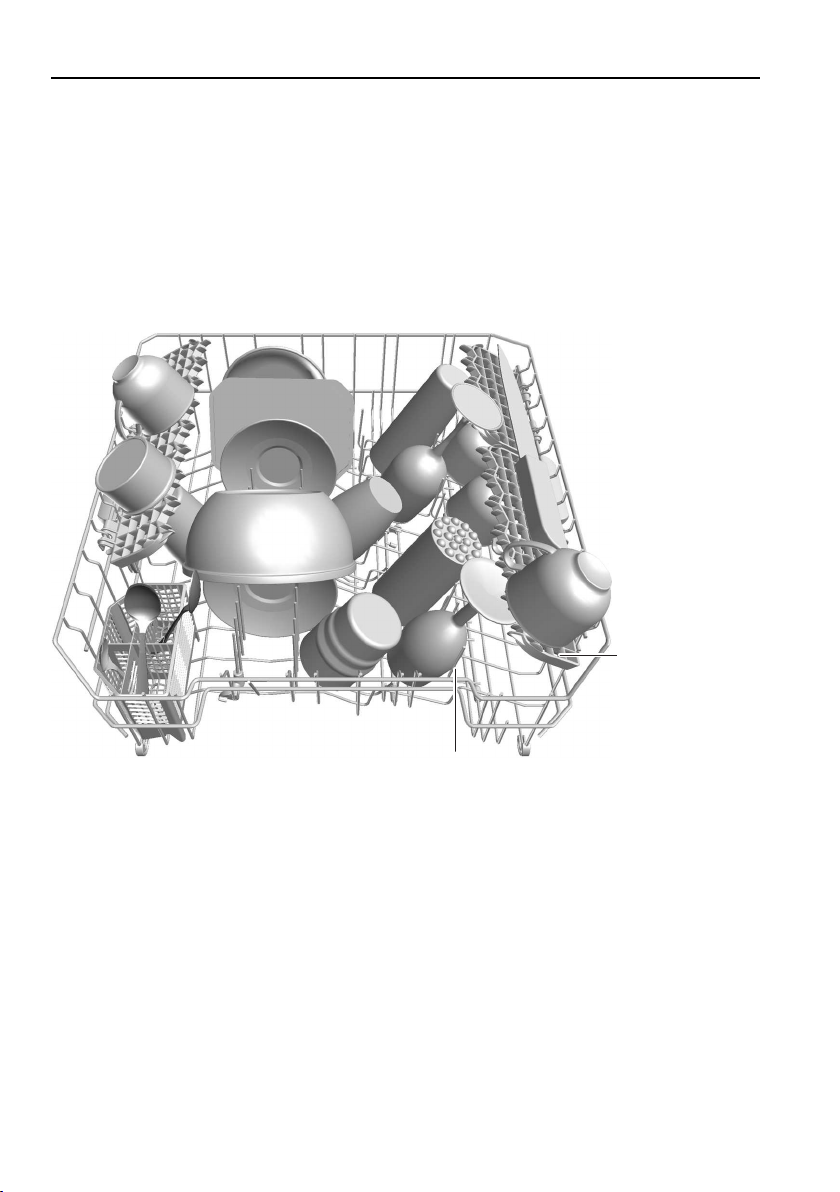
▸Pull the upper basket out as far as it will go and load. Arrange smaller items
such as saucers, glasses, cups and dishes.
▸If using the fold-down racks 1, stagger the items so that the water can reach
the dirty surfaces better.
▸Load salad servers, spatulas, etc. in the vario cutlery basket insert.
▸Rest glasses on the adjustable glass holder 2.
1
2
34
6 Operation
Glass holder
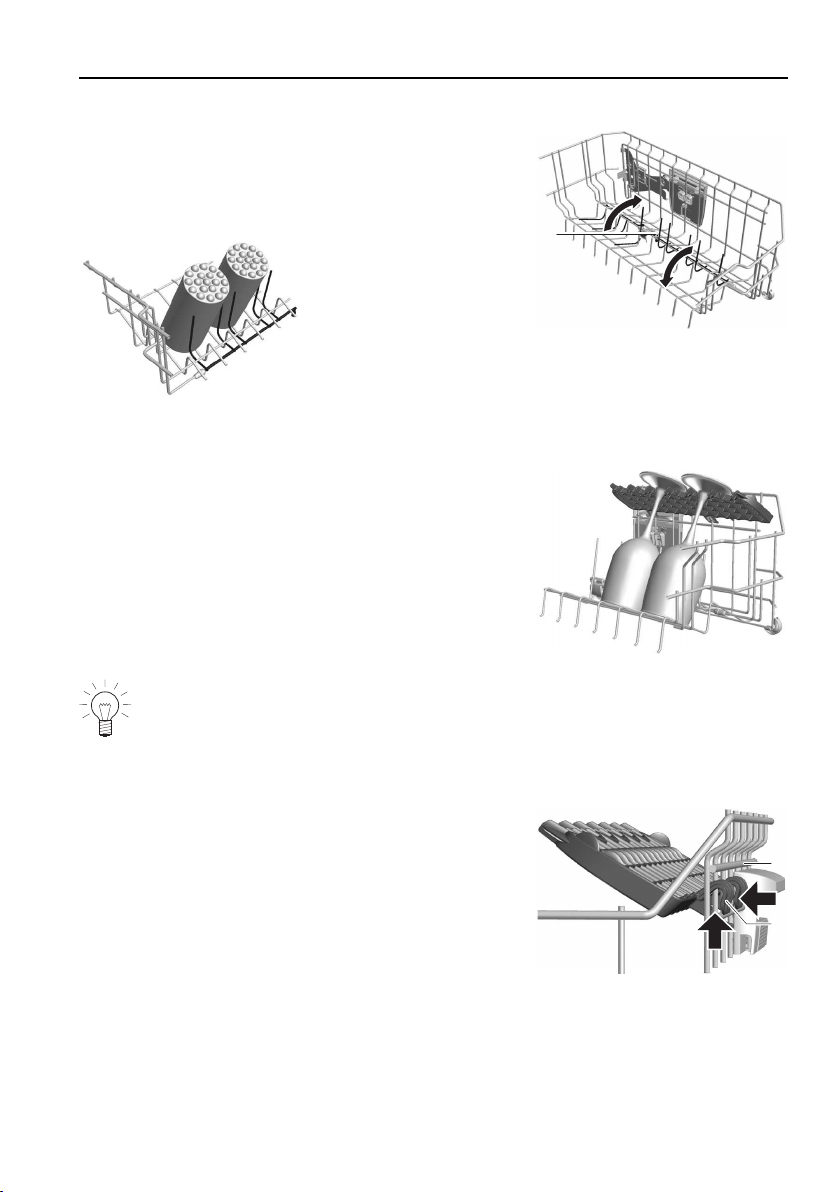
The glass holders 1 are particularly suitable for
tall glasses. They can be folded down or up.
▸Push the glass holders gently down or, altern-
atively, pull them up until they engage.
1
Racks
The racks 1 can be used as glass holders.
1
Remove the racks to accommodate tall glasses.
Dismantling/adjusting the height of the racks
The height of the racks is adjustable.
1.Push the rack 1 up by the hooks 2.
2.Push the rack inwards and then out.
▸Hook the rack in the higher position 3, if re-
quired.
1
2.
1.
3
2
35
6 Operation
Easy prongs
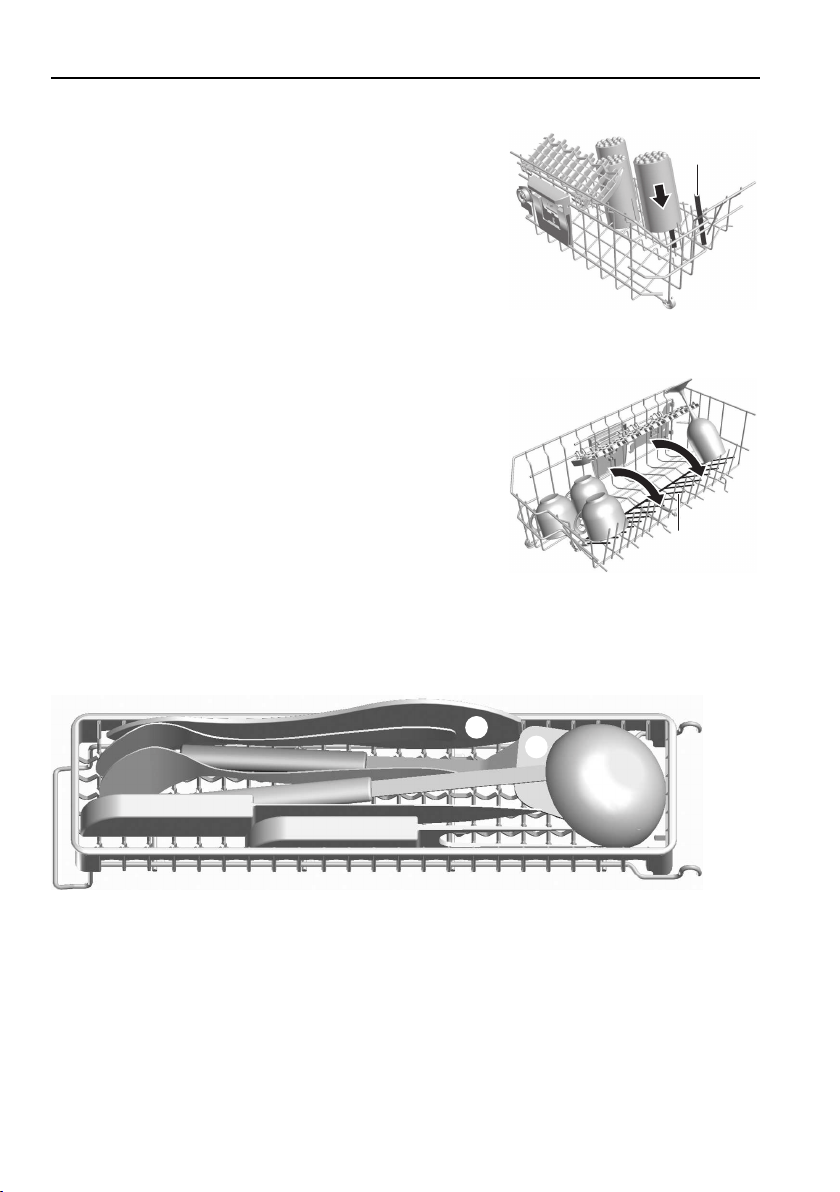
The easy prongs 1 can be placed over the
prongs anywhere in the basket.
By using the easy prongs, drinking glasses, baby
bottles, sports bottles, vases and carafes can be
placed anywhere in the basket.
Use 2 easy prongs for wider vessels.
1
Fold-down tines
Swing the fold-down tines 1 to the right to create
an additional loading area for cups and glasses.
1
Vario cutlery basket insert *
▸Place ladles 1, knives (points) 2 and frying spatulas 3 in the compartments,
pointing to the back. Stand wooden spoons 4 on their side.
1
4
3
2
36
6 Operation
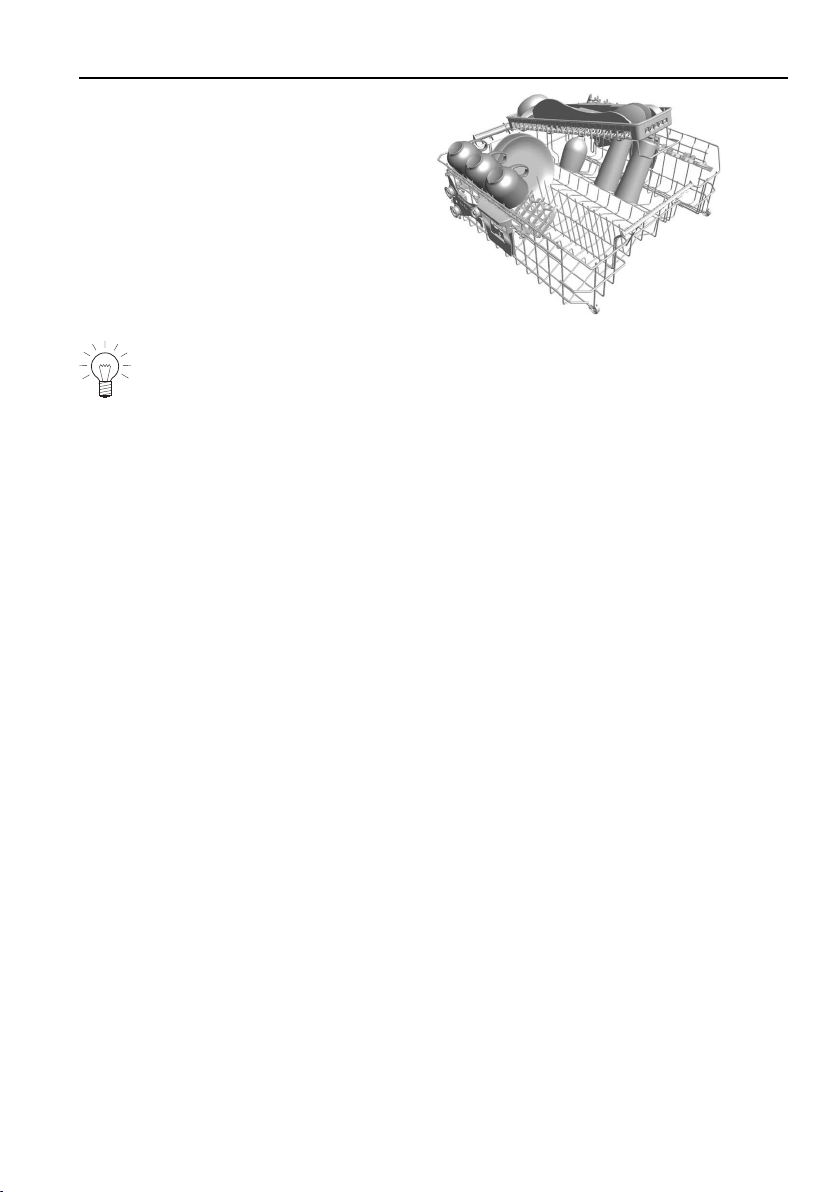
▸Place the vario cutlery basket insert
on the sliding guide at the back and
the basket grip.
Avoid placing any larger items (pans, bowls, etc.) beneath the vario cut-
lery basket insert so as not to obstruct the lower spray jet.
* Depending on model
37
6 Operation
Adjustable upper basket
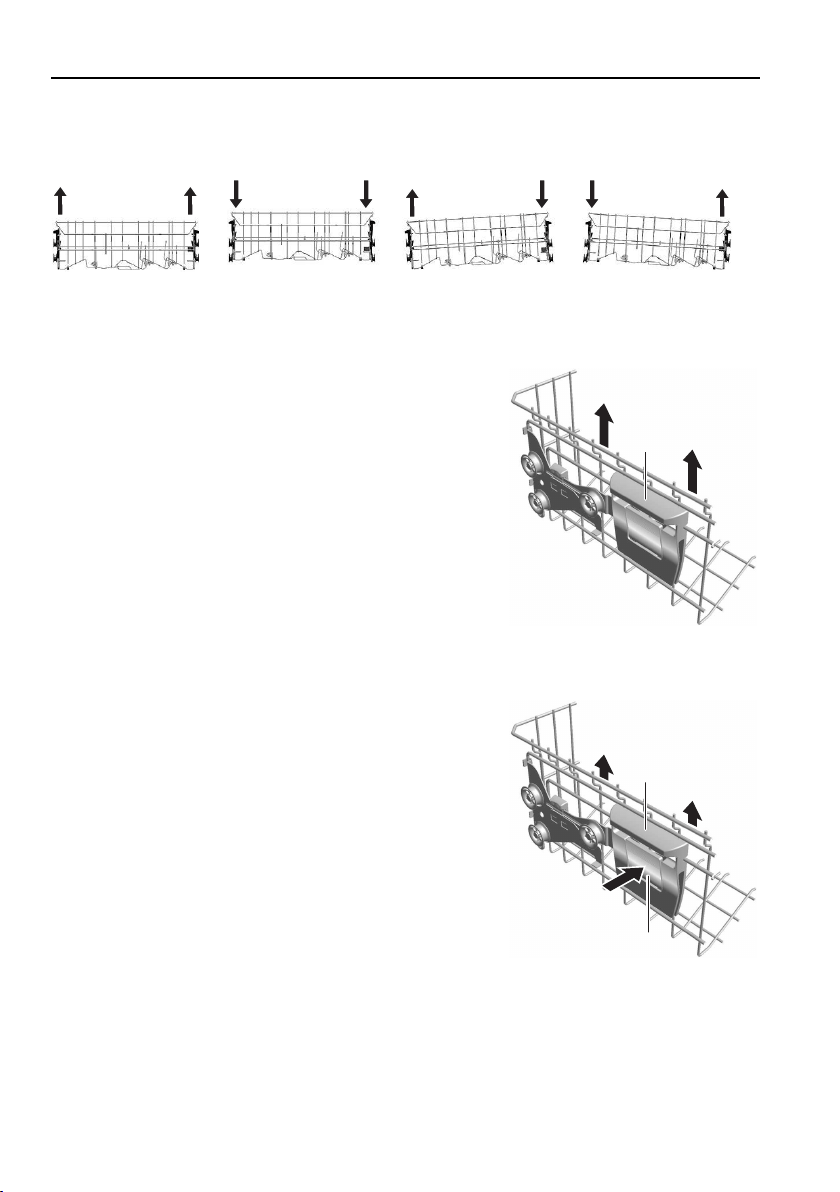
The height of the upper basket can be adjusted to 2 or 3 levels by a total of
approximately 2-4cm.* It can be inclined in various ways.
* Depending on model
Raising the upper basket
▸Hold the upper basket at the sides by the grips
1 and raise it into the position required.
1
Lowering the upper basket
▸Hold the upper basket at the sides by the grips
1.
▸Raise the upper basket slightly and press the
button 2 at the same time.
– The locking device is released.
▸Lower the upper basket into the position re-
quired, release the button and engage the bas-
ket.
1
2
38
6 Operation
6.6 Loading tips for the lower basket
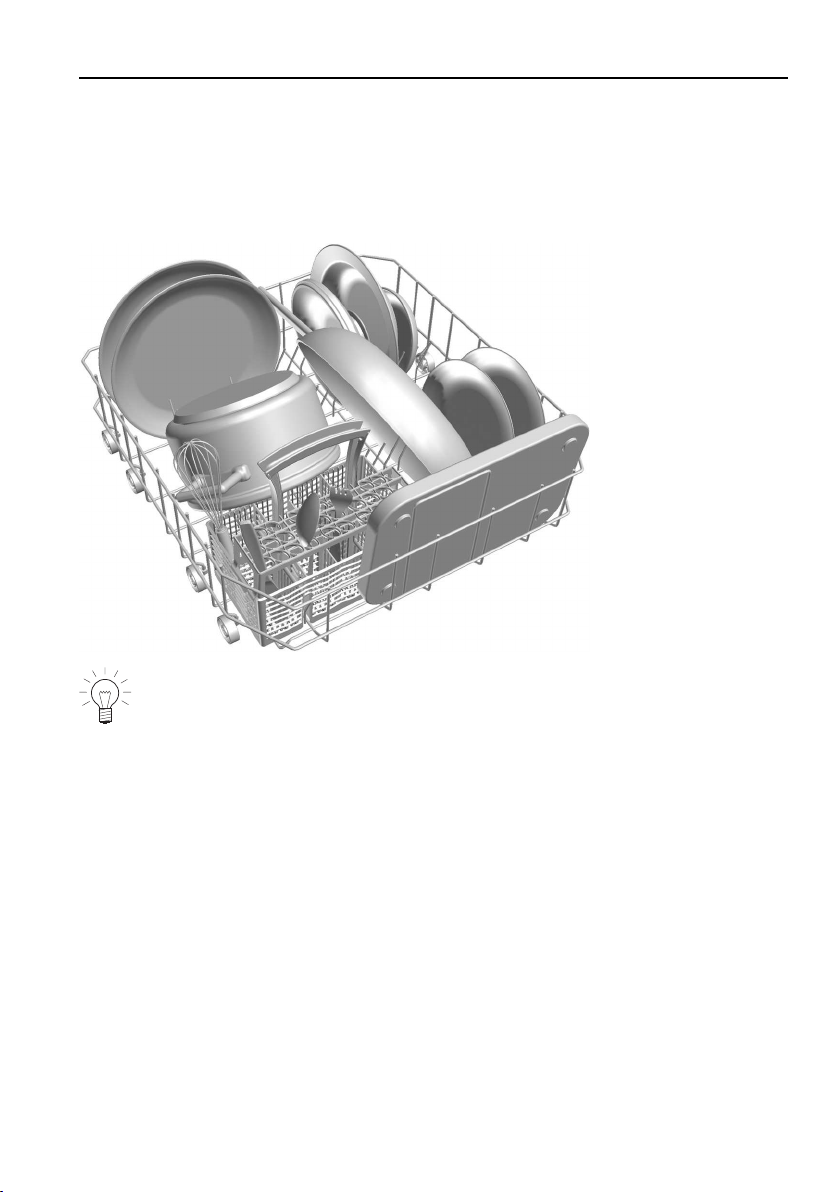
▸Pull the lower basket out as far as it will go and load.
▸Load larger items such as plates, bowls, platters, pots and pans.
▸Load wide dishes (soup plates, lids, etc.) at the back on the right.
Put plastic bowls in the upper basket. If loaded into the lower basket,
they could be lifted by the pressure of the water and could come into
contact with the revolving spray arm.
39
6 Operation
Fold-down tines
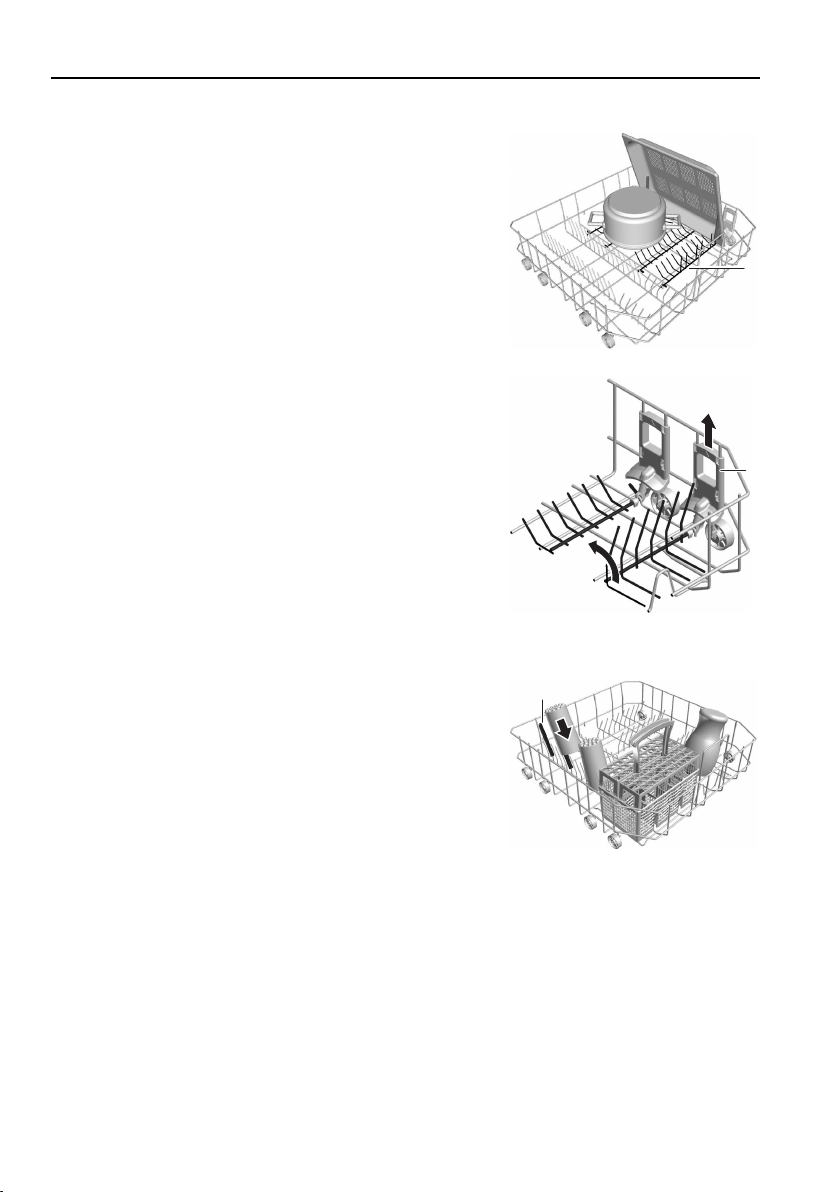
The tines 1 can be folded down to create a larger
area for loading e.g. large plates, pans, dishes or
a number of cups and glasses.
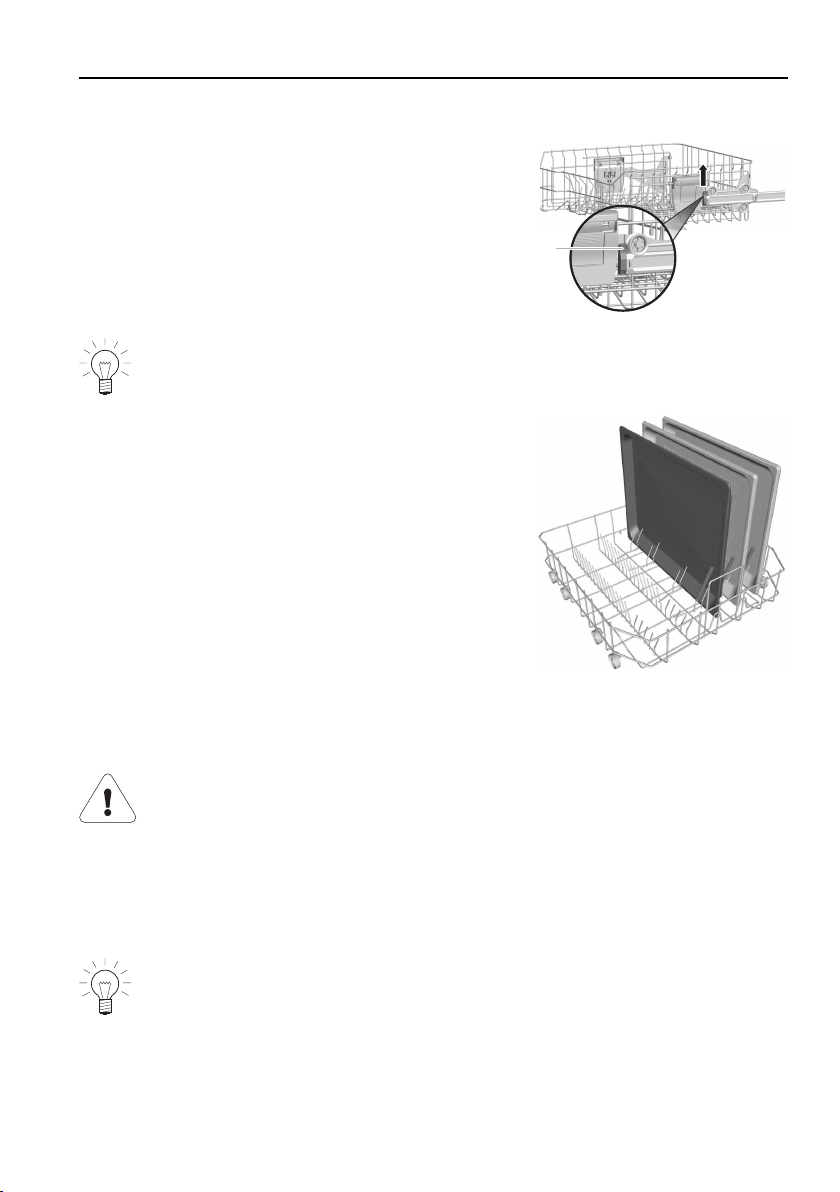
Cooking trays can be placed between the prongs.
Easy prongs give optimal stability.
1
In order to fold the tines down, the locking grip 2
at the side must be pulled up.
2
Easy prongs
The easy prongs 1 can be placed over the
prongs anywhere in the basket.
By using the easy prongs,
drinking glasses, baby bottles, vases and carafes
can be placed anywhere in the basket.
Use 2 easy prongs for wider vessels.
1
40
6 Operation
Cleaning baking trays
The upper basket has to be removed for larger
baking trays.
▸Slide the upper basket out as far as possible.
▸Remove the basket safety lock 2 by pushing it
upwards.
▸Pull the upper basket out of its guides.
2
When the upper basket is put back, the basket safety lock 2 must be re-
turned to the locking position.
▸Load the baking trays.
– The easy prongs act as a stable prop.
Cutlery basket *
* Depending on model
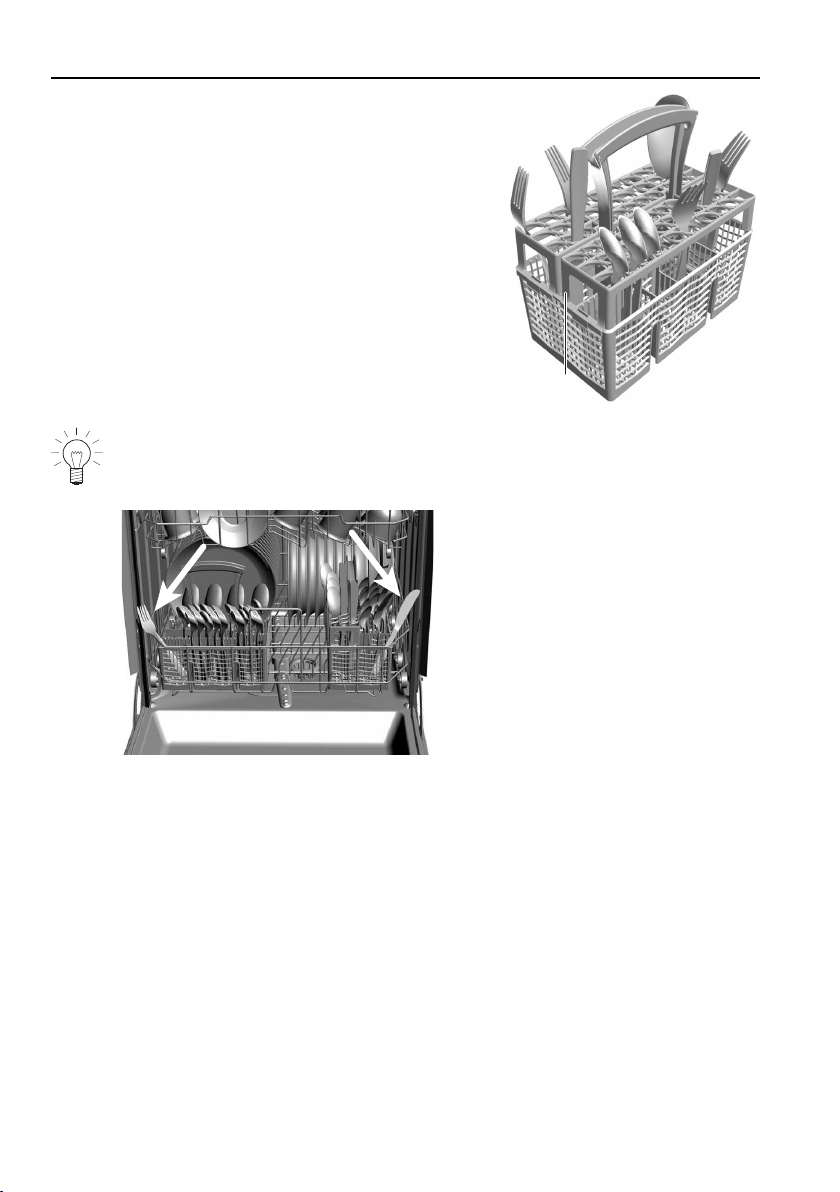
To avoid injury, place knives and cutlery with sharp edges or
points into the cutlery basket in such a way that they do not stick
out (points facing downwards).
Do not insert any knives, forks or other pointed objects into the
door lock opening or drop them into the opening. Risk of damage
to the appliance.
Knives and cutlery with sharp edges or points may also be placed hori-
zontally in the upper basket.
The cutlery basket may be placed over the easy prongs anywhere in the lower
basket.
41
6 Operation
▸Put cutlery loosely in the cutlery basket, with
handles pointing down. Make sure no spoons
are sticking together.
The inserts 1 supplied prevent items of cutlery
sticking together, water spots during drying, and
smaller items (e.g. mocha spoons) slipping
through the basket.
▸Fit the inserts to the cutlery basket.
1
When closing the appliance door, ensure no items of cutlery are sticking
out of the tub or are trapped. The leak tightness of the appliance cannot
otherwise be assured.
42
6 Operation
6.7 Adding the detergent
Ensure no cleaning agent gets into the door lock opening.
This can cause the door lock to malfunction.
Powder
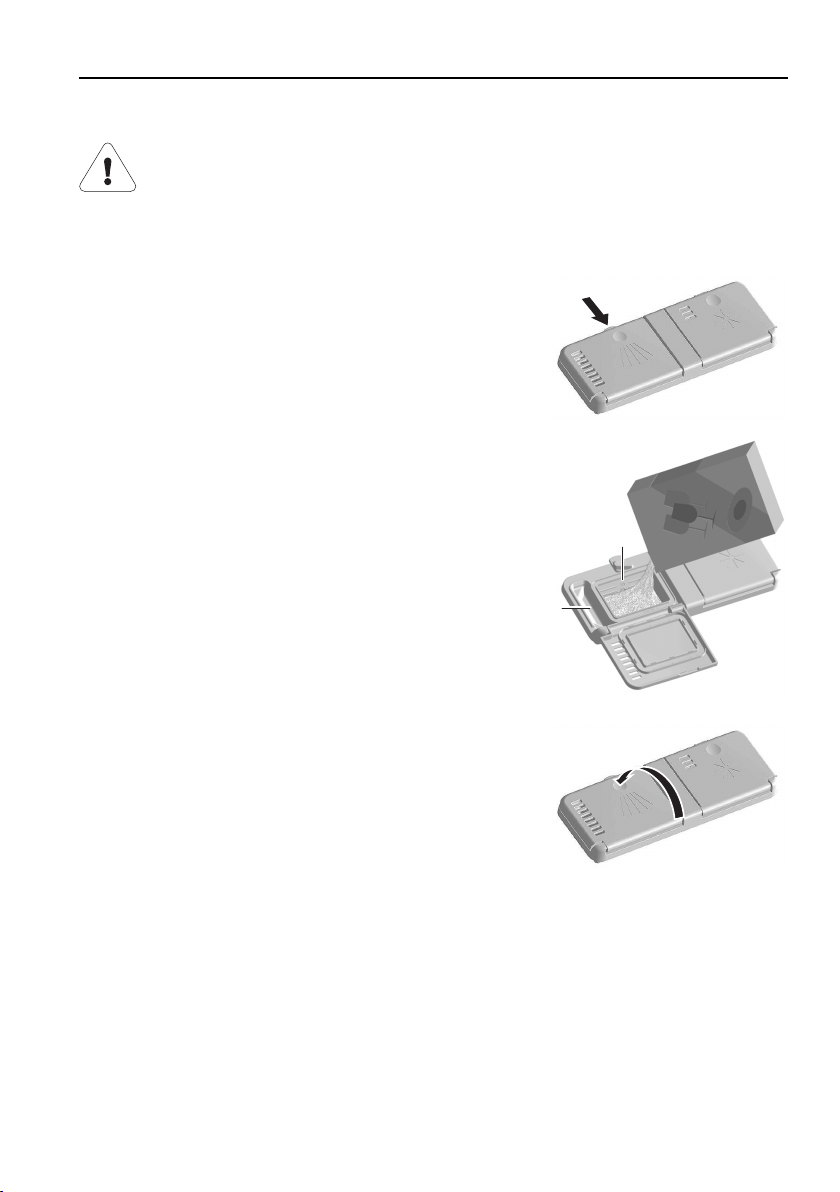
▸Open the detergent dispenser by pushing the re-
lease catch in the direction of the arrow.
▸Add the detergent to the detergent compart-
ment.
▪ For dosage, follow the detergent manufacturer’s
instructions.
▪ Observe the «20 and 30ml» level marks 1.
▪ For heavier soiling, add approximately 1 table-
spoon of detergent to the pre-rinsing compart-
ment 2.
1
2
▸Close the cover.
43
6 Operation
Tabs
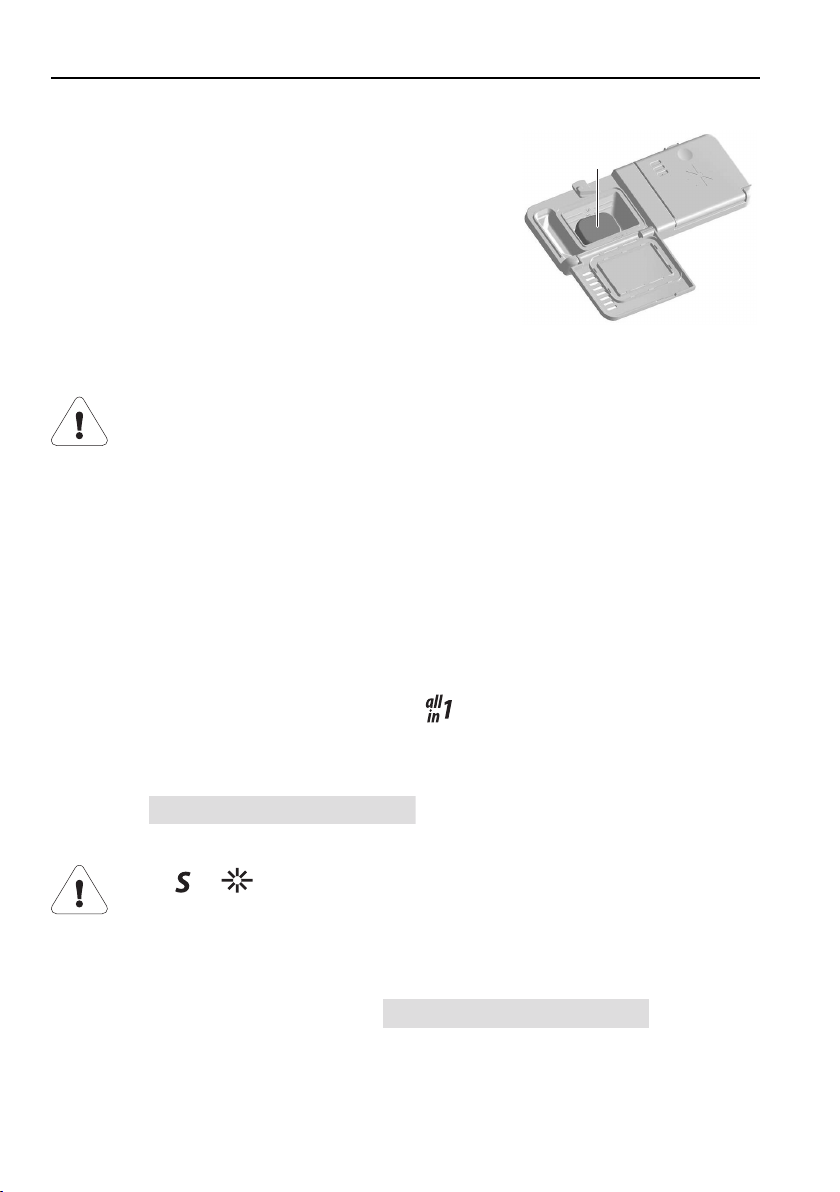
▸Place the tab 3 flat in the detergent compart-
ment.
3
Choice of detergent
Do not use washing-up liquid. It can cause excessive foaming,
causing your appliance to malfunction.
Follow the dosage instructions printed on the detergent package care-
fully. Using too high a dosage can cause damage to the appliance.
▸Only use detergent specially formulated for dishwashers.
▪ The detergent manufacturer’s advice centre will gladly help with any prob-
lems (e.g. detergent dosage).
▪ Tabs may not dissolve properly at a wash temperature of below 55°C, af-
fecting the cleaning performance of the appliance.
Using combination cleaning products (
tabs/powder)
If using combination cleaning products, which should render the use of rinse
agent and regeneration salt superfluous, please observe the following tips:
▪ Use the
All in 1 On
user settings to adapt the pro-
grammes and displays to suit the detergent.
If the or refill indicators illuminate, the regeneration salt or
rinse agent should still be refilled.
▪ If, after washing and drying, the results are not satisfactory, use conven-
tional cleaning products. Refill the regeneration salt and rinse agent reser-
voirs. Change the user settings to
All in 1 OFF
. For com-
plaints, please contact the detergent manufacturer.
44
6 Operation
6.8 Selecting a programme
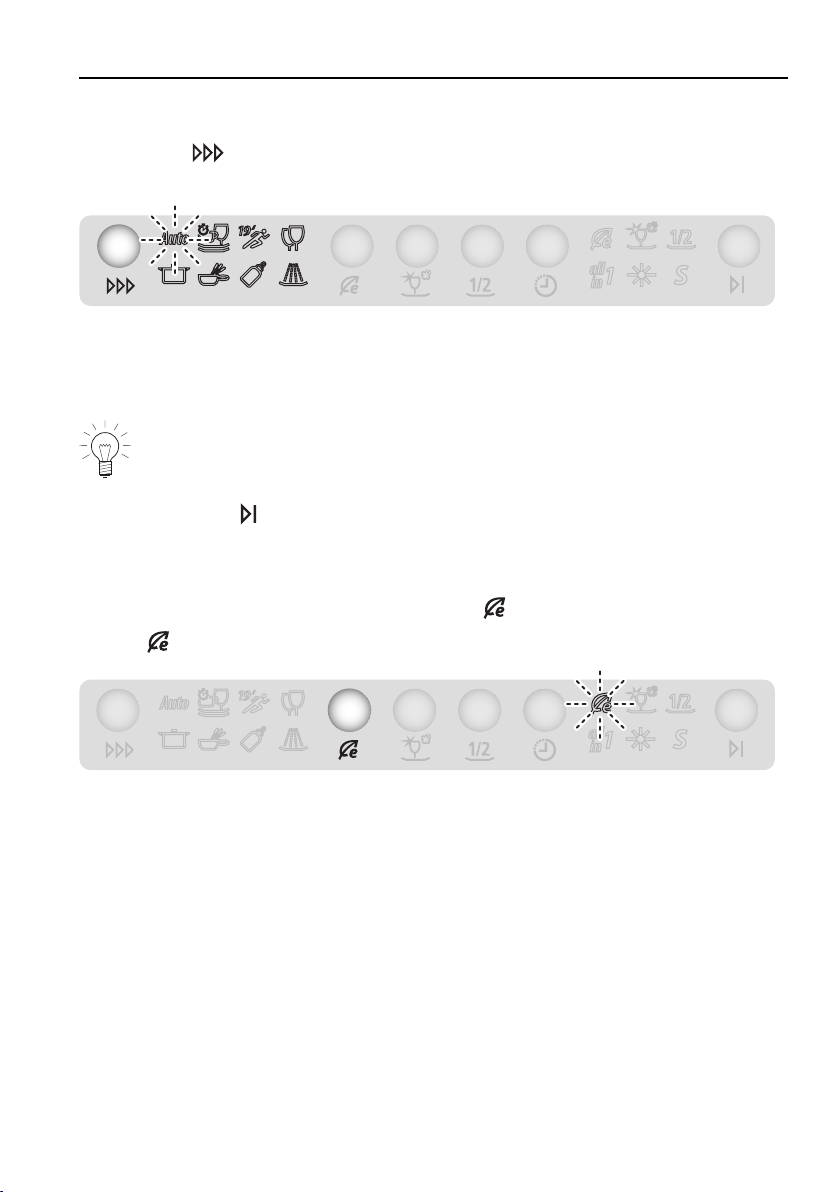
▸Press the
button repeatedly until the required programme symbol
flashes.
▸Close the appliance door.
– The programme starts immediately.
– The function light illuminates. *
If the appliance door is not closed within 15 seconds of selecting a pro-
gramme, all entries, symbols and the display are cleared. A 2×acoustic
signal is also emitted. It is necessary to make a new programme selec-
tion.
Press the
button at any time to cancel the programme selected.
6.9 Selecting the economy programme
▸With the appliance switched off, press the button.
– flashes.
▸Close the appliance door.
– The programme starts immediately.
– The function light illuminates. *
* Depending on model
45
6 Operation
6.10 Selecting additional functions
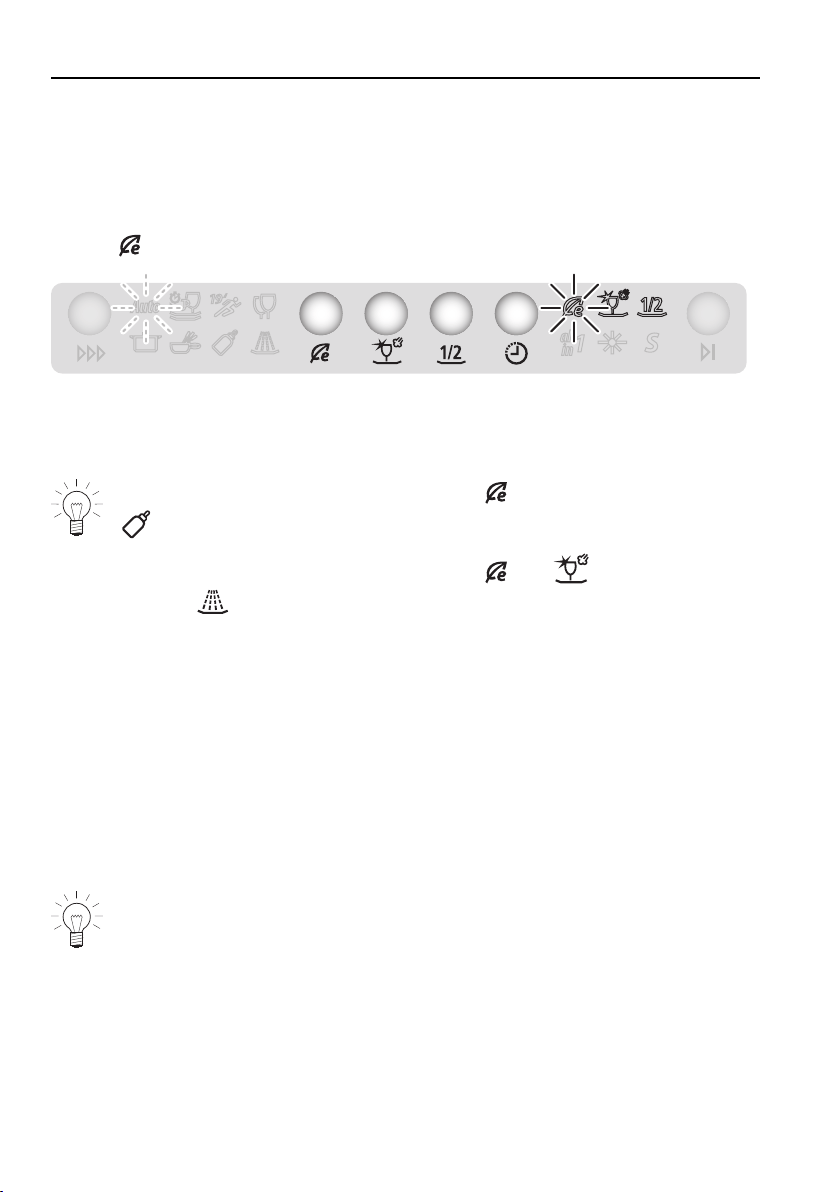
After selecting a programme, it is possible – within 15 seconds and while the
programme symbol is flashing – to select additional functions.
▸Press the additional function button.
–
illuminates (example).
▸Close the appliance door.
– The programme starts immediately.
It is not possible to select the additional function together with the
programme and «Appliance hygiene».
It is not possible to select the additional
and functions together
with the
programme.
6.11 Saving additional functions
When an additional function is saved, it is automatically active during pro-
gramme selection.
▸Select programme.
▸Hold the additional function button depressed for 5 seconds.
– The selection is saved.
▸Depress the button again for 5 seconds to clear the saved function.
The corresponding symbol flashes briefly and an acoustic signal is
emitted to confirm that the additional function has been saved or
deselected.
46
6 Operation
6.12 Delayed start
The delayed start allows you to wash during off-peak hours (e.g. at off-peak
electricity rates). A delayed start of between 30 minutes and 24hours can be
set. The delayed start duration last entered is shown as a suggestion.
Setting
▸Select a programme and the additional «Delayed start» function.
▸Repeatedly press or hold down the
button until the required delayed
start duration appears in the display, e.g.:
Start in 2 hours
.
▸Close the appliance door.
– The display goes dark. *
– The countdown to the set delayed start begins.
Dishes can be loaded at any time during the delayed start.
When the delayed start period is up, the programme selected starts automatic-
ally.
No acoustic signal is emitted at the end of the programme.
* Depending on model
Clearing
▸Open the appliance door.
▸Repeatedly press or hold down the
button until the delayed start is
cleared and the programme phase appears.
▸Close the appliance door.
– The programme selected starts.
47
6 Operation
6.13 Interrupting a programme
The dishes and water may be hot – scalding hazard!
▸Open the appliance door carefully.
– The programme is interrupted.
– The programme symbol flashes.
– Display (alternates), e.g.:
Close appliance door
Cleaning 1h05
6.14 Aborting a programme
The dishes and water may be hot – scalding hazard!
▸Open the appliance door carefully.
– The programme is interrupted.
▸Hold the
button depressed for 2
seconds.
– The water is pumped off.
– Display (alternates):
– A 5× acoustic signal is emitted.
– The display and symbols go out.
Programme interrupted
please wait ...
48
6 Operation
6.15 End of programme
The door must not be closed when
Automatic door opening
/
Do not close the door!
appears in the display, otherwise the
door opener can get damaged.
– A 5× acoustic signal is emitted at the end of the programme.
– If the appliance door remains closed, final drying starts:
– The display illuminates or the function light flashes for up to
90minutes.*
– Three long acoustic signals are emitted at the end of the final drying
phase.
The appliance door opens automatically during the drying or final drying
phases. For optimal drying results, the tableware should not be unloaded
until the displays go out. After the final drying phase, the appliance
enters the energy-saving stand-by mode.
* Depending on model
Unloading
▸Unload the appliance.
Unload the lower basket first.
▸Periodically check the filter system and clean if necessary.
49
6 Operation
6.16 Operation with childproof lock activated
When the childproof lock is activated, before a programme can be selected
the childproof lock has to be overridden by pressing two buttons at the same
time. After 'Accessing programme selection', the next steps (as described in
the previous sections) can be carried out.
Accessing programme selection
▸Open the appliance door.
– Display for 15 seconds:
Childproof lock
▸Hold the button (the button for the economy programme) depressed
and at the same time press the
button.
– The childproof lock has been overridden.
The appliance can now be operated without further regard to the child-
proof lock.
50

7 Care and maintenance
7.1 Cleaning the interior
Using the correct dosage of detergent will automatically clean the interior of
the appliance. We recommend cleaning the appliance twice a year with dish-
washer cleaner.
Follow the directions for use for dishwasher cleaner carefully. Most dish-
washer cleaners work more effectively at higher temperatures. We there-
fore recommend using the
programme.
7.2 Cleaning the exterior
▸Do not use abrasive or caustic cleaning agents.
▸Do not use scouring pads, wire wool, etc. - damage to the surface.
▸Remove any soiling or excess cleaning solution immediately.
▪ Detergent: washing-up liquid, glass cleaner
▸Clean the surfaces with a soft, damp cloth only – for metal surfaces rub in
the direction of the polish lines. Wipe dry with a soft cloth.
▸Clean the operating panel with a damp cloth and then wipe dry.
▪ Detergent: washing-up liquid, glass cleaner
▸From time to time, clean the seal and edges of the appliance door with a
soft, damp cloth.
51
7 Care and maintenance
7.3 Cleaning the filter system
Only use soft materials for cleaning beneath the filter system. Never
use metal objects for cleaning.
If inserted incorrectly, the filter system can cause the appliance to
malfunction.
A dirty filter system can cause unsatisfactory cleaning results and affect the
water outlet. Therefore, periodically check and clean the filter system.
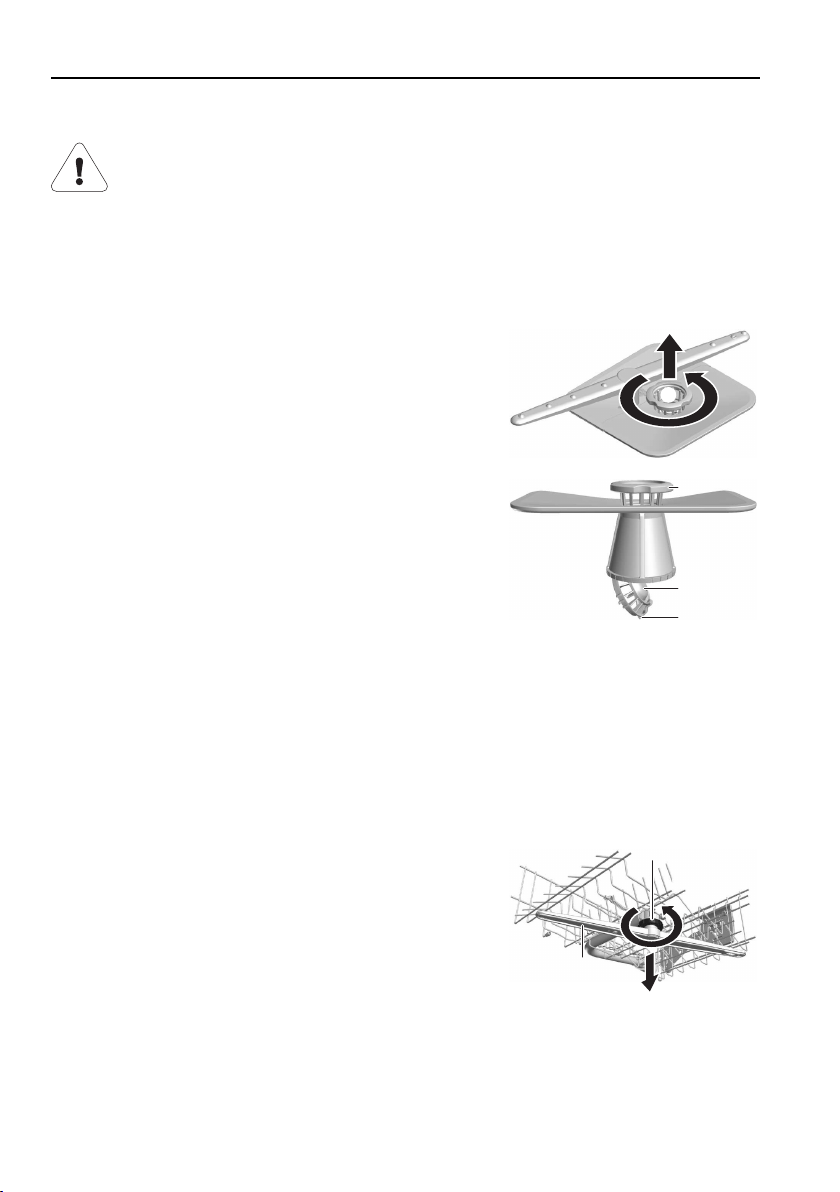
▸Open the appliance door and pull out the lower
basket.
▸Release the filter system by turning fine filter
grip 1 in an anti-clockwise direction and re-
move.
▸Open the coarse filer 2 by pressing on closing
lug 3 and clean the filter system under running
water using a brush.
▸Remove any coarse debris.
▸Replace the filter system and turn the fine filter
1 as far as it will go in a clockwise direction.
2
1
3
1
7.4 Cleaning the spray arms
If the cleaning performance is unsatisfactory or if dishwasher detergent is be-
ing left behind, then the nozzles in the spray arms may be clogged.
Upper spray arm
▸Remove the upper basket.
▸Release bayonet fastener 1 in an anti-clockwise
direction and remove.
▸Remove the spray arm 2 from the shaft and
rinse well under running water.
▸Check the nozzles.
1
2
52
7 Care and maintenance
Lower spray arm
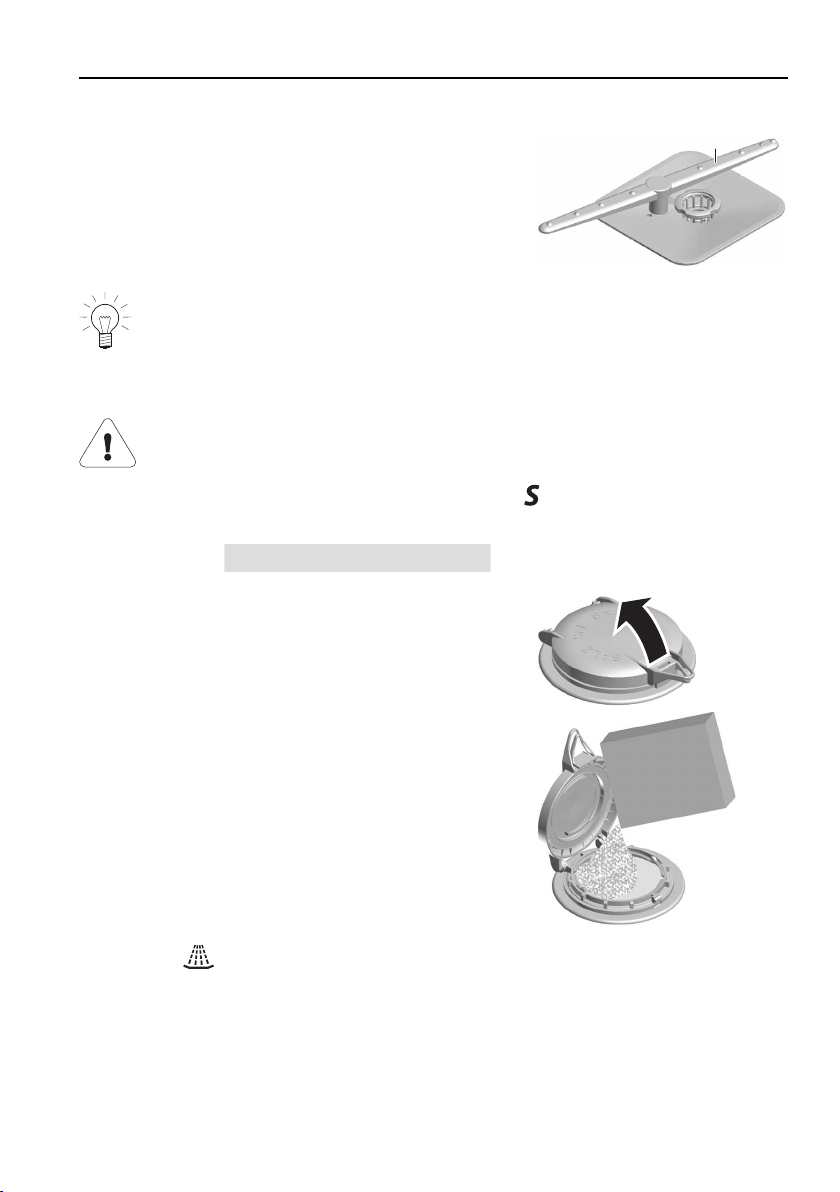
▸Hold the spray arm 3 in the middle and pull
hard upwards.
▸Rinse the spray arm well under running water.
▸Check the nozzles.
3
Clean the filter system and the coarse filter at the same time. See 'Clean-
ing the filter system'.
7.5 Filling with regeneration salt
Never fill the salt reservoir with detergent!
When the supply of rinse agent is exhausted, the
refill indicator illuminates
during programme selection and at the end of the programme.
– Display:
Refill salt
▸Open the appliance door and pull out or re-
move the lower basket.
▸Open the cover on the salt reservoir by lifting
up the grip.
▸When using for the first time, fill with approxim-
ately 1.0l water. Then fill with 1kg standard re-
generation salt. The drain pump may come on
briefly.
▸Wipe away any excess salt around the edge of
the salt reservoir.
▸Close the cover by firmly pressing down until it
engages.
▸Run the
programme without dishes to
protect the appliance from corrosion from
any excess salt.
53
7 Care and maintenance
On initial use, the refill indicator can remain illuminated for several
wash cycles.
goes out when the salt concentration in the reservoir is
evenly distributed (after approximately 10 wash cycles).
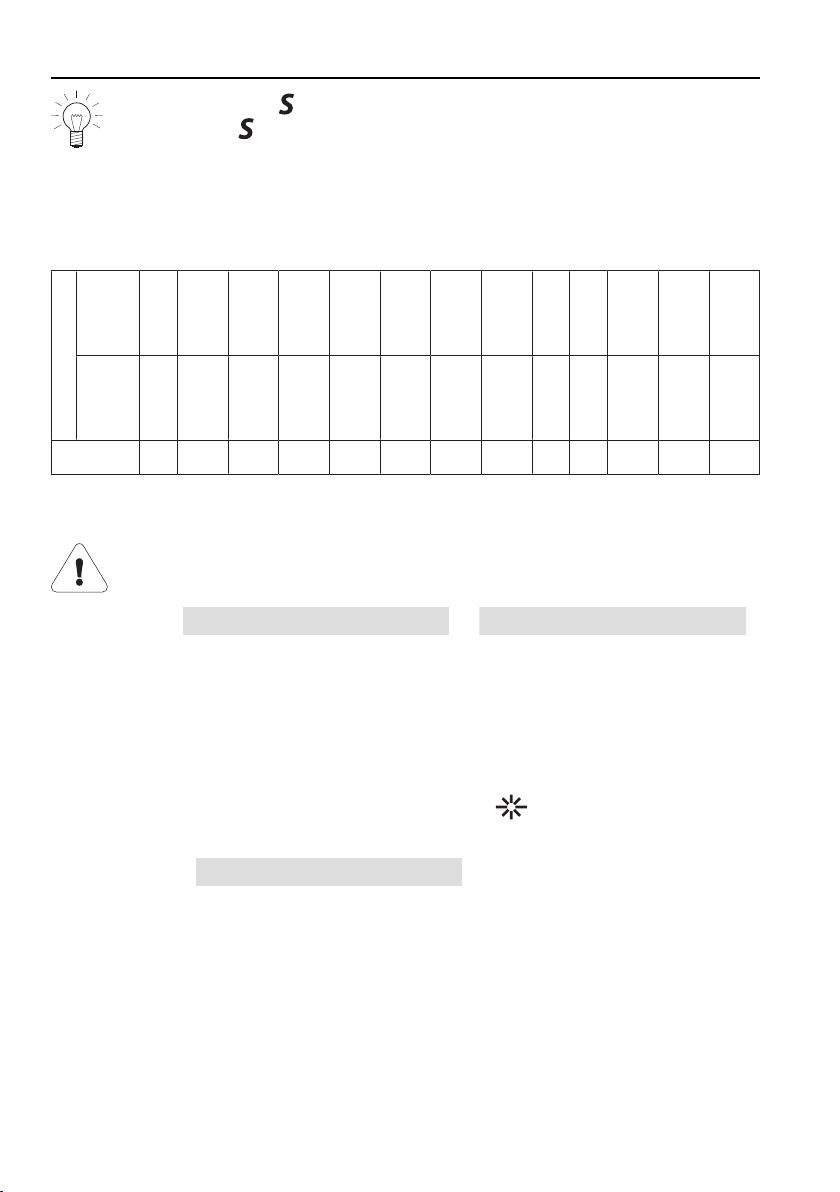
Approximate consumption of regeneration salt
A = Hardness of the water supply
B = Number of wash cycles per kg of salt
A°fH
0
–
5
6
–
10
11
–
15
16
–
20
21
–
25
26
–
30
31
–
35
36
–
40
41
–
50
51
–
60
61
–
70
71
–
80
81
–
120
°dH
0
–
3
4
–
6
7
–
9
10
–
12
13
–
14
15
–
16
17
–
19
20
–
22
23
–
27
28
–
32
33
–
38
39
–
45
46
–
65
B
∞680360250150125100856045352820
7.6 Filling with rinse agent
Never fill the rinse agent reservoir with detergent.
Wipe away any spilt rinse agent (risk of foaming and error mes-
sages
A0 Foaming?
or
A2 Check water outlet
).
Follow the manufacturer’s safety instructions and warnings.
Rinse agent prevents water spotting after final rinsing (rinsing with rinse
agent). The rinse agent is dosed automatically from the reservoir in the appli-
ance door.
When the supply of rinse agent is exhausted, the
refill indicator illuminates
during programme selection and at the end of the programme.
– Display:
Refill rinse agent
54
7 Care and maintenance
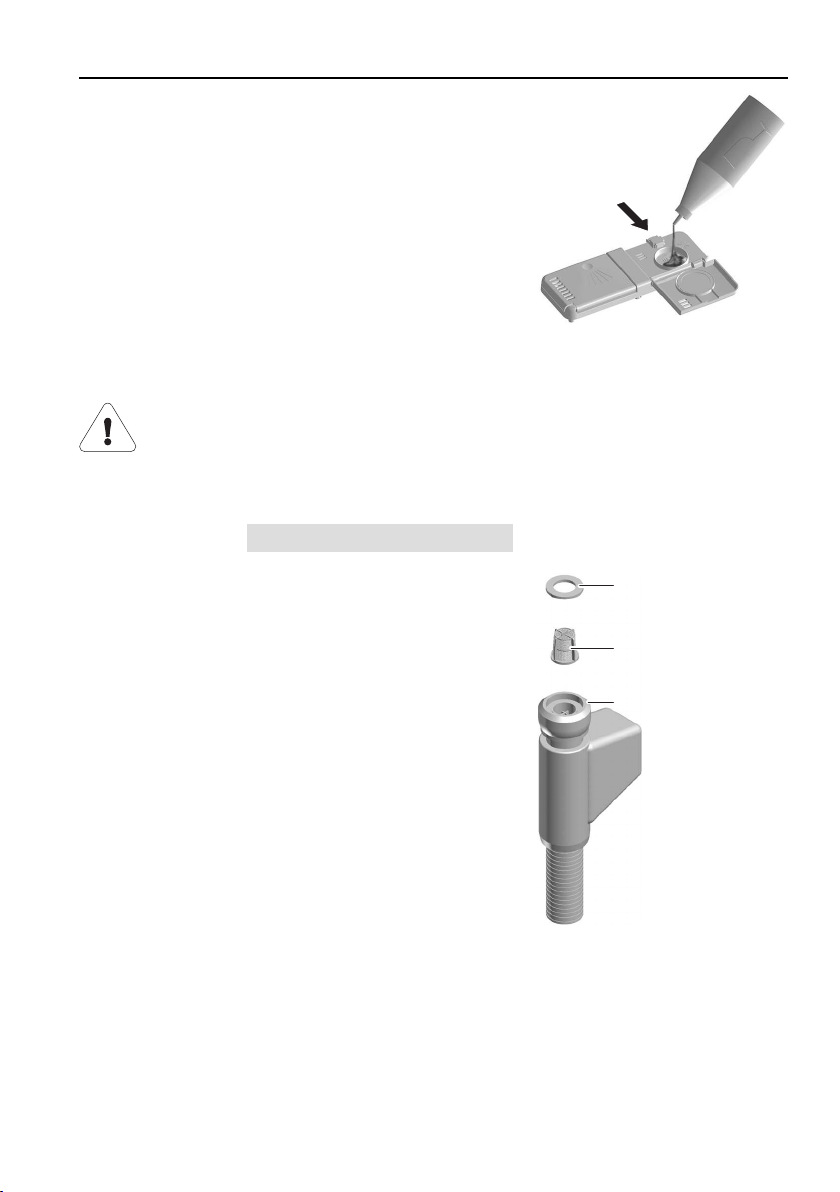
▸Open the rinse agent reservoir by pushing the
release catch in the direction of the arrow.
▸Fill with rinse agent up to the «max.» mark
(1.3dl suffices for about 35 wash cycles).
▸Close the cover.
▸Wipe away any spilt rinse agent.
7.7 Water inlet filter, cleaning
Have the water inlet filter cleaned by experts only. If carried out in-
correctly, there is a risk of flooding!
The built-in water inlet filter can become blocked by limescale deposits, rust or
foreign objects.
This can lead to a
A9 Check water inlet
error message.
▸Turn off the water tap.
▸Loosen the connection 1.
▸Remove the water inlet filter 2 using pointed
pliers and then clean or replace.
▸Clean the seal 3.
▸Replace the water inlet filter 2 and seal 3.
Tighten the connection 1 on the water tap.
▸Turn on the water tap and check for leaks.
1
2
3
55

7 Care and maintenance
7.8 Emptying the storage tank
The storage tank must be emptied (e.g. in the case of holiday homes, change
of tenant, etc.) before disconnecting the appliance from the power supply.
▸With the appliance switched off, hold the
button depressed for
5seconds.
– The tank is emptied.
56
8 Trouble-shooting
8.1 What to do if …
This section lists faults that can be solved simply by following the instructions
given. If another fault is displayed or the fault cannot be remedied, please call
Customer Services.
Please note down the error message and the serial number (FN) before
calling Customer Services.
Malfunction warning indicated by acoustic signal
▪ In the event of a malfunction, an acoustic signal is emitted for 1minute.
▪ Malfunction warnings are indicated by an acoustic signal even if the acous-
tic signal is switched off in the 'User settings'.
▪ Detailed information on any current malfunction appears in the display.
... in the display appears
A0 Foaming?
Possible causeSolution
▪ High-foaming detergent
was used.
▪ Spilt rinse agent.
▪ Washing-up liquid was
used.
▸Wipe away spilt rinse agent with a cloth.
▸Get rid of the foam with approximately 1dl
vinegar.
▸Cancel the error message by pressing the
button.
▸Select the
programme.
57
8 Trouble-shooting
... in the display appears
A1 Check filter system
Possible causeSolution
▪ Filter system is not inser-
ted.
▪ Filter system is not cor-
rectly locked in position.
▸Check the filter system and then insert into
place. Turn the fine filter as far as it will go
in a clockwise direction.
... in the display appears
A2 Check water outlet
Possible causeSolution
▪ Filter system is blocked.
▪ Drain hose is bent or
kinked.
▪ Drain pump or siphon is
blocked.
▪ Excessive foaming due to
rinse agent spillage.
▸Clean the filter system.
▸Fix the problem.
▸Cancel the error message by pressing the
button.
▸Restart the programme.
... in the display appears
A7 Heat pump malfunction
Possible causeSolution
▪ Heat pump malfunction
▸Cancel the error message by pressing the
button.
– The appliance can still be operated.
The heat pump is not used for the time
being.
58
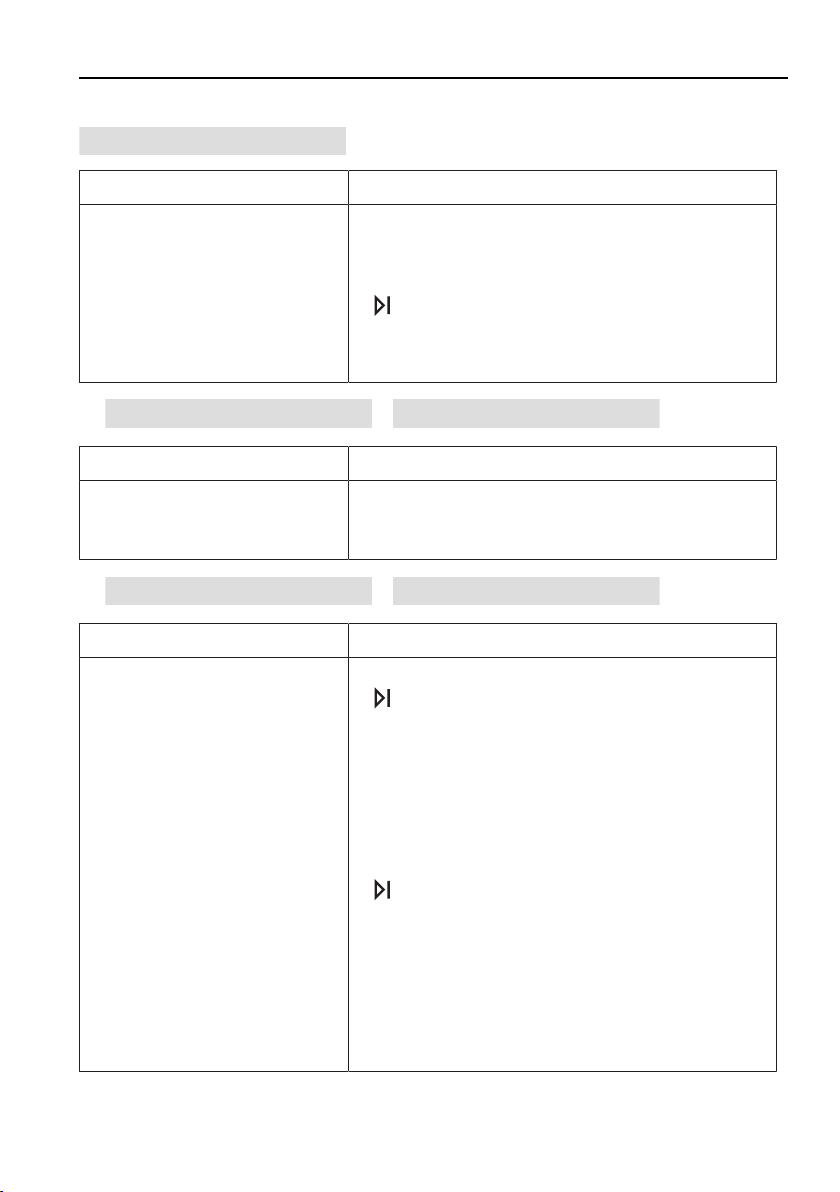
8 Trouble-shooting
... in the display appears
A9 Check water inlet
Possible causeSolution
▪ Water tap is turned off.
▪ Water inlet filter is
blocked.
▪ Interruption in water sup-
ply.
▪ Water pressure is too low.
▸Fix problem or wait until water supply is re-
stored.
▸Cancel the error message by pressing the
button.
▸Restart the programme.
…
F8 / E18 see instructions
/
FN XXXXX XXXXXX
appears
Possible causeSolution
▪ Water intake is hotter than
79°C (hot water connec-
tion).
▸Have a plumber reduce the temperature of
the water intake.
…
F.. / E.. see instructions
/
FN XXXXX XXXXXX
appears
Possible causeSolution
▪ Various situations can
lead to a «F...» message.
▸Cancel the error message by pressing the
button.
If the error message persists:
▸Switch the power supply off for about 1
minute.
▸Switch the power supply back on again.
▸Cancel the error message by pressing the
button.
▸Restart the programme.
▸If the error appears again, note down the er-
ror message and FN number.
▸Turn off the water tap and the power supply.
▸Call Customer Services.
59
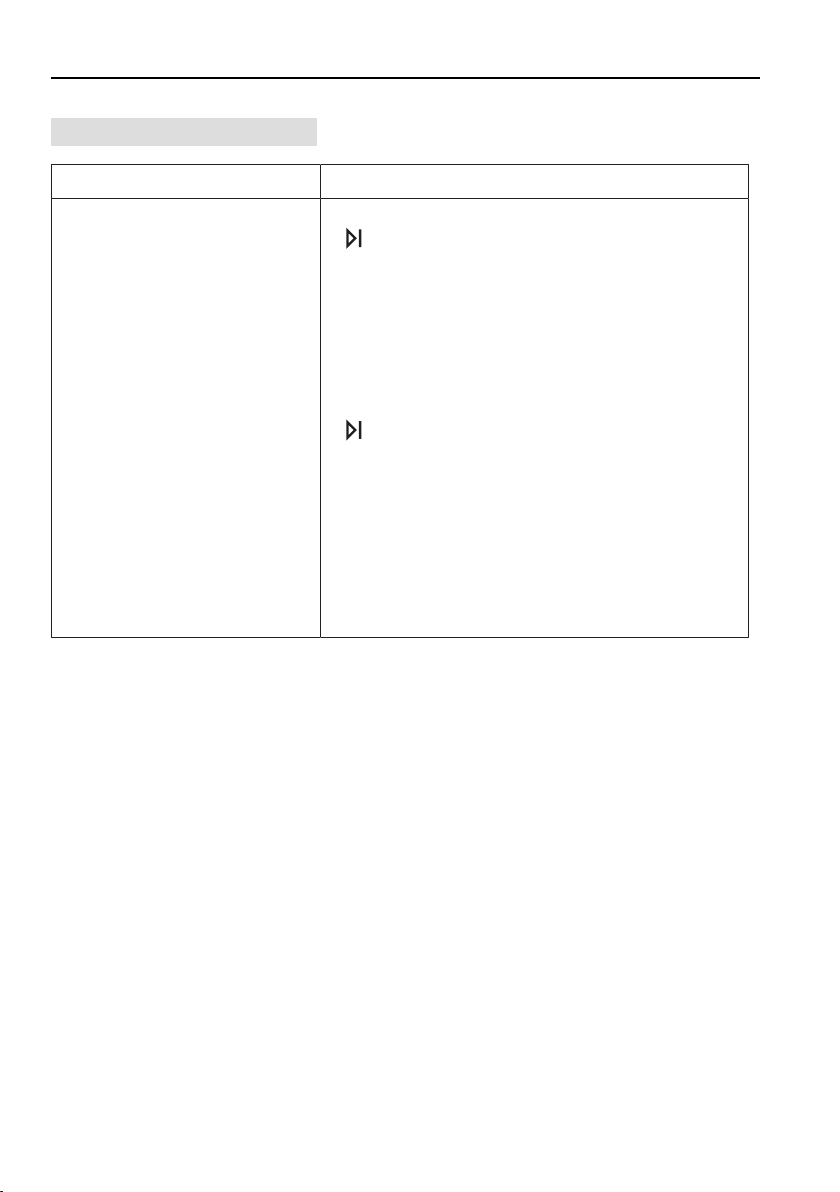
8 Trouble-shooting
... in the display appears
U.. / E.. see instructions
Possible causeSolution
▪ Faulty electrical connec-
tion.
▪ Overvoltage.
▸Cancel the error message by pressing the
button.
If the error message persists:
▸Switch the power supply off for about 1
minute.
▸Switch the power supply back on again.
▸Cancel the error message by pressing the
button.
▸Restart the programme.
▸If the error appears again, note down the er-
ror message and FN number.
▸Switch the power supply off.
▸Have the electrical installation checked by
an expert.
... the appliance does not start
▸Close the appliance door.
▸Insert the plug into the mains socket.
▸Check the fuse or circuit breaker.
▸See the 'Operation with childproof lock activated' section.
60
8 Trouble-shooting
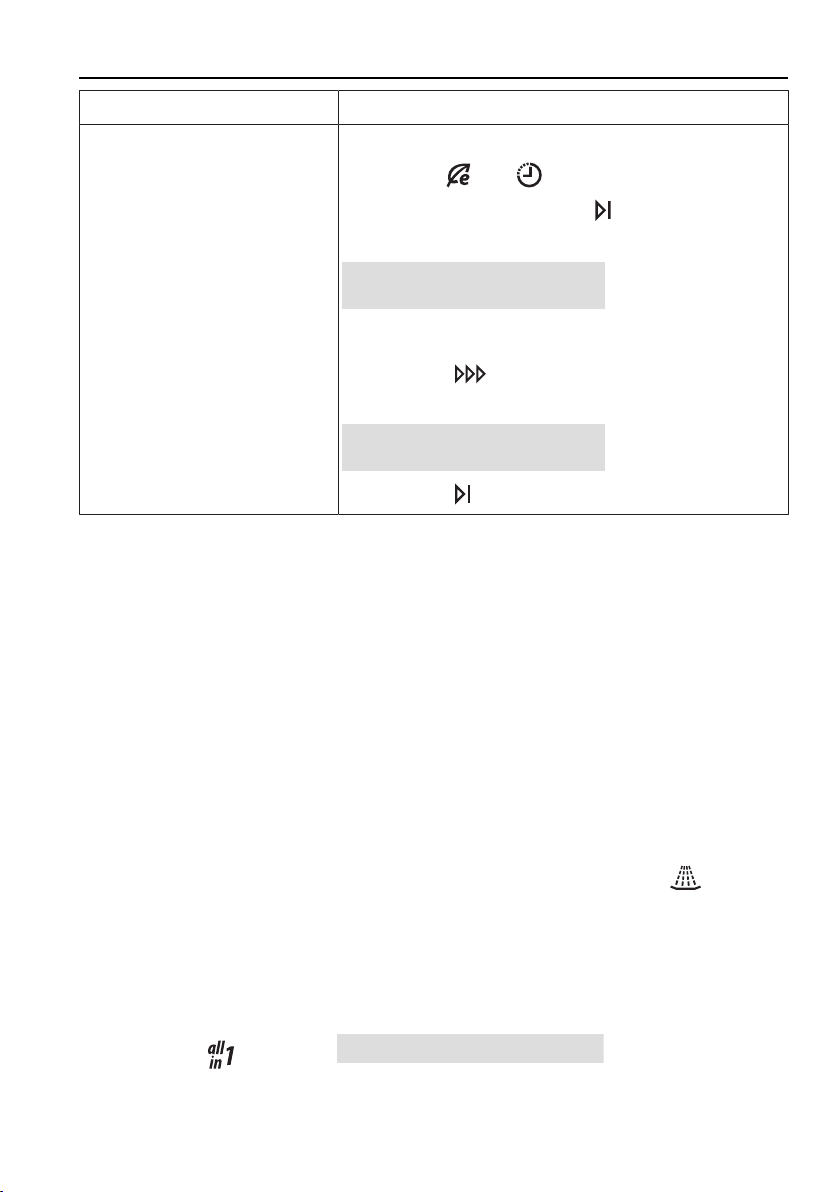
Possible causeSolution
▪ «Demo mode» is
switched on.
▸Open the appliance door.
▸Hold the
and buttons depressed.
▸Simultaneously press the button.
- In the plain text display appears:
Demo mode
ON
▸Press the button.
- In the plain text display appears:
Demo mode
OFF
▸Press the button.
… the dishes are not clean
▸Select a more powerful programme.
▸Load the baskets differently, avoiding blind spots.
▸Clean the filter system and re-insert correctly.
▸Check to see whether the spray arms are clogged or dirty.
▸Use the correct amount of detergent or use a different kind of detergent.
▸Check the water hardness setting.
▸Refill the salt reservoir with regeneration salt.
… there is a white film on the dishes
▸Refill the salt reservoir with regeneration salt and then start the
pro-
gramme without any dishes.
▸Use the correct amount of detergent or use a different kind of detergent.
▸Refill the rinse agent.
▸Increase the rinse agent dosage setting.
▸If not using
detergent,
All in 1 OFF
must be set in the
'User settings'.
61
8 Trouble-shooting
… there are streaks or milky spots on the dishes
▸Reduce the rinse agent dosage setting.
▸If not using
detergent,
All in 1 OFF
must be set in the
'User settings'.
... the dishes are wet and dull or have water marks on them
▸Refill the rinse agent.
▸Increase the rinse agent dosage setting.
▸Do not open the appliance door until the end of the programme when a
long acoustic signal is emitted and the display or function light * goes out.
* Depending on model
▸If not using
detergent,
All in 1 OFF
must be set in the
'User settings'.
… there are rust stains on the items being washed
The rust stems from another source e.g. the cutlery, pans, water pipe. The ap-
pliance is made of rust-free steel.
▸After topping up with regeneration salt, select the
programme without
dishes.
… the detergent is not fully dissolved
▸Check to see whether the spray arms are clogged or dirty.
▸Use a different kind of detergent.
▸Check the detergent dispenser cover.
... the time display freezes for up to 4minutes at the beginning of the
programme or during the wash cycle
▪ The water softener is being rinsed through after the regeneration process.
▪ The duration of the programme and the time display are being automatically
adjusted to the degree of soiling of the load being washed.
... there is discolouring of the baskets and plastic parts inside the
appliance
Dishes were washed that still had discolouring food leftovers on them (e.g. to-
mato or curry sauce). The discolouration may fade after a few wash cycles.
62

8 Trouble-shooting
… an unpleasant smell tends to come from the appliance
▸Clean the filter system.
▸Add detergent and run the «Appliance hygiene» programme.
▸Select a more powerful programme.
▸Add enough regeneration salt.
8.2 Power failure
A power failure causes:
▪ the programme that is currently running to stop. After the cause of the
power supply failure has been resolved, the programme is resumed.
▪ The fault indication system to be interrupted.
63
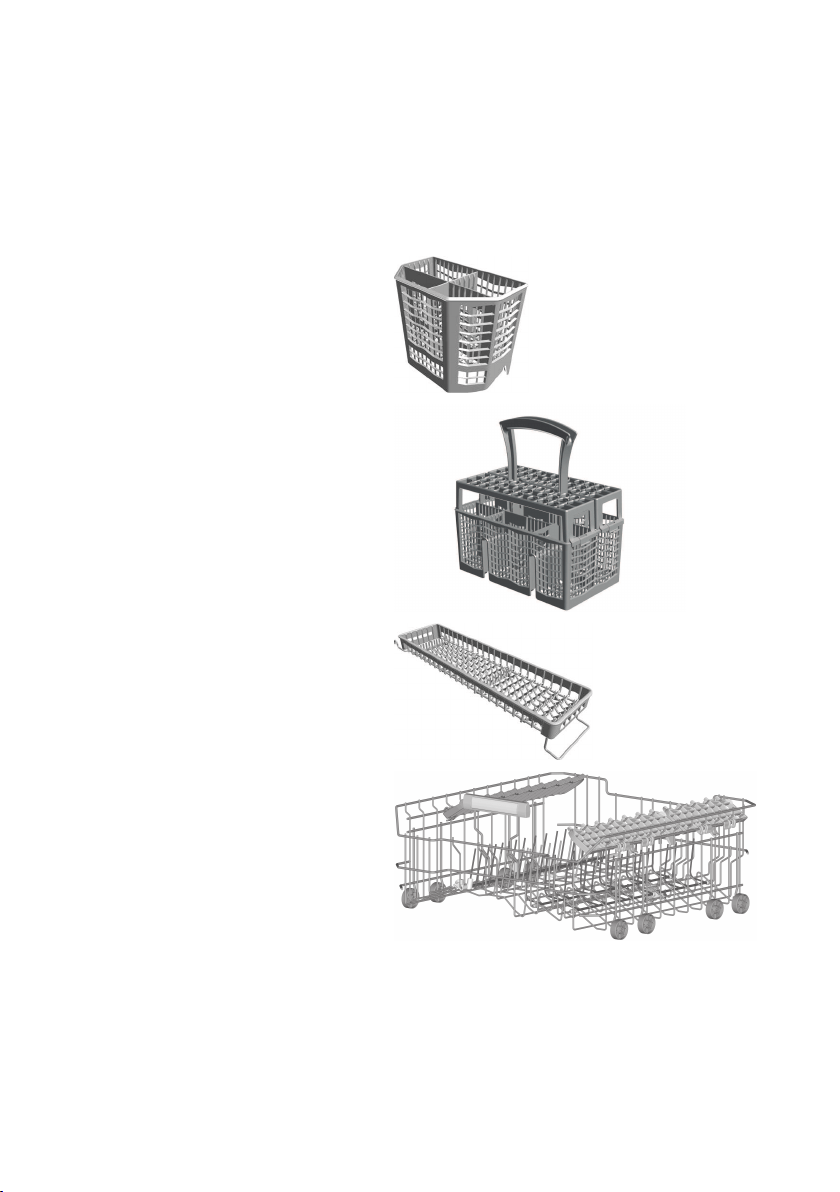
9 Accessories and spare parts
Please give product family of the appliance and exact description of the ac-
cessory or spare part when ordering parts.
Accessories
«Small» cutlery basket
«Large» cutlery basket
Vario cutlery basket insert
Lower basket for glasses
64
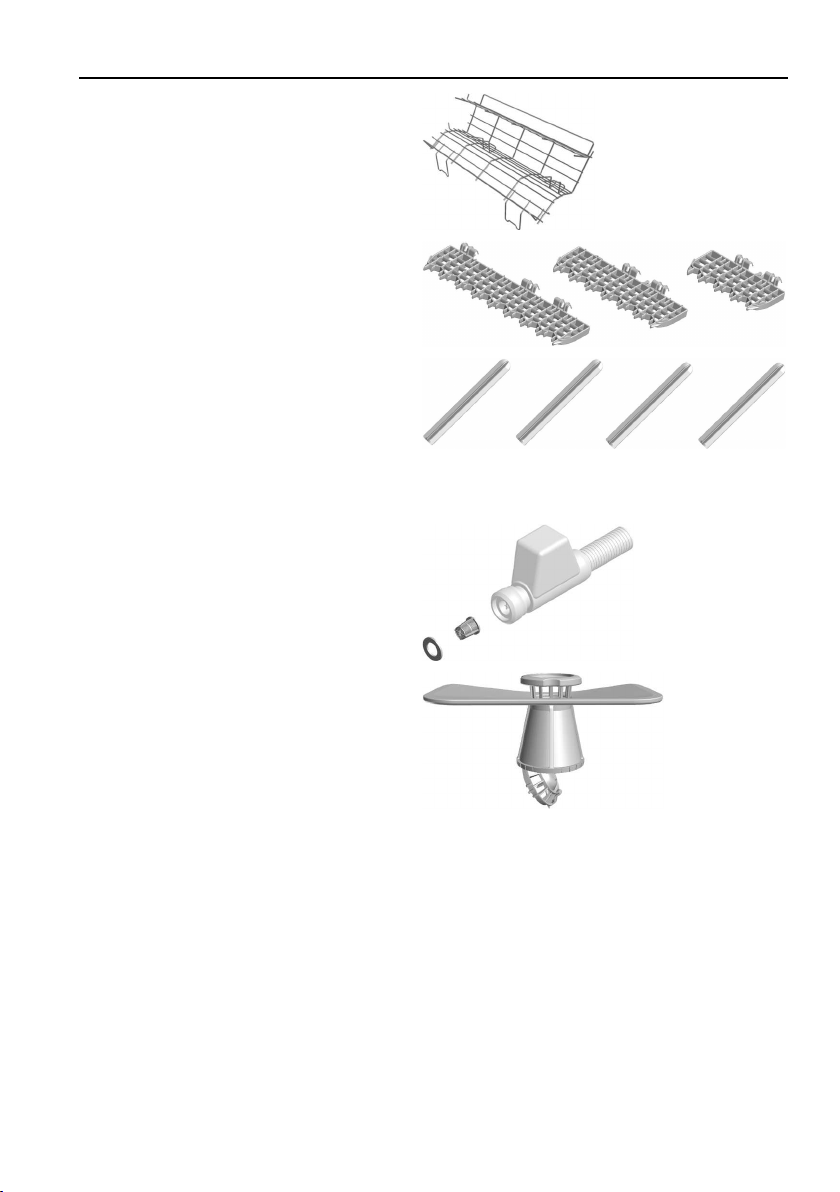
9 Accessories and spare parts
Cup support
Racks
Set of 4 easy prongs
Spare parts
Seal / water inlet filter for Aquastop
Filter system
65
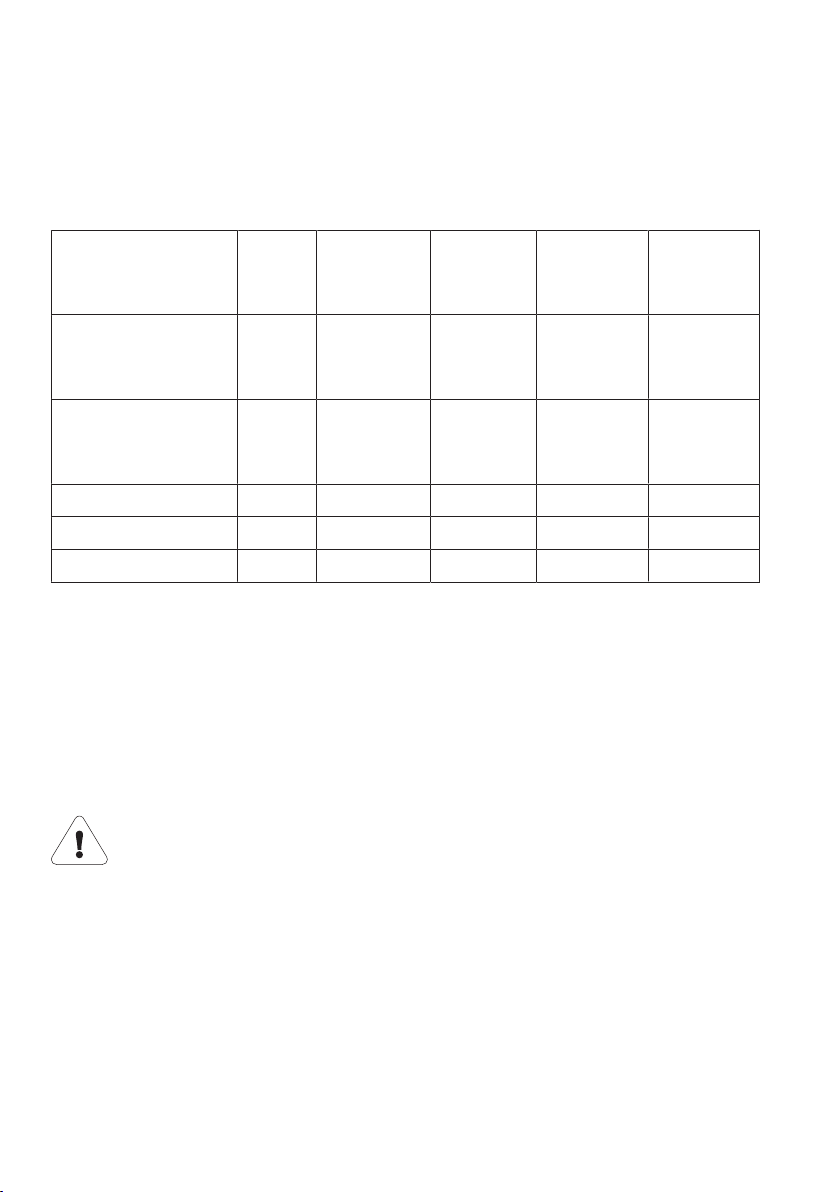
10 Technical data
10.1 Overview
External dimensions
SMS 55SMS 55 Ex-
tra height
EURO 60EURO 60
Extra
height
EURO 60
HP
Height (with slide
plate, if relevant)
[cm]:
75.982.475.982.486.4
Height (with ad-
justable plinth)
[cm]:
–84.5–89.078.0–89.884.5–96.387.0–91.5
Width [cm]:54.654.659.659.659.6
Depth [cm]:57.257.257.257.257.2
Weight [kg]:4244424462
Ambient temperature
Minimum ambient temperature: +10°C
Plumbing
Cold or hot water up to 60°C:G¾"
Permitted pressure of water supply:0.1–1.0MPa (1–10bar)
Max. pumping height:1.2m
If the water pressure is too high, a pressure reducer valve must be
fitted.
Electrical connection
▸See identification plate
Safety concept
Provided power is going to the appliance, the electronic control unit monitors
the appliance. Any malfunction is indicated by error messages.
66

10 Technical data
Overflow protection
In the event of a power failure, the overflow protection system is
rendered ineffective. Hence, the water tap should be turned off dur-
ing longer periods of non-use.
The electronic control unit monitors the water level in the appliance. In the
event of a malfunction, the drain pump turns on, stopping the supply of water
to the appliance.
10.2 Consumption data
The consumption data refers to a one-phase 220–240 V, 2N connection.
V=Pre-rinsingT=Drying
R=CleaningD=Duration
Z=Intermediate rinsingW=Water
G=Rinsing with agentE=Energy
Appliance without a heat pump
Program-
me
V
[° C]
R
[° C]
ZG
[° C]
TD *W
[l]
E
[kWh]
AutomaticIf required50-60If required55Yes0h45
–
1h50
5
–
17
0.60
–
1.15
Daily
quick
3560Yes55Quick0h56131.05
SprintNo55No55Quick0h2690.75
GlassNo45Yes55Yes0h52100.75
IntensiveIf required65Yes55Yes1h4614
–
19
1.15
–
1.25
Fondue/
Raclette
Soaking65Yes55Yes2h2214
–
17
1.35
–
1.45
Hygiene6070Yes70Yes2h00111.60
67
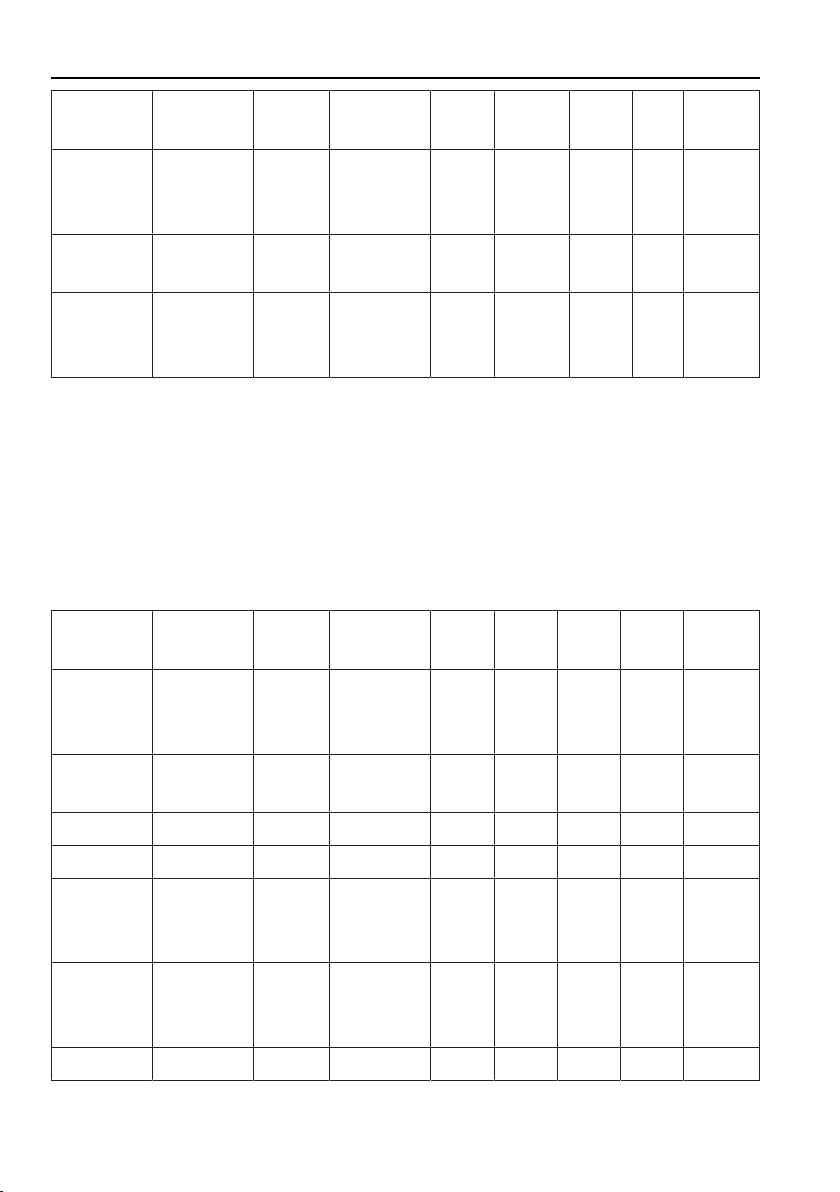
10 Technical data
Program-
me
V
[° C]
R
[° C]
ZG
[° C]
TD *W
[l]
E
[kWh]
Pre-rins-
ing
YesNoNoNoNo0h161
–
3
0.05
Appliance
hygiene
No70Yes70Yes1h43151.60
Economy
program-
me
Yes50No40Yes2h15
–
2h30
9.30.52
* Duration without final drying time. The duration of the programme depends
on the following conditions:
▪ Connected wattage (for a one-phase connection, the duration of the pro-
gramme is extended by up to 15 minutes)
▪ Storage duration of the tank (in the case of the tank being automatically
rinsed, the duration of the programme is extended by up to 30 minutes)
Appliance with a heat pump
Program-
me
V
[° C]
R
[° C]
ZG
[° C]
TD *W
[l]
E
[kWh]
AutomaticIf required50-60If required55Yes0h45
–
1h50
6
–
17
0.55
–
1.10
Daily
Quick
3560Yes55Quick1h01140.95
SprintNo55No55Quick0h30100.65
GlassNo45Yes55Yes0h55110.70
IntensiveIf required65Yes55Yes1h5215
–
20
1.05
–
1.15
Fondue/
Raclette
Soaking65Yes55Yes2h2715
–
18
1.25
–
1.35
Hygiene6070Yes70Yes2h06121.50
68

10 Technical data
Program-
me
V
[° C]
R
[° C]
ZG
[° C]
TD *W
[l]
E
[kWh]
Pre-rins-
ing
YesNoNoNoNo0h1640.05
Appliance
hygiene
No70Yes70Yes1h49151.50
Economy
program-
me
Yes50No40Yes2h3011.30.32
* Duration without final drying time. The duration of the programme depends
on the following conditions:
▪ Connected wattage (for a one-phase connection, the duration of the pro-
gramme is extended by up to 15 minutes)
▪ Running time of the heat pump
▪ Storage duration of the tank (in the case of the tank being automatically
rinsed, the duration of the programme is extended by up to 30 minutes)
10.3 Note for testing institutes
The note for testing institutes can be obtained from the internet:
www.vzug.com/testinstitute.
10.4 Noise measurement
See the 'Note for testing institutes' section.
69

11 Index
A
Accessories.............................................. 64
Acoustic signal.................................. 16, 23
Additional function
Delayed start......................................47
Saving..................................................46
Selecting.............................................46
Additional functions................................. 15
All in 1 cleaning products ..................... 44
Appliance construction........................... 14
Appliance description............................. 13
C
Care............................................................ 51
Childproof lock......................................... 24
Accessing programme selection...50
Cleaning
Exterior................................................51
Filter system.......................................52
Interior.................................................51
Spray arms.........................................52
Water inlet filter..................................55
Contrast..................................................... 22
Cutlery basket........................................... 41
Cutlery drawer.......................................... 32
D
Delayed start............................................. 47
Demo mode.............................................. 61
Dimensions............................................... 66
Disconnection........................................... 12
Dishes
Loading...............................................31
Unloading............................................49
Dishwashing tips...................................... 30
Display....................................................... 16
A0.........................................................57
A1.........................................................58
A2.........................................................58
A7.........................................................58
A9.........................................................59
F.. / E.. see instructions...................59
F8 / E18 see instructions................59
U.. / E.. see instructions...................60
Display elements...................................... 15
Disposal..................................................... 12
E
Easy prongs....................................... 36, 40
Economy programme
Selecting.............................................45
Electrical connection............................... 66
End of programme.................................. 49
Extended warranty................................... 75
F
Factory settings
Restoring.............................................28
Filter system
Cleaning..............................................52
FN (serial number)................................... 75
Fold-down tines................................. 36, 40
Function light..................................... 14, 16
G
Glass holder.............................................. 35
H
Height adjustable..................................... 38
Hot water................................................... 26
I
Interior illumination.................................. 27
L
Language................................................... 22
Factory setting...................................22
Loading............................................... 34, 39
Loading tips for the lower basket
Cutlery basket....................................41
Fold-down tines.................................40
Lower basket, loading......................39
Loading tips for the upper basket
Easy prongs.......................................36
Fold-down tines.................................36
Glass holder.......................................35
Height adjustable..............................38
Racks...................................................35
Upper basket, loading......................34
Vario cutlery basket insert...............36
70

11 Index
M
Maintenance............................................. 51
Malfunctions.............................................. 57
Model number............................................. 2
N
Note on heat pump................................. 12
Notes.......................................................... 72
O
Operating elements................................. 15
Overflow protection................................. 67
P
Packaging................................................. 12
Plain text display...................................... 16
Plumbing.................................................... 66
Power failure............................................. 63
Product family.............................................. 2
Programme
Aborting...............................................48
Interrupting.........................................48
Selecting.............................................45
Programme buttons................................. 15
Programme symbols............................... 15
Q
Quick instructions.................................... 76
R
Racks......................................................... 35
Regeneration salt
Refilling................................................53
Rinse agent
Refilling................................................54
Rinse agent dosage................................ 24
S
Safety......................................................... 12
Safety concept.......................................... 66
Safety precautions
General...................................................6
Serial number (FN).................................. 75
Service & Support.................................... 75
Spare parts............................................... 65
Spray arms
Cleaning..............................................52
Symbols........................................................ 5
T
Technical enquiries.................................. 75
Temperature unit...................................... 26
Type............................................................... 2
U
Unloading.................................................. 49
User settings...................................... 20, 21
V
Validity........................................................... 2
Vario cutlery basket insert...................... 36
W
Wash programme.................................... 45
Water hardness........................................ 24
Levels..................................................25
71

72
12 Notes

73

74

13 Service & Support
The «Troubleshooting» chapter provides valuable information for dealing with
minor operating faults. This saves you the time, effort and potential cost of having
to call out a service technician.
Information on the V-ZUG warranty can be found at www.vzug.com →Service →Warranty in-
formation. Please read this information carefully.
Please register your V-ZUG appliance online immediately at www.vzug.com→Service→War-
ranty registration. This will allow you to take advantage of the best possible support in the
event of an fault in the appliance during the warranty period. You will require the serial
number (FN) and appliance designation to complete the registration process. This informa-
tion can be found on the identification plate for your appliance.
My appliance information:
FN: ___________________Appliance: _____________________
Always have this appliance information to hand when you contact V-ZUG. Thank you.
▸Open the appliance door.
– The identification plate is located on the left-hand side on edge of the tub.
Requesting repairs
You can find the telephone number for your nearest V-ZUG service centre at
www.vzug.com→Service→Service hotline.
Technical enquiries, accessories, extended warranty
V-ZUG is happy to help with your general administrative and technical enquiries, orders for
accessories and spare parts, or information relating to advanced service agreements.
75

Quick instructions
Please first read the safety precautions in the operating instructions!
▸Open the appliance door.
▸Load the dishes.
▸Add the detergent.
▸Select a programme.
▸Select any additional function(s), if required.
▸Close the appliance door.
▸The programme starts immediately.
▸When a long acoustic signal is emitted, open the appliance door and unload
the dishes.
V-ZUG Ltd
Industriestrasse 66, P.O. Box 59, CH-6301 Zug
[email protected], www.vzug.com
J41001360-R05