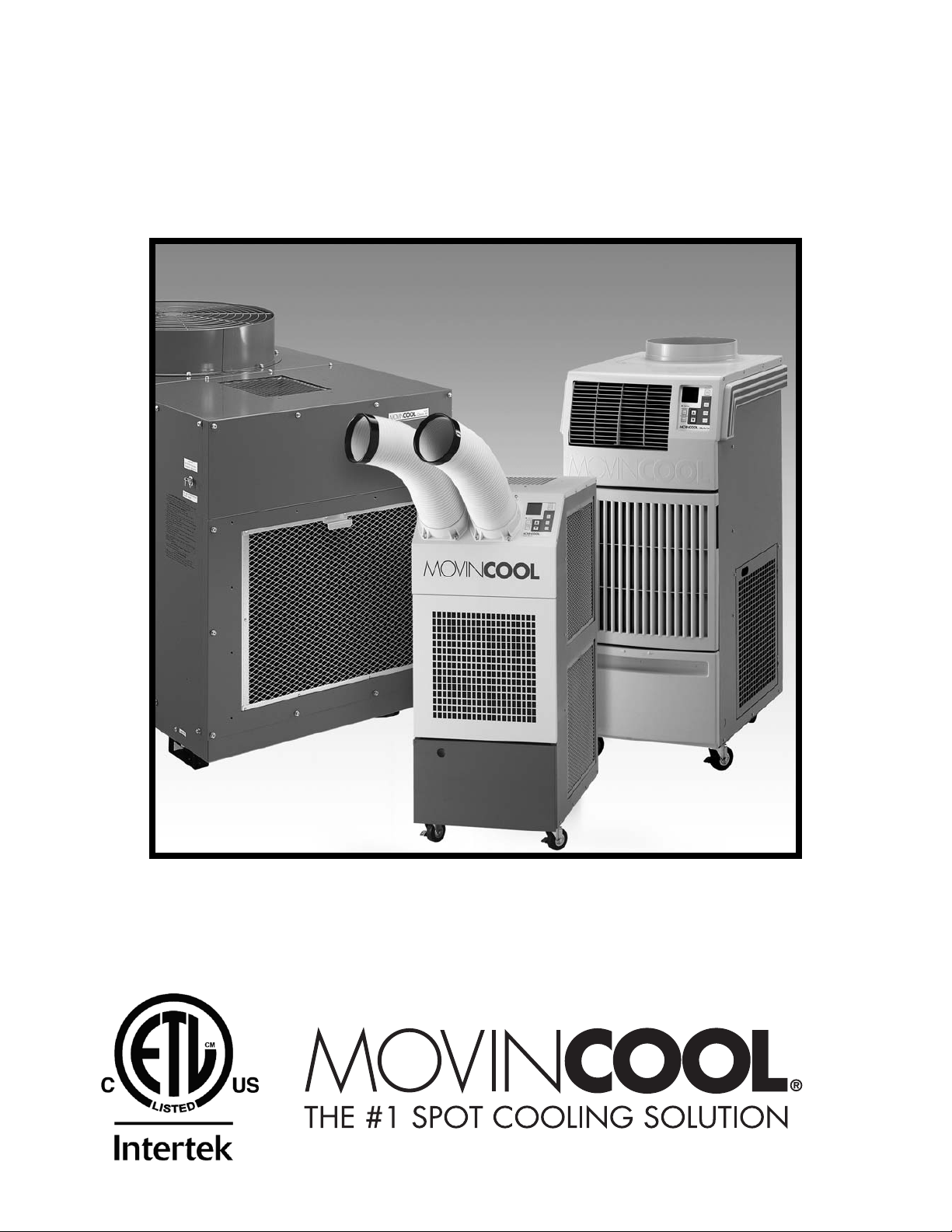
OPERATION MANUAL
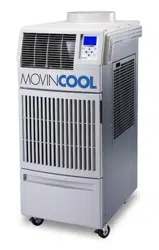
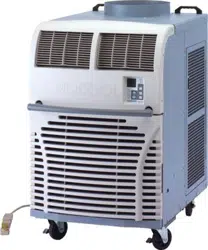
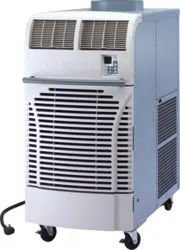
OFFICE PRO 63
Unit Serial Number Range: 0711XXXX630 to Present
(From July 2011 to Present)
READ THIS MANUAL CAREFULLY FOR INSTRUCTIONS ON CORRECT
INSTALLATION AND USAGE AND READ ALL SAFEGUARDS
SECCIÓN EN ESPAÑOL
SECTION EN FRANÇAIS
AVAILABLE AT WWW.MOVINCOOL.COM
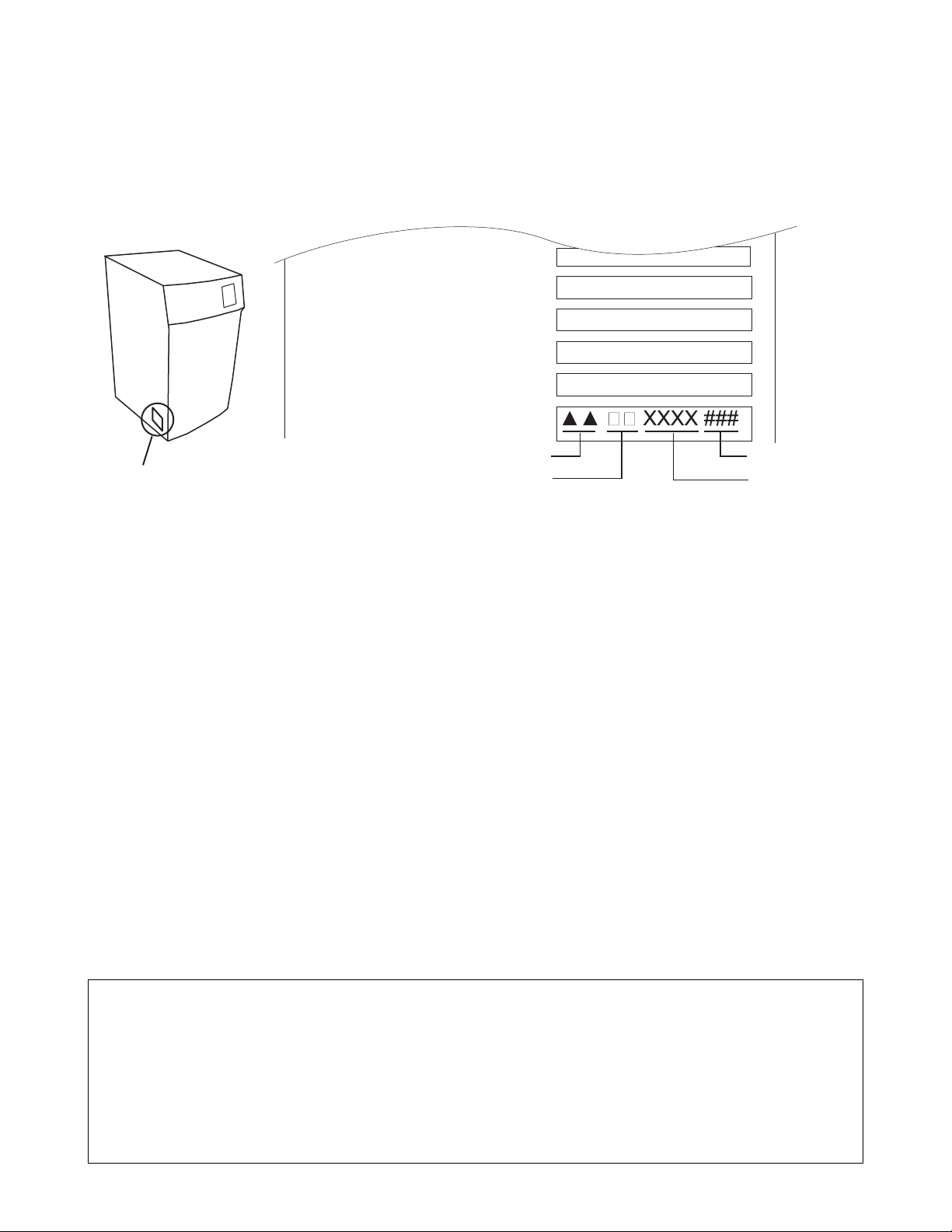
SERIAL NUMBER LOCATION AND IDENTIFICATION
Nameplate Label Position
Nameplate Label
COOLING AMPS. WITH PUMP
COMPR. OUTPUT
REFRIGERANT/TOTAL CHARGE
DESIGN PRESSURE LO/HI
PART NO./WEIGHT
SERIAL NO.
Month
Model
Sequential
Number
Year
© 2013 DENSO PRODUCTS AND SERVICES AMERICAS, INC.
All rights reserved. This book may not be reproduced or copied, in
whole or in part, without the written permission of the publisher. DENSO
PRODUCTS AND SERVICES AMERICAS, INC. reserves the right to
make changes without prior notice. MovinCool®, Office Pro®, and
SpotCool® are registered trademarks of DENSO Corporation.

OPERATION MANUAL
OFFICE PRO 63

Table of Contents
SERIAL NUMBER LOCATION AND IDENTIFICATION....................................2
FOREWORD.......................................................................................................5
Definition of Terms............................................................................................5
GENERAL WARNINGS & CAUTIONS ..............................................................6
INVENTORY .......................................................................................................7
INSTALLATION..................................................................................................8
Choosing an Installation Site ...........................................................................8
Moving the Unit .................................................................................................9
Plugging in the Unit ........................................................................................10
Warning Signal Connection ...........................................................................11
Fire Alarm Control Panel Connection ...........................................................12
FEATURES.......................................................................................................13
OPERATION.....................................................................................................14
Control Panel ...................................................................................................14
LCD Indicators.................................................................................................15
Set Clock ..........................................................................................................16
Operating in COOL Mode ...............................................................................16
Operating in FAN ONLY Mode .......................................................................17
Changing from FAN ONLY Mode to COOL Mode.........................................17
Keypad Lock ....................................................................................................17
How to Set a Program .....................................................................................18
How to View and Delete Program ..................................................................19
How to Run and Stop Program ......................................................................19
Operating Modes .............................................................................................20
Self-Diagnostic Codes ....................................................................................21
Empty the Drain Tank (If equipped)...............................................................22
Drain Pump ......................................................................................................23
HOSE INSTALLATION ....................................................................................24
DAILY INSPECTION & MAINTENANCE .........................................................25
Empty the Drain Tank .....................................................................................25
Clean the Air Filters ........................................................................................25
Filter Removal Method....................................................................................25
Filter Cleaning Method....................................................................................26
In-Season/Off-Season Inspection & Maintenance........................................26
TROUBLESHOOTING .....................................................................................27
TECHNICAL SPECIFICATONS .......................................................................28
5
FOREWORD
Congratulations on purchasing the MovinCool portable air conditioner. This
manual explains how to assemble, install and operate the MovinCool Office Pro
63 portable air conditioning unit. Please read this operation manual thoroughly to
familiarize yourself with the features of the unit and to ensure years of reliable
operation.
You may also find it useful to keep this operation manual on hand for reference.
Components and/or procedures are subject to change without prior notice.
Definition of Terms
WARNING: Describes precautions that should be observed in order to
prevent injury to the user during installation or unit operation.
CAUTION: Describes precautions that should be observed in order to
prevent damage to the unit or its components, which may occur during
installation or unit operation if sufficient care is not taken.
Note: Provides additional information that facilitates installation on unit operation.

6
GENERAL WARNINGS & CAUTIONS
1. All electrical work, if necessary, should only be performed by qualified
electrical personnel. Repair to electrical components by non-certified
technicians may result in personal injury and/or damage to the unit. All
electrical components replaced must be genuine MovinCool parts, purchased
from an authorized reseller.
2. The proper electrical outlet for MovinCool units must be equipped with a UL
approved ground-fault breaker to prevent electrical shock from the unit.
3. The Office Pro 63 is equipped with a six (6) foot (1.8 meter) power cord. For
replacement, fixed location (hard wire) or power cord lengthening (extension
cord) cords are required, contact your reseller or a qualified electrician for
approved replacement methods.
4. Never fold or place heavy objects on the power cord. This could result in
damage to the power cord causing electrical shock or fire.
5. Do not place water or any other liquid on the unit. This can cause damage to
the unit and increase the risk of electrical shock.
6. Do not sit or stand on the unit.
7
INVENTORY
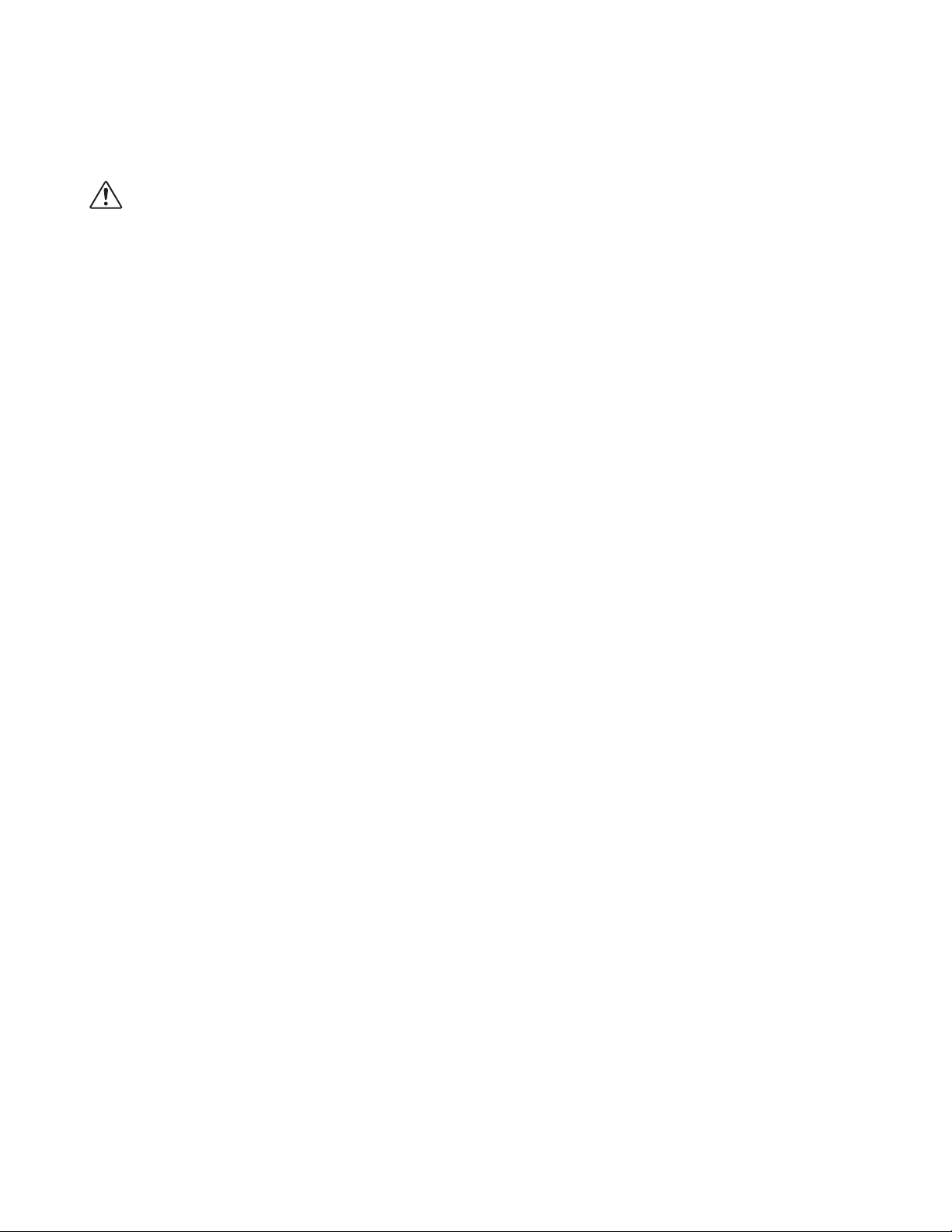
After unpacking your MovinCool unit, please check to make sure you have the
following items:
1. Office Pro 63 MovinCool Unit (1)
2. Operation Manual / Product Registration (1)
Note: If any of these items were not included in the box or appear damaged,
please contact your MovinCool reseller for replacement.
OPERATION MANUAL /
PRODUCT REGISTRATION
OFFICE PRO 63 MOVINCOOL UNIT
8
INSTALLATION
Choosing an Installation Site
CAUTION: Following are some precautions to consider before choosing
your installation site. Please review carefully as improper installation may
result in personal injury or damage to the unit.
1. Do not use the unit in areas where leakage of flammable gas may occur.
2. Do not use the unit in areas where it is exposed to rain or water.
3. Do not use the unit in an atmosphere of excessively corrosive gas or vapor.
4. Do not use in areas where the temperature is outside the allowable operating
range.
5. Do not install the unit in sloping areas. The unit may move or topple over even
if the casters are set to the LOCKED position.
6. Install the unit in areas that can with-stand the weight of the unit. The Office
Pro 63 unit weighs approximately 739 lbs (335kg) (when the drain tank is full
of water).
7. Allow 24 inches (610mm) of unobstructed airflow for both the air inlets and
outlets.
8. Do not use the Office Pro 63 unit at condition above 106°F (41°C) 50% RH.
9
INSTALLATION (cont.)
Moving the Unit
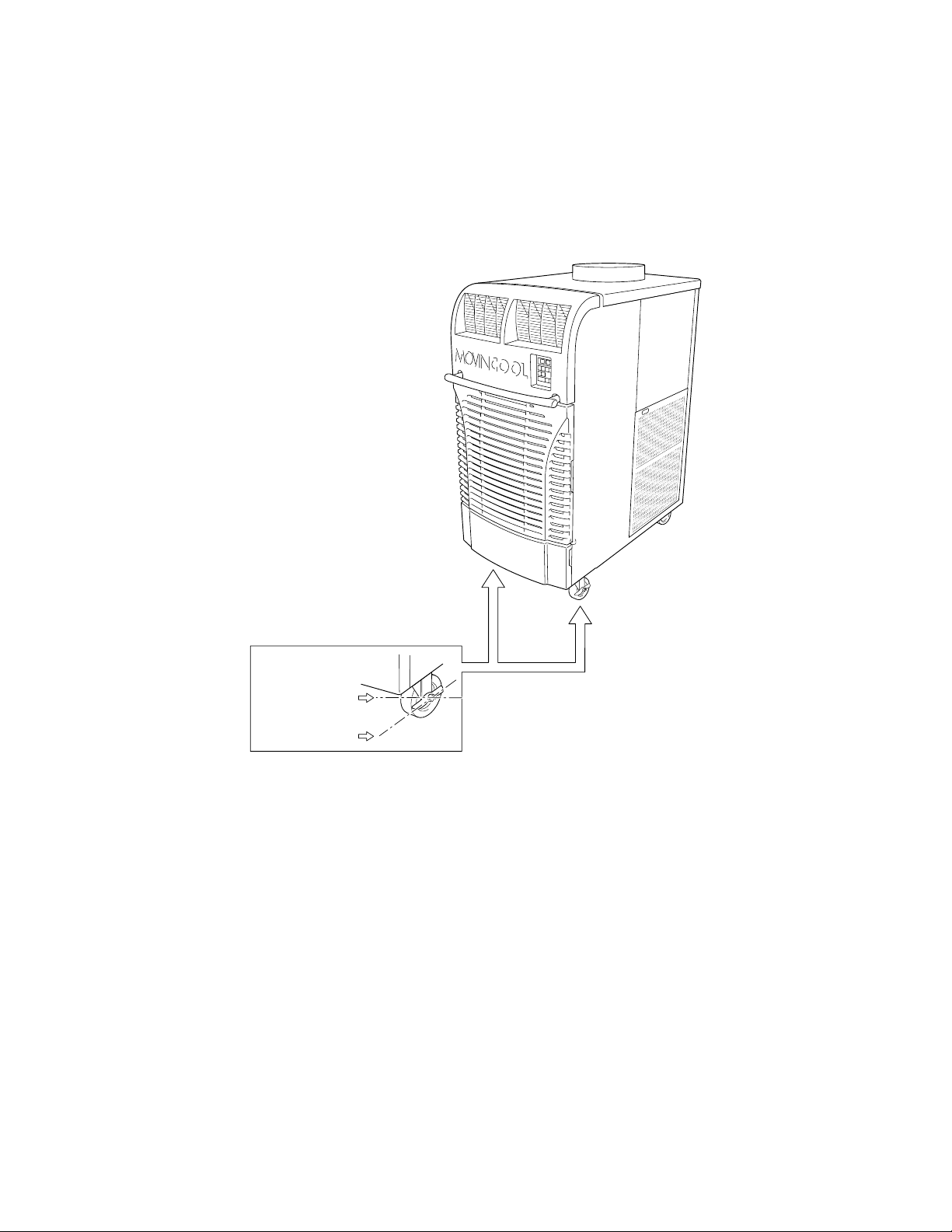
Unlock all 4 casters and push the MovinCool unit, using the front or rear handles,
to a flat, level surface and set the casters back to the LOCKED position.
UNLOCKED
LOCKED
10
INSTALLATION (cont.)
Plugging in the Unit
1. Check the prong and surface of the power cord plug for dust/dirt. If dust and/
or dirt are present, wipe off with a clean, dry cloth.
2. Check the power cord, plug and prong for damage or excess play. If any
damage or excess play is found, contact your MovinCool reseller for repair.
WARNING:
1. If the power cord or plug is damaged, repair should only be
performed by qualified electrical personnel.
2. Do not connect/disconnect the power cord or attempt to operate
buttons with wet hands. This could result in electrical shock.
CAUTION:
The AC outlet (480 VAC 3 Phase, 60Hz) needs to be rated at 20A or
higher. Do not share the outlet with any other instrument or equipment.
Note:
1. Make sure the AC outlet is free of dirt, dust, oil, water or any other foreign
matter.
2. The Office Pro 63 is equipped with an approved NEMA plug configuration (L16-
20). The appropriate outlet must be used for this plug type.

11
INSTALLATION (cont.)
Warning Signal Connection
(Output Signal Terminal L+ and L-)
The controller is equipped with a warning signal output relay type (Form C, normal
open dry contact) which can be used to monitor the failure condition.
Relay contactor (not connector) is closed when the following condition has
occurred:
a. Tank full
b. Temperature sensor fails
c. High pressure switch error
The relay output contactor is rated 2A at 30VDC or 2A at 30VAC (resistive load)
and it is compatible with various warning devices such as alarm speaker, light
indicators, etc.
Connecting Warning Signal From Controller
1. Remove service panel from the rear of the unit.
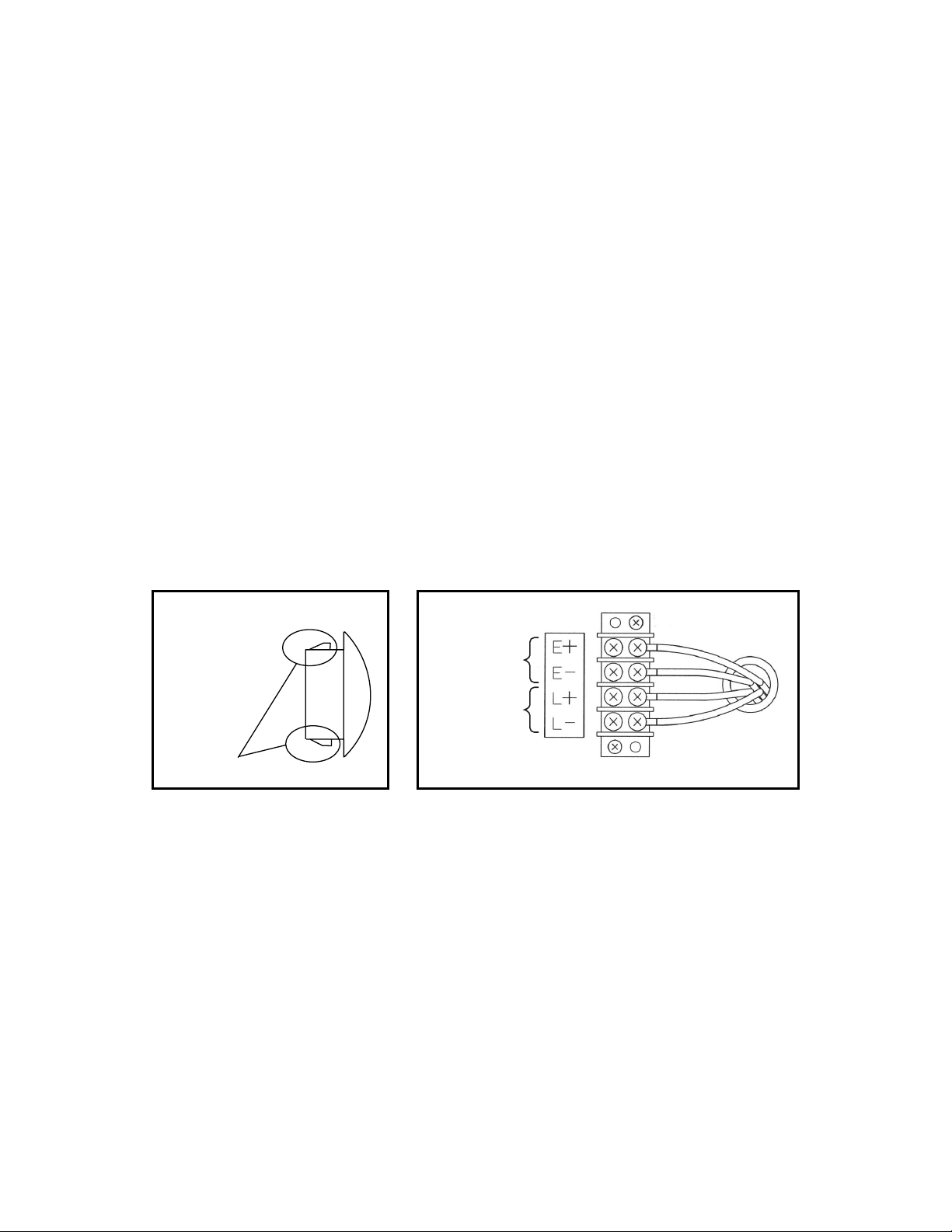
2. Squeeze the inner latches and push out the black cap from inside the panel.
3. Use recommended warning signal wire size from 16AWG to 26AWG for a solid
wire, or 16AWG to 22AWG for a stranded wire with ring terminal for #6 stud
size.
4. Connect warning device to terminal L+ and L- according to its polarities.
12
INSTALLATION (cont.)
Fire Alarm Control Panel Connection
(Input Signal Terminal E+ and E-)
The controller is equipped with a normal open input signal, which can be
connected directly from the fire alarm control panel. When receiving the signal
from the fire alarm control panel, the unit turns off and does not turn back on until
it has been RESET.
Connecting Fire Alarm Control Panel to Controller
1. Remove service panel from the rear of the unit.
2. Squeeze the inner latches and push out the black cap from inside the panel
(see drawing of cap and inner latch shapes).
3. Use recommended warning signal wire size from 16AWG to 26AWG for a solid
wire, or 16AWG to 22AWG for a stranded wire with ring terminal for #6 stud
size.
4. Connect warning device to terminal E+ and E- according to its polarities.
Cap
Latch
Input
Signal
Terminals
Output
Signal
Terminals

13
FEATURES
For all models:
1. A digital electronic control panel, which allows the user to control the unit’s
operation easily.
2. Dual fan speeds (either HIGH or LOW) in both COOL and FAN ONLY modes.
3. Digital LCD display with blue backlight that indicates:
a. Clock with day and time
b. Room temperature and set point temperature
(either Fahrenheit or Celsius)
c. Fan speed status
d. Cool mode status
e. Program start time and stop time
f. Program run and stop
g. Status codes
h. Key locked option
4. The set point temperature can be adjusted between 65°F (18.3°C) and 90°F
(32.2°C) by the SET TEMP buttons ( / ).
5. Fire alarm control panel connection ready for automatic shut off.
6. Automatic shut off and warning signal output and alarm for temperature sensor
failure, cooling failure.
7. A condensate drain “TANK FULL” indicator (LED) and display (LCD).
8. An automatic restart feature when the power is lost and regained.
9. A condensate pump with safety switch shut off.
14
OPERATION
Control Panel
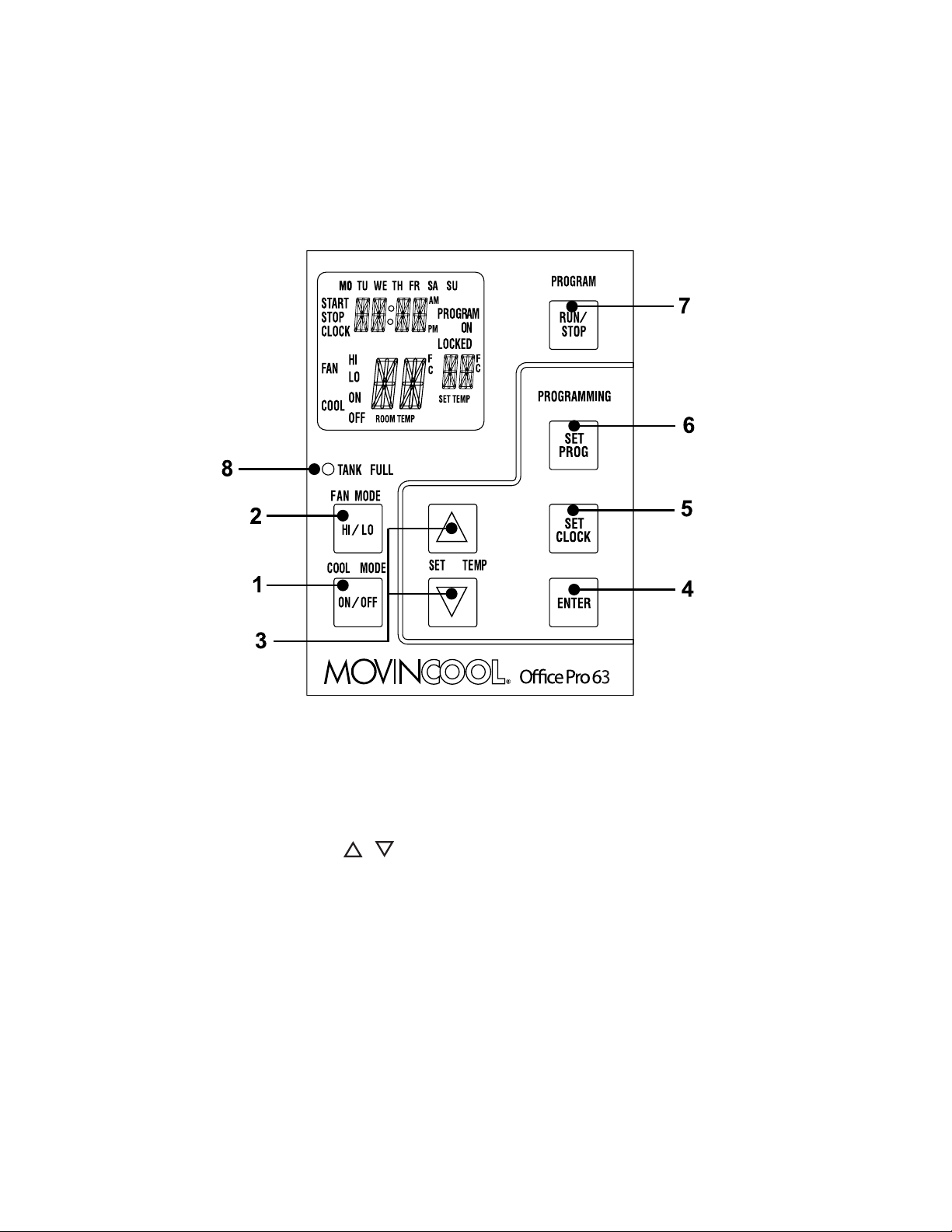
Before operating the unit, it is important to familiarize yourself with the basic
controls located on the control panel.
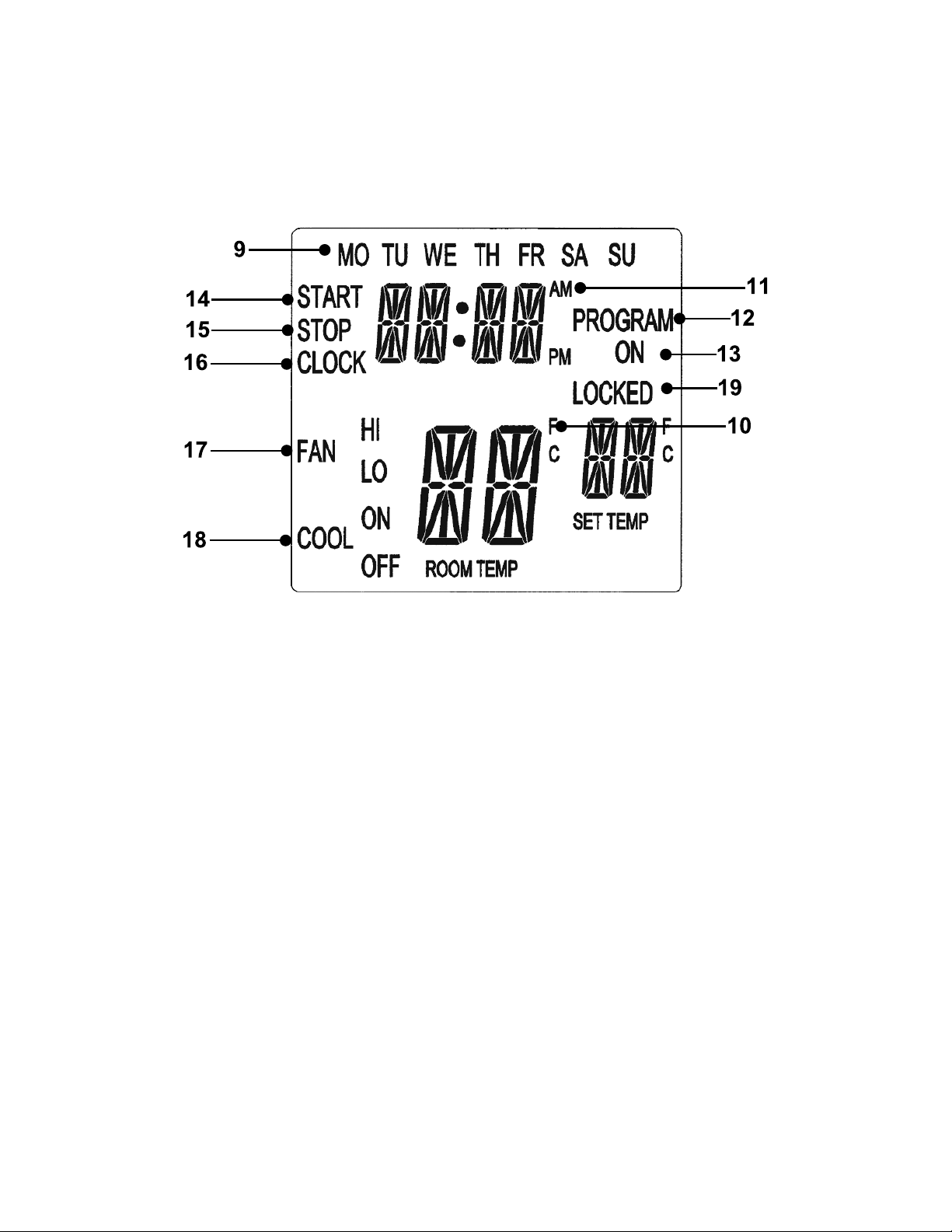
1. COOL Mode Button
Activates/deactivates the COOL mode/turns the
unit off.
2. FAN Mode Button
Activates/deactivates the high, low, and off fan
speed.
3. SET TEMP Buttons ( / )
Temperature scale illuminates to indicate the
current LED temperatures being displayed are
either in °C or °F; also displays the clock when
programming.
4. ENTER Button
Press to select set up value.
5. SET CLOCK Button
Press to set clock (day and time).
6. SET PROG Button
Press to set or view program.
7. RUN/STOP Button
Activates/deactivates program(s).
8. TANK FULL LED
Flashes when the drain tank is full.
15
OPERATION (cont.)
Control Panel (cont.)
LCD Indicators
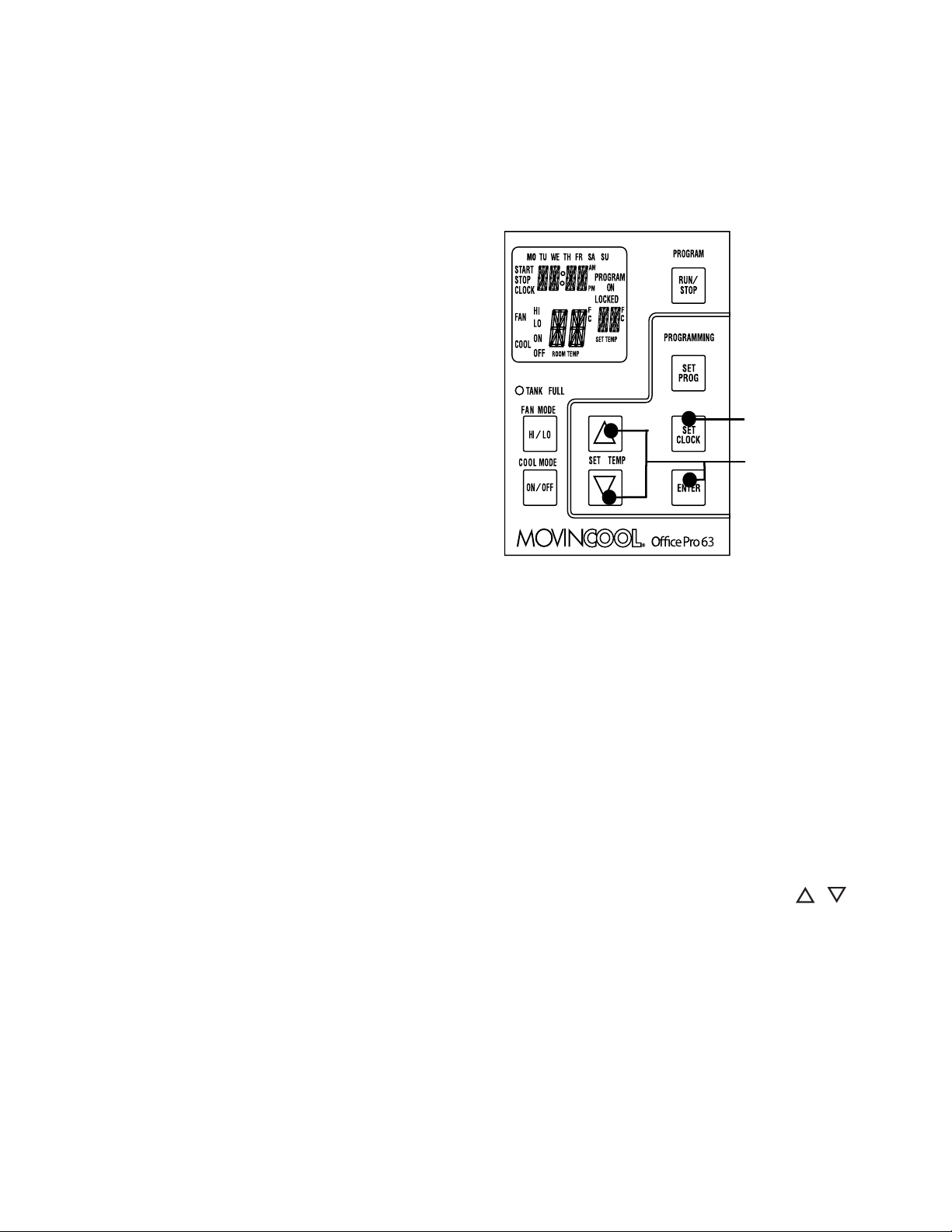
Note: ROOM TEMP display range from 16°F to 109°F (-9°C to 42°C). In
Fahrenheit only, when display values are greater than 99°F, it displays values of
+0F (for 100°F),+1F (for 101°F) and +9F (for 109°F).
9. MO...SU
Illuminates to indicate selected day of the week.
10. °C or °F
Temperature displayed in either Fahrenheit or
Celsius (see Note).
11. AM/PM
Illuminates to indicate AM or PM time of day.
12. PROGRAM
Blinking during program editing mode.
13. PROGRAM ON
Illuminates to indicate program is running.
14. START
Illuminates to indicate program start time.
15. STOP
Illuminates to indicate program stop time.
16. CLOCK
Illuminates to indicate clock status.
17. FAN HI/LO
Illuminates to indicate selected fan speed.
18. COOL ON/OFF
Illuminates to indicate cool on or off.
19. LOCKED
Illuminates to indicate key lock up.
16
OPERATION (cont.)
Set Clock
Prior to operating the Office Pro 63 users should set the clock of the controller to
the correct time as shown in the steps below.
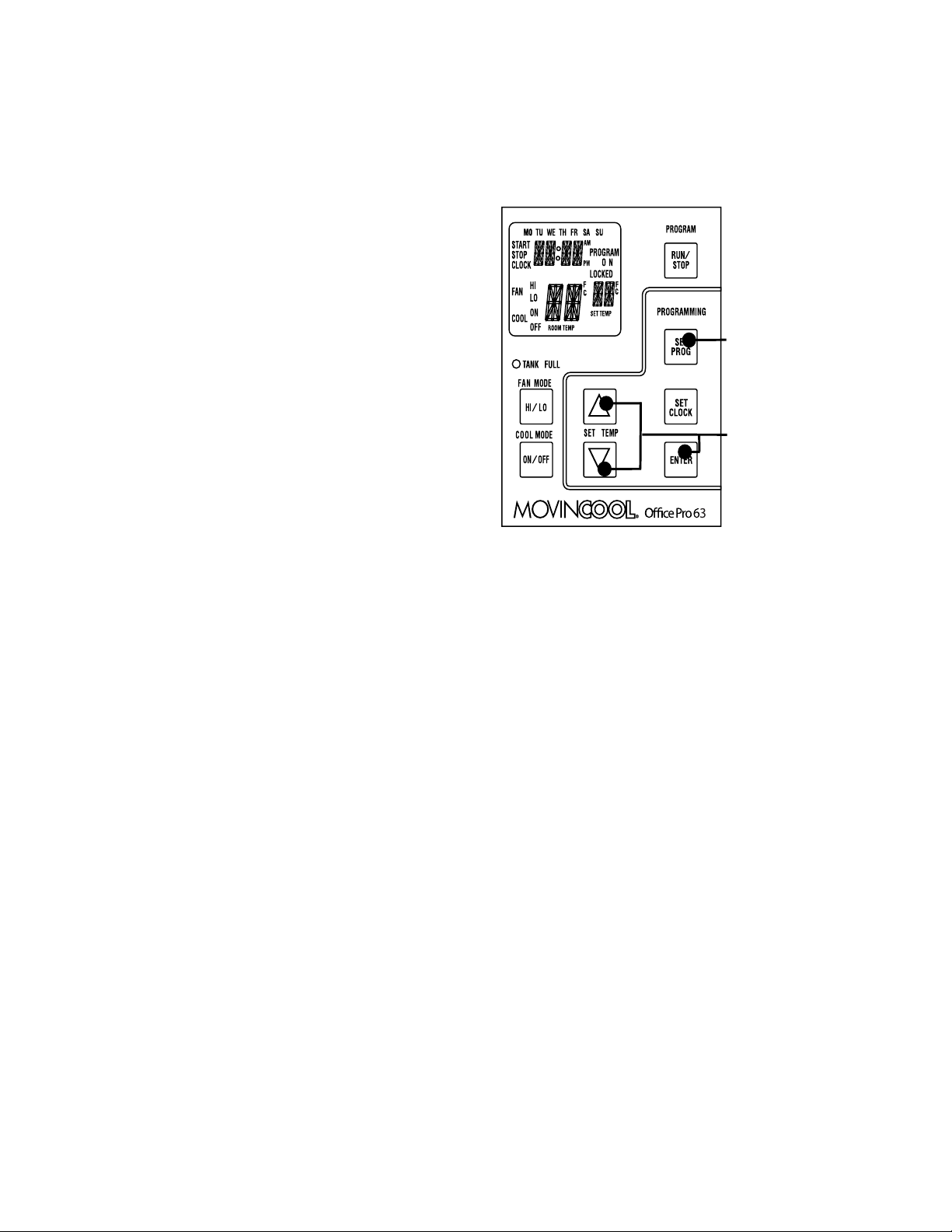
1. Press and hold the SET CLOCK button
for 3 seconds or until beep.
(LCD indicates blinking “CLOCK” and
blinking “day of the week”.)
2. Press SET TEMP buttons to select day
of the week.
3. Press ENTER button to set hour.
4. Press SET TEMP buttons to select
desired hour.
5. Press ENTER button to set minute.
6. Press SET TEMP buttons to select
desired minute. Press SET CLOCK
button to exit set clock mode.
Note: User should check clock periodically to confirm clock accuracy.
Operating in COOL Mode
1. The unit can be operated in COOL mode by pressing the COOL ON/OFF
button (LCD indicates “COOL ON”).
Note: In COOL mode the unit can only be turned off by pressing the COOL
ON/OFF button again, not by pressing the fan buttons.
2. Change the fan speed by pressing the FAN HI/LO button.
3. Change the temperature set point by pressing the SET TEMP buttons ( / ).
Note: When turning the unit on, the set point and fan speed are determined by
the last operating mode. (This function does not apply to PROGRAM mode.)
Step 1 & 6
Step 2 to 5

17
OPERATION (cont.)
Operating in FAN ONLY Mode
1. The unit can also be operated in FAN ONLY mode by pressing FAN HI/LO
button (LCD indicates “FAN HI/LO” and “COOL OFF”).
2. The unit can then be turned off by pressing the FAN HI/LO button until fan
turns off (FAN ONLY mode speed sequences are HI→LO→OFF).
Changing from FAN ONLY Mode to COOL Mode
The COOL mode can be activated while the unit is operating in FAN ONLY mode.
To do this, simply press the COOL ON/OFF button (LCD indicates “COOL ON”).
Note: The FAN ONLY mode does not operate after the COOL mode has been
activated. After the COOL mode has been activated, the unit cannot be turned off
by pressing the fan buttons. The COOL ON/OFF button must be pressed.
Keypad Lock
Keypad lock disables all buttons on the controller panel except keypad lock and
unlock operations.
1. To lock, press and hold ENTER and SET CLOCK buttons simultaneously for
5 seconds.
2. To unlock, press and hold ENTER and SET CLOCK buttons simultaneously
for 5 seconds again.
Note: When the unit detects operation failure, keypad is unlocked automatically
and self-diagnostic code illuminates.
18
OPERATION (cont.)
How to Set a Program
SET START TIME
1. Press and hold the SET PROG button
for 3 seconds or until beep.
2. Press SET TEMP buttons to select day
of the week.
3. Press ENTER button.
4. Press SET TEMP buttons to select
desired hour.
5. Press ENTER button.
6. Press SET TEMP buttons to select
desired minute.
7. Press ENTER button.
SET STOP TIME
8. Press SET TEMP buttons to select day of the week.
9. Press ENTER button.
10. Press SET TEMP buttons to select desired hour.
11. Press ENTER button.
12. Press SET TEMP buttons to select desired minute.
13. Press ENTER button.
SET FAN SPEED
14. Press SET TEMP buttons to select desired fan speed.
15. Press ENTER button.
SET SET-POINT TEMPERATURE
16. Press SET TEMP buttons to select desired temperature.
17. Press ENTER button.
EXIT PROGRAM EDITING MODE
18. Press SET PROG button to exit program editing mode.
EDIT MULTIPLE PROGRAMS
19. Repeat step 1. to 18. to set up multiple programs.
Note: Maximum 7 programming sequences
Step 1 & 18
Step 2 to 17

19
OPERATION (cont.)
How to View and Delete Program
1. Press and hold the SET PROG button for 3 seconds or until beep.
2. To view edited program - While pressing and holding the SET PROG button,
press SET TEMP buttons ( / ) to scroll the program sequence.
3. To delete a program - Press ENTER and SET PROG buttons once
simultaneously.
4. To delete multiple program - Press and hold ENTER and SET PROG buttons
simultaneously.
How to Run and Stop Program
1. Press RUN/STOP button to activate preset program (LCD indicates
“PROGRAM ON”). During PROGRAM RUN mode, if you push RESET (press
FAN HI/LO and COOL ON/OFF buttons simultaneously for 5 seconds),
PROGRAM RUN mode is terminated. To resume PROGRAM RUN mode, you
must push RUN/STOP button again.
2. Press RUN/STOP button to stop program.
Note:
1. The unit returns to the previous mode if a program is turned off while it is
running.
2. The LCD continues to indicate “PROGRAM ON” during program activating.
3. Program can be set during power on standby, during unit running, or during
program running.
4. During programming, the unit returns to the previous mode if no activity occurs
within approximately 3 minutes.

20
OPERATION (cont.)
Operating Modes
Office Pro 63 operates in 2 modes, FAN ONLY and COOL. When in FAN ONLY
mode, the unit circulates the surrounding air, Office Pro 63 is equipped with an
automatic fan speed control when operating in FAN ONLY mode. When in COOL
mode, the compressor is operated and cool air is circulated. Office Pro 63 is
equipped with automatic condenser fan speed control depending on room
temperature.
Office Pro 63 operates in FAN ONLY mode for approximately 120 seconds before
the compressor engages.
(Time delay setting is around 120 seconds.)
1. Temperature Control
The room temperature thermistor allows the unit to switch automatically between
COOL and FAN ONLY modes. This is dependent upon inlet air temperature versus
set point temperature.
2. Fan Mode Control DIP Switch
The fan mode control DIP switch determines whether the fan continues to operate
or stop when the compressor cycles off. (Set point temperature equals inlet air or
room temperature.) The unit has been preset at the factory for continuous fan
operation.
3. Temperature Scale Display DIP Switch
The temperature scale display DIP switch changes the temperature(s) that are
displayed to either °C or °F. The unit has been preset from the factory to display the
temperature(s) in °F.
Note: If you wish to change the fan mode operation (OPERATE to STOP), and/or
the temperature scale display (°F to °C), contact your MovinCool reseller.
21
OPERATION (cont.)
Self-Diagnostic Codes
Self-diagnostic codes are displayed on the control board under the following
conditions.
Contact your MovinCool reseller or a qualified technician if problem persists.
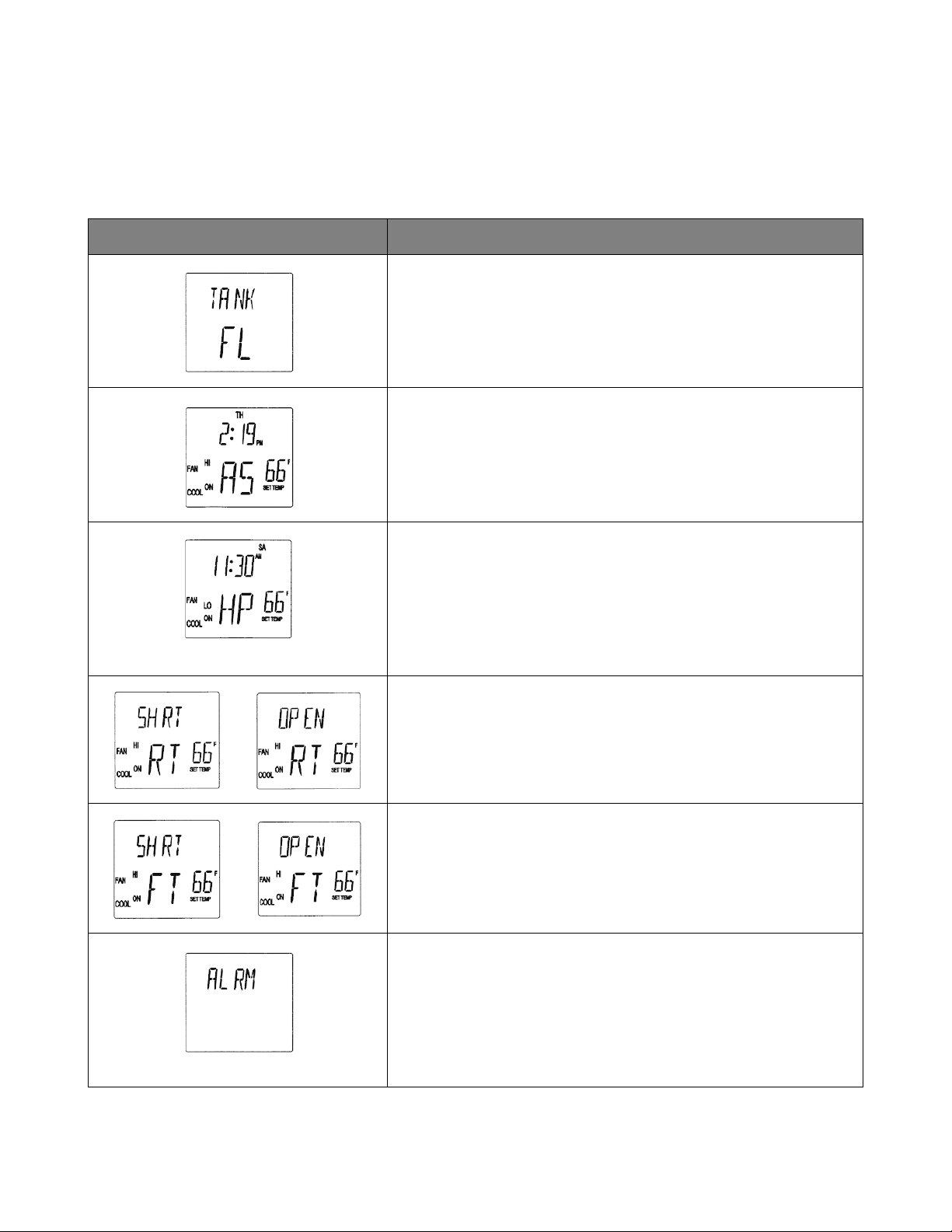
LCD Display Codes Condition
When the drain tank switch shuts off the unit, LCD displays
“TANK FL” and “TANK FULL” LED flashes.
Once emptying the drain tank procedure is completed and
ON/OFF has been pushed, unit returns to normal operation.
When the drain pump malfunctions, the compressor shuts off,
and the LCD displays “AS”. Once drain pump is fixed and unit
has been RESET, the unit returns to normal operation.
To RESET: Press FAN HI/LO and COOL ON/OFF buttons
simultaneously for 5 seconds.
When high pressure switch is activated, display shows “HP” if
high pressure switch is activated 3 times in 24 hours, unit
displays blinking “HP” and a buzzer turns on (see page 27).
Unit returns to normal operation after problem is fixed and
controller is RESET.
To RESET: Press FAN HI/LO and COOL ON/OFF buttons
simultaneously for 5 seconds.
When room thermistor becomes open or shorted, display
shows “OPEN RT” or “SHRT RT” and cool mode operation is
off. Display and cool mode operation are returned to normal
operation after room thermistor is fixed.
When freeze thermistor becomes open or shorted, display
shows “OPEN FT” or “SHRT FT” and cool mode operation is
off. Display and cool mode operation are returned to normal
operation after freeze thermistor is fixed.
When the unit detects a signal from the fire alarm system, the
display shows "ALRM" and a buzzer turns on. Check the fire
alarm system and confirm that there is no signal input to the
unit. The unit returns to the normal operation after the
problem is fixed and the controller is RESET.
To RESET: Press FAN HI/LO and COOL ON/OFF buttons
simultaneously for 5 seconds.
22
OPERATION (cont.)
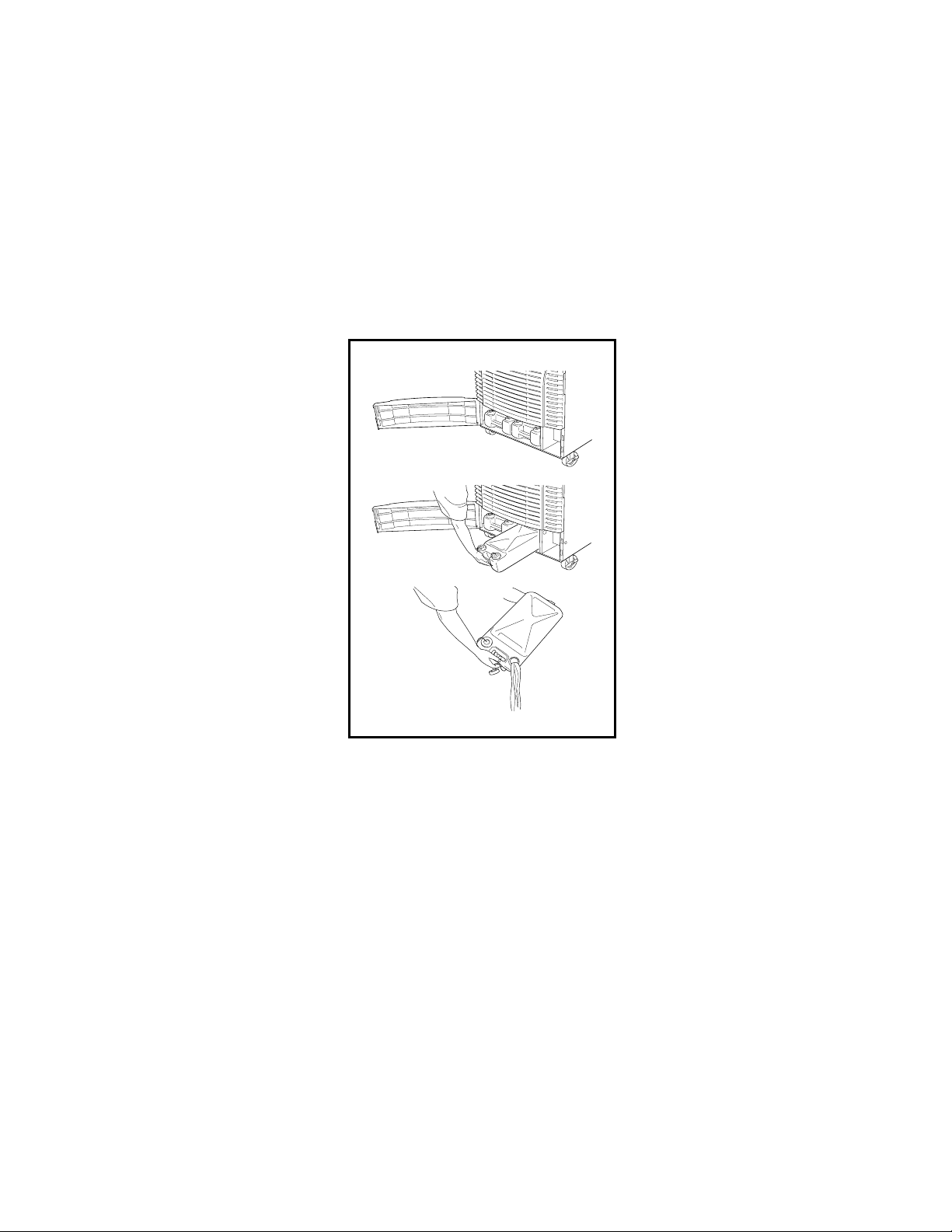
Empty the Drain Tank (If equipped)
During COOL mode, condensate water accumulates in the drain tank. When the
drain tank becomes full, the “TANK FULL” LED flashes and LCD displays “TANK
FL”, and the alarm signal output is turned ON and the unit turns off automatically.
Note: If you want to empty the drain tank, while the unit is in operation, press the
COOL ON/OFF button to turn the unit off.
1. Open the drain tank door of Office Pro 63.
2. Pull the drain tank from the unit, display indicates “TANK” and alarm signal
output stays ON.
3. Remove the cap and empty the drain tank.
4. Replace the cap and return the drain tank to the unit.
5. Close the front panel or drain tank door.
6. Press the COOL ON/OFF button to continue running the unit, display and
alarm signal return to normal operation.
OFFICE PRO 63 MODEL
23
OPERATION (cont.)
Drain Pump
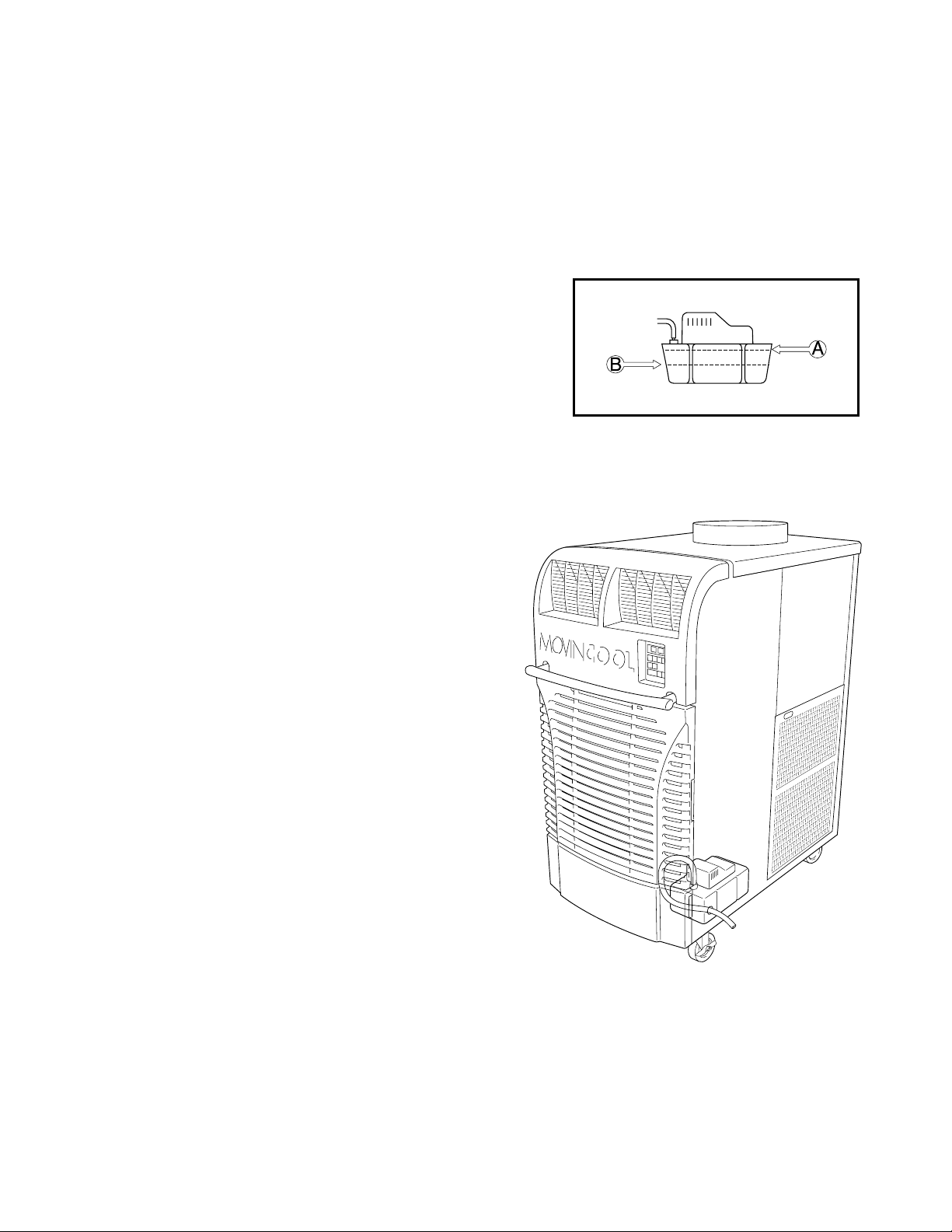
A drain pump is included for the Office Pro 63.
A drain pump provides a continuous operation and eliminates the need for a drain
tank.
1. When the water collects to level (A) in the
pump reservoir, the drain pump begins to
operate and discharge the water. During
drain pump operating period, the
compressor cycles off.
2. When the water level drops below level (B),
the drain pump stops and compressor
restarts after delay time has expired.
Note:
1. If for any reason the water level
exceeds that of level (A) in the pump
reservoir, an overflow drain switch stops
the compressor operation.
2. If the fan mode control DIP switch (see
page 20) has been set from the COOL
to the STOP position, the Fan also turns
off while the drain pump is discharging
the water.
24
HOSE INSTALLATION
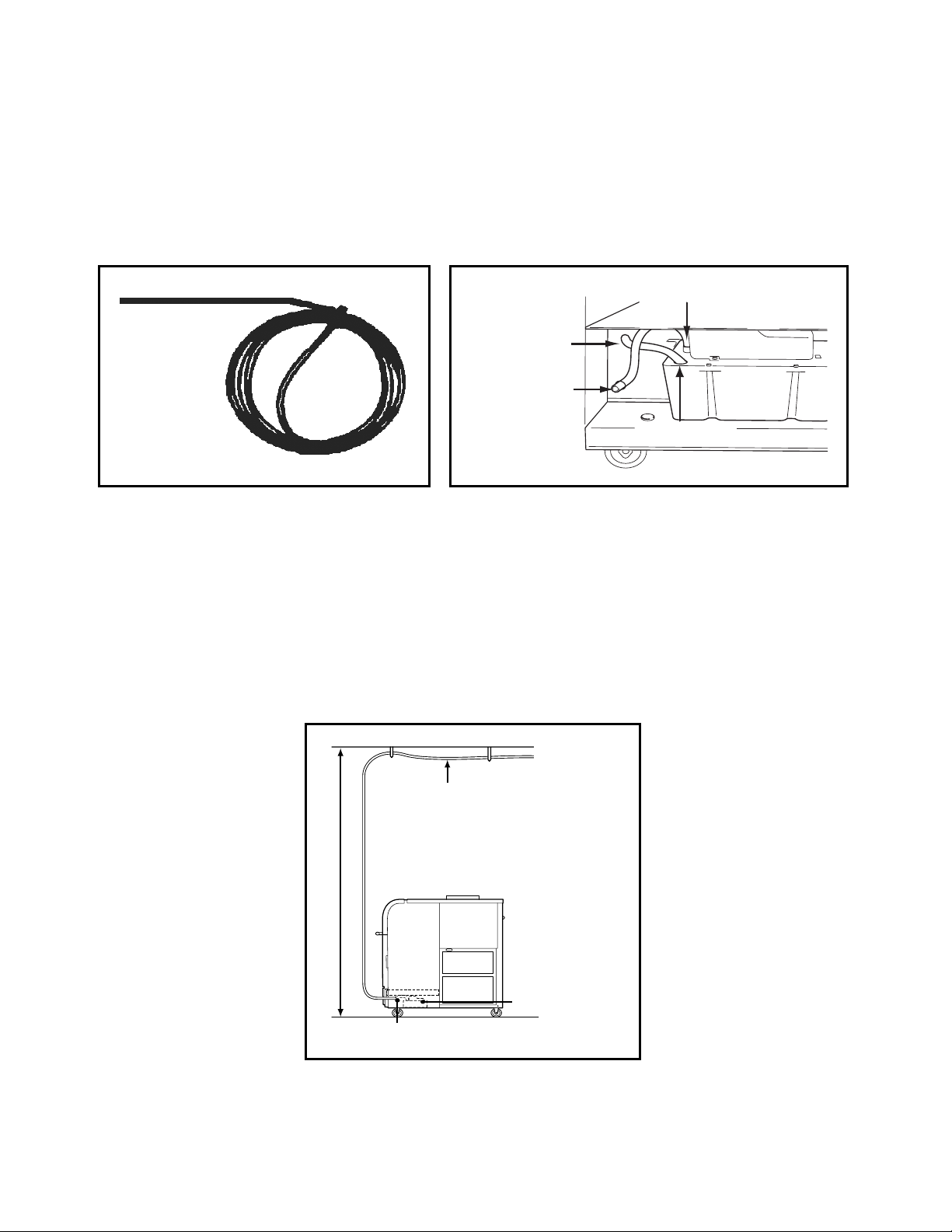
Note: The Office Pro 63 is supplied with a 20 foot (6m) hose.
Connect the 20 foot (6m) hose to the drain stem and feed it through the grommet
on the right hand side of the unit.
Note: The pump’s maximum lift is 17 feet (5.2m) at rated voltage (460V). Please
check the drainage performance after installation. It is important that the drainage
line from the pump is free of kinks and is not pinched. Power fluctuation or low
voltage could result in incorrect drainage.
To insure proper drainage, locate the highest vertical position, no more than
17 feet (5.2m), and run the drain hose on a downward slope at a minimum rate of
1/4 inch (6.25mm) per foot.
DRAIN HOSE
DRAIN HOSE
DRAIN STEM
DRAIN HOLE
1/4” (6.25 mm)
TAPER PER FOOT
GROMMET
CONDENSATE
PUMP
17’ (5.2m) MAX
25
DAILY INSPECTION & MAINTENANCE
Empty the Drain Tank
To empty the drain tank, refer to instructions on page 22.
Clean the Air Filters
Clean the air filters once a week. If the unit is used in a dusty environment, more
frequent cleaning may be required. A dirty air filter can reduce air output resulting
in a decrease of the cooling capacity.
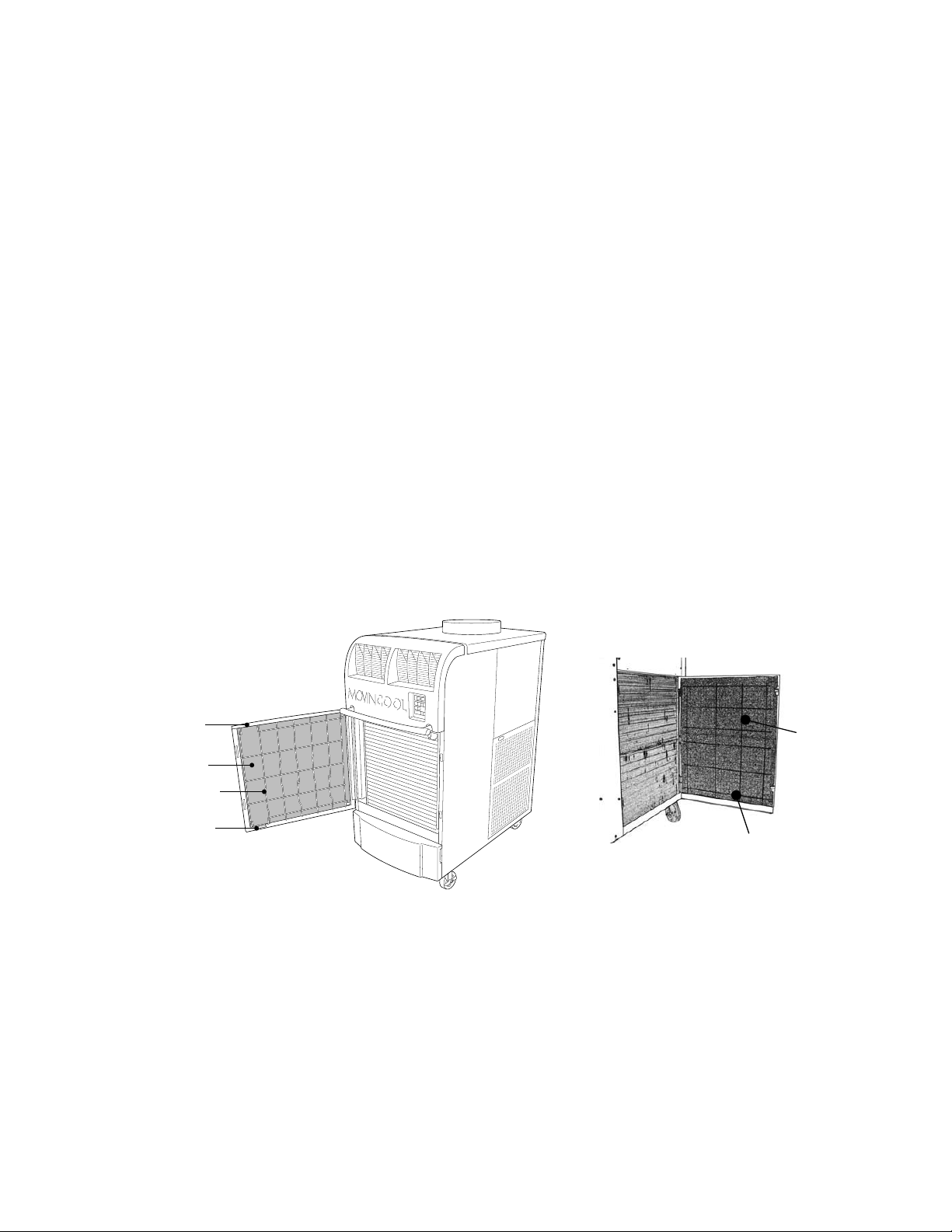
Filter Removal Method
1. Turn the unit off, by pressing the COOL ON/OFF button. If a program is
running, you must first press the PROGRAM RUN button.
2. Remove the two air filters.
Note: To remove the filters from the Office Pro 63, open the front panel and
side panel filter doors. On the side panel door, carefully remove the filter
element from wire frame attachment points. On the front, unclip the wire frame
and remove filter.
CLIP
FILTER
WIRE FRAME
CLIP
WIRE FRAME
FILTER
FRONT PANEL FILTER DOOR SIDE PANEL FILTER DOOR
26
DAILY INSPECTION & MAINTENANCE (cont.)
Filter Cleaning Method
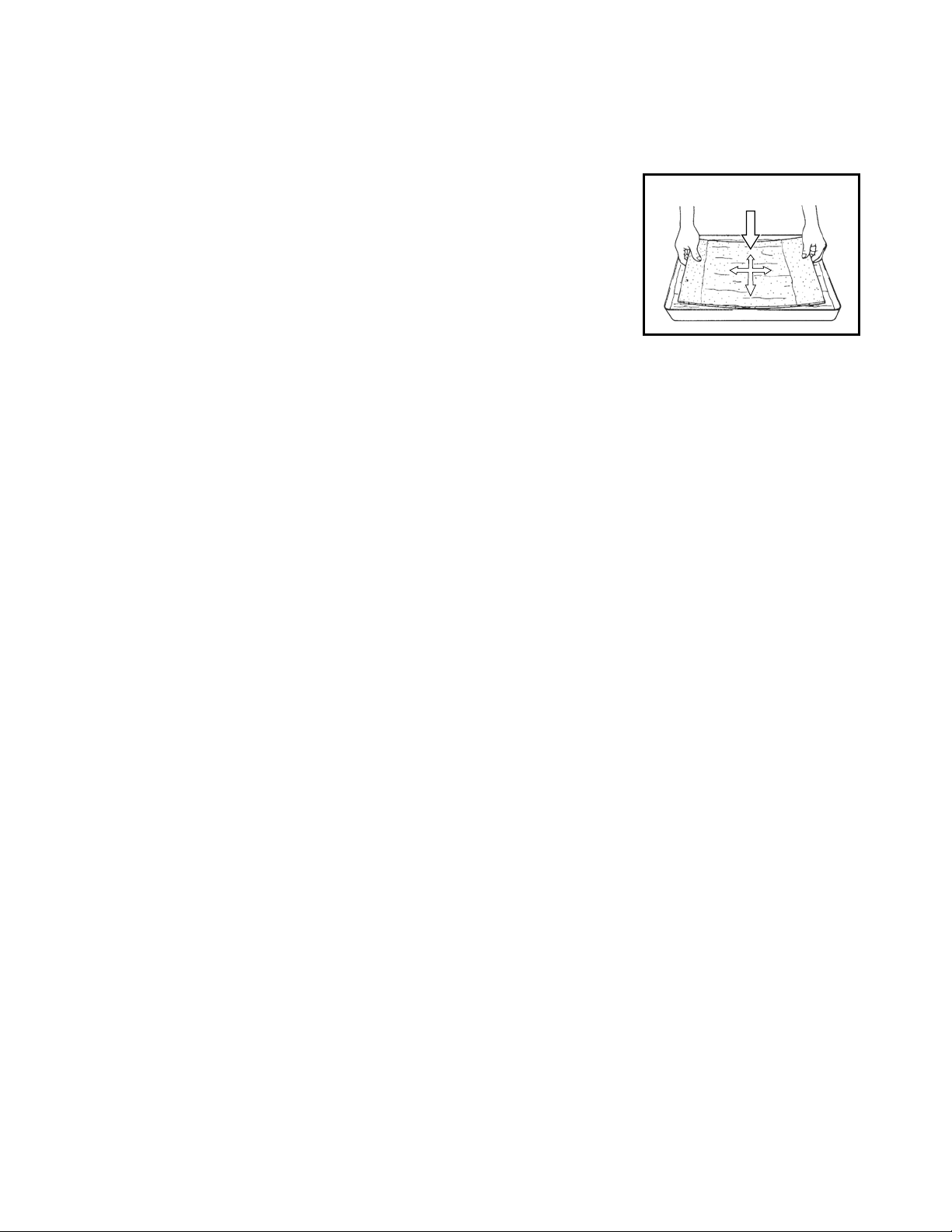
1. Remove dust from the element with a vacuum
cleaner, or rinse in cold or lukewarm water. If the
element is extremely dirty, wash with a neutral
detergent.
2. After the element has been cleaned, rinse with
clean running water, allow to dry, then reinstall.
In-Season/Off-Season Inspection
& Maintenance
In-Season
1. Check the prongs and surface of the power cord plug for dust and/or dirt. If
dust and/or dirt are present, wipe off with a clean dry cloth.
2. Check the power cord, plug and prongs for damage or excess play. If any
damage or excess play is found, contact your MovinCool reseller for repair.
3. Check the air filters and drain tank.
4. Clean the outside of the unit(s) with a damp cloth or mild nonabrasive cleaner.
Off-Season
1. Operate the unit in FAN ONLY mode for 8 hours.
Note: Operation is necessary to dry out the inside of the unit.
2. Disconnect the power cord from the AC outlet.
3. Check the prongs and surface of the power cord plug for dust and/or dirt. If
dust and/or dirt are present, wipe off with a clean dry cloth.
4. Check the power cord, plug and prongs for damage or excess play. If any
damage or excess play is found, contact your MovinCool reseller for repair.
5. Clean the air filters.
6. Empty all water from the drain tank.
FILTER
27
TROUBLESHOOTING
Check the following items before calling your MovinCool reseller or a qualified
technician.
If conditions persist after the above actions have been taken, turn the unit off,
disconnect the power and contact your MovinCool reseller or a qualified
technician.
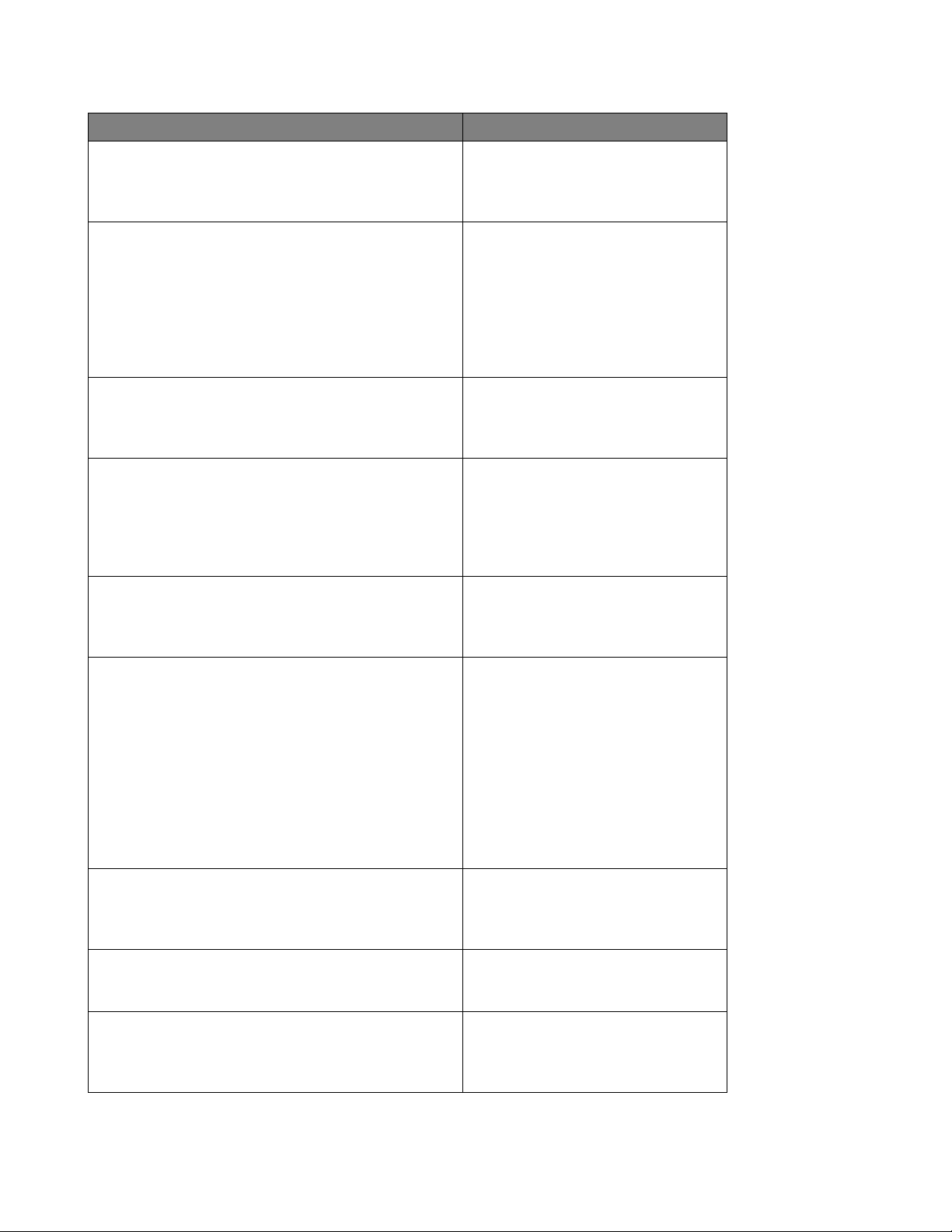
CONDITION POSSIBLE CAUSE REMEDY
Unit does not operate.
1. Ground fault breaker trip or
LCDI power cord trip.
Reset breaker or reset power
cord.
2. Drain tank is full.
(“TANK FULL” LED flashes.)
Empty the drain tank.
3. High pressure switch
activated 10 times in 24
hours.
1. Clean air filter.
2. Check inlet and outlet air to
make sure that there are no
objects preventing the air
flow into or out from the unit.
3. Check environmental
condition whether it is within
operation range or not.
4. Reset controller
To RESET: Press FAN HI/ LO
and COOL ON/OFF buttons
simultaneously for 5
seconds, controller returns to
normal operation.
Insufficient cooling.
1. Dirty/Blocked air filters. Clean air filter.
2. Air inlet/outlet blocked. Clean air inlet/outlet.
3. Improper temperature setting. Adjust temperature setting.
28
TECHNICAL SPECIFICATONS
ITEMS/FEATURES
Office Pro 63
Rating Conditions
Dry bulb
Wet bulb
Humidity
95°F(35°C)
83°F(28.2°C)
(60%)
Specifications
Power frequency
Line voltage
Power consumption
Current consumption
Power factor
Starting current
Power wiring
60Hz
3 Phase 460V
6.6kw
9.5A
87%
65A
12(4-core)AWG
Cooling Unit
Cooling capability
Cooling system
15,120kcal/h
60,000Btu/h
Direct Expansion
Blower
Type of fan
Air volume:Evaporator (high speed)
Condenser (high speed)
Motor output: High
Low
Centrifugal Fan
1,940ft³/min(2,532m³/h)
2,830ft³/min(4,808m³/h)
0.60/0.33kw
1.20/0.92kw
Compressor
Type
Refrigerant type
Refrigerant capacity
Hermetic Scroll
R-410A
4.41lbs(2.0kg)
Safety Devices
Compressor overload protector
Fan motor protector
Phase reverse protector
Transformer protector
Anti-freezing thermistor
Full drain tank switch
Automatic restart (power interruption)
Compressor time delay program
High pressure interruption
Signal input/output
Include
Include
Include
Include
Include
Include
Include
Include
Include
Include
Dimensions & Weight
W×D×H (in)
W×D×H (mm)
Weight (lbs/kg)
30”×52”×64”
762×1,321×1,626
705/320
Operating Conditions
Inlet air: Maximum
Minimum
106°F(41°C), 50%RH
65°F(18.3°C), 50%RH
Control Device
Temperature control
Programmable timer
Two speed fan
Include
Include
Include
WARRANTY STATEMENT
DENSO PRODUCTS AND SERVICES AMERICAS, INC. ("DENSO") warrants its MOVINCOOL
products only to the extent stated in its official written warranties. Unless otherwise specifically
provided in writing by DENSO, DENSO warrants to the original end-user that the products shall
be free of defects in materials or workmanship and will function in accordance with DENSO's
published specifications under ordinary intended use and service for a period listed below
beginning from the date of purchase on the invoice to the end-user:
Office Pro 63 Warranty: 3 Years with warranty registration OR
1 Year for unregistered units.
DENSO shall, at its sole discretion, repair or replace any defective product covered by this
warranty. Such remedy shall be end-user's sole remedy with respect to any particular defect in
the products.
This warranty does not cover defects or malfunctions which result from causes beyond DENSO's
control, including, without limitation, (i) unusual physical or electrical stress; (ii) accident, neglect,
abuse, misuse or other abnormal use; (iii) failure to perform routine maintenance in accordance
with DENSO's recommended procedures; (iv) normal wear and tear; (v) repairs or attempted
repairs by an unauthorized person; (vi) modifications or alterations to the products; (vii) use with
parts or devices not supplied or approved by DENSO; (viii) improper installation or service; (ix)
shipping damage to any units or spare parts during shipping. This includes and is not limited to
compressors, evaporators and condenser coils. This warranty shall extend only to the original
end-user and shall be void if any labels or other identifying marks permanently affixed to products
when shipped by DENSO are removed, altered, defaced or obliterated.
TO THE EXTENT PERMITTED BY LAW, THIS WARRANTY, AS LIMITED HEREIN, SHALL BE
IN LIEU OF AND EXCLUSIVE OF ALL OTHER WARRANTIES, EITHER EXPRESSED OR
IMPLIED, ON THE PART OF DENSO PRODUCTS AND SERVICES AMERICAS, INC., OR
DENSO CORPORATION, WHETHER ARISING FROM LAW, COURSE OF DEALING, USAGE
OF TRADE, OR OTHERWISE, INCLUDING WITHOUT LIMITATION ANY IMPLIED
WARRANTY OF MERCHANTABILITY OR FITNESS OF A PARTICULAR PURPOSE OR ANY
LIABILITY FOR COMMERCIAL LOSSES BASED UPON NEGLIGENCE OR
MANUFACTURER'S STRICT LIABILITY. EXCEPT AS EXPRESSLY PROVIDED HEREIN,
NEITHER DENSO PRODUCTS AND SERVICES AMERICAS, INC., NOR DENSO
CORPORATION WILL, IN ANY EVENT, BE LIABLE FOR LOST PROFITS, COSTS OF
PROCESSING, INJURY, GOODWILL, OR ANY OTHER CONSEQUENTIAL DAMAGES OF
ANY KIND ARISING FROM BREACH OF THIS WARRANTY.
PURCHASE DATE:
SERIAL NUMBER:
DENSO PRODUCTS AND SERVICES AMERICAS, INC. reserves the right to make changes
without prior notice. MovinCool®, Office Pro® and SpotCool® are registered trademarks of
DENSO Corporation.

P/N: 484007-3601EN Second Issue: April 2013