
website http://www.lgservic _
LG Floor Standing-Type
Air Conditioner
OWNER'S MANUAL
thoroughly
onditioner.
ture reference after
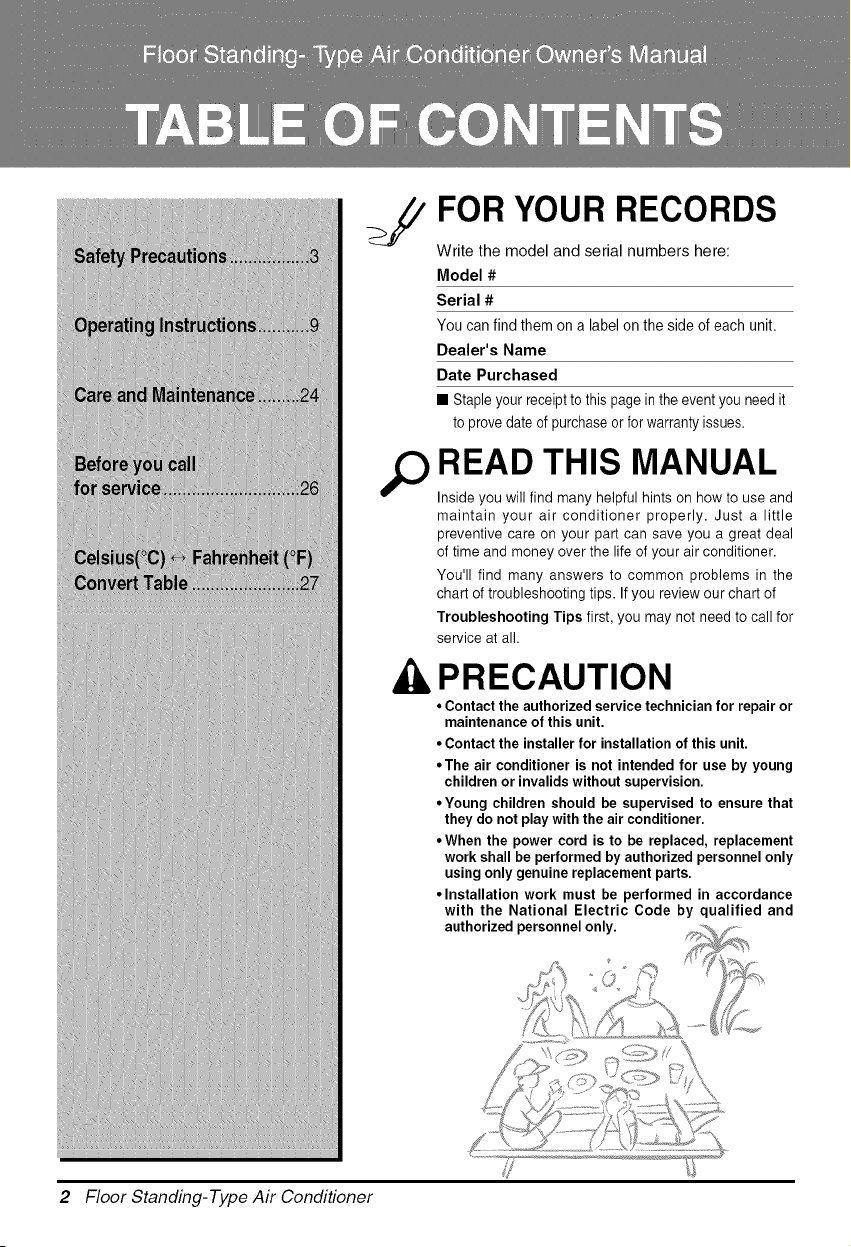
FOR YOUR RECORDS
Write the model and serial numbers here:
Model #
Serial #
You can find them on a label on the side of each unit.
Dealer's Name
Date Purchased
• Staple your receipt to this page in the event you need it
to prove date of purchase or for warranty issues.
READ THIS MANUAL
Inside you will find many helpful hints on how to use and
maintain your air conditioner properly. Just a little
preventive care on your part can save you a great deal
of time and money over the life of your air conditioner.
You'll find many answers to common problems in the
chart of troubleshooting tips. If you review our chart of
Troubleshooting Tips first, you may not need to call for
service at all.
PRECAUTION
• Contact the authorized service technician for repair or
maintenance of this unit.
• Contact the installer for installation of this unit.
• The air conditioner is not intended for use by young
children or invalids without supervision.
• Young children should be supervised to ensure that
they do not play with the air conditioner.
• When the power cord is to be replaced, replacement
work shall be performed by authorized personnel only
using only genuine replacement parts.
• Installation work must be performed in accordance
with the National Electric Code by qualified and
authorized personnel only.
2 Floor Standing-Type Air Conditioner
Sa_Precaufions
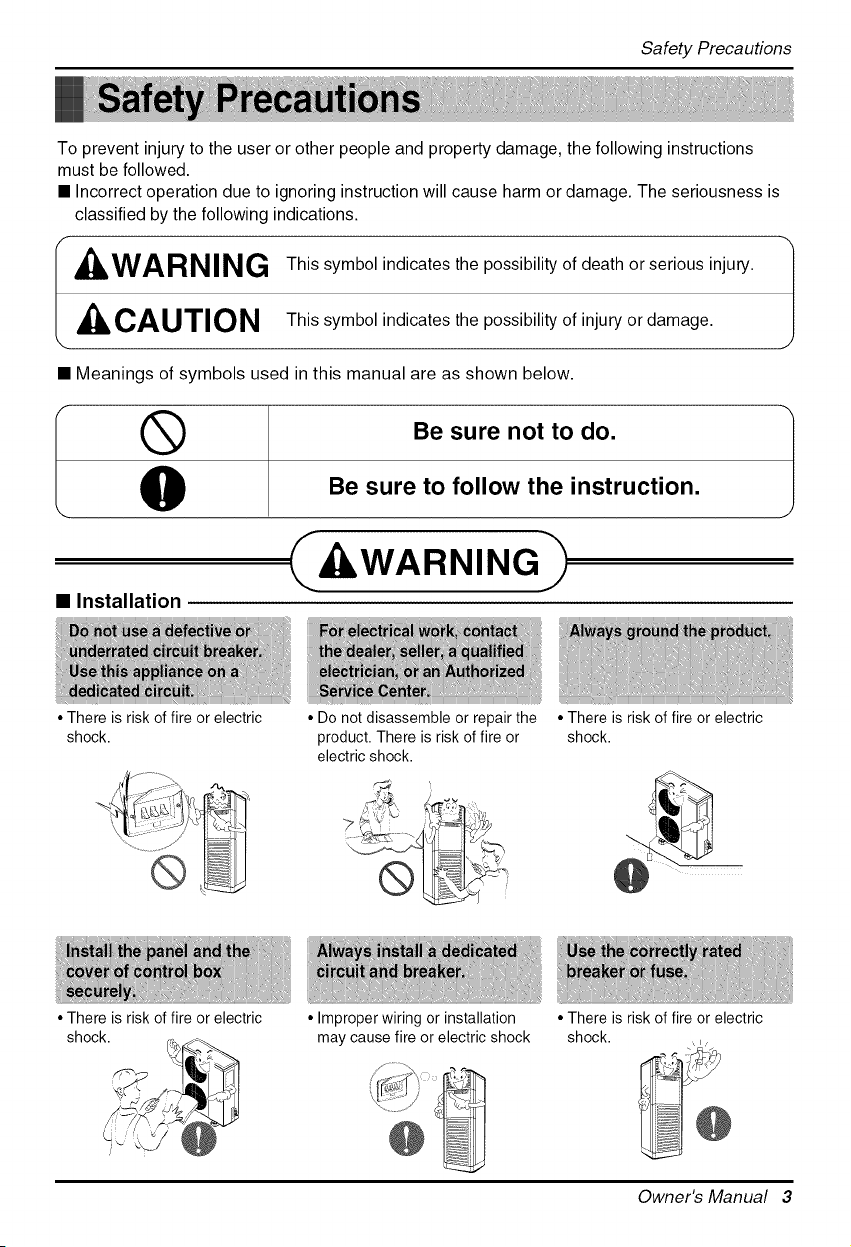
To prevent injury to the user or other people and property damage, the following instructions
must be followed.
• Incorrect operation due to ignoring instruction will cause harm or damage. The seriousness is
classified by the following indications.
F
, WARNING
CAUTION
This symbol indicates the possibility of death or serious injury.
This symbol indicates the possibility of injury or damage.
• Meanings of symbols used in this manual are as shown below.
Be sure not to do.
Be sure to follow the instruction.
ILWARNING-
• Installation
• There is risk of fire or electric
shock.
• Do not disassemble or repair the
product. There is risk of fire or
electric shock.
• There is risk of fire or electric
shock.
• Improper wiring or installation
may cause fire or electric shock
• There is risk of fire or electric
shock.
• There is risk of fire or electric
shock.
Owner's Manual 3
SafetyPrecautions
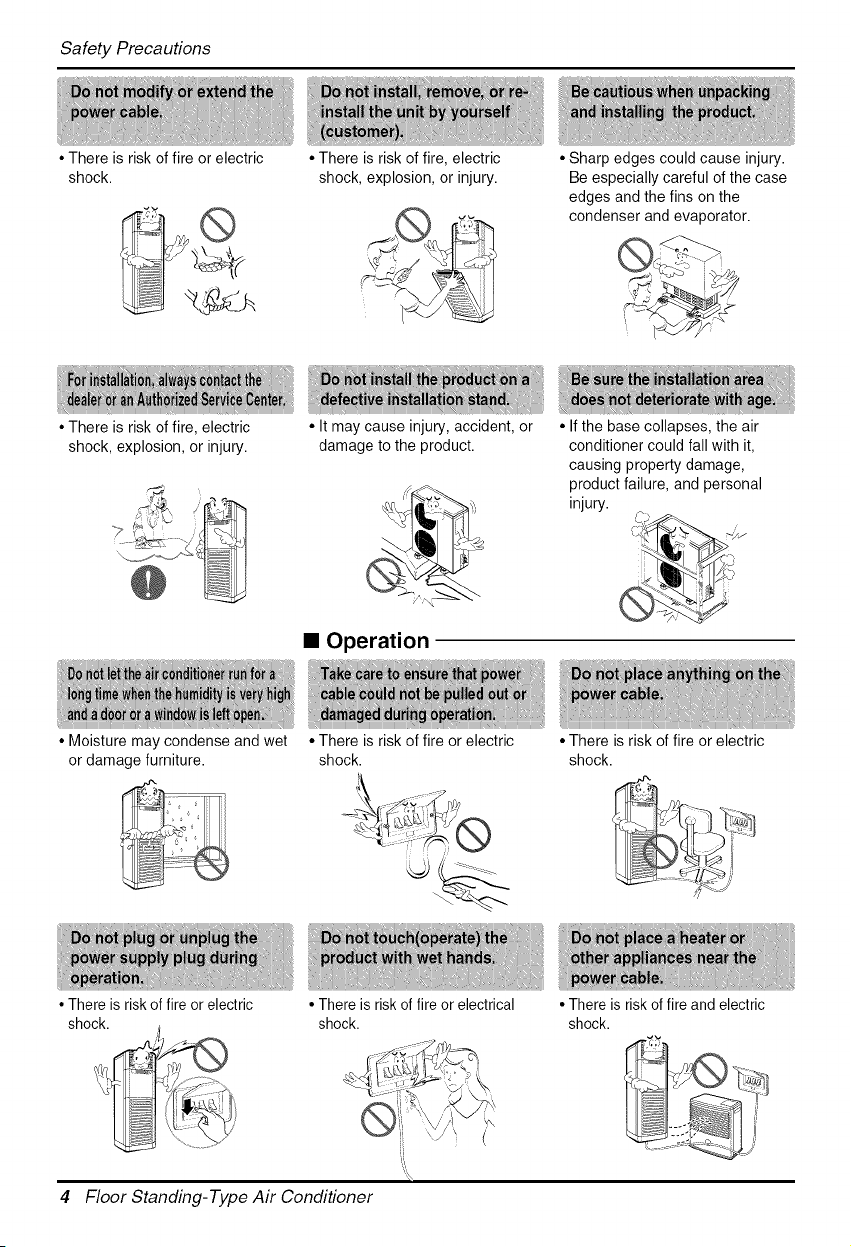
• There is risk of fire or electric
shock.
• There is risk of fire, electric
shock, explosion, or injury.
• Moisture may condense and wet
or damage furniture.
• There is risk of fire or electric
shock.
jj ,
• There is risk of fire, electric
shock, explosion, or injury.
• It may cause injury, accident, or
damage to the product.
• Sharp edges could cause injury.
Be especially careful of the case
edges and the fins on the
condenser and evaporator.
• Operation
• There is risk of fire or electric
shock.
• If the base collapses, the air
conditioner could fall with it,
causing property damage,
product failure, and personal
injury.
• There is risk of fire or electrical
shock.
4 Floor Standing-Type Air Conditioner
• There is risk of fire or electric
shock.
• There is risk of fire and electric
shock.

Safety Precautions
• It may cause There is risk of fire,
failure of the product, or electric
shock.
• Do not use the telephone or turn
switches on or off.
There is risk of explosion or fire
• There is risk of physical injury,
electric shock, or product failure.
• There is risk of fire or electric shock.
• There is risk of fire or failure of
product.
• There is risk of electric shock or
fire.
i _ •
• There is risk of fire or electric
shock.
• Oxygen deficiency could occur.
• There is risk of property damage,
failure of product, or electric shock.
• There is risk of fire, electric shock,
or product damage.
• There is risk of electric shock.
Owner's Manual 5
SafetyPrecautions
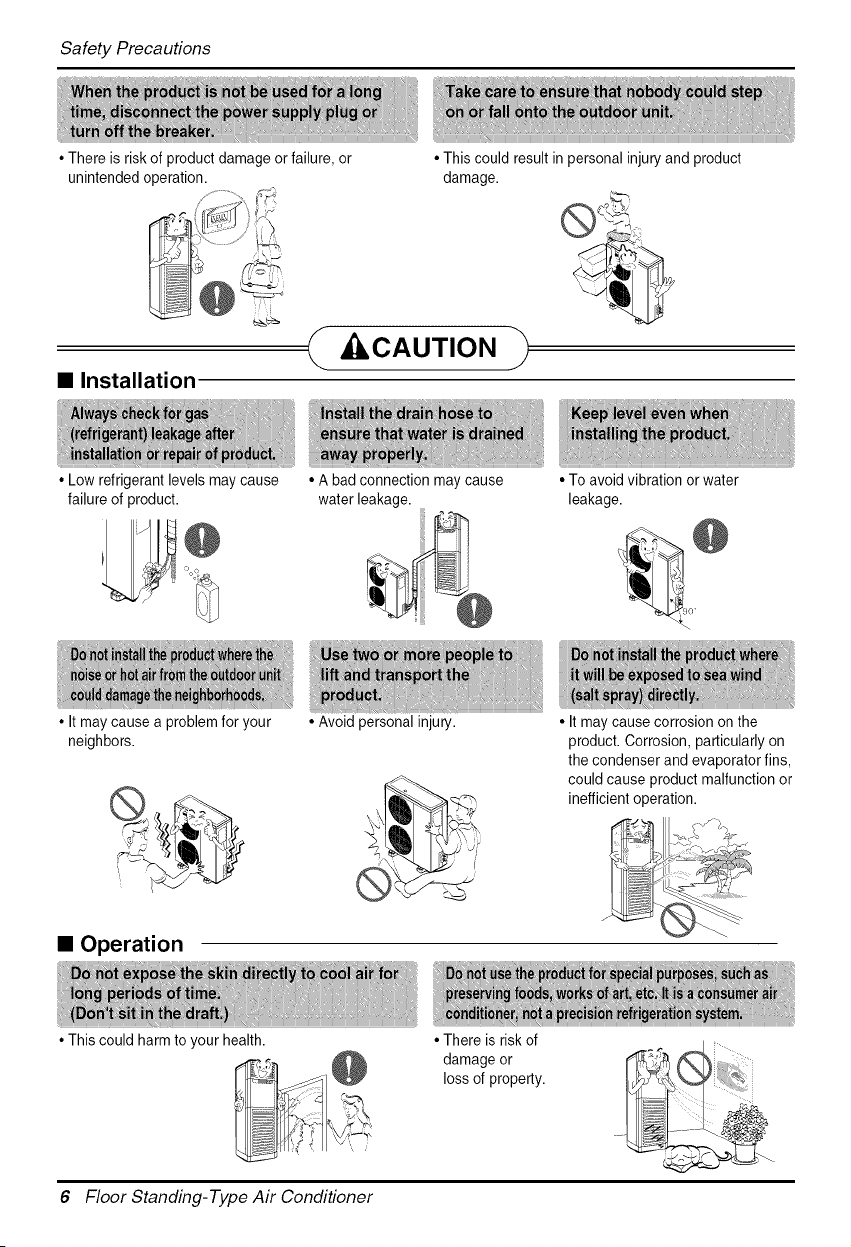
• There is risk of product damage or failure, or
unintended operation.
• Installation
• Low refrigerant levels may cause
failure of product.
• It may cause a problem for your
neighbors.
• This could result in personal injury and product
damage.
CAUTION
• A bad connection may cause
water leakage.
• Avoid personal injury.
• To avoid vibration or water
leakage.
• It may cause corrosion on the
product. Corrosion, particularly on
the condenser and evaporator fins,
could cause product malfunction or
inefficient operation.
• Operation
• This could harm to your health.
• There is risk of
damage or
loss of property.
6 Floor Standing-Type Air Conditioner
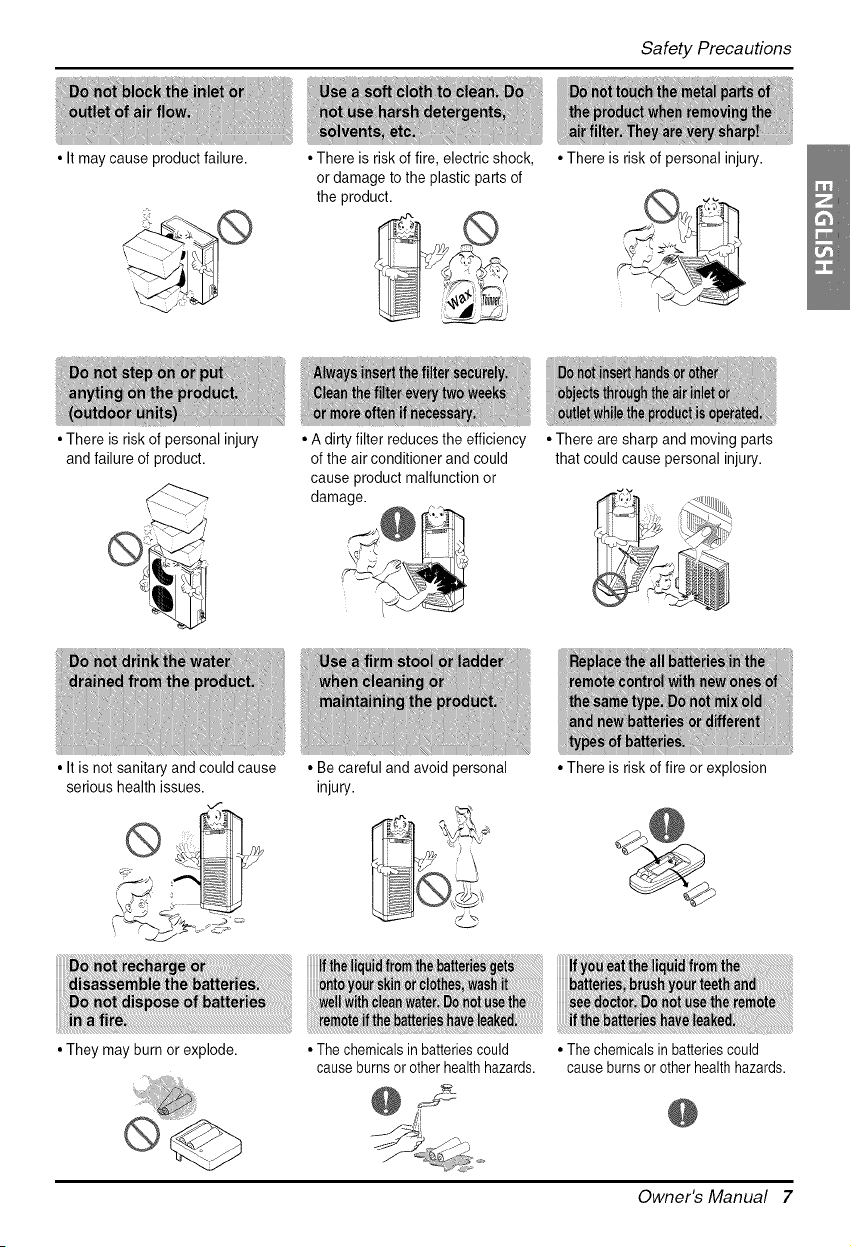
• It may cause product failure.
Sa_Precaufions
• There is risk of fire, electric shock,
or damage to the plastic parts of
the product.
• There is risk of personal injury
and failure of product.
• It is not sanitary and could cause
serious health issues.
• A dirty filter reduces the efficiency
of the air conditioner and could
cause product malfunction or
damage.
• They may burn or explode.
• Becarefulandavoidpersonal
injury.
• The chemicals in batteries could
cause burnsor other health hazards.
• There is risk of personal injury.
• There are sharp and moving parts
that could cause personal injury.
• There is risk of fire or explosion
i
• The chemicals in batteries could
cause burnsor other health hazards.
@
Owner's Manual 7
PriortoOperation
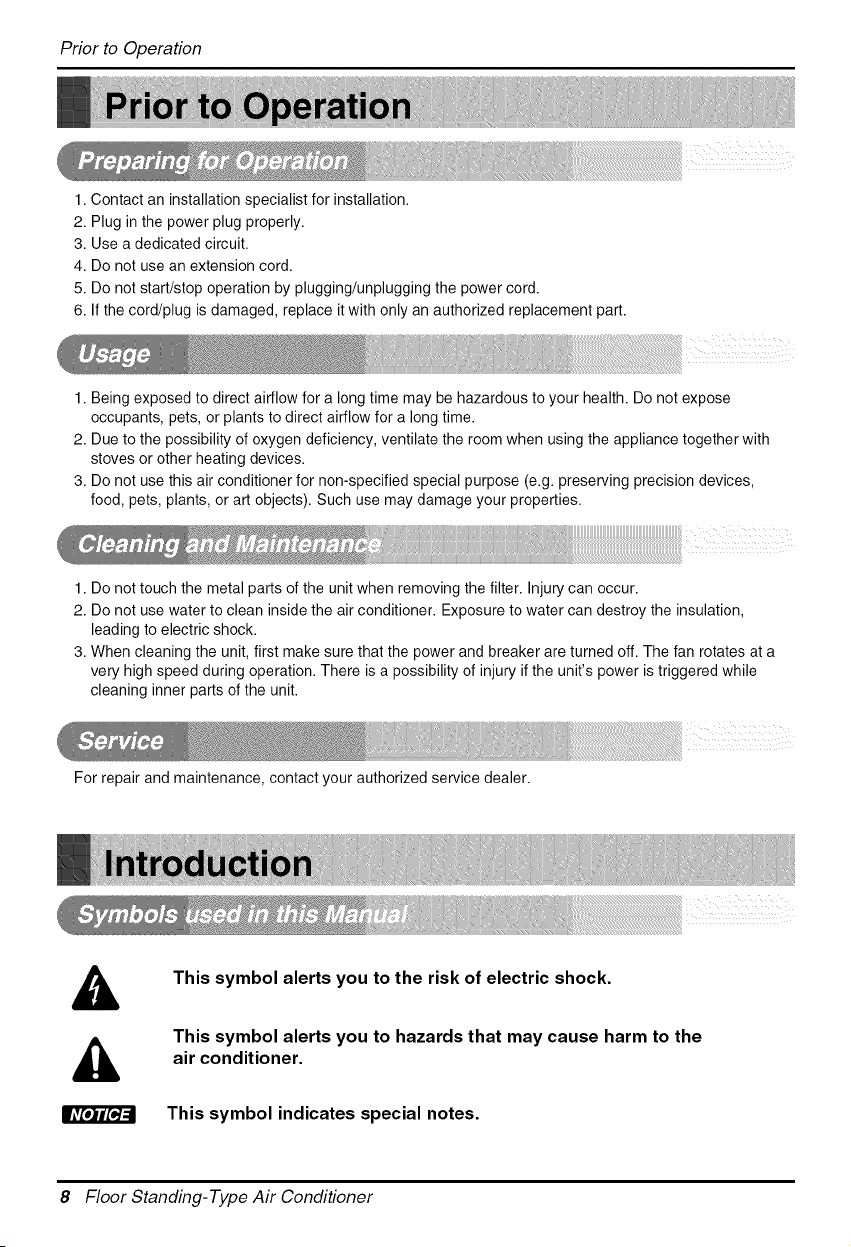
1. Contact an installation specialist for installation.
2. Plug in the power plug properly.
3. Use a dedicated circuit.
4. Do not use an extension cord.
5. Do not start/stop operation by plugging/unplugging the power cord.
6. If the cord/plug is damaged, replace it with only an authorized replacement part.
1. Being exposed to direct airflow for a long time may be hazardous to your health. Do not expose
occupants, pets, or plants to direct airflow for a long time.
2. Due to the possibility of oxygen deficiency, ventilate the room when using the appliance together with
stoves or other heating devices.
3. Do not use this air conditioner for non-specified special purpose (e.g. preserving precision devices,
food, pets, plants, or art objects). Such use may damage your properties.
1. Do not touch the metal parts of the unit when removing the filter. Injury can occur.
2. Do not use water to clean inside the air conditioner. Exposure to water can destroy the insulation,
leading to electric shock.
3. When cleaning the unit, first make sure that the power and breaker are turned off. The fan rotates at a
very high speed during operation. There is a possibility of injury if the unit's power is triggered while
cleaning inner parts of the unit.
For repair and maintenance, contact your authorized service dealer.
This symbol alerts you to the risk of electric shock.
This symbol alerts you to hazards that may cause harm to the
air conditioner.
This symbol indicates special notes.rAv[*) l [o]:;
8 Floor Standing-Type Air Conditioner
OperatingInstructions
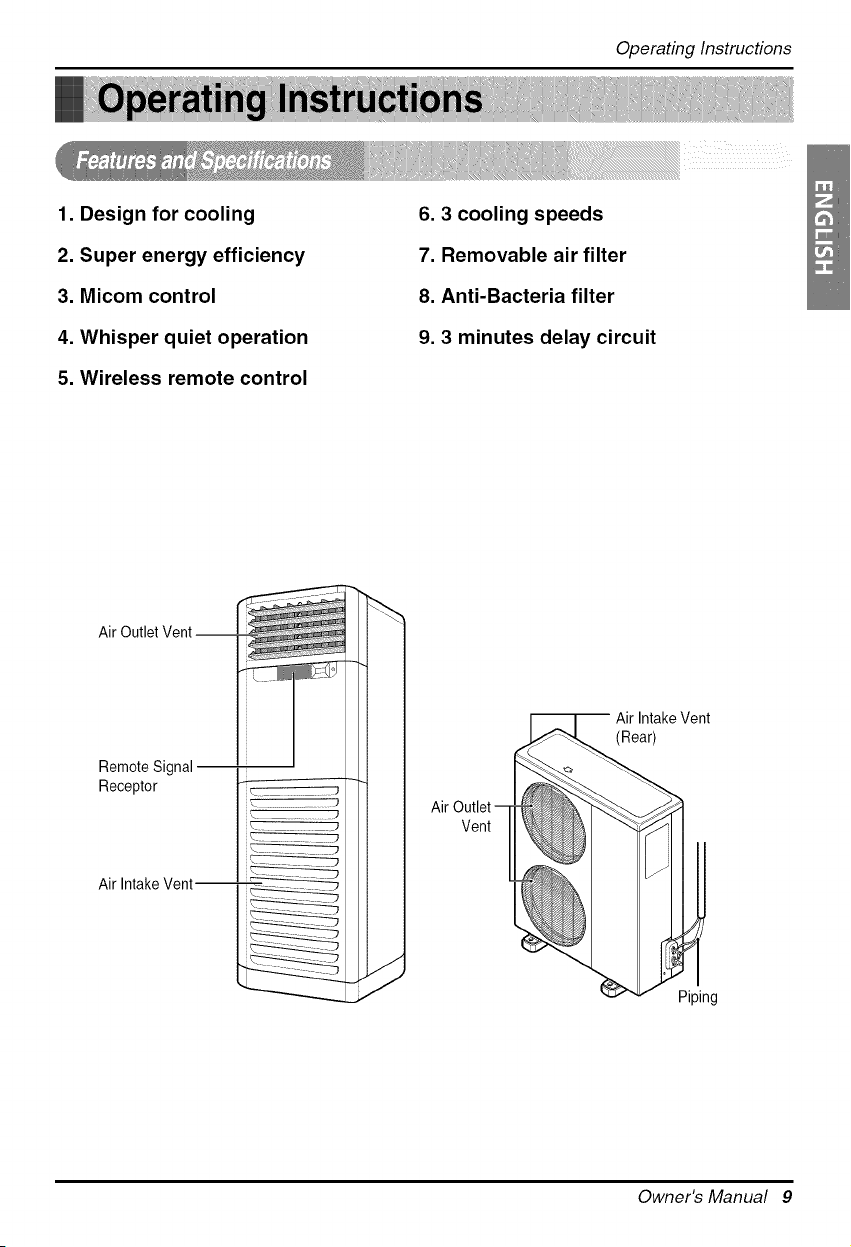
1. Design for cooling
2. Super energy efficiency
3. Micom control
4. Whisper quiet operation
5. Wireless remote control
6.3 cooling speeds
7. Removable air filter
8. Anti-Bacteria filter
9.3 minutes delay circuit
Air Outlet
Remote Signal
Receptor
Air Intake Vent--
Vent
-- Air Intake Vent
(Rear)
Piping
Owner's Manual 9
Operating Instructions
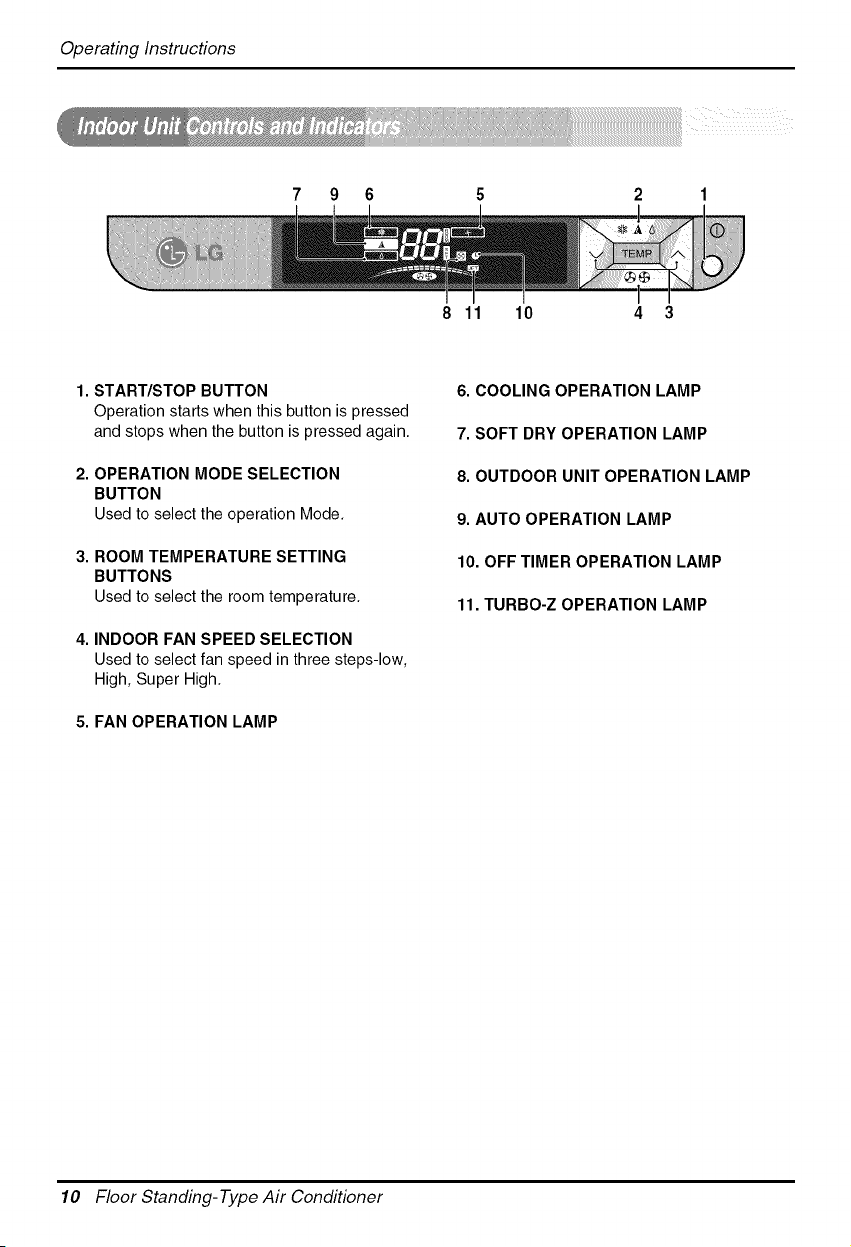
7 9 6 2 1
8 11 10 4 3
1. START/STOP BUTTON
Operation starts when this button is pressed
and stops when the button is pressed again.
2. OPERATION MODE SELECTION
BUTTON
Used to select the operation Mode.
3. ROOM TEMPERATURE SETTING
BUTTONS
Used to select the room temperature.
4. INDOOR FAN SPEED SELECTION
Used to select fan speed in three steps-low,
High, Super High.
5. FAN OPERATION LAMP
6. COOLING OPERATION LAMP
7. SOFT DRY OPERATION LAMP
8. OUTDOOR UNIT OPERATION LAMP
9. AUTO OPERATION LAMP
10. OFF TIMER OPERATION LAMP
11. TURBO-Z OPERATION LAMP
10 Floor Standing-Type Air Conditioner
OperatingInstructions
t#
IBIlTIME
0 LG
Operation Mode
0
O
]
Flip-updoor
(closed)
I! Cooling Operation ] ._
1
AutoOperation ] _.
!
Soft Dry Operation ] (_)
O
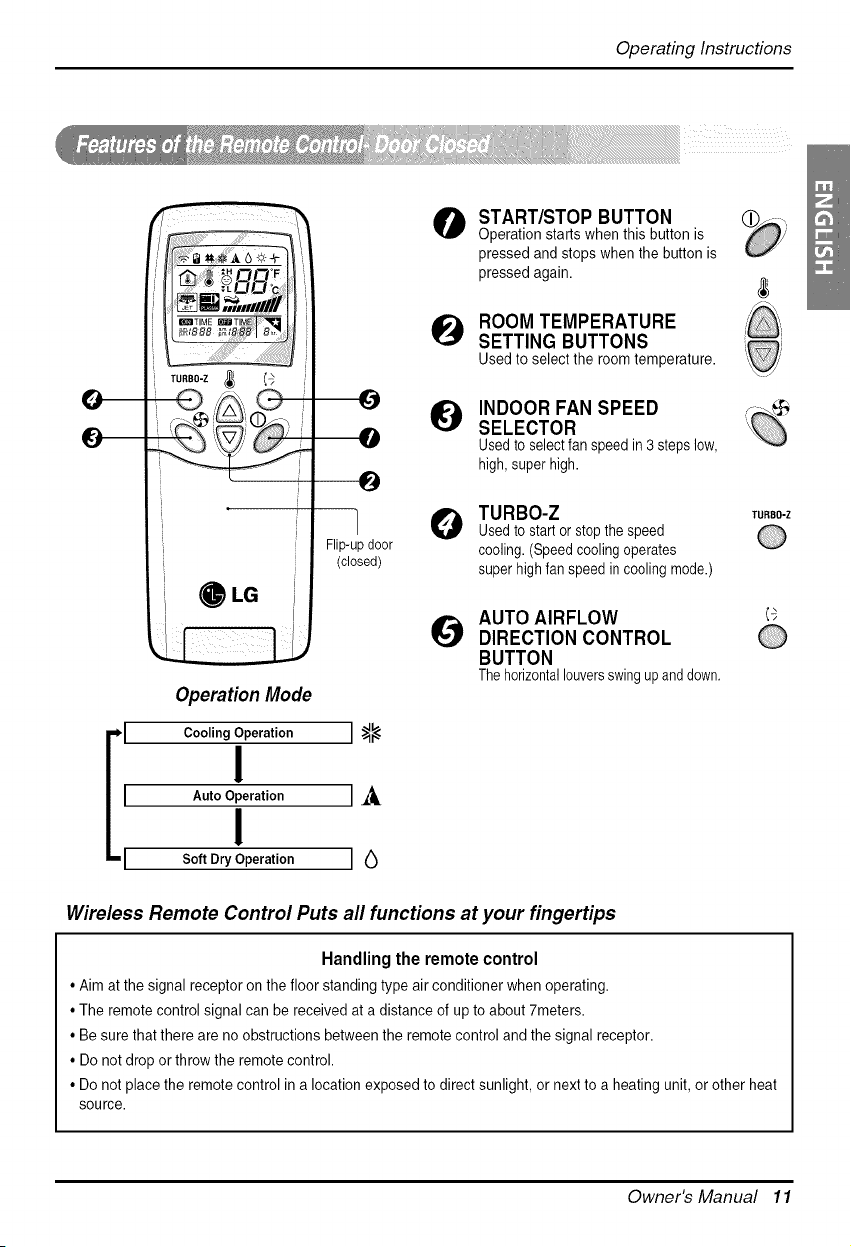
START/STOP BUTTON
Operation starts when this button is
pressed and stops when the button is
pressed again.
ROOM TEMPERATURE
SETTING BUTTONS
Used to select the room temperature.
INDOOR FAN SPEED
SELECTOR
Usedto selectfan speed in 3 steps low,
high,super high.
TURBO-Z
Usedto start or stopthe speed
cooling. (Speed cooling operates
super high fan speed in cooling mode.)
AUTO AIRFLOW
DIRECTION CONTROL
BUTTON
The horizontallouversswing upand down.
TURBO-Z
Wireless Remote Control Puts all functions at your fingertips
Handling the remote control
• Aim at the signal receptor on the floor standing type air conditioner when operating.
• The remote control signal can be received at a distance of up to about 7meters.
• Be sure that there are no obstructions between the remote control and the signal receptor.
• Do not drop or throw the remote control.
• Do not place the remote control in a location exposed to direct sunlight, or next to a heating unit, or other heat
source.
Owner's Manual 11

OperatingInstructions
O ON/OFF TIMER BUTTONS oNG OFF
Used to set the time of starting and
stopping operation.
TIME SETTING BUTTONS
Used to adjust the time.
TIMER SET/CANCEL BUTTONS
Used to set the timer when the desired SET_'_ CANCEL
time is obtained and to cancel the Timer 0
operation.
Q IMPLE OFF TIMER SET ®
BUTTON
Each time the button is pressed, the mode
is changed in the following process.
Time set (1, 2, 3, 4, 5, 6, 7 hurs)
If you select "0" the off Timer function will
be cancelled.
O ENERGY SAVING OPERATION ®
BUTTON (Not Available)
_1 °C _ °F SWITCHING BUTTON °C/°F
Used to switch temperature reading from
Centigrade to Fahrenheit and viceversa.
_ ESET BUTTON
Used prior to resetting time or after
replacing batteries.
o RESET
O NDOOR FAN OPERATION +
BUTTON
Used to circulate the room air without
cooling
or heating (turns indoor fan on/off).
_! PERATION MODE _Ao
SELECTION BUTTON
Used to select the operation mode.
AUTO AIRFLOW DIRECTION
CONTROL BUTTON
The vertical louvers swing right and left.
12 Floor Standing-Type Air Conditioner
OperatingInstructions
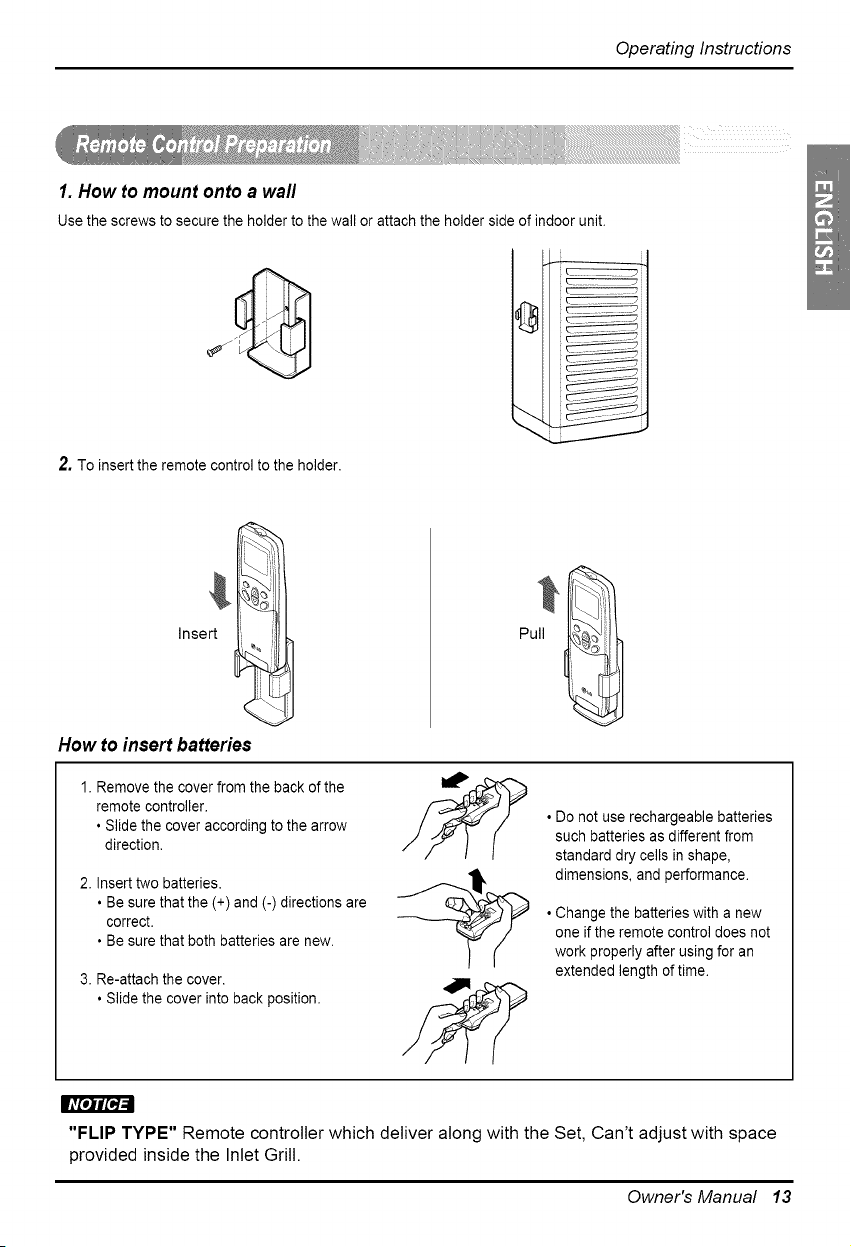
1. How to mount onto a wall
Use the screws to secure the holder to the wall or attach the holder side of indoor unit.
2. To insert the remote control to the holder.
Insert
<
How to insert batteries
1. Remove the cover from the back of the
remote controller.
• Slide the cover according to the arrow
direction.
2. Insert two batteries.
• Be sure that the (+) and (-) directions are
correct.
• Be sure that both batteries are new.
3. Re-attach the cover.
• Slide the cover into back position.
• Do not use rechargeable batteries
such batteries as different from
standard dry cells in shape,
dimensions, and performance.
• Change the batteries with a new
one if the remote control does not
work properly after using for an
extended length of time.
"FLIP TYPE" Remote controller which deliver along with the Set, Can't adjust with space
provided inside the Inlet Grill.
Owner's Manual 13
Operating Instructions
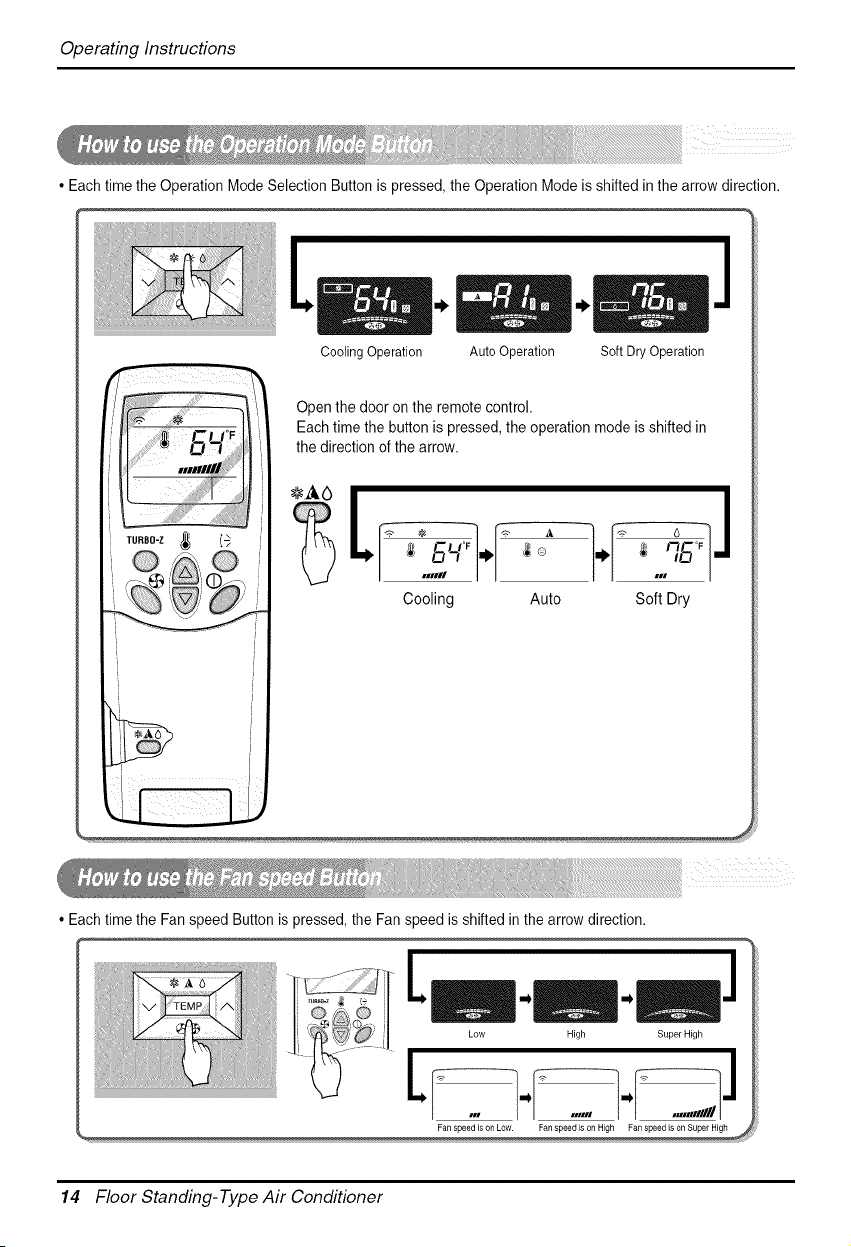
• Each time the Operation Mode Selection Button is pressed, the Operation Mode is shifted in the arrow direction.
/
Cooling Operation Auto Operation Soft Dry Operation
Open the door on the remote control.
Each time the button is pressed, the operation mode is shifted in
the direction of the arrow.
C_m _ o _ FIL-'_F
•11111| _ ,u
Cooling Auto Soft Dry
• Each time the Fan speed Button is pressed, the Fan speed is shifted in the arrow direction.
Low High Super High
LI ...I. ....] ...,,,,,,YJ.
Fan speed is on Low. Fanspeed is on High Fan speed is on Supel High
14 Floor Standing-Type Air Conditioner
OperatingInstructions
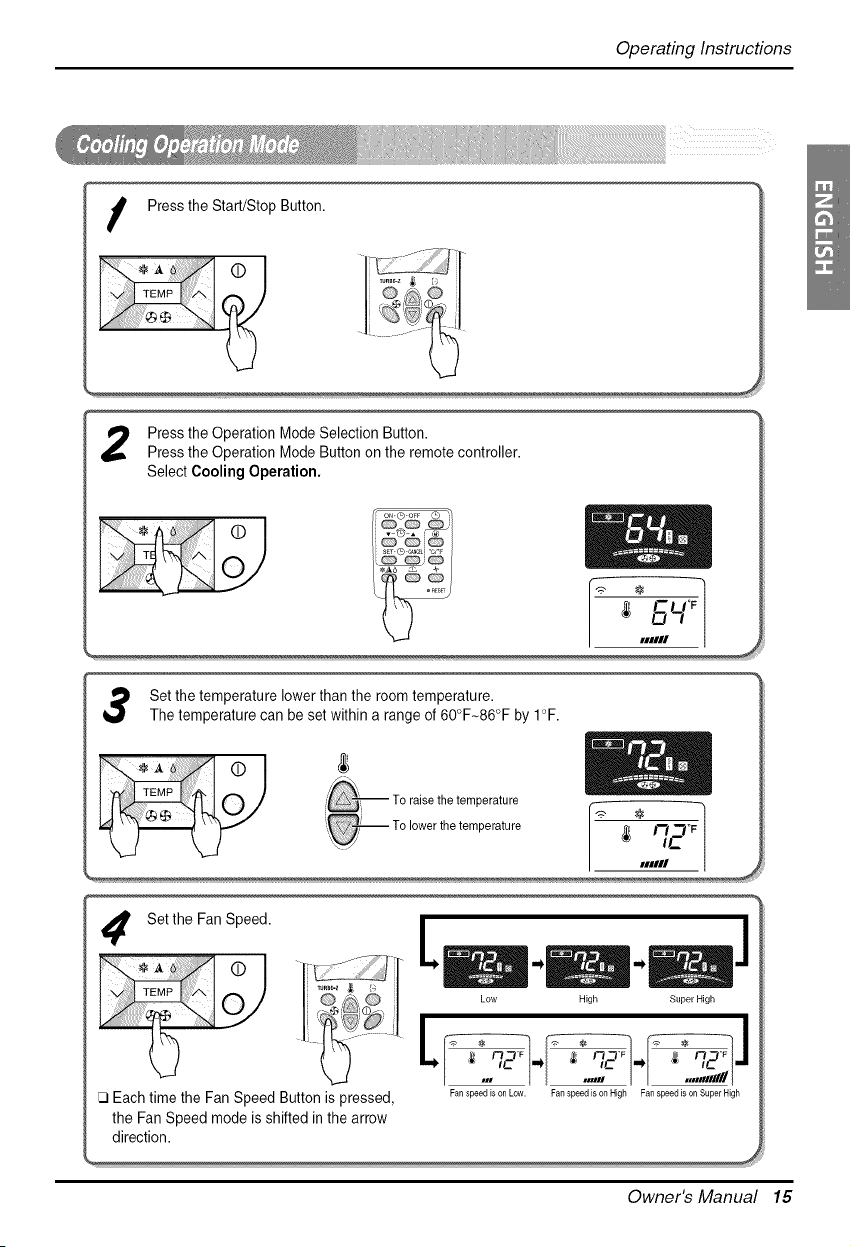
I Press the Start/Stop Button.
Pressthe Operation Mode Selection Button.
Press the Operation Mode Button on the remote controller.
Select Cooling Operation.
Set the temperature lower than the room temperature.
The temperature can be set within a range of 60°F-86°F by 1°F.
) -- TO raise the temperature r
J___ _ -- Zo lower the ternperature / ,-,-,oF
kJ _ _ / ,c
| nmIII .
Setthe Fan Speed.
il
I C_) & C_: _ Low High Super High
•,, , _ ......-,, .....;#,,,/-
[3 Each time the Fan Speed Button is pressed, Fan speedison Low. FanspeedisonHigh Fan speed ison SuperHigh
the Fan Speed mode is shifted in the arrow
direction.
Owner's Manual 15
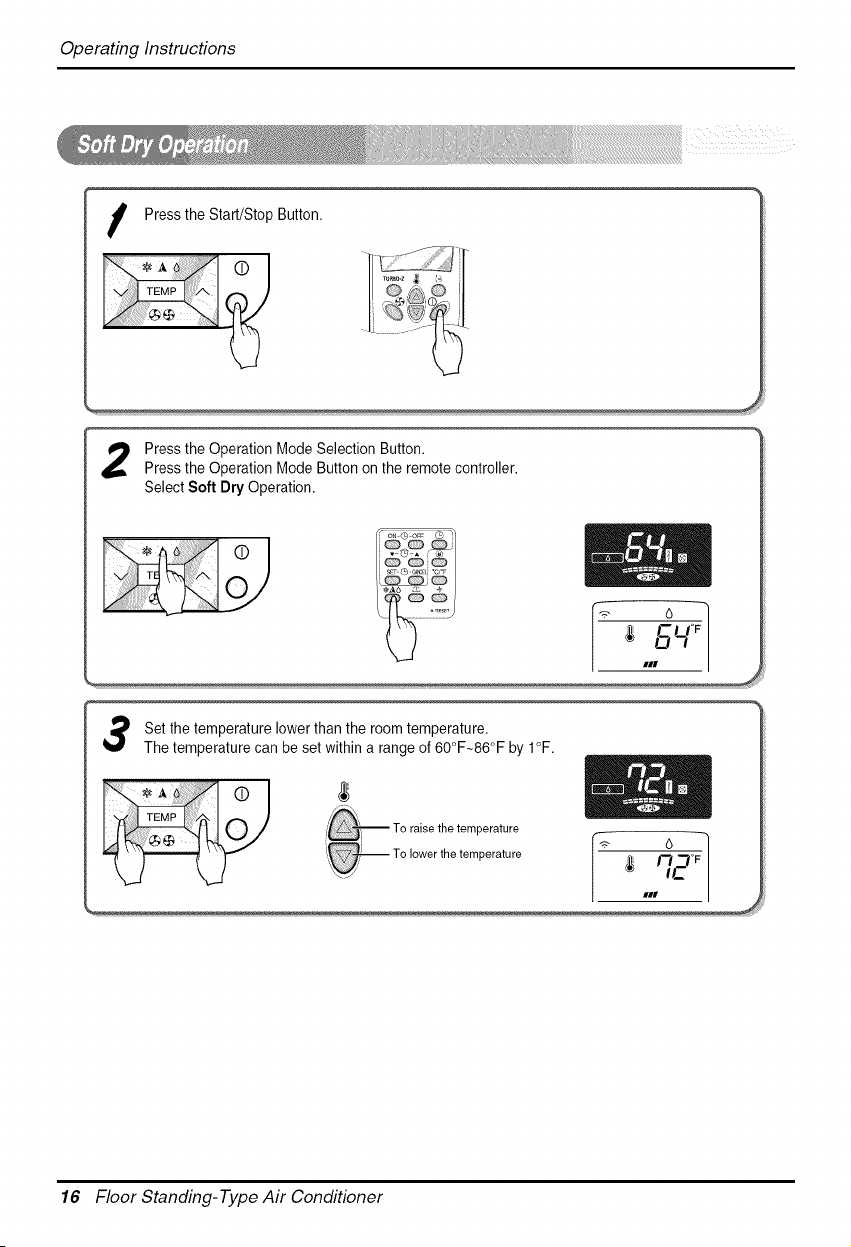
OperatingInstructions
Pressthe Start/Stop Button.
Press the Operation Mode Selection Button.
Press the Operation Mode Button on the remote controller.
Select Soft Dry Operation.
1 Set the temperature lower than the room temperature.
The temperature can be set within a range of 60°F~86°F by I°F.
# _ -- To raise the temperature I "_ 6
17-1 °F
IC
##1
16 Floor Standing-Type Air Conditioner
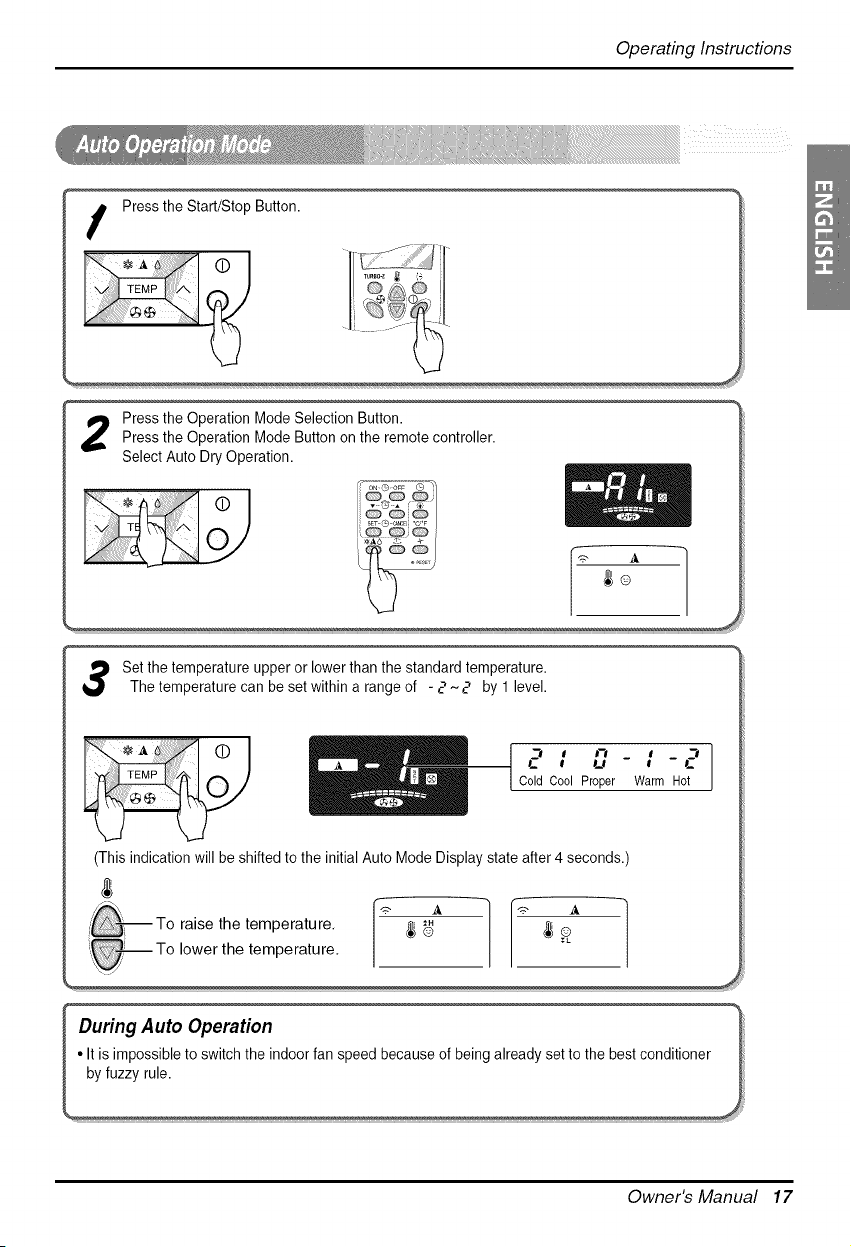
OperatingInstructions
%
Press the Operation Mode Selection Button.
Press the Operation Mode Button on the remote controller.
Select Auto Dry Operation.
Set the temperature upper or lower than the standard temperature.
The temperature can be set within a range of - 2'~2 by 1 level.
...... I , '-,
0 __B
I ColdCool Proper
(This indication will be shifted to the initial Auto Mode Display state after 4 seconds.'
L
Warm Hot
raise the temperature. _ _ _
, To lower the temperature.
_.J/
During Auto Operation _
It is impossible to switch the indoor fan speed because of being already set to the best conditioner _
Owner's Manual 17
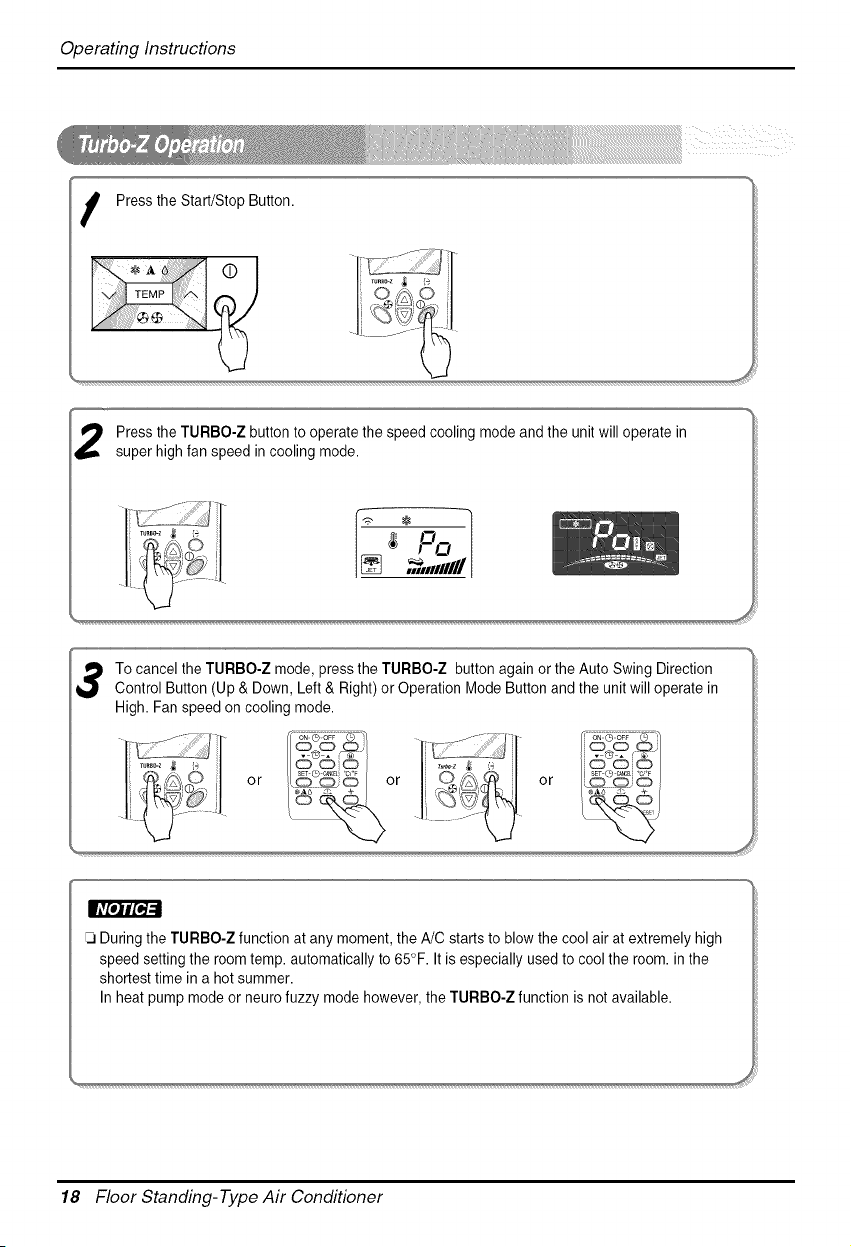
OperatingInstructions
I Pressthe Start/Stop Button.
Press the TURBO-Z button to operate the speed cooling mode and the unit will operate in
super high fan speed in cooling mode.
,_,HHIIIIII
No oo
sE_0 C_EL'c'_ i sE_¢) C_ELc_
During the TURBO-Z function at any moment, the A!C starts to blow the cool air at extremely high
speed setting the room temp. automatically to 65°F. It is especially used to cool the room. in the
shortest time in a hot summer.
In heat pump mode or neuro fuzzy mode however, the TURBO-Z function is not available.
18 Floor Standing-Type Air Conditioner
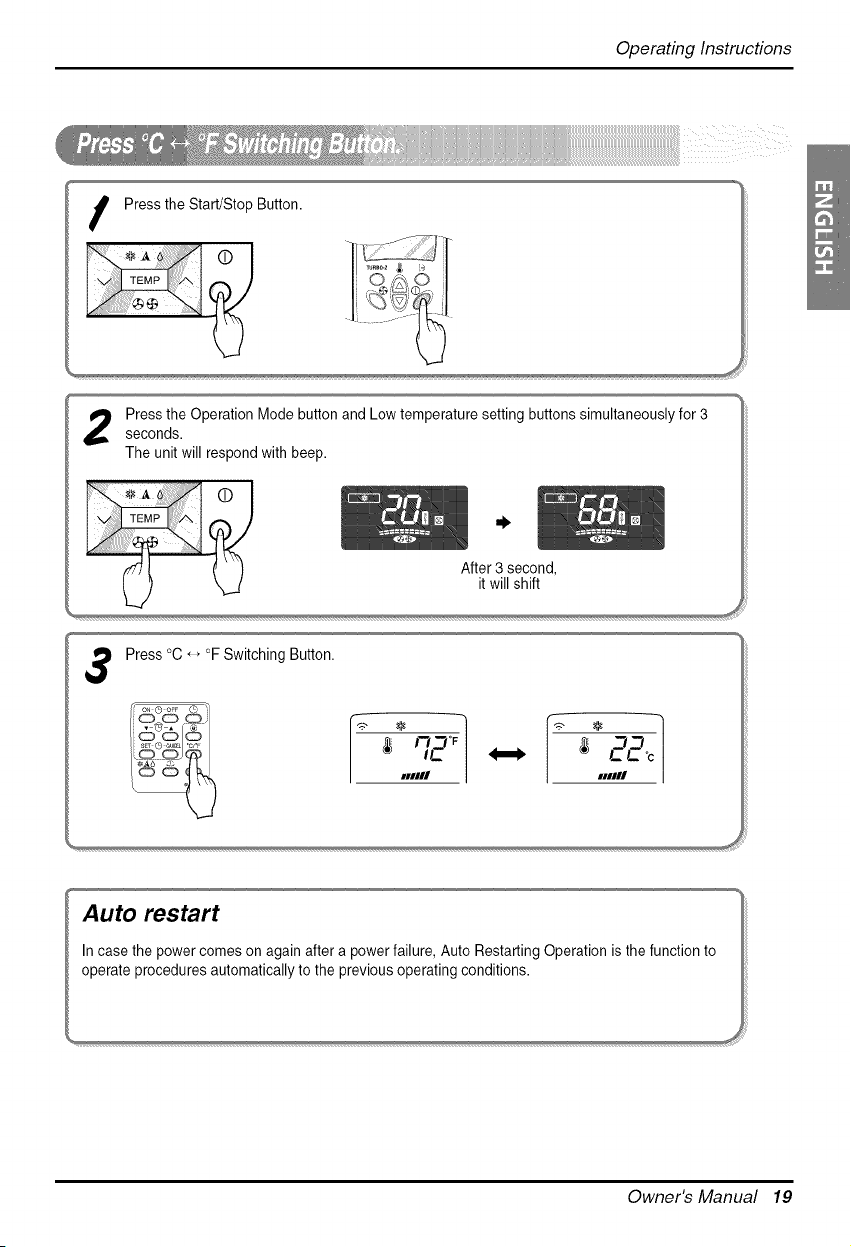
OperatingInstructions
I Pressthe Start/Stop Button.
Press the Operation Mode button and Low temperature setting buttons simultaneously for 3seconds.
The unit will respond with beep.
After 3 second,
it will shift
Press °C, _°F Switching Button.
IC
#1111# xlllll
Owner's Manual 19
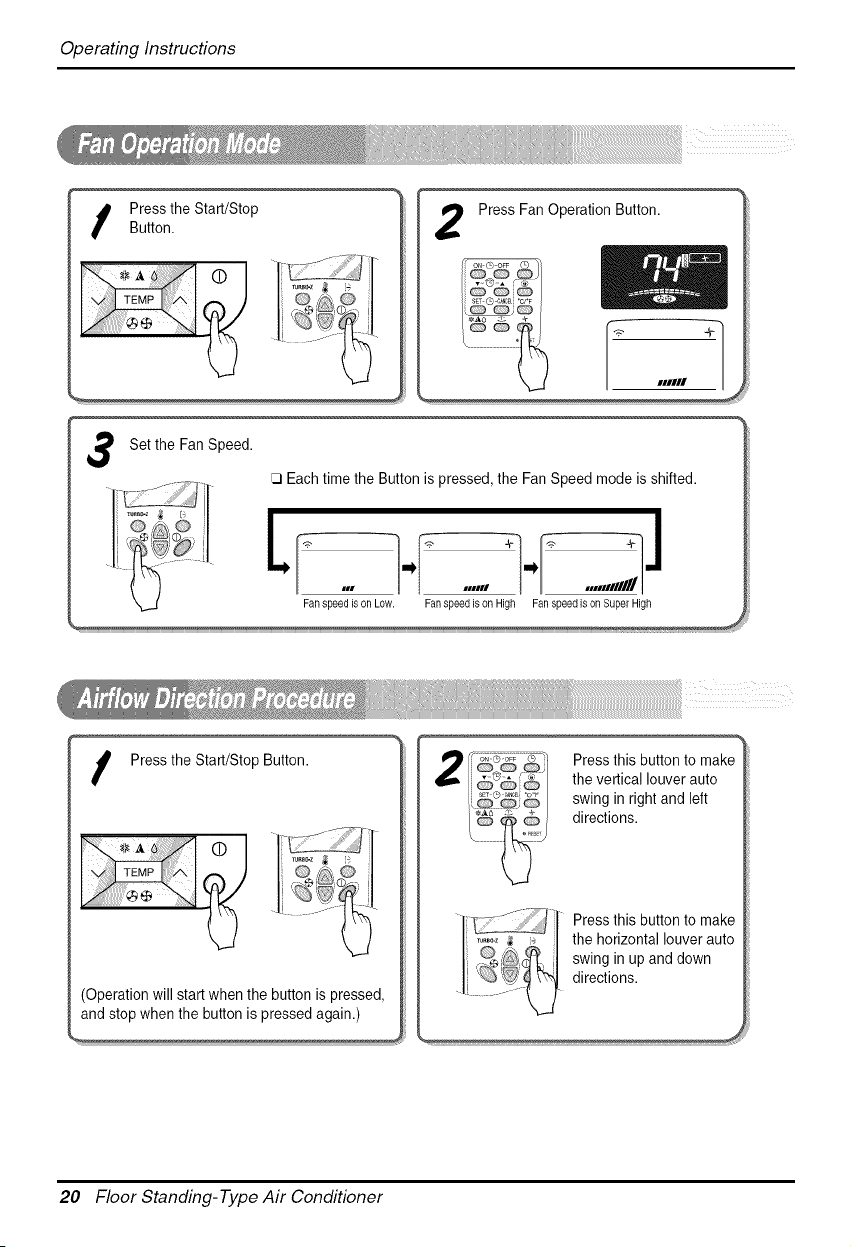
OperatingInstructions
Press Fan Operation Button. ']
3
I ressthe Start/Stop Button.
r 1
j,-,÷', ®_'_
(Operation will start when the button is pressed,
and stop when the button is pressed again.)
Press this button to make
the vertical louver auto
swing in right and left
directions.
Press this button to make
the horizontal louver auto
swing in up and down
directions.
20 Floor Standing-Type Air Conditioner
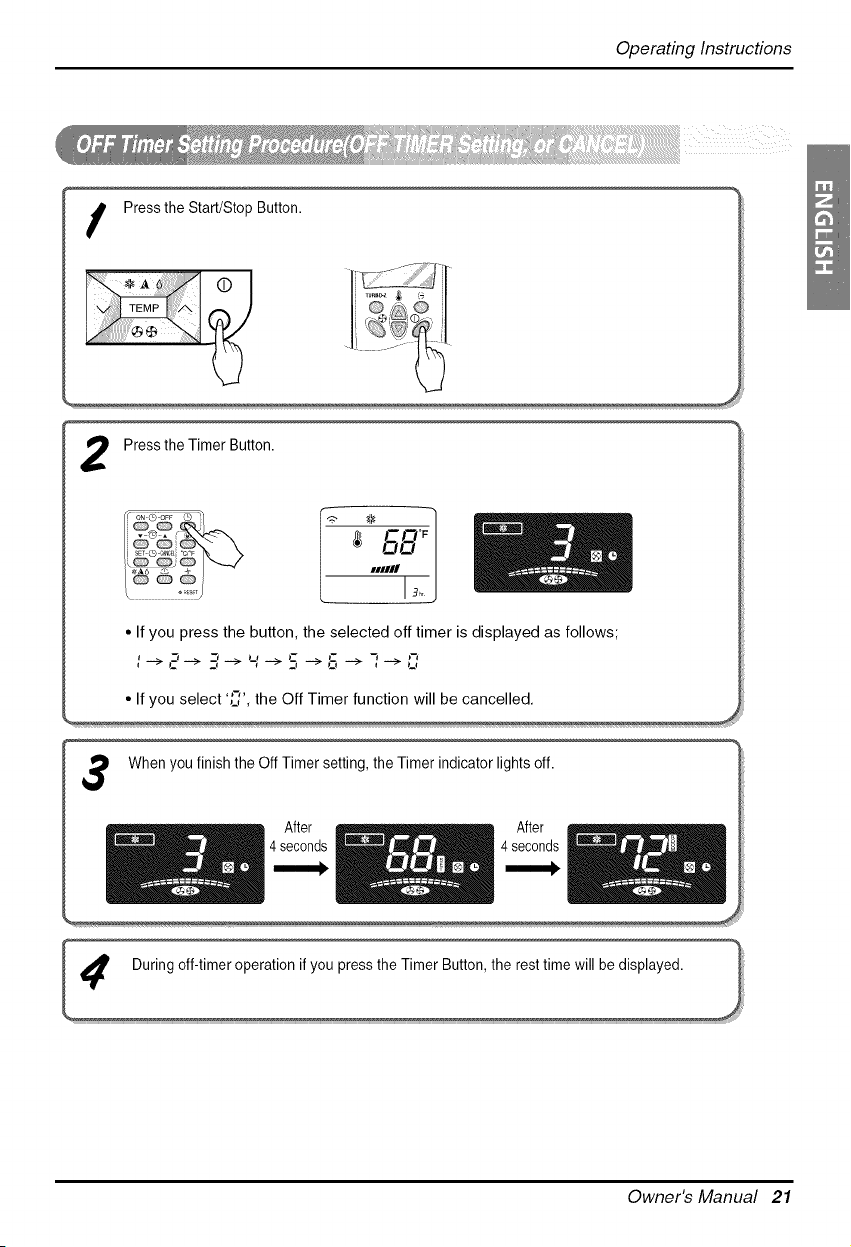
OperatingInstructions
7
Pressthe Timer Button. /
Q @ 3 _ /
• If you press the button, the selected off timer is displayed as follows; --
: -*,-'-* 3-* _' -* S --*S _ 7'4.>
When you finish the Off Timer setting, the Timer indicator lights off. ]
_ 4 sA::rnds _ _ _ 4 sA::rnds _l
Owner's Manual 21
OperatingInstructions
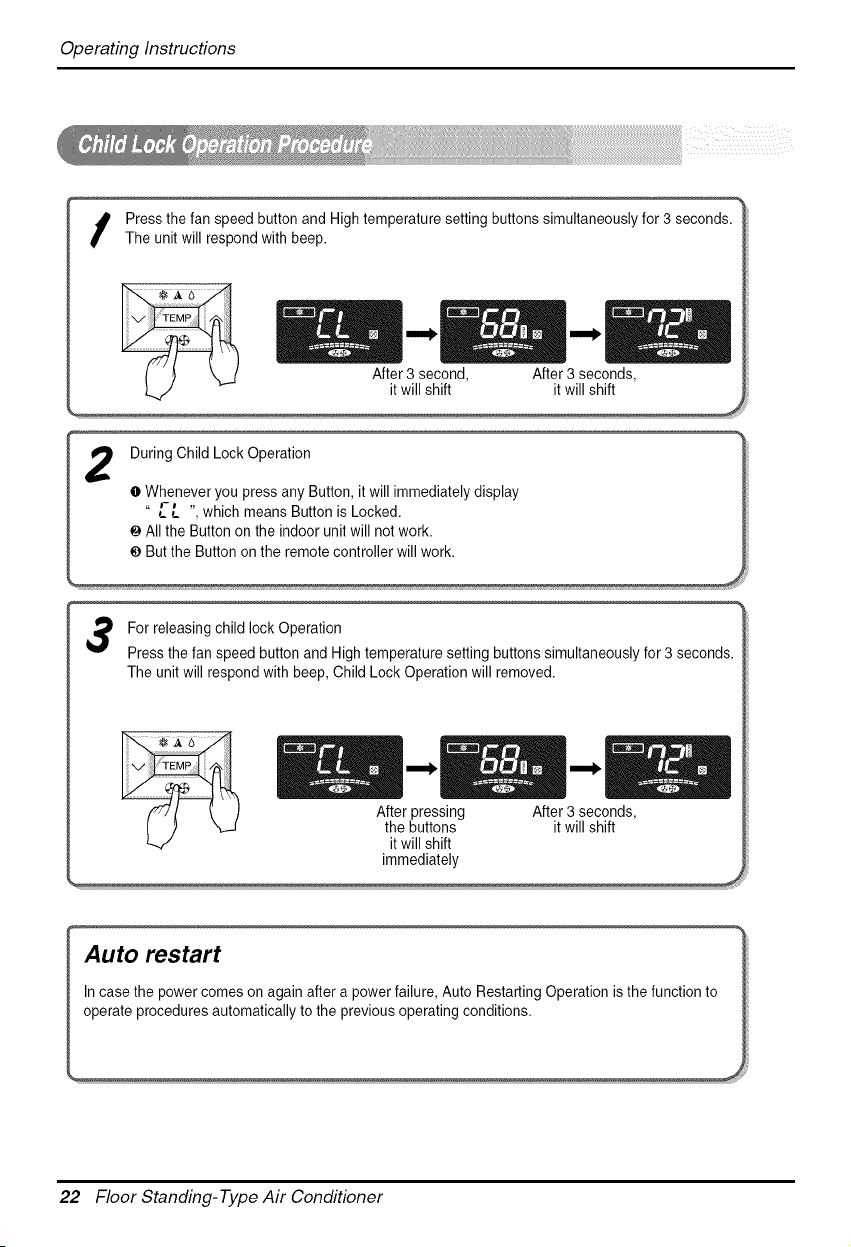
I ress the fan speed button and High temperature setting buttons simultaneously for 3 seconds.
The unit will respond with beep.
During Child Lock Operation
O Whenever you press any Button, it will immediately display
" L-L ", which means Button is Locked.
e All the Button on the indoor unit will not work.
€ But the Button on the remote controller will work.
For releasing child lock Operation
Press the fan speed button and High temperature setting buttons simultaneously for 3 seconds.
The unit will respond with beep, Child Lock Operation will removed.
After pressing After 3 seconds,
the buttons it will shift
it will shift
immediately
'nA(Ua[eOtherep°Sw%rB_mes°n again after a p°wer failure' Aut° Restarting Operati°n is the functi°n t° 1
22 Floor Standing-Type Air Conditioner
OperatingInstructions
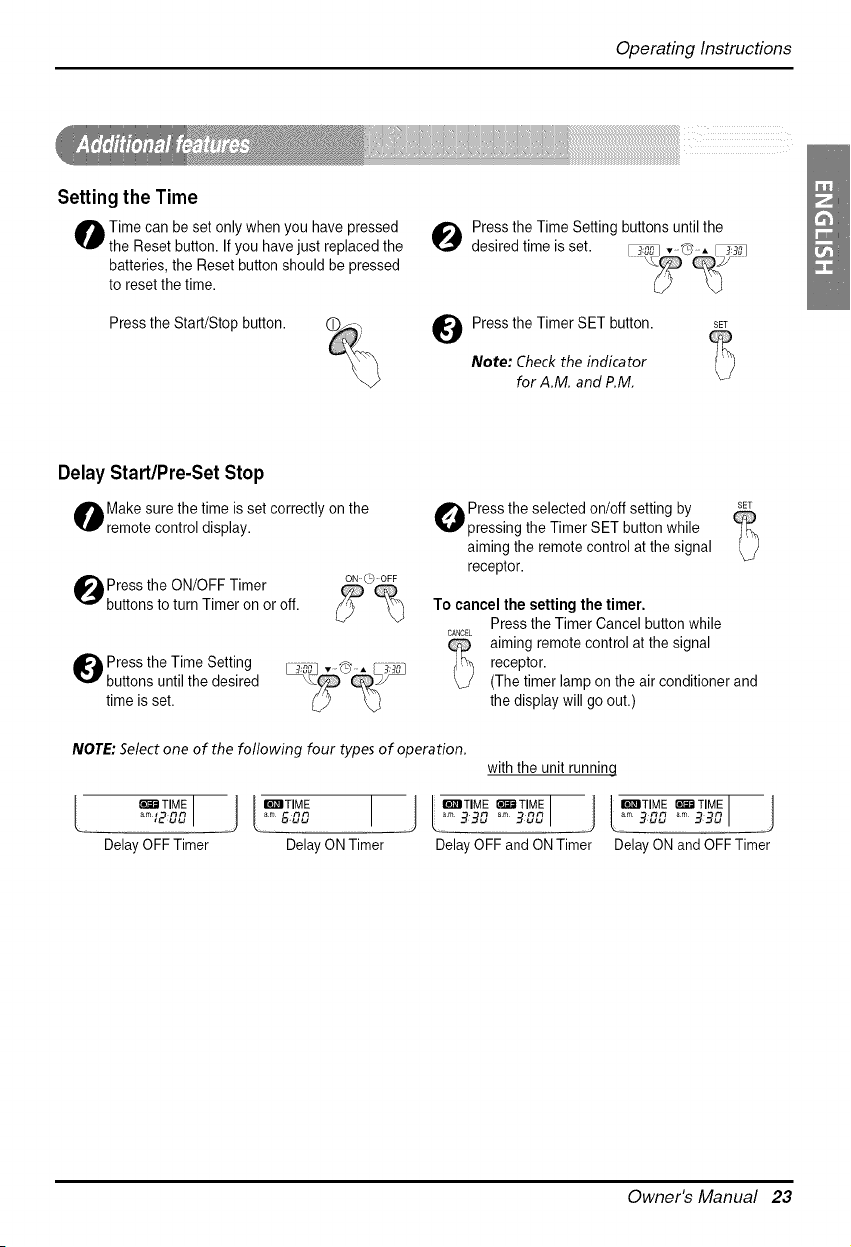
Setting the Time
O ime can be set only when you have pressed
the Reset button. If you have just replaced the
batteries, the Reset button should be pressed
to reset the time.
Press the Start/Stop button.
_1 ress the Time Setting buttons until the
desired time is set.
Press the Timer SET button. SET
Note: Check the indicator (:_)
for A.M. and P.M.
Delay Start/Pro-Set Stop
Make sure the time is set correctly on the
remote control display.
lPress the ON/OFF Timer
buttons to turn Timer on or off.
ON _ OFF
O ress the Time Setting
buttons until the desired
time is set.
O ress the selected on/off setting by SE_
pressing the Timer SET button while
aiming the remote control at the signal
receptor.
To cancel the setting the timer.
Press the Timer Cancel button while
CANCELaiming remote control at the signal
_ eceptor.
(The timer lamp on the air conditioner and
the display will go out.)
NOTE: Select one of the following four types of operation.
with the unit runninq
L r_r_ TIME I _ I IrI_ITIME I J IWSITIME _TIME I ] I'I_ITIME _ir_'_TIME I J
............,2o 1 I 320 .....3001 _ ......3301
Delay OFFTimer Delay ON Timer Delay OFF and O1'4Timer Delay O1'4and OFF Timer
Owner's Manual 23
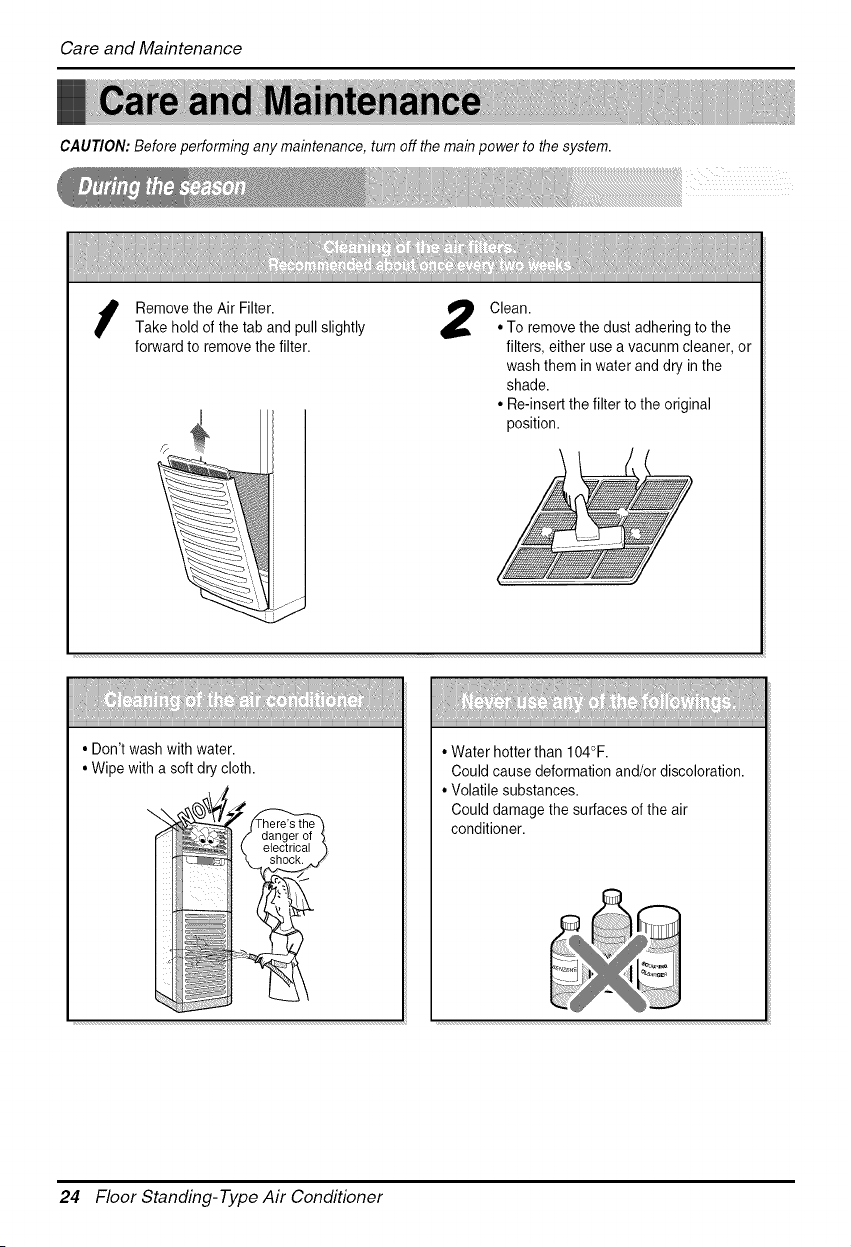
CareandMaintenance
CAUTION: Before performing any maintenance, turn off the main power to the system.
Removethe Air Filter.
Take hold of the tab and pull slightly
forward to remove the filter.
Clean.
• To remove the dust adhering to the
filters, either use a vacunm cleaner, or
wash them in water and dry in the
shade.
• Re-insert the filter to the original
position.
• Don't wash with water.
• Wipe with a soft dry cloth.
trical ")
• Water hotter than 104°F.
Could cause deformation and/or discoloration.
• Volatile substances.
Could damage the surfaces of the air
conditioner.
24 Floor Standing-Type Air Conditioner
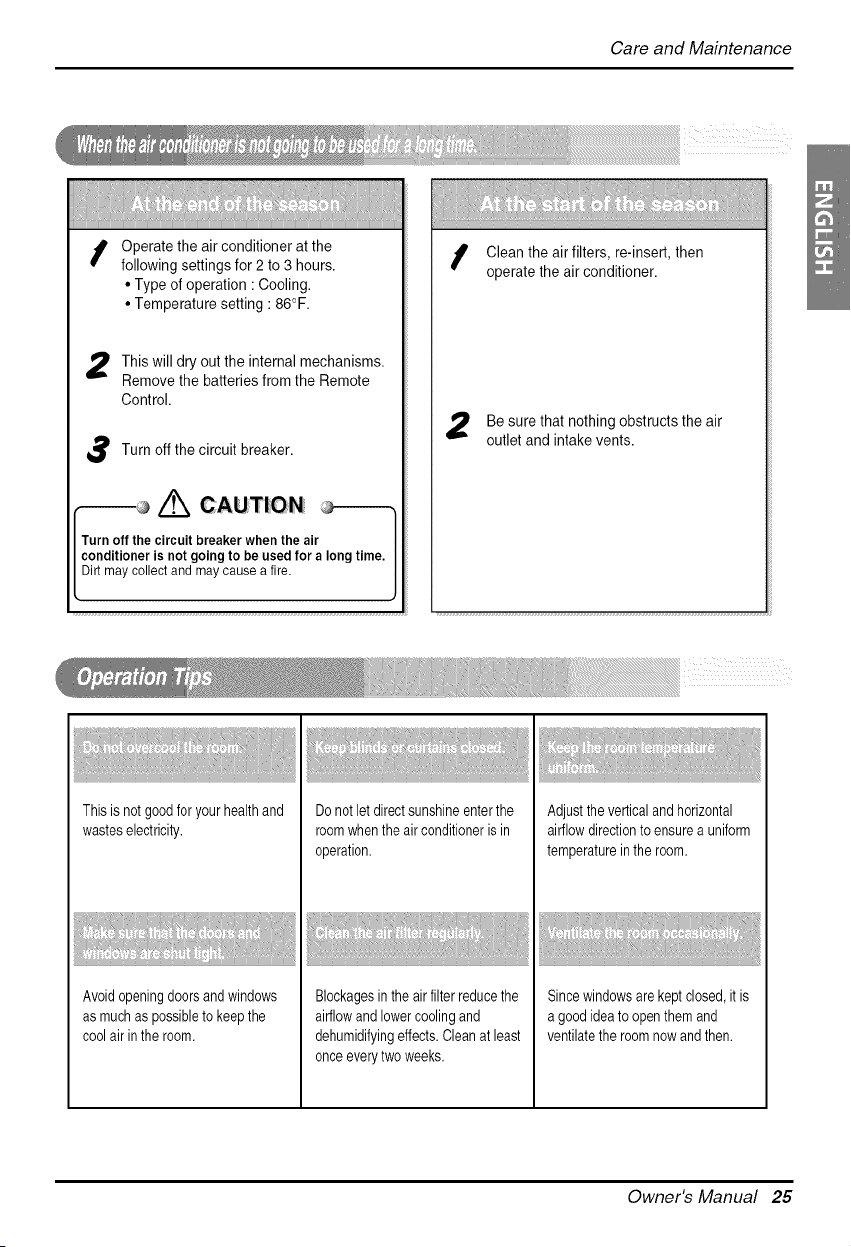
CareandMaintenance
Operate the air conditioner at the
following settings for 2 to 3 hours.
• Type of operation • Cooling.
• Temperature setting : 86°F.
This will dry out the internal mechanisms.
Remove the batteries from the Remote
Control.
Turn off the circuit breaker.
_/'_ CAUTION
Turnoff thecircuitbreakerwhentheair
conditioneris notgoingtobe usedfor a longtime.
Dirtmay collectandmaycausea fire.
Clean the air filters, re-insert, then
operate the air conditioner.
Be sure that nothing obstructs the air
outlet and intake vents.
Thisis not goodforyour healthand
wasteselectricity.
Avoidopeningdoorsand windows
as muchas possibleto keepthe
coolair inthe room.
Do not letdirectsunshineenterthe
roomwhenthe air conditioneris in
operation.
Blockagesin the air filterreducethe
airflowand lowercoolingand
dehumidifyingeffects.Cleanat least
onceeverytwo weeks.
Adjusttheverticaland horizontal
airflowdirectionto ensurea uniform
temperatureinthe room.
Sincewindowsarekeptclosed,it is
a good ideato openthem and
ventilatethe roomnowand then.
Owner's Manual 2E
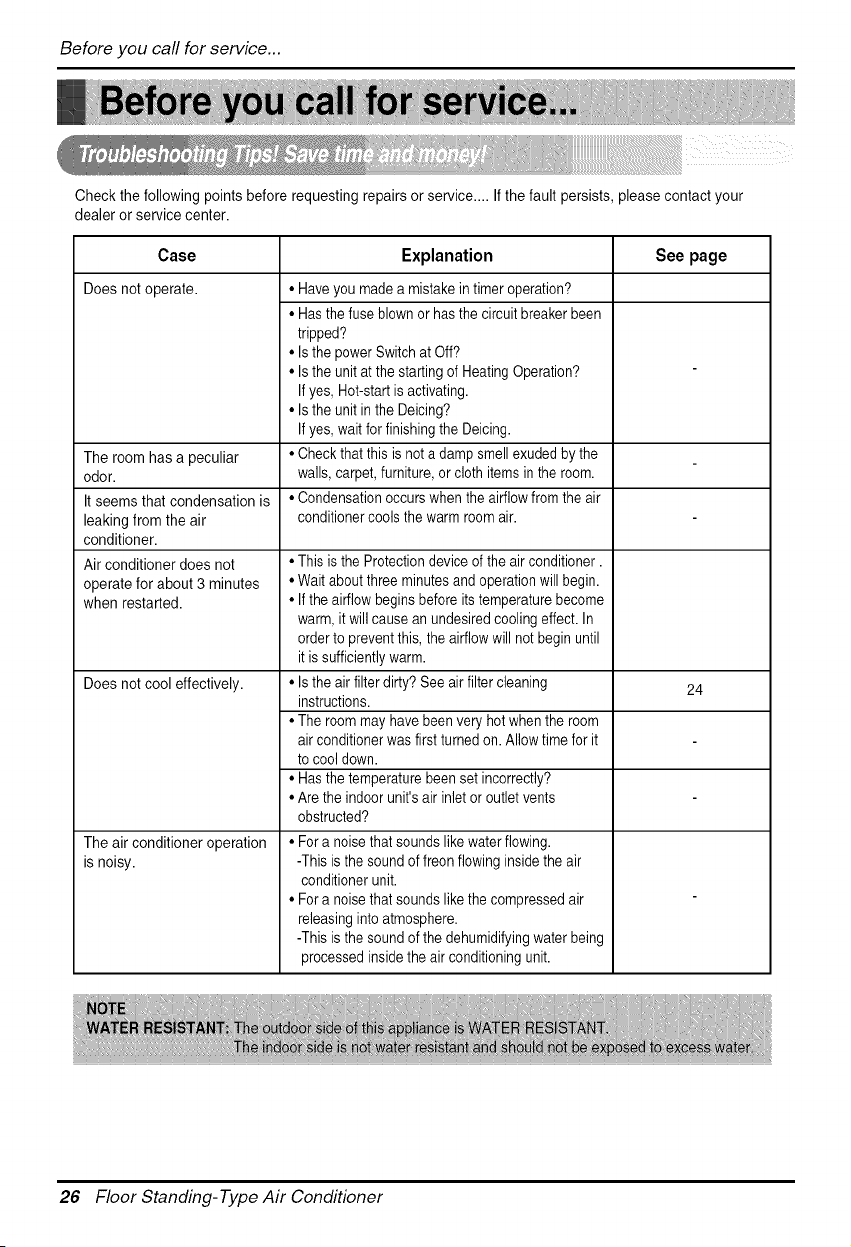
Beforeyoucallforservice...
Check the following points before requesting repairs or service.... If the fault persists, please contact your
dealer or service center.
Case Explanation See page
Doesnotoperate.
The room has a peculiar
odor.
It seems that condensation is
leaking from the air
conditioner.
Air conditioner does not
operate for about 3 minutes
when restarted.
Does not cool effectively.
• Haveyou made a mistake in timer operation?
• Hasthe fuse blown or has the circuit breaker been
tripped?
• Is the power Switch at Off?
• Is the unit at the starting of Heating Operation?
If yes, Hot-start isactivating.
• Is the unit in the Deicing?
If yes, wait for finishing the Deicing.
• Checkthat this is not a damp smell exudedby the
walls, carpet, furniture, or cloth items in the room.
• Condensationoccurs when the airflow from the air
conditionercools the warm room air.
• This is the Protection device of the air conditioner.
• Wait about threeminutes and operation will begin.
• If the airflow begins before its temperaturebecome
warm, it will cause an undesiredcooling effect. In
orderto preventthis, the airflow will not begin until
it is sufficientlywarm.
• Is the air filter dirty? See air filter cleaning
instructions.
• The room mayhave been very hot when the room
air conditioner was first turned on. Allow time for it
to cool down.
• Hasthe temperaturebeen set incorrectly?
• Are the indoor unit's air inlet or outlet vents
obstructed?
• For a noisethat sounds likewater flowing.
-This is the sound of freon flowing insidethe air
conditioner unit.
• For a noisethat sounds likethe compressed air
releasinginto atmosphere.
-This is the sound of the dehumidifyingwater being
processed insidethe air conditioningunit.
The air conditioner operation
is noisy.
24
26 Floor Standing-Type Air Conditioner
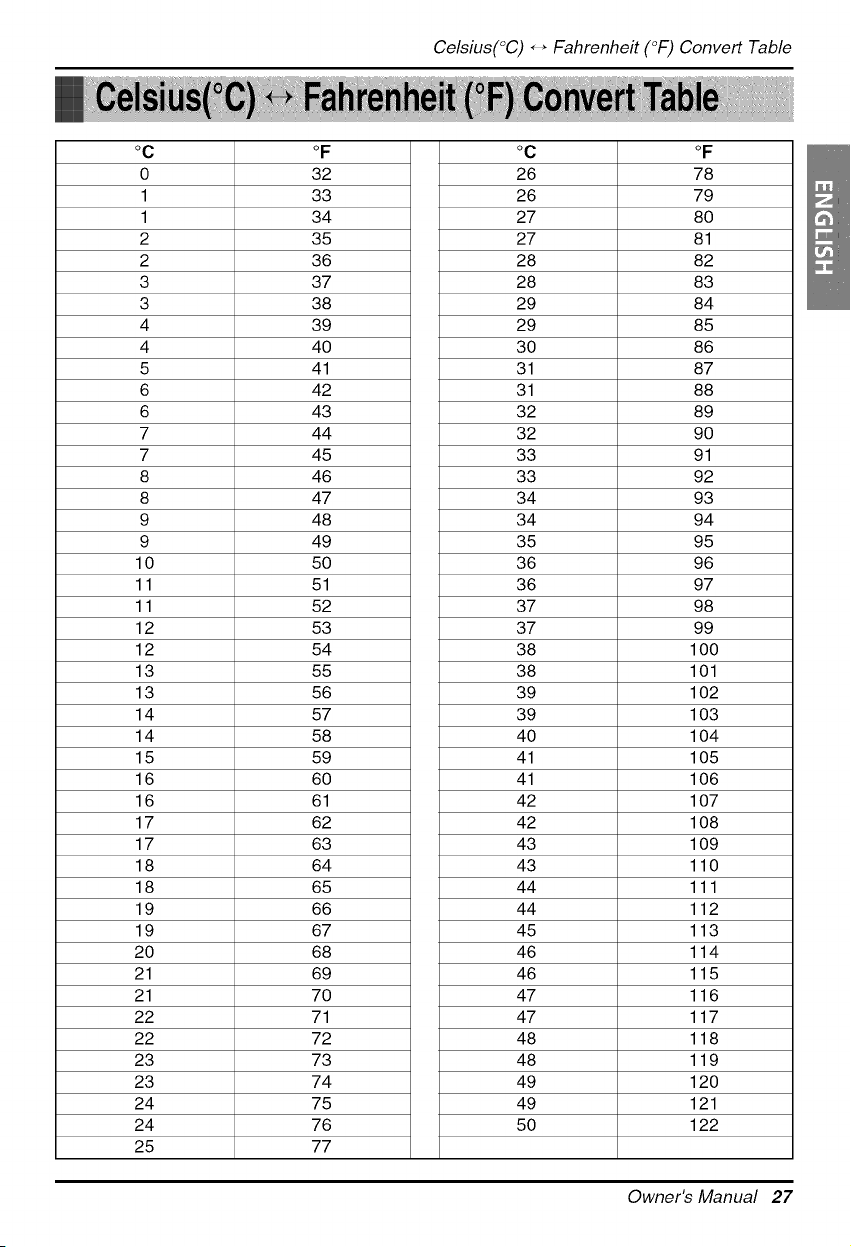
Celsius(°C)_ _ Fahrenheit (°F) Convert Table
oc oF oc oF
0 32 26 78
1 33 26 79
1 34 27 80
2 35 27 81
2 36 28 82
3 37 28 83
3 38 29 84
4 39 29 85
4 40 30 86
5 41 31 87
6 42 31 88
6 43 32 89
7 44 32 90
7 45 33 91
8 46 33 92
8 47 34 93
9 48 34 94
9 49 35 95
10 50 36 96
11 51 36 97
11 52 37 98
12 53 37 99
12 54 38 100
13 55 38 101
13 56 39 102
14 57 39 103
14 58 40 104
15 59 41 105
16 60 41 106
16 61 42 107
17 62 42 108
17 63 43 109
18 64 43 110
18 65 44 111
19 66 44 112
19 67 45 113
20 68 46 114
21 69 46 115
21 70 47 116
22 71 47 117
22 72 48 118
23 73 48 119
23 74 49 120
24 75 49 121
24 76 50 122
25 77
Owner's Manual 27
Memo
28 Floor Standing-Type Air Conditioner

