website lmp:/i_ ww.1
Q • •
Air Conditioner
and thoroughly
,airconditioner.
future referent, after
FOR YOUR RECORDS
Wrffe the m_eli and _r_l nu_rs hers:
Model #
_rial #
You can find them o.na _abel!on the side of each un_.
_aler's Name
Da_ Purchased
Ill Staple your receipt to this. _ inthe eve_ .you need
it to prove d_te of purchu_ or for warranty issues.
READ TH!S MANUAL
[inside you will fi_ many heipf_i hin_s on how to use
and maintain your air co_itio_r pr_rlly Just a littt_e
preventive care on your pa_ can _e you a great deai
et time ar,d men,uy o.ve_the lile of yeu_ air cien.di|io_|@r.
You'll find many answers to common problems in 'the
chart of troubleshooting tips_ ff you review ou_ cha_ of
Troub_eshoot_ngi Tips first, you may r_t need to call
fer _rv_e at ulL
PRECAUTION
- Contact the a_horized service technician for
repair or malntensnce of this unlt.
• Contact the insta|ler for installation ot _is unit,
• The air conditioner is not intended for use by
you_ children or Inwllds without supervision,
• Young ehil,dren should _ su_rvised to e_sure
that they do not pi_y w_h the air condi_o_err..
• When the power cord is to be replaced,
replacement work sh_ll be performed by
_uthorlzed p,erso._nel only _sin_ only genuine
replacement _s.
• |_stal|atio_ work m_st be per|ormed i_
_ccordance with the National Electric 'Code by
q_lified snd suthonzed _reonneil _ly.
2 Room Air Conditioner
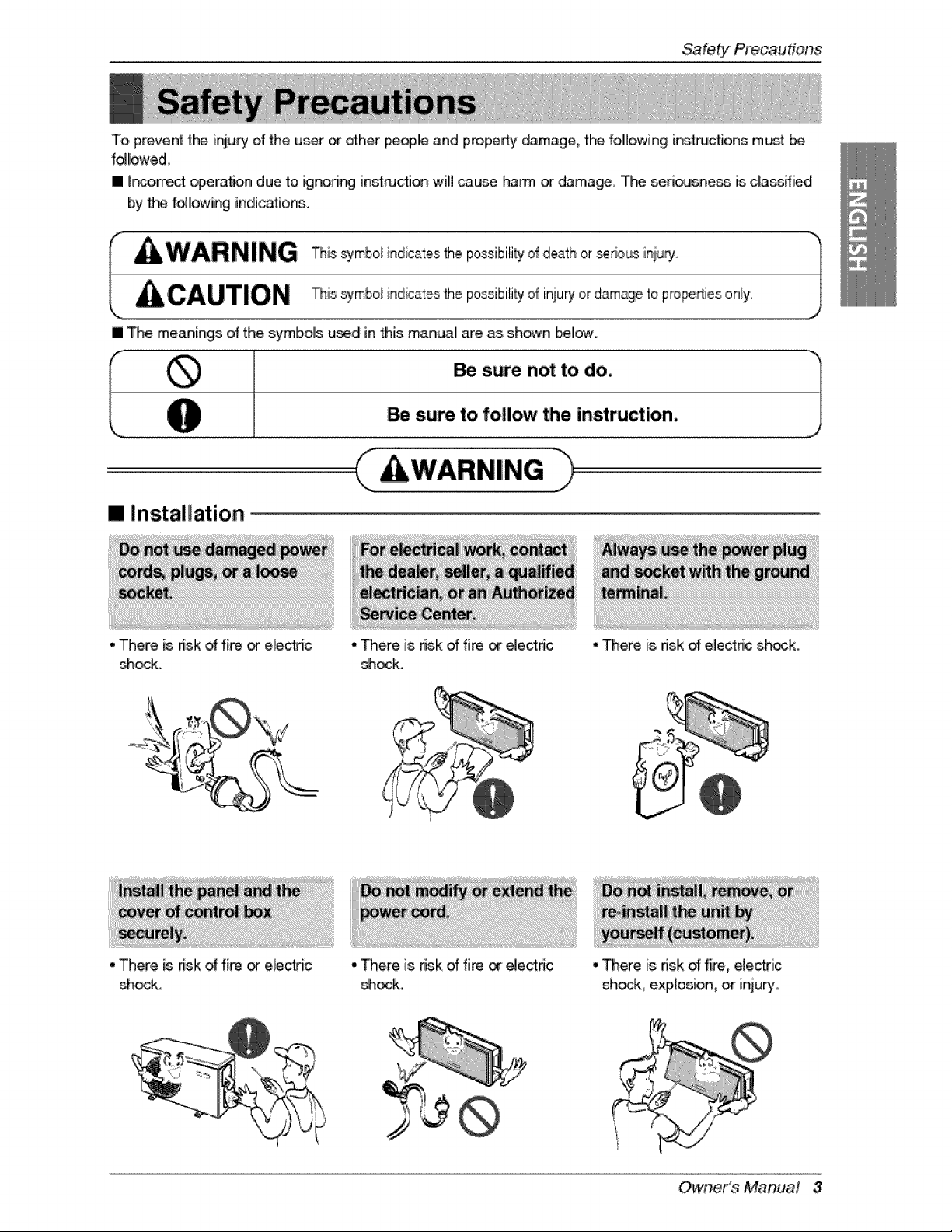
To prevent the iniu_ of the u_r or other pe_,le and property _mage, the fo,llllowingi_4ructions m_t be
followed
[] i_orrect _erafion due to ignori_ inst_c_io_ wili cause, harm or damage, T_ sefi_sness is cfassffied
by the following indications.
I WARNING This symbo_indicates'thepossibili_ ofd,eathorseriousiniury
J
CAUTION Thi,0y_boliodi0o_o0thepo,,ibili_jofi_iu_'orda_ago_op_opo,io,.0_ly.
[] _e meanings of the symbols u_d in this manua_ are as shown I_.
_, sure not to do. "1
J
su_ to follow the instruction,
[] Installation
• There is risk _: fire or ele_ic
shock.
• There is n_lko_fi_. or electric
shock,
•'There is risk of fi_ or el,ec4dc
_ock.
• There is. nsk of fire or electdc
_ock,
•There is risk of:elect_c sh_k,
• There is risk _ fire, electric
shock, explosion, oir iniuR/,
Owner's Manua! 3

Sa'te_ Precautions
° Sharp _ges could cause injury.,
Be espedaHy careful of t_
case e_es and t_-__ns. on Me
_n_nser and evaporator.
• There is dsk of fire, ele_ic
shock, expl_ion,, or iniu _.
° iltmay _u_ injury, accident, or
dama_ fo t_ product,
,o,,
°ff the base oollapses_the air
_nditioner couldfall with it _using
propertydamage_pr_u,_ failure,,
a_d _rsona_ it_ju_,
m Operation
• There is dsk of fire or electrical
shock.
, Moi_ure may condense and
wet or dama_ furnishing&
• There is dsk of fire _ electric
shock.
- There,is dsk of fire or electrical
s_hock.
,t
4 Room A# Conditioner
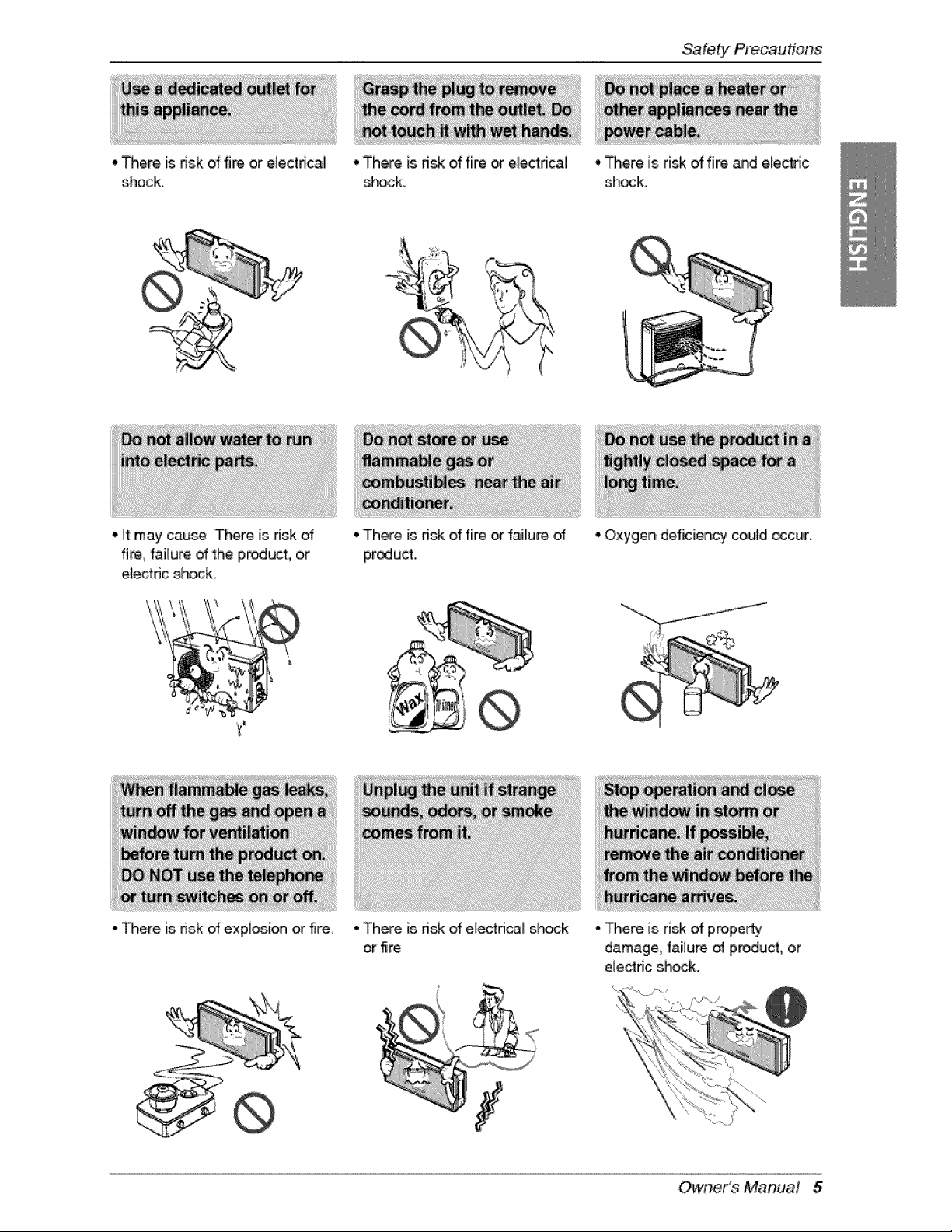
• There iisdsk of fire or e_ectdcal
shock.
•There is ri_ of fire o: e:ectrical
s_¢k.
Safety Precautions
off may cau_ There is risk of
fin, _ailureofthe produ_, or
e_ectr_cshock,
• _ere is.risk of expl_ion or fire,
• There is risk of fire o_f_llu_
pr_uct..
• There is risk of electrical s_ck
or fire
• There is risk of fire and e_ectric
shock.
°Oxygen deficiencycouldoccur,
J
J
° _ere is risk of prope_
damage, failure _ product, or
electdc shock.
Owners Manual 5
Sa'fe_ Precautions
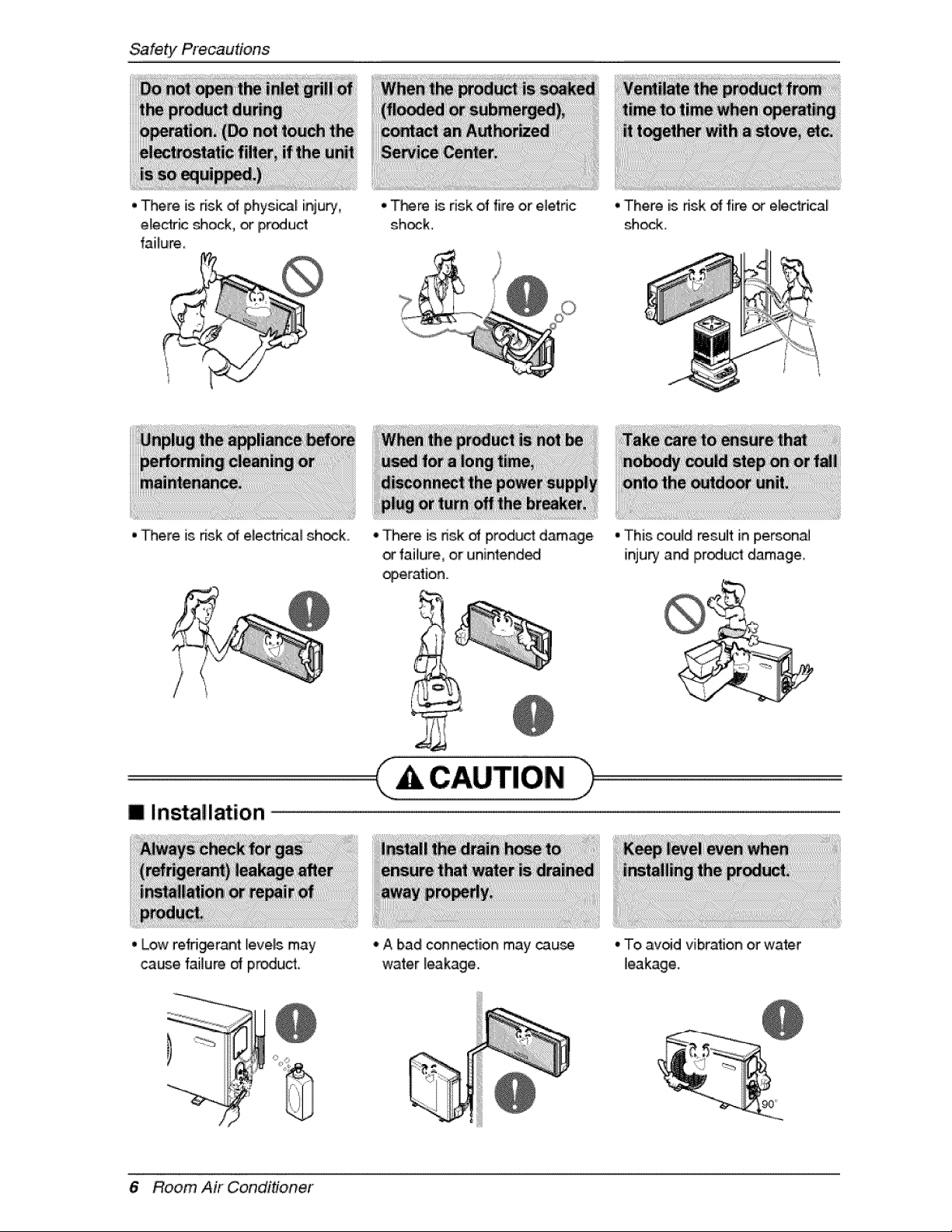
• There is nsk _ ph'ysi_l injury,
elecJric _ock, or iPr_uct
failure_
•There is nsk _ electnca_ shock_
•There isriskofprodu_ damage
failure,or unintended
_eration..
m Installa4ion
• Low refdgeran4 _eveUsmay
_use failure of pr_uct
• A bad conne_iion may cau_
water _eakage.
• There is ffsk of fire _ e_ec_ical
sheik,
• 'This could result in pJersona_
injurt and product damage_
• 'Toavoid vibration or water
leakage.
6 Room Air Conditioner
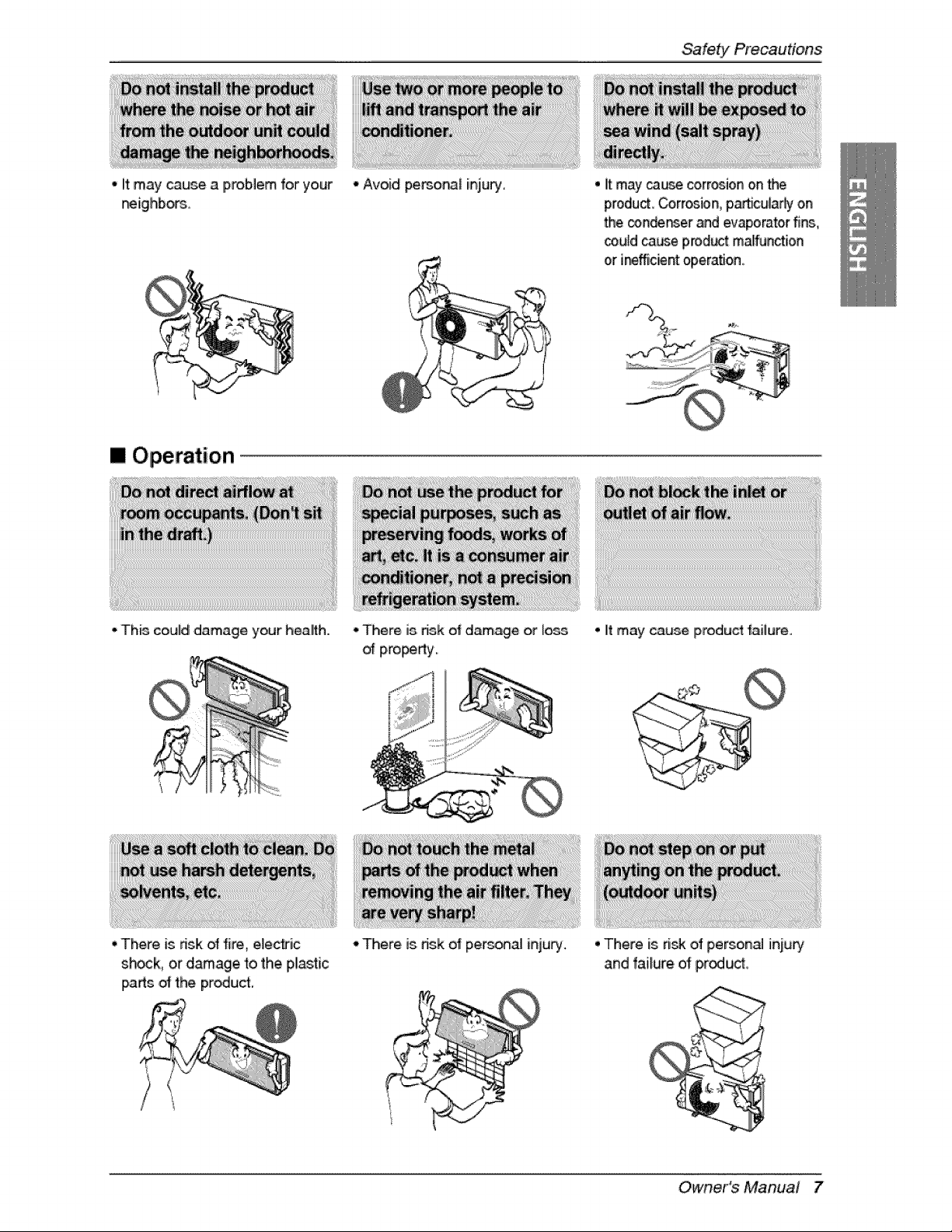
• it may cause a problem for your
f_ighbors,
"Avoid pemo_l injury
Safety Precautien,s
• it may cause corrosion on the
product Corrosion, p,a_cularhj on
the conder_er and evaporator fins,
ceuld cause product mal_nction
or i_fficient operation.
[] Operation
- This could ,damage,your health. - There, is, dsk of damage or loss
of pi_i_rty,,
. it may cause product failure,,
• There is dsk of fire, e,_ec_ic
s_,ck, or damage to the, pllastic
i_rts _ the proud,
•' There is dsk of per._r_al injury. • There is ri_ of person_ injury
and failure of p,rodu,_,,
r
Owner's Manual 7
Sa'te_Precautions
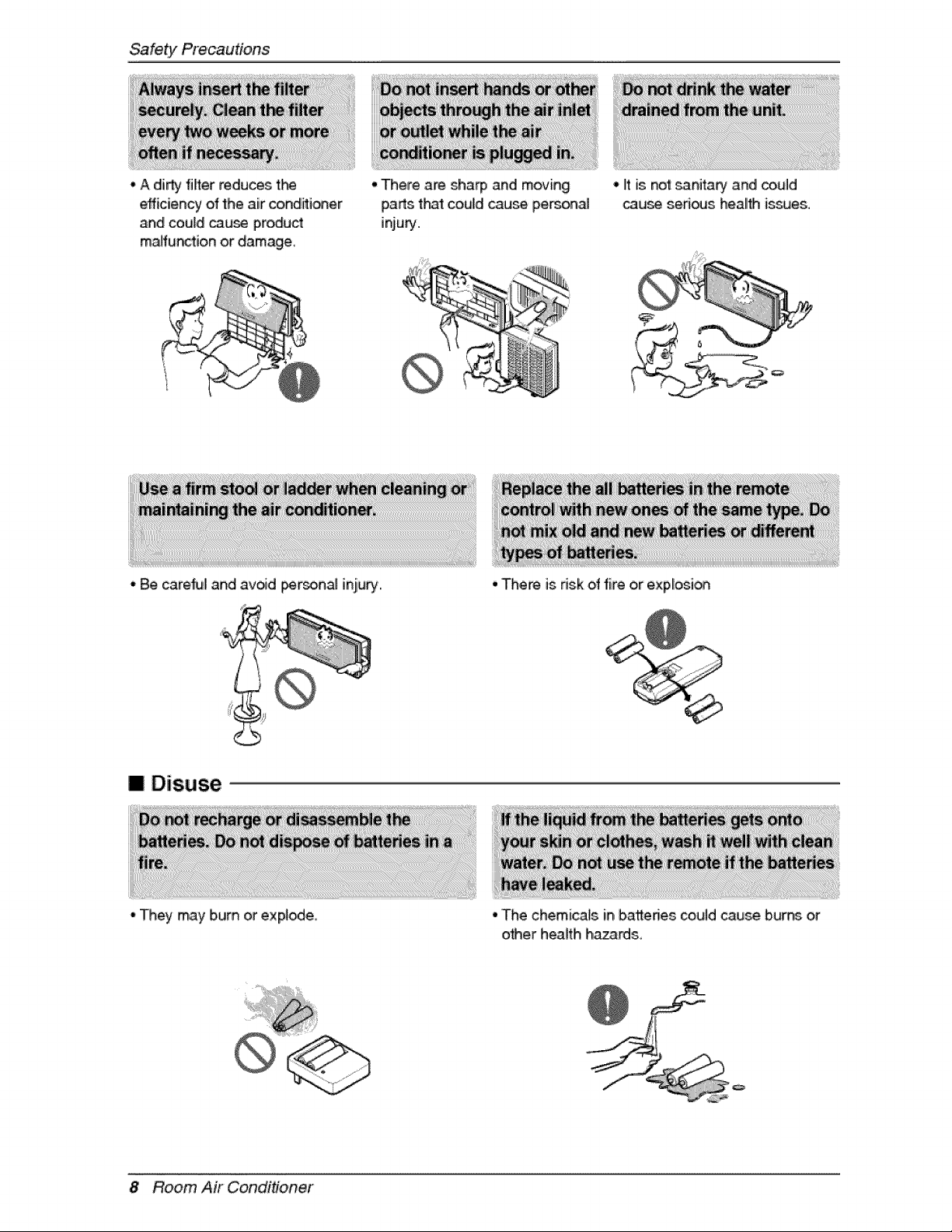
, A dirty lifter reduces t_
efficien W of fhe air conditioner
and could cau_ product
malfunction or damage
•Them are sha_ and moving
parts t_t could cause personal
inju_.
- Be careful and avoid i_rson_ inju_.,
I Disuse
- They may bum or explode.
• It is no'_sanita_ and _uld
cau_ sed_s heallth is_es.
•Them is risk of fire or explosi_
• The chemicals in batteries could cause burn_ or
o_er heaffh ha_rds
8 Room A# Conditioner
Prior to O_ration
1, Contact an installati_ specialist for installation,
2, Plug in the power plug properly,
3,..Use a dedicated circuit,
4. Do not use,an extensi_ _rd.
5. Do not s_rt/stop operation by p,Juggin_unplugging the power cord.
6, If the co,rd/p,fugiis.damaged, _pilace it with only an authorized replacement pa_i,
1.13eir@ exp_ed to,dired airfl_J for a Io,ng time may _ hazard,s to your heaffh. Do n@ exp_e
occupants, pets, o,r plant_ to direct air[low for a Ilongtime.
2, Due to the p_sibility of oxygen deficiency, ve_ilate the _m when using the applia_e together with
sto_es or o#'_r heating ,devices.
3..Do not use 'this air condffioner for non-specified special p,u_ose (e.g. pre_rvi_ precision devices,
food, pets, plants, or a_ obiects).. Such use may d_age your prope_ies.
1. Do not touch the metal parts of 'the unit when removing the filter. Injury can o_ur.
2..Do not use water to c_ean inside the air condffioner. Exp_ure to water can destroy tlk_ insulation,
leading to e_ectdc sh_k.
3, When cleaning the unit, first make sure, that the,power and breaker are turned off, The, fan rotates _ a
very high speed dudng operation, There is a p_s.ibility of injury if the unit's, pc_,_eris triggered whi_e
cteaning inner pa_ of the unit,
For repaiir and main_enan_, oon_ct your authorized _P¢ice dealer.
Owner's Manua! 9i

Introduction
This symbol alerts you to, the risk of el_tric shock,
This symbol alerts you to, hazards that may cause harm to the
air conditio, ner,
This symbol indicates sp,_iall notes,
WARNING: This ap,plia_e sh_lid _ instali_ in accordance with n_io_l wiling
regul_ions. Dis guide a_s _ a guide to help to exp|ain _oduct features.
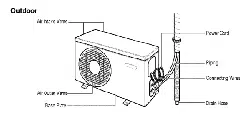
Air inlet
FrontPanel
Air Discharge
P_#,'erCord
AirOutletVents.
_ase i
IDrainHose
10 Room Air Conditioner
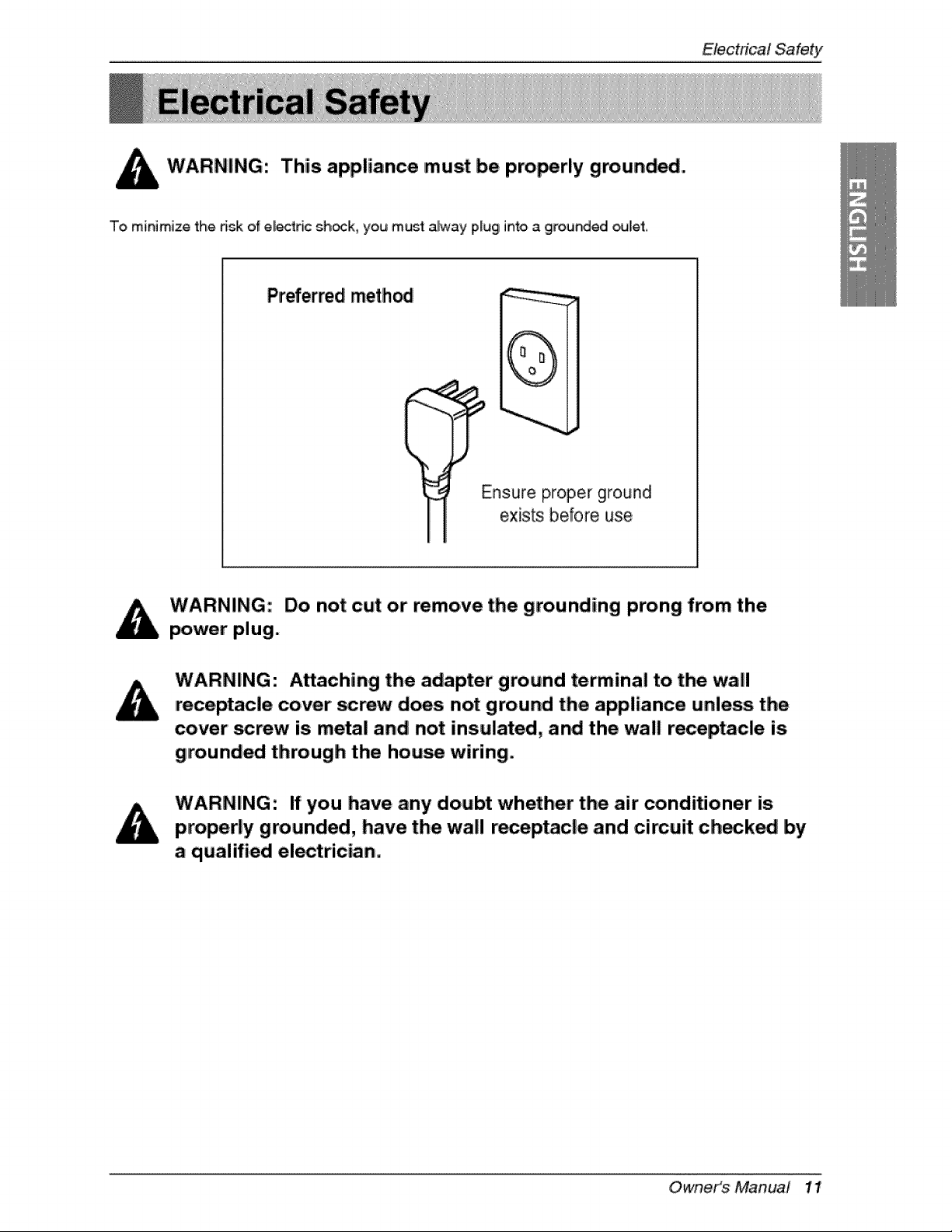
This appliance must be pro_rly grounded.
To minimize the dsk of el_ric sh_k, you musl alway plug into a grounded _let,
Preferred method
i
Ensure proper ground
exists before use,
Do not cut or remove the grounding prong from the
power plug.
Attaching the adapter ground terminal to. the wall
receptacle cover screw does not ground the appliance unless the
cover' screw is metal and not insulated, and the wall recep_cle is
grounded through the hou_ wiring.
If you have any doubt whether the air' conditioner is
properly grounded, have the wall receptacle and cimuit check_ by
a qualified electrician.
Owne,fs Manua/ 1!
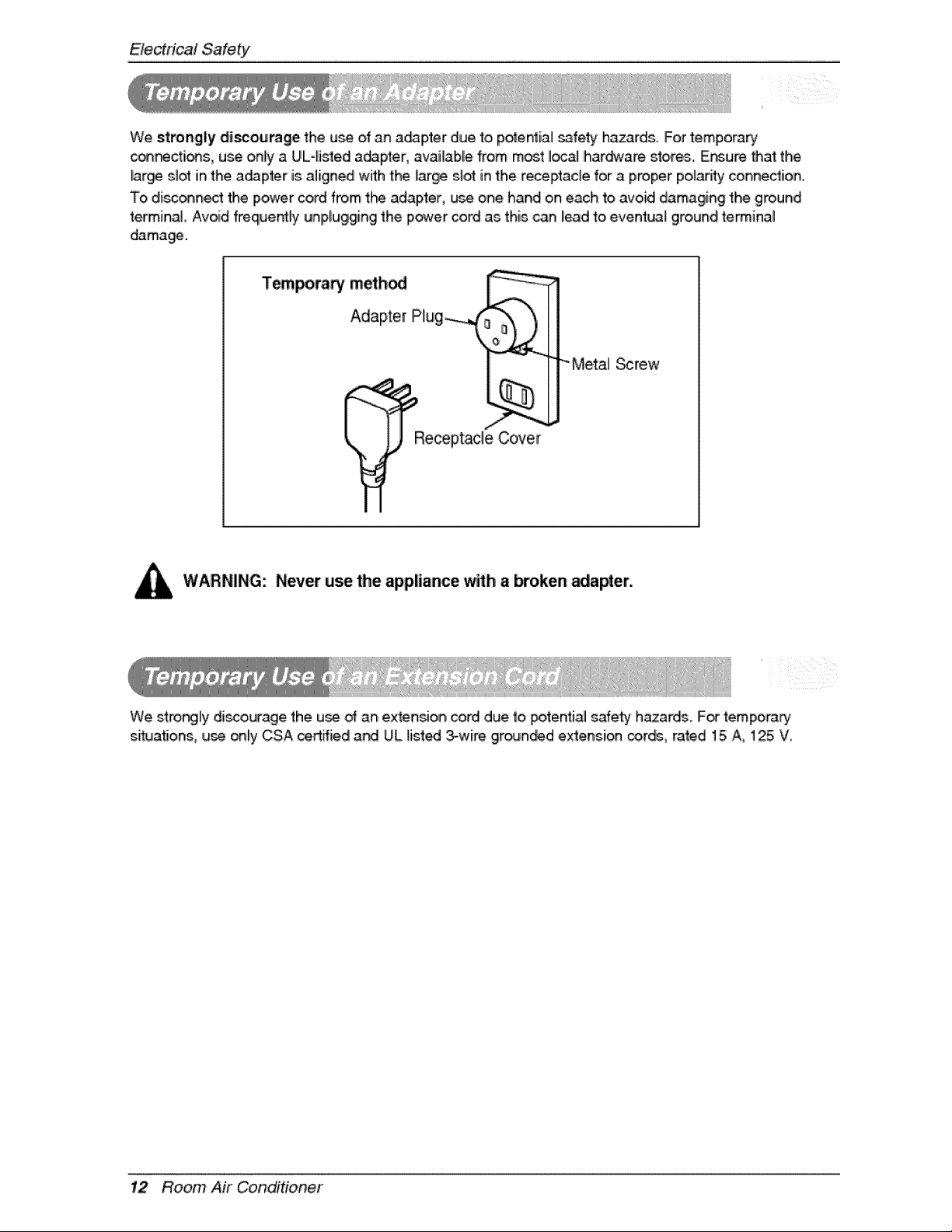
We strongly discourage the u_ of an a_pter due to potentiall _fety hazards. For tempora_
c_cti_s, use only a UIE4isted a_pter, available from most IOrCaJIhar_are stores.. IEnsure that the
lar_ s_otin the a_pter is aligned with the large slot in the receptacle for a proper po_adtyconnexion,
To disc_nect the power cord from t_ adapter, use one hand on each to avoid damaging the ground
terminal Avoid freque_ly unpUuggingthe power cord as this can lead to event_ ground retinal
damage.
T_poraw method _ _
Adap,te r [P_ug_ "_ m'_-'-_)l
R[_eceptacleCo,ve_'_r
" Me,_] _rew
WARNING: Never use the appliance with a broken _apter.
We stro_ly discourage the u_ of an extension cord due to _tenti.a_ safe_ hazards, F_ temporarj
situa_ons, use only CSA certified a_ UL lis.t_ 3-wire grounded extension _,r_, rated 15 A, 125 W
12 Room Air Conditioner

OperatingInstructi,ons
1, Remove the bakery cover by pulling it:according to the arrow
dire_ion.
2. inse_ new batteries, making sure ti_.3tthe (+) and (-) d battery are
ir_tal_ corredy.
3. Reattach the cover by sliding it back into Ipos_ion.
U_ 2 AAA(l1.5voP,)batteries.
Do not _.._ereci_rgeab, le b_eries.
• The remote cor_r_[er may be stored by mo,unti_
it on a wall.
• To _,erate t_ room ,air cond'itio_r, aim t_
remote controller at the sig_[ recep,t_.
Signal receptor
Receives the s_nals from the remotecontroIler.(Siignal receiving sound: two sho,_beeps or one bngl _p,.)
Operation indicating lamps
On/C_f Lights up during the system o_ra_on
S#ep M_e Ligh_ up duringSI_p Mo,_ Auto o,pe_ation.
Timer Lights up during Timer operation,
Defro_ M_e Lights up duringDefrost: Modteor "Hot
Sta_ o,_ra#on (Heat pump m_e_ only),
Outdoor Unff Ligh_ up during outdoor unit operation.
Operation (Cooling m_el only)
NEO,Plasma The function illustratesi_ dynamic m_e _ using a mu_ple lighting system.
*Hot Start o_ratlon: Sto_ the indoor fan in Heating Operation to, prevent cold air f#om b!_ing out from unit,
Owneit_S Manual 13
OperatingInstructions
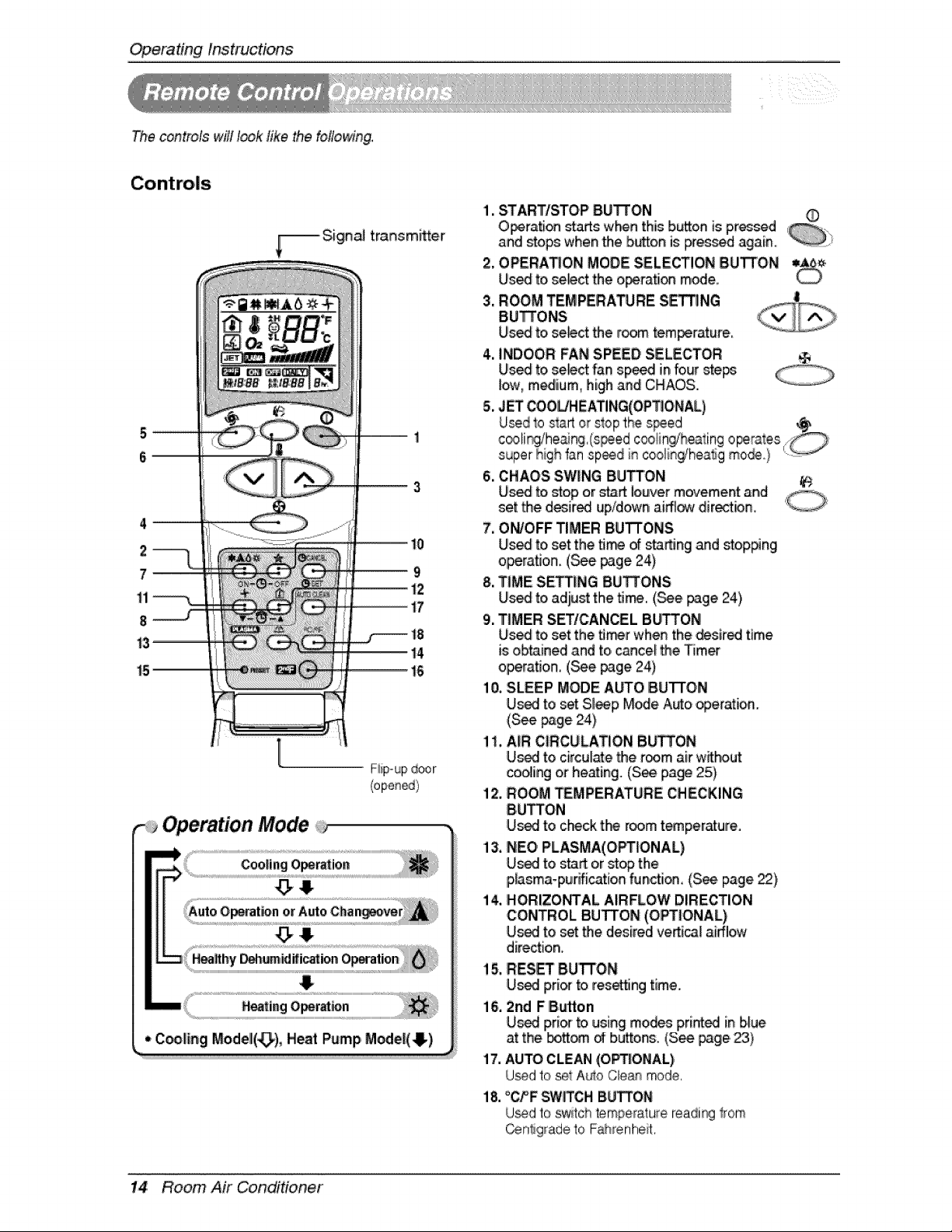
The controls will look like the following,
F:iip-up door
Operation Mode
$
1, STARTISTOP BUI_ON
O_ration starts when this bison is p,r_sed
and Mops whenthe button is Fessed again, i_
2, OPERATION MODE SELECTION DUll'tON
Used to se_ct the o_tation m_e_
3. ROOM TEMPERA_RE S_NG
BUTTONS
Us_ to,se_ct the r_m tem_rature,
4, INDOOR:FAN SPEED,SELECTOR
Us_ to,se_ct fan sp_d Jnfour steps
low, m_ium0 high and CH_OS.
5, JET COOL/HEATING(OPT_O,NAL)
6. CHAOS SWING BUTTON
Uis_ to,stop or start louver movement and
set the d_ir_ up/down ai_ dire_ion,
7. ON/OFF TIMER BUTTONS
Us_ to,set the fl_ of starting and stop#ng
o_rati,on. (_e page 24)
8, T_MESETTING BUTTONS
Us_ to,adiust the fl_. (._e page 24)
9, T|MER SETICANCEL BUTTON
Us_ to,set the fl_r when the desired time
is obtained and to, c_ce! the Timer
operation, (_e page 24)
10, SLEEP MODE AUTO BUTTON
Used to set Sl_p M_e A_o operation.
(S_ page 24)
1I, AiR CIRCULATION B_ON
Used to circul_e the room air w_hout
coo_ingor he_ing. (See page 25)
12. ROOM TEMPERATURE ,CHECKING
BUTTON
U_ to c_ck t_ room t_peraturre,
i3, NEO,PLASMA(,OPT_ONAL)
U_ to start or stop the
p,Asma-purification function, (See,page _),
i4, HORIZONTAL AIRFLOW DIRECTION
CONTROL BUTTON (OPTIONAL)
Used to set the desired veAical airflow
direction,
15, RES_ 8U"R'ON
U_ £,ri_ to resting time.
l& 2nd FButton
U_ pri_ to using modes printed in b,lue
at the bott_ _ buttons, (See p3ge._)
17. AUTO CLEAN (OP_ONIAL)
U_d to set A_o Cle_ mode,
18, "OFF SW{TGHBUi_ON
U_d to sw_tchtemperature readi_ Irom
Centigradeto Fahrenheit,
14 Room Air CondiHoner
OperatingInstructions
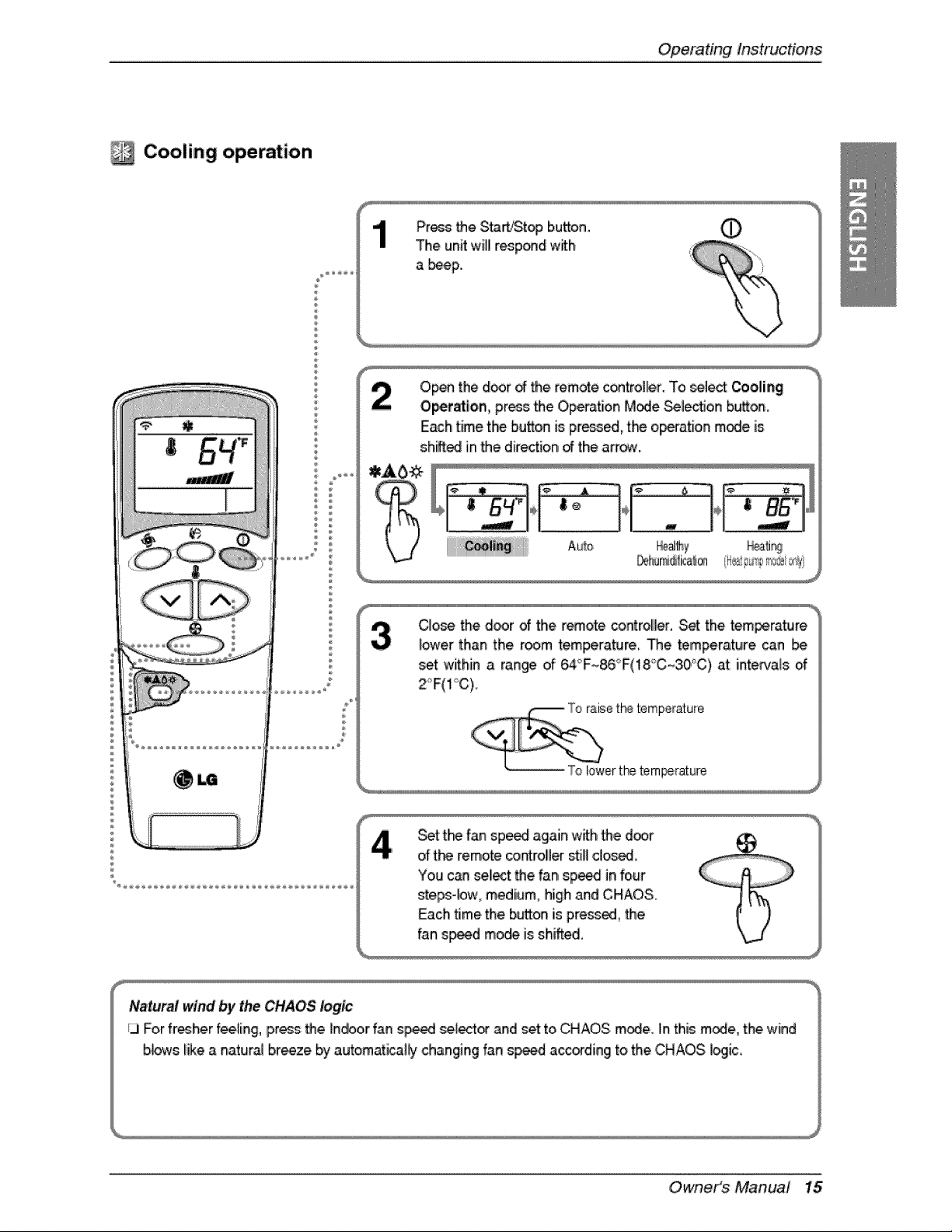
Cooling operation
÷
÷
O,p_ the d_r _ the remote,control_r. To _lect Cooling
Op,etat_on,pros _e Ope_-ationM,_e _lection b_on.
Each time the button is pr_, the operation mode is
shiff_ in_e dire_ion _ the arr_.
CIo_ the d_r _ the r_ote co.roller. Set the tem_rature
i_er than the _o_m te,m_ature. "[he temperature _n [be
set within a ran_ o{ 6,4_F~86°F(18_C_30°C) at i_intervalso,f
Set tk_ fan sp_ again w_h _e d_r
d t_ remote ¢ont:roilerstill dosed,
You can select _e fan sp_ in four
stepm_w, medium, high and CHAOS.
Each time the b_on is press_, _e
fan s_d mo_ is shifted,
Natural wind by the CHAOS logic
/3 For fresherfee_ing,press _e Indoor fan s_ se_ect_ and set to CHAOS m_e. in this m_e, the,wind
bbws like a natural braze by automati_ll_y changing fan s_d a_ding to the CHAOS, i_iic,,
Owners Manual 15
Operat#_gInstructions
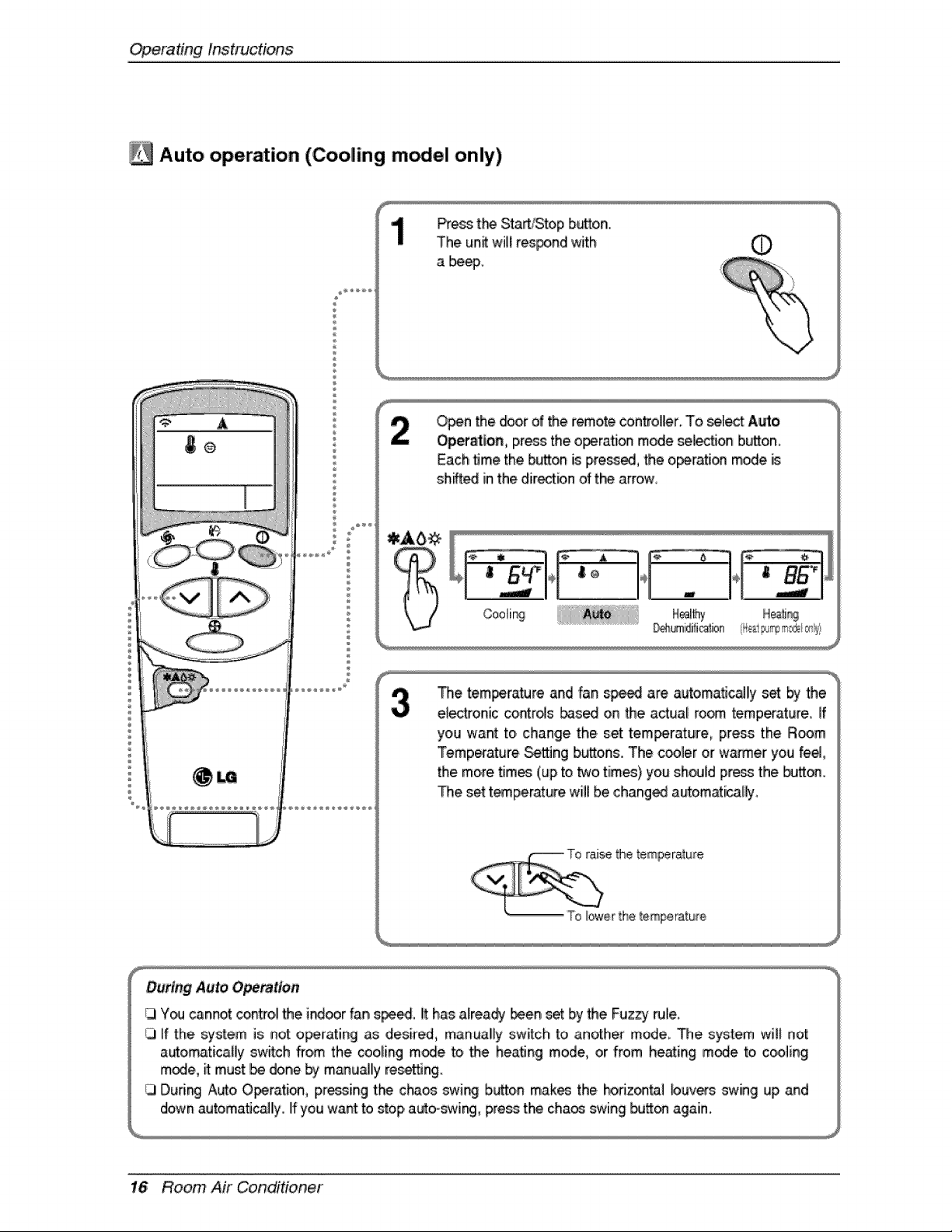
Auto operation (Coo|Jng m el only)
®
Press t_ Start/Stop bLaZon.
The un_ wil! res_,nd with O
a beep,
O_n the _or of the remote controller. To _l_ Auto
Operation, press the o_atJon mode sele_on button_
Each time the button is pre_, the operation m_e is
sh_d in the directbn of t_ arrow,
The temperature and 'fan speed are automatJc_ly set _ the
electronic controls bas_ on the actual ro_ temperature_ If
you want to change the, set temperature_ press the R_m
Temperature Se_ng buttons. The c_ler or warmer you feel,
the moiretim_ (up to _o times) you sho_J[dpre_ the _on,
The set t_perature wBibe chang_ autom_ica[_
During Auto Operation
I_3Y_ cannot contro,i the Jnd_r fan speed, it has a_rea_ _en set by the Fuzzy rule,
iJ ff the system is not operating as desired, manual!ly switch to another mode,. The system will nol_
automatJcaByswffch from the cooBng m_e _ the heating mode, or from he_ing m_e to cooling
m_e, it must be done by manuialllyreset_jng.
13Durir_ Auto Operati_ pr_sing the c_os swi_ b_on mak_ the _riz®_l buv_s swing up and
down automatJc_ly. Illyou want to _op, auto-swing, press the chaos swing _Jtt_ again.
16 Room Air Conditioner
OperatingInstructions
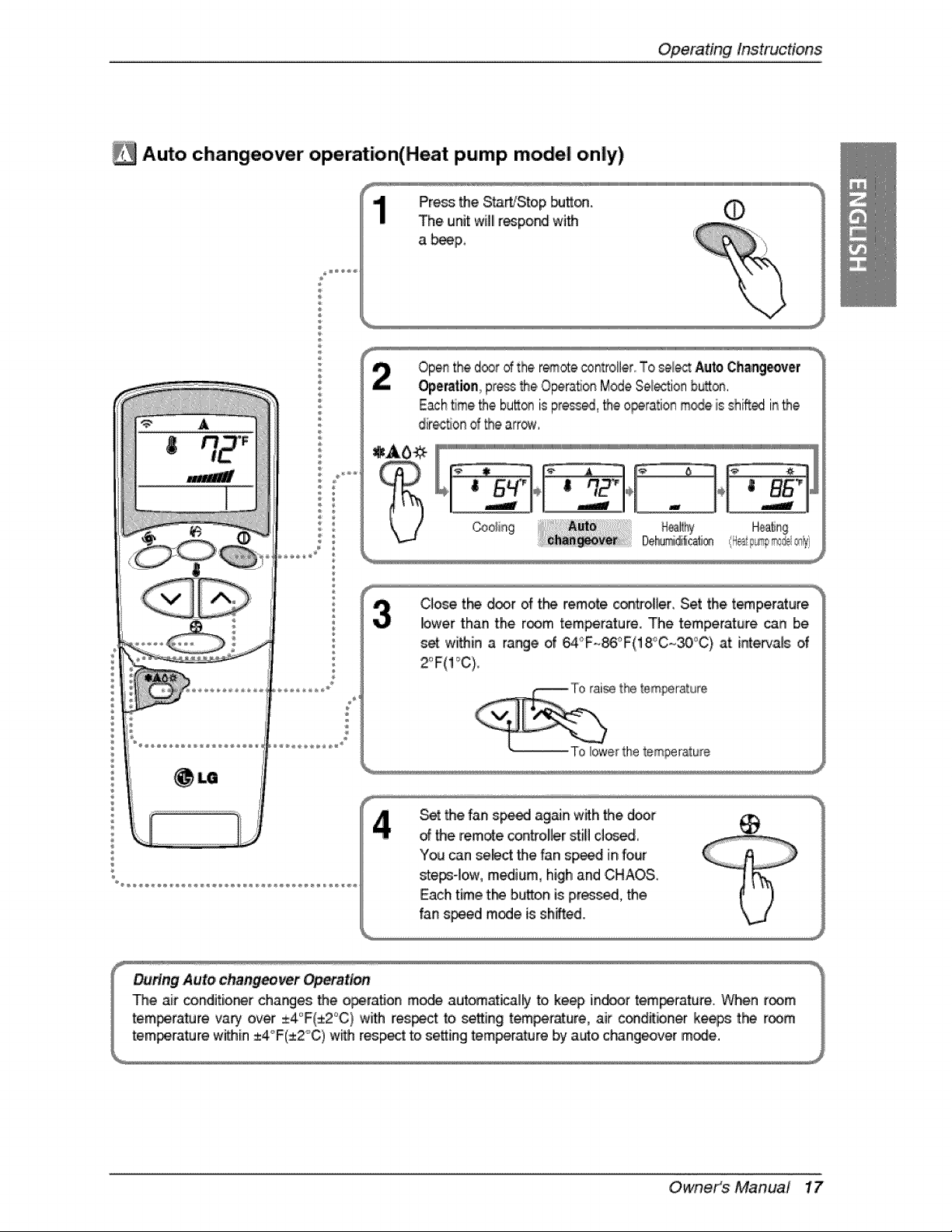
_i Auto changeover operation(Heat pump model only)
Press the S_Stop _Jtt_.
The unit w[]llre_po_ with
a _p.,
©
©
Openthe d®_ d the r_ote controller,,To selectAuto,Changeover
Op,eration p_essthe.Opera,on ModeSe_tio_ huron.
Each_me_e bu_® is press_, _e ,operationm_e is shift_ inthe
dir_flon d _e arre_v,
Clo_ tt'_ d_r of the remote con_ol]er. Set the t_perature
lower than the r_m tem_rature. The temperature can be
set wi_in a range of _°F-._°F(18°C~30°C) at intervals of
Set the fan sp_ ag_n wffh 'the door
d _e remate controller stili!close,
You can select the fan,sp_ in four
_e_-]ow, medium, high and CHAOS.
Each time t_ b,u4tonis prosed, the
fan speed mode is shifted.
Owneit_s Manual 17
Operatinglnstruc#on,s
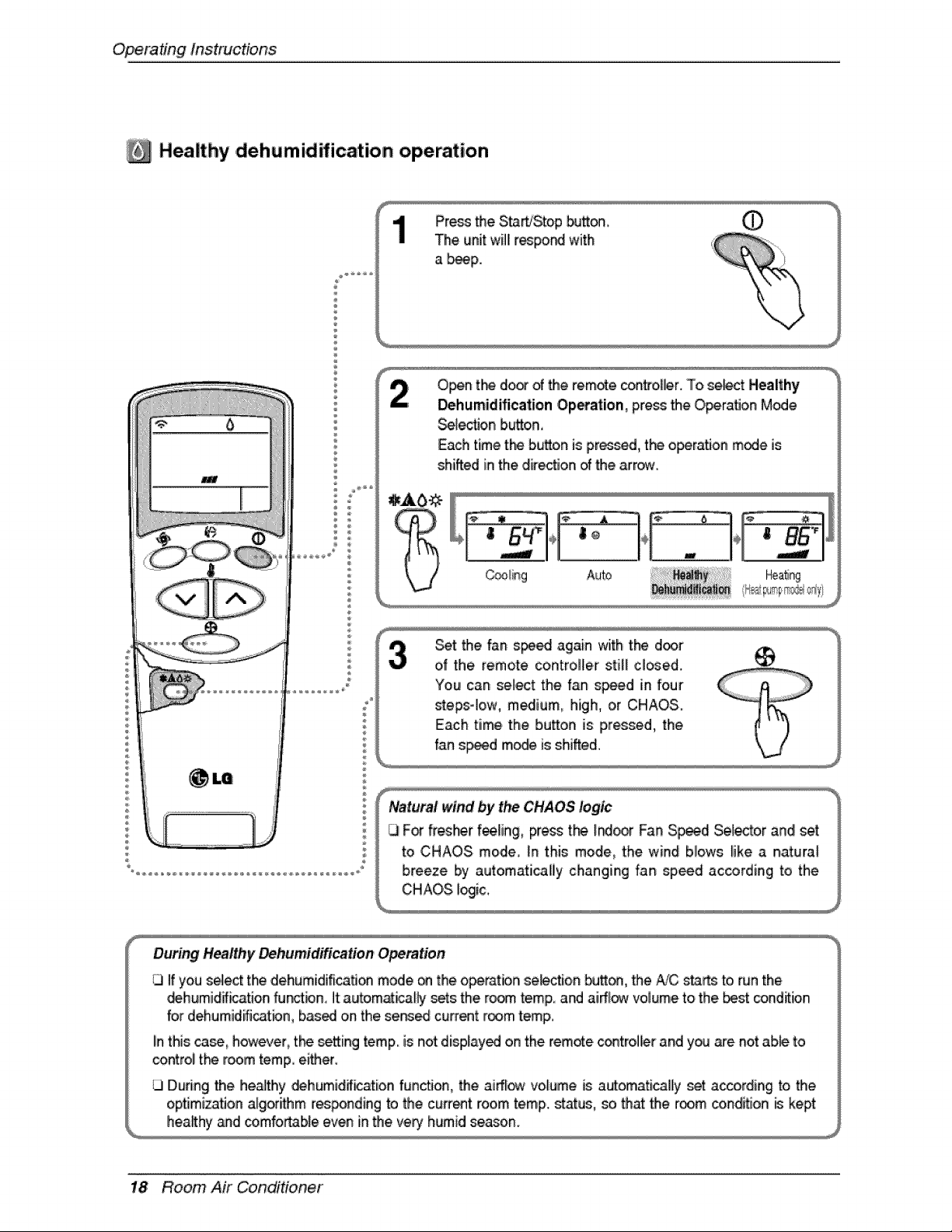
Healthy ,d,ehumidification operation
Press the S_'Stop bu_
The unit willir_po_ with %
a _p. _
Open t_ do_ d the rem_e con#o_ler..To se_ct Healthy
Dehumidification ,Operation, press the O,perat_onMode
_I_on button,
Eachtimethebu_o,nispr_d, theoperationm_e is
shiftedinthe,dir_flon_ thearrcrw.
_t the fan s_ again with the d_r
of the remote controller still cl_ed..
You can sele_ the fan speed in four
stepsqow, medium, high, or CHAOS.
Each time the button is pressed, the
fan s_d m_ is shifted.
Natural wind by the CHAOS logic
For fresher fee_in,g,press t_ _r Fan S_d Selector and set
to CHAOS mode, _nthis mode, the wind biows _ike a naturat
breeze by automaticaliy changing fan speed according to the
CHAOS i_ic,,
During Healthy Dehumidification OpemUon
1.3If you select the dehumidification mode on the operatbn se_ion _on, the A/C sta_ to,run the
_humid_ation fu_bn, it:autom_icaf_ sets the ro_ temp. and aiffl_ volume to the _st _nd_ion
for dehumidifi_tbn based on the served current room letup.
Iinthis _, however, tl"_ _etting temp. is not displayed on the tempe controller and y_ _e not ab_ to
control tl'_ room temp either.
During the healthy _humid_ation f_ncflon, _e airflow volume is a_omatically _t a_ording to the
opflmizatJ,on.algorithm res_nding to the current room temp. status, _ that the room cond_on _ kept
h,ea_hy_d comfortable even in the very' humid season.
18 Room Air Conditioner
OperatingInstructions
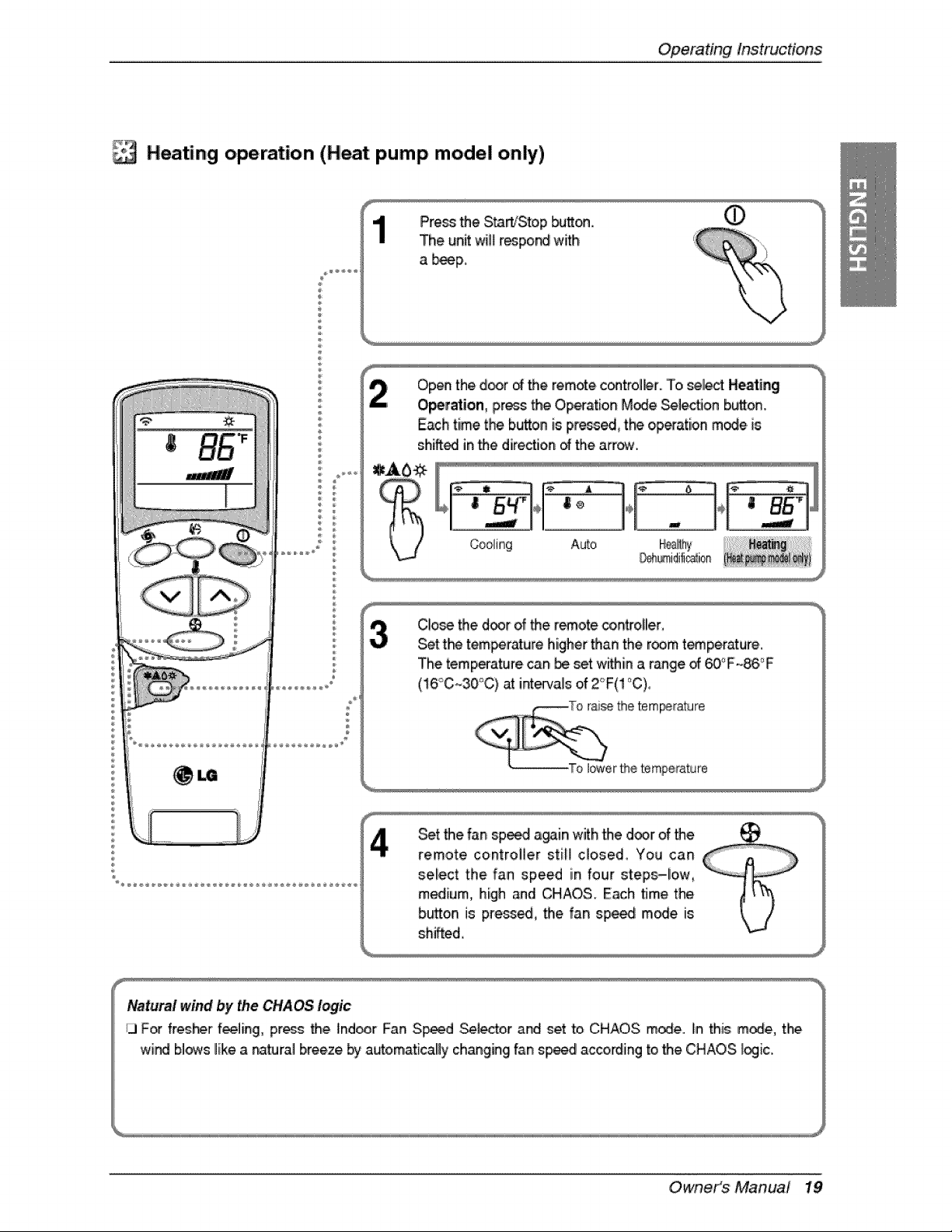
Heating operation (Heat pump model only)
Pre_ the St_Sto,p _on. 0
The unit wit_r_por4 with
a b_p_
Open the door of the remote c_trol_r.. To _lect, Heating
O_ration, press the O,p_ation M_e _lect_on button.
Each time the button is press_ t_'_ op_ation mode. is
shiffedlinthe direction _ the arrow.
Clo_ the d_r of _e remote controller,
Set t_ tem_rr_ure higher'than the room t_perature..
The temperature can be set within a r_ge _ _°F _86:_F
(!6'_C_30°C) at intervals of 2°F(! °C),
Set the fan speed again with the door of the ___
remote controller still c_osed_ You can
sel!ect the fan speed in four steps-low,
medium, high and CHAOS. Each time the
button is pre_ed, the fan spe_ m_e. is
sh_fted,
Nat,urai wind by the CHAOS t_ic
ij F_ fres_r f_Iing, pres_ the Ind_r F_n S_d _i_or .and set to CHAOS m_e. In this m_e, the
wind blows like a na_ral breeze b_ya_omaticallly ch_ging fan sp_d according to the CHAOS _ic.
Owneit_s Manual 19
Operat#_g Instructions
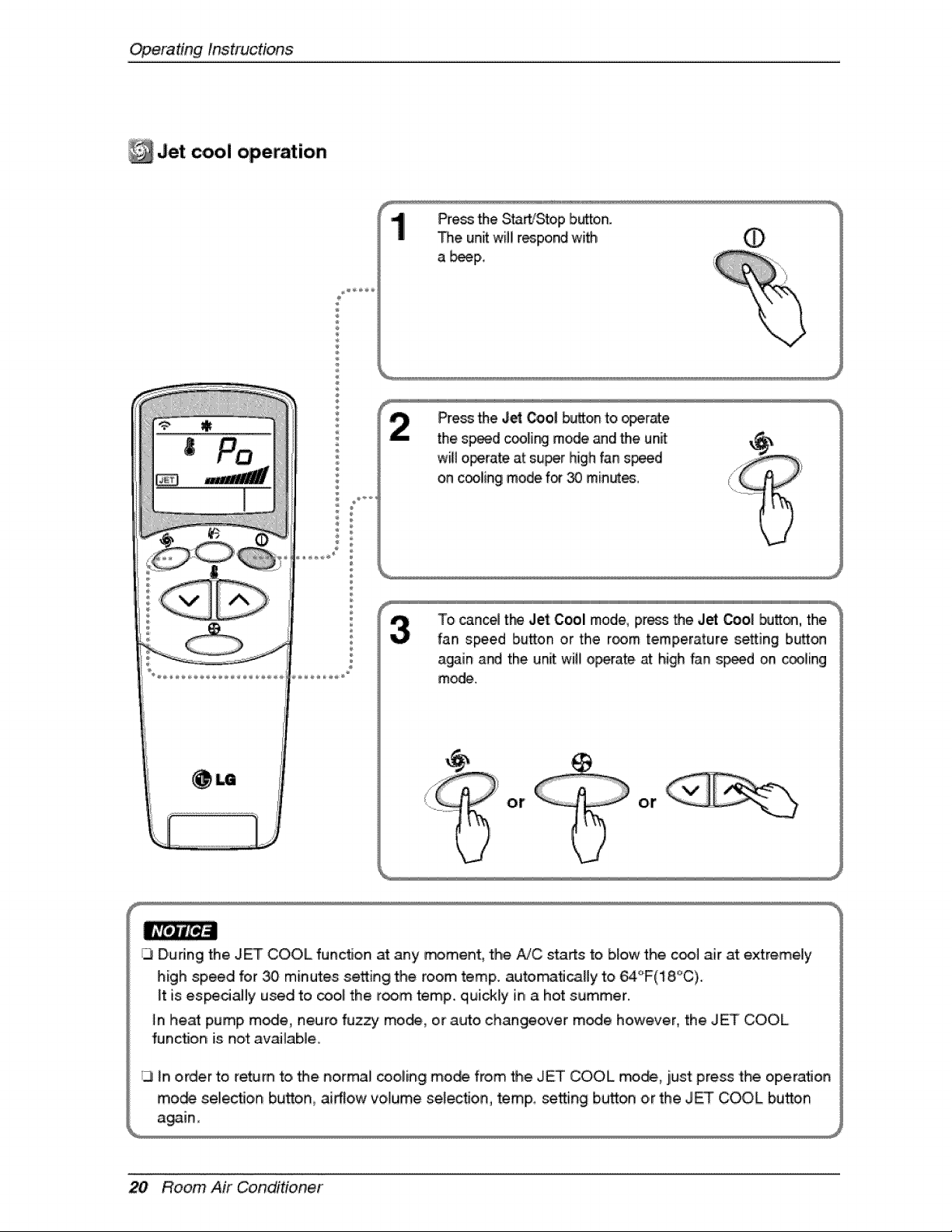
Jet operation
®
PressMe S_rt!Stop button.
The unit wBIirespo_ with O
a _IP,
PressMe J_ _o_ b_on to_r_e
the sp_d c_[i_ mode andMe unit:
wiBo_rate atsu_r highfans_d
on c_liingmode for30 min_es,
To ounce4the Jet Cool mode, press the Jet _o| butt_, the.
fan speed button or the room temperature setting button
again and the unit will o_rate at high fan s_d on #ling
mode.
or or
_3During the JET COOL functJo,n at any re#merit, the AiC staAs to b,[ow the c_ air at extremely
high speed fop _ minutes setting the room temp. a_tomati_By to 64_F(18.°C).
_tis es_ciaHy used to _ol the room temp. q_ickly in, a hot summer..
_nheat pump m_e, negro fuzzy mo_, or auto changeover m_e however, the JET COOL
function is not available.
In order to ream to, Me normal cooling mo_ from _e JET COOL mode., just press the operation
mo_ selec_,0,n b_o,n, airflow volume .se_ec_o,n,temp,, setting bud,on or the JET COOL bud,on
20 Room Air Conditioner
Opera'tingInstructions
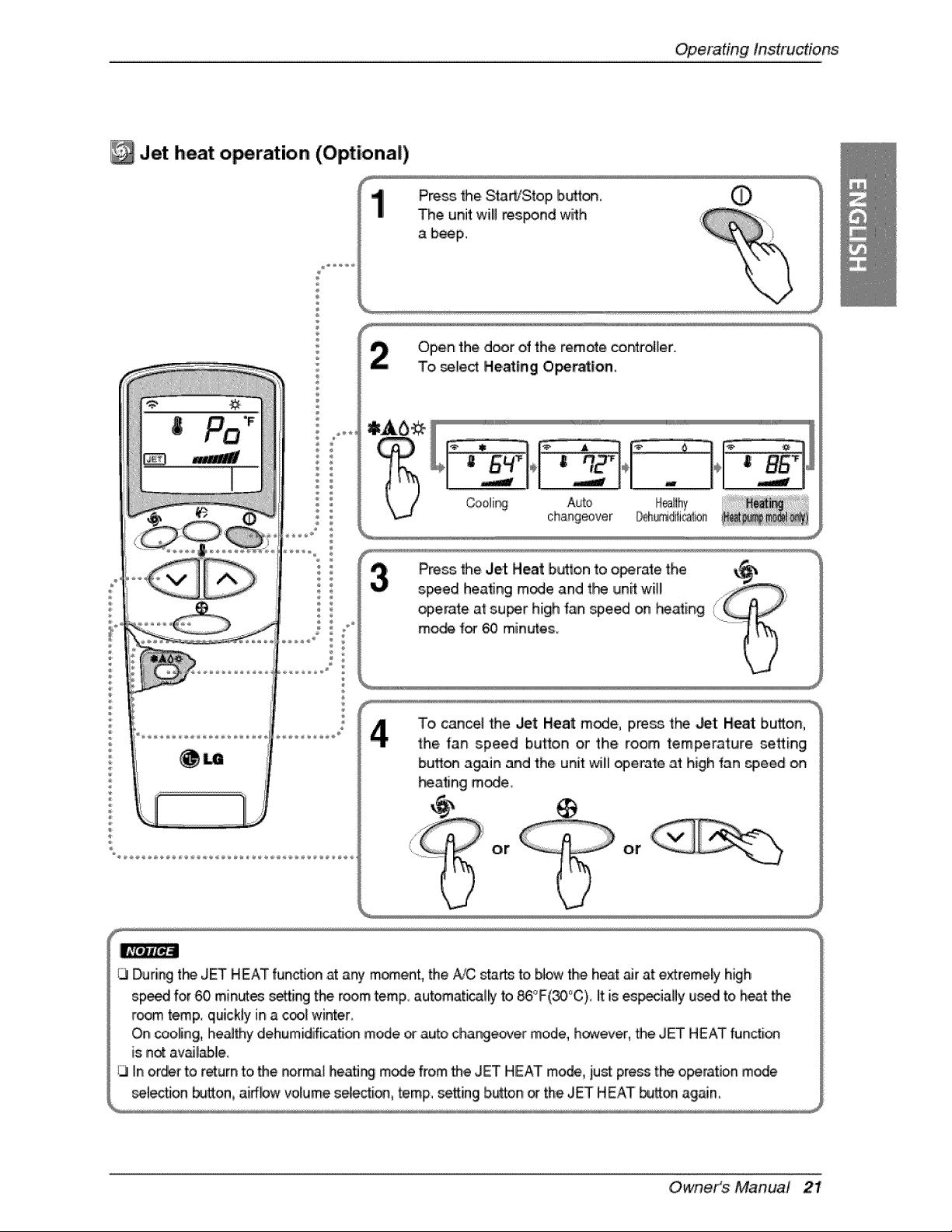
Jet heat o_ration (Optional)
®
®
÷
®
®
P_ _e SitaWStop b_0 0
The unit wi!l respond with
a b_p.
Open the door of the remote co_ro_er.
To, _le_ Heat|rig Ope_t|on,
¸
Co,oli_
Auto
changeover
Press _e Jet Heat bu_on to o_rate the _
s_ed he,a_ng mode and t_ unit will )
operate, at super high fan _eed on _ating Ill
mo_ fo_ _ minutes.
To cancel the Jet Heat mode, pre_ the Jet Heat button,
the, fan speed button or the room tempera_:u!re setting
buxom again and the unit will o£erate i_ high fan _peed on
_ating mode_
@
or or
13During the JET HEAT fun_on at aW m_ent, _e A/C starts to,b_owthe heat air at extremely high
sp_ for 60 minute_ setting the room temp, automatically to 86°F(30_'C),_tis es_ially used to he_t the
r_m temp. quickly in _ c_ winten
On cooling, heathy dehumidification mode _ auto changeover mode, h_¢_ever,_e JET HEAT functi®
is not av_le.
/3 In order to return to the norm_ heating mode from _e JET HEAT mode, just pre_ t_ o,per_tio,nmode
se!_on button, aiffbw volume se_ecti®, temp, setting button _ the JET HEAT button ag_n
Owneit_S Manual 21
OperatingInstructions
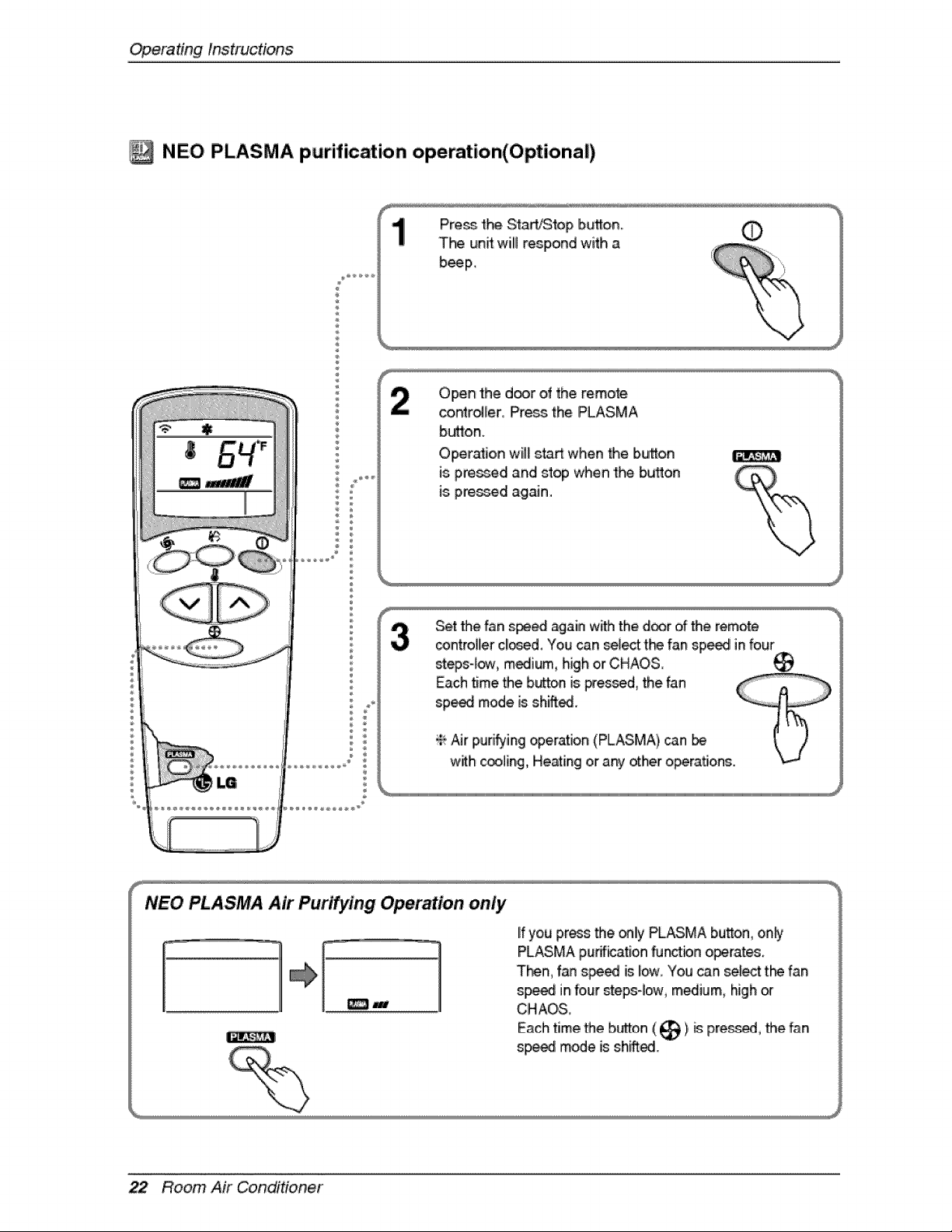
NEO PLASMA purification operation(Optional)
_ _ _ _ u_ _ _ _ _ _ _ _ u_ _ _ _J _J _J _J _J _J _J _J _J _J _J _J _J _J _J _J _J _J _J _J _J _J _J _J _J _J _J _J _J _
Press the StaWStop bL_,on_ 0
The un_will respond with a
b_p,
Open the d_r of the remote
contrdler Press.the PLASMA
b_o,n.
Oper_ion wil_stad when _e button
=
is p,_d and stop when 'the buflon
is p,_d again.
Set the f_n s_ again with the d_r ,ofthe remote
_ntrol[ler closed. You c_n se_ t_ fan sp_ infour
stepsqow, m_ium, high or CHAOS
Each time the button is Fessed, the fan
sp_ mode is shift_.
÷' #Jr purifying operation (PLASMA), can
with c_ling., He_ing or a_ other o_r.a_ons.
NEO PLASMA Air Purifying Operation only
o.]
lifyou press the only PLASMA bu_on, one,
PLASMA pudfiicationfu_tbn operate&
T_n, fan s_ed is Iow_You can select:t_ fan
sp_ in four ste_-!ow, m,_ium, high
CHAOS,
Each time the b_ton ( _ ),_ pre_ed, the fan
sp_ mode is sh_i.
22 Room Air Conditioner
Operating Instructions
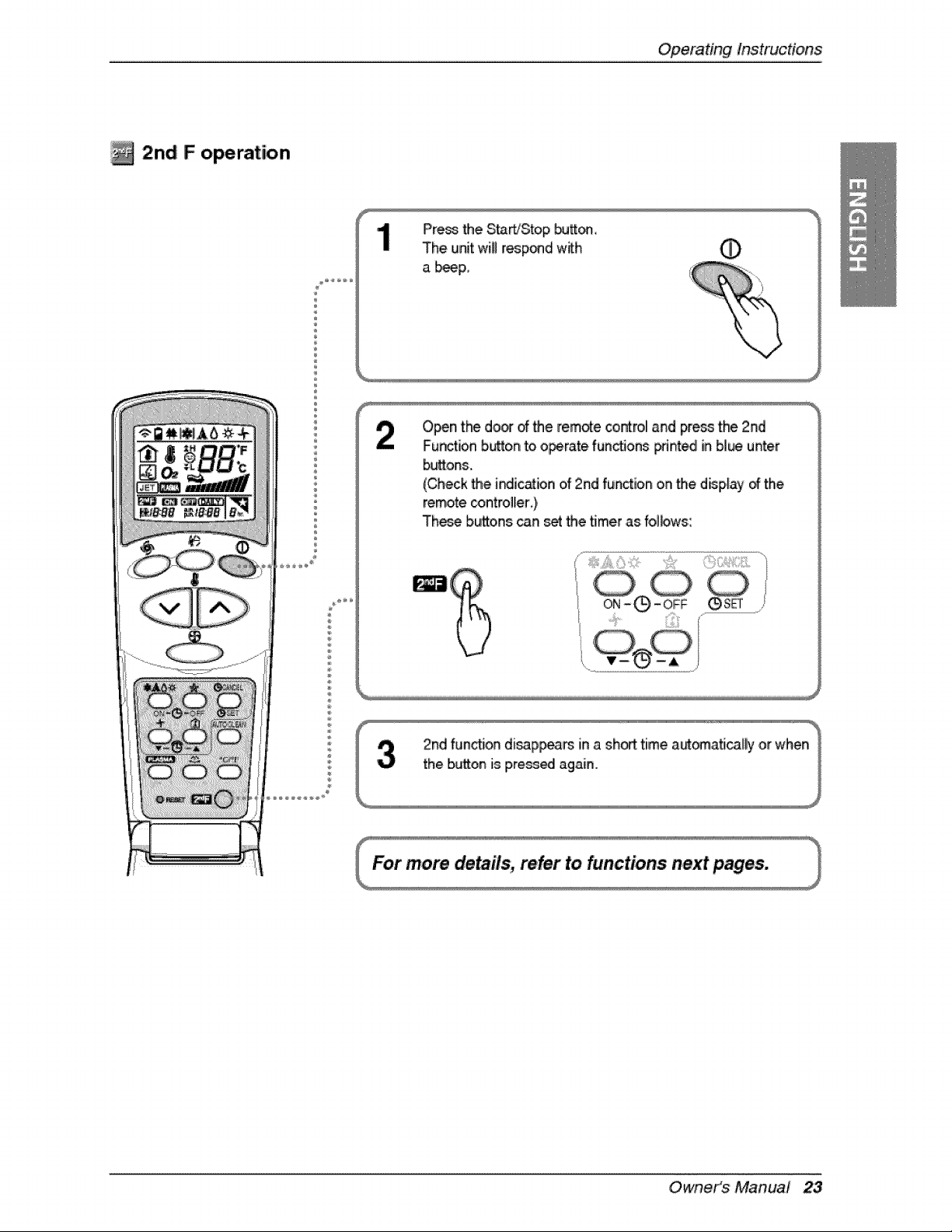
2n,d F opemtio, n
®
÷
Pre_ the S_WStop button,,
The unit wiUrespond w_h 0
a _p,,
Open t_ donof Me rem,_e control and press the 2nd
Fun_ion b,utton_to o_rate fun_ons _nted in bl_ u_er
buttons.
(Check Me i_ic_bn of 2rid function on the disp,_ayof the
remote _ntroller ),
These buttons can _ Me timer as folbws:
I ...._i_...... iiii_,ii_il;iiiii'
Owneit_s Manual 23
OperatingInstructions
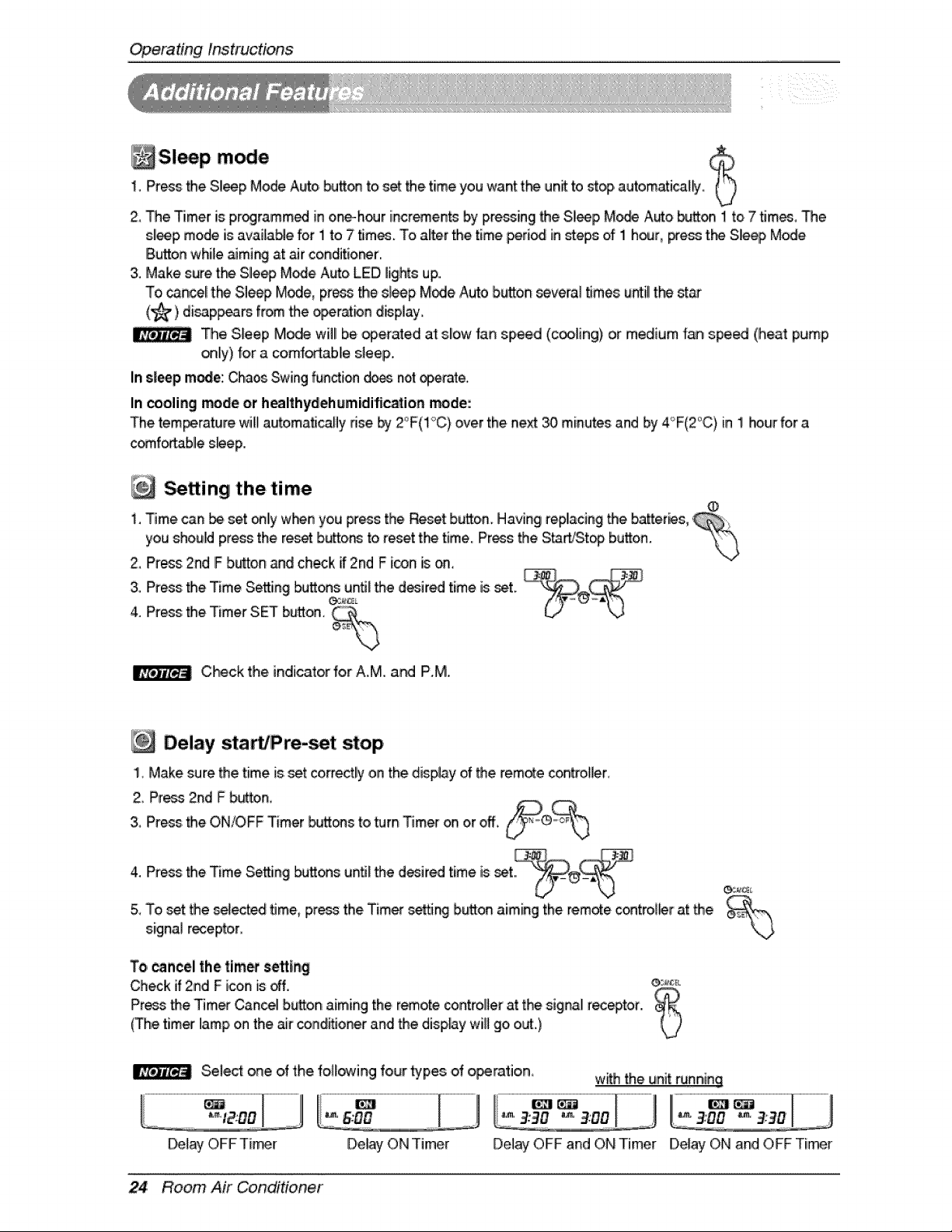
Sl p1, Press the Sl_p Mode Auto,b_J_ to set the time you want the unit to st_ automatica_j_
2, The Timer is pr_rammed in one_hour incremen_ by pressing the Sl_p M_ A_o button ! to 7 tim_, The
s[_p mode is availaNe for 1 to 7 times° To al_erthe time peri_ in steps of 1 hour, press the Sme_ Mode
Button while _ming at air conditio_r.
3. Make sure th_ Slle_ M_e Auto LED lights up.
To cancel[t_ Sle_ Mode, press the sleep Mode ,Autobutton several times untillthe _ar
(_) di_p_aPs from _e o_r_bn display,
_e Sleep Mode will be _erated at slow _an speed (c_ing) or medium _ speed (heat pump
_ly) fo,ra comfortable sleep,,
In s|eep mode: ChaosSwing fiJn_io,nd_ not _erate.
In _oling me,ee or healthyeehumidificafien rrtoiee:
The temperature wi!l automatically dse _ Z'F'(I_'C) over the ne_ 30 minutes and by 4_F(2°C) in I hour for a
comf_blle s_eep.
the time
,
i_ Time can _ set only w_n you p_essthe _set button, Having replacing _e batter,s,
you should press the reset butto_ to ,eset the time. Press_e S_rtiSt_ bu.on. '_
2, Pros 2nd IFb,u_onand check if 2nd F icon is ,on,
4.3"Pr_sPress:thetheTimerTimeSe_ingSETb_on._°ns°i;_¢_un__e d_ired time is _t.
C_ck the indicator fo,rA.M, at4 P,M.
Delay start/Pre- t stop
1. Make sure _e time is set correctly on the display of the remote controller,
Z Pr_ 2nd F button_
3, Pros the ON/OFF Timer _ons to _rn Tim_ on,or off, __
4. P_ss the Time Se_ing _c_s un_ the desired time is set
& To set the _!_t_ time, press the Timer setting button aiming the remote control_r at the
signal receptor_
To,_ncel the tim_ setting
Check if 2nd F icon is off. _
Press the Tim_ Cansellbutton aiming the remote controllierat the siginallrec_tor. _
(The timer lamp,on the air c,ond_oner andlthe dispAy will go o_.)
U
Select one of the fo!Sting four types of o_ratioin, wit_ the unit _nn,ing
D,e_y ON Timer Delay OFF and ON Timer Delay ON and OFF Timer
24 Room Air Conditioner
OperatingInstructions
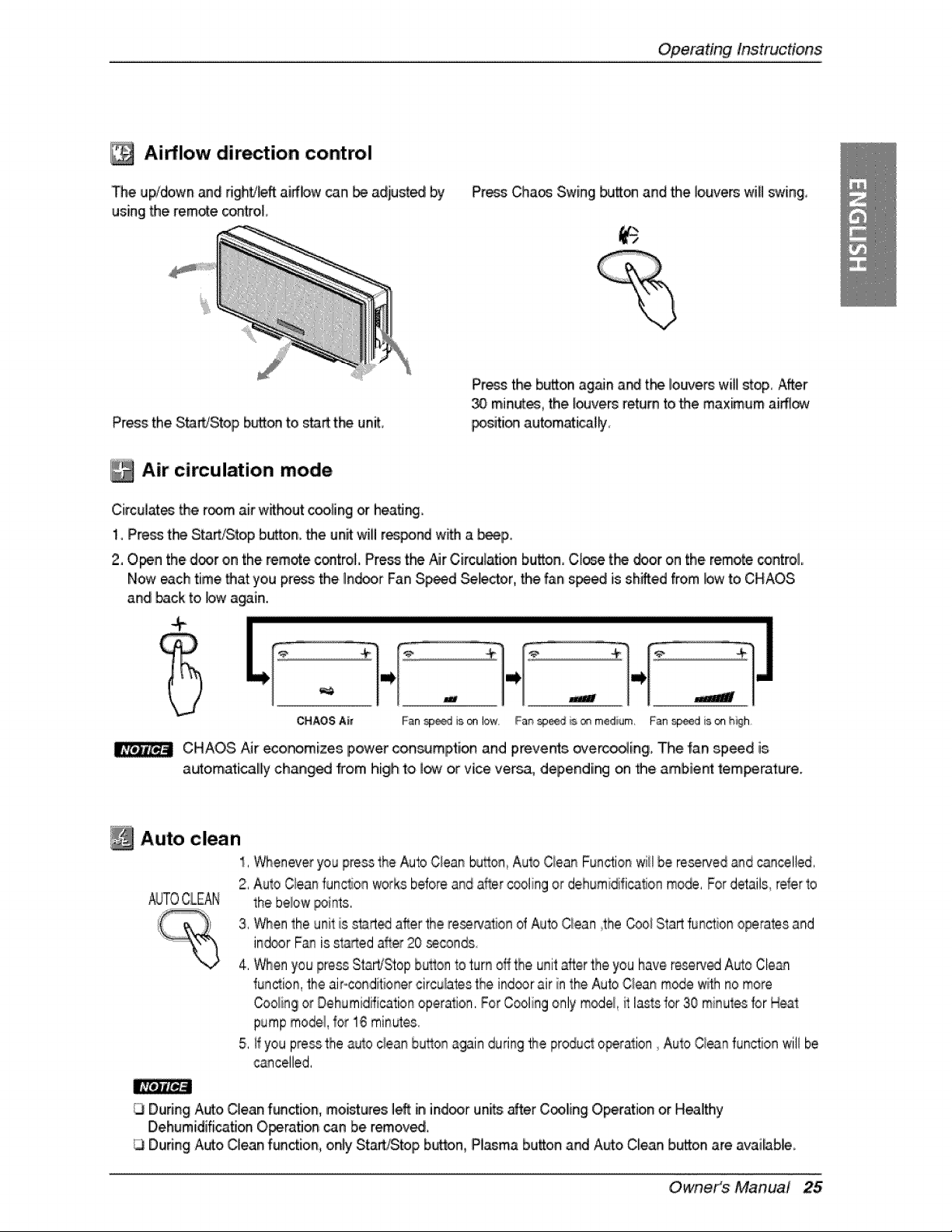
Airflow dir tion control
De upldown and Hght/_ftairflow can _ adjusted by
using the remote _ntroi!,
Pre_ Chaos Swing I_J_ and the louvers will swing,
Press the StarVStop b_on to start t_ unit,
Press the b_on ag_n a_ tt'_ Iouve_ will stop, After
minutes_the _vers return _othe maximum aiffl_
_sition automati_lly
Air circulation mode
Circulates the morn air w_hout c_ling or heati_
1_Press t_ Start_top b_on. the unit wiii respond w_ a _p.
2, Open the d_r on the remote c_troL Pre_ t_ Air Circulation bu_on, Close t_ door on the remote _ntrol,
Now each time that you press the Ind_r Fan S_d _lecto,r,, the fan s_ed is shifted from bw to CHAOS
and back to bw a_in.
.....................................................................................................................................................................................................................................................................................................................................................................................................................................................................................
- .If- _
CHAOS Air F_n s_d is on I_, Fa_ _ _s_ rnedi_m, F_n s_d is on h_gh
CHAOS Air eco_mizes power con_rnption and prevents erecting, The fan speed is
autornaticalily changed trom high to low or vice versa, depending on _e arnbie_ temperature.
Auto clean
1,Wheneveryou pressthe AutoC!eanbutton,Auto Ciean Functionwii!be reservedand cancelled,
2, Aul_ Qean func_on works beforeanda_er_oling or dehumidificationrno_, Fordetails_referto
_TO CLEAN the beiow _ints,
3, When the un{Ftis start_ after the re_r,J_ion of Auto Clean _theCooi Startfunction operatesand
ind®r Fan is .starteda_er20 _conds
4. Whenyou press Starb_Stopbuttonto turn oflthe unitafterthe you have reserv_ Auto Clean
function,the ai#-condiitionercirculatesthe ind_r air in the _o Clean rn_e w_thnomore
Coo_ingor Dehurnidficationoperalion.For Coolingonly rn_el, i_tlastsfor 30 minulesfor Hea_
pumpmodel,for 1,6rnin_es
5, ffyou pressthe auto cieanhuron again duringthe producto_ration Auto Cieanfunctionwill be
cancelled,
IK_JJK_a
During Auto Clean function, moi_ures left in ind_r units _er C_,ling Operation or Healthy
Dehumidification Operation _n be remov_
During Auto Clean function, only St_Stop button, Pl_ma bu_on and A_o Clean button are available,
Owneit_s Manual 25
OperatingInstructions
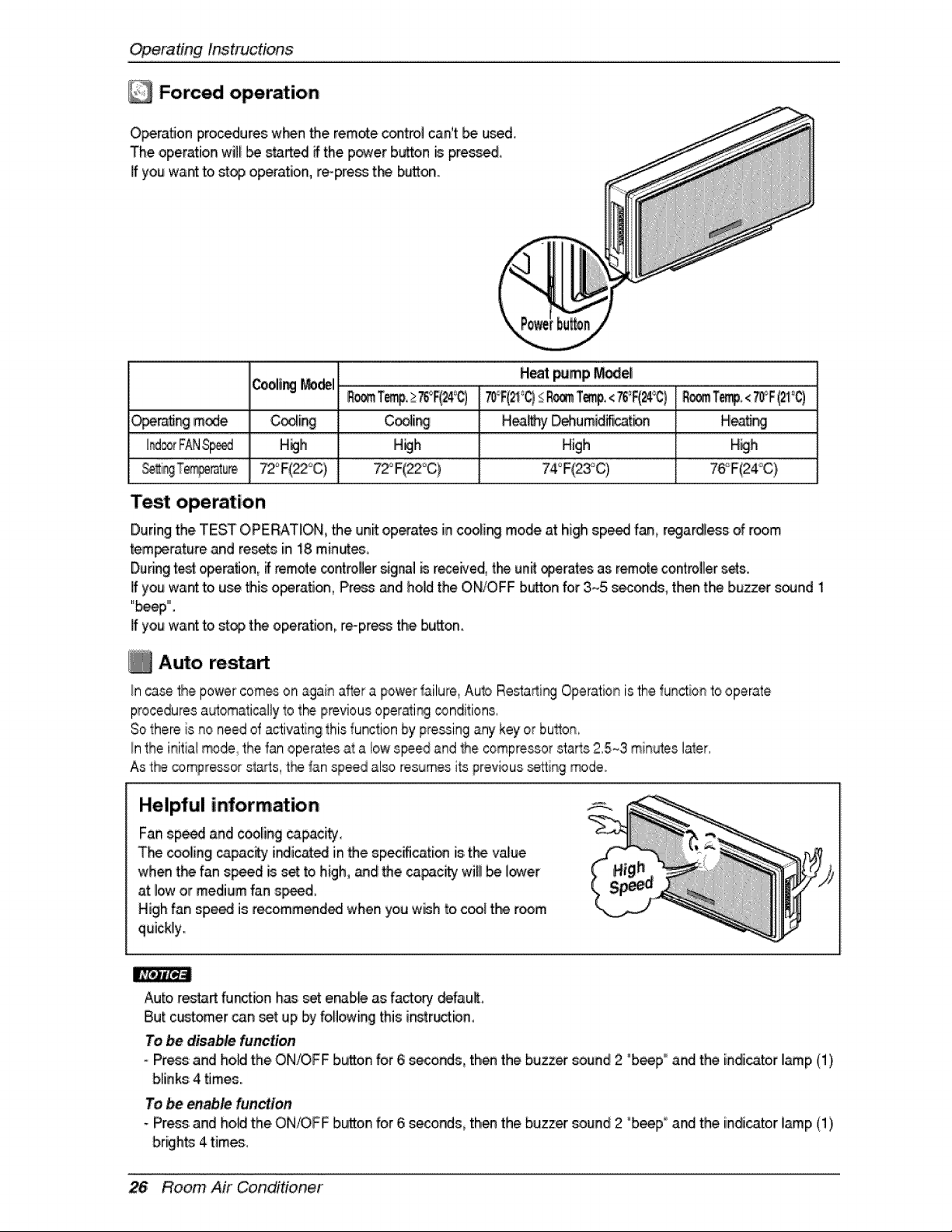
Forced operation
Operation procedures w_n the remote c_trol can't _ used
The operation wil_I_ started if the.power button _ pre_,
if youwant to stop operation, re-press tlr_ button.
O_r_ mode C_iin9 Cso_i_
H_lh H_h
Heat _mp _e
Cooling_del
Hea_y D,_umidifi_tion H_ngi
High High
Test operation
Duriingthe TEST OPERATION, the unit o,pe_atesin c_ling mode at high sp_ fan, regiardlessof room
tem_rature and resets in 18 minute,
Duringtest ope.ra_o,n,_remote cont_ller_gnal B received, t_ unit _erates as remote co.ntrol[lersets.
ifyou want _ use this operation, Press and hold the ON/OFF button for 3._5.sec_ds, then the buzzer' s_nd 1
"b_p"".
If you want to stop the operation, repress the button.
Auto restart
_r*l case the _ov_er comes on i_gai_ after a powe_ _ailure,Auto Restadir_ Operationis the 1unctionto operate
proceduresa_omatically to the previousoperati_ conditions,
Sothere is no need of activatingthis function by pressingany key or bu_on,
!nthe initiai mode,the fan operatesat a bw speedand _e compressor starts 2,5-_3min_es later,
As the compressorst_s, t_ _anspeed al_ resumesits previous_in9 _de,
Helpful information
Fan 8p_i and cooling_ci_i,
T_'_seoliingi_pacityi_iicate_inthespec_cati_is,thevaliue
when thefanspeediss_ tohigh,andthe_pacitywillbe lower
at _owor medium fan s_d,
High fan sp_ is r_ommend_ when you wish to cool the room
quickly.
Auto restart furdbn h_: set e_b_ as f,acto_ _fault,
But customer can set up by following this i_r_tbn,
To be disable function
- Press and hoMIthe ON/OFF bui_o.nfor 6 seconds, then the buzzer _und 2 "b_p ° and the indicator lamp(1)
bliinks4 times.
To _ enable function
- Pros and ho_ the ON/OFF bu!_oinfor 6 seconds, then the buzzer sound 2 "b_p" and the iindicatorlamp (1)
26 Room Air CondiHoner
Maintenan,_andSe_ice
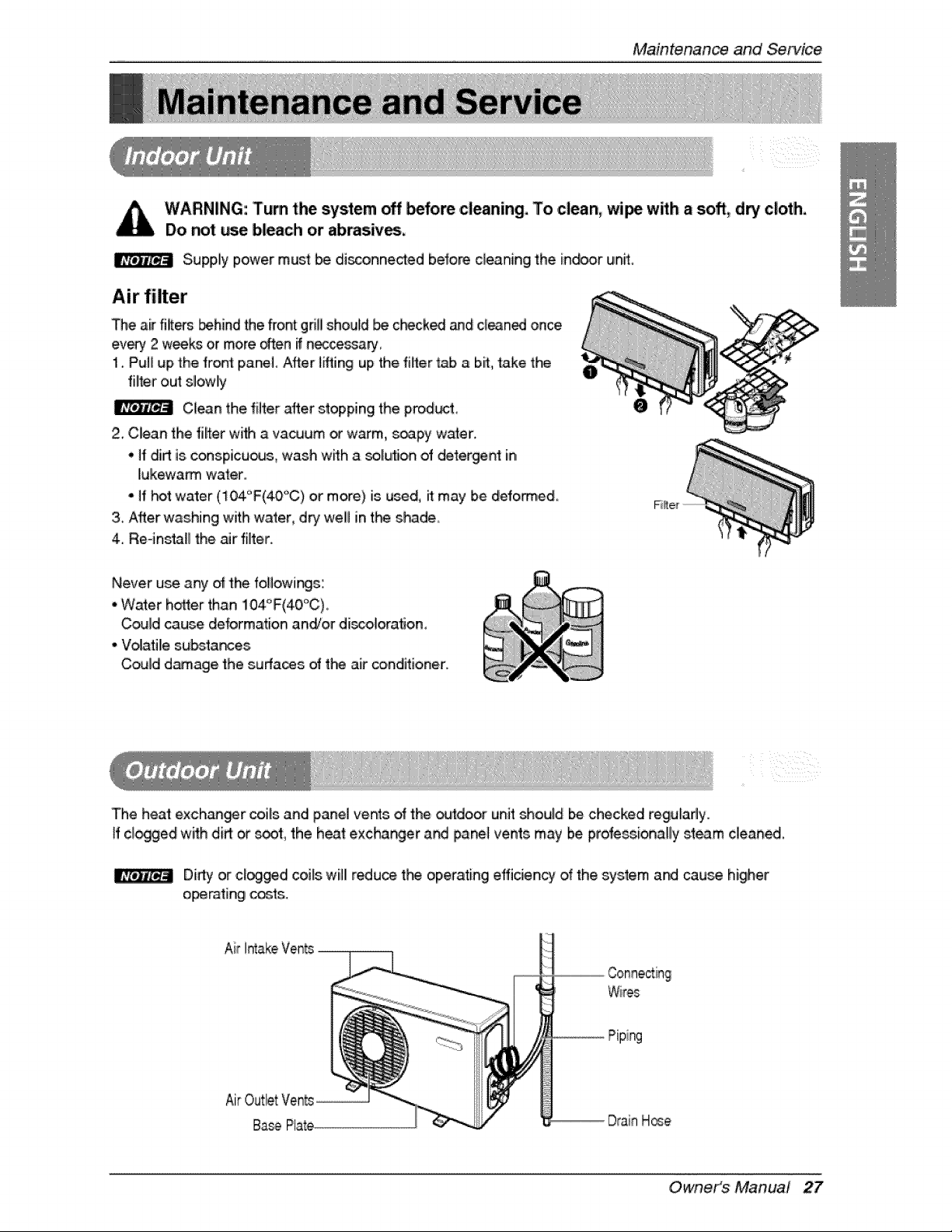
WARNING: Turn the system _ _fore cleaning° To ,clean, wi_ w_h a soft, dry cloth°
Do r_t we bleach or abirasiv_,
Supply power must _ di_onne_ed before cleaning the in_r un_
Air filter
The air fixers _hind Me front grill should _ c_cked and clean_ once
every 2 weeks or more _en if n_ssa_
1. Pulli up the fret pane[. After t_ing up the filler _ a bit,,take the
filter out slowly
Clean the fluter _er stopping the prod_t
2. Clean the filter wi_ a vacuum o_"warm, _apy water.
* ff dirt is.conspicu_s, wash w_h a _[ution o_ detergent in
I[ukewa_ wafter..
off _t water (104°F(40°C) or more) is used, it may be defo_,ed
3_After was.hing with water, d_ well int_ s_de
4. Re-ins_H the _r filter.
Never u_ any o_ the followings;
• Water hotter than !04'_F(40°C)
Could cause deformation andTor di_o!oratJon,
• Volatile substa_s
Could damage the surfaces of the air conditioner.
The heat exch_r coils and panel vents _ 'the outdoor unit should be.checked regularly.
ff cl_gied with di_ or _t, the heat excha_er a_ _nel vents may be professionally _team ciean_,
Dirt,] or cl_ged coils will redu_ t_ operating effidency o.f'the system a_ cau_ higher
oipemting _'t:s.
Air IAakeVents
Wires
iping
Owneit_s Manual 27
Maintenan_andServioe
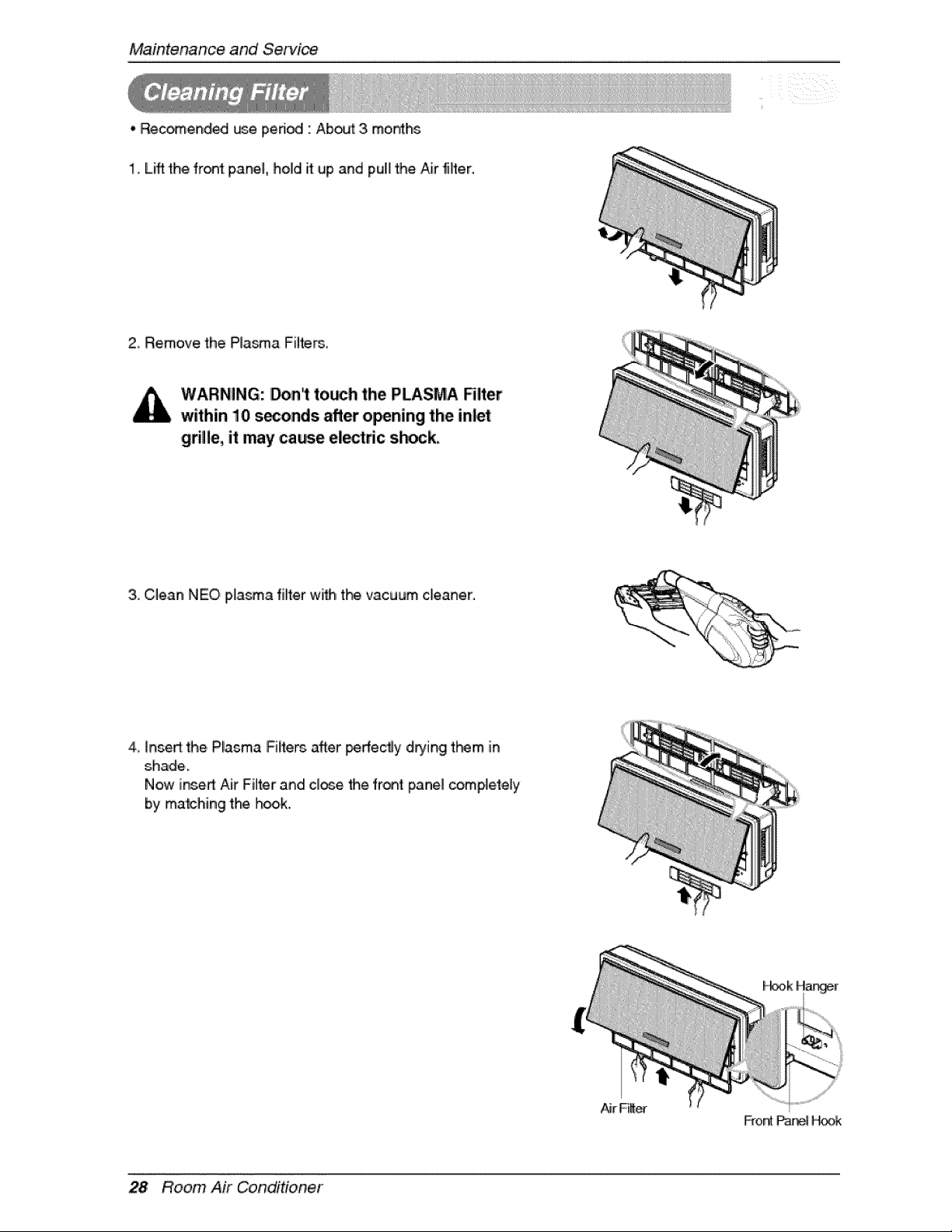
. _endled _e pe_odl " About 3 mor_lhs
1. Lift the front panel, hold it ,upand pull the Air fiff,er.
2 Remove the Plasma Filters.
WARNING: _nl to_h the PLASMA RIter
within 10 s_onds after o_ning the inlet
grille, it may came el_tfic s_ck.
3,,OI,ean NEO pla_a filter wi_ t_ vacuum cleaner,
4 ]nsed:the, Plasma FiH:ersafter Iperfe_y dD'ing t_m in
shade.
Now inse_ Air Filter and cite the fret pane] completely
by matching the h_k.
Fror_ _J_ H_
28 Room Air Conditioner
Maintenan,_ and Service
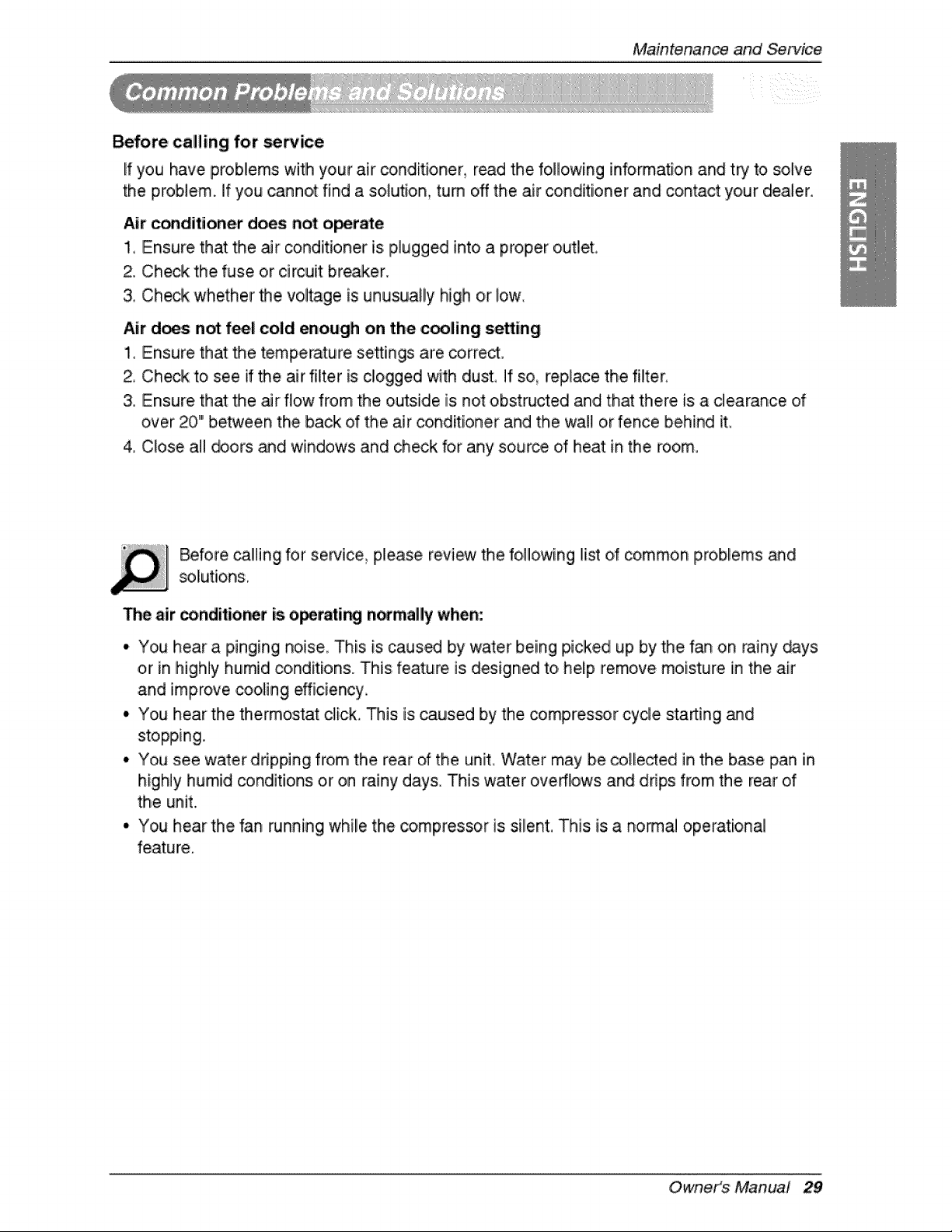
Before calling for _ice
If you have problems witlh your air conditioner read the following information and try to solve
the problem, if you cannot find a solution, turn off the air conditioner and contact your dealer.
Air c_diitioner does not ,o_r_e
1, Ensure that the air conditioner is p,lugged into a proper o,utlet,
2. Check the,fuse or circuit breaker.
& Check whether the voltage is unusually high o,rlow,
Air d_s not feel cold enough on the coo[ling setting
1_ Ensure that the tempierature se_ings are co,rrecL
2, Check to see if _e air filter is c!ogged with dust, If so, replace the filter_
3. Ensure that the _r flow from the outside is not obstructed and that there, is a clearance of
over 20" between the back of the air conditioner and the wall or fence behind it
4 Close al! _ors _d windows and check for any source d heat in the room,,
Before ca!ling for semice please review the fo!llowing list of common problems and
The air conditior_r is o_rati_ n_magy when:
• You hear a pinging noise This is caus_ by water being picked up by the fan on rainy _ys
or in highly humid conditions. This feature is designed to heip remove moisture in the air
and improve _oHng efficiency
• You hear the, thermostat click, This: is caused by the _mpres_r cycle sta_ing _d
stopping.
• You see water dripping from the rear of the unit Water may be collected in the base pan in
highly humid _nditions or on rainy days, This water overflows and drips from the rear of
the unit.
• You hear the fan running while the compressor is silent, This is a nodal operational
feature.
Owneit_s Manual 29
Maintenan_ and Service
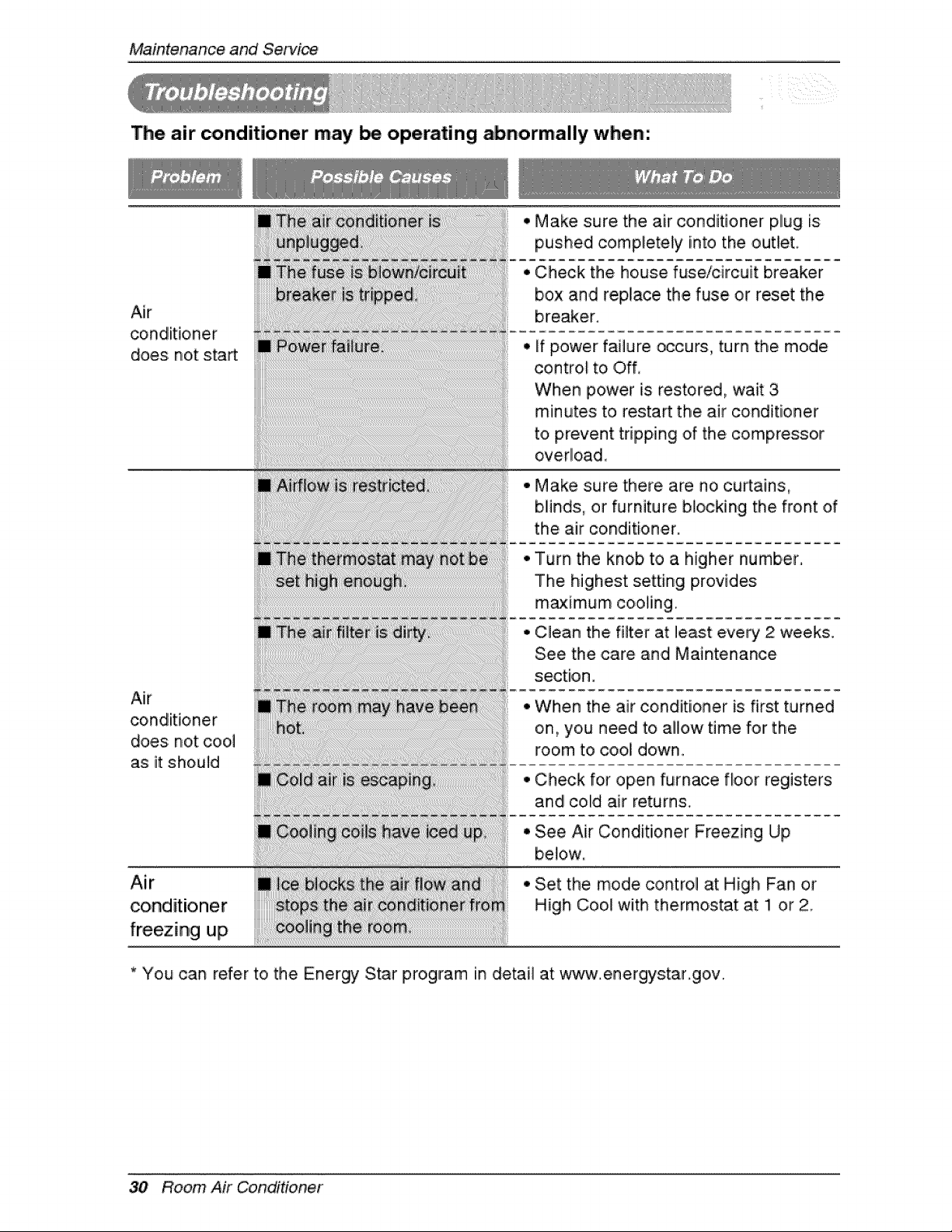
The air conditioner may be operating abnormally when:
Air
does not start
Air
conditioner
does not c,oo,I
as it should
Air
conditioner
freezing up
Make sure the air conditioner plug [s
into
pushed completely the outlet
,, Check the house fuse/circuit breaker
box and replace the fuse or reset the
breaker,
,, if power failure occurs, turn the mode
control to i Off,
When power is restored, wait 3
minutes to restart the air conditioner
to prevent tripping of the compressor
overlload_
• Make sure there are no ,curtains,
blinds:, or furniture blocking the front of
the air conditioner.
Turn the knob to a higher number,
The highest setting provides
m_imum cooling.
C_ean the filter at least every 2 weeks.
See the care and Maintenance
section.
When the air conditioner is first turned
on, you need to ail]ow time for the
room to cool down.
Check for open furnace floor registers
and coUdair returns,
See Air Conditioner Freezing Up
below,
Set the mode control at High Fan or
High Cool with thermoistat at !1 or 2
* You can refer to the Energ%_ Star program [n detail at www.energys:tar.gov..
30 Room Air Conditioner

P/No.: 3828A20535J

