ht_://www°l
!
Prior to installation, this _ir_onditiontng
unit must _ submitted for approva| by
the utHii_ service _ich provides
(EN 6100_2_ EN 6,i00_3 _Orm)i,,
nd thoroughly
conditioner.
Ire reference after
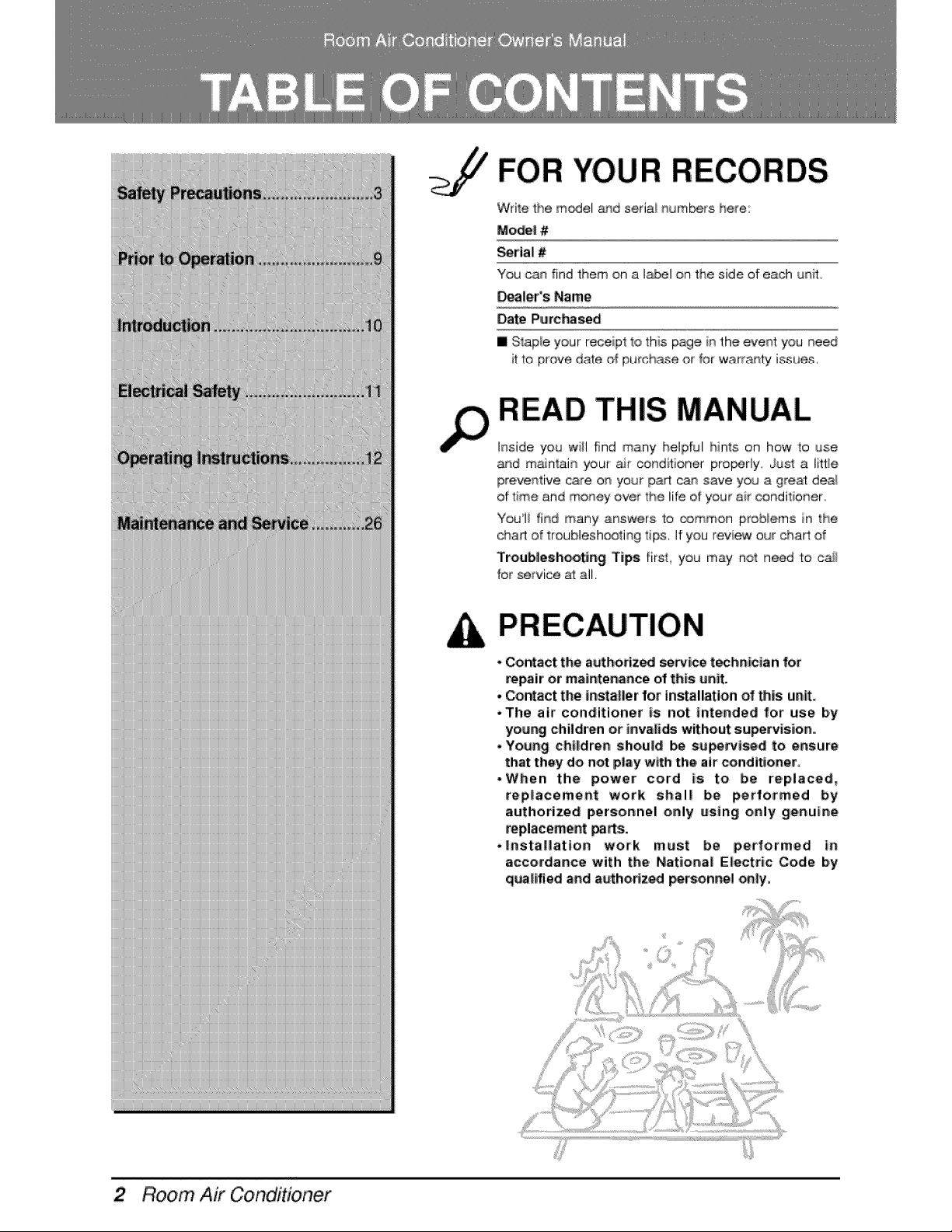
FOR YOUR RECORDS
Wrile the m_el _d seri,ai humors here:
Mo_! ,#
_rial #
You can find them on a label on the side of each _Jnit
_aleYs Name
Date PurcP_sed
I Slap_e your receipt to this page in the event you need
it to prove d_e of pumhase or _or warranty issues.
READ THIS MANUAL
Inside you w'i_lfind many helpful hints on how to use
_qd m_n'_ai_ your _r conditioner pro_rly. Just a littie
prevenlive c_e on your part can save yo_ a great dea_
of 't+meand money over 'the life of you+ air conditioner
You+il find many answers to _._mmon prob+ems in 'the
char1 of troublesh_ting tips. If you review our _art of
Troubllleshooting Tips firsl, you may no1 need to ca#
for service at all.
- _ntact the a_horized service technician for
repair or'maintenance of this w_it.
• Contact the in_aller for ins_llation of _is unit,.
• The airr conditioner is not intended for use by
your._ child_n or inwlids without supervision,.
• Young cht|dren shou|d b,e su_rvt_d to ensure
that they do not play with the air condi_oner.
-When the power cord is to be replace, d,
rep|acement work shal| be performed by
authorized personnel only using only genuine
replacement _s.
*installation work must be performed in
accordance with thie National E|ectric Code b,y
qua|ified and a_th,o_z_ _rsonne_ o_|y,
Room Air Conditioner
Safety Precautions
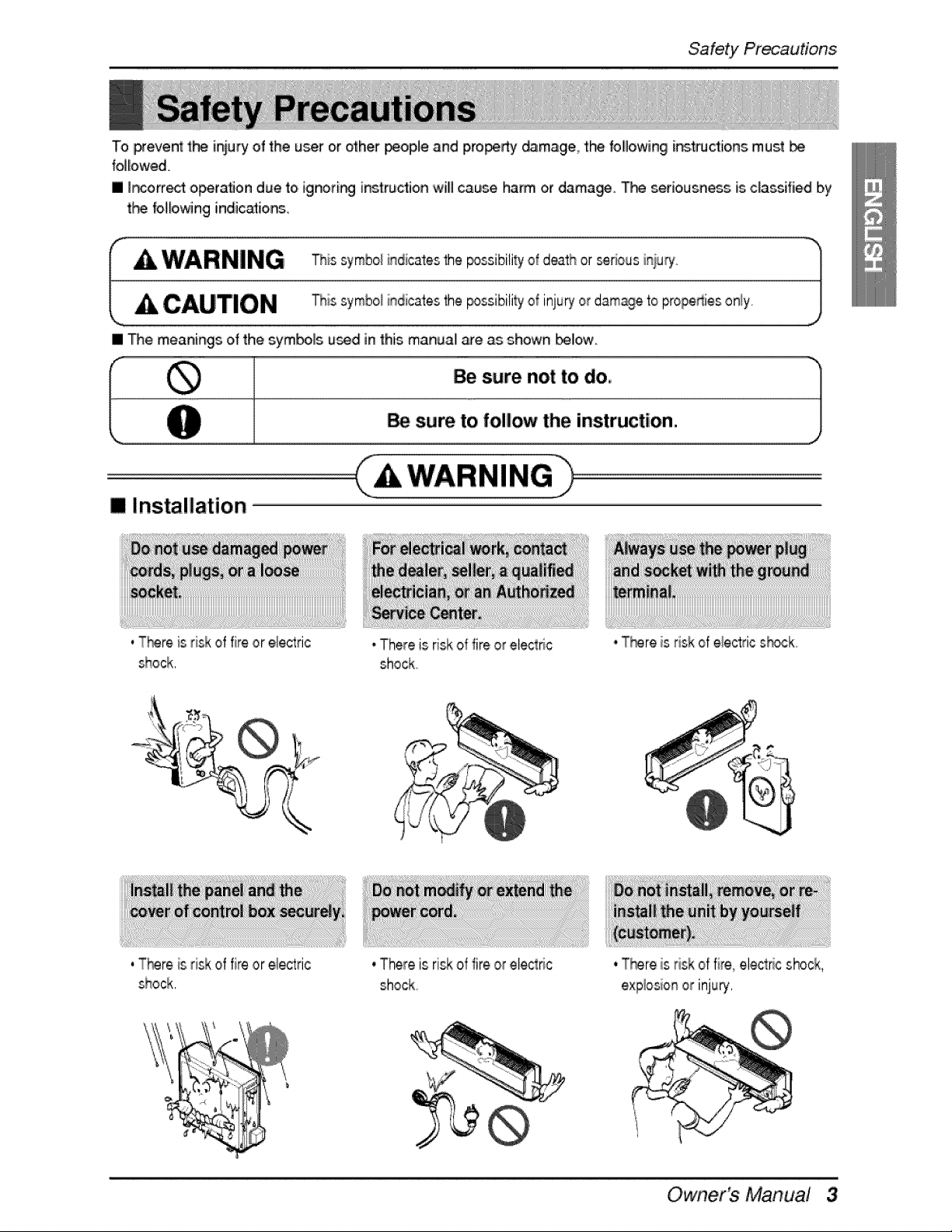
To preve_ the iniu_ of the u_r or other _ople and pro_rty _mage, the followingl i_'tll_Cttioins mus't
folliowed.
[] Incorr_t operation due toi ignori_ instruction willl cause harm or damage. T_ seriousness is ciassifiied by
t_ fo_owing indic,_io,ns,
I A WARNING his symbo_indicatesthe _ssibitity of death or _rious ir_i,u_'. )
[
CAUTION -r_i_symboiindicates 'the_ssibili_y oi injury or damage'topropedies oniy, j
[] The meanings of the symbolls used in this manuall _e as shown bellow,
m Installation
WARNING
, T_re is risk of fire or electric
shock,
, T_re is risk of fire or electric
shock,
• There is riskof fire or eiedtric
shock
* There is riskof fire or el_tric
shock
, T_re is risk of electdc s_ck
, T_re is risk of fire, eleclffc shock,
explosionor injury,
Owner's Manual 3
Safety Pi're_utions
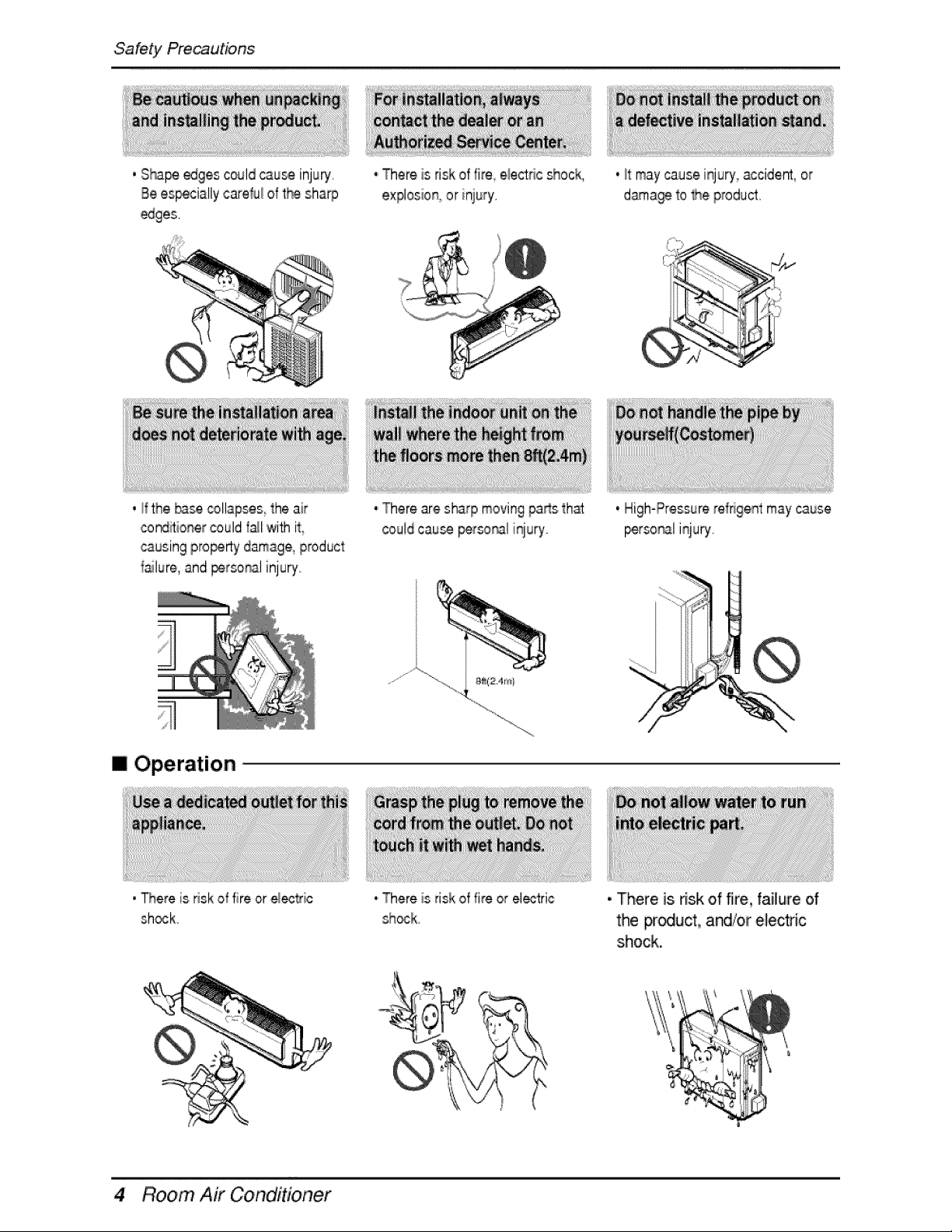
, Sham edges could_u_ injury,
Be es_cially careM of th_ sharp
* There is risk of fire electdc chock,
explosion_or iniury,
. _tmay cause injury' accident, or
dama_ to Me product,
, _fthe _se _llapses, the air
cond_io_ercould f_l with it
causingpro_r_y damage,product
_ailure,and _rso_l injury
* There are sharp moving pa_s that
could cau_ _so_l injury
I Operation
• _ere is risk of fire or e_ec_ic
chock
* There is risk of fire or electric
sh_k,
. High-Pressurerefrigent may cause
_'so_l iqury.
• There is risk ,offire, faiilure of
the pr_uct, a_/or electric
shock.
4 Room Air Conditioner
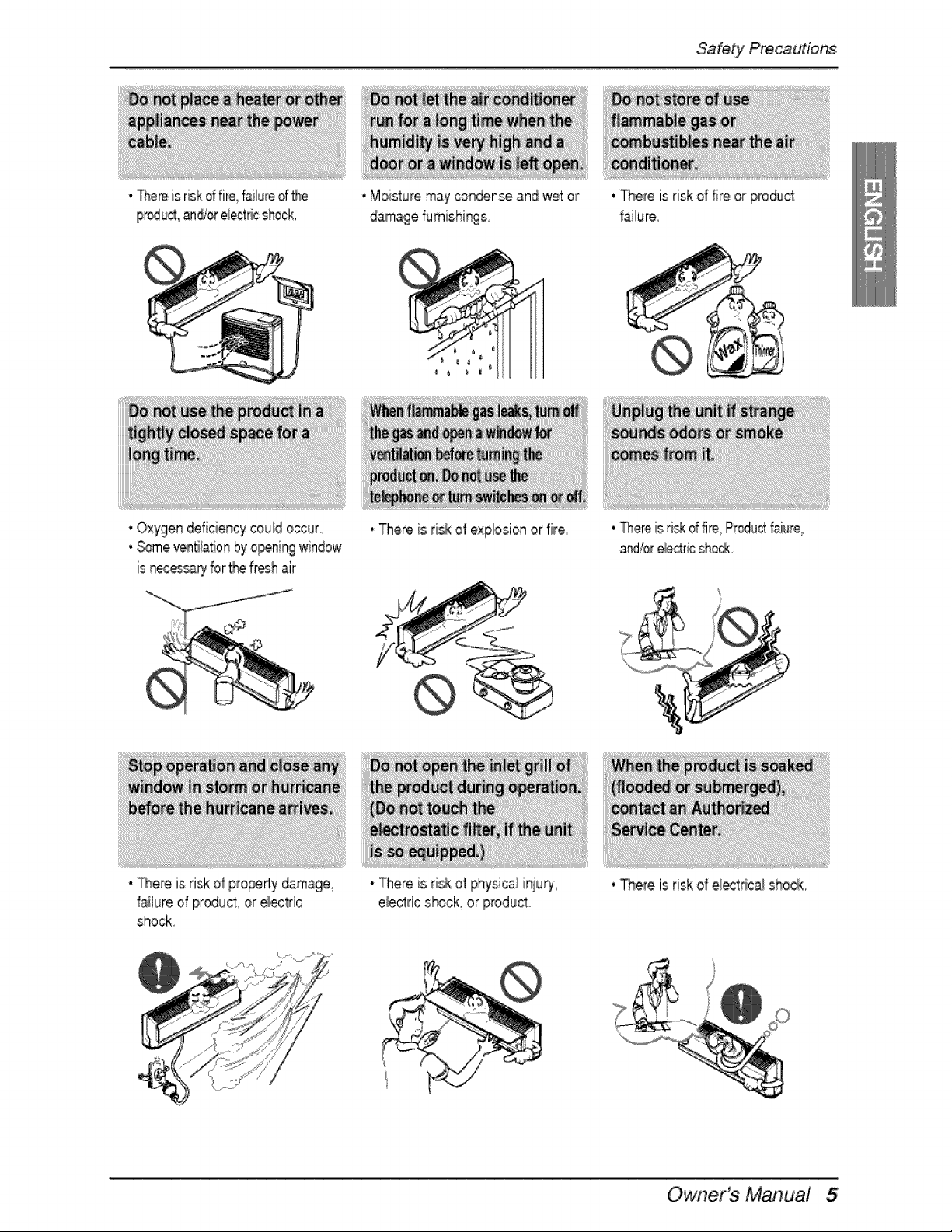
. Thereis r_k offire,faiiu_eof the
proud, an_or e_ectrics[hock,
, Moisturemay con_n_ and wet or
Safety Precautions
, Oxygen deficiencycould occur
, Someven5lationby o_ning window
is n_essary for thefresh air
. There is risk of pro_rty darnage_
_!ure of product, or eec_ic
shock.
• There Wsrisk of explosionor fire
* There is risk of ph#ical i_qiury_
e_ectricshock, or product
. There is riskof fire or product
_ailure,
. TIh,ereis ri_: d fire,Pr_uct faiure,
and,_ore_c_r_shock
, There is riskof e_rica/l shock,
Owner's Manual
Safety Pre_utions
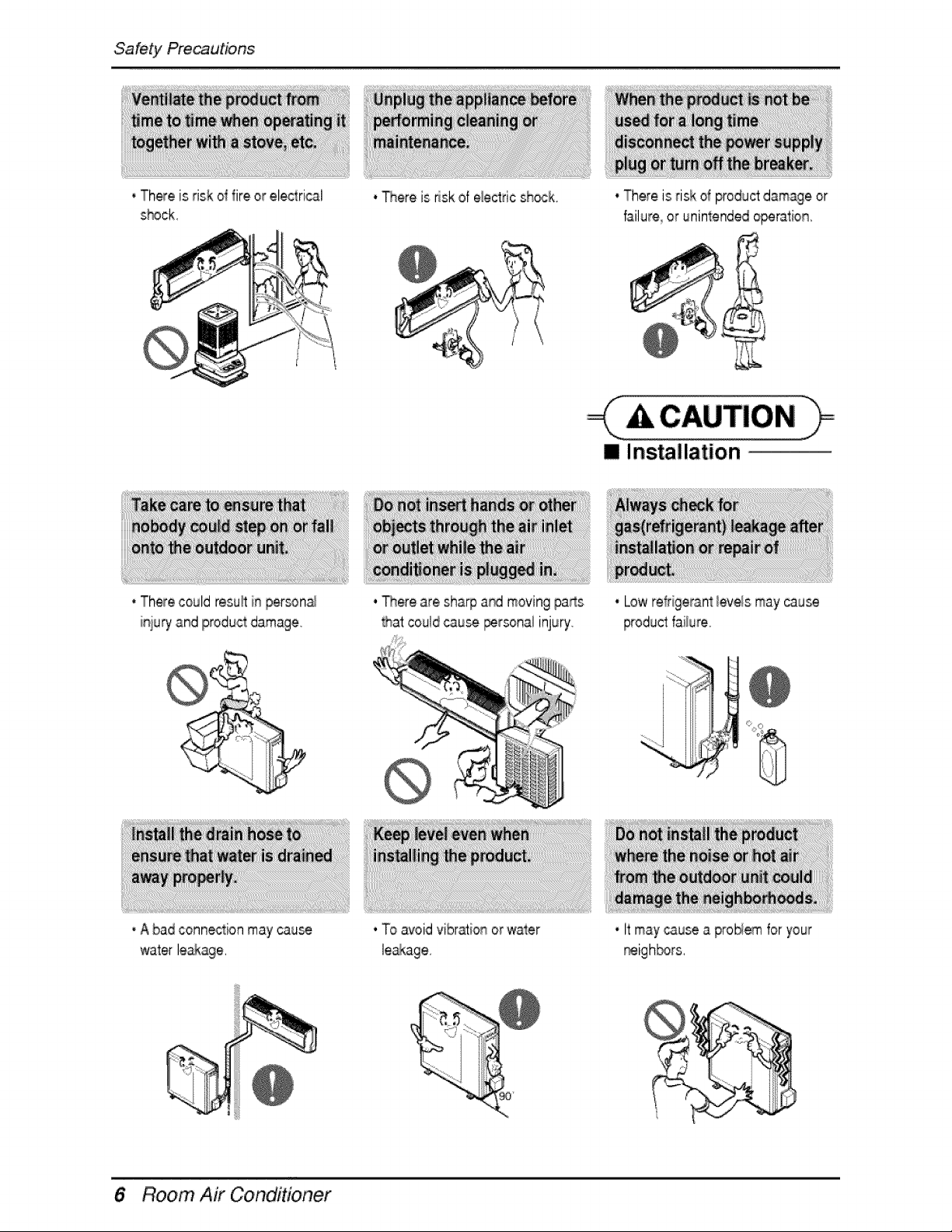
• There is risk d fire or electrical
s_ck.
* Therecould resu_in person_
iniury and productdamage.
. _ere is riskof electric sh_k,
. There are shia_ aM moving pa_s
Rat couldcau_ personalinjury.
• There is risk o_productdamage or
failure or uninlendedo_ration,
[] Installation
• Low refrigerant_eve_smay cause
productfaiium
• A bad connection may cau_
water leakage,
. To avoidvibraion orwater
6 Room Air Co er
, It may_use a pro_ for your
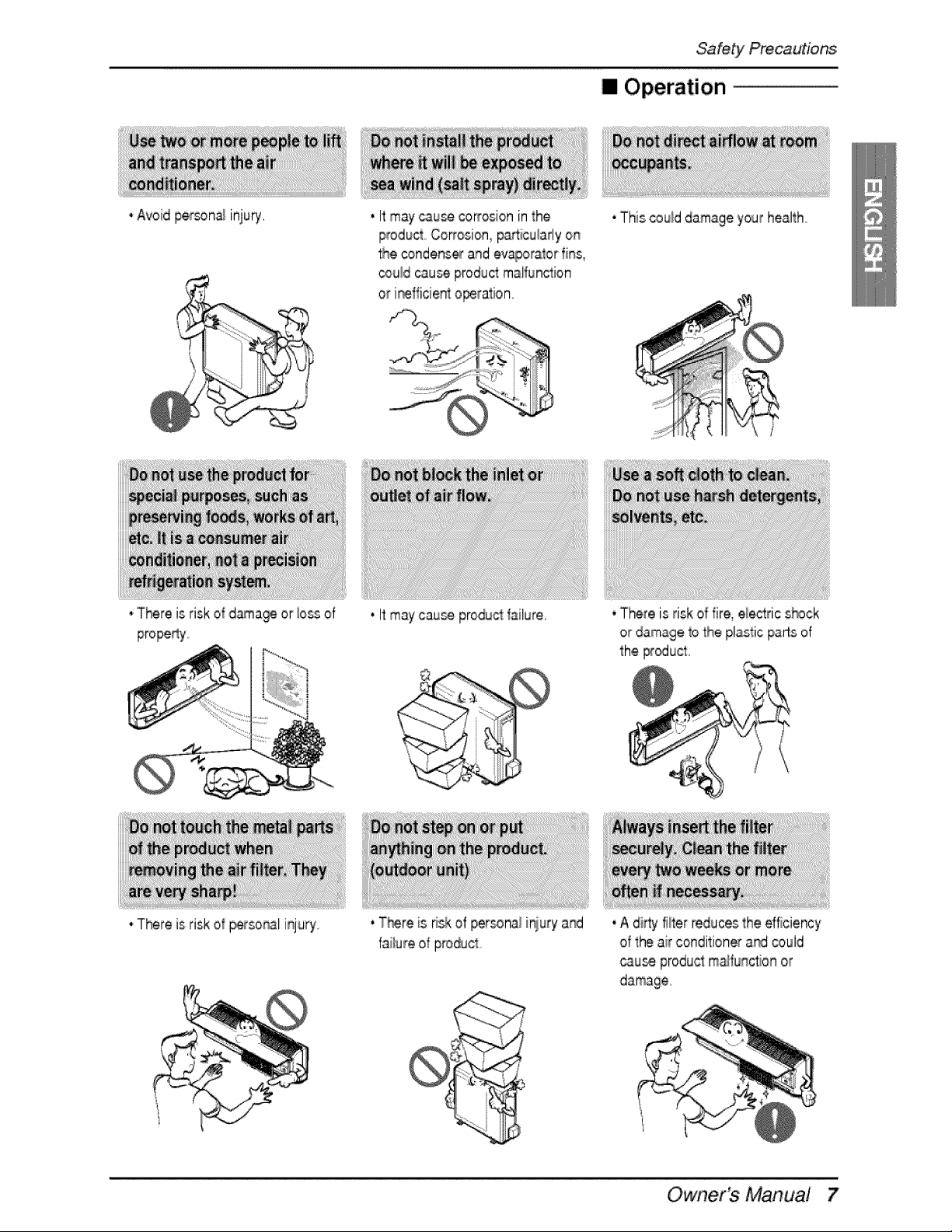
• Avoid £er_na_ injury.
*There is risk of dama_ or iossof
•There is risk of _rso_21 injury.
Safety Precautions
[] Operation
. Itmay _use _rrosion inthe
product Co_osion_particularlyon
the condens_ and ev®or_or fins,
cou!dcause productmalfunction
or i_fficient o_ration_
. Itmay cau_ producl_ilure,
. T_re is _skof personai iniury a_
failure of product
• This _u_d damage your health
• There is risk of fire, electric s_ck
or damage to the pliaslic parts ef
the _ucl,
• A dirty filter reducesthe efficiency
of the air conditionerand _uld
cau_ productm_function or
Owner's Manual
Safety Pre_utions
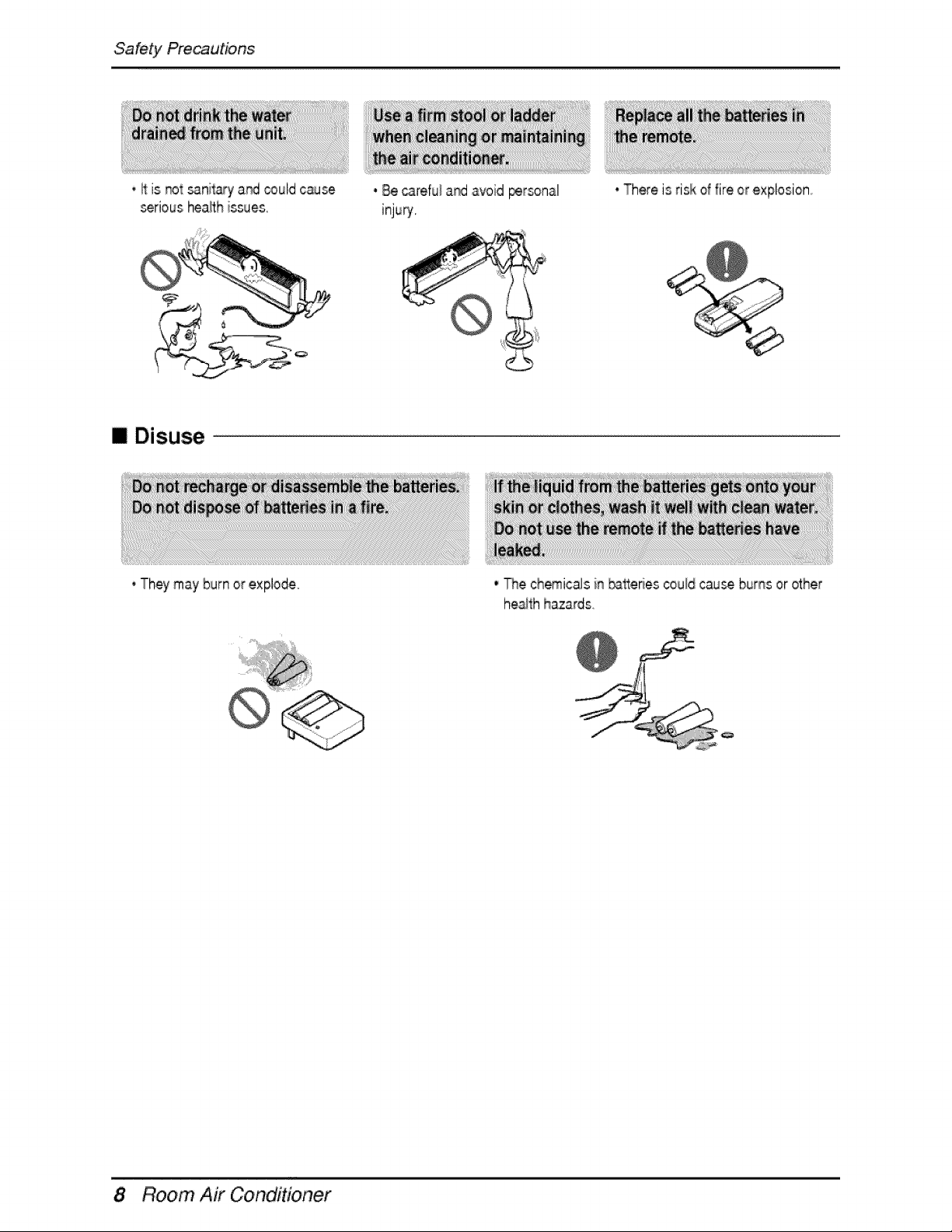
• It is _t sanitary a_ could cause
seriousheath issues.
[] Disuse
* Theymay burn or explode°
.8e ca_refu_a_ avoid personal
injury.
- There is risk of fire or explosion,
• The chemicalsin #_tteriescould cause burns or other
heaithhazards.
8 Room Air Co er
P_r_o_ra_n
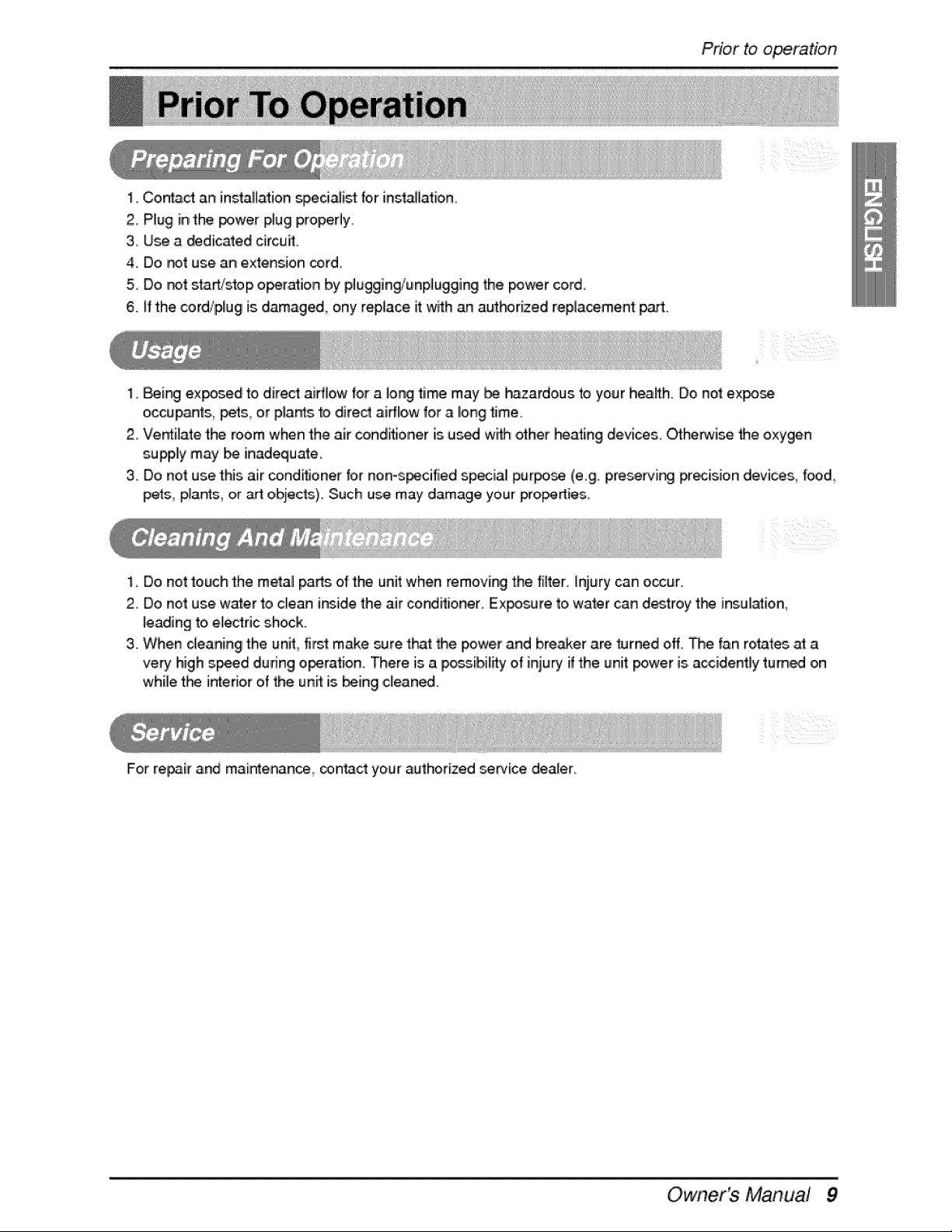
1, Contact an installation speci_ist for inst_[ation.
2. P'lug inthe _wer plug properly.
3. Use a dedicated circuff
4. Do _t use an extension _rd
5. Do _t start/stop o_ration by plugging/unplugging the po_r cord,
6. ff the cordipfug is damaged, ony repUaceit wRh an autf-#rized replaceme_ part,,
1,8ei_ ex_sed to direct airflow _ora long tiime may be h_ardous to your health. Do not expo_
oiccupar4s,,pets, ,or plants to ,direct ai#low for aiong time.
2,.Ventilate the room when the air conditioner is us_ wF_ho_her beating devices. _he_ise the oxygen
supp,llymay be inadequate.
3,.Do not use this air co,nd_fionerfor non°s_cified sp_ial pur_ (e,£. pre_i_ pr_ision devices too,&
pets, plants, or _ o,bjects)_ Such use may damage your pro_ies.
1. Do not touch the metal p_rts of the unit when removing the filter. Injury can o,ocur.
2. Do not use water to clean insidethe air conditioner° Exposure to water can destroy t_ insulation,
leading to electric shock.
3. When deaningl the unit, flint make sure that _ie power and breaker are _rned off. The fan rotates _ a
ve_ high speed during o_ration. There is a po_.ibility of inju_ ifthe unit _wer is.accidenfly tum_ on
while t_ interior of the unff is being cleaned.
For re_ir and maintenance_ oonta,ct your authorized _rvice dealer.
/
z
Owner's Manual 9
Intm,ductioin
This sym_l alerts you to the risk of electric shock.
This symbol aleds you to hazards thiat may cause harm t:othe
air conditioner.
This symbol indicates sp,_iai notes°
WARNING
• This a,ppliance should be insta,lled in accordance wi_ nationall wiring regulations. This guide acts
as a guide to ihe_pto explain pr_uct features.
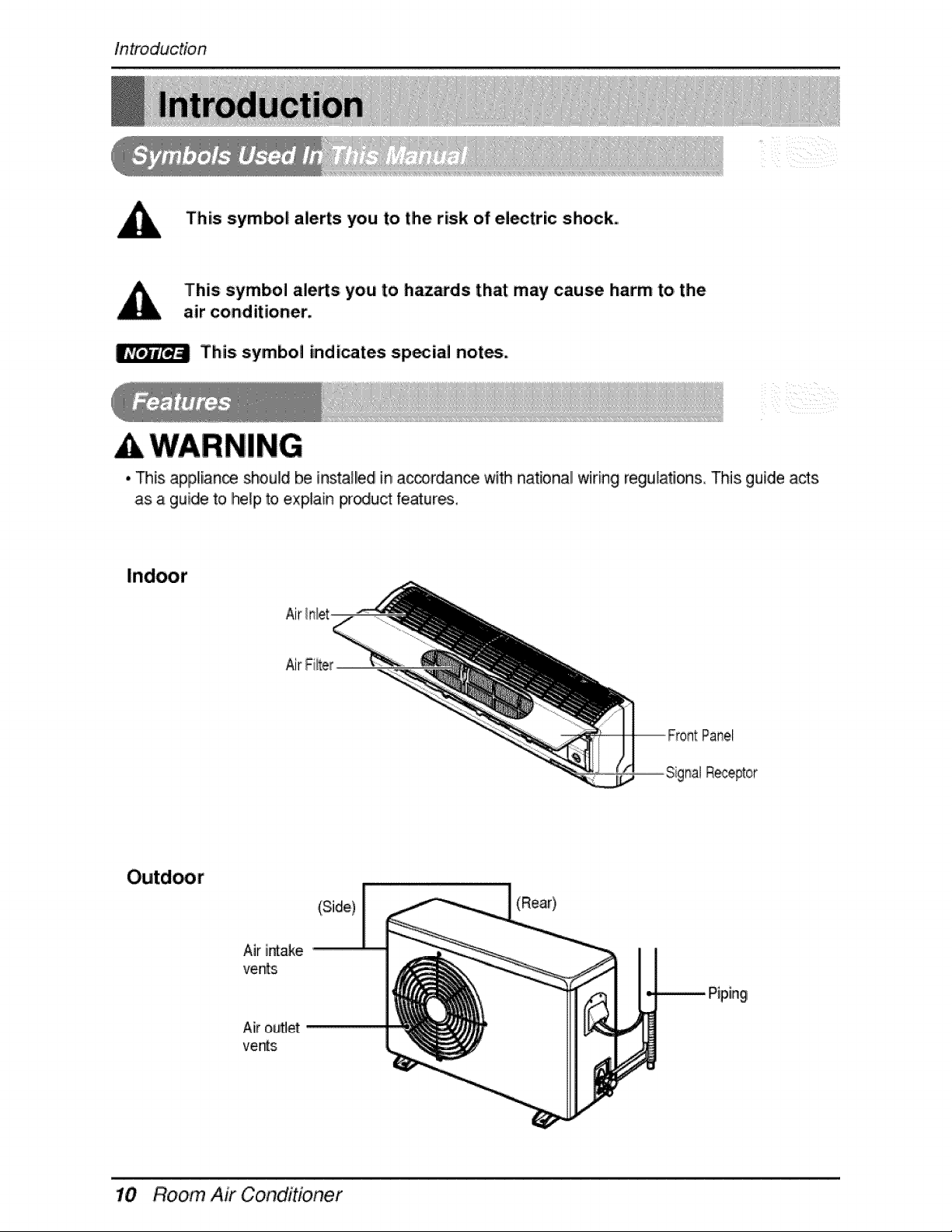
Panel
hal Receptor
Aiiroutlet
ve_s
(Side)
(Rear}
Room Air Conditioner
WARNING
Electrical Safety
• This appliance must be properly grounded.
To, minimize the risk of electric shock_ you mus'l alway p4ug in|o a grounded oulet
• Do not cut o,r remove the grounding! prong from the power plug.
• Attaching the adapter ground terminal to the wall receptacle cover screw does
not ground the appliance unless the cover screw is metal and not insulated, and
the wall receptacle is grounded through the house wiring.
° If you have any doubt whether the air conditioner is properly grounded, have the
wall receptacle and circuit checked by a qualified electrician.
Owner's Manua! 11
Operating Instruction
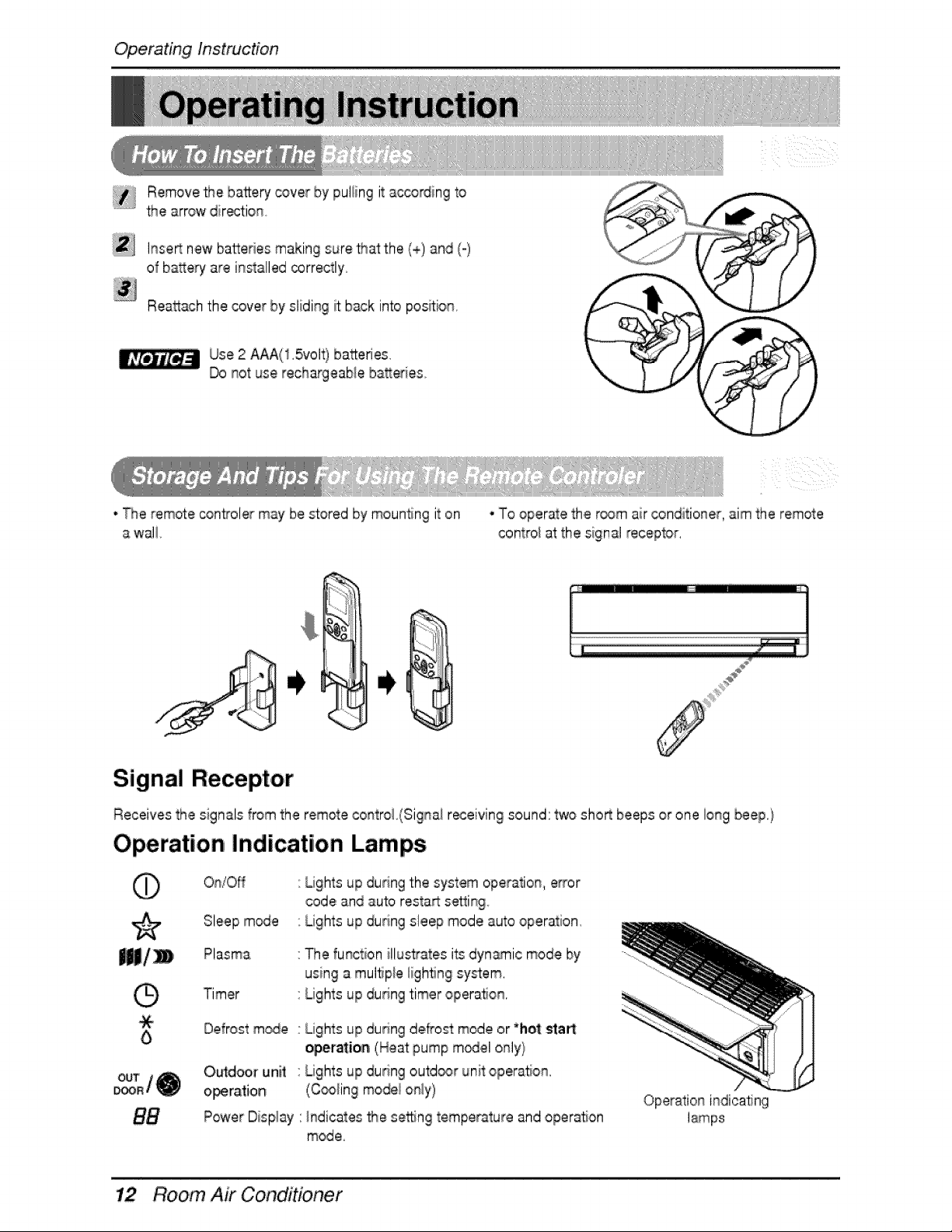
ii_ Remove the ba2ery cover [bypul_ingit according to
...... the arrow dir_:ion
Inse_ new batteries making cure that the (+) and (o)
of bakery are installed correctly.
Rea_achthe cover by sliding _ back into position.
Use 2 AAA(! .5volt) ba2,eries
Do i_otuse reclhargeab_eba_,eries
• The remote _ntroler may be stored by mounting it on
a wal!
, To operate the r_m air conditioner, aim the remote
contro_at the signal _ec.eptor.
Signal Receptor
Receives the signals from the remote contro! (Signai r_eiving sound: two shoR beeps or one long beep./
Operation Indication Lamps
On/Off
Lights up dudng the system operatio_, error
code and auto restart s_ing
Lights up during sleep mode auto operation.
0
Plasma
Timer
The function illustates its dynamic mode by
using a multiple ligh_ng sy_,em.
Lights up during timer opera, on.
Defrost m_e Lights up dudng de,oat mode or*hot _a_:
oper_ioa (Heat pump m_el only}
O_door unil
operation
Power Display
Lights up during outd_r unit operaSon.
(C_ing mode_o_y)
hdicates _e se_ng temperature and operation
mode.
Operation indicating
Room Air Conditioner
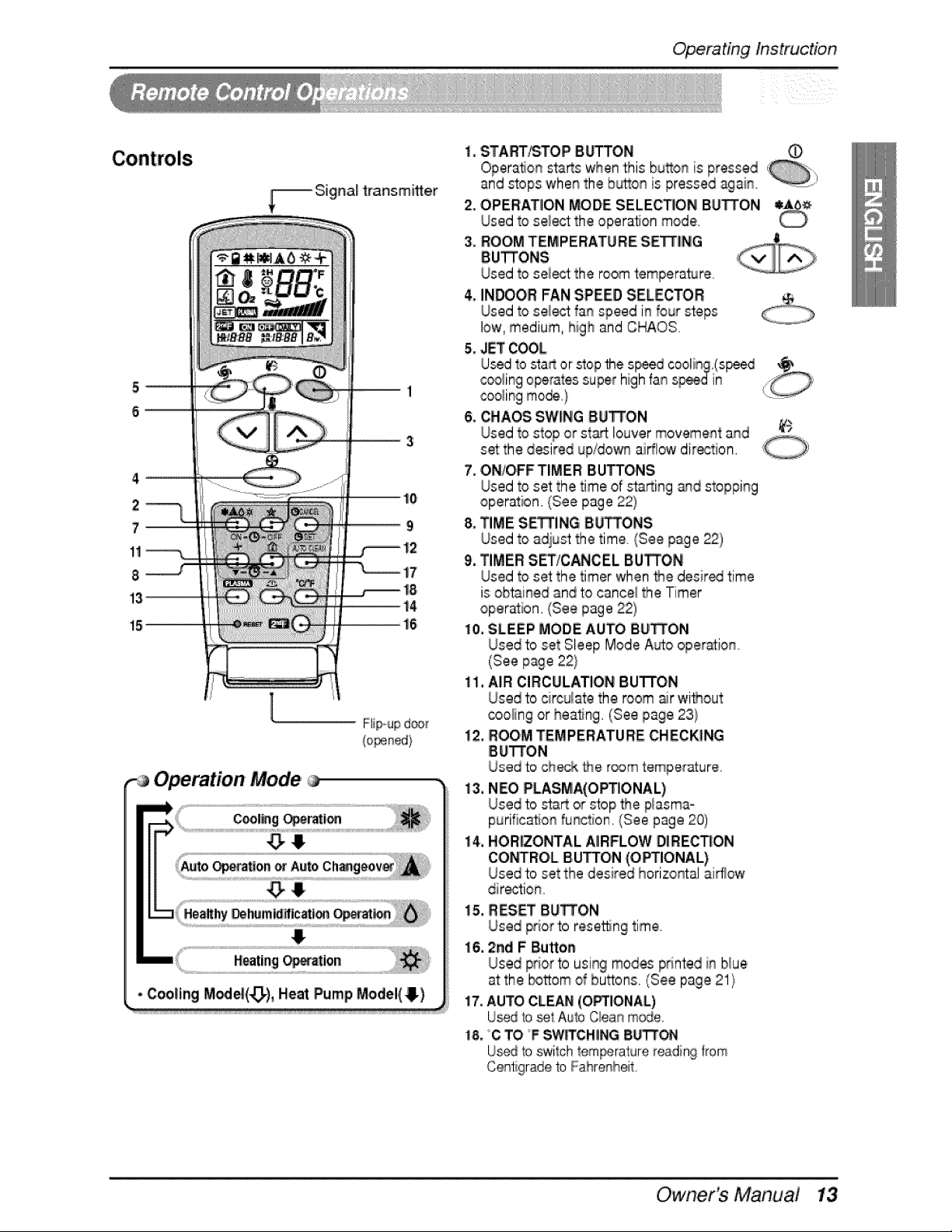
Operating Instruction
-_ Signal t_nsmi_er
2
7_
!1
8
l
Operation, Mode
1. START_TOP Bb%TON
Operation sta_s whenthis button is pressed , )
and stops when the b_on is pressed again. ..........
2. OPERATION MODE SELECTION BU_ON
Used to select the opera, on mode
3oROOM TEMPERATURE, SETT|NG
BU_ONS
Used to se_ the room temperature
& INDOOR FAN SPEED SELECTOR
Used to sele_ fan speed in four steps
low, medium, high and CHAOS.
5. JET COOL.
U_ to sta_ or'stopthe s_ed coolin£.(s_ed _
,_,olingoperatessuper high fan sp_din
_oling me_} L:_......
6. CHAOS SWING 8U_01'4
Used to stop or st_ louver movement and ¥)
set:the desired up!do_ airflow direction.
7_ON/O,FFTIMER BU_ONS
Used to set the time of stsrting and stopping
operation. (See page 22)
8, TIME SETTING 8LI_ONS
Used to a_ust the time (See page 22)
9. TIMER S_iCANCEL BUTTON
Used to set the timer when _e d,esir_ time
is;obts.inedand to cancel the 'Timer
operation, (See page 22)
10. SLEEP MODE AUTO BU_ON
Used to set Sleep Mode Auto oper_ion,
(See page 22}
11. AIR CIRCULATION BuTroN
Used to cErcuiatethe room _r wi_out
coo_ingor hea_ng, (See page 23}
12, ROOM TEMPERATURE CHECKING
IBU_ON
Used to check the room temperature.
13. NEe PLASMA(OPTIONAL)
Used to sta_ or stop the p!asma_
purification function. (See page 20)
14, HORIZONTAL A|RFLOW DIRECTION
CONq*ROLBUTTON
Used to
direction
15. RESET BUTTON
Used prior to resetting time,
16, 2rid F Button
Used pdor to using modes printed in b!ue
e _ O
at the bottom of button_. (See page _1}
17,AUTO CLEAN(O_IONAL)
U_d b _t Auio Qean mode..
18. C TO _FSWFFCH_NG8_
IJ_d 1oswi'_chlem_rature reading from
Cer_igradefo Fahrenheit
Owner's Main,ua,!
Operating Instruction
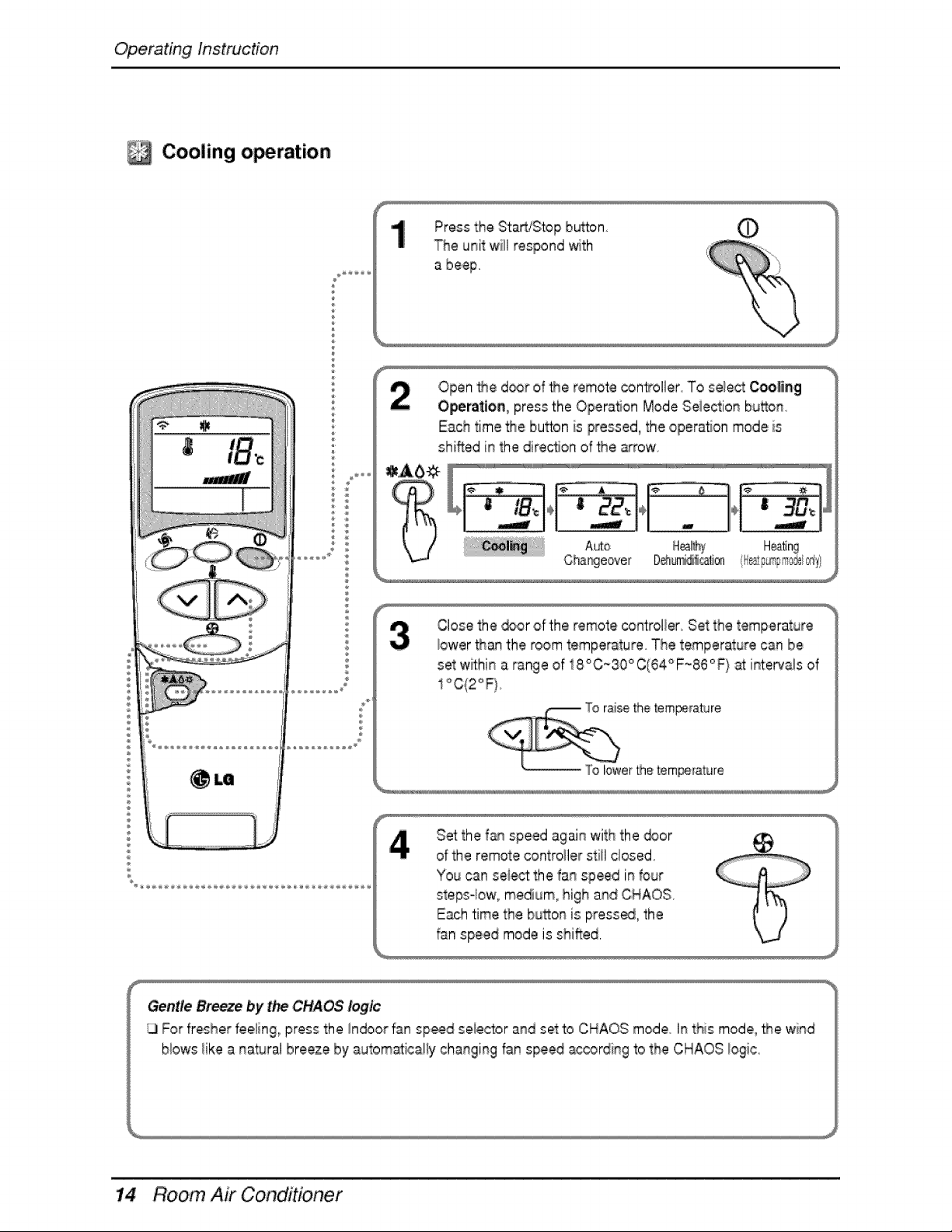
Cooling operation
Press the StaR/Stop button.
The unit will respond with
a beep
Open _e d_r of _e remote con_oller To select Cce|ing
Operation_ press the Operation Mode Seiection bu_on.
Each time the bu_on is pressed, the opera, on mode is
shined in the dire,c_onof _e _-row
A_o Hea_ng
Close the _or of the remote controller Set the temperature
iower than the room temperature. The temperature can be
set within a range of 18°C~30°C(64°F_86°F/at int:ervalsof
S_ the fan speed again with the _or
of the remote contro_ierstill closed
You can seie_ the fan speed in four
stepsqow, medium, high and CHAO:S.
Each time the bu_on is pressed, the
f_n speed mode is shifted,
Gentle Breeze by t_ CHAOS logic
For fresher fieeling_press the Indoor fan speed seie,ctorand set to CHAOS mode In this mode, _e wind
b!ows !ike a _atural breeze by automaticaliy changing fan speed according to the CHAOS !ogic.
Room Air Conditioner
Operating Instruction
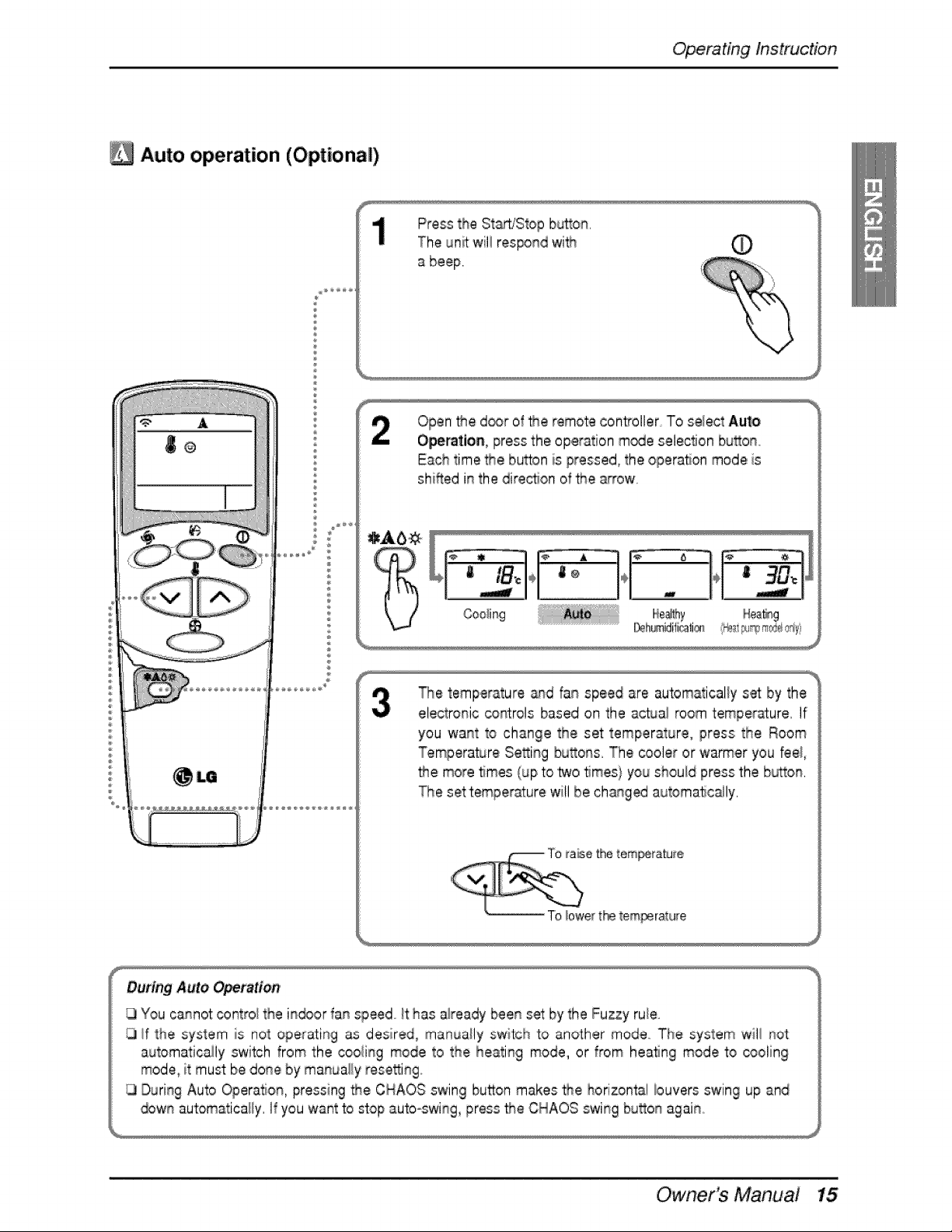
Auto operation (Optional)
®
Press the St./Stop button,
The un_ wil!res_n,d wi'_ ,_
a beef
Open _e d_r of _e _emotecontroller To select Aul_o
Operation, press the operation m_e selection bu_on.
Each time _e button is pressed, the operation mode is
shiRed in the dire_on of _e _-row.
The temperature _qd fan speed are automatically s_ by the
electronic co#trois based on the a_ua_ room temper_ure, If
you want to change the set temperature, press the Room
Temperature Se_ing bu_ons, The cooler or warmer you fee_
_e more 5rues (up to _o _mes} you should press the bb_o#,
The set temperature wi!l be ch_ged automatically,
During Auto Operation,
You cannot controi the i_or fa_ speed it has aiready bee_ set by the Fuzzy ruie
_f 'the system is not operating as desired, manually switch 'to another mode,, The system wil_ _ot
au_omaticaily switch from the cooii_g mode to the heati% mode, or from heating mode to _oling
mode_it must be do_e by manually #ese_i%
Duri% Auto Operation, pressing _e CHAOS swing button makes _e horizontal iouvers swing up and
_w_ automatically If you want to stop auto-swing, pros _e CHAOS swi% bu_o_ agai_
Owner's Manual
Operating Instruction
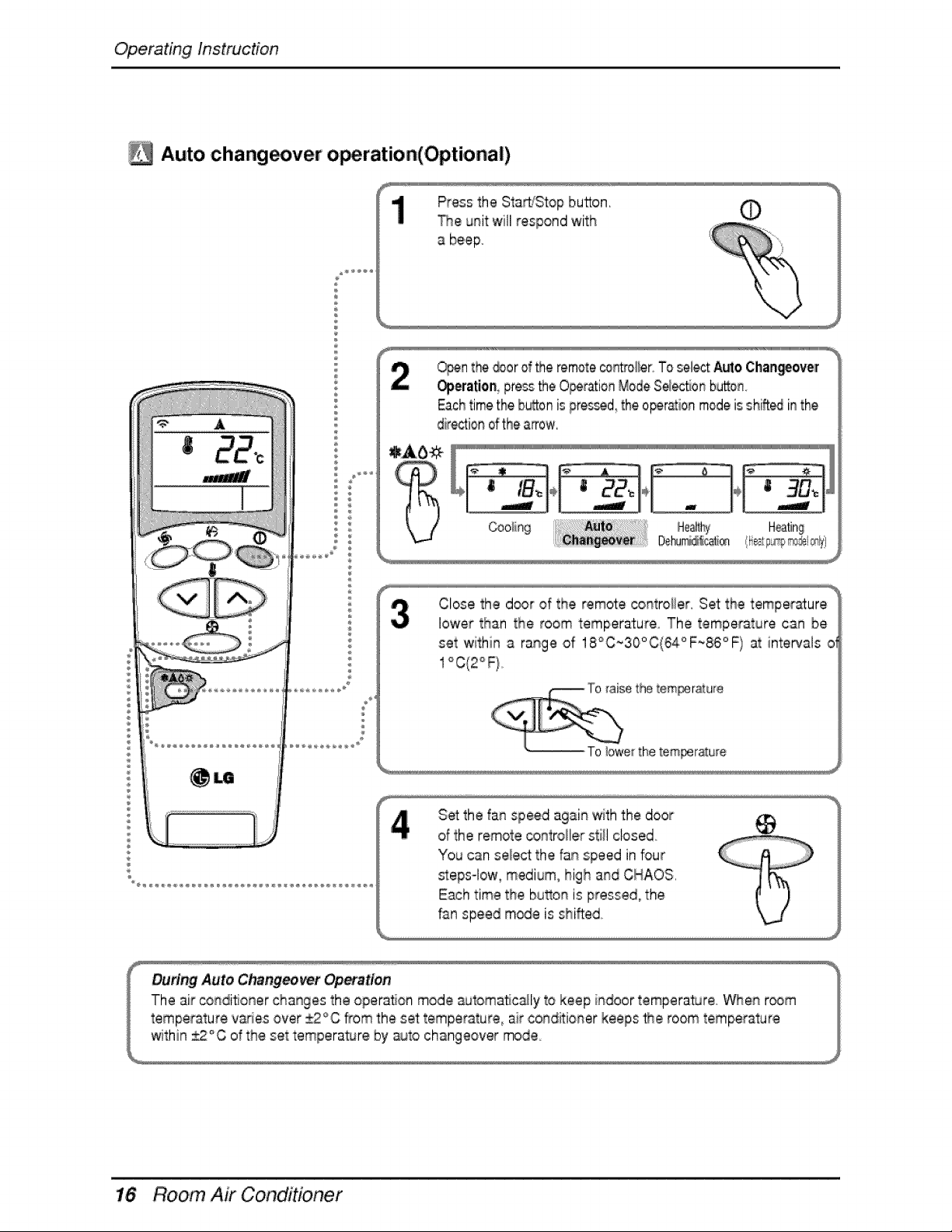
Auto, chang_ver o_ration,(Opti,ona|)
®
Press the Start/Stop button,
_ne unit w_llrespond with
a beef
_n the _or of the remotecontroiler.To selectAutoChan_ov_[
Operation pros me ,O_rationModeS_ec_onbutton,
Eachtime the b_on is pres_d the operationmodeisshiftedin the
directionofthe arrow,
Close the door of the remote _ntroiier. Set the temperature
lower than the room temperature The temperature can be
set within a range of 18°C~30°C{64°F~86°F) at intervals o'
1°C(2°F}
Set the fan speed again _th the door
of:the remote controller still closed
You can select the fan speed in four
_eps Iow_medium, high and CHAOS,
E_h time the bu_on is pressed, the
fan speed m_e is shifted
Room Air Conditioner
Operating Instruction
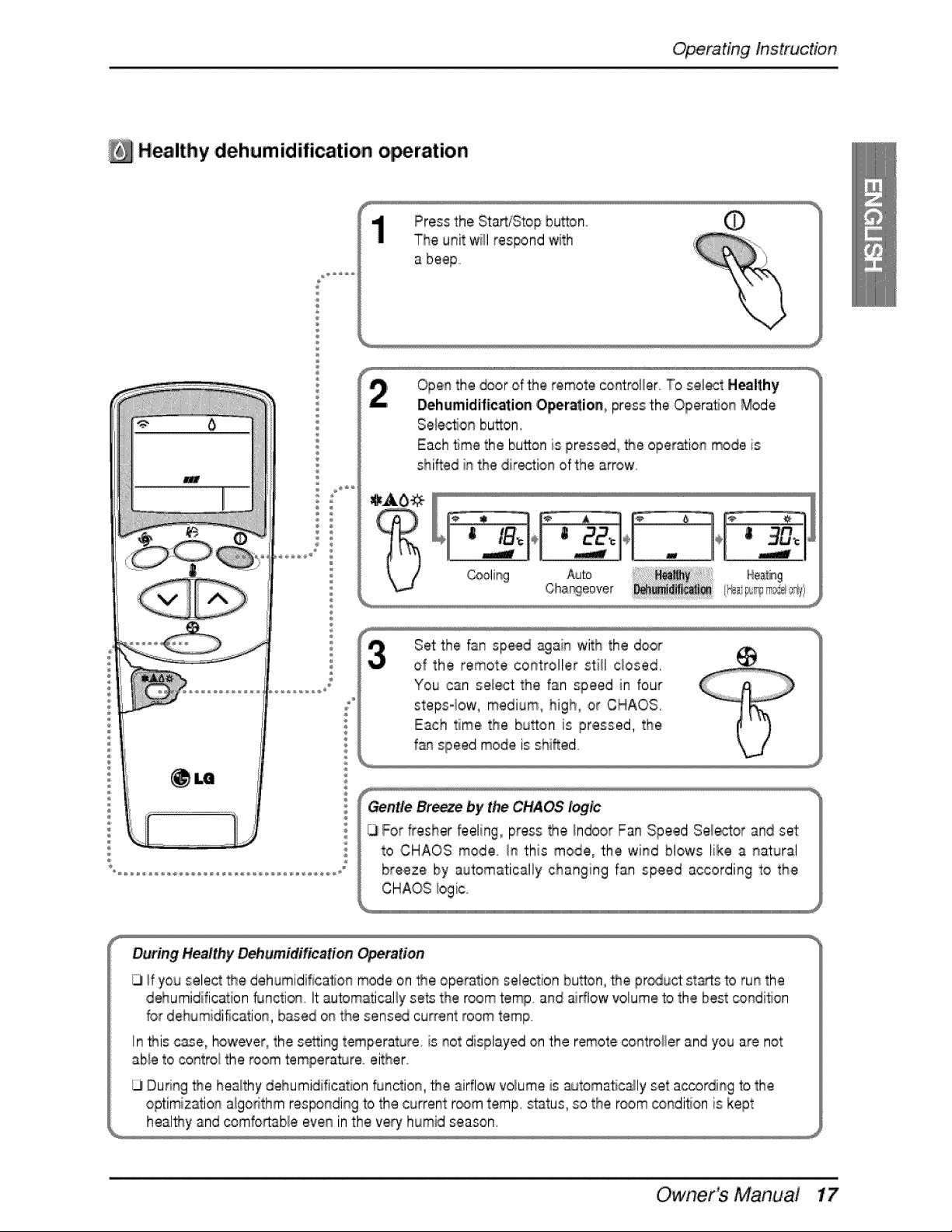
Healthy ,dehumidification o ration
Press the StaWStop huron
The unit will respond with
Open the _or of the remote oo_roller To select Healthy
Dehumidification ,Oper_ion_ press the OperaSon Mode
SelectJo_button,
Each time the button is pressed,,_e operation mode is
shifted in the dir_tion of the arrow
Set the fan speed again with the door
of the remote controller still closed,
You can select the fan speed in four
steps-low, medium, high, or CHAOS,
Each time the button is pressed, the
f&n speed mode is shifted
Gentle Breeze by t_ CHAOS logic
For fresher feeling, press the Indoor Fan Speed Sel_tor and set
to CHAOS mode In this mode_ the wind blows like a natural
breeze by automatically changing fan speed according to the
CHAOS iogic.
During HealthiyDehumidification Opemdon
If you selec_the d,ehumidificatio_mode on the operation selection bu_on, _e proud: starts to run the
dehumidification Dnction It:automatically sets the room temp and airflow volrumeto the best _ndition
for delhumidification, based on the sens_ current room temp
In _is c_e0 however, the se_ing temperature is not displayed on the remote controller and you are not
abie to contro! the room temperature either.
Dud_g _e healthy dehumidification function, _e airflow volume is _toma_cally set a_ording to the
optimization algor'ithm res_nding to the current r,_m romp, status, so the room c:ondi_onis kept
healfny and _mfo_aNe even in the vet/humid season,
Owner's Main,ua,!
Operating Instruction
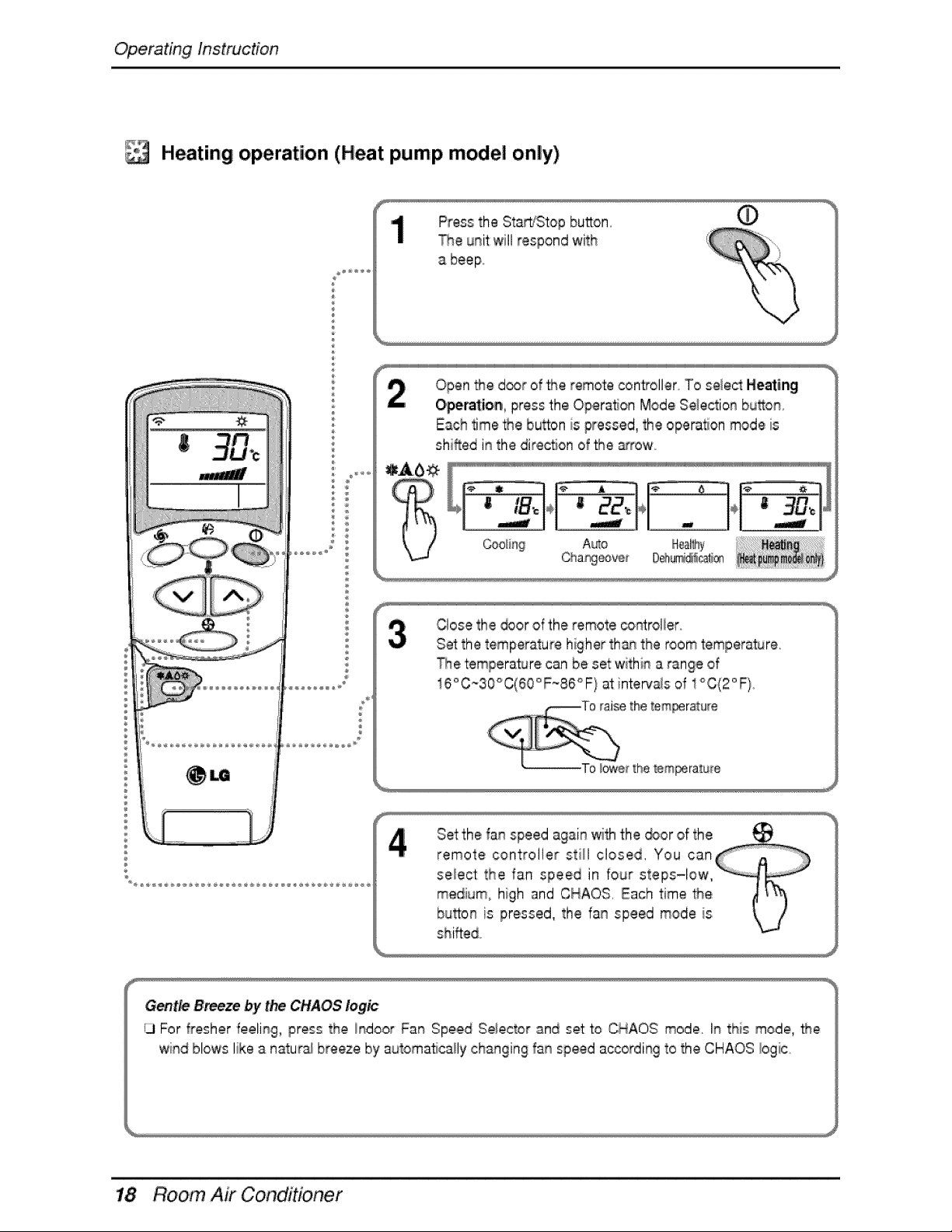
Heating operation (Heat pump model only)
Press the StaWStop button. ¢
The unit willrespond with
Open _e d_r of _e remote controller To select Heating
Operation, press the Opera,on Mode Selection bu_on
Each time _e bu_on is pressed, the opera, on mode is
shifted i_ the dir.ecSonof the _row
Close the _or of the remote co_trol_er_
Set the temperature higher tha_qthe room temperature.
_e temperature can be set withi_ a range of
16°C~30°C(60°F-86°F) at inter_,a_sof 1°C(2°F}
_rature
_ratu[e
shifted
Gentle B_ze by the CHAOS logic
13For fresher feeli_g, press the i_door Far_Speed Selector and set to CHAOS mode, It_ this mode, the
wi#_dblows like a naturs_ breeze by automatically changing fan speed according to the CHAOS logic,
Room Air Conditioner
Operating Instruction
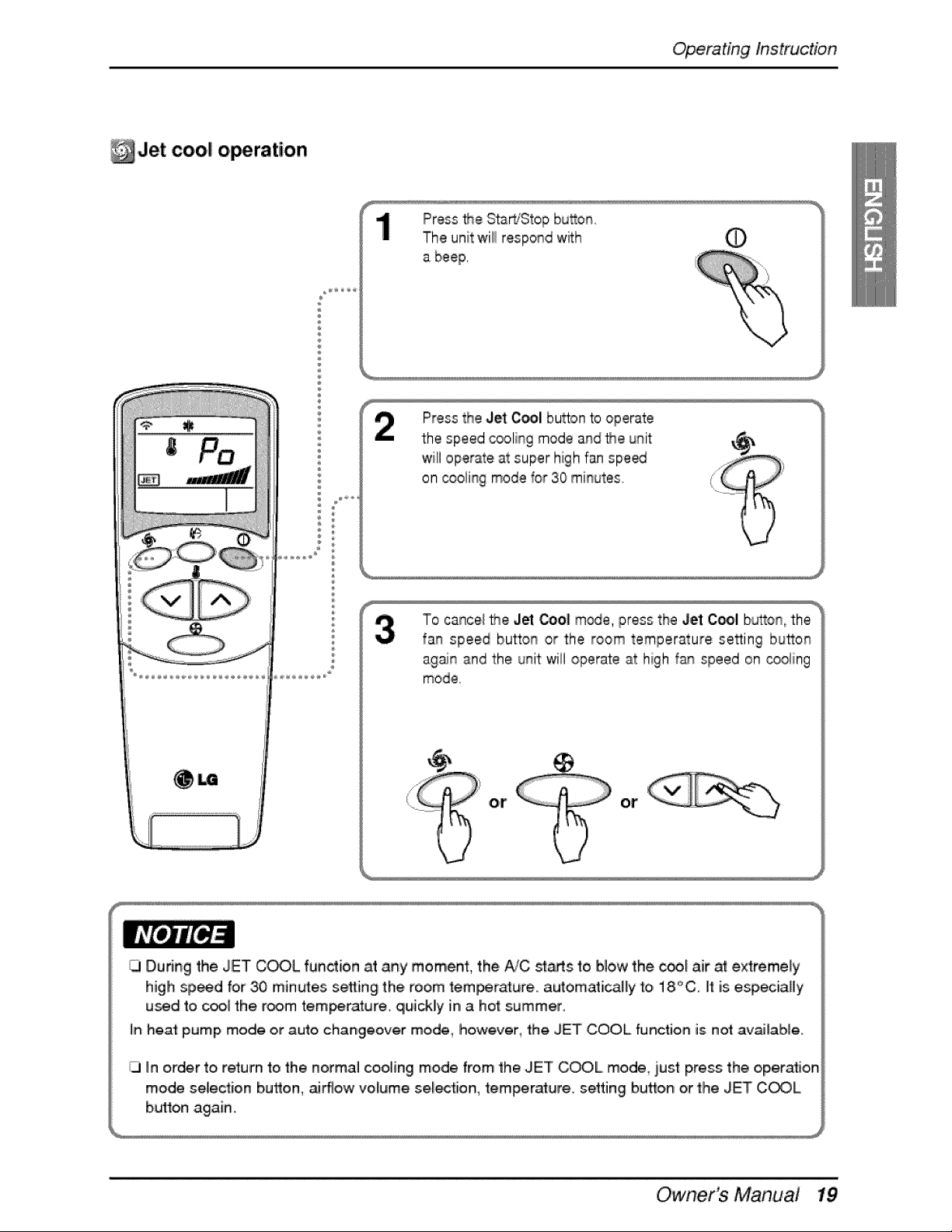
_Jet cool o,_ration
¢
®
¢
®
¢
Press the Start/Stop bu_on
The unit will respond w_:h (D
Press the Jet O_l button to operate
the speed cooling mode and Me unit
will operate at super high fan spe_
on _olil% mode for 30 minutes
To cancel Me J_ Be| m_e,, press the Jet Cool button the
fan speed button or the room temperature setting button
again and the unit wi!i operate at high f_ speed on cooling
mode,
or or
)
Owner's Main,ua,!
Operating Instruction
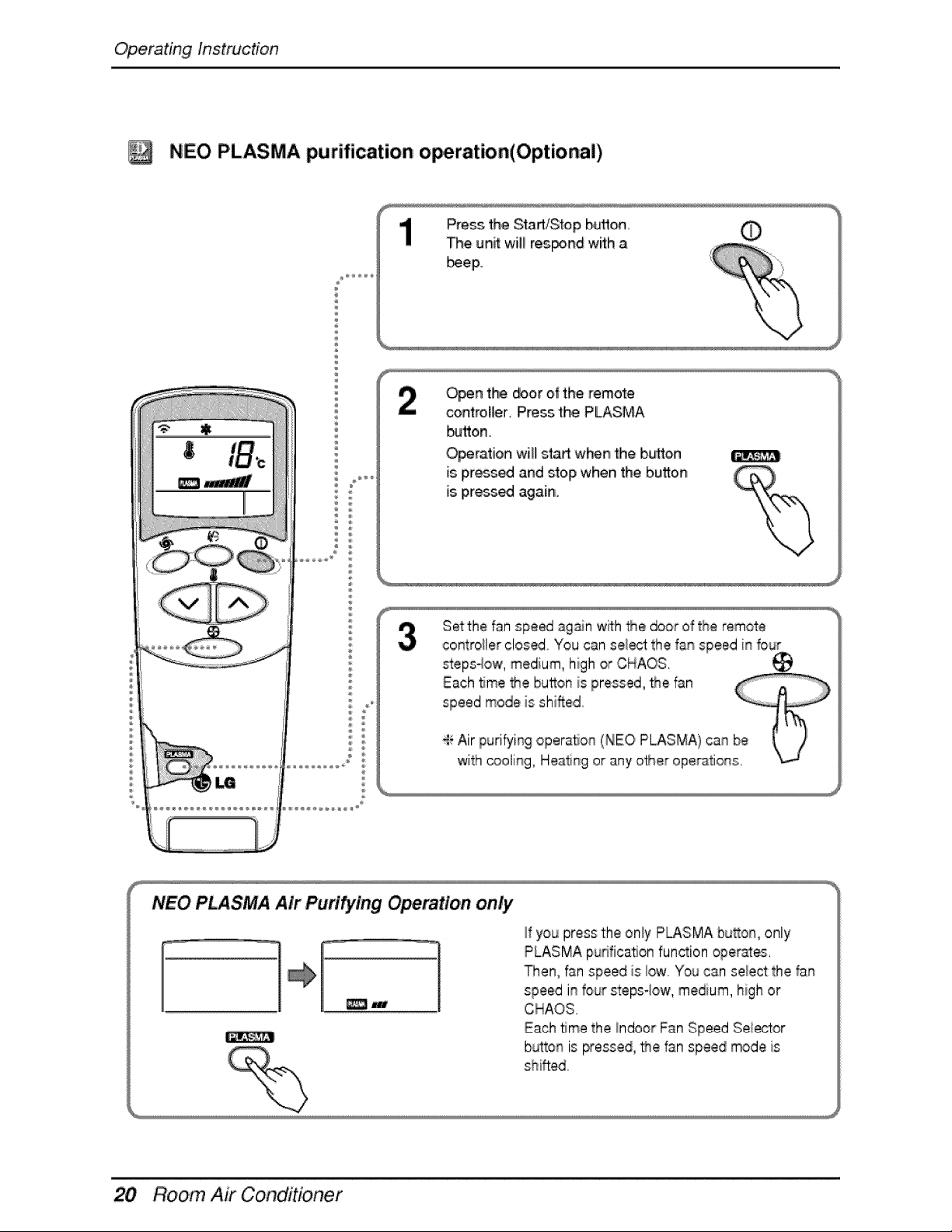
NEO PLASMA purification o,_ration(Op, tional)
÷
Press the Start/Stop button, (_
The unit will res_nd with a
_,ep,
Open the _or of the remote
controller. Press the PLASMA
I_J_o,n.
Operation willl sta_ when the button _
is press_ and s_op when the button
is press_ again.
Set the fan spe_ again with _e door of the remote
controiler closed You can sei_t: the fa_ speed i_ four
steps4ow, medium, high or CHAOS,
Room Air Conditioner
Operating Instruction
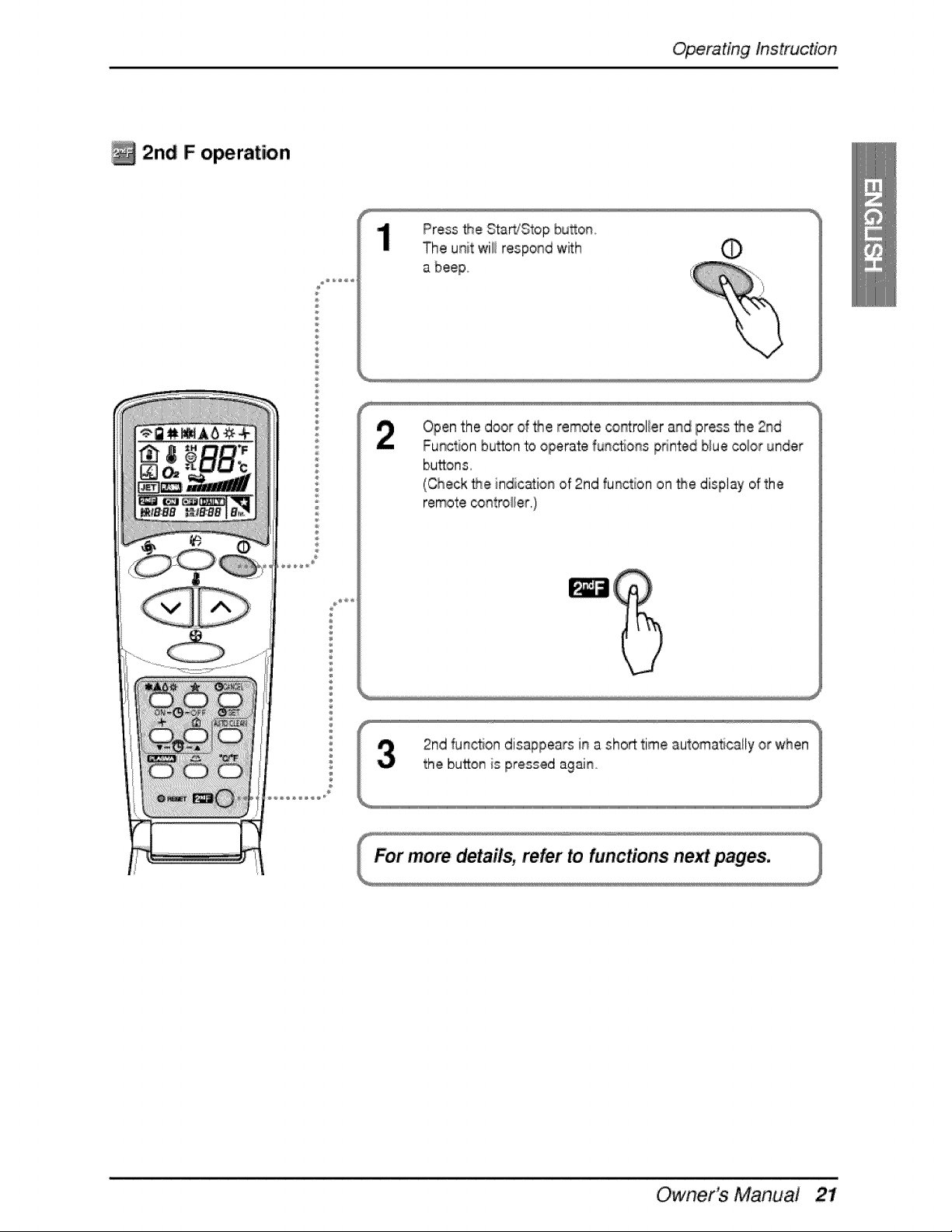
2n,d F operation
÷
÷
®
Press the Start/Stop by,on,,
The unit wili respond with _)
Openthe door d _e remote cont:rol_erand press _e 2rid
Function bu_on to operate func_ons pdnted blue color under
buttons,
(Check the indication of 2rid function on the display of the
remote,_ntro_er.)
Owner's Main,ua,!
Operating Instruction
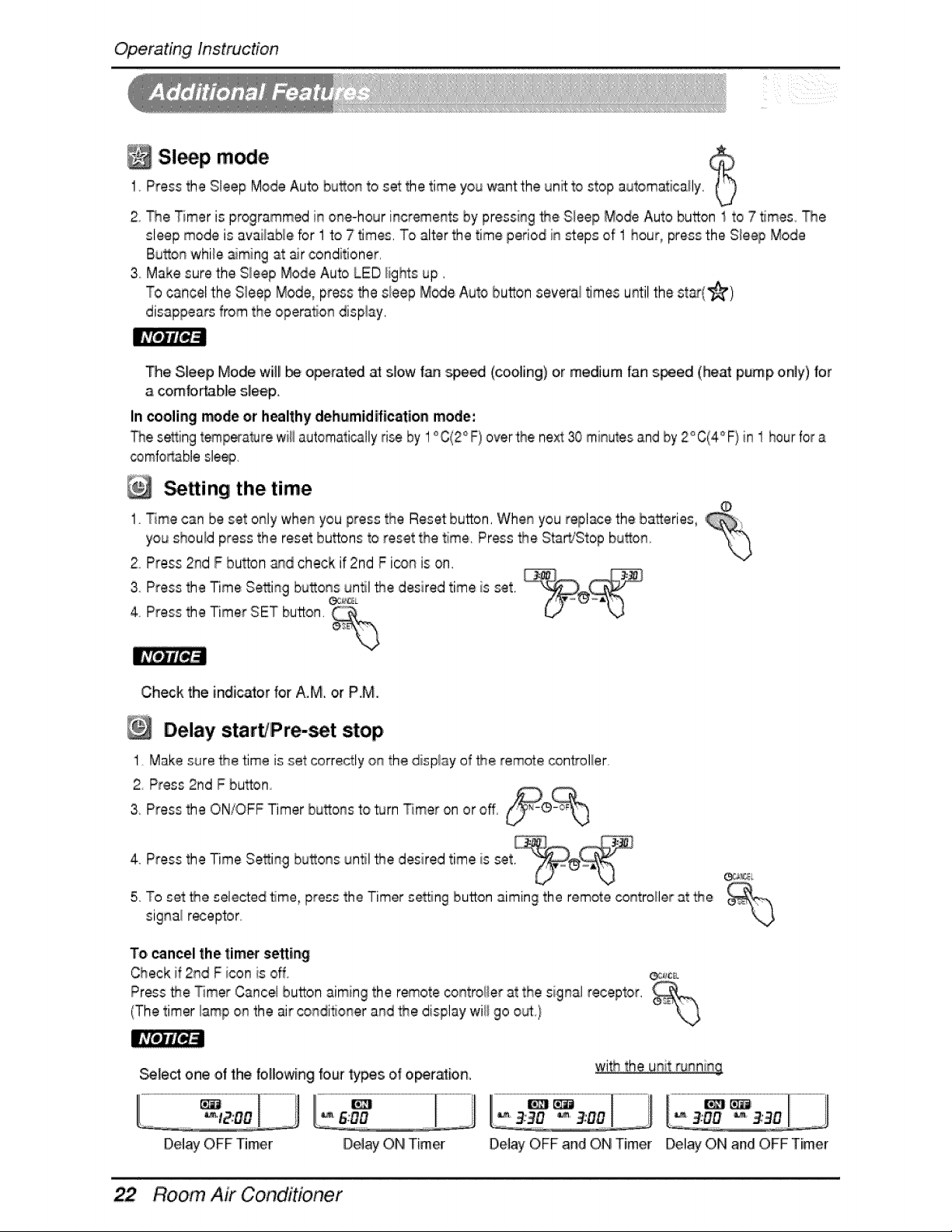
Sl p m ie1 Press the Sleep Mode Auto button to set the time you '_ntthe unit to stop automatica/y.
2 The T_meris programmed in one-hour incremen_ by pressing _e, Sleep Mode Auto button 1 to 7 _mes, The
sleep mode is avalable for 1 to 7 times, To alter the time period in steps of 1 hour, press the Sleep Mode
Button whte _ming at air conditioner,
,3 Make sure the Sleep Mode Auto LED/ghts up.
To cancel the Sleep Mode, press the s_eepMode Auto button several times until the st_(_)
disappears from the operaton display,
_e Sleeip Mode wll _ operated _ slow _ _e_ (cooing) o,rmedium fan s_ed (heat pump only) for
a comfortable sleep,
In cooling m_de or healthy dehumidification modle:
The setting temperaturewi/automatically ri_ by 1°C(2° F) over the next 30 minutesand by 2° C(4° F}in 1 hourfor a
comfod_blesleep.
tting the time
1 Time can be set only when you press the Reset button. Whee you replace the batteries,
you should press the reset buttons to reset the time. Press _e Sta_Stop bu_on
2oPress 2rid F button _d check if 2nd F ic_onis on.
43PressPressthetheTimerTimeSettingSETbutton.bUt°ns_"_¢_un_l_e desired time is set.
Check the indicator for A.M or P.M.
Delay start/Pre-set stop,
1 Make sure _e time is set ,correctlyon the display of _e Femotec_n_o/er
2 Press 2nd F button
3 Press the ON/OFF Timer buttons to _rn Timer on or off, _L_
4 Press the Time Setting buttons until _e desired time is set, _°
5,,TOset the,selected time, press the Timer setting button aiming the remote co_troHerat the
signal r_eptor,,
To,cancel the l:ime_sortie#
Check if 2rid F icon is off _:_
Pros _e Timer Cancel button aiming the remote _ntro/er at the signal receptor.
(The timer lamp on the air conditioner and the display wi/go out)
_lect one of the f,olowing fourtypesof ,o_tation,
........................................L-,= f_.J
Del_ OFF Timer Delay ON Timer De_ayOFF and ON Timer Delay ON and OFF Timer
Room Air Conditioner
Operating Instruction
Vertical Airflow Direction, Control
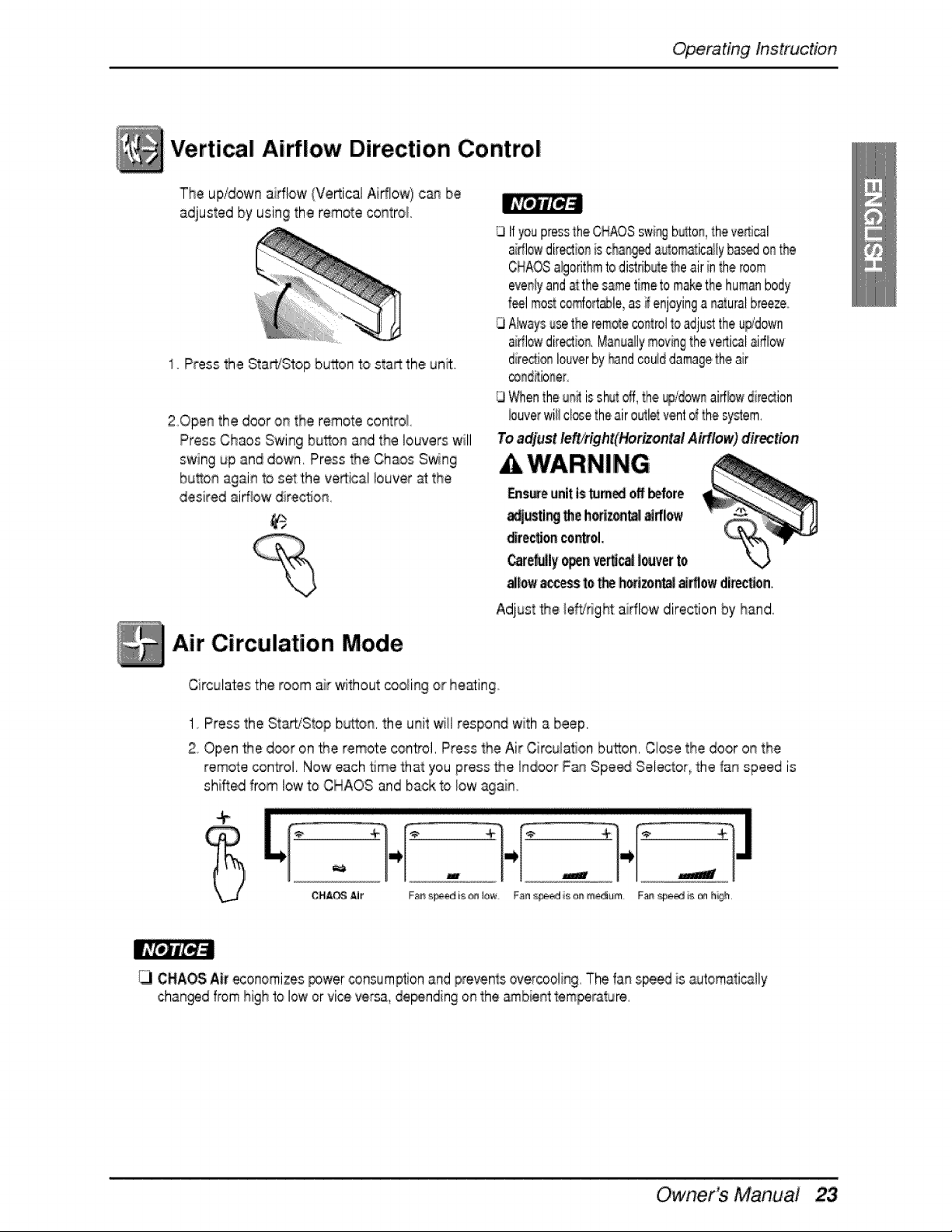
The up/down aidlow (Ve_ical Ai#low) c_ be
adjusted by using the remote centre/
1o P_ss the StadiStop burn 'to sta_ the un_
20pen the door on the remote control
Press Chaos Swing button and the louvers will
swing up and down. Press the Chaos Swing
button again to set the ve_:ical buyer at the
des red ai_ow di_e¢_on,
Air Circulation Mode
GIf youpressthe CHAOSswi%b_o_.,theve_:i_l
aidlowdirties is cha_ a_om_ic_ly bas_ onthe
CHAOSa_orithmtodi_rib_e _e air inthe_oom
evenlyand atthesametimeto makethehumanbody
f_l mos_co#ort_le, as #enjoyinganaturalb_eezeo
QAlwaysusetheremoteco,tel to adjusttheu_*d_Nn
ai#lowdir_io_. Manuallymovingthevenial airflow
direc_i,_louverby _nd coulddamagetheair
conditioner.
GWhentheu_ issh_toff,the ®/dow_aidlewdirection
buyerwillcl_e _heairoutletventd the system,
Toadjust le#/right(HorizontalAirflow) direction
Circulates the room air without cooling or heating
1 Press the St_iStop b_ton, the unit wiil respond with a beef
2 Open the d_r on _e remote control. P#essthe Air Ci_cuiati,onbutton, C!ose the door on the
remote control. Now each 5me that you press _e Indoor F_ Speed Selector, the fan speed is
shifted from low to CHAOS and back to low again_
÷
13 C_AOS Air economizes_wer _nsumption and preventsov_cooling. The fan s_ is automati_tly
changed f#omhigh to low or vice vers& de_nding on the arnbien:ttemperature.
Owner's Manual
Operating Instruction
Auto clean (Optional)
AUTOCLEAN
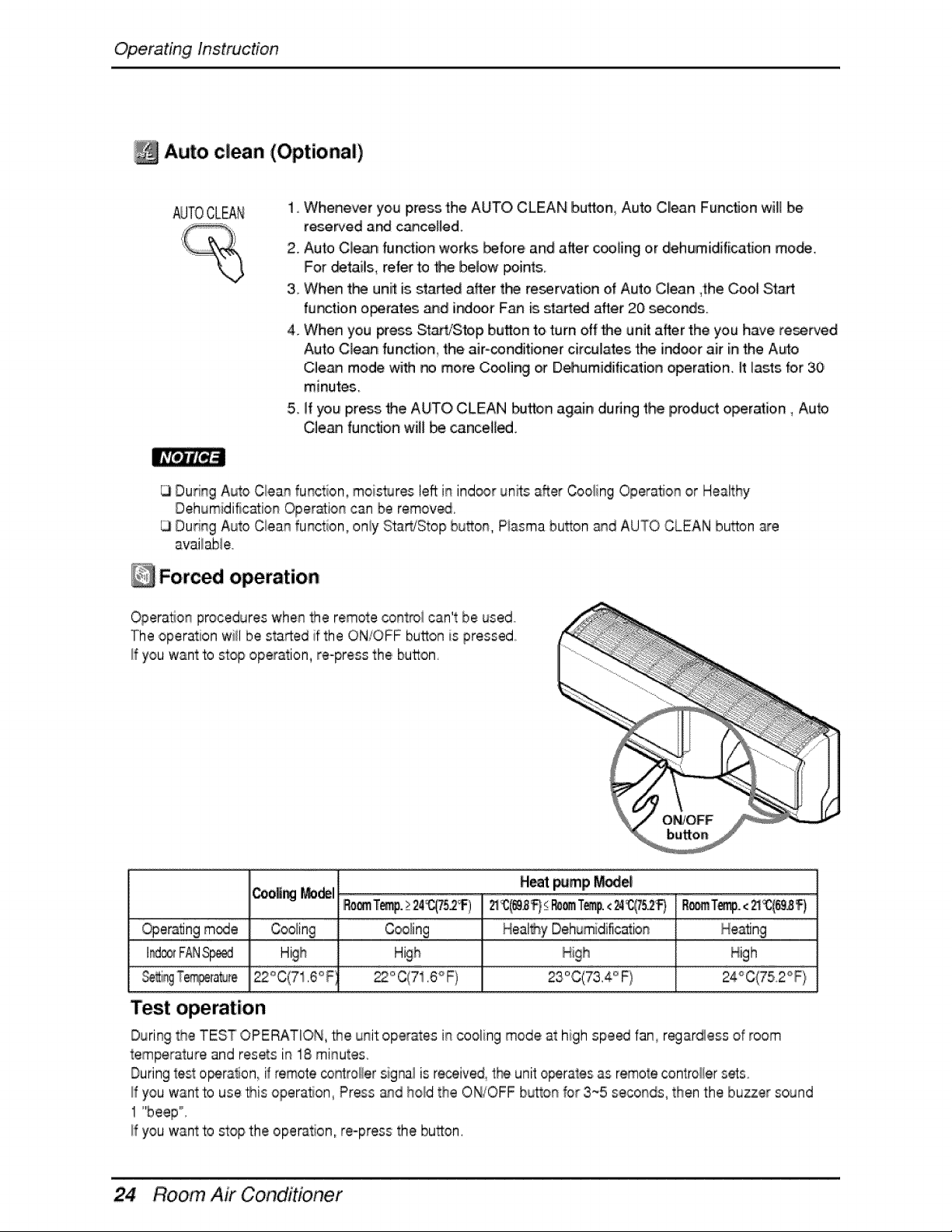
1. Whenever you press the AUTO, CLEAN button Auto Clean Func'_ionwill be
reserved and canceHe,d.
2. Auto Cle_ fundion works before and after c_ling or dehum[d[fi,cation mo_,
For _tails, refer to Me below points.
3. When tbe unff is sta_ed after the re_rva.tion of Auto,Clean ,the Cool Stad
fu_tion o_rates and indoor Fan is s_ after 20 seconds.
4. When you _,ess S_-tiSto, p button to turn off 'the unit after the you have rese_ed
Auto C]e_ fundion the air-_nditioner circulates the [ndoo,r air inthe Auto
C_e,anmode with _ more C_Hng or Dehumidification operation. _tlasts for 30
minutes.
5. If you press _he,AUTO CLEAN butlon again dunng the iprodu¢_,operation, Auto
Cle_ function will be cancell_.
Dudng Auto C_eanfunction, moi_ur_ left:in ind_r unffs after Cooiing Operation or Healthy
Dehumidific_ion Operation can be remove,
Dunng Auto 'C_eanfunction, on!y Sta_iStop bu_on, Piasma bu_on _d AUTO CLEAN bu_on _e
available.
Forced operation
Operation procedures when the remote control can't be used
The operation will be sta_,ed if the ON/OFF bu_on f_spressed
If you want to stop operation, re-press the button,
Heat _mp r_e
IRoomTemp.224_C_75,2_)_(_,_l=}_mTemp.<_4_5.,2_F) RoomT_,.,<_(6_)
Operatingmode _ Coo_ing . Coo_ing _ Healey Dehumidification _ Neating
I_ FANS_
, o _ 4 °22°C(71.6°F 22°C(71.6°F) 23 ,C.t73. F)
Test operation
During the TEST OPE_TION, the unit operates in cooling mode at high spe_ fan_r_ardiess of room
temperature and resets in 1.8minutes
During_esto_ration if remote co.roller signa_is r_ive& tl_ unit o_rates as remote contro#ersets
If you want to use this opera, on, Press ahd hold the ONfOFF bL_o_ for 3_5 seconds, then the buzzer sound
1 "'beep",
If you want to stop the operation, re-press the button,
Room Air Conditioner
Operating Instruction
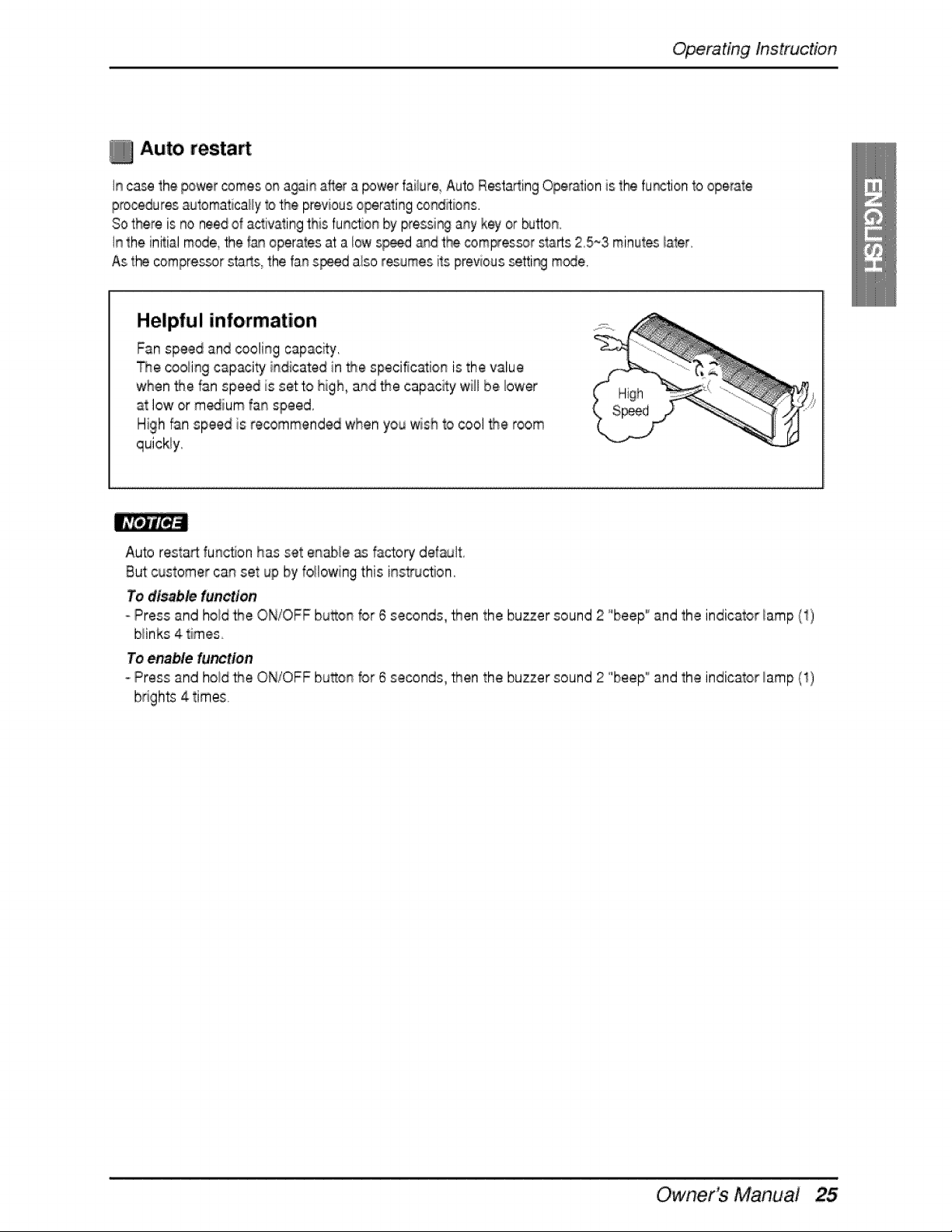
Auto resta
In ca._ the power comes on againafter a _wer failure Auto Resta_ingOperalion is the fur_:tion1ooperale
prooeduresauIomaticaHy1o'thepreviousoperatingcond_ions.
Sothere is no needof activatingthis function by pressingany key or _tton.
in the initial mode,the f_ operates at a low sp_ _d t_ comFessor starts 2,5~3 minutesiater.
As the compres_r starts, the fan speed also resumes its previoussettir_ mode,
Helpful information
Fan speed and cooling capacity.
The cooilingcapacity indicated in the specification is the value
when _e fan speed is setto high, and _e capac_y will be _ower
at low ,orm_ium fan speed,
High _n speed is recommended when you wish to cool _e room
quickly.
Auto resta_ fun,ct;onhas set enable _ factory defsult
But customer can set up by foilowing this instru,_on,
To disable function
Press and hoid the ON/OFF button for 6 seconds, then the buzzer sound 2 °'beep'_and the indicator _amp(1)
b_inks4 times
To enable function
oPress and hold _e ON/OFF bu_on for ,6seconds, _en the buzzer sound 2 'beep'_and the indicator/amp (1)
brights 4 times.
Owner's Manual
Maintenance and Service
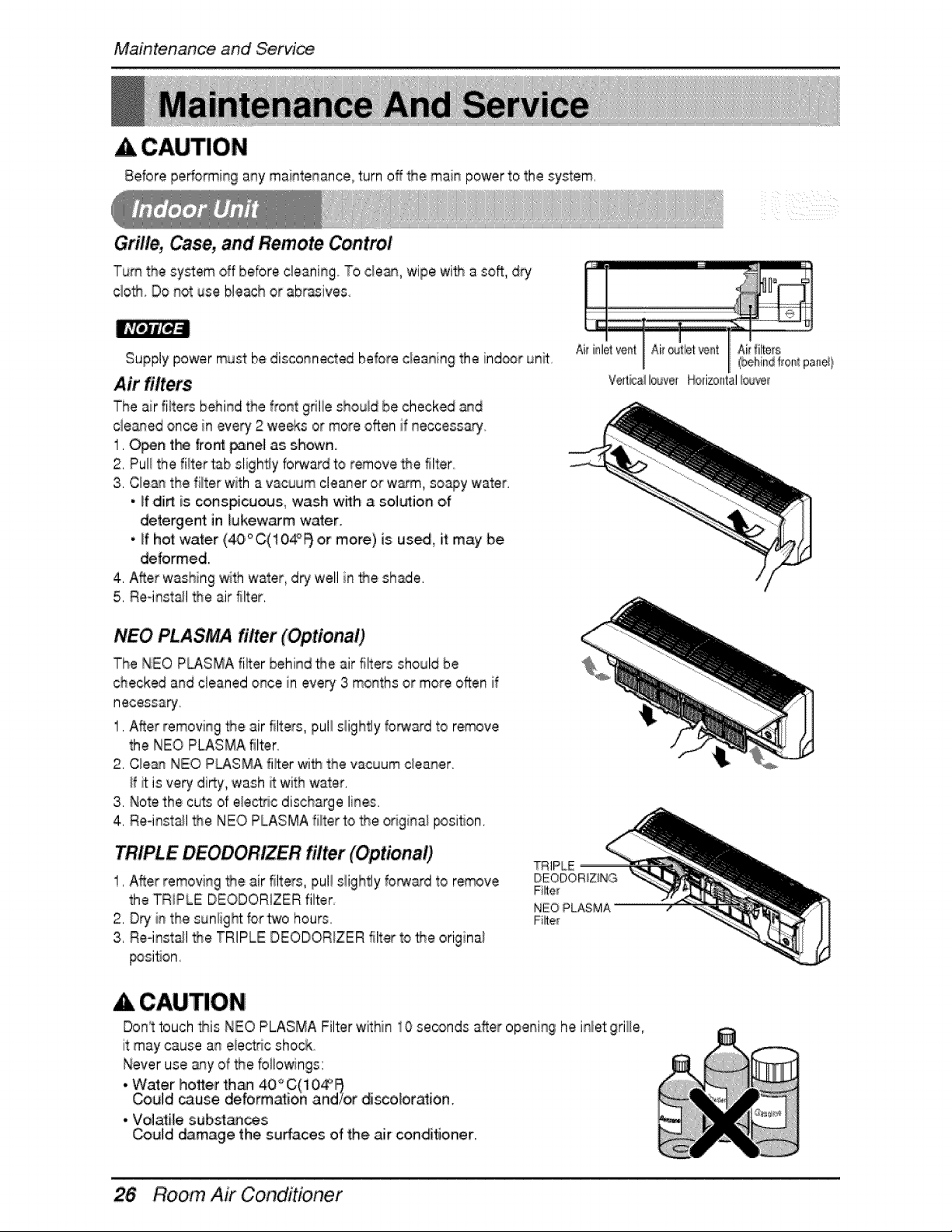
A CAUTION
Before peffoFmin9 any maintenance, turn off _e main power to the system,
Gril/e_, Case, and Remote Control
Turn the system off before cleaning To cle_, wipe wi_ a so_ d_y
clo_. Do not use bleach or abrasives
Supply power must be disconnected before c/caning the ind_r un_
Air filters
The air fiiters behind the front griiie shouid be checked _d
cie_ed once in every 2 weeks or more often if neccessaryo
1. Open t_ f_o_ _ne[ as shown.
2. Pull the fi_tertab slighty forward 'to.remove _e filter
3. Cle_ the filter with a vacuum cleaner or w_m, sony water.
• If dirt is conspicuous, wash with a solution of
detergent in lukewarm water.
, if hot waler (40°C(104°_ o,r moire) is us_ it may be
deformed.
4. After washing with water dry well in t_e shade.
5, Reqnsta_lthe air filter,
Ai_inletventI1Air_flet_kJdt_.ets
Verticali®ver Horiz,ontalIc_Jve_
NEO PLASMA, filter (Optional)
The NEO P_SMA fil'ter behind the air filters should be
checked and cleaned once, in every 3 mo_qthsot more often if
necessary,
1, After removing the air filters, pull siightly forward to remove
the NEO PLASMA filter.
2, Cle_ NEO P_SMA fi_er wit_ the vacuum c_eaner
ff _ is very dirty, wash _ withwater.
3. Note the cuS of e_ectic discharge lines.
4. Re-install _e NEO PLASMA filter to the odgina__siion.
TRIPLE DEODORIZER filter (Optional)'
1, After removing the air filters, puii s!ightly forw_d to remove
the TRIPLE DEODORIZER filter
2, D_ i_ the sunlight for two hours,
3, Re-install _e TRIPLE DEODORIZER filter to _e origina_
_si_on.
_IPL_
DEODORiZiNG
F_e_
NEO PLASMA
Fi_e[
Don_ttouch _is NEO PLASMA Filter 'within 10 seconds after opening he inlet grille,
it may cause a_ eiect_c shock
Never use s_y of _e bllowin_s:
@
• Water ho_er th_ 40 C(10_
Could cause deformation and/or di_olorati,o,n.
° Volatile subsl_¢_s
Could damage the surfaces of the air conditioner.
Room Air Conditioner
Maintenance and Service
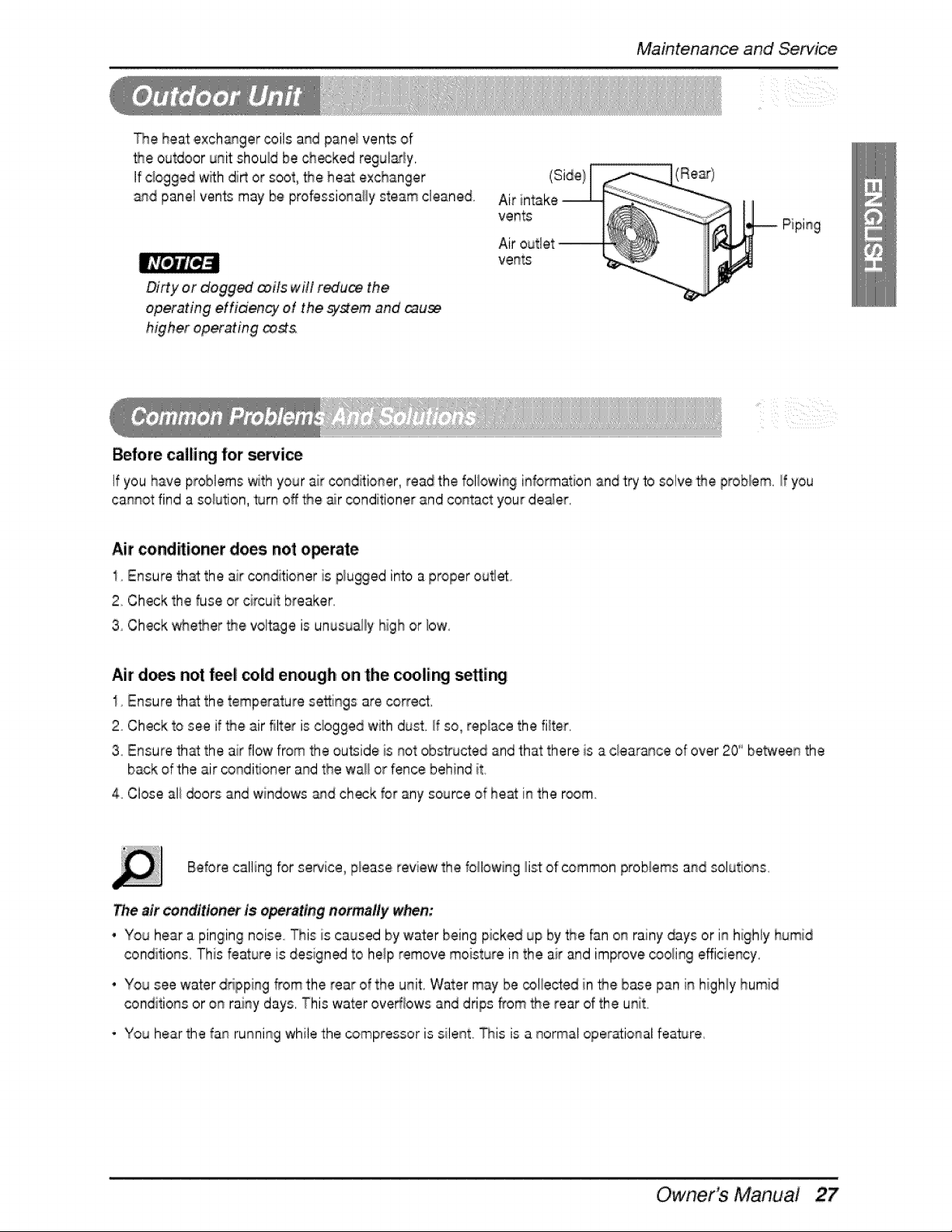
The heat exch_ger coils and panei vents of
_e outdoor unit should be choked regul_y,
If c_oggedwith dirt or soot, _e heat exchanger
and panel ven_ may be professionally steam cleaned
,Di#y or dogg_ _iis win red'u_ the
operating effidency of the sT#eim and _u_
higher operating _
Before calling for service
If you have problems with your air condffioner, read the foil,owl% information and try to solve _e problem, If you
cannot find a solution, #Jrnoff the _r conditioner and contact your de_er,
Air _ndiitioner does not o_rate
1 Ensure that the air conditioner is plugged into a proper outlet.
2. Check the fuse or circuit breaker
3 Check '_e_er the voltage is unusua,l_yIhighor [low
Air d_si not feel, cold enough o,nthe c_lir_i setti_
I Ensure th_ the temperature se_ings are correct,
2 Check to see if _e air filter is cbgged with dust, ff so_replace the filter,
3 Ensure that the air flow from the ou_ide is not obsS_Jctedand that there is a clear_ce of over 20" be_een the
back of the air conditioner and the wa_ or fence behind it
4. Close ali _ors and windows _d check for any source of he_ in the room.
Before calling for service, p_easereview the following _istof common proNems and solutions,
Theair conditlon_ is operating normally when:
• You hear a pinging noise This ii;scaused by water being picked up by _e fan on rainy days or in highiy humid
conditions, This feature is designed to help remove moisture in the air and improve cooling efficiency,
' You see water dripping from the rear of the unit, Water may be coliected in _e b_e pan in higNy humid
conditions or on rainy days, This water ove_bws and drips from the rear of the unit,
* You hear the fan running while the _mpressor is silent, _is is a normal operational fea_re,
Owner's Main,ua,!
Maintenance and Service
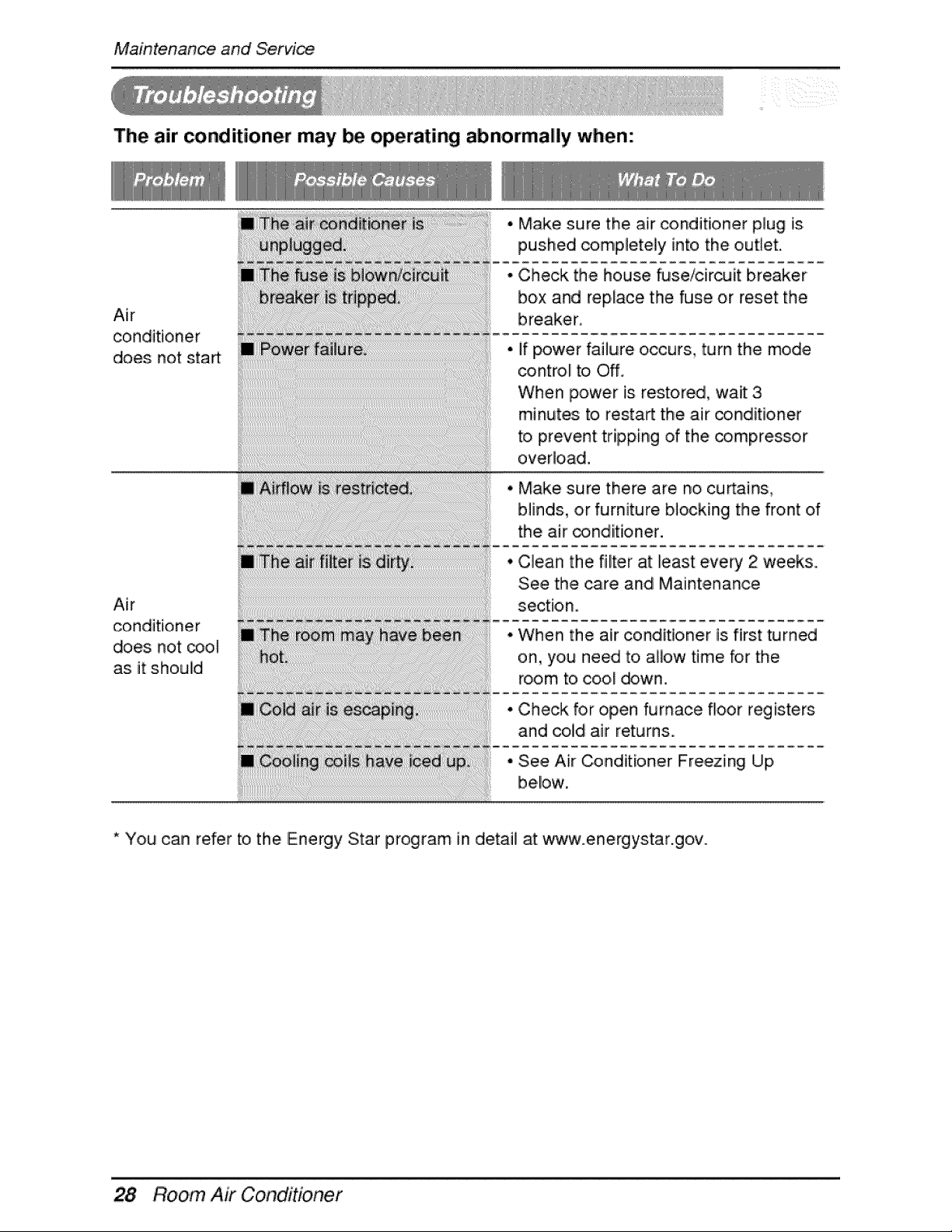
The air conditioner may be operating abnormally when:
Air
conditioner
,does not sta_
Air
conditioner
does not coo_
as it should
• Make sure the air conditioner plug is
pushed completely into the outtet.
• Check the house fuse/circuit breaker
box and replace the fuse or reset the
if power failure occurs, turn the mode
control to Off,
When power is restored, wait 3
minutes to restart the air conditioner
to prevent: tripping of the compressor
overload.
Make sure there are no curtains_
blinds, or furniture blocking the front of
the air _nditioner.
Clean the filter at least every 2 weeks,.
See the care and Maintenance
section.
When the air conditioner is. first turned
on, you need to allow time for the
room to cool _wn.
Check for open furnace floor registers
and cold air returns.
See Air Conditioner Freezing Up
below,
* You can refer to the Energy Star program in detail at www.energystar.gov.
Room Air Conditioner

LG Electronics Inc.
P/No.: 3828A20434H Printed in Korea
After reading this manual, keep it in a place easily accessible to the user for future reference.

