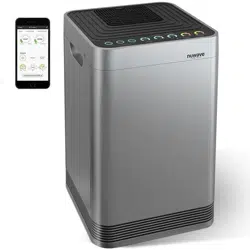
nuwavenow.com
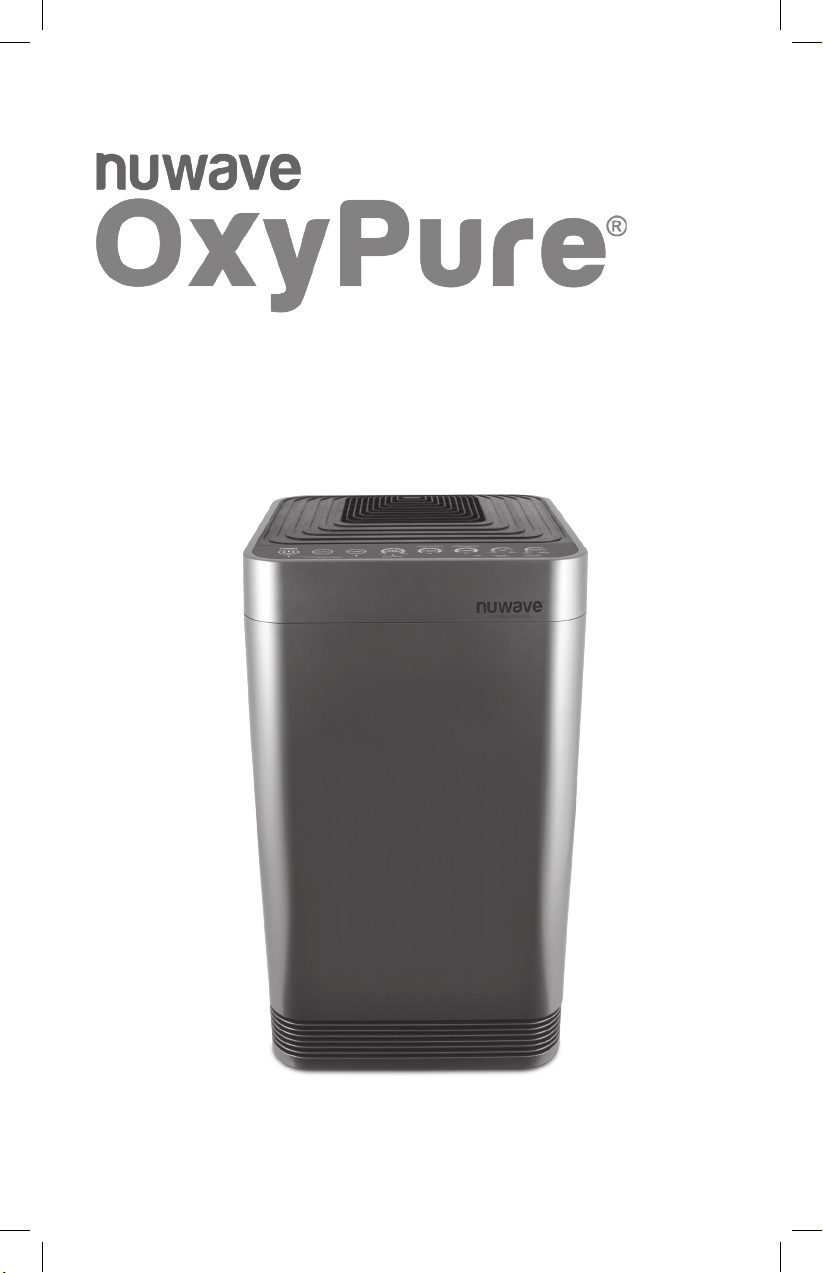
OWNER’S MANUAL
Smart Air Purier
2
2
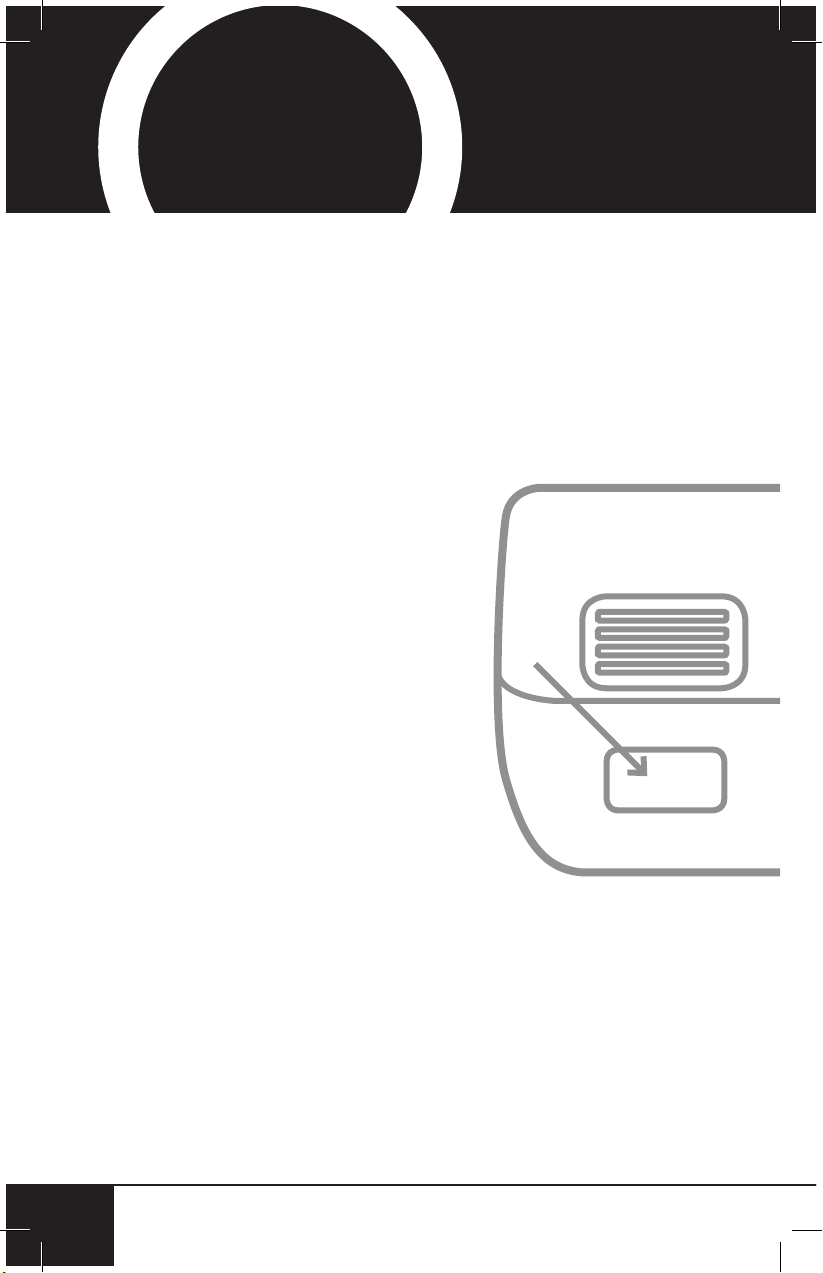
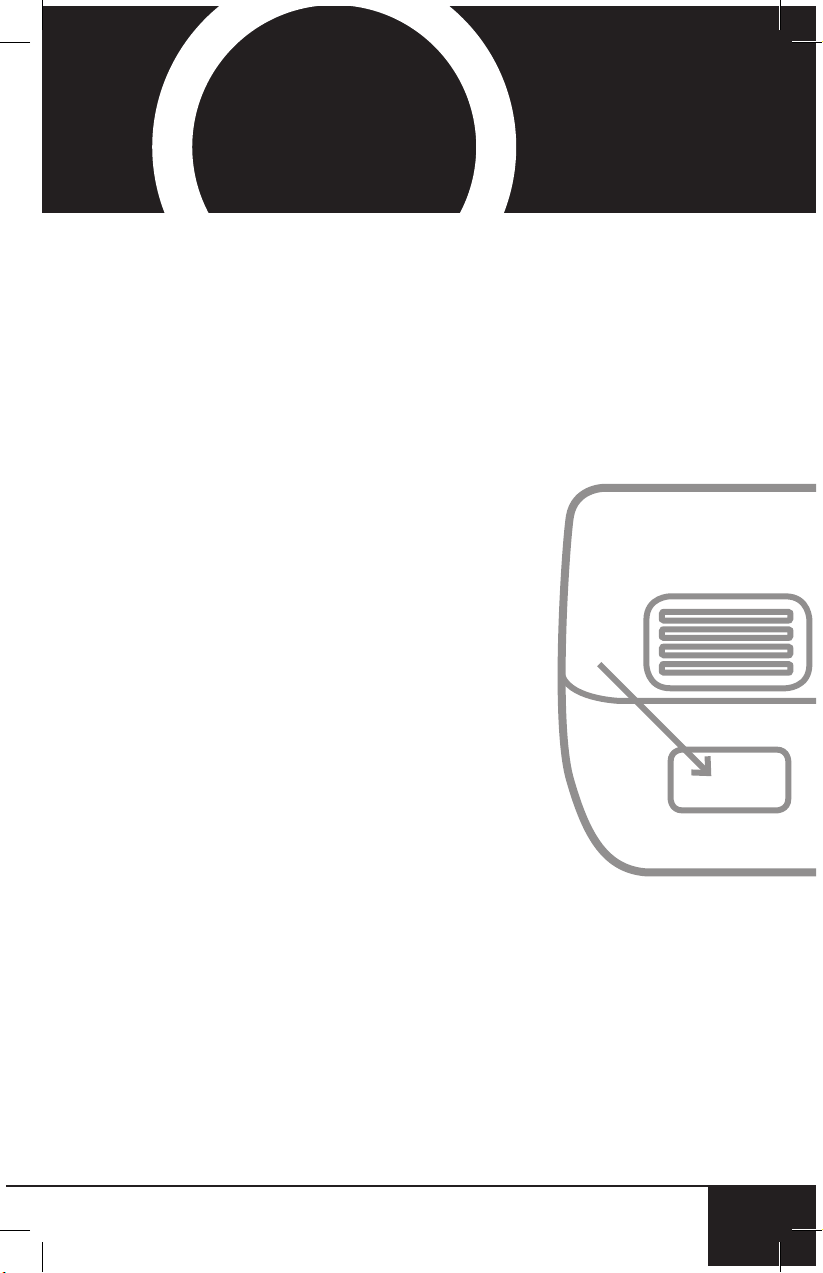
Using your smartphone or
smart device, scan the QR code
located on the unit label on the
back of the unit.
You will be directed to NuWave’s
product registration page with
your unit’s unique serial number
automatically entered in the
appropriate eld.
NOTE: If you do not have a
web-enabled smart device,
simply visit nuwavenow.com/QR
and manually enter in your unit’s
serial number.
Fill out the remaining information
and complete the optional survey.
Once you submit your
information, you will receive
a conrmation email containing
your extended warranty details.
1
2
3
4
REGISTER
NOW!
*Register your product within 1 year of date of purchase for a free
6-month extension of your limited warranty.
As a special thank-you for registering your NuWave
unit, you’ll automatically receive an additional 6 months
added to your limited manufacturer’s warranty!*
All you have to do is follow these simple steps.
nuwavenow.com
3
nuwavenow.com
3
1
2
3
QR code readers
6
for an additional
months
warranty!
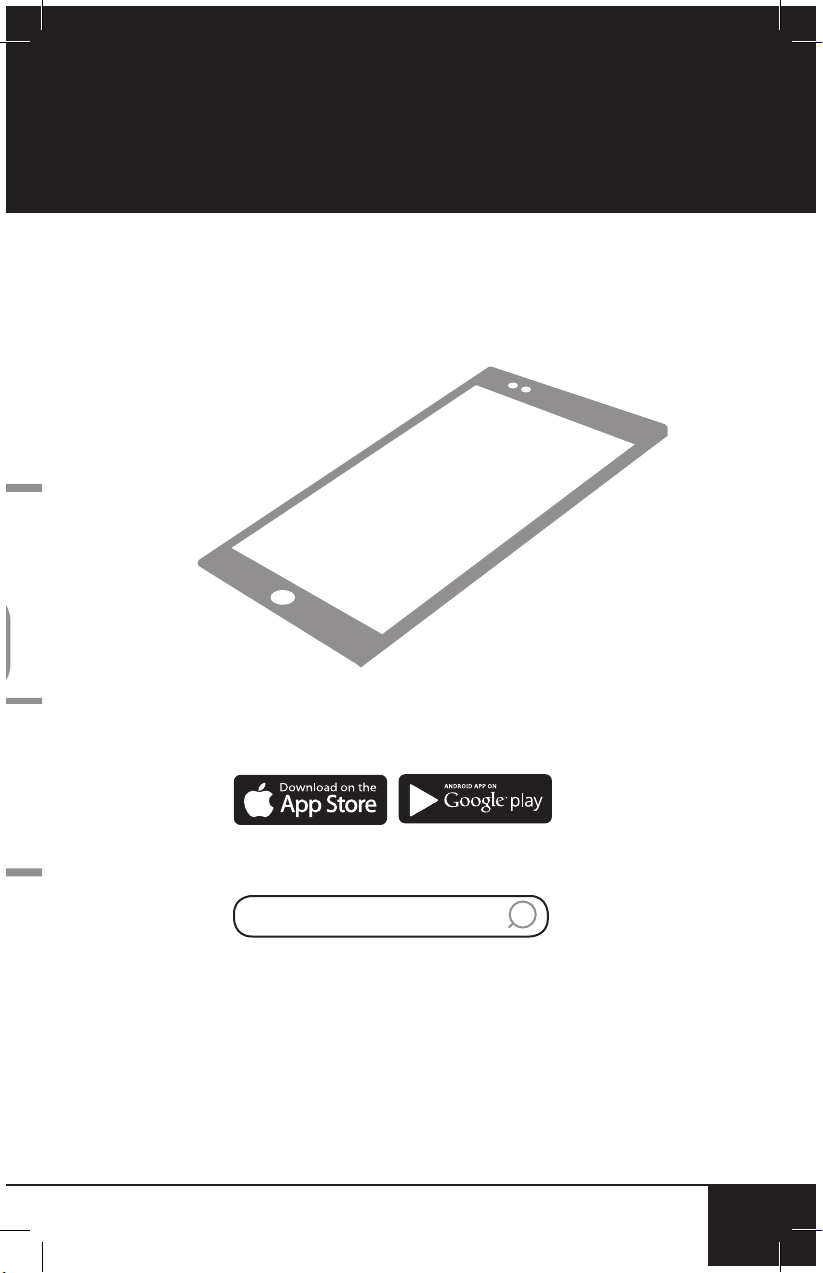
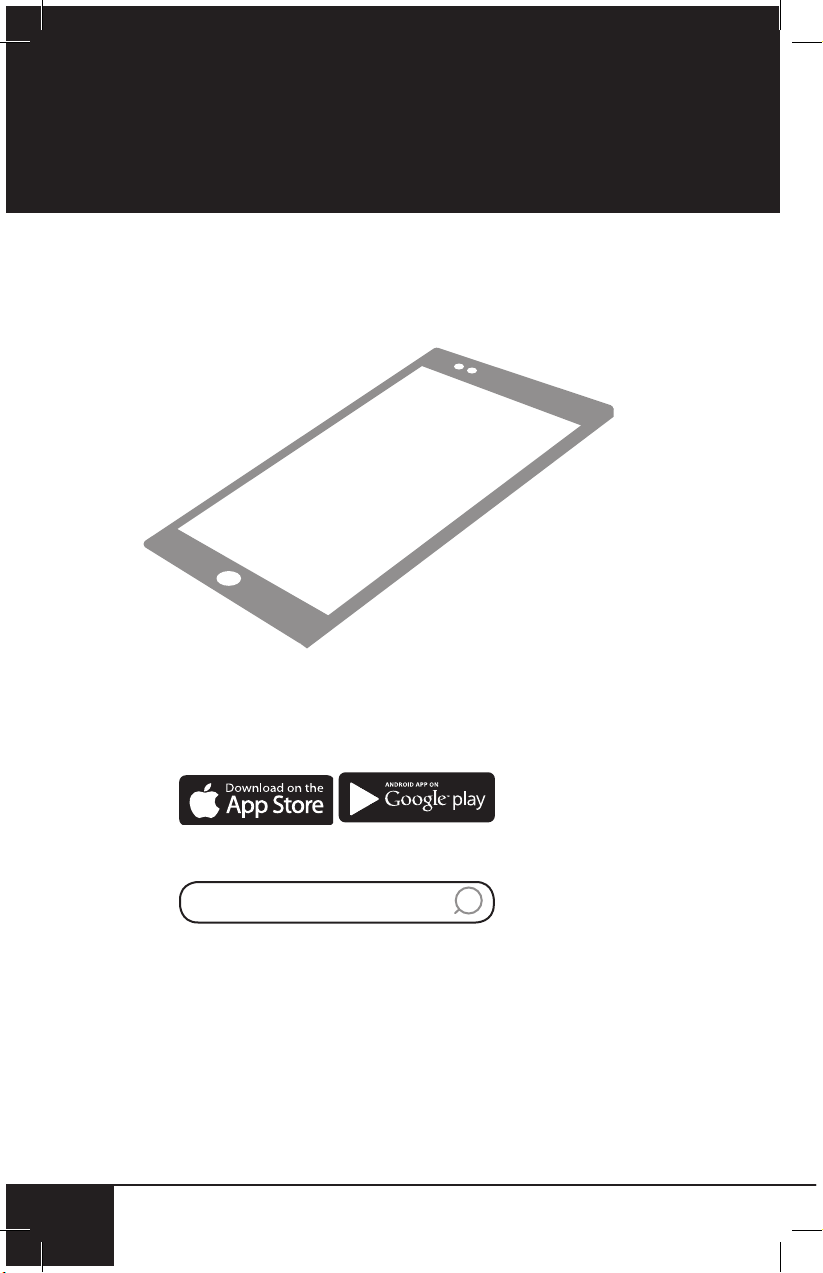
Open your mobile app store
(App Store, Google Play).
Search for "QR code readers."
Simply download the QR code reader to your phone,
open it, scan the code and you are ready to go.
NOTE: You may need to open your downloaded QR
code reader each time you want to scan a QR code.
DOWNLOAD THE QR CODE
APP TO YOUR MOBILE DEVICE

table of contents
4
TABLE OF CONTENTS
4
OWNER’S MANUAL
Important Safeguards ....................................................5-8
Parts & Accessories .......................................................... 9
Instructions.................................................................10-14
Advanced Features .........................................................15
Cleaning & Maintenance .............................................16-20
Troubleshoot Guide .....................................................21-22
Limited Warranty .........................................................23-25
Spanish Manual ..........................................................26-49
Replaceable Parts........................................................50-51
This product complies with the maximum allowable
concentration of ozone of 0.050 parts per million
by volume (ppmv) in a 24-hour period. The Health
Canada Guideline 2010 recommends that the
maximum exposure limit, based on an average time
of 8 hours, is 0.020 ppmv or less when tested in a
sealed, controlled room approximately 30m
3
.
nuwavenow.com
5
ENGLISH
nuwavenow.com
5
IMPORTANT SAFEGUARDS
HOUSEHOLD USE ONLY • READ ALL INSTRUCTIONS BEFORE USE
READ ALL INSTRUCTIONS
WARNING: When using the OxyPure, basic safety
precautions should always be followed:
1. To protect against risk of electrical shock, DO NOT
immerse cord, plug, or any part of the OxyPure unit in
water or any other liquids.
2. Close supervision is necessary when the OxyPure is
used by or near children. The unit is not intended for
use by children, persons with reduced physical, sensory,
or mental capabilities, or those with lack of expertise or
knowledge of this unit.
3. Do not operate OxyPure with a damaged cord, plug,
after unit malfunctions, is dropped, or damaged in any
manner. Contact Customer Service at 1-877-689-2838
or email help@nuwavenow.com for information.
4. Discard the protective plastic covering the power plug
before use.
5. Do not run cord under carpeting. DO NOT cover cord
with throw rugs, runners, or other coverings.
6. Do not route cord under furniture or appliances. Arrange
cord away from high-traffic areas where it will not be
tripped over.
7. Do not plug OxyPure in outlet or power strip that is
being used by other appliances.
8. Remove any dust or water from the plug, if needed.
9. Set up the OxyPure on flat, stable ground.
10. Do not set up where the OxyPure could be pushed,
kicked, or tripped over.
11. Leave at least 2-3 feet of space between the unit’s vents
and any walls.
12. Do not install the unit near a heating device.
13. Do not use in locations exposed to moisture or water.
14. Do not use unit near flammable or combustible gases
or vapors.
15. Do not operate the OxyPure on its side.
16. NOT INTENDED FOR OUTDOOR USE.

IMPORTANT SAFEGUARDS
HOUSEHOLD USE ONLY • READ ALL INSTRUCTIONS BEFORE USE
important safeguards
66
17. Do not place objects on top of the OxyPure.
18. Do not sit or stand on or lean against the OxyPure.
19. Alteration or modification of any part of the OxyPure or the
use of attachments not recommended by the manufacturer
may cause fire, injury, or damage to property.
20. As with most electrical units, electrical parts are live even
when the OxyPure is off. Be sure the unit is unplugged
when assembling.
21. Do not use the OxyPure in a factory or industrial setting
where machine oil may be present in the air.
22. Turn the power OFF on the OxyPure before unplugging
the unit. Unplug the OxyPure from outlet when not in
use, before putting on or taking off parts, when removing
or replacing the filters, and before cleaning.
23. Turn the power OFF and unplug when the unit is
unattended for extended periods.
24. FOR HOUSEHOLD USE ONLY.
25. Keep manual handy for future reference.
WARNING! RISK OF ELECTRIC SHOCK:
These servicing instructions are for use by qualified
personnel only. To reduce the risk of electric shock, do
not perform any servicing other than that is contained in
Instructions unless you are qualified to do so.
nuwavenow.com
7
ENGLISH
nuwavenow.com
7
Electrical Information
A short power-supply cord (or detachable power-
supply cord) is provided to reduce the risk resulting
from becoming entangled in or tripping over a longer
cord. Longer detachable power-supply cords or
extension cords are available and may be used if
care is exercised in their use. If a longer detachable
power-supply cord or extension cord is used:
1. The marked electrical rating of the extension cord
should be at least as great as the electrical rating of
the appliance.
2. The longer cord should be arranged so that it will
not drape over the countertop or tabletop where it
could be pulled on or tripped over unintentionally. The
OxyPure should be operated on a separate electrical
outlet from other operating appliances due to wattage
limitations. The appliance has a polarized plug (one
blade is wider than the other). To reduce the risk
of electric shock, this plug is intended to fit into a
polarized outlet only one way. If the plug does not fit
fully into the outlet, reverse the plug. If it still does not
fit, contact a qualified electrician. Do not attempt to
modify the plug in any way.
3. If the appliance is of the grounded type, the cord
set or extension cord should be a grounding-type
3-wire cord.
SEE INSTRUCTIONS BEFORE USE
ADDITIONAL SAFEGUARDS

important safeguards
8
IMPORTANT SAFEGUARDS
HOUSEHOLD USE ONLY • READ ALL INSTRUCTIONS BEFORE USE
88
SAVE THESE INSTRUCTIONS
Read and understand the entire manual before using
the OxyPure.
1. Do not operate the unit if abnormal sounds or motion
is detected.
2. If a hard or foreign object comes into contact with fan, do
not operate. Turn off and unplug unit.
3. Inspect for any loose or missing parts before and after
each use. If parts are loose, damaged, or missing,
contact Customer Service at 1-877-689-2838 or email
help@nuwavenow.com.
4. Always use extreme caution when operating the
OxyPure or any machinery.
5. Children should be supervised to ensure that they do not
play with the appliance.
6. Do not pull, lift, drag, pick up, or carry the unit by its cord.
7. Do not block air inlet or outlet vents.
8. Do not operate the OxyPure without a filter.
DO NOT USE THE UNIT FOR OTHER THAN ITS
INTENDED USE.
Note: Put the OxyPure on a surface that is horizontal,
even, and stable. This appliance is intended for normal
household use.
NOTICE: THE FAILURE TO FOLLOW ANY OF
THE IMPORTANT SAFEGUARDS, ADDITIONAL
SAFEGUARDS, OR THE INSTRUCTIONS FOR SAFE
USE IS A MISUSE OF THE OXYPURE THAT CAN
VOID YOUR WARRANTY AND CREATE THE RISK OF
SERIOUS INJURY.
nuwavenow.com
9
ENGLISH
nuwavenow.com
9
PARTS & ACCESSORIES
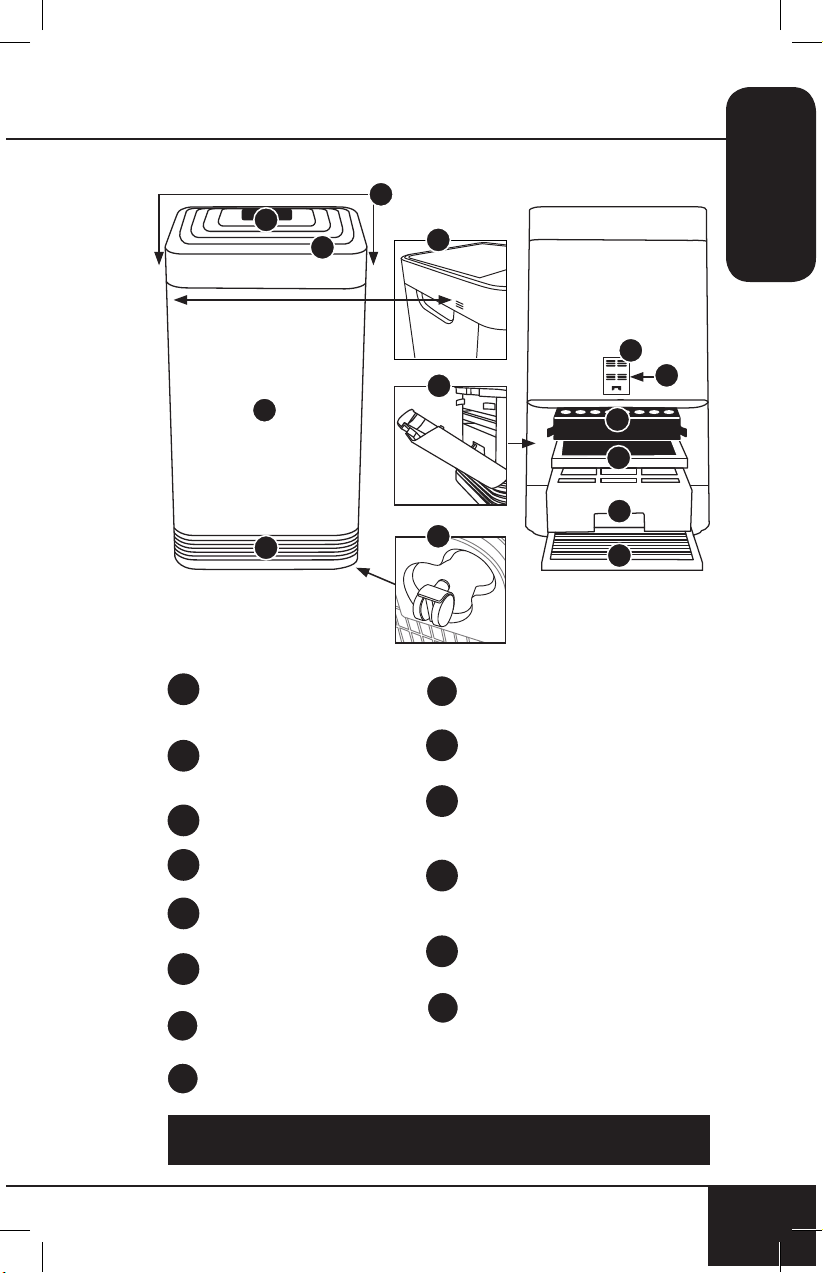
To order parts head over to the Replaceable Parts section of this
manual or NuWaveNow.com.
Sensor Cover
Part #: 47106
Filter Sensor
Part #: 47107
HEPA/Activated
Carbon Combo Filter
Part #: 47108
Ozone Emission
Removal Filter
Part #: 47109
Bio-Guard
™
Filter
Part #: 47110
Stainless Steel Pre-Filter
Part #: 47111
9a
9b
10
11
12
13
Air Vent
Part #: 47101
Front Display
Touchpad Panel
Part #: 47102
Handles
Odor Sensor
Base
Part #: 47104
In Flow Vent
Filter Slot Cover
Part#: 47105
Wheels
1
2
3
4
5
6
7
8
1
2
Front Back
5
9a
9b
7
6
8
10
11
12
13
3
4
instructions
10
INSTRUCTIONS
10
Air Filter Assembly
The OxyPure comes with four different
preassembled filters inside the unit.
When filters require replacement or
cleaning, follow all directions when
assembling.
See Cleaning & Maintenance.
Filter Functions
Air purifiers are more effective in operation when all
windows and doors are closed. Purifies extra-large rooms
up to 1,200 sq. ft.
Stainless Steel Pre-Filter
Washable and reusable for up to 20 years.
Captures and collects large particles, pollutants, and
allergens including pet hair, dander, and pollen.
Bio-Guard
™
Filter
Washable and reusable for up to 20 years.
8,000V, positive and negative charges capture and trap
pollutants as small as 0.09 microns, including bacteria, mold,
viruses, smoke, pollen, and allergens.
Ozone Emission Removal Filter
Reusable for up to 20 years. Not washable.
Eliminates ozone emissions and other harmful airborne
chemicals.
HEPA/Activated Carbon Combo Filter
Lifespan, 6 months to 1 year. Not Washable.
Captures and traps pollen, allergens, industrial emissions,
VOCs including formaldehydes, household fumes, odors and
nitrogen dioxides from gas stoves and car exhausts.
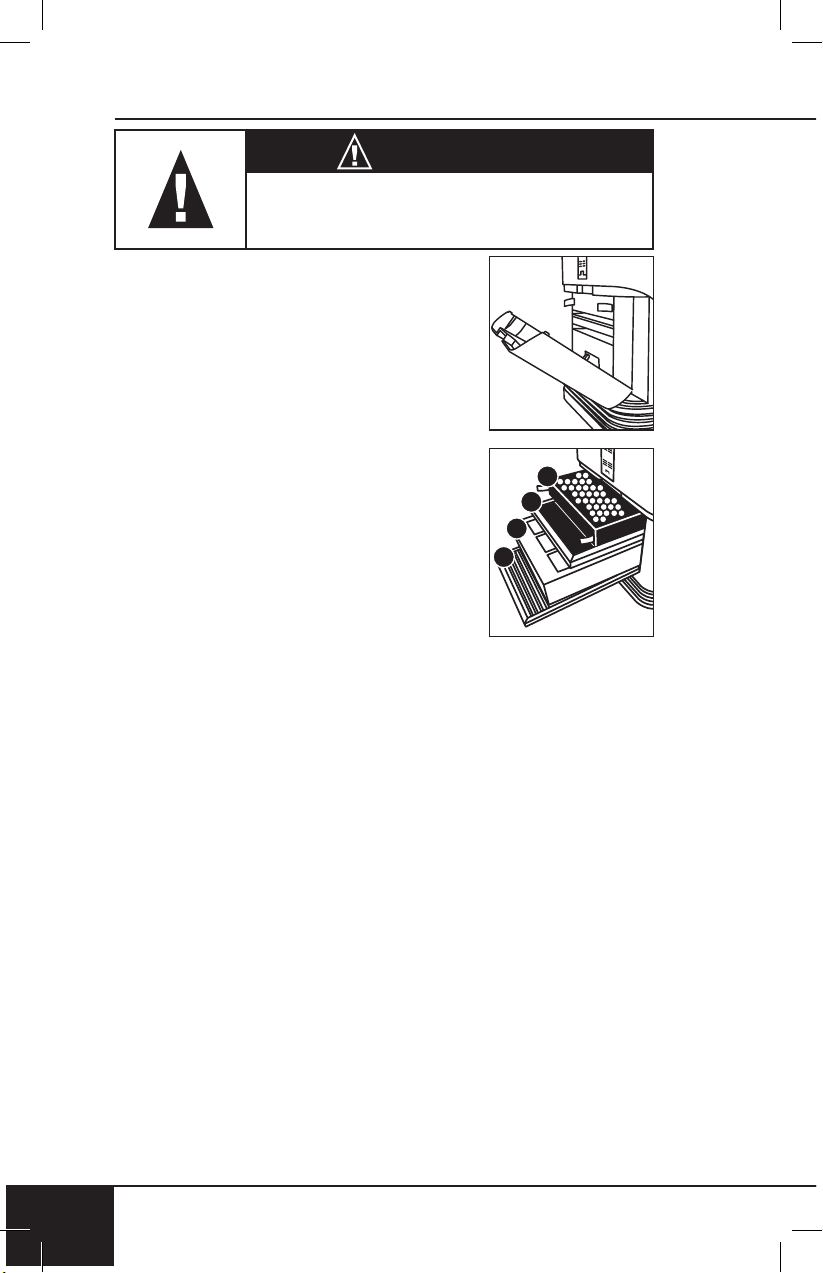
The order of the filters inside the
OxyPure is as follows:
1. Stainless Steel Pre-Filter
2. Bio-Guard
™
Filter
3. Ozone Emission Removal Filter
4. HEPA/Activated Carbon Combo Filter
4
3
2
1
WARNING
Do not plug OxyPure in outlet or power strip
that is being used by other appliances.
nuwavenow.com
11
ENGLISH
nuwavenow.com
11
WIFI CONNECTION
The OxyPure is equipped with Wi-Fi to operate the unit
from any location. To set up and activate the Wi-Fi:
1. Download the NuWave Connect app via the Apple Store
or Google Play on your smartphone or device and open
the app.
2. Make sure your phone is connected to your network.
Open the app and follow the instructions for the
verification process. Once verification is complete,
begin adding devices. To add a device tap "+" then
select "OxyPure."
3. Next, plug the OxyPure into a compatible power outlet.
To activate Wi-Fi Pairing Mode, press and hold the power
button on the OxyPure for 2 seconds until the light next
WIFI begins to rapidly blink at a rate of about 2 blinks per
second. Once the Wi-Fi light is rapidly blinking, in the app,
tap the Finish Network Configuration button on the bottom
of the Add Device page.
4. Next, you will be prompted to either connect to your network
or confirm your existing network password.
Note: To either connect to or change networks, depending on
your phone, you may be removed from the app to complete the
network connection. Return back to the NuWave Connect app
and continue with the setup process.
5. When the OxyPure is connected to the Wi-Fi, the light
next to “WIFI” will stop flashing and stay continuously lit.
• If the OxyPure did not connect to your network, the
WIFI light will turn off. Follow steps 3-4. Make sure
to select the proper Wi-Fi network and type the
correct password.
instructions
12
INSTRUCTIONS
12
Wi-Fi LED Status
Pairing Mode & Standby Mode
Solid Light
The OxyPure is paired with the
Wi-Fi and ready to be used.
Rapid Blinking Light
The OxyPure is in Pairing Mode.
The OxyPure will remain in Pairing
Mode for up to 3 minutes, or until
your device is paired.
Slow Blinking Light The OxyPure is in Standby Mode.
No Light The OxyPure’s Wi-Fi is off.
Note: If the light on your unit is blinking slower, the unit is in
WiFi Standby Mode. To exit Standby Mode and initiate the
Pairing Mode, press and hold power for 2 seconds until the
WiFi light begins blinking rapidly.
Note: The OxyPure, as with most IoT devices (computing
devices), will only connect to a 2.4GHz* network.
• To reset the OxyPure WIFI, press and hold down “Power”
for 3 seconds. Follow step 4 (from previous page). The
OxyPure can now be operated from any location.
*Most routers will broadcast in 2.4GHz. If you need help
activating 2.4GHz, contact your ISP (Internet Service Provider).
/WIFI CONNECTION
nuwavenow.com
13
ENGLISH
nuwavenow.com
13
/WIFI CONNECTION
Power ON/OFF
1. Plug in your OxyPure into an outlet. Power will be lit in
red and unit will be in standby mode.
2. Press Power. Unit will turn on and Power will be lit green.
• Press AUTO. AUTO will illuminate.
• Bars next to AIR and ODOR will illuminate, measuring
current air quality.
• The fan will start.
3. Press Power again to turn unit off.
• When you select a different mode other than the
default "AUTO" before turning off, the unit will run the
previously selected mode when it is powered back on.
AUTO
When AUTO function is used, your unit will adjust the fan
speed automatically (no time limit).
1. Press "AUTO". "AUTO" will be lit.
ULTIMATE CLEAN
When in ULTIMATE CLEAN mode, the unit will automatically
adjust to the highest or lowest fan speed based on your air
quality (no time limit).
1. Press “ULTIMATE CLEAN”. ULTIMATE CLEAN will be
lit green.
2. Press “ULTIMATE CLEAN” to turn off.
SLEEP MODE
When in Sleep Mode the LED lights will be off but the fan will
still be active. Adjust the fan speed to your preference prior
to going into Sleep Mode.
1. Manually adjust FAN SPEED.
2. Press and hold “FAN SPEED” for 2 seconds to
activate SLEEP MODE.
• Unit will run under the fan speed that was
previously selected.
3. To turn off Sleep Mode, press any button.
Note: ULTIMATE CLEAN and TURBO will work during
Sleep Mode.

instructions
14
INSTRUCTIONS
14
FAN SPEED
You can adjust from 6 different speeds (LOW to HIGH).
1. Press “FAN SPEED” to adjust.
2. To go back to the lowest level of fan speed, continue to
press “FAN SPEED” until the first bar is lit.
TIMER
Use the TIMER function to choose the duration of operation.
1. Press “TIMER”. The bar next to ½ hour will be lit.
• There are 6 preset times to choose from.
2. Press “TIMER” to increase time.
• Choose from ½ hour, 1, 2, 4, 8, or 12 hours.
• After pressing “TIMER” six times, all bars will be lit.
Press “TIMER” once more to turn TIMER off.
TURBO
The TURBO function cleans your air using the highest fan
speed at selected times.
1. Press “TURBO” to adjust from ½ hour, 1, or 2 hours.
• When the selected time has finished, TURBO will shut
off automatically.
To go back to the lowest level, continue to press “TURBO”
until bar next to ½ is lit.
AIR QUALITY INDICATOR
The OxyPure will automatically measure and display your
current air quality in the room.
• The bars will illuminate around “AIR” and “ODOR”,
indicating the current air quality. Bars will increase and
decrease, and are color coded, according to air quality.
CLEAN AND REPLACE FILTER INDICATORS
• The lights next to CLEAN FILTER 2 and REPLACE
FILTER 4 will illuminate, indicating that your filters will
need to be cleaned or replaced.
• To reset Indicators, see “Resetting the Filter and Air
Quality Indicators” in Cleaning & Maintenance.
nuwavenow.com
15
ENGLISH
nuwavenow.com
15
ULTIMATE CLEAN with TURBO
Cleans at the highest fan speed for ½ hour and will switch
to "ULTIMATE CLEAN" mode.
1. Press "ULTIMATE CLEAN". ULTIMATE CLEAN will be
lit green.
2. Press “TURBO”. Default is ½ hour and can adjust from 1
to 2 hours.
3. Press “TURBO” a fourth time to turn off.
ECO-FRIENDLY MODE
OxyPure will turn on automatically once it detects poor air
quality. The fan speed will adjust based on the quality of air.
1. Press “POWER” and “ULTIMATE CLEAN” at the same
time. POWER will be backlit yellow.
2. Press “POWER” and “ULTIMATE CLEAN” again to
turn off the Eco-Friendly Mode. “POWER” will no
longer be yellow.
TURBO with TIMER
When using TURBO with TIMER the default time is set to
2 hours.
1. Press “TIMER” to increase or decrease the time.
• Choose from ½ hour, 1, 2, 4, 8, or 12 hours.
TURBO with AUTO
Use the TURBO function to select desired time limit.
Once time is up, the unit will switch to “AUTO.”
1. Press “TURBO” to adjust from ½ hour, 1, or 2 hours.
2. Press “AUTO”.
ADVANCED FEATURES
cleaning & maintenance
16
CLEANING & MAINTENANCE
16
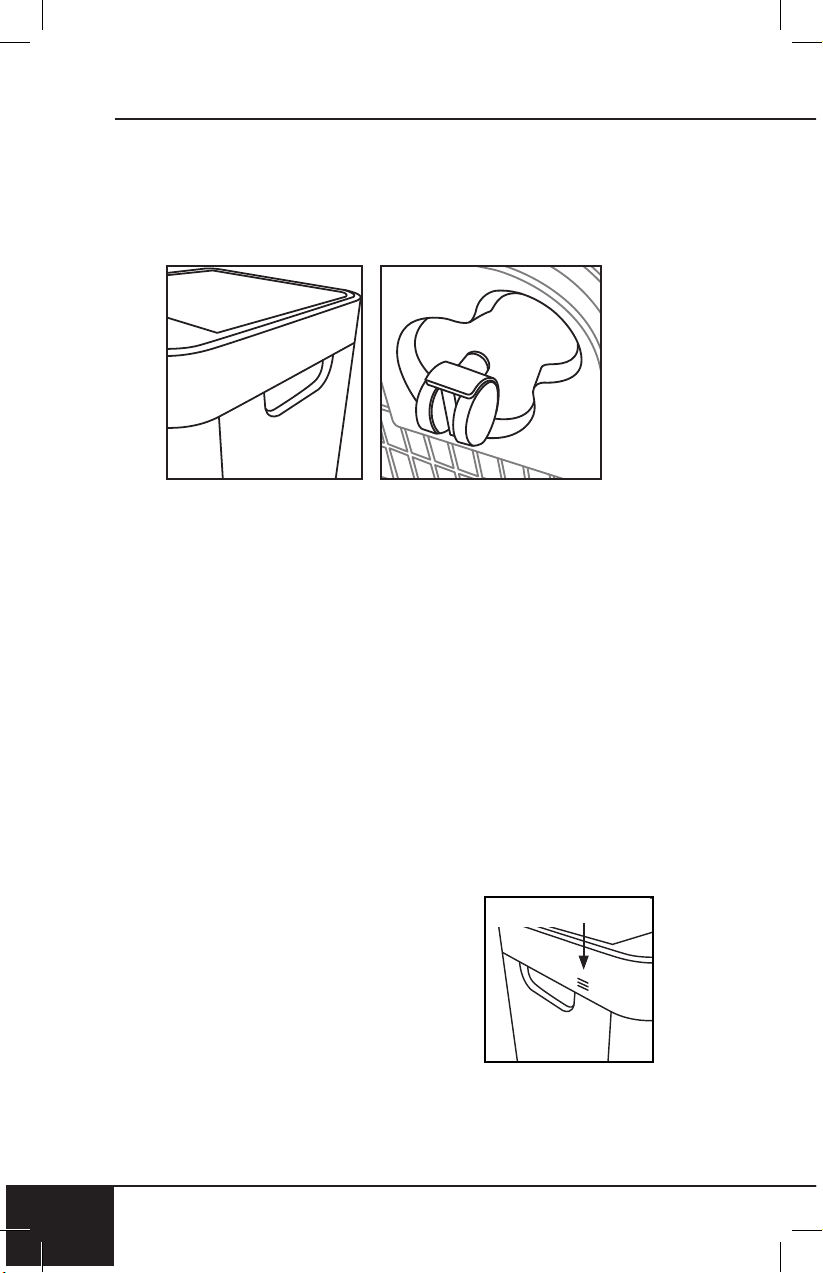
Your OxyPure can easily be moved from one location to
another. Just hold the OxyPure by the handles on each
side and roll the unit to the chosen location. The wheels
underneath provide extra maneuverability and mobility
whenever it's needed.
Before First Use
Wipe Top Vent and In Flow Vent with a slightly damp cloth or
paper towel. Dry thoroughly before use.
After Use
Your OxyPure should be cleaned periodically and after
excessive use to ensure proper performance and function.
To clean the outsides of the OxyPure, use a cloth or paper
towel to remove dust and other particles. For tougher
buildup, use a damp cloth or paper towel and dry thoroughly.
Cleaning the Top Vent and In Flow Vent
1. Use a soft brush to remove dust and debris.
2. If needed, use a slightly wet paper towel or damp
cloth to remove larger buildup. Do not use any harsh
abrasives or cleaning pads on Top Vent or any part of
the unit.
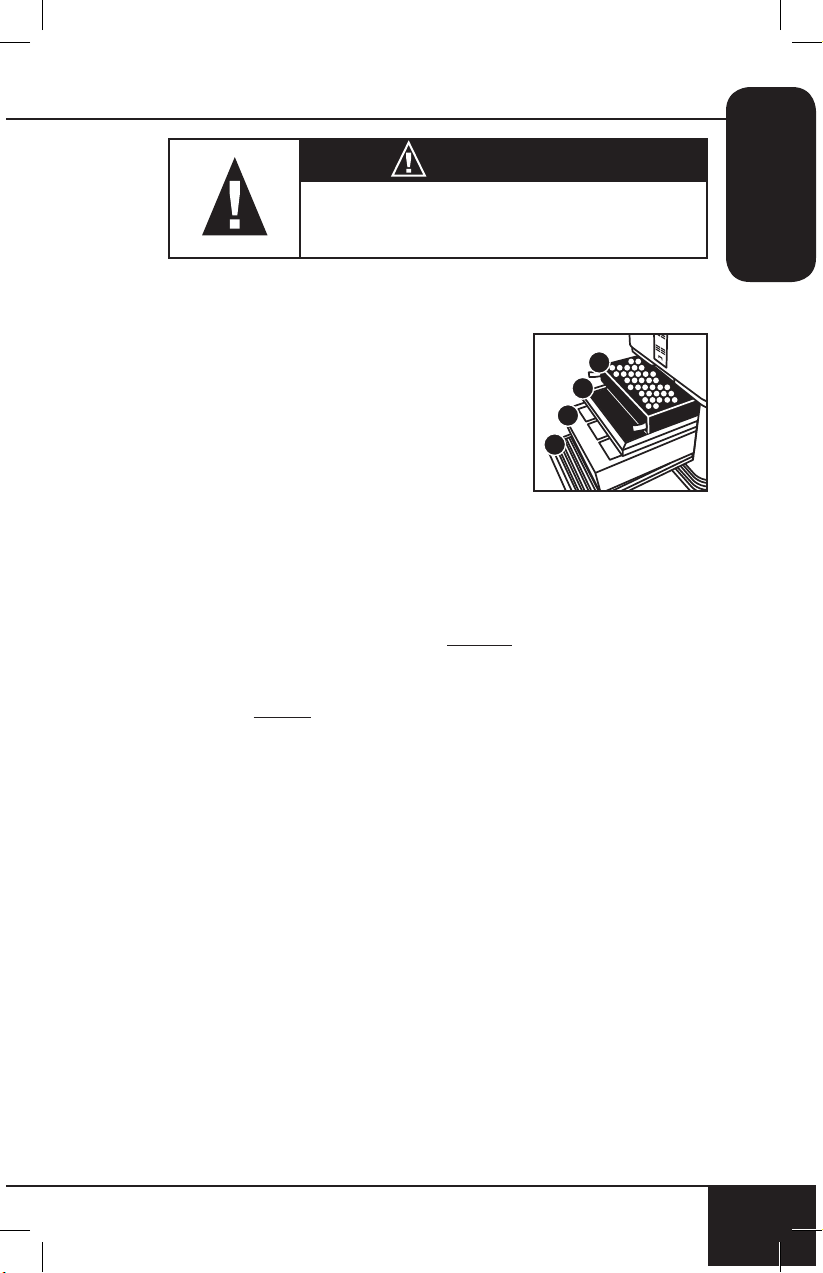
Cleaning the Odor Sensor Opening
The Odor Sensor is located on the side
corner of the OxyPure toward the top,
under the small grill opening.
• Keep Odor Sensor clear of dust and
debris using a soft cloth to maintain
accurate odor readings.
• DO NOT tamper with Odor Sensor or
opening over Sensor. Do not spray inside or near small grill
opening over the Odor Sensor. Doing so may cause the
Sensor to malfunction and can void your warranty.
Odor Sensor
nuwavenow.com
17
ENGLISH
nuwavenow.com
17
CAUTION
DO NOT drop any dust or residue into
the OxyPure when cleaning.
The CLEAN FILTER 2 indicator will turn blue after 3 to
6 months, indicating the filter should be cleaned for
optimal results (Bio-Guard
™
Filter). The CLEAN FILTER 2
indicator will turn red after 6 months of use, indicating
the filter needs to be cleaned.
The REPLACE FILTER 4 indicator will turn red when the
filter (HEPA/Activated Carbon Combo Filter) needs to be
replaced. The filter will last 6 months to 1 year depending
on how often the unit is running in its environment.
Changing the Filters
The filters inside the filter slot need to be changed or
cleaned on schedule to help your OxyPure maintain
optimum, efficient performance.
1. Remove Filter Slot Cover in back rear of the OxyPure
using its built-in handle.
2. Slide out filters that need cleaning or replacing.
3. Allow washable filters to dry completely before you
reinstall into the unit.
• Never place a wet filter into the OxyPure.
• Filter Slot Cover must be secure or unit will not work.
4
3
2
1
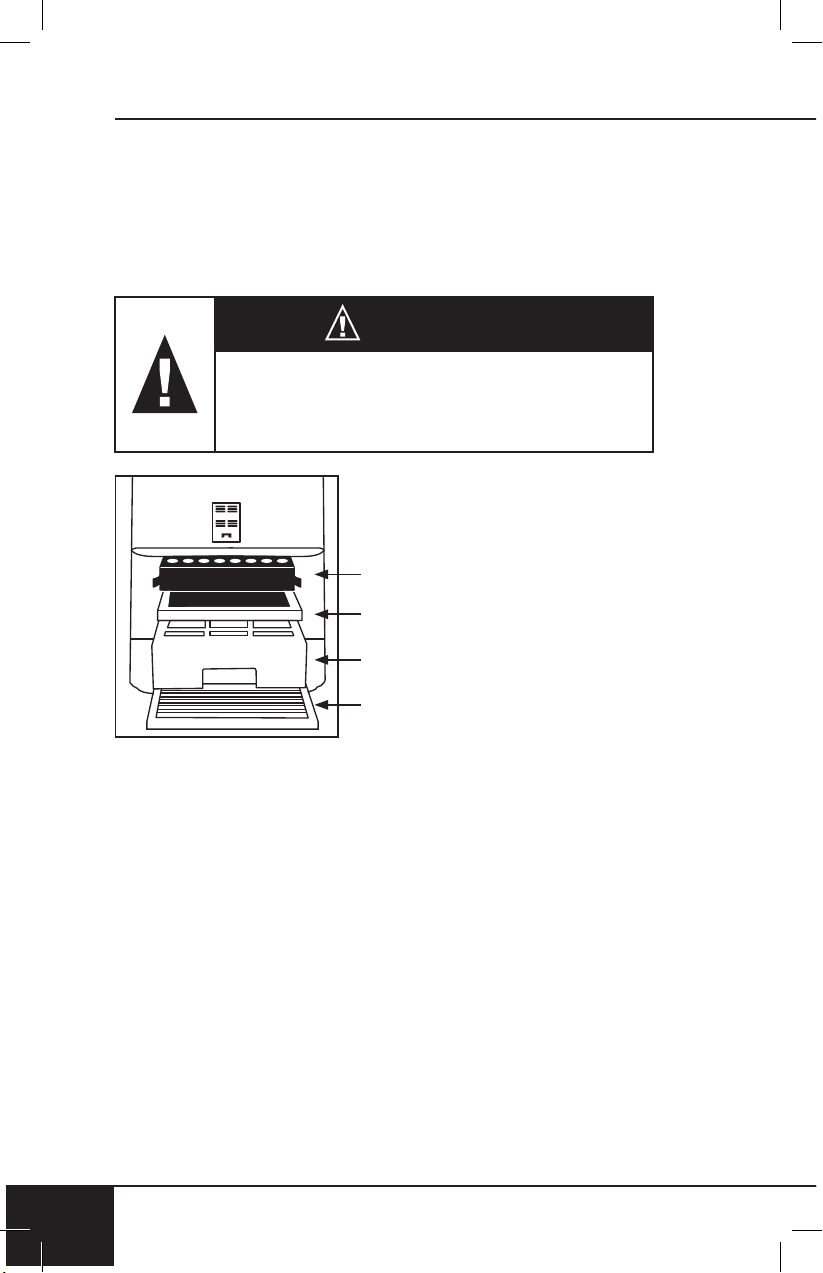
The order of the filters inside the
OxyPure is as follows (bottom to top):
1. Stainless Steel Pre-Filter
(washable)
2. Bio-Guard
™
Filter (washable)
3. Ozone Emission Removal Filter
(not washable)
4. HEPA/Activated Carbon Combo
Filter (not washable)
• The OxyPure should be placed
on the floor when assembling
the filters.
cleaning & maintenance
18
CLEANING & MAINTENANCE
18
DO NOT WASH Ozone Emission Removal Filter or
HEPA/Activated Carbon Combo Filter. Ozone Emission
Removal Filter should be replaced every 20 years.
The HEPA/Activated Carbon Combo Filter should be
replaced 6 months to 1 year, depending on how often
the unit is running in its environment.
CAUTION
Unplug the OxyPure from the power source
before inserting or removing any parts or
attachments and before cleaning.
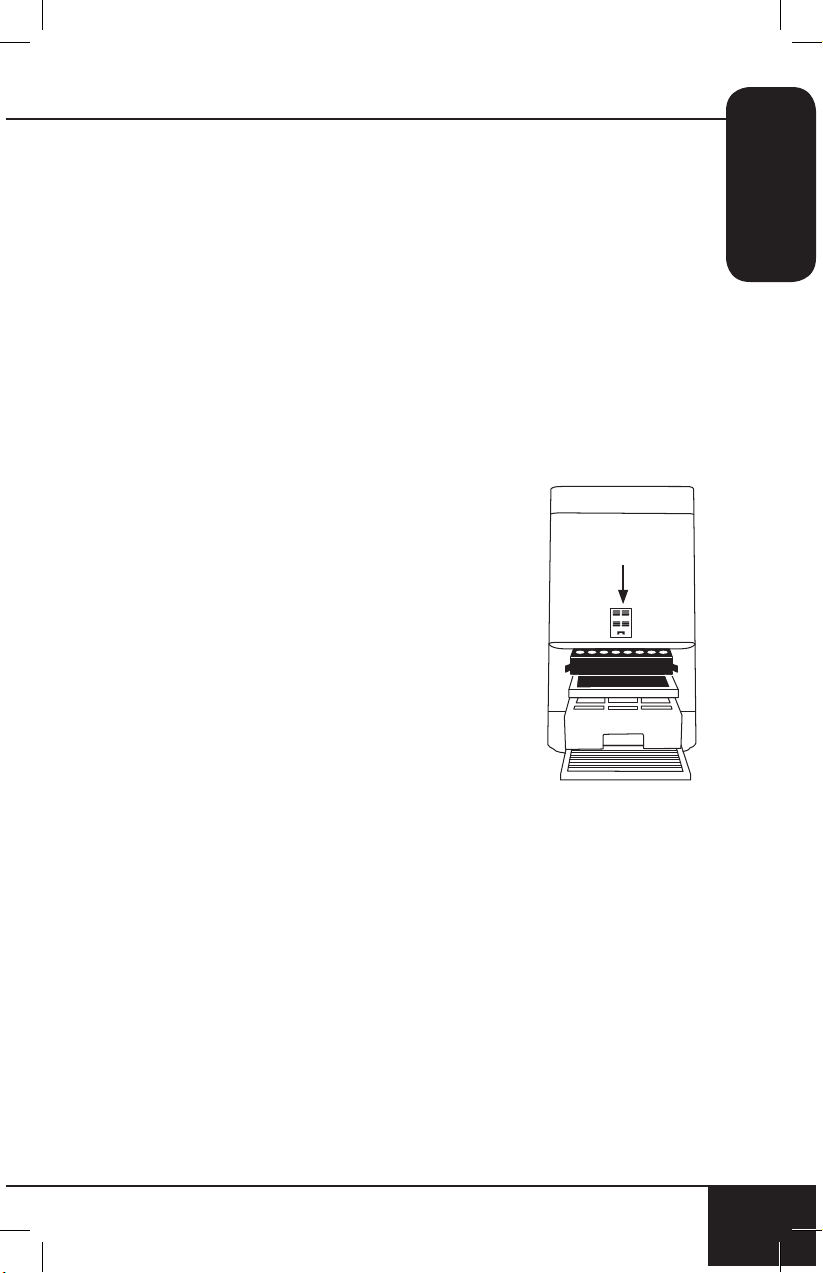
HEPA/Activated
Carbon Combo Filter
Ozone Emission Removal Filter
Bio-Guard
™
Filter
Stainless Steel Pre-Filter
Cleaning the Filters
To clean the Bio-Guard
™
Filter:
1. Remove filter.
2. Spray mild degreaser, let sit for 2-3 minutes.
3. Submerge in warm water, shake, remove.
4. Repeat process until clean.
5. Rinse with warm water.
6. Dry completely before use.
The Pre-Filter collects large particles and will need to
be cleaned at least once every two months depending
on use.
1. Use a vacuum or paper towel to remove any dust or lint.
2. Clean with warm soapy water.
nuwavenow.com
19
ENGLISH
nuwavenow.com
19
3. Rinse thoroughly and remove any soap particles on
the filter.
4. Allow filter to dry completely BEFORE placing back into
OxyPure (up to 12-24 hours to dry).
Resetting the Filter and Air Quality Indicators
1. To reset the Air Quality Indicator for Filter 2, press and
hold down “TIMER” for 2 seconds until a beep is heard.
• After a filter is cleaned or replaced and indicator is
reset, the first green bar around AIR will be lit.
2. To reset the Air Quality Indicator for Filter 4, press and
hold down “TURBO” for 2 seconds until a beep is heard.
• After a filter is cleaned or replaced and indicator is
reset, the first green bar around ODOR will be lit.
Cleaning the Filter Sensor
The Filter Sensor is located on the back,
above the Filter Slot Cover.
1. Open the panel (Sensor Cover).
2. Using a dry cotton swab or small, soft
brush, gently remove any dirt or dust
from the Sensor.
3. For more buildup on Sensor, wipe
with a slightly wet cotton swab.
4. Remove any moisture with a dry
cotton swab.
• The Filter Sensor requires regular
cleaning (approx. every 3 months)
for the unit to operate efficiently.
• If your OxyPure is set up in an area with high dust
accumulation, more frequent cleaning of the Filter
Sensor is needed.
• Do not use the cotton swab on any part or area other
than the Filter Sensor.
Sensor Cover
cleaning & maintenance
20
CLEANING & MAINTENANCE
20
Cleaning Underneath Top Vent
The Top Vent of your OxyPure can be removed to clean
the surface underneath the Top Vent and the inner
vent screen.
To clean the surface underneath and inner vent screen:
1. Turn the OxyPure off and unplug the unit.
2. Lift the Top Vent using the built-in tab.
3. Using a dry or slightly wet paper towel, wipe up any dust or
accumulated particles off surface and inner vent screen.
To clean the inner wall opposite of the fan or to remove
an object that has fallen through
the inner vent:
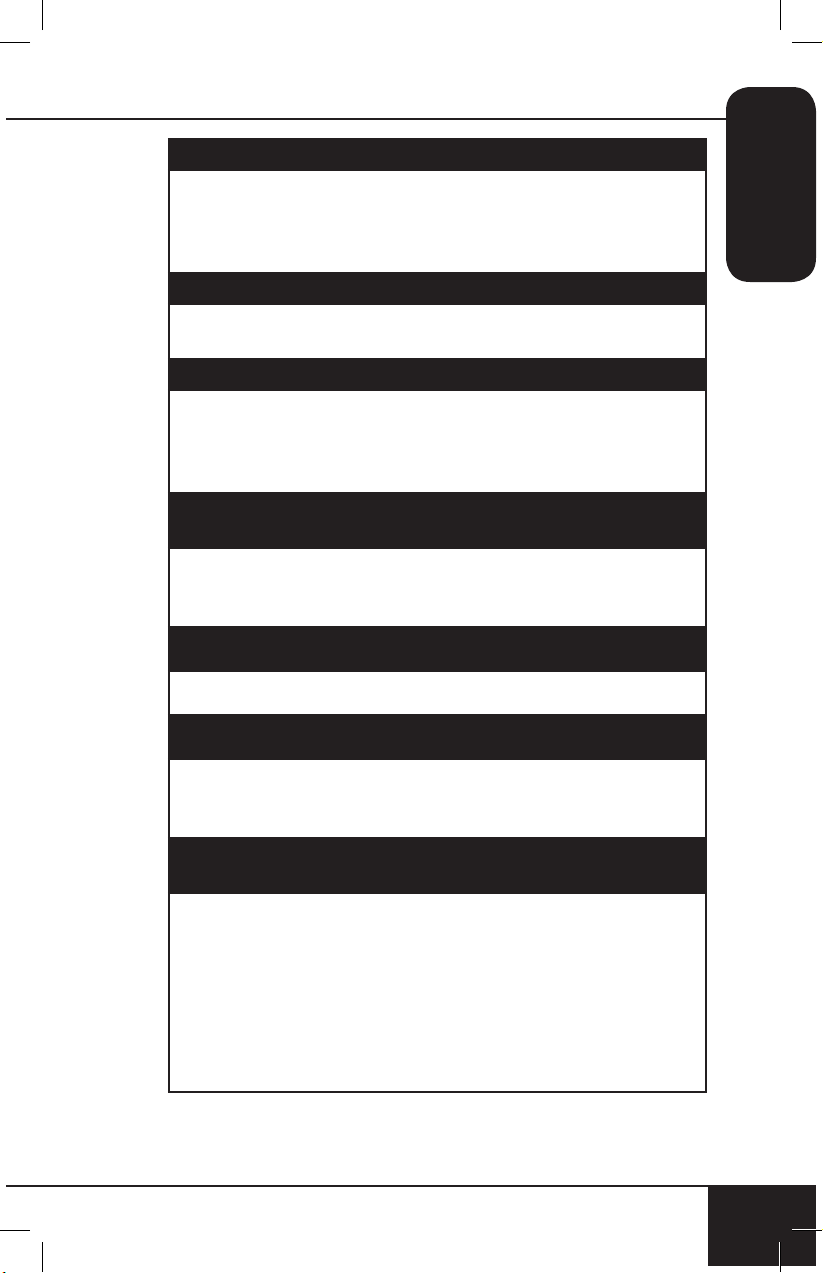
1. After removing Top Vent, locate
the two screws closest to the end
on the inner vent near the grill
opening, underneath the main Top
Vent. DO NOT unscrew the four
outer screws.
2. Use a Phillips screwdriver to
loosen the two screws (only).
3. Lift up inner vent.
• Only a portion of the inner vent
will lift up.
4. After cleaning inner wall with
a soft cloth or paper towel,
reassemble inner vent, retightening the two screws, and
replace Top Vent.
• Make sure all parts are secure before plugging
OxyPure back in and turning on again.
Note: DO NOT unscrew the four outer screws located
toward the corners. Doing so will void your warranty.
X
X
X X
Do not immerse the OxyPure in
water. Clean with a damp
sponge or cloth and wipe dry.
Make sure all parts and covers
are securely attached.
nuwavenow.com
21
ENGLISH
nuwavenow.com
21
TROUBLESHOOT GUIDE
Unit does not turn on.
1. The plug is not in the wall outlet. Plug into wall outlet.
2. “Power” on touchpad panel is not on. Press “Power”.
3. The Filter Slot Cover in the back rear is off or loose.
Make sure Filter Slot Cover is on securely.
TIMER does not work when pressed.
The unit is not reading the function selected.
Press “FAN SPEED” or “AUTO”, then press “TIMER”.
The fans are not blowing.
1. An appropriate outlet is not being used. Make sure outlet
has appropriate voltage for use.
2. The Filter Slot Cover in back rear is not properly in
place. Make sure Filter Slot Cover is on securely.
Speed of the airflow is not changing when “FAN
SPEED” is pressed.
Unit may be in manual AUTO mode. Set the OxyPure
to other operating mode on the touchpad then press
“FAN SPEED”.
Airflow out of Top Vent is weak.
Air filter(s) are dirty. Change or clean the air filters.
Unit is producing smoke or odor.
Air filter(s) are dirty. Change or clean the air filters. If
problem continues, contact Customer Service at 1-877-
689-2838 or email help@nuwavenow.com.
CLEAN and REPLACE FILTER Indicators have not
reset after filter(s) has been cleaned or changed.
1. The Filter Sensor is not reading the new filter installed.
Turn unit off then turn on. Press and hold down
“TIMER” for 2 seconds until a beep is heard.
2. Turn unit off, unplug and adjust filter(s). Plug in and
turn the unit ON again.
3. The Filter Slot Cover in back rear is not securely in
place. Make sure Filter Slot Cover is on securely.
4. The Filter Sensor is dirty. Clean the Filter Sensor.

troubleshoot guide
22
TROUBLESHOOT GUIDE
22
ULTIMATE CLEAN does not come on when pressed.
The unit is not reading the function selected. Turn the unit
ON/OFF by pressing “POWER” twice.
POWER is blinking red.
1. Filters are not properly installed or are loose. Turn
off unit and unplug. Check that filters are properly
installed and not loose. Plug unit in and press POWER
to turn ON.
2. When the Filter Slot Cover is removed, “Power” will
be backlit solid red. Pressing “Power” will make it
blink. However, as a safety measure, the unit will not
be operational when the Filter Slot Cover is removed.
Ensure that Filter Slot Cover is installed securely.
Odor Sensor is not resetting itself and not clearing all
bars. All bars on the control panel are flashing.
Contact Customer Service at 1-877-689-2838 or email
help@nuwavenow.com.
nuwavenow.com
23
ENGLISH
nuwavenow.com
23
LIMITED WARRANTY
The NuWave OxyPure
®
Smart Air Purifier
THE MANUFACTURER WARRANTS
NuWave warrants that the OxyPure Smart Air Purifier will be
free from manufacturer defects under normal household use
for 3 years from the date of purchase. This Warranty covers
original owner of this Air Purifier for personal household
use only and when operated in accordance with the
Manufacturer’s written instructions.
This Warranty does not apply to products used for
commercial, rental or resale purposes. The Manufacturer will
provide the necessary parts and labor to repair any part of the
NuWave OxyPure Smart Air Purifier at NuWave LLC Service
Department. After the expiration of the warranty, the cost of
the labor and parts will be the responsibility of the owner.
THE WARRANTY DOES NOT COVER
The Limited Warranty is voided if repairs are made by
an unauthorized dealer and/or the serial number data
plate is removed and/or defaced. Normal deterioration
of finish due to use or exposure is not covered by this
Warranty. This Limited Warranty does not cover failure,
damages or inadequate performance due to accident, acts
of God (such as lightning), fluctuations in electric power,
alterations, abuse, misuse, misapplications, corrosive-type
atmospheres, improper installation, failure to operate in
accordance with the Manufacturer’s written instructions,
abnormal use or commercial use. NuWave LLC reserves
the right to void the Limited Warranty, where allowable by
law, for products purchased from an unauthorized dealer.

limited warranty
24
LIMITED WARRANTY
24
TO OBTAIN SERVICE
The owner shall have the obligation and responsibility to:
pay for all services and parts not covered by the warranty;
prepay the freight to and from Service Department for any
part or system returned under this warranty; and carefully
package the product using adequate padding material to
prevent damage in transit. The original container is ideal
for this purpose. Include in the package the owner’s name,
address, daytime telephone number, a detailed description
of the problem, and your “RGA number.” Call 1-877-689-
2838 or email help@nuwavenow.com to obtain the RGA
number (Return Goods Authorization number). Provide
the model & serial number and proof of date of purchase (a
copy of the receipt) when making claims under this warranty.
MANUFACTURER’S OBLIGATION
The Manufacturer’s obligation under this Limited Warranty
is limited, to the extent allowable by law, to repairing or
replacing any part covered by this Limited Warranty which
upon examination is found to be defective under normal use.
The Limited Warranty is applicable only within the continental
United States and only to the original purchaser of the
manufacturer’s authorized channels of distribution. THE
LIMITED WARRANTY MAY NOT BE ALTERED, VARIED
OR EXTENDED EXCEPT BY A WRITTEN INSTRUMENT
EXECUTED BY THE MANUFACTURER. THE REMEDY
OF REPAIR OR REPLACEMENT AS PROVIDED UNDER
THIS LIMITED WARRANTY IS EXCLUSIVE. IN NO
EVENT SHALL THE MANUFACTURER BE LIABLE FOR
ANY CONSEQUENTIAL OR INCIDENTAL DAMAGES TO
ANY PERSON, WHETHER OR NOT OCCASIONED BY
NEGLIGENCE OF THE MANUFACTURER, INCLUDING
WITHOUT LIMITATION, DAMAGES FOR LOSS OF USE,
COSTS OF SUBSTITUTION, PROPERTY DAMAGE, OR
OTHER MONEY LOSS.
nuwavenow.com
25
ENGLISH
nuwavenow.com
25
Some states do not allow the exclusion or limitation of
incidental or consequential damages, so the above limitation
exclusions may not apply. This Limited Warranty gives
specific legal rights, and there may also be other rights
which vary from state to state. EXCEPT AS OTHERWISE
EXPRESSLY PROVIDED ABOVE, THE MANUFACTURER
MAKES NO WARRANTIES EXPRESSED OR IMPLIED
ARISING BY LAW OR OTHERWISE, INCLUDING
WITHOUT LIMITATION, THE IMPLIED WARRANTIES OF
MERCHANTABILITY AND FITNESS FOR A PARTICULAR
PURPOSE TO ANY OTHER PERSON. READ YOUR
OWNER’S MANUAL. IF YOU STILL HAVE ANY
QUESTIONS ABOUT OPERATION OR WARRANTY OF
THE PRODUCT, PLEASE CONTACT NUWAVE LLC.
READ YOUR OWNER’S MANUAL
If you still have any questions about operation or warranty
of the product, please contact NuWave LLC at:
1-877-689-2838 or email help@nuwavenow.com.
2626
EL MANUAL DEL
PROPIETARIO
nuwavenow.com
Smart Air Purier
27
Como agradecimiento especial por registrar su producto,
¡recibirá automáticamente 6 meses adicionales a su
garantía limitada del fabricante!*
Todo lo que tiene que hacer es seguir estos
simples pasos.
Usando su teléfono inteligente o
dispositivo inteligente, escanee
el código QR ubicado en la
etiqueta de su producto en la
parte posterior de la unidad.
Se le dirigirá a la página de
registro del producto NuWave
con el número de serie único
de su producto que se ingresa
automáticamente en el campo
correspondiente.
NOTA: Si no tiene un dispositivo
inteligente habilitado para
la web, simplemente visite
nuwavenow.com/QR e ingrese
manualmente el número de
serie de su producto.
Complete la información restante
y complete la encuesta opcional.
Una vez que envíe su
información, recibirá un correo
electrónico de conrmación
con los detalles de la garantía
extendida.
1
2
3
4
* Registre su producto dentro de 1 año a partir de la fecha
de compra para una extensión gratuita de 6 meses de
garantía limitada.
¡REGÍSTRESE
AHORA!
Abra su tienda de aplicaciones móviles (App Store,
Google Play).
Busque “lectores de códigos QR.”
Simplemente descargue el lector de códigos QR a
su teléfono, ábralo y escanee el código, ya está listo
para comenzar.
NOTA: Es posible que deba abrir el lector de código
QR descargado cada vez que desee escanear un
código QR.
28
28
1
2
3
DESCARGUE LA APLICACIÓN QR
CODE EN SU DISPOSITIVO MÓVIL
lectores de códigos QR
6
!para una garantía
adicional de
meses

nuwavenow.com
29
nuwavenow.com
29
MEDIDAS DE SEGURIDAD IMPORTANTES
PARA USO DOMÉSTICO SOLAMENTE Y LEA TODAS LAS
INSTRUCCIONES ANTES DE USARLO
SPANISH
ADVERTENCIA: Cuando use el OxyPure, siempre se
deben seguir las precauciones de seguridad básicas:
1. Para protegerse contra el riesgo de una descarga eléctrica,
NO sumerja el cable, el enchufe ni ninguna parte de la
unidad OxyPure en agua u otros líquidos.
2. Es necesaria una supervisión estricta cuando OxyPure
es utilizado por niños o cerca de ellos. La unidad no
está diseñada para ser utilizada por niños, personas con
capacidades físicas, sensoriales o mentales reducidas,
o aquellos con falta de experiencia o conocimiento de
esta unidad.
3. No opere el OxyPure con un cable o enchufe
dañados, después de un mal funcionamiento de
la unidad, o si se ha caído o dañado de cualquier
manera. Contacte a Servicio al Cliente al 1-877-
689-2838 o envíe un correo electrónico a help@
nuwavenow.com para obtener más información.
4. No pase el cable debajo de las alfombras. NO cubra el
cordón con tapetes u otras cubiertas.
5. No coloque el cable debajo de muebles o
electrodomésticos. Arregle el cable lejos de áreas de
mucho tránsito donde se puedan tropezar.
6. No conecte el OxyPure a una toma de corriente o
multicontacto que esté siendo utilizado por otros
electrodomésticos.
7. Retire el polvo o el agua del tapón, si es necesario.
8. Coloque el OxyPure en una superficie plana y estable.
9. No lo coloque dónde se podría empujar, patear o se
puedan tropezar con el OxyPure.
10. Deje al menos 2-3 pies de espacio entre las
ventilaciones de la unidad y las paredes.
11. No instale la unidad cerca de un dispositivo de
calentamiento.
12. No lo use en lugares expuestos a humedad o agua.
13. No use la unidad cerca de gases o vapores inflamables
o combustibles.
14. No opere el OxyPure de lado.

medidas de seguridad importantes
30
MEDIDAS DE SEGURIDAD IMPORTANTES
PARA USO DOMÉSTICO SOLAMENTE Y LEA TODAS LAS
INSTRUCCIONES ANTES DE USARLO
30
15. No destinado para uso al aire libre.
16. No coloque objetos encima de la unidad.
17. No se siente ni se pare o se apoye en la unidad.
18. La alteración o modificación de cualquier parte de
OxyPure o el uso de accesorios no recomendados por el
fabricante pueden causar incendios, lesiones o daños a
la propiedad.
19. Al igual que con la mayoría de las unidades eléctricas,
las piezas eléctricas están activas incluso cuando el
OxyPure está apagado. Asegúrese de que la unidad
esté desenchufada durante el montaje.
20. No use el OxyPure en un entorno industrial o de fábrica
donde pueda haber aceite de máquina en el aire.
21. Apague la alimentación en el OxyPure antes de
desenchufar la unidad. Desenchufe el OxyPure de la
toma de corriente cuando no esté en uso, antes de
poner o quitar partes, al retirar o reemplazar los filtros y
antes de limpiarlos.
22. APAGUE la alimentación y desenchufe la unidad cuando
esté desatendida por periodos extendidos.
23. Sólo para uso doméstico.
24. Mantenga el manual a la mano para referencia futura.
Advertencia: Para reducir el riesgo de descarga eléctrica,
este equipo tiene un enchufe polarizado (una clavija es
más ancha que la otra). Este enchufe encajará en una toma
polarizada de una sola manera. Si el enchufe no encaja
completamente en la toma de corriente, invierta el enchufe.
Si todavía no encaja, póngase en contacto con personal
calificado para instalar la toma de corriente adecuada. No
modifique el enchufe de ninguna manera.
¡ADVERTENCIA! RIESGO DE DESCARGA ELÉCTRICA!:
Estas instrucciones de mantenimiento son para uso
exclusivo del personal calificado. Para reducir el riesgo
de descarga eléctrica, no realice ningún otro servicio
que no sea el que se incluye en las Instrucciones de
funcionamiento, a menos que esté calificado para hacerlo.
nuwavenow.com
31
nuwavenow.com
31
SPANISH
MEDIDAS DE SEGURIDAD ADICIONALES
VER CUIDADO Y MANTENIMIENTO ANTES DEL USO
Información eléctrica
Se proporciona un cable de suministro de energía
corto (o cable de suministro de energía desmontable)
para reducir el riesgo resultante de enredarse o
tropezar con un cable más largo. Los cables de
alimentación desmontables más largos o los cables
de extensión están disponibles y se pueden usar si
se tiene cuidado al hacerlo. Si se usa un cable de
alimentación desmontable más largo o un cable
de extensión:
1. La calificación eléctrica marcada del cable de
extensión debe ser al menos tan grande como la
calificación eléctrica del aparato.
2. El cable más largo debe estar dispuesto de modo que
no se cuelgue sobre la encimera o sobre una mesa
donde se pueda tirar o tropezar involuntariamente.
La OxyPure debe operarse en una toma eléctrica
separada de otros aparatos operativos debido a
limitaciones del voltaje. El aparato tiene un enchufe
polarizado (una cuchilla es más ancha que la otra).
Para reducir el riesgo de descarga eléctrica, este
enchufe está diseñado para encajar en una toma de
corriente polarizada de una sola manera. Si el enchufe
no encaja completamente en el tomacorriente, invierta
el enchufe. Si aún así no encaja, comuníquese con un
electricista calificado. No intente modificar el enchufe
de ninguna manera.
3. Si el aparato es del tipo con conexión a tierra, el juego
de cables o el cable de extensión debe ser un cable de
3 hilos con conexión a tierra.

medidas de seguridad importantes
3232
MEDIDAS DE SEGURIDAD
IMPORTANTES
GUARDE ESTAS INSTRUCCIONES
Lea y comprenda todo el manual antes de usar el
OxyPure.
1. No opere la unidad si detecta sonidos o movimientos
anormales.
2. Si un objeto duro o extraño entra en contacto con el
ventilador, no lo haga funcionar. Apague y desenchufe
la unidad.
3. Inspeccione si hay partes sueltas o faltantes antes y
después de cada uso. Si hay partes sueltas, dañadas
o faltantes, comuníquese con Servicio al Cliente
al 1-877-689-2838 o envíe un correo electrónico a
help@nuwavenow.com.
4. Siempre tenga extrema precaución cuando opere el
OxyPure o cualquier maquinaria.
5. Los niños deben ser supervisados para asegurarse de
que no jueguen con el aparato.
6. No tire, levante, arrastre ni transporte la unidad por el cable.
7. No bloquee los orificios de entrada o salida de aire.
8. No opere el OxyPure sin un filtro.
NO UTILICE LA UNIDAD PARA OTRO USO QUE NO SEA
EL PREVISTO.
Nota: Coloque la OxyPure en una superficie que sea
horizontal, uniforme y estable. Este aparato está diseñado
para uso doméstico normal.
AVISO: EL NO SEGUIR CUALQUIERA DE LAS MEDIDAS
DE SEGURIDAD IMPORTANTES, MEDIDAS DE
SEGURIDAD ADICIONALES O LAS INSTRUCCIONES
PARA UN USO SEGURO SIGNIFICARÁ UN USO
INCORRECTO DEL OXYPURE QUE PUEDE ANULAR SU
GARANTÍA Y CREAR EL RIESGO DE LESIONES GRAVES.
nuwavenow.com
33
nuwavenow.com
33
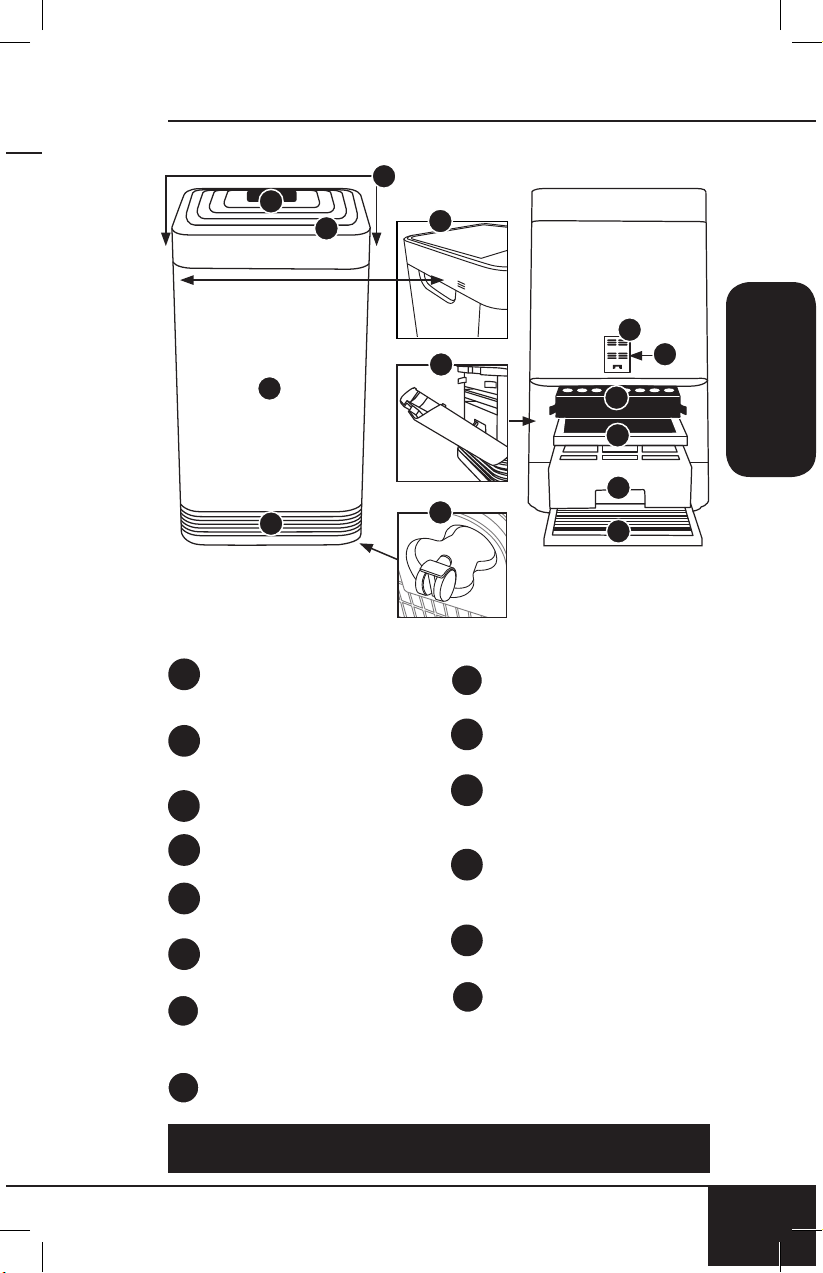
Cubierta del Sensor
Parte #: 47106
Sensor del Filtro
Parte #: 47107
HEPA/Combo de Filtro
de Carbono Activado
Parte #: 47108
Filtro de Eliminación de
Emisiones de Ozono
Parte #: 47109
Filtro Bio-Guard
™
Parte #: 47110
Prefiltro de Acero
Inoxidable
Parte #: 47111
9a
9b
10
11
12
13
Ventilación Superior
Parte #: 47101
Panel Táctil de la
Pantalla Frontal
Parte #: 47102
Manijas
Sensor de Olores
Base
Parte #: 47104
Ventilación de Flujo
Cubierta de la Ranura
del Filtro
Parte #: 47105
Ruedas
1
2
3
4
5
6
7
7
8
1
2
Frente Reverso
5
9a
9b
7
6
8
10
11
12
13
3
4
INSTRUCCIONES
SPANISH
Para pedir piezas, diríjase a la sección Piezas reemplazables de este
manual o NuWaveNow.com.
instrucciones
34
INSTRUCCIONES
34
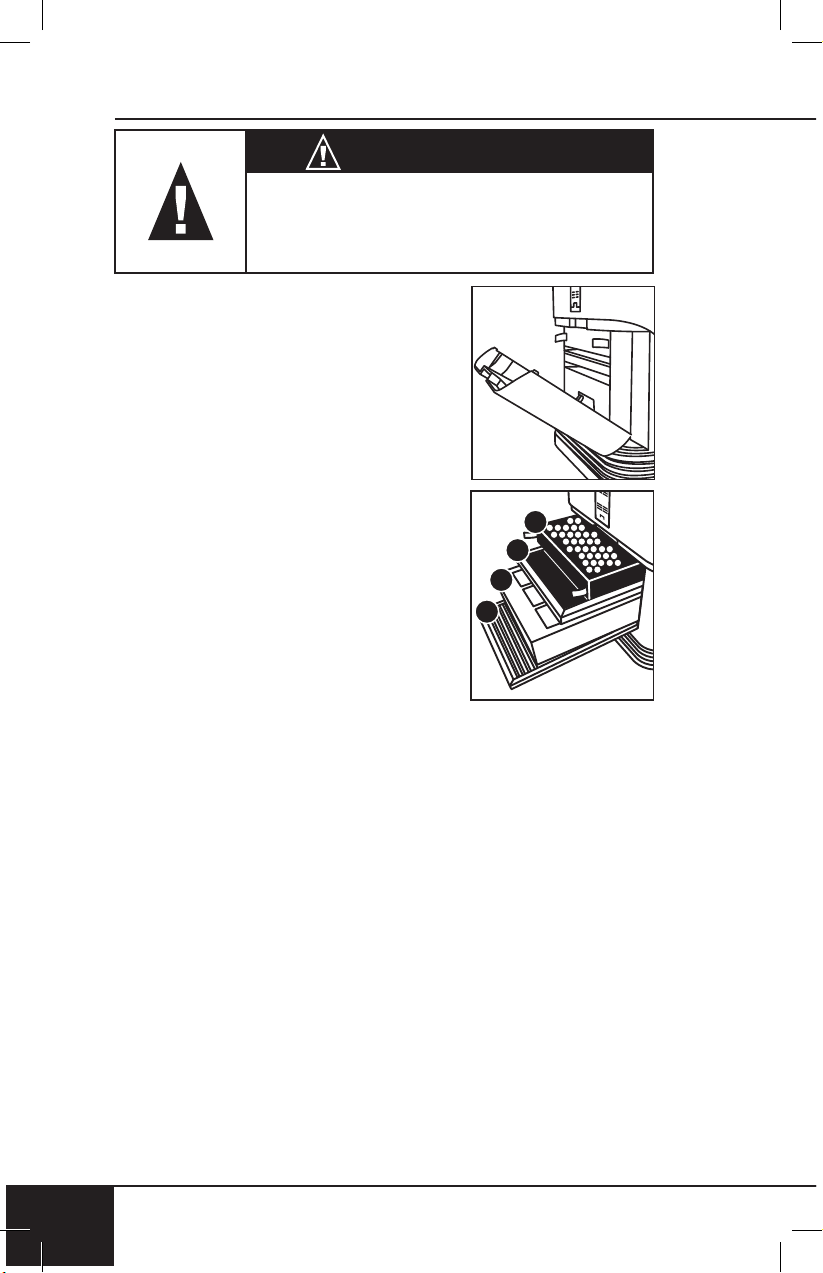
Ensamble del Filtro de Aire
El OxyPure viene con cuatro filtros
preensamblados diferentes dentro
de la unidad. Cuando los filtros
requieren reemplazo o limpieza, siga
todas las instrucciones al ensamblar.
Ver cuidado y mantenimiento.
4
3
2
1
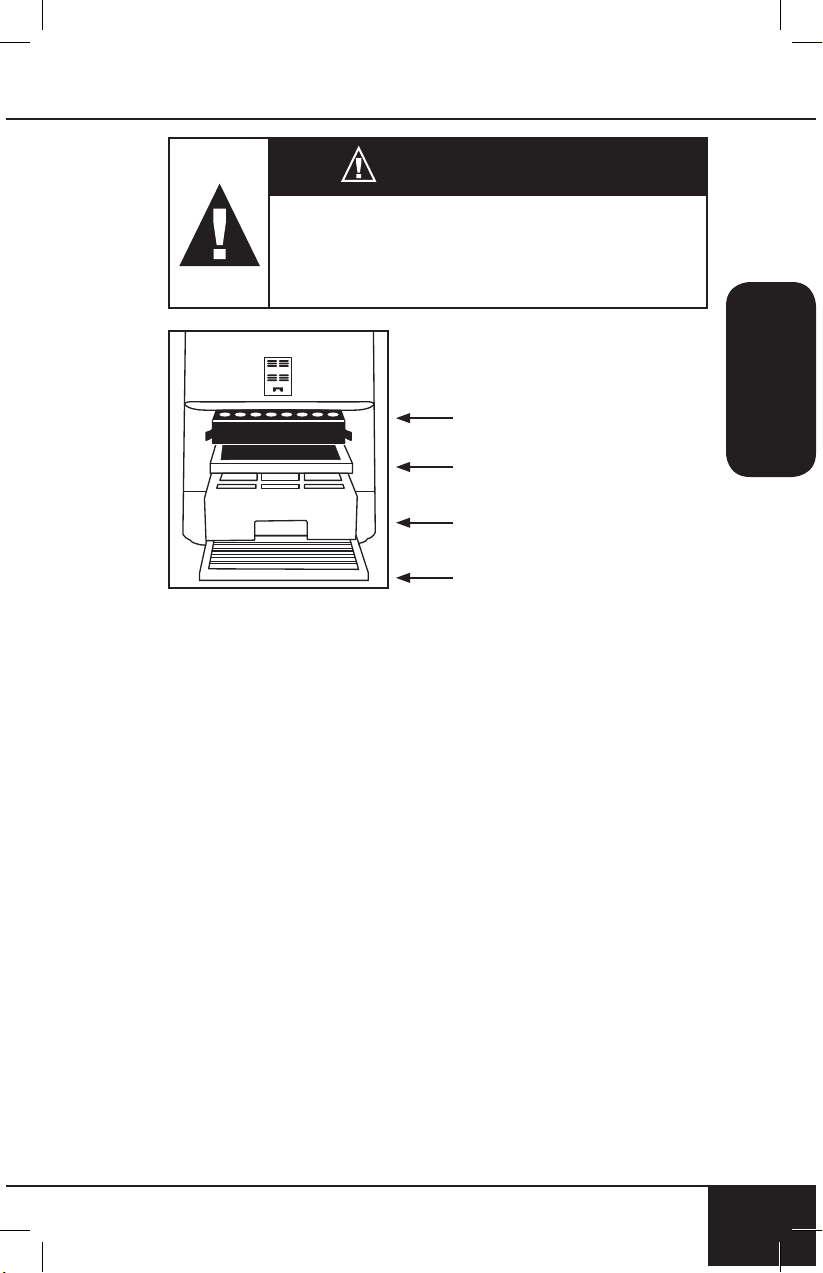
El orden de los filtros dentro de
OxyPure es el siguiente:
1. Prefiltro de Acero Inoxidable
2. Filtro Bio-Guard
™
3. Filtro de Eliminación de Emisiones
de Ozono
4. HEPA/Combo de Filtro
de Carbono Activado
Funciones de Filtro:
Los purificadores de aire son más efectivo
a l f u n c i o n a r c u a n d o t o d a s l a s v e n t a n a s y
p u e r t a s e s t á n c e r r a d a s . P u r i f i c a h a b i t a c i o n e s
extra grandes de hasta 1,200 pies cuadrados.
Prefiltro de Acero Inoxidable
Lavable y reutilizable hasta por 20 años.
Captura y recoge partículas grandes, contaminantes y
alérgenos, incluidos el pelo de mascotas, la caspa y el polen.
Filtro Bio-Guard
™
Lavable y reutilizable por hasta 20 años.
8,000V, cargas positivas y negativas capturan y atrapan
contaminantes tan pequeños como 0.09 micras, incluyendo
bacterias, moho, virus, humo, polen y alérgenos.
Filtro de Eliminación de Emisiones de Ozono
Reutilizable hasta por 20 años
Elimina las emisiones de ozono y otros químicos dañinos
en el aire.
AVERTENCIA
No conecte el OxyPure a una toma de
corriente o multicontacto que esté siendo
utilizado por otros electrodomésticos.

nuwavenow.com
35
SPANISH
nuwavenow.com
35
HEPA/Combo de Filtro de Carbono Activado
Vida útil, hasta 1 año o 6 meses. No lavable
Captura y atrapa el polen, los alérgenos, las emisiones
industriales, los compuestos orgánicos volátiles (COV),
incluidos los formaldehídos, los vapores domésticos, los
olores y los dióxidos de nitrógeno de las estufas de gas y los
escapes de los automóviles.
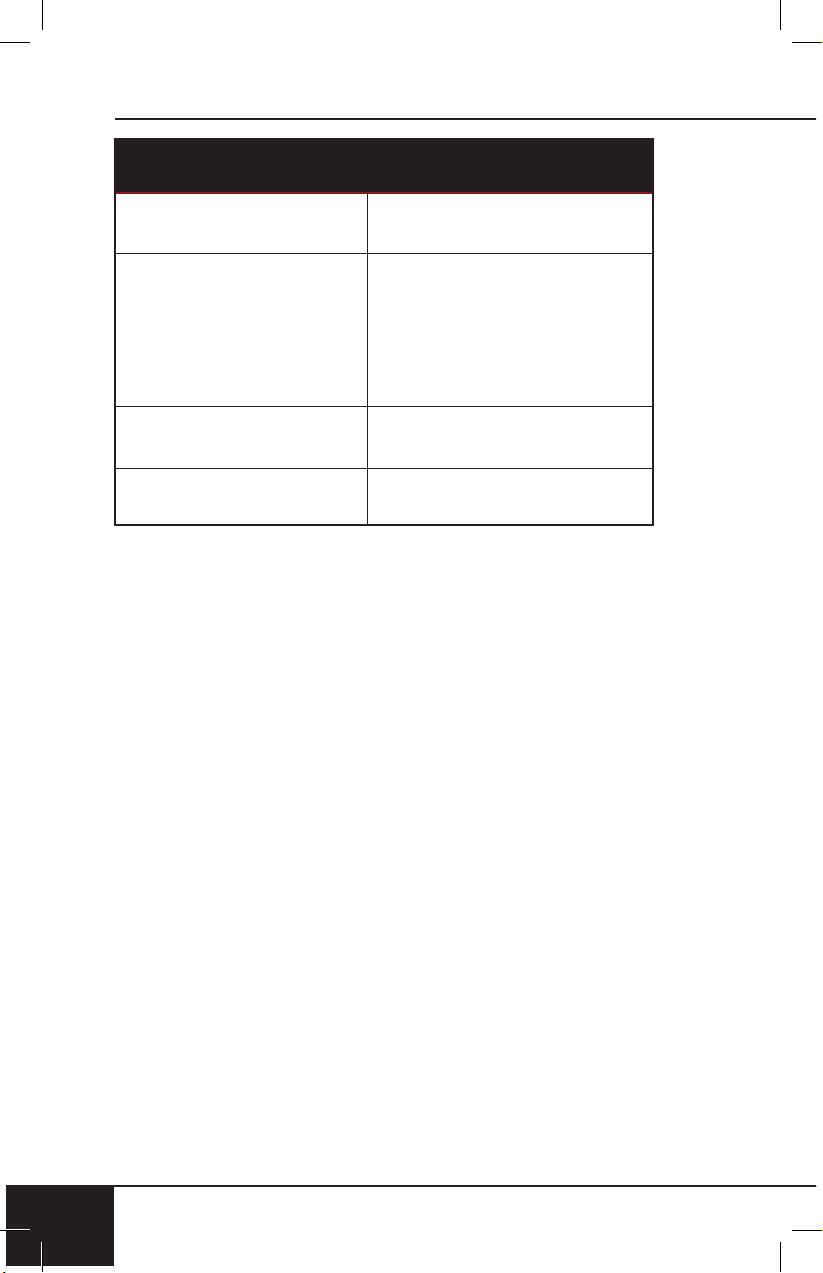
CONEXIÓN WIFI
El OxyPure está equipado con Wi-Fi para operar la
unidad desde cualquier ubicación.
1. Descargue la aplicación NuWave Connect a través de
Apple Store o Google Play en su teléfono inteligente o
dispositivo y abra la aplicación.
2. Asegúrese de que su teléfono esté conectado a su
red. Abra la aplicación y siga las instrucciones para
el proceso de verificación. Una vez que se complete
la verificación, comience a agregar dispositivos. Para
agregar un dispositivo, pulse “+”. Ubique y pulse
“OxyPure”.
3. A continuación, conecte el OxyPure a una toma
de corriente compatible. Para activar el modo de
emparejamiento de Wi-Fi, mantenga presionado el botón
de encendido de OxyPure durante 2 segundos hasta
que la luz de Wi-Fi comience a parpadear rápidamente
a una velocidad de aproximadamente 2 parpadeos por
segundo. Una vez que la luz de Wi-Fi está parpadeando
rápidamente, en la aplicación, toque el botón Finalizar
configuración de red en la parte inferior de la página
Agregar dispositivo.
4. A continuación, se le solicitará que se conecte a su red o
confirme su contraseña de red existente.
Nota: Para conectarse o cambiar de red, dependiendo
de su teléfono, es posible que lo elimine de la aplicación
para completar la conexión de red. Regrese a la
aplicación NuWave Connect y continúe con el proceso de
configuración.
5. Cuando el OxyPure esté conectado a Wi-Fi, la luz “WIFI”
dejará de parpadear y permanecerá continuamente
encendida.
• Si el OxyPure no se conectó a su red, la luz de Wi-Fi se
apagará. Siga los pasos 3-4. Asegúrese de seleccionar
la red Wi-Fi adecuada y escriba la contraseña correcta.
instrucciones
36
INSTRUCCIONES
36
/CONEXIÓN WIFI
Nota: Si la luz de la unidad parpadea más lentamente,
la unidad se encuentra en el Modo de Espera Wi-Fi.
Para salir del Modo de Espera e iniciar el Modo de
Emparejamiento, mantenga presionado el botón de
encendido durante 2 segundos hasta que la luz de Wi-Fi
comience a parpadear rápidamente.
Nota: El OxyPure, como con la mayoría de los dispositivos
IoT, sólo se conectará a una Red 2.4GHz.
• Para reiniciar el OxyPure WIFI, presione y mantenga
presionado "Power" durante 3 segundos. Siga el paso 4. El
OxyPure ahora puede manejarse desde cualquier ubicación.
*La mayoría de los enrutadores emitirán en 2.4GHz. Si
necesita ayuda para activar 2.4GHz, comuníquese con su
proveedor de servicios de internet.
Estado de Wi-Fi LED
Modo de emparejamiento y modo de espera
Luz Solida
El OxyPure se empareja con
el Wi-Fi.
Luz Parpadeante Rápida
El OxyPure está en modo de
emparejamiento. El OxyPure
permanecerá en modo de
emparejamiento por hasta
3 minutos, o hasta que su
dispositivo esté emparejado.
Luz de Parpadeo Lento El OxyPure está en modo
de espera.
Sin Luz El WIFI de OxyPure
está apagado.
nuwavenow.com
37
SPANISH
nuwavenow.com
37
Encendido/Apagado
1. Enchufe la unidad a una toma de corriente. "Power" se
iluminará en rojo y la unidad estará en modo de espera.
2. Presione "Power". La unidad se encenderá y "Power" se
iluminará en verde.
• Presione "AUTO". "AUTO" se iluminará.
• Las barras al lado de "AIR" y "ODOR" se iluminarán,
midiendo la calidad del aire actual.
• El ventilador iniciará.
3. Presione "Power" nuevamente para apagar la unidad.
• Cuando seleccione un modo diferente al
predeterminado "AUTO" antes de apagarla, la unidad
ejecutará el modo previamente seleccionado cuando
se vuelva a encender.
AUTO
Cuando se usa la función AUTO, la unidad ajustará la
velocidad del ventilador automáticamente (sin límite de tiempo).
1. Presione "AUTO". "AUTO" se encenderá.
ULTIMATE CLEAN
Cuando se encuentre en modo ULTIMATE CLEAN, la
unidad automáticamente se ajustará a la velocidad del
ventilador más alta o más baja en función de la calidad del
aire (Sin límite de tiempo).
1. Presione "ULTIMATE CLEAN". ULTIMATE CLEAN se
iluminará en verde.
2. Presione "ULTIMATE CLEAN" para apagarlo.
SLEEP MODE
Cuando esté en modo de suspensión, las luces LED
se apagarán pero el ventilador seguirá activo. Ajuste la
velocidad del ventilador antes de entrar en SLEEP MODE.
1. Ajuste manualmente la VELOCIDAD DEL
VENTILADOR.
2. Mantenga presionado “FAN SPEED” durante 2
segundos para activar el SLEEP MODE.
3. La unidad funcionará a la velocidad del ventilador que
se seleccionó previamente.
4. Para desactivar el Modo de Sueño, presione cualquier
botón.
Nota: Ultimate Clean y Turbo funcionarán durante SLEEP
MODE.

instrucciones
38
INSTRUCCIONES
38
FAN SPEED
Ajuste a 6 velocidades HIGH to LOW (BAJA a ALTA).
1. Presione “FAN SPEED” para ajustar.
2. Para volver al nivel más bajo de la velocidad del
ventilador, continúe presionando “FAN SPEED” hasta
que se encienda la primera barra.
TIMER
Use la función TIMER para elegir la duración de la operación.
1. Presione “TIMER”. La barra al lado de ½ hora se
encenderá.
• Hay 6 tiempos preestablecidos para elegir.
2. Presione “TIMER” para aumentar el tiempo.
• Elija entre ½ hora, 1, 2, 4, 8 o 12 horas.
• Después de presionar “TIMER” seis veces, todas las
barras se encenderán.
Presione “TIMER” una vez más para apagar el temporizador.
TURBO
La función TURBO limpia el aire usando la mayor velocidad
del ventilador en los momentos seleccionados.
1. Presione “TURBO” para ajustar desde ½ hora, 1 ó 2 horas.
• Cuando el tiempo seleccionado haya terminado,
TURBO se apagará automáticamente.
Para volver al nivel más bajo, continúe presionando
“TURBO” hasta que se ilumine la barra al lado de ½.
AIR QUALITY INDICATOR
El OxyPure automáticamente medirá y mostrará la calidad
del aire actual en la habitación.
• Las barras se iluminarán alrededor de “AIR” y “ODOR”,
lo que indica la calidad del aire actual. Las barras
aumentarán y disminuirán, y están codificadas por
colores, de acuerdo con la calidad del aire.
LIMPIE Y REEMPLACE LOS INDICADORES DEL FILTRO
• Las luces junto a LIMPIAR FILTER 2 y REEMPLAZAR
FILTER 4 se iluminarán, lo que indica que será necesa-
rio limpiar o reemplazar sus ltros.
• Para restablecer los indicadores, consulte “Restauración
de los indicadores del ltro y de la calidad del aire” en
Limpieza y mantenimiento.
nuwavenow.com
39
SPANISH
nuwavenow.com
39
ULTIMATE CLEAN con TURBO
Limpia a la velocidad más alta del ventilador durante ½
hora y cambiará al modo "LIMPIEZA DEFINITIVA".
1. Presione "ULTIMATE CLEAN". ULTIMATE CLEAN se
iluminará en verde.
2. Presione "TURBO". El valor predeterminado es ½ hora
y puede ajustarse 1 a 2 horas.
3. Presione "TURBO" por cuarta vez para apagar.
ECO-FRIENDLY MODE
OxyPure se encenderá automáticamente una vez que
detecte la mala calidad del aire. La velocidad del ventilador
se ajustará según el nivel de mal aire.
1. Presione “POWER” y “ULTIMATE CLEAN” al mismo
tiempo. POWER se iluminará en amarillo.
2. Presione “POWER” y “ULTIMATE CLEAN” otra vez
para apagar el modo ecológico. “POWER” ya no estará
en amarillo.
TURBO con TIMER
Cuando se usa TURBO con TIMER se establece el tiempo
predeterminado a 2 horas.
1. Presione “TIMER” para aumentar o disminuir el tiempo.
• Elija entre ½ hora, 1, 2, 4, 8 o 12 horas.
TURBO con AUTO
Use la función TURBO para seleccionar el límite de tiempo
deseado. Una vez que se acabe el tiempo, la unidad
cambiará a “AUTO”.
1. Presione “TURBO” para ajustar desde ½ hora, 1 ó 2 horas.
2. Presione “AUTO”.
instrucciones
40
INSTRUCCIONES
40
LIMPIAR Y REEMPLAZAR LOS INDICADORES DEL FILTRO
• Las luces al lado de CLEAN FILTER 2 y REPLACE
FILTER 4 se iluminarán, lo que indica que los filtros
deberán ser limpiados o reemplazados.
• Para restablecer los indicadores, consulte
"Restablecimiento del filtro y los indicadores de calidad
del aire" en Cuidado y Mantenimiento.
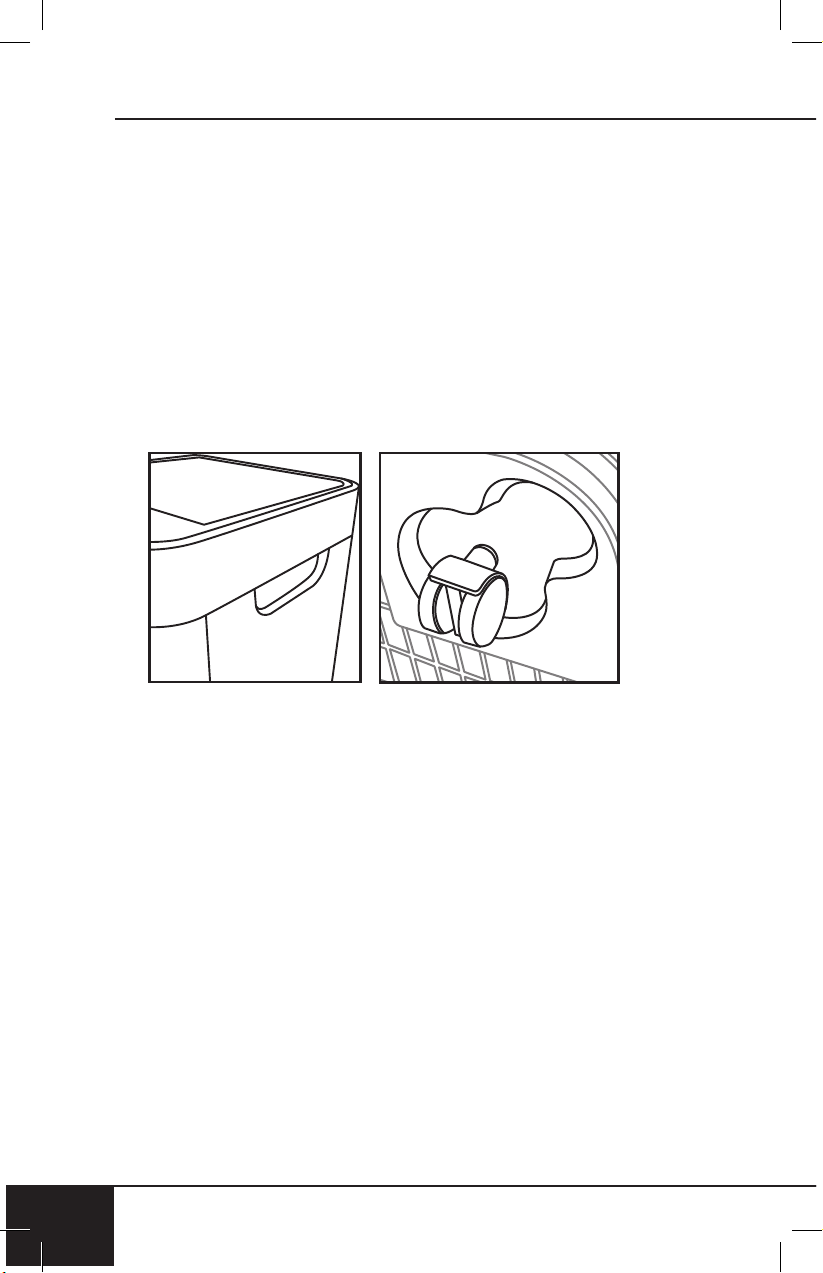
El OxyPure se puede mover fácilmente de un lugar a otro.
Simplemente sostenga el OxyPure por las asas de cada
lado y ruede la unidad a la ubicación elegida. Las ruedas
debajo proporcionan maniobrabilidad y movilidad extra cada
vez que es necesario.
nuwavenow.com
41
SPANISH
nuwavenow.com
41
Antes del primer uso
Limpie la Ventilación Superior y la Ventilación de Flujo con
un paño ligeramente húmedo o una toalla de papel.
Seque bien antes de usar.
Después de su uso
El OxyPure se debe limpiar periódicamente y después de un
uso excesivo para garantizar un funcionamiento y desempeño
adecuados. Para limpiar la parte exterior del OxyPure, use
un paño o toalla de papel para eliminar el polvo y otras
partículas. Para una acumulación más dura, use un paño
húmedo o toalla de papel y seque completamente.
Limpieza de la Ventilación Superior y la Ventilación
de Flujo
1. Use un cepillo suave para eliminar el polvo y la suciedad.
2. Si es necesario, use una toalla de papel ligeramente
mojada o un paño húmedo para eliminar una mayor
acumulación. No use abrasivos o almohadillas de
limpieza en la Ventilación Superior ni en ninguna parte
de la unidad.
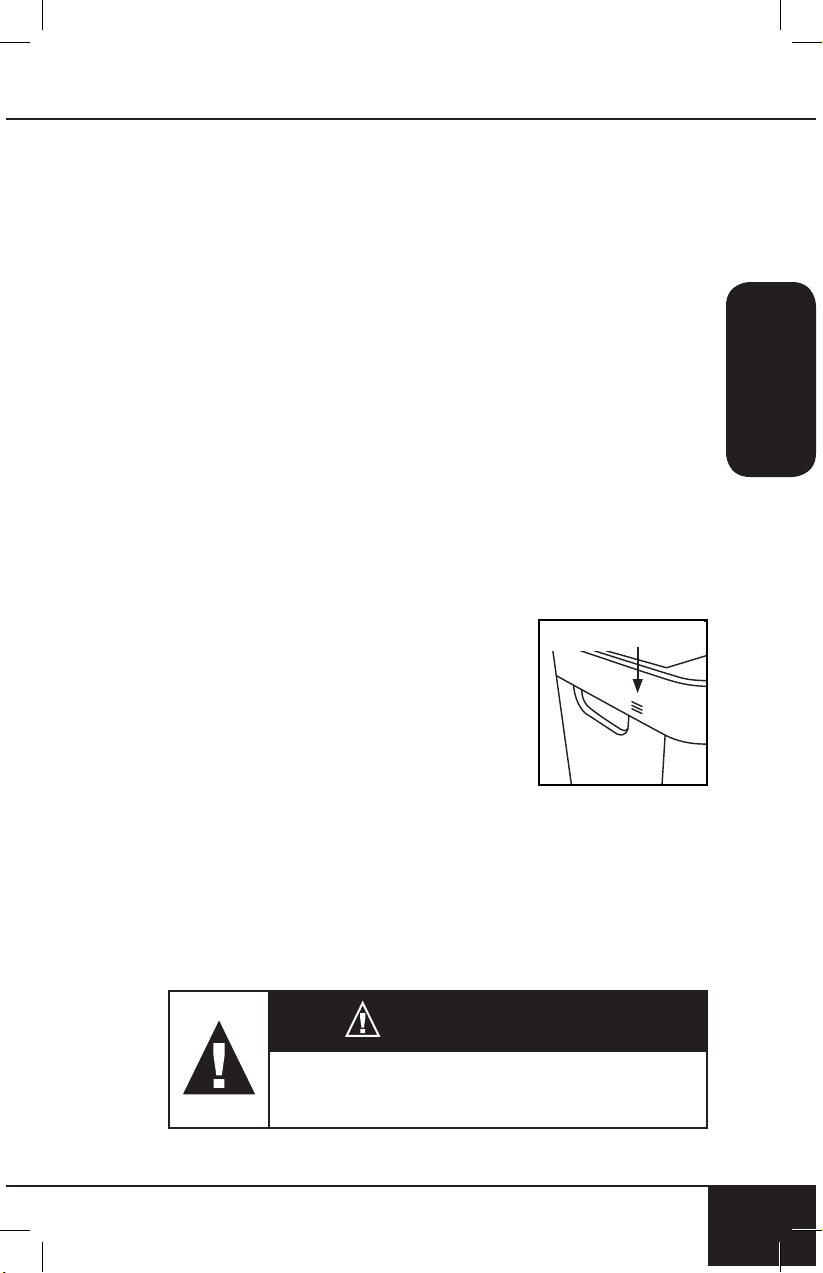
Limpieza del sensor de olores
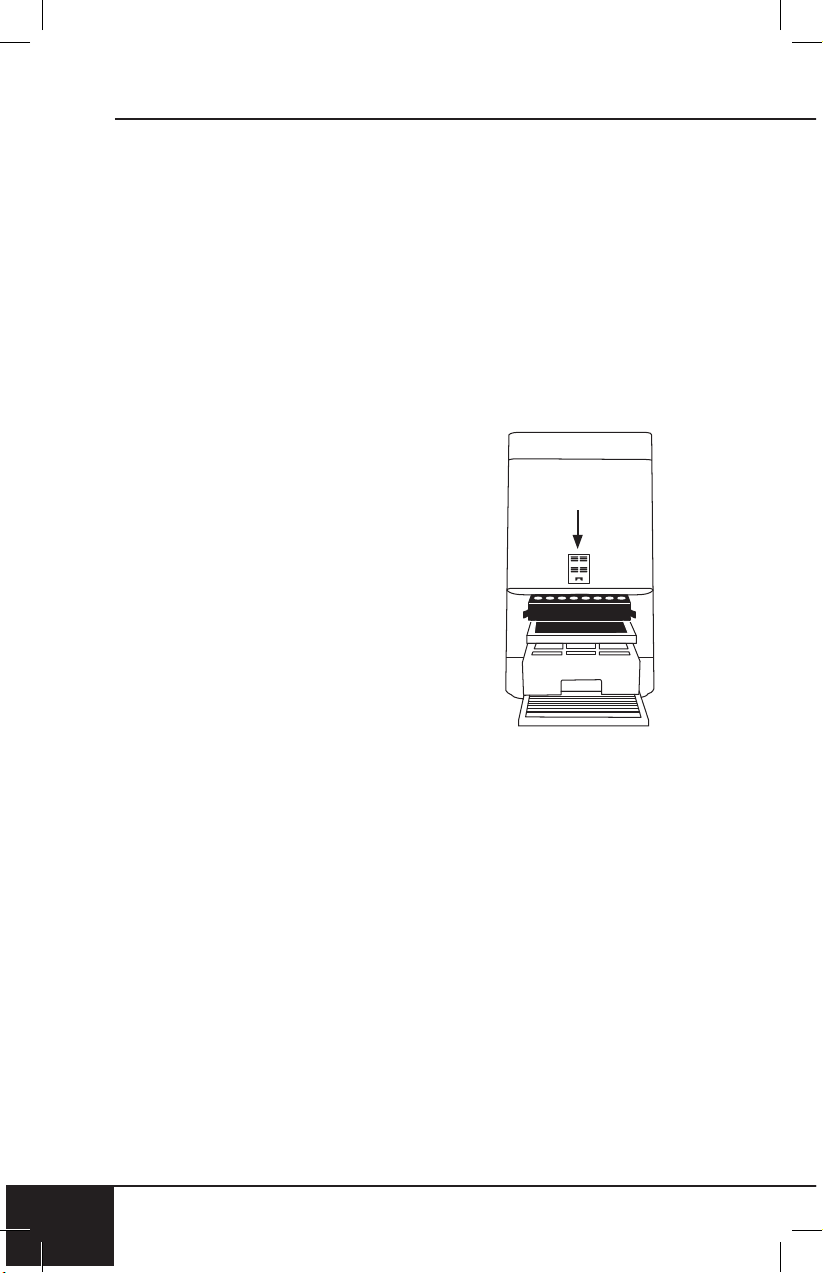
El sensor de olor está ubicado en la
esquina lateral de OxyPure hacia la
parte superior, debajo de la pequeña
abertura de la parrilla.
• Mantenga el sensor de olor libre de
polvo y residuos con un paño suave
para mantener lecturas precisas de
olor.
• No manipule el sensor de olor o la abertura sobre el
sensor. No rocíe dentro o cerca de la abertura de la
parrilla pequeña sobre el sensor de olor. Si lo hace,
puede provocar un mal funcionamiento del sensor y
anular su garantía.
sensor de olores
PRECAUCIÓN
NO arroje ningún polvo o residuo en el
OxyPure al limpiarlo.
LIMPIEZA Y MANTENIMIENTO
limpieza y mantenimiento
42
LIMPIEZA Y MANTENIMIENTO
42
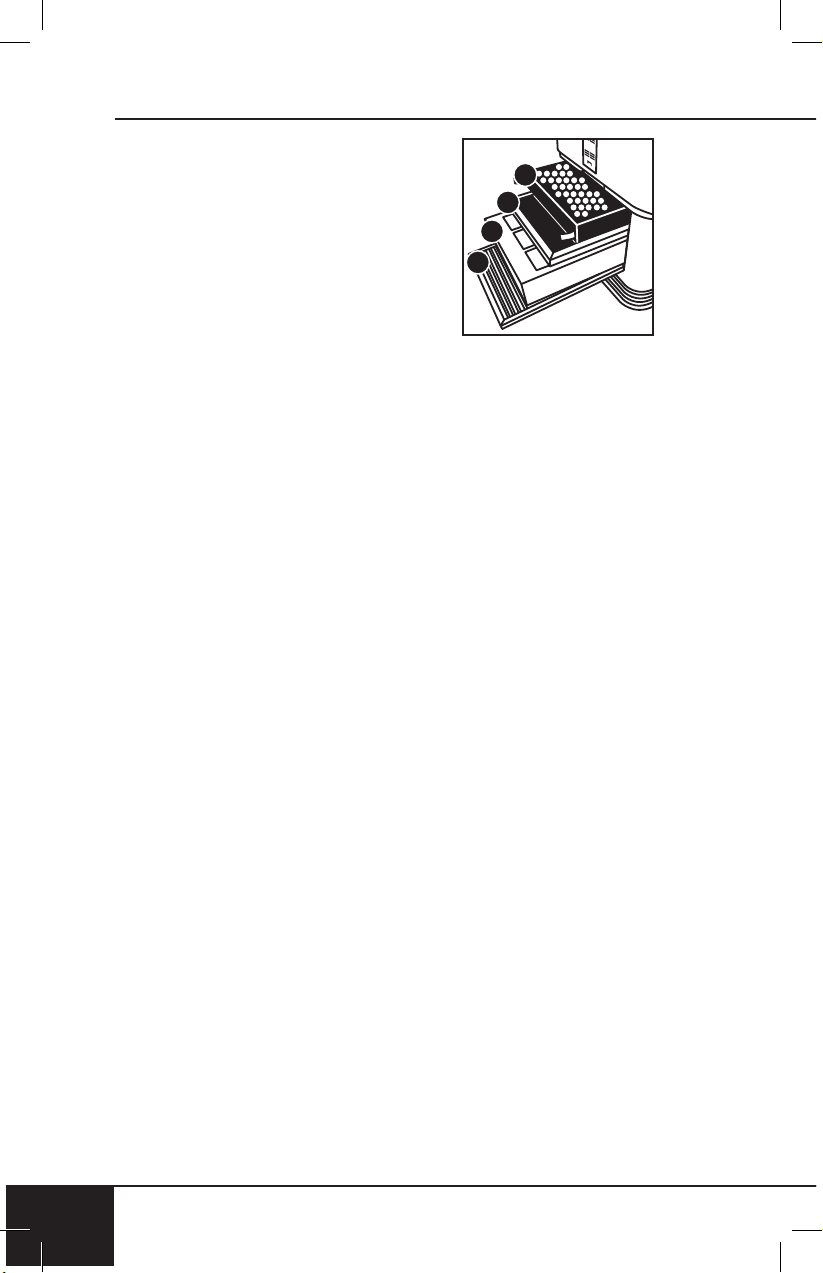
El orden de los filtros dentro de
OxyPure es como sigue (de abajo
hacia arriba):
1. Prefiltro de Acero Inoxidable
(lavable)
2. Filtro Bio-Guard
™
(lavable)
3. Filtro de Eliminación de
Emisiones de Ozono (no lavable)
4. HEPA/ Combo de Filtro de
Carbón Activado (no lavable)
• El OxyPure debe colocarse en
el piso al ensamblar los filtros.
El indicador CLEAN FILTER 2 se volverá azul después
de 3 a 6 meses, lo que indica que el filtro debe limpiarse
para obtener resultados óptimos (filtro Bio-Guard
™
). El
indicador CLEAN FILTER 2 se volverá rojo después de 6
meses de uso, lo que indica que el filtro debe limpiarse.
El indicador REPLACE FILTER 4 se volverá rojo cuando
deba reemplazarse el filtro (HEPA/Combo de Filtro
de Carbono Activado). El filtro durará de 1 año o 6
meses, dependiendo de la frecuencia con que la unidad
funcione en su entorno.
Cambiar los Filtros
Los filtros dentro de la ranura del filtro deben cambiarse o
limpiarse a tiempo para ayudar a que el OxyPure mantenga un
rendimiento óptimo y eficiente.
1. Retire la cubierta de la ranura del filtro en la parte
posterior del OxyPure con su manija incorporada.
2. Deslice los filtros que necesitan limpieza o reemplazo.
3. Permita que los filtros lavables se sequen por completo
antes de reinstalarlos en la unidad.
• Nunca coloque un filtro húmedo en el OxyPure.
• La tapa de la ranura del filtro debe estar segura o la
unidad no funcionará.
No lave el filtro de eliminación de emisiones de ozono
ni el HEPA/Combo de Filtro de Carbono Activado.
El filtro de eliminación de emisiones de ozono debe
reemplazarse cada 20 años. El filtro HEPA/Combo de
Filtro de Carbono Activado se debe reemplazar cada 1
año o 6 meses, según la frecuencia con que la unidad se
use en su entorno.
4
3
2
1
nuwavenow.com
43
SPANISH
nuwavenow.com
43
PRECAUCIÓN
Desenchufe el OxyPure de la fuente de
alimentación antes de insertar o quitar
cualquier pieza o accesorio y antes de
limpiarlo.
HEPA/ Combo de Filtro
de Carbón Activado
Filtro de Eliminación de
Emisiones de Ozono
Filtro Bio-Guard
™
Prefiltro de Acero Inoxidable
Limpiando los filtros
Para limpiar el Bio-Guard
™
filtro:
1. Retire el filtro.
2. Rocíe un desengrasante suave y déjelo reposar de 2 a
3 minutos.
3. Sumerja en agua tibia, agite ligeramente y levante.
4. Repita el proceso hasta que esté limpio.
5. Haga funcionar el filtro en agua tibia.
6. Permita que el filtro se seque completamente antes
de uso.
El prefiltro recoge partículas grandes y deberá limpiarse
al menos una vez cada dos meses, dependiendo del uso.
1. Use una aspiradora o toalla de papel para eliminar el
polvo o la pelusa.
2. Limpie con agua jabonosa tibia.
3. Enjuague bien y elimine las partículas de jabón en el filtro.
4. Permita que el filtro se seque completamente ANTES
de volver a colocarlo en OxyPure (hasta 12-24 horas
para secarse).
limpieza y mantenimiento
44
LIMPIEZA Y MANTENIMIENTO
44
Restablecer el filtro y los indicadores de calidad del aire
1. Para reiniciar el Indicador de Calidad de Filtro 2, presione
y mantenga presionado "TIMER" por 2 segundos hasta
que escuche un pitido.
• Después de limpiar o reemplazar un filtro y
restablecer el indicador, se encenderá la primera
barra verde alrededor de AIR.
2. Para restablecer el Filtro 4, presione y mantenga
presionado "TURBO" durante 2 segundos hasta que
escuche un pitido.
• Después de limpiar o reemplazar un filtro y
restablecer el indicador, se encenderá la primera
barra verde alrededor de ODOR.
Limpieza del sensor del filtro
El sensor del filtro está ubicado en la
parte posterior, sobre la cubierta de la
ranura del filtro.
3. Abra el panel (Cubierta del sensor).
4. Usando un hisopo de algodón seco
o un cepillo pequeño y suave, quite
suavemente la suciedad o el polvo
del sensor.
5. Para obtener más acumulación en
el Sensor, limpie con un hisopo de
algodón un poco mojado.
6. Elimine la humedad con un hisopo de
algodón seco.
• El sensor de filtro requiere una
limpieza regular
(aproximadamente cada 3 meses) para que la
unidad funcione eficientemente.
• Si el OxyPure se instala en un área con alta
acumulación de polvo, se necesita una limpieza más
frecuente del Sensor de filtro.
• No use el hisopo de algodón en ninguna parte o área
que no sea el Sensor de filtro.
Cubierta del
Sensor
nuwavenow.com
45
SPANISH
nuwavenow.com
45
Limpieza debajo de la ventilación superior
La ventilación superior del OxyPure se puede quitar
para limpiar la superficie debajo de la ventilación
superior y la pantalla de ventilación interna. Para limpiar
la superficie debajo y la pantalla de ventilación interior:
1. Apague el OxyPure y desenchufe la unidad.
2. Levante la ventilación superior usando la pestaña
incorporada.
3. Con una toalla de papel seca o ligeramente mojada,
limpie el polvo o las partículas acumuladas de la
superficie y la rejilla de ventilación interior.
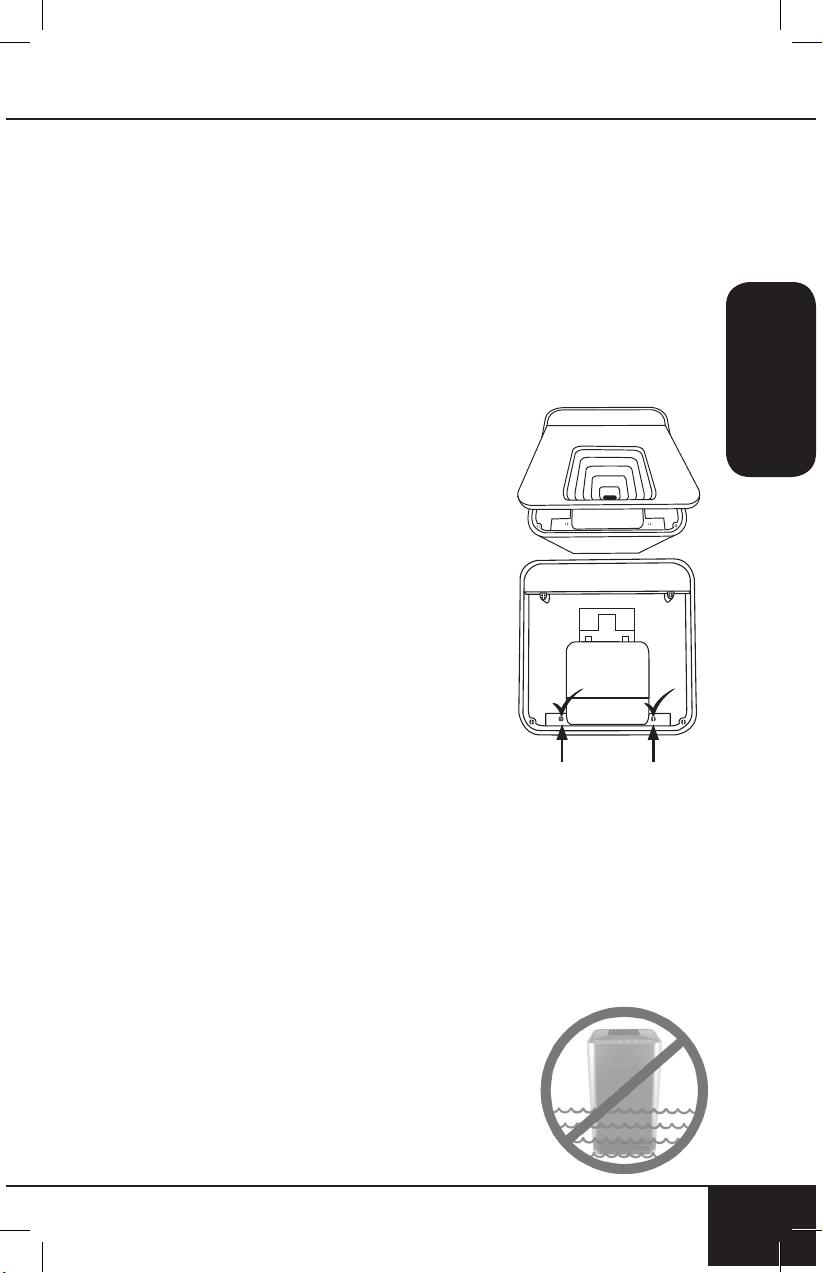
Para limpiar la pared interna
opuesta al ventilador o para quitar
un objeto que ha caído a través
del respiradero interior:
1. Después de quitar la ventilación
superior, ubique los dos tornillos
más cercanos al extremo en la
ventilación interna cerca de la
abertura de la parrilla, debajo de
la ventilación superior principal.
NO desenrosque los cuatro
tornillos exteriores.
2. Use un destornillador Phillips para
aflojar los dos tornillos (solo).
3. Levante la ventilación interna.
• Solo una porción de la
ventilación interna se levantará.
4. Después de limpiar la pared interna con un paño suave
o una toalla de papel, vuelva a montar la ventilación
interna, vuelva a apretar los dos tornillos y reemplace la
ventilación superior.
• Asegúrese de que todas las piezas estén seguras
antes de volver a enchufar el OxyPure y
encenderlo nuevamente.
Nota: NO desatornille los cuatro tornillos exteriores ubicados
hacia las esquinas. Hacerlo anulará su garantía.
X X
X X
No sumerja el OxyPure en agua.
Limpie con una esponja o paño
húmedo y seque.
Asegúrese de que todas las partes y
cubiertas estén ensambladas de
forma segura.

solución de problemas
46
SOLUCIÓN DE PROBLEMAS
46
La unidad no enciende.
1. El enchufe no está en la toma de corriente. Enchúfelo
al tomacorriente.
2. Power” en el panel táctil no está activado. Presiona
“Power”.
3. La cubierta de la ranura del filtro en la parte posterior
trasera está suelta o floja. Asegúrese de que la
Cubierta de la Ranura del Filtro esté asegurada.
TIMER no funciona cuando se presiona.
La unidad no está leyendo la función seleccionada.
Presione “FAN SPEED” o “AUTO”, luego presione “TIMER”.
Los ventiladores no trabajan.
1. No se está utilizando una salida adecuada. Asegúrese
de que el tomacorriente tenga la tensión adecuada
para su uso.
2. La cubierta de la ranura del filtro en la parte trasera
no está colocada correctamente. Asegúrese de que la
Cubierta de la Ranura del Filtro esté en forma segura.
La velocidad del flujo de aire no está cambiando
cuando “FAN SPEED” se presiona.
La unidad puede estar en el modo AUTO manual. Establezca
el OxyPure en otro modo de funcionamiento en el panel táctil
y luego presione “FAN SPEED”.
El flujo de aire fuera de la Ventilación Superior es débil.
Los filtros de aire están sucios. Cambie o limpie los filtros
de aire.
La unidad produce humo u olor.
Los filtros de aire están sucios. Cambie o limpie los
filtros de aire. Si el problema continúa, comuníquese con
Servicio al Cliente al 1-877-689-2838 o envíe un correo
electrónico a help@nuwavenow.com.
nuwavenow.com
47
SPANISH
nuwavenow.com
47
Los indicadores de LIMPIAR y REEMPLAZAR EL FIL-
TRO no se han reiniciado después de limpiar o cambiar
el (los) filtro(s).
1. Sensor del filtro no está leyendo el nuevo filtro instalado.
Apague la unidad y luego enciéndala. Mantenga
presionado “TIMER” durante 2 segundos hasta que
escuche un pitido. Apague la unidad, desenchufe y
ajuste el (los) filtro (s). Enchufe y encienda la unidad
nuevamente.
2. La cubierta de la ranura del filtro en la parte trasera no
está bien colocada. Asegúrese de que la Cubierta de la
Ranura del Filtro esté en forma segura.
3. El sensor del filtro está sucio. Limpie el sensor de filtro.
ULTIMATE CLEAN no se enciende cuando se presiona.
La unidad no está leyendo la función seleccionada. Encienda/
apague la unidad presionando “POWER” dos veces.
POWER está parpadeando en rojo.
1. Los filtros no están instalados correctamente o
están sueltos. Apague la unidad y desenchúfela.
Compruebe que los filtros estén correctamente
instalados y no sueltos. Enchufe la unidad y presione
POWER para encenderla.
2. Cuando se retire la cubierta de la ranura del filtro,
“Power” se iluminará en rojo sólido. Presionando
“Power” hará que parpadee; sin embargo, como
medida de seguridad, la unidad no estará operativa
cuando se retire la Cubierta de la Ranura del Filtro.
Asegúrese de que la Cubierta de la Ranura del Filtro
esté bien instalada.
El sensor de olores no se está reiniciando ni borrando
todas las barras.Todas las barras están parpadeando.
Comuníquese con Servicio al Cliente al 1-877-689-2838 o
envíe un correo electrónico a help@nuwavenow.com.

garantía limitada
48
GARANTÍA LIMITADA
48
El Purificador de Aire NuWave OxyPure
®
LOS GARANTÍAS DEL FABRICANTE
El Purificador de Aire NuWave OxyPure estará libre de defectos
del fabricante bajo uso doméstico normal durante 3 años a
partir de la fecha de compra. Esta garantía cubre al propietario
original de este purificador de aire para uso doméstico personal
únicamente y cuando se opera de acuerdo con las instrucciones
escritas del fabricante. Esta garantía no se aplica a los productos
utilizados con fines comerciales, de alquiler o de reventa. El
fabricante proporcionará las piezas y el trabajo necesarios para
reparar cualquier parte del Purificador de Aire NuWave OxyPure
en el departamento de servicio de NuWave LLC. Después de la
expiración de la garantía, el costo de la mano de obra y las partes
será responsabilidad del propietario.
LA GARANTÍA NO CUBRE
La garantía limitada se anula si las reparaciones son realizadas por
un distribuidor no autorizado y/o la placa de datos del número de
serie es eliminada y/o desfigurada. El deterioro normal del acabado
debido al uso o la exposición no está cubierto por esta garantía.
Esta Garantía Limitada no cubre fallas, daños o rendimiento
inadecuado debido a accidentes, fenómenos de fuerza mayor
(como rayos), fluctuaciones en la energía eléctrica, alteraciones,
abuso, uso indebido, aplicaciones incorrectas, atmósferas de tipo
corrosivo, instalación incorrecta, falla al operar de acuerdo con las
instrucciones escritas del fabricante, uso anormal o uso comercial.
NuWave LLC se reserva el derecho de anular la Garantía
Limitada, cuando lo permita la ley, para productos comprados a un
distribuidor no autorizado.
PARA OBTENER SERVICIO
El propietario tendrá la obligación y la responsabilidad de:
pagar todos los servicios y piezas no cubiertos por la garantía;
prepagar el envío hacia y desde el Departamento de Servicio
para cualquier pieza o sistema devuelto bajo esta garantía; y
empacar cuidadosamente el producto utilizando material de relleno
adecuado para evitar daños en el tránsito. El empaque original
es ideal para este propósito. Incluya en el paquete el nombre del
propietario, la dirección, el número de teléfono durante el día,
una descripción detallada del problema y su "número de RGA".
Llame al 1-877-689-2838 o envíe un correo electrónico a help@
nuwavenow.com para obtener el número de RGA (número de
autorización de devolución de mercancías). Proporcione el
número de modelo y de serie y el comprobante de la fecha de
compra (una copia del recibo) cuando presente una reclamación
bajo esta garantía.

nuwavenow.com
49
SPANISH
nuwavenow.com
49
OBLIGACIÓN DEL FABRICANTE
La obligación del fabricante en virtud de esta Garantía Limitada
está limitada, en la medida en que lo permita la ley, a la reparación
o sustitución de cualquier parte cubierta por esta Garantía Limitada
que, tras la revisión, se considere defectuosa durante el uso
normal. La Garantía Limitada solo se aplica dentro de los Estados
Unidos continentales y solo al comprador original de los canales
de distribución autorizados por el fabricante. LA GARANTÍA
LIMITADA NO PUEDE SER ALTERADA, VARIADA O EXTENDIDA,
EXCEPTO POR UN INSTRUMENTO ESCRITO EJECUTADO
POR EL FABRICANTE. EL RECURSO DE REPARACIÓN O
REEMPLAZO SEGÚN LO DISPUESTO BAJO ESTA GARANTÍA
LIMITADA ES EXCLUSIVO. EL FABRICANTE NO SERÁ
RESPONSABLE EN NINGÚN CASO DE NINGÚN DAÑO
CONSECUENTE O INCIDENTAL PARA NINGUNA PERSONA,
YA SEAN O NO OCASIONADOS POR LA NEGLIGENCIA DEL
FABRICANTE, INCLUYENDO SIN LIMITACIÓN, DAÑOS POR
PÉRDIDA DE USO, COSTES DE SUSTITUCIÓN, DAÑO A LA
PROPIEDAD U OTRA PÉRDIDA DE DINERO.
Algunos estados no permiten la exclusión o limitación de daños
incidentales o consecuentes, por lo que las exclusiones de limitación
anteriores pueden no ser aplicables. Esta Garantía Limitada
otorga derechos legales específicos, y también puede haber otros
derechos que varían de estado a estado. CON EXCEPCIÓN
DE LO DISPUESTO EXPRESAMENTE CON ANTERIORIDAD,
EL FABRICANTE NO OFRECE GARANTÍAS EXPRESAS O
IMPLÍCITAS DERIVADAS DE LA LEY O DE CUALQUIER OTRA
ÍNDOLE, INCLUIDAS, ENTRE OTRAS, LAS GARANTÍAS
IMPLÍCITAS DE COMERCIABILIDAD E IDONEIDAD PARA
UN PROPÓSITO EN PARTICULAR CON CUALQUIER OTRA
PERSONA. LEA SU MANUAL DEL PROPIETARIO. SI AÚN TIENE
ALGUNA PREGUNTA ACERCA DE LA OPERACIÓN O GARANTÍA
DEL PRODUCTO, COMUNÍQUESE CON NUWAVE LLC.
LEA SU MANUAL DEL PROPIETARIO
Si aún tiene alguna pregunta sobre el funcionamiento o la garantía
del producto, contáctese con NuWave LLC al: 1-877-689-2838 o
envíe un correo electrónico a help@nuwavenow.com.
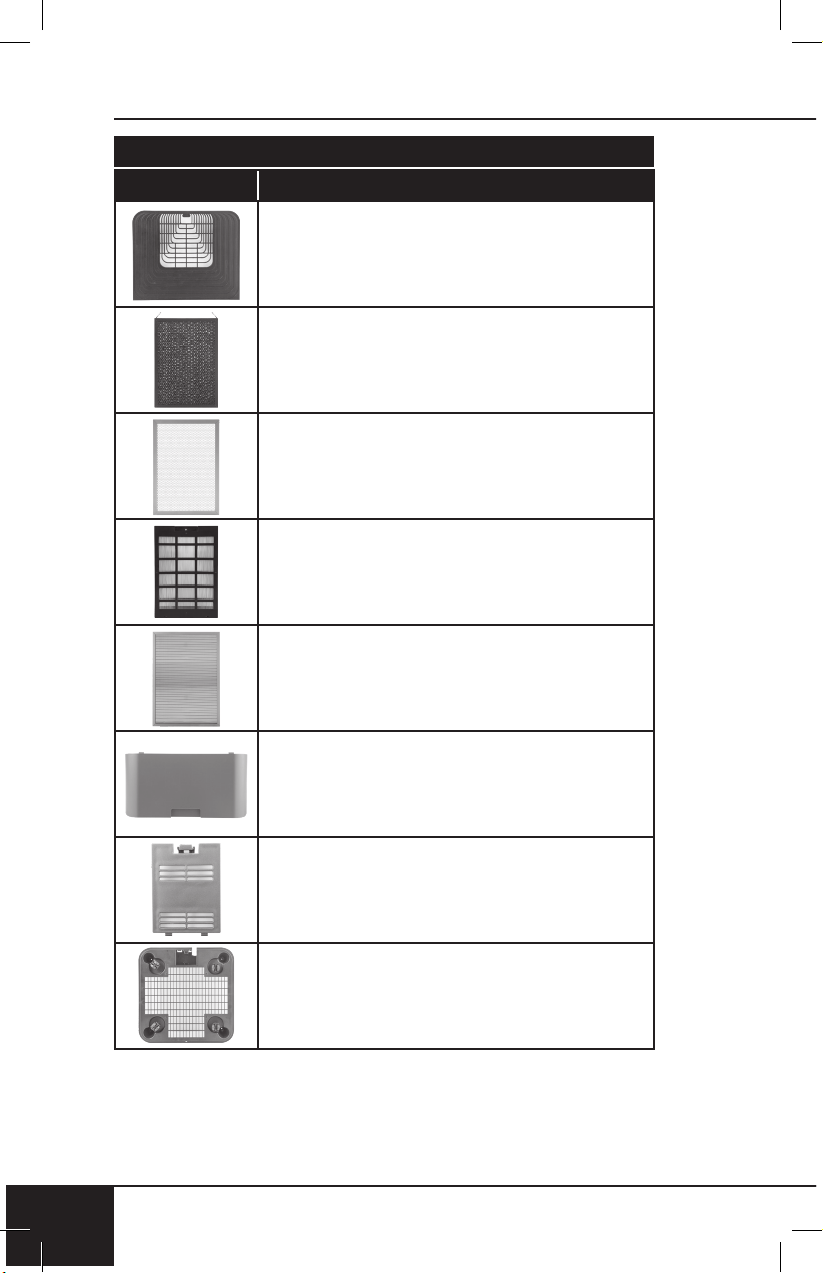
replaceable parts
50
REPLACEABLE PARTS
50
Part Name Part Description Part No.
To order replaceable parts head over to NuWaveNow.com
Air Vent
HEPA/Activated Carbon
Combo Filter
Ozone Emission
Removal Filter
Bio-Guard™ Filter
Stainless Steel Pre-Filter
Filter Slot Cover
Sensor Cover
Bottom Base
nuwavenow.com
51
REPLACEABLE PARTS
nuwavenow.com
51
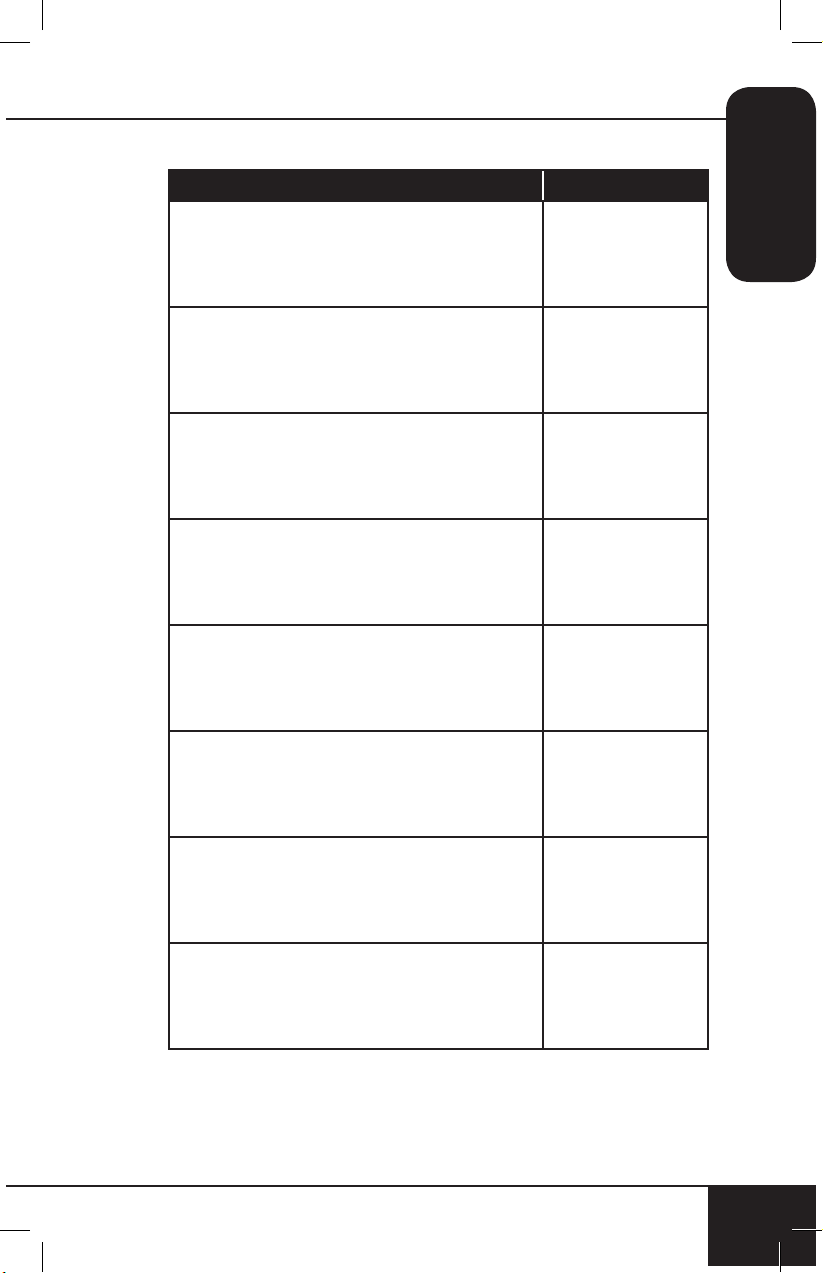
Part Name Part Description Part No.
Top vent and lid. Removable for
easy cleaning.
47101
Removes lead, dust mites, mold,
and mold spores. Lifespan from 6
months to 1 year.
47108
Eliminates harmful ozone emissions
by converting ozone to oxygen.
Lifespan up to 20 years.
47109
Kills 99.5% of mold, bacteria, and
viruses as small as 0.09 microns.
Lifespan up to 20 years.
47110
Captures and collects large
particles, pollutants, and allergens
including pet hair, dander, and
pollen. Lifespan up to 20 years.
47111
Located on the back, encloses the
4 lters.
47105
Located on the back, encloses
and covers the Filter Sensor.
47106
Located on the bottom of the
OxyPure.
47114
Item No: BM47001
Rev. 14-OG
06-13-19
RB02 JN02
FOR HOUSEHOLD USE ONLY
Model: 47001
120V, 60Hz, 128 Watts
For patent information please go to:
www.nuwavenow.com/legal/patent
Designed & Developed in USA by:
NuWave LLC
1795 N. Buttereld Road
Libertyville, IL 60048, U.S.A.
Customer Service:
1-877-689-2838 • help@nuwavenow.com
Made in China
©2019 NuWave LLC • All Rights Reserved.
nuwavenow.com