GUse
Care
Instructions for your Electric Smoothtop Range with "T" Clock
CONTENTS
SAFETY INSTRUCTIONS ...................... 1-3
ELECTRONIC CONTROLLER .................... 4
FEATURES .................................. 5-6
Automatic oven cooking ....................... 5
Self-clean oven .............................. 6
Continuous cleaning oven ...................... 7
Eye level oven ................................ 7
USING YOUR SMOOTHTOP .................. 8-10
Cooking areas ................................ 8
Surface controls .............................. 8
Signal lights .................................. 8
Hot surface light .............................. 8
Retained heat ................................ 8
Hints ........................................ 8
Cookware .................................... 9
Heat setting chart ............................. 9
Care information ............................. 10
USING YOUR OVEN ........................ 11-13
Oven characteristics .......................... tl
Fan ........................................ 11
Preheating .................................. 11
Howto bake or roast ......................... 12
Common baking problem chart ................ 12
How to broit ................................. 13
MAINTENANCE ............................... 14
Light replacement ............................ 14
Storage drawer .............................. 14
Oven door .................................. 14
Leveling legs ................................ 14
Fuses (Canadian models only) ................. 14
CARE AND CLEANING CHART ................. 15
SERVICE .................................. 16-17
Troubleshooting ............................. 16
Fault code .................................. 16
How to obtain service ......................... 17
WARRANTY .................................. 18
8113P008-60
(3/93)

SAFETY INSTRUCTIONS
The following instructions are based on safety consid-
erations and must be strictly followed to eliminate the
potential risks of fire, electric shock, or personal injury.
PROPER INSTALLATION - Be sure your appliance is
properly installed and grounded by a qualified techni-
cian.
STORAGE IN, ON OR NEAR APPLIANCE - Do not
store orusegasoline orotherflammable materials, va-
porsand liquids inthe oven, nearsurface units orin the
vicinityof this or any other appliance. The fumes can
create a firehazard or explosion.Do notuse cooktopor
oven as a storage area for food or cooking utensils.
DO NOT USE WATER
ON GREASE FIRES -
Smother fire or flame or
use dry chemical or
foam-type extinguisher, if
available or sprinkle
heavily with baking soda.
NEVER USE YOUR
APPLIANCE FOR
WARMING OR HEAT-
ING THE ROOM.
STORAGE ABOVE RANGE -To eliminate the hazard
ofreaching overhot surface elements, cabinet storage
should not be provided directly above a unit. If pro-
vided, storage should be limited to infrequently used
itemsthat can be safely stored in an area subjected to
heat. Temperatures may be unsafe for some items
such as volatile liquids,cleaners, or aerosol sprays. If
cabinet storage is provided, installation of a range
hoodthatprojectsat least 5-inches beyond thebottom
ofthe cabinet will reduce the hazards associated with
such storage.
USE ONLY DRY POTHOLDERS - Moist or damp
potholders on hot surfaces may result in burns from
steam. Do not let potholder touch hot heating ele-
ments. Do not use a towel or other bulky cloths.
SURFACE COOKING UNITS:
USE PROPER PAN SIZE-This appliance is equipped
with one or more surface elements of different sizes.
Select utensils having flat bottoms large enough to
cover the surface element. The use of undersized
utensils will expose a portion of the heating element to
direct contact and may result in ignition of clothing.
Proper relationship of utensil to element will also im-
prove efficiency.
NEVER LEAVE SURFACE
UNITS UNATTENDED AT
HIGH HEAT SETTINGS -
Boilover causes smoking
and greasy spittovers that
may ignite.
WEAR PROPER
APPAREL -
Loose-fitting or
hanging garments
never be
worn while using
the appliance.
TO PREVENT DAMAGE TO RANGE, never operate a
surface unitwithout a pan in place and never allow a
pan to boil dry.
MAKE SURE DRIP BOWLS ARE IN PLACE - Ab-
sence of these bowls during cooking may subject wir-
ing or components underneath to damage.
USER SERVICING - Do not repair or replace any part
of the appliance unless specifically recommended in
the Use and Care Book. All other servicing should be
referred to a qualified technician. Always disconnect
unit or cut-off power to unit before any servicing.
PROTECTIVE LINERS - Do not use aluminum foil to
line surface unit drip bowls or oven bottoms, except as
suggested in the Use and Care Book. Improper instal-
lation of these liners may result in a risk of electric
shock, or fire.
-1-

SAFETY INSTRUCTIONS
GLAZED COOKING UTENSILS - Only certain types
of glass, glass/ceramic, ceramic, earthenware, or
other glazed utensilsare suitable for range-top serv-
ice withoutbreaking due to the sudden change in tem-
perature.
VENTILATING HOODS:
CLEAN VENTILATING HOODS FREQUENTLY -
Grease should not be allowed to accumulate on hood
or filter. When flaming foods under the hood, turn the
fan off. The fan, if operating, may spread the flame.
UTENSIL HANDLES
SHOULD BE
TURNED INWARD
AND NOT EXTEND
OVER ADJACENT
SURFACE UNITS- To
reduce the risk of
burns, ignition of flam-
mable materials, and
spillage due to unin-
tentional contact with the utensil, the handle of a utensil
should be positioned so that it is turned inward, and
does not extend over adjacent surface elements.
DO NOT SOAK REMOVABLE HEATING ELE-
MENTS - Heating elements should never be im-
mersed in water. Immersing element in water would
damage insulating material inside element.
OVENS:
USE CARE WHEN OPENING DOOR - Let hot air or
steam escape before removing or replacing food.
DO NOT HEAT UNOPENED FOOD CONTAINERS -
Build-up ofpressuremay cause container toburstand
resultin injury.
PREPARED FOOD WARNING: Follow food manufac-
turer's instructions. If a plastic frozen food container
and/or its film cover distorts, warps, or is otherwise
damaged during cooking, immediately discard the
food and its container. The food could be contami-
nated.
KEEP OVEN VENT DUCTS (located under rear ele_
ment; rear corner of cooktop; between oven door and
control panel of wall oven or on backguard) UNOB-
STRUCTED. Blockage of vent prevents proper oven
air circulation and will affect oven performance. Avoid
touching oven vent area while oven is on and for sev-
eral minutes after oven is turned off. Some parts of the
vent and surrounding area become hot enough to
cause burns.
PLACEMENT OF OVEN RACKS -Always place oven
racks in desired location while oven is cool. If rack must
be moved while hot, use care to avoid contact of
potholder with oven element.
IMPORTANT SAFETY NOTICE AND WARNING
The California Safe Drinking Water and Toxic Enforce-
ment Act of 1986 (Proposition 65) requires the Gover-
nor of California to publish a list of substances known
to the State of California to cause cancer or reproduc-
tive harm, and requires businesses to warn customers
of potential exposures to such substances.
Users of this appliance are hereby warned that when
the appliance is engaged in the self-clean cycle there
may be some low-level exposure to some of the listed
substances, including carbon monoxide. Exposure to
these substances can be minimized by properly vent-
ing the appliance to the outdoors during the self-clean
cycle.
DEEP FAT FRYERS:
Use extreme caution when moving the grease kettle or
disposing of hot grease.
DO NOT TOUCH SURFACE ELEMENTS OR OVEN
ELEMENTS, AREAS NEAR ELEMENTS OR INTE-
RIOR SURFACES OF OVEN - Elements may be hot
even though they are dark in color. Areas near surface
elements and interior surfaces of oven may become
hot enough to cause burns. During and after use, do
not touch or let clothing or other flammable materials
contact heating elements, areas near elements or inte-
rior surfaces of oven until they have had sufficient time
to cool. Among these areas are the cooktop, surfaces
facing the cooktop, oven vent opening and surfaces
near this opening, oven door, and oven window. Also,
do not allow aluminum foil, meat probes or any other
metal object, other than a utensil on a surface element,
to contact heating elements.
ANTI-TIP BRACKET:
WARNING: To reduce the risk of tipping of the appli-
ance from unusual usage or by excessive loading of
the oven door, the appliance must be secured by a
properly installed anti-tip device. To check if device is
installed properly: Use a flashlight and look under-
neath range to see that one of the rear leveling legs is
engaged in the bracket slot. When removing appliance
for cleaning, be sure anti-tip device is engaged when
range is replaced. The anti-tip device secures the rear
leveling leg to the floor, when properly engaged.
-2-

SAFETY INSTRUCTIONS
ADDITIONAL INFORMATION:
Afterappliance is installed, becertain all packing mate-
rials are removed from the appliance before operating
the unit. If appliance is installed near a window, take
steps to prevent curtains from blowing over surface
elements creating a fire hazard.
Care should be given to location of appliance. Be sure
floor covering under appliance, walls adjacent to appli-
ance, cabinetry adjacent to appliance, and other mate-
rials adjacent to appliance can withstand prolonged
heat. This is a heavy appliance and can settle into soft
floor coverings such as cushioned vinyl. Use care
when moving range on this type of floor covering.
OVEN DOOR
Do not place excessive
weight on an open oven
door or stand on an open
oven door as, in some
cases, it could cause the
range to tip over, break-
age of the door or serious
injury.
CIRCUIT BREAKER OR FUSE - Locate and mark
breaker or fuse. Never replace a blown fuse or reset a
breaker untilyou know what has caused the problem.
Always replace a blown fuse with one of the correct
amperage, do not use a substitute.
CONTROL KNOBS - Turn off control at the comple-
tionof a cooking operation.
SELF--CLEANING OVEN:
Do not clean doorgasket. The door gasket isessential
for a goodseal. Care should be taken not to rub, dam-
age, or move the gasket. Do not use oven cleaners or
oven liner protective coating of any kind in or around
any part oftheself-clean oven. Clean only parts listed
in thisbooklet. Before self-cleaning the oven, remove
broilerpan, oven racks, and other utensils.
CAUTION: DO NOT LEAVE FOOD OR COOKING
UTENSILS, ETC., IN OVEN DURING THE SELF-
CLEANING MODE OF OPERATION.
ATTENTION: NE LAISSER AUCUN ALIMENT, US-
TENSILE DE CUISINE, ETC., DANS LE FOUR
DURANT LE CYCLE D'AUTONETTOYAGE.
On some models, a fan should be heard during the
self-clean cycle. If not, cancel clean cycle and call a
serviceman before self-cleaning again. (Refer to
CONTENTS on front cover for location of self-clean in-
structions and fan information.)
SMOOTHTOP COOKTOP:
Do not cook on broken cooktop. If cooktop should
break, cleaning solutions and spillovers may penetrate
the broken cooktop and create a risk of electric shock.
Contact a qualified technician immediately. Clean
cooktop with caution. Ifa wet sponge or cloth is used to
wipe spills on a hot cooking area, be careful to avoid
steam burn. Some cleaners can produce noxious
fumes if applied to a hot surface.
DO NOT LEAVE CHILDREN ALONE - Children
should not be left alone or unattended in area where
appliance isin use. They should never be allowed to sit
or stand on any part of the appliance. CAUTION: Do
not store items of interest to children in cabinets above
an appliance or on the backguard of a range.
Children climbing on the appli-
ance to reach items could be seri-
ously injured. Children must be
taught that the appliance and
utensils in or on it can be hot. Chil-
dren should be taught that an ap-
pliance is not a toy. They should
not be allowed to play with con-
trols or other parts of the unit.
| • "T:¸ - "i • . • •.'. : •:•..i •: •
IN CASE OFFRE.. : : : : : " •
1. Turn off appliance and ventilating hood. :i
2. Use dry orfoam_e bXtinguisher of baldng soda
to smother flame: Never Use water on a grease
fire. :: .:
3, If fire is n oven, smother bY closing oven door.
4. If fire is in a pan. on the surface unit, cover pan.
-SAVE THESE INSTRUCTIONS-
-3-
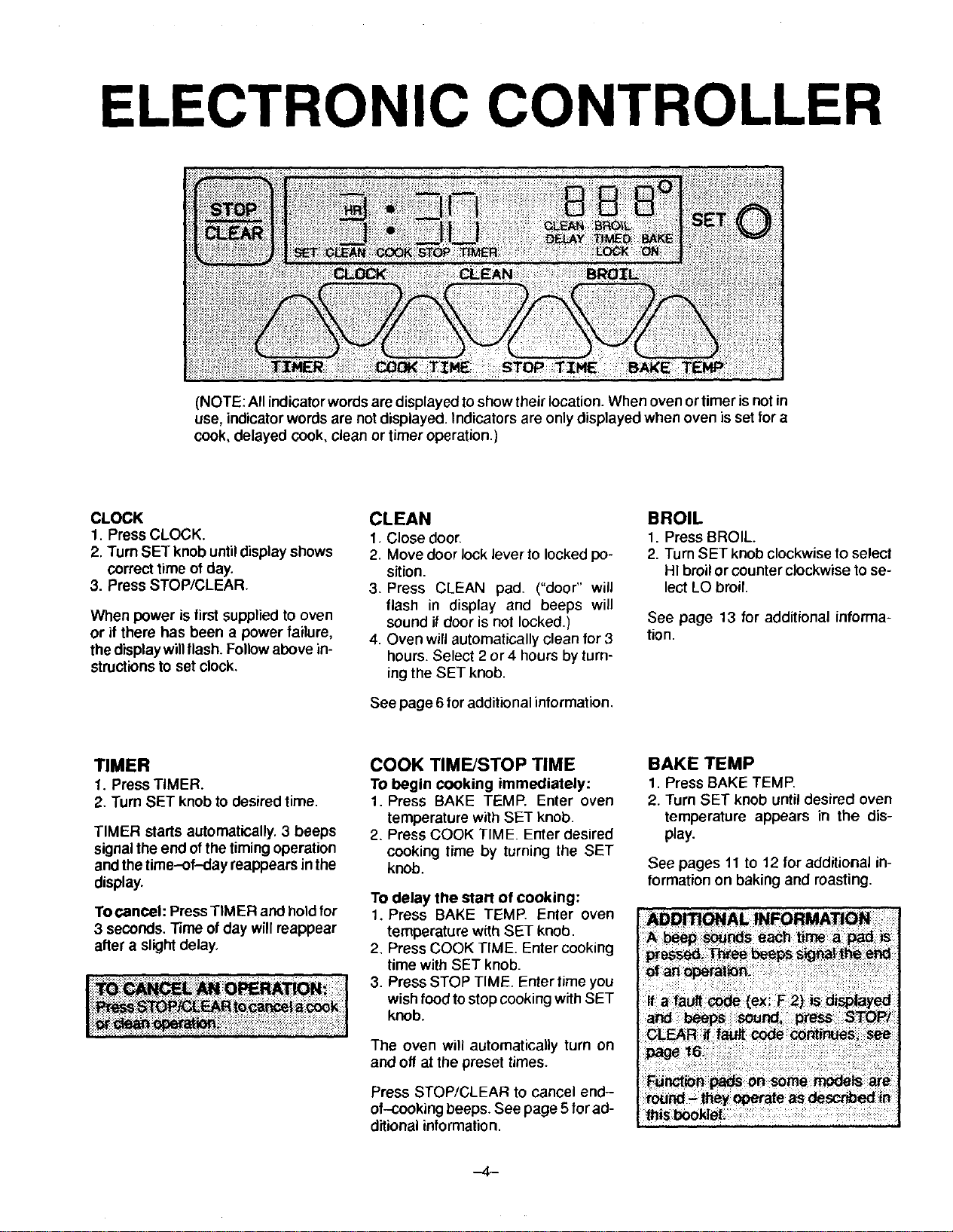
ELECTRONIC CONTROLLER
(NOTE: All indicator words are displayed toshow their location. When oven or timer is not in
use, indicator words are not displayed, indicators are only displayed when oven is set for a
cook, delayed cook, clean or timer operation.)
CLOCK
1. Press CLOCK.
2. Turn SET knob until display shows
correct time of day.
3. Press STOP/CLEAR.
When power is first supplied to oven
or if there has been a power failure,
the display willflash. Follow above in-
structionsto set clock.
CLEAN
1. Close door.
2. Move door lock lever to locked po-
sition.
3, Press CLEAN pad, ("door" will
flash in display and beeps will
sound if door is not locked.)
4. Oven will automatically clean for 3
hours. Select 2 or4 hours by turn-
ingthe SET knob.
See page 6 for additional information,
BROIL
1. Press BROIL.
2. Turn SET knob clockwiseto select
HI broil or counter clockwise to se-
lect LO broil.
See page 13 for additional informa-
tion.
TIMER
1. Press TIMER.
2. Turn SET knob to desired time.
TIMER starts automatically. 3 beeps
signal the end of the timing operation
and the time-of-day reappears in the
display.
To cancel: Press TIMER and hold for
3 seconds. Time ofday will reappear
after a slight delay.
= i_:i : i_iiiii_i
COOK TIME/STOP TIME
TObegin cooking immediately:
1, Press BAKE TEMP. Enter oven
temperature with SET knob.
2. Press COOK TIME. Enter desired
cooking time by turning the SET
knob.
To delay the start of cooking:
1. Press BAKE TEMP. Enter oven
temperature with SET knob.
2, Press COOK TIME. Enter cooking
time with SET knob.
3. Press STOP TIME. Enter time you
wish food tostop cooking with SET
knob.
The oven will automatically turn on
and off at the preset times.
Press STOP/CLEAR to cancel end-
of-cooking beeps. See page 5 for ad-
ditional information.
BAKE TEMP
1. Press BAKE TEMP.
2. Turn SET knob until desired oven
temperature appears in the dis-
play.
See pages 11 to 12 for additional in-
formation on baking and roasting.
,._4 i

FEATURES
AUTOMATIC OVEN COOKING
Automatic cookingfeature isused toturnthe oven on and offat the preset time--of-
day. This feature can be used to delay the start of a cooking operation.
The automaticcooking feature willnotoperate unlessthe clock isfunctioning and is
set at the correct time-of-day.
NOTE: On eye level models, only the lower oven can be programmged.
TO BAKE BY TIME with immediate START:
1, Press BAKE TEMP pad, "BAKE"
lightsin the display,
2. Enter oven temperature with the
SET knob.
3. Press COOK TIME pad. "SET
COOK TIME" flashes in the display.
4. Enter cooking time (how long you
wish food to cook) with the SET
knob.
"TIMED BAKE ON" lights in the dis-
play. The oven automatically turns
on and the display begins to count
down.
5. At the end of the preset cooking
time, the oven automatically turns
off.
6. Press STOP/CLEAR pad to cancel
end-of-cooking beeps.
i-7_ • zlrl 3S0 °
• III _._
TIMER COOK T:[NE S'TOP TZ_ BAKI£ TIEHP
GENERAL
INFORMATION
IMPORTANT: Highly perishable foods
such as dairy products, pork, poultry,
seafoods or Stuffing are not recom-
mended for delayed cooking. If cook-
ing more than one food, select foods
that cook for the same length of time
and at the same oven temperature.
Sc_b_dii.:::! iii:i:i
To reset or cancel the program: Press
the STOP/CLEAR pad.
After setting the Automatic Cooking
feature, press the CLOCK pad and the
time-of-day will reappear in the dis-
play. "TIMED BAKE ON", "DELAY
BAKE" or "DELAY TIMED BAKE" and
the oven temperature will remain in the
display as a reminder that the oven is
set for a cooking operation.
AI end of cooking, continuous beeps
willsound. Press STOP/CLEAR pad to
cancel beeps.
TO BAKE BY TIME with delayed START:
1. Follow steps 1, 2, 3 and 4 above.
2. PressSTOP TIME pad. "SET STOP
TIME" flashes in the display.
3. Enter the time you wish the oven to
turn offby turning the SET knob. De-
pending on your model, either "DE-
LAY TIMED BAKE" or "DELAY
BAKE" will light in the display and
the time of day will then reappear.
The oven will automatically turn on
in time to have the food cooked by
the preselected STOP TIME. The
oven willautomatically turn off at the
preset stop time.
4. Press STOP/CLEAR pad to cancel
end-of-cooking beeps.
-5--

FEATURES
BEFORE
SELF-CLEANING
Turn off oven light before clean cycle.
The life of the bulb may be shortened if
left on during the clean cycle.
Clean oven frame, door frame and
around the oven vent with a non-abra-
sive cleaning agent such as Bon Ami.
These areas are not exposed to clean-
ing temperatures and should be
cleaned to prevent soil from baking on
during the clean cycle.
Wipe up excess grease or spillovers
from the oven bottomto prevent exces-
sive smoking during the clean cycle.
Do not use oven cleaners or oven liner
protective coatings of any kind on the
serf-clean oven finish or around any
part of the oven.
To prevent damage, do not clean or rub
the gasket around the oven door. The
gasket isdesigned to seal inheat during
the clean cycle.
DURING
SELF-CLEANING
When the door islocked and the CLEAN
pad is pressed, the oven automatically
begins to heat to cleaning tempera-
tures.
As the oven reaches cleaning tempera-
tures, the LOCK indicator will turn on to
show that an internal lock mechan=sm
has engaged. At this point, the oven
door can not be unlocked and opened.
To prevent damage to the door and lock
lever, do not force the lock lever to the
left when the LOCK indicator is dis-
played.
About one hour after the completion of
the clean cycle, the internal lockwill dis-
engage and the LOCK indicator will turn
off. At this point, the lock lever can be
moved to the left (unlocked position)
and the door opened.
The first few times the oven is cleaned,
some smoke and odor may bedetected.
This is normal and will reduce or disap-
pear with use. If the oven is heavily
soiled, or if the broiler pan is left in the
oven, smoke and odor may occur.
-6-
It is normal for the cooktop of the range
to become hot during a clean cycle.
Therefore touching the cooktop during a
self-clean cycle should be avoided.
As the oven heats and cools, you may
hear sounds of metal parts expanding
and contracting. This is normal and will
not damage your appliance.
AFTER
SELF-CLEANING
Some soil may leave a light gray, pow-
dery ash which can be removed with a
damp cloth, tf soil remains, it indicates
that the clean cycle was not long
enough. The soil will be removed during
the next clean cycle.
If the oven racks do not slide smoothly
after a clean cycle, wipe racks and em-
bossed rack supports with a small
amount of vegetable oilto restore ease
of movement.
Fine, hair-like lines may appear in the
oven interior or oven door. This is a nor-
mal condition resulting from heating and
cooling of the porcelain finish. These
lines do not affect the performance of
the oven.
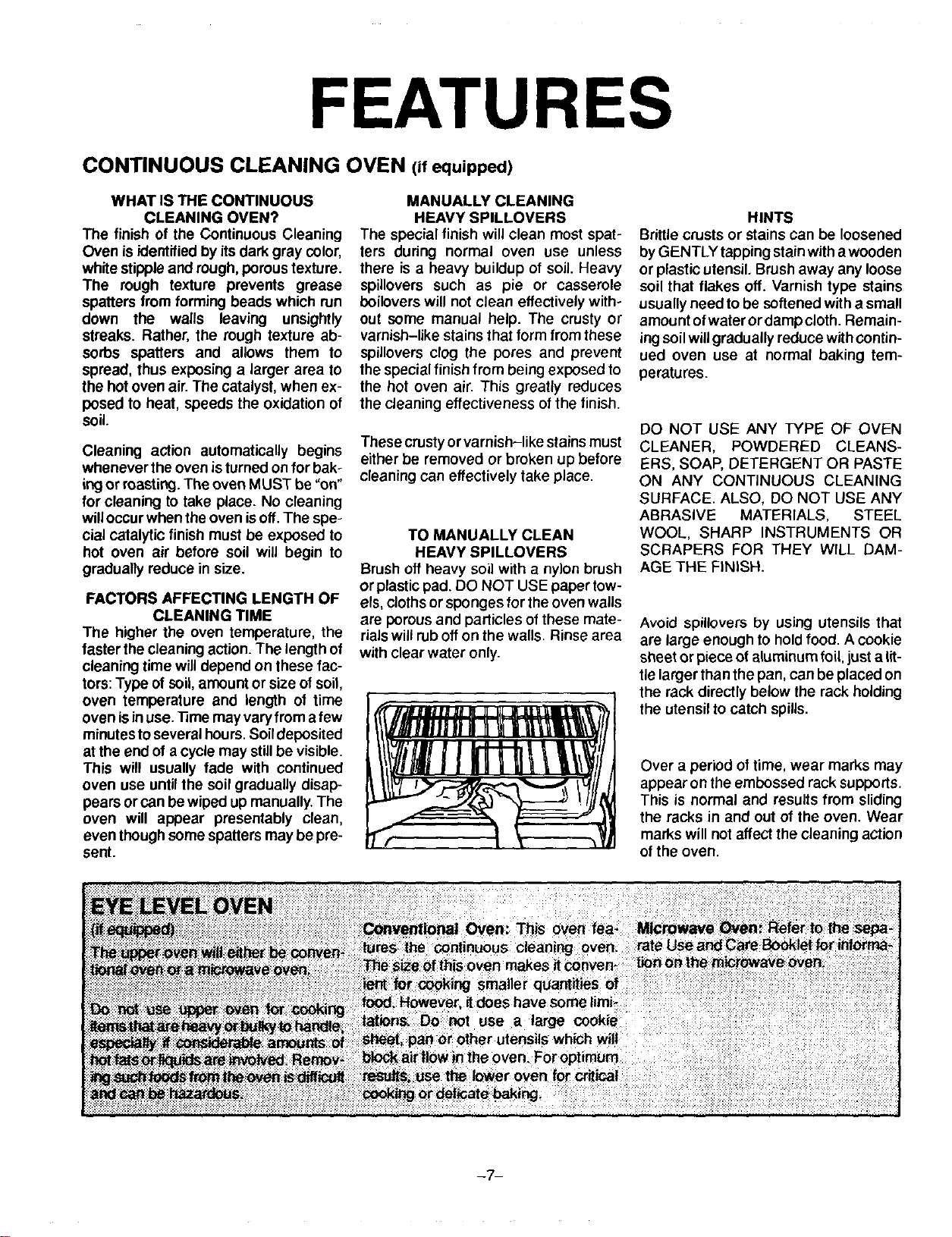
FEATURES
CONTINUOUS CLEANING OVEN (ifequipped)
WHAT IS THE CONTINUOUS
CLEANING OVEN?
The finish of the Continuous Cleaning
Oven is identified by itsdark gray color,
white stipple and rough, poroustexture.
The rough texture prevents grease
spatters from forming beads which run
down the walls leaving unsightly
streaks. Rather, the rough texture ab-
sorbs spatters and allows them to
spread, thus exposing a larger area to
the hot oven air. The catalyst, when ex-
posed to heat, speeds the oxidation of
soil.
Cleaning action automatically begins
whenever the oven isturned on for bak-
ingor masting. The oven MUST be =on"
for cleaning to take place. No cleaning
willoccur when theoven isoff. The spe-
cial catalytic finish must be exposed to
hot oven air before soil will begin to
gradually reduce in size.
FACTORS AFFECTING LENGTH OF
CLEANING TIME
The higher the oven temperature, the
taster the cleaning action. The length of
cleaning time will depend on these fac-
tors:Type of soil,amount or size of soil,
oven temperature and length of time
oven isin use. Time may varyfrom afew
minutesto several hours.Soildeposited
at the end of a cycle may stillbe visible.
This will usually fade with continued
oven use until the soil gradually disap-
pears or can be wiped up manually.The
oven will appear presentably clean,
even thoughsome spatters may be pre-
sent.
MANUALLY CLEANING
HEAVY SPILLOVERS
The special finish will clean most spat-
lers during normal oven use unless
there is a heavy buildup of soil. Heavy
spillovers such as pie or casserole
boilovers will not clean effectively with-
out some manual help. The crusty or
varnish-like stains that form from these
spillovers clog the pores and prevent
the special finish from being exposed to
the hot oven air. This greatly reduces
the cleaning effectiveness of the finish.
These crustyor varnish-like stains must
either be removed or broken up before
cleaning can effectively take place.
TO MANUALLY CLEAN
HEAVY SPILLOVERS
Brush off heavy soil with a nylon brush
or plasticpad. DO NOT USE paper tow-
els, clothsor sponges for the oven wails
are porousand particles of these mate-
rialswill rub off on the walls. Rinse area
with clear water only.
HINTS
Brittle crusts or stains can be loosened
by GENTLY tapping stain witha wooden
or plastic utensil. Brush away any loose
soil that flakes off. Varnish type stains
usually need to be softened with a small
amount ofwater or damp cloth. Remain-
ing soil willgradually reduce with contin-
ued oven use at normal baking tem-
peratures.
DO NOT USE ANY TYPE OF OVEN
CLEANER, POWDERED CLEANS-
ERS, SOAP, DETERGENT OR PASTE
ON ANY CONTINUOUS CLEANING
SURFACE. ALSO, DO NOT USE ANY
ABRASIVE MATERIALS, STEEL
WOOL, SHARP INSTRUMENTS OR
SCRAPERS FOR THEY WILL DAM-
AGE THE FINISH.
Avoid spillovers by using utensils that
are large enough to hold food. A cookie
sheet or piece ot aluminum foil, just a lit-
tle larger than the pan, can be placed on
the rack directly below the rack holding
the utensil to catch spills.
Over a period of time, wear marks may
appear on the embossed rack supports.
This is normal and results from sliding
the racks in and out of the oven. Wear
marks will not affect the cleaning action
of the oven.
-7-
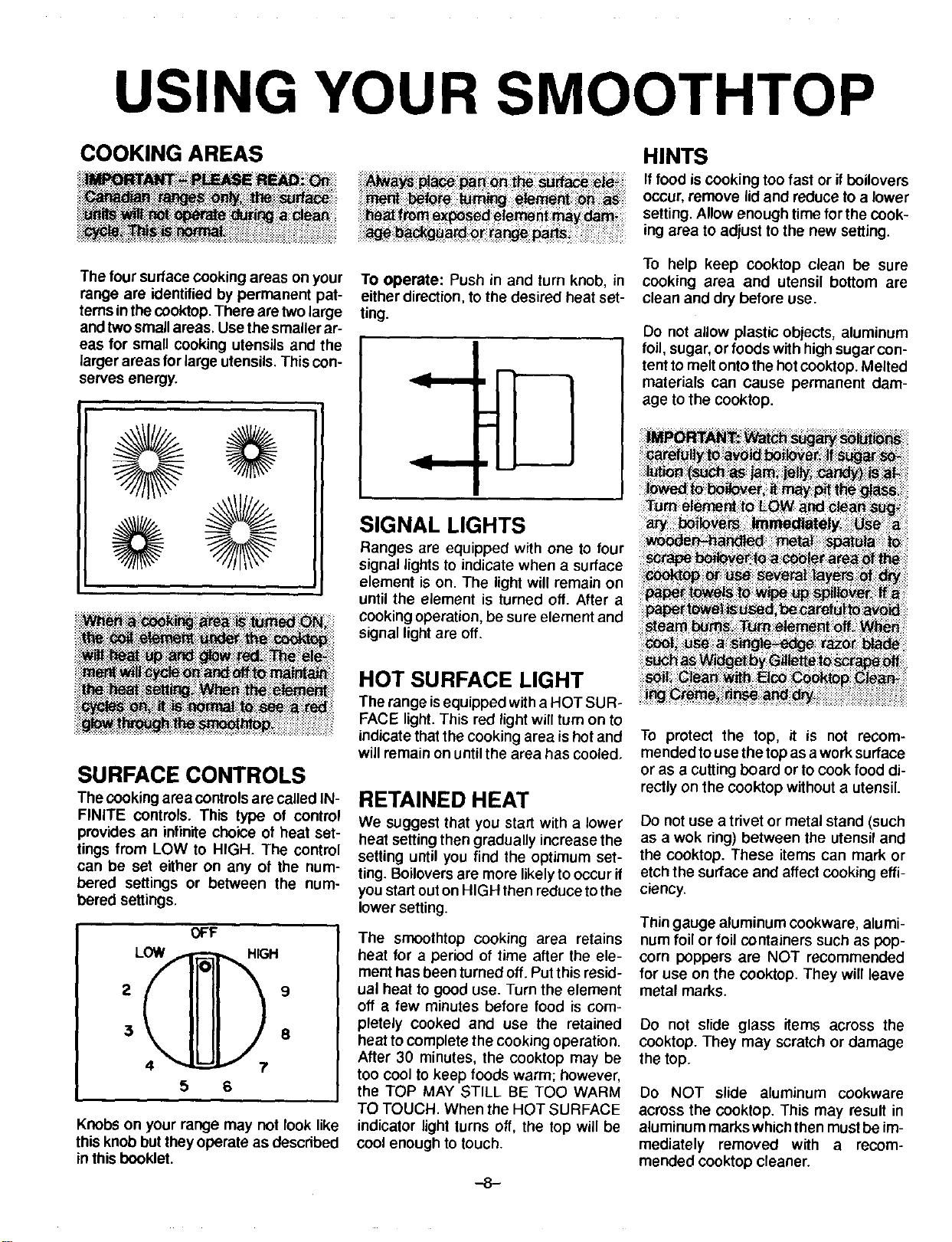
USING YOUR SMOOTHTOP
COOKING AREAS
The four surface cooking areas on your
range are identified by permanent pat-
terns in thecooktop. There aretwo large
and twosmall areas. Use the smaller ar-
eas for small cooking utensils and the
larger areas for large utensils. This con-
serves energy.
TO operate: Push in and turn knob, in
either direction, tothe desired heat set-
ting.
I
SIGNAL LIGHTS
Ranges are equipped with one to four
signal lights to indicate when a surface
element is on. The light will remain on
until the element is turned off. After a
cooking operation, be sure element and
signal light are off.
HINTS
If food iscooking too fast or if boilovers
occur, remove lidand reduce to a lower
setting. Allow enough time for the cook-
ing area to adjust to the new setting.
To help keep cooktop clean be sure
cooking area and utensil bottom are
clean and dry before use.
Do not allow plastic objects, aluminum
foil, sugar, or foods with high sugar con-
tent to melt onto the hot cooktop. Melted
materials can cause permanent dam-
age to the cooktop.
SURFACE CONTROLS
The cookingarea controls are called IN-
FINITE controls. This type of control
provides an infinite choice of heat set-
tings from LOW to HIGH. The control
can be set either on any of the num-
bered settings or between the num-
bered settings.
OFF
LOW = [_H 9
5 6
Knobs on your range may not look like
this knob but they operate as described
in this booklet.
HOT SURFACE LIGHT
The range isequipped with a HOT SUR-
FACE light. This red light will turn on to
indicate that the cooking area is hot and
will remain on until the area has cooled.
RETAINED HEAT
We suggest that you start with a lower
heat settingthen gradually increase the
setting until you find the optimum set-
ting. Boilovers are more likelyto occur if
you startouton HIGH then reduceto the
lower setting.
The smoothtop cooking area retains
heat for a period of time after the ele-
ment has been turned off. Put this resid-
ual heat to good use. Turn the element
off a few minutes before food is com-
pletely cooked and use the retained
heat to complete the cooking operation.
After 30 minutes, the cooktop may be
too cool to keep foods warm; however,
the TOP MAY STILL BE TOO WARM
TO TOUCH. When the HOT SURFACE
indicator light turns off, the top will be
cool enough to touch.
-8-
To protect the top, it is not recom-
mended touse the topas a work surface
or as a cutting board or to cook food di-
rectly on the cooktop without a utensil.
Do not use a trivet or metal stand (such
as a wok ring) between the utensil and
the cooktop. These items can mark or
etch the surface and affect cooking effi-
ciency.
Thin gauge aluminum cookware, alumi-
num foil or foil containers such as pop-
corn poppers are NOT recommended
for use on the cooktop. They will leave
metal marks.
Do not slide glass items across the
cooktop. They may scratch or damage
the top.
Do NOT slide aluminum cookware
across the cooktop. This may result in
aluminum marks which then must be im-
mediately removed with a recom-
mended cooktop cleaner.

USING YOUR SMOOTHTOP
COOKWARE
Cooking performance isgreatly affected
by the type of cookware used. Pans
should have a flat bottom. The flat bot-
tom allows good conductivity between
the utensil and the cooking area to pro-
vide uniform cooking results, faster
heating and more efficient use of en-
ergy.
Pans with uneven, warped, or grooved
bottoms do not make good contact, re-
duce heat conductivity and result in
slower, less even heating.
Be sure utensil islarge enough to prop-
erly contain food and avoid boilovers.
Pan size is particularly important in
deep frying. Be sure pan willaccommo-
date the volume of food that is to be
added as well asthe bubble action offat.
Never leave a deep fat frying opera-
tion unattended.
Acceptable water-bath or pressure
canners should not be oversized and
must have a flat bottom.
Do not use specialty items thatare over-
sized, have an uneven bottom or do not
meet proper utensil specifications.
SUGGESTED HEAT SETTINGS
Use the following chart as a GUIDELINE untilyou become
more familiarwith your cooktop. Keep in mind that different
types of cookware materials require different heat settings
for the same cooking operation.
We suggest that you experiment to find the heat setting
that best suits your particular cooking needs. Chart is
based on heavy gauge aluminum cookware. Lower the
heat setting if using other materials.
iiiiiiii!iiiili ! iiiiiiliiiiiili
HI
To bring liquid to a boil, blanch, preheat skillet, or bring pressure up in pressure cooker. (Note:
Always follow instructions inpressure cooker use and care book.) Always reduce to a lower heat
setting when liquidsjust begin to boil or food begins to cook.
iiiiiiiiiiiiiii iiiiiiiiiiiiiiiiiiiiil
ii!i_;;:i;!i;i;::;::i!;':i;=:!i!;9 1::ilii!!;_i;i
Medium
6-5
LO
To maintain moderate to slow boil for large amounts of liquids.
To keep foods warm before serving.
NOTE: Refer to cookware manufacturer's recommendations for suggested heat settings. Some manufacturers do not rec-
ommend the use of HIGH or the use of HIGH for extended cooking operations.
-9-

USING YOUR SMOOTHTOP
CARE INFORMATION
Clean smoothtop after each use, Use
onlycleaning agents recommended in
the cleaning chart. Other materials
may damage the finish of the smooth-
top,
Carefully blotup spillovers around the
outside ofthe cooking area as they oc-
cur with dry paper towels. BE CARE-
FUL NOT TO BURN HANDS WHEN
WIPING UP SPILLS. DO NOT USE A
DAMP CLOTH WHICH MAY CAUSE
STEAM BURNS.
When surface iscool, clean asdirected
inthechart. DO NOT USE thefollowing
cleaning agents.
• Abrasives (metal scouring pads,
cleansing powders, scouring clean-
ersor pads) will scratchthe smooth-
top.
• Chemicals (oven cleaners, chlorine
bleaches, rust removers or ammo-
nia) may damage the finish of the
smoothtop.
• Cleaning agents designed for glass-
ware which contain ammonia may
harm the srnootntop.
• Soiled cloth or sponge will leave an
invisible film on the ceoktop which
may cause discoloration the next
time the cooktop is used.
CAUTION:
If metal melts onto the smoothtop, DO
NOT USE TOP. CALL AN AUTHOR-
IZED SERVICER. Do not attempt to re-
pair cooktop yourself.
To prevent permanent damage to the
cooktop, do not allow cookware to boil
dry.
Do not place plastics on a warm or hot
cooking area. They will melt and ad-
here to the smoothtop. The smoothtop
may chipor pit inattempting toremove
melted plasticfrom the top.
To prevent scratchingor damage tothe
smoothtop: Do not leave sugar, salt,
sand, soil, shortening or other fats on
the cooking area. Be sure area isfree
from these before fuming on cooking
area.
CLEANING CHART
WARNING: BEFORE CLEANING, BE CERTAIN ALL ELEMENTS ARE
TURNED OFF AND THE COOKTOP IS COOL.
Heavy stains,
burned on food.
Elco Cooktop Cleaning
Creme. Paste of bak ng
soda and water.
Gently scourwith paste and paper towel
to remove as much as possib}e. Then re-
apply paste and let stand for 30 to 45
minutes. Cover with damp paper towel-
ing to keep paste moist. Scour to re-
move remaining stain. RinsecompFetely
and dry.
i!!i ii!iiiii !!iii !i!i i i!iii i ii!i!ii!i!!i !i!ii!i iiiiii iiiii!i! ii!i!i !i!i!ii!iiiii !i!ili!iiii! i
Bmwnorgmy
_ainsfrom
HARD WATER
orm_almarks.
Elco Cooktop Cleaning
Creme.
Gently scour with paste to remove as
much as possible, Reapply paste and let
stand for 30 minutes. Scour with addi.
tional paste to remove remaining stain.
Rinse completely and dry.
PROBLEM SOLVING CHART
PROBLEM CAUSE
TO PREVENT
no_ __e, _
Metal-marking Sliding or scraping metal Do not slide metal object across cook-
utensils or oven racks top. Clean immediately with Elco Cook-
across cooktop, top Gleaning Creme.
Bo=lo_ers; !ncorrect i Be_ve; _
$0ilsdcl0th;_;s_nge_ Bes_re:i_ kware _l_:_ttoms_ i
Areas of discol-
oration with a
metallic sheen
Mineral deposits from
water and foods.
boilover tromi
sugar syrups, candy, ]
I
Use cookware with bottoms that are
clean and dry. Use correct heat setting
to prevent boilovers.
Use corr_ heat sett!ng
-10-

USING YOUR OVEN
OVEN
CHARACTERISTICS
FAN
Slide in and drop in models are
equipped with a fan whichautomatically
turns on whenever the oven is set for
cooking or cleaning. The fan will auto-
matically turn off when the unit has
cooled.
OVEN RACKS
The twooven racksare designed with a
"lock-stop" position to keep racks from
accidentally coming completely out of
the oven.
To remove: Be sure rack is cool. Pull
rack out to the "lock-stop" position. Tilt
up and continue pulling until rack re-
leases.
To replace: Place rack on rack sup-
ports, tilt up and push toward rear of
oven. Pull rack out to =lock-stop" posi-
tiontobe sure rackiscorrectly replaced.
RACK POSITIONS:
RACK 1 (top of oven) used for broiling
thin non-fatty foods such as fish.
RACK 2 used for two-rack baking or
broiling thicker cuts of meat.
RACK 3 used for most one-rack baking
and for roasting some meats.
RACK 4 used for one or two rack baking
and masting large meats, cooking
larger foods and for baking angel food
cake or pie shells.
RACK 5 used for masting turkey orbak-
ing angel food cake or pie shells.
HINTS
Ifcooking on two racks, stagger pans so
one is not directly over the other. Use
rack positions 2 and 4 or 2 and 5, when
cooking on two racks.
Use racks 2 and 4 when baking layer
cakes. Use racks 2 and 5 when baking
cookies or biscuits on a cookie sheet.
NEVER place pans directly on the oven
bottom.
Do not cover entire rack with aluminum
foilor place foil directly under cookware.
To catch spillovers, cut a piece of foil a
little larger than the pan and place it on
the rack below the rack containing the
pan.
PREHEATING
It is not necessary to preheat oven for
masting. It is not necessary to preheat
for broiling unless darker browning is
desired or if cooking thin (3/4--inch)
steaks. Allow broil element to preheat 3
to 5 minutes.
Selecting temperature higher than de-
sired will NOT preheat the oven any
taster. Preheating at a higher tempera-
ture may have a negative effect on bak-
ing results.
To preheat: Set oven for baking and al-
low the oven to heat untildisplay shows
the preset temperature. Depending on
your model, either 75 or 100 will appear
in the display until the oven reaches
100°F. If the oven temperature is above
100°, the display will show the actual
oven temperature. The display willthen
show the oven temperature in 5° incre-
ments until the oven reaches the preset
temperature.
Once the preset temperature is
reached, and the oven temperature has
stabilized, a single beep will sound.
-11-

USING YOUR OVEN
TO SET OVEN:
1. Press BAKE TEMP pad. BAKE indi-
cator turns on.
2. Turn SET knobuntildesired tempera-
ture is displayed.
3. BAKE ON indicator and oven imme-
diately tum on.
Preheat oven for all baking opera-
tions.
4. Place food in oven when oven has
preheated to set temperature,
5. Check food at minimum time. Cook
longer if necessary.
6. Press STOP/CLEAR pad to cancel
the operation.
COMMON BAKING PROBLEMS AND WHY THEY HAPPEN
ii ilii i;!iJFiiiii!iiiilJi!!!iiiiiill
Cakes are uneven,
Cake high in middle.
Cakes don't brown on top.
Cakefalls.
Cakes, cookies, biscuits
don_ brown evenly.
Pans touching each other or
oven wails.
Better uneven in pans.
Temperature set too low or
baking time too shod.
Oven not level.
Undermixing.
Too much liquid,
Temperature set too high.
Baking time too long.
Overmixing.
Too much flour.
Pans touching each other or
oven walls.
Incorrect rack position.
Too much shorteningor sugar.
Too much or too little liquid.
Temperature set too low.
Old or too little baking powder.
Pan too small.
Oven door opened frequently.
Added incorrect type of oil to
cake mix.
Added additional ingredients
to cake mix or recipe.
Incorrect rack position.
Oven door not closed properly.
Door gasket not sealing
properly.
Incorrect use of aluminum foil.
Oven not preheated.
Pans darkened, dented or
warped.
Cakes, cookies, biscuits
toobrown on bottom.
Oven not preheated.
Pans touching each other or
oven wails.
Incorrect rack position.
Incorrect use of aluminum foil.
Placed 2 cookie sheets on one
rack.
Used glass, darkened, stained,
warped or dull finish metal
pans. (Use a shiny cookie
sheet.)
I
Excessive shrinkage.
Uneven texture.
Cakes have tunnels.
Cakes crack on top.
Cake not done in middle.
Incorrect rack position.
Temperature set too low.
Overmixing.
Too much liquid.
Pan size too large or too little
batter in pan.
Oven door opened too often.
Too little leavening.
Overmixing.
Pan too large.
Temperature set too high.
Baking time too long,
Pans too close to each other
or oven walls.
Too much liquid,
Undermixing.
Temperature set too low.
Baking time too short.
Not enough shortening.
Too much baking powder.
Overmixing or at too high a
speed.
Temperature set too high.
Batter overmixed.
Temperature set too high.
Too much leavening.
Incorrect rack position.
Temperature set too high.
Pan too small.
Baking time too short.
_ect_J_gt_eloi_t'_eas_ ::: i : :: i;: I
Pie crust edges too brown.
Pies don "tbrown on bot,
tom,
Pies have soaked crust.
Temperature set too high.
Pans touching each other or
oven wails,
Edges of crust too thin.
Used shiny metal pans.
Temperature set too low.
Temperature too low at start of
baking.
Filling too juicy.
Used shiny metal pans.
-12-

USING YOUR OVEN
HOW TO BROIL
Broiling is a method of cooking tender
meats by direct heat under the element.
The cooking time is determined by the
distance between the meat and the ele-
ment, the desired degree of aloneness
and the thickness of the meat.
Broiling requires the use of the broiler
pan and insert. The correct position of
the insert in the pan is very important,
The broiler insert should be placed in
the pan so grease will drain freely. Im-
proper use may cause grease fires.
The broiler insert CANNOT be covered
with aluminum foil as this prevents fat
from draining intopan below. However,
for easier cleaning, the broiler pan can
be lined with foil.
Do not use disposable broiler pans.
They do not provide a separate tray.
Preheat broilelement 5 to 10 minutes if
darker browning isdesired.
TO BROIL:
1. Remove excess fat and slash remain-
ing fat. To help keep meat from curl-
ing.
2. Place broilerpan on anyof the recom-
mended rack positions. Generally, for
brown exterior and rare interior, the
meal should be close to the element.
Place further down if you want meat
well done.
3. Broiling should be done with oven
door opened to the broil stop position
(opened about 4-inches).
4. Follow suggested times on broiling
chart. Meat should be turned once
about half way through cooking.
5. Check doneness by cutting a slit in
meat near center for desired color.
6. Press STOP/CLEAR pad to cancel a
broil operation.
Use HI BROIL for most broil operations.
When broiling longer cooking foods
such as pork chops, poultry or thick
steaks, select LO BROIL. Low tempera-
ture broiling allows food to cook to the
well clone stage without excessive
browning. Cooking time may increase if
LO BROIL isselected.
Broiltimes may need to be increased if
range is installed on a 208-volt circuit.
BROILING CHART
BACON
$_:_:i_ ===========================================
iil;?i!ii!i!iiiiiii!i?
CHICKEN
Whole,split
Pieces
#2 Well Done 6 to 10 minutes
#3
#3
LO BROIL
Well Done 45 to 60 minutes
Well Done 30 to 45 minutes
GROUND BEEF PATTIES
3/4 to 1-inch thick #2 Rare 10 to 13 minutes
Medium 12 to 15 minutes
Well Done 15 to 18 minutes
LAMB CHOPS
1-inchthick
1 1/2-inch thick
WIENERS, precooked
Hot dogs, smoked or Polish sausage, Bratwurst, etc.
#2
#3
#2
Medium
Well Done
Medium
Well Done
12to 15 minutes
16 to 20 minutes
15 to 19 minutes
25 to 30 minutes
8to 12 minutes
-13-
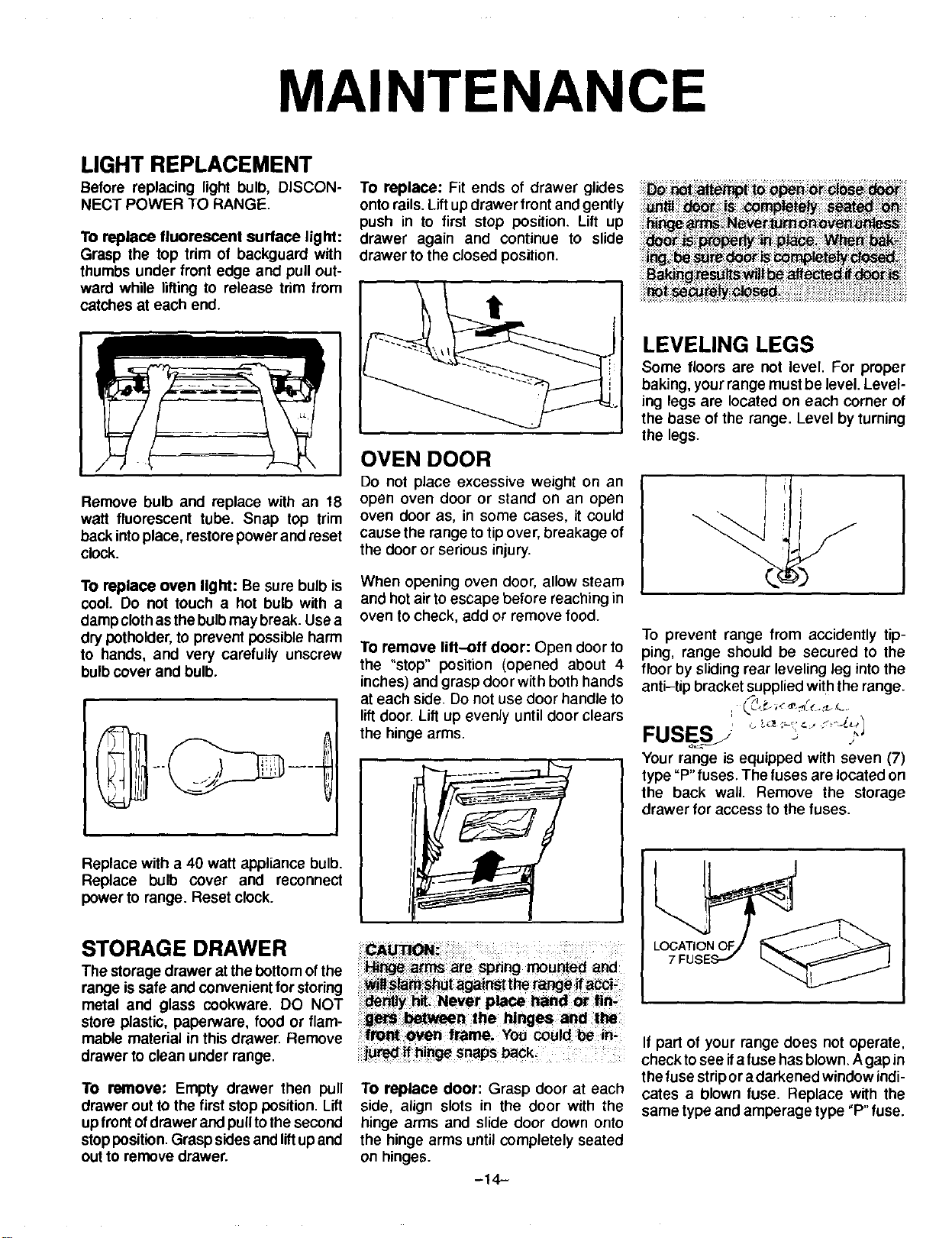
MAINTENANCE
LIGHT REPLACEMENT
Before replacing light bulb, DISCON-
NECT POWER TO RANGE.
To replace fluorescent surface light:
Grasp the top trim of backguard with
thumbs under front edge and pull out-
ward while lifting to release trim from
catches at each end. t
OVEN DOOR
Remove bulb and replace with an 18
waft fluorescent tube. Snap top trim
back intoplace, restorepower and reset
clock.
To replace: Fit ends of drawer glides
onto rails. Liftup drawer front and gently
push in to first stop position. Lift up
drawer again and continue to slide
drawer to the closed position.
I
Do not place excessive weight on an
open oven door or stand on an open
oven door as, in some cases, it could
cause the range to tip over, breakage of
the door or serious injury.
To replace oven light: Be sure bulb is
cool. Do not touch a hot bulb with a
damp clothas the bulb may break. Use a
dry pothoider, to prevent possible harm
to hands, and very carefully unscrew
bulb cover and bulb.
When opening oven door, allow steam
and hot air toescape before reaching in
oven to check, add or remove food.
To remove lift-off door: Open door to
the "stop" position (opened about 4
inches) and grasp door with both hands
at each side. Do not use door handle to
liftdoor. Lift up evenly until door clears
the hinge arms.
Replace with a 40 watt appliance bulb.
Replace bulb cover and reconnect
power to range. Reset clock.
STORAGE DRAWER
The storage drawer at the bottomof the
range issafe and convenient for storing
metal and glass cookware. DO NOT
stere plastic, paperware, food or flam-
mable material in this drawer. Remove
drawer to clean under range.
To remove: Empty drawer then pull
drawer out to the first stop position. Lift
up frontofdrawer and pulltothe second
stopposition.Grasp sides and liftup and
out to remove drawer.
g_S :between the hinges and the
frollt.ovel_ frame. You could be in-
ijured if hinge snaps back.
To replace door: Grasp door at each
side, align slots in the door with the
hinge arms and slide door down onto
the hinge arms until completely seated
on hinges.
-14-
LEVELING LEGS
Some floors are not level. For proper
baking, your range must be level Level-
ing legs are located on each corner of
the base of the range. Level byturning
the legs.
To prevent range from accidently tip-
ping, range should be secured to the
floor by sliding rear leveling leg into the
anti-tip bracket supplied with the range.
FUSESj ""
.. J
Your range is equipped with seven (7)
type "P" fuses. The fuses are located on
the back wall. Remove the storage
drawer for access to the fuses.
L
7 FUS
If part of your range does not operate,
check to see ifa fuse has blown. Agap in
the fuse strip or a darkened window indi-
cates a blown fuse. Replace with the
same type and amperage type "P" fuse.

CARE AND CLEANING
,i iii!!iliiiii!iiiii!i!ili!ii!iiiiiiiiiiiiiiiiiiiiil
Broiler pan & in- Soap & water. Plastic Remove from oven after use. Cool then pour off grease. Place soapy
sert scouring pad. Soap cloth over insert and pan; let soak to loosen soil. Wash in warm soapy
filled scouring pad. water. Use soap filled scouring pad to remove stubborn soil. Clean in
dishwasher if desired.
_p _ water,_aste of
:.!i :: _en Surface is co_
a_ _manentl_
Control knobs Mild detergent & water. To remove knobs, gently pullforward. Wash inmilddetergent and water.
Do not useabrasive cleaning agents. They willscratchfinish and remove
markings. Rinse, dry and replace. Turn each element ON tosee ifknobs
have been replaced correctly.
Was_wii_ sogp ana _ater. _m_
_ith Clear:water and d_ To prevem _aini_ _ o_;en_ r_d_Wi:_:_i
; i i ; iiiii;!;iiii ii!iiii;!iii!i!iiiii!iii i!iii!ili!ili!iill
Metal finishes:
Aluminum - back-
guard base.
Chrome & stainless
steel - trim parts
Oven racks
iiiiiiii!iliiiiiiii' ; ii!ii!i!i! : ,':
Porcelain enamel:
See page 6 for
self-clean oven
and page 7 for
continuouscleaning
oven
Soap & water. Paste of Wash with soap and water. Remove stubborn soil with paste of baking
baking soda & water, soda and water. Do not use oven cleaners, abrasive or caustic agents.
They will damage the finish.
Soap & water. Cleans- Clean with soapy water. Remove stubborn soil with cleansing powder or
ing powders & plastic soap filled scouring pad. Rinse and dry.
pads. Soap filled scour-
ing pad.
i_ _ W_er; _aste DO not use oven c eaner, powder or _uid c!e_n_rs; abrasrve o__usti_
_:_:_ _ : _ ean ng agents o n piasticfinishe_ _eSe _a_i_g agentswitl:_ratcho_
f!nisb. To prevent staining Or:disco_=_;i;;_iPe _p]at_ grease _
_id (tomat0, lem_n; yJnegar, roilk_;!_it:ju;_ _n_d_! im_iat_!_ _h
Mild liquid cleaners,
detergent or soap &
water. Cleansing pow-
ders and non abrasive
nylon or plastic pads.
Porcelain enamel isglass fused on metal. It may crack or chip with mis-
use. Clean with soap and water when parts are cool. All spillovers, espe-
cially acid or sugar spillovers, should be wiped up immediately with a dry
cloth. Surface may discolor or dull if soil is not removed. When surface is
cool, clean with warm soapy water. NEVER WIPE OFF A WARM OR
HOT ENAMEL SURFACE WITH A DAMP CLOTH. THIS MAY CAUSE
CRACKING AND CHIPPING. Never use oven cleaners, abrasive or
i caustic cleaning agents on exterior finish of range.
-15-

SERVICE
PART OR ALL OF YOUR Is the range plug disconnected from the electrical outlet? ,, Are house fuses blown or
RANGE DOES NOT OPERATE circuit breakers tripped? • Is the range plug loose or improperly plugged in? Has
power supply to your home been interrupted? ,, Was oven properly set?
CONTROL WILL NOT AC- This may indicate a "stuck" pad. Press each of the seven pads to disengage the pad.
CEPT AN ENTRY Then, press STOP/CLEAR pad and repmgram the operation. Ifthe controlstilldoes not
accept an entry after checking each pad, call the servicer.
SURFACE ELEMENTS FAIL
TO TURN ON OR HEAT FOOD
PROPERLY
Is range plug disconnected from the electrical outlet? • Check circuit breaker or fuse
box for tripped circuit breakers or blown fuses. • Is element properly plugged into recep-
tacle? • Was incorrect utensil used? • For optimum results, utensil SHOULD HAVE A
FLAT bottom. See page 9 for additional information. (NOTE: Expect cooking times to
increase if range is connected to 208 volts). • Have serviceman check element.
• CANADIAN MODELS ONLY: Surface units will not operate during a self-clean
operation. This is normal.
FOOD NOT BAKING SATIS- Are racks properly in place and in correct position for what you are baking? • Is range
FACTORILY level? ,,Are you using the proper pan? • ISitbright, not soiled or clarkcolored? • Have
youusedfoilincorrectly? . Are you using standard measuring utensils? oDidyoupre-
heat ifrecommended? • Oven temperature is incorrectly set - too low or too high.
OVEN DOES NOT OPERATE Is the range disconnected from the electrical power? • Was oven properly set?
OVEN LIGHT DOES NOT Is bulb loose or burned out?
WORK
F PLUS A NUMBER APPEARS This is called a FAULT CODE. If a fault code appears in the display, press the STOP/
IN THE DISPLAY AND A CON- CLEARpad, ltthefaultcodereappears, disconnect powerto the range and call the ser-
TINUOUS BEEP SOUNDS. vicer.
(EXAMPLE: F 2)
EXPLANATION OF FAULT CODES DURINGNORMALOVENCOOKING
Yourappliance is equipped with an electronic control featur-
ingbuilt-in, self-diagnostic software. Thissoftware continu-
ously monitorsthe control to insure safe and proper opera-
tion. Ifthe software should detect a questionable situation,a
FAULT CODE (F plus a number) will appear in the display
and continuous beeps will sound.
If a fault code appears in the display and continuous beeps
sound, press the STOP/CLEAR pad. Then, reprogram the
cooking operation.
If the fault code reappears in the display,call a servicer. Do
not usethe oven untilthe control has been serviced. The sur-
face unit can be used.
J Is,+O
,_
A faultcode indicates that there may be functional error. Asa
safety precaution, the control will automatically cancel the
program. Follow the procedures described to check the ap-
pliance.
DURING A SELF-CLEAN CYCLE
If the oven is heavily soiled, excessive smoke and flaring
may result in a fault code. If this occurs, press the STOP/
CLEAR pad and allow the oven tOcool for an hour. Then,
reprogram the oven for the clean cycle.
If the fault code reappears in the display, call a servicer. Do
not use the oven until the control has been serviced. The sur-
face unit can be used.
-16-

SERVICE
SERVICE
Do not attempt to service the appli-
ance yourself unless directed to do
so In this book, Contact the dealer
who sold you the appliance for serv-
Ice.
HOW TO OBTAIN
SERVICE
When your appliance requires service
or replacement pads, contact your
Dealer or Authorized Servicer. Use only
genuine factory or Maycor parts if re-
placement parts are necessary. Consult
the Yellow Pages in your telephone di-
rectory under appliance for the service
center nearest you. Be sure to include
your name, address, and phone num-
ber, along with the model and serial
numbers of the appliance. (See front
cover for locationof your model and se-
rial numbers.)
If you are unable toobtain service, write
to us. Our address is found on the rating
plate, See front cover for location of rat-
ing plate.
Ifyou are not satisfied with the local re-
sponse to your service requirements,
call or write MAYCOR Appliance Parts
and Service Company, 240 Edwards
Street, S.E., Cleveland, TN 37311,
(615) 472-3500. Include or have avail-
able the complete model and serial
numbers ofthe appliance, the name and
address of the dealer from whom you
purchased the appliance, the date of
purchase and details concerning your
problem.
If you did not receive satisfactory serv-
ice through your servicer or Maycor you
may contact the Major Appliance Con-
sumer Action Panel by letter including
your name, address, and telephone
number, as well as the model and serial
numbers of the appliance.
Major Appliance Consumer Action Panel
20 North Wacker Drive
Chicago, IL 60606
MACAP (Major Appliance Consumer
Action Panel) is an independent agency
sponsored by three trade associations
as a court of appeals on consumer com-
plaints which have not been resolved
satisfactorily within a reasonable period
of time.
-17--
WHAT IS NOT COVERED BY THESE TWO WARRANTIES:
1. Conditions and damages resulting from any of the fol-
lowing:
a. Improper installation, delivery, or maintenance.
b. Any repair, modification, alteration or adjustment not
authorized by Maycor, or a Maycor authorized servic-
er.
c. Misuse, abuse, accidents or unreasonable use.
d. Incorrect electrical current, voltage or supply.
e. Improper setting of any control.
2. Warranties are void if the original serial numbers have
been removed, altered, orcannot be readily determined.
3. Light bulbs.
4. Products purchased for commercial or industrial use.
5. The cost of service or service call to:
a. Correct installation errors.
b. Instruct the consumer on the proper use of the prod-
uct.
c. Transport the appliance to a servicer.
6. CONSEQUENTIAL OR INCIDENTAL DAMAGES SUS-
TAINED BY ANY PERSON AS A RESULT OF ANY
BREACH OF THESE WARRANTIES. Some states do
not allow the exclusion or limitation of consequential or
incidental damages, so the above exclusion may not ap-
ply to you.
HOW TO RECEIVE WARRANTY SERVICE
1. Contact the dealer from whom you purchased the appliance or any authorized Maycor servicer to
receive warranty service under these warranties.
2. Should you not receive satisfactory warranty service from your local servicer, contact:
Customer Assistance
Maycor Appliance Parts and Service Company
240 Edwards Street, S.E.
Cleveland, TN 37311
(615) 472-3500
3. Have the following information available when requesting warranty service:
- Your name and address.
- The model and serial numbers of your appliance.
- The name and address of your dealer or servicer.
- The purchase date of your appliance.
- A clear description of the problem.
(1/93) WARRANTY PART NO.: 8109P062-60